#🔒 Environment variables are gone... with the app also
349 messages · Page 1 of 1 (latest)
 zenith geyser
 topaz trellisBOT
zenith geyser
title
topaz trellisBOT
zenith geyser
title
@zenith geyser
 Python help channel opened
Remember to:
- Ask your Python question, not if you can ask or if there's an expert who can help.
- Show a code sample as text (rather than a screenshot) and the error message, if you've got one.
- Explain what you expect to happen and what actually happens.
:warning: Do not pip install anything that isn't related to your question, especially if asked to over DMs.
Closes after a period of inactivity, or when you send !close.
 jagged ore
expand.
jagged ore
Show a code sample as text (rather than a screenshot) and the error message, if you've got one.
Explain what you expect to happen and what actually happens.
is this python related?
zenith geyser
#python-discussion message this is not python related
 lyric plover
Lol bruh
zenith geyser
awawawaa
 narrow dagger
alright
narrow dagger
jagged ore
is this python related?
yes
jagged ore
narrow dagger
yes
didn't he just say it's not?
narrow dagger
one thing at the time
jagged ore
can you run py -0
zenith geyser
two ones lemme yes
narrow dagger
after the rename, what did you do
zenith geyser
i changed the val in the registry and relogged in
zenith geyser
-V:3.13 * Python 3.13 (64-bit)
-V:3.12 Python 3.12 (64-bit)
narrow dagger
zenith geyser
i changed the val in the registry and relogged in
and it was the correct id, like i talked about?
zenith geyser
narrow dagger
and it was the correct id, like i talked about?
yes?
narrow dagger
zenith geyser
yes?
explain how you did it so i know
zenith geyser
lemme find my screenshot or nvm
i navigated to the path
found ProfileImagePath
found the one with the old path
and renamed the old val to the new one
thats it
then i just relogged back in
narrow dagger
what is the current user folder name
zenith geyser
Uzivatel
narrow dagger
and share a screenshot of the registry change
HKEY_LOCAL_MACHINE\SOFTWARE\Microsoft\Windows NT\CurrentVersion\ProfileList\<User SID>\
zenith geyser
narrow dagger
and share a screenshot of the registry change
its gonan take a while to naviagte the-
nvm
heres the path changed
 zenith geyser
im a competent child
narrow dagger
open your terminal
zenith geyser
done
narrow dagger
the new black powershell
zenith geyser
scoop straship and firacode are all gone
narrow dagger
write: echo $env:PATH
zenith geyser
C:\Program Files\PowerShell\7;C:\Windows\system32;C:\Windows;C:\Windows\System32\Wbem;C:\Windows\System32\WindowsPowerShell\v1.0;C:\Windows\System32\OpenSSH;C:\Program Files\Tesseract-OCR;C:\Program Files\Git\cmd;C:\Program Files\dotnet;C:\Program Files\PowerShell\7;C:\Users\Uzivatel\AppData\Local\Programs\Python\Python312\Scripts;C:\Users\Uzivatel\AppData\Local\Programs\Python\Python312;C:\Users\Uživatel\scoop\shims;C:\Users\Uživatel\AppData\Local\Programs\Python\Python312\Scripts;C:\Users\Uživatel\AppData\Local\Programs\Python\Python312;C:\Users\Uživatel\AppData\Local\Programs\Python\Python313\Scripts;C:\Users\Uživatel\AppData\Local\Programs\Python\Python313;C:\Users\Uživatel.cargo\bin;C:\Users\Uzivatel\AppData\Local\Microsoft\WindowsApps;C:\Users\Uživatel\AppData\Local\Programs\Microsoft VS Code\bin;C:\Users\Uživatel\AppData\Local\Programs\Microsoft VS Code Insiders\bin;C:\Users\Uživatel\AppData\Local\Programs\Julia-1.10.3\bin;C:\Program Files (x86)\Steam\steamapps\common\Geometry Dash\GeometryDash.exe;C:\Users\Uživatel\AppData\Local\Packages\PythonSoftwareFoundation.Python.3.12_qbz5n2kfra8p0\LocalCache\local-packages\Python312\Scripts;C:\Users\Uživatel\AppData\Local\Programs\Microsoft VS Code;C:\Users\Uzivatel.dotnet\tools
narrow dagger
lets make it more readable, hold on
zenith geyser
!e
s =
"""
C:\Program Files\PowerShell\7;C:\Windows\system32;C:\Windows;C:\Windows\System32\Wbem;C:\Windows\System32\WindowsPowerShell\v1.0;C:\Windows\System32\OpenSSH;C:\Program Files\Tesseract-OCR;C:\Program Files\Git\cmd;C:\Program Files\dotnet;C:\Program Files\PowerShell\7;C:\Users\Uzivatel\AppData\Local\Programs\Python\Python312\Scripts;C:\Users\Uzivatel\AppData\Local\Programs\Python\Python312;C:\Users\Uživatel\scoop\shims;C:\Users\Uživatel\AppData\Local\Programs\Python\Python312\Scripts;C:\Users\Uživatel\AppData\Local\Programs\Python\Python312;C:\Users\Uživatel\AppData\Local\Programs\Python\Python313\Scripts;C:\Users\Uživatel\AppData\Local\Programs\Python\Python313;C:\Users\Uživatel.cargo\bin;C:\Users\Uzivatel\AppData\Local\Microsoft\WindowsApps;C:\Users\Uživatel\AppData\Local\Programs\Microsoft VS Code\bin;C:\Users\Uživatel\AppData\Local\Programs\Microsoft VS Code Insiders\bin;C:\Users\Uživatel\AppData\Local\Programs\Julia-1.10.3\bin;C:\Program Files (x86)\Steam\steamapps\common\Geometry Dash\GeometryDash.exe;C:\Users\Uživatel\AppData\Local\Packages\PythonSoftwareFoundation.Python.3.12_qbz5n2kfra8p0\LocalCache\local-packages\Python312\Scripts;C:\Users\Uživatel\AppData\Local\Programs\Microsoft VS Code;C:\Users\Uzivatel.dotnet\tools
"""
print(s.replace(";"), "\n")
topaz trellisBOT
zenith geyser
!e
s = \
"""
C:\Program Files\PowerShell\7;C:\Windows\system32;C:\Windows;C:\Win...
:x: Your 3.12 eval job has completed with return code 1.
001 |   File "/home/main.py", line 2
002 |     """
003 |     ^^^
004 | SyntaxError: (unicode error) 'unicodeescape' codec can't decode bytes in position 274-275: truncated \UXXXXXXXX escape
NOOOOOOOOOOOOOOOOOOOOOOOOOOOOOOOOOOOOOOOO
!e
s =
r"""
C:\Program Files\PowerShell\7;C:\Windows\system32;C:\Windows;C:\Windows\System32\Wbem;C:\Windows\System32\WindowsPowerShell\v1.0;C:\Windows\System32\OpenSSH;C:\Program Files\Tesseract-OCR;C:\Program Files\Git\cmd;C:\Program Files\dotnet;C:\Program Files\PowerShell\7;C:\Users\Uzivatel\AppData\Local\Programs\Python\Python312\Scripts;C:\Users\Uzivatel\AppData\Local\Programs\Python\Python312;C:\Users\Uživatel\scoop\shims;C:\Users\Uživatel\AppData\Local\Programs\Python\Python312\Scripts;C:\Users\Uživatel\AppData\Local\Programs\Python\Python312;C:\Users\Uživatel\AppData\Local\Programs\Python\Python313\Scripts;C:\Users\Uživatel\AppData\Local\Programs\Python\Python313;C:\Users\Uživatel.cargo\bin;C:\Users\Uzivatel\AppData\Local\Microsoft\WindowsApps;C:\Users\Uživatel\AppData\Local\Programs\Microsoft VS Code\bin;C:\Users\Uživatel\AppData\Local\Programs\Microsoft VS Code Insiders\bin;C:\Users\Uživatel\AppData\Local\Programs\Julia-1.10.3\bin;C:\Program Files (x86)\Steam\steamapps\common\Geometry Dash\GeometryDash.exe;C:\Users\Uživatel\AppData\Local\Packages\PythonSoftwareFoundation.Python.3.12_qbz5n2kfra8p0\LocalCache\local-packages\Python312\Scripts;C:\Users\Uživatel\AppData\Local\Programs\Microsoft VS Code;C:\Users\Uzivatel.dotnet\tools
"""
print(s.replace(";"), "\n")
topaz trellisBOT
zenith geyser
!e
s = \
r"""
C:\Program Files\PowerShell\7;C:\Windows\system32;C:\Windows;C:\Wi...
:x: Your 3.12 eval job has completed with return code 1.
001 | Traceback (most recent call last):
002 |   File "/home/main.py", line 5, in <module>
003 |     print(s.replace(";"), "\n")
004 |           ^^^^^^^^^^^^^^
005 | TypeError: replace expected at least 2 arguments, got 1
!e
s =
"""
C:\Program Files\PowerShell\7;C:\Windows\system32;C:\Windows;C:\Windows\System32\Wbem;C:\Windows\System32\WindowsPowerShell\v1.0;C:\Windows\System32\OpenSSH;C:\Program Files\Tesseract-OCR;C:\Program Files\Git\cmd;C:\Program Files\dotnet;C:\Program Files\PowerShell\7;C:\Users\Uzivatel\AppData\Local\Programs\Python\Python312\Scripts;C:\Users\Uzivatel\AppData\Local\Programs\Python\Python312;C:\Users\Uživatel\scoop\shims;C:\Users\Uživatel\AppData\Local\Programs\Python\Python312\Scripts;C:\Users\Uživatel\AppData\Local\Programs\Python\Python312;C:\Users\Uživatel\AppData\Local\Programs\Python\Python313\Scripts;C:\Users\Uživatel\AppData\Local\Programs\Python\Python313;C:\Users\Uživatel.cargo\bin;C:\Users\Uzivatel\AppData\Local\Microsoft\WindowsApps;C:\Users\Uživatel\AppData\Local\Programs\Microsoft VS Code\bin;C:\Users\Uživatel\AppData\Local\Programs\Microsoft VS Code Insiders\bin;C:\Users\Uživatel\AppData\Local\Programs\Julia-1.10.3\bin;C:\Program Files (x86)\Steam\steamapps\common\Geometry Dash\GeometryDash.exe;C:\Users\Uživatel\AppData\Local\Packages\PythonSoftwareFoundation.Python.3.12_qbz5n2kfra8p0\LocalCache\local-packages\Python312\Scripts;C:\Users\Uživatel\AppData\Local\Programs\Microsoft VS Code;C:\Users\Uzivatel.dotnet\tools
"""
print(s.replace(";", "\n")
topaz trellisBOT
zenith geyser
!e
s = \
"""
C:\Program Files\PowerShell\7;C:\Windows\system32;C:\Windows;C:\Win...
:x: Your 3.12 eval job has completed with return code 1.
001 |   File "/home/main.py", line 2
002 |     """
003 |     ^^^
004 | SyntaxError: (unicode error) 'unicodeescape' codec can't decode bytes in position 274-275: truncated \UXXXXXXXX escape
!e
s =
r"""
C:\Program Files\PowerShell\7;C:\Windows\system32;C:\Windows;C:\Windows\System32\Wbem;C:\Windows\System32\WindowsPowerShell\v1.0;C:\Windows\System32\OpenSSH;C:\Program Files\Tesseract-OCR;C:\Program Files\Git\cmd;C:\Program Files\dotnet;C:\Program Files\PowerShell\7;C:\Users\Uzivatel\AppData\Local\Programs\Python\Python312\Scripts;C:\Users\Uzivatel\AppData\Local\Programs\Python\Python312;C:\Users\Uživatel\scoop\shims;C:\Users\Uživatel\AppData\Local\Programs\Python\Python312\Scripts;C:\Users\Uživatel\AppData\Local\Programs\Python\Python312;C:\Users\Uživatel\AppData\Local\Programs\Python\Python313\Scripts;C:\Users\Uživatel\AppData\Local\Programs\Python\Python313;C:\Users\Uživatel.cargo\bin;C:\Users\Uzivatel\AppData\Local\Microsoft\WindowsApps;C:\Users\Uživatel\AppData\Local\Programs\Microsoft VS Code\bin;C:\Users\Uživatel\AppData\Local\Programs\Microsoft VS Code Insiders\bin;C:\Users\Uživatel\AppData\Local\Programs\Julia-1.10.3\bin;C:\Program Files (x86)\Steam\steamapps\common\Geometry Dash\GeometryDash.exe;C:\Users\Uživatel\AppData\Local\Packages\PythonSoftwareFoundation.Python.3.12_qbz5n2kfra8p0\LocalCache\local-packages\Python312\Scripts;C:\Users\Uživatel\AppData\Local\Programs\Microsoft VS Code;C:\Users\Uzivatel.dotnet\tools
"""
print(s.replace(";", "\n")
topaz trellisBOT
zenith geyser
!e
s = \
r"""
C:\Program Files\PowerShell\7;C:\Windows\system32;C:\Windows;C:\Wi...
:x: Your 3.12 eval job has completed with return code 1.
001 |   File "/home/main.py", line 5
002 |     print(s.replace(";", "\n")
003 |          ^
004 | SyntaxError: '(' was never closed
!e
s =
r"""
C:\Program Files\PowerShell\7;C:\Windows\system32;C:\Windows;C:\Windows\System32\Wbem;C:\Windows\System32\WindowsPowerShell\v1.0;C:\Windows\System32\OpenSSH;C:\Program Files\Tesseract-OCR;C:\Program Files\Git\cmd;C:\Program Files\dotnet;C:\Program Files\PowerShell\7;C:\Users\Uzivatel\AppData\Local\Programs\Python\Python312\Scripts;C:\Users\Uzivatel\AppData\Local\Programs\Python\Python312;C:\Users\Uživatel\scoop\shims;C:\Users\Uživatel\AppData\Local\Programs\Python\Python312\Scripts;C:\Users\Uživatel\AppData\Local\Programs\Python\Python312;C:\Users\Uživatel\AppData\Local\Programs\Python\Python313\Scripts;C:\Users\Uživatel\AppData\Local\Programs\Python\Python313;C:\Users\Uživatel.cargo\bin;C:\Users\Uzivatel\AppData\Local\Microsoft\WindowsApps;C:\Users\Uživatel\AppData\Local\Programs\Microsoft VS Code\bin;C:\Users\Uživatel\AppData\Local\Programs\Microsoft VS Code Insiders\bin;C:\Users\Uživatel\AppData\Local\Programs\Julia-1.10.3\bin;C:\Program Files (x86)\Steam\steamapps\common\Geometry Dash\GeometryDash.exe;C:\Users\Uživatel\AppData\Local\Packages\PythonSoftwareFoundation.Python.3.12_qbz5n2kfra8p0\LocalCache\local-packages\Python312\Scripts;C:\Users\Uživatel\AppData\Local\Programs\Microsoft VS Code;C:\Users\Uzivatel.dotnet\tools
"""
print(s.replace(";", "\n"))
topaz trellisBOT
zenith geyser
!e
s = \
r"""
C:\Program Files\PowerShell\7;C:\Windows\system32;C:\Windows;C:\Wi...
:white_check_mark: Your 3.12 eval job has completed with return code 0.
001 |
002 | C:\Program Files\PowerShell\7
003 | C:\Windows\system32
004 | C:\Windows
005 | C:\Windows\System32\Wbem
006 | C:\Windows\System32\WindowsPowerShell\v1.0\
007 | C:\Windows\System32\OpenSSH\
008 | C:\Program Files\Tesseract-OCR
009 | C:\Program Files\Git\cmd
010 | C:\Program Files\dotnet\
... (truncated - too many lines)
Full output: https://paste.pythondiscord.com/SPJTBJHPMXVS3NNRHP7QPDGFCU
zenith geyser
YEEEEPEEEPPEPE
C:\Program Files\PowerShell\7
C:\Windows\system32
C:\Windows
C:\Windows\System32\Wbem
C:\Windows\System32\WindowsPowerShell\v1.0\
C:\Windows\System32\OpenSSH\
C:\Program Files\Tesseract-OCR
C:\Program Files\Git\cmd
C:\Program Files\dotnet\
C:\Program Files\PowerShell\7\
C:\Users\Uzivatel\AppData\Local\Programs\Python\Python312\Scripts\
C:\Users\Uzivatel\AppData\Local\Programs\Python\Python312\
C:\Users\Uživatel\scoop\shims
C:\Users\Uživatel\AppData\Local\Programs\Python\Python312\Scripts\
C:\Users\Uživatel\AppData\Local\Programs\Python\Python312\
C:\Users\Uživatel\AppData\Local\Programs\Python\Python313\Scripts\
C:\Users\Uživatel\AppData\Local\Programs\Python\Python313\
C:\Users\Uživatel\.cargo\bin
C:\Users\Uzivatel\AppData\Local\Microsoft\WindowsApps
C:\Users\Uživatel\AppData\Local\Programs\Microsoft VS Code\bin
C:\Users\Uživatel\AppData\Local\Programs\Microsoft VS Code Insiders\bin
C:\Users\Uživatel\AppData\Local\Programs\Julia-1.10.3\bin
C:\Program Files (x86)\Steam\steamapps\common\Geometry Dash\GeometryDash.exe
C:\Users\Uživatel\AppData\Local\Packages\PythonSoftwareFoundation.Python.3.12_qbz5n2kfra8p0\LocalCache\local-packages\Python312\Scripts
C:\Users\Uživatel\AppData\Local\Programs\Microsoft VS Code
C:\Users\Uzivatel\.dotnet\tools
MS python?
zenith geyser
5 tries
 narrow dagger
ahh.. windows 10... ill share where
narrow dagger
open system settings
 zenith geyser
i found the button
narrow dagger
ahh.. i found a shortcut
zenith geyser
im in the var env
zenith geyser
narrow dagger
`SystemPropertiesAdvanced`
.bm
 zenith geyser
narrow dagger
zenith geyser
narrow dagger
ive worked with this a thousand times before
narrow dagger
there are two groups of environments
you hav eto change the user one, as the system varibles does not use your username
make sense?
zenith geyser
yes
narrow dagger
they are marked as User variable for %n
zenith geyser
man ive done this a couple times but ok
narrow dagger
inside user variables, there are siggle elements, and groups of elements
you have to go into every one and see if they have your old username
zenith geyser
fixing the ž
 narrow dagger
yes thats one
PATH is also one, but it has many
let me share two examples, just so we are 100% things are beeing done correctly

example of a single change... doubleclick and change the username

group of variables..
you have to find and change everyone, and remember to press ok so you get changes folloowed by apply on the system properties window
zenith geyser
ok i changed everything back to the new user
theres no apply button for me, just ok but it works
narrow dagger
zenith geyser
theres no apply button for me, just ok but it works
look at this as well

this is my system variables
zenith geyser
ahhh man
narrow dagger
notice that i have my user there, now thats wrong, but you see google did not care
so you must check that as well
zenith geyser
ok lemme see if stuff starts to work
narrow dagger
and restart computer
zenith geyser
ofc ofc
narrow dagger
when your done
zenith geyser
narrow dagger
when your done
ok done
now one last (?) thing, how do i download scoop or lemme chekc if it
its not on path
i already got scoop :P
narrow dagger
hmm
zenith geyser
ahhaah lol
narrow dagger
scoop does not work?
zenith geyser
i redownloaded it
zenith geyser
yea
narrow dagger
starship runs ?
zenith geyser
kinda?
PS C:\Users\Uzivatel> starship
Shim: Could not determine if target is a GUI app. Assuming console.
Shim: Could not create process with command '"C:\Users\U
same thing with bat
S:
narrow dagger
now reset all
zenith geyser
but we didnt scoop it
narrow dagger
scoop list
zenith geyser
for module in scoop.list():
module.reset()
narrow dagger
yes... you can write this as a shell loop, but explaining that takes far longer then you just doing that for the 3-4 scoop installs
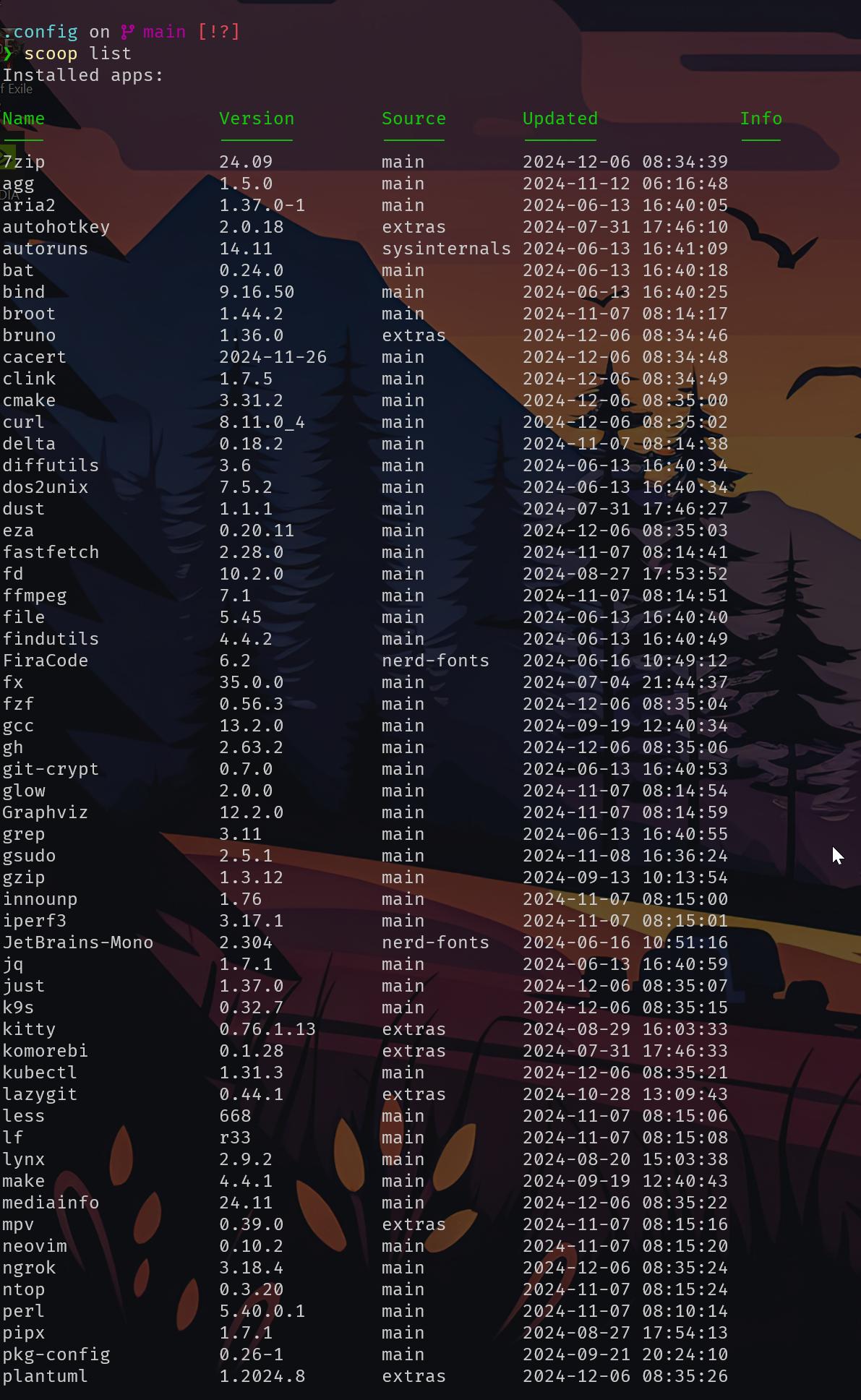
this is my list, and only the first page 😄
as you might imagine, i use a shell for loop to reset my scoop installs
 zenith geyser
background so beatiful
narrow dagger
let me know when all has been reset
zenith geyser
alr done
narrow dagger
go to settings and selcte another and back to the firecode one
zenith geyser
theres no fira fonts to choose from
zenith geyser
yes
jagged ore
you'll want the nerd fira fonts.
zenith geyser
jagged ore
you'll want the nerd fira fonts.
why?
zenith geyser
and who the hell asked you meanie~
jagged ore
zenith geyser
why?
starship requires them.
narrow dagger
zenith geyser
and who the hell asked you meanie~
stop this
jagged ore
zenith geyser
and who the hell asked you meanie~
ah, well. good luck then.
narrow dagger
@jagged ore is beeing helpful
zenith geyser
:(
narrow dagger
its not your place to lash out to people @zenith geyser
zenith geyser
sorry
jagged ore
it's literally a pre-requisite.
 zenith geyser
i cant stop being mean waaaaaaaaaaaaaaaaaaaaaaaaaaaaaaaa
narrow dagger
jagged ore
it's literally a pre-requisite.
i messed this up yesterday
so i broke his computer
and then i went to play PoE the whole evening
zenith geyser
amazing moderator
narrow dagger
im just fixing it back!
zenith geyser
would recommend
jagged ore
i installed starship on a parallels wins VM last night so it's pretty fresh for me
zenith geyser
narrow dagger
and then i went to play PoE the whole evening
PoE?
narrow dagger
and i have a different way to handle starship and fonts then other people @jagged ore
i use scoop
and scoop broke
jagged ore
scoop is nice, but choco is better imo
zenith geyser
scoop icecream AND NOW CHOCO?????
narrow dagger
i find that scoop works so well on windows PATH issues so i like it more
narrow dagger
zenith geyser
scoop icecream AND NOW CHOCO?????
all flavors 😄
zenith geyser
vanilla????
jagged ore
choco does the same thing iirc, but anyways, offtrack
narrow dagger
zenith geyser
PoE?
Path of Excile
narrow dagger
narrow dagger
`scoop uninstall FiraCode`
@zenith geyser did you run this?
zenith geyser
yes i reinstalled it and font works
narrow dagger
zenith geyser
yes i reinstalled it and font works
great! restart the terminal, show screenshot
zenith geyser
 narrow dagger
lets test a thing
narrow dagger
zenith geyser
i just somehow dont like krrt :/ but hes super useful soo
he is very knowledgable, and you must remember that people are only trying to use their free time to help you
zenith geyser
like you
narrow dagger
notice free time, we do this because we want to
zenith geyser
yesterday you spent over an hour and a half
narrow dagger
navigate there
and write this
git clone [email protected]:eivl/endpoint_filter.git
it is one of my projects
its very small
and once git clone is done, do cd endpoint_filter to go into that folder
and you will see starship changing your terminal
zenith geyser
Warning: Permanently added 'github.com' (ED25519) to the list of known hosts.
[email protected]: Permission denied (publickey).
fatal: Could not read from remote repository.
3:
im sorry krrt
i should behave
jagged ore
looks like you're using ssh based login
narrow dagger
zenith geyser
Warning: Permanently added 'github.com' (ED25519) to the list of known hosts.
gi...
ermm.. i gave you the wrong link
git clone https://github.com/eivl/endpoint_filter.git
zenith geyser
🤯
jagged ore
ah, or eivl's project is private
narrow dagger
jagged ore
ah, or eivl's project is private
nah.. i just copied my ssh link instead
zenith geyser
done
narrow dagger
its open source
zenith geyser
are humans open src?
narrow dagger
zenith geyser
are humans open src?
some are
 narrow dagger
jagged ore
<:Kekw:991763742796808253>
narrow dagger
jagged ore
<:Kekw:991763742796808253>
rookie mistake 😄
zenith geyser
i dont like how bare cd changes back to home, because i cant see the dir on the cmd
jagged ore
this is one of the reasons i've been relying on the gh cli more and more
narrow dagger
zenith geyser
i dont like how bare cd changes back to home, because i cant see the dir on the ...
you can see the dir
jagged ore
gh repo clone KRRT7/my-best-repo less room for error
narrow dagger
you mean full dir?
narrow dagger
zenith geyser
yeah but it doesnt
is it important?
zenith geyser
for me it is
narrow dagger
pwd shows you it
zenith geyser
whole point of directories and the terminal
narrow dagger
zenith geyser
for me it is
lets fix that
zenith geyser
narrow dagger
`pwd` shows you it
now put that in front of my cursor
narrow dagger
starship uses a toml file to handle configuarions
we have to make that file, tell windows where it is, and add your wanted changes to it
sounds good?
zenith geyser
ok
narrow dagger
mkdir -p ~/.config && touch ~/.config/starship.toml
run this command
cd ~/.config
and then this
ls to see your file
jagged ore
isn't he on wins?
zenith geyser
in which dir?
jagged ore
that's gonna fail
zenith geyser
im on windows
narrow dagger
jagged ore
that's gonna fail
im sure it will work
zenith geyser
narrow dagger
`mkdir -p ~/.config && touch ~/.config/starship.toml`
alr exists
works
now uhhhhh
narrow dagger
now ls to see the file
zenith geyser
i see the file
narrow dagger
is it 0 in size or does it has some size?
narrow dagger
alright.. lets populate it with a standard config
zenith geyser
# C:\Users\Uzivatel\scoop\apps\scoop\current\bin\scoop.ps1
$path = Join-Path $PSScriptRoot "..\apps\scoop\current\bin\scoop.ps1"
if ($MyInvocation.ExpectingInput) { $input | & $path  @args } else { & $path  @args }
exit $LASTEXITCODE
this is inside
narrow dagger
is this starship.toml?
 narrow dagger
i did not say scoop anywhere
touch starship.toml
run this from the .config folder please
narrow dagger
starship preset nerd-font-symbols -o starship.toml
run this
@jagged ore do you know the preset for starship SHOW PATH HERE ?
zenith geyser
start .\ changes my life forever
jagged ore
narrow dagger
<@998437135814238238> do you know the preset for starship `SHOW PATH HERE` ?
no, i had to use a custom path for starship yesterday due to similar issues
narrow dagger
ill have to edit my own and test a few things @zenith geyser
jagged ore
zenith geyser
`start .\` changes my life forever
you should stop getting ahead of yourself and doing random things, it'll only cause problems.
zenith geyser
jagged ore
you should stop getting ahead of yourself and doing random things, it'll only ca...
opening file explorer in cwd is pretty useful imo
just touching start hopefully wont blow up anything
jagged ore
code . is also useful
zenith geyser
same this but vs code
jagged ore
@narrow dagger looks like i used the STARSHIP_CONFIG env variable and just manually set the path, in my case, C:\Users\krrt7\Documents\starship_config.toml with the jetpack preset within the toml
 zenith geyser
yeah kinda
jagged ore
mine looks like this
 narrow dagger
from starship.toml
find directory
[directory]
read_only = " "
truncation_length = 8
truncation_symbol = '…/'

 narrow dagger
~ means your home folder
zenith geyser
i know
narrow dagger
try this a bit would you? there are some limitations to what starship can do in powershell you see

Starship is the minimal, blazing fast, and extremely customizable prompt for any shell! Shows the information you need, while staying sleek and minimal. Quick installation available for Bash, Fish, ZSH, Ion, Tcsh, Elvish, Nu, Xonsh, Cmd, and Powershell.
zenith geyser
mmmm
it just has a bunch of
chars for languages
[directory]
read_only = " "
found it
ok
narrow dagger
zenith geyser
[directory]
read_only = " "
found it
yeah, thats the one
zenith geyser
i pasted it in
narrow dagger
here is the config for starship
Starship is the minimal, blazing fast, and extremely customizable prompt for any shell! Shows the information you need, while staying sleek and minimal. Quick installation available for Bash, Fish, ZSH, Ion, Tcsh, Elvish, Nu, Xonsh, Cmd, and Powershell.
it has a lot of options
Starship is the minimal, blazing fast, and extremely customizable prompt for any shell! Shows the information you need, while staying sleek and minimal. Quick installation available for Bash, Fish, ZSH, Ion, Tcsh, Elvish, Nu, Xonsh, Cmd, and Powershell.
here is the default format for the prompt

this as an example

its when i add a format line that looks like this
that might be close to what you like
zenith geyser
cool
narrow dagger
yeah i know, starship is amazing
zenith geyser
narrow dagger
yeah i know, starship is amazing
you all are amazing
narrow dagger
have a great weekend @zenith geyser let me know if you want help with anything else! 😄
zenith geyser
u2
topaz trellisBOT
 Python help channel closed
This help channel has been closed and it's no longer possible to send messages here. If your question wasn't answered, feel free to create a new post in #1035199133436354600. To maximize your chances of getting a response, check out this guide on asking good questions.