#🔒 Not able to download scikitlearn -surprise
10 messages · Page 1 of 1 (latest)
 low forgeBOT
@grave inlet
 Python help channel opened
Remember to:
- Ask your Python question, not if you can ask or if there's an expert who can help.
- Show a code sample as text (rather than a screenshot) and the error message, if you've got one.
- Explain what you expect to happen and what actually happens.
:warning: Do not pip install anything that isn't related to your question, especially if asked to over DMs.
Closes after a period of inactivity, or when you send !close.
 grave inlet
 error: subprocess-exited-with-error

  Building wheel for scikit-surprise (pyproject.toml) did not run successfully.
  exit code: 1

  [115 lines of output]
  running bdist_wheel
  running build
  running build_py
  creating build\lib.win-amd64-cpython-312\surprise
  copying surprise\accuracy.py -> build\lib.win-amd64-cpython-312\surprise
  copying surprise\builtin_datasets.py -> build\lib.win-amd64-cpython-312\surprise
  copying surprise\dataset.py -> build\lib.win-amd64-cpython-312\surprise
  copying surprise\dump.py -> build\lib.win-amd64-cpython-312\surprise
  copying surprise\reader.py -> build\lib.win-amd64-cpython-312\surprise
  copying surprise\trainset.py -> build\lib.win-amd64-cpython-312\surprise
  copying surprise\utils.py -> build\lib.win-amd64-cpython-312\surprise
  copying surprise\__init__.py -> build\lib.win-amd64-cpython-312\surprise
  copying surprise\__main__.py -> build\lib.win-amd64-cpython-312\surprise
  creating build\lib.win-amd64-cpython-312\surprise\model_selection
  copying surprise\model_selection\search.py -> build\lib.win-amd64-cpython-312\surprise\model_selection
  copying surprise\model_selection\split.py -> build\lib.win-amd64-cpython-312\surprise\model_selection
  copying surprise\model_selection\validation.py -> build\lib.win-amd64-cpython-312\surprise\model_selection
  copying surprise\model_selection\__init__.py -> build\lib.win-amd64-cpython-312\surprise\model_selection
  creating build\lib.win-amd64-cpython-312\surprise\prediction_algorithms
  copying surprise\prediction_algorithms\algo_base.py -> build\lib.win-amd64-cpython-312\surprise\prediction_algorithms
  copying surprise\prediction_algorithms\baseline_only.py -> build\lib.win-amd64-cpython-
copying surprise\prediction_algorithms\predictions.py -> build\lib.win-amd64-cpython-312\surprise\prediction_algorithms
  copying surprise\prediction_algorithms\random_pred.py -> build\lib.win-amd64-cpython-312\surprise\predi
 C:\Users\abrah\AppData\Local\Temp\pip-build-env-46qaqvsp\overlay\Lib\site-packages\setuptools\command\build_py.py:219: _Warning: Package 'surprise.prediction_algorithms' is absent from the `packages` configuration.
  !!


          # Package would be ignored #
         ##################
          Python recognizes 'surprise.prediction_algorithms' as an importable package[^1],
          but it is absent from setuptools' `packages` configuration.

          This leads to an ambiguous overall configuration. If you want to distribute this
          package, please make sure that 'surprise.prediction_algorithms' is explicitly added
          to the `packages` configuration field.

          Alternatively, you can also rely on setuptools' discovery methods
          (for example by using `find_namespace_packages(...)`/`find_namespace:`
          instead of `find_packages(...)`/`find:`).

          You can read more about "package discovery" on setuptools documentation page:

          - https://setuptools.pypa.io/en/latest/userguide/package_discovery.html

          If you don't want 'surprise.prediction_algorithms' to be distributed and are
          already explicitly excluding 'surprise.prediction_algorithms' via
          `find_namespace_packages(...)/find_namespace` or `find_packages(...)/find`,
          you can try to use `exclude_package_data`, or `include-package-data=False` in
          combination with a more fine grained `package-data` configuration.

          You can read more about "package data files" on setuptools documentation page:

          - https://setuptools.pypa.io/en/latest/userguide/datafiles.html


          [^1]: For Python, any directory (with suitable naming) can be imported,
                even if it does not contain any `.py` files.
                On the other hand, currently there is no concept of package data
                directory, all directories are treated like packages.
 shrewd wolf
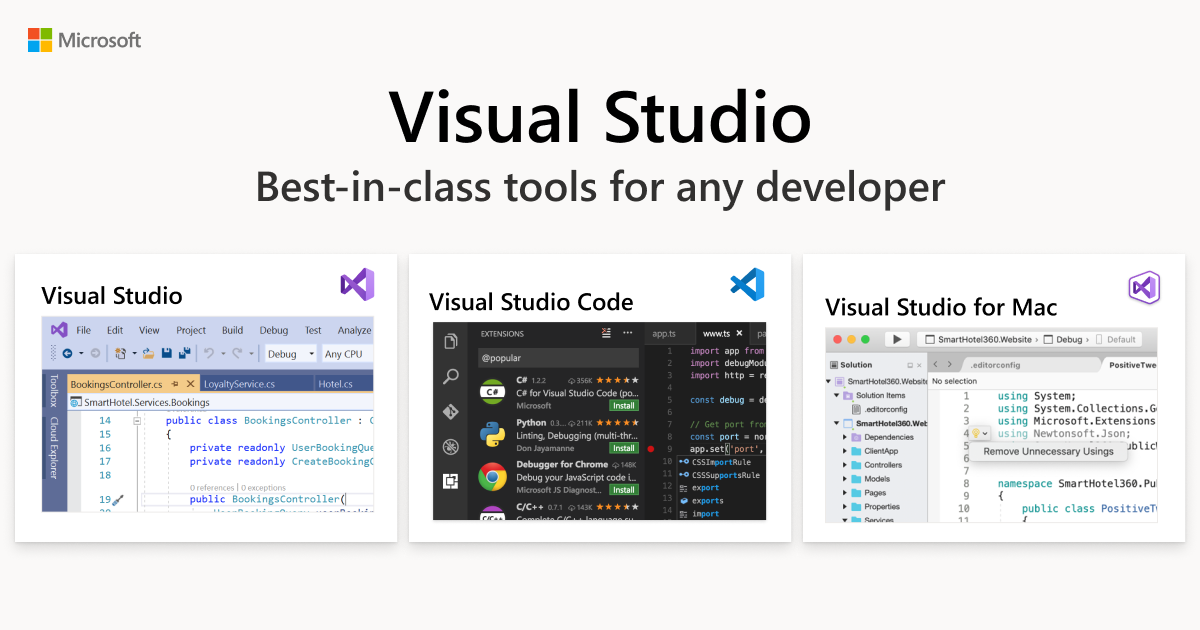 grave inlet
i downloaded but no improvement
 cerulean orbit
grave inlet
i downloaded but no improvement
cerulean orbit
grave inlet
i downloaded but no improvement
Downloaded or downloaded and installed?
Please show new error you get
low forgeBOT
 Python help channel closed
This help channel has been closed and it's no longer possible to send messages here. If your question wasn't answered, feel free to create a new post in #1035199133436354600. To maximize your chances of getting a response, check out this guide on asking good questions.