#๐Ÿ”’ Convert TCP server from using threading module to asyncio event loop

28 messages ยท Page 1 of 1 (latest)

marble river
#
import socket
import threading
import time
import asyncio
def connect(conn,addr):
    with conn: 
        print('Connected',addr)
        while True:
            data = conn.recv(1024).decode('utf-8')
            if not data:
                break
            data = data.split('\r\n')
            match data[2]:
                case 'ECHO':
                    conn.sendall(f'+{data[4]}\r\n'.encode('utf-8'))
                case 'PING':
                    conn.sendall(f'+PONG\r\n'.encode('utf-8'))
                case 'SET':
                    for i in range(len(data)):
                        if data[i].lower() == 'px':
                            timed = [float(data[10])]
                            threading.Thread(target=timer, args=(timed,data)).start()
                    dataList[data[4]] = f'+{data[6]}\r\n'
                    conn.sendall(f'+OK\r\n'.encode('utf-8'))
                case 'GET':
                    conn.sendall(dataList.get(data[4]).encode('utf-8'))
def timer(timer,data):
    seconds =float(timer[0] / 1000)
    time.sleep(seconds)
    dataList[data[4]] = f'$-1\r\n'

def main():
    global dataList
    dataList = {}
    server_socket = socket.create_server(("localhost", 6379), reuse_port=True)
    loop = asyncio.new_event_loop()
    loop.create_server(connect, host="localhost", port=6379, sock=server_socket)
    while True:
        conn, addr = server_socket.accept() # wait for client
        ## threading.Thread(target=connect,args=(conn,addr)).start()
if __name__ == "__main__":
    main()

It used to just use the threading module with "threading.Thread(target=connect,args=(conn,addr)).start()". I understand that event loop should be used rather than needing many threads? Looking through the docs i can't figure out how to convert it. The loop.create_server can accept an existing socket object as an argument but im not sure how to implement this or if i should just delete the code for that socket and try again with this event loop

cinder totemBOT
#

@marble river

Python help channel opened

Remember to:

  • Ask your Python question, not if you can ask or if there's an expert who can help.
  • Show a code sample as text (rather than a screenshot) and the error message, if you've got one.
  • Explain what you expect to happen and what actually happens.

:warning: Do not pip install anything that isn't related to your question, especially if asked to over DMs.

restive stump
#

no, with asyncio you wouldn't use socket to begin with. You create a listening server with asyncio.start_server, and provide it a callback function, that gets called for every new client.

#

that callback gets an asyncio.StreamReader and asyncio.StreamWriter passed in as first and second argument, and you use those to read from / send to the underlying socket.

#

the socket, threading and time modules shouldn't be used in asyncio in typical circumstances (at least not time.sleep - for that you use asyncio.sleep instead)

marble river
#

yea i need to change what i had before from threading to fit asyncio. Previously i would accept a connection and doing that would give me the conn as the argument to work with where i would .recv my data. You're saying that instead i would have a streamreader for this purpose and i can access the data in that?

restive stump
#

streamreder si provided to the callback function automatically

#

that doesn't have a while True in that example, but you'd still do it inside of the handle_echo function, if you need to read continuously.

marble river
#

I will try to make it fit this example for now and work from there. I am confused about the event loop though?

#

ive seen examples where they access the loop

#

but this doesnt seem to use it

restive stump
#

it's not needed. I think in older versions you needed to do that, but more changes have been made to avoid having to access the loop directly.

#

asyncio.start_server uses the loop internally of course.

marble river
#

ok so in the past I was adding an expiry if the time limit provided had been reached, but i had made a new thread to do that. Now instead in the SET case if 'px' and time is provided -just using await asyncio.sleep() will already be working concurrently?

restive stump
#

kinda. instead of spawning a thread, you spawn a task with asyncio.create_task, to run a coroutine in the "background".

#

you can add a callback or other methods to trigger whatever needs to run afterwards. lot's of different ways to do that.

marble river
#
import asyncio
async def connect(reader, writer):
    while True: 
        data = await reader.read(1024)
        data = data.decode('utf-8') 
        if not data:
            break
        data = data.split('\r\n')
        match data[2]:
            case 'ECHO':
                await writer.write(f'+{data[4]}\r\n'.encode('utf-8'))
            case 'PING':
                await writer.write(f'+PONG\r\n'.encode('utf-8'))
            case 'SET':
                for i in range(len(data)):
                    if data[i].lower() == 'px':
                        asyncio.sleep(float(data[10]) / 1000)
                        dataList[data[4]] = f'$-1\r\n'
                dataList[data[4]] = f'+{data[6]}\r\n'
                await writer.write(f'+OK\r\n'.encode('utf-8'))
            case 'GET':
                await writer.write(dataList.get(data[4]).encode('utf-8'))

async def main():
    global dataList
    dataList = {}
    server = await asyncio.start_server(connect,"localhost", 6379)
    addrs = ', '.join(str(sock.getsockname()) for sock in server.sockets)
    print(f'Serving on {addrs}')
    async with server:
        await server.serve_forever()
        
if __name__ == "__main__":
    asyncio.run(main())
#

I rewrote it as this, but i cant test if it works yet because im following a codecrafter challenge and it moved to the next task so i cant check it until i implement the RDB file part

#

and idk how to set it up for my own testing

#

it is at least serving though

#

also added the drain() since it says to follow writer with that

restive stump
#

one thing: writer.write shouldn't be awaited. only drain.

marble river
#

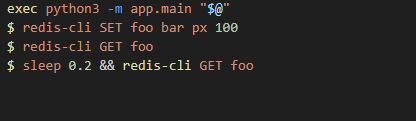
yea I updated it so it fits that, just trying to figure out how to run the shell script so i can test it on my own, I havent used WSL much and idk how to run my shell script on it so i just set it up like this: ```sh #!/bin/sh

Use this script to run your program LOCALLY.

Note: Changing this script WILL NOT affect how CodeCrafters runs your program.

Learn more: https://codecrafters.io/program-interface

set -e # Exit early if any commands fail

Copied from .codecrafters/run.sh

- Edit this to change how your program runs locally

- Edit .codecrafters/run.sh to change how your program runs remotely

exec python3 -m app.main "$@"
$ redis-cli SET foo bar px 100
$ redis-cli GET foo
$ sleep 0.2 && redis-cli GET foo

cinder totemBOT
#
Python help channel closed

This help channel has been closed and it's no longer possible to send messages here. If your question wasn't answered, feel free to create a new post in #1035199133436354600. To maximize your chances of getting a response, check out this guide on asking good questions.