#🔒 Pygame Balistic Simulation
205 messages · Page 1 of 1 (latest)
 bright garden
 verbal pollenBOT
bright garden
This is my main code, it launches a red ball with inputs that are entered before...
verbal pollenBOT
bright garden
This is my main code, it launches a red ball with inputs that are entered before...
@bright garden
 Python help channel opened
Remember to:
- Ask your Python question, not if you can ask or if there's an expert who can help.
- Show a code sample as text (rather than a screenshot) and the error message, if you've got one.
- Explain what you expect to happen and what actually happens.
:warning: Do not pip install anything that isn't related to your question, especially if asked to over DMs.
Closes after a period of inactivity, or when you send !close.
verbal pollenBOT
Pasting large amounts of code
If your code is too long to fit in a codeblock in Discord, you can paste your code here:
https://paste.pythondiscord.com/
After pasting your code, save it by clicking the Paste! button in the bottom left, or by pressing CTRL + S. After doing that, you will be navigated to the new paste's page. Copy the URL and post it here so others can see it.
 spare remnant
now i can
bright garden
did u understand what i mean in unzooming the screen
spare remnant
not really
bright garden
like
spare remnant
you can just be a little more clear
 bright garden
i am launching my simulation and if the ball goes high and fast
spare remnant
so you need to keep a scale
spare remnant
and multiply it to your objects
bright garden
but basicly i have ti scale my ball and my background yeah?
spare remnant
listen for VIDEORESIZE events
yea
i dont think you need to scale your bg
but the objects fr sure
bright garden
wait i can show what happens when it launches far away
1 sec


that how it looks
spare remnant
bright garden
was the window resized
bright garden
i just clicked here
 spare remnant
so that's a resize
now i get it
yea the bg has to be resized
but im not sure how you are drawing the line
yea i get it now
bright garden
i had an idea like before it launches it calculates were it lands can i do something with that maybe it will be easier?
 spare remnant
yea it would help
bright garden
maybe should i try to make the ball appear always in the middle of the screen
or idk
if i know where it lands
bright garden
but 3d is very difficult nah?
spare remnant
no its not if you are using the right library
and obviously not dealing with shaders
bright garden
god damit not shaders hahaha
spare remnant
but you dont have to
bright garden
it s the most difficult thing
verbal pollenBOT

An easy to use game engine/framework for python.
Released on <t:1713733992:D>.
bright garden
basicly it is 3d
but i will still see in 2d
or
and if i switch to 3d i have add an axis y
spare remnant
bright garden
and if i switch to 3d i have add an axis y
that would be defaulted to zero
bright garden
true
spare remnant
but your physics should handle an additional dimension too
bright garden
don't you have another solution how to do it without adding an additional library
because i really want to get it done
spare remnant
i think
you can rescale the objects
when you detect your object is hitting the edge of the screen
bright garden
in function of unzoomig
because i have this thing
look

it multiplies by 100
all the ball movement
so like 100 pixel is 1 meter
so it goes fast away
idk if i explained it clearly
spare remnant
yea i get it
so you wanna play with that scale
so that it reaches the end of the screen everytime
for realism, you can scale the background to match that scale in x-axis
spare remnant
its not a lot
bright garden
if you dont mind
spare remnant
!rule ads
verbal pollenBOT
The rules and guidelines that apply to this community can be found on our rules page. We expect all members of the community to have read and understood these.
 obtuse delta
the screen you are using is a pygame.surface?
bright garden
obtuse delta
the screen you are using is a pygame.surface?
i think yes
bright garden
spare remnant
its not a lot
can you just push me
what is my first step?
spare remnant
since you want the ball to land in the screen
bright garden
because i am a begginer in python
spare remnant
and you know the velocity of the ball
you can fix a point where the ball would land on the screen (viewport)
and only scale the background
bright garden
spare remnant
you can fix a point where the ball would land on the screen (viewport)
what do you mean with that
like before the ball start it 's trajectory it draws the point on the screen where it lands
obtuse delta
bright garden
like before the ball start it 's trajectory it draws the point on the screen whe...
so if the full background is the same size as the screen what would you see when the ball goes off screen exactly?
bright garden
bright garden
it starts directly in this size of window \
obtuse delta
I know but what do you see behind the ball when it goes off screen (theoretically if you can recenter it, what do you want drawn behind the ball)
bright garden
i ll show you one sec
i don't want to look stupid but i don't really understand your question, i am really sorry
bright garden
obtuse delta
I know but what do you see behind the ball when it goes off screen (theoreticall...
if i understood it right, it's the ball trajectory from it start to end
 proper patrol
he means behind the trajectory
do u want the background to scale and become bigger
to fill the black void
or something else
obtuse delta
yes thank you, technically your picture shows the ball going off the background... so what's the new background
also, why don't you just figure out the max distance the ball can go and divide it by the size of your screen and make the max distance 5 pixels from the right edge of the screen?
bright garden
ohhh okey i understand now, i wanted that when the ball reaches the edge the screen strats unzooming so the ball stays visible the whole time, and speaking of black void i want that just my main background takes the size of resized window
idk if i wrote it clearly
bcs english is not my native language and sometimes for me thing that i wright are understandable but in fact they re not
bright garden
obtuse delta
also, why don't you just figure out the max distance the ball can go and divide ...
and for the max distance it's interesant but still with 100px/m the ball still goes fast away from the window
obtuse delta
if you do 100px per meter you can only go 34 meter on a widescreen...
bright garden
yeah i know
obtuse delta
say max distance is 1000, why not just make 1 = 0.96 meter (since you made the window 960 width)
bright garden
but if i do it less the ball moves like a snail
obtuse delta
I'm not sure this will help at al
bright garden
obtuse delta
say max distance is 1000, why not just make 1 = 0.96 meter (since you made the w...
i made it just for the begining
i want that it opens automaticly full windowed
obtuse delta
but one trick I learned way back when I tried learning programming is, you might get better mileage by moving the background
bright garden
obtuse delta
but one trick I learned way back when I tried learning programming is, you might...
like flappy bird
or
obtuse delta
essentially, I made a crappy flappy bird clone in unity several years ago
then I quit programming and had to learn it all over
here is some code that I have that maybe will help you:
 main_initial_size = ((SCREEN_WIDTH, SCREEN_HEIGHT))
     #create the main screen and subscreens
    main_screen = pygame.display.set_mode(main_initial_size, pygame.RESIZABLE)

....(snip)....

for event in pygame.event.get():
            if event.type == pygame.QUIT:
                run = False
            if event.type == pygame.VIDEORESIZE:
                main_new_size = event.size
                ratio_increase = (main_new_size[0]/main_initial_size[0],
                                  main_new_size[1]/main_initial_size[1])
                main_initial_size = main_new_size

                for window in window_list:
                    window.recalculate_window_param()

                manager.get_resized_window_data()
here is my code for my window class so you can see what the window.recalculate_window_param() does:
is this for a game or a project? I would get annoyed if I had a game in half screen mode and it decided to resize itself on me
bright garden
it's a project
that i am doing to improve
in python
and at school we had balistics and stuff
and i was thinking why not
if event.type == pygame.VIDEORESIZE:
main_new_size = event.size
ratio_increase = (main_new_size[0]/main_initial_size[0],
main_new_size[1]/main_initial_size[1])
main_initial_size = main_new_size
            for window in window_list:
                window.recalculate_window_param()

            manager.get_resized_window_data()
can you explain what exacly these line of code does
obtuse delta
if event.type == pygame.VIDEORESIZE: - if the user resized the window
main_new_size = event.size - event.size is the size that the screen becomes, it's from the event
the ratio takes the new size[0] (width) and [1] (height) and divides it by the original size to get a ratio for x,y and puts it in a tuple
it then sets the initial size to the new size (in case the user resizes the window several times you need to calculate from the new size)
I store all windows in my program in a list called window_list so it recalculates all their sizes and new locations based on the main display size
don't worry about manager.get_resized_window_data(). manager is a instance of a class that needs the window size of the screen
bright garden
okey thanks a lot
 cold magnet
wow an active thread
bright garden
hi
cold magnet
hi
bright garden
wanna join?
@obtuse delta so what would be the first step
to reach the right goal
obtuse delta
I actually don't know how to resize the window
the main display that is
with code
if event.type == pygame.KEYDOWN:
if event.key == pygame.K_SPACE:
pygame.display.set_mode((1200, 1200))
ok this works, so what you can do is check is the balls x position is > width and if so pygame.display.set_mode((new_width, new_height))
bright garden
i see yeah
but here i have to put limits on how far the ball can go
and the lims are pretty small
i think
obtuse delta
yes because your moving the ball and you have limited screen space
obtuse delta
depends what effect you really want.
I recommend drawing out to yourself what exactly each item needs to do first and then learn each step.
starting with vague generalities can't be implemented in code so you need steps for each item
I also just started coding python a few weeks ago so I'm also new and stuggle with design
bright garden
 bright garden
obtuse delta
depends what effect you really want.
I recommend drawing out to yourself what e...
bright garden
obtuse delta
depends what effect you really want.
I recommend drawing out to yourself what e...
well for me the disign is not the most important part, i just want that it works
obtuse delta
yea but what do you want to happen when the ball reaches the end of the screen exactly?
bright garden
well i have a code that calculates where the ball will land
obtuse delta
I'm working on a 34 inch screen, so when it gets to width pixel 3399, what do you want to happen
obtuse delta
this still seems to me like scrolling the background might be easier
obtuse delta
well your solution needs to be independent of screen size
if you scroll and reach the end of your picture, reload the picture at the end and start over
just need to make sure there is no obvious seam
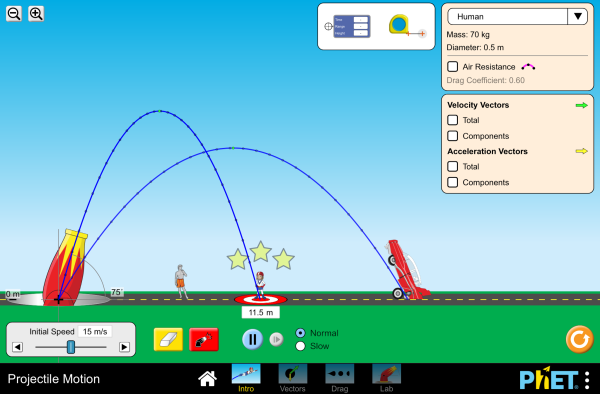
 obtuse delta
it is but you are going to want to create 2 surfaces, in this example the blue surface with the road tha doesn't change in size, and then the cannon/arcs which are what's changing in size
bright garden
yeah i see
obtuse delta
so they solve your problem by making a static size background and then making everything else bigger or smaller to look like a zoom in or out. It won't work if they can measure the size of something against your background
bright garden
so basicly i can just make the ball bigger or smaller in fact
to have the same effect
?
and the background just stays the same
obtuse delta
no because the clouds and the sun will show it's just the ball size
you also aren't changing the size of the ball. you need to change the size of the surface the ball is on
tbh, I'm not the right person for art style effects, I just noticed what they were doing
obtuse delta
welcome, good luck
obtuse delta
bright garden
for the time that you took to help me
what I figure with programining is computer needs each step. Where we think we take several steps for granted, computers know nothing and need each step spelled out for them
if you tell them rules they are better at calculating at following, but they need 5 steps for things we think of as one
bright garden
obtuse delta
what I figure with programining is computer needs each step. Where we think we t...
thats true
i was thinking of a solution
and what i found

if i know where it lands i just can make the same screen size as the posion where it lands
- ball_size
so the ball is exactly visible
what do you think
proper patrol
its worth trying any idea u come with
if it goes wrong, u'll understand how to fix it
verbal pollenBOT
 Python help channel closed
This help channel has been closed and it's no longer possible to send messages here. If your question wasn't answered, feel free to create a new post in #1035199133436354600. To maximize your chances of getting a response, check out this guide on asking good questions.