


26 messages · Page 1 of 1 (latest)
 cold trail
So I'm a hobbiest Python coder trying to make scripts to automate repetitive tasks and other things on my computer. There is a web browser I use where I found a hacky way to change the default tab width by editting a "bundle.js" file (general details here) This is some sort of Java file that interfaces with HTML. When I open it in a code editor, it's one line, that's ridiculously long.
I try to open it like a regular file in Python but it doesn't work. I'm assuming it's because of its length. I tried using the csv library to arbitrarily break it up using semicolons as a delimiter, but that didn't work for me.
Any suggestions would help. I'd provide a copy of the bundle.js file as an example, but since it is effectively controlling settings of my browser and is really long, I'm not confident there isn't minor trivial personal information stored in it. Here is what the first bit looks like:
(()=>{var e,t,n,i={36964:(e,t,n)=>{"use strict";n.d(t,{Z:()=>C});var i=n(28515),s=n(50748),o=n(98611),a=n(97698),r=n(46382),l=n(53576),d=n(33638),c=n(5267),h=n(93818),p=n(89846),u=n(93043),g=n(5204),m=n(17776),v=n(5863),f=n(77312);const y=new class{drafts={};setActiveMailComposer(e){d.Z.dispatch({actionType:"MAIL_SET_ACTIVE_COMPOSER",mailComposer:e}),
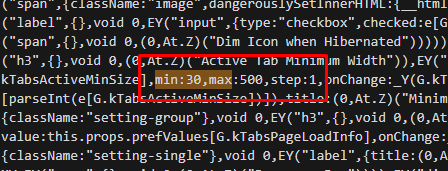
All I want to do is pars the code using regex for a specific known point and then change a number from 180 to 112 and overwrite the original file. If I can get it to open properly, I think I can do everything else. Every time the browser updates, this modification is reverted, hence why I want a script I can run to enforce the change automatically. I'm sorry if this is an abstract question; I tried to search for a general solution, but however I phrased the question, it kept telling me how to read a file line by line, which doesn't apply to a single line file.
 ripe marlinBOT
cold trail
So I'm a hobbiest Python coder trying to make scripts to automate repetitive tas...
ripe marlinBOT
cold trail
So I'm a hobbiest Python coder trying to make scripts to automate repetitive tas...
@cold trail
 Python help channel opened
Remember to:
:warning: Do not pip install anything that isn't related to your question, especially if asked to over DMs.
 split scaffold
cold trail
So I'm a hobbiest Python coder trying to make scripts to automate repetitive tas...
split scaffold
cold trail
So I'm a hobbiest Python coder trying to make scripts to automate repetitive tas...
try to open it like a regular file in Python but it doesn't work. I'm assuming it's because of its length
How doesn't it work? And how big is the file, anyway?
cold trail
file isn't big storage wise, 3,937 KB, but everything is on one line
split scaffold
That's small as far as files go - you might have trouble printing it or viewing it in a text editor but no trouble reading and modifying it.
Also, that looks to me that it doesn't store the settings (it's way too big for that, and js doesn't make sense for that), but rather it happens to include the default values for them.
cold trail
At my level of programing capability, if I can't break the code up into segments to print/view to check my code, I'll have trouble making it work properly
I'll see if I can't get a code sample to run and show what happens
split scaffold
If you want to see what you're doing, print only the part of the file you're modifying (e.g. after finding the pattern, print a 100-character slice of the string at that position)
cold trail
I didn't save the notebook I was testing with, I'll remake it quickly
Here is what I tried:
`import os
import csv
file_path = r"C:\REDACTED\bundle.js"
with open(file_path, "r", encoding = "UTF-8") as bundle_obj:
deliminated_obj = csv.reader(bundle_obj, delimiter = ',')
for line in deliminated_obj:
print(line)`
And when I run it, I just get a blank box in VS Code
If I use a semicolon as the deliminator, I get the error message: "field larger than field limit (131072)"
which is the issue you were eluding to earlier I assume
so I choose a more frequently appearing character
split scaffold
I don't see why you want to do that at all. Just... read the file as one big string, find the part you want to edit (do .find with an appropriate substring), and edit it. For debugging, knowing the position of the interesting part, you can print only it - e.g. print(s[i:i+100]).
cold trail
so I just run the regex search on the file, the "bundle_obj" in my example code?
split scaffold
Well, bundle_obj is a file-object, I'm saying do s = bundle_obj.read() to get the file contents as one string.
cold trail
ok, thanks for the help and patience btw, I'll try that really quick
You're right, it matched
It's a little bit more nebulous than I'm used to working with, but I think I can use online tutorials to work it out from here, thank you
Is there someway to mark this complete or close?
send!close
!close
ripe marlinBOT
 Python help channel closed
This help channel has been closed and it's no longer possible to send messages here. If your question wasn't answered, feel free to create a new post in #1035199133436354600. To maximize your chances of getting a response, check out this guide on asking good questions.