#code-help-voice-text
5 messages · Page 6 of 1
 main solar
 fading holly
can I possibly get help with creating an ai kind of thing in pygamezero?
fading holly
I mean pgzero

 eager falcon

Stack Overflow
I am trying to set a background color of a widget, but it only applies to widget's children. The code below is a simple representation of the real app structure. I'd like testWidget to be entirely ...
 eager falcon
IDK
 fading phoenix
 spare ingot
# Set back-ground
        background = QLabel(self)
        background.setScaledContents(True)
        print(background.frameRect())
        self.setSizePolicy(QSizePolicy.Ignored, QSizePolicy.Ignored)
        self.setStyleSheet(r'{background-image: url(DesktopWallpaper1.jpg);}')
background-size: cover;
Original:```
ABC
Wanted?```
AAABBBCCC
AAABBBCCC
AAABBBCCC
100% 100%
Yes
fading phoenix
Issue is 100% calculates only once
spare ingot
class Main(QtWidgets.QMainWindow):
    def __init__(self):
        super(Main, self).__init__()

        self.central_widget = QtWidgets.QStackedWidget()
        self.setCentralWidget(self.central_widget)

        self.settings = None
        self.main_window = None

        self.initialise()

        # Set back-ground
        background = QLabel(self)
        background.setScaledContents(True)
        print(background.frameRect())
        self.setSizePolicy(QSizePolicy.Ignored, QSizePolicy.Ignored)
        self.setStyleSheet(r'background-image: url(DesktopWallpaper1.jpg);'
                           r'background-size: 100% 100%;')

        self.central_widget.addWidget(self.settings)
        self.central_widget.addWidget(self.main_window)
        current = 1
        self.central_widget.setCurrentWidget(self.settings)

    def initialise(self):
        self.main_window = WindowWhichWillContainTheProgram()
        self.settings = Settings(self.central_widget, self.main_window)
QResizeEvent
fading phoenix
spare ingot
from PySide6 import QtWidgets, QtCore, QtGui
from PySide6.QtCore import Qt
from PySide6.QtWidgets import QLabel, QSizePolicy
from PySide6.QtGui import QPixmap, QFontMetrics, QResizeEvent
def resizeEvent(self, event):
    self.setStyleSheet(
        r'background-image: url(DesktopWallpaper1.jpg);'
        r'background-size: 100% 100%;'
    )
print(event.size)
PySide6.QtCore.QSize(802, 613)
PySide6.QtCore.QSize(800, 610)
PySide6.QtCore.QSize(799, 607)
PySide6.QtCore.QSize(798, 606)
PySide6.QtCore.QSize(797, 605)
PySide6.QtCore.QSize(796, 602)
PySide6.QtCore.QSize(796, 600)
PySide6.QtCore.QSize(795, 598)
PySide6.QtCore.QSize(795, 596)
fading phoenix
for i in ('x', 'width', 0):
    try:
        print((i, 'getitem', event[i]))
    except: pass
    try:
        print((i, 'getattr', getattr(event, i)))
    except: pass
print()
print(event.size.width())
Traceback (most recent call last):
  File "C:\Users\legga\PycharmProjects\TombolaGui\main.py", line 57, in resizeEvent
    print(event.size.width())
AttributeError: 'builtin_function_or_method' object has no attribute 'width'
good

W3Schools offers free online tutorials, references and exercises in all the major languages of the web. Covering popular subjects like HTML, CSS, JavaScript, Python, SQL, Java, and many, many more.
just for units
👌
fading phoenix
WIDTH, HEIGHT = 1920, 1080
RATIO = WIDTH / HEIGHT

def resizeEvent(self, event):
    width = event.size().width()
    height = event.size().height()
    if height <= 0:
        return
    ratio = width / height
    wDiff = WIDTH - width
    hDiff = HEIGHT - height
    if ratio > RATIO:
        height += wDiff * RATIO # ???
    else:
        width += hDiff * RATIO # ???
    self.setStyleSheet(
        r'background-image: url(DesktopWallpaper1.jpg);'
        r'background-size: {:.03f}px {:.03f}px;'.format(
            width, height
        )
    )
    print((width, height), (event.size().width(), event.size().height())
(1557.0, 783) (1029, 783)
(1559.3333333333333, 780) (1026, 780)
(1559.888888888889, 778) (1023, 778)
(1561.2222222222222, 775) (1019, 775)
(1564.5555555555557, 772) (1017, 772)
(1564.111111111111, 770) (1013, 770)
(1566.2222222222222, 766) (1008, 766)
(1566.7777777777778, 764) (1005, 764)
(1569.111111111111, 761) (1002, 761)
(1571.4444444444443, 758) (999, 758)
(1573.0, 756) (997, 756)
(1573.5555555555557, 754) (994, 754)
(1575.8888888888887, 751) (991, 751)
(1576.4444444444443, 749) (988, 749)
(1578.7777777777778, 746) (985, 746)
(1579.8888888888887, 742) (979, 742)
(1583.0, 738) (975, 738)
(1583.3333333333333, 735) (970, 735)
(1585.4444444444443, 731) (965, 731)
(1586.7777777777778, 728) (961, 728)
(1588.8888888888887, 724) (956, 724)
(1590.2222222222222, 721) (952, 721)
(1592.7777777777778, 719) (951, 719)
(1595.111111111111, 716) (948, 716)
(1597.4444444444443, 713) (945, 713)
(1599.0, 711) (943, 711)
(1599.7777777777778, 710) (942, 710)
(1603.3333333333333, 708) (942, 708)
(1603.111111111111, 707) (940, 707)
(1604.8888888888887, 706) (940, 706)
(1605.6666666666665, 705) (939, 705)
(1606.4444444444443, 704) (938, 704)
(1607.2222222222222, 703) (937, 703)
self.setStyleSheet(
            r'background-image: url(DesktopWallpaper1.jpg);'
            r'background-size: {:.03f}px {:.03f}px;'
            r'background-position: 100% 100%;'.format(
                width, height
self.setStyleSheet(
    'background-image: url(...);'
    f'background-size: {width:.03f}px {height:.03f}px'
    'background-position: 100% 100%;'
)
'background-size: 800px;'
 ornate dune
where can i get code of react-nft-challenge
 kindred sky
hello
main solar
no
 red vault
yo your username?
 little badger
@red vaulthi, you've been unmuted, but don't spam please
 topaz oriole
looking for some help to get module to process more then 1 at a time, currently loading upto 5 instances of the module in threadpools, and the module runs multi threading.. but only runs 1 thing at a time.
topaz oriole
seemed to work correctly using multiprocess pool, however seems to have frozen on 69/135 ..
prolly a dead lock happening, so locks must have failed :/
running again for a test, one thing is for sure tho, even tho I set maxworker=5 on the pool, and 2 worked per thread in the module.. i have very, very many threads running atm.
db, says the locks passed.. using rlock and not lock.
topaz oriole
th = threading.Thread(target = baseline_Handler ,args = (queue.get(),))

 fair niche
 knotty holly
Oh, there was no-one in here. Client bug <:Sadge:757445535660507166>
knotty holly
Oh, there was no-one in here. Client bug <:Sadge:757445535660507166>
it was probably some spam that got deleted
knotty holly
Nah I joined VC but there wasn't actually anyone in there.
fair niche
I have some channels here set to all notifications and I'll get a notification which is spam and it's deleted before I even click to the channel
ah
 broken crane
i am facing problem in python program
broken crane
it solved there was a syntax error
 modern dust
@barren kite
Your channel closed before I could post this:
I'm not sure how to do it myself but I did find this guide that looks pretty good after skimming:
https://automating-gis-processes.github.io/2016/Lesson5-share-on-github.html
I know it's not for plotly exactly but it should work the same for the github part once you've generated the html plots
 barren kite
modern dust
<@!880453662701404180>
Your channel closed before I could post this:
I'm not s...
barren kite
modern dust
<@!880453662701404180>
Your channel closed before I could post this:
I'm not s...
Cheers - I successfully hosted a plotly graph but trying to host an interactive one...
 crude canyon
I need some help for opening a text file on phyton but im not understanding by chat, can someone voice chat me
 restive dew
open a text file on python?
you mean like read in a text file using python?
first you have to open a file using open('pathtofile.txt',mode)
mode can be 'r' (for reading a file), 'w' (for writing to the file), or 'a' (for appending text to the file)
then read() or write() functions
then .close to close the file
🙂
 icy ether
@silk timber how can i talk
 keen onyxBOT
Voice verification
Can’t talk in voice chat? Check out #voice-verification to get access. The criteria for verifying are specified there.
 silk timber
#voice-verification
I hope that is still right, after you get it you can't see the channel anymore
main solar
AYyyyy wsg
 floral steeple
looking for a bit of help 😉
 shy geode
 frozen mica
@stark sorrel
Hey, if you've got a second I've got a quick follow up issue -
I tried the callback method for implementation and am running into a small issue:
with code as follows:
from cogs.helpers import Helpers
from discord.ext import commands, tasks
import discord
import asyncio
from random import choice


class Callback(Helpers):

    async def done_callback(self, _task: asyncio.Task):
        exc = _task.exception()
        if exc is None:
            print('no exception')
        else:
            print('got an exception:', exc)
        await self.main()

    async def foobar(self, ctx):
        if choice(range(5)) == 5:
            raise Exception('oh snap! an exception!')
        else:
            print('yay')
        await asyncio.sleep(3)

    @commands.command(name='callback', help='testing build for callback')
    async def main(self, ctx):
        task = asyncio.create_task(self.foobar(ctx))
        task.add_done_callback(self.done_callback)
I am getting the following output:
> yay
> C:\Program Files\Python310\lib\asyncio\events.py:80: RuntimeWarning: coroutine 'Callback.done_callback' was never awaited
So judging by that output, it runs once and then fails because it isn't awaited on the callback call - what do you think?
 stark sorrel
done_callback needs to be a regular function. and inside you need to schedule self.main using asyncio.create_task (you cannot use await in the done callback)
frozen mica
If it is a regular function won't it block?
stark sorrel
no, not unless you have blocking code. (like time.sleep())
using regular functions is totally fine.
frozen mica
ooh cool 🙂
so another question
since main has the arg ctx
how do I pass that into the done_callback?
since it needs to get passed back into main
stark sorrel
partial would work here.
frozen mica
partial on done_callback or foobar?
stark sorrel
maybe done_callback has some "args" argument, but if not, partial is what you need.
uhm, done_callback? probably
frozen mica
    def done_callback(self, _task: asyncio.Task, ctx):
        exc = _task.exception()
        if exc is None:
            print('no exception')
        else:
            print('got an exception:', exc)
        asyncio.create_task(self.main(ctx))

    async def foobar(self, ctx):
        if choice(range(5)) == 5:
            raise Exception('oh snap! an exception!')
        else:
            print('yay')
        await asyncio.sleep(3)

    @commands.command(name='callback', help='testing build for callback')
    async def main(self, ctx):
        task = asyncio.create_task(self.foobar(ctx))
        task.add_done_callback(partial(self.done_callback, ctx))
I think it is taking the ctx as the coro
so I need to do it differently
I did it as such:
    def done_callback(self, _task: asyncio.Task, ctx):
        exc = _task.exception()
        if exc is None:
            print('no exception')
        else:
            print('got an exception:', exc)
        asyncio.create_task(self.main(ctx))

    async def foobar(self, ctx):
        if choice(range(5)) == 5:
            raise Exception('oh snap! an exception!')
        else:
            print('yay')
        await asyncio.sleep(3)

    @commands.command(name='callback', help='testing build for callback')
    async def main(self, ctx):
        task = asyncio.create_task(self.foobar(ctx))
        task.add_done_callback(partial(self.done_callback, ctx=ctx))
and it seems to work but it doesn't seem like the exception case is working as it should be 1/5 but hasn't gone yet
it was because I forgot range 5 does 0-4 lol
stark sorrel
ctx needs to be before _task in that case. because the partial arguments are applied first
range(5) has values 0-4. so 5 is never part of it 🙂
also, it's foobar that needs looping, so I don't think the done_callback needs to call main, but foobar(ctx) instead
@frozen mica
frozen mica
@stark sorrel doesn't it need to call main since the main is where the done_callback is applied unless that works globally?
Either way, I got it working with main 🙂
 upper breach
why I can't turn on my voice?
topaz oriole
i'm here, sorry who ever dropped in.. have discord on the phone, and was trying to get to mic to unmute.. but not fast enough
 amber epoch
Android is based on Linux. Linux blocks all ports at and below I think 1000 from being listeners.
At least without permissions.
Which on unrooted android, you're not liable to get.
Try listening on a higher port.
8080 is a popular choice for webservers with this restriction.
http://host_or_ip:8080/
main solar
how do i make my python script run when a link is clicked?
i want it to run when someone clicks a link even if they dont have a version of python on their device
 oak root
hi
 hidden ether
main solar
how do i make my python script run when a link is clicked?
hidden ether
main solar
how do i make my python script run when a link is clicked?
You will have to make an exe file
There is a pip installed cli for making a python . exe file
Search for it
main solar
hidden ether
You will have to make an exe file
There is a pip installed cli for making a pyt...
Yea i tried that but it doesnt run
 blazing stump
hi, is there any one good at html css ? i have a problem with my code. Thanks
 wispy heart
@silk timber i am on the chat with you and i want to speak but i cant pls i would like to speak with you
@glacial nest
keen onyxBOT
Voice verification
Can’t talk in voice chat? Check out #voice-verification to get access. The criteria for verifying are specified there.
wispy heart
@silk timber where is the !voice
silk timber
look for the #voice-verification channel
 onyx plinth
!voice
keen onyxBOT
Voice verification
Can’t talk in voice chat? Check out #voice-verification to get access. The criteria for verifying are specified there.
 marble wind
 proper pagoda
 granite dune
!voice
keen onyxBOT
Voice verification
Can’t talk in voice chat? Check out #voice-verification to get access. The criteria for verifying are specified there.
 frosty nymph
!voice
keen onyxBOT
Voice verification
Can’t talk in voice chat? Check out #voice-verification to get access. The criteria for verifying are specified there.
main solar
Why is talking so difficult on this server? 😆
 night brook
 quartz bluff
!paste
keen onyxBOT
Pasting large amounts of code
If your code is too long to fit in a codeblock in discord, you can paste your code here:
https://paste.pythondiscord.com/
After pasting your code, save it by clicking the floppy disk icon in the top right, or by typing ctrl + S. After doing that, the URL should change. Copy the URL and post it here so others can see it.

 frank zenith
hello everyone
i've been getting this odd warning
it says Unexpected type(s): (int, int) Possible type(s): (SupportsIndex, str) (slice, Iterable[str])
i can send a ss
 shrewd copper
shheesh
i need more than 50 msgs for voice verification
so
um
ig
imma
help ppppl
rn
so
this is purely for messages
dont
judge me'
.
so
um
 kind knot


 naive ore
int a=0;
 int led_value;
void setup() {
  // put your setup code here, to run once:
pinMode(5,OUTPUT);

pinMode(A0,INPUT);
Serial.begin(9600);
}

void loop() {
  // put your main code here, to run repeatedly:

a=analogRead(A0);
led_value = map(a, 50, 700, 0, 255);
analogWrite(5, led_value);

Serial.println(led_value);


}
there is voltage out in 5 when the "a" value is below 50 but i don't want voltage when "a" is below 50
 hoary spear
naive ore
there is voltage out in 5 when the "a" value is below 50 but i don't want voltag...
hoary spear
naive ore
there is voltage out in 5 when the "a" value is below 50 but i don't want voltag...
you wanna create condition for that?
!code
keen onyxBOT
Here's how to format Python code on Discord:
```py
print('Hello world!')
```
These are backticks, not quotes. Check this out if you can't find the backtick key.
hoary spear
if (a > 50) {led_value=0;}
int a=0;
 int led_value;
void setup() {
  // put your setup code here, to run once:
pinMode(5,OUTPUT);

pinMode(A0,INPUT);
Serial.begin(9600);
}

void loop() {
  // put your main code here, to run repeatedly:

a=analogRead(A0);
led_value = map(a, 50, 700, 0, 255);
analogWrite(5, led_value);
if (a > 50) {led_value=0;}
Serial.println(led_value);


}
int a=0;
 int led_value;
void setup() {
  // put your setup code here, to run once:
pinMode(5,OUTPUT);

pinMode(A0,INPUT);
Serial.begin(9600);
}

void loop() {
  // put your main code here, to run repeatedly:

a=analogRead(A0);
if (a > 50) {led_value=0;}
else {led_value = map(a, 50, 700, 0, 255);}
analogWrite(5, led_value);
Serial.println(led_value);
}
lets chat
hoary spear
naive ore
lets chat
ok it is allright?
naive ore
So i am making a model for radio based horn
hoary spear
naive ore
So i am making a model for radio based horn
yea
naive ore
for my model i am using ir
hoary spear
i understand
hoary spear
naive ore
Thanks for Helping me . Sorry , for causing a talking problem over there.
don't worry
bye
 faint hinge
@naive ore #microcontrollers would be the best folks to know, if you haven't already checked there
silk timber
@main solar vim.
 fleet zenith
vim/
 covert jolt

 sly merlin
where.exe python
covert jolt
D:\Anaconda\Anaconda\python.exe
C:\Users\Ricky\AppData\Local\Programs\Python\Python38\python.exe
C:\Users\Ricky\AppData\Local\Microsoft\WindowsApps\python.exe``` true shadow
import pandas as pd
import numpy as np
from sklearn import preprocessing
from sklearn.naive_bayes import GaussianNB


df = pd.read_csv('../input/heart-failure-prediction/heart.csv')


Age = df.Age.tolist()
Sex = df.Sex.tolist()
CPT = df.ChestPainType.tolist()
RestingBP = df.RestingBP.tolist()
Cholesterol = df.Cholesterol.tolist()
FastingBS = df.FastingBS.tolist()
RestingECG = df.RestingECG.tolist()
MaxHR = df.MaxHR.tolist()
ExerciseAngina = df.ExerciseAngina.tolist()
Oldpeak = df.Oldpeak.tolist()
ST_Slope = df.ST_Slope.tolist()
HeartDisease = df.HeartDisease.tolist()

#encoding strings into integers in order to calculate the probabilities.


le = preprocessing.LabelEncoder()

Sex_E=le.fit_transform(Sex)
CPT_E=le.fit_transform(CPT)
RestingECG_E=le.fit_transform(RestingECG)
ExerciseAngina_E=le.fit_transform(ExerciseAngina)
ST_Slope_E=le.fit_transform(ST_Slope)

variables = zip(Age,Sex,CPT_E,RestingBP,Cholesterol,FastingBS,RestingECG_E,MaxHR,ExerciseAngina_E,Oldpeak,ST_Slope_E)


model = GaussianNB()
variables = np.array(variables)
HeartDisease = np.array(HeartDisease).reshape(-1,1)
print(HeartDisease.shape)

model.fit(variables,HeartDisease)
predicted= model.predict([[0,1]])

print(predicted)
idk , while I'm compiling any code in vs studio it's showing error
How can I fix that
;((
 merry wigeon
Can someone come and help me with some code please
 harsh stratus
included, verify that the path is correct and try again.
At line:1 char:1
+ pip install cv2
+ ~~~
    + CategoryInfo          : ObjectNotFound: (pip:String) [], CommandNotFoundException
+ FullyQualifiedErrorId : CommandNotFoundException```CAN ANYONE HELP
?
 sinful tusk
@client.command(pass_context=True)
async def join(ctx):
    if (ctx.author.voice):
        channel = ctx.message.author.voice.channel
        voice = await channel.connect()
        source = FFmpegPCMAudio('Hamood.wav')
voice.play(source)```@silk timber
Why this no work???
 brisk bough
Hamoood habibi
@unreal spear how do u get stream permissions btw? 
# Program 2:     LastName_PasswordGenerator
#
#  Create a program that will prompt the user for a domain name (google, amazon, facebook). Using the following algorithm, the domain name is turned into a password:
# Algorithm:
# Alphabetize the domain name
# Capitalize all vowels
# Add a number to the end, that is the length of the domain name
# Example:  facebook => AbcEfOOk8        google => EgglOO6     amazon => AAmnOz6
# Requirements:
# Prompt the user for the domain name (facebook, google, amazon, etc.)
# Use loops and selection structures to implement the algorithm above
# Output the password back to the user (make sure it is output like the examples)
# HINT - you will need to convert the string the user entered to a list before performing the algorithm and then back to a string to output

print(f"{''.join(a :=[(char1.upper() if char1 in ['a','e','i','o','u'] else char1) for char1 in sorted([char.lower() for char in (input('Enter your domain name > '))])])}{len(a)}")``` silk meteor
sky
 cloud saddle
i cant take a variable in my bukle for i in range
topaz oriole
!e
L = [1,2]
L2 =[4,5]
print(L+L2)
L = [1,2]
L2 =[4,5]
L3 = L+L2
print(L3)
keen onyxBOT
@topaz oriole :white_check_mark: Your eval job has completed with return code 0.
001 | [1, 2, 4, 5]
002 | [1, 2, 4, 5]
 stray mesa

replit
Replit is a simple yet powerful online IDE, Editor, Compiler, Interpreter, and REPL. Code, compile, run, and host in 50+ programming languages.
 vague hamlet
stray mesa
vague hamlet
stray mesa
py -3.8 main.py


 warm hamlet
 silk meteor

PBS NewsHour
An 11-year-old on Friday was able to hack into a replica of the Florida state election website and change voting results found there in under 10 minutes.

The Verge
The white hat hacking begins February 24th
 astral pasture
 scarlet glacier
can someone pls help me out with some python code?
scarlet glacier
can someone pls help me out with some python code?
why don't you post in some relevant section.. many would be able to see and help
scarlet glacier
Due to the fact that my problem can be solved orally quite faster than writing it in a chat
as in I have to explain a few things about my code first
astral pasture
scarlet glacier
as in I have to explain a few things about my code first
oh ok first give a brief intro to problem then u can ask to help the person trying to help in vc.. btw I am noob .. else would have already joined vc 🤣
scarlet glacier
I have written the problem out in voice-chat-0 🙂
 spark nova
hi
 thick flower
def branch_out(gameboard):
board_map = {}
for i in range(10):
new_board = game_board
new_board[i] = "X"
board_map[str(i)] = new_board
return board_map``` maybe im just tired but why is this only returning a dictionary with a single k,v when it should be 9 fringe flax
thick flower
```py
def branch_out(gameboard):
board_map = {}
for i in range(10):
...
fringe flax
thick flower
```py
def branch_out(gameboard):
board_map = {}
for i in range(10):
...
Move your return outside of the loop
main solar
#bot-commands
thick flower
GAMEBOARD = "#########"
def concatatenate_references(arr):
    combined_arr = []
    for node in arr:
        for cnode in node.references:
            combined_arr.append(cnode)

    return combined_arr

class Node:
    def __init__(self,val):
        self.val = val
        self.references = []
    def __repr__(self) -> str:
        return str(self.val)

class Tree:
    def __init__(self,start_nodes):
        self.start_nodes = start_nodes
    def calculate_states(self,steps):
        current_nodes = self.start_nodes
        starting_symbol = 0
        for _ in range(steps):
            for n in  current_nodes:
                new_board = n.val
                for i in range(9):
                    if new_board[i] == "#":
                        if starting_symbol % 2 == 0:
                            n.references.append(Node(new_board[0:i]+"O"+new_board[i:len(GAMEBOARD)-1]))

                        else:
                             n.references.append(Node(new_board[0:i]+"X"+new_board[i:len(GAMEBOARD)-1]))

                starting_symbol += 1

            print("Generated:",len(current_nodes),"nodes")
            current_nodes = concatatenate_references(current_nodes)
    def itr(self,steps):
        current_nodes = self.start_nodes
        current_refs = concatatenate_references(current_nodes)
        for _ in range(steps):
            for r in current_refs:
                pass

            print(len(current_nodes))
            current_nodes = current_refs
            current_refs = concatatenate_references(current_nodes)
gameStatesTree = Tree([Node(GAMEBOARD[0:i]+"X"+GAMEBOARD[i:len(GAMEBOARD)-1])  for i in range(9)])
gameStatesTree.calculate_states(8)
gameStatesTree.itr(8)```Generated: 72 nodes
Generated: 512 nodes
Generated: 3241 nodes
Generated: 18304 nodes
Generated: 92492 nodes
Generated: 419511 nodes
Generated: 1713573 nodes``` fading thicket
@thick flower What is GAMEBOARD
 pure tulip
unabl to join vc
 molten field
Could anyone help me with my rock paper scissors code in a vc?
thick flower
youndsniffer go to codehelp0
 pastel valley
hey
when i have a .py file in a folder and another one in a directory before that how can i import from it?
structure looks like this:
main-folder:
where-i-want-to-import-from.py
son-folder:
where-i-want-to-import.py
hoary spear
pastel valley
structure looks like this:
main-folder:
where-i-want-to-import-from...
just from where-i-want-to-import-from.py import *
pastel valley
doesnt work
hoary spear
it should work
pastel valley
wow
i just made same name with folder and the file and python gliched
that was the problem
hoary spear
nice
pastel valley
i named my folder and my file to main
hoary spear
that is standard issue
 jolly iris
how can i install py on my laptop?
main solar
i get you
 steady dirge
thick flower
```py
GAMEBOARD = "#########"
def concatatenate_references(arr):
combined_...
steady dirge
thick flower
```py
GAMEBOARD = "#########"
def concatatenate_references(arr):
combined_...
hello ,can i ask you that what did you want to do in this code?
 rough skiff
just want to know if someone could help me i must do a wator project for tomorrow and litteraly i need help
 inner meadow
 long heart
!voiceverify
 hexed spire
jolly iris
how can i install py on my laptop?
hexed spire
jolly iris
how can i install py on my laptop?
if you dont already have it installed just google python and download the latest version from the python website, then google pycharm and download that from jetbrains
 olive raven
 limpid bluff
Can anyone help me at code help 0 room
 livid helm
!code
keen onyxBOT
Here's how to format Python code on Discord:
```py
print('Hello world!')
```
These are backticks, not quotes. Check this out if you can't find the backtick key.
livid helm
def check(mail):
    global ifuser
    isvalid = validate_email(check(mail))
    if isvalid:
        print("True")
        isExists = validate_email(mail, verify=True)
        if isExists == "True":
            return True
        else:
            ifuser = None
            return False

    ifuser = mail
    return False


def validate_email_input(fred):
    email_or_user_input = email_user_txtbox.get()
    if check(email_or_user_input):
        email_user_label.config(text="Email:")
        email_user_error.config(text="Email address confirmed as real")
        return True
    elif ifuser:
        email_user_label.config(text="User:")
        email_user_error.config(text="")
        return False
    email_user_txtbox.config(text="Email/Username:")
    email_user_error.config(text="Email is not in use")
isExists = validate_email(mail, verify=True)
!paste
keen onyxBOT
Pasting large amounts of code
If your code is too long to fit in a codeblock in discord, you can paste your code here:
https://paste.pythondiscord.com/
After pasting your code, save it by clicking the floppy disk icon in the top right, or by typing ctrl + S. After doing that, the URL should change. Copy the URL and post it here so others can see it.
livid helm
 random nebula
!code
main solar
Minimum Cost of Buying Candies With Discount
User Accepted:6495
User Tried:7223
Total Accepted:6650
Total Submissions:11302
Difficulty:Easy
A shop is selling candies at a discount. For every two candies sold, the shop gives a third candy for free.
The customer can choose any candy to take away for free as long as the cost of the chosen candy is less than or equal to the minimum cost of the two candies bought.
For example, if there are 4 candies with costs 1, 2, 3, and 4, and the customer buys candies with costs 2 and 3, they can take the candy with cost 1 for free, but not the candy with cost 4.
Given a 0-indexed integer array cost, where cost[i] denotes the cost of the ith candy, return the minimum cost of buying all the candies.
Example 1:
Input: cost = [1,2,3]
Output: 5
Explanation: We buy the candies with costs 2 and 3, and take the candy with cost 1 for free.
The total cost of buying all candies is 2 + 3 = 5. This is the only way we can buy the candies.
Note that we cannot buy candies with costs 1 and 3, and then take the candy with cost 2 for free.
The cost of the free candy has to be less than or equal to the minimum cost of the purchased candies.
Example 2:
Input: cost = [6,5,7,9,2,2]
Output: 23
Explanation: The way in which we can get the minimum cost is described below:
- Buy candies with costs 9 and 7
- Take the candy with cost 6 for free
- We buy candies with costs 5 and 2
- Take the last remaining candy with cost 2 for free
Hence, the minimum cost to buy all candies is 9 + 7 + 5 + 2 = 23.
Example 3:
Input: cost = [5,5]
Output: 10
Explanation: Since there are only 2 candies, we buy both of them. There is not a third candy we can take for free.
Hence, the minimum cost to buy all candies is 5 + 5 = 10.
Constraints:
1 <= cost.length <= 100
1 <= cost[i] <= 100
please code for this
livid helm
!code
keen onyxBOT
Here's how to format Python code on Discord:
```py
print('Hello world!')
```
These are backticks, not quotes. Check this out if you can't find the backtick key.
livid helm
index = 0
def get_user_input(user_input):
    global index
    #word = input("Enter a word: ").upper()
    word = user_input
    try:
        output_list = [phonetic_dict[letter] for letter in word]
        return output_list
    except KeyError:
        print("Sorry, only letters in the alphabet please.")
        index += 1
        print(index)
        return get_user_input(user_input)

print(get_user_input("json"))
!code
keen onyxBOT
Here's how to format Python code on Discord:
```py
print('Hello world!')
```
These are backticks, not quotes. Check this out if you can't find the backtick key.
livid helm
# Keyword Method with iterrows()
# {new_key:new_value for (index, row) in df.iterrows()}

import pandas

data = pandas.read_csv("nato_phonetic_alphabet.csv")
#TODO 1. Create a dictionary in this format:
phonetic_dict = {row.letter: row.code for (index, row) in data.iterrows()}
print(phonetic_dict)

#TODO 2. Create a list of the phonetic code words from a word that the user inputs.
index = 0
def get_user_input(user_input):
    global index
    #word = input("Enter a word: ").upper()
    word = user_input
    try:
        output_list = [phonetic_dict[letter] for letter in word]
        return output_list
    except KeyError:
        print("Sorry, only letters in the alphabet please.")
        index += 1
        print(index)
        return get_user_input(user_input)

print(get_user_input("json"))
 half hollow
why is it not working
livid helm
!code
keen onyxBOT
Here's how to format Python code on Discord:
```py
print('Hello world!')
```
These are backticks, not quotes. Check this out if you can't find the backtick key.
livid helm
def get_user_input():
    word = input("Enter a word: ").upper()
    try:
        output_list = [phonetic_dict[letter] for letter in word]
        return output_list
    except KeyError:
        print("Sorry, only letters in the alphabet please.")
        return get_user_input()
print(get_user_input())
@half hollow
import turtle

tom = turtle.Turtle()  # <--

tom.left(45)
turtle.done()
!code
keen onyxBOT
Here's how to format Python code on Discord:
```py
print('Hello world!')
```
These are backticks, not quotes. Check this out if you can't find the backtick key.
 hasty relic
Can some one help me out in code/help 0? It would be easier just to show the problem than explain it.
oh wait I cant stream
keen onyxBOT
Hey @livid helm!
You either uploaded a .txt file or entered a message that was too long. Please use our paste bin instead.
livid helm
!code
keen onyxBOT
Here's how to format Python code on Discord:
```py
print('Hello world!')
```
These are backticks, not quotes. Check this out if you can't find the backtick key.
livid helm
!paste
keen onyxBOT
Pasting large amounts of code
If your code is too long to fit in a codeblock in discord, you can paste your code here:
https://paste.pythondiscord.com/
After pasting your code, save it by clicking the floppy disk icon in the top right, or by typing ctrl + S. After doing that, the URL should change. Copy the URL and post it here so others can see it.
keen onyxBOT
Here's how to format Python code on Discord:
```py
print('Hello world!')
```
These are backticks, not quotes. Check this out if you can't find the backtick key.
:incoming_envelope: :ok_hand: applied mute to @livid helm until <t:1642933266:f> (9 minutes and 59 seconds) (reason: newlines rule: sent 116 newlines in 10s).
 random stump
!unmute 345692212803272714
keen onyxBOT
:incoming_envelope: :ok_hand: pardoned infraction mute for @livid helm.
random stump
!paste use this
keen onyxBOT
Pasting large amounts of code
If your code is too long to fit in a codeblock in discord, you can paste your code here:
https://paste.pythondiscord.com/
After pasting your code, save it by clicking the floppy disk icon in the top right, or by typing ctrl + S. After doing that, the URL should change. Copy the URL and post it here so others can see it.
livid helm
!code
keen onyxBOT
Here's how to format Python code on Discord:
```py
print('Hello world!')
```
These are backticks, not quotes. Check this out if you can't find the backtick key.
livid helm
!paste
keen onyxBOT
Pasting large amounts of code
If your code is too long to fit in a codeblock in discord, you can paste your code here:
https://paste.pythondiscord.com/
After pasting your code, save it by clicking the floppy disk icon in the top right, or by typing ctrl + S. After doing that, the URL should change. Copy the URL and post it here so others can see it.
keen onyxBOT
Pasting large amounts of code
If your code is too long to fit in a codeblock in discord, you can paste your code here:
https://paste.pythondiscord.com/
After pasting your code, save it by clicking the floppy disk icon in the top right, or by typing ctrl + S. After doing that, the URL should change. Copy the URL and post it here so others can see it.
 livid helm
!code
keen onyxBOT
Here's how to format Python code on Discord:
```py
print('Hello world!')
```
These are backticks, not quotes. Check this out if you can't find the backtick key.
livid helm
!code
 vital sinew
{
    "name":"John",
    "age":30,
    "cars":[
        "Ford",
        "BMW",
        "Fiat"
    ]
}
@livid helm please don't share passwords or any sensitive information
main solar
my favorrite thing to do
is share my passwords
i store my passwords in plaintext in a text file then post them into the chat whenever people ask for them
 sturdy junco
 woeful estuary
Im trying to make a program that tells you the Nth prime number but im having trouble getting it to work. I also would appreciate advice for better logic.
!code
keen onyxBOT
Here's how to format Python code on Discord:
```py
print('Hello world!')
```
These are backticks, not quotes. Check this out if you can't find the backtick key.
woeful estuary
import math

def main():

    userinput = input("Enter a number: ")

    afterNumber = ""

    if userinput[-1] == '1':
        afterNumber == "st"
    elif userinput[-1] == '2' or userinput[-1] == '3':
        afterNumber == "rd"
    else:
        afterNumber == "th"

    print("The {}{} prime number is {:f}!".format(
        userinput, afterNumber, primeNumbers(userinput)))


def primeNumbers(input):
    currentPrime = 0
    nPrime = 0

    for i in range(2, 999999999):

        if checkIfPrime(i) == True:
            nPrime += 1
            currentPrime == i

        if nPrime == input:
            return currentPrime

def checkIfPrime(input):

    for i in range(2, input):

        if input % i != 0:

            return True

        else:
            pass

main()
Im trying to make a program that tells you the Nth prime number but im having trouble getting it to work. I also would appreciate advice for better logic.
 honest bear
!code
keen onyxBOT
Here's how to format Python code on Discord:
```py
print('Hello world!')
```
These are backticks, not quotes. Check this out if you can't find the backtick key.
main solar
print('Hello world!')
. name = <@> \n==\n (USER_1 ${user_1.user.tag}!); (`${error}(false);:\name:'' });_4."#"
main solar
how do you get voice verified?
 polar fiber
You need to type like 1000 characters or something
main solar
bam
main solar
ok then
znak = "#"
presledek = " "

kolikokrat = int(input("Velikost piramide: \n"))

def kvadrat(k):
    return(k*k)

print(kvadrat(kolikokrat))

for i in range(1,kolikokrat+1):
    vrstica = ""

    #Naredimo levi del piramide
    for j in range(kolikokrat-i):
        vrstica += presledek

    for j in range(i):
        vrstica += znak

    #Dodamo prazne znake
    vrstica += "  "

    #Naredimo desni del piramide
    for j in range(i):
        vrstica += znak

    print(vrstica)
not in english
little badger

 wanton ice
hello can anyone help me
 junior sentinel
wanton ice
hello can anyone help me
junior sentinel
wanton ice
hello can anyone help me
yeah how can i help
import random
chars = "ZXCVBNMASDFGHJKLQWERTYUIOP1234567890"
def main(password):
    outfile = open('hehe.txt', 'a')
    outfile.write(password + '\n')
    outfile.close()

x = 0
password = ""

for x in range(0,1000):
    for x in range(0,5):
        for x in range(0,5):
            password_char = random.choice(chars)
            password += password_char
        password += "-"

    password = password[0:29]
    print(password)
    main(password)
    password = ""
outfile = open('hehe.txt', 'a')
outfile.write("" + '\n')
outfile.close()

print("well done")
help i want to make that script so it can not repeat the same password
and i don't know how
 slate imp

 lunar star
 obsidian cosmos
does anyone know c?
vital sinew
not particularly surprised considering the name of your yt account
 wooden junco
 silk talon
leukk
 gloomy fiber
main solar
gloomy fiber
main solar
Is there anything wrong with this code, what I'm trying to do is when the user holds left click, it will draw a pattern and when they release it, it will stop drawing the pattern
from pynput.mouse import Listener, Button, Controller
import pyautogui

mouse = Controller()

press = False

def on_move(x, y):
    if press:
        pyautogui.moveTo(960, 540, duration=0, tween=pyautogui.easeInOutQuad)
        pyautogui.moveTo(960, 800, duration=2, tween=pyautogui.easeInOutQuad)
        #replace print with draw(x,y) or whatever you use to draw the line in the actual code

def on_click(x, y, button, pressed):
    global press
    press = pressed

with Listener(on_move = on_move, on_click=on_click) as Listener:
    Listener.join()
 sharp mist
import tkinter as tk
from tkinter import *
from tkinter import messagebox
frame = tk.Tk()
frame.geometry("290x220")
frame.resizable(False,False)
frame.configure(bg="grey16")
l1 = tk.Label(text="Login",fg="white",background="grey16",font=("bold italic",25)).pack()
l2 = tk.Label(text="Username",fg="white",background="grey16",font=("Arial",15)).pack()
entry = tk.Entry(font=15,fg="black",background="white").pack()
l3 = tk.Label(text="Password",fg="white",background="grey16",font=("Arial",15)).pack()
entry2 = StringVar = tk.Entry(font=15,fg="black",background="white",show="*").pack()
if entry == "Admin" and entry2 == "123":
messagebox.showinfo("", "Logged in succesfully").pack()
button = tk.Button(frame,font=15,width=15,height=1,text="login",background="white")
button.place(x=145,y=200, anchor = "center")
frame.mainloop()
so
main solar
id = lambda x : x
incr = lambda x : x + 1
def then(f, g):
return lambda x : g(f(x))
def repeat(f, n):
if n == 0:
print('id')
return id
else:
print('f')
return then(f, repeat(f, n-1))
repIncr = repeat(incr, 3)
ans = repIncr(2)
Help plz
 spiral isle
Is anyone available for voice chat? I'm having trouble but it requires some explaining.
 tiny wadi
Can anyone help me regarding on a code to the Sierpinski's carpet?
 cunning plover
are there any websites like kaggle which arent centered around AI an ML? But rather wider python?
 oak lava
go to your help channel?
 echo hollow
where it is
oak lava
 clear finch
Could someone tell me if this is doing what it is suppose to

what it is suppose to do

 kind ember
sharp mist
can someone give me a program idea
kind ember
sharp mist
can someone give me a program idea
discord bot?
 limpid finch
sharp mist
can someone give me a program idea
limpid finch
sharp mist
can someone give me a program idea
Discord bot?
livid helm

 small saddle
Can anyone help me in simple c# code
main solar
how simple?
small saddle
Dictionary collection for class type
a. create Employee class with the below properties
i. EmpID
ii. EmpName
iii. EmpRole
iv. EmpSalary
b. create Dictionary collection for the Employee class type
i. Display Specific Employee using dictionary Key[ assume EmpID as key]
ii. Display all the Employee data
iii. Check if specific Employee exists in the dictionary collection
iv. Remove Employee from the collection by accepting EmpID
c. Here I took Employee as an example for you to understand the task, I request to all to take your own scenario like Book, Student, Orders, Transactions etc.
am trying to make this
main solar
Uhhh that looks like an assignment. Is this for school?
small saddle
but not able to make because not good at it
small saddle
main solar
Uhhh that looks like an assignment. Is this for school?
it is an asssignment not from school but frm udemy course
*assignment
main solar
Uhhh idk how much I can help. If you have general questions I can probably answer though
small saddle
ok cool
main solar
What part of it is tripping you up?
small saddle
like whole i guess i picked up the wrong course like they were explaining basic and asking to solve such things .
soo like the whole question
main solar
Then you should probably start by getting familiar with oop in c#
small saddle
ok but for now am stuck at this
main solar

Create your first C# program and explore object oriented concepts
Here's a link to microsoft's introduction to the concept
If the whole thing is tripping you up, you should start here. If there's something you don't understand, ask. There's also an official c# programming discord you can join
Instead of asking in a python discord lol
small saddle
ok but i want to know about this question
a i have asked and i have got help from ppl
daaah
nvm
main solar
Well you need two classes. An employee class with the data and relevant methods to get that data and a dictionary class with the methods specified
Which will probably involve storing the employees as a List or Dictionary and iterate/hash through it
Whatever you're comfortable with
small saddle
okay thnkx for the info but can like show me how to write in a structure manner
if u can
 hoary pollen
why does my mouse keep freezing in my program
i am trying to detect a mouse click
and when it detects a mouse click i want it to search for an image
'''import pyautogui
import time
import keyboard
import win32api
from pynput.mouse import Listener
def on_click(x, y, button, pressed):
if pressed:
eds = pyautogui.locateOnScreen('test.png')
with Listener(on_click=on_click) as listener:
listener.join()'''
'''ww'''
why does my mouse keep freezing in my program
i am trying to detect a mouse click
and when it detects a mouse click i want it to search for an image
 karmic hazel
I'm pretty new to python coding and I want to make a simple API, but I cant code this. This problem; API consist of an endpoint as /temperature, when we sent the name of city related to GET method with the city parameter, temperature of the city must be printed o the screen. How can i code like that
 violet gorge
!e
 sleek knot
 whole sentinel
Does anyone know how to code?
whole sentinel
Does anyone know how to code?
I might
 surreal gorge

skribbl - Free Multiplayer Drawing & Guessing Game
skribbl io is a free multiplayer drawing and guessing game. Draw and guess words with your friends and people all around the world! Score the most points and be the winner!
 viscid warren
can anyone help me in vc?
 tame kraken
 stark urchin
yo
 steady saddle

 mental hinge
Hello
 rough bay
Ха глеб
 abstract willow
Anyone down to help me? I am making a minecraft sniper.
 strange parcel
Image search came up in like 2013 or so I reckon
half hollow
how do I get undefin
 echo urchin
@thick gate https://www.edx.org/

edX
Access 2000 free online courses from 140 leading institutions worldwide. Gain new skills and earn a certificate of completion. Join today.
covert jolt
whats structural design pattern?
 median sand
Anyone have experience with qemu-x86
 kind void
Hi everyone, (new to the channel) if anyone knows their way around the Google Calendar API, help with Bad Requests / formatting and 404s would be much appreciated. Thanks!


 kind ruin
i don't think you need to master the other languages
have a basic in like the useful languages in my opinion
 fair sigil
what are you guys discussing ?
main solar
How would I make my function accept only this type of parameter?
from selenium.webdriver.common.by import By
And here's my function's paramters:
 fringe flax
if not isinstance(variable, By):
  raise TypeError("Incorrect type!")
 rustic saddle
hi
rustic saddle
 crimson peak
hello
crimson peak
hello
Hi there
sry i didnt talk, i dident know how to verify, but it works now
 shadow kelp
i cant unmute
rustic saddle
shadow kelp
i cant unmute
!voiceverify
shadow kelp
!voiceverify
rustic saddle
shadow kelp
!voiceverify
Wondering why you can't talk in the voice channels? Use the !voiceverify command in #voice-verification to verify. If you don't yet qualify, you'll be told why!
shadow kelp
i am getting same message
rustic saddle
shadow kelp
i am getting same message
You have been granted permission to use voice channels in Python Discord.

Please reconnect to your voice channel to be granted your new permissions.```

Is what your suppose to get, tawdry skiff
You have been on the server for less than 3 days.
you have to type it in the #voice-verification channel
bot will dm you
main solar
hey
crimson peak
hello
main solar
can you help me out?
crimson peak
wt
main solar
crimson peak
ok wait
 spice jay
 trail brook
code assist
yea sorry
i was in gen
ask @slender plank
he asked me to help
install console
yes
py 3
i think
@slender plank the command?
pyinstaller -F script.py --hidden-import {module}
call me ERROR, not ERROR ERROR
bruh
what verson is the script?
trail brook
 molten stirrup
Wish i could help but I know nothing abt pyinstaller
molten stirrup
Wish i could help but I know nothing abt pyinstaller
i know pyinstaller
lol
molten stirrup
Hayy opal
keen onyxBOT
Hey @slender plank!
It looks like you tried to attach a Python file - please use a code-pasting service such as https://paste.pythondiscord.com
trail brook
lol
 cold axle
Can you run apple iOS on a PC?
 hollow trellis
cold axle
Can you run apple iOS on a PC?
hollow trellis
cold axle
Can you run apple iOS on a PC?
I think yes using virtual box (not sure tho)
 agile basalt
#code-help-voice-text @jade glen
 jade glen
yes
agile basalt
oh i guess
jade glen
I need help
jade glen
I can ?
echo urchin
cold axle
Can you run apple iOS on a PC?
It's called a hackintosh, however it technically not allowed by apple copyright, though there is a small community of supporters who support it.
 jovial pond
can you use the new mac os where in the macbook air could also run ios apps natively or is it only possible to use through arm architecture.
 dawn garden
tawdry skiff
dawn garden
tawdry skiff
we all took it from google
 tender hill
!paste
keen onyxBOT
Pasting large amounts of code
If your code is too long to fit in a codeblock in discord, you can paste your code here:
https://paste.pythondiscord.com/
After pasting your code, save it by clicking the floppy disk icon in the top right, or by typing ctrl + S. After doing that, the URL should change. Copy the URL and post it here so others can see it.
 pliant stone
    def __init__(self, logo_file, header_text, qn, *args):

        # The widgets needed for each frame.
        # First, let's display the logo.
        self.img_logo = tk.PhotoImage(file=logo_file)
        self.app_frame = tk.Frame(root)
        self.lbl_logo = tk.Label(self.app_frame,
                                 image=self.img_logo)

        # Next, comes the heading for this frame.
        self.lbl_heading = tk.Label(self.app_frame,
                                    text=header_text)

        self.lbl_question = tk.Label(self.app_frame,
                                    text=question, font=('Arial', 20))

        self.lbl_logo.pack()
        self.lbl_heading.pack()
        self.lbl_question.pack()

        self.choice_selection = IntVar()

        if len(args)>0:
self.swap_frame(args[0], args[1])```import csv
class question:
def __init__(self, question, answer, questionType):
self.question = question
self.answer = answer
self.questionType = questionType
def question(self):
return(lines[1][0])
def answers(self):
return(lines[1][1])
def questionType(self):
return(lines[1][5])
def incorrectAnswers(self):
return(lines[1][2])
return(lines[1][3])
return(lines[1][4])
text=question().question()
pliant stone
import csv
class question:

    def __init__(self, ques, answer, questionType):
        self.ques = ques
        self.answer = answer
        self.questionType = questionType

    def getQuestion(self):
        return(lines[1][0])

    def answers(self):
        return(lines[1][1])


    def questionType(self):
        return(lines[1][5])

    def incorrectAnswers(self):
        return(lines[1][2])
        return(lines[1][3])
        return(lines[1][4])

with open('Questions.csv', 'r') as csv_file:
    csv_reader = csv.reader(csv_file)
    lines = list(csv_reader)
    question.question(lines)
    question.answers(lines)
    question.incorrectAnswers(lines)
question.questionType(lines)``` tender hill
import csv
class question:

    def __init__(self, ques="", answer="", questionType=""):
        self.ques = ques
        self.answer = answer
        self.questionType = questionType

        with open('Questions.csv', 'r') as csv_file:
            csv_reader = csv.reader(csv_file)
            self.lines = list(csv_reader)

    def getQuestion(self):
        return self.lines[1][0]

    def answers(self):
        return self.lines[1][1]


    def questionType(self):
        return self.lines[1][5]

    def incorrectAnswers(self):
        return self.lines[1][2], self.lines[1][3], self.lines[1][4]
from question import question
question.getQuestion()
question.answers()
question.incorrectAnswers()
question.questionType()
text = question().question
tender hill
pliant stone
text = question().question
text = question().getQuestion()
pliant stone
self.lbl_question = tk.Label(self.app_frame,
text=question.getQuestion(), font=('Arial', 20))```quesObj = question()
self.lbl_question = tk.Label(self.app_frame,
text=quesObj.getQuestion(), font=('Arial', 20))
# Gets random questions

theQuestions = random.sample(range(1,7), 5)


# We create the last exit frame and others frames and display the first frame
exit_frame = AppFrame('logo.png', 'Last Frame', 0)
results_frame = AppFrame('logo.png', 'Results', 0,'Exit', exit_frame)
fifth_frame = AppFrame('logo.png', 'Question 5', theQuestions[4], 'See results', results_frame)
fourth_frame = AppFrame('logo.png', 'Question 4', theQuestions[3], 'Go to Question 5', fifth_frame)
third_frame = AppFrame('logo.png', 'Question 3', theQuestions[2],'Go to Question 4', fourth_frame)
second_frame = AppFrame('logo.png', 'Question 2', theQuestions[1], 'Go to Question 3', third_frame)
first_frame = AppFrame('logo.png', 'Question 1', theQuestions[0], 'Go to Question 2', second_frame)

first_frame.display_frame()
import csv

class question:

    def __init__(self):

        with open('Questions.csv', 'r') as csv_file:
            csv_reader = csv.reader(csv_file)
            self.lines = list(csv_reader)

    def getQuestion(self, i):
        return self.lines[i][0]

    def answers(self, i):
        return self.lines[i][1]


    def questionType(self, i):
        return self.lines[i][5]

    def incorrectAnswers(self, i):
        return self.lines[i][2], self.lines[i][3], self.lines[i][4]
self.lbl_question = tk.Label(self.app_frame,
                                    text=quesObj.getQuestion(qn), font=('Arial', 20))
    def buttons(self):
        val = 0
        b = []
        yp = 200
        quesObj = question()
        while val < 4:
            btn = Radiobutton(root, text=quesObj.answers(), variable=self.choice_selection, value=val + 1, font=('times', 20))
            b.append(btn)
            btn.place(x=100, y=yp)
            val += 1
            yp += 50
        return b  ```
 fickle pendant
pliant stone
fickle pendant
pliant stone
    def swap_frame(self, button_text, next_frame):
        # And finally, the button to swap between the frames.
        if next_frame == exit_frame:
            self.btn_change_exit = tk.Button(self.app_frame,
                                             text='exit',
                                             command=self.app_frame.quit)
            self.btn_change_exit.pack(side=BOTTOM)
            self.btn_change_exit.pack()
        else:

            self.buttons()
            self.btn_change_to_next_frame = tk.Button(self.app_frame,
                                                      text=button_text,
                                                      command=partial(self.switch_to, next_frame))
            self.btn_change_to_next_frame.pack(side=BOTTOM)
            self.btn_change_to_next_frame.pack()

    def switch_to(self, next_frame):
        self.app_frame.pack_forget()
        next_frame.display_frame()

    def display_frame(self):
self.app_frame.pack(fill='both', expand=1,)```will someone answer me?
tender hill
main solar
will someone answer me?
what is your question
main solar
tender hill
what is your question
i get "return can be used only within a funtion" how do i fix that
tender hill
main solar
i get "return can be used only within a funtion" how do i fix that
show your code
main solar
tender hill
show your code
try:
print("Recongnizning...")
query = r.recognize_google
print(query)
except Exception as e:
print(e)
speak("Say that again please!")
return "None"
return query
there is more
but that is where the errors are
tender hill
use print instead of return
main solar
tender hill
use `print` instead of `return`
 tender hill
main solar
tender hill
main solar
your are using python 2 syntax
main solar
what is that?
tender hill
print(query) and print("None")
try:
    print("Recongnizning...")
    query = r.recognize_google
    print(query)

except Exception as e:
    print(e)
    speak("Say that again please!")
    print("None")
else:
  print(query)

 main solar
tender hill
```py
try:
print("Recongnizning...")
query = r.recognize_google
prin...
main solar
tender hill
```py
try:
print("Recongnizning...")
query = r.recognize_google
prin...
i am following a video from yt
and something is buggy with me when i run the python file in vscode it says right away "say that again please" i dont even get to say anything.'
pliant stone
    def swap_frame(self, button_text, next_frame):
        # And finally, the button to swap between the frames.
        if next_frame == exit_frame:
            self.btn_change_exit = tk.Button(self.app_frame,
                                             text='exit',
                                             command=self.app_frame.quit)
            self.btn_change_exit.pack(side=BOTTOM)
            self.btn_change_exit.pack()
        else:

            self.buttons()
            self.btn_change_to_next_frame = tk.Button(self.app_frame,
                                                      text=button_text,
                                                      command=partial(self.switch_to, next_frame))
            self.btn_change_to_next_frame.pack(side=BOTTOM)
            self.btn_change_to_next_frame.pack()

    def switch_to(self, next_frame):
        self.app_frame.pack_forget()
        next_frame.display_frame()

    def display_frame(self):
        self.app_frame.pack(fill='both', expand=1,)

    def buttons(self):
        val = 0
        b = []
        yp = 200
        quesObj = question()
        while val < 4:
            btn = Radiobutton(root, text=quesObj.answers(self.qn), variable=self.choice_selection, value=val + 1, font=('times', 20))
            b.append(btn)
            btn.place(x=100, y=yp)
            val += 1
            yp += 50
return b```btn = Radiobutton(self.app_frame, text=quesObj.answers(self.qn), variable=self.choice_selection, value=val + 1, font=('times', 20))
    def __init__(self, logo_file, header_text, qn, *args):

        # The widgets needed for each frame.
        # First, let's display the logo.
        self.qn = qn
        self.img_logo = tk.PhotoImage(file=logo_file)
        self.app_frame = tk.Frame(root)
        self.lbl_logo = tk.Label(self.app_frame,
                                 image=self.img_logo)

        # Next, comes the heading for this frame.
        self.lbl_heading = tk.Label(self.app_frame,
                                    text=header_text)

        quesObj = question()
        self.lbl_question = tk.Label(self.app_frame,
                                     text=quesObj.getQuestion(qn), font=('Arial', 20))

        self.lbl_logo.pack()
        self.lbl_heading.pack()
        self.lbl_question.pack()

        self.choice_selection = IntVar()

        if len(args)>0:
            self.swap_frame(args[0], args[1])
dude
tender hill
main solar
dude
i am talking to someone in vc
main solar
tender hill
i am talking to someone in vc
oh
pliant stone
 tender hill
text=quesObj.incorrectAnswers(self.qn)[x]
# x is the random index order
    def buttons(self):
        val = 0
        b = []
        yp = 200
        correctAns = random.randint(0,3)
        quesObj = question()
        while val < 4:

            if val == correctAns:
                btn = Radiobutton(self.app_frame, text=quesObj.answers(self.qn), variable=self.choice_selection,
                                  value=val + 1, font=('times', 20))
            else:
                btn = Radiobutton(self.app_frame, text=quesObj.incorrectAnswers(self.qn), variable=self.choice_selection,
                                  value=val+1, font=('times', 20))
            b.append(btn)
            btn.place(x=100, y=yp)
            val += 1
            yp += 50
        return b
import csv

class question:

    def __init__(self):
        self._choice_number = 1
        with open('Questions.csv', 'r') as csv_file:
            csv_reader = csv.reader(csv_file)
            self.lines = list(csv_reader)

    def getQuestion(self, i):
        return self.lines[i][0]

    def answers(self, i):
        return self.lines[i][1]


    def questionType(self, i):
        return self.lines[i][5]

    def incorrectAnswers(self, i):
        self._choice_number += 1
        return self.lines[i][self._choice_number]
self._name
main solar
main solar
i am following a video from yt
and something is buggy with me when i run the pyt...
someone help
pliant stone
    def swap_frame(self, button_text, next_frame):
        # And finally, the button to swap between the frames.
        if next_frame == exit_frame:
            self.btn_change_exit = tk.Button(self.app_frame,
                                             text='exit',
                                             command=self.app_frame.quit)
            self.btn_change_exit.pack(side=BOTTOM)
            self.btn_change_exit.pack()
        else:

            self.buttons()
            self.btn_change_to_next_frame = tk.Button(self.app_frame,
                                                      text=button_text,
                                                      command=partial(self.switch_to, next_frame))
            self.btn_submit = tk.Button(self.app_frame, text='Sumbit!', command=partial(self.switch_to(next_frame)))
            self.btn_submit.place(x=500, y=800)
            self.btn_change_to_next_frame.pack(side=BOTTOM)
            self.btn_change_to_next_frame.pack()
def __init__(self, logo_file, header_text, qn, *args):
        self.correctAns = None

        if len(args)>0:
            self.swap_frame(args[0], args[1])
 def buttons(self):
        val = 0
        b = []
        yp = 200
        self.correctAns = random.randint(0,3)
        quesObj = question()
        while val < 4:

            if val == self.correctAns:
                btn = Radiobutton(self.app_frame, text=quesObj.answers(self.qn), variable=self.choice_selection,
                                  value=val + 1, font=('times', 20))
            else:
                btn = Radiobutton(self.app_frame, text=quesObj.incorrectAnswers(self.qn), variable=self.choice_selection,
                                  value=val+1, font=('times', 20))
            b.append(btn)
            btn.place(x=100, y=yp)
            val += 1
            yp += 50
        return b
exit_frame = AppFrame('logo.png', 'Last Frame', 0)
results_frame = AppFrame('logo.png', 'Results', 0,'Exit', exit_frame)
fifth_frame = AppFrame('logo.png', 'Question 5', theQuestions[4], 'See results', results_frame)
fourth_frame = AppFrame('logo.png', 'Question 4', theQuestions[3], 'Go to Question 5', fifth_frame)
third_frame = AppFrame('logo.png', 'Question 3', theQuestions[2],'Go to Question 4', fourth_frame)
second_frame = AppFrame('logo.png', 'Question 2', theQuestions[1], 'Go to Question 3', third_frame)
first_frame = AppFrame('logo.png', 'Question 1', theQuestions[0], 'Go to Question 2', second_frame)

correctAnsList = []
correctAnsList.append(first_frame.correctAns)
correctAnsList.append(second_frame.correctAns)
correctAnsList.append(third_frame.correctAns)
correctAnsList.append(fourth_frame.correctAns)
correctAnsList.append(fifth_frame.correctAns)
else:
  btnList = self.buttons()
 lavish ibex
if it makes you feel any better I have no idea about anything here🤣
pliant stone
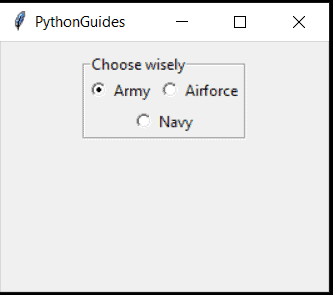
Keep reading to know more on python tkinter radiobutton, Tkinter RadioButton get value and Tkinter RadioButton group.
tender hill
 def buttons(self):
        val = 0
        b = []
        yp = 200
        self.correctAns = random.randint(0,3)
        quesObj = question()
        while val < 4:

            if val == self.correctAns:
                btn = Radiobutton(self.app_frame, text=quesObj.answers(self.qn), variable=self.choice_selection,
                                  value=val + 1, font=('times', 20), command=self.check)
            else:
                btn = Radiobutton(self.app_frame, text=quesObj.incorrectAnswers(self.qn), variable=self.choice_selection,
                                  value=val+1, font=('times', 20), command=self.check)
            b.append(btn)
            btn.place(x=100, y=yp)
            val += 1
            yp += 50
        return b
def check(self):
  choice = self.choice_selection.get()
  if choice == self.correctAns:
    self.isCorrect = True
  else:
    self.isCorrect = False
^
exit_frame = AppFrame('logo.png', 'Last Frame', 0)
fifth_frame = AppFrame('logo.png', 'Question 5', theQuestions[4], 'See results', results_frame)
fourth_frame = AppFrame('logo.png', 'Question 4', theQuestions[3], 'Go to Question 5', fifth_frame)
third_frame = AppFrame('logo.png', 'Question 3', theQuestions[2],'Go to Question 4', fourth_frame)
second_frame = AppFrame('logo.png', 'Question 2', theQuestions[1], 'Go to Question 3', third_frame)
first_frame = AppFrame('logo.png', 'Question 1', theQuestions[0], 'Go to Question 2', second_frame)
results_frame = AppFrame('logo.png', 'Results', 0,'Exit', exit_frame, [first_frame, second_frame, third_frame, fourth_frame, fifth_frame])
def __init__(self, logo_file, header_text, qn, *args):
  self.isCorrect = False
def check(self):
  choice = self.choice_selection.get()
  if choice == self.correctAns:
    self.isCorrect = True
 tender hill
score = 0
for frame in args[2]:
  if frame.isCorrect:
    score += 1
Someone who can help me with this
pliant stone
    def swap_frame(self, button_text, next_frame):
        # And finally, the button to swap between the frames.
        if next_frame == exit_frame:
            self.btn_change_exit = tk.Button(self.app_frame,
                                             text='exit',
                                             command=self.app_frame.quit)
            self.btn_change_exit.pack(side=BOTTOM)
            self.btn_change_exit.pack()
        elif next_frame == results_frame:
            score = 0
            for frame in args[2]:
                if frame.isCorrect:
                    score += 1
        else:

            btnList = self.buttons()

            self.buttons()
            self.btn_change_to_next_frame = tk.Button(self.app_frame,
                                                      text=button_text,
                                                      command=partial(self.switch_to, next_frame))
            self.btn_change_to_next_frame.pack(side=BOTTOM)
            self.btn_change_to_next_frame.pack()
def __init__(self, logo_file, header_text, qn, *args):
  self.next_frame = args[1] or "res"
  if len(args)>0:
    self.swap_frame(args[0], args[1]
def swap_frame(self, button_text, next_frame):
        # And finally, the button to swap between the frames.
        if next_frame == exit_frame:
            self.btn_change_exit = tk.Button(self.app_frame,
                                             text='exit',
                                             command=self.app_frame.quit)
            self.btn_change_exit.pack(side=BOTTOM)
            self.btn_change_exit.pack()
        elif next_frame == results_frame:
            score = 0
            for frame in args[2]:
                if frame.isCorrect:
                    score += 1
        else:

            btnList = self.buttons()

            self.buttons()
            self.btn_change_to_next_frame = tk.Button(self.app_frame,
                                                      text=button_text,
                                                      command=partial(self.switch_to, next_frame))
            self.btn_change_to_next_frame.pack(side=BOTTOM)
            self.btn_change_to_next_frame.pack()
exit_frame = AppFrame('logo.png', 'Last Frame', 0)
fifth_frame = AppFrame('logo.png', 'Question 5', theQuestions[4], 'See results', None)
fourth_frame = AppFrame('logo.png', 'Question 4', theQuestions[3], 'Go to Question 5', fifth_frame)
third_frame = AppFrame('logo.png', 'Question 3', theQuestions[2],'Go to Question 4', fourth_frame)
second_frame = AppFrame('logo.png', 'Question 2', theQuestions[1], 'Go to Question 3', third_frame)
first_frame = AppFrame('logo.png', 'Question 1', theQuestions[0], 'Go to Question 2', second_frame)
results_frame = AppFrame('logo.png', 'Results', 0,'Exit', exit_frame, [first_frame, second_frame, third_frame, fourth_frame, fifth_frame])
 tender hill
def __init__(self, logo_file, header_text, qn, *args):
  if len(args)>0:
    if not args[1]:
      self.swap_frame(args[0], results_frame)
    else:
      self.swap_frame(args[0], args[1])

 def display_frame(self):
self.app_frame.pack(fill='both', expand=1,)``` def switch_to(self, next_frame):
self.app_frame.pack_forget()
next_frame.display_frame()```def swap_frame(self, button_text, next_frame):
# And finally, the button to swap between the frames.
if next_frame == exit_frame:
self.btn_change_exit = tk.Button(self.app_frame,
text='exit',
command=self.app_frame.quit)
self.btn_change_exit.pack(side=BOTTOM)
self.btn_change_exit.pack()
elif self.header_text == "Results":
score = 0
for frame in args[2]:
if frame.isCorrect:
score += 1
else:
btnList = self.buttons()
self.buttons()
self.btn_change_to_next_frame = tk.Button(self.app_frame,
text=button_text,
command=partial(self.switch_to, next_frame))
self.btn_change_to_next_frame.pack(side=BOTTOM)
self.btn_change_to_next_frame.pack()
^
pliant stone
 tender hill
def __init__(self, logo_file, header_text, qn, *args):
  self.all_frames = []
  if len(args)>0:
    self.swap_frame(args[0], args[1])
exit_frame = AppFrame('logo.png', 'Last Frame', 0)
results_frame = AppFrame('logo.png', 'Results', 0,'Exit', exit_frame)
fifth_frame = AppFrame('logo.png', 'Question 5', theQuestions[4], 'See results', results_frame)
fourth_frame = AppFrame('logo.png', 'Question 4', theQuestions[3], 'Go to Question 5', fifth_frame)
third_frame = AppFrame('logo.png', 'Question 3', theQuestions[2],'Go to Question 4', fourth_frame)
second_frame = AppFrame('logo.png', 'Question 2', theQuestions[1], 'Go to Question 3', third_frame)
first_frame = AppFrame('logo.png', 'Question 1', theQuestions[0], 'Go to Question 2', second_frame)

results_frame.all_frames = [first_frame, second_frame, third_frame, fourth_frame, fifth_frame]
results_frame.swap_frame()
def swap_frame(self, button_text, next_frame):
        # And finally, the button to swap between the frames.
        if next_frame == exit_frame:
            self.btn_change_exit = tk.Button(self.app_frame,
                                             text='exit',
                                             command=self.app_frame.quit)
            self.btn_change_exit.pack(side=BOTTOM)
            self.btn_change_exit.pack()
        elif self.header_text == "Results":
            if self.all_frames:
              score = 0
              for frame in args[2]:
                  if frame.isCorrect:
                      score += 1
        else:

            btnList = self.buttons()

            self.buttons()
            self.btn_change_to_next_frame = tk.Button(self.app_frame,
                                                      text=button_text,
                                                      command=partial(self.switch_to, next_frame))
            self.btn_change_to_next_frame.pack(side=BOTTOM)
            self.btn_change_to_next_frame.pack()
 tender hill
```py
exit_frame = AppFrame('logo.png', 'Last Frame', 0)
results_frame = AppFram...
tender hill
tender hill
```py
exit_frame = AppFrame('logo.png', 'Last Frame', 0)
results_frame = AppFram...
^
tender hill
look at #❓|how-to-get-help
main solar
it doesnt work
tender hill
i am already helping someone queen
main solar
tender hill
i am already helping someone queen
not to be rude but i didnt ask you for help im asking everybody
tender hill
main solar
not to be rude but i didnt ask you for help im asking everybody
this channel is associated with the vc i am in
main solar
oh
tender hill
results_frame.swap_frame("Exit", exit_frame)
def __init__(self, logo_file, header_text, qn, *args):
  if len(args)>0:
    if self.header_text != "Results":
      self.swap_frame(args[0], args[1])
def swap_frame(self, button_text, next_frame):
        # And finally, the button to swap between the frames.
        if next_frame == exit_frame:
            self.btn_change_exit = tk.Button(self.app_frame,
                                             text='exit',
                                             command=self.app_frame.quit)
            self.btn_change_exit.pack(side=BOTTOM)
            self.btn_change_exit.pack()
        elif self.header_text == "Results":
            if self.all_frames:
              score = 0
              for frame in self.all_frames:
                  if frame.isCorrect:
                      score += 1
        else:

            btnList = self.buttons()

            self.buttons()
            self.btn_change_to_next_frame = tk.Button(self.app_frame,
                                                      text=button_text,
                                                      command=partial(self.switch_to, next_frame))
            self.btn_change_to_next_frame.pack(side=BOTTOM)
            self.btn_change_to_next_frame.pack()
  elif self.header_text == "Results":
            if self.all_frames:
                score = 0
                for frame in self.all_frames:
                    if frame.isCorrect:
                        score += 1
                reuls = tk.Label(self.app_frame, text=score)
resul.pack()```font
tender hill
resuls = tk.Label(self.app_frame, text=str(score))
resuls.pack(ipadx=10, ipady=10)
 tender hill
elif self.header_text == "Results":
            print("called")
            if self.all_frames:
                print("called")
                score = 0
                for frame in self.all_frames:
                    if frame.isCorrect:
                        score += 1
                resul = tk.Label(self.app_frame, text=score)
                resul.pack()
def __init__(self, logo_file, header_text, qn, *args):
  self.header_text = header_text
  print(self.header_text)
Results
Question 5
Question 4
Question 3
Question 2
Question 1``` def swap_frame(self, button_text, next_frame):
# And finally, the button to swap between the frames.
if next_frame == exit_frame:
self.btn_change_exit = tk.Button(self.app_frame,
text='exit',
command=self.app_frame.quit)
self.btn_change_exit.pack(side=BOTTOM)
self.btn_change_exit.pack()
elif self.header_text == "Results":
print("called")
if self.all_frames:
print("called")
score = 0
for frame in self.all_frames:
if frame.isCorrect:
score += 1
resul = tk.Label(self.app_frame, text=score)
resul.pack()
else:
btnList = self.buttons()
self.buttons()
self.btn_change_to_next_frame = tk.Button(self.app_frame,
text=button_text,
command=partial(self.switch_to, next_frame))
self.btn_change_to_next_frame.pack(side=BOTTOM)
self.btn_change_to_next_frame.pack()``` def swap_frame(self, button_text, next_frame):
# And finally, the button to swap between the frames.
if next_frame == exit_frame:
self.btn_change_exit = tk.Button(self.app_frame,
text='exit',
command=self.app_frame.quit)
self.btn_change_exit.pack(side=BOTTOM)
self.btn_change_exit.pack()
else:
btnList = self.buttons()
self.buttons()
self.btn_change_to_next_frame = tk.Button(self.app_frame,
text=button_text,
command=partial(self.switch_to, next_frame))
self.btn_change_to_next_frame.pack(side=BOTTOM)
self.btn_change_to_next_frame.pack()
if self.header_text == "Results":
print("called")
if self.all_frames:
print("called")
score = 0
for frame in self.all_frames:
if frame.isCorrect:
score += 1
resul = tk.Label(self.app_frame, text=score)
resul.pack()
    def check(self):
        choice = self.choice_selection.get()
        if choice == self.correctAns:
            self.isCorrect = True
    def buttons(self):
        val = 0
        b = []
        yp = 200
        self.correctAns = random.randint(0, 3)
        quesObj = question()
        while val < 4:

            if val == self.correctAns:
                btn = Radiobutton(self.app_frame, text=quesObj.answers(self.qn), variable=self.choice_selection,
                                  value=val + 1, font=('times', 20), command=self.check)
            else:
                btn = Radiobutton(self.app_frame, text=quesObj.incorrectAnswers(self.qn),
                                  variable=self.choice_selection,
                                  value=val + 1, font=('times', 20), command=self.check)
            b.append(btn)
            btn.place(x=100, y=yp)
            val += 1
            yp += 50
        return b
def check(self):
        choice = self.choice_selection.get()
        print(choice, self.correctAns)
        if choice == self.correctAns:
            self.isCorrect = True
 tender hill
def check(self):
        choice = self.choice_selection.get() -1
        if choice == self.correctAns:
            self.isCorrect = True
def check(self):
        choice = self.choice_selection.get() - 1
        print(choice, self.correctAns)
        if choice == self.correctAns:
            self.isCorrect = True
0 0
0 0
0 0
3 3```def check(self):
choice = self.choice_selection.get() - 1
print(choice, self.correctAns)
if choice == self.correctAns:
print("called")
self.isCorrect = True
if self.header_text == "Results":
            if self.all_frames:
                score = 0
                for frame in self.all_frames:
                    print(frame.isCorrect)
                    if frame.isCorrect:
                        score += 1
                resul = tk.Label(self.app_frame, text=score)
                resul.pack()
Results
Question 5
Question 4
Question 3
Question 2
Question 1
False
False
False
False
False
1 1
1 1
2 2
2 2
2 2
if self.header_text == "Results":
  show_res = tk.Button(self.app_frame, text="show results", command=self.show_result)
def show_result(self):
  score = 0
  for frame in self.all_frames:
    if frame.isCorrect:
      score += 1
  resul = tk.Label(self.app_frame, text=score)
  resul.pack()
 tulip fossil
If you are inserting element x
small large
[..., max] [min, ..]
if x <= max insert among small, if x >= min insert among large, otherwise do whatever (you could be clever in this case, but lets not)
then you check if the balance between len(small) and len(large) is right, if it's not then shuffle elements across until the balance is correct
small: [] large: [10]
small: [5] large: [10]
k = 0.618*len(tree)
small: [5, 2] large:[10]
small:[2] large:[10, 5]
In computer science, a min-max heap is a complete binary tree data structure which combines the usefulness of both a min-heap and a max-heap, that is, it provides constant time retrieval and logarithmic time removal of both the minimum and maximum elements in it. This makes the min-max heap a very useful data structure to implement a double-ende...
 tropic peak

Gist
Min-max heap in Python. GitHub Gist: instantly share code, notes, and snippets.
 obtuse pewter
import socket
import threading
serverSocket = socket.socket(socket.AF_INET, socket.SOCK_STREAM)
serverSocket.setsockopt(socket.SOL_SOCKET, socket.SO_REUSEADDR, 1)
IP = '127.0.0.1' #localhost
serverPort = 30050
IP = client.recv(1024).decode('ascii')
serverPort = client.recv(1024).decode('ascii')
serverSocket.bind((IP, serverPort))
serverSocket.listen()
clientList = []
nicknames = []
def broadcast(message):
for client in clientList:
client.send(message)
def handle(client):
while True:
try:
message = client.recv(1024)
broadcast(message)
except:
index = clientList.index(client)
clientList.remove(client)
client.close()
nickname = nicknames[index] #add client, add nickname too so they always have the same index, remove client? then also remove nickname so you keep it consistent
broadcast(f'{nickname} left the chat room.'.encode('ascii'))
nicknames.remove(nickname)
break
def receive():
while True:
client, address = serverSocket.accept()
    client.send("NICK".encode('ascii'))
    nickname = client.recv(1024).decode('ascii')
    nicknames.append(nickname)
    clientList.append(client)
    print(f"{nickname} connected with {str(address)}") #if a connection happens, print that you are connected to a client

    print(f'Nickname of the client is {nickname}')
    broadcast(f'{nickname} joined the chat room.'.encode('ascii'))
    client.send('\nConnected to the server.'.encode('ascii'))
    thread = threading.Thread(target=handle, args=(client,))
    thread.start()
print("Server is listening...")
receive()
def close():
serverSocket.shutdown(socket.SHUT_RDWR)
serverSocket.close()
from http import client
import socket
import threading
import sys
print(sys.argv[0])
nickname = sys.argv[1]
IP = (sys.argv[2])
serverPort = sys.argv[3]
print(nickname)
print((IP))
print(serverPort)
nickname = input("Choose a nickname: ")
clientSocket = socket.socket(socket.AF_INET, socket.SOCK_STREAM)
clientSocket.connect((IP, int(serverPort)))
IP = clientSocket.recv(1024).decode('ascii')
serverPort = clientSocket.recv(1024).decode('ascii')
clientSocket.send(IP.encode('ascii'))
clientSocket.send(serverPort.encode('ascii'))
def receiveClient():
while True:
try:
message = clientSocket.recv(1024).decode('ascii')
if message == "NICK":
clientSocket.send(nickname.encode('ascii'))
else:
print(message)
except:
print("An error occured")
clientSocket.close()
break
def write():
while True:
message = f'{nickname}: {input("")}'
clientSocket.send(message.encode('ascii'))
receive_thread = threading.Thread(target=receiveClient)
receive_thread.start()
write_thread = threading.Thread(target=write)
write_thread.start()
obtuse pewter
obtuse pewter
from http import client
import socket
import threading
import sys
print(sys.arg...
This is the client
keen onyxBOT
Pasting large amounts of code
If your code is too long to fit in a codeblock in discord, you can paste your code here:
https://paste.pythondiscord.com/
After pasting your code, save it by clicking the floppy disk icon in the top right, or by typing ctrl + S. After doing that, the URL should change. Copy the URL and post it here so others can see it.
 little imp
pliant stone
amber epoch
little imp
pliant stone
amber epoch
!e ```py
def func():
return 5
v = func()
print(v)```
keen onyxBOT
@amber epoch :white_check_mark: Your eval job has completed with return code 0.
5
 lusty anchor
anyone good with pandas want to answer some basic questions in code/help 0?
 misty gazelle
help 0?
 teal pier
@echo urchin a pajorative...
you're taking on marco here
do dictionaries in rust or the equivalent (what they have...) @unreal spear
@frank hollow understood correctly
i am
let me message victor incase he dosent know where to post
🤣
😆
@unreal spear 🤣
😆
🤣
😆
lmaoooo
lildopey is my cousin
😆
 lone ermine
https://codingcompetitions.withgoogle.com/kickstart/round/00000000008f4332/0000000000942527 @trail spoke

Coding Competitions
Hone your coding skills with algorithmic puzzles meant for students and those new to coding competitions. Participate in one round or join them all.
GitHub
Contribute to UltiRequiem/google-kick-start development by creating an account on GitHub.
 echo urchin
guess the party is over
 white void
Hello everyone.. Can somebody help me with writing a txt file in Python?
Based on the file correlations.xlsx, create and share a Python script where we can extract the contents of columns B and F and write it to a txt file
The .txt file must have unique entries avoiding duplicate lines.
Wrong:
cdn2.fyre19.xyz, content
cdn2.fyre19.xyz, content
cdn2.fyre19.xyz, update
...
Correct:
cdn2.fyre19.xyz, content
cdn2.fyre19.xyz, update
...
Here is the code:
keen onyxBOT
Hey @white void!
It looks like you tried to attach a Python file - please use a code-pasting service such as https://paste.pythondiscord.com
Hey @thorn field!
It looks like you tried to attach a Python file - please use a code-pasting service such as https://paste.pythondiscord.com
white void
import pandas as pd

df = pd.ExcelFile(r'C:\Users\Gabriel Maiorani\Desktop\Nagra Group\Testes\correlations.xlsx').parse('correlations') #you could add index_col=0 if there's an index
x=[]
x.append(df['SITE'])
y = []
y.append(df['TYPE'])


print (x)
print (y)```Hey @white void!
It looks like you tried to attach file type(s) that we do not allow (.xlsx). We currently allow the following file types: .gif, .jpg, .jpeg, .mov, .mp4, .mpg, .png, .mp3, .wav, .ogg, .webm, .webp, .flac, .m4a, .csv, .json.
Feel free to ask in #community-meta if you think this is a mistake.
white void

 hushed monolith
white void
```from re import X
import pandas as pd
df = pd.ExcelFile(r'C:\Users\Gabriel Ma...
hushed monolith
white void
```from re import X
import pandas as pd
df = pd.ExcelFile(r'C:\Users\Gabriel Ma...
use something like https://paste.pythondiscord.com/xusonaliga.py this
white void
hushed monolith
white void
https://paste.pythondiscord.com/quyodujowu.py here it is
I said look at https://paste.pythondiscord.com/xusonaliga.py
 lucid sluice
hey guys
i tried making snake in python
but my apple sometimes tries to spawn in snakes cords
isnt there some way to determine what color is the apple touching ?
the snake is obviously green
so if the apple is touching green
does something like this exist ?
pls help
 distant stream
.
 jovial monolith
please help me, I'm a python beginner, I already searched the forums but didn't find an answer, how to restart the game when I lose on pygame?
I will be very grateful\
 maiden carbon
!voice
keen onyxBOT
Voice verification
Can’t talk in voice chat? Check out #voice-verification to get access. The criteria for verifying are specified there.
viscid warren
q1 = games.where('Opponent', Opponent)
q1
tropic peak
def first_half_score(Opponent):
    row = games.where('Opponent', Opponent)
    q1Oregon = row['Oregon 1Q']
    q2Oregon = row['Oregon 2Q']
    firstHalf = q1Oregon + q2Oregon
    return firstHalf
first_half_score('Colorado')

 zenith burrow
def first_half_score(q1,q2):
#Returns the first half score calculated by adding up the scores for quarter 1 and quarter 2
return sum([q1,q2])
first_half_score(14, 7) #DO NOT CHANGE THIS LINE
big_table = games.join('Opponent',final_scores_with_results)
oregon_1st_half_scores = big_table.apply(first_half_score,['Oregon 1Q','Oregon 2Q'])
opponent_1st_half_scores = big_table.apply(first_half_score,['Opp 1Q','Opp 2Q'])
big_table = big_table.with_columns('Oregon 1st Half Score',oregon_1st_half_scores,'Opponent 1st Half Score',opponent_1st_half_scores)
big_table
 worldly sundial
can anyone help me with a dynamic programming problem?
 celest herald
 sour onyx
Hey,
I wanna start with AIML course to do a machine learning real time project in our college...
what's the roadmap to do that?
 signal sierra
Hi i hope i can ask this here. I am trying to Run a VBA script that i wrote on an excel file that i want to be able to open from a program. Basically what i want to be able to do is select a file form my computer and open and run some scripts on it and then take the output and spit out a report. can python do that?
 dusk anchor
@untold lion
hi
good
How are you
Want to do some exercises with me?
Yes =]]
let's go dm i can't share screen
 normal hemlock
hellooo, need help for importing in modules, duuno why i can't import it -__-


 slate jolt
can anyone help me with my python homework. I am just starting and not sure how to continue on it
 lost barn
I'm sorry I am trying to keep the project as secret as possible...
How much do I have to type in here to get voice chat permissions?
 dry drum
lost barn
How much do I have to type in here to get voice chat permissions?
dry drum
lost barn
How much do I have to type in here to get voice chat permissions?
50
line 10 error = `NoneType' object is not subscriptable
def partitionLists(listA, listB, largerFirst = False):
    a = len(listA)
    new = []
    neww = []
    neww2 = []
    new = listA + listB
    if largerFirst == False:
        new = new.sort()
        neww = new[:a]
        neww2 = new[a:]
        final = (neww, neww2)
    else:
        new = new.sort()
        new = new.reverse()
        neww = new[:a]
        neww2 = new[a:]
        final = (neww, neww2)

    return tuple(final)

def binSearchRecur1(L, e):
     if L == []:
         return False
     elif len(L) == 1:
         return L[0] == e
     else:
         half = len(L) // 2
         if L[half] > e:
             return binSearchRecur1(L[:half], e)
         else:
             return binSearchRecur1(L[half:], e)
🤣
eager falcon
www.javatpoint.com
Python Factorial Number using Recursion for beginners and professionals with programs on basics, controls, loops, functions, native data types etc.
another example
what is that
dry drum

In this video, we take a look at one of the more challenging computer science concepts: Recursion. We introduce 5 simple steps to help you solve challenging recursive problems and show you 3 specific examples, each progressively more difficult than the last.
Support: https://www.patreon.com/reducible
This video wouldn't be possible without the...
 toxic tartan
 dry drum
facts
dry drum
 eager falcon
I can understand. I was there sometime back. i end becoming back developer/ rest api developer.😅😅
complex subject.
 long flint
eager falcon
I can understand. I was there sometime back. i end becoming back developer/ rest...
long flint
eager falcon
I can understand. I was there sometime back. i end becoming back developer/ rest...
damn bro how is it ? did you get a job in backend?
eager falcon
Yes, they had different tech stack for user interaction and that used API's to interact with database. so I got it for few months.
long flint
damn thats cool man
eager falcon
bye
dry drum
 eager falcon
@wintry elbow what is it?
 fervent shadow
 eager falcon
@dry drum where?
dry drum
eager falcon
<@!427118862534836264> where?
wdym?
dry drum
eager falcon
are you talk about it?
yeee
celest herald
@sage lynx Hi I wanted to say thank you for answering my question! someone called me in voice and so I talked to them and didn't see any of the messages! I'm sorry!
@outer fractal Same thing! Also thanks for the clarification!
 deft star
hey guys Im a total newbie in css/html and I need some help with placing items on my website
like placing a logo image on a top menu bar
 grave token
Hi @deft star
  <header>
    <img src="img/logo.png" alt="logo" class="logo" onclick="window.location.href='home.html'">
  </header>
Try something like this...
and in css file... so logo will be small...
.logo{
    width: 100px;
    margin: 15px;
}
@deft star
deft star
henlo!
here is what I have

I want the "C" logo to be located on the menu bar! (to the top)
 sage lynx
celest herald
<@!348828427333140482> Hi I wanted to say thank you for answering my question! ...
sage lynx
celest herald
<@!348828427333140482> Hi I wanted to say thank you for answering my question! ...
sure thing
 wintry elbow
In this Python Beginner Tutorial, we will start with the basics of how to install and setup Python for Mac and Windows. We will also take a look at the interactive prompt, as well as creating and running our first script. Let's get started.
Mac Install: 1:25
Windows Install: 5:44
Installs Complete: 8:37
Watch the full Python Beginner Series he...
 tender holly

This Python data science course will take you from knowing nothing about Python to coding and analyzing data with Python using tools like Pandas, NumPy, and Matplotlib.
💻 Code: https://github.com/datapublishings/Course-python-data-science
This is a hands-on course and you will practice everything you learn step-by-step. This course was create...
 sonic stag
tender holly
https://www.youtube.com/watch?v=LHBE6Q9XlzI&ab_channel=freeCodeCamp.org
sonic stag
tender holly
https://www.youtube.com/watch?v=LHBE6Q9XlzI&ab_channel=freeCodeCamp.org
thanks
needed that aswell
keen onyxBOT
Hey @midnight crystal!
You either uploaded a .txt file or entered a message that was too long. Please use our paste bin instead.
Hey @midnight crystal!
You either uploaded a .txt file or entered a message that was too long. Please use our paste bin instead.
main solar
How can I get specific character in string on every line:
I want to get 89 as last 2 characters on every string
So it should only give 2 results
123456789
123456712
123456743
123456742
123456789
 stiff tangle
I might be wrong but if you had an input you would do
(Whatever the input is) % 100
 sweet glen
anybody knows django rest framework here
pastel valley
hey there
i have a folder and mutiple files in it (no subfolder) and when i try to import a file from any other file it just returns error
 pastel valley
.
 weak marten
i have been struggling with my code for quite some time now.... is there anyone that can jump in a VC together with me and help me?
main solar
about what is ur code? some information would be great
 cedar heron
which line should i put in my source to work without appearing on the screen after login?
from AuthGG.client import Client
client = Client(api_key="************", aid="", application_secret="***********")
while True:
username = input("Username: ")
password = input("Password: ")
try:
    client.login(username, password)

except Exception as e:
    print('Username or password incorrect.')

else:
    break
 queen charm
pastel valley
queen charm
pastel valley
That might be because the app is reloading
 tender portal
Can someone help me with a tkinter game in python?
 dim elbow
username =input("Enter your Username: ")
print("Hello " + username +"!")
password = input("Enter your password: ")
print("Thank you, you will be logged in shortly" + "!")
question = input("would you like to answer out questionnaire for other customers like yourself? ")
print("ok we will redirect you to our questionnaire page shortly.")
- does anybody know how i can make it to where if the person says no to the questionnaire it will just say ok and if they say yes then it will tell them the message - ("ok we will redirect you to our questionnaire page shortly.")
 drifting mist
dim elbow
username =input("Enter your Username: ")
print("Hello " + username +"!")
passwo...
drifting mist
dim elbow
username =input("Enter your Username: ")
print("Hello " + username +"!")
passwo...
No because I'm a noob at coding but can't you just put print("Thank you, you will be logged in shortly!") instead of having to put + "!"?
dim elbow
drifting mist
No because I'm a noob at coding but can't you just put print("Thank you, you wil...
yeah i can but i used it as the format from the previous bit of code, guess it was force of habit lol
drifting mist
dim elbow
yeah i can but i used it as the format from the previous bit of code, guess it w...
Ahh alright
keen onyxBOT
Hey @main solar!
You either uploaded a .txt file or entered a message that was too long. Please use our paste bin instead.
pastel valley
# open a txt file
with open("test.txt", "r") as f:
    # read a line
    line = f.readline()
    # read all lines
    # replace words from input
    line = line.replace("hello", "goodbye")
readline() will only read a line. No?
I want the entire txt to be read
It contains multiple lines
pastel valley
# open a txt file
with open("test.txt", "r") as f:
    # read a line
    line = f.readline()
    # find a string in a line
    if "hello" in line:
        print("hello")
    # read all lines
    # replace words from input
    line = line.replace("hello", "goodbye")
Can you please tell if my approach wrong? I got your code though
pastel valley
# open a txt file
with open("test.txt", "r") as f:
    the_word_to_be_searched =  input("Enter the word to be searched: ")
    for line in f:
        if the_word_to_be_searched in line:
            print(line)
Umm okay thanks.
lmao
I figured out the error
Fr should be closed before opening fw

lol
 oblique mango
@unreal spear I have better knowledge in python than rust!
It's double quotes! (or single quotes)
@unreal spear Pip in the console!
pip install aiohttp
It's called libreoffice!
Indent!
LOL!
What the heck is going on here lol!
@unreal spear Why did you make the var soup?
@unreal spear How fast are you going?
I know!
@tepid herald Ctrl-Plus ?
Yay!
GTG bye!
 austere crag
/help
 small glade
I need to write a program that acts like banking simulator with a checking and savings account. It has to be able to do a deposit, withdrawal, and transfer only using IF, ELSE and ELIF. This is what I have so far and feel like I'm way off.
acc_type=input("Enter type of account ( Checking or Savings): ")
input("What is the account balance? : ")
transaction_type =input("Enter the type of transaction( Deposit, Withdrawal, or Transfer) :")
if Deposit
input("How much would you like to deposit? :")
dim elbow
@small glade can I ask how you did that "if" command I'm currently writing something similar with questions and need it to say something different if the person answers yes or no
 pliant pulsar
life cheap is not so simple
 sleek pulsar

 frozen current
Anyone available to help me with a decorator that takes an argument?
 vivid wren
Hey i got a 'bool' object not iterable
 storm hare
main solar
How are you
storm hare
main solar
How are you
fine
storm hare
main solar
what about you
nothing]
storm hare
main solar
Can you help me with some codee?
no i am busy
storm hare
i am doing my mathematics assignment
main solar
Ohh okay
storm hare
main solar
Ohh okay
i can help you if you help me with it
main solar
Ok works for me
storm hare
that way i can finish my assignment early
storm hare
main solar
Ok works for me
so what is 4+6? i am stuck at this from 10 mins
main solar
Not sure though
storm hare
because i first assumed my ans as X
main solar
My best guess is 10
storm hare
and then used calculus to find x
storm hare
main solar
My best guess is 10
ok as you say
main solar
Try using matlab might help
storm hare
main solar
Try using matlab might help
i think its too complicated for this kind of ques
main solar
 fading thicket
!stream @main solar
keen onyxBOT
✅ @main solar can now stream until <t:1645872002:f>.
 sonic heart
Bonjour , il y a des français ? ^^
 vestal swift


 random minnow
hello
i have few question about learning python
what is best sources for learning ?
i know something about python but i wanna learn some frameworks or something like that
i was learn python for AI and now i want to learn python about web
and i dont know which one is better
DJango or Flask
i'm doing web backend in ASP
and this is my another question
random minnow
random minnow
DJango or Flask
witch part of this frameworks is better than ASP?
and i need something to update myself about new frameworks and modules and . . .
weak marten
 frank hollow
@weak marten I think you should be getting the time of when the animation finishes right instead of the current time
because you want them to press a button 2 seconds after animation
right?
then compare the time the animation finished and the time they last pressed the button
weak marten
yes, that is correct
frank hollow
ok we have got this, mind jumping back in with me turns out my presence is unneeded else where
current_time - 2000 > button_press_time
button_press_time and button_press_time + 2000 < current_time
then set button_press_time to 0
!e
x = 12
y = 0
if x:
    print("12 is true")
if y:
    print("0 is true")
@frank hollow :white_check_mark: Your eval job has completed with return code 0.
12 is true
            current_time = pygame.time.get_ticks()
            if button_press_time and button_press_time + 2000 < current_time:
                button_press_time = 0
                print(f"current time: {current_time} button press time: {button_press_time}")
                main()
 shut vigil
Hey there for anyone who can help, im trying to implement threading into some comp networks hw i have and in the process of moving some variables from my async main to a new function suddenly the lines where i define the variables is no longer considered defined?
#!/usr/bin/env python
import asyncio
from xml.etree.ElementInclude import default_loader
import numpy as np
import threading
from distutils.command.build import build
from mmap import PROT_READ
import socket # used for general socket shit ---- remove this later plz ----
import time
buffSz = 1024
ping = "this is a ping to measure rtt"
bts = str.encode(ping)
port_d = 38731 #DROP
port_nd = 38730 #NO DROP
servaddy = "136.51.60.8", port_nd #server address with no DROP port
nullservadd = "", 0
udpSock = socket.socket(socket.AF_INET, socket.SOCK_DGRAM) # create UDP socket at the client side
udpSock.bind(nullservadd)
i=0
def sock():
initTime = time.time()
udpSock.sendto(bts, servaddy)
msgRec = udpSock.recvfrom(buffSz)
endTime = time.time()
i += 1
async def main():
initTime = time.time()
udpSock.sendto(bts, servaddy)
msgRec = udpSock.recvfrom(buffSz)
endTime = time.time()
i += 1
counter = 400
t = threading.Thread(target=sock)
while i < counter:
t.start()
a = np.empty(400)
a[i] = float(endTime - initTime)
print('The Round Trip Time is {}'.format(float(endTime - initTime)))
print('the avg rtt is: ',np.average(a)*2)
print("Message from Server {}".format(msgRec[0]))
asyncio.run(main()) ``` small wind
sonic heart
Bonjour , il y a des français ? ^^
small wind
sonic heart
Bonjour , il y a des français ? ^^
Oui
 ember wadi
Would anyone be available to discuss my code, i am issues when using threading, tkinter and sockets?
 velvet mauve
guys, can someone recommend me books for oop with python?, I need to create a few lambda functions with that language
I will really appreciate your help ❤️
velvet mauve
how did you guys manage the load of all the env vars?
i was thinking on create a class and load all the env vars there
and after that just use inheritance to access to all the env vars
on python
 spare stream
velvet mauve
i was thinking on create a class and load all the env vars there
spare stream
velvet mauve
i was thinking on create a class and load all the env vars there
i think the purpose of environment variables is that you don't have to modify the source code to change them
an approach I'd love to use is to create a template script
that script will be implemented according to your current environment
something like this
├── env.sh.template    # The template (git commited along with the source)
└── env.sh             # The implementation (git ignored)
I have a doubt @faint hinge
from which modules should I start, after completion of basic python , please guide @faint hinge
@untold lion can you help
main solar
main solar
from which modules should I start, after completion of basic python , please gu...
for this
 untold lion
Sure
main solar
I need to know about this stuff I really want to continue further please guide
untold lion
@main solar https://www.youtube.com/watch?v=_ZqAVck-WeM

In this beginner python project tutorial you will learn to create a simply python game! While working through this beginner python project you will learn the basics and fundamentals of python and apply those skills. This python tutorial is designed to get you up and running in python as fast as possible.
🔗 Code editor from video: https://repl.i...
main solar
ok got it thank you sir
untold lion
Yeah, try the project. Best of luck 🍀
faint hinge
main solar
from which modules should I start, after completion of basic python , please gu...
There really aren't any specific libraries or modules you need to learn. Although there are two that I suggest keeping in mind. itertools and collections.
Beyond that, come up with a project or a concept you want to explore and then start researching what you need as you go
That'll introduce you to all kinds of stuff
 real tangle
Do you know python?
 scarlet horizon
@fading phoenix Do you know how do I remove the restriction?
fading phoenix
scarlet horizon
<@!145954717841883137> Do you know how do I remove the restriction?
!voice -- see bot message
keen onyxBOT
Voice verification
Can’t talk in voice chat? Check out #voice-verification to get access. The criteria for verifying are specified there.
main solar
faint hinge
There really aren't any specific libraries or modules you need to learn. Althou...
ok sir got it thanks alot
 steep void
hey
i have a test of job would you guys help me if I can do it in python
Hey! I have analyzed your application for our vacancy at NOVOVAREJO.COM
I want to publicly demo a list of challenging applications, sometimes using a GraphqUB API, or a GraphqUB API, or a GITHUB API.
This listing must contain:
- Filter functionality at least 3 (example, display of archived attributes);
- Functionality of alphabetical sorting and by data of the last commit;
- Search functionality (eg I search for "simple" and see a list of operators that have a string "simple node" in part of the name.
I recommend publishing this application to the github.io domain, using your GITHUB account.
You will choose who will use the technology and you will decide when you will show it and will also use it (the url of the app).
can it be done in python?