#game-development
1 messages · Page 104 of 1
 jade owl
oop wrong person
this is another big thing of mine @ornate blade
So far I've gotten the logic down mostly, I just need to figure out how to release a card if i let go of left click haha
a lot of the sprites, all but one, were made in gimp
the backgreound texture, which isn't present, was grabbed from a modified SCP logo, which I do credit the SCP wiki for it, just haven't found a way to mark that in yet.
Will prob do that in the code itself, or in a readme file
 ornate blade
jade owl
So far I've gotten the logic down mostly, I just need to figure out how to relea...
ornate blade
jade owl
So far I've gotten the logic down mostly, I just need to figure out how to relea...
Some good learning. I've never made a game. they seem to have just an endless collection of little edge cases to handle.
jade owl
mhm
Pygame is weird
I'm still working on how to release cards when left click is depressed
because currently it just sticks to the cursor lmao

Turtle is fun
from turtle import *
def hilbert(sidelength, level):
    if level > 0:
        lt(90)
        treblih(sidelength, level - 1)
        fd(sidelength)
        rt(90)
        hilbert(sidelength, level - 1)
        fd(sidelength)
        hilbert(sidelength, level - 1)
        rt(90)
        fd(sidelength)
        treblih(sidelength, level - 1)
        lt(90)

def treblih(sidelength, level):
    if level > 0:
        rt(90)
        hilbert(sidelength, level - 1)
        fd(sidelength)
        lt(90)
        treblih(sidelength, level - 1)
        fd(sidelength)
        treblih(sidelength, level - 1)
        lt(90)
        fd(sidelength)
        hilbert(sidelength, level - 1)
        rt(90)

speed(0)
penup()
setpos(-750, -400)
pendown()
hilbert(10,7)
customizable hilbert curve
you can change the size of each stroke and the amount of layering
 past knot
did i got pinged here?
jade owl
by accident, yes
 karmic umbra
How can you publish your python games and earn revenue from them ?
And what module and or starting place would be for a novice python developer to learn python game development ?
 dawn quiver
What kind of games are recommended for beginners to create?
 hasty arch
Mby 3x3 tictactoe or rock paper scissors
 ebon grotto
can the python bot in discord run pygame script
 potent ice
ebon grotto
can the python bot in discord run pygame script
potent ice
ebon grotto
can the python bot in discord run pygame script
If you mean creating images, then yes. Most game libraries can do that.
ebon grotto
but can it run in the discord server
 strange sage
How do you create a sprite with an image?
class Player(pg.sprite.Sprite):
    def __init__(self, pos_x, pos_y, width=None, height=None, color=None):
        super().__init__()
        self.image = pg.Surface([width, height])
        self.image.
        self.rect = self.image.get_rect()
 next estuary
I've been optimizing my procgen chunkloading
 cloud onyx
strange sage
```py
class Player(pg.sprite.Sprite):
def __init__(self, pos_x, pos_y, width...
cloud onyx
strange sage
```py
class Player(pg.sprite.Sprite):
def __init__(self, pos_x, pos_y, width...
class Player(pygame.sprite.Sprite):
    def __init__(self,pos,groups):
        super().__init__(groups)
        self.image = pygame.image.load('../your path/your file.png').convert_alpha()
        self.rect = self.image.get_rect(topleft = pos)
I'd suggest this way. If you already have a Sprite image built. (Good for various "animations" since use group method and can cycle through as list for each "event")
But there lot ways to do a cake so.
Goodluck on your project mate
 steep temple
hey can someone help me with SOS game? i need to figure out how to do logic for a dynamic gameboard
its like tic tac toe but instead of 3 S's in a row or 3 O's in a row. it needs to be "SOS" in a row.
Pastebin
Pastebin.com is the number one paste tool since 2002. Pastebin is a website where you can store text online for a set period of time.
heres my code
strange sage
cloud onyx
```py
class Player(pygame.sprite.Sprite):
def __init__(self,pos,groups):
...
Hey, what are the groups that you are passing into the initializing?

 strange sage
Thanks!
 nova cloud
why is it an error i literally have pygame downloaded
 potent ice
nova cloud
why is it an error i literally have pygame downloaded
potent ice
nova cloud
why is it an error i literally have pygame downloaded
Depends on your IDE/editor. It might be looking up packages in a different python version or virtualenv. Sometimes it can also be a delay in detection if you just installed it.
nova cloud
potent ice
Depends on your IDE/editor. It might be looking up packages in a different pytho...
oh right okay ill just restart vscode and see if it works
potent ice
nova cloud
oh right okay ill just restart vscode and see if it works
Check that the right python is selected in the blue bar at the bottom as well.
nova cloud
potent ice
Check that the right python is selected in the blue bar at the bottom as well.
Yep it works tysm
 frank wasp
wow
 dry cloak
so ive been working on this basic 2d block game, and like most block games it uses placing
my issue is that i dont know a way to get the blocks i place to line up with the others
(each block is 50 pixels wide)
i have tried diving the mousepos by 50, rouning it then multiplying it by 50 again, but this is a scrolling game so it still dosent line up if you move

 junior tangle
dry cloak
so ive been working on this basic 2d block game, and like most block games it us...
junior tangle
dry cloak
so ive been working on this basic 2d block game, and like most block games it us...
i am new to python, but how did you make the blocks below to line up perfectly at first place? Maybe try this:
- Make a line chunk system (e.g: line_1_y = 50, line_2_y = 100, etc. Same for x
- When collided, or placed a block. You check to which x, or y line the current block is closest, e.g:
if block.posX >= 25:
block.posX = line_1_X (so you are setting the X position of the block to the line 1, which is 50)
i hope this somehow helps, and again, i am a beginner just like you
dry cloak
junior tangle
i am new to python, but how did you make the blocks below to line up perfectly a...
when a world is genorated, layer by layer the world is constructed. the blocks are lined up perfectly because their x and y are multiplied by 50
for example:
while True:
  if layer == 1:
    block = pygame.Rect(x * 50, y * 50, 50, 50)
    x += 1
    if x == 100:
      layer += 1
      x = -100
but thanks for the idea of a line chunk system, this might solve both grid and random terrain genoration im trying to figure out.
it helps 🙂
junior tangle
next estuary
I've been optimizing my procgen chunkloading
that looks really cool, btw are you using panda3D?
next estuary
Ursina / P3D and a lot of numpy/numba, plus opensimplex for the terrain

 lunar venture
If it is still installed, you can use pip show whatever_package to see what it requires (its dependencies) and what it is required by (its dependent packages)
Maybe that will help
 grave fossil
How would i make a server for a multiplayer video game using sockets? I have already tried this and i keep having a problem where the client decides to stop sending data to the server
 wild jay
@grave fossil You should check out pyzmq or 0MQ, They have a lot of examples for making a socket server, and they make it simper simple.
I use it for a lot of projects internally at work. non game related. For example I run a server with a mysql database, and then 20-30 people user scanners on the floor logging in and then get tasks for doing inventory in a warehouse. Works really really well, and we never have issues with it.
grave fossil
wild jay
<@750843031623696404> You should check out pyzmq or 0MQ, They have a lot of exam...
what are those? modules?
 broken citrus
wild jay
<@750843031623696404> You should check out pyzmq or 0MQ, They have a lot of exam...
broken citrus
wild jay
<@750843031623696404> You should check out pyzmq or 0MQ, They have a lot of exam...
why not just use socket directly
broken citrus
grave fossil
How would i make a server for a multiplayer video game using sockets? I have alr...
You will need to handle the connections
                data = c.recv(4096)
                if not data:
                    self.removeC(c)
                    print(f"{a} has disconnected")
                    break

    def removeC(self, c):
        try:
            self.connections.remove(c)
            c.close()
        except Exception as ex:
            try:
                c.close()
            except Exception as ex:
                print(ex)
gets messy
but thats how i handle them
also i recommend UDP connection
and not TCP
grave fossil
k...
 meager atlas
anyone know how to make python perform a line of code for one second?
potent ice
meager atlas
anyone know how to make python perform a line of code for one second?
Needs context...
 keen turret
does anybody here know how to make a chunk system for pygame 2d games? it is needed to not blit all the map at once i want to break it down and display it whenever needed
 frank fieldBOT
Hey @glossy rampart!
It looks like you tried to attach a Python file - please use a code-pasting service such as https://paste.pythondiscord.com
potent ice
keen turret
does anybody here know how to make a chunk system for pygame 2d games? it is nee...
It's not extremely complex if you have a tile-based game, but also very doable if it's not. start defining a chunk size and define from Chunk class/type that contains the surface and potentially all the entities in that chunk. It can also work as a spatial hash so collision and interactions with objects will be much easier to manage.
Store those in a dict with chunk coordinates as the key: (x, y)
It should be easy enough to figure out what chunks are visible on the screen. Divide position by chunk size and you get chunk coordinates.
Objects can potentially be in one or multiple chunks depending on your needs
 karmic torrent
I'm learning python can someone help?
 fast canyon
I can help you dm me
karmic torrent
ok
potent ice
Often better to just grab a help channel
keen turret
potent ice
It's not extremely complex if you have a tile-based game, but also very doable i...
mine is tiled
potent ice
keen turret
mine is tiled
That definitely makes it a lot simpler. Find some appropriate chunk size. I don't know how many surface blits you want to get things down to. Maybe around 10-15 is appropriate?
It would of course depend if the window is resizable and/or how you intend to resize it
keen turret
potent ice
It would of course depend if the window is resizable and/or how you intend to re...
no resizing
the dimensions are 640 / 1200
potent ice
Tile size is?
keen turret
potent ice
Tile size is?
64*64
potent ice
hmm. Just do a test trying to make 5 x 5 tiled chunks?
 dusky parcel
how can i display a text saying "You won" when a player collides with a object(rect)
broken citrus
dusky parcel
how can i display a text saying "You won" when a player collides with a object(r...
what framework are you using
dusky parcel
pygame
 rain dome
It's giving me a inconsistent use of tabs and spaces in indention error. How would I fix?

 tranquil girder
make sure you only use tab or spaces for indentation. don't mix them.
usually editors have as setting for converting tab to spaces, you'll want that enabled
wild jay
@rain dome If you install black you can use it to auto format lines to 80 col, and wraps them pretty nice. Very consistent.
rain dome
tranquil girder
make sure you only use tab *or* spaces for indentation. don't mix them.
usually ...
Aren’t you the creator of Ursina game engine?
 blissful thunder
import pygame, sys

pygame.init()
window = pygame.display.set_mode((300, 300))
clock = pygame.time.Clock()

rect_surf = pygame.Surface((20, 20))
rect_surf.fill((255, 0, 0))

run = True
while run:
    clock.tick(60)
    for event in pygame.event.get():
        if event.type == pygame.QUIT:
            run = False
        if event.type == pygame.KEYDOWN:
            print(pygame.key.name(event.key))

    keys = pygame.key.get_pressed()

    if keys[pygame.K_LEFT]:
        rect_surf = pygame.transform.rotate(rect_surf, 1)

    pygame.draw.rect(rect_surf, (0, 255, 0), (0, 0, 20, 20))

pygame.quit()
exit()
``` Im tryna make the rectangle rotate on keypress, but I just got startedwith pygame
next estuary
procgen skybox 🙂
broken citrus
next estuary
procgen skybox 🙂
looks sick as hell
 tropic kestrel
Very nice!
 dry tinsel
is there a tutorial for pygame?
cloud onyx
dry tinsel
is there a tutorial for pygame?

YouTube
dry tinsel
cloud onyx
https://youtube.com/playlist?list=PL8ui5HK3oSiHnIdi0XIAVXHAeulNmBrLy
thank you.
cloud onyx
Good luck
 main raven
hey guys is this where to ask if I want to ask about turtle python?
 vagrant saddle
Hi, some fresh news for Pygamers from PyCon DE 2022 https://pmp-p.github.io/pygame-wasm/pyconde.png
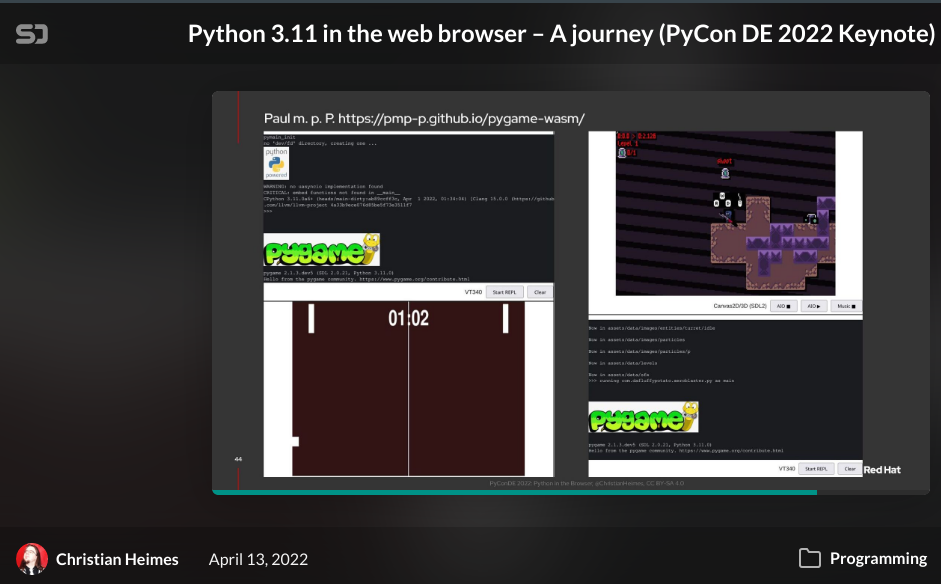
 deft plover
main raven
hey guys is this where to ask if I want to ask about turtle python?
deft plover
main raven
hey guys is this where to ask if I want to ask about turtle python?
idk, but ask away
deft plover
i'm trying to read a model and apply its texture with python opengl
the problem is that my texture is not being applied correctly (possibly because of uv coordinates not being read or something)
i read my texture like this
# read texture and apply some settings
def read_texture(filename):
    img = Image.open(filename + 'texture.png')
    img_data = np.array(list(img.getdata()), np.int8)

    textID = glGenTextures(1)
    glBindTexture(GL_TEXTURE_2D, textID)
    glPixelStorei(GL_UNPACK_ALIGNMENT, 1)

    glTexParameterf(GL_TEXTURE_2D, GL_TEXTURE_WRAP_S, GL_REPEAT)
    glTexParameterf(GL_TEXTURE_2D, GL_TEXTURE_WRAP_T, GL_REPEAT)

    glTexParameterf(GL_TEXTURE_2D, GL_TEXTURE_MAG_FILTER, GL_NEAREST)
    glTexParameterf(GL_TEXTURE_2D, GL_TEXTURE_MIN_FILTER, GL_NEAREST)

    glTexImage2D(GL_TEXTURE_2D, 0, GL_RGB, img.size[0], img.size[1], 0, GL_RGBA, GL_UNSIGNED_BYTE, img_data)
    glGenerateMipmap(GL_TEXTURE_2D)
    return textID
i draw my models like this
def draw_models():
    for model in models:
        glPushMatrix()
        glScalef(*model["scale"])
        glRotatef(90, 1, 0, 0)
        glTranslatef(*model["trans"])

        glEnable(GL_TEXTURE_2D)
        glActiveTexture(GL_TEXTURE0)
        glBindTexture(GL_TEXTURE_2D, model["texture"])
        glEnable(GL_TEXTURE_GEN_S)
        glEnable(GL_TEXTURE_GEN_T)
        glTexGeni(GL_S, GL_TEXTURE_GEN_MODE, GL_OBJECT_LINEAR)
        glTexGeni(GL_T, GL_TEXTURE_GEN_MODE, GL_OBJECT_LINEAR)

        for mesh in model["model"].mesh_list:
            glBegin(GL_TRIANGLES)
            for face in mesh.faces:
                for vertex_i in face:
                    glVertex3f(*model["model"].vertices[vertex_i])
            glEnd()
        glDisable(GL_TEXTURE_2D)
        glPopMatrix()
Anyone got an idea?
this is what it looks like, while the other is what it should look like


also this is how i load my models from file
# read model and translate and scale it
def addModel(path):
    scene = pywavefront.Wavefront(path + 'normalized_model.obj', collect_faces=True,create_materials=True)

    scene_box = (scene.vertices[0], scene.vertices[0])
    for vertex in scene.vertices:
        min_v = [min(scene_box[0][i], vertex[i]) for i in range(3)]
        max_v = [max(scene_box[1][i], vertex[i]) for i in range(3)]
        scene_box = (min_v, max_v)

    scene_size = [scene_box[1][i] - scene_box[0][i] for i in range(3)]
    max_scene_size = max(scene_size)
    scene_trans = [-(scene_box[0][i]) for i in range(3)]

    scaled_size = 2
    scene_scale = [scaled_size / max_scene_size for i in range(3)]
    texID = read_texture(path)
    models.append({"model": scene, "trans": scene_trans, "scale": scene_scale, "texture": texID})
 torn jackal
Hey Guys, I coded a game with Pygame and would like to put my game on a phone. How can I do it ?
I know kivy but idk if it works with Pygame
Please mention me !
 versed cedar
Hello, I apologise if I am interrupting someone, if I have bug in pygame, where should I put the bug? In avaliable help channels or gamedevelopment? If somebody could be generous to answer the question, it would be very nice. In advance, thank you very much.
vagrant saddle
@torn jackal you want just python-for-android for that not the fulll kivy
you could also use pygame-wasm in a webview
( see the PyCon DE screenshot earlier )
vagrant saddle
here's you can try on the targeted phone https://pmp-p.github.io/pygame-wasm/
ymmv
vagrant saddle
yep you just need a sample android for running the webview should not be hard to find
vagrant saddle
you're welcome
vagrant saddle
versed cedar
Hello, I apologise if I am interrupting someone, if I have bug in pygame, where ...
hi, i guess that depends if the bug is in pygame, or just in your code using pygame in which case you should put it somewhere for people to reproduce and analyze
broken citrus
deft plover
i'm trying to read a model and apply its texture with python opengl
i dont recomment using py opengl
ive tried it made progress
but then it starts getting into c++ more than python
for shaders
frank fieldBOT
Hey @olive nymph!
It looks like you tried to attach a Python file - please use a code-pasting service such as https://paste.pythondiscord.com
 olive nymph
import pygame
from time import sleep
pygame.init()
window = pygame.display.set_mode((0,0), pygame.FULLSCREEN)
pygame.mixer.init()
pygame.mixer.music.load('ratsasan.mp3')
pygame.mixer.music.play()
sleep(5)
pygame.mixer.music.load('scary.mp3')
pygame.mixer.music.play()
sleep(1)
image = pygame.image.load('scr.jpg')
window.blit(image, (0,0))
pygame.display.update()
sleep(3)
 strong quartz
What's the problem with the code
versed cedar
vagrant saddle
hi, i guess that depends if the bug is **in** pygame, or just in your code using...
Thank you very much.
vagrant saddle
for gpu hardware instancing would suggest a more robust game engine like Panda3D instead of just pygame
not sure but i'd say yes
but godot is not python, Panda3D is
and in Panda3D you can continue to use pygame on 2d textures
input won't work but drawing will
 iron bobcat
dry cloak
iron bobcat
dry cloak
im trying to make a game (using pygame) on my tablet
but every time i try to run the project i keep getting this error
pygame.error: android only supports one window
the only window is
WIN = pygame.display.set_mode((width, height), pygame.SCALED | pygame.FULLSCREEN)
(i have used ctrl + f to find every use of pygame.display)
dry cloak
there is a tkinter window that is opend befor the pygame one, but the root is destroyed befor the pygame window is created
 vapid wagon
Hey, is there any way to put the icon also in taskbar?

pygame.display.set_icon() doesn't work for that
 desert hornet
For anyone here that develops games with Python, why do you choose pygame over Panda3D?
 empty wraith
vagrant saddle
dry cloak
there is a tkinter window that is opend befor the pygame one, but the root is de...
empty wraith
vagrant saddle
dry cloak
there is a tkinter window that is opend befor the pygame one, but the root is de...
i guess you are using pydroid3 ? then the tkinter implementation probably use SDL2 under the hood so it could be like multiple window
empty wraith
hi guys. So i have this game i'm making, there are two separate modules: one is the actual game engine, and the other is UI. They're as separate as possible atm, as in i can run simulations on the engine without using UI at all. Game's engine is initialized in the UI class, and is run as a daemon thread. I need to pass player's input to the engine, currently it's done in a weird way: i'm directly changing an engine's variable in the UI, meanwhile the engine is completely stalled like this while self.variable is None: time.sleep(0.01). That looks strange because if you don't delve deeply in the code it looks like this will never come through. I assume it's not the best kind of practice. What is a typical good way of doing this? Should i look into threading.Condition or possibly threading.Event instead?
Actual code, link to the spot where i change a variable directly:
https://github.com/5tr1k3r/dominoes/blob/main/main.py#L273
Link to the spot where i wait endlessly in the engine until that variable is miraculously changed:
https://github.com/5tr1k3r/dominoes/blob/main/models.py#L96
 flint tapir
Hi I'm new to coding. I'm currently constructing a very basic pokemon game. At this stage in time I'm stuck in the development of the game. I can't seem to get past this infinite loop on my terminal.
Have a look at my coding and tell me what you think:Introduction = "Hi! Welcome. Let's pick our Pokemon! Would you like a Level 9 Charmander, or a Level 9 Squirtle?"
print(Introduction)
#Creating a class of pokemon
class Pokemon:
def __init__(self, name, power, evasion ):
    self.name = name
    self.power = power
    self.evasion = evasion
    self.level = 9
Charmander = Pokemon("Charmander", "Flamethrower", "Agility")
Squirtle = Pokemon("Squirtle","Watergun","Agility")
def repr(self):
return "This {level}{name} uses the move {power}. A great choice! ".format(level = self.level, name =self.name, power = self.power)
#Creating a class of Trainer
class Trainer:
def init(self, name, Pokemon_list, maps, num_berries):
self.name = name
self.pokemons = Pokemon_list
self.maps = maps
self.current_pokemon = 0
self.berries = num_berries
def repr(self):
   print("{name} is a trainer with the following Pokemon".format(name = self.name))
   for pokemon in self.pokemons:
     print(pokemon)
   return "The present Pokemon on the field is {name}!".format(name = self.pokemons[self.current_pokemon].name)
trainer_one_pokemon = []
trainer_two_pokemon = []
def Pokemon_menu():
print("[1] Charmander")
print("[2] Squirtle")
print("[0] Exit the program")
Pokemon_menu()
option = int(input("Enter your choice: "))
while option != 0:
if option == 1:
print("Charmander has been called on the battlefield.")
elif option == 2:
print("Squirtle has been called on the battlefield.")
else:
print("Whoops! It looks like you picked neither Pokemon. Try selecting one again!")
Pokemon_menu()
option = int(input("Enter your choice: "))
keen turret
which one is better and more professional:

 cloud onyx
def input(self, key):
    if self.hovered: "Yesterday was giving no hovered attribute but today's seems work"
        if key == 'left mouse down':
            print("ff") "using this to check if replays the input
Missing one required positional argument.
But seeing the video instructing it same method worked. What I'm doing wrong.
 charred pier
cloud onyx
```py
def input(self, key):
if self.hovered: "Yesterday was giving no hovere...
charred pier
cloud onyx
```py
def input(self, key):
if self.hovered: "Yesterday was giving no hovere...
is that function inside a class?
cloud onyx
Not as inside of it. But is being inherited from a class object.

Or I fucked up the algo
charred pier
cloud onyx
can i see more of the code around the function you sent?
charred pier
yeah no problem
cloud onyx
from ursina import *

class Test_cube(Entity):
    def __init__(self):
    super().__init__(
    model='cube', color=color.white, Texture =  'white_cube'
    )
class Test_button(Button):
    def __init__(self):
    super().__init__(
    parent= scene, model='cube's, Texture='brick', color=color.blue, pressed_color= color.white
    )
def input(self, key):
    if self.hovered:
        if key == 'left mouse down':
            print("ff")
app=Ursina()
test_cube = Test_button()
app.run()
Just yesterday the self.hovered wasn't working. But today worked
charred pier
firstly, dont name your function "input", as its a python keyword, and secondly you only use "self" when you are inside of a class
so in your "input" function, you dont actually need self, as its not inside of a class
when its not in a function, self is being treated as another argument
cloud onyx
Lemme change they. And thanks on advance.
No print but solved the argument. Thanks champ. At least the input is being replied
flint tapir
Ok so i managed to break the loop. But now I have another problem with the code. It keeps on outputting the same question prompt. Again and again.
Introduction = "Hi! Welcome. Let's pick our Pokemon! Would you like a Level 9 Charmander, or a Level 9 Squirtle?"
print(Introduction)
#Creating a class of pokemon
class Pokemon:
def __init__(self, name, power, evasion ):
    self.name = name
    self.power = power
    self.evasion = evasion
    self.level = 9
P1 = Pokemon("Charmander", "Flamethrower", "Agility")
P2 = Pokemon("Squirtle","Watergun","Agility")
def repr(self):
return "This {level}{name} uses the move {power}. A great choice! ".format(level = self.level, name =self.name, power = self.power)
#Creating a class of Trainer
class Trainer:
def init(self, name, Pokemon_list, maps, num_berries):
self.name = name
self.pokemons = Pokemon_list
self.maps = maps
self.current_pokemon = 0
self.berries = num_berries
def repr(self):
   print("{name} is a trainer with the following Pokemon".format(name = self.name))
   for pokemon in self.pokemons:
     print(pokemon)
   return "The present Pokemon on the field is {name}!".format(name = self.pokemons[self.current_pokemon].name)
trainer_one_pokemon = []
trainer_two_pokemon = []
def Pokemon_menu():
print("[1] Charmander")
print("[2] Squirtle")
print("[0] Exit the program")
Pokemon_menu()
option = int(input("Enter your choice: "))
while option != 0:
if option == 1:
print("Charmander has been summoned on the battlefield.")
elif option == 2:
print("Squirtle has been summoned on the battlefield.")
else:
print("Whoops! It looks like you picked neither Pokemon. Try selecting one again!")
Pokemon_menu()
option = int(input("Enter your choice: "))
Its like the code has an std or something. Always replicating pieces of unnecessary output like someone gave it herpes
 frozen creek
Hi
can someone help me create a simple gui for my connect 4 game project
I've coded the game (somehow), I just need small additional gui (like a box that shows who's turn it is)
I'm struggling as im quite new to this scale of coding
any help would be appreciated thanks ❤️
 stiff whale
hi
 hollow shadow
Hey how would I make pygame.sprite.spritecollideany(player, pipes): ignore the white space between these 2 pipes if it's one image?

 barren sinew
Hi! is there anyone who can help me with my code in VC? i am struggling with using sounds in my pygame code
dry cloak
Is there any way i can bring up the mobilrpe on screen keyboard in pygame
 sinful lodge
keen turret
which one is better and more professional:
sinful lodge
keen turret
which one is better and more professional:
i think the first one looks better
sinful lodge
cloud onyx
```py
def input(self, key):
if self.hovered: "Yesterday was giving no hovere...
"Yesterday was giving no hovered attribute but today's seems work" is this supposed to be a comment? use # hashtags for comments
sinful lodge
charred pier
firstly, dont name your function "input", as its a python keyword, and secondly ...
input is a function called by ursina (for handling key presses) so they have to name the function that way
oh no someone's trying to make "minecraft" in ursina again 🤦
 raw shadow
hollow shadow
Hey how would I make `pygame.sprite.spritecollideany(player, pipes):` ignore the...
raw shadow
hollow shadow
Hey how would I make `pygame.sprite.spritecollideany(player, pipes):` ignore the...
i dont think you can
thats one whole sprite and the white is part of the picture
if it was png i think it might work
 icy valve
@hollow shadow you dont need to make a sprite just draw the object as an arragment os simbols in your game
raw shadow
what?
icy valve
let me search for a an example of code of ho to draw in pygame
pygame.draw.rect(game_window, green,
pygame.Rect(pos[0], pos[1], 10, 10))
raw shadow
thats not what they're asking
icy valve
ok pos[0],pos[1] are the x,y cordinates of where you will draw
raw shadow
hollow shadow
Hey how would I make `pygame.sprite.spritecollideany(player, pipes):` ignore the...
this looks like a flappy bird, because you're gonna need side-scrolling per frame, you can generate a new pipe ever 30% of FPS
icy valve
you can
i made a videogame that draws the world 100fps
(spolier)the screen doesnt like playing a image at 100fps
raw shadow
every frame moves a pipe forward, in order to do that generation, you can just use paint.exe to remove the top and bottom and make them separate jpegs.
and the generation can be changed ot make it variate
icy valve
not would be easier to just get the x,y position of the pipe and re draw all the world again every frame just adding a 1 in the x cordinate?
like in a pacman game or in the snake game?
charred pier
sinful lodge
`input` is a function called by ursina (for handling key presses) so they have t...
yes but you only use the input method inside of a class, so it still wouldnt overwrite the global "input" function
sinful lodge
charred pier
yes but you only use the input method inside of a class, so it still wouldnt ove...
there is a global input function in ursina too, please do your research
potent ice
flint tapir
Introduction = "Hi! Welcome. Let's pick our Pokemon! Would you like a Level 9 Ch...
 silent kindle
flint tapir
Introduction = "Hi! Welcome. Let's pick our Pokemon! Would you like a Level 9 Ch...
silent kindle
flint tapir
Introduction = "Hi! Welcome. Let's pick our Pokemon! Would you like a Level 9 Ch...
that is the single coolest idea i have heard in a while
 crisp junco
 quasi rock
flint tapir
Introduction = "Hi! Welcome. Let's pick our Pokemon! Would you like a Level 9 Ch...
quasi rock
flint tapir
Introduction = "Hi! Welcome. Let's pick our Pokemon! Would you like a Level 9 Ch...
use code typing in discord please
belive me this thing makes your life better
 snow hill

This is a second way to display a box with HARFANG® High Level.
To view the other method click here : https://www.youtube.com/watch?v=gChBS1wVDLI&list=PL_o52xT88ujUGRFeUALo-gaCnk8hcb7Ri
HARFANG® High Level is a set of simple functions that allow you to code faster, and to achieve results without needing to become familiar with the deeper notio...
🥚 🥚 🥚  ❤️
❤️
 copper saddle
i am an 🥚
versed cedar
Hello, sorry for writing lately,
I have a bug in a game.
Here is code:
import pygame
import os
pygame.init()
screen = pygame.display.set_mode((400, 400)) # Screen
X = 50
Y = 200
running = False
silver = [190,194,203]
black = [0,0,0]
#text = "Avatar PVP"
while not running:
for event in pygame.event.get():
if event.type == pygame.QUIT:
running = True
pygame.display.flip()
#Silver Screen
screen.fill(silver)
#Title
pygame.display.set_caption('AVATAR PVP')
#Silver screen
pygame.display.update
#text
font_obj = pygame.font.Font("C:\Windows\Fonts\Arial.ttf", 25)
text_obj = font_obj.render('Avatar PVP', True, black)
screen.blit(text_obj, (50, 100))
#START
font_obj0 = pygame.font.Font("C:\Windows\Fonts\Arial.ttf", 16)
text_obj0 = font_obj0.render('START', True, black)
screen.blit(text_obj0, (50, 210))
#Settings
font_obj1 = pygame.font.Font("C:\Windows\Fonts\Arial.ttf", 16)
text_obj1 = font_obj1.render('SETTINGS', True, black)
screen.blit(text_obj1, (50, 260))
#EXIT
font_obj2 = pygame.font.Font("C:\Windows\Fonts\Arial.ttf", 16)
text_obj2 = font_obj2.render('EXIT', True, black)
screen.blit(text_obj2, (50, 310))
#50 & 90 310 & 325
if event.type == pygame.MOUSEBUTTONDOWN:
    posx, posy = pygame.mouse.get_pos()
    print(posx, posy)
    if((posx >= 50 and posx <= 90) and (posy >= 310 and posy <= 325)):
        exit()
    if((posx >= 50 and posx <= 130) and (posy >= 260 and posy <= 270)):
        font_obj = pygame.font.Font("C:\Windows\Fonts\Arial.ttf", 25)
        text_obj = font_obj.render('Avatar PVP', True, silver)
        screen.blit(text_obj, (50, 100))
font_obj0 = pygame.font.Font("C:\Windows\Fonts\Arial.ttf", 16)
text_obj0 = font_obj0.render('START', True, silver)
screen.blit(text_obj0, (50, 210))
# OPTION
font_obj1 = pygame.font.Font("C:\Windows\Fonts\Arial.ttf", 16)
text_obj1 = font_obj1.render('SETTINGS', True, silver)
screen.blit(text_obj1, (50, 260))
# EXIT
font_obj2 = pygame.font.Font("C:\Windows\Fonts\Arial.ttf", 16)
text_obj2 = font_obj2.render('EXIT', True, silver)
screen.blit(text_obj2, (50, 310))
#260 & 275 50 & 90
I searched for solutions, but I couldn't find them.
The bug is when I click the settings button it only flickers instead to delete all texts.
If somebody could be generous, could someone help me?
I would be really grateful.
Good night!
I apologize if I have grammar mistakes in English, it isn't my native tongue, but I will put effort to avoid grammar mistakes as rare as often.
 blissful goblet
Anyone have thoughts on how you make a game more social? 
 latent current
Hi everyone, I'm new to game development, I was interested in making a clicker game (click to earn coins, games like this) and I wanted to know if anyone knew any videos about it
 dusty burrow
latent current
Hi everyone, I'm new to game development, I was interested in making a clicker g...
dusty burrow
latent current
Hi everyone, I'm new to game development, I was interested in making a clicker g...
You first need to select a framework or engine to work with.
After that, you should probably learn how to use it and go from there.
dawn quiver
Hello guys, I have 42 instances to do with the same object
Can you help me to create these 42 instances (with a loop for example)
Idk how to do
please mention me
Thanks in advance
dusky parcel
if anyone knows pygame well ive been creating a set of walls for my game using rects but i want to change them into wall images this is my wall function
       x, y = (0, 0)
       for i in level:
           for j in i:
               if j == "#":
                   wall_piece = pygame.rect.Rect((x, y, player_size, player_size))
                   pygame.draw.rect(screen, (105, 105, 105), wall_piece)
               x += player_size
           x = 0
           y += player_size
if anyone can help ill highly appreciate it
 arctic hamlet
Those eyes. My first Godot game. it is free. A horror story game about a journalist henry who plans to visit the famous abounded house.https://sushant12.itch.io/those-eyes

 latent stone
dusky parcel
if anyone knows pygame well ive been creating a set of walls for my game using r...
latent stone
dusky parcel
if anyone knows pygame well ive been creating a set of walls for my game using r...
You would use pygame.image.load to load an image as a Surface object from a file, and then do screen.blit to place it on your screen.
dry cloak
dawn quiver
Hello guys, I have 42 instances to do with the same object
So you have 42 instances of a class?
Im a bit late responding so @me when/if you respond
dry cloak
My suggestion would be to put them in a list
 dreamy wren
Is there a 3D equivalent to three.js but for Python
vagrant saddle
dreamy wren
Is there a 3D equivalent to three.js but for Python
Panda3D ?
also support wasm you can test it here https://rdb.name/panda3d-webgl/editor.html
dreamy wren
vagrant saddle
Panda3D ?
Thanks seems to be a bit more of a pain than three.js but I'll give it a go
 white rampart
hey can i get some help here?
how do i make a pacman style game/or where do i start
icy valve
y really just downloaded the snake program and started disasamble to make my own game
it was the first time i made a 2d graphical game
i didint saw any tutorial
in the game already everything is well explained what makes every code
vagrant saddle
dreamy wren
Thanks seems to be a bit more of a pain than three.js but I'll give it a go
you're welcome, and if you did not find it yet here's some usefull https://github.com/fireclawthefox/panda3d-tutorial/blob/master/Panda3D Tutorial.pdf

GitHub
A Tutorial about game creation with the Panda3D game engine - panda3d-tutorial/Panda3D Tutorial.pdf at master · fireclawthefox/panda3d-tutorial
icy valve
you mean a video of pepole tiping in code to a presentation?
 alpine hare
icy valve
you mean a video of pepole tiping in code to a presentation?
alpine hare
icy valve
you mean a video of pepole tiping in code to a presentation?
like a youtube channel where i can learn game development
i have already learnt the basic in python now to put it in work
icy valve
just in python or also unity?
alpine hare
icy valve
just in python or also unity?
both..but unity uses c#
please
icy valve
in inglish or spanish the chanel?
alpine hare
english
alpine hare
icy valve
just in python or also unity?
with unity too
icy valve

 fallow peak
is pygame to unity that big of a change
sinful lodge
fallow peak
is pygame to unity that big of a change
you'd have to learn a new langauge C# to use unity
fallow peak
sinful lodge
you'd have to learn a new langauge C# to use unity
oh
then with which should i start
sinful lodge
fallow peak
then with which should i start
if you're looking to get into the gamedev industry then definitely C#. but if you're just trying to make casual games and learn/practice python while making those games, pygame
sinful lodge
good luck
lunar venture
For a game like Pac-Man, Python and PyGame is definitely enough
 ember carbon
hello i have an issue with pygame
the window keep not responding
and im just trying to click on the window
but it keep (not responding) crashing
and its a not a code error
dry cloak
im currently working on a basic 2d block game, and just like terraria/minecraft i want to try add random terrain genoration. im wondering if anyone has any methods of genorating 2d terrain
image of current terrain genoration

 lofty lintel
I'm using pymunk for my physics engine, and I want to have a world border in the shape of an octagon with rounded edges. I've figured out that I want to use autogeometry, but I need to come up with a set of points to convert into segments to then pass into autogeometry.
I found shapely, but I'm not sure where to go from there.
Is this a good way of implementing this sort of world border, and if not, what do you recommend? If it is a good implementaiton, do you know of an efficient method to generate a set of points for a rounded octagon given an edge length, center, and radius size for the rounded edges? I've only managed to come up with a set of points for a normal octagon, and am stuck on rounding off the edges.
Thanks in advance!
junior tangle
Made an infinite loop for my runner game  (pixel art by me :D)
you know that feeling when you spend like 10h on graphics, and rly dont wanna the code
junior tangle
dry cloak
im currently working on a basic 2d block game, and just like terraria/minecraft ...
thats looking pretty nice. I know you can generate 2d terrain with Procedural generation you can search about in on yt
dry cloak
ok
junior tangle
ember carbon
but it keep (not responding) crashing
maybe you forgot the while loop? so it only runs for one frame and then finishes
dry cloak
or pygame.display.update()
junior tangle
oh yeah as well.
junior tangle
alpine hare
like a youtube channel where i can learn game development
i have already learnt...
ClearCode
 junior lintel
Hey, I'm creating a platformer and I wanna my player jump only if it's on floor
Pastebin
Pastebin.com is the number one paste tool since 2002. Pastebin is a website where you can store text online for a set period of time.
here is my code
dawn quiver
hola todos, les comparto el juego que he publicado en la play store, si quieren probarlo y enviarme comentarios o sugerencias me sirve mucho, gracias 🙂
https://play.google.com/store/apps/details?id=com.tudexnetworks.blocempire

A fun little block game
potent ice
dawn quiver
hola todos, les comparto el juego que he publicado en la play store, si quieren ...
Made with python? If so, can you share something more about the project?
 signal bramble
Hello everyone, I'm a newer programmer, I think I have most of the basics down for python and I'm making a command line text based game, but I'm looking for some more experienced people to learn and maybe collaborate with
junior tangle
dawn quiver
hola todos, les comparto el juego que he publicado en la play store, si quieren ...
Niceee, by the way what libraries did you use? (Qué bueno, por cierto, ¿qué bibliotecas por python usaste?)
versed cedar
Hello, even though I am begginer programmer please don't find fault with reading my code, I have a bug in a game:
import pygame
import os

pygame.init()
screen = pygame.display.set_mode((400, 400))

X = 50
Y = 200
running = False
silver = [190,194,203]
black = [0,0,0]
def Title():
    pygame.display.flip()

    screen.fill(silver)

    pygame.display.set_caption('AVATAR PVP')

    pygame.display.update
    # text
def AVATARPVP():
    font_obj = pygame.font.Font("C:\Windows\Fonts\Arial.ttf", 25)
    text_obj = font_obj.render('Avatar PVP', True, black)
    screen.blit(text_obj, (50, 100))
def START():

    font_obj0 = pygame.font.Font("C:\Windows\Fonts\Arial.ttf", 16)
    text_obj0 = font_obj0.render('START', True, black)
    screen.blit(text_obj0, (50, 210))
def SETTINGS():

    font_obj1 = pygame.font.Font("C:\Windows\Fonts\Arial.ttf", 16)
    text_obj1 = font_obj1.render('SETTINGS', True, black)
    screen.blit(text_obj1, (50, 260))
def EXIT():
    # EXIT
    font_obj2 = pygame.font.Font("C:\Windows\Fonts\Arial.ttf", 16)
    text_obj2 = font_obj2.render('EXIT', True, black)
    screen.blit(text_obj2, (50, 310))

def MOUSECLICK():
    if event.type == pygame.MOUSEBUTTONDOWN:
        posx, posy = pygame.mouse.get_pos()
        print(posx, posy)
        if((posx >= 50 and posx <= 90) and (posy >= 310 and posy <= 325)):
            exit()
        if((posx >= 50 and posx <= 130) and (posy >= 260 and posy <= 270)):
            font_obj = pygame.font.Font("C:\Windows\Fonts\Arial.ttf", 25)
            text_obj = font_obj.render('Avatar PVP', True, silver)
            screen.blit(text_obj, (50, 100))
            # START
            font_obj0 = pygame.font.Font("C:\Windows\Fonts\Arial.ttf", 16)
            text_obj0 = font_obj0.render('START', True, silver)
            screen.blit(text_obj0, (50, 210))
            # OPCIJE
            font_obj1 = pygame.font.Font("C:\Windows\Fonts\Arial.ttf", 16)
            text_obj1 = font_obj1.render('SETTINGS', True, silver)
            screen.blit(text_obj1, (50, 260))
            # EXIT
            font_obj2 = pygame.font.Font("C:\Windows\Fonts\Arial.ttf", 16)
            text_obj2 = font_obj2.render('EXIT', True, silver)
            screen.blit(text_obj2, (50, 310))
while not running:
    for event in pygame.event.get():
        if event.type == pygame.QUIT:
            running = True
    Title()
    AVATARPVP()
    START()
    SETTINGS()
    EXIT()
    MOUSECLICK()
The bug is when I click on settings instead to change the screen or to remove text, it only flickers. If someone could be generous, could someone help me? I would be really grateful. In advance thank you very much. P.S. If the bug isn't clear, I will send you screenshot.
 keen umbra
i am not english so please respect me . blender is good for pyton ?
versed cedar
keen umbra
i am not english so please respect me . blender is good for pyton ?
It depends for what you want to use. Do you want for game development?
broken citrus
versed cedar
The bug is when I click on settings instead to change the screen or to remove te...
hey u already asked this and i gave u a solution and you chose not to do it
 ruby tundra
versed cedar
The bug is when I click on settings instead to change the screen or to remove te...
ruby tundra
versed cedar
The bug is when I click on settings instead to change the screen or to remove te...
what is in your settings method
sinful lodge
versed cedar
```py
import pygame
import os
pygame.init()
screen = pygame.display.set_mode((4...
i know you said "dont find fault in my code" but i have to point this out, it seems that you are loading the font every frame before rendering text with that? i don't think pygame caches fonts, so that might cause your game to lag a lot. you might wanna load the font beforehand into a variable and use that variable instead
 north halo
can anyone teach me how to code pygame, I know a bit of python and im new here
junior tangle
north halo
can anyone teach me how to code pygame, I know a bit of python and im new here
YouTube
signal bramble
I need some assistance, I want to randomly assign a dictionary key value pair to another dictionary, I need to do it 16 times while taking each assignment out of the first dictionary
so I am trying to make a loop to get a random pair and assign it to another dictionary
blissful goblet
signal bramble
I need some assistance, I want to randomly assign a dictionary key value pair to...
for i in range(0, 16):
  key, value = random.choice(list(dictionary_one.items()))
  del dictionary_one[key]
dictionary_two[key] = value```?
next estuary
I never would have thought you could do this much with python
dawn quiver
next estuary
I never would have thought you could do this much with python
wow, how is that done?
next estuary
With panda3d + Ursina for the 3D / Numpy + numba for the math / opensimplex for a lot of the procgen
flint tapir
Hi its the Pokemon game developer again
Just wanted some insight with the piece of code I'm still stuck with

Codecademy
Codecademy is the easiest way to learn how to code. It's interactive, fun, and you can do it with your friends.
I've been trying to understand the mechanics behind the spacing of variables through which good code is written. But am still having a hard time. Any input would be much appreciated!!
dawn quiver
next estuary
With panda3d + Ursina for the 3D / Numpy + numba for the math / opensimplex for ...
wow
flint tapir
Just wanted to apologise guys for my herpes remark. I understand talking about health issues online can be psychologically detrimental. Will not happen again
 smoky pawn
keen umbra
i am not english so please respect me . blender is good for pyton ?
smoky pawn
keen umbra
i am not english so please respect me . blender is good for pyton ?
blender isn’t for game dev
 normal silo
smoky pawn
blender isn’t for game dev
normal silo
smoky pawn
blender isn’t for game dev
You can make games with a modified version of Blender. Blender used to have a game engine in it, but it was removed. That game engine was put back in in a separate project: https://upbge.org/#/
 smoky pawn
normal silo
You can make games with a modified version of Blender. Blender used to have a ga...
smoky pawn
normal silo
You can make games with a modified version of Blender. Blender used to have a ga...
then it’s just extension lol
normal silo
smoky pawn
then it’s just extension lol
I'm not sure what counts as a Blender extension. Is Discord just a Chromium extension?
smoky pawn
normal silo
I'm not sure what counts as a Blender extension. Is Discord just a Chromium exte...
discord is electron js project
game shit that you sent me is extension for blender because it makes you use blender for what it wasn’t designed for
normal silo
smoky pawn
discord is electron js project
Electron uses Chromium and Node.js so you can build your app with HTML, CSS, and JavaScript
Build cross-platform desktop apps with JavaScript, HTML, and CSS.
normal silo
At what point is something its own project vs just an extension? UPBGE seems to add a lot.
smoky pawn
it doesn’t matter how much it adds
normal silo
The Ship of Theseus is a thought experiment about whether an object that has had all of its components replaced remains fundamentally the same object. Theseus was the mythical Greek founder-king of Athens, and the question was raised by ancient philosophers (e.g. Heraclitus and Plato): If the ship of Theseus were kept in a harbor and every part ...
smoky pawn
can you understand that it extends blender for bonus purpose
smoky pawn
normal silo
https://en.wikipedia.org/wiki/Ship_of_Theseus
the fuck are you sending me
you couch phisoloph
normal silo
"it’s just extension", in my opinion, UBPGE is not just an extension. It's its own project.
normal silo
It's an extension, but not "just" an extension.
smoky pawn
wym
normal silo
When I think of a Blender extension I think of a small Python script that maybe adds new key bindings, export file types, etc.
Not a whole game engine.
smoky pawn
is pylance vsc extension or own project
normal silo
I don't know what that is.
broken citrus
next estuary
I never would have thought you could do this much with python
you can do anything
broken citrus
Anyone know a open source game that would need multiplayer
vagrant saddle
broken citrus
Anyone know a open source game that would need multiplayer
pong on pygame-wasm, but that's a real challenge
broken citrus
vagrant saddle
pong on pygame-wasm, but that's a real challenge
send link
vagrant saddle
https://github.com/pmp-p/python-wasm-plus the pong there are two in demo folder
only have a basic asyncio loop which is not socket based, and websockets javascript side
pyodide claim to have working sockets so there may be prior art to getting the data to python
broken citrus
vagrant saddle
only have a basic asyncio loop which is not socket based, and websockets javascr...
i want somethign thats pure python
vagrant saddle
me too
broken citrus
maybe something using pygame since it might be easy
vagrant saddle
pyodide socket stuff is way too much js side
vagrant saddle
broken citrus
maybe something using pygame since it might be easy
i don't get that ?
broken citrus
im talking about a normal game in python
vagrant saddle
you mean normal sockets then
where's the fun ? :p
10 lines with pyenet and it's done
broken citrus
vagrant saddle
10 lines with pyenet and it's done
pyenet lol ?
i just use normal sockets
vagrant saddle
tcp or udp ?
vagrant saddle
pyenet use udp too and it's very well done
broken citrus
vagrant saddle
tcp or udp ?
im just looking for a game that hasnt impleneted multiplayer yet
really
send me link ima see pyenet
vagrant saddle
enet is widely used in low latency multiplayer games like fps
and it handle retransmission if needed which is really a bonus for udp
broken citrus
i usually just use socket never used enet
nah this isnt what im looking for at all
this is 5 years old 😭
vagrant saddle
yeah that's usually the case for bugfree libraries
they're old and working very well
broken citrus
hmm i doubt
maybe they do to a certain extent
i still rather use something i made ya feel me
specially after it works really when and im confident with it
vagrant saddle
and it's more than twelve years old
broken citrus
yikes
anyways if you know or find a singleplayer game that has potential for multiplayer let me know
 mint swallow
Didn't even know you could make games with python.
broken citrus
mint swallow
Didn't even know you could make games with python.
if u can do maths in python you can do anything
 cold storm
upbge makes it more feasible
but we could use GPU armature skinning
then we would be beating unity after the vulkan port finishes up
frank fieldBOT
Hey @cold storm!
It looks like you tried to attach file type(s) that we do not allow (.blend). We currently allow the following file types: .gif, .jpg, .jpeg, .mov, .mp4, .mpg, .png, .mp3, .wav, .ogg, .webm, .webp, .flac, .m4a, .csv, .json.
Feel free to ask in #community-meta if you think this is a mistake.
cold storm
I can't share .blend here still
lame
a .blend can contain text blocks (code) and models / textures / shaders etc
(a whole game basically)
vagrant saddle
afaik upbge execution is not sandboxed
icy valve
about what is the game?
tranquil girder
Cool. You made it in Python?
icy valve
it looks like an .exe of 216kB
idont know i shouldn execute any kind of program i didnt made or if i dont see the source code first
its not safe to just execute anything without know what it is
sinful lodge
icy valve
idont know i shouldn execute any kind of program i didnt made or if i dont see t...
it's kinda sus ngl, he wants you to check out the code but it's just an exe, also which game doesn't have assets?
@dawn quiver what happened to your game assets
also yeah please include source if you want people to actually be able to review the code
 round obsidian
@dawn quiver this isn't Python related.
 orchid osprey
Yo, so I have a game outline and I'm trying to get it into a UI...any game makers out there that know a program that works with python?

 vagrant saddle
(125,125,) not 125,125
vagrant saddle
 grim niche
I dont understand where I went wrong
grim niche
I dont understand where I went wrong
by pair it means tuple ( or list ) for center
 left dust
Hi I am trying to code a horror text adventure game kind of like the ones that you would see for the Amiga I was wondering if anyone knew how to create graphics similar to Amiga text adventure games
 lean moss
"\033[1;31;40m" + "bob" + "\033[0m"
You wrap you word around the specified numbers for the color of your choice
a better example would be print("\033[1;32;40m Bright Green \n")
 hexed shale
what game development program is closest to python or LUA in coding
like as in Unity, unreal engine or another
lean moss
Godot engine is the one I use so you can try that
empty wraith
in arcade, is it required to use sprites/spritelists if i want to draw primitives directly on a custom texture/framebuffer?
 flat aurora
You can use Arcade’s low level OpenGL API directly, though I think the documentation for that is somewhat lacking at the moment. Check the arcade.gl package
It also describes how you can use Pyglet rendering directly, currently you to use a context manager it provides to do Pyglet rendering inside Arcade, but upcoming in Arcade 2.7 is the ability to just freely mix Arcade and Pyglet rendering
empty wraith
thank you
icy valve
what are you doing ?
 main brook
Umm so I have been making a game in ursina
a 3d game module
and...
My texures arent loading
so
is this for pygame
icy valve
ursina? ive working only in 2d whit pygame and text based games
main brook
you can make a 3d object in 1 line of code
icy valve
i could work better than unity?
main brook
icy valve
i could work better than unity?
yes
icy valve
im seeing to make a 3d vr game in the future
main brook
icy valve
im seeing to make a 3d vr game in the future
Oh boy
main brook
icy valve
im seeing to make a 3d vr game in the future
(Also a vr headset costs 300 bucks)
icy valve
i already have a vr headset
icy valve
i justa have to end to develop a treadmill like in ready player 1 to play in the game
main brook
icy valve
i justa have to end to develop a treadmill like in ready player 1 to play in the...
Ig oculus?
main brook
icy valve
yea i have an oculus quest 2
cuz its arm based
Unity/unreal would be better for that
icy valve
its android based OS ive already use it just because it were the only headset chep enought and because you dont need wires to play which is perfect for my tecnology
main brook
icy valve
its android based OS ive already use it just because it were the only headset ch...
yes quite much
icy valve
now im exited as my glove works perfect as i planed
main brook
bruh
icy valve
now i have to polish some tings and make the promotional video
main brook
icy valve
now i have to polish some tings and make the promotional video
mean while i taped my phone to a carton box with biconvex lenses and use my phone as a motion tracker
and send a hdmi output from my pc to my s21
icy valve
i tried that but i dont liked the quality or the pretition of the image and also it was very eye harming to see a movio or so
main brook
icy valve
i tried that but i dont liked the quality or the pretition of the image and also...
lol
yes
icy valve
it can work of course but i really like the quiality i managed whit the oculus 2
main brook
main brook
and send a hdmi output from my pc to my s21
with filter*
main brook
icy valve
it can work of course but i really like the quiality i managed whit the oculus 2
yeah
but mine works ig
icy valve
but for now im stuck whit panic of how to propelly sell this project
main brook
i can play steam vr thanks to my rtx 2060 i picked up some how
main brook
icy valve
but for now im stuck whit panic of how to propelly sell this project
yeah good luck
icy valve
but you dont get eye tired of 2 hours of use?
icy valve
hte cell phones screens arent desinegd to work as fine as mini oled
icy valve
even whit the brigness in minimum and whatching a movie was very dark(batman) i get tired in 20 minutes and my eyes were burnign
main brook
icy valve
even whit the brigness in minimum and whatching a movie was very dark(batman) i ...
yea
icy valve
y want to make a tecnology safe to use for everyone and cheap for easy use
i used a motorola g5plus
icy valve
ive use raspberry pi but for what im working these days the raspberrys are very short in procesing power for my projects
they are good for embeding systems like ligths or experiments or miniservers for a 3d printer
main brook
u can use one to make a custom gba
icy valve
but not enough to run deep learning algoritms in real time to control robots
main brook
yes
the m1 on macs are small and powerfull
i heard a rummor that apple is making a singleboard computer
icy valve
i tried to just run yolo in a raspberry but it runs like 3 or 5 frames per second. not enought to runa a minirace car to detect objects and persons
i whould like a single board computer but i dont like much the apple tecnology
main brook
yeah
icy valve
its exremlly expensive and not all time it give you all control
icy valve
for example if i want to root an iphone to use it as a laptop you cant because that invalitdates the garanty
main brook
i mean
icy valve
i need full control of the tecnology i buy because i use every single drop of them
main brook
if u could replace the storage device
icy valve
thats why i dont like much the oculus quest too
main brook
but you cant
icy valve
not is as simple as replace the storage device its need tools are really exepensive and no all persons know how to use it
main brook
icy valve
not is as simple as replace the storage device its need tools are really exepens...
(I have sent a friend request)
icy valve
ive already acepted
icy valve
bye
torn jackal
Hey guys juste à question : I would like to begin thé 3D game devlopement, and do u know if we can use unity with Python ?
And if not do u know any other software to code 3D video games ?
lunar venture
I don't think there's any game engine that can let you script in Python other than Godot with the plugin or whatever
icy valve
i have already a game in 3d but for now its a prototype that works in 2d and im planing to mgrate all the code to unity
lunar venture
Well, Unity scripts are written in C#
icy valve
matematicly it works fine in 3d but pygame alowsme just a 2d entorn so i draw 2 persepectives of the worls
lunar venture
torn jackal
What is Godot
A game engine
torn jackal
Okay
lunar venture

Godot Engine
Godot provides a huge set of common tools, so you can just focus on making your game without reinventing the wheel.
torn jackal
Thanks
lunar venture
Search on the internet how to script in Python, the default scripting language in Godot is GodotScript
 spare trench
how to make a game like this?

 wheat patio
pygame?
frozen creek
def usernamemain():
def validateLogin(player1, player2):
player1 = player1.get()
player2 = player2.get()
                tkWindow.destroy
                tkWindow.quit
import game
return
anyone know why when i press submit the window wont close? (submit runs this function)
spare trench
wheat patio
pygame?
yes how to make the game
snow hill

In this tutorial, you will learn how to play with the physics by creating two spheres colliding on the plane.
With a small example, you will be ready to use HarfangHighLevel in your project.
HARFANG®️ High Level is a set of simple functions that allow you to code faster, and to achieve results without needing to become familiar with the deeper...
latent stone
frozen creek
def usernamemain():
def validateLogin(player1, player2):
...
By the looks of it, the lines
tkWindow.destroy
tkWindow.quit
Should instead be
                tkWindow.destroy()
                tkWindow.quit()
Since I would assume those are methods or functions
And to call a method/function you use brackets
vagrant saddle
lunar venture
I don't think there's any game engine that can let you script in Python other th...
no there's Panda3D, it's even mentionned in the channel topic 🙂
and of course Harfang 😉
 unborn flower
@daring pewter did you found your mistake ?
your display.update() had a wrong indentation
 daring pewter
unborn flower
<@775752242300321812> did you found your mistake ?
daring pewter
unborn flower
<@775752242300321812> did you found your mistake ?
no i didnt
daring pewter
unborn flower
your display.update() had a wrong indentation
oh i see
thanks
it worked
 primal swift
Made a game. Was almost finished making it when my computer crashed. I didn't save my work and the whole thing got deleted. Now gotta do it all over again 💀.
daring pewter
lol but also sad
snow hill
primal swift
Made a game. Was almost finished making it when my computer crashed. I didn't sa...
How could you « make a game » without saving your source code and yet having it running ? 🙂
 glossy cedar
perhaps
wheat patio
spare trench
yes how to make the game
IDK I didn't learn pygame yet cuz I switched to another language.
however you can find tutorials on utube
dawn quiver
 red sail
is it possible to make a powerful game engine in pygame
red sail
is it possible to make a powerful game engine in pygame
powerful enough to break ur pc
primal swift
snow hill
How could you « make a game » without saving your source code and yet having it ...
it was a written piece of text kind of code. I wanted to try out the basics because i was feeling bored
 jolly vale
How to make a space invaders game in pygame any website I can read or vid tutorial?
icy valve
i recomend search any other game very basic like i did(snake) and then undestand who it works and develop the yours from the sames lines
sinful lodge
red sail
is it possible to make a powerful game engine in pygame
nah, python is too slow for that kind of stuff
SDL maybe but that's C++
icy valve
jolly vale
How to make a space invaders game in pygame any website I can read or vid tutori...
jolly vale
icy valve
i recomend search any other game very basic like i did(snake) and then undestand...
Umm ok
icy valve
sinful lodge
nah, python is too slow for that kind of stuff
what about godot?
sinful lodge
icy valve
what about godot?
it's not written in python
icy valve
jolly vale
Umm ok
thats how i made my game whit "realistics" phisics in a 3d world even if it is represented in a 2d view
icy valve
sinful lodge
it's not written in python
is c#? im loking forward to learn it
sinful lodge
icy valve
is c#? im loking forward to learn it
? c# isn't written in python
icy valve
sinful lodge
? c# isn't written in python
i mean godot
sinful lodge
from a quick google search yes
icy valve
o i see the wiki say godot is c and c++
that sounds good because i already know about c++
but im not sure if i should develop in godot or in unity
@sinful lodge i heard about godot is free of any kind of revenues and licenses but what about unity its also open source? i have played many games in unity
sinful lodge
icy valve
<@834031712265699338> i heard about godot is free of any kind of revenues and li...
i think for commercial games you do need to pay, but i dont thinky ou ahve to for non commercial games
you can use unreal though, if you already know c++
icy valve
@sinful lodge i want to make a free to play open source vr game maybe whit little microtransactions of just cosmetics that counts as a comercial game?
just develop code upload to github and steam and take upgrades from the users whit the time and revenue of the microtransactions or donations inside the game
just like combining csgo whit vrchat but more techno less militar
jolly vale
icy valve
but im not sure if i should develop in godot or in unity
Use unreal engine fortnite was made in that engine
icy valve
is free? which languago of programing is used to it?
and i really dont like fortnite is nice to the see but i dont like the battle royals
potent ice
Remember this is a python game development channel
 frozen knoll
jolly vale
How to make a space invaders game in pygame any website I can read or vid tutori...
frozen knoll
jolly vale
How to make a space invaders game in pygame any website I can read or vid tutori...
This has example code, but uses the Arcade library. You could probably get ideas on how to do Sprite movement from that example.
desert hornet
Panda3D
(a powerful game engine with Python bindings with many crucial bits written in C++)
 stoic bane
made this in pythonista. probably not the cleanest 😉 https://github.com/akeilzar/focus_axiom_decay_pythonista_ios

GitHub
a simple motion-based game for pythonista ios. Contribute to akeilzar/focus_axiom_decay_pythonista_ios development by creating an account on GitHub.
frank fieldBOT
Hey @grave flicker!
You either uploaded a .txt file or entered a message that was too long. Please use our paste bin instead.
 grave flicker
 wind basalt
Does anyone know how to update a pygame 2.1.2 visualization inside a pyqt window? I need an answer. Also I need the PyQt gui buttons to work and the visualization to not to be a static picture
vagrant saddle
we may need more informations
snow hill
icy valve
<@834031712265699338> i heard about godot is free of any kind of revenues and li...
unity is NOT open source, by no mean 🙂
icy valve
@snow hill yea ive made my research the last day and i found if you revenue is up to 100,000 at year it could cause legal problems to you
im looking for the future if i had to take the risk or not so i can start moving my game to python to unity or gotod
snow hill
Open source is not about the revenue you have to pay back to the vendor or author or of the engine
Maybe you are referring to a « free to use » licensing ?
 idle phoenix
they are probably referring to that if you publish a game using the Unity Personal License and you make either 100k in revenue or get at least 100k in funding for development of the game you will be required to purchase a Plus/Pro/Enterprise plan to continue updating/developing
 reef niche
Is there a way to get events from pygame without taking them off the queue, or would I have to write my own event manager for that?
daring pewter
How can I master pygame in a month or less?
 elder spade
daring pewter
How can I master pygame in a month or less?
elder spade
daring pewter
How can I master pygame in a month or less?
See youtube tutorials
 unreal river
daring pewter
Got any good ones?
unreal river
daring pewter
Got any good ones?
See "Clear Code"'s channel
unreal river
that's not game development
vagrant saddle
maybe not for the mobile part but yeah the rest is assets flipping 😄
daring pewter
unreal river
See "Clear Code"'s channel
This one?
https://youtu.be/AY9MnQ4x3zk

In this tutorial you will learn to create a runner game in Python with Pygame. The game itself isn't the goal of the video. Instead, I will use the game to go through every crucial aspect of Pygame that you need to know to get started. By the end of the video, you should know all the basics to start basically any 2D game, starting from Pong and ...
unreal river
daring pewter
This one?
https://youtu.be/AY9MnQ4x3zk
yes
daring pewter
Ok thanks
torn jackal
Hey guys does some1 knows how to put a game coded with Pygame as an executable app on mobile ? Find my game on GitHub : github.com/EdouardVincent/The-Cube
Please mention me if u can help 🙏
 slim kindle
 shut onyx
!rule 6
@sly radish
 daring pewter
How can I master pygame in a month or less (any YouTube tutorials send the link)
broken citrus
daring pewter
How can I master pygame in a month or less (any YouTube tutorials send the link)
read the docs
daring pewter
Huh
broken citrus
read the docs
daring pewter
What’s the docs
daring pewter
Where is that
broken citrus
 dim belfry
Is it better to learn pygame or arcade for game development
torn jackal
Definetely Pygame
But if you want to make very good 2D or 3d I recommend u Godot
But Pygame is really easy and we can make à lot of things with that
 magic oriole
How is the performance of panda3d with Cython in comparison to C++ gamedev?
(Assuming that it is done well.)
broken citrus
magic oriole
How is the performance of panda3d with Cython in comparison to C++ gamedev?
c++ is better ofcourse
vagrant saddle
magic oriole
How is the performance of panda3d with Cython in comparison to C++ gamedev?
with Panda3D and python you will finish your app sooner, that will let you time to worry about performance if your userbase complain about that
magic oriole
👍
Oh, I didn't explain what game lol.
The project under consideration is going to have 3d rendered terrain/entities.
The question is whether it'll work fine to start in panda3d, which we think it will be, but I was curious what opinions of the library/performance I could find here.
normal silo
magic oriole
The question is whether it'll work fine to start in panda3d, which we think it w...
It's fine. You can make pretty much any 3D (or 2D) game with it. The parts that need to be fast can be written in C++. Compiling Panda3D and/or linking to it was not difficult nor buggy in my experience, especially compared to other engines similar to it.
magic oriole
Nice! Good to know.
magic oriole
normal silo
It's fine. You can make pretty much any 3D (or 2D) game with it. The parts that ...
Do you think we need to use Cython or should we start in regular Python and switch if we need to?
I assume if we write some parts in C++ then we wouldn't use Cython.
normal silo
magic oriole
Do you think we need to use Cython or should we start in regular Python and swit...
Regular Python, starting with Cython is premature optimization.
Yes, use C++ when you need to be fast. Cython is more useful for when you are trying to create Python bindings for your C/C++ library.
Or are allergic to C/C++.
unreal river
broken citrus
https://www.pygame.org/docs/
docs is still dead
 bright crest
Anyone has tips on how to make this small project
i'm trying to generate a road network for a map that looks realistic
so each green pixel here is a 50x50 and i want it to generate a realistic road network similar to the image below, and i also want it to use a noise map for density of roads

i want the roads to look like this https://i.ytimg.com/vi/p9omwM-FMjU/maxresdefault.jpg

 arctic goblet
Can someone help me #help-corn
 urban obsidian
torn jackal
urban obsidian
torn jackal
Hey guys does some1 knows how to put a game coded with Pygame as an executable app on mobile ? Find my game on GitHub : github.com/EdouardVincent/The-Cube
Please mention me if u can help 🙏 🙏
sinful lodge
torn jackal
Hey guys does some1 knows how to put a game coded with Pygame as an executable a...
just gonna talk about the code first, you can directly create instances in a list, instead of having to create 42 variables then putting them in the list, like
blocks = [
  cube(),
  cube(),
  ...
]```
then, you can use a list comprehension instead of having to type cube() 42 times
```py
blocks = [cube() for i in range(42)]```you probably can run pygame games on android but that's not an easy task, you can take a look at https://stackoverflow.com/questions/23934370/pygame-on-android

Stack Overflow
I was wondering if someone could give me a detailed explanation on how to run a game/app developed using Pygame on an Android phone. I recently finished programming PacMan and it works perfectly on...
vagrant saddle
torn jackal
Please mention me if u can help 🙏 🙏
you'd need pydroid3 because you use tkinter, and python-for-android afaik does not provide it
if not using tk it is very easy to publish pygame games on android and web ( so is fit for ios i guess )
torn jackal
Thank u @sinful lodge and thx for the "for loop" i didnt think about that
torn jackal
vagrant saddle
you'd need pydroid3 because you use tkinter, and python-for-android afaik does n...
Okay so if i understand, i juste have to not use tkinter and it Will be ez to rue my python games on mobile, right?
 celest thunder
hello someone could write a script for a game mesh 3d file format in blender?
torn jackal
vagrant saddle
you'd need pydroid3 because you use tkinter, and python-for-android afaik does n...
And i also use pydroid
I Will try to run my code on pydroid
vagrant saddle
torn jackal
Okay so if i understand, i juste have to not use tkinter and it Will be ez to ru...
if you use only pygame you can publish easy on web, so naturally it will work on any mobile see https://pmp-p.github.io/pygame-wasm/ for some demos
torn jackal
Man i just tried to run my program on mobile using pydroid but i have this error : pygame error: Android only supports one window
With this code : github.com/EdouardVincent/The-Cube
vagrant saddle
it's a pydroid3 tk implementation problem
torn jackal
If u have any idea
torn jackal
Okay
So i just have to remove tk
I will do that and i tell u after
Oh man !
Not all is working but no error and i have the menu
Thank u really!
vagrant saddle
yw
 austere tartan
Hey guys does someone know functions in depth. Still kinda getting to know how to do em and I’m doing this assignment where I’m making a game. The game is all done I just need to put it all in a function because i totally forgot to do it and now I’m like stuck because i do not know if I have to redo everything to implement a function inside of my code
desert hornet
def whatever(var_1, var_2):
    var_1 *= var_2

    return var_1
 ornate shadow
I've never made a game in Python though I'm an experienced dev. How are games typically deployed?
torn jackal
@vagrant saddle hey man I just finished my game and it works on mobile. Thank u ! But do u know how 2 create an app to run my game ?Thanks in adcance !
junior tangle
austere tartan
Hey guys does someone know functions in depth. Still kinda getting to know how t...
(Im a begginer too) I use while loop, and have functions inside it. But you can try something like this, however it will not be efficient to use globals.
def GameRun(gameState,playerX)
    global playerX
    global gameState
    print(f”the game is currently at {gameState}) #Inside this function is your main code
    playerX += 1

while True:
    GameRun(True, 100)
Im a noob, so hope this helps
dawn quiver
desert hornet
```py
def whatever(var_1, var_2):
var_1 *= var_2
return var_1
```
Isn't that JavaScript?
desert hornet
It's a valid python function
def whatever(var_1, var_2):
    var_1 *= var_2

    return var_1

print(whatever(5, 6))
this prints 30
 proven shore
Hi! Using Python 3 and pygame 2, is there a way to make an apk?
cold storm
Hey all

Backported - UPBGE 2.5 - "Smart Project 2d" - terrain streamer with control meshes
Made terrain for the engine upbge 2.5x
dawn quiver
it kept on going so i added a break but now it doesnt print the letters
while timesIncorrect != 6 and timesCorrect != wordLength:
if chosenWord[guessPosition] == letter:
hang(timesIncorrect)
print(chosenWord[count], end = " ")
        dashes()
        timesCorrect+=1
        count+=1
        guessPosition+=1
    else:
        hearts-=1
        print(hearts, "hearts left!")
        timesIncorrect+=1
        count+=1
        guessPosition+=1
        hang(timesIncorrect)
        dashes()
    break
If you know classes you wouldn't have global vars, but nice
 rustic valve
dawn quiver
Isn't that JavaScript?
rustic valve
dawn quiver
Isn't that JavaScript?
not just because you saw vars-
 silent ore
Hi, would anyone be willing to help me with a pygame project for the next few days? I have next to no experience with pygame but my final project in my coding class requires that we use it
unreal river
silent ore
Hi, would anyone be willing to help me with a pygame project for the next few da...
I can help
arctic goblet
Can someone help in #help-potato
 misty sigil
anyone any suggestion for tutorials on youtube
 paper spindle
How do I make a shape always stay on top regardless of the order drawn in pygame
 light knot
desert hornet
```py
def whatever(var_1, var_2):
var_1 *= var_2
return var_1
prin...
light knot
desert hornet
```py
def whatever(var_1, var_2):
var_1 *= var_2
return var_1
prin...
You could also just do
def whatever(var_1, var_2):
    return var_1 * var_2
How can I learn to make my own games in pygame fast?
tranquil girder
Can't do it fast. You have to put the time in
daring pewter
tranquil girder
Can't do it fast. You have to put the time in
Any tutorials or anything you think are good to help learn?
 buoyant gust
hello
daring pewter
Hi
buoyant gust
what is your guys opinion on godot
the game engine
and more specificly the language GDscript
because i am starting game dev and was looking into godot
idle phoenix
People who use godot seem to like it, if free is your one and only criteria for a game-engine it will probably serve you well, but most game engines are probably fine if you take the time to learn their ins and outs.
Personally I've never used it, only gamemaker
normal silo
buoyant gust
what is your guys opinion on godot
It's ok, and the next major version will be a huge improvement.
wind basalt
is there anyone familliar with 3d modelling?
I need a 3d modeller
Im making a game
dawn quiver
I'm trying to make a start screen UI and an exit UI within my game I have the game itself done but don't know how to integrate a UI within my code or how to create one using images that I have created
Edit: I forgot to mention I'm working with pygame and I'd rather learn creating a UI using pygame
 normal anvil
guys im looking for some pygame developers so they can help me with a cool project thats already prepared
i can do some basic stuff but im not into pygame that much
if yall interested pm me, ping me whateves
 plucky otter
Has anyone ever coded a text based adventure game on python I could have a look at?
vagrant saddle
plucky otter
Has anyone ever coded a text based adventure game on python I could have a look ...
i suggest you read a lot about "finished state machines" before starting anything of that kind
snow hill
😇
 tame patio
how co I create buttons in pyglet
meager atlas
can anyone help me create aand place an enemy in my pygame project, i can place the player and tiles but struggle to create an enemy
 last gull
Yo is using pygame different on Mac then windows because I copied code from my windows game to Pygame on my Mac and it won’t run
frank fieldBOT
Hey @forest frigate!
You either uploaded a .txt file or entered a message that was too long. Please use our paste bin instead.
 forest frigate
Oh come on
dawn quiver
Does anyone know how to test RAM usage for a game, because I created a game and want to upload it to itch.io and I'm putting system requirements on it so people know if their computer can run it or not?
tranquil girder
You can see how much ram it uses in the task manager
dawn quiver
oh true now to remember how to bring up task manager on chrome os
last gull
I copied a pycharm project from my Windows to my Mac and now it doesn’t work on my Mac but works on my windows
 opaque forum
hi everyone, im working on a text game with choices the further you play, and i am keen on making the output code in another window, as the ide i'm using doesn't feel right. i am not sure how to run my print statments and conditions on another window, especially since modules like pygame require special text commands
can anyone help?
i want to be able to print my text on a seperate, hopefully custom window
 red sparrow
Hello guys iam finding some sort of software like 2D Game Engine for text adventure il be glad for response thx
pls HELP xd
 brisk pasture
Hi guys
Does ursina needs a powerfull machine?
like
a computer with high specs
does it needs that?
tranquil girder
no, but you need a gpu
sinful lodge
tranquil girder
no, but you need a gpu
what computer wouldn't have a gpu?
 acoustic arch
i just converted my pygame app to .exe, but i dont know why the file always consumes more cpu than other normal applications

i used pyinstaller
sinful lodge
acoustic arch
i just converted my pygame app to .exe, but i dont know why the file always cons...
because... the other applications aren't as resource consuming? 20% is ok though
(for a game)
brisk pasture
sinful lodge
what computer wouldn't have a gpu?
my doesn't bcoz it's form 2012
*from
sinful lodge
brisk pasture
my doesn't bcoz it's form 2012
time to upgrade
empty wraith
using arcade. is there a common practice when you want to separate different Views (put them in different python modules/files), but doing that would introduce circular import because you go from X view to Y, and from Y to X too
potent ice
empty wraith
using arcade. is there a common practice when you want to separate different Vie...
You could just import the view in the method that's switching the view for quick results. A cleaner solution is to make a view manager kind of class you store in the window. It should all the switching instead.
empty wraith
but then this view manager must be aware of all views, and each view must be aware of the view manager (make it a class attribute or so), so seems the circularity remains?
potent ice
You might not want to create en entire new view every time you switch, so could also store the view instances for example in the window itself if you don't have too many of them
potent ice
empty wraith
but then this view manager must be aware of all views, and each view must be awa...
Not if you avoid importing any views in your views. You just set some state in the view manager and it will do the switching
empty wraith
i mean in this case the thing that is gonna get circularimported is the view manager itself, not the views. maybe i'm missing something
potent ice
What would cause the circular import?
empty wraith
each view imports the view manager. the view manager imports each view to be able to switch to them
potent ice
All views have a reference to the window. You can create an instance of the manager at startup and just store the instance on the window
In view: self.window.view_manager.game_over()
empty wraith
ah hm
that could work it seems
i was honestly like, there's no way there isn't a typical practical solution to this
potent ice
You can also hack around it importing the view inside a function to avoid circular imports to be honest It's be pretty, works
There are many ways you can solve this. It's a common general programming issue
empty wraith
i was going to show where exactly the current problem is, but i guess not required now. if curious: https://github.com/5tr1k3r/triangles/blob/main/main.py#L255 and all lines that contain the line show_view
potent ice
also works, but not that clean```py
def on_mouse_press(self, x: float, y: float, button: int, modifiers: int):
if self.play.is_hovered:
from somewhere import PlayView
self.window.show_view(PlayView())
It should also be faster to just create one single instance of the play view at startup keeping that around
empty wraith
i'd like to create all views except MenuView from scratch
could also just reset their state after the switch every time but didnt see much reason to do that
potent ice
Ok, If they are cheap to make that definitely works
empty wraith
i guess it's kinda wasteful in a way if i'm gonna switch around a lot
potent ice
It can be in some cases, yes
empty wraith
textures get cached so no problem on that front
potent ice
It's easy enough to change later. Don't assume textures you lose reference to will stay cached.
empty wraith
i dunno how exactly texture caching works under the hood so wasn't able to test thoroughly if they get cached between new instances of Views
just noticed the caching itself within one instance so maybe came up with conclusions too hastily
potent ice
There are going to be some cache changes in next version that would work similar to python garbage collection, but you can configure an eternal cache if needed.
empty wraith
i'm now actually kinda curious why there's no builtin view manager in arcade
potent ice
There are so many ways you can solve the problem you have to be honest. I don't think there is a generic enough api/interface for a default view manager we can provide
empty wraith
the way it is now it kinda promotes bundling everything in one file like i did:) at least for those not super well-versed with the manager pattern (like, you told me, but i still wasn't able to grasp how it would work until you elaborated on that backreferenced Window part)
don't mean to challenge you, but imo there isn't that many options here. dynamic import - i'd really like to avoid that, can admit that i overlooked that, yes. the genuine working view manager approach. and i assume some sort of hacky approach that messes with importlib or something, so it doesn't import elements twice
potent ice
You could create an issue in the arcade project. I don't remember if we have any examples using this method. I think the window itself is just used as a manager in some places.
potent ice
empty wraith
don't mean to challenge you, but imo there isn't that many options here. dynamic...
All good. We're open to ideas.
empty wraith
also, maybe potentially overriding the show_view method so it accepts str
potent ice
empty wraith
also, maybe potentially overriding the `show_view` method so it accepts `str`
Example?
empty wraith
didn't look into it much. figured that passing str would avoid an import of SomeView if you are passing its instance (show_view(SomeView()) vs show_view("SomeView()")). just a thought out loud
https://www.alpharithms.com/django-circular-imports-153910/ kinda like done here
potent ice
Would require some view registry and in most cases you don't make a new instance. You would show an existing instance.
I see where you are coming from, but the solution is very specific to one way of doing things
empty wraith
yeah
potent ice
I could see that making some example managing game views would be useful though. Some game manager instance that would store shared states between the views and be responsible for switching views based on states
Not saying this is the "right" solution. It's just how I would do it 😄
Just moving states away into your own types makes things a whole lot cleaner I think
empty wraith
hm so this view manager we talked about, it cannot really do things fully on its own because show_view is a method of Window. and you'd have to pass the instance of Window into this view manager. so in a way it's just an abstraction over something Window itself could do, is it not
potent ice
You can pass the window to the manager on creation or you can arcade.get_window() anywhere to get a reference.
That of course assumes you already have a window of course
empty wraith
oh ye i was looking for that function, forgot it exists
it's just the full realization that show_view cannot be achieved without Window made me think that the main Window could just serve as a view manager anyway
potent ice
Also works if you want to dynamically fetch it ```py
@property
def window(self):
return arcade.get_window()
Yeah most people just use the window to be honest, but as complexity increase it's cleaner to move it away from the window itself.
It's really because the window object itself contains so much stuff already and you can have name collisions with exiting members. For example. Window.view is view matrix for OpenGL etc
empty wraith
right, right
had a similar short-lived bug with a subclass of Sprite because it has so many members
potent ice
Right. For sprites it's a lot more manageable at least. Tiny compared to the monstrous Window instance 😄
on_show_view is also better to use since it will only be dispatched once when you show a view. on_show can trigger in window creation and when you restore the window after minimized
It can create some interesting bugs. I cleaned that up somewhere in 2.6.x
empty wraith
huh
potent ice
(docs should be clear about this now and examples were changed to promote the use of on_show_view)
empty wraith
i briefly looked at it in the code

imo adding "Called once" would be good
cus i wasn't sure if it gets executed once or not
potent ice
    def on_show_view(self):
        """
        Called once when the view is shown.
You are using an old version of arcade then
empty wraith
2.6.13
potent ice
Oh. I guess in 2.6.14 then 😄
empty wraith
🙂
potent ice
Should be out right after pycon us
 last root
potent ice
Oh. I guess in 2.6.14 then 😄
last root
potent ice
Oh. I guess in 2.6.14 then 😄
Question, which version of FFMPEG should I use? 4 or 5?
 potent ice
last root
Question, which version of FFMPEG should I use? 4 or 5?
potent ice
last root
Question, which version of FFMPEG should I use? 4 or 5?
Just use the latest unless you have software that depends on a specific version. Version 5 is still pretty new and could potentially case some trouble, but you can always switch if needed. I'd just use latest for now.
 timber ice
can i use unity with python on 4gb ram ?
empty wraith
i would assume it's doable, only practice would tell what kind of performance you get though
last root
timber ice
can i use unity with python on 4gb ram ?
Unity only understands C#
empty wraith
ye, and that
last root
Unless you could get IronPython to work
empty wraith
i thought they meant python scripts for unity or smth
view caching. would you consider this too crazy? @potent ice

https://pastebin.com/e5qtNhXV i think this is better
except there is no need for eval at all, forgot to remove it
potent ice
empty wraith
view caching. would you consider this too crazy? <@354658669767426059>
If that makes sense for your game, sure.
There isn't really any right or wrong solution here to be honest. I'd probably create the views in a more controlled way during initialization to support some simple loading screen/view if needed, but most smaller games don't need that.
The important thing is that you can build on in later, something that seems to be the case
empty wraith
potent ice
There isn't really any right or wrong solution here to be honest. I'd probably c...
here the main purpose for this "on demand" kind of view creation/caching is that the main PlayView takes some time to create, i wouldn't want that delay to happen whenever i launch the program
empty wraith
arcade again. let's say i have 10 UI buttons, they are sprites. all buttons have different purposes. am i supposed to put each of them into a separate spritelist and do arcade.get_sprites_at_point for each spritelist, or is there a way to put them all into the same spritelist and then figure out which one was activated exactly? i can think of some hacky ways but is there some common practice for this?
potent ice
empty wraith
arcade again. let's say i have 10 UI buttons, they are sprites. all buttons have...
You always want to batch draw as much as possibly using spritelists. There are collision functions for getting sprites at or near a point.
There's also an arcade discord server https://discord.gg/ZjGDqMp
empty wraith
potent ice
You always want to batch draw as much as possibly using spritelists. There are c...
i understand, that wasn't entirely the question though 🙂
potent ice
empty wraith
i understand, that wasn't entirely the question though 🙂
Should be enough with one spritelist for both drawing and collision checks
empty wraith
yeah, but how do i figure out which sprite/button exactly has collided with mouse cursor (was pressed)?
potent ice
The collision function will return the sprite
empty wraith
yes
potent ice
You can subclass Sprite if needed
empty wraith
yes, subclass Sprite, add name field, then check by name. i wasn't able to come up with anything better, and even that felt kinda strange
potent ice
Seems more than fine for a simple menu. Can always expand later if needed.
Make some on_click callback or something.
 grand matrix
could someoen help me fix line 4? Idg how its an invalid syntax.
 lean moss
grand matrix
could someoen help me fix line 4? Idg how its an invalid syntax.
lean moss
grand matrix
could someoen help me fix line 4? Idg how its an invalid syntax.
try unindenting it
sinful lodge
why name your variable usernamE
 empty hemlock
I want to showcase something I have been working on, it's a level / scene editor for Panda3d game engine... GitHub link
https://github.com/barbarian77/PandaEditor

GitHub
A level / scene editor for Panda3d engine. Contribute to barbarian77/PandaEditor development by creating an account on GitHub.
sinful lodge
empty hemlock
I want to showcase something I have been working on, it's a level / scene editor...
damn this looks good, good job
 astral spindle
daring pewter
astral spindle
daring pewter
What is better, SDL2 or Pygame?
 azure dawn
daring pewter
What is better, SDL2 or Pygame?
azure dawn
daring pewter
What is better, SDL2 or Pygame?
Pygame ( my opinion )
daring pewter
I’m using pygame right now but I was just wondering
last root
daring pewter
What is better, SDL2 or Pygame?
Pygame because it already wraps SDL2 for you
Among other things
sinful lodge
daring pewter
What is better, SDL2 or Pygame?
pygame is just a wrapper around sdl2 for python, in terms of speed definitely sdl2 (because you need C to use sdl2), but pygame is better if speed is not a factor
last root
There's bindings or wrappers in other languages
So knowledge in C isn't strictly necessary
grand matrix
lean moss
try unindenting it
i figured it out actually ty. I was missing a parenthesis
red sparrow
Do exist some sort of software like UNITY but coding is in PYTHON?????
 proper peak
not in Python, no. Godot is scripted in GDScript which is pretty similar to Python.
last root
!paste
frank fieldBOT
Pasting large amounts of code
If your code is too long to fit in a codeblock in discord, you can paste your code here:
https://paste.pythondiscord.com/
After pasting your code, save it by clicking the floppy disk icon in the top right, or by typing ctrl + S. After doing that, the URL should change. Copy the URL and post it here so others can see it.
last root
Pylance doesn't seem to be agreeing with Arcade all that well
https://paste.pythondiscord.com/tehegokawi
 last root
Pylance doesn't seem to be agreeing with Arcade all that well
https://paste.pyth...
last root
last root
Pylance doesn't seem to be agreeing with Arcade all that well
https://paste.pyth...
The from game import Audio, Images, Video are just so I don't have to memorize directory paths, game being the game package itself (more accurately, it's __init__.py)
 round marsh
red sparrow
Do exist some sort of software like UNITY but coding is in PYTHON?????
round marsh
red sparrow
Do exist some sort of software like UNITY but coding is in PYTHON?????
Use engines
They wayy easy
For ex unreal engine unity Rage many more
 wicked sail
blender
last root
red sparrow
Do exist some sort of software like UNITY but coding is in PYTHON?????
Going with what ConfusedReptile said. Godot's the closest you can get as far as Unity-like game engines and Python goes
You can also go with Panda3D which does actually use Python, but you're limited to 3D with that
And it doesn't come with a GUI out of the box
mint swallow
Are there game engines for python?
proper peak
scroll up a little and you'll see a few answers to the same question 🥴
tl;dr: not really, though Godot's GDScript is pretty similar.
 rapid barn
I'm trying to make a game that could be playable on mobile as well as on computer, but I'm having trouble prompting the phone's keypad to open on mobile
icy valve
i ve already made an runable game in pygame and the same source code runs in pyton terminal or in python terminal phone
rapid barn
I'm going to use the keypad to help you sign up and log in
icy valve
i used a wireless keyboard to control the players on my game but also works whit a otg keyboard conected to the phone
rapid barn
is their a way to prompt the phones keyboard to open. For example when you start to text on the phone, a keyboard pops up
icy valve
yea but i dont liked used the phones virtual keyboard bacause my game requires all the dysplay to know what is hapening
its like playing fifa whit just seeing the top 20% of the screen
rapid barn
true, but is it possible
icy valve
yea its posible
rapid barn
and i'm just using the keyboard to sign in
icy valve
usefull for strategic games but the mine is real time
rapid barn
how though
icy valve
is very simple just download a python ide for android and run the code
if you use pygame the ide runs everiting and all is smoot and fine
if your game its just based in text you can use a terminal emulator also for android
rapid barn
ok
icy valve
install python whit apt install python and download the libraries whit pip
icy valve
i dont know much about apps in iphone
thats why i dont use mac to develop code its triky to make usable for all kinds of devices
icy valve
you are making a game whit just text?
icy valve
chek if in the appstore exist and ide for python or a build in python framework
icy valve
im very comforotable runing my code in the ide and just playin or launching from terminal the game
mint swallow
proper peak
tl;dr: not really, though Godot's GDScript is pretty similar.
thanks mister
 charred bay
can someone explain why is this happening
 proper peak
it's an instance method, so you need to access it like self.get_surrounded_cells()
charred bay
proper peak
it's an instance method, so you need to access it like `self.get_surrounded_cell...
thanks man
sinful lodge
nice theme
 mild steeple
Hey can someone help me with pygame
I am trying to make a mute button for my hangman game
But it is not working
The image is changing properly but the sound is not stopping only one of the 3 sounds are stopping and I cant even unpause smh
Here is the code -
for event in pygame.event.get():
        if event.type == pygame.QUIT:
            run = False
        if event.type == pygame.MOUSEBUTTONDOWN:

            if volume_image.get_rect(topleft=(715, 15)).collidepoint(event.pos):
                print(1)
                if pygame.mixer.music.get_busy():
                    print(2)
                    pygame.mixer.music.pause()
                    print(3)
                    volume_image, volume_mute_image = volume_mute_image, volume_image
                    print(4)
                else:
                    print(5)
                    pygame.mixer.music.unpause()
                    print(6)
                    volume_image, volume_mute_image = volume_mute_image, volume_image
                    print(7)
A nice car paint shader made by a team mate on HARFANG ❤️
torn jackal
hey guys how can i just show 2 numbers after the . with this code : TimeSurf = fond.render('Total Time : %s' %total_time, True, (255, 255, 255))
broken citrus

A ray caster tutorial for a simple 3d game in python revisited, now with fancy graphics.
Code: https://github.com/FinFetChannel/RayCasting2021
Floorcasting video: https://www.youtube.com/watch?v=4gqPv7A_YRY
Original Raycasting video: https://www.youtube.com/watch?v=5xyeWBxmqzc
Raycasting is one of the simplest techniques to render a 3D looking...
this shit looks crazy
rapid barn
How can I add touch screen to my game
snow hill

PyPI
HARFANG 3D is a game/visualization library for Python. It includes a comprehensive set of Scene, Physics, Rendering pipeline, Audio and Virtual Reality APIs. It is written in C++ and supports DirectX 11, OpenGL and OpenGL ES.
 pseudo trench
how i create joystick
 formal mountain
broken citrus
https://www.youtube.com/watch?v=4gqPv7A_YRY
formal mountain
broken citrus
https://www.youtube.com/watch?v=4gqPv7A_YRY
damn
formal mountain
ikr 💀
potent ice
It's pretty cool. A bit low resolution. He's using Numba to boost performance.
torn jackal
hey guys how can i just show 2 numbers after the . with this code : TimeSurf = fond.render('Total Time : %s' %total_time, True, (255, 255, 255))
 pale falcon
Hi! is there anyone here know how to convert image to 3d model?
I need help to convert this one image for my project.
torn jackal
Try convertio
 flint pasture
hi guys. Would it be possible to create Stellaris in Python?
torn jackal
Except if u want to take à 2d pic and then convert it in 3d
fallow peak
it's about unity, but is brackeys truly the god of unity tuts?
lofty lintel
how well would python run as a frontend for a .io-styled game as opposed to say Javascript? I'm willing to learn Javascript but only if it is worth the performance improvements
 prime glacier
lass Node():
    def __init__(self, position, mass, initial_velocity):
        self.position = pygame.math.Vector2(position)
        self.mass = mass
        self.velocity = pygame.math.Vector2(initial_velocity)

class String():
    def __init__(self, nodes, gravity = 3, spring_constant = 14):
        self.nodes = nodes[:]

        self.gravity = gravity
        self.spring_constant = spring_constant
        self.set_distance = 1

    def calculateForces(self):
        for i in range(1, len(self.nodes), 1):

            n1, n0 = self.nodes[i], self.nodes[i - 1]

            distance = n1.position.distance_to(n0.position)

            force = -self.spring_constant * (distance - self.set_distance) / n1.mass # The force of gravity

            n_dist_v = (n1.position - n0.position) / distance * force

            n1.velocity = 0.71 * n1.velocity + n_dist_v + pygame.math.Vector2(0, self.gravity)


        for i in range(1, len(self.nodes), 1):
            self.nodes[i].position += self.nodes[i].velocity

    def draw(self, surf):
        pygame.draw.aalines(surf, [0, 0, 0], False, [node.position for node in self.nodes])

def createString():
    return String([Node([200 + i * 20, 100], 120, [0, 1]) for i in range(25)])
string = String([Node([200 + i * 20, 100], 120, [0, 1]) for i in range(25)])
```Can anyone explain this code to me? primarily the calculatedforces function, I just am stumped when I look at this code apparently it uses hooke's law f = kx im so confused. If you can't just give me a technique to where I can understand it, please and thank you proper peak
prime glacier
```Python
lass Node():
def __init__(self, position, mass, initial_velocity):...
proper peak
prime glacier
```Python
lass Node():
def __init__(self, position, mass, initial_velocity):...
Looks like every node experiences a force proportional to how much its length deviates from its optimal distance (self.set_distance) that aims to return it to that length.
Another interesting detail is the n1.velocity = 0.71 * n1.velocity + ... - 0.71 is essentially a friction constant (every tick a node only retains 0.71x of its previous velocity).
(well, 1-0.71=0.29 would be the friction per tick here)

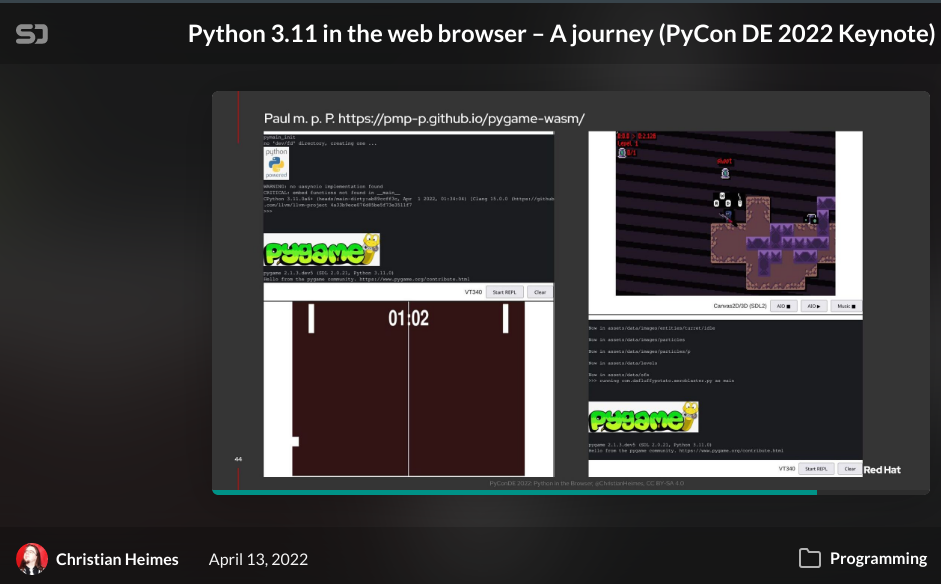
 broken citrus
just real quick i mdoing this quickly im gonna optimize it later but
    def update(self, task):
        dt = globalClock.getDt()

        #Lock the mouse to the middle
        mouse = self.mouseWatcherNode
        if mouse.hasMouse():
            self.camRotX += mouse.getMouseX() * -self.sens
            props = self.win.getProperties()
            self.win.movePointer(0,
                         props.getXSize() // 2,
                         props.getYSize() // 2)

        self.cam.setHpr(self.camRotX, self.camRotY, self.camRotZ)


        if direction["forward"] == 1:
            if direction["sprint"] == 1:
                self.camPosY += self.speed * dt * 2
            else:
                self.camPosY += self.speed * dt

        if direction["backward"] == -1:
            self.camPosY += -abs(self.speed) * dt

        if direction["right"] == 1:
            self.camPosX += self.speed * dt

        if direction["left"] == -1:
            self.camPosX += -abs(self.speed) * dt

        self.cam.setPos(self.camPosX,self.camPosY,self.camPosZ)
        return task.cont
when i rotate the cam and move it
its not moving relative to the vector

this is what i expect it to happen
but its doing this

 hybrid burrow
Hi
Is there anyone, that could explain me Panda3d physics? Maybe some tutorials?
Beacouse I'm reading their page, but I don't know, what I'm doing wrong
        if FuncsDatas.keymap["forward"]:
            world.boxforceNode.addForce(lvf)  # Determine coordinate space of this force node
            world.boxphysicsactor.getPhysical(0).addLinearForce(lvf)  # Add the force to the object

        elif not FuncsDatas.keymap["forward"]:
            world.boxforceNode.removeForce(lvf)  # Determine coordinate space of this force node
            world.boxphysicsactor.getPhysical(0).removeLinearForce(lvf)  # Add the force to the object
The problem is, that I can't remove forces from the object
So they are... cumulating
broken citrus
broken citrus
just real quick i mdoing this quickly im gonna optimize it later but
```py
d...
i solved this problem
just had to add
self.cam.setPos(self.cam, self.camPosX,self.camPosY,self.camPosZ)
instead of
self.cam.setPos(self.camPosX,self.camPosY,self.camPosZ)
Hey what game engine should I use
potent ice
dawn quiver
Hey what game engine should I use
Look at some of the suggestions in the pinned posts
There is everything from Ursina/Panda3D to arcade, pygame, pyglet etc.
dawn quiver
Ohh okay thanks, will do