#game-development
1 messages · Page 98 of 1
 still hedge
people have been plugging ursina a bit here, but it looks like it's barely documented, so that's a nonstarter on my end
 marble surge
 finite gale
boblox
 frozen knoll
@graceful lance also look at Arcade, pyglet, kivy
 silver fable
Ursinia
 golden basalt
where is this UI from ?
 hybrid burrow
Which library you recommend to begin with 3d games and graphics?
 potent ice
hybrid burrow
Which library you recommend to begin with 3d games and graphics?
potent ice
hybrid burrow
Which library you recommend to begin with 3d games and graphics?
Depends how deep you want to go. Just playing around with Ursina might be a good start. If you want to go way deeper there are things like pyopengl and moderngl that are different bindings for opengl. I'm sure there are other options as well.
hybrid burrow
I only want to give it a shot, if I'll like it. Than, maybe, I go deeper.
potent ice
Ursina then
hybrid burrow
Ok, thanks!
potent ice
hybrid burrow
Ok, thanks!
Start by playing around with the examples they have
hybrid burrow
In the Friday evening I will sit down and take a look.
 snow hill
 😇 🛫
😇 🛫 
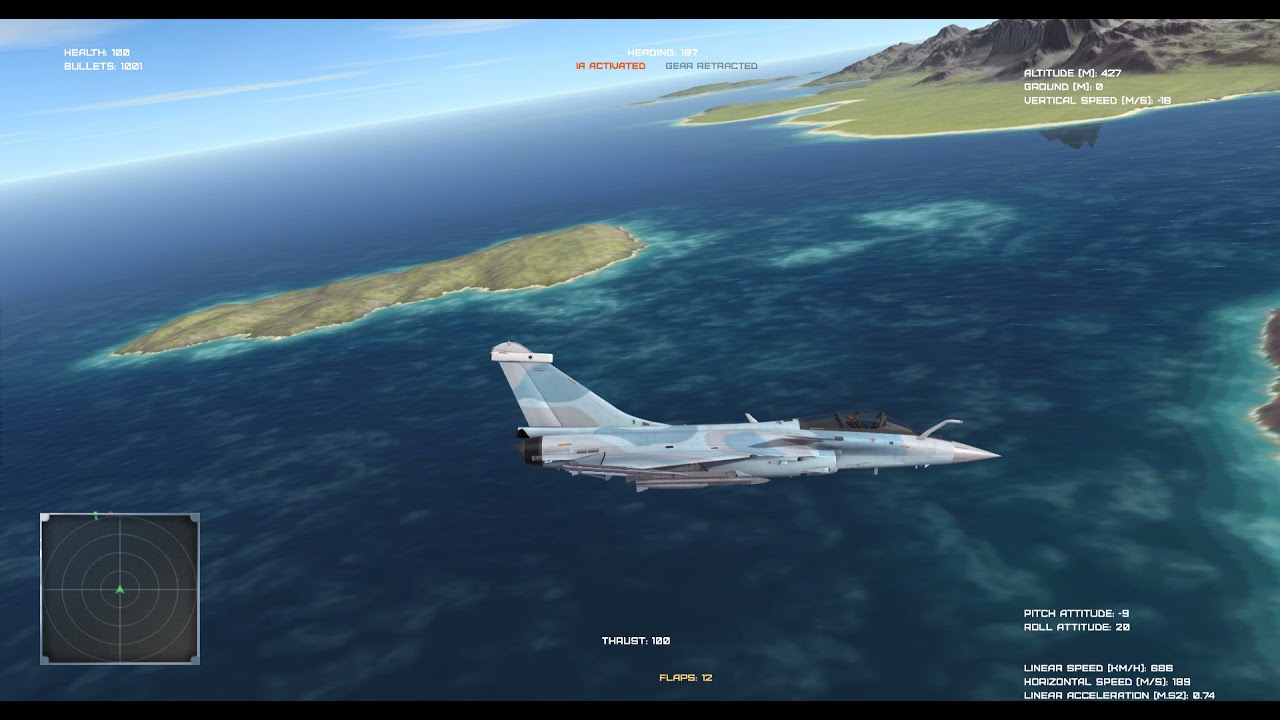 snow hill
(it's 100% writen in Python, of course :))
 teal ember
snow hill
(it's 100% writen in Python, of course :))
teal ember
snow hill
(it's 100% writen in Python, of course :))
really? great work, is this in raylib-py? (just guessing from the font)
snow hill
thx 🙂
snow hill
teal ember
really? great work, is this in raylib-py? (just guessing from the font)

HARFANG® 3D
HARFANG® is a software framework for modern multimedia application development. Manage and display complex 3D scenes, play sound and music, access VR devices such as the Oculus Rift and much more.
teal ember
oh thats cool
 nimble pasture
can someone explain the following code to me please:
import sys

import pygame

class AlienInvasion:

    def __init__(self):
        pygame.init()

        self.screen = pygame.display.set_mode((1200,800))
        pygame.display.set_caption("Alien Invasion")

    def run_game(self):
        while True:
            for event in pygame.event.get():
                if event.type == pygame.QUIT:
                    sys.exit()

            pygame.display.flip()

if __name__ == '__main__':
    ai = AlienInvasion()
    ai.run_game()
also, are game mostly made via OOP?
snow hill
nimble pasture
also, are game mostly made via OOP?
video games existed before OOP became an industry standard 😄
so, no
pacman (arcade): not OOP
outrun (arcade): not OOP
street fighter 2 (arcade): not OOP
all these games were actually programmed in assembly langage 😄
more recent games, on the 32 or 64 bits consoles, were written in C
without a single drop of OOP
possibly, really recents games are created in C++, but C++ doesn't necessarily means everything is implemented using the OO paradigm
import sys # import some system stuff (read some files, scan the disk, this kind of things)

import pygame # import pygame (framework to code games in python)

class AlienInvasion: # why is there any need for a CLASS to implement the game ? Are we going to instantiate the game THREE TIMES in the same single contexte ? (spoiler: no)

    def __init__(self): # classic class constructor, it actually will setup pygame stuff (open a screen, init the input devices, ...)
        pygame.init()

        self.screen = pygame.display.set_mode((1200,800))
        pygame.display.set_caption("Alien Invasion")

    def run_game(self): # main game loop, a game is mostly ALWAYS a loop, it loops until you die (then loops again)
        while True: # loop forever
            for event in pygame.event.get(): # if pygame catch a close/quit event
                if event.type == pygame.QUIT:
                    sys.exit() # just quit Python

            pygame.display.flip() # swap the virtual & physical display. This is the mandatory stuff to avoid screen tearing or flickering (google on "double buffer")

if __name__ == '__main__': # call this if the main is invoked directly (and not imported)
    ai = AlienInvasion() # instantiate the game from the class (again, what is the PURPOSE of doing a class for a game ??)
    ai.run_game() # call the run method, the endless loop, you know :)
@nimble pasture voila 🙂
nimble pasture
snow hill
<@!267127366965395466> voila 🙂
Thank you very much for that! I'm using the Python Crash Course book and it's using classes lol
snow hill
yeah, I suspect people don't even know why they are using classes
some people, at least
 silent ridge
Can someone explain the wizardry of display resolution to me (in pygame)? My screen is a mess. I've spent a week, and all there is on stack overflow is numpties talking about display.FULLSCREEN. I mean, My screen is stretched as f*ck and I don't know why!
DISPLAYSURF = pygame.display.set_mode((1920, 1080), pygame.FULLSCREEN)
That's my shit there, like.
 graceful lance
Is Gdot hard to learn if you know python?
silent ridge
My girlfriend says I can never find the GDot.
But, getting back on topic- How can I control the little wizard inside the light box that handles display resolution in pygame?
I've spent a week on this now. All hope has become lost, and I've grown more facial hair than I should have, and have neglected showering. Is this normal for a programmer?
 upbeat cosmos
silent ridge
I've spent a week on this now. All hope has become lost, and I've grown more fa...
upbeat cosmos
silent ridge
I've spent a week on this now. All hope has become lost, and I've grown more fa...
No. Get a terapist.
silent ridge
Kidnap a therapist?
upbeat cosmos
Yes.
silent ridge
Well, alright.
upbeat cosmos
(this a joke)
silent ridge
Yeah I'm kiddin' too don't sweat it. (OR AM I?)
upbeat cosmos
But you should shower man, very useful.
silent ridge
Showering is a great place to talk to my rubber duck about coding
Sometimes he talks back.
He's a great listener!
(Google "Rubber Ducking" it's totally a thing!)
upbeat cosmos
Tell a therapist. This isnt normal
silent ridge
It's 100% normal for a coder to talk to a rubber duck.
upbeat cosmos
Alright, is this a troll?
upbeat cosmos

silent ridge
100% serious. Everything I said before that was just havin' a laugh, but rubber ducking really is a thing!
The idea is that you voice your problems out loud
I think. And then talking it through with an inanimate object
Personally I just think it's because software developers get lonely lol
upbeat cosmos
Ehh, maybe
silent ridge
You know any pygame btw?
I'm pulling my hair out as to why my screen is stretched
Stack Overflow has been about as useful as a fart in a spacesuit
upbeat cosmos
silent ridge
You know any pygame btw?
I came for advice, absolutely not
silent ridge
I've narrowed it down to this, but who knows: DISPLAYSURF = pygame.display.set_mode((1920, 1080), pygame.FULLSCREEN)
Ah well
What you need help with?
upbeat cosmos
try making it separetly
silent ridge
I got nothing on tonight
upbeat cosmos
idk
silent ridge
Paste a snippet
Use the three ` things
like hit ` three times
when pasting code in here, and then again at the end
It's the key to the left of the num 1 on keyboard
 silent ridge
I'll take a look
 frank fieldBOT
Hey @upbeat cosmos!
Uh-oh! It looks like your message got zapped by our spam filter. We currently don't allow .txt attachments, so here are some tips to help you travel safely:
• If you attempted to send a message longer than 2000 characters, try shortening your message to fit within the character limit or use a pasting service (see below)
• If you tried to show someone your code, you can use codeblocks
(run !code-blocks in #bot-commands for more information) or use a pasting service like:
silent ridge
type ` three times
then ctrl+v your thing in
then hit ` three more times
Like 'open' and paste in then 'close' with the three `
frank fieldBOT
Hey @upbeat cosmos!
Uh-oh! It looks like your message got zapped by our spam filter. We currently don't allow .txt attachments, so here are some tips to help you travel safely:
• If you attempted to send a message longer than 2000 characters, try shortening your message to fit within the character limit or use a pasting service (see below)
• If you tried to show someone your code, you can use codeblocks
(run !code-blocks in #bot-commands for more information) or use a pasting service like:
Hey @upbeat cosmos!
Uh-oh! It looks like your message got zapped by our spam filter. We currently don't allow .txt attachments, so here are some tips to help you travel safely:
• If you attempted to send a message longer than 2000 characters, try shortening your message to fit within the character limit or use a pasting service (see below)
• If you tried to show someone your code, you can use codeblocks
(run !code-blocks in #bot-commands for more information) or use a pasting service like:
upbeat cosmos
PLEASE
silent ridge
Yeah, see it might just be too large a file
upbeat cosmos
ok
 dawn quiver
the code is too long
silent ridge
Do you know where you've gone wrong?
upbeat cosmos
"""print("Hello world!")"""
silent ridge
Just post a wee snippet
upbeat cosmos
i hope that doesnt get filtered
upbeat cosmos
no error
silent ridge
And if you can, narrow it down to the line/s that are flagging an error unless it's a runtime error
upbeat cosmos
o.o
upbeat cosmos
wow
silent ridge
What is it you're trying to do then with your code?
dawn quiver
silent ridge
Ah! That's called a "Runtime Error"
yeah, usually happens in functions
silent ridge
Ugh they are the worst
upbeat cosmos
guys i know the basics
silent ridge
I mean if you miss a bracket, it's like, okay fine
upbeat cosmos
i made a spam bot
silent ridge
Ah! Sweet. What's it you're after then?
No kidding? Well that 100% makes me not want to help you kinda. I mean, are you quite young?
upbeat cosmos
silent ridge
Ah! Sweet. What's it you're after then?
yes
upbeat cosmos
silent ridge
No kidding? Well that 100% makes me not want to help you kinda. I mean, are yo...
yes
silent ridge
I did that shit when I was a kid, so I can't be too hard on you
silent ridge
Yeah making naughty code is one way to learn. Should probably be doing something else though kid
silent ridge
Like, anarchy sounds like such a great idea but when you're a kid you never think about "What happens when I need a Dentist?" or whatever
dawn quiver
upbeat cosmos
13 yo
if you like this things pick robotic in your high school it teaches you some java basics
silent ridge
Nahhh... it's cool.
Java is great. Sounds like you have reached a point beyond scripting
Interfacing is so hard serdus.
upbeat cosmos
import keyboard, time
def spam():
keyboard.write("spam.")
keyboard.press("enter")
for i in range(100):
spam()
silent ridge
I made a robot arm connect to my RaspberryPi, but after weeks of trying I couldn't get it to move accordingly
upbeat cosmos
oop forgot the time
silent ridge
How did you deliver it?
upbeat cosmos
import keyboard, time
def spam():
keyboard.write("spam.")
keyboard.press("enter")
for i in range(100):
spam()
time.sleep(0.1)
silent ridge
I mean this is really naughty, but you're just a kid.
upbeat cosmos
took code, remade it
dawn quiver
that's how everyone starts
silent ridge
I totally started off by doing this stuff
upbeat cosmos
great
silent ridge
As an adult though I regret it
dawn quiver
silent ridge
As an adult though I regret it
I'm actually 14
silent ridge
Lol, serdus the first thing I ever did was make a ping flooder
That was in the nineties
Sure, that's cool too
You like games tho?
dawn quiver
I started doing programs to solve the maths we learned in class
silent ridge
I mean that stuff is all off topic and probably against the rules.
dawn quiver
silent ridge
You like games tho?
yeah
silent ridge
You would LOVE matlab
Matlab is Chefs kiss!
There's an open source kind of matlab too but I forget its name
Do you know Matlab?
dawn quiver
silent ridge
You would LOVE matlab
sure but I like more scripting in a basic text editor
silent ridge
OMG you're going to have the best time learning matlab
You can write in any function, and it can not just plot it graphically and solve it, but it can do so much other neat stuff too
You don't use an IDE?
How come?
For learning purposes?
It's one way to do it.
dawn quiver
silent ridge
You don't use an IDE?
I'm starting to use it but maybe too hard for me right now
silent ridge
NAAHHHHHHHh
It's like if you were doing carpentry, you'd be a wee bit scared of the power tools at first, but you can't be a wimp! Just get stuck in, kid
You won't break anything I promise
dawn quiver
silent ridge
You can write in any function, and it can not just plot it graphically and solve...
like GitHub copilot?
silent ridge
Matlab is more advanced
It's basically the industry standard in scientific research
dawn quiver
silent ridge
It's like if you were doing carpentry, you'd be a wee bit scared of the power to...
yeah but I don't know why installing python in windows without Microsoft store wasn't easy
dawn quiver
silent ridge
It's basically the industry standard in scientific research
cool to know
silent ridge
Installing Python is a joke. I still, to this day, have no idea why it's so difficult. Like, it sets the default PATH and everything
And then it's like, btw you need to get pip
And gives you some CMD shit
CMD Line,
This is what happens when you put brilliant (I mean that) engineers in charge of UI
dawn quiver
silent ridge
Installing Python is a joke. I still, to this day, have no idea why it's so dif...
I needed to search in Google a cmd command to search the paths of the files to find python
dawn quiver
after all I got it installed
dawn quiver
silent ridge
Are you using a linux os?
I'm actually using windows 10
silent ridge
Yeah, lol, ironically installing with linux is easier than windows
Well, I mean, sorta. Linux is cool shit
dawn quiver
Linux is better but not all programs and games can be used in it
silent ridge
If you kids ever get interested in hacking wifi you should look up Kali, or ARCH Linux
I used to use a laptop with Kali on it
And backtrack I think it was called. I forget the softwares name now
But I'm an old dinosaur. Time has probably moved on since I did all that stuff as a kid
This is all very naughty though
Like, really it's better to make sure you're ethical hackers. Don't commit crime!
I mean that
A kid in my college had to pay a £10,000 fine after he broke into the libraries system
He's probably still paying it off
dawn quiver
in my highschool in the robotics class everyone copies me because they are too lazy to learn java
silent ridge
That happened to me!
dawn quiver
silent ridge
A kid in my college had to pay a £10,000 fine after he broke into the libraries ...
lol
silent ridge
I used to just do their homework because it was a template and only one right way to do it
I'd just give them a copy
But when the tests come and everyone gets 0%
It's pretty hilarious
Like, except you
silent ridge
Just tell them it's like reading a recipe. At the start is the ingredients, and the bit after that is the instructions
dawn quiver
but he's the best teacher i ever had
silent ridge
And to go "Line by line"
BASIC is just 1st line to END line
That's why people should start with BASIC
You ever play in pygame?
Like play around?
dawn quiver
silent ridge
Just tell them it's like reading a recipe. At the start is the ingredients, and...
we are using processing and many of them after more than 2 months don't even know what size() does
dawn quiver
silent ridge
You ever play in pygame?
nope
silent ridge
I think that's an often overlooked point in programming. "Definitions". English language is integral to understanding what shit does
Like, if you don't know a word, look it up in a dictionary
for sure. 100%
Pygame is pretty fun
dawn quiver
always works
dawn quiver
silent ridge
I think that's an often overlooked point in programming. "Definitions". Englis...
I'm Spanish and everyone in my class is really bad at English
silent ridge
It must be doubly difficult to code in a foreign language
But again, use a dictionary! ❤️
I am learning Arabic language
I do evening classes
dawn quiver
silent ridge
It must be doubly difficult to code in a foreign language
if you mean Russian for sure but English is not that hard
dawn quiver
silent ridge
I am learning Arabic language
that's cool
silent ridge
English has a lot of exception words
So you gotta have a good memory
If you're learning English
Arabic is more like assembling Lego
Lots of strange prefix and suffix
dawn quiver
silent ridge
So you gotta have a good memory
most of my friends struggle with irregular verbs
dawn quiver
silent ridge
Arabic is more like assembling Lego
what a comparison
dawn quiver
silent ridge
Those are the same as "Exceptions" yeah?
oh I didn't know that
silent ridge
Right, afk. Hopefully someone will turn up who can help me figure out my display problems
Thanks for the chat
dawn quiver
bye
snow hill

more VR in Python using HARFANG 3D
works on the HTC Vive, the Oculus Rift S or even the Oculus Quest 2, in Link mode
 jagged glacier
@pure prawnno need for this language. please report such incidents to @light nest
 dusky holly
Hello so i started a minesweeper project using tkinter the probleme is how do i get the position of the mine i made the mine as a button
Am using grid by the way
 safe spade
ah
personnaly i'm making a 3d project using canvas
but you can use the app module if you have directly install python for all the functions of the modules
here's what i have do so far. The 3d engine is made from A to Z.

but i'm actualy trying to make a sorting algorythme for drawn correctly the cubes(i like cubes)
frank fieldBOT
Hey @safe spade!
Uh-oh! It looks like your message got zapped by our spam filter. We currently don't allow .txt attachments, so here are some tips to help you travel safely:
• If you attempted to send a message longer than 2000 characters, try shortening your message to fit within the character limit or use a pasting service (see below)
• If you tried to show someone your code, you can use codeblocks
(run !code-blocks in #bot-commands for more information) or use a pasting service like:
safe spade
Also, for all the curious i would create a git hub page with the video game engine and if my little brain understand of to do it, i would make a library.
 muted spoke
!code-blocks
frank fieldBOT
Here's how to format Python code on Discord:
```py
print('Hello world!')
```
These are backticks, not quotes. Check this out if you can't find the backtick key.
muted spoke
x = 1
y = 2
soma = x+y
print(soma)
 dusk depot
Hey, I teach kids from grade 4-12, 3D modelling and how to create VR/AR games for free. The concept of metaverse has amped recently which has resulted into requirements for creators of metaverse. I am making sure the Neo-generation is here boosting their skills.
If you wanna check out what kids have built, here is an example https://play.hatchxr.com/@Wyatt/Trophy-on-fire this game is built by grade 5 student.
So if you know anyone who would benefit from this, you could tell them to fill their deeds here;
https://ck12.me/s/c/Meta_Discord .
The platform where I teach them to built is patented by me and is built by MIT scientists. If any adults also wanna give it a try; do check it out https://hatchxr.com/
dawn quiver
Hey how can i make a License Agreement/User Agreement like this screenshot?

 pearl panther
how do you add a border (like a black border for ex) to a shape in pygame
 plain bolt
Hi, i have been working on a project. it takes inputs from a Xbox one wireless controller and turns a motor using a raspberry pi, motor controller and some male to female jumper cables. It detects the inputs using pygame. it should print [letter goes here has been pressed] but instead prints the statement over and over again whilst I'm not holding down the button. ```py
import pygame
import time
from pygame.constants import JOYBUTTONDOWN, JOYBUTTONUP
pygame.init()
##GPIO.setmode(GPIO.BCM)
##GPIO.setwarnings(False)
##GPIO.setup(17,GPIO.OUT)
##GPIO.setup(18,GPIO.OUT)
pygame.joystick.init()
joysticks = [pygame.joystick.Joystick(i) for i in range(pygame.joystick.get_count())]
for joystick in joysticks:
JOYname1 = (joystick.get_name())
print ("[Device Found and connected! Device name: " + JOYname1 + "]")
is_4_pressed = False
is_5_pressed = False
is_0_pressed = False
#LB
while True:
for event in pygame.event.get():
if event.type == pygame.QUIT:
pygame.quit()
if event.type == JOYBUTTONDOWN:
if event.button == 4:
is_4_pressed=True
if event.type == JOYBUTTONUP:
  if event.button == 4:
    is_4_pressed=False
if is_4_pressed == True:
print("['LB' Button is held down]")
##GPIO.output(17, True)
##GPIO.output(18, False)
time.sleep(0.5)
#RB
for event in pygame.event.get():
if event.type == pygame.QUIT:
pygame.quit()
if event.type == JOYBUTTONDOWN:
if event.button == 5:
is_5_pressed=True
if event.type == JOYBUTTONUP:
if event.button == 5:
is_5_pressed=False
if is_5_pressed == True:
print("['RB' Button is held down]")
##GPIO.output(17, False)
##GPIO.output(18, True)
time.sleep(0.5)
#Y
for event in pygame.event.get():
if event.type == JOYBUTTONDOWN:
if event.button == 3:
print("['Y' Button has been pressed]")
exit(69)
  #A
  for event in pygame.event.get():
    if event.type == pygame.QUIT:
      pygame.quit()
    if event.type == JOYBUTTONDOWN:
      if event.button == 0:
        is_0_pressed=True
    if event.type == JOYBUTTONUP:
      if event.button == 0:
        is_0_pressed=False
  if is_0_pressed == True:
      print("['A' Button is held down]")
      ##GPIO.output(17, True)
      ##GPIO.output(18, True)
      time.sleep(0.5)
the image could not be loaded :/ any errors


 jolly cliff
hey any1 wanna collab on a game
 meager plover
jolly cliff
hey any1 wanna collab on a game
meager plover
jolly cliff
hey any1 wanna collab on a game
hi iam game designer
are you programer?
dawn quiver
dawn quiver
the image could not be loaded :/ any errors
Is that pygame?I dont remember it tbh
potent ice
nah that looks like ursina
frozen knoll
Arcade 2.6.6 (2D graphics/sprite library) is out: https://api.arcade.academy/en/latest/development/release_notes.html
jolly cliff
meager plover
hi iam game designer
lesgo
frank fieldBOT
Hey @safe spade!
It looks like you tried to attach a Python file - please use a code-pasting service such as https://paste.pythondiscord.com
safe spade
https://paste.pythondiscord.com/ilocowipes.rb
Here's some code for people who want to visit the next dimension
safe spade
here's an another abomination

 tranquil girder
working on a new scale tool for ursina's level editor
potent ice
tranquil girder
working on a new scale tool for ursina's level editor
Nice. Keep up the good work!
 oblique sandal
Hi Everyone,
I am trying to merge .fbx (3d images) files. Could anyone please suggest python package for that ?
 warped dove
tranquil girder
working on a new scale tool for ursina's level editor
warped dove
tranquil girder
working on a new scale tool for ursina's level editor
wait- that's ursina?? :O
jolly cliff
warped dove
wait- that's ursina?? :O
he made that editor himself ursina itself is just code
dusk depot
dusk depot
Hey, I teach kids from grade 4-12, 3D modelling and how to create VR/AR games fo...
If anyone still wants to learn how to build Metaverse, please do sign up here; https://ck12.me/s/c-Metaverse

Calendly
Winter Break from school is the perfect time for your child to build and code their own virtual world or the Metaverse in 60 mins. Your child could build a snowy Winter Land or an outer space or just any version of their world online. Our Winter Camp, empowers each child to explore the intricacies
 mystic stirrup
hi i am new to game developement
 runic helm
hi
 drowsy shoal
dawn quiver
trying to learn game development
drowsy shoal
dawn quiver
trying to learn game development
Same
frozen knoll
Himaki, isn't that class in JavaScript? If so, you might want to advertise it on a server dedicated to that language. It seems off-topic on a Python discord.
 shadow bone
If i wanted to make a 2d "game" so to speak, would the best approach be PyGame?
 proper peak
arcade would be a good choice too
shadow bone
Never heard of it, are there any good courses I can look for?
proper peak
I don't know, but it does have tutorials in the docs: https://api.arcade.academy/en/latest/
shadow bone
Thank you!
frozen knoll
If you are new to Python and want to learn Arcade and Python, you can check out https://learn.arcade.academy/en/latest/
 marsh seal
how to make fortnite pls
 round obsidian
marsh seal
how to make fortnite pls
round obsidian
marsh seal
how to make fortnite pls
- Get a 250 person developer team
 normal silo
marsh seal
how to make fortnite pls
normal silo
marsh seal
how to make fortnite pls
1. Be a billionaire.
2. Create a new corporation and hire a lot of people.
3. ??????
4. Profit.
just wait two weeks
meager plover
jolly cliff
lesgo
lesgo bro i have an idea game
dawn quiver
🖐️ i have a problem with lobby verible. When I assign the value of False to a variable, the button still displays.
import pygame
import webbrowser
from lobby.lobby import *

pygame.init()


lobby_window = pygame.display.set_mode((0, 0), pygame.FULLSCREEN)


class WindowSizeConverter:

    def width():
        return lobby_window.get_width() / 100

    def height():
        return lobby_window.get_width() / 100


width = WindowSizeConverter.width()
height = WindowSizeConverter.height()


flag = True
lobby = True

while flag:
    if lobby:
        #   TŁO
        lobby_window.fill((0,0,0))
        #   START PRZYCISK
        Buttons(lobby_window, 3, 2, width*20, height*4, (230,7,7), "Test").draw()

        if Buttons(lobby_window, 3, 2, width*20, height*4, (230,7,7), "Test").is_over():
            for event in pygame.event.get():
                if event.type == pygame.MOUSEBUTTONDOWN:
                    lobby = False
                    print(lobby)
                    #webbrowser.open_new_tab("")

                #   STRONA PRZYCISK
                #   WYJDŹ PRZYCISK
                #   IF BUUTON WAS CLICKED

    for event in pygame.event.get():
        if event.type == pygame.QUIT:
            flag = False

    pygame.display.update()
you should clear the screen and draw other things when the variable is false right? otherwise it will display the things of the previous frame
dawn quiver
teal ember
you should clear the screen and draw other things when the variable is false rig...
how do i clean the screen?
teal ember
dawn quiver
how do i clean the screen?
lobby_window.fill(color)
dawn quiver
teal ember
`lobby_window.fill(color)`
oh thanks, it works

 frozen knoll
Nice!
dawn quiver
plain bolt
Hi, i have been working on a project. it takes inputs from a Xbox one wireless c...
after giving the print statement you have to make the variable is 4 pressed false.
dawn quiver
meager plover
hi iam game designer
oh now i know how to get my assets ready
 soft kayak
I want to make my character stand still in the direction he was walking, when he stands still, hes looking straight ahead
Frente = front
Personagem = character
Comandos = commands

 dreamy grove
Just built a game engine in rust
jolly cliff
snow hill
100% Python Proceduraly-Generated Landscape 🙂
wow
teal ember
 meager osprey
Why is this happening to my game If my sprite image is also transparent
meager osprey
Why is this happening to my game If my sprite image is also transparent
did you do pygame.image.load("...").convert_alpha()?
 open stump
soft kayak
I want to make my character stand still in the direction he was walking, when he...
open stump
soft kayak
I want to make my character stand still in the direction he was walking, when he...
Tries to create a state that stores a direction they were going. From there, with else-if, just make the image match what you want.```
Tenta criar um estado que armazena a direção em que eles estavam indo. A partir disso, com else-if, é só fazer a imagem corresponder ao que você quer.
anyone here into blockchain? if so have you heard of XAYA/Taurion/Soccer Manager Elite?
dawn quiver
!code
frank fieldBOT
Here's how to format Python code on Discord:
```py
print('Hello world!')
```
These are backticks, not quotes. Check this out if you can't find the backtick key.
 inland dove
I'm working on making a dialog box for a game, and I finally figured out how to automate the text to move the next line down so I can just copy and paste batches of dialog. And it feels great.
I'm going to work on making a click to continue the dialog sort of thing next.
 shadow rain
hi, cna anyone help me with ursina, only the first platform loads and not the 2nd one
from ursina import *
from ursina import entity
from first_person_controller import FirstPersonController

app = Ursina()


platone = Entity(
    model = 'cube',
    collider ='mesh',
    texture = 'grass',
    scale = (10, 1, 10),
    postition = (0, 0, 0)
)

plattwo = Entity(
    model = 'cube',
    collider ='mesh',
    texture = 'grass',
    scale = (10, 1, 10),
    postition = (12, 0, 0)
)

player = FirstPersonController()
Sky()

app.run()
You wrote postition instead of position so they're both in the same place
shadow rain
oh, thanks! haha
snow hill

My son is learning Python at school and he just did a basic chromakeyer in 10 lines.

 Twitter
·
Twitter
·

 glossy raft
any good libraries to make games on the terminal
 timid hill
hi everyone
dawn quiver
!code
frank fieldBOT
Here's how to format Python code on Discord:
```py
print('Hello world!')
```
These are backticks, not quotes. Check this out if you can't find the backtick key.
 brave jacinth
i made pong with multiple balls 0_o, its chaos
 runic sail
Hello
can anyone rate my Python game?
Its my first PyGame game
frank fieldBOT
Hey @runic sail!
It looks like you tried to attach file type(s) that we do not allow (.rar). We currently allow the following file types: .gif, .jpg, .jpeg, .mov, .mp4, .mpg, .png, .mp3, .wav, .ogg, .webm, .webp, .flac, .m4a, .csv, .json.
Feel free to ask in #community-meta if you think this is a mistake.
dawn quiver
dm .py
runic sail
ok
 knotty comet


 tame patio
how can I make a pygame program to exe]
jolly cliff
before with a metal texture on my created blocks.....
after implementing a fricking fish texture on my blocks....
 thick elm
runic sail
Hello
can anyone rate my Python game?
Its my first PyGame game
thick elm
runic sail
Hello
can anyone rate my Python game?
Its my first PyGame game
You can try uploading the file and sharing the download link or film it then show upload the video
 fair flax
snow hill
100% Python Proceduraly-Generated Landscape 🙂
fair flax
snow hill
100% Python Proceduraly-Generated Landscape 🙂
may i see the source code?
safe spade
Want to see a flying UFO? Here's my next creation made with my voxel engine : https://paste.pythondiscord.com/uforunisek.rb
 proven coral
knotty comet
https://www.instagram.com/tv/CXJMqCgBg_2/?utm_medium=copy_link
proven coral
knotty comet
https://www.instagram.com/tv/CXJMqCgBg_2/?utm_medium=copy_link
!rule 1
frank fieldBOT
1. Follow the Python Discord Code of Conduct.
proven coral
knotty comet
https://www.instagram.com/tv/CXJMqCgBg_2/?utm_medium=copy_link
!rule 6
dawn quiver
glossy raft
any good libraries to make games on the terminal
Idk
 desert jolt
!rule 1
frank fieldBOT
1. Follow the Python Discord Code of Conduct.
frank fieldBOT
2. Follow the Discord Community Guidelines and Terms Of Service.
desert jolt
!rule 2");print("HHHHHHHHHHHHHHHHHHHHHHHHHHHHHHH");
frank fieldBOT
The rules and guidelines that apply to this community can be found on our rules page. We expect all members of the community to have read and understood these.
desert jolt
!rule 2");import flask;import nltk;nltk.download();print("hello world");
frank fieldBOT
The rules and guidelines that apply to this community can be found on our rules page. We expect all members of the community to have read and understood these.
desert jolt
ff
safe spade
Why my code is always buried under a ton of messages not usefull . But IceeBee is breaking
The rules
potent ice
safe spade
Why my code is always buried under a ton of messages not usefull . But IceeBee i...
Repost with screenshot? :)
 leaden lance
Hi!, I want to learn game development what do you recomend?
leaden lance
idk
jolly cliff
 normal saffron
Is there any game engine which support python as it's scripting language
normal saffron
Is there any game engine which support python as it's scripting language
godot with gdscript is quite near python
jolly cliff
hows this for a soundtrack for my game
normal saffron
Nice I like it
safe spade
potent ice
Repost with screenshot? :)
Wait a little bit, i would post it
 round badge
cool
 serene patrol

Turn your phone into a wireless game controller for Call of Duty game.
All the setup and source code available at GitHub repo (Give a star if you like).
GitHub Repo : https://github.com/YashIndane/Call-of-Duty-
My Linkedin Profile : https://www.linkedin.com/in/yash-indane-aa6534179/
Play call of duty using your phone as a wireless controller
GitHub
Tech Enthusiast | 5x Microsoft Certified | GitLab Certified Associate | Integrating Technologies | Python Programming | Cloud Computing | Machine Learning - YashIndane
 earnest flax
normal saffron
Is there any game engine which support python as it's scripting language
earnest flax
normal saffron
Is there any game engine which support python as it's scripting language
coco2d, and panda3d
 lapis trout
there is a library made for making games with just a few lines of code, its called ursina if you want to check it out
normal saffron
Thanks
proper peak
normal saffron
Is there any game engine which support python as it's scripting language
godot can be used with python - I've seen people use that to bring ML libraries to godot games
normal saffron
Oh yeah I got it
frank fieldBOT
Hey @devout karma!
Uh-oh! It looks like your message got zapped by our spam filter. We currently don't allow .txt attachments, so here are some tips to help you travel safely:
• If you attempted to send a message longer than 2000 characters, try shortening your message to fit within the character limit or use a pasting service (see below)
• If you tried to show someone your code, you can use codeblocks
(run !code-blocks in #bot-commands for more information) or use a pasting service like:
normal silo
proper peak
godot can be used with python - I've seen people use that to bring ML libraries ...
To add to this, Godot 4.0, which is not officially out yet, is a huge improvement and is designed to work with pretty much any language you want as long as someone has made a plugin for it (one for python and many others already exists).
proper peak
Isn't it how it currently is?
Or does it add more official support for arbitrary language plugins?
normal silo
You can already, but 4.0 makes it nicer.
proper peak
ah
safe spade
here's the accomplishement of my 3d base Voxel engine.
 frank fieldBOT
Hey @safe spade!
It looks like you tried to attach a Python file - please use a code-pasting service such as https://paste.pythondiscord.com
safe spade
arg
https://paste.pythondiscord.com/emoxuwoloz.rb, here's the code for the curious, 100% python using only tkinter for the display
here's the modules not implemented by default:
-pip install mouse
-pip install keyboard
safe spade
here's the git hub page : https://github.com/ModAndThink/Python-and-game/tree/python

GitHub
Contribute to ModAndThink/Python-and-game development by creating an account on GitHub.
 icy meadow
Is Panda3D game engine to go for Python programmers ?
 quasi urchin
so i need help
i know how to make a window pop up but i cant find out how to customize the window. also, finding out how to edit the window will be helpful
the game will be similar to a clicker game
safe spade
Hhhhhhhhhmmmmmmmmmmmmmm
You can use tkinter windows
There is by default a package for pop up windows
Or create your own using widget
Tkinter is a power full tool for ui
 vivid otter
who knows how to make an autoclicker in pthon?
I made one:
import pyautogui
time.sleep(5)
......
 hasty whale
vivid otter
who knows how to make an autoclicker in pthon?
I made one:
hasty whale
vivid otter
who knows how to make an autoclicker in pthon?
I made one:
try this
import pyautogui
while True:
pyautogui.click
it'll just keep clicking at 11 cps (i think)
jolly cliff
quasi urchin
so i need help
i know how to make a window pop up but i cant find out how to cus...
the worst yet best advice is to not make a game with python, try more popular engines like unity or godot
vivid otter
quasi urchin
so i need help
i know how to make a window pop up but i cant find out how to cus...
use tkinter
 severe mist
cool cool cool
 dusky venture
Just use unity
muted spoke
I'm trying to change either side of an image, using .flip() but when I use a key the image goes back to the initial state or do I do it to keep it flipped?
potent ice
muted spoke
I'm trying to change either side of an image, using .flip() but when I use a key...
Need a lot more context here. There are lots of game libraries and image libraries with flip()
muted spoke
I'm use self.image = pygame.transform.flip(self.image, True, False)
 potent ice
I assume it would just keep flipping whatever image you give it
potent ice
ah right, so there's something with your movement logic
Would it not be simpler to pre-generate two sets of your sprite images?
One left turning and one right turning
.. and just detect direction and pick from the right version?
muted spoke
Yes
potent ice
I would definitely do that. It's both faster and reduces complexity a lot
Then direction would just be set when pressing the left and right key. easy
muted spoke
I used Sprite.Group I don't know how to update these images below
I actually don't know what to call these images
potent ice
sprite.image?
Yeah it seems you can assign a surface like that
I'm not that into pygame sprites, so probably others are better to answer this. I would at least load all the surfaces into a dict or something. Have a different key for left and right facing so they are easy to look up.
muted spoke
I'm going to make these keys so I don't know what to call them
 dull osprey
This dosent work for me
please help
Creating a window secreen
wn = turtle.Screen()
wn.title("Snake Game")
wn.bgcolor("blue")
the width and height can be put as user's choice
wn.setup(width=600, height=600)
wn.tracer(0)
head of the snake
head = turtle.Turtle()
head.shape("square")
head.color("white")
head.penup()
head.goto(0, 0)
head.direction = "Stop"
food in the game
food = turtle.Turtle()
colors = random.choice(['red', 'green', 'black'])
shapes = random.choice(['square', 'triangle', 'circle'])
food.speed(0)
food.shape(shapes)
food.color(colors)
food.penup()
food.goto(0, 100)
pen = turtle.Turtle()
pen.speed(0)
pen.shape("square")
pen.color("white")
pen.penup()
pen.hideturtle()
pen.goto(0, 250)
pen.write("Score : 0 High Score : 0", align="center",
font=("candara", 24, "bold"))
tranquil girder
dull osprey
This dosent work for me
What doesn't work? What happens? Which part doesn't work?
safe spade
From what i see, you are trying to make a snake game using turtle. But turtle is not a great library for make video game. I advise you to use the canvas of tkinter. You can use my video game engine for inspiration : https://github.com/ModAndThink/Python-and-game/tree/python
GitHub
Contribute to ModAndThink/Python-and-game development by creating an account on GitHub.
 vague flame
anyone know much about panda3d?
safe spade
Not a lot
But there is the ursina library who use panda3d. There is a lot of documentation so you wouldn’t be lost
And if you want to use panda3d, you can go see the ursina code
jolly cliff
safe spade
But there is the ursina library who use panda3d. There is a lot of documentation...
ursina docs are confusing and ursina doesnt hav emuch of a community
tranquil girder
idk, the ursina discord seems more active than this chat
but yeah, if you want to use panda3d, use panda3d. I wouldn't use it if it wasn't good
jolly cliff
for that matter python is NOT good for anything 3d or games. Id suggest godot if you know python or unity if u know c#
tranquil girder
I think it's great for games, especially compared to unity
safe spade
With my video game engine 🙂
 autumn moat
anyone good with pygame ball bouncing physics?
 stray root
@autumn moat I can help I am working on a pong game right now
For those who are familiar withpy pygame pygame.mixer.pre_init(44100, -16, 2, 512)
as far as my knowledge goes lowering that 512 to something like 64 should give a bad sound(like unclear) but it isnt in my case pls help?
autumn moat
stray root
<@!298932154245578752> I can help I am working on a pong game right now
I tried using my pong mechanics but it relies on bouncing off of objects instead of the side of the screen
im trying to make a ghetto version of sideswipe rocket league
normal saffron
autumn moat
im trying to make a ghetto version of sideswipe rocket league
Hmm, concept sound nice, BEST OF LUCK 😁
frozen knoll
Arcade 2.6.7 is out: https://api.arcade.academy/en/latest/development/release_notes.html
 jolly kraken
Hi
they told me that on this server they will help me create a blender python script for a game
stray root
autumn moat
I tried using my pong mechanics but it relies on bouncing off of objects instead...
well you can make the walls of your pygame window bouncy too
 regal bison
(Apologies if this is in the wrong channel, couldn't find where else to post this.)
Has anyone thought about doing a small game jam with Python to aggregate data from sites like Reddit and YouTube using their APIs, and using that data to make a game around it? From the data you could generate character traits, aggression, likeness, intelligence, skills, etc. Coming up with the core game play loop would be the tricky part.. What do you do with those characters that would be fun? Zelda like RPG? Tower defence? Shooter? RTS?
I'm interested in knowing your thoughts!
 candid prairie
can anyone help me here?
I want to create a game using python for my exhibition
i dont know anything about python
im learning html
jolly cliff
tranquil girder
I think it's great for games, especially compared to unity
bro think on what ure ssaying
tranquil girder
I have, it's based on experience
I've used Unity for 14 years
And have shipped games for all the major consoles
Cross platform is unity's biggest pro by far
jolly cliff
tranquil girder
Cross platform is unity's biggest pro by far
sure but pygame doesnt go even close to unity in gamedev
tranquil girder
agree
dawn quiver
Im looking for some coop game dev. Im not really creative but i enjoy programming games and prototypes. Is there anyone that would be willing to work with me to see their game come to life?
Im also willing to help novice programmers.
dawn quiver
Any1 familiar with Ursina Engine?
tranquil girder
yes, quite
dawn quiver
I can't figure out how to add a custom texture to a cube, could you help me?
tranquil girder
just write the name of it
tranquil girder
like this: ```py
Entity(model='cube', texture='texture_name')
Be more specific then
dawn quiver
How can I add a custom texture. (How do I implement one).
tranquil girder
Not sure what you mean. How to make it?
 devout rover
is there anyone that can help with my pygame related problem im in the #help-lollipop channel
dawn quiver
tranquil girder
Not sure what you mean. How to make it?
As I said, I want to make my own custom texture, and not use a built-in one.
tranquil girder
Textures are just images. You can make them in Photoshop for example, or event paint
dawn quiver
But how would I implement this texture to a 3D object?
dawn quiver
tranquil girder
Textures are just images. You can make them in Photoshop for example, or event p...
I've already tried that, but it wont work properply
tranquil girder
Oh you mean define how the texture will fit on it?
That's defined in the model with uvs
uv mapping
dawn quiver
Yeah I guess? I have a png file of a picture, but all the tutorials I followed is saying i need a .blend file for it to be a 3d object
But I can't get it to work
dawn quiver
It doesn't fit the object right, and it also is not 3d, check out this message: #help-pancakes message
tranquil girder
I can't see anything wrong in that screenshot
dawn quiver
Read the messages above too.
tranquil girder
What does the console say? Any error messages?
Do you have blender installed? You need that to open blend files
dawn quiver
Yup everything is installed, no errors, the textures isnt loaded and it doesnt apply it to the blocks
tranquil girder
So what doesn't load? The model or the texture?
Only thing wrong I can see in the code is that you use load_texture() instead of writing just the name
dawn quiver
tranquil girder
So what doesn't load? The model or the texture?
Only thing wrong I can see in th...
The model doesn't work
The texture still somehow gets applied, but it gets applied wrong
dawn quiver
🤷
tranquil girder
look up uv mapping on youtube and you'll understand
dawn quiver
Alright thank you
devout rover
devout rover
is there anyone that can help with my pygame related problem im in the <#6964323...
anyone?
in #help-cherries now
dawn quiver
Anyone looking for coop game dev? Id like to help make a relatively simple game. Ive made tetris and space invaders.
devout rover
can i get help added collisions to an online multiplayer
i have collisions between players and the map but need help implementing collisions between the players themselves
safe spade
what engine?
devout rover
safe spade
what engine?
not using an engine
 lean epoch
dude I want to create a game like PUBG a battleroyale game
can I create it using Python and how
??
?
??
??
?
?
?
 violet mirage

 wet brook
does fullscreen pygame scale things up/down when switching bewteen different resolutions. like for example my monitor is 768px tall so if something is at 800px i cant see it but if i export it with pyinstaller an give it to someone with a 1080p moitor will they be able to see it?
 empty holly
HI everyone, quick question about how to handle the dependencies in python.
I m not much into game dev but more data app but the stakes are the same.
How to build an app and share it to a wide range of people using os or windows or linux and make it usable with an executable file just like any software.
jolly cliff
lean epoch
can I create it using Python and how
not at all
jolly cliff
empty holly
HI everyone, quick question about how to handle the dependencies in python.
I m ...
if ure askin specially with python i dont have an idea.
dawn quiver
from ursina import *
from ursina.prefabs.first_person_controller import FirstPersonController
from random import uniform

app = Ursina()

class Blocks(Button):
    def __init__(self, position=(0, 0, 0)):
        super().__init__(parent=scene,position=position,model="cube",origin_y=0.5,texture="white_cube",color=color.color(0, 0, uniform(0.95, 1)),highlight_color=color.lime)

    def input(self, key):
        if self.hovered:
            if key == "left mouse down":
                block = Blocks(position=self.position + mouse.normal)
            if key == "right mouse down":
                destroy(self)
            if key == "q":
                exit()

class Player(FirstPersonController):
    def __init__(self):
        super().__init__()

class World:
    def __init__(self):
        Sky().texture = "sky_sunset"
        for i in range(30):
            for j in range(30):
                block = Blocks(position=(j, 0, i))

if __name__ == "__main__":
    player = Player()
    world = World()
    app.run()
Minecraft in 34 lines 
jolly cliff
dawn quiver
```py
from ursina import *
from ursina.prefabs.first_person_controller import Fi...
kinda reminds me of that clear code youtube tutorial on minecraft in python
you should also add a y position to the for loop in world
and make it so that the bllocks are randomly generated
dawn quiver
jolly cliff
and make it so that the bllocks are randomly generated
tried that, also tried to make the blocks ranges to be bigger but it ended up being super laggy
idk the fix though
dawn quiver
jolly cliff
kinda reminds me of that clear code youtube tutorial on minecraft in python
i followed that tutorial 😂
I edited it a bit though
jolly cliff
for z in range(20):
    for x in range(20):
        for y in range(5):
            if random.randint(1, 3) != 1:
                block = Block((x,  y,  z))
maybe just add blocks gradually on the update function and wait till the blocks are done before loading the player
dawn quiver
I dont know what its called but I was thinking of implementing that when you walk, a chunk of blocks gets generated towards the direction you walk, and the same amount of blocks behind you gets removed
to reduce the lag
but idk how to do that
dawn quiver
jolly cliff
maybe just add blocks gradually on the update function and wait till the blocks ...
would you have an idea?
tranquil girder
dawn quiver
would you have an idea?
if you image in 1D and you move right, when crossing a limit, move the leftmost blocks to the end
then do the same for all the directions
this is good for making an infinite world
but for better performance you should generate chunks instead of individual blocks too
dawn quiver
how would I generate chunks? This is also 3d
tranquil girder
Store the voxel data in a 3d list, for example 16x16x16. For each voxel, check the neighboring voxels and only add a face if there's not another solid block there. You can use the Mesh class for this. For collision you either want to wrtie custom voxel based collision, or only do collision around the player and not the whole world
dawn quiver
tranquil girder
Store the voxel data in a 3d list, for example 16x16x16. For each voxel, check t...
Thanks, could you also provide a very simple non-working psuedo code example?
jolly cliff
dawn quiver
how would I generate chunks? This is also 3d
maybe minecraft in python isnt the best idea....
take up an engine unless ure an expert n programming
dawn quiver
jolly cliff
take up an engine unless ure an expert n programming
ursina is a engine?
dawn quiver
jolly cliff
maybe minecraft in python isnt the best idea....

this is how it looks rn
I just need the blocks to be auto generated
to reduce lag
tranquil girder
You'd run into the same issue in any other engine though.
But yes, you should consider starting with something simpler. It's pretty advanced
dawn quiver
Hmm, what could be more simple to do, to learn chunk generations
tranquil girder
chunk generation is just procedural geometry
Something like an arcade game is easier to start with
 willow echo
Isn’t Minecraft generation the result of making a noise image and replacing white and black by values in the y coord?
potent ice
jolly cliff
maybe minecraft in python isnt the best idea....
It depends how ambitious you are. Shrink the height and visible part of the world makes it a lot easier. Making something Terrariaish is also a lot easier... but still a challenge.
And like pokepetter so saying, procedural games are much more difficult. You can of course start making that, but it will be a massive challenge.
I helped out on a Terraria like game recently using the Arcade library. It turned out to be a lot more complex than the authors originally imagined it to be. Subprocesses to dynamically create new chunks. A lot of optimization to make chunk loading and unloading fast. Collision, block selection, terrain generation.. and the list goes on and on and on ...
frank fieldBOT
Hey @ornate inlet!
It looks like you tried to attach a Python file - please use a code-pasting service such as https://paste.pythondiscord.com
safe spade
how do i do to convert a python file WITHOUT LIBRARY to an executable
proper peak
convert to an executable without using any libraries like pyinstaller? You don't.
proper peak
Python isn't a compiled language. You need the interpreter to run python code. Pyinstaller cheats by packaging an interpreter along with your script into an exe file. That's pretty much the only way to "convert" a python file into an executable.
if your script uses only builtins, maybe nuitka would work to compile your script into C++ code and that way into an exe
safe spade
ok
i finaly use pyinstaller
because i started to become crazy

GitHub
A game made with my game engine, BaguetteEngine. Contribute to ModAndThink/Ponc development by creating an account on GitHub.
here's the game i made using my game engine
frank fieldBOT
Hey @elder hearth!
Uh-oh! It looks like your message got zapped by our spam filter. We currently don't allow .txt attachments, so here are some tips to help you travel safely:
• If you attempted to send a message longer than 2000 characters, try shortening your message to fit within the character limit or use a pasting service (see below)
• If you tried to show someone your code, you can use codeblocks
(run !code-blocks in #bot-commands for more information) or use a pasting service like:
:incoming_envelope: :ok_hand: applied mute to @elder hearth until <t:1639859953:f> (9 minutes and 59 seconds) (reason: newlines rule: sent 103 newlines in 10s).
 spice mauve
!unmute 689395678484758591
frank fieldBOT
:incoming_envelope: :ok_hand: pardoned infraction mute for @elder hearth.
spice mauve
!paste Please use this in the future :)
frank fieldBOT
Pasting large amounts of code
If your code is too long to fit in a codeblock in discord, you can paste your code here:
https://paste.pythondiscord.com/
After pasting your code, save it by clicking the floppy disk icon in the top right, or by typing ctrl + S. After doing that, the URL should change. Copy the URL and post it here so others can see it.
 elder hearth
spice mauve
!paste Please use this in the future :)
elder hearth
spice mauve
!paste Please use this in the future :)
sure
frank fieldBOT
Pasting large amounts of code
If your code is too long to fit in a codeblock in discord, you can paste your code here:
https://paste.pythondiscord.com/
After pasting your code, save it by clicking the floppy disk icon in the top right, or by typing ctrl + S. After doing that, the URL should change. Copy the URL and post it here so others can see it.
frank fieldBOT
Hey @ornate inlet!
It looks like you tried to attach a Python file - please use a code-pasting service such as https://paste.pythondiscord.com

 ornate inlet
that is my quiz which i made inthon py
did u write the answer
or did it automaticly came?
safe spade
Ok
The engine still experimental but if I would post a little guide on the git
I think I would work on it tomorrow
Keep in mind that he would change a lot
 viscid solstice

 lost agate
ornate inlet
that is my quiz which i made inthon py
lost agate
ornate inlet
that is my quiz which i made inthon py
Did you Just paste the output from Python IDLE into a py file?
safe spade
 quasi patrol
<@!444087284547977216> how use ur game engine
quasi patrol
<@!444087284547977216> how use ur game engine
@quasi patrol i post a little guide on how to use my engine
https://github.com/ModAndThink/BaguetteEngine, here's the url
 safe spade
i see
but the library BaguetteEngine in the site package
in a folder name BaguetteEngine
lost agate
No module named 'BaguetteEngine.Library'
lost agate
safe spade
<@!574939436454772737> it's work?
  File "C:\Users\thema\AppData\Roaming\Python\Python39\site-packages\BaguetteEngine\Application.py", line 567, in <module>
    app = Application()
  File "C:\Users\thema\AppData\Roaming\Python\Python39\site-packages\BaguetteEngine\Application.py", line 483, in __init__
    self.screen = tk.Tk()
AttributeError: module 'BaguetteEngine.Library.tkinter' has no attribute 'Tk'```idk
safe spade
it's strange
it's say that tkinter has not Tk()
very strange
were you put the folder BaguetteEngine
@lost agate ?
lost agate
hm
 lost agate
ok
safe spade
it's work
lost agate
what do i need to change here
 lost agate
ok it launched but what is this
 lost agate
i downloaded this
 safe spade
Done
Don’t forget to change the first line
you have also a little code in the README file
 dusky venture
Hello, why are these green lines showing in my pygame window?

Code ```py
import pygame
pygame.init()
WIDTH, HEIGHT = 500, 500
WINDOW = pygame.display.set_mode((HEIGHT, WIDTH))
SQUARE_SIZE = 30
BOARD_SIZE = SQUARE_SIZE * 8
WHITE = (255, 255, 255)
BLACK = (0, 0, 0)
def draw_squares():
for file in range(9):
for rank in range(9):
square_colour = WHITE if (file + rank) % 2 == 0 else BLACK
pygame.draw.rect(WINDOW, square_colour, (SQUARE_SIZErank, SQUARE_SIZEfile, SQUARE_SIZE, SQUARE_SIZE))
draw_squares()
run = True
while run:
for event in pygame.event.get():
if event.type == pygame.QUIT:
run = False
pygame.quit()
pygame.display.update()
it runs well enough for me
 quasi patrol
safe spade
<@!555944200047296513> i post a little guide on how to use my engine
quasi patrol
safe spade
<@!555944200047296513> i post a little guide on how to use my engine
thanks
frank fieldBOT
Hey @knotty flicker!
Uh-oh! It looks like your message got zapped by our spam filter. We currently don't allow .txt attachments, so here are some tips to help you travel safely:
• If you attempted to send a message longer than 2000 characters, try shortening your message to fit within the character limit or use a pasting service (see below)
• If you tried to show someone your code, you can use codeblocks
(run !code-blocks in #bot-commands for more information) or use a pasting service like:
 knotty flicker
# Player
PlayerImg = pygame.image.load("Player.png")
PlayerX = 370
PlayerY = 480
PlayerX_Change = 0

# Enemy
EnemyImg = pygame.image.load("Enemy.png")
EnemyX = random.randint(0, 800)
EnemyY = random.randint(50, 150)
EnemyX_Change = 0.8
EnemyY_Change = 40

# Bullet
BulletImg = pygame.image.load("bullet.png")
BulletX = 0
BulletY = 480
BulletX_Change = 0
BulletY_Change = 10
# Ready = you can't see the bullet on the screen but its ready to be shooted.
# Fire = The bullet is currently shooted.
Bullet_State = "ready"


def Player(x, y):
    screen.blit(PlayerImg, (x, y))


def Enemy(x, y):
    screen.blit(EnemyImg, (x, y))


def Fire_Bullet(x, y):
    global Bullet_State
    Bullet_State = "fire"
    screen.blit(BulletImg,(x + 16, y + 10))


# Game Loop

        # if Keystroke is pressed check whether its right or left.
        if event.type == pygame.KEYDOWN:  # Keydown means u are pressing a key

            if event.key == pygame.K_LEFT:
                PlayerX_Change = -1
            if event.key == pygame.K_RIGHT:
                PlayerX_Change = 1
            if event.key == pygame.K_SPACE:
                Fire_Bullet(PlayerX, BulletY)
        if event.type == pygame.KEYUP:  # KEYUP means u are releasing the key
            if event.key == pygame.K_LEFT or event.key == pygame.K_RIGHT:
                PlayerX_Change = 0

    # Checking Player movement's boundaries
    PlayerX += PlayerX_Change
    if PlayerX <= -2:
        PlayerX = -2
    elif PlayerX >= 738:
        PlayerX = 738
    # Checking Enemy Movement's boundaries
    EnemyX += EnemyX_Change

    if EnemyX <= 0:
        EnemyX_Change = 0.5
        EnemyY += EnemyY_Change
    elif EnemyX >= 738:
        EnemyX_Change = -0.5
        EnemyY += EnemyY_Change

    #Bullet Movement
    if Bullet_State is "fire":
        Fire_Bullet = (PlayerX, BulletY)
        BulletY -= BulletY_Change
I have deleted some unimportant codes coz it was 2k+ words
so when I run my game
it gives me error that
Traceback (most recent call last):
  File "d:\Space_Invaders\Game.py", line 79, in <module>
    Fire_Bullet(PlayerX, BulletY)
TypeError: 'tuple' object is not callable
can someone help me
am a beginner in pygame
module
snow hill

GitHub
Air to air combat sandbox, created in Python 3 using the HARFANG 3D 2 framework. - GitHub - harfang3d/dogfight-sandbox-hg2: Air to air combat sandbox, created in Python 3 using the HARFANG 3D 2 fra...
muted spoke
I need the blue car to increase in size every 10px to symbolize it's approaching I don't know how to do thathttps://github.com/Gabriel018/Python-Games
 snow hill
The impression of 3D is based on 2 facts :
- your need (internally) a depth information (Z)
- the further, the smaller, so if Z = 1 when the blue car is near and Z = 10 when it is far, just divide the size/scale by Z
- same for Y coordinate: you should not increase it linearly but divide it by Z instead
In a nutshell, you should store your coordinates in 3D, internally
ornate inlet
.
dusky venture
def draw_squares():
    offset = REMAINING_SPACE // 2
    for file in range(8):
        for rank in range(8):
            square_colour = WHITE if (file + rank) % 2 == 0 else DARK_GREEN
            pygame.draw.rect(WINDOW, square_colour,
                             (SQUARE_SIZE * rank + offset, SQUARE_SIZE * file + offset,
                              SQUARE_SIZE, SQUARE_SIZE))
The problem is it is drawing the squares from top to bottom, but I want it to draw squares from bottom to top

I want the squares to be drawn like this

 stuck stone
frank fieldBOT
stuck stone
frank fieldBOT
Hey @inner crown!
It looks like you tried to attach a Python file - please use a code-pasting service such as https://paste.pythondiscord.com
 inner crown
dont look at the txt files, they are just ascii
im kinda new as well so go ahead and give me tips lol
muted spoke
I'm trying to see the mouse position on the screen in pygame how would I do this?
dawn quiver
#help-burrito any1
 grim abyss
Where can I get a blender character model thats already rigged for animation to play around with in Ursina?
snow hill
grim abyss
Where can I get a blender character model thats already rigged for animation to ...
on Sketchfab, maybe ?
grim abyss
snow hill
on Sketchfab, maybe ?
Thanks
 surreal ibex
anyone wanna recreate Link's Awakening in Python?
dawn quiver
grim abyss
In blender....

Texture didnt load in Ursina....

How to get at texture in obj file? @snow hill
Theres also a .mtl file. Is blender loading that?
 hidden osprey
guys I just wanna ask if its possible to do a game menu with turtle library?
grim abyss
grim abyss
hidden osprey
guys I just wanna ask if its possible to do a game menu with turtle library?
Sure
hidden osprey
how? Im still new to python and im trinna make a minigame
grim abyss
But it would be painful if using a seperate game engine....
grim abyss
Explain more of what you want to do? A game with the Turtle module?
grim abyss
Embed turtle.TurtleScreen in a tk canvas
hidden osprey
https://pastebin.com/GbY563Vh so here is the script
Pastebin
Pastebin.com is the number one paste tool since 2002. Pastebin is a website where you can store text online for a set period of time.
can u check the script first? then ill explain how exactly i wanna do it
grim abyss
You need to learn tk to do this
snow hill
grim abyss
How to get at texture in obj file? <@290441529678364683>
it depends... The textures are usually mentionned in the mtl file. It can be any format, tga, png, jpeg... it really depends how Ursina is able to import OBJ files.
One detail, however. The OBJ file is usually not able to carry animations or boned/skinned characters
@grim abyss you might want to try this, maybe... 🙂
https://github.com/harfang3d/tutorials-hg2
tranquil girder
use gltf/glb if you want to include stuff like textures and animation data
to load textures, write the name of the image
using mtl or loading it from a blend file is kind of weird if you're making textures from scratch yourself
grim abyss
snow hill
<@!707694911356534837> you might want to try this, maybe... 🙂
https://github.co...
Interesting...
safe spade
Question: is there person who would like to help me improve my engine?
grim abyss
@snow hill is there a zipfile of the tuts?
I have to send files from my phone to pc. PC without internet atm....
snow hill
Every single GitHub page give you a download link to a zip file 🙂
Search for a green button 🙂
grim abyss
I had to load the "desktop" site, lol. Mobile version doesnt have green button 🤣
snow hill
Can’t you share the net connection of your phone to your PC ? 🙂
grim abyss
snow hill
Can’t you share the net connection of your phone to your PC ? 🙂
Well I could except this new phone has USB-C and I have no way to connect to my PC. Waiting on an adapter.....
No 3.5mm jack either... 😐
Hell of a phone though, lol
snow hill
Well, it shows that maybe having a proper internet connection is a kind of priority over any other topic 😓
I hope you can get this fixed really soon 😗
grim abyss
I live in a rural area. Only decent internet is mobile 4gLTE
Ill be good once the adapter comes and I tether phone to pc
frozen knoll
65,000 nodes, n-body simulation using compute shader.
grim abyss
frozen knoll
65,000 nodes, n-body simulation using compute shader.
Neat
grim abyss
frozen knoll
65,000 nodes, n-body simulation using compute shader.
You need more compute power! I see stuttering. 😝
frozen knoll
That's more the video than the program. It runs pretty smooth in person. Makes the graphics card fan kick on though.
grim abyss
Ahhh
frozen knoll
Updated:

Simulation of the gravitational interaction between 40,000 stars. About 31 FPS on an nVidia 980Ti.
This is a lot smoother in person. The video compression does not play well with this type of video.
grim abyss
frozen knoll
Source: https://github.com/pvcraven/n-body
Very cool. You should add in sound for each "body" that increases in frequency with a increase in proximity....
grim abyss
@frozen knoll does Arcade need pytiled-parser 1.5.4 specifically? I have pytiled-parser 2.0.1 and Arcade won't install....
 potent ice
Development branch is using 2.0.1. pytiled-parser 2.0.1 was released like 2 hours ago
 flat aurora
It’s all backwards compatible, it should work fine with either
There were no changes to Arcade for updating to pytiled-parser 2.0.1 from 1.5.4
grim abyss
Oh god.....I'm in dependency hell now! 😫
potent ice
The screenshot shows there are some network issue I think.
The version is there, but pip can't get it?
grim abyss
potent ice
The screenshot shows there are some network issue I think.
Yeah. No net on pc. I'm downloading libs from pypi and installing manually...
potent ice
ahh
flat aurora
Ahh, regardless you should be fine with 2.0.1, just ignore the error about it
Next release of Arcade will default to using 2.0.1
grim abyss
flat aurora
Ahh, regardless you should be fine with 2.0.1, just ignore the error about it
So "force" it to install?
flat aurora
Oh does it actually refuse to install? I assumed it would just complain but continue anyways
If there’s a way to force it that would be fine I’d imagine
grim abyss
flat aurora
Oh does it actually refuse to install? I assumed it would just complain but cont...
Yeah it's refusing.
flat aurora
Yeah if you can find a way to force it to install with that would be fine. We’re releasing a new version of Arcade probably this week that uses pytiled-parser 2.0.1. I just released pytiled parser earlier tonight and updated Arcade dev branch. Otherwise probably need to get 1.5.4 on it if it won’t install at all
grim abyss
I'm trying to resolve dependencies....
There's no way to force it using pip
Maybe I'll try from a tar....
Oh my.....lol
 grim abyss
Oh, 1.5.21 is installed...
flat aurora
Ahh yeah Arcade needs the new Pyglet 2 stuff, and particularly 2.0.dev12 if you’re on Arcade 2.6.7.
There’s a good bit of cooperation between Pyglet, Arcade, and pytiled-parser development so the releases of Arcade tend to depend on updates within those dependencies frequently
grim abyss
I see
I've downloaded the zip from the pyglet github
Got it working finally 👍
@flat aurora thanks
 unique skiff
this code
pygame.draw.rect(screen, (124, 252, 0), (400, 200), 20)
gives me rect argument is invalid
grim abyss
unique skiff
this code
```
pygame.draw.rect(screen, (124, 252, 0), (400, 200), 20)
```
gives...
Supply a rect ```py
pygame.draw.rect(surface, color, pygame.Rect(30, 30, 60, 60))
 languid pasture
hello?
 unique herald
hey does anyone how to randomise a position of an object?
safe spade
Use the library Random
unique herald
could you explain
safe spade
Random is an build in library who can generate random numbers in your case
unique herald
so how would i use it would i just put random x , y?
safe spade
No
unique herald
oh
unique herald
int is solid number isnt it
safe spade
Yes
unique herald
ye a int
unique herald
i thoght that only did small numbers?
safe spade
no
unique herald
oh k
unique herald
so is that saying 0-10
safe spade
choose a random number in the range [0,10]
unique herald
5
safe spade
yep
unique herald
points.goto(random.randint(0,1000)) so like this
safe spade
yes
unique herald
what about the negative numbers
safe spade
(-10,10)
unique herald
so in my case -1000,1000
unique herald
ok thanks for the help
grim abyss
unique herald
int is solid number isnt it
https://pynative.com/python-random-seed/ check this. Use the current time for a seed value to get unique random numbers....
dawn quiver
.topic
unique herald
i got the ramdomiser working 😄
grim abyss
 twin pelican
Immersion
 tepid fog
anyone have experience with processing.py?
 half nexus
candid prairie
where do i ask a question
half nexus
candid prairie
where do i ask a question
go into #❓|how-to-get-help
 tender ledge
Hi, I am creating a game in which you have catch falling objects. It's not done yet, but can somebody review my code and tell me if it is written in a bad or good way? Thanks
 rotund crest
hello everybody...i'm starting to learn python and i saw some "game" for learning...what i found was too much child oriented and i'm searching something interesting to do while i do the google course...
do you have some gamification stuff i can do/replicate?
tender ledge
rotund crest
hello everybody...i'm starting to learn python and i saw some "game" for learnin...
I suggest you to create a pong game
You can use pygame, but turtle is more user-friendly
 soft igloo
Anyone use pyglet? I just saw pyglet is faster than pygame.
rotund crest
that's some nice stuff but i was looking for something else...
maybe I expressed myself badly..
i'm not searching a library for building a game,
i'm searching a game for learning python...
safe spade
hhmmm
i advise you Sololearn
it's also a mobile application
but personnaly, for learn to program, a good book can help a lot and if you combine it with experienc by creating game for example, it's make a powerful combinaison
 severe wedge
    class board:
        def __init__(self):
            self.spaces = [
                [".", ".", ".", ".", ".", ".", ".", ],
                [".", ".", ".", ".", ".", ".", ".", ],
                [".", ".", ".", ".", ".", ".", ".", ],
                [".", ".", ".", ".", ".", ".", ".", ],
                [".", ".", ".", ".", ".", ".", ".", ],
                [".", ".", ".", ".", ".", ".", ".", ],
            ]

        def display(self):
            for row in self.spaces:
                for space in row:
                    print(space, end=" ")
                print()
            print("1 2 3 4 5 6 7")
            print(" ")```
How would I make it so that this would print as one msg and not multiple?Yo guys
frozen knoll
@rotund crest You might want to look at https://learn.arcade.academy/en/latest/ as a way to learn python via creating games, or if you like to learn by example: https://api.arcade.academy/en/latest/examples/index.html
 native flame
Salutations! Does anyone have any links to beginner game development courses? I'm currently doing Python as the high level language im studying for GCSE and would really like to extend my knowledge on it and thought game development would be a good start
 solid ginkgo
native flame
Salutations! Does anyone have any links to beginner game development courses? I'...
solid ginkgo
native flame
Salutations! Does anyone have any links to beginner game development courses? I'...
I'm taking this right now: https://www.udemy.com/course/the-art-of-doing-video-game-basics-with-python-and-pygame/. I'm a little over half way through and so far, it has been great.

Udemy
Learn all you need to know to begin making your own simple and fun arcade style games! - Free Course
 solid ginkgo
You're very welcome.
 sand summit
thank you for this
frozen knoll
@native flame I linked one in the message right before you asked for one.
native flame
ohh i got confused and decided to ask because you said "as a way to learn python via creating games" but i already know python to some extent
But thank you though
rotund crest
thanks guys...will look at this stuff
for now i'm at "hello world" XD

GitHub
First Steps Learning Python. Contribute to AevumElectronics/Lazy-Learning-Python development by creating an account on GitHub.
looks like nothin is exploding
 sinful helm
Hi, Im working with pygame rn and I just cant wrap my head around this.
When I fill my background:
self.display.fill((0, 0, 0)) spaceship = self.display.blit(self.surface, (self.spaceship_controller.x, self.spaceship_controller.y)) pygame.display.update(spaceship)
When I dont fill it doesnt cover the sprite.
 frozen knoll
You need to set the color key on your sprite to make it transparent I think. Pygame doesn't handle transparency without a few extra lines of code.
sinful helm
frozen knoll
You need to set the color key on your sprite to make it transparent I think. Py...
I used a png as img and the surface is transparent. I converted it into alpha and then set all the alpha values to 0 before doing blit onto the surface
and when i dont fill the screen there is no issue
no box around the sprite
 icy valve
severe wedge
```class ConnectFour:
class board:
def __init__(self):
s...
icy valve
severe wedge
```class ConnectFour:
class board:
def __init__(self):
s...
PUT THEM ALL IN ONE STRING
soft igloo
I think ursina is pretty easy to pick up after pygame. There are many good frameworks out there for Python, not only pygame.
 trim gale
Or learn c# and use unity :)
soft igloo
trim gale
Or learn c# and use unity :)
Unity is proprietary, not everyone likes it.
trim gale
Yeah that wasnt rly serious
There are many other engines and framworks, which a way more beginner friendly
soft igloo
https://en.m.wikipedia.org/wiki/List_of_game_engines
I saw from this list. For 3D game engines, I think Godot and Panda3D would be better to pick for Python, they are open-source. Ursina is not an engine yet, it's a framework, and beginner friendly for animated graphics in games. Ursina supports some 3d graphics, not well suited for high quality graphics though.
Game engines are tools available for game designers to code and plan out a video game quickly and easily without building one from the ground up. Whether they are 2D or 3D based, they offer tools to aid in asset creation and placement.
frozen knoll
Arcade 2.6.8 is out: https://api.arcade.academy/en/latest/development/release_notes.html
 cold storm

Further Development of parametric building generator using geonodes tesselate patch by Eric85
 strong quartz
@tender ledge give me the github link & I'll review it
strong quartz
cold storm
https://www.youtube.com/watch?v=1RrpBOLz3Fk
🕵️🕵️intresting
languid pasture
hello?
 grave cairn
what code can i use for visual studio to use a dualshock 4? (controller PlayStation)
vivid otter
can someone tell me how to add an "enter box " in tkinter because i have made a text box but i want it to run the code after it
 short meteor
Hello everyone, I'm trying to get Pygame running on my Mac OS Monterey. The library installs fine and ends up where it should be. I've written a number of functioning programs with pygame on my Linux machine and am using them as tests. The problem from what I can gather is that pygame.display can't be initialized for some reason. Every time I run a Pygame program it fails on the call to pygame.display.set_mode().
I am primarily using a wack-a-mole clone for testing. Here is the error I get:
pygame 2.0.1 (SDL 2.0.14, Python 3.8.2)
Hello from the pygame community. https://www.pygame.org/contribute.html
Traceback (most recent call last):
File "mole_attack.py", line 34, in <module>
WINDOWSURFACE = pygame.display.set_mode((WINDOWWIDTH, WINDOWHEIGHT), 0, 32)
pygame.error: The video driver did not add any displays
Please let me know if anyone needs more info. I tried to be as detailed as possible. Thanks in advance for any help.
hybrid burrow
Hello everyone. Is there anyone, who used ursina?
flat aurora
short meteor
Hello everyone, I'm trying to get Pygame running on my Mac OS Monterey. The lib...
Can you try updating Pygame? It seems they didn’t have M1 support 2.0.3 and I’m guessing it’s probably what’s causing that.
short meteor
I updated to Pygame 2.1.0 via pip I think that is the newest version but I got the same error. Also I have an Intel CPU in my mac.
tranquil girder
hybrid burrow
Hello everyone. Is there anyone, who used ursina?
Yes
 hazy cliff
What do you think about my currently developing game?
 safe spade
it's cool
dawn quiver
Proin
 undone cave
Game logic hard
 azure atlas
hazy cliff
What do you think about my currently developing game?
azure atlas
hazy cliff
What do you think about my currently developing game?
looks cool
 chrome lion
Hi everyone
dawn quiver
severe wedge
```class ConnectFour:
class board:
def __init__(self):
s...
you could store the data into a string then print it out after you build it up.
dawn quiver
undone cave
Game logic hard
I love game logic.
 livid viper
Has anyone here used the Ursina game engine before? Because i need help with a thing and i cant figure out how to fix the issue
nevermind
found the issue
potent ice
livid viper
nevermind
Better if you just ask the question with all the details.
 daring yacht
If anyone here knows pygame proficiently, I want to create a fairly simple top down shooter, and am looking for someone to collaborate with, dm if interested
 vivid bone
ive been working on a 2d rpg from scratch with pygame since March
(also hi, new to the server)
title screen of my game's demo. i'm doing the graphics from scratch in aseprite

dragon quest / final fantasy clone, NES-style graphics. play a party of monster people, try to stop evil time traveling humans from destroying the world
game's called Goblin Hero
pygame is obviously not the most efficient platform for a project like this but i've largely done it this way to get better at programming
(and pixel art)
it's about 5000 lines of code right now, put about 300 hours of pixel art into it


that's the battle mode and the overworld
sorry for spam... just a lot to cover at once

^ this is my dev blog
thanks for letting me ramble
also, i might do some newbie helping here, that's a thing i've enjoyed doing before in other servers
 thick egret
As a beginner to python (first language) who's primary motivation to learn is to someday make a tcg mobile game that i've designed (text) years ago... what are the best beginner friendly python game engines to both learn with and to eventually make a proper game with when I have enough experience?
vivid bone
if you're more interested in making a game than learning to code just for the sake of it, i would choose a major game engine (unity, unreal, etc) with mobile support, a lot of these engines are gonna probably have built in drag and drop style scripting without much actual code, i think
i would say the more beginner friendly an engine is for making games, the less well it'll work for learning to code? because it does more of the ground work for you
pygame for example does basically nothing and you have to build everything yourself, so it's not super practical, but good for learning code
frozen knoll
Seriously nice job with the game! Love all the pixel art. Well done.
vivid bone
thank you 😊
thick egret
vivid bone
if you're more interested in making a game than learning to code just for the sa...
My secondary motivation is to use my primary motivation to learn how to code for future jobs
so I want to learn how to code while i'm at it
One of the engines i'm looking at is cocos2d+ (python version) but i'm not sure how capable it is or how beginner friendly it is.
vivid bone
no idea 🤷♀️ i've only used pygame, and it's more of a framework than an engine
engines are better for making games, frameworks are better for learning to code
re: gamedev, start small, make Pong or something. make tiny, tiny projects. grow from there
thick egret
struggled to get into python in the past so i decided to take a different approach to keep me going
vivid bone
oh definitely, having a giant game project kept me coding for 9 months
frozen knoll
Might want to look at Arcade as an engine.
thick egret
im still in the tutorial phase and i need something to work on to keep me going, that way when i learn new things i can be like "ohh so this can allow me to do that, or i can use this to do this, i wonder how ill apply this to x"
frozen knoll
It is a good engine to learn on, and you can work your way up to doing shaders.
vivid bone
also is that an armored core avatar
thick egret
yup
vivid bone
Sick
thick egret
I would love to make my own 3d game inspired by armored core someday, but the only games i've planned out in word documents and spreadsheets can be made with a 2d engine and would likely be much easier to make gameplay-wise.
If I can keep with python for a few years i'd love to make my card game on mobile
vivid bone
Yeah 2d easier
I’ve had that same thought before lmao, making a low poly indie armored core style game
Ps2 style
thick egret
great gameplay, and i love building mech's with all of the different parts to make your own perfect AC.
all of the mech games these days use pre-made mech's or the parts are mostly cosmetic or limited
vivid bone
I thought the twist could be mgs peace walker style base management, r&d and stuff
Running a mercenary unit
Arena is fighting to the top of the merc unit
Fans haven’t had a new ac in forever, there’s a market
thick egret
imagine an armored core mmo on PC, all of the best parts about the game (building/gameplay), mercenary missions, other players, company wars, large battlefields
vivid bone
You’ll never catch me trying to make an mmo unless I’m getting a steady paycheck for it
Too huge of a project
thick egret
xD
vivid bone
Mmos are for companies w dozens of employees
 raw shadow
hey guys, can somone help me understand why the last row isnt being drawn?
MAP = [
    [1,1,1,1,1,1,1,1,1,1,],
    [1,0,0,0,0,0,0,0,0,0,],
    [1,0,0,0,0,0,0,0,0,0,],
    [1,0,0,0,0,0,0,0,0,0,],
    [1,0,0,0,0,0,0,0,0,0,],
    [1,0,0,0,0,0,0,0,0,0,],
    [1,0,0,0,0,0,0,0,0,0,],
    [1,0,0,0,0,0,0,0,0,0,],
    [1,0,0,0,0,0,0,0,0,0,],
    [1,1,1,1,1,1,1,1,1,1,],
]

def drawMap():
    bricks = []
    brick_width = 128
    brick_height = 96
    for y in range(len(MAP)):
        for x in range(len(MAP[y])):
            if MAP[x][y] == 1:
                x_pos = x * brick_width
                y_pos = y * brick_height
                bricks.append(pygame.Rect(x_pos, y_pos, brick_width, brick_height))
    for objs in bricks:
        pygame.draw.rect(screen, GREEN, objs)

im actually brain dead, i forgot the 1's in the left side
 stuck fractal
glad you figured it out
raw shadow
xD
lowkey tho, those are some bulky ass squares
how could i slim them down
also, quick question, how could i give those squares a outline, does anyone know? im using pygame
 abstract pike
make them diet? often times I find the most helpful problem is the one that you solve the moment you ask for help
raw shadow
facts
i think the key is voicing the issue so that you can manifest them and understand them properly
abstract pike
true. because as we all know programming/coding isn't a lot of typing out code. it's solving stupid "gosh darn it I knew that" syntax errors
 glass wasp
Hello everyone
Have anybody here created chess before?
I would like to ask some questions
vivid bone
raw shadow
how could i slim them down
Should be a matter of tweaking the numbers
vivid bone
raw shadow
also, quick question, how could i give those squares a outline, does anyone know...
Add a other rect slightly bigger than the one you want to outline?
 solemn shoal
abstract pike
true. because as we all know programming/coding isn't a lot of typing out code. ...
solemn shoal
abstract pike
true. because as we all know programming/coding isn't a lot of typing out code. ...
Seriously it’s like let the goddamn script run 🤦♂️
vivid bone
glass wasp
Have anybody here created chess before?
I would make checkers before you make chess if you haven’t
glass wasp
Thanks for your advice
But I'm already in progress XD
But i have some doubts
Like you have a board and you need to give coordinate to it
I dunno what's the better approach
Either count a1=0, b1=1, c1=2....
Or a1=0, a2=1, a3=2...
glass wasp
Like 2d array?
vivid bone
Yeah
One master list containing a list of all columns or rows
The intuitive thing to me would be to do it in a way that you can access squares with the equivalent of (x,y)
Or i guess whatever chess uses normally
glass wasp
Let me try that
I actually code it in C, so everything is a mess there 😂
Coming from Python, everything is hard over there
vivid bone
For sure
That’s just my instinct for grid representation, a 2d array
I’ve done menus like that
 tawny smelt
Hi Guys, im looking for a little help if anyone is free. Ive got the basic mechanics of a "duck shooter" game using pygame but i want to add a few more UI elements. The Ui elements arent the problem themselves rather how i want them to work with the mouse pointer.
It would be awesome if someone could help me out here. Just ping me on my window if you've got time 🙂
All help is appreciated,
Thanks guys
raw shadow
tawny smelt
Hi Guys, im looking for a little help if anyone is free. Ive got the basic mecha...
broski
tawny smelt
Hey @raw shadow do you wanna get on a call? I think i can explain better that way
tawny smelt
@raw shadow this is what ive got right now.
A background
Land and water
ducks
A crosshair
Ive already implemented the shooting mechanism and i works fine. What i want is a rifle (ive got the png image) on the bottom, around where the water is and i want the rifle to "tilt" in the direction of the crosshair

heres the rifle
 raw shadow
okay, so this is what your gonna want to do.
give me a sec i was just working with this mechanic
tawny smelt
life saver!