#game-development
1 messages · Page 92 of 1
 sand forge
it will be longer
but
if they're at a point in the code, i want them to be able to come back without restarting
@exotic laurel
 exotic laurel
sorry i gotta go now!
sand forge
kk
 river sphinx
hi, can someone help me please? What is meant by callable? (using ursina engine)

 tranquil girder
a function is callable for example
an instance of a class like you're using here is not
river sphinx
but i cant use class there... then what to do?
tranquil girder
whats is block? and what are you trying to do?
river sphinx
I just called him block its slime cube entity
I try to do when you pressed k it will disappear
tranquil girder
so you want to do block.visible = False?
tranquil girder
what does "there is no class" mean?
block.visible = False is how you should do it
river sphinx
 tranquil girder
no problem there
river sphinx
oh its working now thx
And I have another problem, I want that when you press k it will lower the heart slime and it does not lower why?
 tranquil girder
-=
also, held_keys is for checking if you're holding a key, not if you pressed it
that's what the input function is for
river sphinx
oh ok thx
river sphinx
tranquil girder
-=
I tried it already, I just want that if the amount of slime hearts = 3 then every time i press k it will remove 1 heart
river sphinx
it stay 2

slime_health = 3
if held_keys['k']:
slime_health -= 1
first click: 2
Second click: 2
Third click: 2
... 2```@tranquil girder

 tranquil girder
use def input(key) instead of update
also, you're setting the health to 3 every time the function gets called, so it will never go below 2
river sphinx
tranquil girder
also, you're setting the health to 3 every time the function gets called, so it ...
Then what to change
tranquil girder
the structure
river sphinx
what do you mean?
tranquil girder
try rewriting it to make sure you get the logic correct
 dawn quiver
hi i know im in the wrong chat asking for help but the available help channel said cool down and i don't know how to delete the help channel i was using (because that's what it said to do)
tranquil girder
you should set the hp to 3 earlier,
when you create the slime for example
river sphinx
oh right thx i will try
 woeful crag
i want to have a line between the projectile (its a circle) and my mouse

one end of the line is at the ball
but the other end doesn't follow my mouse
its stuck at a random point


 teal ember
woeful crag
its stuck at a random point
teal ember
woeful crag
its stuck at a random point
show code for your Projectile class
woeful crag
@teal ember

what graphics library are u using to render @dawn quiver
that seems like a pretty good minecraft clone
river sphinx
dawn quiver
pls tell how can i generate under this pls anyone
Show the code
woeful crag
@dawn quiver ^^
 main pecan
i am working on a text base game and i was wondering if its possible to delete the text in the shell before it prints the next part
because the longer it goes on the messier the shell looks
dawn quiver
river sphinx
Show the code
Ok 5 mins I'm showing
i even need optimization cause i want to make the world 10000 x 10000 or infinite
 frank fieldBOT
Hey @dawn quiver!
Uh-oh! It looks like your message got zapped by our spam filter. We currently don't allow .txt attachments, so here are some tips to help you travel safely:
• If you attempted to send a message longer than 2000 characters, try shortening your message to fit within the character limit or use a pasting service (see below)
• If you tried to show someone your code, you can use codeblocks
(run !code-blocks in #bot-commands for more information) or use a pasting service like:
dawn quiver
from random import randint
from ursina import *
from ursina.prefabs.first_person_controller import FirstPersonController
from perlin_noise import PerlinNoise
app = Ursina()
grass_texture = load_texture('Minecraft-in-Python-main/assets/grass_block.png')
stone_texture = load_texture('Minecraft-in-Python-main/assets/stone_block.png')
brick_texture = load_texture('Minecraft-in-Python-main/assets/brick_block.png')
dirt_texture = load_texture('Minecraft-in-Python-main/assets/dirt_block.png')
sky_texture = load_texture('Minecraft-in-Python-main/assets/skybox.png')
arm_texture = load_texture('Minecraft-in-Python-main/assets/arm_texture.png')
block_pick = 1
noise = PerlinNoise(octaves=1, seed=randint(1,18446744073709551616))
xpix, ypix = 100, 100
pic = [[noise([i/xpix, j/ypix]) for j in range(xpix)] for i in range(ypix)]
window.fps_counter.enabled = True
window.exit_button.visible = False
window.fullscreen = True
def update():
global block_pick
if held_keys['left mouse'] or held_keys['right mouse']:
hand.active()
else:
hand.passive()
if held_keys['1']: block_pick = 1
if held_keys['2']: block_pick = 2
if held_keys['3']: block_pick = 3
if held_keys['4']: block_pick = 4
class Voxel(Button):
def init(self,position=(0,0,1),texture=grass_texture):
super().init(
parent=scene,
position=position,
model='assets/block',
origin_y=0.5,
texture=texture,
color=color.color(0 ,0 ,random.uniform(0.9 ,1)),
scale=0.5,
)
def input(self, key):
    if self.hovered:
        if key == 'left mouse down':
            if block_pick == 1:
                voxel = Voxel(position=self.position + mouse.normal, texture=grass_texture)
            if block_pick == 2:
voxel = Voxel(position=self.position + mouse.normal, texture=stone_texture)
if block_pick == 3:
voxel = Voxel(position=self.position + mouse.normal, texture=brick_texture)
if block_pick == 4:
voxel = Voxel(position=self.position + mouse.normal, texture=dirt_texture)
        if key == 'right mouse down':
            destroy(self)
class Hand(Entity):
def init(self):
super().init(
parent=camera.ui,
model='arm.obj',
texture=arm_texture,
scale=0.2,
rotation=Vec3(150 ,-10 ,0),
position=Vec2(0.7,-0.6),
)
def active(self):
    self.position = Vec2(0.6, -0.5)

def passive(self):
    self.position = Vec2(0.7, -0.6)
for z in range(20):
for x in range(20):
y = noise([x/8,z/8])
y =math.floor(y * 7.5)
voxel = Voxel(position=(x, y, z))
for z in range(20):
for x in range(20):
y = noise([x / 8, z / 8])
y = math.floor(y * 7.5)
voxel = Voxel(texture=dirt_texture ,position=(x ,(-1) + y ,z))
player = FirstPersonController()
Sky(texture = sky_texture,shader = False)
hand = Hand()
pivot = Entity()
PointLight(parent = camera, color = color.white, position = (0, 10, -1.5))
AmbientLight(color = color.rgba(100, 100, 100, 0.1))
app.run()
dumb question but how does one make an actual game in python
Like where do I start
For example graphics
 round obsidian
@dawn quiver yo'd use a library designed for it, such as Pygame or Arcade
the library handles windowing, graphics, keyboard or controller input, sound, etc.
teal ember
woeful crag
so you need to update the mouse position every frame, right now you set the mouse position at the start only, so add this in your draw_line function, self.line[1] = pygame.mouse.get_pos()
 silver jacinth
wow this is weird
 fast talon
many people say that Python isn't fast enough, I dont understand what that means
to make AAA games of course
 fluid wigeon
well, games often update at 60 fps meaning that the code needs to finish be able to update the game state 60 times every second and for very complex games like 3d shooters this is very computationally expensive and python is one of the slower languages which is why the very low-level languages like C++ is used
fast talon
fluid wigeon
well, games often update at 60 fps meaning that the code needs to finish be able...
oh, thanks a lot 🙂
 daring meadow
Hey, I couldn't use the midbottom function in my program .... Using it still places my rect object on the bottom left

Can someone plz help me out...
exotic laurel
Does K_LCTRL / K_RCTRL work? If not how about K_LSUPER and K_RSUPER they are supposed to be window keys but worth a try, pygame doesnt seem to have an exact binding to mac specific command
Ohh, meta keys
That's good!
exotic laurel
daring meadow
Hey, I couldn't use the midbottom function in my program .... Using it still pla...
have you tried printing the coords out and matching them? Also check if you're moving them elsewhere
 marsh seal
dawn quiver
pls tell how can i generate under this pls anyone
marsh seal
dawn quiver
pls tell how can i generate under this pls anyone
show code
 abstract egret
dawn quiver
pls tell how can i generate under this pls anyone
abstract egret
dawn quiver
pls tell how can i generate under this pls anyone
dawn, whats performance like?
 sour turtle
like a chess board "list"?
daring meadow
exotic laurel
have you tried printing the coords out and matching them? Also check if you're m...
How can I print the co-ordinates?
dawn quiver
Can someone explain to me when I should be using sprite.Group and sprite.GroupSingle?
dawn quiver
It is PyGame? https://www.pygame.org/docs/ref/sprite.html
dawn quiver
dawn quiver
It is PyGame? https://www.pygame.org/docs/ref/sprite.html
Yes it is
So if we want to control a single sprite we use sprite.Group
And if we want to control many of them we use sprite.GroupSingle?
dawn quiver
Read the link
It is obviously you did not.
And perhabs English is not your first language as well.
dawn quiver
What Python libraries do I need to develop a 3D game?
dawn quiver
abstract egret
dawn, whats performance like?
i figured out how to generate under it if gives 40 frame 20 x 6 x 20 terrain no mesh
dawn quiver
dawn quiver
What Python libraries do I need to develop a 3D game?
ursina
abstract egret
dawn quiver
i figured out how to generate under it if gives 40 frame 20 x 6 x 20 terrain no ...
dawn, no mesh, so you're really drawing al those blocks completly?
dawn quiver
yes
ig
how do i put a messsshhhhhhhhh
thats my doubt
i want infinite generation
plz help
abstract egret
Well as far as I know game development, for infinite generation you should use perlin noise, just generate the map around the player based on his coordinates and the perlin noise map
The mesh probably heavily depends on the lib you're using, but I have no game development experience in Python, so on that end can't really help you further
round obsidian
I just updated my game (made entirely in Python) on itch.io for the first time in a LONG time. https://xtaloid.itch.io/xtaloid

 potent ice
Smooth. What libraries are using for this game? Just curious. Not that it matters 😄
ah. It's pyglet. I snooped in files
round obsidian
Pyglet, and a little bit of C by way of Cython @potent ice
potent ice
ah I thought I saw some of that, but wasn't sure if that was part of the packaging
round obsidian
yup, that was my core lib
 lime iron
dawn quiver
how to make a mesh
lime iron
dawn quiver
how to make a mesh
you need a 3 d engine like blender or unreal
dawn quiver
ok
 tame patio
round obsidian
I just updated my game (made entirely in Python) on itch.io for the first time i...
tame patio
round obsidian
I just updated my game (made entirely in Python) on itch.io for the first time i...
any website for free images
 foggy python
Over 5,000 blades of shaded and interactive grass running at over 60fps in Pygame.
 frank fieldBOT
Hey @icy inlet!
It looks like you tried to attach a Python file - please use a code-pasting service such as https://paste.pythondiscord.com
Hey @icy inlet!
It looks like you tried to attach a Python file - please use a code-pasting service such as https://paste.pythondiscord.com
Hey @icy inlet!
It looks like you tried to attach a Python file - please use a code-pasting service such as https://paste.pythondiscord.com
Hey @icy inlet!
It looks like you tried to attach a Python file - please use a code-pasting service such as https://paste.pythondiscord.com
Hey @icy inlet!
It looks like you tried to attach a Python file - please use a code-pasting service such as https://paste.pythondiscord.com

 upper harbor
@manic zinc achha baba what bout gaming
 manic zinc
dawn quiver
what version of pygame 2 do i need?
manic zinc
dawn quiver
what version of pygame 2 do i need?
i think you need 3.8
manic zinc
upper harbor
<@!390906231079829515> achha baba what bout gaming
i made minecraft
upper harbor
😭
 hollow heron
Appreciate if someone could help
dawn quiver
haha the creativity in modern age of mobile phones
Use pastebin.com or similar websites instead
 scenic harbor
hollow heron
Appreciate if someone could help
scenic harbor
hollow heron
Appreciate if someone could help
you might be mixing tabs and spaces? also why dont you use f strings instead of the .format thing
 sacred vault
Pygame, how do i check if a mouse click is inside a circle?
i found this "distance formula" on SO but idk why or how it works and wanted to check if there's an easier way?
    pygame.display.update(); scr.fill((200, 200, 255))
    pygame.draw.circle(scr, (0, 0, 0), (400, 300), 100)

    x = pygame.mouse.get_pos()[0]
    y = pygame.mouse.get_pos()[1]

    sqx = (x - 400)**2
    sqy = (y - 300)**2

    if math.sqrt(sqx + sqy) < 100:
        print 'inside'
 cobalt prawn
where do I start learning pygame?
cobalt prawn
cobalt prawn
where do I start learning pygame?
cobalt prawn
Gracias
 lunar venture
sacred vault
i found this "distance formula" on SO but idk why or how it works and wanted to ...
lunar venture
sacred vault
i found this "distance formula" on SO but idk why or how it works and wanted to ...
Pythagorean theorem
lunar venture
btw you can do just
x, y = pygame.mouse.get_pos()
if it returns a tuple of length 2
sacred vault
ah ok
lunar venture
sacred vault
but why are x and y being minused by 400 & 300?
what's the third argument here for
sacred vault
lunar venture
what's the third argument here for
the **2?
lunar venture
in pygame.draw.circle(scr, (0, 0, 0), (400, 300), 100)
dawn quiver
where do i download pygame from, https://www.pygame.org/download.shtml or the github
round obsidian
@dawn quiver pip install pygame
 tranquil girder
no, in cmd, not python
 fossil dagger
hollow heron
Appreciate if someone could help
fossil dagger
hollow heron
Appreciate if someone could help
i dont know but my frined told me that you cant have spaces and indents only one? i have no idea sorry if it doesnt help u can also highlight to see spaces
dawn quiver
Watt
 fading whale
@distant lotus That's off-topic, and not something you should be asking for here.
round obsidian
New build of my game (written in Python, natch)
https://xtaloid.itch.io/xtaloid/devlog/282868/new-build-wcolorblindness-options

itch.io
The latest build of Xtaloid now has command-line options to use an alternate color palette that may be more accessible to colorblind players. Please let me know how effective it is for you if you have...
dawn quiver
while (hitwall != True & distance2Wall < main.maxDepth):
-----------------------
if (testX < 0.0 | testX >= float(main.mapW) | testY < 0.0 | testY >= float(main.mapH)):
These 2 lines pop up the following error:
TypeError: unsupported operand type(s) for |: 'float' and 'float'
I am not too sure what's going on here, not used to working with Python.
 crimson knoll
foggy python
Over 5,000 blades of shaded and interactive grass running at over 60fps in Pygam...
crimson knoll
foggy python
Over 5,000 blades of shaded and interactive grass running at over 60fps in Pygam...
insane
lunar venture
dawn quiver
```py
while (hitwall != True & distance2Wall < main.maxDepth):
-----------------...
if 0 > testX >= float(main.mapW) or 0 > testY >= float(main.mapH):
I recommend you learn basic boolean operators in Python again.
dawn quiver
lunar venture
I recommend you learn basic boolean operators in Python again.
that is a great idea. what is wrong with me
lunar venture
I can only assume your while expression should have been:
while not hitwall and distance2Wall < main.maxDepth:
yep, yep
 lean cosmos
Hey guys i need help this game im making its pretty much bo1 zombies but top down pixel art form i got zombie to work but i need to add a.i to them like to avoid walls and stuff and i was wondering what would be the best way to come at this
dawn quiver
im making my first clicker game
dawn quiver
lean cosmos
Hey guys i need help this game im making its pretty much bo1 zombies but top dow...
i don'tknow how well it would work as you have quite a few entities path finding at once, and i really am not sure if a* is fast enough
lean cosmos
ya i was thinking about doign this but with how many entities there will be i didnt think that would be the was way
dawn quiver
Well bo solved it somehow
so there must be an algorithm you can implement
also you could try it, your game does not seem very graphically intensive so maybe it'll work
lean cosmos
thats true ive still got alot to do
dawn quiver
yeah, you could try using it as a temporary solution while you work on whatever else you need to add
update #1, all button layouts and keybinds are done

also added an money counter, but currently it's just $0
dawn quiver
how to make something infinite, like prestiges in an game 😓
every prestige gives one score_prestige and an 1.2x money multiplier
dawn quiver
dawn quiver
every prestige gives one score_prestige and an 1.2x money multiplier
try implementing something like this perhaps
prestige_value = 1
money = 0
# whenever player prestiges or w/e the trigger isincrement presitges
# let's say you kill an enemy so reward is money rite
money += (1+0.2*presitge_value) * enemy value
for w/e reason nothing seems to be drawn

i cheked using this to try triggering the damn thing to draw
screen = pygame.display.set_mode((screenW, screenH))
pygame.draw.line(screen, (100, 0, 0), (100, 0), (100, 10), 20)
nada.
ty
 round pawn
Python programmers when sees Anaconda programmers : 
 spark cargo
Anyone can help me ? @round pawn @dawn quiver @dawn quiver
round pawn
spark cargo
Anyone can help me ? <@836853375953797141> <@456226577798135808> <@4562265777981...
im not really a good python programmer
still intermediate level
spark cargo
round pawn
im not really a good python programmer
No I am beggener
Can you suggest me from where and which software and window I need to install for coading?@round pawn
round obsidian
!resources @spark cargo
frank fieldBOT
Resources
The Resources page on our website contains a list of hand-selected learning resources that we regularly recommend to both beginners and experts.
https://pythondiscord.com/pages/resources
round pawn
spark cargo
No I am beggener
ohh
i can answer that
I recommend VSvode and Sublime Text for python (Thats what I prefer)
or if u want an IDE
use pycharm
dawn quiver
spark cargo
Anyone can help me ? <@836853375953797141> <@456226577798135808> <@4562265777981...
maybe
i use jetbrqims
jetbrains
dont use it
too complicated
when i get to pc ill send
dawn quiver
spark cargo
Can you suggest me from where and which software and window I need to install fo...
https://www.jetbrains.com/pycharm/ might as well bite the bullet, get the community edition it's free

JetBrains
The Python & Django IDE with intelligent code completion, on-the-fly error checking, quick-fixes, and much more...
what you actually need is the know how
Giraffe Academy is rebranding! I've decided to re-focus the brand of this channel to highlight myself as a developer and teacher! The newly minted Mike Dane channel will have all the same content, with more to come in the future!
Source Code - http://www.mikedane.com/programming-languages/python/
This video is one in a series of videos where w...
try follwing along to this


 slate briar
Hey, its python a good language for game development?
tranquil girder
yes
 ocean timber
hey so i'm basically trying to send direct keyboard input into a specific window ( Rage multiplayer) i'm completely lost and would appreciate any help
i want to get input thru even when the window is out of focus
 cyan snow
 jagged cave
everyone
jagged cave
everyone
don't spam .....
 radiant sage
can i see some projects some of you guys have done?
round obsidian
@radiant sage This is a game I'm working on now in Python https://xtaloid.itch.io/xtaloid
radiant sage
round obsidian
<@!298043305927639041> This is a game I'm working on now in Python https://xtalo...
damn that looks sick, is there a github? i can only see the download
round obsidian
radiant sage
damn that looks sick, is there a github? i can only see the download
I don't have source code available for this on GitHub, but it's all Python with a smidge of Cython (C)
radiant sage
round obsidian
I don't have source code available for this on GitHub, but it's all Python with ...
mkay
dawn quiver
slate briar
Hey, its python a good language for game development?
nah
only reason why im working on a game in python is because i have that assigned
idk why anybody would actually choose to use python for games
@round obsidian i actuallly would like an explanation if you could, why are you writing a game in python
@slate briar if you're looking to become a game programmer i'd go with c++ if you wanna work in games, or maybe you could try unity using c# or godot with gdscript.
python for games seems like a waste of time imo, though it is better than nothing, if that's the only language you can bare to learn now program in python and learn other languages later
round obsidian
@dawn quiver because I know Python, and it's easy to work with, and I'm getting very good results
what's your specific objection to Python?
dawn quiver
slow and not used in the industry
marsh seal
round obsidian
what's your specific objection to Python?
not so good for games
dawn quiver
obviously if it works for you then it works for you
marsh seal
marsh seal
not so good for games
unless its 2d game then its fine
round obsidian
Python is plenty fast enough for the game I'm writing
dawn quiver
that's true
but if anybody asked me what language they should learn for games, i would never list python
round obsidian
my game runs at 60FPS, and I use maybe 0.06% of that time in the game logic and draw operations combined
marsh seal
dawn quiver
but if anybody asked me what language they should learn for games, i would never...
round obsidian
You won't be making AAA 3D games in Python, for sure, but you can certainly write good decently performant 2D games
dawn quiver
python is great for machine learning or so i've heard, im a begginer pretty much
round obsidian
but the whole "Python's too slow" thing can be rebutted by doing some simple performance profiling
dawn quiver
round obsidian
but the whole "Python's too slow" thing can be rebutted by doing some simple per...
then why do apps that have to run fast not use it
i don't get it
it has it's uses it's a great language
round obsidian
dawn quiver
then why do apps that have to run fast not use it
because many people do not know how to use Python well?
dawn quiver
that's ridiculous cmon
round obsidian
I'm only reporting what I've seen, many people don't know the wealth of tools available in the language's ecosystem for performant applications
dawn quiver
it's like saying assembly would be great for modern programming, you just have to be good at it
round obsidian
e.g., the most performance intensive part of my game, I wrote in Cython (which compiles to a C module), with a speedup of 500x for that part of the code
but I run into folks all the time who don't know anything about even performance profiling
I won't belabor the point, though - I'm using it, it works fine for this, at some point I'm most likely going to learn C# and Unity too, but for now I'm quite happy
round obsidian
so far I seem to have it :D
but one of the nice things about Python is how closely you can integrate stuff written in C
 torn patrol
hey guys how can i like connect or call python game menu script in my game script ?

like all this .py files one is having loading screen one have menu one have main game in it
tranquil girder
you import them
and if things need to be instantiated in a specific order, you do that too
torn patrol
tranquil girder
and if things need to be instantiated in a specific order, you do that too
oke thanks 😄
 frozen knoll
Arcade 2.6.0.dev5 is out as a pre-release. (You'll have to specify the version when pip-installing, or you'll get 2.5.7.) If you want to try out the new (or old) features, we'd love your feedback. Release notes: https://api.arcade.academy/en/development/development/release_notes.html
torn patrol
 tranquil girder
hey, I made that :)
torn patrol
tranquil girder
hey, I made that :)
?
torn patrol
tranquil girder
hey, I made that :)
i made it its a simple gun with bullets firing i made that using a yotube tutorial 🙂
tranquil girder
well, it's identical to the test scene for the first person controller
torn patrol
tranquil girder
well, it's identical to the test scene for the first person controller
yeah
cuz i wanted to look it like 3d haha
torn patrol
tranquil girder
well, it's identical to the test scene for the first person controller
i am actually looking how to load blender 3d models if possible or .obj files bc its not loading in it
tranquil girder
you just have to write the name of it
torn patrol
tranquil girder
you just have to write the name of it
like how can you tell ?
torn patrol
tranquil girder
you just have to write the name of it
holy shit are you the developer of the ursina engine ?
tranquil girder
yes x)
you should put your model in the same folder as your script or in a folder below too. that's easy to forget
torn patrol
tranquil girder
yes x)
👀 btw the engine is 🔥 not gonna lie
torn patrol
tranquil girder
you should put your model in the same folder as your script or in a folder below...
i just saw your comment on github i might try to triangulate it first
torn patrol
tranquil girder
yes x)
aye bro it is working but the texture of objects is not there only white color
 sharp raven
What does this symbol over the vector mean?

 grave carbon
dawn quiver
grave carbon
dawn quiver
how do i get caod 2 work
 ember glade
There are better ways to ask someone for more information
dawn quiver
thats the joke
ember glade
You seem to be the only one laughing
dawn quiver
idk man i'll figure it out somehow, my shitty ray tracing engine ain't workin
ember glade
Ah, apologies, I thought you were responding to Snake's question
Thought it was mocking
dawn quiver
oh i have no idea what he wants
not here to mock random people who are better than me at this langauge
ember glade
No no all good, my fault for misunderstanding. Been a rough week
dawn quiver
ember glade
No no all good, my fault for misunderstanding. Been a rough week
oh really
watcha up to

 potent ice
@dawn quiver Are you trolling or is this serious?
dawn quiver
potent ice
<@456226577798135808> Are you trolling or is this serious?
wdym
my code doesn't work for reasons i will find out
 cold storm
Hey all!
I am back
with a vengeance
https://www.youtube.com/watch?v=5MA2_gernow

Polished GFX - Wrectified Mission system
check this out
dawn quiver
cold storm
with a vengeance
https://www.youtube.com/watch?v=5MA2_gernow
really like the effect that phases in the ground
HAHAHA
im fuckin
IT
it was in loop
a bit of my code was in a loop and that's what caused the errors
clock.tick(clock,60)
using pygame.time.Clock I'm trying to set a framerate for my game, however the ide flags this as a warning saying :
Expected type 'Clock', got 'Type[Clock]' instead
dawn quiver
if somebody could dm me what teh fuck is wrong with my shit i'd appriciate it or just ping me
foggy python
Performant grass in Pygame:
https://cdn.discordapp.com/attachments/554140571787067393/875612395681222666/vid_0.mp4
 regal jolt
Good
 wicked kernel
foggy python
Performant grass in Pygame:
https://cdn.discordapp.com/attachments/554140571787...
wicked kernel
foggy python
Performant grass in Pygame:
https://cdn.discordapp.com/attachments/554140571787...
can i get this
foggy python
I’ll release it to patrons soon and I’ll post it on GitHub in ~6 months or so.
 shut iris
how do you read
 willow canyon
Hey !
I want to make a multiplayer fps with python.
Networking is ok, but can someone help me finding the right lib ?
If i could use some blender objects to do it, it can be nice x))
And, pls ping to respond, thx
dawn quiver
https://www.youtube.com/watch?v=__mZO-53PPM&t=1240s will this work with ursina ?

A tutorial on how to save and load files in pygame using the json module. The approach shown here would work in pretty much any python code and could generally be used to create and load data.
Timetamps:
0:00 - Intro
0:50 - saving information and json
8:46 - creating the clicker game
19:50 - json part of the game
 manic oyster
hi what libraries do I usually use when I'm developing a text-based game
willow canyon
manic oyster
hi what libraries do I usually use when I'm developing a text-based game
No one, simply create classes
willow canyon
dawn quiver
https://www.youtube.com/watch?v=__mZO-53PPM&t=1240s will this work with ursina ?
Well, if it doesnt, use pickle.load and pickle.dump
dawn quiver
ok
willow canyon
dawn quiver
ok
If u need an explication of how to use, ask x)
 severe saffron
foggy python
Performant grass in Pygame:
https://cdn.discordapp.com/attachments/554140571787...
severe saffron
foggy python
Performant grass in Pygame:
https://cdn.discordapp.com/attachments/554140571787...
thats absolutely amazing
 warm portal
sharp raven
What does this symbol over the vector mean?
warm portal
sharp raven
What does this symbol over the vector mean?
It's a conventional sign
 rancid zinc
foggy python
Performant grass in Pygame:
https://cdn.discordapp.com/attachments/554140571787...
rancid zinc
foggy python
Performant grass in Pygame:
https://cdn.discordapp.com/attachments/554140571787...
Omg how is this so good! I find pygame so sooo hard to use
 stray gazelle
hey guys does anyone know a good method to make games using python, ive already tried pygame and turtle library but still they dont seem so good...
frozen knoll
@stray gazelle Have you tried Arcade?
torn patrol
stray gazelle
hey guys does anyone know a good method to make games using python, ive already ...
many are there 1-pygame 2-arcade 3-ursina 4-panda3d 5-godot 6-pyglet but pygame , ursina , arcade are best among all these
dawn quiver
stray gazelle
hey guys does anyone know a good method to make games using python, ive already ...
what kind of game
what do you want to do
if you want to just write your own shit
dawn quiver

 vocal steppe
Hello 👋
My name is Samuel
I'm Amy from Brazil, then sorry by the mistakes of portuguese
I would like to know if I can create a game in Python on my cell phone??
I use the Replit website

 runic lantern
does anyone want to test my custom built text adventure game framework? https://github.com/y3493r/pyadventure

GitHub
open source easy python text adventure game engine - GitHub - y3493r/pyadventure: open source easy python text adventure game engine
stray gazelle
frozen knoll
<@786135018741039134> Have you tried Arcade?
il sure try arcade... is it a library?
oh and
im actually trying to make something like
pubg
or gta
i mean
not exactly like that but something with good graphics
i can do the code, the algorithm, im good with algorithms but im not able to find a good graphic library or platform for making a game with as good graphics as pubg or fortnite or gta
i found platforms for graphics development but they work on c++....... i could not find for python
dawn quiver
anyone know any good github shaders?


 stuck stone
okay, do you know on what line of code the error is?
stuck stone
okay well
the error says that "module object is not callable"
makes sense, right? modules aren't meant to be called
and what if I told you that pygame.display is a module
do you see the problem then?
 last moon
is there a reason not to pickle over using a json? seems like a lot less of a hassle than [un]packing state into a json
round obsidian
@last moon Pickle has no security, but then again neither does JSON
JSON is more broadly interchangeable, Pickle is specific to Python
severe saffron
by 'no security' do you mean encryption?
the real problem with pickle is that you can get arbitrary code execution if a malicious pickle file is loaded
and also yeah its less useful as an interchange format
round obsidian
@severe saffron that's pretty much it: a pickle file can contain anything
arbitrary code execution = no security
 wide tree
pycharm is a good IDE to make games with pygame?
round obsidian
@wide tree any good Python IDE will do.
wide tree
ok thanks
 proper peak
round obsidian
<@!359028858344833025> Pickle has no security, but then again neither does JSON
...
proper peak
round obsidian
<@!359028858344833025> Pickle has no security, but then again neither does JSON
...
but then again neither does JSON
since when does decoding JSON can execute arbitrary code?
round obsidian
proper peak
> but then again neither does JSON
since when does decoding JSON can execute arb...
point
round obsidian
proper peak
> but then again neither does JSON
since when does decoding JSON can execute arb...
well, more like, JSON has no native mechanisms for, for instance, checksumming or signing data
but your point is still taken
 copper thorn
ive been trying to play ur games from github(the links) but im not sure how to even play it lmao
exotic laurel
woah, i thought normal GUI alterations would be clumpsy for a bot like that but those are pretty good results
dawn quiver
has anyone made a minecraft clone in ursina with mesh if u have pls dm me i need help
exotic laurel
dawn quiver
has anyone made a minecraft clone in ursina with mesh if u have pls dm me i need...
Pretty good tutorial https://youtu.be/DHSRaVeQxIk, also explains minor urisna basics, hope it helps

A basic tutorial on how to create Minecraft in Python by using the Ursina Game Engine. This also includes a general introduction to the engine itself.
Timestamps:
0:00 - Intro
1:24 - The basics of Ursina
15:49 - Creating Minecraft style blocks
35:25 - Creating a sky, a hand and adding sounds
Project files are available here:
https://github.co...
dawn quiver
exotic laurel
Pretty good tutorial https://youtu.be/DHSRaVeQxIk, also explains minor urisna ba...
there is no mesh
exotic laurel
AH right okay
dawn quiver
have u made ?
exotic laurel
nope
 magic pelican
Python in Java
 muted gust
Where should i store photo to load it in pygame?
dawn quiver
@magic pelican yeah
dawn quiver
dawn quiver
But, can you make a simple logo
no
 fervent rose
!warn 376588652790284288 Please do not promote your YouTube content here, especially if it breaks the game's EULA
frank fieldBOT
:incoming_envelope: :ok_hand: applied warning to @edgy night.
fervent rose
Also @dawn quiver this isn't the right channel for posting minecraft screenshot, feel free to share it in off-topic!
dawn quiver
fervent rose
Also <@456226577798135808> this isn't the right channel for posting minecraft sc...
i asked @olive grotto he only told me to post here
dawn quiver
fervent rose
I doubt he did
no i did not misunderstood him and yes he said it
dawn quiver
fervent rose
I doubt he did
but i did not want to blame him as he was using the word "maybe"
dawn quiver
In Brazil we call that "Treta"
potent ice
People can also be wrong. That is the shocking truth 😄
 bleak reef
can anyone help with an enemy call in pygame
potent ice
@bleak reef This is very useful to read : https://pythondiscord.com/pages/guides/pydis-guides/asking-good-questions/
A guide for how to ask good questions in our community.
bleak reef
lol
does anyone know how to make an enemy class where i can also spawn in a bunch of enemys? also while having a "ai" system to attack?
 patent urchin
um, create a class for the enemy, have methods and attributes inside it with the ai thing done in it, and i guess use a for loop to spawn in a bunch of enemies, or if you also want to randomize spawn locations just use the random module and get a random location for spawning the enemy every time the loop runs.
 brazen grove
There is something wrong with my game. I was trying to make a tic tac toe game but when I was testing the top left button, I found out that the button isn't displaying the X or O. Can anyone help me please?
Here is the code. https://paste.pythondiscord.com/putopetife.yaml (Also this is pygame)
Also "win" is the pygame window and "run" is the bool value for game loop.
 compact parcel
hello
so im getting this error even tho i installed the right mudoles
Exception has occurred: SystemExit
1
  File "D:\Android app\android.py", line 2, in <module>
from kivy.uix.textinput import TextInput```@frozen knoll do you have any experience working with the new shader module in Pyglet 2? I ran into an issue that might either be a bug or my own inexperience.
frozen knoll
I've worked with the shadertoy in arcade, i think it might be built on top of that.
round obsidian
@frozen knoll
I'm trying to work with the new shader module but I'm having trouble with a shader that has the following uniform: uniform vec4 palette[7];
When I try to set its value using the program object, it doesn't recognize a uniform by the name palette, only palette[0] (with a length of 4). Any idea what I am doing wrong?
potent ice
@round obsidian Can you show your shader?
Remember that glsl compilers are really loves to optimize your uniforms
If determines that you only use the first 4 entries in that array it will make it length 4
The best thing to do is setting the palette data as a tuple ```glsl
uniform float values[10];
```py
program["values"] = 0, 1, 2, 3, 4, 5, 6, 7, 8, 9
An alternative solution is storing the palette vales in a texture and reading them using texelFetch
round obsidian
@potent ice how would the latter approach work?
#version 330
    in vec4 vertex_colors;
    in vec3 texture_coords;
    out vec4 final_colors;

    uniform sampler2D sprite_texture;
    uniform vec4 palette[7];

    void main()
    {
        vec4 c = texture(sprite_texture, texture_coords.xy) * vertex_colors;
        final_colors = c;
    }
I'm just trying to read in the value to see if it works, I haven't done anything with palette yet. I think the problem is in Pyglet's shader module?
I just now tried using the uniform float values[10] approach, and I get this error
  File "D:\Dev\Robotron 2021\.env\lib\site-packages\pyglet\graphics\shader.py", line 153, in setter_func
    c_array[0] = value
TypeError: must be real number, not list
Found uniform: palette[0], type: 5126, size: 7, location: 0, length: 1, count: 1
I think the problem is the shader module doesn't know how to deal with uniforms that are arrays
e.g., an array of vec4s or floats
potent ice
You can only assign values to a uniform in one go
assigning all values in a big tuple is the simplest
round obsidian
right, I'mt rying to do that, and it's erroring out
I'm assigning all the values as a tuple, and it rejects it
self.program["palette[0]"] = the_tuple
and again it generates this error
  File "D:\Dev\Robotron 2021\.env\lib\site-packages\pyglet\graphics\shader.py", line 153, in setter_func
    c_array[0] = value
TypeError: must be real number, not list
self.program["palette"]
round obsidian
  File "D:\Dev\Robotron 2021\.env\lib\site-packages\pyglet\graphics\shader.py", line 336, in __setitem__
    raise Exception("Uniform with the name `{0}` was not found.".format(key))
Exception: Uniform with the name `palette` was not found.
from debug:
Found uniform: palette[0], type: 5126, size: 28, location: 0, length: 1, count: 1
oh. It's pyglet
round obsidian
Yeah, that's been my suspicion
potent ice
I thougth you were using our gl 3.3 wrapper in arcade
round obsidian
no, sorry if that wasn't clear earlier
potent ice
Ask in pyglet discord 🙂
potent ice
@round obsidian you can use arcade.gl with pyglet if you need to. Just create an arcade.gl.Context instance and you are good to go. It's at least a much more complete api to gl 3.3 (considering you are using 3.3 shaders)
potent ice
pyglet and arcade's gl wrapper will probably slowly melt together over time anyway
round obsidian
potent ice
<@!350648852354957312> you can use `arcade.gl` with pyglet if you need to. Just ...
I found a workaround that should get me most of the way home for what I'm doing, actually
 craggy tundra
HI
dawn quiver
hi
 cedar birch
from pyglet.window.key import X
from pyleap import*
from pyleap.shape import sprite
window.set_size(800,400)

monkey = "https://cdn.leaplearner.education/i/1ea273.png"
mk = Sprite(monkey,170,100,100,100)
mk.flip()
mons = "https://cdn.leaplearner.education/i/5926f1.png"
mn = Sprite(mons,700,100,100,100)
#mk.flip()
r1 = Rectangle(200,90,50,20,"gold")
r2 = Rectangle(250,90,100,20,"brown")
r3 = Rectangle(350,90,50,20,"gold")
r4 = Rectangle(630,70,25,50,"green")
r5 = Rectangle(630,120,25,50,"pink")
r6 = Rectangle(630,170,25,50,"black")


def draw(dt):
    #window.show_axis()
    window.clear()
    r1.x=r1.x+1
    r2.x=r2.x+1
    r3.x=r3.x+1
    r1.draw()
    r2.draw()
    r3.draw()
    r4.draw()
    r5.draw()
    r6.draw()
    mk.draw()
    mn.draw()
    #Text(str(r1.x),700,300,20,"red").draw()
    # if r3.x>=620:
    #     mn.x=mn.x+1
    # if r1.x<=465:
    #     mk.x=mk.x+1
    if r4.x>=515:
        r4.x=r4.x-1
    if r5.x>=515:
        r5.x=r5.x-1
    if r6.x>=515:
        r6.x=r6.x-1
    if mn.x>=585:
        mn.x=mn.x-1
    if r4.x>=515:
        r4.x=r4.x+1

repeat(draw)
run()
r4 obj is not moving
dawn quiver
i have a blender model of a house if i try to open it in ursina it is not
can anyone tell how to open my model ?
 rare leaf
I'm trying to move my camera in gta5 using python, but it doesnt work
i tried:
import pyautogui

while True:
    pyautogui.moveTo(0,100,)
 rare delta
Some im using something like this to makethe window open
How do i make words print onto the window?
Becuase using print will only print the words into the terrminal
import turtle as t
import os
import time
win = t.Screen() # creating a window
win.title("Test") # Giving name to the game.
win.bgcolor('black') # providing color to the HomeScreen
win.setup(width=800,height=800) # Size of the game panel
win.tracer(0) # which speed up's the
while True:
win.update()``` gray mist
how do i create a 3d model for ursina
 plain wolf
go to blender, make your model, export as obj
 limpid gate
Does anyone have any good references for learning how to make multiplayer games with python?
All I've been able to find are old, outdated tutorials that no longer seem to work properly
round obsidian
@limpid gate Here's a recent Pygame project that supports multiplayer and which might be useful as a codebase to examine
GitHub
A multiplayer (sockets) shooting game made with python and pygame: Client: (https://repl.it/@trotemus/Multiplayer-Game-Client) Server: (https://repl.it/@trotemus/Multiplayer-Game-Server) - GitHub -...
limpid gate
Ill take a look thank you!
round obsidian
Anotehr nifty example

Welcome to python-forum.io
What we have here is the outcome of the wonderful question 'I wonder if that would work'. By running pygame via async, and bolting aiohttp on top of it, we have player creation and controls working via the web browser, while the game itself is displ...
rare delta
Some im using something like this to makethe window open
How do i make words print onto the window?
Becuase using print will only print the words into the terrminal
import turtle as t
import os
import time
win = t.Screen() # creating a window
win.title("Test") # Giving name to the game.
win.bgcolor('black') # providing color to the HomeScreen
win.setup(width=800,height=800) # Size of the game panel
win.tracer(0) # which speed up's the
while True:
win.update()
muted gust
can anybody help trying to make the pic move using get_rect but the code doesnt make the image move
Player_rect = Player.get_rect(topright = (200, 300))
screen.blit(background_image, center)
Player_rect.left += 1
screen.blit(Player, Player_rect)
pygame.display.flip()
pygame.display.update()``` true canopy
muted gust
can anybody help trying to make the pic move using get_rect but the code doesnt ...
true canopy
muted gust
can anybody help trying to make the pic move using get_rect but the code doesnt ...
go to a help channel
nobody will see this channel that can help
go to avalable help channels and type
then when you solve it do !close so someone else can use the channel
muted gust
ok
frank fieldBOT
Hey @icy inlet!
It looks like you tried to attach a Python file - please use a code-pasting service such as https://paste.pythondiscord.com
Hey @icy inlet!
Uh-oh! It looks like your message got zapped by our spam filter. We currently don't allow .txt attachments, so here are some tips to help you travel safely:
• If you attempted to send a message longer than 2000 characters, try shortening your message to fit within the character limit or use a pasting service (see below)
• If you tried to show someone your code, you can use codeblocks
(run !code-blocks in #bot-commands for more information) or use a pasting service like:
Hey @icy inlet!
It looks like you tried to attach a Python file - please use a code-pasting service such as https://paste.pythondiscord.com
Hey @icy inlet!
Uh-oh! It looks like your message got zapped by our spam filter. We currently don't allow .txt attachments, so here are some tips to help you travel safely:
• If you attempted to send a message longer than 2000 characters, try shortening your message to fit within the character limit or use a pasting service (see below)
• If you tried to show someone your code, you can use codeblocks
(run !code-blocks in #bot-commands for more information) or use a pasting service like:
 icy inlet
Please help me. I made a camera that follows the character, but when the character collides with a wall and holds two keys, the character moves in the opposite direction.
main.py
https://paste.pythondiscord.com/jalapemuqe.properties
Please
 cerulean sierra
when i use this code, the line isnt drawing for som reason
import pygame

from pygame.locals import (
    K_UP,
    K_DOWN,
    K_LEFT,
    K_RIGHT,
    K_ESCAPE,
    KEYDOWN,
    QUIT,
)

pygame.init()

SCREEN_WIDTH = 1440
SCREEN_HEIGHT = 900

circle_coords = [0, 0]

screen = pygame.display.set_mode((SCREEN_WIDTH, SCREEN_HEIGHT))
surface = pygame.Surface((SCREEN_WIDTH, SCREEN_HEIGHT))

running = True

while running:
    pygame.draw.line(surface=surface, color=(255, 255, 255), start_pos=(720, 0), end_pos=(720, 900), width=3)

    for event in pygame.event.get():
        if event.type == KEYDOWN:
            if event.key == K_ESCAPE:
running = False```ok nvm i fixed the problem
 queen edge
Honestly I would just recommend setting up your own game loop with tick and render functions, that can supply a delta time parameter
There are lots of good tutorials for game loops online
 lapis sapphire
 high forum
hi
 agile otter
dawn quiver
how to upgrade pip ?
agile otter
dawn quiver
how to upgrade pip ?
pip install -U pip
marsh seal
 small flint
Fps
small flint
Fps
how is it a fps and a 2d game lol
 unique plover
dawn quiver
how to upgrade pip ?
unique plover
dawn quiver
how to upgrade pip ?
pip install --upgrade pip
small flint
marsh seal
how is it a fps and a 2d game lol
Uhmm
Just trying to experiment stuff
But it look abad
 wide smelt
can somebody help me with a game?
i basically got the code from here https://www.youtube.com/watch?v=XGf2GcyHPhc

Learn Python in this full tutorial course for beginners. This course takes a project-based approach. We have collected five great Python game tutorials together so you can learn Python while building five games. If you learn best by doing, this is the course for you.
🎥 Learn Python syntax in our other Python course: https://www.youtube.com/wat...
frank fieldBOT
:incoming_envelope: :ok_hand: applied mute to @wide smelt until <t:1629304668:f> (9 minutes and 59 seconds) (reason: newlines rule: sent 137 newlines in 10s).
 blissful dock
!unmute 447671182028963841
frank fieldBOT
:incoming_envelope: :ok_hand: pardoned infraction mute for @wide smelt.
blissful dock
!paste <- use this
frank fieldBOT
Pasting large amounts of code
If your code is too long to fit in a codeblock in discord, you can paste your code here:
https://paste.pydis.com/
After pasting your code, save it by clicking the floppy disk icon in the top right, or by typing ctrl + S. After doing that, the URL should change. Copy the URL and post it here so others can see it.
wide smelt
this is the code
it produces some bugs
wait
i added a few lines of code at the bottom, so it doesn't go beyond the screen
when i move the paddles, the ball speeds up for some reason
and there is a bug with sound
can someone figure out whats wrong?
someone?
agile otter
It seems the bug happens when colliding with the bottom and top of the paddle, maybe the original code is bugged already
anyways you should not be using turtle for these things, is a bad example imo
 analog sequoia
import pygame
from pygame.locals import (
K_UP,
K_DOWN,
K_LEFT,
K_RIGHT,
K_ESCAPE,
KEYDOWN,
QUIT,
)
pygame.init()
SCREEN_WIDTH = 1440
SCREEN_HEIGHT = 900
circle_coords = [0, 0]
screen = pygame.display.set_mode((SCREEN_WIDTH, SCREEN_HEIGHT))
surface = pygame.Surface((SCREEN_WIDTH, SCREEN_HEIGHT))
running = True
while running:
pygame.draw.line(surface=surface, color=(255, 255, 255), start_pos=(720, 0), end_pos=(720, 900), width=3)
for event in pygame.event.get():
    if event.type == KEYDOWN:
        if event.key == K_ESCAPE:
            running = False
import turtle
#setting up the screen
wn = turtle.Screen()
wn.title("PingPong")
wn.bgcolor("Black")
wn.setup(height=600, width=800)
wn.tracer = 0
#paddle A
paddle_a = turtle.Turtle()
paddle_a.speed(0)
paddle_a.shape("square")
paddle_a.color("white")
paddle_a.shapesize(stretch_wid=5, stretch_len=1)
paddle_a.penup()
paddle_a.goto(-350, 0)
#Paddle B
paddle_b = turtle.Turtle()
paddle_b.speed(0)
paddle_b.shape("square")
paddle_b.color("white")
paddle_b.shapesize(stretch_wid=5, stretch_len=1)
paddle_b.penup()
paddle_b.goto(350, 0)
#Ball
ball = turtle.Turtle()
ball.speed(0)
ball.shape("square")
ball.color("white")
ball.shapesize(stretch_wid=1, stretch_len=1)
ball.penup()
ball.goto(0, 0)
#defining functions
def paddle_a_up():
y = paddle_a.ycor
y += 20
paddle_a.sety(y)
#keyboard binding
wn.listen
wn.onkeypress(paddle_a_up, "w")
#Main Game Loop
while True:
wn.update()
help me
its not moving
when
i click w
 fast socket
queen edge
small flint
import turtle
#setting up the screen
wn = turtle.Screen()
wn.title("PingPong")
...
fast socket
queen edge
small flint
import turtle
#setting up the screen
wn = turtle.Screen()
wn.title("PingPong")
...
I would really suggest using pygame rather than turtle
small flint
queen edge
I would really suggest using pygame rather than turtle
look i am also a pygame kinda person
but i was learning
anyways
 simple belfry
class Tile(pygame.sprite.Sprite):
def init(self, image, x, y, spritesheet):
pygame.sprite.Sprite.init(self)
self.image = spritesheet.parse_sprite(image)
hey so why I'm getting error here that
AttributeError: 'pygame.Surface' object has no attribute 'parse_sprite' ?
agile otter
Because 'pygame.Surface' object has no attribute 'parse_sprite'
That parameter spritesheet is not what you think it is. Dynamic typing for the win.
The error is probably in the calling code
simple belfry
the calling is map = Tilemap('room1udrl.csv', spritesheet) where spritesheet is loaded image
 odd chasm
what is colour key in pygame , how to avoid pygame to add black backgroung to my transparent png
btw I am trying to use a spritesheet
agile otter
simple belfry
the calling is map = Tilemap('room1udrl.csv', spritesheet) where spritesheet is ...
Still hard to say. Anyways, to fix this you must be sure that the variable spritesheet is of a type that contains the method parse_sprite, a class something like pygame.Spritesheet, i'm not very familiar with pygame. The calling code im talking about should be some_tile.init(some_image, 20, 50, spritesheet).
round obsidian
New build of my game written in Python w/Pyglet https://xtaloid.itch.io/xtaloid/devlog/285199/new-build-new-game-features
itch.io
Here's what's new in the latest build of XTALOID: New levels with more challenges. Revised opening screen. New audio cues for certain events. Some misc bugfixes...
agile otter
nice!
 limpid flax
https://github.com/AxhrafY/My-laggy-platform-game
any idea why my game keeps freezing?

GitHub
Contribute to AxhrafY/My-laggy-platform-game development by creating an account on GitHub.
 dire mango
i want to learn this
simple belfry
What the method parse_sprite does in pygame?
agile otter
simple belfry
What the method `parse_sprite` does in pygame?
Where did you get that code, did you write it yourself?
simple belfry
agile otter
Where did you get that code, did you write it yourself?
No I got it from there https://youtu.be/37phHwLtaFg

In this video, we'll discuss tilemaps. We'll learn how we can create them using Tiled, as well as how we can parse them into pygame.
Code can be found on my github: https://github.com/ChristianD37/YoutubeTutorials/tree/master/Tilemap
Download tiled: https://www.mapeditor.org/
Join my discord: https://discord.gg/qu8a7DfK2X
My video on sprite ...
agile otter
I see, well take a look at https://github.com/ChristianD37/YoutubeTutorials/tree/master/Tilemap
GitHub
Code repository for code done in Youtube tutorials - YoutubeTutorials/Tilemap at master · ChristianD37/YoutubeTutorials
That the code he is using, you can see that parse_sprite comes from a custom class, nothing to do with pygame
that variable is defined here spritesheet = Spritesheet('spritesheet.png') on main.py, try to follow from there, i don't have time to check that rn
simple belfry
Ok thanks
 echo widget
I need help controlling mouse movements in a game with python. Pyautogui dosent work for mouse moments. I looked into it further and because the game uses directx, it wants its inputs in a specific way (idk). Sentdex made an ai that plays gta 5 and his code is at https://github.com/Sentdex/pygta5/blob/master/Tutorial Codes/Part 1-7/directkeys.py. But is only shows how to send key presses not mouse movements. Im lost and i dont know what to do
 jagged quest
nice
 calm thistle

New World Notes
Designing Virtual Worlds is a milestone book in the history of the genre, relevant to basically anyone working in or thinking about online games/metaverses/MMOs/etc.; written by UK professor Richard Bartle in 2003, much or most of it is still relevant...
 short silo
hello i am a beginner in ursina, can you help me to get click position(world position)
frank fieldBOT
Hey @idle hemlock!
It looks like you tried to attach a Python file - please use a code-pasting service such as https://paste.pythondiscord.com
Hey @idle hemlock!
Uh-oh! It looks like your message got zapped by our spam filter. We currently don't allow .txt attachments, so here are some tips to help you travel safely:
• If you attempted to send a message longer than 2000 characters, try shortening your message to fit within the character limit or use a pasting service (see below)
• If you tried to show someone your code, you can use codeblocks
(run !code-blocks in #bot-commands for more information) or use a pasting service like:
 idle hemlock
hello i am new to python and i have a problem with my game code i used https://realpython.com/pygame-a-primer/ for the base and pngs
when i touch a enemy i sometimes lose health and sometimes dont and i just cant find out why pls help.
here is the code https://paste.pythondiscord.com/kacaquguvo.rb

In this step-by-step tutorial, you'll learn how to use PyGame. This library allows you to create games and rich multimedia programs in Python. You'll learn how to draw items on your screen, implement collision detection, handle user input, and much more!
idle hemlock
pls help 😦
tranquil girder
short silo
hello i am a beginner in ursina, can you help me to get click position(world pos...
mouse.world_position will get the mouse position in 3d, but keep in mind it will only hit things with a collider
short silo
tranquil girder
`mouse.world_position` will get the mouse position in 3d, but keep in mind it wi...
Can u help me to get the hit position in raycast, too
tranquil girder
it's the same, raycast() returns a HitInfo of which you can get .world_point
short silo
Thanks
limpid gate
I am trying to make a multiplayer pygame game and creating a loading screen while the client is connecting to the server.
from network import NetworkConnection # My custom network connection class
def connecting(screen):
screen.fill((200, 200, 200))
width, height = screen.get_size()
font = pygame.font.Font('client\\fonts\\basic.TTF', 50)
text = font.render('Connecting to Server...', 1, (150, 150, 150))
screen.blit(text, (width/2-text.get_width()/2, height/2-text.get_height()/2))
pygame.display.update()
def main():
# Initialization
pygame.init()
pygame.mixer.init()
pygame.font.init()
# Screen
width, height = 800, 600
screen = pygame.display.set_mode((width, height))
pygame.display.set_caption('Game')
# Clock
clock = pygame.time.Clock()
# Network connection
network = NetworkConnection()
connected = False
while not connected:
connecting(screen)
connected = network.connect() # Returns False if the connection fails
# Main Loop
while True:
clock.tick(60)
for event in pygame.event.get():
if event.type == pygame.QUIT:
pygame.quit()
return
if __name__ == '__main__':
main()```
I just get the pygame window not responding, and I can't figure out why. I've never done something like this before so if there is a better/standard way to do a loading screen like this I would love to know that too. normal silo
limpid gate
I am trying to make a multiplayer pygame game and creating a loading screen whil...
normal silo
limpid gate
I am trying to make a multiplayer pygame game and creating a loading screen whil...
pygame.display.update()
Should be called once per frame at the end of the frame.
An introduction to various concepts, charts and diagrams invovled in effective software design and development.
limpid gate
normal silo
`pygame.display.update()`
It is in connecting()
normal silo
limpid gate
It is in `connecting()`
"Should be called once per frame at the end of the frame."
The main loop contains no such call.
limpid gate
The main loop is never reached
Until a connection is successful, the loop above the main one continues
normal silo
The main loop should always be reached and everything should happen in it.
limpid gate
Would it not make more sense to connect to a server before the main loop?
Because you only want one connection
normal silo
No
limpid gate
Unless I guess I could add a variable or otherwise only establish a connection if one doesnt already exist
But it seemed to make more sense to create it once, then enter the game loop
normal silo
Everything in a game happens in the game loop.
limpid gate
Ok
normal silo
Because it's where you draw and get input. Any error that happens before it will not give any information to the user.
The only stuff that happens outside of the game loop is bare minimum initialization (like pygame.init, making the window).
Enough so that you can get input and show output.
limpid gate
Yeah that makes sense
So now I've got ``` network = NetworkConnection()
connected = False
# Main Loop
while True:
    clock.tick(60)

    for event in pygame.event.get():
        if event.type == pygame.QUIT:
            pygame.quit()
            return

    if not connected:
        connecting(window)
        connected = network.connect()
        continue```
You don't need the continue, but yes.
the display update should happen below
it's get input, process, show ouput.
connecting should only connect
not draw anything
limpid gate
    # Initialization
    pygame.init()
    pygame.mixer.init()
    pygame.font.init()

    # Window
    width, height = 800, 600
    window = pygame.display.set_mode((width, height))
    pygame.display.set_caption('Card Game')

    # Clock
    clock = pygame.time.Clock()

    # Network connection
    network = NetworkConnection()
    connected = False

    # Main Loop
    while True:
        clock.tick(60)

        for event in pygame.event.get():
            if event.type == pygame.QUIT:
                pygame.quit()
                return

        if not connected:
            connecting(window)
            connected = network.connect()

pygame.display.update()```connecting draws the screen
limpid gate
    window.fill((200, 200, 200))
    width, height = window.get_size()

    font = pygame.font.Font('client\\fonts\\basic.TTF', 50)
    text = font.render('Connecting to Server...', 1, (150, 150, 150))
window.blit(text, (width/2-text.get_width()/2, height/2-text.get_height()/2))```Yes
normal silo
To do this, create a Scene class, which has a update function and a draw function.
Scenes can transition to other scenes by by playing some transition animations and then switching the current Scene to a new Scene.
Inside their update methods they do whatever happens in that scene and also check to see if the transition conditions to other Scenes have been met (and then invoke their transition function if they are met).
cold storm
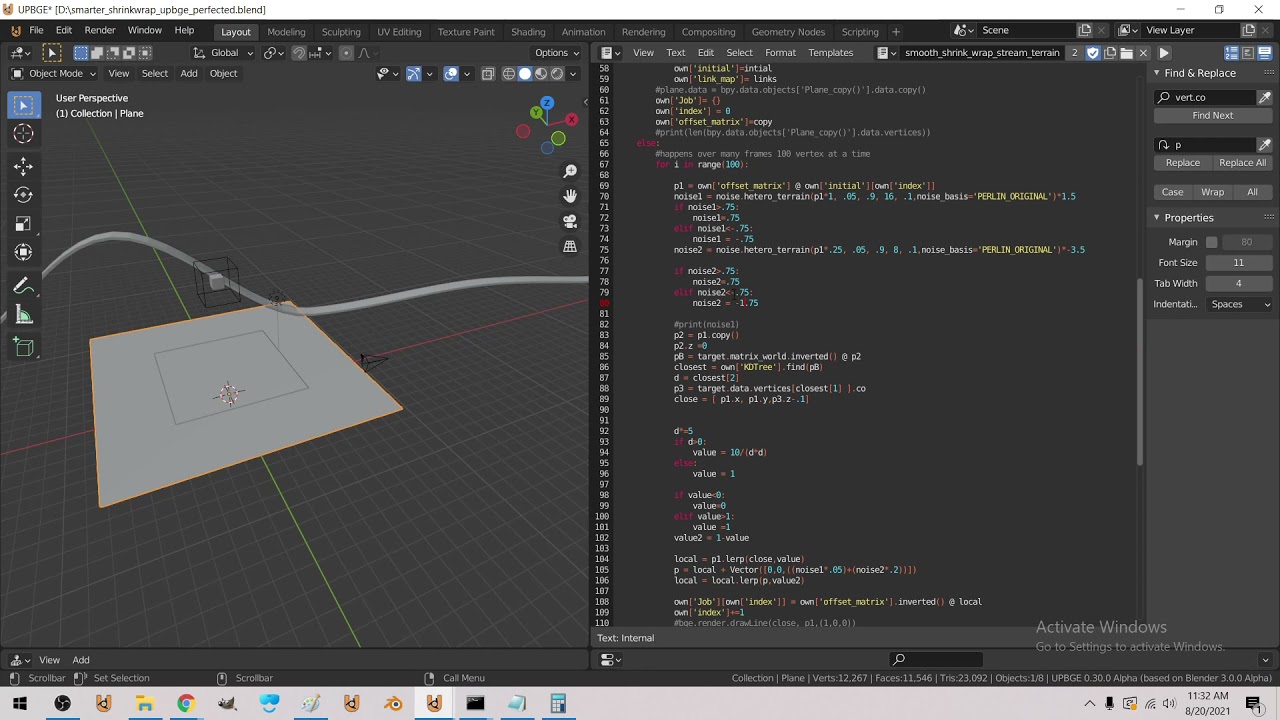
Shrink wrap smart project in py over frames + sample noise where not shrink wrapping
I made a new math :3
normal silo
With this system you can have Scenes such as main menu, options, starting-game, main-game, paused.
limpid gate
I'll try to do that thanks
normal silo
limpid gate
I'll try to do that thanks
What I do is have Scene have update, draw, on_enter, on_exit, and transition functions.
Given Scene A and Scene B. Scene A might decide in its update function that it wants to transition to B. So it calls its own transition function which calls its own on_exit function and B's on_enter function. It then sets the current scene to Scene B.
An example Scene would be SMainMenu which inherits from Scene.
In update it checks if the buttons where pressed and draws them in draw too. Which are the transition conditions.
The current scene's update and draw are called in the main loop
limpid gate
normal silo
To do this, create a Scene class, which has a update function and a draw functio...
Do you create just a generic Scene class and then create MenuScene, GameScene, etc. classes that inherit from it, or have menu_scene, game_scene simply be instances of Scene?
Also how do you do buttons?
round obsidian
cold storm
UPBGE 3.0 is a beast
yes, but how big is UPBGE?
normal silo
limpid gate
Do you create just a generic Scene class and then create MenuScene, GameScene, e...
Inherit. Buttons are GameObjects.
cold storm
1 gig @round obsidian
you can use python in BPY (the viewport) and in the ge (bpy and bge) and we also have geonodes and eevee shaders and modifiers and lots of other candy that all work in game
including openXR
the published game .exe I think is quite a bit smaller though
 serene inlet
Does anyone know how to check for collision with one thing hitting a wall and reversing back in turtle module
round obsidian
so UPBGE has native support for publishing to an .exe? @cold storm
serene inlet
I got this from a tutorial but even the way he explains it doesn't make sense```py
import turtle as t
ball = 0
gravity = 0.1
while(True):
ball -= gravity
t.sety(t.ycor() + ball)
if(t.ycor() <= -1000):
ball *= -1
t.done()```
cold storm
yeah it's a included addon
it has bullet physics, sdl2 controllers, openXr was just added
we are also gradually transitioning to vulkan
which should open up mobile ports
right now though it works on
Windows
Linux
Linux arm64
Mac arm64
Mac (no well)
should work on steamOS I assume
after vulkan we should be able to port to android, reaching iphones may still require a https://webassembly.org/ port
limpid gate
normal silo
Inherit. `Buttons` are `GameObject`s.
Do you have the buttons as part of the scene class. I.e. is it something like
  def __init__(self):
    self.buttons = [Button(x=200, y=200, width=100, height=50, color=(255, 0, 0)]
...```All game state is stored in the GameState class, Scenes and GameObjects hold a reference to that GameState so they can access anything in the game at any time.
GameState for example, contains the current Scene and a list of GameObjects.
limpid gate
normal silo
All game state is stored in the GameState class, Scenes and GameObjects hold a r...
I mean do you have the buttons stored by scene or all together. It makes sense to me to put them all together so you can execute a "click" method in the main loop
normal silo
limpid gate
I mean do you have the buttons stored by scene or all together. It makes sense t...
The scene and the Button (GameObjects) are all in the GameState which is an object created once and can be accessed from anywhere, game loop, inside a scene, inside a GameObject (e.g. Button).
You can also have the buttons just be in the Scene as you wrote, it's up to you. Try it and if you end up trying to do something that does not seem to fit in the system, redesign it.
As long as you have some kind of structure (e.g. Scenes), it will make designing the game a much more organized process.
 edgy verge
Python is ok language to make games?
normal silo
Btw for a multiplayer game your scenes would probably go something like InitScene -> MainMenuScene -> (maybe OptionsScene) -> Loading/Connection/GameStart Scene -> GameScene -> ...
@limpid gate
Try making a single player game with the scene system first to get used to it.
limpid gate
@normal silo How do you avoid circular imports if the GameState holds a list of Buttons, but each Button also needs a reference to the GameState?
Do you have an projects you'd be willing to share to show how you implement this structure?
normal silo
limpid gate
<@!119925597395877889> How do you avoid circular imports if the GameState holds ...
You don't, they just import each other.
limpid gate
normal silo
You don't, they just import each other.
Do you hold a dictionary of scenes in the GameState as well?
normal silo
limpid gate
Do you hold a dictionary of scenes in the GameState as well?
If you want to store it that way, sure. It can be stored in many ways, your choice.
limpid gate
Im just trying to figure out how to store buttons
Right now I have Scenes which store a list of buttons
normal silo
The purpose of GameState is that it's all in one place, Scene and GameObjects just have access to that data, but they don't own it (it does not die with them when they leave).
limpid gate
But Button instantiation requires passing in a scene (the scene to transition to)
normal silo
You don't have to make Button's constructor take a Scene, there absolutely nothing stopping you from just setting it later and having it None by default in which case clicking the button does nothing.
limpid gate
So I needed to have access to a list of scenes, so Im not instantiating the same scene in multiple button instantiations
limpid gate
normal silo
You don't have to make Button's constructor take a Scene, there absolutely nothi...
How would you set it, if not at initialization?
limpid gate
Where in the code structure though?
normal silo
Anywhere you want.
Also I don't see the issue here anyhow. If you have Scene as a constructor argument.
self.buttons = [Button(self), ...] in the scene's init
But if you want the scene to transition to
Since Scene has a reference to GameState which contains a list of all Scenes, in the init you can just do game_state.whatever
self.buttons = [Button(game_state.scene_a), ...]
limpid gate
I suppose my confusion is just the overall structure of how you code. Should the GameState or Scene be what holds Buttons? Does GameState hold a list of all the scenes, or does it only hold current_scene, to which buttons can assign different Scenes?
limpid gate
Ok
normal silo
Everything else, just manipulates the game state.
limpid gate
So GameState holds buttons directly, they are not attributes of the individual Scene
normal silo
Yes. But you could have them be in the scenes, since the scenes are part of the game state the game state holds all buttons still then
It's just flat structure vs heirarchical.
I prefer flat, it's simple.
limpid gate
normal silo
It's just flat structure vs heirarchical.
I think that is the distinction I have been meaning to ask without knowing the term for it
normal silo
Flat allows easier access from everything to everything else which is very convenient since you don't know what may need access to what else down the line when coming up with a game design.
normal silo
But flat also means that you now have this "god object" which holds everything, which if you are working on a team would potentially create a mess (in that case you want to balance it being too flat and a mess vs too heirarchical and hard to make quick changes).
limpid gate
Yeah
I definitely intuitively prefer hierarchical structure, but it seems to be causing me more headache than its worth
normal silo
Another tip which you may notice down the line is that really everything can be a GameObject, including Scenes themselves resulting in the entire game being unified under one system .
Hierarchical seems nice at first, but for things like games which have lots and lots of interdependent systems, every heirarchical solution ends up trying to be flat anyhow, even if you are trying to turn a blind eye to it.
Or as it's called in OOP, cross cutting concerns.
normal silo
And games are all cross-cutting concerns.
Many game engines are realizing this and switching to solutions such as ECS which allow this flatness.
(But you don't need an entire ECS almost always, just keep it simple like the solution I gave)
potent ice
It really depends on the game to be honest. You can make pretty neat gamecode without an ecs
If you're working in a team and/or potentially will have a fairly complex game.. that is a completely different situation
limpid gate
@normal silo Hey so I was wondering if I could ask you some questions again. Do you keep everything in the same file? I have GameState and Scene classes in seperate files, and this naturally gives a circular import error when I do something like:
class GameState:
    def __init__(self, window):
        self.window = window
        self.current_scene = MenuScene(self)```and
```class MenuScene:

    def __init__(self, game_state):
        self.game_state = game_state
self.window = self.game_state.window```Use import scenes, not from scenes import MenuScene
This is some python specific jank you need to figure out.
limpid gate
Ah ok thanks
I’ve been working with Python for about a year but still feel like a newbie sometimes
Thanks for your help / advice
 oblique crow
tranquil girder
oblique crow
tranquil girder
seems you need to call it image, not img
simple belfry
hey so I'm confused, I have this line in pygame:
spritesheet = pygame.image.load('tileset1.png').convert_alpha()
and I get the error: FileNotFoundError: No such file or directory.
where this file tileset1.png is in the same dir. What is the problem?
tranquil girder
tileset1.png and tileset.png is not the same
simple belfry
tranquil girder
or it's not in the same directory
it is
 simple belfry
ok I got it
tranquil girder
what was it?
simple belfry
I had to move this all one dir up and then worked
 finite solar
A pong clone : https://youtu.be/kbAIiOqKdqY
 dawn quiver
I'm not sure if this is too much game related but it's tkinter.
So basically I wanna make a thing where you can enter text into a thing with tkinter
then press a button that will save it to a variable called text
how could I do that?
short silo
dawn quiver
how could I do that?
i think u can do it easily by using PyQt
 slender frost
Anyone wanna work for me? for a upcoming good planned roblox game coming soon? i need Scripters which is like coding but not really like python. ill be paying 30 percent to people who have been working for along time and 20 for new people. Which is like robux being paid to you. DM me if your instrested. * and you can exchange it into money btw the robux *
stuck stone
what happens when you got 4 scripters?
and how can you guarantee that you won't screw over everyone?
lunar venture
@dawn quiver If you use an Entry widget, you can use its .get() method to get its content at any time.
dawn quiver
Help please!
Here's the code:
from ursina.prefabs.first_person_controller import FirstPersonController

class Voxel(Button):
    def __init__(self, posotion = (0,0,0)):
        super().__init__(
            parent = scene,
            position = position,
            model = 'cube',
            origin_y = 0.5,
            texture = 'white_cube',
            color = color.white,
            highlight_color = color.lime)

app = Ursina()

for z in range(8):
    for x in range(8):
        voxel = Voxel(position = (x,0,z))
player = FirstPersonController()

app.run()```
When I start I get:
```Known pipe types:
  glxGraphicsPipe
(4 aux display modules not yet loaded.)
size; LVector2f(1280, 720)
render mode: default
:pnmimage:png(warning): iCCP: known incorrect sRGB profile
Traceback (most recent call last):
  File "/home/meliorator1333/PycharmProjects/MyWorld/Scripts/main.py", line 19, in <module>
    voxel = Voxel(position = (x,0,z))
TypeError: __init__() got an unexpected keyword argument 'position'

Process finished with exit code 1```
What do I need to do?By answering you can @mention me in the answer.
normal silo
dawn quiver
Help please!
Here's the code:
```from ursina import *
from ursina.prefabs.first_...
def __init__(self, posotion = (0,0,0)): you made a typo
short silo
@dawn quiver change "posotion" to "position"
dawn quiver
short silo
i think u can do it easily by using PyQt
thank you I figured it out now I'm just trying to make a version of it with kivy
dawn quiver
lunar venture
<@456226577798135808> If you use an Entry widget, you can use its `.get()` metho...
thank you I figured it out now I'm just trying to make a version of it with kivy
 blazing sigil
noice
 dense creek
 last surge
can someone help me with pyinstaller i just cant convert my file
small flint
I am starting a GIT project on a multiplayer base 2d shooter game
Anyone interested to join the project can dm me
 neon ferry
In pygame what is the best way to go to another scene? Just another while loop in the while and breaking it or does pygame have a feature for that?
 solid meteor
neon ferry
In pygame what is the best way to go to another scene? Just another while loop i...
solid meteor
neon ferry
In pygame what is the best way to go to another scene? Just another while loop i...
I would have all your scenes in a list and just store the one you're currently on. Like if you had a theoretical Scene object (just however you're storing the actual data for a scene):
tutorial = Scene(...)
level_1 = Scene(...)
scene = [tutorial, level_1]
current_scene = 0
while True:
  # game loop stuff
  ...
  # or however you'd play out the scenes
  scene[current_scene].render()
Wouldn't that just be the same..?
solid meteor
neon ferry
Wouldn't that just be the same..?
It'd be better than starting a completely new game loop, especially if it's nested.
solid meteor
Depends on what your game does. Some example data could be a background image, entity positions, title, etc. Pretty much anything that would be going on on the screen could be included in Scene.
neon ferry
I'm going to make chess
solid meteor
Chess probably wouldn't need scenes tbh. There isn't like a massive change in the game from one move to the next, so it'd probably be easier to just move piece objects in a single scene.
neon ferry
True but i was thinking about making a menu so i can combine projects
So i can click on chess for example then go to that game and go back.
 tawny monolith
guys is my game good ?
how much you rate it ?
does it need anything else?
https://github.com/Karam-Sabbagh/Avoid-it
GitHub
Avoid-it is a 2d game made using python with pygame - GitHub - Karam-Sabbagh/Avoid-it: Avoid-it is a 2d game made using python with pygame
and what my next project should be
neon ferry
solid meteor
Chess probably wouldn't need scenes tbh. There isn't like a massive change in th...
Is this any good? This is just for starting ofc but i want a nice base to start on -> https://paste.pythondiscord.com/itiyeherow.rb
solid meteor
neon ferry
Is this any good? This is just for starting ofc but i want a nice base to start ...
One thing I'd say is that you could move the constants Colors and Fonts outside of Main, and structure them as a namespace. Something like:
class Colors:
  WHITE = (255, 255, 255)
  DARK_GREY = (80, 80, 80)
...
```By doing this, you don't have to construct an instance of `Colors` every time you want to access them, you can just do `Colors.WHITE`. (It also means you don't have to nest class definitions).Is it less readable this way?
solid meteor
I think it would lead to less readability down the road. Examples uses with both:
colors = Colors()
screen.fill(black)
```vs
```py
screen.fill(Colors.BLACK)
```It also fits the usage for classes better, imo. The values in `Colors` shouldn't ever change, so there's not much of a point in defining them as instance variables.I defined the colors in my init so for me it's just self.colors.white
I can always move them so i think i will let it be for now.
Thanks for the tip trough i will def consider it.
small flint
hOw to convert python made pygame to browser game
neon ferry
small flint
hOw to convert python made pygame to browser game
For what i've read it takes less time to rewrite the entire game in javascript than to convert pygame to browser.
 late yew
hm can someone here perhaps help me understand bitmasks? im doing layering for my physics engine but i cannot wrap my head around the concept
i understand how bitmasks work in binary
it makes perfect sense there
but i dont know how to do the whole modulus/division thing to do binary operations and check bits and stuff given a base 10 number
like 1010 would be 10 in base 10, but how do i get the values of each bit out of the number 10
besides literally converting it to binary
tawny monolith
small flint
Ok
hacker lol
stuck stone
late yew
besides literally converting it to binary
wdym? You don't have to convert to binary, to do bit masks and other bitwise operations
late yew
@stuck stone yeah! thats what i mean. i dont get how to do bitwise operations when something is in base 10
def bitmask_overlap(mask1: int, mask2: int) -> bool:
    # returns true if mask1 and mask2 both contain an element
    layer_1 = mask1
    layer_2 = mask2
    while layer_1 > 0 and layer_2 > 0:
        layer_1, has_bit_1 = divmod(layer_1, 2)
        layer_2, has_bit_2 = divmod(layer_2, 2)
        if has_bit_1 and has_bit_2:
            return True
return False```thats my current method, which is basically converting to binary bc i do the whole thing where i divide it by 2 over and over
so i cant go straight to a specific bit which makes me kinda :(
have to loop through
stuck stone
@late yew
mask1 & mask2?
stuck stone
yeah, it's valid
stuck stone
stuck stone
so basically there's not a special "base 2" type. If you use the correct operators, any number/integer will be interpreted in base 2

 ocean willow
Is there a python library that's easly able to make mobile games other than kivy 
short silo
Nope
tranquil girder
this is not the channel to try to get people to work for you for free, in a language that's not python, with only a hope of earning the completely useless currency robux
slender frost
ok
slender frost
tranquil girder
this is not the channel to try to get people to work for you for free, in a lang...
but it isnt for free they do get paid they can exchange it into money but ill stop
slender frost
tranquil girder
this is not the channel to try to get people to work for you for free, in a lang...
even though ur not even a mod in here

tawny monolith
@olive parcel do you know pybox2d ?
 olive parcel
No, I do not
tawny monolith
oh sorry for the ping
round obsidian
@tawny monolith why not ask the maintainers? https://github.com/pybox2d/pybox2d

GitHub
2D Game Physics for Python. Contribute to pybox2d/pybox2d development by creating an account on GitHub.
there's also examples in that repo, if you need them
tawny monolith
round obsidian
<@!831473817968181278> why not ask the maintainers? https://github.com/pybox2d/p...
I know
but I am having some problems installing it
round obsidian
open an issue with them, see what they say
@tawny monolith It also looks like there's a pipwin installer that may help
pip install pipwin
pipwin install pybox2d
tawny monolith
they says download Msys and finally do in Msys python setup.py build and Msys telling me that there is no command called python
round obsidian
that way you don't have to build from source, you can use a precompiled binary
tawny monolith
round obsidian
`pip install pipwin`
`pipwin install pybox2d`
oh ok thanks
 analog token
Hello everyone I have a problem, I created a small python script for minecraft but when I click on the minecraft window it is as if the bot stops. The typing action does not work in the games but on my desktop it works perfectly
cold storm

😄
like 95% powered by python
I use c for things like reinstance Physics mesh and recalculate normals
frank fieldBOT
Hey @cold storm!
It looks like you tried to attach file type(s) that we do not allow (.blend). We currently allow the following file types: .gif, .jpg, .jpeg, .mov, .mp4, .mpg, .png, .mp3, .wav, .ogg, .webm, .webp, .flac, .m4a.
Feel free to ask in #community-meta if you think this is a mistake.
tawny monolith
round obsidian
`pip install pipwin`
`pipwin install pybox2d`
@round obsidian its not working help me please its giving me this error ```C:\WINDOWS\system32>pipwin install pybox2d
Package pybox2d not found
Try pipwin refresh
Help :(
round obsidian
@tawny monolith sorry, I had to run off to deal with some stuff.
@tawny monolith try pipwin install box2d
small flint
tawny monolith
hacker lol
Hecker*
idle hemlock
hello i am new to python and i have a problem with my game. code i used https://realpython.com/pygame-a-primer/ for the base and pngs.
when i touch a enemy i sometimes lose health and sometimes don't and i just cant find out why pls help.
here is the code https://paste.pythondiscord.com/kacaquguvo.rb
PyGame: A Primer on Game Programming in Python – Real Python
In this step-by-step tutorial, you'll learn how to use PyGame. This library allows you to create games and rich multimedia programs in Python. You'll learn how to draw items on your screen, implement collision detection, handle user input, and much more!
small flint
hello
any pygame people online
i need some help
#client file.
import pygame
width = 500
height = 500
win = pygame.display.set_mode((width, height))
pygame.display.set_caption("Client")
clientNumber = 0
class Player():
def init(self, x, y, width, height, color):
self.x = x
self.y = y
self.width = width
self.height = height
self.color = color
self.rect = (x,y,width, height)
self.vel = 3
def draw(self, win):
    pygame.draw.rect(win, self.color, self.rect)

def move(self):
    pygame.keys.get_pressed()
    keys = pygame.keys.get_pressed()
    if keys(pygame.K_LEFT):
        self.x -= self.vel
    if keys(pygame.K_RIGHT):
        self.x += self.vel
    if keys(pygame.K_UP):
        self.y -= self.vel
    if keys(pygame.K_DOWN):
        self.y += self.vel

    self.rect(self.x, self.y, self.width, self.height)
def redrawWindow(win,player):
win.fill (255, 255, 255)
player.draw(win)
pygame.display.update()
def main():
run = True
p = Player(50,50,100,100(0,255,0))
clock = pygame.time.clock()
while run:
    clock.tick(60)
    for event in pygame.event.get():
        if event.type == pygame.QUIT:
            run = False
            pygame.quit()


    p.move()
    redrawWindow(win, p)
main()
frank fieldBOT
Here's how to format Python code on Discord:
```py
print('Hello world!')
```
These are backticks, not quotes. Check this out if you can't find the backtick key.
small flint
import pygame

width = 500
height = 500
win = pygame.display.set_mode((width, height))
pygame.display.set_caption("Client")

clientNumber = 0
class Player():
    def __init__(self, x, y, width, height, color):
        self.x = x
        self.y = y
        self.width = width
        self.height = height
        self.color = color
        self.rect = (x,y,width, height)
        self.vel = 3

    def draw(self, win):
        pygame.draw.rect(win, self.color, self.rect)

    def move(self):
        pygame.keys.get_pressed()
        keys = pygame.keys.get_pressed()
        if keys(pygame.K_LEFT):
            self.x -= self.vel
        if keys(pygame.K_RIGHT):
            self.x += self.vel
        if keys(pygame.K_UP):
            self.y -= self.vel
        if keys(pygame.K_DOWN):
            self.y += self.vel

        self.rect(self.x, self.y, self.width, self.height)


def redrawWindow(win,player):
    win.fill (255, 255, 255)
    player.draw(win)
    pygame.display.update()

def main():
    run = True
    p = Player(50,50,100,100(0,255,0))
    clock = pygame.time.clock()

    while run:
        clock.tick(60)
        for event in pygame.event.get():
            if event.type == pygame.QUIT:
                run = False
                pygame.quit()


        p.move()
        redrawWindow(win, p)

main()```ok man just help me fix it
tawny monolith
round obsidian
<@!831473817968181278> try `pipwin install box2d`
Oh ok thanks I will try it later
tawny monolith
small flint
Hecker*
Yeah haha
tawny monolith
small flint
```#client file.
import pygame
width = 500
height = 500
win = pygame.display.se...
Let me see
tawny monolith
small flint
```#client file.
import pygame
width = 500
height = 500
win = pygame.display.se...
can you tell me whats the error ? And were it is ?
@small flint .
tawny monolith
You should remove self.rect(self.x,,,) from the move function because thats not how you move a rect you should doself.rect.move(self.x, self.y) and you can put this in the draw function
tawny monolith
small flint
arre bhai
???
small flint
it fixed
tawny monolith
And you can call the move function inside the draw function(before you draw)
tawny monolith
tawny monolith
And you can call the move function inside the draw function(before you draw)
So you can just call the draw function instead of calling the draw function and the move function
tawny monolith
small flint
it fixed
Yeah but you can fix some things to make your code easier
small flint
ok
tawny monolith
round obsidian
<@!831473817968181278> sorry, I had to run off to deal with some stuff.
@round obsidianthanks you verrrry much,
I've spended an lot of time trying to do this and here you go 2 lines of command and it have been installed, thank you it worked
I've tried to download wsys , c++ and swig and I couldn't do it
but now with some commands in cmd it worked
tawny monolith
guys what do you think about my game ?
https://github.com/Karam-Sabbagh/Avoid-it
GitHub
Avoid-it is a 2d game made using python with pygame - GitHub - Karam-Sabbagh/Avoid-it: Avoid-it is a 2d game made using python with pygame
is it good ?
 cloud spruce
yes it is amazing
tawny monolith
oh really
tawny monolith
cloud spruce
yes it is amazing
thank you
its kinda simple
It needed some math
like sin and cos
where I still didn't learn in school
short silo
😏
tawny monolith
oh I forgot something
the screen size :L
well I don't care
who play it must know some programming
(to change the size)
late yew
hey do you guys know about variable inheiritance? im trying to figure out how to make a configurable class which is defined and then instantiated inside a function
like specifically a "GameObject", which when instantiated, takes in parent classes as additional arguments
so that way i can make a gameobject that inheirits from physics object class but not my sprite class, so it has a hitbox but doesnt get drawn, etc
ive never done this before but id like for the object to just not have variables, as opposed to just not using the physics related variables if its static
 late yew
@stuck stone i think?? im not sure if thats what i meant because i dont really understand whats going on
double underscores scare me
ive used if __name__ == __main__ but fuck me if i know what it means
wait is that unrelated?
stuck stone
No ahahaha, it's just something I put in all my programs
I can explain it to you, if you want
late yew
that would be nice
thank you for also showing me the inheiritance thing
but yes i would like to know what the hell the double underscores are
stuck stone
Well, there are a few double underscore variables. Usually it's just variables that are defined by default. Probably got the weird name so no one accidentally uses them without being aware they exist
late yew
ah okey
i understand __init__
thats like the one function thats already defined for the base python object
 celest escarp
Is pygame library, cross platform?
Also can I make my own game engine inside it?
stuck stone
Oh yeah
You technically can change your VS Code background with extensions
but it breaks the installation
stuck stone
 frozen crest
what editor?
frozen crest
what editor?
PyCharm
frozen crest
ok
 cold storm
Out of the Fog - Wrectified unified streamer
Unknown Forces Game Studio
Ca, USA
finite solar
 quaint siren
does anyone know how can I center my player hitbox (Rect)?
quaint siren
does anyone know how can I center my player hitbox (Rect)?
If you're using pygame you can use yourRectangleName.center = pygame.Vector2(x_coord, y_coord) (or just use an array it works too)
 pure verge
 small flint
Anyone online to help me
frank fieldBOT
Pasting large amounts of code
If your code is too long to fit in a codeblock in discord, you can paste your code here:
https://paste.pydis.com/
After pasting your code, save it by clicking the floppy disk icon in the top right, or by typing ctrl + S. After doing that, the URL should change. Copy the URL and post it here so others can see it.
 crimson hound
 you can use this to paste your code
crimson hound
And what issues do you have with the code?
small flint
crimson hound
And what issues do you have with the code?
its not animating
 nova wedge
anyone available?
i tried to make a game by whenever i enter the player's choice, the if code is skipped for the player and only the cpu moved
 serene moon
Hey guys. What's a good import for working with 3D models? I'm trying pymesh but i'm not having much luck getting it to even install properly.
serene moon
Windows 10. And I believe latest python
;-; all i'm trying to do is display a 3D model I downloaded off the internet using python
why does this need to be so complicated
At least I've found several ways of not how to do it
round obsidian
pyglet I believe also lets you import and show 3D models in common formats
and it's pure Python, no binary deps

GitHub
pyglet is a cross-platform windowing and multimedia library for Python, for developing games and other visually rich applications. - pyglet/examples/3dmodel at master · pyglet/pyglet
side note, when people try to do something and say "why is this so complicated" one of the answers I find myself reaching for is "because until now the complexity of this was concealed from you"
serene moon
I guess this is why people dont bother making their own game engines lol
round obsidian
yes :D
people are unaware of how much complexity is inside many common pieces of software
we had a discussion in another channel with someone who wanted to make their own web browser in Python, from scratch, and didn't seem to realize just how massive an undertaking that is
browsers are essentially little OSes at this point
serene moon
round obsidian
browsers are essentially little OSes at this point
Browsers are starting to actually advertise as an OS lol
 undone pilot
Does anyone with basic python knowledge feel generous today? I'm in my last year of high school, making an arcade game and I need help with getting an image of my healthbar in the right hand corner. I've got the png photos and everything. There is currently functional text that changes every time I lose a life but I don't know how to replace the number in text with its equivalent image. If anyone wants to save me from my simple problems, it'd be appreciated. I have tried other things, this is just my last resort because I take an online class, I don't know anyone in my class that well and my problem is too specific for google because i'm not using the same plugins and software. Sorry for the long message lol
serene moon
undone pilot
Does anyone with basic python knowledge feel generous today? I'm in my last year...
what in the actual hell. highschool and learning this stuff?
boy. Back in my day all we were taught about computers is how to turn them on.
undone pilot
That does make me feel better lol
serene moon
I aint even kidding. The most advanced computer type class we had was learning to use the microsoft programs lol
Granted this was over 15 years ago
Maybe not 15. idk. my concept of time has warped since I stopped counting
round obsidian
@undone pilot what library are you using?
serene moon
Me? hell na. I can't even get python to function properly. I would if I knew how tho.
undone pilot
I am using the arcade library and os
round obsidian
@undone pilot @Paul Craven#0050 maintains the Arcade library and he hangs out here, so try pinging him with that question. Note that you can also use a font to render text rather than static images, so that might be easier
serene moon
maybe instead of 3d models I'll do some arcade 2d models and games
Maybe that'll be easier to do xD
undone pilot
So right now it says "health: 5" and when you hit an enemy, it says "health: 4" so I need to replace that text for the image of the corresponding health bar
serene moon
Can't you just create a box there and resize it based on the % of health remaining?
undone pilot
I already have a set image that I designed
serene moon
How are you currently displaying stuff on screen? why cant you just use the same methods and change the position/image?
undone pilot
because I don't know what the command is to replace it with an image
Draw our health on the screen, scrolling it with the viewport
    health_text = f"Health: {self.health}"
    arcade.draw_text(health_text, 1400 + self.view_left, 10 + self.view_bottom,
                     arcade.csscolor.BLACK, 18)
That code displays the health as it changes as TEXT but I need to put an image instead of text lol
The small things are always the most painful
undone pilot
I've made a sprites
I'm kind of new to this and we're using a software called Pycharm and a software called Tiled. Tiled is like a map design software that means I have to do less code if i use it smartly
serene moon
Can you create a new sprite for the healthbar and simply draw it where the health_text is? and then layer the health text over the sprite?
undone pilot
That is what I have been trying to do for the past 5 hours, yes
But there are all kinds of errors
serene moon
I'm still confused as to how you can create other sprites and display them but you can't simply copy and paste the exact same code and simply change what sprite it's loading?
undone pilot
That's what i've been trying to do but they're different in subtle ways
The only other similar sprite I have is my main character sprite
The health bar should move along with the viewport screen, the player does but not in the same way
the game window
serene moon
Are you using this website? https://api.arcade.academy/en/latest/examples/index.html#sprites
undone pilot
yup
undone pilot
What's that?
serene moon
a whole bunch of 'em
Wait. this tiled program. why arent u using that to display your gui?
undone pilot
I'll have a play around with what's there.
And because if I used that, it wouldn't move with my screen
Thanks for that link btw
undone pilot
Yeah, I'm vaguely familiar, I've created my own map and collectibles etc
undone pilot
Yes, but the layers are bound to their spacial position it seems. By that I mean, they don't move with the screen, they stay still
undone pilot
Ah parallax scrolling, see i'm learning all these terms