#game-development
1 messages · Page 91 of 1
 dawn quiver
:D
i got all the art and sprites i wanted
now i need to start programming it tmrw

 torn patrol
 clear glacier
need help 😦
clear glacier
need help 😦

Stack Overflow
I have two images:
I'd like to essentially 'cut out' the black shape from the texture tile so that I end up with something along these lines:
Except transparent around the shape. Is this possible
check it out
clear glacier
ok i'll
 round obsidian
@clear glacier If you're using PyGame, and you named your file pygame, then your file thinks it's trying to import from itself.
clear glacier
round obsidian
<@!580332673289945099> If you're using PyGame, and you named your file `pygame`,...
ahhhh smh
lmao
my bad
round obsidian
A common mistake :D
clear glacier
torn patrol
https://stackoverflow.com/questions/3580500/active-texturing-with-pygame-possibl...
i wanna ask smthng
how can i use textures?
@round obsidianbtw, why that game isn't closing ??
i can't close it
round obsidian
clear glacier
i can't close it
as far as I can tell you haven't made a provision for intercepting any of the window-close events. I don't use PyGame so I'm not sure, but that may be the reason
clear glacier
round obsidian
as far as I can tell you haven't made a provision for intercepting any of the wi...
ahh but i'm clicking the close button but it isn't working
 tranquil girder
torn patrol
👍 first texture after 3 hours loaded
tranquil girder
torn patrol
👍 first texture after 3 hours loaded
make sure your script is in a folder you created for your project as it will search for the texture from that folder. so if you put it directly on the c disk for example, it will search every file on your computer. This is covered in the documentation
torn patrol
tranquil girder
make sure your script is in a folder you created for your project as it will sea...
yup
and how many models are there in built there in ursina ?
torn patrol
can we make endless terrain in ursina ?
dawn quiver
How to turn randomly generated maze into pseudo 3D?
 tawny crystal
Cave engine is great
 ebon heath
I need help am work on python crash course alien invasion and keep getting errors pyTraceback (most recent call last):
File "C:\Users\Ryan Saroop\PycharmProjects\pythonProject3\venv\alien_invasion.py", line 55, in <module>
  run_game()
File "C:\Users\Ryan Saroop\PycharmProjects\pythonProject3\venv\alien_invasion.py", line 40, in run_game
  gf.update_screen(ai_settings, screen, ship,alien ,bullets )
File "C:\Users\Ryan Saroop\PycharmProjects\pythonProject3\venv\game_functions.py", line 80, in update_screen
  for bullet in bullets.sprite():
AttributeError: 'Group' object has no attribute 'sprite'
 proven fractal
ebon heath
I need help am work on python crash course alien invasion and keep getting error...
proven fractal
ebon heath
I need help am work on python crash course alien invasion and keep getting error...
this can help: https://careerkarma.com/blog/python-attributeerror/

Career Karma
Python AttributeErrors are raised when you reference an attribute that does not exist. On Career Karma, learn how to fix AttributeErrors.
 waxen slate
Help me pls
 frank fieldBOT
:incoming_envelope: :ok_hand: applied mute to @dawn quiver until <t:1627027934:f> (9 minutes and 59 seconds) (reason: burst rule: sent 8 messages in 10s).
 stable lodge
!pban 835918619183415346 troll
frank fieldBOT
 :ok_hand: applied purge ban to @terse rapids permanently.
 lost pilot
someone ghost pinged me here 
stable lodge
lost pilot
someone ghost pinged me here <:notlikethis:596577155169910784>
Probably the user I just banned. Sorry about that
 heavy plank
- i want to add a sprite [image] into my game
- my errors -
Traceback (most recent call last):
File "C:\Users\bhara\Downloads\bharadwaj\Cow Chaos\Main game script.py", line 29, in <module>
player = Player(50,50,86,326)
File "C:\Users\bhara\AppData\Local\Programs\Python\Python39\lib\site-packages\pygame\sprite.py", line 115, in init
self.add(*groups)
File "C:\Users\bhara\AppData\Local\Programs\Python\Python39\lib\site-packages\pygame\sprite.py", line 133, in add
self.add(*group)
TypeError: pygame.sprite.Sprite.add() argument after * must be an iterable, not int
-my code - https://privatebin.net/?860d5eb6d8038f76#CbDRyPxZpfLT6C3WG4ESnAgiwTvZzyfKKnqUsngS2diR
- i used pygame,sys

PrivateBin
Visit this link to see the note. Giving the URL to anyone allows them to access the note, too.
can someone help?
please
heavy plank
Can someone help please
 covert fossil

heavy plank
heavy plank
- i want to add a sprite [image] into my game
- my errors -
Traceback (most rec...
please help
 white fog
when i import a sprite in godot it includes the transparent part as part of the sprite (when i scale it and move) how do i fix this
 narrow pike
Hi
I need help
['C:\Users\ABCD\Desktop\Apad', 'C:\Users\ABCD\Desktop\Apad']
pygame 2.0.1 (SDL 2.0.14, Python 3.9.5)
Hello from the pygame community. https://www.pygame.org/contribute.html
Traceback (most recent call last):
File "c:\users\abcd\appdata\local\programs\python\python39\lib\site-packages\pkg_resources__init.py", line 2851, in get_entry_map
ep_map = self._ep_map
File "c:\users\abcd\appdata\local\programs\python\python39\lib\site-packages\pkg_resources\init.py", line 2813, in getattr
raise AttributeError(attr)
AttributeError: _ep_map
During handling of the above exception, another exception occurred:
Traceback (most recent call last):
File "c:\users\abcd\appdata\local\programs\python\python39\lib\runpy.py", line 197, in _run_module_as_main
return _run_code(code, main_globals, None,
File "c:\users\abcd\appdata\local\programs\python\python39\lib\runpy.py", line 87, in run_code
exec(code, run_globals)
File "C:\Users\ABCD\AppData\Local\Programs\Python\Python39\Scripts\pyinstaller.exe\main.py", line 7, in <module>
File "c:\users\abcd\appdata\local\programs\python\python39\lib\site-packages\PyInstaller\main.py", line 114, in run
run_build(pyi_config, spec_file, **vars(args))
File "c:\users\abcd\appdata\local\programs\python\python39\lib\site-packages\PyInstaller\main.py", line 65, in run_build
PyInstaller.building.build_main.main(pyi_config, spec_file, **kwargs)
File "c:\users\abcd\appdata\local\programs\python\python39\lib\site-packages\PyInstaller\building\build_main.py", line 737, in main
build(specfile, kw.get('distpath'), kw.get('workpath'), kw.get('clean_build'))
File "c:\users\abcd\appdata\local\programs\python\python39\lib\site-packages\PyInstaller\building\build_main.py", line 684, in build
exec(code, spec_namespace)
File "C:\Users\ABCD\Desktop\Apad\main.spec", line 7, in <module>
a = Analysis(['main.py'],
File "c:\users\abcd\appdata\local\programs\python\python39\lib\site-packages\PyInstaller\building\build_main.py", line 210, in init
for entry_point in pkg_resources.iter_entry_points(
File "c:\users\abcd\appdata\local\programs\python\python39\lib\site-packages\pkg_resources\init.py", line 641, in <genexpr>
for entry in dist.get_entry_map(group).values()
File "c:\users\abcd\appdata\local\programs\python\python39\lib\site-packages\pkg_resources\init.py", line 2853, in get_entry_map
ep_map = self.ep_map = EntryPoint.parse_map(
File "c:\users\abcd\appdata\local\programs\python\python39\lib\site-packages\pkg_resources\init.py", line 2538, in parse_map
raise ValueError("Entry points must be listed in groups")
ValueError: Entry points must be listed in groups
Please help
 opaque fox
Does anyone knows how to make a timer in pygame without lagging the main loop
 frozen knoll
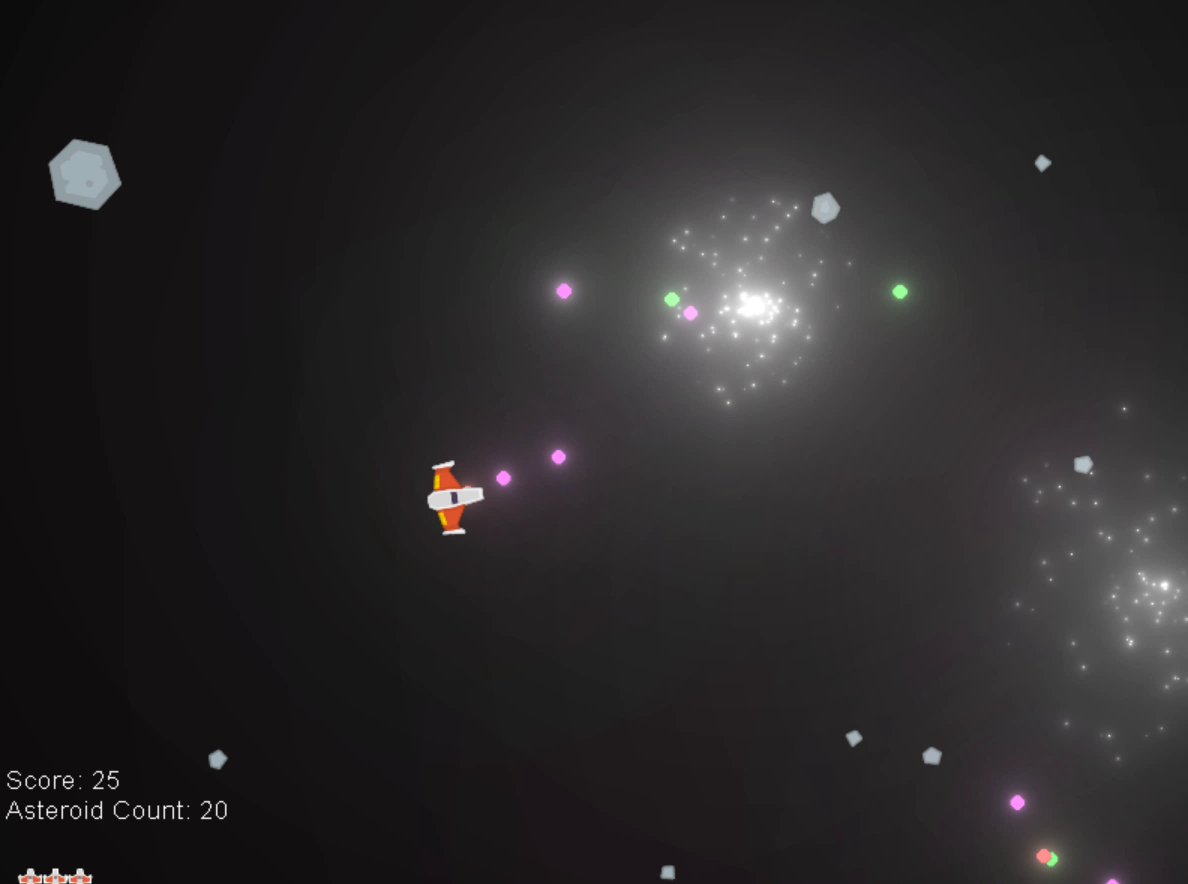
Going a bit nuts the the glowy things.
 last moon
frozen knoll
Going a bit nuts the the glowy things.
last moon
frozen knoll
Going a bit nuts the the glowy things.
that's looks sick! how'd you manage the particle bursts?
frozen knoll
Arcade 2.6 is supporting shaders made in Shadertoy format. So I watched a YouTube tutorial and adapted it to this: https://github.com/pythonarcade/asteroids/blob/main/source/explosion.glsl
GitHub
Demo asteroids game showing shader examples. Contribute to pythonarcade/asteroids development by creating an account on GitHub.
Pretty cool what you can do in a glsl shader without too much code. Kind of complex though.
 ebon stream
Hello guys i want to start programing with ursina can anybody help me or send a free course or something?
 white vector
For those interested in console development, this class will abstract away colouring. Note: the fourth parameter switches highlight instead of font color.
@lambda c:c()
class rgb:
  def __str__(self):
    return'\x1b['
  def __format__(self, a):
    rgb = a.replace(',',';').split(';')
    r,g,b,H = rgb + [0]*(len(rgb)==3)
    return f'\x1b[{38+10*bool(H)};2;{r};{g};{b}m'
  def __call__(self, r, g, b, end=False):
    return lambda s,end=end:f'{self:{r};{g};{b}}{s}'+end*'\x1b[0m'
There's also printable directions, to move the cursor, using ^[[ ( ^[ is typed with ctrl-[ or coded as chr(27) )
A B C D is up down right left respectively
s pushes position to memory, and u recalls it.
That and curses or msvcrt should be all you need to develop some pretty cool console games.
I've done minesweeper already, I'm doing Tetris and 2048 next
Warning: if you play around with raw escape sequences too much, you might experience unexpected behavior.
For example, a partial sequence will 'swallow' the next character, the length of a sequenced string is longer than it's display length hence left, center or right alignment using format strings will under compensate
 tough flicker
hellooo can someone give me some type of beginner guide to creating a game using python (since thats the only language ik as of now)
 main cove
@tough flicker python crash course
tough flicker
main cove
<@754739223961010317> python crash course
Like the book?
main cove
Yes
There is a dedicated section of the book which looks at creating a game with pygame.
tough flicker
tysm !
 manic lotus
hey, as someone who has had experience in both python and unity, is godot a good choice to make a game with since its a mix of those things?
frozen knoll
@tough flicker Try https://learn.arcade.academy
tough flicker
frozen knoll
<@754739223961010317> Try https://learn.arcade.academy
thanks!!
last moon
manic lotus
hey, as someone who has had experience in both python and unity, is godot a good...
From the little bit of godot that I learnt helped people with it, I think unity gives you a lot more control over your game than godot provides. Not to say you can't write your own scripts/use prewritten ones but it's easier with unity. That being said, if your projects are on the simpler side logically, imo godot would be easier.
Not to mention the textures in the unity asset store are a lot better than ones on itch.io/etc
(also unity has a python api)
 faint berry
heavy plank
Can someone help please
faint berry
heavy plank
Can someone help please
the link you sent is not opening
faint berry
opaque fox
Does anyone knows how to make a timer in pygame without lagging the main loop
in your init method or just set these once time.
timer_name = pygame.USEREVENT + 0  # (increase this number by timer count.)
pygame.time.set_timer(timer_name, 100)  # each 100 ms, trigger.
in your update method or just in while statement
for event in pygame.event.get()
    if event.type == timer_name:
        print('it works! just bla bla...')
 golden gazelle
Does anyone know of a good world chunk loading algorithm where most chunks are a constant size, but a few far ones could take 8 chunks, 27 chunks, etc. cubes? Sort of variable chunk sizes except that any not of the default size are always multiple chunks in a cube
proven fractal
can someone help me on #help-kiwi ?
 molten plume
https://paste.pythondiscord.com/nixufizozo.properties em can someone help me on why the animations ain't working
 subtle herald
 still anvil
frozen knoll
Going a bit nuts the the glowy things.
still anvil
frozen knoll
Going a bit nuts the the glowy things.
could u send me the code for this if not is it easy to make?
frozen knoll
The GitHub is linked in my post.
still anvil
frozen knoll
The GitHub is linked in my post.
k but is it easy to make and how long did it take for u to make?
faint berry
proven fractal
can someone help me on <#451312046647148554> ?
I made an pygame timer based animation example code for this 2 day before, just look my profile and go to my github, it is in there.
proven fractal
faint berry
I made an pygame timer based animation example code for this 2 day before, just ...
Thanks
dawn quiver
We use a defined fps to control animation
so lets say we dont define it, and let the game run at the highest speed the users machine allows
then how would we make sure that user A's character wont run slower than user B's character
faint berry
dawn quiver
you need to use delta time
yeah
 left geyser
guys so I just started to learn game development in pygame and I was wondering
do you think it's a good place to start or should I do something else first?
round obsidian
@left geyser it's a fine place to start, you can always move on to bigger things
If you know nothing about programming, you can cut your teeth on the workflow with Python and learn the basics of game design
I'm writing games in Python right now, and for what I'm doing (which is not huge) it's more than adequate
 subtle bridge
 runic nebula
 mental mortar
how to create a
mental mortar
how to create a
you can use pygame library
it is easy to learn and you can develop fastly some small games
but pls don't expect the features of a game engine
I highly recommend you to watch a tutorial video and than start coding. When you encounter some issues you can check documentation of pygame
mental mortar
ok
frozen knoll
If you are wanting to learn to program, and do game development, maybe check out https://learn.arcade.academy
That covers the Arcade library. Or http://programarcadegames.com covers pygame. @left geyser @mental mortar
dawn quiver
mental mortar
game in phython
https://www.youtube.com/playlist?list=PLpn8xeYMGmXOGFtZPQ4IGabnEdqwDfOuR
I hand picked these

YouTube
From the videos where i learnt
Coding with Russ has some really well formatted and good implementations of code
 rough zodiac
does anyone have experience with steamworksPy as the documentation given on how to install it says to copy over the "steamworks.py" file, even though there's not a single file with that name in the repository
tranquil girder
where does it say that? looks like a normal python module you can install with pip
just give pip the link to the .zip file or the git repo if you have git
rough zodiac
"Copy the steamworks.py file and the newly compiled SteamworksPy.dll or SteamworksPy.so or SteamworksPy.dylib file to your project folder."
https://philippj.github.io/SteamworksPy/
rough zodiac
yay~
tranquil girder
I think you can just copy the module
rough zodiac
i can try?
tranquil girder
the folder called steamworks
 hard field
How do you make games for android with python?
 sweet condor
hard field
How do you make games for android with python?
sweet condor
hard field
How do you make games for android with python?
i think you guy have a thing called pydroid
 lean cosmos
Opinions?
 royal hawk
pygame question: should i manually calculate mouse position when there isnt much buttons on screen or would i really like a pygame_widgets.Button() even when there isnt a lot of buttons?
white vector
mental mortar
game in phython
You could also make the game in a console using curses (Linux) or msvcrt (Windows) for keyboard presses, and f'{chr(27)}[38;2;{r};{g};{b}m' to make text coloured, etc.
but GUIs are probably more intuitive
I'm doing tetris next, but unlike minesweeper, the algorithm hasn't come to me in my sleep...
I'm going for the standard approach of a grid with blocks with ids.
I'm thinking each tetronimo be separate blocks but coordinate relative multi-directional displacement in order for a block to rotate, plus keep a reference to fellow blocks in a tetronimo so it keeps its shape at the edge.
This might be challenging.
 patent rune
Tetris would be a fun project for python
Few years ago I tried making it on scratch
Failed miserably tho 😂
white vector
I hit a 7 :O
 white vector
the event loop will need to be paced proportional to level
eh i'll play some more minesweeper

 minor sequoia
can some tell me how I can move a object by holding the key and not pressing it again and again.
faint berry
use pygame's event method with pygame.K_UP
minor sequoia
import sys , pygame
from pygame.locals import *


def game():
    pygame.init()

    #valeu
    a = True
    bg_color=(250,150,100)
    shipx = 300
    shipy = 640
    vel_ship = 40
    bulletw = 5
    bulleth = 10
    bulletc = (100,100,150)
    bulletx = 100
    bullety = 100
    bullets = 15
    bulletf = False


    screen = pygame.display.set_mode((600,680),0,0)
    pygame.display.set_caption('Alien Invation')
    myship = pygame.image.load('spaceship1.png')
    myship = pygame.transform.scale(myship , (40,40))
    ship = myship.get_rect()
    pygame.draw.rect(screen , (bulletc),(bulletx,bullety,bulletw,bulleth))


    while a:
        screen.fill(bg_color)
        screen.blit(myship , (shipx,shipy))

        for event in pygame.event.get():
            if event.type == QUIT:
                a = False
            elif event.type == pygame.KEYDOWN:
                if event.key == pygame.K_a and shipx >= 40:
                    shipx -= vel_ship
                if event.key == pygame.K_d and shipx <= 500:
                    shipx += vel_ship


        pygame.display.update()
game() ```why is my bullet not getting on the screen
dawn quiver
lean cosmos
Opinions?
Looking good, keep going!
 solid meteor
minor sequoia
why is my bullet not getting on the screen
solid meteor
minor sequoia
why is my bullet not getting on the screen
It looks like you're filling in the background after you draw the bullet to the screen (meaning it covers the bullet).
mental mortar
Yo
faint berry
minor sequoia
why is my bullet not getting on the screen
Draw your bullet in your game loop(while statement) because you draw it once, and just after you are refreshing your screen and it disappears.
hard field
So I completed my first space shooter game.
tranquil girder

 teal ember
tranquil girder
teal ember
tranquil girder
3d inverse kinematics?
tranquil girder
no, I just store the head positions in a list and move the body parts to a point in the past
teal ember
ah
IV i suppose would be similar, except instead of making all the parts go to a specific point they try to follow the previous body part
 frosty meadow
Hey guys, I'm having an error in ursina engine, can someone please help?
The error is known pipe types:
wglGraphicsPipe (3 aux display modules not yet loaded.)
I installed ursina using pip install ursina
tranquil girder
that's not an error
 elfin flower
guys what softwares i need to build a game with python?
 reef turret
hi I want to create games I know python where should I start
 keen quail
elfin flower
guys what softwares i need to build a game with python?
keen quail
elfin flower
guys what softwares i need to build a game with python?
turtle graphics may help you
keen quail
elfin flower
guys what softwares i need to build a game with python?
becuse it was very helpful when i was creating a game:
import turtle

screen = turtle.Screen()
turtle = turtle.Turtle()

screen.bgcolor("black")
screen.setup(width = 600, height = 600)

turtle.color("white")
turtle.shape("circle")
turtle.pencolor("white")
turtle.speed(6)
turtle.pendown()

while True:
    screen.update()

    def up():
        turtle.setheading(90)
        turtle.forward(20)

    def down():
        turtle.setheading(270)
        turtle.forward(20)

    def left():
        turtle.setheading(180)
        turtle.forward(20)

    def right():
        turtle.setheading(0)
        turtle.forward(20)

    screen.listen()
    screen.onkey(up, "Up")
    screen.onkey(down, "Down")
    screen.onkey(left, "Left")
    screen.onkey(right, "Right")
hi I want to create games I know python where should I start
frosty meadow
tranquil girder
that's not an error
So what should I do to load the display modules and btw the text is shown in red, I really don't know much about this stuff so I'll appreciate if you help please :D.
lean cosmos
Thanks @dawn quiver
frozen knoll
@reef turret Try https://learn.arcade.academy
 sage rain
lean cosmos
Opinions?
sage rain
lean cosmos
Opinions?
very cool
tranquil girder
frosty meadow
So what should I do to load the display modules and btw the text is shown in red...
tell us what you did, what you expect to happen and what happens/doesn't happen
faint berry
reef turret
hi I want to create games I know python where should I start
if you want to use python in your game development, use pygame, arcade, turtle etc, if not, use Unity and other engines
white vector
what about the straight console?
hang on let's say i've made some beautiful image in PIL (pillow), how do I display it?
 proper peak
white vector
hang on let's say i've made some beautiful image in PIL (pillow), how do I displ...
proper peak
white vector
hang on let's say i've made some beautiful image in PIL (pillow), how do I displ...
like, on the screen? you'd need some graphics library (or a game library)
or if you just want to show it in the system's image viewer, .show() does that
white vector
would.show() work with multiple rapid requests?
or does it make a new instance of system's image viewer each time?
proper peak
I mean, if multiple image viewer windows opening is the intended result
white vector
the intended result is update an already open window displaying an image, rather than create a new process
proper peak
Are you already using any graphics/GUI/game library?
white vector
nope. although i have kivy at the ready
what im using now is the console, using escape sequences for low level graphics, and msvcrt for stream override
but i was thinking get higher res with PIL and something that can show image data
like in matlab you can just Image(arr);
proper peak
Show how, though? In a window? Then you need something that can open a window - a graphics library at least
pyglet, say, or start using the kivy as you're planning
proper peak
Pyglet is lower-level, it's essentially a wrapper around opengl and the like. There, you'd create an image object:
https://pyglet.readthedocs.io/en/latest/modules/image/index.html
from the PIL image (using .tobytes() and creating a new ImageData from them)
and .blit() it on the window.
in kivy, google tells me there's simply an Image widget for showing images.
white vector
interesting
I'd ask in their server but i'm banned :/
My code is too atrocious XD
 lament condor
what does blit mean if anything
i remember seeing it in pygame and was like "this is a weird name"
nvm
proper peak
[...] which stands for bit block transfer
apparently.
last moon
white vector
and which one's faster at it?
There’s also moderngl which is essentially just a opengl wrapper
frank fieldBOT

ModernGL: High performance rendering for Python 3
white vector
so this uses the gpu to make rendering go brrrrr?
last moon
you can't render without the gpu (in modern systems)
but that'd probably be the lowest you could get without using c[++]/etc
last moon
last moon
you can't render without the gpu (in modern systems)
that being said, you can do calculations on the gpu (floating point + parallel calculations especially) through shaders/dtivers/idrk I still haven't gotten a straight answer about that
lament condor
lol i wonder why people use python for this kind of optimization

might as well use C right
 potent ice
@lament condor moderngl is written in C/C++ so you are kind or already doing that
lament condor
that's what i meant, might as well just use C all the way
potent ice
Why?
lament condor
to really optimize it you probably need to know C anyway
cause this just seems counterproductive
to me at least
potent ice
Why is it counterproductive?
lament condor
when you need this much optimization why use python
imo
it's just for really basic games/quickly prototyping games right
neither of which need much optimizing
but for like actual marketable games
potent ice
What kind of optimization are we talking about here?
 normal silo
It's for convenience, not speed. The speed is just small bonus because python function calls have large overhead.
Nobody wants to type all the OpenGL goop every time.
potent ice
I just don't understand what the image has to do with your case 😄
moderngl is basically a pythonic pyopengl for 3.3 core+ that exposes resources as objects
Something that would take hundreds of lines in pyopengl would be maybe 20 in moderngl
lament condor
oh makes sense
potent ice
Try setting up shaders, vertex arrays and whatnot. That is crazy amount of work
It also makes OpenGL easier because it tries to hide most of the pitfalls in opengl
normal silo
potent ice
Try setting up shaders, vertex arrays and whatnot. That is crazy amount of work
(and if you do, you will probably put that stuff into functions / objects that end up being a copy of moderngl more or less)
potent ice
yeah and there are so many errors you can make it's rediculus
normal silo
Yeah OpenGL is a terrible API (got better over time, but still really easy to break stuff and hard to debug).
potent ice
3.3 core+ made it better at the very least (for me personally)
normal silo
But you have to use it if you want anything remotely cross platform and don't want to write 10k LOC for a triangle in Vulkan.
potent ice
Yeah that seems to be the case. There are projects emerging to fix that, but not quite there yet
normal silo
(Such as the implementation of OpenGL in Vulkan (but you can actually debug it))
potent ice
Experimental vulkan version of moderngl : https://github.com/glnext/glnext
The plan was that moderngl should switch to vulkan, but that was too hard to make backwards compatible so this was created instead
normal silo
i see
potent ice
Then this was created recently as well : https://github.com/moderngl/moderngl.js
webgl is even more weird at times
dawn quiver
lean cosmos
Thanks <@456226577798135808>
No problem
normal silo
potent ice
Then this was created recently as well : https://github.com/moderngl/moderngl.js
OpenGL might be bad, but nothing is worse than introducing yet another "standard" cough vulkan, webGPU cough
(or yet another shader language that's really just the same thing as glsl with arbitrary differences)
(it's like devolved since C, the entire point of which was to write once and ship on multiple different platforms)
(just add the missing stuff and call it OpenGL 5.0)
covert fossil
@frank field
left geyser
Guys in my pygame.image.load() I keep getting the error file directory not found how do I fix it?
dawn quiver
left geyser
Guys in my pygame.image.load() I keep getting the error file directory not found...
is the image path given right or just simplY put image in the same folder and trY
left geyser
put the image in the same folder as what the python file I'm coding on?
 edgy orbit
is there a problem using this chat to share my python game?
tranquil girder
no, as long as it's not annoying advertising, we love to see what games people make with python
edgy orbit

this is a game made with pygame, with a focus on accessibility for the visually impaired.
 ruby granite
I can use opengl with python?
frozen knoll
Yes @ruby granite . What are you looking to do?
This is an asteroids game using opengl shaders: https://github.com/pythonarcade/asteroids
GitHub
Demo asteroids game showing shader examples. Contribute to pythonarcade/asteroids development by creating an account on GitHub.
minor sequoia
can anyone run this code for me and see if it is working
from pygame.locals import *

pygame.init()
a = True
game_started = False
class screen:
    def __init__(self , screenw , screenc , screen_caption):
        self.screenw = screenw
        self.screenc = screenc
        self.screen_caption = screen_caption
s = screen(500 , (200,20,190) , 'flappy bird')

surface = pygame.display.set_mode((s.screenw,s.screenw))
pygame.display.set_caption(s.screen_caption)

class bird:
    def __init__(self , birdx , birdy , birds , birdc):
        self.birdx = birdx
        self.birdy= birdy
        self.birds = birds
        self.birdc= birdc

    def movement(self):
        if game_started == True:
            self.birdy += 5
            time.sleep(0.0000001)


b = bird(s.screenw/8 , s.screenw/2 - 15 , 30 , (250,60,105))

while a:
    surface.fill(s.screenc)
    pygame.draw.rect(surface , (b.birdc) , (b.birdx , b.birdy , b.birds , b.birds) )
    for event in pygame.event.get():
        if event.type == QUIT:
            a= False
        if event.type == pygame.KEYDOWN:
            if event.key == K_SPACE :
                game_started = True
                while game_started == True:
                    b.birdy += 5


    pygame.display.update()
my laptop crashes if i use two while loops simultaneously
minor sequoia
 topaz wing
any game maker with python?
topaz wing
any game maker with python?
me
ruby granite
frozen knoll
Yes <@377170307019964417> . What are you looking to do?
I was looking at the source code of the MMORPG Mu game in C++ using OpenGL.
and opengl caught my attention
thank you there I will check how this game works
 paper sun
S pyhtn hard
paper sun
minor sequoia
my laptop crashes if i use two while loops simultaneously
What app or website
topaz wing
minor sequoia
me
no gui for python sadly
 wet hare
hey! i wanted to ask if anyone knows a website from where i can download avatar assets, like not full on avatars but u know that customization assets like different hair, nose, eye etc images so that i can create my own random avatars
last moon
wet hare
hey! i wanted to ask if anyone knows a website from where i can download avatar ...
https://itch.io might have them I’m not 100% sure about that tho

itch.io
wet hare
last moon
https://itch.io might have them I’m not 100% sure about that tho
i check it out, couldnt find what i needed oof
thanks tho
left geyser
guys is there anyway to make a rectangles length longer in pygame?
molten plume
faint berry
in your init method or just set these once time.
```py
timer_name = pygame.USERE...
u made timers much easier for me
thank you
faint berry
you're welcome
 dusk knoll
Hi, I would like some help with Pygame - python, with displaying a button. If you are familiar with Pygame, please let me know!! Thank you
 hearty briar
I want to ask, is paython suitable for game development, and what application or game engine is suitable for python?
proper peak
For learning game development? Sure. For developing serious games? Not much. As for game engines - if you mean those you can use in a Python program, there's pygame, arcade, and 3d engines like panda3d. If you mean a standalone game engine like Unity that can be scripted in Python - Godot can be (though not officially).
 digital maple
can someone send a code for a working pong game in python/pycharm pls? i need it badly.
P.S. pls put hashtag and what the code part is used for\
dawn quiver
hearty briar
I want to ask, is paython suitable for game development, and what application or...
You can very much do indie game dev with Python
dawn quiver
digital maple
can someone send a code for a working pong game in python/pycharm pls? i need it...
That wont help you
dawn quiver
digital maple
P.S. pls put hashtag and what the code part is used for\
Neither will this
If this for school/assignment/showoff/learning this isnt going to help you 🙂
If you really want to try and understand whats going on, you need to implement it yourself
first off
Its fine to use a tutorial to understand the concepts
If i stretch it, its even fine to understand the basics
But this is not something you should copy from a tutorial
Trust me
i have tried, and it ruined all of my games after that
because i had to copy that collision code
for which i had to copy that class
for which i had to copy the entire platformer
You dont understand, how frustrating it can get
I stopped for a while, when i came back, i tried to do things by myself
In this case its not a tutorial, its a code snippet
And you definetly cant learn by just getting a whole chunk and trying to understand it
Say, do you think any two people think the same way?
If i were to ask you to solve a simple math problem, you may arrive at the same solution but how you calculated it, both mentally and written would be different
Code is the visual form of our calculations
The solution is what we get when we run the code
You cant try to imitate someone elses code, because thats trying to imitate someone elses calculations, which is trying to imitate how someone else thinks
To conclude,
Do it yourself, and if you get errors, come here for guidance, we dont just give you the whole code
digital maple
ok
actually it wasnt an assignment
it was to show off to my friend this community and make him start python
learning it
just to loosen him upand saying that the community helps people and doesnt just make fun of people who cant learn
faint berry
dusk knoll
Hi, I would like some help with Pygame - python, with displaying a button. If yo...
draw a text with font and cover it with a rectangle for making borders
and check their positions depend on your mouse
this provides click statements
I had made a gui system for pygame but I removed it for internal issues about my ideas
faint berry
opaque fox
How to make a new project in haxe
i can advise to look their documents, tutorials, guides, apis
sweet condor
Shoot I should learn openGL
 brisk pilot
digital maple
it was to show off to my friend this community and make him start python
brisk pilot
digital maple
it was to show off to my friend this community and make him start python
What were you going to tell him? Yo check out this cool Discord server that just does your 'not assignments' for you?
Lol
digital maple
It is seriously not an assignment
And I already tried making it with pygame but the speed of the ball was way too fast
 midnight heart
how can i remove the white background in a sprite?
 solid meteor
midnight heart
how can i remove the white background in a sprite?
solid meteor
midnight heart
how can i remove the white background in a sprite?
Erase the white part from the sprite, making it transparent instead.
left geyser
I'm trying to replicate the game flappy bunny in python and I can't do it 

I'm stuck on the part where you actually make a character move through an environment
idk how to go about doing that I was originally thinking just making the obstacles move toward the player and the player goes through the obstacles but i think it'd look kinda weird if I did that
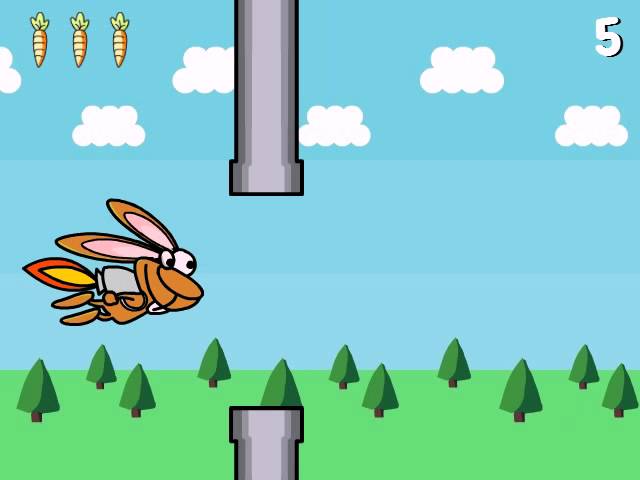
http://flappybunny.clay.io/ play game
more info and screenshots: http://www.tumblr.com/blog/flapppybunny
This is the game guys any ideas?
 exotic laurel
left geyser
idk how to go about doing that I was originally thinking just making the obstacl...
exotic laurel
left geyser
idk how to go about doing that I was originally thinking just making the obstacl...
I believe that's the way flappy bird is actually built, you limit the player movement into a single axis, up and down, and then you move the pipelines through the screen - demolishing the ones out of frame and remaking a new obstacle and so on
midnight heart
midnight heart
how can i remove the white background in a sprite?
please help me
exotic laurel
midnight heart
how can i remove the white background in a sprite?
Is it pygame?
midnight heart
yes
exotic laurel
midnight heart
how can i remove the white background in a sprite?
Is the original picture transparent?
exotic laurel
Oh okay, then you can remove the rect color completely
midnight heart
i mean it is a sprite with a rectangle and a text
exotic laurel
I thought you wanted to remove the whites of a picture
midnight heart
yes
exotic laurel
And that sprite's model comes from a picture correct?
midnight heart
exotic laurel
I thought you wanted to remove the whites of a picture
i want to remove it
exotic laurel
Question, is it a picture or a rect you made with pygame - because its getting unclear
midnight heart
it is: ```py
class button(pygame.sprite.Sprite):
def init(self, pos, size):
self.image = pygame.Surface(size)
self.rect = self.image.get_rect()
self.rect.topleft = pos
and in the image is blit a rectangle and the text
exotic laurel
Great, you can use the set_colorkey then
I am not sure if it is convert_alpha or convert though so you'll have to see
midnight heart
to self.image?
exotic laurel
This is an example
image = image.convert_alpha() # or .convert()
image.set_colorkey((255,255,255)) # this is the rgb for white ```Yeah
Make sure to convert it and establish an alpha channel
midnight heart
ok thank you
exotic laurel
youre welcome
midnight heart
it work 👍 🙂
exotic laurel
great
left geyser
exotic laurel
I believe that's the way flappy bird is actually built, you limit the player mov...
really? but it looks like the environment is moving in the video above
or I might be hallucinating or sumn idk
exotic laurel
left geyser
really? but it looks like the environment is moving in the video above
Yeah it's the environment moving, that's what i said xD
The bird moves in a single axis, up and down only
left geyser
Yh but by the environment you just mean the pipe lines right?
I meant the clouds and the trees and stuff
how would those move?
exotic laurel
The background too
left geyser
oh howd you make the background move?
exotic laurel
They can be separated vector images but the idea here is that you have a background big enough and stitchable that you can reiterate through it over an infinite amount of time. So in a general loop there are two background imgaes that loops through tighetly together, you could probably guess what it does from then, if an image is completely out of frame, it gets moved back
exotic laurel
yeah i love this one, here

A new function that makes it super easy to scroll a single background image, or a whole map of image tiles.
To get the pygame_functions add-on module, visit https://github.com/StevePaget/Pygame_Functions and check out the rest of this playlist to get started.
left geyser
Thank you so much @exotic laurel 
exotic laurel
you're welcome 
 warm portal
midnight heart
how can i remove the white background in a sprite?
warm portal
midnight heart
how can i remove the white background in a sprite?
To remove it use an image editor like photoshop or GIMP
midnight heart
warm portal
To remove it use an image editor like photoshop or GIMP
thank you i resolved
 brazen grove
can anybody recommend me some courses/videos to help me learn how to make online games which consist of more than one client???
 peak sleet
I'm getting this error:
Traceback (most recent call last):
  File "c:\Users\Jeroen\Documents\Progremman\Small Projects\Snake\main.py", line 103, in <module>
    main()
  File "c:\Users\Jeroen\Documents\Progremman\Small Projects\Snake\main.py", line 94, in main
    movement(snake, keys_pressed, clock)
  File "c:\Users\Jeroen\Documents\Progremman\Small Projects\Snake\main.py", line 46, in movement
    snake.x -= VEL
TypeError: invalid rect assignment```
I'm just starting out on python/pygame and I'm trying to make snake. VEL is how far the snake should go to the left, in this case. This is a part of the code:
```python
if keys_pressed[pygame.K_a]: #left
    letter = "a"
    while True:
        snake.x -= VEL
        if keys_pressed[pygame.K_d]:
            break
What did I do wrong?
 cedar birch

 sick latch
is anyone here a 3d modler who uses blender i rly need help with my game if you are interested please DM me
cedar birch
cedar birch
pls help
peak sleet
sick latch
is anyone here a 3d modler who uses blender i rly need help with my game if you ...
I am interested but I'm a noob so
sick latch
peak sleet
I am interested but I'm a noob so
are you good at low polly?
sick latch
peak sleet
I am interested but I'm a noob so
i can send you the details of my game
and we can talk if you would like
 left geyser
for event in pygame.event.get():
if event.type == pygame.K_SPACE:
character_r.bottom+=1
guys I thought this is supposed to be like a jump mechanic
but it never works for me for some reason
what's wrong with it?
potent ice
round obsidian
Random glider attacks? 🙂
round obsidian
potent ice
Random glider attacks? 🙂
Random glider attacks! In future builds :D
 analog barn
I am trying to find a good way to track mouse velocity as a vector so that I can click an object has have it continue moving at the same velocity as my mouse when I let it go. Pretty much, I want to be able to "throw" an object.
    def _update_mouse_vel(self, dt):
        # mouse_hist is a list of vectors representing the last 5 mouse positions
        # the distances (as vectors) between the last 5 positions are added together in order to be averaged.
        # this total_distance_vector is averaged by dividing by the number of distances that were added to it.
        if len(self.mouse_hist) == 5:  # wait until 5 positions are recorded before getting the average
            total_distance_vector = pg.Vector2()
            num_dists = 0
            v2 = self.mouse_hist.pop()  # get last position vector from history
            while self.mouse_hist:  # continue until hist is empty
                v1 = self.mouse_hist.pop()  # get the position that was before v2
                # subtract last position from the one before it to get a vector pointing from v1 to v2
                # and add this vector to the total distance vector
                dist = v2 - v1  # v1 + dist = v2
                total_distance_vector += dist
                v2 = v1  # set the end-point vector to the start-point vector before getting the next starting point

            self.mouse_vel = total_distance_vector / (dt * num_dists)  # velocity = average distance / delta time
That seems to add 1 to bottom once as the space key is pressed. Is that what you are trying to do?
potent ice
Add a print to see what is happening
Would't that just move the character one pixel? There must be some other code controlling the movement?
proper peak
analog barn
```py
def _update_mouse_vel(self, dt):
# mouse_hist is a list of vec...
I'm not totally sure what you're doing here, but isn't it just
(self.mouse_hist[-1]-self.mouse_hist[0])/(dt*(len(self.mouse_hist)-1))
?
because (b-a) + (c-b) + (d-c) + ... + (z-y) is just z-a
analog barn
proper peak
I'm not totally sure what you're doing here, but isn't it just
```py
(self.mouse...
You know I did think about that, but I figured that if I added them all together then averaged all of them it will give me a more accurate vector, but I just did some sketching and I think you might be right, I'm going to compare my current code the your simpler version and see if they give the same results. I'll just run them together and compare the outputs
Ur a lifesaver bro good work ```txt
TEST [71.4286, -250]
LIVE [71.4286, -250]
Learning how to use vectors haha
proper peak
oh, and by the way, if self.mouse_hist should probably be a collections.deque with maxlen if it isn't already
analog barn
I was using a deque, but I would still have to check if the len(deque) == deque.maxlen right? So I changed it to a list for simplicity
Oh i see what you mean
I can get the average velocity every frame if I don't check for length == 5
ok ok
Wow talk about simplification, thanks again! ```py
def _update_mouse_vel(self, dt):
self.mouse_vel = (self.mouse_hist[-1] - self.mouse_hist[0]) / (dt * self.mouse_hist.maxlen-1)
This underestimates velocity when the queue isn't full, mind. Which may be what you want, though.
The reason a deque with a fixed length is more convenient is just that you don't have to remove the elements from it manually - you just append a new element each time, and that'll remove the oldest one
analog barn
Yeah I changed it to a deque. Yes it seems the velocity is underestimated when the program starts or if the mouse comes from off screen. This is ok though because with a high enough frame rate, deque quickly fills up with fresh values.
analog barn
It looks like all of the numbers are blitted to the display one after the other all on top of each other. Maybe try blitting one, waiting, then filling the display with white, then blitting the next, waiting, and so on.
teal ember
round obsidian
how are you doing the bullet and player collisions ?
assuming its not naive 
spatial trees?
round obsidian
teal ember
how are you doing the bullet and player collisions ?
It's naive. There's not enough objects to bother with spatial partitioning
teal ember
ah alright
 untold lodge
you really gonna ping me to say that
exotic laurel
Progressively change the sh and sws for the rectangle
 wheat belfry
hey guys i have a question
im making a basic aimlabs copy game for a school project and im stuck on how to change mouse sensitivity in game
could someone guide me or help me?
can you ping me if you answer my question cuz ill go rn
tranquil girder
depends what engine you're using
exotic laurel
No, i believe you are blitting all the text objects into a singular rectangle position, of (sh // 2, sw // 2), doing that makes the objects override each other, so you must change the values a bit so that they don't get jumbled
What is the intent here? Do you want to display numbers just as they are in a row in a line?
Right, and what is the problem?
Ah, that's because you're always looping through the entire list every single frame
Rather than that, you can make an index variable and add onto that, then display it in the next frame, as an example;
index = 0
numbers = [1, 2, 3]

while True:
[...]
  # picking just a single number for the frame
  text = font.render(numbers[index], True, BLACK, WHITE)
  textRect = text.get_rect()
  textRect.center = (sh // 2, sw // 2)
  display.blit(text, textRect) # displays it

  if index >= len(numbers): # make sure you aren't out of index
    index = 0
  else: # just increase the index
    index += 1
[...]```The example above keeps an index value of the number and increases it by one after every frame, and the effect is that it loops through the numbers list and displays each and every one per frame
Which is achieved by just showing one single number of that index, per frame
(also I think the frames may be too fast for a human to be even able to conceive the numbers - you can play around with the index to slow it down)
@dawn quiver any questions?
You need a variable to keep track of which number to display at a given frame, in this case i named it index yep
Did you refresh the screen at the end of the loop?
lemme see
Ah, my network is struggling to even load the video, can you copy and paste it here?
Can you copy and paste the code here?
my bad, I just scrolled up
worked fine for me
import pygame
from random import randint
#from pyautogui import prompt
from pygame.locals import *

pygame.init()

WHITE = (255,255,255)
BLACK = (0,0,0)
sw = 800
sh = 600
display = pygame.display.set_mode((sw, sh))
pygame.display.set_caption("Number Memory Game")
font = pygame.font.Font('freesansbold.ttf', 64)

numbers = [20, 100 , 500]
index = 0
while True:
    display.fill(WHITE)
    for event in pygame.event.get():
        if event.type == pygame.QUIT:
            pygame.quit()
            quit()


    text = font.render(str(numbers[index]), True, BLACK, WHITE)
    textRect = text.get_rect()
    textRect.center = (sh // 2, sw // 2)
    display.blit(text, textRect)

    #answer = prompt("Write the numbers you saw one after the other:")
    #for num, input in zip(numbers, list(answer)):
    #    if num == input:
    #        continue
    #    else:
    #        quit()
    #numbers.append(randint(1, 9))

    index += 1
    if index >= len(numbers):
        index = 0
pygame.display.flip()```I commented out the pyautogui part because I don't have that.
Yeah, perhaps you have a few mistakes - check.
round obsidian
teal ember
ah alright
Collisions with the underlying grid are easy enough to detect. I tested it with hundreds of enemies and there's only the most marginal increase in CPU time. I instrumented the app to tell how much time the game loop was taking up and it's TINY.
teal ember
o cool
exotic laurel
hmm?
teal ember
spatial partitioning comes more handy when the naive implementation is n^2
round obsidian
getting live stats from the app is the best way to tell how much things actually cost.
teal ember
was doing a simulation and had to detect collisions for like 100 circles, quad trees helped a lot
round obsidian
yeah, this is all AABB with coarse/fine detection, so it's easy
 ivory patrol
I'm new to this discord channel
i'm learning Python because it's so popular nowdays
i don't think Python is good for game developing
because it's too slow
Python is a powerful language but it's too slow
round obsidian
@teal ember it takes 0.03% of 1/60s to do the game logic and draw loop. When I raised it to 200 enemies it went up to ... 0.06%. And 200 enemies makes the game all but unplayable so that wasn't even realistic anyway
@ivory patrol "too slow" by what standard? I'm developing games in Python right now and getting good results
round obsidian
C# definitely has more of the support for the bigger game frameworks
if you want to go make games in C#, nobody's stopping you
ivory patrol
I'm learning both C# and Python
round obsidian
but some of us are using Python to make games and getting very good results with it
it also depends on what kinds of games you want to make; you wont' be making AAA FPS shooters in Python, for sure
ivory patrol
OK👍
round obsidian
This is what I'm making now
ivory patrol
Nice😋
teal ember
round obsidian
<@!749972819135168522> it takes 0.03% of 1/60s to do the game logic and draw loo...
oh thats really cool
round obsidian
I've found a bunch of techniques that help speed things up
ivory patrol
I've already started learning Python
round obsidian
the single biggest speedup was using Cython for the Life grid, and there may be other things that benefit from being Cythonized, but the vast majority of the game logic is Python
I also found that the scheduling of events, and setting the timer resolution for the application (in Windows) really help
round obsidian
I don't have a playable version for others yet, but I'm getting very close
like, a couple of days, I should have something
by default, the event timer in a Windows application is very coarse. If you want to set it to something that will support a 60fps game, you need to do so manually with ctypes
import ctypes
ctypes.windll.winmm.timeBeginPeriod(2)
(do this before starting the game's event loop)
and when done, on program exit:
ctypes.windll.winmm.timeEndPeriod()
you bet, I'll be posting a link to it here
there's a playable version that's a much earlier build, though

but this new version is a total rewrite
ivory patrol
round obsidian
you bet, I'll be posting a link to it here
Good luck
Are you making this game with a game engine ?
minor sequoia
It looks a lot like diep. Io
round obsidian
ivory patrol
Are you making this game with a game engine ?
All I'm using is the Pyglet library
dawn quiver
round obsidian
https://cdn.discordapp.com/attachments/660625198390837248/870748398431649802/202...
In pygame?
round obsidian
dawn quiver
In pygame?
no, Pyglet
dawn quiver
Oh ok thanks
round obsidian
ivory patrol
How did you learn Python?
Self-taught. I looked at other code examples and expanded on them myself
analog barn
@proper peak Been tuning that mouse velocity algorithm you helped me with, purring like a kitten
self.mouse_hist = deque([self.mouse_pos.xy], maxlen=25)
.
.
self.mouse_hist.append(self.mouse_pos.xy)
        self.mouse_vel.update((self.mouse_hist[-1] - self.mouse_hist[0]) / (dt * (self.mouse_hist.maxlen - 1)))
 analog barn
tranquil girder
analog barn
tranquil girder
how did you make dat?
This is gonna be bigger than call of duty. I call it BALLS IN SPAACE
proper peak
does it have gravity?
tranquil girder
I just reparent the selected objects to the gizmo, which are Draggable and unparent them after. Taking local rotation into consideration was a bit more complicated, but I used some entities to help me lock the gizmo to the axis. There's an older version here: https://github.com/pokepetter/ursina/blob/master/ursina/editor/level_editor.py
analog barn
proper peak
does it have gravity?
Gravity is next
each ball has a mass, just have to write a method to get the force vector to every other ball
proper peak
highly suggest to do it in numpy
round obsidian
Further progress
 tawny dove
i get an error when try to scale the image
BG = py.transform.scale(py.image.load(os.path.join("assests", "bg.jpg")), ((WIDTH, HEIGHT) * 2))```
the error is BG = py.transform.scale(py.image.load(os.path.join("assests", "bg.jpg")), ((WIDTH, HEIGHT) * 2))
TypeError: argument 2 must be sequence of length 2, not 4
PS C:\Users\Dependra\Desktop\game> spare jackal
Hi, I want to mimic the slant of an arrow in this code, making the back of the line follow the tip with a specific distance
frank fieldBOT
Hey @spare jackal!
It looks like you tried to attach a Python file - please use a code-pasting service such as https://paste.pythondiscord.com
spare jackal
something like this
manic lotus
https://www.youtube.com/watch?v=Qf3-aDXG8q4 pog tutorial for anyone tryna learn python pygame.
A fairly simple Pong game to help you learn the basics of Pygame. We will talk about the fundamentals of Pygame and then incrementally add more elements.
Files can be found at:
https://github.com/clear-code-projects/Pong_in_Pygame
analog barn
round obsidian
Further progress
This is amazing! are the automata generated as the player moves around, or are they all generated together. Is the map size unlimited? I would love to see your Github repo if you have one
analog barn
tawny dove
i get an error when try to scale the image
```py
BG = py.transform.scale(py.ima...
(w, h) * 2
``` Will return ```py
(w, h, w, h) ``` I think you want ```py
(w*2, h*2) ```Don't have code to show yet but I will at some point. The automata and player are all genrated together and the map is toroidal
analog barn
spare jackal
something like this
This is an interesting problem, I've never done something like that, but I do notice that the arrow travels on a parabolic path, and the shaft of the arrow looks like it is a match to the slope of the parabola. Could you model the movement with a parabola and then get the slope of it?
analog barn
round obsidian
Don't have code to show yet but I will at some point. The automata and player ar...
dood, your game takes place on a freakin doughnut???
round obsidian
analog barn
dood, your game takes place on a freakin doughnut???
the top and bottom wrap around, as do the left and right. That's a torus
round obsidian
It's easier than a sphere :D
analog barn
This is breaking my brain: https://youtu.be/yY9GAyJtuJ0

A quick look at spherical geometry in 2 and 3 dimensions and why it looks so unusual. This is part 2 of my Hyperbolica Devlog series, and both geometries will be in the game. I promise I'll get to some actual game development stuff in the next video!
Hyperbolica on Steam: https://store.steampowered.com/app/1256230/Hyperbolica/
Trailer: https:...
@spare jackal
 spare jackal

normal silo
spare jackal
<a:spinthink:851874160573022279>
Vector which is the delta position, get the angle of that vector via atan2
dir_vec = normalized(pos2 - pos1)
angle = math.atan2(dir_vec.y, dir_vec.x)
^^ Cool idea! Will work with the gravity sim because there is no need to base it off a parabola. The slope of the arrow is computed in real time @spare jackal ```py
#new_vector = pos1_vector - pos2_vector
a.k.a pos_2_vector + new_vector = pos_1_vector
reduce length of vector (line) to length1 so that it simply points in the direction that the arrow came from
draw a line extend from the arrow tip using the angle of this vector
PROFIT????
Hi does anyone know any apps that can help me shorten my code - some of the functions I have don't even work I think!
 white bobcat
analog barn
This is gonna be bigger than call of duty. I call it BALLS IN SPAACE
white bobcat
analog barn
This is gonna be bigger than call of duty. I call it BALLS IN SPAACE
pls remember me when you become succesful!!!
brazen grove
There is something wrong with my game.
I am making a Tic Tac Toe game and when I ask the user to input their name when playing against computer, it doesn't work. But the same works when user is playing against another player. Can anybody help me with my problem?
Here is my game.py: https://paste.pythondiscord.com/orebuferex.properties (Line 153 to 190)
 raw canyon
dusk knoll
Hi does anyone know any apps that can help me shorten my code - some of the func...
raw canyon
dusk knoll
Hi does anyone know any apps that can help me shorten my code - some of the func...
You could remove them if they dont work nah?
minor sequoia
Anyone here learning Or working with ursina?
 blazing hound
I am not but I saw the post on the reddit and it looks suuuper cool
minor sequoia
Yeah dude it is like unity for python
I'm in love in it
Anyone who is learning it dm me for discussion and doing projects together and september code jam
solid meteor
brazen grove
I am making a Tic Tac Toe game and when I ask the user to input their name when ...
You over indented on line 170. The for loop, and everything within it, should be at the same indent level of the if/else.
dusk knoll
raw canyon
You could remove them if they dont work nah?
The thing is, the functions should be working so I'd rather work on getting them fixed rather than removing them!
midnight heart
hi, how can i export a python game on a web browser?
round obsidian
midnight heart
hi, how can i export a python game on a web browser?
generally, this isn't possible
Latest build of my game
 fleet hawk
Wow it looks amazing!
dawn quiver
Hello guys, I have a weird bug in my program, my function **play_music ** is executed but it ignores some instructions. It prints what I want in the terminal but it doesn't play a music. I have no error message, it just totally ignores the play music instructions.
import pygame
import os
import json

file = open('/home/pi/Documents/Irma/tags.json', 'r')
dictio = json.load(file)
i = 0
soundPath = "/home/pi/Documents/Irma/"
theme = ["epic", "chill"]
pygame.mixer.init()


def play_music():
    theme_path = soundPath + theme[0] + "/"
    list_of_songs = os.listdir(theme_path)
    song = theme_path + list_of_songs[i]
    pygame.mixer.music.load(song)
    pygame.mixer.music.play()
    print("play")

while pygame.mixer.music.get_busy() == True:
    c = input()
    if c == "t":
        break
    elif c == "n":
        i += 1
        play_music()

if __name__ == "__main__":
    play_music()
Do you have any idea of why the music instructions are not executed?
round obsidian
print("play")** why do you have two asterisks after play?
dawn quiver
I put the function in bold in discord, the asterisks are not supposed to show up...
I'll change that
round obsidian
so what does happen when you run it?
dawn quiver
It prints "play" in the terminal and then the program ends, it doesn't do anything else.
round obsidian
while pygame.mixer.music.get_busy() == True:
it looks like this might not be having the effect you want
what's the intention of that while block?
round obsidian
fleet hawk
Wow it looks amazing!
thanks!
dawn quiver
The get_busy() method runs code while a music is playing. This lets me skip to the next music in the list (list_of_songs) while the current music is playing.
round obsidian
here's the problem. What happens as soon as get_busy returns False?
and if there's nothing playing when you launch the program, doesn't that return False by default? therefore, that loop never runs.
dawn quiver
I didn't check that, indeed you might get a point, I'm going to do some test and see what happens. Thanks for the help already.
normal silo
dawn quiver
It prints "play" in the terminal and then the program ends, it doesn't do anythi...
The while loop is executed before play_music. Python files execute top down.
(it's not busy at that time and continues on, calls play_music and quits immediately after)
dawn quiver
I think I understand the issue, but I'm not sure what to do exactly to solve this. Should I tell the program to run play_music() if get_busy() is false? I tried that but I got the same result. The only thing I want to is to be able to play a music, the get_busy() method is optional.
midnight heart
round obsidian
generally, this isn't possible
thank you
normal silo
dawn quiver
I think I understand the issue, but I'm not sure what to do exactly to solve thi...
play music then wait in a loop for the music to complete
lament condor
what's the best way to save data with python
like game save data
only example i have off the top of my head is terraria which (not made in python obviously) has special .world and .player save files
and i saw a video a while back about how they're just binary formats
should i just use something like that?
round obsidian
lament condor
what's the best way to save data with python
One easy way to do it is to take your game state object, typically a class, and pickle it.
lament condor
alright that's great cause i'm already trying to do that and that rly simplifies things for me
and i hate to ask but do you mind checking out #help-orange
there's just a bit im confused about
raw canyon
dusk knoll
The thing is, the functions should be working so I'd rather work on getting them...
But until they are fixed, you dont want to keep them in the same file right?
You could keep them to another .py and import it so that your main file would be short but still you can use that functions once fixed
 steel pecan
hey how do i make pygame window stay until i close it myself. currently it just closes itself after a split second
def showImage(pixels):
    nparray = numpy.asarray(pixels)
    surf = pygame.surfarray.make_surface(nparray)
    (width, height, colours) = nparray.shape
    pygame.display.init()
    pygame.display.set_caption("Image")
    screen = pygame.display.set_mode((width, height))
    screen.fill((225, 225, 225))
    screen.blit(surf, (0, 0))
    pygame.display.update()
current code
i searched online and found a while loop approach
is there a better way ?
raw canyon
I know only the while loop approach
Lemme share a vid which might help you
Watch from 4min to 12min

Learn how to use Pygame to code games with Python. In this full tutorial course, you will learn Pygame by building a space invaders game. The course will help you understand the main game development concepts like moving characters, shooting bullets, and more.
💻 Code: https://github.com/attreyabhatt/Space-Invaders-Pygame
🎥 Course created by bu...
 warm geyser
Hello
 mental elk
hello
 proper sun
hello
 summer furnace
hello
dusk knoll
raw canyon
But until they are fixed, you dont want to keep them in the same file right?
You...
great, thanks!


 mental relic
exotic laurel
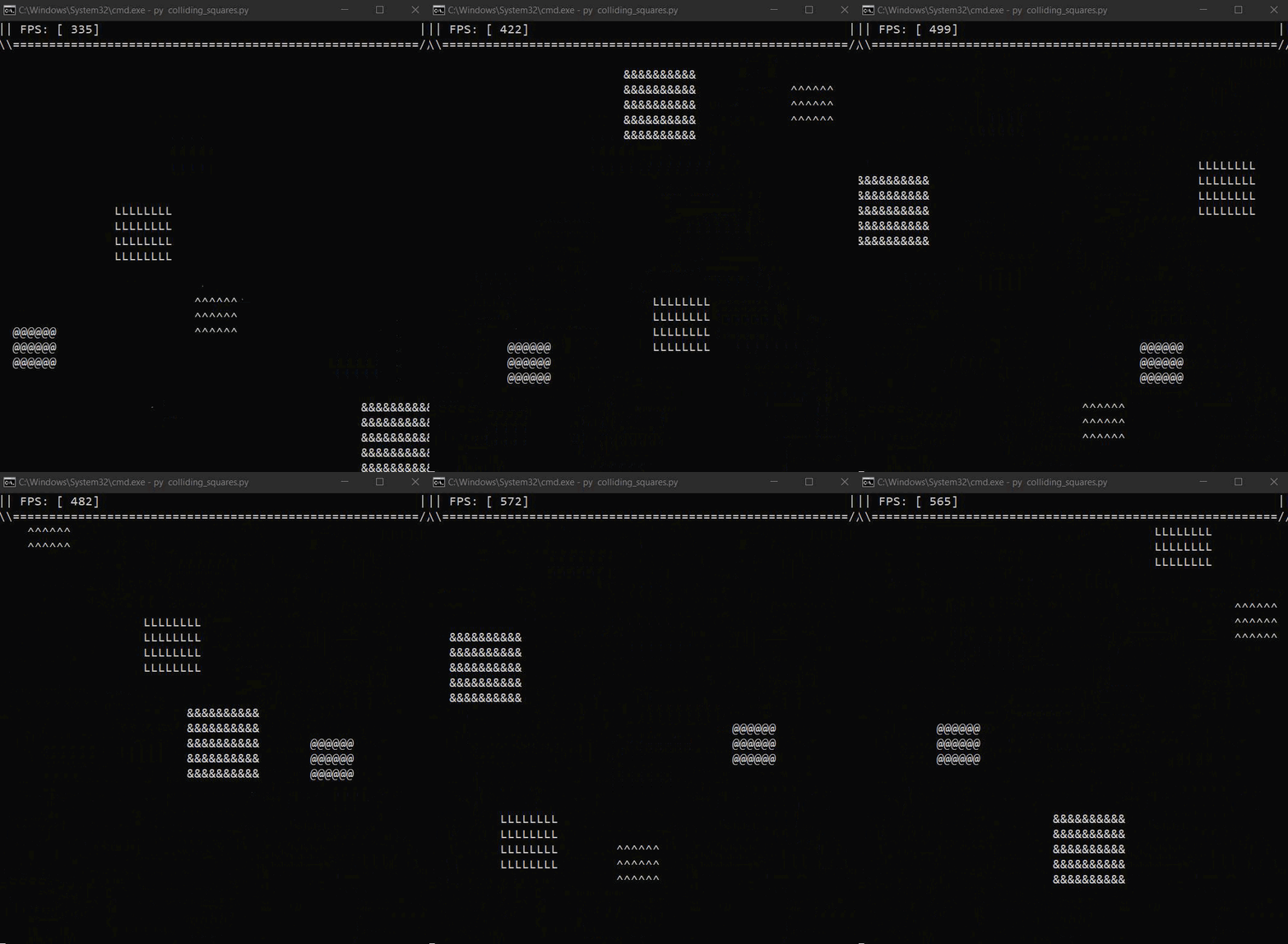
just finalized my ascii game engine collision physics, extremely proud <:Pepe_Ha...
mental relic
exotic laurel
just finalized my ascii game engine collision physics, extremely proud <:Pepe_Ha...
Nice! Is it open source?
Also I have kind of a niche question. I’m looking to make a game involving programming in pygame. What would be the best way to display code on the screen with syntax formatting? I was thinking maybe LaTeX but I haven’t found a LaTeX python library that supports code, only math.
 mint zenith
mental relic
Also I have kind of a niche question. I’m looking to make a game involving progr...
mint zenith
mental relic
Also I have kind of a niche question. I’m looking to make a game involving progr...
Look into the pygments library. It can export to many different formats.
SVG might be a good format to use if you have a way of rendering SVG
teal ember
pygame doesnt afaik
mint zenith
A bitmap image would be the path of least resistance, but those don't scale and they aren't interactive (e.g. cannot select text) if you care about that stuff
dawn quiver
isnt python considered too slow for gaming?
mint zenith
Depends on the type of game
mental relic
@mint zenith I don’t. I just need a fast way to display syntax highlighted code that would change a lot. (The user would buy upgrades to the code but not edit the code directly)
But thanks. This seems like what I needed
round obsidian
dawn quiver
isnt python considered too slow for gaming?
depends on the game. For AAA games like Battlefield, nobody's writing that in Python. For 2D or 2 1/2 D platformers, shmups, bullet hell type games, Python can be fine
dawn quiver
round obsidian
depends on the game. For AAA games like Battlefield, nobody's writing that in Py...
i see
round obsidian
@dawn quiver this is a game I'm working on now in Python. Some of it is sped up with Cython, which compiles to C, so Python's speed is not always a limit https://cdn.discordapp.com/attachments/660625198390837248/871498915101438062/2021-08-01_17-03-00.mp4
dawn quiver
round obsidian
<@456226577798135808> this is a game I'm working on now in Python. Some of it is...
if you can use cython to compile into c cant you make bigger games as well?
round obsidian
dawn quiver
if you can use cython to compile into c cant you make bigger games as well?
sure, if you have the time and energy. But game libraries like Unity and Unreal are generally used for such things, because they have the lion's share of development effort behind them
exotic laurel
mental relic
Nice! Is it open source?
Thanks! yep it's at https://github.com/Rickaym/PyAscii/ , been working on it on my own, but if interested in collabs just hmu
frozen knoll
If you learn to write shaders, a lot of the graphics processing is off-loaded to the graphics card, and the python part doesn't matter as much.
tawny dove
when i run this i get this error line 29, in draw
WIN.blit(ship, (self.x, self.y))
AttributeError: 'tuple' object has no attribute 'x'
import pygame as py
import os
import random
py.font.init()

#window info
WIDTH, HEIGHT = 900,  500
WIN = py.display.set_mode((WIDTH, HEIGHT))
py.display.set_caption("i don't know the name")

#background
BG = py.transform.scale(py.image.load(os.path.join("assests", "bg.jpg")), (WIDTH +100 , HEIGHT + 150))

#player
ship = py.image.load(os.path.join("assests", "player.png"))

#obstacales
tridown = py.image.load(os.path.join("assests", "tridown.png"))
triup = py.image.load(os.path.join("assests", "triup.png"))

class player():
    def __init__(self, x, y, health = 1):
        self.x = x
        self.y = y
        self.health = health
        self.image = ship

    def draw(self):
        WIN.blit(self.image, (self.x, self.y))

    def get_width(self):
        return self.image.get_width()

    def get_height(self):
        return self.ship_img.get_height()


def main():
    run = True
    FPS = 60
    clock = py.time.Clock()


    def redraw():
        WIN.blit(BG, (-50, -80))

        player.draw((HEIGHT / 2, WIDTH / 4))

        py.display.update()


    while run:
        redraw()
        clock.tick(FPS)
        for event in py.event.get():
            if event.type == py.QUIT:
                quit()

    py.quit()


if __name__ == "__main__":
main()```Today's game build
 fair laurel
round obsidian
Today's game build
fair laurel
round obsidian
Today's game build
that's so creative, are the moving red cells from game of life?
dawn quiver
Are there any major games that use python
round obsidian
fair laurel
that's so creative, are the moving red cells from game of life?
yup!
round obsidian
dawn quiver
Are there any major games that use python
The Ren'Py visual novel engine uses Python
round obsidian
And now Xtaloid, haha
 round pawn
can someone tell me what I did wrong? Im still a beginner
 teal ember
not much is visible but i assume you want to draw the image inside your Bullet object, which would bullet.bullet so screen.blit(bullet.bullet, (bullet.bulletX, bullet.bulletY))
faint berry
round pawn
can someone tell me what I did wrong? Im still a beginner
@round pawn use self parameter in your class structures, like this, self.bullet, self.bulletX etc.
dawn quiver
I went through the code he has declared self.bullet in the init function
faint berry
@round pawn and you don't bave to use global identifier, just use self.bullet_state again.
teal ember
ah its a method
 frozen crest
dawn quiver
Are there any major games that use python
frozen crest
dawn quiver
Are there any major games that use python
geometry dash ig
frozen crest
round obsidian
The Ren'Py visual novel engine uses Python
for some reason that game is sus
frozen crest
round obsidian
And now Xtaloid, haha
is that your game? 
 untold jolt
how do i pygame.time.wait(500) without the timer stopping?
please help
round obsidian
frozen crest
is that your game? <:pithink:652247559909277706>
yup
frozen crest
nice
dawn quiver
Hello
Is it possible to make a invisible sprite with hit box for collision in arcade
 safe timber
I notice most people still use pygame. Is pygame better than arcade as far as event handling and processing?
round obsidian
@safe timber It's widely used because it's ... widely used, and because it has a lot of tutorials. I can't speak to its event handling and processing
safe timber
Based on all my help questions, I’m not sure if anyone figured it out, but I’ve spent a lot of time learning Python to use it for making a fishing game. It’s not a complicated game by any means, but I’m worried arcade or pygame won’t be able to handle it and Godot’s system is too foreign to me.
round obsidian
@safe timber I'm using Pyglet, which Arcade is built on, and I have no trouble with events and such.
For perspective, this is the game I'm making
safe timber
Are you using basic shapes so you can get the functionality in before adding all the sprites?
round obsidian
Basic shapes? I'm not sure what you mean
safe timber
The fishing game def won’t be as fast paced. Perhaps I’ll do a little more digging. I’ve seen people in the past make games with just rectangles until they could put in the sprites because sprites usually take the longest.
round obsidian
Oh, I see what you mean, yes, you can do that. I had sprites ready beforehand (I'm rewriting an older game that never got all the way through).
You can also use premade sprites from itch.io if you want to save yourself some labor.
But I kept the sprites quite simple for starters, since this was my first game of any kind.
You can also use something like https://www.piskelapp.com/ to create sprites quickly
Piskel, free online sprite editor. A simple web-based tool for Spriting and Pixel art. Create pixel art, game sprites and animated GIFs. Free and open-source.
safe timber
Ah, I like the simplicity in fast paced games. It makes them easier to pick up imo.
I think 99% of the reason why it takes me so long to make sprites is because I’m really picky about the way it looks lol I use aseprite for the sprites.
 zinc wing
Hello i am currently working on a new year countdown (made in pygame), so can i still ask here?
 bleak reef
yo i does anybody know of a way to make a bunch of enemys without having to blit around 1000 of them
round obsidian
@bleak reef depending on the engine you're using, there may be a solution.
E.g., in Pyglet, you can "batch" sprites of a similar type and blit them all at once
untold jolt
please help me
 brittle field
hey can anyone help me ? the smart bomb will not run because when i press the spce bar the bubles will just freze (code lines 142-146) https://paste.pythondiscord.com/ajahedohun.apache
bleak reef
@round obsidian im using pygame
dawn quiver
bleak reef
yo i does anybody know of a way to make a bunch of enemys without having to blit...
Do you mean without having to blit them individually?
What I would do is add the rects of the enemies to a list and then define a function to blit each item in the list
last moon
You’re still drawing them 1 by 1 instead of instancing/batching. The only difference with a list is that you’ve got them all in a container 😄
Does pygame not have a better way to do it? Found it: https://www.pygame.org/docs/ref/sprite.html#pygame.sprite.Group
potent ice
Any time you can batch draw.. definitely use it
dawn quiver
last moon
~~Does pygame not have a better way to do it?~~ Found it: <https://www.pygame.or...
Which method is it?
last moon
Pygame.sprite.Group
I’m not 100% sure but it doesn’t seem to provide any sort of performance benefit, just utility
dawn quiver
Ok thanks 👍
last moon
ie not the same as batching
dawn quiver
Then is it the same as the pygame.image.blits method?
last moon
Probably not?
dawn quiver
Functionality wise
last moon
I’m not sure actually
 last moon
Ah no it’s not
Group acts as a container for sprites
Meaning their texture/pos/etc
It’s the same as a list but with added methods like updating the whole list or killing certain sprites
dawn quiver
Ok thanks 👍
dawn quiver
dawn quiver
Btw could you show me an example of this
?
I haven’t been able to get this to work
And I haven’t been able to find one on github
last moon
By the looks of it it’d be .blits(texture, image)?
dawn quiver
What is texture?
last moon
If you want to put it in a specific, area would be coordinates (?)
Your sprite/image of your sprite
dawn quiver
What is the -> for then?
last moon
That’s the return, if for special_flags you set doreturn to true, it’ll return all rects changed by the blit
dawn quiver
Thanks 😄
round obsidian
Oh nice
 novel cobalt
game idea:
zombie game where the zombies get smarter
they start like generi slow zombies
become fast zombies
start using weapons
get gusn
and pathfinding
and it goes from being zombie survival to zombie fps
any advice to further spice this idea up?
safe timber
I would think pathfinding is just a common mechanic no?
novel cobalt
yea but the point is the zombies going from making a beeline toward you to kind of moving intelligently and shooting at you and acting more "intelligent"
so the main difficulty increase comes from the intelligeence of enemies
not their heatlh
 feral frigate
round obsidian
feral frigate
round obsidian
Not really
You can just have two basic behavior algorithms - "dumb" and A*, and whenever you spawn a new zombie you can choose one or the other
and as the game goes on, you spawn more smart ones
or, for each turn of the zombies, you choose whether or not to select a random direction or use A* routing
and as the game goes on you use A* more and more often
round obsidian
Latest build of my game https://youtu.be/wIm9A5sfwu0

Latest build of my video game Xtaloid, now with a primitive particle explosion effect when you die.
I'll be uploading a playable version to itch.io next week.
 lucid fog
python
dawn quiver
I remember from pygame there was a way to handle fps, there was a function that would correct between loops in a while to ensure the updating didn't go say above or below 30. Does anybody know how this would work in a very fine ms basis? Or if its even achievable in python? Otherwise, whats a good way to measure and debug latency. Im working with pygame's midi and im having usses maintaining a reliable clock when sending to output ports and attempting to keep up with bpms over 100.
 small flint
novel cobalt
any advice to further spice this idea up?
small flint
novel cobalt
any advice to further spice this idea up?
i would love to get into the building process
novel cobalt
not even sure how i am gonna build it if at all so idk
but ya that does kinda soun like an openai project
round obsidian
@dawn quiver you typically sample the time it takes for the event loop to complete, and then sleep the remainder
In Pyglet, which is what I use, you can set your event loop to run every xth of a second
on Windows, you also need to set the granularity of the application event timer with a system API, because by default that timer is quite coarse.
# at start of app
import ctypes
ctypes.windll.winmm.timeBeginPeriod(1)
...
# on app exit
ctypes.windll.winmm.timeEndPeriod()
some notes on the API used https://docs.microsoft.com/en-us/windows/win32/api/timeapi/nf-timeapi-timebeginperiod

The timeBeginPeriod function requests a minimum resolution for periodic timers.
round pawn
I am trying to make a gun come out of the player but it doesnt seem to be working. Does anyone know how to make this work?

 covert jasper
Can anyone help me with my pygame world not working?
I can provide pictures and the code.
 modern turtle
Hi, guys so here my code
file = open("text.txt","r").readlines()
for lines in file:
clean.append(lines.strip())
print(clean)
frank fieldBOT
Hey @modern turtle!
Uh-oh! It looks like your message got zapped by our spam filter. We currently don't allow .txt attachments, so here are some tips to help you travel safely:
• If you attempted to send a message longer than 2000 characters, try shortening your message to fit within the character limit or use a pasting service (see below)
• If you tried to show someone your code, you can use codeblocks
(run !code-blocks in #bot-commands for more information) or use a pasting service like:
modern turtle
And I have a file like this
ahmed Red
4859430145105235
07/20 619
54 7ron St
RoGester, NY 14619 US
zozo Red
4859430145105235
07/20 619
54 7ron St
RoGester, NY 14619 US
boko Red
4859430145105235
07/20 619
54 7ron St
RoGester, NY 14619 US
I want every 5 lines, do =======
like
ahmed Red
4859430145105235
07/20 619
54 7ron St
RoGester, NY 14619 US
================
zozo Red
4859430145105235
07/20 619
54 7ron St
RoGester, NY 14619 US
==================
and keep going
would you help please
 dense ruin
covert jasper
Can anyone help me with my pygame world not working?
I can provide pictures and ...
dense ruin
covert jasper
Can anyone help me with my pygame world not working?
I can provide pictures and ...
Just send what the problem is and whoever knows the solution will answer.
covert jasper
 novel cobalt
cool gamedev trick: rather than computing real-time reflections, i just rotated by model 180 degrees on the Z axis, applied a shader to make it fade out vertically, and boom: it looked like a reflection
round obsidian
@novel cobalt great trick!
I imagine the shader could also be used to mirror everything past a certain Y point
I love shaders, but I'm bad at programming them
frozen knoll
A shader would make it easy to add little wave-like distortions too, and almost free of cost. I think they are hard to learn though, as there are few step-by-step explanations and just a lot of hard-to-read code.
novel cobalt
round obsidian
<@!687315767208706059> great trick!
I imagine the shader could also be used to m...
yea - but that's kinda hard lol
i stick to very basic shaders
novel cobalt
frozen knoll
A shader would make it easy to add little wave-like distortions too, and almost ...
i suppose - this is more a glass reflection so no distortions for me. But a refraction shader would work well for water.

here's the final thing
this trick was used in early mario games to do reflection
there were actually just two marios
tranquil girder
yes
 muted gust
nice
muted gust
tranquil girder
yes
its built in right?
tranquil girder
yeah, the mixer is what it's called I think
muted gust
tranquil girder
yeah, the mixer is what it's called I think
ok thx
covert jasper

from typing import Counter
import pygame
from pygame.locals import*

pygame.init()

screen_width = 1500
screen_height = 800

screen = pygame.display.set_mode((screen_width, screen_height))
pygame.display.set_caption('platformer')

#define game variables
tile_size = 200


#load images
sun_img = pygame.image.load ('sun.png')
sun_img = pygame.transform.scale(sun_img,(175,175))
bg_img = pygame.image.load ('sky.png')
bg_img = pygame.transform.scale(bg_img,(screen_width,screen_height))


class World():
    def __init__(self, data):
        self.tile.list = []


        #load images
        dirt = pygame.image.load('img/dirt.png')
        row_count = 0
        for row in data:
            col_count = 0
            for tile in row:
                if tile == 1:
                    img = pygame.transform.scale(dirt.png, (tile_size, tile_size))
                    img_rect = img.get_rect()
                    img_rect.x = col_count * tile_size
                    img_rect.y = row_count * tile_size
                    tile = (img, img_rect)
                    self.tile_list.append(tile)
                col_count += 1
            row_count  += 1


world_data =[
[1, 1, 1, 1, 1],
[1, 0, 0, 0, 1],
[1, 0, 0, 0, 1],
[1, 0, 0, 0, 1],
[1, 1, 1, 1, 1],
]


world = World(world_data)


run = True
while run:
    screen.blit(bg_img,(0,0))
    screen.blit(sun_img,(600,50))

    for event in pygame.event.get():
      if event.type == pygame.QUIT:
        run = False

    pygame.display.update()
pygame.quit() ```you wrote tile.list when I think you meant tile_list
 radiant patio
Hi, guys! Very conceptual question here, as I never built anything game related on python: is pygame good for building 2d-like games? I wanted to learn game development by building something that ressembles terraria.
But way simpler, ofc.
I honestly have no idea how good python is for game-dev.
 lunar venture
i think you will be able to
radiant patio
thanks, do you guys recommend any youtube channel or some kind of guide to get started?
round obsidian
@radiant patio I do 2D game stuff in Python now andit's very good with that
You can use PyGame, which is popular and has many tutorials, but I'm fond of Pyglet and its bigger cousin Arcade
radiant patio
Thank you for the recommendations!
round obsidian
YW
frozen knoll
You might look at https://learn.arcade.academy for Arcade or http://programarcadegames.com for pygame. I'd recommend Arcade if you are starting out.
radiant patio
Thanks!!
 crystal pine
Who can help me with understanding some pygame coding?
 analog latch
what's your question?
crystal pine
So I’m trying to make a very simple game and I have the code of the full game already but in order to learn how it works I wanna know some things that are in the code that I don’t understand
Make sense?😅
@analog latch
analog latch
what things? can you send the code? I'm familiar with pygame so I could try to help.
crystal pine
Ok give me a sec I’ll send it through dms
 obsidian python
is anyone willing to play my pygame?
dawn quiver
round obsidian
on Windows, you also need to set the granularity of the application event timer ...
thanks a lot
frank fieldBOT
@waxen ice Please don't try to ping @everyone or @here. Your message has been removed. If you believe this was a mistake, please let staff know!
bleak reef
yo
does anyone know how to increase the speed of a blit or variable exponentially \
starting out im trying to make flappy bird but i want the bird to fall faster over time if that makes sense
@me if you can help please
 crude mauve
Trying to understand this piece of code
def genPrimes(l=[]):
return l.clear() or (l.append(p) or p for p,_ in enumerate(iter(int,1),2) if all(p%i for i in l))
Can anyone help?
lean cosmos
Hey guys i need some help for some reason when i shoot to the back of the player the bullets don't seem to follow the mouse and its really not working that great.
`if mouse.leftclick():
if len(bullets)<100 and shoot_timer>10:
shoot_timer=0
mouse_x, mouse_y = pygame.mouse.get_pos()
        angle = math.atan2(mouse_y-player.y, mouse_x-player.x)

        speed_x = 0.3 * math.cos(angle)
        speed_y = 0.3 * math.sin(angle)

        bullets.append([player.x, player.y, speed_x, speed_y])
`
normal silo
dy = mouse_y - player.y
dx = mouse_x - player.x
angle = math.atan2(-dy, dx) % (2 * math.pi)
@lean cosmos
normal silo
import pygame
import math

pygame.init()
screen_size = (800, 600)
window = pygame.display.set_mode(screen_size)
screen = pygame.display.get_surface()

clock = pygame.time.Clock()
FPS = 60

origin = (screen_size[0] / 2, screen_size[1] / 2)

font = pygame.font.Font(None, 30)

while True:
    time_passed = clock.tick(FPS)

    for event in pygame.event.get():
        if event.type == pygame.QUIT:
            quit()

    mouse_x, mouse_y = pygame.mouse.get_pos()
    dx = mouse_x - origin[0]
    dy = mouse_y - origin[1]
    angle = math.atan2(-dy, dx) % (2 * math.pi)
    angle = angle * (180.0 / math.pi)

    screen.fill((255, 255, 255))

    pygame.draw.circle(screen, (0, 0, 0), origin, 5)
    pygame.draw.line(screen, (0, 255, 0), origin, (mouse_x, mouse_y), 3)
    screen.blit(font.render("Angle (deg): {:.1f}".format(angle), True, (0, 0, 0)), (10, 10))

    pygame.display.flip()
@lean cosmos
lean cosmos
im alittle confused on this will help me with @normal silo
normal silo
lean cosmos
im alittle confused on this will help me with <@!119925597395877889>
To debug things, you need to output something to help see what is wrong, that is a starting point.
But for completeness, here is the working thing so you can see how to get from that start to the end.
import pygame
import math

pygame.init()
screen_size = (800, 600)
window = pygame.display.set_mode(screen_size)
screen = pygame.display.get_surface()

clock = pygame.time.Clock()
FPS = 60

origin = (screen_size[0] / 2, screen_size[1] / 2)

font = pygame.font.Font(None, 30)

bullets = []
shoot_timer = 0

while True:
    time_passed = clock.tick(FPS)

    for event in pygame.event.get():
        if event.type == pygame.QUIT:
            quit()

    mouse_x, mouse_y = pygame.mouse.get_pos()
    dx = mouse_x - origin[0]
    dy = mouse_y - origin[1]
    angle = math.atan2(-dy, dx) % (2 * math.pi)
    angle_deg = angle * (180.0 / math.pi)

    vel_x = 1.2 * math.cos(angle)
    vel_y = 1.2 * -math.sin(angle)

    shoot_timer += time_passed

    if pygame.mouse.get_pressed()[0]:
        if len(bullets) < 1000 and shoot_timer > 10:
            shoot_timer = 0
            bullets.append([origin[0], origin[1], vel_x, vel_y])

    for i, bullet in enumerate(bullets):
        bullet[0] += bullet[2]
        bullet[1] += bullet[3]
        if bullet[0] < 0 or bullet[0] > screen_size[0]:
            del bullets[i]
        if bullet[1] < 0 or bullet[1] > screen_size[1]:
            del bullets[i]

    screen.fill((255, 255, 255))

    pygame.draw.circle(screen, (0, 0, 0), origin, 5)
    pygame.draw.line(screen, (0, 255, 0), origin, (mouse_x, mouse_y), 3)
    screen.blit(font.render("Angle (deg): {:.1f}".format(angle_deg), True, (0, 0, 0)), (10, 10))
    screen.blit(font.render("vel_x: {:.2f}".format(vel_x), True, (0, 0, 0)), (10, 50))
    screen.blit(font.render("vel_y: {:.2f}".format(vel_y), True, (0, 0, 0)), (10, 90))

    for bullet in bullets:
        pygame.draw.circle(screen, (255, 0, 0), (bullet[0], bullet[1]), 2)

    pygame.display.flip()
ive debug it already and everything seems find
i though that maybe the player posititon was updating but it is
normal silo
From the starting point, if you had what I had you would notice that when the degrees displayed is say, 90, and you fire, that it goes straight down.
So clearly the vel_y needs to be inverted
Same reason dy is inverted
because in pygame positive y is down
Basically if you have a bug, it can help to build the minimal version of what you need to do with lot's of visual output to help.
Like a prototype.
Start with just outputting the angle
frank fieldBOT
Hey @lean cosmos!
It looks like you tried to attach a Python file - please use a code-pasting service such as https://paste.pythondiscord.com
normal silo
lean cosmos
trying
import pygame
from pygame import *
import random
import math
import os
import sys
import mouse
import threading
from threading import Thread
pygame.init()
pygame.font.init()
screen_size=(600,600)
screen=pygame.display.set_mode((screen_size), 0, 32)
display = pygame.Surface((200,200))
system_clock=pygame.time.Clock()
font1=pygame.font.SysFont('none',60)
font2=pygame.font.SysFont('none',55)
font3=pygame.font.SysFont('none',45)
click_timer=0
loop=True
class Player(object):
def init(self,x,y,width,height):
self.x = x
self.y = y
self.width = width
self.height = height
def draw(self,window):
pygame.draw.rect(window, (200,200,200), (self.x,self.y,self.width,self.height))
def movement(self,up,down,left,right,speed):
if up==1:
self.y -= speed
if down==1:
self.y += speed
if left==1:
self.x -= speed
if right==1:
self.x += speed
player=Player(0,0,15,15)
bullets=[]
shoot_timer=0
def render(display):
player.draw(display)
while loop==True:
display.fill((78,78,78))
render(display)
shoot_timer=shoot_timer+1
for bullet in bullets:
bullet[0] += bullet[2]
bullet[1] += bullet[3]
pygame.draw.rect(display, (200,200,0), (bullet[0],bullet[1],1,1))
bullets[bullets.index(bullet)]=bullet
if bullet[0]<0 or bullet[1]<0 or bullet[0]>display.get_width() or bullet[1]>display.get_height():
bullets.remove(bullet)
keys=pygame.key.get_pressed()
player.movement(keys[K_w],keys[K_s],keys[K_a],keys[K_d],0.2)


if mouse.leftclick():
    if len(bullets)<100 and shoot_timer>10:
        shoot_timer=0
        mouse_x, mouse_y = pygame.mouse.get_pos()

        angle = math.atan2(mouse_y-player.y, mouse_x-player.x)% (2 * math.pi)

        speed_x = 0.3 * math.cos(angle)
        speed_y = 0.3 * math.sin(angle)

        bullets.append([player.x, player.y, speed_x, speed_y])


for event in pygame.event.get():
    if event.type==pygame.QUIT:
        loop=False
        t1.close()
        pygame.quit()
    if event.type==KEYDOWN:
        if event.key==K_ESCAPE:
            loop=False
        if event.key==K_f:
            pass


screen.blit(pygame.transform.scale(display, screen.get_size()), (0,0))
pygame.display.flip()
system_clock.tick(0)

Hey, you probably tried to paste code into a discord channel, but unfortunatly, it looked terrible. Thankfuly, Discord has a fancy feature where it won’t mangle your neatly formatted code! If you surround your code with three backticks (the key right under escape on your keyboard) it won’t mess up your code. Here’s an example: […]
frank fieldBOT
:incoming_envelope: :ok_hand: applied mute to @lean cosmos until <t:1628288843:f> (9 minutes and 59 seconds) (reason: newlines rule: sent 103 newlines in 10s).
frank fieldBOT
:incoming_envelope: :ok_hand: pardoned infraction mute for @lean cosmos.
lean cosmos
thanks

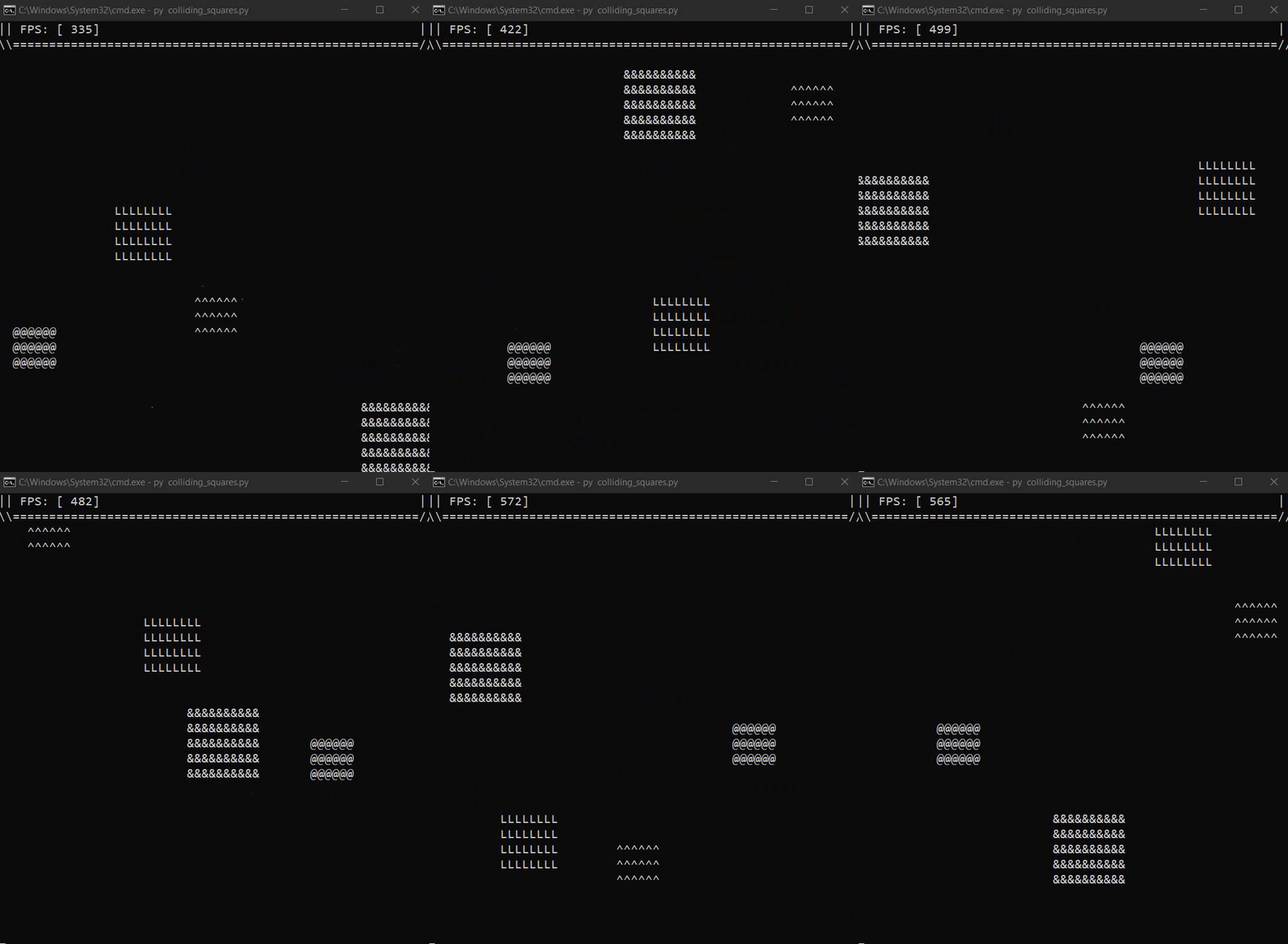 frank fieldBOT
Pasting large amounts of code
If your code is too long to fit in a codeblock in discord, you can paste your code here:
https://paste.pydis.com/
After pasting your code, save it by clicking the floppy disk icon in the top right, or by typing ctrl + S. After doing that, the URL should change. Copy the URL and post it here so others can see it.
lean cosmos
sorry i didnt mean to paste all that
 fading whale
lean cosmos
sorry i didnt mean to paste all that
fading whale
lean cosmos
sorry i didnt mean to paste all that
No worries 👍
normal silo
Yeah you can avoid by pasting in their website
lean cosmos
normal silo
Ok, so if you look at my code and yours you can spot the differences
normal silo
the dy needs to be negated before being passed into atan2 because it expects y to positive going up
and second, the the speed_y needs to be negated too because same reason
normal silo
The trig functions want a normal coord systrem with y up
lean cosmos
and its doing the same thing
normal silo
So you need to map to and from
lean cosmos
map?
normal silo
Like map in math
Like in this case, -10 for y would get mapped to 10
for example
Have you tried making a new file and running my code
lean cosmos
yes i have
and it work perfect
and i debug mine
and there the same
so idk whats going on
normal silo
and the velocity_y?
lean cosmos
yep
-math.sin(angle)
if mouse.leftclick():
        if len(bullets)<100 and shoot_timer>10:
            shoot_timer=0
            mouse_x, mouse_y = pygame.mouse.get_pos()


            xD=mouse_y-player.y
            yD=mouse_x-player.x

            angle = math.atan2(-xD, yD)% (2 * math.pi)

            speed_x = 0.3 * math.cos(angle)
            speed_y = 0.3 * -math.sin(angle)


            bullets.append([player.x, player.y, speed_x, speed_y])
sorry
normal silo
You flipped it
lean cosmos
ya
lean cosmos
ya but there flip on top
if mouse.leftclick():
        if len(bullets)<100 and shoot_timer>10:
            shoot_timer=0
            mouse_x, mouse_y = pygame.mouse.get_pos()


            yD=mouse_y-player.y
            xD=mouse_x-player.x

            angle = math.atan2(-yD, xD)% (2 * math.pi)

            speed_x = 0.3 * math.cos(angle)
            speed_y = 0.3 * -math.sin(angle)


            bullets.append([player.x, player.y, speed_x, speed_y])
same thing
normal silo
screen.blit(pygame.transform.scale(display, screen.get_size()), (0,0))
avoid scaling or anything like that for now
normal silo
Yes, but it makes things more complex, you are drawing in a different space than the whole mouse thing is happening (screen space)
(which means you need another mapping)
Basically, remove things until it works
then add them back until it does not
then ask why
lean cosmos
oh ok
i got you it works now
well thanks and sorry it took so long
i didnt think it would affect it but now that you explain it
it makes alot of sence now
crystal pine
I need help with pygame on mac
crystal pine
 fast summit
installing?
for instaling just type pip install pygame on ur terminal
if not work then pip3 install pygame
not then python -m install pygame
u need to install python first
@normal silo can u help with my pygame
i cant keep the window open till i close it
i tried to use the while loop
u know
the running = True
thing
but still it closes
how to fix
solid meteor
fast summit
how to fix
What does your code look like? You need to update the display within your while loop.
 dim raven
Hi I know about C++ & C# is it okay to learn pygame without learn python first ?
solid meteor
dim raven
Hi I know about C++ & C# is it okay to learn pygame without learn python first ?
Pygame is a Python library, so no. You'd need to know how to program in Python before you can do anything with Pygame.
dim raven
solid meteor
Pygame is a Python library, so no. You'd need to know how to program in Python b...
Um alright, thanks for the explanation
 azure badge
dim raven
Hi I know about C++ & C# is it okay to learn pygame without learn python first ?
azure badge
dim raven
Hi I know about C++ & C# is it okay to learn pygame without learn python first ?
I don't agree this. You can use example pygame scripts with your C# or C++ programs as interoperate.
You should just find the script you want to use
The whole of other processes can be made in side of c++ or c#
dim raven
azure badge
I don't agree this. You can use example pygame scripts with your C# or C++ progr...
Um that's a good idea but I actually want to learn pygame for my collage assignment because i should create a game from scratch not with full game engine😅
azure badge
Hmm okey, however an alternative, you can use any library or the power of python via an another lang 👍
fast summit
solid meteor
What does your code look like? You need to update the display within your while ...
thx for ur help (tho u didnt help me) i was opening from cmd
cause running from visual studio takes like 10 hours
it works now
 supple cargo
can some one help me understand a very basic thing that for some reason i cant not understand
class Ball:
    """ This class manages a ball bouncing on the screen. """

    def __init__(self, position_x, position_y, change_x, change_y, radius, color):
        """ Constructor. """

        # Take the parameters of the init function above, and create instance variables out of them.
        self.position_x = position_x
        self.position_y = position_y
        self.change_x = change_x
        self.change_y = change_y
        self.radius = radius
        self.color = color

    def draw(self):
        """ Draw the balls with the instance variables we have. """
        arcade.draw_circle_filled(self.position_x, self.position_y, self.radius, self.color)

    def update(self):
        """ Code to control the ball's movement. """

        # Move the ball
        self.position_y += self.change_y
        self.position_x += self.change_x

        # See if the ball hit the edge of the screen. If so, change direction
        if self.position_x < self.radius:
            self.change_x *= -1

        if self.position_x > SCREEN_WIDTH - self.radius:
            self.change_x *= -1

        if self.position_y < self.radius:
            self.change_y *= -1

        if self.position_y > SCREEN_HEIGHT - self.radius:
            self.change_y *= -1
In this code why do i have to do this
 if self.position_x < self.radius:
            self.change_x *= -1

        if self.position_x > SCREEN_WIDTH - self.radius:
            self.change_x *= -1

        if self.position_y < self.radius:
            self.change_y *= -1

        if self.position_y > SCREEN_HEIGHT - self.radius:
            self.change_y *= -1
I cant understand it why
like why change x when it is less than radius ?
proper peak
supple cargo
```py
class Ball:
""" This class manages a ball bouncing on the screen. """
...
That's how you take account of the ball's radius when reflecting it off a wall.
Consider what the x-coordinate of the ball is when it's touching the wall.
supple cargo
For that wont it choose the position_x of the ball
and the
corner
such as like ```py
if self.position_x = SCREENWITDH:
self.change_x *= -1
I have set Screenwitdh before hand which is 600
 unkempt pumice
Is it worth trying to develop an android game in kivy? or better not waste time and go straight to android studio or smth else (i know java)?
 ionic ember
is there any decent places to learn PyGame?
I just got done with my class for Python and want to get some use with it now
exotic laurel
ionic ember
is there any decent places to learn PyGame?
YouTube always, tech with tim flappy bird tutorials and DaFluffy Potato pygame concepts
https://www.youtube.com/channel/UC4JX40jDee_tINbkjycV4Sg https://www.youtube.com/channel/UCYNrBrBOgTfHswcz2DdZQFA

YouTube
Learn programming, software engineering, machine learning and everything tech from this channel. With a special emphasis on python and javascript my channel aims to give you free resources so that you can learn to code and dive into the software engineering and programming industry. My goal is to provide the highest quality programming and tech ...

YouTube
I make games and tutorials with/for Python/Pygame! :D
Website here: http://dafluffypotato.com
dawn quiver
i actually wanna try pygame to make a game for the last project from my school, but i think it could be more easier and nicer if i use javascript or webgl like threejs or something what do you think? and i also wondering can other people play our game without installing python first?
exotic laurel
dawn quiver
i actually wanna try pygame to make a game for the last project from my school, ...
I haven't tried javascript or webgl before so I can't tell you it's performance ratio but I've worked with pygame for so many times and it has not disappointed. If you take a look at pyinstaller and NSIS for packaging and deployment - you can distribute the software as an installer or a .exe using them (no preinstalled python reqs).
dawn quiver
exotic laurel
I haven't tried javascript or webgl before so I can't tell you it's performance ...
so what should my friend do if they want to play my game? installed?
exotic laurel
If you choose to distribute is as an .exe, that means they needs Windows as their OS and run it directly
If it's an installer, install it and run it-
dawn quiver
and how many month i can make game using pygame? because the deadline for my project is only a year
exotic laurel
You can make games with pygames until the end of time - but for the learning curve, it's quite spread out, it also depends on how much you know python
a year is a good deadline
dawn quiver
how about 3d game with pygame? i think its more easier i do it on web
exotic laurel
Ah so, pygame doesn't support 3D games
dawn quiver
idk
exotic laurel
It's a simple wrapper for SDL, a 2D api.
dawn quiver
never try
exotic laurel
Yeah, it doesn't support 3D
If you want to use python, there are other options like pyglet that does support 3D
dawn quiver
alright thank you so much
exotic laurel
np
ionic ember
exotic laurel
It's a simple wrapper for SDL, a 2D api.
SDL is not 2D
exotic laurel
ionic ember
SDL is not 2D
It is, it just has some helper functions that goes with Open GL (if you need 3D - but pygame doesnt have it i suppose)
ionic ember
exotic laurel
YouTube always, tech with tim flappy bird tutorials and DaFluffy Potato pygame c...
Thank you, can you PM these to me so I can check it later
exotic laurel
np!
exotic laurel
ask away
 river sphinx
Yea? @sand forge
 sand forge
Basically
Im making a tezt based adventure game for a school asigbmebt
And
I wan it so when the person playing dors a command or soemthing that says save
Python quits and saves a state so that when they come back they start from that point
In the code
river sphinx
But, you are using game engine?
 tight pewter
I am using Ursina and I have programmed Minecraft. I have build a house there, but is there a way to save the world?
river sphinx
tight pewter
I am using Ursina and I have programmed Minecraft. I have build a house there, b...
I dont think so... but maybe
Try searching on google
exotic laurel
tight pewter
I am using Ursina and I have programmed Minecraft. I have build a house there, b...
That's pretty nice, maybe try to see how minecraft itself saves worlds efficiently and try to replicate something similar
exotic laurel
sand forge
Python quits and saves a state so that when they come back they start from that ...
So yep, just save that state - and add a check before a game starts so that you can skip the stages that the adventurer have already been through
tight pewter
ok thanks
sand forge
How?
exotic laurel
You can save the state by writing onto a text file, or other alternatives if you wish, and then read the file on start-up
exotic laurel
you will have to make a check, for example, you can number all the levels present, if the text file returns 3 you can skip the first 2 levels
exotic laurel
Yeah?
sand forge
I can screenshot or send u the file
exotic laurel
can you send it here
sand forge
Sure
frank fieldBOT
Hey @sand forge!
It looks like you tried to attach a Python file - please use a code-pasting service such as https://paste.pythondiscord.com
sand forge
darnit
import pickle
Start = input('Would you like to start the adventure? Yes Or No ')
if Start == 'yes'.lower():
    Name = input('What shall thou name be? ')
    print(f'Greeting adventurer {Name}, thou adventure shall start now.')
    time.sleep(2)
    print('???: Ahh, welcome adventurer, what is your name? ')
    time.sleep(2)
    print(f'{Name}: Uhhh, my name is {Name}')
    time.sleep(2)
    nick = input(f'???: Do you want me to call you {Name} Or call you something else? Say 1 or 2 ')
    if nick == '1':
        nk = print('???: So i shall call you that')
        nickname = Name
        print(f'{nickname}, i like that')


    elif nick == '2':
        nn = input('What shall i call you then? ')
        nickname = nn
time.sleep(2)
travel = input(f'???: Ok {nickname}, now i know what to call you, are you heading to Vortex? ')
if travel == 'Yes'.lower():
    print('Alright, ill take you there, when we get there we will have to meet the cardinal.')
else:
    answer1 = input('???: Are you sure? ')
    if answer1 == 'Yes'.lower():
        print('ill take you there anyway.')

time.sleep(5)
print("two days later.....")
time.sleep(2)
print('???: We are here, Vortex City, The home town of all people born')
time.sleep(3)
print(f"Alright {nickname}, lets go to the cardinal at the castle of cardinals")
time.sleep(3)
print(f"{nickname}: Before we go, what's your name? ")
time.sleep(3)
gn = input(f"???: My name? My Name Is....")
time.sleep(1)
print(f"{gn}: Thats right, my name is {gn}.")
there @exotic laurel
this is it so far