#game-development
1 messages · Page 84 of 1
 severe saffron
 manic moth
tell me about it.
 manic moth
I'm still a noob, so I don't know what RCB is.
manic moth
severe saffron
https://docs.python.org/3/library/pickle.html
oh, thanks. but pickle is safe to use between trusted clients right? a person from outside the network cannot inject malicious pickle data into my network, right?
severe saffron
They can if it's not over https
There isn't really a good reason to use pickle for this kind of thing over just sending the values you're interested in
 short wing
hey mouse.get_pressed on laptop works or not?
 restive lantern
On pygame?
 olive parcel
Yes
 unborn bramble
i never was mutch into python i like going lower wen i program my dream is to be good at assembly
 formal cloud
while you are there, you might as well build your own computer as well lmao @unborn bramble
c++ should be the lowest you wanna go
 normal silo
There is good reason to be good at assembly. Compilers will often still generate crap (in this case you want to be able to read it so you can fiddle with the C++ code and compiler flags).
Plus in some cases you have to for things like SIMD.
Or controlling hardware.
unborn bramble
formal cloud
c++ should be the lowest you wanna go
yes its kinda extreme but i love the idea of using almost hardware level comands to control pcs
unborn bramble
normal silo
Or controlling hardware.
i think its useful to use low level hardware at the extreme like just a micro controller and make an entire game out of it
formal cloud
@unborn bramble there should be ways to make little assembly programs in your cpp i think if you really need an extra bit of juice in performance critical parts
i mean optimization only matters where your program bottlenecks the heaviest no?
 last moon
formal cloud
<@271817899658706944> there should be ways to make little assembly programs in y...
last moon
formal cloud
<@271817899658706944> there should be ways to make little assembly programs in y...
actually I just looked into that yesterday, seems like it's pretty simple
to add to the points already made, imo learning how to do high level things in low levels helps gain an understanding of how to better benefit/use/understand those high level concepts
unborn bramble
the diference is simple wile programing imagine we are doing a factory assembly line
one is made to build any car in the world
the other is build to make one specific car only
formal cloud
the conversation seems to be getting at branching conditions:)
last moon
formal cloud
the conversation seems to be getting at branching conditions:)
just a lil
formal cloud
you just gotta cut down on if statements, thats how you deal with it no?
what's more to it?
last moon
speaking of assembly/low level topics tho, do yall know of any resources on graphical drivers?
normal silo
formal cloud
i mean optimization only matters where your program bottlenecks the heaviest no?
Not exactly, there are situations in which not any one part of the code is really slow, but all the parts are just kinda slow, but not really. It adds up. In many situations people ignore this, but in the world of game engines, microseconds matter, the optimizations can be the difference between a jittery mess and a smooth experience.
unborn bramble
last moon
speaking of assembly/low level topics tho, do yall know of any resources on grap...
i am prety shure you can call shader scripts with assembly
but directely i am not shure its easy
 misty willow
how do I Create clones(And control them) on demand
last moon
clones of what?
misty willow
a sprite
unborn bramble
class instantiation???
misty willow
oh sorry cocos2d w/ pyglet if I was supposed to say what I use
unborn bramble
normal silo
Not exactly, there are situations in which not any one part of the code is reall...
i think the best on low level is the ability to shrink data and play with it beter
normal silo
(Also as computers stop getting exponentially faster, optimization will matter more and more as it will soon become the only difference between you and your competitors once most apps exist)
unborn bramble
there is a chanel where the guy always talks about "impossible" feats on games of older engines
normal silo
(Do same thing, but better)
normal silo
unborn bramble
i think the best on low level is the ability to shrink data and play with it bet...
Even for fast machines it can matter a lot since they often provide custom instructions that the compiler will not make use of, because it can't.
unborn bramble
This episode of Coding Secrets looks at how we stuffed a full screen FMV into a tiny amount of Sonic 3D's cartridge
Is That You or Are You You by Chris Zabriskie is licensed under a Creative Commons Attribution license (https://creativecommons.org/licenses/...)
Source: http://chriszabriskie.com/reappear/
Artist: http://chriszabriskie.com/
a nice example
normal silo
Yes I know of sonic 3d blast code.
The same still applies to modern hardware. Most of it is not used / wasted.
unborn bramble
unfortunatly
unborn bramble
is there a way to code in py on unity??
unborn bramble
normal silo
https://en.wikipedia.org/wiki/Andy_and_Bill%27s_law
nice trivia
what is the hardest thing you guys done in a game as a behaviour???
formal cloud
as a behaviour? @unborn bramble
normal silo
The hardest part is not any individual behavior in a game. It's how they all interact with each other. It's a combinatorics game that you can't win.
formal cloud
anything related to authorative and predictive multiplayer is hard D:
i keep creating mess over mess, i always find myself sitting on that pile of mess and thinking what i did wrong
formal cloud
Kinda forces you to have cleaner logic in your game though
A state based game it forces you to make
normal silo
Yes, like multithreading your game logic, it adds burden to the rest of the team.
formal cloud
If you wanna go that route (if you mean data parallelism), you'd be better of with ecs
unborn bramble
in my case i am doing a project with a friend
to clear the mp problem i pretend to use a turn base
normal silo
ECS is not needed, you can often do something more simple, but yes it does help with that.
unborn bramble
and i pretend to make my game a site on the web
yes i have a server for that
i play games that are instaled on my server to save hd space
formal cloud
@normal silo simplest optimization could be stripping away parts of the game the seperate threads
unborn bramble
time flags???
if you timeflag some actions it might be solved not ?? to keep stuf syncronized
formal cloud
lets say you wanna do meshing
create the mesh in a thread and assign it in main thread when its done
@unborn bramble you'd have the main thread wait for worker threads somehow yes
unborn bramble
flags
normal silo
You can update all your game objects in parallel too if you want. You just double buffer your game state. Double buffering game state also let's you handle things that happen at the same time the way you want it to be handled rather than be random depending on the update order.
unborn bramble
formal cloud
<@271817899658706944> you'd have the main thread wait for worker threads somehow...
no there is async
if the mesh is not ready skyp
i done that in my project
a screen analyzer
i made an "async"
formal cloud
id use a boolean to check if the thread is finished i guess
unborn bramble
i had no time for a real async so i done every loop the action will be done once
formal cloud
i made a mesher like that once and i wasnt waiting it to finish at all
id take it whenever its ready :)
it took its sweet time while main thread kept running
unborn bramble
normal silo
You can update all your game objects in parallel too if you want. You just doubl...
memory is crying
we always have to hurt somewere
formal cloud
One should just use ecs if updating all entities in parallel is required
normal silo
It's worth it. @unborn bramble
You don't need an ECS to update all entities in parallel
unborn bramble
what is ECS
normal silo
It's more simple without ECS. But yes ECS has better caching.
formal cloud
@unborn bramble entity component system
normal silo
Two different problems though.
formal cloud
@unborn bramble the data oriented way instead of object oriented
its pretty cool stuff but its more difficult to implement
unborn bramble
i see
formal cloud
@unborn bramble ecs main advantage is cache friendliness
and the way it updates entities, its easier to do data parallelization, task parallization too
normal silo
It's basically writing code in a way that the processor likes.
formal cloud
unity ecs does all that automatically in fact, checks what system depends on what and updates things in most efficient way
unborn bramble
t seems useful
normal silo
(realizing that modern hardware is limited by memory speed)
unborn bramble
i have an idea to make some mony in a weard way
and i imagine i will ned that way of coding
what you guys know about ai??
i mean like tensorflow not game basic ai
formal cloud
performance isnt always top priority though
you might find yourself deep in these stuff even if your project doesnt require any of that
better watch out when you are overengineering
formal cloud
unborn bramble
and i imagine i will ned that way of coding
i studied ml and deep learning one semester but it didnt do me much good tbh
though i believe i get the basics
unborn bramble
formal cloud
i studied ml and deep learning one semester but it didnt do me much good tbh
have you heard abut rl??
reinforcement learn
normal silo
unborn bramble
what you guys know about ai??
It's what I do, head over to #data-science-and-ml if you want to discuss it with someone there.
formal cloud
yeah but not very strong on it, try me if you something
unborn bramble
i actualy need help
in the last step
but tis subject is here
i pretend on make tournaments
i will create enviroments
normal silo
Oh you were already in that channel.
unborn bramble
and have a twitch sowing and having ai's built by people figt one another
normal silo
People already have AI racing on twitch.
unborn bramble
yes but mine i will make a way so ex you can place yours
formal cloud
i doubt i will be able to help you but i'd still like to hear
unborn bramble
and see it against mine
in a mp game
i am actualy doing it now with help of retroarch
unborn bramble
yes my ai is not frame atached
formal cloud
ai's are controlling the cars?
normal silo
On steam.
unborn bramble
yes
formal cloud
and you wanna compete with your own ai?
unborn bramble
i will as son as its able to race
the main reason is that crash racing is a game were you can see your car advance in the midel of the screen in the 4 player mode
i used that as points
unborn bramble
formal cloud
and you wanna compete with your own ai?
i mainly want ai x ai
specialy i had a problem with my script i cant do convolutional network
CuDNN problem with my agent
and i can also build some py games in cases were the game is imposible to generate points with screan read
or to have the points bin a cleaner way
formal cloud
you want to simply the footage you wanna feed to rl?
unborn bramble
no i will not allow memory read
yes my second step is try to recreate the newest thing
is an ai that creates "experience for the agent" trough youtube videos of speedruners
if it works i wil make a experience folder
so people will be able to train the ai mutch faster for the competition
formal cloud
you wanna crawl the youtube videos to make training footage for your ai?
but split screens are causing issues?
unborn bramble
it was already done
no because is an ai reading
and even buton pres ui may be readable with a good enough ai
is an ai to generate xp
not only
ass i said i have a server
formal cloud
wait wait
unborn bramble
my idea is to open a public folder where people can chekpoint their ai
formal cloud
you want to detect what keys are pressed by the player in the video
to come up with the loss you need in your algorithm
correct?
unborn bramble
an my script uses the checkpointed ai to compete
unborn bramble
formal cloud
you want to detect what keys are pressed by the player in the video
to come up w...
in rl we dont talk loss
we talk scores
normal silo
unborn bramble
is an ai that creates "experience for the agent" trough youtube videos of speedr...
Imitation learning is very easy, it's trivial to create a bot with better than human performance with it. I find it much more impressive if they did it with RL.
formal cloud
if ai is trying to press the button the player in the footage is pressing, then you wanna reward the agent
is that how its done in RLs?
unborn bramble
but it will be RL
just i wil give some shared experience for it
@normal silo can we talk at data chat??
normal silo
Maybe I don't get what you mean. If you think it's a good idea then just go for it.
formal cloud
oh wait, i mixed up imitation learning with RL i think
unborn bramble
i got one question
unborn bramble
formal cloud
if ai is trying to press the button the player in the footage is pressing, then ...
more or less the important is that he advances in the scren not the imitation he ises the imputs image and all just to know how to train itself
 dawn quiver
whats the problem??

 wet folio
 quasi valley
yeah
dawn quiver
import kivy
from kivy.app import App
from kivy.uix.label import Label

class MyApp(App):
    def build(self):
        return Label(text="Lilkamfrmdaz")


if __name__== "__main___":
    MyApp().run()```
when i run this
my cmd doesnt come up crisp gust
dawn quiver
```py
import kivy
from kivy.app import App
from kivy.uix.label import Label
cla...
crisp gust
dawn quiver
```py
import kivy
from kivy.app import App
from kivy.uix.label import Label
cla...
you put triple _ in the if statement
so its doing nothing
dawn quiver
how can i fix this
 quasi valley
dawn quiver
how can i fix this
quasi valley
dawn quiver
how can i fix this
You need to provide the RGB values as a type for colors
Unless Grey is a variable
 crisp junco
dawn quiver
how can i fix this
crisp junco
dawn quiver
how can i fix this
Screen.fill() takes a rgb color code (in tuple format) as an argument.
Probably seeing the error my guess is Grey isn't a variable.
just assign Grey to (128,128,128) which is the RGB color code for grey
that should be pygame.Color('grey')
dawn quiver
Google it
 slender olive
Hi I have heard that if my pygame event is pygame.MOUSEBUTTONDOWN, I can check which button it is by doing event.button, which is an int.
Are there any constant variables in pygame that represent which button was pressed (like pygame.MOUSEBUTTONDOWN just for this specific event)?
 scarlet walrus
anyone know about ursina engine?
scarlet walrus
slender olive
Hi I have heard that if my pygame event is `pygame.MOUSEBUTTONDOWN`, I can check...
pygame.mouse.get_pressed()
im pretty sure
the value is
(False, False, False)
which stands for
LMB, MMB, RMB
scarlet walrus
quasi valley
i thought get pressed was only for the keyboard lmao
hey
do u know about ursina engine?
quasi valley
no havent used it
olive parcel
@scarlet walrus if you described your problem, perhaps someone could help. If you don´t describe your problem, then it´s not likely that people will respond.
For what it´s worth, @tranquil girder is the most knowledged about Ursina around here.
 iron trail
why am i being told that board has no attribute black?
class Board:
    def __int__(self):
        self.x = 0
        self.y = 0
        self.black = pygame.image.load("resources/square gray dark _1x_ns.png")
        self.white = pygame.image.load("resources/square gray light _1x_ns.png")

    def draw(self, win):
        sizes: int = int(WIDTH / 10)
        bl = pygame.transform.scale(self.black, (sizes, sizes))
        wh = pygame.transform.scale(self.white, (sizes, sizes))
        iswhite = False
        for y in range(WIDTH):
            if iswhite:
                iswhite = False
            else:
                iswhite = True
            if y % sizes == 0:
                for x in range(HEIGHT):
                    if x % sizes == 0:
                        if iswhite:
                            win.blit(wh, (x, y))
                            iswhite = False
                        else:
                            win.blit(bl, (x, y))
                            iswhite = True
@iron trail because you called your constructor __int__ instead of __init__
So it doesn´t get called.
 hybrid briar
olive parcel
hybrid briar
olive parcel
@hybrid briar what makes you think otherwise?
 green relic
Hello?
Can someone help me, I am tying to make a jump function in pygame but when I call it by pressing "w" it just teleports me up instead of raising me and me being able to see how the sprite lifts up.
        if keys[K_w] and falling == False:
            falling = False
            for i in range(150):
                self.rect.y -= 1
                time.delay(1)
            falling = True
help. how can i make a screen that displays a typewriting text?
with pygame
@solar ferry can you help?
 green relic
?
green relic
ok
iron trail
u using sprite?
iron trail
is there an image or is it just a box
green relic
Image
green relic
Do you know how?
iron trail
do you have the image being redrawn with variable x and y values?
green relic
Pretty sure yes
iron trail
increment the x and y values of the image aswell as the rect
green relic
This is all I have
 iron trail
i am confusion
i have never used the sprite parent before
what does it do?
btw movement should be in the game loop, its good practice
where do you call the reset() function?
 dawn quiver
why doesnt i let open up a window???

 next estuary
https://youtu.be/uUc370bLUJo
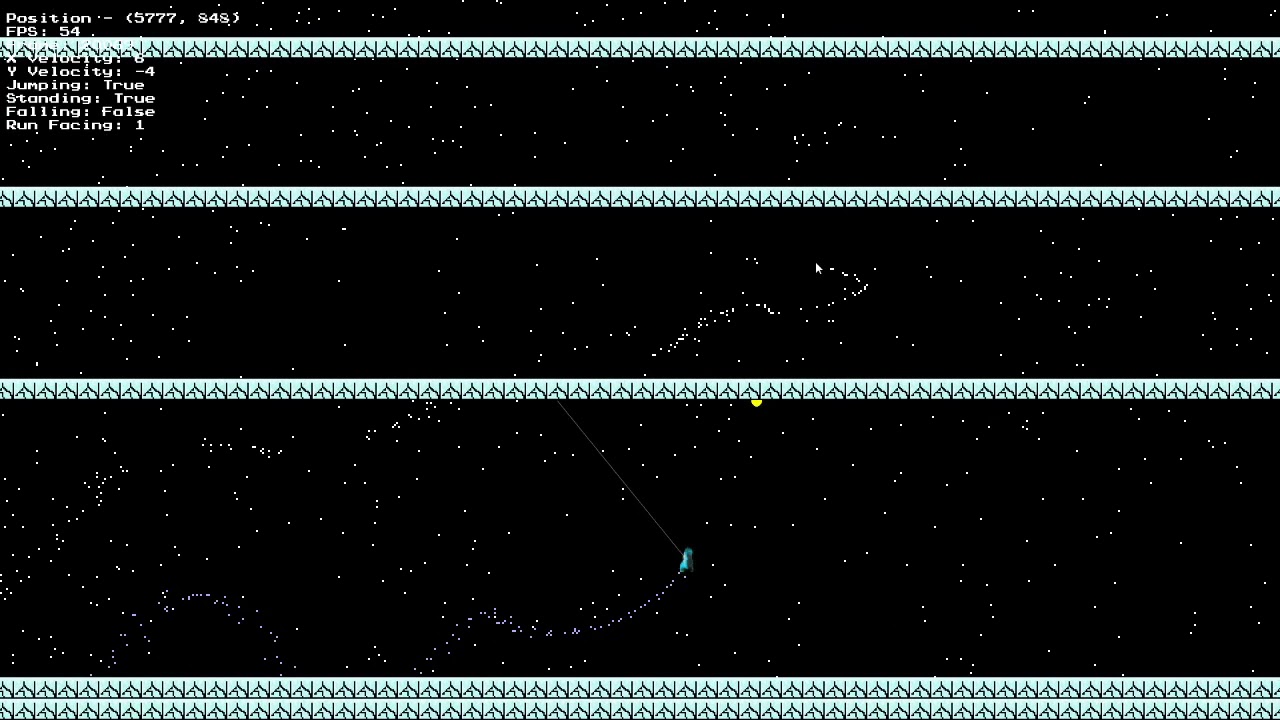
I'm working on a platformer with pygame, I'm trying to add rope swinging, I got it mostly working but it's not very fluid, I was wondering if there was a good engine for rope mechanics for pygame.
 restive lantern
green relic
```python
if keys[K_w] and falling == False:
falling = False...
restive lantern
green relic
```python
if keys[K_w] and falling == False:
falling = False...
that for loop is the problem
restive lantern
green relic
```python
if keys[K_w] and falling == False:
falling = False...
you are executing the entire for loop in a single frame or cycle. when in reality you have to move the character y through various frames
so what is happening is that the character jumps in a single frame and that is too fast
restive lantern
dawn quiver
help. how can i make a screen that displays a typewriting text?
did you already figure this out?
dawn quiver
nope
restive lantern
dawn quiver
help. how can i make a screen that displays a typewriting text?
what exactly do you need?
do you just need to display the font?
dawn quiver
yes
restive lantern
do you have a typewriter font on your computer?
dawn quiver
i am on mac
idk
i just want like when i run it i typewrites the text
"typewrite" not just display
idk how to do this
restive lantern
that is quite a challenge i gotta say
dawn quiver
i know but it would be so cool
i wanna pranks someone
@restive lantern or lets just do the display font
its ok
how do i do it?
restive lantern
have this function to display text
pygame.font.init()
font_type = pygame.font.Font('Retro Gaming.ttf',20)

# where it says 'Retro Gaming.ttf' you have to put the name of the font with .ttf extension at the end
# I used the font called 'Retro Gaming.ttf' for my game but you can use any font

def show_text(words, color, position):
    text = font_type.render(words,False,color)
    surface.blit(text, position)
    # surface is a variable that contains a surface object where you want to show the text
    # it can aslo be tha main window
yea you can
 restive lantern
did you read the comments?
dawn quiver
oh
restive lantern
the green lines?
dawn quiver
now?
 restive lantern
did you import pygame?
restive lantern
just type:
import pygame
in the first line
 restive lantern
the is the thing you have to make sure such a font is installed in your computer
i dont know how to do it in mac i use windows
restive lantern
probably there is a font but you have to find the specific name
dawn quiver
yeah where do i find my. fonts?
dawn quiver
oh let me see on safari
restive lantern
you can also change this line
font_type = pygame.font.Font('Retro Gaming.ttf',20)
to
font_type = pygame.font.SysFont('Arial.ttf',20)
if the font you want to use is not a custom font
the 20 signifies the size of the letters
dawn quiver
what am i supposed to search up?
restive lantern
how to see the fonts installed in mac
dawn quiver
oh now i can see
restive lantern
and how to install a font in mac if you need to install it
dawn quiver
 dawn quiver
what now?
 restive lantern
yea you can us that
restive lantern
yea?
 restive lantern
you can also change this line
font_type = pygame.font.Font('Retro Gaming.ttf',20)
to
font_type = pygame.font.SysFont('Arial.ttf',20)
if the font you want to use is not a custom font
the 20 signifies the size of the letters
dawn quiver
example?
restive lantern
since the font is already installed in the computer it is not a custom font
pygame.font.init()
font_type = pygame.font.SysFont('American typewriter.ttf',20)

def show_text(words, color, position):
    text = font_type.render(words,False,color)
    surface.blit(text, position)
ok it works but it doesnt open up the window
 restive lantern
you still need to do a lot of stuff though
dawn quiver
why?
restive lantern
you need a sruface and the main loop and the event handler for closing the window
lot of stuff
dawn quiver
oh and how ?
 frank fieldBOT
Hey @restive lantern!
It looks like you tried to attach a Python file - please use a code-pasting service such as https://paste.pythondiscord.com
 pine marlin
dawn quiver
like what am i supposed to tipe
pine marlin
dawn quiver
like what am i supposed to tipe
You need a main loop that displays the surface
dawn quiver
somone is helping me already but thanks for the help offer
dawn quiver
pine marlin
You need a main loop that displays the surface
maybe can you help pls ?
when i run this it doesnt display any text

 dusky sequoia
I think you are missing alpha chanel
you have the r,g,b. I believe you are missing a.
so try in your color (0,0,255,255)
 crisp arrow
I need help on how to freeze everything on my screen but the player(i used pygame to make the game)
if i use time.sleep it freezes the whole screen
if someone has the solution to this please DM me or ping when respond(i would prefer DM)
restive lantern
maybe you could make a loop inside the main loop where you only move the character
crisp arrow
but how would that freeze every other object?
 tranquil girder
things don't move unless you tell them to
so just don't tell them to move
just the player
 worldly flare
I am not able to move my character import pygame class Player: def __init__(self,image): self.image = image self.rect = self.image.get_rect() self.dx = 0 self.dy = 0 self.velocity = 160 self.r_pressed = False self.l_pressed = False self.u_pressed = False self.d_pressed = False def draw(self,display): display.blit(self.image,(self.rect.x,self.rect.y)) def move(self,dt): if self.r_pressed: self.dx += self.velocity * dt self.rect.x += self.dx print("r") elif self.l_pressed: self.dx -= self.velocity self.rect.x += self.dx * dt elif self.u_pressed: self.dy -= self.velocity self.rect.y += self.dy * dt elif self.d_pressed: self.dy += self.velocity self.rect.dy += dy * dt
the code from my main.py
import sys
import classes

pygame.init()

pygame.mixer.init()

window = pygame.display.set_mode((640,480),pygame.RESIZABLE)
display = pygame.Surface((320,240))
p_img = pygame.image.load("gfx/bit1-.png")
clock = pygame.time.Clock()
player = classes.Player(p_img)
while 1:
    window.fill((255,255,255))
    dt = clock.tick(60)/1000
    window.blit(pygame.transform.scale(display,(640,480)),(0,0))
    for event in pygame.event.get():
        if event.type == pygame.QUIT:
            pygame.quit()
            sys.exit()
        elif event.type == pygame.KEYDOWN:
            if event.key == pygame.K_RIGHT:
                player.r_pressed == True
            elif event.key == pygame.K_LEFT:
                player.l_pressed == True
            elif event.key == pygame.K_UP:
                player.u_pressed == True
            elif event.key == pygame.K_DOWN:
                player.d_pressed == True
        elif event.type == pygame.KEYUP:
            if event.key == pygame.K_RIGHT:
                player.r_pressed == False
                player.dx = 0
            elif event.key == pygame.K_LEFT:
                player.l_pressed == False
                player.dx = 0
            elif event.key == pygame.K_UP:
                player.u_pressed == False
                player.dy = 0
            elif event.key == pygame.K_DOWN:
                player.d_pressed == False
                player.dy = 0
    print(dt * 160)
    player.draw(display)

    #update
    player.move(dt)
    pygame.display.update()
``` code from main.pyi wanted tryid to do a matrix screen saver but when i run it it appears only for 1 seconds what should i do????/
why is it like that
olive parcel
@worldly flare is move even being called every frame? Looks like it'll only be called when the event loop quits.
worldly flare
olive parcel
<@780770733546536980> is move even being called every frame? Looks like it'll o...
it works
U should check again
quasi valley
worldly flare
```import pygame
import sys
import classes
pygame.init()
pygame.mixer.init()
...
you're using == which checks if player.r is false, instead of = which assigns it to false
so you can change player.whatever_key_pressed == True to player.whatever_key_pressed = True
then it should work
dawn quiver
hey guys i have a question,
if i and a friend were to start learning to make games with python, is there a chance we can make money from it? if yes, how?
i'm a beginner and i havent started yet, yeah
restive lantern
Im just gonna say one thing. Steam has 30 000 games in its store
Just think about it
What makes you think that your game will be more relevant than any other of those 30 000 games?
Just think about it
Im just saying
dawn quiver
t r u e
pine marlin
dawn quiver
hey guys i have a question,
if i and a friend were to start learning to make gam...
Game dev does not pay well if youre a standalone dev making indie games. The chance you even get a player that isnt someone you personally know is very low
 signal plank
dawn quiver
hey guys i have a question,
if i and a friend were to start learning to make gam...
signal plank
dawn quiver
hey guys i have a question,
if i and a friend were to start learning to make gam...
There is also a survivor bias. You hear about the 10 indie games each year that make it to the top. But what about the 100000 project that didn't make it?
signal plank
dawn quiver
hey guys i have a question,
if i and a friend were to start learning to make gam...
I think a lot of developers (especially those who use discord) got to programming because of games. Thinking "hey, I can do that as well" or tweaking around with mods etc.
I also think that a lot of those developers realized that there is much more to web development that you dont see as an end user. And a part of them sticked to other programming "genres"
tranquil girder
camera.clip_plane_far = some_value
but that won't fix your problem
you should make chunks instead of individual blocks:
https://www.youtube.com/watch?t=157&v=4O0_-1NaWnY&feature=youtu.be&ab_channel=jdh
uhh discord broke it

See the code on GitHub: https://github.com/jdah/minecraft-weekend
NOTES:
- The water and lava textures are from the now defunct (?) Painterly Pack, my animation skills weren't up to the challenge.
- The depth sorting algorithm depicted is mergesort but it's mislabled as quicksort (oops!). I was initially using mergesort but ended up using quick...
then read the first line of my answer again :)
quasi valley
tranquil girder
https://www.youtube.com/watch?v=4O0_-1NaWnY&t=157s
lmao i like just finished that video before coming to this channel
 north brook
Hi Guys I want make Fake (Bot) Players For Servers
Does anyone have any information about this topic?
 potent ice
For what game?
Most games have strict rules against bots. If you are making test bots for your own game.. that is a different thing.
Be sure you read the rule before you dig into this
 real solar
uhh so
i don't know how to say this but
repo one
https://github.com/Craig-Macomber/Panda3D-Terrain-System
repo two
https://github.com/Craig-Macomber/infiniteRalph
uhh so the first repo says to add it as a submodule so i have
and when i try to run the second one
instead of the error ModuleNotFoundError: No module named 'terrain'
i get
ModuleNotFoundError: No module named 'terrain.bakery'
now the thing is
the first one aka submdule
has a bakery folder
so the question being how do i add something.something as a submodules

GitHub
A (semi)procedural terrain generating and rendering system for the Panda3D engine. Written in python. - Craig-Macomber/Panda3D-Terrain-System
GitHub
Example usage of Panda3D-Terrain-System. Contribute to Craig-Macomber/infiniteRalph development by creating an account on GitHub.
dawn quiver
Does anyone care to tell me the basics of creating a tilemap with code only? Like I have a 16x16 .png and I would like it to tile a 500 x 500 surface. What is the best way to implement this idea?
I've been trying to do this with a function that changes params within a for loop. I've only managed to get a single row across the top of the surface an one vertical column of the image.
 solar wasp
hello world
i need help on a python issue
anybody?
I need to create a Bejeweled
In fact, I managed to create! however is with some errors, could someone help me please?
 swift zealot
Explanation:
Explain what the bug is
Evidence:
What evidence do you have?
If replicable, how:
How can we recreate this?
Platform:
PC
 restive quarry
low hi where do u guys make games
 glossy matrix
restive quarry
low hi where do u guys make games
glossy matrix
restive quarry
low hi where do u guys make games
unreal engine
potent ice
Yes, but this is a python channel 🙂
 clever bone
Hi Guys!
 viral turtle
Hi, did any of you have a video for beginners how to program a game with Python? I'm a newbie 
real solar
@potent ice are you free rn?
real solar
real solar
uhh so
i don't know how to say this but
repo one
https://github.com/Craig-Macom...
if yes would you mind having a look at this?
 cyan seal
 cloud mica
Any good text based game engine that can easily work with discord?
real solar
wdym by text based game engine?
 limber flower
Anyone knows how turtle.onkey works?
I followed the docs but doesn't work
cloud mica
real solar
wdym by text based game engine?
A text game engine, you play through text. Like a MUD or something. It describes your surroundings via text, and you type commands to move around, and attack and stuff.
pine marlin
viral turtle
Hi, did any of you have a video for beginners how to program a game with Python?...
Search up pygame tutorials for retro games. They are simple and introduce you to graphical programming with python
real solar
cloud mica
A text game engine, you play through text. Like a MUD or something. It describes...
ohhhhhhhhh
you could use pygame and console
 thick sequoia
can anyone here help with Panda3d :>
olive parcel
@thick sequoia depends, what is your question?
thick sequoia
olive parcel
<@!726087545867468820> depends, what is your question?
whats the correct format for specifying a path to a 3d object
cuz im just playing around with Panda and want to render a cube i made in blender
olive parcel
Panda always uses UNIX style paths even on Windows, full paths would go like /c/Users/yourname/blah/blah
thick sequoia
k thanks
olive parcel
Though you usually want to work with relative paths
If you specify the path relative to the directory where your main .py is (using forward slashes) everything should work.
thick sequoia
olive parcel
If you specify the path relative to the directory where your main .py is (using ...
im using this path "/myusername/Desktop/Python3dGame/Scripts/cube" but its not working
dawn quiver
how can i fix this?
 quasi valley
dawn quiver
how can i fix this?
quasi valley
dawn quiver
how can i fix this?
do you have the font file in the directory
also can you send the code as formatted text not a screenshot please
dawn quiver
I made a square shoot bullets in the direction of mouse pointer. I did that in Object oriented programming. Now I want to make some maps and add enemies. Adding enemies would be easy but I have no idea about adding maps. Can I get some help regarding that? 😅
 waxen marten
Hello everyone! I am new in game-development world. I made a game with PyGame library. If you want to try it you can find it on Play Store. The game is in italian language. Here is the link https://play.google.com/store/apps/details?id=com.pietroarmando.Geometry

Un gioco ricco di colori e triangoli cattivi! Evitane più che puoi per aumentare il tuo punteggio e scalare la classifica globale.
Personalizza il tuo personaggio scegliendo tra diversi colori.
Sfida i tuoi amici a chi raggiunge il punteggio più elevato.
I am ready to listen your tips to get better!!
real solar
wew
 teal ember
waxen marten
teal ember
waxen marten
Yes
 limpid gyro
@real solar your code was messed up im fixing it now
real solar
@limpid gyro dm's?
 misty shell
I was thinking about high speed collisions in games, where the time that the two objects are colliding is shorter than an update frame, so you can do funky things like phase through walls just by going stupid fast. Would a physics engine that ray-steps the collisions be able to circumvent this by calculating a ray on which the object would move between updates and then collision checking that ray instead of the object? naturally you would have to collision check the ray for each vertex, so it would be expensive, but in theory it would eliminate high-speed phasing...
dawn quiver
Any high speed calculations are not possible, not in python atleast. Plus, you wish to do things, faster than an update frame, which is definitely not possible. What you could do is, bug out the game! the collisions will fail, if you go faster than what the compiler can process.
@misty shell
last moon
misty shell
I was thinking about high speed collisions in games, where the time that the two...
I think it’d depend pretty heavily on how complex the collision is (squares hitting vs a skeleton hitting something) but you’d want to do some sort of bounds checking when updating the position (if pos1 > wall, pos1 = wall), I’d personally approach it with some sort of filtered ray tracing - pick a couple points on the model when objects are close to each other and see if they’ll intersect - but I’m assuming you wouldn’t need to do it for each vertex unless you’re doing simulations (don’t quote me on any of this I haven’t dug into it). Either way I think you’d only be ray-stepping in the sense that you’re drawing rays the length of dpos (but again if you wanted more realistic physics you might step to calculate momentum (?))
 proper peak
misty shell
I was thinking about high speed collisions in games, where the time that the two...
proper peak
misty shell
I was thinking about high speed collisions in games, where the time that the two...
Would a physics engine that ray-steps the collisions be able to circumvent this by calculating a ray on which the object would move between updates and then collision checking that ray instead of the object? naturally you would have to collision check the ray for each vertex, so it would be expensive, but in theory it would eliminate high-speed phasing...
What you're describing is called Continuous Collision Detection and many physics engines can do that.
they have to do multiple CCD sub-steps per normal step for that, though
@misty shell https://nphysics.org/all_examples3/ Here's one physics engine that has a configurable web demo, including CCD stuff
 tranquil robin
@abstract light Hey man, I know it's been almost a month since I asked this question. I was thinking of having the pygame screen remained paused throughout until certain functions from the main game tell the pygame thread to update the screen
misty shell
proper peak
<@!712017143998447767> https://nphysics.org/all_examples3/ Here's one physics en...
thanks everyone for getting back to me on this! I will definitely look into that example...
 sacred lake
What is the best module for creating games?
 grand imp
sacred lake
What is the best module for creating games?
grand imp
sacred lake
What is the best module for creating games?
What kinds of games do you want to make?
sacred lake
grand imp
What kinds of games do you want to make?
2D games
grand imp
How much experience with python and games development do you have?
grand imp
sacred lake
2D games
The amount of experience you have with both will be helpful in determining what framework would be the best fit
sacred lake
grand imp
The amount of experience you have with both will be helpful in determining what ...
I want the best only -_-
grand imp
"Best" depends on all the stuff I mentioned above.
If you want to be able to make a game fast and don't care about the amount of freedom you have to customize, then you won't want the same frameworks as you would if you want extreme control and can take time to implement.
Pygame is good for when you want maximum control, but it can be very clunky and doesn't support all the features you'd want out of the box. For example, it doesn't really support drawing shapes on its own.
Pygame Zero is a wrapper around pygame that simplifies some things. It's beginner friendly.
Wasabi2d shares a lot in common with pygame zero and was created by the same author, and supports more advanced features out of the box than either of the above.
Pyglet is very good at giving you fast low-level access to OpenGL, and seems to be nicer than pygame imo, but it will have a lot of the same issues as pygame in terms of requiring you to do a lot of work to get something flexible together.
Arcade is nice, and it's a library I'm trying to contribute to. It tries to provide some higher-level abstractions for things like the UI and collisions, and has built-in support for Pymunk, a physics engine binding in python. However, some of the UI features are in active development to fix some annoying issues. If you just want to show sprites and unchanging text, this one can be a pretty good choice. It also supports shaders out of the box.
@sacred lake does this help at all?
sacred lake
grand imp
<@!349998147818487808> does this help at all?
Yes
grand imp
If you're a beginner, you'll want something like Pygame Zero or Arcade
Especially if you don't have much experience in programming.
I don't know how beginner friendly wasabi2d is, but it re-implements some APIs from Pygame Zero, so you might be able to move to more easily it if you need more features after starting on Pygame Zero.
Out of the frameworks I've listed, I've only used directly used Pygame and Arcade.
Oh
there's one more framework that you might be interested in eventually, but I don't recommend it for beginners. Kivy can build apps that run on phones.
The big downsides are that it's very complicated in comparison to some of the frameworks above, and it's not really a games framework at all.
sacred lake
grand imp
Especially if you don't have much experience in programming.
I have a lot of experience with Python, but I don't have much experience with games 😦
grand imp
Well, take a look at the frameworks I've mentioned and see if any seem like a good fit for you
manic moth
Hello, I'm trying to make an online multiplayer Pong game, this is my first proper game, and in one part of the server.py, I'm running a while loop under which all the data transmission between client & server happens. But I'm not sure how do I disconnect a client properly. I'm using sockets, pygame and threading. This is the while loop snippet in server.py :
while True:
        try:
            data = pickle.loads(conn.recv(2048))

            if not data:
                print('\nyes data was "".')
                break

            else:
                players[player] = data
                conn.send(pickle.dumps(players[opponent]))

        except Exception as e:
            print(e)
            break
I was under the impression that whenever a client socket disconnects, it sends a "" to the server upon disconnecting. Hence my 5th line is if not data because data would be equal to "" when the client disconnects. But my script never executes that if condition & the yes data was '' never gets printed , instead it goes to the except block and prints e which is the error Ran out of input. Can someone please help me how to cleanly disconnect a client socket from server. Thanks
crisp junco
manic moth
Hello, I'm trying to make an online multiplayer Pong game, this is my first prop...
conn.close()?
manic moth
yeah, I'm already using that, actually I'm spinning a new thread for every client that connects to the server, and here is the whole thread :
def threaded_client(conn,player):
    global client_count

    if player==0:
        opponent = 1
    else:
        opponent = 0

    send_player = conn.send(pickle.dumps(players[player]))   #send player initially to 1st client
    send_opponent = conn.send(pickle.dumps(players[opponent])) #send opponent to 1st client
    #the while loop
    while True:
        try:
            data = pickle.loads(conn.recv(2048))

            if not data:
                print('\nyes data was "".')
                break

            else:
                players[player] = data   #players is a database for clients, therefore this line updates the database with the current client
                conn.send(pickle.dumps(players[opponent])) #send the opponent to the connected client

        except Exception as e:
            print(e)
            break

    print(f"Client {conn.getpeername()} disconnected!\n\n")
    client_count -= 1
    conn.close()
 pseudo verge
hello
does anyone know if these two lines still work?
new_rect = rotated_image.get_rect(center=self.img.get_rect(topleft= (self.x, self.y)).center)
my bird is not tilting when falling

https://paste.pythondiscord.com/oqeyacovik.py this is the code so far
dawn quiver

how can I shorten this line that I'm drawing between the player and the cursor ?
I want it to be a fixed size but always go in the direction of the cursor
 lunar venture
clamp the x and y
dawn quiver
maybe simply getting the angle between the character and the cursor should be the way to go but I suck at maths
what do you mean by clamping them ?
lunar venture
actually, when the mouse is close to the player, should it stay long or be short enough to fill just the distance between the cursor and the player
dawn quiver
always the same size. In fact I'd like to use maths to retrieve the angle so that I can rotate my sprite towards the cursor
I'm testing by rotating this line for now
lunar venture
wait is it a sprite or is it like a line
dawn quiver
it's a line, but I just want an angle value
from that I can use sin and cosin to draw a line
lunar venture
dawn quiver
it's a line, but I just want an angle value
you can just calculate like (y1-y2)/(x1-x2)
that can be your angle kinda
actually it will not work for same x's so never mind
dawn quiver
I can have an exception if x1-x2 is equal to zero
lunar venture
well then there you have it
dawn quiver
the slope ? I'm not a native speaker
what does that mean ?
(And I also suck at maths)
lunar venture

In mathematics, the slope or gradient of a line is a number that describes both the direction and the steepness of the line. Slope is often denoted by the letter m; there is no clear answer to the question why the letter m is used for slope, but its earliest use in English appears in O'Brien (1844) who wrote the equation of a straight line as "y...
dawn quiver
oh nice
lunar venture
 dawn quiver
and I can get the angle from the slope I guess
lunar venture
those are your edge cases for the forumla
tranquil robin
 abstract light
can you clarify the question?
abstract light
can you clarify the question?
@abstract light How can I make the main code that looks like this def main_Loop(): global location #print(room.get('Main Hall', 'item')) while adventure == True: for x in npc: print(x) npc_Action(x[0]) desc = room.get(location, 'desc') exits = room.get(location, 'exits') if room.get(location, 'visit') == "False": globals()[room.get(location, 'event')]() print(desc) print(exits) global advaction advaction = input('>') if advaction == "quit": sys.exit(0) print(advaction) explore_Dungeon()
run simultanously with a pygame screen that displays a fixed image that only refreshes/changes when the main code tells it to. For example, a refresh from the main code would tell pygame to erase everything on screen and blit the appropiate sprites to the screen
dawn quiver
I managed to do it !

yellow line is generated using trigonometry
here's how I did it :
mouseX, mouseY = pygame.mouse.get_pos()
relativeCoordsX, relativeCoordsY = mouseX - player.x, mouseY - player.y
angle = math.atan2(relativeCoordsY, relativeCoordsX)

linex, liney = (player.x + 50 * math.cos(angle), player.y + 50 * math.sin(angle))

pygame.draw.line(screen, (255, 255, 0), (self.x, self.y), (linex, liney), 3)
sorry for bad formatting wait a second
50 being the lenght of the line
dawn quiver
And I now have this cool tank player controller
 lunar venture
Awesome.
dawn quiver
pygame is actually fun, it's the first time I try to code a "game" in pure code without using any external engine
(the gif has been sped up, the game is not that fast)
now the question is, without the concept of camera, how can I create a world bigger than the size of my screen ?
Maybe different screens would be easier (going trough a way of the screen is moving the player into a different scene) but I wonder if it's technically easy to create a scrolling background
normal silo
dawn quiver
now the question is, without the concept of camera, how can I create a world big...
Always draw the tank in the middle of the screen. When you move, move everything else in the opposite direction of intended motion.
(In video games, the camera does not move, everything else moves around it, giving the illusion of a moving camera (though the camera does have changing coordinates, it's just a way to think about it))
(camera x = 10 -> everything else's x -= 10)
dawn quiver
that's very clever
but it does not allow for dynamic camera movement
like moving when the player approaches the border of the screen for example
normal silo
Yes, so you have a camera position, and the tank also moves with everything else relative to the camera.
(otherwise, you can just have the tank's position be the camera position)
Preventing the camera from going out of bounds (for rectangular bounds) is as simple as clamping the camera's position (after it was set to the tank's position).
abstract light
@tranquil robin create a new thread. And use if and else. Are you asking me how to make a new thread?
tranquil robin
@abstract light Yes
 analog barn
Any one know a better way to create a rectangle using kwargs in Pygame? py class Controls(Group): def __init__(self, app, size, **position): super().__init__() self.app = app self.rect = pg.Surface((0,0)).get_rect(size=size, **position) self.build() **position contains kw-arguments like bottom=300 or topright=500
last moon
id suggest using some sort of error handling to make sure the args you need are actually gotten
for readability's sake i'd recommend using optional args instead def __init__(self, app, size, bottom=None, topright=None, ...)
or use default args depending on the use case
 indigo pulsar
I tried pygame as well, and that's very fun and to did caracters I used rect but I don't know how to use speitesheet ?
Spritesheet*
 urban mason
How would I probably fix this, and make the text show up when snake dies and wait for 5 minutes
 dawn quiver
Hello anyone familer with surface types?
indigo pulsar
I guess that useful for spritesheets but I didn't read doc about it
dawn quiver
hi so im coding this flappy bird game in python pygame

and i need some help
self.vy += self.gravity
in the fish.py
which is supposed to act like gravity by reducing the speed of the bird every frame
if anyone could help me id be eternally greatful

 mellow citrus
u need to calculate the image size
and then decide the font suze based on it
@maiden seal ig
mellow citrus
its # find biggest font size that works
fontSize = int(imageSize[1]/5)
font = ImageFont.truetype("/Library/Fonts/Impact.ttf", fontSize)
topTextSize = font.getsize(topString)
bottomTextSize = font.getsize(bottomString)
while topTextSize[0] > imageSize[0]-20 or bottomTextSize[0] > imageSize[0]-20:
fontSize = fontSize - 1
font = ImageFont.truetype("/Library/Fonts/Impact.ttf", fontSize)
topTextSize = font.getsize(topString)
bottomTextSize = font.getsize(bottomString)
idk
as i told u
u have to check image size
and then decide the best font sizee for it
i don't think there is a better solution
@maiden seal idk
this is everything i can help with srry im not that gud at Python
 maiden seal
mellow citrus
or u making fun of me?
maiden seal
mellow citrus
or u making fun of me?
nope thanks for trying
mellow citrus
k
 steel orbit
Anyone here who knows how to work with rak-net in Python?
I need help in getting started
 versed turret
``
 finite briar
Heyo
What modules should i learn for starter Pygame? Like basic basic dont know a single command
I know basic Python just not Pygame
versed turret
i used time
finite briar
well some basic Python anyways
versed turret
i used time, requests
versed turret
yes
finite briar
Uh okay, so time, random, requests, math, numpy, webbrowser, and os
Thought it would be more lol
oh and datetime maybe?
olive parcel
Use what you need for your game 🙂 I´m not sure how webbrowser would even come in in a game
finite briar
Probably for the help links
that's my guess anyways
I figured that but like i didnt know if there were any specific modules that would be super helpful if i knew before i got started with anything lol
 mint zenith
My approach is to look stuff up as I encounter it. I don't think you should worry about learning those modules ahead of time. Just figure it all out as you go along. It's more important to focus on concepts rather than on library specific implementation details
Maybe numpy is an exception since it is a relatively complicated library
But you're assuming you'll need it without knowing for sure that you will, so keep that in mind
 crude ingot
btw does anyone know how to open another pygame window?
I have a pygame GUI and i want to open a smaller window asking for confirmation to do something
i tried using messagebox from tkinter but it gave me a massive error
finite briar
crude ingot
I have a pygame GUI and i want to open a smaller window asking for confirmation ...
theoretically couldnt you just define another surface with smaller margins?
finite briar
crude ingot
btw does anyone know how to open another pygame window?
I just tried it ;-; you can do it but its.... idk ;-; not the same as another window, i dont know how to specify where the window will open but if you can then yeah; that seems to be how to me shrug*
 frigid plume
i need another game that has similar mechanics to connect 4?
 dawn zinc
Hey guys
Im new to game development but how are you supposed to program the user interface on kivy ???
 hearty widget
Hi, i downloaded this image from https://craftpix.net/freebies/free-3-character-sprite-sheets-pixel-art/
so i can get a moving character but it's one image
if each part was in a separated image i would have used a for loop to loop through them thus creates a movement but this is one image, is there a way to split them using pygame or do i have to cut them manually and separate them ?
i am using pygame btw

CraftPix.net
We publish Free 3 Character Sprite Sheets Pixel Art. As planned by the artist, these characters can be used in Survival games (where you need to get resources, destroy enemies, move objects, craft)
 marble escarp
Hey, I dont know if this is the exact channel to be asking, but i'm working on a rouge-inspired game that has map generation. Are there anyway good ways of generating rectangles in a 2D array? The format of which is: map=[[1,2,3],[4,5,6],[7,8,9]]
I've tried manually changing each of the items in each list to make vertical and horizontal lines. I prefer if you ping me to help me
normal silo
hearty widget
Hi, i downloaded this image from https://craftpix.net/freebies/free-3-character-...
pygame's Surface's blit function can blit only part of the source onto the destination. If you have a sprite sheet, just blit the current frame (part of the whole sheet).
hearty widget
normal silo
pygame's Surface's blit function can blit only part of the source onto the desti...
well i am new to pygame and i don't understand them
 vivid jacinth
Hello, Is there someone who can do graphic design(pixel art) for our RPG game. DM me if you are interested
 crisp fossil
Actually, who develops full games on Python ? Python is a really powerful tool. But I don’t even imagine it being in game dev...
 stray obsidian
yoo
can someone help me with pygame here?
.
player = pygame.Rect(screen_width - 20, screen_height / 2 - 70 , 10 , 140)
player_speed = 0

player.y += player_speed
every thing works but i don't understand few things
 cold storm

@stray obsidian
when you press the key it emits a down event
when you release it, it emits a up event
so basically
us there a event for that key
if it's a down event -> do this
if it's a up even -> do that
you could also likely have a 'held' event (I don't use pygame) but bge input is very similar
stray obsidian
cold storm
so basically
us there a event for that key
if it's a down event -> do this
if ...
i got that part what i did not get is that if i press the upp key it goes 7 +7 +7 and when i release it subtracts 7 ........so this means the player should go back a little but it stops why is that?
cold storm
add seven wait
on release remove 7
so it goes
0->7 when you start pressing the key
and from 7->0 when you release it
 bold quartz
Hello I need help in building a particle effect system in pygame
Created a snake game I want to add particles everytime snake hits boundary of screen
Have no idea how to implement this
 spark plover
bold quartz
Hello I need help in building a particle effect system in pygame
spark plover
bold quartz
Hello I need help in building a particle effect system in pygame
I found a stackoverflow article about it. Link: https://stackoverflow.com/questions/14849284/pygame-particle-effects

Stack Overflow
So I have this mini particle effect that produces circles that move up. I want to make it look like smoke. I'm having a lot of problems though.
First off I want to make it recursive so that when ...
indigo pulsar
proud of my parallax🙂
 pastel juniper
indigo pulsar
proud of my parallax🙂
pastel juniper
indigo pulsar
proud of my parallax🙂
nice
quasi valley
indigo pulsar
proud of my parallax🙂
yeah that looks really cool, how'd you do it?
 silent crane
indigo pulsar
silent crane
indigo pulsar
Thanks everyone
indigo pulsar
quasi valley
yeah that looks really cool, how'd you do it?
I have 4 tall backgrounds -> so 4 surfaces. And I create 4 others surfaces at the size of the windows and I take a part of the tall surface with subsurface
When My "perso" move I change the position of the rect on the big surface and i do again subsurface
And the position x of the rect at the first plan will increase more than the second and etc
I will give you the code of the background class
 marble pewter
can i ask tkinter questions here?
indigo pulsar
marble pewter
can i ask tkinter questions here?
Sure but I don't know very well the tk lib
marble pewter
    def clear_command(self):
        yes=['yes','yeS','yEs','Yes','YES','YEs','YeS','yES']
        no=['no','No','nO','NO']
        if self.clear_all_products_entry_var in yes:
            self.PRODUCTS = {}
            self.products_list = []
            messagebox.showinfo("Done!", "All products cleared successfully")
            self.clear_all_products_win.destroy()
        elif self.clear_all_products_entry_var in no:
            self.clear_all_products_win.destroy()
        else:
            messagebox.showerror("Please enter Yes/No!")
            self.clear_all_products_win.destroy()
basically upon pressing a button on the menu, a popup appears asking for an input in this case is self.clear_all_products_entry_var
i want the user to enter yes/no and execute different functions(popup feedback message etc)
but in this case no matter what i enter in, i get the error message "Please enter Yes/No!"
why is that so?
olive parcel
I suggest adding a print statement of self.clear_all_products_entry_var to see what it does contain
Also, you can simplify that code by doing:
if self.clear_all_products_entry_var.lower() == 'yes':
marble pewter
olive parcel
I suggest adding a print statement of `self.clear_all_products_entry_var` to see...
ooo very smart
it came out as PY_VAR4
and 5 subsequently
olive parcel
Can't possibly comment on that since we don't see the code where it is assigned
marble pewter
yup sure
thanks so much!!!
!close
oh crap i thought it was a help room kekw
@olive parcel https://stackoverflow.com/questions/24768455/tkinter-intvar-returning-py-var0-instead-of-value
Stack Overflow
I have a Checkbutton and an IntVar object associated with it, but when I try to get the value of the var, I am receiving PY_VAR0.
Here's my code:
from tkinter import *
root = Tk()
def show_stat...
found a solution, thanks so much for the suggesting the print()
i was so lost
olive parcel
@marble pewter it's called shotgun debugging, and is the method that always works if all other tools fail 🙂
Wait, shotgun debugging refers to something else
Ah, guess it doesn't have a name
marble pewter
interesting interesting... started python around 3 months back
glad i'm not gna touch it in a weeks time
i'm currently doing my one and only programming module in university phew
it has been giving me headaches hahahaha
frank fieldBOT
Hey @indigo pulsar!
It looks like you tried to attach a Python file - please use a code-pasting service such as https://paste.pythondiscord.com
 jovial scarab
Hello everybody
I want to make this game: https://armorgames.com/unpuzzle-game/18230

Armor Games
Unpuzzle, a free online Puzzle & Skill game brought to you by Armor Games. Clear levels piece by piece.
and I need some help or source code please
 surreal talon
Hi, Im really struggling with this concept and I cant find anything on the web. Essentially I have a player that rotates towards the users cursor. And I want to add in a shooting system that shoots out projectiles from the player. But Im not sure how to shoot it out of the player in the direction the player is facing?
 simple belfry
What is the best 2d game dev framework for python?
quasi valley
simple belfry
What is the best 2d game dev framework for python?
Probably pygame tbh
indigo pulsar
This's normal that my parallax can be jerky ?
Maybe for a game it's better to use compiled language to stop read and execute line by line
And win time
simple belfry
quasi valley
Probably pygame tbh
It's quite old, is it still useable?
quasi valley
simple belfry
It's quite old, is it still useable?
Yes, very, I think a lot of the stuff in this channel is about pygame
I in fact use it a lot, although I’ve never actually finished a game lmao
simple belfry
Ok thanks
quasi valley
Yep
indigo pulsar
indigo pulsar
This's normal that my parallax can be jerky ?
anyone has an answer ?
cold storm
Hey all
Just wanted to remind you to test UPBGE fork of blender for making python projects for fun or otherwise
you can call BPY in game and manipulate meshes / blender data
as well as all the old features BGE offered in blender before 2.8 with some slight differences

UPBGE - World Splat_atlas + displace generated terrain
I am using the game engine to move around in this video
bold quartz
indigo pulsar
anyone has an answer ?
You did put a fps limit right. Jerky motion is common when you are rendering multiple things on screen but are not cleaning your screen
indigo pulsar
I don't put anything about fps.
To show on the screen I call my fonction that can put surface onscreen then I update screen and a fill my screen in black
finite briar
import pygame
pygame.init()

width, height = 500, 500
white = 255, 255, 255
center = 250, 250
base = 50
blue = 0, 0, 255
fps = 60
clock = pygame.time.Clock()
screen = pygame.display.set_mode((width, height))
pygame.display.set_caption("Game 1")
def game():
    running = True
    while running:
        clock.tick(fps)
        for event in pygame.event.get():
            if event.type == pygame.QUIT:
                running = False
        screen.fill(white)
        pygame.display.update()
        Nuke = pygame.image.load("C:\\Users\Felix Laptop\Downloads\Spaceship1.png")
        pygame.blit(Nuke, (250, 250))

    pygame.quit()```
Erm... The window opens and closes but i cant figure out why ;-;Do you call game()?
dawn quiver
anyone willing to make a game with me? in pygame just for fun
 woven compass
Hi I am noob but I want create a game,, how can I begin?
 grim wraith
what game wanna develop
 lone wyvern
before u make a game u should learn the basics
like loops, if statements, scoping
variables
etc
grim wraith
@lone wyvern he has a game in mind i wanna make him learn the code according to his game'
lone wyvern
great discord crasher
lone wyvern
grim wraith
<@!328036206619394051> he has a game in mind i wanna make him learn the code ac...
sure but it'd be way more useful to learn the basics so he's more flexible making different games
grim wraith
yea i will make him learn before he makes a gme
 wise flame
!tempmute 355751049652600832 2d Don't paste discord crashing links here.
frank fieldBOT
:incoming_envelope: :ok_hand: applied mute to @echo sentinel until 2021-04-23 11:02 (1 day and 23 hours).
 frozen knoll
@woven compass Try looking at https://learn.arcade.academy
 clever shore

dawn quiver
can anyone help me to add ai in unity
proper peak
@simple belfry note that pygame has a significant limitation of only rendering on the CPU (it can't use the GPU at all), making it unsuitable for games with a lot of stuff happening
decent for learning gamedev, though
tranquil girder
I thought that's no longer true with pygame 2
proper peak
Huh, is that the case?
Hmm, I see some mentions that pygame2 is supposed to use sdl2, but I can't find how to actually use that functionality, unless it's just on by default
simple belfry
proper peak
<@!571247727602696192> note that pygame has a significant limitation of only ren...
I thought to use it for platformer or top down games
proper peak
Most stuff like that would be fine in pygame too, it's only when drawing tons of objects that you might have problems
simple belfry
I don't think making FPS in python is a right way XD
finite briar
import pygame
pygame.init()
fps = 60
screen_size = (500,500)
white = 255, 255, 255
center = 250, 250
blue = 0, 0, 255
base_rad = 50
clock = pygame.time.Clock()
screen = pygame.display.set_mode(screen_size)
running = True
while running:
    clock.tick(fps)
    for event in pygame.event.get():
        if event.type == pygame.QUIT:
            running = False
    screen.fill(white)
    pygame.draw.circle(screen, blue, center, base_rad)
    Nuke = pygame.image.load("C:\\Users\Felix Laptop\Downloads\Spaceship1.png")
    screen.blit(Nuke, center)
    pygame.display.update()
pygame.quit()
``` I'm not crazy... right? The blue circle and the Spaceship should be the same location..?
Cause they arent ;-;
 leaden turtle
maybe its the PNG, try manually place the nuke in the centre instead of using centre variable
 torpid pewter
i'm using pygame, and when i move the window around my game stops and won't update until i stop moving the window. is this a problem with my game, or is it an issue with pygame in general?
 next sun
how do i load a image according to the screen resolution
 hollow egret
hello, I made a game dedicated to retro minigames all in one. I need some testers though, im willing to pay 5 usd for 20 mins of testing
DM for proof & installer
 valid crater
 coarse gazelle
Okay, so this isn't really about game making, but it's something similar. I'm planning to work on something that'll require me to load an image into memory, split it into an RGB array of bytes, then work on individual bytes (R, G and B values of each separate pixel), and then save the new, modified image. It'd be cool to be able to display it in real time, as I'm modifying each pixel too, which is why I thought Pyglet may be the way to go here.
But I figured I'd ask here first, if this would be doable with something like PIL + Numpy arrays
not sure how I'd handle real-time displaying in this case
Thoughts?
proper peak
I've done something like that with pyplot.imshow before - showing each frame
not very nice, and pretty slow
coarse gazelle
pyplot, huh?
proper peak
a game library is indeed probably a good choice
coarse gazelle
Yeah, figured as much
I've done a simple snake game in Pyglet before
so I'm kinda familiar with the lib
Should I go with that in this case too, or do you have something that'd fit better?
I need this to be pretty fast, I can imagine that serializing an array of bytes into a sprite, and then displaying it, is gonna be quite slow
Hmm
Well, okay, I'll try it with Pyglet, and see how it goes
pine marlin
finite briar
```py
import pygame
pygame.init()
fps = 60
screen_size = (500,500)
white = 255, ...
pygame.draw.circle takes coords for the circle centre as a parameter, but when you blit an image the coords are for the top left corner of the image.
Hence why the nuke is to the southeast of the centre of the circle.
finite briar
pine marlin
pygame.draw.circle takes coords for the circle centre as a parameter, but when y...
Haha thank youuu :ppp
 atomic sapphire
Helloooo, i am very new to programming and I was watching a tutorial on how to create a bot that plays Flappy Bird, and am getting this error on the "import pygame" line, and i already type "pip install pygame", and "pip install neat-python". And i don't know what to do. As i said, i am very new so please forgive me if this a stupid thing to ask.(And also forgive me for my english)

 hard horizon
atomic sapphire
Helloooo, i am very new to programming and I was watching a tutorial on how to c...
hard horizon
atomic sapphire
Helloooo, i am very new to programming and I was watching a tutorial on how to c...
try this py -m pip install -U pygame neat

 hard horizon
yeh don’t press that just run your module from the shell itself
atomic sapphire
I felt stupid for this but what is the shell
hard horizon
yeh just type py FlappyBirdAI.py
 hard horizon
atomic sapphire
This is just a file location problem?
hard horizon
atomic sapphire
This is just a file location problem?
yeh your img
hard horizon
np
dawn quiver
grim wraith
wths the problwem
 crystal scaffold
anyone good with pygame?\
 carmine dew
grim wraith
wths the problwem
carmine dew
grim wraith
wths the problwem
i wanna share a game with my friends so that they can also play.
 mental shuttle
Who is game developer
mental shuttle
mental shuttle
Who is game developer
In this channel....
hard horizon
mental shuttle
Who is game developer
just ask your question??
indigo pulsar
Hi
question about jumping on my code
When I use rectangle to show how it works, everything was good
but when I put surface the code doesn't show the same result
here the function of my class to jump
frank fieldBOT
Hey @indigo pulsar!
It looks like you tried to attach a Python file - please use a code-pasting service such as https://paste.pythondiscord.com
indigo pulsar
So the incrementation of Y works if I press away D or Q but normally the carater is able to jump without press away
indigo pulsar
Ok i found the part which talk rubbish
but how can I detect if any keys is pressed ?
isn't pressed*
finite briar
indigo pulsar
but how can I detect if any keys is pressed ?
if keys[pygame.K_(insert key here, UP, DOWN, LEFT, and RIGHT are the arrow keys. letters are lowercase. other specific buttons are all in caps.)]```you dont need parenthesis around the button though, for up it would look like py keys = pygame.key.get_pressed() if keys[pygame.K_UP]: alkdoasnmdoasn
Nuke_rotated,Nuke_rotated_rect = rotate(Nuke,angle)
screen.blit(Nuke_rotated,Nuke_rotated_rect)
return rotated_surface, rotated_rect```
can somebody break these down for me please? ;-; its three seperate commands but i dont know how you'd do two variables for a function? and when you blit it why do you blit two things? and when you return, the same thing ;-; how do u do it with two things?DAMNNN THATS A NICE GRAPHIC-
How'd ya do it? 😉 you know u wanna tell me 🙂
:p
indigo pulsar
I will give the code and maybe publish on github
Now need collision, plateform
I think i will read a text file to parse the environment map
finite briar
me over here having trouble just rotating my image* right, r i g h t.
indigo pulsar
finite briar
*me over here having trouble just rotating my image** right, r i g h t.
Pygame.transform.flip()
finite briar
indigo pulsar
Pygame.transform.flip()
i meant rotate as in literally rotate lol like 45* or something :p thank you though
indigo pulsar
finite briar
i meant rotate as in literally rotate lol like 45* or something :p thank you tho...
My bad 😂
indigo pulsar
finite briar
i meant rotate as in literally rotate lol like 45* or something :p thank you tho...
So pygame.transform.rotate()
finite briar
indigo pulsar
My bad 😂
I'm trying to learn how to use rotozoom but like i suck at using functions ;-; also rotate would increase it a certain amount, rotating it by an increasing interval like angle += 1 would make it crash if you carry it out for too long, but rotozoom is different; ```py
import pygame
from Colors import *
middle = 300, 300
whole = 600, 600
def rotate(surface, angle):
rotated_surface = pygame.transform.rotozoom(surface, angle, 5)
rotated_rect = rotated_surface.get_rect(center=middle) # 300, 300
return rotated_surface, rotated_rect
pygame.init()
clock = pygame.time.Clock()
screen = pygame.display.set_mode(whole)
Nuke = pygame.image.load("C:\Users\Felix Laptop\Downloads\Spaceship1.png")
Nuke_rect = Nuke.get_rect(center=middle)
angle = 0
while True:
for event in pygame.event.get():
if event.type == pygame.QUIT:
pygame.quit()
angle += 1
screen.fill(purple)
Nuke_rotated,Nuke_rotated_rect = rotate(Nuke,angle)
screen.blit(Nuke_rotated,Nuke_rotated_rect)
pygame.display.flip()
clock.tick(30)
i dont quite know how to use that as i said, I'm confused about a few things :p but I'm on the verge of understanding it... i think ;-;
indigo pulsar
finite briar
I'm trying to learn how to use rotozoom but like i suck at using functions ;-; a...
Why there is a nuke_rotated_rect ?
finite briar
indigo pulsar
Why there is a nuke_rotated_rect ?
i think its for the get_rect
indigo pulsar
but the nuke_rotated_rect will do what ? take a part of the surface nuke_rotated ?
finite briar
uhm I'm not entirely sure myself but i think its used to set the reference point for the previous angle?
finite briar
I want to rotate it in circles by a specified amount without* it crashing, but not instantly so it makes a turning animation
 trail ice
Hello I want to load all images from a directory and have their names as the variable name, so I did this

This is the error message

and the function to blit the background

Im completely lost on what to do
tranquil girder
You're overwriting the filename variable when you load the image
Maybe you can store them in a dict?
images[filename] = pygame.image.load(...
 obsidian arch
I am using a tkinter and numpy code to play the game dots and boxes, the game works, but I need to add a "start game" menu before the game starts. Also I need to add a timer going down but I am not sure how to do so
 plain glade
Can someone help me?
Need some help with colour module.
did some searching but can't really find anything to help
 supple cedar
how do i get the code to grey when its not being used like this in vscode with unity?
 bold quartz
What do you mean?
 shy sinew
supple cedar
how do i get the code to grey when its not being used like this in vscode with u...
shy sinew
supple cedar
how do i get the code to grey when its not being used like this in vscode with u...
it depends on the theme and the editor
dawn quiver
we are making a game so we want a good unity developer so please contact me in my dm if anyone is to make the game.
 verbal adder
I am not a mod but I think this breaks rule 6
frank fieldBOT
5. Do not provide or request help on projects that may break laws, breach terms of services, be considered malicious or inappropriate. Do not help with ongoing exams. Do not provide or request solutions for graded assignments, although general guidance is okay.
6. No spamming or unapproved advertising, including requests for paid work. Open-source projects can be shared with others in #python-general and code reviews can be asked for in a help channel.
dawn quiver
we are making a game so we want a good unity developer so please contact me in my dm if anyone will make the game dm me
hearty widget
guys can pygame make 3D games?
proper peak
Theoretically, but it'd probably not be a very good idea.
(like, you'd need to write your own 3d engine, I believe, I don't think it has any builtins for that)
There's panda3d and pyglet for 3d engines, IIRC.
hearty widget
proper peak
There's `panda3d` and `pyglet` for 3d engines, IIRC.
can i use python ?
proper peak
They are python libraries, yes.
hearty widget
oh thx
quasi valley
there's also ursina engine for python, but i havent tried it and idk if its any good
hearty widget
in pygame.mouse.get_pressed() sometimes it prints as (True, False, False) and (False, False, False), and i can't make the mouse work right
like i have it if pygame.mouse.get_pressed()[0]: and if it's True then the function will work but sometimes it gets annoying, like i keep pressing many times and it's not working cause it came as False
is there any way to make it work whenever i press the mouse?
i tried to make it work in both True and False but the window wouldn't load (it's black, no background, no characters)
quasi valley
have you tried the event version?
it's something like pygame.MOUSEBUTTONDOWN
and you can check the different buttons with event.key
hearty widget
i tried
 grim abyss
can someone help me with a "world to screen" problem for computing points ?
the specific issue is here: https://github.com/InZane84/WADdle-Plot-CLI/issues/1

GitHub
Plotter.plot Line:294 How to plot the points so that the level is centered in the window and the points are constrained within it, is beyond me at this moment. I don't understand enough to ...
dawn quiver
quick pygame question, how can I draw this square thingy on the bottom left of the screen instead
class Player(pygame.sprite.Sprite):
    def __init__(self):
        super(Player, self).__init__()
        #player dimensions
        self.surf = pygame.Surface((35, 35))
        self.surf.fill((255, 255, 255))
        self.rect = self.surf.get_rect()
    # Move the sprite based on user keypresses
    def update(self, pressed_keys):
        if pressed_keys[K_UP]:
            self.rect.move_ip(0, -5)
        if pressed_keys[K_DOWN]:
            self.rect.move_ip(0, 5)
        if pressed_keys[K_LEFT]:
            self.rect.move_ip(-5, 0)
        if pressed_keys[K_RIGHT]:
            self.rect.move_ip(5, 0)
        # Keep player on the screen
        if self.rect.left < 0:
            self.rect.left = 0
        if self.rect.right > SCREEN_WIDTH:
            self.rect.right = SCREEN_WIDTH
        if self.rect.top <= 0:
            self.rect.top = 0
        if self.rect.bottom >= SCREEN_HEIGHT:
           self.rect.bottom = SCREEN_HEIGHT

screen.blit(player.surf, player.rect)
This is my first day using pygame so don't judge
I am attempting to make a platformer, am on a beginner level and the arcade library looks like something I should use. Should I? I just checked the pins and it looks quite good
@frozen knoll Is the arcade library more user friendly for beginners? I want to make a platformer which has background music, coins and enemies. By the way sorry for the ping. It looks easier so I think I will ditch pygame...
frozen knoll
Both Pygame and Arcade are fine. I'm biased, but I do think Arcade is easier. The platformer tutorial ought to get you started.
 craggy acorn
What's the major differences between pygame and arcade?
indigo pulsar
hearty widget
guys can pygame make 3D games?
Isorry for the late, I think there is a openGl library available for python
No i'm sure 🙃
dawn quiver
what sort of games do people develop using python?
 low cradle
I'm making a command based dnd combat tracker for my first python project
Some early text adventure games were made in python if I'm not wrong
 wheat compass
dawn quiver
what sort of games do people develop using python?
wheat compass
dawn quiver
what sort of games do people develop using python?
Reverse the question, what kind of games You Want to Develop? That should tell you, if python is for you or you would be trying to make something work with python where python is not the strongest.
!rule 5
frank fieldBOT
5. Do not provide or request help on projects that may break laws, breach terms of services, be considered malicious or inappropriate. Do not help with ongoing exams. Do not provide or request solutions for graded assignments, although general guidance is okay.
wheat compass
!rule 6 @blissful dock
frank fieldBOT
6. No spamming or unapproved advertising, including requests for paid work. Open-source projects can be shared with others in #python-general and code reviews can be asked for in a help channel.
 lost needle
!warn 818822071030775848 please dont offer work for pay here. We're not somewhere that can moderate or manage those kinds of things
frank fieldBOT
 :ok_hand: applied warning to @dawn quiver.
 scarlet cloud
i have a question
i'm making a 2d platformer with pygame and i'm making the level layouts from text files made of numbers

you know, 0=air, 1=dirt, 2=grass and so on
do these things have a name?
like, what are these number text files called for level layouts
game maps?
tile maps?
I'd like to know because that would really help me with searching for tools that allow me to make level maps more easily
tranquil girder
tilemaps
Tiled is a common one
LDtk is also very cool and probably what I'd choose myself
Using images (.png) is also a good solution. You can jut edit them in Paint of Photoshop
scarlet cloud
okay thank you
cold storm
 next sun
how to check if the mousewheel is going up or down
if event.type == pygame.MOUSEWHEEL:
  # after this what to do
how would I create mutiple copies of a rectangle on pygame? I have tried using a for loop but it just makes it faster for some reason
I have also tried creating a function but that doesnt seem to work as well. Im not too sure myself and seeing if anyone has a solution
        comet_x_1 -= 1
        if comet_x_1 <=0:
            comet_x_1 = 700
            comet_y_1 = random.randint(0, 700)

        comet_x_2 -= 1
        if comet_x_2 <= 0:
            comet_x_2 = 700
comet_y_2 = random.randint(0, 800) ```is anyone in here familiar with computing points from a "world-space" to a "screen-space" ?
a translation rather...
potent ice
Depends in what context
grim abyss
@potent ice I have a list of Points whose X,Y values range from -65k - 65k and I need help translating them to a 640x480 canvas...
potent ice
So [-64.000, 65_000] (X) should be projected from 0 -> 640 ?
Also, is this 2D or 3D? (assuming 2D because you only mentioned X and Y)
grim abyss
2d
potent ice
Are you using some kind of graphics library or are you just calculating the values
grim abyss
I'm using the "planar" geometry lib
potent ice
hmm their docs only link to some ad farm site advertising for online gambling?
Link to the library? I might have found the wrong one. I would hope the library have a system for projection
grim abyss
potent ice
Ok. I guess they have to update their README : https://pypi.org/project/planar/0.4/

all the links are wrong and their old domain was hijacked by ad spammers 😄
Can't you just do some manual projection on those points?
The typical way of doing that is to normalize the points to be [-1.0, 1.0]
grim abyss
What exactly does it mean to "normalize" the points?
potent ice
Just divide them by 65000
grim abyss
https://github.com/InZane84/WADdle-Plot-CLI Line 296 is the function that pertains to what I am asking....

GitHub
Command Line Version. Contribute to InZane84/WADdle-Plot-CLI development by creating an account on GitHub.
potent ice
Then you multiply them up + adding an offset to make them fit into the screen
grim abyss
It would really help me if you could modify that function to do it so that I can see how it works in code...
potent ice
No time for that, but I can try to make a function to convert the coordiantes
grim abyss
ok cool
potent ice
Something like this maybe```py
from collections import namedtuple
Point = namedtuple("Point", ["x", "y"])
SCREEN_WIDTH, SCREEN_HEIGHT = 640, 480
ASPECT_RATIO = SCREEN_WIDTH / SCREEN_HEIGHT
points = [
Point(-65000, -65000), # lower left
Point(-65000, 65000), # upper left
Point(65000, -65000), # upper right
Point(65000, 65000), # upper right
]
for point in points:
projected_point = Point(
point.x / 65000 / ASPECT_RATIO * SCREEN_WIDTH / 2 + SCREEN_WIDTH / 2,
point.y / 65000 * SCREEN_HEIGHT / 2 + SCREEN_HEIGHT / 2,
)
print(point, projected_point)
That should take aspect ratio into consideration as well (assuming screen width > screen height)
Probably better functions to do the math in the library itself
This is pretty similar to what an orhogonal projection matrix would do
grim abyss
interesting, i'm going to see if I can get this function to work...
potent ice
Can make it into a function that takes the "viewport" parameters
right now we're just relying on some imaginary screen size
The 65000 values could also be parameters so you can project using a different system
In computer graphics (on gpus) we normally do this with projection matrices (imaginary code) ```py
Crate a projection matrix that converts our points into normalized device coordinates.
Normalized device coordinates is [-1, 1] on X and Y.
The surface we are rendering to operates on this system.
This is a 4x4 matrix
projection = Mat4.orthogonal_projection(
-65000 / ASPECT_RATIO, 65000 / ASPECT_RATIO, # Range on x axis to project to the sceeen
-65000, 65000, # Range on y axis to project to the screen
1, -1, # Depth (depth range. Can normally be ingored)
)
projected_point = projection * point # Assuming the point is a vec4
The screen coordinates are [-1, 1] on x and y normally with gpu based rendering so the projection matrix is converting our coordinate system into the screen coordinates (also called "normalized device coordinate)
The math for doing this in 2D is a whole lot simpler, thankfully!
grim abyss
yes, this is 2d
potent ice
Might be a more flexible way```py
def project_to_surface(point, left, right, top, bottom):
# Fit this to the screen.
# left, right, top, bottom is the coordinate range that will be diplayed in the screen
return new_point
projected_point = project_point(point, -65000, 65000, -65000, 65000)
and it could take a screen width and height as well?
It depends what you need
Can be easier to sketch down with pen and paper first. At least I find it useful.
grim abyss
ok on i'm going to work on this. thanks. I'll let you know how it turns out
potent ice
It's really just 2d vector translation and scaling. Can probably use functions in the library
just that things need to happen in the right order
Possibly even simpler to make it into some class you can pass around if you need several different projections
combine that with prepared 2D bounding boxes (min_x, min_y, max_x, max_y) for each set of geometry to make things auto fit to screen
grim abyss
the bounding boxes. how do I project into a bounding box?
grim abyss


as you can see, the planar lib seems to provide everything needed. I can't seem to "project" the points inside a bounding box though...
I had even thought of that. Create a bbox from the screen dimensions and plot the points within it...
potent ice
The bounding box I talked about was the min/max position for a group of points
But you can of course define some box these points should be projected to on the screen
That would probably be called a "viewport" or something similar
"Project the coordinate system -65000, 65000, -65000, 65000 onto a 100, 100 viewport on the screen"
 ornate marlin
can anyone help me with a random number generator for my game. im trying to make a tic tac toe type of thing and make it so the generator stores the number and the number it picks is the spot it goes is there anyway to do this. i have the random gen done i just need help getting it stored and putting it on my spot
grim abyss
@potent ice is there a 'lite' library for doing this math? If I get away from Planar it would probably help me out ...
https://pythonhosted.org/planar/vectorref.html I see under "normalized" it returns a vector scaled to "unit" length but where is the "unit" length specified?
are there any methods in particular in that link that pertain to this?

Can I use that?
potent ice
normalize and project can mean different things
grim abyss
project(screen_dimensions) for a point?
potent ice
Look up the math and see if it makes sense. I don't know the library 🙂
grim abyss
and I don't know the math, lol
else I would be wayyyy past this and done with this application...
potent ice
Here's what I do: Draw things out with pen and paper can you can makes sense of things even with little math experience
You don't have to convert your points into the [-1, 1] system first. I just find that simpler because I am used to it
grim abyss
what's a one liner to do that? say I have a list of points...
for p in points:
  p.normalize()
That's probably normalizing a vector to have length 1? Doubt that is even remotely useful for this
You can get away with only translation and scaling
grim abyss
should the arg to scale be ((640, 480))?

in fact I've tried that and it doesn't work but maybe I had the order in which I was multiplying by wrong
- scale * offset or?

is the order of multiplication wrong?
potent ice
Probably wrong order. Much easier if you build a simple example like I originally created
Define the corner points and see if they are transformed correctly
Take one step at a time
You probably want to translate the points so that the lower left corner is 0, 0 first
then you can scale that to the screen size
Then possibly you have to take aspect ratio into accunt
but.. do it in smaller steps. verify each step in the calculations by printing them
 potent ice
is bbox.center in local or global coordinates? You might want to check that
grim abyss

vertex_vectors are the raw points from the level data...
that's setting the Affine translation to the center of the map
I can draw the map centered but I can't compute the scale on a map by map basis...
so I also need to compute the CORRECT scale for each individual level I'm plotting...
potent ice
why separate scale for each point?
grim abyss
hmmmm.....idk
potent ice
things will be scaled based on where 0, 0 is
translate the point first and scale after
grim abyss
I've read through that several times. It would of been helpful if they would of actually used a library to plot something using their Planar library...oh well
Eventually, I will figure this out...
yeah I'm translating first then scaling
potent ice
It's probably just something stupid. I aways is. Like I said: I would make a separate small script and play around with things printing every step
Define 4 test points defining corners in a bbox at first and see how they are transformed
Verify everything by printing it out
grim abyss
sounds logical enough...
 desert forge
any 3d api for python?