#game-development
1 messages · Page 80 of 1
 potent ice
 normal silo
If they squeeze Vulkan out then someone will have to make some kind of cross platform open source lib that wraps both, or it will be a nightmare to port stuff.
(At which point they might as well allow Vulkan to be a thing)
potent ice
There is a reason many python game / media libraries are using GL 2.1 / 3.3 still
Can still do a lot with tranforms and geometry shaders.
.. and still support 8 year old hardware
Can even do simple SAT collision detection on gpu with that instead of making C/C++ module
Also it's not a complete waste to learn the GL pipeline and simple GLSL shaders. There is quite a bit of overlap with vulkan
But definitely use a higher level GL wrapper. Writing everything that is needed to get that up and running is.. not fun
So may pitfalls and weirdness it's not even funny
normal silo
You mean creating the opengl context? Yeah that is a nightmare specific to the OS (all of them are terrible).
I also find it funny that the opengl headers are just on some random website rather than shipped with the OS.
(Or packed with an IDE like visual studio)
"SDK"
potent ice
Yup. Got to parse the registry : https://raw.githubusercontent.com/KhronosGroup/OpenGL-Registry/master/xml/gl.xml
I had to make this to generate bindings for pyglet and moderngl : https://github.com/moderngl/opengl-registry

GitHub
A tool for extracting information from the OpenGL API Registry - moderngl/opengl-registry
Core context only, so it's not that bad
I hope no one is starting from scratch doing that for their own projects.
That xml file is what generates the header files
There are higher level libraries (for example pyglet and moderngl) that provides higher level abstractions for a buffer, program, texture etc. That's what I mean.
Playing with things on a higher level just learning simple shaders and the pipeline
It's not going to cut it for more fancy projects, but it's ok as a learning tool
 crisp junco
Is it possible to play a GIF file in pygame window?
I want it to play in the background of the main menu screen
 plain harbor
doors stuck
DOORS STUCK
DOOORS STUCK
HELLP
HELLLPP
PLSSS
PLSSSSSS
DOORSSS STUUCCKK
HEEELP
HEEEEEEEEEEEEEEELPPPP
PLEEEEEEEAAASSSSSSSSSSEEEEEEE
 frank fieldBOT
6. No spamming or unapproved advertising, including requests for paid work. Open-source projects can be shared with others in #python-general and code reviews can be asked for in a help channel.
 tranquil girder
help with what? to open the door?
plain harbor
ITZ STUCK!!
send help
(breaks door and opens)
I AM ALIVE!!!
I HAVE RETURNED!!!
yussss
s
yusssss
 zinc shuttle

Classic 1.6 clip from a long time ago, still makes me smile to this day.
directors channel: http://www.youtube.com/user/KinetiK001
His description:
Me having fun in ESEA.
No, I'm not a Goron.
EDIT: First off thanks for all the views and positive comments! Never expected this vid to get this popular, I just recorded it and put it o...
hes talking about this

 lost stirrup
quick question
is there a way to make the program wait a few second before ruinning the next line in pygame??
 last moon
Do you need anything to happen while it’s waiting?
lost stirrup
yes
lost stirrup
last moon
Do you need anything to happen while it’s waiting?
I need a object to moev
 dusky dirge
plain harbor
dusky dirge
plain harbor
fak u'
 dawn quiver
hi everyone
i started some days ago learning python,i tried to build a snake game but the keybinding dont works
can anyone help me?
last moon
lost stirrup
I need a object to moev
you might want to take a look at asyncio.sleep(), it'll allow you to freeze the part you want while still drawing/updating the objects, or you could set up flags and count how many second have gone by:
# start of event
if # condition to start event:
  flag = False
  start = time.time()


  if time.time() - start == n_of_seconds:
    flag = True
  else:
# event```smthing like that
last moon
lost stirrup
I need a object to moev
asyncio.sleep() would let you separate your logic a bit more tho
 tranquil girder
please use one of the off-topic channels
 wind flume
Can anyone make me a snakes a ladders game using python turtle I'm willing to pay money?
Pm me if interested
 silk rampart
Is anyone familiar with PyGameZero? I have a question about 3D graphics in a book I'm reading (Mission Python) that I can't seem to wrap my head around.
last moon
silk rampart
Is anyone familiar with PyGameZero? I have a question about 3D graphics in a boo...
No but I might be able to help?
normal silo
wind flume
Can anyone make me a snakes a ladders game using python turtle I'm willing to pa...
!Rule 6
frank fieldBOT
6. No spamming or unapproved advertising, including requests for paid work. Open-source projects can be shared with others in #python-general and code reviews can be asked for in a help channel.
dawn quiver
start of event
if # condition to start event:
flag = False
start = time.time()
if time.time() - start == n_of_seconds:
flag = True
else:
# event
normal silo
<@&267629731250176001> Got some unrelated spam from 𝕱𝖔𝖗𝖒𝖊𝖗 𝕯𝖚𝖈𝖐𝖘𝖒𝖊𝖓
dawn quiver
it didn't work
 pliant stirrup
Hello, could you send a message over @light nest
dawn quiver
@viscid venture
tranquil girder
- make sure the start variable only get set to time.time() once and not every frame
- use < instead of ==
- do the delayed stuff after you set the flag, not in the else part
 dawn quiver
 dry flint
What version should I use for this?
dry flint
What version should I use for this?
idk i do latest
tranquil girder
the volume must be between 0.0 and 1.0, @dawn quiver
tranquil girder
at 0.0 it's completely silent, so a negative value would be impossible
dawn quiver
aaaaaa thnx didn't know that never tryed 0.0
potent ice
dawn quiver
aaaaaa thnx didn't know that never tryed 0.0
Always read the documentation. It will save you years of your life in the long run 🙂
dawn quiver
ok thnx
 finite badger
Anyone have an easyish game to make in pygame for me?
 dapper sky
@finite badger if your experience is just for learning a good first game is a simple maze game rendering a map of x*y with blocks you cannot pas thru and letting the user just move up down left right to get from enter to exit
dawn quiver
hello i got a problem with pygame and i think this is the right channel to ask sory if its not newbie 😓 ,
so the problem is i wrote this code and it prints the position in bunch of numbers like 1023, but i wanted to attach the position to a slider to keep a track of the music. But can't get it to work. The silder value is 0-100 and so the mixer.music.get_pos() needs to give a value under 0-100. Can i get help please ty
ping me if anyone knows
 finite badger
dapper sky
<@!714070029028687953> if your experience is just for learning a good first game...
finite badger
dapper sky
<@!714070029028687953> if your experience is just for learning a good first game...
Hmm. I'll try it thanks
dapper sky
dawn quiver
hello i got a problem with pygame and i think this is the right channel to ask s...
Hi, it may help if you post your entire source tree it is impossible for us to know what mixer.music.get_pos is doing currently since that code is not in your screen capture
dawn quiver
dapper sky
Hi, it may help if you post your entire source tree it is impossible for us to k...
oh well this is the full code
 dapper sky
Hi, it may help if you post your entire source tree it is impossible for us to k...
dapper sky
dapper sky
Hi, it may help if you post your entire source tree it is impossible for us to k...
If it is https://www.pygame.org/docs/ref/music.html#pygame.mixer.music.get_pos it may be that you are using the wrong method
dawn quiver
i want to get the current playing position but not in 2323, i want in 1:05 like that
dapper sky
dawn quiver
i want to get the current playing position but not in 2323, i want in 1:05 like ...
If that is the case you will need to just do the math
pygame.mixer.music.get_pos()
get the music play time
get_pos() -> time
This gets the number of milliseconds that the music has been playing for. The returned time only represents how long the music has been playing; it does not take into account any starting position offsets.
so if you want that you should convert it to min/sec and then display it
 dapper sky
dawn quiver
ahh ok ty
dapper sky
dawn quiver
ahh ok ty
weird in my location it is working
 dapper sky
dawn quiver
; - ;
dapper sky
dawn quiver
; - ;
so for your printing that you want to show mm:ss is that like just to print it or do you need to also pass it elsewhere later?
 whole coyote
Use an archive site.
dawn quiver
dapper sky
so for your printing that you want to show mm:ss is that like just to print it o...
oh actually this is what i'm building. the slider will show the current playing time

its a music player i'm trying to make
the slider value is 0-100
dapper sky
ah so you have some work todo then because it is not simply convert to mm:ss you also need to know % of total right that 0-100 is like percent of the song length?
dawn quiver
yes
well will take time ig
can datetime module do that
convert ms to something else
probably
dapper sky
sadly i think no since this thing you are calling is just giving you a number back

 grand valve
Hello, I'm a newcomer to the entire Python community, and I also want some help. I was taking notes on how to make a version of Pong, inspired by this usual video, When I got to work on the Paddles, then ran my module. This would happen, only just one. What's the actual problem here? https://www.youtube.com/watch?v=C6jJg9Zan7w&t=10s

A Pong clone game tutorial for beginners using Python 3.
⭐️Course contents ⭐️
⌨️ (00:00) Part I: Introduction and the basic window setup
Code: http://christianthompson.com/sites/default/files/Pong/Pong1.py
⌨️ (03:32) Part II: Add game objects to the screen (Paddles and Ball)
Code: http://christianthompson.com/sites/default/files/Pong/Pong...
dawn quiver
and if i use get_pos()/1000 the output is
2.83
2.858
2.898
2.93
2.954
2.984
3.128
3.161
3.188
3.219
3.245
3.26
3.283
3.317
3.451
3.474
3.507
3.53
3.549
3.565
3.597
3.646
3.771
3.787
3.81
3.843
3.891
3.926
3.969
4.014
4.07
4.098
4.13
4.146
4.169
4.186
4.227
4.424
4.45
4.468
[Finished in 9.5s]
 grand valve
 dapper sky
i think your next step at least for now would be to get this get_value you are writing to return you two things first is the mm:ss you wish to see but then also a second which is % of total song length. Percent of total song length looks easy if you did
percent_total = pygame.mixer.music.get_pos() / pygame.mixer.sound.get_length()
https://stackoverflow.com/questions/6936393/find-the-length-of-a-song-with-pygame

Stack Overflow
I'm building an Radio Automation Program, but I can't figure out how to have a timer countdown the number of seconds left in the song. I'm currently using Pygame and don't really want to load another
that should tell you as a percentage how far though a song you are, although it should be a 0.95 rather than 95 so you may need to do it *100
dawn quiver
ah ok ty i will try
dapper sky
to get it into minutes and seconds that should be some simple math to get seconds it would just be pygame.mixer.music.get_pos()/1000 and then you could do some more math to get minutes/seconds remaining from that
cool good luck
i hope that website becomes unnlocked soon it is just the pygame docs you will need those
dawn quiver
ah ye i duno why but the site is locked since 1 year in here
dapper sky
where are you located? perhaps it is a region thing
dawn quiver
dapper sky
where are you located? perhaps it is a region thing
india
dapper sky
oh weird usually India is not bad I'm in the US but work with 2 guys in India and we usually are ok but the one guy in australia its all issue
dapper sky
yea i should probably do my actual day job some 😄
keep asking questions man that was a good one
grand valve
Oh, hey man. I was looking for some help on how to fix Paddle B
dapper sky
i may be away for a few but you mean to say that you were only able to make one padle move but the other did not?
grand valve
No, the other paddle just did not appear.
dapper sky
oh hmmm do you have your source code somewhere? github/pastebin? i have to run for a few now but I can check it once i finish with this work stuff
grand valve
Python.


 humble sequoia
` import pygame, sys
class Dino(pygame.sprite.Sprite):
def init(self, posX, posY):
super().init()
self.run_animation = True
self.sprites = []
self.sprites.append(pygame.image.load('DinoStart.png'))
self.sprites.append(pygame.image.load('DinoRun1 (1).png'))
self.sprites.append(pygame.image.load('DinoRun2.png'))
self.current_sprite = 0
self.image = self.sprites[self.current_sprite]
    self.rect = self.image.get_rect()
    self.rect.center = [posX, posY]

def update(self, speed):
    self.current_sprite += speed
    if int(self.current_sprite) >= len(self.sprites):
        self.sprites = 0

    self.image = self.sprites[int(self.current_sprite)]`
The error I’m getting is TyperError: ‘int’ object is not subscriptable
If int(self.current_sprite) line looks like the problem
normal silo
The issue is the last line and the self.sprites = 0 line.
 cold storm
 dapper sky
grand valve
Is this good enough?
dapper sky
grand valve
Is this good enough?
Hey @grand valve sorry for the delay just got back from work. In your code take a look at two things #1 in your initialization bit in the first screenshot look at the goto calls. unless i am reading this wrong you are putting them in the same x,y position you will want to change "where" they draw so they are seperate the #2 thing is i don't see you binding anything to paddle B so u can move it
grand valve
Okay.
dapper sky
grand valve
Okay.
when sharing your code if you are not yet comfortable with github you can always send people text on the internet using https://pastebin.com
Pastebin
Pastebin.com is the number one paste tool since 2002. Pastebin is a website where you can store text online for a set period of time.
normal silo
!Rule 5
frank fieldBOT
5. Do not provide or request help on projects that may break laws, breach terms of services, be considered malicious or inappropriate. Do not help with ongoing exams. Do not provide or request solutions for graded assignments, although general guidance is okay.
 sacred nacelle
dawn quiver
sacred nacelle
dawn quiver
Hi
crisp junco
cold storm
cool
 latent narwhal
hey anyone there
 real solar
!paste
frank fieldBOT
Pasting large amounts of code
If your code is too long to fit in a codeblock in discord, you can paste your code here:
https://paste.pydis.com/
After pasting your code, save it by clicking the floppy disk icon in the top right, or by typing ctrl + S. After doing that, the URL should change. Copy the URL and post it here so others can see it.
 thin dagger
Hi all!
If I would take my first baby steps in game development with Python, which tools do I need?
I already got ATOM.io with a few python extensions, but which "engine" is recommended?
 raw ridge
There are plenty, check godot
dawn quiver
thin dagger
Hi all!
If I would take my first baby steps in game development with Python, whi...
if you want an engine with an editor godot is the way to go its uses a python like language called GDscript if you are looking for some kind of a framework there are plenty of them some are pygame, ursina, pyglet and pyopengl
thin dagger
Which of the frameworks would you recommend? I have no means to evaluate them.
tranquil girder
I recommend looking at some of the examples and maybe try some of them to see which one you like the best
 dusk pollen
 royal hawk
Pastebin
Pastebin.com is the number one paste tool since 2002. Pastebin is a website where you can store text online for a set period of time.
i wanted some tips to improve my code
python is slothing da frick outta me
the screen after the connect four match is done is not responding
it seems like whenever i hit interrupt shortcut, its always stuck at line 45 (blitting the cell)
and it seems like its slothing on blitting the images
i will try to scale the images down to 32 x 32
thats the preferred size for loads and images
seems no either
 ruby flame
any python game development frameworks recommended
ruby flame
royal hawk
unity
is there any good python game framework
humble sequoia
ruby flame
is there any good python game framework
Pygame
 elfin kernel
what is the most efficient way to store, load and overwrite game data in pygame? any modules? there is pickle but it's maybe not the best way
or should i use pythons built in open with a specific data file?
ruby flame
maybe use OS module
elfin kernel
ruby flame
maybe use OS module
how exactly would this work? os is a large module
ruby flame
https://www.guru99.com/reading-and-writing-files-in-python.html Maybe actually just check this tutorial
In Python, there is no need for importing external library for file handling. Learn how to create, open, append, read, Read line by line, and Write,
if you don't know how to make files
elfin kernel
ruby flame
https://www.guru99.com/reading-and-writing-files-in-python.html Maybe actually j...
yeah i saw someone doing it like this, but i'm scared it might not be handy with large data, or maybe too slow
also i'd like to convert the game from python to exe later on, but i'm not sure how exactly it works and it would then also need to be able to save data while not being a python program anymore
ruby flame
Need to create an executable from Python script using pyinstaller? If so, I'll show you the full steps in Windows to accomplish this goal.
elfin kernel
yeah but will it still read and write the code in the text file or will there be compatibility issues?
ruby flame
elfin kernel
yeah but will it still read and write the code in the text file or will there be...
Maybe try testing to see if it works but I think it should
 feral geode
Hi, Im programming a mini mathematics dice rolling game
its only a couple lines but I want it to be able to count the median of the sums
if someone dms i would be ecstatic
dawn quiver
has anyone here used dr racket to create games?
Does anyone have a good pyxel tutorial?
The framework
 stoic path
can anyone help me with this? ;-;

 severe igloo
Is this a school question?
severe igloo
dawn quiver
Does anyone have a good pyxel tutorial?
Maybe try this? https://m.youtube.com/watch?v=m7msykl-P9I
Check out my new video about the making of my spaceship game in python with the pyxel module. This is a timelapse video with some NCS music going on in the background. There are 1000 coupons for discount in the link below. Check out on udemy if you want to know how to create such a game.
Github: https://github.com/r3ap3rpy/pyxel-project/blob/ma...
 plush estuary
import pygame
pygame.init()
pygame.mixer.init()
from plane import plane

screen = pygame.display.set_mode((800, 600))
pygame.display.flip()

pygame.display.set_caption("ppy_test")

icon = pygame.image.load('kerstboom.JPG')
pygame.display.set_icon(icon)

img = pygame.image.load('plane.png')

pygame.mixer.music.load('relaxed music (3 hours).mp3')
pygame.mixer.music.play()
pygame.mixer.music.set_volume(0.2)


running = True
while running:

    screen.fill((34, 45, 129))
    screen.blit(img, (335, 480))

    for event in pygame.event.get():
        if event.type == pygame.QUIT:
            running = False

        elif event.type == pygame.KEYDOWN:
            if event.key == pygame.K_RIGHT:
                plane.moving_right = True
            elif event.key == pygame.K_LEFT:
                plane.moving_left = True
            elif event.key == pygame.KEY_UP:
                plane.moving_up = True
            elif event.key == pygame.K_DOWN:
                plane.moving_down = True

        elif event.type == pygame.KEYUP:
            if event.key == pygame.K_RIGHT:
                plane.moving_right = False
            elif event.key == pygame.K_LEFT:
                plane.moving_left = False
            elif event.key == pygame.K_UP:
                plane.moving_up = False
            elif event.key == pygame.K_DOWN:
                plane.moving_down = False

    pygame.display.update()
why are the keys not working?
my image is not moving
 sleek mulch
Hi i’m looking for developers to develop a game on roblox based off the netflix series “The Order” if you don’t know what it is, it is:
When Belgrave University student Jack Morton joins a fabled secret society, the Hermetic Order of the Blue Rose, he is thrust into a world of magic, monsters and intrigue. Out to avenge his mother's death, he uncovers dark family secrets and lands in an underground battle being waged between werewolves and practitioners of dark magic. Assisting Jack in the fight is Alyssa, a tour guide at Belgrave and fellow member of the Order, which is led by Jack's estranged father.
Please dm me if you can help
last moon
Aren’t roblox games done in lua?
 undone basalt
yes
But hello i have arrived for a question
I am trying to import a sprite for my python game and its supposed to 2d but i cant figure out how to actually get the sprite in the game. Am not using a game engine am using visual studio code. Ive been trying to search it up on how to actually code that (putting the sprite in the code/game)
potent ice
What graphics / game library?
and by "not using a game engine", how are you planning to draw the sprite?
tkinter maybe?
Game / graphics libraries will give you better and easier access to efficient draw operations for (for example) sprites.
Unless you just want to display textured surfaces in tkinter (slow, but works) ..
undone basalt
potent ice
and by "not using a game engine", how are you planning to draw the sprite?
i already have the sprite
potent ice
Meaning what? You have an image or some sort?
undone basalt
a png of my character
potent ice
Yes, so you probably need some graphics library to draw it
undone basalt
oh, i dont think i have that
potent ice
python doesn't really know how to do that by default
undone basalt
ah
potent ice
Unless if you are using the tkinter gui library, but that is pretty slow compared to other solutions
and probably more difficult
undone basalt
oh ok do i download tkinter? because this is my first time hearing about tkinter
potent ice
It's already installed with python.. BUT I think that is the most difficult and slow path for you
undone basalt
oh you see i downloaded the python addon for visual studio code is that the same or is it different
potent ice
The addon just helps vscode to interact with python better
undone basalt
ok lemme download python on my laptop
oh wiat i already have it on my laptop
so i have it my laptop and vscode
should i download tkinter?
potent ice
Since you are so fresh to this I would suggest a free book using arcade : https://learn.arcade.academy/chapters/02_setup/setup.html
undone basalt
ok thank you
potent ice
Go through the chapters. You will get to sprites pretty fast
undone basalt
ok thank you
potent ice
You don't need to install pycharm as they suggest though
you just need to open a terminal and install it with pip install --user arcade
undone basalt
ok
potent ice
What you learn playing around with that book will translate well to other libraries later on.
undone basalt
alright thank you
potent ice
You can drop the "Version Control Systems" part for now
undone basalt
ok
 drowsy rampart
I'm trying to write code like intended in this video https://www.youtube.com/watch?v=jO6qQDNa2UY but already catching error "module pygame has no quit member"

In this Pygame for beginners video, we'll be making a game in about 90 minutes. I'm going to cover a lot of stuff about Pygame in this video, including sound effects, images, moving objects, collision, most of the fundamental things you need to make a basic game. We'll be making a simple 2 player game to showcase how everything works in Pygame i...
undone basalt
oh yeah i had that problem i kind just had remvoed pygame and if that doesnt work i just complelety removed the quit code
if event.type:
SystemExit()
main = False
thats my code
drowsy rampart
why it's happening, something changed in pygame since january?
undone basalt
not sure
drowsy rampart
this tutorial is already outdated?
undone basalt
ive never heard of that video
last moon
from a quick look it seems like it's been an issue for a while
while running:
  if event.type == pygame.QUIT:
    running = False
pygame.quit()```that might work?
drowsy rampart
I wrote exactly like that and it's not working
potent ice
You don't have to call pygame.quit() is that is causing issues
or did you do something weird like calling your python script pygame.py?
drowsy rampart
no
 gritty sierra
Have you called pygame.init() yet?
last moon
potent ice
You don't have to call `pygame.quit()` is that is causing issues
what's the point of having the function then?
drowsy rampart
what
 gritty sierra
What are you using as the IDE?
drowsy rampart
vscode
gritty sierra
Ah
drowsy rampart
I should use different, right
gritty sierra
I remembered having some problems in PyCharm, but not VSCode
drowsy rampart
I'm trying to do like him, his code is working while mine gives error
 potent ice
pygame.quit() : Uninitialize all pygame modules that have previously been initialized. When the Python interpreter shuts down, this method is called regardless, so your program should not need it
drowsy rampart
seems I should look for other tutorials
potent ice
It's from Jan 2021. I doubt it is outdated
last moon
can you run the code or does it stop the window from opening?
might be a linting issue
potent ice
or vscode setup issue if this is what you are using
last moon
if it is vsc being funky and the code works, this should solve the error from being shown https://stackoverflow.com/a/52600893
potent ice
or you have several python versions installed?
drowsy rampart
probably vscode
undone basalt
um einarf i didnt get what that website said
potent ice
Terminal -> New Terminal
undone basalt
ok
potent ice
python --version
python -m pip list
i downloaded what you said
potent ice
More specific?
undone basalt
i have python version 3.9.2
undone basalt
potent ice
you just need to open a terminal and install it with `pip install --user arcade`
i did this
potent ice
and?
undone basalt
it downloaded arcade -2.5.5
undone basalt
yes
but i only had downloaded something i didnt type any code
i had wanted to know how to like import the png
welp i gotta go ill be back later
potent ice
It will show you in the sprite section of the book
But I don't think you should skip ahead like that.
Impatience is the biggest enemy of learning
last moon
anyone have any resources on rendering tile maps, I don't have enough braincells to figure out why my math is wrong
potent ice
Render where?
 potent ice
Just simple array based time maps? tmx files? pygame?
last moon
array based ones
potent ice
Would depend on the graphics/game library you are using I guess. .
last moon
arcade
potent ice
oh. I guess you'll just build a sprite list. I think there are some examples building random maps etc
last moon
I sort of had a half-working camera but I realised both the player and the cam were moving together + I had an issue with negative indices and all that fun stuff
so I've now got a signal bus that updates both the player sprite + the camera to move (in opposite directions) and locks that dictate which one should actually move
potent ice
Some of the simple examples are just adding walls with for loops like this : https://github.com/pythonarcade/arcade/blob/8b98302490b06e79ad470bfba74a89df43406cf0/arcade/examples/sprite_rooms.py#L53-L70
yeah camera with viewport makes everything move (gpu moves it all fast)
normal silo
^ The important thing to know about cameras, is that there is no camera, everything else moves (in the opposite direction of the camera to give the illusion of camera movement).
last moon
potent ice
Some of the simple examples are just adding walls with for loops like this : htt...
ya that's not what im looking to do
last moon
normal silo
^ The important thing to know about cameras, is that there is no camera, everyth...
i feel like we've had this conversion lol
potent ice
Ok. I misunderstood then 🙂
last moon
I want the 'camera' to move when the border of the map isn't visible and the player to be the one moving when it is
so the player will stay in the centre of the screen as long as the borders aren't being drawn
potent ice
array based ones "tilemap" assumed to just be some pyton array you crated with integers saying what sprite it should contain
last moon
well that's the plan but I don't want the whole thing on screen at once
normal silo
What does this have to do with tile maps? You are asking for a camera that follows the player, but not out of bounds.
potent ice
We do cull the sprites for you so the spritelist can be huge
100k+ tiles easily. If it gets a lot higher you might want to chunk it up in regions
last moon
normal silo
What does this have to do with tile maps? You are asking for a camera that follo...
I have to be able to choose which tiles to draw + where (if there's a offset (if only part of a tile should be drawn))
normal silo
last moon
I have to be able to choose which tiles to draw + where (if there's a offset (if...
I'm assuming that arcade does culling for you.
potent ice
It does the culling for you, yes
Sprites / tiles outside of the viewport will not be rendered. We weed them out in the pipline (geo shaders).
last moon
im not actually sure if that simplifies anything but that's nice to know
normal silo
It means that you just act like everything is drawn from your pov, but it's not so it's fast.
If you want a camera centered on the player, but not centered on them when they reach the edge of the map (the player just moves around in the view at that point), then you can just clip the camera position based on the map bounds and camera half size.
(The camera is always in bounds)
last moon
ok but the camera's not actually an object right? it's just what the viewport is rendering?
potent ice
yup
last moon
so I need to choose what to render if the border isn't in view, and if it is the player gets moved instead
(for x and y ofc)
that's where im getting lost
normal silo
potent ice
There is an experimental camera in arcade.experimental.camera, but it doesn't have scroll limits added yet (on the list) : https://github.com/pythonarcade/arcade/blob/development/arcade/experimental/camera.py
I should probably try to get that working for 2.6 release
normal silo
Can add some other things to the camera while at it, like smoothing where the camera drags behind (acceleration).
potent ice
yup 🙂
normal silo
Other interpolation things, like a current position and target position and it just moves to it smoothly (can also add for zoom and rotation, allows for some nice animations like starting out with a large view of a map and then zooming in to the player (cinematic)).
Black bars for cinematics would be convenient.
potent ice
Already does black bars. Just need to make aspect_ratio settable. Not a bad idea
normal silo
(But with interpolation too, black bars that very slowly come in are used a lot)
Interpolating all the things is a very easy way to make your game look way better.
potent ice
Definitly
That's also fun to make. I'm normally deeper in the arcade library fixing other stuff. Got few horrible things to fix before the fun starts
Such as proper texture atlases and text rendering
normal silo
Btw something you could add which many game libs don't is dev GUI stuff (via DearIMGUI), for making in-game tools / in-game editors.
Any IMGUI will do, but dearimgui will have a lot of work done for you if you are doing any c++ stuff.
potent ice
Already did in a separate project I contributed to. I made a imgui renderer for arcade : https://github.com/kfields/arcade-imgui
normal silo
hmm, so i was wondering about pyimgui, does it just expect some opengl context to work?
like you pick a backend or something
potent ice
Yeah you pick a class for rendering and one for events

GitHub
Cython-based Python bindings for dear imgui. Contribute to swistakm/pyimgui development by creating an account on GitHub.
normal silo
Yea so do you plan on having any kind of in-game editor (since python has run-time reflection for all objects).
potent ice
For arcade?
potent ice
Not at this time. We would need more contributors to pull that off
normal silo
idr does arcade have a game object / scene system?
potent ice
Not really, no.
normal silo
Ah, ok, such an in-game editor would make more sense with a unified game object system so you can view and poke at any object in the game.
Normally for something like this in c++ one needs to add a reflection system for game objects, but since it's python you get that for free and can even dynamically add properties.
potent ice
Could work with a simple scene system and a way to poke around runtime at least
normal silo
Usually this system is also combined with code hot-loading so one can edit code while running the game and push a gui button in game to reload all game object logic.
I think python has built in module reload
It can go something like this with the in-game gui: freeze game clock -> inspect object -> edit properties and/or game logic code -> reload
I rarely see this is hobby / smaller engines, but it's not too hard to add.
potent ice
It could work as a separate project. arcade-editor or something
normal silo
When in game it's even better as one can freeze and inspect when bugs happen (can also buffer last couple of frames for rewind).
potent ice
Most people have just been using Esper with arcade : https://github.com/benmoran56/esper

GitHub
An ECS (Entity Component System) for Python. Contribute to benmoran56/esper development by creating an account on GitHub.
Yep. That is definitely nice.
normal silo
Not sure one needs a full blown ECS, but that can work.
It's sort of different way of thinking than the typical OOP.
As it comes from data-oriented design.
potent ice
Now I just need a machine that can make a few copies of myself
normal silo
Same
The inspector in-game is like running a debugger, but at a higher resolution / more specific to games.
And allows for fast iterations with reloading
potent ice
If it's a debugger and a editor that doesn't save state I definitely see the usefulness
real solar
import pygame
pygame.init()
window = pygame.display.set_mode((800,600))
running = True
while running:
    for event in pygame.event.get():
        if event.type == pygame.quit():
            running = False
i am getting an error
Traceback (most recent call last):
  File "/Users/arnavdaultani/Desktop/game/main.py", line 6, in <module>
    for event in pygame.event.get():
pygame.error: video system not initialized
i don't udnerstand this error
potent ice
pygame.quit() <- this
real solar
what about it?
potent ice
you probably mean pygame.QUIT
real solar
oh
2021-03-12 09:31:05.353 Python[2551:49040] ApplePersistenceIgnoreState: Existing state will not be touched. New state will be written to /var/folders/bn/s3cydgv91tn9dplynv3jytg80000gn/T/org.python.python.savedState
Traceback (most recent call last):
  File "/Users/arnavdaultani/Desktop/game/main.py", line 7, in <module>
    if event.type == pygame.QUIT():
TypeError: 'int' object is not callable
@potent ice
last moon
get rid of the ()
potent ice
It's a constant, not a function
normal silo
potent ice
If it's a debugger and a editor that doesn't save state I definitely see the use...
Yeah, and it can even rewind a few frames back if you get a bug you can quickly hit pause and step back to see the state change. The buffering can be turned off when not needed to save memory, but many games already double buffer their state (and even more in the case of multiplayer).
normal silo
(being able to change the framerate / slow down helps too in that debugging case to catch it in time)
Making so that it saves state if you edit stuff is a whole other thing that can be done, but is not needed. It's mostly just to give insight in what is happening.
undone basalt
potent ice
It will show you in the sprite section of the book
oh ok
real solar
can someone help me
import pygame
pygame.init()
bg = "bg.jpeg"
window = pygame.display.set_mode((800,600))
running = True
background = pygame.image.load('bg.jpeg')
while running:
    for event in pygame.event.get():
        if event.type == pygame.QUIT:
            running = False

    window.blit(background,(0,0))
no error but i am no able to see the image as background
😦
:
potent ice
@real solar pygame.display.flip()
pygame.display.flip(): Update the full display Surface to the screen
This is covered in the pygame intro, first page : https://www.pygame.org/docs/tut/PygameIntro.html
real solar
i got it
@potent ice but i needed some more help
there is only as section
of the picture
i want the whole thing to come
potent ice
I don't really know how it looks right now. Is it covering the upper left area?
real solar
mhm
crisp junco
@real solar why don't you share a screenshot?
 crisp junco
real solar
mhm
crisp junco
real solar
mhm
not this, I was taking about the game screen

 potent ice
How big is the picture vs your window?
real solar
im not sure
crisp junco
potent ice
How big is the picture vs your window?
Exactly that's causing the problem
potent ice
It doesn't fit in your window. It's a huge picture
real solar
how do i resize it for my window
crisp junco
pygame.transform.scale()
potent ice
It's a 3840 x 2160 image. oh wow
crisp junco
pygame.transform.scale() takes two args pygame.transform.scale(img_name ,(new_width,new_height)
last moon
self.x_start: int = (self.pos.x - SCREEN_WIDTH) // TILE_SIZE
self.x_stop: int = (self.pos.x + SCREEN_WIDTH) // TILE_SIZE
self.y_start: int = (self.pos.y - SCREEN_HEIGHT) // TILE_SIZE
self.y_stop: int = (self.pos.y + SCREEN_HEIGHT) // TILE_SIZE
>>> -4 12 -5 -12```
I don't know what's happening but this is what I meant by my math being wacky
`x_start`/`y_start` shouldn't be negative + the stops are too low (I think it should be ~(6, 14, 5, 14) but I'm not 100% on that either)actually no nvm the pos should be replaced with half the map size, but even then it's about 2 tiles too wide/tall
real solar
 import pygame
import pygame_gui
pygame.init()
bg = "bg.jpeg"
window = pygame.display.set_mode((1000,800))
running = True
background = pygame.image.load('bg.jpeg')
hello_button = pygame_gui.elements.UIButton(relative_rect=pygame.Rect((350, 275), (100, 50)),
while running:
    pygame.display.flip()
    background_scaled = pygame.transform.scale(background,(1000,800))
    window.blit(background_scaled,(0,0))
    for event in pygame.event.get():
        if event.type == pygame.QUIT:
            running = False
    for event in pygame.event.get():
        if event.type == pygame.USEREVENT:
            if event.user_type == pygame_gui.UI_BUTTON_PRESSED:
                if event.ui_element == hello_button:
                    print('Test button pressed')
    while running:
    ^
SyntaxError: invalid syntax
 ancient marsh
You have a trailing comma after you create hello_button
Instead of a comma there needs to be another closing )
real solar
i see
i fixed one thing but
import pygame
import pygame_gui
pygame.init()
bg = "bg.jpeg"
window = pygame.display.set_mode((1000,800))
running = True
background = pygame.image.load('bg.jpeg')
hello_button = pygame_gui.elements.UIButton(relative_rect=pygame.Rect((350, 275), (100, 50)) , text='Start' , manager='')
while running:
    pygame.display.flip()
    background_scaled = pygame.transform.scale(background,(1000,800))
    window.blit(background_scaled,(0,0))
    for event in pygame.event.get():
        if event.type == pygame.QUIT:
            running = False
    for event in pygame.event.get():
        if event.type == pygame.USEREVENT:
            if event.user_type == pygame_gui.UI_BUTTON_PRESSED:
                if event.ui_element == hello_button:
                    print('Test button pressed')
@ancient marsh what does it mean by manager
ancient marsh
It seems to be something specific to pygame_gui, I recommend you check the official documentation.
Personally I've never used it, so I can't help you with that.
drowsy rampart
Can I make editor in pygame
ancient marsh
Apparently you'll need to pass a manager instance you create beforehand:
 ancient marsh
Make sure to reread the documentation if you get stuck, I have never used pygame_gui so I sadly can't help you with that.
real solar
okay
real solar
@ancient marsh if youre stil here i had a question
potent ice
You just ask the question. No need to ping people.
Better to reply to a message than direct ping.
dawn quiver
im working on GTA 5 mod menus, if anyone is interested then contact me.
undone basalt
wait when i finish my python project will the entire game be in my terminal
and should i have all my code in one file or multiple files
latent narwhal
hey anyone there
potent ice
Probably, but that question doesn't really make sense. Almost no one is staring at this chat 24/7 😄
If you have a question you can just ask. You may get a response some time in the future.
 true dagger
Halllllllooo
 daring flint
anyone care to help me with some Panda3D terrain stuff?
finite badger
I am making a Pong game with PyGame, and the ball keeps going off screen, then bouncing back. Almost as if the edge is off the screen. (This is only for the top and bottom for some reason.) That is one of my problems, another one I have is the PyGame window pops up in fullscreen, and there is no 'X' to close it. Can anyone help??
My code:
 pine marlin
Check if the size youve set your window to actually is within the size of your physical screen
Try making it a 100x200 window and see
finite badger
Ok, let me try
 edgy rover
finite badger
Ok, let me try
edgy rover
finite badger
Ok, let me try
yea maybe the resolution is bad
edgy rover
nice, must feel great 🙂
finite badger
very ngl
pine marlin
Are you using the Clear Code tutorial @finite badger
finite badger
Yeah
pine marlin
Thought so it looked like it
finite badger
Yup
true dagger
true dagger
Halllllllooo
Halllllo
 misty raft
 fleet hawk
Anyone has a good step-by-step tutorial?
fleet hawk
fleet hawk
Anyone has a good step-by-step tutorial?
For pygame? Pls?
 waxen nest
Anyone know about the ursina engine?
finite badger
fleet hawk
For pygame? Pls?
ClearCode
 olive parcel
daring flint
anyone care to help me with some Panda3D terrain stuff?
olive parcel
daring flint
anyone care to help me with some Panda3D terrain stuff?
What is your question?
 blissful depot
Hi, I'm using pygame zero and I don't understand how to detect key lifts
I looked at the documentation and I don't understand when they said that the key parameter is an integer
 warm badge
In replit, how would one make battleships the game, just for now I need to know how to populate my grid with "ships"
blissful depot
@warm badge are you trying to use pygame?
warm badge
This is my grid
def grid():
x in range (1, 11):
for y in range (1, 11):
print ("🟦", end=' ')
()
grid()
warm badge
blissful depot
text-based
Yeah basically
I just need to be able to add different sized ships onto it and idk how cos I'm special
I only started learning python this year
blissful depot
warm badge
@cyber_hawk#1045 it is for school and on normal python 3 I think
BTW, don't tell anyone that it is for school
some people get mad
warm badge
Oh why
blissful depot
They say things like "Do it yourself!!" etc.
warm badge
Bruh kind mean lol
blissful depot
Yeah... Just don't say that and most people will be fine
warm badge
But I get it, I don't really want someone to do it for me, I just wanna understand it cos man's got his GCSEs coming up
warm badge
blissful depot
Yeah... Just don't say that and most people will be fine
But yeah noted, so thanks
But I mean how would I be able to append to an individual square of the grid
warm badge
blissful depot
Also, be sure to read the chat description
What u mean
blissful depot
@warm badge You can also try claiming a help channel
warm badge
Kk thanks
blissful depot
np
blissful depot
blissful depot
Hi, I'm using pygame zero and I don't understand how to detect key lifts
Help pls
olive parcel
A cursory look at the documentation suggests this is done with on_key_up
blissful depot
@olive parcel yeah, but it says "An integer indicating the key that was released" and I don't understand what it means by "an integer"
olive parcel
@blissful depot an integer is a whole number, it is probably a constant matching the key code
ie. you can compare it against keys.BACKSPACE or whichever other key
blissful depot
oh
@olive parcel So I would write
def on_key_up(keys.BACKSPACE):
  so on, so forth
What is the mod parameter?
normal silo
blissful depot
<@!501759273181642772> So I would write
```py
def on_key_up(keys.BACKSPACE):
s...
You may want to learn python's basics before going into game development.
olive parcel
@blissful depot no, just give the argument a name like key and compare it against those constants
I concur re. learning basic Python first.
blissful depot
olive parcel
<@735902956909756463> no, just give the argument a name like `key` and compare i...
how would that look like?
normal silo
blissful depot
how would that look like?
Learn python's basics and you will know the answer to that question and many more.
blissful depot
what part of the basics?
variables?
if/else statements?
data types?
@normal silo
normal silo
In this specific case, functions and enums.
normal silo
But also just how to make some small programs that combine multiple ideas.
blissful depot
thanks @normal silo
normal silo
Do some practice problems, there are several ones online for beginners.
blissful depot
enumerations, right?
normal silo
Yes, this website seems fine, I have not checked the problems, but just from the titles it seems like the right level: https://edabit.com/challenges/python3
blissful depot
Oh
I understand functions
just not what an enumeration is
I can do pretty much all of the challenges
blissful depot
I just don't understand enumerations. I understand functions very well
normal silo
You also probably lacking general programming hints / ways programmers typically do things knowledge. For example: if you see an all capitalized variable name it's probably a constant and if there are several of them that belong to some group it's probably an enum.
blissful depot
I understand constants and how you would name them CONSTANT = 500
I just don't get the enums
normal silo
If you read the pygame docs for keyboard input and scroll down you will see a bunch of constants for various keys (hinting that there is an enum, or just a loose collection of constants that act like an enum).
blissful depot
hmmm
normal silo

From the docs, you need to able to understand what something like this is saying.
Do you know what a queue is?
blissful depot
in english, yes
normal silo
Let's move this to a help channel.
normal silo
For those reading, the issue was being able to read documentation / piece it together (and data structures).
 gilded grove
oh boy data structures are everywhere
 modest plover
does anyone know
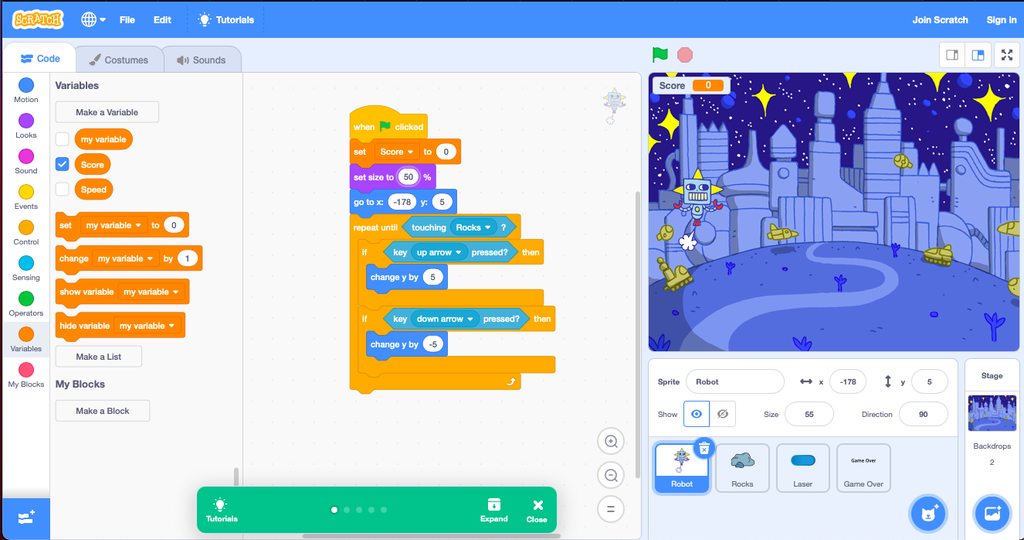
why the robot does not move up or down
when I press up and down keys
<@&267629731250176001>
<@&267628507062992896>
@dense hare
 jaunty fern
@modest plover Please refrain from pinging random staff
jaunty fern
This doesn't seem related to Python too. Asking in off-topic would be better.
modest plover
thank you
 wraith hemlock
can someone send the pygames file to me pls
 lime furnace
what do you think on pygame vs the raylib binding in python or maybe jsut c++ raylib?
 jade owl
How would someone go about coding in freecell?
I understand how I'd code the tableaus and rules for cells and card movement, but my main question is
How are seeds determined?
Like, would someone have to code in every possible arragement and give it a seed?
wraith hemlock
which python game engine is good?
real solar
import pygame
import pygame_widgets as pw
pygame.init()
bg = "bg.jpeg"
BLACK = (0, 0, 0)
window = pygame.display.set_mode((1000,600))
running = True
background = pygame.image.load('data/pictures/bg.jpeg')
font = pygame.font.SysFont(None, 24)
img = font.render('hello', True, BLACK)
rect = img.get_rect()
window.blit(img, (20, 20))
while running:
    pygame.display.flip()
    background_scaled = pygame.transform.scale(background,(1000,600))
    light_gray = (135,206,235)
    window.fill(light_gray)
    pygame.draw.rect(img, BLACK, rect, 1)
    #window.blit(background_scaled,(0,0))
    for event in pygame.event.get():
        if event.type == pygame.QUIT:
            running = False
i can't see the text :c
drowsy rampart
you should render it
font.render(text, antialiasing(1 or 0), color tuple)
and then blit
real solar
got it
how can i use a font that i downloaded from the internet in my pygame game
it's a .otf file :c
potent ice
Can always try to load it using Font but I have no idea what formats they support. The docs mention truetype and freetype
 foggy moss
Hey guys I need help with a pygame project I’m doing
tranquil girder
cool
olive parcel
@blissful depot fwiw, an enumeration is basically just a collection of different, related, constants.
 wary locust
real solar
how can i make my camera follow my player
wary locust
real solar
how can i make my camera follow my player
This is quite hard to answer as it strongly depends on how does your game work. If you have something really simple, the just instead of moving your character move everything else. If your game gets complex, you should keep your own position of every object, and in some frame then render all objects that can be seen in that frame but positioned relatively to the player/camera position.
 snow hill

A game by Jerome Sentex (Wizital)
Source code : https://github.com/harfang3d/game-winter-z
Reimplented in Python with HARFANG 3D.
 warm drum
true dagger
true dagger
Halllllo
warm drum
true dagger
true dagger
Halllllo
Guys!
 shell crane
first message in here noice
true dagger
Kind of rude but nm
 untold lodge
it's fine
blissful depot
true dagger
Kind of rude but nm
How?
drowsy rampart
Tech With Tim pygame tutorials are so amazing
 analog barn
Class inheritance is like black magic but mmm it feels good to use this dark power ```py
class MenuArea(Rect, Group):
"""
An object that can be be used to group sprites together and position them
within a rectangle on the menu. The rectangle is initiated with a size
parameter, which should be a tuple containing width and height values.
"""
def init(self, size, *sprites):
Rect.init(self, 0, 0, *size)
Group.init(self, *sprites)
sololearn teaches oop awfuly, but very good at explaining everything else. I have to learn oop again
analog barn
I have the book Python Crash Course, I have never even made anything like this before, that book really unlocked something in my brain as far as OOP goes. Biig pycoder toolkit gains
 dusky jetty
do you guys know about the ursina engine
potent ice
dusky jetty
do you guys know about the ursina engine
Yes, it's based on Panda3D. If you search in this channel you will find discussions about it 🙂
real solar
can someone help me i need help making my charecter follow the player
 pine forge
@real solar what library?
pine forge
@real solar i mean i can try my best but i dont really know pygame
real solar
okay cool
import pygame
import pygame.freetype
import pygame_widgets as pw
from pygame.locals import *
import time


def player(window, x, y):
    window.blit(bob, (x, y))

#K_w = pygame.key.key_code("w")
#K_w = pygame.key.key_code("a")
#K_w = pygame.key.key_code("s")
#K_w = pygame.key.key_code("d")
pygame.init()
FPS = 60
BLACK = (250, 250, 250)
window = pygame.display.set_mode((1000, 600))
bob = pygame.image.load('data/pictures/bob.png')
running = True
background = pygame.image.load('data/pictures/bg.jpeg')
background_scaled = pygame.transform.scale(background, (1000, 600))
light_gray = (135, 206, 235)  # (250,250,250)
font = pygame.font.Font("data/fonts/EvilEmpire-4BBVK.ttf", 95)
img = font.render('Score : ', True, BLACK)
rect = img.get_rect()

pygame.draw.rect(img, BLACK, rect, 1)
x = 0
y = 400
while running:

    for event in pygame.event.get():
        if event.type == pygame.QUIT:
            running = False

    keys = pygame.key.get_pressed()

    if keys[K_w] and y >= 0:
        y -= 7

    if keys[K_a] and x >= 0:
        x -= 7

    if keys[K_s] and y <= 390:
        y += 7

    if keys[K_d] and x <= 580:
        x += 7

    window.fill(light_gray)
    window.blit(bob, (x, y))
    window.blit(img, (20, 20))

    pygame.display.flip()
:c
my charecter = bob
pine forge
wait what is the difference between character and player
drowsy rampart
How to disable keyboard in pygame when I press mouse?
real solar
wdym @pine forge
pine forge
real solar
can someone help me i need help making my charecter follow the player
whats the difference between the two
probably a dumb question
pine forge
i mean
take a look at this
Stack Overflow
I have 50 alien sprites that I want to follow the player, but first I want a camera to follow the player wherever he goes.
I had this working in a old game, however in my old game I did not use c...
real solar
i don't understand :c
drowsy rampart
if you want attach camera to the player "make world move around you"
real solar
how? move everything as the player moves
drowsy rampart
yes, player stay, world move
real solar
how/
pine forge
drowsy rampart
How to disable keyboard in pygame when I press mouse?
lmao its embarrassing that i just google search xdd https://stackoverflow.com/questions/22218174/disabling-mouse-events-pygame
Stack Overflow
I have a game made that, when you die, a message appears reading "game over. Press any key to play again."
However, this counts mouse input as I have no if statements in my for loop. I was wonderi...
hope it helps at least
drowsy rampart
I tried set_blocked, seems I do things wrong
pine forge
real solar
```py
import pygame
import pygame.freetype
import pygame_widgets as pw
from pyga...
ill try to run it by myself
pine forge
oh
real solar
mhm
pine forge
but ill try
real solar
cool!
real solar
ill give you the pics 🙂
frank fieldBOT
Hey @real solar!
It looks like you tried to attach file type(s) that we do not allow (.ttf). We currently allow the following file types: .gif, .jpg, .jpeg, .mov, .mp4, .mpg, .png, .mp3, .wav, .ogg, .webm, .webp, .flac, .m4a.
Feel free to ask in #community-meta if you think this is a mistake.
real solar
:c
pine forge
i will try to run it


 drowsy rampart
I fixed it
real solar
cool
pine forge
yeah was about to do that
real solar
mhm
real solar
okay cool
real solar
yes
real solar
i do
 vivid crag
Im in game development bshehegdhdgdg
real solar
yes
hi!
so @vivid crag you gave me the code yesterday but can you make it so the jump which is 'w' is jump and not bob turning into jesus
i tried a lot of shit nothing worked :c
vivid crag
Oh, some jump code? Lemme get some rq
real solar
ty
real solar
pine forge
do you have a cyan bg as well?
i do :c
real solar
f
real solar
okay cool
pine forge
but i have a fundamental question
is camera a thing in pygame?
or is it just an illusion
pine forge
so its just moving the environemnt?
real solar
ya know when your in a car
and you think
am i moving or is the other persona moving
pine forge
you shouldnt really move the player but only the backgrouond items
real solar
it's like that
pine forge
real solar
am i moving or is the other persona moving
yeah i know
real solar
not yet
pine forge
there is just a solid bg
pine forge
xd
vivid crag
    if keys[pygame.K_SPACE]:
        isJump = True

    if not(isJump): # Checks is user is not jumping
        if keys[pygame.K_SPACE]:
            isJump = True
    else:
        if jumpCount >= -10:
            y -= (jumpCount * abs(jumpCount)) * 0.5
            jumpCount -= 1
        else: # This will execute if our jump is finished
            jumpCount = 10
            isJump = False
go assign isJump to true and jumpCount to 10 outside the while loop
 real solar
?
vivid crag
vivid crag
```py
if keys[pygame.K_SPACE]:
isJump = True
if not(isJump)...
@real solar here ye go, put this somehwere
vivid crag
turn it to K_w if u want
dawn quiver
how i can fix it
real solar
NameError: name 'isJump' is not defined
try removing the .py?
real solar
dawn quiver
did you try to install a .py file
pine forge
@real solar maybe make a function that moves all bg objects
pine forge
probably a dumb idea
vivid crag
real solar
```
NameError: name 'isJump' is not defined
```
put this above the while:
isJump = False
jumpCount = 10
i peed
vivid crag
ah yes
real solar
prays to our god Peculiarination
vivid crag
im a god now
real solar
yes
@vivid crag is there a way to calcualate
the distance bob moves in one directions
so let's say i have a count var
right and i need to store the distance big bobby moves towards the right
vivid crag
so u want to count how much former-jesus moves in one direction?
real solar
yes
only right not left because then user will be like
a and d key go brrrrrrr
ez score
vivid crag
if keys[pygame.K_d]:
  #weird movement code
  count += 4
and just do the same thing but u deduct the number when pressing a
real solar
i did something
import pygame
import pygame.freetype
import pygame_widgets as pw
from pygame.locals import *
import time
import math
import sys
import random


def player(window, x, y):
    window.blit(bob, (x, y))

#K_w = pygame.key.key_code("w")
#K_w = pygame.key.key_code("a")
#K_w = pygame.key.key_code("s")
#K_w = pygame.key.key_code("d")
pygame.init()
FPS = 60
BLACK = (250, 250, 250)
window = pygame.display.set_mode((1000, 600))
bob = pygame.image.load('data/pictures/bob.png')
running = True
background = pygame.image.load('data/pictures/bg.jpeg')
background_scaled = pygame.transform.scale(background, (1000, 600))
light_gray = (135, 206, 235)  # (250,250,250)
font = pygame.font.Font("data/fonts/EvilEmpire-4BBVK.ttf", 95)
count = 0
img = font.render(f'Score : {count} ', True, BLACK)
rect = img.get_rect()

pygame.draw.rect(img, BLACK, rect, 1)
x = 0
y = 400
clock = pygame.time.Clock()
isJump = False
jumpCount = 10

while running:
    clock.tick(FPS)
    for event in pygame.event.get():
        if event.type == pygame.QUIT:
            running = False

    keys = pygame.key.get_pressed()

    if keys[pygame.K_SPACE]:
        isJump = True

    if not (isJump):  # Checks is user is not jumping
        if keys[pygame.K_SPACE]:
            isJump = True
    else:
        if jumpCount >= -10:
            y -= (jumpCount * abs(jumpCount)) * 0.5
            jumpCount -= 1
        else:  # This will execute if our jump is finished
            jumpCount = 10
            isJump = False


    if keys[K_a] and x >= 0:
        x -= 7


    if keys[K_d] and x <= 580:
        x += 7
        count = count + 1

    window.fill(light_gray)
    window.blit(bob, (x, y))
    window.blit(img, (20, 20))

    pygame.display.flip()
count += 1 does the same thing but sure
vivid crag
u deduct 1 from count when pressing a
real solar
ah
the score counter just
stays at 0
:c
do i need to
render the font
at the end
:c
yes it works
very weird tho
vivid crag
import pygame
import pygame.freetype
import pygame_widgets as pw
from pygame.locals import *
import time
import math
import sys
import random


def player(window, x, y):
    window.blit(bob, (x, y))

#K_w = pygame.key.key_code("w")
#K_w = pygame.key.key_code("a")
#K_w = pygame.key.key_code("s")
#K_w = pygame.key.key_code("d")
pygame.init()
FPS = 60
BLACK = (250, 250, 250)
window = pygame.display.set_mode((1000, 600))
bob = pygame.image.load('data/pictures/bob.png')
running = True
background = pygame.image.load('data/pictures/bg.jpeg')
background_scaled = pygame.transform.scale(background, (1000, 600))
light_gray = (135, 206, 235)  # (250,250,250)
font = pygame.font.Font("data/fonts/EvilEmpire-4BBVK.ttf", 95)
count = 0
img = font.render(f'Score : {count} ', True, BLACK)
rect = img.get_rect()

pygame.draw.rect(img, BLACK, rect, 1)
x = 0
y = 400
clock = pygame.time.Clock()
isJump = False
jumpCount = 10

while running:
    clock.tick(FPS)
    for event in pygame.event.get():
        if event.type == pygame.QUIT:
            running = False

    keys = pygame.key.get_pressed()

    if keys[pygame.K_SPACE]:
        isJump = True

    if not (isJump):  # Checks is user is not jumping
        if keys[pygame.K_SPACE]:
            isJump = True
    else:
        if jumpCount >= -10:
            y -= (jumpCount * abs(jumpCount)) * 0.5
            jumpCount -= 1
        else:  # This will execute if our jump is finished
            jumpCount = 10
            isJump = False


    if keys[K_a] and x >= 0:
        x -= 7


    if keys[K_d] and x <= 580:
        x += 7
        count = count + 1

    window.fill(light_gray)
    window.blit(bob, (x, y))
    img = font.render(f'Score : {count} ', True, BLACK)
    rect = img.get_rect()
    window.blit(img, (20, 20))

    pygame.display.flip()
this
real solar
it increaser the font so quick
vivid crag
o whoa u did the same thing
vivid crag
yay
real solar
it increaese the score very quick tho
drowsy rampart
I can make setting menu and adjust pygame's fps thing right?
vivid crag
you can
real solar
yea
just alter the FPS var
also
FPS=60 and clock= pygame.time.Clock() then clock.tick(FPS)
:c
nice score = kool
vivid crag
yes
real solar
now time to figure out while i break the fuck out of my code on how to move the camera
ah well get to that later
now
time to try something
is there a way to delete bob
like
bob.kill
vivid crag
add some if statement
real solar
i did
vivid crag
above ur while: dead = False
real solar
if health == 0:
vivid crag
replace this: window.blit(bob, (x, y))
with this
if health != 0:
  window.blit(bob,(x,y))
that way, it only draws former-jesus when his health isnt 0
real solar
import pygame
import pygame.freetype
import pygame_widgets as pw
from pygame.locals import *
import time
import math
import sys
import random


def player(window, x, y):
    window.blit(bob, (x, y))

#K_w = pygame.key.key_code("w")
#K_w = pygame.key.key_code("a")
#K_w = pygame.key.key_code("s")
#K_w = pygame.key.key_code("d")
pygame.init()
FPS = 60
BLACK = (250, 250, 250)
window = pygame.display.set_mode((1000, 600))
bob = pygame.image.load('data/pictures/bob.png')
running = True
background = pygame.image.load('data/pictures/bg.jpeg')
background_scaled = pygame.transform.scale(background, (1000, 600))
light_gray = (135, 206, 235)  # (250,250,250)
font = pygame.font.Font("data/fonts/EvilEmpire-4BBVK.ttf", 95)
count = 0
health = 100
x = 0
y = 400
clock = pygame.time.Clock()
isJump = False
jumpCount = 10
dead = False
while running:
    clock.tick(FPS)
    for event in pygame.event.get():
        if event.type == pygame.QUIT:
            running = False

    keys = pygame.key.get_pressed()


    if keys[pygame.K_SPACE]:
        isJump = True

    if not (isJump):  # Checks is user is not jumping
        if keys[pygame.K_SPACE]:
            isJump = True
    else:
        if jumpCount >= -10:
            y -= (jumpCount * abs(jumpCount)) * 0.5
            jumpCount -= 1
        else:  # This will execute if our jump is finished
            jumpCount = 10
            isJump = False


    if keys[K_a] and x >= 0:
        x -= 7
        count -= 1


    if keys[K_d] and x <= 580:
        x += 7
        count += 1

    window.fill(light_gray)
    if health != 0:
        window.blit(bob, (x, y))
    img = font.render(f'Score : {count} ', True, BLACK)
    rect = img.get_rect()

    pygame.draw.rect(img, BLACK, rect, 1)
    window.blit(img, (20, 20))

    pygame.display.flip()
????
vivid crag
yes
real solar
nice
now i make enemy
how does one detect colission
wait lemme make
bad bob
bob's evil bro


 vivid crag
what it
vivid crag
show code
vivid crag
ooo yay
real solar
i didn't get it
import pygame
import pygame.freetype
import pygame_widgets as pw
from pygame.locals import *
import time
import math
import sys
import random


def player(window, x, y):
    window.blit(bob, (x, y))

#K_w = pygame.key.key_code("w")
#K_w = pygame.key.key_code("a")
#K_w = pygame.key.key_code("s")
#K_w = pygame.key.key_code("d")
pygame.init()
FPS = 60
BLACK = (250, 250, 250)
window = pygame.display.set_mode((1000, 600))
bob = pygame.image.load('data/pictures/bob.png')
bad_bob = pygame.image.load('data/pictures/bad.png')
running = True
background = pygame.image.load('data/pictures/bg.jpeg')
background_scaled = pygame.transform.scale(background, (1000, 600))
light_gray = (135, 206, 235)  # (250,250,250)
font = pygame.font.Font("data/fonts/EvilEmpire-4BBVK.ttf", 95)
count = 0
health = 100
x = 0
y = 400
x2 = 0
y2 = 500

clock = pygame.time.Clock()
isJump = False
jumpCount = 10
dead = False
while running:
    clock.tick(FPS)
    for event in pygame.event.get():
        if event.type == pygame.QUIT:
            running = False

    keys = pygame.key.get_pressed()


    if keys[pygame.K_SPACE]:
        isJump = True

    if not (isJump):  # Checks is user is not jumping
        if keys[pygame.K_SPACE]:
            isJump = True
    else:
        if jumpCount >= -10:
            y -= (jumpCount * abs(jumpCount)) * 0.5
            jumpCount -= 1
        else:  # This will execute if our jump is finished
            jumpCount = 10
            isJump = False


    if keys[K_a] and x >= 0:
        x -= 7
        count -= 1


    if keys[K_d] and x <= 580:
        x += 7
        count += 1

    window.fill(light_gray)
    if health != 0:
        window.blit(bob, (x, y))
    window.blit(bad_bob , (x2 , y2))
    img = font.render(f'Score : {count} ', True, BLACK)
    rect = img.get_rect()

    pygame.draw.rect(img, BLACK, rect, 1)
    window.blit(img, (20, 20))

    pygame.display.flip()
import pygame
import pygame.freetype
import pygame_widgets as pw
from pygame.locals import *
import time
import math
import sys
import random


def player(window, x, y):
    window.blit(bob, (x, y))

#K_w = pygame.key.key_code("w")
#K_w = pygame.key.key_code("a")
#K_w = pygame.key.key_code("s")
#K_w = pygame.key.key_code("d")
pygame.init()
FPS = 60
BLACK = (250, 250, 250)
window = pygame.display.set_mode((1000, 600))
bob = pygame.image.load('data/pictures/bob.png')
bad_bob = pygame.image.load('data/pictures/bad.png').convert_alpha()
running = True
background = pygame.image.load('data/pictures/bg.jpeg')
background_scaled = pygame.transform.scale(background, (1000, 600))
light_gray = (135, 206, 235)  # (250,250,250)
font = pygame.font.Font("data/fonts/EvilEmpire-4BBVK.ttf", 95)
count = 0
health = 100
x = 0
y = 400
x2 = 0
y2 = 500

clock = pygame.time.Clock()
isJump = False
jumpCount = 10
dead = False
while running:
    clock.tick(FPS)
    for event in pygame.event.get():
        if event.type == pygame.QUIT:
            running = False

    keys = pygame.key.get_pressed()


    if keys[pygame.K_SPACE]:
        isJump = True

    if not (isJump):  # Checks is user is not jumping
        if keys[pygame.K_SPACE]:
            isJump = True
    else:
        if jumpCount >= -10:
            y -= (jumpCount * abs(jumpCount)) * 0.5
            jumpCount -= 1
        else:  # This will execute if our jump is finished
            jumpCount = 10
            isJump = False


    if keys[K_a] and x >= 0:
        x -= 7
        count -= 1


    if keys[K_d] and x <= 580:
        x += 7
        count += 1

    window.fill(light_gray)
    if health != 0:
        window.blit(bob, (x, y))
    window.blit(bad_bob , (x2 , y2))
    img = font.render(f'Score : {count} ', True, BLACK)
    rect = img.get_rect()

    pygame.draw.rect(img, BLACK, rect, 1)
    window.blit(img, (20, 20))

    pygame.display.flip()
@real solar try dis
real solar
uhh
i did thid
import pygame
import pygame.freetype
import pygame_widgets as pw
from pygame.locals import *
import time
import math
import sys
import random


def player(window, x, y):
    window.blit(bob, (x, y))

#K_w = pygame.key.key_code("w")
#K_w = pygame.key.key_code("a")
#K_w = pygame.key.key_code("s")
#K_w = pygame.key.key_code("d")
pygame.init()
FPS = 60
BLACK = (250, 250, 250)
window = pygame.display.set_mode((1000, 600))
bob = pygame.image.load('data/pictures/bob.png')
bad_bob = pygame.image.load('data/pictures/bad.png')
running = True
background = pygame.image.load('data/pictures/bg.jpeg')
background_scaled = pygame.transform.scale(background, (1000, 600))
light_gray = (135, 206, 235)  # (250,250,250)
font = pygame.font.Font("data/fonts/EvilEmpire-4BBVK.ttf", 95)
count = 0
health = 100
x = 0
y = 400
x2 = 0
y2 = -1

clock = pygame.time.Clock()
isJump = False
jumpCount = 10
dead = False
while running:
    clock.tick(FPS)
    for event in pygame.event.get():
        if event.type == pygame.QUIT:
            running = False

    keys = pygame.key.get_pressed()


    if keys[pygame.K_SPACE]:
        isJump = True

    if not (isJump):  # Checks is user is not jumping
        if keys[pygame.K_SPACE]:
            isJump = True
    else:
        if jumpCount >= -10:
            y -= (jumpCount * abs(jumpCount)) * 0.5
            jumpCount -= 1
        else:  # This will execute if our jump is finished
            jumpCount = 10
            isJump = False


    if keys[K_a] and x >= 0:
        x -= 7
        count -= 1


    if keys[K_d] and x <= 580:
        x += 7
        count += 1

    window.fill(light_gray)
    if health != 0:
        window.blit(bob, (x, y))
    window.blit(bad_bob , (x2 , y2))
    img = font.render(f'Score : {count} ', True, BLACK)
    rect = img.get_rect()

    pygame.draw.rect(img, BLACK, rect, 1)
    window.blit(img, (20, 20))

    pygame.display.flip()
did tath worc
real solar
yes
import pygame
import pygame.freetype
import pygame_widgets as pw
from pygame.locals import *
import time
import math
import sys
import random


def player(window, x, y):
    window.blit(bob, (x, y))

#K_w = pygame.key.key_code("w")
#K_w = pygame.key.key_code("a")
#K_w = pygame.key.key_code("s")
#K_w = pygame.key.key_code("d")
pygame.init()
FPS = 60
BLACK = (250, 250, 250)
window = pygame.display.set_mode((1000, 600))
bob = pygame.image.load('data/pictures/bob.png')
bad_bob = pygame.image.load('data/pictures/bad.png')
running = True
background = pygame.image.load('data/pictures/bg.jpeg')
background_scaled = pygame.transform.scale(background, (1000, 600))
light_gray = (135, 206, 235)  # (250,250,250)
font = pygame.font.Font("data/fonts/EvilEmpire-4BBVK.ttf", 95)
count = 0
health = 100
x = 0
y = 400
x2 = 550
y2 = 400

clock = pygame.time.Clock()
isJump = False
jumpCount = 10
dead = False
while running:
    clock.tick(FPS)
    for event in pygame.event.get():
        if event.type == pygame.QUIT:
            running = False

    keys = pygame.key.get_pressed()


    if keys[pygame.K_SPACE]:
        isJump = True

    if not (isJump):  # Checks is user is not jumping
        if keys[pygame.K_SPACE]:
            isJump = True
    else:
        if jumpCount >= -10:
            y -= (jumpCount * abs(jumpCount)) * 0.5
            jumpCount -= 1
        else:  # This will execute if our jump is finished
            jumpCount = 10
            isJump = False


    if keys[K_a] and x >= 0:
        x -= 7
        count -= 1


    if keys[K_d] and x <= 580:
        x += 7
        count += 1

    window.fill(light_gray)
    if health != 0:
        window.blit(bob, (x, y))
    window.blit(bad_bob , (x2 , y2))
    img = font.render(f'Score : {count} ', True, BLACK)
    rect = img.get_rect()

    pygame.draw.rect(img, BLACK, rect, 1)
    window.blit(img, (20, 20))

    pygame.display.flip()
this worked
also
how can i make bob not go throught bad_bob
he can go through him rn
also i made bad_bob a rat
vivid crag
ok so
 vivid crag
real solar
also i made bad_bob a rat
vivid crag
real solar
also i made bad_bob a rat
you what
vivid crag
    if keys[K_a] and x >= 0 and x <= x2 and x >= 1000-x2:
        x -= 7
        count -= 1


    if keys[K_d] and x <= 580 and x >= x2 and x <= 1000-x2:
        x += 7
        count += 1
o wait i flipped the thingers
real solar
thingers
vivid crag
    if keys[K_a] and x >= 0 and x >= x2 and x <= 1000-x2:
        x -= 7
        count -= 1


    if keys[K_d] and x <= 580 and x <= x2 and x >= 1000-x2:
        x += 7
        count += 1
Pasting large amounts of code
If your code is too long to fit in a codeblock in discord, you can paste your code here:
https://paste.pydis.com/
After pasting your code, save it by clicking the floppy disk icon in the top right, or by typing ctrl + S. After doing that, the URL should change. Copy the URL and post it here so others can see it.
real solar
yeah!
yesss
also @vivid crag WANT TO BECOME PARTENRS IN THIS GASME
WE WILL CALL IT BOB'S WORLD
OR SOMETHING
IDK
I KNOW SOMEONE WHO WILL MAKE ACTUALLY ART
AND NOT A FUCKING RAT.PNG IMAGE I GOT FROM GOOGLE
FUCK MY CAP'S LOCK IS STUCL AGAIN
vivid crag
now for hitboxes
real solar
vivid crag
now for hitboxes
yeah!
vivid crag
just change the weird comment to wutevr u want
vivid crag
sure
 grand imp
ok
what i was trying to tell you over the noise in the other channel is that this is a lot more complicated a problem than you initially thought.
if you are trying to do an approach of just blindly intersecting arbitrarily shaped polygons that are rendered to tiles, that's partly the same as rendering polygons to a bitmap
and then doing a logical AND over two bitmaps
does that make sense?
 chilly coral
uhh
chilly coral
i use photoshop
grand imp
lemme do a really quick easy diagram
so you have two layers with shapes in white, each set to 50% opacity, right? on a black background
partially overlap them
the area that is 100% white is the collision
i can draw that if you want
chilly coral
hold on
grand imp
but i think you can imagine it pretty easy
chilly coral
opening photoshop
grand imp
oh no
chilly coral
ahh yes
chilly coral
?

 chilly coral
k
grand imp
the problem is that when you're trying to let the user do arbitrary polygons, you have to decide how to draw the white area of each
does that make sense so far?
chilly coral
yes
grand imp
now, there are multiple approaches you can take to this
chilly coral
wait my game engine doesnt work like that
grand imp
well then why are there tiles
chilly coral
you give it an ascii drawing thing, it will draw it
grand imp
each tile is a character space on screen, right?
chilly coral
grand imp
each tile is a character space on screen, right?
yes
grand imp
ok back up because i think we have a misunderstanding of purpose right now