#game-development
1 messages · Page 78 of 1
 dawn quiver
 crisp junco
dawn quiver
Btw is pygame exe does only work in windows?
crisp junco
dawn quiver
Btw is pygame exe does only work in windows?
Never tried using my .exe on different OS's, so I might not be right to ask this
Though I think it should work on different OS
dawn quiver
Sorry one more question can I use pygame and kivy? At the same time
crisp junco
dawn quiver
Sorry one more question can I use pygame and kivy? At the same time
I've seen some guys using pygame with tkinter(I don't know abt kivy), though I've never myself used both of them together
dawn quiver
Thanks
 lapis dawn
Which big game has been done with python?
 low shadow
 tawny abyss
I did a thing
tawny abyss
I did a thing
Ooooooooh nice
 carmine vapor
Can I have some help with some Pygame code?
The basket is not showing up for some reason
import pygame
import random
import math

# initialize pygame
pygame.init()

# create screen
screen = pygame.display.set_mode((800, 600))

# title and logo
pygame.display.set_caption("Apple Picker")
icon = pygame.image.load('apple_logo.png')
pygame.display.set_icon(icon)

# Basket
basket = pygame.image.load('basket.png')
basketX = 370
basketY = 480


# basketX_change = 0

def basket():
    screen.blit(basket, (basketX, basketY))


# game loop
running = True
while running:

    screen.fill((217, 230, 255))

    for event in pygame.event.get():
        if event.type == pygame.QUIT:
            running = False


    basket()
    pygame.display.update()
this is my code and I can't figure out why my basket isn't showing up
 torn flume
    for event in pygame.event.get():
        if event.type == pygame.KEYDOWN:
            if event.key == pygame.K_LEFT:
                xPos = xPos -5
            if event.key == pygame.K_RIGHT:
                xPos = xPos + 5
    screen.blit(Atla_Idle, (xPos, yPos))
    pygame.display.update()
How do i make it so i dont have this like clone thing. pls help, i've been stuck here forever. ;-;

pls ping me if you can help please. 🙏
tawny abyss
@torn flume You are only updating the character
You need to update your back drop too
torn flume
tawny abyss
You need to update your back drop too
but i never set a background
tawny abyss
Well that sounds like a problem now doesn't it
torn flume
oh, so what would the code be to update the backdrop
tawny abyss
(Whatever the name of your map is).fill(BLACK)
screen = pygame.display.set_mode((WIDTH, HEIGHT))
You should have a line like this somewhere
And whatever you named it
Call the fill function for it in your update function
torn flume
this is my top code
 tawny abyss
Okay good just do screen.fill(0,0,0)
torn flume
ok thanks
says black is not defined, (sorry for the inconvenience im a new programmer)
torn flume
tawny abyss
Okay good just do screen.fill(0,0,0)
so do i do .fill(BLACK) or .fill(0,0,0)
torn flume
 tawny abyss
Put another set of brackets around it or do "black"
torn flume
it still clones. ;-;
tawny abyss
Show code
torn flume
 tawny abyss
My guy
You update it ONCE in your entire code
Do it in your update function
Everytime your character updates
The screen should too
torn flume
oh ok
im dumb
the code under that is text engine, i have it updating. ;-;

@tawny abyss so is there a code for background update, and one for sprite update, or are they the same
torn flume
nvrmind i figured it out on my own
 whole coyote
lapis dawn
Which big game has been done with python?
whole coyote
lapis dawn
Which big game has been done with python?
ToonTown.
 blissful depot
is there a good tutorial for Pygame RPG?
because I want to do an RPG style(ish) game
mostly just the top-down movement
but yeah
 potent ice
tile based?
blissful depot
sure
potent ice
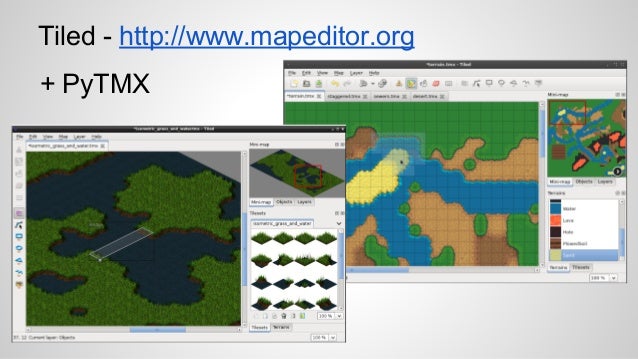
https://github.com/bitcraft/pytmx + the Tiled editor might be a good start
 potent ice
 blissful depot
nice!
 potent ice
No idea. I'm sure there are some tutorials for pytmx that can be helpful.
blissful depot
ok
potent ice
Tiled maps have layers. You can for example create a layer for teleport locations placing some named object. It will have a position in the world
Fetch information about these objects in your game code and use them.
There is a lot of tricks with these maps
Pretty sure it has some collision support
@blissful depot first hit on google : https://www.trccompsci.online/mediawiki/index.php/PyGame_RPG
Might be better ones out there
dawn quiver
I finally got it working. Sorry I never came back. I reset my PC an redone everything cause it was a mess.
 whole coyote
It's a known problem with packagers for Python.
 ocean belfry
uhmm
wdym by!
android app
??
@mental lichen
u mean game development sdk!
then unity for free
 oak pier
Which is one good gaming library for getting young kids involved in cpding python?
 mental lichen
Unity is not in mobile
mental lichen
oak pier
Which is one good gaming library for getting young kids involved in cpding pytho...
Are u a young kid? LoL
oak pier
ig i am 16 rn
ocean belfry
bro! that was unnecessary @mental lichen
oak pier
i have worked with java but first time in python
mental lichen
Just reliving stress trying to make u happy :-(
ocean belfry
oak pier
Which is one good gaming library for getting young kids involved in cpding pytho...
python is widely used for 2d game development and a new 3d engine ia just arrived on the markett! U can wait avfew months after all the bug fixes u may try it
ocean belfry
mental lichen
Just reliving stress trying to make u happy :-(
what are u asking a game development sdk for creating games on android
?
mental lichen
Good gaming engine which can run on mobile
ocean belfry
oak pier
i have worked with java but first time in python
Its wud be really ez if u have past exp in java
oak pier
I also intend to teach my classmates and they are probably not familiar with coding at all
ocean belfry
mental lichen
Good gaming engine which can run on mobile
there is no game engine for android!! u can create a game on unity and publish it on android
oak pier
Was looking for something simple to start
mental lichen
ocean belfry
there is no game engine for android!! u can create a game on unity and publish i...
There are some
oak pier
Discord should have slack like thread feature
dawn quiver
hey guys
I have a lives counter
displaying on left top
code is like this
def show_lives(x,y):
    lives = font.render("Lives:" + str(lives_value), True, (34,139,34))
    screen.blit(lives, (x,y))
if lives_value == 0:
    playerX == 2000
    enemy1Y == 2000
    enemy2Y == 2000
    enemy3Y == 2000
    enemy4Y == 2000
    enemy5Y == 2000
now if I want to stop this from appearing how do I do it?
crisp junco
dawn quiver
hey guys
I have a lives counter
displaying on left top
code is like this
```
def...
What I used to was that I changed the x,y coordinates to something like 10000,40000 so that it doesn't appear in the main screen, though this isn't the best practice.
live_x = your_val
live_y = your_val
show_lives(live_x,live_y)
if died:
  live_x = 10000
  live_y = 40000
btw the syntax doesn't looks correct
if lives_value == 0:
'''
Why are you using the == operator? It's used to check if two things are equal. I suppose you want to use = instead of ==
'''
    playerX = 2000 #Should be like this
    enemy1Y = 2000
    enemy2Y = 2000
    enemy3Y = 2000
    enemy4Y = 2000
    enemy5Y = 2000
I want to do that but the problem is that the boundary function stops it from going out
instead it just stays at the edge of the screen
and it looks really weird
     #boundaries
    if playerY <= 0:
        playerY = 0
    elif playerY >= 536:
        playerY = 536
```this one
is there a way to stop this function whenever the lives==0 is achieved?
crisp junco
dawn quiver
```
#boundaries
if playerY <= 0:
playerY = 0
elif playerY >...
You can do something like
if lives_value != 0
   #boundaries
    if playerY <= 0:
        playerY = 0
    elif playerY >= 536:
        playerY = 536
lemme know if that doesn't work
dawn quiver
omg thank you so much it worked
I was stuck in this for so long
dont know why I didnt think of that
but the problem is that when the game ends, only the player drops out
not the enemies
dawn quiver
ok
 frank fieldBOT
Hey @dawn quiver!
Uh-oh! It looks like your message got zapped by our spam filter. We currently don't allow .txt attachments, so here are some tips to help you travel safely:
• If you attempted to send a message longer than 2000 characters, try shortening your message to fit within the character limit or use a pasting service (see below)
• If you tried to show someone your code, you can use codeblocks
(run !code-blocks in #bot-commands for more information) or use a pasting service like:
crisp junco
DM me
dawn quiver
is react-native the best thing to use to make a game for the app store ? I was considering using unity too
 manic moth
hello, I'm just testing out multiplayer system in pygame. I have 2 scripts server and client. I'm just trying to move 2 squares , each controlled by 2 different people in the same LAN. I am using the rect class in this way in my client.py:
pygame.draw.rect(window, (50,70,50), (self.x, self.y, 50, 50))
But it always crashes as soon as I run a client. The error I get in client.py is Invalid rect argument. Can someone please help me with this.
potent ice
manic moth
hello, I'm just testing out multiplayer system in pygame. I have 2 scripts serve...
Quick glance on the docs it seems the 3rd argument is a Rect : https://www.pygame.org/docs/ref/draw.html#pygame.draw.rect
The error message is complaining about the rect argument specifically even (3rd argument)
potent ice
It expects a rect, but you are passing a tuple
manic moth
I have another project in which I use a tuple
and that works fine
it also accepts a tuple, if not a Rect object
potent ice
with the same pygame version?
manic moth
ummm
lemme check
yes, I didn't update my pygame library ever since I installed it
so, it's the same version, I'm sure
lemme paste the full code though
potent ice
Maybe this is something for the pygame community discord? I just follow the official api docs
manic moth
Thanks a lot
 visual island
potent ice
visual island
potent ice
Probably quite a few people, yes. Either directly or through Ursina
blissful depot
I might learn pygame zero
cuz it is a lot easier
especially since I'm not the best coder
but is it ok to talk about that here?
potent ice
Sure. It's simple enough
Another alternative is arcade. It's between pygame and pygame zero in difficulty and has lots of tutorials, examples and other resources.
 analog barn
hey everyone first day on pygame here, I LOVE IT. I am wondering if this function I made will work fast enough to use as a surface resizer for when the player is resizing the window? ```py
def scale(child_surface, comparison_surface, percentage):
"""scale the dimensions of a surface based on a percentage of
the height of a comparison surface. Preserves aspect ratio of
child."""
child_rect = child_surface.get_rect()
child_aspect_ratio = child_rect.width / child_rect.height
# this is the value that the rectangle will be scaled to
comparison_height = comparison_surface.get_height()
child_rect.height = percentage * comparison_height
child_rect.width = child_aspect_ratio * child_rect.height
# resize the child surface to its' scaled rectangle
child_surface =
pg.transform.scale(child_surface, child_rect.size)
return child_surface
Say if I had .... 100 + surfaces
 severe saffron
well it will be basically instant
you slightly overuse variables but that's just a style thing
although
hmm
i can't think of a faster way
i'd just try it out
analog barn
Ok, let me try...
severe saffron
if any of the surfaces are duplicates, you don't need to call it on the duplicates afaik
analog barn
Ohh I didn't know about duplicates, that could save a lot of processing power
 still pumice
guys i have a question if ya wouldnt mind answering
if you were to play a top down endless shooter what things would you like?
analog barn
safe-rooms where you can access an inventory, plan, take a breath etc would be a cool idea
If you were makign a big map
Oh and use monsters / PVE that makes the player need to move around in combat, like a zone that moves around and does damage to the player, or some sort of ranged attack
potent ice
It really depends on the scope of the project 😉
If it's a shooter I'd focus on the shooting part. Types of bullets/weapons/synergies vs various enemy types
analog barn
Ahh ok so I DON'T have to run my game at 1200 fps lol ```py
while True:
# tick game clock, set max frame rate
self.clock.tick(self.vars.max_fps)
# get seconds passed since last frame (delta time)
dt = self.clock.get_time() / 1000.0
        self._check_events()
        self.ship.move(dt)
        self._update_screen()
 white vector
I been trying to make 4 dimensional minesweeper, pretty much with brute force and kivy.
Is there a better way to iterate through surrounding cells in a bounded 4D matrix than:
for i in range(I-1,I+2):
 if 0<=i<W:
  for j in range(J-1,J+2):
   if 0<=j<X
    for k in range(K-1,K+2):
     if 0<=k<Y
      for l in range(L-1,L+2):
        if 0<=l<Z and [i,j,k,l]!=[I,J,K,L]: cell_data.update( process_cell(i, j, k, l, 'command') )
because 4D matrix processing looking clunky at this point and it's only gotta iterate through up to 80 cells, and i remember the zen of python telling me flat is better than nested...
don't judge my compact syntax, either, or my slight Horror Vacui style of coding
 wicked torrent
dawn quiver
wicked torrent
dawn quiver
how do i make a app in python
dawn quiver
You can either use kivy, tkinter or something...
crisp junco
dawn quiver
how do i make a app in python
Do you mean like converting .py to .exe?
dawn quiver
yes
crisp junco
dawn quiver
yes

Convert a .py to .exe in windows. Converting python files to executable's is fairly simple and we do this using pyinstaller. This method will work for one file or for multiple files that require dependencies such as images or other modules.
Python Location: C:\Users[user]\AppData\Local\Programs\Python
[user] should be replaced with your curre...
watch this
dawn quiver
crisp junco
https://www.youtube.com/watch?v=UZX5kH72Yx4
doesnt work for me
bruh
dawn quiver
ill try after sometime
u mean the pygame library zip and the python interpreter?
@crisp junco
crisp junco
No
dawn quiver
then what are the deps
crisp junco
Are you using any images in your game?
crisp junco
So is your game just code dependent ,ain't using you using anything extra like audio files,videos,images?
dawn quiver
no
crisp junco
ok
dawn quiver
pure pygame
dawn quiver
ill do it later am busy
crisp junco
ok
Here are the steps tho:
1. Open cmd
2. type pip install pyinstaller
3. type cd your_script_parent_folder_path (like C:\Game Folder)
4. type pyinstaller --onefile --windowed yourscriptname.py
 dawn quiver
crisp junco
Here are the steps tho:
```
1. Open cmd
2. type pip install pyinstaller
3. type ...
dawn quiver
crisp junco
Here are the steps tho:
```
1. Open cmd
2. type pip install pyinstaller
3. type ...
ok
dawn quiver
dawn quiver
error
crisp junco
dawn quiver
Oh I see, I guess you're going into the build folder, you needn't go there; Go to the dist folder therein you'll find an .exe just run it
 rugged locust
hi
dawn quiver
crisp junco
Oh I see, I guess you're going into the build folder, you needn't go there; Go t...
ok
bruh

Bad image error
dawn quiver
crisp junco
Send the code <@456226577798135808>
bro???
crisp junco
Yeah I'll try making an exe of it
dawn quiver
ok
crisp junco
If you want an icon for the game then download an icon.ico(Note the .ico extension)
Type pyinstaller --onefile --windowed --icon=icon.ico scriptname.py (Make sure the icon is in the same folder as of script)
crisp junco
dawn quiver
Thank you 😃
You're welcome 🙂
crisp junco
Nope
What's happening?
Windows has a habit of detecting any unverified app as a trojan
crisp junco
@dawn quiver don't worry it isn't a trojan you can check about it in google
Fine, as you wish
crisp junco
dawn quiver
I told about ur exe
It's not specific to my exe
crisp junco
you're welcome
analog barn
Any reason why I would be getting hung up for about 30 seconds on pygame.init()? It was working instantly last night, now it takes almost 30 seconds to get past pg.init() (the first line of code in the game.)
After that it works normally 
analog barn
pygame is a 2d game engine for python, and there are lot's of way to convert to exe, here's one https://www.geeksforgeeks.org/convert-python-script-to-exe-file/

GeeksforGeeks
A Computer Science portal for geeks. It contains well written, well thought and well explained computer science and programming articles, quizzes and practice/competitive programming/company interview Questions.
BTW I fixed the init() I had to add exlusions in my antivirus for the Python install, and the project folder
now it works again stangely
oh wait nvm it's broken again LOL
import pygame
import time
start = time.time()
pygame.init()
print(f"Runtime: {time.time() - start}")
``` ```txt
pygame 2.0.1 (SDL 2.0.14, Python 3.9.0)
Hello from the pygame community. https://www.pygame.org/contribute.html
Runtime: 40.19267535209656
 neat adder
Pysintaller and py2exe work i believe
still pumice
yeah i just used py installer too
neat adder
i have had problems with PyInstaller though, not sure why but i could just never get it to function for me.
it sucks because not everyone using my script has Python installed and, or, does not know how to invoke Python.
still pumice
neat adder
i have had problems with PyInstaller though, not sure why but i could just never...
if you have any assets they need to be in the exe file location too
unless you declare where it is
neat adder
wait, you can bundle multiple scripts together?
neat adder
oh cool.
 exotic hawk
noice
analog barn
analog barn
```py
import pygame
import time
start = time.time()
pygame.init()
print(f"Runtim...
Ok I figured out that pygame.joystick.init() was causing the delay .... unplugged and reconnected keyboard to fix ....

 untold bramble
How do I perform texture atlasing via python?
potent ice
You can pre-build them with pillow at least
make one big empty image and paste in sections from other images
white vector
how do you make two windows in kivy, short of a complicated threading network?
alternatively...
How do you make a grid of grids consistently fit in-screen, but maximum size available for all sub-cells to be perfectly square?
I had an algorithm that worked if two or four dimensions were filled, but would maximise the smaller side instead of the larger side if one or three of the dimensions were size 1
plus it was hard to read to troubleshoot, or understand
I'll pull it up to show youse
 normal silo
@white vector Kivy does not support multiple windows, and having multiple would require some crazy complex multi-subprocess handling.
white vector
ah, so I'll stick to grid of grids, theen
the buttons will probably need reading glasses to see tho
eww I opened the file and it's from when I started obfuscating things
and it has code art
fixing this up gonna be a chore
 normal silo
Ah the code digger. Digging a hole from left to right with that indentation.
white vector
ok I found it
def build_board(self):
  w,x,y,z,n = self.wxyzn
  self.title = "(: | "+str(n)
  b,h = 1500, 1000
  Window.size = (w*y*h/(x*z), h) if w*y >= x*z else (b, b*x*z/(w*y))
  Window.bind(on_resize=self.on_resize)
  Window.position = 'auto'
  self.board = Grid4D(w=w, x=x, y=y, z=z, app=self)
  return self.board
Is the slightly less obfuscated version.
normal silo
May I recommend using iterators? To keep that loop nesting to a minimum? https://docs.python.org/3/library/itertools.html
white vector
(w*y*h/(x*z), h) if w*y >= x*z else (b, b*x*z/(w*y))
Is the offending algorithm
normal silo
Example: for x, y, z in itertools.product(a, b, c) where a, b and c are ranges, e.g. a = range(1, 2).
white vector
but code art....
would that work in list comprehension, too?
for making a 4D matrix
normal silo
yes
white vector
t = [[[['' for _zi in range(z)] for _yi in range(y)] for _xi in range(x)] for _wi in range(w)]; v = [[[[0 for _ in range(z)] for _ in range(y)] for _ in range(x)] for _ in range(w)]
for that ^
normal silo
in python when you do a for ... in ... loop you are looping using an iterator. You can create iterators, including ones that loop over a multi-dimensional structure.
white vector
but creating that multi-dimensional structure?
normal silo
python's built in itertools library to there to help with that.
white vector
well now the new func is
    def get_revealed_texts(self):
        import itertools
        w,x,y,z,n = self.wxyzn; t = [[[['' for _zi in range(z)] for _yi in range(y)] for _xi in range(x)] for _wi in range(w)]; v = [[[[0 for _ in range(z)] for _ in range(y)] for _ in range(x)] for _ in range(w)]
        for I,J,K,L in itertools.product(w,x,y,z):
                                                     for i in range(-1, 2):
                                                             if i+I in range(w):
                                                                    for j in range(-1, 2):
                                                                          if j+J in range(x):
                                                                               for k in range(-1, 2):
                                                                                   if k+K in range(y):
                                                                                      for l in range(-1, 2):
                                                                                        if l+L in range(z):
                                                                                         if self.is_bomb[I+i][J+j][K+k][L+l]: v[I][J][K][L] = v[I][J][K][L] + 1
                                                     wi,xi,yi,zi = I,J,K,L
                                                     if self.is_bomb[wi][xi][yi][zi]   :
                                                                   t[wi][xi][yi][zi] = self.ICONS[-1]
                                                     elif          v[wi][xi][yi][zi]==0:
                                                                   t[wi][xi][yi][zi] = ''
                                                     else:         t[wi][xi][yi][zi] = str(v[wi][xi][yi][zi])
        self.text,    self.values                    =             t,                      v
You can do the rest too
normal silo
no problem
normal silo
for I,J,K,L,i,j,k,l in itertools,product(w,x,y,z,range(-1,2),range(-1,2),range(-1,2),range(-1,2)): maybe make the range(-1,2) a variable.
oh one sec
it's technically not as efficient this solution, but the ranges are small anyhow range(-1,2) so it does not really matter.
inside the for loop you can still do the if checks
but all in one if statement
if i+I in w and j+J in x and k+K in y and l+L in z:
make w, x, y, z ranges.
e.g. w_range = range(w)
or just type out range(w) instead.
white vector
or...
    def get_revealed_texts(self):
        import itertools
        w,x,y,z,n = self.wxyzn; t = [[[['' for _zi in range(z)] for _yi in range(y)] for _xi in range(x)] for _wi in range(w)]; v = [[[[0 for _ in range(z)] for _ in range(y)] for _ in range(x)] for _ in range(w)]
        for I,J,K,L,i,j,k,l in itertools.product(*[range(this)for this in[w,x,y,z]],*[range(1,-2)for _ in range(4)]]):
         if i+I in range(w)and j+J in range(x)and k+K in range(y)and l+L in range(z)and self.is_bomb[I+i][J+j][K+k][L+l]:v[I][J][K][L]+=1
         wi,xi,yi,zi = I,J,K,L
         if self.is_bomb[wi][xi][yi][zi]   :
                       t[wi][xi][yi][zi] = self.ICONS[-1]
         elif          v[wi][xi][yi][zi]==0:
                       t[wi][xi][yi][zi] = ''
         else:         t[wi][xi][yi][zi] = str(v[wi][xi][yi][zi])
        self.text,self.values=t,v
excellent
white vector
now for the t variable generation
normal silo
I recommend using a shape variable e.g. t_shape = [a, b, c, d]
replace a, b ... with the shape
white vector
a shape?
white vector
yeah, it's a 4d matrix of text
normal silo
yeah so it's shape is 4d
each element is the length of that axis
which in your case right now is range(z), range(y), etc
white vector
and that would initialise a new text element?
normal silo
not yet
white vector
hang on brb a few secs
normal silo
it just specifies what shape we want
the algorithm will use that to generate the actual array we want.
(as an argument / create a new function)
something like def create_empty(shape): which returns t
(can also be re-used to create v, but fill it with zeros instead via a fill_value argument).
white vector
i never heard of no shape object
normal silo
it's just a list
each value specifies the array's range on a given axis
for example a 1d array that has 10 elements would be shape = [10].
a 2d array that is 5 by 4 would be shape = [5, 4]
white vector
    def get_revealed_texts(self):
        import itertools
        w,x,y,z,n = self.wxyzn
        t,v = ('',0)for _,__,___,____ in itertools.product(*[range(_t)for _t in[w,x,y,z]])
        for I,J,K,L,i,j,k,l in itertools.product(*[range(this)for this in[w,x,y,z]],*[range(1,-2)for _ in range(4)]]):
          if i+I in range(w)and j+J in range(x)and k+K in range(y)and l+L in range(z)and self.is_bomb[I+i][J+j][K+k][L+l]:v[I][J][K][L]+=1
          wi,xi,yi,zi=I,J,K,L
          if self.is_bomb[wi][xi][yi][zi]:t[wi][xi][yi][zi] = self.ICONS[-1]
          elif v[wi][xi][yi][zi]==0:t[wi][xi][yi][zi]=''
          else:t[wi][xi][yi][zi]=str(v[wi][xi][yi][zi])
        self.text,self.values=t,v
would that work?
normal silo
unfortunately not
white vector
thought I'd try :P
normal silo
create a new function named def create_filled(shape, fill_value).
then t = create_filled([w, x, y, z], '').
white vector
!e ```py
import itertools
print([[i,j,k,l]for i,j,k,l in itertools.product(range(4),range(4),range(4),range(4))])
You are not allowed to use that command here. Please use the #bot-commands channel instead.
white vector
rood
normal silo
The idea I had in mind was to create a recursive solution to this.
def create_filled(shape, fill_value):
  if len(shape) == 0:
    return fill_value
  result = []
  for i in range(shape[0]):
    result.append(create_filled(shape[1:], fill_value))
  return result
then t = create_filled([4, 4, 4, 4], '')
You can see an example in the bot-commands channel, i posted it there
def create_filled(shape, fill_value):
    if len(shape) == 0:
        return fill_value
    return [create_filled(shape[1:], fill_value) for i in range(shape[0])]
@white vector Better?
How about even less lines?
def create_filled(shape, fill_value):
    return fill_value if len(shape) == 0 else [create_filled(shape[1:], fill_value) for i in range(shape[0])]
it still looks longer than the original
normal silo
yes, but it's generic
you can give it any shape and any fill value, so you can use it for both t and v
=> less code
white vector
hmm, what if I imported this from my cursed module?
def self(n=0):
    n+=[__import__('os').system(""),2,print(f"accessing frame: {n+1}")][1]
    f=lambda*a,**k:None
    def b(c):
        try:raise Exception("\x1b[31mTop level frame, cannot reference.\x1b[0m")
        except Exception as e:fr=e.__traceback__.tb_frame;return[{(fr:=getattr(fr,'f_back'))for _ in range(c)},fr.f_code][1]
    f.__code__=b(n);return f
f = lambda a,b:print(a)or self()(b,a+b)
f(0,1)
You are not allowed to use that command here. Please use the #bot-commands channel instead.
white vector
okay see #esoteric-python cos that's kinda it's home
although I still like my list comprehension for initialisation
normal silo
Well smaller is nice, but at some point it requires the reader to know more and more python concepts, and I like to avoid too many for clarity / simplicity.
white vector
I like to avoid clarity
normal silo
Ah you trying to make it obfuscated?
white vector
yeah but it's lower priority than efficiency
and i just figured out a way to initialise t and v together
normal silo
Well most efficient solution to all this would be using numpy.
white vector
but then that's an import, hence a dependancy
it's bad enough it depends on kivy
and itertools
normal silo
so you want pure python max speed?
white vector
yarr
normal silo
ok, because numpy makes the speed of course in an entire different ball park.
white vector
[(0, 0, 0, 0), (0, 0, 1, 1), (1, 0, 0, 1), (0, 1, 0, 1), (0.1, 0, 0.6, 1), (0.6, 0, 0.1, 1), (0, 0.5, 0.5, 1), (0.1, 0.1, 0.1, 1), (0.5, 0.5, 0.5, 1), (1, 1, 0, 1), (1, 0, 1, 1), (0, 0.8, 0.8, 1), (0.6, 0.1, 0, 1), (0.1, 0.6, 0, 1), (0, 0.6, 0.1, 1), (0, 0.1, 0.6, 1), (0.1, 0.6, 1, 1), (0.6, 0.1, 1, 1), (0.1, 1, 0.6, 1), (0.6, 1, 0.1, 1), (1, 0.1, 0.6, 1), (1, 0.6, 0.1, 1), (1, 0.5, 0.5, 1), (0.5, 1, 0.5, 1), (0.5, 0.5, 1, 1), (0, 0, 0.2, 1), (0, 0.2, 0, 1), (0.2, 0, 0, 1), (0, 0, 0.3, 1), (0, 0.3, 0, 1), (0.3, 0, 0, 1), (0, 0, 0.4, 1), (0, 0.4, 0, 1), (0.4, 0, 0, 1), (0, 0, 0.5, 1), (0, 0.5, 0, 1), (0.5, 0, 0, 1), (0, 0, 0.6, 1), (0, 0.6, 0, 1), (0.6, 0, 0, 1), (0, 0, 0.7, 1), (0, 0.7, 0, 1), (0.7, 0, 0, 1), (0, 0, 0.8, 1), (0, 0.8, 0, 1), (0.8, 0, 0, 1), (0, 0, 0.9, 1), (0, 0.9, 0, 1), (0.9, 0, 0, 1), (0, 0.1, 0.1, 1), (0.1, 0, 0.1, 1), (0.1, 0.1, 0, 1), (0, 0.2, 0.2, 1), (0.2, 0, 0.2, 1), (0.2, 0.2, 0, 1), (0, 0.3, 0.3, 1), (0.3, 0, 0.3, 1), (0.3, 0.3, 0, 1), (0, 0.4, 0.4, 1), (0.4, 0, 0.4, 1), (0.4, 0.4, 0, 1), (0.4, 0.5, 0.6, 1), (0.5, 0.4, 0.6, 1), (0.6, 0.4, 0.5, 1), (0.4, 0.6, 0.5, 1), (0.5, 0.6, 0.4, 1), (0.6, 0.5, 0.4, 1), (0, 0.6, 0.6, 1), (0.6, 0, 0.6, 1), (0, 1, 1, 1), (0.6, 0.7, 0, 1), (0, 0.8, 0.7, 1), (0.7, 0, 0.8, 1), (0.7, 0.6, 0, 1), (0.6, 0.8, 0, 1), (0, 0.9, 0.9, 1), (0.9, 0, 0.9, 1), (0.9, 0.9, 0, 1), (0.2, 0.3, 0.4, 1), (0.5, 0.3, 0.2, 1), (0.1, 0.3, 0.2, 1), (0.5, 0.5, 0.5, 1)][v]
This is a bunch of values.
Is there a way to compress this information in a way it can still return the relevant 4-tuple given the index v?
or have I achieved it?
other than replacing every , with , ofc
or even better, is there a way to generate consistent but mostly unique colours for 81 different options?
and 69 is hot pink, and the first 8 are classic minesweeper colours
white vector
alright i think i got it, it's gonna be even harder to read
tuple([0,0,0,0,0,0,1,1,1,0,0,1,0,1,0,1,0.1,0,0.6,1,0.6,0,0.1,1,0,0.5,0.5,1,0.1,0.1,0.1,1,0.5,0.5,0.5,1,1,1,0,1,1,0,1,1,0,0.8,0.8,1,0.6,0.1,0,1,0.1,0.6,0,1,0,0.6,0.1,1,0,0.1,0.6,1,0.1,0.6,1,1,0.6,0.1,1,1,0.1,1,0.6,1,0.6,1,0.1,1,1,0.1,0.6,1,1,0.6,0.1,1,1,0.5,0.5,1,0.5,1,0.5,1,0.5,0.5,1,1,0,0,0.2,1,0,0.2,0,1,0.2,0,0,1,0,0,0.3,1,0,0.3,0,1,0.3,0,0,1,0,0,0.4,1,0,0.4,0,1,0.4,0,0,1,0,0,0.5,1,0,0.5,0,1,0.5,0,0,1,0,0,0.6,1,0,0.6,0,1,0.6,0,0,1,0,0,0.7,1,0,0.7,0,1,0.7,0,0,1,0,0,0.8,1,0,0.8,0,1,0.8,0,0,1,0,0,0.9,1,0,0.9,0,1,0.9,0,0,1,0,0.1,0.1,1,0.1,0,0.1,1,0.1,0.1,0,1,0,0.2,0.2,1,0.2,0,0.2,1,0.2,0.2,0,1,0,0.3,0.3,1,0.3,0,0.3,1,0.3,0.3,0,1,0,0.4,0.4,1,0.4,0,0.4,1,0.4,0.4,0,1,0.4,0.5,0.6,1,0.5,0.4,0.6,1,0.6,0.4,0.5,1,0.4,0.6,0.5,1,0.5,0.6,0.4,1,0.6,0.5,0.4,1,0,0.6,0.6,1,0.6,0,0.6,1,0,1,1,1,0.6,0.7,0,1,0,0.8,0.7,1,0.7,0,0.8,1,0.7,0.6,0,1,0.6,0.8,0,1,0,0.9,0.9,1,0.9,0,0.9,1,0.9,0.9,0,1,0.2,0.3,0.4,1,0.5,0.3,0.2,1,0.1,0.3,0.2,1,0.5,0.5,0.5,1][v:v+4])
tuple([0,0,0,0,0,1,1,0,0,0,1,0,.1,0,.6,.6,0,.1,0,.5,.5,.1,.1,.1,.5,.5,.5,1,1,0,1,0,1,0,.8,.8,.6,.1,0,.1,.6,0,0,.6,.1,0,.1,.6,.1,.6,1,.6,.1,1,.1,1,.6,.6,1,.1,1,.1,.6,1,.6,.1,1,.5,.5,.5,1,.5,.5,.5,1,0,0,.2,0,.2,0,.2,0,0,0,0,.3,0,.3,0,.3,0,0,0,0,.4,0,.4,0,.4,0,0,0,0,.5,0,.5,0,.5,0,0,0,0,.6,0,.6,0,.6,0,0,0,0,.7,0,.7,0,.7,0,0,0,0,.8,0,.8,0,.8,0,0,0,0,.9,0,.9,0,.9,0,0,0,.1,.1,.1,0,.1,.1,.1,0,0,.2,.2,.2,0,.2,.2,.2,0,0,.3,.3,.3,0,.3,.3,.3,0,0,.4,.4,.4,0,.4,.4,.4,0,.4,.5,.6,.5,.4,.6,.6,.4,.5,.4,.6,.5,.5,.6,.4,.6,.5,.4,0,.6,.6,.6,0,.6,0,1,1,.6,.7,0,0,.8,.7,.7,0,.8,.7,.6,0,.6,.8,0,0,.9,.9,.9,0,.9,.9,.9,0,.2,.3,.4,.5,.3,.2,.1,.3,.2,.5,.5,.5][v*3//4:v*3//4+3]+[1])
 finite jay
I have a project and I wanna make like a tile frezy simple game and I need help with the coding part.
analog barn
Good Doctring or nah? ```py
class Asteroid(Sprite):
"""Simulate a big'ol asteroid that bounces all over the screen like one
of those 90's DVD screensavers."""
 white vector
analog barn
Good Doctring or nah? ```py
class Asteroid(Sprite):
"""Simulate a big'ol ast...
white vector
analog barn
Good Doctring or nah? ```py
class Asteroid(Sprite):
"""Simulate a big'ol ast...
You should unindent the second line, or start with a newline to get consistent indents when Asteroid.__doc__ is printed
 woven nacelle
wow, you guys know your stuff.
white vector
otherwise, that doscstring does do a good job of describing expected behaviour of the object
woven nacelle
I'm pretty new to Python so I know little to none about it
analog barn
white vector
You should unindent the second line, or start with a newline to get consistent i...
class Asteroid(Sprite):
  """
  Simulate a big'ol asteroid that bounces all over the screen like one
  of those 90's DVD screensavers.

  Returns: A b i g o ' l asteroid
  """
``` perfectthere's a certain syntax for docstrings for specifying return value
analog barn
are you telling me bigo'l isn't in the syntax? /s
white vector
just for IDE compatibilty. It's not that bit but the very english looking Returns:

@analog barn makes the IDE like it.
class Asteroid(Sprite):
    """
Simulate a big'ol asteroid that bounces all over the screen like one
of those 90's DVD screensavers.

  :return: A b i g o ' l asteroid
"""
    ...
Ohh nice, I'm reading the pep now
 grim abyss
Hello
Could someone help me with translating a set of points from world to screen? I'm using python's Turtle module for plotting....
I'm currently using the 'planar' geometry library but I need to stop using it and implement the Affine translations myself...
grim abyss
the DOOM levels
white vector
and what set of points?
grim abyss
@white vector https://github.com/InZane84/WADdle-Plot-CLI
GitHub
Command Line Version. Contribute to InZane84/WADdle-Plot-CLI development by creating an account on GitHub.
the points for the vertexes in the levels
I can't properly setup scaling. I don't know how to compute the scale for each level.....
I'm trying to translate the points to a Turtle canvas

^ those few lines are what is currently allowing the points to even show up....
white vector
I'm probably getting sidetracked but
            linedefs = {}
            linedefs['start_point'] = line[0]
            linedefs['end_point'] = line[1]
            linedefs['flags'] = line[2]
            linedefs['type'] = line[3]
            linedefs['tag'] = line[4]
            linedefs['frontside_num'] = line[5]
            linedefs['backside_num'] = line[6]
            linedefs['number'] = i
            self.lines.append(linedefs)
you made this like this for readability?
cos it took me longer to read it than if you'd've left out the "middle-man variable"
grim abyss
Yes, for readability....
white vector
same deal here, but inconsistent, slightly
            side_dict = dict()
            side_dict['x'] = side[0]
            side_dict['y'] = side[1]
            side_dict['UPPER'] = side[2].strip("\x00")
            side_dict['LOWER'] = side[3].strip("\x00")
            side_dict['MIDDLE'] = side[4].strip("\x00")
            side_dict['SECTOR'] = side[5]
            self.sides.append(side_dict)
yup
white vector
and \x00 == \0
grim abyss
ahhh
white vector
plus it's less readable, at least for me, as the middle-man variable is rather distracting
white vector
so move the last line to the start, and open brackets to a series of newline separated "string": object
grim abyss
I cut my teeth on Python with this application. The design is..... 'archaic'
white vector
line up the colons for readability, as the eyes like to move in straight lines
grim abyss
oh, of course
white vector
you want me to show you what I mean?
grim abyss
I got you on lining up the colons
white vector
cos you don't need to init a dict before writing data to it, you can init it with the data and init it within the argument list to append
grim abyss
show me, change one of the classes. Like the LineDef class...
white vector
my_array.append({
  "a"  : 1,
  "b"  : 2,
  "foo": "bar"
})
oh
white vector
that sort of syntax, so for the LineDef...
I'm leading you to a way to use one function to handle both of those situations, btw
a slightly alternate syntax...
self.lines += [{
  'start_point'  : line[0],
  'end_point'    : line[1],
  'flags'        : line[2],
  'type'         : line[3],
  'tag'          : line[4],
  'frontside_num': line[5],
  'backside_num' : line[6],
  'number'       : i
}]
yeah, that looks ALOT better......
white vector
looks neater than linedefs linedefs linedefs linedefs...
it shouldn't be that hard to figure out how to apply that to the side_dict thingy
white vector
yeah, the __add__ attribute of a list can concatenate two lists
 safe glacier
what does it mean to initialize a mixer?
white vector
just to show you a bit of internals...
list.__add__(
 self.lines,
 [{
  'start_point'  : line[0],
  'end_point'    : line[1],
  'flags'        : line[2],
  'type'         : line[3],
  'tag'          : line[4],
  'frontside_num': line[5],
  'backside_num' : line[6],
  'number'       : i
 }]
)
so the list's method of adding is applied to these two lists, and the result is returned to self.lines by appending an = sign to the + sign
grim abyss
gotcha
white vector
while i < self.size/30:
python has a way to deal with this without needing a i+=1 every iteration
for i in range(-(-self.size//30)):
it even initialises it for you
grim abyss
i see
white vector
SideDefs has the same __init__ method as LineDefs
you can make a parent class, then make these classes inherit from that
ok i hanged my browser accidentally so i can't view the code...
class _ParentDef:
  def __init__(self, *args):
    ...

class LineDef(_ParentDef):
  def make_lines_go_brr(*args):
    ...

class SideDict(_ParentDef):
  def side_dict_whatever(*args):
    ...
instead of defining the same __init__ twice
grim abyss
interesting
white vector
you can define it once and pass it to all that use it
alright i found the bit
        self.scale = planar.Affine.scale((.175))
        self.bbox = planar.BoundingBox.from_points(self.level.vertex_vectors)
        self.offset = planar.Affine.translation((-self.bbox.center))
so what's wrong with that? it looks like it does the job.
@grim abyss you trying to make it independant of the planar module?
grim abyss
the scale is hard-coded and I need to compute it for each map and also want to be independent of the planar module, yes.
the problem is....I don't understand what planar is doing to be independent of the lib
white vector
use an IDE, select the word Affine in planar.Affine and depnding on the IDE it might be ctrl-B or ctrl-D
grim abyss
there has to be a simple formula to compute a vertex from world to screen...
I know I have to do something with min/max funcs....
and then divide them by the canvas size or something crazy
to get the scaling factor?
white vector
okay, let's brreak this down into chewable chunks...
when in doubt coding always start with pseduo-code
grim abyss
ok
white vector
so write out in english what you want it to do, the input, the constants provided, the expected output, etc...
grim abyss
for v in vertexes:
  if v < or > canvas_width and canvas_height:
    compute_to_screen(v)
  v.plot()
or something like that....lol
but i need to check for window changes as well
i'm moving to tk+turtle
of course the plot method wouldn't be attached to the vertex object! lol
these points are in ranges of (-32767,32767)
white vector
wdym by compute to screen?
grim abyss
i can't plot a (-6000,6000) point to a canvas of size 400x400....well I can but I don't know how to do it
i would need to convert the points to floats as well probably
i can find the center of the map easily enough. If I get the center of the canvas and use that as the center of the map I would just need to scale down?
this has racked my brain for months trying to understand it
I can send you the points for doom level e1m1 and you see if you can use turtle to plot them correctly?
wait let me show you something
@white vector Check this short program out that does what I am trying to do but outputs an image: https://github.com/jmickle66666666/wallpaint/blob/master/drawmap.py
GitHub
Contribute to jmickle66666666/wallpaint development by creating an account on GitHub.
could you explain that code to me in english? lol. My math sucks
 white vector
so many github links lol
grim abyss
and looking at his code is like going to the 3rd level of hell!
yeah i'm deep into github
white vector
    if sys.platform.startswith("java"):
        # Jython always uses 32 bits.
        MAXSIZE = int((1 << 31) - 1)
    else:
        # It's possible to have sizeof(long) != sizeof(Py_ssize_t).
        class X(object):

            def __len__(self):
                return 1 << 31
        try:
            len(X())
        except OverflowError:
            # 32-bit
            MAXSIZE = int((1 << 31) - 1)
        else:
            # 64-bit
            MAXSIZE = int((1 << 63) - 1)
        del X
okay you understand this bit?
grim abyss
where is that from?
white vector
omgifol/six.py
grim abyss
yeah I understand the code but it's unrelated to my issue
white vector
ok what's your issue?
i can't plot a (-6000,6000) point to a canvas of size 400x400 <- this?
grim abyss
yes
https://pasteboard.co/JPD3Ljzh.png and what is this function doing to the points to get them on the image?
Simple and lightning fast image sharing. Upload clipboard images with Copy & Paste and image files with Drag & Drop
white vector
old = [4200, -690]
def translate(old):
  new_x = (old[0]+6000)//30
  new_y = (old[1]+6000)//30
  return [new_x, new_y]
new = translate(old)
idk if this is what you're tring to do but to me this is basic arithmetic
convert the points to floats? that's what the floordiv is for so you don't have to
grim abyss
floordiv? I never took algebra,geometry, or trig. well i did but I remember NOTHING from it. suffered an injury...
i understand that code you pasted but they have to be within the range of the canvas
grim abyss
yes, so how can you put a point with a value of 12k onto that?
white vector
what i made is a unit conversion.
so (-6k, 6k) units to (0, 400) units
what i did was shifted the scale to (0, 12k) by adding 6k then the unit ratio method
*400 // 12k
grim abyss
and this "//" is what? floordiv? why by 12k?
white vector
so strip it of it's 12k-ness to get to 1 the "number unit" then give it some 400-ness to translate the continuum from 0 to 1 to fill 0 to 400
that's the same as floor( var * 1/30 ), actually, I could probably strip some zeros and common factors
grim abyss
i don't understand this
white vector
study any science subject, they'll start you off how to use units
grim abyss
units?
doom map editors have scaling factors of say 64, 32, 16, 8.... these would be scaling units?
just googled the '//' and now i understand that. i just moved to py3 so.....yeah
white vector
so lets call (-6k, 6k) F and (0, 400) S they're just names, like centimeters.
you have values in F, i.e. (-6kF to 6 kF)
where a kF is a kilo-F
You want it in the units your screen uses which ranges from 0 to 0.4 kS
hence if it can be expressed as a unit conversion problem, it can be solved by unit conversion
a // b == math.floor( a / b )
white vector
that's basic python operators, python2 is outdated forget it exists :P
well that's just my opinion anyway you don't have to listen to me
grim abyss
well it does make sense
white vector
so what my translate function does is it manipulates the entire scale represented by the variabe (that your input coords substitute into)
so you apply arithmetic operations to both the start and end points so that they match up to the start and end points of your desired destination for the scale
what you do to the start point you do to the end point, etc..
once you have acheived this, the sequence of operations you did is the algorithm you want
white vector
ideaally, you need to get a bachelor of science majoring in mathematics, and maybe do a dual degree with IT majoring in something like algorithms.
realistically, look at math.
ponder math
meditate upon math
become one with math, and let math become one with you
grim abyss
hahahahahahha
white vector
prractice converting between Celcius and Farenheit to start you off, then Miles and Kilometers
etc...
grim abyss
self-study is the only way I will learn. University is out of reach for me
white vector
the tell me how many meters squared are in a square that is 9000mm by 8000 inches
grim abyss
do you know of a good textbook that pertains to this problem?
or good documentation
i don't even know how to calculate that
mathematics is my weakest programming aspect unfortunetly
white vector
grim abyss
i don't even know how to calculate that
Once, given any numbers in any related units, you can calculate that, then you are ready to become one with unit conversion
grim abyss
"One with unit conversion" LOL what are you some kind of math guru?
white vector
 grim abyss
lol
white vector
just substitute, scale conversion into the explosions, you into the asian lookin jedi, and python into thhe force and there you have it
grim abyss
yeah
grim abyss
?
how would that even work
that's like converting a orange to an apple and back isn't it?
white vector
let's say i've made a matrix, but every element is a different number.
the numbers are in order how you'd read them if they were words on a page.
you are given a number, and the side lengths of this matrix, what are the coordinates of the cell with this number?
grim abyss
num + sides = cell ?
why do channels disappear from the list on the left side of the discord app sometimes?
I went to python-general and when I tried to come back here game-development wasn't on the list
white vector
you probably have the section minimised
grim abyss
i wish there were tabs for channels like irc clients
but how would I get the cell coords?
white vector
grim abyss
num + sides = cell ?
so the input is your cell id, and a matrix full of abstract objects, and your output will be a tuple of the length == dimensions in the matrix.
so you can visualise it, I'll just map an example matrix with its numbers
a=[[0, 1, 2 ],
   [3, 4, 5 ],
   [6, 7, 8 ],
   [9, 10,11]]
now given the number 7 , and that is a 4x3 matrix, what numbers do I feed this: a[r][c] such that it returns 7?
grim abyss
are we starting from 0?
white vector
ofc it's python
grim abyss
row or column first?
white vector
a[row][column]
white vector
that would be [column][row]
white vector
there, so how did you get those numbers?
what did you do?
you probably counted the rows first?
grim abyss
i indexed into the array via the rows/colums
row is left to right, correct? column is up/down?
white vector
you might've traced your finger down the left side of the matrix until you reached the array containing your number?
grim abyss
right, there's 4 arrays
white vector
if you were observant, you'd notice that the first element of all these arrays are divisible by three
grim abyss
i see that, now......
white vector
and three is the width of this matrix
grim abyss
ok...
white vector
so the first element in your target row is three times its index
then you traced your finger across, until you found your number in that array, the index in that array being the remainder of dividing your number by three, right?
grim abyss
wait what? "so the first element in your target row is three times its index" ?
white vector
the matrix is an array of arrays
so the row is an array
and the index of that row in it's parent array starts with a number that is three times its index in it's parent array
grim abyss
i see it now. 6 is the row. +1 is the target..
white vector
I'll give you a clue:
7 = 3*2 + 1
uh, no it ddoesn't
grim abyss
11 = 9 + 2?
white vector
yes
white vector
6*2 + 1 = 13
8 != 13
3 * 2 + 1 = 7
3 * a + b = i
so let's start with 1
how do you take three from a number until you don't have enough of that number to takee another three?
it's called modulus and in python that's var1 % var2
so you'll find that 7 % 3 == 1
that's the remainder when deviding 7 by 3
grim abyss
yeah
white vector
and the dividing the number by three itself, and ignoring the remainder, i.e. flooring it, will give you the other number
hence...
python has an inbuilt metthod for this problem

you don't actually need to use the number of rows even though it's provided
grim abyss
ok so you get how many times 3 will go into 7 and the remainder
white vector
I could tell you the sky is blue over here as a clue as to where I am, but that would not make it any easier to track my ip address, just an example
grim abyss
no it wouldn't
white vector
so you only need to use the column and the given number
to make it much easier to visualise what's going on, make a similar matrix that's 10 by 10
then things will suddenly make sense
well, a little bit more
this is building up to doing operations like this for 4-dimensional matrices, which i made an algorithm for
grim abyss
i'm starting to get confused, lol
white vector
okay we'll get to 4d later, just get a piece of paper and draw numbers from 0 to 99 in a 10 by 10 grid
and contemplate this grid
note that in base 10 system, the first part of the number is its row, the second part is its column
it lines up neatly
that's the 10-times table
white vector
wait...
grim abyss
no that's not a multiplication table...
white vector
i have no clue what that's supposed to be but it looks cursed
grim abyss
indeed
 grim abyss
hahahahahah
white vector
just go left to right counting up, and insert a newline every ten iterations
and start at 0
grim abyss
ill pop one out right quick. one sec
white vector
!e 3
frank fieldBOT
You are not allowed to use that command here. Please use the #bot-commands channel instead.
 white vector
okay just look in #bot-commands
grim abyss
?
white vector
def get_co(self, i, w=0, x=0, y=0, z=0):w, x, y, z, _n = self.wxyzn if self is not None else (w, x, y, z, None); _ = math.floor; return i%w, _(i/w)%x, _(i/(w*x))%y, _(i/(w*x*y))%z
def get_index(self, *args, **_wxyz):
        if len(args) == 2: wx, yz = args; w, x, y, z = self.wxyzn[:-1] if self is not None else (_wxyz[this] for this in _wxyz); (i, j), (k, l) = get_2d_co(wx, w, x), get_2d_co(yz, y, z)
        else: i,j,k,l = args; w,x,y = self.wxyzn[:3] if self is not None else (_wxyz['w'],_wxyz['x'],_wxyz['y'])
        return i + w*(j + x*k + x*y*l)
I just pulled these steiaght from my 4D minesweeper game
@grim abyss
grim abyss
yeah right. no way in hell i'm parsing that lol
white vector
this was from before i knew of floordiv
hence....
get_co = lambda i, w, x, y: i%w, i//w%x, i//(w*x)%y, i//(w*x*y)
okay, ponder and think about your normal 3d space, right?
grim abyss
ok
white vector
forget that even exists, purge your mind of it.
it will not help you
space does not exist
grim abyss
ok
white vector
a point in three dimensions is merely three numbers, the coordinates
just as a point in two dimensions is two numbers
grim abyss
yup
finite jay
yup
white vector
and an index in a 1D array is one number
grim abyss
z is depth
white vector
depth does not exist
grim abyss
lol ok
white vector
there is only first coordinate, second coordinate, third, ... nth coordinate
so a point in 4D 'space' is represented by (w, x, y, z)
grim abyss
well that's simple enough
white vector
lesser minds, who have not yet mastered purging the limitations of 3d space from their mind would like to use t instead of w
so now, my arm is at coordinates 0,0,0, but in 4 minutes it might be over yonder, at (4,3,-2)
but if you can purge your mind of 3d space or enable each point in 3d space... to be a space, not a point, your mind will achieve higher dimensions
(1, 5, 2, 2, 4) is a point in 5D space
simple? yes it is.
easy to visualise? not in 3d space.
grim abyss
hmmm
white vector
essentially what you want to do is see how translating a problem from a flat plane to space as you know it works, and apply that to space as you know it, treating 3D as 2D
really, the only thing that's actually difficult to visualise is a 4d hyper-solid
a mantra like this helps:
a sheet of paper is to me, as i am to a 'hyper-solid'
a string is to the paper as the paper is to me
again, a sheet of paper is to me, as i am to a 'hyper-solid'
but that's getting off topic
grim abyss
yeah you lost me lol
white vector
so techincally that's a 3d matrix in 4d space
u know what i'll make a whole 4d atrix
grim abyss
?
white vector
damn to generate this thing i'd need the going back algorith,m
def get_index(self, *args, **_wxyz):
        if len(args) == 2: wx, yz = args; w, x, y, z = self.wxyzn[:-1] if self is not None else (_wxyz[this] for this in _wxyz); (i, j), (k, l) = get_2d_co(wx, w, x), get_2d_co(yz, y, z)
        else: i,j,k,l = args; w,x,y = self.wxyzn[:3] if self is not None else (_wxyz['w'],_wxyz['x'],_wxyz['y'])
        return i + w*(j + x*k + x*y*l)
the important bit is i + w*(j + x*k + x*y*l)
grim abyss
has discord messed up the formatting on that?
white vector
nope
unless your browser width is finite...
i do things with as little newlines as possible, usually
grim abyss
ahh
white vector
just google Horror Vacui to get an idea of how i code
white vector
w=4;x=5,y=3,z=2
get_num = lambda i,j,k,l: i + w*(j + x*k + x*y*l)
a = [[[[get_num(i,j,k,l) for i in range(w)]for j in range(x)]for k in range(y)]for l in range(z)]
print(a)
use that to generate what I'm talking about lol
grim abyss
ok
white vector
so the maximum number is 4*5*3*2 if my brain gears are turning correctly...
quick math what's the range of numbers I expect to find in this matrix?
i.e. number of elements
-1
well
not -1 for range input
grim abyss
idk lol
grim abyss
ok
white vector
give a number 120 or higher and you'd get coordinates outside of the matrix
grim abyss
yup
white vector
so given a number in the range(120) and those 4 constants there used to generate this matrix, what values of i,j,k,l were inputed to get_num during the generation process.
for example, I'll give you everyone's second favourite number 69
grim abyss
what's everyone's 1st favorite number?
white vector
420
grim abyss
hahahahha
white vector
weed still gives you a bit more of a high than dopamine
white vector
so first you look at it, find the coordinates of the number, then remember how your brain did it
grim abyss
what was the question? lol
white vector
given 69 and a matrix generated by side lengths w=4;x=5,y=3,z=2
where is the number 69 in this matrix?
grim abyss
I'm thinking I need to study Linear Algebra and Linear Transformations. This applies to what I am trying to accomplish.
Are there prerequisites for that?
white vector
mathematical methods
not exactly requisite, but recommended
it used to be called Math C
it is sometimes called specialist mathematics
it's essentially big-brain operations like what we're doing
also the number line become a number plane and imaginary numbers suddenly exist and are very real despite not being 'real' and can haunt you....
grim abyss
yeah my brain hurts and needs a rest haha
white vector
so that's essentially what you're getting into if you want to dive into high level math
grim abyss
i just want to be able to understand the math behind vectors and such for 2d/3d graphics
white vector
if you think that's bad, you end up with normal 2d functions needing 4d space for full representation
grim abyss
like a motion detector. like in halo. I saw that implemented in c# and it went over my head because of my inexperience with mathematics...
but for some reason. how that simple motion detector works fascinates me....
white vector
vector mathematics, linear algrebra ... CROSS PRODUCTS, DOT PRODUCTS...
veeeeeeeectooooooooorrrrrrsssssss
yeah you want to get your arithmetic right cos there's gonna be a lot of it in store for you down that path
you want official math edumication?
grim abyss
If someone would of made it clear to me when I was young, all the incredible stuff you can do with math then I would of paid A LOT more attention. I didn't have any 'gifted' teachers that possessed such skills though.....
white vector
Most of schooling wasted the time i was open minded with just simple arithmetic and didn't go down interesting paths like linear algebra until the last two years of HS
grim abyss
well i'm damn near 40 so i'm late to the party....
white vector
hence I've recently had to cram as much in before i get too old to efficiently learn mathematics...
grim abyss
i might be too old
then you hear of the so called "polymaths" and it's like.....wtf.....
white vector
if i was 40 and hadn't studied linear algebra yet and was introduced to the concepts i just gave you I'd have a brain tumour already, you're doing pretty good
grim abyss
well thanks
white vector
alright I have three folders here in my MATHDRIVE usb
do you want uber basic, foundational or methods?
grim abyss
how basic is the 'uber basic' ? hahahaha
grim abyss
i need to get on with the vectors and matrices so I can move along...
i'm fine using a calculator
white vector
like what school wastes half your childhood on just to keep you out of your parents way while they earn enough income to feed you
grim abyss
yup
white vector
it's better if you know how to not use the calculator so you understand what the calculator is doing
grim abyss
good point
white vector
okay foundational math i only have the subject outline not the lecture notes
grim abyss
ok cool
 winged lotus
so ages ago i made a snake game and ive just had a look at it and i cant figure out why the moduals wont work, so ima post it here and let you guys have a look at it
frank fieldBOT
Hey @winged lotus!
Uh-oh! It looks like your message got zapped by our spam filter. We currently don't allow .txt attachments, so here are some tips to help you travel safely:
• If you attempted to send a message longer than 2000 characters, try shortening your message to fit within the character limit or use a pasting service (see below)
• If you tried to show someone your code, you can use codeblocks
(run !code-blocks in #bot-commands for more information) or use a pasting service like:
winged lotus
import turtle
import time
import random
delay = 0.1
Score
score = 0
high_score = 0
Set up the screen
wn = turtle.Screen()
wn.title("Snake Game")
wn.bgcolor("green")
wn.setup(width=600, height=600)
wn.tracer(0) # Turns off the screen updates
Snake head
head = turtle.Turtle()
head.speed(20)
head.shape("circle")
head.color("black")
head.penup()
head.goto(0,0)
head.direction = "stop"
Snake food
food = food.colour()
food.speed(2)
food.shape("square")
food.color()
food.penup()
food.goto(0,100)
segments = []
Pen
pen = turtle.Turtle()
pen.speed(10)
pen.shape("square")
pen.color("white")
pen.penup()
pen.hideturtle()
pen.goto(0, 260)
pen.write("Score: 0 High Score: 0", align="center", font=("Courier", 24, "normal"))
dawn quiver
neat adder
Pysintaller and py2exe work i believe
i use pyinstaller
dawn quiver
neat adder
i have had problems with PyInstaller though, not sure why but i could just never...
use ```dos
pyinstaller --onefile --windowed scriptname.py
works on my machine
winged lotus
Ight will do
 slate quest
Is there a way to assign a turtle game to a tkinter frame?
 boreal mica
dawn quiver
boreal mica
dawn quiver
this isnt very python related but why cant i open my jar file i have the java set up thing downloaded but i can select it even though i pout it in the folder the %appdata% thing
potent ice
No idea. Probably better places to ask this question.
 frozen knoll
Arcade 2.5.5 is out. Release notes: http://craven-arcade.s3-website-us-east-1.amazonaws.com/release_notes.html
 torpid loom
What do yall recommend for working with paths? Path lib?
dawn quiver
hello! anyone using vips? pyvips? image lib
 humble sequoia
I’m getting a typeError saying unsupported operand type(s) for -=: ‘pygame.Rect’ and ‘int’
 potent ice
I'm guessing player_One is a pygame.Rect
humble sequoia
potent ice
I'm guessing `player_One` is a `pygame.Rect`
Yea it is
That one only works for images?
potent ice
humble sequoia
That one only works for images?
potent ice
You can save a lot of time by looking at the official documentation 🙂
 thick wasp
does anyone have knowlesge of platforms in pygame?
cuz i need help
idk how i shoudl do it
i just need a start into the diresction on hwo to do it
 modest jewel
Can Kivy have a camera rotate around a point?
I googled around and an article said it could do 3D but IDK if it's to the extent I need
I don't need to make a game per say, just a normal UI like I'd make in PySide, except I need 3D and 3D controls
Ping me if you have an answer please
frozen knoll
Platformer in pygame? See http://programarcadegames.com/index.php?&chapter=example_code_platformer
dawn quiver
Paul ummm is there any way to link arcade with tensorflow
enemy ais or somthn
@frozen knoll sry
potent ice
What exactly are you trying to do?
Grab framebuffer data and analyse with tensorflow?
 loud sky
Q
 slim heron
hey im a pygame (and python) beginner and I do not understand why the program doesnt work (error in line 23)
import pygame
backroundcolor = [0, 255, 0]

# Intalize the pygame
pygame.init()

# create the screen
screen = pygame.display.set_mode((800,600))

# Title and icon
pygame.display.set_caption("Space Invaders")
icon = pygame.image.load("ufo.png")
pygame.display.set_icon(icon)

# Game Loop
running = True
while running:
    for event in pygame.event.get():
        if event.type == pygame.QUIT:
            running = False
# Backroundcolor
    screen.fill(backroundcolor)
    pygame.display.update()
Errormessage:

 dusty vine
Hello, i'm using pygame, and I was wondering if there is a way to make a sprite move from a point A to a point B, by following a line between these two points ?
slim heron
Update: I've removed the backroundcolor line but its still giving me an errormessage cause something seems to be wrong with the last line:

 real peak
I've never used pygame but it looks like an indentation error
    pygame.display.update()```

are these supposed to be in your for loop?hmm no doesn't look like it
I'm not sure
 rapid echo
Hey, I’m learning python from scratch, but I am interested in game development. I am a total noob.
low shadow
rapid echo
Hey, I’m learning python from scratch, but I am interested in game development. ...
learn all the basics and then learn object oriented programming in python
after that try game dev
thick wasp
frozen knoll
Platformer in pygame? See http://programarcadegames.com/index.php?&chapter=examp...
thx
normal silo
dusty vine
Hello, i'm using pygame, and I was wondering if there is a way to make a sprite ...
Use linear interpolation (can be used to animate various things).
The function is commonly named lerp. It's highly used in games.
normal silo
Example:
import pygame

screen = pygame.display.set_mode((800, 600))

clock = pygame.time.Clock()
FPS = 60

paused = False

start_x = screen.get_width() / 2 - 25
stop_x = start_x + 200
start_y = screen.get_height() / 2 - 25
stop_y = start_y + 200

x = start_x
y = start_y

animation_timer = 0.0
animation_duration = 1.0 # The animation duration in seconds.

# a is the start, b is the stop, t is time (between 0 and 1).
def lerp(a, b, t):
    # You can see that as t goes from 0 to 1,
    # the return value goes from a to b.
    return b * t + (1.0 - t) * a

while True:
    dt = clock.tick(FPS) / 1000.0 # dt is the delta-time in seconds.

    if not paused:
        animation_timer += dt # Add change in time to the timer (timer increases).

    if animation_timer >= animation_duration:
        animation_timer = 0.0 # Reset the animation.

    x = lerp(start_x, stop_x, animation_timer / animation_duration)
    y = lerp(start_y, stop_y, animation_timer / animation_duration)

    for event in pygame.event.get():
        if event.type == pygame.QUIT:
            quit()
        elif event.type == pygame.KEYUP:
            if event.key == pygame.K_SPACE:
                paused = not paused

    screen.fill((0, 0, 0))
    pygame.draw.rect(screen, (255, 0, 0), pygame.Rect(x, y, 50, 50))
    pygame.display.flip()
Your indentation is incorrect. Make sure you are not mixing spaces and tabs for indentation and that if you are using spaces, the number of spaces are the same on every line that is indented.
slim heron
normal silo
Your indentation is incorrect. Make sure you are not mixing spaces and tabs for ...
Thanks man it worked ❤️
dawn quiver
rapid echo
Hey, I’m learning python from scratch, but I am interested in game development. ...
yeah you should study the basics of python before trying out any libraries
 plucky sonnet
dawn quiver
yeah you should study the basics of python before trying out any libraries
plucky sonnet
dawn quiver
yeah you should study the basics of python before trying out any libraries
you should do both, learning only will make it boring, trying only will make it a pile of poop
dawn quiver
plucky sonnet
you should do both, learning only will make it boring, trying only will make it ...
not if you find programming interesting in the first place
plucky sonnet
dawn quiver
not if you find programming interesting in the first place
learning object-oriented programming was a big pain for me to stay awake & I'm a programmer for a living
 bitter hill
anyone wanna help me?
through dms possibly
i have not the slightest idea of coding, but want to make something cool
dawn quiver
Learn python first
dawn quiver
bitter hill
i have not the slightest idea of coding, but want to make something cool
Then learn pygame
dawn quiver
It's for making simple games
bitter hill
now how complex can a game get with it?
dawn quiver
If u want to make complex games, learn c# or c++
dawn quiver
bitter hill
now how complex can a game get with it?
A 3d game is complex
A multiplayer game is complex
dawn quiver
bitter hill
can i make a game with dialouge, items, and boss battles?
With python?
dawn quiver
Yes , u can .But , pygame is not a game engine but a graphics library .So , u need to make everything from scratch
 spice notch
bitter hill
can i make a game with dialouge, items, and boss battles?
spice notch
bitter hill
can i make a game with dialouge, items, and boss battles?
I've been doing this for a minute, it's actually not bad to start from scratch on this
dawn quiver
If you want to get a job or is serious about game dev, I suggest you to learn a game engine . @bitter hill
normal silo
@bitter hill These things are independent of pygame. You can code those systems and have a text only interface if you want.
In fact, I recommend making a text adventure first.
With that you can learn how to make a dialog system, inventory, turn based combat, economy.
Without getting your attention diverted by graphics.
normal silo
Not in text input games, but you can just keep everything else and replace the combat later to something more real-time.
bitter hill
ok
what about attack dodging?
like for example
someone uses an op move, you can dodge it sometimes
normal silo
Pokemon is a turn based game in which you can dodge.
Use it as an example of what you can do.
bitter hill
can i have cool animations during special moves?
normal silo
No, but you can again keep everything but slap on some graphics and animations later.
bitter hill
this is confusing
 minor forge
hvae the learn python basics yet lol
normal silo
To understand what I mean, take for example pokemon. The code that does the actual combat and the code that visualizes it are separate. Pokemon could be a text adventure game if you removed the graphics / animations.
bitter hill
now i can do this stuff in c++, yes?
normal silo
Yes you can do anything in c++.
bitter hill
oh surely not anything
normal silo
No, anything.
minor forge
ANYTHING
bitter hill
ok
normal silo
C++ is fast and can control any part of a computer system.
Learn python first though and make some simple text only games.
bitter hill
can i make a program that gnomes anyone with a red beanie on, in c++?
minor forge
what
bitter hill
oh
normal silo
Yes
minor forge
"can i make a program that gnomes anyone with a red beanie on, in c++?"
bitter hill
idk
 minor mulch
bitter hill
can i make a program that gnomes anyone with a red beanie on, in c++?
minor mulch
bitter hill
can i make a program that gnomes anyone with a red beanie on, in c++?
Like they said, C++ is able to do literally anything, it’s just a lot more complicated than Python. So learn Python first, then go to c++
Python is almost as diverse, but it’s slow and not made for things like professional games
If you want to make more complicated games, go for C# or C++ and a game engine, not Python and Pygame
real peak
I'm not sure that learning Python as a stepping stone to C++ is a good idea at all
If you really plan on going down the gamedev route of C++ or C#/Unity you should probably learn computing fundamentals, some basic scripting (probably not using Python) and then jump straight into the C language of your choice
you don't want to get thinking pythonic
normal silo
I don't think the starting language really matters, people used to often start with BASIC in the old days and now they are some of the best game devs out there.
As long as they don't start wasting their time with pythonic craziness in large projects, like focus too much on OOP or the details of how python works.
(C and C++ will force you to learn the ugly details up front before you even get something working (it distracts from the actual programming))
minor mulch
real peak
I'm not sure that learning Python as a stepping stone to C++ is a good idea at a...
If someone doesn’t know much about programming, a simple language like Python is perfect to start them off
real peak
Yeah I think I've changed my mind
I do however think the education would be a little different
an early topic is usually string manipulation, and among other topics these are very particularly pythonic
list comprehension, etc.
minor mulch
I would say, my best choice for organization to get to c# would be Python for basics of object oriented programming, the JavaScript for syntax practice, then C# with some reading would probably be a good way to start off
real peak
JS might be a great starting point in general. Using a browser as a GUI for things as simple as hello world is a huge advantage for a beginner
and it's intuitive to not have to install JS as opposed to Python, which pits beginners against the terminal, pip, venvs, etc
minor mulch
real peak
and it's intuitive to not have to install JS as opposed to Python, which pits be...
Another thing to think about is C# requires the dot net core to run, so you technically would have to know how to install and configure a language via the terminal
normal silo
JS would require learning HTML and that seems like a mess for beginners. But at least it's kind of free in structure like python, unlike say Java in which you have to first spew out of bunch of class code and public static void ....
minor mulch
Yeah
minor mulch
normal silo
JS would require learning HTML and that seems like a mess for beginners. But at ...
On top of that, Java is a mess to install
normal silo
IMO what beginners often lack is the ability to visually parse code (which any c-statement-syntax-like-language like Python will teach), and following control flow / loops. Python will get both of those things across.
normal silo
minor mulch
On top of that, Java is a mess to install
Yeah it's why python is probably so popular, it's a lot like how BASIC used to be, just make a file and go.
minor mulch
Mhm
normal silo
(or repl)
minor mulch
Also, I would say, if you wanted to teach younger kids programming, Lua is perfect
Lua reads like Scratch
real peak
you're definitely right, Python might be the way to go, with Lua and Ruby and the like as good backups. I still think a "learn Python" course and a "learn programming with Python" course should look somewhat different hough
normal silo
Lua is totally fine too, you need to unlearn the starting at index 1 thing, but that is trivial.
minor mulch
real peak
you're definitely right, Python might be the way to go, with Lua and Ruby and th...
Exactly
normal silo
real peak
you're definitely right, Python might be the way to go, with Lua and Ruby and th...
I think I get what you mean. Many courses / tutorials online will start rat-holing on various aspects of python.
minor mulch
^
normal silo
Like you don't need to know the syntax of how to do something 10 different ways.
real peak
my uni taught a section on advanced string manipulation between the for and while sections, so I'm a bit jaded there
normal silo
Or memorize every built in function and keyword.
It's the type of thing schools do because it's the lazy way to be able to create questions for an exam.
minor mulch
Yeah
normal silo
(or time constrained as they usually are)
minor mulch
I’ve had to help my friends through Python assignments because the teachers just went and drilled a hole through one topic instead of showing the rest of the lesson
normal silo
It's my hope that in the future we get a C/C++ replacement that makes getting into coding as simple as python (just make a file and go). There is Rust but IMO Rust is what happens when you go overboard and pack every neat trick you found in other languages into your own. It's too much (modern c++ shares this same issue, Rust probably got it from them).
 fading edge
the crewlink mod for among us somehow gets data from the game (player position, player status) anyone knows how it does that?
 polar latch
PYGAMERS need assistance pls : I would like to display a GIF on the main screen, I have made my functions and calls on the main, it works just fine. HOWEVER, FPS being set at 60, the GIF sprites animation pace is way too fast, anyone got a trick?
I need to slow down the FPS just for the GIF, I am thinking : Should I just increase the number of sprites in my GIF, or can apply a FPS dedicated to the GIF (let's say, set at 20)
polar latch
polar latch
I need to slow down the FPS just for the GIF, I am thinking : Should I just incr...
I've found the solution actually !
 surreal talon
I was wondering if someone could help me out. I have a list of lines that Im looping through with a for loop. During this time I need to check if a object has collided with the line. Is this even possible with lines?
 tame nexus
you can only make console games in python
 austere flax
Yes its possible to check if an obj has collided with any of the lines from the list
Something like make the list an object and when you go to test the collision just loop thru each one
 light silo
I need help with a realpython pygame tutorial https://realpython.com/pygame-a-primer/#pygame-concepts
Main loop
while running:
# Look at every event in the queue
for event in pygame.event.get():
# Did the user hit a key?
if event.type == KEYDOWN:
# Was it the Escape key? If so, stop the loop.
if event.key == K_ESCAPE:
running = False
    # Did the user click the window close button? If so, stop the loop.
    elif event.type == QUIT:
        running = False
This quit line doesnt seem to work for me, the screen opens and it's black but only when i press escape or close the window the proper screen appears but it hangs and stops responding, I have to force quit the python application afterwards

In this step-by-step tutorial, you'll learn how to use PyGame. This library allows you to create games and rich multimedia programs in Python. You'll learn how to draw items on your screen, implement collision detection, handle user input, and much more!
austere flax
This will get you to exit the while loop
are the if and elif on the correct indentation
light silo
ye the indentations are right
light silo
austere flax
This will get you to exit the while loop
so how do i make it quit safely?
also why does my screen turn black when it first opens? i cant seem to solve that part either
crisp junco
light silo
so how do i make it quit safely?
What have you written after the while loop?
crisp junco
# Main loop
import sys
while running:
    # Look at every event in the queue
    for event in pygame.event.get():
        # Did the user hit a key?
        if event.type == KEYDOWN:
            # Was it the Escape key? If so, stop the loop.
            if event.key == K_ESCAPE:
                running = False

        # Did the user click the window close button? If so, stop the loop.
        elif event.type == QUIT:
            running = False
pygame.quit() #De=initialising pygaem
sys.exit() #Quitting the app
I just continued with the rest of the game
Fill the screen with white
screen.fill((255, 255, 255))
Create a surface and pass in a tuple containing its length and width
surf = pygame.Surface((50, 50))
Give the surface a color to separate it from the background
surf.fill((0, 0, 0))
rect = surf.get_rect()
This line says "Draw surf onto the screen at the center"
screen.blit(surf, (SCREEN_WIDTH/2, SCREEN_HEIGHT/2))
pygame.display.flip()
light silo
crisp junco
```py
# Main loop
import sys
while running:
# Look at every event in the que...
oh thanks!
light silo
this was my code before making any changes
Import the pygame module
import pygame
Import pygame.locals for easier access to key coordinates
Updated to conform to flake8 and black standards
from pygame.locals import (
K_UP,
K_DOWN,
K_LEFT,
K_RIGHT,
K_ESCAPE,
KEYDOWN,
QUIT,
)
Initialize pygame
pygame.init()
Define constants for the screen width and height
SCREEN_WIDTH = 800
SCREEN_HEIGHT = 600
Create the screen object
The size is determined by the constant SCREEN_WIDTH and SCREEN_HEIGHT
screen = pygame.display.set_mode((SCREEN_WIDTH, SCREEN_HEIGHT))
Variable to keep the main loop running
running = True
Main loop
while running:
# Look at every event in the queue
for event in pygame.event.get():
# Did the user hit a key?
if event.type == KEYDOWN:
# Was it the Escape key? If so, stop the loop.
if event.key == K_ESCAPE:
running = False
    # Did the user click the window close button? If so, stop the loop.
    elif event.type == QUIT:
        running = False
if running == False:
pygame.quit()
Fill the screen with white
screen.fill((255, 255, 255))
Create a surface and pass in a tuple containing its length and width
surf = pygame.Surface((50, 50))
Give the surface a color to separate it from the background
surf.fill((0, 0, 0))
rect = surf.get_rect()
This line says "Draw surf onto the screen at the center"
screen.blit(surf, (SCREEN_WIDTH/2, SCREEN_HEIGHT/2))
pygame.display.flip()
potent ice
@light silo use https://paste.pythondiscord.com/ for large code sections like that
light silo
potent ice
<@!233898807711105024> use https://paste.pythondiscord.com/ for large code secti...
ah thanks i was wondering how you did that
 deep zenith
Hejhej, i just wanted to ask if there was anyone who has experience combining python with a game engine like unity? 😁
potent ice
Never done that. Seen some guides for it. There is a "Python for Unity"section in the official docs.
 clear cloak
I made an exe file through PyInstaller and i want to send it through gmail but it wont let me for security reasons... I tried compressing it into zip and rar or even made it a txt file but it still wont let me send it... Is there any way to make it happen?
polar latch
clear cloak
I made an exe file through PyInstaller and i want to send it through gmail but i...
Someone already replied to me here for the same issue about a month ago, unfortunately any exe issued by pyinstaller is considered as false positive by antiviruses, there's nothing you can really do I guess
I am sure an expert here will be able to suggest another installer
clear cloak
alright thank you <33
analog barn
Is using sets here redundant? Try to avoid an errors where two bullets collide with the same alien (the blowup() and remove_self() methods both use Sprite.remove(group)) ```py
def _bullet_alien_collide(self):
"""Collide all the bullet sprites will all the alien sprites, remove the
bullet and then blow up the alien"""
collisions = pg.sprite.groupcollide(self.ship.bullets, self.aliens,
False, False)
# unpack the aliens from the collision dict and add them to a set
# {<Bullet Sprite(in 1 groups)>: [<Alien Sprite(in 1 groups)>]}
hit_aliens = set(
alien for alien_list in collisions.values() for alien in alien_list
)
for alien in hit_aliens:
alien.blow_up()
for bullet in collisions.keys():
bullet.remove_self()
 gilded grove
hey guys what IDE should i use for pygame
gilded grove
hey guys what IDE should i use for pygame
pycharm is amazing, it makes renaming variables and functions so easy
but it's a memory hog
 elfin kernel
hey guys i need some help with the moevement of my main character
potent ice
clear cloak
I made an exe file through PyInstaller and i want to send it through gmail but i...
Use file sharing services for that instead. Mailing anything with an exe file is a no-go for mail
elfin kernel
movement*
 solid herald
analog barn
Is using sets here redundant? Try to avoid an errors where two bullets collide w...
solid herald
analog barn
Is using sets here redundant? Try to avoid an errors where two bullets collide w...
how do you guys type with that font??
analog barn
!code
frank fieldBOT
Here's how to format Python code on Discord:
```py
print('Hello world!')
```
These are backticks, not quotes. Check this out if you can't find the backtick key.
gilded grove
Eh I’ll do VSC
clear cloak
potent ice
Use file sharing services for that instead. Mailing anything with an exe file is...
alright will do thanks
analog barn
elfin kernel
i need to make diagonal movement for my character
Do you have an x and y velocity for your character?
gilded grove
how do you guys organize your file structure for pygame?
bc in web dev they encourage you to do it a certain way
elfin kernel
analog barn
Do you have an x and y velocity for your character?
i posted the part of the code that is for movement in #help-cherries
potent ice
gilded grove
how do you guys organize your file structure for pygame?
That's more like a general python project question. I would at the very least split things into modules/script when possible.
Have a directory for your project containing a all the python files and a resources directory for images, sound and whatnot.
If needed make some modules into directories
elfin kernel
so i till need help
gilded grove
I had the same issue when I started using Visual Studio Code with Python. It has nothing to do with having another pygame.py or not installing it properly. It has to do with the fact that Visual Studio Code takes your code literally, and since you cannot import pygame.init(), it thinks that it isn't a correct module.
so i have this issue
it says this in stack overflow
To fix this, open up settings.json (go into your settings, and click the {} icon) and paste
but when i go into settings i don't see a {}
i have no settings.json
potent ice
What problem is it exactly?