#game-development
1 messages · Page 28 of 1
 limber veldt
 cosmic olive
limber veldt
Animating a pathfinder
cosmic olive
limber veldt
Animating a pathfinder
That's cool!
limber veldt
Yeah fun little side project for playing around
I have implemented pathfinding in a game, but this is just a playground
 jolly holly
i implemented your code but it still doesn't recognize it. it's pretty similar to my code from before but im still not sure why its not working

the if statements didn't work either
cosmic olive
jolly holly
i implemented your code but it still doesn't recognize it. it's pretty similar t...
I tested it again and I swear ong shit works. Something else must be wrong then
I need to see full code
limber veldt
I made a demo of that collision https://paste.pythondiscord.com/RCVA (neeeds pygame though)
Actually, pygame-ce (I shouldn't assume everyone has updated to it)
cosmic olive
Nice
limber veldt
Very slight change to adjust the mouse rect color per collision https://paste.pythondiscord.com/RGLA Red if colliding, green if not
cosmic olive
Ayee pretty neat 😎
It's a shame cuz I'll NEVER USE THIS CODE
Because there's a built-in colliderect 😂
cosmic olive
Yeah
limber veldt
And probably faster than coding them ourselves, not verified, but I think most of pygame's collision stuff is in C, so the calls are fast
limber veldt
I should do the same but it's a holiday so party on, lol
Either way, have a good night
cosmic olive
Gn
 crude kestrel
Anyone want to do a python game coding project with me? (Pygame)(Python 3.12.0)
Please DM me.
Help
 stray stream
👋 Hello  , I'd like to share a project that I just started working on yesterday.. it's a lightweight framework for game development, WIP (work in progress)... it's early days but I am eager to share my progress and plans to y'all 😁
https://dev.to/luxcih/day-1-pygomo-development-lightweight-framework-for-game-development-2aan
Your feedback and suggestions are very well appreciated ❤️ !

DEV Community
👋 Introduction Hello Dev Community! I'm excited to share a new project I’ve begun working...
 pine smelt
stray stream
👋 Hello <:pithink:652247559909277706> , I'd like to share a project that I just...
pine smelt
stray stream
👋 Hello <:pithink:652247559909277706> , I'd like to share a project that I just...
sorry im kinda confused, how do you test it?
stray stream
pine smelt
sorry im kinda confused, how do you test it?
Oh, it's in the really early stage of development so you can't yet, I am currently working on it locally
crude kestrel
YEah
pine smelt
oh ok
crude kestrel
Pain
pine smelt
best of luck
stray stream
I will try to finish the windowing system this week, and thank you
crude kestrel
Anyone knows Pygame well? I don't understand a thing
Like what is the use of Sprite?
pine smelt
assuming u mean the Sprite class, pygame.sprite.Sprite
a sprite is like a "container" for an image and a rect associated with the image
class Player(pygame.sprite.Sprite):
  def __init__(self):
    super().__init__()
    self.image = ... #some image loaded locally, or a surface
    self.rect = self.image.get_rect()
it has its own methods asw
for example sprite.draw(screen), which will blit the sprite onto the screen using the rect information
and you can also add them to pygame.sprite.Groups()'s to group together different types of sprites
clear code's vids should explain it

In this tutorial you will learn to create a runner game in Python with Pygame. The game itself isn't the goal of the video. Instead, I will use the game to go through every crucial aspect of Pygame that you need to know to get started. By the end of the video, you should know all the basics to start basically any 2D game, starting from Pong and ...
cosmic olive
crude kestrel
Anyone want to do a python game coding project with me? (Pygame)(Python 3.12.0)
Me
cosmic olive
pine smelt
for example `sprite.draw(screen)`, which will blit the sprite onto the screen us...
I don't think that's a built-in sprite method but a pygame.sprite.Group method instead
cosmic olive
pine smelt
i think i usually end up using the update method
On which one tho
pine smelt
both
cosmic olive
I see
pine smelt
i prefer calling the draw method in each sprite's update
store every sprites in an all_sprites group
and calling its update method
it helps especially with my layering method i ripped off clear code
cosmic olive
Ohh
pine smelt
blitting the background, THEN tiles, THEN the player, THEN particles in the foreground
pine smelt
uh not sure what that is
limber veldt
I do a lot of clear code style, I'd say, but I haven't actually done all of his projects. He's such a good tutor though that I can always find something he does that can make mine better
pine smelt
100%
limber veldt
Clear's ysortcam is how he implements drawing order in the Mario kind of games, so things lower on screen are drawn later
His layer implementation is awesome, yet to use it myself though
I don't have a game for it yet
Pretty sure my robot game could make good use of it
Not that there are a lot of layers but in some places, having a defined draw order based on layers could help
pine smelt
limber veldt
Clear's ysortcam is how he implements drawing order in the Mario kind of games, ...
uhh
is it similar to
for spr in sorted(all_sprites, key=lambda spr: spr.z):
  spr.update()
i tend to work in 2d platformers
so i have to supply my own z value
as so

using y values wont really work in a platformer style
cuz the back to front is on the same axis rather than slanted like in rpgs
 raven kernel
pine smelt
as so
raven kernel
pine smelt
as so
is this the scale?
pine smelt
wdym
raven kernel
so a higher/lower z value means a smaller looking sprite on the screen
cosmic olive
jolly holly
i implemented your code but it still doesn't recognize it. it's pretty similar t...
You never sent full code
 valid badge
tossing it here too: https://paste.pythondiscord.com/MQLQ
My goal is to make this a browser game. Each tournament being a round robin bracket of fight instances where the top half progress. Those who lose are subject to "Rehearsal"- a process where (akin to a roguelike) each character is given 1 of 3 choices for players to vote on, and a team-wide buff is given 1 of 3 choices for players to vote on.
The actual bulk will be text based. A simple set of fights and rounds. Each round has characters choose weigjted actions based on what statistic of theirs is greatest between harmony, hype, and discord.
If two opposing team members choose the same actions, they clash. Their stat is added to a roll of 2d6. Possible methods of roll bonus are calculated, and (same random weighted) are used. Once complete, the loser will have their action fail, winner will succeed, and theirs will go through.
10 successful harmonies, that team wins.
Hype adds the users hype to allied stats.
Discord deals damage to a target, applying negative statuses at intervals of 1/3rd max hp.
Now the thing i came here about. Does anyone have ideas for how to make a primarily text based, absurdist roguelikelike game, engaging for users?
Since voting for random bonuses in rehearsal is interesting, and finals will be interesting. But I need some way to have fans watch, and some way to quantify how much a fan can vote on
pine smelt
does it have to be text?
or can u use graphics and use smthn like pygame + pygbag to host it in a browser
if is fully text-based, animated ascii art is always cool
im not really sure what u mean by fans watching
 vagrant saddle
valid badge
tossing it here too: https://paste.pythondiscord.com/MQLQ
My goal is to make th...
vagrant saddle
valid badge
tossing it here too: https://paste.pythondiscord.com/MQLQ
My goal is to make th...
https://github.com/salt-die/batgrl or Rich+Textual for text , use pygbag to publish on web.

GitHub
badass terminal graphics library. Contribute to salt-die/batgrl development by creating an account on GitHub.
 dawn quiver
wow
 sly vapor
pine smelt
as so
sly vapor
pine smelt
as so
fyi 5.5 and 6.5 are not int's, you might have your typechecker turned off at which point typehints are useless
also considering you have them in capital case might want to use typing.Final (typehint for "constants" (no reassigning))
 pine plinth
unfortunately, Final doesn't mean "no mutability"
pine smelt
sly vapor
fyi ``5.5`` and ``6.5`` are not ``int``'s, you might have your typechecker turne...
ohh good point thx
do typehints in general do anything in terms of actual processes
i thought it was just a visual cue for programmers
 sturdy sandal
finished the collision system for larger ojects
raven kernel
pine smelt
do typehints in general do anything in terms of actual processes
nay, but its a bit more useful than just a cue as well
you get autocomplete
sly vapor
pine smelt
do typehints in general do anything in terms of actual processes
!e
class T:
  x: int
print(T.__annotations__)
xs: list[int]
print(__annotations__)
def f(y: int):
  x: int
  print("but not here", 'x' in __annotations__)
print(f.__annotations__)
f(0)
 frank fieldBOT
sly vapor
!e
```py
class T:
x: int
print(T.__annotations__)
xs: list[int]
print(__annota...
frank fieldBOT
sly vapor
!e
```py
class T:
x: int
print(T.__annotations__)
xs: list[int]
print(__annota...
:white_check_mark: Your 3.12 eval job has completed with return code 0.
001 | {'x': <class 'int'>}
002 | {'xs': list[int]}
003 | {'y': <class 'int'>}
004 | but not here False
(although, typehints are not granted to be evaluated)
!e
_: print("Hello!")
(this prints, but doesnt have to, with deferred typehint evaluation coming later it probally wont)
frank fieldBOT
sly vapor
!e
```py
_: print("Hello!")
```
(this prints, but doesnt have to, with deferred ...
:white_check_mark: Your 3.12 eval job has completed with return code 0.
Hello!
Totally just an experiment but playing around with path finding here. Left click the start or end node to re-place them. Hold right mouse and drag to draw walls, hold shift while drawing to erase walls, press S to search. The current state of the sandbox https://paste.pythondiscord.com/PCIQ
I'm not totally sure it's working correctly though because I feel like the resulting path should be what I've lined in red here

Having the search in a while loop completes it all before any chance to draw it, so I moved the search into the main game loop for the animation
valid badge
pine smelt
does it have to be text?
Well like. Graphics would be present- just simple displays for teams, fights, and whatever overarhching narrative thing there is. I more mean like.
It's source was Blaseball. An absurdist baseball simulator.
Early seasons of that game used Betting as the primary method of engagement. Bet on who'll win a game, you get money if you bet right. That money is then used for votes, which would help your team.
It got people super hyped for games! Put stake in them, interested them, and gave them reason to win. Issue being  it. was just gambling. People got addicted, and it felt absolutely nessecary if you wanted your team to succeed.
Medium seasons introduced Idols. You idolize someone, and get money out of how well they do. For each home run, strikeout, etc. Betting was still there, but idle income existed. Felt pretty good.
Later seasons introduced snacks- you had a lineup of like 3 slots. Pick a snack (Stuff that gave you money if x thing happens) And that earns you idle currency. The betting was basically gone, since it used up a slot, and so many people just got almost entirely uninterested and would only stick around to see the finals. Sorta like modern sports.
So i'm looking for something along those lines. A way of engagement which isn't addicting, but isn't boring
 icy bear
how to modify the color of a sprite with pygame ?
limber veldt
Hmm, I don't know a good way to do that either, hoping someone has something. But I usually change the image rather than change the pixels of an image
pine smelt
i forgot who but someone talked baout using colour palettes
maybe take a look at that
pine smelt
valid badge
Well like. Graphics would be present- just simple displays for teams, fights, an...
took a look at blaseball and thats a really cool premise
what pmp-p sent is prolly the best way to handle that
cosmic olive
icy bear
how to modify the color of a sprite with pygame ?
image.fill() ?
pine smelt
that would entirely fill the surface
think they mean changing a specific colour
this might be a good starting point
example underneath the code
valid badge
so, new functionality issues:
Characters need to decide who to attack.
Win conditions are as follows:
Characters choose one course of action. Harmony, which 10 turns of successful actions wins the game. Hype, which supports allies actions. Or Discord, which damages opponents.
This focuses on Discord. When given a lineup of 3 characters, I need help making logic to decide who they attack
since... Take three characters.
A is a harmony user. 10 turns alone, and they will win the game.
B is a hype user. They make the opposing team much harder to fight.
C is a discord user. They are what stands in the way of your harming their allies.
A is slow. They aren't much of a threat, at least not until they're close to their condition.
B is very dangerous. While they aren't providing any win conditions, or stopping you, they're thoroughly making it harder to act in any way to counter their allies.
C is... also dangerous? They make it more difficult to attack your presumed target, B.
Now give C a modifier. If they hit an ally of yours multiple times, that ally is rendered unconcious.
Well now C is on par with B. If your allies can't act, it's about as bad as your allies being unlikely to suceed.
Now say B is using harmony instead. All of a sudden that win condition is moving at twice the pace, and you need to slow it. You don't have time to stop C.
It's like... the algorithim here has to be smart. Strategy in this game can be extremely opressive. But it can't be so smart as to be predictable
I might update the random values. A +5 modifier would make it damn near impossible for one side to win, so I need something to push the effectiveness of stats down
I might also have their overall percentage of discord determine how 'cruel' they are. Like someone with a stat total of 10, discord of 5 would be moderate. They'll attack who they see fit.
Discord of 10 out of stat total 10 would be a butcher. Intentionally goes for the weakest links, as quickly as possible
pine plinth
binary number
 sly vapor
!e
print(0b10_1011_0110_0111)
:white_check_mark: Your 3.12 eval job has completed with return code 0.
11111
:incoming_envelope: :ok_hand: applied timeout to @tough idol until <t:1716993323:f> (10 minutes) (reason: duplicates spam - sent 4 duplicate messages).
The <@&831776746206265384> have been alerted for review.
sturdy sandal
cosmic olive
icy bear
Thanks
Np
 zenith garnet
k
limber veldt
Been working on the details, the path I was looking for
 valid badge
minesweeper be lookin wild
limber veldt
That's more like it
valid badge
snake but awesome
valid badge
oh 
limber veldt
I mean do it better than before, cause I've played with it a few times
The updated code if anyone wants to play with it https://paste.pythondiscord.com/SXBQ
Now I can play with fields, like making some tiles cost more than others and seeing how it solves those
So like in a game, traveling the road would be faster than travelling say, the forest
limber veldt
I gave those tiles in the middle a weight of 50, leaving three rows at the top with 0

 quasi patrol
sturdy sandal
finished the collision system for larger ojects
quasi patrol
sturdy sandal
finished the collision system for larger ojects
what ide is that
sturdy sandal
quasi patrol
what ide is that
Geany
sturdy sandal
limber veldt
I gave those tiles in the middle a weight of 50, leaving three rows at the top w...
oh cool
sturdy sandal
limber veldt
So like in a game, traveling the road would be faster than travelling say, the f...
travelling salesman problem perchance?
limber veldt
That's an interesting problem but no, maybe another graph puzzle to solve though
sturdy sandal
i fixed up the physics
limber veldt
Neat, some kind of bone or constraint system keeping the pieces together?
sturdy sandal
limber veldt
Neat, some kind of bone or constraint system keeping the pieces together?
its a "machine grid" system
it basically just detects all pixels that make up a machine grid and then only moves all pieces if all pieces can move, essentially sticking it together
also the way that its able to move other pieces is it detects if another machine grid is adjacent to it and conjoins the grids together when doing movement calculations
limber veldt
Well, it's pretty cool, is it running fast enough for ya?
I mean, physics can get heavy sometimes, at least for my unoptimized methods, lol
pine plinth
that's a unique comment style 😉
 cosmic olive
limber veldt
And collide point and rect_collide and all kinds of em so convenient
cosmic olive
limber veldt
And collide point and rect_collide and all kinds of em so convenient
I found a way to use it... tho not sure if there's a better way 😅 I was just experimenting and realized that you can basically zero-in on an object's location by seeing which statement is false
class Enemy(pygame.sprite.Sprite):
    def __init__(self, pos, groups, targets):
        super().__init__(groups)
        self.image = pygame.Surface((50, 50))
        self.image.fill("yellow")
        self.rect = self.image.get_rect(topleft=pos)
        self.targets = targets
        self.direction = pygame.math.Vector2()
        self.speed = 2

    def move(self):
        if self.direction.magnitude() != 0:
            self.direction.normalize()
            self.rect.x += self.direction.x * self.speed
            self.rect.y += self.direction.y * self.speed

    def autocollide(self):
        right = False
        left = False
        top = False
        bottom = False
        for target in self.targets:
            right = self.rect.right > target.hitbox.left
            left = self.rect.left < target.hitbox.right
            top = self.rect.top < target.hitbox.bottom
            bottom = self.rect.bottom > target.hitbox.top
        if not right:
            self.direction.x = 1
        elif not left:
            self.direction.x = -1
        else:
            self.direction.x = 0
        if not top:
            self.direction.y = -1
        elif not bottom:
            self.direction.y = 1
        else:
            self.direction.y = 0

    def update(self):
        self.move()
        self.autocollide()
Wait,this is attraction... what if I make it repel 😂
 bold hill
I'm trying to work on a game and it's not 2D game well it is but it's where you walk forward backwards side to side I don't really know how to implement that as an easy
cosmic olive
bold hill
I'm trying to work on a game and it's not 2D game well it is but it's where you ...
Watch clear code tutorials. Especially the Zelda one
bold hill
I have been watching and I still don't get it I am following a video tutorial earlier and I still have no idea my apologies
cosmic olive
bold hill
I have been watching and I still don't get it I am following a video tutorial ea...
Do you have basic python knowledge
bold hill
Yes I know inputs outputs prints although means and events are lost on me
cosmic olive
bold hill
Yes I know inputs outputs prints although means and events are lost on me
Input and print only?
bold hill
I I know how to pass certain things know how to get certain things from lists but that's all anytime I try to read a book on it it's clear as mud events are completely lost on me
cosmic olive
bold hill
I I know how to pass certain things know how to get certain things from lists bu...
Are you talking about pygame event ?
bold hill
No just general python events because he asked if I knew some of the basics my apologies
cosmic olive
What events are you talking about I am confused lol
pine smelt
do u mean functions?
bold hill
Since he asked me did I have regular python knowledge not pie game knowledge I do know a little bit about python game events only snippets from what I can remember from a video my apologies
pine smelt
wut are python game events
bold hill
I'm honestly confused too
cosmic olive
They have to be talking about pygame ┐('~`;)┌
pine smelt
they're talking as if its specific to python tho
do u hve an example of wut u mean by event
pine smelt
we'll see ig
cosmic olive
bold hill
I'm honestly confused too
What's an example
bold hill
Event
Sorry I was trying to put those marks that are on sides of the code my apologies
cosmic olive
Anyways, I'd suggest learning basics before pygame
pine smelt
clear code has an extensive tutorial on that too
bold hill
Thank you I am sorry for being confusing
valid badge
so maybe a question thats not quite for here- graphically, i have no idea what the aesthetic of discordant should be lol
the game about immortality, music, and absurdity
pine smelt
the game u were referencing was monochromatic wasnt it
sturdy sandal
limber veldt
Well, it's pretty cool, is it running fast enough for ya?
its running fast enough
it would be great if i could draw rectangles faster but thats about it
sturdy sandal
pine plinth
that's a unique comment style 😉
it allows me to do this easily
sturdy sandal
limber veldt
I mean, physics can get heavy sometimes, at least for my unoptimized methods, lo...
the physics are fast its just the rendering the tile grid which is slow
ive got a greedy mesher as my main soruce of rendering performance increase
sturdy sandal
im adding chunks to improve the performance for larger tiles
this is what i have in the game so far
sturdy sandal
i finally added chunks
limber veldt
Tryna do circle to circle elastic collisions, only the blue ball is colliding in this test, and I need some response
limber veldt
And with a proper response
pine smelt
How many can u get on screen before performance starts being a pain
limber veldt
I tried a thousand, no drop but 5000 was too heavy, haven't really tested performance though
And that's just colliding with those two balls
The collide method comes out pretty simple, not sure how I could optimize it ```py
def collide_ball(self, ball):
    vec = Vector2(self.rect.center) - Vector2(ball.rect.center)
    if vec.length() < self.radius + ball.radius:
        if vec.length() > 0:
            vec.normalize_ip()
        self.rect.center = ball.rect.center + vec * (self.radius + ball.radius)
        self.vel.reflect_ip(vec)```
Maybe a lookup table but would lose precision
Maybe I could try implement sweep n prune
If one ball's projection to say the x axis doesn't overlap another balls projection, no way they can be colliding and the check can be skipped
Quadtrees, KD trees, I haven't tried anything like that yet either
Those .length() calls are probably the heavy, since they're calling sqrt()
Maybe I can make that a trigger instead of calculating length
I know the radius of both balls and if radius+radius*radius+radius is less than vec.distance_squared() then there is a collision without using the sqrt()
limber veldt
I'd like to know how some of those boids websites can handle so many of them
They have some super fast math and some kind of pruning algs
My naive boids sim can't handle any more than 200 or so
pine smelt
limber veldt
Those .length() calls are probably the heavy, since they're calling sqrt()
is sqrting really that intensive
limber veldt
At n*2, not too bad but at n^2 they start adding up yeah
And the drawing, of course that's being a little costly too, but there's really no way around that
That's one of the optimizations games usually make. Like when you want to know if something is within a certain radius, you can get that without getting the length() and avoid the sqrt() but it doesn't give you how far away, only if within a specific radius
So I call it a trigger cause it only has two results, True or False
Sometimes it can't be avoided though and you need the length()
Just depends on the mechanic
For instance, if the squares of the delta x and delta y sum are less than 10000, we know the two objects are closer than 100 pixels
Or something like that
And we avoided the sqrt(10000)
pygame's .distance_squared_to() is made for this
Useful in following waypoints as we can use this to trigger iterating to the next waypoint
Also in enemy/player detection within distance
limber veldt
So maybe I can use it as a broad phase detection for those balls
And then get the length() in a narrow phase
Up to 2000 with no lag by doing that (at 120fps)
And only a small change to the method ```py
def collide_ball(self, ball):
    radius_squared = self.radius * self.radius + ball.radius * ball.radius
    if Vector2(self.rect.center).distance_squared_to(Vector2(ball.rect.center)) > radius_squared + EPSILON:
        return
    vec = Vector2(self.rect.center) - Vector2(ball.rect.center)
    if vec.length() < self.radius + ball.radius:
        if vec.length() > 0:
            vec.normalize_ip()
        self.rect.center = ball.rect.center + vec * (self.radius + ball.radius)
        self.vel.reflect_ip(vec)```
And EPSILON = 1000
But still, only colliding those 2000 balls against the two larger balls, not all against all
limber veldt
The code as of now https://paste.pythondiscord.com/R4TA
I put a player just for the heck of it, not sure what it is going to do though
They lose velocity over time, not sure why, maybe floating point precision
It helps me to practice these things, so just more practice
dawn quiver
How do I export PyGame for Android
limber veldt
No clue
sturdy sandal
limber veldt
But still, only colliding those 2000 balls against the two larger balls, not all...
do a single check at the start to detect just the overlapping y coordinates of the top and bottom of the balls
and then only do collisions for each ball, woth the other balls that overlap
limber veldt
That's called sweep and prune
sturdy sandal
this?

 vocal grove
dawn quiver
How do I export PyGame for Android
vocal grove
dawn quiver
How do I export PyGame for Android
Not entirely sure if you can, but there are other options for Android, like Kivy
 swift crag
HOW to delevelop games
 tired lynx
So I just learned about random.randint() and how it can be used in a dice program. But the Odds for any given number is evenly spread thus not being fully realistic.
What I'm curious to know is how do I better simulate the real world odds of say a d20?
 balmy aurora
tired lynx
So I just learned about random.randint() and how it can be used in a dice progra...
balmy aurora
tired lynx
So I just learned about random.randint() and how it can be used in a dice progra...
Aren't dice results evenly spread?
tired lynx
Not exactly
Take a real world coin for example, the actual odds are slightly skewed (something like 49/51 for a USA quarter)
Even not counting for outside factors like bounce or air resistant. Dice have weight that shift the odds a little (or a lot of they're loaded)
I'm sure I can find the actual statistics but how would I implement it into a program?
limber veldt
Maybe some kind of weighted list and random.choice()?
Like I would think choice([1, 1, 2]) will produce 1 two out of three time but I haven't gathered statistics on those results
tired lynx
I'm still learning at any rate, guess I'll look into it more down the road
pine smelt
limber veldt
Maybe some kind of weighted list and random.choice()?
random has its own weighted choice i think
using random.choices()
limber veldt
Oh perhaps, that would be handy
I haven't really messed with random beyond grabbing an int or a choice now and then
pine smelt
ye this
 limber veldt
Good one, something I'll try remember but unless I use it a few times, you know how that goes
pine smelt
ye i know what you mean
pine smelt
limber veldt
Like I would think choice([1, 1, 2]) will produce 1 two out of three time but I ...
i find myself using this more often
the only time ive used choices is for large arrays of weighted random data, god knows the last time that was
limber veldt
Can't say I'm surprised though, there's gotta be quite a few builtins that I don't know
Think I should learn numpy and how applicable is it to games?
Because that's all I write, games and mechanics
Seems kinda spammy, <@&831776746206265384>
 crimson hound
!cban @frank niche spam
frank fieldBOT
:incoming_envelope: :ok_hand: applied ban to @frank niche permanently.
limber veldt
Thanks, I thought we could do without that
dawn quiver
Hi guys what environment do you use to type and implement your code
limber veldt
I use VSCode on Windows
 elfin hare
pine smelt
elfin hare
pine smelt
usually the built in rect ones
So Rect.collidepoint() and Rect.colliderect()
If i need per pixel collisions I use masks if the rect has alr been collided with
Oh this is all in pygame but I'm sure there are similar implementations in other libraries
 brisk yew
pine smelt
If i need per pixel collisions I use masks if the rect has alr been collided wit...
brisk yew
pine smelt
If i need per pixel collisions I use masks if the rect has alr been collided wit...
btw, mask.overlap checks the rect collision itself before trying to do the actual mask overlap
pine smelt
Surely using mask.overlap every frame is slower than rect every frame + mask sometimes
sturdy sandal
me when i profile my code
Line #      Hits         Time  Per Hit   % Time  Line Contents
==============================================================
1494       847   35597185.0  42027.4     13.0                 clock.tick(60)
13% of the processing time was just waiting for the fps lmao
 glossy girder
HELLO i try to make a snake game but i have problems , i need problem solvers in my privet
@white wolf
pine smelt
sturdy sandal
me when i profile my code
```py
Line # Hits Time Per Hit % Time...
what profiler r u using?
sturdy sandal
pine smelt
what profiler r u using?
from line_profiler import LineProfiler
lp = LineProfiler()
lp_wrapper = lp(main)
lp_wrapper()
lp.print_stats()
pine smelt
thx
limber veldt
I have the small balls dropping markers when they're within collision detection range
sturdy sandal
pine smelt
thx
from line_profiler import LineProfiler
lp = LineProfiler()
lp_wrapper = lp( function ) <- this line here you put in the function you want to profile
lp_wrapper(*args) <- this line here you put in any parameters for the function you want to profile
lp.print_stats()
limber veldt
limber veldt
I have the small balls dropping markers when they're within collision detection ...
I don't know how effective that minor optimization is but not checking lenth() on all small balls against the others should be making some difference
Only those balls within range are checked
I'd like to see some kind of comparison of pruning methods vs none at all
Because quad trees and similar structures are interesting, but they seem really complex
limber veldt
Maybe by making clickable buttons that return a value, like the player's choice
cosmic olive
You said this in 3 different places 💀
 lusty ore
tkinter would make a good gui, Im currently working on a game in tkinter
limber veldt
The choice can be represented by anything, as long as all three are unique so they can be compared to find the winner
lusty ore
I can send some code over for the gui
from tkinter import *
from tkinter.ttk import *
from time import strftime
root = Tk()
root.title('Your_title')
root.geometry('500x300')
Label(root, text = 'cool game').pack(side = TOP, pady = 10)
root.resizable(True, True)
mainloop()
thats the code for a resisable tkinter gui
limber veldt
The logic of RPS can make good use of a dict, if you know those yet
So where to start is really three things....
Work out the logic of finding the winner from two choices
Decide on which GUI library to use
Use the library to make buttons for selecting player choice
The logic doesn't need any gui, suggest writing that first using a list of choices and maybe a dict to find the winner
limber veldt
First steps into quadtree implementation, just adding points so far, no queries yet
limber veldt
I think my query is working, I'm coloring the results magenta
It's basically the Coding Train's implementation but in pygame
 runic viper
Im thinking of making dead cells in python (or at the very least a dead cells inspired game)
would that be possible ? ik python is quite limited but its just a 2D metroidvania game
 ivory glacier
hey
runic viper
hi
limber veldt
runic viper
would that be possible ? ik python is quite limited but its just a 2D metroidvan...
Definitely possible, it will be quite an undertaking though, recommend decent python knowledge too
runic viper
limber veldt
Definitely possible, it will be quite an undertaking though, recommend decent py...
well as long as i get the movement right , the fighting right
the rest is more a matter of graphics desing and just like weapon design
(i might be putting myself into hell , i have no clue how to develop games)
limber veldt
You already have step one though, a goal
It may take a while and be really hard, but having a goal always drives me
limber veldt
Definitely the way to proceed
One piece at a time, breaking the goal into smaller goals
runic viper
and then the graphics and the famous "respawn" mechanic and the cool whacky weapons
which most of the time is just op or really bad multipliers ( random number generation 🤑 )
limber veldt
Looks like a fun game o what I've watched of it
runic viper
it is fun as fuck , the story is complex because of its respawn mechasnic
limber veldt
You might have to make some compromises here and there but python is capable of doing it
runic viper
limber veldt
You might have to make some compromises here and there but python is capable of ...
oh yeah i will defo have to compromise grpahics and some things
limber veldt
Things like dynamic lighting and such will need extra attention
runic viper
limber veldt
Things like dynamic lighting and such will need extra attention
yeah , that will come sometime in the future , deadcells is known for when u beat the game u respawn and game becomes harder
i wont bother with that
 regal willow
limber veldt
I think my query is working, I'm coloring the results magenta
regal willow
limber veldt
I think my query is working, I'm coloring the results magenta
is this using math
limber veldt
Well, when you're ready, Clear Code on youtube has a few platformer type tutorials that could get you started, again, decent python skills recommended
runic viper
yeah im learning pygame
limber veldt
regal willow
is this using math
What do you mean, math?
runic viper
so far i got pong going !!!!
runic viper
limber veldt
Well, when you're ready, Clear Code on youtube has a few platformer type tutoria...
ill remember bout clear code thank you
limber veldt
np
limber veldt
I'm not calling anything in the math module, if that's what you mean...oh the pathfinding...I don't think so
regal willow
i think you can spice it up using math
limber veldt
How so?
regal willow
i'll look into it after i learn pygame lol
regal willow
maybe some trigonometry and whatnot will make it look fancy
regal willow
yea, looks cool regardless tho
limber veldt
When I'm in the mood, I go from one small project to the next pretty quickly, just adding knowledge to my 'toolbox'
regal willow
you should try moderngl out
limber veldt
Totally agree and in due time I will
regal willow
i wonder how much do you have to focus on optimizing since you're coding it in python
limber veldt
I think once you learn how to use vectors, the math of games becomes a lot easier, like almost no trig
regal willow
it's fun to throw trig at projectiles and effects
limber veldt
At least when using a library like pygame that has a full list of vector methods
regal willow
so much hard work is taken away from you when coding in something like pygame
30 lines is enough to make a cube moving on the screen
limber veldt
regal willow
i wonder how much do you have to focus on optimizing since you're coding it in p...
I post deltatime in the pygame caption and always have an eye and that to guage overall performance
regal willow
it would be really funny to optimize as much as possible
 regal willow
https://www.youtube.com/watch?v=C1F_fxJrTpA&ab_channel=Rafale25
makes me wonder what is the limit on moderngl
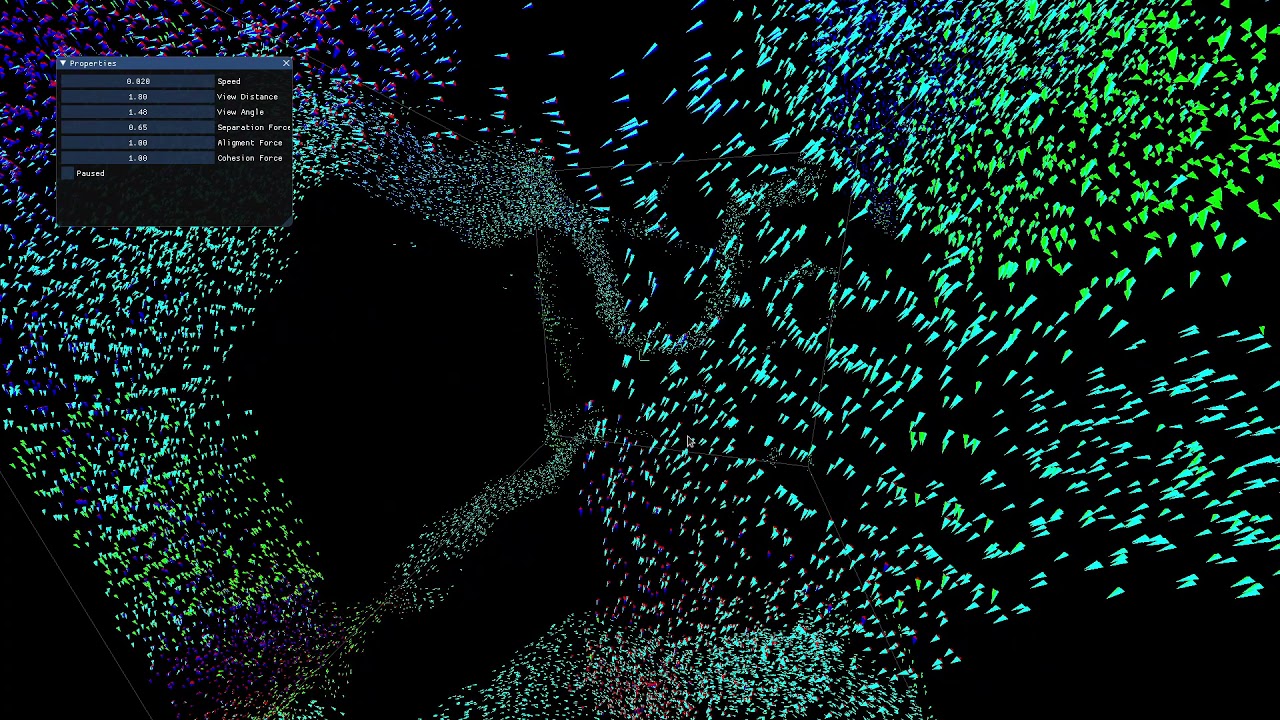
added field of view to boids so they can only see in front of them
github: https://github.com/Rafale25/Boids-Moderngl
thanks to Merosity for the help
limber veldt
But as you can see with my quadtree experiment, I'm working on optimizations
I gotta work out the dynamics of moving objects, not just static circles
regal willow
are you gonna make a game in the end
limber veldt
If a point moves out of its parent rect, it needs to be removed from the parent and re-added to the tree
Oh I don't know, probably implement some of these concepts in some of my existing games
Or rewrite them completely, who knows
regal willow
if you're making a game for "fun" it's gonna take you forever
limber veldt
I've made many games for fun
And yeah, they sometimes take a while
I've been coding for decades
But not all the same project
regal willow
you're gonna be in that "ok im gonna rewrite this entire thing now" cycle
regal willow
limber veldt
I've been coding for decades
in python?
regal willow
what have you been coding in the past
limber veldt
Everything from basic to C to C++, but not as much of those as python
regal willow
python really lets u focus on the implementation
limber veldt
And some assembly
limber veldt
I'm just a hobby coder, whatever I decide to experiment, I do
I don't know if I'm any good at it but it's fun for me and always a challenge because if not, I get bored
regal willow
you do make custom stuff so you're definitely good at it
limber veldt
With pygame sprites, groups and OOP, it's really fun
regal willow
what if u take all that away though 😁
 wanton owl
hey guys can someone help me with an OOP related question
limber veldt
regal willow
what if u take all that away though 😁
Certainly much more challenging
Like I could write a vector class and methods to go with it but pygame's are better than anything I can write
limber veldt
wanton owl
hey guys can someone help me with an OOP related question
Might as well just ask the question, maybe someone will be able to help
regal willow
yea reinventing the wheel is not a really smart move
moderngl is definitely a lot of fun tho
limber veldt
Oh it's on my todo list
regal willow
you don't have to write 100 lines to display a triangle on the screen (C++ 😢 )
limber veldt
Writing shaders and all the context managing...all outside my skillset atm
wanton owl
I am making a game about points collection and I have NormalPointsHandler class and BonusPointsHandler class. Is it a good idea to make a PointsHandler class that inherits from the above 2 classes(multiple inheritance) and call the init methods one after another of both classes?
regal willow
as hard as it seems
it's way more fun than writing 30 lines in pygame and it working
atleast for me
limber veldt
wanton owl
I am making a game about points collection and I have NormalPointsHandler class ...
I think it makes sense to have it that way, yeah, though I don't know all the implications
That way one class can have access to all the methods for scoring
wanton owl
limber veldt
I think it makes sense to have it that way, yeah, though I don't know all the im...
I am a bit worried about the double super.init call as I've read it's not a good practice
limber veldt
Yeah I don't know that one either
wanton owl
the methods that cumulate the score are in the Player class
limber veldt
Maybe have class/subclass/subclass to get all three in the mro?
wanton owl
limber veldt
Maybe have class/subclass/subclass to get all three in the mro?
I've thought about it but not sure
limber veldt
Just pondering here, no idea really what's best for your usecase
limber veldt
Yeah, especially with multiple inheritance
wanton owl
yep
limber veldt
Good luck with it though, maybe someone else will have something to add too
wanton owl
Thanks man
limber veldt
np
 covert lagoon
wanton owl
I am a bit worried about the double super.init call as I've read it's not a good...
covert lagoon
wanton owl
I am a bit worried about the double super.init call as I've read it's not a good...
Which two super inits will you be calling?
limber veldt
You can specify the ClassName instead of super, right?
wanton owl
covert lagoon
Which two super inits will you be calling?
the init methods of the two inherited classes(NormalPointsHandler and BonusPointsHandler) as both of them have lists in their init methods
covert lagoon
If I'm reading correctly, wouldnt the structure just be like
class PointsHandler:
    def __init__(self, some_arg, ...):
        ...
    ...

class NormalPointsHandler(PointsHandler):
    def __init__(self, some_arg, ...):
        super().__init__(self, some_arg, ...)
        ...
    ...

class BonusPointsHandler(PointsHandler):
    def __init__(self, some_arg, ...):
        super().__init__(self, some_arg, ...)
        ...
    ...
yeah, this is not a bad idea, I hadn't thought only of this structure..
actually I have my Point classes structured similarly: class Point(ABC) -> class NormalPoint(Point), class BonusPoint(Point) -> class SuperPoint(BonusPoint)
covert lagoon
So what does the PointHandler do that the Point class doesn't?
wanton owl
the Handle classes create the point objects(a certain number of points), draw the points on the screen, handle overlapping points and other things
covert lagoon
Ah ic
Does there need to be multiple Handle classes though? A PointHandler could take in a NormalPoint or a BonusPoint but treat it as a Point, assuming the methods and data between both classes are similar
wanton owl
covert lagoon
Does there need to be multiple Handle classes though? A PointHandler could take ...
Well I had them all in one handler class but there became 7 or 8 methods so I had/ thought about splitting them into two or more classes. There are more methods maybe because I have two different lists(one for current points and one for bonus points, the current points are normal pts) and max points on screen are different for both normal and bonus points( normal points are max 10 on screen and bonus points are max 3)
covert lagoon
Hmm, ig multiple handle classes makes sense then
wanton owl
I have custom events in the game loop for the two types of bonus points which call methods from the class to create them
wanton owl
covert lagoon
Hmm, ig multiple handle classes makes sense then
Thanks a lot for the answer and the discussion bro
wanton owl
Thanks
limber veldt
Holy shit. Just saw a benchmark test using three python libs, pygame, arcade, and raylib, and pygame using the gpu (not CPU) blew the others away
The others blew away pygame on the cpu though
By about 2x
That's incredible. Pygame on cpu achieved ~560 sprites rotating and bouncing around the screen while maintaining 60fps, on gpu around 10x more
limber veldt
Like that's amazing
Just using pygame._sdl2.video
On my machine, that same pygame_gpu test handled 3700 bouncing and rotating sprites before dropping below 60fps
There's not a lot happening in the test, just rotating, no collisions with other sprites, but just as a comparison, I'm astounded
limber veldt
We need to create images a little differently ```py
    image = pygame.Surface((8, 8), pygame.SRCALPHA, 32)
    pygame.draw.circle(image, 'red', (4, 4), 4)
    tex = Texture.from_surface(main.renderer, image)
    self.image1 = Image(tex)
    image = pygame.Surface((8, 8), pygame.SRCALPHA, 32)
    pygame.draw.circle(image, 'white', (4, 4), 4)
    tex = Texture.from_surface(main.renderer, image)
    self.image2 = Image(tex)
    self.image = self.image1
    self.rect = image.get_rect(center = pos)
Looks the same but running much faster, no profiling yet
 drowsy shuttle
You could try termux which runs a linux shell on your android phone
dawn quiver
I know about that, it runs a full python interpreter under the hood. But I want to build it and export it as .apk file
limber veldt
Make it for web, itch.io or something
Surely porting pygame to apk is not a common practice
If at all
drowsy shuttle
I think you could try using Py4A
dawn quiver
Shipping it for multiple platforms.
limber veldt
What do you mean?
drowsy shuttle
GitHub
Pygame Subset for Android. Contribute to startgridsrc/pgs4a development by creating an account on GitHub.
dawn quiver
I wanted to know if there's a way to ship a game made with pygame to multiple platforms.
limber veldt
drowsy shuttle
https://github.com/startgridsrc/pgs4a
Hasn't seen an update in at least two years according to the page
dawn quiver
I wanted to ship it to the android platform.
dawn quiver
I didn't mean to ship the entire library,  I didn't notice that I just put the "pygame" not "game using pygame"
limber veldt
I recommend at least being able to make a basic game on a computer, desktop, laptop, something like that
dawn quiver
limber veldt
Can you make a game on a computer?
Trying the basics actually learning the full process from making to shipping. There's several ways to do so and several technologies. But it's not ideal to use pygame when project get larger or your your project is very performance intensive.
limber veldt
That's not why I was asking though
dawn quiver
limber veldt
I recommend at least being able to make a basic game on a computer, desktop, lap...
Yes I did
very basic using godot engine.
limber veldt
Pygame is not ideal for any game you want to mass distribute
I mean, nobody making games for android is making them in pygame....but maybe a few highly skilled hobbyists
And I doubt that too
Perhaps in the near future, more work will be done on that idea but right now, that's waaaay out on the edge of the tech
dawn quiver
limber veldt
I mean, nobody making games for android is making them in pygame....but maybe a ...
You're correct I was just curious how to export it to android.
limber veldt
There is no process to simply 'export to android' that I know of
Like I said, maaaaybe the best option is to write it for itch.io and anyone can play it that can browse a site
dawn quiver
Did you make any projects yet
limber veldt
Some little 200 or 300 lines maybe, some a few thousand, some a few tens of thousands
Pygame and vscode
I've been practicing for a while, pygame for three years or so, python even longer
dawn quiver
Do you make the assets from scratch?
limber veldt
Maybe four
Yeah, I usually do but admittedly, usually pretty close to original artworks
dawn quiver
Do you use a mouse or graphics tablet for drawing
limber veldt
I use gimp for images, it's a little awkward, and just mouse
 meager thicket
limber veldt
I use gimp for images, it's a little awkward, and just mouse
meager thicket
limber veldt
I use gimp for images, it's a little awkward, and just mouse
do you really use gimp for assets creating?
limber veldt
It's so powerful, GIMP (GNU Image Manipulation Program, open source), it can be pretty complicated
Yip
Some just use mspaint
meager thicket
but do you make them by modifying some existing assets?
limber veldt
Sometimes yes, sometimes no
meager thicket
if you draw them from scratch, why don't you use a more dedicated software likre krita? 😅
limber veldt
I don't know
meager thicket
okk
dawn quiver
Wow... I have gimp installed but lacks the understanding of it since I never use any advanced Paint tools (except ms paint) like adobe products.
limber veldt
Gimp works fine for me, just making pixel art, sprite images, things like that
Not opposed to trying krita though
Might be fun
meager thicket
but yeah, I agree its really powerful when you know how to use gimp
limber veldt
I know the basics with it, layers and some of the tools
dawn quiver
I have to manage both academics and my hobbies it's hard.
limber veldt
Gotta write code to get out of it, come up with any idea and code it
dawn quiver
Did you follow any specific pathway ?
limber veldt
I mean anything, wanna study vectors? Write some sprites. Wanna study steering behaviors, add that to them
Well, I kinda know how to write most of my ideas and if I don't, I do like I did today, watched a quadtree tutorial and implemented it in python
And then I found how to draw pygame on the GPU instead of the CPU, so implemented that too
dawn quiver
I could detect my problem is that instead of learning what my current project need I went to study the full library first. Pfffft
limber veldt
Pygame on the gpu is really fast, I don't have steady performance results yet, but it's way faster than cpu
dawn quiver
limber veldt
And then I found how to draw pygame on the GPU instead of the CPU, so implemente...
That's something useful to figure out could be used in conjunction with ML frameworks too.
limber veldt
It's pretty cool and still using experimental features but I'm impressed with the progress of it so far
dawn quiver
Good luck 🍀 stay focused. Hope you bring something cool among the community.
limber veldt
You too!
 autumn geyser
limber veldt
I use gimp for images, it's a little awkward, and just mouse
autumn geyser
limber veldt
I use gimp for images, it's a little awkward, and just mouse
I use Pixel Editor on Ipad for drawing stuff, I hate trying to aim and clicking everywhere with a mouse
so I prefer to thumb out an icon I want on Ipad haha
sturdy sandal
this is my silly pixel game thing i got going so far
autumn geyser
is that cute little single black jumping pixel the player
sturdy sandal
yeah thats the player
the entire building is also technically the player
pine smelt
might be kinda stupid but how do you display the fps higher than the one u set
as in
when u use clock.tick(60) for example its capped at 60fps
pine plinth
you calculate time needed only for computations (and maybe for rendering), excluding waiting time
 uncut pivot
limber veldt
uncut pivot
limber veldt
I'm actually calling dt = CLOCK.tick(0) * 0.001
So unlimited fps
Or if you don't want to use ticks(), it's not terribly difficult to calculate it in your main loop. Get the current time and subtract the last curent time
limber veldt
pine smelt
might be kinda stupid but how do you display the fps higher than the one u set
And no question is kinda stupid, man, if you have any questions, feel free. I do my best but sometimes my understanding isn't complete too
limber veldt
uncut pivot
need help pls https://discord.com/channels/267624335836053506/124797663552182681...
Collision with walls should be in like two basic steps. Detect the collision then respondd to it. With the edges of the screen, we detect the collision when the ball has already left the screen. One way to respond to it is moving the ball out of collision then flipping its direction as soon as we detect the collision
As for balls going through objects, that's called 'tunneling' and there are various solutions
More complicated ideas involve reflecting the ball's vector off the wall and lerping it over time or something like that
uncut pivot
limber veldt
Collision with walls should be in like two basic steps. Detect the collision the...
how would u flip its direction? i did it randomly, do i subtract or add 180 90 degrees?
limber veldt
Doesn't matter if you subtract or add 180 degrees, both should have the same result mod 360
uncut pivot
is it 180 or 90? coz 180 is same line but backwards no?
limber veldt
I suggest learning how to use vectors though, basically a separate value for x velocity and y velocity, when both are added to position, it creates the new position, over and over and over makes movement
I dunno, polar coords suck imo, why I don't use them for moving things in 2d space
uncut pivot
oh
 echo loom
what is yall thoughts on making a 3d engine with python
pine plinth
dont
vagrant saddle
echo loom
what is yall thoughts on making a 3d engine with python
go help improve an existing one : Panda3D ( wich will also benefit Ursina ). You learn state-of-the art and time not wasted
autumn geyser
sturdy sandal
yeah thats the player
the entire building is also technically the player
I see you can control many parts in the building, but that dot jumping on the tiny bed is adorable
 foggy marten
Made my first game:
https://scratch.mit.edu/projects/1033528558
used a great yt tutorial
anyways good night
 timid crow
Hello i am making a clicking based game using python tkinter, for a school assaignment would someone be able to help me placing this prototype code into two different classes the main class and the interface class? the link to the prototype code id this
 drifting yew
anyone knows an easy code example for an entity component system? they are always made so sophisticated I don't understand them
timid crow
this is the attempt of the interface class and the attempt of running it in main
Main
https://paste.pythondiscord.com/A4NA
interface
https://paste.pythondiscord.com/QB6Q
 random oyster
should i use sprite classes? just in general
limber veldt
Yes
When you have more than a few sprites, keeping track of them starts being a pain, make sprites, put them on groups accordingly, sometimes more than one group is needed, and draw and update the groups
The sprite class helps with that because those objects in groups must be sprites
It can be a little tricky, it's using subclasses, but maybe the sooner the better for learning them
But not a beginner thing, I think, just learning how to move things around on screen and stuff should be pretty solid first
Like with functions, we have to write all the stuff to keep a ball bouncing on the screen, like in our main code. With sprites, they do it themselves, they know how to reflect off walls, or any other behavior we want to give them
And you can make as many as you want from one class, shove them all in a group, draw and update the group. 1000 balls, all made from one class and all having the same behaviors
Just simple examples, the possibilities are endless
And probably things like handling events, no matter sprites classes or functions, handling events is much the same
Sometimes, most of the time, I don't need a bunch of the same sprite instances, but either way, making a bunch of singleton sprites is better than otherwise
cosmic olive
limber veldt
Like with functions, we have to write all the stuff to keep a ball bouncing on t...
I literally just did this without sprite class. Just made a regular class 🗿
Imo sprite class is only helpful if you're using sprite groups ┐('~`;)┌
limber veldt
Of course, groups is the main reason to use them
Doesn't mean everyone has to use groups but they're so convenient when dealing with many sprites
cosmic olive
True
limber veldt
@brisk yew Reading about fblits in 2.5.0, if the thread is closed, does that necessarily mean that the hasColorKey() fix actually worked and the performance is back up to par with earlier releases?
brisk yew
the PR was merged, so I guess so, I don't know if it's included in the latest dev release, but it should be in the next one or the final release obviously
limber veldt
Oh sorry, I asked too soon, further reading answered the question
 idle turret
Hello.
limber veldt
Even improved performance some, so good seeing pygame getting the love
limber veldt
I was just asking about some of the latest pygame work
idle turret
Oh okay
@limber veldt , I'm going to Python Camp next week and I'm wondering if you can give me any tips, I want to make a good first impression.
You seem like you know your python pretty well.
limber veldt
Oh I don't know about that, I can make it do some things though
limber veldt
Advise for someone learning python though, practice
I pretty much only make games or experiments with them
I never run out of wondering how stuff works, especially in games
Have you done any coding before?
idle turret
limber veldt
Have you done any coding before?
Not really, I was thinking of getting my Bachelors in computer science though, so I'd thought I prepare for the future.
limber veldt
Well, python is a good first language, I think, easy enough to get over the syntax and get right at solving your coding problems
idle turret
limber veldt
Well, python is a good first language, I think, easy enough to get over the synt...
Yeah
 smoky remnant
Guys, me and a friend of mine developed our first game. Could anyone just play it once and DM me any feedback that we can use in out next game? The link is pasted here:
 drifting yew
I haven't felt the need for sprite classes yet, but maybe if they can blit all sprites in group directly to screen, in pygame
I have put my ground and wall etc. sprites in map-like dictionaries
well not the sprites itself
 cerulean solstice
I made a zoom mechanic for my project, I have a working implementation however the performance can get bad when zooming in too much. This is because I am upscaling the image & blitting it to a properly sized surface.
I want to know if there is a more performance friendly way to zoom in. Or if there is a way to upscale a surface without changing it’s dimensions.
Implementation:
  properSurface = MG.PYG.Surface(APP.size)
  particleSurface = MG.PYG.transform.scale_by(particleSurface, WORLD.cameraZoom)
  properSurface.blit(particleSurface,[0,0])
  APP.Root.blit(properSurface,[0,0])
im not sure how to make the scale itself faster,
but in terms of blitting
rather than blitting the entire image it MIGHT be more performance efficient to crop out just the center of it
i.e. the bits that u can actually see on screen
.subsurface() prolly the easiest way to do that
limber veldt
Maybe pre-caching a few scaled images first so they don't have to be scaled at run time?
Of course, that would sort of limit the precision of the zoom to the number of cached images but if only needing a few
pine smelt
wouldnt that be a lot of caching tho
pine smelt
lol ye ok
limber veldt
But it'd supposedly perform better than using transform in main loop
pine smelt
oh definitely
idk i just think
a camera zoom should be pretty smooth, and with caching unless u make millions for every decimal, will restrict that
maybe have a dynamic cache?
limber veldt
Right, the precision would suck
pine smelt
so if its not already in the cache, transform and add it into the cache for later
limber veldt
I was only thinking aloud, just an idea, the implementation is well beyond that though
pine smelt
oh ok ye
limber veldt
I looked at .display hoping to find some global display scale setting, no such luck
Maybe the new Window will support that kind of scaling
It already does fast rotation of images and I've seen someone say that it is 'free' (as in low perf cost), maybe scaling can be like that
drifting yew
is there a way to only find out the one key that is pressed without using key.get_pressed ? I guess not if you don't want to specify the key
so one way or another, I always need to check all keys that can do something even if only one is pressed I guess
raven kernel
drifting yew
is there a way to only find out the one key that is pressed without using key.ge...
You could look into this https://pyga.me/docs/ref/key.html#pygame.key.get_just_pressed
raven kernel
drifting yew
so one way or another, I always need to check all keys that can do something eve...
I assume you mean
for event in events:
    if event.type == pygame.KEYDOWN:
        if event.key == pygame.K_x:
            ...
Yes, that is also one way
But key.get_just_pressed effectively replaces that
limber veldt
For key presses and released, I'd use the event loop. For held keys, get_pressed (or just_presssed) can be used anywhere
raven kernel
just_pressed is not for held keys
limber veldt
Really? It's for keys that were just pressed, as the name suggest, it doesn't hold the value else the 'just' part would be kind redundant
raven kernel
its for keys that were just pressed in the current "frame"
much like looping over the events and checking for event.type == pygame.KEYDOWN
it doesnt return true again the next frame
unless you released and pressed the key again really really rapidly ig lol
cerulean solstice
pine smelt
rather than blitting the entire image it MIGHT be more performance efficient to ...
blitting takes a tiny amount of time compared to actually upscaling the image. I am looking for pygame projects that have zooming so I can see how they did their zooming mechanic, maybe it performs better.
raven kernel
well id assume they only apply scaling on the elements that are visible
limber veldt
There's someone here who has worked out how to do but this is scaling just one image, maybe some of that can be useful though https://stackoverflow.com/questions/64936805/how-to-zoom-in-and-out-of-an-image-pygame-and-using-the-mousposition-as-the-cent
drifting yew
that just pressed could be good. Right now I'm only checking for that anyway
cerulean solstice
limber veldt
There's someone here who has worked out how to do but this is scaling just one i...
it seems they are essentially doing the same thing as me
limber veldt
Just_pressed takes handling key presses and releases out of the event loop and makes it so that functionality can be anywhere, just like get_pressed() can be used anywhere to read held keys, is more accurate
drifting yew
it just seems it would be better to just get the key that is pressed instead of asking for every key state
like, the system knows what I want already
limber veldt
To use get_pressed to replicate the behavior of the event queue, we always had to implement a timer to condition reading the held keys, get_just_pressed() does that for us, no need for the conditions skip calling get_pressed if the timer is running
drifting yew
is it not in regular pygame?
limber veldt
So basically, get_just_pressed() does the same thing the event queue does but it can do it outside of the event loop
pine smelt
Wait what thats cool
limber veldt
Works just like pygame but make sure to uninstall the old pygame before installing pygame-ce
pine smelt
I've always had to work around it with temporary variables and what not
Is there a buffer or is jist
That specific frame
limber veldt
I don't see a buffer implemented in it
limber veldt
Old pygame games will (should) work just fine with pygame-ce but games made using pygame-ce specific features won't work on the old pygame (frect, get_just_pressed, a few other CE features)
Which is practically a non-issue, once someone starts using CE, there's no reason to go back to the old pygame unless for some compatibility issue with older projects
And I haven't personally seen any of those but I won't say it's impossible
I really like the frects, same as Rect but it can use floats so we no longer have to cast floating positions to ints (or have .rect do it for us)
cosmic olive
:v
limber veldt
Like say you have an object moving along some axis by .2 pixels to be physically accurate. So we move from 1 to 1.2 then we call rect to see where we are on the next iteration and it says we're at 1, completely losing the .2 we just added to it and physical accuracy
drifting yew
just_pressed still goes through all keys, but I guess it doesn't matter too much
limber veldt
How can you check if all keys are pressed or just pressed without checking all the keys?
I mean, there are 108 keys on this thing, if I only ask if one of them is pressed, how would I know about the others?
drifting yew
technically the PC has to be checking it anyway, right? so it should be able to just recognize which key was pressed
similar to a hash map
limber veldt
There are ways to ignore events in the event queue if that sounds better but that sacrifices the get_just_pressed() functionality
drifting yew
maybe what I want is event.wait ?
limber veldt
The PC is reading all the keys all the time but pygame doesn't know what they are without asking it. So yess, the PC knows
What is the issue with reading all the keys? Why don't you want to get all presses?
drifting yew
just seems not ideal asking through all buttons, similar to going through a list of coordinates to check if your mouse points to one vs using a hash map
but event. wait seems slow and not ideal either
limber veldt
But that is all done on hardware, in the PCs IO and pygame jsut gets the list (not actually a list, a queue), the impact on game performance is negligable
drifting yew
I guess it really doesn't matter in reality
limber veldt
And pygame is calling a c library to read them, it's very fast
drifting yew
ok thanks for the explanation
drifting yew
ok one other fun way seems simply checking event.key with event type keydown
limber veldt
Yeah, that's using the event queue, I like that way too
For me, get_just_pressed () only saves me the issue of passing events to other objects so they can read them, I don't mind passing them around though, they're not heavy
Which is like so. Say I have a player that checks some keys but they're not related to main, so get the event during the loop and send it to player, where it can do if.event.type and so on py for event in pygame.event.get(): if event.type == pygame.QUIT: pygame.quit() sys.exit() player.check_events(event)
Mind though, these are events, not specifically related to reading keys, but reading all events. For things like player movement where keys are being held to move player a certain direction, get_pressed() is the way to go and that can live in a method completely outside of the event loop and only inside player
get_pressed() and the event queue are often confused because they both do the same kind of thing, but they are completely different and knowing when to use one over the other matters
limber veldt
Re-instancing and repopulating a quad tree with 1000 points (as vectors) on every frame, this is the quadtree running as fast as I can think of to code it https://paste.pythondiscord.com/Y4CQ
And using the Window and renderer from sdl2
Kinda neat how it recurses itself
With the draw() method, ~100 fps, without it, ~135
Instancing that pygame.Rect in the insert method instead of commenting it out as I have it, costs about 30 fps
So just checking the point against self attributes is considerably faster
And tbh, using a pygame.Rect there is pointless anyway
drifting yew
I want the scope of my game to be massive, but what's happening on screen, not so much, luckily.
limber veldt
That 37k boids sim running on python and moderngl is pretty impressive
pine smelt
im trying to replicate this thing i saw on the pygame discord
the only information i have is they're setting the HWID or hardware id of the program to that of the desktop allowing them to draw/blit directly onto the desktop background
any idea how to just "set" it like that i havent had any luck for a while
raven kernel
pine smelt
any idea how to just "set" it like that i havent had any luck for a while
why not ask them?
they said winrt and hwid
pine smelt
raven kernel
why not ask them?
i did at first, thats how i got the hwid information, but my follow up qs werent sending
not sure if its my internet bugging or what
pine smelt
raven kernel
they said winrt and hwid
whats winrt?
 grave inlet
Halo
raven kernel
pine smelt
whats winrt?
This IG
https://pypi.org/project/winrt/
dawn quiver
limber veldt
For me, get_just_pressed () only saves me the issue of passing events to other o...
hi, idk if this can be helpful but you may meant something like this?:
for event in pg.event.get():
if event.type == pg.QUIT:
pg.quit()
elif event.type == pg.KEYDOWN:
if event.key == pg.K_ESCAPE:
pg.quit()
if event.key == pg.K_r:
player.sprite.health.hp -= .5
if event.key == pg.K_t:
player.sprite.health.hp += .5
this tho can't recognize wheter a key is held or not
limber veldt
I know what I meant, I'm wondering what you mean?
 earnest harbor
can anyone explain me panda3d
 normal silo
earnest harbor
can anyone explain me panda3d
normal silo
earnest harbor
can anyone explain me panda3d
Panda3D is a game engine that includes graphics, audio, I/O, collision detection, and other abilities relevant to the creation of 3D games. Panda3D is free, open-source software under the revised BSD license.
Panda3D's intended game-development language is Python. The engine itself is written in C++ and utilizes an automatic wrapper-generator t...
drifting yew
since we're literally using event.key to compare in a loop with many ifs, I guess just getting the value from it and putting it into a hash map is just straight up superior. imo
vagrant saddle
event.key has the problem of being keymap dependent especially annoying for WASD movements
 sour field
I'm not sure if this is the right place but I started a script to play dungeon solitaire labyrinth of souls in a python script but I am at a point where I need to have a doom track, discard pile and treasure pile to place cards in and also closeup a room and move to the next after you get the treasure
limber veldt
Moving (or not) cannons shooting at player within detection radius, my implementation so far https://paste.pythondiscord.com/DIJQ
As usual with my recent projects, pygame-ce required (for the get_frects)
 languid yew
hey!
limber veldt
Hi
languid yew
im new to this community and i chose python as my main language for now, i'd love to start a journey on app/game development
do you have any tips ?
limber veldt
Learn python basics before games, games will likely be quite difficult without that
languid yew
limber veldt
Learn python basics before games, games will likely be quite difficult without t...
i do know some of the basics such as making a display, generating geometrical shapes, move them... but idk how to create a full code to make something if you konw what i mean
limber veldt
I get it, time to start learning classes and oop then?
languid yew
oop?
limber veldt
Object oriented programming
languid yew
and what's that
limber veldt
Making and using your own classes and objects
languid yew
(thanks for your time)
limber veldt
Among other things, but that's the gist of it
languid yew
limber veldt
Making and using your own classes and objects
aaaaaaah sounds pretty simple to do i got what you want to say
one last thing
in pycharm i have python downloaded, but in vscode it's not even tho i installed python in my pc and in the extantions
pygame is not reconized
 limber veldt
Perhaps pygame was installed in a virtual environment within pycharm
Thus inaccessible to vscode, I'm not sure how to fix that since I don't use pycharm
languid yew
probably correct cuz it works naturally in pycharm, when pycharm asked me to do so i literally wrote pip install pygame it worked, but in vscode it doesn't
not even in command prompt
limber veldt
What if you pip install pygame from cmd or even vscode terminal?
languid yew
i did
limber veldt
Oh ok
limber veldt
Yeah, and you might try the #python-discussion channel too, they're more experienced in that kind of issue
And they'll need all the details, like what exactly happens when you try
limber veldt
np
cosmic olive
 barren topaz
imma start coding again
barren topaz
imma start coding again
What will you code
barren topaz
ill be continuing the same projecr the choose your adventure game
 odd jay
I just learned pygame has LayeredUpdates(). Is it possible to use it with pygame.font.Font?
pine smelt
i dont see y not as long as the rendered font surface is part of a pygame.sprite.Sprite
odd jay
pine smelt
i dont see y not as long as the rendered font surface is part of a pygame.sprite...
Will this help with drawing pygame stuff behind pygame_gui stuff?
 white nest
pine smelt
odd jay
Will this help with drawing pygame stuff behind pygame_gui stuff?
white nest
pine smelt
odd jay
Will this help with drawing pygame stuff behind pygame_gui stuff?
sorry i dont have any experience with pygame_gui
drifting yew
so is it possible to have sprites that can be "unblitted" without just drawing over them?
I guess the question is moot, just it can't be a regular second surface since it remembers the old sprite postions
pine smelt
drifting yew
so is it possible to have sprites that can be "unblitted" without just drawing o...
Not entirely sure what u mean
limber veldt
Hitting a moving target
 forest oasis
why are the bullets curving tho
forest oasis
looks like they are curving
limber veldt
Just the rapid firing making it look like a curve because there are so many
Each one is moving a straight line though
 orchid tendon
the target can move in any direction?
limber veldt
Normalized 8 directions, nsew and the diagonals
orchid tendon
and your gun should automatically try to hit it?
limber veldt
Yeah
I still have my gun facing directly at the player while only the bullets take the direction to the player's predicted position
orchid tendon
I'd try... first orient your gun so that it is pointing at the target, then turn by arcsin(V_target / V_bullet) towards the direction of motion
limber veldt
I don't understand what you're saying
Try what?
I can orient my gun to face the predicted target, just haven't yet
orchid tendon
try making the angle you shoot at to be arcsin(V_target / V_bullet) radians away from the perpendicular you'd draw from the gun to the target
limber veldt
I really don't use angles for anything, this is all done with vectors
Other than getting it to find the angle to rotate the gun image
The moving parts of this are all vectors though
This is the alignment method which adjusts cannon direction to face the player py desired = self.player.pos - self.pos steering = desired - self.direction if steering.length() > 0: steering.normalize_ip() self.direction += steering * self.rot_speed
No angles necessary
I could work out the polar coords and angles and radii but this is much easier math
And this is the bullet, it can't curve https://paste.pythondiscord.com/IZQQ unless I make changes to its direction, which I don't
 proper peak
limber veldt
Hitting a moving target
proper peak
limber veldt
Hitting a moving target
You made the old neurons in my brain activate and I spent half an our implementing my own version 😅
limber veldt
Nice, kinda fun to work out these things
My current implementation is here: https://paste.pythondiscord.com/DLUA I don't know what I'll do with it but at least have it for reference later
It's not finished work
But just a play to see if I can do some things
proper peak
Interesting; mine doesn't require solving a quadratic: https://paste.pythondiscord.com/53RA
limber veldt
Quite interesting
proper peak
basically, shooter_pos + bullet_vel*t == target_pos + target_vel*t must have a solution, and that means (taking a cross product with target_pos-shooter_pos) that
cross(bullet_vel, target_pos-shooter_pos) = cross(target_vel, target_pos-shooter_pos). In other words, the component of the relative velocity that's perpendicular to the relative position should be zero (which is what it means for the bullet to be on the interception course for the target).
limber veldt
See, I don't understand the math well enough yet
My naive solution was to get the vector from shooter to target and work out the amount of time it would take for a bullet to get there then use that time to project a point along player's direction using player speed
Which seems like would need to be iterated again to get a new total time
proper peak
Yeah, that's basically a single iteration of iteratively solving a vector equation - and I recall, from when I implemented something like that years ago, that it may actually not converge.
One way to understand the math here is... in order to hit the target, the bullet must move straight towards it (in the target's reference frame). That means that you must cancel out all of the perpendicular velocity the target has relative to the bullet. That's the perp_vel that I'm calculating. (And if it's larger than the bullet speed, then hitting the target is impossible). The remaining bullet velocity can be used to move the bullet towards the target (that's the tangential_vel).
limber veldt
Ok I think I understand that now, bullet's reference frame
Now, where were you a few days ago, lol /j
limber veldt
proper peak
One way to understand the math here is... in order to hit the target, the bullet...
New code using your implementation, it works! https://paste.pythondiscord.com/6ZOQ
Thanks for sharing
proper peak
I checked an ancient project of mine where I last messed with this stuff (a bot for a game, which among other things could lead targets), and it seems it actually does use iterative solving. (because it can do polynomial and not just linear prediction, so I can't just solve it straightforwardly) (and also because I had to sometimes do weird things like aim ahead of the target).
limber veldt
Now to work out moving shooters, I I think that just accounts for the cannon movement by adding or subtracting it's velocity to the new vector
In some terms I have yet to work out
And maybe add the idea of acceleration to the target
So its velocity isn't constant
proper peak
limber veldt
Now to work out moving shooters, I I think that just accounts for the cannon mov...
yeah, the only thing that'll change is replacing target velocity with target_vel - shooter_vel
proper peak
limber veldt
And maybe add the idea of acceleration to the target
this, on the other hand, will add a lot of complexity
when I worked on that aforementioned project, I believe the only way I could solve polynomial prediction is by iteratively solving
limber veldt
Yeah, I imagine it would be quite a lot more calculations
proper peak
(and also in my experience, if the target doesn't have inertia (can change directions instantly), using second-order prediction makes the aim worse. Just linear worked best for me.)
limber veldt
I'll move that code into align() so that the cannon can always face the prediction
drifting yew
shouldn't something like an ideal shooting algorithm be written down somewhere already?
limber veldt
Probably but that doesn't help me understand how it works so I work through it myself (with a little help sometimes)
proper peak
drifting yew
shouldn't something like an ideal shooting algorithm be written down somewhere a...
i remember trying to look up once if there was declassified missile guidance code available, but for some reason it seems not
limber veldt
I spent quite a lot of time looking up descriptions or tutorials for how it works for me to understand what I have so far, still don't, but more than I did
My next idea for this project is to add walls and a raycaster to find them, thus blocking the shooting if the cannon cannot see the target
limber veldt
I should do some renaming too, keep direction for the unit vector but velocity for the product of direction * speed * dt
 tacit carbon
Yo. Have been wondering is there like category of good engines out there
Is it worth learning unity above like something unreal engine or ect?
Like, recently had to learn c# for collage and someone told me unity quite good for that or smth
vocal grove
tacit carbon
Is it worth learning unity above like something unreal engine or ect?
Unity is good. Although Godot is also really nice and open source. It has built in C# support if you want that but also GDScript, which is very Python-like
frank fieldBOT
:incoming_envelope: :ok_hand: applied timeout to @silver sandal until <t:1718303638:f> (10 minutes) (reason: burst spam - sent 8 messages).
The <@&831776746206265384> have been alerted for review.
 quartz dagger
hi
for some reason in my code, the ball glitches out from the screen
this is the code:
import pygame
import random
import math
import time
Initialize pygame
pygame.init()
Set up the display
screen_width = 800
screen_height = 600
screen = pygame.display.set_mode((screen_width, screen_height))
pygame.display.set_caption("Bouncing Ball with Trail")
Define the ball properties
ball_radius = 30
ball_color = (255, 0, 0)
ball_position = [screen_width // 2, screen_height // 2]
ball_velocity = [random.uniform(-5, 5), random.uniform(-5, 5)]
Make the ball faster by 4 times
ball_velocity = [velocity * 4 for velocity in ball_velocity]
Define the gravity
gravity = 0.5
Define the trail properties
trail_length = 100
trail_positions = []
Game loop
running = True
while running:
# Handle events
for event in pygame.event.get():
if event.type == pygame.QUIT:
running = False
# Update the ball position
ball_velocity[1] += gravity
ball_position[0] += ball_velocity[0]
ball_position[1] += ball_velocity[1]

# Check for collisions with the walls
if ball_position[0] <= ball_radius or ball_position[0] >= screen_width - ball_radius:
    ball_velocity[0] *= -1
if ball_position[1] <= ball_radius or ball_position[1] >= screen_height - ball_radius:
    ball_velocity[1] *= -1

# Update the trail positions
trail_positions.append(ball_position.copy())
if len(trail_positions) > trail_length:
    trail_positions.pop(0)

# Clear the screen
screen.fill((0, 0, 0))

# Draw the trail
for i in range(len(trail_positions) - 1):
    trail_color = (random.randint(0, 255), random.randint(0, 255), random.randint(0, 255))
    pygame.draw.circle(screen, trail_color, trail_positions[i], ball_radius // 2)

# Draw the ball
pygame.draw.circle(screen, ball_color, ball_position, ball_radius)

# Update the display
pygame.display.update()

# Limit the frame rate to 60 FPS
time.sleep(1 / 60)
Quit pygame
pygame.quit()
raven kernel
quartz dagger
this is the code:
import pygame
import random
import math
import time
# Initial...
might wanna put that in a code block
!paste or use this
frank fieldBOT
Pasting large amounts of code
If your code is too long to fit in a codeblock in Discord, you can paste your code here:
https://paste.pythondiscord.com/
After pasting your code, save it by clicking the Paste! button in the bottom left, or by pressing CTRL + S. After doing that, you will be navigated to the new paste's page. Copy the URL and post it here so others can see it.
raven kernel
quartz dagger
for some reason in my code, the ball glitches out from the screen
also, what distro is that?
quartz dagger
linux
debain
12
well I am using Chrome OS and Linux beta on it to run VsCode
which is based on Debian 12
raven kernel
looks great
 misty magnet
Python game engine. That is the only need
 ivory remnant
does enyone here know unreal engine?
 bitter blaze
ivory remnant
does enyone here know unreal engine?
bitter blaze
ivory remnant
does enyone here know unreal engine?
there exists an unreal engine discord server.
ivory remnant
bitter blaze
there exists an unreal engine discord server.
Ok
 long charm
Anyone uses godot here ?
pine smelt
theres a godot discord as well
also anyone have a good platformer collisions system / tutorial
most of the ones ive used dont work alongside my implementation
 agile mauve
Does anyone have an idea on how can i record audio from the pygame window when doing a simulation of some kind with sound effects?
bitter blaze
agile mauve
Does anyone have an idea on how can i record audio from the pygame window when d...

EaseUS
This post offers you the top 10 best game audio recorder to help you capture both video and sound when you play games. Now check out these voice recorder for games to incorporate your background audio.
dawn quiver
Any basic game ideas i could make
I made a battleshios game anyone got anything else?
bitter blaze
dawn quiver
Any basic game ideas i could make
I made a battleshios game anyone got anything ...
Angry birds
 icy spade
What languages are most popular for game dev
 tiny topaz
sly vapor
icy spade
What languages are most popular for game dev
tiny topaz
sly vapor
icy spade
What languages are most popular for game dev
Depends what you mean by gamedev
engine dev? C++
game logic scripting stuff? C# is probably most popular but other languages will do too
gamedev tooling? Whatever comfortable with / Whatever the tool being extended uses
 swift rune
any problems?

 small cosmos
Hi. I just learned the basics of python and want to start my gaming development journey. Should i learn python more or just jump to pygame or change to another language???
 slow copper
swift rune
any problems?
slow copper
swift rune
any problems?
yea, you can see the red line in line 28 indicating syntaxerror
its missing a colon
and the next line would need an indent too
slow copper
small cosmos
Hi. I just learned the basics of python and want to start my gaming development ...
as long as you know basic python syntax you can do whatever you want and youll eventually learn everything else
may not be the most efficeint way to learn python but there isnt any correct or wrong path
 crystal garnet
anyone here got a pygame tutorial they specifically reccomend or do i just find the shortest one on yt
pine smelt
In this tutorial you will learn to create a runner game in Python with Pygame. The game itself isn't the goal of the video. Instead, I will use the game to go through every crucial aspect of Pygame that you need to know to get started. By the end of the video, you should know all the basics to start basically any 2D game, starting from Pong and ...
clear code pretty much has the most understandable tutorials and a good basis
pine smelt
small cosmos
Hi. I just learned the basics of python and want to start my gaming development ...
as long as you know OOP ur fine
the concepts u learn with pygame can be carried over to other languages to later, its just faster to code in python generally than for example c++
small cosmos
thx for the answers
crystal garnet
pine smelt
clear code pretty much has the most understandable tutorials and a good basis
tyty
 grizzled dust
vagrant saddle
go help improve an existing one : Panda3D ( wich will also benefit Ursina ). You...
grizzled dust
vagrant saddle
go help improve an existing one : Panda3D ( wich will also benefit Ursina ). You...
I know this is going to sound like a naive question, but do you think that by any means it's possible to export a 3D game coded in Python for a console like the Nintendo Switch (I'm only talking about the technical aspect here)?
dawn quiver
Is it at a point yet where you can import a chatgpt player module in your game to be the ai or the npc?
or will I just have to create my own AI lol
 patent wigeon
pygame or tkinter
vagrant saddle
grizzled dust
I know this is going to sound like a naive question, but do you think that by an...
Panda3D could run on wii-u and switch, but there's an initial amount of work for the port to be done. The hard part (python single thread and C++ panda3D lib) have already been made portable
still Nim or c++ - Panda3D would probably be a better choice for a console than python
 indigo gazelle
is their any tips to make games easily
raven kernel
cant think of any ways to make games easily right off the bat ngl
especially in python
limber veldt
Kind of depends on which parts of games you struggle with
raven kernel
i think your future self would find it easiest if you focus on learning the fundamentals strongly
indigo gazelle
making the enemies
raven kernel
well, someone whos familiar with python and pygame could look into pytmx and use tiled to place enemies in their platformer game for example
indigo gazelle
what is pytmx
raven kernel
but it becomes excruciatingly harder if you have to understand the very basics of how each component of those three work. learning tiled is enough of a task
for example if you didnt know how surfaces worked, or how lists worked
raven kernel
indigo gazelle
what is pytmx
pytmx is the library for loading the .tmx files of this tile editor - https://github.com/bitcraft/pytmx
it can load things directly into a pygame compatible format, like images as surfaces
indigo gazelle
i know most basics like lists and surfaces but i cant seem to understand how i could make the enemies follow the player
raven kernel
is it a topdown game with no walls?
indigo gazelle
yeah
limber veldt
Writing behaviors for enemies/NPCs can be quite a challenge
indigo gazelle
it has no walls
raven kernel
indigo gazelle
yeah
look into Vector2.move_towards
you can directly move your enemies position towards your player
limber veldt
Learning how to use vectors for movement is probably my biggest game making tip
indigo gazelle
what about Vector2.move_towards_ip
limber veldt
Along with implementing deltatime, but that's not too difficult
raven kernel
indigo gazelle
what about Vector2.move_towards_ip
thats better if you dont want to reassign the vector
"ip" stands for in-place manipulation
think of it as list.sort (ip) versus sorted(list)
indigo gazelle
i tried using Vector2.move_towards_ip but the enemies just moved to the players last position. Is there any way to fix this
limber veldt
You want a seek behavior? Enemy that chases the player?
indigo gazelle
yes
raven kernel
indigo gazelle
i tried using Vector2.move_towards_ip but the enemies just moved to the players ...
what, it wasnt on top of the player?
indigo gazelle
the player could just move out of the way and the enemy just gets stuck on the previous position of the player
limber veldt
This whole series is good for learning how to use vectors to move things but is not in python https://www.youtube.com/watch?v=p1Ws1ZhG36g

This video explores Craig Reynolds’ formula for Steering Behaviors in JavaScript (p5.js) beginning with “Seeking a Target.” Code: https://thecodingtrain.com/tracks/the-nature-of-code-2/noc/5-autonomous-agents/2-seeking-a-target
p5.js Web Editor Sketches:
🕹️ Seek: https://editor.p5js.org/codingtrain/sketches/AxuChwlgb
🕹️ Seek With Sliders (Exerc...
limber veldt
You could share some code of what you're doing and maybe get a little better understanding of what you actually wrote, but in general, I really recommend learning vectors
raven kernel
indigo gazelle
the player could just move out of the way and the enemy just gets stuck on the p...
This isnt what you wanted?
the white dot is the player and the red is the enemy
raven kernel
well I achieved that with Vector2.move_towards_ip
import pygame

pygame.init()
win = pygame.display.set_mode((500, 500))
clock = pygame.Clock()

pvec = pygame.Vector2(100, 100)
evec = pygame.Vector2(0, 0)

s = 3.0

while True:
    clock.tick(60)
    events = pygame.event.get()
    for event in events:
        if event.type == pygame.QUIT:
            raise SystemExit

    keys = pygame.key.get_pressed()
    pvec.x += s if keys[pygame.K_RIGHT] else -s if keys[pygame.K_LEFT] else 0
    pvec.y -= s if keys[pygame.K_UP] else -s if keys[pygame.K_DOWN] else 0

    evec.move_towards_ip(pvec, s / 2)

    win.fill("black")
    pygame.draw.circle(win, "white", pvec, 25)
    pygame.draw.circle(win, "tomato", evec, 25)

    pygame.display.flip()
maybe i wasnt updating the move_towards_ip everytime
raven kernel
indeed
raven kernel
vec.move_towards_ip(target, speed)
vec and target are both vectors, this moves vec towards target with speed
indigo gazelle
if i use vec.move_towards_ip(target, speed) on different places one with target as maybe player 1 and player 1 again after player 1 has moved to a different position, then will the enemy go to the player 1 before player 1 moved or will it go to player 1 after it has moved
and plss try to understand the question i tried as hard as i can to make the question understandable
limber veldt
When you update the position of your enemy, like in a function or method, you can send the player to the function or method and use its position for the target on each update
indigo gazelle
ok
also why am i getting this error:
Traceback (most recent call last):
File "C:\Users\ojas0\OneDrive\text.py", line 6, in <module>
clock = pygame.Clock()
^^^^^^^^^^^^
AttributeError: module 'pygame' has no attribute 'Clock'
i have installed pygame fully so why am i getting this error
limber veldt
pygame.time.Clock()
indigo gazelle
ok
limber veldt
Look carefully at your errors, and maybe get used to referring to the docs https://pyga.me/docs/ All the methods and classes of pygame are shown there
limber veldt
And this is seek using sprites and update() methods https://paste.pythondiscord.com/L2VA Of particular interest, the Enemy.update() method
indigo gazelle
sprites seem easier
limber veldt
They are, at least to me
They contain their own behaviors
So like I copied that Player class from another project and didn't have to change it at all to work with this small project
It's a self-contained simple player class
Using sprites gets into a little beyond basic python and into subclassing and objects, slightly advanced, having good grasp of the basics is recommended
limber veldt
The advantange to using sprites, or one of the big ones, is the pygame groups we can put them into then just draw and update the group(s)
limber veldt
And say I want two enemies, for that basic example, line 81 Enemy((200, 600), enemy_group) and that group now has two enemies
limber veldt
Note to self: Add a pygame-ce requirement to the top of my examples
frect is just too useful to go back to just plain rect
limber veldt
I saw a couple of solutions at stack overflow but only glanced over them
pine smelt
is the boo using the direction that the tirangle is facing?
i dont get how u can tell where the player - assuming thats the green rect - is facing, as in facing the boo or no
limber veldt
Yeah, the player has no direction indicated but it's always facing left or right of the boo
When facing toward the boo, the boo stops, when facing away, boo chases
And only on one axis, just like mario boos. No matter how high or low Mario or a boo are from each other, if mario faces the boo, they stop chasing
limber veldt
Lines 28-31 checks which side, left or right, the player is from the boo and sets his image accordingly. Line 32 checks if player is facing away from boo, that is, they are both facing left or both facing right and if so...line 33 checks if player is within boo.radius and if so lines 34-39 update the boo position, chasing the player
And a small optimization for setting the boo's image. There's no reason to update his image on every update() so I used .old_facing as a trigger, so the image only updates when player changes sides, left or right of boo
limber veldt
Of course, the boo.radius can be any size, there I have it at 800 so it'd be really hard for player to get out of his 'sight'
For the SeekingEnemy things are different because it needs acceleration
Actually not seeking now as I'm calling the arrive() method instead of seek()
But seek() works too if I changed that call
 marble jewel
Isometria Devlog 46 - UI, Internationalization, Player Customization, New Boss, New Items! https://youtu.be/reM3RVDvwnA

Wishlist and play the Isometria demo here: https://store.steampowered.com/app/2596940/Isometria
https://bigwhoopgames.itch.io/isometria-demo
In Today's devlog I discuss improvements made to the UI and font system. The changes will help support internationalization of Isometria in the future. I'll also show you a preview of the next boss I've b...
 real nebula
in pygame, when should I use pygame.Surface compared to pygame.draw?
do you guys use them in different purposes? if so, where?
raven kernel
real nebula
in pygame, when should I use pygame.Surface compared to pygame.draw?
i usually use these when i need to do some blending, save some kind of drawing operation or from the loaded images
real nebula
raven kernel
i usually use these when i need to do some blending, save some kind of drawing o...
I don't understand 😅. Could you explain it in a more in concepts?
I am still a beginner
Nvm
raven kernel
real nebula
I don't understand 😅. Could you explain it in a more in concepts?
So a surface is like an image
When you load an image from your disk in pygame, it becomes a surface
The thing youre drawing on(win, screen, etc.) - is called the display surface
There are too many ways to use surfaces for me to list them one by one, but the idea is that you use them mostly as a canvas to draw on or an image to draw on a another surface
limber veldt
Perhaps an example, pygame.Surface() creates a surface onto which you can pygame.draw()

One would never create images in the draw method or function or during mainloop at all, but for the example, it's ok
 chilly coral
any good resources on making physic simulations (if that’s what they’re called)
 pastel urchin
guys help
im trying to make a game in pygame like dino game
idk y its stopping a sec in jumping
wat

i want it be simple
for building simple neural net
...
 quartz junco
I'm building a small platformer level in pygame and i can't figure out why the collision check for jumping on to the big platform isn't working @me if you can help https://github.com/Laughattack7339/all_things_gravity
GitHub
Contribute to Laughattack7339/all_things_gravity development by creating an account on GitHub.
 acoustic dagger
quartz junco
I'm building a small platformer level in pygame and i can't figure out why the c...
pine smelt
quartz junco
I'm building a small platformer level in pygame and i can't figure out why the c...
acoustic dagger
quartz junco
I'm building a small platformer level in pygame and i can't figure out why the c...
pine smelt
quartz junco
I'm building a small platformer level in pygame and i can't figure out why the c...
be careful with indentation
all of ur rect and plat logic is inside the if velocity < 0 statement
 lavish marlin
I have been working on a Stock Simulator in python and I have run into a few issues that I Cannot seem to fix! If you type 1 to buy stock then type(GAMESTOP OR NIO) it does not work well as shown on this image! How do I fix this?

Here is the code
drifting yew
you have so much globals, but the "Gamestop_buy" etc. are not, I think.
so check_buy_option doesn't work as intended

 pine plinth
 manic totem
this is what the codes look like
manic totem
this is what the codes look like
!paste
frank fieldBOT
Pasting large amounts of code
If your code is too long to fit in a codeblock in Discord, you can paste your code here:
https://paste.pythondiscord.com/
After pasting your code, save it by clicking the Paste! button in the bottom left, or by pressing CTRL + S. After doing that, you will be navigated to the new paste's page. Copy the URL and post it here so others can see it.
pine plinth
code is text, not an image
manic totem
sorry
so i only need to send the link and you will be able to see the entire codes right
pine plinth
you are spawning more bullets, but after that you never do anything to them
so they stay in place where they were spawned
manic totem
yeah i know that and that the problem