#game-development
1 messages · Page 19 of 1
 proven frigate
 slim widget
i just write a code in the pip package
 broken silo
itch.io is soo good for sharing your projects
and discord
of course
who uses chrome os here
 marble jewel
Just released an update to the Isometria demo. Version 0.4.8
https://steamcommunity.com/games/2596940/announcements/detail/3868092443218304468
Includes the following changes:
V 0.4.8

UI:
Improved ingredient and recipe icon frame
Improved font system
Added Recipe Book
Added a message to inform players if someone spawned a boss
Added some messages to inform the player of their actions
Added messages to inform the player if their spawnpoint was set or reset

Items:
Increased the power usage of the second tier wands
Trees now drop plant fiber when chopped down
Added mushroom stew
Reduced regen bonus and buff length of cooked meat
Items scooped up by the shovel no longer stack with other items in the world as they are scooped
Items produced by interacting with an object (mushrooms and flowers) will no longer stack with
other item stacks already in the world

Units:
Added Goober
Ghouls will no longer spawn at night unless the player is level 2
Critters and Units will no longer spawn if a boss is currently spawned on that level

Networking:
Added a version check to the server client handshake - older versions will no longer work with this
version of the game.

Other:
Night time now starts later and is 2 in game hours shorter
Added missing special characters to the small font
Fixed a bug where certain server properties were not being reset between sessions
Fixed a bug where entering the gameover screen while paused would result in a stuck game state
Fixed a bug where respawning while on the pause menu would not close the gameover screen
Fixed a bug where too many sounds playing at once could crash the game

The demo has been updated to include the following changes and bug fixes. The inclusion of the recipe book (default keybind 'i') should help players to find recipes based on materials they have found. Expect further improvements in the future such as click and drag placement for tiles and walls, a friendly NPC who will give the player basic inst...
 vital mulch
Hey I need someone to help me with a school project using basic sprites, grouping, and collisions. Could anybody be willing to help in a call? (Pygame). Just trying to make that game where you bounce a ball into the bricks off of your little platform and break them.
 vagrant saddle
vital mulch
Hey I need someone to help me with a school project using basic sprites, groupin...
vital mulch
vagrant saddle
like that ? https://pmp-p.github.io/pygame-breakout-wasm/index.html
vagrant saddle
vital mulch
Hey I need someone to help me with a school project using basic sprites, groupin...
vital mulch
vagrant saddle
like that ? https://pmp-p.github.io/pygame-breakout-wasm/index.html
Imma need the code for it lol
Can't be too complicated and I'd need it to look like the one I've been working on in class.
vagrant saddle
it may be actually a bit too good / textbook because it uses proper game states https://github.com/pmp-p/pygame-breakout-wasm/
but i guess you could jump into play state directly 😉
 cyan citrus
I like it, but is there a way to change the controls for movement? unless im blind
 blazing void
Hey, I need help with this code: https://pastebin.com/y5gaajMi
I try to make an full/real random labyrinth, to test out some path finding algorithm. The problem is that my Explorer, so my path finding algorithm start and end by another positions than they should. They should start in the middle of the green box/rectangle and stop in the middle of the red rectangle. So what I have to edit?
Pastebin
Pastebin.com is the number one paste tool since 2002. Pastebin is a website where you can store text online for a set period of time.
 limber veldt
Any thoughts? I'm currently sending images to objects and those objects instancing other objects using those images. Like enemy explosion sprite images. I send them to each enemy so when it dies, it can instance the explosion. What if I instance the explosion in main and send it to the enemy then the enemy just drops it into the group so it can then be drawn and updated...
Actually, I don't think my explosion logic could work with that setup
 red bone
any workaround for pyglet applications crashing when using pytoexe to compile them>?
 obsidian spear
cyan citrus
I like it, but is there a way to change the controls for movement? unless im bli...
obsidian spear
cyan citrus
I like it, but is there a way to change the controls for movement? unless im bli...
sorry, I didn't code that it just works with zqsd (I'm on azerty keyboard)
 grand raven
tkinter or turtle py for making games
 night acorn
i have written q-learnnig algorithm but it takes too long him to learn, here is the code: https://codeshare.io/X8Rv9z
 median linden
does anybody have any ideas for the second level of my pacman clone Python Man
marble jewel
Isometria Devlog 36 - Recipe Book, Goober, Version Checking! - Made with Pygame and Python - https://youtu.be/Z2TzQNYxxHs

Wishlist and play the Isometria demo here: https://store.steampowered.com/app/2596940/Isometria
https://bigwhoopgames.itch.io/isometria-demo
In this week's devlog I talk about the newly created recipe book which should help players discover possible things to craft in game. I also show you the Goober, a new level 1 night time enemy which shoul...
 gloomy kayak
guys can i get a base code on how to rotate only once while moving an object and not like rotating in every step? kinda new and confused with this...
 dry cloak
what library are you using
 tulip lily
I am working on a snake game
I downloaded the code from github to understand
I dont understand , how is the snake able to change its direction as I press the arrows
I know the key input and stuff but I don't exactly understand where in the code does it actually alter snake's parameters so as to alter its direction
dry cloak
Find where the key inputs are, and see what it does when a key press is detected
 barren shell
gloomy kayak
guys can i get a base code on how to rotate only once while moving an object and...
barren shell
gloomy kayak
guys can i get a base code on how to rotate only once while moving an object and...
Try use bool variable that ain't allow to rotate if it's set to false. Or use FSM
Fsm is better and harder but useless if you aren't going to extend your conditions
gloomy kayak
barren shell
Try use bool variable that ain't allow to rotate if it's set to false. Or use FS...
thankss, i already did itt
barren shell
gloomy kayak
thankss, i already did itt
glad to help u😊

 frozen dawn
 blissful venture
I did ```import pygame``` and it gives this error
blissful venture
I did ```import pygame``` and it gives this error
You probably have two different python versions, try using py -m pip install pygame and py snek.py


 sudden olive
blissful venture
I did ```import pygame``` and it gives this error
sudden olive
blissful venture
I did ```import pygame``` and it gives this error
have u tried running it with the terminal the command is python snek.py
frozen dawn
median linden
You cant have an elif without an if statement before it:
if some_cond:
    ...
else if someother_cond:
    ...
The issue is the indenting, not the statement
median linden
i see now i might try that out in future projects
 crystal kernel
marble jewel
Isometria Devlog 36 - Recipe Book, Goober, Version Checking! - Made with Pygame ...
crystal kernel
marble jewel
Isometria Devlog 36 - Recipe Book, Goober, Version Checking! - Made with Pygame ...
what this made with Python?
marble jewel
yes all in python using pygame-ce
crystal kernel
If what I suspect is right, I'll surely pursue the path of Python game development
blissful venture
sudden olive
have u tried running it with the terminal the command is python snek.py
oh rlly? I'll see to it
 distant hollow
anyone know why when using pygame my code says game.all_sprites doesnt exist
 sterile nest
distant hollow
anyone know why when using pygame my code says game.all_sprites doesnt exist
sterile nest
distant hollow
anyone know why when using pygame my code says game.all_sprites doesnt exist
whats the exact error?
and most likely it's a reference error, or it's not defined in game
distant hollow
wait lemme send a screenshot
self.groups = game.all_sprites
AttributeError: type object 'game' has no attribute 'all_sprites'
self.all_sprites = pygame.sprite.Group()
sterile nest
go to your game class where you defined it
distant hollow
self.all_sprites = pygame.sprite.Group()
self.player = player(self, 0, 0)
where its ddefined
andd its called in the player class here
self.groups = game.all_sprites
sterile nest
where are you using self. groups?
like where are you calling from
actually, let me see your class constructor
distant hollow
for the player or the game
class player(pygame.sprite.Sprite):
def init(self, game, x, y):
self.groups = game.all_sprites
pygame.sprite.Sprite.init(self, self.groups)
self.game = game
self.image = pygame.Surface((TILESIZE, TILESIZE))
self.image.fill(WHITE)
self.rect = self.image.get_rect()
self.x = x
self.y = y
class game:
def init(self):
self.screen = pygame.display.set_mode((WIDTH, HEIGHT))
pygame.display.set_caption("placeholder")
self.clock = pygame.time.Clock()
pygame.key.set_repeat(500, 100)
self.load_data()
self.running = True
#pygame.mouse.set_visible(False)
def load_data(self):
    pass

def new(self):
    self.all_sprites = pygame.sprite.Group()
    self.player = player(self, 0, 0)
I suggest assigning the group in the init() method and just emptying it in the new() method
Or call new() from init()
I often do that with attributes that I want to reset, put them in a reset() method and call it from init()
Current state of my code redesign after changing to the arcade instead of NES layout, most of these attract mode objects have reset() methods and I still need to add more shooting to the later phases of the gameplay demo, almost ready for sounds
sterile nest
distant hollow
<@404808121505153035>
Sorry I was busy
distant hollow
its fine i got it
its because i put game inside the player function istead of self
as a parameter
sterile nest
ah yeah, refrence issue
sterile nest
limber veldt
Current state of my code redesign after changing to the arcade instead of NES la...
looks really good
 round obsidian
limber veldt
Current state of my code redesign after changing to the arcade instead of NES la...
round obsidian
limber veldt
Current state of my code redesign after changing to the arcade instead of NES la...
looks excellent!!
sterile nest
I finally got this working lol
limber veldt
Thanks, getting there
round obsidian
@limber veldt I'm going to be rebuilding my Robotron recreation in a while, possibly with new graphics and branding so it can actually be redistributed
limber veldt
Nice, make sure to share!
round obsidian
you bet!
sterile nest
How do you do the different game pages btw?
do you use a concept like layers?
sterile nest
limber veldt
Chasing waypoints
Its gonna be for a predator , prey sim. Those are just like,,food pellets
limber veldt
I use a state machine running different objects...usually
limber veldt
Yes
sterile nest
then you just use something like .render and yeah
makes sense
I've never used a state machine, but I know how they work lol. I prefer classes and override ( I suppose thats what a state machine mostly is...)
limber veldt
Like the Game() class here https://paste.pythondiscord.com/AFEA
It handles running a few objects
One at a time
And has a switcher sent to each of the objects so they can change state
My current version varies slightly from that one but pretty much the same thing
You can see some references to the already mentioned reset() methods
The code for demo gameplay was cluttering my Level() class so I put it in its own object with a few methods from Level() to make it stand alone, so current Game() class is like this https://paste.pythondiscord.com/R22Q
sterile nest
limber veldt
Chasing waypoints
Gtg. But heres a better video of what its gonna be like
sterile nest
yeah I gotta add a lot still. Evasive, mating etc
I plan on training an AI model with it
limber veldt
Be sure to keep sharing your progress
sterile nest

Red is wolf, the blue is the rabbit
Should I make the views do something?
At the moment I'm just using the full field-of-view angle for their vision, but im thinking of adding like a speed boost or something when they are in that binocular range. Or just so they can charge or chase or something

 main minnow
Maybe you could assume that wolves have to move forward, but can't turn well?
 ocean temple
sterile nest
Should I make the views do something?
At the moment I'm just using the full fiel...
ocean temple
sterile nest
Should I make the views do something?
At the moment I'm just using the full fiel...
Add chance to spot depending on speed of pray in uniocular, and in binocular just 100%
sterile nest
ocean temple
Add chance to spot depending on speed of pray in uniocular, and in binocular jus...
ooh, thats a good idea
I dont have anything like sound at the moment, so that works
sound would be very easy to add tho
ocean temple
And ig range at rabbits and wolves are same infinite, but idk. I could be wrong, also taking their size so grass and obstacles on way of vision
Also your rabbits ignore wolves why
sterile nest
havent added evasive yet
about to in a few hours
I need to fix the image rotation lol

I think once its done it will be pretty cool
Its gonna be like an automated mope.io
 dim dock
👉 If you need development or modification of your website, please ping me.
 jovial laurel
dim dock
👉 If you need development or modification of your website, please ping me.
jovial laurel
dim dock
👉 If you need development or modification of your website, please ping me.
!rule 6
jovial laurel
Please abide by the rules you agreed to when joining this server, @dim dock
dim dock
jovial laurel
Please abide by the rules you agreed to when joining this server, <@110939493215...
ok, sorry
ocean temple
sterile nest
I need to fix the image rotation lol
Wolves hunter
ocean temple
sterile nest
I need to fix the image rotation lol
Why fix rotation if you can just draw 45 degrees turned sprites?
sterile nest
ocean temple
Why fix rotation if you can just draw 45 degrees turned sprites?
That's true. probably better than transforming an image. That way I won't have to worry about scaling it and all of that
ocean temple
sterile nest
That's true. probably better than transforming an image. That way I won't have t...
But that will make you worry about all those things at sprite design stage...
sterile nest
that's also true. This isn't really something I need to worry about
ocean temple
And as i see, not all squares are 45 rotated, so still need fix
sterile nest
yeah thats what I was talking about. It's just a visual bug
ocean temple
but making them circles
sterile nest
lol
easy fix
I might do that for now until I implement actual sprites
so I won't have to look at ugly rotated squares
ocean temple
There should be lib, or tons of docs on image transforming
sterile nest
yeah there is. More docs than the angle_to function. Took me forever to figure out why it wasn't working

 sterile nest
Very bad atm, but the first stage of the evasion algo
 quartz fossil
sterile nest
Very bad atm, but the first stage of the evasion algo
quartz fossil
sterile nest
Very bad atm, but the first stage of the evasion algo
Next stage is "Run to another blue one and get behind it"?
limber veldt
I'm currently transforming images for the rotation, thinking about caching rotated images instead
The original Galaga (and just about every arcade game, I presume) doesn't transform images
My images are small though, like 45x48 or even smaller, so they aren't very heavy. Either way, I still need angle_to() to get an index into a list of images, for instance
round obsidian
@limber veldt another option is to pre-transform them, save the rotated sprites as a sheet, and just use that
limber veldt
I feel like 15-20 rotated images to make 360 degrees would be enough
Like every 15 degrees
I have the ripped sprite sheet from the original and it has a number of rotated images for each sprite but only for 90 degrees of rotation, I think it must have transformed those during its initialization
Just flipping though, not rotating
I put my frame limiter to 120fps, no noticeable slowdowns, so I have headroom
I'll have it set to only 60fps though the 120 was nice
 charred sigil
how do i make my chess game multiplayer???
sterile nest
quartz fossil
Next stage is "Run to another blue one and get behind it"?
pretty much lol. Luckily I set this up so I can override behavior for each different animal. So the rabits might do this, while something more complex could do something else
I was going to use a state machine, but I decided not to since I had so many different behaviors. Was easier to just make it a class
quartz fossil
Are you doing this by writing logic ad-hoc until things work, or are you using some paradigm of structuring AI?
Ah, you answered just before I asked. 🙂
sterile nest
Ad hoc atm. No actual trained AI or anything like that yet
quartz fossil
May I recommend Behavior Trees?
sterile nest
I'll have to look into it. I'm not familiar with it
ah I see. That's pretty cool
I was planning on just letting them do whatever they want based on reward and penalty, but with this it I can train specific behaviors
I think..
quartz fossil
Okay, for learning, there are indeed better ways.
vagrant saddle
charred sigil
how do i make my chess game multiplayer???
sterile nest
quartz fossil
Okay, for learning, there are indeed better ways.
did you mean just using behavior trees in general?
I think im already doing that
quartz fossil
Yeah, I thought you'd be going for deterministic behavior design. BTs are just a paradigm to structure your AI so it stays maintainable for longer.
limber veldt
@vagrant saddle , I've been looking at your fsm implementation for breakout, I like it, will probably work some of that logic into mine
I need a new path follower behavior, one that rotates to the next waypoint before moving toward it
sterile nest
quartz fossil
Yeah, I thought you'd be going for deterministic behavior design. BTs are just a...
Well I think I have something like that. Atm I have a handle_behavour function.
At first I scan the visible area, check for prey or predators or other entities. Based on that I set flags.
Then I do if statement checks for things like if I have a visible prey and no predators around then pursue target , then in side that function I have other checks like can_attack. and so on
and I chose this because I have a class for each animal, and I can just override the behavior method and the ones it branches out and uses
limber veldt
That's how I did my enemies, all inherit from BaseEnemy which comes with base behaviors
So my fly_in() method just lives in one object
Among other methods, of course
sterile nest
yup. Same, it's super easy to just override the behaviors
limber veldt
One of the most powerful tools I've learned, just in the past little over a year, inheritance
sterile nest
except for when you have to super initialize a very long list of attributes...twice
limber veldt
Like this?

That's the entire enemy, all behaviors for him are in Enemy()
I love being able to do that, I'm still learning too
sterile nest
I'm at work rn so I don't have a picture, but I have like 30 attributes lol
it's annoying. They are mainly stat attributes. Speed, strength, toughness etc
gtg. We should talk more later
limber veldt
Your objects/behaviors are quite complex, fun project
sterile nest
yeah , instead of like an Enemy parent class, I have a very abstract "Entity" class that handles everything lol. Since the prey and predator have very similar movements.
Though I'm not sure of your Enemey class is also inherenting something, I would assume so
limber veldt
Yeah, Enemy() inherits pygame.sprite.Sprite
sterile nest
I think im gonna add mating next and fix the trait calculations. Because at the moment the stats are all very messed up lol
And then once I have everything added and fixed, I'll add like Breeding traits
and age and whatnot
sterile nest
that's the thing I love about simulations like this. you can literally infinitely add more complexity as you go
limber veldt
I was digging through pygame source, I wanted to see Vector2 methods but they're in C with just a .pyi file with stubs
sterile nest
some libs need to update thier stub files. Super annoying having no linter help you with something like PySide
limber veldt
limber veldt
I need a new path follower behavior, one that rotates to the next waypoint _befo...
I only need this on a couple of enemies and only during challenge stages, those enemies who have sharp turns in their path, I'ma just override the fly_in() method in those enemies with a couple of conditions to rotate them at certain points
round obsidian
@limber veldt Just made a public repo of the game I've been jamming for the past couple of days.
https://github.com/syegulalp/blobs
GitHub
A simple example of a twin-stick shooter game with many entities, written in Python - GitHub - syegulalp/blobs: A simple example of a twin-stick shooter game with many entities, written in Python
limber veldt
I was going to ask you how you did the controls for your Robotron?
WASD with mouse?
round obsidian
WASD/arrows
I added gamepad controls, too, and I'll likely do the same for this example
limber veldt
That's a good idea, dual sticks would be perfect
Those old arcade cabs had such robust controls, especially the sticks, they took a beating and held up so well
round obsidian
I will most likely use the code I just posted here as the basis for the Robotron rewrite
apparently one of the reasons the arcade sticks were so resilient was because many of them used optical switches and not mechanical ones
Berzerk's original run had a really flimsy mechanical joystick that broke a lot, so they replaced it with an optical one
limber veldt
Just looking through that code, looks good and I thought the same with mine but with enemies, reusing them instead of recreating. The die and get removed from all groups and left for gc but there's no reason I couldn't give them a reset() method and reuse them
round obsidian
yes, I did that with Robotron originally -- when sprites "die" they get put into a bin for reuse, but when I tried the same approach here it hardly mattered. I think it's because Pyglet has gotten much better since about managing vertex and texture memory
limber veldt
Robotron would make a nice addition to my retro collection. I've done Defender, Arkanoid, Galaga in the last couple of years
round obsidian
Berzerk is another one I enjoy from that period (obviously). Tempest would be harder to do but a fun challenge. Also, I don't know if you know the game Zookeeper, that one is pretty challenging
or Blaster, also from Williams
sterile nest
quartz fossil
Yeah, I thought you'd be going for deterministic behavior design. BTs are just a...
class Decision:
    def __init__(self, state, success_state_action, failure_state_action):
        self.state = state
        self.success_state_action = success_state_action
        self.failure_state_action = failure_state_action

    def evaluate(self):
        if self.state:
            return self.success_state_action.evaluate()
        else:
            return self.failure_state_action.evaluate()

class Action:
    def __init__(self, action_function):
        self.action_function = action_function

    def evaluate(self):
        return self.action_function()


class Entity:
    def __init__(self, x, y):
        self.x = x
        self.y = y
        self.predators = []

    def get_visible_predators(self):
        return []

    def evade(self):
        print('evading')
    def look_for_food(self):
        print('looking for food')

    @property
    def is_visible_predators(self):
        return len(self.get_visible_predators()) > 0

class Rabbit(Entity):
    def __init__(self, x, y):
        super().__init__(x, y)
        self.build_behavior_tree()

    def build_behavior_tree(self):
        self.behavior_tree = Decision(self.is_visible_predators,
                                      Action(self.evade),
                                      Action(self.look_for_food))

rabbit = Rabbit(10, 10)

#game loop etc
rabbit.behavior_tree.evaluate()

``` I have to now recode a lot. But I love this concept. Is this right for the most part?So much easier to determine states rather than having to override a behavior function with tons of if statements multiple times for each animal
quartz fossil
Looks about right if I squint hard. MAy I also interest you in https://github.com/TheCheapestPixels/pychology#behavior-trees ?

GitHub
Contribute to TheCheapestPixels/pychology development by creating an account on GitHub.
sterile nest
dude this is amazing
quartz fossil

GitHub
Contribute to TheCheapestPixels/pychology development by creating an account on GitHub.
Have fun. I need to sleep. If you have feedback on it, I'll be all ears, best in DMs though, I guess.
sterile nest
Will do! Also, where did you learn this algo from? I want to learn more like this but have no idea where to search
quartz fossil
Initially https://www.youtube.com/watch?v=6VBCXvfNlCM and then I began searching for further resources.
As the new series of AI 101 continues I take a look at behaviour trees - arguably the dominant AI technique in AAA games - and tell you how they work.
If you're interested in learning more about behaviour trees here are some links to some resources you might find useful:
Chris Simpson: "Behaviour Trees for AI - How They Work"
http://www.gamasu...
From further YouTube videos to the latest research papers.
quartz fossil
Thanks. It's just one part of a tall stack of libraries that I'm developing to finally get some big game together.
sterile nest
Dang, thats gonna be a big game. Makes me want to start turning a few of my projects into libs now. Everything is mostly in files lol
quartz fossil
What engine are you using for graphics, BTW?
sterile nest
just pygame for now
quartz fossil
Are you interested in 3D in principle?
sterile nest
I'm not sure. I don't have much game dev experience. I'm also looking for speed since I'm going to be doing very large simulations
in principle yes
quartz fossil
You might be very interested in Panda3D.
sterile nest
I'll defo check it out. if you dont mind me asking, how long have you been learning programming/ algos for?
sterile nest
Ah okay. Makes me feel better lol. I just started college a few months ago for comp sci. Just trying to learn as much as I can
quartz fossil
Wanna see a simple hydrological simulation that uses compute shaders?
sterile nest
Sure!
quartz fossil
Install the Python packages panda3d and Jinja2, clone https://github.com/Schwarzbaer/panda3d-terrain and run python main.py -r 256; With space you can turn water influx on and off.

GitHub
Just throwing some academic papers at the GPU and seeing what sticks - GitHub - Schwarzbaer/panda3d-terrain: Just throwing some academic papers at the GPU and seeing what sticks
Note that I first learned about GLSL compute shaders two weeks ago, so it's not too advanced right now, and looks like crap to boot. I know what to do about it, but it will take time to implement.
But if you give higher -r values, you can see how far you can drive your GPU towards meltdown; That's the side length of the hydrology simulation.
If you want to do "very large simulation", compute shaders is the way to go. Especially since your creatures kind of remind me of boids.
Okay, now good night for real.
sterile nest
good night! Im checking it out rn
ah I see why you disabled the mouse lol. This is awesome
Dang, this makes me feel like all my simulations were for waste lol. The water is so smooth. Defo gonna have to research and dive into algos more
quartz fossil
They weren't wasted. You learned how to do them. Now you just need to learn how to do them again using Panda3D's toolset, and then to do things with the high-powered tools.
My first boids ran on the CPU, and after 50 or 100, I ran into the performance barrier. And now I'll have to do them again, but this time I can do them in the thousands to millions.
sterile nest
Dang, that's amazing. I wonder how the 2 libs will hold with what I plan on doing. Tens of animals and thousands of entities all with complex behaviors and systems. Breeding, foraging, raising offspring etc.
quartz fossil
Tens, no problem. When you need thousands, you'll have to move stuff to the GPU, and at that point, pychology won't help anymore.
sterile nest
ah, well its still awesome. Yeah once It hits the thousands I'll have to come up with something on my own
quartz fossil
Thousands you could also do in C. Hundreds of thousands, definitely compute shaders.
sterile nest
I'll definitely recode this in another language for speed one day, but unfortunately I only know python at the moment. I started to learn C++ recently
sterile nest
Alright nice. I've also been trying to learn math recently to better understand algorithms. Makes me want to learn more to get to this point. Anyways, I got to go. I would love to talk more later. See ya
quartz fossil
Seeya.
limber veldt
My last sim game teaches basic digital logic, here's a run through one of the tutorial stages
The only thing keeping me from calling that game finished is the save and load game functionality
So many items, so many rooms, some rooms inside other rooms, saving position of all items, all wires, and the states of all of them...basically every object needs a read_ref() and write_ref() method
It's based on Robot Odyssey, a Learning Company game from the mid 80s, which was redone in Java in 1999 or so and called Droidquest
limber veldt
Chained OR gates (an early version)
There are seven levels with 400+ rooms and each one is an editor. The saves are level based, so one can save/load the entire current level, but building the dicts for json saves is so complicated for me
Then parsing that data back into instanced objects
With all the wires connected in the right places
My biggest project, over 20k lines and dozens of objects
round obsidian
wow, nice!
 sinful night
looks really cool @limber veldt
you should check out pyweek: https://pyweek.org next one is around march next year iirc
limber veldt
The first level playthrough
limber veldt
sinful night
looks really cool <@355791171231940620>
you should check out pyweek: https://py...
And thanks, I will definitely check it out
limber veldt
When the game was made, there weren't really any standard control schemes, so the interface was a pain in the ass with arrow keys and aligning a solder pen object's tip to ports, just lame. My version fixes all that using mouse click and drags to design circuits
Testing gate logic with a 'hot' cursor
Magnetic storms drain robot batteries, the shield prevents it. There's a maze in that level with magnetic storms roaming about
And, of course, objects that only a robot can pick up in that maze
That sensor editor is part of that level's secret, passing a crystal over it will create a magnetic storm in that room that, if you have placed a certain object in that room and the storm wanders into it, opens a secret passage
And the certain object is only found in level 2's secret, along with a hint to level 3's secret
And when you reach the end of the game and have collected all the secret keys, opens an entire secret level with really hard puzzles
That robot with the blue 'chip' inside it, it's a wallhugger chip that I 'burned' from a prototype in the chip factory. It has like 12 nested and double nested chips inside it, all burned from prototypes too
So I actually created the chip in the editor, it has no logic besides that of the gates placed and wired inside
 pine plinth
limber veldt
There are seven levels with 400+ rooms and each one is an editor. The saves are ...
pine plinth
limber veldt
There are seven levels with 400+ rooms and each one is an editor. The saves are ...
consider using pickle
it is not perfect, but is good for first rough implementation
after that you can make proper serializing/deserializing if you need to
 raven kernel
pine plinth
consider using pickle
it is not perfect, but is good for first rough implementat...
raven kernel
pine plinth
consider using pickle
it is not perfect, but is good for first rough implementat...
What do you consider proper serialisation? I actually have a chunk system using pickle right now
 fierce turret
Using custom tkinter building an deckbuilding game. (Cards = buttons).. Doing this paralell with CS50p course. probarly 20h in i find out tkinter doest suppoert image on image transparancy..

 brisk yew
Canvas widget should support transparency to some extent
limber veldt
limber veldt
I need a new path follower behavior, one that rotates to the next waypoint _befo...
Not bad, I made an override method for this enemy and this path specifically
So they pause and rotate at the corners
limber veldt
So the method works, just gotta condition it into a few more paths
 lime stream
🚀 Key's Portfolio - A programmer
About Me:
Hey there! 👋 I'm Key, a skilled programmer specializing in Lua, Python, and web development. With experience in both front-end and back-end, I've contributed to notable Roblox games like TTD2 and as the Owner/Developer of a game development team, where I've crafted immersive user experiences.
Projects:
1. Altron
- 🌟 Worked on backend gameplay to enhance datastores
- 💡 Utilized web development skills for the game's website before the game got archived.
2. Game Development Team
- 🔧 As the Owner/Developer, led the team in creating multiple anime games.
- 🚀 Leveraged Lua expertise to achieve 20k+ visits on my old game.
Roblox:
- Username: KeyWasFramed
Contact:
- 💬 Discord: keybrt
🌐 Excited about new opportunities and collaborations! Let's connect on Discord or in the Roblox universe. 🎮
 grim current
lime stream
---
🚀 **Key's Portfolio - A programmer**
**About Me:**
Hey there! 👋 I'm Key...
grim current
lime stream
---
🚀 **Key's Portfolio - A programmer**
**About Me:**
Hey there! 👋 I'm Key...
!rules ad
 daring terrace
hi i believe this is where i am supposed to ask in here but i am having some problems with syntax errors in if statements could anyone possibly help me out with this?
 limber veldt
Some condition must follow the elif statement, either add one or remove the elif
daring terrace
the error is the colon tho
limber veldt
Also, you need a closing parenthises in your option = assignment
limber veldt
The colon is proper
daring terrace
oh
limber veldt
Suggest getting some sort of IDE too, like VSCode or PyCharm. maybe a little hassle to setup but worth it
lime stream
who is looking for a game dev partner
limber veldt
pine plinth
consider using pickle
it is not perfect, but is good for first rough implementat...
The issue I ran into with pickle was that it can't pickle sprite surfaces. I could probably workaround with a dictionary of the images
I think it'll just need 'proper' serialization, I'm doing some of that now for some objects by building dicts with all the relevant attributes (position, rotation, state)
So coming up with a data structure is the hard part for me
A format so to speak
Make a list of objects, make a list of wires that are connected to objects including the index into the list of objects for each end of the wire and which port of the object it's connected to...and so on
I just need to break it down and step through it
This is the saved wallhugger chip https://paste.pythondiscord.com/ESBA
Describes everything inside it
Considering changing it to xml, a little better structured
Machine readible only bytestream would be ideal
pine plinth
limber veldt
So coming up with a data structure is the hard part for me
json is the easiest, but it is relatively slow and big
there is an awesome library called construct that allows you to specify binary format, and then build your dictionaries into binary file and then parse them from binary file into dictionary back (this approach still requires object<->dicts serialization)
!pypi construct
 frank fieldBOT

A powerful declarative symmetric parser/builder for binary data
limber veldt
I think I can create a SavedLevel() object with methods to save and load all the relevant data into attributes then pickle that
limber veldt
My recording settings don't record overlay windows (tkinter Save as and Load dialogs) but I'm saving and loading here just a couple of objects so far, the current level, and the player position within it
And that's using pickle, which is nice in that it satisfies the machine readable only requirement
So that's kinda working, a lot more work to do with the parser though
Next up, saving and restoring wires
Hmm, my wire objects are probably pickle-able just the way they are
Cause they're not sprites
All conditionals and assignments except for the draw() method
They're just lines but have some logic too
 slim solstice
idk if this is allowed but does anybody have experience working with pygame and pyinstaller xd
 oblique mica
yes
 lapis trail
@limber veldt you made this game
limber veldt
Not really, I mean I ported it to python/pygame from the original game
It's a great game, imo, worthy of my efforts. I played it 20-30 years ago so thought I'd try writing it
I have a playthrough of the 1999 remake (written in Java) on my youtube
 worn terrace
 round obsidian
@limber veldt Recreation beginning. I have the shaders in place to do the color cycling
 limber veldt
They used quite a few of them in those games
round obsidian
yeah, I love that effect!
limber veldt
Defender has a few in it, cycling various colors
round obsidian
The hardware could only display 16 colors at a time out of a possible 256 so they used 10 colors fixed and 6 colors reassignable (in Robotron, at least)
round obsidian
the ROM dump described their behaviors in detail, they had various behaviors
some went exclusively after you, some did so but with different algos, some hunted humans, some had fairly fixed programmatic behavior
 real shadow
Unsure if this is the best place for this question, but my goal is to eventually start using python for simulation/game development.
Can anyone recommend some good books to get started? I'm familiar with programming but not so much python. I am looking for the best possible resources for learning from the ground up. The more geared towards game development the better
 gritty gorge
I am trying to get my image to stick to the side of the screen no matter what size the window is just like how i did with the rectangle on the far right side. The image is on the right side but it's not close enough like i need it to. Any ideas what's wrong?
New_Project_Button = pygame.image.load("Engine/Images/New_Project.png")
New_Project_Button_Scaled = pygame.transform.scale(New_Project_Button,(100,30))
New_Project_Button_Rect = New_Project_Button.get_rect()
New_Project_Button_Rect.right = screen.get_rect().right
 marsh moon
Hey, can anyone help me by my Phyton Snake game
The Game is done but i want to add Difficulty levels, like easy and hard
limber veldt
gritty gorge
I am trying to get my image to stick to the side of the screen no matter what si...
Do you mean to assign the scaled button to New_Project_Button_Rect instead of the unscaled one?
gritty gorge
limber veldt
Do you mean to assign the scaled button to New_Project_Button_Rect instead of th...
Wdym
limber veldt
That code puts the New_Project_Button_Rect.right at screen.get_rect().right, correct?
You scale the button image but are not using it for anything there
My question is simple, did you mean to do this instead?
 gritty gorge
limber veldt
You scale the button image but are not using it for anything there
gritty gorge
limber veldt
You scale the button image but are not using it for anything there
i am using it
i'm am blitting the image to the screen using it's scaled surface
limber veldt
But you're assigning the rect from the unscaled surface
If that's what you mean to do, fine, but perhaps that's why your image isn't being placed where you expect
gritty gorge
please explain
limber veldt
You're using the scaled image but getting the rect (used for placing the image) from the unscaled image
Please explain what?
gritty gorge
limber veldt
If that's what you mean to do, fine, but perhaps that's why your image isn't bei...
this part
limber veldt
You said the image isn't where you want it, not close enough, perhaps using the rect from the unscaled image is the reason. I even showed you a screenshot of what I meant and you still haven't answered the question I posted with it
You are getting the rect from the unscaled image then placing its .right at screen right. Maybe, just maybe, you should be getting the rect from the scaled image instead, did you even try?
gritty gorge
well that fixed the weird click box on the image
now i need to put it on the right side of the screen
i had it right the first time lol
limber veldt
I find it helps to draw the rect too. Like pygame.draw.rect(screen, 'red', New_Project_Button_Rect, 1) somewhere in your drawing section, so you can actually see where it is
gritty gorge
dunno why i changed it
gritty gorge
limber veldt
I find it helps to draw the rect too. Like ```pygame.draw.rect(screen, 'red', Ne...
nah i test by clicking around the image to see if the rect is too big or off
gritty gorge
limber veldt
When you can just draw it
is it possible to blit an image as a child of another image?
limber veldt
What do you mean as a child?
limber veldt
Sure, specify the destination surface when blitting the other surface
gritty gorge
limber veldt
Sure, specify the destination surface when blitting the other surface
is this what i need?
 ebon marsh
i need help guys
i am doing soem code for my com sci assignment
and my car is moving behing my image instead of on my road
i dont know where to paste my code
limber veldt
ebon marsh
i need help guys
Try moving your drawCar() at line 64 down to line 172 or so, so it draws last, on top of everything else
limber veldt
gritty gorge
is this what i need?
You need the name of the first image as the destination, like destination.blit(other_image, (x, y))
ebon marsh
limber veldt
Try moving your drawCar() at line 64 down to line 172 or so, so it draws last, o...
could u resend me my code with the changes?
limber veldt
No
Your code is a nightmare
Things are drawn to the screen in the order you write them, the last thing drawn will be on top of everything. You have a lot of drawing happening there and you'll have to work out in what order you want to draw things
ebon marsh
limber veldt
Things are drawn to the screen in the order you write them, the last thing drawn...
am an amateur
ebon marsh
limber veldt
Your code is a nightmare
its my first time using pygame so makes sense lool
limber veldt
I'm not sure what your screen looks like, can you share a screenshot of it?
 gritty gorge
limber veldt
You need the name of the first image as the destination, like ```destination.bli...
gritty gorge
limber veldt
You need the name of the first image as the destination, like ```destination.bli...
how do i do this with a rectangle
limber veldt
You want to draw a rectangle on a surface?
gritty gorge
image onto a rectangle
ebon marsh
limber veldt
You want to draw a rectangle on a surface?
i want the car, to be on the white in the road
and stop when the road ends
and reset
this is where i am so far
limber veldt
gritty gorge
image onto a rectangle
Totally not understanding this, what do you mean draw an image on a rectangle?
An image is a rectangle
You want to draw a rectangle around the image?
ebon marsh
if car_x > size[0] - 300:
so i did thois to make the car stop at the end of the road
i now need the car to be on the road
limber veldt
ebon marsh
i now need the car to be on the road
So draw it further down the screen maybe?
ebon marsh
what should i do?
gritty gorge
limber veldt
Totally not understanding this, what do you mean draw an image on a rectangle?
ain't an image a surface?
ebon marsh
also do you think i should makie the car move from the start of the screen or road
limber veldt
So wait a minute, you have 40 lines of drawing there with coordinates in the lines and you don't know how to move the car down the screen?
gritty gorge
idk how to explain it but i need to draw a image with the rectangle
ebon marsh
limber veldt
So wait a minute, you have 40 lines of drawing there with coordinates in the lin...
my brain is fried
lmao ;-;
limber veldt
The car is being drawn at (car_x, 400) right?
ebon marsh
yes
limber veldt
Maybe you increase that 400 to say...something like 450...it moves it down
ebon marsh
thanks bro
appreciate it
you woke me up and actually helped
its working all good now
limber veldt
All those coordinates you have specified, they mean something, the first is x position, the second is y position, as in how far down the screen
gritty gorge
i'm so confused
limber veldt
gritty gorge
i'm so confused
Try explaining the question again
You want to draw something on something, this much I know
gritty gorge
I need to draw an image with the rectangle.
limber veldt
With what rectangle?
gritty gorge
Like you can with 2 images
limber veldt
Draw a rectangle on an image?
gritty gorge
other way around
limber veldt
You cannot draw something on something else and still see the something else...unless you use transparency
gritty gorge
limber veldt
You cannot draw something on something else and still see the something else...u...
idk what that mean all i know is my idea for calculating the position isn't working at all
limber veldt
Any drawing that you are doing to the screen before starting your while loop is not working because your while loop just fills the screen every frame
limber veldt
What you mean doesn't matter, what you are drawing to the screen outside of your loop is pointless
gritty gorge
everything draws fine it's just when i try to calculate the image position(New_Project_Button) is off
and this is because when the screen is minimized when it's maximized it's fine so that's not gonna work also because people have different screen sizes so i need to be as accurate as possible
gritty gorge
limber veldt
What you mean doesn't matter, what you are drawing to the screen outside of your...
wdym outside my loop?
everything is being drawn on the inside
it's just being loaded and positions are calculated outside the loop
gritty gorge
limber veldt
What you mean doesn't matter, what you are drawing to the screen outside of your...
is this even possible to achieve?
limber veldt
Everything is possible
gritty gorge
except world peace*
limber veldt
This line ProjListRect = pygame.draw.rect(screen,(0,0,0),(0,0,screen.get_width(),screen.get_height()/1.06)) why are you assigning a draw call to a variable? Why not just say ProjListRect = pygame.Rect(0, 0, screen.get_width(),screen.get_height()/1.06)
This is drawing to the screen outside your loop, as I said
You can just define the rectangle
gritty gorge
how does this relate to my problem with positioning an image?
limber veldt
It doesn't, but it relates to me trying to figure out what in the heck you're trying to do
gritty gorge
I will fix it in the morning
For now I will just collect information
So uhm is it possible to draw a image onto a rectangle is what I wanna know
limber veldt
Yes is is possible, but I still don't know what you mean
https://paste.pythondiscord.com/DY4Q Note the changes in the rect assignments and drawing them
I don't have the images that you are using so I can't use them, but you can assign rects and draw them yourself and maybe that will help you visualize what you need
As for drawing something on a rectangle, I have no idea what you mean. Drawing something on another surface maybe?
Which I already answered
You can see how I assigned a couple of Surface() objects instead of using images. This is how you create a surface, that surface will be a rectangle of the size specified, you can draw on it
Just like you draw on the screen, but instead, draw on it
gritty gorge
limber veldt
https://paste.pythondiscord.com/DY4Q Note the changes in the rect assignments an...
Gotcha
gritty gorge
limber veldt
Just like you draw on the screen, but instead, draw on it
So I need to turn my rectangle into a surface?
limber veldt
No, just make a surface
gritty gorge
And then what?
limber veldt
Draw on it
gritty gorge
So I draw the rectangle and the image on the new surface?
gritty gorge
From earlier
limber veldt
You are not articulating
gritty gorge
the one defined in the script New_Project_Button
limber veldt
That rectangle defines where the button is going to be placed, it's not for drawing on, place the button at that rectangle and draw on the button == drawing on the rectangle
We make surfaces, either by defining pygame.Surface() objects or by loading images, either way, they are both Surface() objects. We get a rectangle of a surface and place it on the screen to define where the surface will appear
Just like you're using rect.right to place your button's right side at the screen's right side, this has nothing to do with the image other than placing it, not drawing on it
 silver wren
...
gritty gorge
limber veldt
Just like you're using rect.right to place your button's right side at the scree...
Ok that was way too much information also I need the image to scale with the rectangle while also sticking to the right side
We gonna need to tale this one step at a time and for you to explain it bit by bit because I still don't understand
limber veldt
gritty gorge
Ok that was way too much information also I need the image to scale with the rec...
ClearCode, among others, explains these things in video better than I can in text https://www.youtube.com/watch?v=AY9MnQ4x3zk

In this tutorial you will learn to create a runner game in Python with Pygame. The game itself isn't the goal of the video. Instead, I will use the game to go through every crucial aspect of Pygame that you need to know to get started. By the end of the video, you should know all the basics to start basically any 2D game, starting from Pong and ...
 cyan glade
!paste
frank fieldBOT
Pasting large amounts of code
If your code is too long to fit in a codeblock in Discord, you can paste your code here:
https://paste.pythondiscord.com/
After pasting your code, save it by clicking the Paste! button in the bottom left, or by pressing CTRL + S. After doing that, you will be navigated to the new paste's page. Copy the URL and post it here so others can see it.
cyan glade
https://paste.pythondiscord.com/AIIQ Unsure about how to crossreference the other players health / basically struggling to set up shield mechanics
(FYI: Player 2 is on the left and Player 1 is on the right will fix later)
@robust egret
 robust egret
cyan glade
i am so astronomically lost rn tho
robust egret
cyan glade
i am so astronomically lost rn tho
sound very basic but I have few question for improves
cyan glade
great hit me
robust egret
are player1 and player2 classes are the same or have differences other then the name?
 robust egret
cyan glade
robust egret
cyan glade
I meant the classes those (in the code itself)
class Player1:
  ...
class Player2:
  ...
but what I see is they're the same. is there another purpose other than being on the other side?
cyan glade
Yes for keybind inputs and for boundary checks, I know I can condense into a single class however I was unsure how to implement this in an effective (fast) way
robust egret
is this the reason?
    def detection(self):
      #  print("Detection function was called")
        if self.attacking and player2.rect.colliderect(player1.rect):
            distance = player1.rect.x - player2.rect.x
            if distance < 115:
                self.player_hurt()
This is one of the reasons yes.
robust egret
cyan glade
This is one of the reasons yes.
alright seems like there is alot to improve than. I teach you how to implement the armor
robust egret
cyan glade
lmk when u respond pls ill be back soon!
in the Player class. you can add an armour variable. check if the player has any armour than decrease it with the mutiplier
def player_hurt(self):
    self.shield()
  #  print("Detection function succeeded")
    if self.invulnerable:
        return
    multiplier = 1
    damage = 10
    if self.blocking and self.invulnerability_duration == 0:
        multiplier = 0.66
    if armour>0: # check if any armour is left
        self.armour-= (damage*multiplier) # decrease armour
    else:
        armour = 0 # reset armour when we don't have armour(so when it goes negtive)
        self.health -= (damage*multiplier)
    self.invulnerable = True
    self.invulnerability_duration = 50
    print(f'RHS HP: {self.health}, Armour: {self.armour}')
- instead of making a whole class for GameOver make a method or make the
gameOverCheckerfunction checks directly for the hps
gameOverChecker(player1.hp, player2.hp)
- the
HealthBarclass just make it an instace of the player class or put the functionality of theHealthBarclass into the player class
cyan glade
tysm Im just looking into it rn
robust egret
cyan glade
tysm Im just looking into it rn
- the methods in classes are basically functions so they take arguments as any regular function
    def detection(self):
      #  print("Detection function was called")
        if self.attacking and player2.rect.colliderect(player1.rect):
            distance = player1.rect.x - player2.rect.x
            if distance < 115:
                self.player_hurt()
to:
    def detection(self, player):
      #  print("Detection function was called")
        if self.attacking and player2.rect.colliderect(self.rect):
            distance = self.rect.x - player.rect.x
            if distance < 115:
                self.player_hurt()
player is the other player (player2)
gritty gorge
limber veldt
ClearCode, among others, explains these things in video better than I can in tex...
he does not
cyan glade
Is there redundancy though now in terms of shield variables:
- self.blocking
- self.invulnerable
- self.invulnerability_duration
- self.armor
brisk yew
cyan glade
Is there redundancy though now in terms of shield variables:
- self.blocking
- ...
invulnerable twice?
cyan glade
accidently wrote it twice
robust egret
cyan glade
Is there redundancy though now in terms of shield variables:
- self.blocking
- ...
I don't think so
limber veldt
gritty gorge
he does not
Don't ping me with nonsense, ClearCode is an excellent tutor, even if you disagree
Seems one would be thankful that I offered the help instead of arguing with me
robust egret
limber veldt
Don't ping me with nonsense, ClearCode is an excellent tutor, even if you disagr...
seems like you're heating up, no need to be aggressive. you can agree to disagree
gritty gorge
limber veldt
Don't ping me with nonsense, ClearCode is an excellent tutor, even if you disagr...
No really bro code is
robust egret
limber veldt
Seems one would be thankful that I offered the help instead of arguing with me
yeah I agree with this part
gritty gorge
Bruh I was just sayin
cyan glade
To be honest at the moment I am just trying to process how it logically works again since I've kinda forgotten. There is also problems in the shield mechanics as in when I press shield it reduces the damage inflicted to the other player instead of damage inflicted to the player holding the key @robust egret
limber veldt
Me too, we just need to be willing to put in the time to learn these things, it's not that difficult. If one tutorial isn't right for you, there are countless others
cyan glade
If you can kinda run the pygame window u will be able to see the issue
limber veldt
I've been seeing a few tutorials lately from Programming With Nick, he's also pretty good
robust egret
cyan glade
If you can kinda run the pygame window u will be able to see the issue
I can not run it as I do not have any pygame env setup. I would use the code logic instead
robust egret
cyan glade
To be honest at the moment I am just trying to process how it logically works ag...
but what I understood, that you have a player which can hold a key to get a shield to reduce damage, I am right?
cyan glade
reduce damage it receives
gritty gorge
limber veldt
I've been seeing a few tutorials lately from Programming With Nick, he's also pr...
Only on so far I seen was good was bro code
cyan glade
currently what it does is once you press the shield you give less damage (infinitely)
robust egret
cyan glade
currently what it does is once you press the shield you give less damage (infini...
oh you want to make a timer? so they don't camp?
cyan glade
so the logic is as such:
take player 1 and player 2.
If player 1 presses shield for lets say 5 seconds they take less damage as long as they are pressing Q( example shield button), after 5 seconds there is a cooldown timer which disables the shield mechanic to prevent holding the key down. I want this to be implemented for both players
 dawn quiver
Hey guyz how can I learn game development.currently I am pursuing bca , first semester .i know basic c,python,html,css and JavaScript.tell me where to start and resources .
robust egret
cyan glade
so the logic is as such:
take player 1 and player 2.
If player 1 presses shield...
!d pygame.time.set_timer
I found a solution
pygame.time.set_timer(EVENT_ID, 5000) # fire an event after 5 seconds = 5000 milliseconds
so you can use this for both the cooldown and the shield timer
frank fieldBOT
pygame.time.set_timer()```
repeatedly create an event on the event queue set\_timer(event, millis) -> None set\_timer(event, millis, loops=0) -> None Set an event to appear on the event queue every given number of milliseconds. The first event will not appear until the amount of time has passed.
The `event` attribute can be a `pygame.event.Event` object or an integer type that denotes an event.
`loops` is an integer that denotes the number of events posted. If 0 (default) then the events will keep getting posted, unless explicitly stopped.
To disable the timer for such an event, call the function again with the same event argument with `millis` argument set to 0. solemn trellis
cyan glade
so the logic is as such:
take player 1 and player 2.
If player 1 presses shield...
solemn trellis
cyan glade
so the logic is as such:
take player 1 and player 2.
If player 1 presses shield...
couldn't i just hold for 3 seconds and release mouse for a single frame in order to bypass the cooldown?
release key* whatever
robust egret
solemn trellis
couldn't i just hold for 3 seconds and release mouse for a single frame in order...
yeah, this should be a simple fix tho
solemn trellis
nooo don't fix it let me break the game :(
robust egret
lol
cyan glade
robust egret
!d pygame.time.set_timer
I found a solution
```py
pygame.time.set_timer(EVENT_I...
wow thats great thanks! ill see how it works
robust egret
gritty gorge
So uhh how will I draw a rectangle with an image??
I didn't get it, is rectangle an image or putting an image inside a rectangle?
limber veldt
Draw a rectangle around an image?
gritty gorge
No
solemn trellis
gritty gorge
So uhh how will I draw a rectangle with an image??
what engine
robust egret
gritty gorge
No
be specific
gritty gorge
solemn trellis
what engine
Pygame
gritty gorge
robust egret
be specific
I did
limber veldt
Images are rectangles, so is the question how to draw an image?
gritty gorge
No
robust egret
gritty gorge
I did
not specific enough, understanding the problem is half the solution
gritty gorge
I don't know how to explain what I'm thinking because apparently y'all not getting it
robust egret
gritty gorge
I don't know how to explain what I'm thinking because apparently y'all not getti...
Please take your time, we will be here to help
gritty gorge
Ok so like I am creating a rectangle and storing it in a variable
I am loading an image and store that in a variable but I need a way to draw the two together
Like you can with two images
robust egret
gritty gorge
I am loading an image and store that in a variable but I need a way to draw the ...
oh I see. you can create a sprite group
hold on
I will see an example
!d pygame.sprite.Group
sprite_group = pygame.sprite.Group(sprite1, sprite2, ...)
while ...:
   sprite_group.draw(screen)
pygame.sprite.Group```
 A container class to hold and manage multiple Sprite objects. Group(\*sprites) -> Group

| [pygame.sprite.Group.sprites](https://www.pygame.org/docs/ref/sprite.html#pygame.sprite.Group.sprites) | — | list of the Sprites this Group contains |
| [pygame.sprite.Group.copy](https://www.pygame.org/docs/ref/sprite.html#pygame.sprite.Group.copy) | — | duplicate the Group |
| [pygame.sprite.Group.add](https://www.pygame.org/docs/ref/sprite.html#pygame.sprite.Group.add) | — | add Sprites to this Group |
| [pygame.sprite.Group.remove](https://www.pygame.org/docs/ref/sprite.html#pygame.sprite.Group.remove) | — | remove Sprites from the Group |
| [pygame.sprite.Group.has](https://www.pygame.org/docs/ref/sprite.html#pygame.sprite.Group.has) | — | test if a Group contains Sprites |
| [pygame.sprite.Group.update](https://www.pygame.org/docs/ref/sprite.html#pygame.sprite.Group.update) | — | call the update method on contained Sprites |
| [pygame.sprite.Group.draw](https://www.pygame.org/docs/ref/sprite.html#pygame.sprite.Group.draw) | — | blit the Sprite images |
| [pygame.sprite.Group.clear](https://www.pygame.org/docs/ref/sprite.html#pygame.sprite.Group.clear) | — | draw a background over the Sprites |
| [pygame.sprite.Group.empty](https://www.pygame.org/docs/ref/sprite.html#pygame.sprite.Group.empty) | — | remove all Sprites |With sprite groups it doesn't matter if it's a surface or a rect?
limber veldt
A pygame.Rect is not an image, you cannot draw on it
But you can draw the rect and something within it
robust egret
limber veldt
A pygame.Rect is not an image, you cannot draw on it
oh my bad. so this won't work?
gritty gorge
I'm confused now
limber veldt
A quick demo of Sprite() and Group() https://paste.pythondiscord.com/TMMQ
With a couple more lines, we can draw the image of the sprite and the rect https://paste.pythondiscord.com/Z6SQ
 limber veldt
I love Groups and Sprites, they make things so much cleaner
And Vector2s, but that's another story
https://paste.pythondiscord.com/7NEA Here, I've drawn a circle on a rectangle (not really on a rectangle though, on the image of one of the sprites whose image is shaped like a rectangle)

I'm working on redesigning my sprites for this game. I'm currently adding the stems and ports of the gates to their own group and drawing them separately with offsets but I want to draw them on the sprite image itself and draw that instead of another group

Made more complicated by them changing color as the sim runs
And they are rotatable in 90 degree steps so those offsets have to rotate with it
And I was loading images for them but changed to pygame primitives drawn on their surfaces
limber veldt
They're looking good
Part of an overall refactor with being able to save/load game as the goal
cyan glade
@robust egret hey bro im still very very stuck pls help put me out of my misery 😢
robust egret
cyan glade
<@984392761929256980> hey bro im still very very stuck pls help put me out of my...
I'm sorry, I must go study for an important exam
round obsidian
@limber veldt Next stage of Robotron rebuild is up
limber veldt
Sweet, looking great
round obsidian
Next up is the first enemies (Grunts) and the collision detection
 vital saddle
round obsidian
<@355791171231940620> Next stage of Robotron rebuild is up
vital saddle
round obsidian
<@355791171231940620> Next stage of Robotron rebuild is up
Looking nice!
gritty gorge
So does sprite groups take in rects?
limber veldt
Groups take in sprites and sprites must have a rect
The position of a sprite's rect defines where the sprite will be drawn when being drawn by a group, as in the example I shared above
This is a sprite. It takes two parameters: pos and image, next I assign an instance of that sprite to a variable. Notice the two arguments being passed to MySprite. First is the pos and then the image. In the sprite, I assign the image to self.image attribute and define and place the topleft of a rect the same size as the image at pos, thus placing the sprite's top left corner at (150, 100)


With those things defined, self.image and self.rect, the sprite is added to a group that takes care of the drawing
So using sprites takes a little practice but it's so worth it for the ability to use sprite groups, which can be used to draw, used for collisions, all kinds of things, sprite groups rock
In that example, I made two sprites, added them to the group and draw that group. It could have dozens of sprites in it, but still just one draw call for the group
dawn quiver
Advice appreciated!
I am currently trying to make an application on pc that will let me make run the face and expressions of a kerfus robot (reference image below) so that I can build my own robot and use this application as its face. It has to be able to make different facial expressions when I click certain keyboard keys.
Does anyone have any suggestions on how I may approach doing this? (Developing the face, not the robot building) I don't know what programming language or what development application would be best suited for completing this project. Any advice would help!
 dawn quiver
I was thinking of converting a chrome book and using it as a screen and just running the application on that. I was also considering using an arduino to run gifs on a small monitor I would buy.
Honestly, if there is another method you would suggest I am all for hearing it!
Id end up 3d printing the actual casings and stuff
limber veldt
Unfortunately, I'm not a hardware person so know very little there
dawn quiver
Alright, thanks a ton though!
limber veldt
Good luck, sounds fun
dawn quiver
^
gritty gorge
limber veldt
The position of a sprite's rect defines where the sprite will be drawn when bein...
So the answer is yes?
limber veldt
The answer is no
Sprites have rects, groups just read the sprite's rect to see where to place the sprite image
I feel like you get the impression that rects are more than they are. They are literally just a topleft corner and a width and a height. They have a bunch of virtual attributes like .right .midtop .bottomright making them easy to move around and position exactly where we want them
gritty gorge
limber veldt
The answer is no
uhm that's false
limber veldt
limber veldt
Sprites have rects, groups just read the sprite's rect to see where to place the...
That's why every pygame.sprite.Sprite object must have an attribute specifically named image and another specifically named rect, because the group (responsible for drawing the sprite) needs to know what to draw and where
Ok
gritty gorge
i just looked it up and edge said yes
limber veldt
I don't care what you looked up
As someone who's been writing pygame for years, I know better than edge or chatgpt
limber veldt
Ok, have a good night
gritty gorge
?
limber veldt
I'm done trying to explain anything to you, like I said, good night
brisk yew
you'll run out of places eventually
gritty gorge
not you again
gritty gorge
brisk yew
you'll run out of places eventually
lemme guess you bout to tell me i was rude
robust egret
dawn quiver
I was thinking of converting a chrome book and using it as a screen and just run...
taking off a chromebook screen doesn't sound efficient it could not be compatible with your pc and the purpose of the chromebook screen is made only for the chromebook. I do not know any other methods to make it compatible other than emulating the software
in short: The hardware of a chromebook(any device) is specifically designed to work with its own system
vagrant saddle
dawn quiver
I was thinking of converting a chrome book and using it as a screen and just run...
can a chromebook run that ? https://pygame-web.github.io/showroom/pygame-scripts/org.pygame.touchpong.html If yes and wifi cpython can drive the whole robot 😄
limber veldt
Testing circuits, a 4-bit counter
limber veldt
It was originally on Apple IIe and a few other small machines back in the day
A few sensors there. A touch sensor, in-room sensor and directional sensor, all to be used inside robots to solve various puzzles
Every thing wires connect to, called ports, was using the strings 'input', 'output' or None as a port_type attribute, I just changed them all to ints, breaking everything in in the process
But I can import those as variables from a settings file and use them everywhere so now it's more a global setting
I found this paper about the original 'wallhugger chip' http://www.formauri.es/personal/pgimeno/temp/RO/wallhugger.php
My circuit is entirely based on that page
And it's not bad, I setup an obstacle course. A little struggle in the upper left corner, it's a tight squeeze, but he makes it
limber veldt
One of my gates, it has a rather long mro, Device, Item, Sprite, getting behaviors from all of them https://paste.pythondiscord.com/JFAA but makes creating all kinds of gates easy
round obsidian
@limber veldt Making progress
 round obsidian
I was reading about how they made the sounds and it was incredibly primitive but effective
limber veldt
Wow, that's badass
Testing a few swarmers, I should re-record with sounds
Oh wait, it does have em
limber veldt
Most of my games are remakes of classics
 obsidian wasp
Okay so I got a really basic question, I'm working through Sean Mcmanus' "Mission Python Code a Space Adventure Game!" I'm in chapther 3 pg71 and it's recalling the code " if current_room % MAP_WIDTH ! = 1: room_to_left = GAME_MAP[current_room - 1] There is more to the code but according to pg71 the % operator gives the remainder when dividing two numbers. And if the current room number is divided by the map width of 5 using the % operator it'll produce a one. But the room numbers are: 1, 6, 11, 16, 21, 31, ,36, 41, and 46. How the heck is 1%5 = 1, and 6%5 = 1and so forth the math isn't making sense to me?
sterile nest
Added a feature to stalk prey
 proper peak
obsidian wasp
Okay so I got a really basic question, I'm working through Sean Mcmanus' "Missio...
proper peak
obsidian wasp
Okay so I got a really basic question, I'm working through Sean Mcmanus' "Missio...
Your message is very hard to read, but
How the heck is 1%5 = 1, and 6%5 = 1and so forth the math isn't making sense to me?
Well, that's just how the remainder of division works?1//5is 0, so what's leftover is1 - (1//5)*5 = 1-0*5 = 1. whereas6%5 = 6 - (6//5)*5 = 6 - 1*5 = 1. and so on. All of these numbers are one higher than a multiple of 5, so they are all 1 when taken mod 5.
sterile nest
Is there a way to check if a rect collides witha group of sprites?
obsidian wasp
proper peak
Your message is very hard to read, but
> How the heck is 1%5 = 1, and 6%5 = 1a...
Thank you for explaining that I was able to walkthrough a couple more and now that % operator makes a lot more sense.
pine plinth
a % b == a - (a // b) * b by definition
limber veldt
sterile nest
Is there a way to check if a rect collides witha group of sprites?
I iterate the sprite group and use sprite.rect.colliderect(other_rect) on each one
sterile nest
so I need to create a sprite?
Because I want like a debug tool for my mouse. When I click on something it would popup etc.
Im just using a rect atm
limber veldt
You can get the sprites of a group with group.sprites() if not a GroupSingle, for that, it's just .sprite
You said group of sprites, did I misunderstand?
sterile nest
Yes group of sprites. But I have just a rect, trying to collide with them
like, its just self.mouse_rect = pygame.Rect(0, 0, 20, 20)
and then I update pos etc
limber veldt
That would be other_rect in my post
sterile nest
ah ok
Do you think its better to just create a sprite overlay, or iterate?
ah iterate probably.
limber veldt
I'm not sure what you mean by sprite overlay
sterile nest
sorry, I mean just creating a sprite as the mouse
limber veldt
Sprites to sprite collision or sprites to rect, I'm not sure which is faster
Both come down to rect collisions which should be fairly fast anyway
sterile nest
def mouse_click(self):
        collisions = pygame.sprite.spritecollide(self.mouse_sprite, all_sprites, do_kill=False)
        if collisions:
            print(collisions)

    def mouse_update(self):
        self.mouse_rect.center = pygame.mouse.get_pos()
        pygame.draw.rect(screen, (255,255,255), self.mouse_rect, 2)

    def run(self):
        clock = pygame.time.Clock()
        self.generate_game()
        while self.running:
            for event in pygame.event.get():
                if event.type == pygame.QUIT:
                    self.running = False
                if event.type == pygame.MOUSEBUTTONDOWN:
                    self.mouse_click()
``` I just did thisGood enough, my project has a lot of those
sterile nest
a lot of what?
limber veldt
spritecollide()
sterile nest
limber veldt
spritecollide()
Thanks!
limber veldt
Beautiful
limber veldt
I suppose you could make it a sprite if the image is to be anything other than a rectangle, then you could use the sprite rect for the collision and any image
Maybe even animate it when hovered over certain objects, just thinking aloud
sterile nest
that's a good idea
I plan on adding like a pane window for the entities.
This is heavily inspired by a game called World Box btw
round obsidian
@limber veldt
limber veldt
Mechanics working fine, ready for level progression?
round obsidian
Yes, that's the likely next step. And scorekeeping
limber veldt
The wave end and especially the enemy spawn effects will be fun
That game had a lot of enemies, the later stages spawned dozens
sterile nest
round obsidian
<@355791171231940620>
are the enemies being like torn apart on death?
very cool tho
also, how would I go about adding a delay to attacks, while also having delta time?
What I was thinking, was to create a max amount of tome.for thr delay, 1000ms, then have a time accumulator function that adds 1*deltatime to the value. And if it's over 1 second/ 1000 ms, then attack?
limber veldt
I do that sometimes, sometimes I use a Timer() object like this https://paste.pythondiscord.com/TKLA
It takes a func argument so it can run a function when it's done
If the function reactivates the timer, then it can repeat
I've also used custom USEREVENTs
Assign the Timer() to a variable or attribute and update() it, sometimes using an if self.active: condition
round obsidian
sterile nest
are the enemies being like torn apart on death?
Yeah, it's a replica of the exact death sequence in the original Robotron: 2084
I did that by just taking their basic sprites and converting them to new texture sheets where they're sliced horizontally and vertically into image grids
limber veldt
I noticed they have a few spawn sequences
round obsidian
Yep, I have all of those written down
my old version of this game has code to replicate them, but I'm going to rewrite most of that stuff
it was ... spaghetti
limber veldt
Some just materialize in place, others shrnking grid-like things
round obsidian
and every five waves the Brains "beam down"
limber veldt
The snake enemies are cool
round obsidian
cruise missiles!
and insanely hard to hit
I'm also re-using the space partitioning collision detection I wrote for a previous throwaway game
round obsidian
another thing I'm considering working on is a Wizardry/Roguelike adventure game, but with an open source core
it's the actual adventure content that would be closed
sterile nest
limber veldt
Testing a few swarmers, I should re-record with sounds
are you using boids for this?
also, I plan on making like a climb the tower type of game, does anyone have any examples on how to design and store levels?
I have a general idea. but if there's a common way I'd like to.use that
fierce turret
Building an deckbuilder for my finals in CS50P in tkinter.. yes, I hate my life
 limber veldt
sterile nest
are you using boids for this?
limber veldt
sterile nest
are you using boids for this?
Boids are too heavy, or at least my version of them are, for a game, but those have similar behaviors
limber veldt
sterile nest
also, I plan on making like a climb the tower type of game, does anyone have any...
Grid based world with 2d list defining object/wall placements?
sterile nest
limber veldt
Grid based world with 2d list defining object/wall placements?
ah okay. But what about like a door or something.
Would it also just be like a map file with a unique id?
limber veldt
There's a few kinds of doors/teleporters, not sure how I'd do for that kind of game
round obsidian
@limber veldt Latest
sterile nest
I have added hunger and thirst now.
They lose 1 thirst, and hunger every second now. Each entity has a food calculation based on size. As well as digestion rate
They have a hunger and thirst threshold set at 70, so after a little bit they will start a behavior tree process to search for food. If they get down to 10, they start starving
 sterile nest
oh god..too many babies
 dusky laurel
Guys how do I actually make my code run ?
limber veldt
sterile nest
oh god..too many babies
Time to add viruses
 valid bobcat
Not bad in actually your code is simpely in multarry is very good 
limber veldt
Got my chip burner working again, testing a simple circuit burn into a small chip
limber veldt
My chip saver is still saving the old port types ('input', 'output' and None), I need to change that to the new global defs (0, 1, and 2)
 sinful elm
Hey guys I'm new and want to learn python could you guys help
limber veldt
Objects made, gotta make some adjustments on the chip compiler though

And the chip tester to accommodate more pins
I'm unsure if I like the small pins on the prototypes or the larger ones
I have no idea why one would ever need a 16 pin chip in this game but it's there now
My compiler, a work in progress of course, as is all my projects https://paste.pythondiscord.com/5O4A
sterile nest
agh...
making this pred prey sim is really fun, but balancing the stats is super annoying lol
I made 1 year = 1 min real time now. There's a time scale.slider etc
I'm trying to decide how many pixels they should should move every update now
 wicked sail
sinful elm
Hey guys I'm new and want to learn python could you guys help
wicked sail
sinful elm
Hey guys I'm new and want to learn python could you guys help
@sinful elm Is there something specific you need help with? Or do you need some general resources to learn from?
limber veldt
Compiler fixed, tester still only supports 8 pins
sterile nest
limber veldt
Compiler fixed, tester still only supports 8 pins
Thats really cool
limber veldt
Thanks, really fun
It's a pretty complicated thing, converting everything in a prototype into signals and gates that cannot be seen 'inside' another object
I could have never done it without the Droidquest source, although not in python, the logic is easy to follow in Java
I learned so much with this project, too
It's relatively easy to just logic a chip together with conditions on all the pins but that's not the same as building and compiling them yourself
sterile nest
Yeah making a project like this is a great learning opportunity.
for my next game I plan on making like a 100 floor rpg type of game. Think of like SAO in a way, just not as big and ambitous.
there would just be like a floor shop, market etc. Then some portals to all the other floors
sterile nest
Yeah, I have little to no game experience, so it will be a huge learning experience
Makng sprites, animating etc
limber veldt
All the mechanics are fun for me, making sprites behave
The last couple of years, I've really crunched vectors using them to move everything
limber veldt
sterile nest
Yeah, I have little to no game experience, so it will be a huge learning experie...
Yeah, I just keep learning new things and never seem to run out. Your sim is looking great so far
Do you plan to be an actual coder? I've just been a hobbyist coder for decades
Took a python course over at Coursera about 13 years ago, love python ever since
sterile nest
Yeah thanks! I added a behavioral tree recently, and the logic has just doubled lol. A lot of confusing code I need to go back and fix.
I do yes. I started college last semester for comp sci. I'm self taught atm
limber veldt
Good for you, best of luck in that
sterile nest
Yeah, though I like doing game design for a hobby. I plan on going for Sims and Computations for comp sci
limber veldt
So tell me about this behavioral tree, is there an article or video for reference?
sterile nest
limber veldt
So tell me about this behavioral tree, is there an article or video for referenc...
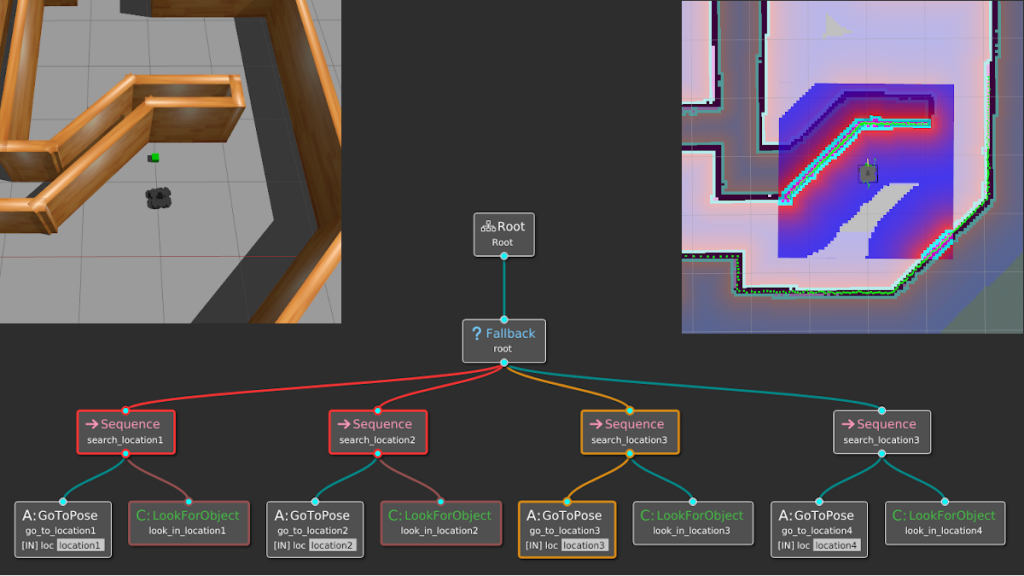
This ones pretty good
limber veldt
Thank you
sterile nest
its sort of like object-oriented if-statements
limber veldt
Interesting, I'll have to do more reading and looking for implementation examples
Something I always deal with, controlling NPCs, using a state machine
quartz fossil
dusky laurel
Guys how do I actually make my code run ?
Just like any other Python program?
@limber veldt @sterile nest https://github.com/TheCheapestPixels/pychology#behavior-trees
GitHub
Contribute to TheCheapestPixels/pychology development by creating an account on GitHub.
 bold radish
Where can i find the best pygame tutorial
limber veldt
"Best" is subjective, but ClearCode has good tutorials
limber veldt
I made a chip factory room, just in case we need more chips
Eventually, I'll be taking away the mouse grab in most places
So only player can pick things up
Or robot
The speed button sets the speed of the burned chip, which increases the number of internal gates and wires processed in one evaluation of the chip
Nesting chips is working to one level at least
And the wallhugger uses a couple nested-nested chips
And it's really sensitive to the speed setting, too slow and it moves too far past corners before trying to regain it
sinful elm
wicked sail
<@1012110551117209630> Is there something specific you need help with? Or do you...
@wicked sail I need help with a general sence of how to do stuff
limber veldt
Choose an editor, VSCode, PYCharm, Sublime, whatever, install it, install python, run editor, write code, save code, run file
And if anything like me, refactor and debug for weeks
sterile nest
Ok, so the mating is working. But there is a large gap between males and females

This is the 4th gen
sterile nest
ok so I got it working, but now when I try and increase the time scale verything breaks
 jade geyser
sterile nest
ok so I got it working, but now when I try and increase the time scale verything...
jade geyser
sterile nest
ok so I got it working, but now when I try and increase the time scale verything...
just multiply random variables by deltatime until it works
sterile nest
no, becasue for breeding they have to be a certain distance away. But when I do what you mentioned it just ignores that logic since they are moving too fast
 unique geode
i was wondering if i could make an ios app using python, was thinking of making a game
 honest heron
I need some help scaling this image down to actually look like a snail enempy


this is how the snail actually looks
honest heron
I just started so I’m not sure which function I can use
I have my background set but I couldn’t figure out how to scale it down I didn’t know that there were functions for that thanks
limber veldt
pygame.transform.scale() or .rotozooom()
raven kernel
or .scale_by
limber veldt
I use GIMP quite often for images, it's quirky but works fine
Is there a tool that can do pixel for pixel scaling, such that the edges retain their sharpness? Like what is one pixel becomes four or nine with 2x or 3x scaling, for example?
raven kernel
limber veldt
Is there a tool that can do pixel for pixel scaling, such that the edges retain ...
I believe you just need to set "interpolation" to None
 sterile nest
How should I do the predators and prey for more complex systems?
Like what I mean is, I would have like 10 different entities. Do I make a calculation for fitness or something?
Or should I just make a food tree in a way
limber veldt
They would each need an ideal weight of some kind and the abiity to overeat and lose fitness?
 silk hinge
Hello! I'm trying to get midi output working with pygame, and have stumbled across an error. Whenever I do pygame.midi.Output(midi_port) I get an error. My program is the following:
import pygame.midi

pygame.midi.init()

def print_devices():
    for n in range(pygame.midi.get_count()):
        print(n, pygame.midi.get_device_info(n))

print_devices()

midi_port = pygame.midi.get_default_output_id()

print(f"\nThe default midi port is: {midi_port}\n")

midi_output = pygame.midi.Output(midi_port)
When I run this program I get as an output:
pygame 2.5.2 (SDL 2.28.3, Python 3.12.1)
Hello from the pygame community. https://www.pygame.org/contribute.html
0 (b'MMSystem', b'Microsoft MIDI Mapper', 0, 1, 0)
1 (b'MMSystem', b'Microsoft GS Wavetable Synth', 0, 1, 0)

The default midi port is: 0

Unable to open Midi OutputDevice=0: b"PortMidi: `Host error'"
What's weird is that this program worked on Windows 8 and now on Windows 10 it doesn't work. Perhaps there is some menu somewhere where I can "open" the output device?
Please if you know what to do then tell me as this is the same issue as on https://www.reddit.com/r/pygame/comments/htsh5x/windows_10_unable_to_open_input_from_any_midi/?sort=new and https://www.reddit.com/r/pygame/comments/ut58t9/problem_with_opening_audio_channels_on_windows/ though it doesn't have any working answers. I have also tested it with the official pygame midi examples and it has also given me the same error, leading me to believe something must be done on the OS side and that this is not an error in my usage of the library.
 trail sequoia
hello can someone help me. I don't know where to ask but i am doing some coding game about battleships game and i don't know what strategy use for finding boats because i think random shooting is too long and because i am not very good programmer and idk how to do that advanced machine learning things etc.
this is my code :
import requests
import random

endpoint =  1

x = 5
y = 5

def shooting():
    global x
    global y
    if grid[x][y] == ".":
        x += 1
        print(f"focusing on x: {x} y: {y}")
        if x > 5 and y > 6:
            while True:
             x -= 1

while True:
    avengers = ["Thor", "hulk", "Iron Man"]
    endpoints = ["fire", f"fire/{x}/{y}", f"fire/{x}/{y}/avenger/{avengers[0]}", "reset"]


    token = ""
    headers = {
        "Authorization": f"Bearer {token}"
    }


    # odeslání
    url = f"https://europe-west1-ca-2023-dev.cloudfunctions.net/battleshipsApi/{endpoints[endpoint]}"
    response = requests.get(url, headers=headers)
    data = response.json()
    print(data)

    # zobrazení pole
    grid_string = data["grid"]

    grid = [[0 for _ in range(12)] for _ in range(12)]

    for i in range(12):
        for j in range(12):
            grid[i][j] = grid_string[i * 12 + j]

    for row in grid:
        print(' '.join(row))

    if "X" not in data["grid"]:
        shooting()
My chip tester now properly wires 8 or 16 pin chips and prototypes
One could always 'solder' the ports to ports themselves but having the autowire is a convenience
And I could place the thing anywhere, just have it laying in that room for now
Makes sense to have it in that room though, close to the burner
Those squares with stems are switces that can be either input or output, depending on the type of port wired to them. With those new unburned and unloaded chips, the pins are undefined, neither input nor output, so all the stems and ports remain undefined
In this 8 pin chip, I've loaded the wallhugger circuit and the pins of the tester change accordingly
In the process of making that, I made switches that can be any length, here's a few

They can be rotated, moved, and input/output/undefined
The original game nor the Java port had switches like this, it's a nice addition
One can more easily observe an output or switch an input
Of the sensors in the screenshot, the directional one is also using the same stem objects, but those on it are defined and locked as outputs
fierce turret
trail sequoia
this is my code :
```python
import requests
import random
endpoint = 1
x = 5
...
I am a very "newish" to Python myself, but if you are doing this: https://www.panaxeo.com/coding-arena, then there is a LOT of factors to consider. Maybe optimize to find the Helicarrier first so you get your bonus. ( For example it can't be in any corners; 12:12, -12:12, 12:-12 or -12:-12.) If you hit something, check east/west, north/south. if that hits check corners. y=y x+1, x=x y+1 etc. If that doesnt hit check the hit before opposite direction of last hit. If that hits its the helicarrier, but that is 13 steps to find the Helicarrier. You could maybe check 3 grid in each direction, but then it finds nothing if it is in the middle. Then you have to check 2 grids in each direction etc. But that could also be the Carrier so you have to check corners either way..
 night mirage
hey guys
can someone help me out with a code im working on
its annoying the living shit outta me
been tweaking for past few hours and still no clean way i found
GitHub
Simulating NPC just eating food and growing bigger - Kidd-buu/ant_turtle_sim
Im trying to have have the python def launch_reaper()
disabled or at least make the reaper.hideturtle go into effect
once i press the F2 button from
screen.onkeypress("F2")
any help?
trail sequoia
fierce turret
I am a very "newish" to Python myself, but if you are doing this: https://www.pa...
ok i will try
sterile nest
night mirage
https://github.com/Kidd-buu/ant_turtle_sim/blob/main/Ant_Turtle_sim_2023.py
what is the reaper supposed to do
@night mirage I can help you if you'd like. Not sure if this is what you were trying to do
sterile nest
limber veldt
In this 8 pin chip, I've loaded the wallhugger circuit and the pins of the teste...
I have a question. When you increase with your speed button, do you just multiply your delta time?
limber veldt
I have a room_display() method running on a timer, when I increase speed, it reduces the delay of that timer
sterile nest
Cuase thats what I've been doing with my sim for now. Though I can only go upto 8x speed until they start having broken behavoir
how are you able to call the method on a timer? Are you just using the pygame timer?
sterile nest
and you are changing (decreasing) the max accumulated time when you increase speed, so it updates faster right?
limber veldt
Exactly
sterile nest
like, lets say the game would update every 60 seconds with max_dt = 60.
I add delta time to a variable, then, for every frame I check if its exceeded max_dt? And if it has I set it back to 0 and do an action?
limber veldt
Here I instance the timer...

Giving it a duration and a function
Here in the object's update() method...

So timer is always being updated with the value of slider
Not updated, really, but set
limber veldt
And room_display() just evaluates devices....pretty much
sterile nest
I do have a question about your timer object though.
When you update your speed, are you just doing something like.
timer.step_time = new_step_time
limber veldt
sterile nest
I do have a question about your timer object though.
When you update your speed...
Yes
Notice at the end of room_display(), reactivating the timer, so it's always running
I put my player animation on its own timer, basically doing the same thing though, calling the player.animate() method with a delay
A small look at how I handle portals and warping from level to level. My level objects have an attribute .portal = None. But when player fully collides with a portal wall tile (an object) in the current level, it sets portal = <portal object> which has a couple of attributes for what kind of portal it is
room_display() checks the current level portal attribute
And if True, starts a different level
And while the timer is always running, eval() has an opening condition to stop it from happening if the remote (power switch to the sim) is turned off (red dot in the menu bar and red antenna over player's head)
And just because...the Portal() object, note the touched_by_item() method https://paste.pythondiscord.com/AH4A
Currently pondering adding images to the portal, so it can do some simple 'portal' animation
So gave it an optional images arg
The game has like 50 portals scattered about all its levels, and I always send images to objects after preloading them, never loading assets inside the gameloop
So I need to work through all those the instances and send the images to the Portal objects, tedious
Then add something to that animate() method
limber veldt
One could use a few different kind of timers. I learned the one I use from ClearCode and some of the guys on his discord, there may be even better timers or better methods, but this is working well for this game
Custom USEREVENTs, for example
And the event queue
In some cases, I just use dt accumulators where ever and when ever I need a simple timer
With my state machine setup, it's easy to instance a timer during init of any state
self.timer = 0, self.delay = 1000, self.timer += dt, if self.timer >= self.delay: do something
sterile nest
Ignore all the random things going on. I just made it so they will chase eachother as a test to see if the movement logic works with the update (which it does)
sterile nest
yeah mine was doing that before. But with this new update system I dont have that issue anymore
limber veldt
Like if obstacle is only 50 wide and vector is 75 long...
sterile nest
Ah , you are multiply speed directly by the time scale and delta time I think
Thats the issue I was having
ah nvm
thats something else
limber veldt
They call it tunneling, when a single frame of movement totally misses another object
sterile nest
you could implement some sort of ray tracing system. Where it checks the collision beforehand
sterile nest
No idea what that means, but I will look it up
limber veldt
Especially in a world of static objects and like a moving ball, one can calculate all the collisions before they actually happen
sterile nest
Okay, yeah thats what I was talking about sort of
limber veldt
seek() and arrive() methods, so moving objects slow as they arrive
 limber veldt
Some arrive() methods on those cards, hah
sterile nest
yeah thats pretty cool. Sort of like a limit
limber veldt
The slide right into position
sterile nest
Im guessung you're dividing the current distance by the max distance and what not
or something like that
limber veldt
Setting velocity based on distance within a certain limit
Like within 100 px, start slowing
sterile nest
I'm trying to find a way rn to prevent entities from going through eachother lol.
I'm thinking about just stopping all movement when they come within a certain distance from the other entity
But I might add like a push feature
so I would need to add momentum etc
limber veldt
You can check distance_squared() for something fast, like only for a trigger
But even so, those calls add up fast
Like if you have 100 objects and all of them are checking distance to each other, that's like 10k distance checks
sterile nest
This is what Im doing for collisions
Like detections for other entities
Using 3 filters. The initial rect. The distance for the cone, then the angle
limber veldt
Now days, I just use pygame collision methods
limber veldt
sterile nest
This is what Im doing for collisions
rect collisions?
pygame groups kickass, imo
sterile nest
Well, Its weird. I want all the entities inside the color area, but pygame doesnt allow custom collision objects like polygons.
So I used a rect to filter them
sterile nest
Yup
though, I recently disovered circle collide...so I might check that out
Would remove 2 checks
then I would just need to check the angle
limber veldt
Circles are really fast to check
sterile nest
https://www.pygame.org/docs/ref/sprite.html#pygame.sprite.collide_circle
sounds like what im already doing in a way
limber veldt
There are a couple of pygame collision methods that take a collide parameter, one can add their own collision check method there
If left out of the call, it defaults to its own default collision checks using the rects
 little copper
I have a couple of question about gamedev
What are specialization in game dev ? Is there a video going throught them all or any kind of way to know them all ?
limber veldt
I'm not sure what that means
sterile nest
limber veldt
There are a couple of pygame collision methods that take a collide parameter, on...
ah okay. So it requires a rect sprite. Im just using rects rn.
Im not sure what to do tbh. Since the rect can grow depending on the view distance. Can you transform and scale sprites?
limber veldt
You can inflate() rects to resize them. I think you're method just using rects is fine, but sprites can have other rect attributes, too, just would need to update their positions with the sprite positions
Like you are already doing
sterile nest
Well at the moment, I am legit creating a new rect for every entity every frame..so...
Since as they got older the view distance grows, which means the detection also grows
limber veldt
You might optimize it be just assigning pre-defined rect positions as the object moves
I dunno
Oh ok
sterile nest
yeah thats what I plan on doing. Just assigning a sprite to each sprite, then scaling and whatnot
instead of making a new one
limber veldt
Are you using vectors for your movement?
sterile nest
yes
limber veldt
I use a lot of offsets on my objects to pin other things to them
Like my gate objects have offsets defining where to draw their stems, since they are separate objects
sterile nest
I use a vector for direction, then a value for speed.
sterile nest
yup
well actually
now that I have this new update system, I removed delta time from my movement function since im already accumulating time
limber veldt
I think that's the classical way of moving things in 2d
Right on, now that you have to scale updates
I really started learning how to use vectors like three years ago. Like used them before but didn't grind them enough to understand like I do now
Coding Train's Nature of Code series
sterile nest
Yeah im legit reading a linear alg book . I started yesterday since I really love game dev
Coding train is awesome
sterile nest
havent made any of his things, but I have watched the videos
like the perlin noise, boids etc. Super cool stuff
limber veldt
Yeah, he's so good at explaining, even though not in python, the logic is the same
sterile nest
yeah and since its in Js its pretty easy to translate
this.attribute = self.attribute etc
limber veldt
Right on
Freya Holmer is really good too, really deeeeeep too
It's hard to find deep dives into game mechanics, just the logic itself, not specific to any engine or whatever
That's why I like pygame, let's me do my own coding for anything. Thought about trying some Godot or even Unity or Unreal
A lot of coding there too but a lot of coding pre-existing objects
sterile nest
yeah I agree, Its annoying also . Trying to find an example and its all just for another engine or something. Yeah I was gonna do godot, but I need more experience first.
I gtg for a few
limber veldt
Have a good one
I'm just considering my next refactor, I could do many things better in this project
sterile nest
yeah, I've been planning long term for a future project
trying to decide how I want to save levels and other things
I'm thinking of making layers
then I can like..go.inskde a house and render layer 2 or something
honest heron
this code doesnt start
it was starting until i tried to add death mechanic via collision
if enemy_rect.colliderect(player_rect):
pygame.quit()
exit()
sterile nest
honest heron
if enemy_rect.colliderect(player_rect):
pygame.quit()
exit()
Starting positions are the same

or close
try moving them apart and see if thats the issue
honest heron
that isnt the issue @sterile nest
ive had it like that
since like I started my project
i messed with it and it just was the only intergers that kept my character and enemy to the floor
idk how to explain it
but the code stopped working after that I just changed it and it wasnt the issue.
sterile nest
can I see the full code
sterile nest
limber veldt
I'm just considering my next refactor, I could do many things better in this pro...
im back. I added momentum. Though, by adding this 1 function. I can only do 2x time scale at 200 objects now
honest heron
@sterile nest I dmed u the code
limber veldt
sterile nest
Not bad though, looks pretty busy with that many
limber veldt
So I made a condition for my player.moveUP() method to automatically enter things that have internal rooms, can still enter using the E key, too
Like so

This is one way to enter room
s
Or house
For the prototype chips, since they have no exits, one must use the X key to exit
I'll probably repeat the process for moving the other directions
Since my internal room objects should be enterable from all directions (nsew)