#game-development
1 messages · Page 17 of 1
 knotty granite
Good thing I didn’t buy from amazon
knotty granite
 grim current
yeah , amazon sucks for these kind of things
grim current
yeah , amazon sucks for these kind of things
Yeah
Lol
Thanks man
Imma go back to coding now
The price of controller module is good tho?
Or i should order it from here too
grim current
i usually dont use amazon for any kind of modules and such
i usually use that site i sent
but you can compare price on both platforms and go with the cheaper one, upto you
grim current
bye 👋
knotty granite
Btw i have a question bro
Can i use raspberry pi( the cheapest one) to make the same thing
?
Then i will not need to use arduino
Right?
grim current
knotty granite
Can i use raspberry pi( the cheapest one) to make the same thing
yes, its raspberry pi pico , and yes it can appear as a usb device , and yes it can be programmed using micropython/circuitpython
but you wont find a nicely made shield for it like you have for arduino , you will have to get your hands dirty and do some breadboard wiring (its not hard tbh)
knotty granite
What should i do according to you?
grim current
just go with arduino thing, its premade so less chances to mess up
knotty granite
Yeah
So i just connect the controller module to arduino
And comnect the arduino to laptop
And then i have a working controller
Just need to use pygame.controller
grim current
knotty granite
And then i have a working controller
woah , not that fast
you need to put some program onto that arduino first otherwise it wont know what to do
you should google something like diy USB gamepad with arduino leonardo
you will find many results , go to one of the links , they will explain you how to program the arduino and what code to use
i am not on PC rn otherwise i would have searched it up real quick
it shouldnt be hard to find tho
knotty granite
Oh okie
 slate crane
Like there is no extension too :(((((((((((((( Me sad 😦
 static trout
guys you have channel i want to learn administration control for my work im currently in computer laboratory assigned im freshment i want to learn basic role of an admin please can someone help me?
 tacit geode
got back to pygame after some time

btw it was my fav python lib
when i was learning python 5yrs ago
its also random everytime
 vagrant saddle
you don't have to learn a lot there are ready made programs for handling that shield via serial port
it all depends on if you want to DIY or just make a cheap demo
knotty granite
vagrant saddle
you don't have to learn a lot there are ready made programs for handling that sh...
oh
thanks

help needed here
why is the text score out of the rectangle i drew around it
is smthg wrong?
vagrant saddle
hard to tell without the code and/or a hand drawing of that you want
knotty granite
oh let me give the gist
one sec

Gist
the word score is not getting fully enclosed in the rectangle drawn by me. - exhibit.py
@vagrant saddle
here is the code
Did u find anything wrong?
vagrant saddle
you want a enclosing rectangle bigger than font space ?
knotty granite
Yeahh yeah
Also i want the text to be fully in center of the rectangle
Actually getting it in center would solve all the problem
Since its getting weirdly aligned with the centre of the rectangle
But i have alr set its position to center=(400,50)
vagrant saddle
if using pygame-ce you can scale_by() the rect
knotty granite
pygame-ce?
vagrant saddle
vagrant saddle
knotty granite
pygame-ce?
the pygame fork from pygame community discord
vagrant saddle
knotty granite
Did u find anything wrong?
try to put all your images assets in "graphics" fodler not "Desktop/New Folder"
vagrant saddle
knotty granite
Did u find anything wrong?
don't use r"C:..." for path but eg "graphics/Player/player_walk_1.png" instead
knotty granite
vagrant saddle
try to put all your images assets in "graphics" fodler not "Desktop/New Folder"
ok
lemme do that too
Hey bro
I am unable to use the scale
How i do it?
I did pg.scale_by(Score_rect,2)
@vagrant saddle
Can you correct my syntax?
Pls
vagrant saddle
knotty granite
I am unable to use the scale
 loud jasper
I've just developed a ping pong game. Feel free to check it out, play the game, and share any suggestions you may have.
vagrant saddle
loud jasper
I've just developed a ping pong game. Feel free to check it out, play the game, ...
paddle movement is a bit slow when using vsync
loud jasper
vagrant saddle
paddle movement is a bit slow [when using vsync](https://pygame-web.github.io/sh...
Okayyy, will work on this.
Thankyou 
 quasi patrol
 marble jewel
pygame-ce supports it just fine
marble jewel
pygame-ce supports it just fine
cool
 subtle jackal
So.
I know this is a Python Discord.
But does anyone know how to do C# and dealt with RocketMod for a game called Unturned?
Please lemme know ASAP. I went to the C# discord, but they blew me off and just, kept taking about other things when I asked for help on stuff.
 dawn quiver
subtle jackal
Please lemme know ASAP. I went to the C# discord, but they blew me off and just,...
dawn quiver
subtle jackal
Please lemme know ASAP. I went to the C# discord, but they blew me off and just,...
Try some of the general programming servers, e.g. world of coding
 pine plinth
subtle jackal
So.
I know this is a Python Discord.
But does anyone know how to do C# and dealt...
pine plinth
subtle jackal
So.
I know this is a Python Discord.
But does anyone know how to do C# and dealt...
you also can try asking in off-topic channels here
 grim current
lol wat
knotty granite
The arduino leonardo
grim current
i have never had problems with that site lol
what name u using ? dont try and use some special characters ig
grim current
knotty granite
Lemme try special charcters
no , dont
just type ur normal name
it gets used when delivering your parcel.
you dont want them asking around in you neighbourhood , "is there a ISUCKATCODING(#)" nearby ?"
grim current
try on some other browser / device
if it still remains, try contacting their customer support
also check if you already have an address in the address book tab , if yes then delete it first and then try adding this one
knotty granite
Tried on other device
Not going through
Still
🥲
@grim current not going through
Tried different device and browser too
grim current
can you show what you are typing in ?
maybe there is some trailing space ??
knotty granite
Oh wait
I am putting a space in first name
Removed the space
It went through
Thanks
knotty granite
rgument 1 must be pygame.surface.Surface, not builtin_function_or_method
File "C:\Users\LENOVO\exhbit game.py", line 37, in <module>
stand_scaled=pg.transform.scale(player_stand,(300,150))
TypeError: argument 1 must be pygame.surface.Surface, not builtin_function_or_method
getting this error
help
@vagrant saddle
vagrant saddle
knotty granite
<@334096250897170433>
sorry no time today
pine plinth
knotty granite
<@172395097705414656> if free can help me?
can you stop pinging random people and start reading your error messages?
 polar shore
im here
knotty granite
okie. imma share my gist
one min
@polar shore
am getting this error i dunno why
rgument 1 must be pygame.surface.Surface, not builtin_function_or_method
File "C:\Users\LENOVO\exhbit game.py", line 37, in <module>
stand_scaled=pg.transform.scale(player_stand,(300,150))
TypeError: argument 1 must be pygame.surface.Surface, not builtin_function_or_method
vagrant saddle
knotty granite
rgument 1 must be pygame.surface.Surface, not builtin_function_or_method
File ...
you lack () after convert_alpha
knotty granite
ohhhhhh
polar shore
convert_alpha
knotty granite
thanksssss
but why was it indicating an error in line 37
its real strange how this all works
💀
polar shore
@knotty granite line 36 gets the function
stored inside the variable
line 37 gets the function as an argument
polar shore
np
in my opinion you should also shrink the line whenver u can
would help you to debug it and detect problems more shortly with your eyes
@knotty granite
what i think u should do is at the start of the file place all the paths in string variables
and use those string variables inside the functions etc
that way the lines would be shorter and also u'd be able to change the paths more easily
polar shore
yep
knotty granite
the youtuber i am watching has the same messy code lol
its so difficult to locate everything
polar shore
knotty granite
its so difficult to locate everything
yea so change it and do it better on your own
always think what u can split etc
everything that starts with r" etc, place inside strings at the beginning of the file
knotty granite
ok
can i also make an asset section in the beginning?
like store all the paths in variables at start
knotty granite
ohh
polar shore
path = r"etc
var = somefunc(path)
knotty granite
polar shore
yea thats what i said
i mean the same thing
knotty granite
polar shore
path = r"etc
var = somefunc(path)
yes
knotty granite
okie
polar shore
then use the variables as function parameters later on
i'd also move screen width and height there
bbefore the first function
@knotty granite
so that it could easily be changed
polar shore
yea
i dont have a problem with long lines personally, even longer than that, but only when it's necessary
 dry cloak
I remember before i learnt about the triple quotations i would litterally write entire descriptions in a single line (using /n) and it would stretch for miles
knotty granite
Lol
Triple qouatations are the best to write comments
Fr fr
Gist
help with list.append does not take arguements error in line 84 - exhibit.py
@unkempt wren can help me ,if available?
Anyone here?
knotty granite
@olive grotto can help ?
 brisk yew
knotty granite
Triple qouatations are the best to write comments
brisk yew
knotty granite
Triple qouatations are the best to write comments
they're not for comments, # is for comments
you either use """ for multiline string values (that you'd use) or docstrings (probably most common usage) (ig docstrings can be considered comments in a sense, but they have a particular structure, so not really)
 abstract tree
Can anyone tell me why my "Play again" button isn't working
knotty granite
brisk yew
they're not for comments, # is for comments
you either use """ for multiline str...
Ohh
Thanks for the info
loud jasper
Developed a Python-based snake game and would greatly appreciate it if you could take a look and provide any suggestions or corrections you may have.

GitHub
A Python Snake game involves controlling a growing snake to eat food while avoiding collisions with walls and itself. - GitHub - Jugglerish/Snake-game: A Python Snake game involves controlling a g...
vagrant saddle
maybe make it web playable
 olive grotto
sure
knotty granite
So my code is working
But i am spawning only 1 mob both in sky and on ground
💀
I have 2 mobs and i dunno why it’s spawning just one everywhere
Lemme send the code
knotty granite
olive grotto
sure
Gist
mobs spawning wrongly. GitHub Gist: instantly share code, notes, and snippets.
here is my code
i should be getting 2 mobs(snail and fly) one on ground and one in sky, but i am getting a fly at both locations when i run the game
olive grotto
i see.. why do you get two when you think you should get one of each?
pine plinth
.bottom is never equal to 270, so you are never rendering snails

 vast pagoda
Hello guys
knotty granite
pine plinth
.bottom is never equal to 270, so you are never rendering snails
Ohh
But isn’t the y set 270
 knotty granite
olive grotto
i see.. why do you get two when you think you should get one of each?
knotty granite
olive grotto
i see.. why do you get two when you think you should get one of each?
Yeah
I am getting 2 flies
And no snails
knotty granite
pine plinth
.bottom is never equal to 270, so you are never rendering snails
Yeah
I get it finally
It should be .top==270
Lol
 sage cloak
@brave ivy
 lean moss

FACT CHECK SHEET ►https://bit.ly/MogulMailCorrections
follow me on twitter ► https://www.twitter.com/ludwigahgren
follow me on tiktok ► https://www.tiktok.com/@ludwigahgren
follow me on instagram ► https://www.instagram.com/ludwigahgren
join my subreddit ► https://old.reddit.com/r/LudwigAhgren/
LINK TO EVERYTHING ► https://wlo.link/@ludwig
This...
Thoughts?
I think it’s cool how godot May/ will become more popular due to this
So we could see more godot tutorials in the coming months and years
brisk yew
more than we would see otherwise?
brisk yew
lean moss
Thoughts?
old news
knotty granite
i want to make my background do infinite scroll
so i wrote this code
import pygame as pg

pg.init()
h=800
w=450
game_ac=True
screen=pg.display.set_mode((h,w))
#surface
surf1=pg.image.load(r"C:\Users\LENOVO\Desktop\UltimatePygameIntro-main\graphics\Sky.png")
surf2=pg.image.load(r"C:\Users\LENOVO\Desktop\UltimatePygameIntro-main\graphics\Sky.png")
surf1_rect=surf1.get_rect(topleft=(0,0))
surf2_rect=surf2.get_rect(topleft=(450,0))

a=True
while a==True:
      surf1_rect.left-=1
      screen.blit(surf1,surf1_rect)
      if surf1_rect.left==449:
            screen.blit(surf2,surf2_rect)
            surf2_rect.left-=1

      if surf2_rect.x==0:
         surf1_rect.x=450
         screen.blit(surf1,surf1_rect)
      pg.display.update()
pg.quit()
but the background still keeps stretching
why is that
help?
btw this is just a test run i made
 crimson hound
Does anyone have some article/book/blogpost/example on networking in an ECS architecture?
vagrant saddle
crimson hound
Does anyone have some article/book/blogpost/example on networking in an ECS arch...
google for "Distributed Object System"
crimson hound
vagrant saddle
google for "Distributed Object System"
🤔
that does not sound helpful
vagrant saddle
weird i thought it was helpfull and that's why disney implemented astron to make some mmorpg with ecs
crimson hound
ah, that's a name of some specific technology? because google showed me some very generic thing
vagrant saddle
that's very specific to game and computing cluster and tbh it can get very complicated very fast
especially for games that have unpredictable motion ( eg FPS )
for fixing network time sync related problem there's not much litterature

Go to https://expressvpn.com/coreagaming and find out how you can get 3 months free.
Try streaming with XSplit ➤ https://link.xsolla.com/g1wR7sAK
10% Discount code: coreagaming
All XSplit License sales with this code supports future Core-A Gaming videos.
Twitch: https://www.twitch.tv/coreagaming
Patreon: https://www.patreon.com/coreagaming
Dis...
 quartz fossil
@crimson hound @vagrant saddle In my not-yet-battletested opinion, ECS and networking are orthogonal to each other. Consider networking as a system that updates affected entities, and sends out updates, at a defined point in your cycle of systems.
Anyway, I want to implement an economy-based game about extracting, transforming, and transporting resources. How that'd look like in the trivial case (continuous amounts of resources, zero travel time), I get; A directed graph of transformations, a bunch of linear equations, and finding the point where the line crosses 0 or the maximum capacity of some storage. When I consider the non-trivial case, an abyss of "There are probably lots of special cases to consider... But which?" opens up. Since this kind of problem has probably been researched to death by economists, what models do they use?
 normal silo
crimson hound
Does anyone have some article/book/blogpost/example on networking in an ECS arch...
normal silo
crimson hound
Does anyone have some article/book/blogpost/example on networking in an ECS arch...

In this 2017 GDC session, Blizzard's Timothy Ford explains how Overwatch uses the Entity Component System (ECS) architecture to create a rich variety of layered gameplay.
GDC talks cover a range of developmental topics including game design, programming, audio, visual arts, business management, production, online games, and much more. We post a...
dry cloak
knotty granite
```py
import pygame as pg
pg.init()
h=800
w=450
game_ac=True
screen=pg.display....
Firstly you dont need to load the same image twice - its a waste of memory
I will explain more but i gtg
 unreal river
knotty granite
```py
import pygame as pg
pg.init()
h=800
w=450
game_ac=True
screen=pg.display....
unreal river
knotty granite
```py
import pygame as pg
pg.init()
h=800
w=450
game_ac=True
screen=pg.display....
So in your game loop, you are constantly decreasing surf1_rect.left by 1, that is 0, -1, -2, -3, and so on. but you are checking if it's 449 which will never happen
knotty granite
some improvements
but still not working as intended
import pygame as pg

pg.init()
h=800
w=450
game_ac=True
clock=pg.time.Clock()
screen=pg.display.set_mode((h,w))
#surface
surf1=pg.image.load(r"C:\Users\LENOVO\Desktop\UltimatePygameIntro-main\graphics\Sky.png")
surf2=pg.image.load(r"C:\Users\LENOVO\Desktop\UltimatePygameIntro-main\graphics\sky2.jpg")
surf1_rect=surf1.get_rect(topleft=(0,0))
surf2_rect=surf2.get_rect(topleft=(800,0))

a=True
while a==True:
      screen.fill((0,0,0))

      surf1_rect.left-=1
      if surf1_rect.left==-800:
         surf1_rect.left = 800
      if surf1_rect.left==range(0,800):
         surf1_rect.right=surf1_rect.right
      if surf2_rect.left==-800:
         surf2_rect.left=800
      screen.blit(surf1,surf1_rect)
      screen.blit(surf2,surf2_rect)

      pg.display.update()
      clock.tick(60)
pg.quit()
am using 2 diff imagess
 fallow glade
Your second if statement is wrong
fallow glade
It's tough to explain but I can change the code
knotty granite
Yepp
fallow glade
So lemme try explaining first
knotty granite
Oh okay
fallow glade
To check if the number is between two ends, you need to replace the equality check with "in"
left in range(0, 100)
This will check it the value of left is any whole number from 0 to 99
fallow glade
Yes
fallow glade
Then the statement inside, you are setting the same value to itself
You probably want to change surf 2's left edge to follow surf 1's right edge
fallow glade
You need to find that out
fallow glade
Any change in output?
knotty granite
Umm lemme check
Nope
Still the same
 surf1_rect.left-=1
      if surf1_rect.left==-800:
         surf1_rect.left = 800
      if surf1_rect.left in range(0,800):
         surf1_rect.right=surf2_rect.left
      if surf2_rect.left==-800:
         surf2_rect.left=800
      screen.blit(surf1,surf1_rect)
      screen.blit(surf2,surf2_rect)
```current state
dry cloak
My question is why are you using the range function?
import pygame as pg

pg.init()
h=800
w=450
game_ac=True
clock=pg.time.Clock()
screen=pg.display.set_mode((h,w))
#surface
surf1=pg.image.load(r"C:\Users\LENOVO\Desktop\UltimatePygameIntro-main\graphics\Sky.png")
surf2=pg.image.load(r"C:\Users\LENOVO\Desktop\UltimatePygameIntro-main\graphics\sky2.jpg")
surf1_rect=surf1.get_rect(topleft=(0,0))
a=True
while a==True:
      screen.fill((0,0,0))

      surf1_rect.left-=1
      if surf1_rect.left==-1600:
         surf1_rect.left = 0

      surf2_rect.x = surf1_rect.right
      if surf1_rect.left > -800:
          screen.blit(surf1,surf1_rect)
      else:
          screen.blit(surf1, (surf1_rect.x+surf2_rect.width, 0))
      screen.blit(surf2,surf2_rect)

      pg.display.update()
      clock.tick(60)
pg.quit()
That should work presuming both the images have a width of 800px
And could be improved by implementing deltaTime so that it is consistent
How it works is you just move the first image to the left each frame, and reset its position back to 0 once it reaches 2x its full width off screen
You always draw the second image to the right of the first one, but if the first image is fully off screen then you draw it to the right of the second one so it fills in the gap after the second image
crimson hound
normal silo
https://www.youtube.com/watch?v=zrIY0eIyqmI
I've seen this video twice  maybe I should rewatch it though
 finite hatch
can anyone help me with this i dont know how to resolve the issue and i need to have this done for college haha


 frank fieldBOT
Pasting large amounts of code
If your code is too long to fit in a codeblock in Discord, you can paste your code here:
https://paste.pythondiscord.com/
After pasting your code, save it by clicking the Paste! button in the bottom left, or by pressing CTRL + S. After doing that, you will be navigated to the new paste's page. Copy the URL and post it here so others can see it.
finite hatch
crimson hound
finite hatch
https://paste.pythondiscord.com/PW7Q
What do you think actions['dimension_exit'] should be?
crimson hound
finite hatch
bro idek XD
What will this program output?
foo = {
  "a": 1,
  "b": 2,
}
print(foo["a"])
print(foo["c"])
The last line will raise a KeyError
finite hatch
oh so i havent defined what dimension exit is?
crimson hound
!e
foo = {"a": 1, "b": 2}
print(foo["a"])
print(foo["c"])
@crimson hound :x: Your 3.12 eval job has completed with return code 1.
001 | 1
002 | Traceback (most recent call last):
003 |   File "/home/main.py", line 3, in <module>
004 |     print(foo["c"])
005 |           ~~~^^^^^
006 | KeyError: 'c'
Yes. If you look at the actions dictionary, there's no "dimension_exit" key
finite hatch
ohhhhh thankyou so much dude
i had dimension exit in locations
should i of had it in actions
aswell
knotty granite
dry cloak
How it works is you just move the first image to the left each frame, and reset ...
Can you pls give me the code? 😭🙏🏻
I am burnt out bruv
dry cloak
I typed on mobile so it may have a few flaws
knotty granite
ohh np i will make changes if there will be any indentation errors
its working but the same stretching issue is still there
@olive grotto
Hey bro
I need help
Big one
I gave been struggling for 2 days with my code 🥲
olive grotto
you should ask your question 😄 there are probably many that can help out 😄
knotty granite
But you are the best 💀🙏🏻
import pygame as pg

pg.init()
h=800
w=450
game_ac=True
clock=pg.time.Clock()
screen=pg.display.set_mode((h,w))
#surface
surf1=pg.image.load(r"C:\Users\LENOVO\Desktop\UltimatePygameIntro-main\graphics\Sky.png").convert_alpha()
surf2=pg.image.load(r"C:\Users\LENOVO\Desktop\UltimatePygameIntro-main\graphics\sky2.jpg").convert_alpha()
surf1_rect=surf1.get_rect(topleft=(0,0))
surf2_rect=surf2.get_rect(topleft=(800,0))

a=True
while a==True:
      surf1_rect.left-=1
      if surf1_rect.x==-800:
         surf1_rect.left = 800
      if surf1_rect.left in range(0,-801,-1):
         surf2_rect.left=surf1_rect.right
      '''if surf2_rect.left<-800:
         surf2_rect.left=800
         surf2_rect.left=surf1_rect.right'''
      screen.blit(surf1,surf1_rect)
      screen.blit(surf2,surf2_rect)

      pg.display.update()
      clock.tick(60)
pg.quit()
Still having problem
i have gotten to this point
but i dunno why surf1 is not going behind surf 2
olive grotto
do you have the sky2.jpg and Sky.png files to share?
knotty granite
Yes
olive grotto
maybe on is transparent png while the other is just a jpeg

 olive grotto
its also unclear to me what is wrong
knotty granite
I want to make a infinite scroller background
But it always stops at surf 2
Or if i try something else in my code it works but there is this weird stretch
This is the the other video
knotty granite
olive grotto
its also unclear to me what is wrong
Did you find smthg that could help me?
My brain is hurting 💀
olive grotto
why do you use two images? wouldnt it just be better to use one image?
knotty granite
Oh than it would look its not in continuouation

This is how these 2 different images joined together looks like
If i use the same image
It doesn’t join in middle like this
olive grotto
i see, so tell me again why your using two images?
knotty granite
Thats why i am using a reversed image
knotty granite
knotty granite
So i can get this thing done
olive grotto
if you want to make an infinite scrollable background, you just have the left side of the image match up with the right side and you use one image
knotty granite
Oh
Is there any easg code for it
I checked some tutorials but , oh boy they are difficult to follow💀
I am done with the game alr
I just want to add this final touch
So that it looks better
olive grotto
let me read something in the docs, i dont know pygame you see.
knotty granite
Ohh
I will try to find smthg too
pmp might be able to help me
@vagrant saddle heyyy
Bro
I need your help if you are available rn
I am so stuck rn 😭
olive grotto
so the key to get this to work is to think of the scrolling how many tiles of images do you need to fit the witdth of the screen
and here im just thinking about the same image repated over and over again

so if my background image was this image

the game window would show this
with me on this so far @knotty granite ?
knotty granite
Yeah
I saw this same thing in the tutorial
So i need a new background now
That looks the same everywhere?
olive grotto
well.. i dont think you should focus on that

figuring out how to repeate and tile the background is more important
@knotty granite the key point here is that you need to be able to blit the image on the screen next to each other
and since your moving the images some speed amount, you need to have more then the exact screen width of tiling images
knotty granite
Yoo
I have an idea
I cut out the background into a 200px image
And then find a part that will make it look more continuous
knotty granite
olive grotto
<@864347116213501952> the key point here is that you need to be able to blit the...
Yeah
olive grotto
knotty granite
And then find a part that will make it look more continuous
no need for that, the point im making is that you have to think of it as a tiling placement
knotty granite
Hey i have another idea as well. Should i try to define a function that would append in loop and always take the surface on list index 1
olive grotto
if your image is larger then your screen, you still have to add one more image copy on the side so you dont see black when you scroll
olive grotto
knotty granite
Hey i have another idea as well. Should i try to define a function that would ap...
learn how to do this with one image
knotty granite
knotty granite
Hey i have another idea as well. Should i try to define a function that would ap...
And then keep subtracting 1 from it to make it move
olive grotto
then you can expand this to more then one surface if you want
olive grotto
knotty granite
Yeah
the animation above is one image
olive grotto
and if you do it incorrect, it looks strange
knotty granite
Yeah
knotty granite
olive grotto
the animation above is one image
Your frames look really good
olive grotto
so dependant if you move to the left or right, you need to add more then one to offset the screen width
 knotty granite
olive grotto
so dependant if you move to the left or right, you need to add more then one to ...
knotty granite
olive grotto
so dependant if you move to the left or right, you need to add more then one to ...
Yeah
But wont that make it fast
?
Oh nvm
I thought you were talking about the value to be subtracted
Lol
olive grotto
im talking about tiling the same image on the left or right side depending on what way your scrolling
if the image is small, its easier to see it working

here i need to already have one more image to the right

do you want more help or do you want to experimient yourself?
olive grotto
knotty granite
very cool 😄
knotty granite
olive grotto
do you want more help or do you want to experimient yourself?
Oh thanks
I will experiment it myself. I dont want to bother you
I will learn more if i do it the hard way
olive grotto
true
I have written a short example of this using the image above, so if you want to see how i did it later, just let me know
knotty granite
Yepps
knotty granite
olive grotto
I have written a short example of this using the image above, so if you want to ...
Okie
olive grotto
im also building a controller 😄 getting parts in the mail tomorrow or next week
olive grotto
yeah, i got mine for a bit more, and i have to solder every part on a PCB myself
and 3d print the case
knotty granite
Thats so cool
olive grotto
so a bit of work, but its very fun
knotty granite
I am using a 3d pen to make a box for my controller lol
olive grotto
a small raspberry pi for the controller
knotty granite
Dont have 3d printers here
olive grotto
no, the even smaller one
olive grotto
ermm... let me see if i can find an image
knotty granite
Lol
knotty granite
olive grotto
ermm... let me see if i can find an image
Oh okie
olive grotto
 knotty granite
I am making this controller so i achieve the dual aspect of the exhibition make a working code module , make a working model
olive grotto
nice to see we are doing the same thing 😄
knotty granite
Yepps
olive grotto
knotty granite
Thats so smol
yeah, hope i dont break it
knotty granite
I dont know arduino so i am just gonna copy and paste lol
Cauze i will technically have to learn C for it
But one day i sure will learn further
olive grotto
you dont have to learn much C to make it work, only less then 1% of C
knotty granite
Ohh
olive grotto
thats what makes arduiino programming so nice
knotty granite
Just the basic syntax would work?
olive grotto
yes
knotty granite
Any small courses you would suggest?
Like really short
Since now i am short on time
I must submit a prototype on monday
💀
olive grotto
i have not done much, and all i have done has been from learn.adafruit.com
olive grotto
#microcontrollers is also a thing we have here
knotty granite
I just want to learn it so i can programme my arduino to work with my controller
knotty granite
olive grotto
<#545603026732318730> is also a thing we have here
Oh yeah
I am taking help for lord tyrion there
He is pretty good at this stuff and knows alot about micro controllers
He even helped me choose the right components
olive grotto
yeah true, hope you have some progress with it
knotty granite
Yepps
olive grotto
when you get your thing to work i can still show you my pygame thing
finite hatch
!p
frank fieldBOT
Missing required argument
pep_number
 Command Help
!pep <pep_number>
Can also use: get_pep, p
Fetches information about a PEP and sends it to the channel.
finite hatch
!paste
frank fieldBOT
Pasting large amounts of code
If your code is too long to fit in a codeblock in Discord, you can paste your code here:
https://paste.pythondiscord.com/
After pasting your code, save it by clicking the Paste! button in the bottom left, or by pressing CTRL + S. After doing that, you will be navigated to the new paste's page. Copy the URL and post it here so others can see it.
 cold storm
https://www.patreon.com/posts/real-decals-in-90962759
https://www.youtube.com/watch?v=ye32ZjsfxbA
(free)
should help with game development quite a bit - these should bake down just fine.

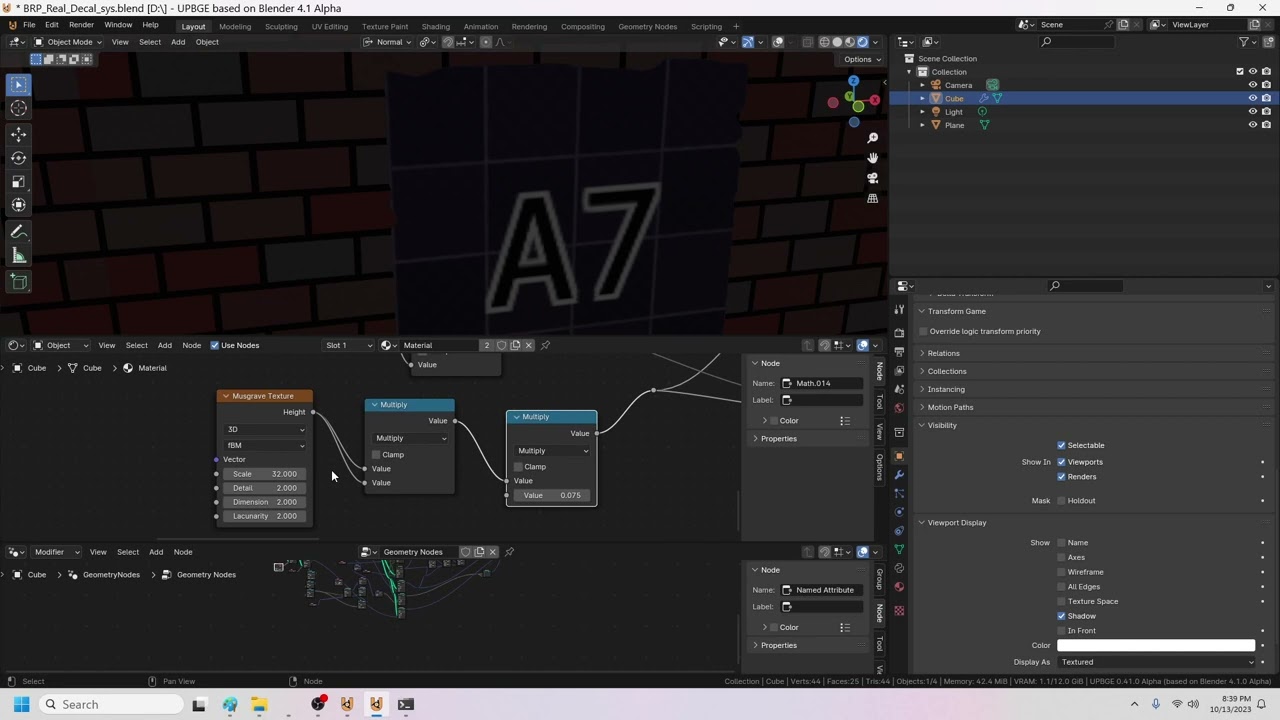
I made up the math last night to get texture cords from the closest triangle on another mesh
so you can scale / move the triangle and it moves the decal - we can set a per face attribute 'offset' to change the section of the atlas the decal is using
 broken hamlet
playing = True
while playing is True:
    shopping = True
    while shopping is True:
        pass
    bagging = True
    while bagging is True:
        draw_grid()
        for item in unbagged:
            placing = True
            while placing is True:
                for event in pygame.event.get():
                    if event.key == pygame.K_UP:
                        # Move up
                    # Other movement keys
                    if event.key == pygame.K_SPACE:
                        print("space key pressed")
                        placing = False
                        break
                pygame.display.update()   # Where does this go?
I am helping someone create a game that consists of shopping for grocery items and then bagging the items tetris style. But I'm not sure where to call pygame.display.update(). The current behavior is that the grid is drawn as well as the first item. However, after we press a key to move the grocery item, the item isn't redrawn in its new position.
 olive willow
broken hamlet
```py
playing = True
while playing is True:
shopping = True
while shoppi...
olive willow
broken hamlet
```py
playing = True
while playing is True:
shopping = True
while shoppi...
why do you use the is keyword i think you can just type "while shopping"
but im not a very experienced python programmer so idk
im not even 100% sure what the is keyword does
pine plinth
im doing surface.set_at(pos, col) in a loop
im drawing a lot of points
is there a faster way to do that?
like surf.set_ats([pos1, pos2, pos3, ...], col)
 empty torrent
pyhon can be used to make games ?
 bright plover
indeed
knotty granite
broken hamlet
```py
playing = True
while playing is True:
shopping = True
while shoppi...
Call it inside the first while loop
knotty granite
empty torrent
what is it used for
There is an engine too. But you can still make games in ide using pygame library
@broken hamlet

A free Python-oriented pastebin service for sharing Python code snippets with anyone
 odd compass
can u send me ur code
send as a text
i'll see
okayyyyyy
remove the __class__ use type() function
type() function takes an object as an argument and returns the class of the object.
The object whose class you want to get.
If you cannot use the type() function to get the class of the classoption object, you can simply pass the classoption object itself to the lambda function.
try:
    with open(os.path.join(currentdir, "Worlds", worlds[option] + ".json"), "r") as worldd:
        worlddata = worldd.read()
        worldd.close()
    worlddict = json.loads(worlddata)
    print(f"Floor {worlddict['Floor']}")
    print(f"Gold: {worlddict['Player']['Gold']}")
    print(f"HP: {worlddict['Player']['HP']}")
    def upgradestr(classoption):
        if worlddict['Player']['Gold'] > (worlddict['Upgrades']['StrUpgrade'] - 1):
            worlddict['Player']['Gold'] = worlddict['Player']['Gold'] - worlddict['Upgrades']['StrUpgrade']
            if not worlddict['WorldOptions']['NeverIncreasingCosts']:
                worlddict['Upgrades']['StrUpgrade'] = worlddict['Upgrades']['StrUpgrade'] + 50
            classoption.Name = f"Upgrade Strength ({worlddict['Upgrades']['StrUpgrade']})"
    options, i = [gameclass.Option(Name=f"Upgrade Strength ({worlddict['Upgrades']['StrUpgrade']})", Func=lambda: upgradestr(classoption))], 0
    for item in options:
        print(f"[{i}] {item.Name}")
    option = int(input())
    options[option].Activate()
except Exception as e:
    print(f"An error occurred: {e}")
    input()
try:
    with open(os.path.join(currentdir, "Worlds", worlds[option] + ".json"), "r") as worldd:
        worlddata = worldd.read()
        worldd.close()
    worlddict = json.loads(worlddata)
    print(f"Floor {worlddict['Floor']}")
    print(f"Gold: {worlddict['Player']['Gold']}")
    print(f"HP: {worlddict['Player']['HP']}")
    def upgradestr(classoption):
        if worlddict['Player']['Gold'] > (worlddict['Upgrades']['StrUpgrade'] - 1):
            worlddict['Player']['Gold'] = worlddict['Player']['Gold'] - worlddict['Upgrades']['StrUpgrade']
            if not worlddict['WorldOptions']['NeverIncreasingCosts']:
                worlddict['Upgrades']['StrUpgrade'] = worlddict['Upgrades']['StrUpgrade'] + 50
            classoption.Name = f"Upgrade Strength ({worlddict['Upgrades']['StrUpgrade']})"
    def create_option_function(classoption):
        return lambda: upgradestr(classoption)
    options, i = [gameclass.Option(Name=f"Upgrade Strength ({worlddict['Upgrades']['StrUpgrade']})", Func=create_option_function(classoption))], 0
    for item in options:
        print(f"[{i}] {item.Name}")
    option = int(input())
    options[option].Activate()
except Exception as e:
    print(f"An error occurred: {e}")
    input()
!P
frank fieldBOT
Missing required argument
pep_number
 ripe tulip

Epic Developer Community
A video tutorial following along with Epics provided tutorial Learning To Drive available at the link below. This is teaching how to use Unreal Engine's...
 proper peak
cls?
pine plinth
or __class__ if you are weird
dawn quiver
is it possible to make a 3d game in python?
normal silo
dawn quiver
is it possible to make a 3d game in python?
Yes.
dawn quiver
normal silo
Yes.
is it hard?
normal silo
dawn quiver
is it hard?
Relative to what?
dawn quiver
normal silo
Relative to what?
making 3d game in python
normal silo
dawn quiver
making 3d game in python
No.
 manic fjord
so im trying to make a raytracing shader in python
and it works but it has hard shadows
so im trying to implement spherical lighting to add soft shadows
here is the code:
btw this uses blinn-phong model
marble jewel
Isometria Devlog 31 - UI, Greatswords, Enemy Updates, SFX, Particles! - Made with Pygame and Python https://youtu.be/EqDFZTty4fA
Wishlist Isometria here: https://store.steampowered.com/app/2596940/Isometria
In this week's devlog I show you updates and changes made to the UI such as ctrl-v and caps lock support. I show greatswords, a new longer and more powerful version of the sword. I also show changes to ranged enemies and reveal the third move of the second boss Bones....
 tame drum
im trying to make a text based game and im wondering how to output this in the console

from a reference like this (just example)
 vagrant saddle
tame drum
from a reference like this (just example)
vagrant saddle
tame drum
from a reference like this (just example)
maybe with chafa.py
tame drum
vagrant saddle
maybe with chafa.py
ooh whats that 👀, can ya send a link to it?
vagrant saddle
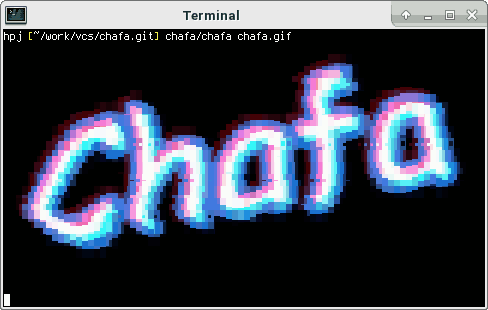
Turn pictures and animations into top-notch terminal graphics and ANSI art.
tame drum
thanks 👍
tame drum
heres another reference image i wanna change to ascii text art. just looked at chafa and also found ascii_magic(kinda buggy) but im wondering if there are any other libraries like that.. better if the rows can be changed

also to change the background (white) to be transparent/null
and only make the ascii text color to be only 1 color(e.g. green)
 grand apex
Does anybody know the name for the shade of green that old computer/phone/calculator screens used to be?
Or the hex value
brisk yew
grand apex
Does anybody know the name for the shade of green that old computer/phone/calcul...
I think you are looking for phosphor green
cold storm

😦
I was using geometry nodes as game engine
but they killed the O part of I/O
(I can get attributes that are from the evaluated mesh but not set them / have them propigate into the sim)
manic fjord
how do i run code on GPU?
brisk yew
manic fjord
how do i run code on GPU?
you use some sort of an API usually, for example, moderngl
specifically pygame(-ce), you can use the "experimental" pygame._sdl2 module, it has some SDL GPU API features ported
 meager plover
hi guys i need some help i was learn about pyinstaller for my pygame and it was work i want to know about how to be an .apk and could it be should change the controler system become touch screen becouse the platform is coming from hp it self,,,,my question is what should i use a module to be an apk not an exe...thanks you.
vagrant saddle
meager plover
hi guys i need some help i was learn about pyinstaller for my pygame and it was ...
for touch you could have a look to page source here https://pygame-web.github.io/showroom/pygame-scripts/org.pygame.touchpong.html
meager plover
vagrant saddle
for touch you could have a look to page source here https://pygame-web.github.io...
wait is that a game sample pong thankyou btw for reference
 willow heron
So I saw something about interactive LLM powered NPC's. Where you can use AI to interact with NPC using voice and there's an open source code on github. So my question is if anyone is familiar with the project or the idea. I wanna try to rebuild that code to other game rather than the reference game which was Cyberpunk 2077. But it seemed too complicated to my poor knowledge of using python
Also I don't know but it seemed like one needed 2 displays + a webcam for it to work. Does anybody know about this project and can share more input?, would be very helpful and thank u
meager plover
willow heron
So I saw something about interactive LLM powered NPC's. Where you can use AI to ...
i didn research about that but it posible to be create, pygame have web camera detect, and the voice you can use module that i was forget couldbe whisper. so when some one talk it coulbe detect the word for NPC. and it gonna a lot of work and it feel so lazy to doing that without good food consuming. hope it open about game dev you want
i was try to combine pymunk and pygame and it gonna be fail again for this month...sad story of my coding. hiks.
willow heron
meager plover
i didn research about that but it posible to be create, pygame have web camera d...
Yeah precisely, it has already been done. But I wonder how much work needs to be put in to recode for other games, and also which steps one should take. I'm new to python I mainly use c++ and c#
meager plover
willow heron
Yeah precisely, it has already been done. But I wonder how much work needs to be...
iam not an expert programing iam only using python programing language, my suggestion is reinstall your pc. make sure you say goodbye to your code c++ and c#. you gonna be not suitable for coding becouse it have a same code syntax, step 1st is only follow to other tutorial beginer and using software for run python iam using PYCHARM. but iam not suggest you to use same like me. just find what you feel confortable.
and step 2 imnot suggest you to use python, c++ and c# it have same good to why coming to python ?
willow heron
meager plover
and step 2 imnot suggest you to use python, c++ and c# it have same good to why ...
I want to learn python because it's more useful when to it comes to AI training and LLM. It has far more options for developing for some aspects
And also very useful for security purposes
meager plover
willow heron
I want to learn python because it's more useful when to it comes to AI training ...
ohk ok goodluck hope you enjoy on it, many tutorial in website you can find it.
willow heron
meager plover
ohk ok goodluck hope you enjoy on it, many tutorial in website you can find it.
Thanks
quasi patrol
willow heron
So I saw something about interactive LLM powered NPC's. Where you can use AI to ...
Best chance to use out side source
Like api
 odd remnant
yo which game engines are compatible with python
tried out unreal engines didnt work
willow heron
quasi patrol
Best chance to use out side source
Could you elaborate more
quasi patrol
willow heron
Could you elaborate more
A llm
Needs a lot of good days to work welll
If you already have a game
brisk yew
odd remnant
yo which game engines are compatible with python
Godot has a Python plugin or so I have heard
cold storm
UPBGE is where its at for game dev in py

bloom in a fragment shader
(using uv offset in the shader graph)
25 samples per pixel 😛
 queen kernel
I am having a problem updating score in pygame. I'm relatively new to python, and brand new to pygame. Where should i look for help? Stackoverflow was not very helpful
queen kernel
I don't think my expectations are too far off. The game runs fine
i just need help maintaining the score update
and looking for a place to get help
odd remnant
cold storm
UPBGE is where its at for game dev in py
Can code 2d games like card game?
cold storm
yeah easy
you can use geometry nodes and attributes
from mathutils import Vector
kx_object.blenderObject.data.attributes['CardOffset'].data[index].vector = Vector([.25,.25,0])
kx_object.blenderObject.data.vertices[index].co = kx_object.worldTransform.inverted() @ some_world_point
is the code to move a vertex and to pass a attribute into the geometry nodes and the shader graph
(geometry attributes are like per vertex/edge/face/uv corner / instance uniforms)
we can use 'instance on point' to emit a card
and offset to select the UV sheet spot for that card @odd remnant
meager plover
queen kernel
I am having a problem updating score in pygame. I'm relatively new to python, an...
in python that i know have 2 methode
- is a list
- dictionary
use insert or append
have you buy a book on pygame its so many tutorial on there..
or you can use free tutorial, you can browser on there,
meager plover
when it complete use .pop for make sure it not increase to much data you was append or insert.
after that use .os write when game was closed so it will be saved when you try to play continue
 hot girder
hi someone know how do I develop a game on python? were to start?i know some python but i dont know how to create a game
brisk yew
hot girder
hi someone know how do I develop a game on python? were to start?i know some pyt...
learn more Python, then you can start watching some pygame tutorial ig, tho I'd suggest using pygame-ce, but still pretty much any pygame tutorial will work with it
some channels I recommend are Clear Code and DaFluffyPotato
 icy hollow
odd remnant
yo which game engines are compatible with python
icy hollow
odd remnant
yo which game engines are compatible with python
if you == intersed in 2d :
go with pygame
elif you == interested in 3d :
go with UPBGE�
 tepid sphinx
Hello, does anyone knows where to start for learning python?? I want to learn so I can make games in Pygame, but what should I do?
 narrow tiger
tepid sphinx
Hello, does anyone knows where to start for learning python?? I want to learn so...
narrow tiger
tepid sphinx
Hello, does anyone knows where to start for learning python?? I want to learn so...
Dm
 leaden fjord
HelloHello! I have seen a tiktok with a person taking notes in class in minecraft in a book instead of writing them in word or notepad. I have also seen working android infotainment dashboards in asseto corsa and working browsers in San andreas multiplayer.
What I am wondering is whether a game exists in which I can build a html,css, Javascript website. This year in the computer science class all of us will be building websites for a certificate and I would really like to build it in a game.
Image.
Basically I want to make a website within a game. Do you know if such a game exists?
quartz fossil
leaden fjord
HelloHello! I have seen a tiktok with a person taking notes in class in minecraf...
I don't, but embedding browsers in game engine isn't too hard; I once embedded CEF in Panda3D, but that was a bit of a failure since cefpython wasn't really maintained all that well. But why not consider the browser right in front of you?
proper peak
leaden fjord
HelloHello! I have seen a tiktok with a person taking notes in class in minecraf...
I dimly remember there was some minecraft mod that allowed rendering (interactable) websites. Why, though?
quartz fossil
odd remnant
yo which game engines are compatible with python
For 3D, Panda3D.
 fossil sail
How do you add smooth transitions using pygame? E.g: Card shuffling motion. I have started programming a card game as of a side quest to get more familiar with pygame and just coding projects in general and so wanted to know how to do this
leaden fjord
quartz fossil
I don't, but embedding browsers in game engine isn't too hard; I once embedded C...
Where is the fun in that?
quartz fossil
In getting things done. You've got two problems, "How do I make a website?" and "How do I embed a browser in a game engine?", and I wouldn't rely on getting extra credit for the latter unless you ace the former.
marble jewel
Isometria Official Trailer - https://youtu.be/-0D0IeoxTZg

Isometria is an isometric sandbox game developed using Python and Pygame-CE.
Explore a procedurally generated world, build your character, your base, and play with friends.
Wishlist today: https://store.steampowered.com/app/2596940/Isometria/
odd remnant
classes in python are hard
odd remnant
how do i downlaod pygames
odd remnant
i downloaded this and oppened it but it dosent work

i am using pycharm community edition
dry cloak
You use the pip install pygame command to install pygame
dry cloak
marble jewel
Isometria Official Trailer - https://youtu.be/-0D0IeoxTZg
Lets GOOOOOOOOOOOOO
unreal river
odd remnant
i downloaded this and oppened it but it dosent work
you need to pip install pygame on the command prompt, not download it
pine plinth
technically, you can download and install it manually
unreal river
pine plinth
technically, you can download and install it manually
true
odd remnant
the import pygame on my python isnt working ... any solutions?
i successfully downloaded pygame but import pygame not working
pine plinth
odd remnant
i successfully downloaded pygame but import pygame not working
did you install pygame?
odd remnant

 lunar venture
How are you running your program
odd remnant
 lunar venture
This doesn't show me how you run the program
odd remnant
i just press the run button
 odd remnant
import pygame also showing errors
 pine plinth
odd remnant
i just press the run button
pine plinth
odd remnant
i just press the run button
your program here runs without any errors, so pygame was imported
pine plinth
odd remnant
import pygame also showing errors
i dont see any, your code works
odd remnant
i was given an error that says no module called pygame
pine plinth
show it
odd remnant
 pine plinth
its probably because you are running it from venv

 gentle falcon
Hi Everyone , Can someone tell me how can I deploy my pygame project?
I have heard pygbag could be used but are there any better alternative that offers easy deployment!!
 supple lantern
I need an advice. I decided to build a shisen-sho game and I am not sure what tools to use. So far I've looked into kivy and I think that's most likely candidate since I can build for android, and I looked into tkinter since I know of a project that got away with using it and it is not that bad. I am not in a rush to finish it, it might even take a year or more so it is really important I pick the right tools. So any suggestions? What tools or libraries to use?
 near junco
 celest osprey
do you guys mostly use pygame for game dev? I used pygame and used ursina one time
SERIOUSLY WHEN I COMMENT NO ONE REPLIES 
 molten nimbus
celest osprey
do you guys mostly use pygame for game dev? I used pygame and used ursina one ti...
molten nimbus
celest osprey
do you guys mostly use pygame for game dev? I used pygame and used ursina one ti...
I believe so. It's actually a really good framework once you start getting the hang of things
odd remnant
pine plinth
its probably because you are running it from venv
then where should i run it from?
i very confused since i already downloaded pygame then it should already have a pygame module isnt it
 little apex
What are good methods on preventing large amount of enemies from stacking in a top down game
dry cloak
you didnt provide enough details, so im going to assume the problem is too many spawn. In which case you would just impose a limit to how many enemies can exsist at once
dry cloak
gentle falcon
I have heard pygbag could be used but are there any better alternative that offe...
pygbag is for if you want to export your game to the web (e.g. having a game run in itch.io on the browser) and it definitley offers easy deployment, it takes 1 command and takes me like 40s to have a functioning app even with my slow pc.
but anyways if you want to export your game as an application/executable i would reccomend pyinstaller or cx_Freeze (i reccomend pyinstaller more - ive had/still have issues with cx_Freeze + pygame)
 half galleon
import sys
import pygame
from settings import Settings
from ship import Ship
class AlienInvasion:
"""Загальний клас, що керує ресурсами та поведінкою гри."""
def __init__(self):
    """Ініціалізувати гру, створити ресурси гри"""
    pygame.init()
    self.settings = Settings()

    self.screen = pygame.display.set_mode(
        (self.settings.screen_width, self.settings.screen_height))

    self.screen = pygame.display.set_mode((1200, 800))
    pygame.display.set_caption("Alien Invasion")

    self.ship = Ship(self)

    # Задати колір фону
    self.bg_color = (230, 230, 230)

def run_game(self):
    """Розпочати гоовний цикл гри."""
    while True:
        # Слідкувати за подіями миші та клавіатури
        for event in pygame.event.get():
            if event.type == pygame.QUIT:
                sys.exit()

            # Наново перемалювати екран на кожній інтеграції циклу.
            self.screen.fill(self.settings.bg_color)
            self.ship.blitme()

            # Показати останній намальований екран.
            pygame.display.flip()
if name == 'main':
# Створити екземпляр гри та запустити гру
ai = AlienInvasion()
ai.run_game()
why is this code not running?
why is this code not running?
why is this code not running?
pine plinth
half galleon
why is this code not running?
why do you think this code is not running?
half galleon
I don't know, but I'm asking
dry cloak
Try reading the error message first
pine plinth
half galleon
I don't know, but I'm asking
have you tried running it?
what made you think that it is not working?
 undone coral
I need help
celest osprey
molten nimbus
I believe so. It's actually a really good framework once you start getting the h...
cool
undone coral
Can someone help me
 golden cedar
Hello guys
I just finished learning the basics of python and I wanna pursue game development. What should I do?
brisk yew
golden cedar
I just finished learning the basics of python and I wanna pursue game developmen...
learn more than Python basics probably
dry cloak
You could try to dive straight into making games but if your 'basic knowledge' might trip you up, so i agree with matiis but then again you wont learn anything about how to actually make a game if your not trying to make a game - and it can be difficult to learn beyond the basics if you dont have a set goal/project
If you are keen on starting to see some results you can pick out a game/graphics library (such as pygame, ursina, panda3d, ect... Its up to you to figure out which one you want) and read up + watch some tutorials. But make sure to try to go beyond tutorials (take what you learn and make something different) 🙂
(@golden cedar ) i realised i responded a bit late and i should have replied so you got the notification
quartz fossil
celest osprey
do you guys mostly use pygame for game dev? I used pygame and used ursina one ti...
Panda3D, and come on, you waited 9 minutes...
quartz fossil
golden cedar
I just finished learning the basics of python and I wanna pursue game developmen...
For 2D, pygame, for 3D, Panda3D.
odd remnant
im still confused ... i use import pygame but it keep giving me error
 tranquil girder
I think there's a special way to install modules in pycharm.
Maybe you could find a tutorial on how to install them in pycharm specifically.
just pip install pygame won't work if you're using venv which is default when making a new project in pycharm
proper peak
the "special way" is just to write the pip commands in pycharm's terminal. or use the Packages tab, which is a GUI and rather self-explanatory.
 vast roost
odd remnant
import pygame also showing errors
vast roost
odd remnant
import pygame also showing errors
bec of dictionary
 golden cedar
dry cloak
You could try to dive straight into making games but if your 'basic knowledge' m...
golden cedar
dry cloak
You could try to dive straight into making games but if your 'basic knowledge' m...
Alr ty
pine plinth
brisk yew
https://dontasktoask.com/
why cant i send that link?
 brisk yew
lol
 solid wren
Hi im new at python code
guys can someone explain this
def greeting():
print("hi")
greeting()
I heared is to invoke
and its like setting a variable
 dreamy pollen
solid wren
guys can someone explain this
dreamy pollen
solid wren
guys can someone explain this
You are defining a function that simply prints hi. It doesn't do anything until you call it. You called it by entering "greeting ()"
Functions are different than variables.
There are lots of good free basic Python tutorials online you may want to try.
solid wren
me with VIH
 lavish geyser
can someone help me optimise my code please
my came runs at 2 fps
nvm i managed to make it go down to 1.4 fps lmao

 pine plinth
probably doing ray casting in python is not a good idea
also we cant help you if we dont have code or any other useful info
brisk yew
doing intensive maths is not sth Python can natively do very fast, you may want to check out numba for this or find a library that can do raytracing for you where it's implemented in C but you can use the Python API, you can make it in C and port it to Python yourself too
using numba tho is probably one of the easiest options tho
also consider using a more optimized raytracing algorithm like DDA
javidx9 has a vid on that on yt
lavish geyser
pine plinth
probably doing ray casting in python is not a good idea
oh ok
i also made a c++ version
but i am suposed to do it in python
here is the code btw
its a bit broken rn..
https://paste.pythondiscord.com/R2KS4WFRF6UQW5IZH24CV3GQLI
brisk yew
lavish geyser
i also made a c++ version
but i am suposed to do it in python
did you try with numba and/or dda yet?
lavish geyser
brisk yew
did you try with numba and/or dda yet?
imma do that now
 tidal obsidian
Wth is numba?
vagrant saddle
tidal obsidian
Wth is numba?
it's a member of the ever growing family of python compilers/jit
marble jewel
Isometria Devlog 32 - Steam Overlay, Block Press, Slime Gear - Made with Pygame and Python https://youtu.be/zYq6uSl2yO8

Wishlist Isometria here: https://store.steampowered.com/app/2596940/Isometria
In this week's devlog I show you the first look at the steam overlay implementation. You'll also see the block press, a new crafting station used to make blocks. Finally the blue and yellow slime gear is also shown.
Thank you all so much for your support. Stay tuned ...
 tight pelican
lavish geyser
here is the code btw
its a bit broken rn..
https://paste.pythondiscord.com/R2KS4...
tight pelican
lavish geyser
here is the code btw
its a bit broken rn..
https://paste.pythondiscord.com/R2KS4...
Try using PyPy it should make it super fast, or also Cython can give you the same performance as C, since all these objects can be converted to pure C code
lavish geyser
tight pelican
Try using PyPy it should make it super fast, or also Cython can give you the sam...
ok ty
 atomic birch
does anyone have any good resources/ yt channels or anything that can help me learn pygame
brisk yew
atomic birch
does anyone have any good resources/ yt channels or anything that can help me le...
Clear Code and DaFluffyPotato
also Coding With Russ
atomic birch
brisk yew
Clear Code and DaFluffyPotato
thankyouuu
 rain cove
lavish geyser
i also made a c++ version
but i am suposed to do it in python
rain cove
lavish geyser
i also made a c++ version
but i am suposed to do it in python
Why does it have to be in python?
lavish geyser
rain cove
Why does it have to be in python?
idk
 quartz gale
hihi i am using pygame and wanted to implement a database, how can I prevent players from exploiting the database to give themselves more in-game items? like even if I make a database server can't they just decompile the game and use the code themselves to cheat?
also if I just use pybag and put it on itch will my game's source code be hidden? 😭
vagrant saddle
quartz gale
also if I just use pybag and put it on itch will my game's source code be hidden...
maybe in the future with a closed source licensed version 😄 and don't forget the "g" in pyGbag 😉
vagrant saddle
quartz gale
also if I just use pybag and put it on itch will my game's source code be hidden...
note that you cannot hide the database exchange either in the browser or on desktop with tools like MITM proxies or ethercap around
if you want to limit cheating you need to go P2P mode and implement some kind of "proof of gaming" where players validate transactions upon each other
beware that some people may have filled patents for that
vagrant saddle
quartz gale
also if I just use pybag and put it on itch will my game's source code be hidden...
btw if using pygbag you should come on pygame community discord there's a channel for pygame-web
quartz gale
vagrant saddle
note that you cannot hide the database exchange either in the browser or on desk...
😭 oh tyvm for the answer
quartz gale
vagrant saddle
btw if using pygbag you should come on pygame community discord there's a channe...
suresure
proper peak
quartz gale
hihi i am using pygame and wanted to implement a database, how can I prevent pl...
you mean, in a singleplayer game? realistically, you don't - you can make cheating harder but not prevent it.
(e.g. save editing can be prevented by encrypting and/or checksumming your saves - but then an attacker can look at how your source code reads/writes them and use that. That can be made harder by not providing source code but only compiled bytecode, but that too can be solved by e.g. running your game in a debugger, stopping, and editing the game state while it's in memory...)
little apex
marble jewel
Isometria Devlog 32 - Steam Overlay, Block Press, Slime Gear - Made with Pygame ...
I've been watching this for a bit now, they're really interesting! What libraries are you using for the game?
little apex
what's the difference between pygame and pygame-ce?
little apex
would you suggest using it on bigger pygame projects?
marble jewel
over regular pygame, definitely
little apex
okay thanks!
little apex
so I installed the community version, do I just import pygame or do I need to import something special
 rapid crescent
i dont know if i should ask here or somewhere else, but i have a project im working on in pygame, which is currently just a GUI and wanted some pointers on how, to put it bluntly, write it in a less dumb way
vagrant saddle
rapid crescent
i dont know if i should ask here or somewhere else, but i have a project im wor...
is it a pygame_gui project ?
rapid crescent
No, tbh i didnt even know that was a thing, but i was mostly just using it for learning purposes anyway
pine plinth
i'm having problems with installing raylib on CPython3.12 on Windows
tranquil girder
Does it support 3.12?
pine plinth
why not?
i'm installing this package: https://github.com/electronstudio/raylib-python-cffi
pip install raylibdoesnt work:FileNotFoundError: [Errno 2] No such file or directory: 'raylib/raylib.h.modified'- I cloned repo and did
pip install .and see error from compiler:raylib.h: No such file or directory
This is because there is some weirdness going on: https://github.com/electronstudio/raylib-python-cffi/blob/master/raylib/build.py#L190 - I fixed it manually and reran same command:
"C:\Program Files (x86)\Microsoft Visual Studio\2022\BuildTools\VC\Tools\MSVC\14.36.32532\bin\HostX86\x64\link.exe" /nologo /INCREMENTAL:NO /LTCG /DLL /MANIFEST:EMBED,ID=2 /MANIFESTUAC:NO /LIBPATH:D:\Programs\Python\3.12\libs /LIBPATH:D:\Programs\Python\3.12 /LIBPATH:D:\Programs\Python\3.12\PCbuild\amd64 "/LIBPATH:C:\Program Files (x86)\Microsoft Visual Studio\2022\BuildTools\VC\Tools\MSVC\14.36.32532\ATLMFC\lib\x64" "/LIBPATH:C:\Program Files (x86)\Microsoft Visual Studio\2022\BuildTools\VC\Tools\MSVC\14.36.32532\lib\x64" "/LIBPATH:C:\Program Files (x86)\Windows Kits\NETFXSDK\4.8\lib\um\x64" "/LIBPATH:C:\Program Files (x86)\Windows Kits\10\lib\10.0.22000.0\ucrt\x64" "/LIBPATH:C:\Program Files (x86)\Windows Kits\10\\lib\10.0.22000.0\\um\x64" raylib.lib gdi32.lib shell32.lib user32.lib OpenGL32.lib winmm.lib /EXPORT:PyInit__raylib_cffi build\temp.win-amd64-cpython-312\Release\build\temp.win-amd64-cpython-312\Release\raylib._raylib_cffi.obj /OUT:build\lib.win-amd64-cpython-312\raylib\_raylib_cffi.pyd /IMPLIB:build\temp.win-amd64-cpython-312\Release\build\temp.win-amd64-cpython-312\Release\_raylib_cffi.lib /NODEFAULTLIB:MSVCRTD
LINK : fatal error LNK1181: Ґ г¤ Ґвбп ®вЄалвм ўе®¤®© д ©« "raylib.lib"
error: command 'C:\\Program Files (x86)\\Microsoft Visual Studio\\2022\\BuildTools\\VC\\Tools\\MSVC\\14.36.32532\\bin\\HostX86\\x64\\link.exe' failed with exit code 1181
At this point i have no idea what to do next
frank fieldBOT
raylib/build.py line 190
include_dirs=['D:\\a\\raylib-python-cffi\\raylib-python-cffi\\raylib-c\\src',```i tried doing pip install -v -v -v --no-clean ., but that didnt help
verbose mode doesnt show a lot of useful info
build directories are empty for some reason
nah, i dont care
pygame is a lot easier to install

 olive ingot
i'm installing this package: https://github.com/electronstudio/raylib-python-cffi
pip install raylibdoesnt work:FileNotFoundError: [Errno 2] No such file or directory: 'raylib/raylib.h.modified'- I cloned repo and did
pip install .and see error from compiler:raylib.h: No such file or directory
This is because there is some weirdness going on: https://github.com/electronstudio/raylib-python-cffi/blob/master/raylib/build.py#L190 - I fixed it manually and reran same command:
"C:\Program Files (x86)\Microsoft Visual Studio\2022\BuildTools\VC\Tools\MSVC\14.36.32532\bin\HostX86\x64\link.exe" /nologo /INCREMENTAL:NO /LTCG /DLL /MANIFEST:EMBED,ID=2 /MANIFESTUAC:NO /LIBPATH:D:\Programs\Python\3.12\libs /LIBPATH:D:\Programs\Python\3.12 /LIBPATH:D:\Programs\Python\3.12\PCbuild\amd64 "/LIBPATH:C:\Program Files (x86)\Microsoft Visual Studio\2022\BuildTools\VC\Tools\MSVC\14.36.32532\ATLMFC\lib\x64" "/LIBPATH:C:\Program Files (x86)\Microsoft Visual Studio\2022\BuildTools\VC\Tools\MSVC\14.36.32532\lib\x64" "/LIBPATH:C:\Program Files (x86)\Windows Kits\NETFXSDK\4.8\lib\um\x64" "/LIBPATH:C:\Program Files (x86)\Windows Kits\10\lib\10.0.22000.0\ucrt\x64" "/LIBPATH:C:\Program Files (x86)\Windows Kits\10\\lib\10.0.22000.0\\um\x64" raylib.lib gdi32.lib shell32.lib user32.lib OpenGL32.lib winmm.lib /EXPORT:PyInit__raylib_cffi build\temp.win-amd64-cpython-312\Release\build\temp.win-amd64-cpython-312\Release\raylib._raylib_cffi.obj /OUT:build\lib.win-amd64-cpython-312\raylib\_raylib_cffi.pyd /IMPLIB:build\temp.win-amd64-cpython-312\Release\build\temp.win-amd64-cpython-312\Release\_raylib_cffi.lib /NODEFAULTLIB:MSVCRTD
LINK : fatal error LNK1181: Ґ г¤ Ґвбп ®вЄалвм ўе®¤®© д ©« "raylib.lib"
error: command 'C:\\Program Files (x86)\\Microsoft Visual Studio\\2022\\BuildTools\\VC\\Tools\\MSVC\\14.36.32532\\bin\\HostX86\\x64\\link.exe' failed with exit code 1181
At this point i have no idea what to do next
frank fieldBOT
raylib/build.py line 190
include_dirs=['D:\\a\\raylib-python-cffi\\raylib-python-cffi\\raylib-c\\src',``` dire eagle
When I'm gonna debug the app, something says about that images cannot be found on a specific directory but I don't find thatl location
and the code has all the images on the same location, no deeper folders
dire eagle
guys, is there someone who knows how to debug on kivy buildozer?
I have more than 10 hours trying to get just a game on my phone
I am also using pygame btw
quartz gale
proper peak
(e.g. save editing can be prevented by encrypting and/or checksumming your saves...
what if i like put the game on itchio to be able to play from the browser? then the source code wouldn't be accessible right? and if I put a database to record scores and stuff, the users wouldn't be able to cheat it or edit the database?
proper peak
what if i like put the game on itchio to be able to play from the browser
depends on how you do it, but typically frameworks for this execute the code in the user's browser.
quartz fossil
You run a server on top of the database that does not let players make interactions that they are not allowed to do, and let players connect only to that. In the case of itch.io, only the client's code would be accessible.
This should hold true for most data in the game anyway.
quartz gale
quartz fossil
You run a server on top of the database that does not let players make interacti...
but wouldn't they be able to also use the server to edit the data if the client's code is accessible?
true
quartz fossil
No, because the client can only make requests anyway. It is up to the server to verify that they are valid.
proper peak
Ultimately this'd require rewriting your code to make it a client-server game, though. Like, the only way the server can be sure about validity is if all the state is stored on the server and the client just sends actions to it.
quartz gale
proper peak
Ultimately this'd require rewriting your code to make it a client-server game, t...
icic
tyvm
quartz fossil
yw
pine plinth
how to write tool that will log all:?
- key presses
- mouse movements
- optionally: periodic screenshots
(i want it for my personal use, not for any malicious stuff)
this channel feels the most suitable for this question, because game libraries kinda solves same problem: they handle different events
but i want to log events that happen in any app in any context, not only when my logger is in focus
 dapper wolf
 placid mural
hi guys
im new to game dev like pygame
id love to learn lots here so please guide me
quartz fossil
Hi, new people. Long story short, pygame for 2D, Panda3D for 3D. 🙂
Ursina is @tranquil girder's opinion on what an abstraction on top of Panda3D should look like.
I'd recommend WECS, as that is my opinion, but it needs a bit more work for prime time.
tidal obsidian
Guys should I use unreal engine, godot or unity for game dev?
what type of game is unreal engine good for?
is there anything special about unreal engine that other game engines dont have?
ok what about unity what kind of games is it good for and is there something special about it?
quartz fossil
Are you sure that this is the best server to ask about engines that do not even provide Python bindings?
pine plinth
pine plinth
how to write tool that will log all:?
- key presses
- mouse movements
- optional...
bump
quartz fossil
Not exactly a typical use case for game engines. Keystrokes and mouse are security-critical, therefore at least under Linux you don't get access to them at all unless your window is focused. You could run a process as root and access them directly, but that's not a use case that e.g. Panda3D would support, nor any other engine that I am aware of. Similarly, it could screenshot its own frame buffers, but accessing the desktop one? I've seen someone use XShm for that.
pine plinth
pyautogui can do roughly that
it can send keystrokes regardless of active app, can move mouse and can take screenshots
im not aware of how that works, but i think it is achievable
seems like that is easier than i thought it is
seems like keyboard module can access global keystrokes (without elevated permissions???) and pyautogui can access global screen buffer (also without elevated permissions???) (i guess i should find more suitable module specifically for taking screenshots)
pine plinth
quartz fossil
Not exactly a typical use case for game engines. Keystrokes and mouse are securi...
thank you for your answer!
 bright sundial
anyone here know pygame and willing to make some ui for my game for $$?: ping me or dm
pine plinth
!rule paid
brisk yew
bright sundial
anyone here know pygame and willing to make some ui for my game for $$?: ping me...
goto Fiverr
 lean ocean
What is your favorite library for making games in python?
vagrant saddle
pygame-ce/panda3d
quartz fossil

quartz fossil
Does pygame have an emoji, so that we can make it a poll?
rapid crescent
does anyone here know if the font stuff in pygame works cross platform? i dont have a windows machine to test on and i remember there being some funky stuff with windows fonts, if it matters im using cascadia-code since its monospace, and afaik is installed by default on win 10
vagrant saddle
rapid crescent
does anyone here know if the font stuff in pygame works cross platform? i dont h...
i think you need put the font file in the game folder and load it via full name
so you need to check that the font is licensed for redist, which seems ok there https://github.com/microsoft/cascadia-code/blob/main/LICENSE
rapid crescent
hm, alright thank you :p
 uneven folio
I'm looking at different python based game frameworks, in particular for 2D games. Which has the best story for exporting to web and mobile? I'm also evaluating Defold but I'd rather use python over Lua, but I really want to be able to easily target mobile and web
vagrant saddle
uneven folio
I'm looking at different python based game frameworks, in particular for 2D game...
pygame-ce has out of the box multi-touch support https://pygame-web.github.io/showroom/pygame-scripts/org.pygame.touchpong.html
uneven folio
What's the difference between pygame-ce and just regular old pygame?
vagrant saddle
old pygame does not run on web without manual plumbing
uneven folio
I see
And mobile support? Android shouldn't be too hard I guess, tricky one is iOS
I just installed and going through a defold tutorial, looks ok
vagrant saddle
android is not hard with python-for-android and for ios web with home screen url is the simplest way
ios devices are very powerfull, they handle wasm just fine
uneven folio
Interesting
Also a fan of raylib, that's not a bad option. Panda3D looks pretty cool. I also don't really care for engine editors, that's why I'm evaluating frameworks instead, but Defold looks really solid to be honest, but I use Emacs and already have something setup for Python, I'd have to see what Lua support looks like
What are you working with these days, @vagrant saddle ?
uneven folio
vagrant saddle
pygame-ce/panda3d
I guess you already answered it here
Do you often switch back and forth between the two?
vagrant saddle
i'm more onto pygame-ce since i'm the wasm maintener, but Panda3D is going better soon
i don't use raylib
uneven folio
Arcade looks pretty cool as well, that's the other one I was checking out. I saw some stuff about using SDL's hardware accelearation, is that still a thing?
uneven folio
vagrant saddle
i don't use raylib
How come?
vagrant saddle
i just ported @spark ether bindings
he may know better for raylib+python web support
uneven folio
It's fine, I can just check out pygame. Do you have any thoughts on Arcade?
I can start by making sudoku I guess
vagrant saddle
well it may suffer the same problem as raylib when webgpu comes
uneven folio
Ah I see
vagrant saddle
afaik lots of internals rely on opengl
uneven folio
Yeah that's kind of what Defold has going for it. I'll have to evaluate them each for a few days, see which one clicks
Pygame has interactive coding?
vagrant saddle
yes
uneven folio
As in hot reloading
vagrant saddle
Panda3D too
Panda3D on safari 15

Panda3D interactive on android https://pmp-p.github.io/aiodemo_webview.mp4
uneven folio
I see, then you said something about a shortcut icon or something, I'm an android user so I'm not familiar with this. Is it a way of converting a website to behave like an iphone app?
Oh nevermind, you just said to create a bookmark, right?
vagrant saddle
a bookmark and add something about full screen in the html template
uneven folio
Yeah, this looks promising, even though Defold looks nice, I would really rather stay in the Python ecosystem
I don't need yet-another-programming-language I have to work with
Do you have any of your games up on the web that I could check out?
I've actually been using python for game dev but I was using Pyxel, if you've seen it
It has wasm support, I actually have a couple of things I did up on my github
vagrant saddle
vagrant saddle
for web including mobile safari 15 you can have [pygame-ce](https://itch.io/c/25...
itch collections in the links
uneven folio
Pyxel is really nice, I really like it over using full blown engines like Unity or Godot
But it's too limiting, Pygame looks like Pyxel but much more open
Alright, I'll play around with pygame-ce, thanks for the info @vagrant saddle
vagrant saddle
yw
uneven folio
@vagrant saddle This is amazing
I had a hunch that I would be more productive if I could find a good game framework that didn't involve fiddling with an editor
Not bad for my first 3 hours with pygame
I really like it
 scarlet pilot
Hello. does anyone know how to merge pygame with socket
quartz fossil
scarlet pilot
Hello. does anyone know how to merge pygame with socket
Socket as in https://docs.python.org/3/library/socket.html ?

Python documentation
Source code: Lib/socket.py This module provides access to the BSD socket interface. It is available on all modern Unix systems, Windows, MacOS, and probably additional platforms. Availability: not ...
scarlet pilot
quartz fossil
Socket as in https://docs.python.org/3/library/socket.html ?
yes
When I put the socket in Pygame, the server program that will send the message crashes
quartz fossil
Ah, so you want help with a specific bug! Sorry, no idea.
scarlet pilot
quartz fossil
Ah, so you want help with a specific bug! Sorry, no idea.
no. I was wondering how to put pygame on online
quartz fossil
No clue, never really used it.
 gloomy vector
how do I remove the "Hello from the pygame community" message that prints in the terminal everytime I run my program?
proper peak
gloomy vector
how do I remove the "Hello from the pygame community" message that prints in the...
You could set the PYGAME_HIDE_SUPPORT_PROMPT environment variable (either before launching your program, or even in your program with os.environ, just make sure it happens before the import pygame)
gloomy vector
If I am importing other files of my own that use pygame too, should I implement that before import pygame?
never mind I just tried that and it worked, thanks!
 balmy jungle
dm me if you wanna work on a python game for free (you will get a credit of course)
quartz fossil
WTF? What kind of "offer" is that??
 white bobcat
I have some basic code where the player shoots a fireball
but the issue is that the fireballs keeps on flickering?
how can I fix that?
My guess is that its because i update the display twice
def draw(player, elapsed_time):
    SCREEN.blit(BG, (0, 0))

    time_text = FONT.render(f"Elapsed Time: {round(elapsed_time)}s", 1, "black")
    SCREEN.blit(time_text, (30, 30))

    pygame.draw.rect(SCREEN, (24, 38, 33), player)

    pygame.display.update()

...(some code)

def main():
    run = True

    player = pygame.Rect(200, (HEIGHT - 25) - PLAYER_HEIGHT, PLAYER_WIDTH, PLAYER_HEIGHT)
    is_jumping = False

    clock = pygame.time.Clock()
    start_time = time.time()
    elapsed_time = 0

    while run:
        clock.tick(144)
        ...(more code)

        if BULLET_STATE == "fired":
            shoot(BULLET_x, BULLET_y)
            BULLET_x += POS_CHANGE
            pygame.display.update()

draw(player, elapsed_time)```you dont have to update display directly after drawing
white bobcat
Oh, where should I update the display?
white bobcat
I tried placing it here:
     # Prevent the player from going below the ground
        if player.y >= (HEIGHT - 25) - PLAYER_HEIGHT:
            is_jumping = False
            player.y = (HEIGHT - 25) - PLAYER_HEIGHT

        if BULLET_STATE == "fired":
            if facing == "right":
                shoot(BULLET_x, BULLET_y, facing)
                BULLET_x += POS_CHANGE
            else:
                shoot(BULLET_x, BULLET_y, facing)
                BULLET_x -= POS_CHANGE

        draw(player, elapsed_time)
pygame.display.update()```but the fireball doesnt show up
i can see everything else though
pine plinth
because the first thing draw() function does is clearing screen
white bobcat
ohhhhh
hmm
what should I do to fix that
wait
I just moved pygame.display.update() above the draw
and it worked
THANKYOU!
pine plinth
not really
now it is drawing half of the stuff in one iteration, and seconds half in next iteration, and the updates screen
it is weird, causes confusion and produces incorrect frames at the beginning and the end of your program
pine plinth
- draw bg
- draw bullet and all other stuff
- update screen
not this:
- draw bullet
- draw bg
- draw all other stuff
- update screen
and not this:
- draw bullet and all other stuff
- update screen
- draw bg
 vernal osprey
i need a team who wants to work on this game? Players take on the roles of office supplies and must work together to disrupt the daily routines of the office workers. The goal is to create chaos while avoiding getting caught by the employees. I will take any one who want to work on it with me
 hollow heron
anyone good with classes have a error within one (screen share + mic)
marble jewel
Steam API + Overlay with Pygame Tutorial: https://youtu.be/Ka9LIGYm_b0
In this tutorial I show you how to compile SteamworksPy and get a simple pygame project to load and run the steam overlay.
SteamworksPy - https://github.com/philippj/SteamworksPy
Steam SDK - https://partner.steamgames.com/downloads/list
Wishlist Isometria here:
Isometria - https://store.steampowered.com/app/2596940/Isometria/
dawn quiver
Hi i use sprites to animate snake and it works great but my implementation a little bit weird. my snake sprites basicly consist of different part of snake each 40x40 size and my method uses basicly handles every case of snake movement and changed some part of snake according. i am using python 3.8 and i realize that this version even do not have match/case statement do you have any genius idea to handle this kinda stuff more efficiently and professional?
  # if animation event happens then i animate snake and apply corresponding texture
  def update(self):
        if not self.animation_lock:

            self.__move()
            self.__apply_texture()

            self.animation_lock = True

...
...
...

    def __apply_texture(self):
        # -- apply texture -- #
        for i in range(len(self.body) - 2, 0, -1):
            prev_segment = self.body[i - 1]
            curr_segment = self.body[i]
            next_segment = self.body[i + 1]


            if prev_segment.type == 'tail' and next_segment.type == 'head':

                if prev_segment.direction == 'left' and curr_segment.direction == 'horizontal' and next_segment.direction == 'right':
                    curr_segment.direction = 'horizontal'

                elif prev_segment.direction == 'left' and curr_segment.direction == 'horizontal' and next_segment.direction == 'down':
                    curr_segment.direction = 'bottom_left'

                elif prev_segment.direction == 'left' and curr_segment.direction == 'horizontal' and next_segment.direction == 'up':
                    curr_segment.direction = 'top_left'

...
...
...
SnakeBodypart Class has 3 tpye tail, body and head in this case i cannot even count probably there are 16 case to handle just tail and head case which means if the segment is between body and head there are two other cases
[] tail and body
[]body and body
    @property
    def direction(self):
        return self._direction

    @direction.setter
    def direction(self, direction):
        self._direction = direction
        self.texture = AssetLoader.load(TEXTURES[self.type][direction])
 soft compass
Hi, do game developers make good money, and is the job stressful?
vagrant saddle
i think money is related to production and sells not game making
 modest token
hi
modest token
soft compass
Hi, do game developers make good money, and is the job stressful?
software development pays well, less stressful. I do game dev for hobby, impo game dev jobs are less paying. but maybe a Professional game dev can comment.
modest token
marble jewel
Steam API + Overlay with Pygame Tutorial: https://youtu.be/Ka9LIGYm_b0
wow you are here ❤️ i
brisk yew
soft compass
Hi, do game developers make good money, and is the job stressful?
from what I have heard it's the worst software dev industry out there...
unless you enjoy it ofc ig
quartz fossil
soft compass
Hi, do game developers make good money, and is the job stressful?
It's notorious for deliberately burning out people so that they can be replaced with new lower-earning hires. You may have heard of "crunch"?
 mellow imp
My first game. What do you guys think?
 hard raptor
mellow imp
My first game. What do you guys think?
hard raptor
mellow imp
My first game. What do you guys think?
W
quartz fossil
mellow imp
My first game. What do you guys think?
Needs polish, but a great start. I'd recommend experimenting with a little inertia in the movement.
mellow imp
quartz fossil
Needs polish, but a great start. I'd recommend experimenting with a little inert...
I was thinking that, atm the moment ist about 1400 lines of code and still not finished. Working on enemy waves, enemy follow path patterns and powerups


 solar moon
mellow imp
My first game. What do you guys think?
solar moon
mellow imp
My first game. What do you guys think?
cool
quartz fossil
@hollow heron "not subscriptable" means "Its not a list or somethin else that I can use [] on to access something."
So either the animation_list or the action is the Surface that the error message mentions.
mellow imp
@hollow heron shouldn't second in range statement have temp_list.append(image) ? Could you show output of print(self.animation_list)
hollow heron
mellow imp
<@760152399066955828> shouldn't second `in range` statement have `temp_list.appe...
it does on line 54
hollow heron
mellow imp
<@760152399066955828> shouldn't second `in range` statement have `temp_list.appe...
where should i enter print(self.animation_list)
mellow imp
hollow heron
it does on line 54
Last line of first in range before you empty temp_list
I think you got an error there by appending self.animation_frames twice, but we'll get there in a sec 🙂
hollow heron
mellow imp
I think you got an error there by appending `self.animation_frames` twice, but w...

this is what i get
pine plinth
hollow heron
sepf.animation_list contains tsndom mix of surfaces and lists, and then you are subscripting item of it, which fails because surfaces are not subscriptable
hollow heron
how would i solve this
pine plinth
dont add surfaces to this list
dawn quiver
mellow imp
My first game. What do you guys think?
20/20 i love this type of game 
mellow imp
dawn quiver
20/20 i love this type of game <:spiffo:232169419617337345>
Thank you, any suggestions ?
dawn quiver
mellow imp
Thank you, any suggestions ?
Skin for the player
dawn quiver
mellow imp
Thank you, any suggestions ?
To add microtransactions and make money (Blizzard Mentality)
mellow imp
dawn quiver
To add microtransactions and make money (Blizzard Mentality)
Big no
dawn quiver
I was joking lol
mellow imp
dawn quiver
I was joking lol
I gathered 🙂
dawn quiver
@mellow imp i have a question
Is it possible to make a mobile game using python and pygame ?
dawn quiver
mellow imp
Yes
And how to import it on mobile ? Rn i have a game made for pc on my pc but i can add mobile control, but then how do I import the game to my phone?
vagrant saddle
dawn quiver
And how to import it on mobile ? Rn i have a game made for pc on my pc but i can...
just use pygbag to get a mobile web game
grand apex
Anybody got any ideas for a halloween-themed project i could make using pygame?
marble jewel
modest token
wow you are here ❤️ i
I am everywhere
quartz fossil
grand apex
Anybody got any ideas for a halloween-themed project i could make using pygame?
You play the pumpkin-headed rider and have to fight against the demons of mundanity.
marble jewel
it can do infinite tile based worlds just fine
 fading perch
nbvcxcvbn,;:!
quartz fossil
dawn quiver
How good is PyGame for 2d large tile based worlds
Good enough to be THE choice for 2D games in Python.
 astral pike
mellow imp
My first game. What do you guys think?
astral pike
mellow imp
My first game. What do you guys think?
How did you add the cube button up there?
I've been tryna figure
mellow imp
astral pike
How did you add the cube button up there?
Which button? As far as I know theres no buttons in my game 🙂
 shrewd python
I am trying to rotate my character using the mouse, i managed to get it to work but there is one issue
it doesnt look right
looks slightly off
lunar venture
Rotate your sprite 90°deg
shrewd python
lunar venture
Rotate your sprite 90°deg
    def character_rotation(self, x, y):
        mouse_position = pygame.mouse.get_pos()
        x_mouse = mouse_position[0] - x
        y_mouse = - (mouse_position[1] - y)
        angle = math.degrees(math.atan2(y_mouse, x_mouse))
        self.image = pygame.transform.rotate(Shooter.original_shooter,  angle - 90)
        self.rect = self.image.get_rect(center=self.rect.center)
this is what i currently have
the rotations is angle - 90 which is a 90 deg rotation relative to my sprite
lunar venture
Do you want the sprite's center to point right at the direction of the mouse?
Then get rid of the - 90
shrewd python
lunar venture
Then get rid of the `- 90`
Oh shit, you are right
Or wait now its weird again
Its like, when i moved the mouse from the game and went back
it messed up the coordinations or something
lunar venture
The problem is you are adding to the current angle some other angle
The actual change in angle should be calculated
shrewd python
lunar venture
The problem is you are adding to the current angle some other angle
hmm is this why it gets messed up after i move the character
I realized now thats when it happens
If i move the character, it becomes an issue
lunar venture
Instead of pygame.transform.rotate, is there a way to set an angle absolutely?
angle already has a normalized angle probably
Just set the sprite's angle to it
lunar venture
That's what I'm thinking
shrewd python
lunar venture
That's what I'm thinking
I was hard coding the x,y coordinates for the character in the game loop
forgot to remove them lol