#game-development
1 messages · Page 7 of 1
 golden quartz
 dawn quiver
 stark fossil
lmk if any y’all wanna help develop a few indie horror games for the 3ds
 robust hearth
stark fossil
lmk if any y’all wanna help develop a few indie horror games for the 3ds
robust hearth
stark fossil
lmk if any y’all wanna help develop a few indie horror games for the 3ds
in python?
 karmic sequoia
What would be the best module for developing a basic game
 vagrant saddle
pybasic ?
vagrant saddle
karmic sequoia
What would be the best module for developing a basic game
joking have a look to nurses_2 or pygame
and yes http://robhagemans.github.io/pcbasic/ is implemented in python 😄
Free, cross-platform emulator for the GW-BASIC family of interpreters.
 modest sierra
Can anyone help me with pygame? I am trying to build a craps game and I am having trouble coming up with the betting system. I tried to post in the python-help system but it closed after 30 minutes. #1071150485064659064 message
 ancient granite
Hello, i've been wanting to create a chess game for while. I am kinda new to coding (ik python, java and C). Any idea on what language should use and where should i start?
dawn quiver
Hello, what is good projects to work on to broaden my general programming skills? The end-goal of me making games is to both improve my programming knowledge/skill set and have fun. If anyone has tips or pointers, it will be most appreciated.
 sharp thistle
Hi
Say I make a full fledged game using pygame where do I publish it
Or can I publish it
 half ibex
sharp thistle
Hi
Say I make a full fledged game using pygame where do I publish it
half ibex
sharp thistle
Hi
Say I make a full fledged game using pygame where do I publish it
I would publish on github if you want it to be open source otherwise I do not know where you could publish
sharp thistle
half ibex
I would publish on github if you want it to be open source otherwise I do not kn...
So just distribute it via github ?
Is that what’s everyone does ?
half ibex
That is how I publish my crap I dont really know what other people do. Besides ads on discord to their github

 covert summit
 unborn stratus
ok thank you
 paper ginkgo
unborn stratus
ok thank you
paper ginkgo
unborn stratus
ok thank you
are you 11
robust hearth
sharp thistle
Is that what’s everyone does ?
Try using itch.io
sharp thistle
pygame has support ?
vagrant saddle
sharp thistle
pygame has support ?
yes have a look there https://itch.io/c/2563651/pygame-wasm
github pages support too, with automated publishing see there https://pygame-web.github.io/wiki/pygbag/github.io/
sharp thistle
ah cool
 haughty mesa
What library is used for a game like stardew valley or cryofall?
dawn quiver
neat desmos links
one is an implicit function of a circle where the radius is mapped to a cosine wave.
there is also line vs circle intersection
and a four leaf clover using implicit functions
dawn quiver
half ibex
That is how I publish my crap I dont really know what other people do. Besides ...
hello you do any game programming?
 copper lynx
How do I make it so these can move to the sides, doing the same with x=x+10 didn't work:
def ballup():
    y=ball.ycor()
    y=y+10
    ball.sety(y)

def balldown():
    y=ball.ycor()
    y=y-10
ball.sety(y)```show your code for the x axis
copper lynx
dawn quiver
show your code for the x axis
Now it just crashes
This is my whole code:
import pygame
import turtle as t

window=t.Screen()
window.title("Veeze's Game")
window.bgcolor("#194D33")
window.setup(width=800,height=600)
window.tracer(0)
input()

ball=t.Turtle()
ball.speed(0)
ball.shape("circle")
ball.color("red")
ball.penup()
ball.goto(5,5)
ballxdirection=0.2
ballydirection=0.2

def ballup():
    y=ball.ycor()
    y=y+10
    ball.sety(y)

def balldown():
    y=ball.ycor()
    y=y-10
    ball.sety(y)

window.listen()
window.onkeypress(ballup,'w')
window.onkeypress(balldown,'s')

while True:
window.update()```maybe set the balls y coordinate and x coordinate before entering the main loop.
or are they guaranteed to start at zero?
copper lynx
Yeah at the middle
dawn quiver
that does not intialize it
it adds to it or sibtracts from it
give it a starting value
ball.sety(0) before entering the main loop
dawn quiver
what i said worked?
copper lynx
Hmm, the window opened but the ball isn't displayed
dawn quiver
I would read over the documentation of turtle carefully
copper lynx
The thing is that it did show the ball before
dawn quiver
most turtle programs should do a set of specific functions
do you need to do pendown to draw the ball?
I don't know turtle module but thats my guess
it might have a different name
copper lynx
This is what I used for the ball:
ball=t.Turtle()
ball.speed(0)
ball.shape("circle")
ball.color("red")
ball.penup()
ball.goto(5,5)
ballxdirection=0.2
ballydirection=0.2```So I should remove it
dawn quiver
well no
copper lynx
It worked after I removed it
dawn quiver
just i think if there is a pen up there must be a pendown
probably becuase the default position for the pen is down
so it draws
copper lynx
Now it's gone again
dawn quiver
copper lynx
Now it's gone again
ah sorry i don't know enough turtle to help.
any interest in pygame?
I see you are importing it
now that i can help with
 finite fable
I want to implement physical rope between 2 points (amount of segments and their length are always constant)
But i don't know how to do it (using pygame and pymunk)
 raw falcon
haughty mesa
What library is used for a game like stardew valley or cryofall?
raw falcon
haughty mesa
What library is used for a game like stardew valley or cryofall?
it doesn't use python
 tough fiber
ur in a python server though lol
haughty mesa
raw falcon
it doesn't use python
But can i use python to create those type of games or better use other language?
raw falcon
haughty mesa
But can i use python to create those type of games or better use other language?
probably
dawn quiver
I got a tool to code gifs to ASCII and ansi
 marble jewel
Latest devlog here: https://youtu.be/pBvXea5_WRQ This weeks changes and additions

Welcome to the third devlog for Big Chungus, a game written in Python using the Pygame module. In this episode knockback, snap to grid, spawn points, and the first look at the cave biome are introduced. Feel free to comment as I'd love your feedback.
#indiegamedev #devlog #gamedev #gamedevelopment #indiedev #python #pygame #pythongaming
 sweet shard
haughty mesa
What library is used for a game like stardew valley or cryofall?
sweet shard
haughty mesa
What library is used for a game like stardew valley or cryofall?
Pygame or Arcade would be your best bet
 glass wolf
do spritesheets
come with metadata?
Or is it optional?
I have this png

And wanna know
how to access certain ones
like the top left one
then the next one
but idk how
(I'm using pygame)
I'm not sure how to get the coords.
dawn quiver
its all pixels
open your image up in an editor
and find out how big each tile is
then create a surface in pygame from the loaded image
and use blit to render part of the image
start by trying to render the first character in your sprite sheet from the top left
then try the just the second
and so on untill you see a pattern
dawn quiver
glass wolf
do spritesheets
^
glass wolf
dawn quiver
open your image up in an editor
thank you 🙂
this worked
I used gimp
and I made a grid
to measure
it was 64x64
dawn quiver
nice
 dapper heron
hi
how do i make something rotate according to the movement of the mouse (not the actual position of the cursor)?
 little galleon
i use pygame
dawn quiver
dapper heron
hi
Hey you there?
dapper heron
I am
I mostly figured the rotation issue out tho
Still not sure how to make it move according to mouse but I also had a problem with rotating around the center of the image which is what I fixed
dapper heron
dawn quiver
If you want to get the delta mouse motion have a look at the pygame docs on mous...
Oh great, thanks, I'll make sure to have a look
glass wolf
I am having an issue
using pygame across multiple files.
# Classes:
class Spritesheet:
    """
    Base class for spritesheets.
    Allows for parsing of images.

    :param spritesheet:
    """

    # Initialization:
    def __init__(self, spritesheet: pygame.image) -> None:
        # Miscellaneous:
        self.spritesheet: pygame.image = spritesheet

    # Methods:
    def get_image(self, height: int, width: int, x: int, y: int) -> pygame.Surface:
        """
        Allows for getting of images.

        :param height:
        :param width:
        :param x:
        :param y:
        """

        image = pygame.Surface((width, height)).convert_alpha()
        image.blit(self.spritesheet, (0, 0), (x, y, width, height))
        image.set_colorkey((255, 255, 255))

        return image
this for example
is in a file
not the main file
a regular file.
when using this
from the main file
i can't because
"pygame display is not initialized"
basically saying I can't use pygame functions
from another file
???
what do I do here.
I am dying
dawn quiver
import this file into the main file you call python on
before using any of its functionality
initialize the pygame module
dawn quiver
glass wolf
I am having an issue
^
glass wolf
dawn quiver
^
okay i sorta
i meant it wrong
I have a main.yp file
that imports a class from player.py
that imports the spreadsheet class from test.y
dawn quiver
glass wolf
okay i sorta
glass wolf
Ye
@dawn quiver
Apparently
no video mode has been set
# Imports:

# Pygame:
import pygame

# Typing:
import typing

# Initializations:
pygame.init()

# Classes:
class Spritesheet:
# Imports:

# Pygame:
import pygame

# Typing:
import typing

# OS:
import os

# Spritesheet
from .spritesheet import Spritesheet

# Initializations:
pygame.init()
# Imports:

# Pygame:
import pygame

# Core:
from core import Player

# Initializations:
pygame.init()
I've never experienced this issue before.
glass wolf
glass wolf
```py
# Imports:
# Pygame:
import pygame
# Typing:
import typing
# OS:
import...
glass wolf
glass wolf
```py
# Imports:
# Pygame:
import pygame
# Core:
from core import Player
# In...
glass wolf
glass wolf
```py
# Imports:
# Pygame:
import pygame
# Typing:
import typing
# Initializa...
it thinks every file is its own
when I just want to use its functions
@dawn quiver Apparently I just had to do pygame.display.init instead of pygame.init
I hate pygame.
glass wolf
pip install pygame
 heady pawn
glass wolf
I hate pygame.
heady pawn
glass wolf
I hate pygame.
A thing that might help you a touch in the future is to remember that pygame is the library that you imported, display is a class, which has a method inside of that class called init.
If you want to reduce the amount of typing you do you can import that class directly
like so:
from pygame import Display
So what if you inevitably need more clases?
from pygame import Display, Sprite, Surface
What if you just don't want to type out pygame everytime?
pg.Display.init()
You should try using pycharm if you are not already using pycharm. It is a python focused fork of Intellij (IDE) and it really has a lot of QoL improvements for newer python programmers.
dawn quiver

 rain ermine
anyone wanna try my game pls
 median bloom
@rain ermine Sure ill try it. If you could give me the file and what to look out as im trying it. That would be great
median bloom
Up to you. You could even DM me if you want
rain ermine
i sent it to u btw in the dm
 austere heart
Hey everybody
Brand new here, Im just poking around looking for answers to a problem. Thought I'd join and ask here
On the off chance that anybody here knows UE4 python, I'm trying to find an easy-to-understand way of adding a bunch of nodes to an event graph of a blueprint
I:ve tried googling and it isnt getting me anywhere fast
 dry flame
is there any another module on python for game development resides pygame
just curious to know..
 eternal vessel
dry flame
is there any another module on python for game development resides pygame
eternal vessel
dry flame
is there any another module on python for game development resides pygame
Arcade
dawn quiver
can someone run and see how well i did?
its built of of my secondary school knowledge
 devout adder
austere heart
On the off chance that anybody here knows UE4 python, I'm trying to find an easy...
devout adder
austere heart
On the off chance that anybody here knows UE4 python, I'm trying to find an easy...
@austere heart ask chatgpt he should have an answer
devout adder
rain ermine
anyone wanna try my game pls
what's it about?
devout adder
austere heart
Hey everybody
Brand new here, Im just poking around looking for answers to a pro...
same here
austere heart
devout adder
<@166033755943731200> ask chatgpt he should have an answer
what is chatgpt
devout adder
see guys I don't know why but i've trying to set pyglet for like days(or maybe weeks) now but it ain't working, i tried with 3.11 it didn't work even with 3.10 which said i have /it needs opengl to run and i tried installing it but it still won't install not to talk of work
devout adder
austere heart
what is chatgpt
Let me brief( in my own way) chat GPT is an online Ai model that can help you write code, answer different questions and pretty much anything it can do while writing text here's the link to try it out https://openai.com/blog/chatgpt/

OpenAI
We’ve trained a model called ChatGPT which interacts in a conversational way. The dialogue format makes it possible for ChatGPT to answer followup questions, admit its mistakes, challenge incorrect premises, and reject inappropriate requests. ChatGPT is a sibling model to InstructGPT, which is trained to follow an instruction in
devout adder
devout adder
Let me brief( in my own way) chat GPT is an online Ai model that can help you wr...
it can be used to assist u in almost any agenda
devout adder
dry flame
is there any another module on python for game development resides pygame
Pyglet, Cocos2d, PursuedPyBear, Ursina, Wasabi2D, Pyxel, Panda3D, Kivy
 broken garden
I am a 12 year old python coder and I started making games. CHECK THEM OUT: https://gamerbr00.itch.io/space-game\
 austere heart
devout adder
Let me brief( in my own way) chat GPT is an online Ai model that can help you wr...
austere heart
devout adder
Let me brief( in my own way) chat GPT is an online Ai model that can help you wr...
Yo thanks for the link! preciate it 
dry flame
eternal vessel
Arcade
oh, thanks for letting me know
dawn quiver
broken garden
I am a 12 year old python coder and I started making games. CHECK THEM OUT: http...
It's quite good buddy🎉🙂
eternal vessel
broken garden
I am a 12 year old python coder and I started making games. CHECK THEM OUT: http...
Nice stuff
 queen glen

So I want to rotate a point in the 3D space using quaternion
Multiplying quaternion by another one is done, I coded it and it gives me the right result
But the first part of multiplying a quaternion with a vector
I think thats where it went wrong
Because in the operation v’=qvqConj
The second part, so (qv) * qConj
Is a quaternion by another quaternion
And like I said it works
eternal vessel
ah, yes I understand completely
queen glen
eternal vessel
ah, yes I understand completely
What is you don’t understand
eternal vessel
most of it lmao
 cold storm

Developer Forum
This has been a long ride but… The new shadows (maps) have been merged! Note that this isn’t the whole new shadow implementation. Other shadow related features will come later. For instance current implementation is lacking soft shadows. The benefits of the new implementation: Fixed shadow budget (user controlled) High number of shadows ma...
this applies to the game engine UPBGE as well
 cyan sky
why does pygame mixer get pos return -1
?
and it returns always -1 no matter in what pos the sound really is
devout adder
austere heart
Yo thanks for the link! preciate it <:protonThumbsUp:927024295207657482>
it's nothing, plus you're welcome 😁
devout adder
cold storm
https://devtalk.blender.org/t/eevee-next/23570/86
only if i had a better lap 😵
devout adder
cyan sky
and it returns always -1 no matter in what pos the sound really is
maybe there's a mixup cause from what i know if there's anything like -1 it's either an infinite replay or it's the last song on the list
cyan sky
devout adder
maybe there's a mixup cause from what i know if there's anything like -1 it's ei...
yea dunno get_busy returns false too when the sound is playing
devout adder
cyan sky
yea dunno get_busy returns false too when the sound is playing
to be sincere i don't know what that does...try asking chatgpt for help, one AI u can count on, trust me
cyan sky
Yup chatgpt gave me the answer
 eternal hatch
That is very ambitious
 lethal hound
Did you try Arcade?
@mild forum great idea creating everything. But what interest for a player?
And world without rules is chaos. Imagine that some players will create perfect world, and others will generate shit.
I think there should be some general rules, maybe not restrictions but as tasks for players. People like to complete missions, got bonuses. Create just for creation not for all...
 desert beacon
!pastebin
 next sun
desert beacon
!pastebin
next sun
desert beacon
!pastebin
!paste
 frank fieldBOT
Pasting large amounts of code
If your code is too long to fit in a codeblock in Discord, you can paste your code here:
https://paste.pythondiscord.com/
After pasting your code, save it by clicking the floppy disk icon in the top right, or by typing ctrl + S. After doing that, the URL should change. Copy the URL and post it here so others can see it.
 proper burrow
hey so im building an android app with a web server. anyone know how i can connect the android app to the web server?
 signal owl
#1073957916362690662 need some help
lethal hound
Hi. Who knows servers for hosting small python games?
vagrant saddle
lethal hound
Hi. Who knows servers for hosting small python games?
if using python wasm then you can use itch.io or githubpages you have some documentation here https://pygame-web.github.io/
frank fieldBOT
Hey @fallow agate!
It looks like you tried to attach file type(s) that we do not allow (.zip). We currently allow the following file types: .gif, .jpg, .jpeg, .mov, .mp4, .mpg, .png, .mp3, .wav, .ogg, .webm, .webp, .flac, .m4a, .csv, .json.
Feel free to ask in #community-meta if you think this is a mistake.
desert beacon
!pastebi
 mortal elk
im making a game, I've looked into different types of servers that i could use for this and tcp seems to be the most used but seems to be needlessly complex with requiring continual connection-> forcing lots of concurrency to be used if multiple clients need to connect. a request based udp server seems like it'd be much easier despite not ensuring packages delivery.
ie i have games ran by a series of requests. like player 1 may enter a movement keypress and if its permitted by the server then the game information in the server gets updated and that changed information gets relayed back which then updates every player in that rooms screen.
with the game data is continually relayed to each client to then be rendered (with an id or timestamp for each package so a previous package is never loaded)- rather than requiring lots of concurrency each game can be ran via individual requests. if hundreds of games are active at once there may be a reduction with speed but im expecting a dozen users at any one time.
so rather than running the game server like a game server with a thread for each client im running it like a database with requests and permitted changes for each client.
anyone got any thoughts or recommendations for this choice? dm me if u have alot to say btw
tough fiber
mortal elk
im making a game, I've looked into different types of servers that i could use f...
if your game requires low latency and consistent communication with the client and server, then using a TCP based solution might fit better
choosing between a UDP or TCP server will depend on the requirements and constraints of your game
 hybrid dragon
Does anyone know how to program in ClickTeam Fusion?
raw falcon
hybrid dragon
Does anyone know how to program in ClickTeam Fusion?
this is for python game development
 tepid lagoon
I just made a github and ive started to add some of the games ive made, heres one: https://github.com/Aydens-Github/Snake-game

GitHub
My interpretation of the classic Snake game introduced by the Nokia 6110 in 1997 - GitHub - Aydens-Github/Snake-game: My interpretation of the classic Snake game introduced by the Nokia 6110 in 1997
there is some gameplay as well check out the readme
 wispy flame
tough fiber
if your game requires low latency and consistent communication with the client a...
wispy flame
tough fiber
if your game requires low latency and consistent communication with the client a...
I think that for low latency it's better to use UDP
There isn't the handshake
mortal elk
tough fiber
if your game requires low latency and consistent communication with the client a...
Each player will have a 5 second window to actually do something, so if a package is lost delaying the start of your turn it'll only delay it by like .1 seconds
 devout imp
why am i getting an error when i instasll webui
vagrant saddle
tepid lagoon
I just made a github and ive started to add some of the games ive made, heres on...
why not making it a github.io pages game ? probably only 3 lines to adapt and add a CI more info here https://pygame-web.github.io/
raw falcon
UDP-based games tend to have features that emulate TCP anyway
marble jewel
Latest Big Chungus Devlog here, written in Python using the Pygame module: https://www.youtube.com/watch?v=BgpAYnSV9YI

In this week's devlog I show some improvements made to the caves, including new entities, enemies, and critters. I also discuss some issues with particles and show off slightly improved enemy movement.
#indiegamedev #devlog #gamedev #gamedevelopment #indiedev #python #pygame #pythongaming
next sun
 lament vault
Guide me build more high lvl games
lament vault
Guide me build more high lvl games
you can try making platformer games now
arcade has a step by step guide on how to make a platformer https://api.arcade.academy/en/latest/examples/platform_tutorial/index.html#platformer-tutorial
tepid lagoon
lament vault
My First snake game is ready
show it
 hoary kiln
what's the minimum level of game you think people would be interested in playing? are the days of oregon trail too far in the past or would people still play a little text based rpg?
sweet shard
People still play little text based rpgs
There's one on steam where you play as a king and it's done decently well
marble jewel
never underestimate the power of nostalgia, older PC gamers might love a new text based rpg or even a kings quest / police quest types thing
 devout parcel
Does anyone know a better library/framework than pygame to use for developing a small game (maybe to be implemented as a web app)?
Pygame is too buggy and bulky imo
 covert lagoon
devout parcel
Does anyone know a better library/framework than pygame to use for developing a ...
covert lagoon
devout parcel
Does anyone know a better library/framework than pygame to use for developing a ...
Personally I prefer the object-oriented structure of Arcade over pygame's (lack of) structure, and, according to some benchmarks, it's more performant than pygame
marble jewel
Thanks boss
devout parcel
covert lagoon
Personally I prefer the object-oriented structure of Arcade over pygame's (lack ...
Thanks! I’ll make sure to try it out!
 real sage
is anyone available to help me with maze generation of a game, i need help asap please :) dm
 echo wadi
Q - is Arcade better than Pygame ??
 tranquil parrot
Pygame always better hahah
 simple trench
Seeking contributors for an awesome game. See if you'd like to contribute to creating our brain child. If you do then send me a message. We would love the help! I'll send the invite link to our project server if you're interested.
Gnomans Land is an MMORTS (Massively Multiplayer Online Real-Time Strategy) game that mixes all the best parts of Clash of Clans, Age of Empires (OG), Minecraft, Minedustry, and Stardew Valley. Without giving too much away, the minimum viable product can be summed up as a game where players build their own civilizations of reinforcement learning agents (gnomes) that they then train (oversee the training in god mode) to survive against the elements, disease, and predators. The game's objective is to build a robust population of trained gnomes, which can be drafted into an army to conquer an open-world space or develop new cities and expand their empire. The area they can travel in will contain the actual towns of other players at random intervals. Remember Stronghold Crusader 2? Similar to that. The game will have a Minecraft-like world and likely involve resource management, combat, and strategy elements.
https://github.com/grahamwaters/GnomansLand
I welcome anyone that wants to join us (team of 3 so far) in creating this game. It is a game that I would have loved as a kid and still would find interesting. I want to play it. Contact me with any questions via LinkedIn or here on Discord.

GitHub
An open-world reinforcement learning playground for gnomes filled with dangerous peril and bountiful treasure. - GitHub - grahamwaters/GnomansLand: An open-world reinforcement learning playground f...
frank fieldBOT
Hey @green raven!
It looks like you tried to attach a Python file - please use a code-pasting service such as https://paste.pythondiscord.com
 keen vault
 flat comet
Got PvP cards working in Dreamphone! https://www.youtube.com/watch?v=mzjhaPWaBJs

PvP Cards Test - Dream Phone Simulator Test 2
vagrant saddle
devout parcel
Does anyone know a better library/framework than pygame to use for developing a ...
for webapp if you don't want pygame or 3D, i suggest raylib+ctypes bindings "raypyc" and pygbag packaging. But that means your game will require some webgl1 support ( should be universally supported by now )
see here for more https://github.com/sDos280/raylib-python-ctypes/issues/10

GitHub
this is a discussion forum about raypyc on the web
 modest prism
Is kivy good for 3d game development?
or should i use pygame instead?
Actually, is python good for game development? Cons and pros?
lethal hound
modest prism
or should i use pygame instead?
Did you tried arcade
modest prism
Nope
lethal hound
GitHub
Easy to use Python library for creating 2D arcade games. - GitHub - pythonarcade/arcade: Easy to use Python library for creating 2D arcade games.
modest prism
but it says 2d
lethal hound
For 3d there are panda3d and ursina
For pro 3d games python is not very suited I think.
2D games can also be interested.
To create pro 3d game you need to have pro team with designers.
If you are pro with blender for example, you can try do it yourself, panda3d allow to import from blender.
covert lagoon
lethal hound
For pro 3d games python is not very suited I think.
2D games can also be interes...
For 3d you'd very likely want a game engine that handles most of the low level stuff for you. The main ones (afaik anyway) are unreal, unity, and godot. For the most part, unreal uses c++, unity uses c#, and godot uses gdscript or c#. However, since godot is open source, the community has made unofficial bindings for using python with godot. It's not as well documented or used as gdscript, but it's technically possible to make 3d games w/ python as an indie dev (most people wouldn't tho)
dawn quiver

the bigger shape is the minkowski sum of the two smaller shapes
you can see the bigger shape is composed of edges of the two smaller shapes
it is as if one shape were dragged around the perimeter of another
this algorithm i made only works for 2d shapes
but this sum can be used in game programming for collision detection and resolution
the algorithm i used can be found under Algorithms for computing Minkowski sums the Planar case
So i could use the minkowski sum to detect if this square is in the lower right shape.
by testing if the center point of the square is inside the minkowski sum (larger shape)
modest prism
lethal hound
For pro 3d games python is not very suited I think.
2D games can also be interes...
alright, thanks a lot
lethal hound
Why devs said that pygame is the best?
I see that arcade is more useful and provide more modern features
https://realpython.com/arcade-python-game-framework/
Maybe I am wrong. I am newbie and starting with these two and want to make right choice.
In this step-by-step tutorial, you'll learn how to use arcade, a modern Python framework for crafting games with compelling graphics and sound. Object-oriented and built for Python 3.6 and up, arcade provides you a modern set of tools for crafting great Python game experiences.
 median pond
I believe you need to indent that pg.quit() yo under running=False
@dawn quiver here is an example:
red = pygame.Rect(700, 300, SPACESHIP.WIDTH, SPACESHIP.HEIGHT)
yellow = pygame.Rect(100, 300, SPACESHIP.WIDTH, SPACESHIP.HEIGHT)
clock = pygame.time.Clock()
run = True
while run:
clock.tick(gameset.FPS) # Calls FPS to set the tick to control frame rate
for event in pygame.event.get():
if event.type == pygame.QUIT:
run = False
pygame.quit()``` wicked tartan
lethal hound
Why devs said that pygame is the best?
I see that arcade is more useful and prov...
wicked tartan
lethal hound
Why devs said that pygame is the best?
I see that arcade is more useful and prov...
Pygame is on the public scene for much longer, so I think it's why it's both more popular and more appreciated.
I guess it also has more features than Arcade then?
I never tried Arcade to affirm or deny anything about it.
lethal hound
wicked tartan
Pygame is on the public scene for much longer, so I think it's why it's both mor...
Thank you for answer. Yes, seems pygame have more history and community. I am not guess that one is better other. I just want to understand what I should start from.
And pygame will live a long, it is good supported and improved and continue to develop.
Maybe only try both I can say what is more suitable for me.
eternal hatch
Pygame's documentation is amazing
And it has the super helpful Rect, Vector2, and Surface objects
But unless you understand opengl you'll be stuck with cpu run graphics
eternal hatch
lethal hound
Why devs said that pygame is the best?
I see that arcade is more useful and prov...
It's probably smarter to start with Pygame, you'll have more people that can help you out if you get stuck.
Not saying you have to stay with pygame forever.
lethal hound
eternal hatch
It's probably smarter to *start* with Pygame, you'll have more people that can h...
Thank you, It's great t be a part of community.
eternal hatch
Another reason is that when working with Pygame, you'll be working at a slightly lower level than arcade.
You have to learn how to implement things like cameras, physics, tiles, etc. (According to the comparison page https://api.arcade.academy/en/latest/pygame_comparison.html Arcade has support for cameras, tile maps, and physics. They do misrepresent Pygame on this page a tiny bit by saying that they [Arcade] have physics support, linking to PyMunk while saying that Pygame has none [which is false because Pygame can also work with PyMunk].)
Apart from this, in my personal opinion, it is smarter to start lower level, implementing cameras, tile maps, and physics all on your own first. Then, once you thoroughly understand them, move up a layer of abstraction (or continue with your own implementations) and use libraries like this. But that's just my thought.
They do subtly misrepresent pygame a few times on this comparison page, quite annoying: but I guess everyone has a bias.
lethal hound
eternal hatch
Another reason is that when working with Pygame, you'll be working at a slightly...
I as a web dev think the same about JS. That newbies must learn JS first and then move to TS and frameworks... But on my own I so well know JS and so love it that do not want to move up a layer of abstraction and prefer to implement all with low level JS as it gives me power and pleasure to make all myself and by my rules
eternal hatch
It's funny that we're calling Python and JS low level languages...
 shell yoke
c is technically a high level language too lol bc it's architecture independent
eternal hatch
shell yoke
c is technically a high level language too lol bc it's architecture independent
AAAH, you can't send that when I want to send:
int main() {}
Thanks, that is my current game dev skill there with Pineapple, trying to make each game better now...
lethal hound
Why do you use itch.io, not steam or others. As newbie I want to understand this topic also
shell yoke
itch isn't by such a big company
eternal hatch
lethal hound
Why do you use itch.io, not steam or others. As newbie I want to understand this...
Steam = $$$
eternal hatch
I think you have to pay $100 to get a game on steam, and I've heard it can be painful. I've spent $0 on gamedev so far, and I'll probably keep it that way for a while. Plus I don't think Pineapple's worth spending $100 on. It doesn't even get any attention on itch.io anyways, no need to waste the monies.
dawn quiver
eternal hatch
I think you have to pay $100 to get a game on steam, and I've heard it can be pa...
pineapple is great visually
the part with the spikes in the first level is pretty hard though
i thought the sound of the door was funny
the ambient sounds are nice
one thing that makes the platforming difficult is that once you let go of a key it cuts your horizontal velocity
it would be nice if you maintained some of your horizontal velocity after you press a key.
i think i got it now though
you jump first then move
instead of moving then jumping
spikes had more leeway than i thought
it has very nice polish and seems complete well done
eternal hatch
dawn quiver
instead of moving then jumping
You can jump while walking
eternal hatch
dawn quiver
spikes had more leeway than i thought
Their hitbox is actually the same as the tiles, 5x5 pixels. I wanted them to actually have a little bit more leeway, but since I structured it funny, that was viable without tons of extra work I didn't care to do.
eternal hatch
dawn quiver
pineapple is great visually
But thank you so much!
eternal hatch
dawn quiver
one thing that makes the platforming difficult is that once you let go of a key ...
That is intentional. I like platformers such as Hollow Knight and Celeste, both of these have very quick acceleration and deceleration, giving more control to the player. Adding unnecessary drift probably also makes bits that have 1 pixel of error much more annoying.
dawn quiver
yes that makes sense good call.
 fallow finch
lethal hound
Why devs said that pygame is the best?
I see that arcade is more useful and prov...
fallow finch
lethal hound
Why devs said that pygame is the best?
I see that arcade is more useful and prov...
arcade is not really relevant
it's based on pyglet which is actually able to make 3d games btw
but it's not the easiest thing to use and you can't really make very advanced 3d with python
fallow finch
eternal hatch
But unless you understand opengl you'll be stuck with cpu run graphics
you can use gpu with pygame btw, with the _sdl2.video module
but it's a little bit hidden in the docs because unfinished
lethal hound
fallow finch
it's based on pyglet which is actually able to make 3d games btw
Yep, I think they will extend its ability to arcade later, but who knows.
Thanks for your answer. I am not going to go into 3D, I am not very good in 2D drawing, what to talk about 3D 🙂
 viscid maple
I have to put Bionic Blue (video - early development/prototype) on itchio as well. Didn't have time yet because I'm working heavily on Nodezator this month (among other tasks).
Anyone can download from github or install from pip, though. Github link of this and other pygame projects: https://github.com/IndiePython

GitHub
@KennedyRichard project to promote fun and learning by publishing and maintaining open-source apps, games and content - Indie Python
eternal hatch
lethal hound
Yep, I think they will extend its ability to arcade later, but who knows.
Thanks...
Actually, I'm better at 3D modeling than 2D drawing
fallow finch
yea, i think sometimes it's better to use 3d when you don't do art
like, minecraft was made of cubes with terrible textures and people didnt care about this
lethal hound
eternal hatch
Actually, I'm better at 3D modeling than 2D drawing
Blender?
What you actually use for creating sprites and gasphics for games?
eternal hatch
lethal hound
Blender?
Yes, I don't actually make 3D games though
eternal hatch
lethal hound
What you actually use for creating sprites and gasphics for games?
I use good old Ms Paint and @foggy python 's Px Editor (https://dafluffypotato.itch.io/px-editor)
I've heard that asprite (https://www.aseprite.org) is a common tool for game dev (if you're into pixel art), but it costs money.
Also, another good tool to have, is GIMP (https://www.gimp.org; basically like free photoshop), but I don't use it for pixel art.
I'm not even that good at game dev, but there are a lot of tools that help
lethal hound
@eternal hatch thank you.
lethal hound
eternal hatch
I've heard that asprite (https://www.aseprite.org) is a common tool for game dev...
It costs 20$. Not so much as IDEs.
dawn quiver
I made a chaotic ping pong game
mortal elk
TypeError: argument 1 must be pygame.Surface, not pygame.Rect
anyone know if the functions
.get_width()
.get_height()
.blit()
.convert_alpha()
can change a surface into a rect? because i keep getting the error listed above dispite not using pygame.Rect
mortal elk
i think fill() returns a rect, no clue how to fix this though. cant find anything on converting a rect into a surface for pygame
eternal hatch
There's a function for it I think
hold on
yeah
it's literally just .get_rect()
a Surface method
mortal elk
that returns a rect, i need something that takes a rect and returns a surface
eternal hatch
so like:
surf = pygame.Surface((10, 10))
rect = surf.get_rect() # rect = pygame.Rect(0, 0, 10, 10)
i need the exact opposite of this lol
eternal hatch
You can just create a surface:
rect = pygame.Rect(10, 34, 10, 10)
surf = pygame.Surface((rect.width, rect.height)) # Note surfaces don't have locations, so 10, 34 won't be used. You can define a position to blit the surface though
because fill also turns surfaces into rectangles i either need an alternative to fill that doesnt change surfaces into rectangles. or i need a function to change rectangles into surfaces
eternal hatch
This is the basics of surfaces, you know how when you create your screen/window variable?
screen = pygame.display.set_mode((1200, 800))
screen in this case is a surface
mortal elk
https://pastebin.com/ejXd7Ei1
look at line 38 and 39, im using a clear surface to apply the self.image picture onto. this makes it work with being clear but makes self.immage turn into a rect which i dont want
Pastebin
Pastebin.com is the number one paste tool since 2002. Pastebin is a website where you can store text online for a set period of time.
eternal hatch
so when you draw something like a circle
pygame.draw.circle(screen, (255, 0, 0), 100, 100, 50)
so when i run that code i get an error because the self.immage argument on line 48 is now a rect because of the line 38-39 part
eternal hatch
I don't think that blit returns anything
mortal elk
line 95, in <module>
test.frame_render()
line 49, in frame_render
self.immage = self.framesurface.blit(self.immage,
TypeError: argument 1 must be pygame.Surface, not pygame.Rect
thats what i get
eternal hatch
You are bliting self.immage onto the clear_surface Surface
mortal elk
eternal hatch
You are bliting self.immage onto the clear_surface Surface
but the clear surface is a rectangle because of the fill line
eternal hatch
Surfaces aren't rectangles
eternal hatch
surfaces are images
if you fill a surface with a color, it will display as a solid rectangle
mortal elk
from pygame doccumentation
fill()
fill Surface with a solid color
fill(color, rect=None, special_flags=0) -> Rect
the fill command makes it a rect
eternal hatch
you can return a rect with .get_rect()
mortal elk
but the blit method only works with surfaces so i need a surface, not a rect
eternal hatch
It is kind of hard to tell what you are doing exactly
clear_surface.fill(color)
clear_surface is still a Surface, but if you
clear_surface = clear_surface.fill(color)
that would return a rect
mortal elk
im taking an immage, and loading a frame of it with transparency, and putting it at a preset size. so like every possible texture to be loaded in works.
so i load a texture to self.immage
then i make a clear surface using the fill command
then i put the self.immage onto the clear surface to prevent an issue where the clear pixels would be filled in.
then i want to blit a single frame of that onto the display surface
eternal hatch
can't you just use .color_key(color)
mortal elk
and im getting this error
line 95, in <module>
test.frame_render()
line 49, in frame_render
self.immage = self.framesurface.blit(self.immage,
TypeError: argument 1 must be pygame.Surface, not pygame.Rect
dispite not using any rectangles.
so i thought the fill command on line 38 was causing issues by changing the surface into a rect
eternal hatch
I'm kinda confused still, are you trying to get an image that has transparency
mortal elk
eternal hatch
can't you just use .color_key(color)
that would require a coulor being non usable. the entire point of this code is to work with any texture
eternal hatch
ok
I think an issue is that you are
self.immage = clear_surface.blit(self.immage,(0,0),(0,0,finalsize[0],finalsize[1]))
mortal elk
but why would that return "TypeError: argument 1 must be pygame.Surface, not pygame.Rect"
because that means self.immage is a rect rather than a surface
but it was never changed into a rect
eternal hatch
yes it was, I found it
ok
This code blits self.immage onto the surface clear_surface and then it returns a Rect which you then assign to self.immage
self.immage = clear_surface.blit(self.immage,(0,0),(0,0,finalsize[0],finalsize[1]))
mortal elk
but blit it ment to return a surface is it not??
eternal hatch
I generally don't use the rect blit returns
if you want to blit onto self.immage, just
self.immage.blit(surf, pos)
mortal elk
wait does it remain a surface if its just kept as clear_surface.blit(self.immage,(0,0),(0,0,finalsize[0],finalsize[1]))
eternal hatch
self.immage will remain, but it will remain unchanged
mortal elk
then i can just put self.immage = clear_surface on the next line
mortal elk
eternal hatch
It will be the same as when it was loaded unless you wish to modify it
if you just load it and blit it onto the screen the transparency is lost. so you convert to transparency and blit to a transparent surface before the screen
 lone olive
is there any one who can help me to begin python please
i'm new in this "world"
and i'm french
eternal hatch
lone olive
is there any one who can help me to begin python please
i'm new in this "world"
...
There's much to learn
eternal hatch
lone olive
is there any one who can help me to begin python please
i'm new in this "world"
...
Let me compile some resources
lone olive
eternal hatch
Let me compile some resources
Thanks, you can add me to teach me and send me what you want
 nimble owl
Hi all,
As part of my masters degree in electrical engineering I want to make a simulation for very simple particle physics.
I'm looking for a simple 3D graphic library that will allow me to draw lines and boxes in colors (in 3d space, with some mouse pan and rotation) to represent my apparatus.
Looked into pyglet but it seemed more work that it was worth. Pygame allows for 2D only. Any suggestions?
Are there any graphic engines that use python even as a scripting language?
Thanks!
covert lagoon
nimble owl
Hi all,
As part of my masters degree in electrical engineering I want to make a...
Blender?
nimble owl
covert lagoon
Blender?
I thought about it.
Can you work it through ide or would I have to use blender itself?
Also it seems like more work that it might be worth, no?
covert lagoon
Well seems like you're asking for a 3d rendering engine and have python compatibility, and blender is the first thing that comes to mind. I haven't really done anything with it, so I can't say exactly what the workflow would be like
 tranquil girder
nimble owl
Hi all,
As part of my masters degree in electrical engineering I want to make a...
tranquil girder
nimble owl
Hi all,
As part of my masters degree in electrical engineering I want to make a...

Ursina, an open source, python powered game engine
nimble owl
tranquil girder
https://www.ursinaengine.org/
Seems promising, I'll look into it
lethal hound
tranquil girder
https://www.ursinaengine.org/
Why you started developing ursina?
You had good 2d games before. What did you use for that games, pygame?
tranquil girder
No, I used Unity before. However, Unity is really slow at compiling, importing assets, entering play mode, doing stuff in the editor in general. It's also hard to reuse things across projects since everything's spread around. The API is also too complex for no reason I think. When they started making it harder and harder to use, I eventually decided to create replacement for myself. Ursina is actually similar to Unity in a lot of ways. The GameObject/Entity class and the automatic update functions. A lot functions are named the same too. I still use Unity at work, but I can spend several hours every week just waiting for Unity, so I'm glad I don't have to deal with that outside of work at least
lethal hound
tranquil girder
No, I used Unity before. However, Unity is really slow at compiling, importing a...
Thank you for your story and what you do. Thats really inspiring.
You know I am new to game dev and just started looking here and there, I am just tired from decades of webdev and want to make something for fun and creating great content to others. Your work, games you made and framework you do is good example for me.
Thank you! And have a lot of of luck on your path!
eternal hatch
tranquil girder
No, I used Unity before. However, Unity is really slow at compiling, importing a...
Ursina is pretty cool
 grizzled nest
can someone help me with some broekn code
if youd directly ping me if someone does intend to help me
im trying to make a counter to count clicks when i click a mage on screen except evrytime i try to do it the counter will not show up
heres the code
(im using turtle)
import turtle
#adds turtle fetures
wn = turtle.Screen()
wn = turtle.Screen()
wn.title("atleast six cookies")
wn.bgcolor("black")
#adds screan aplication name and make backgroudn
wn.register_shape("cookie.gif")
cookie = turtle.Turtle()
cookie.shape("cookie.gif")
cookie.speed(0)
cookie.goto ( 0, -200)
#adds cookie and puts it in its location
clicks = 0
counter = turtle.Turtle()
counter.hideturtle()
counter.color("White")
counter.penup()
counter.goto(0, 400)
counter.write(f"clicks:{clicks}", align="center", font=("Courier New", 32, "normal"))
#defines click and adds counter
def clicked(x, y):
global clicks
clicks += 1
counter.clear()
counter.write(f"clicks:{clicks}", align="center", font=("Courier New", 32, "normal"))
cookieclick(clicked)
wn.mainloop()
#makes so when click cookie counter increase
while cookieclick(clicked) true {
cookie(0, -100) }
#experement to simulate animation tpe thing
ignore past line 40
 lyric gale
Do you recommend me to use pygame? or is there another better library for creating games?
dawn quiver
There are plenty, and right now pygame is going through some trouble
The lead maintainer banned many of the active folks and they came together to create pygame-ce, which is probably going to get more development than the original pygame, but that also means you'll have to install it differently
There are plenty other libraries or even frameworks and full fledged game engines you can write python code for, choose what works best for you, ill give you some popular options
- pygame
- arcade
- raylib
- ursina
- godot with python bindings
mortal elk
anyone familiar with pygame can help me out, im using a transform.scale() function and its scaling the surface without scaling the png on it.
so i have a png of an apple that is 200pixels roughly, and im scaling it to 100 but all im getting is this
 nimble owl
tranquil girder
https://www.ursinaengine.org/
nimble owl
tranquil girder
https://www.ursinaengine.org/
In ursina, how do I render 2D objects when looking at them from their anti-normal face?
nimble owl
they have a normal side and the other side, right? once you pan to the back of the normal side the object disappear
nimble owl
Thanks!
lethal hound
dawn quiver
There are plenty, and right now pygame is going through some trouble
The lead ...
Does that mean that to choose pygame for newcommer game dev is bad idea?
fallow finch
lethal hound
Does that mean that to choose pygame for newcommer game dev is bad idea?
if you just want to make a game and you're completely new to dev in general, using python is not the easy way to start
however if you already know python, pygame is fine, latest version can actually do hardware rendering so it's usable in its current state
if you're very good at python you can go with something even lower level, like pysdl2 (basic bindings for sdl2 functions), or pyglet (can do 3d hardware acceleration, 3d graphics, and load textures using gpu)
lethal hound
fallow finch
if you're very good at python you can go with something even lower level, like p...
Arcade is developing using pyglet. Maybe to start from it will be good idea
fallow finch
yea, that's why i think its not very relevant
there's also raylib that looks like a nice framework for games in general but just like arcade
it works but i don't know if a lot of other libs will work with it (or if you'll be able to find code)
like, pygame can easily be used with pillow or opencv (for image modification), pyopengl/moderngl...
pyglet is pretty raw but it's the most powerful one i guess
lethal hound
Thanks
viscid maple
lethal hound
Does that mean that to choose pygame for newcommer game dev is bad idea?
Can't talk about pyglet/arcade or other python gamedev lib since I only have experience with pygame (being using it since 2017).
I'll just say that pygame is very beginner-friendly. It has an abundant supply of tutorials and even books written about its usage and a very active community of users. There are games made in pygame on both itchio and steam. There are multi-hour detailed videos on youtube on the creation of games like 2D Zelda, Mario and Stardew Valley.
pygame is unmatched when it comes to simplicity. It is just very bare-bones, the documentation is small and yet covers everything (or at least most stuff).
It just gives you a canvas and little more and wishes you good luck. It doesn't give you a framework and heavy equipment to build your apps/games. Rather, it gives you cement and bricks. It doesn't provide many tools, only the most basic ones. It doesn't enforce any kind of style or structure to your code.
All of this means pygame gets out of your way as a creator. You won't have to spend time debugging or improving a bad subsystem someone wrote because there is none to begin with, so it forces you to take matters into your hand and to really understand and control whats going on. After all, you'll have to write in most cases.
In the end of the day, pygame is just a tool like any other, it is objectively not better nor worse for gamedev (or app dev) then the others listed before. I'll say this, though: it is very straightforward and easy to use. So much that a lot of people even use it to develop apps and small applications as well, rather than using full-fledged GUI libs/frameworks.
fallow finch
viscid maple
Can't talk about pyglet/arcade or other python gamedev lib since I only have exp...
yes, documentation and the huge amount of tutorial videos on youtube is a good point too
at the same time it has a terrible reputation tho, due to being the most known multimedia module for the language most beginners use and so the 40000 Gb of terrible code you can find on stack overflow
viscid maple
the 40000 Gb of terrible code you can find on stack overflow
I won't deny your claim, but I can't confirm it also.
Not saying there's no bad code out there, it is just that if something is easy to use and has lots of popularity, isn't it a bit expected that many beginners will use and as a result there will be much code written by inexperienced people.
If someone wants to do something more seriously, it is only natural that the person will have to look a bit longer to find more advanced materials. Still, those materials exist and there's a lot of content produced for pygame.
I reiterate: pygame is not THE tool. It is just A tool (a good, simple one). The result of its usage depends largely on the ability of the one using it, not the tool itself. Even so, people should use what they are comfortable with. I can only share my experience and let other make their own judgement/decisions.
Ah, by the way, if anyone wants an example of a somewhat complex project made with pygame I invite you to take a look at the node editor I made. https://github.com/IndiePython/nodezator (this is not advertisement, it is all free of charge and the source is dedicated to the public domain!)
GitHub
A multi-purpose visual node editor for the Python programming language - GitHub - IndiePython/nodezator: A multi-purpose visual node editor for the Python programming language

I'm happy to announce the Nodezator app, a node editor for the Python programming language that turns Python functions into nodes. It is expected to be released in June 2022, the first app of the Indie Python project to be released. Visit its dedicated website: http://nodezator.com
http://indiepython.com
https://twitter.com/IndiePython
http://...
Also, just to enrich the debate, if anyone is interested in a quick very tiny discussion on code quality for gamedev with Python check this small twitter thread as well https://twitter.com/KennedyRichard/status/1441426171837620236

@reuvenmlerner I use Python for game development and I'm always thinking of ways to convey to people that gamedev w/ Python isn't any inferior to gamedev w/ compiled langs. It is just that the tradeoffs are different in each "paradigm". Python gamedev is incredibly maintainable and extensible.
 Twitter
·
fallow finch
Twitter
·
fallow finch
code quality is one of the interesting points of python if you want to use it to make a game from scratch
code of games that are written from scratch in C++ are generaly not really readable for other people, while python scripts are generaly readable by everyone
and idk a language that does the job better tbh
java is really readable but large programs made with it take a bit more time to read
dawn quiver
lethal hound
Does that mean that to choose pygame for newcommer game dev is bad idea?
I wouldnt say that, but it also depends on what purpose they are doing game dev to begin with
I wouldnt say theres any benefit to using pygame over godot and learning gd script to make games if one is looking to become a serious game developer
But if it's just to learn python itself, I'd say pygame is a good bet
 rain vigil
marble jewel
rain vigil
marble jewel
Latest Big Chungus Devlog here: https://youtu.be/qUvKXMNoC2Y made entirely using Python and the Pygame module
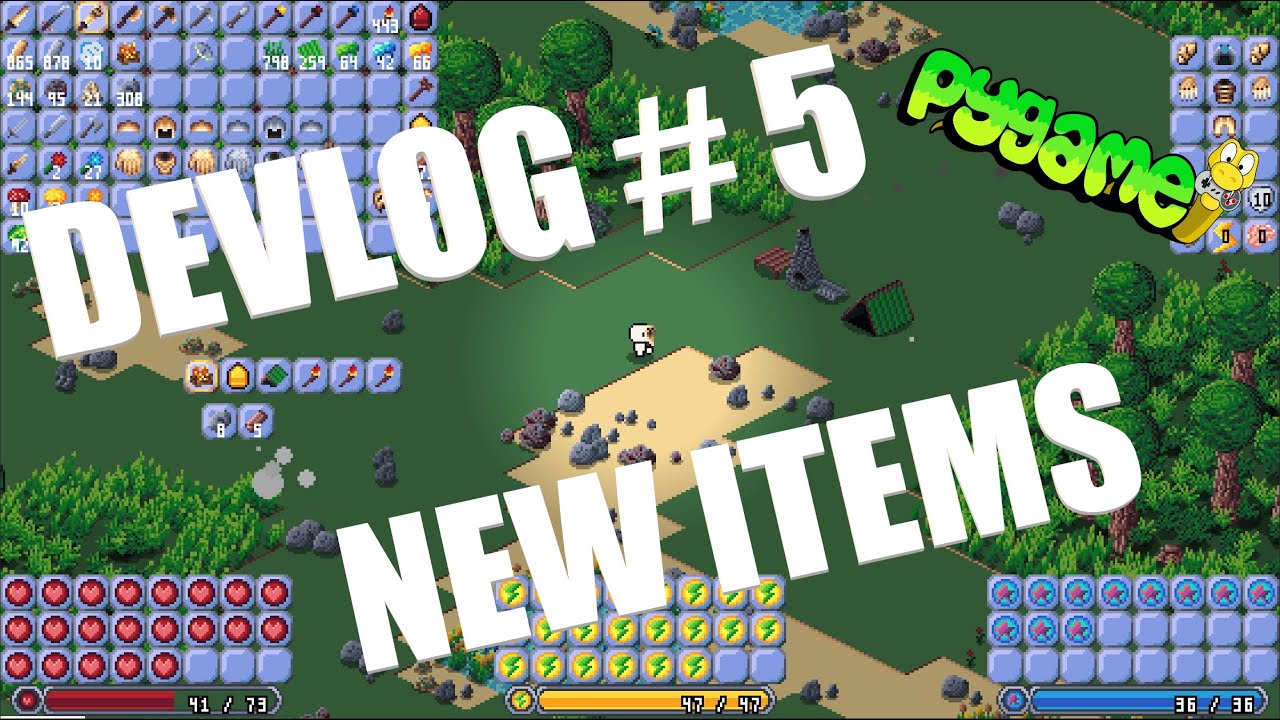
In this week's devlog I show some new items, including the bone armor set, bone weapons, and the mining helmet. I also talk about the buff and debuff system that has been put in place and improvements that will be made in the future. What do I do with all the dirt?
#indiegamedev #devlog #gamedev #gamedevelopment #indiedev #python #pygame #pytho...
dawn quiver
Hello, Does anyone write some text RPG in python(just as a MVP for player advancing systems etc.) and transfer it to Unity or smth which can provide faster, easier and overall better experience than pygame? 😄
dawn quiver
marble jewel
Latest Big Chungus Devlog here: https://youtu.be/qUvKXMNoC2Y made entirely using...
At first look it seems very nice, I will try to catch up all your videos 😉
marble jewel
Thanks, much appriciated, as far as your question goes I would recommend sticking to one or the other and not having to port or transfer over to another system. A text RPG sound like a perfect use case for pygame, at most you'd have to write a bit more code to get it going but that is something pygame should be able to handle no problem
fallow finch
there's no reason to make a base for a game in a different engine than the final game
dawn quiver
marble jewel
Thanks, much appriciated, as far as your question goes I would recommend stickin...
I have Veery basic 2D multiplayer RPG behind in my PyGame with such functionalities working:

So I have some experience with PyGame 😄 I have learned a lot during it, but it was very poorly written by me(2 years ago, so I have a lot better understanding of programming at all rn) The point is, that I can't use C/C# or anything else and I believe it would take really some solid amount of work to get any decent level, while I have some Python skills. So I am thinking what will be the best way to do some fun game for myself and maybe friends 😄 But it would be probably 2 big for pygame
fallow finch
wdym by too big
you want to implement shaders or real 3d / something else resource intensive ?
or more advanced multiplayer
dawn quiver
Naah, it will be still 2D, but with multiplayer, not MMO like I was trying previous time, but something more like a Diablo
fallow finch
what are the features you want to implement that are too intensive for pygame ?
dawn quiver
Overall it takes 34 initial classes, with lvl generator, class generator, skill generator, item generator, multiplayer etc. it should be like infinity game
Which will be growing by each user playing it
marble jewel
you need to start small and work your way up, just focus on one piece at a time
fallow finch
idk if multiplayer part is going to be really intensive, but aside this i don't get what prevents you from adding more content in pygame project
dawn quiver
Maybe you're right that I should stick to PyGame, I just remembered that whenever I Faced some problems during last project on pygame, there was like 0 similar problems resolved to get some help, and everyone was just like: move to unity, there was resolved here like 100 times 😄
fallow finch
what kind of problems
dawn quiver
When I had for example 3 players logged in into the game, and there was enemy which has to follow the one he saw first, so I was struggling to make it work
In general there was no ressources about making some decent multiplayer, I remember that main logic was in every client and server was only for getting and sending information, while know I think that all the logic should take place in server
Because the client logic there was a lot of problems with multi, for example, when both players at the same time attacked the enemy - he lose hp only once
There is also really time consuming to prepare collision system for each element
fallow finch
dawn quiver
There is also really time consuming to prepare collision system for each element
i mean yeah that's what making a game with no engine is
dawn quiver
I don't remember all the problems, but I believe with Unity it would be really faster, the main problem is that it will be no longer Python, that's why I am asking if anyone prepared like only main function MVP in python( to check if idea is good) and move to Unity
Like you know, looking for someone to talk about it, if it was worth, how it was done, maybe some good 3rd party tool etc.
fallow finch
unity will be really faster but you don't need unity power for everything
dawn quiver
I mean not only faster by executing the game, but also development process should be easier
fallow finch
there's not a lot of pros in making a game in raw python yea but there's still a few ones
marble jewel
I highly doubt making an MVP in pygame then porting it to unity is the way to go
fallow finch
one of my favourite ones is the cheat engine / other cheat programs vulnerability
python is like so secure lol
dawn quiver
marble jewel
I highly doubt making an MVP in pygame then porting it to unity is the way to go
I didn't think of Pygame, pure python classes for logic like classes, skills, dmg calculaction, lvl scalling etc, proof of concept as 1 day of writing text RPG, and whole graphic thing, and logic of fights, movement etc. prepared on main engine(unity)
dawn quiver
fallow finch
python is like so secure lol
Yeah that's true
fallow finch
dmg calculation and scaling is not really something easier to make in different engines right
marble jewel
mixing the two is something that no one does, it sounds like you are just avoiding switching from python to c/c#
dawn quiver
I believe whole game logic in terms of "Mathematics" I would say, would be easier for me to do in Python, but I mean about the playing layer, collision, movement, graphipcs, animation, level creation etc. it should be faster to do in game engine like unity
fallow finch
yes graphic stuff and animation takes a lot of time to do without an engine
making a performant code to dynamically load assets too, that's not very hard to do in python imo but engines do it all for you
dawn quiver
marble jewel
mixing the two is something that no one does, it sounds like you are just avoidi...
Yeah I would like to avoid it as much as possible haha 😄
dawn quiver
fallow finch
yes graphic stuff and animation takes a lot of time to do without an engine
Have you maybe good examples(github) of how it should be done correctly? Because as I remember it was really very long proccess for me to make all the graphics for 1 lvl and collisions etc.
marble jewel
my suggestion then would be to stick with pygame and just tackle one problem at a time, solve enough problems and you will end up having a neat little game engine
fallow finch
dawn quiver
Have you maybe good examples(github) of how it should be done correctly? Because...
be sure to make a good codebase
then making more levels should not take so much time
dawn quiver
fallow finch
be sure to make a good codebase
That's the reason why I stopped working on previous one haha, the code was poor
marble jewel
yes, I get the feeling you are trying to tackle too much at once and you need to just slow down and start small, one thing at a time
dawn quiver
marble jewel
my suggestion then would be to stick with pygame and just tackle one problem at ...
Have you prepared some generator for map, or did you add all line by line in terms of graphics?
 fallow finch
dawn quiver
Have you prepared some generator for map, or did you add all line by line in ter...
fallow finch
dawn quiver
Have you prepared some generator for map, or did you add all line by line in ter...

marble jewel
my maps are chunk based and use perlin noise to determine which tile should be what
fallow finch
perlin noise is so popular nowadays
marble jewel
technically I am using the opensimplex module but yeah its the same thing
dawn quiver
Hmm, I believe I will try to start working on this with Python, and we will see how it will goes, maybe this last 2 years there was some development in terms of sources of knowledge how to write game in Pygames 😄
marble jewel
I didn't want to get lost in the weeds with the math behind it, I just wanted something that works, would you say writing my own using numpy would result in faster noise calc?
marble jewel
hmm now I am wondering what opensimplex uses under the hood, if its the same thing then maybe not worth switching
but fast chunk generation times can be important
fallow finch
numba can go to like 60% of C speed sometimes
marble jewel
not bad, ill look into it
fallow finch
some test with recursive fibonacci implementation took 12 seconds with numba, 8 with C, and a few minutes with basic python iirc
marble jewel
ultimately tho I should probably just code up some sort of thread or multiprocessing based chunk generation, but I haven't needed to yet
marble jewel
I'll take a look, I really just wish that multiprocessing was more intuitive with python
fallow finch
i don't really use the multiprocessing package, i'm really not sure if it's good for small things like math functions
joblib allows to run the same function in parallel, with configurable amount of threads
marble jewel
threading is great but still limited
anyways, good chat I've got to go
have a good one
fallow finch
alright bye
dawn quiver
bye bye
 past ocean
import random
Set the range for the game
low = 1
high = 20
Generate a random number within the range
number = random.randint(low, high)
Prompt the user to guess the number
print(f"I'm thinking of a number between {low} and {high}. Can you guess what it is?")
guess = int(input())
Loop until the user guesses correctly
while guess != number:
# Provide feedback to the user
if guess < number:
print("Too low. Guess again.")
else:
print("Too high. Guess again.")
# Prompt the user to guess again
guess = int(input())
The user has guessed the correct number!
print(f"Congratulations! The number was {number}.")
I tried this code in Termux but it didn't worked
 snow star
Hi I am curious I was creating my python game and wanted to add my own background music. And I have found http://sampulator.com/ and http://scribble.audio/ and https://roland50.studio/ and I do not know how it is with their license. Can I use it for commercial use? Somebody who knows? Thanks

Sampulator
Music production made easy. Create beats in your browser.


Emulate the sound of Roland's most famous and influential musical instruments from Yuri Suzuki and Roland.
eternal hatch
past ocean
import random
# Set the range for the game
low = 1
high = 20
# Generate a rand...
Works for me
I didn't use Termux
past ocean
How can I use it on termux ?
eternal hatch
past ocean
How can I use it on termux ?
I don't know what termux is
past ocean
eternal hatch
I don't know what termux is
Termux is a terminal
For mobile
I've downloaded python in it but still it's not working
eternal hatch
past ocean
For mobile
what python version?
past ocean
1
 eternal hatch
past ocean
Am I using correctly ?
eternal hatch
past ocean
Am I using correctly ?
You are on 3.11.2
past ocean
It's outdated ?
eternal hatch
past ocean
It's outdated ?
version 1.0 is
past ocean
Should I download latest version ?
eternal hatch
past ocean
Should I download latest version ?
No, 3.11.2 is fine. I was saying that you picked an outdated version because you said you had Python 1.
past ocean
It's Python 3 ?
eternal hatch
past ocean
It's Python 3 ?
3.11.2 is python 3
eternal hatch
past ocean
How can I run this code ?
It would probably be smarter to run it in a text file instead of typing each line into the interpreter
past ocean
What word editor should I use ?
eternal hatch
past ocean
How can I run this code ?
If you're new to Python, you should get it on your laptop/pc, not a mobile device
past ocean
OK I'm going to run on my pc
Thanks mam for your time, Have a good day
eternal hatch
past ocean
What word editor should I use ?
I have no clue how Termux works, so it depends on what they allow you to use. If Termux is a terminal only app, I'd recommend a terminal text editor such as nano
eternal hatch
past ocean
OK I'm going to run on my pc
Thanks mam for your time, Have a good day
Ahh, it's the profile pic, I'm actually a guy who likes to play Celeste (pfp is the main character of the game)
eternal hatch
past ocean
OK I'm going to run on my pc
Thanks mam for your time, Have a good day
You too, have a good day.
past ocean
OK thanks bro
 twin thicket
past ocean
OK I'm going to run on my pc
Thanks mam for your time, Have a good day
twin thicket
past ocean
OK I'm going to run on my pc
Thanks mam for your time, Have a good day
Replit is good for mobile (but you can't replace it with pc) ! if you're beginner
eternal hatch
Never learned Python on Mobile, but I'm sure it is 97.234234564% times more painful than PC
twin thicket
eternal hatch
Never learned Python on Mobile, but I'm sure it is 97.234234564% times more pain...
Replit is cloud based software (i'm not doing any promotion) its way easier than pc ! Just you have to type ! just it ! even a 6 grade student can do programming in it ! don't even have to install anything it it ! Try it out may it'll help
eternal hatch
twin thicket
Replit is cloud based software (i'm not doing any promotion) its way easier than...
I've played with Replit before, it is kinda slow
twin thicket
Ya caz its an early project ! Lotta bugs but its improving day by day
Now its just for practicing ! For student
eternal hatch
Installing Python is better in my opinion though, you can do more and it runs faster.
But if you want to code only in the cloud, another great option (that I have used, but it does lack some functionality compared to Replit) is pythonanywhere.
dawn quiver
I believe this channel is about game-development, so in terms of gamedevelopment using Python, I can't see any other possibility than installing it loccaly
eternal hatch
dawn quiver
I believe this channel is about game-development, so in terms of gamedevelopment...
Best argument, but you can technically make pygame games on Replit, they just take a garbage amount of time to load.
Imagine adding one line of code, and then you have to wait 2 minutes (I don't know exactly what the wait time is) before you can see the results
pain
dawn quiver
Haha, yeah, I believe in all terms locally installed python on Desktop is the best, even when I was using pythonanywhere i Had everything written in PyCharm on PC push it to git, and pull from git into Pythonanywhere 😄
dawn quiver
Have someone knew about some gitub repository with Pygame Multiplayer games? just to check how he was working with server
fallow finch
dawn quiver
Have someone knew about some gitub repository with Pygame Multiplayer games? jus...
idk but multiplayer isnt a feature of pygame so it would be the same with multiplayer + any other python multimedia lib i guess
dawn quiver
Ik, last time I was using sockets and I believe I do it very poorly, so was thinking maybe someone have some good source about this 😉
fallow finch
there's this playlist on youtube but there's no repo
 vagrant saddle
dawn quiver
Ik, last time I was using sockets and I believe I do it very poorly, so was thin...
vagrant saddle
dawn quiver
Ik, last time I was using sockets and I believe I do it very poorly, so was thin...
also have a look to pyenet it is a very robust binding to a C networking library used in numerous games
 kindred fox
hello everyone does anyone know why is my character not moving ? class game:
def init(self):
self.width = 700
self.height = 500
self.screen_name = pygame.display.set_caption("game")
self.screen = pygame.display.set_mode((self.width, self.height))
self.background = pygame.image.load("space.jpg").convert()
def character(self):
    self.pos_x = self.width / 2
    self.pos_y = self.height / 1.5
    self.my_monster =pygame.image.load("mymonster.jpg").convert()
    return self.my_monster

def move(self):
    self.key = pygame.key.get_pressed()
    if self.key[pygame.K_LEFT]:
        self.pos_x -= 5
    elif self.key[pygame.K_RIGHT]:
        self.pos_x += 5
    elif self.key[pygame.K_UP]:
        self.pos_y -= 5
    elif self.key[pygame.K_DOWN]:
        self.pos_y += 5

def run(self):
    while True:
        for i in pygame.event.get():
            if i.type == pygame.QUIT:
                pygame.quit()
                sys.exit()
        self.move()
        self.screen.blit(self.background, (0,0))
        self.screen.blit(self.character(), (self.pos_x, self.pos_y))
        pygame.display.update()
You're resetting it's X and Y coords everytime you call the character method*
!code
frank fieldBOT
Here's how to format Python code on Discord:
```py
print('Hello world!')
```
These are backticks, not quotes. Check this out if you can't find the backtick key.
kindred fox
so what should i do ?
eternal vessel
You could try putting the
self.pos_x = self.width / 2
self.pos_y = self.height / 1.5```Inside the `__init__` methodJust make sure it only runs once
eternal vessel
No prob
 carmine crater
I've been trying to create a overlay that shows over a game application. Thus far I've tried pygame, pyautogui, and one other I can't think of at the moment. I haven't had much luck with this. I ended up using Win32API which has yielded the best results. To test this, I've been trying to make a bright red box appear in the center of the screen on top of a existing game. I'm able to get it to work with other applications however with the game, it is not showing up or it's not persisting (maybe due to refresh). Does anyone have a suggestion on a Python module which may be able to accomplish this?
carmine crater
carmine crater
I've been trying to create a overlay that shows over a game application. Thus f...
Moreover, the way I've been doing it via Python is by using the Win32API module. I have been retrieving Device Context object for the application i'm trying to display over (using the respective hWnd). Then attaching my rectangle to that. I'm unsure if this would work better if I use the device context for the entire screen? I'm semi familiar with WinAPI due to another programming language I used in the past however I think there's a better way to do this. Any help would be really appreciated. I've followed a handful of dead ends on stackoverflow, etc.
raw falcon
past ocean
1
python 1.0 was released in january 1994
 vagrant spear
My own raytracer in python


GitHub
My own raytracer in one week ⚡. Contribute to linux-admin0001/raytracer development by creating an account on GitHub.
Please star)
✨
robust hearth
kindred fox
hello everyone does anyone know why is my character not moving ? class game:
...
Your init function has the wrong name. It should be with doubles underscored
kindred fox
Yeah I know it just when I past it it disappears @robust hearth
robust hearth
Oh sorry
kindred fox
It's fine 👍
 bitter iris
vagrant spear
My own raytracer in python
bitter iris
vagrant spear
My own raytracer in python
Pretty!!!
covert lagoon
robust hearth
Your init function has the wrong name. It should be with doubles underscored
Discord markup makes things surrounded by two underscores be underlined, which is one of the reasons why code blocks are good, because that doesn't happen in them
robust hearth
covert lagoon
Discord markup makes things surrounded by two underscores be underlined, which i...
How do you do those?
eternal vessel
__underlines the word between the underscores__
I used backslashes to cancel out the effect
support.discord.com/hc/en-us/articles/210298617-Markdown-Text-101-Chat-Formatting-Bold-Italic-Underline-
or just open that link to see how to do everything
 muted echo
Hi everyone, I am new to python and while learning i created a small game/program on math, here is the github repo https://github.com/KpUnise46/Math-Game-Project , please have a look at it and help me learn.

GitHub
This is a simple Python program that generates random math problems for the user to solve. The difficulty of the problems increases as the user answers more questions correctly. - GitHub - KpUnise4...
snow star
Hi everybody. I created my first game in pygame on my own. If you want you can take a look on my repository https://github.com/Fearplay/cross-the-road-python
GitHub
Created game in pygame on similar way to crossy road. - GitHub - Fearplay/cross-the-road-python: Created game in pygame on similar way to crossy road.
 random cypress
haha I just restarted yesterday and rejoined this server
raw falcon
random cypress
haha I just restarted yesterday and rejoined this server
3 years seriously
raw falcon
random cypress
no that's 7/21 and now it's 2/23 so more like 1 year 7 months
i was talking about myself
random cypress
raw falcon
i was talking about myself
oh ok
covert lagoon
robust hearth
How do you do those?
!code like this
frank fieldBOT
Here's how to format Python code on Discord:
```py
print('Hello world!')
```
These are backticks, not quotes. Check this out if you can't find the backtick key.
covert lagoon
Gives syntax highlights, makes the font monospaced, and stops any other markdown stuff
robust hearth
Thanks
 barren torrent
so I'm wondering if anyone has any resources - tutorials, design docs, source code etc - relevant to the question of "how do you make a really good RPG stat system framework" I mean multiple stats, which can be affected by all kinds of bonuses like multipliers or flat bonuses/penalties and some stats derived from others etc
and probably whatever said bonus framework is. buff magic transformations whatever
nimble owl
How can I make a cube display better by showing its edges with black lines in ursina? like wireframe_cube but with color/texture. I could make a composition of 2 boxes (1 that is a bit smaller), but it might be more work than worth
 woven canopy
barren torrent
so I'm wondering if anyone has any resources - tutorials, design docs, source co...
woven canopy
barren torrent
so I'm wondering if anyone has any resources - tutorials, design docs, source co...
I mean, I can't link you to anything. But from personal experience, double and triple check your logic if adding percentage modifiers that might possibly stack. Also watch out if mixing additive, and multiplicative modifiers.
dawn quiver
barren torrent
so I'm wondering if anyone has any resources - tutorials, design docs, source co...
I do not know but i know someone that knows. Found him on twitch. He made https://blockgame.info/ mod for minecraft which has tons of stat based stuff.
He has a discord server and you can catch him on twitch.
You could also look up some of your favorite RPG and see if people have posted articles about gameplay progression.
 nocturne swan
heyy can someone help?
im literally learning basics, and getting a bit stuck on the X,Y cos, sin stuff.. i can drop a dm.. its probably the most basic thing ever since its literally just a 2 game to make a ball move..
woven canopy
nocturne swan
im literally learning basics, and getting a bit stuck on the X,Y cos, sin stuff....
What the problem is?
nocturne swan
fixed it, just had my cos and sin slightly wrong haha
thanks for the reply
now working on ursina... unless you have a better engine to suggest?
dawn quiver
well its nothing to worry about.
 hexed dune
whats the best place to just get feedback on my code. i am new to python and made a very simple game using just the terminal (no pygame just ascii characters lol) its about 370 lines and just curious of im following best practices or doing stuff in a dumb way lol
eternal hatch
hexed dune
whats the best place to just get feedback on my code. i am new to python and mad...
There are no "best practices" in gamedev
Just try to keep it efficient
You probably could get feedback here
eternal hatch
hexed dune
whats the best place to just get feedback on my code. i am new to python and mad...
Actually, here's a tip (sort of): if you have a console (terminal) game, DO NOT use os.system('clear') for clearing the screen. That's about it (jk)
hexed dune
Lol. Well I do use clear a few times to transition between initial screens like the title screen and a couple option settings
Before the game starts
 formal gull
i need help
eternal vessel
eternal hatch
Actually, here's a tip (sort of): if you have a console (terminal) game, **DO NO...
why not?
also I think it's os.system("cls") but yeah
hexed dune
From the documentation I read cls works for windows and clear works for Unix so you would need to do both if it’s cross system but I am also using msvcrt library for keyboard inputs so my script would only work on windows anyway
I know there’s other libraries for keyboard input but msvcrt is a default library and one of my goals for this first project was to only use default libraries
covert lagoon
The main difference between libraries in the stdlib and libraries on pypi is the latter are updated more
frank fieldBOT
Hey @obsidian spade!
It looks like you tried to attach file type(s) that we do not allow (.exe). We currently allow the following file types: .gif, .jpg, .jpeg, .mov, .mp4, .mpg, .png, .mp3, .wav, .ogg, .webm, .webp, .flac, .m4a, .csv, .json.
Feel free to ask in #community-meta if you think this is a mistake.
eternal hatch
eternal vessel
also I think it's `os.system("cls")` but yeah
depends on your system, and it is cls, my bad
eternal hatch
eternal vessel
why not?
It is slow and antiviruses hate os.system()
eternal vessel
eternal hatch
It is slow and antiviruses hate os.system()
Oh, alright
Is there an alternate method for clearing it or no
 hushed vine
Games?
eternal hatch
eternal vessel
Is there an alternate method for clearing it or no
I have 0 experience with curses, but it seems to have a ton of console methods, so it might have it: https://docs.python.org/3/library/curses.html?highlight=curses#module-curses
Another, and possibly better option is to try making your own console window in pygame.
eternal vessel
eternal hatch
I have 0 experience with curses, but it seems to have a ton of console methods, ...
Yeah I know of the curses module
I meant just clearing the default terminal, but thanks though
vagrant saddle
eternal vessel
also I think it's `os.system("cls")` but yeah
windows "dos" console is definitively not a terminal, if you want a proper terminal use mintty from MSYS2
cmd started to support some ANSI commands only in windows 10
print(f"{chr(27)}[2J",end="") should clear
vagrant saddle
 lofty gazelle
is it possible to make a 3d fps game only with pygame?
lofty gazelle
is it possible to make a 3d fps game only with pygame?
not 3D but close, you can do raycasting like wolf3d/ doom / duga
vagrant saddle
lofty gazelle
im new to python btw
have a look here https://finfetchannel.github.io/
vagrant saddle
but tbh for 3d fps i would use Panda3D instead of pygame
 normal silo
lofty gazelle
is it possible to make a 3d fps game only with pygame?
normal silo
lofty gazelle
is it possible to make a 3d fps game only with pygame?
Yes, but not recommended.
normal silo
vagrant saddle
not 3D but close, you can do raycasting like wolf3d/ doom / duga
I would say that that counts as 3D, although it is somewhat limited.
For "proper" 3D you want to enable OpenGL support in Pygame.
(Or you can go a strange, but plausible route of using a library that lets you do compute shaders and blitting the result yourself)
vagrant saddle
normal silo
For "proper" 3D you want to enable OpenGL support in Pygame.
i would not, nowadays opengl is becoming hardly portable better use an engine with a integrated shader pipeline
normal silo
vagrant saddle
i would not, nowadays opengl is becoming hardly portable better use an engine wi...
OpenGL still runs everywhere.
vagrant saddle
panda3d/ ursina / godot / harfang
vagrant saddle
normal silo
OpenGL still runs everywhere.
not shaders
normal silo
vagrant saddle
not shaders
They do.
vagrant saddle
and opengl does not run on mobile, that's GLES instead
normal silo
That is still OpenGL, just the ES profile.
The way OpenGL works is that there is different APIs / versions and on startup you need to check which is supported and load it.
vagrant saddle
well profile won't write shaders for you
normal silo
(And write your code to target a specific version, if you do ES it will probably run everywhere)
vagrant saddle
if it does please let me know i'm sure it could help for porting Panda3D and harfang on mobile and webgl ( which i DO )
normal silo
vagrant saddle
if it does please let me know i'm sure it could help for porting Panda3D and har...
The thing is that you kind of have to start with the minimum of them all (ES). If you already wrote all your stuff to use not ES, then you can't always have it work on ES. There are certain features not available there. But if you start with ES, then going from ES to none-ES should not be an issue.
So if you really want to run everywhere, pretend it's mobile from the start (or any other smaller device that uses ES only).
Panda3D and such AFAIK, did not start with ES. Godot on the other hand did I think?
(Which is also why Godot lagged behind in graphics on PC for a long time until now (to run on everything))
(For Panda3D, it can use different graphics APIs, but its shaders would each have to have a corresponding "lesser" version or be marked as not available on smaller devices)
eternal hatch
lofty gazelle
is it possible to make a 3d fps game only with pygame?
You can, you just either have to know OpenGL (Modern) or make your own 3D renderer (which will be slow because it's Python and it's run on the CPU).
lofty gazelle
eternal hatch
You can, you just either have to know OpenGL (Modern) or make your own 3D render...
thank you
but now i wanna know
which is better for games? javascript or python or c or c++
games like skyrim ( fantasy rpg)
 proper peak
for a big game like skyrim, of these, c++.
c# would likely do fine too, though, and with less effort than c++.
lofty gazelle
so c# is better?
normal silo
lofty gazelle
which is better for games? javascript or python or c or c++
C/C++ will have the least restrictions on what you can do with the hardware, but they are in some ways more work to work with. (Also as a side note, you will need to use at least two languages as the GPU has its own language(s) (called "shader" programming languages))
lofty gazelle
oh thanks for helping
im just did ky first ascii rpg
but i wanna expand to that fantasy rpg
its my dream somehow lol
eternal hatch
lofty gazelle
which is better for games? javascript or python or c or c++
For 3D games, you probably want to go with a game engine
lofty gazelle
im basing on youtube tutorials to help me with it until i fully learn the languages lol
normal silo
lofty gazelle
so c# is better?
C# is used by multiple games engines (those engines themselves tend to be written in C++). C# is pretty fast and pretty nice to program in, which is why it's chosen.
lofty gazelle
normal silo
C# is used by multiple games engines (those engines themselves tend to be writte...
so i should learn C# instead of C++ ?
normal silo
However, if you want to stick with Python, there are engines that use it too, such as Panda3D.
eternal hatch
"Engine" (When I think of an engine I usually think of an entire gui and stuff)
lofty gazelle
btw thanks for the answer squiggle
normal silo
lofty gazelle
so i should learn C# instead of C++ ?
It depends on what you want to do. Do you want to write a game engine or get straight to the game making part. Or maybe you just like to write code in C++...
lofty gazelle
eternal hatch
For 3D games, you probably want to go with a game engine
what engine? i don t really know those engines lol
normal silo
eternal hatch
"Engine" (When I think of an engine I usually think of an entire gui and stuff)
Engine and editor are separate, but some require the use of the editor. Out of all the engines, not having an editor is probably more common.
lofty gazelle
normal silo
It depends on what you want to do. Do you want to write a game engine or get str...
SO basicaly my mission is to make a fantasy rpg 3d or third person game,i dont know which language or engine to use or how to use them,somehow the only coding language i know is python
eternal hatch
lofty gazelle
what engine? i don t really know those engines lol
I'm not very familiar with Engines, but I've heard of Godot, Unity, and Unreal.
normal silo
lofty gazelle
SO basicaly my mission is to make a fantasy rpg 3d or third person game,i dont k...
I recommend picking a game engine that also has an editor (GUI) and go with that.
Godot is a good choice, since its built-in scripting languages options are GDScript and C#. GDScript is basically a Python clone.
(It's also open-source and well documented)
lofty gazelle
eternal hatch
I'm not very familiar with Engines, but I've heard of Godot, Unity, and Unreal.
from what i saw on youtube maybe unreal is the best so from tommorow on i will start trying to learn/understand it
lofty gazelle
normal silo
Godot is a good choice, since its built-in scripting languages options are GDScr...
hmm
i will try also learing godot
normal silo
After messing around with Godot, if you don't like it, you can try something else. During your time using Godot, try focusing on generic game development knowledge that applies to any engine.
normal silo
(Like how graphics works in general, physics, AI, etc)
eternal hatch
It's honestly probably much easier to start with 2D, less jank.
normal silo
Yes, start with 2D, Godot has good support for 2D.
normal silo
Yes, and READ THE DOCUMENTATION.
eternal hatch
lofty gazelle
so first 2d then after i understand some things i can jump to 3d
That's no small statement
lofty gazelle
i will,thanks so much
both of you helped me alot
i hope i can pay off in the future
eternal hatch
It takes very very very long and it is very very very hard to get into game dev
normal silo
One of the important things needed in general is mathematics, especially when going to 3D.
There are several resources on mathematics for game devs.
lofty gazelle
im bad at math
eternal hatch
Ya gotta know some trig
lofty gazelle
can t i just use a calculator?
eternal hatch
lofty gazelle
can t i just use a calculator?
bad start
normal silo
No way around the math, you will most certainly need some linear algebra.
lofty gazelle
no but im very bad st math i can t just start learning it im extremly bad
normal silo
The gameplay code itself requires it.
lofty gazelle
very hard
normal silo
(Even if you don't touch engine code)
eternal hatch
normal silo
No way around the math, you will most certainly need some linear algebra.
I have not needed that (linear algebra), but I stay in 2D. Do you need that for shader stuff because of matrixes?
normal silo
normal silo
After messing around with Godot, if you don't like it, you can try something els...
(Math is a large chunk of this general knowledge that applies no matter which languages or engines you choose)
normal silo
eternal hatch
I have not needed that (linear algebra), but I stay in 2D. Do you need that for ...
You need it in 2D too when you game becomes more complex.
eternal hatch
normal silo
You need it in 2D too when you game becomes more complex.
For shaders?
normal silo
If your game is grid-based, you can probably avoid the math.
eternal hatch
normal silo
If your game is grid-based, you can probably avoid the math.
Aren't they all (pixels)
normal silo
eternal hatch
Aren't they all (pixels)
I mean like chess.
normal silo
As soon as you have stuff like physics, you need some math.
eternal hatch
normal silo
As soon as you have stuff like physics, you need some math.
yes
eternal hatch
normal silo
As soon as you have stuff like physics, you need some math.
I could see more complex stuff in like a physics engine, but for regular platformers I don't really have to touch any complex matrix math
I do touch on some trig stuff though...
normal silo
Random example, you have an enemy that explodes when the player gets too close. That is going to involve the distance formula and the game engine probably already has a distance function for that, but there are many things that are not as simple as just the distance apart and such.
eternal hatch
normal silo
Random example, you have an enemy that explodes when the player gets too close. ...
How is that linear algebra?
That sounds like plain old algebra
normal silo
eternal hatch
How is that linear algebra?
Geometry / algebra.
It shows up in linear algebra too.
lofty gazelle
so if i don t know math or physics i can t make my game?
normal silo
lofty gazelle
so if i don t know math or physics i can t make my game?
Not Skyrim, probably not.
lofty gazelle
not really skyrim just a idea i mean some half map skyrim fantasy rpg
eternal hatch
lofty gazelle
so if i don t know math or physics i can t make my game?
I think game engines cover many basic physics stuff like rigid bodies, soft bodies, etc.
normal silo
eternal hatch
I think game engines cover many basic physics stuff like rigid bodies, soft bodi...
They do, but they can't account for (all) gameplay code.
lofty gazelle
bruh im 9th grade i think i didnt event learn those
i also skipped alot physics
seems i shouldt have skipped
fkc
eternal hatch
lofty gazelle
bruh im 9th grade i think i didnt event learn those
You don't generally learn rigid bodies in 9th grade
normal silo
You don't really need to know too much maths though, there are resources that cover just the stuff game devs will probably use.
eternal hatch
I don't know when you learn them, I just know about them because I have 100s of hours in Blender
lofty gazelle
hmm
normal silo

Welcome to my four part lecture on essential math for game developers 💖 I hope you'll find this useful in your game dev journey!
This course will have assignments throughout, if you want to maximize your learning, I recommend doing them!
If you are enjoying this series, please consider supporting me on Patreon!
🧡 https://www.patreon.com/acegik...
eternal hatch
Also, if your doing a 3D game, you'll either have to buy/get assets, or you'll have to learn how to make your own.
eternal hatch
normal silo
https://www.youtube.com/watch?v=MOYiVLEnhrw
Her Bezier Curve video is cool
normal silo
No single person can really make Skyrim, there is too much you have to do. Just in terms of amount of content.
eternal hatch
normal silo
No single person can really make Skyrim, there is too much you have to do. Just ...
That basically sums up 3D games
lofty gazelle
eternal hatch
Also, if your doing a 3D game, you'll either have to buy/get assets, or you'll h...
what do i need to make my own?
normal silo
Usually if a single person makes a 3D game it's hyper focused.
normal silo
It does not try to have a ton of content but rather just very good content.
eternal hatch
This is why 2D games by a solo dev look less jank (I think)
normal silo
eternal hatch
This is why 2D games by a solo dev look less jank (I think)
Yup and even then they have to be very focused if it's a single person.
One way to get around the limited content (and the other path to go down) is randomly generated content (e.g. Minecraft). But generating stuff is complicated to program and will probably involve a bunch of math.
eternal hatch
normal silo
One way to get around the limited content (and the other path to go down) is ran...
Notch made 3D games solo dev I think (Of course Minecraft has had many authors, but it started fairly solo, or at least with small Notch-owned Mojang)
normal silo
eternal hatch
Notch made 3D games solo dev I think (Of course Minecraft has had many authors, ...
Minecraft was made solo.
(Up until it got really popular)
(Note that it lacks focus, there is no clear goal or anything like that, the combat and other mechanics are simple (it instead leaves it to the player to make their own fun with what is basically just the engine plus some random generation (it borders on tech demo)))
(Different style)
proper peak
notably, Notch streamed creating a first-person game from scratch in java in ~2010; IIRC it was quite interesting
normal silo
proper peak
notably, Notch streamed creating a first-person game from scratch in java in ~20...
The one for Ludum dare right?
I think it was raycasted.
proper peak
I think so, yeah
eternal hatch
In my experience, in order to make good games, you have to first start out making really bad games. Like my first game:
 normal silo
(Can't instantly go zero to hero)
proper peak
I found them; I love internet data hoarders: https://www.youtube.com/playlist?list=PLgAujBKarXXoMxJDyi1Am4yvfbHYWRwOC

YouTube
These are all the VODs of Notch programming from many moons ago. These are in order by date streamed. Some videos may go down temporarily every once and awhi...
normal silo
Also game design itself is often underestimated compared to programming or art, it's actually the hardest part IMO (if you are not just copying something that already exists).
proper peak
proper peak
I found them; I love internet data hoarders: https://www.youtube.com/playlist?li...
they are generally in Java of course, but might be interesting for some people anyway
normal silo
proper peak
they are generally in Java of course, but might be interesting for some people a...
Several other people have been streaming their Ludum Dares on Twitch and Youtube now too, I recommend watching them.
eternal hatch
proper peak
I found them; I love internet data hoarders: https://www.youtube.com/playlist?li...
Dang, why does he use light mode
might be all he has
goodness
normal silo
IDK if Eclipse had a dark mode back then.
For a single person, often the best choice is to try to do one thing and do it really well. Similar to how one often designs functions in programming (KISS).
Rather than what big companies do, which is have a lot of different things all in the same game.
eternal hatch
Does that mean: Keep It Super Simple?
normal silo
"Keep It Simple Stupid"
eternal hatch
That's better
normal silo
The general rule is limit the scope of your project to something much more reasonable, then half that scope and double the estimated time.
eternal hatch
normal silo
The general rule is limit the scope of your project to something much more reaso...
I like that
hexed dune
ive "completed" my first attempt at making something in python (a game, that only uses the console) if anyone has any suggestions on (not the game itself) what i maybe did dumb with the code and how it could be smarter I would appreciate it 🙂 https://github.com/Lanecrest/Coin-Thief (though if anyone actually plays it and has any comments on the gameplay im happy to hear those as well)
 onyx compass
Hi! I also think that make a good small interesting indie game in 2D is feasible, but for a 3D game, it is too much time consuming to make anything good, except just for learning purposes.
raw falcon
hexed dune
ive "completed" my first attempt at making something in python (a game, that onl...
the code is pretty good, i wouldn't use globals though, if you type !globals in #bot-commands you can see why, also it's windows-specific but i understand you're using it to play sounds
hexed dune
Yeah and using msvcrt only runs on windows too but I want to stick to default libraries for this project
I’ll check out globals. Thanks!
eternal vessel
Alright I'll try out the game
hushed vine
normal silo
Also game design itself is often underestimated compared to programming or art, ...
100% true
marble jewel
Latest Devlog Here: https://youtu.be/ikwYvml5yqY More Items, Better Projectiles, and Skelebro

In this week's devlog I show some new items, including new potions, stone posts, and the crossbone. I also talk about changes to projectiles and a new enemy called a Skelebro.
#indiegamedev #devlog #gamedev #gamedevelopment #indiedev #python #pygame #pythongaming
 timber coral
Can anyone here help me?
marble jewel
post your question and lets find out
proper peak
unless you'd like to implement a 3d graphics engine from scratch, use something like panda3d
 rancid whale
hello
raw falcon
 balmy star
And 4k graphics
balmy star
And 4k graphics
good luck doing that with pygame
balmy star
@raw falcon Fortnite was made in pygame
raw falcon
are you sure about that
proper peak
 balmy star
NASA wrote an article about pygame being better than unreal
 high orbit
i have a question from senior programmers, i am making a 2d physics engine, and im wondering what would be the optimal way of listing and drawing particles, and calculating collisions
 vapid stirrup
balmy star
NASA wrote an article about pygame being better than unreal
vapid stirrup
balmy star
NASA wrote an article about pygame being better than unreal
for a second i read that as NSA and was pretty confused
balmy star
“Ultimately when it comes down to game development, we at NASA believe pygame is an easier to use and capable software for 3d game development.” -NASA programmer Mark White
lol I tried it it sucks
raw falcon
balmy star
“Ultimately when it comes down to game development, we at NASA believe pygame is...
nobody said that
eternal vessel
balmy star
lol I tried it it sucks
smal bran
balmy star
No shit I’m joking
eternal vessel
so am I
 halcyon sail
ive got an issue with the beginnings of this game engine im building, its definitely not creating the right shape as its suppose to.
https://pastebin.com/2WmzK5NJ. the issue resides within the render part of the code
no matter what i do i can't seem to get it to increment correctly in the Y loop
theres just something wrong there that i can' see because to my eyes everything there should work
cause on paper when i do this exact math and sequence by hand it comes out correctly
halcyon sail
halcyon sail
ive got an issue with the beginnings of this game engine im building, its defini...
I solved it
eternal vessel
nice
 round obsidian
Just updated my new game, created in Python using Pyglet
https://xtaloid.itch.io/xtaloid
 round obsidian
And here's a video playthrough
https://www.youtube.com/watch?v=qB6K7RGSfoE

Video playthrough for my game XTALOID: https://xtaloid.itch.io/xtaloid
It's been a while since the last build of XTALOID! This version has some bugfixes and minor additions, and this video also gives you a playthrough with some examples of useful strategies. Pay close attention!
 wooden prairie
 drowsy mantle
Hey!! Do you know an expert in Pyopengl and pygame?
I have some Pyopengl and Pygame_gui issues...
raw falcon
drowsy mantle
Hey!! Do you know an expert in Pyopengl and pygame?
don't ask to ask
if you would have sent your question you might have gotten a response by now
drowsy mantle
raw falcon
if you would have sent your question you might have gotten a response by now
legit
trying to be polite, Im new on the server :)
sweet shard
drowsy mantle
Hey!! Do you know an expert in Pyopengl and pygame?
I'm no expert but I bet what is happening is Pygame_gui is trying to use Pygame's normal functions to draw (blitting) but those don't really work when OPENGL is enabled
drowsy mantle
sweet shard
I'm no expert but I bet what is happening is Pygame_gui is trying to use Pygame'...
exactly
Im have a 3d opengl scenario in a pygame window, and i wanted to create a GUI on top of it.
I've been trying for days but only the scenery is rendered, and it's as if it ignores everything I put in the GUI.
sweet shard
So unfortunately due to Pygame deprecating OPENGLBLIT it won't be possible for Pygame_gui to draw anything. I know it really sucks but you'll either have to make your own GUI library with opengl or switch to a different library
drowsy mantle
Oooof
drowsy mantle
sweet shard
So unfortunately due to Pygame deprecating OPENGLBLIT it won't be possible for P...
and is there any way to embed the render window in a different tkinter/pygame_gui window or similar?
Also big thanks for the quick response Raytopia ^^
sweet shard
No problem
It looks like you can embed it into tkinter
The pygame devs just merged a fix last week so that it's possible for Pygame 2.0
If you don't feel comforatble building Pygame from source you could roll back to Pygame 1.9 and it should work there to
os.environ['SDL_WINDOWID'] =
str(self.frame.winfo_id())```self.frame being the Tkinter Frame you want pygame to be displayed in
Once you do that it should appear in the Tkinter frame I haven't had a chance to test that though
drowsy mantle
Understood Raytopia!! I will try then to embed the pygame window in a tkinter frame. I really apreciated your help! You have saved me a lot of time! Otherwise I would still be trying to make pygame_gui work.
vagrant saddle
drowsy mantle
Understood Raytopia!! I will try then to embed the pygame window in a tkinter fr...
why not use flet instead of tkinter ?
at least flet is portable
dawn quiver
flet seems cool
drowsy mantle
vagrant saddle
why not use flet instead of tkinter ?
I was wishing to make a keyframe timeline to animate. But idk if with tkinter is posible. Maybe with flet?
Dont even know if It is really posible to embed a pygame OpenGL window with a pygame_gui window
vagrant saddle
drowsy mantle
Dont even know if It is really posible to embed a pygame OpenGL window with a py...
yes it's possible though i would only use offscreen EGL+GLES not GL for portability reason.
drowsy mantle
Not familiar with EGL+GLES. The (sad) point is that i have already a PyOpenGL code to render a dinamic scenario in a pygame window, but I am unnable to find a way to put an interface over the scenario (excepting embeding the window in other frames such as tkinter or as you say flet. But idk if that would work anyway, I haven't tested it, but probably would work) Still big thanks for the advice @vagrant saddle ^^
vagrant saddle
may have a look at how kivy does with Panda3D for OpenGL , https://github.com/Cheaterman/panda3d-kivy
drowsy mantle
Thanks! Ill take a look!
 dire hawk
i have a question: why does this line not work??
it still is replacing my number in my list even if the number is positive
 tranquil girder
You're using two comparison operators at once, == and <=
So you're actually checking if the True/False value you get from the comparison move == (board[end_file_input][end_rank_input]) * turn is less than or equal to 0
tranquil girder
goes read?
dire hawk
red
tranquil girder
what variable do you want to check to be <= 0?
tranquil girder
so you want to check if move == (board[end_file_input][end_rank_input]) * turn
and move <= 0?
if you want to do two comparisons, use and
tranquil girder
for example
does not check if a is less than 1 and is higher than -1:
if a < 1 > -1:
but this does:
if a < 1 and a > -1


 kind idol
... there's an entire tab for this thank goodness!
Ok.... so story time
I have a card game I want out in the world. Though there are issues with production, big ones being I live in the middle of nowhere and I is unsmart so my idea was to code the game into python and make a couple machine learning to play against each other wargames style so I can manipulate the game as I see fit... but again... I am unsmart... so I might ask help from this chat every so often
kind idol
Honestly I wasn't going to use a game engine, this is mostly for me so I was gonna make it crudely in python only, add in a folder for images of the cards and a few other assets I can draw or get from somewhere else?
Why is it easier with a game engine?
eternal vessel
I mean it can just have built-in functions to make certain tasks easier
kind idol
... thats... actually a fair point 😅
Any that I can snag for cheap that's easy to use?
eternal vessel
it doesn't cost money
eternal vessel
Do you have knowledge of modules/engines
kind idol
Slight. I've seen videos of game developers messing with unity and a channel called horror scoop digs into game files to show what the developer hides but otherwise I never touched any sort of engine or module
like i have a BIT of coding experience from a college course but that was the very basic coding
eternal vessel
Ah, alright
but yeah if you're using python you wouldn't be using Unity
If it's gonna be 3d you could use Ursina
kind idol
I'm not expecting to use anything 3d, at most all i would need is something really basic like stage 2 of inscription
 flat jolt
hey does anyone know how to do web design ?
 night delta
yo!
eternal hatch
flat jolt
hey does anyone know how to do web design ?
Yes, but that would probably be better asked in #web-development
kind idol
So how easy is it to code a game in unity?
 fleet grove
kind idol
So how easy is it to code a game in unity?
fleet grove
kind idol
So how easy is it to code a game in unity?
You can program in Unity in Python?
Its not C#?
kind idol
According to keyblade
kind idol
@eternal vessel ?
eternal vessel
yo
eternal vessel
kind idol
So how easy is it to code a game in unity?
depends on the game
but it's still complex
but using python in Unity isn't a normal thing
kind idol
So what would a python game engine be?
kind idol
eternal vessel
depends on the game
I mean I know the game 100% I can probably transfer it into a game engine easy but if it's difficult in unity?
 quasi patrol
kind idol
So what would a python game engine be?
quasi patrol
kind idol
So what would a python game engine be?
the closes one is godot
which uses gd script
a very similar langauge
to python
dawn quiver
You can use Python in godot directly

GitHub
Python support for Godot 🐍🐍🐍. Contribute to touilleMan/godot-python development by creating an account on GitHub.
proper peak
dawn quiver
https://github.com/touilleMan/godot-python
yeah, it works, though it's incompatible with godot 4 and in general seems abandoned-ish
dawn quiver
it states to be under refactoring to create support for godot 4, not that i can find any active branch
thanks for pointing it out
 digital kindle
I'm trying to think through a basic RPG town simulator inventory system. At first I wanted to make classes for all items and categorize them. Such as:
Container()
self.inventory = []
NPC(Container)
Chest(Container)
Food()
Fruit(Food)
self.fruit_attribute
Bread(Food)
self.bread_attribute
Example:
chest = Chest()
chest.inventory = [Fruit(), Bread()]
npc = NPC()
npc.inventory = [chest, Fruit()]
So the NPC's inventory has 1 Fruit, and a Chest with 1 Fruit and 1 Bread. I could ask "How much fruit does the NPC have?: 2" or "How much food does the NPC have?: 3"
Does this general approach make sense? I'm wondering if I need to ask these questions often, will my simulation be slow if I have to loop through all NPCs inventories to find totals?
 dawn nacelle
I saw your posting on the pygame list, but I was too late to answer. Your general approach seems fine, and will probably be plenty fast.
However, from an architectural point of view, my personal view would be to never access chest.inventory and npc.inventory directly. Instead, I would have methods in the Container class like addItem(), getInventory(), and getCountOf(). Most importantly, move the function that you had to do the count, into the base Container class. That way, only the code inside the class would access "self.inventory". This would make things much easier to change in the future if you decide on a different way to represent your inventory.
Also, it's not clear why you need to have a Food base class and (for example) a Fruit and a Bread subclass. What would the Food base class have in it that would be shared by Fruit and Bread? If there isn't much, it might be simpler to have every item in your collection to have a common instance variable like "self.type" which in these cases might be set to "Fruit" or "Bread".
One more thing. I read in your earlier message that a container might have a container ... You can think of this like the computer file system. Everything there is either a folder or a file. You could handle this by having each of your items (classes) have an instance variable like "self.isContainer" - which would be True for all containers (Container, NPC, Chest), but False for everything else. That way, as you iterate through all items in a list to count them, you could easily check if the item is a container and if so, you know that you need to go down a level.
Hope that helps.
digital kindle
It does, thank you!
dawn nacelle
PS: With regard to the last thing about being a container or not, I would also build all classes with a simple "getter" method:
def getIsContainer(self):
return isContainer
digital kindle
Is there some article or resource you know of where I can learn more about why having getter methods inside a class is preferable to accessing npc.inventory directly from an outside method?
dawn nacelle
Well ... there is a book called "Object-Oriented Python" written by a guy I know ...
In that book, the author talks about an "Object Manager Object" (in Chapter 3). It seems like your Container is exactly this type of thing - an object that manages a collection of other objects.
digital kindle
Uhh.. yeah that sounds perfect 😂 ! I'll definitely check it out. Loved python crash course from the same publisher (it looks like) which is how I got my start
dawn nacelle
If you get the book, you'll find that I am a strong believer in the "strict" use of encapsulation. That is, while it is certainly legal in Python to use something like npc.inventory, from my many years of experience using OOP, I would never do that. The functionality you want is something that the Container should provide. Therefore, a method in the Container class would be a better approach. Again, that way, the code could change inside the class without worrying about any code outside the class.
digital kindle
I'm looking forward to expanding my understanding of OOP. Right now with my basic understanding I know I can create something that will work, but its based on my own intuition and not best practices
I appreciate your time! Thank you!
dawn nacelle
Glad I could help. I hope you find the information in the book useful.
lethal hound
dawn quiver
https://github.com/touilleMan/godot-python
Is it maintained, last version 2 years ago?
 split notch
Building a text RPG game using the openai API but I'm hitting a brick wall when it comes to saving the players progress
dawn quiver
lethal hound
Is it maintained, last version 2 years ago?
It's not being maintained from what I can tell
sweet shard
Look at the godot4-meson branch
That's currently where touilleMan is spending their time
 shut mica
dawn quiver
https://github.com/touilleMan/godot-python
shut mica
dawn quiver
https://github.com/touilleMan/godot-python
Tysm
This is helpful since now I don’t have to learn GDScript
As much
normal silo
dawn quiver
https://github.com/touilleMan/godot-python
*Godot 4.0 came out 2 days ago and every extension is now broken on 4.0.
They are fixing it right now though. The new extension API for 4.0 is much better too.
 primal cipher
What is the best way to create a split feature for blackjack? Mine doesn't seem to work properly.
normal silo
primal cipher
What is the best way to create a split feature for blackjack? Mine doesn't seem ...
Add another player that belongs to the same player group.
The additional player is controlled by the same IRL player.
So if your game is setup to handle N players, this should not be too hard to add.
normal silo
proper peak
yeah, it works, though it's incompatible with godot 4 and in general seems aband...
"The project is under heavy refactoring to support Godot4 (which is totally incompatible with the current codebase)." Does not seem abandoned.
Maybe 4.0 gave them renewed interest.
Supporting other languages is much easier now.
primal cipher
I'm pretty beginner. I just wrote a code with loops/ifs that ask the user what action to perform. It's just when I get to the split it seems to get into a weird spot where it won't calculate the value of the hand.
normal silo
primal cipher
I'm pretty beginner. I just wrote a code with loops/ifs that ask the user what a...
After splitting you have 2 hands.