#microcontrollers
1 messages · Page 27 of 1
 true cradle
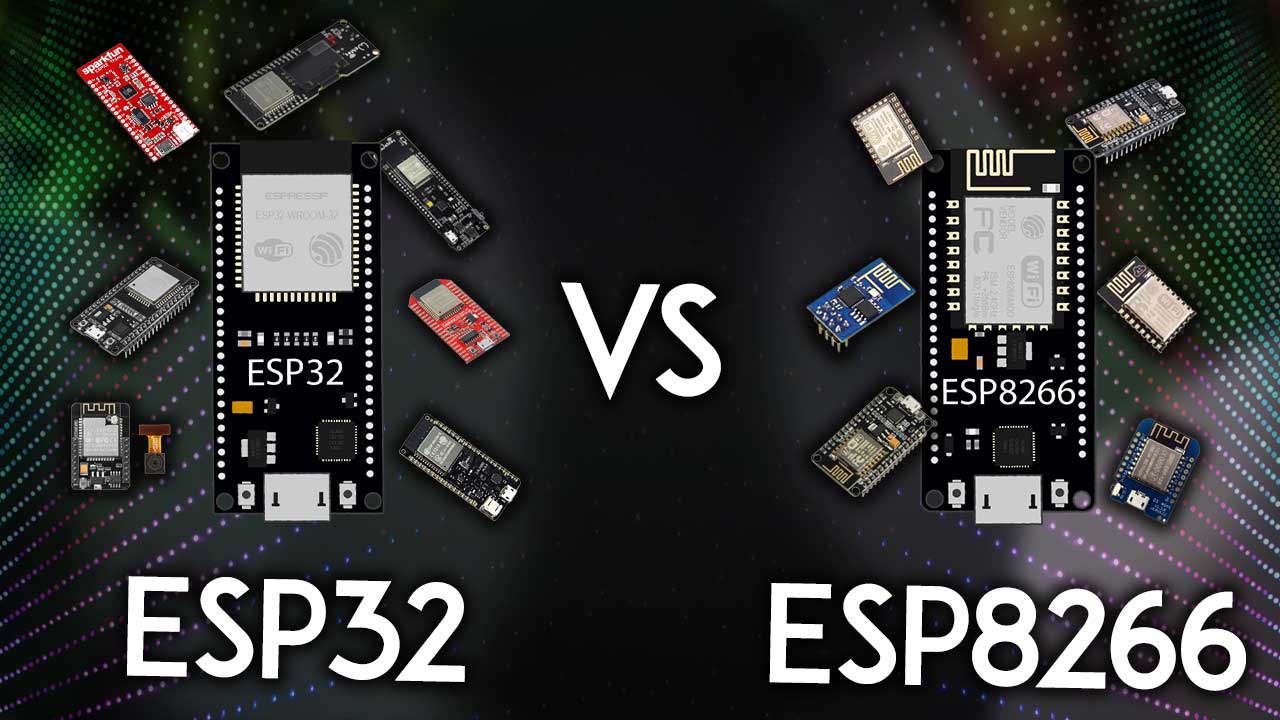
In this post we’re going to do a comparison: ESP32 vs ESP8266. The ESP32 is much more powerful than the ESP8266, contains more GPIOs, faster Wi-Fi, and also supports Bluetooth.
one is esp32 other is 8266 different builds each
 cedar jasper
any micro capable of runing a 7 inch touch screen?
 timber ferry
true cradle
https://makeradvisor.com/esp32-vs-esp8266/#:~:text=The%20ESP32%20is%20a%20dual,A...
timber ferry
true cradle
https://makeradvisor.com/esp32-vs-esp8266/#:~:text=The%20ESP32%20is%20a%20dual,A...
thankkk youuu ]
timber ferry
ugh. make a robot?
true cradle
whats your def of cool stuff ? advantage of pice is small size so u should refer to some projects which take low space and low computing power since as far a i remember memory of pico is a little less
 spiral sandal
the first one will not fit on a mini breadboard ( even if the pin was not bent), and will reset itself, at any close GSM activity nearby because of poor shielding. it will also have network problem on heavy load if used with stock micropython
it's dead cheap but there are others as cheap that can fit into mini breadboards ( pins writing are rotated 90° )
timber ferry
spiral sandal
it's dead cheap but there are others as cheap that can fit into mini breadboards...
what do you mean "other"
which ones
could you tell me a little more about the close GSM reseting thing too please?
@spiral sandal
spiral sandal
timber ferry
could you tell me a little more about the close GSM reseting thing too please?
put any smartphone in the 0-1 meters range of device and check uptime after a while, usually when cell tower negociation happens boards resets, especially when tower is not near you
"others" could look like that https://github.com/pmp-p/stupyde/blob/master/doc/not_weemos.png
timber ferry
spiral sandal
"others" could look like that https://github.com/pmp-p/stupyde/blob/master/doc/n...
so this would be a better choice?
spiral sandal
can't tell, but if you are beginning with python you'd better go for ESP32 + 4MiB psram wroom type
spiral sandal
the cheap ones work fine with arduino so you won't lose any money ( iirc they are less than $2.50 )
timber ferry
well i don't own an arduino i did projects with it in groups. i'm gonna buy this esp for personal projects. like exploring myself
its actually my first time purchsing a MC for myself. i'm gonna start with small projects to maybe hosting some webs too
and my reasoning in buying ESP is bcz its cheap
spiral sandal
esp8266 is cheap, fun and 5volts tolerant, but using it with python require skill because it only has 32k sram useable
timber ferry
hmmmm you can say i'm rather novice in all these. i'm 10th grader. self learning from youtube.
spiral sandal
then go esp32 + psram, it's not cheap but it won't fail you
esp32cam is also a good choice though not much free pins

 spiral sandal
search for one with PSRAM

 true cradle
u can get a arduino as well while u are at it there are many projects and fun stuff which can be done in conjunction with both
timber ferry
i got a budget of 6.5$
:'>
true cradle
oh
timber ferry
yeah.. .. . .. .
so i'm trying to be sure about what i buy before i actually purchase it
i'd buy a rp pico but esp has wifi modules
true cradle
well u should prolly look up some projects first
timber ferry
true cradle
well u should prolly look up some projects first
i did. i have a few ready
true cradle
timber ferry
i'd buy a rp pico but esp has wifi modules
u should prolly save some to buy a higher level rpi
timber ferry
- mq2 gas sensor that sends E mail notifications.
- web hosting a simple web
- moisture sensor that waters plants auto when low rating
these 3 seems basic
i have code ready for them
true cradle
timber ferry
1. mq2 gas sensor that sends E mail notifications.
2. web hosting a simple web ...
lol i happen to have made all of em
i used to tinker a lot in class 10
timber ferry
true cradle
i used to tinker a lot in class 10
i also used tinker
but tinker removed esps idk why
true cradle
u mean tinkercad?
timber ferry
i use some other web for esp simulations now
timber ferry
true cradle
u mean tinkercad?
yes
true cradle
no i mean i have a box full of em arduino modules rpi and stuff in real life
timber ferry
true cradle
lol i happen to have made all of em
yes these are traditionally the basic ones arent they
true cradle
timber ferry
yes these are traditionally the basic ones arent they
yes
except for drones and one with lots of servos i made almost all of em
its like lego...
timber ferry
true cradle
no i mean i have a box full of em arduino modules rpi and stuff in real life
niceeeeeeeeeeee. maybe someday i will when i can afford them lol
true cradle
timber ferry
niceeeeeeeeeeee. maybe someday i will when i can afford them lol
i didnt buy them all at once i accumulated over 2-3 years
now they are literally lying in dust
timber ferry
i understand. well after a year of searching and youtubing and getting bored i realized i should buy one or i'll fall out of interests
timber ferry
true cradle
now they are literally lying in dust
uuuf. gold mine to me lolo
true cradle
i wanted to make the big ones but i cant access 3d printer too often
and they require a lot of 3d printing
true cradle
i had in my school
timber ferry
i just got a pc last year
true cradle
3d printers and the plc stuff cost a lot high maintenance also its better to go to a nearby workshop
timber ferry
now i buy MC. later i will buy parts for my MC. maybe then i can save moeny for 3d printer
true cradle
lol
timber ferry
true cradle
3d printers and the plc stuff cost a lot high maintenance also its better to go ...
where i live don't have 3d printer workshop to give public services. :<
true cradle
timber ferry
where i live don't have 3d printer workshop to give public services. :<
i mean there is good old carboard and scissors
timber ferry
true cradle
i mean there is good old carboard and scissors
yes
true cradle
lol if u wanna do basic projects u should prolly just by a arduino nano and u can still have a bit of money left to buy sensors and jumper cables
there isnt much u can do with esp32 as of now without other modules to use with it
timber ferry
for some reasones a nano is more expensive than a esp here
 true cradle
ooh
timber ferry
literally the market here made a syndicate to make arduino 3x expensive here.
bcz its popular. esp fair price bcz its not popular
true cradle
wow wait lemme see how much it costs in my amazon
true cradle
$10
timber ferry
oooo
true cradle
yes
it wasnt so expensive a few years ago
i mean i bought a uno for arnd $5/450 inr at that time
timber ferry
yesss a few years ago there were sooo cheap. for some reason arduino is alooot more expensive now
true cradle
its out of stock as well in many places
well then go for esp then
nothing else to be done
get a esp32
true cradle
be carefult to buy one in which the pins are already soldred
true cradle
u should get pre soldred
timber ferry
o0o0o0oo
true cradle
thats the best soldering urself is a pain in the ass
true cradle
some products just give the pins along with the board
my school ordered a few nanos once i swear my eye power increased after soldering them
timber ferry
bcz the most soldering i did was on arduino uno just 4 pins
timber ferry
true cradle
well i checked it seems esp32 can run micropython and c++ both seems nice to me
yesssss
true cradle
more powerful and better than arduino at lower price
timber ferry
i bet esp will over take arduino at this rate
true cradle
wifi connectivity seems better as well
timber ferry
bcz it feels like arduino is the apple of MC
true cradle
timber ferry
i bet esp will over take arduino at this rate
arduino has greater convenience of use so both have pros and cons
so for general public or beginners people might still choose arduino because it has larger number of tutorials and stuff
timber ferry
yeah.
true cradle
lol i still feel rpi is the best
timber ferry
its hard reading articles and low quality video for esp
timber ferry
true cradle
lol i still feel rpi is the best
i can't argue that. but its expensive af
true cradle
yes but it is like a own minilaptop
timber ferry
toooo much powerr
true cradle
it works with all sensors ever created for mc
true cradle
timber ferry
toooo much powerr
rpi 4b+ has 4gb ram thats good enough for its size
timber ferry
when i'm in uni i'll buy a rp 4b instead of a laptop and use remote desktop to use my pc in my rp4b
true cradle
timber ferry
when i'm in uni i'll buy a rp 4b instead of a laptop and use remote desktop to u...
lol just get a screen as well
true cradle
i have 3b+ runs nice but unfortunately i forgot to buy a fan or heatsink
timber ferry
touch screen 10k case 1k rp4b 8k keybord i already have.
so almost in 20k i can just use that its cooler and just remote desktop my pc from it so its efficiant too!! laptop with my pc power will cost 120k+
timber ferry
true cradle
i have 3b+ runs nice but unfortunately i forgot to buy a fan or heatsink
they kinda cheap tho
true cradle
1k rpi4b?
true cradle
timber ferry
they kinda cheap tho
now I use it so i didn't bother
true cradle
timber ferry
do you like have a job already?
lol no i am still in school
timber ferry
class/grade/college?
timber ferry
rpi is expensive now too much demand for it
true cradle
prolly i couldn't find it in Amazon scrolling 2 pages
dunno why demand rose or stock fell
true cradle
mostly people bored during lockdown
timber ferry
its just too good everyone wants it they can't produce enough
timber ferry
true cradle
mostly people bored during lockdown
maybe lol
true cradle
i think if u but in local shops u can geta bit cheaper i saved a few bucks that way
true cradle
sed where do u live?
timber ferry
oooo hey neibor
true cradle
so u know Bengali?
true cradle
ah i am from West Bengal
timber ferry
kolkata ?
timber ferry
nicee. not so different. we have slightly different accent
some very minor words we use are like muslim cluture words and urdu words too. that makes our speaking slightly like very slightly differnet
true cradle
yah lol i saw that when i used to play coc and joined a Bengal only clan
timber ferry
i mean we're 99% pretty similar. and i saw kolkata movies before
timber ferry
oki bye bye
true cradle
u can ask if u have any doubts in dms
timber ferry
true cradle
u can ask if u have any doubts in dms
thank you sooo muchh
 fathom grove
does someone of you own a Raspberry Pi Pico mcb?
 errant wigeon
fathom grove
does someone of you own a Raspberry Pi Pico mcb?
errant wigeon
fathom grove
does someone of you own a Raspberry Pi Pico mcb?
Yes, what is your question?
errant wigeon
Yup I've got one
 humble kraken
I too have one
 steep dune
ohhh , what convinced you to buy one?
 quick spoke
Is this normal? I'm trying to upload like 4 lines of code in main.py on an ESP8266
Uploading to /...
Reading file status
[1/625] Writing file blink/boot.py (0kb)
[2/625] Writing file blink/main.py (0kb)
It also fails routinely, yet I can just run the code quite easily
 hallow igloo

Raspberry Pi 4 Model B is the latest product in the popular Raspberry Pi range of computers. It offers ground-breaking increases in processor speed, multimedia performance, memory, and connectivity compared to the prior-generation Raspberry Pi 3 Model B+, while retaining backwards compatibility a...
hallow igloo
timber ferry
its just too good everyone wants it they can't produce enough
@true cradle then u have all the Kits that has Pi's in them... Prices are about right, not jacked high. Plenty of stock
true cradle
yep i see thx 🙂
true cradle
yes
 slow zealot
Hi all. Need some python help 😛
Have a 7 segment display i want to light up on my raspberry pi via a dict in my code 😕
have made a dict lbr, that have the right on and off combination, Only need to compare the dict with GPIO pins in some way so it will light up
 sinful steeple
Hey! Has anyone here managed to successfully install Micropython on the ESP32-S2-Saola-1?
 onyx glade
quick spoke
Is this normal? I'm trying to upload like 4 lines of code in main.py on an ESP82...
onyx glade
quick spoke
Is this normal? I'm trying to upload like 4 lines of code in main.py on an ESP82...
Don't know as I haven't used micropython on an esp8266, but it seems like it's correct, it looks like it is writing files to make the esp actually work too
quick spoke
onyx glade
Don't know as I haven't used micropython on an esp8266, but it seems like it's c...
Unfortunately it was a gotcha! I accidentally included the whole damn environment, when really just needed to include the main and boot files
I appreciate the response though!!
onyx glade
quick spoke
Unfortunately it was a gotcha! I accidentally included the *whole damn environme...
Ah, I see yeah as I said, don't know anything about them for sure, just speculations
quick spoke
It was a learning experience, haha
quick spoke
Shot in the dark, but do you all know of any 3/4 or 1" electronic valves that can operate at 5 volts? The options we found are either too small, too expensive (>$20/valve), or operate at 12 volts. I'm willing to modify or build it myself, but just to wanted to pick your all's brains about it.
true cradle
quick spoke
Shot in the dark, but do you all know of any 3/4 or 1" electronic valves that c...
solenoid valve?
true cradle
timber ferry
can esp32 run some python libraries?
https://randomnerdtutorials.com/getting-started-micropython-esp32-esp8266/
if micro python can have pywhatkit i don't see a reason why u cannot

Learn how to get started with MicroPython firmware on the ESP32 and ESP8266. After completing this guide, you'll have your first LED blinking using MicroPython.
quick spoke
true cradle
solenoid valve?
Yup! But one on 5v and not 12 and has an opening wider than 1/2"
true cradle
oh ok lemme see
quick spoke
I've struck out on other forums and websites. No rush! I'm pretty sure I'll have to just find a 3/4" valve that's easy to turn and strap a servo to it
true cradle
is 1/2" fine or does it have to be wider
quick spoke
Wider :(
true cradle
ok what do u need it for?
quick spoke
A 1/2 that works on 5v may be a reach option if we get desperate
We have low pressure water coming from a water tower we build in the middle of nowhere supplying water to our crops, think like 3 psi and flow doesn't reach sufficient amounts unless the pipe is 3/4" wide
true cradle
do u need power equivalent to 3/4" or just need more output
quick spoke
Our solar panel and batteries supply 5v
true cradle
hmm
quick spoke
Power equivalent? I'm not sure I understand
I'm a chemical engineer, not electrical, by trade, so I'm a bit of of my element here
true cradle
i mean u want water output at high. pressure with 3/4"
quick spoke
Oh! Just 3psi, some latching valves have a minimum pressure requirement
true cradle
how much psi does a 1/2" valve have?
so i can give u 2 solutions currently either u can modify the nozzle urself for 1/2" valve making it wider
or u could get a bigger valve like this one
https://www.amazon.in/Electric-Solenoid-Normally-Closed-2-Position/dp/B08B664KVB

Electric Solenoid Valve, DC 12V 1 inch Normally Closed Brass 2-Way 2-Position Solenoid Valve
and give it external power supply using lion battery
quick spoke
true cradle
how much psi does a 1/2" valve have?
In our case, the valve could have anywhere from 0 to 4 psi!
quick spoke
Huh? Wouldn't the necked region restrict the flow if it was a 0.5" valve?
true cradle
quick spoke
Huh? Wouldn't the necked region restrict the flow if it was a 0.5" valve?
yeah u have to modify the module
timber ferry
quick spoke
Is this normal? I'm trying to upload like 4 lines of code in main.py on an ESP82...
Rename the file boot.py instead.
true cradle
quick spoke
what about a 5v to 12v step up module?
lol or otherwise u can connect the valve control and ground pin to the board but power it externally
using preferably li-ion batteries
hallow igloo
hey there! i got a simple question, is pi pico good for using python?(i new to microcontroller)
im*
true cradle
hallow igloo
hey there! i got a simple question, is pi pico good for using python?(i new to m...
rpi pico is a cpu/processor and it's os from raspian is Linux based
so there isn't much connection whether it is good for python or not it's same as asking is ur windows laptop good for python
basically matter on ide
pico has thonny
which is good for beginners
hallow igloo
so does it mean that i cant use all the sensor with it?
true cradle
you can it has pins
hallow igloo
i heard it doesnt support all?
is that so?
coz i want to use it with multiple sensore
sensors*
true cradle
depends on number of pins available
hallow igloo
like bmp mpu 4 servo and couple of led
hallow igloo
yeah thank you for the help dude
true cradle
u have to power the servo externally for better performance
and ground will connect to board
hallow igloo
its the same battery so i dont think there will be a problem
how can i switch heavy load with pico?
mosfet?
or bjt?
true cradle
hmm
hallow igloo
?
true cradle
idk i never tried or see them before so lemme run thru their docs
true cradle
bjt
hallow igloo
true cradle
bjt
what abt mosfet?
true cradle
hallow igloo
what abt mosfet?
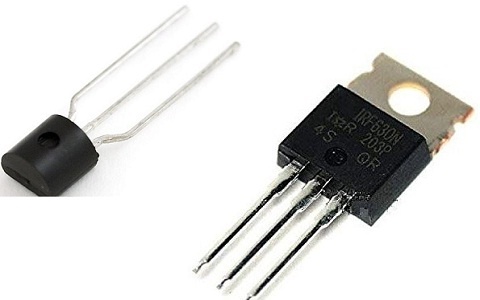
ElProCus - Electronic Projects for Engineering Students
This Article Discusses the Main Difference between BJT and MOSFET, Key Differences, Temperature Coefficient, Advantages and Disadvantages
hallow igloo
haha thanks
 solemn oasis
Does anyone here know about any Raspberry Pi Simulator?
true cradle
solemn oasis
Does anyone here know about any Raspberry Pi Simulator?
for what?
 raven imp
anyone who knows something about raspberry pi gpio's and relay?
timber ferry
Yeah why?
timber ferry
solemn oasis
Does anyone here know about any Raspberry Pi Simulator?
Search it
timber ferry
solemn oasis
Does anyone here know about any Raspberry Pi Simulator?
Here I found an RP pico simulation

Create a new Raspberry Pi Pico simulation project, run it in your browser and share your code and schematics.
 heady quest
hey I need help with connecting a python program to my lego mindstorms brick, any ideas?
I found an API for it, but I can't use it with vscode
hello?
anyone?
raven imp
timber ferry
Here I found an RP pico simulation
can you look in help channel #help-orange than?
onyx glade
I coded for 8 hours straight yesterday via ssh onto my raspberry pi 4, and my power supply broke and shot out 9v and it fried the thing…
The OS was Ubuntu server 20.04, if I use a raspberry pi 3b will it probably work with the same sd or will I need to figure something else out?
(Avoiding reinstalling stuff)
steep dune
@onyx glade too bad about your power supply - could you send a pic of supply and the box it came in -- maybe others have same type ?
true cradle
use either rechargeable batteries for steady supply or some powerbank another option would be small invertors
essentially still rechargeable batteries
humble kraken
hallow igloo
like bmp mpu 4 servo and couple of led
Watch great Scott electronics channel, he has catalogue of videos which can tell you how to use mosfet, drive inductive load (motor), etc in hobby electronics projects
humble kraken
solemn oasis
Does anyone here know about any Raspberry Pi Simulator?
It's a full arm linux OS. Why you want to simulate it. You can run an arm emu program I guess and install a distro on it
onyx glade
steep dune
<@309465127860568067> too bad about your power supply - could you send a pic of...
It was just some no-name type of power supply I just simply had one laying around from whatever and I ended up taking it and using it for my pi
It was dumb in retrospect but I just didn't have a good one to use.
steep dune
@onyx glade i use a old ATX power supply for my projects s , clean 3 , 5 , 12 V - just a new cable adaptor - then i dont have to worry about , under AMP or UNDERVOLT , because if i use LM317( 3V ) or 7805 , 7812 , they have odd voltage related to temp behavior
for my RPi i use a adafruit supply specifically for a pi 3
 stray raptor
 hasty zealotBOT
:incoming_envelope: :ok_hand: applied mute to @stray raptor until <t:1652588287:f> (9 minutes and 59 seconds) (reason: duplicates rule: sent 4 duplicated messages in 10s).
hallow igloo
humble kraken
Watch great Scott electronics channel, he has catalogue of videos which can tell...
OKIE
TKS
onyx glade
Any debugging help? I recently bough a new rpi 4 and when I set it up, I set it up to connect to my network VIA the raspberry pi imager. Upon boot it works but when I went to ssh into it, the pi disconnected from my router. I restarted my PI but this time it wouldn't even connect once.
The RPI is running on Ubuntu Server 20.04, I connected a display and it says: brcmfmac: brmcf_sdio_txfail: sdio error, abort command and terminate frame, writing this ever 1 or so seconds.
Update:
I just swapped the os with raspbian and am updating everything, but I was able to ssh in.
Connection died midway through

onyx glade
Update 2:
I had a wifi adapter laying around so I decided to give that a shot, it seems to work fine now. Do you guys think I could've gotten a bad board?
 tropic horizon
try a different cable?
onyx glade
tropic horizon
try a different cable?
Wdym? I'm not running via ethernet, but Wifi.
tropic horizon
oh I misunderstood
onyx glade
I might have gotten it working
Idk what I did, but I'm at a new record for connection time lol
Nope

true cradle
onyx glade
I might have gotten it working
it might be a problem with the wifi chip in the rpi
u could use ethernet
true cradle
onyx glade
Update 2:
I had a wifi adapter laying around so I decided to give that a shot, i...
wifi adaptor here is an external wifi chip embedded in it u are using that instead of rpis internal one
WiFi chip BCM4345/6 -----> RPI 4 wifi chip

Raspberry Pi Stack Exchange
The WLAN module of my RPI 4 B+ disappeared. At first I thought that the hardware component had blown. How can I properly diagnose whether there is a hardware or software problem?
What I have done ...
it might have something to do to initialize the wifi chip
true cradle
onyx glade
The RPI is running on Ubuntu Server 20.04, I connected a display and it says: `b...
it seems this is a common issue
onyx glade
I just bought the thing, so I'm starting to consider returning it and just buying a new one
I do appreciate you looking into it a ton though!
onyx glade
true cradle
yeah as far i remember rpi has a warranty period
It does from what I've seen.
true cradle
but if u want a stable wifi connection i think ethernet is the go to choice
onyx glade
true cradle
but if u want a stable wifi connection i think ethernet is the go to choice
Oh without doubt, just with how I'm going to use it I won't be able to sadly.
onyx glade
true cradle
well u should probably return that board ig ...
Yeah, thank you for looking into it as well!
 delicate knoll
there is a python library for power measurement via current transformer on esp 32?
errant wigeon
onyx glade
Connection died midway through
What kind of power supply are you using? And do you have a heat sink on the pi?
errant wigeon
delicate knoll
there is a python library for power measurement via current transformer on esp 3...
I don't know of a library for it, but it should be simple enough to write for your use case. There's a few similar project out there as well: https://github.com/rishabsingh3003/Energy-Meter
Obviously I have to point out that you shouldn't mess with mains voltage unless you know what you're doing, and don't adjust wiring while mains is live
onyx glade
errant wigeon
What kind of power supply are you using? And do you have a heat sink on the pi?
I used two types of power supplies, one was using a lab bench power supply on the GPIO, and the other was an official power supply I bought.
I did also utilize heat sinks, though I tried with and without and had no difference.
 spice relic
holistically, if you had two of the same kind of usb device connected to a microcontroller, is there any good way to reliably distinguish between them? or is that a situation of wanting to avoid that design altogether
true cradle
spice relic
holistically, if you had two of the same kind of usb device connected to a micro...
i think u can distinguish by which usb is connected to which port
as both will be assigned different ports by the rpi
spice relic
not a bad point actually, thanks 🙂
 next charm
Hey guyz I'maa having a problem with esp8266 I wanna control my home appliances with esp btw it cant handle my relay even if added a transistor
timber ferry
I want to use some pyautogui and pyqt5 and some more audio library in my esp32 but it seems I can't use them there for some reason can anyone help me?
 gentle vapor
spice relic
holistically, if you had two of the same kind of usb device connected to a micro...
gentle vapor
spice relic
holistically, if you had two of the same kind of usb device connected to a micro...
they might also have a serial number you can read (not all devices do)
delicate knoll
errant wigeon
I don't know of a library for it, but it should be simple enough to write for yo...
thanks!
 left oasis
Pyautogui is only supposed to be desktop
timber ferry
left oasis
Pyautogui is only supposed to be desktop
could there be an umm something similar to it for esp ?
timber ferry
I want a message box to pop up when I plug in my esp32
true cradle
design a gui then should be possible in esp
 rigid tangle
hi all, am trying to program the ESP32-Cam Wrover Module, but I've been getting this error for quite some time also I looked at most fixes online and none of them work. Is anybody here able to help with this or has worked with this module before? Help 😦 😦
 true cradle
problems like this are either the com port or the board is fried
spiral sandal
rigid tangle
hi all, am trying to program the ESP32-Cam Wrover Module, but I've been getting ...
did you put the programming jumper on ? ( GPIO0 to ground probably )
rigid tangle
spiral sandal
did you put the programming jumper on ? ( GPIO0 to ground probably )
yes
spiral sandal
and 5volts power pin , 3volts is not enough for most esp32cam, otherwise yes bad com port , bad cable or board fried
rigid tangle
alright thanks, guess I just have to get a new one
 soft latch
does anyone know how to controll led screens in ardrunio
true cradle
soft latch
does anyone know how to controll led screens in ardrunio
OLED screen which comes as module with Arduino or the lcd display?
 finite orchid
true cradle
u could use ethernet
finite orchid
true cradle
u could use ethernet
+1
 uncut hamlet
Anyone with FRAM / I2C experience that could potentially help me figure out something ?
soft latch
finite orchid
https://www.google.com/url?sa=t&rct=j&q=&esrc=s&source=web&cd=&cad=rja&uact=8&ve...
thanks
 wintry junco
hey can we use f-strings with ssd1306 in micropython
gentle vapor
Micropython supports f-strings, I'm not sure what you mean with "with ssd1306", a string is a string
true cradle
what help?
hallow igloo
What's the best micro controller to start with python? I have an Arduino Uno, but that uses a different language.
 open ingot
raspberry pi
true cradle
hallow igloo
What's the best micro controller to start with python? I have an Arduino Uno, bu...
you dont need a microcontroller to start with python
timber ferry
true cradle
design a gui then should be possible in esp
the pyautpgui?
hallow igloo
true cradle
you dont need a microcontroller to start with python
No, I know python already, just want a micro-controller to learn electronics.
hallow igloo
open ingot
raspberry pi
Have one, but I need a more basic one. Cheap. In case I break it.
gentle vapor
hallow igloo
Have one, but I need a more basic one. Cheap. In case I break it.
there's pretty much nothing cheaper and more available than the Raspberry Pi pico these days honnestly
it supports Micropython and Circuitpython, which gives you a chance to explore both
CP support the Seeed Xiao boards, which are pretty cheap too, MP should run on the Xiaos too, though only the samd21 one is listed on the site. RP2040 boards are great for python, I don't advise SAMD21 boards in general for lack of RAM.
cheap ESP32 or ESP32S2 boards would be good too, the LOLIN S2 Mini for example
4MB flash, 2MB ram, gives you a chance to play with wifi
all of these have prices in the $4-$6 range
 tired lintel
Guys, do you think I would be able to make rc car with rpi4?
Does it store code like arduino? With arduino i can upload code and when its plugget to power it would do that. But with rpi4 you'd have to manually run the code?
 carmine kestrel
@tired lintel Use your favorite search engine with the keywords "RC car with rpi4 programming with python," which supplies many step-by-step examples and YouTube videos in different price ranges. PS4 controllers can even be used to steer the car.
true cradle
hallow igloo
No, I know python already, just want a micro-controller to learn electronics.
let me chalk it up for you rpi u can basically install your ide and run any project on it , Arduino runs c++ but their is a way to run python on it
https://www.google.com/url?sa=t&source=web&rct=j&url=https://docs.arduino.cc/learn/programming/arduino-and-python%23:~:text%3DThe%2520Arduino%2520IDE%2520does%2520not,available%2520directly%2520in%2520the%2520editor.&ved=2ahUKEwiqqsCdvfT3AhWKSWwGHQBkDTMQFnoECA8QBQ&usg=AOvVaw1wKim_JxP5AlJ1kCIKbFK-
otherwise u could also go for espew which it's official and inbuilt ide supports micro python
true cradle
tired lintel
Guys, do you think I would be able to make rc car with rpi4?
Does it store code...
u can code the rpi how u want it and in rpi there is a way to run the programme on startup that should run the programme whenever u start ur rpi
timber ferry
tired lintel
Guys, do you think I would be able to make rc car with rpi4?
Does it store code...
definitly but its an overkill
tired lintel
Do you think I can make a wifi hotspot for my rpi so I can connect my phone to to access it's flask application?
true cradle
tired lintel
Do you think I can make a wifi hotspot for my rpi so I can connect my phone to t...
wdym wifi hotspot rpi can connect to wifi
 boreal creek
Hi guy! i have a question about DIY project, when we use arduino for project and when to pick the other type of microcontroller ? for example drone, electronic toy car or cleaning bot, etc. Because as i known, except for Ras pi, arduino and some other microcontrollers both have the same abilities
tired lintel
Can you have Flask webserver on a RPi Pico?
I do know I'd need a wifi module, but is it a long shot to even try?
I rather just get RPi 4b for this project then.
true cradle
boreal creek
Hi guy! i have a question about DIY project, when we use arduino for project and...
wdym when to pick other type of microcontrollers?
next charm
rigid tangle
hi all, am trying to program the ESP32-Cam Wrover Module, but I've been getting ...
Dude with me too this has been happned it is caused due to some error in uart port or Drive is not installed are you programming it with esptool library pls tell me
boreal creek
true cradle
wdym when to pick other type of microcontrollers?
like other brand ?
true cradle
boreal creek
like other brand ?
hornbill ig then
looks nice aesthetically idk how it works tho never used it
errant wigeon
boreal creek
Hi guy! i have a question about DIY project, when we use arduino for project and...
Typically you pick the micro according to your design constraints. The pinned message in this channel has a description of programming with python on microcontrollers, but here's a list of circuit python compatible boards: https://circuitpython.org/downloads
Sometimes you need low power consumption, sometimes you need lots of chips, sometimes you need lots of ram. That's the kind of variables you consider when exploring which chipset to you.
errant wigeon
tired lintel
Can you have Flask webserver on a RPi Pico?
A pico is a microcontroller, and it doesn't have much peripheral hardware (no onboard wifi). A rpi 4b is a full embedded linux system, so you can run just about everything that can run on a linux kernel. The pico is great, but you're right you'd need to try to get a wifi module with it. You could switch to an ESP32-S2 or something of the sort, but a rpi4b might be easier if you really want the flask webserver
tired lintel
errant wigeon
A pico is a microcontroller, and it doesn't have much peripheral hardware (no on...
Yeah, figured that one out! Thanks mate! 👌
 stuck tulip
boreal creek
errant wigeon
Typically you pick the micro according to your design constraints. The pinned me...
stuck tulip
boreal creek
errant wigeon
Typically you pick the micro according to your design constraints. The pinned me...
got it! thank you
boreal creek
errant wigeon
Typically you pick the micro according to your design constraints. The pinned me...
how about home electronic ? something like microwave, oven or washing machine, do they made by arduino or some specific microtroller ?
spiral sandal
avr or stm32 mcu are very common and arduino ide can handle both
spiral sandal
boreal creek
how about home electronic ? something like microwave, oven or washing machine, d...
original arduino uno is a board designed around an 2 AVR mcu, the arduino ecosystem is a set of headers and libraries added to C++ toolchains (compilers) made for/by vendor mcu
boreal creek
ah ok ! thx, i'm new to embedded, so should i pick arduino for learning and practicing ?
spiral sandal
and all the boards here https://www.armbian.com/download/ are SOC ( system on chip )
MCU and SOC are two different worlds
spiral sandal
orange pi though has both an MCU and SOC, but the mcu part is very hard to program it's an old or1k design
spiral sandal
boreal creek
ah ok ! thx, i'm new to embedded, so should i pick arduino for learning and prac...
depends on what your goal is like on a car would you like ( or which part do you find really usefull) to operate injection and things that prevent people being killed or the gps display and movie player ?
boreal creek
which one is the most easiest and flexiblity ?
spiral sandal
it's two different jobs
but afaik no one ever got sued because the movie player crashed mid movie in a car
boreal creek
i mean like which board is the best for studying embedded programming for beginner ?
spiral sandal
i'd say any board will do since after a while they will all look to you the same because you'll know how they are made and work. but in the process you may destroy a lot of them so maybe pick a bag of cheap ones first
esp8266 is really very cheap
cheaper is the stm32 "bluepill" but it's harder for beginner
and has no wifi
these are stil MCU
esp32 is not really an mcu it's a dual core and can run like (and probably faster) a personnal computer of the 80"
boreal creek
wait ?if i code wrong, will the code destroy the board ?
spiral sandal
it could
boreal creek
OMG
there was a guy on youtube make tutorial about UNO board
is it cheap and good enough ?
spiral sandal

esp8266 is way better than uno
it can do the same ( at beginner level) as a uno and more , for cheaper
boreal creek
does microcontroller make fire or shocking if i set up it wrong ?
i've never touch any board before
spiral sandal
well avoid touching them first, they don't like static electricity
and no they should not make fire, that does not mean you don't need to have a bucket of sand at hand on the workbench
better safe than sorry
fire hazard is real for board with li-ion cell and bad design

The Things Network
translate in all google supported languages https://www.thethingsnetwork.org/forum/t/big-esp32-sx127x-topic-part-2/11973/809 [update: LiLyGo placed the following warning info in banggood.com: About the lipo charging circuit problem (Important update in 10th September 2018): After V2.1-1.5 was upgraded to V2.1-1.6, after …
spiral sandal
a separate quality 5volts supply is usually better/safer
especially when playing with motors
boreal creek
spiral sandal
no i still use books
what bookis that ?
true cradle
boreal creek
wait ?if i code wrong, will the code destroy the board ?
umm it prolly won't unless u destroy the bootloader and it's internal parsers and mechanics these might harm ur board from software perspective but not hardware
true cradle
boreal creek
does microcontroller make fire or shocking if i set up it wrong ?
most microboard fries are due to wrong connection or poor soldering
 mystic haven
@rose furnace why did you spam this message over like 10 different channels? ...
it's literally in every channel in this category that's below #game-development
!rule 7
hasty zealotBOT
7. Keep discussions relevant to the channel topic. Each channel's description tells you the topic.
 dry fulcrum
<@&831776746206265384>
mystic haven
you can get help, but use the help channels, there's #❓|how-to-get-help, don't just spam your way toward getting quick help
 calm tapir
!mute 858614454623010847 1d If you don't care about our rules then you definitely won't get help here
hasty zealotBOT
:incoming_envelope: :ok_hand: applied mute to @rose furnace until <t:1653672488:f> (23 hours and 59 minutes).
onyx glade
To anyone who has knowledge of rpi clusters, do they operate under the same concept as a botnet, just local?
I mean the sense that they all operate by themselves, but the way the operate is dependent on one rpi.
 icy quarry
onyx glade
To anyone who has knowledge of rpi clusters, do they operate under the same conc...
icy quarry
onyx glade
To anyone who has knowledge of rpi clusters, do they operate under the same conc...
a cluster is a group of something. There are no specific implications about the way they go about it
So basically it just mens a group of rpi doing something in a coordinated manner somehow
 pine cloud
i am working on this repo that has pi pico tutorials and i finished the first one and I am looking for some feedback https://github.com/AndrewSae/Raspberry-Pi-Pico-Project-Tutorials/tree/main/Led Blink

GitHub
Contribute to AndrewSae/Raspberry-Pi-Pico-Project-Tutorials development by creating an account on GitHub.
 covert mica
Hello, Guys,
I have no idea, what can I do... I mounted EEZYBotArm MK2 arm and I have coded simple code to cotrol him. I got stuck...
I run the script ServoFirmata for firmata protocol in Arduino IDE, then I run python code.
I have installed pyfirmata library. I choose a board in Arduino IDE and run the script, next I run the python code.
I had been running python code in file before I decided to run line-by-line code in a python shell.
Firstly, I import library and SERVO and Arduino variable from pyfirmata's module. Secondly I set board variable, which It is connector with Arduino board. Then I run SERVO mode on the pin and at this moment servo starts rotates in infinity.
The same thing happens when I type: board.get_pin("d:3:s"). I need your help.
Full test code typed in the shell:
First version:
from pyfirmata import Arduino, SERVO
board = Arduino("COM5")
board.digital[3].mode = SERVO
After these lines servo starts rotating all-the-time.
Second version:
from pyfirmata import Arduino
board = Arduino("COM5")
pin1 = board.get_pin("d:3:s")
After these lines servo starts rotating all-the-time.
Help, Guys... Gimme a hand.
 sage flare
hi guys,i have a problem with pymata,I've been trying to use a hc-sro4 sensor with my arduno uno and then I got this error
'''py
from random import triangular
from tkinter import OFF, ON
import speech_recognition as sr
from pyfirmata import Arduino
from pymata4 import pymata4
from socket import socket
import time
#used to check if the arduino port selected is the right one
#board = Arduino('/dev/ttyACM0')
#print(board.get_firmata_version())
#led = board.get_pin('d:10:o')
#red = 9
#blue = 8
#yellow = 5
trig = 10
eco = 11
board = pymata4.Pymata4( com_port='/dev/ttyACM0', arduino_wait=10, baud_rate=57600)
def the_callback(data):
print("Distance is: ", data[2])
board.set_pin_mode_sonar(trig, eco, the_callback)
while True:
try:
time.sleep(1)
board.sonar_read(trig)
except Exception:
board.shutdown()
#r = sr.Recognizer()
#try:
text = r.recognize_google(audio)
print("You said: {}".format(text))
#except:
print("Sorry, cannot understand what u said.")
#board.digital[red].write(ON)
#board.digital[blue].write(ON)
#board.digital[yellow].write(ON)
#with sr.Microphone() as source:
print("Say anything: ")
audio = r.listen(source)
#try:
text = r.recognize_google(audio)
print("You said: {}".format(text))
#except:
print("Sorry, cannot understand what u said.")
#if text == 'red':
board.digital[red].write(OFF)
#elif text == 'blue':
board.digital[blue].write(OFF)
#elif text == 'yellow':
board.digital[yellow].write(OFF)
'''
I hope someone can help me
 subtle fable
Did you mean to put that as parameters on the line before? Why are you calling Pymata4() multiple times?
rigid tangle
next charm
Dude with me too this has been happned it is caused due to some error in uart po...
I have it figured out, apperently I had to select the AI_Thinker_module in the code and set the board as Wrover Module
Hi all, I am working with the BMP280 sensor, form keyestudio, but when i upload the test code...I don't see any readings on the serial monitor, just saying "BMP Test". Any idea what is matter. I have my connection in I2C mode.
sage flare
subtle fable
Did you mean to put that as parameters on the line before? Why are you calling `...
I fixed this error, I put edited the post and I had to but board = pymata4.Pymata4( com_port='/dev/ttyACM0', arduino_wait=10, baud_rate=57600) instead of the three lines where I mentioned mypata4(), but I got a new error
raise RuntimeError(f'Firmata Sketch Firmware Version Not Found')
RuntimeError: Firmata Sketch Firmware Version Not Found
onyx glade
icy quarry
a cluster is a group of something. There are no specific implications about the ...
Very late response, but thank you!
 agile bridge
Hi I have a normal raspberry pi 4b with 4gb of memory and am using a 16gb SD card
Im also using a 3rd party raspberry pi nightvision camera, and i got it working after changing in the config.txt in boot with the start_x = 1 command
But now two days later i tried to use libcamera-hello and got this error
Made X/EGL preview window
[0:01:42.607683880] [2022]  INFO Camera camera_manager.cpp:293 libcamera v0.0.0+3544-22656360
[0:01:42.627085727] [2023] ERROR CameraSensor camera_sensor.cpp:591 'ov5647 10-0036': Camera sensor does not support test pattern modes.
[0:01:42.647450519] [2023]  INFO RPI raspberrypi.cpp:1356 Registered camera /base/soc/i2c0mux/i2c@1/ov5647@36 to Unicam device /dev/media3 and ISP device /dev/media0
[0:01:42.648312648] [2022]  INFO Camera camera.cpp:1029 configuring streams: (0) 1296x972-YUV420
[0:01:42.648655119] [2023]  INFO RPI raspberrypi.cpp:760 Sensor: /base/soc/i2c0mux/i2c@1/ov5647@36 - Selected sensor format: 1296x972-SGBRG10_1X10 - Selected unicam format: 1296x972-pGAA
also when trying to use cv2 for videocapture(0) i get false on the first variable returned
true cradle
agile bridge
Hi I have a normal raspberry pi 4b with 4gb of memory and am using a 16gb SD car...
did u change any of the default camera settings?
agile bridge
true cradle
did u change any of the default camera settings?
not since it worked
I only changed two lines in config.txt to make it work
but now a few days lateri t doesnt work
true cradle
true cradle
did u by chance plug in the camera after starting the rpi?
in the rpi camera ribbon slot
agile bridge
nope, i plugged it in beforehand and havent dissconnected it since
true cradle
agile bridge
but how, i literally didjnt change anything
idk third party modules are not very reliable
agile bridge
like, when doing libcamera-hello the camera opens up for a second then crashes with that error messege
true cradle
agile bridge
like, when doing libcamera-hello the camera opens up for a second then crashes w...
yeah settings problem most likely it's forcibly shutting down the camera
agile bridge
true cradle
also send link for ur cam module

Light up the night with this night vision camera module with infra-red LEDs, for Raspberry Pi!
agile bridge
nope
agile bridge
true cradle
did u remove those nightlamps and screw them back on anytime?
had no reason to
true cradle
wow that's srsly strange then
true cradle
true cradle
what did u change inur config.txt
☝️
agile bridge
trying to find
agile bridge
oh god no
not again
i really hope it wont come to that
ive done that too many tim,es
at this point
true cradle
lmao send the changes here when u find em
agile bridge
true cradle
lmao send the changes here when u find em
#camera_auto_detect=1
start_x=1
gpu_mem=128
i commented out camera_auto_detect=1 and put in start_x=1 and gpu_mem=128
true cradle
agile bridge
#camera_auto_detect=1
start_x=1
gpu_mem=128
the camera module are now updated apparently
so no need to use the old ones
agile bridge
What do you mean
Regardless of whether i change config or not
It still aint workin
But it worked 2 days ago
I have just reset settings back to default
still get this
Made X/EGL preview window
[0:00:47.580062856] [1602]  INFO Camera camera_manager.cpp:293 libcamera v0.0.0+3544-22656360
[0:00:47.604756117] [1606] ERROR CameraSensor camera_sensor.cpp:591 'ov5647 10-0036': Camera sensor does not support test pattern modes.
[0:00:47.639684967] [1606]  INFO RPI raspberrypi.cpp:1356 Registered camera /base/soc/i2c0mux/i2c@1/ov5647@36 to Unicam device /dev/media3 and ISP device /dev/media1
[0:00:47.641070890] [1602]  INFO Camera camera.cpp:1029 configuring streams: (0) 1296x972-YUV420
[0:00:47.641610222] [1606]  INFO RPI raspberrypi.cpp:760 Sensor: /base/soc/i2c0mux/i2c@1/ov5647@36 - Selected sensor format: 1296x972-SGBRG10_1X10 - Selected unicam format: 1296x972-pGAA
and still recieve nothing when using opencv
so default settings aint workin for me
errant wigeon
agile bridge
still get this
```
Made X/EGL preview window
[0:00:47.580062856] [1602] INFO Ca...
Looks like you might be running into this issue: https://forums.raspberrypi.com/viewtopic.php?t=327141
Try running sudo apt update
and then
sudo apt upgrade
 prime arch
hallo. Has anyone used U-Blox ZED-F9R or F9P GPS with ROS? I am writing a python code in ROS to send and receive data from GPS.
I have some doubts on sending data to the u-blox module. Kindly let me know if anyone have any experience.
More details:
Default IMU alignment in module = manual. Should send command to change it to Automatic.
Wheel tick data (Velocity data) outside the module should send as a publisher for correcting the GPS data.
I just need some example scripts that has similar or same purpose as above. Kindly support and Thanks!
 potent rover
does anyone know where they sell micro usb adapter?
for my rasp pico
this is the example in my highly detailed drawing

 cyan folio
What is microcontrollers?
 opal lodge
potent rover
does anyone know where they sell micro usb adapter?
opal lodge
potent rover
does anyone know where they sell micro usb adapter?
that very much depends on where you are in the world and where you prefer to buy from
but a quick google search for "micro usb to usb b adapter" (without the double quotes) should give you plenty of options
make sure you get the male and female connectors right for your requirements
potent rover
opal lodge
that very much depends on where you are in the world and where you prefer to buy...
no one sells it with 2 ends
 drifting mesa
potent rover
no one sells it with 2 ends
drifting mesa
potent rover
no one sells it with 2 ends
you sure about that?
https://www.amazon.com/UCEC-USB-2-0-Adapter-Male/dp/B00TAM0MZW
https://www.amazon.com/StarTech-USB-Micro-Cable-Adapter/dp/B001K9BEJ6

UCEC USB 2.0 Adapter - A-Male To Micro-Male - Black (2 Pack)

This USB A to Micro USB B Cable Adapter features one USB A male connector and one Micro USB B male connector, allowing devices with Micro USB connections (e.g. cell phones, smart phones, PDAs etc.) to be connected to peripheral devices or a host computer that offers a USB A port.
opal lodge
potent rover
no one sells it with 2 ends
of course there are, and even if there hadn't been you could have solved that with a short usb cable
potent rover
opal lodge
of course there are, and even if there hadn't been you could have solved that wi...
i do have a usb cable, but it looks cooler if its shorter
potent rover
drifting mesa
you sure about that?
https://www.amazon.com/UCEC-USB-2-0-Adapter-Male/dp/B00TAM0...
thanks
its more expensive than the actually rasp pico 😂
gentle vapor
potent rover
i do have a usb cable, but it looks cooler if its shorter
there is that too https://www.adafruit.com/product/2910

This super slim, super tiny, and super cute Micro-B to USB on-the-go adapter is so slim, tiny, and cute that we'd pinch its cheeks if it was big enough to have cheeks. At just ...
potent rover
gentle vapor
there is that too https://www.adafruit.com/product/2910
i dont think thats the right onr
one
gentle vapor
it's a male-male micro USB to USB A
it's just weird because the USB A plug has no casing around it
also it will plug your pico upside down with normal USB plug orientation
fits well in my hub, not as well in my laptop's ports
potent rover
gentle vapor
it's a male-male micro USB to USB A
its hard to find custom usb like this
 sharp idol
So im trying to make Simon says from scratch. I’m not familiar with micro python though. What would be the best way to save a series of button inputs?
 dim palm

 balmy ravine
here is my code. I have a HC-SR501 PIR sensor co nnected to my pico but it isnt working why?
 balmy ravine
@potent rover @true cradle
 brisk plover
trying to control the microphone port and make it work in a certain way or any way that i need to
Receiving sound in a certain way, storing it in a certain form, stopping storing it in another way, and like that, converting it to other things
trying to learn a program language that i need to build robot mind 😔
i dont know what i need to have and learn
some people say i need
1-cpu
2- a driver api to interact with for Python to touch the microphone.
ok what about knowledge that i need for know how use 1 and 2
python? something specific
sharp idol
Has anyone used the on board pi pico rtc? I tried youtube but everyone seems to be using an expansion board or another.
 void zenith
Finally got it done. It's a robot that pulls pucks from a conveyor belt and sorts them based on color. All the detection part was done using opencv.
 sly depot
void zenith
Finally got it done. It's a robot that pulls pucks from a conveyor belt and sort...
sly depot
void zenith
Finally got it done. It's a robot that pulls pucks from a conveyor belt and sort...
Hey congrats! Looks like excellent progress :)
sly depot
sharp idol
Has anyone used the on board pi pico rtc? I tried youtube but everyone seems to ...
What exactly are you trying to do?
sharp idol
sly depot
What exactly are you trying to do?
Keep track of time for my random.choice
 tired schooner
Hi fellow coders
I have a project where a RPI Zero W is my host machine, so I'll try my luck here (this is obviously not very related to microcontrollers since any linux machine would have the same functionality)
basically, I send a BT signal via a remote to my RPI and it has to turn my lightswitch on
Issue I'm having: remote is BLE(low energy), so it "shuts off" after 5 mins
which means when I click the shutter again after 5 mins, the remote first has to connect to my rpi and after like 5 secs, it works as intended
this is shit because who wants to press his shutter/lightswitch twice for it to function properly?
(current fix: on connection, it just assumes I clicked the button, so it toggles the lightswitch)
this still takes 5 secs however, too frickin' long
any intakes on this? can I intercept the BT signal before it's even connected?
currently the shutter just acts as a keyboard and there's a script running in the background:
once shutter is connected, wait_for input, if input, toggle lightswitch
balmy ravine
I need help
I want to make a project with my pico but I don’t know what a specific component is called
It releases things on command
sharp idol
balmy ravine
It releases things on command
Can you be more specific? Releases objects? Releases liquids? Releases stored information?
balmy ravine
Thanks for replying
I am trying to make a catapult and need an electronic device that will release the arm on command
so releases objects
@sharp idol
sharp idol
How are you storing energy, a spring on the arm?
Also I might pass out, if I do I’ll reply when I wake up.
balmy ravine
ok
The arm (piece of wood) will be connected to an extended spring and then connected to the electronic I don't know yet, when a button is pressed the electronic will release the arm, the springs tension will cause it to fly out. It will then hit a piece of wood to stop the arm and to make whatever is in the catapult to fly out
@sharp idol
 fluid gull
cyan folio
What is microcontrollers?
fluid gull
cyan folio
What is microcontrollers?
Microcontrollers are typically low-power packages containing CPUs + Flash ROM to store code + a small amount of RAM + sensors, that typically run only one program in a loop, without the overhead of running an operating system; they are typically embedded in physical applications (think doorbells, car key fobs, microwave ovens, etc.)
true cradle
what is life of a rpi 3b+ would it be fine if i host discord bot long term using it?
opal lodge
true cradle
what is life of a rpi 3b+ would it be fine if i host discord bot long term using...
don't know but have not had any fail on me or anyone else i know irl yet (and as a total that is quite a few units that has been in service for many years)
what can fail is the micro-sd card if you run them long enough and have to much writing happening to them even if you buy high quality cards, so don't neglect backups, also for other contingencies
actually, the two times it has happened to me after many years of service the samsung cards could not boot as my root file system required read-write but could still be mounted read-only on another computer and copy all the data off the cards
the cards small on board memory contoller goes into a hardware locked read-only mode when it thinks the card risks data integrity with any more writes to protect any data that might be on the card
sharp idol
true cradle
what is life of a rpi 3b+ would it be fine if i host discord bot long term using...
I have one from 2014. Is been abused physically and still works
sharp idol
balmy ravine
The arm (piece of wood) will be connected to an extended spring and then connect...
I would suggest used a motor and motor controller to swing the arm.
sharp idol
Do i need a 5v regulator for AA batteries?
humble kraken
true cradle
what is life of a rpi 3b+ would it be fine if i host discord bot long term using...
A long time, actually usually what fails is the SD card because they're generally not designed for tonnes of small writes, which an operating system will do. You can set an RPi 3 to boot completely off a USB SATA SSD though, and theoretically that could have years of uptime
humble kraken
sharp idol
Do i need a 5v regulator for AA batteries?
depends what your project is lol. As an example, for a 3.3V MCU you might want to power it with 4x AA (6V start to ~3.6V end voltage) with a 3.3V LDO
sharp idol
That’s a lot of acronyms. I’m assume MCU is micro controller unit and not marvel Cinematic universe but what is LDO and why are 4 AA dropping close to half if voltage
true cradle
nice thank you for your responses guys
sharp idol
Does anyone have a good resource for created a bluetooth remote and a bluetooth recieve using two picos? Want to make an rc car from scratch
cyan folio
fluid gull
Microcontrollers are typically low-power packages containing CPUs + Flash ROM to...
alright, thank you bro for the explanation, I asked the questions a long ago, thank you, your answer also gives me understanding about it, besides online articles
rigid tangle
Hi, Say I want to send only the value of temperature read from a sensor connected on an Arduino board, to an esp32 board, how do I do that using serial comms?
timber ferry
hellooo
can anyone help me using esp32 ?
i don't know if i need some sort of driver board to use 3 servo motors
 wicked flax
Is it possible to do direct port manipulation using esp8266 and micropython??
i cant find instructions about it online
timber ferry
wicked flax
Is it possible to do direct port manipulation using esp8266 and micropython??
yes with the tx and rx pins\
wicked flax
timber ferry
yes with the tx and rx pins\
why with those pins??
why not with normal gpio pins?
also how to do it
timber ferry
Tx and Rx pins in arduino are used for serial communication more accurately its called UART (Universal Asynchronous Receiver Transmitter). You can use this to communicate with any other device that has UART protocol(just make sure the baud rate or bits per second are same for both).
same for esp32 and esp86266
wicked flax
timber ferry
Tx and Rx pins in arduino are used for serial communication more accurately its ...
i can program them using tx and rx?
timber ferry
ye
wicked flax
timber ferry
ye
i could just use a usb cable?
i was not asking how to program it
i was asking how to directly control its registers using code in micropython
or is it even possible
in an arduino the avr_dude library lets us do this
timber ferry
wicked flax
i could just use a usb cable?
Hmmm maybe not... Very unlikely
timber ferry
wicked flax
i was not asking how to program it
i was asking how to directly control its regi...
Yeah you could code it.
And idk why there's soooooo minimum micro python libraries. there aren't even any sound or i2s library released
wicked flax
timber ferry
Hmmm maybe not... Very unlikely
usb also has tx,rx and power right?
(usb a or b)
wicked flax
timber ferry
Yeah you could code it.
could i directely code the registers?
and if yes how to?
 royal willow
rigid tangle
Hi, Say I want to send only the value of temperature read from a sensor connecte...
royal willow
rigid tangle
Hi, Say I want to send only the value of temperature read from a sensor connecte...
responding late, but you should be able to connect the 2 devices using UART. UART has an RX pin (read) and TX pin (transmit), if you connect read->transmit and transmit->read between the 2 boards, you could communicate back and forth between the devices using some sort of UART library. You can probably just connect the arduino transmit to the esp read as you dont need communication the other way, but this is something I would look up to make sure
but UART is what you are looking for, look up how to connect have 2 microcontrollers talk to each other through uart
sharp idol
Does anyone know if the SH90 servo is continuous and if so how to use it with the pico? Everything I’m finding is 180 but I can physically spin it 360.
 visual gale
hi i was wondering if anyone could help me figure out of to include the library cvzone with arduino uno using a zip file of cvzone. Ive already tried and for some reason it wont work.
i keep getting "Arduino: 1.8.19 (Mac OS X), Board: "Arduino Uno": Specified folder/zip file does not contain a valid library
"
timber ferry
wicked flax
could i directely code the registers?
and if yes how to?
not sure about this one
can anyone help me how to install modules from github to my esp32 micropython
anyone? n one? ok..
sharp idol
Im not getting any input. I made sure tx and rx are connected correctly. I can connect to the hc-05 but Im not recieveing the hello nor is the terminal showing any recieved data
from machine import UART, Pin
import time

uart0 = UART(0, baudrate=9600, tx=Pin(0), rx=Pin(1))
uart0.write('hello')  # write 5 bytes
while True:
    print(uart0.read(5))
time.sleep(1/2) ```❔Can someone help me figure out what type of MOTORs should I use for my Robotics project?❔
I want to use DC motors.
I need a ~1700g/cm torque or 1.7kg/cm torque to make my robot walk.
I'll use 2 motors (bcz it has two legs)
🚩 Now I'm not quite sure on which motor to use.. a 4 or 6 volt DC motor? 12 volt? But the 12 volts would be a over kill 🚩
📝Robot weights around ~1kg
📝 7×7.5 inc diameter robot
📝Materials are mostly Plastic [PVC (leg) and PET (body)]
✨Can anyone Suggest me something? ✨
sharp idol
I’ll try that @timber ferry And look at these https://a.co/d/ghWDNiB they use Han combined torque of 1.6 kg/cm using two. Use the L298n motor controller
 sharp idol
I’ll try that <@634395259400355840> And look at these <https://a.co/d/ghWDNiB>...
sharp idol
sharp idol
I’ll try that <@634395259400355840> And look at these <https://a.co/d/ghWDNiB>...
So I just weighed my robot, it weighs 589g with both batter packs and the motors have no problem. Im sure an extra 411g won’t be that bad. Will test when I fully wake up lol.
timber ferry
sharp idol
I’ll try that <@634395259400355840> And look at these <https://a.co/d/ghWDNiB>...
btw the TX pin was supposd to be output actually.. sorry my bad
also import os
timber ferry
sharp idol
I’ll try that <@634395259400355840> And look at these <https://a.co/d/ghWDNiB>...
btw could there be something a lil more stronger than this ?
sharp idol
timber ferry
also import os
Why os?
timber ferry
you might need to do something like this
import os, machine
from machine import UART
os.dupterm(None, 1)
uart = UART(0, baudrate=9600)
uart.write(‘Hello’)
uart.read(5)
os.dupterm(uart, 1)
Gotcha. I should be okay without duplicating the terminal.
timber ferry
i havn't gotten to the uart things on my project yet so i'm sorry if i'm wrong in some things
sharp idol
Apparently I either lost or threw away my Bluetooth module (it was hc05 and I can’t use it with my iPhone) so I have to wait for my new one to get here today.
 craggy sundial
who knows AVR programming here right now
 stable lantern
My project:

GitHub
Contribute to Techniq4/EEzy development by creating an account on GitHub.
What do you think? 🙂
craggy sundial
stable lantern
My project:
Arduino is fun
stable lantern
yes
but first i've made arduino code
and next i go to code in python
always ";" on the end of line 🏀
hah
sharp idol
Finally fixed my bluetooth problem. bt = UART(0, baudrate=9600, tx=Pin(0, Pin.IN), rx=Pin(1, Pin.OUT)) Had to specify pin in and pin out. also assumed that tx was out and rx was in since ya know, transmit and recieve.
craggy sundial
stable lantern
and next i go to code in python
ohhh
so u can indeed code in python
in ardiunoo
and make projects work
nice
stable lantern
no no no
communication by serial port
python app is sending data about servo pos to arduino
and arduino reads it
craggy sundial
stable lantern
no no no
thats arduino uno right?
 craggy sundial
stable lantern
origninal
craggy sundial
stable lantern
origninal
wlep
we only have access to fake ones here then
i mean we can buy
but
the fake ones are inexpensive
and have literally the same functions
stable lantern
yea, but that was a gift
craggy sundial
cool
stable lantern
arduino isn't hard
hasty zealotBOT
Hey @craggy sundial!
It looks like you tried to attach file type(s) that we do not allow (.c). We currently allow the following file types: .gif, .jpg, .jpeg, .mov, .mp4, .mpg, .png, .mp3, .wav, .ogg, .webm, .webp, .flac, .m4a, .csv, .json.
Feel free to ask in #community-meta if you think this is a mistake.
Hey @craggy sundial!
You either uploaded a .txt file or entered a message that was too long. Please use our paste bin instead.
Hey @craggy sundial!
You either uploaded a .txt file or entered a message that was too long. Please use our paste bin instead.
craggy sundial
uh
smh
i need to read rules again mayhaps
ig
this is ti
so
this is my lab project, the schematic and hardware stuff is complete
 craggy sundial
https://paste.pythondiscord.com/tizomefuwu
craggy sundial
craggy sundial
https://paste.pythondiscord.com/tizomefuwu
the avr code for atmega32 is complete, or it shouldve been
the problem is
the ADC is not working

on protesus it shows this error
i have tried diff commands in the program
but nope
been on it for forever now
today was project submission
but since code wasnt complete
i asked for more time
i have no idea now, for whats wrong with the code
 median oyster
hmm
craggy sundial
craggy sundial
i have no idea now, for whats wrong with the code
so it'll be very helpful to recieve any tip or guide
errant wigeon
craggy sundial
The ADC needs to be unlocked: https://www.avrfreaks.net/forum/tut-c-newbies-guide-avr-adc?page=all
AVR Freaks
I wanted to learn more about the ADC on my ATMega128, so I dug into the docs and taught myself a couple things.
ADMUX |=(1<<REFS0);//setting the reference of ADC
ADCSRA |=(1<<ADEN)|(1<<ADFR)|(1<<ADPS0);
I also don't see where these are defined, so you should probably check to make sure you're setting the registers bits correctly
craggy sundial
errant wigeon
The ADC needs to be unlocked: https://www.avrfreaks.net/forum/tut-c-newbies-guid...
I'll look into it a bit more
And play with the program some more
Will give update later
craggy sundial
craggy sundial
https://paste.pythondiscord.com/tizomefuwu
Although ADC shouldve been ok
craggy sundial
errant wigeon
```c
ADMUX |=(1<<REFS0);//setting the reference of ADC
ADCSRA |=(1<<ADEN)|(1<<AD...
I don't understand this
I mean, wdym they're not defined
I'll read a bit more bout it too
errant wigeon
are those predefined avr values or are they defined by your program?
craggy sundial
craggy sundial
I'll read a bit more bout it too
Probably should look into everything
craggy sundial
errant wigeon
are those predefined avr values or are they defined by your program?
Predefined
ATmega8
errant wigeon
ok cool, it's been almost a decade since I went through the avr data sheets so I'm rusty on it
Have you been going through this as you go? https://ww1.microchip.com/downloads/en/DeviceDoc/doc2503.pdf
craggy sundial
Lemme open
errant wigeon
There's a section that starts on page 201 that tells you about the adc, it's registers, and how to set them
pg 214 has the registers listed out in a table
craggy sundial
Ye i see em
craggy sundial
errant wigeon
There's a section that starts on page 201 that tells you about the adc, it's reg...
This should help, if i give time to it
Didn't specifically read this pdf
I have lab course named
Microprocessor and microcontroller
And the project also belongs to that course
We had lab tasks, manual
Probably missed something out
Should also review them again
errant wigeon
if you can figure out which line is throwing the locked error, you can try re-enabling the adc right before that line. Without knowing the line throwing the error it's taking me a really long time to step through the code
craggy sundial
I get you
errant wigeon
Once ADCL is read, ADC access to Data Registers
is blocked. This means that if ADCL has been read, and a conversion completes before ADCH is
read, neither register is updated and the result from the conversion is lost. When ADCH is read,
ADC access to the ADCH and ADCL Registers is re-enabled.
This also might be associated with why you're running into a locked error, but again without know where the error is coming from it's hard for me to pinpoint it
craggy sundial
errant wigeon
> Once ADCL is read, ADC access to Data Registers
> is blocked. This means that...
That's the problem indeed
It must be at least
craggy sundial
Smh
craggy sundial
errant wigeon
> Once ADCL is read, ADC access to Data Registers
> is blocked. This means that...
The problem is before the while 1 loo0
Althoug its already known
🥶
Is it because its ATmega8
Smh
errant wigeon
craggy sundial
ITS WORKING
congrats, what was the trick to getting it to work?
craggy sundial
errant wigeon
> Once ADCL is read, ADC access to Data Registers
> is blocked. This means that...
.
Not entirely that
But
craggy sundial
errant wigeon
```c
ADMUX |=(1<<REFS0);//setting the reference of ADC
ADCSRA |=(1<<ADEN)|(1<<AD...
This was after the while 1 looop
And i made another unsigned char to store the adc value
errant wigeon
Nice, good job working towards the solution!
How is it wired up and what are you running through it?
 tropic sandal
stable lantern
My project:
tropic sandal
stable lantern
My project:
bro how did you connect python code from ide to the robot? and using which all components did you make the robot
stable lantern
tropic sandal
bro how did you connect python code from ide to the robot? and using which all c...
robot: https://www.thingiverse.com/thing:1454048
I just made python code sending data by serial and arduino code reading it
using pyserial library

This is a 3D printed robotic Arm.
It follows the success of my previous smaller one EEZYbotARM so I simply called it MK2 (make 2)
It is a little bigger and stronger, just to obtain an acceptable payload.
It has been designed without a definite purpose, the aim is educational, providing a suitable hardware that allow to concentrate on exploring ...
tropic sandal
stable lantern
robot: https://www.thingiverse.com/thing:1454048
I just made python code sending...
thanks
 next crescent
hello guys, does upip support every pypi library?
such as discordpy, tensorflow.......
or the libraries should be compatible?
spiral sandal
next crescent
or the libraries should be compatible?
tldr the libraries are not compatible, you can have those in https://github.com/micropython/micropython-lib or https://github.com/pfalcon/pycopy-lib / https://github.com/pmp-p/wapy-lib
next crescent
Thank you so much !
 wet ether
next crescent
Thank you so much !
wet ether
next crescent
Thank you so much !
What do wanna make ? It looks intersting
next crescent
I want to make an AI on my esp32 and I want it to interact with me through discord
But it’s too much space for a simple esp32
So gotta make it light somehow
 wise ruin
using better handler will be better for controlling
 past oak
how do you do configparser with micropython?
 vivid nebula
Has anyone experiences with the pi pico? What frequency can I measure with micropython? I want to control a motor, that has an encoder with about 500 Hz. Is micropython on a pi pico fast enough or have I to use C++ for this task?
fluid gull
vivid nebula
Has anyone experiences with the pi pico? What frequency can I measure with micro...
good question.. following.
 snow hare
stable lantern
My project:
snow hare
stable lantern
My project:
If you don't mind me asking, where did you get the parts to build the arm?
stable lantern
snow hare
If you don't mind me asking, where did you get the parts to build the arm?
3d printed
snow hare
stable lantern
3d printed
Oh that’s cool!
stable lantern
 steep dune
ohhhh you can do differnt parts ? can you invent new mechanisms ?
 austere tulip
I was working on a micropython project with some displays. Now the fonts are written in a bytearray and I have no clue how, from that bytearray the characters are being rendered. Anyone has any idea on that?
stable lantern
steep dune
ohhhh you can do differnt parts ? can you invent new mechanisms ?
it's not my project: https://www.thingiverse.com/thing:1454048
This is a 3D printed robotic Arm.
It follows the success of my previous smaller one EEZYbotARM so I simply called it MK2 (make 2)
It is a little bigger and stronger, just to obtain an acceptable payload.
It has been designed without a definite purpose, the aim is educational, providing a suitable hardware that allow to concentrate on exploring ...
stable lantern
with arduino 😄
communication between arduino and python app on computer with serial port
 little swallow
İ have a Arduino code and in this code have a private code and i want send to another people but another people shouldn't see the code
How can I make
balmy ravine
!code
hasty zealotBOT
Here's how to format Python code on Discord:
```py
print('Hello world!')
```
These are backticks, not quotes. Check this out if you can't find the backtick key.
balmy ravine
print('Hello world!')
 shadow sun
Can you use python on an arduino?
 fierce pawn
hi, don't know is it true channel
I'm trying to connect two computers with ftdi (or usb ttl)
and send and receive data from eaxh other
with serial communication
I started with c++ but later thought maybe python might be easier for this
any advice for should I use python and roadmap
steep dune
try .... pyserial
 leaden rune
hey I know this is a stupid question but what can I do with a raspberry pi pico that doesnt need any kind of wire or breadboard ?
Just a raspberry pi pico
gentle vapor
leaden rune
hey I know this is a stupid question but what can I do with a raspberry pi pico ...
a rubber ducky ? 🤷 Make the LED blink when the PC sends some data ? But yeah without connecting inputs and outputs you won't do much.
gentle vapor
if the issue is soldering, other RP2040 boards have solderless connectors like stemma QT/qwiic
leaden rune
nah my friend give it to me as a gift
I dont know what to do with it other than ducky
gentle vapor
yeah you want to add stuff, with buttons you can make a macropad, with LED strips you can make LED stuff, etc.
 dawn jacinth
hi all. If anybody here has experience with working with arduino, motor drivers and motors with encoders and would be willing to help me get a project running I would be happy to pay for the help. Please dm me!
opal lodge
dawn jacinth
hi all. If anybody here has experience with working with arduino, motor drivers ...
!rule 9
 royal harness
i’m good with radios
 thin wyvern
Hello, im currently trying to program a laser via the serial interface using python. If you have any expirence programming serial devices please let me know im very knew to this and could use some extra knowledge. ***I have all relevant documentation for the laser**

This is my current code, along with the commands in the documentation. As of right now I am just trying to turn the device on. When running the code I can verify that it recognizes the device and i can open and close the port but when i write the "on" command to the device nothing seems to happen


 spiral sandal
thin wyvern
```
Hello, im currently trying to program a laser via the serial interface using...
spiral sandal
thin wyvern
```
Hello, im currently trying to program a laser via the serial interface using...
i don't see the ser.open()
thin wyvern
i was actually able to get it to turn on and off and figured out the problem now i need to read the data
it is a laser distance reader so i took a measurement but im not sure how to read the results of the module
spiral sandal
use ser.in_waiting to see when you need to read and how much
thin wyvern
@spiral sandal [13:33:43] -> 0xAA 0x00 0x00 0x20 0x00 0x01 0x00 0x02 0x23 [LENGTH=9]
[13:33:44] <- 0xAA 0x00 0x00 0x22 0x00 0x03 0x00 0x00 0x00 0xB5 0x01 0xFE 0xD9 [LENGTH=13]
that is what i sent with the test software the sent is length 9 assuming 9 bytes while the other im assuming is the recieve which is 13 bytes
fluid gull
HI, WHO ELSE is PUMPED for the Raspberry Pi Pico W that just went on sale today????
it's $6. With wifi. Wish I had a use case for it.
 tame shuttle
what's the advantage over like an ESP?
 waxen wolf
can i change speed of motors using an arduino uno?
 soft marten
import serial
# import json

serialNumber = ''
def getSerialNumber():

    ser =serial.Serial(port='COM6', baudrate=115200, bytesize=8, parity='N', stopbits=1, timeout=1,  rtscts=False, dsrdtr=False)

    with open('./certificate/RootCA.pem') as f:

        lines = f.readlines()
        root =  ''.join(lines)
    # print(root)
    rootcmd = "AT%CMNG=0,16842753,0,"+root


    ser.write(rootcmd.encode())
guys i am tring to write RootCA certificate to my board
when i hit enter nothing happens
my certifcate doesnot upload
and when i am using the monitor to see the chnages i am not able to run the script on the same port
is this the correct way for writting certificate to the board
soft marten
soft marten
and when i am using the monitor to see the chnages i am not able to run the scri...
i close one to open other
spiral sandal
@soft marten i'm not a helper just a standard user why did you direct message me ? btw sorry i cannot help you on that
opal lodge
soft marten
```py
import serial
# import json
serialNumber = ''
def getSerialNumber():
...
this doesn't have to do with your problem, but if you are going to read the whole file anyways, why not just do:
with open('.certificate/RootCA.pm') as f:
    root = f.read()
```and you might want to do `ser.close()` when you're done or instead just wrap it in a:
```python
with serial.Serial(port='COM6', baudrate=115200, bytesize=8, parity='N', stopbits=1, timeout=1,  rtscts=False, dsrdtr=False) as ser:
Thanks how can I read and write on same port
When I am running the script i can't run the software (nRF Monitor) to see the result i ma use software for this it shows. A long permission error
soft marten
when i am running both that give me this error
p raise SerialException("could not open port {!r}: {!r}".format(self.portstr, ctypes.WinError())) serial.serialutil.SerialException: could not open port 'COM6': PermissionError(13, 'Access is denied.', None,
soft marten
 soft marten
soft marten
soft marten
this is the software i am taking aboout i am not able to run my script that write to the port and run this software to see output at the same time
i have to close this software an than run the script and viceversa
@opal lodge
opal lodge
soft marten
this is the software i am taking aboout i am not able to run my script that writ...
i would say that is normal, usually a resource can only be used by one process at the time
either you get yourself a physical serial port splitter (hardware), or as software on your computer which works as kind of a proxy in-between the real serial port that it would use and two or more emulated ones that your other programs can connect to instead and reach the real serial port through
soft marten
opal lodge
i would say that is normal, usually a resource can only be used by one process a...
thanks my problem was resolved
opal lodge
soft marten
thanks my problem was resolved
how did you solve the problem?
soft marten
opal lodge
how did you solve the problem?
i have one question
how can i use multiple ser.write in the same script
    ser =serial.Serial(port='COM6', baudrate=115200, bytesize=8, parity='N', stopbits=1, timeout=1,  rtscts=False, dsrdtr=False)
        ser.close()
        ser.open()

        securityNumber = 55
        f = open("imei.txt", "r")
        public  = f.read()+"-public.pem"
        f.close()

        with open('./certificate/RootCA.pem') as f:

            lines = f.readlines()
            root =''.join(lines)

        # f= open("private.pem","r")

        root = root.strip()
        root = "\"\n"+root+"\""
        rootcmd =f"AT%CMNG=0,{securityNumber},0,"+root


        # print(rootcmd)
        ser.write(rootcmd.encode())

        ser.close()


        ser.open()
        with open(public) as f:

            lines = f.readlines()
            root =''.join(lines)

        # f= open("private.pem","r")

        root = root.strip()
        root = "\"\n"+root+"\""
        publiccmd =f"AT%CMNG=0,{securityNumber},1,"+root


        ser.write(publiccmd.encode())


        # print(rootcmd)

        ser.close();
@opal lodge
i was waiting for you
@opal lodge
?????
opal lodge
soft marten
how can i use multiple ser.write in the same script
i don't think i quite understand what you want to do, so i'm guessing here
if my guess as to what you want is correct i would probably go with something like:
    with serial.Serial(port='COM6', baudrate=115200, bytesize=8, parity='N', stopbits=1, timeout=1,  rtscts=False, dsrdtr=False) as ser:

        securityNumber = 55

        with open('certificate/RootCA.pem') as f:
            root = f.read()

        root_cmd = f'AT%CMNG=0,{securityNumber},0,"\n{root}"'
        # print(root_cmd)
        ser.write(root_cmd.encode())

        with open('certificate/public.pem') as f:
            public_cert = f.read()

        public_cmd = f'AT%CMNG=0,{securityNumber},1,"\n{public}"'
        # print(public_cmd)
        ser.write(public_cmd.encode())
and you never did answer how you solved your problem with having multiple programs access the same serial port
soft marten
opal lodge
and you never did answer how you solved your problem with having multiple progra...
I did not do that
what i did was arite my certificate to the board
@opal lodge
soft marten
opal lodge
i don't think i quite understand what you want to do, so i'm guessing here
if my...
this is giving me erros
errors
i think i need to close() the port and open it again
opal lodge
soft marten
i think i need to close() the port and open it again
i see an error in my code since i was about to do some changes when i first though that you wanted to do something else, i'll go fix the error in there, just a sec
opal lodge
soft marten
i think i need to close() the port and open it again
there, edited, can you try with the above [now modified] code again?
soft marten
nothing has chnaged you just using f string
opal lodge
soft marten
nothing has chnaged you just using f string
i changed the variable name at the end of the first line to the correct variable name (that was my edit from my previous code)
opal lodge
soft marten
```py
ser =serial.Serial(port='COM6', baudrate=115200, bytesize=8, parity='...
i don't think the .strip() in your code does exactly what you want
it will only remove different forms of space characters from the begining of the first line and the end of the last line of the file, not all the lines
 hybrid linden
do know how to just read text with it since thats all need
i just need to sends commands to my controller
 gusty eagle
Hello,
I'm looking for an AM decoder in the VHF range that I could bind to a microcontroller without any luck so far, anyone got some reference?
opal lodge
gusty eagle
Hello,
I'm looking for an AM decoder in the VHF range that I could bind to a mi...
sound like you are looking for a SDR (Software Defined Radio), what kind of interface do you need for your project?
edit: a microcontroller will probably not have the horse power to do the encoding and/or decoding necessary for SDR on it's own for voice or music applications
next charm
Hi guys
i need help
I wanna code an 20x4 LCD display as a dino game
someone pls help me 😦
: )*
Lemme give u pics of the controller board i have and the display
@past epoch


I have made these PCB's from JLC pcb and did some extenuating like relay module, rs232, rs484, WiFi, bt, rom, lcd and keypad also I designed I am working on a bcdc project but anyways I wanna make a Dino game guys just provide me code plsss
gusty eagle
opal lodge
sound like you are looking for a SDR (Software Defined Radio), what kind of inte...
Thank you for your help.
It would mainly send the signal to an external deivce (hardrive or laptop/mobile) where it would be handled.
In the future automatic Squelch and scanning would be nice, but not mandatory
gusty eagle
Initial signal coming from an antenna
soft marten
do i need to use AT%CFUN=4 before using ser.export()
and than again use AT%CFUN=1 after that
bcz my script is not working regularly
its working 2 out of 10 times
opal lodge
soft marten
do i need to use AT%CFUN=4 before using ser.export()
hard for us to know without knowing what board and project you are working on
because i can't find any mention of it in the recent history in this channel
soft marten
Yes
I need to upload my device certificate to the board
I. Am using At command for that
soft marten
opal lodge
hard for us to know without knowing what board and project you are working on
be...
Are you free now ???
opal lodge
soft marten
I need to upload my device certificate to the board
again, which board are you using?
soft marten
opal lodge
again, which board are you using?
Msg me personally
I will show you the screen
opal lodge
soft marten
Msg me personally
can't you just say in the open channel which board you are using without needing to show your screen?
soft marten
It will easier to show
opal lodge
soft marten
It will easier to show
i don't typically do PMs on discord
and if you write in the channel someone else with more expertise in the area then i have might be able to help out as well
soft marten
Pls chk the msg
Let me just show you
I have no problem sharing it here but can you look it up first
opal lodge
soft marten
I have no problem sharing it here but can you look it up first
look up what first?
because it will be hard for me to look up something before i know what it is
opal lodge
soft marten
I cant openly post here
because?
soft marten
opal lodge
because?
let me just cut paste here
already wasted so much time
device name is nrf9160dk
opal lodge
soft marten
device name is nrf9160dk
oh, an LTE board, looks like a cool piece of kit
unfortunately not hardware that i have access to, but i can check if there is any good documentation for it on how to interact with it
soft marten
opal lodge
oh, an LTE board, looks like a cool piece of kit
unfortunately not hardware that...
thanks
opal lodge
soft marten
thanks
wow, i can't faulter them on the documentation front, other then that there is so much of it that one can drown in it
there is really a lot of documentation on this one and it seem to be able to do a lot
soft marten
Yup
What i need to do now just find. A way to write my certifictae to the board
@opal lodge thats why I asked you for sharing my screen
opal lodge
soft marten
<@936769916072259654> thats why I asked you for sharing my screen
and you want to do this your self using python instead of the provided software they have for this?
i was away from the computer for a while and then i have checked out this video: https://www.youtube.com/watch?v=rMvW3HXLErk
soft marten
Yes
Using AT command
In a python script
Bcz i want to add it to many device
Using pyserial
@opal lodge
opal lodge
soft marten
Bcz i want to add it to many device
ah, i see, an automation kind of thing
which i guess the provided software doesn't support
soft marten
Yes
With software you do for the single device
Either way you need the script to make certificate
And than add it to the software
So it's better to make script
opal lodge
soft marten
With software you do for the single device
that video also talked about pushing firmware updates to the latest before you use it
is that too something you would do your self in some other way then using their software?
opal lodge
soft marten
Either way you need the script to make certificate
in the video they download certificates from their cloud portal instead
are you going to use something else then their cloud?
soft marten
I will upload certificate to upload also
But after this step
I need to register device first
But for that purpose i amazing the script
opal lodge
soft marten
I need to register device first
are you running something else on the device then their asset tracker software?
because i guess you can run other things on it as well, right?
soft marten
Yes
I don't know anything else
I am also new
Learning things
😐😐😐
So have you chked the script
opal lodge
soft marten
So have you chked the script
i've been checking documentation and as well as the 15 minute video i linked above
they both say that one needs to put the device into "offline mode" by sending AT+CFUN=4 and then one should verify it by sending AT+CFUN? and get 4 as the answer if it's offline
then you should be able to send in the certificates, this is the exact position in the video that the talk about that specifically: https://youtu.be/rMvW3HXLErk?t=450
hasty zealotBOT
:incoming_envelope: :ok_hand: applied mute to @hallow igloo until <t:1657056275:f> (9 minutes and 59 seconds) (reason: duplicates rule: sent 4 duplicated messages in 10s).
soft marten
@opal lodge how to export Export-PFXCertificate without password
i dont want to send password with it as it breaks myscript i have to enter the value
opal lodge
soft marten
<@936769916072259654> how to export Export-PFXCertificate without password
it can be done but is awkward as most software doesn't support it in one way or the other, so if you go down that route you will have compatability issues for sure
instead, don't use pfx (which is really PKCS#12) certificates for this purpose
opal lodge
soft marten
Can you share resource
i only know how to use openssl to do thus, but as i said, a lot of other software will not accept a pkcs12 (pfx) file without a password, much less be able to produce such a file, and there is nothing we can do about that, it just is what it is
using openssl from pem format files you would do: openssl pkcs12 -export -keypbe NONE -certpbe NONE -nomaciter -passout pass: -out bundle.pfx -inkey mykey.key -in certificate.crt -certfile ca-cert.crt
but most software will still request a password for such a file and some will not be able to handle them at all or stop you from providing an empty password
so my advice is just, simply don't do that, write your software to ingest other formats or be able to specify a password for pkcs12 files
 opal lodge
soft marten
<@936769916072259654> i am getting these error
opal lodge
soft marten
<@936769916072259654> i am getting these error
yeah, that example was for creating a pkcs12 file from pem files, it has to be adapted to work from another pkcs12 file if that is what you want
but wouldn't it be easier to just work with pem files or convert pkcs12 to a collection of pem files and work with those instead?
soft marten
opal lodge
yeah, that example was for creating a pkcs12 file from pem files, it has to be a...
i need more guidence for this
i tried somethings but failed
as for now lets i have created pfx file
and i want private and public key
@opal lodge
wait i need to clarify somethings
eariler my code was ```p
Export-PFXCertificate -cert $newDeviceCertPfx -filePath $newDevicePfxFileName -password $certPassword ```
firstly it required me to pass password that i figure it out by passing it a emptey string
Export-PfxCertificate -cert $newDeviceCertPfx -FilePath $newDevicePfxFileName -Password (new-object System.Security.SecureString)
this is the code that i used
to pass emtey string and bypass password
opal lodge
soft marten
to pass emtey string and bypass password
windows and powershell isn't something i use or know particularly well, so can't help you with any of that

 opal lodge
soft marten
so my public key contain these grabage how do i remve this
opal lodge
soft marten
so my public key contain these grabage how do i remve this
is that text before the pem format certificate?
soft marten
After
 sacred summit
I am using micropython with an esp8266. I want to use IC2 and I have the following code:
from machine import I2C, Pin
print("Scanning")
i2c = machine.I2C(scl=Pin(4), sda=Pin(5))
print("created ic2")
i2c.scan()
I have nothing hooked up to pin 4 and 5
However the scan causes an error like seen in the image.
Does anyone have any idea of what is going on here?

 jagged hatch
Umm is this the right place to ask about micropython?
 lilac mantle
does anyone know a good discord/place for the hardware side of microcontrollers? im trying to get a shelly dimmer 2 running but i want some smart input on what i need
opal lodge
jagged hatch
Umm is this the right place to ask about micropython?
i would say yes, check out the pins for the channel and you'll see quite a bit of references to micropython
jagged hatch
I think python programmers can answer this question too since it’s a general one. When use timing measurements like xxx_ns(), xxx_us()or xxx_ms() does python actually runs or calculates the value with its according accuracy and the hardware (Microcontroller) is where sets the accuracy limit?
Let’s say I write pin1.duty_ns(100) the language itself can produce a clean 100nanosecond duty cycle but the microcontroller only has 500nanosecond of accuracy
errant wigeon
jagged hatch
Let’s say I write pin1.duty_ns(100) the language itself can produce a clean 100n...
The accuracy of that is going to be largely dependent on the clock/crystal/oscillator for each micro. It resonates at a specific frequency, and from there you can time how long each cycle takes and then after so many cycles identify that so many seconds have passed. It gets really close too, but over time there is drift and each micro will have it's own small amount of drift. Most of the time that drift isn't noticeable until you check back in hours or days later, so the small duty cycles are pretty darn close to accurate.
Additionally, most things that interface with a microcontroller know that there's a bit of drift and inaccuracy, and their communication protocols are built to be resilient to timing differences within an expected limit.
Since micropython targets a wide variety of hardware to run on, as you pointed out some microcontrollers won't be able to produce a duty cycle that micropython accepts. For those instances you'll need to refer to the datasheet for the chip or board you're running micropython on to see what it's hardware limits actually are (or just do some trial and error testing if that's not an option). In order to correctly identify that a nano second has passed, the oscillator has to be able to oscillate multiple times a nanosecond and some hardware just isn't built to run that fast.
Here's some links on real time clocks, crystals, and micropython porting
http://jorisvr.nl/article/arduino-frequency
https://www.electronics-tutorials.ws/connectivity/real-time-clocks.html
The rp2040 port features:
https://docs.micropython.org/en/latest/rp2/general.html
the esp port features:
https://docs.micropython.org/en/latest/esp32/general.html
General porting:
https://docs.micropython.org/en/latest/develop/porting.html
The links are more so you can read further if you're still interested than they are necessary reading.
jagged hatch
I was digging into 1million ns to 2million ns duty cycle control and with increment of 100. Equivalent to 10000 to 20000 units. The target is a 4in1 ESC connected with 4 bldc motors. The frequency doesn’t need a high precision or resolution because 50hz can work, 500hz can work too. The part needs to be fine tuned is the duty cycle. With 20000 units/values, the motors were having really smooth acceleration/decelerations. Thank you for the informative explanation. It really helped a lot. I was testing on an rp2040 board. And planning to make a flight controllerish board

 floral spruce
Also anyone got any soldering iron recommendations? I've currently got a micron 2460, which is alright but it doesn't have an adjustable tip and the very point of the tip doesn't seem to get as hot as slightly above the tip which is annoying when it comes to smaller things or tight spaces
errant wigeon
floral spruce
Also anyone got any soldering iron recommendations? I've currently got a micron ...
I don't know how many others will agree, but if you're not soldering a lot of the time, it's less of an issue than a lot of folks make it out to be. Depending on the solder you use, pick an iron at the temp that solder need.
That said, if you can splurge a bit, a temperature controlled irons are really nice.
Mine looks like a reskined version of a hakko (similar to this: https://makeitbreakitfixit.com/wp-content/uploads/2012/12/2012-12-22-02-14-20.jpg) called a tenma, but I bought it through my university when they bought too many soldering stations and I can't find the exact station I own now. But basically it's the same as linked with 'tenma' instead of 'hanko'.

I use leaded solder (as soon as I'm done with this solder I'll be using rosin core solder instead) and have a mark at the temp to use, and almost never deviate from that temp, so temp control might not actually be useful. But if you're using the iron all the time, you'll want that control for all of the various things you use it for. So while temp controlled irons aren't a make or break tool, they're very nice if you use it more and more often.
floral spruce
Yeah my current iron has temp control, it's mostly the non-adjustable tip that's slightly annoying
When I'm at uni the irons I use there are nice with the adjustable tips, makes certain tasks a lot easier
Also the current tip on mine seems a little weird since the very point doesn't seem to get hot, I have to go slightly above the point which can end up a little fiddly
errant wigeon
floral spruce
Also the current tip on mine seems a little weird since the very point doesn't s...
That might just be a byproduct of physics: the very tip has a larger surface area to volume ratio, so it radiates or conducts heat faster than heat can be conducted to it.
It could also be an issue of an old oxidized tip, or a dirty tip in general. But my iron's tip isn't the point I use to heat everything up--I use the side as well. Maybe I'm bad at soldering and that's my fault (I am bad at soldering, I avoid it when possible so I don't get practice but I don't know if this is a case of my solder skills being the problem)
Here's a good tutorial:
https://learn.sparkfun.com/tutorials/how-to-solder-through-hole-soldering
And a generic image I can't find the source tutorial for:
https://cdn.sparkfun.com/assets/c/d/a/a/9/523b1189757b7fb36e8b456b.jpg
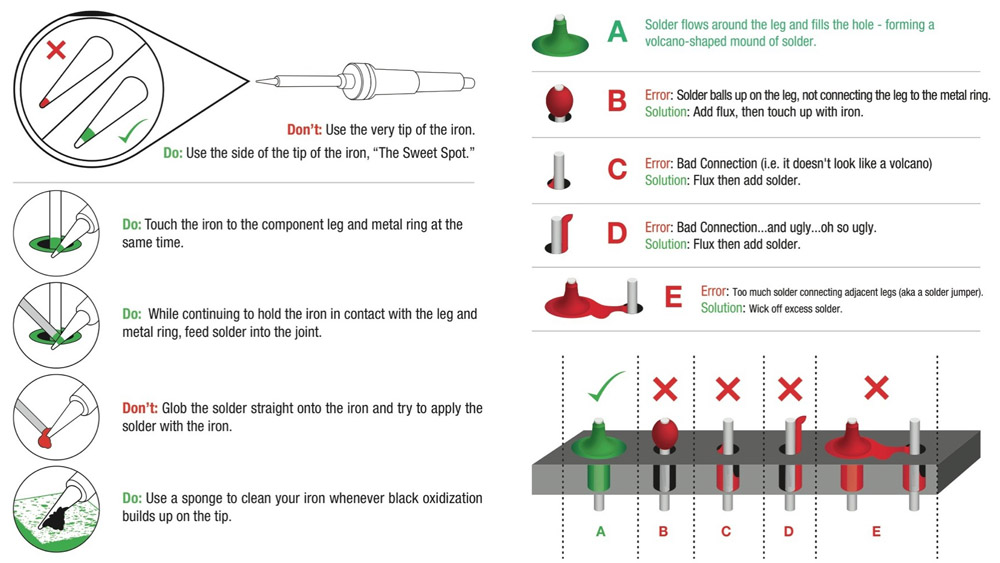
I mostly solder while being mindful about heat transfer vs surface area vs heat dissipation
I try and get the metal 'hot' faster than the plastics and epoxies and other stuff nearby, and to do so I use the fat of the iron to help transfer heat quickly using a larger surface area to make contact between the iron and the part. After it's hot I try to add the solder and remove the iron once the solder is liquid to stop other parts from heating. If I don't heat the parts and solder enough though I get a cold solder joint and it's cloudy. I have only had one project where that was a problem though, and the real issue was that I was stupid and made the solder point the same point that the remote wire was mechanically bound to the board, so any mechanical movement and strain from the wire was stress directly on the solder joint. The cold solder point failed first, but every point of contact was bound to fail because of that design. The point being cold solder isn't that large of an issue

solder wicks, solder suckers, and flux are all amazing to fix various kinds of problems, but honestly you can get really far without any of those aids. The first aid I'd recommend is a solder wick to remove excess solder and break up joints that are accidentally soldered together (but you can use the iron and dab the joint with it repeatedly and slowly manipulate the solder to stop bridging without the use of a wick, so it's not a necessary tool if you're strapped for cash).
 oak peak
Oddly specific question: has anyone seen/made a python library for receiving DMX512 on a microcontroller? There's plenty of transmitting libraries but I cannot locate the other way around.