#microcontrollers
1 messages · Page 14 of 1
 left gyro
With software its usually limited to one or two programs and backends
but thats very roughly stated.
 tawny fiber
I see, sounds pretty interesting
left gyro
I must admit, i enjoy it more that Software testing.
Software Testing can be a mind numbing job LOL
 sturdy ridge
I wouldn't describe firmware as the whole state. Firmware is the software that doesn't change (generally very low level), generally written on ROM (read only, and hence 'firm' as opposed to soft) @tawny fiber
left gyro
robotboi put it very nicely 😃
 waxen zenith
Nubie question: do i have enough connections to control 9 relay and 2 pwm signals with ESP-32S board
left gyro
Gman. Short answer is yes. For an interesting read on ESP-32s to control relay see this article.

Maker Pro
Learn how to create a webpage to control a relay module with an ESP32.
a handy article and pinout guide here. https://randomnerdtutorials.com/esp32-pinout-reference-gpios/
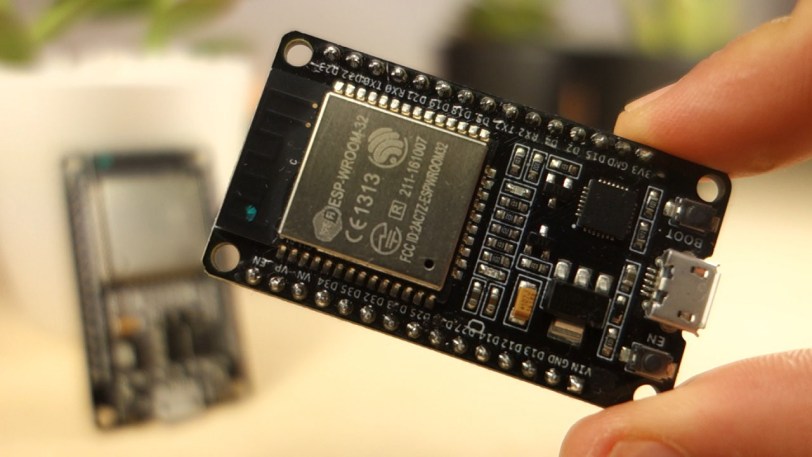
The ESP32 comes with 48 GPIOs with multiple functions. This article intends to be a simple and easy to follow reference guide for the ESP32 GPIOs.
I believe ESP32-D.. denotes dual core, ESP32-S.. denotes single core chip
waxen zenith
Thanks guys, i need help to write python code. Need application not to control via web.
waxen zenith
Successfully flashed my ESP32 board. How to start coding? I connected wia usb cable
 chilly tusk
When I develop locally, its hard to know what the different classes and stuff takes as parameters. Any way to get Atom to understand these lib packages?
Like, in PyCharm I could always click ctrl+space to get a list of things I can do with a said class
for the PyPortal that is. :-)
or do you just sit with the readthedocs up?
 night dust
The professional version of PyCharm lets you develop and debug remotely. Assuming your ESP32 board would work with a remote debugger, that would be worth trying.
(Plus PyCharm Pro has a 30 day trial for you to give it a shot)
left gyro
@waxen zenith Micro python tutorial https://learn.sparkfun.com/tutorials/micropython-programming-tutorial-getting-started-with-the-esp32-thing/all
and one using Zerynth https://www.zerynth.com/blog/python-on-esp32-getting-started/

Zerynth - Python for Microcontrollers, IoT and Embedded Solutions
How to develop embedded and IoT applications in Python on ESP32.
Lots of options i guess.
First one doesn't need any special ide's etc
 stuck thicket
Raspberry Pi 4 Model B is here!
https://www.adafruit.com/product/4292
https://youtu.be/VpG9r7CMTYs

The Raspberry Pi 4 Model B is the newest Raspberry Pi computer made, and the Pi Foundation knows you can always make a good thing better! And what could make the Pi 4 better than the 3? How ...
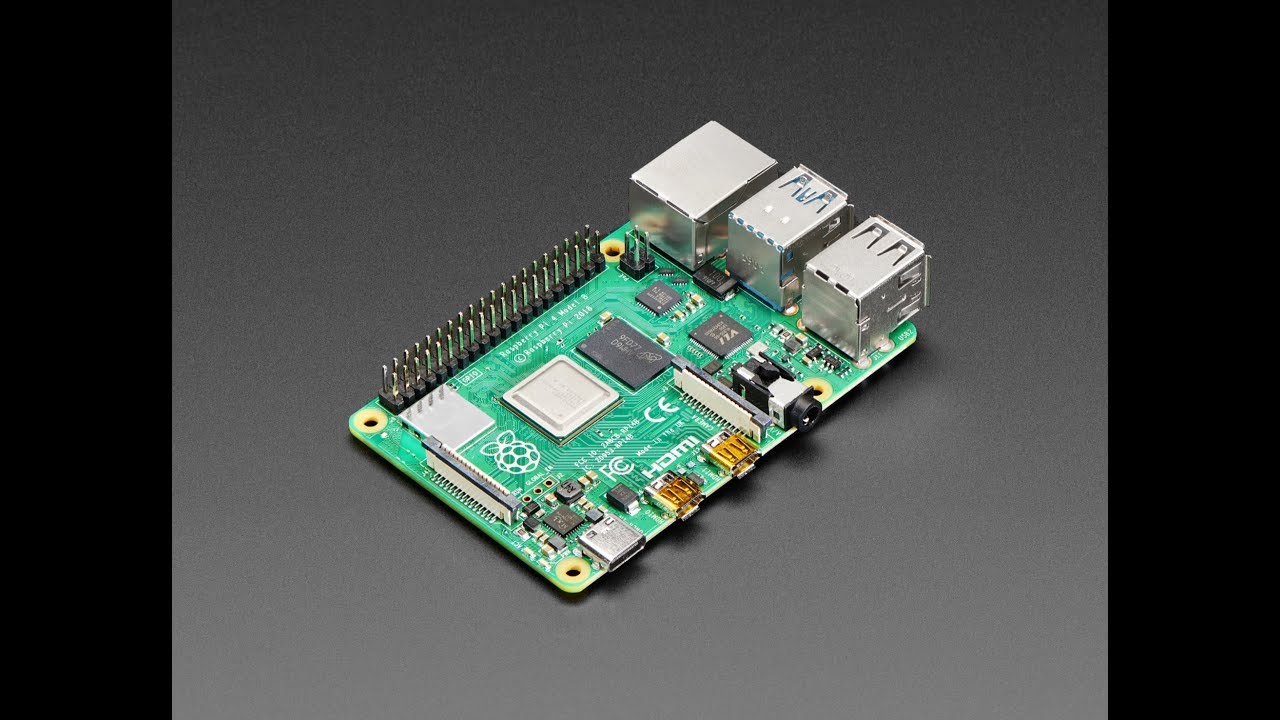
Raspberry Pi 4 Model B is here! https://www.adafruit.com/product/4292 #RaspberryPi4 #RaspberryPi #adafruit The Raspberry Pi 4 Model B is the newest Raspberry...
 lean valve
Well that's a pleasant surprise.
USB-C power connector - improved CPU performance - dual micro HDMI instead of single HDMI - gigabit ethernet - USB 3.0 - new memory options 1GB, 2GB, 4GB for $35, $45, $55
 delicate sparrow
Gimme 8 Gb RAM and it can replace any computer.
 blissful kayak
hmm dual hdmi seems uselles and expensive
 heady crescent
you could use one for a projector or big screen tv running presentation / media apps, and one for the console
or like those new fast food menu panels that are just two big TVs put up vertically
 wet prism
I wonder if the new Kernel can run WireGuard, I had to get a custom Debian 10 Kernel to make it work
night dust
I ordered mine ^_^
wet prism
feel like the thing is gonna be sold out by the time i get to my pc 😄
left gyro
now that is good news! 😃
night dust
I need to figure out how to get certified to buy HDMI receiver ICs, because video processing SoCs are dirt cheap
When i read the specs for the Jetson Nano I nearly fainted. Now the damed RPi can do 2x 4kp60 outputs. That's bananas.
stuck thicket
The biggest and best Python on Hardware newsletter ships in less than 24 hours!
https://youtu.be/OCNalEYSgwI
We've published over 127 Python on Hardware newsletters over the last 2+ years and this one is our biggest and best on yet. Sign up now on: https://www.adafruitdaily.com/ "Python for microcontrollers" spam-free, arrives Tuesday AM!

We've published over 127 Python on Hardware newsletters over the last 2+ years and this one is our biggest and best on yet. Sign up now on: https://www.adafr...
 minor falcon
This isn't exactly microcontroller related. But I'm trying to implement a second order lowpass butterworth filter with a cuttoff frequency of 150 hz and samplerate of 44100hz, if the cutoff point is 3000hz it works fine. when I put a sine wave in at somewhere between 50-80 hz this is the output, the filter is unstable with any input though.
new_signal = np.zeros((blocksize,1),dtype='float64')

cdef enum:
    NZEROS = 2
    NPOLES = 2

cdef float LPGAIN = 2.874716621e+01

#cdef float lxv[NZEROS+1], lyv[NPOLES+1]
cdef double lxv[NZEROS+1], lyv[NPOLES+1]

cpdef subwoofer(float[:,:] in_data, list xv, list yv):

    cdef int i = 0
    for i in range(NZEROS+1):
        lxv[i] = xv[i]

    for i in range(NPOLES+1):
        lyv[i] = yv[i]

    for i in range(blocksize):
        lxv[0] = lxv[1]
        lxv[1] = lxv[2]
        lxv[2] = (<double>in_data[i,0]) / 8.890472632e+03
        lyv[0] = lyv[1]
        lyv[1] = lyv[2]
        lyv[2] = (lxv[0] + lxv[2]) + 2 * lxv[1] + (-0.9702284757 * lyv[0]) + (1.9697785558 * lyv[1])
        new_signal[i] = lyv[2]

    return new_signal, hxv, hyv
I used this website for the filter.
is the problem that it is the b + a instead of the z p k way?
@night dust do you need hdcp or are you fine with unencryptred hdmi?
 humble kraken
Does anyone have any experience with RaspberryPi 3B running linux containers / dockers for applications, wanting to know if it tends to introduce any noticeable slowdown over just running it in the main distro?
Wondering whether hass.io / homeassistant will be easiest to run and update in a container or just in a python virtualenv
 blazing granite
Is it possible to use a rtc to control a servo using arduino uno?
minor falcon
@humble kraken linux containers/dockers add overhead. The less performance the hardware has the bigger the impact will be.
sturdy ridge
@blazing granite yes
blazing granite
@sturdy ridge ok thanks, im working on a project and im thinking about using RTC. I have no experience with it but i plan on doing simple projects with it first to learn how it works
blazing granite
@sturdy ridge do you recommend rtc DS3231 or DS1307? Again im using the Arduino UNO model.
night dust
@humble kraken I haven’t run into any issues. If you’re running an application that fully utilizes the hardware you’ll notice a performance hit, but otherwise you should be okay.
It makes testing and deployment so much easier, IMHO
blazing granite
Hey guys. For RTC's, is sunday or monday day 1?
stuck thicket
WE ARE LIVE! SHOW AND TELL! https://youtu.be/dG8-Y-GMqfM

To show and share your project at 7:30pm today, view the chat here or https://adafru.it/discord and look for the JOIN link to join the Google Hangout On Air....
 hallow igloo
have any of you 3 ever tried doing deep learning with micropython? @tawny fiber @left gyro @steel aurora
tawny fiber
I am not exactly sure why I am getting pinged but no I haven't and considering I am currently messing around with devices with very rudementary (and in my case not even working) embedded python support which however feature a big ml framework by the manufacturer written in C that's likely not going to be the case soon either
@hallow igloo
hallow igloo
but yet you’re still doing ML with it, it sound’s like @tawny fiber
tawny fiber
When did I say something that made it look like I'm doing ML in embedded python, I've not written a single micropxthon script in my entire live
hallow igloo
“I am not exactly sure why I am getting pinged but no I haven't and considering I am currently messing around with devices with very rudementary (and in my case not even working) embedded python support which however feature a big ml framework by the manufacturer written in C that's likely not going to be the case soon either”
tawny fiber
Yeah I know that because I am getting spammed their newsletter which always says that they have this framework over and over and over again :P
hallow igloo
oh wow, so then my friend was right, python really is just for the interface lol
tawny fiber
What I'm saying is if I was to do machine learning with embedded it'd be this framework and not micropxthon as it doesn't work for the devices I had and I see no point in buying a new one if I already got one that can do the thing
And while python is used for just the interface in data science it also often operates more or less standalone for example in backend web development or just normal automation stuff
hallow igloo
I meant as in, (as well) being the interface for machine & deep learning @tawny fiber
tawny fiber
Yes that's certainly the case
hallow igloo
so now, I assume that you 2 are micropython devs and or know how to do micropython at least? @main depot @night dust
night dust
I work on embedded systems and am deploying Python nowadays because it's practical.
hallow igloo
so then you do use micropython, in other words? @night dust
night dust
I do not. I run a Linux OS with Python.
hallow igloo
well then what about UNIX-like, in that case? @night dust
 steel aurora
@hallow igloo @hallow igloo stop pinging users in every single message
wait what the fuck discord why did you ping that person
@hallow igloo you're the person I'm talking to
 marble swan
Also stop sending DMs to everyone here about a project
 chrome sand
how does a raspberry pi work?
tawny fiber
@chrome sand it is pretty similar to an ordinary computer already, there are a bunch of differences which are not really relevant for the average user
tawny fiber
can somebody tell me why on an opendrain signal i get this ringing on the rising edge but not on a push pull
(opendrain being the first and push pull the second line)
 winter coral
Th3_R3ap3r is bothering me in DMs too.
https://i.imgur.com/MiX0lq4.png
 hasty zealotBOT
no-dm
Can I send you a private message?
No. We do not provide one-on-one tutoring - you can hire someone locally if you really need that. We also prefer that questions are answered in a public channel as it means that everyone else present is able to learn from them. If you're working with code that you are unable to disclose for any reason, you should try to make your question more general and write a separate, small piece of code to illustrate your problem.
lean valve
If you don't stop that you will receive a tempban so that you will be unable to participate or view the user list at all. If you have a microcontroller question you can ask here in this channel.
 strong dove
Anyone here got experience with micro:bits and python?
 tulip comet
i don't, but many people in this channel might be able to help you. do you have a particular question? :D
hallow igloo
Hello guys. I have a lot of free time so I was thinking what to do. I was wanting to buy a steering wheel for my PS4, but thought “why not make one myself?” By using accelerometer for x movements and build the buttons inside a steering wheel. How difficult could this be for a beginner and is this a realistic project?
sturdy ridge
Option 1) know enough about fabrication and hardware to break open an already made controller and rearrange everything in a steering wheel design you made
(Easier overall but mostly a hardware project)
Option 2) Reimplement the PS4 Bluetooth controller protocol from scratch on your custom hardware that seems to have been mostly reverse engineered here https://www.psdevwiki.com/ps4/DS4-BT
(Harder but mostly a software project)
Neither are very easy
 jovial otter
 median summit
A gun turret?
make a nerf gun turret that shoots people whenever they enter your room
stuck thicket
stuck thicket
WE ARE LIVE! SHOW AND TELL! https://youtu.be/x0ClwiR53TE

To show and share your project at 7:30pm today, view the chat here or in discord https://adafru.it/discord and look for the JOIN link to join the Google Hang...
stuck thicket
Andreas Spiess video "Time to Say Goodbye to Arduino and Go On to Micropython/ Adafruit Circuitpython?" has now become the #1 video on his popular video channel. It racked up the most views, being the most watched in less than a year, congrats Andreas! https://youtu.be/m1miwCJtxeM

Python seems to be the fastest growing programming language. It is also widely used to program Raspberry Pis, and it is on the verge to become available on o...
lean valve
Whoops.

Ars Technica
"I expect this will be fixed in a future board revision," says co-creator.
"E-marked cables are fully featured USB-C cables with chips inside that negotiate power management, accessory modes, data rates, and other communication specs. Since the Pi 4 USB-C port is wired incorrectly, these smart cables will detect the Pi 4 as an "Audio Adaptor Accessory" and refuse to charge them. Usually, e-marked cables are more expensive and come with larger, higher-powered items, like a USB-C laptop."
 nocturne ferry
Huh the it department in my school just had one laying on a desk
Looked like it had a lot more simple green on the top instead of pcb routes & components with the 3b+ processor cap
@lean valve Technially the rpi used a more effciant way then the standards but 3rd party items broke it with some edge cases?
sturdy ridge
No, Pi incorrectly used the USB C protocol which caused expensive smarter cables to interpret it correctly and not supply power
nocturne ferry
Well yes
But the thing that didn't stick to the standards was technically better then the standards
waxen zenith
Can someone help me with simple button input code?
I am turning on relay and then need to pause and wait for the button press to get to next relay interaction.
hallow igloo
Simplest way have the button press alter a boolean
Or run a function
A fuction like nextquestion() that would update the question
waxen zenith
Thanks for response:
My code is:
Button = Pin(34, Pin.In, Pin. PULL_UP)
Defining the button
How to code: if button is pressed go to next line?
I have relay sequence then need stop . After button press other part of program engaged
stuck thicket
WE ARE LIVE! SHOW AND TELL! https://youtu.be/K976YfPOUT0
To show and share your project at 7:30pm today, view the chat here or in discord https://adafru.it/discord and look for the JOIN link to join the Google Hang...
stuck thicket
10% off all items in stock code is PICARD expires 7/10/19 @ 11:59pm ET #askanengineer https://youtu.be/VdIazNFZN2c & http://www.adafruit.com

Multistreaming with https://restream.io/ Visit the Adafruit shop online - http://www.adafruit.com ----------------------------------------- LIVE CHAT IS HERE...
Adafruit Industries, Unique & fun DIY electronics and kits : - Tools Gift Certificates Arduino Cables Sensors LEDs Books Breakout Boards Power EL Wire/Tape/Panel Components & Parts LCDs & Displays Wearables Prototyping Raspberry Pi Wireless Young Engineers 3D printing NeoPix...
marble swan
Anyone solder?
Using 60/40 with 2% flux just arggh cold joint city
which solder is better to work with?
 jade orchid
leaded one. Since the rohs law, it is allowed only for prototype in industrie, so it became a small part of the market
marble swan
Yeah damn near impossible to find it
And the trouble with doing repairs is mixing solder
Wick doesn't really remove it too good
jade orchid
@marble swan yeah doing repair/rework of unleaded solder is annoying. but mixing solder is not an issue, it is event your best bet sometimes. I usually start unleaded solder rework by addding a lot of leaded solder, then removing the excess. You then end with something close to the starting point, but with leaded solder that can be reworked more easily...
marble swan
@jade orchid was really hard to find leaded solder in my country due to legislations
But i picked up a 500g reel should be more than enough for me
Must remember to buy some better tips as the 7 for $10 just isn't going to help me repair a macbook
Good job i have a few broken iphone logic boards to take it out on
hallow igloo
can anyone tell me if this battery has a PH-2 2.0mm connector: https://static6.arrow.com/aropdfconversion/9c7da2f8f0464e503214cabe895205f004124b7f/datasheet_2011.pdf?
stuck thicket
WE ARE LIVE! SHOW AND TELL! https://youtu.be/079Jcp4yr14

To show and share your project at 7:30pm today, view the chat here or in discord https://adafru.it/discord and look for the JOIN link to join the Google Hang...
stuck thicket
10% off all items in stock code is WorldEmojiDay expires 7/17/19 @ 11:59pm ET #askanengineer https://youtu.be/xH-2ot_KbIQ & http://www.adafruit.com

Multistreaming with https://restream.io/ ASK an ENGINEER 7/17/19 LIVE! Visit the Adafruit shop online - http://www.adafruit.com -----------------------------...
Adafruit Industries, Unique & fun DIY electronics and kits : - Tools Gift Certificates Arduino Cables Sensors LEDs Books Breakout Boards Power EL Wire/Tape/Panel Components & Parts LCDs & Displays Wearables Prototyping Raspberry Pi Wireless Young Engineers 3D printing NeoPix...
 rotund moth
What's the easiest way to update python on a raspberry pi. I currently have 3.7.something and I want the newest version of 3.7
tawny fiber
youll probably be fine with 3.7.x
there are barely any changes
and above that if your distro or PPA isnt providing it your only chance will be to build from source really
hallow igloo
Can somebody help me out with raspberry pi 3?
its a big question
I am doing Realtime FFT on a raspberry pi 3b+ with the mic input.
It all works well. But when using the circuitpython neopixel library to drive the neopixel ledstrip it doesn't do anything, the ledstrip I mean.
But when using the same code for the neopixel on a seperate script it works.
Also when using my RFFT script seperate and first. and then the neopixel script it also doesn't do anything.
I have to reboot to get it back working again.
When using a separate neopixel script first and then the RFFT script. The ledstrip works but not the RFFT script.
So basicly they can't work together....
Why?
Keep in mind that I use the mic input of the rpi 3 to read the incoming audio data.
marble swan
Any of you smart people know how i diagnose a faulty PS4 USB
I've measured it via a USB tester and they are quite dead
Taken the PS4 apart everything looks in order can't see anything burnt out
But since there are no scematics for these i wonder what i can test?
hallow igloo
Look for the type of usb your ps4 has. Then look that name + pinout on google
Then you knwo which pin is + and which -
Theb you can trace it back if yoi are lucky
Or use a multimeter
Power the device off
And use the ohms resistence option at the multimeter
Then measure from plus to - at the usb
If the value is low then you know there is a short
If the value is very high theb you know there is no short so something else is going on
Unless you are 100% sure there is a short
If there is a short you should look up the usb controller to check if its dead
Again same trick look up datashert of usb controller and find + and -
Do the same ohms tesy
Test
A multimeter is quit handy and in some cases the point of the multimeter probe is to big for the smd chips
And then its not handy
You can also look up for the schematics of the ps4 but then you have to be sure that the schematics is for your revision
So yeah test the usb controller
If you cant find the usb controller datasheet then test + AND - seperatly
You take a point of gnd then probe around the usb chip with the ohms option until you have a low value then you know thats hooked up to the gnd. But make sure you test multiple pins to see which are more gnd or a pin is pulled down to the gnd
If you cant find the usb controller look for 2 traces next to each other as a pair. Sometimes designers draw the data + and data - as a pair to the usb port
marble swan
The USB is controlled via the Southbridge IC
Sony never put out schematics for anything
I've traced the path to the IC
Now i just need to test things
I am hoping there is a blown fuse somewhere nearby
Because replacing the IC whilst possible with the hot air rework i have its difficult to find/wait for another IC
Plus i don't have any components to replace the fuse with either :/
sturdy ridge
ptff, protection is for nerds. just put a solder blob over it
 scarlet nimbus
i hope this is the right place to ask; does anybody have a working example of websockets between a web page and an esp 8266/esp32 using micropython?
jade orchid
@hallow igloo I guess that both the circuitpython neopixel lib and your RFFT script try to get the handle on gpio useage/management preventing the other one to work... Their is no error message ?
 vague loom
Don't know really in which channel this beclongs but:
Does someone know where the decimal 20 comes from?
heady crescent
@vague loom 20 is the decimal value of binary 10100
i can't read the rest of that, but the decimal seems to line up with the given binary values
vague loom
Yeah I know that, but from where does it come? In the DNF there is no 20.
There where the arrow shows is the DNF of the circuit above.
And on the right the truth table of it. But the DNF, and the circuit has 8 values. The truth table 9.
I dont know why 😦
vague loom
5 inputs, and 8 ANDs
heady crescent
ok but it looks like the bits and the decimal shown is the inputs
(like i said, i have no idea what any of the rest means, i don't even know german)
vague loom
Np, thanks for trying.
blissful kayak
idk german, could you give more info @vague loom
vague loom
@blissful kayak One can easily read the DNF out of the circuit above. And every term in the DNF (in the form of x ^ y ^ z ..) can be seen as a part of the truth table which results in 1.
That means it should be easy to read the values of the truth table. I did that exactly but I only have 8 values. The solution above has 9 values, with decimal 20.
blissful kayak
ye it's a bit slow for me to do it in head
idk how they got 20, it's not one of the solutions
I've seen many mistakes like that in my digital electronics uni pdfs so this may be one of them
vague loom
Thats what I thought too. It just made me unsure. Thanks.
marble swan

Any idea what rating that cap would be?
I've tested it off the board and got 0.999
or was it 9.999
ah 9.000
Does that mean its a 1uF?
I tested in this mode
 jade orchid
you can not have a reliable measure if it is on a board, the whole rest of the circuit could have an effect in the measurement.
you should desolder at least one side to make a true measurement.
marble swan
It’s not on the board.
I read 0.999
9.000 sorry
I don’t know how to tell an smd rating
That 0.144 is with just on the meter without measuring @blissful kayak
jade orchid
@marble swan since the multimeter adjust the range automaticaly, it should be 9nF, 9μF ... ? we can't know ! the good multiplicator is at the top, have a look again. Also 9 is not common value for capacitor unless in very specific precise filter. If it is a general common usage, there is a good chances it is a 10...F . Do you know it's use on the board, what is it connected or close to ?
marble swan
@jade orchid I don’t sadly it’s part of an SMD practise board I had. Lost documentation to it.
jade orchid
ok, why do you want to know its value for ?
marble swan
Just out of interest
I have a PS4 that i am trying to fix
This isn't a component from it
But i want to know if it matches the value of it
And since there are no schematics for the PS4 its not easy to work out
@jade orchid
jade orchid
I see.
to be honest, that's a long shot to want to repair something like that. also changing this kind of small decoupling cap is unlikely to be able to repair it, the majority of it could be remove and the ps4 would still run (but som components will be a little more stressed).
marble swan
Yeah that is true i am running it with the missing component
jade orchid
The main chance of repairing is if it is the power supply that broke
marble swan
The fault i have is on the 5V line
There is no power to the USBs
With no power also means no data
jade orchid
ha, that is quite good then, the scope just become manageable...
marble swan
So i followed the traces to some ICs
I measured the voltage on them
I got 5V
So 5V is actually present
But sadly they fried 😦
So i have to replace those ICs too
From a donor board
Idk how it happened
Must be some power issue
But i also followed the traces back to the southbridge controller IC
jade orchid
yeah power are one major weak point...
marble swan
And according to google it controls the main 2.0/3.0 USB
The logic anyway
So as a protection it must of shut down the 5V
But by testing i fried one of the ICs and 5v came back for a short while 😄
jade orchid
if one of those cpu needs to be change it will require quite good soldering hardware and skills!
marble swan
So my theory is the southbridge IC shutdown those components
And by me frying one of them i guess the southbridge was like ahhh ermm idk
So power was restored to one of them
But no data line
Long story short that one also burnt out
And gave me 3v only
So i am hoping that if i replace those harmony will be restored
jade orchid
I have the feeling of reading one of my repair attempt :p
marble swan
As you can see they burnt out.
They were a nightmare to remove also as this board like to retain heat
Interestingly the legs broke off on both of them in the same spot where they burnt out
Luckily i didn't lift any pads
D82044TM on the chip
Must be some proprietary used by sony since a google search brings up nothing
jade orchid
I don't want to discourage you, but I wouldn't bet much on your sucess from all that...
yeah propriatory chips are so annoying... sometimes they are very common one, just without the normal labeling...
people who can analyse the function sometimes makes luky guess to an equivalent chips...
marble swan
I know the chips look bad but its wasn't the hot air that did that damage
It was them burning out
And some flux residue on there
I cranked the hot air station to max air flow and max temp
These boards really can take the heat
But i am a little worried for the donor board
Because i have one shot to get them off
 languid hill
looks similar to the power transistors i had to replace on a different device
if you dont know what model they are you could look for broken in a different way ps4's to grab parts off of
marble swan
Yeah i have a donor board on the way
 radiant depot
Hello, I have a lot of python pi projects. I have been making stuff with pis since 2012 and I'm self taught with python
I am currently working on an automated grow system that uses python3, circuitpython and micropython
 open dock
👋 @radiant depot. Matt makes some very awesome stuff!
radiant depot
thanks. I am glad you think so
this is the last 60 days of testing from my grow system. Not all of the data is on this dashboard, you can see where I have had issues. I think I fixed them all and I am getting close to assembling everything. The main program runs on a pi zero w, my code uses a peak of 25% of the computing power of the pi zero.
stuck thicket
WE ARE LIVE! SHOW AND TELL! https://youtu.be/tN2z2cZIZbc

To show and share your project at 7:30pm today, view the chat here or in discord https://adafru.it/discord and look for the JOIN link to join the Google Hang...
stuck thicket
10% off all items in stock code is tinyML expires 7/24/19 @ 11:59pm ET #askanengineer https://youtu.be/0KPm3n7ZSQU & http://www.adafruit.com

Multistreaming with https://restream.io/ ASK an ENGINEER 7/24/19 LIVE! Visit the Adafruit shop online - http://www.adafruit.com -----------------------------...
Adafruit Industries, Unique & fun DIY electronics and kits : - Tools Gift Certificates Arduino Cables Sensors LEDs Books Breakout Boards Power EL Wire/Tape/Panel Components & Parts LCDs & Displays Wearables Prototyping Raspberry Pi Wireless Young Engineers 3D printing NeoPix...
 misty fulcrum
Of course I didn’t see that and bought something a few days back
radiant depot
Here is the current code that is running in my grow system I am about a week away from adding tomatoes. There are 3 programs for the 3 boards im using. The esp2866 (main.py-micropython) just gets the basement temp/humidity and uploads it every minute. Adafruit m4 express (code.py-circuitpython) has all the sensors on it and constantly sends the data to the pi zero. The pi zero has the main python3 program that controls the watering/temp/humidity/lighting/fan
https://github.com/matt-desmarais/sensetogrow

GitHub
automated growing system using pi zero w. Contribute to matt-desmarais/sensetogrow development by creating an account on GitHub.
If you have growing equipment the diy cost is around $250
blissful kayak
"growing system" 👀
radiant depot
It could potentially have more uses than 🍅 my goal is to grow the 🍅 through the winter time as long as they will stay alive
blissful kayak
I meant something else but okay
radiant depot
what did you mean?
I mean it may not be 100% complete, the environmental controls have been tested for 2 months, just have to verify the water output of the pumps and it will ready to be entrusted with the lives of plants
blissful kayak
ye it's a cool project, might want to show it in #303934982764625920 ||btw I meant 420||
radiant depot
When it's done and has happy plants in it. I didn't get any feedback on the other project I posted there, maybe when I have the updated version documented people may take notice
radiant depot
this is the current version of that project
and this was the original:
https://hackaday.com/2017/07/10/building-a-smart-airsoft-gun-with-open-source-hardware/
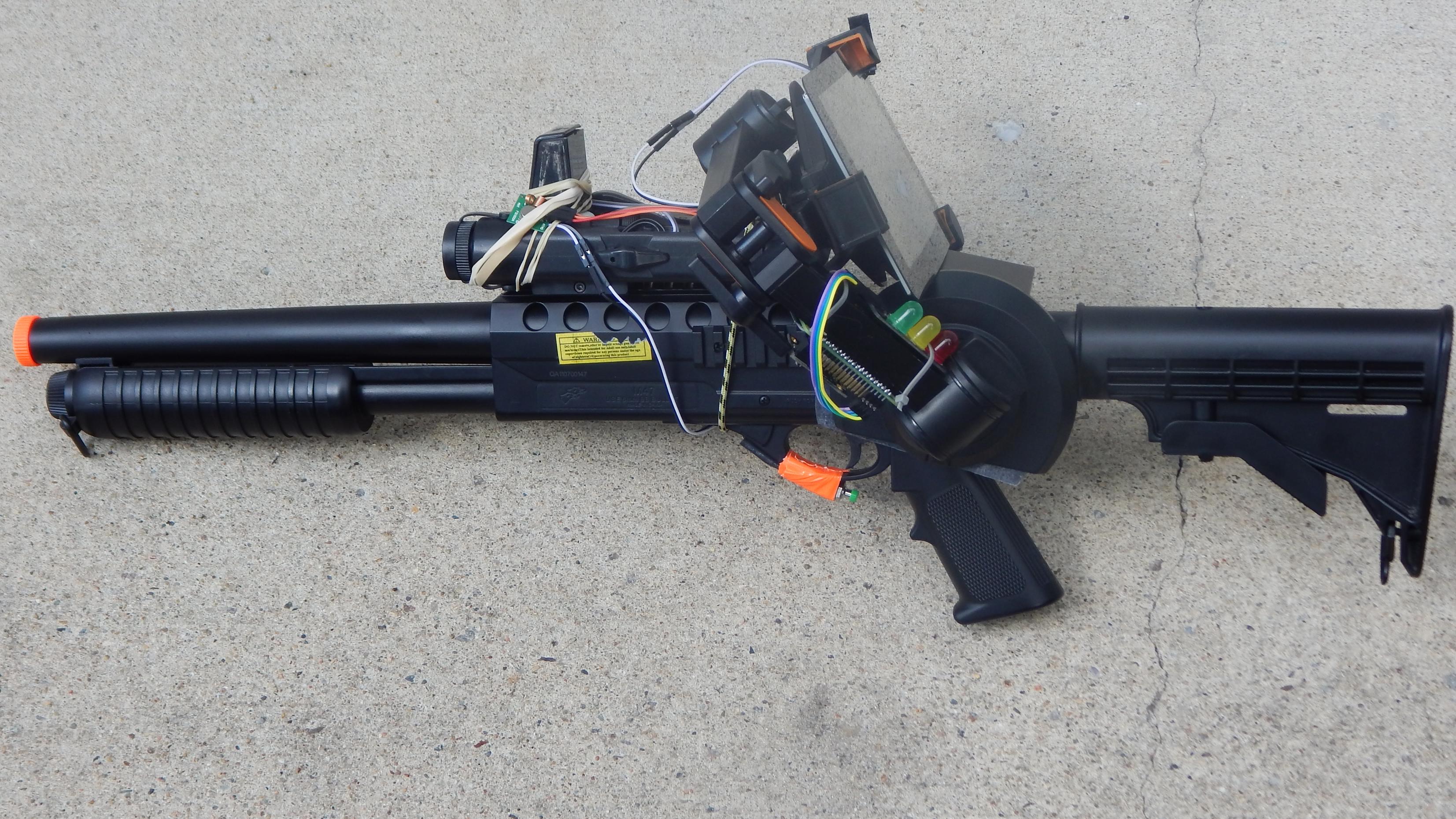
[matt8588] designed a smartgun rig for his Airsoft shotgun (YouTube, embedded below). He has a Rasperry Pi 3 mounted inside a PEQ box connected to an infrared camera with an IR tac light helping wi…
jade orchid
does anyone know a micropython/circuitpython lib that allow a user to input it's wifi credential via a temporary simple page served as an access point on boot ?
It seems something 'basic' that I'm sure would already exists, but I don't find it... Maybe I don't try the correct keyword...
stuck thicket

Adafruit Industries - Makers, hackers, artists, designers and engineers!
OK! Big news- It’s now possible to edit and save Python code on iOS to embedded electronics, CircuitPython USB devices! This is a follow up to our post about Apple’s iOS 13 beta, which …
stuck thicket
WE ARE LIVE! SHOW AND TELL! https://youtu.be/55F6T2VTfjk

To show and share your project at 7:30pm today, view the chat here or in discord https://adafru.it/discord and look for the JOIN link to join the Google Hang...
stuck thicket
WE ARE LIVE! ASK AN ENGINEER! https://youtu.be/nHPz1GwowhE

Multistreaming with https://restream.io/ ----------------------------------------- LIVE CHAT IS HERE! http://adafru.it/discord Adafruit on Instagram: https:/...
 next mason
Would anyone know if a Raspberry pi Zero is sufficient to connect and get a laptop webcam working? I'm trying to figure out the bare minimum i'd need to setup a camera system with my old laptop webcams. Would I need the headers if the webcam can be connected through usb normally.
Just trying to figure out a project to work on while im away from home
lean valve
@next mason I had a Raspberry Pi Zero briefly set up as an IP camera with the official camera accessory, it does pretty good frame rates at lower resolution but would bog down at higher resolutions like 640x480 and drop frame rate to <15
A USB webcam attached to it would run in to similar processing power difficulties
Especially if it has to run through software, I was using the Linux kernel built-in camera support for encoding and streaming so it was probably a best-case scenario
next mason
Alright thanks for the info. Good to know.
 vague crane
Well this is neat https://blog.adafruit.com/2019/08/01/new-product-adafruit-pyruler-engineer-reference-ruler-with-circuitpython/

Adafruit Industries - Makers, hackers, artists, designers and engineers!
NEW PRODUCT – Adafruit PyRuler – Engineer Reference Ruler with CircuitPython The first time you soldered up a surface mount component you may have been surprised “these are really…
I like the masking on the back 😄
stuck thicket

I am writing a book of CircuitPython for beginners with @adafruit Circuit Playground Express in Japanese. It will be out in the @techbookfest in September.

 Twitter
blissful kayak
Twitter
blissful kayak
Cool
stuck thicket
WE ARE LIVE! SHOW AND TELL! https://youtu.be/p8ZdtE8roZY

Multistreaming with https://restream.io/ Visit the Adafruit shop online - http://www.adafruit.com ----------------------------------------- LIVE CHAT IS HERE...
stuck thicket
ASK AN ENGINEER 8/7/19 LIVE! https://youtu.be/rAx3TNdPD9g

 quartz remnant
I'm aiming to turn my RPi into a portable music player with either a touchscreen or display with buttons, what parts would be recommended that don't require me to solder anything while staying at a reasonable price?
 past epoch
@stuck thicket @violet valve Thank you so much.... https://blog.adafruit.com/2019/08/07/adabox-subscriptions-open-to-netherlands-norway-and-switzerland/

Adafruit Industries - Makers, hackers, artists, designers and engineers!
Big, exciting news folks – AdaBox subscriptions are now available in Netherlands, Norway, and Switzerland! Click here and sign up now to receive AdaBox013, shipping September 2019. AdaBox is …
 opal mason
Interesting video-newsletter-podcast on Circuit Python and CircuitPython Day: https://blog.adafruit.com/2019/08/08/python-on-hardware-42-pythonhardware-circuitpython-circuitpythonday-adafruit-python-circuitpython-adafruit-micropython-thepsf/

Adafruit Industries - Makers, hackers, artists, designers and engineers!
The wonderful world of Python on hardware! CircuitPython Day Edition Episode 42 (August 7, 2019) This is our weekly video-newsletter-podcast! Watch Ladyada and Phil discuss this week’s Python on ha…
 violet valve
@past epoch You're welcome! 😃
 willow kernel
I'm really struggling to figure out what to buy. I know I'm going to buy SOMETHING but I just can't think of anything in particular I want to build, so I don't even know where I would start.
There's just so many options it's kind of overwhelming
radiant depot
Yea there are certainly a lot of microcontrollers out there
 cloud flower
Take your first steps with circuit python using the edublocks block based code editor on circuitpython day! https://twitter.com/edu_blocks/status/1159496986510446593?s=19

Today marks @CircuitPython day!
Take your first steps with @adafruit's CircuitPython using our easy to use drag and drop block code editor.
As well as the editor, you can find samples and tutorials at https://t.co/KagTDkVcms
#CircuitPython #CircuitPythonDay #PythonOnHar...
 Twitter
hallow igloo
Twitter
hallow igloo
If I want to have a simple circuit using the itsybitsy m4 express, do I put positive and negative on the same GPIO pin?
(I know the 5v pin might not be called a GPIO pin, I'm new to this stuff)
jade orchid
@hallow igloo your question is too vague, what do you want to connect to the board exactly ?
hallow igloo
An LED @jade orchid
jade orchid
To make the led works, you must provide current in the correct dircetion. so the + side of the LED is connected to a gpio of your choice on the board, the - on the ground (gnd) on the board. In addition you should add a resistor (before or after, doesn't matter) to limit the current in the LED, otherwise too much will flow and might burn the LED.
that makes board gpio ---- + LED - ------resistor----- board gnd
when you set the gpio to output 1, the led will be on. with 0, it will be off.
hallow igloo
ok
 oak badger
hallow igloo
oak badger
hallow igloo
thanks laggy
 cloud vine
anyone know microbit?
 jolly mural
Are you talking about the operating system? If so, then you just need to put the sd card in your pc to install
 lavish sand
That's the problem i dont have a micro sd to sd
I tried using my phone, but i believe the os i corrupt atm
So i just have to wait until i get a monitor with hdmi 
 worthy anchor
oh
radiant depot
no you dont
worthy anchor
I mean, if you know exactly how to enable it, you can do it blindly i suppose :p
radiant depot
Documentation in this section includes basic guides to configuring your Raspberry Pi.
lavish sand
I tried ~
worthy anchor
haha
lavish sand
I also tried that
radiant depot
from a windows machine?
radiant depot
Run Notepad
In a new file put in one space and nothing more
Click File / Save As ...
Be sure to set Save as type to All Files (so the file is NOT saved with a .txt extension)
Call the file ssh and save it
Close the file
Might work, but when all comes to show i believe my pis os is borked from trying to install a new os through curl
Icba trying to write a new image over my phones micro sd slot
radiant depot
what is your intended goal with your pi?
lavish sand
Just get it up and running again
So i can tinker and toy with it
It's just a hobby thing, So i'm fine waiting for my main monitor to come back from repair 🤷🏽
radiant depot
do you have any other hobbies that you could combine with your tinkering? I find that is when I get the best results when I combine pi with other stuff i like
worthy anchor
do you have any examples @radiant depot ? out of curiosity ^^
radiant depot
I have a couple
pi + airsoft = hud scope
pi + plants = grow system
radiant depot
i control the light, watering, heat, humidity and fans with a pi zero. I posted an update in #303934982764625920 recently
I want to expand it in the future with more sensors and controls
worthy anchor
Seems cool
radiant depot
my thing is making stuff with the pi zero w
worthy anchor
I'll check this out
I'd like to tinker more with a pi but I don't know what do to with it :/
radiant depot
you can do lots of things, there are many tutorials and guides out there. I started by following guides and modifying them. once I knew how to hook up and program different gpio devices, I started making my own projects
radiant depot
what are your other interests?
worthy anchor
Mainly machine learning, info sec , reading (more fantasy) and backpacking
Things like this
radiant depot
Are you interested in machine learning applied to a camera? The aiy kit would be the way to go for that
https://aiyprojects.withgoogle.com/models/

Models
Machine learning is a technique for building software models that can make predictions based on patterns and relationships that have been discovered in data. Experiment with these models to see machine learning in action.
worthy anchor
I'm more into the math behind it :p But it seems interesting to begin with ! :D
Thanks :)
radiant depot
You could always throw Kali on your pi and play around on your own network
radiant depot
I have a suggestion

Thanks Wired Magazine, LifeHacker & HackADay for featuring my post. If anyone has questions please leave a comment below and I’ll be happy to help! Have you ever wanted to wirelessly control power outlets from your phone? You could buy a Belkin WeMo Switch for over...
lavish sand
huh
radiant depot
I have lights in my house with that and then the grow system uses the same outlets
radiant depot
I modified that code to work with my christmas tree a while back
lavish sand
That's probably cool
But i live in a tiny room with more or less just my computer
and a read lamp
Not many electronics
quartz remnant
I'm aiming to turn my RPi into a portable music player with either a touchscreen or display with buttons, what parts would be recommended that don't require me to solder anything while staying at a reasonable price?
jade orchid
@quartz remnant just add 'raspberry shield' to your search and you will be good to go... I have not a particular product to suggets but there shoul be plenty of touchscreen / display + button shield available.
quartz remnant
why shield?
jade orchid
in the raspberry environement it is the name of boards that are just plugable to all the rpi header pin. and that will do a complete function. so no soldering, everything is ready to use.
quartz remnant
I see
 edgy oxide
i just ordered a trinket m0, and i have never worked with one before. Does anyone know if its possible to check the os of the usb port it is plugged into?
[trinket m0] -> [USB port] -> [Computer] #need to figure out operating system on this side
jade orchid
@edgy oxide USB does not work like that... I'm pretty sure you will not be able to get that info.
edgy oxide
@jade orchid i think i actually figured out a backwards way to do it
cause i can send keystrokes with the trinket. and i can read files from the trinket, which also mounts as a usb
vague crane
@hallow igloo this server is not for recruitment, sorry
hallow igloo
Nah, it's fine
hallow igloo
What is currently trending in Embedded Systems? and can one make a project without buying any hardware?
tawny fiber
embedded systems without hardware doesnt exactly work out or make sense
hallow igloo
@tawny fiber I mean can't it be done in a simulator or something? Online
tawny fiber
only very few pieces are fully simulated
hallow igloo
I saw the Raspberry Pi version of Microsoft
but it can only be used with NodeJs
Is there any version of Raspberry Pi which can be used by Python or C++?
tawny fiber
I mean
the raspberry pi is basically a normal computer already
I dont see much point in emulating it
tawny fiber
What project?
hallow igloo
Almost any project related to Cloud or Deep learning
tawny fiber
two of those work without a pi
and what would be the thing in internet of things if your pi is virtual
hallow igloo
that's true
ignore IOT
uh but maybe u can
it would be just like running vm in your computer
And I have seen slave nodes and master nodes being connected in DevOps like that.
So they can form a network, which can be called IOT simulation mode 🙃
tawny fiber
sure you can do that but you can also just use any other x86 platform if youre all up for the VM part
blissful kayak
no because that's just a regular price
locally the price goes around 50usd/euro depending on currency
here it's 50euro if I order from local store
stuck thicket
WE ARE LIVE! SHOW AND TELL! https://youtu.be/4BkDwmhM_Gc

Multistreaming with https://restream.io/ Visit the Adafruit shop online - http://www.adafruit.com ----------------------------------------- LIVE CHAT IS HERE...
stuck thicket
WE ARE LIVE! ASK AN ENGINEER! https://youtu.be/pebbsM6IzW0

Multistreaming with https://restream.io/ Visit the Adafruit shop online - http://www.adafruit.com ----------------------------------------- LIVE CHAT IS HERE...
 plucky shard
@edgy oxide see functions here: https://circuitpython.readthedocs.io/en/4.x/shared-bindings/supervisor/__init__.html
edgy oxide
@plucky shard tried that function, it didn't work. Neither did making the enabled bool in source return False tho tbh so idk what's up with auto reload
plucky shard
@edgy oxide not sure what you meant by your second sentence. Where did you put supervisor.autoreload_disable()?
edgy oxide
Into the repl thru serial
Then I tried changing autoreload.c in CircuitPython source and compiling that
But it still didn’t disable
plucky shard
it will not remember it there. You need to put it in boot.py. That should be documented, but it does not.
edgy oxide
Ah good to know
plucky shard
You can also disable autoreload just by remaining in the REPL at the >>> prompt
btw, we don't monitor this channel much. The adafruit discord server, channel #help-with-circuitpython has a lot more eyes on it.
edgy oxide
Thanks! This is my first microchip I’ve workon so the help will be welcomed lol
plucky shard
is autoreload bugging you 😃
edgy oxide
Yeah
I’m trying something that would let the chip know what os the computer that it’s plugged into, but it involves writing to the chip
Which triggers autoreload
plucky shard
i understand. you could read from serial and send something down that pipe instead.
We might only autoreload when a .py file is changed, but unfortuantely that's very hard to determine accurately because the file I/o is done at the block level.
edgy oxide
how could i send data over serial like that without knowing what os im working with?
cause that could prob be cleaner then my current method lol
plucky shard
On the host computer, you'd write to the COM port (WIndows), or /dev/tty<something> (Linux). or /dev/cu.<something> (Mac). Why does CPy need to know the OS of the host?
edgy oxide
i want to have different functions run based on os
plucky shard
are you doing stuff over HID?
plucky shard
you could write the OS ID only once. You could read the identity file and see if it matches the current OS, and only write it if it's different.
plucky shard
reading should not force an auto-reload
if the OS is different that the recorded one, then you'll want to restart anyway
edgy oxide
what im having it do rn is find OS on boot (thru writing)
and then reading that file into a global then deleting it
plucky shard
but one trouble is that on both, writing completely can be delayed unless you flush the write imemdiately
what writes the file at first?
are you sending keyboard shortcuts that could be any window, or just a terminal window (CMD vs a shell)?
edgy oxide
i send it to cmd
thru windows key + run
so if the file exists i know its windows
if it doesnt then unix
so i added py import supervisor supervisor.autoreload_disable() to boot.py and auto reload is still in effect @plucky shard
serial shows it as on as well
edgy oxide
oh welp typos are gonna be the death of me
plucky shard
😃
plucky shard
💤 time for me, but good luck! pretty clever technique you've got there. Trying to think if there's any other way to find out, but I can't think of one at the moment.
edgy oxide
thanks. yeah ill try to think of a more versatile method
plucky shard
I'm trying to think if we get any OS info when USB connects, but I think the answer is no.
good night!@
 hollow hatch
has anyone here tried the micropython plugin for pycharm?
im having some trouble with it
in this article there's a MicroPython REPL shortcut in the tools menu but its not showing up for me
also support for certain modules like usocket and uasyncio doesnt seem to be implemented
basically all the u modules
ah utime works
hollow hatch
so ive got a nodemcu hooked up to a strip of neopixels
got micropython installed on it
so far ive only been able to control up to 74 neopixels at once
anything more just doesnt work entirely, as in no data seems to be transmitted to the strip at all
one guess is that the data signal voltage is gradually dropping out, but wouldn't that still result in all leds <= 74 still receiving data?
also ive seen some setups use a level shifter but im not using one, could that be it?
im a total noob at this, been at it for only roughly 1.5 days.
? @hallow igloo
wdym
what happened when i tried to control more than 74 LEDs?
nothing, no data seems to be transmitted at all. strip stays the same
jade orchid
@hollow hatch First thing I would try is to use a bigger power supply than a pc usb port...
see if you have a 2A usb 'fast' charger
hollow hatch
got an led power supply on the way
i'll try using a charger and see if it helps
ok im not sure what happened but i somehow managed to turn all of them on
data doesnt seem to be going through correctly still
they just stay at max intensity whereas the code is supposed to be fading them in and out
(still on pc usb port)
hollow hatch
ok i solved the problem
was completely my error
was precomputing buffer values for fading in/out and running out of memory as a result 
 white spade
Is it possible to use Python instead of C for a Arduino Uno?
tawny fiber
https://learn.adafruit.com/arduino-to-circuitpython yes it is, although withh bigger projects you might meet the limitations of Arduinos pretty quickly because of the nature of python

Adafruit Learning System
Learn to use CircuitPython if you've previously used Arduino
jade orchid
@white spade not with an arduino Uno boart with 8-bit atmega controller. But possible with some arduino board who use a 32bit arm processor. I don't know if any officialy support it though. You better use a board with the compatibility clearly stated. If the arduino pinout is important to you, something like a Metro M0 Express.
white spade
I have the arduino starter kit, dont know that much about it
Arduino Uno Board rev 3
jade orchid
the arduino uno board you have simply does not have enough computing power/memory to run python. You can only programm it in C/C++.
tawny fiber
or asm or rust or any other thing which outputs avr assembyl
jade orchid
@tawny fiber Sure, but as apparently a beginner with microcontroller, there is no point to orient him to where he will get the least tutorial/help.
tawny fiber
there is however also no point in giving him a wrong statement regarding what is possible
jade orchid
-_-'
 dense pulsar
So I'm not new to Arduino's I have used them before but never my own, however I'm looking into properly learning about both hardware and software and am looking ay buying my own equipment. My question is, where do I start and does anyone have any recommendations of pieces of kit I should buy Arduino or otherwise?
 devout condor
@dense pulsar Check out https://www.sparkfun.com/products/15267

The fourth edition of our popular SIK, fully reworked from the ground up for a better learning experience! V4.1 now has the ability to integrate Qwiic!
Alternatively, there's a board called micropython where you run python instead of Arduino: https://www.sparkfun.com/products/14412

The pyboard is a compact and powerful electronics development board that runs MicroPython. It connects to your PC over USB, giving you a USB flash drive on
stuck thicket
WE ARE LIVE! SHOW AND TELL! https://youtu.be/ep2u_PYsuQQ

Visit the Adafruit shop online - http://www.adafruit.com ----------------------------------------- LIVE CHAT IS HERE! http://adafru.it/discord Adafruit on In...
dense pulsar
Thank you!
stuck thicket
WE ARE LIVE! ASK AN ENGINEER! https://youtu.be/9Dxv7pCG6qs

Multistreaming with https://restream.io/ Visit the Adafruit shop online - http://www.adafruit.com ----------------------------------------- LIVE CHAT IS HERE...
left gyro
MicroPython pyboard looks awesome.
jade orchid
@left gyro @dense pulsar FYI There are also lot's of alternative for boards to run micropython. I mostly use wemos mini D1 board as they are cheap and small, but any esp32 dev board will work, and there is plenty !
 spring jackal
Waiting for my pyboard to come in the mail, will report back!
 long orbit
here are the boards supported by circuitpython: https://circuitpython.org/downloads
CircuitPython Organization
jade orchid
@long orbit Do all of those board have the 'upload firmware on the usb mass storage' feature ? I understood that circuitpython support some boards without it..
long orbit
@jade orchid the only ones that don't are ESP8266 boards that we no longer support
jade orchid
@long orbit great ! thanks for the clarification !
 dull apex
Hey, I'm planning on getting a Raspberry Pi to build a basic animatronic written in Python 3. What Raspberry Pi model should I buy? And, do you happen to know where these are sold in Mexico?
tawny fiber
I think pretty much any raspberry pi model should be fine for this, the rpi 4 is presumably gonna be overkill for these things though
 fiery fern
does speech recognition work in raspberry pi.....can i install speechRecognition in raspberry pi or i need some other tool
dull apex
I got another question, I'm building an animatronic inspired from the animatronics in the rock-afire explosion but I need advice on choosing what to use for it.
I'm gonna use a RPi3 for a controller and I was planning on using a smart servo, but the animatronics from the RAE use pneumatic systems like air cylinders and such to move, so:
What are the pros and cons of using pneumatic systems over smart servos and vice versa?
stuck thicket
WE ARE LIVE! SHOW AND TELL! https://youtu.be/BiUQY_9u8h0

Multistreaming with https://restream.io/ ----------------------------------------- LIVE CHAT IS HERE! http://adafru.it/discord Adafruit on Instagram: https:/...
stuck thicket
WE ARE LIVE! ASK AN ENGINEER! https://youtu.be/qculRsLrzj8

Multistreaming with https://restream.io/ ----------------------------------------- LIVE CHAT IS HERE! http://adafru.it/discord Adafruit on Instagram: https:/...
stuck thicket
Device Simulator Express, a Microsoft Garage project. Make without limit! Device Simulator Express, a Microsoft Garage project, allows you to code in CircuitPython for your awesome Circuit Playground Express (CPX) projects! Test and debug your code on the device simulator and see the same result when you plug in your actual microcontroller. Curious about the output of the device, the serial monitor allows you to observe the device output:
https://aka.ms/DSX_GarageBlog
https://aka.ms/GetDSX

Microsoft Garage
This summer 16 groups of Garage interns tackled interesting engineering challenges ranging from making apps more accessible to VR solutions for cybersecurity. One of them was sponsored by the Python Tools for AI team and electronics paragon Adafruit to and set out to make pro...
 zenith heart
yo guys I just started messing around with micropython on an Nodemcu esp8622
but I ran into this wierd problem that whenever I use the onboard reset button it spits out garbage to the repl
the code runs fine, but this bricks my repl forcing me to restart it
any thoughts?
languid hill
@stuck thicket the addon on vs code's app store lists the license as MIT, is there a public repo for the simulator?
vague crane
hollow hatch
@zenith heart does closing/reopening the repl not suffice?
i get that garbage too when the board resets btw
i think it might be an unavoidable aspect of the esp8266
doesnt happen with the esp32
jade orchid
@zenith heart I have some fuzzy memory that on startup the board print a small status at a different baudrate, before most things get initialized, including the repl... Does hitting enter after the garbage didn't get you a new correct prompt ?
zenith heart
nop after this the entire REPL is dead
I need to completely close it and restart it
atleast with the IDE's that I use, I haven't tried not using one
stuck thicket
latest demo 🙂 https://youtu.be/N9qMeJ-CB1Y?t=290
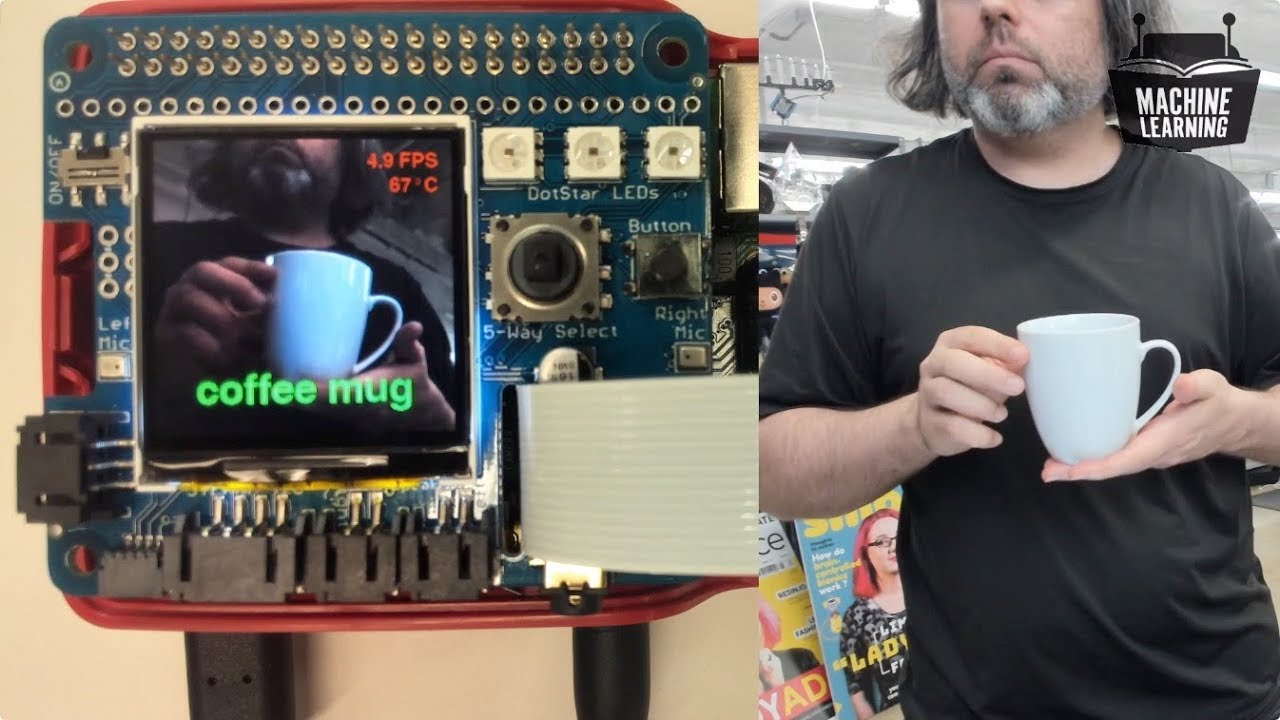
The idea behind the BrainCraft board (stand-alone, and Pi “hat”) is that you’d be able to “craft brains” for Machine Learning on the EDGE, with Microcontroll...
blissful kayak
Very nice 👍
stuck thicket
WE ARE LIVE! SHOW AND TELL! https://youtu.be/WwrkjweYXNA

Multistreaming with https://restream.io/ ----------------------------------------- LIVE CHAT IS HERE! http://adafru.it/discord Adafruit on Instagram: https:/...
stuck thicket
WE ARE LIVE! ASK AN ENGINEER! https://youtu.be/FhzpZH8yhnA

Multistreaming with https://restream.io/ ----------------------------------------- LIVE CHAT IS HERE! http://adafru.it/discord Adafruit on Instagram: https:/...
dull apex
Hello! Can anyone help me find the datasheet for a servo(MOT-135)? The duty cycle acts weird with some values
lean valve
@dull apex like this one? https://http2.mlstatic.com/servomotor-con-torque-de-11-kgfcm-mot-135-D_NQ_NP_775494-MLM27701961180_072018-O.webp
 dull apex
Yep that one @lean valve
lean valve
I can't find any datasheet for that, other than the 'technical details' section on https://www.steren.com.mx/servomotor-con-torque-de-11-kgf-cm.html
It's PWM I assume?
tawny fiber
looking at how servos work and the fact that the thing has 3 connections and the fact that will is talking abotu duty cycles its definitely PWM yes
 hallow cloud
Hey guys I have a mindstormset from school and want to make a robot/rover but don´t want to controll it with an raspberry pi. The problem is I can´t find anything on how to use the raspberry pi (and python) with mindstorm. Some website introduce something like the BrickPi but I don´t want to buy it because I will never need it again. I am willing to buy stuff like adapters or breadbords to do it (because I can use them privatly and not only at school) so what could I use with the mindstorm parts?
tawny fiber
You'd use Mindstorms
The Mindstorms Brick is somewhere above an Arduino and below a pi, just a lot more closed down
There was a java thing for Mindstorms as well iirc
Or you just build the robot without a Mindstorms, What the Mindstorms does is pretty generic and reproducible with the vast majority of other MCUs as well
hallow cloud
I know I can reproduce it but we only have mindstorm
stuck thicket
ok! this starts in 10 mins! Machine Learning with Microcontrollers Hack Chat! JOIN THE HACK CHAT HERE! https://hackaday.io/messages/room/2369 & LIVE video https://youtu.be/EDNaNQjM7Z0
stuck thicket
WE ARE LIVE! SHOW AND TELL! https://youtu.be/zxStT1C1_iU

To show and share your project at 7:30pm today, view the chat or in discord https://adafru.it/discord and look for the JOIN link to join. For best results be...
stuck thicket
WE ARE LIVE 10% off all items in stock code is TripleAxis expires 9/11/19 @ 11:59pm ET #askanengineer https://youtu.be/GRyg4Eo6TPQ & http://www.adafruit.com

Multistreaming with https://restream.io/ ----------------------------------------- LIVE CHAT IS HERE! http://adafru.it/discord Adafruit on Instagram: https:/...
Adafruit Industries, Unique & fun DIY electronics and kits : - Tools Gift Certificates Arduino Cables Sensors LEDs Books Breakout Boards Power EL Wire/Tape/Panel Components & Parts LCDs & Displays Wearables Prototyping Raspberry Pi Wireless Young Engineers 3D printing NeoPix...
 mellow prawn
ooo nice
hallow igloo
arduino or raspberry???
 delicate creek
Depends on what you're gunna use it for
 undone wind
I would like to get into python robotics
I kinda want to make my own robot dog
I know enough python to get started
but no idea about the hardware side
any suggestions?
jolly mural
raspberry pi is a good bet for hardware beginners and python, even though its not technically a microcontroller
its much more flexible for you to experiment with languages, tooling, etc
it's more forgiving to fix code mistakes generally, cus you can just edit the file and run it again from the pi, instead of uploading from a laptop like an arduino
undone wind
Good to know. What about on the hardware side of things?
hollow hatch
you could use an esp8266/32 with micropython. might need to get a version with extra flash space if you want to store sounds and stuff on there though.
pycharm has a pretty decent micropython plugin which makes it pretty easy too
jolly mural
oh yea, the raspberry pi has a lot more power since its a full arm cpu/soc
i have several pis and several arduino boards, they've each got their own uses
undone wind
what's a better language to know for robotics?
cpp or java?
besides python that is
undone wind
Probably Java right? It runs anywhere
past epoch
C/C++ are the most used
but python is getting there
I think that python will be the default robotic language when non-low level integration is required. due to the link with the data-science branch and machine learning
tawny fiber
If python is supposed to use all of its data science and machine learning things you're already demanding a lot of things to be present on that system, first of all a full cpython interpreter as all of those libs rely on the c/c++ API of it. Furthermore you'd be demanding all of the dependencies of things like tensorflow to be present.
The state of the art approach would be to simulate your robot on your training servers with python (this is where it comes into play) and then apply your results with c/c++ stuff, at least that's what I've heard a few ROS people say. And companies like STM also provide frameworks for said approach so it seems to be the currently accepted standard
@past epoch
past epoch
Cool thanks 😁
undone wind
So Python for design and Testing and then cpp for implementation on the robot because it is faster?
tawny fiber
Pytorch is build on top of tensorflow or other machine learning tool kits
About how exactly you'd use your ml model actually efficiently on embedded devices I am not sure
tawny fiber
Also I've been told by somebody I know who works in the field that ml isn't that "pretty much nobody uses ml in robotics yet"
undone wind
Good to kniw @tawny fiber thanks
stuck thicket
WE ARE LIVE! SHOW AND TELL! https://youtu.be/uYsKnwtTTqs

Multistreaming with https://restream.io/ ----------------------------------------- LIVE CHAT IS HERE! http://adafru.it/discord Adafruit on Instagram: https:/...
stuck thicket
WE ARE LIVE! ASK AN ENGINEER! https://youtu.be/hdUYWaXifec 10% off all items in stock code is STEMMAsound expires 9/18/19 @ 11:59pm ET #askanengineer http://www.adafruit.com

Multistreaming with https://restream.io/ ----------------------------------------- LIVE CHAT IS HERE! http://adafru.it/discord Adafruit on Instagram: https:/...
Adafruit Industries, Unique & fun DIY electronics and kits : - Tools Gift Certificates Arduino Cables Sensors LEDs Books Breakout Boards Power EL Wire/Tape/Panel Components & Parts LCDs & Displays Wearables Prototyping Raspberry Pi Wireless Young Engineers 3D printing NeoPix...
 solid mulch
would there be an easier way to ssh connect to my pi?
cause rn i have to type the ip out every time
 surreal panther
You can name your pi. Then a lot of DHCP servers will automatically resolve the name which gets sent by the pi when it requests an IP address. Even if it doesn't, if you have a good router with a DNS resolver you should be able to add a static entry. If all else fails, there's /etc/hosts. Or you can add a custom host entry to your ~/.ssh/config
solid mulch
tbh i dont have any idea what any of this means, ill try to look it up
 stone shuttle
How to get started with microcontrollers?
hallow igloo
Start researching on adafruit. They have CircuitPython and MiroPython boards of various types. They have a lot of starter kits and boards too.
I'm just getting started my self and this page helped a lot

Adafruit Learning System
New to CircuitPython? This is the place to start.
I ended up choosing a more complicated set up then the recommended starting boards, because it suits my project better
violet valve
@hallow igloo Be aware as well, that page hasn't been updated in ages. That's the rough thing about creating hardware info pages and then releasing a ton more hardware, it's difficult to keep up.
hallow igloo
I see
violet valve
This is probably a better place to keep track of what CircuitPython boards are available: https://www.adafruit.com/category/957 and then see the guides for each one if you want more information.
Adafruit Industries, Unique & fun DIY electronics and kits : Boards - Tools Gift Certificates Arduino Cables Sensors LEDs Books Breakout Boards Power EL Wire/Tape/Panel Components & Parts LCDs & Displays Wearables Prototyping Raspberry Pi Wireless Young Engineers 3D printing ...
violet valve
Always go with what makes the most sense for your project. CircuitPython definitely has it's limitations in certain applications.
Nice 🙂
hallow igloo
That should work pretty well for a wireless robot I imagine?
getting input over wifi
violet valve
I haven't done much with wireless, so I can't really speak to that. I would think so, yes, but I don't know for certain.
 clear mist
tawny fiber
clear mist
tawny fiber
#303934982764625920 is probably gonna be the better place for that
lean valve
@clear mist It's OK to discuss the progress of your microcontroller project in here, but you'll probably get more views by posting it in #303934982764625920 as well
jade orchid
Quick poll: What do you use as a random seed on your project ? (no security constraint)
tawny fiber
For microscontrollers either a built-in hardware RNG if it has one or sample the analog voltage off a pin using an ADC
@jade orchid
humble kraken
or time, if its available
heady crescent
1 😛
jade orchid
Thanks for the responses. I just wanted some opinion as my way has been deemed 'weird' (I have a seed value saved in eeprom: I read it at startup, use it as seed, and replace it by a new one from a rand() execution)
 distant trail
the use the python, c or c++ on a micro depends entirely on the micro
You can buy an 8 bit micro with 2 timers and one adc, it has 470ish BYTES of program memory and even less ram. You wouldn't be able to use C++ or python on it, as just using a class would eat a large part of the program memory
tawny fiber
I'm quite sure one could still run pretty minimal c++ code on it, don't underestimate the size optimization compilers can perform, c++ classes come with much less overhead than python ones....well and you don't even have to use them in C++ if you don't wish to
stuck thicket
OK! big newsletter this week ... @ "Python for microcontrollers" https://www.adafruitdaily.com and vi preview - https://youtu.be/XID-dIobgr4

Sign up! https://www.adafruitdaily.com Coming up this week on the ALL THINGS PYTHON & HARDWARE newsletter! CircuitPython on any computer, Halloween time and ...
 teal marsh
Hey,
Is there a way or a device to measure lenght by "moving" like when you go from a to b, it's gives how many meters you moved.
 round ore
there are better ways to do that,but yeah pretty much even a car can be used for that
teal marsh
Wanted to get started with raspberry or microcontroller and i got a really nice idea what i wanted to do once i am more into it. Hope the question isn't annoyingly ^^
round ore
just do speed *time
oh, well i have no clue with that ,was just browsing didnt realise the context
well cant you use the circumference of the wheels
teal marsh
It would more be for short distances and i believe counting the steeps would be the easiest and best way but
No, my friend is a big fan of spaying movies and he loves the gadgets. One of his favorite is a tool thar kinda marks people and other stuff on a map
Thought it would be nice to make him something like that for his birthday
Thought it would work if you have 2 devices and it could tell how far away the other is and in which direction and then safe it
First i wanted to "just" gift him a drone with a function thar can follow someone or something like that but fells like the other idea is more special because it woild be something that didn't exist like thst or similar
stuck thicket
WE ARE LIVE! SHOW AND TELL! https://youtu.be/uDUpJ_Pp2P4

Multistreaming with https://restream.io/ ----------------------------------------- LIVE CHAT IS HERE! http://adafru.it/discord Adafruit on Instagram: https:/...
stuck thicket
10% off all items in stock code is PUMPKINFRUIT expires 10/2/19 @ 11:59pm ET #askanengineer http://www.adafruit.com & https://youtu.be/NtdnFRrRi5c @stuck thicket WE ARE LIVE! ASK AN ENGINEER! WE ARE LIVE! ASK AN ENGINEER!
Adafruit Industries, Unique & fun DIY electronics and kits : - Tools Gift Certificates Arduino Cables Sensors LEDs Books Breakout Boards Power EL Wire/Tape/Panel Components & Parts LCDs & Displays Wearables Prototyping Raspberry Pi Wireless Young Engineers 3D printing NeoPix...

Multistreaming with https://restream.io/ ----------------------------------------- LIVE CHAT IS HERE! http://adafru.it/discord Adafruit on Instagram: https:/...
 lime bear
How would I make my BBC microbit interact with my phone with the built in radio?
As Bluetooth doesn't work (Doesn't actually connect even when it shows a tick)
lime bear
No one?
teal marsh
@lime bear have some patience, i think that this room isn´t really "popular" (not used frequently )
lime bear
Okay then
 rugged crystal
@lime bear your phone's radio is specialised to work with cellular towers, wifi and bluetooth. You really can't manually use it to talk to stuff other than those.
 bitter sandal
idk if this is the best place to ask, but is there any way to have an ardunio turned on (maybe from low-power mode if necessary) by an accelerometer?
 karmic wolf
If the accelerometer has an interrupt pin, you could just wait for the interrupt
 flint sapphire
thoughts on the elegoo?
40€ for an advanced kit instead of 75 for an arduino beginners kit
tawny fiber
are there any ambitions for a embedded python running on some riscv chips now where pretty affordable riscv boards and chips are available?
violet valve
@tawny fiber The Adafruit Discord server has a #riscv channel where that has been discussed. In terms of us, we'd want to get CircuitPython running, but in skimming the discussion there, it looks like they might still be a little too limited for any reasonable CircuitPython experience. I believe we intend to do so eventually though.
tawny fiber
I see, thanks for the explanation 👍
stuck thicket
WE ARE LIVE! SHOW AND TELL! https://youtu.be/6-EhWb3fJEU
Enjoy the videos and music you love, upload original content, and share it all with friends, family, and the world on YouTube.
stuck thicket
WE ARE LIVE! ASK AN ENGINEER! WE ARE LIVE! ASK AN ENGINEER! 10% off all items in stock code is infineon expires 10/9/19 @ 11:59pm ET #askanengineer http://www.adafruit.com & https://youtu.be/ndJGWeYouVI @stuck thicket
Adafruit Industries, Unique & fun DIY electronics and kits : - Tools Gift Certificates Arduino Cables Sensors LEDs Books Breakout Boards Power EL Wire/Tape/Panel Components & Parts LCDs & Displays Wearables Prototyping Raspberry Pi Wireless Young Engineers 3D printing NeoPix...
Enjoy the videos and music you love, upload original content, and share it all with friends, family, and the world on YouTube.
flint sapphire
no thoughts on the elegoo R3?
 sudden hamlet
I have one
Iirc it was missing one key feature or something
Maybe an accelerometer
white spade
How much storage is there on the rpi4 4gb by default? And should i get a case with cooling? If so heatsink Vs fan(s) ¿?
jolly mural
Raspberry Pis don't come with system storage; you have to buy an SD card for it
an active fan is probably your best bet, as the Pi4 is quite a monster
 lyric anvil

 tidal hazel
heady crescent
tidal hazel
heady crescent
i haven't done anything with microcontrollers @tidal hazel but i know about ctypes itself
 pure nest
I'd like to do a simple task that would normally be best suited for a microcontroller. However I already have a computer in the room so I'm wondering if I can use a usb cord to send a signal directly from the computer rather than going usb-arduino-signal. Basically just cut out the middleman rather than wasting a microcontroller when it would sit on top of a real pc
I've poked around in some libraries for interfacing with usb but I'm wondering if anyone has tried something like this?
languid hill
no usb cant do on/off signals without a microcontroller or similar device sitting on the bus to translate it
you might find that there is an existing product that can do the signal you want though
its possible the pc has a parallel port header on the motherboard. you could rig up a relay or something to that if you just need on/off
pure nest
No parallel but there is a serial port. I did a bit of reading but I'm not sure if that would work and I'm a bit out of my depth, so I think I'll just go ahead and use a microcontroller. thanks for your help
white spade
What voltage/amperage are the GPIO pins on the rasberry-pi 4 B rated for?
I think i found it, 5VDC, can anyone confirm?
open dock
@white spade for your sake, don't input 5V on any of the GPIO
On Raspberry Pi, all GPIO banks are supplied from 3.3V. Connection of a GPIO to a voltage higher than 3.3V will likely destroy the GPIO block within the SoC.
https://www.raspberrypi.org/documentation/hardware/raspberrypi/gpio/README.md
white spade
thank you
open dock
👍
 normal elm
4pi seems pretty cool
 honest lantern
I have a question
is python on raspberry pi the same as python?
(sorry im new to python)
 gusty eagle
yes
normal elm
It can be slightly different @honest lantern
There are some python packages that are only available on linux distributions compared to lets say windows
Basic python is the same, but there are advantages to working in a linux environment. (Also there are some specific raspi packages like the GPIO that allow you to control basic logic input/output to electronic components
white spade
So, my Rasberry pi 4 is running, and i can see it online on my network, but i cant connect to it using Putty (SSH)
ill move my questions to the raspberry pi server
white spade
I have everything working now 
pure nest
So if I turn on a relay manually (by touching it with the 3v source on my nodemcu dev board) it stays on when connected to a pin I have set high. I can remove the 3v source and it stays on. I can also turn it off by setting the pin to low as is expected. However when I try to turn it back on by setting the pin high, nothing happens. I have to manually touch the 3v output to the coil, then it works as normal. what in the fuck am i doing wrong here?
languid hill
its likely your 3v / output side voltage is enough to activate it but your output pin isnt
meaning that the higher current/voltage source is able to move it and your micro can hold it but thats it
cause it takes more power to activate a relay/any other actuator than it does to hold it in place @pure nest
pure nest
the output pin is supposed to be 3.3v though
languid hill
often a microcontrollers output cant handle an inductive load though
youll need an external driver circuit or something for it
pure nest
im open to suggestions I guess, I understand why it could hold and not move, but jesus christ I am frustrated and tired of waiting on components to arrive to make progress
languid hill
here is a pretty standard relay driver circuit. just needs a diode, transistor and resistor http://www.pcbheaven.com/userpages/basic_transistor_circuits/
the diode protects you from the inductive load, the transistor lets you ignore the limitations of your micros output pin
pure nest
yeah I understand how those work, I don't have them on hand unfortunately. I just don't really understand why my solution isn't working as is, its the same voltage from the 3v power source and the output pins. I understand how a different voltage could cause the issue with moving/holding (like static and kinetic friction coefficients) but I measure the same voltage with my multimeter
languid hill
its not the voltage, its prob the current. it might be set up to only allow a specific amount of current through and its not enough to actuate the relay
pure nest
how does the current affect it? I don't know much about how relays work but I thought it was just a potential across two pins that determined whether it was open or closed?
languid hill
so typically if you apply a voltage across a device, the resistance determines how much current is used
inductive loads resistance varies so its a bit more complicated there but thats not the issue here
the key is that a transistor/mosfet can be set up to move a specific amount of current instead.
in this case if the output pin of the micro is only able to provide a certain [too small] amount of current with the voltage and resistance of the circuit, then your relay wont be able to pull enough current to activate
basically depending on how the output circuit of the micro is designed, the relay might try to pull more current than the output is willing to provide [but luckily in this case, not enough to burn up the output]
that circuit you see there uses that resistor to choose how much current will flow through the relay. the downside is that it will basically pull the full activation current through the relay the whole time its on, but at least it will activate
changing the size of the resistor changes how much current goes through the microcontroller side of the transistor
since the transistor is effectively an amplifier, how much current flows there scales the amount that is allowed to flow from the relay side
pure nest
gotcha. thanks for taking the time to help me out, much appreciated.
languid hill
yw good luck
stuck thicket
WE ARE LIVE! SHOW AND TELL! https://youtu.be/x6qCHAGpToo

To show and share your project at 7:30pm today, view the chat or in discord https://adafru.it/discord and look for the JOIN link to join. For best results be...
stuck thicket
WE ARE LIVE! ASK AN ENGINEER! WE ARE LIVE! ASK AN ENGINEER! 10% off all items in stock code is MiniPiTFT expires 10/16/19 @ 11:59pm ET #askanengineer http://www.adafruit.com & https://youtu.be/HUIe-47ojQs @stuck thicket
Adafruit Industries, Unique & fun DIY electronics and kits : - Tools Gift Certificates Arduino Cables Sensors LEDs Books Breakout Boards Power EL Wire/Tape/Panel Components & Parts LCDs & Displays Wearables Prototyping Raspberry Pi Wireless Young Engineers 3D printing NeoPix...

Multistreaming with https://restream.io/ ASK AN ENGINEER 10/16/19 Visit the Adafruit shop online - http://www.adafruit.com ----------------------------------...
 olive quail
Hi guys, I am having a bit of difficulty getting micropython to work on an esp32 board via WIndows 10.
The unit shows up in device manager and esptool seems to effectively erase and then write the flash.
After writing the micropython firmware I can access the rpel terminal.
I tried using rshell and it doesnt connect via the COM port the device is on.
Im happy to clear any of that explanation up if I poorly phrased anything.
 daring nimbus
I switched to my main Discord account (previously was MasonAdkins). I can get the python terminal by using PuTTY
I guess i must be having an rshell problem.
daring nimbus
I was messing with this last night an I'm still stumped.
Any chance someone could assist me connecting to my esp32 via rshell?
I am on win10 and successfully flashed micropython to my esp32. I can access it via putty on COM3 but when I try to use rshell it doesn't find any micropython boards.
Welcome to MicroPython on the ESP32!
thats via putty
stuck thicket
WE ARE LIVE! SHOW AND TELL! https://youtu.be/q2IMXwWqcTU

To show and share your project at 7:30pm today, view the chat or in discord https://adafru.it/discord and look for the JOIN link to join. For best results be...
stuck thicket
WE ARE LIVE! ASK AN ENGINEER! https://youtu.be/6ntgstui8jk

Multistreaming with https://restream.io/ ASK AN ENGINEER 10/23/19 Visit the Adafruit shop online - http://www.adafruit.com ----------------------------------...
stuck thicket
WE ARE LIVE! SHOW AND TELL! https://youtu.be/cCsmRw0Dz-M

To show and share your project at 7:30pm today, view the chat or in discord https://adafru.it/discord and look for the JOIN link to join. For best results be...
stuck thicket
WE ARE LIVE! ASK AN ENGINEER! https://youtu.be/e-vQrlUjL_4

Multistreaming with https://restream.io/ ASK AN ENGINEER 10/30/19 Visit the Adafruit shop online - http://www.adafruit.com ----------------------------------...
stuck thicket
WE ARE LIVE! ASK AN ENGINEER! 10% off all items in stock code is SCARYFRUIT expires 10/31/19 @ 11:59pm ET #askanengineer http://www.adafruit.com & https://youtu.be/xw9WRAOGG3s @stuck thicket
Adafruit Industries, Unique & fun DIY electronics and kits : - Tools Gift Certificates Arduino Cables Sensors LEDs Books Breakout Boards Power EL Wire/Tape/Panel Components & Parts LCDs & Displays Wearables Prototyping Raspberry Pi Wireless Young Engineers 3D printing NeoPix...

Multistreaming with https://restream.io/ Visit the Adafruit shop online - http://www.adafruit.com ----------------------------------------- LIVE CHAT IS HERE...
 mossy root
This is my first project on the raspberry pi. i am using 4 wheels connected to DC motors.i want 2 to go forward and backward and 2 left and right how can i make the motors spin in different directions depending on the button i click
jolly mural
I'm doing something similar
My method may not be the most efficient, but I'm using two relays for each motor
one on the hot wire, one on the ground
jade orchid
@mossy root the efficient common way to handle this, is to use an H-bridge. Just search "raspberry h-bridge" and you will find lots of ready to use board and tutorial. It is a specialized circuit that basicaly use four 'relay' to either connect the a/b side of the motor respectively to the power and the ground, or to the ground and the power (allowing both direction). You can do this circuit yourself, but without care you can easily allow the power to be connected to the ground, and burn your components so I don't recommand it for beginner...
jolly mural
^ I just discovered the H-bridge myself. It's a much quicker, easier method of doing that
jade orchid
Also using an H bridge with pwm you can easily control the speed in each direction as in "75% forward, 25% backward" who result in an average slower forward. 50% going forward, 50%going backward also result in a stopped robot that use power to actively resist to being moved by external force. This is sometimes usefull.
jolly mural
My manual method doesn't have PWM, so it's a little wacky
tawny fiber
Your method doesn't have pwm? It's a question of hardware and in slower frequencies software wether you can use pwm or not isn't it?
jolly mural
Well, It's not using pwm
I'm just directly triggering the relays with a raspberry pi zero
the motors are running on 12v
tawny fiber
Well the pi does have some pwm for sure so I'm quite confident that shouldn't be an issue
jade orchid
actually not relay, but transistor (mosfet I think, but I'm a bit rusty on this). And that is how most of the electric motor are controled in speed. It works well because the motor average the signal nicely as he has a low reactive time compare to the speed the signal can be oscillated.
jolly mural
Yea but I'm using reed relays, not mosfets
undone wind
I know nothing about microcontrollers
how can I get started with one of these?
what else would I need?
jolly mural
I'd reccomend a programmer
If you wanna use a z80 chip, there's probably arduino style boards too
Or use an arduino to program the z80 chip
jade orchid
@undone wind "one of these" -> a microcontroller or "one of these" -> specificaly the z80 series ? The later seems like an odd choice as there is much better beginner friendly options...
undone wind
ok, can you suggest one?
tawny fiber
define good
stuck thicket
WE ARE LIVE! SHOW AND TELL! https://youtu.be/yBVCk-HjQ90

To show and share your project at 7:30pm today, view the chat or in discord https://adafru.it/discord and look for the JOIN link to join. For best results be...
stuck thicket
WE ARE LIVE! ASK AN ENGINEER! 10% off all items in stock code is STEMMAS expires 11/6/19 @ 11:59pm ET #askanengineer http://www.adafruit.com & https://youtu.be/b_jZ0i_BuJU
Adafruit Industries, Unique & fun DIY electronics and kits : - Tools Gift Certificates Arduino Cables Sensors LEDs Books Breakout Boards Power EL Wire/Tape/Panel Components & Parts LCDs & Displays Wearables Prototyping Raspberry Pi Wireless Young Engineers 3D printing NeoPix...

Multistreaming with https://restream.io/ Visit the Adafruit shop online - http://www.adafruit.com ----------------------------------------- LIVE CHAT IS HERE...
tawny fiber
Well that still doesn't answer the what do you consider good question
tawny fiber
What is good for you
What are you looking to do with your MCU
You can get a board for 50 dollars which is total ovekdill or one for 2 which is missing something you want
 desert siren
Hey, im a not so advanced programmer. I am currently trying to build a robot that can solve a rubiks cube. I will use a program another guy made to get the solution for the cube. The thing i need help with rn tho is that im trying to figure out how to connect that program to arduino. I assume i have to use serial port but i dont exactly understand how the program that solves it actually communicates. Here is the program: https://github.com/hkociemba/RubiksCube-TwophaseSolver

GitHub
Solve Rubik's Cube in less than 20 moves on average with Python - hkociemba/RubiksCube-TwophaseSolver
Any help is appreciated
tawny fiber
its gonna output something to the GUI,so you gotta find the place where it does and see how they do that
theyre apparently communicating via a localhost connection so presmably something with a socket
most people here could probably exactly figure it out for you but its gonna be a much better learning experience if you figure it yourself
willow kernel
@glad pasture I don't know if this helps or if you've already looked it over, but these are the docs I could find for it https://microbit-micropython.readthedocs.io/en/latest/
 glad pasture
Yes I did
 atomic burrow
What are micro controllers?
tawny fiber
comparably small CPUs which can interact with some peripherals better than yours can
and are usually very specialized in exactly that
- for the most part run exactly one binmary, no os no nothing
stuck thicket
WE ARE LIVE! SHOW AND TELL! https://youtu.be/lZRvS7pYRaY

To show and share your project at 7:30pm today, view the chat or in discord https://adafru.it/discord and look for the JOIN link to join. For best results be...
stuck thicket
WE ARE LIVE! ASK AN ENGINEER! 10% off all items in stock code is MICROCHIPIOT expires 11/13/19 @ 11:59pm ET #askanengineer http://www.adafruit.com & https://youtu.be/ORV_evN4H_Q
Adafruit Industries, Unique & fun DIY electronics and kits : - Tools Gift Certificates Arduino Cables Sensors LEDs Books Breakout Boards Power EL Wire/Tape/Panel Components & Parts LCDs & Displays Wearables Prototyping Raspberry Pi Wireless Young Engineers 3D printing NeoPix...

Multistreaming with https://restream.io/ Visit the Adafruit shop online - http://www.adafruit.com ----------------------------------------- LIVE CHAT IS HERE...
stuck thicket


#supercon has not one, but TWO awesome badges. Thanks to @SpritesMods and @adafruit!
 Twitter
 upper isle
hey! i run a discord bot on my 3.14 and often i notice the bot go offline and when i try to connect to the 3.14 through rdc i see a black screen, and when through ssh it just doesnt do anythin idunno. the 3.14 also shows no output through hdmi and the yellow led lights.
upper isle
^please @lost storm when you answer
 frail falcon
@upper isle where do you host your bot?
gusty eagle
Hello, is there any danger to install python3.7 on a rpi? The one with Debian is 3.5, I don't want to break things.
 steady juniper
if you don't replace the system's version but install one additionally, e.g. by compiling from source using pyenv, it should be fine
gusty eagle
I'm following your advice @steady juniper and trying to install pyenv. However it seems fairly complicated:
There is https://github.com/pyenv/pyenv-installer and https://github.com/pyenv/pyenv and in each repo the installation process seems pretty hard.

GitHub
This tool is used to install pyenv and friends. Contribute to pyenv/pyenv-installer development by creating an account on GitHub.
GitHub
Simple Python version management. Contribute to pyenv/pyenv development by creating an account on GitHub.
 sturdy vale
I find the official one fairly trivial unless you run into some problem, but I never have
just clone the repo and copy a few lines to your bash_profile / bashrc
steady juniper
You can just type curl https://pyenv.run | bash to install pyenv. Then use it as described in https://github.com/pyenv/pyenv/blob/master/COMMANDS.md to install and manage your additional python versions
gusty eagle
I use venv to manage my dependencies, does it works well with pyenv?
steady juniper
these don't really have anything to do with each other. One is for the python interpreter, the other for libraries.
sturdy vale
there's also pyenv-virtualenv
GitHub
a pyenv plugin to manage virtualenv (a.k.a. python-virtualenv) - pyenv/pyenv-virtualenv
manage both python installs and virtualenv from pyenv
(this is a plug-in so first install pyenv regularly)
gusty eagle
I don't like pyenv-virtualenv and pipenv, because I use dependencies that aren't on Dypi, and it doesn't work well.
I prefer a simple virtual environnement rather than a package manager which is less flexible.
I'll try curl https://pyenv.run | bash then
Well, I have a warning
# Load pyenv automatically by adding
# the following to ~/.bashrc:

export PATH="/home/pi/.pyenv/bin:$PATH"
eval "$(pyenv init -)"
eval "$(pyenv virtualenv-init -)"```Well I added to the ~/.bashrc and it seems to work.
I'll try to use python 3.7 now
well it's not installed -.-
using pyenv install!
wow, it uses 100% of my CPU! I really hope it's good
steady juniper
it compiles the Python interpreter from sources
depending on your specs this can take a while
gusty eagle
specs aren't that great, so I'll be patient 😉
it failed :/ Apparently I don't have all the dependencies
I need to clean it before starting again...
BUILD FAILED (Raspbian 9.11 using python-build 20180424)

Inspect or clean up the working tree at /tmp/python-build.20191116213422.12827
Results logged to /tmp/python-build.20191116213422.12827.log

Last 10 log lines:
  File "/tmp/tmpjx1zir1c/pip-19.0.3-py2.py3-none-any.whl/pip/_internal/commands/__init__.py", line 6, in <module>
  File "/tmp/tmpjx1zir1c/pip-19.0.3-py2.py3-none-any.whl/pip/_internal/commands/completion.py", line 6, in <module>
  File "/tmp/tmpjx1zir1c/pip-19.0.3-py2.py3-none-any.whl/pip/_internal/cli/base_command.py", line 20, in <module>
  File "/tmp/tmpjx1zir1c/pip-19.0.3-py2.py3-none-any.whl/pip/_internal/download.py", line 37, in <module>
  File "/tmp/tmpjx1zir1c/pip-19.0.3-py2.py3-none-any.whl/pip/_internal/utils/glibc.py", line 3, in <module>
  File "/tmp/python-build.20191116213422.12827/Python-3.7.3/Lib/ctypes/__init__.py", line 7, in <module>
    from _ctypes import Union, Structure, Array
ModuleNotFoundError: No module named '_ctypes'
Makefile:1130: recipe for target 'install' failed
make: *** [install] Error 1```to clean it, do I need to do rm -r /tmp/python-build.20191116213422.12827?
@last jacinth That's what happens when I try to use pyenv lol
I'd really appreciate some help 🙂

Stack Overflow
I am using Ubuntu and have installed Python 2.7.5 and 3.4.0. In Python 2.7.5 I am able to successfully assign a variable x = Value('i', 2), but not in 3.4.0. I am getting:
Traceback (most recent c...
sudo apt-get install libffi-dev will solve my problem
However I still need to clean up my tree
Can I safely retry pyenv install 3.7.3?
I installed all the dependencies linked here: https://github.com/pyenv/pyenv/wiki/Common-build-problems
GitHub
Simple Python version management. Contribute to pyenv/pyenv development by creating an account on GitHub.
What bothers me is this unfinished installation somewhere, how to get rid of that? (don't hesitate to tag me if you know if pyenv install 3.7.3 is safe or how to clean
clean up the working tree at /tmp/python-build.20191116213422.12827
 mortal stump
Hi guys, I am using aiohttp for http requests, but I am running into some issues here. When I created my new script, I had no issues at all, but now, it takes very very long for my 'server' (Rpi 4b, Raspbian) to actually get a response, but for another computer (Windows) on the same network with the same settings, it takes less then a second. Is there some option to 'clear' any aiohttp caches or something to get rid of this issue?
Heres my code for the ones interested:
        async with aiohttp.ClientSession() as session:
            async with session.get(f"{self.base}{self.serverquery}") as r:
                print(r.status)
                res = await r.json()
Are you creating a new session every time you need to make a request? That's warned against in the documentation, I think. You're supposed to just make one session and use it for the lifetime of your process
See the note here: https://aiohttp.readthedocs.io/en/stable/client_quickstart.html
mortal stump
So basically it even is very slow when I first create the session
I am not reusing the session as of now, since running the my script (when the first session is created) is very slow too
hallow igloo
CircuitPython can go on Arduino UNO? Any blog or video?
long orbit
@hallow igloo It cannot run on an Arduino UNO. It requires at 32-bit microcontroller
 scarlet kite
anyone good with a microbit
needing to use its accelerometer as a may of collecting data of a 3d flight
scarlet kite
^
stuck thicket
WE ARE LIVE! SHOW AND TELL! https://youtu.be/JME3PvJEr3E

To show and share your project at 7:30pm today, view the chat or in discord https://adafru.it/discord and look for the JOIN link to join. For best results be...
stuck thicket
WE ARE LIVE! ASK AN ENGINEER! 10% off all items in stock code is STEMMAOLED expires 11/20/19 @ 11:59pm ET #askanengineer http://www.adafruit.com & https://youtu.be/0MsrQFnIMiY @stuck thicket
Adafruit Industries, Unique & fun DIY electronics and kits : - Tools Gift Certificates Arduino Cables Sensors LEDs Books Breakout Boards Power EL Wire/Tape/Panel Components & Parts LCDs & Displays Wearables Prototyping Raspberry Pi Wireless Young Engineers 3D printing NeoPix...

Multistreaming with https://restream.io/ Visit the Adafruit shop online - http://www.adafruit.com ----------------------------------------- LIVE CHAT IS HERE...
hollow hatch
possibly
there's a list somewhere of all the supported boards
one sec
looks like Arduino Due is there
hollow hatch
id go with higher version as a rule of thumb
dunno what the differences between v2 and v3 are
Turns out that V3 is a “version” invented by producer LoLin to signify minor improvements to the V2 boards. Among others they claim their USB port to be more robust.
If you compare the pin layout there’s only a tiny difference to the V2 layout. LoLin decided to use one of the two reserve pins for USB power out and the other for an additional GND.
Watch out though for the difference in size! This LoLin board is significantly larger than the Amica and DOIT V2 boards. Because of its size I would never use it. There are clearly better alternatives.
 topaz bridge
So V3 is bigger than v2
hollow hatch
seems so
topaz bridge
Does them has the same spec
hollow hatch
the specific boards youre buying may not be up to spec though
so id check the sellers page to be sure
the only real differences seem to be some pin mappings and a different usb driver
topaz bridge
Thanks bro
hollow hatch

hollow hatch
i dont have one so im not sure
i have a v3 and really like it
havent had any issues really
@topaz bridge
due to the size i used two breadboards
 tulip hollow
any of you folks use aws iot?
topaz bridge
I bought V2 and V3 for 6$ with free shipping 👍
scarlet kite
Hey
So I have a project in the works for an assignment adding to my final exam. I plan to launch a paper rocket at an indepent variable of psi and monitor the hight (using time) and the acceleration (using a MicroBit's built in accelerometer). Does anyone know how I can collect data using micropython and make it store in another file?
If this isn't possible, can anyone direct me to how to wipe the software on a MicroBit and install a custom one which I can use to do this task?
Please ping me with any ideas as anything helps
jade orchid
direct measure of hight from accelerometer is not that easy. I think your best bet is to detect launch and landing, deduce the time of flight and calculate the height from that.
It should not be that difficult in circuitpython/micropython. You can almost as in regular python create file and list directory to determine how to call your next file...
normal elm
@scarlet kite I spent 2 months characterizing an accelerometer. What makes accels suck is that the double integration can cause lots of issues if for instance you get a spike and double integrate it, you're adding a constant to your value for the entire time that you are integrating over.
Paper rockets or whatever should only have a time of flight less than 15 seconds
I think you are actually fine using an accel for this purpose as long as you put some data smoothing on it
scarlet kite
Right
Figured out how to write files though
So that should be it
Thanks everyone!
normal elm
It only has 16 kb of ram
Which means that if you sample at 1000 per second it gives you 16 seconds of recording at 8bit resolution
I think this website directly relates to your micrbit @scarlet kite
Tells you how to store and everything
scarlet kite
Thank you
 mystic cliff
Hey, i was curious. Is there any possible way to get the output from serial port output in arduino into active cursor on your pc. Just like how the barcode scanner work
 high maple
How do I make this bit bot drive forward when the micro bit is tilted forward, and backwards when the micro bit is tilted backwards. I can’s get any of it to work, and I don’t know how to fix it. Can anyone help me with this?
blissful kayak
@high maple I never worked with that but I can try to help
First off, do the channels need to be the same? I see 40 and 42.
Second off, it would be better to send signal and then sleep 0.2
Only now I notice that that function indentation is weird (drive), what's that
blissful kayak
no what I meant it is not indented properly, and I don't see that function being called anywhere? @high maple
what is the body of it?
jade orchid
@mystic cliff The serial you get is because your computer recognize the board as a usb com port. In order to get the input would need to make your board act as a keyboard. It is not possible with all arduino board, some have dedicaded usb port com to uart serial chip (like ftdi). But definitively possible, some have native usb and can be programmed as any HID usb peripherals. search for "%your board% hid usb keyboard".
high maple
Eeh, what? Eli5
blissful kayak
def drive(speed, direction): is a function. However I don't see it's body aka there's nothing below it. You're not using speed nor direction arguments.
is the while supposed to be inside that function?
blissful kayak
is that a built in function or
high maple
I don't think so, I'm nit sure
high maple
Oh, right
high maple
I think I got it to work! Thank you
blissful kayak
👍
mystic cliff
@jade orchid hi, thanks for replying. I see now, i only have arduino UNO and search far and wide on internet for what i want and got 0 result. I guess i have to look for a new board now.
tawny fiber
All boards with an atmega 32u4 should support what you want
Which should be the Arduino ....micro
@mystic cliff
scarlet kite
@normal elm a while back, you said: It only has 16 kb of ram Which means that if you sample at 1000 per second it gives you 16 seconds of recording at 8bit resolution https://microbit-micropython.readthedocs.io/en/latest/tutorials/storage.html I think this website directly relates to your micrbit @~Doodle Tells you how to store and everythingI've managed to work this out now and am now able to write files. I've been looking at the documentation on the accelerometer but one this I can't seem to work out is how to record the data at 8 bit resolution 16000 times
here is what i got
from microbit import *
import os

#loop for 16 seconds 1000 times (16000)
for x in 1599:
    file.write(accelerometer.get_x())
file = open("data.txt", "r")```would something like this work?
scarlet kite
updated it a bit
from microbit import *
from microbit import accelerometer

tick = Image(“0000:00090:09090:00900:0000”)
cross = Image(“90009:09090:00900:09090:90009”)

file = open(“data.txt”, “wb”)

if button_a.was_pressed():
    display(tick)
    for _ in range(15999):
        file.write(accelerometer.get_x())
    else:
    display(cross)
file.close()```how many times would it record each second?
normal elm
@scarlet kite Soooo I'll have to look at the microbit sample rate.
Wow
https://www.seismicmatt.com/tag/accelerometer/ I think this is unrelated, but here is something anyway
No one talks about sample rates for some stupid reason
So typically in an IMU there is a tradeoff between sample rate and accuracy, but apparently this accel doesn't give you the option, so i don't know what it is set at ,.
I think it would just be easier to take some time sample data against a clock and figure out what the rate is
(I've seen people talk about how it could either be 10 bit accel
You don't just want x
You want x, y, z to get the composite direction of acceleration
IMHO the way I would want to do this is to record a LOT of accel at the start of the test and fewer at the end of the test if space is a concern
To figure out what rate you should sample at
x = Xo + VoT + .5at^2
You need to sample faster when it comes to quickly changing accel to make sure you capture the curve
To figure out if you are sampling fast enough, make a prediction for the kind of height you are looking to achieve and use estimates of potential accel to get there
stuck thicket
Video preview!
https://youtu.be/eKRhxQd4X8Y
Sign up for some great content, community projects, sneak peeks of hardware, and more over on the "Python for microcontrollers" newsletter! https://www.adafruitdaily.com

Sign up for some great content, community projects, sneak peeks of hardware, and more over on the "Python for microcontrollers" newsletter! https://www.adafr...
scarlet kite
@normal elm I can understand the graph, I see exactly what you're saying. I don't need the direction though, only acceleration. If I do all 3 then I'd be using 3 times as much data
I think constant recording of data would suit it instead of more at the start and less at the end
Finally
x = Xo + VoT + .5at^2
What does each letter stand for? I.e what do I sub in
Not seen this before
scarlet kite
Hold on, @normal elm is that a kinetic equation?
 orchid nest
I want to get into microcontollers, and I'm afraid that the things I find on Google are there due to paying as opposed to actual quality. Do any of you have a good place/board/kit to start with?
normal elm
@scarlet kite Just check how fast you'll run out of memory (Were you able to expand the save data space by writing the extra data to flash ??
x = Xo + VoT + .5at^2
Means
Your final position X is equal to your initial position Xo pluss your initial velocity Vo multiplied by a given time T plus one half of your acceleration of your rocket multiplied by the time duration squared.