#microcontrollers
1 messages · Page 4 of 1
 spiral sandal
 elfin sphinx
spiral sandal
esp32 brings threads an dependency on RTOS written by someone else. That's imho ...
elfin sphinx
spiral sandal
esp32 brings threads an dependency on RTOS written by someone else. That's imho ...
That someone else happens to be the company making the thing , just fine. It also supports Arduino and micropython.
spiral sandal
also esp8266 being cheaper has 5v tolerance which is nice for newcomer reading to much arduino 5volts stuff
elfin sphinx
Esp8266 is overkill for what ? OP hasn't even decided what they want to do. It's nice to have the powerful option, so maybe in future they won't get bottlenecked by a worse MCU if it comes to that. Especially if it costs next to nothing as compared to its counterpart
spiral sandal
esp32 is overkill not esp8266
elfin sphinx
spiral sandal
esp32 is overkill not esp8266
Overkill for what ? We don't even know the use case. It's better to have powerful option if they cost almost same
For a person that was gonna consider a SBC , I don't think they will mind a buck or two more
 flint zephyr
Just browsing the Arduino website... some really great resources.
spiral sandal
it would be more an esp32 without psram is not much enjoyable
flint zephyr
Yeah, I was unclear what the difference was between an SBC and a micro controller specifically. Is it better to be approaching these things in C or C++? Or I guess one uses micropython?
elfin sphinx
spiral sandal
it would be more an esp32 without psram is not much enjoyable
There is no doubt that esp32 will crush esp8266 in sheer performance. Also enjoyable is a parameter that has no meaning in real use case
spiral sandal
Nim and Micropython are great, C/C++ can be hard somettimes
flint zephyr
spiral sandal
Nim and Micropython are great, C/C++ can be hard somettimes
Does it matter at all in regards to performance, which language?
elfin sphinx
flint zephyr
Yeah, I was unclear what the difference was between an SBC and a micro controlle...
Try out everything. Do small projects in all of them , see which u like the most.
elfin sphinx
flint zephyr
Does it matter at all in regards to performance, which language?
For performance c/c++ is the way to go
spiral sandal
yeah use the lang that suits you or the project
and Nim has quite same perf as c/c++ anyway but way more easy on memory management
and still offer VERY good async support, which is a must when doing single cpu single thread programs ( as they all should be )
flint zephyr
elfin sphinx
Try out everything. Do small projects in all of them , see which u like the most...
Yeah totally, I might find an interesting “project kit” to get my feet wet.
I’d definitely love to do some DIY home automation stuff...
I’ve been attempting to learn a bit about just basic circuits as well (basic breadboard stuff).... this is totally a hobby.
spiral sandal
you never know where a hobby can take you 😄
flint zephyr
spiral sandal
you never know where a hobby can take you 😄
Hells yeah!
elfin sphinx
Just buying an Arduino Uno isn't a terrible choice either. It has great variety of shields and libraries that make prototyping really easy
spiral sandal
yeah but lack of wifi is painfull especially for DIY home automation
elfin sphinx
True that
But u can get Arduino Uno R4 that has wireless built in
And iirc it's fully backwards compatible
So all shields should work as is
But again it will be a bit more expensive. So upto you
spiral sandal
for diy home i personnaly like very much the wemos lolin D1 mini esp8266
it's way smaller than arduino form factor
flint zephyr
Thanks so much everyone, this definitely helped! I’m not on a strict budget. Definitely want to decide on a specific project and then get the appropriate product. I primarily work on computers all the time and would love to get more hands on and build physical things.
 zenith niche
Dissimilar to Python in the sense that many in built libraries weren't supported. So for eg to measure time I would use smth like datetime.datetime.now() but I couldn't find this as there's no datetime module.
There may have been a better way to do this but I found it a bit onerous to learn so many new things at once
elfin sphinx
zenith niche
Dissimilar to Python in the sense that many in built libraries weren't supported...
yeah, micropython is different than python in the sense that many libraries arent present. Because it runs on less powered hardware.
if you want full blown python , raspberry pi zero 2w isnt a bad choice. It is still kinda cheap and powerful for home automation.
 errant shell
zenith niche
Dissimilar to Python in the sense that many in built libraries weren't supported...
errant shell
zenith niche
Dissimilar to Python in the sense that many in built libraries weren't supported...
To measure execution time (as opposed to calendar time) in MicroPython, one would use time.ticks_us() and time.ticks_diff().
 cloud hinge
flint zephyr
Thanks so much everyone, this definitely helped! I’m not on a strict budget. Def...
cloud hinge
flint zephyr
Thanks so much everyone, this definitely helped! I’m not on a strict budget. Def...
Try both esp32 and arduino. Nano works just fine but sometimes need to power external modules externally. Both are great to learn and great features on both with nano being very low power with high functionality but less features than esp32. The nice thing is c+ code that works on arduino also works on esp32.
flint zephyr
cloud hinge
Try both esp32 and arduino. Nano works just fine but sometimes need to power ext...
Totally, I’m going to check out a couple of these and get a feel for the process and some simple projects. I’m pumped!!
 hallow igloo
if i flash dfu file on my stm32 micontroller,can i still use C code in it or I can only use micropython ?
errant shell
hallow igloo
if i flash dfu file on my stm32 micontroller,can i still use C code in it or I c...
A .dfu file can contain anything. Do you mean specifically that you are flashing a MicroPython build to your device?
MicroPython itself and many of the libraries (modules) are implemented in C. You can also develop your own MicroPython modules in C. There are two related but distinct approaches.
- User Modules, which are included in your firmware build process (produces a new .dfu image that must be flashed).
- Dynamic Modules. Which are built separately, and can be installed as a .mpy file without needing to flash the entire firmware.
See the documentation here, https://docs.micropython.org/en/latest/develop/extendingmicropython.html#extendingmicropython
hallow igloo
errant shell
A .dfu file can contain anything. Do you mean specifically that you are flashing...
Thanks,
I am trying to flash the dfu file from micropython.org/downlood for my stm32 board
 fervent viper
 fickle yoke
anyone here can help me w some logic gates?
fickle yoke
anyone here can help me w some logic gates?
dont ask to ask
 muted summit
hey guys, I am using micropython on my esp32wroom, i have a zmpt101b voltage sensor connected to GPIO 4 when i read the adc values for pin 4 they are stuck to 4095, i tried other pins with and got the same result
elfin sphinx
muted summit
hey guys, I am using micropython on my esp32wroom, i have a zmpt101b voltage sen...
you can post your code, connection diagram and pictures of how you have implemented it irl so that we have a better idea of what we are working with and help you with it
muted summit
elfin sphinx
you can post your code, connection diagram and pictures of how you have implemen...
i ended up figuring out the issue, it was attenuation, but i am having a newer issue when you plot the values from the serial out they do not represent a sine wave + when the sensor is not connected i do not get a baseline 0 reading
*sensor is connected to mains
the reading is not 0
 errant wigeon
muted summit
i ended up figuring out the issue, it was attenuation, but i am having a newer i...
errant wigeon
muted summit
i ended up figuring out the issue, it was attenuation, but i am having a newer i...
Is the module powering anything? It looks like when it's not powering anything it'll have an offset roughly equal to vcc / 2
can you show what the output plot looks like?
Additionally, if you're using mains voltage you need to be very careful
what's your mains voltage?
muted summit
errant wigeon
what's your mains voltage?
india so 220
muted summit
errant wigeon
Is the module powering anything? It looks like when it's not powering anything i...
the module isnt powering anything, i have connected the live and mains to the given points, ACC on the sensor to 3.3 on the esp32, then ground to ground on the esp32, and out to one of the analog inputs on the esp 32 (GPIO 4) and thats all
when it is not connected to mains, i get a reading of 1700
1700-1800
baudrate is 115200
errant wigeon
Please be careful with that, I need to read up on this to figure out if you're at risk of overvolting the esp. Be extremely careful with mains voltage.
Can you confirm that the esp's adc functions as expected when not connected to the zmpt? Like does it give the expected value if you make a voltage divider with the esp 3.3v, two resistors, and ground? Or a Pot if you've got one
Additionally please share your code and a picture of your wiring
muted summit
i will try that
muted summit
errant wigeon
Please be careful with that, I need to read up on this to figure out if you're a...
okay so i set up the pot intrestingly the readings stay in a pretty tight range with occasional bumps
errant wigeon
Does that mean your adc is working or does that mean the adc is not working?
muted summit
errant wigeon
Does that mean your adc is working or does that mean the adc is not working?
as clear as day it works
i can get a baseline 0 reading with the pot set all the way left and its on point
errant wigeon
Ok that's good,
when it's reading the value off of the zmpt is the zmpt powering anything?
muted summit
errant wigeon
Ok that's good,
when it's reading the value off of the zmpt is the zmpt powerin...
what do you mean by power anything?
errant wigeon
From what I've read, the vcc pin on the module is used to power devices. But when it's not connected to anything, the out pin of the zmpt will float and not read 0
(see diagrams here: https://diyprojectslab.com/zmpt101b-voltage-sensor-module-with-arduino/
and writeup here: https://www.electroschematics.com/voltage-sensor/ )
DIY Projects Lab
 muted summit
errant wigeon
(see diagrams here: https://diyprojectslab.com/zmpt101b-voltage-sensor-module-wi...
muted summit
errant wigeon
(see diagrams here: https://diyprojectslab.com/zmpt101b-voltage-sensor-module-wi...
this is how ive wired it up aswell
the only difference being that there is no 5v pin on the esp32
errant wigeon
is it connected to anything?
muted summit
errant wigeon
is it connected to anything?
no the zmpt is wired exactly as shown here only diff is that its 3.3v instead of 5

and it is not connected to mains
errant wigeon
can you please show me a picture of the wiring?
muted summit
i still get like 1800 reading also i forgot to mention 1800 is attenuated 11db
non attenuated its 4095
muted summit
errant wigeon
can you please show me a picture of the wiring?
just a sec
@errant wigeon

i have triplechecked the connections they are right
errant wigeon
Can you show me your code?
wiring looks fine, the relay is safely away from you or anything that might short it. That's good
muted summit
errant wigeon
wiring looks fine, the relay is safely away from you or anything that might shor...
okay so i switched to cc between our conversations for testing because doing in the repl was getting annoying, i just rewrote the exact python code to c
const int sensorPin = 4;

void setup() {
  Serial.begin(115200);
  // Set the attenuation to 11dB
  analogSetAttenuation(ADC_11db);
}

void loop() {
  int adcValue = analogRead(sensorPin);
  Serial.println(adcValue);
  delay(60);
}
also i got the exact same readings in micropython too
1800 with 11db attenuation while nothing is connected
errant wigeon
Do you need to set the sensor pin to an input?
huh. No it looks like you don't need to declare that.
errant wigeon
Ok so from what I can tell the pin is above 3.3 v and I guess never dropping?
muted summit
you know this could be the sensor too, this is not mine, i borrowed it from the lab
errant wigeon
do you have a multimeter to check that pin? it might just all be at 5v and staying steady at 5v
errant wigeon
yes
again be careful probing anything that has any connection to mains. It's strictly speaking isolated, but you should always have a healthy respect for mains
muted summit
errant wigeon
again be careful probing anything that has any connection to mains. It's strictl...
yeah everytime i press the button i flinch physically even though nothing happens
muted summit
errant wigeon
do you have a multimeter to check that pin? it might just all be at 5v and stayi...
its a steady 1.5
errant wigeon
does your meter have an ac mode?
muted summit
yes
errant wigeon
try using that as a sanity check but I think the zmpt might not be working, or at least it sure feels like either I'm misunderstanding it or it's broken
is it possible to swap it out or can you confirm that it works?
muted summit
i unfortunately have no replacement at hand and the lab will be closed till tuesday 😦
i ideally wouldve chosen cc for this but i switched to micropython because i needed to log the data to google sheets
it was too much of a hassle to deal with stuff like oauth2 on cc
muted summit
errant wigeon
try using that as a sanity check but I think the zmpt might not be working, or a...
should i try probing the secondary with mains on?
errant wigeon
No, the out pin should be giving you ac. I'd stay away from probing the secondary, there's already enough, "Why is this happening", I try to avoid touching mains or near mains when there's too much I don't understand
muted summit
errant wigeon
No, the out pin should be giving you ac. I'd stay away from probing the secondar...
huh, i get 0vac and 50Hz at output with mains on
oh wait
no
its 0.5vac
errant wigeon
but you are getting 50hz?
muted summit
yes im reading on the meter atm
errant wigeon
hmm. Give me a bit to think this one through. Others might hop in with more insight too
muted summit
errant wigeon
hmm. Give me a bit to think this one through. Others might hop in with more insi...
ill try playing around with the trim pot a bit till i get an output of 1.5, also just to confirm the reading on the meter is Vrms right?
errant wigeon
I believe so
muted summit
its a fluke 101
errant wigeon
yup rms
muted summit
errant wigeon
yup rms
the trim pot is having no effect on Vout
errant wigeon
can you delay your reading for a shorter period of time? such as 5?
errant wigeon
give 5 a shot
muted summit
errant wigeon
give 5 a shot
i disconnected the output pin from gpio4 and the code is still running and i get an output of 270 only ground is connected to zmpt and nothing is connected to gpio4
is that right
shouldnt the reading there be 0
errant wigeon
At the moment your pin is floating, so 270 is very possible
elfin sphinx
just a suggestion , try ADC on some other pin instead of D4 , preferably on other ADC channel
elfin sphinx
 muted summit
wifi is not enabled
elfin sphinx
i mean , wouldnt hurt to try.......
errant wigeon
Make sure you change the delay
muted summit
yaeh
muted summit
errant wigeon
Make sure you change the delay
it is impossible to read with that delay
errant wigeon
are the numbers changing though?
muted summit
oh shit im finally getting a nice wave wait
okay wait
its still not the expected output
im getting it in beats
idk why
this

but the the top remains same
the bottom varies
 errant wigeon
So one part of your problem was you hit nyquist's theorem -- https://www.allaboutcircuits.com/technical-articles/nyquist-shannon-theorem-understanding-sampled-systems/
Mains voltage freq 1/50 = 0.02s
Delay of 60 ms = 0.06s
So you were sampling once every 3 cycles, and the same point in each of the cycle
To fully reconstruct your signal's frequency, you need to sample at twice the highest frequency you hope to get, but it's not really going to be clean. To get a better looking signal you'll want to sample even faster.
Additionally you might be running into an issue with the circuit itself, but first try sampling even faster
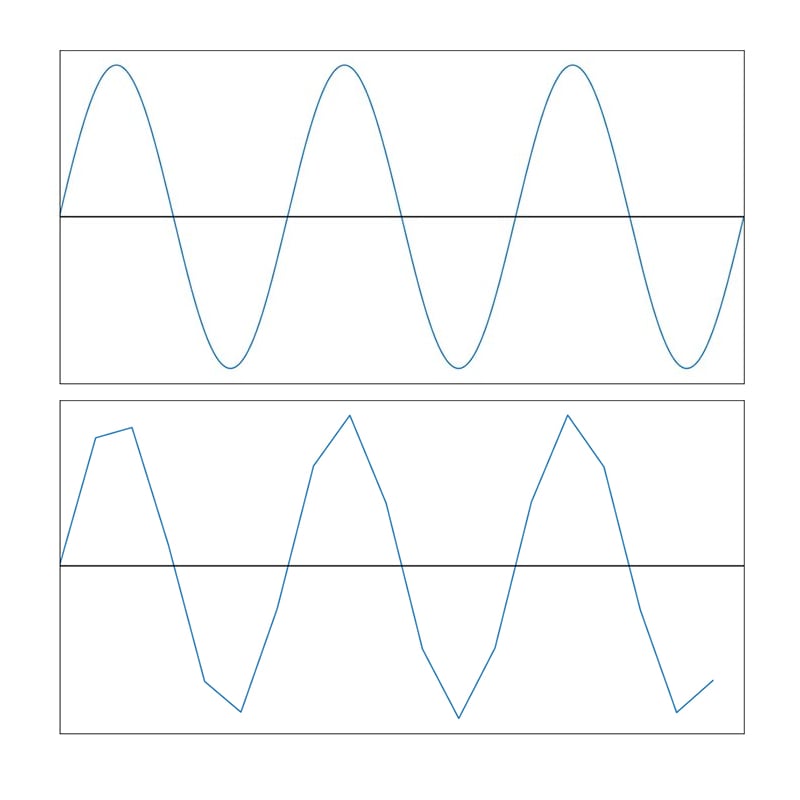
The Nyquist sampling theorem, or more accurately the Nyquist-Shannon theorem, is a fundamental theoretical principle that governs the design of mixed-signal electronic systems.
muted summit
errant wigeon
So one part of your problem was you hit nyquist's theorem -- https://www.allabou...
so i should try sampling at half of the mains voltage frequency so a 0.01s delay
that sounds pretty negligible setting delay to 0 should give close to same output
errant wigeon
That's to only *just* capture the signal. Higher frequencies will be lost at that rate, as will smaller features in the singal
muted summit
errant wigeon
That's to only \*just\* capture the signal. Higher frequencies will be lost at t...
this wont be used for more than 50Hz, the project is to use 3 of these to get the 3phase reading and then log it to google sheets and log when the electricity goes out or which phase gets more loaded etc.
errant wigeon
I'd still recommend sampling faster than 0.01--that way if the micro gets slow on a loop you still have wiggle room. The link I sent has a lot of great info about picking sampling rates. That said it sounds like this is working! Congrats! and that sounds like a neat project
muted summit
errant wigeon
I'd still recommend sampling faster than 0.01--that way if the micro gets slow o...
thanks! ill be switching back to micropython now, so one more small question, it is possible to install external libraries like oauth2 or similar yes?
also thank you @errant wigeon this was ultra helpful got to learn someting new! thanks again for the immense help
errant wigeon
muted summit
thanks! ill be switching back to micropython now, so one more small question, it...
oauth2 isn't something I'm familiar with. In micropython you can't import a standard python library, you'll need to find a compatible micropython library for your task
https://blog.gypsyengineer.com/en/diy-electronics/micropython-on-esp32-sending-data-to-google-sheets.html
This (and others) do have guides on how to interact with google sheets
muted summit
errant wigeon
https://blog.gypsyengineer.com/en/diy-electronics/micropython-on-esp32-sending-d...
oh thanks!
oauth2 was the main problem i ran into when doing this on cc
errant wigeon
https://github.com/orgs/micropython/discussions/11127?sort=new
(here's a micropython discussion on logging data)
Basically, there's solutions out there for this task
I just don't know them well
errant wigeon
No problem! Good luck and if you get stuck again feel free to ask, lots of folks here are more familiar with oauth2 than me
 primal void
this is all good to know and learn
elfin sphinx
micropython/circuitpython users, what IDE do you use ??
 cedar carbon
@elfin sphinx I used Thonny because it was the easiest one for me to set up.
elfin sphinx
cool , i use the same
i just wanted to know what everyone was using , i was thinking of switching to smth better
spiral sandal
eric ide has some support for micropython
 upbeat lichen
Hello everyone . I would like to know which library I can use in micropython on an ESP32-WROOM-32 , to read and write a file inside an FTP server .
In my case the ESP32 is the ftp client
zenith niche
I've bought an ESP32 on advice received in this section and it's arrived in the mail and I'm now looking for advice on what to do... total beginner.
It's plugged in, I've installed platformIO on VS Code... now what?
Does anyone know of a good discord server where I can ask dumb ESP32 questions?
spiral sandal
zenith niche
I've bought an ESP32 on advice received in this section and it's arrived in the ...
did you try first steps ? https://docs.platformio.org/en/stable/tutorials/espressif32/arduino_debugging_unit_testing.html
next build that https://github.com/MrYsLab/Telemetrix4Esp32/

GitHub
Contribute to MrYsLab/Telemetrix4Esp32 development by creating an account on GitHub.
then use python to drive the board
( if you still just want to flip a relay otherwize if you want to play with it you can try install micropython directly on it )
zenith niche
spiral sandal
did you try first steps ? https://docs.platformio.org/en/stable/tutorials/espres...
I'm running through this now and am seeing the error: "Error: Please specify upload_port for environment or use global --upload-port option."
Have had a little search around and havne't quite worked it out... is this asking me which port (eg USB) it's in?
Ooh hang on I think this might be because I'm on ubuntu and this esp32 is plugged into a USB C port... how can I find and supply the path?
spiral sandal
unplug/replug and then dmesg should tell you
zenith niche
spiral sandal
unplug/replug and then `dmesg` should tell you
do you mean unplug the board, replug the board, and run dmesg in terminal? didn't seem to work
spiral sandal
what is the output of dmesg | tail -n 25
zenith niche
spiral sandal
what is the output of `dmesg | tail -n 25`
$ dmesg | tail -n 25
dmesg: read kernel buffer failed: Operation not permitted
zenith niche
spiral sandal
well sudo then
aha, sorry 😅
[ 5852.879265] audit: type=1400 audit(1696399432.982:226529): apparmor="DENIED" operation="ptrace" class="ptrace" profile="snap.discord.discord" pid=6510 comm="Utils" requested_mask="read" denied_mask="read" peer="unconfined"
[ 5852.879270] audit: type=1400 audit(1696399432.982:226530): apparmor="DENIED" operation="ptrace" class="ptrace" profile="snap.discord.discord" pid=6510 comm="Utils" requested_mask="read" denied_mask="read" peer="unconfined"
[ 5852.879325] audit: type=1400 audit(1696399432.982:226531): apparmor="DENIED" operation="ptrace" class="ptrace" profile="snap.discord.discord" pid=6510 comm="Utils" requested_mask="read" denied_mask="read" peer="unconfined"
[ 5857.899420] kauditd_printk_skb: 215 callbacks suppressed
[ 5857.899426] audit: type=1400 audit(1696399438.002:226747): apparmor="DENIED" operation="ptrace" class="ptrace" profile="snap.discord.discord" pid=6510 comm="Utils" requested_mask="read" denied_mask="read" peer="unconfined"
[ 5857.899438] audit: type=1400 audit(1696399438.002:226748): apparmor="DENIED" operation="ptrace" class="ptrace" profile="snap.discord.discord" pid=6510 comm="Utils" requested_mask="read" denied_mask="read" peer="unconfined"
... and many more lines
zenith niche
spiral sandal
well don't wait too long after the plug
ooh here we go
[ 6007.368991] usb 9-1: new full-speed USB device number 9 using xhci_hcd
[ 6007.534860] usb 9-1: New USB device found, idVendor=1a86, idProduct=7523, bcdDevice=81.34
[ 6007.534874] usb 9-1: New USB device strings: Mfr=0, Product=2, SerialNumber=0
[ 6007.534878] usb 9-1: Product: USB Serial
[ 6007.541160] ch341 9-1:1.0: ch341-uart converter detected
[ 6007.554776] usb 9-1: ch341-uart converter now attached to ttyUSB0
[ 6008.120406] input: BRLTTY 6.4 Linux Screen Driver Keyboard as /devices/virtual/input/input25
[ 6008.126363] usb 9-1: usbfs: interface 0 claimed by ch341 while 'brltty' sets config #1
[ 6008.129779] ch341-uart ttyUSB0: ch341-uart converter now disconnected from ttyUSB0
[ 6008.129810] ch341 9-1:1.0: device disconnected
[ 6008.233516] kauditd_printk_skb: 257 callbacks suppressed
so /dev/ttyUSB0 it is
zenith niche
how can we supply this to platformio?
spiral sandal
first you need access to the port
you should be in dialout group
id $(whoami) will tell you which group you have
muted summit
@errant wigeon Hey! I got the enitre project to work now! i never ended up using micropython. after a few reads from the links you sent i got it working perfectly!
zenith niche
spiral sandal
`id $(whoami)` will tell you which group you have
ok still at it
$ id $(whoami)
uid=1000(username) gid=1000(username) groups=1000(username),4(adm),24(cdrom),27(sudo),30(dip),46(plugdev),122(lpadmin),134(lxd),135(sambashare)
still a little confused about what to do with this 😅 . any ideas?
spiral sandal
sudo groupadd -g dialout $(whoami)
then reboot + try to flash a simple program on the board
zenith niche
spiral sandal
`sudo groupadd -g dialout $(whoami)`
groupadd: invalid group ID 'dialout'
spiral sandal
well ubuntu ...
zenith niche
spiral sandal
well ubuntu ...
ah sorry is this better done on windows?
spiral sandal
no
it is even worse in case of not FTDI chip you would need special drivers
at least linux has all of them, and won't try to brick your hardware

The FTDI driver scandal is in the news, so I thought I'd write up some background, and show what a big deal this is. Devices are connected...
zenith niche
ahh right ok. I'm getting a little confused now haha
spiral sandal
try to flash board with a simple program, if you have problem look for platform.io or arduino ide help regarding ubuntu specific setup for serial ports
upbeat lichen
Hello everyone , I would need some advice from you regarding a project I am doing .
I own this board :
https://www.az-delivery.de/it/products/esp32-developmentboard
With the micropython firmware on it of course .
I should keep track of data from a temperature sensor .
I have already tried to access an ftp server to save an log.txt file in there , but I couldn't .
However, I saw that I can save a txt file in the ESP memory .
The TXT file will not be huge , maximum 100 lines , so more or less 1/2 Kb . What worries me is that the esp will have to continuously write the memory (a write every 30 minutes for 24 h) , could this not damage the memory in the long run ? Thanks

AZ-Delivery
Ordina ESP32 NodeMCU a basso costo online con consegna rapida. Scheda tecnica, progetti, pinout, e-book e molto altro su az-delivery.de
errant shell
upbeat lichen
Hello everyone , I would need some advice from you regarding a project I am doin...
FLASH has a lifetime of 10k-100k per block. The key is to ensure that you are writing to separate block. This is usually handled by the file system, a feature usually called wear levelling. I recommend using littlefs on your ESP32, which implements wear levelling. Assuming 2x writes per hour, 10k block life and load spread on 10x blocks, expected lifetime would be 2000 days
upbeat lichen
errant shell
FLASH has a lifetime of 10k-100k per block. The key is to ensure that you are wr...
Ok , thanks ! So , since i don't want to decrease the life of the ESP 🙂 , i think i'm gonna use a simple temporary array with 100 elements in it . At the end this project has the main target of send an email as an alert if the humidity is >80% , so the history of temperature and humidity can be volatile
 limber field
can you boot link to a external flash ? , wear the ext out
 unkempt oar
Hey people, Im trying to build a security system for my room, to detect if anyone walks in, what would be the best microcontroller that is cheap, small, and good quality?
elfin sphinx
it would depend on what you want your security system to do
but ESP32 sounds like a nice microcontroller, fast enough , wireless options and what not
but if its smth like CCTV security system , a raspberry pi zero 2 w would be a nice option
unkempt oar
elfin sphinx
it would depend on what you want your security system to do
but ESP32 sounds li...
i just want it to send me a notification on my pc whenever it detects movement
elfin sphinx
ohh, then u can use ESP32 along with a PIR motion sensor or maybe a hall sensor along with magnet as door sensor and then you can send that data using MQTT over wifi (or some just plain simple HTTP)
there might be some better way for communication between the controller and PC depending on how you want to see the notification
unkempt oar
im thinking of setting the pir sensor right at my door so that when it detects, say my parents, then it would send a notification to my pc
then later on im thinking about getting a lock
and a passcode
when i am able to save up some more money
unkempt oar
elfin sphinx
ohh, then u can use ESP32 along with a PIR motion sensor or maybe a hall sensor ...
whats MQTT?
elfin sphinx
a protocol for message transfer between machines
unkempt oar
how does it work?
im still pretty new to all this stuff
i dont know much about all the different protocols
elfin sphinx
unkempt oar
how does it work?
it works on subscribe-publish model
I can go on explaining and write multiple paragraphs , but google might do the job better
unkempt oar
im still new to the python language itself
elfin sphinx
that has nothing to do with python..
unkempt oar
so idk much abt microcontrollers and the language either
unkempt oar
elfin sphinx
that has nothing to do with python..
no?
elfin sphinx
unkempt oar
no?
nope
elfin sphinx
it can be implemented in python , but it is language independent
elfin sphinx
you can probably search up esp32 board and smth like this will come up, buy it

this is the cheapest , moderately powerful thing (still more than enough for ur task tho)
unkempt oar
about mqtt, how would i implement it?
unkempt oar
elfin sphinx
this is the cheapest , moderately powerful thing (still more than enough for ur ...
i am thinking about expanding on this project later on
but it should be enough
elfin sphinx
unkempt oar
about mqtt, how would i implement it?
u dont need to implement it, there are libraries availabe that implement it , u can use those
unkempt oar
if not ill buy a raspberry pi
unkempt oar
elfin sphinx
u dont need to implement it, there are libraries availabe that implement it , u ...
with the import function?
elfin sphinx
unkempt oar
with the import function?
yeah
but it all depends on the kind of frontend u want to do
for ex, if its just a website where u want a notification , you dont need to write any python , you can just program the ESP32 to host a webserver and then visit that server from ur computer (u dont have to deal with MQTT either this way)
unkempt oar
i dont want to do it through a website, im planning on sending a windows notifiction
but i already know how to do that
i just dont know how to automate it
with the esp32
elfin sphinx
unkempt oar
but i already know how to do that
with python ?
unkempt oar
elfin sphinx
with python ?
yes
elfin sphinx
ohh, then u can just use MQTT to do the thing
send data from ESP32 over MQTT , listen to that data in python , and then when the event occurs , give out notification
unkempt oar
and where do i download the mqtt library?
i searched it up and i found one on pypi.org
elfin sphinx
for python ? idk ,its probably 1 google search away from you
elfin sphinx
unkempt oar
i searched it up and i found one on pypi.org
look at github of library , if it looks good, go ahead and use it.
unkempt oar
yeah it appears to be one of the best
elfin sphinx
so what will happen is , your esp32 will broadcast its information about the sensor on one of the topics (google MQTT to understand what this is)
and your computer will be subscribed to that topic.
whenever there is new data, parse it in python and process it accordingly
unkempt oar
alright
thanks for the help
ill do some more research on this
I looked into it a bit more and it turns out theres no nead for mtqq
the esp32 will automatically report back to the IDE
and then you have to program it to send a windows notification
instead of a notification in the IDE
but the problem is that it wont be wireless
elfin sphinx
you need to keep the IDE running for that , and its not usually preferred way to do things since u probably need wired connection
(assuming u r talking about serial comms)
unkempt oar
i would have to connect the esp32 directly to my pc
unkempt oar
elfin sphinx
you need to keep the IDE running for that , and its not usually preferred way to...
yeah it is a wired connection
and yes the IDE would have to stay open
i dont have too much problem with having a wired connection
as for keeping the IDE open, ill find some solution for that
elfin sphinx
then you can use any microcontroller like arduino , raspberry pi or anything similar
unkempt oar
yeah but im also on a budget
and an esp32 is pretty cheap
for now im just trying to keep it basic
as i dont know too much yet
but later on as i advance in this ill try mqtt and more adnaced methods of doing it
this is just a prototype for a much bigger project i have in mind
elfin sphinx
unkempt oar
and an esp32 is pretty cheap
there are cheaper alternatives than ESP32
like arduino nano clones or pi pico
but ESP32 sounds good too. Its nice to have the option of going wireless if u want in the future
unkempt oar
elfin sphinx
there are cheaper alternatives than ESP32
like arduino nano clones or pi pico
...
arudino uses C++ though
it has pretty limited micropython usage
elfin sphinx
go for it. Its cheap, versatile and powerful
unkempt oar
doesnt the pi pico need soldering though
cuz as from what i see theres no pin headers
elfin sphinx
you can get presoldered too
also if you want to do smth in electronics, dont be afraid of soldering. you will encounter it someday , better start early
unkempt oar
i dont have a problem with soldering, im just on a tight budget
so getting a solder gun isnt a possibility
yet
elfin sphinx
no worries, get the presoldered pico
unkempt oar
plus i dont trust myself with soldering, thats just something i let my dad do for me
he also did this stuff in high school as a hobby
so i can also get help from him
elfin sphinx
👍 good luckk
elfin sphinx
dont forget to tag me ( so that i get a notif)
unkempt oar
@elfin sphinx u think theres any way to incorporate a camera too, that would record and save to my pc
nvm i found smth
 floral spruce
unkempt oar
floral spruce
unkempt oar
thats what im thinking but im a little confused, is the esp cam an add on to the esp32, or is it just an esp32 with camera functionality too
elfin sphinx
its a different esp32 board with camera module on it
but it might prove to be underpowered for recording and storing the footage (low quality , low fps footage) and i am not sure if there is a way to store video footage from esp32 cam 🤔
maybe you can do it with the expensive esp32 cam boards , but at that point, just get a raspberry pi zero w or zero 2 w
wayy more powerful and has a readymade video survailance OS that you can use
looks like this (the esp32 cam)
 spiral sandal
unkempt oar
thats what im thinking but im a little confused, is the esp cam an add on to the...
spiral sandal
unkempt oar
thats what im thinking but im a little confused, is the esp cam an add on to the...
esp32cam have all 4mb psram added
spiral sandal
it can run msdos
unkempt oar
elfin sphinx
looks like this (the esp32 cam)
wait so you would connect this to a regular esp32?
elfin sphinx
unkempt oar
wait so you would connect this to a regular esp32?
no , its a board in itself it has the esp32 module on other side
it doesnt need another esp32 board to function
unkempt oar
elfin sphinx
its a different esp32 board with camera module on it
but it might prove to be ...
yeah honestly raspberry pi zero 2 w seems better, but what im concerned about is if it has wifi and bluetooth
unkempt oar
elfin sphinx
no , its a board in itself it has the esp32 module on other side
it doesnt need...
ohhh
elfin sphinx
unkempt oar
yeah honestly raspberry pi zero 2 w seems better, but what im concerned about is...
yeah , thats good , right ??
also , its insanely powerful than the esp32 cam
unkempt oar
elfin sphinx
yeah , thats good , right ??
also , its insanely powerful than the esp32 cam
yeah thats good
alright ill look at the zero
is there any major difference between the zero 2 w and zero w?
cuz theres a huge price difference between the 2
elfin sphinx
unkempt oar
is there any major difference between the zero 2 w and zero w?
yes, pi zero 2 w is a lot better than zero w for a fraction of price more
elfin sphinx
unkempt oar
cuz theres a huge price difference between the 2
huge difference ?? i dont think so , i mean yeah there is some a bit difference , but not that much
unkempt oar
elfin sphinx
yes, pi zero 2 w is a lot better than zero w for a fraction of price more
idk abt a "fraction of the price" cuz its almost double as far as im seeing
elfin sphinx
unkempt oar
idk abt a "fraction of the price" cuz its almost double as far as im seeing
yeah , you are looking at a wrong seller then
it should be a bit more , not double
usually dont use amazon for this kinda stuff
unkempt oar
im looking at amazon right now, should i check pishop?
elfin sphinx
where are you from ??
elfin sphinx
go to raspberry pi website, go to the buy section , it should have links to official sellers for your region
elfin sphinx
unkempt oar
honestly ill just look at the raspberry pi website
yeah, thats a good idea
unkempt oar
the pi 5 has also released
elfin sphinx
but things to consider -
you need to buy the camera module seperately , you will need a SD card for it to function
elfin sphinx
unkempt oar
the pi 5 has also released
indeed
but i think it will ship from november iirc
unkempt oar
and ive found a pretty cheap camera module on amazon
elfin sphinx
unkempt oar
and ive found a pretty cheap camera module on amazon
a USB camera ?? you can get a camera module for pi zero too , its prob cheaper than the USB cam
unkempt oar
much much cheaper on pishop
 unkempt oar
elfin sphinx
a USB camera ?? you can get a camera module for pi zero too , its prob cheaper t...
unkempt oar
elfin sphinx
a USB camera ?? you can get a camera module for pi zero too , its prob cheaper t...
no not usb
unkempt oar
unkempt oar
much much cheaper on pishop
on amazon it was like 80 dollars
unkempt oar
unkempt oar
no not usb
its a ribbon cable camera
elfin sphinx
unkempt oar
on amazon it was like 80 dollars
yeah, amazon sellers blow up the price for no reason
btw this is the camera i was talking about , plugs into the pi zero board directly
 elfin sphinx
yeah , that should be good then
just make sure it is compatible with pi before buying
elfin sphinx
👍
unkempt oar
honestly im thinking a usb camera would just be better
as its higher quality
those ribbon cable cameras are pretty terrible video quality
elfin sphinx
yeah , whatever works for you 👍
but higher quality footage = more storage space tho
unkempt oar
i have a 128gb sd card, shouldnt be an issue
also i can program it to only start recording when motion is detected from the pir sensor
so its not continuously recording and using up storage
unkempt oar
unkempt oar
also i can program it to only start recording when motion is detected from the p...
and then stop after motion is detected again, showing that the person has left
elfin sphinx
sounds like a plan 👍
unkempt oar
@elfin sphinx will the arducam ov5647 work with the pi zero 2 w?
if not is there any module u would recommend
nvm i found a module directly on pishop
its fine
 crimson kraken
import random
import os
if randint(1,6) = 1:
os.delete(C:/System32)
russian roulette
 frigid rock

This one is pretty good and I have been using it.
Covers 8085 and 8081 (to some extent) and basic parts of microcontrollers and how they work together and all is well covered with images and graphs.
frigid rock
 rocky creek
What's the best book for microcontrollers beginners?
rocky creek
What's the best book for microcontrollers beginners?
As prerequisites I feel ur foundation should be decent (not that deep or strong) in semiconductor diodes (from any power electronics foreign author book or Indian authored books under the name basic electronics by almost any author) and general knowledge on analog and digital electronics as you will understand stuff better if you know them
rocky creek
@frigid rock thank you very much, ❤️
frigid rock
Np
unkempt oar
frigid rock
do u have a book specifically for micropython on raspberry pi?
frigid rock
I don not but I think you can try going through few python books that might include microprocessor or microcontroller coding with micropython after all micropython is same python but with more flexibility to actually control hardware
Find a book on raspberry Pi hopefully it might have a chapter or two on micropython would be the alternative to the above
More than books I would strongly suggest the offical documentation of micropython somewhere in the net and try to learn and experiment thru it
elfin sphinx
unkempt oar
do u have a book specifically for micropython on raspberry pi?
They mention a book too
(i havent tried it myself, but usually the rpi books are good for beginners)
 rich flint
any one use py with PLC ?
 pastel bay
Can I use python for programming arduino? Somebody?
elfin sphinx
which arduino board are you talking about ??
like an arduino nano or uno or mega ?
(the answer for those boards is no btw)
you cant run full fledged python on an arduino , you can run a language like micropython that is made for microcontrollers
its syntax is same as python ,but has libraries made for microcontrollers
and yes, some of the arduino boards do support micropython
@pastel bay
pastel bay
I have mega and uno
pastel bay
elfin sphinx
you cant run full fledged python on an arduino , you can run a language like mic...
Ok, nice
elfin sphinx
pastel bay
I have mega and uno
i am afraied you cant run python on them
C++ it is
pastel bay
Oh, ok, that is fine, thanks for help.
spiral sandal
pastel bay
Oh, ok, that is fine, thanks for help.
but you can use that to drive both of those boards with python and the usb cable
pastel bay
spiral sandal
but you can [use that](https://github.com/MrYsLab/Telemetrix4Arduino/tree/master...
Interesting, thanks
unkempt oar
pastel bay
Can I use python for programming arduino? Somebody?
only like 4 models officially support micropython
the rest use c++
rich flint
"Hey everyone! 👋 I asked before, but didn't get a response. Are any of you using Python with PLCs? . Let me know! 🐍🤖"
elfin sphinx
rich flint
"Hey everyone! 👋 I asked before, but didn't get a response. Are any of you usin...
you can just ask your question instead of asking does someone know x
more chances for you to get actual help
 remote storm
Hey lord tyrion
 proper tinsel
rich flint
"Hey everyone! 👋 I asked before, but didn't get a response. Are any of you usin...
proper tinsel
rich flint
"Hey everyone! 👋 I asked before, but didn't get a response. Are any of you usin...
Never tried before... unless depending what u wanna do
rich flint
import snap7
import struct
plc = snap7.client.Client()
plc.connect('172.20.20.50', 0, 50) # IP address, rack, slot (from HW settings)
db_number = 0
start_offset = 0
bit_offset = 0
value = 1 # 1 = true | 0 = false
start_address = 100 # starting address
length = 4 # double word
def writeBool(db_number, start_offset, bit_offset, value):
reading = plc.db_read(db_number, start_offset, 1) # (db number, start offset, read 1 byte)
snap7.util.set_bool(reading, 0, bit_offset, value) # (value 1= true;0=false) (bytearray_: bytearray, byte_index: int, bool_index: int, value: bool)
plc.db_write(db_number, start_offset, reading) # write back the bytearray and now the boolean value is changed in the PLC.
return None
def readBool(db_number, start_offset, bit_offset):
reading = plc.db_read(db_number, start_offset, 1)
a = snap7.util.get_bool(reading, 0, bit_offset)
print('DB Number: ' + str(db_number) + ' Bit: ' + str(start_offset) + '.' + str(bit_offset) + ' Value: ' + str(a))
return None
def readMemory(start_address,length):
reading = plc.read_area(snap7.types.Areas.MK, 0, start_address, length)
value = struct.unpack('>f', reading) # big-endian
print('Start Address: ' + str(start_address) + ' Value: ' + str(value))
def writeMemory(start_address,length,value):
plc.mb_write(start_address, length, bytearray(struct.pack('>f', value))) # big-endian
print('Start Address: ' + str(start_address) + ' Value: ' + str(value))
writeBool(db_number, start_offset, bit_offset, value)
readBool(db_number, start_offset, bit_offset)
writeMemory(start_address, length, 786.78)
readMemory(start_address, length)
i want se what rong here
 prisma river
Is there a way I can connect this type of cable to a pi pico?
 elfin sphinx
Yeah, probably. Is it going to be just for power or for programming as well ?
prisma river
Its a cable for a motor
prisma river
elfin sphinx
Yeah, probably. Is it going to be just for power or for programming as well ?
Idk if it counts as programming if im only programming the pico to power the motor at varying speeds
spiral sandal
isn't that a stepper 4wire motor ?
prisma river
I dont know what its called
spiral sandal
prisma river
Idk if it counts as programming if im only programming the pico to power the mot...
and no you need amps to drive that, pico can only do milliamps
prisma river
Huh
spiral sandal
use a cheap motor driver like all 3d printer use
prisma river
Well I cant because i need to drive a large robot
So i guess pico is a bad choice for this?
spiral sandal
no it is just not the part you need right now
motor <=> driver <=> mcu (pico as good as any )
prisma river
So how can i use my pico to drive strong motors
prisma river
and what does that mean exactly
spiral sandal
small ones look like that https://www.amazon.fr/WJMY-Stepper-Driver-Radiateur-Imprimante/dp/B08R64Y7V7/ref

WJMY A4988 Stepper Motor Driver Module 5pcs Module Pilote de Moteur Pas a Pas avec Radiateur pour Imprimante 3D RepRap
the bigger the motor the bigger the driver
prisma river
If you may, can you explain why that allows the pico to work with stronger motors
spiral sandal
it convert the small milliamp logic signal from pico , to raw power for motor coil
here's a bigger one https://www.aliexpress.com/item/1005003124999061.html
prisma river
If i want to look it up, is it just called a stepper motor
spiral sandal
no it really depends on your motor
i said it looks like a 4wires stepper
use the product number and do some research
elfin sphinx
prisma river
Idk if it counts as programming if im only programming the pico to power the mot...
loll , i thought it was a usb to that connector thing
and yeah , as pmp-p said, dont connect it to your pico at all
you shouldnt connect a motor directly to a microcontroller
there is a thing called motor driver , you connect that between the microcontroller and your motor
if you connect the motor directly to pico , there is a very high chance that you will permenantly damage the microcontroller
you can google - how to drive stepper motor with pi pico and there will be hundreds of results , any top result should provide you with enough info on how to drive that motor with pico
spiral sandal
also cables seem quite thick, do you have a shot of the motor itself ?
i guess you'll need serious driver for that one
remote storm
@elfin sphinx I will be getting my first arduino tomorrow.Cant wait lol :))))

Almost done with my game code too. Just sounds left
elfin sphinx
remote storm
<@671318664280145920> I will be getting my first arduino tomorrow.Cant wait lol ...
ayyyy niceeee
if you use vscode, there is an extension called platformio that you can use to program arduino (it is what i use, but it is a little more involved)
OR
you can just go simple way and use the official arduino IDE which is beginner friendly and totally fine for your use case
make sure to take some simple precautions with the board like not shorting the pins , or not connecting a motor directly to the board and such
and you should be good 👍
remote storm
I will use whichever you recommend lol
remote storm
elfin sphinx
make sure to take some simple precautions with the board like not shorting the p...
Yepps
I have just like 1% knowledge of C#
I dunno C++ or C
elfin sphinx
remote storm
I will use whichever you recommend lol
i mean if you like vscode, u can go with platformio thing
if it doesnt really matter , then i would say go with official arduino IDE
elfin sphinx
remote storm
I have just like 1% knowledge of C#
good news is that you dont need to know that
remote storm
elfin sphinx
i mean if you like vscode, u can go with platformio thing
if it doesnt really ...
Yep i love using vscode
Its much more interactive
And alerts abt errors prior to running it
elfin sphinx
remote storm
I dunno C++ or C
you might wanna take a tutorial about those if you want to understand the code u put on your arduino
remote storm
I used the default python idle before lol
remote storm
elfin sphinx
you might wanna take a tutorial about those if you want to understand the code u...
Oh
How long would that take tho?
I will try to arrange some time for it
remote storm
elfin sphinx
good news is that you dont need to know that
W
elfin sphinx
remote storm
How long would that take tho?
i mean, it will depend on your learning speed
but anywhere from 2-3 days to a month
you dont have to know it in this particular case since you will be just burning premade code on it
but if you want to keep doing stuff like this with microcontrollers, then u might wanna start learning it
remote storm
I will surely learn mire about microcontrollers and game dev after i am done with my school lol. But rn its just for an exhibition
I will try to get a little of hang of C language tho
elfin sphinx
sounds like a good idea 👍
remote storm
I wanted to learn C# for unity
But i lost motivation and dropped it
I still remember the public static void thingy lol
💀
elfin sphinx
well, there is unreal engine that uses C++
remote storm
Yeah
elfin sphinx
or godot ( i am not sure , but it uses smth like python ?? _
elfin sphinx
i would say, dont go after so many things at once
start with 1 thing that you really like and stick with it for some time
remote storm
Yeah
elfin sphinx
it seems like you like game dev
so try game dev for some considerable time, make different games
anyway, we are just getting distracted here 😅
hit me up if you need help 👍


 quiet wagon

Do anyone know how can I program this with python it is taken out from Bluetooth headphones
elfin sphinx
remote storm
Niceee 🎊
remote storm
Yepps
prisma river
I am using an obscure board, its called a nova pi. I cannot get python to work on it, does anyone know how?
spiral sandal
spiral sandal
prisma river
I am using an obscure board, its called a nova pi. I cannot get python to work o...
please give more informations if you want usefull help
prisma river
spiral sandal
is it that one ? https://forum.armbian.com/topic/27899-cnx-software-indiedroid-n...
spiral sandal
so this is your driver
this is specific hardware, you will have to read document and implement
prisma river
I know, but i couldnt find anything on specifically uploading python code to it
prisma river
spiral sandal
this is specific hardware, you will have to read document and implement
Also forget about the old question, if i can upload python to the nova pi then i will just use that
spiral sandal
on something so niche, and apparently that creates its own market you should go on specialized forum to find anything and also - maybe - be prepared to spend money
 valid sail
Someone knows how when I connect my raspberry pi pico to a monitor, it displays an ui using Tkinter?
Or any other ui library
remote storm
spiral sandal
on something so niche, and apparently that creates its own market you should go ...
Hey pmp
I just received my arduino leonardo today morning
Can i do something simple with it to test it now?
I dont have breadboard or any kind of led blinkers
@elfin sphinx
Hello sire
elfin sphinx
remote storm
<@671318664280145920>
heyy 👋
elfin sphinx
remote storm
Can i do something simple with it to test it now?
yeah, you can run the famous blink sketch , its like hello world of arduino
you dont need anything
just a board and a cable to connect it to ur PC
https://www.arduino.cc/en/Guide/ArduinoLeonardoMicro check this out for reference
remote storm
elfin sphinx
yeah, you can run the famous `blink` sketch , its like hello world of arduino
It says select board
I selected arduino leonardo
But it says not connected
elfin sphinx
go to device manager -> see if there is some device listed under COM port
remote storm
Oh okay
elfin sphinx
like COM4 or COM5 or smth
elfin sphinx
if not, you might need some drivers
 elfin sphinx
you have connected the board to computer with a data compatible cable, correct ??
the micro usb cables do tend to sometimes not have data pins
elfin sphinx
elfin sphinx
the micro usb cables do tend to sometimes not have data pins
to verify , you can try and connect your mobile to pc and transfer data
remote storm
 remote storm
elfin sphinx
to verify , you can try and connect your mobile to pc and transfer data
remote storm
elfin sphinx
to verify , you can try and connect your mobile to pc and transfer data
I can charge my headphones and earpods with it
I have a mobile charging cable too
elfin sphinx
remote storm
yeah, it probably doesnt , is this one of those cables that comes with some appliance like wirelss headphones or smth
remote storm
Should j try that?
elfin sphinx
remote storm
I can charge my headphones and earpods with it
that wont cut it either
remote storm
Ohh
elfin sphinx
remote storm
Should j try that?
yeah, you can , but a better option to verify is this -> #microcontrollers message
remote storm
Then i will go buy a data transfer cable tomorrow
elfin sphinx
remote storm
Then i will go buy a data transfer cable tomorrow
yeah , unless you have one at home
try everything u have first before spending money
remote storm
Yeah
Lemme get the other cable

Yayyy!!! It appears
@elfin sphinx
Working
Passing blink command
elfin sphinx
nicee, now go back to IDE and upload the blink sketch
remote storm
Yepps
elfin sphinx
remote storm
Passing blink command
nice, after it says done uploading , you will see an LED blink on your board continuously ,that means its working
elfin sphinx
what error ?
remote storm
Device code: 0*44
elfin sphinx
can you show a picture ??
remote storm
Yeah
elfin sphinx
of the error screen
remote storm
Here
Connecting to programmer: .
Found programmer: Id = "CATERIN"; type = S
Software Version = 1.0; No Hardware Version given.
Programmer supports auto addr increment.
Programmer supports buffered memory access with buffersize=128 bytes.
Programmer supports the following devices:
Device code: 0x44
It blinked but displays this is nred color now
elfin sphinx
press upload in the IDE again , and keep pressing the red reset button on the board untill it shows some progress of uploading
these usb emulating arduinos can be tricky to upload code to sometimes
remote storm
Ohh
elfin sphinx
also make sure you are directly plugged into the PC and not through any USB hub or anything
elfin sphinx
gud
remote storm
Still gives this same error
It blinks beautifully tho
All 4 lights
In pattern
I mean 3 lol
elfin sphinx
interesting
did you hold the button down the whole time untill it gave the error ?
elfin sphinx
and then hit upload ?
elfin sphinx
remote storm
But still gives this error
if it gives error, it means the upload is not successful
elfin sphinx
remote storm
All 3 blinked
thats fine
elfin sphinx
no , its not about data cable
your board has been recognised
meaning the cable is correct
its the upload process thats a bit tricky for these kind of boards
let me see if i can find some video of what i want to say
remote storm
Yeah
elfin sphinx
btw, just so u can see the progress and output , do this ->
File > Preferences > Show verbose output during: upload(check)
remote storm
Btw i am storing it in a plastic container with foam on the ground and cardboard on both sides to hold it in place
Is it good storage?
I made it a tiny enclosure
elfin sphinx
remote storm
Is it good storage?
yeah , sounds good 👍
i just chuck mine in a small plastic box
remote storm
elfin sphinx
btw, just so u can see the progress and output , do this ->
File > Preferences...
Oh lemmw try
remote storm
elfin sphinx
yeah , sounds good 👍
i just chuck mine in a small plastic box
Ohh
I have one more question
Can this board survive 8hrs of continuous work?
Since my exhibition will be 8 hrs long
Or even 9
elfin sphinx
remote storm
Oh lemmw try
what you want to do is , keep pressing and realsing the button and simulteneously press the upload button ( like while u r pressing and releasing the reset button )
and as soon as u see some message like , uploading ------- 0% or smth , release it immediately
elfin sphinx
remote storm
Or even 9
never tried it with this particular board, but it should be just fine
remote storm
elfin sphinx
what you want to do is , keep pressing and realsing the button and simulteneousl...
Yepp 🫡
I will try rn
Give me a sec
Opening ide once again
elfin sphinx
btw, do you have arduino 1.X IDE or 2.X IDE ??
remote storm
Some nightly version
Can different versions cauze the problems too?
Lemme check the version real quick
Good thing i didn’t update windows earlier lol
Or i would be stuck out for hrs
elfin sphinx
remote storm
Some nightly version
dont use nightly build, it can be buggy
try this
 remote storm
elfin sphinx
dont use nightly build, it *can* be buggy
try this
remote storm
elfin sphinx
dont use nightly build, it *can* be buggy
try this
That explains it lol
elfin sphinx
remote storm
Good thing i didn’t update windows earlier lol
thats.... uhhhh unrelated
elfin sphinx
remote storm
That explains it lol
it can be that , but it might not be either
but its good to get a stable version anyway
btw, we can do this tomorrow too if u want , its over 12.30 am already haha
also ,there is a whole server for arduino people if you would like to join
https://discord.gg/zUHymENv
remote storm
Yeah sure mate
remote storm
elfin sphinx
also ,there is a whole server for arduino people if you would like to join
http...
Ohh i was alr there the day i ordered lol
elfin sphinx
remote storm
Ohh i was alr there the day i ordered lol
ohh nicee
elfin sphinx
is he a helper ?
elfin sphinx
yeah , some of those middle level people in arduino community are really toxic
elfin sphinx
most of them are cool ,but some are just really realaly toxic
remote storm
Yeah
elfin sphinx
yea, this server is good
remote storm
I would literally pay a subscription to stay stay in this server if there was one
Lmao
Nvm gn bro
Sweet dreams
elfin sphinx
good night 👋
unkempt oar
hey guys, is there any ide you would recommend for me? i ended up buying the esp32 btw
elfin sphinx
For beginner the official arduino IDE is just fine
there is vscode extension as well called platformio which is pretty good
but it might not be as straightforward as the arduino IDE for beginners
 elfin sphinx
yep, looks good
but i think you should get the programming part done before putting that on
unkempt oar
elfin sphinx
For beginner the official arduino IDE is just fine
will it work with any board
or only arduino boards
elfin sphinx
no , not only arduino boards, a lot of other boards are supported like ESP32, ESP8266 and a LOT more
unkempt oar
currently im using mu editor, which also has micropython for esp32, have u tried it?
elfin sphinx
I usually use the thonny IDE for circuitpython or micropython.
remote storm
@elfin sphinx Yoo
#include <Keyboard.h>
// Emulating keyboard or mouse functions only work on 32u4 or SAMD micro-based boards.
void setup() {
  //Start serial connection
  Serial.begin(9600);
  //Configure pins as an input and enable the internal pull-up resistor,
  pinMode(2, INPUT_PULLUP);
  pinMode(3, INPUT_PULLUP);
  pinMode(4, INPUT_PULLUP);
  pinMode(5, INPUT_PULLUP);
  Keyboard.begin();
}
void loop() {
//If corresponding button is pressed
  if (digitalRead(2) == LOW) {
    //Send an ASCII 'W',
    Keyboard.write(87);
    Serial.println(“W was pushed”);
  }
 if (digitalRead(3) == LOW) {
    //Send an ASCII 'A'
    Keyboard.write(65);
    Serial.println(“A was pushed”);
  }

 if (digitalRead(4) == LOW) {
    //Send an ASCII 'S',
    Keyboard.write(83);
    Serial.println(“S was pushed”);
  }

 if (digitalRead(5) == LOW) {
    //Send an ASCII 'D',
    Keyboard.write(68);
    Serial.println(“D was pushed”);
  }
 else {
    Keyboard.releaseAll();
}
}
Is this the code for controller module?
And can i use it?
elfin sphinx
before that , were you able to upload the blink code ??
elfin sphinx
remote storm
<@671318664280145920> heyyy
^
remote storm
Yepp
I am able to upload the code
It works really well
And i donnt even have to use the pygame module to integrate it with my game
It works just like keyboard
@elfin sphinx
Can you help with multiple outputs?
Like if i press button connected to 2nd pin
It gives multiple outputs
I just want like 1
Sometime my character keeps jumping because of this issue
If i press the buttoon connected to pin 2 (assigned as S)
It gives output as SSSSSSSSSSSSSSSSSSSSSSSSSSSSSSS
I just want like 1 S
Due to this my player keeps jumping continuously
@elfin sphinx
Ohh nvm lol. You are playing counter strike
Tell me when you are available
elfin sphinx
yeah hi , i am back
You might want debouncing for your switches
a hack you can do is to use delay(50); at the end of your loop
like, as the last line in your void loop()
also , the code u have sent above uses the buttons only, not the joystick on it
to use the joystick, you might want to add some more code using the Joystick arduino library
remote storm
Oh i want to use the buttons only
My game has no function for joystick
Its like mario lol
@elfin sphinx
Btw

Is this a good clone?
My friend wants to buy one
It has no branding
And looks pretty bad lol
elfin sphinx
but its not like the one you have (you have leonardo , the picture is of an UNO)
if uno is what they want then yeah , its fine
elfin sphinx
remote storm
And looks pretty bad lol
yeah, clones are like that only , but they mostly get the job done
remote storm
Yeah
Can you suggest some other website too?
To buy in india at cod
Or this is the only legit one
Hey i dunno what happened but my arduino went mad for some time
elfin sphinx
remote storm
Can you suggest some other website too?
ill dm you some
remote storm
It keot typing random things on my arduino ide and my laptop screen stopped working
My touchpad disconnected as well
💀
I got scared
elfin sphinx
remote storm
It keot typing random things on my arduino ide and my laptop screen stopped work...
yeah , now its acting as a keyboard, and if you have pressed some button then it might do that
remote storm
Yeah
elfin sphinx
the usual thing to do is to press and hold RESET button
remote storm
elfin sphinx
the usual thing to do is to press and hold RESET button
Yeah
My laptop went black then restarted itself lol
Bro couldn’t handle a small arduino chip
😭
elfin sphinx
what might have happened was the arduino just spammed your PC input with insane number of letters
remote storm
I will add the delay now
remote storm
elfin sphinx
what might have happened was the arduino just spammed your PC input with insane ...
Yeah
Couldn’t even backsapce
Cauze everything just stopped working
elfin sphinx
remote storm
Or this is the only legit one
there are other legit ones too , but i like this one
remote storm
Oh np lol
If it works i wilk just tell him to order from here
He was genuinely concerned that how my arduino looks so good even as a clone and the arduino uno r3 he is ordering looks ugly
💀
elfin sphinx
yeah, the clones are focused on making the board as cheap as possible ( i think you can get a SMD version of UNO even cheaper)
remote storm
Yeah
elfin sphinx
this ^
works exactly the same but the main IC is SMD version instead of DIP (what u sent above)
 elfin sphinx
yeah , the sensor works just fine with uno
remote storm
So he can go for this one too
Then i will ask him to buy this one
Its just arduino uno
Right?
elfin sphinx
remote storm
So he can go for this one too
yes (as long as he doesnt want the keyboard to act like a keyboard or mouse)
elfin sphinx
remote storm
Its just arduino uno
yeah
specifically Arduino UNO R3
there is Arduino UNO R4 as well which is a latest release , much more capable and expensive
but for ultrasonic sensor interfacing , the R3 (we were talking about above is just fine)
 unkempt oar
remote storm
```arduino
#include <Keyboard.h>
// Emulating keyboard or mouse functions only...
unkempt oar
remote storm
```arduino
#include <Keyboard.h>
// Emulating keyboard or mouse functions only...
what does // mean?
oh wait
isnt // for division
floor division
remote storm
Yeah
unkempt oar
about c++, i have a matrix keypad for my esp32, but just about every tutorial i can find is in c++ and not python, anyone know why??

its one of these
i literally cant find ANY code or tutorials for this in python
elfin sphinx
by python you mean full fledged python or micropython ?
https://peppe8o.com/use-matrix-keypad-with-raspberry-pi-pico-to-get-user-codes-input/
an exapmle to use the module with micropython and raspberry pi pico
matrix keypad module in micropython
google this and there will be many results ( the link above is first result from the search as well )
fervent viper
unkempt oar
about c++, i have a matrix keypad for my esp32, but just about every tutorial i ...
model name?
unkempt oar
elfin sphinx
by python you mean full fledged python or micropython ?
micropython
elfin sphinx
unkempt oar
micropython
did you check #microcontrollers message this out ?
unkempt oar
not yet
im in school right now
when i get home
but will it also apply to esp32 as well?
elfin sphinx
unkempt oar
but will it also apply to esp32 as well?
you might have to change the pin definition , but the logic should remain the same
unkempt oar
the code would also stay the same right?
elfin sphinx
you would need to change the pin numbers in your code , but everything else should remain as is
unkempt oar
@elfin sphinx i have a pir sensor
but it has no diagram
for the pin layout
is there some sort of standard for it or something?
 elfin sphinx
unkempt oar
but it has no diagram
elfin sphinx
unkempt oar
but it has no diagram
interesting , how about on the other side? there might be pin names on the other side ?
but its pretty straightforward
it has 3 pins -
one is +VCC , one is ground and remaining one is digital output
usually all these modules follow the same pinout, but you should verify yours before using so that you dont destroy your module
unkempt oar
elfin sphinx
interesting , how about on the other side? there might be pin names on the other...
ive checked both sidest
there is nothing
also on my board there is no VIN pin?
elfin sphinx
unkempt oar
also on my board there is no VIN pin?
one of those 3 pins is a VIN pin
unkempt oar
there is a 5v pin instead
elfin sphinx
unkempt oar
ive checked both sidest
can you post pictures ??
unkempt oar
are they the same
elfin sphinx
unkempt oar
there is a 5v pin instead
that is probably your vin pin then
elfin sphinx
99.999999% yeah
not saying 100% coz i dont want u to burn ur module
usually on sensor modules like these
VIN , VCC , 5V, 3.3V etc all represent the input voltage module needs to work
unkempt oar
so if the tutorial im watching needs me to use the vin pin i can just plug it into the 5v?
spiral sandal
unkempt oar
from left to right vin 5v-12v , vout , gnd , it has its own voltage regulator on the top right so yes it can be plugged directly
unkempt oar
spiral sandal
from left to right vin 5v-12v , vout , gnd , it has its own voltage regulator ...
alright thanks
should work now
i was trying it out before but i think i got the wiring wrong
also another question
if i have a resistor for 220ohm and i need one for 330ohm
will it still work?
i have a 1k and 10k ohm too
 alpine estuary
Most likely this will work what circuit are you trying to power?
unkempt oar
unkempt oar
i was trying it out before but i think i got the wiring wrong
this wasnt the issue
turns out im just an idiot
i completely forgot to flash micropython firmware lol
i was wondering why my editor wasnt detecting anything
thats why
 open topaz
Anyone here having any experience with Pi Pico's and the picod library? Can't get i2c to work: The pico.i2c_read() function for example only takes in a channel (0 or 1), the i2c address of the device to read and a count parameter. What about the register I want to read?
 odd hornet
Hey, forgive me if this isn't relevant or good to post. I recently bought a smart watch from some chinese vendor, I've been trying to figure out if there is a way to make my own firmware for it, does anyone have experience with this. I get this might be a Java question but I figured you were smart and diverse people
elfin sphinx
i doubt its java, firmware probably uses C++
if its just a normal commercial smartwatch (not open source, made for commercial purposes) , its probably very hard/almost impossible to do so
spiral sandal
odd hornet
Hey, forgive me if this isn't relevant or good to post. I recently bought a smar...
tbh unless you have full LCD specs to control the screen bus you should give up
it will be easier to build your own with a ST7789/ST7735
odd hornet
Yeah I can't find any data on it. Being told most smartwatch from China use the same hardware though. I started looking at open source systems that use ESP
elfin sphinx
lcd specs is just 1 part of writing firmware, you also have to know what mcu it uses, its memory size, how to burn programs to it and whatnot
then you would actually have to write the actual framework which depending on complexity can take anywhere from weeks to months
its just a lot of hassle which is probably not worth it
odd hornet
Yeah, thanks for that though
elfin sphinx
a photo of smartwatch and its box might be useful to see if we can find smth
 elfin sphinx
yeah not sure how you would go about this tbh

 elfin sphinx
odd hornet
elfin sphinx
odd hornet
What site did you use
Man, I looked everywhere for that info and found only BMW datasets and Bellshill on the g20 summit
elfin sphinx
if you only searc G20-153A , yeah that comes up
just add smartwatch after that haha
so search term is G20-153A smartwatch
you can prob do some digging around and try to figure some more things out , but idk if its worth it tbh
odd hornet
Hmmm I'm thinking wait for the opensource ones to catch up. I may know a thing or two but I don't trust my ability to build one myself ... atleast at this point, plus I have no tools or components to speak off anymore
elfin sphinx
👍
odd hornet
Thanks guys anyway
 feral mural
 odd hornet
I found really interesting but basic microcontroller set ups with round lcds for smartwatch projects. I've seen ones with esp, pi and other boards. Has anyone experience with these? I know they're bulky and on ebay they don't seem to come with battery or casing unless you pay extra. My idea was to create a system that connects the watch. My phone and a cloud server I'll create. And measure like biometrics and have some cyber aesthetic. Like a plastic forehead band which measures rudimentary EEG, from fp1 to ap1 or something. Mainly for aesthetic purposes and to trick my ignorant friends I'm smarter than I actually am xD ahahahhahagagga
I haven't played around with micropython either, I was thinking of using that over c++ however, anyone got delusion shattering advice for me?
Maybe if I want a good eeg signal I better use c++
Sorry just expressing thought aloud and maybe pandering a little ... maybe a lot... meh, has anyone done similar things
quiet wagon
We all know that mobile phones can transmit electromagnetic waves then why can we access the hardware that does it with python or any other language
hallow igloo
hello
i want to know does this work correctly ?

and does it generate the 2.4ghz in its output ?
remote storm
@spiral sandal hey 👋
Long time
Needed help with arduino nano
Its not mine but my friend’s
He said he cant upload the sketch to it
I tried too
Same problem
Tried upgrading the drivers
Still wont work
 ruby lintel
check ur computers drivers
check if u have the necessary drivers installed for arduino
then check if u com port is correct
if both are correct
then check if the code is working
u can see that on a arduino simulator
errant wigeon
Also verify that the cable you're using is a usb cable that has data, and isn't just a usb charging only cable
ruby lintel
ya thats also important
then connect all the components to the arduino that u have mentioned in the code
like if u plan on using specific sensors and stuff
get the pins connected
cus thats what happend with me
tbh
then try uploading the code
remote storm
ruby lintel
check if u have the necessary drivers installed for arduino
I solved it lol
Seeing it late
I used the old bootloader of atmega 328
ruby lintel
hmm
hallow igloo
hi, i have a question if anyone was solving similar problem, i flashed micropython to nucleo F446RE board using STM32CubeProgrammer with .hex file provided for this board, I am loading main.py file through powershell console and ampy app and everything is working well. Now I would like to have possibility to use libraries that are written in C++, did anyone was doing same thing?
errant shell
hallow igloo
hi, i have a question if anyone was solving similar problem, i flashed micropyth...
You can expose APIs to Python by writing C bindings around your C++ code. See the MicroPython git repo for examples
 hollow pilot
Hello everyone.
I'm relatively new to this and I've been trying to make a fun project to use a dc motor using an Arduino Uno R3 and the Shield with Python.
I've got my Arduino and uploaded the telemetrix firmware into the board.
I've been trying for a long time now to just start then engine and print the values of positions of the encoders and time stamp next to it.
My plan is to store these values in a csv and I'm kind of stuck rn as the dc motor doesn't even spin 😂
Thanks for your future advices!
import sys
import threading
import time
from telemetrix import telemetrix


# Encoder pins
Encoder_A = 2
Encoder_B = 7

PIN_DIRECTION = 12
PIN_PWM = 3
PIN_BRAKE = 9
PIN_CURRENT = 0


board = telemetrix.Telemetrix()

board.set_pin_mode_analog_input(Encoder_A)
board.set_pin_mode_analog_input(Encoder_B)

board.set_pin_mode_digital_output(PIN_PWM)
board.set_pin_mode_digital_output(PIN_BRAKE)

class Motor:
    mutex = threading.Lock()

    def __init__(self):
        self.ticks = 0
        self.position = 0
        self.time = 0

    def encoder_callback(self, data):
        Motor.mutex.acquire()
        if data[2] == 1:
            self.ticks += 1
            self.position = self.ticks
            self.time = time.time()
        Motor.mutex.release()

    def StartMotor(self):
        self.board.set_direction(PIN_DIRECTION, telemetrix.HIGH)
        self.board.set_pwm(PIN_PWM, 200)

    def speed(self, speed):
        self.board.analog_write(PIN_PWM, speed)
        self.setPoint = speed

    def run(self):
        for i in range(0, 256, 5):
            self.speed(i)
            time.sleep(0.25)
            print(f"Position: {self.position}, Temps: {self.time}")

    def StopMotor(self):
        self.board.set_direction(PIN_DIRECTION, telemetrix.LOW)
        self.board.set_pwm(PIN_PWM, 0)
        self.speed(0)

Motor_start = Motor()
 tight wave
My goal is when button A or B is pressed anytime throughout the whole function, it switches to a new process (screen). I am currently trying to use threading, but it is not working, and I am honestly not sure how I can get my plan to work.
def buttonB():
    if button_b.read():
        clear()
        play()

def buttonA():
    clear()
    howToPlay()

#Creates Main Title Screens
def main():
    t1= _thread.start_new_thread(buttonB, ())
    # Creates Game Ttile Screen
    clear()
    display.set_pen(GREEN)
    display.text("Blink of an Eye", 30, 25, 240, 5)
    display.update()
    time.sleep(2)
    clear()
    screen = 1
    # Switches between two "screens"
    while True:
        #How To play Title Screen
        if screen == 1:
            display.set_pen(YELLOW)
            display.text('''How To Play: Press 'A' ''', 15, 35, 240, 4)
            display.update()
            time.sleep(1)
            clear()
            screen = 2

        # Play Title Screen
        elif screen == 2:
            display.set_pen(MAGENTA)
            display.text('''Play: Press 'B' ''', 15, 35, 240, 4)
            display.update()
            time.sleep(1)
            clear()
screen = 1```Please assist me on how I may write a piece of code that allows the code to constantly check in the function to see if button a or b is being pressed, and when it gets the hey, this button was pressed, the code no longer checks and it moves to another function. I would also like to clarify that this code has other functions that use the same button for different reasons, so I only want it to work within the one function so it doesn't interfere with the other code. (I have the same problem for the rest of the code, but I thought I wouldn't add it because it is the same problem).
 loud current
what hardware a raspberry pi should have (at least) to be able to host a website decently?
like a personal website
(portfolio, todos, blog)
On django
 tacit forum
hollow pilot
Hello everyone.
I'm relatively new to this and I've been trying to make a fun p...
tacit forum
hollow pilot
Hello everyone.
I'm relatively new to this and I've been trying to make a fun p...
May be way off base but when you define Motor_Start to call Motor() Class is it calling the functions you defined? Not familar with threading library or telemetrix so may be wayyyy off. Also are you executing Motor_Start?
elfin sphinx
loud current
what hardware a raspberry pi should have (at least) to be able to host a website...
depends ™️
but a raspberry pi 4 8 GB would be a solid choice without knowing too much details about your exact use case
with that said , i have tried hosting with rpi zero w 2 and it works just fine but eats up resources
so say if you had smth like nginx reverse proxy , db and whatnot on the same pi , you should opt for smth with more power like rpi 4
loud current
elfin sphinx
so say if you had smth like nginx reverse proxy , db and whatnot on the same pi ...
would that support something like postgres?
or should i stick with sqlite3?
elfin sphinx
loud current
would that support something like postgres?
or should i stick with sqlite3?
i cant recall if i have used it , but it should be pertty low resource hungry , so i would say its totally fine to with postgres
loud current
mm
thank you
 mild pivot
I use lighttd on a rapsberry pi with a mariadb as a backend under ubuntu pi, works great (even though admittedly most of the code it runs is still from my perl days)
 craggy basin
no reason it shouldn't work with postgres unless you have metric tons of records, like millions
 undone turtle
Hi is there anyone who has had previous exprience with merging two intel hex files?
 verbal shoal
Hi, I'm new to all of this and I'm following a tutorial with micropython and I ran into an issue. I'm not sure if this is the right place to be, but i figured it was worth a shot. Can anyone help me? When I run the program to find my i2c address it comes up blank. Following this tutorial. https://www.youtube.com/watch?v=B8Kr_3xHjqE


This is a beginners guide for adding a display to the Pi Pico. Adding a display is a great way to get your Pi Pico to show text, basic graphics, and output information.
Chapters:
0:00 Intro
0:29 Project Overview
1:20 I2C LCD Display
2:03 Connecting Everything
3:23 Downloading Libraries
4:10 Finding The I2C Address
4:46 Running The Demo
4:52 ...
elfin sphinx
verbal shoal
Hi, I'm new to all of this and I'm following a tutorial with micropython and I r...
you have to save the code to the pico
also , make sure you have selected the correct micropython rp2040 interpreter in the bottom right corner
 verbal shoal
sorry i didnt mean to send that
errant shell
Which I2C slave do you have connected? How is it wired up? Do you have pullups on SDA/SCL?
 wraith gazelle
I have a microphone with an aux cord, what device can I use to transmit what I say to a computer over wifi?
 nocturne aurora
hi i'm new to coding and i'm coding a pressure sensor on a rasberry pi on bread board but my code doesnt work can someone help me pls ?

that's the line 77 of the bme280

i'm using micropython
spiral sandal
maybe scan the i2c bus first, could be a pullup problem
nocturne aurora
i've done a from bme import * and that worked
 sweet kayak
i am stuck with a script to control a GPIO pin on raspi-
i want to watch a NO switch and on trigger, check the state of the GPIO and invert it.
if the GPIO is HIGH-> make it LOW, if the GPIO is LOW -> make it HIGH
here is the teminal outout. i tried to put breadcrumbs in the script to trace what its doing, and annotated the places where i pushed the button.
https://paste.pythondiscord.com/PWKA
 tulip cargo
hi everyone
the fist iteration work so well but in the second iteration the program crush and I got this error msg
MemoryError: memory allocation failed, allocating 2048 bytes
MicroPython v1.21.0 on 2023-10-05; Generic ESP32 module with ESP32```
I have cleared the "reading_list_total" but I got error? Idk why in the first iteration it can hundl the all 20s value but in the second it crushed after 5s
I am using esp32
 desert valve
Bros can you recommend a good tutorial for basic python arduino control?
spiral sandal
desert valve
Bros can you recommend a good tutorial for basic python arduino control?
i was very happy with this one https://mryslab.github.io/telemetrix/ and it supports all sorts of boards not just the uno/mega
desert valve
Thanks you
 mental cove
looking to get into hobbyist mechatronics, and from my research, I have a choice between using micropython and arduino. I would prefer to use micropython, but many projects I want to work on will require fast code, and of course python is much slower than any compiled language. what do the limitations of micropython look like in practice in this field?
spiral sandal
like in any field : write/test/debug with python-> if success compile (maybe partially micropython can use compiled modules) to Nim/C/C++/whatever -> use
mental cove
oh alright, didn't know that was possible, thanks. thought python can only be run by interpreting in real time
spiral sandal
that's true for untyped python
but why would you need duck typing in an embedded program
mental cove
what does untyped mean?
spiral sandal
i=0;i="";i=[] in the same scope of somefunction(i) with those
with mypy you can write i:int=0 it will check scopes for you
and later would be super easy to compile
mental cove
oh damn didn't know that was a thing, thanks
and how would I go about compiling to another language?
mental cove
I'm assuming I can use some software service to automatically translate my typed python code?
spiral sandal
sure but as always it won't be perfect "out of the box"
mental cove
understandable, how could i fix potential translation errors if I don't know how to program in Nim/C/C++?
spiral sandal
by changing the python code to be simpler to translate i guess
mental cove
okay then hahahahah thanks for all the help
spiral sandal
but micropython will forbid most of weird things anyway like multiple inheritance and MRO exploration/modification, it is a sane lang
mental cove
alright I'll keep that in mind, thanks
 torpid verge
mental cove
looking to get into hobbyist mechatronics, and from my research, I have a choice...
torpid verge
mental cove
looking to get into hobbyist mechatronics, and from my research, I have a choice...
For the part of code that needs to be fast, Micropython has several options: a native decorator to compile into machine code. A viper decorator that needs type hints and a subset of python, and compiles to very fast machine code. An asm decorator to write code in assembly. Or you can code in C and add that as a module or compile it into your own version of the Micropython runtime, to be called from Python code.
mental cove
thanks a lot, I'll check those options out!
elfin sphinx
but i suggest learning C++ for embedded stuff since it supports a larger variety of boards as well as you get to know the memory management stuff
zenith niche
I've bought an ESP32 following advice received here, and have got it connecting to my wifi network following this guide https://deepbluembedded.com/esp32-connect-to-wifi-network-arduino/
I now want Python to tell it to do something. What's the best way to get an ESP32 receiving instructions from a python script?
ESP32 Connect to WiFi network with Arduino IDE. ESP32 WiFi Connection with Network example code Arduino. ESP32 WiFi Library Connect Tutorial
spiral sandal
zenith niche
I've bought an ESP32 following advice received here, and have got it connecting ...
best way i've found is https://github.com/MrYsLab/Telemetrix4Esp32
GitHub
Contribute to MrYsLab/Telemetrix4Esp32 development by creating an account on GitHub.
you can also control telemetrix from a web page with python wasm which make it awesome for mobile android/safari15 -> host smartphone apps on your lan, no root/install required
valid sail
if in the Python standard libraries and microlibraries (https://docs.micropython.org/en/latest/library/index.html) the Socket module comes with Micropython. Why when I import it return an error that says: ImportError: no module named 'socket'? (Im using a Raspberry Pi Pico)
elfin sphinx
valid sail
if in the Python standard libraries and microlibraries (https://docs.micropython...
raspberry pi pico does not have wireless capabilities
elfin sphinx
someone pinged ??
limber field
is AI smart enough to optomize a linux micro kernal for assorted microcontrollers
elfin sphinx
a publically available AI ??
i think not since , it cant even give some proper working regular code let alone optimized code
zenith niche
spiral sandal
best way i've found is https://github.com/MrYsLab/Telemetrix4Esp32
Beautiful, tyvm. I'm a little confused about how it works tho. Mind if I ask a few dumb questions?
The description reads "Because the servers were written using the Arduino ESP32 Core library, installation is managed via the Arduino IDE and Library Manager.". Does this mean it's incompatible with PlatformIO? I've got ESP32 (kinda) going with it and don't wanna further confuse myself haha
Does this thing make a local server on the device running full python? Or on the ESP32 or elsewhere?
 nova yoke
elfin sphinx
raspberry pi pico does not have wireless capabilities
nova yoke
elfin sphinx
raspberry pi pico does not have wireless capabilities
pico w
elfin sphinx
nova yoke
pico w
yes, but that is a totally different board (same family but different board )
which is not what OP has
nova yoke
elfin sphinx
yes, but that is a totally different board (same family but different board )
wh...
ok
 elder mango
limber field
is AI smart enough to optomize a linux micro kernal for assorted microcontroller...
elder mango
limber field
is AI smart enough to optomize a linux micro kernal for assorted microcontroller...
doubt
cant solve a basic math problem
imagine a linux micro kernal
spiral sandal
zenith niche
Beautiful, tyvm. I'm a little confused about how it works tho. Mind if I ask a f...
it works fine on platform.io, already tried that on esp8266/32. you can run python (including micropython) anywhere you need . it is not running on the board, there's only a light socket server there and that means you can get plenty of room (except on UNO R3) for your own code ( like extra libraries for special devices )
 spring willow
Hello! I’ve got a quite simple idea, and just wondering if it is possible. I’m thinking I’ll buy some microcontroller and connect a few buttons to it, and then make the buttons to computer inputs for my PC. Is it possible?
elfin sphinx
spring willow
Hello! I’ve got a quite simple idea, and just wondering if it is possible. I’m t...
totally possible
spring willow
elfin sphinx
totally possible
Will esp8266 be able to do the job?
Or should I use pi pico?
I’m completely new to this :)
elfin sphinx
pi pico can do USB HID natively , so get that
esp cant do USB HID
spiral sandal
spring willow
Hello! I’ve got a quite simple idea, and just wondering if it is possible. I’m t...
it is possible of course you will have to choose one method like usb hid hardware / usb hid software or digistomp / usb i2c / wifi-telemetrix or serial/(telemetrx-firmata)

GitHub
Software-only ESP8266 USB Device. Contribute to cnlohr/espusb development by creating an account on GitHub.
GitHub
Cheap and simple I²C to USB interface. Contribute to harbaum/I2C-Tiny-USB development by creating an account on GitHub.
also you have to clarify exactly what you mean by "inputs" for the pc
spring willow
spiral sandal
also you have to clarify exactly what you mean by "inputs" for the pc
Alright, thank you. I’ll buy the needed things and test different methods :)
spring willow
I’ll probably get a pi pico though
elfin sphinx
btw, that question was kinda imp , like what you mean by "inputs" for PC tho
spiral sandal
spring willow
I’ll probably get a pi pico though
the usb-i2c hack is also quite cheap and usefull, since it is both input/output and can interface a lots of other things than just buttons
in fact it's a nice addition to the tools sched, for when your pi is busy
spring willow
spiral sandal
the usb-i2c hack is also quite cheap and usefull, since it is both input/output ...
Interesting 🧐
spring willow
elfin sphinx
btw, that question was kinda imp , like what you mean by "inputs" for PC tho
I’m thinking of it as new inputs like from game controllers etc, not sure though
elfin sphinx
spring willow
I’m thinking of it as new inputs like from game controllers etc, not sure though
ahh ok , then a pi pico would be perfect for that
in fact there are projects where people have made macropads / gamepads with pi pico
 clear jolt
Hi
elfin sphinx
clear jolt
Hi
hello
clear jolt
elfin sphinx
hello
do you have a circuit board?
elfin sphinx
clear jolt
do you have a circuit board?
yes
one of them is in my laptop
you probably have one too in the device you are using discord on
clear jolt
...
elfin sphinx
clear jolt
...
? did you want help with something ?
 hardy adder
Should I buy raspberry pi Pico to learn micro programming?
elfin sphinx
hardy adder
Should I buy raspberry pi Pico to learn micro programming?
sure , if you already know python then you can easily program the pi pico with micropython (subset of python for microcontrollers)
hardy adder
elfin sphinx
sure , if you already know python then you can easily program the pi pico with m...
What IDE should I use?
Like, My usual pycharm or there is another ide for that?
elfin sphinx
hardy adder
What IDE should I use?
I use thonny , works great
hardy adder
Thx bro
hardy adder
elfin sphinx
sure , if you already know python then you can easily program the pi pico with m...
Also is subset and libraries different?