
#unix
1 messages · Page 52 of 1
 harsh owl
 harsh owl
the way to test it before that is with the command line ssh command, you will need to be able to successfully ssh into your vps before you start any pgadmin configuration
basically you'd get the ssh proxy (tunnel) up and running, as any config there wouldnt work without that
 torn forge
i will check out that article and give it a shot thank you
 wise forge
 main olive
hello
main olive
hello
I can't say no to a pink pony, what's up?
main olive
wise forge
I can't say no to a pink pony, what's up?
Have you heard of gpt-neo? It's an open source model with similar architecture to gpt3
I was fine tuning the model upon some netflix movie scripts, and in the middle of my training it stopped and terminal spouted out 'killed0:01'. It seems I ran out of RAM! I tried to enable swap space, but nothing's working. I'm all out, and my computer is totally frozen.
wise forge
main olive
Have you heard of gpt-neo? It's an open source model with similar architecture t...
do you have SSD?
what is your operational system?
main olive
wise forge
what is your operational system?
yes I have an ssd, I'm on debian buster
wise forge
main olive
yes I have an ssd, I'm on debian buster
desktop/server?
main olive
wise forge
desktop/server?
desktop
wise forge
main olive
desktop
https://linuxize.com/post/how-to-add-swap-space-on-debian-10/
it looks like a working guide for your case
try first command to check if you have swap enabled and which size
sudo swapon --show

Swap is a space on a disk that is used when the amount of physical memory is full. This tutorial will guide you through the steps of adding a swap file on Debian 10 Buster.
main olive
wise forge
https://linuxize.com/post/how-to-add-swap-space-on-debian-10/
it looks like a wo...
I have no swap on and I can't enable swap space because my computer is frozen I can't do anything
wise forge
main olive
I have no swap on and I can't enable swap space because my computer is frozen I ...
well, I guess it is too late for anything then
reboot PC then
and hope you will not break your file system
main olive
wise forge
reboot PC then
wait, I'm rebooting
main olive
wise forge
or from another PC/phone?
another phone
wise forge
emergency reboot?
main olive
!!it's not turning back on
wise forge
what?
main olive
i shut it down and logged out, but when I try to turn it on again, nothing happens!
wise forge
can you be more specific?
anyway.
you can always load LIVE OS installer to your USB
run in LIVE mod, save all your files, if necessary
main olive
wise forge
can you be more specific?
the screen just stays black, it doesn't turn on
wise forge
and reinstall properly OS with swap enabled
wise forge
main olive
the screen just stays black, it doesn't turn on
can you enable UEFI?
main olive
wise forge
can you enable UEFI?
oo! lemme try
no, just a back screen
I'm beginning to panic
wise forge
main olive
no, just a back screen
I'm beginning to panic
which model your PC/laptop?
and what is it PC or laptop
main olive
wise forge
and what is it PC or laptop
laptop
wise forge
(dell, HP, what is it?)
main olive
it's actually a chromebook
HP chromebook
but I used a script called "crouton" to install linux on my chromebook
wise forge
main olive
it's actually a chromebook
HP chromebook
but I used a script called "crouton" to...
try rebooting with continuisly pressing F11
wise forge
F1, F2, ESC,DEL, F8,F10, F11,F12 randomly?
wise forge
main olive
Even a hard reset isn't working!!!
holding Alt+PrintScr and typeing "REISUB"?
weird.
UEFI/BIOS should be working anyway
as long as hardware is all right
wise forge
shrugs
I usually always made swap sectors during OS installation
wise forge
I think he is not available due to stress though
main olive
hello, is there a way how to create fake S.M.A.R.T data of virtual disk in Linux?
 dusk knoll
e
main olive
wise forge
holding Alt+PrintScr and typeing "REISUB"?
i was on a chromebook
btw it worked
I did it
I opened it up and got all my data securely
wise forge
main olive
I opened it up and got all my data securely
great
 tulip perch
main olive
it's actually a chromebook
HP chromebook
but I used a script called "crouton" to...
tulip perch
main olive
it's actually a chromebook
HP chromebook
but I used a script called "crouton" to...
wait u can install linux on chromebook?
ik u can enable linux
but can u replace chrome os with linux?
 gray coral
Hello help me

I wanted to format time_total variable in order to get number only four digits after period
main olive
gray coral
Hello help me
how is that related to python
gray coral
unix
main olive
yeah but how is it related to python
gray coral
json
main olive
huh
this channel isnt just for unix help its for unix help related to python
maybe ask in an offtopic channel
gray coral
unix + dictionary
main olive
tulip perch
but can u replace chrome os with linux?
no, not replace. And I didn't just enable linux, that installs a container. I built the wole operating system with a script called 'crouton'
tulip perch
main olive
no, not replace. And I didn't just *enable* linux, that installs a container. I ...
Ok thanks
main olive
tulip perch
Ok thanks
u r welcome
 glass oyster
hey guys i am new to ubuntu infact i just installed it today
i am having trouble with screen tearing can you all help me
main olive
@glass oyster don't ask to ask, just ask
 lavish storm
poke into xrandr
 tender plinth
Hello , does anyone know what the alternative for stdlib's exit() function is in linux kernel module programming?
 west salmon
Does anyone know have to have tmux automatically run a script (e.g poetry run python main.py) on startup? (I have tmux continuum that lets tmux auto-restart if my system reboots, but it doesn't run the script or start in the same directory as the script)
 robust cave
@west salmon can you instead of running tmux on boot, run a script on boot that runs tmux and runs the script in tmux using tmux send-keys?
 shut tusk
Hey
In Ubuntu, when I execute apt install <package> , then from where is the package downloaded?
Like, is there any repository like AUR for Ubuntu?
harsh owl
it pulls from source.list files, which have http, https, ftp (usually https) urls
there are non-official repos kind like aur, called ppa's
shut tusk
Oh
harsh owl
though its a mess of snap nowadays, im less familiar with that. this may help: https://help.ubuntu.com/community/Repositories/CommandLine
shut tusk
So, in source.list , there is http links for every package ?
harsh owl
basically, theres usually one that pulls in package lists of the binary .deb packaged files, and deb-src lines to get the source + packaging glue
harsh owl
np. debian works the same way.
 storm trellis
Hi all, I am not sure if this is a Raspian/Linux specific question but after a countless number of hours I have finally gotten my Python script running at boot using the crontab and a shell command to invoke a Pi file. I had to change multiple directories and essentially reinstall Python on my Pi, but my question is my Script runs perfectly fine from the terminal, but when booting the Pi up I get no response from my endless Python loop. From the error logs, the module pynput is unable to start as the error is within the library of pynput itself. I do not get this error whatsoever running from terminal. I have also invoked a sleep command from crontab and within my script to wait for the Pi to fully boot to no avail. Could someone please offer some input on this? thanks
harsh owl
Farid: i would maybe start the job in a screen session you can resume later to see whats going on.
storm trellis
harsh owl
Farid: i would maybe start the job in a screen session you can resume later to s...
sorry i dont understand?
harsh owl
so like this basically; https://unix.stackexchange.com/a/47279

Unix & Linux Stack Exchange
I'm trying to force GNU screen to create a "virtual" terminal, without attaching to it, execute script inside and NOT terminate session once script ends.
I tried many combinations, including:
scr...
it'll start a screen session (which is like tmux), execute the command, then hang around after executing. then you can resume the screen session and see what it did
storm trellis
thanks ill try that
west salmon
robust cave
<@!242831110411780097> can you instead of running tmux on boot, run a script on ...
I'll give this a wirl thank you
 half dagger
well if you don't have anything installed that depends on python2 you can remove it
half dagger
I don't think so it comes preinstalled on 20.04
harsh owl
i didnt think so either
half dagger
but leave it there might be some programs that depend on it
shut tusk
Ok
 finite crater
Ultimately what I want is for the directory to appear without the green background/light blue text that I cant read. I believe this is due to write permissions available to all users.
$ sudo chmod o-w handmedown
$ ls -l

drwxrwxrwx  1 shaen shaen 8192 Apr 30 09:57 handmedown

$ cat /etc/fstab | grep "handmedown"

UUID=B4288EE6288EA6C8    /mnt/handmedown ntfs-3g umask=0000,uid=1000,gid=1000,defaults,windows_names 0 0
Whats the deal here.

$ sudo umount /dev/sdb4

$ sudo chmod og-w handmedown/
$ ls -l
drwxr-xr-x  2 shaen shaen 4096 Nov 30 17:35 handmedown
$ sudo mount -a
$ ls -l
drwxrwxrwx  1 shaen shaen 8192 Apr 30 09:57 handmedown
it has to do with the fstab config
Basically any ntfs drive i mount seems to do this.
(I just wanat to be able to read my directory names lol)
rw,users,noauto,uid=1000,gid=1000,umask=022 0 0
this worked
 crimson thistle
Hi guys! How can I turn "text" into a fully functioning private key? 😄
 summer trail
finite crater
Ultimately what I want is for the directory to appear without the green backgrou...
summer trail
finite crater
Ultimately what I want is for the directory to appear without the green backgrou...
try umask=007 in /etc/fstab and see if that shuts it up
 frigid solar
half dagger
but leave it there might be some programs that depend on it
frigid solar
half dagger
but leave it there might be some programs that depend on it
python2 support has been removed, so there shouldn't be any programs dependent on it
finite crater
rw,users,uid=1000,gid=1000,umask=022 got it stop complaining with the colors and set correct permissions.
tbh I think I had a typo in the original config or something. Or maybe was using one too many wrong keywords.
half dagger
frigid solar
python2 support has been removed, so there shouldn't be any programs dependent o...
Yea exactly cuz it doesn't come preinstalled so i thought he might be using something related to it
finite crater
Right now im currently moving 565G from external drive partition to other partition on same device. Its taking forever..
/dev/sdd1       916G  565G  305G  65% /media/toshi-ext4
/dev/sdd2       932G  331G  602G  36% /media/toshi-ntfs
im tired of not having access to ext4 on windows and tired of having to split my drives in half for both. It makes a mess, a lot of duplicates, etc.
Are there any repercussions for just using ntfs drives for majority of storage on Linux? I know you have to be tricky about mounting them with the correct permissions and such.
wish this drive was ssd 
storm trellis
hey anyone know why pynput module fails to load on startup but works perfectly fine form terminal session?
is gives me: failed to aquire X connection...cant connect to display ":0", no protocol specified
Pi running Raspbian i should mention
finite crater
are both of these needed in .zshrc? I see mention of $FPATH and $fpath in docs.
export FPATH=$HOME/.zshfn:$FPATH
fpath=( ~/.zshfn "${fpath[@]}" )
topic: autoloading zsh functions
They seem to be literally the same but docs seems to mention both at the same time
$FPATH / $fpath
is commonly said
 rain spoke
hello linux
tender plinth
Hello , I've wanted to build a specific version of the GNU lib (not glibc) , the docs suggest using a gnulib tool , can someone with experience suggest me a source which I can use to build GNU lib for ubuntu?
storm trellis
how would i close a program gracefully not killing it? i use kill but that just forcefully shuts it down and ruins everything
I just need it to be equivalent to pressing the 'x' key on the top right
 warped nimbus
storm trellis
how would i close a program gracefully not killing it? i use `kill` but that jus...
warped nimbus
storm trellis
how would i close a program gracefully not killing it? i use `kill` but that jus...
Send it SIGTERM instead of SIGKILL
I thought pkill uses sigterm by default anyway
 languid fern
not that good, but just a cli wallpaper engine for lincox based systems
storm trellis
warped nimbus
Send it SIGTERM instead of SIGKILL
thanks, I circumvented this problem by adding --norestore to the shell command
so killing it abruptly has no effect, as the file is being redownloaded from the server every time it is opened. I am happy
so, I used sudo kill -2 <PID>
main olive
Hi, so you used kill -2 <PID>? What other commands will accomplish the result? Also what does the -2 do?
For Farid.
warped nimbus
-2 is the code for SIGINT
As far as I know it basically has the same effect as SIGTERM in most cases; it's mainly a semantic difference
storm trellis
main olive
Hi, so you used kill -2 <PID>? What other commands will accomplish the result? A...
Hey so the -2 is a specifier as to what way Linux should "kill" the process
Type man kill in your terminal for the documentation
My code essentially downloads a sideshow file from a server, and presents it automatically. The kill command closes the application but does so forcibly
What exactly are you trying to accomplish btw?
 kind zinc
Dumb question but why not sys.exit(0)? Does it have to be a signal ?
You could also set up a signal handler to catch your specific program and then quit it
*specific signal
main olive
What?
kind zinc
If you want to send a signal to your program to end it you can set up a signal handler that catches it and then define the code sequence to close it, as example sys.exit() which should gracefully end it
storm trellis
kind zinc
Dumb question but why not sys.exit(0)? Does it have to be a signal ?
Because I'm not closing the script, I am closing a running application in Linux
 foggy quiver
anyone know why i keep timing out on minecraft servers? it only happens on linux. im on pop os
summer trail
finite crater
are both of these needed in `.zshrc`? I see mention of $FPATH and $fpath in docs...
zsh allows making an shell array variable that is kept in sync with a colon separated array. See the "Other path-like things" section of http://zsh.sourceforge.net/Guide/zshguide02.html
and the formal docs for that feature are described along with the typeset builtin in https://linux.die.net/man/1/zshbuiltins
finite crater
Weird but cool
tbh, I think what is nicer to work with is just as little shell scripting as you possibly can do. Its absolute madness and is more prone to errors unexpected behavior than anything ive ever done in my life.
But sometimes its just simple and fast enough to be the obvious solution
 formal schooner
fwiw zsh helps make it a lot less chaotic
the behavior of parameter expansion is so much more sensible
it almost turns zsh syntax into a nice "stringly typed" scripting language, rather than the chaotic dumpster fire of bash scripting (or worse, "posix" shell scripting)
i/o redirection is still the killer feature that can't be easily replicated in python (although it'd be super cool if someone wrote an i/o redirection library for python subprocesses, i'm too stupid to do all the file descriptor stuff myself)
 burnt flax
formal schooner
fwiw zsh helps make it a lot less chaotic
burnt flax
formal schooner
fwiw zsh helps make it a lot less chaotic
difference with zsh and fish and bash?
formal schooner
burnt flax
difference with zsh and fish and bash?
Zsh is like the good parts of Bash and Ksh with its own improvements added. Fish is a totally different syntax, more like Lua that any traditional-Unix-inspired shell.
Fish seems really really nice but I haven't used it much
formal schooner
of which? zsh?
print the absolute path of the directory containing the currently-running script to stderr...
...bash:
#!/usr/bin/env bash
1>&2 echo "$(dirname "$(readlink -f "$0")")"
...zsh:
#!/usr/bin/env zsh
print -u2 ${0:h:a}
oops! you're on mac and readlink doesn't support -f! oops, you forgot that if $0 starts with - then readlink will think it's an option!
it's so, so, so much better if the shell does all this stuff for you instead of having to rely on external programs
also, note the ridiculous triple-nested quoting in the bash version
tender plinth
Hello , I've been trying to build gnu lib , according to the docs , I've used the alternate method of building by using ./gnulib-tool --create-testdir --source-base=lib --dir=/tmp/posixlib `./posix-modules , after that the docs say u can directly use the lib to compile any program using -I.../posixlib/lib but my posixlib directory doesnt have the lib folder even after configuring and making it , anyone with some experience in this?
 short sapphire
is it okay to ask unix/ubuntu related question here(which might have very little to do with python)?
frigid solar
yeah, go ahead!
short sapphire
Thanks, you guys are really welcoming!
I am using a systemd service to start a script at boot and it is causing some issues, but works fine when I manually do it via shell. I'm adding link to question which has more details to avoid writing a long post here and spam: https://askubuntu.com/questions/1336010/using-systemd-services-to-launch-programs-at-boot-can-view-topics-nodes-but-can

Ask Ubuntu
I have a master(Ubuntu18.04+Melodic on Jetson Nano) and slave(Ubuntu 16.04+Kinetic on PC) conected properly. I am able to run ros nodes and have full duplex without any issues when these nodes are
summer trail
formal schooner
also, note the ridiculous triple-nested quoting in the bash version
For completeness, the bash/ksh version can't handle a directory whose name ends in a newline.
formal schooner
summer trail
For completeness, the bash/ksh version can't handle a directory whose name ends ...
i didn't even know that, ew
summer trail
Yeah, $() eats trailing newlines
Writing an sh script that works in the presence of adversary-controlled filenames is so difficult as to be nearly impossible
formal schooner
i really just wish operating systems would constrain filenames and be done with it
no newlines, no ascii control characters, no null bytes
add a linux kernel parameter for it, if it's off use the legacy "unencoded bytes", if it's on assume utf-8 with those restrictions in place
summer trail
Hell, an incremental step where filenames must be UTF-8 but can contain any character except / and null would be a huge help
I believe OS X (or maybe HFS+?) already imposes the limitation that all filenames must be Unicode, I wish Linux would too
Though I suppose that needs to come with a performance cost, since now the filesystem driver can't just trust the bytes stored in the directory entries and now must validate that they're UTF-8
formal schooner
valid, although again i think a kernel option parameter for it (or filesystem driver parameter) would be be fine
the small % of people who need that extra 1% performance can turn it off
 gray marsh
Does anybody code on linux?
 inland gulch
Yup, I code on Linux and mac
gray marsh
Nice
 jolly kite
I installed Linux in September, and spend weeks / months between windows boots
very little I do on there anymore, certain games require it, but I don't really play game anymore, another benefit of Linux, the good games are supported, Factorio, Rimworld what more do you need
jolly kite
gray marsh
Does anybody code on linux?
I much prefer programming on Linux as well, eveyrthing is simpler, got an RPi recently and from what I'v read, SSH isn't just ssh pi@IP from the terminal
the more linux I learn, the more I love linux
Windows was always a hassle to learn, Linux is fun
Seems like common sense, not red tape, runs the show
wise forge
gray marsh
Does anybody code on linux?
Switched to linux few weeks ago, and already feel myself comfortable like I am there for ages.
It is wonderful for web development in my opinion
The only times when I switch back to windows... when I am occasionally neediig compiling c++ for windows and testing there
But when I would be not lazy, I ll install Windows to virtual machine
 dapper musk
gray marsh
Does anybody code on linux?
dapper musk
gray marsh
Does anybody code on linux?
only in linux. programing in windows is pain
wise forge
dapper musk
only in linux. programing in windows is pain
+1
having linux I had no problem to test my website in local postgres before deploy
it would be not that easy in windows
scratch those graphical useless installers
console brings much more information and control over what is going on
with testing everything in Desktop Ubuntu before deploying to Server Ubuntu
I have assurance, that everything will work in exactly the same way
dapper musk
yes GUI interfaces if done incorectly are awful
for example windows loading bar. it is useless AF it servers exacly not purpouse. console logs ouput to screen ftw
gray marsh
jolly kite
I much prefer programming on Linux as well, eveyrthing is simpler, got an RPi re...
Nice I code on linux too.
gray marsh
wise forge
Switched to linux few weeks ago, and already feel myself comfortable like I am t...
Good for you.
 wicked sonnet
 amber garnet
.topic
 junior fjord
amber garnet
junior fjord
amber garnet
fish lol
wise forge
mc
 opaque ginkgo
amber garnet
`fish` lol
opaque ginkgo
amber garnet
`fish` lol
raises pitchfork
 summer trail
 green iron
My ubuntu gui isn't there after boot
green iron
My ubuntu gui isn't there after boot
One of your filesystems is completely full. What does df -h show?
 summer trail
so your root filesystem is full. Not good.
well, you'll need to free up some space, so a good starting point would be:
du -sk /* | sort -n
to figure out where most of your space is being used... we'll try to find something safe to delete...
green iron
Okay thanks
summer trail
that'll probably take a long time to run, fair warning.
summer trail
in fact, ctrl-c that and do this instead:
du -xsk /* | sort -n
that should be faster, and will only look at the root filesystem instead of all the stuff in /home
while that's running, I bet you can get a second terminal window with ctrl-alt-f2 - can you?
green iron
Ok
summer trail
if you can get another window, I'd be curious what you see from ```sh
du -sh /tmp /var/tmp
This says can't access
green iron
summer trail
if you can get another window, I'd be curious what you see from ```sh
du -sh /tm...
60k
summer trail
should have printed two lines
green iron
Wait I'll send pics
summer trail
when I run it I get:
31M     /tmp
4.0K    /var/tmp
ok, neither of those are very big...
green iron
This is the first command
summer trail
that's way too blurry to read, but what's the last line?
 summer trail
ok. /home is on a different filesystem, so we can discount that one.
next highest is /root - it's weird for that to be so big, so the next thing I want to see is
du -xsk /root/* | sort -n
your / filesystem is 28GB, and the /root directory - the root user's home directory - is taking up 8.7 GB. That's weird.
frigid solar
is this the first time you moved to ubuntu?
green iron
Yeah 👀
summer trail
ah, actually - that command I gave isn't gonna work...
instead:
sudo sh -c "du -xsk /root/* | sort -n"
that should.
 summer trail
any idea what that is?
let's extend my original command, actually, because we're missing 3 GB there somewhere:
sudo sh -c "du -xsk /root/* /root/.* | sort -n"
there must have been hidden files in that folder in order for 3 GB to not be included
 summer trail
well hm.
ok, let's do:
sudo -s -H
cd /root
ls -la
the first one will get a root shell so we can quit it with the sudo, the second will change to that /root directory, and the third will list files and directories in it
green iron
Ok
summer trail
that "result" file - or directory, whichever it is - seems like the most likely candidate for what we're going to delete here
any idea what it is?
 summer trail
well we should try to figure that out before removing it 😄
green iron
Oh okay
summer trail
ok, it's a directory with 300-ish things in it.
cd result
and let's get another ls -la in there.
ooh, also, try du -sh /root/.cache when you have a second.

 summer trail
that'll do - a cache is definitely safe to remove.
rm -rf /root/.cache
I have no idea what those lostfiles.* directories are, but they're huge
try a
cd lostfiles.1
and then another:
ls -la
 summer trail
ah, that's helpful:
less report.xml
and screenshot the first few lines of that
it might explain what the hell we're looking at...
you must have run some tool that generated all of this
and if we figure out what tool it is, we can figure out if we can remove it all
green iron
Oh okay
summer trail
do you remember what you were doing on July 14th? 😄
 summer trail
So a "Carve Report" generated by a tool called "PhotoRec"?
does https://www.cgsecurity.org/wiki/PhotoRec ring a bell?
summer trail
do you still need any of the files it tried to recover?
green iron
summer trail
do you still need any of the files it tried to recover?
I don't even know what those are 😬
summer trail
well, it looks like at some point you ran a tool designed to find deleted photos against your disk, I think
green iron
Ohh okay
summer trail
well, to find images, and it would have found both deleted and not deleted ones
if you no longer need the files that it recovered - and, if you don't know what they are, and you're the only one who uses this computer, it seems safe to assume you don't - you can remove all of them with:
cd /root
rm -rf result
then, run reboot and see if it boots properly
green iron
Ok
Ok it worked !!
I can see the login screen
🤠
@summer trail thank you so much for the help. You had to like babysit me with all those steps 😢😢
🙇🏻♀️🙇🏻♀️
summer trail
you should really get in the habit of not running things as root without knowing what they are doing, fwiw
it looks like you've run wine as root before, which is absolute madness 😄
everyone has to learn from somewhere, so take this as friendly advice - but, the only things that should ever be run as root are things that must be.
green iron
summer trail
it looks like you've run wine as root before, which is absolute madness 😄
How do I fix this now ? 😬
summer trail
well, it probably didn't cause any problems - it just left some config files around
frigid solar
sudo -i to get into the root
and then you can do sudo apt-get --purge remove wine
summer trail
wait, no
that's not what we're talking about here
we're talking about the /root/.wine directory, which indicates at some point someone ran sudo wine ...
green iron
Oh, I see
summer trail
summer trail
we're talking about the `/root/.wine` directory, which indicates at some point s...
which would have the effect of running some untrusted Windows program with full administrative privileges on your Linux system
which seems to be asking for trouble.
green iron
😦
summer trail
the Linux root account has more superpowers than the Windows Administrator and System accounts combined
it can do things like corrupt filesystems by writing arbitrary data directly to them.
giving things that don't need those superpowers the ability to abuse them is not a good idea.
green iron
Ohhh, that's too dangerous then
Let me just remove wine completely, I'll install it later if I need
How do I do that? 😬
frigid solar
frigid solar
`sudo -i` to get into the root
and then you can do `sudo apt-get --purge remove ...
sudo apt-get --purge remove wine would do
frigid solar
ummm, not sure, i think purge should remove the relative dirs too
summer trail
at some point in the process of learning to use Linux, most people eventually manage to fuck up their system far more severely than they've ever managed to fuck up Windows
with great power comes great responsibility 😄
frigid solar
i have done this alot, mostly i mess up my file sytem, and end up doing a fsck
green iron
Yeah flexibility is a double edged sword here. Lol
I hope to get past the learning curve
frigid solar
hackthebox has a linux desktop on there website, networkchuck uses that for demostrating most of his videos, if you think this is not good and can mess up my system.
You can always go and try it there
green iron
Ohh okay 😮
thanks that's helpful
 quasi warren
So apt-get is the older version that is backward compatible and apt is newer which is supposed to be better for end user and doesnt contain extra features that apt-get does.
How is apt-get backward compatible? Like it's compatible with older versions of linux and kernels?
And how is apt better for end user?
I actually noticed apt output is colored, but apt-get is not
Ask Ubuntu
Lately, I've seen many people use
sudo apt
instead of
sudo apt-get
Also, Ubuntu keeps telling me to install things by sudo apt
The program 'foo' is currently not installed. You can install it by
summer trail
quasi warren
How is `apt-get` backward compatible? Like it's compatible with older versions o...
apt-get is backwards compatible in the sense that tools written to call it 20 years ago still work, and documentation about how to call it is still valid
Backwards compatibility is a very big thing in the Linux world, because Linux is very heavily used by enterprises and on servers, where you very much don't want to rewrite things that are working just because something slightly better comes along
quasi warren
Yeah, I agree backward compatibility is important. So if someone wrote a script today that would be utilized 5 to 10 years from now, would they still use apt-get?
summer trail
I think using apt is the modern best practice
And if apt is being recommended today even for scripting, they have every reason to believe it will still be supported in 10 years
quasi warren
ok that makes sense. Thanks!
main olive
has anyone had experience remapping key combination?
tried playing around with xbindkeys, xdotool, xvkbd, autokey but all to no avail, some issue related to the delay the way i understand it
 fresh saddle
I think I use xkeymap to make my french qwerty keyboard
I have it part of my X launch sequence
warped nimbus
I've done it, mainly to change altgr combinations
Both on debian and arch
I don't have any problems
Though in my case it is implemented as a custom keyboard layout
So I set it with setxkbmap
 broken lark
idk if this is the right place but i have an old pc i want to turn into a server. I dont want to use windows since its fairly old and i wanna suck up all the power i can from it. I'm looking at Ubuntu for it but i've never used linux before. Whats your opinion?
formal schooner
go with unbuntu, it will have the most support and help online, and it has a ton of packages and pretty good driver support for various hardware
but you should not use gnome
ideally you wouldnt install a desktop environment at all
but if you feel that you need one, use xfce or lxqt
so i guess xubuntu is a good choice
formal schooner
yes, ubuntu is an operating system based on linux
broken lark
oh ok
formal schooner
xubuntu is ubuntu with the xfce desktop
burnt flax
guys say i fucked up and lost files on a hard drive
how can i recover them
what software should i use to recover them
 whole jacinth
burnt flax
what software should i use to recover them
whole jacinth
burnt flax
what software should i use to recover them
This might help https://itsfoss.com/recover-deleted-files-linux/

It's FOSS
A very simple and yet powerful way to recover deleted files in Linux. You don't have to be an expert to follow this tutorial.
burnt flax
cool
main olive
warped nimbus
So I set it with setxkbmap
whats your config
i am trying to remap a key combination (shift_L + Escape) to a singular key (tilda)
so if you have anything resembling that as far as the combinations
it would be great
warped nimbus
It's explained here https://wiki.archlinux.org/title/X_keyboard_extension
It may be extra work to specifically for a key like escape, since it's not typically affected by modifiers
Looks like you'll need to edit xkb_types to set the escape key to level two.
And then I guess in the symbols you can do key <ESC> { [ Escape, Tilde ] } IDK what the exact names are but you get the idea
 sweet relic
i'm running a build that seems to use python 2.7 and errors out and think
Couldn't find index page for 'six' (maybe misspelled?)
No local packages or working download links found for six>=1.9
error: Could not find suitable distribution for Requirement.parse('six>=1.9')
even tho I see six is installed. Any idea anyone?
$ pip show six
https://pip.pypa.io/en/latest/development/release-process/#python-2-support pip 21.0 will remove support for this functionality.
Name: six
Version: 1.15.0
Summary: Python 2 and 3 compatibility utilities
Hi, I have an Ubuntu installation issue:
A bit of context. I have a dual boot windows 10 and Ubuntu. Both are on different hard drives. Ubuntu is on hhd.
It's Ubuntu 20.02.2 LTS. Kernel 5.8.0-50-generic.
I havent turned on the Ubuntu in months, so when I turned it on yesterday, it was a pretty big update. And before restarting it asked me to assign some sort of password for bios. When it restarted, on GNU GRUB, I just chose *Ubuntu and didnt get asked for password.
Now the problem is, whenever I restart or shut down Ubuntu, it gives me this error message.
end kernel panic - not syncing: Fatal exception in interrupt
This is the GNU GRUB menu - version 2.04

And this is the end kernel panic - not syncing: Fatal exception in interrupt error on shut down and restart
 frigid solar
do you get a terminal there, it looks like the file system is corrupt
Ask Ubuntu
I've recently assembled a computer that I'll be using as a server, mainly for hosting game services. I've installed Ubuntu Server 20.04 and everything works fine, however after 5-10 hours (sometime...
quasi warren
Yeah that's the post I came across also.
But the steps and the video that person linked was troubleshooting a different kernel panic issue
quasi warren
frigid solar
do you get a terminal there, it looks like the file system is corrupt
No, I dont get a terminal there.
frigid solar
uhhh, i will see if i can find anything, dunno how to solve it without a terminal
could you send a better pic, so the error is readable
press ctrl+alt+t, do you get a terminal
quasi warren
When I restart at GRUB menu, I would have to choose *Advanced options for Ubuntu choosing one of the kernels from there would give me access to terminal
frigid solar
yeah that would do too, do fsck -yf
quasi warren
Yeah sure I'll take a better pic and I'll also try ctl + alt + t.
I'll let you know in a second. I'll restart my system.
Where do I do fsck -yf
frigid solar
i ain't sure if this will work, but i had got this once, and fsck fixed it
in the terminal
advanced options
quasi warren
Can I use fsck -yf in normal mode in terminal when Ubuntu is on?
It probably wont work because, there are things running while Ubuntu is on.
Ok I'll restart my system and let you know.
frigid solar
discord.gg/ubuntu you could give a try asking here too
quasi warren
Yeah lol I posted my question there too and then posted it here

Ok this is a slightly better picture of that error
frigid solar
sudo dpkg -i, maybe you can recompiling the kernel image and the grub too, since i can see modules not found error there
quasi warren
ok so fsck -yf and then sudo dpkg -i
frigid solar
try just dpkg first
summer trail
I'd give sudo apt update && sudo apt upgrade a shot as well
quasi warren
summer trail
I'd give `sudo apt update && sudo apt upgrade` a shot as well
In GRUB or regular Ubuntu?
summer trail
Regular Ubuntu
quasi warren
Ok tried sudo update && upgrade, still getting that message. Will try Captain Jason's
quasi warren
frigid solar
try just dpkg first
It shows the dpkg option, so I'll choose this
 frigid solar
yeah choose that
quasi warren
It couldn't download the upgrades.
 quasi warren
I'm connected to the internet through wifi. Do I have to be connected through Ethernet?
summer trail
Grub might not even support WiFi - I'm not sure
It's running before your real Linux distro has ever started.
quasi warren
summer trail
Do the fsck one
Yeah I'll try this now
frigid solar
ah, yeah, dpkg won't work with grub 🤦♂️
 quasi warren
Yeah after doing that I did resume normal boot
I'm in Ubuntu, but maybe it's safe mode because only one monitor turned on. And when I restart. It restarts fine, but prints a log with
[Ok] ....
[Ok] ....
frigid solar
yeah it would do that, it should go into the ubuntu dekstop in sometime
quasi warren
I can't do fsck option. This is what I get when I do fsck in
 frigid solar
restart once
dpkg should have fixed it
if not, when you go into ubuntu u will get a terminal
from where you can run fsck
quasi warren
Should I do update grub bootloader from here
 summer trail
fsck will only work from grub, or from a live usb
You won't be able to do it from a running system on that system's root disk
I'd do "fsck" from there if you haven't yet
quasi warren
summer trail
I'd do "fsck" from there if you haven't yet
I'll do Drop to root she'll prompt and then type in fsck in the terminal it gives me
No I can't do fsck. I still get this

Ok I'll go into Ubuntu from safe mode, do update && upgrade and restart
summer trail
You will not be able to fsck from any shell where your filesystems are mounted
quasi warren
summer trail
You will not be able to fsck from any shell where your filesystems are mounted
So I need to unmount, then do fsck and then mount back on again?
Oh I can't do that lol
I haven't tried it
summer trail
I'm not convinced fsck will be useful here at all. If the fsck option on the grub menu isn't working, I'd just forget about it.
frigid solar
i have disabled grub on mine, timeout is 0 and boots in ubuntu by default, then when i get file system curropt error in ablack terminal, that's where i do fsck
unmount is not necessary i think
summer trail
Regardless, this just doesn't seem like a filesystem error at all.
frigid solar
i saw modules not found error, so i told to do a fsck and dpkg
summer trail
It seems to be a problem with an audio driver, if I'm reading the trace right. Maybe.
I'm not entirely confident about that. But if so, it may just mean that you've picked up a bad version of a driver.
frigid solar
hmm, could you post a pick zoomed in on the trace?
 frigid solar
busy right now, will have a look in sometime
quasi warren
Hey thanks for your help man!
Could it be a bios issue?
I'm surprised not very many people had this issue
Does it matter if in bios Secure Boot is enabled?
Because mine is enabled
main olive
Flashing caps lock is always a blast
update-grub might be your friend.
of course you're going to have to mount in a diff os, etc.
chroot will save your bacon for sure
quasi warren
What would happen if I did unmount?
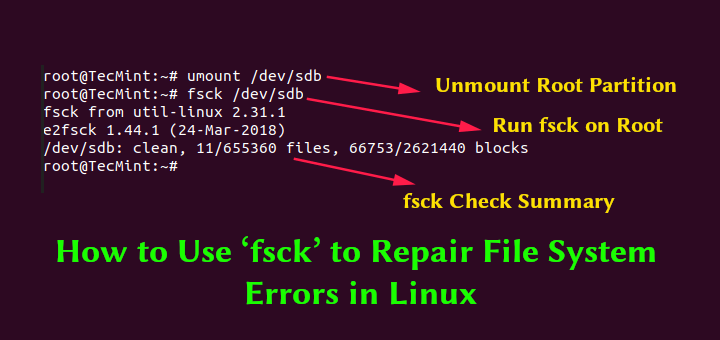
Filesystems are responsible for organizing how data is stored and recovered. One way or another, with time, filesystem may become corrupted and may not be accessible.
main olive
If it were me, I'd load nix on a stick, then boot from it and mount the drive and attempt to repair from there
This is the stuff thats worth ~ $70 an hour for help mate.
Not on discord for $
Otherwise I'd dive in with ya
If you don't know chroot and all that, then the question really is:
"Is the data worth my time"
^ if you say no, then rm -rf and frag out to a new system
If it is yes, then you're going to need to take a look at how much nix you really know.
quasi warren
I can do a fresh install and do the recommended with third party drivers and stuff.
Because I think when I installed it, I did barebone version of Ubuntu, so that might be causing issues.
main olive
^ If the data is not valuable, then:
Decide if the hardware is needed "right now", if not, then it is a great project to learn the deeper side of nix and Debian as a whole.
quasi warren
Lol I need the hardware. Maybe I'll look into nix and Debian some other time.
Actually, I have used Debian before
It was pretty barebone. It was a while back. I think I was trying to do some networking and ssh stuff on it.
summer trail
quasi warren
Lol I need the hardware. Maybe I'll look into nix and Debian some other time.
What actual problems is the kernel panic causing you? Is just ignoring it an option?
Seems like you can boot and run stuff, but something crashes when you shut down the computer - right?
If it only crashes at shutdown time, maybe you can get away with just ignoring it, maybe report the problem on the bug tracker, and wait to see if a package update fixes it.
frigid solar
quasi warren
What would happen if I did unmount?
unmount would unmount the file system, so fsck won't detect it ig, dunno
you can track it on hackthebox's dekstop
 dark bear
just got this error using linux ubuntu version 5.10.17
SSL error in data received
protocol: <asyncio.sslproto.SSLProtocol object at 0x75834690>
transport: <_SelectorSocketTransport fd=7 read=polling write=<idle, bufsize=0>>
Traceback (most recent call last):
  File "/usr/lib/python3.7/asyncio/sslproto.py", line 526, in data_received
    ssldata, appdata = self._sslpipe.feed_ssldata(data)
  File "/usr/lib/python3.7/asyncio/sslproto.py", line 207, in feed_ssldata
    self._sslobj.unwrap()
  File "/usr/lib/python3.7/ssl.py", line 767, in unwrap
    return self._sslobj.shutdown()
ssl.SSLError: [SSL: KRB5_S_INIT] application data after close notify (_ssl.c:2609)
anyone any idea what it means?
inland gulch
dark bear
just got this error using linux ubuntu version 5.10.17
```
SSL error in data rec...
Just a guess but it might could have somethin to do with this: https://github.com/aio-libs/aiohttp/issues/3535

GitHub
The following very simple aiohttp client: #!/usr/bin/env python3 import aiohttp import asyncio async def fetch(session, url): async with session.get(url) as response: print("%s launched&am...
tender plinth
hello , I've been wondering if its possible to get code navigation in vim based on functions like we do in decompilers like ida , ghidra?
 untold abyss
do we have some sort of tqdm for linux - which displays prog bar with minimal changes to commands?
untold abyss
so like if I put pv before in each command, it would get me a prog bar?
opaque ginkgo
you can stick pv anywhere in a pipe chain
like cat /dev/urandom | pv | cat > /dev/null
anywhere you can put cat you can put pv instead
untold abyss
aight. thanks a lot @opaque ginkgo 👍
Does anyone know the command to remove files ending with .png BUT NOT ending with _resized.png?? from SE I can only find the command to do the former
foggy quiver
I'm trying to shrink a partition and it returned exit code 1, what does that mean?
I can't go to the end of the log because each 0.01% of the "checking filesystem consistency" is a new line and I can shrink the size of it
or scroll down
I repaired filesystem and it finished instantly, I'm trying to resize again
quasi warren
summer trail
What actual problems is the kernel panic causing you? Is just ignoring it an opt...
I would be fine leaving it, but having to cold shut down the pc each time makes me wonder if it would damage the hardware. And when I want to restart the computer to boot into windows. I would have to cold shut down it.
I reinstalled Ubuntu, but the problem still persists.
 summer trail
you cannot damage hardware that way. At worst, you could corrupt filesystems, the data stored on disk - but even that is pretty unlikely; this failure is probably happening after filesystems have been synced. As long as it's not running a disk check every time you reboot, you're probably fine.
quasi warren
I have actually reinstalled Ubuntu couple of times.
I did Erase Ubuntu 20 LTS and reinstall
Should I do the second option Erase Disk and install Ubuntu, if I want to completely remove the Ubuntu? Wouldnt that also remove Windows 10. Ubuntu and Windows 10 are on separate hard-drives.
 kindred basin
No. It will only erase the selected disk
quasi warren
Ok finally it's resolved.
After having tried so many things this worked:
https://askubuntu.com/a/1047055
editing /etc/default/grub and added noapic
GRUB_CMDLINE_LINUX_DEFAULT="quiet noapic splash"
Ask Ubuntu
I just installed 16.04 LTS on my new desktop, Dell Alienware Aurora R7, with i7-8700K, 32GB RAM, SSD(SM961 NVMe SSD) and 1080TI.
So far, everything works ok except I get a kernel panic when I try to
Answer didnt have any upvotes, so I looked up noapic if it was a thing and it showed results linked to kernel.
It seems to be an Alienware thing.
Thanks @summer trail and @frigid solar for helping me and suggesting different methods.
 muted sandal
guys how to install c# in arch?
warped nimbus
muted sandal
guys how to install c# in arch?
Well, I'm not sure if this is quite on-topic given this is still a Python server, but since it's a simple question: the command is sudo pacman -S dotnet-runtime
Or dotnet-sdk if you wanna develop apps
frigid solar
quasi warren
Thanks <@!451976922361102357> and <@!736234578745884682> for helping me and sugg...
That’s good, no problem!
 pure plover
whole jacinth
pure plover
whole jacinth
linux is as easy as learning windows or mac os
quasi warren
It has gotten a lot more easier now that they have a snapstore and gui update, so someone could get away without learning much cli.
dapper musk
depends for me it is easier than windows
quasi warren
Only problem is there might be times, where you might end up spending a lot of time looking things up online where the issue might just be local to your line of machines. For exmaple, all Lenovo xyz series might have some issues that all other machines wont have.
But when you say unix, mac os is also unix
If someone wants to use Linux, I would say getting started with Ubuntu is one of the more friendlier options.
frigid solar
If by “learn”, you mean to be able to install and use Linux on your desktop, then that experience is no different than learning Windows or Apple. It is just a matter of practice.
If by “learn”, you mean you want a fundamental understanding of Linux, it’s history and a sense of its overall structure, then it is a bit more involved and will require a lot of tinkering and reading.
if by “learn” you mean that you want a deep understanding of Linux Then that will take time, commitment and experience
rain spoke
Can I create a bootable usb from the grub command line?
Please someone tell me!!!!!!!
 celest salmon
😆 did your install not work? are you trying to recover?
main olive
I don't think you can, no
main olive
No
rain spoke
so what do I do now?
main olive
You will need another computer, I assume.
Does someone you know have one that you can borrow to make another bootable medium?
rain spoke
no
main olive
Well you may be SOL then, unless someone smarter than me has a suggestion
rain spoke
I think I'll need to buy a bootable usb
btw can I access my laptops hard drive from another computer @main olive ?
main olive
rain spoke
btw can I access my laptops hard drive from another computer <@45622657779813580...
not unless you remove it
This is why I always keep a copy of nix on a stick handy.
 tepid spoke
 bronze flint
main olive
bronze flint
main olive
Hi, I get this weird error on startup: ata1.00: status: {DRDY ERR}, print_req_error: I/O error, dev sda, and I'm told to run fsck manually. This has happened five times in the last two months (Debian 10 stable) and just now my computer randomly crashed (before it was just a startup problem). Does anyone know what is going on?
I've run fsck five times now to fix this, but it doesn't seem to be a permanent fix]
foggy quiver
I'm using the xfce desktop environment, and even though I turned off the setting. it automatically locks my computer after a period of time, how do I stop that?
 narrow sundial
Hello,
Is anyone here willing to help with a small shell script error?
narrow sundial
@warped nimbus can I DM you?
warped nimbus
No. Please post your question in this server.
narrow sundial
@warped nimbus no worries see above thanks
warped nimbus
Do you know which line it's coming from?
You can put set -x at the start of your script, assuming your shell is bash. That will make it print out every command it executes
narrow sundial
It's probably coming from read command
I have that set and that's the error it is printing
warped nimbus
What is the result of the command substitution that uses the aws command?
narrow sundial
I am not sure what you mean
warped nimbus
If you ran ```bash
echo $(aws
sts
assume-role
--role-arn arn:aws:iam::123456789000:role/jenkins-deployment-role
--role-session-name jenkins-deployment-session
--query "Credentials"
--output text
awk '{print $1, $3, $4 }')
It would print a json if the command was successful
warped nimbus
Never mind, I believe I spotted the issue
It was made evident by copying your code into my text editor
You have a trailing space after one of the slashes that break up the lines
After AWS_SESSION_TOKEN
narrow sundial
@warped nimbus are you there I have another question
frigid solar
just ask 😄
wise forge
hmm, is it possible making self trusted certificate, and adding it to trusted for my local machine (purely at console command level)
and this certificate would be caught by seleium with chrome driver?
hmm, perhaps I could make it simpler, by using real certificate
all I need, adding to my local machine, recognition of the necessary domain to my localhost!
then google chrome would ask for certification validation from whatever global servers as usual
all right, how to trick ubuntu resolving domain to localhost
 scarlet totem
/etc/hosts may be what you are after
glass oyster
hey guys what is easyBCD ?
do we really need it to dual boot
frigid solar
That sure is a nice post, but not ideal for this channel, would be suited better in #python-discussion
 nimble panther
hey @whole jacinth. As jason said, this is not the appropriate channel for that message. Please keep the channel's topic in mind before posting messages.
dapper musk
glass oyster
hey guys what is easyBCD ?
do we really need it to dual boot
no it is not. maybe it was 10 years ago...
glass oyster
ohhh ok
 sharp nest
is it possible for me to block access to a localhost flask server from other users who might also be logged into the same remote server?
amber garnet
sharp nest
is it possible for me to block access to a localhost flask server from other use...
How are you deploying Flask server?
sharp nest
I'm not "deploying" it, it's mostly just for personal use. I have an app I run which spins up a local server to communicate with the frontend
thing is I also need to run it on a remote university server because of reasons, but I don't just want anyone logged into the server to be able to hit the endpoints
would like to not implement some sort of authentication system if I don't have to
is there no unix-y way to stop other users from connecting to the server?
amber garnet
sharp nest
I'm not "deploying" it, it's mostly just for personal use. I have an app I run w...
Are you using nginx or similar software to run your server?
sharp nest
nope, just the default flask one
I'm using it with pywebview so not sure if I can set up nginx easily
amber garnet
sharp nest
nope, just the default flask one
Then my first idea is to middleware both servers with nginx and return different answer when you are trying to access it from localhost
amber garnet
sharp nest
*I* want to access it from localhost
Then they should listen on different ports
Like 80 for localhost and 8080 for external one
sharp nest
there's no external connections.
amber garnet
sharp nest
there's no external connections.
So what is it?
thing is I also need to run it on a remote university server because of reasons, but I don't just want anyone logged into the server to be able to hit the endpoints
sharp nest
If I run it on port 80, any other user on the machine can still access my endpoints with localhost:80
I only want an app I have to be able to access the server
which is also running locally
everything's running on the server, the only issue is other people are using it too
and I'm serving up sensitive information which I'd like if other people couldn't access
amber garnet
Okay, once again because I am a little sleepy and I don't get it
You have your home server and you host your Flask app there, right?
sharp nest
Are you familiar with pywebview?
Or Electron? same idea. My app has a frontend and backend which both run locally and communicate with each other
I want to run this app on a machine that I share with other people
amber garnet
sharp nest
Are you familiar with pywebview?
Unfortunately nope
sharp nest
Have you used jupyter notebooks? The app runs in the web browser but it spins up a local jupyter server
amber garnet
Can you use socket file to communicate frontend and backend?
You can prohibit reading and writing to this file using permissions 
sharp nest
frontend is in Javascript, don't have access to the filesystem 😦
amber garnet
sharp nest
frontend is in Javascript, don't have access to the filesystem 😦
Then I don't have any other ideas 😦
sharp nest
thanks anyway!


 rain spoke
https://tenor.com/view/linux-users-antivirus-hacker-esmbot-gif-19576259
rain spoke
rain spoke
https://tenor.com/view/linux-users-antivirus-hacker-esmbot-gif-19576259
fun fact: a majority of us do not use anti-viruses
 eager spire
hey.... so i learnt that adding autocmd BufWritePre * %s/\s\+$//e to your vimrc file can remove trailing spaces but can someone explain to me how this woks? would appreciate 🙂
warped nimbus
The command at the end is just a regex substitution
Replaces \s+$ with nothing
\s+ means match one or more whitesace. $ is the end of the line. So, match one or more whitespace preceding the end of the line.
formal schooner
autocmd BufWritePre *means "before saving any file, do a command"%s/\s\+$//eis the:substitutecommand, substituting the regex\s\+$with an empty replacement pattern; theeat the end means "don't report an error if there is nothing to substitute"; the%at the start means "do this for every line in the file
so putting it together with Mark's response above, this means:
Before saving any file, for every line in the file, if there is a sequence of one or more whitespace characters at the end of the line, remove those characters, and do not report an error if there are no such characters.
see :help autocmd and :help :s if you want to read more (there is a lot of material to read on both topics)
wise forge
Who needs installing antivirus, when you can reinstall OS every half of year?
amber garnet
wise forge
Who needs installing antivirus, when you can reinstall OS every half of year?
I have same Windows instance since 2015 and I have antivirus
frigid solar
they were talking about linux iirc
amber garnet
Anyway, I cannot agree that reinstalling OS will fix your problem when you get some viruses - in the worst case you will have enemy in your system by half of the year
wise forge
the best policy of not getting viruses... is not using dubious services
because... mailware can be in any of them, and antivirus will not protect you against it anyway
because it would be classified as just 'annoying advertisement'
only reinstallation makes sure to make through PC software cleaning
 kind coral
amber garnet
Anyway, I cannot agree that reinstalling OS will fix your problem when you get s...
kind coral
amber garnet
Anyway, I cannot agree that reinstalling OS will fix your problem when you get s...
If reinstalling an operating system wont get rid of a virus, where the hell is it installing itself on the metal?
amber garnet
kind coral
If reinstalling an operating system wont get rid of a virus, where the hell is i...
I mean that reinstalling OS is not the solution
frigid solar
agreed
wise forge
Looks fine solution ;b
To the end of a year I ll break my OS even without viruses anyway
frigid solar
lol so true
summer trail
kind coral
If reinstalling an operating system wont get rid of a virus, where the hell is i...
There are viruses that survive OS reinstallation, though, by infecting the GPU or the UEFI or the BIOS. There's even been reports of malware that survives the disk drive being wiped and the BIOS being reflashed, https://security.stackexchange.com/questions/44750/malware-that-can-survive-bios-re-flashing
kind coral
summer trail
There are viruses that survive OS reinstallation, though, by infecting the GPU o...
wow, thats really quite impressive.
 molten narwhal
Is there someone that can help me with this error:
 wise forge
molten narwhal
Is there someone that can help me with this error:
wise forge
molten narwhal
Is there someone that can help me with this error:
not sure for sure. but it looks like already broken OS
needs to be reinstalled
something is terribly wrong with file system
I had this before... when server was launched in some repair mod after file system got crashed
so in theory it can't be fixed without reinstall unless you have access to server hardware for user controlled reboot
otherwise you need request your provider for OS reinstalllation (if it is VPS provider)
possible crash of HDDs/SSDs btw
molten narwhal
I'm on VirtualBox
My main system crashed at some point yesterday
I wish I had done a snapshot after i got the thing setup
main olive
!mute 426347340241305611 Investigating
 shy yokeBOT
:x: According to my records, this user already has a mute infraction. See infraction #36809.
 twin orbit
amber garnet
I mean that reinstalling OS is not the solution <:pithink:652247559909277706>
twin orbit
amber garnet
I mean that reinstalling OS is not the solution <:pithink:652247559909277706>
When in doubt, Timeshift.
It may not save your system, but it can save your sanity (and files)
frigid solar
molten narwhal
Is there someone that can help me with this error:
try doing a fsck
fsck -yf
it would reconfigure your filesystem
 obsidian barn
Anyone here?
 shrewd hill
yes?
obsidian barn

I want to configure a dynamically drawn icon for a custom file format, which writes out the name extensions name and previews the text
shy yokeBOT
Hey @ripe drum!
It looks like you tried to attach file type(s) that we do not allow (.zip). We currently allow the following file types: .gif, .jpg, .jpeg, .mov, .mp4, .mpg, .png, .mp3, .wav, .ogg, .webm, .webp, .flac, .m4a.
Feel free to ask in #community-meta if you think this is a mistake.
 ripe drum
why cant i upload my zip file 😦
lavish storm
fishy fishy
frigid solar
obsidian barn
I want to configure a dynamically drawn icon for a custom file format, which wri...
which OS?
lavish storm
frigid solar
which OS?
looks like MacOS
frigid solar

Stack Overflow
Our application has a file format similar to the OpenDocument file format (see http://en.wikipedia.org/wiki/OpenDocument) - i.e. zipped with a manifest file, a thumbnail image, etc.
I notice that
quasi warren
which terminal in Linux supports vertical and horizontal split?
frigid solar
tmux
robust cave
tmux isn't a terminal, rather a terminal multiplexer
if you want a terminal that supports splits check out kitty https://sw.kovidgoyal.net/kitty/
frigid solar
ah right
quasi warren
Came across Tilix, Deepin, and Terminator.
I had used Tilix before and liked it, but didnt see it in snapstore over a year ago. But it's on snapstore now.
Thanks for suggesting tmux and kitty
 dry bronze
hey I am making a shell but for some reason this is double printing

in a vm hence cannot copy code
result

 final echo
how do you delete all files in a folder using python
frigid solar
!d glob.glob you can use this to get all the files in a directory
shy yokeBOT
glob.glob(pathname, *, recursive=False)```
Return a possibly-empty list of path names that match *pathname*, which must be a string containing a path specification. *pathname* can be either absolute (like `/usr/src/Python-1.5/Makefile`) or relative (like `../../Tools/*/*.gif`), and can contain shell-style wildcards. Broken symlinks are included in the results (as in the shell). Whether or not the results are sorted depends on the file system. If a file that satisfies conditions is removed or added during the call of this function, whether a path name for that file be included is unspecified.!d os.remove to remove a file
shy yokeBOT
os.remove(path, *, dir_fd=None)```
Remove (delete) the file *path*. If *path* is a directory, an [`IsADirectoryError`](https://docs.python.org/3/library/exceptions.html#IsADirectoryError "IsADirectoryError") is raised. Use [`rmdir()`](https://docs.python.org/3/library/os.html#os.rmdir "os.rmdir") to remove directories. If the file does not exist, a [`FileNotFoundError`](https://docs.python.org/3/library/exceptions.html#FileNotFoundError "FileNotFoundError") is raised.

This function can support [paths relative to directory descriptors](https://docs.python.org/3/library/os.html#dir-fd).

On Windows, attempting to remove a file that is in use causes an exception to be raised; on Unix, the directory entry is removed but the storage allocated to the file is not made available until the original file is no longer in use.

This function is semantically identical to [`unlink()`](https://docs.python.org/3/library/os.html#os.unlink "os.unlink").

Raises an [auditing event](https://docs.python.org/3/library/sys.html#auditing) `os.remove` with arguments `path`, `dir_fd`.

New in version 3.3: The *dir\_fd* argument...import shutil
if os.path.exists('docs'):
shutil.rmtree('docs')
it deletes folder too, so I recreate it after that
if not os.path.exists('docs'):
        os.mkdir('docs')
what linux distro should i use?
I would perfer any distro besides from one with the GNOME DESKTOP
untold abyss
yo, how do we uninstall a specific version of python?
I have python3.9 and python3.6 installed. I want to purge the 3.9.6 one
if I try to uninstall python3 - I fear it might break ubuntu
ripe drum
untold abyss
if I try to uninstall python3 - I fear it might break ubuntu
i think it would be sudo apt remove then you type in the specific python package you dont want anymore?
ripe drum
huh thats weird
well this might be incorrect but maybe sudo apt remove python3 and reinstall i dont think it will break ubuntu but do it at your own risk
burnt flax
frigid solar
`fsck -yf`
Why and what is this? It reads like fuck
kindred basin
lmao
Google it or man fsck
Its a core UNIX utility used for correcting and optimizing (corrupted) filesystems
formal schooner
burnt flax
Why and what is this? It reads like fuck
filesystem consistency check
not sure why they didnt call it fscc but maybe they were just having too much fun
 jaunty needle
never noticed ^ lol
quasi warren
I'm trying to create a link shortcut on Ubuntu.
I'm using Firefox and Firefox has this grad and drop which works on Windows 10, but it doesnt work on Ubuntu.
jaunty needle
which drag and drop
quasi warren
Learn how to easily make a shortcut on your desktop that will open Firefox and take you to a favorite website.
frigid solar
quasi warren
https://support.mozilla.org/en-US/kb/create-desktop-shortcut-website
Create a .desktop file in ~/.gnome/apps.
example:
[Desktop Entry]
Encoding=UTF-8
Name=Link to Rick Roll
Type=Link
URL=https://www.youtube.com/watch?v=dQw4w9WgXcQ
Icon=text-html
Link will appear in your file explorer with the name Name you specificed
It will use the default browser you use
frigid solar
yeah i personally just use the firefox command to open urls
main olive
does anyone have experience with pfctl on macos?
used to use ufw on linux before buying a macos machine and am trying to block all inbound/outbound traffic that doesn't go through openvpn connection
main olive
nvm solved
main olive
is papirus/arc theme lightweight or is there better?
also...are any of these safe to disable?
 main olive
I'm making a .sh script which takes a filename as an argument
How do I slice the string to get something like
"pythonfile.py" -> "pythonfile"
"path/to/pascal.pas" -> "path/to/pascal"?
In python i'd do string[:string.rfind(".")]
 main olive
uuh darn it, i hardcoded .pas extension and at least it works now
formal schooner
main olive
im outta ideas
i don't think all sed versions recognize \w even with -E turned on
also if you're in bash you can use <<< 'test.pas' instead of echo 'test.pas' |
sed -E 's/\.[0-9A-Za-z]+$//' <<< 'test.pas'
# test
so you want to just get the filename/path name without extensions?
main olive
thank y'all, will try later
frigid solar
main olive
I'm making a .sh script which takes a filename as an argument
How do I slice the...
this is how I do it, (use it for compiling and executing my c files)
 main olive
thanks ;)
wise forge
Any good Linux compatible desktop version of remote file manager via ssh?
for a need to copy with comfort multiple configs from servers
basically Linux WinSCP analog
nvm, found
Krusader works fine
awesome, windows like total commander with remote access via ssh and other types of connections
quite comfortable to transfer files around between machines
mega powerful I would say
omg. it supports even remote IDE opening, at least visual studio code
(the list of supported integrations 20-30 items)
git diff instruments and e.t.c.
all right, all is left to find how to add myself to group which can copy /etc
folder permissions, here I go
 vast tulip
how to adjust file/dir created by root .py script for uwsgi module user? os.chown() to such user after creation or add write permission to Others, will then uwsgi user be able to use it the same? Thanks
wise forge
well, scratch folder permissions. I just zipped/archived necessary folder
what would be necessary folders to restore server programs and its configurations from zero, besides /etc?
I have an instruction of installation, so I should be pretty good to reverse engineer necessary stuff
wise forge
vast tulip
how to adjust file/dir created by root .py script for uwsgi module user? os.chow...
you have several options, any option can be right
- the most easiest, just launch your uwsgi from root, it will have permissions then
- alternative option... you can modificate permissions of the file/folder to allow anyone writing rights
- the last option is changing owner of file/folder which you suggested
I would recommend first choice, most easiest and most reliable
- you can create your file/folder initially from the same user, it will have all the necessary rights from the beginning then
fourth option is nice too
vast tulip
wise forge
you have several options, any option can be right
1) the most easiest, just laun...
thank you for options and clarification
 pseudo moon
fire away
 frozen kettle
for grep in BASH
i wanna grep a two letter word
for example Donald Trump
does BASH find words with Donald & Trump / Donald/Trump
pseudo moon
did you try?
frozen kettle
yeah
frigid solar
What’s your grep code, both things are possible
wise forge
frozen kettle
does BASH find words with Donald & Trump / Donald/Trump
I think you are looking for Regular Expressions
although it can be probably done in a more dumb way with bash
pseudo moon
there a chapter: "repetition"
Let us know, else if you really want to get fancy you can use awk or sed.
frozen kettle
- $ cat FB_Dataset | grep -i "Donald Trump" | awk -F ',' '{print $5}'
this is part of my command
if i wanna find the word from column 5
do i do awk first then only grep or this will work too
pseudo moon
first of | is piping one command to another
but you can try to do it first like this: grep -i "Donald Trump" FB_Dataset
you'll then grep the line in full
then apply awk to get the column part right 🙂
frozen kettle
ahh i see alright thank you
formal schooner
it's too bad awk doesn't let you do case-insensitive regex searching
formal schooner
otherwise you could omit grep entirely and write
awk -F ',' '$0 ~ /donald trump/ { print $5 }' FB_Dataset
yeah, that's what grep -i does.
frozen kettle
its fine ill just stick to grep haha
its part of my assignment but my lect didnt explain much abt BASH
formal schooner
note that "parsing" csv with awk and/or cut is potentially very messy if there are quoted fields with embedded commas
formal schooner
yes, csv is text
but it's text with a specific format
also - if you want to capitalize it like a proper noun, write "Bash"; nobody writes "BASH"
i see a lot of people over-capitalizing tool names like "Git" as "GIT", etc.
frozen kettle
ah i see
formal schooner
the only one you really want to capitalize is AWK because it stands for 3 people's names, and even then you can write Awk
ironically "BASH" is an acronym ("bourne again shell") but nobody treats it that way 🤷♂️
formal schooner
a lot of people never capitalize them at all, but i think it can make text too difficult to read if you don't, because many of these names are just English words
frozen kettle
yeap true
frozen kettle
@formal schooner would u mind if i msg u privately ?
formal schooner
frozen kettle
<@!389497659087650836> would u mind if i msg u privately ?
i'd rather keep discussion in this server, to help everyone else who might be reading
frozen kettle
grep -i -w "Donald Trump" FB_Dataset | awk -F ',' '{print $5}'
was wondering
is it searching for the word in column 5 only ? or
its searching for the word in the entire line of word but only output whatever is in column 5?
formal schooner
the latter @frozen kettle
you want to search in column 5 and only print matching values?
frozen kettle
yup
not searching in other columns which has Donald Trump in it and output the column 5
^ not taht
 crude abyss
Is unix hard bois?
jaunty needle
not if you switch to linux full time
formal schooner
frozen kettle
not searching in other columns which has Donald Trump in it and output the colum...
you can do this in python with pandas too... might be easier and/or faster depending on what you're actually trying to accomplish
pseudo moon
Linux... Linux is a perfect OS for a developer, are the tools are right there.
It assumes a person that understands his/her OS and does not assume you're a n00b.
formal schooner
That varies by Linux OS though as well
And it depends on what exactly you're developing
But there will always be the risk of additional troubleshooting that requires technical knowledge
frozen kettle
formal schooner
you can do this in python with pandas too... might be easier and/or faster depen...
yea but im only to allow to use Bash
lavish storm
linux really isn't that hard
or demanding
a lot of distros offer GUI alternatives where you can just install and go
i think the main attraction is that 1) linux distros don't hog on RAM 2) no probey probey into your privacy
pseudo moon
Don't say that. I bought my house thanks to Linux 🙂
 violet hatch
WSL 2 user here. Is miniconda preferable or should I install an exclusive version of Python though deadsnakes?
frigid solar
installing it through deadsnakes should be fine
 jaunty needle
context?
 feral lotus
 main olive
Please tell me how to specify the address
jaunty needle
which dbms
formal schooner
@frozen kettle if you have a list [A, A, A, B, B, A] there are 2 unique elements, A and B.
apply that definition to the websites in your data
frozen kettle
formal schooner
<@!241111839465799681> if you have a list `[A, A, A, B, B, A]` there are 2 uniqu...
are u talking abt the unique pages thing ?
formal schooner
yes
frozen kettle
whats a yoru data
formal schooner
a typo
frozen kettle
oh
frozen kettle
np
i dont get it still
its asking for unique pages
is it like how many pages are there ?
formal schooner
frozen kettle
is it like how many pages are there ?
yes. it is asking how many pages there are, after removing duplicates
frigid solar
main olive
Please tell me how to specify the address
Address of?
frigid solar
frozen kettle
but how do i count pages
What do you mean by pages, I don’t really understand you
frozen kettle
frigid solar
What do you mean by pages, I don’t really understand you
yeah i dont either its part of my assignment to understand whats a page mean
frigid solar
Ask your professor 🧑🏽🏫
frigid solar
Welp, dunno 🤷♂️
jaunty needle
Derric
I asked you which dbms
that that looks like headers and data
simply count how many rows of post_name you have
page_name rather
formal schooner
frozen kettle
yeah i dont either its part of my assignment to understand whats a page mean
it looks like each row corresponds to a single web url
so your job is to figure out what a "web page" should mean - is 1 page == 1 url? or something else?
 daring gazelle
any idea why make python would throw "cannot find -lboost_python" although i have installed it?
frozen kettle
@formal schooner @jaunty needle ahh i get what yall mean now ill try it afterwards thank you so much
 sharp cove
if I'm reading the screenshot correctly, it looks like a CSV where each row represents a post, and each post is on a page
so for each row you have page_name and page_id
my approach would probably be to collect and count all distinct page_ids
so for example if you had:
post_id,page_id,text
1      ,1      ,abcd
2      ,1      ,abcd
3      ,1      ,abcd
4      ,2      ,abcd
5      ,2      ,abcd
i'd interpret this as 5 posts on 2 pages (e.g. each page will display up to 3 posts)
jaunty needle
theres a much cleaner explanation ^
frozen kettle
sharp cove
if I'm reading the screenshot correctly, it looks like a CSV where each row repr...
ill look into it and msg here if i have any problems
once again thank you so much
 vivid path
I got a little pissed off because i wanted create a alias able to create a file and open in vscode
touch <file name> && code <file name>
but i wanna be able to choose the name of the file
 wheat slate
so you dont actually want an alias, you want a bash script/function that you feed an arg into
though you dont have to touch it to be able to code
you can just type code somenewfile and it'll open it
warped nimbus
It would have been simpler to define a function instead
# in ~/.bashrc
alias_name() {
    touch $1 && code $1
}```In fact, it'd be good practice to do return touch $1 && code $1
Though I do not remember if they implicitly use the exit code of the last command or not
vivid path
Both ways works
I tried the first one and works, my friends tried the second one and works as well
Thanks u guys!
 alpine sigil
I’m trying to check user password by hashing and comparing to /etc/shadow, but I haven’t been able to generate the correct hash. Is anyone familiar with how to do this?
The data in /etc/shadow is base64 encoded I believe but I don’t think I’m interpreting it correctly and haven’t been able to find a good resource that explains it
 keen sequoia
alpine sigil
I’m trying to check user password by hashing and comparing to /etc/shadow, but I...
keen sequoia
alpine sigil
I’m trying to check user password by hashing and comparing to /etc/shadow, but I...

Server Fault
The previous SF questions I've seen have lead to answers that produce MD5 hashed password.
Does anyone have a suggestion on to produce an SHA-512 hashed password? I'd prefer a one liner instead of a
/etc/shadow is a text file that contains information about the system's users' passwords.
I just tried the solution in serverfault. works perfect
alpine sigil
Yeah I have been able to do it with the crypt module but I need to implement it in a different language and I don’t understand what crypt.crypt does
keen sequoia
which language?
its just a function that hashes given string + salt using said algorithm
i'm sure all mainstream languages have this basic support in libraries
as long as message text + salt + algorithm is same, it should match even on bash
alpine sigil
Go
I get a different result trying to do it with python hashlib
Compared to crypt
keen sequoia
you should post code
alpine sigil
def hash_passwd(passwd, salt):
    tohash = base64.b64decode(salt) + passwd.encode()
    h = hashlib.sha512(tohash).digest()
    return base64.b64encode(h)
Where salt is the string from /etc/shadow
I’ve done it with the salt after the password as well
keen sequoia
Salt is plain text in /etc/shadow and not base64
Hash in shadow is also not base64 encoded
keen sequoia
On Ubuntu at least. That one liner from server fault produces exact same hash when I copied text as is. You should also include $ in the salt
alpine sigil
You mean the one liner that uses crypt? I’ve been able to get it to work with that but I can’t reproduce it with hashlib or otherwise so I don’t understand what it’s doing
And are you sure the hash isn’t base64? It definitely looks like it
keen sequoia
Yeah I am sure
alpine sigil
How is encoded then? Because it’s all printable characters
keen sequoia
crypt() is the password encryption function. It is based on the Data Encryption Standard algorithm with variations intended (among other things) to ...
Please see glibc notes section
It’s late for me now
main olive
!warn 824602496742719498 Please don't drop WhatsApp invites to troll your friend. Do also note that we expect members to speak English to the best of their ability and stick to the channel topics.
shy yokeBOT
:incoming_envelope: :ok_hand: applied warning to @bold fjord.
amber garnet
Next time you can report it with @tight thorn
main olive
Print( "hi guys")
inland gulch
print('hello Nolitop')
Hello , I wish to access my linux partition from windows wsl , i've tried using ext2fsd , to assign drive letter to linux partition , but windows still doesnt recognize it , I dont want to use a tool like linux disk internals as i wish to edit and access my files in linux partition , is there a better way to do this?
PS: I have also tried signing up for windows insider programme as there is a new feature to mount linux partition , but for some reason , the setting up takes really long so I prefer to do it without opting for the insiders build
robust cave
@tender plinth I don't use Windows so I can't give you a concrete recommendation, however you are free to try out any of the methods listed here if you haven't done so: https://superuser.com/questions/37512/how-to-read-ext4-partitions-on-windows

Super User
Is there a way to read ext4 partitions from Windows? If so, what can I do?
tender plinth
robust cave
<@!525882050385936384> I don't use Windows so I can't give you a concrete recomm...
Yeah I've actually tried all of them , thanks anyways
dapper musk
i think you can mount it in WSL and cp files to windoge partiton
 barren temple
can i attach to tmux session somehow with a python?
yes. Just need a lib. 🙂 Dum question.
 upbeat wing
Hi, I want to backup (some files from) my WSL2 Ubuntu home dir so I've started on a Python script to run rsync and save files in time stamped dirs on the C drive. Is there a better way to do this? The script will be run as a scheduled Windows task. What are your WSL(2) backup solutions?
frigid solar
crontab -e
 keen sequoia
frigid solar
`crontab -e`
keen sequoia
frigid solar
`crontab -e`
This doesn’t help if everything is on the same partition. If / goes down, then /var /home also goes down
I guess you could update that crontab job to write to something at /mnt/foo so that your wsl data be backedup on windows drives
 rose ibex
when i click on linux/unix download page on python.org, i just takes me to source code, anyone have a .appimage or .deb file?
opaque ginkgo
@rose ibex if you're on debian it should be apt installable
rose ibex
opaque ginkgo
<@!455913403127562260> if you're on debian it should be apt installable
im on linux mint but thanks
it is a debian derivative
opaque ginkgo
yeah shouldn't apt install work then