#unix
1 messages · Page 31 of 1
 green sigil
 main olive
missing spaces
line 10, should be if [[ "${UID}" -ne 0 ]]
[[ is actually a separate shell token, which behaves just like a command (so it needs to be separated with spaces)
in fact, the regular [ is a separate binary
@green sigil
 warped nimbus
I recommend this site to lint your shell scripts https://www.shellcheck.net/
ShellCheck finds bugs in your shell scripts
main olive
slow?
if you add set -x to the top of the script, it will show you exactly what commands are being executed (and what are slowing it down)
green sigil
okay I'll try
set -x

#This script creats a new  user on the local system.

# You will be prompted to enter the username (login), the person name, and a password.

# The username, password, and host for the account will be displayed

#Make sure the script is being executed with super user privileges.
if [[ "${UID}" -ne 0 ]]
then
  echo 'Please run with sudo or as root'
  exit 1
fi

#Get the username(login).
read - p 'Enter the username to create: ' USER_NAME

# Get the real name (contents for the description field).
read -p 'Enter the name of the prson or application that will be using this account: ' COMMENT

#Get the password.
read -p 'Enter the password to use for the account: ' PASSWORD

#Create the account.
useradd -c "${COMMENT}" -m ${USER_NAME}

# Check to see if the useradd command succeeded.

# WE don't want to tell the user that an account was cretaed when it hasn't been.
if [[ "${UID}" -ne 0 ]]
then
  echo 'The account could not be created.'
  exit 1
fi

# set the password
echo ${PASSWORD} | passwd --stdin ${USER_NAME}

if [[ "${?}" -ne 0 ]]
then
  echo 'The password for the account could not be set.'
  exit 1
fi

#Force password change on first login
passwd -e ${USER_NAME}

#Display the username, password, and the host where the user was created.
echo
echo 'username:'
echo "${USER_NAME}"
echo
echo 'password:'
echo "${PASSWORD}"
echo
echo 'host:'
echo "${HOSTNAME}"
exit 0
like that ?
this is what I'm getting now ```+ [[ 1000 -ne 0 ]]
- echo 'Please run with sudo or as root'
Please run with sudo or as root - exit 1```
what does set -x do ?
main olive
it prints out every line of the script that's being executed
also, it's checking if your uid is 0 (which it isn't - it's 1000)
so you need to run the script as root
ie using sudo
green sigil
i'm running it like this sudo ./add_local_user.sh
that should work right or should I sudo su ?
main olive
that should indeed work
hol up
what
i'm not sure what's going on here
oh, of course
sudo leaves $UID to the original executing user
you need to change that to $EUID instead (effective uid)
green sigil
oh my my spacing and everything is bad
main olive
if [[ "${EUID}" -ne 0 ]]
green sigil
yeah I'm using the site that mark suggested. I started to write the script in VIM
and then I was like this causing mistakes and switch to Visual Studio Code
read -p 'Enter the username to create: ' USER_NAME
^-- SC2162: read without -r will mangle backslashes.``` I don't understand this error from the site that Mark providedwhy do I have to use -r ?
main olive
you probably don't need to worry about that
green sigil
When I'm putting it in the script on shellcheck it's making the errors go away
main olive
if you don't use -r, backslashes (\) will be interpreted instead of being read raw
green sigil
so always use -r for read ?
main olive
actually, scratch that
backslashes will be stripped entirely
which is actually exactly what you want when adding passwords, you don't want anyone entering newlines as their password
green sigil
oh ok
main olive
linter warnings can generally be considered a suggestion instead of a rule and you should choose to follow the suggestion only depending on your use case
in this case, the linter is wrong
green sigil
oh ok so don't use -r ?
main olive
i'd personally not, no
main olive
np dude
green sigil
@main olive how long did the script take you to run ?
It's not outputting anything to me
main olive
you have an error
read - p 'Enter the username to create: ' USER_NAME
there's an extra space, needs to be -p
green sigil
oh ok thank you
main olive
also, my passwd does not have an --stdin flag
might be different for you, but that line doesn't work for me
green sigil
like this one ? # set the password echo ${PASSWORD} | passwd --stdin ${USER_NAME} ?
main olive
yeah
green sigil
#Force password change on first login
passwd -e ${USER_NAME}``` this one should have the ```--stdin``` ?no, what I'm saying is that my passwd binary doesn't understand --stdin at all, and throws an error
green sigil
ah ok but I fixed the spacing and stuff it's working now
and asking for user name input
learned a lot
main olive
yeah, and does it successfully also set the password?
green sigil
let me try that
main olive
brb gotta go take a shit
main olive
think you meant to ping @green sigil
 worn apex
or, look at https://www.tecmint.com/force-user-to-change-password-next-login-in-linux/ for the correct way to force the user to change it on login
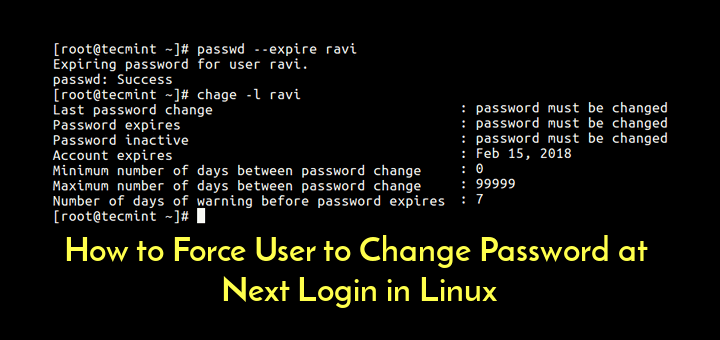
In this article, we will explain two different ways to force a user to change his/her password at the next login in Linux using passwd and chage commands.
also, you could just run the passwd command interactively after useradd instead of using read
since the user running the scirpt will be typing the password anyway
anyway, i can't stick around longer to help with this, goodnight
green sigil
no problem thanks for the input @worn apex
@main olive I was able to create log in and password
main olive
great
main olive
How can you automatically install and setup certbot for nginx?
Because it asks you enter email and configure a bunch of options
 formal schooner
@main olive it has a no-interaction command line interface. i think there's also a config file option
check --help or the manpage or the website
 vagrant fern
I'm a networking noob. Is there a way of having floating IPs inside of VPNs without a dedicated router? I define the routes manually (in WireGuard, via AllowedIPs) and while they're usually exact.ip/32, from my understanding I would need /24 on all servers here, which doesn't quite work..
 loud wave
@silver gate Hey, saw you left TPH, but wanted to give you a solution anyways...simplest thing is to use cut:
#!/usr/bin/env bash

IFS=$'\n'
file_array=($(ls -lS "$PWD" | grep -v "^d" | awk '{ print $9, $5 }'))
nb_array="${#file_array[@]}"
printf "%-30s %-20s\n" "File name" "File size"
for (( i=0; i < "$nb_array"; i++ )); do
    name=$(echo "${file_array[i]}" | cut -d ' ' -f 1)
    size=$(echo "${file_array[i]}" | cut -d ' ' -f 2)
    printf "%-30s %-20d\n" "$name" "$size"
done
unset IFS
 robust cave
@loud wave I don't know much bash, so I'm primarily just curious, but is your above code not equivalent to something like this?
printf "%-30s %-20s\n" "File name" "File size"
ls -lS "$PWD" | awk '!/^d/ { printf "%-30s %-20d\n", $9, $5 }'
just wondering if your code takes care of some edge case I've forgotten about
loud wave
nope, that'll do it
not as experienced with awk though so I don't remember simple things 
robust cave
it's awksome
 silver gate
@loud wave Holy cow, I like your determination, thanks a lot
warped nimbus
Horrifically awesome maybe 
 boreal kestrel
That script won't handle file names with spaces well. It will print only the prefix of the first space. So for example if you have two files named "I am a file" and "I am another file", then you will get two rows named "I"
@loud wave
Although I don't see the conversation context for requirements so maybe that's not a big deal? @silver gate
#!/usr/bin/env bash

IFS=$'\n'
for file in $(find ./ -maxdepth 1 -type f -printf '%f\n')
do
        printf '%s\t%s\n' "$(stat -c%s "${file}")" "${file}"
done
Output uses tabs instead of spaces, but it will play a lot nicer with other GNU coreutils because of it. Importantly, using find instead of ls to get the filenames
 tall coyote
there are times when I pipe stuff like ss -tp | less and the format gets screwed up
is there any argument to make it work and fill the width of my terminal properly? I know ANSI colors can work with an argument after all
boreal kestrel
Programs like ss are the exact opposite of GNU coreutils. Instead of using the standard \t to separate columns, ss decides to columnate stuff itself. So who knows exactly how wide each column should be and you can't just pass it through cut.
At least it's not as bad as apt or nmcli which completely changes output if it's being piped somewhere (!@#$ that). So at least you can fix ss output by changing spaces to tabs:
ss -tp | tr -s ' ' '\t'. If you're only interested in specific columns, you can then pipe it through cut:
ss -tp | tr -s ' ' '\t' | cut -f 5,6 would give you remote peers and the local process info using it
That of course could break if any of the columns includes a space in the data for the column (for example, if the process name has a space...)
tall coyote
thanks for the explanation
main olive
So I got a 2nd SSD, so I can put Ubuntu on there and dual boot Windows 10. Now, I have 480GB of free space. All of it is for Ubuntu, so how much should I allocate to root, home, and swap?
main olive
I usually have 1.5x of my memory as the swap size
as for root/home, depends on how much stuff you're going to be installing
I'd personally go 100G for root (just to be safe), rest for /home
warped nimbus
I want to use a pihole as my DHCP server. However, when the pihole's old lease from my router runs out, the pihole basically drops off the network and now my entire network has no DHCP.
The rpi disappears from the connected devices on my router and I'm unable to access the pihole admin panel or ssh into the rpi
I have to enable DHCP on my router to be able to do that
I don't know why this happens. I configured my rpi to use a static IP: ```
source-directory /etc/network/interfaces.d
auto lo
iface lo inet loopback
auto eth0
allow-hotplug eth0
iface eth0 inet static
address 192.168.0.12
netmask 255.255.255.0
gateway 192.168.0.1
Is there anything else I have to do (maybe in my router?)
 uneven silo
maybe tell your router to assign the pi a static ip
warped nimbus
Yeah I've already done that though I don't think it even matters. My router is not a DHCP server and the pi is not configured to use DHCP. I think that static IP setting is only in effect when DHCP is being used
main olive
hmmm
if you try manually renewing the lease from the pi after it's timed out, what happens? (not sure how you'll accomplish this, maybe a timed script or use serial access)
ie by reupping the network interface or something
warped nimbus
I don't have a way to do that. If the pi is off the network I have no way to communicate with it
I don't have the cable to hook up my monitor to it
I rely on ssh working
I have tried restarting the pi and replugging the ethernet cable but that does nothing
I'm not understanding why the pi is reliant on DHCP. I thought if I set a static IP then DHCP wouldn't matter. Why does the DHCP lease expiring have an effect on it
Oh you know what I just remembered reading I should disable the dhcp services but never did that
boreal kestrel
@warped nimbus did you get it figured out? the tl;dr is you should only have one dhcp server for a given network segment. If you have a router and a pihole both responding to dhcp requests, you're going to have a bad time
warped nimbus
Not yet. I know that I should only have one DHCP server and that is how I had it set it. Disabled the router's and enabled the pihole's
It's just that the pi was still relying on the router's old dhcp lease
I think I disabled dhcp now on the pi though. dhcpd service not running
no dhclient process
now I wait a day and see if it still works
boreal kestrel
Why wait a day?
warped nimbus
That's when it would stop working
I am pretty certain it's not using DHCP anymore anyway though
boreal kestrel
I would have simply forced a dhcp lease reset then reboot the pihole
warped nimbus
How could a lease reset even be forced when DHCP is disabled?
And yes I did reboot
boreal kestrel
Ahh indeed. I keep my pihole on dhcp, and just statically assign an address to the MAC, and other hosts' dhcp responses include the pihole as their first and only DNS server.
boreal kestrel
Nope. I run pihole in a Docker container on the same host as the services it's protecting. Then I can see per-host or per-network pihole stats too.
main olive
@warped nimbus have you configured your DHCP server on the pihole so that the pi itself is unmanaged and has a static IP?
warped nimbus
Well yeah, that's what the network config I showed does, right?
main olive
that's just suggesting the DHCP server that you don't want to be assigned a dynamic IP - it's up to the server itself to implement that. Some servers ignore that and assign you an IP anyways
for example, I actually have to add rules in my router for static routes, just modifying the network interface settings on the client device itself doesn't work
warped nimbus
I see. I've not done that, no. I didn't think the pi would try to use itself as a DHCP server after I've disabled dhcpd
main olive
You might be surprised. IIRC last time I used pihole, there was a "static DHCP leases" section
have a look at that
warped nimbus
Yeah, I've configured that for other devices but not the pi itself
I guess adding it wouldn't hurt
main olive
another one of my routers very aggressively hands out dynamic IPs even if the device has any sort of DHCP requests disabled
just, like, in response to a new mac appearing on the network
warped nimbus
So it's completely up to the router whether it wants to respect the clients' wishes to not be assigned an IP dynamically?
main olive
Yep
implementation wise, it'd not be very sane not to respect those wishes, but... god damn have I seen some dumb shit over the years
warped nimbus
Well if anything pihole will likely be more sane than than my old cheap router's dhcp server
main olive
@warped nimbus I think it was mikrotik who actively didn't add static IPs to the routing table unless explicitly set in the DHCP rule list, as to "reserve" the IP and guarantee that the DHCP server doesn't assign it to someone else, possibly causing problems
 timid mist
@warped nimbus What you said earlier is confusing to me, “_ I want to use a pihole as my DHCP server. However, when the pihole's old lease from my router runs out, the pihole basically drops off the network and now my entire network has no DHCP._” So, you are using dhcpd on the pihole to serve addresses to your network, but the pihole is receiving an address from your router’s dhcpd. If you then set a static IP address on the pihole, it probably won’t match the address the router assigned ==> no connectivity. Am I understanding your setup correctly?
main olive
did I not read that he disabled DHCP on his router?
I'm assuming his router has assigned the pihole the static ip
as long as the gateway is not acting as the dhcp server it should be fine
man FUCK networking
timid mist
So long as the address assigned in the router matches the one in the pihole, of course
dhcp in both is fine as long as they are assigning different ranges of addresses.
main olive
as long as the subnets don't collide yeah
warped nimbus
I started off with my router being the DHCP server. Therefore the pi had an active lease when I connected to it to go and switch the pi to being the sole DHCP server. So even with DHCP enabled on the pi and disabled on the router, the pi still had an active lease from the router.
And it worked until the lease ran out
At least that's what I think was going on
My pi was still relying on DHCP for some reason and the solution was to disable the dhcpd service
when I did that it seems to truly be using a static IP now
And the problem wasn't that it had a different address. It had no address. I couldn't see it on the network at all lol
timid mist
It’s OK to rely on a chain of dhcp servers. Consider a home cable modem typically gets its IP from the network dhcp server, but the same cable modem (router) serves up IP addresses to all the devices in your house. As xx said above, must be different subnets.
What IP’s are you using?
warped nimbus
I'm not relying on a chain of DHCP servers. I'm trying to replace one DHCP server (my router) with another (my pi)
timid mist
Where was the router getting its IP from?
warped nimbus
Itself?
timid mist
No
worn apex
er
the router generally has different addresses on both subnets
its own IP is typically static e.g. 10.0.0.1 or 192.168.0.1
timid mist
What was the IP of the router’s gateway?
warped nimbus
192.168.0.1
timid mist
That’s its local IP
warped nimbus
It's also the gateway is it not
worn apex
you should configure the pi with a static ip address too
timid mist
There is a different IP towards the Internet
worn apex
@timid mist i'm not sure why you think the public IP matters
warped nimbus
Oh I thought you were speaking locally
worn apex
anyway, you should configure the pi with a static ip address. a real static ip address, not a fixed dhcp assignment
warped nimbus
@worn apex Yeah, I thought I did. Does this look good to you? https://discordapp.com/channels/267624335836053506/491523972836360192/623929355038359552
worn apex
hmm
timid mist
See where I’m going @worn apex ?
worn apex
can you run arp -a on one of the other client machines
do you know the MAC address of the pi?
warped nimbus
Yeah
worn apex
I really don't see where you're going, @timid mist , the problem seems confined to the local network segment (though obviously the router will still need to be used as a gateway)
warped nimbus
Just to be clear I think I solved the problem
But I am not really sure
I just assumed dhcp was the issue here
Cause everything seemed to point to it being the issue
timid mist
@warped nimbus your old router has one IP address towards the Internet and a different IP address for your local network. Your rpi needs to have a similar configuration. The IP config you posted makes it look like you put 192.168.0.12 IP address towards the Internet and it should be towards your local network.
worn apex
he's not replacing the router, only the DHCP server
the router will still act as switch and gateway
timid mist
Ah, didn’t catch that part!
worn apex
"routers" these days are kind of all-in-one boxes so it's confusing to talk about
warped nimbus
Oh and here's that arp command you asked about ```
arp -a
_gateway (192.168.0.1) at a4:2b:8c:b7:da:3a [ether] on ens33
raspberrypi (192.168.0.12) at dc:a6:32:24:eb:17 [ether] on ens33
Well I can ssh into it
worn apex
ok so what exactly dropped out
warped nimbus
Well i think it's fine now since I disabled the dhcpd service on the pi
worn apex
oh nevermind you said you fixed it by disabling dhcpd
warped nimbus
yes
worn apex
dhcpd is the server itself, dhcpcd is the client
warped nimbus
not enough vowels in these acronyms lol
worn apex
i'm used to desktop machines with network manager
where you can't have something accidentally configured as both static and dynamic at the same time
it is a royal pain to configure without a gui though
warped nimbus
I think I could have disabled dhcp by changing the config file for the interface instead of disabling the service
timid mist
If you have turned off the dhcp server in the router, and you turned off dhcpd in the pi, then no one is getting IP addresses automatically assigned.
warped nimbus
Yeah, I meant dhcpcd
timid mist
OK
warped nimbus
pihole doesn't use dhcpd for its server
I believe it uses dnsmasq
keep messing up the names...
worn apex
did you restart the network/networking service after editing interfaces?
(what os is the pi)
timid mist
So, I agree with you, turning off dhcpcd will stop interfering with your statically assigned IP
warped nimbus
@worn apex Yeah I always did that but it wasn't enough. It really wanted dhcpcd off too.
worn apex
weird
warped nimbus
It's raspbian so basically debian
worn apex
had you restarted dhcpcd? maybe dhcpcd itself still thought the interface was configured as dynamic
warped nimbus
Not exactly but I restarted the pi itself multiple times
worn apex
like maybe it doesn't need to be off off but it needs to know from reading interfaces that it isn't managinging the interface
weird
warped nimbus
and it wouldn't show up as a connected device
There's probably some config I could have done but I don't care about dhcp on it so it's easier to just disable it
and if that didn't work I would have gone even further and uninstalled it
worn apex
there has to be a way, and i can't think of how else it would be other than the interfaces file
warped nimbus
I'm not well versed in network configs. The interface config is just what I saw mentioned
worn apex
ok found it
apparently dhcpcd no longer uses /etc/network/interfaces for configuration and instead does its own thing
...this is why i like network manager, it's one program that controls everything instead of a bunch of different things that don't always talk to each other right
worn apex
right
worn apex
you'd need a better solution if you had a more exotic scenario
for example, if you were building a gateway/router that needed to do DHCP over the ISP network and have a static IP on the local network, you would need a DHCP client
warped nimbus
I don't know what debian uses but I found systemd-networkd to be nice on arch
Good enough for my basic needs anyway
worn apex
yeah i keep talking about network manager but tbh it is a bit heavyweight
it's what all the polished gui configuration windows in the desktop environments use
and while it has a command line client, it's not pleasant to use that way
main olive
nmtui is ok, as is nmcli once you get used to its strange opinions on command syntax
worn apex
i don't think i ever heard of nmtui when this was actively a problem for me
main olive
Iam getting the error "No module named 'numpy'". Wondering what the problem is, and how I can fix it. Something I need to download?
robust cave
do you have numpy installed?
main olive
btw, this isn't exactly a #unix topic, one of the help channels would've probably suited better
tall coyote
@main olive I sent them here bc they tried to do pip and their bash couldn't find it
and didn't know what PATH was
they were using MacOS
main olive
ah
main olive
How do I cut out just the 6 from Felonies?
robust cave
so you want Felonies, but not 6?
@main olive
like this?
Name: Billy Schneider
Birth: 01/14/85
Felonies:
Location: Chicago
if so,
sed -E 's/(Felonies:).*/\1/' <filename>
or do you just want the "6"?
use cut -d ' ' if you want to split on spaces and not tabs
 red raven
I am trying to get minecraft working on linux since my windows is broke, forge universal won't load (i think its because it uses an older verison of java than what I am running) I did java -verison and got openjdk version "11.0.4". I read that forge uses java 8, wouldnt I have to use JRE instead of JDK? Since I am not developing?
java -version only shows the jdk
although it shows 8 too

tried running forge with java8;
/usr/lib/jvm/java-8-openjdk-amd64/jre/bin/java -jar forge-1.14.4-28.1.0-universal.jar
same error tho;
no main manifest attribute, in forge-1.14.4-28.1.0-universal.jar
any ideas would be amazing
 lucid harbor
distutils.errors.DistutilsOptionError: error in setup.cfg: command 'build' has no such option 'i18n'
Anyone knows how to get rid of this error?
I get it every time I try to upgrade pip or wheel, but also when I try to run the setup.py file from the ubuntu-tweak tool (I'm on Ubuntu 18.0.4)
lucid harbor
partially solved: replaced the raise ... with a pass (i.e. the function was just setting the elements of a dictionary as attributes to an object)
nothing broke and it works fine
however when you try to install ubuntu-tweak with the setup.py file it still gives the same error
cannot fix it because it's probably in a binary file
formal schooner
@lucid harbor you probably need to install a python dep
Let me check what it might be called
 lucid harbor
@formal schooner thanks
 sharp shell
@lucid harbor can you please fix your name up
Actually this is apparently the second time you've been asked
!superstarify 539788793146900494 7d We shouldn't have to ask twice to fix a name up. Enjoy your new one you get to keep for a week.
 shy yokeBOT
Congratulations!
Your previous nickname, ., was so bad that we have decided to change it. Your new nickname will be Michael Jackson.
You will be unable to change your nickname until
2019-09-28 12:59:08.075976.
If you're confused by this, please read our official nickname policy.
lucid harbor
@sharp shell Haven't been asked to change it nor I knew the past nickname was bad
nvm
I just saw the DM
scratch that, wasn't a DM about the nickname
warped nimbus
Ok... pihole issues round 2
This time DNS stopped working on the pihole itself
so it cannot resolve anything
etc/resolv.conf just has nameserver 127.0.0.1
If I understand correctly, that means pi is using itself as a DNS server
But that seems like a catch 22 because pihole cannot work without the pi being able to resolve things
Restart the pi fixed it but I don't know why this happened in the first place
Before rebooting, I tried specifying some nameservers in /etc/network/interfaces but had no luck. It seems I couldn't get resolvconf to update resolv.conf (it still only shows 127.0.0.1 even after rebooting)
I tried some of the suggestions here too https://askubuntu.com/a/225100/589656
I'd like to get to the bottom of this and prevent it from happening again
main olive
root@robert:~/bots/wolf# python3.7 -m pip install discord
/usr/local/bin/python3.7: No module named pip
lucid harbor
@main olive You'll need to install pip with get-pip.py
is python3.7 installed by you?
main olive
yes
lucid harbor
then this should work, but instead of python run it with python3.7
main olive
yes ik
let me install curl and ill try
root@robert:~/bots/wolf# python3.7 get-pip.py Traceback (most recent call last): File "get-pip.py", line 22312, in <module> main() File "get-pip.py", line 197, in main bootstrap(tmpdir=tmpdir) File "get-pip.py", line 82, in bootstrap import pip._internal zipimport.ZipImportError: can't decompress data; zlib not available
main olive
ok let me do that
Traceback (most recent call last): File "get-pip.py", line 22312, in <module> main() File "get-pip.py", line 197, in main bootstrap(tmpdir=tmpdir) File "get-pip.py", line 82, in bootstrap import pip._internal zipimport.ZipImportError: can't decompress data; zlib not available
lucid harbor
@main olive Did you install python from source?
main olive
from https://tecadmin.net/install-python-3-7-on-ubuntu-linuxmint/
lucid harbor
well, this guy says that python can't find it https://stackoverflow.com/questions/46959072/installing-pip-python-3-6-3-ubuntu-16-04-zlib-not-available-but-its-installed

Stack Overflow
I'm trying to follow this tutorial on installing Python 3.6.3 and PIP with virtual environments, but when I get to sudo python3.6 get-pip.py I get the error
Traceback (most recent call last):
try what he says
main olive
the libz is not in /usr/include or /usr/lib
lucid harbor
@main olive there's no zlib? are you sure? I mean, you installed it
main olive
yes i did
lucid harbor
do ls /usr/include and search the final of the output for zlib.h
lucid harbor
ok now:
zlib_lib="/usr/lib32"
zlib_inc="/usr/include"
export CPPFLAGS="-I${zlib_inc} ${CPPFLAGS}"
export LD_LIBRARY_PATH="${zlib_lib}:${LD_LIBRARY_PATH}"
export LDFLAGS="-L${zlib_lib} -Wl,-rpath=${zlib_lib} ${LDFLAGS}"```
and then run `get-pip.py`no
that's bash code
you run it in the terminal
before you do python3.7 get-pip.py
main olive
root@robert:~/bots/wolf# zlib_lib="/usr/lib32"
root@robert:~/bots/wolf# zlib_inc="/usr/include"
root@robert:~/bots/wolf# export CPPFLAGS="-I${zlib_inc} ${CPPFLAGS}"
root@robert:~/bots/wolf# export LD_LIBRARY_PATH="${zlib_lib}:${LD_LIBRARY_PATH}"
root@robert:~/bots/wolf# export LDFLAGS="-L${zlib_lib} -Wl,-rpath=${zlib_lib} ${LDFLAGS}"
root@robert:~/bots/wolf# python3.7 get-pip.py
Traceback (most recent call last):
  File "get-pip.py", line 22313, in <module>
    main()
  File "get-pip.py", line 198, in main
    bootstrap(tmpdir=tmpdir)
  File "get-pip.py", line 83, in bootstrap
    import pip._internal
zipimport.ZipImportError: can't decompress data; zlib not available
btw in /usr/lib is no libz.so.1
lucid harbor
well, I don't have it either
I think you should go back to source folder from python and install it with --with-ensurepip=install
@main olive when you run ./configure you put that flag there
main olive
so i should reinstall python?
lucid harbor
yea, but with the flag --with-ensurepip=install as well
lucid harbor
no sudo needed
main olive
so without sudo and is okl?
lucid harbor
yea, make needs sudo, but comfigure doesn't
main olive
so now when i do python3.7 -m pip install discord should work?
main olive
i do it now
i did
still root@robert:~/bots/wolf/Python-3.7.4# python3.7 -m pip install discord /usr/local/bin/python3.7: No module named pip
lucid harbor
you ran sudo make altinstall?
main olive
yes
main olive
root@robert:/usr/src/Python-3.7.4# ./python -m pip /usr/src/Python-3.7.4/python: No module named pip
@lucid harbor
main olive
still root@robert:/usr/src/Python-3.7.4# ./python -m pip /usr/src/Python-3.7.4/python: No module named pip
forget
pip3
lucid harbor
no, this time run it with python3.7
main olive
root@robert:/usr/src/Python-3.7.4# python3.7 -m pip /usr/local/bin/python3.7: No module named pip
but pip3 works
lucid harbor
but for what version of python?
main olive
root@robert:~/bots/wolf# python3 -V
Python 3.4.2
main olive
no
@lucid harbor i still dont understand the error
last time when i did this tutorial the python3.7 pip was ok
lucid harbor
the get-pip.py file basically writes the compressed pip module to a temp file and imports from it so it can install the pip module
@main olive
I've no idea why zlib is unavailable
lucid harbor
nono
I got the same error when I first installed the os
but I don't rember how I got rid of it
main olive
no
instead of import things i need on terminal
i can make the file.py into file.exe and open it into terminal with file.exe
main olive
using pyinstaller
i can make it into .exe and run it in terminal
and skip the pip usage
lucid harbor
but maybe you'll need pip later
lucid harbor
but it shouldn't fix the problem
main olive
then idk how to fix it
lucid harbor
I can't understand why the flag --with-ensurepip=install doesn't work
lucid harbor
@main olive try python3.7 -m ensurepip
main olive
root@robert:~/bots/wolf# python3.7 -m ensurepip
Traceback (most recent call last):
  File "/usr/local/lib/python3.7/runpy.py", line 193, in _run_module_as_main
    "__main__", mod_spec)
  File "/usr/local/lib/python3.7/runpy.py", line 85, in _run_code
    exec(code, run_globals)
  File "/usr/local/lib/python3.7/ensurepip/__main__.py", line 5, in <module>
    sys.exit(ensurepip._main())
  File "/usr/local/lib/python3.7/ensurepip/__init__.py", line 204, in _main
    default_pip=args.default_pip,
  File "/usr/local/lib/python3.7/ensurepip/__init__.py", line 117, in _bootstrap
    return _run_pip(args + [p[0] for p in _PROJECTS], additional_paths)
  File "/usr/local/lib/python3.7/ensurepip/__init__.py", line 27, in _run_pip
    import pip._internal
  File "/tmp/tmptbzlswyx/pip-19.0.3-py2.py3-none-any.whl/pip/_internal/__init__.py", line 40, in <module>
  File "/tmp/tmptbzlswyx/pip-19.0.3-py2.py3-none-any.whl/pip/_internal/cli/autocompletion.py", line 8, in <module>
  File "/tmp/tmptbzlswyx/pip-19.0.3-py2.py3-none-any.whl/pip/_internal/cli/main_parser.py", line 12, in <module>
  File "/tmp/tmptbzlswyx/pip-19.0.3-py2.py3-none-any.whl/pip/_internal/commands/__init__.py", line 6, in <module>
  File "/tmp/tmptbzlswyx/pip-19.0.3-py2.py3-none-any.whl/pip/_internal/commands/completion.py", line 6, in <module>
  File "/tmp/tmptbzlswyx/pip-19.0.3-py2.py3-none-any.whl/pip/_internal/cli/base_command.py", line 20, in <module>
  File "/tmp/tmptbzlswyx/pip-19.0.3-py2.py3-none-any.whl/pip/_internal/download.py", line 37, in <module>
  File "/tmp/tmptbzlswyx/pip-19.0.3-py2.py3-none-any.whl/pip/_internal/utils/glibc.py", line 3, in <module>
  File "/usr/local/lib/python3.7/ctypes/__init__.py", line 7, in <module>
    from _ctypes import Union, Structure, Array
ModuleNotFoundError: No module named '_ctypes'
@main olive Did you use ./configure --enable-optimizations --with-ensurepip=install last time?
and why doesn't it have _ctypes?
main olive
yes i used that
lucid harbor
@main olive well, I'm out of ideas. maybe you should post your problem again so if someone more experienced than me sees it, he/she can help you
warped nimbus
 torn snow
@main olive is this a custom build of Python? You probably need the header files for libffi
that being said doing custom builds of Python is generally a terrible idea unless you really know what you're doing, you should probably use pyenv instead
formal schooner
@main olive that usually means compilation failed
main olive
alternatively, if you can't be fucked...
modify /etc/resolv.conf to point to a valid DNS server, and then chattr +i /etc/resolv.conf
main olive
@warped nimbus how's it going?
warped nimbus
I haven't messed with it yet
main olive
ah
main olive
fair enough :)
warped nimbus
I'm using pihole so it has its own DNS server. I'm not really understanding why I would set up unbound, unless DNS resolver and DNS server are different things.
openresolv just seems to be an alternative to resolvconf
But I can try to set it up
If you think it'd help
 grave jolt
@warped nimbus its likely that your dnsmasq settings are messed up.
the local resolver will read those resolvconf settings to know who is your intended first stop for dns resolving.
the forwarder/server those settings point to then do the actual work. that forwarder/server uses different settings to know what upstream dns servers/server to query.
pi hole seems to use dnsmasq, which is a forwarder. itll forward any dns requests it doesnt understand to an upstream server that is separately configured. any domains it knows about or intentionally blocks will be handled locally
warped nimbus
I knew pihole uses dnsmasq and that it forwards dns requests
Would pihole/dnsmasq be my local resolver then?
The issue here is things go wrong when pihole goes down. Was I right in saying it's likely trying to use itself to resolve?
I know the pi does use pihole for local requests when pihole is running
But what happens when pihole is off?
If dnsmasq is misconfigured what steps could I take to fix it? What would I be looking out for? I've only configured it via the basic settings pihole offers in the admin site
Like setting which dns to forward to
I'm not entirely sure why pihole couldn't start. I knew that the entire pi was unable to resolve anything, but why does pihole need an internet connection to start? Possibly checking for updates? I feel like if I could circumvent that and start it up, things would have probably been fixed. But still that is not an ideal situation to get myself in. I don't even know why it randomly failed in the middle of the day either.
main olive
@warped nimbus "Unless DNS resolver and DNS server are different things"
they are
DNS resolver resolves using a DNS server
ie, a DNS resolver connects to 1.1.1.1 (a DNS server) to resolve names to IPs
grave jolt
@warped nimbus what did you use as your upstream dns server? was it like cloudflare/google or did you use your router?
warped nimbus
I chose google
grave jolt
hm ideally dnsmasq is configured to work even if the pihole service is down but maybe not.
personally i dont use pihole, i just have my router download a dns block list from the same lists pihole uses
if pihole assumes an always on internet connection that could cause issues when yours goes down.
the system might be set up with pihole as a required dns step
@warped nimbus
warped nimbus
How can I configure it to use something else with pihole is down
I described earlier how I tried and failed to set the nameserver with resolvconf
I could edit resolv.conf manually like xx suggested
I didn't try unbound yet because I don't fully understand how it helps
boreal kestrel
just set a secondary DNS server?
grave jolt
i would leave your resolve conf on localhost, since many distros run dnsmasq locally these days and it looked like the pihole setup did that too
can you share your current dnsmasq config? if its pointing to pihole locally then you could prob update it to fallback to google.
unfortunatly im not 100% sure how pihole's part of the software really works
according to https://docs.pi-hole.net/ftldns/dns-resolver/ they might actually just be running a fork of dnsmasq
warped nimbus
Well here it is https://paste.pythondiscord.com/ojopohabah.py
/etc/dnsmasq/conf just points to /etc/dnsmasq.d/
which has three files
01-pihole.conf 02-pihole-dhcp.conf 04-pihole-static-dhcp.conf
I shared the first 1
other two do not seem relevant
grave jolt
it sounds like on bootup the pihole software changes your resolveconf settings so that it points to localhost
as far as what changed it away i am not sure.
looking at this file and the pihole documentation, I think that you will always lose dns if pihole goes down because its a required step in your dns chain and pihole always resets the systems dns to point to itself unless you disable it as mentioned here https://discourse.pi-hole.net/t/how-do-i-disable-pi-hole-automatic-add-127-0-0-1-in-resolv-conf/18248/9
it also sounds like resolveconf always tries the first entry first. so in theory you could disable that autoupdate and make localhost the first dns server, then an upstream dns server the second option in case the pihole service goes down
however it would be better if it never went down. you could also increase the logging verbosity and check on it in case it goes down again
warped nimbus
however it would be better if it never went down
Indeed. I just don't know what even happened. At the least here I was trying to make it recoverable without needing to reboot the pi.
It'd just be more convenient since the admin panel has a button to stop/start it.
But to restart pi I think my only options are to ssh or do it physically
However, I will look into disabling that autoupdate. My understanding is that resolvconf subscribes to certain services (e.g. dnsmasq and networking) in order to know which nameservers to set
grave jolt
if they use systemd or something to start it on boot you could set the service to autorestart if it crashes
but i feel like something else must be going on if it does crash so maybe improve the logging settings
warped nimbus
The problem with restarting pihole is that it cannot restart
I believe it tries to check for updates and if that fails (which would happen when DNS isn't working) it'll just completely fail to start
so that's why it's a catch 22
Maybe it's not checking for updates
but it does something that requires DNS to already be working
grave jolt
hmmmm thats annoying
warped nimbus
Regarding the logging, I tried to look but I didn't really know what I'm looking for and nothing stood out. I would love to figure out why it crashed
So far it has not happened again though
there are a lot of pihole-related logs too...
I'll look harder next time, if there is a next time
grave jolt
looks like it does read your interfaces on startup, so if something is funky/missing there it might crash
eg if for some reason your network device didnt exist yet
warped nimbus
Are you saying that's why it initially crashed or why I could not restart it?
It initially crashed when it was already running fine for many hours
grave jolt
i was thinking of reasons why it might fail to restart
it looks like it checks a lot of stuff when the process starts, so if any of those caused it to crash it prob wouldnt be able to start back up
similarly if it crashed but didnt actually go away, its possible it couldnt restart because a process still had a port open
 blazing wolf
generally when i want to download something, (im on ubuntu mate) ,there is no diff section for ubuntu derivaties, so basically i download the version given for just ubuntu?
warped nimbus
No experience with Ubuntu but presumably it would work since MATE is just a different desktop environment
warped nimbus
Yes
blazing wolf
okay
blazing wolf
   Loaded: loaded (/lib/systemd/system/postgresql.service; enabled; vendor prese
   Active: active (exited) since Wed 2019-09-25 18:22:30 IST; 2min 55s ago
  Process: 3511 ExecStart=/bin/true (code=exited, status=0/SUCCESS)
 Main PID: 3511 (code=exited, status=0/SUCCESS)

Sep 25 18:22:30 rohan-HP-Notebook systemd[1]: Starting PostgreSQL RDBMS...
Sep 25 18:22:30 rohan-HP-Notebook systemd[1]: Started PostgreSQL RDBMS.
this is the stuff i get when i do service postgresql status
but i want to know port, version n stuff
im on ubuntu mate
and i have this weared thing at the bottom lines 1-8/8 (END)
nvm i got it
i had to go into psql
where can i montiro my dbs? is there anything built in?
 cold pagoda
Monitor as in?
blazing wolf
like pgadmin
on linux
is there already something built in or should i download pgadmin
cold pagoda
There are some tools built-in, but I'm not that familiar with it
Maybe https://wiki.postgresql.org/wiki/Monitoring will hel pyou
cold pagoda
Try q
blazing wolf
Ooooh it worked
thanks
what is it btw
i mean the weared END thing
i did \du and that thing came up
cold pagoda
It's a scolling display for output that may not fit on one screen
It has a name, but I can't remember
blazing wolf
oh okay
is there a way to disable that?
nvm i just made my terminal bigger the scrolling thing dint come
robust cave
it's the pager
robust cave
you can turn the pager off with \pset pager off
blazing wolf
okay
uneven silo
oh u can? awesome
blazing wolf
btw if u guys are using postgres which gui monitoring tool do u use?
uneven silo
none
blazing wolf
Okay...
 crimson breach
@blazing wolf we use Zabbix to monitor pretty much everything. should do well monitoring Postgres database as well, unless u meant something else?
green sigil
hello is there a way to copy your current path in linux ?
let's say I pwd and i have path is there a short cut ?
in linux that helps you do that ?
green sigil
thank you 🙂
hey has anyone here used WSL here ?
I'm trying to set up my environment with WSl to where I could do things like charm. & and open programs
I'm editing the bashrc file
and nothing is working like that when addding in the path
 white solar
After you make changes, run source .bashrc
green sigil
Hello @white solar I'm trying to do that and it's not running
I made the alias kind like this alias charm="/mnt/c/Users/<user-name>/AppData/Local/JetBrains/Toolbox/apps/PyCharm-P/ch-0/<version>/bin/pycharm64.exe"
I don't have tool box so I'm just going to where IDE is installed on linux
main olive
what's the error?
green sigil
it gives me back random numbers
green sigil
oh weird
main olive
you're not putting & anywhere are you
anyways, if it gives you a pid like that, you should be able to use fg to foreground it
main olive
ok, but do what I said anyways
green sigil
alias charm="/mnt/c/Program Files/JetBrains/PyCharm Community Edition 2019.2.3/bin/pycharm64.exe"
that's what my alias looks like
main olive
otherwise it will try executing /mnt/c/Program only and pass everything else as an argument, not a full path
just put \ before every space
sharp shell
you can escape it (as xx said in his previous message with the backslash)
main olive
??? what
sharp shell
or you can quote the path
main olive
before every space, put \. Program Files becomes Program\ Files
green sigil
so would it be something like this alias charm="/mnt/c/Program Files/JetBrains/PyCharm\ Community\ Edition\ 2019.2.3/bin/pycharm64.exe"
green sigil
oh ok thank you
sharp shell
does an alias need escaping like that when it's quoted?
main olive
yep
green sigil
oh ok I'll keep that in mind I thought it didn't with quotes
main olive
alias blindly replaces charm with whatever is in the quotes
this is by design, so you can alias arguments
green sigil
oh ok @main olive
tall coyote
must be a config thing
wdym?
green sigil
hehe bakes
sharp shell
lol still works :3
sharp shell
have fun
sharp shell
good stuff 🙂
green sigil
weird
-bash: /mnt/c/ProgramFiles/JetBrains/PyCharm Community Editiona: No such file or directory
huh ?
tall coyote
you removed a space
green sigil
alias charm="/mnt/c/Program\Files/JetBrains/PyCharm\Community\Edition\a 2019.2.3/bin/pycharm64.exe"
that's correct right ?
sharp shell
where did the a come from
main olive
doesn't for me on mobile :p
tall coyote
yeah I'm on a phone too
green sigil
he I am on pc
sharp shell
noice
green sigil
I'm just trying configure a WSL set up right on my home pc
does anyone have any suggestions how the .bashrc should be ?
sharp shell
can't say i've tried to configure WSL, but that would be better than dealing with cmd console
sharp shell
personal preference
main olive
@green sigil yes. You need to add the backslashes before the spaces, not replace the spaces
sharp shell
bash is better than sh
green sigil
oh so add two back slashes ? @main olive ?
sharp shell
haha
so add a \ in front of a space, yeah
\ is an escape
meaning it assumes it's part of the arg still
not that the space means another arg is starting
which is the default
main olive
Yes. You\ need\ this, not\this
sharp shell
nice
main olive
mind the spaces
main olive
@sharp shell I mean, tab characters are pretty useful... :p
sharp shell
ugh
i hate tabs so much
lol
mainly because it's so damn inconsistent
just toss em
main olive
I've set up my terminal to display tabs with the same width as a single space
sharp shell
.... why wouldn't you pick 2 or 4 at least though
it would make sense to distinguish them
main olive
because fuck tabs
sharp shell
hahahaha
well yeah
tabs and line endings
the bane to text files

when i was on winblows though i used 4 spaces in place of tabs
at least i could highlight and distinguish when they're used that way
(purely in order to remove them)
green sigil
/mnt/c/Program\ Files/JetBrains/PyCharm\ Community\Edition 2019.2.3/bin just to confirm it should look like that ?
is that okay ?
sharp shell
missing spaces still
/mnt/c/Program\ Files/JetBrains/PyCharm\ Community\ Edition 2019.2.3/bin
sharp shell
you can put it in bashrc
vim is one choice which is fine
i personally love nano
¯_(ツ)_/¯
it's a personal choice
green sigil
wow who knew spaces could be tough lol
alias charm="/mnt/c/Program\Files/JetBrains/PyCharm\ Community\ Edition\a 2019.2.3/bin/pycharm64.exe" I think this is correct
maybe ?
tall coyote
what's the 'a' you're escaping?
sharp shell
a still is in there lol
green sigil
hmmm no success after updaating spaces
sharp shell
new error?
green sigil
/mnt/c/ProgramFiles/JetBrains/PyCharm Community Edition 2019.2.3/bin/pycharm64.exe: No such file or directory but directory is there and everything
tall coyote
you deleted a space again
green sigil
oi ok
tall coyote
says ProgramFiles
green sigil
this is what looks like alias charm="/mnt/c/Program\Files/JetBrains/PyCharm\ Community\ Edition\ 2019.2.3/bin/pycharm64.exe"
should I not do it that way ?
tall coyote
yep, \F is not what you want
sharp shell
haha
green sigil
oh lol sorry very newb to this
sharp shell
its ok
tall coyote
no worries
sharp shell
we all learn 🙂
tall coyote
it actually does suck
green sigil
alias charm="/mnt/c/Program\ Files/JetBrains/PyCharm\ Community\ Edition\ 2019.2.3/bin/pycharm64.exe"
like that's fine ?
tall coyote
you could also have used quotes as Scragly said
tall coyote
but bash makes that approach a bit longer to learn
green sigil
honestly windows files system sucks
tall coyote
it doesn't
green sigil
oh
but thanks for help y'all
I appreciate it
learned a lot about spaces
lol
I've been practicing to get a job
thank you all for helping me learn
is there a good app for path swaping ?
or dealing with this ?
tall coyote
what do you mean?
tall coyote
for spaces you can use quotes instead
my\ path is the same as "my path"... actually, what you're doing is telling what's part of a single argument
a program would take "my" and "path" as different arguments, if you want an explanation
tall coyote
about the spaces, I don't know really, I'm not that savy on bash
green sigil
no problem thanks for helping out though I appreciate it
tall coyote
I would just nest " and '
green sigil
how do you nest ?
tall coyote
alias name="program 'this is a single argument'"
tall coyote
you could also look up symlinks
green sigil
ok will do
main olive
i have a problem with my bitcoin node server somebody can help?
 outer reef
You have to actually ask your question before anyone can really help you with it
main olive
i runned script https://bitnodes.earn.com/ t https://i.imgur.com/UexB24Z.png

Bitnodes is currently being developed to estimate the size of the Bitcoin network by finding all the reachable nodes in the network.
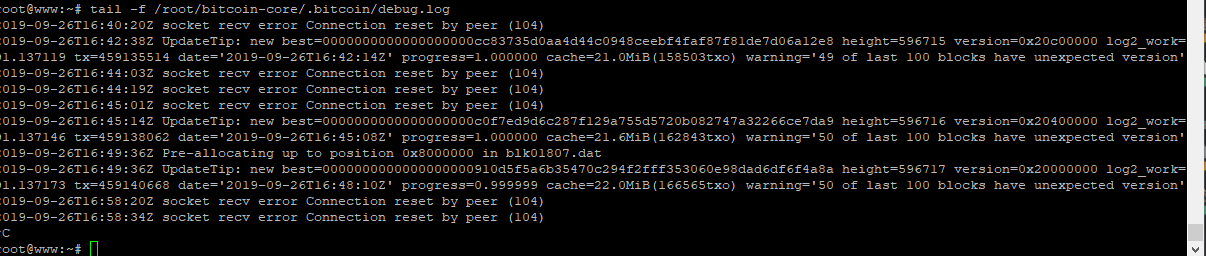
and get this message
main olive
nobody can help?
 ionic swift
What OSes run Unix?
warped nimbus
Unix is an operating system. Are you asking which ones are based on Unix?
green sigil
hey all quick question yesterday I got really good help here. I was able to make a lot of progress. for fun I'm setting up a wsl environment
I'm running into a weird issue Cannot find file '\\wsl$\Ubuntu\home\
I'm not sure where to actually go about fixing this
I'm looking up stuff on google not sure how the fixes apply to me
I basically made aliases
I'm trying to make a file with my alias that launches pycharm charm app.py
I'm wondering if it's actually trying to find file instead of creating it
I can create files like vim app.py
uneven silo
looks like pycharm is freaking out trying to resolve the wsl links
green sigil
ok no problem thank you though for taking a look
warped nimbus
For what it's worth I know that WSL support is a PyCharm pro feature
I don't know if that applies to this though.
green sigil
oh ok I'm using Pycharm Community
green sigil
thank you @warped nimbus
warped nimbus
Was that the problem after all?
warped nimbus
No problem
green sigil
I mean I did find this https://www.jetbrains.com/help/pycharm/using-wsl-as-a-remote-interpreter.html
I tried that last night by adding in WSL but it's not working the same way
green sigil
Hey all trying to do more trouble shooting with linux and python
has anyone ran into this error ```ModuleNotFoundError Traceback (most recent call last)
<ipython-input-1-77cae8fc3d3c> in <module>
----> 1 from tkinter import *
/home/linuxbrew/.linuxbrew/opt/python/lib/python3.7/tkinter/init.py in <module>
34 import sys
35
---> 36 import _tkinter # If this fails your Python may not be configured for Tk
37 TclError = _tkinter.TclError
38 from tkinter.constants import *
ModuleNotFoundError: No module named '_tkinter'```
and I tried to apply some fixes but it's not really working with tkinter
on a linux
this is what I'm running No LSB modules are available. Distributor ID: Ubuntu Description: Ubuntu 18.04.3 LTS Release: 18.04 Codename: bionic
any ideas ?
warped nimbus
You may need to install tkinter as a separate package
It doesn't always come with python I believe
Probably what you want is python3-tk
green sigil
oh ok I'll try that Mark
thank you
@warped nimbus Can do you that sudo apt-get install python3-tk ?
like that ?
warped nimbus
Yeah
green sigil
ok I'll try that now
Building dependency tree
Reading state information... Done
python3-tk is already the newest version (3.6.8-1~18.04).
0 upgraded, 0 newly installed, 0 to remove and 0 not upgraded.``` This is what I getI just realised that may not work
green sigil
oh ?
warped nimbus
Which Python version does Ubuntu 18.04 come with by default?
green sigil
I think it's 2.7
warped nimbus
I don't think it's Python 3.7, is it?
green sigil
It' s not 3.7
warped nimbus
Yeah it has 2.7 and also some version of 3
Rightttttt
So
How did you get Python 3.7?
Did you build from source?
green sigil
I think so
don't remember the command for that one
here's I made 3.7.4 default by aliasing python
warped nimbus
I'm actually not sure how to get tkinter on 3.7
green sigil
to python 3
warped nimbus
I dunno if it's like just an extra build option when building Python, to also build tkinter
or if it's separate
warped nimbus
Do some research online about how to install it if you've build Python from source
green sigil
I've been reading this https://stackoverflow.com/questions/5459444/tkinter-python-may-not-be-configured-for-tk
warped nimbus
Or you could be less specific and just search for how to get it with 3.7 on Ubuntu
green sigil
I'm not sure how do a TCL/ Tk like they suggested
even this Mark https://stackoverflow.com/questions/6084416/tkinter-module-not-found-on-ubuntu
warped nimbus
That first link mentions installing tk-dev then building Python from source (and yes in your case that means re-installing Python I believe)
That sounds like a good lead
green sigil
I'll look up how to re install python on linux ?
I'm removing both 3 and 2.7
to have a fresh start
warped nimbus
You should not do that
green sigil
ok
warped nimbus
I don't know the specifics of Ubuntu but typically the Python versions that a distro comes with are actually needed by the distro itself
or some tools that you use
You can uninstall and re-install 3.7 safely since that did not come with the distro
formal schooner
just use pyenv on linux, imo
trying to have the distro manage multiple versions of python can get messy
treat the distro-installed python like some internal dependency only
main olive
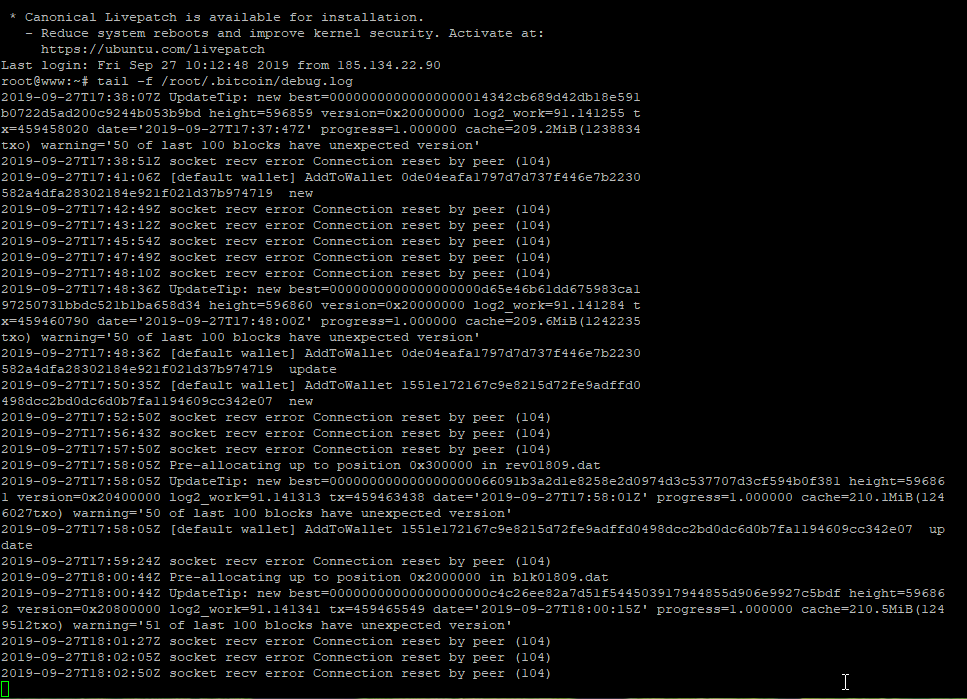
I setuped a bitcoin node server but get these problem https://i.imgur.com/TU2QhlI.png
can somebody help me please?

 ionic swift
I thought Linux wasn’t Unix?
 edgy minnow
linux is the name of the kernel & most/all unix os's run on it
main olive
@edgy minnow no
@ionic swift correct. Linux is Unix-like, as in it behaves mostly like a Unix system
IIRC BSD is more closely related to Unix as it's based off actual Unix code, and not just its design principles
although I get your point... why is the channel named "Unix" if we ever only talk about Linux - not even other Unix-like systems such as BSD or MacOS
formal schooner
"Unix-likes"
main olive
or just *nix
petition to rename channel to *nix
aw, I can't add the X and checkmark reacts
edgy minnow
? linux is the kernel. even if its become common to say linux to mean both kernel and os/gnu
 sage solar
but you also said that most unix like operating systems use linux
and thats just wrong
there are all the BSD ones, there is max os which runs upon darwin, there is solaris, there is the Hurd kernel by GNU
linux is just one out of many
@edgy minnow
@main olive and about your question, considering im bascially working with openBSD day in day out now, maybe thats gonna change ^^
main olive
@edgy minnow yeah, I'm not saying it isn't. I'm commenting about "all Unix OSs run Linux", which is just... wrong in so many ways
formal schooner
GNU+Linux intensifies
sage solar
systemd + Linux
edgy minnow
kk. didnt mean to slip unix in there yea
main olive
Unix is a real operating system, first made in 1970. Many operating systems derived from Unix (ie the actual code). Linux isn't even one of them. Furthermore, all "Unix OSs" don't run Linux. MacOS is more Unix than Linux and it runs the Darwin kernel
ye
uneven silo
mac is mach + unix iirc
sage solar
mac is a darwin kernel + apple userland
formal schooner
"XNU" which i guess is based on darwin the kernel in Darwin
fun fact, XNU is open source although it's not very useful as just a kernel https://opensource.apple.com/source/xnu/
sage solar
but even though all of them are unix theyre still so different on very basic things
for example partitioning on BSD systems is such a weird thing to do
formal schooner
so Darwin + some kind of miniml userspace = XNU, and XNU + all the fancy proprietary Apple stuff = macOS
isnt unix basically a syscall convention at this point
sage solar
in linux you have like
/dev/sda sdb sdc for your device
on bsd its
/dev/sd1 2 ....
and then those are split into slices from a to something with some of the letters having special meanigns, for example
/dev/sd3c is the raw device of sd3 you would dd to if you were to flash an image to it
so even though they all descend from the same very basic things are still thought of vastly differntly
main olive
eh, POSIX doesn't exactly dictate a device naming convention apart from some basic rules iirc
sage solar
yeah
and sadly posix doesnt dictate tools like fdisk as well
so fdisk -l is gonna list partitions on linux, on OpenBSD its doing some block related things
posix doesnt seem to care much about hard disks in general tbh
main olive
why are you working with bsd systems?
or what exactly is the nature of your job
if you don't mind me asking
uneven silo
pyenv or build from source or use your package manager
I'm assuming you have a linux vps
sage solar
@main olive building software for network security appliances which happen to run OpenBSD with the exception of one which runs some kernel we build ourselves
(well they dont happen to run openbsd, we control every bit of software on those machines and the hardware we put our software on as well)
main olive
nice
sage solar
it would be nice if the code for the product im currently working on wasnt a (with the exception of our modified openbsd and linux kernel) perl code base initially started in the 90s yes
although to be fair, maybe im a little biased, the featuer im working on touches our installer so its probably one of the oldest scripts on there
warped nimbus
although I get your point... why is the channel named "Unix" if we ever only talk about Linux - not even other Unix-like systems such as BSD or MacOS
That may be the case most of the time but there are still questions about macOS or other Unix-likes sometimes.
main olive
ah, I haven't really noticed them much
main olive
how can i install python 3.7 on VPS
warped nimbus
Which OS is it running?
main olive
debian
sage solar
which debian?
main olive
8.5
sage solar
ugh thats bad
gotta build it from source then or find some third party repository which offers it
main olive
where can i find a tutorial or smthing
sage solar
you basically just go to python.org, download the source tarball which should be somewhere in the downloads section, unpack it go into the directory you unpacked it into do a
./configure
# if you want to install your binary to a custom location, instead do a ./configure --prefix=/path/to/my/location

make
make test
sudo make install # for a custom location for example in your home directory sudo wont be necessary
and you are done
main olive
which one
main olive
i get that
error
root@robert:/usr/src/Python-3.7.4# python3.7 -m pip install discord /usr/local/bin/python3.7: No module named pip
 tight zodiac
do curl https://bootstrap.pypa.io/get-pip.py -o get-pip.py
and then python3.7 get-pip.py
main olive
Could not fetch URL https://pypi.org/simple/pip/: There was a problem confirming the ssl certificate: HTTPSConnectionPool(host='pypi.org', port=443): Max retries exceeded with url: /simple/pip/ (Caused by SSLError("Can't connect to HTTPS URL because the SSL module is not available.")) - skipping ERROR: Could not find a version that satisfies the requirement pip (from versions: none) ERROR: No matching distribution found for pip
when i do python3.7 get-pip.py
warped nimbus
You need to install libssl-dev and then rebuild Python from source so that SSL is available. I think that's the only package needed for Python to build with SSL.
main olive
ok let me open and try it
when i do curl https://bootstrap.pypa.io/get-pip.py -o get-pip.py
why take too long to download it?

ionic swift
we should rename this #linux
ionic swift
i mean its all people talk about
warped nimbus
That's hyperbolic. There are non-Linux questions, albeit rarely. What benefit is there to using a term that is narrower when "Unix" already covers Linux anyway (well ok Unix-like is more appropriate but let's ignore that)
formal schooner
@sage solar @main olive pyenv should work on 8.5
@warped nimbus plus as i mentioned earlier most q's are about Bash or other GNU programs anyway
boreal kestrel
But GNU's Not Unix!
main olive
tldr | simplified, community driven man pages
Simplified, community-driven man pages!
I found this.. pretty neat
blazing wolf
If u upgrade to Ubuntu mate 19, will I have to reinstall everything?
sage solar
Nope, Ubuntu ist usually gonna trigger a mass rebuild for all their packages for the next version, then scream at the owners of whichever packages didn't build properly and when they don't get there in time do a release without them (which doesn't mean the owners can't still update it) so it's unlikely you'll run into any issues
blazing wolf
okay
sage solar
(Well that's actually the fedora release process, I can't tell you exactly what Ubuntu does but I'd imagine theyd do it similar)
 ancient cargo
what's ny'all's opinion on ansible/ansible tower?
I'll be working with it, so I want to know what to expect
for an entry level, I don't think it's too bad 😄
throw a pingpong my way ✌
main olive
Well, technically, by naming this channel to #unix, we welcome all users of UNIX-like systems, including FreeBSD users and users of other open systems similar to Linux.
Generally, most of the hacks and tools on Linux are common to all POSIX systems, including Mac OSX.
ancient cargo
So, I'm following RHEL8.0 134, and it asks to edit sysstat-collect.timer
problem: there is no sysstat-collect.timer
I've installed sysstat using yum install sysstat -y, as per exercise, but nothing.
I've even rebooted.
I can't do systemctl start sysstat-collect.timer because there isn't a file named that
main olive
can you run the daemon manually?
ancient cargo
what would be a noice distro for a 4gig i3-5005U nvidia 920M that kinda overheats?
rn I'm running fedora
sage solar
We're running fedora on weaker workstations at work....well the older ones
The thing which makes it overheat right now is probably gnome
So uhm just look for another de or wm I guess
ancient cargo
also grub is broken 🤷