#tools-and-devops

1 messages · Page 30 of 1

rancid schoonerBOT
#
ask

Asking good questions will yield a much higher chance of a quick response:

• Don't ask to ask your question, just go ahead and tell us your problem.
• Try to solve the problem on your own first, we're not going to write code for you.
• Show us the code you've tried and any errors or unexpected results it's giving
• Keep your patience while we're helping you.

You can find a much more detailed explanation on our website.

limpid mulch
#

Ask away. =]

heavy knot
#

Does anyone here use PyCharm?
I need some help with creating a new project lol

#

Like, a new file

#

Wait nvm

barren iron
#

@heavy knot three are extensions for semantic highlighting

#

I might actually install one hahaha

hoary shore
#

Not sure where else to throw this, but I know you can do "git clone some-long-repo-name.git shortname" to clone a repo and have it use a diff folder name locally, but is it possible in reverse? If I setup a descriptive repo name @ github, but my local folder is something different, can I push to the remote repo after doing git init locally?

quaint needle
#

as long as you set the remote to that repo it doesn't matter what your folder name is i believe

hoary shore
#

kk thx, ill give that a shot then

hoary shore
#

Alright, got to the point I was gonna push things, and no go. I've got my remote added, ssh -T to github still works. Usually I've always just pushed to clones, but never tried to push a new repo. Any ideas what this means?

hoary shore
#

Alright this seems like something deeper, but I can't clone an existing repo over ssh, either. Things only work via https, yet my ssh is setup and works /shrug

#

well, it worked fine from powershell.. mingw64 just wouldnt ask for my passphrase or anything for whatever reason, even though ive got it set to enable an agent and ssh-add when i open it >.>

stiff sedge
#

Pycharm question
I want the dropdown run list to only contain open files

tropic jay
#

I'm trying to install the boxy theme for sublime text but it's not showing up in package control

#

and I definitely do not have it already

cold gate
#

It's not showing up for me as well, but I think development has been stopped in favor of DA UI, @tropic jay

#

Boxy Theme will be deprecated in favor of the DA UI, once it reaches to stable version 1.0.0.

#

Now, DA UI is not at that stable yet, but I can't find Boxy Theme in Package Control

#

Seems like the Boxy Theme repo has disappeard from GitHub

tropic jay
#

hmm

#

is there any way I ca n get it?

heavy knot
limpid mulch
#

Mb look for the path settings in the app itself?

heavy knot
#

where would I find that?

limpid mulch
#

Not sure, never used sublime...

#

Must be somewhere in the project or interpreter settings.

heavy knot
#

*i found it

#

thanks.

river prairie
#

does anyone know a sublime-text-package that organizes the code for you? I mean like in C# when you add the ; at the end of the line, it organizes the code.

cold gate
#

Do you mean like an auto formatter?

river prairie
#

yes

#

i guess

cold gate
#

I'm not sure what you mean by organizing the code, to be honest

#

I'm not familiar with C#

river prairie
#

ok

#

ill just google it then :/. ty tho

cold gate
#

But I don't know if that's what you mean

river prairie
#

yeah actually. thx so much

rigid elbow
#

Does anyone have experience using CustomJS in Bokeh? I need some help converting my update functions to JS

heavy knot
#

I have a question my IDLE isn't working and won't open any ideas on what I should do?

heavy knot
#

Hey, I'm trying to use pycharm to connect to a remote Postgresql server but I haven't been able to.

#

I can connect just fine with tho

ssh -L 63333:localhost:5432 joe@foo.com
psql -h localhost -p 63333 postgres```
#

Any ideas?

naive birch
#

@heavy knot , probably your ingress traffic settings on remote host

#

or the settings in your postgresql.conf file

heavy knot
#

but I can connect just fine from the terminal

#

without needing to touch anything

#

problem must be on pycharm

naive birch
#

What does trace say in view?

vital ether
#

Hi this is Nakul just joined the community, plz can someone explain me what is micropython? Why is it called the Arduino replacement? And is it worth replacing my Arduino?

violet belfry
#

It allows you to program the board in Python instead of the C/C++ that the Arduino requires. Whether or not it's worth replacing your Arduino depends on your relative comfort between the two languages

honest cairn
#

@river prairie the black formatter for python is actually pretty great IME. Dunno if it’s available for sublime. But it works for me with both terminal and PyCharm. https://github.com/ambv/black

vital ether
#

Which python development environment is good? I have tried sublime, Jupiter, pycharm don't seem to like it?

#

*.

flint trail
#

I got PyCharm remote debugging working for my embedded linux target and I'm super excited about it.

bold yarrow
timber fulcrum
#

could someone give me a quick rundown of git

delicate gorge
#

rundown as in what it is or as in basic commands etc? @timber fulcrum

timber fulcrum
#

im trying to upload my project to github

delicate gorge
#

well first git init in your local directory to create a git repo in your local project then do git remote add origin https://github.com/user/repo.git to add github as your default git target and then git add . git commit -m "initial commit git push

timber fulcrum
#

where do i do all of this

#

in pycharm?

timber fulcrum
#

@delicate gorge

timber fulcrum
#

i do step one Open the project that you want to put under Git but where is main menu once i open the project

#

@delicate gorge

delicate gorge
#

the upper line with submenus

timber fulcrum
#

im dumb lol

#

how do i make it do to my github?

#

or atleast how would i use it with horoku or whatever that site is

delicate gorge
#

"Add a remote repository"

flint trail
heavy knot
#

update of my problem: solved it by rather than just trying pycharm to manage the ssh connection, did the ssh connection myself, had it on a localhost port and had pycharm just looking at it locally.

bronze warren
#

do u guys know why my IDE is doing this ?

copper compass
#

this is a help channel :P

bronze warren
#

(ya i removed x) )

copper compass
#

it's trying to prevent you from going past the right margin

bronze warren
#

ya, but why cutting there ?

copper compass
#

but your code is so messy that it can't figure out a good way to do it

bronze warren
#

:/

#

can we do ternaries in fstrings ?

copper compass
#

If you give me that entire statement I can try to show you a good way to do it

bronze warren
#

i'll just fstringize it

#

or no i'll use a dictionnary

#

nvm

#

thx anyway ^^

real hedge
#

When creating a user session, Is it a good practice to track the user by storing a the user id in a session variable? and Do session cookies store information saved in server side sessions?

modern imp
#

Hey guys what do you use to deal with json files? I been having an interesting thing going on today

#

I got this json file that the standard json library is unable to read, gives me a value error. However when I use the simplejson library it loads it just fine. Weird huh?

#

Hope this is the right place lol

violet belfry
modern imp
#

oki gimme a sec

#

hows this

heavy knot
#

I have a question my IDLE isn't working and won't open any ideas on what I should do?

coarse rapids
#

@heavy knot Get any error messages?

heavy knot
#

no, it just won't open, which, is confusing because I repaired my files and it still didn't work.

#

@coarse rapids

hasty walrus
#

Did somebody know a good localization tool for free with at least 2k Strings (self hosted is ok)

heavy knot
#

I got a small question, anyone got any suggestions on how to run a bot 24/7?

#

Besides having your computer on 24/7.

stiff sedge
#

have A computer on 24/7

#

can't run code without a computer

crystal depot
#

did pycharm 3 break material UI for anyone else?

#

the theming works everywhere but the main code window, it’s stuck on light or dracula

#

hm, completely deleting pycharm and reinstalling fixed it

barren iron
#

@heavy knot paying for a cheap server

#

Scaleway is what I use. perfect for a discord bot

heavy knot
#

thx

coarse rapids
#

@heavy knot How were you starting IDLE, when it did work? From the Start menu?

#

If so, find it in the Start menu, right click it, go to More, and click "Open file location"

#

That should open an Explorer window with the shortcut highlighted. Right click that and click Properties, and it'll show you where IDLE was supposed to be started from. Then you can look there to see if it's missing.

#

If you're on Linux or OSX let me know.

versed spoke
#

@heavy knot u can use my server

heavy knot
#

hmm ill think on it

heavy knot
#

@coarse rapids I tryed the files their, are their any substitutions to IDLE?

coarse rapids
heavy knot
#

thanks dude/dudet

river prairie
#

hey folks! im currently using atom editor to edit my python code and I have a code folding issue. The thing is.... i want to keep my code folded even if I restard atom, but it keeps unfolding all of my code again when i start atom again... It is really annoying. what can i do to keep my code folded?

barren iron
#

There should be a shortcut

#

Google it

violet belfry
#

I swear, all of the "google it" people should just be rounded up and fired into the Sun

barren iron
#

Well why should I go and search for it when its already easily accessible online?

violet belfry
#

Why even bother responding then?

#

Just yell "GOOGLE IT" to yourself and don't type anything

stiff sedge
#

if something is trivially easy then there is more to be learned in the googling of it than in being spoon-fed

#

not always the case

violet belfry
#

Great, then you can respond in a more helpful manner than "google it"

stiff sedge
#

I would usually explain the terms to google

violet belfry
#

👍

stiff sedge
#

actually

#

I wouldn't say google it

#

i would say that I googled X and found this: [link]

barren iron
#

This took me 2 seconds

#

with atom folding shortcut

#

To fold everything, use Alt+Ctrl+Shift+[

violet belfry
#

That's not even the question lol

barren iron
#

But i was my response

#

That's my point at least, sorry if that wasn't clear

violet belfry
#

Your point is that you found something in 2 seconds that doesn't answer the question?

barren iron
#

I should of said " There is a shortcut that will enable you to fold all your code. This could be set up to a macro on your mouse or keyboard, or even a custom program, allowing you to get the same speed"

#

But, what's the point?

violet belfry
#

The point is that "Google it" and "this took me 2 seconds" are, intentionally or not, incredibly hostile and create an unwelcoming atmosphere for people asking questions

barren iron
#

Google it ill accept, horribly worded

#

This took me 2 seconds was a addition to our discussion

violet belfry
#

🙄 ok

main drift
#

I agree with @violet belfry With the rounding up of the google it people. When it comes to programming I'm new and I don't always know what the best keywords are for a search and sometimes the answers are very puzzling. Asking experienced code monkeys as to what to do should not be responded with "google it" I hope for a more intelligent answer if not a block of text explaining it then a link to what you have found which is easy to understand or even a "try these key words in google there are a number of good sites" not just google it......

#

I find those words to be very "I can't be bothered helping you and spending a few mins setting you on the right path so I'm gonna default my answer."

#

I don't expect a "this is how to fix it" more "here is a link with info you need to get the job done" helps me to work out the issue so I learn from it not just have you fix it for me.

#

Sorry I'm done my tangent

vital ether
#

Can you use Microsoft visual studio for python coding?

deep estuary
#

You'd be more likely to use Visual Studio Code I believe

#

Visual Studio is more for .NET iirc

vital ether
#

So you mean it is good

deep estuary
#

I think VSCode is good yeah

#

It has a wide variety of extensions

vital ether
#

Do you use it

coarse rapids
#

I used VSCode for a full week two weeks ago, coming from PyCharm and was very impressed

#

@vital ether To answer your original question, yes Visual Studio (the full product, not VSCode) does have Python support.

vital ether
#

@coarse rapids and @deep estuary thx a lot for you answers I will try vs full product.

coarse rapids
barren iron
#

@main drift @violet belfry I understand where your coming from, but googling is a skill I also had done for me, and now I have no idea how to do it myself. You find Alot of beginners in this server trying to do stuff they really shouldn't be yet (The classic example being a discord bot as your first project)

Sending these people straight to a website isn't most likely the best thing for them.

#

But I suppose at this point we are over doing it. xd

main drift
#

Yeah i already made a discord bot in node.js but i hate node so i am moving to python to remake it and to learn other things that python can do

#

@barren iron

prisma elbow
#

hi there, not sure if this is the best channel. I have a question about buildout (zc.buildout) which we use with a pyramid web application. We have used this for ~5 years but the original dev is long gone and he was a bit of a buildout wizard. The question is - we are trying to add a python module (typically to setup.py) that is actually a python C-extension. For whatever reason, easy_install (which is what buildout uses for python) doesn't work on this package... and we are looking for a work around.

tawny temple
#

Easy install is deprecated after all.

#

Not familiar with buildout, but if you're stuck with easy install fair enough that's life sometimes

#

In what way does it not work?

prisma elbow
#

@tawny temple No eggs found in /var/folders/3r/f1mvclh535v53fpckx77f_800000gq/T/easy_install-3jou0zfc/pyBigWig-0.3.12/egg-dist-tmp-arwd2niq (setup script problem?)

#

I suspect a combination of poor packaging by pyBigWig and buildout being buildout. Buildout has many torture devices for installng non-python stuff... called recipes.

tawny temple
#

pyBigWig being the c extension you're trying to add?

#

Have you tested if easy install works with it outside of buildout?

#

If not, how about pip?

prisma elbow
#

pip works.

#

easy_install manually (with -v) gives above "No eggs found"

#

same as buildout

#

I am thinking this package is just a little borked, it's probably not used much

tawny temple
#

Perhaps. I would think if this was the case, there'd be an issue for it.

#

Does building it work? i.e. python setup.py bdist_egg

#

I'm not super familiar with easy install, but perhaps with an egg, you can point easy install to that egg

winter gale
#

If anybody here is knowledgeable about building conda packages, I could really use some help. I'm trying to build my first conda package and am totally stumped. I keep getting a ModuleNotFoundError regarding my module, genbankqc.

To reproduce:

git clone https://github.com/andrewsanchez/GenBankQC
cd GenBankQC
conda-build -c conda-forge -c bioconda -c biocore recipe/

The basic import test fails. If I just try to run pytest, it fails to import any of the modules in my run requirements.

If I disable tests in meta.yaml, the build completes without any errors. But when I try to install the resulting package and run genbankqc --help, I noticed that there is no python in the environment. I have no idea what I'm doing wrong. I have looked at several example recipes and can't figure what I'm missing.

prisma elbow
#

@tawny temple ... that does make an egg

tawny temple
#

Try to use easy install with that egg

barren iron
#

How do I go about moving from gitlab to github, and taking the MR, issue and branches with their history with me?

tawny temple
#

@deep estuary wrote a script for that I believe, Maybe he can lend some advice. It basically boils down to using GitLab and GitHub APIs

#

and it isn't perfect due to API limitations

deep estuary
#

@barren iron so I have a tool on my laptop for moving specifically issues

#

branches can be moved by importing the repo into GitHub

barren iron
#

Ok

deep estuary
#

as far as we could tell it was impossible to keep contributor merge requests as they work using the forkers repo which was not on GitLab

#

we could move across some MRs by reopening the branches on GitHub

barren iron
#

If I can import the repo.... that might be good enough

deep estuary
#

the tool we used for the move of issues is not currently online and has a lot of hard coded variables but I can lend you a hand if you want

#

What I did was have a python file which grabs the issues and issue comments and saves them into a JSON file

#

then I had another script which created new labels and then issues and then closed the closed issues and changed other things about them

barren iron
#

I don't think its worth it for the number of issues

next star
#

Any one using NeoVim that has as second to help me figure out the config file for neovim? I have a .vimrc that I do not want to import as its populated with some one else's vim file and seeing as im just really diving in to Neo/Vim I would like to learn to set it up?

#

for python

#

or even know the neovim discord?

delicate gorge
#

!t ask

rancid schoonerBOT
#
ask

Asking good questions will yield a much higher chance of a quick response:

• Don't ask to ask your question, just go ahead and tell us your problem.
• Try to solve the problem on your own first, we're not going to write code for you.
• Show us the code you've tried and any errors or unexpected results it's giving
• Keep your patience while we're helping you.

You can find a much more detailed explanation on our website.

delicate gorge
#

@next star

next star
#

@delicate gorge I am in the python tools channel, an editor is a tool that I would like to use to code in python, I have been trying to solve my problem, I have listed what I need in my question and that I am new so its hard to add things I have tried, and its almost been an hour since I asked so I would say thats patient. While maybe not 100% of the spec of the "ask" for this discord I gave a lot of the needed criteria and would gladly provide more with guidance.

delicate gorge
#

have you already got some plugins manager installed like vim-plug?

next star
#

I have a .vimrc file that is some one elses config. I do not know how to install plugins to vim. I would prefer to keep a neovim config and a vim config seperate to learn how to install plugins myself.

delicate gorge
#

oh you will still have to mess around with your config files dont worry

next star
#

I am essentially starting withNvim from scratch

#

It is installed and have been doign the tutorial off and on for a week. I am unsure of even where its config file is

#

~/.config/neovim is empty

delicate gorge
#

on windows or unix like systems?

#

unix

#

yes its empty because you have to make it

next star
#

ubuntu 18.04 linux

#

Im comfortable on the command line.

delicate gorge
#

so in my system its in ~/.config/nvim/ and named init.vim

#

so first youll have to create that one

next star
#

ok

delicate gorge
next star
#

file made, looking at that link

delicate gorge
next star
#

so essentially I am using the init.vim file i just made just like a regular .vimrc?

delicate gorge
#

yes

honest cairn
#

If going the vim route, I’d recommend pathogen for managing plugins

analog pasture
#

hey does anyone use dev environment inside docker ?

stiff sedge
#

@analog pasture what are you trying to accomplish by that, and what language are you using?

analog pasture
#

So i want to deploy a container with django app to awa ec2

#

Aws*

#

Main goal is to learn while working on it

stiff sedge
#

I followed the tutorial on the django site while I made my first(only) django app

analog pasture
#

Im just fine with Django part, im more confused with docker tbh

stiff sedge
#

nginx and gunicorn is what I've heard most recommended for a production deployment

analog pasture
#

Ok let me add

#

Ive already succesfully deployed this app

#

With exactly this stack

#

On an ec2 instancr

#

What i want to do now is to do same but using docker from the beginning

#

As a learning endaevour

stiff sedge
#

I don't know anything about those endpoints and especially not enough to know what is different

#

ok

#

I don't know anything about docker

analog pasture
#

Its cool, thanks anyway !

stiff sedge
#

yw

heavy knot
#

Anyone here familiar with proxmox ?
Every time I use high disk IO, proxmox crashes, but guests stay up. Freaking annoying

heavy knot
#

@short tundra

Version control is where you can keep track and control each change and version of ... whatever.

#

modern version control software typically tracks every committed change to software.

#

Using version control, multiple people can keep their own copy of software, work on it, then merge all the changes together later.

#

there may sometimes be conflicts, but with version control, it's easier to coordinate and organize everything

finite mulch
#

Are there any worthwhile cloud IDEs? So I can switch between home PC & laptop

heavy knot
#

No idea, why not use Git?

finite mulch
#

I really should but I never got the workflow down

royal tundra
#

the cloud ide i see a lot of people using is repl.it

heavy knot
#

I want to assign a shortcut for Tools > SublimeREPL > Python > RUN current file

#

anybody know how

#

(Sublime Text)

#

Found a solution if anybody else wants to do the same

cold gate
#

Is it in that SO link? I'll take a look.

finite mulch
#

Thanks @royal tundra

fading glen
odd lily
#

okay wait

#

I could not find

#

@fading glen

fading glen
#

Are you using the Pycharm Educational edition?

odd lily
#

yes?

fading glen
odd lily
#

Shall I uninstall it and download anyother?

fading glen
#

No, you just have to do this manually.

Go into Windows Powershell, and use the command cd your_bot_directory_here to change Powershell's working directory to the one that your bot is in, then use venv activate to activate your virtual envirinment.

Then, use pip as you normally would.

odd lily
fading glen
#

cd "C:\Users\. . .\discord_bot"
Gotta wrap that in quotes. Powershell thinks you're passing it multiple arguments

odd lily
#

I need to put dots?

cold gate
#

No, just add the quotes. The dots are so tha @fading glen doesn't have the type the complete path.

fading glen
#

That, because mobile is a pain.

odd lily
#

ook

#

I typed out this cd "C:\Users\Supriyo Kr Aich\PycharmProjects\discord_bot"

#

and next line says PS C:\........\discord_bot>

fading glen
#

Yep, that means you're in the same directory as your bot.

odd lily
#

next line this? python3 -m venv bot-env ?

fading glen
#

You should be able to use .\venv\bin\activate to activate your venv and install packages to it..

odd lily
#

.\venv\bin\activate this on PowerShell?

fading glen
#

Yes

odd lily
#

says this term is not recognized

fading glen
#

I might be mistaking that for Linux.

Try .\venv\Scripts\activate

odd lily
#
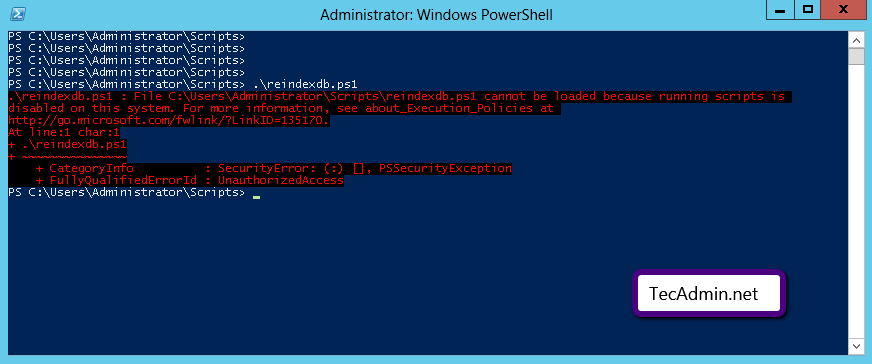
PS C:\Users\Supriyo Kr Aich\PycharmProjects\discord_bot> .\venv\Scripts\activate
.\venv\Scripts\activate : File C:\Users\Supriyo Kr Aich\PycharmProjects\discord_bot\venv\Scripts\Activate.ps1 cannot
be loaded because running scripts is disabled on this system. For more information, see about_Execution_Policies at
http://go.microsoft.com/fwlink/?LinkID=135170.
At line:1 char:1
+ .\venv\Scripts\activate
+ ~~~~~~~~~~~~~~~~~~~~~~~
    + CategoryInfo          : SecurityError: (:) [], PSSecurityException
    + FullyQualifiedErrorId : UnauthorizedAccess
#

Script disabled huh

fading glen
#

Do you own this machine?

odd lily
#

100% lol

fading glen
#

Run Powershell as admin.
Close out Powershell, go to reopen it, but right-click the application, and click "Run as Administrator". Then try those steps again.

odd lily
#

same issue

fading glen
odd lily
#

Sure!!I will try it tommorow

royal tundra
#

@finite mulch np

forest bay
#

@odd lily

Set-ExecutionPolicy RemoteSigned
.\venv\Scripts\Activate.ps1
#

Sorry if you got 3 notifications, I'm a bit tired.

odd lily
#

Np🤗

odd lily
#
Execution Policy Change
The execution policy helps protect you from scripts that you do not trust. Changing the execution policy might expose
you to the security risks described in the about_Execution_Policies help topic at
http://go.microsoft.com/fwlink/?LinkID=135170. Do you want to change the execution policy?
[Y] Yes  [A] Yes to All  [N] No  [L] No to All  [S] Suspend  [?] Help (default is "N"):
#

Yes or Yes to All ?

#

@forest bay

#

I did Yes to all

#

and got the follow thing

Set-ExecutionPolicy : Access to the registry key
'HKEY_LOCAL_MACHINE\SOFTWARE\Microsoft\PowerShell\1\ShellIds\Microsoft.PowerShell' is denied. To change the execution
policy for the default (LocalMachine) scope, start Windows PowerShell with the "Run as administrator" option. To
change the execution policy for the current user, run "Set-ExecutionPolicy -Scope CurrentUser".
At line:1 char:1
+ Set-ExecutionPolicy RemoteSigned
+ ~~~~~~~~~~~~~~~~~~~~~~~~~~~~~~~~
    + CategoryInfo          : PermissionDenied: (:) [Set-ExecutionPolicy], UnauthorizedAccessException
    + FullyQualifiedErrorId : System.UnauthorizedAccessException,Microsoft.PowerShell.Commands.SetExecutionPolicyComma
   nd
.\venv\Scripts\Activate.ps1 : File C:\Users\Supriyo Kr Aich\PycharmProjects\discord_bot\venv\Scripts\Activate.ps1
cannot be loaded because running scripts is disabled on this system. For more information, see
about_Execution_Policies at http://go.microsoft.com/fwlink/?LinkID=135170.
At line:2 char:1
+ .\venv\Scripts\Activate.ps1
+ ~~~~~~~~~~~~~~~~~~~~~~~~~~~
    + CategoryInfo          : SecurityError: (:) [], PSSecurityException
    + FullyQualifiedErrorId : UnauthorizedAccess
lyric tulip
#

hey guys, I guess in Pycharm if you run in python console you can't use the await keyword? Any hacks around that?

delicate gorge
#

you can use the await keyword whenever you are in an async environment

#

that is not an issue with pycharm but with your code

lyric tulip
#

so I have to run a get_event_loop or whatever?

delicate gorge
#

i dont know your code (and to be fair i avoid writing async code when possible) so without more information i can just say maybe ¯_(ツ)_/¯

lyric tulip
#

well I know the code works in what is the discord bot

#

I was hoping to test just one module in python console to poke around easily

#

without having to do something like asyncio.get_event_loop().run_until_complete(some_coro())

#

I could do await some_coro()

#

in repl

forest bay
#

@odd lily Try running the same commands, but from an Administrator-level PowerShell terminal (Right click -> "Run as Administrator")

odd lily
#

Ohk

forest bay
#

Did that work?

odd lily
#

Umm let me try now

#

Yup it gave another line to type blobhappy

#

It worked

#

@fading glen Shall I close it and start working ?

#

ahh Anyone ?

cold gate
#

I don't see any issues in that output, but I'm not quite sure what the goal was, as well. I don't think there's any harm in closing that window, as it's done with installing discord.py

odd lily
#

10.0.1 is this the newest version ?

wheat fulcrum
#

Hi guys!

What server exists for python for production?
In nodejs = pm2

heavy knot
#

@quaint saffron idk whats wrong here, josephine is in C:\Users\lenon\Desktop\Pyprojects/Josephine.py

formal wind
#
    print(value)```

 Hello! i am trying to count the numbers from 1 to a million, but for some reason, pycharm counts from 208 and then jumps to 850209 and then continues by adding 1 from every number after 850209
stable cloak
#

I'm also getting the same behavior, but it starts at 203. I'm guessing it's a limitation in PyCharm's terminal

#

Have you tested it in just your regular cmd prompt or terminal?

quaint saffron
#

It might be that it's running too much and skipping some out to save memory? Maybe try adding a delaypy from time import sleep for value in range(1, 100**3): print(value) sleep(0.01) (although this will be slower)

formal wind
#

that works ^

quaint saffron
#

Then I guess that's what the issue is

formal wind
#

so it's more of a memory problem?

stable cloak
#

I think it's more of an implementation thing

quaint saffron
#

IDK if it's exactly memory, but PyCharm probs has a cap to prevent memory overload

#

@heavy knot All your environments seem to be invalid... 🤔 nvm

stable cloak
#

I did a list comprehension for the same thing total = [val for val in range(100**3)] and PyCharm's little viewer tells me this:

#

I'm guessing it's a mixture of PyCharm being limited behind the JRE it runs on as opposed to running and what not. It's working correctly, it's just the output that it doesn't like

heavy knot
#

yesterday it was working and today i woke up and opened it and it was saying the aenvironment was invalid, so i deleted everything related to python in my computer and installed it again, then moved the interpreter to a folder called python, and made it make an eeenvironment using that interpreter in a folder next to it called ENV

#

and put the packages i had inside site-packages since i didnt change the version

quaint saffron
#

IDK what the issue is, but I should imagine uninstalling and re-installing pycharm would fix it -- unless this is an issue for you @heavy knot

formal wind
#

oh i see

heavy knot
#

ill try that thx

quaint saffron
#

np

heavy knot
#

i decided to reinstall python all together and during the installation it said no python 3.6 installation detected, and started going backwards

#

now it said fatal error during installation

#

why do these things always happen to me

#

ok it worked i hope pycharn works too or ill start peeing everywhere

stoic hare
#

what are some good IDE's to use?

half rock
#

I'm a fan of emacs with python-related packages

stoic hare
#

okay

#

wait is that a linux thing?

half rock
#

No, it can run on any major OS.

#

It's a text editor that's been around for a very long time. It's built to be extensible. That means that anything anyone ever thought of having an IDE do... someone has already done it.

stoic hare
half rock
#

It's been around forever and the original devs actually invented things that we take for granted but their name for it/way of doing it isn't what stuck... because of that there is definitely a learning curve

#

But I love it, and think that if you're willing to put the time in to learn, it's an astonishingly powerful text editor/IDE for any language you care to write in.

stoic hare
#

oh okay

#

seems like a lot of effort for an IDE imo

atomic cosmos
#

Is it more profitable for GitHub to mine your juicy private repos for juicy ideas or for you to pay outright

deep estuary
#

I'd hope that they won't be poking around private repos..

#

That would be a breach of privacy and they'd lose hella customers

stiff sedge
#

@deep estuary you ARE talking about allowing M$ access to your repository, and they don't have the best track record

#

BUT from everything that has been said, GitHub is being maintained as a thing that M$ owns and not as a part of M$

deep estuary
#

@stiff sedge Microsoft owned GitHub has been fantastic so far and I don't think that the existing GitHub community would be happy by the higher ups from Microsoft snooping private repos, as syntaxaire already posted GitHub can only access repos with the knowledge of the owner or for other unlikely cases

stiff sedge
#

I completely understand that. I'm just saying that we will not ever really know what they HAVE done

ebon coyote
#

Are there any podcasts about Python or coding in general?

#

please ping me if there are any :)

lapis hazel
ebon coyote
#

tysm @lapis hazel !

lapis hazel
#

no problem :)

heavy knot
#

Hi! I am using VSCode on a Windows computer. I do not have administrator priviliges.

#

I would like to use FiraCode font but it is not installed.

#

Is there a way out?

polar iris
#

I'm not 100% sure about windows, but I think you can install fonts that will be accessible across the whole system?

barren iron
#

Whenever i install pipenv in a gitlab runner, azure pipelines, or another linux machine, it fails the first time round.

#

Here is specifically what i get, along with the error

#
[[source]]
url = "https://pypi.org/simple"
verify_ssl = true
name = "pypi"

[packages]
pillow = "*"
"flake8" = "*"
yarl = "<1.2"
"discord.py" = {ref = "rewrite",git = "https://github.com/Rapptz/discord.py"}
rethinkdb = "*"
ptvsd = "*"

[dev-packages]
pylint = "*"

[requires]
python_version = "3.6"
forest bay
#

You should add your pipfile and output to the issue @barren iron

barren iron
#

@forest bay Well I tried. But I didn't get the error.

#

XD

#

Almost always it spits out the hashes and certain modules saying "failed to install"

#

And then it says "Installing initially failed dependencies"

cold gate
#

Ah, yes, I had that, too, a couple of times

#

But, intermittently

#

With the discord rewrite as well

barren iron
#

Yes

#

That's what I'm thinking

#

It's the damn git module

#

@cold gate I think it's safe to say we need to stick with pipenv because it will be the standard?

#

In years to come?

cold gate
#

I don't know, but I kinda like the way it works when it works

barren iron
#

Otherwise I'd try one of their competitors

cold gate
#

But, I've only switched recently. I was just using virtualenv before without anything to replicate environments

#

(I'm not a developer)

barren iron
#

Ah ok

#

poetry and Nikola are there (competition)

#

But pipenv is now to big to fail, and the majority of people don't use it for multi-container/multi platform projects

barren iron
#

Powershell terminal working inside sublime text

tawny temple
#

That's a nice theme. Mind sharing? I think I like mine right now but just in case I change my mind...

barren iron
#

@tawny temple its ayu dark and then the sublime dark on the outside

heavy knot
#

does anyone knows on eclipse how can i change which interpreter it's looking at? i deleted python 3.7 and know all my projects have error

heavy knot
#

why is the chat suddently dead?

violet belfry
#

Probably because not many people use Eclipse for Python

heavy knot
#

yeah everyone hated me for that but problem solved anyways

heavy knot
#

Hey has anybody used Atom before?

#

I need help trying to get the "Open in browser" plugin

civic hound
#

is there a package directory search in Atom?

heavy knot
#

Yep

#

Should I try using that?

civic hound
#

search for open in browser

heavy knot
#

Alright.

civic hound
#

see if you get a install this thing

heavy knot
#

Sure

#

Alright I got it

#

Thanks

civic hound
#

did it work?

#

im just guessing you see @heavy knot

heavy knot
#

Aww man it didn't

#

It did something else

civic hound
#

you installed it and restarted?

heavy knot
#

Let me show you

civic hound
#

no, all chat in public, i do not assist with python help on DM, this is server policy

#

sure thing

heavy knot
#

Understood.

#

So I think at 11:30 he uses a thing called "open-in-browser"

#

And his terminal opened and made his bot online

#

But instead for me, it opened sublime text and did nothing

civic hound
#

11:30? sure?

heavy knot
#

Wait

#

11:16

civic hound
#

i found it..

heavy knot
#

Oh ok

#

So it runs his program, but for me it opens sublime text?

civic hound
#

he had bound opening a .py file with another program

hushed orbit
#

Surprisingly not a terrible tutorial, but just wanted to say that most d.py youtube tuts are bad for learning the lib, and just causes confusion.

heavy knot
#

Oh ok

#

So what should I do then?

civic hound
#

there are many hurdles for someone that would like to start using python. you should learn the basics and requirements before you start making a discord bot

heavy knot
#

Well, I kind of already learned the basics.

civic hound
#

@hushed orbit knows alot about this

heavy knot
#

I understand all of the code, I just don't understand how to run it because I never used Atom before.

#

Oh ok

#

Sure.

civic hound
#

to run your code you write in terminal python bot.py

hushed orbit
#

I haven't watched that specific series, it looks alright. but have a read through things like the examples at
https://github.com/Rapptz/discord.py/tree/rewrite/examples
and the faq on the docs, and bookmark the docs for reference
faq: https://discordpy.readthedocs.io/en/rewrite/faq.html
docs: https://discordpy.readthedocs.io/en/rewrite/api.html

guide by scragly on requirements for d.py and how to get started, i highly recommend this one:
https://gist.github.com/scragly/095b5278a354d46e86f02d643fc3d64b

civic hound
#

or on windows you use cmd

hushed orbit
#

(oh and use rewrite if you're not)

civic hound
heavy knot
#

It says it cannot open the file : (

civic hound
#

you have to navigate to the folder where you have saved your file

heavy knot
#

Oh ok

civic hound
#

as you can read from the required knowledge, there is a lot you must learn before starting

#

a good way to get started is doing automate the boring stuff with python

#

that would check alot of boxes off that list

heavy knot
#

Oh o

#

k

#

But for some reason I can't find the file

#

I saved it and renamed it but I can't find it

civic hound
#

not sure where atom saves your file, maybe you have a save as.. command you can run to see in what folder you have it

heavy knot
#

Yep found it

#

It saves it as a sublime text file

#

So what do I do know?

#

How do I run the command just like in the video?

#

@civic hound

civic hound
#

it is a python file, you have just told your machine to open python files with sublime text.

#

the way to run a python file is via cmd

#

and you write python your_file.py

#

ofc use your own filename

#

tools like atom and sublime text uses build int assistance tools to run this command

#

i do not know how atom does this.

#

you can change default opening behavior on any file type in windows

#

you can change from sublime to python and it would work

quasi palm
#

hey, anybody savvy on macOS installs and making coexist homebrew and anaconda ? There is one brew formula i want to install (MTG/essentia) and it fails. I have installed homebrew python and anaconda python, python which points to anaconda. I think the problem is there, since the essentia formula installs a python version. How to make coexist anaconda, and homebrew recipes which need python ?

hexed cradle
deep estuary
#

@olive verge can you show me line 53 of your configuration file (the one erroring)

olive verge
#

Hello, I'm new to python. I'm using sublime text and having issues on trying to save changes I am trying to make to the Package Control.sublime-settings-Users. See picture.

#

One moment.

deep estuary
#

also please don't post questions everywhere, otherwise people don't know where to help you

olive verge
deep estuary
#

that would explain it

#

you have copied it directly from github which also copied some of the github content

#

remove all data from line 53 to the bottom of the file and try save that

olive verge
#

Ok. I deleted what you said and saved it. No error messages. I guess it worked.

#

When I saved it, nothing happened. Am I supposed to notice a change?

deep estuary
#

I don't know, depends on what you changed in the file

#

and presumably if you have installed package contorl

olive verge
#

When I try to install package control, I get the following...

deep estuary
olive verge
#

I'm following the steps to the letter and I keep getting the following....

deep estuary
#

you forgot to put a comma after the true on line 68 of the file on the right @olive verge

olive verge
#

I just did that and I keep getting the same error message.

deep estuary
#

well there is a missing comma somewhere else

olive verge
deep estuary
#

yes

#

but you forgot the comma

olive verge
#

I'm still getting the same error after I put the comma. Look...

iron basalt
#

line 68

#

i assume line 68 has to be ended with a comma, not 69

olive verge
#

Ok. So take out the comma on 69 and put the comma on 68, then save it. Yes?

iron basalt
#

i mean look at the pattern in the picture you have sent

#

"tag": value,
"tag": value,

deep estuary
olive verge
#

That's the way the config file came from GitHub.

#

Ok. Hold on.

deep estuary
#

no it came like that because it at the end of the file

#

but you added debug and didn't move the comma down so it broke

olive verge
#

You were correct. Thank you very much.

tidal bobcat
#

pycharm is complaining about git.exe being missing, but I prefer to use github desktop, so I would rather not install anything else

coarse rapids
#

I believe github desktop has git.exe, doesn't it?

quasi palm
#

@hexed cradle i had seen that page already, but the most upvoted answer is "use homebrew cask anaconda" but there ain't much more details (as in, idk what homebrew cask anaconda implies, if it will automagically resolve any subsequent path error i might get, and expecially since i already have anaconda installed i'm not sure it's a trivial manipulation to uninstall anaconda then reinstall it via homebrew cask)

tidal bobcat
#

not from what i can see

coarse rapids
#

check C:\Users\UserName\AppData\Local\GitHubDesktop\app-1.0.5\resources\app\git\cmd\git.exe or something along those lines

tidal bobcat
#

found it!

#

cheers.

#

so I can push my repo inside pycharm, then?

coarse rapids
#

yeah, you can push, pull, commit, view changes, rebase, etc. all from pycharm

tidal bobcat
#

that's really cool!

coarse rapids
#

I've found I still have to run git once in a while to, for example, add a remote

tidal bobcat
#

okay, noted

#

still, that's super handy

coarse rapids
#

if you already had a git setup in the project directory, it should be ready to go when you open that project

tidal bobcat
#

I'm having a problem actually. If I switch focus to another program, and then switch back to pycharm, it closes the file

tawdry matrix
#

Anyone here using Visual Studio (PTVS) with Python? I always used PyCharm, but since I'm not a student anymore I cannot afford the full license for that 😄 Just wondering what VS is capable of compared to PyCharm (or any other recommendations maybe?)

tawny temple
#

Why not use the free version of PyCharm

#

Does the pro version have a feature that you really needed?

tawdry matrix
#

If I recall right you need the pro if you want to use the django specific support'

#

as well as the database management tools

delicate gorge
#

visual studio wont give you django support iirc

tawdry matrix
#

Hmm even html/css/js is pro only

delicate gorge
#

according to djangobook.com it has support for some of the django commands but thats about it

tawdry matrix
#

yeah, it has a django console for your admin.py

#

and intellisense in template files

#

I could ofcourse get the pro version

#

€89 first year, even though I just use it for fun

#

that's 7.5 a month for something I really love, hmm 😄

fading glen
#

@haughty haven

haughty haven
#

@fading glen

fading glen
#

Click on "Show All".

haughty haven
fading glen
#

Click the green + at the top right of the pop-up.

haughty haven
#

ok

fading glen
#

So, you now have a choice: either you can make a virtual environment, which will act as a separate project space for you to install all your project's required modules without messing with your local installation of existing modules, or you can use the system interpreter, by clicking on "System Interpreter" on the left menu. The second option will use a local installation of Python without making any fancy changes to your module library.

haughty haven
#

hmm ok, i have already virtual enviroment from 3.6

#

is it better to have a new?

fading glen
#

I would recommend making a new one for 3.7.2 if you intend on using it.

haughty haven
#

ok

fading glen
#

Just keep in mind that you'll have to reinstall all your dependencies.

haughty haven
#

i was thinking the same

#

i willl delete the 3.6

#

its ok

#

@fading glen

#

i select the 3.6.8

#

i cant press ok

#

@fading glen i did it

#

thanks

#

!

coarse rapids
#

Has anyone successfully gotten Docker to work with PyCharm?

#

This is me right now, it's obvious that docker-machine is found correctly because it displays the version

#

Then when I go to add a docker configuration it shows a blank dropdown and throws a Java exception

#

From what I'm seeing you have to have a docker container already running, which makes no sense since the other option there is for a TCP socket which connects to the Docker server, not a docker container

#

And if you have to have a docker container running, why is this screen a prerequisite for running a dockerfile through PyCharm, which is the recipe for building the docker container in the first place

lost rock
#

I'm not really familiar with neither d-m nor docker on Windows though

#

check docker-machine ls I guess

coarse rapids
#

apparently it's non-functional with Docker for Windows

cold gate
#

@coarse rapids Could this be it?

#

Hmm

coarse rapids
#

I ended up switching over to the TCP connection method, which worked. I just didn't like the idea of leaving an insecure port open

cold gate
#

Scragly01/03/2019
A small note when deploying a dev instance of the new django site:
If you're on windows, ensure you have autocrlf disabled in git for the project. It kills the docker.
January 5, 2019

#

Okay

coarse rapids
#

Apparently Docker for Windows runs a Hyper-V host which doesn't show up in docker-machine and isn't supposed to

#

So that's a non-starter for pycharm

barren iron
#

@coarse rapids was going to say, yes. docker Is a pain the ass with pycharm

#

On windows especially

#

I'd stick to command line docker, don't let pycharm touch it

cold gate
#

I think lemon uses PyCharm with docker, but not on Windows, I believe

barren iron
#

Yep.

#

On windows it users a Linux VM

#

To host docker dameon

#

(Unless your using windows images)

coarse rapids
#

It actually built OK after I figured out not to use docker-machine

#

The rest is all docker problems, not PyCharm problems

sacred lodge
#

So, I'd like some help solving a problem I have a gitrepo with code that i update regularly, i need to spread that code to 8 servers that already have the code anyone know of a tool that monitors a gitrepo and automatically updates? or some way I can pump the same commands to N servers without having to ssh and login to all of them? Anyone want to help me work a problem, pm me

violet belfry
vague silo
#

set up git pull on a crontab or systemd timer

#

or behind a webhook

olive verge
#

Is Pycharm a text editor or a full IDE or both?

iron basalt
#

Wouldn't hesitate to call it a full IDE

olive verge
#

Ok. Which is better to use as a beginner in Python?

iron basalt
#

Are you new to programming? I would probably recommend you stick to a simpler text editor

#

If you're just new to Python, it's a personal preference

#

PyCharm is probably the best IDE for Python, but many experienced programmers prefer to work in more lightweight environments

#

!resources

rancid schoonerBOT
#
Resources

The Resources page on our website contains a list of hand-selected goodies that we regularly recommend to both beginners and experts.

sharp frigate
#

Maybe not the best place to ask, but does anybody have the JuiceSSH Tasker plugin APK? It's gone missing from the Play store, and apparently the developer isn't been contributing to any of his projects any longer.

drowsy vale
#

Which editor is easier to pick up, Visual Studio Code, Atom or Sublime Text?

coarse rapids
#

I would say Visual Studio Code because it just automatically prompts you for the appropriate plugins

drowsy vale
#

Thank you very much, I'll be using VSC then :)

atomic cosmos
#

I use sublime because of the placebo effect that native c++ is faster than electron

#

But honestly, sublimes plugins are in python, in normal use I never noticed vs code being slower

hushed orbit
#

Id argue sublime is faster to get started with, but vsc is better to work with once you get a few of the addons up and running

barren iron
#

Vscode for beginners all the way.

#

It's consistently getting better for python, so no reason not to learn it :D

atomic sonnet
#

I just started using PyCharm and Virtual Env's. When packaging a program with pyinstaller, instead of using the 64-bit python in the Virtual Env, pyinstaller is packaging with a 32-bit python. The 32-bit python was listed first in my path, and by switching the 64-Bit to first position, pyinstaller packaged using the correct 64-Bit Python.

My understanding of Virtual Env's was that pyinstaller should have been using the distribution tied to the venv right? or am i missing something.

spiral mesa
#

Does anyone know a good tutorial/video series about paramiko? All I can find is poorly organized 5 minute overviews

#

Also if anyone knows better ssh modules I'm open to anything. Pretty new to networking in general.

idle grotto
#

can i make the debug experience in vscode a bit better than right now? it always shows me the start of the line, and doesn't highlight the actual error

#

only the line+error msg

barren iron
#

@idle grotto The most useful part of the debugger is that it tells you everything In memory

#

This is what the debugger is mostly for.

idle grotto
#

i know 😛

heavy knot
#

So Im using atom

#

and just recently my highlighting is bugging

#

like I highlight downwards and the page scrolls up at the same time

#

so if I highlight at the top of the page it quickly shifts everything down

#

its sort of disorienting

#

did I accidentally do something?

coarse rapids
#

@shrewd hound Got a screenshot of that PyCharm problem?

azure lichen
#

guys

#

I have both python 3.6.7 and 3.7 installed

#

I want thonny to default to 3.6.7 instead of 3.7

#

any ideas?

deep estuary
#

@azure lichen windows?

azure lichen
#

yes

deep estuary
#

python3.6 -m pip install thonnyapp should do it

azure lichen
#

which cd?

deep estuary
#

what?

#

oh, what directory?

#

any

azure lichen
#

hmm

#

python 3.6 is 'not recognzied'

deep estuary
#

ah ok

#

you don't have it in path

#

try

#

!tag windows-path

rancid schoonerBOT
#
windows-path

PATH on Windows

If you have installed Python but you forgot to check the Add Python to PATH option during the installation you may still be able to access your installation with ease.

If you did not uncheck the option to install the Python launcher then you will find a py command on your system. If you want to be able to open your Python installation by running python then your best option is to re-install Python.

Otherwise, you can access your install using the py command in Command Prompt. Where you may type something with the python command like:

C:\Users\Username> python3 my_application_file.py

You can achieve the same result using the py command like this:

C:\Users\Username> py -3 my_application_file.py

You can pass any options to the Python interpreter after you specify a version, for example, to install a Python module using pip you can run:

C:\Users\Username> py -3 -m pip install numpy

You can also access different versions of Python using the version flag, like so:

C:\Users\Username> py -3.7
... Python 3.7 starts ...
C:\Users\Username> py -3.6
... Python 3.6 stars ...
C:\Users\Username> py -2
... Python 2 (any version installed) starts ...
deep estuary
#

so you need to use py -3.6 -m pip install thonnyapp probably

azure lichen
#

ah

#

right

#

wow nice

#

thanks

#

it works

deep estuary
#

awesome

#

to run it you should have a start menu shortcut or you can do py -3.6 -m thonny

heavy knot
#

I dont know if this goes here

#

but what are some good laptops for coding?

#

i swear there was a pythondiscord link but I cant find it

quaint saffron
#

You mean the link in #welcome? @heavy knot

heavy knot
#

yeah where is the link to a list of good laptops to use?

delicate gorge
#

cant remember a link like that

heavy knot
#

oh ok

#

well then what are some good laptops

balmy cargo
#

the Dell XPS 13 has for a few years now been a de facto PC laptop for power+portability and great for coding. Dell even makes a 'developer edition' that runs Ubuntu and saves you the cost of the Windows license (if you don't want it)

#

still a huge fan. gorgeous screens, insane build quality, fast, powerful, still very tiny and portable and light. it's like the successor to what I used to like out of Apple machines

heavy knot
#

hmm

balmy cargo
#

nothing else like it imo

heavy knot
#

16gb ram or 8

balmy cargo
#

i'd do 16 but depending on what you are doing 8 might suffice

#

8 is fine for most but maybe future-proof?

copper compass
#

It depends what you're looking for

#

That xps is an excellent machine

#

But you should look at your budget, because you can get a lot more power if you have the funds for it

balmy cargo
#

also it looks like the newer XPS models have RAM soldered onto the board so you may want to go 16 as you might not be able to upgrade

copper compass
#

If someone was in the budget range for like high end macbooks I'd probably tell them to look at the Dell workstations because those things are ridiculously good

#

Otherwise definitely the xps

balmy cargo
#

not sure anyone who has to ask needs that power

copper compass
#

Haha, yeah, maybe

balmy cargo
#

i used to have an MSI with 2 gpus and about an hour of battery life. if your use-case is "must be stupid fast and i don't care how impractical it is"

copper compass
#

That's nuts

#

:P

balmy cargo
#

(working with raw video on set, but always with a power source)

#

not recommended most of the time

#

just got a new xps 13 (previous was from 3-4 years ago) and still impressed. and i throw lots of crap at it

#

lots of emulation, containers, high-end video work, and then yeah all the coding... it will take a particular type of user to need more than you can get on these models

copper compass
#

XPS tends to be a great developer range

#

I have one of the studio desktops myself

balmy cargo
#

if you're a gamer or a CUDA developer then maybe not but otherwise

heavy knot
#

personal question, is there one with a black cover?

balmy cargo
#

the new new models (9380) have a choice of white, dark gray and rose gold. basically the same as the iphones were

#

not black but classy looking

#

also the build quality is so good that the silver ones still look better than most other things imo. not a big fan of silver in general but the overall construction is anything but cheap looking/feeling

#

dual-booting windows and fedora on the new one

heavy knot
#

wait there is a dark gray?

#

I have been looking I cant find one

balmy cargo
#

i think it's darker

#

it might just be a silver exterior with black interior

heavy knot
#

yeah silver exterior

#

Where do you find the model number?

balmy cargo
#

on what, dell's site? the newest ones are the 9380, preceded by the 9370 and 9360

heavy knot
#

where do I find them?

balmy cargo
#

there are inexplicably about 23479 different landing pages on Dell's site for the XPS 13

#

on what, Dell's site? on the machine?

heavy knot
#

and also why are the newest models so much less?

#

oh no on dells site

balmy cargo
#

and if you want the 'developer edition' ones just search for them

heavy knot
#

oh the one im looking at is the 9365

balmy cargo
#

ha i didn't even know that was a thing

#

nor is that a choice on the site

#

costs are all comparable

heavy knot
#

it has a dark ext

#

so im getting it

#

the only thing that matters

balmy cargo
#

oh nice

#

not a fan of 2-in-1s but i recognize that others are

#

damn that is not a bad price actually for 512gb ssd and such

heavy knot
#

yeah thats why

#

and its 16gb too

balmy cargo
#

also no 4k screen for me

heavy knot
#

ah its even a 2 in 1

#

with touch screen

#

I used to not really bother

#

but now, since I am currently using a 2 in 1

#

i really cant go back

balmy cargo
#

i can and did

#

it bothers me more than not having it

#

for a little while i was like 'hey maybe i can take notes like a pad' and that was just fraught with disaster

heavy knot
#

oof

copper compass
#

yeah I'm the same, get a touch-screen computer, never use the touch-screen

#

it's just not that useful

balmy cargo
#

if i were an artist or something, but not so much

#

i have touch disabled entirely when booted into fedora to prevent accidental usage

grim moss
fading glen
#

@balmy cargo I actually wanna argue about that XPS 13.
I honestly think it's a waste for the price and the purpose that you want it for.

grim moss
#

Oh damn

heavy knot
#

oof

copper compass
#

Shots fired!

balmy cargo
#

well obviously if your purpose is 'nothing crazy' then yeah spend $500 on something

heavy knot
#

wait @grim moss thats the same link I posted

grim moss
#

Yep 😛

heavy knot
#

ok now why are we arguing about laptops

#

this is a python server XD

balmy cargo
#

but the xps 13 is unbeatable for that intersection of portability and performance

fading glen
#

But it's a sub-$1000 laptop in which the sum of its parts is not necessary by any means for development and video-watching.

heavy knot
#

well @grim moss I was the one asking @balmy cargo about laptops so you might want to ask him

balmy cargo
#

this is true

#

it is probably overkill for that use case

grim moss
#

Ooh, I just came in here refered by @balmy cargo I didn't read up 😦 silly me

fading glen
#

Yes, it's a fancy-shmancy laptop, but at the same point, you could purchase something for half the price and be perfectly fine.

grim moss
#

< Typical pc user lol

heavy knot
#

< a fucking lenovo user

balmy cargo
#

or future-proofing, or whatever, it's still available within the price range given so it's my default position, haha. but yes absolutely it is more than it sounds like you need

#

< sitting at a desk with 2 laptops, an iMac and a PC tower

#

running... 4 OSs

heavy knot
#

*4 different versions of linux

fading glen
#

I wish I could say the same, but with 2 tablets, a laptop, and a desktop workstation, I can't really compete.

balmy cargo
#

6 if we count distros hah

grim moss
#

@fading glen If you don't mind, could I ask your personal opinion/help with my problem? Looking for a laptop with a $1250 budget, that I can use for programming (Can be $600 for all I care, as long as I have a laptop to start out programming) I won't be compiling scripts that require something like a $2k laptop would have. I'm probably not going to be in need of a Mac/high quality laptop for a while as I'm a beginner. Any things to check out? No need to go get links, I can save the time by doing so 😃

#

I really dislike tablets with a portable keyboard btw.

#

lol

fading glen
#

Nor would I recommend you one.

balmy cargo
#

windows, macos, linux and illumos at present

fading glen
#

Tablets aren't really meant for development.

heavy knot
#

hmm well there are like new dell xpss for like 800

grim moss
#

True, sorry I have no clue haha

heavy knot
#

literally search dell xps on the dell website and spend an hour scrolling

balmy cargo
#

my non-xps 13 dell laptop was closer to $500 and was a 2-in-1 and actually really fast

fading glen
#

@grim moss What OS do you like?

balmy cargo
#

used it exclusively for like 8 months for things way out of the given use-case. which means you could probably pay even less haha

fading glen
#

I find no pleasure in attempting to push operating systems on people, since everyone has their own preference

grim moss
#

Definitely Windows. Now I DO like Mac, but I don't need a Mac just yet, but do want one in the future, when I can best utilize one 😃

copper compass
#

btw I use arch

fading glen
balmy cargo
#

great

copper compass
#

xD

#

a meme that predates you, I suppose

#

aw, I left the server that had the arch logo emote

fading glen
#

I mean, you could find a slew of used Windows laptops on the likes of eBay and NewEgg, but if you're looking new, you might something a little more mid-range, maybe with an SSD/HDD combo or hybrid drive.

balmy cargo
delicate gorge
#

hey

#

a fedora person

balmy cargo
#

f29 is fantastic

#

and the silverblue/ostree stuff is a gamechanger when it's more stable

copper compass
#

Love me some tilix

balmy cargo
#

3 ubuntu machines have all gone fedora with this release

#

dual booting win10 for the other half of work

harsh crater
#

I can't create a new project or anything

#

this is vs code btw

severe thistle
limber mist
#

I'm looking for help in setting up VSCode for python development
Specifically, for recognizing type hints

I installed the python Microsoft extension
It shows syntax highlighting for annotations correctly

But what I want is for it to tell me that the following code is wrong:

def only_str(var: str) -> int:
    return len(var)

print(only_str(1234))

I have followed this SO answer to no avail: https://stackoverflow.com/a/47196099

My settings.json looks like:

{
    "python.linting.flake8Enabled": true,
    "python.linting.pylintEnabled": false,
    "python.linting.enabled": true
}
forest bay
#

You could use PyCharm instead, it has a built-in type inference system

#

You could try using the flake8-mypy extension

limber mist
#

Yes, I did install the flake8-mypy through pip

#

Although I installed flake 8 through conda

coarse rapids
#

It does like like flake8-mypy is the answer to your question

#

If you can get it integrated with the flake8 that's running in vscode

limber mist
#

Clip from conda list: ```
flake8 3.6.0 py37_0
flake8-mypy 17.8.0 <pip>

#

Both of them are installed, and VSCode is configured to use flake8, so I don't understand what I'm doing wrong

limber mist
#

For anyone that has this same question: I just decided to use PyCharm.

rigid canyon
delicate gorge
#

the better question would be why you are even installing regex instead of just using re from stdlib

#

and the alternative would be poetry

rigid canyon
#

re doesn't support unicode.. this is the string I'm using: ^[0-9\\p{L} _\\.]{3,16}$

delicate gorge
#

re does support unicode to a certain degree

rigid canyon
#

Not the string above... It states that bad escape \p at position 5

#

With regex it works

copper compass
#

RE does support unicode

#

You just have to use the unicode flag

rigid canyon
#

I'm using python 3 so the unicode flags are unnecessary as stated: Unicode matching is already enabled by default in Python 3 for Unicode (str) patterns, and it is able to handle different locales/languages.

But for my given use-case it throws up an error. If there's a flag that I'm not seeing in the docs that would work, kindly direct me to it.

delicate gorge
#

@copper compass re does state in its docs that regex has better unicode support than re

copper compass
#

that doesn't mean it doesn't support it though

#

Maybe there's some other escape you're meant to be using?

rigid canyon
#

I'm not a regex god so yeah, there could be something I'm missing but since the string works with regex then I don't mind.

Btw about my issues with pipenv. I've found poetry and switched to it.

balmy cargo
#

@rigid canyon pipenv is absolutely superior. it's also becoming the "official" way to handle packages, and it gets updated frequently.

#

have you done a verbose/debug output to see what's wrong?

#

also does it fail always, or is it certain projects/packages

#

whatever issue you're having is definitely not endemic to pipenv

rigid canyon
#

I'm already a convert. Pipenv is fine and I've been using it for more than an year now but some of it's downsides have just got me to my tipping.

The major one being it being slow when generating the pipfile.lock. Granted mostly it's usually done in less than a minute. But occasionally it will take some minutes and then there are situations like what I experienced where it decides to take a vacation.

Also I've noticed I'm getting faster builds currently when I've switched to Poetry in Travis-CI compared to when I used Pipenv. This without having changed the cache configuration that I had in place.

I'm going to settle with Poetry.

timber patio
#

vscode or atom?

#

I like VS Code as its a little more lightweight & I dont need tons of customisability (on low spec linux machine)

harsh crater
#

idk

#

I only have a little experience with vscode but it works perfectly

balmy cargo
#

@timber patio vscode hands-down

#

used both very extensively for years

#

atom used to have the upper hand

#

no longer the case. definitely vscode these days by a huge margin

timber patio
#

👌

heavy knot
#

guess we here

heavy knot
#

any recommendation for a python library for managing git repos?

copper compass
#

Dulwich?

#

@heavy knot

heavy knot
#

hmm?

#

ill check it out

#

thanks! ill give it a shot

#

the documentation seems lacking tho

copper compass
#

It's the best I found for when I needed git

#

There's also gitpython

heavy knot
#

yeah

balmy cargo
#

gitpython is 1000% the way to go

narrow slate
#

Dos someone know a way to transform a one item per line list to a json list ?

plush tree
#

Not sure what you mean?

sinful zinc
#

one item per line list, you mean just a text file or something with any other structure to it?

forest bay
barren iron
#

@plush tree I'll talk to you cause known ain't here.

What he wants to do is put that functionality into a editor, so it is sort of relavent.

@narrow slate in future, this should've probably been a 10 line question, detailing how you plan to use it etc

modest hedge
#

hello i have a great project idea

narrow slate
#

@barren iron I ended doing it manually but not within vscode

#

wrote a lil script un python to do so

#

aliased it in my zshrc

#

and bound to a keyboard shortcut

last geyser
#

hello

#

i only have about 10 minutes

coarse rapids
#

Make a blank folder for your entire project to go in, somewhere

#

Then set that as the project directory

last geyser
#

?

coarse rapids
#

Yes, that should be a folder, not a file, in that screenshot

last geyser
#

yea

coarse rapids
#

You select the interpreter there too

last geyser
#

alright

#

is this right?

#

why do i have to do # Variables
instead of #Variables

#

alright its fine

#

thanks @coarse rapids

coarse rapids
#

no prob, just ask again if you run into problems

last geyser
#

alrighty thanks a lot

coarse rapids
last geyser
#

oh s nap

#

this will help so much

#

thank you

coarse rapids
#

👍

last geyser
#

@coarse rapids 1 more question

#

you see this

coarse rapids
#

Yep?

last geyser
#

can i do that manually with certain things?

coarse rapids
#

Folding?

last geyser
#

yea

coarse rapids
#

Yeah, select some lines and hit control+.

last geyser
#

uhhh

#

didnt do anything

coarse rapids
#

are you on a Mac?

last geyser
#

no

coarse rapids
#

do you not have that?

last geyser
#

uhhh

#

no

coarse rapids
#

No folding menu on right click?

last geyser
#

im confues

#

so i press control +

coarse rapids
#

control plus period

#

control and period

last geyser
#

oh i didnt see the .

#

it works now

coarse rapids
#

great

last geyser
#

im blind thanks

coarse rapids
#

it's small ▪

last geyser
#

thanks again man

coarse rapids
#

no prob

heavy knot
#

Someone here have used rclone?

stiff sedge
#

@heavy knot the best rule of thumb is to go ahead and ask your question in case somebody is on when you aren't then they can answer for you to find when you come back

unreal mica
#

ok so im trying to use pyperclip module in pycharm, it'll work with the python idle program but not with pycharm

heavy knot
#

How do I create a repo and then add+commit+push on PyCharm

#

I added the files via VCS-Git

#

Did commit

#

but cant push?

copper compass
#

well you can't push without adding a remote

#

how's it gonna know where to push to?

heavy knot
#

so I gotta create the repo in Github right?

#

one sec

copper compass
#

Yeah

heavy knot
#

Thanks mate

heavy knot
#

I keep getting rejected when trying to push

#

I got a 130 mb .txt file, could that be the reason?

#

my upload speed is absolute shite

copper compass
#

if you aren't using Git LFS, yeah that will be a problem

heavy knot
#

LFS?

copper compass
#

but it'll also be rejected if you didn't apply your credentials

heavy knot
#

Nah my credentials are fine afaik

copper compass
#

make sure your remote is an SSH url and that you have your SSH key uploaded to github

#

but yeah that is a huge file and it does not belong in git

heavy knot
#

I mean its for my brute-force thingy. A resource

#

I could remove it

#

but yea

#

i'd rather have it there

#

My remote isnt ssh tho

#

Thats what I used as my remote

#

cause Github told me to

#

so I should use git@github.com:REPONAME.git instead? @copper compass

copper compass
#

oh right, this is the brute force thing

#

you should probably remove the above URLs, I can't really help you with this

heavy knot
#

Its just regarding pushing in general

#

but I get you

stiff sedge
#

but did you ADD your credentials to PyCharm ?

cold gate
#

Let's not discuss this further here.

heavy knot
#

@stiff sedge Yes

#

Quick question in general. (This is for another project of mine, not my ZIP project).

I am trying to update an older project of mine; CryCo. I added some files and did press commit, but noticed I did add a file that I was gonna exclude to the commit as I did not finish it yet. Is there a way to undo the commit/pull it back/reset it in PyCharm?

cold gate
#

Probably, yes

#

But I don't know PyCharm very well

#

Did you commit the changes already? Stage them? Did you push them already?

heavy knot
#

I did commit but didnt push

#

so I wrote a commit message and whatnot and just pressed commit

#

didnt push yet cause I noticed my fuckup

cold gate
#

Okay. Can you access the repository via the command line?

#

Because I don't know how to do it in PyCharm

heavy knot
#

uh what do you mean with CLI?

#

Like use the git CMD?

cold gate
#

Git Bash would work

#

Have you changed anything after the commit in that directory?

random breach
#

is there a way in pycharm to generate a function call with all the parameter names in place? i.e. say you have:

def some_function(arg1, arg2, arg3, arg4):
    pass

you'd get something like

some_function(
    arg1 =,
    arg2 =,
    arg3 =,
    arg4 =
)
mint wraith
#

is there a way to do autodeployment to Docker without publicizing code?

#

^^ for free

heavy knot
#

How can I get PyCharm to get rid of the red color for these files

#

I did not add them to my git-add/commit/push

#

I dont want to push/etc them

#

Do I need a .gitignore and write each file with its extension?

lost rock
#

if you want them not tracked by git, you have to make a .gitignore, yes.

#

But you can also use globs in there or just write folder names

heavy knot
#

and how do I add all these files

#

globs?

lost rock
#

like *.pyc

#

or in your case *.txt to ignore all txt files in the repo

heavy knot
#

I deleted my repo, remade the project and restarted VCS

#

I mean my code is in the .py and the folder above is just for testing purposes

#

to test the script

#

not sure if it would 'affect' the work much but yea

#

like cant decide if its worth doing a .gitignore

lost rock
#

if it is reusable test data, I would include it in the repo so that you can always reproduce your tests.

heavy knot
#

I mean those files under the folder are in the .zip down there