#voice-chat-text-0
1 messages · Page 904 of 1
 sinful pawn
how much of a cult has formed around vim? Because everywhere I go I see vi keybind plugins
 coarse cape
too much id say
vim is productive tho
like you dont need to take hands of your keyboard
 rugged root
I can't code like that though
sinful pawn
Is vim like a sunk-cost fallacy or sth?
coarse cape
thats true
coarse cape
sinful pawn
Is `vim` like a sunk-cost fallacy or sth?
vim is like old school
yeah
vim writes code faster than you think
xD
mouse is a great tool
 vivid palm
usng the run w/o debugging option
sinful pawn
coarse cape
vim is like god,
he powerful if you believe he powerful?
rugged root
More or less
coarse cape
sinful pawn
he powerful if you believe he powerful?
vim is god, if you believe god
jk
vim is good if its yr sstyle
tbh its personal preference
sinful pawn
Kinda sounds like Arch users innit?
coarse cape
linux users dont like ide's idk why 😂
sinful pawn
I still don't understand the rave around Arch. Sunk-cost fallacy again?
coarse cape
linux users are like : VIM GO BRR, YOU ARE A NOOB IF YOU'VE NEVER TRIED VIM
vivid palm
@woeful salmon is this what you would expect?
coarse cape
windows users : eh, im an ms chad, i dont use the terminal
macOs users : confusion noises
sinful pawn
I tried vim once. Didn't even bother to Google how to quit Vim. Ctrl-Z, killall vim
coarse cape
i use macOs btw
coarse cape
sinful pawn
I tried `vim` once. Didn't even bother to Google how to quit Vim. Ctrl-Z, `killa...
xD
rugged root
coarse cape
windows users : eh, im an ms chad, i dont use the terminal
As a Windows junkie, lieeeessssssssssssssss
coarse cape
:q
coarse cape
rugged root
As a Windows junkie, lieeeessssssssssssssss
xD my bad
sinful pawn
Window's terminal and CLI tools seems neglected from what I see
coarse cape
i mean windows chads dont touch the terminal, its usually inbuilt to ide's
@zenith radish you are a linux chad who takes advantage of macOs UI and thats a chad move
im not judgng you-
sinful pawn
@zenith radish Nice shelves
coarse cape
xD
coarse cape
rugged root
And WSL lets me work directly with Linux as well
i wish macOs had MSW
macOs subsystem for windows
lmao
lp, i dont wanna ping but is your configs on gh?
your doom configs
i meant^
sinful pawn
When will Windows' built-in command line tools stop sucking? I dread rebooting to Windows because of things like ls, grep, etc. has spoiled me rotten
coarse cape
sinful pawn
When will Windows' built-in command line tools stop sucking? I dread rebooting t...
xD
grep is handy
 zenith radish
GitHub
Doom Emacs dotfiles. Contribute to gitautas/.doom.d development by creating an account on GitHub.
coarse cape
tysmmmmm
 woeful salmon
^
rugged root
I'm disappointed that the Doom config isn't a .wad file
coarse cape
vscode spoils coders
coarse cape
rugged root
I'm disappointed that the Doom config isn't a .wad file
haha
coarse cape
coarse cape
vscode spoils coders
you need to get out of comfort zone
if u wanna learn the language
i made a crappy editor just for the heck of it
woeful salmon
& 'e:\github.com\DavinderJolly\NHS\.venv\Scripts\python.exe' 'c:\Users\DELL\.vscode\extensions\ms-python.python-2021.9.1246542782\pythonFiles\lib\python\debugpy\launcher' '65161' '--' 'e:\github.com\DavinderJolly\NHS\src\misc\Item.py'
😂
woeful salmon
& e:/github.com/DavinderJolly/NHS/.venv/Scripts/python.exe e:/github.com/DavinderJolly/NHS/src/misc/item.pyem.py
I just settle for a shit procedural RPG
rugged root
Which lang, sorry?
rugged root
Gotcha
coarse cape
it does nothing but write and read a file
its a nano ripoff with lesser features
but i wrote it in c so it becomes cool 😎
rugged root
Still a good learning experience
coarse cape
😄 true
vivid palm
(test) PS C:\Projects\Test> & c:/Projects/Test/.venv/Scripts/python.exe c:/Projects/Test/app/__main__.py
hello world
2021-09-24 12:28:03.784801
=======================================================
(test) PS C:\Projects\Test> & c:/Projects/Test/.venv/Scripts/python.exe c:/Projects/Test/app/__main__.py
hello world
2021-09-24 12:28:06.041306
conda is good for venv's
i use it tho
conda is like npm BUT for python
i somehow got tensorflow working with opencv
sinful pawn
I thought venv is pronounced v-en-v, first time I've heard it's pronounced venv as a whole
coarse cape
it never worked on m1 macs
sinful pawn
Oh yea, debugger. pudb anyone?
coarse cape
sinful pawn
I thought `venv` is pronounced `v-en-v`, first time I've heard it's pronounced `...
venv aka v env , virtual environments??
hemlock, have u tried the jetbrain ide's?
i'll give subl a try tonight
vivid palm

 olive hedge
{ "key": "ctrl+f5", "command": "workbench.action.debug.run", "when": "debuggersAvailable && debugState != 'initializing'" }
woeful salmon
coarse cape
<@!128363483828977664> isnt it `F5`
F5 is run with debugging
coarse cape
yea
woeful salmon
she needs without debugging
woeful salmon
vs code is weird lol
 vivid palm
 vivid palm
vivid palm
vivid palm
.
olive hedge
coarse cape
how are u guys seeing withough sharing screen?
we are just sending these screenshots haha
woeful salmon
woeful salmon
vs code is weird lol
^ noooo use this
coarse cape
oh lol
coarse cape
olive hedge
we are just sending these screenshots haha
i was like : voodoo magic
sinful pawn
wait, wait, question, how comes mina got 2 Patrons roles
coarse cape
is python a stable language for most of the daily tasks?
coarse cape
sinful pawn
wait, wait, question, how comes mina got 2 Patrons roles
wait howww
olive hedge
sinful pawn
wait, wait, question, how comes mina got 2 Patrons roles
higher tier Me thinks
coarse cape
so 2 roles?
something's wrong mate
i wanna earn the collaborator role
ive contributed to 3 repo's but that aint enough
@rugged root sowwy fr the ping but any tips on how to get the helper role?
ive been trying to help people but slowmode ticks me off
WHAT IS GOING ON HERE

VSCODE ISNT OPEN
THATS IT, IM MOVING TO SUBLIME
me?
oh, generally i meant
i try and help in #python-discussion when im free
ah
thanks for the tip!
im helping 3 people and chatting here
😎
woeful salmon
o- o ppl like offby1 and Opal who're in help channels 24/7 almost (atleast anytime i am here i see him) don't have helper role so i feel like its just if you get lucky and get noticed
lol
coarse cape
sing more
coarse cape
woeful salmon
o- o ppl like offby1 and Opal who're in help channels 24/7 almost (atleast anyt...
its more than helping i believe
 coarse cape
zenith radish
https://tenor.com/view/where-are-you-blink182-tom-delong-gif-18403426
coarse cape
zenith radish
https://tenor.com/view/where-are-you-blink182-tom-delong-gif-18403426

gg's
rickrolled idk how many
mods, dont delete this
 robust mica
print ("never gonna give you up")
coarse cape
smash the star button my github repo
 sinful jay
coarse cape
sinful jay
coarse cape
its a programming language
based on among us
xD
yeah, what am i doing
@rugged root ima head out now, time for bed i have school tomorrow 😦 cyaa
rugged root

Python handles unix shebangs (lines that tell your computer how to run a program) in a way that is really nice and portable.
rugged root
Why?
 warm flicker
He Bullys kids and attempted to hack the school website
 waxen heart
school google account ???? you mean email?
rugged root
Then report him to school staff
Two wrongs don't make a right, and you're likely to get in trouble for this as well
rugged root
Like... ! that should be really obvious
vivid palm
oh didn't you say you were going to turn yourself in
 mortal burrow
3 lefts only make a right if you make the turns on at the same angle
sinful pawn
choco tempering.....oh god no not that again....
 rotund storm
hi
sinful pawn
something-something choco got a gloss and no melt
vivid palm
"Proper “tempering”—heating and cooling chocolate to stabilize it for making candies and confections—gives chocolate a smooth and glossy finish, keeps it from easily melting on your fingers, and allows it to set up beautifully for dipped and chocolate-covered treats."
sinful pawn
why not just go for something like gum arabica or sth
warm flicker
Well atleast I have a VPN so they can't get the IP
warm flicker
nice chocolate
 primal yacht
Rick Roll / Never Gonna Give You Up but with Wii theme style music.
Has a mild prelude before it really starts.
https://www.youtube.com/watch?v=sO4wVSA9UPs
 warm flicker
lol
primal yacht
And a GameCube-like one.
https://youtu.be/N9w1lCZfaWI

you know the rules, and so do I
consider subscribing : https://www.youtube.com/channel/UCIzzmKEG3ojW1u9OKyvtHMA
Instagram: https://www.instagram.com/merryyygoat/
warm flicker
ok
primal yacht

After this video was uploaded, it was brought to my attention that I failed to credit the original authors of many of the boards and softwares that made this project possible.
Full credit goes to @GmanModz for developing the U-Amp (the digital audio amp), the RVL-PMS (battery and voltage regulation system), and the USB-C system that the system r...
zenith radish
coarse cape
@zenith radish which key is your leader?
zenith radish
SPC
woeful salmon
your teacher is new? o-o can she teach you?
primal yacht
MS-DOS
warm flicker
ok
 molten pewter
 restive geyser
amen
restive geyser
amen
this is why I recommend privacy.com
restive geyser
molten pewter
this is why I recommend privacy.com
gonna bookmark this and read into it later. lol ty
 coarse birch
I love how everyone is muted besides 2 people.
Yeah i mean i just noticed.
That you need 50 messages.
I mean yeah it kind of makes sense.
restive geyser
we're communicating with our minds.
coarse birch
I like how most videos about programming are filled bland empty phrases without specifics
talk to me about how you became programmer
xd i just want a topic i can react to so i can unlock voice.
i'm college dropout
now i'm insurence salesman i hate it i hate myself
but it keeps me alive
coarse birch
I'm good at it i just don't like it
Working with people
Old people are the fucking wrost
molten pewter

BleepingComputer
Apple has released security updates to fix a zero-day vulnerability exploited in the wild by attackers to hack into iPhones and Macs running older iOS and macOS versions.
coarse birch
Are there some sort of good non commercial IOSes?
molten pewter

StatCounter Global Stats
This graph shows the market share of desktop macos versions worldwide based on over 10 billion monthly page views.
 solemn hornet
 woeful salmon
https://github.com/vuejs/petite-vue o-o when did this become a thing
rugged root
And of course just after I finish one call with a vendor another shows up and now I have to go assist someone with an IT thing. Wheeeeeeeee. Actually I don't know why I'm complaining, I love this
Back in a bit
woeful salmon
python scripts and shell scripts are different btw...
coarse birch
Friend is trying to sell me on arch linux
coarse birch
I would be new to linux
woeful salmon
then i'd recommend starting with a beginner friendly distro
like ubuntu, manjaro, garuda, linux mint, deepin, etc
vivid palm
@glad magnethi we can hear all your breathing
woeful salmon
then its just your wish xD
 glad magnet
vivid palm
<@!567674487361765406>hi we can hear all your breathing
glad magnet
vivid palm
<@!567674487361765406>hi we can hear all your breathing
oh sorry
do ya hear me?
coarse birch
i have google nest mini pretty sure it is not really safe
woeful salmon
don't follow outdated tutorials (specially ones that skip uefi)
vivid palm
glad magnet
do ya hear me?
you're good now
glad magnet
no I meant do you hear me talking?
solemn hornet
 coarse birch
@molten pewter How about other common exploits?
molten pewter

How-To Geek
Looking to disable the print spooler service? Windows 10 runs the service to keep your printing and faxing jobs running smoothly, but there may be reasons you need it stopped. We’ll show you how you can do it.
vivid palm
glad magnet
no I meant do you hear me talking?
oh no we don't lol
glad magnet
vivid palm
oh no we don't lol
oh 😢
vivid palm
i heard you just now
woeful salmon
o- o i might've just found my new favorite new front end
coarse birch
i mean you did not pick up on many possible discusions we could have had
 shrewd ibex
hi
vivid palm

shrewd ibex
every one
 celest pecan
woeful salmon
like ubuntu, manjaro, garuda, linux mint, deepin, etc
celest pecan
woeful salmon
like ubuntu, manjaro, garuda, linux mint, deepin, etc
And if you don't have root privilegies
coarse birch
Seen ergo proxy?
shrewd ibex
can someone
help me
i import
a pygame
libary
and
i see
that
error
moudel error
can someone help
?
can some one
help
pls
vivid palm
what was the exact error
 uncut meteor
what is the error?
shrewd ibex
no mudle fond
uncut meteor
have you installed it?
vivid palm
pygame?
uncut meteor
how did you install it?
vivid palm
and are you using any virtual environment?
uncut meteor
okay, so how are you trying to run it?
shrewd ibex
no
shrewd ibex
uncut meteor
okay, so how are you trying to run it?
what'
vivid palm


uncut meteor
are you running a command to start the script or do you have vscode, pycharm, repl etc.
uncut meteor
idk vs code, but iirc it uses the system interpreter by default. so it should work
can you do pip list and check what the output is
in cmd
 uncut meteor
can you run it via cmd?
shrewd ibex
pls say
shrewd ibex
what
vivid palm
where is your .py flie saved?
molten pewter

 woeful salmon
vivid palm
where is your .py flie saved?
woeful salmon
vivid palm
where is your .py flie saved?
griff flie?
woeful salmon
cd %USERPROFILE%/Desktop;dir more reliable
rugged root
Can you please write more than one word at a time? It ends up being really spammy when it's just so many short messages one at a time
vivid palm
@shrewd ibex do this, use file explorer
to just go to the folder that has your .py file in it
then in the address bar just type cmd
a cmd window will open with the path set to that folder you were on
then run python filenamehere.py
rugged root
uncut meteor
 rugged root
 rugged root
 molten pewter
 vivid palm
fishy boi
rugged root
 molten pewter

ActRaiser (アクトレイザー, Akutoreizā) is a 1990 platform and city-building simulation game for the Super Nintendo Entertainment System developed by Quintet and published by Enix, combining traditional side-scrolling platforming with urban planning god game sections. A sequel, ActRaiser 2, was released for the Super NES in 1993. In 2007, ActRaiser beca...
woeful salmon
rugged root
its just me or that sword looking kinda limp
rugged root

ABOUTActraiser combines 2D platforming action (Realm Acts) with a City-building simulation (Realm Management) in the ultimate battle between good and evil!Featuring the soundtrack that sent shockwaves through the gaming world when it was first released, composed by the legendary Yuzo Koshiro - now remastered!Help humanity flourish by playing as ...
Price
$29.99
coarse birch
If yahoo wasn't stupid they would have be tech gigant
vivid palm
 inland prism
is there a easy way to write 50 messages?
rugged root
coarse birch
If yahoo wasn't stupid they would have be tech gigant
I'm trying to think of what they specifically botched
coarse birch
They had similiar service like spotify back in 2001
rugged root
inland prism
is there a easy way to write 50 messages?
Just have a normal conversation, help out or ask for help in the help channels, check out the topical channels, etc.
It'll come faster than you might think
coarse birch
Also they failed to buy google TWICE
because google wanted bit more money
they also failed to merge with microsoft
also failed to acquire facebook
In 1998, Larry Page and Sergey Brin, the founders of Google, had approached Yahoo to sell Google for 1 million dollars since they wanted to continue their studies further. However, Yahoo refused the offer.
rugged root
 coarse birch
maybe but imagine different dimension where we have yahoo who rules the world
woeful salmon
i had a punch full of like 100 cds till last year that i hadn't used in atleast 6 years
mix of games and songs both
coarse birch
what is new band

Complex
What’s in a band? We struggled over the question, but examples work better than explanations. Here are some new or rising bands you should check out for 2021.
https://open.spotify.com/track/2W94sTwflT0Fg2tQc0vlfG?si=d07e187e6c56439b this is quite decent

and new
woeful salmon
these days people think of anime openings and kpop when thinking of music 💩
coarse birch
coarse birch
https://open.spotify.com/track/2W94sTwflT0Fg2tQc0vlfG?si=d07e187e6c56439b this i...
It is band inspired by pixies
vivid palm

 gloomy vigil
 coarse birch
vivid palm
https://open.spotify.com/track/0SBariQWfKjoslW2XSIFOm?si=9b572c2546554290
coarse birch
vivid palm
https://open.spotify.com/track/0SBariQWfKjoslW2XSIFOm?si=9b572c2546554290
i'm getting psychadelic vibes from this
woeful salmon
@zenith radish 1 of them is 14 years old
coarse birch
gloomy vigil
https://open.spotify.com/track/33ZXjLCpiINn8eQIDYEPTD?si=ff804349471b49d2
classic
Yeah old bands are overly fetished.
restive geyser
brb
coarse birch
Nirvana doesn't have old vibes.
 vocal raven
vivid palm
https://open.spotify.com/track/0SBariQWfKjoslW2XSIFOm?si=9b572c2546554290
vocal raven
vivid palm
https://open.spotify.com/track/0SBariQWfKjoslW2XSIFOm?si=9b572c2546554290
Sounds super chilled
coarse birch
https://open.spotify.com/track/3lkqRJdyVe1nnnl84uYRxr?si=2bb76bbae3ef4ad1 fav song of all time
 coarse birch
Mike tyson said eminem is the only white person who knows what is it like to be black
vocal raven
 gloomy vigil
my playlist for linkin park
https://open.spotify.com/playlist/6WgnjEnjD3BtFqbNojOwlL?si=f33b120e12e54653
 woeful salmon
till i can eat a pizza i'm fine with any way of eating
coarse birch
why is there the newest album
rugged root

To purchase this CD, visit http://ironhorsebluegrass.com/products-page/
For more info on Iron Horse music and booking, visit www.ironhorsebluegrass.com.
Video by 1504 Pictures.
gloomy vigil
coarse birch
why is there the newest album
i like em :(
coarse birch
How
gloomy vigil
one more light song is good
so is battle symphony
heavy
just listen to one of them
rugged root

Metallica's Enter Sandman changed to the Bluegrass Genre.
To purchase this CD, visit http://ironhorsebluegrass.com/products-page/
For more info on Iron Horse music and booking, visit www.ironhorsebluegrass.com.
Video by 1504 Pictures.
coarse birch
Those songs are just mellow and slow and bad
zenith radish
 vocal raven
 gloomy vigil
zenith radish
https://open.spotify.com/track/61bwFjzXGG1x2aZsANdLyl?si=3548113062ba4d7b
gloomy vigil
zenith radish
https://open.spotify.com/track/61bwFjzXGG1x2aZsANdLyl?si=3548113062ba4d7b
its nice
rugged root
coarse birch
Those songs are just mellow and slow and bad
Which, mine or the linkin stuff
gloomy vigil
linkin stuff
coarse birch
linkin
they are the og numetal
I'm anxty teenager still
Yeah i'm rebelling still against everyone.
rugged root
Wait how old are you?
coarse birch
23
woeful salmon
wait what was the harmones talk going on
vivid palm
 woeful salmon
i just came back
 zenith radish

Produced by JUNIORCHEF and Keith Ape
Directed by Keith Ape, Jan'Qui and Art Dealer
Director of Photography: Jan'Qui
Edited by Jan'Qui and Art Dealer
rugged root
Back in a bit
coarse birch
 rugged root
Love that song
vocal raven
 rugged root
Loooooove that song
coarse birch
which
zenith radish

https://soundcloud.com/dreamperfectregime/eung-freestyle-live-sik-k-punchnello-owen-ovadoz-flowsik
Business Inquries: dreamperfectregime@gmail.com
VISUALS // DPR (@dpr_official) + KRSP (@krsp_life) + Lee Han Kyul (@hanbago_)
PROD. // GroovyRoom (@groovypark @hwimmm)
SET: @markxhj
@dprlive
@younghotyellow94
@fkuropinion
@owen5vadoz
@jayflowsi...

야 우냐 (U MAD)
찌질이가 예상외로 잘 나가니
배가 아파 뒤지겠지
아마 너네 반 이상이 돈만 쳐다볼 때
한심하다 생각했지
너네 자랑할 때 부러운 적 단 한 번도 없어
사실 정이 떨어지고 질릴 때에
꼬우면 나도 하란 식의 조언
엿 바꿔 먹고 침 퉤
Don’t ever tryna fight my crew
Or even tryna wanna be my team
Don’t ever ever tryna be real
너무 틀려 머리 쓰는 방식
너네가 볼 때는 사료 먹고 배 채워서 행복해도
그게 사람이냐 가축아
미련한 건 병도 아냐
엉덩이로 나이 먹어 사랑할 줄 몰라
누굴 가르친대 멍청아
제발 관심 ...
 strong arch
 coarse birch
i think LP would like the stuff i posted
vivid palm
zenith radish
https://www.youtube.com/watch?v=DGXbNENEpwM
ooh i haven't watched this yet
gloomy vigil
shaolin culture rap
https://open.spotify.com/track/4xOTVtbCPcfxMs2hSt9D6i?si=92ec4e816b8e401e

Wu-Tang Clan · Song · 1993
 spiral monolith

Arranged by Kent Nishimura
i Tunes🎧🎸
https://music.apple.com/jp/album/my-favorite-songs/1517338685
https://music.apple.com/jp/album/kent-nishimura-2/1516994625
Website https://www.kentnishimura.online
Facebook Page
PC https://www.facebook.com/kent.16nishimura/
Mobile https://m.facebook.com/kent.16nishimura/
Twitter
https://mobile.twitter.com...
coarse birch
you know the songs?
woeful salmon

 vivid palm
spiral monolith
https://www.youtube.com/watch?v=aMX7w-_h3k4
vivid palm
spiral monolith
https://www.youtube.com/watch?v=aMX7w-_h3k4
dang those nails
gloomy vigil
vivid palm
dang those nails
yea
gloomy vigil
@woeful salmon cs got a lot of hackers
coarse birch
 woeful salmon
gloomy vigil
<@!128363483828977664> cs got a lot of hackers
woeful salmon
gloomy vigil
<@!128363483828977664> cs got a lot of hackers
any fps game does
spiral monolith
whats the best FPS nowadays?
gloomy vigil
woeful salmon
any fps game does
but cs has a lot
woeful salmon
including valorant.
gloomy vigil
woeful salmon
including valorant.
yea thats more trash
woeful salmon
it has alot because its old and had such a massive playerbase + the face it has overwatch which makes hackers much more easier to see then any other game
gloomy vigil
woeful salmon
it has alot because its old and had such a massive playerbase + the face it has ...
yea
hypixel minecraft has a lot of hackers too
woeful salmon

👀 noone's listened to this here?
and there's people like me who love staying as far away from social media as they can unless its required
aren't you right now just trying to change the way someone else thinks of social media what's the difference everyone's out there trying to spread what they think is right
molten pewter
https://implicit.harvard.edu/implicit/takeatest.html @strong arch
woeful salmon
https://en.wikipedia.org/wiki/Six_degrees_of_separation reminded me of this
for some reasson
woeful salmon
woeful salmon
https://en.wikipedia.org/wiki/Six_degrees_of_separation reminded me of this
you think six degrees of separation would apply to china and north korea? xD
there's also the privacy issues
vivid palm
hi LX~
 stuck furnace
Hello 😄
vivid palm
🙃
strong arch
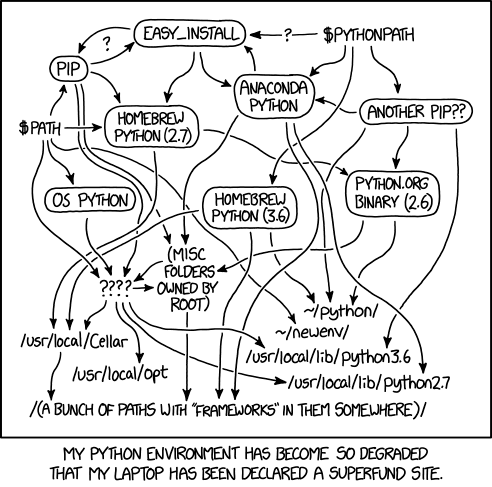
The Python environmental protection agency wants to seal it in a cement chamber, with pictorial messages to future civilizations warning them about the danger of using sudo to install random Python packages.
stuck furnace
Actually, Haskell is commonly taught as a first language at British universities.
molten pewter
We're a large, friendly community focused around the Python programming language. Our community is open to those who wish to learn the language, as well as those looking to help others.
restive geyser
or codecademy
molten pewter
https://alsweigart.com/ @spiral monolith
spiral monolith
ty @molten pewter
rugged root
!tools
 wise cargoBOT
Tools
The Tools page on our website contains a couple of the most popular tools for programming in Python.
https://pythondiscord.com/resources/tools
 untold wraith
Thonny
stuck furnace
Not really.
restive geyser
if he's a tactile learner, have him do tutorials
stuck furnace
I think whenever you learn a new programming language, you learn a new model of computation.
restive geyser
An Hour of Python
gloomy vigil
corey schafer would be good for ytube tutorials
stuck furnace
But understanding that model is often the hard part. And that's what a good debugger can help you do.
Khan Academy might be a good option. Although they use Javascript, not Python.

Khan Academy
restive geyser
lmfao who said beautiful?
untold wraith
2b2t is suffering though
restive geyser
only my bodega guy calls me beautiful
gloomy vigil
untold wraith
2b2t is suffering though
geno called me beautiful
spiral monolith
stuck furnace
Khan Academy might be a good option. Although they use Javascript, not Python.
this is a good option thanks @stuck furnace
untold wraith
basically hypixel skyblock
stuck furnace
A Griff 👀
rugged root
Rood
untold wraith
this voice chat is basically a collection of introverts confined in a room
gloomy vigil
rugged root
Rood
rude? road?
strong arch
roof
rugged root
Wife called
gloomy vigil
rugged root
Wife called
what happenned to the beard?
rugged root
I mean I'm still talking to her
gloomy vigil
yea
gloomy vigil
!voice
wise cargoBOT
Voice verification
Can’t talk in voice chat? Check out #voice-verification to get access. The criteria for verifying are specified there.
molten pewter
kya haal hai? کیا ھال حے؟
gloomy vigil
kyaa haal hai
molten pewter
ٹھیک ھوں۔
gloomy vigil
theek hoon
vivid palm
whaaat are we learning urdu
gloomy vigil
vivid palm
whaaat are we learning urdu
yea ig
vivid palm
kaise hain aap
 hexed ingot
I love the 'algebra' comment
gloomy vigil
vivid palm
kaise hain aap
yooo
vivid palm
and that's all I rmbr
hexed ingot
most computer languages make sense too
I can't talk btw because I've been on the server for less than 3 days
vivid palm
cul = tomorrow.. and yesterday? I forget
gloomy vigil
vivid palm
cul = tomorrow.. and yesterday? I forget
kal
yea its pretty much same
tommorrow
vivid palm
what's "today"
hexed ingot
alphabet is different than
gloomy vigil
vivid palm
what's "today"
aaj
hexed ingot
the chinese don't have alphabet
alphabet has a specific meaning
korean is an alphabet!
vivid palm
hm wait this is not the performance I was thinking of
molten pewter
apparently this was Hindi
untold wraith
 vivid palm
hi turtius from pakistan
untold wraith
hello @vivid palm
molten pewter

Abbottabad (; Hindko: ایبٹ آباد, romanized: aibṭabād, pronounced [ɛːbʈəˈbaːd̪]) is the capital city of Abbottabad District in the Hazara region of eastern Khyber Pakhtunkhwa, Pakistan. It is the 40th largest city in Pakistan and sixth largest in the province of Khyber Pakhtunkhwa by population. It is about 120 km (75 mi) north of Islamabad-Rawa...


 molten pewter

You're watching Led Zeppelin perform 'Kashmir' live at the Ahmet Ertegun tribute concert at London's O2 Arena from the concert film 'Celebration Day'
Subscribe to the channel! http://bit.ly/LedZeppelinYouTube
The Official Led Zeppelin Playlists...
The Music Videos http://bit.ly/ZeppelinMusicVideos
Live Performances & TV Appearances http://bit...
 pale juniper
I also like a lot whole lotta love
molten pewter

You're watching the official music video for Led Zeppelin 'Over the Hills and Far Away'
Subscribe to the channel! http://bit.ly/LedZeppelinYouTube
The Official Led Zeppelin Playlists...
The Music Videos http://bit.ly/ZeppelinMusicVideos
Live Performances & TV Appearances http://bit.ly/ZeppelinLIVE
Led Zeppelin Off-Stage http://bit.ly/Zeppelin...
I'll see you whole lota love and see you over the hills
pale juniper
That's a really great band
molten pewter
Some would argue the best band of all time
pale juniper
haha but yeah it depends, my favorite band of all time for example is Toto
but is not that lengendary band like Led Zeppelin is
molten pewter
This is my favorite led zeppelin song: https://www.youtube.com/watch?v=mqgyD_yTWCU

You're watching Led Zeppelin perform 'The Ocean' live at Madison Square Garden in 1973. JUST RELEASED The Song Remains the Same has been reissued with audio remastered by Jimmy Page! Get your copy here https://lnk.to/TSRTS
'The Ocean' refers to the sea of fans seen from the stage at Led Zeppelin concerts, to whom this song was dedicated.
Subsc...
pale juniper
haha but I do love the 70 80 music
more much than the actual music
and Im from 96
pale juniper
I mean 2010+
molten pewter

reddit
Join 25,609 people watching live on Reddit
woeful salmon
 cobalt ermine
Im trying to spot an image from only one screen shot without saving it to my computer because i want this program to run all day and i dont want 1000 pictures filling my hard drive im trying to use the pyautogui.locateOnScreen('available.png', grayscale=False) but exept for it just screen shots like 1000 times i dont have any way to see if it has spotted the image and change a value to true from false
pyautogui.press("F11")
s = pyautogui.locateOnScreen('available.png', grayscale=False)
buttonpoint = pyautogui.center(s)
buttonx, buttony = buttonpoint
        if buttonx, buttony == :
            print("Button found")
            #available = ("true")
        else:
            print("UNAVAILABLE")
pyautogui.press("F11")
(pls help nobody is responding in help channels)
molten pewter
untold wraith
 molten pewter
Processor Intel(R) Core(TM) i3-6100 CPU @ 3.70GHz, 3700 Mhz, 2 Core(s), 4 Logical Processor(s)
untold wraith
untold wraith
00:30
 unborn storm

Stack Overflow
I just realised that sixel graphics are simply escape sequences. So any application in the terminal should be able to integrate sixel graphics with simply putting the escape sequence at the right p...
 loud raptor
hey can anyone help me with my tkinter music player
mortal burrow
!resources
wise cargoBOT
Resources
The Resources page on our website contains a list of hand-selected learning resources that we regularly recommend to both beginners and experts.
https://pythondiscord.com/resources
 whole bear
!code
wise cargoBOT
Here's how to format Python code on Discord:
```py
print('Hello world!')
```
These are backticks, not quotes. Check this out if you can't find the backtick key.
whole bear
Joke = pyjokes.get_joke(language="en", category=query)
File "C:\Users\user\AppData\Local\Programs\Python\Python39\lib\site-packages\pyjokes\pyjokes.py", line 68, in get_joke
jokes = get_jokes(language, category)
File "C:\Users\user\AppData\Local\Programs\Python\Python39\lib\site-packages\pyjokes\pyjokes.py", line 49, in get_jokes
raise CategoryNotFoundError('No such category %s in language %s' % (category, language))
pyjokes.pyjokes.CategoryNotFoundError: No such category tell me a joke in language en
PS E:\Coding\Python\Jordan the Voice Assistant>
```plese help stoic grail
Hello @loud raptor and @ionic ferry 🙂
loud raptor
hey
 odd terrace
Hello @loud raptor @ionic ferry
loud raptor
hi
stoic grail
Hello minicode.
 vivid palm
gloomy vigil
vivid palm
gloomy vigil
it was sonu nigam performing abhi mujh mein kahin on unplugged
whole bear
vivid palm
it was sonu nigam performing abhi mujh mein kahin on unplugged
Oh do u really like his songs?
vivid palm
no i just came across that specific performance and thought it was amazing
primal yacht
 whole bear
vivid palm
no i just came across that specific performance and thought it was amazing
whole bear
vivid palm
no i just came across that specific performance and thought it was amazing
Oh , isee
 fresh python
 cinder vector
hi @fresh python
 hexed stag
Hello there
I'm good bro
i have some Mic issues
soo i can't speak
Soo How you doin bro?
Ohh..!
i'm fine
and learnig to code these days
no speaking of which my seniors suggested me to start with c
and i'm learning c
now
yeah..python is easy, but to know basics they suggested me c
and that's kinda hard lol
i've got prblm in understanding loops
gotcha
whole bear
hey guys
 wind raptor
hi
whole bear
can someone open a DB file for me and take an SS of iot
hexed stag
fine i guess we had a good chat!! @wind raptor
See you later
whole bear
I dont have anything installed that lets me view db files
cinder vector
nop its 9:40
wind raptor
What kind of db?
cinder vector
wind raptor
What kind of db?
db?
 wispy island

 rough trench
can one of u guys in vc help me with something please
print("Select an operation to perform: (add (+), subtract (-), multiply (*), divide (//), raise (**), exit/stop")
operation = input("Select the operation you would like to use: ")
num1 = int(input("Enter your first number: "))
num2 = int(input("Enter your second number: "))
if operation in ('add', '+'):
    print(num1, "+", num2, "=", num1 + num2)
elif operation in ('subtract', '-'):
    print(num1, "-", num2, "=", num1 - num2)
elif operation in ('multiply', '*'):
    print(num1, "x", num2, "=", num1 * num2)
elif operation in ('divide', '//'):
    print(num1, "/", num2, "=", num1 // num2)
how do i make that into a loop
I want it where I can keep doing questions over and over without it ending
what do u mean by tabbed
personal
while
    print("Select an operation to perform: (add (+), subtract (-), multiply (*), divide (//), raise (**), exit/stop")
    operation = input("Select the operation you would like to use: ")
    num1 = int(input("Enter your first number: "))
    num2 = int(input("Enter your second number: "))
    if operation in ('add', '+'):
        print(num1, "+", num2, "=", num1 + num2)
    elif operation in ('subtract', '-'):
        print(num1, "-", num2, "=", num1 - num2)
    elif operation in ('multiply', '*'):
        print(num1, "x", num2, "=", num1 * num2)
    elif operation in ('divide', '//'):
        print(num1, "/", num2, "=", num1 // num2)
is this what u meant cause I don't think it works
wind raptor
print("Welcome to the Calculator")
while True:
    print("Select an operation to perform: (add (+), subtract (-), multiply (*), divide (//), raise (**), exit/stop")
    operation = input("Select the operation you would like to use: ")
    num1 = int(input("Enter your first number: "))
    num2 = int(input("Enter your second number: "))
    if operation in ('add', '+'):
        print(num1, "+", num2, "=", num1 + num2)
    elif operation in ('subtract', '-'):
        print(num1, "-", num2, "=", num1 - num2)
    elif operation in ('multiply', '*'):
        print(num1, "x", num2, "=", num1 * num2)
    elif operation in ('divide', '//'):
        print(num1, "/", num2, "=", num1 // num2)

    answer = input("would you like to continue? (y/n)")
    if answer == "n":
        break
If at any point the user only enters one number into num1 field and does not enter anything in num2 field, that num1 will
be computed with the result of the previous operation. Hint: if you add two numbers together and then later choose subtraction, entering only a single number will subtract it from the previously added numbers. Say, the sum of previous numbers is 20 and if you enter subtract, then enter num1=10 and enter nothing in num2 field, the result will be computed as 20-10=10.
how would I add this feature
wind raptor
while True:
    equation = input("Input an equation: ")
    print(f"{equation} = {eval(equation)}")
    cont = input("Would you like to go again? (y/n)")
    if cont == "n":
        break
!voice
wise cargoBOT
Voice verification
Can’t talk in voice chat? Check out #voice-verification to get access. The criteria for verifying are specified there.
 languid acorn
why would they even keep this criteria
rough trench
also for the thing u told me I don't know how to do it
languid acorn
okay !
you all pro coder ?!
so i am here to learn python i am just a beginner
is it really hard to learn python fully
2 weeks ?! okay
youtube
we have to pay for that ?!
i am usign freecodingorg channel
where are you from btw
nice
rough trench
lif operationn in ('raise', '**'):
        print(num1 "**", num2, "=", num1 ** num2)
you guys are working or studying ?!
not now i am asking in your life
cool !!!
just got graduated
!voice
wise cargoBOT
Voice verification
Can’t talk in voice chat? Check out #voice-verification to get access. The criteria for verifying are specified there.
languid acorn
!voiceverify
 true dagger
no voice access
rough trench
elif operation in ('raise', '**'):
        print(num1, "^", num2, "=", num1 ^ num2)
how i should unmute
languid acorn
thank you need some more message to be sent it seems
true dagger
how i can see progress of that
languid acorn
@true dagger hellowww
true dagger
hii @languid acorn
languid acorn
i have to go guys see you all tomorrow
rough trench
print("Welcome to the Calculator")
answer = None
operation = None
while True:
    print("Select an operation to perform: (add (+), subtract (-), multiply (*), divide (//), raise (**), exit/stop")
    operation = input("Select the operation you would like to use: ")
    num1 = int(input("Enter your first number: "))
    num2 = int(input("Enter your second number: "))
    if operation in ('add', '+'):
        print(num1, "+", num2, "=", num1 + num2)
    elif operation in ('subtract', '-'):
        print(num1, "-", num2, "=", num1 - num2)
    elif operation in ('multiply', '*'):
        print(num1, "x", num2, "=", num1 * num2)
    elif operation in ('divide', '//'):
        print(num1, "/", num2, "=", num1 // num2)
    elif operationn in ('raise', '**'):
        print(num1 "**", num2, "=", num1 ** num2)
my voice chat is still supressed xd
are you even in voice
i don't see you
i'm stressed out as fuck after playing league of legends
primal yacht
Did you restart your Discord client like I stated yet?
[Ctrl]+[R] if on the desktop app / a Chromium browser (other browsers might use [F5] or something)
Mobile: swipe off recent apps & reopen the app
primal yacht
!voice
wise cargoBOT
Voice verification
Can’t talk in voice chat? Check out #voice-verification to get access. The criteria for verifying are specified there.
 unkempt tide
i see
primal yacht
I got to go and rather not get DMs blown up while I'm showering
unkempt tide
Just working on Comptia A+ work for cert
primal yacht
primal yacht
https://paste.pythondiscord.com/xidiheyina.py
@frigid shard
rough trench
If at any point the user only enters one number into num1 field and does not enter anything in num2 field, that num1 will
be computed with the result of the previous operation. Hint: if you add two numbers together and then later choose subtraction, entering only a single number will subtract it from the previously added numbers. Say, the sum of previous numbers is 20 and if you enter subtract, then enter num1=10 and enter nothing in num2 field, the result will be computed as 20-10=10
print("Welcome to the Calculator")
answer = None
operation = None
while True:
    print("Select an operation to perform: (add (+), subtract (-), multiply (*), divide (//), raise (**), exit/stop")
    operation = input("Select the operation you would like to use: ")
    num1 = int(input("Enter your first number: "))
    num2 = int(input("Enter your second number: "))
    if operation in ('add', '+'):
        print(num1, "+", num2, "=", num1 + num2)
        answer = num1 + num2
    elif operation in ('subtract', '-'):
        print(num1, "-", num2, "=", num1 - num2)
        answer = num1 - num2
    elif operation in ('multiply', '*'):
        print(num1, "x", num2, "=", num1 * num2)
        answer = num1 * num2
    elif operation in ('divide', '//'):
        print(num1, "/", num2, "=", num1 // num2)
        answer = num1 // num2
    elif operation in ('raise', '**'):
        print(num1, "**", num2, "=", num1 ** num2)
        answer = num1 ** num2
print("Welcome to the Calculator")
answer = None
while True:
    print("Select an operation to perform: (add (+), subtract (-), multiply (*), divide (//), raise (**), exit/stop")
    operation = input("Select the operation you would like to use: ")
    num1 = int(input("Enter your first number: "))
    num2 = int(input("Enter your second number: "))

    if operation in ('add', '+'):
        answer = num1 + num2
    elif operation in ('subtract', '-'):
        answer = num1 - num2
    elif operation in ('multiply', '*'):
        answer = num1 * num2
    elif operation in ('divide', '//'):
        answer = num1 // num2
    elif operation in ('raise', '**'):
        answer = num1 ** num2

    print(num1, operation, num2, "=", answer)
oh ok
idk why they removed it
vivid palm
probably blocked in countries that have other licensed ways of viewing that content? it was mtv
i can view it fine
wind raptor
print("Welcome to the Calculator")
answer = None
while True:
    print("Select an operation to perform: (add (+), subtract (-), multiply (*), divide (//), raise (**), exit/stop")
    operation = input("Select the operation you would like to use: ")

    try:
        num1 = int(input("Enter your first number: "))
    except ValueError:
        num1 = 0
    try:
        num2 = int(input("Enter your second number: "))
    except ValueError:
        num2 = 0

    if not (num1 and num2):
        num2 = num1 or num2
        num1 = answer

    if operation in ('add', '+'):
        answer = num1 + num2
    elif operation in ('subtract', '-'):
        answer = num1 - num2
    elif operation in ('multiply', '*'):
        answer = num1 * num2
    elif operation in ('divide', '//'):
        answer = num1 // num2
    elif operation in ('raise', '**'):
        answer = num1 ** num2

    print(num1, operation, num2, "=", answer)
break
  if operation in ('add', '+'):
        print(num1, "+", num2, "=", num1 + num2)
        answer = num1 + num2
    elif operation in ('subtract', '-'):
        print(num1, "-", num2, "=", num1 - num2)
        answer = num1 - num2
    elif operation in ('multiply', '*'):
        print(num1, "x", num2, "=", num1 * num2)
        answer = num1 * num2
    elif operation in ('divide', '//'):
        print(num1, "/", num2, "=", num1 // num2)
        answer = num1 // num2
    elif operation in ('raise', '**'):
        print(num1, "**", num2, "=", num1 ** num2)
        answer = num1 ** num2
    elif operation in ('exit', 'stop'):
        break
print("Welcome to the Calculator")
answer = None
operation = None
while True:
    print("Select an operation to perform: (add (+), subtract (-), multiply (*), divide (//), raise (**), exit/stop")
    operation = input("Select the operation you would like to use: ")
    num1 = int(input("Enter your first number: "))
    num2 = int(input("Enter your second number: "))

    try:
        num2 = int(input("Enter your second number: "))
    except ValueError:
        num2 = 0

    if not (num1 and num2):
        num2 = num1 or num2
        num1 = answer

    if operation in ('add', '+'):
        print(num1, "+", num2, "=", num1 + num2)
        answer = num1 + num2
    elif operation in ('subtract', '-'):
        print(num1, "-", num2, "=", num1 - num2)
        answer = num1 - num2
    elif operation in ('multiply', '*'):
        print(num1, "x", num2, "=", num1 * num2)
        answer = num1 * num2
    elif operation in ('divide', '//'):
        print(num1, "/", num2, "=", num1 // num2)
        answer = num1 // num2
    elif operation in ('raise', '**'):
        print(num1, "**", num2, "=", num1 ** num2)
        answer = num1 ** num2
    elif operation in ('exit', 'stop'):
        break
break
print("Welcome to the Calculator")
answer = None
while True:
    print("Select an operation to perform: (add (+), subtract (-), multiply (*), divide (//), raise (**), exit/stop")
    operation = input("Select the operation you would like to use: ")

    try:
        num1 = int(input("Enter your first number: "))
    except ValueError:
        num1 = 0

    try:
        num2 = int(input("Enter your second number: "))
    except ValueError:
        num2 = 0

    if not (num1 and num2):
        num2 = num1 or num2
        num1 = answer

    if operation in ('add', '+'):
        print(num1, "+", num2, "=", num1 + num2)
        answer = num1 + num2
    elif operation in ('subtract', '-'):
        print(num1, "-", num2, "=", num1 - num2)
        answer = num1 - num2
    elif operation in ('multiply', '*'):
        print(num1, "x", num2, "=", num1 * num2)
        answer = num1 * num2
    elif operation in ('divide', '//'):
        print(num1, "/", num2, "=", num1 // num2)
        answer = num1 // num2
    elif operation in ('raise', '**'):
        print(num1, "**", num2, "=", num1 ** num2)
        answer = num1 ** num2
        if operation in ('exit', 'stop'):
            break
print("Welcome to the Calculator")
answer = None
while True:
    print("Select an operation to perform: (add (+), subtract (-), multiply (*), divide (//), raise (**), exit/stop")
    operation = input("Select the operation you would like to use: ")

    if operation in ('exit', 'stop'):
            break

    try:
        num1 = int(input("Enter your first number: "))
    except ValueError:
        num1 = 0

    try:
        num2 = int(input("Enter your second number: "))
    except ValueError:
        num2 = 0

    if not (num1 and num2):
        num2 = num1 or num2
        num1 = answer

    if operation in ('add', '+'):
        print(num1, "+", num2, "=", num1 + num2)
        answer = num1 + num2
    elif operation in ('subtract', '-'):
        print(num1, "-", num2, "=", num1 - num2)
        answer = num1 - num2
    elif operation in ('multiply', '*'):
        print(num1, "x", num2, "=", num1 * num2)
        answer = num1 * num2
    elif operation in ('divide', '//'):
        print(num1, "/", num2, "=", num1 // num2)
        answer = num1 // num2
    elif operation in ('raise', '**'):
        print(num1, "**", num2, "=", num1 ** num2)
        answer = num1 ** num2
[print(f"The answer is {eval(input("Type an equation: "))}) for x in range(200))]
 lone sleet
im in a jam
wise cargoBOT
 Command Help
!eval [code]
Can also use: e
*Run Python code and get the results.
This command supports multiple lines of code, including code wrapped inside a formatted code
block. Code can be re-evaluated by editing the original message within 10 seconds and
clicking the reaction that subsequently appears.
We've done our best to make this sandboxed, but do let us know if you manage to find an
issue with it!*
rough trench
For the exponential option, do NOT use ** or pow operator from math library. Hint: Implement this by applying logic using a for loop.
lone sleet
!e import random
print ("randint")
!e import random
print (randint)
!e import random
print (randint(10 , 20))
yea
!e import random
print ('randint(10 , 20))
rough trench
print("Welcome to the Calculator")
answer = None
while True:
    print("Select an operation to perform: (add (+), subtract (-), multiply (*), divide (//), raise (**), exit/stop")
    operation = input("Select the operation you would like to use: ")

    if operation in ('exit', 'stop'):
            break

    try:
        num1 = int(input("Enter your first number: "))
    except ValueError:
        num1 = 0

    try:
        num2 = int(input("Enter your second number: "))
    except ValueError:
        num2 = 0

    if not (num1 and num2):
        num2 = num1 or num2
        num1 = answer

    if operation in ('add', '+'):
        print(num1, "+", num2, "=", num1 + num2)
        answer = num1 + num2
    elif operation in ('subtract', '-'):
        print(num1, "-", num2, "=", num1 - num2)
        answer = num1 - num2
    elif operation in ('multiply', '*'):
        print(num1, "x", num2, "=", num1 * num2)
        answer = num1 * num2
    elif operation in ('divide', '/'):
        print(num1, "/", num2, "=", num1 / num2)
        answer = num1 // num2
    elif operation in ('raise', '**'):
        print(num1, "**", num2, "=", num1 ** num2)
        answer = num1 ** num2
!e
import random

print(random.randint(0, 10))
@wind raptor :white_check_mark: Your eval job has completed with return code 0.
0
!e
import random

print(random.randint(0, 10))
@wind raptor :white_check_mark: Your eval job has completed with return code 0.
9
!e import random
print (randint(10, 20))
!e import random
print (randint(10, 20))
ohhh
i was reading a book
!e import random
print (randome.randint(10 , 20))
i use thonny
!e import random
print (random.randint(1 , 1))
!e import random
print (random.randint(1 , 1))
print (5+5)
!e import random
print (random.randint(1 , 1))
if randint==1 print ("hi")
ok
wind raptor
!e
word = "Hello!"
for x in word:
    print(x)
@wind raptor :white_check_mark: Your eval job has completed with return code 0.
001 | H
002 | e
003 | l
004 | l
005 | o
006 | !
range(start, stop, step)
!e
num1 = 4
num2 = 3
answer = num1
for _ in range(num2 - 1):
     answer *= num1
print(answer)
@wind raptor :white_check_mark: Your eval job has completed with return code 0.
001 | 4
002 | 4
003 | 64
!e from random import *
coin=["heads","tails"]
print(choice(coin))
wise cargoBOT
@lone sleet :white_check_mark: Your eval job has completed with return code 0.
tails
print("Welcome to the Calculator")
answer = None
while True:
    print("Select an operation to perform: (add (+), subtract (-), multiply (*), divide (/), raise (**), exit/stop")
    operation = input("Select the operation you would like to use: ")

    if operation in ('exit', 'stop'):
            break

    try:
        num1 = int(input("Enter your first number: "))
    except ValueError:
        num1 = 0

    try:
        num2 = int(input("Enter your second number: "))
    except ValueError:
        num2 = 0

    if not (num1 and num2):
        num2 = num1 or num2
        num1 = answer

    if operation in ('add', '+'):
        print(num1, "+", num2, "=", num1 + num2)
        answer = num1 + num2
    elif operation in ('subtract', '-'):
        print(num1, "-", num2, "=", num1 - num2)
        answer = num1 - num2
    elif operation in ('multiply', '*'):
        print(num1, "x", num2, "=", num1 * num2)
        answer = num1 * num2
    elif operation in ('divide', '/'):
        print(num1, "/", num2, "=", num1 / num2)
        answer = num1 / num2
    elif operation in ('raise', '**'):
        print(num1, "**", num2, "=", num1 ** num2)
        answer = num1
for _ in range(num2 - 1):
     answer *= num1
TIL the Python documentation is very useful for "cropping" due to how its CSS works.
 wind raptor
    if operation in ('add', '+'):
        answer = num1 + num2
    elif operation in ('subtract', '-'):
        answer = num1 - num2
    elif operation in ('multiply', '*'):
        answer = num1 * num2
    elif operation in ('divide', '/'):
        answer = num1 / num2
    elif operation in ('raise', '**'):
        answer = num1
        for _ in range(num2 - 1):
           answer *= num1

    print(num1, operation, num2, "=", answer)
 forest zodiac
 primal yacht
mapping = {
  'add': '+',
  'subtract': '-',
  'multiply': '*',
  'divide': '/',
  'raise': '**'
}
# ...
operation = mapping.get(operation, operation)
# ...
For the exponential option, do NOT use ** or pow operator from math library. Hint: Implement this by applying logic using a for loop.
elif operation in ('raise', '**'):
        answer = num1
        for _ in range(num2 - 1):
           answer *= num1
!e
print(0.1 + 0.2)
@wind raptor :white_check_mark: Your eval job has completed with return code 0.
0.30000000000000004
print("Welcome to the Calculator")
answer = None
while True:
    print("Select an operation to perform: (add (+), subtract (-), multiply (*), divide (/), raise (**), exit/stop")
    operation = input("Select the operation you would like to use: ")

    if operation in ('exit', 'stop'):
            break

    try:
        num1 = int(input("Enter your first number: "))
    except ValueError:
        num1 = 0

    try:
        num2 = int(input("Enter your second number: "))
    except ValueError:
        num2 = 0

    if not (num1 and num2):
        num2 = num1 or num2
        num1 = answer

    if operation in ('add', '+'):
        print(num1, "+", num2, "=", num1 + num2)
        answer = num1 + num2
    elif operation in ('subtract', '-'):
        print(num1, "-", num2, "=", num1 - num2)
        answer = num1 - num2
    elif operation in ('multiply', '*'):
        print(num1, "x", num2, "=", num1 * num2)
        answer = num1 * num2
    elif operation in ('divide', '/'):
        print(num1, "/", num2, "=", num1 / num2)
        answer = num1 / num2
    elif operation in ('raise', '**'):
        answer = num1
        for _ in range(num2 - 1):
           answer *= num1
         print(num1, operation, num2, "=", answer)
# MAPPING THING
operation = mapping.get(operation, operation)

if operation == '+':
    answer = num1 + num2
# ...
else:
    continue # or whatever

print(num1, operation, num2, '=', answer)
.
 forest zodiac
primal yacht
forest zodiac
primal yacht
taking a break because I cannot get the point across properly that I don't know and also cannot help when I'm being explained some stuff I already know
forest zodiac
primal yacht
taking a break because I cannot get the point across properly that I don't know ...
i am sorry
primal yacht
#BlameAutism #SubparSocialSkills
My apologizes ... I just am not that good at communication as normal people are.
primal yacht
I'll be fine ... just need to relax a bit more and .... check if lunch is ready
forest zodiac
i was not talking about web sockets
primal yacht
forest zodiac
its my fault that i was not able to explain it properly it to you
I know what websockets themselves were made for.
primal yacht
No need to apologize now ... I'm mostly calm at this time.
forest zodiac
i was basically trying to say is that djago channels enables us to use websockets in django
primal yacht
And what I was trying to say was websockets were a part of web browsers for support.
forest zodiac
oh
primal yacht
"What we have here, is a failure to communicate."
Yeah, we both goofed. *offers forgiveness hugs*
rough trench
print("Welcome to the Calculator")
answer = None
while True:
    print("Select an operation to perform: (add (+), subtract (-), multiply (*), divide (/), raise (**), exit/stop")
    operation = input("Select the operation you would like to use: ")

    if operation in ('exit', 'stop'):
            break

    try:
        num1 = int(input("Enter your first number: "))
    except ValueError:
        num1 = 0

    try:
        num2 = int(input("Enter your second number: "))
    except ValueError:
        num2 = 0

    if not (num1 and num2):
        num2 = num1 or num2
        num1 = answer

    if operation in ('add', '+'):
        print(num1, "+", num2, "=", num1 + num2)
        answer = num1 + num2
    elif operation in ('subtract', '-'):
        print(num1, "-", num2, "=", num1 - num2)
        answer = num1 - num2
    elif operation in ('multiply', '*'):
        print(num1, "x", num2, "=", num1 * num2)
        answer = num1 * num2
    elif operation in ('divide', '/'):
        print(num1, "/", num2, "=", num1 / num2)
        answer = num1 / num2
    elif operation in ('raise', '**'):
        answer = num1
        for _ in range(num2 - 1):
           answer *= num1
        print(num1, '**', num2, "=", answer)
Yellow !
whole bear
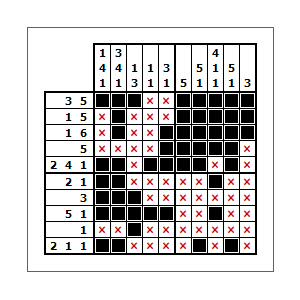
@regal raptor https://www.puzzle-nonograms.com/
 solemn hornet
 whole bear
print('Hello World')


 regal raptor
solemn hornet
regal raptor
solemn hornet
 whole bear
``py
import random

def rollDice():

    dice1 = random. randint(1,6)
    dice2 = random.randint(1,6)

    return dice1 + dice2


def guessNum(numToGuess):
    numOfChances = 5

    while numOfChances > 0:
        guessedNum = int(input('What Number Do You Think Was Rolled ? '))

        if guessedNum == numToGuess:
            print('You\'ve Won !')
            break
        else:
            numOfChances -= 1
            if guessedNum < numToGuess:
                print("Alittle Higher")
            else:
                print("Alittle Lower")


def guessGame():

    numToGuess = rollDice()

    print('Welcome To Guess The Number')
    print(' ')
    playerName = input('Whats Your Name ? ').capitalize()
    print('Welcome ' + playerName)

    guessNum(numToGuess)


guessGame()
def guessNum(numToGuess):
    numOfChances = 5

    while numOfChances > 0:
        guessedNum = int(input('What Number Do You Think Was Rolled ? '))

        if guessedNum == numToGuess:
            print('You\'ve Won !')
            break
        else:
            numOfChances -= 1
            if guessedNum < numToGuess:
                print("Alittle Higher")
            else:
                print("Alittle Lower")

    print("Sorry But You Didnt Guess The Number !")
    print("The Number To Guess Was " + str(numToGuess))
import random, sys

def rollDice():

    dice1 = random. randint(1,6)
    dice2 = random.randint(1,6)

    return dice1 + dice2


def guessNum(numToGuess):
    numOfChances = 5

    while numOfChances > 0:
        guessedNum = int(input('What Number Do You Think Was Rolled ? '))

        if guessedNum == numToGuess:
            print('You\'ve Won !')
            sys.exit()
        else:
            numOfChances -= 1
            if guessedNum < numToGuess:
                print("Alittle Higher")
            else:
                print("Alittle Lower")

    print("Sorry But You Didnt Guess The Number !")
    print("The Number To Guess Was " + str(numToGuess))
    choice = input("Would You Like To Play Again ? y/n  > ").capitalize()

    if choice == 'Y':
        guessGame()
    else:
        pass


def guessGame():

    numToGuess = rollDice()

    print('Welcome To Guess The Number')
    print(' ')
    playerName = input('Whats Your Name ? ').capitalize()
    print('Welcome ' + playerName)

    guessNum(numToGuess)


guessGame()
 loud raptor
def play():
    #Set stopped variable to false so song can play.
    global Stopped
    Stopped = False
    MySlider.config(value = 0)
    song = songBox.get(ACTIVE)
    with open('songs.json') as json_songs_file:
        data = json.load(json_songs_file)
    #Gets songs in the mp3 list and checks to see if the mp3 file exists in the list
        for songs in data['path']:
            if song == data['name']:
                pygame.mixer.music.load(songs)
                pygame.mixer.music.play(loops = 0)``` @whole bear
 whole bear
# JSON file
f = open ('data.json', "r")

# Reading from file
data = json.loads(f.read())

# Iterating through the json
# list
for i in data['emp_details']:
    print(i)

# Closing file
f.close()
#Create playlist box
songBox = Listbox(MasterFrame, bg = "black", fg = "magenta2", width = 60, selectbackground = "gray", selectforeground = "black" )
songBox.grid(row = 0, column = 0)```#adds songs to program from Json file
def AddSongsFromJson():
AllSongs = ReadSongsFromFile()
for song in AllSongs:
songname = mp3file(song['name'], song['path'])
mp3list.append(songname)
songBox.insert(END, songname.mp3filename)
#Add many songs to list function
def AddManySongs():
songs = filedialog.askopenfilenames(title = "Choose an MP3 file", filetypes = (("mp3 Files", "*.mp3"), ))
#Loop through song list and replace directory and mp3
for song in songs:
song_dict = {}
song_dict['name'] = os.path.basename(song)
song_dict['path'] = os.path.abspath(song)
if AddSongtoFile(song_dict):
songname = mp3file(song_dict['name'], song_dict['path'])
mp3list.append(songname)
songBox.insert(END, songname.mp3filename)```#Reads songs added so it saves to the program
def ReadSongsFromFile():
with open('songs.json') as json_songs_file:
json_songs = json.load(json_songs_file)
return json_songs
#Add songs to Json file to be read and checks if file or path aready exists so it doesn't duplicate
def AddSongtoFile(song:dict):
if song.get('name') and song.get('path'):
with open('songs.json') as json_songs_file:
json_songs = json.load(json_songs_file)
for json_song in json_songs:
if song.get('name') == json_song.get('name') or song.get('path') == json_song.get('path'):
return False
json_songs.append(song)
with open("songs.json", "w") as outfile:
json.dump(json_songs, outfile,indent=4)
return True```
 solemn hornet
def GetNumber():
dice1 = random.randint(1,6)
dice2 = random.randint(1,6)
num = dice1 + dice2
return num
while True:
print('')
print('Guess the Dice Game!')
player = input('Name? ').capitalize()
print('Welcome '+ player)
number = GetNumber()
numOfChances = 0
while numOfChances < 5:
guessedNum = int(input('What Number Do You Think It Is ? '))
if guessedNum == number:
print('You\'ve Won !')
print('You guessed in '+ str(numOfChances))
break
else:
numOfChances += 1
if guessedNum < number:
print("Alittle Higher")
else:
print("Alittle Lower")
if numOfChances == 5:
print('Sorry, you did not guess the number')
print('The number to guess was '+ str(number))
repeat = input("Would you like the play again? Y/N").capitalize
if repeat=='Y':
continue
else:
break````py
solemn hornet
print('Goodbye!')
# Pauses Program
time.sleep(10)```def play():
#Set stopped variable to false so song can play.
global Stopped
Stopped = False
MySlider.config(value = 0)
song = songBox.get(ACTIVE)
with open('songs.json', 'r') as json_songs_file:
data = json.load(json_songs_file)
#Gets songs in the mp3 list and checks to see if the mp3 file exists in the list
for songs in data:
if songs['name'] == song in songs['path']:
pygame.mixer.music.load(song)
pygame.mixer.music.play(loops = 0)```pygame.error: Couldn't open 'Avenged Sevenfold - A Little Piece Of Heaven with lyrics.mp3'```import pygame, time
from pygame.locals import *
pygame.mixer.pre_init(44100, 16, 2, 4096) #frequency, size, channels, buffersize
pygame.init() #turn all of pygame on.
soundObj = pygame.mixer.Sound('C:\\Users\\gamem\\Desktop\\Code\\PYTHON\\Etheria\\good 4 u.mp3')
soundObj.play()
time.sleep(10) # wait and let the sound play for 1 second
#Add many songs to list function
def AddManySongs():
songs = filedialog.askopenfilenames(title = "Choose an MP3 file", filetypes = (("mp3 Files", "*.mp3"), ))
#Loop through song list and replace directory and mp3
for song in songs:
songname = mp3file(os.path.basename(song), os.path.abspath(song))
mp3list.append(songname)
songBox.insert(END, songname.mp3filename)
#Play selected songs
def play():
#Set stopped variable to false so song can play.
global Stopped
Stopped = False
MySlider.config(value = 0)
song = songBox.get(ACTIVE)
#Gets songs in the mp3 list and checks to see if the mp3 file exists in the list
for songs in mp3list:
if songs.mp3filename == song:
songname = songs.mp3dir
pygame.mixer.music.load(songname)
pygame.mixer.music.play(loops = 0)
PlayTime(songname) ```#Play selected songs
def play():
#Set stopped variable to false so song can play.
global Stopped
Stopped = False
MySlider.config(value = 0)
songBox.get(ACTIVE)
with open('songs.json', 'r') as json_songs_file:
data = json.load(json_songs_file)
#Gets songs in the mp3 list and checks to see if the mp3 file exists in the list
for songs in data:
for x in songs:
if x == songs['name'] or songs['path']:
if songBox.curselection() == songs['name']:
pygame.mixer.music.load(songBox.curselection())
pygame.mixer.music.play(loops = 0)```songs = [
{
"name": "Test",
"path": "PATH"
},
{
"name": "Test2",
"path": "PATH2"
}
]

#adds songs to program from Json file
def AddSongsFromJson():
AllSongs = ReadSongsFromFile()
for song in AllSongs:
songname = mp3file(song['name'], song['path'])
mp3list.append(songname)
songBox.insert(END, songname.mp3filename)```@sand kayak
#Reads songs added so it saves to the program
def ReadSongsFromFile():
with open('songs.json') as json_songs_file:
json_songs = json.load(json_songs_file)
return json_songs``` sand kayak

import time
import pyo as p
s = p.Server(nchnls=1).boot()
t = p.SquareTable(order=20).normalize()
pt = p.LinTable(list=[(0, 0.0), (8191//4 - 1, 0.0), (8191//4, 1.0), (8191, 1.0)], size=8192).normalize()
def start():
global s
s.start()
def stop():
global s
s.stop()
def beep(value: int, dur: float):
global t
a = p.Osc(table=t, freq=value, mul=.1).out()
time.sleep(dur)
def fakechip(value: int, dur: float, pulse: bool):
global t, pt
a = p.Osc(table=t if pulse else pt, freq=(255.0 / value) * 128.0, mul=.1 if pulse else .2).out()
time.sleep(dur/128)
 spiral jay
y dont i see ppl in the chat i just hear them
sand kayak
from tkinter import *
pixels = []
color_palette = [
"2b0f54",
"ab1f65",
"ff4f69",
"fff7f8",
"ff8142",
"ffda45",
"3368dc",
"49e7ec"
]
def create_pixels(view):
global pixels, color_palette
pix_range = 32
pix_amount = pix_range ** 2
pix_counter = 0
for y in range(pix_range):
for x in range(pix_range):
print(f"{pix_counter} / {pix_amount}")
randomColor = color_palette[0]
newPixel = Label(
view,
text=" ",
width=2,
bg=f'#{randomColor}',
font=("Courier New",4)
)
pixels.append(newPixel)
newPixel.grid(row=y, column=x)
pix_counter += 1
def plot(x: int, y: int, color: int):
index = 32 * y + x if (32 * y + x) < len(pixels) else -1
if index == -1: return
pixels[32*y+x]['bg'] = '#' + color_palette[color]
def get_palette():
global color_palette
return color_palette
import guiutils
def import_palette(filename: str):
with open("palettes/" + filename + ".txt", "r") as fl:
guiutils.color_palette = [x[0:len(x)-1] for x in fl.readlines()]
# print([x[0:len(x)-1] for x in fl.readlines()])
#Reads songs added so it saves to the program
def ReadSongsFromFile():
with open('songs.json') as json_songs_file:
json_songs = json.load(json_songs_file)
return json_songs
#Add songs to Json file to be read and checks if file or path aready exists so it doesn't duplicate
def AddSongtoFile(song:dict):
if song.get('name') and song.get('path'):
with open('songs.json') as json_songs_file:
json_songs = json.load(json_songs_file)
for json_song in json_songs:
if song.get('name') == json_song.get('name') or song.get('path') == json_song.get('path'):
return False
json_songs.append(song)
with open("songs.json", "w") as outfile:
json.dump(json_songs, outfile,indent=4)
return True
#adds songs to program from Json file
def AddSongsFromJson():
    AllSongs = ReadSongsFromFile()
    for song in AllSongs:
        songname = mp3file(song['name'], song['path'])
        mp3list.append(songname)
        songBox.insert(END, songname.mp3filename)

#Add many songs to list function
def AddManySongs():
    songs = filedialog.askopenfilenames(title = "Choose an MP3 file", filetypes = (("mp3 Files", "*.mp3"), ))
    #Loop through song list and replace directory and mp3
    for song in songs:
        song_dict = {}
        song_dict['name'] = os.path.basename(song)
        song_dict['path'] = os.path.abspath(song)
        if AddSongtoFile(song_dict):
            songname = mp3file(song_dict['name'], song_dict['path'])
            mp3list.append(songname)
            songBox.insert(END, songname.mp3filename)```
#Play selected songs
def play():
    #Set stopped variable to false so song can play.
    global Stopped
    Stopped = False
    MySlider.config(value = 0)
    song = songBox.get(ACTIVE)
    AllSongs = ReadSongsFromFile()
    for songs in mp3list:
if song == AllSongs['name']:```def ReadSongsFromFile():
with open('songs.json') as json_songs_file:
json_songs = json.load(json_songs_file)
return json_songs```class mp3file:
def __init__(self, mp3filename, mp3dir):
self.mp3filename = mp3filename #Object that gets just the file name
self.mp3dir = mp3dir #object that gets just the file directory```#Play selected songs
def play():
#Set stopped variable to false so song can play.
global Stopped
Stopped = False
MySlider.config(value = 0)
selectedSong = songBox.get(ACTIVE)
# allSongs = ReadSongsFromFile()
for song in mp3list:
if song.mp3filename == selectedSong:
# Play the song.
#Play selected songs
def play():
    #Set stopped variable to false so song can play.
    global Stopped
    Stopped = False
    MySlider.config(value = 0)
    song = songBox.get(ACTIVE)
    #Gets songs in the mp3 list and checks to see if the mp3 file exists in the list
    for songs in mp3list:
        if songs.mp3filename == song:
            songname = songs.mp3dir
    pygame.mixer.music.load(songname)
    pygame.mixer.music.play(loops = 0)
PlayTime(songname) ```#Create playlist box
songBox = Listbox(MasterFrame, bg = "black", fg = "magenta2", width = 60, selectbackground = "gray", selectforeground = "black" )
songBox.grid(row = 0, column = 0)``` File "C:\Users\ThinkPad\AppData\Local\Programs\Python\Python39\lib\tkinter\__init__.py", line 1892, in __call__
return self.func(*args)
File "c:\Users\ThinkPad\OneDrive\Desktop\Python work\Tkinter-music-program\SAT project.py", line 146, in play
if Song['name'] == SelectedSong:
TypeError: 'mp3file' object is not subscriptable``` pygame.mixer.music.play(loops = 0)
pygame.error: mpg123_seek: Invalid RVA mode. (code 12)```Hey @whole bear!
Uh-oh! It looks like your message got zapped by our spam filter. We currently don't allow .txt attachments, so here are some tips to help you travel safely:
• If you attempted to send a message longer than 2000 characters, try shortening your message to fit within the character limit or use a pasting service (see below)
• If you tried to show someone your code, you can use codeblocks
(run !code-blocks in #bot-commands for more information) or use a pasting service like:
 hollow helm
helo
 pale karma
 shrewd ibex
i have
 pale yoke
hi @odd sequoia ! dont mind me
indeed 🙂
(all hush hush!)
yeah i cant see nada
yeah, sounds like not worth it to be honest
let me grab my mic actually, give me 1 min
 willow light
!e
import requests
wise cargoBOT
@willow light :x: Your eval job has completed with return code 1.
001 | Traceback (most recent call last):
002 |   File "<string>", line 1, in <module>
003 | ModuleNotFoundError: No module named 'requests'

Reuploaded due to the original being ruined by annotations.

Myst is a graphic adventure puzzle video game designed by the Miller brothers, Robyn and Rand. It was developed by Cyan, Inc., published by Broderbund, and initially released for the Macintosh personal computer platform in 1993. In the game, players travel via a special book to the island of Myst. There, players solve puzzles, and by doing so, t...
primal yacht

The 3DO Interactive Multiplayer is a 32-bit home video game console developed by The 3DO Company and designed by New Technologies Group, released in North America by Panasonic first on October 4, 1993. It was the first programmable console developed under the 3DO brand and the only one to be officially released on the market. The following list ...

DinoPark Tycoon is an educational business simulation computer game released by MECC in 1993 for MS-DOS and MacOS. Players run a theme park which features dinosaurs as its main attraction. The goal of the game is to care for the dinosaurs while keeping the park clean, organized, and well maintained.
A port for the 3DO Interactive Multiplayer was...
 gentle flint


 primal yacht
willow light
primal yacht
willow light
i said brb, why did you go?
eating irl
if __name__ == '__main__':
    MONKS#0001
@whole bear
whole bear
print("Hello World")
class Discord():
    def __init__(self, usernamne: str) -> None:
        self.username = usernamne

MONKS = Discord("MONKS#0001")

if __name__ = '__main__':
    print(MONKS.username)
@primal yacht
primal yacht
More like ...
from somediscordapi import getusername

class DiscordUser:
    def __init__(self, uid: int) -> None:
        self.uid = uid

MONKS = Discord(245537643251630081)

if __name__ == '__main__':
    print(getusername(MONKS))
 slim shale
class DiscordUser:
  def __init__(self, username: str, code: int) -> None:
    self._username = username
    self._code = code

  @property
  def USERNAME(self) -> str:
    reutrn f"{self._username}#{(4 - len(str(self._code))) * '0'}{self._code}"

MONKS = DiscordUser("MONKS", 1)

if __name__ == '__main__':
  print(MONKS.USERNAME)
from somediscordapi import getusername

class DiscordUser:
    def __init__(self, uid: int) -> None:
        self.uid = uid

MONKS = Discord(245537643251630081)

__name__ == '__main__' and print(getusername(MONKS))
I like all caps variable names
i mean
it's a constant
mind the code I wrote to print 3 0s before 1 in 0001 XD
woeful salmon
from somediscordapi import getusername
from dataclasses import dataclass

@dataclass
class DiscordUser:
    user_id: int

user1 = Discord(245537643251630081)

__name__ == '__main__' and print(getusername(user1))
uid = [

    "M"
    "O",
    "N",
    "K",
    "#",
    "0",
    "0",
    "0",
    "1"

]

USERNAME = ""

for char in uid:
    USERNAME = USERNAME + char

if __name__ == '__main__':
    print(USERNAME)
that's some pro level stuff
woeful salmon
uid = [

    "M"
    "O",
    "N",
    "K",
    "#",
    "0",
    "0",
    "0",
    "1"

]

__name__ == '__main__' and print("".join(uid))
👀
whole bear

primal yacht
>>> import functools
>>> functools.reduce(lambda x, y: x+y, 'MONK#0001')
'MONK#0001'
uid = [
  77,
  79,
  78,
  75,
  35,
  48,
  48,
  48,
  49
]

if __name__ == '__main__': for i in uid: print(chr(i), end="")
my bad XD
whole bear
(lambda i: [
    print(chr(x), end='') for x in (lambda i=i: [
        globals().update({"h": (lambda _=(i[-1] + i[2]): (_ * _) + i[3])
                          ()}) or h, h - i[2],
        globals().update({"l": h + i[3]}) or l, l,
        globals().update({"o": l + i[2]}) or o, (i[-1] + i[0]) * 4, o +
        (i[3] * 2), o, o + i[2], l, h - i[3], i[4] * 2
    ])()
])([
    _.__code__.co_argcount
    for _ in ((lambda _: None), (lambda _, __: None),
              (lambda _, __, ___: None), (lambda _, __, ___, ____: None),
              (lambda _, __, ___, ____, _____: None),
              (lambda _, __, ___, ____, _____, ______: None),
              (lambda _, __, ___, ____, _____, ______, _______: None))
])
"\u004D\u004F\u004E\u004B\u0053\u0023\u0030\u0030\u0030\u0031"
what if this was the program to print hello world, welcome to python 🤣
whole bear
slim shale
what if this was the program to print hello world, welcome to python 🤣
thats what it outputs
primal yacht
>>> print('"'+''.join(r'\u{:04X}'.format(i)for i in b'MONKS#0001')+'"')
"\u004D\u004F\u004E\u004B\u0053\u0023\u0030\u0030\u0030\u0031"
I am sure we are past the point of doing the way the docs tell us to
woeful salmon
whole bear
```py
(lambda i: [
print(chr(x), end='') for x in (lambda i=i: [
glo...
^
slim shale
I love using _ as variable name
whole bear
#"\u004D\u004F\u004E\u004B\u0053\u0023\u0030\u0030\u0030\u0031"
primal yacht
slim shale
that is pretty damn dope
whole bear
can I stream my tensorflow error?
primal yacht
/*eval*/(unescape(escape``.replace(/u../g,'')))
I don't think screen sharing is allowed in the server
whole bear
from enum import Enum, auto

class Rarity(Enum):

    COMMON = auto()
    UNCOMMON = auto()
    RARE = auto()
    EPIC = auto()
    LEGENDARY = auto()
    MYTHIC = auto()

class Fish():
    def __init__(self,name: str, value: float, rarity: Rarity):
        self.name = name
        self.value = value
        self.rarity = rarity

    def sellFish(Fish):
        if Fish == tuna:
            print("sold for " + str(tuna.value))
        elif Fish == carp:
            print("Sold for " + str(carp.value))


tuna = Fish("Tuna", 5, Rarity.RARE)
carp = Fish("Carp", 15, Rarity.UNCOMMON)
"""

> Go Fishing
    > Collect Types Of Fish
        >Sell Fish
        >Collect Currency


> Go Shopping
    > Upgrade Fishing Rod
    > Upgrade Basket
    > Buy Lure

> Go Exploring
    > Find Better Fishing Spots
    > Find Better Gear

"""
from Fish import *


def dayPass():
    pass

def menu():
    pass


""" GAME START """

if __name__ == '__main__':
    Fish.sellFish(tuna)
@shrewd ibex https://translate.google.com/
slim shale
I am very interested in seeing the file names in you project directory @whole bear

 primal yacht
!code
wise cargoBOT
Here's how to format Python code on Discord:
```py
print('Hello world!')
```
These are backticks, not quotes. Check this out if you can't find the backtick key.
primal yacht
@shrewd ibex
slim shale
whole bear
ah, I was expecting some more interesting names 🤣
whole bear
like what names ?
primal yacht
```
error with stack trace
goes here
```
shrewd ibex
ERROR: Command errored out with exit status 1:
   command: 'c:\python27\python.exe' 'c:\python27\lib\site-packages\pip_vendor\pep517_in_process.py' get_requires_for_build_wheel 'c:\users\shahrad\appdata\local\temp\tmplclvyr'
       cwd: c:\users\shahrad\appdata\local\temp\pip-install-yoafwh\pyinstaller
  Complete output (19 lines):
  Traceback (most recent call last):
    File "c:\python27\lib\site-packages\pip_vendor\pep517_in_process.py", line 207, in <module>
      main()
    File "c:\python27\lib\site-packages\pip_vendor\pep517_in_process.py", line 197, in main
      json_out['return_val'] = hook(**hook_input['kwargs'])
    File "c:\python27\lib\site-packages\pip_vendor\pep517_in_process.py", line 54, in get_requires_for_build_wheel
      return hook(config_settings)
    File "c:\users\shahrad\appdata\local\temp\pip-build-env-ubmcs2\overlay\Lib\site-packages\setuptools\build_meta.py", line 146, in get_requires_for_build_wheel
      return self._get_build_requires(config_settings, requirements=['wheel'])
    File "c:\users\shahrad\appdata\local\temp\pip-build-env-ubmcs2\overlay\Lib\site-packages\setuptools\build_meta.py", line 127, in _get_build_requires
      self.run_setup()
    File "c:\users\shahrad\appdata\local\temp\pip-build-env-ubmcs2\overlay\Lib\site-packages\setuptools\build_meta.py", line 243, in run_setup
      self).run_setup(setup_script=setup_script)
    File "c:\users\shahrad\appdata\local\temp\pip-build-env-ubmcs2\overlay\Lib\site-packages\setuptools\build_meta.py", line 142, in run_setup
      exec(compile(code, file, 'exec'), locals())
    File "setup.py", line 63
      file=sys.stderr)
          ^
  SyntaxError: invalid syntax
slim shale
whole bear
like what names ?
nvm it was a bad joke mb 😅
you are missing a parenthesis
no wait
you need to send some code around line 63 in setup.py
woeful salmon
you have something like
file=sys.stderr)
instead of
print("...", file=sys.stderr)
file=sys.stderr)
first thing first
slim shale
go to line 63
woeful salmon
are you sure you wanna install pyinstaller in python 2?
primal yacht
```
slim shale
```
your code here
```
shrewd ibex
what
primal yacht
!code
wise cargoBOT
Here's how to format Python code on Discord:
```py
print('Hello world!')
```
These are backticks, not quotes. Check this out if you can't find the backtick key.
slim shale
ERROR: Command errored out with exit status 1:
command: 'c:\python27\python.exe' 'c:\python27\lib\site-packages\pip_vendor\pep517_in_process.py' get_requires_for_build_wheel 'c:\users\shahrad\appdata\local\temp\tmplclvyr'
cwd: c:\users\shahrad\appdata\local\temp\pip-install-yoafwh\pyinstaller
Complete output (19 lines):
Traceback (most recent call last):
File "c:\python27\lib\site-packages\pip_vendor\pep517_in_process.py", line 207, in <module>
main()
File "c:\python27\lib\site-packages\pip_vendor\pep517_in_process.py", line 197, in main
json_out['return_val'] = hook(**hook_input['kwargs'])
File "c:\python27\lib\site-packages\pip_vendor\pep517_in_process.py", line 54, in get_requires_for_build_wheel
return hook(config_settings)
File "c:\users\shahrad\appdata\local\temp\pip-build-env-ubmcs2\overlay\Lib\site-packages\setuptools\build_meta.py", line 146, in get_requires_for_build_wheel
return self._get_build_requires(config_settings, requirements=['wheel'])
File "c:\users\shahrad\appdata\local\temp\pip-build-env-ubmcs2\overlay\Lib\site-packages\setuptools\build_meta.py", line 127, in _get_build_requires
self.run_setup()
File "c:\users\shahrad\appdata\local\temp\pip-build-env-ubmcs2\overlay\Lib\site-packages\setuptools\build_meta.py", line 243, in run_setup
self).run_setup(setup_script=setup_script)
File "c:\users\shahrad\appdata\local\temp\pip-build-env-ubmcs2\overlay\Lib\site-packages\setuptools\build_meta.py", line 142, in run_setup
exec(compile(code, file, 'exec'), locals())
File "setup.py", line 63
file=sys.stderr)
^
SyntaxError: invalid syntax
do you know where the file "setup.py" is?
shrewd ibex
what can i do
shrewd ibex
wait pls
 mint mulch
Hello?
slim shale
first you need to find the setup.py file
primal yacht
 slim shale
mint mulch
Hello?
slim shale
mint mulch
Hello?
hello 😄
mint mulch
slim shale
hello 😄
yo, what are you doing guys?
slim shale
how are you running your code?
using a .py file?
i see
your vscode is using python 2 for some reason
do you see something like Python 2.7 in the bottom left corner?
mint mulch
hm, you could use a venv...
slim shale
is he? he said he is using vscode to run the code, so it is probably a python script
it's alright 😄
trueee
i don't like it much
he left the call...
slim shale
mint mulch
yo, what are you doing guys?
were trying to help a guy
mint mulch
slim shale
were trying to help a guy
hm, well usually I use pipenv to deal with the python versions...
woeful salmon
👀 i do it manually mostly
slim shale
yeah I use pipenv too
slim shale
but I only have 1 python so it's fine
woeful salmon
i don't have any issues doing py -3.9 -m venv .venv;& ./venv/Scripts/Activate.ps1
slim shale
woeful salmon
he invited us to a ccall
he did?
mint mulch
woeful salmon
only use pipenv when wanna put something on remote
I usually reuse virtual environments...
woeful salmon
yeah
i like keeping project specific venvs
cuz i can keep rhe requirements file
and remove the venv
after use
mint mulch
Yeah, but I don't like to keep the venv folder 😒
mint mulch
woeful salmon
as i said just delete it when not working on the project anymore
Yeah, it's an option
woeful salmon
later on its just py -m venv .venv;& .\venv\Scripts\Activate.ps1;pip install -r req.txt