#discord-bots
1 messages · Page 1131 of 1
 slate swan
 paper sluice
get the channel obj and then just do channel.send
slate swan
do me a favour and don't get offended that I'll be ignoring this
 dusky pine
ez send a POST request to discord.com's /api/v9/messages endpoint
paper sluice
slate swan
do me a favour and don't get offended that I'll be ignoring this
idc lol
sometimes
 swift pumice
paper sluice
get the channel obj and then just do `channel.send`
swift pumice
paper sluice
get the channel obj and then just do `channel.send`
channel obj?
slate swan
swift pumice
channel obj?
!d discord.TextChannel
 unkempt canyonBOT
class discord.TextChannel```
Represents a Discord guild text channel.

x == y Checks if two channels are equal.

x != y Checks if two channels are not equal.

hash(x) Returns the channel’s hash.

str(x) Returns the channel’s name.🫂 I see the maturity
dusky pine
IMO hash(channel) should return ID
paper sluice
swift pumice
channel obj?
ya, if u have the channel id you can get the channel object like
channel = bot.get_channel(id) or await bot.fetch_channel(id)
thanks
dusky pine
seems about right
paper sluice
dusky pine
IMO `hash(channel)` should return ID
int(channel) would be more appropriate
dusky pine
and what even is a "hash" of a channel
paper sluice
right, it doesn't make sense
 robust fulcrum
dusky pine
seems about right
robust fulcrum
dusky pine
seems about right
?
slate swan
dusky pine
IMO `hash(channel)` should return ID
doesnt
robust fulcrum
Whats ytdl btw?
dusky pine
robust fulcrum
Whats ytdl btw?
!ytdl
unkempt canyonBOT
Per Python Discord's Rule 5, we are unable to assist with questions related to youtube-dl, pytube, or other YouTube video downloaders, as their usage violates YouTube's Terms of Service.
For reference, this usage is covered by the following clauses in YouTube's TOS, as of 2021-03-17:
The following restrictions apply to your use of the Service. You are not allowed to:

1. access, reproduce, download, distribute, transmit, broadcast, display, sell, license, alter, modify or otherwise use any part of the Service or any Content except: (a) as specifically permitted by the Service;  (b) with prior written permission from YouTube and, if applicable, the respective rights holders; or (c) as permitted by applicable law;

3. access the Service using any automated means (such as robots, botnets or scrapers) except: (a) in the case of public search engines, in accordance with YouTube’s robots.txt file; (b) with YouTube’s prior written permission; or (c) as permitted by applicable law;

9. use the Service to view or listen to Content other than for personal, non-commercial use (for example, you may not publicly screen videos or stream music from the Service)
youtube_downloader
dusky pine
What if I make my own music platform solely for my Discord bot
robust fulcrum
Hmm what should I use to play music?
dusky pine
Seems crazy
swift pumice
paper sluice
ya, if u have the channel id you can get the channel object like
```py
channel =...
how can i do now that it sends a message? channel = bot.get_channel(988526792602177636) message = await ctx.send('Wie alt bist du?(18+)[Reagiere auf die nachricht]')my current command
slate swan
robust fulcrum
Hmm what should I use to play music?
buy spotify
robust fulcrum
Do Spotify work with discord?
slate swan
¯_(ツ)_/¯
dusky pine
slate swan
buy spotify
it's free 😔🔫
robust fulcrum
Yep
robust fulcrum
slate swan
buy spotify
Premium
 glad cradle
the good music
robust fulcrum
Without ads
paper sluice
swift pumice
how can i do now that it sends a message? ```channel = bot.get_channel(988526792...
im not sure i understood? which channel do you want?
dusky pine
Want a break from the ads?
dusky pine
glad cradle
the good music
i agree 👍 🎉
paper sluice
i haven't seen/heard a pop up ad on my browser for about 2 years now 😎
robust fulcrum
Bad quality music 🎶
dusky pine
robust fulcrum
Bad quality music 🎶
no it's the best wym
swift pumice
paper sluice
im not sure i understood? which channel do you want?
a specific, channel. you did understood. but how can i do that it sends a message too?
robust fulcrum
paper sluice
i haven't seen/heard a pop up ad on my browser for about 2 years now 😎
Some bad one ads comes 😢
paper sluice
swift pumice
a specific, channel. you did understood. but how can i do that it sends a messag...
do channel.send instead of ctx.send then
dusky pine
robust fulcrum
Some bad one ads comes 😢
only if you go to bad websites 😏😏
swift pumice
oh, yeah i forgot ty
robust fulcrum
dusky pine
only if you go to bad websites 😏😏
Never bro
paper sluice
robust fulcrum
Some bad one ads comes 😢
i have ad blocker, nothing is getting past that 😳
dusky pine
uBlock > *
robust fulcrum
On mobile i cant block
dusky pine
block deez nuts
paper sluice
.topic lets keep it discord related
paper sluice
 lament depot
the unique feature my bot has is that its made by me 😎
 thorny ferry
hey guys, can you might help my with this problem? This code doesn't work and i don't know why :c
     role = discord.utils.find(lambda r: r.name == 'Member', ctx.message.guild.roles)
     if message.content.startswith('Test'):
        if role in user.roles:
            await message.channel.send('Tester erfolgreich')
        else:
await message.channel.send('Tester nicht ganz erfolgreich')```made by you and not some tutorial that you followed on youtube 😎
paper sluice
thorny ferry
hey guys, can you might help my with this problem? This code doesn't work and i ...
can u explain what exactly doesn't work?
robust fulcrum
How can I play music using spotify in discord.py?
paper sluice
robust fulcrum
How can I play music using spotify in discord.py?
you need to get a license of some sort iirc
slate swan
paper sluice
i haven't seen/heard a pop up ad on my browser for about 2 years now 😎
same 😳
paper sluice
slate swan
same 😳
#adblockergang
slate swan
spotipy is illegal too dw
robust fulcrum
Wtf man aot of money
slate swan
and dealing with spotify api isnt hard
thorny ferry
paper sluice
can u explain what exactly doesn't work?
this is the error code
Traceback (most recent call last):
  File "/Users//Documents/Botfinal/venv/lib/python3.10/site-packages/discord/client.py", line 343, in _run_event
    await coro(*args, **kwargs)
TypeError: on_message() missing 1 required positional argument: 'user'```Brave 😳
paper sluice
thorny ferry
this is the error code
```Ignoring exception in on_message
Traceback (most rece...
ya you can't take any other args in on_message i think you are looking for commands
robust fulcrum
Is there any other way than Spotify to play music?
dusky pine
i've turned into my 2nd phase
 shrewd apex
slate swan
Brave 😳
shrewd apex
slate swan
Brave 😳
mod the app when ads are on client side
dusky pine
better option: Hack into the site's codebase and remove all ads
slate swan
especially when I have to pirate stuff
shrewd apex
rip just get the modded apk pretty sure they are available online
paper sluice
slate swan
Brave 😳
#inbuiltaddblockergang
slate swan
ad*
robust fulcrum
slate swan
~~especially when I have to pirate stuff~~
What you mean?
slate swan
robust fulcrum
What you mean?
nothing
robust fulcrum
Ok
dusky pine
dusky pine
better option: Hack into the site's codebase and remove all ads
"server-side adblock"
thorny ferry
paper sluice
ya you can't take any other args in `on_message` i think you are looking for com...
But is there any way to check if a user has a specific role to use on_message ?
robust fulcrum
slate swan
*nothing*
You mean games ig?
shrewd apex
dusky pine
better option: Hack into the site's codebase and remove all ads
bro u blew a brainfuse if u can hack why not just download all their songs
robust fulcrum
😂
slate swan
is discord.member.Member.unban exists ?
slate swan
robust fulcrum
You mean games ig?
games? ew I dont even play those anymore
dusky pine
shrewd apex
bro u blew a brainfuse if u can hack why not just download all their songs
Buy Spotify and remove Premium
robust fulcrum
Pls help me
What is legal to play music in discord.py?
dusky pine
slate swan
games? ew I dont even play those anymore
"maturity"
shrewd apex
dusky pine
Buy Spotify and remove Premium
nais
slate swan
slate swan
is `discord.member.Member.unban` exists ?
discord.member aint a thing discord.Member.unban isnt a thing
robust fulcrum
slate swan
games? ew I dont even play those anymore
I thought you play minecraft
slate swan
N O
shrewd apex
slate swan
games? ew I dont even play those anymore
Ahem
 vale wing
robust fulcrum
Pls help me
What is legal to play music in discord.py?
vale wing
robust fulcrum
Pls help me
What is legal to play music in discord.py?
Local files
dusky pine
!d discord.Member.unban
unkempt canyonBOT
await unban(*, reason=None)```
This function is a [*coroutine*](https://docs.python.org/3/library/asyncio-task.html#coroutine).

Unbans this member. Equivalent to [`Guild.unban()`](https://discordpy.readthedocs.io/en/latest/api.html#discord.Guild.unban "discord.Guild.unban").wtf how
dusky pine
unkempt canyon
@slate swan wrong
slate swan
but how
robust fulcrum
vale wing
Local files
Nah any good music provider
slate swan
are you gonna get the Member object
slate swan
unkempt canyon
really ?
shrewd apex
yeah really
vale wing
robust fulcrum
Nah any good music provider
Soundcloud iirc but last time I tried they had API applications closed
slate swan
shrewd apex
*Ahem*
Yes I dont, I only have 3 games on my laptop which I dont play anymore
slate swan
shrewd apex
yeah really
how about discord.member.Member is it the same as discord.Member ?
vale wing
That was like a year ago
paper sluice
robust fulcrum
Nah any good music provider
good and free dont go hand in hand 
vale wing
Dunno what's up with them now
dusky pine
slate swan
really ?
Use guild.unban(user_id)
shrewd apex
slate swan
how about `discord.member.Member` is it the same as `discord.Member` ?
!d discord.member.Member
unkempt canyonBOT
class discord.Member```
Represents a Discord member to a [`Guild`](https://discordpy.readthedocs.io/en/latest/api.html#discord.Guild "discord.Guild").

This implements a lot of the functionality of [`User`](https://discordpy.readthedocs.io/en/latest/api.html#discord.User "discord.User").

x == y Checks if two members are equal. Note that this works with [`User`](https://discordpy.readthedocs.io/en/latest/api.html#discord.User "discord.User") instances too.

x != y Checks if two members are not equal. Note that this works with [`User`](https://discordpy.readthedocs.io/en/latest/api.html#discord.User "discord.User") instances too.

hash(x) Returns the member’s hash.

str(x) Returns the member’s name with the discriminator.how do you get the Member object for a banned user.....pliz elaborate
shrewd apex
slate swan
how do you get the Member object for a banned user.....pliz elaborate
from audit log i think
vale wing
Softban
thorny ferry
is there any way to check if a user has a specific role to use on_message ?
slate swan
vale wing
Softban
still
slate swan
thorny ferry
is there any way to check if a user has a specific role to use on_message ?
yes there are many ways
thorny ferry
and how?
vale wing
slate swan
how about `discord.member.Member` is it the same as `discord.Member` ?
discord.Member is basically imported from discord.member ig just look at source
shrewd apex
!d discord.Guild.bans
unkempt canyonBOT
async for ... in bans(*, limit=1000, before=..., after=...)```
Retrieves an [asynchronous iterator](https://docs.python.org/3/glossary.html#term-asynchronous-iterator "(in Python v3.10)") of the users that are banned from the guild as a [`BanEntry`](https://discordpy.readthedocs.io/en/latest/api.html#discord.BanEntry "discord.BanEntry").

You must have the [`ban_members`](https://discordpy.readthedocs.io/en/latest/api.html#discord.Permissions.ban_members "discord.Permissions.ban_members") permission to get this information.

Changed in version 2.0: Due to a breaking change in Discord’s API, this now returns a paginated iterator instead of a list.

Examples

Usage...from here
paper sluice
sadge
slate swan
thorny ferry
and how?
async def on_message(...):
  if role_obj not in message.author.roles:
     return
  await message.channel.send("uwuwuwuwuwuwuww")
Thank you :D
vale wing
"Uwu role"
slate swan
😔
paper sluice
they should make discord.User.unban take guild id and reason
shrewd apex
paper sluice
they should make `discord.User.unban` take guild id and reason
it takes reason
paper sluice
i dont :p
shrewd apex
u cant i think isnt ban for members
shrewd apex
paper sluice
i dont :p
rip
slate swan
shrewd apex
from here
I'll just ask in the dpy server meh gonna piss them off
shrewd apex
a moment of silence for dpy server peeps
slate swan
and get muted
 zealous jay
what are you guys trying to do?
paper sluice
that would give a user, you can't unban a user
zealous jay
oh I get it
paper sluice
zealous jay
or member
doesn't work when member is banned
zealous jay
uhm I think my bot does that but I can't check the code rn
slate swan
how can your bot do that when the api doesnt allow it...
paper sluice
you can iterate over bans and check the names
zealous jay
i said i think
paper sluice
but thats too much work
slate swan
paper sluice
you can iterate over bans and check the names
hellish
and the api limits
paper sluice
exactly
 wet ember
How to make discord bot that will follow your roblox acc
vale wing
What kind of "follow" do you mean
paper sluice
you can't? its a discord account, idk what it has to do with roblox and botting followers would be against TOS so we can't help you with it.
wet ember
Oh ok I didn’t know it was against tos and it is possible you can make a bot and put Roblox cookies into a token folder I just don’t know how to do all that
vale wing
The what
glad cradle
true...The what
robust fulcrum
Guys is there any good music provider other than ytdl?
slate swan
shrewd apex
how do u ban user?
Guild.ban(user)
paper sluice
Guild.unban(user-obj) works right?
slate swan
yep, any discord.Object(id=1234) will work
paper sluice
@slate swan ^
robust fulcrum
@paper sluice is there any way to play music in discord.py voice without local files?
paper sluice
you will probably have to buy licenses from music providers
robust fulcrum
Hmm
robust fulcrum
paper sluice
you will probably have to buy licenses from music providers
Is there any free one :?
paper sluice
Not that i know of
robust fulcrum
paper sluice
Not that i know of
Ytdl is free?
paper sluice
!Ytdl
unkempt canyonBOT
Per Python Discord's Rule 5, we are unable to assist with questions related to youtube-dl, pytube, or other YouTube video downloaders, as their usage violates YouTube's Terms of Service.
For reference, this usage is covered by the following clauses in YouTube's TOS, as of 2021-03-17:
The following restrictions apply to your use of the Service. You are not allowed to:

1. access, reproduce, download, distribute, transmit, broadcast, display, sell, license, alter, modify or otherwise use any part of the Service or any Content except: (a) as specifically permitted by the Service;  (b) with prior written permission from YouTube and, if applicable, the respective rights holders; or (c) as permitted by applicable law;

3. access the Service using any automated means (such as robots, botnets or scrapers) except: (a) in the case of public search engines, in accordance with YouTube’s robots.txt file; (b) with YouTube’s prior written permission; or (c) as permitted by applicable law;

9. use the Service to view or listen to Content other than for personal, non-commercial use (for example, you may not publicly screen videos or stream music from the Service)
learn it yourself
robust fulcrum
Hmmm 😏
 unkempt timber
I’ve been having a bit of trouble executing a webhook
Recently, I have been working on a project that works with the discord api and webhooks. My goal is to create a webhook, execute a webhook (to send a message), and delete that webhook. However, despite succeeding with creating and deleting a webhook, I have been unable to execute one. Whenever I try to execute it, it sends an http request to the discord api (as it should). However, it returns a 404 error. I'm using the following url: https://discord.com/api/v10/webhooks/(webhook_id)/(webhook_token)/. I've checked the json that provides the correct webhook id and token and I can confirm that it does. Would it be possible for anyone to help me with this? Thanks in advance, @unkempt timber
EDIT Documentation used: https://discord.com/developers/docs/resources/webhook#execute-webhook
Discord Developer Portal
Integrate your service with Discord — whether it's a bot or a game or whatever your wildest imagination can come up with.
slate swan
Dear, tell me why it marks as an error?
Everything works correctly, but this mark of the eye is mazolit. how to remove it?

 eager bluff
any clue why this suddenly doesnt work anymore?

in vsc it works fine on replit it doesnt work
robust fulcrum
paper sluice
I can't discuss that
Is ffmpeg illegal?
unkempt canyonBOT
Per Python Discord's Rule 5, we are unable to assist with questions related to youtube-dl, pytube, or other YouTube video downloaders, as their usage violates YouTube's Terms of Service.
For reference, this usage is covered by the following clauses in YouTube's TOS, as of 2021-03-17:
The following restrictions apply to your use of the Service. You are not allowed to:

1. access, reproduce, download, distribute, transmit, broadcast, display, sell, license, alter, modify or otherwise use any part of the Service or any Content except: (a) as specifically permitted by the Service;  (b) with prior written permission from YouTube and, if applicable, the respective rights holders; or (c) as permitted by applicable law;

3. access the Service using any automated means (such as robots, botnets or scrapers) except: (a) in the case of public search engines, in accordance with YouTube’s robots.txt file; (b) with YouTube’s prior written permission; or (c) as permitted by applicable law;

9. use the Service to view or listen to Content other than for personal, non-commercial use (for example, you may not publicly screen videos or stream music from the Service)
Do i need to install it for music in discord.py?
vale wing
Is what is illegal
eager bluff
does anyone know why this doesnt work on replit but it does work on vsc?
 slate swan
Dear, tell me why it gives an error that there is no class_panel_work, although here it is

 jade yew
@paper sluice how to make a bot online i added a bot
paper sluice
jade yew
<@704927892714291210> how to make a bot online i added a bot
add a bot.run(token) in the end of your script
paper sluice
slate swan
I know?
u were looking for it weren't you?
jade yew
paper sluice
add a `bot.run(token)` in the end of your script
WHICH TOKEN
jade yew
jade yew
WHICH TOKEN
GIVEN BY DISCORD AFTER ADDING BOT
paper sluice
jade yew
WHICH TOKEN
this one

 jagged adder
how can i write a def that outputs 2 ints? i cant figure out how to reference the 2 outputs for i either get TypeError: Rank_Mod missing 2 required positional arguments
or if i define the arguments it simply outputs whatever i write as the arguments
jade yew
paper sluice
this one
AFTER THIS WHAT TO DO
jade yew
jade yew
AFTER THIS WHAT TO DO
SAY I WROTE THIS IN PROGRAM
robust fulcrum
paper sluice
this one
Actually he forked my bot from GitHub and wanted to use it
@jade yew replace token in bot.run('token') and put the token you copied
jade yew
robust fulcrum
<@851754680270848032> replace token in ` bot.run('token') ` and put the token yo...
DONE
robust fulcrum
Run it
robust fulcrum
Run it
slate swan
paper sluice
u were looking for it weren't you?
no?
robust fulcrum
Oof
jade yew
@robust fulcrum SAY NOW WAHT TO DO
robust fulcrum
jade yew
<@893363878728192041> SAY NOW WAHT TO DO
You did something wrong
Ask anyone else
robust fulcrum
How to fix this error?
 paper sluice
slate swan
no?
paper sluice
slate swan
no?
hmm
paper sluice
jade yew
<@704927892714291210>
?
slate swan
jade yew
PREVIOUS TIME IT WAS OK
first of all the token has to be in strings
then show line "132" of your code
robust fulcrum
And did something wrong the main file
robust fulcrum
I am confused how to help him
slate swan
wonderful
jade yew
robust fulcrum
I am confused how to help him
send your code then once
 slate swan
I dont, I've never worked with ffmpeg
vale wing
robust fulcrum
https://media.discordapp.net/attachments/343944376055103488/992439130053161040/S...
I highly doubt you can do anything with ffmpeg on replit
slate swan
vale wing
I highly doubt you can do anything with ffmpeg on replit
you can
robust fulcrum
Pychaem professional?
paper sluice
vale wing
I have jetbrains license 😉
ns
i have been using pycharm pro for about a month now, i dont think its worth paying for
vale wing
I got it for free so idrc
paper sluice
same lol
robust fulcrum
How free?
vale wing
As for me it feels more professional than vsc and has pretty nice linting
robust fulcrum
Btw can we host our bot on Google cloud for free?
vale wing
What I love from jetbrains is rider for unity, so cool
paper sluice
vale wing
As for me it feels more professional than vsc and has pretty nice linting
ya, but pycharm community offers that too, i pycharm pro offers some tools for profiling and some advanced debugging info that i generally never use
paper sluice
robust fulcrum
Btw can we host our bot on Google cloud for free?
I think you can
robust fulcrum
But how Google can do it for free?
robust fulcrum
Oh
robust fulcrum
paper sluice
its for a limited amount of time
Is replit dangerous?
I listened from many
paper sluice
I don't use replit, so I can't say
slate swan
it isnt dangerous dangerous but yes if you wanna dont wanna have an open sourced bot
jade yew
paper sluice
I don't use replit, so I can't say
@paper sluice what problem say

 cloud dawn
It almost gave me a stroke when using it so I'd say it is.
cloud dawn
jade yew
<@704927892714291210> what problem say
It's not indented right, you also cannot run anything after bot.run("")
 pliant gulch
slate swan
cloud dawn
It almost gave me a stroke when using it so I'd say it is.
pliant gulch
slate swan
cloud dawn
It almost gave me a stroke when using it so I'd say it is.
it's not bad really
paper sluice
what is all this?
 cloud dawn
slate swan
it's not bad really
cloud dawn
slate swan
it's not bad really
When not making Discord bots, sure, on the fly usage.
slate swan
inarguable
jade yew
paper sluice
what is all this?
@paper sluice say what to do
slate swan
it's even okay to host an html and css powered webpage
paper sluice
jade yew
<@704927892714291210> say what to do
!resources learn python and dont copy paste code without knowing what it does, thank you
unkempt canyonBOT
Resources
The Resources page on our website contains a list of hand-selected learning resources that we regularly recommend to both beginners and experts.
slate swan
jade yew
<@704927892714291210> say what to do
remove line 132-143
slate swan
paper sluice
i have been using pycharm pro for about a month now, i dont think its worth payi...
you guys pay for it?
paper sluice
slate swan
you guys pay for it?
nah, github pro = pycharm pro
paper sluice
i have 16 gigs ram, im fine 😳
cloud dawn
paper sluice
i have been using pycharm pro for about a month now, i dont think its worth payi...
True but I got it for free rn.
cloud dawn
slate swan
i like how it consumes all my memory and cpu
No issues with that.
8gb systems might struggle.
slate swan
it works just fine on my 4gb device
cloud dawn
Just use word bro
slate swan
with 4 chrome tabs + pycharm, i cant open anything more now
 paper sluice
how does windows 10 work on 4gb 
slate swan
Please please please help
paper sluice
slate swan
with 4 chrome tabs + pycharm, i cant open anything more now
switch to vim bro 😎
cloud dawn
paper sluice
how does windows 10 work on 4gb <:pithink:652247559909277706>
I'm using 8.5 on idle right now 😐
slate swan
def check(msg):
            return msg.author.id == inter.author.id and msg.channel.id == inter.channel.id

        try:
            msg: disnake.Message = await self.client.wait_for('on_message', check=check, timeout=60)

        except asyncio.TimeoutError:
            await inter.send('Request timed out.', ephemeral=True)
            return
8.5 🍋
cloud dawn
slate swan
```py
def check(msg):
return msg.author.id == inter.author.id and ms...
It's just message not on_message
slate swan
Oh
Let me see
still won't work, you cant use awaits inside a normal function, nvm its just messed up indentation on discord
cloud dawn
slate swan
~~still won't work, you cant use awaits inside a normal function~~, nvm its just...
Yep I was like ?? too at first.
slate swan
😔 why they forget to copy the empty spaces
What the heck
Not its saying its an empty message.
Whenver I send anything
you dont have message content intents then ig
paper sluice
if inter is discord.Interaction it doesn't have author, its user iirc
oh wait its disnake, then maybe not
slate swan
slate swan
```py
def check(msg):
return msg.author.id == inter.author.id and ms...
Why empty message
;-;
cloud dawn
Any reason why you need to wait for a message?
Since there are different ways to approach this.
slate swan
cloud dawn
Any reason why you need to wait for a message?
That is important
The users should say i want to quit and ban me in the bot so they can quit
Shit
Now I have to go
Thanks for all the help till now.
 barren mirage
hi i need help with this code user is kicked, but embed doesen't sending
@bot.command()
@commands.has_permissions(kick_members=True)
async def kick(ctx, member: discord.Member, *, reason=None):
    await member.kick(reason=reason)
    embed=discord.Embed(title = f"🦵 {member} wyrzucony!\n🤔 Powód: **{reason}**", color=discord.Color.yellow())
    await member.send(f"Kicked.")
await ctx.send(embed=embed)``` why?Well your bot and the user needs to be in the same guild. Else a bot cannot send messages to that user.
barren mirage
you mean this part?
 cloud dawn
Yes
You are sending a message to a member that isn't in the guild anymore.
Because you kicked him 2 lines back.
barren mirage
thanks for help
how about this
@bot.command()
@commands.has_permissions(kick_members=True)
async def kick(ctx, member: discord.Member, *, reason=None):
    await member.kick(reason=reason)
    embed=discord.Embed(title = f"🦵 {member} wyrzucony!\n🤔 Powód: **{reason}**", color=discord.Color.yellow())
await ctx.send(embed=embed)``` bot isn't send embed in channel where i type commanddidn't show
cloud dawn
Any error?
barren mirage
cloud dawn
Any error?
 slate swan
!d discord.Colour.yellow <---
unkempt canyonBOT
classmethod yellow()```
A factory method that returns a [`Colour`](https://discordpy.readthedocs.io/en/latest/api.html#discord.Colour "discord.Colour") with a value of `0xFEE75C`.

New in version 2.0.0xFF0
slate swan
slate swan
or try `Colour.yellow()`
will raise an attribute error, yellow was added in 2.0
barren mirage
thanks guys 🙂
swift pumice
async def Geschlecht1(ctx):
    channel = bot.get_channel(988526792602177636)
    message = await channel.send('Was ist dein Geschlecht?(Männlich)[Reagiere auf die nachricht]')
    await message.add_reaction('♂')

    def check(reaction, user):
        # only accept a reaction with the same emoji and on the same message
        return reaction.emoji == '♂' and reaction.message == message

    reaction, user = await bot.wait_for('reaction_add', check=check)
    role = ctx.guild.get_role(992449832641900544)
await ctx.member.add_roles(role)``` how can i do if someone reacts that they give him the role? cuz it isnt working rnany errors?
so I scrape this: https://i.gyazo.com/cf1c6495f324cb0dbcdb73c3d3067938.png
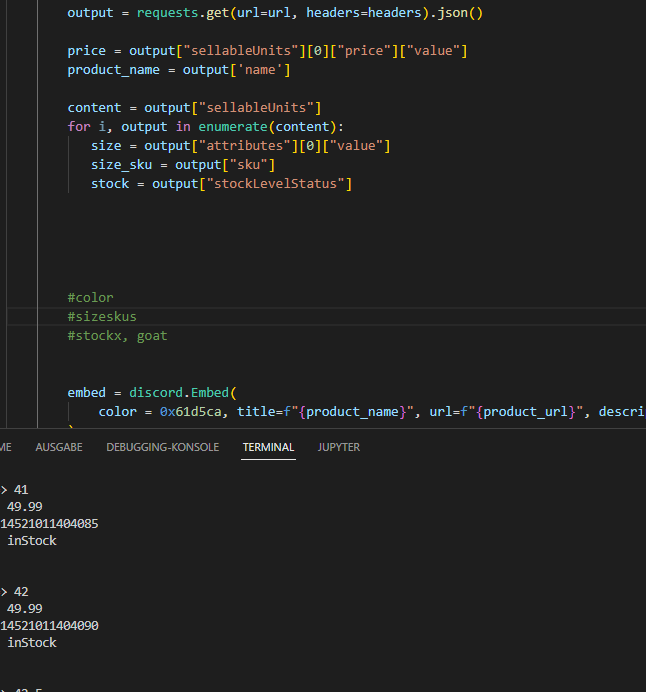
as you can see in the terminal, all the information I want, are given. but size, size_sku and stock dont get posted in the embed. only the last size
robust fulcrum
paper sluice
!resources learn python and dont copy paste code without knowing what it does, t...
Ik what he does
He copied the code from my bot GitHub from all files and pasted it in the one file and you know what happens
slate swan
slate swan
as you can see in the terminal, all the information I want, are given. but size,...
so it looks like this: https://i.gyazo.com/424f9d9e89bf7a726467f75042a9b8e5.png

but why?
swift pumice
slate swan
any errors?
no
everything works, just not giving the user the role doesnt work
slate swan
swift pumice
everything works, just not giving the user the role doesnt work
do you have an error handler, cause you did a mistake there and still no errors are getting raised
swift pumice
slate swan
do you have an error handler, cause you did a mistake there and still no errors ...
oh okay yes i do
wait
slate swan
the mistake -> ctx.member should be ctx.author
swift pumice
oh,thank you
slate swan
swift pumice
oh okay yes i do
add else: raise error in the end of your handler
it will raise uncaught errors
swift pumice
async def Geschlecht1(ctx):
    channel = bot.get_channel(988526792602177636)
    message = await channel.send('Was ist dein Geschlecht?(Männlich)[Reagiere auf die nachricht]')
    await message.add_reaction('♂')

    def check(reaction, user):
        # only accept a reaction with the same emoji and on the same message
        return reaction.emoji == '♂' and reaction.message == message

    reaction, user = await bot.wait_for('reaction_add', check=check)
    role = ctx.guild.get_role(992449832641900544)
await ctx.author.add_roles(role)```like this?yes should work now
swift pumice
slate swan
yes should work now
it kinda still isnt working? like if i react to it , it gives the role. but if someone other does it nothing happens
slate swan
swift pumice
it kinda still isnt working? like if i react to it , it gives the role. but if s...
even if someone else reacts the role gets added to you since you're doing ctx.author.add_roles , you should be using user.add_roles if you wanna add the role to the user who reacted
slate swan
slate swan
but why?
no one?
 indigo dagger
suppose you wanna take a response from user like
Bot  : abc
User : I want to take this response
Bot  : To send is msg```
then how do i do it?oh okay
slate swan
slate swan
no one?
the code you provide doesn't give any context
swift pumice
thanks
slate swan
indigo dagger
suppose you wanna take a response from user like
```User : !!xyz
Bot : abc
User...
!d discord.Client.wait_for
unkempt canyonBOT
wait_for(event, /, *, check=None, timeout=None)```
This function is a [*coroutine*](https://docs.python.org/3/library/asyncio-task.html#coroutine).

Waits for a WebSocket event to be dispatched.

This could be used to wait for a user to reply to a message, or to react to a message, or to edit a message in a self-contained way.

The `timeout` parameter is passed onto [`asyncio.wait_for()`](https://docs.python.org/3/library/asyncio-task.html#asyncio.wait_for "(in Python v3.10)"). By default, it does not timeout. Note that this does propagate the [`asyncio.TimeoutError`](https://docs.python.org/3/library/asyncio-exceptions.html#asyncio.TimeoutError "(in Python v3.10)") for you in case of timeout and is provided for ease of use.

In case the event returns multiple arguments, a [`tuple`](https://docs.python.org/3/library/stdtypes.html#tuple "(in Python v3.10)") containing those arguments is returned instead. Please check the [documentation](https://discordpy.readthedocs.io/en/latest/api.html#discord-api-events) for a list of events and their parameters.

This function returns the **first event that meets the requirements**...sorry I don't provide dm help.
slate swan
but if you click on that link it has an example about how to use it
indigo dagger
ok
cloud dawn
slate swan
so it looks like this: https://i.gyazo.com/424f9d9e89bf7a726467f75042a9b8e5.png
Because in the for loop you keep overriding the variable until the last one then that var is defined as the last iteration.
swift pumice
slate swan
even if someone else reacts the role gets added to you since you're doing ctx.au...
@bot.command()
async def Geschlecht1(ctx):
    channel = bot.get_channel(988526792602177636)
    message = await channel.send('Was ist dein Geschlecht?(Männlich)[Reagiere auf die nachricht]')
    await message.add_reaction('♂')

    def check(reaction, user):
        # only accept a reaction with the same emoji and on the same message
        return reaction.emoji == '♂' and reaction.message == message

    reaction, user = await bot.wait_for('reaction_add', check=check)
    role = ctx.guild.get_role(992449832641900544)
await ctx.user.add_roles(role)````you mean like this right?umm guys what is coroutine?
slate swan
swift pumice
```py
@bot.command()
async def Geschlecht1(ctx):
channel = bot.get_channel(9...
just user, since you store the user who reacted in the user variable
slate swan
cloud dawn
Because in the for loop you keep overriding the variable until the last one then...
how can I change that?
swift pumice
oh okay thanks
slate swan
indigo dagger
umm guys what is coroutine?
you could call it an "async function"
indigo dagger
ok
cloud dawn
slate swan
how can I change that?
Have it add it to a list of some kind not 100% what you want.
swift pumice
slate swan
just user, since you store the user who reacted in the `user` variable
@bot.command()
async def Geschlecht1(ctx):
    channel = bot.get_channel(988526792602177636)
    message = await channel.send('Was ist dein Geschlecht?(Männlich)[Reagiere auf die nachricht]')
    await message.add_reaction('♂')

    def check(reaction, user):
        # only accept a reaction with the same emoji and on the same message
        return reaction.emoji == '♂' and reaction.message == message

    reaction, user = await bot.wait_for('reaction_add', check=check)
    role = ctx.guild.get_role(992449832641900544)
await user.add_roles(role)``` like this right? but it still only works for me idkit will work for only the first use who adds the reaction.
*user
swift pumice
uh, why? how can i make that it will work everyone?
slate swan
use a while True loop
cloud dawn
!d discord.on_raw_reaction_add
unkempt canyonBOT
discord.on_raw_reaction_add(payload)```
Called when a message has a reaction added. Unlike [`on_reaction_add()`](https://discordpy.readthedocs.io/en/latest/api.html#discord.on_reaction_add "discord.on_reaction_add"), this is called regardless of the state of the internal message cache.

This requires [`Intents.reactions`](https://discordpy.readthedocs.io/en/latest/api.html#discord.Intents.reactions "discord.Intents.reactions") to be enabled.😡
slate swan
while True:
   try:
       await wait_for(...)
   except asyncio.TimeoutError:
       break
thank you
slate swan
cloud dawn
😡
how will raw_reaction_add help with a listener in a command lol
which needs a message check too
cloud dawn
slate swan
how will raw_reaction_add help with a listener in a command lol
I think you have never made a role reaction command lol.
slate swan
cloud dawn
Have it add it to a list of some kind not 100% what you want.
mmh. so I know what you mean but dunno how I can implement it
or how to print every size first of all
slate swan
cloud dawn
I think you have never made a role reaction command lol.
whats wrong with using reaction_add if you have member intents
eager bluff
what does
bytearray index out of range
mean?
slate swan
especially for a message which is already in the cache
cloud dawn
slate swan
whats wrong with using reaction_add if you have member intents
Well use reaction_add will only get triggered if the message that contains the reaction is in cache.
cloud dawn
How would you be certain, this message can exists for days if not months.

 indigo dagger
sarth str(reaction.emoji) == ':thumbsup:'here in the web they gave the emoji 👍 so in the code do i need to write :thumbsup:
slate swan
indigo dagger
sarth ```str(reaction.emoji) == ':thumbsup:'```here in the web they gave the emo...
im not sure just use the unicode
cloud dawn
slate swan
<:sobSob:785158654928224277>
I don't think you are understanding what I mean.
indigo dagger
slate swan
im not sure just use the unicode
unicode?
slate swan
!charinfo 👍
unkempt canyonBOT
Character Info
\U0001f44d: THUMBS UP SIGN - 👍
slate swan
the \U.... thing
cloud dawn
A message will not be cached for the entire existence of the bot.
indigo dagger
ok so in the code in need to typestr(reaction.emoji) == '\U0001f44d'?
slate swan
cloud dawn
A message will not be cached for the entire existence of the bot.
but the wait_for stops listening when noone adds a reaction for 30 seconds....
why would it be needed for the entire time
it was 30 or 180 I don't remember correctly
!d discord.Client.wait_for
the heck
cloud dawn
slate swan
but the wait_for stops listening when noone adds a reaction for 30 seconds....
Because he/she doesn't need to use wait for at all. Besides there isn't even a timeout error catch. He/she is trying to run a command forever..
indigo dagger
oh yea and sarth how do i get the user id?
swift pumice
cloud dawn
Because he/she doesn't need to use wait for at all. Besides there isn't even a t...
he xd
indigo dagger
like suppose its a warn msg!warn @user so and so reasonthen i need the id of @rich otter how do i get it?
slate swan
cloud dawn
Because he/she doesn't need to use wait for at all. Besides there isn't even a t...
yeah i thought it had a timeout by default
@swift pumice you want to keep that working permanently or stop when users stop adding reactions?
swift pumice
Permanently.
slate swan
then use an event, not a command 🤷♂️
cloud dawn
Hence the raw reaction 🐒
swift pumice
oh okay
slate swan
slate swan
mmh. so I know what you mean but dunno how I can implement it
panda?
cloud dawn
slate swan
panda?
Yes?
 restive osprey
where I can find good documention of discord.py
which contains good examples on how to implement things?
slate swan
cloud dawn
Yes?
how can I do it?
slate swan
restive osprey
where I can find good documention of discord.py
which contains good examples on...
documentation exists but good documentation, nop
if I do this: sizes = size print(sizes)
I get also the last size but I want all of them
slate swan
slate swan
if I do this: ```sizes = size
print(sizes)```
I get also the last size but I wa...
why do that..
slate swan
slate swan
why do that..
?
restive osprey
slate swan
documentation exists but *good* documentation, nop
I wanted something like
a guide book with example given of each functions
kinda of like physics books .
where there's a solved example after each formula
slate swan
slate swan
?
I mean you can simply print size why assign it again
slate swan
restive osprey
I wanted something like
a guide book with example given of each functions
kinda...
of each function
you do know that'll take a million years
restive osprey
slate swan
*of each function*
you do know that'll take a million years
all main functions
restive osprey
slate swan
I mean you can simply print `size` why assign it again
new guy things
slate swan
slate swan
I mean you can simply print `size` why assign it again
cause when I add size as an f string in my embed I also get only the last size (46) . still trying to solve this problem
slate swan
slate swan
cause when I add size as an f string in my embed I also get only the last size (...
huh? can you elaborate your issue?
slate swan
restive osprey
new guy things
still too much, gonna take a nice amount of time for covering all main functions
slate swan
slate swan
so I scrape this: https://i.gyazo.com/cf1c6495f324cb0dbcdb73c3d3067938.png
take a look at this
restive osprey
slate swan
still too much, gonna take a nice amount of time for covering *all main function...
Any thing decent available?
slate swan
restive osprey
new guy things
bruh no. I somehow need to extract only the sizes. still worth a try to check how to solve it
slate swan
restive osprey
Any thing decent available?
you can see their github examples and read the docs, won't get much help here
slate swan
slate swan
yes I did
u know what I mean?
absolutely not
okay. so when I execute this. I get every information, like stock.... . https://i.gyazo.com/64e1b0be267ba63677db02260aeae408.png

looks like this in terminal
shrewd apex
what size?
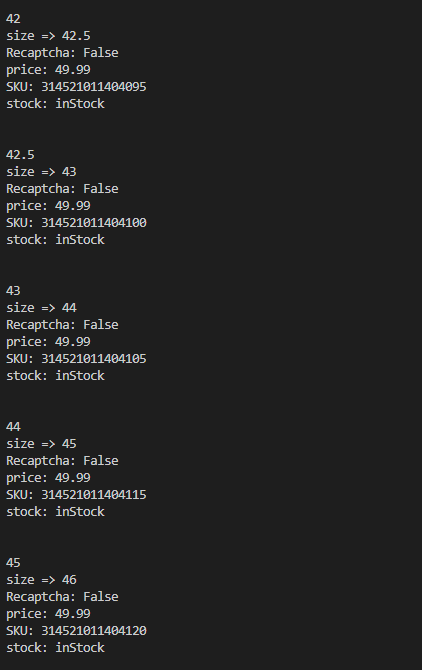 cloud dawn
slate swan
okay. so when I execute this. I get every information, like stock.... . https://...
cloud dawn
slate swan
okay. so when I execute this. I get every information, like stock.... . https://...
!e ```py
content = {
"val1": {
"numb": 1,
"letter": "a",
"perc": 100
},
"val2": {
"numb": 2,
"letter": "b",
"perc": 200
},
"val3": {
"numb": 3,
"letter": "c",
"perc": 300
}
}
numbs = [content[x]["numb"] for x in content]
print(numbs)
@cloud dawn :white_check_mark: Your eval job has completed with return code 0.
[1, 2, 3]
I will give you this hint.
swift pumice
slate swan
then use an event, not a command 🤷♂️
async def Geschlecht2(ctx):
    channel = bot.get_channel(985970666643816498)
    message = await channel.send('Was ist dein Geschlecht?(Weiblich)[Reagiere auf die nachricht]')
    await message.add_reaction('♀️')
    role = ctx.guild.get_role(992450008051875930)
    await ctx.author.add_roles(role)


@bot.event
async def on_raw_reaction_add(reaction, user):
    Channel = bot.get_channel(985970666643816498)
    if reaction.message.channel.id != Channel.id:
        return
    if reaction.emoji == "♀️":
        Role = nextcord.utils.get(user.server.roles, name="Weiblich")
await user.add_roles(Role)```like this right? but it still doesnt work. like it doesnt add the roleAdd print statements.
cloud dawn
Have you debugged the event?
swift pumice
what?
cloud dawn
If you have debugged the event.
swift pumice
no
cloud dawn
I recommend doing that and check if it even reaches the event.
swift pumice
how
cloud dawn
By simply adding a print function on the top of the event.
If it passes you know you received the reaction. Then add a print under the if statement if it even passes.
slate swan
 slate swan
if it is related to discord bots, yes
 brave flint
does discord have like text input on views?
i mean not in the slash cmds
on a embed views
 fading marlin
you can send a modal using a view in a message, yes
brave flint
no i mean like i know i can make a embed have view, but can we like send input views?
uhhh nvm then lol
fading marlin
you can have a view respond with a modal
 smoky cedar
Damn there is some jank with voice-channel text channels and bots
fading marlin
brave flint
btw we cant use # as args?
?
brave flint
uh nvm again
smoky cedar
Getting an exception from discord py when reactions are used in a voice channel in my on_raw_reaction_add method
anyone know if this is fixed on discord py latest?
AttributeError: 'VoiceChannel' object has no attribute 'fetch_message'
fading marlin
what dpy version are you using?
smoky cedar
fading marlin
what dpy version are you using?
1.7.3
Definitely predates text in voice channels
When is 2.0 officially releasing?
 sick birch
smoky cedar
`AttributeError: 'VoiceChannel' object has no attribute 'fetch_message'`
sick birch
smoky cedar
`AttributeError: 'VoiceChannel' object has no attribute 'fetch_message'`
Ah.. are you trying the new text in voice channel thing?
sick birch
smoky cedar
When is 2.0 officially releasing?
Not sure but you can use it right now, it's pretty stable if you ask me
2.0 has what you're looking for: https://discordpy.readthedocs.io/en/latest/api.html?highlight=voicechannel#discord.VoiceChannel.fetch_message
smoky cedar
sick birch
Ah.. are you trying the new text in voice channel thing?
I'm not actually trying to do anything with my bot in the text voice channel, but the bot was throwing exceptions whenever people reacted in there
smoky cedar
sick birch
2.0 has what you're looking for: <https://discordpy.readthedocs.io/en/latest/api...
nice
slate swan
sick birch
Not sure but you can use it right now, it's pretty stable if you ask me
only the master branch is stable*
sick birch
Ah, okay you could add a check to make sure the reaction is coming from a discord.TextChannel, not a discord.VoiceChannel
smoky cedar
sick birch
Ah, okay you could add a check to make sure the reaction is coming from a `disco...
Yeah, was my first thought, but I also need to migrate my slash commands so maybe I'll just bump to 2.0
sick birch
Fair enough, might be a good idea
smoky cedar
That explains why some bots were acting weird when I was trying to use them in a text vocie channel
sick birch
What do you mean by "doesn't work"?
Also can we see code, and any relavant tracebacks?
That 2nd to last line is indented improperly
As it stands right now, your token is undefined as it's defined inside the function scope
And you can't access it outside
slate swan
he is right, also you should remove the "" in the last line (12).
yeah
it is bot
type in the last line bot.run(token)
show me
paper sluice
!indent @slate swan dedent the token = ... line
unkempt canyonBOT
Indentation
Indentation is leading whitespace (spaces and tabs) at the beginning of a line of code. In the case of Python, they are used to determine the grouping of statements.
Spaces should be preferred over tabs. To be clear, this is in reference to the character itself, not the keys on a keyboard. Your editor/IDE should be configured to insert spaces when the TAB key is pressed. The amount of spaces should be a multiple of 4, except optionally in the case of continuation lines.
Example
def foo():
    bar = 'baz'  # indented one level
    if bar == 'baz':
        print('ham')  # indented two levels
    return bar  # indented one level
The first line is not indented. The next two lines are indented to be inside of the function definition. They will only run when the function is called. The fourth line is indented to be inside the if statement, and will only run if the if statement evaluates to True. The fifth and last line is like the 2nd and 3rd and will always run when the function is called. It effectively closes the if statement above as no more lines can be inside the if statement below that line.
Indentation is used after:
1. Compound statements (eg. if, while, for, try, with, def, class, and their counterparts)
2. Continuation lines
More Info
1. Indentation style guide
2. Tabs or Spaces?
3. Official docs on indentation
 slate swan
paper sluice
!indent <@456226577798135808> dedent the `token = ...` line
slate swan
paper sluice
!indent <@456226577798135808> dedent the `token = ...` line
he said you should remove the space in line 11 in token = os.environ['token'] so it will be token = os.environ['token'].
@slate swan
paper sluice
slate swan
Dear. The code works fine, but this error bar confuses me. how to remove it?
not sure if vsc supports this, but u can make the directory root directory from in which u have your main file which gets rid of those lines
slate swan
try run it now.
cool
yeah, to make sure that the bot ready type this function :
@bot.event
async def on_ready():
    print("Ready")
in line 10
paper sluice
slate swan
Dear. The code works fine, but this error bar confuses me. how to remove it?
the thing that is happening is, you are making imports relative to your main file ( the file which runs all your cogs ), but VSC doesn't know that and hence why you have those lines.
slate swan
in line 10
slate swan
paper sluice
the thing that is happening is, you are making imports relative to your main fil...
Yes. in the main import file without a line. but how to make it be in another file without lines?
 paper sluice
slate swan
Yes. in the main import file without a line. but how to make it be in another fi...
paper sluice
slate swan
Yes. in the main import file without a line. but how to make it be in another fi...
hmm, as I said, I don't thknk VSC supports that feature, it certainly is in other python related IDE's like PyCharm. Although you can ask in #editors-ides or contact VSC support for the same
slate swan
uhhh, in line 10 you should remove the spaces so the whole code be like:
import os, discord
from discord.ext import commands

bot = commands.Bot(command_prefix="!")

@bot.command()
async def hello(ctx):
  await ctx.send("Hello")

@bot.event
async def on_ready():
    print("Ready")

token = os.environ['token']
bot.run(token)
it doesn't print "ready" ?
i mean in "Console" tab the word "ready" didn't show up ?
cool, check out your bot.
paper sluice
slate swan
use Member.add_roles function to add "Muted" role.
@bot.command()
async def mute(ctx, member:discord.member.Member):
  role = get(member.guild.roles, name='Muted') # get Nuted role...
  await member.add_roles(role) # add Muted role to the member.
  await ctx.send("Muted!!!") # say that the member was muted!
oh, thanks
Dear, tell me why he does not find the file for import and writes that it is not there, although it is in the folder


import cogs.clas.control_panel.class_control_panel

class control_panel(commands.Cog):
    def __init__(self, client: discord.Client):
        self.client = client

    @commands.command(aliases = ["панель", "Панель", "профиль", "Профиль", "prof", "Prof", "p", "P", "п", "П", "g", "G", " g"])
    async def command_control_panel(self, ctx):

        await ctx.send( view=cogs.clas.control_panel.class_control_panel.class_control_panel(ctx.author.id))
Maybe you should create __init__.py in "control_panel" folder then inside that file type:
import class_panel_work, class_control_panel
class control_panel(commands.Cog):
    def __init__(self, client: discord.Client):
        self.client = client

    @commands.command(aliases = ["панель", "Панель", "профиль", "Профиль", "prof", "Prof", "p", "P", "п", "П", "g", "G", " g"])
    async def command_control_panel(self, ctx):

        await ctx.send( view=cogs.clas.control_panel.class_control_panel.class_control_panel(ctx.author.id))


async def setup(bot):
    await bot.add_cog(control_panel(bot))
She is eating it is she
slate swan
slate swan
```py
import cogs.clas.control_panel.class_control_panel
class control_panel(co...
you can type as to shortcut it !
import cogs.clas.control_panel.class_control_panel as cp

class control_panel(commands.Cog):
    def __init__(self, client: discord.Client):
        self.client = client

    @commands.command(aliases = ["панель", "Панель", "профиль", "Профиль", "prof", "Prof", "p", "P", "п", "П", "g", "G", " g"])
    async def command_control_panel(self, ctx):

        await ctx.send( view=cp.class_control_panel(ctx.author.id))
what ?
what the error you got ? or you got nothing ?
hmmm try remove "return" in the last line
- do your bot has permissions ? like "admin" role ? + i know better way and easy way to add roles do:
role = get(member.guild.roles, name='Member')
await member.add_roles(role)
yeah 'Member' is the name of the role.
Cool
yeah it is right
but
is I the same as | ?
i mean if your role is 🔶| Mitglieder you should type it | not I.
Oh, so what you wrote is correct
try what you wrote.
yeah sure send link.
in DM
yeah as i see
try to send only one message "Test" or remove the adding roles in the beginning and see if it is working.
slate swan
slate swan
you can type `as` to shortcut it !
```py
import cogs.clas.control_panel.class_co...
Thanks, great for reducing imports. and about the errors of imports, I did not write it correctly there. everything is working now
slate swan
slate swan
Thanks, great for reducing imports. and about the errors of imports, I did not w...
ah, cool
 warped mirage
guys
how do u install discord.py 2.0
@shrewd apex
At line:1 char:1
+ pip install git+https://github.com/Rapptz/discord.py
+ ~~~
    + CategoryInfo          : ObjectNotFound: (pip:String) [], CommandNotFoundException
+ FullyQualifiedErrorId : CommandNotFoundException```how can i fix this?
?
sick birch
warped mirage
```pip : The term 'pip' is not recognized as the name of a cmdlet, function, scr...
Make sure you have it installed first
warped mirage
i do
sick birch
Clearly not
warped mirage
ima reinstall python then..
sick birch
and make sure to check the "Add to Path" button
warped mirage
alright]
slate swan
warped mirage
ima reinstall python then..
you could simply...... python -m pip <command> ...no...?
paper sluice
if pip is not recognized, then something has gone wrong so might as well fix that first
 gusty shard
can anybody show me how does wait_for works please?
i cant understand anything on google
 torn sail
It sort of creates a temporary listener with a future
gusty shard
can you show me a simple example
gusty shard
please do
torn sail
GitHub
An API wrapper for Discord written in Python. Contribute to Rapptz/discord.py development by creating an account on GitHub.
gusty shard
torn sail
https://github.com/Rapptz/discord.py/blob/b3a24846bddc894ae6d9bfb49ed8ee93b2d12f...
that code is so complicated for me
im just a beginner
:ı

Gist
Examples for a wait_for in ext.commands. GitHub Gist: instantly share code, notes, and snippets.
i copied that code
but it didnt worked too
torn sail
gusty shard
but it didnt worked too
How do you want to use it?
gusty shard
im trying to add a little dice game to my bot
when a user wants to fight with another user
bot needs to ask him for the
approval
torn sail
!d discord.Client.wait_for
unkempt canyonBOT
wait_for(event, /, *, check=None, timeout=None)```
This function is a [*coroutine*](https://docs.python.org/3/library/asyncio-task.html#coroutine).

Waits for a WebSocket event to be dispatched.

This could be used to wait for a user to reply to a message, or to react to a message, or to edit a message in a self-contained way.

The `timeout` parameter is passed onto [`asyncio.wait_for()`](https://docs.python.org/3/library/asyncio-task.html#asyncio.wait_for "(in Python v3.10)"). By default, it does not timeout. Note that this does propagate the [`asyncio.TimeoutError`](https://docs.python.org/3/library/asyncio-exceptions.html#asyncio.TimeoutError "(in Python v3.10)") for you in case of timeout and is provided for ease of use.

In case the event returns multiple arguments, a [`tuple`](https://docs.python.org/3/library/stdtypes.html#tuple "(in Python v3.10)") containing those arguments is returned instead. Please check the [documentation](https://discordpy.readthedocs.io/en/latest/api.html#discord-api-events) for a list of events and their parameters.

This function returns the **first event that meets the requirements**... cerulean ibex
How many types of ctx are there?
torn sail
cerulean ibex
How many types of ctx are there?
Wdym
slate swan
only one ( in discord.py )
torn sail
Yeah
cerulean ibex
torn sail
Wdym
Like ik about ctx.reply , ctx.type
gusty shard
torn sail
It has a good example
thanks
slate swan
ah
cerulean ibex
Ye
slate swan
!d discord.ext.commands.Context check the table
unkempt canyonBOT
class discord.ext.commands.Context(*, message, bot, view, args=..., kwargs=..., prefix=None, command=None, invoked_with=None, invoked_parents=..., invoked_subcommand=None, ...)```
Represents the context in which a command is being invoked under.

This class contains a lot of meta data to help you understand more about the invocation context. This class is not created manually and is instead passed around to commands as the first parameter.

This class implements the [`Messageable`](https://discordpy.readthedocs.io/en/latest/api.html#discord.abc.Messageable "discord.abc.Messageable") ABC.Uhhhh
slate swan
i think you didn't put scripts folder to your environment variables.
cerulean ibex
unkempt canyon
Looks like programming 
 tacit horizon
how can i send message to other guild
slate swan
Owo, what happened
slate swan
tacit horizon
how can i send message to other guild
You mean to other server ?
tacit horizon
ya
slate swan
Your bot should be in that server and have permissions to send messages then copy that guild id into yours.
torn sail
tacit horizon
how can i send message to other guild
You need to id of the channel. Then you can use bot.get_channel(id) and then use the send() method
slate swan
I guess it is permissions error....
 young flower
slate swan
I guess it is permissions error....
young flower
slate swan
I guess it is permissions error....
maybe
tacit horizon
torn sail
You need to id of the channel. Then you can use `bot.get_channel(id)` and then u...
@client.event
async def on_message(message):
    await client.process_commands(message)
    ser = client.get_channel(992504804607799479)
    await ser.send(message)
like this ?
torn sail
tacit horizon
```py
@client.event
async def on_message(message):
await client.process_comm...
Yes
tacit horizon
ok
 pine knot
@client.command(description="Temporarily mutes the specified user.")
@discord.ext.commands.has_guild_permissions(manage_messages=True)
async def tmute(ctx, member : discord.Member, *, duration = 0, unit = None):
    guild = ctx.guild
    mutedRole = discord.utils.get(guild.roles, name="Muted")

    if not mutedRole:
        mutedRole = await guild.create_role(name="Muted")

        for channel in guild.channels:
            await channel.set_permissions(mutedRole, speak=False, send_messages=False, read_message_history=True, read_messages=True)

    await member.add_roles(mutedRole)
    myEmbed = discord.Embed(description=f"{member} has been muted for {duration}{unit}", color=0xff3500)
    await ctx.send(embed=myEmbed)
    member.id = ctx.member.id
    await member.send(f"You were muted in {guild.name} for {duration}{unit}")

    if unit == "s":
        wait = 1 * duration
        await asyncio.sleep(wait)
    elif unit == "m":
        wait = 60 * duration

    await asyncio.sleep(wait)
    await member.remove_roles(mutedRole)
add "admin" role to him
pine knot
pine knot
```py
@client.command(description="Temporarily mutes the specified user.")
@disc...
this isnt working
slate swan
pine knot
this isnt working
any errors ?
slate swan
pine knot
```py
@client.command(description="Temporarily mutes the specified user.")
@disc...
member.id = ctx.member.id you can change members ids ?
didn't work right ?
pine knot
slate swan
`member.id = ctx.member.id` you can change members ids ?
wdym?
torn sail
pine knot
wdym?
Well you are assigning the member objects id
tacit horizon
torn sail
Yes
not working ;-;
pine knot
i dont think thats the problem, i have a normal mute cmd that works fine, the time thing is just not working
torn sail
tacit horizon
not working ;-;
Error?
torn sail
tacit horizon
ya
Nonetype has no attribute send?
tacit horizon
yes
torn sail
Yeah try await bot.fetch_channel(id)
tacit horizon
ok
slate swan
Normally i would say that you can't change members ids in line 43
i can't see your full code of that function ? is that the end of it ?
pine knot
torn sail
Well you are assigning the member objects id
ok should i just remove it then
u prob need a normal prefix too
slate swan
what is going on in your code
pine knot
i dont see it at the top
tacit horizon
@client.event
async def on_message(message):
    ser = await client.fetch_channel(992504804607799479)
    await ser.send(message)
discord.errors.NotFound: 404 Not Found (error code: 10003): Unknown Channel
slate swan
tacit horizon
```py
@client.event
async def on_message(message):
ser = await client.fetch_...
Check out the id of it ?
torn sail
tacit horizon
```py
@client.event
async def on_message(message):
ser = await client.fetch_...
The channel id is wrong then
slate swan
you typed in the bottom guild = ctx.reason well that for what ? and also do ctx has reason ?
tacit horizon
ahh ya
torn sail
tacit horizon
ahh ya
It’s probably best if u use bot.get_channel and then check if it None before using await bot.fetch_channel because an api request on every message is too much
sick birch
torn sail
It’s probably best if u use bot.get_channel and then check if it None before usi...
Or alternatively, make a "getch" function as a utility that does exactly this
tacit horizon
torn sail
It’s probably best if u use bot.get_channel and then check if it None before usi...
ok
slate swan
better way copy this code:
@bot.command(description="Mute a specified user.")
async def mute(ctx, member: discord.member.Member):
    if ctx.author.guild_permissions.administrator:
        try:
            role = get(member.guild.roles, name='Muted')
            await member.add_roles(role)
            await ctx.send("Muted!")
        except:
            await ctx.send("There was an error! do the server have Muted role ?")
The bot sending every details of the users
torn sail
tacit horizon
The bot sending every details of the users
Right now you are sending a plain message object
What do you want to send?
torn sail
tacit horizon
only message
You can access the message content with message.content and the username with message.author.name
slate swan
yeah put it instead of yours code.
tacit horizon
torn sail
You can access the message content with `message.content` and the username with ...
no the bot sending like this
<Message id=992510700301852794 channel=<TextChannel id=989459432511504384 name=':speech_balloon:・general' position=3 nsfw=False news=False category_id=989437587502559253> type=<MessageType.default: 0> author=<Member id=499973767846428694 name='EggyinIt' discriminator='4387' bot=False nick=None guild=<Guild id=989437370975789076 name="" shard_id=None chunked=False member_count=14>> flags=<MessageFlags value=0>>
slate swan
do you mean in the except statement ?
torn sail
tacit horizon
no the bot sending like this
`<Message id=992510700301852794 channel=<TextChanne...
Yep that’s the repr of the plain message object
!d discord.Message you can check this out for attributes of it
unkempt canyonBOT
class discord.Message```
Represents a message from Discord.

x == y Checks if two messages are equal.

x != y Checks if two messages are not equal.

hash(x) Returns the message’s hash.nvm about it
yeah yeah...
copy my code instead of yours and try again
?
didn't work ?
sick birch
Don't use discord_slash, discord.py v2.0 already supports it
slate swan
my bad, type in the top of your whole code from discord.utils import get
nvm about it, not now.
sick birch
Sorry? I said not to use it
tacit horizon
torn sail
Yep that’s the repr of the plain message object
Ok thanks
slate swan
what is the error?
sick birch
Also I don't mean to turn you away, but you seem to be a little confused on what to do. I'd like to suggest that you take some time to learn Python first, as discord.py is a little bit complex and this issue should be relatively simple problem to solve if you know some python
slate swan
sick birch
Also I don't mean to turn you away, but you seem to be a little confused on what...
He is right @slate swan
i mean the Console ? didn't throw any error ?
yeah as we see.
i am also new to discord.py btw.
the library you are using right now ?
glad cradle
I have a question
is it possible to execute a command by calling the command function from my script?
paper sluice
glad cradle
is it possible to execute a command by calling the command function from my scri...
no, you can use bot.invoke to invoke your command
slate swan
ah, sorry it didn't work without any Errors in your Console right ?
glad cradle
paper sluice
no, you can use `bot.invoke` to invoke your command
and I can also make it loop and re-execute after a certain period of time right? (I think with task?)
slate swan
With using mute command ?
i mean you sent /mute @member or !mute @member?
with mention ?
paper sluice
glad cradle
and I can also make it loop and re-execute after a certain period of time right?...
correction its ctx.invoke not bot
and ya you can execute it multiple times you don't necessarily need tasks
slate swan
yeah
with errors ?
it won't appear dude
that the new slash commands.
see pinned messages.
see the pinned messages before the last one.
just type it
/mute @someone
i mentioned two guys
yeah
delete the twice "bot" you typed in your code.
yeah
no, the first one should be there
no no
i mean the variables.
delete client
glad cradle
paper sluice
correction its `ctx.invoke` not bot
and ya you can execute it multiple times you...
I can use also a normal while loop?
slate swan
now type in the chat !mute @BrUh
slate swan
glad cradle
I can use also a normal while loop?
if for loop would work the while loop should be too.
without errors ? do you have permissions to yourself?
paper sluice
glad cradle
I can use also a normal while loop?
yes
slate swan
How about the Console ?
Any errors ?
You should probably learn Python.
well you should put the bot.run in the bottom of your code and usually put the imports the beginning of your code.
yeah
and practicing....
Are you joking ?
i mean cut that bot.run(token) in the bottom of your code
 hollow agate
slate swan
/mute `@someone`
hollow agate
slate swan
/mute `@someone`
:(
slate swan
and here delete the rest of the line not only client word
slate swan
hollow agate
:(
i am sorry i didn't mean to annoying you.
sick birch
!resources @slate swan I think it'd really benifit you to check these out
unkempt canyonBOT
Resources
The Resources page on our website contains a list of hand-selected learning resources that we regularly recommend to both beginners and experts.
slate swan
ah well i am just give up.
 heavy swift
What's the problem
glad cradle
paper sluice
yes
good
glad cradle
glad cradle
good
thx thx
heavy swift
oh are you trying to use slash commands
slate swan
why you tried to import discord_slash ?
heavy swift
you should delete it
it's not supported
I've used it before and it does work
at the time I used it but it throws a weird application error
It worked before but there's a chance it may not work anymore but if I were you I wouldn't use it and just wait for dpy 2.0 to be released
👍
sick birch
You can get 2.0 now
A good chunk of people already use it, it says it's still in beta, but I haven't had any major bugs with it
heavy swift
It doesn't work with the vm he's using
sick birch
Replit?
heavy swift
yeah
sick birch
Of course. Replit is pretty terrible, you should probably get off of it. As a plus, you can also use discord.py 2.0 with all the new features, including slash commands if you do
heavy swift
least it doesnt when i tried, it just auto switches to v.1.7.3
sick birch
Why not just use it now? It's excellent
It's going to be a while before 2.0 comes to pypi
If you say so. Though if you download something like pycharm or VScode you can get started with the new features instantly
heavy swift
If you dont need ur bot to be on 24/7 you could just test out 2.0 on ur own machine
sick birch
You can but discord_slash is not recommended
I wouldn't do that
The videos on youtube for discord bot tutorials are really bad
They encourage you to use things like discord_slash which is obviously bad
heavy swift
They're a great resource for beginners i'd argue
they're not perfect but they give u a foot in the door
paper sluice
heavy swift
They're a great resource for beginners i'd argue
they encourage bad practice, so not so much
torn sail
heavy swift
They're a great resource for beginners i'd argue
They don’t teach the best practices and most watchers just copy paste anyways
sick birch
No. The bad influence they have on beginners is really obvious, if you spend some time helping out here in #discord-bots
Check the pins here for a lot of resources
Also the documentation and the github examples are one of the best if not the best resource
paper sluice
sick birch
Also the documentation and the github examples are one of the best if not the be...
weren't you making a website or something for pinned messages here ?
sick birch
Yeah, I'm in charge of that project
paper sluice
nice
sick birch
I also have to stay on the lookout for more guides that I believe are good
 grave basalt
hello there
sick birch
So if you've got any.. feel free to PR on python-discord/site
heavy swift
paper sluice
they encourage bad practice, so not so much
Yeah I've seen those as well. But to me it's good to have them than not to, cause again for those just starting out it looks a lot less intimidating when someone breaks it down
grave basalt
anyone know if there's a way to use button and dropdown UI with discord.py
sick birch
Except most of those videos don't break it down
paper sluice
sick birch
So if you've got any.. feel free to PR on python-discord/site
if i find one, i will be sure to do it
sick birch
grave basalt
anyone know if there's a way to use button and dropdown UI with discord.py
grave basalt
sick birch
dropdown: <https://github.com/Rapptz/discord.py/blob/master/examples/views/dropd...
tyvm
heavy swift
sick birch
Except most of those videos don't break it down
yeah and that's when the people who are watching that are actually curious do some independent research
most dont obv
sick birch
sick birch
Except most of those videos don't break it down
To elaborate, it's like "hey, welcome to a discord bot video. Type this to get your bot started. Next to make this command, type this"
heavy swift
but again, foot in the door
paper sluice
heavy swift
Yeah I've seen those as well. But to me it's good to have them than not to, caus...
most videos copy paste the examples from gists or something and then just showcase how they work, they don't explain, teach something new
and the worst part is they welcome absolute beginners to make a bot ( for more views or something ) which is absolutely terrible
sick birch
And quite honestly, discord.py is not meant for beginners
heavy swift
I'm not disagreeing I'm just saying it's way more friendly to a beginner than showing ur friend who wants to learn about making bots the documentation
heavy swift
sick birch
And quite honestly, discord.py is not meant for beginners
how's that?
paper sluice
heavy swift
how's that?
dpy depends on deep knowledge of OOP, async programming and you need to be pretty fluent in python to use it
grave basalt
tbh it's good enough
heavy swift
Yeah obv u gotta know python
paper sluice
i would argue hikari is easier to use, it looks intimidating but you dont need as much knowledge to get into it as you need for dpy
sick birch
For one, if you go on the discord.py server, they expect an intermediate knowledge of python before even started. The reasoning is in one of the rules. It also covers some advanced topics such as decorators, and asynchronous programming, and having knowledge of things like the event loop is important
grave basalt
i started using it to do basic stuff before i knew what a dictionary was lol
once you really get into the weeds of it you do need solid bases tho
heavy swift
when I say beginner I mean beginner to making bots but even if they were new to programming, the syntax is way easier to look at. but still obv not recommending to start with dpy if ur new to python
heavy swift
paper sluice
i would argue hikari is easier to use, it looks intimidating but you dont need a...
I'll take a look
paper sluice
Ya i started making discord bots before knowing any python because these youtube videos about discord bots made it seem super easy, thats the part i hate the most. You should not encourage beginners for such projects because they will just be cramming code and not learning both the library and python
grave basalt
theres still exceptions to that, i was actually motivated to learn what async patterns were from using it
but that depends on whether someone wants to understand the code or to just have it there
paper sluice
I just got bored because i realized all that was happening is me trying to cram lines of code and stopped making bots all together.
grave basalt
anyways i feel like i'm not contributing that much useful stuff so ill go back to my cave
heavy swift
grave basalt
once you really get into the weeds of it you do need solid bases tho
yeah
heavy swift
grave basalt
anyways i feel like i'm not contributing that much useful stuff so ill go back t...
nah u have good input
grave basalt
i don't have any real experience with any concrete projects, i better shut my mouth a bit before i start really talking about stuff i dont understand
have a good time making understandable code! i'll go make some spaghetti in the meantime
heavy swift
🍝 🤤
warped mirage
bruh i have python installed + github but when i try make a ---.py file it doesnt work
any ideas for this?
 full lily
warped mirage
bruh i have python installed + github but when i try make a ---.py file it doesn...
full lily
warped mirage
bruh i have python installed + github but when i try make a ---.py file it doesn...
what doesn't work
paper sluice
installing python and git has nothing to do with making .py files
what exactly is not working?
warped mirage
paper sluice
installing python and git has nothing to do with making .py files
what exactly ...
when i try make a py file it doesnt work or show
just a txt
paper sluice
warped mirage
just a txt
u probably made .py.txt and windows is hiding the .txt part
paper sluice
where are you making the files?
also this is not related to discord bots, so we should probably move on to #editors-ides
sick birch
warped mirage
im trying to make a bot but ok
If it's not directly related to discord.py, then it doesn't belong here
 desert heart
Could be another library as long as it's for Discord and in Python
 tough slate
@client.slash_command(name="talky", description="Speak through me!") async def talk(ctx, text: str) -> None: await ctx.response.send_message(text)
SyncWarning: Failed to overwrite commands in <Guild id=XXXXXXXXXXXXX> due to 400 Bad Request (error code: 50035): Invalid Form Body
In 2.options.0.description: This field is required
Any tips on how to solve this error?
disnake @slate swan
uh
not sure what you mean
i have other slash commands that work right off the bat, once i try to add parameters it breaks
yeah q-q
sick birch
I believe that's the 3rd slash command, first option's description
In your case text, which probably needs a description
tough slate
yeah but i try to add one but the formatting is not obvious to me
because how would you add one for each option
sick birch
Some of the other folks might be able to help you out on that one. Disnake is beyond my skillset
Discord, probably. I'll check the docs real fast
tough slate
this is my punishment for using disnake
 sage otter
It’s a bad request error
heavy swift
 sage otter
Definitely discord
sick birch
tough slate
whats the syntax for it
sick birch
type, name, and description are the only required ones for an option
It probably adds a default one
sick birch
Not sure I agree with that implementation detail
 wanton pebble
is there an event relating to member.activities?
heavy swift
they do have an official server, so you might have better luck asking there @tough slate
tough slate
hmm
sick birch
wanton pebble
is there an event relating to member.activities?
on_member_update is triggered when a user's activity changes, yes
wanton pebble
sick birch
`on_member_update` is triggered when a user's activity changes, yes
oh thank you
heavy swift
dang they already have slash commands, maybe I should switch
I wonder if they have buttons too
disnake
sage otter
He’s probably referring to disnake
heavy swift
looks like they do
sage otter
it’s totally not like every other library has slash commands support either
 sage otter
bruh
heavy swift
at least not v1.7.3
sage otter
This guy.
heavy swift
I cant with the way im using it though
im using repl to host
and repl cant use 2.0
sage otter
Why not?
sage otter
What???????
 frigid raft
Hello ! I would like to ask you to help me with my problem. I would like the user to enter numbers and only numbers. But an error says invalid literal for int() with base 10: 'message', while it must be in int() to be able to do the calculation, the wait_for work perfectly, it's just at the int() level that I get stuck. I can't solve my problem then, if someone could help me 🙂 Thanks ```py
@bot.command()
async def fuel(ctx):
await ctx.send("Enter the number of hours remaining without minutes, if there is no hours type '0'.")
def check(msg):
return msg.author == ctx.author and msg.channel == ctx.channel
msg1 = await bot.wait_for("message", check=check)
await ctx.send("Enter the number of minutes remaining as a decimal number with a zero in front: 26 mins = 0.26.")
msg2 = await bot.wait_for("message", check=check)
await ctx.send("Enter the current remaining fuel rate.")
msg3 = await bot.wait_for("message", check=check)
await ctx.send("Enter the current fuel flow rate.")
msg4 = await bot.wait_for("message", check=check)

#Time in secondes
HoursInSeconds = int(msg1 * 3600) + float(msg2 * 60)

#Calcul
calcul = msg3 - HoursInSeconds*msg4
await ctx.send(calcul)
if calcul > 0:
    await ctx.send("You have enough fuel fuel to reach your destination.")
elif calcul < 0:
    await ctx.send(f"{ctx.author.mention} You will not have enough fuel to reach your destination, create a route to the nearest airport.")
just like.
pip install -U git+https://github.com/Rapptz/discord.py and call it a day
unkempt canyonBOT
isinstance(object, classinfo)```
Return `True` if the *object* argument is an instance of the *classinfo* argument, or of a (direct, indirect, or [virtual](https://docs.python.org/3/glossary.html#term-abstract-base-class)) subclass thereof. If *object* is not an object of the given type, the function always returns `False`. If *classinfo* is a tuple of type objects (or recursively, other such tuples) or a [Union Type](https://docs.python.org/3/library/stdtypes.html#types-union) of multiple types, return `True` if *object* is an instance of any of the types. If *classinfo* is not a type or tuple of types and such tuples, a [`TypeError`](https://docs.python.org/3/library/exceptions.html#TypeError "TypeError") exception is raised.

Changed in version 3.10: *classinfo* can be a [Union Type](https://docs.python.org/3/library/stdtypes.html#types-union).
Similar names: 2to3fixer.isinstance
frigid raft
thanks
heavy swift
Yeah they have this thing where they auto import packages they dont recognize the name of in ur project. So even though I started up a fresh replit, and did pip install -U git+https://github.com/Rapptz/discord.py it still autoconverts to 1.7.3
sage otter
But like doesn’t the -U replace it
-U replaces the old package with the new one
Hence -U- Update/Upgrade
heavy swift
I'll try it again and see if anything changes
tough slate
@slate swan it worked! ty
frigid raft
@slate swan like this ```py
def check(msg):
return msg.author == ctx.author and msg.channel == ctx.channel and msg.content.isnumeric()
await ctx.send(int("Enter the number of hours remaining without minutes,  if there is no hours type '0'."))
msg1 = await bot.wait_for("message", check=check)
await ctx.send(float("Enter the number of minutes remaining as a decimal number with a zero in front: 26 mins = 0.26."))
msg2 = await bot.wait_for("message", check=check)
await ctx.send(int("Enter the current remaining fuel rate."))
msg3 = await bot.wait_for("message", check=check)
await ctx.send(int("Enter the current fuel flow rate."))
msg4 = await bot.wait_for("message", check=check)``` ?

 turbid knoll
warped mirage
any ideas why this happens?
turbid knoll
warped mirage
any ideas why this happens?
Do you have python downloaded?
warped mirage
yes
turbid knoll
Check if it's in your .path if you're on Windows. If you're on mac then im not sure
frigid raft
i fotgot to remove it 😅
warped mirage
turbid knoll
Check if it's in your .path if you're on Windows. If you're on mac then im not s...
im on windows yes
where shall i go then cuz im rlly confusedl ol
turbid knoll
warped mirage
where shall i go then cuz im rlly confusedl ol
can u go to help channel cuz this isnt about discord bot then ill help u there
warped mirage
turbid knoll
can u go to help channel cuz this isnt about discord bot then ill help u there
which help channel?
tough slate
Its possible to use other slash commands as options right
turbid knoll
warped mirage
which help channel?
just go to #help-chili and say smthn
warped mirage
ok
wanton pebble
sick birch
`on_member_update` is triggered when a user's activity changes, yes
how do i detect it? everytime i change status the event dosent detect anything
sick birch
wanton pebble
how do i detect it? everytime i change status the event dosent detect anything
make sure you've got the right intents
wanton pebble
sick birch
make sure you've got the right intents
i have all enabled; it wasnt on_member_update, its on_presence_update
thanks though, appreciated the assistance
slate swan
ownerrole = discord.utils.get(ctx.guild.roles, name="Owner")
adminrole = discord.utils.get(ctx.guild.roles, name="Admin")
modrole = discord.utils.get(ctx.guild.roles, name="Mod")
    if (ownerrole or adminrole or modrole) in ctx.author.roles:
      # do something
this would work right?
 desert heart
Well, you didn't state what was wrong but I guess it's that you're attempting to use send() on an integer.
channel needs to be a discord.TextChannel
 sullen pewter
desert heart
Well, you didn't state what was wrong but I guess it's that you're attempting to...
sullen pewter
desert heart
Well, you didn't state what was wrong but I guess it's that you're attempting to...
yes
but get_channel doesn't work
guild.get_channel
desert heart
What does "doesn't work" mean in this case?
sullen pewter
I can't send the message
desert heart
Do you get an error?
 desert heart
I mean, do you get an error when you use get_guild and get_channel. Because that is the intended way to do this.
You said you tried it and it doesn't work. I asked you to clarify.


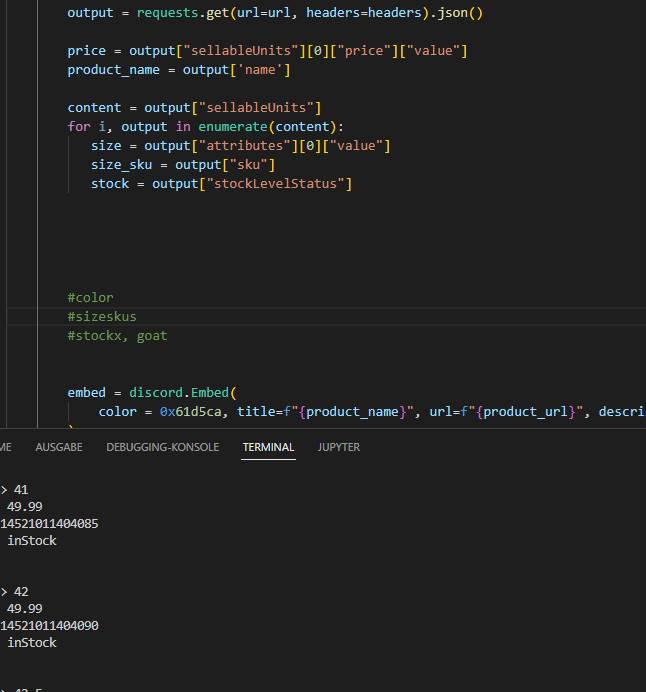
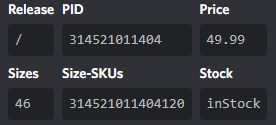
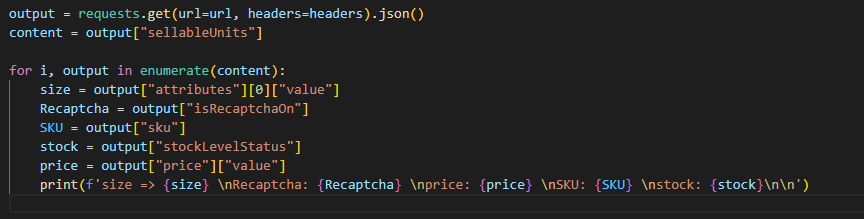
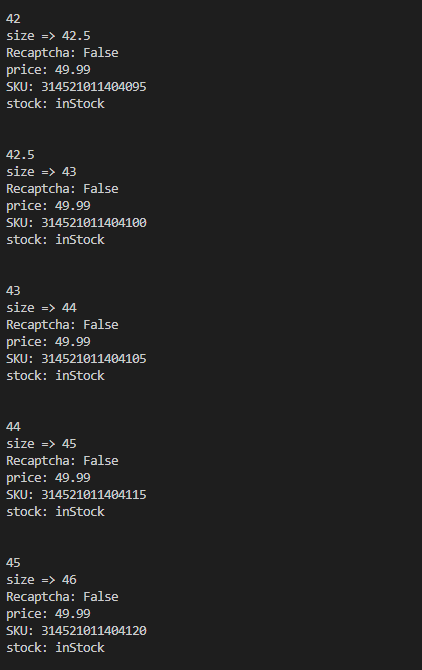
 desert heart
You need to use get_guild to get the guild first
sullen pewter
bot.get_guild?
desert heart
guild = self.client.get_guild(123456...)
if guild:
  channel = guild.get_channel(12343...)
  if channel:
    await channel.send("...")
k ty it worked
sullen pewter
desert heart
```py
guild = self.client.get_guild(123456...)
if guild:
channel = guild.get_c...
is there a reason why you're using if?
the error wont show up in the terminal
desert heart
Because it returns None if the guild or channel cannot be found (which could be a cache issue or could mean it actually doesn't exist)
sullen pewter
ic
sullen pewter
desert heart
Because it returns None if the guild or channel cannot be found (which could be ...
 desert heart
except None isn't valid.
And it's better to use if statements as I showed anyway
Because the exception you would get is too broad (an AttributeError)
sullen pewter
ok
desert heart
Yes
slate swan
slate swan
```py
ownerrole = discord.utils.get(ctx.guild.roles, name="Owner")
adminrole = d...
@desert heart ?
desert heart
Why wait for someone to tell you if it will work when you can run the code and test it yourself.
slate swan
desert heart
Why wait for someone to tell you if it will work when you can run the code and t...
I did, it worked for the Admin and Owner role but not the Mod role
desert heart
Okay you should have mentioned that instead of just a question mark lol
slate swan
yeah my bad
I just changed it to
if ownerrole or adminrole or modrole in ctx.author.roles:
instead
works now
desert heart
You need to do it like this if ownerrole in ctx.author.roles or adminrole in ctx.author.roles or modrole in ctx.author.roles
desert heart
slate swan
I just changed it to
```py
if ownerrole or adminrole or modrole in ctx.author....
No that is not correct
slate swan
desert heart
No that is not correct
how did it work then?
desert heart
Because that check will pass if ownerrole is truthy i.e. get() found that role in the guild.
!or-gotcha
unkempt canyonBOT
When checking if something is equal to one thing or another, you might think that this is possible:
# Incorrect...
if favorite_fruit == 'grapefruit' or 'lemon':
    print("That's a weird favorite fruit to have.")
While this makes sense in English, it may not behave the way you would expect. In Python, you should have complete instructions on both sides of the logical operator.
So, if you want to check if something is equal to one thing or another, there are two common ways:
# Like this...
if favorite_fruit == 'grapefruit' or favorite_fruit == 'lemon':
    print("That's a weird favorite fruit to have.")

# ...or like this.
if favorite_fruit in ('grapefruit', 'lemon'):
    print("That's a weird favorite fruit to have.")
How to make text redirects
 desert heart
[text](https://...) but it only works in certain places
 wicked atlas
Links can be made by bots in fields where markdown is supported
[Link here](https://example.com)
channel redirect?
wicked atlas
A link to a channel?
desert heart
Use a channel mention for that
send("[#welcome](/guild/267624335836053506/channel/267631170882240512/) ")
sullen pewter
I want members to be redirected to a channel by pressing the text
wicked atlas
If you have a Channel object, use the .mention, but the actual formatting of it is
<#channel-id>
I tried multiple ways now but still nothing. Tried to use enumerate just for size, tried .join.list . At the end I only got size 46. Couldn’t really figure out how I should use yours in my code.
sullen pewter
wicked atlas
If you have a Channel object, use the `.mention`, but the actual formatting of i...
I want it to be text
sullen pewter
desert heart
send("\<#267631170882240512> ")
<#267631170882240512/introduce yourself>
wicked atlas
Copy a link to your channel, and use that

But honestly, I would suggest using a mention
sullen pewter
ik how how to do that
wicked atlas
It's easier, and usually people are hesitant to click hidden links
sullen pewter
ic
 karmic haven
there are none, discord.py recently got major overhauls and it doesnt seem like content creators have switched yet, discord.gg/dpy lists them all and has the most people to help you
always!
old tutorials will still have relevant information however be very weary if you do decide to use them
 left idol
im trying to make a gacha bot with pycord that stores the cards they get and the amount of them in their inventory, would it be a good idea to store this in a json?
shrewd apex
use sql or mongodb or deta
dusky pine
deta 💀