#discord-bots
1 messages · Page 1019 of 1
 brave forge
 supple thorn
But still can fuck your shit if you don't know how to fix it
Yes
Also you should use this instead
!d discord.ext.commands.Bot.listener
brave forge
it doesn't work. After this stuff, the bot no longer responds to commands!!!
 velvet compass
brave forge
```Command raised an exception: TypeError: dump() missing 1 required positional ...
velvet compass
brave forge
```Command raised an exception: TypeError: dump() missing 1 required positional ...
Are you passing the filepath to that function?
supple thorn
Hi brad
supple thorn
brave forge
it doesn't work. After this stuff, the bot no longer responds to commands!!!
What?
brave forge
velvet compass
Are you passing the `filepath` to that function?
AND THEN HOW TO ADD TO THE FILE THE WORD THAT I WRITE TO THE COMMAND!?
 glad thicket
for now I am going to use discord-slash can you tell me what's worng with my code
supple thorn
glad thicket
for now I am going to use discord-slash can you tell me what's worng with my cod...
I don't use 3rd party libs for slash commands
velvet compass
brave forge
AND THEN HOW TO ADD TO THE FILE THE WORD THAT I WRITE TO THE COMMAND!?
YOU WOULD WRITE THE WORD TO THE FILE
supple thorn
And other stuff
velvet compass
sorry, caps
 slate swan
the library is outdated
brave forge
supple thorn
What?
what you wrote to chela doesn't work. And here discord.py broken shit
supple thorn
velvet compass
YOU WOULD WRITE THE WORD TO THE FILE
Brad mad 👀
slate swan
they shifted to interactions.py
supple thorn
brave forge
what you wrote to chela doesn't work. And here discord.py broken shit
That wasn't meant for you
slate swan
!pip discord-py-interactions
 unkempt canyonBOT

Easy, simple, scalable and modular: a Python API wrapper for interactions.
 swift crane
supple thorn
Yes
swift crane
supple thorn
Yes
not working
brave forge
velvet compass
YOU WOULD WRITE THE WORD TO THE FILE
WHAT !?
supple thorn
swift crane
not working
You'd need to have message intents on
supple thorn
swift crane
not working
!intents
unkempt canyonBOT
Using intents in discord.py
Intents are a feature of Discord that tells the gateway exactly which events to send your bot. By default discord.py has all intents enabled except for Members, Message Content, and Presences. These are needed for features such as on_member events, to get access to message content, and to get members' statuses.
To enable one of these intents, you need to first go to the Discord developer portal, then to the bot page of your bot's application. Scroll down to the Privileged Gateway Intents section, then enable the intents that you need.
Next, in your bot you need to set the intents you want to connect with in the bot's constructor using the intents keyword argument, like this:
from discord import Intents
from discord.ext import commands

intents = Intents.default()
intents.members = True

bot = commands.Bot(command_prefix="!", intents=intents)
For more info about using intents, see the discord.py docs on intents, and for general information about them, see the Discord developer documentation on intents.
supple thorn
If you don't already
swift crane
supple thorn
You'd need to have message intents on
i have
supple thorn
swift crane
i have
What's your current code?
swift crane
i know and it is on
brave forge
supple thorn
That wasn't meant for you
so what, and why tell a person something that doesn't work and is broken!?
swift crane

 supple thorn
No
on_message doesn't take ctx
It's just message
So just use that message object
And delete the message
swift crane
 velvet compass
brave forge
WHAT !?
velvet compass
brave forge
WHAT !?
your_word = ... # returned from your command
with open("your_json_file.json", "a+") as f:
    json_data = json.dumps(your_word)
    f.write(json_data)
This could be one solution to your problem. Although writing multiple times to a json file can break it pretty easily.
swift crane
supple thorn
I have to stop being here 12 hours a day
good idea (not for us)
supple thorn
I should be in the esoteric channel
swift crane
?
brave forge
velvet compass
```py
your_word = ... # returned from your command
with open("your_json_file.jso...
and why?
velvet compass
brave forge
and why?
And why what?
 midnight gorge
brave forge
velvet compass
And why what?
midnight gorge
brave forge
velvet compass
And why what?
why can frequent addition to a file lead to a breakdown ?
swift crane
 supple thorn
The esoteric channel reminds me of the time i tried brainfuck
velvet compass
brave forge
why can frequent addition to a file lead to a breakdown ?
If you append multiple json data structures to the json file, it can become a mess of indented json objects instead of one cohesive data structure
swift crane
swift crane
@supple thorn
supple thorn
swift crane
Oh you're checking the list
Check if the message content is inside the list
velvet compass
So you have to take care when reading and writing
supple thorn
Not if the list is inside the message content
 quaint epoch
!pypi better_profanity
unkempt canyonBOT
Blazingly fast cleaning swear words (and their leetspeak) in strings
brave forge
velvet compass
If you append multiple json data structures to the json file, it can become a me...
I just want to add only bad words or insults to this file
 supple thorn
Yes
quaint epoch
unkempt canyon
as a wise old man once said: there's a lib for that
supple thorn
quaint epoch
as a wise old man once said: *there's a lib for that*
How do i get bitches
brave forge
velvet compass
If you append multiple json data structures to the json file, it can become a me...
or do you think it's better to replace the file with a database?
unkempt canyonBOT
how about you pip install some bitches
quaint epoch
supple thorn
Oh wait... there's a lib for that
secrets to the universe? there's a lib for that
velvet compass
brave forge
or do you think it's better to replace the file with a database?
A database is better suited for the job, and as linked above, there are some pre-existing libraries that could do the same job without the extra work
quaint epoch
god that was sus
brave forge
velvet compass
A database is better suited for the job, and as linked above, there are some pre...
I'm already using sqlite3
velvet compass
Oh nice, then you can create a "bad words" entry or something like that, and append your bad words to that column
brave forge
velvet compass
A database is better suited for the job, and as linked above, there are some pre...
I just don't quite know yet how to use a database instead of a file, well, how to edit the code correctly
quaint epoch
 loud junco
btw how do i make the vote detector in top.gg
loud junco
btw how do i make the vote detector in top.gg
prolly use the api
i haven't used it personally
swift crane
supple thorn
Oh wait... there's a lib for that
message = ||fuck||

delete


but

message = ||fuck blabla||


nothing
🤦
loud junco
swift crane
```
message = ||fuck||
delete
but
message = ||fuck blabla||
nothing
```
=.=
whats this
slate swan
class Ticket(discord.ui.View):
    def __init__(self):
        super().__init__(timeout=None)
    @discord.ui.button(label='📩Open ticket', style=discord.ButtonStyle.blurple, custom_id = 'open-ticket')
    async def button_callback(self, button, interaction):
        guild = interaction.guild```
AttributeError: 'Button' object has no attribute 'guild'Well, its a good time to learn! I'd recommend making a standalone function to handle the database reading / writing and then using that in your command to add a word / get a list of the words etc
slate swan
Please help guys, idk how the interaction is a button
quaint epoch
swift crane
```
message = ||fuck||
delete
but
message = ||fuck blabla||
nothing
```
try py if any(i in message.content.lower().replace(' ', '') for i in bad_words): await message.delete()
swift crane
loud junco
whats this
msg filter problem
swift crane
swift crane
```
message = ||fuck||
delete
but
message = ||fuck blabla||
nothing
```
@supple thorn
loud junco
swift crane
msg filter problem
okok
supple thorn
swift crane
<@381799048228896788>
!pypi better_profanity
unkempt canyonBOT
Blazingly fast cleaning swear words (and their leetspeak) in strings
 paper sluice
supple thorn
The esoteric channel reminds me of the time i tried brainfuck
paper sluice
supple thorn
The esoteric channel reminds me of the time i tried brainfuck
you did?
supple thorn
paper sluice
you did?
Keyword is tried
paper sluice
😏
 visual island
slate swan
```py
class Ticket(discord.ui.View):
def __init__(self):
super().__i...
visual island
slate swan
```py
class Ticket(discord.ui.View):
def __init__(self):
super().__i...
The order of interaction callback's parameter was switched to (interaction, button) instead of (button, interaction). Here's the commit url: https://github.com/Rapptz/discord.py/commit/968a1f3
brave forge
velvet compass
Well, its a good time to learn! I'd recommend making a standalone function to ha...
so far I have only been able to make sure that warnings are issued for bad words and all this is recorded in the database and after 3 warnings a mutation is issued
supple thorn
paper sluice
😏
Someone else is trying to figure out what i figured out in the esoteric channel
I wish that man the best
paper sluice
👀 imma have a look ig
velvet compass
brave forge
so far I have only been able to make sure that warnings are issued for bad words...
That sounds like it is quite far along then!
quaint epoch
im gonna try to make a package that filters swears
slate swan
visual island
The order of interaction callback's parameter was switched to `(interaction, but...
This worked! Thanks a lot man :)
quaint epoch
loud junco
anyone knows how to do top.gg vote detector?
didn't you ask this before
loud junco
but only one person answer me
supple thorn
loud junco
anyone knows how to do top.gg vote detector?
Don't they have a api
quaint epoch
supple thorn
Don't they have a api
is what i said
supple thorn
loud junco
but idk how to use it
Sounds like a you problem
loud junco
💀
supple thorn
We can fix that
supple thorn
loud junco
maybe i try framing it
Do they have a api wrapper?
 supple thorn
!pypi topggpy
supple thorn
loud junco
https://docs.top.gg/
^
loud junco
i legit send that :/
glad thicket
hey how do you create a slash command in discord-py-interactions
paper sluice
https://docs.top.gg/api/@reference/
this is the api
loud junco
i need webhook for that right?
brave forge
velvet compass
That sounds like it is quite far along then!
simplejson.errors.JSONDecodeError: Extra data: line 1 column 27 - line 1 column 47 (char 26 - 46)
I understood about the mistake you were talking about
supple thorn
loud junco
i legit send that :/
Sent what
paper sluice
glad thicket
hey how do you create a slash command in discord-py-interactions
discord.app_commands?
loud junco
supple thorn
Sent what
the link
supple thorn
loud junco
the link
Yes i know
paper sluice
hello brad
velvet compass
brave forge
```simplejson.errors.JSONDecodeError: Extra data: line 1 column 27 - line 1 colu...
Haha, yup thats the thing! The way around it is to read all the data in, modify the data, then write it all back to the file. But this can be unstable and slow depending on the file size
 to show you the api wrapper
brave forge
velvet compass
Haha, yup thats the thing! The way around it is to read *all* the data in, modif...
to show you the api wrapper
brave forge
velvet compass
Haha, yup thats the thing! The way around it is to read *all* the data in, modif...
how to solve this I already understood just to make a database
supple thorn
paper sluice
hello brad
Brad always waves menacingly
paper sluice
*more reactions for me to click on *
velvet compass
brave forge
how to solve this I already understood just to make a database
You would read all of the data from the file as a json object, modify it, then write all of it back to the file
slate swan

transcript = await chat_exporter.export(channel, set_timezone='CET')
        transcript_file = discord.File(io.BytesIO(transcript.encode()),filename=f"{channel.name}.html")```
AttributeError: 'NoneType' object has no attribute 'encode'
Anyone knows why this doesn't work?ur try-except is outside the function, indent it properly
 cloud dawn
brave forge
how to solve this I already understood just to make a database
cloud dawn
brave forge
how to solve this I already understood just to make a database
Depending on how you open the file, you can either replace it or append it or even more depending on the mode.
supple thorn
paper sluice
*more reactions for me to click on *
I just now realize we can't make our own reactions
cloud dawn
!with
unkempt canyonBOT
The with keyword triggers a context manager. Context managers automatically set up and take down data connections, or any other kind of object that implements the magic methods __enter__ and __exit__.
with open("test.txt", "r") as file:
    do_things(file)
The above code automatically closes file when the with block exits, so you never have to manually do a file.close(). Most connection types, including file readers and database connections, support this.
For more information, read the official docs, watch Corey Schafer's context manager video, or see PEP 343.
 supple thorn
What
velvet compass
slate swan
```py
transcript = await chat_exporter.export(channel, set_timezone='CET')
...
Seems like transcript is not getting any value assigned to it
slate swan
oh wait
paper sluice
supple thorn
I just now realize we can't make our own reactions
😔
velvet compass
velvet compass
Seems like `transcript` is not getting any value assigned to it
or, chat_exporter.export() is returning None
slate swan
hmm
cloud dawn
slate swan
except has to be on the same level as the try.
slate swan
 slate swan
cloud dawn
except has to be on the same level as the try.
slate swan
cloud dawn
except has to be on the same level as the try.
ty
velvet compass
#python-discussion and #discord-bots have the reactions disabled because people spamed / abused them (in the past and there have been decisions made on it before my time). And we can't effectively moderate reactions
paper sluice
slate swan
ur try and except block must be at the same indent level
try:
  ...
except:
 ...
valid ^^
try:
  ...
  except:
    ...
invalid ^^
slate swan
paper sluice
ur try and except block must be at the same indent level
```py
try:
...
excep...
so it should be like this
 paper sluice
yea
supple thorn
velvet compass
<#267624335836053506> and <#343944376055103488> have the reactions disabled bec...
Who can make reactions?
slate swan
imagine opening a json file every message
paper sluice
people with special roles
supple thorn
paper sluice
people with special roles
Which
cloud dawn
supple thorn
Who can make reactions?
Only staff helpers<
velvet compass
supple thorn
Who can make reactions?
Staff (helpers +), and maybe partners?
supple thorn
slate swan
*imagine opening a json file every message*
Hello ashley
paper sluice
supple thorn
Which
like devs, yters and boosters etc
slate swan
supple thorn
Hello ashley
Hey Skev
brave forge
cloud dawn
Depending on how you open the file, you can either replace it or append it or ev...
and how to add something there ?
supple thorn
cloud dawn
Only staff helpers<
What does bweer mean
cloud dawn
paper sluice
like devs, yters and boosters etc
They wouldn't give someone who donates to the server extra perms.
supple thorn
Beer with an accent?
cloud dawn
supple thorn
What does bweer mean
Well beer was already taken :3
paper sluice
cloud dawn
They wouldn't give someone who donates to the server extra perms.
maybe they dont, they all have that similar blue color so i might've gotten it confused
supple thorn
cloud dawn
Well beer was already taken :3
Is your name enrique
cloud dawn
supple thorn
Is your name enrique
Yes?
supple thorn
cloud dawn
Yes?
What does using spotify feel like
cloud dawn
supple thorn
What does using spotify feel like
..??
velvet compass
They are clicking on your profile (and your spotify is linked)
paper sluice
supple thorn
What does using spotify feel like
ad-less?
cloud dawn
velvet compass
They are clicking on your profile (and your spotify is linked)
I know, I don't hide my name but I don't know why he/she is discussing that here.
cloud dawn
But it was so random tough lol
paper sluice
that i agree
velvet compass
cloud dawn
I know, I don't hide my name but I don't know why he/she is discussing that here...
good point. @supple thorn don't disclose personal info on others without that user's permission please
 manic path
    embed.set_author(XYZ["name"])
TypeError: Embed.set_author() takes 1 positional argument but 2 were given
XYZ['name'] is literally a string
print(XYZ['name'] = XYZ Information
cloud dawn
manic path
```
embed.set_author(XYZ["name"])
TypeError: Embed.set_author() takes 1 posi...
!d discord.Embed.set_author
unkempt canyonBOT
set_author(*, name, url=None, icon_url=None)```
Sets the author for the embed content.

This function returns the class instance to allow for fluent-style
chaining.i also looked at the docs, i came here because i didn't understand the error
cloud dawn
manic path
i also looked at the docs, i came here because i didn't understand the error
Look at the parenthesis and how they are constructed.
(*, name, url=None, icon_url=None)
* < indicating that everything is a keyword argument. And that name here is a required kwarg.
url and icon_url are optional.
manic path
right
cloud dawn
manic path
right
Do you know how to solve the issue?
manic path
ye
 boreal ravine
manic path
i also looked at the docs, i came here because i didn't understand the error
boreal ravine
manic path
i also looked at the docs, i came here because i didn't understand the error
Learn what arguments are before using an advanced python library
slate swan
how do i add custom emoji to a message?
slate swan
slate swan
how do i add custom emoji to a message?
msg = send(...)
await msg.add_reaction("<:emoji_name:emoji_id>") #for static emojis
await msg.add_reaction("<a:emoji_name:emoji_id>") #for animated emojis
add
yea
Not "react"
But it's the same pattern
For  , put !Python
example:
 slate swan
> add
slate swan
slate swan
> add
im gonna cry
Add \ before your emoji, send it and copy paste that
<:emoji_name:emoji_id>
^^
you can either get this by putting a backslash before the emoji or put them manually
If you can't send the emoji you can get its id and name
</:kiff:970673345643307088>
Without /
i know
second
Seems like it's not a valid emoji ID
slate swan
slate swan
Seems like it's not a valid emoji ID


How to add this thing on my script anyone?

Very original at copying a bot 👀
Web one
 slate swan
How to add this thing on my script anyone?
slate swan
slate swan
How to add this thing on my script anyone?
which thing
slate swan
slate swan
which *thing*
Web
See the screenshot
Not really directly related to bots; more like Python and Replit, which is bad
from flask import Flask

from threading import Thread


app = Flask('ok')


@app.route('/')

def home():

    return "I'm alive"


def run():

  app.run(host='0.0.0.0',port=8080)


def keep_alive():

    t = Thread(target=run)

    t.start()
I already add this
Again, not directly related to discord bots.
So?
As you can see it's flask
Yes?
So? So this is a topical channel.
 slate swan
How did you tried to get the ID?
slate swan
slate swan
How did you tried to get the ID?
um
You can use a help channel, you can get more information in #❓|how-to-get-help
Ohh k
i`m send emoji
and
That doesn't give the ID
That gives, most likely, the message ID
oh
😳
how to get ID emoji?
Hmm well, without Nitro it's complicated to explain
ok
Ctrl+Shift+I -> Click on the icon at the top right here

I will try myself
Then hover with the mouse on the emoji
Click on it
You get to a thing like this

And data-id is your emoji ID
970602565244973086

More accurate yep
wait
slate swan
slate swan
You get to a thing like this
why not send the emoji and copy the id by right clicking on it.....?
YES, it work
thx so much
slate swan
slate swan
why not send the emoji and copy the id by right clicking on it.....?
No nitro: can't send
Especially animated ones
slate swan
slate swan
why not send the emoji and copy the id by right clicking on it.....?
copy ID message
For static you can just use \:emoji:
slate swan
slate swan
No nitro: can't send
well.....
 regal pulsar
slate swan
Very original at copying a bot 👀
regal pulsar
slate swan
Very original at copying a bot 👀
lmao
my friend used the same template
why would you want your serverinfo command to mention every bot in the server 💀
slate swan
Not so pog
supple thorn
I wonder if you can torture someone with python
Imagining the fbi using python to get intel from the enemy
quaint epoch
supple thorn
Imagining the fbi using python to get intel from the enemy
yeah, fbi is stuck with amd, they need that intel
slate swan
I want bot status like this anyone?

 amber bloom
Hello, how to detect if a member have nitro booster please?
slate swan
you can't set the bot status to mobile
quaint epoch
amber bloom
Hello, how to detect if a member have nitro booster please?
!d disnake.Member
unkempt canyonBOT
class disnake.Member```
Represents a Discord member to a [`Guild`](https://docs.disnake.dev/en/latest/api.html#disnake.Guild "disnake.Guild").

This implements a lot of the functionality of [`User`](https://docs.disnake.dev/en/latest/api.html#disnake.User "disnake.User").

x == y Checks if two members are equal. Note that this works with [`User`](https://docs.disnake.dev/en/latest/api.html#disnake.User "disnake.User") instances too.

x != y Checks if two members are not equal. Note that this works with [`User`](https://docs.disnake.dev/en/latest/api.html#disnake.User "disnake.User") instances too.

hash(x) Returns the member’s hash.

str(x) Returns the member’s name with the discriminator.there should something about premium there
slate swan
slate swan
you can't set the bot status to mobile
So how that guy set?
amber bloom
quaint epoch
!d disnake.Member
thanks
slate swan
it's possible to set a bot's status to online on mobile
but not with discord.py or it's forks
unkempt canyonBOT
property public_flags```
The publicly available flags the user has.in discord.js for example you can override the websocket connection parameters
quaint epoch
aha @amber bloom there you go
slate swan
const client = new Discord.Client({ ws: { properties: { $browser: "Discord iOS" }} });```i'm not aware of such feat with discord.py
What's that?
 pseudo portal
can someone help me here, usin pycord, tryina make it so my bot lists all servers its on with invites on run
quaint epoch
slate swan
```js
const client = new Discord.Client({ ws: { properties: { $browser: "Discord...
(slap) BAD JS (slap)
slate swan
Ohh k
quaint epoch
pseudo portal
can someone help me here, usin pycord, tryina make it so my bot lists all server...
didn't you ask this before
and i helped you?
amber bloom
quaint epoch
!d disnake.User.public_flags
thanks 🙂
quaint epoch
for guild in bot.guilds:
print(f'Invites in {guild}', str(await guild.invites()))```but isn't that kinda against tos
because in this way, you can find your way in private servers
pseudo portal
yo @quaint epoch btw howd u get that date in your bio to be hoverabl with info
pseudo portal
quaint epoch
because in this way, you can find your way in private servers
aah tysm! i'mma try that
quaint epoch
pseudo portal
yo <@879807617260716143> btw howd u get that date in your bio to be hoverabl wit...
you wanna do that in your bot?
!d disnake.utils.format_dt
unkempt canyonBOT
disnake.utils.format_dt(dt, /, style='f')```
A helper function to format a [`datetime.datetime`](https://docs.python.org/3/library/datetime.html#datetime.datetime "(in Python v3.10)"), [`int`](https://docs.python.org/3/library/functions.html#int "(in Python v3.10)") or [`float`](https://docs.python.org/3/library/functions.html#float "(in Python v3.10)") for presentation within Discord.

This allows for a locale-independent way of presenting data using Discord specific Markdown...i usually use a datetime object
<t:19129393>
<t:19129393>
it returns a string like that
pseudo portal
quaint epoch
you wanna do that in your bot?
Like I tried tagging my @ in bots bio using <@myid> but that never worked
quaint epoch
pseudo portal
Like I tried tagging my @ in bots bio using <@myid> but that never worked
do member/user.mention
oh in your BIO
pseudo portal
Ooh I’mma have to try that when get back on pc 😉 Ty bro
quaint epoch
i don't think you can do that
quaint epoch
you can't mention ppl in your bios
slate swan

 pseudo portal
quaint epoch
you can't mention ppl in your bios
pseudo portal
quaint epoch
you can't mention ppl in your bios
Ooh Aight
pseudo portal
slate swan
Installed?
slate swan
Hmm
paper sluice
slate swan
why are u importing all cogs 
slate swan
😶
slate swan
paper sluice
why are u importing all cogs <:pithink:652247559909277706>
Brother you know how to solve this?
paper sluice
install keep_alive
and use os.listdir or pathlib.Path to load cogs instead of importing
slate swan
paper sluice
install keep_alive
why would you?
Hmm m
i need context on why you would need keep_alive?
isn't it obvious
paper sluice
slate swan
why would you?
hmm idk
 placid skiff
slate swan
slate swan
botching to keep a container on
placid skiff
slate swan
slate swan
botching to keep a container on
why would you even need a container?
 sick birch
slate swan
why would you even need a container?
sick birch
slate swan
why would you even need a container?
replit hosting most likely
sick birch
which is very bad but it works I suppose
slate swan
yeah
 atomic wolf
def __init__(self):
I'm confused about this expression. Could anyone explain it to me?
slate swan
time woyls be a module a d .respond isnt a method and dont use time.sleep it would block your whole bot and not the coro so use asyncio.sleep
!d asyncio.sleep
unkempt canyonBOT
coroutine asyncio.sleep(delay, result=None)```
Block for *delay* seconds.

If *result* is provided, it is returned to the caller when the coroutine completes.

`sleep()` always suspends the current task, allowing other tasks to run.

Setting the delay to 0 provides an optimized path to allow other tasks to run. This can be used by long-running functions to avoid blocking the event loop for the full duration of the function call.

Deprecated since version 3.8, removed in version 3.10: The `loop` parameter. This function has been implicitly getting the current running loop since 3.7. See [What’s New in 3.10’s Removed section](https://docs.python.org/3/whatsnew/3.10.html#whatsnew310-removed) for more information.

Example of coroutine displaying the current date every second for 5 seconds:hmm

 quick gust
!d discord.Invite.code
unkempt canyonBOT
The URL fragment used for the invite.
quick gust
ure printing the Invite objects, what else did u expect
 dull terrace
anyone tried out integrations for their bots yet
seems to not limit it to certain channels 
pseudo portal
dull terrace
seems to not limit it to certain channels <:froggy_chill:961726940308459540>
i mean if your admin ofc youd b able to bypass that 😄
but otherwise it works fine for me with normal members
 i've gotta use another account to test it
supple thorn
atomic wolf
`def __init__(self):`
i've gotta use another account to test it
supple thorn
atomic wolf
`def __init__(self):`
Ask somewhere else since it isn't related to discors bots
regal pulsar
atomic wolf
I'm confused about this expression. Could anyone explain it to me?
it runs whenever the class is instantiated
for eg
slate swan
atomic wolf
I'm confused about this expression. Could anyone explain it to me?
its the function that gets executed when the class is instantiated
regal pulsar
class Test:

  instances = 0

    def __init__(self):
        Test.instances += 1
test1 = Test()
test2 = Test()
print(Test.instances)
lmao @slate swan
slate swan
regal pulsar
lmao <@456226577798135808>
lets forget that
regal pulsar
regal pulsar
```py
class Test:
instances = 0
def __init__(self):
Test.instanc...
this prints 2 @atomic wolf
 wanton veldt
    config = {}
    with open("stats.json", "r") as f:
        config = json.loads(f.read())

    async def statusTask():
        while True:
            for status in config["statuses"]:
                if status["type"] == "game":
                    await client.change_presence(activity=discord.Game(name=status["name"], start=datetime.datetime.now()-datetime.timedelta(status["duration"]), end=datetime.datetime.now()))
                if status["type"] == "stream":
                    await client.change_presence(activity=discord.Streaming(name=status["name"], platform="YouTube", url=status["url"]))
                if status["type"] == "competing":
                    await client.change_presence(activity=discord.Activity(name=status["name"], type=5,))
                if status["type"] == "watching":
                    await client.change_presence(activity=discord.Activity(name=status["name"], type=3,))
                if status["type"] == "listening":
                    await client.change_presence(activity=discord.Activity(name=status["name"], type=2))
                await asyncio.sleep(status["delay"])

    @client.event
    async def on_ready():
        print(f"{client.user.name} has connected to Discord.")
        client.loop.create_task(statusTask())```
can someone help me?
the error is in the photo
slate swan
!code
unkempt canyonBOT
Here's how to format Python code on Discord:
```py
print('Hello world!')
```
These are backticks, not quotes. Check this out if you can't find the backtick key.
slate swan
format it first
wanton veldt
wanton veldt
the error is in the photo
i m new in json stuff
paper sluice
wanton veldt
```Main.py
config = {}
with open("stats.json", "r") as f:
config...
fstrings dont work in json, it only works in python
wanton veldt
and its possible to make a server counter in stats using json?
paper sluice
calculate it before and put that in the json
wanton veldt
how exactly
slate swan
the member is returning None
paper sluice
regal pulsar
wanton veldt
```Main.py
config = {}
with open("stats.json", "r") as f:
config...
fstrings in json lmao
member is none
which means either _id is None
or there isnt any user with that id
slate swan
I’m getting an error:
discord.ext.commands.errors.CommandInvokeError: a Command raised an exception: name ‘discord’ is not defined
slate swan
slate swan
I’m getting an error:
`discord.ext.commands.errors.CommandInvokeError: a Command...
I checked the whole damn code there is nothing with it
I have it
Wait
Nvm
I had pasted a code in another file without import discord
Sorry for inconvenience
 bleak karma
how can i make self.bot work in button views
slate swan
@slate swan How do I typehint a Member in the option decorator of a slash command?
for example
@command
@option(name="member", required=False)
and I wanna have the member as a Member object 😔
slate swan
slate swan
<@456226577798135808> How do I typehint a Member in the `option` decorator of a ...
type=hikari.Member
slate swan
slate swan
`type=hikari.Member`
ohh, thanks
and apologies for the dumb question
and it will popup with a list of members in the server as an autocomplete too :3
slate swan
slate swan
ohh, thanks
~~and apologies for the dumb question~~
me who was stuck with this for days
lmao
slate swan
slate swan
and it will popup with a list of members in the server as an autocomplete too :3
oh well, thanks a lot
 flint isle
Developed by: David Powell
Starting Bot
Connecting to Discord API.
Please Wait
[VERSION]{}
Loading Developer Features cog
[✓][Developer Features Cog] Loading Complete
Traceback (most recent call last):
  File "/data/user/0/ru.iiec.pydroid3/files/accomp_files/iiec_run/iiec_run.py", line 31, in <module>
    start(fakepyfile,mainpyfile)
  File "/data/user/0/ru.iiec.pydroid3/files/accomp_files/iiec_run/iiec_run.py", line 30, in start
    exec(open(mainpyfile).read(),  __main__.__dict__)
  File "<string>", line 60, in <module>
NameError: name 'mid' is not defined

[Program finished]
error ^
code:
@bot.command(name='msg')
async def msg(ctx,  optional_arg: mid = None):
message = await ctx.fetch_message(id=mid)```how do i fix the mid is not defined?
atomic wolf
Is CustomClient a thing like a keyword?
slate swan
atomic wolf
Is CustomClient a thing like a keyword?
no?
atomic wolf
class CustomClient(discord.Client): def __init__(self): super(CustomClient, self).__init__() with open("allykeys.json") as jfile: data = json.load(jfile) self.oauthsecret = data["oauthsecret"] self.oauthtoken = data["oauthtoken"] self.consumerkey = data["consumerkey"] self.api = AllyAPI(self.oauthsecret, self.oauthtoken, self.consumerkey, response_format="json") def exit(self): exit(0)
slate swan
👀
bleak karma
is it possible to make self.bot work in button views (repost)
slate swan
ok
slate swan
atomic wolf
`class CustomClient(discord.Client):
def __init__(self):
super(Custo...
wtf is that
class CustomClient(discord.Client):
  def __init__(self):
    super().__init__(intents=intents) # if you have intents
  ...
It's like a discord stock info bot code example
I keep forgetting to think about indents.
bleak karma
slate swan
yes
sorry if its a dumb question but how
slate swan
huh?
slate swan
bleak karma
sorry if its a dumb question but how
are you subclassing the view?
bleak karma
slate swan
are you subclassing the view?
yup
slate swan
then
pass
class giveaway(disnake.ui.View):
    def __init__(self , bot: commands.Bot):
        self.bot = bot
pass the bot into the init function of the class, then pass in the actual bot when you subclass the view class
class MyUwUView(View):
  def __init__(self, bot: Bot):
    self.bot = bot

@command
await send(view=MyUwUView(bot_instance))
oh i see tysm!
slate swan
slate swan
```py
class giveaway(disnake.ui.View):
def __init__(self , bot: commands.Bot...
that feeling when you get ignored
:<
bleak karma
oh i didnt see your response im so sorry
slate swan
bleak karma
oh i didnt see your response im so sorry
np :D
slate swan
slate swan
pass the `bot` into the `init` function of the class, then pass in the actual bo...
discord.py 2.0 has mostly shorten the syntax 👀
slate swan
slate swan
discord.py 2.0 has mostly shorten the syntax 👀
idk, discord.py sucks 😔
slate swan
slate swan
idk, discord.py sucks 😔
ye disnake better
same goes with disnake, I'm against the forks now too
slate swan
slate swan
same goes with disnake, I'm against the forks now too
huh?
then ?
nextcord?
dont
slate swan
slate swan
why?
why not?
atomic wolf
class CustomClient(discord.Client): def __init__(self): super(CustomClient, self).__init__() with open("allykeys.json") as jfile: data = json.load(jfile) self.oauthsecret = data["oauthsecret"] self.oauthtoken = data["oauthtoken"] self.consumerkey = data["consumerkey"] self.api = AllyAPI(self.oauthsecret, self.oauthtoken, self.consumerkey, response_format="json") def exit(self): exit(0)
slate swan
idk much about hikari i mean why u choose it, reason
atomic wolf
i was wondering if def __init__(self): is a subclass of CustomClient
 heady sluice
Ashley's used to hikari being bullied so she just answers why not
atomic wolf
and then hence the use of the super keyword
slate swan
heady sluice
Ashley's used to hikari being bullied so she just answers why not
probably
its better than dpy at least
bleak karma
idk if i did it right but
class verykoolview(discord.ui.View):
    def __init__(self, bot:commands.Bot, *, timeout=None):
        self.bot = bot
        super().__init__(timeout=timeout)
and i got an error
Traceback (most recent call last):
  File "/home/runner/pity/venv/lib/python3.8/site-packages/discord/ext/commands/bot.py", line 1325, in invoke
    await ctx.command.invoke(ctx)
  File "/home/runner/pity/venv/lib/python3.8/site-packages/discord/ext/commands/core.py", line 948, in invoke
    await injected(*ctx.args, **ctx.kwargs)  # type: ignore
  File "/home/runner/pity/venv/lib/python3.8/site-packages/discord/ext/commands/core.py", line 209, in wrapped
    raise CommandInvokeError(exc) from exc
discord.ext.commands.errors.CommandInvokeError: Command raised an exception: TypeError: __init__() missing 1 required positional argument: 'bot'
verykoolview(bot instance)
slate swan
bleak karma
idk if i did it right but
```py
class verykoolview(discord.ui.View):
def __...
you need to pass in the bot instance when you instantiate it
bleak karma
OH
slate swan
heady sluice
bot.add_cog(CogObject(bot))
bot.load_extension('noob')
def setup(bot: commands.Bot):
bot.add_cog(noob(bot))
heady sluice
load_extension only calls setup
bleak karma
it worked tysm guys
 marsh thorn
import time, webbrowser, pyttsx3, discord
from discord import user, message
from discord.ext.commands import bot
TOKEN = 'SDF154s5df415D444'
client = discord.Client()

@client.event
async def on_ready():
    print('botloggedin as {0.user}'.format(client))

@client.event
async def on_message(message):
 username = str(message.author).split('#')[0]
 user_message = str(message.content)
 channel = str(message.channel.name)
 print('botloggedin as {0.user}'.format(client))
 if message.channel.name == 'general':
  if user_message.lower() == '!isrunning':
   await message.channel.send("The bot is currently running")
 return
 client.run(TOKEN)
Why doesnt this work?
no errors btw
unkempt canyonBOT
Using intents in discord.py
Intents are a feature of Discord that tells the gateway exactly which events to send your bot. By default discord.py has all intents enabled except for Members, Message Content, and Presences. These are needed for features such as on_member events, to get access to message content, and to get members' statuses.
To enable one of these intents, you need to first go to the Discord developer portal, then to the bot page of your bot's application. Scroll down to the Privileged Gateway Intents section, then enable the intents that you need.
Next, in your bot you need to set the intents you want to connect with in the bot's constructor using the intents keyword argument, like this:
from discord import Intents
from discord.ext import commands

intents = Intents.default()
intents.members = True

bot = commands.Bot(command_prefix="!", intents=intents)
For more info about using intents, see the discord.py docs on intents, and for general information about them, see the Discord developer documentation on intents.
slate swan
why intents dont raise error
Because it doesn't make sense
..
You just don't get the message content in that case
And for others you don't get the even dispatched
 stone beacon
Ik the api does return an error it's just some of the forks
slate swan
API doesn't return an error at all.
stone beacon
I'm 80% sure I saw an intent error already
slate swan
It doesn't dispatch the event or doesn't give the content field to the message
stone beacon
When Intents first dropped
stone beacon
slate swan
It doesn't dispatch the event or doesn't give the `content` field to the message
Well interesting
slate swan
There is an error when you enable a privileged intent with code and you didn't enable it in the developer portal, yes.
stone beacon
Them that's what I probably did
slate swan
But not an error because you're trying to access .content or catch the dispatched events, doesn't make any sense
stone beacon
CUz when they came and caused an uproar with the new intents I just enabled them locally and saw the error that I had to enable em
slate swan
Yeah that's most likely what you've got
stone beacon
slate swan
But not an error because you're trying to access `.content` or catch the dispatc...
Ahh j understand
stone beacon
Indeed, I've had this name set here since I joined the server back in 2020
 heavy folio
__init__ is to initialise the obj's class
if you subclass, by calling super().__init__(*args, **kwargs) you are instantiating the object from the original inheritance
atomic wolf
so it's a way of making an object have the fields of the higher class despite being originally defined on a lower one?
unkempt canyonBOT
Hey @marsh thorn! I noticed you posted a seemingly valid Discord API token in your message and have removed your message. This means that your token has been compromised. Please change your token immediately at: https://discordapp.com/developers/applications/me
Feel free to re-post it with the token removed. If you believe this was a mistake, please let us know!
marsh thorn
it didnt have a real token lol
stone beacon
Just leave the token field blank
marsh thorn
import time, webbrowser, pyttsx3, discord
from discord import user, message, Intents
TOKEN = ''
client = discord.Client()

intents = Intents.default()
intents.members = True

@client.event
async def on_ready():
    print('botloggedin as {0.user}'.format(client))

@client.event
async def on_message(message):
 username = str(message.author).split('#')[0]
 user_message = str(message.content)
 channel = str(message.channel.name)
 print('botloggedin as {0.user}'.format(client))
 if message.channel.name == 'general':
  if user_message.lower() == '!isrunning':
   await message.channel.send("The Bot is currently running")
 return
 client.run(TOKEN)
Why doesnt this work?
heavy folio
marsh thorn
```py
import time, webbrowser, pyttsx3, discord
from discord import user, messag...
fyi you can just use message.author.name
marsh thorn
heavy folio
fyi you can just use message.author.name
ye ik this is just good to learn for bigger projects
heavy folio
i can see that you are trying to get message.author's name from ```py
username = str(message.author).split('#')[0]
and no need to cast message.content (already a string) to a string, likewise for message.channel.namewhat?
marsh thorn
heavy folio
what?
like if i have more refrences
heavy folio
marsh thorn
```py
import time, webbrowser, pyttsx3, discord
from discord import user, messag...
what doesnt work
any errors?
marsh thorn
heavy folio
what doesnt work
any errors?
no errors it just completly doesnt work
heavy folio
marsh thorn
like if i have more refrences
nah i dont think that's necessary
it doesnt hurt to type a few more characters
slate swan
heavy folio
i can see that you are trying to get message.author's name from ```py
username =...
u can simple do message.author.name
heavy folio
marsh thorn
no errors it just completly doesnt work
anything in your console
heavy folio
slate swan
u can simple do message.author.name
yes, message.author is an instance of Member
unkempt canyonBOT
property name```
Equivalent to [`User.name`](https://discordpy.readthedocs.io/en/master/api.html#discord.User.name "discord.User.name")nope
slate swan
heavy folio
yes, message.author is an instance of `Member`
im saying not asking
heavy folio
question mark tells me otherwise
slate swan
..
slate swan
marsh thorn
no errors it just completly doesnt work
Please read the message from the bot again
marsh thorn
slate swan
Please read the message from the bot again
alr
slate swan
There are a few things you're missing
- Actually use the variable
intents, right now you're doing nothing with it - Use
Botand notClient, you need to make proper imports which are in the bot's message
marsh thorn
slate swan
There are a few things you're missing
1. Actually use the variable `intents`, ri...
ah alr ima try to do that
marsh thorn
slate swan
There are a few things you're missing
1. Actually use the variable `intents`, ri...
import time, webbrowser, pyttsx3, discord
from discord import user, message, Intents
from discord.ext import commands
TOKEN = ''
client = discord.Client()
bot = commands.Bot(command_prefix="!", intents=Intents)

intents = Intents.default()
intents.members = True

@bot.event
async def on_ready():
    print('botloggedin as {0.user}'.format(client))

@client.event
async def on_message(message):
 username = str(message.author).split('#')[0]
 user_message = str(message.content)
 channel = str(message.channel.name)
 print('botloggedin as {0.user}'.format(client))
 if message.channel.name == 'general':
  if user_message.lower() == '!isrunning':
   await message.channel.send("The Bot is currently running")
 return
 client.run(TOKEN)
like this?
slate swan
No
Stop using Client

And this shows your bot will actually never start
It's indented wrongly
marsh thorn
oh alr so all clients should be bot
marsh thorn
slate swan
It's indented wrongly
whats wrong with the indent?
slate swan
Correct
Ignoring exception in view <reqs2 timeout=30 children=2> for item <Button style=<ButtonStyle.success: 3> url=None disabled=False label='Invites' emoji=None row=None>:
Traceback (most recent call last):
  File "C:\Users\hp\AppData\Local\Programs\Python\Python38\lib\site-packages\disnake\ui\view.py", line 370, in _scheduled_task
    await item.callback(interaction)
  File "c:\Users\hp\Desktop\bot\giveaway.py", line 343, in but11
    await interaction.response.send_modal(modal=MyModal(self.bot,"Invites Required"))
  File "c:\Users\hp\Desktop\bot\giveaway.py", line 271, in __init__
    super().__init__(
  File "C:\Users\hp\AppData\Local\Programs\Python\Python38\lib\site-packages\disnake\ui\modal.py", line 81, in __init__
    raise ValueError("Maximum number of components exceeded.")
ValueError: Maximum number of components exceeded.
``` hm?You're executing client.run in the on_message event
def x():
  yes()
  something()

def x():
  yes()
something()
This is not the same
You have the version above, it should be the version below
 velvet haven
@commands.command(name="hot",help="Sends hot posts from reddit")
async def hot(self,ctx,subreddit:str):
      submissions = self.reddit.subreddit(subreddit).hot()

      post_to_pick = random.randint(1, 10)
      for i in range(0, post_to_pick):
        submission = next(x for x in submissions if not x.stickied)
      await ctx.send(submission.url)```
coroutine function has no attribute hotHelp
regal pulsar
marsh thorn
```py
import time, webbrowser, pyttsx3, discord
from discord import user, messag...
import time, webbrowser, pyttsx3, discord
from discord import user, message, Intents
from discord.ext import commands
TOKEN = ''
client = discord.Client()
bot = commands.Bot(command_prefix="!", intents=Intents)

intents = Intents.default()
intents.members = True

@bot.event
async def on_ready():
    print(f'Logged in as {bot.user}')

@bot.event
async def on_message(message):
 username = str(message.author.name)
 user_message = str(message.content)
 channel = str(message.channel.name)
 print('botloggedin as {0.user}'.format(client))
 if message.channel.name == 'general':
  if user_message.lower() == '!isrunning':
   await message.channel.send("The Bot is currently running")

 bot.run(TOKEN)
Error says all, no?
Maximum number of components exceeded.
marsh thorn
regal pulsar
```py
import time, webbrowser, pyttsx3, discord
from discord import user, messag...
lemme try that
regal pulsar
slate swan
```
Ignoring exception in view <reqs2 timeout=30 children=2> for item <Button st...
you have too many components in your modal
kinda like
slate swan
regal pulsar
```py
import time, webbrowser, pyttsx3, discord
from discord import user, messag...
Won't help https://i.imgur.com/KRxFbjZ.png

Still running the bot inside the function, which is not what you want
slate swan
regal pulsar
you have too many components in your modal
uh
regal pulsar
embed = disnake.Embed()
embed.add_field()
embed.add_field()
embed.add_field()
embed.add_field()
embed.add_field()
something like that
regal pulsar
i know
slate swan
Fields are not components
regal pulsar
its an example...
regal pulsar
yeah
slate swan
How much maximum can I add
regal pulsar
slate swan
Still running the bot inside the function, which is not what you want
what
oh i edited it on discord
didnt see the indent
marsh thorn
import time, webbrowser, pyttsx3, discord
from discord import user, message, Intents
from discord.ext import commands
TOKEN = ''
bot = commands.Bot(command_prefix="!", intents=Intents)

intents = Intents.default()
intents.members = True

@bot.event
async def on_ready():
    print(f'Logged in as {bot.user}')

@bot.event
async def on_message(message):
 username = str(message.author.name)
 user_message = str(message.content)
 channel = str(message.channel.name)
 print('botloggedin as {0.user}'.format(bot))
 if message.channel.name == 'general':
  if user_message.lower() == '!isrunning':
   await message.channel.send("The Bot is currently running")

bot.run(TOKEN)
is this correct?
slate swan
Try it
regal pulsar
import time, webbrowser, pyttsx3, discord
from discord import user, message, Intents
from discord.ext import commands

TOKEN = ""
client = discord.Client()
bot = commands.Bot(command_prefix="!", intents=Intents)

intents = Intents.default()
intents.members = True


@bot.event
async def on_ready():
    print(f"Logged in as {bot.user}")


@bot.event
async def on_message(message):
    username = str(message.author.name)
    user_message = str(message.content)
    channel = str(message.channel.name)
    print("botloggedin as {0.user}".format(client))
    if message.channel.name == "general":
        if user_message.lower() == "!isrunning":
            await message.channel.send("The Bot is currently running")


bot.run(TOKEN)
Remove client=...
Pass actual intents to the bot
TOKEN = ""
intents = Intents.default()
intents.messages = True
intents.message_content = True
bot = commands.Bot(command_prefix="!", intents=intents)
No idea, might want to ask in the discord.gg/discord-developers server
.
marsh thorn
eyyy it works
slate swan
Ok
slate swan
marsh thorn
eyyy it works
Nice
marsh thorn
ty guys
regal pulsar
np
quaint epoch
is there an event to see when a member is banned?
unkempt canyonBOT
discord.on_member_ban(guild, user)```
Called when user gets banned from a [`Guild`](https://discordpy.readthedocs.io/en/master/api.html#discord.Guild "discord.Guild").

This requires [`Intents.bans`](https://discordpy.readthedocs.io/en/master/api.html#discord.Intents.bans "discord.Intents.bans") to be enabled.:(
quaint epoch
kek
slate swan
That doesn't exist
quaint epoch
alr
regal pulsar
slate swan
Bit late 🐌
😩
slate swan
I got first but...
regal pulsar
lmao
slate swan

Your program is already running, stop it first
Xd done
Does anyone have any example to make a welcome image with PIL?
I can't seem to figure it out
quaint epoch
bow do i check if a member is timed out, i.e updated (on_member_update does not look for timeouts)
 maiden fable
quaint epoch
bow do i check if a member is timed out, i.e updated (on_member_update does not ...
maiden fable
quaint epoch
bow do i check if a member is timed out, i.e updated (on_member_update does not ...
Huh it isn't triggered?
unkempt canyonBOT
disnake.on_member_update(before, after)```
Called when a [`Member`](https://docs.disnake.dev/en/latest/api.html#disnake.Member "disnake.Member") updates their profile.

This is called when one or more of the following things change:

• nickname

• roles

• pending...Prolly a bug in the Discord API
quaint epoch
well, im going to try it
slate swan
Hey hunter how are u 👋
maiden fable
@pliant gulch u got any insight on this?
maiden fable
slate swan
Hey hunter how are u 👋
Hi
 modest brook
hi
slate swan
Hello 👋
member return none
use member = bot.get_user(id) or await bot.fetch_user(id)
 pliant gulch
maiden fable
<@270700034985558017> u got any insight on this?
pliant gulch
maiden fable
<@270700034985558017> u got any insight on this?
It should be dispatching GUILD_MEMBER_UPDATE because timeout endpoint is really just PATCH guilds/guild_id/members/user_id
slate swan
AttributeError: 'Member' object has no attribute 'avatar_url_as'
I am trying to make welcome message in PIL
slate swan
quaint epoch
bow do i check if a member is timed out, i.e updated (on_member_update does not ...
how did you check it in the on_member_update event?
yep its a coroutine
quaint epoch
slate swan
how did you check it in the on_member_update event?
nope, checked it rn
the docs say it doesn't include timeouts, but it does in the api
slate swan
slate swan
AttributeError: 'Member' object has no attribute 'avatar_url_as'
I am trying to ...
try avatar.url
quaint epoch
¯_(ツ)_/¯
slate swan
quaint epoch
nope, checked it rn
notice the "how"
quaint epoch
oh i just created an on_member_update event rn
and it ran every time i muted someone
slate swan
muted? or timed out
quaint epoch
timed out
slate swan
so the event works...
quaint epoch
yes
slate swan
coroutines are functions which you need to await
maiden fable
@quaint epoch did u test the event?
quaint epoch
yes
maiden fable
And it isn't dispatched for timeout? @quaint epoch
quaint epoch
nope it is
maiden fable
So it's dispatching?
quaint epoch
mhm
 quaint epoch
slate swan
use the master branch docs, not stable
quaint epoch
slate swan
use the master branch docs, not stable
👀
it's in my bookmarks, it's going to stay there
 olive osprey
bot = commands.Bot("beta ",test_guilds=[966350034822135878], sync_commands=True, case_insensitive=True, intents=intents, strip_after_prefix=True)

@bot.slash_command(description="Responds with the user ID.")
async def userid(inter, user: disnake.Member):
    await inter.response.send_message(user.id, ephemeral=True)
Hey, I'm not sure if I just changed something, but this worked 10min ago, and now it just stopped working. Does someone see something wrong?
cloud dawn
olive osprey
```py
bot = commands.Bot("beta ",test_guilds=[966350034822135878], sync_commands...
There is no command_prefix set.
olive osprey
cloud dawn
There is no command_prefix set.
I'm using disnake, it's working without that. The prefix is working fine, I just don't get the slash command shown for some reason anymore
cloud dawn
!d discord.ext.tasks.Loop.next_iteration
unkempt canyonBOT
property next_iteration```
When the next iteration of the loop will occur.

New in version 1.3.You got an error?
A loop.
Combine it with a database and you're ready.
olive osprey
cloud dawn
You got an error?
Nope, the bot normally runs, everything works, the prefix also works normal but for some reason it just doesn't show me the slash command, as said it did 10 min ago
cloud dawn
olive osprey
Nope, the bot normally runs, everything works, the prefix also works normal but ...
What did you change?
olive osprey
cloud dawn
What did you change?
I just removed the help command as I'm currently rewriting my old bot, then it stopped working
cloud dawn
olive osprey
I just removed the help command as I'm currently rewriting my old bot, then it s...
If you reverse that it works again?
olive osprey
I just saw in the docs this exists:
sync_commands_debug=True
I'm gonna try that real quick
olive osprey
cloud dawn
If you reverse that it works again?
nope, already tried
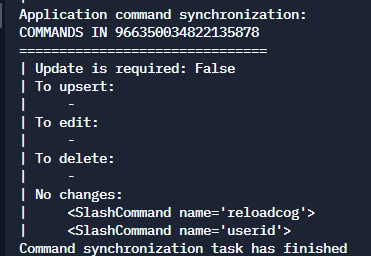
https://i.imgur.com/d6uHqIL.png
Still doesn't work, Ig it finishes it as it's loaded?
!d discord.Message.add_reaction
unkempt canyonBOT
await add_reaction(emoji, /)```
This function is a [*coroutine*](https://docs.python.org/3/library/asyncio-task.html#coroutine).

Adds a reaction to the message.

The emoji may be a unicode emoji or a custom guild [`Emoji`](https://discordpy.readthedocs.io/en/master/api.html#discord.Emoji "discord.Emoji")...my_msg = Interaction
olive osprey
what
slate swan
I haven't used the library in a while but I guess if you want to add reaction, then you should "reply" instead of "respond"?
heady sluice
you oversaw the error
slate swan
By the way hoomans, what is this rate limit thingy?
quaint epoch
slate swan
By the way hoomans, what is this rate limit thingy?
!rule 5
unkempt canyonBOT
5. Do not provide or request help on projects that may break laws, breach terms of services, or are malicious or inappropriate.
slate swan
bruh
quaint epoch
just to be safe
429s/ratelimits are where you send too many requests to the api in a certain period of time, so the wrapper/api temporarily bans you from sending more
like spamming d in a server, eventually discord will tell you to be less spicy, which is the ui version of ratelimiting
slate swan
Anyway, so my bot was temporarily restricted from using the discord API. When I checked the error, it was because of payload of that raw_reaction_add thingy.
quaint epoch
slate swan
Anyway, so my bot was temporarily restricted from using the discord API. When I ...
kek
slate swan
I can send my code if you want but like how do I get rid of that?
quaint epoch
slate swan
I can send my code if you want but like how do I get rid of that?
well, if it is because of the payload i can't do anything
you'll have to wait until the ratelimit is over
slate swan
Just check once more if this code is badly designed please.
@bot.event
async def on_raw_reaction_add(payload):
    DO = False
    message = await bot.get_channel(payload.channel_id).fetch_message(payload.message_id)
    if message.author.id != 933372954589401158:
        return
    emb = message.embeds[0]
    if payload.member.id == int(emb.footer.text[5:]):
        _reacts = []
        for i in (reacts := message.reactions):
            if i.me:
                if i.emoji == payload.emoji:
                    _special_emoji = str(i.emoji)
                    DO = True
                else:
                    _reacts.append(str(i.emoji))
    if DO:
        await message.delete()
        new_emb = Embed(
            title = "Your remaining tasks in the to-do list:-",
            colour = payload.member.colour
        )
        new_emb.set_author(name = payload.member.name, icon_url = payload.member.avatar_url)
        new_emb.set_footer(text = f"ID:- {payload.member.id}")
        new_emb.set_thumbnail(url = payload.member.avatar_url)
        for fie in emb.fields:
            if fie.name.startswith(_special_emoji):
                new_emb.add_field(name = f"~~{fie.name}~~", value = '\u200b', inline = False)
            else:
                new_emb.add_field(name = fie.name, value = '\u200b', inline = False)
        _rmsg = await message.channel.send(embed = new_emb)
        if not _reacts:
            await message.channel.send(f"Congrats <@{payload.member.id}>! You have finished all your tasks :partying_face:")
            return
        for i in _reacts:
            await _rmsg.add_reaction(i)
I guess the code is too confusing especially without any initial detail  . Anyway, thanks HRLO.
olive osprey
Ok so,
@bot.slash_command(description="hi")
async def hi(inter):
  await inter.response.send_message(f"hi {inter.author}")


@bot.slash_command(description="Developer command.")
async def reloadbot(inter):
  if inter.author.id == 703671503954378782:
    embed = disnake.Embed(title="Sucessfully reloaded bot!", description=f"The cog {cog} has been successfully reloaded.", color=disnake.Colour.green())
    for filename in os.istdir("./cogs"):
      if filename.endswith(".py"):
        bot.load_extension(f"cogs.{filename[:-3]}")
    await inter.response.send_message(embed=embed, ephemeral=True)
  else:
    await inter.response.send_message("a")
For some reason the upper slash command "hi" is working fine, but the other one doesn't. It doesn't even get shown for some reason.
 zinc otter
with the new update of text channels inside a voice channel
how do u get the text channel?
heady sluice
what
slate swan
zinc otter
with the new update of text channels inside a voice channel
text channels inside voice....?
zinc otter
here there are none i think
slate swan
olive osprey
Ok so,
```py
@bot.slash_command(description="hi")
async def hi(inter):
await i...
how will it work when it isnt even showing up-
try adding the guilds_ids kwarg
 slate swan
my_msg is already a Message object whih has no attribute as message
olive osprey
slate swan
how will it work when it isnt even showing up-
try adding the `guilds_ids` kwarg
Doesn't change anything, I do have the test guilds set up:
bot = commands.Bot(command_prefix="beta ", test_guilds=[966350034822135878], sync_commands=True,  case_insensitive=True, intents=intents, strip_after_prefix=True)
bot.remove_command("help")
The "hi" slash command is showing up, the other one isn't that's my problem
slate swan
my_msg.add_...
slate swan
olive osprey
Doesn't change anything, I do have the test guilds set up:
```py
bot = commands....
weird
olive osprey
Yeah, I kinda figured it out, a disnake developer told me that it's an API bug due the discord update or something, I reinstalled it and now it works. Anyways, thanks for trying to help
 little ivy
why do my buttons stop working after like 5 minutes on the same message?
 vale wing
little ivy
why do my buttons stop working after like 5 minutes on the same message?
vale wing
little ivy
why do my buttons stop working after like 5 minutes on the same message?
Could you show your implementation of those buttons
Most likely due to timeout set on view
 sacred oyster
What's the difference between asyncio.sleep() & time.sleep()?
unkempt canyonBOT
Why do we need asynchronous programming?
Imagine that you're coding a Discord bot and every time somebody uses a command, you need to get some information from a database. But there's a catch: the database servers are acting up today and take a whole 10 seconds to respond. If you do not use asynchronous methods, your whole bot will stop running until it gets a response from the database. How do you fix this? Asynchronous programming.
What is asynchronous programming?
An asynchronous program utilises the async and await keywords. An asynchronous program pauses what it's doing and does something else whilst it waits for some third-party service to complete whatever it's supposed to do. Any code within an async context manager or function marked with the await keyword indicates to Python, that whilst this operation is being completed, it can do something else. For example:
import discord

# Bunch of bot code

async def ping(ctx):
    await ctx.send("Pong!")
What does the term "blocking" mean?
A blocking operation is wherever you do something without awaiting it. This tells Python that this step must be completed before it can do anything else. Common examples of blocking operations, as simple as they may seem, include: outputting text, adding two numbers and appending an item onto a list. Most common Python libraries have an asynchronous version available to use in asynchronous contexts.
async libraries
The standard async library - asyncio
Asynchronous web requests - aiohttp
Talking to PostgreSQL asynchronously - asyncpg
MongoDB interactions asynchronously - motor
Check out this list for even more!
sacred oyster
Non blocking?
vale wing
Read the embed above
 vale wing
little ivy
vale wing
little ivy
Default timeout of View is 180 seconds, to ignore it, use View(timeout=None) and for this case I recommend using persistent views
Also it's better to subclass your views cause that way the code looks cleaner
@slate swan dpy 2.0?
@slate swan what is the type of ctx
sacred oyster
From API

 hexed junco
Discord.py is out of support, so stuff may not work
 daring olive
hexed junco
Discord.py is out of support, so stuff may not work
daring olive
hexed junco
Discord.py is out of support, so stuff may not work
wdym?
discord.py was unarchived a month (or more?) ago
they have a channel of dev updates that you can follow on their server: https://discord.gg/dpy
vale wing
@slate swan print(type(ctx))
vale wing
sacred oyster
From API
Issue is not with permissions
vale wing
hexed junco
Discord.py is out of support, so stuff may not work
Wrong also this is not dpy
brave forge
in discord.py version 1.7.3 is it possible to make commands that will do something for a certain amount of time ?
little ivy
vale wing
Default timeout of `View` is 180 seconds, to ignore it, use `View(timeout=None)`...
that didnt fix it :/
slate swan
Why?
 maiden fable
slate swan
Why?
maiden fable
slate swan
Why?
what dpy version u using
regal pulsar
    @commands.command()
    @commands.has_permissions(manage_channels=True)
    async def kick(self, ctx: commands.Context, user: Either[disnake.Member, str], *, reason=None):
        if isinstance(user, str):
            for member in ctx.guild.members:
                if user in member.name:
                    await ctx.guild.kick(member)
                    if reason != None:
                        embed = disnake.Embed(
                            description=f"""{user.mention} has been kicked.
            Reason:
            {reason}
                """,
                        )
                        await ctx.channel.send(embed=embed)
                        embed = disnake.Embed(
                            description=f"""
            You have been kicked from {ctx.guild.name}
            Reason:
            {reason}
                """
                        )
                        await disnake.DMChannel.send(user, embed=embed)
                    else:
                        embed = disnake.Embed(description=f"{user.mention} has been kicked.")
                        await ctx.channel.send(embed=embed)
                    break
            else:
                embed = disnake.Embed(description="User Not Found Onii Chan!")

        elif isinstance(user, disnake.Member):
            await ctx.guild.kick(user)
            if reason != None:
                embed = disnake.Embed(
                    description=f"""{user.mention} has been kicked.
    Reason:
    {reason}
        """,
                )
                await ctx.channel.send(embed=embed)
                embed = disnake.Embed(
                    description=f"""
    You have been kicked from {ctx.guild.name}
    Reason:
    {reason}
        """
                )
                await disnake.DMChannel.send(user, embed=embed)
            else:
                embed = disnake.Embed(description=f"{user.mention} has been kicked.")
                await ctx.channel.send(embed=embed)
!paste
unkempt canyonBOT
Pasting large amounts of code
If your code is too long to fit in a codeblock in discord, you can paste your code here:
https://paste.pythondiscord.com/
After pasting your code, save it by clicking the floppy disk icon in the top right, or by typing ctrl + S. After doing that, the URL should change. Copy the URL and post it here so others can see it.
regal pulsar
slate swan
!paste
its not that long ;/
maiden fable
It is
slate swan
yes but it's glitching out due to discord escape characters
so just put it in the paste service, takes like 10 seconds to do so
also yeah, indentation is way messed up on discord
regal pulsar
slate swan
also yeah, indentation is way messed up on discord
oh yeah
k
i wanna be able to do something like
?kick nyx
without mentioning
slate swan
how to set security level for serverinfo?

you just check a role or something because its definitely not the accounts security level as it would be unsafe
slate swan
slate swan
you just check a role or something because its definitely not the accounts secur...

thats the servers moderation level?
yea
regal pulsar
slate swan
!d discord.Guild.verification_level
unkempt canyonBOT
The guild’s verification level.
slate swan
nvm what i said as its a guild
thx
i thought it was an account shouldve seen the invoke message
slate swan
!d discord.Message.mentions
unkempt canyonBOT
A list of Member that were mentioned. If the message is in a private message
then the list will be of User instead. For messages that are not of type
MessageType.default, this array can be used to aid in system messages.
For more information, see system_content...
regal pulsar
hmm
slate swan
or just have a member argument if you want it to take a member object
slate swan
how to mark the number of people with a certain status?
regal pulsar
stone beacon
d.py converters still work though right?
yeah
slate swan
yep
stone beacon
slate swan
or just have a member argument if you want it to take a member object
If so then ^
slate swan
the converter should work yes
how to mark the number of people with a certain status?
regal pulsar
stone beacon
d.py converters still work though right?
i want it to be a member object if its a mention
slate swan
slate swan
how to mark the number of people with a certain status?
you would have to iterate thru guild.members and check their status.
regal pulsar
and a string if its a string
slate swan
regal pulsar
and a string if its a string
wdym?
unkempt canyonBOT
typing.Union```
Union type; `Union[X, Y]` is equivalent to `X | Y` and means either X or Y.

To define a union, use e.g. `Union[int, str]` or the shorthand `int | str`. Using that shorthand is recommended. Details...
**PEP 604 - Allow writing union types as ``X | Y``**
Status
Accepted
Python-Version
3.10
Created
28-Aug-2019
Type
Standards Track
regal pulsar
slate swan
use Union
i did
slate swan
it would look like py async def command(ctx,arg: typing.Union[Member. str]): ...
regal pulsar
slate swan
just use pipes
whats that
regal pulsar
slate swan
it would look like ```py
async def command(ctx,arg: typing.Union[Member. str]):
...
yeah i used it
slate swan
unkempt canyon
check the pep^
regal pulsar
but
unkempt canyonBOT
4. Use English to the best of your ability. Be polite if someone speaks English imperfectly.
brave forge
how to make the bot delete its message 30 seconds after sending ?
regal pulsar
slate swan
brave forge
how to make the bot delete its message 30 seconds after sending ?
await send("stuff", delete_after=30)
brave forge
@slate swan aren 't you tired of writing the same thing ?
slate swan
not really
regal pulsar
brave forge
how to make the bot delete its message 30 seconds after sending ?
@bot.command()
async def test(ctx: commands.Context):
    msg = await ctx.channel.send("Ok")
    await asyncio.sleep(30)
    await msg.delete()
oh ;/
slate swan
regal pulsar
```py
@bot.command()
async def test(ctx: commands.Context):
msg = await ctx....
bro
slate swan
regal pulsar
https://paste.pythondiscord.com/zokavigacu
bro
ctx.channel and .sleep🗿
you know that the member converter convers the name and ids as well right?
regal pulsar
slate swan
you know that the member converter convers the name and ids as well right?
yeah
but lets say i wanted to do
?kick sar
slate swan
why do a incheck though
 ivory cave
for how long have yall been programming ?
slate swan
regal pulsar
?kick sar
and sarry gets kicked
ivory cave
curious
regal pulsar
my friend wants to be able to do pass a bit of their name in
slate swan
ivory cave
for how long have yall been programming ?
about one year and 2 months
regal pulsar
ivory cave
for how long have yall been programming ?
2 months
ivory cave
slate swan
about one year and 2 months
ah nicee, keep on goin
regal pulsar
actually less cuz of exams
slate swan
ivory cave
for how long have yall been programming ?
2 years, 5 months of serious practice
ivory cave
slate swan
2 years, 5 months of serious practice
oh wow
ivory cave
slate swan
thxs you too
ty 👍
regal pulsar
slate swan
sarthak is an old master
doesnt that make me young noob 🐲
slate swan
yes
slate swan
ivory cave
ty 👍
🖤
brave forge
@regal pulsar@slate swan@slate swan thanks
regal pulsar
brave forge
<@768393728163053619><@456226577798135808><@456226577798135808> thanks
np
slate swan
regal pulsar
np
bro you used Either, not Union
regal pulsar
nah
slate swan
they are different things
slate swan
😑 why
anyways, what's the issue?
your command would need member intents in cause you didnt add it already
regal pulsar
not sure how to go about it in general
if you mention someone i want a Member object
if you just pass in a string it should stay a string
slate swan
slate swan
it will always be a string?
no because the disnake.Member typehint is their first
the converter just parses the string for a snowflake or a snowflake inside of the mention format and it makes it an object
slate swan
slate swan
no because the disnake.Member typehint is their first
i mean yeah it would be an object as it would return that since if the converter so union is probably the best if sometimes the member object wont be passed an a word would be passed
regal pulsar
hmm
brave forge
regal pulsar
```py
@bot.command()
async def test(ctx: commands.Context):
msg = await ctx....
is it possible to make a temporary command in this way ? for example , mute or assigning a role for a while ??
regal pulsar
or what if i dont typehint
regal pulsar
brave forge
is it possible to make a temporary command in this way ? for example , mute or a...
yeah
slate swan
brave forge
is it possible to make a temporary command in this way ? for example , mute or a...
simply use timeouts
slate swan
regal pulsar
or what if i dont typehint
it will be a string
regal pulsar
brave forge
is it possible to make a temporary command in this way ? for example , mute or a...
my old mute command if you want it
slate swan
why spoonfeed
regal pulsar
slate swan
it will be a string
yeah
slate swan
just give him the coroutine that wraps the endpoint
regal pulsar
then i try to get a Member object with .get
slate swan
!d discord.Member.timeout
unkempt canyonBOT
await timeout(until, /, *, reason=None)```
This function is a [*coroutine*](https://docs.python.org/3/library/asyncio-task.html#coroutine).

Applies a time out to a member until the specified date time or for the
given [`datetime.timedelta`](https://docs.python.org/3/library/datetime.html#datetime.timedelta "(in Python v3.10)").

You must have the [`moderate_members`](https://discordpy.readthedocs.io/en/master/api.html#discord.Permissions.moderate_members "discord.Permissions.moderate_members") permission to
use this...how exactly does that work
slate swan
it works in 3.7 too
regal pulsar
ye im on 3.10.4 iirc
slate swan
regal pulsar
how exactly does that work
its just bitwise or
given that you need to import annotations from future
regal pulsar
slate swan
its just bitwise or
oh
slate swan
yeah
with annotations it wouldnt matter what py version
ofc it would as yoy need to import the stlib
*3.6+
brave forge
@regal pulsar thanks
regal pulsar
brave forge
<@768393728163053619> thanks
np
slate swan
yes but it can still be used in 3.6+
brave forge
slate swan
simply use timeouts
this will only work for mute. But not for issuing a role for a while
slate swan
slate swan
yes but it can still be used in 3.6+
its this easy
from __future__ import annotations
add a space or get recked
regal pulsar
lol
slate swan
slow
i already did
idk sarthak said it does idk the exact version lol
working in 3.7 too
pliant gulch
slate swan
yes but it can still be used in 3.6+
I thought __future__.annotations was added in 3.7, not 3.6
slate swan
my bad
slate swan
pliant gulch
I thought `__future__.annotations` was added in 3.7, not 3.6
not what i said bozo
regal pulsar
now if only i knew what you were talking about 😔
slate swan
😿
pliant gulch
https://docs.python.org/3.7/library/__future__.html yes it is 3.7, you don't see it in any previous versions

 slate swan
that acts like a Union
regal pulsar
i see
slate swan
no
it can be used in other things and not ony type hint
what did you said
its literally the same thing
its just bitwise or
ivory cave

 sage otter
pipes are cool
regal pulsar
ivory cave
https://tenor.com/view/my-enemy-cat-oh-the-misery-everybody-wants-to-be-my-enemy...
lol
can someone tell me what this is
 pliant gulch
The return annotation
sage otter
A annotation
regal pulsar
the ->
pliant gulch
Denoting that that method, returns None
ivory cave
regal pulsar
the ->
no idea , never seen it in python tbh
ik its something from JS but not sure
regal pulsar
i see it everywhere
pliant gulch
!e ```py
def foo() -> str:
return "bar"
def baz() -> None:
...
@pliant gulch :warning: Your eval job has completed with return code 0.
[No output]
wait what 💀
sage otter
You see it a lot in well written code
pliant gulch
pliant gulch
!e ```py
def foo() -> str:
return "bar"
def baz() -> None:
...
```
-> str because it returns "bar", which is a str, then -> None because that one returns None
slate swan
 sage otter
Good python programmers type/annotate their code
slate swan

ivory cave
but what does it mean tho? ive never even heard of it and ive been programming for some solid months
sage otter
He just said above
pliant gulch
It's for type safety
pliant gulch
Yes, you want to know the types of your variables, etc
sage otter
Yea.
pliant gulch
It's good to know them, and it stops a lot of problems before they happen
slate swan
not only typehints* it can be used in other things aswell
regal pulsar
ivory cave
wait what 💀
 ivory cave
pliant gulch
Yes, you want to know the types of your variables, etc
ivory cave
pliant gulch
Yes, you want to know the types of your variables, etc
is it something sorta like a comment or ?
pliant gulch
Yes it's like a comment
regal pulsar
print func in python
ivory cave
pliant gulch
Yes it's like a comment
ahhh
slate swan
ivory cave
is it something sorta like a comment or ?
no its just for your interpreter to understand types
its sorta like a comment ig
pliant gulch
The interpreter doesn't parse annotations at all
ivory cave
slate swan
no its just for your interpreter to understand types
doesnt it do that on its own tho
slate swan
pliant gulch
The interpreter doesn't parse annotations at all
editor sorry
regal pulsar
pliant gulch
-> str because it returns "bar", which is a str, then -> None because that one r...
ah
i see
pliant gulch
pliant gulch
The interpreter doesn't parse annotations at all
I guess unless you count like __annotations__
slate swan
ivory cave
doesnt it do that on its own tho
sometimes you editor doesnt know what i.e and arguments type is gonna be so devs annotate them so the editor knows the types
regal pulsar
slate swan
sometimes you editor doesnt know what i.e and arguments type is gonna be so devs...
yeah
thats actually why i started typehinting
slate swan
its quite useful without your editor showing its unknown




 slate swan
and sometimes depending on the types the editor wont highlight the syntax of methods i.e since it doesnt knoe the type
stone beacon
A fellow ayu theme user?
sage otter
just get good and work without the intellisense. All that matters is runtime.
regal pulsar
plus
stone beacon
Mi gusta
regal pulsar

 glad cradle
ivory cave
ik its something from JS but not sure
glad cradle
ivory cave
ik its something from JS but not sure
that's not related to JS, in javascript it means something else
regal pulsar
i cant live without this
ivory cave
glad cradle
that's not related to JS, in javascript it means something else
yea i know, i was just referring that the only place i had seen -> being used was in js and nowhere else but i guess its a thing in python as well
stone beacon
what colour scheme are ya using?
pliant gulch
pliant gulch
I guess unless you count like `__annotations__`
!e ```py
from future import annotations
@type.call
class annotations:
def setitem(self, name: str, value: str) -> None:
print(name, value)
Foo: bar
Looks liike ayu mirage
unkempt canyonBOT
@pliant gulch :white_check_mark: Your eval job has completed with return code 0.
Foo bar
ok?
pliant gulch
Saying or operator is equivalent to typing.Union is miss-leading imo
You should just reference it as a union between the types, operator makes it sound like it does an operation
slate swan
@commands.command()
  async def ping(self, ctx):
    message = await embed.add_field(name="`Pinging...`")
    await embed.add_field(name=f"**Latency is** ``{round(self.bot.latency * 1000)}``**ms**")
Can't rmr the last time I touched Union after they allowed us to do X | Y in 3.10
slate swan
Correct?
regal pulsar
stone beacon
Can't rmr the last time I touched Union after they allowed us to do X | Y in 3.1...
lmao
Optional[]?
slate swan
i never touched Union😳
slate swan
slate swan
```
@commands.command()
async def ping(self, ctx):
message = await embed.a...
Anyone?
slate swan
regal pulsar
Optional[]?
it can be the type given or none basically
regal pulsar
ah
pliant gulch
I've always hated the typing module
slate swan
dont you use it allot😿
pliant gulch
I just want a non-library way to type hint 😔
regal pulsar
wait
slate swan
yeah i agree
pliant gulch
I only use it cause I'm forced to, like before when list wasn't generic
pliant gulch
pliant gulch
I only use it cause I'm forced to, like before when list wasn't generic
Now I'm waiting for the callable typehints to be passed in that pep, () -> None
regal pulsar
or do i have it completely wrong
slate swan
it would be nice to have Callable i.e built in without importing typing 😔
stone beacon
^^^^^^^^^^^^^^^^^^^^^^^^^^^^
regal pulsar
whats Callable 💀
pliant gulch
That already exists with typing_extensions
slate swan
regal pulsar
whats Callable 💀
a function
pliant gulch
You only really need self in causes of generics anyways so, most people won't be using them
slate swan
its just the type lol
pliant gulch
No?
regal pulsar
slate swan
a function
yeah what does it do