
#discord-bots
1 messages · Page 813 of 1
 dire folio
 pallid mango
how do i put a space between the two "Server Restarted by Feyhe#6969 at 21:07!"?
pallid mango
how do i put a space between the two "Server Restarted by Feyhe#6969 at 21:07!"?
Why do u even want two
pallid mango
dire folio
Why do u even want two
i dont want two, it was just an example
dire folio
Oh
pallid mango
if i were to delete the first one itll get rid of all line breaks
 final iron
pallid mango
because it doesnt work if i add it in footer
final iron
pallid mango
because it doesnt work if i add it in footer
I don't think you can put a newline in the footer
 sage otter
You can
pallid mango
okay so how do i blank a footer?
dire folio
Use an invis char
final iron
sage otter
You can
You can?
 vale wing
Have you ever seen multiline footer
pallid mango
nopw
 slate swan
Hey guys nextcord isnt doing what I want.
import nextcord
import asyncio
from nextcord.ext import commands
import os

intents = nextcord.Intents.all()
intents.members = True

client = commands.Bot(command_prefix="-", intents=intents)
client.remove_command("help")

@client.event
async def on_ready():
    await client.change_presence(
        activity=nextcord.Activity(type=nextcord.ActivityType.playing,name=f"Flanba Utilities2"))
    print("Client Ready")
mainguild = (932641118682767431)

@client.slash_command(guild_ids=[mainguild])
async def calculate(interaction: nextcord.Interaction):
  await interaction.response.send_message("In development")```

The slash command is not working, and no errors show up. What should I do?Had this question myself today. Seems like the library has a special MISSING constant you can provide to clear something. Or you can call add_footer() with no text kwarg
sage otter
final iron
You can?
You can have over 1k characters in a footer ofc you can.
It’s probably a lot more than 1k tbh
final iron
sage otter
You can have over 1k characters in a footer ofc you can.
Oh damn
 slate swan
pallid mango
`value=f"\n test",`
slate swan
pallid mango
`value=f"\n test",`
Maybe try adding some chars behind it idk?
slate swan
lol
pallid mango
 slate swan
🤷
pallid mango
oh i know !!! blank character instead of the K
slate swan
slate swan
Hey guys nextcord isnt doing what I want.
```py
import nextcord
import asyncio
...
if anyone could help me with this would be great tho
pallid mango
and it all works perfectly
slate swan
pallid mango
and it all works perfectly
gl
final iron
slate swan
Hey guys nextcord isnt doing what I want.
```py
import nextcord
import asyncio
...
Define not working
slate swan
final iron
Define not working
so the slash command doesnt show up in the testguild
i made sure the guild id existed and was for the right server
like in the slash menu
vale wing
vale wing
Have you ever seen multiline footer
What the hell it actually exists
 pallid mango
does anyone know how to configure the import time?
final iron
slate swan
so the slash command doesnt show up in the testguild
Are any of your other commands working?
slate swan
final iron
Are any of your other commands working?
this is the only command on the bot
sage otter
Like I said. The character limit is in the thousands. They wouldn’t spam it across your screen with not going doing go a new line.
vale wing
pallid mango
does anyone know how to configure the import `time`?
Wdym configure to import
pallid mango
vale wing
Wdym configure to import
like make it not 24 hour clock, and then make it EST
final iron
slate swan
this is the only command on the bot
Remove changing the presence in on_ready. You could be getting blocked from the api
slate swan
final iron
Remove changing the presence in on_ready. You could be getting blocked from the ...
alr
vale wing
pallid mango
like make it not 24 hour clock, and then make it EST
Personally I use datetime for that
pallid mango
kill the bot and itll unblock ur api
sage otter
slate swan
i made sure the guild id existed and was for the right server
Did you invite your bot with the application commands scope checked?
slate swan
sage otter
Did you invite your bot with the application commands scope checked?
oh snap
i doint think i did that actually
vale wing
@slate swan does the commands.Bot have test_guilds param? If so, provide your guild ID to there instead of the command
slate swan
i think i only used the normal bot scope
final iron
vale wing
<@456226577798135808> does the `commands.Bot` have `test_guilds` param? If so, p...
That's only for disnake iirc
vale wing
There should be alternatives in other libs
slate swan
vale wing
<@456226577798135808> does the `commands.Bot` have `test_guilds` param? If so, p...
i can do that?
final iron
There is a guild_ids kwarg
vale wing
!d nextcord.ext.commands.Bot
 unkempt canyonBOT
class nextcord.ext.commands.Bot(command_prefix, help_command=<default-help-command>, description=None, **options)```
Represents a discord bot.

This class is a subclass of [`nextcord.Client`](https://nextcord.readthedocs.io/en/latest/api.html#nextcord.Client "nextcord.Client") and as a result anything that you can do with a [`nextcord.Client`](https://nextcord.readthedocs.io/en/latest/api.html#nextcord.Client "nextcord.Client") you can do with this bot.

This class also subclasses [`GroupMixin`](https://nextcord.readthedocs.io/en/latest/ext/commands/api.html#nextcord.ext.commands.GroupMixin "nextcord.ext.commands.GroupMixin") to provide the functionality to manage commands.gotcha
vale wing
Ok haven't found anything
vale wing
I didn't see
final iron
vale wing
Ok haven't found anything
From what I understand nextcord does it on a slash command basis while disnake does it across the board
vale wing
final iron
From what I understand nextcord does it on a slash command basis while disnake d...
Mk
 rocky trench
Alright guys: I'm experiencing this issue: I use ctx.guild.voice_client.play, it says nonetype has no attribute play. I use the exact same thing in another check In another command, where it does work.
What could be the reason of it not working?
vale wing
Again? 
rocky trench
        ctx.guild.voice_client.play(discord.PCMVolumeTransformer(discord.FFmpegPCMAudio(
            executable=f"C:/Users/bert/OneDrive - DvM Humaniora/Documenten/ShareX/Tools/ffmpeg.exe", source=url)),
            after=lambda error: self.bot.loop.create_task(self.play_next_song(ctx)))```Traceback (most recent call last):
  File "c:\Users\bert\Downloads\discord bots\Bertie's discord bots\cogs\slashes.py", line 760, in play_next_song
    await self.play_song(ctx, self.bot.song_queue[ctx.guild.id]["urls"][0])
  File "c:\Users\bert\Downloads\discord bots\Bertie's discord bots\cogs\slashes.py", line 786, in play_song
    ctx.guild.voice_client.play(discord.PCMVolumeTransformer(discord.FFmpegPCMAudio(
AttributeError: 'NoneType' object has no attribute 'play'hmm
vale wing
voice_client is a VoiceProtocol in your case and it doesn't have attribute play, but seems like in this case it doesn't even exist
pallid mango
seems like youtube_dl
rocky trench
But the ctx.guild.voice_client works in another command
rocky trench
pallid mango
seems like youtube_dl
Its a file from my pc :)
pallid mango
oh
rocky trench
Just testing things out
pallid mango
ahh
vale wing
!d discord.Guild.voice_client
unkempt canyonBOT
property voice_client: Optional[VoiceProtocol]```
Returns the [`VoiceProtocol`](https://discordpy.readthedocs.io/en/master/api.html#discord.VoiceProtocol "discord.VoiceProtocol") associated with this guild, if any.It does have play.
vale wing
rocky trench
It does have play.
!d discord.VoiceProtocol.play
unkempt canyonBOT
Out of the question.
No documentation found for the requested symbol.
 stray solar
someone know how to automatically delete message sent by a specific user (Command like: +autodelete {id}) (So when he sent a message like "i love apple" the message will be auto delete by the bot)
vale wing
What version of lib do you have
rocky trench
The thing is: if I use the join command, then play it doesn't work with the mentioned error above. If I use play command only (which has auto join if not joined already) it does work
Which uses the exactly same function
 sick birch
stray solar
someone know how to automatically delete message sent by a specific user (Comman...
sick birch
stray solar
someone know how to automatically delete message sent by a specific user (Comman...
Store all the user IDs in a database, and in on_message, if you detect a message from that user, delete it
Alternatively, give them a role that prevents them from talking altogether
vale wing
@rocky trench could you please tell what version of dpy do you have
rocky trench
vale wing
<@897789854472106004> could you please tell what version of dpy do you have
2.0
And also I use slash_util in this command since it's a slash command
stray solar
sick birch
Store all the user IDs in a database, and in `on_message`, if you detect a messa...
and how its will be like ?
i mean to make the command and the on_message
vale wing
rocky trench
The thing is: if I use the join command, then play it doesn't work with the ment...
Could you show your play command
rocky trench
vale wing
Could you show your play command
Im not on pc atm, lemme find the pastebin one I made
sick birch
on_message:
  if author.id in list_of_ids:
    message.delete()
  process_commands()
@stray solar
rocky trench
stray solar
uhh i dont get it but ok
sick birch
Could've have phrased it better myself
rocky trench
I don't see why he doesn't get yours, it's pretty good ngl
sick birch
It boils down to a 3 step procedure really, pretty simple
stray solar
ok nvm just need to sleep lol
stray solar
but first i have to end this command
sick birch
Your brain works better when it's rested, come back tomorrow and I guarantee you'll get it
stray solar
and i will sleep '-'
vale wing
rocky trench
<@!664911300769349666> https://mystb.in/ParticipateDemandingDebut.python
I didn't see you connecting to vc in this
rocky trench
if ctx.guild.voice_client:
if ctx.guild.me.voice.channel != ctx.author.voice.channel:
return await ctx.reply("You must be in the voicechannel the bot is in to play or add music!")
else:
await ctx.author.voice.channel.connect()
vale wing
O
rocky trench
Line 19
It doesn't reconnect, so it sees that bot is in a vc there
The error gets caused in the play song function when I use song --> play
Play only --> works
vale wing
So a quick explanation that might resolve your issue
There are 2 types of voice connection objects - VoiceState and VoiceProtocol. I don't get the point of VoiceProtocol but for some reason now it's everywhere and completely useless.
The only method that returns VoiceState is VoiceChannel.connect. So you have to store it in some variable to work properly. The VoiceProtocol doesn't have its methods and attributes
!d discord.VoiceState
unkempt canyonBOT
class discord.VoiceState```
Represents a Discord user’s voice state.!d discord.VoiceProtocol
unkempt canyonBOT
class discord.VoiceProtocol(client, channel)```
A class that represents the Discord voice protocol.

This is an abstract class. The library provides a concrete implementation under [`VoiceClient`](https://discordpy.readthedocs.io/en/master/api.html#discord.VoiceClient "discord.VoiceClient").

This class allows you to implement a protocol to allow for an external method of sending voice, such as [Lavalink](https://github.com/freyacodes/Lavalink) or a native library implementation.

These classes are passed to [`abc.Connectable.connect`](https://discordpy.readthedocs.io/en/master/api.html#discord.VoiceChannel.connect "discord.VoiceChannel.connect").@vale wing got an example of storing it in variable?
I mean I could give it a variable, but not be able to call it without making it global (which they didn't recommend)
vale wing
Well seems like the only option is a global variable but you could do a little trick - parse it instead of error arg in play function and make sort of recursion
stray solar
sick birch
```
on_message:
if author.id in list_of_ids:
message.delete()
process_co...
i made a bot.event idk if get rly RLY wrong
rocky trench
vale wing
Well seems like the only option is a global variable but you could do a little t...
But it doesn't make sense... at all
stray solar
i think im wrong
vale wing
Well that's confusing
rocky trench
Yes indeed
stray solar
Bertie sorry but can u just help me for a sec
async def trigger(ctx, message, author):
    await ctx.message.delete
    if author.id in list_of_ids:
        message.delete()
await client.process_commands()```so now i made this but
stray solar
no no just how i can add id on the list
rocky trench
List.append id
 slim ibex
append() ?
stray solar
um on the top i made 'list_of_ids = [,]'
stray solar
ups
vale wing
@rocky trench personally I created a custom class that contained the voice state and the data required for playing songs, and put those to global queue variable which was storing list of those
rocky trench
(Also, a list is saved until you restart
rocky trench
vale wing
<@897789854472106004> personally I created a custom class that contained the voi...
Yehhhh
A little too complicated for me to understand atm
stray solar
stray solar
um on the top i made 'list_of_ids = [,]'
this should be in a command ?
rocky trench
No
stray solar
ah the another one
rocky trench
U need to make a command where u append the id to that list
stray solar
i can put it on the same command ?
async def trigger(ctx, message, author, member):
    await ctx.message.delete
    list_of_ids.append(member.id)
    if author.id in list_of_ids:
        message.delete()
await client.process_commands()```like this
sick birch
That only works when someone runs the trigger command
vale wing
@rocky trench so basically this is the runner
@staticmethod
def play_next_track(_=None):
global now_playing
if len(queue) > 0:
track = queue[0]
queue.remove(track)
now_playing = track
track.vc.play(disnake.FFmpegPCMAudio(track.url, executable='ffmpeg', **Music.FFMPEG_OPTIONS),
after=Music.play_next_track)```You want all messages to be deleted, yes?
vale wing
Stupid github indents
sick birch
then use on_message
stray solar
I want when the user sent a message, the bot automatically delete the message
rocky trench
vale wing
<@897789854472106004> so basically this is the runner
```py
@staticmet...
Yh... but It just doesn't make sense to me
vale wing
Sry for those
sick birch
stray solar
I want when the user sent a message, the bot automatically delete the message
Yes, do it on_message
stray solar
but i want to put it on command
rocky trench
It recognizes the voice channel when I use the autojoin inside the play command, but not when I use join command and play command
stray solar
or maybe the command trigger gonna ad the id to the list and on message will delete his msg
sick birch
stray solar
but i want to put it on command
So if someone runs !trigger it will be deleted?
rocky trench
stray solar
or maybe the command trigger gonna ad the id to the list and on message will del...
Thats what it does yet
sick birch
But if they say anything else, it won't be deleted
stray solar
if i do +trigger {id}
rocky trench
Is it your birthday today Robin?
stray solar
any message the user will send its will be delete
sick birch
rocky trench
Is it your birthday today Robin?
yep!
sick birch
stray solar
any message the user will send its will be delete
so then you need on_message, not a command
rocky trench
sick birch
yep!
Happy birthday 🎈🎊🎉🎁🎂 🥳
stray solar
ok so imma just do a command for a the id to the list, and on_message will just trigger the user
rocky trench
sick birch
so then you need on_message, not a command
He wants the command to add ids to the list, and the event to delete it
sick birch
rocky trench
Happy birthday 🎈🎊🎉🎁🎂 🥳
:D thanks!
stray solar
rocky trench
He wants the command to add ids to the list, and the event to delete it
yea its better like that ?
sick birch
rocky trench
He wants the command to add ids to the list, and the event to delete it
Yeah, because right now only the trigger command will get deleted
def add():
  # add user to database
def on_message():
  # if message author is in database, delete
ok so i do
async def triggerlist(ctx):
    await ctx.message.delete()
``` that firstor i get wrong xd
sick birch
I don't think you get what those do, if it has @bot.command(), that means whenever your bot sees a message like <prefix><command name>, everything inside will get executed
rocky trench
Triggerlist is to add an Id the the list, and he uses that id to delete all messages
stray solar
(im sorry im rly rly bad so its hard for me xd to make the command alone..)
stray solar
aaaaaaaaaaaaa
sick birch
so you want to do:
<prefix>triggerlist <id>
that would add a user to the trigger list?
stray solar
yea and the on_message will made the trigger
rocky trench
Will delete all messages from the ids in the list
stray solar
delete any message he sent*
sick birch
Oh yeah that should be relatively easy
stray solar
like now (watch)
sick birch
hardest part would be getting the database
stray solar
and its done xd
rocky trench
sick birch
hardest part would be getting the database
He used cache for this
stray solar
i use 1 file XD
1021 lines
and just .bat file xd
so the data base its will be hard y
sick birch
rocky trench
He used cache for this
that works too, though it's lost on bot restart
sick birch
stray solar
so the data base its will be hard y
setting up database, setting up tables, getting proper infrastructure within your bot to work with the database
stray solar
im a real beginner dont worry xd
rocky trench
I mean u could try it...
stray solar
(i try every command.. its just this one im lost)
i made blacklist and whitelist but trigger..
sick birch
The way I did it, I have an express.js server with either TypeORM or prisma or some other orm, and inside python, instead of messing with like motors or connectors like aiosqlite, you just use aiohttp and send a request to the API server
stray solar
oh sh...
sick birch
but you don't have to do that, you can go with the traditional approach if you'd like
stray solar
yeaaa i like traditional
ok so now, we get the logic, just something to do its the command to add list and AFTER do the on_message..
so the hardest part.. why sometimes i hate me
 flat solstice
somethings not quite right with this command. It executes all the way through without any error's and sends me a dm saying it's searched 50k msgs when it finishes but it isn't posting any embeds, I have just noticed that the messages it s searching through are all webhooks so should I be accounting for that```py
@commands.command()
@commands.has_permissions(administrator = True)
async def moderation_logs(self, ctx):
snowyjaguar = self.bot.get_user(self.bot.config.owner)
checked_logs = []
case_count = 0
last_checked = 0
moderation = await self.bot.fetch_channel(885569667861717042)
clifford_log = await self.bot.fetch_channel(500768218257031168)
# Field One: User who was moderated *
# Field Two: Moderator who performed the moderation *
# Field Three: Reason for moderation
# Field Four: Duration of moderation
    with moderation.typing():
        messages = await clifford_log.history(oldest_first = True, limit = None, after = last_checked).flatten() # 10000
        for message in messages[0:]: # Making bot search history chronologically
            if all([
                message.id not in checked_logs,
                message.author.id == 776782769312628746,
                len(message.embeds) > 0,
            ]):
                #action = [word for word in key_words if word in message.embeds[0].title]
                #if len(action) > 0:
                if action := [word for word in self.bot.config.key_words if word in message.embeds[0].title]:
                    embed = discord.Embed(title = f"Case {case_count} | {action[0]}", colour = self.bot.config.error_colour, timestamp = message.timestamp)
                    embed.set_author(name = f"{message.embeds[0].fields[0].value} | {message.embeds[0].fields[0].value.id}", icon_url = message.embeds[0].fields[0].value.avatar_url)
                    embed.set_footer(text = f"{message.embeds[0].fields[1].value} | {message.embeds[0].fields[1].value.id}", icon_url = {message.embeds[0].fields[1].value.avatar_url})
                    embed.add_field(name = "Offender", value = message.embeds[0].fields[0].value, inline = True)
                    embed.add_field(name = "Moderator", value = message.embeds[0].fields[1].value, inline = True)
                    if message.embeds[0].fields[3]:
                        embed.add_field(name = "Duration", value = message.embeds[0].fields[3].value)
                    if message.embeds[0].fields[2]:
                        embed.add_field(name = "Reason", value = message.embeds[0].fields[2].value)
                    checked_logs.append(message.id)

                    await moderation.send(embed = embed)
        await snowyjaguar.send(f"`{len(messages)}` were checked in {clifford_log.mention}, `{case_count}` logs were logged in {moderation.mention}")```
oh ok its logs hmm
vale wing
flat solstice
somethings not quite right with this command. It executes all the way through wi...
Pretty sure you need
async with moderation.typing():```
It is a corohonnestly i put my logs on console bot so i cant help u sry
flat solstice
vale wing
Pretty sure you need
```py
async with moderation.typing():```
It is a coro
I'll try it but it is already making the typing animation
 magic harbor
uhh guys
i need to make a bot that would ping a role after a certain time, and it will read a message from another bot to determine the time after which it needs to ping. any pointers on where to start? i am pretty new to python. also can i host the bot on repl?
stray solar
@sick birchi got an idea for the triggerlist, imma take my command blacklist and just change some things to add on my triggerlist
final iron
magic harbor
i need to make a bot that would ping a role after a certain time, and it will re...
Hosting on replit is possible but a bad idea
magic harbor
final iron
Hosting on replit is possible but a bad idea
then do you know anywhere where i can host my bot for free?
sick birch
stray solar
<@!432643355634171905>i got an idea for the triggerlist, imma take my command bl...
sounds alright
final iron
magic harbor
then do you know anywhere where i can host my bot for free?
Oracle free tier
sick birch
magic harbor
then do you know anywhere where i can host my bot for free?
AWS has 750 free hours per month for a year
stray solar
'sounds' xd
final iron
Github developer pack or whatever its called is also an option

GitHub Education
The best developer tools, free for students. Get your GitHub Student Developer Pack now.
stray solar
ok im lost
final iron
You get a ton of free hosting iirc
magic harbor
also idk how to make it ping roles. what do i need to import to make it do that?
magic harbor
final iron
You get a ton of free hosting iirc
ooo
final iron
!d discord.Role.mention
unkempt canyonBOT
property mention: str```
Returns a string that allows you to mention a role.You can mention it with this
You will need an instance of the Role class
Have you learnt oop yet?
magic harbor
ok so i need to import discord first for those commands?
dire folio
final iron
Oracle free tier
Do I need a credit card to use it?
magic harbor
rip, i don't have one. i am a minor so...
stray solar
@sick birch um... discord.ext.commands.errors.MissingRequiredArgument: author is a required argument that is missing.
something wrong...
dire folio
That's what AWS do too isn't it?
final iron
magic harbor
rip, i don't have one. i am a minor so...
You can get a debit card as a minor
I got my debit card when I was 9
dire folio
stray solar
<@!432643355634171905> um... discord.ext.commands.errors.MissingRequiredArgument...
Means author is missing
stray solar
yea but idk why
magic harbor
final iron
You can get a debit card as a minor
not in my country.
final iron
magic harbor
not in my country.
Try the github student dev pack then
magic harbor
ooo ok
final iron
You just need proof you're in school
A report card, student id, literally anything will work
stray solar
+trigger <id>@dire folio
magic harbor
final iron
You just need proof you're in school
i have my id card and report card
final iron
I just used my id
magic harbor
ok
final iron
You need a picture of your id and a picture of yourself iirc
magic harbor
imma go and import discord.py first and then i can think about the commands
final iron
Sure
magic harbor
tyyy
final iron
@magic harbor Check out this tutorial: https://vcokltfre.dev/

A tutorial on how to use discord.py to create your own Discord bot in Python, written to fix the flaws of many other popular tutorials.
Extremely well made tutorial. Teaches good practices and such
magic harbor
wow tyyy
final iron
It doesn't entirely follow pep8 but its fine
stray solar
slate swan
```py
@ban.error

AttributeError: 'function'  object has no attribute 'error'
``...
show me ur code ?
slate swan
Ok
@ban.error
async def ban_error(ctx, error):
    if isinstance(error, commands.MissingAnyRole):
        emb=discord.Embed(title="❌ Error", description="**__Информация:__**", color=discord.Color.from_rgb(255, 0, 0), timestamp=ctx.message.created_at)
        emb.set_footer(text="© Все права защищены The Greatest", icon_url=ctx.author.avatar_url)
        emb.set_thumbnail(url = ctx.author.avatar_url)
        emb.add_field(name="**У вас недостаточно прав.\nУчастник, который ввел команду:**", value=f"**{ctx.author.name}**", inline=False)
        await ctx.reply(embed=emb)
@stray solar
dire folio
final iron
You need a picture of your id and a picture of yourself iirc
My school doesn't give IDs what else can I use
dire folio
I'm guessing the identification needs ur face on it?
final iron
¯_(ツ)_/¯
stray solar
slate swan
```py
@ban.error
async def ban_error(ctx, error):
if isinstance(error, comm...
u can use ```try:
except Exception as e:```
slate swan
stray solar
show me ur code ?
🤔
final iron
dire folio
I'm guessing the identification needs ur face on it?
Why not use your report card?
stray solar
and not use an isinstance
dire folio
If they need the face my report card doesn't have it
stray solar
like this:
final iron
dire folio
If they need the face my report card doesn't have it
I don't think its required
But it wouldn't hurt to try
You get so much free shit
dire folio
I'll try that
final iron
 slate swan
stray solar
u can use ```try:
except Exception as e:```
slate swan
stray solar
u can use ```try:
except Exception as e:```
How
final iron

GitHub Docs
stray solar
im making wait
slate swan
🤔
stray solar
u rly want to use embed ? for ur ban command
slate swan
Everything worked in @kick.error, but not in ban
stray solar
slate swan
Everything worked in `@kick.error`, but not in ban
so try to remake the same again and tap carefully
if its was working on @hot crow.error maybe u copied too fast or something xd
UPS
i pinged someone fk
slate swan
Okay
stray solar
and if its still not working u can use the except exception as e
u have to put ur ban command after try:
slim ibex
why not put the exact error in the except
stray solar
{e} will send the current error
slim ibex
ik
slim ibex
You can handle that stuff in on_command_error
You won’t have to have a @command.error everywhere
stray solar
y, just for my part i use this like that
i just made the command, and put the except
slim ibex
ehh whatever works I guess
slim ibex
ctx.send.embed?
slate swan
stray solar
if its was working on <@!652670707074859038>.error maybe u copied too fast or so...
No
stray solar
ups thats my little tips
slate swan
@ban.error

AttributeError: 'function'  object has no attribute 'error'
ah !
slim ibex
the function name has to be ban
slate swan
🤔
slate swan
(
slim ibex
@command()
async def ban():
    ….

@ban.error
You see how the function name of the ban command is the same as what is before .error
slate swan
🤔
dire folio
How do I make a command execute on a specific date
slate swan
slim ibex
```py
@command()
async def ban():
….
@ban.error
```
You see how the functi...
Yes
Everything worked in @kick.error, but not in ban
stray solar
datetime ?
rocky trench
Send ur full code wzr
stray solar
sick birch
sounds alright
ok so, i just delete the code and thats it..
rocky trench
The ban command + the error code
rocky trench
rocky trench
The ban command + the error code
@slate swan
slate swan
Everything is already working
 pliant nacelle
    async def setup(self, ctx):
        conn = sqlite3.connect('voice.db')
        c = conn.cursor()
        guildID = ctx.guild.id
        id = ctx.author.id
        if ctx.author.id == ctx.guild.owner.id or ctx.author.id == 788926833801691177:
            def check(m):
                return m.author.id == ctx.author.id
            await ctx.channel.send("**You have 60 seconds to answer each question!**")
            await ctx.channel.send(f"**Enter the name of the category you wish to create the channels in:(e.g Voice Channels)**")
            try:
                category = await self.bot.wait_for('message', check=check, timeout = 60.0)
            except asyncio.TimeoutError:
                await ctx.channel.send('Took too long to answer!')
            else:
                new_cat = await ctx.guild.create_category_channel(category.content)
                await ctx.channel.send('**Enter the name of the voice channel: (e.g Join To Create)**')
                try:
                    channel = await self.bot.wait_for('message', check=check, timeout = 60.0)
                except asyncio.TimeoutError:
                    await ctx.channel.send('Took too long to answer!')
                else:
                    try:
                        channel = await ctx.guild.create_voice_channel(channel.content, category=new_cat)
                        c.execute("SELECT * FROM guild WHERE guildID = ? AND ownerID=?", (guildID, id))
                        voice=c.fetchone()
                        if voice is None:
                            c.execute ("INSERT INTO guild VALUES (?, ?, ?, ?)",(guildID,id,channel.id,new_cat.id))
                        else:
                            c.execute ("UPDATE guild SET guildID = ?, ownerID = ?, voiceChannelID = ?, voiceCategoryID = ? WHERE guildID = ?",(guildID,id,channel.id,new_cat.id, guildID))
                        await ctx.channel.send("**You are all setup and ready to go!**")
                    except:
                        await ctx.channel.send("You didn't enter the names properly.\nUse `.vc setup` again!")
        else:
            await ctx.channel.send(f"{ctx.author.mention} only the owner of the server can setup the bot!")
        conn.commit()
        conn.close()
get this error
Ignoring exception in command None:
discord.ext.commands.errors.CommandNotFound: Command "setup" is not found
when i do .setup
magic harbor
how to post code here?
pliant nacelle
what
magic harbor
pliant nacelle
```
async def setup(self, ctx):
conn = sqlite3.connect('voice.db')
...
like this?
pliant nacelle
magic harbor
like this?
style ?
pliant nacelle
 bold surge
use a pastebin pls
magic harbor
pliant nacelle
``` at the top and bottom
ohh thanks
pliant nacelle
test
huh? what's that?
pliant nacelle
pliant nacelle
```
Ignoring exception in command None:
discord.ext.commands.errors.CommandNotFo...
help
bold surge
a site where you can paste your code and it returns a link to it so the chat isnt flooded with code
bold surge
pliant nacelle
```
async def setup(self, ctx):
conn = sqlite3.connect('voice.db')
...
is your cog loaded?
if yes, can i see your decorators
magic harbor
from flask import Flask
from threading import Thread
app = Flask('')

@app.route('/')

def main():
   return "Your Bot Is Ready"

def run():
  app.run(host="0.0.0.0", port=8000)

def keep_alive():
  server = Thread(target=run)
  server.start()

bot = commands.Bot(command_prefix="!")
@bot.command(name="hello")
async def hello_world(ctx: commands.Context):
    await ctx.send("Hello, world!")
    bot.run("token")

status = cycle(['with Python','JetHub'])
@bot.event
async def on_ready():
   change_status.start()
   print("Your bot is ready")
   @tasks.loop(seconds=10)
   async def change_status():
      await bot.change_presence(activity=discord.Game(next(status)))
this isn't running on replit
bold surge
pliant nacelle
```
async def setup(self, ctx):
conn = sqlite3.connect('voice.db')
...
also quick tip: because your using sqlite with dpy i recommend you use aiosqlite as thats the async version, it will just work better with it... and its pretty similar (a simple yt search should be able to help you convert)
bold surge
magic harbor
```from discord.ext import commands
from flask import Flask
from threading impor...
shouldnt you have your keep alive code in a separate file?
magic harbor
bold surge
shouldnt you have your keep alive code in a separate file?
ohh? both codes will run at the same time?
bold surge
yea you just have to import one file into another
pliant nacelle
bold surge
is your cog loaded?
yes
magic harbor
bold surge
yea you just have to import one file into another
ok. also how does hosting on replit work? i press run and the bot goes online?
magic harbor
tyyy
pliant nacelle
bold surge
also quick tip: because your using sqlite with dpy i recommend you use aiosqlite...
okey i will do it maybe later
 hoary cargo
magic harbor
ok. also how does hosting on replit work? i press run and the bot goes online?
hoary cargo
magic harbor
ok. also how does hosting on replit work? i press run and the bot goes online?
 you better don't host on replit
pliant nacelle
i can't setup my bot
magic harbor
hoary cargo
<:hmmnote:912207540656406529> you better don't host on replit
it's free👀 i am a minor so i can't pay for hosting services
 vague grove
hey guys, I compiled my music bot with pyinstaller and it keeps giving me the error Command raised an exception: OpusNotLoaded: what does this mean? it uses ffmpeg n stuff
pliant nacelle
pliant nacelle
```
Ignoring exception in command None:
discord.ext.commands.errors.CommandNotFo...
help...
 quaint forum
@client.event is when the bot detects anything right
 velvet tinsel
evening
velvet tinsel
quaint forum
@client.event is when the bot detects anything right
no
events are specific....events
magic harbor
status = cycle(['with Python','JetHub'])
velvet tinsel
listen() is probably what you're looking for
magic harbor
magic harbor
```status = cycle(['with Python','JetHub'])```
this is giving error?
said no dependency
🥲
quaint forum
velvet tinsel
events are specific....events
Where can I find a list of all the available events
velvet tinsel
quaint forum
Where can I find a list of all the available events
well
quaint forum
velvet tinsel
the documentation
quaint forum
yeah i found it
magic harbor
magic harbor
```status = cycle(['with Python','JetHub'])```
any clue?
 visual island
!d typing.Optional
unkempt canyonBOT
typing.Optional```
Optional type.

`Optional[X]` is equivalent to `X | None` (or `Union[X, None]`).

Note that this is not the same concept as an optional argument, which is one that has a default. An optional argument with a default does not require the `Optional` qualifier on its type annotation just because it is optional. For example:

```py
def foo(arg: int = 0) -> None:
    ...
``` On the other hand, if an explicit value of `None` is allowed, the use of `Optional` is appropriate, whether the argument is optional or not. For example...why not?
magic harbor
No dependencies to install or update
/home/runner/EPIC-BOT/venv/lib/python3.8/site-packages/setuptools/command/install.py:34: SetuptoolsDeprecationWarning: setup.py install is deprecated. Use build and pip and other standards-based tools.
warnings.warn(``` replit giving this when i run the code!e
def foo(b, a=1, *args): ...
foo(1)
``` this works@visual island :warning: Your eval job has completed with return code 0.
[No output]
*foo can’t have default arguments
magic harbor
magic harbor
```
No dependencies to install or update
/home/runner/EPIC-BOT/venv/lib/python3....
?
visual island
ah
slim ibex
cuz it’s replit 🗿
unkempt canyonBOT
class discord.ext.commands.Greedy```
A special converter that greedily consumes arguments until it can’t. As a consequence of this behaviour, most input errors are silently discarded, since it is used as an indicator of when to stop parsing.

When a parser error is met the greedy converter stops converting, undoes the internal string parsing routine, and continues parsing regularly.

For example, in the following code:

```py
@commands.command()
async def test(ctx, numbers: Greedy[int], reason: str):
    await ctx.send("numbers: {}, reason: {}".format(numbers, reason))
``` An invocation of `[p]test 1 2 3 4 5 6 hello` would pass `numbers` with `[1, 2, 3, 4, 5, 6]` and `reason` with `hello`...it takes any number of argument with the specified type, but also skips if not given
slim ibex
you can import greedy
from discord.ext.commands import Greedy
So you don’t have the whole thing in the params
visual island
yeah that would do, but ^ is neater
 quaint epoch
I have a task that i want my bot to do, constantly check a database, how do i do that?
 torn sail
This has already been answered but an alternative is to type hint member to typing.Optional[discord.Member] if it can’t convert it to a member it will pass it to the next arguement
slate swan
Anyone knows where to find like a on_member_join_voicechannel on nextcord?
I cant find anything related to this in the api reference
im assuming nextcord calls it a client event
nvm found it lol
nextcord.on_voice_state_update
The above exception was the direct cause of the following exception:

Traceback (most recent call last):
  File "/opt/virtualenvs/python3/lib/python3.8/site-packages/discord/ext/commands/bot.py", line 939, in invoke
    await ctx.command.invoke(ctx)
  File "/opt/virtualenvs/python3/lib/python3.8/site-packages/discord/ext/commands/core.py", line 863, in invoke
    await injected(*ctx.args, **ctx.kwargs)
  File "/opt/virtualenvs/python3/lib/python3.8/site-packages/discord/ext/commands/core.py", line 94, in wrapped
    raise CommandInvokeError(exc) from exc
discord.ext.commands.errors.CommandInvokeError: Command raised an exception: AssertionError:
Unclosed client session
client_session: <aiohttp.client.ClientSession object at 0x7f9366031a90>```i get this errori try to enter a website
    @commands.command(name="Role")
    async def role(self, ctx, member:discord.Member):
        await member.add_roles("Test")
Traceback (most recent call last):
File "C:\Users\allan\AppData\Local\Programs\Python\Python38-32\lib\site-packages\discord\ext\commands\bot.py", line 939, in invoke
await ctx.command.invoke(ctx)
File "C:\Users\allan\AppData\Local\Programs\Python\Python38-32\lib\site-packages\discord\ext\commands\core.py", line 855, in invoke
await self.prepare(ctx)
File "C:\Users\allan\AppData\Local\Programs\Python\Python38-32\lib\site-packages\discord\ext\commands\core.py", line 789, in prepare
await self._parse_arguments(ctx)
File "C:\Users\allan\AppData\Local\Programs\Python\Python38-32\lib\site-packages\discord\ext\commands\core.py", line 697, in _parse_arguments
transformed = await self.transform(ctx, param)
File "C:\Users\allan\AppData\Local\Programs\Python\Python38-32\lib\site-packages\discord\ext\commands\core.py", line 542, in transform
raise MissingRequiredArgument(param)
discord.ext.commands.errors.MissingRequiredArgument: member is a required argument that is missing.
Ignoring exception in command Role:
Traceback (most recent call last):
File "C:\Users\allan\AppData\Local\Programs\Python\Python38-32\lib\site-packages\discord\ext\commands\core.py", line 85, in wrapped
ret = await coro(*args, **kwargs)
File "C:\Users\allan\OneDrive\Documents\mootbot\cogs\Commands.py", line 448, in role
await member.add_roles("Queer")
File "C:\Users\allan\AppData\Local\Programs\Python\Python38-32\lib\site-packages\discord\member.py", line 777, in add_roles
await req(guild_id, user_id, role.id, reason=reason)
AttributeError: 'str' object has no attribute 'id'
The above exception was the direct cause of the following exception:
Traceback (most recent call last):``` hard trail
I've been looking for a way to withdraw in a discord bot and I found one of swastiks old vids so i checked it out but the withdrawl wasn't working
async def withdraw(ctx,amount = None):
  await open_account(ctx.author)

  if amount == None:
    await ctx.reply("Add an Amount")
    return

  bal = await update_bank(ctx.author)

  amount = int(amount)
  if amount>bal[1]:
    await ctx.reply("You don't have that much money")
    return
  if amount<0:
    await ctx.reply("Add a Positve Amount")
    return

  await update_bank(ctx.author,amount)
  await update_bank(ctx.author,-1*amount,"bank")
  await ctx.reply(f"Successfully withdrew {amount} coins")


async def update_bank(user, change=0,mode="wallet"):
  users = await get_bank_data()

  users[str(user.id)][mode] += change

  with open("mainbank.json", "w") as f:
    json.dump(users,f,indent=4)

  bal = [users[str(user.id)]["wallet"], users[str(user.id)]["bank"]]

return bal```Some reason it ain't working
slate swan
The above exception was the direct cause of the following exception:

Traceback (most recent call last):
  File "/opt/virtualenvs/python3/lib/python3.8/site-packages/discord/ext/commands/bot.py", line 939, in invoke
    await ctx.command.invoke(ctx)
  File "/opt/virtualenvs/python3/lib/python3.8/site-packages/discord/ext/commands/core.py", line 863, in invoke
    await injected(*ctx.args, **ctx.kwargs)
  File "/opt/virtualenvs/python3/lib/python3.8/site-packages/discord/ext/commands/core.py", line 94, in wrapped
    raise CommandInvokeError(exc) from exc
discord.ext.commands.errors.CommandInvokeError: Command raised an exception: AssertionError:
Unclosed client session
client_session: <aiohttp.client.ClientSession object at 0x7f9366031a90>```i get this error when i want yo enter a websitewith aiohttp
 patent lark
hard trail
I've been looking for a way to withdraw in a discord bot and I found one of swas...
patent lark
hard trail
I've been looking for a way to withdraw in a discord bot and I found one of swas...
for 1, dont copy code off youtube, and 2, "it aint working" isnt enough. we need to see an error
patent lark
slate swan
```py
@commands.command(name="Role")
async def role(self, ctx, member:di...
you cant add a role like this, you need to pass a discord.Role object. grab the role with discord.Guild, or get() from discord.utils
patent lark
patent lark
you cant add a role like this, you need to pass a ``discord.Role`` object. grab ...
example
from discord.utils import get
@bot.command()
async def add_test_role(ctx, member: discord.Member) -> None:
role = get(ctx.guild.roles, name="test")
await member.add_roles(role)``` steel void
@CLIENT.slash_command(name = "restart", description = "Allows vondy to restart the bot.")
@commands.is_owner()
async def restart(ctx, seconds:float):
    em = discord.Embed(title = "OFF", description = f"Vondy turned me off for {round(seconds)} seconds", color = discord.Color.red())
    await ctx.send(embed = em)
    await CLIENT.close()
    sleep(seconds)
    await CLIENT.connect()
    em = discord.Embed(title = "Turned on", description = f"I came back after {round(seconds)}", color = discord.Color.green())
    await ctx.send(embed = em)```
why does the bot not reconnect?pycord
slate swan
The above exception was the direct cause of the following exception:

Traceback (most recent call last):
  File "/opt/virtualenvs/python3/lib/python3.8/site-packages/discord/ext/commands/bot.py", line 939, in invoke
    await ctx.command.invoke(ctx)
  File "/opt/virtualenvs/python3/lib/python3.8/site-packages/discord/ext/commands/core.py", line 863, in invoke
    await injected(*ctx.args, **ctx.kwargs)
  File "/opt/virtualenvs/python3/lib/python3.8/site-packages/discord/ext/commands/core.py", line 94, in wrapped
    raise CommandInvokeError(exc) from exc
discord.ext.commands.errors.CommandInvokeError: Command raised an exception: AssertionError:
Unclosed client session
client_session: <aiohttp.client.ClientSession object at 0x7f9366031a90>```i get this erro when
i try to use aiohttp
to enter a site
patent lark
steel void
```py
@CLIENT.slash_command(name = "restart", description = "Allows vondy to res...
i thought that it wasnt much possible to have your bot log itself once it logged out. im pretty sure you would have to do this manually.
do you get an error?
steel void
no error
patent lark
yeah, i dont think you can do that.
 gaunt ice
can rhe botwatch my video when i turn it one
slate swan
hdelp?
gaunt ice
hm
 left crater
slate swan
```py
@commands.command(name="Role")
async def role(self, ctx, member:di...
left crater
slate swan
```py
@commands.command(name="Role")
async def role(self, ctx, member:di...
async def role(self, ctx, member : discord.Member):
  role = discord.utils.get(ctx.guild.roles, name="role_name")
  await member.add_roles(role)
hey i got two bots in the same container how can i use one bot to start the other
hard trail
patent lark
for 1, dont copy code off youtube, and 2, "it aint working" isnt enough. we need...
Yeah i just wanted to try it myself and there are no errors
slate swan
steel void
hey i got two bots in the same container how can i use one bot to start the othe...
import asyncio
import discord
from discord.ext import commands
loop = asyncio.get_event_loop()
mainbot = commands.Bot(loop=loop, command_prefix="!")
bot_one = commands.Bot(loop=loop, command_prefix="1>")
bot_two = commands.Bot(loop=loop, command_prefix="2>")
@mainbot.command()
async def ping1(ctx):
  await ctx.send("Pong. I'm main bot.")
@bot_one.command()
async def ping2(ctx):
  await ctx.send("Pong. I'm bot one.")
@bot_two.command()
async def ping3(ctx):
  await ctx.send("Pong. I'm bot two.")
loop.create_task(bot_one.start(bot1token))
loop.create_task(bot_two.start(bot2token))
mainbot.run(mainbottoken)
 fervent shoal
@bot.listen()
async def on_message(message: discord.Message):
if message.author.bot: return
for i in ratio:
im tryna have it detect the gif and delete the message, how would i go about that from here
slate swan
steel void
```py
@CLIENT.slash_command(name = "restart", description = "Allows vondy to res...
Because await CLIENT.close() disconnects the bot, and once you're disconnected; you cannot do any actions further on, what you can use is your os. Something like
import os
# commands stuff os.system("command to start your bot main file")
fervent shoal
@bot.listen()
async def on_message(message: discord.Message):
if message.author.bot: return
for i in ratio:
message.delete
await ctx.send(f"{Member} don't send that gif")
its telling me ctx isnt defined
slate swan
fervent shoal
its telling me ctx isnt defined
Because ctx isn't an argument under bot events... you need to use message so for that case, you should use message.channel.send()
how can i change this to accept image input instead of text?
    @commands.command(name="t")
    async def attach(self,ctx,member: discord.Member=None):
        if not member:
            member = ctx.author
        pfp = member.avatar_url
        guildicon = ctx.guild.icon_url
        memberroles = [role.name for role in member.roles]
        membermention = ctx.author.mention
        memberID = ctx.author.id
        questions = [
                "**Send an image:**",
                "**Random Placeholder:**",
        ]
        embed=discord.Embed(title=f"**Partner Finder**", description=f"verify bot test", color=0x80646B)
        embed.set_author(name="Roleplay Hub", icon_url=guildicon)
        dmChannel = await ctx.channel.send(embed=embed)
        def check(message):
            return message.author == ctx.author and message.channel == ctx.channel

        async def askQuestion(question):
            embed=discord.Embed(title=f"{question}", description=f"** **", color=0x80646B)
            embed.set_author(name="Roleplay Hub", icon_url=guildicon)
            await ctx.channel.send(embed=embed)
            next_step = True
            while next_step:
                userReply = await self.bot.wait_for('message', check=check)
                next_step = True
                print(f"RMV: Waiting for reply from {member}")
                return userReply.content
        verificationimage = await askQuestion(questions[0])
        verificationimage2 = await askQuestion(questions[1])
        print(f"{verificationimage}")
        embed=discord.Embed(title=f"**Verification Test**", description=f"**Discord User**: {membermention} | {member} ", color=0xFF0000)
        embed.set_thumbnail(url=(pfp))
        embed.add_field(name="**Request Channel**:", value=f"{verificationimage}", inline=False)
        embed.set_footer(text="Roleplay Hub⠀⠀⠀Developed by r0yal#2029")
        await ctx.channel.send(embed=embed)
so await message.send?
slate swan
right now it asks you a question, waits and captures your reply and then sends your reply into the embed at the bottom
slate swan
fervent shoal
so await message.send?
message.channel.send
fervent shoal
Much thanks
 opaque tiger
i am not using cogs... @placid skiff @final iron @honest vessel
slate swan
i've managed to do it seperately with
    @commands.command(name="t")
    async def attach(self, ctx):
        f = await ctx.message.attachments[0].to_file()
        embed = discord.Embed()
        embed.set_image(url=f"attachment://{f.filename}")
await ctx.channel.send(file=f, embed=embed)```but idk how to combine them properly
fervent shoal
@bot.listen()
async def on_message(message: discord.Message):
if message.author.bot: return
message.delete
await message.channel.send("Don't send that gif")
its not deleting the message now
opaque tiger
slate swan
i've managed to do it seperately with
```py
@commands.command(name="t")
...
if u want to send a file in a embed i dont think u need to do file=f in send func
opaque tiger
fervent shoal
@bot.listen()
async def on_message(message: discord.Message):
if message.aut...
u need to do await message.delete() ig
fervent shoal
Thanks
slate swan
opaque tiger
if u want to send a file in a embed i dont think u need to do `file=f` in send f...
yea, doesnt send the image if i dont
opaque tiger
fervent shoal
Thanks
it worked?
opaque tiger
slate swan
yea, doesnt send the image if i dont
hmm
fervent shoal
Code is still reloadin, rby pi is slow lol
slate swan
im guessing this is the line i need to change but i don't know how to make it accept attachments / images
userReply = await self.bot.wait_for('message', check=check)
the code u replied to works fine @slate swan
opaque tiger
slate swan
im guessing this is the line i need to change but i don't know how to make it ac...
hmm
opaque tiger
fervent shoal
Code is still reloadin, rby pi is slow lol
o ok
fervent shoal
yep it worked, much thanks
slate swan
slate swan
how can i change this to accept image input instead of text?
```py
@command...
i just need to sub out capturing text for attachments / images in this code
opaque tiger
slate swan
i just need to sub out capturing text for attachments / images in this code
so u want to detect if some send a attachment?
slate swan
slate swan
i've managed to do it seperately with
```py
@commands.command(name="t")
...
no, i just want it to do the same as this code but inside of my question and answer script
so the user is prompted to send an image, they send one and then that image is added inside the embed
the same way now that they're prompted to send text, they send it and then the text is added inside the embed
opaque tiger
slate swan
the same way now that they're prompted to send text, they send it and then the t...
ok....
slate swan
im guessing i need to mess with this line
userReply = await self.bot.wait_for('message', check=check)
but i don't know what to change it to for it to capture and accept images
slate swan
wdym
 jade jolt
i assume he means if theyre screensharing
can the bot see what that user is showing?
idk, thats all i could get
jade jolt
does your line of code work
final iron
opaque tiger
i am not using cogs... <@!704973651698778225> <@!669343267589980160> <@!41715467...
Then use them
jade jolt
and what does your check look like? @slate swan
slate swan
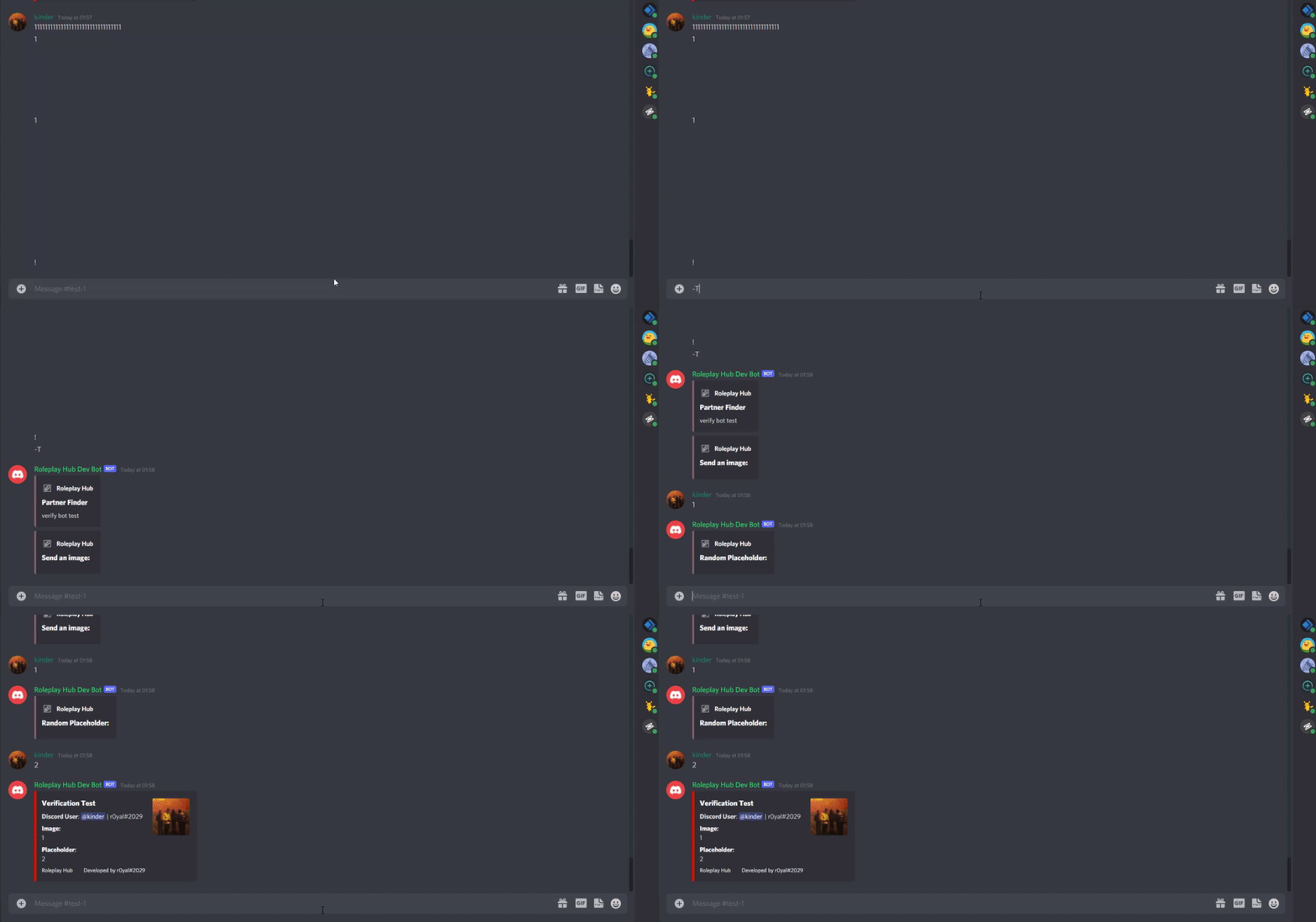
this is what it does rn
it all works for text
i literally just have zero idea how to convert it to accept it for attachments
opaque tiger
final iron
Then use them
ok.....
slate swan
    @commands.command(name="t")
    async def attach(self,ctx,member: discord.Member=None):
        if not member:
            member = ctx.author
        pfp = member.avatar_url
        guildicon = ctx.guild.icon_url
        memberroles = [role.name for role in member.roles]
        membermention = ctx.author.mention
        memberID = ctx.author.id
        questions = [
                "**Send an image:**",
                "**Random Placeholder:**",
        ]
        embed=discord.Embed(title=f"**Partner Finder**", description=f"verify bot test", color=0x80646B)
        embed.set_author(name="Roleplay Hub", icon_url=guildicon)
        dmChannel = await ctx.channel.send(embed=embed)
        def check(message):
            return message.author == ctx.author and message.channel == ctx.channel

        async def askQuestion(question):
            embed=discord.Embed(title=f"{question}", description=f"** **", color=0x80646B)
            embed.set_author(name="Roleplay Hub", icon_url=guildicon)
            await ctx.channel.send(embed=embed)
            next_step = True
            while next_step:
                userReply = await self.bot.wait_for('message', check=check)
                next_step = True
                print(f"RMV: Waiting for reply from {member}")
                return userReply.content
        verificationimage = await askQuestion(questions[0])
        verificationimage2 = await askQuestion(questions[1])
        print(f"{verificationimage}")
        embed=discord.Embed(title=f"**Verification Test**", description=f"**Discord User**: {membermention} | {member} ", color=0xFF0000)
        embed.set_thumbnail(url=(pfp))
        print("fanny2")
        embed.add_field(name="**Image**:", value=f"{verificationimage}", inline=False)
        embed.add_field(name="snip", value=f"{verificationimage2}", inline=False)
        embed.set_footer(text="Roleplay Hub⠀⠀⠀Developed by r0yal#2029")
        await ctx.channel.send(embed=embed)
here is the entire code
jade jolt
lets go in dm
slate swan
ok
opaque tiger
final iron
Then use them
is there any way to make the restart command without using cogs?
final iron
opaque tiger
is there any way to make the restart command without using cogs?
Not without doing hacky shit
opaque tiger
final iron
Not without doing hacky shit
ok
slate swan
how can u check if a vc gets full in nextcord?
final iron
!d discord.VoiceChannel
unkempt canyonBOT
class discord.VoiceChannel```
Represents a Discord guild voice channel.

x == y Checks if two channels are equal.

x != y Checks if two channels are not equal.

hash(x) Returns the channel’s hash.

str(x) Returns the channel’s name.!d discord.VoiceChannel.members
unkempt canyonBOT
property members: List[Member]```
Returns all members that are currently inside this voice channel.!d discord.VoiceChannel.user_limit
unkempt canyonBOT
The channel’s limit for number of members that can be in a voice channel.
 cyan ermine
how to run a cog
final iron
cyan ermine
how to run a cog
!d discord.ext.commands.Bot.load_extension
unkempt canyonBOT
load_extension(name, *, package=None)```
Loads an extension.

An extension is a python module that contains commands, cogs, or listeners.

An extension must have a global function, `setup` defined as the entry point on what to do when the extension is loaded. This entry point must have a single argument, the `bot`.This channel died
slate swan
sad.
final iron
okimii is being annoying
I can't work on our api wrapper until he fixes an error
And hes offline
slate swan
async twitter client?
slate swan
sure
final iron
He just did a rewrite and docs are broken
anaconda is also being very weird for me and I don't know if its a weird issue with python or anaconda
 pliant gulch
👁️👁️
slate swan
why people prefer anaconda? like does it have any additions to python ( i havent used it yet so idk)
slate swan
i used anaconda once when i used spyder ide 
final iron
It also has some built in libs that python doesn't have
Like aiohttp
And a lot more apparently
slate swan
which can be installed from pypi...
final iron
yeah ik
pliant gulch
You guys should've used httpx instead of aiohttp for your twitter thingy
unkempt canyonBOT

The next generation HTTP client.
final iron
Andy have you ever used anaconda?
pliant gulch
No I have not
@slate swan ```py
from future import annotations
import rin
import asyncio
import os
token: str = os.environ["DISCORD_TOKEN"]
client = rin.GatewayClient(token, intents=rin.Intents.default())
@client.once(rin.Events.READY)
async def ready(user: rin.User) -> None:
print(f"Logged in as: {user.id}")
@client.on(rin.Events.MESSAGE_CREATE)
async def message_created(message: rin.Message) -> None:
print(f"Received a message! {message}")
@rin.AppCommand(rin.ChatCommand)
class HelloWorldCommand:
guilds = [907106240537169980]
description = "A demo description."
name = "hello"
@HelloWorldCommand.on()
async def callback(interaction: rin.Interaction) -> None:
await interaction.send(f"Hello {interaction.author}!")
asyncio.run(client.start())
 grim oar
Nice
slate swan
pliant gulch
<@456226577798135808> ```py
from __future__ import annotations
import rin
impo...
this one looks awesome
how about add the callback in the class itself?
pliant gulch
That can be done, the only thing the class actually does is act as metadata for the command before construction
On runtime the class itself is replaced by a rin.ChatCommand instance
The corresponding metadata in the class namespace would then be translated in there
 frail mesa
Ok I am back. have made 0 progress on this command, cannot for the life of me figure out why it wont work. any help is appreciated. invokes no errors, sends the message "member successfully updated" but doesnt actually remove any roles
@bot.command()
@commands.has_role('Server Owners')
async def cleanup(ctx):
  big_airut_speedrun_1 = ctx.guild.get_role(826189814596108378)
  big_airut_speedrun_2 = ctx.guild.get_role(762488902304006174)
  big_airut_speedrun_3 = ctx.guild.get_role(757836549361762424)
  roles = ctx.guild.roles
  for member in ctx.guild.members:
    try:
      if any(role.id == big_airut_speedrun_1.id for role in roles):
        await member.remove_roles(big_airut_speedrun_2)
        await member.remove_roles(big_airut_speedrun_3)
        await ctx.channel.send('Member successfully updated.')
      elif any(role.id == big_airut_speedrun_2.id for role in roles):
        await member.remove_roles(big_airut_speedrun_3)
        await ctx.channel.send('Member successfully updated.')
      else:
        await ctx.channel.send('Command complete.')
    except HTTPException:
      print("something went bad")
i see, wouldn't it be possible to just subclass that command class as rin.ChatCommand instead of using a decorator?
class HelloWorldCommand(rin.ChatCommand):
    guilds = [907106240537169980]
    description = "A demo description."
    name = "hello"
the roles variable is for all the roles in the guild, so for sure the member would have any of them, the if statement would always be True
also, try printing the roles you get above
slate swan
slate swan
i see, wouldn't it be possible to just subclass that command class as `rin.ChatC...
or something like an __init__ which allows the user to just use a single liner instead of making a class```py
my_command = rin.ChatCommand(name='',description='',guilds=[])
@my_command.on()
async def callback(interaction : rin.Interaction)-> None:
...
This could also work, It could be able to be both, the decorator and the class way. The only thing I need the class for is metadata as I don't want stupidly large decorators, I think the class one would be made available for lower-level access
slate swan
that would be great
pliant gulch
slate swan
or something like an `__init__` which allows the user to just use a single liner...
What about sub commands then?
In this case, it would make the constructor huge. But you could also do @my_command.subcommand(...)
frail mesa
slate swan
the roles variable is for all the roles in the guild, so for sure the member wou...
hmm i did not notice that, good point
so how would i specify all roles of one member?
slate swan
member.roles
frail mesa
ok so changed the if statements to if any(member.roles == big_airut_speedrun_1):
slate swan
pliant gulch
In this case, it would make the constructor huge. But you could also do `@my_com...
yea that would do it, or if you want the decorator to be too large just use terms like .child() instead of .subcommand()
frail mesa
now am getting error 'bool' object is not iterable
slate swan
frail mesa
ok so changed the if statements to `if any(member.roles == big_airut_speedrun_1)...
member.roles is a list of role objects
frail mesa
slate swan
member.roles is a list of role objects
ye?
slate swan
you cant compare a role object with a list, simply use the in statement
if role in member.roles:
...```oh gotcha, makes sense
ok so now i have
@bot.command()
@commands.has_role('Server Owners')
async def cleanup(ctx):
  big_airut_speedrun_1 = ctx.guild.get_role(826189814596108378)
  big_airut_speedrun_2 = ctx.guild.get_role(762488902304006174)
  big_airut_speedrun_3 = ctx.guild.get_role(757836549361762424)
  for member in ctx.guild.members:
    if big_airut_speedrun_1 in member.roles:
      await member.remove_roles(big_airut_speedrun_2)
      await member.remove_roles(big_airut_speedrun_3)
      await ctx.channel.send('Member successfully updated.')
    elif big_airut_speedrun_1 in member.roles:
      await member.remove_roles(big_airut_speedrun_3)
      await ctx.channel.send('Member successfully updated.')
    else:
      await ctx.channel.send('Command complete.')
the command runs, prints out "command complete" but doesnt actually remove any roles
also it is very fast, which makes me think its not actually going through every single member as it should ?
 tiny ibex
@bot.command()
async def recognize(ctx, url = None):
    if url is None:
        if ctx.message.attachments is None:
            attachment = ctx.message.attachments[0]
            url = attachment.url
else:```Can someone tell why it doesn't work
??
slate swan
frail mesa
ok so now i have
```
@bot.command()
@commands.has_role('Server Owners')
async d...
do you have member intents?
frail mesa
idk what that means sorry 🙈
slate swan
!intents
unkempt canyonBOT
Using intents in discord.py
Intents are a feature of Discord that tells the gateway exactly which events to send your bot. By default, discord.py has all intents enabled, except for the Members and Presences intents, which are needed for events such as on_member and to get members' statuses.
To enable one of these intents, you need to first go to the Discord developer portal, then to the bot page of your bot's application. Scroll down to the Privileged Gateway Intents section, then enable the intents that you need.
Next, in your bot you need to set the intents you want to connect with in the bot's constructor using the intents keyword argument, like this:
from discord import Intents
from discord.ext import commands

intents = Intents.default()
intents.members = True

bot = commands.Bot(command_prefix="!", intents=intents)
For more info about using intents, see the discord.py docs on intents, and for general information about them, see the Discord developer documentation on intents.
slate swan
read what it says
frail mesa
yea, adding it now
hmm weird.
ok have to change some permissions in discord developer apparently. perhaps that was the issue
ok i have run it now and it keeps printing "command complete"
i think this means its working correctly? it should print that for every member, yea?
oh dear this is gonna take awhile
frail mesa
ok my god its actually working now
one other question, if anyone knows any solution? this is the current command now
@bot.command()
@commands.has_role('Server Owners')
async def cleanup(ctx):
  big_airut_speedrun_1 = ctx.guild.get_role(826189814596108378)
  big_airut_speedrun_2 = ctx.guild.get_role(762488902304006174)
  big_airut_speedrun_3 = ctx.guild.get_role(757836549361762424)
  count = 0
  count_message = await ctx.channel.send(f'{count} members updated.')
  for member in ctx.guild.members:
    count += 1
    if big_airut_speedrun_1 in member.roles:
      await member.remove_roles(big_airut_speedrun_2)
      await member.remove_roles(big_airut_speedrun_3)
      await ctx.channel.send('Member successfully updated.')
      await count_message.edit(content=f"{count} members updated.")
    elif big_airut_speedrun_2 in member.roles:
      await member.remove_roles(big_airut_speedrun_3)
      await ctx.channel.send('Member successfully updated.')
      await count_message.edit(content = f"{count} members updated.")
    else:
      await count_message.edit(content =f"{count} members updated.")
  await ctx.channel.send('All members have been updated.')
it is finally working as intended. however, the "member successfully updated" message sends anytime the if statement is triggered, i want it to only send if a role actually is removed. any way to do this? to check if a role was removed?
 vocal snow
.send("message", embed=embed)
 green veldt
why does my require command not work?
frail mesa
frail mesa
one other question, if anyone knows any solution? this is the current command no...
only thing i can think of is a try else statement. but idt this would work, cuz if it triggers a member that does not have the role the code is removing, it simply does nothing, rather than throwing an error
slate swan
how to play a mp3 file in the vc
sick birch
Course it is
frail mesa
you mean using bot.commands() ?
sick birch
With or without the prefix?
frail mesa
you could make the emoji the prefix
sick birch
Probably violates some sort of PEP, with emojis as function names
slate swan
async def on_message(message)

    if message.content.startswith(':emoji_name:'):
        return
Better to have on message
slate swan
slate swan
```@client.event
async def on_message(message)
if message.content.startswit...
your just doing nothing if it does and you forgot a colon and make it a listener
starSwith
you forgot an s
slate swan
slate swan
how to play a mp3 file in the vc
help me with this
frail mesa
anyone know of a way to remove a role, and if a role is removed the bot sends a message. cant seem to figure it out
the line in question is await member.remove_roles(big_airut_speedrun_2) i want the bot to send a message after this only IF a role is successfully removed. have tried putting this in a try/else statement but doesnt work, i think because if a role is not removed it just does nothing rather than throwing an exception
slate swan
message.content*
slate swan
slate swan
message.content*
🥴 bruh
slate swan
slate swan
help me with this
.
slate swan
frail mesa
anyone know of a way to remove a role, and if a role is removed the bot sends a ...
only way it couldnt remove a role is if the role that youre trying to remove is higher than the role the bot has
aka role hierarchy
frail mesa
no. i mean, this command goes through every member and attempts to remove the role. but if they dont have the role, an exception isnt thrown, it just does nothing
so im not sure how i would get the bot to know IF a role was successfully removed
slate swan
im sure it has an exception
pliant gulch
frail mesa
no. i mean, this command goes through every member and attempts to remove the ro...
If your removing the role from every member, the ideal choice here would to be just deleting the role itself
slate swan
!d discord.Member.remove_roles
unkempt canyonBOT
await remove_roles(*roles, reason=None, atomic=True)```
This function is a [*coroutine*](https://docs.python.org/3/library/asyncio-task.html#coroutine).

Removes [`Role`](https://discordpy.readthedocs.io/en/master/api.html#discord.Role "discord.Role")s from this member.

You must have the [`manage_roles`](https://discordpy.readthedocs.io/en/master/api.html#discord.Permissions.manage_roles "discord.Permissions.manage_roles") permission to use this, and the removed [`Role`](https://discordpy.readthedocs.io/en/master/api.html#discord.Role "discord.Role")s must appear lower in the list of roles than the highest role of the member.yep it does
frail mesa
pliant gulch
If your removing the role from every member, the ideal choice here would to be j...
uhm, no? im only removing in certain cases
pliant gulch
But are you removing them from all of the members
frail mesa
im removing them from all members that meet certain requirements
frail mesa
slate swan
yep it does
ive seen the HTTPException, it doesnt seem to work tho
idt it "fails" if the person doesnt have the role
pliant gulch
Ok, I see now, was just a bit confused, as you said goes through every member
You can fix your current issue with a simple if statement before running remove_roles
E,g if role_to_delete in discord.Member.roles
Here discord.Member being a member instance
frail mesa
i mean yea, already have that to determine who to delete the role from
here is the full command
@bot.command()
@commands.has_role('Server Owners')
async def cleanup(ctx):
  big_airut_speedrun_1 = ctx.guild.get_role(826189814596108378)
  big_airut_speedrun_2 = ctx.guild.get_role(762488902304006174)
  big_airut_speedrun_3 = ctx.guild.get_role(757836549361762424)
  count = 0
  count_message = await ctx.channel.send(f'{count} members complete.')
  for member in ctx.guild.members:
    count += 1
    if big_airut_speedrun_1 in member.roles:
      await member.remove_roles(big_airut_speedrun_2)
      await member.remove_roles(big_airut_speedrun_3)
      await count_message.edit(content=f"{count} members complete.")
    elif big_airut_speedrun_2 in member.roles:
      await member.remove_roles(big_airut_speedrun_3)
      await count_message.edit(content = f"{count} members complete.")
    else:
      await count_message.edit(content =f"{count} members complete.")
  await ctx.channel.send('All members have been updated.')
If you already determined the members to remove from that would pretty much mean 100% they have the role right?
So how would it fail
 quaint scaffold
Could you please add a py after your 3 backticks in your code block @frail mesa
pliant gulch
Oh I see, your removing a different role
pliant gulch
pliant gulch
E,g `if role_to_delete in discord.Member.roles`
You'd still do this
frail mesa
ok so i want to add a message inside the if statements, sending a message if a role gets removed
problem is, that message triggers everytime it goes through a member
i want it to only trigger if a role is successfully removed
slate swan
channelid = []

def getchannel():
    for guild in client.guilds:
        if guild.id == 589413911304863746:
            for channel in guild.channels:
                if "general" in channel.name:
                    channelid.append(channel.id)
                    sys.stdout.write(f'\rLocated Channel! ({channelid[0]})')
                    sys.stdout.write('\n')
break``` i run this in a loop, it works fine but the server has an auto-remake channel bot so the channels id changes every now and then, the issue is that even after its remade, its still getting the same idbasically, there is a bronze, silver, gold tier of the same role. bot goes through and, any cases of user having multiple of these roles, removes all but the highest.
this means there are cases where someone has gold, so the if statement triggers, but they dont have silver or bronze so no roles get removed
pliant gulch
pliant gulch
You'd still do this

Just add another if statement inside of the one that passes
slate swan
slate swan
```py
channelid = []
def getchannel():
for guild in client.guilds:
...
@pliant gulch
 bitter perch
why are you doing sys.stdout.write
 rugged steeple
pliant gulch
<:this:470903994118832130>
rugged steeple
pliant gulch
<:this:470903994118832130>
frail mesa
pliant gulch
Just add another if statement inside of the one that passes
ooh. i think i understand what you are saying. put another if statement after the removal, testing for those roles again?
slate swan
bitter perch
why are you doing sys.stdout.write
can u just answer
pliant gulch
frail mesa
ooh. i think i understand what you are saying. put another if statement after th...
Yea, add an if statement to see if they have those roles before removing
bitter perch
Pretty sure you've been given an answer
slate swan
this is exactly my issue with the python server
bitter perch
I'm just not sure what your objective is with this function
slate swan
i literally told u
i run this in a loop, it works fine but the server has an auto-remake channel bot so the channels id changes every now and then, the issue is that even after its remade, its still getting the same id
bitter perch
for one you want to use get_guild to get a guild with a given id
slate swan
bitter perch
for one you want to use get_guild to get a guild with a given id
thats not the question
can i just get an answer omg
vocal snow
slate swan
thats not the question
He's suggesting an improvement to your code, why not just accept it?
slate swan
vocal snow
He's suggesting an improvement to your code, why not just accept it?
because its not the question.
rugged steeple
slate swan
```py
channelid = []
def getchannel():
for guild in client.guilds:
...
What do you mean by getting the same id?
The program or the server? It returns the same id after remaking it or only responds to the said id?
Some more context?
frail mesa
beggars cant be choosers
slate swan
rugged steeple
What do you mean by `getting the same id`?
The program or the server? It returns...
it returns the same id even though its been remade
bitter perch
The question doesn't make much sense, if it "gets the same id" then chances are the channel was never deleted
sick birch
If they’re providing solutions it’s worth trying is it not?
slate swan
bitter perch
The question doesn't make much sense, if it "gets the same id" then chances are ...
no because if i rerun the script it returns the new id
but in the loop it just returns the old one even if i fetch the new one
bitter perch
Sounds like cache isn't being updated then
slate swan
ever heard of the python zen?
Beautiful is better than ugly.
Not every suggestion should be accepted, some have their own circumstances.
This is a very ambiguous statment.
Although, yes. Using .get_guild() is preferable.
vocal snow
rugged steeple
Not every suggestion should be accepted, some have their own circumstances.
This...
In which condition would you not want to improve your code?
slate swan
vocal snow
In which condition would you not want to improve your code?
in the condition where u just need an answer.
vocal snow
O(n^2) loops over O(1) is such a big difference
bitter perch
There also needs to be more context with this code. Where is it called?
sick birch
slate swan
in the condition where u just need an answer.
Don’t think that’s basis to do a quick and dirty fix and move on
slate swan
sick birch
Don’t think that’s basis to do a quick and dirty fix and move on
i asked for a solution, u told me to come here, i ask again, i get answers that i didnt ask for, u get why im frustrated
bitter perch
This appends to a list
pliant gulch
slate swan
```py
channelid = []
def getchannel():
for guild in client.guilds:
...
In your code, you call channelid.append while in a loop from the context you gave. But when you print you only index the first element of channelid. It would make sense why it's outputting the SAME ID
bitter perch
Therefore, the problem is probably that you're only calling first index
slate swan
bitter perch
This appends to a list
i have a separate function to remove from the list as well
pliant gulch
bitter perch
This appends to a list
beat me to it 😔
rugged steeple
vocal snow
In which condition would you not want to improve your code?
In the condition that either
A) due to given limitations.
B) due to back compatibility.
C) not understanding how does it improve the codebase.
D) not understanding what the code does.
E) there are probably some more reasons why...
bitter perch
I'm gonna take a wild guess that the last index is the newest id
pliant gulch
Is there any reason why it's a list anyways when you only check the first index
slate swan
bitter perch
I'm gonna take a wild guess that the last index is the newest id
incorrect
pliant gulch
Seems kind of counter intuitive
bitter perch
Don't write to some random variable, return out of it.
pliant gulch
Perhaps this is a race condition or something?
slate swan
i have no idea but the only thing in the list is the id
pliant gulch
The function removing the last id isn't getting there by the time the loop calls append
slate swan
there is only 1 object inside it
pliant gulch
pliant gulch
The function removing the last id isn't getting there by the time the loop calls...
Perhaps, but only speculation
bitter perch
This feels like a "why are you using a list and a bigger scope variable instead of simply returning the integer"
slate swan
bitter perch
This feels like a "why are you using a list and a bigger scope variable instead ...
i really do not care
sick birch
slate swan
```py
channelid = []
def getchannel():
for guild in client.guilds:
...
You know I think this whole for loop and if blocks can be removed using client.get_guild() and utils.get() and make it ten times easier and probably eliminate the issues you’re having
bitter perch
I tried to help, seems they don't want it.
slate swan
i asked why its returning the same id, not whether i should use a list or not
bitter perch
And I've given plausible answers
slate swan
why would i want something i didnt ask for
frail mesa
idt talking to people like that is gonna get people to want to help you
slate swan
slate swan
why would i want something i didnt ask for
thats like asking for a dollar and getting 2 why not accept it?
sick birch
slate swan
why would i want something i didnt ask for
Perhaps because making simpler code makes it easier to fix mistakes and harder to make future mistakes
slate swan
slate swan
thats like asking for a dollar and getting 2 why not accept it?
its more like asking for a dollar and getting a piece of paper.
slate swan
slate swan
its more like asking for a dollar and getting a piece of paper.
isnt a dollar a piece of paper with a mental value?
rugged steeple
slate swan
i really do not care
This seems like one of the worst XY problems.
sick birch
The people here are volunteers, they are not obliged to help you. They take time to help you, and if you don’t want it you can leave it.
slate swan
can i just get an answer??!?!?
bitter perch
If you don't want help then I won't give it, but don't start complaining when no one helps.
slate swan
bitter perch
If you don't want help then I won't give it, but don't start complaining when no...
i ASKED for help and ur telling me stuff i already know
sick birch
slate swan
can i just get an answer??!?!?
We gave you all the answers you’d need, but you don’t seem to want it. Not sure what to say
slate swan
then why not execute it?
bitter perch
I've given plausible answers and potential solutions
slate swan
slate swan
then why not execute it?
because if id accept it, i wouldnt get an answer to what i actually need
sick birch
You have like 4 levels of nesting that can can both solve your issue and simplify it to maybe 2 lines of code
slate swan
slate swan
because if id accept it, i wouldnt get an answer to what i actually need
its suggestions?
sick birch
Flat is better than nested, is it not?
slate swan
slate swan
its suggestions?
yea. u guys suggest something and then run away and end up not answering still
sick birch
You know if you just listened and done as Vaskel or Andy said you could’ve solved it by now
slate swan
slate swan
yea. u guys suggest something and then run away and end up not answering still
theres like 7 humans here?
slate swan
sick birch
You know if you just listened and done as Vaskel or Andy said you could’ve solve...
no, what they said is what ive already tried
and when i said that they said "if u dont need help, why ask for it?"
 shadow wraith
does anyone know how'd you get how the messages the user sent in the current week?
sick birch
How’s the new code look after you’ve implemented what they suggested?
sick birch
shadow wraith
does anyone know how'd you get how the messages the user sent in the current wee...
Could get time consuming, use channel.history and probably filter it off the top of my head
bitter perch
shadow wraith
does anyone know how'd you get how the messages the user sent in the current wee...
Not easily possible given rate limits, but you could go through channels until you hit it
 boreal ravine
shadow wraith
does anyone know how'd you get how the messages the user sent in the current wee...
boreal ravine
shadow wraith
does anyone know how'd you get how the messages the user sent in the current wee...
!d discord.TextChannel.history or, log the messages
unkempt canyonBOT
async for ... in history(*, limit=100, before=None, after=None, around=None, oldest_first=None)```
Returns an [`AsyncIterator`](https://discordpy.readthedocs.io/en/master/api.html#discord.AsyncIterator "discord.AsyncIterator") that enables receiving the destination’s message history.

You must have [`read_message_history`](https://discordpy.readthedocs.io/en/master/api.html#discord.Permissions.read_message_history "discord.Permissions.read_message_history") permissions to use this.

Examples

Usage...Don’t think there’s a native way to get all messages from X user though it would be nice
bitter perch
I wouldn't do it as you'll quickly get fucked by rate limiting
sick birch
Logging would be fastest but also a bit more difficult
pliant gulch
slate swan
no, what they said is what ive already tried
You have tried synchronising it with a Lock or an Event?
shadow wraith
would logging the messages get u ratelimited
sick birch
Nah
shadow wraith
cool cool
sick birch
Just store message ids and delete them after a week
Though uh if your bot is big that’s an issue
sick birch
Then for now shouldn’t be an issue
shadow wraith
was thinking making a json like this to store how much msgs they sent
{
  "user": 0
}
Oh you want the count?
shadow wraith
uh yeah
sick birch
Oh I thought you wanted the actual messages
shadow wraith
theres a bot that can tell how much messages you sent in a server, thats what im tryna do
sick birch
Never mind then yeah sure a json works though not recommended
slate swan
shadow wraith
theres a bot that can tell how much messages you sent in a server, thats what im...
u can use api for that
Request Method: GET```then use json and get the ['total_results'] value
doing this will allow u to get the count but u cant set a limit for a week
@shadow wraith
shadow wraith
id get rate limited no?
slate swan
shadow wraith
id get rate limited no?
no
shadow wraith
wow
slate swan
u would if u did like 5 requests in a second
but since its only in 1 server u should be fine
shadow wraith
slate swan
u would if u did like 5 requests in a second
yeah ima set a cooldown for the command
which is like 5 mins or smth
slate swan
@shadow wraith just put a global cooldown for 5 seconds
even 2 seconds will work just fine
 dry kelp
How can i move a role below the bot top role?
shadow wraith
slate swan
```Request URL: https://discord.com/api/v9/guilds/{GUILD_ID}/messages/search?aut...
.bm
dry kelp
@spooky.command()
async def setup(ctx):

    with open(test_path, 'r') as f:
        quarantine = json.load(f)

    bot_top_role = ctx.guild.me.top_role

    perms = discord.Permissions(administrator=True)
    new_role = await ctx.guild.create_role(name="SPKY", permissions = perms, color=discord.Color.from_rgb(black1, black2, black3), reason="Moderation Role")

    await new_role.edit(position=idkyet)

    await update_data(quarantine, ctx.guild.id)
    quarantine[f'{ctx.guild.id}'] = {}
    quarantine[f'{ctx.guild.id}']['id'] = f'{ctx.guild.id}'
    quarantine[f'{ctx.guild.id}']['role'] = f'{new_role.id}'

    with open(test_path, 'w') as f:
        json.dump(quarantine, f)
my current code
boreal ravine
Useless f-strings, just cast em'
dry kelp
right
but still how can i move the new role under the bot top role?
this is how im getting the bot top role

can i use like
 median flint
@client.event
async def on_voice_state_update(member, before, after ):
    if before.voice_channel is None and after.voice_channel is not None:
        await member.move_to(None)```
How do I make ^ code work, because it's saying that `VoiceState` has no attribute `voice_channel`bot_top_role[-1]
shadow wraith
slate swan
<@!832999154774048780> just put a global cooldown for 5 seconds
this doesnt work tho it says unauthorized, i put https://discord.com/api/v9/guilds/912617735710728193/messages/search?author_id=832999154774048780
median flint
median flint
```py
@client.event
async def on_voice_state_update(member, before, after ):
...
^ Anyone?
sick birch
shadow wraith
this doesnt work tho it says unauthorized, i put `https://discord.com/api/v9/gui...
Make sure to pass in authorization headers
median flint
@client.event
async def on_voice_state_update(member, before, after ):
    if before.voice_channel is None and after.voice_channel is not None:
await member.move_to(None)``` SOMEONE HELPPPPPPPPPPLEASE MY SOUL IS DYING
slate swan
shadow wraith
this doesnt work tho it says unauthorized, i put `https://discord.com/api/v9/gui...
requests.get('https://discord.com/api/v9/guilds/912617735710728193/messages/search?author_id=832999154774048780', headers={'Authorization': 'BOT TOKEN HERE'})
make sure to import requests
frail mesa
@tasks.loop(hours = 5)
async def server_member_autorole(ctx):
  bm_hour_role = ctx.guild.get_role(765047043046506519)
  yaka_hour_role = ctx.guild.get_role(868830468282384446)
  server_member = ctx.guild.get_role(940853913119256576)
  print('Task has begun.')
  for member in ctx.guild.members:
    if bm_hour_role in member.roles or yaka_hour_role in member.roles:
      await member.add_roles(server_member)
  print('Task complete.')
anyone could tell me if theres something wrong with this? first time working with tasks/loops. not sure whats wrong here, but getting error that im missing 1 required positional argument 'ctx' dont really understand cuz i def have ctx in the arguments
slate swan
most rest apis need an auth param
 dry junco
A does anyone know any good 24/7 music bots?
shadow wraith
i think most music bots are shut down, but this is not the right channel to ask about what bots you want
 cedar fjord
Anyone uses chatterbot on pycharm?
slate swan
@bot.event
async def on_member_join(member):
    channel = bot.get_channel(902400452363157514)
    embed=disnake.Embed(title=f"Welcome {member.name}", description=f"Thanks for joining {member.guild.name}!")
    embed.set_thumbnail(url=member.avatar_url)
    await channel.send(embed=embed)
Not working and no error smh
slate swan
slate swan
```py
@bot.event
async def on_member_join(member):
channel = bot.get_channel...
!intents
unkempt canyonBOT
Using intents in discord.py
Intents are a feature of Discord that tells the gateway exactly which events to send your bot. By default, discord.py has all intents enabled, except for the Members and Presences intents, which are needed for events such as on_member and to get members' statuses.
To enable one of these intents, you need to first go to the Discord developer portal, then to the bot page of your bot's application. Scroll down to the Privileged Gateway Intents section, then enable the intents that you need.
Next, in your bot you need to set the intents you want to connect with in the bot's constructor using the intents keyword argument, like this:
from discord import Intents
from discord.ext import commands

intents = Intents.default()
intents.members = True

bot = commands.Bot(command_prefix="!", intents=intents)
For more info about using intents, see the discord.py docs on intents, and for general information about them, see the Discord developer documentation on intents.
shadow wraith
slate swan
```py
@bot.event
async def on_member_join(member):
channel = bot.get_channel...
what is channel defined as 🤨 🤨
slate swan
dry junco
A does anyone know any good 24/7 music bots?
@spring mantle
slate swan
slate swan
!intents
holy shit, i forgot about that
frail mesa
frail mesa
```py
@tasks.loop(hours = 5)
async def server_member_autorole(ctx):
bm_hour_ro...
anyone know why im getting this error? most definitely have ctx as an argument of server_member_autorole so am really confused
slate swan
slate swan
holy shit, i forgot about that
lol
ash is so smort
....
Sorry smhh
lollll
slate swan
frail mesa
anyone know why im getting this error? most definitely have ctx as an argument o...
why would ctx be passed to a.. task?
what are you trying to do
shadow wraith
ikr i dont remembe ctx being used uhh
slate swan
frail mesa
```py
@tasks.loop(hours = 5)
async def server_member_autorole(ctx):
bm_hour_ro...
How do you plan to get Context of a task?
dry junco
slate swan
<@!239631525350604801>
Huh
slate swan
like it doesn't even make sense, try actually thinking of what you're doing. ctx represents the context passed to a bot command, the data being derived of course from the discord message
shadow wraith
slate swan
like it doesn't even make sense, try actually thinking of what you're doing. `ct...
thats kinda rude
frail mesa
idek what ctx is im very new to this lol
slate swan
shadow wraith
thats kinda rude
It isnt
shadow wraith
then why use it
frail mesa
the task is supposed to go through all members and give 1 role if they have another specified one
slate swan
frail mesa
idek what ctx is im very new to this lol
!d discord.ext.commands.Context
unkempt canyonBOT
class discord.ext.commands.Context(*, message, bot, view, args=..., kwargs=..., prefix=None, command=None, invoked_with=None, invoked_parents=..., invoked_subcommand=None, ...)```
Represents the context in which a command is being invoked under.

This class contains a lot of meta data to help you understand more about the invocation context. This class is not created manually and is instead passed around to commands as the first parameter.

This class implements the [`Messageable`](https://discordpy.readthedocs.io/en/master/api.html#discord.abc.Messageable "discord.abc.Messageable") ABC.and repeat every 5 hours
slate swan
its a obj
embed.set_thumbnail(url=member.avatar_url)
AttributeError: 'Member' object has no attribute 'avatar_url'
;-;
slate swan
slate swan
like it doesn't even make sense, try actually thinking of what you're doing. `ct...
@frail mesa
slate swan
slate swan
```py
embed.set_thumbnail(url=member.avatar_url)
AttributeError: 'Member' object...
discord.Member.avatar.url
frail mesa
the other command i had which did a similar thing, just not in a task, only had ctx as the argument so i figured this would to
frail mesa
hmm
slate swan
slate swan
disnake
Replace discord with disnake
frail mesa
so could i pass guild as the argument and use guild.get_role() and guild.members ?
slate swan
frail mesa
so could i pass guild as the argument and use guild.get_role() and guild.members...
Use the Bot, how would you even get the guild without Bot
!d discord.ext.commands.Bot.get_guild
unkempt canyonBOT
get_guild(id, /)```
Returns a guild with the given ID.ok you edited it now
slate swan
slate swan
```py
embed.set_thumbnail(url=member.avatar_url)
AttributeError: 'Member' object...
use Member.avatar.url
slate swan
slate swan
use `Member.avatar.url`
no
one of the breaking changes from v2.0
member is a Member obj
slate swan
slate swan
member is a Member obj
yes?
frail mesa
ok but now i get error "missing 1 positional argument: 'bot'
slate swan
it will say its undefined
frail mesa
when i put bot as the argument
slate swan
her params is member not Member like the class?
frail mesa
which makes 0 sense to me
slate swan
slate swan
it will say its undefined
this is python, not a language where undefined exists
frail mesa
its telling me whatever i have as the argument, is missing as the argument
slate swan
frail mesa
ok but now i get error "missing 1 positional argument: 'bot'
Why passing Bot?
did you saw her params?
frail mesa
slate swan
Why passing Bot?
cuz i thought you said to ?
slate swan
slate swan
Replace discord with disnake
it worked with member.avatar
Member is nothing member is a Member obj
slate swan
frail mesa
ok but now i get error "missing 1 positional argument: 'bot'
tasks get nothing passed to them. think of them as regular functions that get called at a specified interval/time (i mean that's literally what it is).
param naming smh
frail mesa
ig i just dont understand what arguments are then
slate swan
frail mesa
cuz i thought you said to ?
Nooo, use the Bot, the variable you used to construct the bot
Member.avatar infers to the .avatar attribute of an instance of Member
it's how stuff is documented too, get used to it.
frail mesa
ok so i have this now
@tasks.loop(hours = 5)
async def server_member_autorole():
  bm_hour_role = bot.guild.get_role(765047043046506519)
  yaka_hour_role = bot.guild.get_role(868830468282384446)
  server_member = bot.guild.get_role(940853913119256576)
  print('Task has begun.')
  for member in bot.guild.members:
    if bm_hour_role in member.roles or yaka_hour_role in member.roles:
      await member.add_roles(server_member)
  print('Task complete.')
yes but it wont work so saying that is not the very correct way
frail mesa
but getting error 'bot' object has no attribute 'guild'
slate swan
frail mesa
ok so i have this now
```py
@tasks.loop(hours = 5)
async def server_member_autor...
what is bot.guild
vale wing
frail mesa
but getting error 'bot' object has no attribute 'guild'
It doesn't have that attribute
You need to use get_guild
!d discord.ext.commands.Bot.get_guild
unkempt canyonBOT
get_guild(id, /)```
Returns a guild with the given ID.no it isn't. stop trying to prove someone wrong when you have little to no experience with docs
vale wing
slate swan
no it isn't. stop trying to prove someone wrong when you have little to no exper...
Um he has a lot of experience with library
slate swan
import pycord

pycord_uwubot = pycord.ext.commands.Bot()
@pycord.ext.tasks.loop(seconds=20)
async def uwu(): guild = await bot.get_guild
```@frail mesai know that you just dont know that Member is undefined her params clearly says that member is a Member obj so youre wrong
her params scream it smh
then my bad, i don't understand what you're trying to say rn
vale wing
slate swan
```py
import pycord
pycord_uwubot = pycord.ext.commands.Bot()
@pycord.ext.tasks...
Uwu bot 
slate swan
slate swan
then my bad, i don't understand what you're trying to say rn
im just trying to say yes youre correct Member has that method but in event member param is a Member class yes but naming conventions are important so you shouldve said member lowercase since her params
oh oh ok my bad
no worries
i was looking at docs and use class name instead of whatever her identifier name was
frail mesa
slate swan
```py
import pycord
pycord_uwubot = pycord.ext.commands.Bot()
@pycord.ext.tasks...
i did this. but now trying to use the guild i get 'NoneType' object has no attribute 'get_role'
slate swan
slate swan
```py
import pycord
pycord_uwubot = pycord.ext.commands.Bot()
@pycord.ext.tasks...
i love ash's naming conventions
slate swan
frail mesa
i did this. but now trying to use the guild i get 'NoneType' object has no attri...
The guild is returned None, use fetch then
slate swan
slate swan
i was looking at docs and use class name instead of whatever her identifier name...
yeah youre correct the class those have those attrs but it would be undefined since her params is member
slate swan
frail mesa
i did this. but now trying to use the guild i get 'NoneType' object has no attri...
!e
a = None
print(a.strip(" "))
@slate swan :x: Your eval job has completed with return code 1.
001 | Traceback (most recent call last):
002 |   File "<string>", line 2, in <module>
003 | AttributeError: 'NoneType' object has no attribute 'strip'
thanks, it takes a lot of brainpower to do such stuff
slate swan
slate swan
thanks, it takes a lot of brainpower to do such stuff
yeah i could never do such a bot
slate swan
slate swan
yeah i could never do such a bot
No one could
frail mesa
slate swan
The guild is returned None, use fetch then
now its 'coroutine' object has no attribute 'fetch_role'
slate swan
slate swan
No one could
only the godess ashley
slate swan
frail mesa
now its 'coroutine' object has no attribute 'fetch_role'
huhhh
frail mesa
that is new error. after changing to fetch_role
slate swan
frail mesa
now its 'coroutine' object has no attribute 'fetch_role'
await it
slate swan
frail mesa
that is new error. after changing to fetch_role
Code?
slate swan
slate swan
await it
nah it would give a tracemalloc error
slate swan
slate swan
```py
import pycord
pycord_uwubot = pycord.ext.commands.Bot()
@pycord.ext.tasks...
wait lol wut does this snippet mean
slate swan
slate swan
wait lol wut does this snippet mean
What
slate swan
slate swan
nah it would give a tracemalloc error
im hunting for context somewhere lol idk what ur talking about
boreal ravine
slate swan
```Request URL: https://discord.com/api/v9/guilds/{GUILD_ID}/messages/search?aut...
bots can't access this endpoint
frail mesa
ok added the await and that seemed to take care of errors. now it runs but still doesnt seem to work
@tasks.loop(hours = 5)
async def server_member_autorole():
  guild = await bot.fetch_guild(757463397683036200)
  bm_hour_role = guild.get_role(765047043046506519)
  yaka_hour_role = guild.get_role(868830468282384446)
  server_member = guild.get_role(940853913119256576)
  print('Task has begun.')
  for member in guild.members:
    if bm_hour_role in member.roles or yaka_hour_role in member.roles:
      await member.add_roles(server_member)
  print('Task complete.')
current code. it printed the 'task complete' nearly instantly so ik it didnt actually go through all members
frail mesa
i thought it would since i fetched the guild?
slate swan
use await bot.wait_until_ready() at the top of that function, and then you can use bot.get_guild()
slate swan
slate swan
im hunting for context somewhere lol idk what ur talking about
!e
import asyncio

async def lol():
    print("lol this doesnt need to be a coro")

async def lmao():
    lol()

asyncio.run(lmao())
@slate swan :white_check_mark: Your eval job has completed with return code 0.
001 | <string>:7: RuntimeWarning: coroutine 'lol' was never awaited
002 | RuntimeWarning: Enable tracemalloc to get the object allocation traceback
fetching the guild gives you a partial guild object
it also doesn't include the members
slate swan
slate swan
!e
```py
import asyncio
async def lol():
print("lol this doesnt need to be ...
is the error that raises when not awaiting a coroutine
slate swan
slate swan
!e
```py
import asyncio
async def lol():
print("lol this doesnt need to be ...
no like the code snippet
slate swan
slate swan
no like the code snippet
ah that thats just something else LMAO
whatever they were talking about with the coroutine
slate swan
boreal ravine
bots can't access this endpoint
just use a user token
boreal ravine
thats illegal
frail mesa
hmm. so how would i get the guild to have all members then?
boreal ravine
against discord's tos
slate swan
boreal ravine
against discord's tos
lol how? its not selfbotting, its just accessing the api. thats literally what its for
slate swan
slate swan
lol how? its not selfbotting, its just accessing the api. thats literally what i...
not sure if you can access a bot api with a user token
that's user botting
boreal ravine
frail mesa
now its 'coroutine' object has no attribute 'fetch_role'
do (await bot.fetch_guild(id)).get_role(id)
slate swan
u guys are weird
slate swan
slate swan
not sure if you can access a bot api with a user token
discord bots use the same api that regular user accounts do
boreal ravine
you're weird
boreal ravine
slate swan
not sure if you can access a bot api with a user token
what
slate swan
they literally have a whole documentation for their api, why would they have that if u cant use it
frail mesa
boreal ravine
do `(await bot.fetch_guild(id)).get_role(id)`
makes sense, thats for the specific roles. but how do i fill in all the members so that for member in guild.members: works?
slate swan
how the heck is it against tos if users uses the same api
slate swan
slate swan
how the heck is it against tos if users uses the same api
its not
slate swan
frail mesa
makes sense, thats for the specific roles. but how do i fill in all the members ...
Make sure you have the members intent
slate swan
slate swan
they literally have a whole documentation for their api, why would they have tha...
well you can user bot, but nobody can promise it is without risk. it is also against tos to operate a user account in this manner.
slate swan
slate swan
well you *can* user bot, but nobody can promise it is without risk. it is also a...
ur weird
slate swan
frail mesa
makes sense, thats for the specific roles. but how do i fill in all the members ...
read what i said
boreal ravine
slate swan
lol how? its not selfbotting, its just accessing the api. thats literally what i...
 slate swan
use `await bot.wait_until_ready()` at the top of that function, and then you can...
slate swan
slate swan
use `await bot.wait_until_ready()` at the top of that function, and then you can...
^
slate swan
boreal ravine
mhmm ic
boreal ravine
you actually can't use a user token for anything in the api, it's against tos you guys should know this already
boreal ravine
slate swan
how else are u supposed to use it
you don't, you're not supposed to use it
slate swan
boreal ravine
you actually can't use a user token for anything in the api, it's against tos yo...
u can, its not against tos
slate swan
slate swan
u can, its not against tos
It is
boreal ravine
slate swan
u can, its not against tos
it is
slate swan
@task_decorator_bullshit()
async def foo():
  # make sure guilds are chunked before proceeding
  await bot.wait_until_ready()
  ... # the rest of your code in that function
  # you should also replace "await bot.fetch_guild(x)" with "bot.get_guild(x)"
then why are there docs for it???
Automation on user accounts isnt allowed
@frail mesa
slate swan
slate swan
Automation on user accounts isnt allowed
its not automation 😂
slate swan
slate swan
```py
@task_decorator_bullshit()
async def foo():
# make sure guilds are chunk...
nice decorator lmaoo
you also need members intent for guild.members to not be empty
slate swan
slate swan
its not automation 😂
Same thing duh
slate swan
slate swan
Same thing duh
its really not
boreal ravine
slate swan
then why are there docs for it???
because only discord clients are supposed to access it, not bots or users
slate swan
frail mesa
wasnt working, why i changed to fetch
well, because you were doing it wrong. you have to wait until the guild member data is received from discord. only then you can access guild.members and expect something to be there.
slate swan
boreal ravine
because only discord clients are supposed to access it, not bots or users
thats not even a reason
boreal ravine
it is a reason
slate swan
if ur not supposed to access it why would they have docs
boreal ravine
slate swan
if ur not supposed to access it why would they have docs
it's not?
it isn't even documented
slate swan
slate swan
if ur not supposed to access it why would they have docs
where is it documented?
just checked, it's not.
i said docs.