#discord-bots
1 messages · Page 652 of 1
 jade tartan
 spring flax
jade tartan
Can `get` variable be define on the member join event?
spring flax
jade tartan
Can `get` variable be define on the member join event?
what do you mean?
to get the guild that the member joins, just use member.guild no need to do client.get_guild to get the guild object
 sick birch
Depends on the context
 upbeat otter
Try using an if else statement to check in an underscore is there or not, then loop through the lost words and check if any of them contain an underscore and split them from the underscore and replace the underscore with empty strings
Change the variable names 'cause every time you define "role" variable it overwrites the previous role variable
 prisma spoke
.. Please anyone?
 clear pebble
can someone help me ? there's error but i couldn't fix it
import discord
import asyncio
import time
import random

client = discord.Client()
TOKEN = ''

@client.event
async def on_ready():
  print("Worked as {0.user}".format(client))

@client.event
async def on_message(message):
  if message.author == client.user:
    return

  if message.content.startswith('阿巴阿巴'):
    await message.channel.send('阿巴')

  if message.content.startswith('滚'):
    await message.channel.send('蛋')

@client.command()
async def nick(ctx, m: discord.Member, *, newnick):
  await m.edit(nick=newnick)
  await ctx.send('done')

#(whateverprefix)nick @.useruwant newnickname


client.run(TOKEN)
 slate swan
you cannot use .command() with discord.Client
 maiden fable
Facts
prisma spoke
prisma spoke
.. Please anyone?
..
 final iron
slate swan
you cannot use .command() with discord.Client
final iron
slate swan
you cannot use .command() with discord.Client
On god
 untold token
clear pebble
can someone help me ? there's error but i couldn't fix it
```py
import discord
...
untold token
clear pebble
can someone help me ? there's error but i couldn't fix it
```py
import discord
...
and you need process_commands in your on_message event
slate swan
untold token
and you need process_commands in your on_message event
process_commands is not a thing in discord.Client again
slate swan
clear pebble
can someone help me ? there's error but i couldn't fix it
```py
import discord
...
!d discord.ext.commands.Bot
 unkempt canyonBOT
class discord.ext.commands.Bot(command_prefix, help_command=<default-help-command>, description=None, **options)```
Represents a discord bot.

This class is a subclass of [`discord.Client`](https://discordpy.readthedocs.io/en/master/api.html#discord.Client "discord.Client") and as a result anything that you can do with a [`discord.Client`](https://discordpy.readthedocs.io/en/master/api.html#discord.Client "discord.Client") you can do with this bot.

This class also subclasses [`GroupMixin`](https://discordpy.readthedocs.io/en/master/ext/commands/api.html#discord.ext.commands.GroupMixin "discord.ext.commands.GroupMixin") to provide the functionality to manage commands.where's on message event?
slate swan
use this instead of discord.Client
clear pebble
ok
untold token
If they to commands.Bot
clear pebble
how?
slate swan
clear pebble
how?
just use the Bot object?.....
untold token
clear pebble
ok
commands.Bot is a subclassed version discord.Client with more features
clear pebble
slate swan
just use the Bot object?.....
what? i am dum
untold token
and it comes with a commands framework
slate swan
clear pebble
what? i am dum
import discord
bot = discord.ext.commands.Bot(command_prefix='a prefix here')```don't really understand
untold token
import discord
from discord.ext import commands


bot = commands.Bot(command_prefix='!', intents=discord.Intents.all())

@bot.listen()
async def on_ready():
    """Called when the client is done preparing the data received from Discord."""
    print("Bot is ready")

@bot.command()
async def test(ctx):
    """A test command"""
    await ctx.send("test")

@bot.listen()
async def on_message(message):
    """Called when a Message is created and sent."""
    if message.author.bot:
        return
    ... # your code

bot.run(token)
Here is a simple example
clear pebble
oh thanks
 ocean leaf
upbeat otter
Try using an if else statement to check in an underscore is there or not, then l...
ocean leaf
upbeat otter
Try using an if else statement to check in an underscore is there or not, then l...
yes it worked thanks
 forest lion
I mean I’m using the command to add myself to the list
And it’s reading my commands and adding
untold token
If the bot cannot DM, it is going to raise a Forbidden Exception
slate swan
No module httpx but there is a module httpx. Any ideas?
 untold token
You can use try except to catch it
 sullen shoal
slate swan
No module httpx but there is a module httpx. Any ideas?
sullen shoal
slate swan
No module httpx but there is a module httpx. Any ideas?
how did you run the file? show the command
 orchid sapphire
hi @sullen shoal
sullen shoal
hello
orchid sapphire
can i ask a question ? im not sure whether its related to python or not
slate swan
 sullen shoal
yea sure
final iron
slate swan
Have you installed it?
orchid sapphire
like recently i just play a discord game called erpg,
slate swan
slate swan
pip install it
orchid sapphire
and i have a mind map right now , is it possible to use python to solve human verification ?
sullen shoal
recaptcha?
orchid sapphire
can i put screenshots here ?
slate swan
if that's the asqlite designed by danny , you'd be using git
sullen shoal
show
slate swan
slate swan
pip install it
 orchid sapphire
sullen shoal
show
orchid sapphire
sullen shoal
show
one sec
final iron
orchid sapphire
and i have a mind map right now , is it possible to use python to solve human ve...
Possible? Yes but sounds like what you're trying to do breaks rule 5
orchid sapphire
 orchid sapphire
final iron
Possible? Yes but sounds like what you're trying to do breaks rule 5
orchid sapphire
final iron
Possible? Yes but sounds like what you're trying to do breaks rule 5
oh so its against the rules ?
unkempt canyonBOT
5. Do not provide or request help on projects that may break laws, breach terms of services, or are malicious or inappropriate.
final iron
Read this
sullen shoal
its kinda self botting
 glass rock
how can I use images I stored on my PC on somehost?
maiden fable
Istg I'mma KMS now
orchid sapphire
let me google it up what is a self bot
final iron
maiden fable
Istg I'mma KMS now
What happened?
maiden fable
final iron
What happened?
Import Errors happened
slate swan
 maiden fable
They can
slate swan
slate swan
if that's the asqlite designed by danny , you'd be using git
@slate swan
maiden fable
slate swan
!pypi aiosqlite3
unkempt canyonBOT

sqlite3 support for asyncio.
final iron
maiden fable
Import Errors happened
Rip. Are you using a venv?
slate swan
slate swan
<@456226577798135808>
Its a moderation bot
slate swan
slate swan
Its a moderation bot
how is that related?
final iron
It's extremely simple code to do that
sullen shoal
simple if statement on on_message is enough
slate swan
slate swan
how is that related?
Can you tell me how to install or time waste??
glass rock
does anyone else use somehost here?
maiden fable
So i have something like, I have a folder named utils and inside of it, a file named constants.py. So, how can I import from that constant file? I tried from utils.constants import * but says no module named utils and when I add a period before utils, it raises an ImportError
slate swan
slate swan
Can you tell me how to install or time waste??
use pip along with git?.
slate swan
slate swan
use pip along with git?.
Github?
unkempt canyonBOT
Hey @slate swan!
Uh-oh! It looks like your message got zapped by our spam filter. We currently don't allow .txt attachments, so here are some tips to help you travel safely:
• If you attempted to send a message longer than 2000 characters, try shortening your message to fit within the character limit or use a pasting service (see below)
• If you tried to show someone your code, you can use codeblocks
(run !code-blocks in #bot-commands for more information) or use a pasting service like:
final iron
maiden fable
So i have something like, I have a folder named `utils` and inside of it, a file...
Seems like more of a question for general
glass rock
slate swan
Github?
no git is different
maiden fable
final iron
Seems like more of a question for general
No one was able to help and i came here since it's a discord bot question :D
sullen shoal
maiden fable
So i have something like, I have a folder named `utils` and inside of it, a file...
where you importing it tho
slate swan
glass rock
does anyone else use somehost here?
yea i used it for some time
maiden fable
sullen shoal
where you importing it tho
sullen shoal
.utils.constants
slate swan
you'd be using from .utils.constants import *
maiden fable
slate swan
you'd be using `from .utils.constants import *`
Doesn't work
sullen shoal
thats how every bot works tho
slate swan
Hello. Wondering how to solve this. Brotli is installed. Any ideas?
 sullen shoal
try again
glass rock
slate swan
yea i used it for some time
can you use locally stored images on it? Do you need to upload it to the file directory or is there a different method?
maiden fable
Yea lemme try again
slate swan
glass rock
can you use locally stored images on it? Do you need to upload it to the file di...
you need to upload it ofcourse , its no ways connected to your own device
glass rock
slate swan
you need to upload it ofcourse , its no ways connected to your own device
I meant is there a different, more secure method?
slate swan
slate swan
Hello. Wondering how to solve this. Brotli is installed. Any ideas?
Anybody ever encountered this?
slate swan
glass rock
I meant is there a different, more secure method?
dont think so
final iron
slate swan
Hello. Wondering how to solve this. Brotli is installed. Any ideas?
Folder named Acc generator

untold token
ping?
slate swan
final iron
<a:aThonk:617509973081194553>
?
other than making your own api with flask and getting those images with raw requests lol
glass rock
slate swan
dont think so
oh ok
untold token
maiden fable
So i have something like, I have a folder named `utils` and inside of it, a file...
it would be .utils
final iron
slate swan
?
What does this have to do with a discord bot?
untold token
from .utils import constant
slate swan
final iron
What does this have to do with a discord bot?
It’s a discord bot
untold token
You are using discord.Client
maiden fable
untold token
from .utils import constant
O lemme try
 magic ore
slate swan
It’s a discord bot
magic ore
slate swan
It’s a discord bot
That library is a selfbotting library
final iron
Shit
slate swan
magic ore
That library is a selfbotting library
Ok?
untold token
!d discord.ext.commands.Bot
unkempt canyonBOT
class discord.ext.commands.Bot(command_prefix, help_command=<default-help-command>, description=None, **options)```
Represents a discord bot.
This class is a subclass of [`discord.Client`](https://discordpy.readthedocs.io/en/master/api.html#discord.Client "discord.Client") and as a result anything that you can do with a [`discord.Client`](https://discordpy.readthedocs.io/en/master/api.html#discord.Client "discord.Client") you can do with this bot.
This class also subclasses [`GroupMixin`](https://discordpy.readthedocs.io/en/master/ext/commands/api.html#discord.ext.commands.GroupMixin "discord.ext.commands.GroupMixin") to provide the functionality to manage commands.!rule 5
unkempt canyonBOT
5. Do not provide or request help on projects that may break laws, breach terms of services, or are malicious or inappropriate.
slate swan
How is it breaking law
 valid galleon
so im using a sqlite db to store afk members' ids. Is there any way to check if the user mentioned in a message is the same as the afk person?
final iron
slate swan
How is it breaking law
It's breaking tos
slate swan
Never knew that but ok
untold token
import discord
from discord.ext import commands
bot = commands.Bot(command_prefix='!', intents=discord.Intents.all())
@bot.listen()
async def on_ready():
"""Called when the client is done preparing the data received from Discord."""
print("Bot is ready")
@bot.command()
async def test(ctx: commands.Context):
"""A test command"""
await ctx.send("test")
@bot.listen()
async def on_message(message: discord.Message):
"""Called when a Message is created and sent."""
if message.author.bot:
return
... # your code
bot.run(token)
A simple example of commands.Bot framework
sullen shoal
maiden fable
O lemme try
if that doesn't work, try os.getcwd() see the path
valid galleon
valid galleon
so im using a sqlite db to store afk members' ids. Is there any way to check if ...
Please help
untold token
instead of using on_message to make commands
use the commands framework
Easier and much better
slate swan
if "CustomActivity" == str(member.ActivityType.type):``` any alternatives for this?Mk
slate swan
valid galleon
so im using a sqlite db to store afk members' ids. Is there any way to check if ...
check if message.mentions[x].id is stored in the db
or use list comprehension to make a new list of people mentioned mm
untold token
Yes and use commands.Bot
valid galleon
slate swan
check if message.mentions[x].id is stored in the db
or use list comprehension to...
could you provide a small example as i didnt understand what you siad?
untold token
!d discord.ext.commands.Bot
unkempt canyonBOT
class discord.ext.commands.Bot(command_prefix, help_command=<default-help-command>, description=None, **options)```
Represents a discord bot.
This class is a subclass of [`discord.Client`](https://discordpy.readthedocs.io/en/master/api.html#discord.Client "discord.Client") and as a result anything that you can do with a [`discord.Client`](https://discordpy.readthedocs.io/en/master/api.html#discord.Client "discord.Client") you can do with this bot.
This class also subclasses [`GroupMixin`](https://discordpy.readthedocs.io/en/master/ext/commands/api.html#discord.ext.commands.GroupMixin "discord.ext.commands.GroupMixin") to provide the functionality to manage commands.and initiate the bot with bot = commands.Bot
untold token
Refer to this
orchid sapphire
@sullen shoal its quite rude to ask but can i dm u ? need to ask more regarding my question
its okay if u dont want hahaha
slate swan
if "CustomActivity" == str(member.ActivityType.type):``` any alternatives for this?Just send it hwre
untold token
orchid sapphire
<@!598134630104825856> its quite rude to ask but can i dm u ? need to ask more ...
Instead of dmin, send your problem here
More people can help
slate swan
valid galleon
could you provide a small example as i didnt understand what you siad?
each message contains a list like payload called mentions
each element in this list is a member object
so you check if the member id is in the db or not
to optimize it, you could do ids = [i.id for i in message.mentions] i.e. list comprehension
and check if any of ids comes in any in db
maiden fable
slate swan
```py
if "CustomActivity" == str(member.ActivityType.type):``` any alternatives ...
isinstance is better
untold token
slate swan
```py
if "CustomActivity" == str(member.ActivityType.type):``` any alternatives ...
use isinstance
slate swan
maiden fable
isinstance is better
if discord.utils.find(lambda act: isinstance(act, discord.CustomActivity), member.activities):``` ?my dms are closed, you will get your problem solved faster if you ask here
slate swan
i have act defined btw
untold token
if isinstance(..., ...):
... # do something
Not sure if this is any helpful but even a print line isn’t working https://mystb.in/ModesProblemNudist.typescript
untold token
slate swan
```py
if discord.utils.find(lambda act: isinstance(act, discord.CustomActivity),...
You want to activities of members?
slate swan
mhm
orchid sapphire
im new in coding , what i wanna ask is why self botting is against the TOS? isnt the uses of bot is to make our life easier ?
please correct me
untold token
forest lion
Not sure if this is any helpful but even a print line isn’t working https://myst...
Don't make that many requests/ API calls in an on_ready event
you could use a task loop
slate swan
slate swan
```py
if discord.utils.find(lambda act: isinstance(act, discord.CustomActivity),...
if isinstance(user.activities(0), discord.CustomActivity)```when this guy's file was called typescript by the webapp, i knew it was some spaghetti
slate swan
untold token
you could use a task loop
or a startup function
dont do shit in on_ready
untold token
Huh
slate swan
python main.py
WARNING:discord.client:PyNaCl is not installed, voice will NOT be supported
cogs.config can not be loaded:
Traceback (most recent call last):
File "/opt/virtualenvs/python3/lib/python3.8/site-packages/discord/ext/commands/bot.py", line 606, in _load_from_module_spec
spec.loader.exec_module(lib)
File "<frozen importlib._bootstrap_external>", line 843, in exec_module
File "<frozen importlib._bootstrap>", line 219, in _call_with_frames_removed
File "/home/runner/Acrylic-Original/cogs/config.py", line 65, in <module>
class config_buttons(discord.ui.View):
AttributeError: module 'discord' has no attribute 'ui'
The above exception was the direct cause of the following exception:
Traceback (most recent call last):
File "main.py", line 149, in <module>
raise e
File "main.py", line 146, in <module>
bot.load_extension(cog)
File "/opt/virtualenvs/python3/lib/python3.8/site-packages/discord/ext/commands/bot.py", line 678, in load_extension
self._load_from_module_spec(spec, name)
File "/opt/virtualenvs/python3/lib/python3.8/site-packages/discord/ext/commands/bot.py", line 609, in _load_from_module_spec
raise errors.ExtensionFailed(key, e) from e
discord.ext.commands.errors.ExtensionFailed: Extension 'cogs.config' raised an error: AttributeError: module 'discord' has no attribute 'ui'
It’s very spaghetti yes
Functionality first
Also, when I remove literally everything except for print, that doesn’t work either
untold token
Do the other commands in your bot works?
forest lion
It’s commands.Cog.listener(), right?
untold token
Yes
untold token
Okay well, I could be wrong, but I think your bot is getting disconnected from the Gateway
forest lion
Yeah, it’s still connected
untold token
When you are making that much requests
forest lion
It’s literally just print at this point
untold token
forest lion
Yeah, it’s still connected
After sometime, does the bot not respond at all and still is online?
forest lion
No no, it responds to ever single command
That I’m ready event does not work at all
Only thing
untold token
Bruh no
why do you have client and bot
just use a single bot constructor
commands.Bot
untold token
bot.listen() is better
when it comes to on_message events
It's an external asynchronous listener
forest lion
bot.command is right
untold token
commands.Bot is your constructor
bot.command() is how create and register a command
untold token
untold token
```py
import discord
from discord.ext import commands
bot = commands.Bot(comma...
Look here
I am using bot.listen() for on_message events
Use that
I can explain you why but its going to be very long
So I am gonna put this in short
forest lion
Line 21 you can change that bot = part to whatever you want
And then just call commands like that
sullen shoal
forest lion
That I’m ready event does not work at all
on_ready event is called multiple times when the bot gets disconnected. its not completely ready to be able to send messages and stuff when its called.
This function is not guaranteed to be the first event called. Likewise, this function is not guaranteed to only be called once. This library implements reconnection logic and thus will end up calling this event whenever a RESUME request fails.
use commands.tasks instead
forest lion
Just make it consistent
untold token
listeners (.listen()) and commands.Cog.listener() are asynchronous and external event listeners
That means, a listener doesn't override the default event but actually listen to the event as an external source
When you create a listener, it adds the event listener to bot and when the bot receives an event, it passes the event data to all the listeners that you created
 gaunt ice
when I create an event in main like on_message I can't use other commands
forest lion
I’m not sure how to use commands.task, never seen that before
Maybe I have idk, does anyone have a link
untold token
gaunt ice
when I create an event in main like on_message I can't use other commands
yes that's because your message event is override the default one
gaunt ice
how do u fix that
untold token
@bot.listen("on_message")
async def message_listener(message: disnake.Message):
... # code here
You can listeners
forest lion
Not an on message
 visual island
oops
untold token
They are external and they do not block each other
forest lion
And my commands work
visual island
wrong message
forest lion
All good
sullen shoal
forest lion
I’m not sure how to use commands.task, never seen that before
Maybe I have idk,...
forest lion
Thank you
untold token
Yeah that is good enough
I could explain on detail the differences between listeners and events
But that's lengthy
forest lion
Oh you want me to make a loop?
untold token
And I am lazy
forest lion
Didn’t want to do that though hmm
sullen shoal
you can cancel the loop when the work is done
untold token
@tasks.loop(count=1)
async def task(self):
await self.bot.wait_until_ready()
... # code here
This will execute the loop once
because of the count kwarg
forest lion
good day to learn something new, never used tasks.loop
untold token
That won't work
replitdb only works inside replit
or a repl
You cannot use anywhere else
you want a database like that
MongoDB is your best bet
sullen shoal
replit db isnt async afaik
untold token
Yeah that too
MongoDB is a simple and easy to use database. This tutorial will show you how to use MongoDB with python and the python module pymongo. Pymongo is the offical MongoDB API that allows for you to easily perfor mdatabse operations.
Please Note: This is simply the basics of MongoDB in python, it is meant to get you started and give you an introduct...
This explains how MongoDB works and how you can use it
It uses pymongo
but you need motor
Which is the asynchronous counterpart of pymongo
Now personally I don't like this
forest lion
no errors on console
@tasks.loop(count=1)
async def task(self):
await self.client.wait_until_ready()
for i in queue:
print("just testing to see if this works")``` @commands.Cog.listener()
async def on_member_update(self,before, after):
guild = self.bot.get_guild(645753561329696785)
member = after
if after in guild.members:
if 'a1b2c3' in str(after.activity):
role = guild.get_role(916271809333166101)
await after.add_roles(role)
else:
role = guild.get_role(916271809333166101)
await after.remove_roles(role)
Hey why do I get the error
discord.errors.NotFound: 404 Not Found (error code: 10011): Unknown Role
The role ID is correct
forest lion
im gonna do try: and print errors
sullen shoal
slate swan
```py
@commands.Cog.listener()
async def on_member_update(self,before, a...
i doubt it is
untold token
forest lion
```py
@tasks.loop(count=1)
async def task(self):
await self.clie...
Do you have an error handler?
sullen shoal
forest lion
no errors on console
have you started the task
slate swan
sullen shoal
i doubt it is
 untold token
await task.start()
final iron
forest lion
no errors on console
Did you start the task?
untold token
Either in on_ready or a command
sullen shoal
slate swan
and guild?
slate swan
if guild.get_member(member.id) is not None:
rich_presence = ":rich_presence:"
acts = member.activities
if member.activity is None:
act = 'None'
else:
activity_name = member.activity.name
a = ActivityType
if member.activity != None:
act = f'{member.activity.type}'.replace("ActivityType.playing", f"Playing {activity_name} {rich_presence}").replace("ActivityType.listening", f"Listening to {activity_name} {rich_presence}").replace("ActivityType.watching", f"Watching {activity_name} {rich_presence}").replace("ActivityType.streaming", f"Streaming {activity_name} {rich_presence}").replace("ActivityType.competing", f"Competing in {activity_name} {rich_presence}").replace("ActivityType.custom", f"{activity_name}")
if isinstance(act, discord.CustomActivity):
act = f'{activity_name} {rich_presence}'```basically trying to make the bot get status, if status is custom but rich presence is detected (playing, watching, ect), than output is (custom status + rich presence emote). if status is not custom but rich presence is detected, output is (activity type + activity name + rich presence emote). if no status at all, output is 'None'Thats correct too, I checked like 3 times haha
sullen shoal
i still doubt
slate swan
sullen shoal
i still doubt
💀 there you can check the guild id in the bottom also

alr sent the role id proof above 
sullen shoal
tbh if smth like happens to me, i just delete the code and code it again with few extra brain cells and it magically starts working
untold token
slate swan
```py
@commands.Cog.listener()
async def on_member_update(self,before, a...
Maybe the role isn't in the cache
try using fetch
slate swan
I tried rebooting the bot 
untold token
it's an API call and a coroutine
slate swan
okay
untold token
So you need await it
slate swan
slate swan
```py
if guild.get_member(member.id) is not None:
rich_prese...
anyone?
forest lion
class bdsp(commands.Cog):
def __init__(self, client):
self.client = client
self.trader.start()
# Sysbot.py
@tasks.loop(count=1)
async def trader(self):
await self.client.wait_until_ready()
try:
for i in queue:
print("just testing to see if this works")
# other stuff im asking the bot to do```
still not printingawait ctx.guild.fetch_role()
slate swan
forest lion
```py
class bdsp(commands.Cog):
def __init__(self, client):
self.cli...
whats queue
forest lion
didnt print exception either
sullen shoal
forest lion
didnt print exception either
you must be passing them then
forest lion
I dont have a global one
sullen shoal
i dont see queue defined
forest lion
geez idk what im doing anymore
slate swan
if guild.get_member(member.id) is not None:
rich_presence = ":rich_presence:"
acts = member.activities
if member.activity is None:
act = 'None'
else:
activity_name = member.activity.name
a = ActivityType
if member.activity != None:
act = f'{member.activity.type}'.replace("ActivityType.playing", f"Playing {activity_name} {rich_presence}").replace("ActivityType.listening", f"Listening to {activity_name} {rich_presence}").replace("ActivityType.watching", f"Watching {activity_name} {rich_presence}").replace("ActivityType.streaming", f"Streaming {activity_name} {rich_presence}").replace("ActivityType.competing", f"Competing in {activity_name} {rich_presence}").replace("ActivityType.custom", f"{activity_name}")
if isinstance(act, discord.CustomActivity):
act = f'{activity_name} {rich_presence}'```basically trying to make the bot get status, if status is custom but rich presence is detected (playing, watching, ect), than output is (custom status + rich presence emote). if status is not custom but rich presence is detected, output is (activity type + activity name + rich presence emote). if no status at all, output is 'None'on_command_error
forest lion
https://mystb.in/CatchCoursesBased.typescript
Keeps saying typescript but its just poopy code
gaunt ice
who's good at cogs
forest lion
queue is defined on line 42
 rain olive
gaunt ice
who's good at cogs
rain olive
gaunt ice
who's good at cogs
u need help?
gaunt ice
YES
rain olive
sure
forest lion
line 441 is the command im using to add myself to the queue
and I know its adding me to it
untold token
gaunt ice
who's good at cogs
What is it
gaunt ice
untold token
What is it
gib a sec
slate swan
python main.py
Traceback (most recent call last):
File "main.py", line 32, in <module>
from cogs.extra import extra
File "/home/runner/Tirex-Safety-1/cogs/extra.py", line 3, in <module>
from utils.Buttons import ButtonPlate
ModuleNotFoundError: No module named 'utils.Buttons'
exit status 1
Utils.buttons
sullen shoal
k
slate swan
sullen shoal
k
What k??
sullen shoal
nicer way to say whats the problem
untold token
slate swan
```py
python main.py
Traceback (most recent call last):
File "main.py", line...
it won't be utils
slate swan
if guild.get_member(member.id) is not None:
rich_presence = ":rich_presence:"
acts = member.activities
if member.activity is None:
act = 'None'
else:
activity_name = member.activity.name
a = ActivityType
if member.activity != None:
act = f'{member.activity.type}'.replace("ActivityType.playing", f"Playing {activity_name} {rich_presence}").replace("ActivityType.listening", f"Listening to {activity_name} {rich_presence}").replace("ActivityType.watching", f"Watching {activity_name} {rich_presence}").replace("ActivityType.streaming", f"Streaming {activity_name} {rich_presence}").replace("ActivityType.competing", f"Competing in {activity_name} {rich_presence}").replace("ActivityType.custom", f"{activity_name}")
if isinstance(act, discord.CustomActivity):
act = f'{activity_name} {rich_presence}'```basically trying to make the bot get status, if status is custom but rich presence is detected (playing, watching, ect), than output is (custom status + rich presence emote). if status is not custom but rich presence is detected, output is (activity type + activity name + rich presence emote). if no status at all, output is 'None'Not utils.buttons?
forest lion
idk if im missing anything more, if I incorporate it into the other command it works
untold token
slate swan
Not utils.buttons?
no, if you want to import buttons do it like that
forest lion
But if you guys can tell its controlling other device
gaunt ice
error:Traceback (most recent call last): File "main.py", line 30, in <module> bot.load_extension("cogs.music1") File "/opt/virtualenvs/python3/lib/python3.8/site-packages/discord/ext/commands/bot.py", line 678, in load_extension self._load_from_module_spec(spec, name) File "/opt/virtualenvs/python3/lib/python3.8/site-packages/discord/ext/commands/bot.py", line 623, in _load_from_module_spec raise errors.ExtensionFailed(key, e) from e discord.ext.commands.errors.ExtensionFailed: Extension 'cogs.music1' raised an error: CommandRegistrationError: The alias current is already an existing command or alias. code:```
bot.load_extension("cogs.tictactoe")
bot.load_extension("cogs.economy")
bot.load_extension("cogs.music1")
or
slate swan
@untold token still having the same error 
untold token
gaunt ice
error:```
Traceback (most recent call last):
File "main.py", line 30, in <modu...
You have a same command twice
slate swan
untold token
no, if you want to import buttons do it like that
No module name cogs.utils
untold token
It's not a cog issue but a command issue
gaunt ice
but there isnt any other command like that in main
 boreal ravine
gaunt ice
error:```
Traceback (most recent call last):
File "main.py", line 30, in <modu...
boreal ravine
gaunt ice
error:```
Traceback (most recent call last):
File "main.py", line 30, in <modu...
current is already a comman/alias
untold token
that's how import stuff from utils directory
untold token
Yeah
boreal ravine
slate swan
```py
if guild.get_member(member.id) is not None:
rich_prese...
whats the issue?
untold token
You have the command twice
untold token
slate swan
<@!736820906604888096> still having the same error <:dead:684132233187164172>
Same issue?
slate swan
untold token
use .utils
Its giving error
untold token
You don't have module.exports in python
untold token
slate swan
Its giving error
What is it
slate swan
boreal ravine
whats the issue?
if you have rich presence, so streaming playing watching ect, but custom status at the same time, i want my bot to send their custom status followed with the rich presence emote
untold token
Yes, like cogs
forest lion
you guys giving up? 😅
boreal ravine
slate swan
if you have rich presence, so streaming playing watching ect, but custom status ...
but whats the issue
untold token
You can multiple commands in a single cog
boreal ravine
forest lion
you guys giving up? 😅
on what?
slate swan
but if they have custom status with NO rich presence, than the output is just the status
gaunt ice
boreal ravine
`current` is already a comman/alias
BRO IT WORKS TYY
slate swan
boreal ravine
but whats the issue
the emote doesnt show
untold token
Yeah
boreal ravine
slate swan
but if they have custom status with NO rich presence, than the output is just th...
just add if statements?
untold token
gaunt ice
BRO IT WORKS TYY
Cool
slate swan
boreal ravine
just add if statements?
ive done that
forest lion
boreal ravine
on what?
was trying to figure out an issue in my spagetti code
cant figure it out : /
boreal ravine
slate swan
the emote doesnt show
any errors?
slate swan
one sec lemme get a few screenshots to show what i mean
boreal ravine
forest lion
was trying to figure out an issue in my spagetti code
cant figure it out : /
send it
untold token
slate swan
Unknown role yeah-
Huh then role ID is wrong
slate swan
and no, no errors
boreal ravine
hm
untold token
Fetch doesn't fail
slate swan
untold token
Huh then role ID is wrong
I tried another role ID too
forest lion
Its saying typscript but it isnt...
https://mystb.in/CatchCoursesBased.typescript
slate swan
 forest lion
thats how bad lmao
untold token
slate swan
I tried another role ID too
Do you have proper intents enabled?
slate swan
@boreal ravine make sense?
slate swan
untold token
Do you have proper intents enabled?
yeah
boreal ravine
forest lion
Its saying typscript but it isnt...
https://mystb.in/CatchCoursesBased.typescrip...
just change it to python smh
 forest lion
oh... lmfao
untold token
Okay
slate swan
untold token
What is it
Bot is online but no responses on buttons
boreal ravine
slate swan
hmmm so the emoji doesn't show?
slate swan
Means help
untold token
Uh
slate swan
boreal ravine
hmmm so the emoji doesn't show?
ya, but the emoji is valid
untold token
Code?
slate swan
sec, ill get another ss
untold token
Errors?
 untold token
slate swan
untold token
slate swan
Well that's weird
Why is it giving an unknown role error
You are not passing the Role ID as a string right?
slate swan
import discord
from discord.ext import commands
from .utils import stuff
from discord import ui
class HomeButton(ButtonPlate):
async def callback(self, interaction): # callback is basically the built in event handler for the button instantiated by the individual class
view = self.view
but anyways kayle, line 79 its not printing
slate swan
slate swan
```py
import discord
from discord.ext import commands
from .utils import stuff
f...
@untold token
slate swan
untold token
You are not passing the Role ID as a string right?
nope
forest lion
so idk what I messed up
untold token
slate swan
```py
import discord
from discord.ext import commands
from .utils import stuff
f...
BRUH
boreal ravine
hm
untold token
it was an example
slate swan
@boreal ravine
untold token
from .utils import stuff
slate swan
whoops i forgot to reply to the message, anyways https://oml.wtf/AcUjmPlf
 untold token
stuff meant your modules and files to import
untold token
slate swan
nope
Well, are you sure you are using the correct guild
boreal ravine
slate swan
```py
if guild.get_member(member.id) is not None:
rich_prese...
wait so im kinda confused, so it doesnt use the right emotes?
untold token
slate swan
<@736820906604888096> i share you replit kink
Why?
slate swan
boreal ravine
wait so im kinda confused, so it doesnt use the right emotes?
it does, one sec ill type out what its meant to do
slate swan
untold token
Well, are you sure you are using the correct guild
yes
slate swan
untold token
Why?
To fix this
untold token
Btw do you know basic python?
That's a basic python issue
and you seem to lack that
You should learn python before making bots
untold token
slate swan
To fix this
if you want to import something from buttons
The you need to import like this
from .utils.buttons import bla bla
Like that
slate swan
@untold token This is also causing a memory leak 💀
untold token
slate swan
<@!736820906604888096> This is also causing a memory leak 💀
Huh what
slate swan
rich_presence = ":rich_presence:"
acts = member.activities
activity_name = member.activity.name```
if user has rich presence (streaming watching listening to, ect):
output is (activity name + type + rich_presence)
if user has custom status:
output is (activity.name)
if user has custom status but rich presence:
output is (custom status activity.name + rich_presence) @boreal ravinedoes that make more sense of what my objective is or
boreal ravine
hm
boreal ravine
slate swan
does that make more sense of what my objective is or
ic, but can you explain to me again the issue?
slate swan
untold token
The you need to import like this
Dn
when I add the on_member_update listner and the code the number of tasks go from 5 to uh a lot..
 slate swan
boreal ravine
ic, but can you explain to me again the issue?
slate swan
boreal ravine
ic, but can you explain to me again the issue?


hopefully that makes sense lol
slate swan
yep
boreal ravine
hm
slate swan
do you need the src again or
boreal ravine
slate swan
```py
if guild.get_member(member.id) is not None:
rich_prese...
but here you only 'send' the activity name and emoji

you dont send the activity name + custom status
slate swan
so just isinstance(act)?
 normal ginkgo
What do I need to make a bot like invitemanager?
boreal ravine
slate swan
so just isinstance(act)?
isinstance takes 2 arguments lol, and you can check for a variable using isinstance. have you tried checking if the author has a rich presence and a custom status if so send it?
slate swan
boreal ravine
isinstance takes 2 arguments lol, and you can check for a variable using isinsta...
thats what the final statement is for
or at least what its meant to do
boreal ravine
hm
boreal ravine
slate swan
thats what the final statement is for
show me it
slate swan
boreal ravine
show me it
if isinstance(act, discord.CustomActivity):
act = f'{activity_name} {rich_presence}'```Hey kayle, did you ever get a chance to look at the code or nah
maiden fable
untold token
it would be .utils
Attempted relative import with no known parent package
boreal ravine
forest lion
Hey kayle, did you ever get a chance to look at the code or nah
I did, but I didn't know what it does sorry lmao
forest lion
haha, all good
untold token
maiden fable
Attempted relative import with no known parent package
Huh
forest lion
Its cool because it controls my nintendo switch
untold token
Can you show your code?
boreal ravine
slate swan
```py
if isinstance(act, discord.CustomActivity):
ac...
o why not just check if theres 2 activities and if there are, send both of them (custom and rich presence)
maiden fable
boreal ravine
solved this error by doing `from . import main` my dir looked like```py
folder:...
Well I wanna import from utils.constants into main.py
- main.py
- utils
- constants.py
 slate swan
boreal ravine
o why not just check if theres 2 activities and if there are, send both of them ...
slate swan
boreal ravine
o why not just check if theres 2 activities and if there are, send both of them ...
i totally forgot and was a thing LMAO
maiden fable
The import line is there
untold token
maiden fable
Well I wanna import from utils.constants into main.py
```files
- main.py
- utils...
then
from .utils import constants
doesn't work?
boreal ravine
slate swan
i totally forgot `and` was a thing LMAO
lmao
maiden fable
untold token
then
from .utils import constants
Wait I can't import from utils.constants?
untold token
maiden fable
Wait I can't import from utils.constants?
No you can't
maiden fable
I need an init file for that or something?
untold token
Try with in init file ye
maiden fable
slate swan
ActivityType.custom is an str
It's an enum tho
boreal ravine
!d discord.ActivityType.custom
slate swan
maiden fable
It's an enum tho
how would i check for it then? using if {} and {} == True
unkempt canyonBOT
A custom activity type.
boreal ravine
maiden fable
It's an enum tho
is it
unkempt canyonBOT
class enum.Enum```
Base class for creating enumerated constants. See section [Functional API](https://docs.python.org/3/library/enum.html#functional-api) for an alternate construction syntax.if isinstance(activity, discord.CustomActivity):
untold token
I did tell em this
slate swan
so py list_ = discord.ActivityType.playing, discord.ActivityType.streaming, discord.ActivityType.watching, discord.ActivityType.listening, discord.ActivityType.competing if discord.ActivityType.custom and x in list_:
 peak loom
It says unused but I clearly use it.
 untold token
No......
peak loom
How do I fix?
maiden fable
untold token
No you can't
So if I also have a cogs folder in the same directory as the utils one, how do I import stuff from utils.constants into one of the cog file?
untold token
maiden fable
So if I also have a cogs folder in the same directory as the utils one, how do I...
well you can create a utils file in the cogs directory
maiden fable
My discord died 😐
boreal ravine
slate swan
how would i check for it then? using `if {} and {} == True`
can you try this? member.activities returns a list, you can check if the list has more than 1 value (the custom activity is gonna be first) like```py
if member.activities[0] and member.activites[1]:
...
 maiden fable
untold token
well you can create a utils file in the cogs directory
maiden fable
untold token
well you can create a utils file in the cogs directory
I don't want to. I wanna keep cogs and utils folder separate tbh
untold token
Then give it some other name ig
boreal ravine
peak loom
It says unused but I clearly use it.
you used on_ready 2 times
untold token
Well I forgot the exact reason why you need to do .utils in order to import stuff
maiden fable
Istg I fucking hate import errors
untold token
Lol
untold token
maiden fable
Istg I fucking hate import errors
Well create an init file then do
slate swan
boreal ravine
can you try this? `member.activities` returns a list, you can check if the list ...
worked, i probably never would have thought of that lol
boreal ravine
slate swan
worked, i probably never would have thought of that lol
lmao
peak loom
boreal ravine
you used `on_ready` 2 times
Ye?
untold token
peak loom
It says unused but I clearly use it.
Use a listener
peak loom
boreal ravine
you used it 2 times
I used it two times on an unused error?
untold token
If you want multiple on_ready events
peak loom
untold token
Use a listener
Sorry for this, but fuck that.
untold token
@bot.listen()
async def on_ready():
   ...  #  code
It's supposed to be for reaction roles.
untold token
with this, it creates an external event listener that listen to an on_ready event
and you can use multiple of them
peak loom
Okay.
untold token
peak loom
It's supposed to be for reaction roles.
Then do it for reaction roles
oops
!d discord.ext.commands.Bot.listen
unkempt canyonBOT
@listen(name=None)```
A decorator that registers another function as an external event listener. Basically this allows you to listen to multiple events from different places e.g. such as [`on_ready()`](https://discordpy.readthedocs.io/en/master/api.html#discord.on_ready "discord.on_ready")

The functions being listened to must be a [coroutine](https://docs.python.org/3/library/asyncio-task.html#coroutine "(in Python v3.9)").

Example...There
peak loom
untold token
Then do it for reaction roles
That doesn't fix my problem.
unkempt canyonBOT
Missing required argument
package
 Command Help
!pypi <package>
Can also use: pack, package, pip
Provide information about a specific package from PyPI.
peak loom
untold token
Errors?
 peak loom
untold token
did you use .listen()?
peak loom
untold token
did you use .listen()?
Si.
untold token
peak loom
Fix your eyes.
You gave a blurry picture 💀
 burnt inlet
@client.event async def on_member_join(member): role = discord.utils.get(member.server.roles, id="916758393132306463") await client.add_roles(member, role)
are my code right?
i want if a member join its gonna add role
forest lion
ok im def messing this part up
for i in queue: this is where the command stops working
burnt inlet
yah i code this for my server only 🙂
untold token
burnt inlet
`@client.event
async def on_member_join(member):
role = discord.utils.get(memb...
no this won't work
this is old
First of all its member.guild
not member.server
then its member.add_roles(role)
peak loom
untold token
You gave a blurry picture 💀
What about this?

 novel apex
untold token
peak loom
What about this?
novel apex
untold token
peak loom
What about this?
Yeah it will work, and the IDs need to be an integer
Not a string
peak loom
untold token
Yeah it will work, and the IDs need to be an integer
It's on the line with add reactions, stupido.
 weary gale
why doesnt this work?
 untold token
burnt inlet
`@client.event
async def on_member_join(member):
role = discord.utils.get(memb...
untold token
burnt inlet
`@client.event
async def on_member_join(member):
role = discord.utils.get(memb...
@bot.listen()
async def on_member_join(member: discord.Member):
   role = await member.guild.get_roles(ID of the role)  # get the role object
   await member.add_roles(role)  # add the role to member
thx very much 🙂
peak loom
untold token
bot.get_channel('ID')
Still there.
weary gale
how can you call yourself a bot coder???
peak loom
add_roles.
untold token
peak loom
What about this?
and its message.add_reaction
add_reaction is a method of the message object
weary gale
ok 13 yro
weary gale
weary gale
why doesnt this work?
^
peak loom
weary gale
ok 13 yro
You just mad.
untold token
weary gale
why doesnt this work?
Did you enable intents in discord developer portal?
weary gale
yeah
untold token
weary gale
ok 13 yro
No need to be toxic
weary gale
untold token
No need to be toxic
 peak loom
untold token
and its message.add_reaction
peak loom
untold token
and its message.add_reaction
Yes, but that still don't work.
slate swan
if a members name is "Hello" and i use a command where an argument is a member, and i type the name "hello" instead of "Hello", how can i make it work for both cases? instead of raising the infamous "member not found" error
untold token
peak loom
What about this?
and it's not bot.send_message
Your code is entirely wrong
weary gale
weary gale
why doesnt this work?
^^ !!
peak loom
untold token
and it's not bot.send_message
Well I don't add ctx, because my event don't need context.
untold token
channel = bot.get_channel(ID)
message = await channel.send("stuff")
await message.add_reactions("emoji here")
That's how you do it
untold token
peak loom
What about this?
Did you take this code from some youtube tutorials?
 reef shell
slate swan
if a members name is "Hello" and i use a command where an argument is a member, ...
reef shell
slate swan
if a members name is "Hello" and i use a command where an argument is a member, ...
pass the arg. as string then search from the members list.
untold token
Because it uses, old methods and attributes
Which are deprecated
its member.guild
weary gale
can somebody please help me with this
 untold token
not member.server
untold token
weary gale
can somebody please help me with this
Did you enable member intents in discord dev portal?
For your bot application
reef shell
weary gale
can somebody please help me with this
variable names should not start with an Uppercase letter
weary gale
reef shell
variable names should not start with an Uppercase letter
oh ok
untold token
weary gale
yes
Then the event isn't triggering?
weary gale
what
untold token
Do you have any other on_member_join event?
weary gale
oh can i only have one
untold token
weary gale
what
You have an event that add roles when a member joins the server
weary gale
oh
untold token
You should use .listen()
weary gale
ok thx
untold token
to have multiple listeners
reef shell
weary gale
oh can i only have one
u can have multiple if you use listeners
untold token
@bot.listen()
async def on_member_join(member: discord.Member):
   ...  # code here
This creates an external listener that listens to this event
and because they are external, you can have multiple listeners of the same event type
weary gale
untold token
```py
@bot.listen()
async def on_member_join(member: discord.Member):
... # ...
so this should work?
 untold token
Yes
untold token
Wdym doesn't work
weary gale
do i have to uncheck member intents?
untold token
Errors?
untold token
weary gale
do i have to uncheck member intents?
No
weary gale
untold token
Errors?
nope
weary gale
yeah
upbeat otter
untold token
```py
@bot.listen()
async def on_member_join(member: discord.Member):
... # ...
this isnt required
untold token
upbeat otter
this isnt required
Wdym
upbeat otter
untold token
Wdym
smh nothing
untold token
weary gale
yeah
Did you change it from an event to a listener
So bot.event to bot.listen()?
untold token
upbeat otter
smh nothing
Oh alright
weary gale
untold token
Did you change it from an event to a listener
So bot.event to bot.listen()?
yeah
untold token
Hmm
upbeat otter
isnt it discord.ext.commands.Bot?
untold token
weary gale
yeah
its commands.Bot
upbeat otter
and its bot.event since you are not in a cog
untold token
upbeat otter
and its bot.event since you are not in a cog
No?
You can use bot.listen in non cogs too
upbeat otter
if you really wanna use discord module use discord.Client
upbeat otter
untold token
You can use bot.listen in non cogs too
ah, didnt know that
untold token
commands.Cog.listener() is the sub classed version of Bot.listen()
upbeat otter
untold token
its commands.Bot
@weary gale
untold token
and I encourage bot.listen() because it's an external asynchronous event listener, which doesn't overrides the default event
upbeat otter
untold token
commands.Cog.listener() is the sub classed version of Bot.listen()
 I see
I see
weary gale
so this is what i have and it doesnt work
 untold token
see .event overrides the default event with your custom event
upbeat otter
weary gale
so this is what i have and it doesnt work
import commands first
from discord.ext import commands
,-,
untold token
but a listener is external
untold token
When you create a listener, it adds the listener into the Bot instance and when the bot receives an event, it passes the event and data to all the listeners you created
upbeat otter
weary gale
still doesnt work?
screenshot?
weary gale
 upbeat otter
untold token
When you create a listener, it adds the listener into the Bot instance and when ...
upbeat otter
untold token
When you create a listener, it adds the listener into the Bot instance and when ...
oooohhh
untold token
@bot.event
async def on_message(message):
    ...  # code
    await bot.process_commands(message)
The reason why you call process_commands in a event is because your event will override the default event that dpy uses
 untold token
process_commands is the method that process the message that is recieved and the checks if the message content is a command with prefix that was set
If there is any, it will execute the function related to name of the command that you set
but that's not the case in a listener
@bot.listen()
async def on_message(message):
   ...  # code here
In here, you don't need to call process_commands
Because this is an external listener which doesn't override the default message event
and if you call process_commands regardless
your commands will execute twice
that's because dpy is already processing your message and then executing the function related to it
and when you add process_commands method
you are doing it too
weary gale
upbeat otter
<@!622717186254962688> Atleast add a command prefix
there's one in my main.py
untold token
weary gale
Provide a commands_prefix
 shadow wraith
dont use replit unless your project is private
weary gale
why
untold token
Hmm replit for bot hosting
shadow wraith
weary gale
why
people can see ur token
untold token
Not good
shadow wraith
if people find your project
weary gale
shadow wraith
people can see ur token
no they cant
untold token
shadow wraith
people can see ur token
Not, if you have stored it in a env variable
weary gale
 untold token
but if it is set directly in the code as a string
Then yes
They people can see it
weary gale
so what
Bot = commands.Bot(commands_prefix=iforgotiforgotiforgot)
shadow wraith
weary gale
o
maiden fable
untold token
Well create an init file then do
Yea it works
untold token
maiden fable
Yea it works
Oh pog
maiden fable
Haha yups
shadow wraith
weary gale
so what
``Bot = commands.Bot(commands_prefix=iforgotiforgotiforgot)``
lowercase bot like bot = commands.Bot(command_prefix='blahblahblah')
untold token
^
untold token
Proper naming
weary gale
shadow wraith
lowercase bot like `bot = commands.Bot(command_prefix='blahblahblah')`
so do i have to change every command in my main.py
to lowercase
shadow wraith
weary gale
so do i have to change every command in my main.py
wdym
untold token
Yes
weary gale
f
untold token
^
shadow wraith
crab you use replit i forgot
untold token
ctrl + f
shadow wraith
^
shadow wraith
or if your on mac, command+f
untold token
and you have the replace option too
shadow wraith
to replace you have to do it manually??? 🤔
shadow wraith
💀
weary gale
this has to be capital right?
 shadow wraith
mhm.
weary gale
im too smart
untold token
Lamo
 untold token
No..
weary gale
oh
slate swan
display_name = "Test1"
user_name = "Test2"
user_id = "Test3"

connection_string = (
    r'DRIVER={Microsoft Access Driver (*.mdb, *.accdb)};'
    r'DBQ=C:\Users\samjo\Documents\Database2.accdb;'
    )
connection = pyodbc.connect(connection_string)
crsr = connection.cursor()

sql='''INSERT INTO accounts ([Display Name], [User Name], [User ID]) VALUES (?,?,?)'''
crsr.execute(sql, (f"{display_name}", f"{user_name}", f"{user_id}"))
connection.commit()

client.run(token_id)
This works, But I want to loop into everyone in the server and get there dispay_name, user_name, user_id and then put it into the database, Can anyone help please?
weary gale
@untold token so do i have to move the autorole command to main.py?

or can i leave it
weary gale
this is its current state, and it still doesnt work
 weary gale
what
weary gale
untold token
you didn't pass command_prefix
what does I mean
weary gale
so just that command_prefix
untold token
Like a prefix
weary gale
i cant remember hwo
slate swan
slate swan
```py
display_name = "Test1"
user_name = "Test2"
user_id = "Test3"
connection_s...
anyone?
untold token
slate swan
```py
display_name = "Test1"
user_name = "Test2"
user_id = "Test3"
connection_s...
what database are you using
slate swan
untold token
what database are you using
Access
untold token
slate swan
Access
Access?
slate swan
Microsoft Access
untold token
Never heard of that kind of database
slate swan
how?
ok that doesn't matter
what matters, Is I want to get user_id, display_name, and user_name
slate swan
-_-
untold token
slate swan
what matters, Is I want to get user_id, display_name, and user_name
Is it an SQL based database?
 untold token
Well I can't help you with Microsoft access, I have never used that database
I mostly use postgres
slate swan
urgh
untold token
and mongoDB
slate swan
Can you tell me how to get user_id and user_name
at the same time
for the same user?
And then print it out as a string?
for example
untold token
slate swan
```py
display_name = "Test1"
user_name = "Test2"
user_id = "Test3"
connection_s...
You need to use the SELECT statement
If you want to get the data from the table
slate swan
for user in guild.members:
    print(user_id, member.username)
 quartz void
@slate swan you want to add everyone in the guild to a database?
slate swan
No I want to insert
slate swan
quartz void
<@456226577798135808> you want to add everyone in the guild to a database?
yes!!!
untold token
Ah I see
quartz void
and you need the user id and name?
slate swan
quartz void
and you need the user id and name?
yes!
untold token
Then you need use the insert statement
slate swan
yes I know but how?
untold token
slate swan
```py
for user in guild.members:
print(user_id, member.username)
```
do member.name / member.discriminator
slate swan
we need a for loop
weary gale
i nearly ruined my bot
quartz void
what exactly do you need from the name
do you want tea#9576 or just tea
slate swan
quartz void
what exactly do you need from the name
do you want `tea#9576` or just `tea`
tea#1234 is a username
slate swan
tea is display_name
weary gale
@untold token still doesnt work
untold token
If you want the whole user name
Then
str(member) returns member name like this
name#1234
So
quartz void
user_id = member.id
user_name = str(member)
member_name = str(member)
member_id = member.id
okay
weary gale
doesnt work?
 untold token
slate swan
now we need a for loop
untold token
slate swan
now we need a for loop
that's easy, you can do that yourself
slate swan
and insert it
slate swan
untold token
that's easy, you can do that yourself
do I need another cog, Or just do it in bot.py /main.py
quartz void
weary gale
doesnt work?
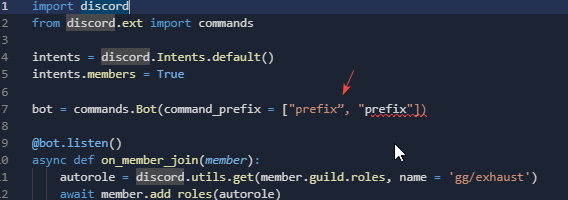
you have a fancy " https://i.imgur.com/VvXuISZ.png
 untold token
slate swan
do I need another cog, Or just do it in bot.py /main.py
untold token
slate swan
do I need another cog, Or just do it in bot.py /main.py
You can do it in a cog, in the main file
Wherever you want
weary gale
untold token
that was just an example
lol ik
slate swan
how
weary gale
i just dont understand why it doesnt work
 slate swan
guild = client.get_channel(756504534897000528)

for member in guild.members:
if you use synchronous libraries in asynchronous code, it will block the entire process
slate swan
Will this work?
untold token
slate swan
```py
guild = client.get_channel(756504534897000528)
for member in guild.member...
that's channel
slate swan
untold token
if you use synchronous libraries in asynchronous code, it will block the entire ...
I just want to print it
untold token
You need a guild
slate swan
untold token
that's channel
it works for the same i think
untold token
so it would be client.get_guild()
quartz void
weary gale
i just dont understand why it doesnt work
do you get any errors?
slate swan
untold token
so it would be client.get_guild()
ok and
weary gale
quartz void
do you get any errors?
nope
slate swan
guild = client.get_guild(756504534897000528)
for member in guild.members:
    print(member)
will this work?
quartz void
weary gale
nope
then, what exactly isnt working?
weary gale
quartz void
then, what exactly isnt working?
idk
untold token
slate swan
```py
guild = client.get_guild(756504534897000528)
for member in guild.members:
...
this would print the member object
and yes it work
if you want the name
weary gale
quartz void
then, what exactly isnt working?
oh its supposed to be an autorole command
untold token
then
weary gale
well event
slate swan
  File "d:\Desktop\MaxTheBot\bot.py", line 106, in <module>
    for member in guild.members:
AttributeError: 'NoneType' object has no attribute 'members'
you need the members intent iirc
untold token
guild = client.get_guild(756504534897000528)
for member in guild.members:
    print(str(member))
Is the ID correct?
weary gale
quartz void
you need the members intent iirc
this?


 slate swan
untold token
Is the ID correct?
slate swan
untold token
Is the ID correct?
yes
quartz void
weary gale
this?
yea
untold token
Channel ID is different and guild ID is different
weary gale
quartz void
yea
its on
quartz void
and also change the Intents in your code
slate swan
yes I know
weary gale
wdym
quartz void
you currently use Intents.default
untold token
slate swan
```py
guild = client.get_channel(756504534897000528)
for member in guild.member...
This
slate swan
@quartz void he doesn't know what are intents
untold token
slate swan
```py
guild = client.get_guild(756504534897000528)
for member in guild.members:
...
This
slate swan
untold token
This
It's the guild id
untold token
Same ID
slate swan
omg, It's the guild_id
That's not wrong
    for member in guild.fetch_members():
AttributeError: 'NoneType' object has no attribute 'fetch_members'
Well its returning None
untold token
quartz void
you currently use Intents.default
Intents.default()
intents.member = True
Would work
quartz void
intents = discord.Intents.default()
intents.members = True
bot = commands.Bot(intents = intents, ...)
@weary gale
untold token
It's just enabling the members intents
quartz void
weary gale
so this?
 weary gale
untold token
Or just enable all the intents
weary gale
untold token
Or just enable all the intents
i have
untold token
discord.Intents.all()
untold token
weary gale
so this?
Yup
untold token
Is the name of role correct?
weary gale
yep
weary gale
ok
untold token
!d discord.Guild.get_role
unkempt canyonBOT
get_role(role_id, /)```
Returns a role with the given ID.does it matter?
untold token
Yes it does
weary gale
where i put it
untold token
weary gale
do i put that
in your event?
weary gale
yeahj
slate swan
    for member in guild.members():
TypeError: 'list' object is not callable
new errorrrrr
weary gale
untold token
member.guild.get_role(role_ID)
where do i put it
untold token
it's an attribute not a method
slate swan
what do I do?
untold token
weary gale
where do i put it
bruh in your on_member_join event
untold token
slate swan
what do I do?
remove the ()?
slate swan
ayyyy it works
untold token
Cool
weary gale
untold token
bruh in your on_member_join event
 untold token
BRUH
weary gale
i dont understoodenating
untold token
I'm done
weary gale
no pls
untold token
Bye
slate swan
understoodenating
weary gale
dont giveup on us
slate swan
send me your code, I gotta spoonfeed
weary gale
from discord.ext import commands

intents = discord.Intents.default()
intents.members = True

bot = commands.Bot(intents = intents, command_prefix = ["$", "$"])

@bot.listen()
async def on_member_join(member):
    autorole = discord.utils.get(member.guild.roles, name = 'thisissupposedtobetheroleid')
await member.add_roles(autorole)```@weary gale copy your code and send it
untold token
Bruh like literally
weary gale
@slate swan i sent it
slate swan
why does he have a fucking listen?
untold token
autorole = member.guild.get_role(ID)
await member.add_roles(autorole)
Its better
weary gale
i already have an event
slate swan
wait yeah it's wrong
slate swan
no?
untold token
It is?
slate swan
how?
untold token
.event overrides your default event
weary gale
untold token
```py
autorole = member.guild.get_role(ID)
await member.add_roles(autorole)
```
it still just doesnt work
wtf am i doing wrong
untold token
that means you can only have one event type
weary gale
i feel like monke
untold token
.listen() is an external event listener
weary gale
no
untold token
that is asynchronous and it doesnt block/ override the default events
visual island
try printing something to see if the event's triggered
untold token
untold token
```py
@bot.listen()
async def on_member_join(member: discord.Member):
... # ...
@slate swan read from here
and
slate swan
want me to fix the code?
untold token
!d discord.ext.commands.Bot.listen
unkempt canyonBOT
@listen(name=None)```
A decorator that registers another function as an external event listener. Basically this allows you to listen to multiple events from different places e.g. such as [`on_ready()`](https://discordpy.readthedocs.io/en/master/api.html#discord.on_ready "discord.on_ready")

The functions being listened to must be a [coroutine](https://docs.python.org/3/library/asyncio-task.html#coroutine "(in Python v3.9)").

Example...Don't spoonfeed
weary gale
visual island
try printing something to see if the event's triggered
ur right
it didnt even trigger
untold token
weary gale
it didnt even trigger
Code?
slate swan
@bot.listen()
async def on_member_join(member):
    role = discord.utils.get(member.guild.roles, name='thisissupposedtobetheroleid')
    await member.add_roles(role)
Bruh why would put the ID on the name
slate swan
I stole it from my own code, AND YES IT WORKS
untold token
That's wrong too
slate swan
It works man
weary gale
from discord.ext import commands

intents = discord.Intents.default()
intents.members = True

bot = commands.Bot(intents = intents, command_prefix = ["$", "$"])

@bot.listen()
async def on_member_join(member):
    autorole = member.guild.get_role(ijustremovedtheidbecauseprivacy)
    await member.add_roles(autorole)
print("AUTOROLE TEST")```And ID is sometimes better
import discord
from discord.ext import commands

intents = discord.Intents.default()
intents.members = True

bot = commands.Bot(intents = intents, command_prefix = ["$", "$"])

@bot.listen()
async def on_member_join(member):
    role = discord.utils.get(member.guild.roles, name='thisissupposedtobetheroleid')
    await member.add_roles(role)
    print("AUTOROLE TEST")