#discord-bots
1 messages · Page 607 of 1
 regal shard
 slate swan
Checked it out and i do recommend
regal shard
Okok
 sick birch
@regal shard more on tasks: https://discordpy.readthedocs.io/en/stable/ext/tasks/index.html
 sullen shoal
https://github.com/ScopesCodez/discordpy-cogs/blob/5d2c2121f705908bcc593cdd9613bf1a4854b558/bot.py#L9-L16
i wont recommend doing this spaghetti tho
 unkempt canyonBOT
bot.py lines 9 to 16
for cog in os.listdir(r"cogs"): # Loop through each file in your "cogs" directory.
    if cog.endswith(".py"):
        try:
            cog = f"cogs.{cog.replace('.py', '')}"
            bot.load_extension(cog) # Load the file as an extension.
        except Exception as e:
            print(f"{cog} is failed to load:")
raise e```it doesn't have to be in a cog as long as you call the .start() you should be ok
regal shard
I'll just make a cog for it
sick birch
doesn't have to be a cog unless you have other commands inside it
but maybe change the loop to 10 minutes? i don;t think the API would mind 6 requests per hour
 dapper cobalt
You can do 2 things.
Use an API and check for the specific server's members and check if that user is on there, and you'd repeat this process every 5 seconds (which will cause spam).
Or,
Create a Minecraft plugin using Java programming language that sends a post request to a channel's webhook whenever that user logs into the server.
sick birch
dapper cobalt
You can do 2 things.
> Use an API and check for the specific server's members a...
the server is a public server, i doubt they can do the 2nd option
dapper cobalt
Ah. In that case, you can do the first one. However, you'd need to do some checks to avoid spam. Which might or might be too complicated; depends on your knowledge in Python.
dapper cobalt
sullen shoal
https://github.com/ScopesCodez/discordpy-cogs/blob/5d2c2121f705908bcc593cdd9613b...
Why not?
unkempt canyonBOT
bot.py lines 26 to 27
for cog in pkgutil.iter_modules(["cogs"]):
bot.load_extension(f"cogs.{cog.name}")```I might just change it to 10 mins
good idea
dapper cobalt
Never really heard of it. Will look into it soon, though. Thank you!
sick birch
regal shard
I might just change it to 10 mins
5 minutes if you were pushing it, though it kind of borders on spam. You should find the API's ratelimit and adapt the timer to suit
sullen shoal
helps me alot
regal shard
sick birch
5 minutes if you were pushing it, though it kind of borders on spam. You should ...
from discord.ext import tasks, commands
import requests

class MyCog(commands.Cog):
    def __init__(self):
        self.index = 0
        self.printer.start()

    def cog_unload(self):
        self.printer.cancel()

@tasks.loop(minutes=1)
async def printer(self):
    stats = requests.get('https://api.hyperlandsmc.net/stats/AbleToHxck')
    stats = stats.json()
    online = stats['status']['online']
    last_server = stats['status']['lastServer']
    rank = stats['rankData']['rank']
    level = stats['stats']['general']['level']
    levelprogress = stats['stats']['general']['progress']
    max_level_progress = stats['stats']['general']['maxProgress']
    skywars_wins = stats['stats']['skywars']['wins']
    skywars_kills = stats['stats']['skywars']['kills']
    bedwars_wins = stats['stats']['bedwars']['wins']
    bedwars_kills = stats['stats']['bedwars']['kills']
    bedwars_finalkills = stats['stats']['bedwars']['finalKills']
    bedwars_beds_broken = stats['stats']['bedwars']['bedsBroken']
    bedwars_current_ws = stats['stats']['bedwars']['currentWinstreak']
    bedwars_overall_ws = stats['stats']['bedwars']['bestWinstreak']
    thebridge_wins = stats['stats']['thebridge']['wins']
    thebridge_goals = stats['stats']['thebridge']['goals']
    thebridge_current = stats['stats']['thebridge']['currentWinstreak']
    thebridge_best = stats['stats']['thebridge']['bestWinstreak']
    duels_wins = stats['stats']['duels']['buildUhcWins']
    duels_potwins = stats['stats']['duels']['potWins']
    duels_ironwins = stats['stats']['duels']['ironWins']
    duels_archerwins = stats['stats']['duels']['archerWins']
    duels_sumowis = stats['stats']['duels']['sumoWins']
    duels_ws = stats['stats']['duels']['currentWinstreak']
    duel_best_ws = stats['stats']['duels']['bestWinstreak']
    duel_elo = stats['stats']['duels']['elo']
    UHC_wins = stats['stats']['uhcmeetup']['wins']
    UHC_kills = stats['stats']['uhcmeetup']['kills']
this is what I've comed up with so far
how do I make it see if it has the word "True" in it?
sullen shoal
tbh i would have just accessed them through the dict only when needed
dapper cobalt

Bad code:
name = "Scoopy"
print(name)
Better code:
print("Scoopy")
Useless variables are just.. useless.
dapper cobalt
regal shard
I need the entire info
You can use them straight away, without having to define a variable for each; since it slows down the process.
sullen shoal
also using https://pypi.org/project/dacite/ will make your life easier. it will convert the dict to a dataclass meaning you can access the values by just doing,
stats.stats.thebridge.wins ...
slate swan
tried restarting my bot and this happened
Traceback (most recent call last):
File "main.py", line 12, in <module>
bot = commands.bot(command_prefix='J', description="This is a Helper bot")
TypeError: 'module' object is not callable
sullen shoal
its commands.Bot
 wintry panther
how do i make a bot detect if the msg is a dm and send a different message to the sender
sullen shoal
discord.Message.guild will be None if not sent in a guild
slate swan
sullen shoal
its `commands.Bot`
yea ok thats whats in the code
bot = commands.Bot(command_prefix='J', description="This is a Helper bot")
see
slate swan
import discord
from discord.ext import commands
import datetime
import aiohttp
from urllib import parse, request
import re
from typing import Text
import asyncio
import random
import discord
just imports
wintry panther
sullen shoal
`discord.Message.guild` will be None if not sent in a guild
so if its 0 then send msg
sullen shoal
no if None
sullen shoal
slate swan
import discord
from discord.ext import commands
import datetime
import aiohttp
f...
thats 10 line tho
you got error at line 12
wheres 11
slate swan
sullen shoal
wheres 11
its blank
sullen shoal
the code looks alright to me, you must be hiding something
or running something else
slate swan
might just be that my ide didnt update it does that sometimes
slate swan
slate swan
Traceback (most recent call last):
File "main.py", line 12, in <module>
bo...
based on that error you're calling the module not the class
slate swan
commands.bot is the module, commands.Bot is the class
slate swan
wintry panther
if discord.Message.guild = None
await message.channel.send("ok")
no, you need a Message instance
sullen shoal
discord.Message is supposed to be your message instance
wintry panther
im stupid whats a message instance
slate swan
Whats re for again?
slate swan
slate swan
Whats ```re``` for again?
regex
regal shard
from discord.ext import tasks, commands
from discord.ext.commands import bot
import requests

class MyCog(commands.Cog):
    def __init__(self):
        self.index = 0
        self.printer.start()

    def cog_unload(self):
        self.printer.cancel()

@tasks.loop(minutes=1)
async def printer(self):
    stats = requests.get('https://api.hyperlandsmc.net/stats/AbleToHxck')
    stats = stats.json()
    online = stats['status']['online']
    last_server = stats['status']['lastServer']
    if 'true' in stats  in stats['status']:
``` ok so I have this I want it to send a msg in a channel but I can't use await bcs not async funtion what do I do?What is it for exactly kinda forgot
wintry panther
like this
await message.channel.send("ok")
if discord.Message.guild = None
await message.channel.send("ok")
slate swan
rege shark
sullen shoal
wintry panther
like this
await message.channel.send("ok")
if discord.Message.gu...
message there is the instance
slate swan
regal shard
```py
from discord.ext import tasks, commands
from discord.ext.commands import b...
wdym it's not async
that's clearly async (async def printer)
regal shard
slate swan
wdym it's not async
It's not an async funtion, so I can't use the await expression
slate swan
it is tho?
slate swan
which is?
 slate swan
show where you put your await
regal shard
@tasks.loop(minutes=1)
async def printer(self):
    stats = requests.get('https://api.hyperlandsmc.net/stats/AbleToHxck')
    stats = stats.json()
    online = stats['status']['online']
    last_server = stats['status']['lastServer']
    if 'true' in stats  in stats['status']:
        await channel.id
Nvm
regal shard
didn't complete it
wintry panther
guild = message.guild
if not guild:
print("ok")
regal shard
Ok so will it work?
slate swan
yes
regal shard
okok
sullen shoal
id attr isnt async
regal shard
also how do it get the channel from it's id?
slate swan
i want to do a command where you guess the answer to a puzzle, so the command would start with l!guess and then you'd have a number or letter, but how do i get that number or letter and save it as a variable
slate swan
sullen shoal
id attr isnt async
he said he didn't complete it so i assumed he knew what he was doing and only gave a quick snippet of what he was doing
regal shard
like ```py
await channel.get.id(id of channel).send('will this work?')
Random
slate swan
regal shard
like ```py
await channel.get.id(id of channel).send('will this work?')
```
no
what even is channel
slate swan
slate swan
Random
wdym
regal shard
idk
slate swan
slate swan
wdym
Use the random module
await self.bot.get_channel(channel_id).send(...)
I'm so confused, ik what random is but how do i use it in this context
slate swan
slate swan
I'm so confused, ik what random is but how do i use it in this context
You use random and assign it to a var?,
sullen shoal
slate swan
i want to do a command where you guess the answer to a puzzle, so the command wo...
you first have to decide what you want a number or a letter?
or both combined?
regal shard
from discord import channel
from discord.ext import tasks, commands
from discord.ext.commands import bot
import requests

class MyCog(commands.Cog):
    def __init__(self):
        self.index = 0
        self.printer.start()

    def cog_unload(self):
        self.printer.cancel()

@tasks.loop(minutes=1)
async def printer(self):
    stats = requests.get('https://api.hyperlandsmc.net/stats/AbleToHxck')
    stats = stats.json()
    online = stats['status']['online']
    last_server = stats['status']['lastServer']
    if 'true' in stats  in stats['status']:
        await self.bot.get_channel(channel_id).send(f'hey @lament turret seb is online')
 slate swan
sullen shoal
you first have to decide what you want a number or a letter?
slate swan
sullen shoal
you first have to decide what you want a number or a letter?
it depends on the puzzle. i already have the system set up, i just want to isolate the answer from the l!guess command
slate swan
regal shard
```py
from discord import channel
from discord.ext import tasks, commands
from d...
indent everything from @tasks.loop wtf
regal shard
slate swan
indent everything from `@tasks.loop` wtf
oh ok
sullen shoal
slate swan
it depends on the puzzle. i already have the system set up, i just want to isola...
you may use the bot instance
slate swan
slate swan
it depends on the puzzle. i already have the system set up, i just want to isola...
If you want to get a random int and a random character just use random and make a class
also you need to replace channel_id with an actual channel id
sullen shoal
to save variables
slate swan
also wtf is this
 regal shard
was just checking for errors
sullen shoal
bot.var = ...
regal shard
slate swan
also wtf is this
if there is the word true in the website
slate swan
don't use 2 in
regal shard
oh yea
slate swan
just one
regal shard
my bad
slate swan
slate swan
If you want to get a random int and a random character just use random and make ...
wait nvm i think i know how to do it, i'll just remove "l!guess" from the user's response, then i'll assign that to an "answer" variable
regal shard
would this work?
from discord import channel
from discord.ext import tasks, commands
from discord.ext.commands import bot
import requests

class MyCog(commands.Cog):
    def __init__(self):
        self.index = 0
        self.printer.start()

    def cog_unload(self):
        self.printer.cancel()

    @tasks.loop(minutes=1)
    async def printer(self):
        stats = requests.get('https://api.hyperlandsmc.net/stats/AbleToHxck')
        stats = stats.json()
        online = stats['status']['online']
        last_server = stats['status']['lastServer']
        if 'true' in stats ['status']:
            await self.bot.get_channel(623522585300172838).send(f'hey @lament turret seb is online in {last_server}')
okok
sullen shoal
from discord import channel 
slate swan
didn't even notice that 😭
regal shard
self isn't defined
sullen shoal
from discord.ext.commands import bot
regal shard
Istg I didn't put that there
sullen shoal
also why you using requests
regal shard
bcs yes
regal shard
I've already been told to use aiohttp
sullen shoal
then why not
slate swan
regal shard
I have no need to switch
requests is blocking, don't use it for a discord bot, use aiohttp
regal shard
Expected indented block what does this mean? it's refering to
    @tasks.loop(minutes=1)
    async def printer(self):
        stats = requests.get('https://api.hyperlandsmc.net/stats/AbleToHxck')
        stats = stats.json()
        online = stats['status']['online']
        last_server = stats['status']['lastServer']
        if 'true' in stats ['status']:
            await self.bot.get_channel(623522585300172838).send(f'hey @lament turret seb is online')
``` the last lineshow 👏 the whole 👏 code 👏 👏 👏
regal shard
from discord.ext import tasks, commands
import requests

class MyCog(commands.Cog):
    def __init__(self):
        self.index = 0
        self.printer.start()

    def cog_unload(self):
        self.printer.cancel()

    @tasks.loop(minutes=1)
    async def printer(self):
        stats = requests.get('https://api.hyperlandsmc.net/stats/AbleToHxck')
        stats = stats.json()
        online = stats['status']['online']
        last_server = stats['status']['lastServer']
        if 'true' in stats ['status']:
            await self.bot.get_channel(623522585300172838).send(f'hey @lament turret seb is online')
i hope some day this guy realizes how dumb it is to use a synchronous function when already an async one exists and its even easy to use, like,
import httpx
async def ...:
    async with httpx.AsyncClient() as client:
        resp = await client.get(...)```
whats the hard part in it?is the error appearing when you run the code
regal shard
Pylance is giving it
slate swan
ignore it
regal shard
ok
regal shard
yes I did that
 pliant gulch
regal shard
```py
from discord.ext import tasks, commands
import requests
class MyCog(comma...
pliant gulch
regal shard
```py
from discord.ext import tasks, commands
import requests
class MyCog(comma...
You can't await Bot.get_channel
It isn't a coroutine, and it wouldn't work either way
As tasks start before the internal cache is populated
Thus meaning grabbing from cache isn't gonna work
slate swan
pliant gulch
You can't `await` Bot.get_channel
he's not awaiting the get_channel, read the full line
slate swan
pliant gulch
As tasks start before the internal cache is populated
right 🤔
pliant gulch
slate swan
he's not awaiting the `get_channel`, read the full line
He is, you need to add paranthesis to ensure hes awaiting the coroutine
slate swan
i always end up forgetting that
slate swan
pliant gulch
He is, you need to add paranthesis to ensure hes awaiting the coroutine
no
sullen shoal
actually yes
slate swan
 sullen shoal
you gotta use parenthesis
pliant gulch
Oh wait not in this case nvm you are right
As it returns the async method, I've been doing to much coroutine on coroutine calls
slate swan
happens
sullen shoal
but it wasnt working in my code tho
slate swan
show your code
slate swan
then you were probably doing something different
regal shard
cogs.cog is failed to load:
Ignoring exception in on_ready
Traceback (most recent call last):
  File "C:\Users\subha\AppData\Local\Programs\Python\Python39\lib\site-packages\discord\ext\commands\bot.py", line 606, in _load_from_module_spec
    spec.loader.exec_module(lib)
  File "<frozen importlib._bootstrap_external>", line 846, in exec_module
  File "<frozen importlib._bootstrap_external>", line 983, in get_code
  File "<frozen importlib._bootstrap_external>", line 913, in source_to_code
  File "<frozen importlib._bootstrap>", line 228, in _call_with_frames_removed
  File "c:\Users\subha\Documents\HIDE\cogs\cog.py", line 19
    await self.bot.get_channel(623522585300172838).send(f'hey @lament turret seb is online')
TabError: inconsistent use of tabs and spaces in indentation

The above exception was the direct cause of the following exception:

Traceback (most recent call last):
  File "C:\Users\subha\AppData\Local\Programs\Python\Python39\lib\site-packages\discord\client.py", line 343, in _run_event
    await coro(*args, **kwargs)
  File "c:\Users\subha\Documents\HIDE\bot.py", line 22, in on_ready
    raise e
  File "c:\Users\subha\Documents\HIDE\bot.py", line 19, in on_ready
    bot.load_extension(cog) # Load the file as an extension.
  File "C:\Users\subha\AppData\Local\Programs\Python\Python39\lib\site-packages\discord\ext\commands\bot.py", line 678, in load_extension
    self._load_from_module_spec(spec, name)
  File "C:\Users\subha\AppData\Local\Programs\Python\Python39\lib\site-packages\discord\ext\commands\bot.py", line 609, in _load_from_module_spec
    raise errors.ExtensionFailed(key, e) from e
discord.ext.commands.errors.ExtensionFailed: Extension 'cogs.cog' raised an error: TabError: inconsistent use of tabs and spaces in indentation (cog.py, line 19)
Why aiohttp and not request is request not async?
slate swan
regal shard
```py
cogs.cog is failed to load:
Ignoring exception in on_ready
Traceback (most...
why are you mixing tabs with spaces
regal shard
import discord
from discord.ext import tasks, commands
import time
import aiohttp
import requests
import asyncio
from itertools import cycle
import os


bot = commands.Bot(command_prefix=',')

@bot.event
async def on_ready():
  for cog in os.listdir(r"cogs"): # Loop through each file in your "cogs" directory.
      if cog.endswith(".py"):
          try:
              cog = f"cogs.{cog.replace('.py', '')}"
              bot.load_extension(cog) # Load the file as an extension.
          except Exception as e:
              print(f"{cog} is failed to load:")
              raise e
  print(f"Logged in as {bot.user}")

@bot.command()
async def lool(ctx):
    await ctx.send('Loool')

bot.run('token removed')
``` main filerequests isn't async
slate swan
slate swan
Why aiohttp and not request is request not async?
no, requests is blocking
regal shard
slate swan
why are you mixing tabs with spaces
I did that?
slate swan
Thx both
slate swan
regal shard
I did that?
that's what the error tells you
why does no one read their errors wtf is wrong with y'all 
sullen shoal
i gotta go, this guys json and requests module in async function is giving me pain
regal shard
ok fixed
slate swan
Its always the simple syntax errors😭
sullen shoal
gn
slate swan
slate swan
Its always the simple syntax errors😭
exactly
slate swan
sullen shoal
gn
Gn
slate swan
sullen shoal
gn
sleep well
slate swan
sullen shoal
i gotta go, this guys json and requests module in async function is giving me pa...
same bro, this is why i hate helping noobs to coding, it's too stressful and annoying 😔
regal shard
I'll update yall in 5 mins
pliant gulch
It won't work
slate swan
^^
pliant gulch
pliant gulch
As tasks start before the internal cache is populated
!d discord.ext.commands.Bot.wait_until_ready
unkempt canyonBOT
await wait_until_ready()```
This function is a [*coroutine*](https://docs.python.org/3/library/asyncio-task.html#coroutine).

Waits until the client’s internal cache is all ready.add await self.bot.wait_until_ready() at the top of your printer function, also add the bot argument to the _init_ and add the attribute self.bot = bot
also if the cog is in a separate file you also need to add ```py
def setup(bot):
bot.add_cog(MyCog(bot)) # Make sure you have the bot arg as i told you to
 vast jolt
i need my bot when it joins a server to send in my server's log channel that i joined 'Name' & invite link can anyone help me
wintry panther
wait can bots have animated php
 thorn hinge
wintry panther
wait can bots have animated php
thorn hinge
wintry panther
wait can bots have animated php
No , I think bots can’t have animated php
 dusk dust
how can i check if a user are banned of the server?
 brittle ingot
!d discord.Guild.bans
unkempt canyonBOT
await bans()```
This function is a [*coroutine*](https://docs.python.org/3/library/asyncio-task.html#coroutine).

Retrieves all the users that are banned from the guild as a [`list`](https://docs.python.org/3/library/stdtypes.html#list "(in Python v3.9)") of [`BanEntry`](https://discordpy.readthedocs.io/en/master/api.html#discord.BanEntry "discord.BanEntry").

You must have the [`ban_members`](https://discordpy.readthedocs.io/en/master/api.html#discord.Permissions.ban_members "discord.Permissions.ban_members") permission to get this information.why pls help
 brittle ingot
slate swan
why pls help
brittle ingot
slate swan
why pls help
you spelled components wrong
slate swan
best way to remove spaces from string?
 tawdry perch
slate swan
best way to remove spaces from string?
tawdry perch
slate swan
best way to remove spaces from string?
Not related to discord bots
slate swan
tawdry perch
Not related to discord bots
its for a discord bot
tawdry perch
... by that I mean the best/fastest answer would probs come from general because that itself is not really discord bots related But since I'm alrd writing here you can use .replace
Maybe*
unkempt canyonBOT
@pliant gulch :white_check_mark: Your eval job has completed with return code 0.
abc
@btn_ticket.listen
AttributeError: 'Button' object has no attribute 'listen'```
Can someone help? I'm kinda new to these new buttons devout iris
how can i see prefixes with a command?
 main needle
abc = "a b c"
print(abc.replace(" ", ""))
devout iris
i did it but not working 😄
 slate swan
Ahmet
devout iris
yep
slate swan
try:
await ctx.send("Prefixlerim " + str(prfx))```ah thx im gonna try
main needle
ghost ping?
slate swan
Didn't see anything sorry
main needle
slate swan
try:
```py
await ctx.send("Prefixlerim " + str(prfx))```
how to send that type of message?
 main needle
slate swan
```py
await ctx.send("Prefixlerim " + prfx)```
main needle
slate swan
```py
await ctx.send("Prefixlerim " + prfx)```
how to send this type of text?
pls
slate swan
You have to use 3x ` before and after the message. After the first ones type py Like this:
 main needle
ohh ok
 cloud dawn
!code
unkempt canyonBOT
Here's how to format Python code on Discord:
```py
print('Hello world!')
```
These are backticks, not quotes. Check this out if you can't find the backtick key.
 cloud dawn
devout iris
i did it but not working 😄
cloud dawn
devout iris
i did it but not working 😄
ctx.prefix
main needle
abc = "a b c"
print(abc.replace(" ", ""))
okk
abc = "a b c"
print(abc.replace(" ", ""))
@cloud dawn Do you have knowladge with Discord Buttons?
how can i make user bot commands
main needle
ohh ok thanks
devout iris
cloud dawn
`ctx.prefix`
huh?,
cloud dawn
slate swan
<@!169790484594556928> Do you have knowladge with Discord Buttons?
Not really but you can just ask the question.
cloud dawn
devout iris
huh?,
That is the fastest way to get the command prefix.
devout iris
cloud dawn
That is the fastest way to get the command prefix.
Is it instead of bot.command_prefix?
cloud dawn
Yes, i recommend using the context rather than the bot variable, also looks better imo.
 main needle
!e
unkempt canyonBOT
 Command Help
!eval [code]
Can also use: e
*Run Python code and get the results.
This command supports multiple lines of code, including code wrapped inside a formatted code block. Code can be re-evaluated by editing the original message within 10 seconds and clicking the reaction that subsequently appears.
We've done our best to make this sandboxed, but do let us know if you manage to find an issue with it!*
main needle
!e
abc = "a b c"
print(abc.replace(" ", ""))
@main needle :white_check_mark: Your eval job has completed with return code 0.
abc
ohh thanks
cloud dawn
slate swan
like make user commands not the timer

A tutorial on how to use discord.py to create your own Discord bot in Python, written to fix the flaws of many other popular tutorials.
Short but good tutorial should take around 30 min to complete.
slate swan
cloud dawn
https://vcokltfre.dev/
thats ss isnt a bot
its a command
i used but it pretends to be me
 magic ore
Do you mean a Webhook
slate swan
there ya go i didnt know the name
devout iris
cloud dawn
That is the fastest way to get the command prefix.
it shows which prefix I used atm
slate swan
but how can i setup webhooks with my bot
devout iris
not total prefixes
 leaden crag
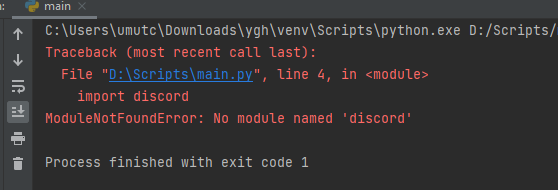
i have this problem
pyCharm does not accept discord.py even tho i installed the module on the interpreter and the program worked before on my computer before i formatted.
slate swan
cloud dawn
Not really but you can just ask the question.
Yea well I'm trying to make a ticket-system Bot using buttons. I tried this but it doesn't work:
btn_ticket = Button(style=ButtonStyle.green, label="💌Create Ticket", custom_id='ticket_btn')

@btn_ticket.listen
async def handler(ctx):
    msg = await ctx.send("Button is working")

@bot.command()
async def ticket(ctx):
    #embed stuff here
msg = await ctx.send(embed=embed)```do someone has a free hosting site that I can run my bot in?
 dense cedar
Hi
My server was hacked by hackers and a lot of channels and rolls were created. I want to delete the channels and rolls. I need a robot or code because there are so many of them.
I do not want to break the rules, if there is a way, say thank you
 valid niche
slate swan
do someone has a free hosting site that I can run my bot in?
valid niche
slate swan
do someone has a free hosting site that I can run my bot in?
Your own pc
valid niche
slate swan
repl.it
Please don’t recommend replit for bot hosting
slate swan
why
valid niche
Not unless you tell them about the major risks, one of which is having your entire account banned from discord
slate swan
Well never happened to me
valid niche
You host on replit. You get a shared machine with shared IP
An user with malicious intent does the same
You end up on the same machine and thus the same node
Discord bans the malicious person for being malicious
Hey what’s that. Another connection to discord from the same IP?
valid niche
You get the ban too
valid niche
slate swan
So what do you use to host urs
VPS
Costs me about a cup of coffee a month
slate swan
I'm just using my Rootserver. Different IP
valid niche
Have full control, full access, dedicated IP
A raspberry pi also works great as first host
dense cedar
Hi
My server was hacked by hackers and a lot of channels and rolls were created. I want to delete the channels and rolls. I need a robot or code because there are so many of them.
I do not want to break the rules, if there is a way, say thank you
devout iris
bot is working if i write !topla 5 6
but i want to make it !topla 5 + 6"
i.e. i want to make calculate command so if i write !calc 5 - 6 or !calc 5 + 6

how can i make
slate swan
@bot.event
async def om_ready():
    await bot.change_presence(activity=discord.Activity(type=discord.ActivityType.watching, name="prefix = #"))
anyone know whats wrong?
slate swan
devout iris
how can i make
I saw you yesterday struggling with following basic instructions, i am not about to walk u through this
dense cedar
dense cedar
Hi
My server was hacked by hackers and a lot of channels and rolls were created....
@jaunty sparrow
slate swan
slate swan
```
@bot.event
async def om_ready():
await bot.change_presence(activity=disc...
Om_ready
devout iris
slate swan
I saw you yesterday struggling with following basic instructions, i am not about...
bruh idc
lmao
idfc
slate swan
slate swan
Om_ready
thx
unkempt canyonBOT
class discord.ext.commands.Bot(command_prefix, help_command=<default-help-command>, description=None, **options)```
Represents a discord bot.

This class is a subclass of [`discord.Client`](https://discordpy.readthedocs.io/en/master/api.html#discord.Client "discord.Client") and as a result anything that you can do with a [`discord.Client`](https://discordpy.readthedocs.io/en/master/api.html#discord.Client "discord.Client") you can do with this bot.

This class also subclasses [`GroupMixin`](https://discordpy.readthedocs.io/en/master/ext/commands/api.html#discord.ext.commands.GroupMixin "discord.ext.commands.GroupMixin") to provide the functionality to manage commands.Why not i do this?
set the activity here
slate swan
slate swan
Why not i do this?
cuz it makes no sense
on_ready launches multiple times
because of discord's API
you can't prevent it
that's why you don't do shit in on_ready
I do loads of shit in on_ready and it works for me
bot = commands.Bot(command_prefix="blabla", activity="")
slate swan
slate swan
I do loads of shit in on_ready and it works for me
then do what u want bru
slate swan
slate swan
then do what u want bru
Multiple times at launch or multiple times randomly?
Don't change_presence (or make API calls) in on_ready within your Bot or Client.
Discord has a high chance to completely disconnect you during the READY or GUILD_CREATE events (1006 close code) and there is nothing you can do to prevent it.
Instead set the activity and status kwargs in the constructor of these Classes.
bot = commands.Bot(command_prefix="!", activity=..., status=...)
As noted in the docs, on_ready is also triggered multiple times, not just once.
Basically: don't 👏 do 👏 shit 👏 in 👏 on_ready.
Meh i cba to fix it but ill bare in mind going forward thnx
leaden crag
it works when i run it directly
slate swan
slate swan
Don't change_presence (or make API calls) in on_ready within your Bot or Client....
ohhh
slate swan
dense cedar
Hi
My server was hacked by hackers and a lot of channels and rolls were created....
Loops are your friend
They were also ur enemy, but now they are ur friend
 quaint burrow

GitHub
A Discord bot that alerts you when (a selectable part of) a website changes. - GitHub - noelvissers/djs-site-watcher: A Discord bot that alerts you when (a selectable part of) a website changes.
anyone familiar with this bot?
what's a good website to test it on
slate swan
The hub
slate swan
dense cedar
Hi
My server was hacked by hackers and a lot of channels and rolls were created....
import discord
from discord.ext import commands, tasks

intents = discord.Intents.default()
bot = commands.Bot(command_prefix=('>'), case_insensitive=True, intents=intents)

@bot.event
async def on_ready():
    print('Bot is ready')

@bot.command()
async def fix(ctx):
    guild = ctx.guild
    for category in guild.categories:
        if category.name == 'spam':
           await category.delete()
    for text in guild.text_channels:
        if text.name == 'spam':
            await text.delete()
    for vc in guild.voice_channels:
        if vc.name == 'spam':
            await vc.delete()
    for role in guild.roles:
        if role.name == 'spam':
            await role.delete()

bot.run("TOKENHERE", bot=True)```something like this u want
ofc change spam to whatever they named ur channels, if they named randomly, ur gonna have to either exclude ur existing channels/roles or delete all of them
@bot.command()
async def test(ctx):
    test = discord.Embed()
    test.set_author(name="title", icon_url=ctx.author.avatar_url)
    await ctx.send(embed=test)
anything wrong with this?
 sage otter
Looks fine to me. But you know, tryandsee
 flint cosmos
Hi I am trying to create a discord bot that is ran from a host but can be controlled from a client. MEE6 for example, they are hosting MEE6 but you are configuring it for your discord server. How do I do this?
slate swan
flint cosmos
Hi I am trying to create a discord bot that is ran from a host but can be contro...
With code
flint cosmos
Well thanks
slate swan
Your welcome
so i'm trying to compare 2 string values and send a certain message if they match and a different one if they don't. I also am printing these values to the console to verify that they match. Even if they do match, the program is sending the wrong response. Pls help
here is the link to my code https://replit.com/@CG158/Layton-Bot#main.py

Can u just send the section of code
slate swan
slate swan
Can u just send the section of code
ok
print(str(guessonly))
              print(str(answer))
              if str(guessonly) == (str(answer)):
                embedVar =discord.Embed(title="Correct", description = str(solution), color=0xE95124)
                embedVar.add_field(name="Your Answer:", value=guessonly)
                await message.channel.send(embed=embedVar)
                break

              if str(guessonly) != (str(answer)) and guessonly != ('l!hint'):
                embedVar = discord.Embed(title="Incorrect", description = str(incorrect), color=0xE95124)
                embedVar.add_field(name="Your Answer:", value=guessonly)
await message.channel.send(embed=embedVar)```Use 3 backticks and put py next to the top
3 backticks
i am using 3
Should use elif otherwise u could get two responses and my guess is they dont match
slate swan
slate swan
Should use elif otherwise u could get two responses and my guess is they dont ma...
ok how do i do that
Actually u dont need to use elif
can anyone set me some code for embedded avatar command please?
valid niche
slate swan
on_ready launches multiple times
Hey I just noticed this message (was close to another message) and just a FYI, the on ready can fire multiple times, but is rare and only happens with very bad connections. Only in this case could you possibly hit rate limits, which aren’t the worst.
The more important thing is, is that ready is the event fired just before discord sends a giant pile of events (mainly guild_create) to fill your cache. The issue is, change_presence used this same gateway connection. Discord’s api doesn’t like being “interrupted” and can thus forcefully disconnect you if you change presence in on_ready.
On the other hand, if you pass your activity to the bot constructor, it will send the activity together with identify to discord, which is the first packet send and establishes the connection. This means there is no interference from a cache bulk update.
slate swan
slate swan
here is the link to my code https://replit.com/@CG158/Layton-Bot#main.py
Btw, looking at this, the code would be simplified a lot if you used a dictionary. You could store it in a json file. That way there'd be no hassle with interpretting strings and which lines hold what information
slate swan
slate swan
Btw, looking at this, the code would be simplified a lot if you used a dictionar...
That sounds great, I'd appreciate help with that as I am new to Python
devout iris
i want to make a command and i want to kick if who used this command.... how can i make this?
so i want to kick author
slate swan
devout iris
so i want to kick author

devout iris
btw this command is for me, i.e if i use the command bot will kick me
slate swan
slate swan
Btw, looking at this, the code would be simplified a lot if you used a dictionar...
could you help me with this pls?
slate swan
devout iris
btw this command is for me, i.e if i use the command bot will kick me
Its very simple what u wanna do, so simple ima let u figure it out yourself
slate swan
slate swan
That sounds great, I'd appreciate help with that as I am new to Python
I don't have time to properly give a full explanation at the moment, I have a lot of linear algebra to study haha. buuuuuuut
!d dict
unkempt canyonBOT
class dict(**kwarg)``````py

class dict(mapping, **kwarg)``````py

class dict(iterable, **kwarg)```
Return a new dictionary initialized from an optional positional argument and a possibly empty set of keyword arguments.

Dictionaries can be created by several means:

• Use a comma-separated list of `key: value` pairs within braces: `{'jack': 4098, 'sjoerd': 4127}` or `{4098: 'jack', 4127: 'sjoerd'}`

• Use a dict comprehension: `{}`, `{x: x ** 2 for x in range(10)}`

• Use the type constructor: `dict()`, `dict([('foo', 100), ('bar', 200)])`, `dict(foo=100, bar=200)`
Similar names: label.dict, 2to3fixer.dict
slate swan
slate swan
I don't have time to properly give a full explanation at the moment, I have a lo...
ah lol
!d json
unkempt canyonBOT
Source code: Lib/json/__init__.py
JSON (JavaScript Object Notation), specified by RFC 7159 (which obsoletes RFC 4627) and by ECMA-404, is a lightweight data interchange format inspired by JavaScript object literal syntax (although it is not a strict subset of JavaScript 1 ).
json exposes an API familiar to users of the standard library marshal and pickle modules.
Encoding basic Python object hierarchies:
slate swan
Read these here
They should explain both dictionaries and json
i will look into that
Jason
but first i want to fix the answer thing
Who is jason?
devout iris
slate swan
Its very simple what u wanna do, so simple ima let u figure it out yourself
pls don't reply to my messsages cus idc
slate swan
devout iris
pls don't reply to my messsages cus idc
Nah i still will
when the bot compares the user answer with the actual answer, it sends the "you're wrong!" response even if the user sends the right answer
slate swan
devout iris
alr i'll say it to a mod
Idc
slate swan
slate swan
when the bot compares the user answer with the actual answer, it sends the "you'...
Is he checking message.contents or message.contents.lower() i cba to load the repl
slate swan
slate swan
Is he checking message.contents or message.contents.lower() i cba to load the re...
              guessonly = str(guess.content).replace('l!solve', '')
              guessonly = str(guess.content).replace('l!solve ', '')
              guessonly.replace(" ", "")
              guessonly.strip()
              print(str(guessonly))
              print(str(answer))
              if str(guessonly) == (str(answer)):
                embedVar =discord.Embed(title="Correct", description = str(solution), color=0xE95124)
                embedVar.add_field(name="Your Answer:", value=guessonly)
                await message.channel.send(embed=embedVar)
                break

              if str(guessonly) != (str(answer)) and guessonly != ('l!hint'):
                embedVar = discord.Embed(title="Incorrect", description = str(incorrect), color=0xE95124)
                embedVar.add_field(name="Your Answer:", value=guessonly)
await message.channel.send(embed=embedVar)```also guess = await client.wait_for('message')
So i would use contents.lower() to make it case insensitive unless the answers should be case sensitive. And i would also check ur strings in the console and be entirely sure they match or use if str(answer) in str(guessonly) to sanity check it
main needle
no one is from india here ,right?
slate swan
I'm honestly not sure. If you plan on making it work as is, I recommend writing tests that check if the users answer is actually equal the the answer, with specific cases. Noobian is definitely right, contents.lower() would be the right call here
main needle
no_1=[1,2,3,4,5,6,7,8,9]
print(no_1)
But I recommend separating your code with comments, explaining whats happening in each code block under those comments. It helps with readability
main needle
!e
no_1=[]
@main needle :warning: Your eval job has completed with return code 0.
[No output]
Why is str(answer) in brackets (str(answer))
main needle
!e
no_1=[1,2,3,4,5,6,7,8,9]
print(no_1)
@main needle :white_check_mark: Your eval job has completed with return code 0.
[1, 2, 3, 4, 5, 6, 7, 8, 9]
idk, force of habit from other languages ig
Try checking if str(answer) in str(guessonly) and print for both the == and in and see which ones trigger the print
 junior terrace
hello
 compact crater
!e
unkempt canyonBOT
Command Help
!eval [code]
Can also use: e
*Run Python code and get the results.
This command supports multiple lines of code, including code wrapped inside a formatted code block. Code can be re-evaluated by editing the original message within 10 seconds and clicking the reaction that subsequently appears.
We've done our best to make this sandboxed, but do let us know if you manage to find an issue with it!*
junior terrace
how do i make my bot respond with a visible only by the author message
compact crater
!e
unkempt canyonBOT
Command Help
!eval [code]
Can also use: e
*Run Python code and get the results.
This command supports multiple lines of code, including code wrapped inside a formatted code block. Code can be re-evaluated by editing the original message within 10 seconds and clicking the reaction that subsequently appears.
We've done our best to make this sandboxed, but do let us know if you manage to find an issue with it!*
compact crater
!eno_1=[1,2,3,4,5,6,7,8,9]
print(no_1)
unkempt canyonBOT
Did you mean ...
enumerate
environments
slate swan
junior terrace
how do i make my bot respond with a visible only by the author message
I dont think that was implemented in discord.py
compact crater
!e
unkempt canyonBOT
Command Help
!eval [code]
Can also use: e
*Run Python code and get the results.
This command supports multiple lines of code, including code wrapped inside a formatted code block. Code can be re-evaluated by editing the original message within 10 seconds and clicking the reaction that subsequently appears.
We've done our best to make this sandboxed, but do let us know if you manage to find an issue with it!*
slate swan
I don't think its possible in general. It'd be cool if it was though
junior terrace
ok ty
compact crater
!e no_1=[1,2,3,4,5,6,7,8,9]
print(no_1)
slate swan
slate swan
I don't think its possible in general. It'd be cool if it was though
It is with slash commands
unkempt canyonBOT
@compact crater :white_check_mark: Your eval job has completed with return code 0.
[1, 2, 3, 4, 5, 6, 7, 8, 9]
#bot-commands
compact crater
!e no_1=[A,B,C,D,E,F,G,H,I,J,K,L,M,N,O,P,Q,R,S,T,U,V,W,X,Y,Z]
print(no_1)
unkempt canyonBOT
@compact crater :x: Your eval job has completed with return code 1.
001 | Traceback (most recent call last):
002 |   File "<string>", line 1, in <module>
003 | NameError: name 'A' is not defined
Why are ppl printing lists?
brittle ingot
compact crater
!e no_1=[A,B,C,D,E,F,G,H,I,J,K,L,M,N,O,P,Q,R,S,T,U,V,W,X,Y,Z]
print(no_1)
Characters in a list need to be string. Your list of numbers work because they are int which is accepted. To continue messing with the bot please use #bot-commands.
This channel is specifically for developing discord bots not for the servers discord bots.
these may be coming eventually. I know discord.js already has a pull request on them. I have yet to check out the PR though
 slate swan
brittle ingot
these may be coming eventually. I know discord.js already has a pull request on ...
slate swan
brittle ingot
these may be coming eventually. I know discord.js already has a pull request on ...
Discord.py discontinued
Maybe a fork will do it
slate swan
slate swan
It is with slash commands
Really???
Thats so cool. I need to look into that
I dunno if disnake has slash commands yet so u might need to do with js
slate swan
brittle ingot
these may be coming eventually. I know discord.js already has a pull request on ...
This is so much better than muted role btw
I generally use hikari
brittle ingot
slate swan
Discord.py discontinued
ik, i just meant that it looks like its supported by discord's API and discord.js is already looking at implementing it.
slate swan
Which has slash commands
I dont like slash commands
I love them
Im stuck in my ways
brittle ingot
slate swan
This is so much better than muted role btw
yes, yes it is. Plus its a form so from what i understand it can be coded to look however and work however you want.
slate swan
Options just make life easier
slate swan
brittle ingot
yes, yes it is. Plus its a form so from what i understand it can be coded to loo...
How do u do this through ui
I love not having to interpret everything as a string
I haven't seen it
pliant gulch
Options make life harder lmao
slate swan
slate swan
I love not having to interpret everything as a string
Just typehint
pliant gulch
discord.py's command extension converts arguments, whilst Options have a limited type
brittle ingot
slate swan
How do u do this through ui
yeah probably. I think it will depend on the library and how they set up a base look or whether you can instantiate your own configuration of it.
pliant gulch
much more limited types*
brittle ingot
pliant gulch
discord.py's command extension converts arguments, whilst Options have a limited...
this
pliant gulch
Meaning slash commands are way way more limiting then regular commands
slate swan
brittle ingot
yeah probably. I think it will depend on the library and how they set up a base ...
I mean the screenshot, how do u get there through normal discord
Hmmmm fair
brittle ingot
slate swan
I mean the screenshot, how do u get there through normal discord
idk it was a screenshot someone posted in djs, im assuming it was attached to the pull request.
slate swan
I've definitely run into issues with slash commands, especially with attachments
slate swan
brittle ingot
idk it was a screenshot someone posted in djs, im assuming it was attached to th...
Maybe need development version of discord to see it
brittle ingot
it could just be an embeded form that pops up when you use a slash command or other command. like an ephemeral message.
or a system message.
slate swan
slate swan
Try checking if str(answer) in str(guessonly) and print for both the == and in a...
i tried this and it prints false even though i put the right answer
brittle ingot
closest thing i could think of would be a context menu.
slate swan
slate swan
i tried this and it prints false even though i put the right answer
What about the in one?
If discord.js implements that soon I actually just need to learn js
Discord.js does seem to be a better library overall
pliant gulch
Lefi will soon support all components 
slate swan

pliant gulch
And my collaborator also got started on voice recv
Hes working on decoding the bytes now
slate swan
Lofi kind of better than Lefi
slate swan
slate swan
returns true
Ok u probably havent stripped everything then
pliant gulch
slate swan
Lofi kind of better than Lefi
But lofi is a whole different thing
slate swan
slate swan
But my heart is with python
Same
brittle ingot
tbf, i think out of anything im excited for the new python libs for discord. Where they are being created you have a diverse amount of developers with different styles and interests so i would think they would eventually have more options than discord.js where they have had a set vision for a bit if that makes sense .
slate swan
pliant gulch
But lofi is a whole different thing

I'm also not prepared for javascript
brittle ingot
pliant gulch
Lefi will soon support all components <:Pepega:689590342667731015>
ouuu
slate swan
brittle ingot
tbf, i think out of anything im excited for the new python libs for discord. Whe...
Im not excited for message.contents disappearing on april 2022
Won't disappear
brittle ingot
i mean they won't disappear you will just need to have a good reason to acess them.
pliant gulch
brittle ingot
ouuu
Although that's after I finish converting all docstrings to rST which will probably take me a few 😔
slate swan
Just apply for the intent with a valid use case
like how in js 0.5+0.1 == 0.6 evaluates as true but 0.1+0.2 == 0.3 evaluates as false
I'm not ready for that
Nice research you've done here
brittle ingot
pliant gulch
Although that's after I finish converting all docstrings to rST which will proba...
oof. yeah :/
slate swan
slate swan
Just apply for the intent with a valid use case
I aint sending discord my id. They better still allow small bots to use it regardless
You don't send it to Discord
But sure
U do send it to discord
pliant gulch
You basically do
slate swan
No
brittle ingot
slate swan
like how in js `0.5+0.1 == 0.6` evaluates as true but `0.1+0.2 == 0.3` evaluates...
wait what?
slate swan
slate swan
Ok u probably havent stripped everything then
ok what else should i do then
pliant gulch
It ends up being reviewed my discard legal team
slate swan
Only 2-3 employees have access to your ID
pliant gulch
Which is discord
slate swan
brittle ingot
wait what?
According to the internet. I'm not totally sure about that lol
3 employees is not Discord 🤡
pliant gulch
They act for the company so it is sending it to discord
brittle ingot
slate swan
I aint sending discord my id. They better still allow small bots to use it regar...
they will, it'll be like privileged intents currently.
slate swan
pliant gulch
They act for the company so it is sending it to discord
They have strict confidential policies about the IDs being accessible only by these employees and not the entire entreprise but sure 
slate swan
slate swan
ok what else should i do then
Dunno look at str(guess) and see what differs from str(answer) and then do whatever u need to to get them matching
brittle ingot
slate swan
According to the internet. I'm not totally sure about that lol
as someone who has developed bots and is now creating a JS API & web server i would have to disagree with that statement, i haven't seen anything that confirms that. Although i haven't specifically tested it.
slate swan
If you would care about your privacy you wouldn't be here now, but playing with your legos
pliant gulch
slate swan
They have strict confidential policies about the IDs being accessible only by th...
The few employees still means it is sent to discord
slate swan
It's not sent to discord omg
slate swan
slate swan
If you would care about your privacy you wouldn't be here now, but playing with ...
Im pseudonymous rn
pliant gulch
Your not sending it by name to a specific employee are you???
slate swan
slate swan
It's sent and stored on Stripe
and then accessed by discord
pliant gulch
And stripe sends it to discord
slate swan
still sent to discord
They don't send
They access it
same difference
There's a big difference
when they access it, stripe sends it
It's like saying buying and looking is the same thing 🤡
slate swan
brittle ingot
as someone who has developed bots and is now creating a JS API & web server i wo...
Thats good to know, because I died inside when I read it originally 💀
slate swan
slate swan
Im pseudonymous rn
kekw nice joke man
brittle ingot
The entire reason im making an API is to avoid a verified bot and that responsbility.
slate swan
The moment you get any device and go on the internet your privacy is already fucked
So yeah, you do you
Wait, whats this about discord removing access to message contents?
slate swan
slate swan
like how in js `0.5+0.1 == 0.6` evaluates as true but `0.1+0.2 == 0.3` evaluates...
this is due to float rounding
slate swan
slate swan
The moment you get any device and go on the internet your privacy is already fuc...
meh, not really
brittle ingot
its only for bots in over 75 servers, but starting April 2022, if you don't have message intents on the content field of a message object will be empty.
slate swan
brittle ingot
its only for bots in over 75 servers, but starting April 2022, if you don't have...
Beside if the bot is mentioned in the message
brittle ingot
Its also a big reason why discord bots are transferring to slash commands. from what i understand
slate swan
brittle ingot
its only for bots in over 75 servers, but starting April 2022, if you don't have...
its like that for selfbots now using the official discord.py library but there is forks that dont have it
brittle ingot
aside from that fact that self bots are against tos i don't doubt it.
slate swan
Pretty sure selfbots have access to message contents
pliant gulch
Discord.py isn't compatible with forks at its current version
There is a websocket identify bug that stops selfbots
slate swan
slate swan
Pretty sure selfbots have access to message contents
they do, just not with official discord.py
Yeah that's long time ago....
u need a fork that bypasses whatever discord changed
Nothing new
brittle ingot
pliant gulch
There is a websocket identify bug that stops selfbots
that sounds interesting.
 slate swan
Worked like a charm, totally not getting selfbots every day in DMs or servers
Are self bots just bots made through actual users rather than bot users?
Yes
slate swan
slate swan
Are self bots just bots made through actual users rather than bot users?
yeah
brittle ingot
im pretty sure that intents and verification were originally intended to stop selfbots but ended up restricting bot accounts
slate swan
Automated user accounts
slate swan
brittle ingot
im pretty sure that intents and verification were originally intended to stop se...
Pretty sure not
brittle ingot
slate swan
Are self bots just bots made through actual users rather than bot users?
yes its the process of running a bot code on a user account.
pliant gulch
brittle ingot
im pretty sure that intents and verification were originally intended to stop se...
I feel like thats cap, more so I'd say its a way for discord to get legal heat off
slate swan
brittle ingot
im pretty sure that intents and verification were originally intended to stop se...
i think alot of it started from dis.cool
and they wanted to prevent that happening again
brittle ingot
pliant gulch
I feel like thats cap, more so I'd say its a way for discord to get legal heat o...
i may have misunderstood the portion of danny's gist where he spoke about the origin of verification and intents but it mentioned self bots and security im sure.
slate swan
brittle ingot
i may have misunderstood the portion of danny's gist where he spoke about the or...
basically dis.cool would send user bots to crawl servers and then u can check the website to see every server someone is in
brittle ingot
slate swan
~~Nobody uses mine~~
||Do commissioned bots|| that's what i started doing ||12 projects rn for bots that im working on||
junior terrace
i mean, it is not possible to do this with discord.py, right?
 brittle ingot
slate swan
basically dis.cool would send user bots to crawl servers and then u can check th...
brittle ingot
slate swan
basically dis.cool would send user bots to crawl servers and then u can check th...
yeah exactly.
slate swan
junior terrace
i mean, it is not possible to do this with discord.py, right?
why wouldn't it?
junior terrace
idk u guys told me no
slate swan
Pretty sure discord.py 2.0 got you covered
slate swan
junior terrace
i mean, it is not possible to do this with discord.py, right?
nah, u need another library, slash commands arent supported
they are partially implented
junior terrace
they are not slash commands
slate swan
I dunno if I'm confident enough in my ability to commission bots yet ahah 😅
Not a slash command
really?
Just ephemeral message
junior terrace
uh
slate swan
oh
junior terrace
so they are called like that
slate swan
Add ephemeral=True when sending a reply
junior terrace
ok ty
slate swan
With 2.0
junior terrace
slate swan
Add `ephemeral=True` when sending a reply
like ctx.reply(?)
slate swan
slate swan
Add `ephemeral=True` when sending a reply
oh dope
brittle ingot
Wait with discord.py 2.0 you can send ephemeral messages that aren't interactions like slash commands?
slate swan
for 2.0 u have to get from github right, u cant use pypi
pliant gulch
ctx.reply(ephemeral=True) Wont work
brittle ingot
would be nice if it could. I mean its already in for interactions, why couldn't it be implemented for regular message too.
slate swan
junior terrace
`await ctx.reply(embed=embed, ephemeral = True)`
yeah but u need 2.0 i think, so if u got discord.py from pip it wont work afaik
pliant gulch
pliant gulch
Don't ephemeral messages only work for interaction responses??
You can even check the Messageable.send docs
junior terrace
im confuzed
brittle ingot
especially if you have an application that wants to DM a user sensitive information but DMs are off. An ephemeral message is the next best thing.
:/
slate swan
pliant gulch
It's only allowed in interaction responses
i thought so
junior terrace
ok so buttons for example?
junior terrace
i was using discord.components
but idk how to use an ephemeral message with a url button
pliant gulch
You should refer to their docs then, or if they have a support server there
junior terrace
yeah i asked but didnt replied yet
pliant gulch
I'd say wait a bit, unless somewhere here knows that library
slate swan
ngl i got excited when i thought ephemeral message was available without slash
sad times
What is an ephemeral message
1 search
first result
 brave vessel
an ephemeral message is pretty much a message only to the user that interacted with the interaction
oh, it seems like someone also sent an FAQ link already, check that out
slate swan
The official support article explains it pretty well
Oh shit, this is cool
This is actually amazing, I gotta go make some changes wow
slate swan
Debatable
brave vessel
Fair enough, to each their own
I personally find it quite nice though
pliant gulch
Ah yea, a new thing being added is a text input field for message components
slate swan
Yeah
brave vessel
pliant gulch
Ah yea, a new thing being added is a text input field for message components
wait really? when
I've wanted that so many times
pliant gulch
Not sure but their doing some sorta QnA soon
brave vessel
Oooh
slate swan
No info
pliant gulch
I saw a screenshot of it somewhere, looks pretty nice
brave vessel
I was messing with the interactions and I was like "hmm, you know what would be useful? text input UI"
so that's exciting to hear
slate swan
They drop beta overview in the developers server monday during QA
brave vessel
pliant gulch
I saw a screenshot of it somewhere, looks pretty nice
with this, I don't think the wait_for trickery with the on message event will be all too necessary anymore
not really 'trickery' but yea
slate swan
Well, still need to wait for the input to be sent
So still an event to listen to
Doesn't change a lot
pliant gulch
Unlike regular wait_for's if you want any amount of text to be sent, you wont need to spawn infinite future's to wait for...
Then breaking out of the loop afterwards
brave vessel
slate swan
Doesn't change a lot
True, though I imagine there will be a callback similar to the likes of the button and the likes so it'll be a lot nicer
pliant gulch
With this change it would all be dispatched in INTERACTION_CREATE
brave vessel
pliant gulch
Unlike regular wait_for's if you want any amount of text to be sent, you wont ne...
infinite futures o_O?
slate swan
Indeed
pliant gulch
brave vessel
infinite futures o_O?
That's what while True: await wait_for(...) does
brave vessel
ah
pliant gulch
It creates a future object, and smacking it in while-true is just gonna make it spawn inf futures
Which isn't very good
 peak oyster
is anyone able to help with this? seems like it should be so easy
not sure why my code doesn't work
 dusk pumice
 visual island
told ya. Btw, you actually censored a thing that appeared in the bottom
slate swan
Is it possible to send attachments in initial responses to slash commands?
is it common for a bot to delete messages from an interaction when it's done with said interaction?
Deleting its own messages? I don't see how that'd be possible unless you're making it happen
slate swan
slate swan
Deleting its own messages? I don't see how that'd be possible unless you're maki...
yeah, wondering if it is common in bots to delete messages from itself and from a user after an interaction is done, i'm wondering if i should implement that in my bot
Oh, not really
Some people choose to delete help commands i guess
I delete help messages
But it completely depends on what you want to do
Oh, okay. I was wondering that because the bot can give hints and it shows the answers to puzzles, and if people look at the chat history, they could see that and it would give away the answer to the puzzle
Then yeah, that'd make sense to delete. Ultimately its your bot, and you can make it do whatever you want :)
slate swan
slate swan
Then yeah, that'd make sense to delete. Ultimately its your bot, and you can mak...
Very true.
So I need to do two things, then. 1. keep track of the messages from that interaction, and 2. edit the initial message once the other messages are deleted.
i think ik how to do this
a list is kind of an unconventional way to go about this, but it just might work
 wild imp
Btw in which py version cogs exist
 maiden fable
visual island
told ya. Btw, you actually censored a thing that appeared in the bottom
maiden fable
visual island
told ya. Btw, you actually censored a thing that appeared in the bottom
Ik haha. I don't really care since it's just a name (tbh I saw that after sending)
 upbeat vigil
uh does anyone know how to make an autoresponder with discord py? i read the docs and can't find anything
slate swan
upbeat vigil
uh does anyone know how to make an autoresponder with discord py? i read the doc...
how do you mean?
 valid perch
wild imp
Btw in which py version cogs exist
valid perch
wild imp
Btw in which py version cogs exist
Cogs are just a class made by dpy, so all supported versions have them
upbeat vigil
like for example: if someone swears, the bot responds with "watch your language" etc.
valid perch
Well you'll need to develop the logic for it
slate swan
upbeat vigil
like for example: if someone swears, the bot responds with "watch your language"...
Ohh. The best thing I can think of is a dictionary, and you list all the words you want a response to
valid perch
^ Use a set personally
pliant gulch
Why set over dict here?
With a dict you can store the string to check as the key, and store the response as a value
With a set unless you have some other way you need to check then send a message again manually rather then accessing a key
valid perch
True, but a set per automod type rather then needing to store a value on every key
pliant gulch
Hmm that also makes sense to me, but dicts are implemented in C and grabbing values from keys are O(1)
 zenith hare
hi, is it possible disable one event using other event?
zenith hare
zenith hare
hi, is it possible disable one event using other event?
for example, when i use the event on guild remove the bot execute the event but first execute on _ member_remove, generating bugs
flint cosmos
Hi I am trying to make a Discord bot that essentially lets you send messages to a discord server through your terminal. I need it to read what people say (which I already have done) and I also need it to allow somebody to send messages from the terminal. I am kinda confused on where to put my input() at because of the Discord client class and things like that.
This is what I have so far: https://github.com/Christian-Madlansacay/TermCord/blob/main/main.py
maiden fable
zenith hare
for example, when i use the event on guild remove the bot execute the event but ...
Just check if the member is bot.user and return if it is?
zenith hare
maiden fable
Just check if the member is bot.user and return if it is?
I had already thought about it , but in other case when other bot left my bot won't send nothing
maiden fable
Just do if member == bot.user: instead of checking if the member is bot haha
Or if member == member.guild.me:
zenith hare
maiden fable
Or `if member == member.guild.me:`
this can work, thank u
maiden fable
(:
slate swan
Traceback (most recent call last):
File "main.py", line 3, in <module>
from discord_components import DiscordComponents, Button, ButtonStyle, InteractionType
ModuleNotFoundError: No module named 'discord_components'
valid perch
flint cosmos
Hi I am trying to make a Discord bot that essentially lets you send messages to ...
You can use this to have a non blocking console
https://pypi.org/project/aioconsole/
 slate swan
Traceback (most recent call last):
File "main.py", line 3, in <module>
fro...
slate swan
slate swan
Traceback (most recent call last):
File "main.py", line 3, in <module>
fro...
I keep getting this error when trying to import discord components
valid perch
Have you installed it
slate swan
no
valid perch
Then why do you expect it to work
 kindred epoch
😂
slate swan
valid perch
Then why do you expect it to work
yea no im working on 2 braincells rn
 spark wigeon
valid perch
You can use this to have a non blocking console
https://pypi.org/project/aiocon...
spark wigeon
valid perch
You can use this to have a non blocking console
https://pypi.org/project/aiocon...
how do we set it up?
slate swan
how can i use discord buttons?
use discord.py's master branch , or some fork like disnake
ok
slate swan
slate swan
use discord.py's master branch , or some fork like disnake
where is can i find the documentation for buttons?
slate swan
slate swan
where is can i find the documentation for buttons?
!d discord.ui.Button
unkempt canyonBOT
class discord.ui.Button(*, style=<ButtonStyle.secondary: 2>, label=None, disabled=False, custom_id=None, url=None, emoji=None, row=None)```
Represents a UI button.

New in version 2.0.how do i get a username from a userid
maiden fable
slate swan
how do i get a username from a userid
!d discord.User.get_user
!d discord.Client.get_user
unkempt canyonBOT
get_user(id, /)```
Returns a user with the given ID.The user’s username.
slate swan
i cant seem to figure out how to install discord.py master branch
 lament mesa
pip install git+https://github.com/Rapptz/discord.py.git
slate swan
know i get that error
SolverProblemError
Because no versions of discord match >1.7.3,<2.0.0
and discord (1.7.3) depends on discord.py (>=1.7.3), discord (>=1.7.3,<2.0.0) requires discord.py (>=1.7.3).
Because discord.py (1.7.3) depends on aiohttp (>=3.6.0,<3.8.0)
and no versions of discord.py match >1.7.3, discord.py (>=1.7.3) requires aiohttp (>=3.6.0,<3.8.0).
Thus, discord (>=1.7.3,<2.0.0) requires aiohttp (>=3.6.0,<3.8.0).
So, because repl-python3-ssl depends on both aiohttp (^3.8.1) and discord (^1.7.3), version solving failed.
at /opt/virtualenvs/python3/lib/python3.8/site-packages/poetry/puzzle/solver.py:241 in _solve
237│ packages = result.packages
238│ except OverrideNeeded as e:
239│ return self.solve_in_compatibility_mode(e.overrides, use_latest=use_latest)
240│ except SolveFailure as e:
→ 241│ raise SolverProblemError(e)
242│
243│ results = dict(
244│ depth_first_search(
245│ PackageNode(self._package, packages), aggregate_package_nodes
exit status 1
and im useing replit for the time being
how to fix?

x represents a list of message ids btw
slate swan
slate swan
how to fix?
show code
no code = no help
await message.delete(x)```@slate swan
do you need more?
 cobalt jacinth
can i run two discord bots on one server ?
slate swan
in other words, how do i delete a message by its id
maiden fable
slate swan
in other words, how do i delete a message by its id
U need to fetch the message
slate swan
slate swan
in other words, how do i delete a message by its id
first get the message by id then use message.delete()
slate swan
maiden fable
U need to fetch the message
how do i do that
maiden fable
Or just make raw requests to the Discord API
 maiden fable
slate swan
how do i do that
maiden fable
slate swan
how do i do that
!d discord.TextChannel.fetch_message
unkempt canyonBOT
await fetch_message(id, /)```
This function is a [*coroutine*](https://docs.python.org/3/library/asyncio-task.html#coroutine).

Retrieves a single [`Message`](https://discordpy.readthedocs.io/en/master/api.html#discord.Message "discord.Message") from the destination.Why do you think this?
slate swan
first get the channel, then fetch the message
maiden fable
slate swan
first get the channel, then fetch the message
And make another API Request? Hmm
slate swan
maiden fable
Why do you think this?
for some reason its worse than using the inbuilt functions/etc
i ran some test a couple of weeks ago and the average time for raw requests increases with bulk
you can also run into ratelimting  i got ratelimited for 7 days, oops.
discord.py handles ratelimiting on its own so
slate swan
maiden fable
And make another API Request? Hmm
i know it sounds round, but say you do 10,000 iterations of the same, youll find the traditional method faster than raw request to the api
cobalt jacinth
m = await client.get_message(chan,m_id) await client.delete_message(m)
this works ?
slate swan
nope
maiden fable
slate swan
i know it sounds round, but say you do 10,000 iterations of the same, youll find...
I never said to make raw requests for everything bro...
 maiden fable
slate swan
?rtfm bot.get_message
maiden fable
slate swan
?rtfm bot.get_message
Not discord.py server 😂
slate swan
ah
cobalt jacinth
so can i run two bots in one server
maiden fable
!d discord.TextChannel.fetch_message @cobalt jacinth
unkempt canyonBOT
await fetch_message(id, /)```
This function is a [*coroutine*](https://docs.python.org/3/library/asyncio-task.html#coroutine).

Retrieves a single [`Message`](https://discordpy.readthedocs.io/en/master/api.html#discord.Message "discord.Message") from the destination.Sure
slate swan
anyways, you need to get the channel then channel.fetch_message the message by id
for the sake of spoonfeeding
ch = bot.get_channel(id)
await msg = ch.fetch_message(id)
await msg.delete()
maiden fable
Wrong lol
Wrong spoonfeed
slate swan
client has no attribute delete_message
oh for gods sake why dont people read messages
slate swan
slate swan
oh for gods sake why dont people read messages
              ch = client.get_channel(x)
              await ch.fetch_message(x)
await message.delete()```wait i forgot the await
nope, error still happens
how do i fix this
slate swan
slate swan
```for x in idlist:
ch = client.get_channel(x)
await...
you need to get the channel by the channel's id
not by the message's id
read the error
 weary epoch
Hey all, I'm using the discord-py-slash-commands library. I'm curious as to how to run a bot with slash command permissions on multiple servers. So I wanna have some commands for admins, have others for general members. I'm looking for a way where I don't have to run multiple servers or deal with server side role filtering
maiden fable
weary epoch
Hey all, I'm using the discord-py-slash-commands library. I'm curious as to how ...
I don't really know about that module but it should support slash permissions... Try lookout at the docs
maiden fable
 wise tinsel
i need helpi
wise tinsel
i need helpi
With?
weary epoch
maiden fable
I don't really know about that module but it should support slash permissions......
 glass rock
can some pls tell me what is aync module and why its used
Asynchronous programming is a means of parallel programming in which a unit of work runs separately from the main application thread and notifies the calling thread of its completion, failure or progress. ... All of these options allow you to multi-thread your application without ever having to manage your own threads. what does ths mean pls help
maiden fable
Yea use this
maiden fable
glass rock
can some pls tell me what is aync module and why its used
`Asynchronous programm...
!blocking
unkempt canyonBOT
Why do we need asynchronous programming?
Imagine that you're coding a Discord bot and every time somebody uses a command, you need to get some information from a database. But there's a catch: the database servers are acting up today and take a whole 10 seconds to respond. If you do not use asynchronous methods, your whole bot will stop running until it gets a response from the database. How do you fix this? Asynchronous programming.
What is asynchronous programming?
An asynchronous program utilises the async and await keywords. An asynchronous program pauses what it's doing and does something else whilst it waits for some third-party service to complete whatever it's supposed to do. Any code within an async context manager or function marked with the await keyword indicates to Python, that whilst this operation is being completed, it can do something else. For example:
import discord

# Bunch of bot code

async def ping(ctx):
    await ctx.send("Pong!")
What does the term "blocking" mean?
A blocking operation is wherever you do something without awaiting it. This tells Python that this step must be completed before it can do anything else. Common examples of blocking operations, as simple as they may seem, include: outputting text, adding two numbers and appending an item onto a list. Most common Python libraries have an asynchronous version available to use in asynchronous contexts.
async libraries
The standard async library - asyncio
Asynchronous web requests - aiohttp
Talking to PostgreSQL asynchronously - asyncpg
MongoDB interactions asynchronously - motor
Check out this list for even more!
glass rock
maiden fable
!blocking
ty
weary epoch
maiden fable
Yea use this
permissions are guild based however
maiden fable
weary epoch
permissions are guild based however
Yea....
weary epoch
I want role based permissions
So all the admins in all the servers to have the same commands
Along with all the general users having seperate commands etc
Permission requires guild_id as parameter
And can't insert a list
maiden fable
Hmm, seems like it's still using the old API
Try using disnake, it has slash commands implemented
U can use commands.has_perms deco iirc in it
!pypi disnake
unkempt canyonBOT

A Python wrapper for the Discord API
sullen shoal

weary epoch
maiden fable
U can use commands.has_perms deco iirc in it
amazing, and I'm assuming has_permission supports slash commands?
maiden fable
weary epoch
amazing, and I'm assuming has_permission supports slash commands?
If I remember correct, yes
weary epoch
You're god, thanks m8
maiden fable
(:
glass rock
can i get id of a member using message.author.id?
sullen shoal
yes
maiden fable
Sure
 quick gust
Yeah
glass rock
thank you
slate swan
sullen shoal
`message.author` is `discord.Member`
or discord.User if your in a dm
sullen shoal
yes
slate swan
yes
glass rock
sullen shoal
`message.author` is `discord.Member`
ohh does that mean it is a member class?
glass rock
slate swan
or discord.User if your in a dm
ty
sullen shoal
yeah, its the discord.Member instance of the author
but if it was sent as a dm, it will be discord.User
glass rock
oke thank you!
sullen shoal
these stuff can be checked in docs, check the return type of, discord.Message.author
 blazing beacon
does anyone know how i can revoke a discord webhook from just the url
slate swan
!d discord.Webhook.from_url
unkempt canyonBOT
classmethod from_url(url, *, session, bot_token=None)```
Creates a partial [`Webhook`](https://discordpy.readthedocs.io/en/master/api.html#discord.Webhook "discord.Webhook") from a webhook URL.ah
glass rock
user = client.get_user(my_id)
why is it returning none?
sullen shoal
try fetch if it is still None, id is wrong
glass rock
no i literally copy pasted my ID
glass rock
sullen shoal
try fetch if it is still None, id is wrong
do you mean client.fetch_user(id)?
sullen shoal
yes
glass rock
ty
sullen shoal
after fetching i think it will cache it so you can use get_user after that
 knotty zodiac
does anyone know how slice embed
sullen shoal
wdym
glass rock
sullen shoal
after fetching i think it will cache it so you can use get_user after that
it doesnt seem to work 😦
TypeError: can't send non-None value to a just-started coroutine
sullen shoal
i think you copied wrong id
pliant gulch
glass rock
it doesnt seem to work 😦
TypeError: can't send non-None value to a just-started...
This error could be from two things, you didn't await fetch_user or you didn't await send
glass rock
pliant gulch
This error could be from two things, you didn't await `fetch_user` or you didn't...
wait wdym?
user = client.fetch_user(692332103773454356)
await user.send('h')
this is the code btw. My ID seems to be copied as it is.
pliant gulch
fetch_user is a coroutine, as I said in my earlier message you need to await it
Just like how you awaited send
sullen shoal
oh lol
glass rock
ohh
glass rock
pliant gulch
Just like how you awaited `send`
wow ty
slate swan
@client.event or @bot.event
user = client.get_user(381870129706958858)
await user.send('👀')
This is from the FAQ section of https://discordpy.readthedocs.io/en/latest/faq.html#how-do-i-upload-an-image. Is this like a specific exception or something? Cus it doesnt await get_user
slate swan
slate swan
```py
@client.event or @bot.event
```
Depends on your bot var
slate swan
slate swan
Depends on your bot var
whats better? i use client
slate swan
slate swan
whats better? i use client
Bot is better
slate swan
slate swan
Bot is better
Should i change the whole script then
slate swan
slate swan
Your option
@client.event
async def on_ready():
    print("Comrade Ain't Dead")


@client.event
async def on_message(message):
  if message.author == client.user:
    return

  if message.content.startswith('Hello'):
    await message.channel.send('Hello Comrade')

  if message.content.startswith('Hi'):
    await message.channel.send('Hi. Did ya nuke USA?')

  if message.content.startswith('Comrade'):
    await message.channel.send('Shut Up Fool')

  if message.content.startswith('hello'):
    await message.channel.send('Hello Comrade')

  if message.content.startswith('hi'):
    await message.channel.send('Hi. Did ya nuke USA?')

  if message.content.startswith('comrade'):
    await message.channel.send('Fuck You')

  if message.content.startswith('LMAO'):
    await message.channel.send('You Dont Laugh In Russia')


  if 'i solemnly swear that i am upto no good' in message.content.lower():
    role = discord.utils.get(message.guild.roles, id=904021392998146118)
    await message.author.add_roles(role)
  elif 'mischief managed' in message.content.lower():
    role = discord.utils.get(message.guild.roles, id=904021392998146118)
    await message.author.remove_roles(role)
  await client.process_commands(message)
what changed do i make
is there something to change all of it instantly
pliant gulch
glass rock
user = client.get_user(381870129706958858)
await user.send('👀')
This is from th...
There is so such thing as an awaitable get_user
slate swan
slate swan
```py
@client.event
async def on_ready():
print("Comrade Ain't Dead")
...
Just client and delete the message check and you have to use the bot instance
pliant gulch
pliant gulch
There is so such thing as an awaitable `get_user`
get_user isn't a coroutine, thus you cannot await it
slate swan
slate swan
Just client and delete the message check and you have to use the bot instance
print('sus')
Not at all but alr
slate swan
slate swan
```py
print('sus')
```
And make all of that stuff commands and youll be good
slate swan
slate swan
And make all of that stuff commands and youll be good
like sus gives Comrade u are ultra sus
lol
glass rock
pliant gulch
`get_user` isn't a coroutine, thus you cannot await it
oooo thank you
pliant gulch
👍
slate swan
slate swan
And make all of that stuff commands and youll be good
if i dont want it to start with should i remove message.content.startswith and do message.content()
glass rock
how are y'all so patient with these questions lol no offense
slate swan
glass rock
how are y'all so patient with these questions lol no offense
I am just a Rookie dum dum
slate swan
glass rock
how are y'all so patient with these questions lol no offense
Idk about andy but i just like helping others
slate swan
glass rock
how are y'all so patient with these questions lol no offense
I dont even know ||print cmd||
lol jk i know a lil
slate swan
slate swan
if i dont want it to start with should i remove message.content.startswith and d...
Idk never done it
||again i dont use client||
slate swan
slate swan
its all 90% same
Not really
slate swan
slate swan
what do we do in bot
iirc
@bot.event
async def on_message(message):
         if "msg" in message.content:
...
Not indented well btw on mobile
sullen shoal
slate swan
Bot is better
actually i have checked the source code, the Bot class is,
class Bot(discord.Client):
pass```
i am trying to add row to sqlite database and its asking me to enter the index number but how do i know. i just to add the row at the end.
sullen shoal
slate swan
sullen shoal
actually i have checked the source code, the Bot class is,
```py
class Bot(disco...
Good jk
sullen shoal
nah you can check the link
slate swan
sullen shoal
nah you can check the link
100% true
sullen shoal

 jade tartan
async def reactrole(ctx, emoji, role : discord.Role, *, message):
  if ctx.author.guild_permissions.manage_roles == True:
    if emoji == None:
        await ctx.send(embed=discord.Embed(title="Reaction Roles", description="**Syntax** : `gm<reactrole (emoji) (name or role) (message)`", color=discord.Color.blue()))
    elif role == None:
        await ctx.send(embed=discord.Embed(title="Reaction Roles", description="**Syntax** : `gm<reactrole (emoji) (name or role) (message)`", color=discord.Color.blue()))
    else:
        emb = discord.Embed(title=f"React for {role.name} Role!", description=message, color=discord.Color.blue())
        msg = await ctx.channel.send(embed=emb)
        await msg.add_reaction(emoji)

        with open('reactrole.json') as json_file:
            data = json.load(json_file)

            new_react_role = {'role_name': role.name,
                              'role_id': role.id,
                              'emoji': emoji,
                              'message_id': msg.id}

            data.append(new_react_role)

        with open('reactrole.json', 'w') as f:
            json.dump(data, f, indent=4)
  else:
    await ctx.send(embed=discord.Embed(title="Missing Permissions", description="You dont have permission to use this command!", color=discord.Color.blue()))
!reactrole Please react to ✅ to gain full access to the server
This doesnt seem to go with the code?
is that right
sullen shoal
i have no idea what your problem is
slate swan
sullen shoal
i have no idea what your problem is
Hes using his bot var as client thats the problem
sullen shoal

slate swan
Who?
slate swan
Cause if its me your correct i dont bother
jade tartan
sullen shoal
i have no idea what your problem is
Ok so what am trying to do is putting out an embed message for members that join and they react to the emoji and when that happens they get a role to have access to the rest of server
slate swan
jade tartan
Ok so what am trying to do is putting out an embed message for members that join...
Short term -A verify command
 pine drift
if anyone want a private bot gimme nitro and I'll make u a one with 24/7 hosting
slate swan
pine drift
if anyone want a private bot gimme nitro and I'll make u a one with 24/7 hosting
Get out
pine drift
slate swan
Get out
Lol
slate swan
Just no
pine drift
I even didn't ask u
slate swan
Idc thats just dumb
sullen shoal
pretty sure they're gonna end up hosting on heroku
slate swan
Make it yourself
glass rock
heroku?
sullen shoal
they said they're gonna make someone a 24/7 bot for nitro
glass rock
btw is it possible to ping a user from their ID?
slate swan
glass rock
btw is it possible to ping a user from their ID?
Yeah
jade tartan
slate swan
Yeah
Soo?
slate swan
jade tartan
Soo?
Soo what?
glass rock
slate swan
Yeah
how tho
jade tartan
slate swan
Soo what?
Do you know if thats right?
slate swan
jade tartan
Do you know if thats right?
Im not a psychic sorry
sullen shoal
jade tartan
```@client.command()
async def reactrole(ctx, emoji, role : discord.Role, *, mes...
is something wrong with this one
whats the error
!codeblock
unkempt canyonBOT
Here's how to format Python code on Discord:
```py
print('Hello world!')
```
These are backticks, not quotes. Check this out if you can't find the backtick key.
sullen shoal
also use that
jade tartan
sullen shoal
is something wrong with this one
No error do u know how the command works to let the bot send the embed message?
slate swan
glass rock
how tho
You get the user id and then you mention him
sullen shoal
:/
sullen shoal
glass rock
how tho
discord.User.mention or <@id>
slate swan
sullen shoal
discord.User.mention or `<@id>`
Sm like that
Dont quite remember
@sullen shoal any commands ideas
sullen shoal
!d discord.Embed
unkempt canyonBOT
class discord.Embed(*, colour=Embed.Empty, color=Embed.Empty, title=Embed.Empty, type='rich', url=Embed.Empty, description=Embed.Empty, timestamp=None)```
Represents a Discord embed.

len(x) Returns the total size of the embed. Useful for checking if it’s within the 6000 character limit.

bool(b) Returns whether the embed has any data set.

New in version 2.0.

Certain properties return an `EmbedProxy`, a type that acts similar to a regular [`dict`](https://docs.python.org/3/library/stdtypes.html#dict "(in Python v3.9)") except using dotted access, e.g. `embed.author.icon_url`. If the attribute is invalid or empty, then a special sentinel value is returned, [`Embed.Empty`](https://discordpy.readthedocs.io/en/master/api.html#discord.Embed.Empty "discord.Embed.Empty").

For ease of use, all parameters that expect a [`str`](https://docs.python.org/3/library/stdtypes.html#str "(in Python v3.9)") are implicitly casted to [`str`](https://docs.python.org/3/library/stdtypes.html#str "(in Python v3.9)") for you.make this command
slate swan
sullen shoal
make this command
Done it
sullen shoal
i've done it too
slate swan
Nice
sullen shoal
but the caching suck
slate swan
The what?
sullen shoal
i wanted to cache the results every 3 hours but couldn't
slate swan
sullen shoal
i wanted to cache the results every 3 hours but couldn't
Oh
Never done it before so idk
 naive parcel
i want my bot to do something like, if i write a command, then the bot responds, and then i upload a file and it responds
sullen shoal
i always try to make a good structure than somehow making it work, but i couldn't and ended up with some crap caching and made it somehow work
slate swan
sullen shoal
i always try to make a good structure than somehow making it work, but i couldn'...
Dang
naive parcel
naive parcel
i want my bot to do something like, if i write a command, then the bot responds,...
help here pls
like for eg
me: a!image
bot: send a file and i will respond
me: sends a file with no command involved
bot: okay
how to do like this
sullen shoal
naive parcel
i want my bot to do something like, if i write a command, then the bot responds,...
!d discord.ext.commands.Bot.wait_for
unkempt canyonBOT
wait_for(event, *, check=None, timeout=None)```
This function is a [*coroutine*](https://docs.python.org/3/library/asyncio-task.html#coroutine).

Waits for a WebSocket event to be dispatched.

This could be used to wait for a user to reply to a message, or to react to a message, or to edit a message in a self-contained way.

The `timeout` parameter is passed onto [`asyncio.wait_for()`](https://docs.python.org/3/library/asyncio-task.html#asyncio.wait_for "(in Python v3.9)"). By default, it does not timeout. Note that this does propagate the [`asyncio.TimeoutError`](https://docs.python.org/3/library/asyncio-exceptions.html#asyncio.TimeoutError "(in Python v3.9)") for you in case of timeout and is provided for ease of use.

In case the event returns multiple arguments, a [`tuple`](https://docs.python.org/3/library/stdtypes.html#tuple "(in Python v3.9)") containing those arguments is returned instead. Please check the [documentation](https://discordpy.readthedocs.io/en/master/api.html#discord-api-events) for a list of events and their parameters.

This function returns the **first event that meets the requirements**...now i have stopped wasting time on discord bots
slate swan
sullen shoal
now i have stopped wasting time on discord bots
Why?
naive parcel
wut
sullen shoal
cuz ik i can make one so i gotta waste my time on something idk to do
like leet code challenges
naive parcel
its not time waste
slate swan
sullen shoal
cuz ik i can make one so i gotta waste my time on something idk to do
Yeah same
I wanna try something different but idk what exactly
sullen shoal
i dont wanna be called just a discord bot developer lol
naive parcel
nothing wrong in that
slate swan
sullen shoal
i dont wanna be called just a discord bot developer lol
I wanna be a backend software engineer so me either lmao
Wbu?
sullen shoal
not sure yet
slate swan
I see
sullen shoal
gotta think about it after im 18
slate swan
sullen shoal
gotta think about it after im 18
Yeah
sullen shoal
leet code challenges are frustrating asf tho
sullen shoal
you should try thats what they will ask you in interviews
slate swan
sullen shoal
you should try thats what they will ask you in interviews
I see how do i?
sullen shoal
one sec
slate swan
Alr
sullen shoal
slate swan
Alr
 surreal dust
Guyz I need help
sullen shoal
you wont get private support here, ask your question if someone knows they will help
pine drift
yes
slate swan
sullen shoal
you wont get private support here, ask your question if someone knows they will ...
And please don't ask to ask or say i need help just state the problem
 fast spear
Hi There,any one Know how to snd Message like this?
 slate swan
<@868772524274638848> NOOB
slate swan
slate swan
<@868772524274638848> NOOB
No need to bully people
quick gust
There is no need to do that?
slate swan
slate swan
No need to bully people<:jam_cavedude:671651890198740993>
ik Emilie since 2 months she is meant to be bullied
quick gust
slate swan
<@868772524274638848> NOOB
Especially when you yourself don't know the basic python syntax
sullen shoal
in disnake to send ephemeral messages, you have to do,
inter.response.send_message(content=..., ephemeral=True)```Bruh
Not funny btw*
slate swan
slate swan
ik Emilie since 2 months she is meant to be bullied
Even if its your friends its not neccessary
quick gust
slate swan
ik Emilie since 2 months she is meant to be bullied
then just do it in dms 😂
slate swan
This channel is about discord bots