#discord-bots
1 messages · Page 547 of 1
 inner girder
 slate swan
in place of "bot.user" if i put certain someone's id it'll respond to only that person?
define a variable before using it ..
+1
slate swan
slate swan
in place of "bot.user" if i put certain someone's id it'll respond to only that ...
showing the part of code would be more helpful
@slate swan
 boreal ravine
slate swan
in place of "bot.user" if i put certain someone's id it'll respond to only that ...
boreal ravine
slate swan
in place of "bot.user" if i put certain someone's id it'll respond to only that ...
depends on how you do it
slate swan
slate swan
<@456226577798135808>
if you replace bot.user with some other user/member object ,
the bot "wont" respond
 slate swan
cool enough ,yes
inner girder
Thx m8
inner girder
Sure thing
boreal ravine
inner girder
cant read that paper but its supposed to be bot = commands.Bot(command_prefix=".")
hm
oh same thing
 inner girder
inner girder
inner girder
@slate swan I run it, it worked thanks!
 wintry shore
slate swan
if i want it to respond to for ex. this id :
704130818339242094
wintry shore
slate swan
if i want it to respond to for ex. this id :
704130818339242094
Check if the user snowflake matches and then reply
slate swan
wintry shore
Check if the user snowflake matches and then reply
didn't get it
wintry shore
slate swan
didn't get it
Mb, i use the api directly the actual term for "id" is snowflake
 placid skiff
slate swan
oh
placid skiff
slate swan
oh
By the way to send a DM message the bot and the user must at least share 1 server
slate swan
thanks
@bot.listen()
async def on_message(message):
  if message.author.id == the id :704130818339242094
    return
  if message.content == 'hi':
    await message.channel.send("Hello!")
is this right?
mb
 covert palm
Hey guys, I have a question I really need help, i want to install a repo but I dont understand how can someone help?
I know its not discord related but I ve been trying the past 1 hour
slate swan
@bot.listen()
async def on_message(message):
  if message.author.id == 704130818339242094:
    return
  if message.content == 'hi':
    await message.channel.send("Hello!")
what about now
slate swan
covert palm
I know its not discord related but I ve been trying the past 1 hour
what is it
slate swan
slate swan
```
@bot.listen()
async def on_message(message):
if message.author.id == 70413...
do you want the bot to not reply that user's hi? if yes , its correct
slate swan
covert palm
Hey guys, I have a question I really need help, i want to install a repo but I d...
is that a python library or smthing?
quite sure you'd need git installed for that
covert palm
slate swan
what is it
https://github.com/zytedata/zyte-smartproxy-headless-proxy
I want to install this

GitHub
A complimentary proxy to help to use Crawlera with headless browsers - GitHub - zytedata/zyte-smartproxy-headless-proxy: A complimentary proxy to help to use Crawlera with headless browsers
covert palm
slate swan
is that a python library or smthing?
its go thats the catch
slate swan
covert palm
its go thats the catch
did you try go get ?
covert palm
slate swan
did you try `go get` ?
No i dont know what i do first
I install go? then make?
idk+
slate swan
read the repo it has instructions , also i aint a go user neither the channel is related to it so yeah
wintry shore
covert palm
I install go? then make?
set up a go environmwnt then go get ur package
Also https://discord.gg/golang
 pliant gulch
Those are ephemeral messages, they are only available to send through interaction, i.e application commands, webhooks, and component responses
boreal ravine
When you click the button it'll show an ephemeral message
weren't you dissing someone earlier for no reason lol
 long fog
how do u make an help cmd dm e user
boreal ravine
long fog
how do u make an help cmd dm e user
send the message to the user
long fog
how?
boreal ravine
to the author of the message
boreal ravine
long fog
how?
!d discord.Member.send
 unkempt canyonBOT
await send(content=None, *, tts=None, embed=None, embeds=None, file=None, files=None, stickers=None, delete_after=None, nonce=None, allowed_mentions=None, reference=None, mention_author=None, view=None)```
This function is a [*coroutine*](https://docs.python.org/3/library/asyncio-task.html#coroutine).

Sends a message to the destination with the content given.

The content must be a type that can convert to a string through `str(content)`. If the content is set to `None` (the default), then the `embed` parameter must be provided.

To upload a single file, the `file` parameter should be used with a single [`File`](https://discordpy.readthedocs.io/en/master/api.html#discord.File "discord.File") object. To upload multiple files, the `files` parameter should be used with a [`list`](https://docs.python.org/3/library/stdtypes.html#list "(in Python v3.9)") of [`File`](https://discordpy.readthedocs.io/en/master/api.html#discord.File "discord.File") objects. **Specifying both parameters will lead to an exception**.

To upload a single embed, the `embed` parameter should be used with a single [`Embed`](https://discordpy.readthedocs.io/en/master/api.html#discord.Embed "discord.Embed") object. To upload multiple embeds, the `embeds` parameter should be used with a [`list`](https://docs.python.org/3/library/stdtypes.html#list "(in Python v3.9)") of [`Embed`](https://discordpy.readthedocs.io/en/master/api.html#discord.Embed "discord.Embed") objects. **Specifying both parameters will lead to an exception**. kind radish
can these channel permissions be set?
            create_public_threads=False,
            manage_threads=False,
            send_messages_in_threads=False,
            start_activities=False,
            use_external_stickers=False,
I couldn't find the correct (if any) alternatives of these
I am doing this (for more roles too)
        guild = channel.guild

        Muted = discord.utils.get(guild.roles, name="Muted")
await channel.set_permissions(Muted, add_reactions=False, attach_files=False, connect=False, deafen_members=False, embed_links=False, external_emojis=False, manage_channels=False, manage_messages=False, manage_permissions=False, manage_webhooks=False, mention_everyone=False, move_members=False, mute_members=False, priority_speaker=False, read_message_history=False, request_to_speak=False, send_messages=False, send_tts_messages=False, speak=False, stream=False, use_slash_commands=False, use_voice_activation=False, view_channel=False)```yes
it's literally a permission
 kind radish
boreal ravine
yes
kind radish
boreal ravine
yes
but if i add these in my code, bot throws error
ValueError: no permission called send_messages_in_threads.
boreal ravine
kind radish
but if i add these in my code, bot throws error
```ValueError: no permission cal...
you'll need to check the docs for that
!d discord.Thread
unkempt canyonBOT
class discord.Thread```
Represents a Discord thread.

x == y Checks if two threads are equal.

x != y Checks if two threads are not equal.

hash(x) Returns the thread’s hash.

str(x) Returns the thread’s name.

New in version 2.0.!d discord.Permissions
unkempt canyonBOT
class discord.Permissions(permissions=0, **kwargs)```
Wraps up the Discord permission value.
The properties provided are two way. You can set and retrieve individual bits using the properties as if they were regular bools. This allows you to edit permissions.
Changed in version 1.3: You can now use keyword arguments to initialize [`Permissions`](https://discordpy.readthedocs.io/en/master/api.html#discord.Permissions "discord.Permissions") similar to [`update()`](https://discordpy.readthedocs.io/en/master/api.html#discord.Permissions.update "discord.Permissions.update"). maiden fable
boreal ravine
!d discord.Permissions
maiden fable
boreal ravine
!d discord.Permissions
Old perms... Dpy doesn't have new perms iirc
boreal ravine
hm
maiden fable
Idk I can be wrong too
kind radish
unkempt canyon
this, permissions, i checked already and couldn't find anything related to thread
gonna check thread now, thank you
 lusty swallow
!d discord.Permissions.create_public_threads
unkempt canyonBOT
Returns True if a user can create public threads.
New in version 2.0.
lusty swallow
there's supposed to be a thread there
pliant gulch
lusty swallow
there's supposed to be a thread there
This is only in v2.0
maiden fable
Sec
lusty swallow
pliant gulch
This is only in v2.0
is there any reason you can't use 2.0?
lusty swallow
boreal ravine
use 2.0 its better
ik i was asking him
pliant gulch
lusty swallow
is there any reason you can't use 2.0?
Didn't say anything about not using v2.0 lol, I just said that its only in v2.0
Although discord.py has been archived I doubt everyone has moved to v2.0, which is why I was pointing it out
lusty swallow
pliant gulch
Didn't say anything about not using v2.0 lol, I just said that its only in v2.0
ohh alright.. sorry about the misunderstanding
 dim cedar
lusty swallow
ohh alright.. sorry about the misunderstanding
dim cedar
lusty swallow
ohh alright.. sorry about the misunderstanding
can u help me?
lusty swallow
dim cedar
can u help me?
on?
dim cedar
lusty swallow
on?
making a ascii cmd
lusty swallow
what's that
dim cedar
lusty swallow
what's that
 lusty swallow
ohh ascii text
dim cedar
lusty swallow
ohh ascii text
in discord my text comes like shit
lusty swallow
wym?
dim cedar
 dim cedar
see
lusty swallow
!pypi art
 slate swan
`
dim cedar
boreal ravine
he used codeblocks
oh
dim cedar
boreal ravine
he used codeblocks
i used emd
lusty swallow
11111111
messages
11111111
messages
```Difference\
dim cedar
lusty swallow
11111111
messages
```py
11111111
messages
```Difference
yep
i understand
but how can i make my text in a code block?
boreal ravine
dim cedar
but how can i make my text in a code block?
```
```
or ``` code```
lusty swallow

dim cedar
boreal ravine
\```
\```
or \``` code\```
just put this in my code?
boreal ravine
dim cedar
just put this in my code?
sure
lusty swallow
yeah in theory
dim cedar
ok
 final shard
For some reason my slash commands dont work
The code is okay but it doesn't show on discord.
slate swan
global commands take 1-2 hrs to register
slate swan
try using a test guild thingy
pliant gulch
There is also times when it isn't loaded properly on your client
If its not a global command, try refreshing your discord client
final shard
Wait what are you talking about?
lusty swallow
final shard
Wait what are you talking about?
what's the module you use?
lusty swallow
final shard
Im not sure
discord.py, disnake, dislash, etc
final shard
lusty swallow
discord.py, disnake, dislash, etc
yes i use discord py
lusty swallow
nvm can i see the code that use slash
final shard
sure
lusty swallow
and all the imports you used
final shard
import discord
from discord.ext import commands
from discord.ext.commands import Bot
from discord.ext.commands import has_permissions, MissingPermissions
from discord.ext import commands, tasks
from discord_slash import SlashCommand, SlashContext
from discord_slash.utils.manage_commands import create_choice, create_option
from discord import guild

bot = commands.Bot(command_prefix='$', help_command=None)
slash = SlashCommand(bot, sync_commands=True)

@slash.slash(
  name="Slash",
  description="Very First Slash Command of this bot.",
  guild_ids=[751483504767926417]
)

async def slash(ctx:SlashContext):
  await ctx.send("Yay! It works!")
Some of the exports arent relevent
its for other commands (normal ones)
lusty swallow
slash = SlashCommand(bot, sync_commands=True, guild_ids=[751483504767926417]) test this
pliant gulch
Did you give your bot the applications.commands scope before actually inviting the bot?
As that new scope is required for making slash commands
final shard
pliant gulch
Did you give your bot the `applications.commands` scope before actually inviting...
no
pliant gulch
Ok, so you need to give the bot that scope
final shard
oh
final shard
lusty swallow
`slash = SlashCommand(bot, sync_commands=True, guild_ids=[751483504767926417])` ...
where
im not really a expert
pliant gulch
And after that if it still doesn't appear try reloading the client
dim cedar
final shard
where
the 3rd line after the imports
lusty swallow
final shard
where
import discord
from discord.ext import commands
from discord.ext.commands import Bot
from discord.ext.commands import has_permissions, MissingPermissions
from discord.ext import commands, tasks
from discord_slash import SlashCommand, SlashContext
from discord_slash.utils.manage_commands import create_choice, create_option
from discord import guild

bot = commands.Bot(command_prefix='$', help_command=None)
slash = SlashCommand(bot, sync_commands=True, guild_ids=[751483504767926417])

@slash.slash(
  name="Slash",
  description="Very First Slash Command of this bot.",
  guild_ids=[751483504767926417]
)

async def slash(ctx:SlashContext):
  await ctx.send("Yay! It works!")
ok
its a error now
it says discord_slash isnt found
boreal ravine
final shard
it says discord_slash isnt found
did u download the module
lusty swallow
did you try the code in the past?
final shard
boreal ravine
did u download the module
i will try again
boreal ravine
bru
final shard
lusty swallow
did you try the code in the past?
no first time
lusty swallow

lusty swallow
final shard
For some reason my slash commands dont work
how did you know this then
final shard
lusty swallow
how did you know this then
i cant seem to figure out what ur saying
lusty swallow
yeah nvm
lusty swallow
i advice you use an all-in-one package like disnake
placid skiff
final shard
i cant seem to figure out what ur saying
You should learn the basic of python bots before coding them
final shard
placid skiff
You should learn the basic of python bots before coding them
yea i did
its only the slash
placid skiff
If you did you should not be confused on how to use the package
final shard
hm
slate swan
Code Add-credit
placid skiff
The only thing that slash package do is to add Interaction Commands
All other things are pretty copied from dpy and similar fork
So they're essentially the same
If i remember there isn't a way into dpy to check if an user has the premium/nitro
The only thing you can do is to check if he is a booster in a server
boreal ravine
do you have intents?
 heavy folio
yes
boreal ravine
placid skiff
If i remember there isn't a way into dpy to check if an user has the premium/nit...
you can check the users' flags
heavy folio
all intents are enabled and defined in commands.Bot
dim cedar
how can i make a cmd that has spaces
placid skiff
dim cedar
how can i make a cmd that has spaces
Lol what do you mean
dim cedar
like $who is
placid skiff
Subcommand
dim cedar
placid skiff
Lol what do you mean
u know i have to give underscores instead of spaces
 heavy folio
what happens
 forest delta
alrdy satisfied
heavy folio
yeah cuz u have it installed
placid skiff
It means that you have already downloaded the package
forest delta
when it wont let me run my bot
heavy folio
did u immport it
forest delta
 heavy folio
nvm
placid skiff
In the shell type pip freeze
 valid niche
forest delta
valid niche
forest delta
Because pip install discord is the long by now discontinued branch that doesn’t work
forest delta
o
valid niche
What you need is pip install discord.py
 placid skiff
Type pip freeze
forest delta
so pip -u install discord.py
heavy folio
or just uninstall and install
heavy folio
forest delta
so ``pip -u install discord.py``
no pip install -U discord.py
valid niche
forest delta
so ``pip -u install discord.py``
After install
forest delta
ok
heavy folio
      # checks if member has premium (nitro) or not
      if bool(member.premium_since) is True:
        yourPremiumDate = f"<t:{datetime.timestamp(member.premium_since)}:D>"
      else:
        yourPremiumDate = "None"

      fields = [
        ("Nitro Since", yourPremiumDate)
      ]

      for name, value in fields:
        new_embed.add_field(name=name, value=value, inline=True)
```my friends nitro is active but the bot showed "None" meaning i did not have nitro
did i do something wrong?

also i did ```py
      # checks if member has banner or not
      if bool(member.banner) is True:
        new_embed.set_thumbnail(url=member.banner.url)
      else:
        pass
```on someone who has a profile banner but its not showingyes but u forgot to close the string and bracket
lusty swallow
it would probably throw an error. Blank name field
valid niche
heavy folio
```py
# checks if member has premium (nitro) or not
if bool(member.p...
Premium since is not when they got nitro
heavy folio
then what is it
valid niche
Premium since is when they used their boost on the specific server
heavy folio
ohh
valid niche
!d discord.Member.premium_since
unkempt canyonBOT
An aware datetime object that specifies the date and time in UTC when the member used their “Nitro boost” on the guild, if available. This could be None.
placid skiff
Told ya
heavy folio
on any server or that server where the command was used in?
valid niche
Hmm doesn’t work for reasons
placid skiff
That server
heavy folio
oh okay
placid skiff
If the server isn t available it return None
valid niche
heavy folio
then what is it
discord.Profile.premium_since
heavy folio
heavy folio
```py
# checks if member has premium (nitro) or not
if bool(member.p...
what bout the banner part
pliant gulch
valid niche
Hmm doesn’t work for reasons
Shouldn't anyways as discord.Profile is only accessible through selfbots
heavy folio
nvm got it
valid niche
pliant gulch
Shouldn't anyways as `discord.Profile` is only accessible through selfbots
Ah I see yeah it’s deprecated
Due to self bot stuff
Was hidden a bit in the docs
heavy folio
heavy folio
```py
# checks if member has premium (nitro) or not
if bool(member.p...
so same code but this happened how do i fix it
 heavy folio
```py
# checks if member has premium (nitro) or not
if bool(member.p...
heavy folio
heavy folio
```py
# checks if member has premium (nitro) or not
if bool(member.p...
and what bout the banner part? i used it on someone with a banner but its not showing
placid skiff
I saw how to do this once but i really can't remember
dim cedar
hi
dim cedar
i have a problem
heavy folio
@valid niche do u know
dim cedar
i need help
async def Who_is(ctx, person: str):
  personality = person
  info = wikipedia.summary(personality, 1)
await ctx.send(info)```why this code not work
heavy folio
dim cedar
```@bot.command(aliases = ["Who is"])
async def Who_is(ctx, person: str):
pers...
that alias wouldnt work, a command cant have spaces
 visual island
heavy folio
so same code but this happened how do i fix it
visual island
heavy folio
so same code but this happened how do i fix it
make it an int, not float
heavy folio
visual island
make it an int, not float
oh
dim cedar
heavy folio
that alias wouldnt work, a command cant have spaces
it doesnt work even after removing them
heavy folio
dim cedar
```@bot.command(aliases = ["Who is"])
async def Who_is(ctx, person: str):
pers...
whats that personality thingy bruh
visual island
dim cedar
why this code not work
explain "not work"
dim cedar
visual island
explain "not work"
i give cmd thn no outputs comes
visual island
how did you invoke it?
dim cedar
=who_is obama
dim cedar
visual island
how did you invoke it?
.
valid niche
heavy folio
and what bout the banner part? i used it on someone with a banner but its not sh...
Did you read the docs on the banner?
There is a very important note there
 urban shell
hey guys, I was wondering if there's a way to make a bot that lets one view the server pfp of a user?
dim cedar
visual island
<https://discordpy.readthedocs.io/en/latest/faq.html#why-does-on-message-make-my...
never mind i was giving my cmd in "w" of lower case
valid niche
urban shell
hey guys, I was wondering if there's a way to make a bot that lets one view the ...
Dpy doesn’t have anything for it that I know, so you’ll have to look at alternative libraries
urban shell
valid niche
Dpy doesn’t have anything for it that I know, so you’ll have to look at alternat...
aight ty
do you have an idea if Discord.js does?
valid niche
I don’t do anything with JavaScript so idk
urban shell
valid niche
I don’t do anything with JavaScript so idk
ty for your time anyways
slate swan
im trying to make a race command but im getting this error
Command raised an exception: TypeError: 'NoneType' object is not subscriptable
code:
    @commands.command()
    async def race(self, ctx, opponent: discord.Member):
        if opponent == ctx.author:
            await ctx.send("You cannot race yourself!")
        elif opponent.bot:
            await ctx.send("You cannot race bots!")
        elif ctx.author.bot:
            pass
        else:

            comp = [Button(label="Drag", custom_id="dragbtn"), Button(label="Drift", custom_id="driftbtn"), Button(label="Street", custom_id="streetbtn")]
            emoji = ["1️⃣","2️⃣","3️⃣"]
            opponent_car = collection.find_one({"discord_id":opponent.id})
            your_car = collection.find_one({"discord_id":ctx.author.id})
            opponent_json = res.get_car(opponent_car["car"])
            your_json = res.get_car(your_car["car"])
            msg = await ctx.send(f"{ctx.author.mention} is racing {opponent.mention}!\nChoose your race type:\n1. Drag\n2. Drift\n3. Street", components=comp)
            interaction = await self.bot.wait_for("button_click",check=lambda inter:inter.author==ctx.author)
            if interaction.custom_id == "dragbtn":
                track = res.get_track("drag")
                await msg.edit(content=f"RACE BETWEEN {ctx.author.name} AND {opponent.name}\nTrack: {track}", components=[])
                await asyncio.sleep(2)
                if your_json["speed_skill"] > opponent_json["speed_skill"]:
                    await msg.edit(content=f"{ctx.author.name} won the race")
                elif your_json["speed_skill"] == opponent_json["speed_skill"]:
                    await msg.edit(content=f"tied")
                elif your_json["speed_skill"] < opponent_json["speed_skill"]:
await msg.edit(content=f"{opponent.name} won the race")``` if interaction.custom_id == "driftbtn":
track = res.get_track("drift")
await msg.edit(content=f"RACE BETWEEN {ctx.author.name} AND {opponent.name}\nTrack: {track}", components=[])
await asyncio.sleep(2)
if your_json["drift_skill"] > opponent_json["drift_skill"]:
await msg.edit(content=f"{ctx.author.name} won the race")
elif your_json["drift_skill"] == opponent_json["drift_skill"]:
await msg.edit(content=f"tied")
elif your_json["drift_skill"] < opponent_json["drift_skill"]:
await msg.edit(content=f"{opponent.name} won the race")
if interaction.custom_id == "streetbtn":
track = res.get_track("street")
await msg.edit(content=f"RACE BETWEEN {ctx.author.name} AND {opponent.name}\nTrack: {track}", components=[])
await asyncio.sleep(2)
your_score = your_json["drift_skill"] + your_json["drag_skill"]
opponent_score = opponent_json["drift_skill"] + opponent_json["drag_skill"]
if your_score > opponent_score:
await msg.edit(content=f"{ctx.author.name} won the race")
elif your_score < opponent_score:
await msg.edit(content=f"{opponent.name} won the race")
elif your_score == opponent_score:
await msg.edit(content=f"tie")```ping me if you found why it gives the err
 reef shell
slate swan
im trying to make a race command but im getting this error
`Command raised an ex...
reef shell
slate swan
im trying to make a race command but im getting this error
`Command raised an ex...
send the full traceback
heavy folio
valid niche
There is a very important note there
oh right
slate swan
slate swan
im trying to make a race command but im getting this error
`Command raised an ex...
full error?
i need help
don't ask to ask
@bot.event
async def on_member_join(member):
channel = discord.utils.get(member.guild.channels, name='channel name here')
await channel.send(f"Hi {member.mention}")
it gives me erros
what error
let me show u
yeah

this isn't even your code
full traceback?
or full code
 boreal osprey
i get this everytime i try to start my bot up
 valid niche
slate swan
valid niche
slate swan
you should decide if you want to use either tabs or spaces for indents. You cannot mix and match
slate swan
internet problems
valid niche
boreal osprey
i get this everytime i try to start my bot up
the SSL issue, there should be a pinned message on how to solve it
slate swan
restart internet
valid niche
slate swan
restart internet
no this means the user doesn't have the certificate installed
most often caused by an outdated OS
valid niche
when you see that SSL error, the user has to install the SSL certificate
boreal osprey
how do u install that
boreal ravine
heavy folio
```py
# checks if member has premium (nitro) or not
if bool(member.p...
The banner thing only works if you fetch the user iirc
!d discord.Client.fetch_user
unkempt canyonBOT
await fetch_user(user_id, /)```
This function is a [*coroutine*](https://docs.python.org/3/library/asyncio-task.html#coroutine).

Retrieves a [`User`](https://discordpy.readthedocs.io/en/master/api.html#discord.User "discord.User") based on their ID. You do not have to share any guilds with the user to get this information, however many operations do require that you do.

Note

This method is an API call. If you have [`discord.Intents.members`](https://discordpy.readthedocs.io/en/master/api.html#discord.Intents.members "discord.Intents.members") and member cache enabled, consider [`get_user()`](https://discordpy.readthedocs.io/en/master/api.html#discord.Client.get_user "discord.Client.get_user") instead.already told the user this
boreal ravine
valid niche
already told the user this
oh
valid niche
there's a big note for it in the docs
boreal ravine
slate swan
Stop copying code to get that error simple
 dusk pumice
how can I send message to every guilds?
slate swan
wt
slate swan
boreal ravine
Stop copying code to get that error simple
where did that come from
boreal ravine
slate swan
im trying to make a race command but im getting this error
`Command raised an ex...
U can't index a member object
dusk pumice
Like when I say "!say [text]"
I want my bot to send text to every guilds
boreal ravine
slate swan
where did that come from
either they copied code or they used tabs & indents in a file ¯_(ツ)_/¯
valid niche
dusk pumice
how can I send message to every guilds?
you cannot, you can only send messages to channels, and the bot must have permissions
slate swan
how can my bot say welcome when a person joins the discord server
boreal ravine
dusk pumice
Like when I say "!say [text]"
I want my bot to send `text` to every guilds
iterate through your bots' guilds then channels then send the message I guess
valid niche
slate swan
how can my bot say welcome when a person joins the discord server
use the on_member_join event, keep in mind this is behind the members intent
slate swan
boreal ravine
iterate through your bots' guilds then channels then send the message I guess
you did it literally right
dusk pumice
!d discord.on_member_join
unkempt canyonBOT
discord.on_member_join(member)``````py

discord.on_member_remove(member)```
Called when a [`Member`](https://discordpy.readthedocs.io/en/master/api.html#discord.Member "discord.Member") leaves or joins a [`Guild`](https://discordpy.readthedocs.io/en/master/api.html#discord.Guild "discord.Guild").

This requires [`Intents.members`](https://discordpy.readthedocs.io/en/master/api.html#discord.Intents.members "discord.Intents.members") to be enabled.the only thing I don't like is the discord.utils.get
boreal ravine
slate swan
you did it literally right
I did it?
slate swan
valid niche
use the on_member_join event, keep in mind this is behind the members intent
i didnt understand
valid niche
slate swan
i didnt understand
you make an event, set it to on_member_join, you write your welcome code in there
and for the event to work you must have the members intent
slate swan
can u send me the whole code
slate swan
slate swan
i didnt understand
@bot.event
async def on_member_join(member):
    channel = discord.utils.get(member.guild.channels, name='channel name here')
    await channel.send(f"Hi {member.mention}")
we don't spoonfeed so no
slate swan
just like you did
the discord.utils.get in this case is kinda dum
is 'channel name here' really in your code?
 valid niche
did you name it client?
slate swan
oh so it is copied indeed
slate swan
valid niche
did you name it `client`?
i did not
valid niche
then what is your bot/client variable named?
slate swan
valid niche
did you name it `client`?
i copy paste his code and it didnt work
how did you define commands.Bot?
boreal ravine
🗿
slate swan
slate swan
how did you define commands.Bot?
i copy paste urs dude and it ddint work
slate swan
slate swan
i copy paste his code and it didnt work
that's literally the code u sent
valid niche
slate swan
i copy paste his code and it didnt work
because copy pasting code without understanding it, is a bad habit
slate swan
that it threw a different error
slate swan
slate swan
that's literally the code u sent
oh
slate swan
valid niche
because copy pasting code without understanding it, is a bad habit
okkk
does anyone know a purge command
valid niche
slate swan
does anyone know a purge command
!d discord.TextChannel.purge
unkempt canyonBOT
await purge(*, limit=100, check=..., before=None, after=None, around=None, oldest_first=False, bulk=True)```
This function is a [*coroutine*](https://docs.python.org/3/library/asyncio-task.html#coroutine).

Purges a list of messages that meet the criteria given by the predicate `check`. If a `check` is not provided then all messages are deleted without discrimination.

You must have the [`manage_messages`](https://discordpy.readthedocs.io/en/master/api.html#discord.Permissions.manage_messages "discord.Permissions.manage_messages") permission to delete messages even if they are your own. The [`read_message_history`](https://discordpy.readthedocs.io/en/master/api.html#discord.Permissions.read_message_history "discord.Permissions.read_message_history") permission is also needed to retrieve message history.

Examples

Deleting bot’s messages...it uses discords own purge
slate swan
k
 errant shuttle
Hey, how do I change my bot's nickname on a certain time?
heavy folio
errant shuttle
Hey, how do I change my bot's nickname on a certain time?
!d discord.Member.edit
unkempt canyonBOT
await edit(*, nick=..., mute=..., deafen=..., suppress=..., roles=..., voice_channel=..., reason=None)```
This function is a [*coroutine*](https://docs.python.org/3/library/asyncio-task.html#coroutine).

Edits the member’s data.

Depending on the parameter passed, this requires different permissions listed below...use the nick parameter
 tawdry perch
errant shuttle
Hey, how do I change my bot's nickname on a certain time?
tawdry perch
errant shuttle
Hey, how do I change my bot's nickname on a certain time?
like daily at x time?
heavy folio
oh wait
errant shuttle
tawdry perch
like daily at x time?
no i just want to change the nickname of the bot not member
tawdry perch
self.bot.edit(nick="name") should work (if you are on cogs)
errant shuttle
tawdry perch
self.bot.edit(nick="name") should work (if you are on cogs)
oh ok
thx
unkempt canyonBOT
property me: discord.member.Member```
Similar to [`Client.user`](https://discordpy.readthedocs.io/en/master/api.html#discord.Client.user "discord.Client.user") except an instance of [`Member`](https://discordpy.readthedocs.io/en/master/api.html#discord.Member "discord.Member"). This is essentially used to get the member version of yourself.this returns the bot as discord.Member object , and you can edit it
 waxen palm
what
boreal ravine
Is custom eval better or jishaku better?
 rain olive
jishaku is good for debugging, 100% recommended to have it in ur bot
slate swan
How do I create a channel that can only be seen by a specified user?
 odd walrus
possible to add something to command so it executes for 1 hour only?
slate swan
how do u uhm make ur bot invite his own bot link
tawdry perch
slate swan
How do I create a channel that can only be seen by a specified user?
edit channel permission so that only 1 can see it
tawdry perch
odd walrus
possible to add something to command so it executes for 1 hour only?
you mean a command that can only be used for 1 hours. and after that it can't be used anymore?
odd walrus
nah its like i have a command that does while true until specific shit is found in req
but i want it to stop when it reaches a specific time
slate swan
tawdry perch
edit channel permission so that only 1 can see it
Can you tell me how to specify the user? Also, if there are any sites with permission lists, etc., please let me know.
tawdry perch
No I can't remember, yes there is a site with permission but nor do I remember that
!d discord.TextChannel.edit
unkempt canyonBOT
await edit(*, reason=None, **options)```
This function is a [*coroutine*](https://docs.python.org/3/library/asyncio-task.html#coroutine).

Edits the channel.

You must have the [`manage_channels`](https://discordpy.readthedocs.io/en/master/api.html#discord.Permissions.manage_channels "discord.Permissions.manage_channels") permission to use this.

Changed in version 1.3: The `overwrites` keyword-only parameter was added.

Changed in version 1.4: The `type` keyword-only parameter was added.

Changed in version 2.0: Edits are no longer in-place, the newly edited channel is returned instead.hmm
heavy folio
anyone has any idea why i got this error ```py
Ignoring exception in command userinfo:
Traceback (most recent call last):
File "C:\Users\user\AppData\Local\Programs\Python\Python38\lib\site-packages\discord\ext\commands\core.py", line 167, in wrapped
ret = await coro(*args, **kwargs)
File "c:\Users\user\Desktop\theBot\cogs\misc.py", line 204, in userinfo
await before.edit(embed=new_embed, view=self.UserInfo_Button)
File "C:\Users\user\AppData\Local\Programs\Python\Python38\lib\site-packages\discord\message.py", line 1285, in edit
payload['components'] = view.to_components()
TypeError: to_components() missing 1 required positional argument: 'self'
The above exception was the direct cause of the following exception:
Traceback (most recent call last):
File "C:\Users\user\AppData\Local\Programs\Python\Python38\lib\site-packages\discord\ext\commands\bot.py", line 994, in invoke
await ctx.command.invoke(ctx)
File "C:\Users\user\AppData\Local\Programs\Python\Python38\lib\site-packages\discord\ext\commands\core.py", line 894, in invoke
await injected(*ctx.args, **ctx.kwargs)
File "C:\Users\user\AppData\Local\Programs\Python\Python38\lib\site-packages\discord\ext\commands\core.py", line 176, in wrapped
raise CommandInvokeError(exc) from exc
discord.ext.commands.errors.CommandInvokeError: Command raised
using dpy 2.0 buttons btw
dusk pumice
heavy folio
using dpy 2.0 buttons btw
How to use it???
Is my code right?
@bot.event
async def on_member_join(member):
  await member.guild.channel.send("hello")
guild has no channel attribute
valid niche
heavy folio
anyone has any idea why i got this error ```py
Ignoring exception in command use...
show your code
dusk pumice
valid niche
guild has no channel attribute
Than how do I change my code
valid niche
dusk pumice
Than how do I change my code
you need to define channel
you need to tell it WHAT channel to send it to
heavy folio
dusk pumice
How to use it???
what
heavy folio
valid niche
show your code
in the link
dusk pumice
heavy folio
what
DPY buttons
dusk pumice
valid niche
you need to tell it WHAT channel to send it to
Hmm KK
heavy folio
discord being dumb not letting classic users have 4000 chars limits 
dusk pumice
BRUH
valid niche
heavy folio
anyone has any idea why i got this error ```py
Ignoring exception in command use...
you indentation is off
slate swan
so I'm asking you what I should do:
- start making bots again with normal commands
- start using forks (in this case which one)
- wait for what happens with dpy
heavy folio
valid niche
you indentation is off
huh wdym
valid niche
heavy folio
huh wdym
your forgot to indent the second command
heavy folio
dusk pumice
DPY buttons
pip install -U git+https://github.com/Rapptz/discord.py```if u need help with buttons its best to join dpy server lmaohelp with disthon :D
slate swan
no I didn't mean creating forks lmao
valid niche
we're no fork
heavy folio
valid niche
your forgot to indent the second command
oh right
valid niche
it's a rewrite, but someone broke everything and forgot you cannot use circular imports, then pushed to master
and forgot to test too
valid niche
slate swan
so just remaking discord.py without license
not really remaking
heavy folio
slate swan
so I'm asking you what I should do:
1. start making bots again with normal comma...
dont do 3
slate swan
it was joe
valid niche
we're making our own wrapper with features
heavy folio
dpy is archived already
heavy folio
slate swan
so just remaking discord.py without license
no?
heavy folio
slate swan
so I'm asking you what I should do:
1. start making bots again with normal comma...
only option is 2
slate swan
I wonder what s6uek's talking about
 covert igloo
slate swan
so I'm asking you what I should do:
1. start making bots again with normal comma...
covert igloo
slate swan
so I'm asking you what I should do:
1. start making bots again with normal comma...
2
heavy folio
what unofficial
covert igloo
It's either that or waiting till one fork separates itself from the rest
heavy folio
the only option is forks lmao
covert igloo
??
slate swan
that's not what happens with dpy...
heavy folio
covert igloo
??
nvm nvm
heavy folio
slate swan
that's not what happens with dpy...
i know i phrased it wrongly
heavy folio
yeah
slate swan
but it's only for verified bots innit
covert igloo
Wait Fr?
slate swan
pretty sure
covert igloo
Oh wtf I thought it was for all
valid niche
message content will become a priviledged intent in march 2022 and the applications to get this intent recently opened
slate swan
applications?
valid niche
due to the fact bots below 75 guilds can enable these intents without much fuss, they can do whatever
slate swan
do you need discord's allowance for it or smth
valid niche
only bigger bots, above 75 guilds, will require slash commands
because they need to verify and have a legit use for the intent
pliant gulch
slate swan
do you need discord's allowance for it or smth
If you have a verified bot yes, they have posted their criteria
valid niche
it's just another priviledged intent, works just like members and presence
pliant gulch
Except this is totally breaking to current commands
 merry sleet
hi! I am making a lyric bot using genius API (i am using lyricsgenius wrapper) and the code is
@commands.command()
async def lyrics(self, ctx, arg1, arg2):
song = genius.search_song(arg1, arg2)
print(song.lyrics)
gembed = discord.Embed(title=arg1.capitalize(), description=arg2.capitalize())
gembed.add_field(name="Lyrics:", value=song.lyrics)
await ctx.send(embed=gembed)
BUT... this is what i get send (I am using embed to send)
 slate swan
intents
pliant gulch
And not to mention how limited application commands are
slate swan
but that's just discord
pliant gulch
You can barely do anything cool
slate swan
nvm
valid niche
merry sleet
hi! I am making a lyric bot using genius API (i am using lyricsgenius wrapper) a...
your field text is too long
heavy folio
valid niche
your forgot to indent the second command
wait wdym
valid niche
a field can only be 1024 characters long
slate swan
merry sleet
hi! I am making a lyric bot using genius API (i am using lyricsgenius wrapper) a...
song.lyrics is too long
heavy folio
oh right got it nvm
slate swan
but is this a music bot
merry sleet
Is there a way i can split it? and send it into 2 fields?
valid niche
merry sleet
Is there a way i can split it? and send it into 2 fields?
just split up the string
merry sleet
valid niche
just split up the string
i do need a bit of help in that sorry...
valid niche
heavy folio
wait wdym
 heavy folio
valid niche
heavy folio
valid niche
yeah got it ty
valid niche
merry sleet
i do need a bit of help in that sorry...
string slicing using [start:stop]
heavy folio
merry sleet
Is there a way i can split it? and send it into 2 fields?
or you could send 2 embeds in one message instead of using fields since u must have a field name
 merry sleet
Thank you soo much!
valid niche
@merry sleet read this
heavy folio
valid niche
hold up, are u sure im supposed to indent the command
because now it says the command doesnt exist
slate swan
he's sure af
valid niche
heavy folio
hold up, are u sure im supposed to indent the command
look, the first command is indented, the second one isn't indented
slate swan
he's right af
heavy folio
the first isnt a command
heavy folio
# Define a View that will give us our own personal counter button
class EphemeralCounter(discord.ui.View):
    @discord.ui.button(label='Click', style=discord.ButtonStyle.blurple)
    async def receive(self, button: discord.ui.Button, interaction: discord.Interaction): # remember to pass in self

        # ephemeral=True makes the message hidden from everyone except the button presser

        await interaction.user.send('Hello!') # to respond to interaction, do '''await interaction.response.send_message("message", ephemeral=True)'''

@bot.command()
async def button(ctx):
  await ctx.reply("Press!", view=EphemeralCounter())
```this is how it worksyeah its a view, not a command
valid niche
yeah i know how buttons worked, i just read over it blindly
slate swan
why do you use @commands.command() then
boreal ravine
valid niche
nested classes cringe
slate swan
so show the cog part
valid niche
boreal ravine
nested classes cringe
there is nothing wrong with that
also that's the way to make buttons in dpy 2.0
heavy folio
slate swan
so show the cog part
??
slate swan
ok
valid niche
add more whitespace
boreal ravine
just put your button classes inside your command
heavy folio
oh
valid niche
boreal ravine
just put your button classes inside your command
now that is a mess and a waste of cpu time
boreal ravine
valid niche
now that is a mess and a waste of cpu time
looks cleaner that way personally
slate swan
boreal ravine
just put your button classes inside your command
bru
creating a class everytime you call a command
boreal ravine
hm
slate swan
drakeyea
boreal ravine
slate swan
creating a class everytime you call a command
wait what
valid niche
slate swan
creating a class everytime you call a command
and deleting it when the command ends
slate swan
be'er
heavy folio
valid niche
yeah i know how buttons worked, i just read over it blindly
so how is it supposed to be 
valid niche
boreal ravine
wait what
if you put the class definition in the command, not only do you have a SUPER long function, it also means your class definition is run every time someone uses the command, and the class definition is removed from memory after the command finishes
if multiple people run the same command at the same time, you will have the same class definition multiple times in memory
valid niche
heavy folio
so how is it supposed to be <:creepy:885788289519484928>
i'm comparing it to my own button code i wrote
i did notice that in the send_message i didn't do view=self.(view class) but just did view=(view class)
dusk pumice
heavy folio
```
pip install -U git+https://github.com/Rapptz/discord.py```if u need help wit...
tnx
valid niche
heavy folio
valid niche
i did notice that in the send_message i didn't do view=self.(view class) but jus...
eh
dusk pumice
How can I change role name if I have role id?
heavy folio
 dusk pumice
Please anyone help me
valid niche
dusk pumice
How can I change role name if I have role id?
first get the role object, then role.edit
heavy folio
!d discord.Role.edit
unkempt canyonBOT
await edit(*, name=..., permissions=..., colour=..., color=..., hoist=..., mentionable=..., position=..., reason=...)```
This function is a [*coroutine*](https://docs.python.org/3/library/asyncio-task.html#coroutine).

Edits the role.

You must have the [`manage_roles`](https://discordpy.readthedocs.io/en/master/api.html#discord.Permissions.manage_roles "discord.Permissions.manage_roles") permission to use this.

All fields are optional.

Changed in version 1.4: Can now pass `int` to `colour` keyword-only parameter.

Changed in version 2.0: Edits are no longer in-place, the newly edited role is returned instead.Tnx
valid niche
heavy folio
hm. If you look at the link i sent, at the bottom of the highlighted area you see the send, i did it without self
or wait nvm
i did self just one line above
heavy folio
valid niche
i did self just one line above
wdym by this
valid niche
i said nothing
boreal ravine
heavy folio
use self
valid niche
@heavy folio what is before?
 visual island
valid niche
if multiple people run the same command at the same time, you will have the same...
visual island
valid niche
if multiple people run the same command at the same time, you will have the same...
same class definition will stay in the same memory even if you define it 1 billion times, and won't be stored in different memory everytime
valid niche
it's not defined anywhere
heavy folio
valid niche
<@!714731543309844561> what is before?
oh its a message, i did py before = await ctx.reply("hi")
valid niche
visual island
same class definition will stay in the same memory even if you define it 1 billi...
unless you define it differently
heavy folio
then thereafter to edit the message after 1 sec using async io
visual island
in c you do it manually, but in python it automatically does that for you
valid niche
heavy folio
oh its a message, i did ```py
before = await ctx.reply("hi")```
but that's not in your command? so before will be undefined
heavy folio
valid niche
but that's not in your command? so before will be undefined
it is
i didnt copy it into the pastebin
i didnt copy lots of irrelevant stuff
valid niche
please actually copy it so i can see the full code
heavy folio
okay
slate swan
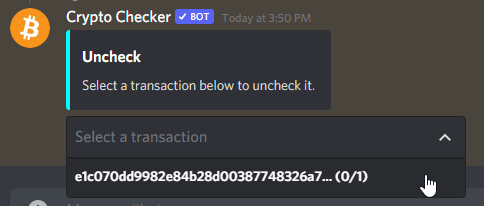
Hey, I wanted to ask if anyone knows how to do this or hows called in API. I've tried to find this but I wasn't successful.
https://i.imgur.com/gMnJ7NP.png
 heavy folio
slate swan
Hey, I wanted to ask if anyone knows how to do this or hows called in API. I've ...
heavy folio
slate swan
Hey, I wanted to ask if anyone knows how to do this or hows called in API. I've ...
you could do it with dpy 2 iirc
valid niche
slate swan
Hey, I wanted to ask if anyone knows how to do this or hows called in API. I've ...
it's a select component
heavy folio
its called selects
 vocal magnet
slate swan
Hey, I wanted to ask if anyone knows how to do this or hows called in API. I've ...
vocal magnet
slate swan
Hey, I wanted to ask if anyone knows how to do this or hows called in API. I've ...
That's a select menu https://discord.com/developers/docs/interactions/message-components#component-object-component-types
Discord Developer Portal
Integrate your service with Discord — whether it's a bot or a game or whatever your wildest imagination can come up with.
valid niche
!d discord.ComponentType.select
unkempt canyonBOT
Represents a select component.
heavy folio
@slate swan you need dpy v2 for that tho py pip install -U git+https://github.com/Rapptz/discord.py
heavy folio
valid niche
you forgot to add parentheses
wdym wait where
valid niche
 heavy folio
oh right
slate swan
Thanks yall!
heavy folio
hold on
valid niche
because you need to construct the class
heavy folio
yoo it finally works now smh i keep making some careless mistakes
@valid niche one more thing, could you help?
valid niche
not without a question
dusk pumice
How to add role to a bot?
valid niche
dusk pumice
`How to add role to a bot?`
a bot can be treated the same was as a member for that
boreal ravine
dusk pumice
`How to add role to a bot?`
!d discord.Member.add_roles
unkempt canyonBOT
await add_roles(*roles, reason=None, atomic=True)```
This function is a [*coroutine*](https://docs.python.org/3/library/asyncio-task.html#coroutine).

Gives the member a number of [`Role`](https://discordpy.readthedocs.io/en/master/api.html#discord.Role "discord.Role")s.

You must have the [`manage_roles`](https://discordpy.readthedocs.io/en/master/api.html#discord.Permissions.manage_roles "discord.Permissions.manage_roles") permission to use this, and the added [`Role`](https://discordpy.readthedocs.io/en/master/api.html#discord.Role "discord.Role")s must appear lower in the list of roles than the highest role of the member.Hmm I see
I thought it was not like member
Tnx
valid niche
look in my example code i send above on how i did buttons, i did something similar where i passed the entire ctx to the View class
i send a view like this
        lbview = self.LeaderBoard(self.bot, ctx, page, data)
        lbview.message = await ctx.send(embed=embed, view=lbview)
oh
valid niche
and made an init
    class LeaderBoard(discord.ui.View):
        def __init__(self, bot, ctx, page, data):
            super().__init__()
            self.bot = bot
            self.ctx = ctx
            self.page = page

            self.timeout = 20
            self.message = None
What's wrong with my code???
await bot.add_roles(get(ctx.guild.roles, name="Bot"))
Should I use get_member???
valid niche
because bot is your bot class, it's not the actual member
guild.me would be the member version of your bot
dusk pumice
Okay
valid niche
bot doesn't refer to the actual account, it instead is the main part of the code
valid niche
unkempt canyonBOT
property me: discord.member.Member```
Similar to [`Client.user`](https://discordpy.readthedocs.io/en/master/api.html#discord.Client.user "discord.Client.user") except an instance of [`Member`](https://discordpy.readthedocs.io/en/master/api.html#discord.Member "discord.Member"). This is essentially used to get the member version of yourself.It worked tnx
maiden fable
Oh seb. Hi there
valid niche
hi hunter
 river hollow
can someone help me why this isnt working ```from discord.ext import commands
bot = commands.Bot(command_prefix='>')
message_id = 900116048362221668
@bot.command()
async def react_message(ctx):
message = ctx.channel.get_message(message_id)
await message.add_reaction("👍")
bot.run('token')``` i want if i start the bot it reacts to the message via message ID
maiden fable
Cz theres nothing like get messagw
 slim whale
how i can make a change prefix command?
maiden fable
!d discord.TextChannel.fetch_message
unkempt canyonBOT
await fetch_message(id, /)```
This function is a [*coroutine*](https://docs.python.org/3/library/asyncio-task.html#coroutine).

Retrieves a single [`Message`](https://discordpy.readthedocs.io/en/master/api.html#discord.Message "discord.Message") from the destination.ctx.channel.get_message ?
maiden fable
slim whale
how i can make a change prefix command?
!d discord.ext.commands.Bot.get_prefix
unkempt canyonBOT
await get_prefix(message)```
This function is a [*coroutine*](https://docs.python.org/3/library/asyncio-task.html#coroutine).

Retrieves the prefix the bot is listening to with the message as a context.U gotta fetch it
river hollow
how
valid niche
slim whale
how i can make a change prefix command?
you will need to implement a get_prefix function, which is passed to the command_prefix. Then have a database with all prefixes
maiden fable
Just told u...
maiden fable
unkempt canyon
@river hollow
maiden fable
Breh
valid niche
and in your command just change the database entry
river hollow
why isnt this working then
maiden fable
Cz u didn't tell it the ID...
river hollow
bot = commands.Bot(command_prefix='>')

message_id = 900354407403782154


@bot.command()
async def react_message(ctx):
    msg = await ctx.channel.fetch_message(id)
    await msg.add_reaction("👍")


bot.run('token')```Then change id to message_id 🤦
river hollow
maiden fable
Then change id to message_id 🤦
oh lost ahah
now i did and it is still not working
heavy folio
river hollow
now i did and it is still not working
whats not workign
maiden fable
river hollow
it isnt reacting
valid niche
did you run your command?
maiden fable
Error?
river hollow
maiden fable
Error?
no just nothing
river hollow
valid niche
did you run your command?
yes
maiden fable
Wait, in which channel is the message present?
What if it's not in the current channel?
river hollow
or now there is a error
discord.ext.commands.errors.CommandInvokeError: Command raised an exception: HTTPException: 400 Bad Request (error code: 10014): Unknown Emoji```yep, you need to run it in the right channel
maiden fable
bot = commands.Bot(command_prefix='>')

message_id = 900354407403782154


@bot.command()
async def react_message(ctx):
    msg = await ctx.channel.fetch_message(id)
    await msg.add_reaction("👍")


bot.run('token')
Better. I can't see code without codeblock
river hollow
maiden fable
```py
bot = commands.Bot(command_prefix='>')
message_id = 900354407403782154
...
this dont work
heavy folio
maiden fable
```py
bot = commands.Bot(command_prefix='>')
message_id = 900354407403782154
...
id isnt defined, use message_id instead
@river hollow
river hollow
heavy folio
`id` isnt defined, use `message_id` instead
still dont work
heavy folio
river hollow
still dont work
what doesnt work
river hollow
nothing happens
heavy folio
can u just send the error and edited code
river hollow
heavy folio
can u just send the error and edited code
there is no error
heavy folio
just send the code
river hollow
ok
river hollow
heavy folio
did you use it in the right channel
yes
valid niche
that seems like a coding error and not something for an error handler
so the way to handle that error is to fix your code pretty much
slate swan
How do I create a channel that can only be seen by a specified user?
valid niche
after getting the data verify if it's empty or not
valid niche
slate swan
How do I create a channel that can only be seen by a specified user?
set the overrides when creating the channel
!d discord.Guild.create_text_channel
unkempt canyonBOT
await create_text_channel(name, *, reason=None, category=None, position=..., topic=..., slowmode_delay=..., nsfw=..., overwrites=...)```
This function is a [*coroutine*](https://docs.python.org/3/library/asyncio-task.html#coroutine).

Creates a [`TextChannel`](https://discordpy.readthedocs.io/en/master/api.html#discord.TextChannel "discord.TextChannel") for the guild.

Note that you need the [`manage_channels`](https://discordpy.readthedocs.io/en/master/api.html#discord.Permissions.manage_channels "discord.Permissions.manage_channels") permission to create the channel.

The `overwrites` parameter can be used to create a ‘secret’ channel upon creation. This parameter expects a [`dict`](https://docs.python.org/3/library/stdtypes.html#dict "(in Python v3.9)") of overwrites with the target (either a [`Member`](https://discordpy.readthedocs.io/en/master/api.html#discord.Member "discord.Member") or a [`Role`](https://discordpy.readthedocs.io/en/master/api.html#discord.Role "discord.Role")) as the key and a [`PermissionOverwrite`](https://discordpy.readthedocs.io/en/master/api.html#discord.PermissionOverwrite "discord.PermissionOverwrite") as the value.

Note

Creating a channel of a specified position will not update the position of other channels to follow suit. A follow-up call to [`edit()`](https://discordpy.readthedocs.io/en/master/api.html#discord.TextChannel.edit "discord.TextChannel.edit") will be required to update the position of the channel in the channel list...as you can see, there's an overwrites kwarg, where you can pass permissions to set
heavy folio
river hollow
yes
send a message in the channel again
river hollow
ok why
heavy folio
get the message id and replace it with the old one
what why no one can help you without any context
valid niche
could you send the code for this? worst case i'd say use a try except, but there should be a "cleaner" method of doing it
river hollow
heavy folio
get the message id and replace it with the old one
still dont work
boreal ravine
valid niche
could you send the code for this? worst case i'd say use a try except, but there...
What exception for empty tables though
valid niche
an error handler should idealy only be used for user errors, internal errors are best handled without an error handler
heavy folio
river hollow
still dont work
does the bot have perms
valid niche
and which table is expected to be empty?
river hollow
heavy folio
does the bot have perms
i think
heavy folio
wdym you think
valid niche
is it async with self.bot.db.execute("SELECT channel_id FROM level_channel WHERE guild_id = ?", (guild_id,)) as cursor:?
river hollow
heavy folio
wdym you think
yes it have
valid niche
the error appears from
            data = await cursor.fetchone()
            channel_id = data[0]
fetchone will return None because the table is empty
so i would say if data:, if this passes you know there is data, if it fails, you can make an else statement to handle missing entries
heavy folio
river hollow
yes it have
do you have an error handler
valid niche
river hollow
just the code i sended
small tip, it's sent, send is an irregular verb :p
heavy folio
---------------------
Ignoring exception in command react:
Traceback (most recent call last):
  File "C:\Users\user\AppData\Local\Programs\Python\Python38\lib\site-packages\discord\ext\commands\core.py", line 167, in wrapped
    ret = await coro(*args, **kwargs)
  File "c:/Users/user/Desktop/theBot/main.py", line 54, in react
    await msg.add_reaction(":thumbsup:")
  File "C:\Users\user\AppData\Local\Programs\Python\Python38\lib\site-packages\discord\message.py", line 1406, in add_reaction
    await self._state.http.add_reaction(self.channel.id, self.id, emoji)
  File "C:\Users\user\AppData\Local\Programs\Python\Python38\lib\site-packages\discord\http.py", line 335, in request
    raise HTTPException(response, data)
discord.errors.HTTPException: 400 Bad Request (error code: 10014): Unknown Emoji

The above exception was the direct cause of the following exception:

Traceback (most recent call last):
  File "C:\Users\user\AppData\Local\Programs\Python\Python38\lib\site-packages\discord\ext\commands\bot.py", line 994, in invoke
    await ctx.command.invoke(ctx)
  File "C:\Users\user\AppData\Local\Programs\Python\Python38\lib\site-packages\discord\ext\commands\core.py", line 894, in invoke
    await injected(*ctx.args, **ctx.kwargs)
  File "C:\Users\user\AppData\Local\Programs\Python\Python38\lib\site-packages\discord\ext\commands\core.py", line 176, in wrapped
    raise CommandInvokeError(exc) from exc
discord.ext.commands.errors.CommandInvokeError: Command raised an exception: HTTPException: 400 Bad Request (error code: 10014): Unknown Emoji
based on your code:```py
message_id = 900388137837166634
@bot.command()
async def react(ctx):
msg = await ctx.channel.fetch_message(message_id)
await msg.add_reaction(":thumbsup:")
":thumbsup:" isn't a valid emoji
boreal ravine
its :thumbsup:
valid niche
you will need to use the unicode one
\👍
^ you can copy paste that, that's the unicode version
boreal ravine
or just add a backslash before to a discord emoji
valid niche
until you hit search, because then it goes to a different website :p
heavy folio
@river hollow are u very certain you dont have an error handler
cuz you should be getting the same error as me (unknown emoji)
valid niche
you probably want to return in the else statement to block it from running the rest of the code
oh also
!or
unkempt canyonBOT
When checking if something is equal to one thing or another, you might think that this is possible:
if favorite_fruit == 'grapefruit' or 'lemon':
    print("That's a weird favorite fruit to have.")
While this makes sense in English, it may not behave the way you would expect. In Python, you should have complete instructions on both sides of the logical operator.
So, if you want to check if something is equal to one thing or another, there are two common ways:
# Like this...
if favorite_fruit == 'grapefruit' or favorite_fruit == 'lemon':
    print("That's a weird favorite fruit to have.")

# ...or like this.
if favorite_fruit in ('grapefruit', 'lemon'):
    print("That's a weird favorite fruit to have.")
for this one
 slate swan
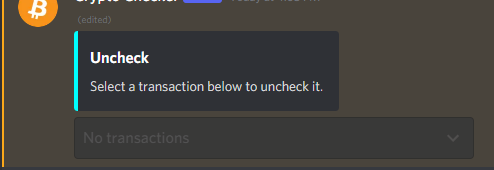
Hey, I have one more question regarding select menu. How can I make it without any option and unclickable like this? https://i.imgur.com/fbHacs0.png
Channel not created
What am I doing wrong?

 lament mesa
any errors?
merry sleet
Hi! i am facing a bit of difficulties here... like i made a Discord bot to import lyrics from genius... IT WORKS FINE BUT AT THE END, I GET THIS 80% OF THE TIME.. how can i fix that?
 merry sleet
Can enyone help me with that issue?
heavy folio
lament mesa
<@!683001325440860340> is open source
could u send source code link
lament mesa
heavy folio
could u send source code link

GitHub
A feature rich discord Modmail bot. Contribute to python-discord/modmail development by creating an account on GitHub.
slate swan
i changed the bot prefix , but i need to restart inorder for the changes to apply ? is their a way to avoid it
bot = commands.Bot(command_prefix=prefix, intents=intents, owner_id=626127081419571206)
here is how i defined my prefix
with open('prefix.json') as fhand:
    x = json.load(fhand)
prefix = x["prefix"]```Bump!
slate swan
slate swan
i changed the bot prefix , but i need to restart inorder for the changes to appl...
You can make a command or task to reboot the script automatically
For example await os.execv(sys.executable, ['python'] + sys.argv)
wrong.
slate swan
slate swan
wrong.
?
reef shell
slate swan
Bump!
!d discord.ui.Select.disabled
unkempt canyonBOT
property disabled: bool```
Whether the select is disabled or not. slate swan
unkempt canyon
slate swan
unkempt canyon
Thanks!
slate swan
slate swan
This shit is wrong lmao
slate swan
slate swan
This shit is wrong lmao
thats from the official discordpy server 
heavy folio
lament mesa
https://github.com/python-discord/modmail
ty
boreal ravine
slate swan
This shit is wrong lmao
whats wrong?
maiden fable
heavy folio
`id` isnt defined, use `message_id` instead
It was the code the other person posted... I just added a code block to it
 ripe finch
i would like to ask for help in programming my bot, it was fine at first, but now it doesnt act on my main commands
boreal ravine
error? @ripe finch
ripe finch
no, i think there's no error. the @raven peak doesnt work anymore
im a beginner in python btw

the bot doesnt act on it, or doesnt recognize it idk
slate swan
slate swan
This shit is wrong lmao
its correct bruh , lmao it worked
async def get_pre(bot, message):
  with open('prefix.json') as fhand:
      x = json.load(fhand)
      return x["prefix"]
bot = commands.Bot(command_prefix=get_pre, intents=intents, owner_id=626127081419571206)``` dont try to share false information please or things your not sure ofStop tagging me folk
heavy folio
maiden fable
It was the code the other person posted... I just added a code block to it
yeah
 sick birch
slate swan
sick birch
slate swan
Though I don’t really see why, you could just pass in a list or string to the command_prefix to the bot instance
This function is often used for dynamic prefixes
slate swan
sick birch
Though I don’t really see why, you could just pass in a list or string to the co...
it wouldnt update ...
its used to update the prefix
sick birch
slate swan
its used to update the prefix
i see, that snipped just looks like you're calling the function that just returns a list haha
slate swan
lmao
sick birch
slate swan
its correct bruh , lmao it worked
```py
async def get_pre(bot, message):
wit...
but yeah for prefixes json isn't the best idea, rather you should use a database if you're going to allow your users to change the prefix for their guild
slate swan
sick birch
but yeah for prefixes json isn't the best idea, rather you should use a database...
i'm not , its a personal bot 
 scarlet fjord
@slate swan just use bot.command_prefix = 'command_prefix'
slate swan
scarlet fjord
<@456226577798135808> just use `bot.command_prefix = 'command_prefix'`
it would still have the instance i assume , but it’s not much
scarlet fjord
huh?
 zenith zinc
hii
 kindred epoch
slate swan
i changed the bot prefix , but i need to restart inorder for the changes to appl...
kindred epoch
slate swan
i changed the bot prefix , but i need to restart inorder for the changes to appl...
No, ofc u need to restart it
scarlet fjord
kindred epoch
No, ofc u need to restart it
no u dont
kindred epoch
Huh?
kindred epoch
scarlet fjord
no u dont
Explain
scarlet fjord
so you can have everything up until the point u need to restart, then in ur code just have bot.command_prefix = 'command_prefix' and that will change the prefix the bot is listening for to that new prefix
and you dont have to restart anything
kindred epoch
Isn't that what I just said in 7 words?
You need to restart ur bot in order for the new changes to apply
scarlet fjord
no. u dont
 toxic wharf
how can i do loop every 30 seconds?
kindred epoch
scarlet fjord
no. u dont
Bruh what
scarlet fjord
in mine the bot doesnt restart at all
it just updates what prefix the bot is listening for
 fluid shadow
Does anyone know how to host your bot 24/7 without using heruko or having a tab open?
kindred epoch
fluid shadow
**Does anyone know how to host your bot 24/7 without using heruko or having a ta...
Get a vps
fluid shadow
ya
 brazen raft
fluid shadow
**Does anyone know how to host your bot 24/7 without using heruko or having a ta...
brazen raft
fluid shadow
**Does anyone know how to host your bot 24/7 without using heruko or having a ta...
Amazon Web Services
fluid shadow
Free?
 mild lance
notbot = member.id != bot.user.id```AttributeError: 'NoneType' object has no attribute 'id'
slate swan
kindred epoch
No, ofc u need to restart it
you dont bruh
zenith zinc
fluid shadow
**Does anyone know how to host your bot 24/7 without using heruko or having a ta...

#Discord #FreeHosting #BotHosting
Website: https://cubichosting.xyz
Discord: https://discord.gg/73Cx8yfvaR
Cubic Hosting is a free Discord Bot Hosting company that allows you to host Javascript, Python, Java, Go, and more scripts. All files you upload are private and can only be accessed by you or an administrator (don't worry, they won't peak...
use this
slate swan
zenith zinc
use this
They clearly said "without keeping a tab open"
mild lance
mild lance
``` File "c:\Users\Lior.Saroya\Desktop\Market Bot\cogs\ticketsystem.py", line 3...
……
slate swan
Also those specs look almost identical to heroku's, but on heroku you don't have to "afk" on some shitty page so heroku > that host including any other "afk" page host
slate swan
mild lance
``` File "c:\Users\Lior.Saroya\Desktop\Market Bot\cogs\ticketsystem.py", line 3...
Member is None
slate swan
mild lance
``` File "c:\Users\Lior.Saroya\Desktop\Market Bot\cogs\ticketsystem.py", line 3...
looks like member is None , do you have your members intents on?
also py notbot = member.id != bot.user.id is invalid syntax
It's not invalid syntax
kindred epoch
slate swan
you dont bruh
?
So ur saying you don't need to restart ur bot in order for new changes to apply?
mild lance
notbot = member.id != self.bot.user.id
'NoneType' object has no attribute 'id' and i have this error
slate swan
You've literally just been answered
mild lance
?
slate swan
slate swan
Member is None
.
kindred epoch
😂
mild lance
so how i get it syntax
slate swan
Although you should be expected to fix this yourself since it's a basic python error
mild lance
this is my member
slate swan
mild lance
member = discord.utils.find(lambda m: m.id == payload.user_id, guild.members)
Is this an on_raw_reaction_add or something?
mild lance
yes
    @commands.Cog.listener()
    async def on_raw_reaction_add(self, payload):
        guild = self.bot.get_guild(744705734566084619)
        if guild:
            message_id = payload.message_id
            guild_id = payload.guild_id
            member = discord.utils.find(lambda m: m.id == payload.user_id, guild.members)
            channel1 = self.bot.get_channel(payload.channel_id)
            message = await channel1.fetch_message(payload.message_id)
            data = cogs._json.read_json("setupdata")
            notbot = member.id != self.bot.user.id
            channel3 = await self.bot.fetch_channel(payload.channel_id)
            chekchannel = channel3.name.startswith("verification")
            if chekchannel:
                if payload.emoji.name == '✅' and notbot:
                    if str(member.name) in data and str(member.id) in data:
                        name = data[str(member.id)]
                        char = data[str(member.name)]
steam = data[str(member.mention)]```not this
sorry my miss
slate swan
It returns None because the member isn't in the guild then
Check the guild's id and check your intents
mild lance
   @commands.Cog.listener()
    async def on_raw_reaction_add(self, payload):
        message_id = payload.message_id
        guild_id = payload.guild_id
        guild = discord.utils.find(lambda g: g.id == guild_id, self.bot.guilds)
        member = discord.utils.find(
            lambda m: m.id == payload.user_id, guild.members)
        role = discord.utils.find(lambda r: r.name == 'Moderator', guild.roles)
        role2 = discord.utils.find(lambda r: r.name == 'Sale Team', guild.roles)
        notbot = member.id != self.bot.user.id
        if payload.emoji.name == '📨' and notbot:
            overwrites = {
                guild.default_role: discord.PermissionOverwrite(read_messages=False),
                guild.me: discord.PermissionOverwrite(read_messages=True),
                member: discord.PermissionOverwrite(read_messages=True, send_messages=True, attach_files=True),
                role: discord.PermissionOverwrite(read_messages=True),
                role2: discord.PermissionOverwrite(read_messages=True)
            }
Do you have intents
mild lance
what do you mean
slate swan
!intents
unkempt canyonBOT
Using intents in discord.py
Intents are a feature of Discord that tells the gateway exactly which events to send your bot. By default, discord.py has all intents enabled, except for the Members and Presences intents, which are needed for events such as on_member and to get members' statuses.
To enable one of these intents, you need to first go to the Discord developer portal, then to the bot page of your bot's application. Scroll down to the Privileged Gateway Intents section, then enable the intents that you need.
Next, in your bot you need to set the intents you want to connect with in the bot's constructor using the intents keyword argument, like this:
from discord import Intents
from discord.ext import commands

intents = Intents.default()
intents.members = True

bot = commands.Bot(command_prefix="!", intents=intents)
For more info about using intents, see the discord.py docs on intents, and for general information about them, see the Discord developer documentation on intents.
mild lance
its need to be a ticket system
import discord
from discord.ext import commands
import random
import datetime
import time
import platform
import asyncio
import json
from pathlib import Path
from discord.utils import get
import cogs._json
slate swan
unkempt canyon
Read this
slate swan
Dude
slate swan
unkempt canyon
Read this
 dusk dust
i want to edit an embed when the user reacted the message... how can i do this with a conditional?
slate swan
dusk dust
i want to edit an embed when the user reacted the message... how can i do this w...
Store your message in a var, add a reaction to your message, use wait_for, edit the message
dusk dust
ok
mild lance
so what to do please help meee
slate swan
🤦♂️
slate swan
unkempt canyon
Go to your main.py file, add this piece of code, then go to dev portal in your bot and go to "bot" and then enable the intents
When a user joins a server, I want to know how to create a channel dedicated to that person.
!d discord.Guild.create_text_channel
unkempt canyonBOT
await create_text_channel(name, *, reason=None, category=None, position=..., topic=..., slowmode_delay=..., nsfw=..., overwrites=...)```
This function is a [*coroutine*](https://docs.python.org/3/library/asyncio-task.html#coroutine).

Creates a [`TextChannel`](https://discordpy.readthedocs.io/en/master/api.html#discord.TextChannel "discord.TextChannel") for the guild.

Note that you need the [`manage_channels`](https://discordpy.readthedocs.io/en/master/api.html#discord.Permissions.manage_channels "discord.Permissions.manage_channels") permission to create the channel.

The `overwrites` parameter can be used to create a ‘secret’ channel upon creation. This parameter expects a [`dict`](https://docs.python.org/3/library/stdtypes.html#dict "(in Python v3.9)") of overwrites with the target (either a [`Member`](https://discordpy.readthedocs.io/en/master/api.html#discord.Member "discord.Member") or a [`Role`](https://discordpy.readthedocs.io/en/master/api.html#discord.Role "discord.Role")) as the key and a [`PermissionOverwrite`](https://discordpy.readthedocs.io/en/master/api.html#discord.PermissionOverwrite "discord.PermissionOverwrite") as the value.

Note

Creating a channel of a specified position will not update the position of other channels to follow suit. A follow-up call to [`edit()`](https://discordpy.readthedocs.io/en/master/api.html#discord.TextChannel.edit "discord.TextChannel.edit") will be required to update the position of the channel in the channel list...Using this on member.guild
Thank you very much. Can you also tell me more about how to set permissions?
dusk dust
slate swan
Store your message in a var, add a reaction to your message, use wait_for, edit ...
the reaction stay in or out of the var?
zenith zinc
slate swan
Thank you very much. Can you also tell me more about how to set permissions?
in command
?\
slate swan
!d discord.TextChannel.edit
unkempt canyonBOT
await edit(*, reason=None, **options)```
This function is a [*coroutine*](https://docs.python.org/3/library/asyncio-task.html#coroutine).

Edits the channel.

You must have the [`manage_channels`](https://discordpy.readthedocs.io/en/master/api.html#discord.Permissions.manage_channels "discord.Permissions.manage_channels") permission to use this.

Changed in version 1.3: The `overwrites` keyword-only parameter was added.

Changed in version 1.4: The `type` keyword-only parameter was added.

Changed in version 2.0: Edits are no longer in-place, the newly edited channel is returned instead.^ overwrites
slate swan
dusk dust
the reaction stay in or out of the var?
?
How does a reaction stay in or out of a var what
dusk dust
slate swan
?
the message it's an embed and i typed this to the bot add reaction on message... i put this text in or out of the var?
 slate swan
Can we host from our own ip address if yes how
slate swan
slate swan
Can we host from our own ip address if yes how
Open your terminal > cd into your bot folder > run python main.py and you're done
I am on android
I doubt you can host on mobile
Even if you can your battery will die most likely in 2-3h
Not recommended
dusk dust
slate swan
It looks good so far
but u said that i need to put the message(embed) on a var... the text above i put on the var too?
slate swan
No what I meant is your Message object had to be in a var, which is what you're doing there, so it's good so far
dusk dust
ok
slate swan
slate swan
Even if you can your battery will die most likely in 2-3h
Can I send request from my ip even I host else where
dusk dust
i create a conditional like that?: if message.reaction == '⚙️': ....
boreal ravine
@slate swan indents
slate swan
!paste
unkempt canyonBOT
Pasting large amounts of code
If your code is too long to fit in a codeblock in discord, you can paste your code here:
https://paste.pythondiscord.com/
After pasting your code, save it by clicking the floppy disk icon in the top right, or by typing ctrl + S. After doing that, the URL should change. Copy the URL and post it here so others can see it.

 slate swan
toxic wharf
what should i change
slate swan
toxic wharf
what should i change
from where have you imported tasks
toxic wharf
 slate swan
Can I send request from my ip even I host else where
slate swan
slate swan
Can I send request from my ip even I host else where
nope
toxic wharf
first line in my code
slate swan
toxic wharf
from discord.ext import tasks
toxic wharf
 slate swan
replace tasks.run(...) with check_voice.start()
toxic wharf
thank you

 fallow mauve
making music bot, and it says there's an error at "youtube" whats wrong here?

pls ping for feedback
slate swan
fallow mauve
making music bot, and it says there's an error at "youtube" whats wrong here?
?ytdl
!ytdl
unkempt canyonBOT
Per Python Discord's Rule 5, we are unable to assist with questions related to youtube-dl, pytube, or other YouTube video downloaders, as their usage violates YouTube's Terms of Service.
For reference, this usage is covered by the following clauses in YouTube's TOS, as of 2021-03-17:
The following restrictions apply to your use of the Service. You are not allowed to:

1. access, reproduce, download, distribute, transmit, broadcast, display, sell, license, alter, modify or otherwise use any part of the Service or any Content except: (a) as specifically permitted by the Service;  (b) with prior written permission from YouTube and, if applicable, the respective rights holders; or (c) as permitted by applicable law;

3. access the Service using any automated means (such as robots, botnets or scrapers) except: (a) in the case of public search engines, in accordance with YouTube’s robots.txt file; (b) with YouTube’s prior written permission; or (c) as permitted by applicable law;

9. use the Service to view or listen to Content other than for personal, non-commercial use (for example, you may not publicly screen videos or stream music from the Service)

 fallow mauve
unkempt canyon
fallow mauve
unkempt canyon
ok
slate swan
toxic wharf
yeah that's because a User object doesn't have a status
toxic wharf
slate swan
yeah that's because a User object doesn't have a status
how can i get user in guild
maiden fable
toxic wharf
It's user.status
slate swan
get guild, get member from guild
maiden fable
Oh nvm
toxic wharf
and get his status
slate swan
maiden fable
It's user.status
there is not status for a User object
maiden fable
Never knew that 😐
slate swan
slate swan
get guild, get member from guild
@toxic wharf
maiden fable
Weird tbh
slate swan
discord limitation probably
errant shuttle
Hey, so I made a change prefix command but I also have a "help on command" command and there is this field called usage and it sends something like this for now: e> ping. So I want it to send like this. {your server prefix} ping
So here is my code currently
The change prefix command
def get_prefix(client, message):
    with open('modules/prefixes.json', "r") as prefix_file:
        prefixes = json.load(prefix_file)

    return prefixes[str(message.guild.id)]
client = commands.Bot(
    command_prefix=get_prefix,
    strip_after_prefix=True,
    case_insensitive=True,
)
@client.event
async def on_guild_join(guild):
    with open('modules/prefixes.json', "r") as prefix_file:
        prefixes = json.load(prefix_file)

    prefixes[str(guild.id)] = 'e>'

    with open('prefixes.json', 'w') as prefix_file:
        json.dump(prefixes, prefix_file, indent = 4)
@client.event
async def on_guild_remove(guild):
    with open('modules/prefixes.json', "r") as prefix_file:
        prefixes = json.load(prefix_file)

    prefixes.pop(str(guild.id))

    with open('prefixes.json', 'w') as prefix_file:
        json.dump(prefixes, prefix_file, indent = 4)
@client.command(aliases = ['newprefix', 'prefix', 'makeprefix', 'makenewprefix', 'setprefix'])
async def changeprefix(ctx, prefix = "e>"):
    if ctx.message.author.guild_permissions.administrator or ctx.message.author.guild_permissions.manage_guild:
        with open('modules/prefixes.json', "r") as prefix_file:
            prefixes = json.load(prefix_file)

        prefixes[str(ctx.guild.id)] = prefix

        with open('modules/prefixes.json', 'w') as prefix_file:
            json.dump(prefixes, prefix_file, indent = 4)

        await ctx.reply(f"Prefix successfully changed to `{prefix}`")
    else:
        await ctx.reply("You don't have the permission `manage server`")
wait dont read this now
maiden fable
slate swan
discord limitation probably
Idts, since User and Member ain't different things in discord docs iirc
slate swan
User.status was never a thing nor in dpy nor in any fork
maiden fable
slate swan
User.status was never a thing nor in dpy nor in any fork
That's a separate thing haha. I don't think it's a discord limitation since a status would be the same for a person across discord if I ain't wrong
slate swan
¯_(ツ)_/¯

 slate swan
maiden fable
Idts, since User and Member ain't different things in discord docs iirc
slate swan
maiden fable
Idts, since User and Member ain't different things in discord docs iirc
they are, a member in discord docs is in the Guild-Member section while User is a section of its own
maiden fable
slate swan
they are, a member in discord docs is in the Guild-Member section while User is ...
Oh my bad then
slate swan
toxic wharf
!d discord.utils.get
unkempt canyonBOT
discord.utils.get(iterable, **attrs)```
A helper that returns the first element in the iterable that meets all the traits passed in `attrs`. This is an alternative for [`find()`](https://discordpy.readthedocs.io/en/master/api.html#discord.utils.find "discord.utils.find").

When multiple attributes are specified, they are checked using logical AND, not logical OR. Meaning they have to meet every attribute passed in and not one of them.

To have a nested attribute search (i.e. search by `x.y`) then pass in `x__y` as the keyword argument.

If nothing is found that matches the attributes passed, then `None` is returned.

Examples

Basic usage...it's supposed to be a kwarg not an arg
The channel settings are not overwritten. What should I do?

 chrome bloom
I'm probably better off asking here, how would I go about creating a queue for audio when another user request another audio source?
@commands.command()
async def play(self, ctx, sound):
    if ctx.author.voice is None:
        await ctx.send("Please connect bot to voice channel first!")
        else:
            if ctx.voice_client.is_playing():
        ctx.voice_client.stop()
        source = <folder from pc>
                vc.play(source)
                while vc.is_playing():
                    await sleep(4)
                    if vc.is_paused:
                        return
                    else:
                        await vc.disconnect()```
 I've tried
```py
class music(commands.Cog):
    def __init__(self, client):
        self.client = client
        self.queue = []

    @commands.command()
    async def play(self, ctx, sound):
        if ctx.author.voice is None:
            await ctx.send("Please connect bot to voice channel first!")
        else:
            if ctx.voice_client.is_playing():
                print("DEBUG: ")
                (self.queue).append[url]
print(*self.queue, sep="\n")```But it gets as far as the DEBUG: line and doesn't print the queue list, which probably means it's not addinghey, in the role command, how do i set up permissions?
fallow mauve
i can use yt videos for my music bot as long as its only for one server right? like a private bot
errant shuttle
fallow mauve
i can use yt videos for my music bot as long as its only for one server right? l...
yep i think
fallow mauve
k nice, good to know im not doing smth illegal 👍
sick birch
You prolly shouldn’t but YouTube doesn’t care
sick birch
fallow mauve
k nice, good to know im not doing smth illegal 👍
Perfectly within the law, within their TOS is questionable
slate swan
one database and create multiple tables for all your data
why would you even consider using multiple different databases
¯_(ツ)_/¯
placid skiff
That's a simple answer for that
If you will host your bot, more database you have more you have to pay
Hosting provider don't make you pay how many storage you use, they make you pay how many storage you take
zenith zinc
placid skiff
That's a simple answer for that
If you will host your bot, more database you hav...
not pay bro https://youtu.be/_5bUAfr0Uyk this is a free
#Discord #FreeHosting #BotHosting
Website: https://cubichosting.xyz
Discord: https://discord.gg/73Cx8yfvaR
Cubic Hosting is a free Discord Bot Hosting company that allows you to host Javascript, Python, Java, Go, and more scripts. All files you upload are private and can only be accessed by you or an administrator (don't worry, they won't peak...
placid skiff
Please bro they are the worst for hosting anything
Check the pinned message in this channel, they'll explain you why
valid niche
zenith zinc
not pay bro https://youtu.be/_5bUAfr0Uyk this is a free
yeah no
free hosting doesn't really exist
i doubt that host is any good
zenith zinc
i`m host of this tutorial broo
valid niche
!d discord.Client.change_presence
unkempt canyonBOT
await change_presence(*, activity=None, status=None)```
This function is a [*coroutine*](https://docs.python.org/3/library/asyncio-task.html#coroutine).

Changes the client’s presence.

Example

```py
game = discord.Game("with the API")
await client.change_presence(status=discord.Status.idle, activity=game)
``` Changed in version 2.0: Removed the `afk` keyword-only parameter.Yup
And discord bot doesn't even require a lot of storage so with a 1TB database will be enough to host your bot
zenith zinc
valid niche
!d discord.Client.change_presence
yes but guild count in activity.....
valid niche
placid skiff
Yup
And discord bot doesn't even require a lot of storage so with a 1TB database...
i pay 6 bucks a month for 2vcores, 8gb of memory, 160gb of storage (ssd), 80TB of traffic per month at 1000Mbps. And that for a postgres database server, a website with plesk panel, 3 discord bots and a reddit bot
 smoky portal
How can I get a list of everyone with a role?
valid niche
smoky portal
How can I get a list of everyone with a role?
you'll have to first get a list of all members, then generate a new list by checking if the len(member.roles) > 1
everyone always has 1 role, the @ everyone role, if they have 2 or more roles, so len(roles) > 1, you can add them to the list
slate swan
discord.ext.commands.errors.CommandInvokeError: Command raised an exception: ValueError: not enough values to unpack (expected 2, got 1) https://pastebin.com/j8Ajzfe1
placid skiff
Line?
valid niche
slate swan
discord.ext.commands.errors.CommandInvokeError: Command raised an exception: Val...
please send the full traceback
!traceback
unkempt canyonBOT
Please provide the full traceback for your exception in order to help us identify your issue.
A full traceback could look like:
Traceback (most recent call last):
    File "tiny", line 3, in
        do_something()
    File "tiny", line 2, in do_something
        a = 6 / b
ZeroDivisionError: division by zero
The best way to read your traceback is bottom to top.
• Identify the exception raised (in this case ZeroDivisionError)
• Make note of the line number (in this case 2), and navigate there in your program.
• Try to understand why the error occurred (in this case because b is 0).
To read more about exceptions and errors, please refer to the PyDis Wiki or the official Python tutorial.
placid skiff
valid niche
please send the full traceback
He has two commands with a single command call, i think that's the error
valid niche
placid skiff
He has two commands with a single command call, i think that's the error
uh?
care to elaborate?
slate swan
not enough values to unpack (expected 2, got 1)
  File "/run/user/1000/gvfs/smb-share:server=pythonbot.local,share=techmoboxer/techmobot.py", line 108, in unban
    member_name, member_discriminator = member.split('#')
  File "/run/user/1000/gvfs/smb-share:server=pythonbot.local,share=techmoboxer/techmobot.py", line 141, in <module>
bot.run("")``` full code https://pastebin.com/6xv4b7tDmember.split only returned a single item
placid skiff
Oh so that's lol
valid niche
because a member isn't just a name, a member is a full member object
so if you try to split it, there is no literal string to split it on
you want to get str(member).split()
placid skiff
Bro member is just a string in that case i checked the code
He is trying two assign two values with 1 assignement
placid skiff
slate swan
```Exception has occurred: ValueError
not enough values to unpack (expected 2, g...
.split returns a list, you have to assign them manually
valid niche
placid skiff
.split returns a list, you have to assign them manually
it's completely valid syntax
assuming that split returns at least 2 values
slate swan
from member_name, member_discriminator = member.split('#') to member_name, member_discriminator = str(member).split()?
valid niche
!e
l = ["a", "b"]
a, b = l
print(a)
print(b)
Lol
valid niche
okay srsly? what's wrong with this?
unkempt canyonBOT
@valid niche :white_check_mark: Your eval job has completed with return code 0.
001 | a
002 | b
there
placid skiff
!e
string = "abc def"
a, b = string.split()

print(f"{a} {b}")
@placid skiff :white_check_mark: Your eval job has completed with return code 0.
abc def
Uhm so i think that it really convert member to a member object
It can do it automatically? I always used converters when declared commands lol
slate swan
!e
for i in range(30):
print("loop?")```@slate swan :x: Your eval job has completed with return code 1.
001 |   File "<string>", line 2
002 |     print("loop?")
003 |     ^
004 | IndentationError: expected an indented block after 'for' statement on line 1
k
valid niche
placid skiff
It can do it automatically? I always used converters when declared commands lol
due to it being an unban command, meaning the user is no longer part of your server, it's impossible to convert to a discord.Member
but you can convert to a discord.User and work from there
@bot.command()
async def foo(ctx, user: discord.User):
i would add a space between the comma and user, just makes it more readable
also it's discord.User, capitalized U
also if you want it to work with multiple members, you will need to typehint to a list of discord.User, so
async def foo(ctx, users: commands.Greedy[typing.Union[discord.User, discord.Object]])
afaik that should work in d.py
it should auto convert
 hasty iron

 valid niche
ah yeah greedy
valid niche
valid niche
also if you want it to work with multiple members, you will need to typehint to ...
@slate swan
 proud glade
valid niche
due to it being an unban command, meaning the user is no longer part of your ser...
proud glade
valid niche
due to it being an unban command, meaning the user is no longer part of your ser...
false, it should be converted to a discord.Object in order to unban a person