#discord-bots
1 messages · Page 540 of 1
 slate swan
i mean you could still try
and this is my first time
try this ```py
@client.event
async def on_message(message):
print(message.channel.name)
await client.process_commands(message)
Why would that change anything
 reef shell
Do your bot comes online when you run the script?
slate swan
reef shell
Do your bot comes online when you run the script?
yeah
and it prints the first event
slate swan
slate swan
Why would that change anything
And in addition to that, client doesn't have process_commands @slate swan
Only Bot has
reef shell
slate swan
yeah
and did you send any messages to channels that your bot can see after that
slate swan
reef shell
and did you send any messages to channels that your bot can see after that
I sent loads of messages
and nothing printed in the output
Can the bot see the channel
slate swan
slate swan
And in addition to that, client doesn't have `process_commands` <@45622657779813...
how was i suppose to know i dont use discord.Client
slate swan
slate swan
Can the bot see the channel
let me see
reef shell
slate swan
I sent loads of messages
Your bot has view_channel permission in that channel?
slate swan
If the bot can't see the channel it's normal nothing gets printed
And you should use Bot instead of Client if you plan on adding commands
yes
slate swan
slate swan
yes
does your bot have view_channels??
oh nvm you said yes LOL
I mean, when i added the bot
theres no role
That the bot has.
Idk why
Just make sure the bot can see the channel you're sending messages in
reef shell
^
reef shell
and that doesn’t help?
slate swan
@bot.event
async def on_message(message):
await message.channel.send('Hello')
I changed the event to this
and still doesnt work
Just one question, when you have a bot doesnt it have a role that you cant delete?
reef shell
Have you changed your variable names too?
slate swan
slate swan
Just one question, when you have a bot doesnt it have a role that you cant delet...
And the bot has to have it.
Not always
slate swan
reef shell
Have you changed your variable names too?
mhm
slate swan
reef shell
Have you changed your variable names too?
@bot.event
async def on_ready():
    print('Bot Is Running as {0.user}'.format(client))


@bot.event
async def on_message(message):
    await message.channel.send('Hello')

client.run(TOKEN)```If you invited the bot without any permissions no role is being created
slate swan
slate swan
```bot = discord.Client()
@bot.event
async def on_ready():
print('Bot Is R...
Please take a closer look at
https://discordpy.readthedocs.io/en/stable/ext/commands/commands.html
reef shell
slate swan
```bot = discord.Client()
@bot.event
async def on_ready():
print('Bot Is R...
consider using commands.Bot
slate swan
You will see that you shouldn't use Client
reef shell
!d discord.ext.commands.Bot
 unkempt canyonBOT
class discord.ext.commands.Bot(command_prefix, help_command=<default-help-command>, description=None, **options)```
Represents a discord bot.

This class is a subclass of [`discord.Client`](https://discordpy.readthedocs.io/en/master/api.html#discord.Client "discord.Client") and as a result anything that you can do with a [`discord.Client`](https://discordpy.readthedocs.io/en/master/api.html#discord.Client "discord.Client") you can do with this bot.

This class also subclasses [`GroupMixin`](https://discordpy.readthedocs.io/en/master/ext/commands/api.html#discord.ext.commands.GroupMixin "discord.ext.commands.GroupMixin") to provide the functionality to manage commands.And you need to use bot.run and not client.run since you changed the variable name now
from discord.ext import commands
import random

TOKEN = ''

bot = discord.Client()


@bot.command()
async def on_ready():
    print('Bot Is Running as {0.user}'.format(client))


@bot.command()
async def on_message(message):
    await message.channel.send('Hello')

bot.run(TOKEN)```
**This is my code now**I did the command thing as you guys said
slate swan
slate swan
Please take a closer look at
https://discordpy.readthedocs.io/en/stable/ext/comm...
.
slate swan
slate swan
```import discord
from discord.ext import commands
import random
TOKEN = ''
bo...
commands dont work with discord client...
use commands.Bot instead
and why is on_message a command its an event
your formatting client with a bot definition
please learn basic python and basic dpy
slate swan
slate swan
please learn basic python and basic dpy
I came here for help. I couldnt find anything on the internet so I came to the py community
Sorry for not knowing the basics
dpy isnt a "starter" or "basic" lib
slate swan
slate swan
I came here for help. I couldnt find anything on the internet so I came to the p...
Everything's there:
https://discordpy.readthedocs.io/en/stable/ext/commands/commands.html
There are even examples
Take the time to look at the page
And you should learn Python more than just the basics
!resources
unkempt canyonBOT
Resources
The Resources page on our website contains a list of hand-selected learning resources that we regularly recommend to both beginners and experts.
https://pythondiscord.com/resources
slate swan
Could remove the non needed import
slate swan
Well, it's not used anywhere
slate swan
Not in that code
 carmine pilot
ik
slate swan
Is javascript discord easier than discord.py?
reef shell
preferences
slate swan
Js isn't necessarily hard, but for making a discord bot it's somewhat harder than in dpy (provided that you don't just plan on making the bot online and just that which can also be a pretty challenging task for beginners), python is more friendly
 placid skiff
Ok so I'm trying to rising a MissingRole error but when the bot do it the error handler get a NoneType object instead of a MissingRole object, how to solve this?
code's here:
role: Role = db.field("SELECT WRRoleID FROM guilds WHERE GuildID IS ?", ctx.guild_id)
        if not role:
            await ctx.send("Non è stato ancora impostato un ruolo per questi comandi")
            breakpoint()
        author: Member = ctx.author

        if role.name not in author.roles:
            raise MissingRole(role)
 slim whale
@bot.command()
async def vkick(ctx, user : discord.Member):
  await user.move_to(None)
await ctx.send(f"He expulsado a {user.mention} del canal de voz!")``` How i can make the user mention to pingt the person who i kicked¿await ctx.send(ctx.author.mention)
you can look things up lol but thats what i found
carmine pilot
carmine pilot
await ctx.send(ctx.author.mention)
@slim whale
slim whale
carmine pilot
<@!626127081419571206>
tnxxx
carmine pilot
no prob
placid skiff
placid skiff
Ok so I'm trying to rising a MissingRole error but when the bot do it the error ...
No one?
carmine pilot
i dont know how to fix that let me try and help @placid skiff
lets see if google has a fix
placid skiff
i'm actually searching it xD
carmine pilot
async def say_error(ctx, error):
    Missingrole = get(guild.roles, id=730356075689410570)
    if isinstance(error, commands.MissingRole(missing_role)):
await ctx.send(f'`You dont have {Missingrole} role..')```async def say_error(ctx, error):
if isinstance(error, commands.MissingRole):
if error.missing_role.id == 730356075689410570:
await ctx.send(f'`You dont have {error.missing_role} role..')
else:
await ctx.send("You are missing some other role")
else:
raise error # if we can't handle the error, bubble it back up```take a look at this one @placid skiff
 stoic galleon
!eval {ctx.command}
unkempt canyonBOT
@stoic galleon :x: Your eval job has completed with return code 1.
001 | Traceback (most recent call last):
002 |   File "<string>", line 1, in <module>
003 | NameError: name 'ctx' is not defined
to use that i have to use checks, but i can't use them 'cuz i don't know the role missing until the command is runned
so I have to raise the MissingError object manually
 pine rapids
Hi i'm trying to make a command with pages but it's hard
placid skiff
try to use discord.ext.menus: https://github.com/Rapptz/discord-ext-menus

GitHub
Contribute to Rapptz/discord-ext-menus development by creating an account on GitHub.
slate swan
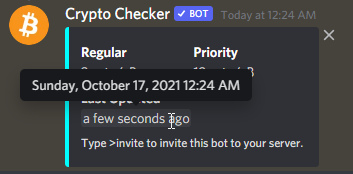
Hi, anyone knows how to do this? Have seen it only few times recently and I'd like to use it in my bots as well.
https://i.imgur.com/YTQprjf.png
 final iron
I was actually wondering this too
slate swan
Hopefully someone will be able to answer us!
final iron
I think there's a page on discord "documentation"
unkempt canyonBOT
discord.utils.format_dt(dt, /, style=None)```
A helper function to format a [`datetime.datetime`](https://docs.python.org/3/library/datetime.html#datetime.datetime "(in Python v3.9)") for presentation within Discord.

This allows for a locale-independent way of presenting data using Discord specific Markdown...How do people do it in their about me's though
slate swan
Go to dev-portal, your bot, and then the Description is the about me
slate swan
Settings => user profile
final iron
I mean the time thing in the about me
slate swan
slate swan
This is what you 2 are looking for ^
Thanks! Could u show me some example of how it should be implemented? I'm kinda confused of it and I'm not able to find anything except the docs.
slate swan
final iron
I mean the time thing in the about me
Didn't even know that this is possible
slate swan
slate swan
Thanks! Could u show me some example of how it should be implemented? I'm kinda ...
from datetime import datetime

dt = datetime.now()
await ctx.send(discord.utils.format_dt(dt, 'R'))
Using a timestamp
final iron
slate swan
Didn't even know that this is possible
Look at the admin Xithruis
final iron
Alr
slate swan
slate swan
```py
from datetime import datetime
dt = datetime.now()
await ctx.send(discord....
Wait, that's disnake not discord.py
The implementation should be same, nvm
e.g:
<t:1634428410:R>
<t:1634428410:R>
slate swan
slate swan
Wait, that's `disnake` not `discord.py`
Ah mb, just change disnake with discord
There I fixed it
NameError: name 'FFmpegPCMAudio' is not defined
slate swan
slate swan
Ah mb, just change disnake with discord
discord.ext.commands.errors.CommandInvokeError: Command raised an exception: AttributeError: module 'discord.utils' has no attribute 'format_dt'
Version of dpy?
I'm receiving this error with that
shit

woops
That's one big queue
How can i get a members top role position?
You're not importing it
slate swan
slate swan
How can i get a members top role position?
!d discord.Member.top_role
unkempt canyonBOT
property top_role: Role```
Returns the member’s highest role.

This is useful for figuring where a member stands in the role hierarchy chain.I'll just make it by <t:1634428410:R>, that's easier
so do Member.top_role.position()?
Yeah you can do that
slate swan
slate swan
so do Member.top_role.position()?
No, you need a Member instance, top_role is a property of Member
okay so i can do
l = ctx.author.top_role
p = l.position()
Yeah
okay thanks for your help
Yw
 surreal current
Heyyyy, I've got a quick problem, and was wondering if you guys might know what's up.
So, I'm sending messages with await ctx.send("Message")
I'm storing the message object in a variable using sent_message = await ctx.send("Message")
However, when I later go to lookup for any new reactions on that message object, it returns an empty list, even though reactions exist on the message. Am I missing something?
 pale zenith
You stored it at that moment, it doesn't get updated so it's the reactions at the moment it got sent
surreal current
So I need to fetch it again?
pale zenith
Yeah, depending on what your trying to do
surreal current
I'm just looking to see if there are any new reactions. So I guess that means I need to store the message ID
 hollow agate
@client.command()
async def delete(ctx):
    db = await aiosqlite.connect('database.db')
    cursor = await db.execute("SELECT users FROM currency WHERE users=?", (ctx.author.id,))
    rows = await cursor.fetchone()
    if rows is None:
        embed = discord.Embed(title="Delete",
        description=f"You're not registered!",
        color=discord.Color.orange())
        await ctx.reply(embed=embed)
    else:
        def check (message):
            return message.channel == ctx.channel and message.author == ctx.author

        embed = discord.Embed(title="Delete",
        description=f"Reply with `yes` if you **WOULD** like to delete your profile. Reply with `no` if you would **NOT** like to delete your profile.",
        color=discord.Color.orange())
        await ctx.reply(embed=embed)

        try:
            c = await client.wait_for('message', timeout=60.0, check=check)

            if c.content.lower() == "yes":
                cursor = await db.execute('DELETE FROM currency WHERE users=?', (ctx.author.id,))
                cursor = await db.execute('DELETE FROM inventory WHERE users=?', (ctx.author.id,))
                cursor = await db.execute('DELETE FROM pets WHERE users=?', (ctx.author.id,))
                rows = await cursor.fetchall()
                cursor = await db.execute('SELECT * FROM currency')
                rows = await cursor.fetchall()
                await db.commit()
                await db.close()
                embed = discord.Embed(title="Delete",
                description=f"You've deleted your profile!",
                color=discord.Color.orange())
                await ctx.reply(embed=embed)
return``` How can I reply to the `yes` message the user sends rather than the command?For the second ctx.reply(embed=embed) (near the very bottom)
pale zenith
surreal current
I'm just looking to see if there are any new reactions. So I guess that means I ...
Yeah. But don't fetch too frequently, like once every 5 or 10 seconds at for a single message
If you just want to wait for one reaction to be added, there's a better way. Wait_for
!d discord.ext.commands.Bot.wait_for
unkempt canyonBOT
wait_for(event, *, check=None, timeout=None)```
This function is a [*coroutine*](https://docs.python.org/3/library/asyncio-task.html#coroutine).

Waits for a WebSocket event to be dispatched.

This could be used to wait for a user to reply to a message, or to react to a message, or to edit a message in a self-contained way.

The `timeout` parameter is passed onto [`asyncio.wait_for()`](https://docs.python.org/3/library/asyncio-task.html#asyncio.wait_for "(in Python v3.9)"). By default, it does not timeout. Note that this does propagate the [`asyncio.TimeoutError`](https://docs.python.org/3/library/asyncio-exceptions.html#asyncio.TimeoutError "(in Python v3.9)") for you in case of timeout and is provided for ease of use.

In case the event returns multiple arguments, a [`tuple`](https://docs.python.org/3/library/stdtypes.html#tuple "(in Python v3.9)") containing those arguments is returned instead. Please check the [documentation](https://discordpy.readthedocs.io/en/master/api.html#discord-api-events) for a list of events and their parameters.

This function returns the **first event that meets the requirements**...Yeah, I had seen something about that in docs, thanks for bringing it up again!
pale zenith
No problem!
 pliant gulch
pale zenith
You stored it at that moment, it doesn't get updated so it's the reactions at th...
pliant gulch
pale zenith
You stored it at that moment, it doesn't get updated so it's the reactions at th...
That's odd it should've been updated, at least if I remember the code correctly, as discord.py internally inside of state receive the reactions via the gateway, then they call the _update method of the Message which refreshes all of its attributes
surreal current
pliant gulch
That's odd it should've been updated, at least if I remember the code correctly,...
That's what I thought it would do
pale zenith
Hmmm i thought otherwise
pliant gulch

GitHub
An API wrapper for Discord written in Python. Contribute to Rapptz/discord.py development by creating an account on GitHub.
Yep, they do it right here in state
I'm not sure why it didn't update the attributes although
surreal current
I saw a really old GitHub issue on this, not sure if it is still valid though: https://github.com/Rapptz/discord.py/issues/861
GitHub
The bot sends a message to the channel and then waits for user's reaction (it should). It reacts to it's own message, like this: Anyway, when I check the Message.reactions list, it&...
pale zenith
pliant gulch
I'm not sure why it didn't update the attributes although
m = send(...)
wouldnt that store it as a local variable at that point time?
pliant gulch
surreal current
I saw a really old GitHub issue on this, not sure if it is still valid though: h...
I don't think this valid anymore, as either way when the bot sends a message it will dispatch through the gateway, then it will be sent to the parsers and cached
slate swan
pale zenith
m = send(...)
wouldnt that store it as a local variable at that point time?
Yes, that's how python works
pale zenith
yeah thought so too. would be kinda impossible to update the local variables of a function 🤔
it updates the ones in the internal cache but thats it
 rotund creek
Hi
pale zenith

pliant gulch
pale zenith
yeah thought so too. would be kinda impossible to update the local variables of ...
Ah yes I just realized that lmao
I was thinking about a case in my wrapper where I had to do that
but I didn't retrieve from the cache after that
surreal current
pale zenith
yeah thought so too. would be kinda impossible to update the local variables of ...
im so spoiled with ctx that I didn't think of that
pale zenith
rotund creek
<@349373972103561218> does your bot have its own website?
Only top.gg and the source code in GitHub
pliant gulch
rotund creek
Discord api wrapper?
Yes
rotund creek
I can make it a website
pale zenith
surreal current
im so spoiled with ctx that I didn't think of that
Pain
unkempt canyonBOT

Make A Simple Website For Your Discord Bot Without Any HTML Knowledge!
surreal current
unkempt canyon
I love that someone made this
rotund creek
Its very limited
pale zenith
Nah
rotund creek
surreal current
I love that someone made this
Do you like it?
 rotund creek
Thats an disadvantage
surreal current
rotund creek
Do you like it?
its so very obscure
pale zenith
And I'd need to port forward, get a domain and etc . No thanks
pliant gulch
ngrok it
Not very hard, that's what I did for my old http server impl for interactions
although the url can be very dodgy
rotund creek
I made the module 
surreal current
sweet!
rotund creek
I didnt work on it for a while
I should add more features
Like different styles etc
pale zenith
Oh it's yours lol
rotund creek
I gtg now byeee
rotund creek
pale zenith
Oh it's yours lol
Yea
pale zenith

rotund creek
Ok cyaaa
surreal current
adios
pliant gulch
from __future__ import annotations

from typing import Dict, Type, Tuple, TYPE_CHECKING, ClassVar

from .command import Command

if TYPE_CHECKING:
    from ..bot import Bot

__all__ = ("Plugin",)


class PluginMeta(type):
    __commands__: Dict[str, Command]

    def __new__(
        cls: Type[PluginMeta], name: str, bases: Tuple[Type], attrs: Dict
    ) -> PluginMeta:
        commands: Dict[str, Command] = {}

        for attr, value in attrs.copy().items():
            if isinstance(value, Command):
                commands[attr] = value

        attrs["__commands__"] = commands
        return super().__new__(cls, name, bases, attrs)


class Plugin(metaclass=PluginMeta):
    __commands__: ClassVar[Dict[str, Command]]

    def _attach_commands(self, bot: Bot):
        for name, command in self.__commands__.items():
            command.parent = self
            bot.commands[name] = command
``` This is currently how I'm handling "Cogs" in my discord API wrapper, I'm marking commands via a decorator and the metaclass checks for that which is how its appending. Is there some other metaclass trickery I can do here?
slate swan
we are not here to code for ppl we help
 untold moon
slate swan
we are not here to code for ppl we help
untold moon
slate swan
we are not here to code for ppl we help
will you help me?
slate swan
sure
untold moon
😄
slate swan
but i wont code everything
untold moon
ill dm you my private script
slate swan
?
 slate swan
!d discord.Intents
unkempt canyonBOT
class discord.Intents(**kwargs)```
Wraps up a Discord gateway intent flag.

Similar to [`Permissions`](https://discordpy.readthedocs.io/en/master/api.html#discord.Permissions "discord.Permissions"), the properties provided are two way. You can set and retrieve individual bits using the properties as if they were regular bools.

To construct an object you can pass keyword arguments denoting the flags to enable or disable.

This is used to disable certain gateway features that are unnecessary to run your bot. To make use of this, it is passed to the `intents` keyword argument of [`Client`](https://discordpy.readthedocs.io/en/master/api.html#discord.Client "discord.Client").

New in version 1.5...looking for a team dm me
final iron
untold moon
looking for a team dm me
For what
 gaunt herald
How can i add startup message for my bot
 sick birch
you could do it on on_ready
but that's called multiple times as you can get randomly disconnected from the server
if you want that you can do that
 finite plinth
yo does anyone know how to get a list of all channels in a server with the id?
sick birch
finite plinth
yo does anyone know how to get a list of all channels in a server with the id?
get the guild object using get_guild, then use the text_channel attribute of that object
finite plinth
so bot.get_guild?
sick birch
yeah
 lost lagoon
can i just transfer my code to a maintened version of discord.py?
cuz for some of them it doesnt work
any suggestions?
finite plinth
sick birch
get the guild object using `get_guild`, then use the `text_channel` attribute of...
does the get_guild take any arguement?
untold moon
final iron
Also what type of bot
command?
 hasty iron
finite plinth
does the get_guild take any arguement?
hasty iron
finite plinth
does the get_guild take any arguement?
the guild id
!d discord.Client.get_guild
unkempt canyonBOT
get_guild(id, /)```
Returns a guild with the given ID.Any specific subject/area?
untold moon
final iron
Any specific subject/area?
uh examples?
finite plinth
hasty iron
the guild id
i give the id right?
hasty iron
maybe
finite plinth
yep it is asking for id
final iron
untold moon
uh examples?
Rythm is a music bot, mee6 is a leveling bot, Carl is a moderation bot stuff like that
untold moon
final iron
Rythm is a music bot, mee6 is a leveling bot, Carl is a moderation bot stuff lik...
all exept music
sick birch
finite plinth
does the get_guild take any arguement?
the id
untold moon
final iron
Rythm is a music bot, mee6 is a leveling bot, Carl is a moderation bot stuff lik...
mainly moderation and some lvling might even add 1 game
final iron
untold moon
all exept music
So general purpose. I'm not interested
finite plinth
sick birch
the id
in string?
sick birch
ids are always ints
finite plinth
oh ok
untold moon
final iron
So general purpose. I'm not interested
kk 😭
 stark garnet
What is meant by 'Member' object is not subscriptable? I have a dictionary that includes a Member (ctx.author, to be exact) object as a value, which seems to be causing the error.
 crystal wind
Hey general questions about fonts. Does anyone know when it comes to embed messages how we can highlight like this?
 hasty iron
stark garnet
What is meant by `'Member' object is not subscriptable`? I have a dictionary tha...
hasty iron
stark garnet
What is meant by `'Member' object is not subscriptable`? I have a dictionary tha...
you are doing member_obj[stuff]
sick birch
crystal wind
Hey general questions about fonts. Does anyone know when it comes to embed messa...
<t:TIMESTAMP:FORMATLETTER:>
stark garnet
hasty iron
you are doing `member_obj[stuff]`
I'm doing active_player['User'] which is member_obj as the value.
sick birch
crystal wind
Hey general questions about fonts. Does anyone know when it comes to embed messa...
<t:1634453749:F> like so
hasty iron
stark garnet
I'm doing `active_player['User']` which is `member_obj` as the value.
active_player is a Member obj?
crystal wind
wait wot Robin, how exactly do you apply this?
sick birch
crystal wind
<t:TIMESTAMP:FORMATLETTER:>
TIMESTAMP - the current unix epoch time
format letter - R, F, f, etc
crystal wind
OOH
sick birch
you can set that int he embeds
hasty iron
it doesn’t have to to be the current one
sick birch
Discord Developer Portal
Integrate your service with Discord — whether it's a bot or a game or whatever your wildest imagination can come up with.
crystal wind
Thank you I was actually trying to find the source
stark garnet
hasty iron
`active_player` is a Member obj?
Oh wait I think I just solved the problem.
crystal wind
thank you
sick birch
<t:1634453749:R>
sick birch
useful for like giveaways and stuff since it's live
crystal wind
or for reminders
sick birch
ye
crystal wind
thank you again robin
sick birch
no prob
finite plinth
yo does anyone know why my bot.get_guild returns None?
slate swan
because the guild is not cached yet
finite plinth
wdym by not cached?
lost lagoon
What would i put beside app = Flask(name)

in name would i put in the bot name or what?
 patent surge
How to send message in a server which is view only one person ?
 wispy spade
finite plinth
wdym by not cached?
wispy spade
finite plinth
wdym by not cached?
Discord.py uses something known as a cache. It's basically a way Discord.py and other wrappers use to store data about guilds, users, and other useful information. This cache is used to avoid calling the Discord API a lot, so that instead of calling that, you can just access the cached element or whatever Discord.py has stored for that object.
What they mean is that the guild is not in this special list, and as such will return None, note that get_* methods generally attempt getting data from cache first, while fetch_* methods actually call the API.
So yeah, the point is, try using Bot.fetch_guild, see if that works.
wispy spade
patent surge
How to send message in a server which is view only one person ?
"which is view only one person" - how so? do you want the message to only be viewed by that person or something?
patent surge
wispy spade
"which is view only one person" - how so? do you want the message to only be vie...
yas
slate swan
empheral messages
wispy spade
patent surge
yas
There are two ways to do this: the first one is using ephemeral messages (which are basically the messages Clyde sends -- can only be viewed by you) as someone mentioned, although for those, you would have to use something like a slash command (or some sort of interaction) and respond to that interaction with that ephemeral message.
The simplest way to do this without interactions is simply just DMing the user.
slate swan
Is it ok if I name my file Discord.py and not discord.py?
wispy spade
slate swan
Is it ok if I name my file Discord.py and not discord.py?
Apparently looks like it is, although wouldn't really recommend it, but you can do it.
 maiden fable
slate swan
Is it ok if I name my file Discord.py and not discord.py?
maiden fable
slate swan
Is it ok if I name my file Discord.py and not discord.py?
Yea
finite plinth
wispy spade
Discord.py uses something known as a cache. It's basically a way Discord.py and ...
oh ok
slate swan
naming your bot file as discord.py is no good
🔪 what if you do import discord in some other file in the same directory , it will import your bot file if am not wrong
 boreal ravine
slate swan
naming your bot file as `discord.py` is no good
🔪 what if you do `import disco...
boreal ravine
slate swan
naming your bot file as `discord.py` is no good
🔪 what if you do `import disco...
^
maiden fable
slate swan
naming your bot file as `discord.py` is no good
🔪 what if you do `import disco...
But they are naming it Discord.py, which I don't really think would create a problem
slate swan
yeah
 hardy yew
.help
final iron
hardy yew
.help
Prefix is !
hollow agate
How would I make a timestamp be right now? Like one of these: <t:1624385691:R> (<t:1624385691:R>)
slate swan
hollow agate
How would I make a timestamp be right now? Like one of these: `<t:1624385691:R>`...
for the current time?
hollow agate
Yes, please.
slate swan
datetime.datetime.now().timestamp()
¯_(ツ)_/¯
it returns a float , convert it to an int
hollow agate
Hmmm, I see, thanks!
 dusk pumice
How can I get guild member number or bot number?
How can I check it
and send the value?
 brave flint
Are cogs needed on bot?
dusk pumice
Cogs makes much easier to make bots
dusk pumice
brave flint
Are cogs needed on bot?
If you use cogs, It's easy to make help commands and more
 stiff nexus
when a user join/moves to another vc can i make the bot to move to that same vc using on_voice_state_update????
slate swan
dusk pumice
How can I get guild member number or bot number?
do you mean number of members and bots in a guild?
dusk pumice
YES
slate swan
!d discord.Guild.member_count
unkempt canyonBOT
property member_count: int```
Returns the true member count regardless of it being loaded fully or not.

Warning

Due to a Discord limitation, in order for this attribute to remain up-to-date and accurate, it requires [`Intents.members`](https://discordpy.readthedocs.io/en/master/api.html#discord.Intents.members "discord.Intents.members") to be specified.omg
slate swan
and you can interate thru guild.members which return a list of members
dusk pumice
thanks
slate swan
!d discord.Member.bot
unkempt canyonBOT
property bot```
Equivalent to [`User.bot`](https://discordpy.readthedocs.io/en/master/api.html#discord.User.bot "discord.User.bot")use this to check if a member is bot
dusk pumice
Okie~~ thanks
slate swan
stiff nexus
when a user join/moves to another vc can i make the bot to move to that same vc ...
you can use after.channel to get the channel in which the user is now
dusk pumice
Than Is my code right?
@bot.command()
async def member(ctx):
  member=member_count
  await ctx.send(member)
Traceback (most recent call last):
  File "/opt/virtualenvs/python3/lib/python3.8/site-packages/discord/client.py", line 351, in _run_event
    await coro(*args, **kwargs)
  File "/home/runner/owner.py", line 668, in on_voice_state_update
    channel = after.voice.channel
AttributeError: 'VoiceState' object has no attribute 'voice'
Ignoring exception in on_voice_state_update
Traceback (most recent call last):
  File "/opt/virtualenvs/python3/lib/python3.8/site-packages/discord/client.py", line 351, in _run_event
    await coro(*args, **kwargs)
  File "/home/runner/owner.py", line 668, in on_voice_state_update
    channel = after.voice.channel
AttributeError: 'VoiceState' object has no attribute 'voice'
Ignoring exception in on_voice_state_update
Traceback (most recent call last):
  File "/opt/virtualenvs/python3/lib/python3.8/site-packages/discord/client.py", line 351, in _run_event
    await coro(*args, **kwargs)
  File "/home/runner/Trust-Worthy-Runtime-Bot-2/owner.py", line 668, in on_voice_state_update
    channel = after.voice.channel
AttributeError: 'VoiceState' object has no attribute 'voice'
Ignoring exception in on_voice_state_update
Traceback (most recent call last):
  File "/opt/virtualenvs/python3/lib/python3.8/site-packages/discord/client.py", line 351, in _run_event
    await coro(*args, **kwargs)
  File "/home/runner/owner.py", line 668, in on_voice_state_update
    channel = after.voice.channel
AttributeError: 'VoiceState' object has no attribute 'voice'
yeah
 dapper cobalt
dusk pumice
Than Is my code right?
```python
@bot.command()
async def member(ctx):
member=...
dapper cobalt
dusk pumice
Than Is my code right?
```python
@bot.command()
async def member(ctx):
member=...
What is member_count?
slate swan
stiff nexus
```py
Traceback (most recent call last):
File "/opt/virtualenvs/python3/lib/py...
sorry , pls read the edit , its after.channel
slate swan
dusk pumice
Than Is my code right?
```python
@bot.command()
async def member(ctx):
member=...
it must be ctx.guild.member_count..
dusk pumice
Ohhhh
slate swan
its a property of discord.Guild
dapper cobalt
dusk pumice
https://discord.com/channels/267624335836053506/343944376055103488/8991466162572...
And where did you define it in your code?
dapper cobalt
slate swan
it must be ctx.guild.member_count..

stiff nexus
Traceback (most recent call last):
  File "/home/runner/Trust-Worthy-Runtime-Bot-2/owner.py", line 670, in on_voice_state_update
    await channel.connect()
  File "/opt/virtualenvs/python3/lib/python3.8/site-packages/discord/abc.py", line 1669, in connect
    raise ClientException('Already connected to a voice channel.')
discord.errors.ClientException: Already connected to a voice channel.

During handling of the above exception, another exception occurred:

Traceback (most recent call last):
  File "/opt/virtualenvs/python3/lib/python3.8/site-packages/discord/client.py", line 351, in _run_event
    await coro(*args, **kwargs)
  File "/home/runner/Trust-Worthy-Runtime-Bot-2/owner.py", line 672, in on_voice_state_update
    await after.guild.voice_client.move_to(channel)
AttributeError: 'VoiceState' object has no attribute 'guild'
Ignoring exception in on_voice_state_update
Traceback (most recent call last):
  File "/home/runner/owner.py", line 670, in on_voice_state_update
    await channel.connect()
  File "/opt/virtualenvs/python3/lib/python3.8/site-packages/discord/abc.py", line 1669, in connect
    raise ClientException('Already connected to a voice channel.')
discord.errors.ClientException: Already connected to a voice channel.
During handling of the above exception, another exception occurred:

Traceback (most recent call last):
  File "/opt/virtualenvs/python3/lib/python3.8/site-packages/discord/client.py", line 351, in _run_event
    await coro(*args, **kwargs)
  File "/home/runner/Trust-Worthy-Runtime-Bot-2/owner.py", line 672, in on_voice_state_update
    await after.guild.voice_client.move_to(channel)
AttributeError: 'VoiceState' object has no attribute 'guild'
Ignoring exception in on_voice_state_update
Traceback (most recent call last):
  File "/home/runner/Trust-Worthy-Runtime-Bot-2/owner.py", line 670, in on_voice_state_update
    await channel.connect()
  File "/opt/virtualenvs/python3/lib/python3.8/site-packages/discord/abc.py", line 1669, in connect
    raise ClientException('Already connected to a voice channel.')
discord.errors.ClientException: Already connected to a voice channel.

During handling of the above exception, another exception occurred:

Traceback (most recent call last):
  File "/opt/virtualenvs/python3/lib/python3.8/site-packages/discord/client.py", line 351, in _run_event
    await coro(*args, **kwargs)
  File "/home/runner//owner.py", line 672, in on_voice_state_update
    await after.guild.voice_client.move_to(channel)
AttributeError: 'VoiceState' object has no attribute 'guild'
@slate swan got this
slate swan
stiff nexus
<@456226577798135808> got this
await after.guild.voice_client.move_to(channel)
after is a voicestate object which does not have a guild attribute
voice_state_update has a member argument , use it
!d discord.Member.guild
unkempt canyonBOT
The guild that the member belongs to.
stiff nexus
slate swan
voice_state_update has a member argument , use it
for?
Traceback (most recent call last):
  File "/home/runner/owner.py", line 670, in on_voice_state_update
    await channel.connect()
  File "/opt/virtualenvs/python3/lib/python3.8/site-packages/discord/abc.py", line 1669, in connect
    raise ClientException('Already connected to a voice channel.')
discord.errors.ClientException: Already connected to a voice channel.

During handling of the above exception, another exception occurred:

Traceback (most recent call last):
  File "/opt/virtualenvs/python3/lib/python3.8/site-packages/discord/client.py", line 351, in _run_event
    await coro(*args, **kwargs)
  File "/home/runner/Trust-Worthy-Runtime-Bot-2/owner.py", line 672, in on_voice_state_update
    await after.voice_client.move_to(channel)
AttributeError: 'VoiceState' object has no attribute 'voice_client'
Ignoring exception in on_voice_state_update
Traceback (most recent call last):
  File "/home/runner/owner.py", line 670, in on_voice_state_update
    await channel.connect()
AttributeError: 'NoneType' object has no attribute 'connect'
During handling of the above exception, another exception occurred:

Traceback (most recent call last):
  File "/opt/virtualenvs/python3/lib/python3.8/site-packages/discord/client.py", line 351, in _run_event
    await coro(*args, **kwargs)
  File "/home/runner/owner.py", line 672, in on_voice_state_update
    await after.voice_client.move_to(channel)
AttributeError: 'VoiceState' object has no attribute 'voice_client'
Ignoring exception in on_voice_state_update
Traceback (most recent call last):
  File "/home/runner/owner.py", line 670, in on_voice_state_update
    await channel.connect()
  File "/opt/virtualenvs/python3/lib/python3.8/site-packages/discord/abc.py", line 1669, in connect
    raise ClientException('Already connected to a voice channel.')
discord.errors.ClientException: Already connected to a voice channel.

During handling of the above exception, another exception occurred:

Traceback (most recent call last):
  File "/opt/virtualenvs/python3/lib/python3.8/site-packages/discord/client.py", line 351, in _run_event
    await coro(*args, **kwargs)
  File "/home/runner/Trust-Worthy-Runtime-Bot-2/owner.py", line 672, in on_voice_state_update
    await after.voice_client.move_to(channel)
AttributeError: 'VoiceState' object has no attribute 'voice_client'
got this again
slate swan
where did you get this code?
stiff nexus
i made this now
    @commands.Cog.listener()
    async def on_voice_state_update(self,member, before, after):
      channel = after.channel
      try:
        await channel.connect()
      except:
        await after.voice_client.move_to(channel)
well you should look after the docs while doing so
stiff nexus
i did
 visual island
hi, so self.bot = asyncio.run(__class.context.bot.get_context(self.message)) so currently this cant be executed with a running event loop. Should I just use asyncio.create_task() or is there something better?
maiden fable
 why not loop.run_until_complete idk
dusk pumice
visual island
hi, so `self.bot = asyncio.run(__class.context.bot.get_context(self.message))` s...
I don't know much but there is from discord.ext import tasks
maiden fable
Or that, yea
dusk pumice
I don't know if it is right
visual island
maiden fable
<:pithink:652247559909277706> why not loop.run_until_complete idk
oh wait, i forgot that it exists
dusk pumice
kylee and hunter meets!!
visual island
dusk pumice
kylee and hunter meets!!
maiden fable
dusk pumice
kylee and hunter meets!!
Calm down 😐
dusk pumice
LOL
visual island
self.bot = __class.context.bot.loop.run_until_complete(__class.context.bot.get_context(self.message)) ew so long
maiden fable
🤷♂️just break it into parts then. Or just make a property
dusk pumice
||I gotta go||
maiden fable
But why u setting the bot variable to the context
maiden fable
dusk pumice
||I gotta go||
Cya!
visual island
maiden fable
But why u setting the bot variable to the context
so I can call callback.bot instead of callback.__class.context.bot
its not a cog btw
 inland venture
how do i make wall text discord.py
inland venture
    if user_message.lower() == '*specs':
        embed = discord.Embed(title="Sunflower Duck's PC specs", url="https://www.youtube.com/watch?v=dQw4w9WgXcQ",
                              description="SSD: M.2 1000GB Hard Drive",
                              color=0xFF5733)
ok... so i wanna add other component lists in desc
maiden fable
inland venture
```python
if user_message.lower() == '*specs':
embed = discord.Embed...
Can u please use commands
!d discord.ext.commands.Command
unkempt canyonBOT
class discord.ext.commands.Command(*args, **kwargs)```
A class that implements the protocol for a bot text command.

These are not created manually, instead they are created via the decorator or functional interface.? wdym
visual island
maiden fable
<:pithink:652247559909277706> why not loop.run_until_complete idk
C:\Users\drago\anaconda3\envs\itsuki-bot\lib\asyncio\base_events.py:1860: RuntimeWarning: coroutine 'BotBase.get_context' was never awaited
  handle = None  # Needed to break cycles when an exception occurs.
RuntimeWarning: Enable tracemalloc to get the object allocation traceback
ERROR:asyncio:Task exception was never retrieved
future: <Task finished name='Task-35' coro=<Paginate.listen() done, defined at C:\Users\drago\PycharmProjects\itsuki-bot\ext\pagination.py:71> exception=RuntimeError('This event loop is already running')>
Traceback (most recent call last):
  File "C:\Users\drago\PycharmProjects\itsuki-bot\ext\pagination.py", line 82, in listen
    elif check(self.__callback(self, r, u)):  # pass the PaginationCallback to `check` parameter
  File "C:\Users\drago\PycharmProjects\itsuki-bot\ext\pagination.py", line 21, in __init__
    self.bot = __class.context.bot.loop.run_until_complete(__class.context.bot.get_context(self.message))
  File "C:\Users\drago\anaconda3\envs\itsuki-bot\lib\asyncio\base_events.py", line 592, in run_until_complete
    self._check_running()
  File "C:\Users\drago\anaconda3\envs\itsuki-bot\lib\asyncio\base_events.py", line 552, in _check_running
    raise RuntimeError('This event loop is already running')
RuntimeError: This event loop is already running

```ummJust sent the docs above
Then just do get_running_loop or something
visual island
maiden fable
Then just do get_running_loop or something
ERROR:asyncio:Task exception was never retrieved
future: <Task finished name='Task-35' coro=<Paginate.listen() done, defined at C:\Users\drago\PycharmProjects\itsuki-bot\ext\pagination.py:72> exception=RuntimeError('This event loop is already running')>
Traceback (most recent call last):
  File "C:\Users\drago\PycharmProjects\itsuki-bot\ext\pagination.py", line 83, in listen
    elif check(self.__callback(self, r, u)):  # pass the PaginationCallback to `check` parameter
  File "C:\Users\drago\PycharmProjects\itsuki-bot\ext\pagination.py", line 22, in __init__
    self.bot = self.loop.run_until_complete(__class.context.bot.get_context(self.message))
  File "C:\Users\drago\anaconda3\envs\itsuki-bot\lib\asyncio\base_events.py", line 592, in run_until_complete
    self._check_running()
  File "C:\Users\drago\anaconda3\envs\itsuki-bot\lib\asyncio\base_events.py", line 552, in _check_running
    raise RuntimeError('This event loop is already running')
RuntimeError: This event loop is already running
        self.loop = asyncio.get_event_loop()
        self.bot = self.loop.run_until_complete(__class.context.bot.get_context(self.message))

```stillhow can i make on_member_join command
maiden fable
Then just do create task
visual island
maiden fable
Then just do create task
there's nothing better than that?
maiden fable
gaunt herald
how can i make ```on_member_join``` command
async def on_member_join(member):
    # member is the person who joined and is the instance of discord.Member
    . . . .
Idk, seems like it 🤷♂️
gaunt herald
no i am asking what after this?
visual island
maiden fable
Idk, seems like it 🤷♂️
okay then
maiden fable
gaunt herald
no i am asking what after this?
Just do whatever u want to do....?
gaunt herald
like when member join send message to server
maiden fable
U need to get a channel with Guild.get_channel
dusk pumice
or get system channel
maiden fable
Yea
gaunt herald
can you send full code
maiden fable
!d discord.Guild.system_channel lol
unkempt canyonBOT
property system_channel: Optional[discord.channel.TextChannel]```
Returns the guild’s channel used for system messages.

If no channel is set, then this returns `None`.Of...?
Sorry but I won't spoon feed
!d discord.ext.commands.Cog @brave flint
unkempt canyonBOT
class discord.ext.commands.Cog(*args, **kwargs)```
The base class that all cogs must inherit from.

A cog is a collection of commands, listeners, and optional state to help group commands together. More information on them can be found on the [Cogs](https://discordpy.readthedocs.io/en/master/ext/commands/cogs.html#ext-commands-cogs) page.

When inheriting from this class, the options shown in [`CogMeta`](https://discordpy.readthedocs.io/en/master/ext/commands/api.html#discord.ext.commands.CogMeta "discord.ext.commands.CogMeta") are equally valid here.(:
brave flint
Tq
gaunt herald
@client.event
async def on_member_join(member):
   await guild.get_channel.send('welcome')
You search of that of is it on your mind?
gaunt herald
like this?
dusk pumice
gaunt herald
```
@client.event
async def on_member_join(member):
await guild.get_channel.s...
Not that
get_channel(your channel id)
ok
dusk pumice
like this
maiden fable
dusk pumice
You search of that of is it on your mind?
Well, I have been using the docs command for discord.py since like 2-3 months, so I sort of remember most of the parts. There are still parts which I forget tho 
gaunt herald
but i need for all servers bot in
maiden fable
gaunt herald
```
@client.event
async def on_member_join(member):
await guild.get_channel.s...
member.guild.get_channel(id)
gaunt herald
ok
dusk pumice
gaunt herald
but i need for all servers bot in
Than get the guild system channel
brave flint
dusk pumice
You search of that of is it on your mind?
I didnt get whats is cog and how to use it sad
dusk pumice
its categorys
gaunt herald
so also can i make on_member_left command
maiden fable
gaunt herald
so also can i make on_member_left command
!d discord.on_member_remove is the correct function haha
unkempt canyonBOT
discord.on_member_join(member)``````py

discord.on_member_remove(member)```
Called when a [`Member`](https://discordpy.readthedocs.io/en/master/api.html#discord.Member "discord.Member") leaves or joins a [`Guild`](https://discordpy.readthedocs.io/en/master/api.html#discord.Guild "discord.Guild").

This requires [`Intents.members`](https://discordpy.readthedocs.io/en/master/api.html#discord.Intents.members "discord.Intents.members") to be enabled.
discord.on_member_join(member)``````py

discord.on_member_remove(member)```
Called when a [`Member`](https://discordpy.readthedocs.io/en/master/api.html#discord.Member "discord.Member") leaves or joins a [`Guild`](https://discordpy.readthedocs.io/en/master/api.html#discord.Guild "discord.Guild").

This requires [`Intents.members`](https://discordpy.readthedocs.io/en/master/api.html#discord.Intents.members "discord.Intents.members") to be enabled.I don't know my code is right but
def find_first_channel(channels):
    position_array = [i.position for i in channels]

    for i in channels:
        if i.position == min(position_array):
            return i
@gaunt herald
gaunt herald
ok
dusk pumice
I maybe wrong
unkempt canyonBOT
property text_channels: List[discord.channel.TextChannel]```
A list of text channels that belongs to this guild.

This is sorted by the position and are in UI order from top to bottom.But good try Melon!
dusk pumice
maiden fable
Just do `member.guild.text_channels[0]`
LOL
dusk pumice
dusk pumice
I maybe wrong

dusk pumice
maiden fable
Haha but that code seems correct
Tnx
maiden fable
GJ!
 dusk pumice
maiden fable
Well, I have been using the docs command for discord.py since like 2-3 months, s...
dusk pumice
maiden fable
Well, I have been using the docs command for discord.py since like 2-3 months, s...
Can people can be like this?
maiden fable
dusk pumice
Can people can be like this?
Like what? Lol
boreal ravine
dusk pumice
Can people can be like this?
What
dusk pumice
maiden fable
Well, I have been using the docs command for discord.py since like 2-3 months, s...
^
boreal ravine
its just muscle memory remembering the extension/module attributes/classes
dusk pumice
maiden fable
Like what? Lol
But hes awsome
maiden fable
More of, being that free that I remember everything 😂🤣
dusk pumice
I don't remember all that 😐
brave flint
raise MissingRequiredArgument(param)
discord.ext.commands.errors.MissingRequiredArgument: user is a required argument that is missing.
boreal ravine
what?
 graceful gorge
Hii
dusk pumice
hi
boreal ravine
brave flint
raise MissingRequiredArgument(param)
discord.ext.commands.errors.MissingRequired...
did u invoke the command with a member arg
maiden fable
@bot.command(name="Kick", help="CMD to kick user")
@commands.has_permissions(ban_members=True)
async def kick(self, ctx, member : discord.Member, *, reason = None):
    if author.guild_permissions.administrator == false:
        await ctx.channel.send("You don't have permission to use this command !")
    if member == ctx.message.author:
        await ctx.channel.send("You Can't Kick Yourself !")
    if member == ctx.message.server.owner:
        await ctx.channel.send(f"Woah {ctx.author.mention}, You can't Kick Owner !")
    else:
        await member.kick(reason=reason)
        message = f"You have been kicked from {ctx.guild.name} "
        await member.send(message)
        await ctx.channel.send(f"{member} Has been Kicked from the server !")
i got this error
maiden fable
U didn't specify a member
boreal ravine
this isnt an error hes just missing an arg
maiden fable
Yea
brave flint
maiden fable
U didn't specify a member
uh i need to "discord.Member" ?
maiden fable
No
boreal ravine
brave flint
uh i need to "discord.Member" ?
no
maiden fable
When u use the command
brave flint
member = @cinder ruin ?
maiden fable
!kick @boreal ravine JK
U didn't specify that kayle
maiden fable
brave flint
member = <@614817772911722547> ?
😂
boreal ravine
maiden fable
!kick <@656073353215344650> JK
U didn't specify that `kayle`
i did
dusk pumice
@_kick.error
async def kick_error(ctx, error):
    if isinstance(error, commands.MissingRequiredArgument):
        await ctx.send("KICK WHO???")
did you invoke the command with a member argument
maiden fable
boreal ravine
i did
Who's talking to you lol
I was telling them
That u r missing that arg
maiden fable
I just gave an example...
dusk pumice
...
maiden fable
dusk pumice
```python
@_kick.error
async def kick_error(ctx, error):
if isinstance(error...
What if they forgot to put the reason kwarg lol
dusk pumice
maiden fable
What if they forgot to put the reason kwarg lol
LOL
maiden fable
Then also it will be triggered
boreal ravine
he deleted his code nice
dusk pumice
reason=None
maiden fable
Oof
dusk pumice
LOL
boreal ravine
maiden fable
What if they forgot to put the reason kwarg lol
he defined reason as "None"
brave flint
maiden fable
```py
@bot.command(name="Kick", help="CMD to kick user")
@commands.has_permissio...
.
boreal ravine
its optional
maiden fable
boreal ravine
he defined reason as "None"
Yea
dusk pumice
Yea
maiden fable
Didn't see it. Oops
dusk pumice
It's okay
boreal ravine
did he even read his params tho
brave flint
boreal ravine
did he even read his params tho
MissingRequiredArgument: user is a required argument that is missing. what user?
dusk pumice
?
brave flint
uhhhh
boreal ravine
brave flint
MissingRequiredArgument: user is a required argument that is missing. what user?
check your params
brave flint
boreal ravine
check your params
parameters?
boreal ravine
yes
dusk pumice
brave flint
MissingRequiredArgument: user is a required argument that is missing. what user?
It's not user name. It's user mention
Like !kick @brave flint not !kick aloneInSky
brave flint
oh yea so i need to add user mention?
dusk pumice
Umm
boreal ravine
brave flint
oh yea so i need to add user mention?
yes
dusk pumice
Your code is right.
boreal ravine
nice
dusk pumice
brave flint
oh yea so i need to add user mention?
You just need to mention user after your kick command
You don't have to change your code
boreal ravine
in the args
dusk pumice
yesyes
brave flint
dusk pumice
You just need to mention user after your kick command
done but still error
dusk pumice
than try this
brave flint
im osrry i didnt specify my error
dusk pumice
@_kick.error
async def kick_error(ctx, error):
    if isinstance(error, commands.MissingRequiredArgument):
        await ctx.send("KICK WHO???")
i think its MissingRequiredArgument
boreal ravine
brave flint
done but still error
Whats the error?
brave flint
wait
dusk pumice
brave flint
im osrry i didnt specify my error
Isn't it MissingRequiredArgument? or what error?
brave flint
my error was : raise MissingRequiredArgument(param)
discord.ext.commands.errors.MissingRequiredArgument: member is a required argument that is missing.
boreal ravine
brave flint
my error was : raise MissingRequiredArgument(param)
discord.ext.commands.errors....
then mention a member in the args
dusk pumice
okayyyy
boreal ravine
brave flint
i typed on discord ?kick @myfriend
was he mentioned?
brave flint
boreal ravine
was he mentioned?
yeah he said yes
brave flint
how to change to code layout?
boreal ravine
!code
unkempt canyonBOT
Here's how to format Python code on Discord:
```py
print('Hello world!')
```
These are backticks, not quotes. Check this out if you can't find the backtick key.
brave flint
i think it was same
@commands.has_permissions(ban_members=True)
async def kick(self, ctx, member : discord.Member, *, reason = None):
    if author.guild_permissions.administrator == false:
        await ctx.channel.send("You don't have permission to use this command !")
    if member == ctx.message.author:
        await ctx.channel.send("You Can't Kick Yourself !")
    if member == ctx.message.server.owner:
        await ctx.channel.send(f"Woah {ctx.author.mention}, You can't Kick Owner !")
    else:
        await member.kick(reason=reason)
        message = f"You have been kicked from {ctx.guild.name} "
        await member.send(message)
await ctx.channel.send(f"{member} Has been Kicked from the server !"```@bot.command(name="Kick", help="CMD to kick user")
@commands.has_permissions(ban_members=True)
async def kick(self, ctx, member : discord.Member, *, reason = None):
if author.guild_permissions.administrator == false:
await ctx.channel.send("You don't have permission to use this command !")
if member == ctx.message.author:
await ctx.channel.send("You Can't Kick Yourself !")
if member == ctx.message.server.owner:
await ctx.channel.send(f"Woah {ctx.author.mention}, You can't Kick Owner !")
else:
await member.kick(reason=reason)
message = f"You have been kicked from {ctx.guild.name} "
await member.send(message)
await ctx.channel.send(f"{member} Has been Kicked from the server !"
@bot.command(name="Kick", help="CMD to kick user")
@commands.has_permissions(ban_members=True)
async def kick(self, ctx, member : discord.Member, reason = None):
    if author.guild_permissions.administrator == false:
        await ctx.channel.send("You don't have permission to use this command !")
    if member == ctx.message.author:
        await ctx.channel.send("You Can't Kick Yourself !")
    if member == ctx.message.server.owner:
        await ctx.channel.send(f"Woah {ctx.author.mention}, You can't Kick Owner !")
    else:
        await member.kick(reason=reason)
        message = f"You have been kicked from {ctx.guild.name} "
        await member.send(message)
        await ctx.channel.send(f"{member} Has been Kicked from the server !")
try this
    if not ctx.author.guild_permissions.administrator:
        return await ctx.channel.send("You don't have permission to use this command !")
    if member == ctx.author:
        return await ctx.channel.send("You Can't Kick Yourself !")
    if member == ctx.guild.owner:
        return await ctx.channel.send(f"Woah {ctx.author.mention}, You can't Kick Owner !")
    else:
      try:
        await member.send(f"You have been kicked from {ctx.guild.name}")
        await member.kick(reason=reason)
        await ctx.send(f"{member} Has been Kicked from the server!")
      except discord.Forbidden:
        pass
oh
unkempt canyonBOT
class discord.Guild```
Represents a Discord guild.

This is referred to as a “server” in the official Discord UI.

x == y Checks if two guilds are equal.

x != y Checks if two guilds are not equal.

hash(x) Returns the guild’s hash.

str(x) Returns the guild’s name.not only in dpy but okay
boreal ravine
maiden fable
~~not only in dpy but okay~~
in other libs too?
dusk pumice
brave flint
oh
try to add , pass_context=True
maiden fable
boreal ravine
in other libs too?
Yea
maiden fable
dusk pumice
try to add `, pass_context=True`
Old syntax
dusk pumice
😢
maiden fable
Discord API refers to servers as Guild
boreal ravine
pass_context is only needed prior to dpy 1.0
maiden fable
dusk pumice
😢
It's fine haha
brave flint
dusk pumice
try to add `, pass_context=True`
done
maiden fable
No need to do that
boreal ravine
brave flint
done
no need
brave flint
eh nvm
boreal ravine
maiden fable
Just use dpy 2.0 now
Or any other fork like disnake
boreal ravine
imagine self promoting
boreal ravine
brave flint
still error
show us what you did and the error
maiden fable
boreal ravine
imagine self promoting
Eh many are using disnake 🤷♂️
boreal ravine
brave flint
ah i want to change code
did you copy the code..?
brave flint
boreal ravine
did you copy the code..?
nope im maked the code by myself thats why i asking to you guys
dusk pumice
brave flint
still error
I kick like this
@bot.command(name="kick", pass_context=True)
@commands.has_permissions(administrator=True)
async def _kick(ctx, *, user_name: discord.Member, reason='By. Bot'):
  await user_name.kick(reason=reason)

@_kick.error
async def _kick_error(ctx, error):
    if isinstance(error, commands.MissingPermissions):
        await ctx.send("{}~~ can't do that~ LOL".format(ctx.message.author))
    if isinstance(error, commands.MissingRequiredArgument):
        await ctx.send("Kick who")
    if isinstance(error, commands.BadArgument):
        await ctx.send("Kick who?")
eh copy code > doesn't work > give up
maiden fable
dusk pumice
I kick like this
```py
@bot.command(name="kick", pass_context=True)
@commands.ha...
U should make the reason f"Kicked by {ctx.author}"
That's much needed, since sometimes mods become toxic and kick without anyone knowing
dusk pumice
Urr yep LOL
boreal ravine
dusk pumice
I kick like this
```py
@bot.command(name="kick", pass_context=True)
@commands.ha...
u dont need pass_context
dusk pumice
**I KNOW THAT 😭 **
maiden fable
Calm down haha
boreal ravine
dusk pumice
I kick like this
```py
@bot.command(name="kick", pass_context=True)
@commands.ha...
str.format() is cring
maiden fable
Dpy still uses it 🤷♂️
boreal ravine
in the docs?
dusk pumice
boreal ravine
`str.format()` is cring
huh?
boreal ravine
the docs are like a couple years old
maiden fable
No comments
boreal ravine
hm
maiden fable
dusk pumice
huh?
He just wants u to use f strings that's it
boreal ravine
cleaner syntax
boreal ravine
more info on formatting strings > https://realpython.com/python-f-strings/
dusk pumice
boreal ravine
more info on formatting strings > <https://realpython.com/python-f-strings/>
Thanks I will try that
maiden fable
boreal ravine
more info on formatting strings > <https://realpython.com/python-f-strings/>
!f-string
unkempt canyonBOT
Creating a Python string with your variables using the + operator can be difficult to write and read. F-strings (format-strings) make it easy to insert values into a string. If you put an f in front of the first quote, you can then put Python expressions between curly braces in the string.
>>> snake = "pythons"
>>> number = 21
>>> f"There are {number * 2} {snake} on the plane."
"There are 42 pythons on the plane."
Note that even when you include an expression that isn't a string, like number * 2, Python will convert it to a string for you.
maiden fable
(:
boreal ravine
unkempt canyon
same thing
dusk pumice
---I know I should use cogs but I have to time...
hm
dusk pumice
boreal ravine
hm
Oh, And I use f strings too...
I just didn't changed the codeeeeeeeeee
slate swan
Facing this error... I don't really know anything about syntax tbh
Here's the code
@client.command()
async def test(ctx):
embed=Discord.embed(title="Verse",
embed.set_thumbnail(url='https://media.discordapp.net/attachments/879250270176018482/885439670765387776/qxNZR3p3_400x400.jpg?width=300&height=300')
embed.add_field(name="**xhelp**",value="Shows this menu",inline=False)``` dusk pumice
And the fact I gotta go.
maiden fable
slate swan
Facing this error... I don't really know anything about syntax tbh
Here's the co...
U forgot to close the bracket
maiden fable
dusk pumice
And the fact I gotta go.
Cya again ;D
brave flint
dusk pumice
I kick like this
```py
@bot.command(name="kick", pass_context=True)
@commands.ha...
ok ill try use that
boreal ravine
slate swan
Facing this error... I don't really know anything about syntax tbh
Here's the co...
Indents
dusk pumice
slate swan
Facing this error... I don't really know anything about syntax tbh
Here's the co...
@client.command()
async def test(ctx):
embed=Discord.embed(title="Verse")
embed.set_thumbnail(url='h ttps://media.discordapp.net/attachments/879250270176018482/885439670765387776/qxNZR3p3_400x400.jpg?width=300&height=300')
embed.add_field(name="xhelp",value="Shows this menu",inline=False)
boreal ravine
brave flint
ok ill try use that
bruh
dusk pumice
brave flint
ok ill try use that
Kk
boreal ravine
i thought we fixed your code.. 🤔
maiden fable
Lmao
reef shell
dusk pumice
I kick like this
```py
@bot.command(name="kick", pass_context=True)
@commands.ha...

slate swan
maiden fable
U forgot to close the bracket
Oh yea ty
maiden fable
Also indent
slate swan
dusk pumice
@client.command()
async def test(ctx):
embed=Discord.embed(title="Verse")
...
Thanks
dusk pumice
slate swan
Oh yea ty
boreal ravine
dusk pumice
TRY THIS https://cog-creators.github.io/discord-embed-sandbox/
bad practice
boreal ravine
slate swan
Thanks
also its discord.Embed() not Discord.embed()
dusk pumice
DND
maiden fable
Cya
boreal ravine
^
maiden fable
Ah yes that too
dusk pumice
boreal ravine
bad practice
😦
 tranquil cape
does anyone have a list of slash command libraries?
dusk pumice
OMG
I'd like to have that tooo
...
ANYONE HERE
!e
print(bool("This is noone in #discord-bots channel. Right? python bot? 😕 "))
@dusk pumice :white_check_mark: Your eval job has completed with return code 0.
True
edpy
basically dpy v2.0 but with slash commands support
tranquil cape
reef shell
edpy
so it has slash commands rn?
reef shell
Yes
tranquil cape
ah nice thanks :)
reef shell
tranquil cape
ah nice thanks :)
tranquil cape
ah nice
maiden fable
dusk pumice
I'd like to have that tooo
disnake
dusk pumice
maiden fable
disnake
?
maiden fable
U were asking for a slash cmd lib, right?
dusk pumice
oh that
maiden fable
Lol
dusk pumice
thanks
 tough mesa
how do i handle the error when def test(user: discord.Member = None): cant find the user inputed?
 errant shuttle
Hey I am trying to send an embed using cogs and this is what I get "<nextcord.embeds.Embed object at 0x7f9ff51770d0>"
Here is my code
modules/helps/help_embed/help_embed.py
from nextcord import Color, Embed

BLURPLE = Color.blurple()

help_embed = Embed(
        title = 'Help for Efendo bot',
        description = """This is the help command
Things inside square brackets `[]` are mandatory

Things inside curly brackets `{}` are not mandatory
""",
        color = BLURPLE
    )
help_embed.set_author(
    name = "Efendo bot the helper"
)
help_embed.set_thumbnail(
    url = 'https://media.discordapp.net/attachments/877930996304056404/896632386484305950/efndo_pfp.jpg?width=940&height=588'
)
help_embed.set_footer(
    text = "You can use e> helpcmd [command] for more info on a command \n(And yes, this applies to e> help too.)"
    )
help_embed.add_field(
    name = 'Random commands',
    value = "e> 8ball",
    inline = False,
)
help_embed.add_field(
    name = 'Info commands',
    value = "e> ping",
    inline = False,
)
help_embed.add_field(
    name = 'Moderation commands',
    value = """e> kick [member] {reason}
e> ban [member] {reason},
e> unban [member username and member tag]
e> purge [amount of messages]""",
    inline = False,
)
modules/helps/cog.py
from nextcord.ext import commands
from .embeds.help_embed import *

class HelpCog(commands.Cog):

    def __init__(self, bot:commands.Bot):
        self.bot = bot

    @commands.command()
    async def help(self, ctx: commands.Context):
        await ctx.reply(help_embed)

def setup(bot: commands.Bot):
    bot.add_cog(HelpCog(bot))
What do I do?
slate swan
tranquil cape
does anyone have a list of slash command libraries?
disnake ,
or hikari if you want a non fork library
reef shell
tough mesa
how do i handle the error when `def test(user: discord.Member = None):` cant fin...
What error do you get
tranquil cape
slate swan
disnake ,
or hikari if you want a non fork library
alright thanks
errant shuttle
i have to use
await ctx.send(embed=help_embed) lol
reef shell
And is Your members intent enabled?
slate swan
tranquil cape
alright thanks
np , sorry i wrote dislash instead of disnake
lol
how do I make my discord bot send a message when 10 of the commands are used such as i have 70 comands when user uses 10 command the bot will say "hey try premium and stuff"
you would need to use a custom check
reef shell
slate swan
how do I make my discord bot send a message when 10 of the commands are used suc...
Count the commands in on_command_completion event and then do check if the user has reached his limit
slate swan
sure
reef shell
tough mesa
reef shell
What error do you get
discord.ext.commands.errors.MemberNotFound: Member "all" not found.
I should all that this is being run in a cog
reef shell
Show your code
slate swan
tough mesa
`discord.ext.commands.errors.MemberNotFound: Member "all" not found.`
I should a...
Make a command error handler for this error, as simple as that
tough mesa
@commands.command()
    async def warnRemove(self, ctx, user: discord.Member = None, num = None):
        if user != None:
            print(user.name)
Make a warnRemove error handler as shown here
tough mesa
ahhh ok
slate swan
And check for the error type you got above
tough mesa
yeah ik, i just dont want it ot break catastrophically when that happens haha
so yeah ,ill add the error handler
tough mesa
cool cool
just trying to make sure someone cant try and warnremove "pog" or something
slate swan
!ban 887672943268757585 Self-botting
unkempt canyonBOT
:incoming_envelope: :ok_hand: applied ban to @ionic path permanently.
reef shell
 ionic path
not cool at all
errant shuttle
Hey, how do I get the latency of my bot through a cog.
here is my code
class Ping(commands.Cog, name="Ping Cog"):

    def __init__(self, bot:commands.Bot):
        self.bot = bot


    @commands.command()
    async def ping(self, ctx: commands.Context):
        await ctx.reply(f"latency of bot is ...")


def setup(bot: commands.Bot):
    bot.add_cog(Ping(bot))
!d discord.ext.commands.Bot.latency
unkempt canyonBOT
property latency: float```
Measures latency between a HEARTBEAT and a HEARTBEAT\_ACK in seconds.

This could be referred to as the Discord WebSocket protocol latency.ye but cog
reef shell
unkempt canyon
this attr. gives you the latency in seconds
errant shuttle
ik how to do it normally
slate swan
@client.event
async def on_raw_reaction_add(payload):
    user_id = payload.user_id
    message_id = payload.message_id
    emoji = payload.emoji
    guild = client.get_guild(varsfile.server_id)
    user = guild.get_member(user_id)
    user_roles = user.roles

    if message_id == varsfile.gender_message_id:
        print('boye')
        he_him_role = guild.get_role(varsfile.he_him_id)
        she_her_role = guild.get_role(varsfile.she_her_id)
        they_them_role = guild.get_role(varsfile.they_them_id)

        if (he_him_role in user_roles) or (she_her_role in user_roles) or (they_them_role in user_roles):
            print('aight')

        else:
            print(emoji)
            if emoji == "❤️":
                await user.add_roles(she_her_role)


            elif emoji == "💙":
                await user.add_roles(he_him_role)


            elif emoji == "💜":
await user.add_roles(they_them_role)```I have this block of code
when i print the emoji it works very well, but for some reason i dont get the role
i am not getting any error
stiff nexus
source = await discord.FFmpegOpusAudio.from_probe("song.mp3")
ctx.voice_client.play(discord.PCMVolumeTransformer(discord.FFmpegPCMAudio("song.mp3")))
```which method is better to use?How to run my bot 24/7
 waxen granite
slate swan
How to run my bot 24/7
waxen granite
slate swan
How to run my bot 24/7
host it
stiff nexus
Exception in voice thread Thread-6
Traceback (most recent call last):
  File "/opt/virtualenvs/python3/lib/python3.8/site-packages/discord/player.py", line 673, in run
    self._do_run()
  File "/opt/virtualenvs/python3/lib/python3.8/site-packages/discord/player.py", line 666, in _do_run
    play_audio(data, encode=not self.source.is_opus())
  File "/opt/virtualenvs/python3/lib/python3.8/site-packages/discord/voice_client.py", line 672, in send_audio_packet
    self.socket.sendto(packet, (self.endpoint_ip, self.voice_port))
TypeError: str, bytes or bytearray expected, not _MissingSentinel
Exception in voice thread Thread-9
Traceback (most recent call last):
  File "/opt/virtualenvs/python3/lib/python3.8/site-packages/discord/player.py", line 673, in run
    self._do_run()
  File "/opt/virtualenvs/python3/lib/python3.8/site-packages/discord/player.py", line 666, in _do_run
    play_audio(data, encode=not self.source.is_opus())
  File "/opt/virtualenvs/python3/lib/python3.8/site-packages/discord/voice_client.py", line 672, in send_audio_packet
    self.socket.sendto(packet, (self.endpoint_ip, self.voice_port))
TypeError: str, bytes or bytearray expected, not _MissingSentinel
``````py
    @commands.command()
    @commands.cooldown(1, 3, BucketType.member)
    async def play(self,ctx):
      if ctx.author.voice is None:
        return await ctx.send(f'You need to be in a voice channel to use this command')

      channel = ctx.author.voice.channel
      try:
        await channel.connect()
      except:
        await ctx.guild.voice_client.move_to(channel)

      ctx.voice_client.play(discord.PCMVolumeTransformer(discord.FFmpegPCMAudio("despacito.mp3")))
      await ctx.send(f"Playing your song.")
```help ???umm how? I'm on mobile can you suggest me any site?
waxen granite
slate swan
umm how? I'm on mobile can you suggest me any site?
heroku
boreal ravine
waxen granite
heroku
Is heroku free?
waxen granite
people say not for bot hosting but it did a fine job gfor my bot
waxen granite
boreal ravine
Is heroku free?
yeah gives you like 22 days of uptime in a month
slate swan
how do I add link in footer embed?
boreal ravine
slate swan
how do I add link in footer embed?
do you mean a hyperlink in the footer?
waxen granite
boreal ravine
that isn't free that's a trial
it is free for a certain extent
slate swan
yeah
waxen granite
u can always have a 2nd acc and jsut move your bot stuff to that and host it xd hacks
boreal ravine
slate swan
yeah
well you can't hyperlink in footers
slate swan
anywhere else?
waxen granite
in description u can
slate swan
because I need help to make my discord bot send a message after 10 of its commands are used but i am not able to do that
You can only use hyperlinks in titles, descriptions and field values
Although to do it in the title is a bit different
You'd need to do Embed(title=..., url=...)
hm so it possible in other languages of dscord?
boreal ravine
slate swan
anywhere else?
webhooks, embed descriptions, embed field values
stiff nexus
stiff nexus
```py
Exception in voice thread Thread-6
Traceback (most recent call last):
Fi...
help?
boreal ravine
slate swan
hm so it possible in other languages of dscord?
no all embeds r the same for every lang
sure
slate swan
pip file? what are you using?
boreal ravine
u cant do pip install is that what you mean?
slate swan
are you using cmd or replit?
boreal ravine
show the error
slate swan
did you searched on net the library name?
to see is there any spelling mistakes in your cmd or atleast the library exsisted
jesus
holy
dont be ashamed bro, im literally getting indentation errors
and cant figure them out
could have something to do with this

that is above my level apology
like what??? 💀
 boreal ravine
wtf
boreal ravine
slate swan
like what??? 💀
show code
 velvet tinsel
How is @unkempt canyon hosted?
slate swan
iirc on linode
boreal ravine
velvet tinsel
How is <@409107086526644234> hosted?
a hosting site
velvet tinsel
boreal ravine
a hosting site
Which one
slate swan
linode
velvet tinsel
Ohhh

 boreal ravine
download the most recent microsoft visual c++ i guess
boreal ravine
slate swan
an IDE error maybe. if it isn't then show me the code above that command
from google
slate swan
a help here
@bot.command()
async def hgif(ctx):
    global lnb
    page = requests.get(f'https://.com/tag/anime/')
    tree = html.fromstring(page.content)
    send = False
    while send ==False:
      if len(lnb) ==0:
        lnb = [x for x in range(1,100)]#regenerate the list
      x = random.choice(lnb)
      lnb.remove(x)
      link = tree.xpath(f"/html/body/div[1]/div/div[2]/div[{x}]/div/a/@href")
      if len(link) >=1:
        l = link[0]
        send= True
        if ctx.channel.is_nsfw():
          await ctx.send(f' {l}')
        else:
          await ctx.send('Please turn this channel into nsfw')
error :
lnb is not defined
boreal ravine
slate swan
a help here
```py
@bot.command()
async def hgif(ctx):
global lnb
page =...
did you define lnb first somewhere?
slate swan
actually no
boreal ravine
then define it smh
slate swan
actually these codes work in my og bot but not here
i am trying to do somechanges in it so i am tried 1st running command and doesnt work it works in og bot
boreal ravine
hm
gaunt herald
Can i add @unkempt canyon for my server?
slate swan
no ig , the bot's open source tho
 lament mesa
The bot is made to function in this server, I doubt it will work in other servers
boreal ravine
^
slate swan
^
boreal ravine
slate swan
^
🗿
 zenith zinc
how make !help {some command}
slate swan
that's the default, you already have that
slate swan
yes because you're removing the command
slate swan
zenith zinc
i type bot.remove_command('help')
remove this line
!help is a dpy builtin
zenith zinc
but and type !help dont show custom help
slate swan
then you might wanna take a look at this:
https://gist.github.com/InterStella0/b78488fb28cadf279dfd3164b9f0cf96
errant shuttle
Hey, I wanna kick a member using a button but of course my code has errors. here it is.
modules/mod/kick_button.py
from nextcord import *
from .cog import memberToActionKick, reasonToActionKick
class KickButton(ui.View):
    def __init__(self):
        #stuff

    @ui.button(
        label = "Kick",
        style = ButtonStyle.red
    )
    async def confirm(self, button: ui.Button, interaction: Interaction):
        await interaction.response.send_message(
            content = f"Successfully kicked {memberToActionKick} because `{reasonToActionKick}`",
            ephemeral = False
        )
        self.value = True
        self.stop()
    @ui.button(
        label = "Don't kick",
        style = ButtonStyle.primary
    )
    async def cancel(self, button: ui.Button, interaction: Interaction):
        await interaction.response.send_message(
            content = "Phew that was a close one!",
            ephemeral = False
        )
        self.value = False
        self.stop()
        if view.value is None:
            pass
        elif view.value:
            await member.kick(reason=reasonToActionKick)
            await ctx.reply(f"Successfully kicked {memberToActionKick} because `{reasonToActionKick}`")
        else:
            await ctx.send('didn\'t kick')
modules/mod/cog.py
@commands.command(aliases=['lolkick', "remove", "yeet"])
    async def kick(self, ctx: commands.Context, member: Member, *, reason="No particular reason"):
            if ctx.message.author.guild_permissions.administrator or ctx.message.author.guild_permissions.kick_members:
                    memberToActionKick = member
                    reasonToActionKick = reason
                    view = KickButton()
                    await ctx.send('Are you sure you wanna kick that member?', view = view)
                    await view.wait()
            else:
                    await ctx.reply("You don't have the permission `kick members`")
What do I do?
errant shuttle
slate swan
Maybe share them?
well can you help me?
slate swan
If you don't share any errors we can't help you
errant shuttle
slate swan
If you don't share any errors we can't help you
oh ur talking abt the error
slate swan
If you don't say what exactly doesn't work nobody can help you
Just saying "my code doesn't work and has errors" and sharing the code doesn't help us getting more information
errant shuttle
sending wait
loaded ping
 * Running on all addresses.
   WARNING: This is a development server. Do not use it in a production deployment.
 * Running on http://172.18.0.208:8080/ (Press CTRL+C to quit)
loaded random
loaded help
Traceback (most recent call last):
  File "/opt/virtualenvs/python3/lib/python3.8/site-packages/nextcord/ext/commands/bot.py", line 661, in _load_from_module_spec
    spec.loader.exec_module(lib)  # type: ignore
  File "<frozen importlib._bootstrap_external>", line 843, in exec_module
  File "<frozen importlib._bootstrap>", line 219, in _call_with_frames_removed
  File "/home/runner/Efendo-Bot-SRC/modules/mod/cog.py", line 3, in <module>
    from .kick_button import *
  File "/home/runner/Efendo-Bot-SRC/modules/mod/kick_button.py", line 2, in <module>
    from .cog import memberToActionKick, reasonToActionKick
ImportError: cannot import name 'memberToActionKick' from 'modules.mod.cog' (/home/runner/Efendo-Bot-SRC/modules/mod/cog.py)

The above exception was the direct cause of the following exception:

**Traceback (most recent call last):
  File "main.py", line 39, in <module>
    client.load_extension(f"modules.{folder}.cog")
  File "/opt/virtualenvs/python3/lib/python3.8/site-packages/nextcord/ext/commands/bot.py", line 733, in load_extension
    self._load_from_module_spec(spec, name)
  File "/opt/virtualenvs/python3/lib/python3.8/site-packages/nextcord/ext/commands/bot.py", line 664, in _load_from_module_spec
    raise errors.ExtensionFailed(key, e) from e
nextcord.ext.commands.errors.ExtensionFailed: Extension 'modules.mod.cog' raised an error: ImportError: cannot import name 'memberToActionKick' from 'modules.mod.cog' (/home/runner/Efendo-Bot-SRC/modules/mod/cog.py)**
that’s like basic python stuff
errant shuttle
why cant it import memberToActionKick?
slate swan
Ever heard of variable scopes?
slate swan
As I said, ever heard of scopes?
Look where your variable is defined and think about it's scope
 dusk pumice
Do I get caught by Copyright if I use the images from Yahoo?
errant shuttle
slate swan
Look where your variable is defined and think about it's scope
this is not global variable
ik
i didn;t send the top code cuz it was discord word limit
from .kick_button import *

#Top code cuz discord word limit :(

memberToActionKick = 'Nobody'
reasonToActionKick = 'Nothing'
You mean taking a random picture from Yahoo Images or whatever they call it?
slate swan
Well they offer you copyrighted and non copyrighted pictures
Yahoo doesn't care what you do with them, the owner of the picture does
dusk pumice
How do I know if it is copyrighted?
slate swan
So you can get copyrighted by the owner
slate swan
All search engines have copyright filter
dusk pumice
I should get pictrues in pixabay 
unkempt canyonBOT
await create_text_channel(name, *, reason=None, category=None, position=..., topic=..., slowmode_delay=..., nsfw=..., overwrites=...)```
This function is a [*coroutine*](https://docs.python.org/3/library/asyncio-task.html#coroutine).
Creates a [`TextChannel`](https://discordpy.readthedocs.io/en/master/api.html#discord.TextChannel "discord.TextChannel") for the guild.
Note that you need the [`manage_channels`](https://discordpy.readthedocs.io/en/master/api.html#discord.Permissions.manage_channels "discord.Permissions.manage_channels") permission to create the channel.
The `overwrites` parameter can be used to create a ‘secret’ channel upon creation. This parameter expects a [`dict`](https://docs.python.org/3/library/stdtypes.html#dict "(in Python v3.9)") of overwrites with the target (either a [`Member`](https://discordpy.readthedocs.io/en/master/api.html#discord.Member "discord.Member") or a [`Role`](https://discordpy.readthedocs.io/en/master/api.html#discord.Role "discord.Role")) as the key and a [`PermissionOverwrite`](https://discordpy.readthedocs.io/en/master/api.html#discord.PermissionOverwrite "discord.PermissionOverwrite") as the value.
Note
Creating a channel of a specified position will not update the position of other channels to follow suit. A follow-up call to [`edit()`](https://discordpy.readthedocs.io/en/master/api.html#discord.TextChannel.edit "discord.TextChannel.edit") will be required to update the position of the channel in the channel list... hard pilot
maiden fable
Yes
hard pilot
maiden fable
Yes
thank you very much bro ❤️
dusk pumice
hard pilot
thank you very much bro ❤️
Hunter is really smart
maiden fable
hard pilot
yes haha
maiden fable
No comments on that
hard pilot
haha
 vocal plover
hunter accept the compliment smh
dusk pumice
vocal plover
hunter accept the compliment smh
Yes he did. HAHA
boreal ravine
@errant shuttle teach me js pls
maiden fable
vocal plover
hunter accept the compliment smh
is it necessary
If it is, then thanks :D
hard pilot
: ) haha
 tawdry perch
hosting bot on heroku is hard af
 ripe jackal
Hello, can someone tell me why the command doesn't work? It worked perfectly before, I added many commands and it started doing some kind of jokes with me. I deleted all on_message events and every other event except the on_ready one and it still doesn't worked. Everything is fine, the database is working properly, I made some tests and it's doing the things. The only problem is that the bot does not send the embed message. Can someone please tell me what to do, there is not any error shown? One of the command codes: ```python
economy = DiscordEconomy.Economy()
async def is_registered(ctx):
r = await economy.is_registered(ctx.message.author.id)
return r
is_registered = commands.check(is_registered)
@client.command()
@is_registered
async def dep(ctx: commands.Context, money: int):
r = await economy.get_user(ctx.message.author.id)
r = r[2]
embed = discord.Embed(colour=discord.Color.from_rgb(244, 182, 89))
if r >= money:
await economy.add_money(ctx.message.author.id, "bank", money)
await economy.remove_money(ctx.message.author.id, "wallet", money)
embed.add_field(name="Deposit", value=f"Successfully deposited {money} money!")
embed.set_footer(text=f"Invoked by {ctx.message.author.name}", icon_url=ctx.message.author.avatar_url)
await ctx.send(embed=embed)
else:
embed.add_field(name="Deposit", value=f"You don't have enough money to deposit!")
embed.set_footer(text=f"Invoked by {ctx.message.author.name}", icon_url=ctx.message.author.avatar_url)
await ctx.send(embed=embed)```
tawdry perch
has anyone used heroku to host a bot? Because my bot does not want to come online
slate swan
tawdry perch
hosting bot on heroku is hard af
trust me it's really easy you're just doing something wrong 😭
tawdry perch
i can run it manually but it does not like heroku
slate swan
you could try watching a yt walkthrough
tawdry perch
I did
tawdry perch
the bot does not go online, and what console?
slate swan
more > view logs
 tawdry perch
._. there was logs
 wintry shore
tawdry perch
hosting bot on heroku is hard af
wintry shore
tawdry perch
hosting bot on heroku is hard af
From D-API, ?tag no heroku
- Bots are not what the platform is designed for. Heroku is designed to provide web servers (like Django, Flask, etc). This is why they give you a domain name and open a port on their local emulator.
-
Heroku's environment is heavily containerized, making it significantly underpowered for a standard use case.
-
Heroku's environment is volatile. In order to handle the insane amount of users trying to use it for their own applications, Heroku will dispose your environment every time your application dies unless you pay.
-
Heroku has minimal system dependency control. If any of your Python requirements need C bindings (such as PyNaCl binding to libsodium, or lxml binding to libxml), they are unlikely to function properly, if at all, in a native environment. As such, you often need to resort to adding third-party buildpacks to facilitate otherwise normal CPython extension functionality. (This is the reason why voice doesn't work natively on heroku.)
-
Heroku only offers a limited amount of time on their free programme for your applications. If you exceed this limit, which you probably will, they'll shut down your application until your free credit resets.
reef shell
He is seeking for help
tawdry perch
Exactly, but I will do it anyways
reef shell
Not suggestion
wintry shore
reef shell
Not suggestion
Having some extra knowledge about the platform before hand never hurts, this isn't a suggestion it's information which can help sometimes
slate swan
wintry shore
`From D-API, ?tag no heroku`
>>> - Bots are not what the platform is designed f...
it's good for small bots
reef shell
tawdry perch
has anyone used heroku to host a bot? Because my bot does not want to come onlin...
Check your remaining dyno hours
slate swan
tawdry perch
._. there was logs
yes
when you run your dynos make sure to check logs for any errors
tawdry perch
I did not know about those logs ;-;
slate swan
well you do now 😂
tawdry perch
bunch of import errors 🤦♂️
slate swan
check your requirements.txt file then 😂
btw the requirements.txt must be outside any other folder that you have
so don't keep it in the module
tawdry perch
I'm working on it, and structure is fixed alrd
slate swan
otherwise heroku won't be able to find it and it won't install your deps
hard pilot
hard pilot
what must be entered as a parameter in category?
?😅
hard pilot
discord bot create a channel
tawdry perch
._. why can't it just show all missing imports at once
slate swan
hard pilot
discord bot create a channel
says it clearly right here

it's optional and it's a CategoryChannel instance
slate swan
tawdry perch
._. why can't it just show all missing imports at once
¯_(ツ)_/¯
would've been faster if you'd know what deps you're using 😂
tawdry perch
I have so many imports that it is quite hard to find all of them. And I'm not even using venv for this
slate swan
¯_(ツ)_/¯
tawdry perch
It's online!
slate swan
gj
tawdry perch
still kinda useless when no one uses my bot
slate swan
¯_(ツ)_/¯
tawdry perch
is your bot open source?
tawdry perch
oh
slate swan
the only open-source thing that i have is my disnake-docs project
which basically implements @unkempt canyon's "!docs" commands in disnake
¯_(ツ)_/¯
 rugged marsh
I have a Discord Music bot but when connecting to voice channel (with ffmpeg), it's taking too long to just perform that operation, sometime it just took 2 seconds, but when the bot left over for 1 hour or a day, It took 60 seconds. (bad grammar, sorry)
vc[ctx.guild.id].play(discord.FFmpegPCMAudio(source=audio[ctx.guild.id], **FFMPEG_OPTIONS))
ffmpeg options:
FFMPEG_OPTIONS = {'before_options': '-reconnect 1 -reconnect_streamed 1 -reconnect_delay_max 5','options': '-vn',}
unkempt canyonBOT
Hey @nocturne fern! I noticed you posted a seemingly valid Discord API token in your message and have removed your message. This means that your token has been compromised. Please change your token immediately at: https://discordapp.com/developers/applications/me
Feel free to re-post it with the token removed. If you believe this was a mistake, please let us know!
slate swan
rugged marsh
I have a Discord Music bot but when connecting to voice channel (with ffmpeg), i...
it shouldn't really have anything to do with ffmpeg, probably your bot's resources
visual island
slate swan
which basically implements <@!409107086526644234>'s "!docs" commands in disnake
let me copy that real quick :potatopopcorn:
tawdry perch
which one should I download for mongo db?
 visual island
slate swan
😂
visual island
slate swan
😂
send.. link.. pls
slate swan
!pypi disnake-docs
unkempt canyonBOT
A disnake extension that adds a docs command.
visual island
okay cool
slate swan
tawdry perch
which one should I download for mongo db?
never used a program for mongo
the browser was enough for me
tawdry perch
hm
visual island
slate swan
!pypi disnake-docs
this much files... really.. i thought it was just like 100 lines or smth

now how should I copy that :potatopopcorn:
slate swan
visual island
this much files... really.. i thought it was just like 100 lines or smth
well, @unkempt canyon's docs really has a lot of files 😂
rugged marsh
slate swan
it shouldn't really have anything to do with ffmpeg, probably your bot's resourc...
I tried my code on my PC, on my server, and it still have that same problem.
visual island
slate swan
well, <@!409107086526644234>'s docs really has a lot of files 😂
me who litterally writes docs with inspect..
slate swan
¯_(ツ)_/¯
slate swan
rugged marsh
I tried my code on my PC, on my server, and it still have that same problem.
then idrk, but i'm 100% sure that it has nothing to do with ffmpeg
rugged marsh
ok .-.
visual island
slate swan
¯\_(ツ)_/¯
not bad, right?
 slate swan
yeah looks good
although disnake-docs does it better 😂

i basically took @unkempt canyon's code and improved it a lil' bit by adding buttons pagination and fuzzy search
rugged marsh
so music come out from bot sometime freeze because of the bot's resources?
slate swan
pain
visual island
https://github.com/NotFlameDev/itsuki-bot/blob/master/cogs/info.py#L38-L42 if you look at the whole thing
unkempt canyonBOT
cogs/info.py lines 38 to 42
await ctx.send(embed=discord.Embed(title=query,
url=f"https://discordpy.readthedocs.io/en/stable/"
f"{'' if 'commands' not in query and 'tasks' not in query else url}{'index' if 'tasks' in query else 'api'}.html#{remove(query, '.discord') if inspect.isclass(query) else query if 'discord' in query else 'discord.ext.' + query}",
description=f"```py\n{query.split('.')[-1]}{inspect.signature(eval(query))}```\n{(e.split(f'Attributes{newline}')[0]).replace('`.', f'`{dot.join(query.split(dot)[2:-1]) + dot}').split(f'Parameters{newline}')[0].replace(':meth:`', f'`{query.split(dot)[-2] + dot}').replace('..', '').replace('::', ':').replace('versionadded', 'Version added')}",
color=self.bot.base_color))```perhaps
rugged marsh
;-; ok then
visual island
unkempt canyon
`cogs/info.py` lines 38 to 42
```py
await ctx.send(embed=discord.Embed(title=que...
at least it works ¯_(ツ)_/¯
slate swan
it does but it looks like a mess 😭
visual island
slate swan
it does but it looks like a mess 😭
gonna add some more mess soon :potatopopcorn:
slate swan
¯_(ツ)_/¯
you could just clone disnake-docs and change every disnake occurence with discord and it should still work fairly fine
visual island
wait, this thing doesn't escape the codeblock?
 visual island
slate swan
you could just clone `disnake-docs` and change every `disnake` occurence with `d...
visual island
slate swan
you could just clone `disnake-docs` and change every `disnake` occurence with `d...
will do that
slate swan
i'd love a star btw 🥺
slate swan
visual island
wait, this thing doesn't escape the codeblock?
no clue
visual island
slate swan
i'd love a star btw 🥺
star mine :potatopopcorn:
visual island
how
slate swan
visual island
star mine :potatopopcorn:
we star each others 😎
visual island
slate swan
we star each others 😎
deal
visual island
same
slate swan
ty 🧎♂️
visual island
slate swan
ty 🧎♂️
the problem is that no one in my guild uses github ¯_(ツ)_/¯
slate swan
¯_(ツ)_/¯
visual island
so 1 star which is me yay
ripe jackal
Hello, can someone tell me why the command doesn't work? It worked perfectly before, I added many commands and it started doing some kind of jokes with me. I deleted all on_message events and every other event except the on_ready one and it still doesn't worked. Everything is fine, the database is working properly, I made some tests and it's doing the things. The only problem is that the bot does not send the embed message. Can someone please tell me what to do, there is not any error shown? One of the command codes: ```python
economy = DiscordEconomy.Economy()
async def is_registered(ctx):
r = await economy.is_registered(ctx.message.author.id)
return r
is_registered = commands.check(is_registered)
@client.command()
@is_registered
async def dep(ctx: commands.Context, money: int):
r = await economy.get_user(ctx.message.author.id)
r = r[2]
embed = discord.Embed(colour=discord.Color.from_rgb(244, 182, 89))
if r >= money:
await economy.add_money(ctx.message.author.id, "bank", money)
await economy.remove_money(ctx.message.author.id, "wallet", money)
embed.add_field(name="Deposit", value=f"Successfully deposited {money} money!")
embed.set_footer(text=f"Invoked by {ctx.message.author.name}", icon_url=ctx.message.author.avatar_url)
await ctx.send(embed=embed)
else:
embed.add_field(name="Deposit", value=f"You don't have enough money to deposit!")
embed.set_footer(text=f"Invoked by {ctx.message.author.name}", icon_url=ctx.message.author.avatar_url)
await ctx.send(embed=embed)```
slate swan
visual island
so 1 star which is me yay
no one really uses disnake-docs but still got some stars on it 😎
slate swan
ripe jackal
Hello, can someone tell me why the command doesn't work? It worked perfectly bef...
saying "it doesn't work" isn't helpful in any way
try adding some print satements in your command and see where it breaks
visual island
slate swan
no one really uses `disnake-docs` but still got some stars on it 😎
let me guess... everyone that stars your repo, you tell them to do that...
slate swan
shh
 river kindle
guys, I don't understand a week ago I created a mute command and it was great, now it doesn't work anymore and the code is always the same, someone can tell me why?
ripe jackal
slate swan
saying "it doesn't work" isn't helpful in any way
please, read all the text. I said exactly what does not work :p
slate swan
ripe jackal
please, read all the text. I said exactly what does not work :p
add some print statements and see where exactly it breaks
ripe jackal
slate swan
add some print statements and see where exactly it breaks
will try
but the code worked before anyway
river kindle
river kindle
guys, I don't understand a week ago I created a mute command and it was great, n...
need some help
slate swan
can't help you when you didn't provide what the problem is
ripe jackal
I have the same problem, but with many commands :/
river kindle
slate swan
can't help you when you didn't provide what the problem is
I just described it to you ...
river kindle
river kindle
guys, I don't understand a week ago I created a mute command and it was great, n...
.
slate swan
not helpful in any way
river kindle
uhm