#discord-bots
1 messages · Page 538 of 1
 fallow mauve
 sonic lark
i just used the term self bot just to say i want it like automated
 valid niche
a bot running on a regular user account
fallow mauve
ok
valid niche
sonic lark
i just used the term self bot just to say i want it like automated
your screenshot further proves you are breaking TOS
sonic lark
how come
valid niche
you cannot make a screenshot of a bot DM because you cannot log in as the bot account
unless you're making a self bot
sonic lark
its on my main account dude
fallow mauve
of a bot DM?
 harsh cradle
@slate swan
 sonic lark
im not trying to create a self bot i just wanna use it myself
fallow mauve
sonic lark
im not trying to create a self bot i just wanna use it myself
was that ss of a DM?
sonic lark
yh
 pliant gulch
sonic lark
i just used the term self bot just to say i want it like automated
pliant gulch
sonic lark
i just used the term self bot just to say i want it like automated
Discords definition has included automation of a user account
fallow mauve
can you have level systems in DMs?
 waxen granite
How to i ctx.send the Forbidden or Unboundlocalerror?
valid niche
waxen granite
How to i ctx.send the Forbidden or Unboundlocalerror?
unboundlocalerror is always a mistake in the code so you probably don't want to send it but fix it
waxen granite
valid niche
unboundlocalerror is always a mistake in the code so you probably don't want to ...
Well i do. Its not the code but the value peoole give that doesnt exist
valid niche
then you should properly handle it and not just throw errors that shouldn't appear to the end user
 slate swan
fallow mauve
what those?
slate swan
fallow mauve
what those?
the fuckers that spam DMs on you from official servers
and also on tens of thousands of other people
then leave the server
 kindred epoch
and thats exactly why you have a high moderation level for support servers
slate swan
what would a high moderation even do in that scenario
bots can't check someone else's dms
can't do anything in the server unless you've agreed to the rules
innit
isn't there an endpoint for accepting those
no idea
there probably is
so agreeing to rules renders useless as well
kindred epoch
slate swan
what would a high moderation even do in that scenario
bruh
the server's moderation
go to server settings and there should be a moderation tab on the left
lol, thats what im talking about
 harsh mirage
hi
slate swan
like you can't even click on other people unless you have 2FA
I just realised
oh that one
kindred epoch
ye
kindred epoch
harsh mirage
hi
hi
harsh mirage
I am making reaction roles bot. I have some issues. I'll appriciate if someone could help me. Thx!
Code:
import discord

from discord import Intents
from discord.ext import commands

intents = Intents.default()
intents.members = True

client = discord.Client()
member = None

@client.event
async def on_ready():
	print("Logged in.")

@client.event
async def on_raw_reaction_add(payload):
	message_id = payload.message_id
	if message_id == 898312112944865302:
		guild_id = payload.guild_id
		guild = discord.utails.find(lambda g : g.id == guild_id, client.guilds)


		if payload.emoji.name == 'yen':
			role = discord.utils.get(guild.roles, name = 'Yellow Team')
		elif payload.emoji.name == "euro":
			role = discord.utils.get(guild.roles, name = 'Blue Team')
		else:
			role = discord.utils.get(guild.roles, name = payload.emoji.name)
		if member == None:
			if condition:
				pass
		if role is not None:
			member = discord.utils.find(lambda m : m.id == payload.user_id, guild.members)
		if member is not None:
			await member.add_roles(role)
		else:
			print("Member not found.")
	else:
		print("Role not found")

async def on_raw_reaction_add(payload):
	message_id = payload.message_id
	if message_id == 898312112944865302:
		guild_id = payload.guild_id
		guild = discord.utils.find(lambda g : g.id == guild_id, client.guilds)


		if payload.emoji.name == 'yen':
			role = discord.utils.get(guild.roles, name = 'Yellow Team')
		elif payload.emoji.name == "euro":
			role = discord.utils.get(guild.roles, name = 'Blue Team')
		else:
			role = discord.utils.get(guild.roles, name = payload.emoji.name)
			member = None
		if member == None:
			print("Ok")
		if role is not None:
			member = discord.utils.find(lambda m : m.id == payload.user_id, guild.members)
		if member is not None:
			await member.add_removes(role)
		else:
			print("Member not found.")
	else:
		print("Role not found")

@client.event
async def on_raw_reaction_remove(payload):
	pass


client.run('TOKEN')```@client.event
async def on_raw_reaction_remove(payload):
pass
prodigy
you didn't provide what you want
or what's the problem
 reef shell
why there is two on_raw_reaction_add func. tho
harsh mirage
oh
harsh mirage
reef shell
why there is two `on_raw_reaction_add` func. tho
one is add_remove
reef shell
what is add_remove
reef shell
lmaoo
slate swan
I've told him this morning like 20 times what to do, someone else also did. At some point you got to think where the issue really is.
You said you wanted to use Pancake bot and that's definitely the best idea.
 slate swan
3 people tried to help him during many hours, he just doesn't listen
Still hasn't added intents=intents in the Client variable
Although we told him around 6-7 times to do it
harsh mirage
slate swan
Still hasn't added `intents=intents` in the Client variable
i did that it says expected 1 (something) but theres 2
slate swan
He still has 2 events for just one line difference
reef shell
Gigachad
slate swan
He still uses for some dark reason add_removes instead of remove_roles
I'm surprised he managed to change all the guilt to guild
 .
slate swan
.
slate swan
I tried to help him for like 2 hours or something
Just a lost case, best you can do is start to learn python
If you don't read and listen, we can't do more
harsh mirage
you know what, im done with this. im trying to figure the error from morning. with yt, discord, myself and websites and still nothing. the best thing is to give up. does it matter will i use carl bot or my bot? No. i will go to python and do
color = input("Enter the color: ") ```. byeyou dont have to announce it to everyone yk
harsh mirage
I know. I'm sorry. You won't see me anymore in the future announcing anything else. Bye.
harsh cradle
i have level system how can i make him ignore channels
slate swan
In the on_message event check if the message.channel.id is equals to the channel to be ignored. If it's the case don't give XP.
harsh cradle
slate swan
In the `on_message` event check if the `message.channel.id` is equals to the cha...
no i wanna him ingore all server channels
and only in chat
harsh cradle
slate swan
You want to ignore the entire server?
i wanna ignnore all channels and only calculte and leveling in chat channel
slate swan
So you want to gain xp from only 1 channel?
harsh cradle
slate swan
So you want to gain xp from only 1 channel?
ye
slate swan
slate swan
In the `on_message` event check if the `message.channel.id` is equals to the cha...
Then do the same but check if the channel id is the channel you want
harsh cradle
slate swan
``if ctx.channel.id = your_channel_id:``
and ?
slate swan
slate swan
``if ctx.channel.id = your_channel_id:``
I don't get it why people use ``
no idea
Because the correct way to use it is `

no
Yup
same thing
that's markdown syntax
harsh cradle
slate swan
I don't get it why people use ``
class Levelling(commands.Cog):
    def __init__(self, bot):
        self.bot = bot
        self.db = self.bot.db

    async def find_or_insert_user(self, member: discord.Member):
        # user_id, guild_id, xp, level
        cursor = await self.db.cursor()
        await cursor.execute('Select * from users where user_id = ?', (member.id,))
        result = await cursor.fetchone()
        if result is None:
            result = (member.id, member.guild.id, 0, 0)
            await cursor.execute('Insert into users values(?, ?, ?, ?)', result)
            await self.db.commit()

        return result

    def calculate_xp(self, level):
        return 100 * (level ** 1)

    def calculate_level(self, xp):
        # Sqrt => value ** 0.5
        return round(0.1 * math.sqrt(xp))


    @commands.Cog.listener()
    async def on_message(self, message: discord.Message):
        if message.author.bot is True or message.guild is None:
            return

        result = await self.find_or_insert_user(message.author)

        user_id, guild_id, xp, level = result
        print(xp, level)

        xp += random.randint(0, 25)

        if self.calculate_level(xp) > level:
            level += 1
            # 1,000
            await message.channel.send(f"Congratulations, {message.author.mention} You are levelled up to {level:,}.")

        cursor = await self.db.cursor()
        await cursor.execute('Update users set xp=?, level=? where user_id=? and guild_id=?', (xp, level, user_id, guild_id))
        await self.db.commit()
``` im srry but where to put itMarkdown says otherwise
slate swan
harsh cradle
```py
class Levelling(commands.Cog):
def __init__(self, bot):
self.b...
At the top of your on_message event
    async def find_or_insert_user(self, member: discord.Member):
        # user_id, guild_id, xp, level
        cursor = await self.db.cursor()
        await cursor.execute('Select * from users where user_id = ?', (member.id,))
        result = await cursor.fetchone()
        if result is None:
            result = (member.id, member.guild.id, 0, 0)
            await cursor.execute('Insert into users values(?, ?, ?, ?)', result)
            await self.db.commit()

        return result
Check if the channel is not equals the channel you want to gain xp from
ladies and gentlemen
If it's the case, return
we got him
what even is the point of having an exponent of one : level ** 1
harsh cradle
slate swan
```py
async def find_or_insert_user(self, member: discord.Member):
#...
OHHHHH IM SO STUPIDDD
I MEAN ME
slate swan
slate swan
what even is the point of having an exponent of one : level ** 1

quic mafs
pliant gulch
slate swan
```py
async def find_or_insert_user(self, member: discord.Member):
#...
This can be shortened, you using sql
You can use WHERE NOT EXISTS
slate swan
pliant gulch
This can be shortened, you using sql
thanks for fixing my code
 vapid marlin
harsh mirage
I am making reaction roles bot. I have some issues. I'll appriciate if someone c...
vapid marlin
harsh mirage
I am making reaction roles bot. I have some issues. I'll appriciate if someone c...
Ok so
slate swan
I wish you all the best man @vapid marlin
harsh cradle
slate swan
At the top of your on_message event
 slate swan
You will understand pretty fast
vapid marlin
K ig
vapid marlin
Ok so i recommnes putting all to one event @harsh mirage
slate swan
and on_message take only a message as argument
So remove ctx and replace with message.channel.id
harsh cradle
slate swan
!=
so now it will ignore right?
harsh mirage
vapid marlin
Ok so i recommnes putting all to one event <@505434098978783243>
Nah man. I've already given up on that shit.
vapid marlin
Why
harsh cradle
slate swan
So remove ctx and replace with `message.channel.id`
done
slate swan
harsh cradle
so now it will ignore right?
No, if the channel will not be the channel where you want to gain level it will stop
vapid marlin
harsh mirage
Nah man. I've already given up on that shit.
Whyyy
slate swan
harsh cradle
done
All right, anything red?
harsh cradle
slate swan
All right, anything red?
no
harsh mirage
idk im not interested anymore
vapid marlin
Um ok ig
harsh cradle
slate swan
No, if the channel will not be the channel where you want to gain level it will ...
i add the id thats channel only allowed to gain exp
slate swan
Yes
harsh mirage
what is ig?
vapid marlin
I guess
vapid marlin
K
harsh cradle
Ignoring exception in on_message
Traceback (most recent call last):
  File "C:\Users\Administrator\AppData\Local\Programs\Python\Python39\lib\site-packages\discord\client.py", line 343, in _run_event
    await coro(*args, **kwargs)
TypeError: on_message() missing 1 required positional argument: 'message'
``` @slate swan@slate swan so
you know now the givelevel problem ?
@slate swan Thank You! i very thankful
slate swan
harsh cradle
you know now the givelevel problem ?
no idea
 ripe jackal
harsh cradle
ripe jackal
harsh cradle
press tab before second if and return
or just add pass after the first if
i think that could help
 unkempt canyonBOT
Per Python Discord's Rule 5, we are unable to assist with questions related to youtube-dl, pytube, or other YouTube video downloaders, as their usage violates YouTube's Terms of Service.
For reference, this usage is covered by the following clauses in YouTube's TOS, as of 2021-03-17:
The following restrictions apply to your use of the Service. You are not allowed to:

1. access, reproduce, download, distribute, transmit, broadcast, display, sell, license, alter, modify or otherwise use any part of the Service or any Content except: (a) as specifically permitted by the Service;  (b) with prior written permission from YouTube and, if applicable, the respective rights holders; or (c) as permitted by applicable law;

3. access the Service using any automated means (such as robots, botnets or scrapers) except: (a) in the case of public search engines, in accordance with YouTube’s robots.txt file; (b) with YouTube’s prior written permission; or (c) as permitted by applicable law;

9. use the Service to view or listen to Content other than for personal, non-commercial use (for example, you may not publicly screen videos or stream music from the Service)
but im pretty sure thats probably because of the ping of the bot @slate swan
 deft fossil
with open('reports.json', mode="r") as f:
    try:
        report = json.load(f)
    except ValueError:
        report = {'users': []}
        with open('reports.json', mode="w") as f:
            json.dump(f, report, indent=4)


@bot.command(pass_context=True)
@commands.has_permissions(manage_roles=True, ban_members=True)
async def warn(ctx, user: discord.User, *reason: str):
    print(1)
    with open('reports.json', mode="r") as f:
        try:
            print(2)
            report = json.load(f)
        except ValueError:
            report = {'users': []}
            with open('reports.json', mode="w") as f:
                json.dump(f, report, indent=4)
    if not reason:
        await ctx.send("Please provide a reason")
        return
    print('no')
    reason = ', '.join()
    for current_user in report['users']:
        if current_user['name'] == user.name:
            current_user['reasons'].append(reason)
            break
        print('YES')
    else:
        report['users'].append({
            'name': user.name,
            'reasons': [reason, ]
        })
    with open('reports.json', 'r') as f:
        report = json.load(f)
    print('YES1')

@bot.command(pass_context=True)
async def warnings(ctx, user: discord.User):
    for current_user in report['users']:
        if user.name == current_user['name']:
            await ctx.send(
                f"{user.name} has been reported {len(current_user['reasons'])} times : {','.join(current_user['reasons'])}")
            break
    else:
        await ctx.send(f"{user.name} has never been reported")


@warn.error
async def kick_error(ctx, error):
    if isinstance(error, MissingPermissions):
        await ctx.send(f'Sorry {ctx.message.author} you do not have permissions to do that!')
Can you please help me? There are always only mistakes
slate swan
Well, it's hard for us to guess what errors you got.
deft fossil
Unfortunately there are no bugs, there is an undetectable bug in the code
 summer flume
can I know why it says in console that there is a problem at line x but there's nothing wrong, why? (expected an indented block)
slate swan
How do I implement a way to search youtube through the command rather than have to use a url everytime.
    @commands.command()
    async def play(self, ctx, url : str):
        if ctx.author.voice is None:
            msg = await ctx.send("You are not in a voice channel.")
            await msg.delete(delay = 3)
        voice_channel = ctx.author.voice.channel
        if ctx.voice_client is None:
            await voice_channel.connect()
        else:
            await ctx.voice_client.move_to(voice_channel)
        ctx.voice_client.stop()
        FFMPEG_OPTIONS = {'before_options': '-reconnect 1 -reconnect_streamed 1 -reconnect_delay_max 5', 'options': '-vn'}
        YDL_OPTIONS = {'format':"bestaudio"}
        vc = ctx.voice_client

        with youtube_dl.YoutubeDL(YDL_OPTIONS) as ydl:
            info = ydl.extract_info(url, download=False)
            url2 = info["formats"][0]["url"]
            source = await discord. FFmpegOpusAudio.from_probe(url2, **FFMPEG_OPTIONS)
            vc.play(source)
!ytdl
unkempt canyonBOT
Per Python Discord's Rule 5, we are unable to assist with questions related to youtube-dl, pytube, or other YouTube video downloaders, as their usage violates YouTube's Terms of Service.
For reference, this usage is covered by the following clauses in YouTube's TOS, as of 2021-03-17:
The following restrictions apply to your use of the Service. You are not allowed to:

1. access, reproduce, download, distribute, transmit, broadcast, display, sell, license, alter, modify or otherwise use any part of the Service or any Content except: (a) as specifically permitted by the Service;  (b) with prior written permission from YouTube and, if applicable, the respective rights holders; or (c) as permitted by applicable law;

3. access the Service using any automated means (such as robots, botnets or scrapers) except: (a) in the case of public search engines, in accordance with YouTube’s robots.txt file; (b) with YouTube’s prior written permission; or (c) as permitted by applicable law;

9. use the Service to view or listen to Content other than for personal, non-commercial use (for example, you may not publicly screen videos or stream music from the Service)
Your indentation is wrong
!indent
unkempt canyonBOT
Indentation
Indentation is leading whitespace (spaces and tabs) at the beginning of a line of code. In the case of Python, they are used to determine the grouping of statements.
Spaces should be preferred over tabs. To be clear, this is in reference to the character itself, not the keys on a keyboard. Your editor/IDE should be configured to insert spaces when the TAB key is pressed. The amount of spaces should be a multiple of 4, except optionally in the case of continuation lines.
Example
def foo():
    bar = 'baz'  # indented one level
    if bar == 'baz':
        print('ham')  # indented two levels
    return bar  # indented one level
The first line is not indented. The next two lines are indented to be inside of the function definition. They will only run when the function is called. The fourth line is indented to be inside the if statement, and will only run if the if statement evaluates to True. The fifth and last line is like the 2nd and 3rd and will always run when the function is called. It effectively closes the if statement above as no more lines can be inside the if statement below that line.
Indentation is used after:
1. Compound statements (eg. if, while, for, try, with, def, class, and their counterparts)
2. Continuation lines
More Info
1. Indentation style guide
2. Tabs or Spaces?
3. Official docs on indentation
slate swan
anyway to run 2 tokens in the same python script?
 flat solstice
How would I convert a emoji into a discord object if I input it as a string. I'm trying to get a slash command to accept emoji's as a input so I can get the emoji info but I'm passing the emoji in as a string and I can call discord.Object on a string.py ERROR:discord_slash:An exception has occurred while executing command `emoji-info`: Traceback (most recent call last): File "/home/snowyjaguar/.local/lib/python3.8/site-packages/discord_slash/client.py", line 1352, in invoke_command await func.invoke(ctx, **args) File "/home/snowyjaguar/.local/lib/python3.8/site-packages/discord_slash/model.py", line 209, in invoke return await self.func(self.cog, *args, **kwargs) File "/home/modmail/cogs/info.py", line 393, in _emoji emoj_object = discord.Object(emoji) File "/home/snowyjaguar/.local/lib/python3.8/site-packages/discord/object.py", line 68, in __init__ raise TypeError('id parameter must be convertable to int not {0.__class__!r}'.format(id)) from None TypeError: id parameter must be convertable to int not <class 'str'> py @cog_ext.cog_slash(name = "emoji-info", description = "Show info about a emoji.", options = [create_option(name = "emoji", description = "emoji argument is required.", option_type = 3, required = True,)]) async def _emoji(self, ctx: SlashContext, emoji: str): emoj_object = discord.Object(emoji) try: if isinstance(emoji, discord.PartialEmoji or discord.Emoji): embed = discord.Embed(title = f"{emoj_object.name}", description = f"Created <t:{int(emoj_object.created_at.timestamp())}:R>", colour = ctx.author.colour) embed.set_author(name = f"{emoj_object.id}", icon_url = emoj_object.url) embed.set_thumbnail(url = emoj_object.url) embed.add_field(name = "Raw Format", value = f"`<a:{emoj_object.name}:{emoj_object.id}>`" if emoji.animated == True else f"`<:{emoj_object.name}:{emoj_object.id}>`") await ctx.reply(embed = embed) except Exception: await ctx.reply(f"{exception}")
summer flume
slate swan
!indent
thanks
 hasty iron
flat solstice
How would I convert a emoji into a discord object if I input it as a string. I'm...
hasty iron
flat solstice
How would I convert a emoji into a discord object if I input it as a string. I'm...
PartialEmoji?
 hollow agate
@client.command()
@commands.is_owner()
async def give(ctx, member: discord.Member = None, money: int = None):
    db = await aiosqlite.connect('database.db')
    cursor = await db.execute('INSERT INTO currency VALUES (?,?);', (member.id, money))
    rows = await cursor.fetchall()
    cursor = await db.execute('SELECT * FROM currency')
    rows = await cursor.fetchall()
    await db.commit()
    await db.close()
await ctx.reply(f'{rows[0][1]}')``` How could I edit the pre-existing data instead of adding a whole new data row?UPDATE statement
flat solstice
hasty iron
PartialEmoji?
it's for emoji's that aren't in the ctx guild but that the bot can still get info for, such as a emoji in a bots mutual server or somehting
hasty iron
PartialEmoji doesn’t require it to be in the same guild
hollow agate
hasty iron
UPDATE statement
Could I by chance get an example, please? I've never used UPDATE, and I don't want to get this wrong 😅
flat solstice
that's what I said
hasty iron
hollow agate
Could I by chance get an example, please? I've never used UPDATE, and I don't wa...
google it and this is not the place for it #databases
flat solstice
hasty iron
ok so where is the issue
is that aimed at me?
hasty iron
yes
hollow agate
hasty iron
google it and this is not the place for it <#342318764227821568>
Will do, thanks!
flat solstice
hasty iron
yes
okay so my issue is https://discord.com/developers/docs/interactions/application-commands#application-command-object-application-command-option-type doesn't have a type for emoji's so to make a emoji info command I am passing the emoji in as a string and then calling discord.Object() on that string which isn't workingpy ERROR:discord_slash:An exception has occurred while executing command `emoji-info`: Traceback (most recent call last): File "/home/snowyjaguar/.local/lib/python3.8/site-packages/discord_slash/client.py", line 1352, in invoke_command await func.invoke(ctx, **args) File "/home/snowyjaguar/.local/lib/python3.8/site-packages/discord_slash/model.py", line 209, in invoke return await self.func(self.cog, *args, **kwargs) File "/home/modmail/cogs/info.py", line 393, in _emoji emoj_object = discord.Object(emoji) File "/home/snowyjaguar/.local/lib/python3.8/site-packages/discord/object.py", line 68, in __init__ raise TypeError('id parameter must be convertable to int not {0.__class__!r}'.format(id)) from None TypeError: id parameter must be convertable to int not <class 'str'>how could I get around this? would i need to pass the emoji in as a integer? This is my codepy @cog_ext.cog_slash(name = "emoji-info", description = "Show info about a emoji.", options = [create_option(name = "emoji", description = "emoji argument is required.", option_type = 3, required = True,)]) async def _emoji(self, ctx: SlashContext, emoji: str): emoj_object = discord.Object(emoji) try: if isinstance(emoji, discord.PartialEmoji or discord.Emoji): embed = discord.Embed(title = f"{emoj_object.name}", description = f"Created <t:{int(emoj_object.created_at.timestamp())}:R>", colour = ctx.author.colour) embed.set_author(name = f"{emoj_object.id}", icon_url = emoj_object.url) embed.set_thumbnail(url = emoj_object.url) embed.add_field(name = "Raw Format", value = f"`<a:{emoj_object.name}:{emoj_object.id}>`" if emoji.animated == True else f"`<:{emoj_object.name}:{emoj_object.id}>`") await ctx.reply(embed = embed) except Exception: await ctx.reply(f"{exception}")
Discord Developer Portal
Integrate your service with Discord — whether it's a bot or a game or whatever your wildest imagination can come up with.
hasty iron
why would you even use discord.Object for this?
and that if statement will never be True
flat solstice
hasty iron
why would you even use discord.Object for this?
because I need to convert the input string into a emoji, is that not the way to do it? I've used discord.Object() to convert role ID's into role objects from my db b4 so thought it would be the same principle.
and i'll remove the if statement then
hasty iron
i think you’re missunderstanding something
when you make a discord.Object instance, it doesn’t magically turn into a role object
or Emoji object in this case
flat solstice
oh okay, looking back at my code where I've used discord.Object() i can see that I've done (*role_object), so i'm missing the * in my emoji right?
flat solstice
tmp = [] # some temp list to append the role objects in
for id in data[17]:
   tmp.append(discord.Object(id))
   await message.author.add_roles(*tmp,```
flat solstice
but I only have the one emoji so I don't need the list
I think i'm misunderstanding something somewhere
hasty iron
yeah and also the error you get is pretty clear if you read it
it expects an int and you passed in a str
or it expects atleast an object that can be converted to an int
flat solstice
well https://discord.com/developers/docs/interactions/application-commands#application-command-object-application-command-option-type doesn't have a object type for emoji's so I'm passing the emoji in as a string since emoji names are strings, should I be passing the emoji in as int then?
Discord Developer Portal
Integrate your service with Discord — whether it's a bot or a game or whatever your wildest imagination can come up with.
 kindred jetty
Hello!
 covert igloo
anyone use dislash
 thick sigil
@flat solstice but why dont u use discord.Emoji directly?
flat solstice
thick sigil
<@!365262543872327681> but why dont u use discord.Emoji directly?
because It's in a slash command so a) discord doesn't have a object type for emoji's (which to my understanding is needed) and b) the lib i'm using for slash commands won't accept emoji's as a input as far as I can tell https://github.com/goverfl0w/discord-interactions
GitHub
A simple API wrapper for Discord interactions. Contribute to goverfl0w/discord-interactions development by creating an account on GitHub.
 final iron
I'm dipping my toes into the water for buttons. I decided to just start off by copying the example and tweaking it to work in a cog but im getting a Command raised an exception: AttributeError: 'Confirm' object has no attribute 'children'
    class Confirm(discord.ui.View):
        def __init__(self):
            self.value = None

        @discord.ui.button(label='Confirm', style=discord.ButtonStyle.green)
        async def confirm(self, button: discord.ui.Button, interaction: discord.Interaction):
            await interaction.response.send_message('Cancelling', ephemeral=True)
            self.value = False
            self.stop()

        @discord.ui.button(label='Cancel', style=discord.ButtonStyle.grey)
        async def cancel(self, button: discord.ui.Button, interaction: discord.Interaction):
            await interaction.response.send_message('Cancelling', ephemeral=True)
            self.value = False
            self.stop()

    @commands.command(name='ask')
    async def ask(self, ctx):
        view = self.Confirm()
        await ctx.send("Do you want to continue?", view=view)
        await view.wait()
        if view.value is None:
            print('Timed out...')
        elif view.value:
            print("Confirmed...")
        else:
            print("Cancelled...")
Almost straight from the example with a few tweaks
hollow agate
This is half discord.py and half databases...
@client.command()
@commands.is_owner()
async def new(ctx):
    db = await aiosqlite.connect('database.db')
    cursor = await db.execute('INSERT INTO currency VALUES (?,?);', (ctx.author.id, 1000))
    await db.commit()
    await db.close()
await ctx.reply('You have been registered with $1,000!')``` How can I check if the user already has an author.id linked/added to the database?dm me if your interested in making me a bot for $
hollow agate
There's multiple things wrong with this.
slate swan
ik lol
slate swan
hollow agate
1 - You can't use self bots.
cab
hollow agate
Okay.
slate swan
can
slate swan
2 - You can ask for paid services.
can or cant?
jesus typing w one hand
@visual island u been typing for a phat minute

 visual island
hollow agate
This is half discord.py and half databases...
```py
@client.command()
@commands...
visual island
hollow agate
This is half discord.py and half databases...
```py
@client.command()
@commands...
await db.execute("SELECT smth FROM currency WHERE id=?", (ctx.author.id, )) then fetchone it, if it's None then user isn't in the db
final iron
slate swan
can
You can't
visual island
slate swan
<@!650447110402998302> u been typing for a phat minute
you know, phone sucks
hollow agate
Bet, thank you!
slate swan
visual island
you know, phone sucks
😭
final iron
final iron
I'm dipping my toes into the water for buttons. I decided to just start off by c...
Anyone want to touch on this?
covert igloo
What module u using
hollow agate
visual island
`await db.execute("SELECT smth FROM currency WHERE id=?", (ctx.author.id, ))` th...
Just a follow-up. py @client.command() @commands.is_owner() async def new(ctx): db = await aiosqlite.connect('database.db') cursor = await db.execute("SELECT users FROM currency WHERE id=?", (ctx.author.id,)) rows = await cursor.fetchone() cursor = await db.execute('INSERT INTO currency VALUES (?,?);', (ctx.author.id, 1000)) await db.commit() await db.close() await ctx.reply('You have been registered with $1,000!') I would then do if ctx.author.id == rows: to check if they're in there?
visual island
hollow agate
Just a follow-up. ```py
@client.command()
@commands.is_owner()
async def new(ctx...
no, if not rows: or if rows is None: works
visual island
final iron
Anyone want to touch on this?
whats self.Confirm()
visual island
hollow agate
Thank you so much for guiding me! <3

final iron
visual island
whats `self.Confirm()`
Confirm is the name of the class
visual island
self is currently your class instance
final iron
Why does that matter?
I can't access Confirm without self so I used it
Was I not supposed to?
visual island
self is Confirm 
final iron
Wdym
visual island
!e
class Foo:
    def __init__(self):
        print(type(self))
Foo()
@visual island :white_check_mark: Your eval job has completed with return code 0.
<class '__main__.Foo'>
 lost lagoon
final iron
visual island
just do `await self.wait()` and `self.value`
lost lagoon
final iron
visual island
just do `await self.wait()` and `self.value`
Would self.value be instead of view.value in the if/elif statements?
visual island
yes
final iron
Command raised an exception: InvalidArgument: view parameter must be View not <class 'cogs.button_commands.ButtonCommands
Looking at pycharm wait() and value are Unresolved attribute refrence's
    @commands.command()
    async def ask(self, ctx):
        view = self
        await ctx.send("Do you want to continue?", view=view)
        await self.wait()
        if self.value is None:
            print('Timed out...')
        elif self.value:
            print("Confirmed...")
        else:
            print("Cancelled...")
This is what I ended up doing
Im guessing that I did it wrong
 shrewd birch
hollow agate
shrewd birch
hollow agate
@client.command()
async def delete(ctx):
db = await aiosqlite.connect('database.db')
cursor = await db.execute("SELECT users FROM currency WHERE users=?", (ctx.author.id,))
rows = await cursor.fetchone()
if rows is None:
a = await ctx.reply("You're not registered! Type `.new` to get started!")
await asyncio.sleep(5)
await a.delete()
await ctx.message.delete()
else:
def check (message):
return message.channel == ctx.channel and message.author == ctx.author
a = await ctx.reply('Reply with `yes` if you **WOULD** like to delete your profile. Reply with `no` if you would **NOT** like to delete your profile.')
c = await client.wait_for('message', timeout=5.0, check=check)
try:
if c.content == "yes":
db = await aiosqlite.connect('database.db')
cursor = await db.execute('DELETE FROM currency WHERE users=?', (ctx.author.id,))
rows = await cursor.fetchall()
cursor = await db.execute('SELECT * FROM currency')
rows = await cursor.fetchall()
await db.commit()
await db.close()
b = await ctx.reply(f"You've deleted your profile!")
await asyncio.sleep(5)
await a.delete()
await b.delete()
await c.delete()
await ctx.message.delete()
if c.content == "no":
b = await ctx.reply("You've stopped the deletion process!")
await asyncio.sleep(5)
await a.delete()
await b.delete()
await c.delete()
await ctx.message.delete()
else:
b = await ctx.reply('An unexpected error has occured, please try this command again!')
await asyncio.sleep(5)
await a.delete()
await b.delete()
await c.delete()
await ctx.message.delete()
except asyncio.TimeoutError:
await ctx.reply("You've run out of time! Please run this command again.")``` Why does it not send the TimeoutError message? It sends this in console though: ```py
raise CommandInvokeError(exc) from exc
discord.ext.commands.errors.CommandInvokeError: Command raised an exception: TimeoutError:``` Appologies for the big code. I just assume you need to see it all. paper bane
because you're not actually catching TimeoutError. the try-except block doesn't include the wait_for
hollow agate
Ahhh, that makes sense, thank you!
 soft galleon
yo, can someone tell me the different (mainly the advantages) of using slash commands?
 zealous rapids
 outer basalt
    async def send_log(self, webhook, embeds, bot):
        print("Send logs", embeds)
        to_send = discord.Webhook.from_url(webhook, session=bot.session, bot_token=bot.http.token)
        await to_send.send(embeds=embeds, username=f"LogRack Logging", avatar_url=bot.user.avatar.url)

    @tasks.loop(seconds=5)
    async def send_webhooks(self):
        async with self.batch_lock:
            if self.logging_batch:
                for webhook, embeds in self.logging_batch.items():
                    if embeds:
                        first_ten = embeds[:10]

                        try:
                            self.bot.loop.create_task(self.send_log(webhook, first_ten, self.bot))
>>> Send logs [<discord.embeds.Embed object at 0x0635D8E0>, <discord.embeds.Embed object at 0x0635DA00>]
``` it prints this (2 embeds) but only send 1st one
idk why its not working im saving it
add () in the @client.command
LMAO my fault i forgot ab that little thing 1st week on py
wtf was that
slate swan
slate swan
wtf was that
what
server was "unavaliable" for me for a min
discord is having some problems
 pale zenith
classic discord 
final iron
I'm getting a InvalidArgument: view parameter must be View not <class 'cogs.button_commands.ButtonCommands'> error
    class Confirm(discord.ui.View):
        def __init__(self):
            self.value = None
        @discord.ui.button(label='Confirm', style=discord.ButtonStyle.green)
        async def confirm(self, button: discord.ui.Button, interaction: discord.Interaction):
            await interaction.response.send_message('Cancelling', ephemeral=True)
            self.value = False
            self.stop()
        @discord.ui.button(label='Cancel', style=discord.ButtonStyle.grey)
        async def cancel(self, button: discord.ui.Button, interaction: discord.Interaction):
            await interaction.response.send_message('Cancelling', ephemeral=True)
            self.value = False
            self.stop()
    @commands.command()
    async def ask(self, ctx):
        view = self
        await ctx.send("Do you want to continue?", view=view)
        await self.wait()
        if self.value is None:
            print('Timed out...')
        elif self.value:
            print("Confirmed...")
        else:
            print("Cancelled...")
Its on this line
await ctx.send("Do you want to continue?", view=view)
pale zenith
view=self
 boreal ravine
what does view=self do?
slate swan
view must be the view class not self
pale zenith
self inside your Cog class will refer to your cog class
boreal ravine
remove self?
 maiden fable
Leo is correct :D
final iron
boreal ravine
what does `view=self` do?
Talk to @visual island
pale zenith
no @boreal ravine ^ - should be view=Confirm() as to call your Confirm class << @final iron
boreal ravine
hm
final iron
pale zenith
no <@!656073353215344650> ^ - should be `view=Confirm()` as to call your Confir...
Confirm is an unresolved reference
final iron
Thats what I did
maiden fable
?
pale zenith
final iron
`Confirm` is an unresolved reference
mind sending your full cog file? o.o
!paste
unkempt canyonBOT
Pasting large amounts of code
If your code is too long to fit in a codeblock in discord, you can paste your code here:
https://paste.pythondiscord.com/
After pasting your code, save it by clicking the floppy disk icon in the top right, or by typing ctrl + S. After doing that, the URL should change. Copy the URL and post it here so others can see it.
final iron
final iron
I'm getting a `InvalidArgument: view parameter must be View not <class 'cogs.but...
@pale zenith This is the full code
Its in a simple cog
import discord
from discord.ext import commands

class ButtonCommands(commands.Cog):

    def __init__(self, client):
        self.client = client
Plus a setup statement
visual island
final iron
```py
import discord
from discord.ext import commands
class ButtonCommands(comm...
bruh, nested class
just put your View outside the class and call it
final iron
Outside of which class
pale zenith
like:
# imports

class Confirm(discord.ui.View):
    def __init__(self):
        # stuff
    # more stuff

class ButtonCommands(commands.Cog):
    def __init__(self, client):
        self.client = client

    # Command here
    # view = Confirm()
yea that
final iron
Still an unresolved reference
covert igloo
final iron
I'm getting a `InvalidArgument: view parameter must be View not <class 'cogs.but...
what module are you using
i wanna try it out
final iron
covert igloo
what module are you using
Discord components or whatever its called
Its discord.py
covert igloo
oh
final iron
discord.ui
 heavy folio
hi, so for dpy 2.0, if the guild doesnt have level 2 boost, will the bot be able to create private threads or not?
maiden fable
heavy folio
hi, so for dpy 2.0, if the guild doesnt have level 2 boost, will the bot be able...
Nope
pale zenith
final iron
Still an unresolved reference
🤔 is the View class outside the other one?
final iron
I decided to just move everything to my main file to not have to deal with this
heavy folio
maiden fable
Nope
oh, so it'd raise a http exception
pliant gulch
final iron
I'm getting a `InvalidArgument: view parameter must be View not <class 'cogs.but...
You could just replace view = self to view = self.Confirm()
Then change self.wait, and self.value to view.value and view.wait
 frail trellis
Anyone want to work with me on developing discord bots?
I have hosting servers and several bots already built. Some need revisions and I have new projects in the works.
final iron
pliant gulch
You could just replace `view = self` to `view = self.Confirm()`
Nope
I did it and it threw an error
pliant gulch
What error
frail trellis
frail trellis
Anyone want to work with me on developing discord bots?
I have hosting servers ...
DM if you are interested in working with me.
final iron
pliant gulch
What error
AttributeError: 'Confirm' object has no attribute 'children'
It doesn't matter now
I moved it anyway
final iron
It did
pliant gulch
the children error is because you didn't call the super classes constructor
so unless you do, it won't function properly
I doubt moving it fixed it

 pliant gulch
Do you even know what I mean by calling the super classes constructor
final iron
Yes
final iron
I moved it back to my cog so my code is more organized
pliant gulch
final iron
Yes
Show the code where you call the super classes constructor
final iron
pliant gulch
Show the code where you call the super classes constructor
        def __init__(self):
            self.value = None
            super().__init__()
ig
 lusty swallow
You guys know any discord.py forks that has interactions implemented in one package? Discord.py + some slash commands extension works but i prefer using one library only if possible.
maiden fable
lusty swallow
You guys know any discord.py forks that has interactions implemented in one pack...
disnake
!pypi disnake
unkempt canyonBOT

A Python wrapper for the Discord API
lusty swallow
is it a fork? I like the old syntax of dpy
maiden fable
Yea
lusty swallow
nice thanks
maiden fable
(:
pliant gulch
implemented interactions on my wrapper via an HTTP server
oh my god was it bad
Can't even do anything cool with slash commands, they are that limiting
So In the end I just scraped it, and I'll redo it later
maiden fable
Breh slash commands are weird. That's what I gonna say, ezz
pliant gulch
idk if they are weird, they are just limiting as hell right now
maiden fable
They are bugged half of the time for me
pliant gulch
I don't like the way aiohttp.web looks as well
I'm thinking to do something really low level like a uvicorn type server
maiden fable
Never used that. I am using flask for backend for my website with HTML and JS as frontend
slate swan
how do i go about taking a message and reading the embed of it (if possible)?
for example ```py
message = "pretend this is a message object"
message.author.name # returns Hayk
message.content # returns Hi
message.embed # returns error
thanks in advanceclient want slash commands ill give them slash commands
maiden fable
lusty swallow
client want slash commands ill give them slash commands
Lmao cool
pliant gulch
maiden fable
Never used that. I am using flask for backend for my website with HTML and JS as...
This is what the uvicorn looks like ```py
async def app(scope, receive, send):
"""
Echo the method and path back in an HTTP response.
"""
assert scope['type'] == 'http'
body = f'Received {scope["method"]} request to {scope["path"]}'
await send({
    'type': 'http.response.start',
    'status': 200,
    'headers': [
        [b'content-type', b'text/plain'],
    ]
})
await send({
    'type': 'http.response.body',
    'body': body.encode('utf-8'),
})
I'd imagine I could make this pretty
maiden fable
slate swan
how do i go about taking a message and reading the embed of it (if possible)?
fo...
!d discord.Message.embeds
unkempt canyonBOT
A list of embeds the message has.
maiden fable
U need a discord.Message object tho
slate swan
 pale zenith
pliant gulch
So In the end I just scraped it, and I'll redo it later
pale zenith
pliant gulch
So In the end I just scraped it, and I'll redo it later
that's sad 😦
pliant gulch
well, I just don't like how I did it at that time
slate swan
slate swan
idk why its nto working
pliant gulch
I might actually end up deciding on doing interactions over gateway but that would be less effective
pale zenith
oh quoted the wrong message.
Can't even do anything cool with slash commands, they are that limiting
This is sad
slate swan
maiden fable
!d discord.Message.embeds
thank you!
pliant gulch
oh yea
pale zenith
pliant gulch
I might actually end up deciding on doing interactions over gateway but that wou...
ah i see 👀
pliant gulch
lmao I can't even take slash commands seriously
pale zenith
what wrapper are you making btw?
pliant gulch
it feels like a joke at this point for me to impl it
slate swan
what am i doing wrong
 pliant gulch
pale zenith
what wrapper are you making btw?
pliant gulch
pale zenith
what wrapper are you making btw?
My own, its on my github
pale zenith
oh gotcha
pale zenith
slate swan
what am i doing wrong
first thing, that is not a very great approach for the help command, it will become a pain to keep up with it.
See this:
HelpCommand walkthrough
https://gist.github.com/InterStella0/b78488fb28cadf279dfd3164b9f0cf96
slate swan
Does anyone know how to use pymongo
pale zenith
also, if you're using discord.py, use an async wrapper for mongo as dpy is async @slate swan
like: https://docs.mongodb.com/drivers/motor/
 maiden fable
Yes
slate swan
ignore the infernoapi thing im making it for a client
pale zenith
fix is also cool owo as its orange
colors how
I got everything set up, I replaced the old db I was using with a new one and it doesn’t work anymore
pale zenith
slate swan
colors how
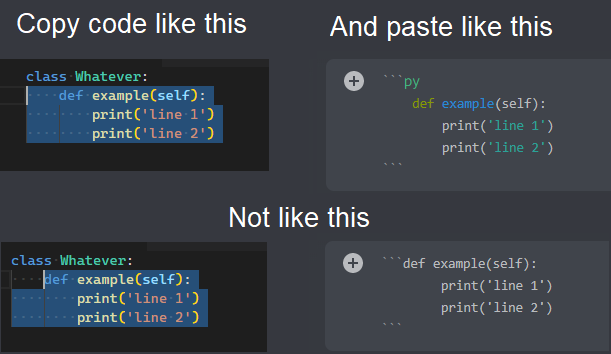 pliant gulch
[blue text is cool as well]
seee the first line is ```py
slate swan
I was using a friends db but he told me he wants me to use my own
pale zenith
that but with fix, ini, css
maiden fable
pliant gulch
```ini
[blue text is cool as well]
```
Which type is that?
pale zenith
ini
pliant gulch
Its ini
maiden fable
Ah okay
pliant gulch
I mean, I'm pretty sure every syntax highlight discord supports can be seen on highlight.js
maiden fable
Hmm
pale zenith
slate swan
well that doesn't seem that hard to do with a subclassed help command 
but of course up to you
slate swan
maiden fable
!d discord.Message.embeds
gives this error when i try to send it
my code is ```py
message = "pretend this is a discord.Message object because in my actual code it is"
await ctx.send(embed=message.embeds)
 pale zenith
message.embeds is a list of embeds
maiden fable
slate swan
gives this error when i try to send it
my code is ```py
message = "pretend this ...
embeds=message.embeds
 still tiger
[Hi, I wanna test my error handling system, specifically when I raise a bad arguement error. How can I do that with a command?]
Just specify and int for a string type, ig?
pale zenith
pale zenith
seee the first line is ```py
we already answered that o.o @slate swan
still tiger
maiden fable
Just specify and int for a string type, ig?
ok thanks
pale zenith
see there and a few above/below
slate swan
print("kms")
others are css, ini, fix, other languages o.o
css looks quite nice if your prefix has a period and uses [this] as optional
 still tiger
maiden fable
Just specify and int for a string type, ig?
still tiger
maiden fable
Just specify and int for a string type, ig?
How will I do that?
pale zenith
(ctx, number: int)
maiden fable
!d discord.ext.commands.BadArgument
unkempt canyonBOT
exception discord.ext.commands.BadArgument(message=None, *args)```
Exception raised when a parsing or conversion failure is encountered on an argument to pass into a command.

This inherits from [`UserInputError`](https://discordpy.readthedocs.io/en/master/ext/commands/api.html#discord.ext.commands.UserInputError "discord.ext.commands.UserInputError")I have done that, still no error
pale zenith
still tiger
I have done that, still no error
Why isn't isinstance picking up a particular exception type in my error handler?
When an exception is raised on command invoke, it gets wrapped in CommandInvokeError before being thrown to an error handler (?tag eh). Insert this handy expression at the top of your error handler to safely unwrap it:
if isinstance(error, commands.CommandInvokeError):
  error = error.original
After you've unwrapped the exception, you can use isinstance as normal.

 still tiger
pale zenith
**Why isn't isinstance picking up a particular exception type in my error handle...
still tiger
pale zenith
**Why isn't isinstance picking up a particular exception type in my error handle...
Alright thanks
still tiger
pale zenith
**Why isn't isinstance picking up a particular exception type in my error handle...
But my question is how do I create the error in first place
pliant gulch
You don't create it
the error gets dispatched along with context to on_command_error
still tiger
I do want to, so I can test it
pliant gulch
That is where you would access it
still tiger
Noooo
I dont think you are getting my question, I have already created my error handling system
pliant gulch
Just construct it then like any other class/object
still tiger
just wanna create errors so I can see how weel the error handling is
pliant gulch
pliant gulch
Just construct it then like any other class/object

construct it then raise it
still tiger
Ohh alright
I just tried to raise it without construction
Wait, but wdym by construct?
make an instance?
boreal ravine
what language is ini?
still tiger
Ini is ini
boreal ravine
hm
I am a little confused, how is it safely unwrapping it? Can't I just use an else statement instead?
maiden fable
boreal ravine
what language is ini?
Configuration language
still tiger
boreal ravine
```ini
hm
```
[hm]
config.ini
maiden fable
Mhm
still tiger
its like toml
boreal ravine
das
[f]
Yep
boreal ravine
nice
still tiger
pliant gulch
Yep
Ok, thanks
pliant gulch
Although not sure how discord.py errors work indepth, so you prob will need an instance to raise unlike built in errors in python, but then again the errors inherit Exception
such as TypeError and ValueError
 bright palm
pale zenith
bright palm
pale zenith
You probably shouldn't show that you are using better discord
still tiger
Oh yeah just noticed hes using beddter discord
still tiger
pliant gulch
Although not sure how discord.py errors work indepth, so you prob will need an i...
👍
boreal ravine
how is that better discord?
bright palm
Although I have never seen anything be done about client modifications
bright palm
boreal ravine
how is that better discord?
Look at the code block how it has line numbers
pale zenith
bright palm
You probably shouldn't show that you are using better discord
who said that (also its PowerCord)
boreal ravine
hm honestly I like having numbers in codeblocks
bright palm
boreal ravine
hm honestly I like having numbers in codeblocks
Yeah just better discord is against discord TOS
still tiger
Yes but apparently local modifications are banned in discord
boreal ravine
^
still tiger
This rule btw makes no sense and shouldnt be in the first place
but still we need to abide by it
bright palm
I don't think discord cares as long as you don't show
still tiger
slate swan
Anyone familiar with pymongo
More like
Any pymongo experts around who are willing to commit into looking into my problem, whatever that may turn out to be, even if it's not actually related to pymongo or if someone who doesn't know anything about pymongo could actually answer my question?
Or
I have a question about pymongo but I'm too lazy to actually formalize it in words unless there's someone on the channel who might be able to answer it
maiden fable
maiden fable
slate swan
Anyone familiar with pymongo
#databases please
slate swan
It has to do with my bot
still tiger
so does python
maiden fable
Breh
waxen granite
How can i send the forbidden error?
maiden fable
@slate swan then post your problem lol
still tiger
slate swan
It has to do with my bot
so does computers, dosent mean this is the channel to ask how cpus communicate with ram #databases
waxen granite
maiden fable
`raise discord.Forbidden()`
In the ctx chanel not cmd
Is there an event for such errors?
Like the on_command_error?
waxen granite
Ah
pliant gulch
But it isn't recommended to handle Forbidden in a global error handler
waxen granite
Why?
pliant gulch
as it will be useful information, i.e from a failed request etc
slate swan
still tiger
so does computers, dosent mean this is the channel to ask how cpus communicate w...
Ok
waxen granite
Hm
pliant gulch
Else if it was in a global handler you wouldn't really be able to get much information from that
I'd rather have a try-except block for Forbidden here
waxen granite
Try-except in every cmd is too much work
pliant gulch
You won't need it in every command
waxen granite
Then
still tiger
pliant gulch
Yep
How can I make an instance of discord.DiscordException.UserInputError.BadArguement?
boreal ravine
still tiger
How can I make an instance of `discord.DiscordException.UserInputError.BadArguem...
isinstance(error, commands.BadArgument):
something like that
still tiger
I want to make an instance, not check if it is that instance
boreal ravine
hm
pale zenith
still tiger
I want to make an instance, not check if it is that instance
make a command raise badargument
still tiger
pale zenith
make a command raise badargument
How?
pale zenith
Exception raised when a parsing or conversion failure is encountered on an argument to pass into a command.
you can raise it from using a typehint
 pale zenith
do you have a local error handler / cog handler in that command / cog
did you reload the bot after type-hinting
still tiger
Yes, but I have a global error handler as a cog
unkempt canyonBOT
Pasting large amounts of code
If your code is too long to fit in a codeblock in discord, you can paste your code here:
https://paste.pythondiscord.com/
After pasting your code, save it by clicking the floppy disk icon in the top right, or by typing ctrl + S. After doing that, the URL should change. Copy the URL and post it here so others can see it.
pale zenith
bc it does work for me: 
 still tiger
pale zenith
and what's your global one?
still tiger
pale zenith
and what's your global one?
 if isinstance(error, commands.BadArgument):
            await ctx.reply(
                embed=create_embed(
                    title=f"{cross} In-correct arguement(s) passed",
                    desc=f"In-correct arguement(s) was/were passed for the command: `{ctx.command.name}`\n Correct arguements: {ctx.command.usage}",

                    color="red",
                    footer_text=ctx.message.author.display_name,
                    footer_icon=ctx.message.author.avatar_url,
                )
            )
the rest of it?
still tiger
pale zenith
| don't get how it isn't getting dispatched. honestly im at a loss
still tiger
I will add ctx.purge since it only accepts an int so the error must get dispatched
 dark river
Hello, I have a discord bot with a sqlite.db, If i run the bot on my pc. It works with the database fine. But I am trying to run my bot on my vps. And my bot isn't even starting.
Anyone know how to figure it out?
still tiger
pale zenith
| don't get how it isn't getting dispatched. honestly im at a loss <:blobsweatsi...
Oh It does raise the error, I did not include a peice of code that basically creates alot of fields which esxceed character limit
pale zenith
still tiger
Oh It does raise the error, I did not include a peice of code that basically cre...
oh
pale zenith
check the guild.default_role's perms
slate swan
		print(bch)
		perms = bch.permissions_for(ctx.guild.me)
		everyone = bch.overwrites_for(ctx.guild.default_role)

		if not perms.send_messages:
			not_me = discord.Embed(title = "Missing Permission! 🚫 ", description = f"I don't have ```Send Messages``` permission on {bch.mention}. Use ```sp!setup``` again.", color = 0x08bfea)
			await ctx.send(embed = not_me)
			return

		if not everyone.read_messages:
			not_eve = discord.Embed(title = "Missing Permission! 🚫 ", description = f"**Everyone** doesn't have ```View Channel``` permission on {bch.mention}. Use ```sp!setup``` again.", color = 0x08bfea)
			await ctx.send(embed = not_eve)
			return

		if not everyone.read_message_history:
			not_eve = discord.Embed(title = "Missing Permission! 🚫 ", description = f"**Everyone** doesn't have ```Read Message History``` permission on {bch.mention}. Use ```sp!setup``` again.", color = 0x08bfea)
			await ctx.send(embed = not_eve)
			return
```I tried this
But .
2nd condition gets triggered
Even if everyone has perm
To view channel
Tick
Not /
slate swan
TextChannel
 patent surge
slate swan
<@894072003533877279> works?
patent surge
slate swan
<@894072003533877279> works?
ya works thanks
patent surge
thanks again
slate swan
😊
patent surge
ur girl ?
boreal ravine
patent surge
How to take channel input on commands ?
params
patent surge
boreal ravine
params
problem solved boi ur late
boreal ravine
ok
slate swan
@patent surge me?
Lol nope
so hay i came here becuase i need some help
i need the code to make a bot dm people with a certain role
slate swan
slate swan
i need the code to make a bot dm people with a certain role
If someone doesnt help you #❓|how-to-get-help is a good option to
ok thx
im trying to make a bot for my for my smash bro server
 patent surge
🤌
slate swan
@slate swan first get the role obj
Then do role.members
You will get a list
Then use for loop
And dm every person in list

ok ill try that

 tough lance
discord.Role
 cobalt berry
How can i embed my help command
boreal ravine
slate swan
like this
its discord.Role python is case sensitive
slate swan
yea i got it
boreal ravine
if you do that "module discord has no attribute role"
boreal ravine
slate swan
yea i got it
kk
cobalt berry
cobalt berry
How can i embed my help command
Anyone?
slate swan
i need my bot to be able ping the role then message people with that role
@cobalt berry you can!
Do you want a custom help cmd?
cobalt berry
Yeah
boreal ravine
cobalt berry
How can i embed my help command
The default one?
slate swan
Ok so go to your Bot()
boreal ravine
whats Bot()
cobalt berry
Yes
cobalt berry
Client
boreal ravine
cobalt berry
Yes
if you using discord.Client() you cant have commands
cobalt berry
Yeah i have
slate swan
Just use on_message
cobalt berry
Its working also
boreal ravine
slate swan
Just use on_message
No
slate swan
Then?
boreal ravine
bad practice
slate swan
cant u just do embed = discord.embed(title=message) in client.command()
then your message
boreal ravine
use the discord.ext.commands extension
slate swan
boreal ravine
bad practice
What to do then?
boreal ravine
boreal ravine
use the `discord.ext.commands` extension
.
slate swan
He is using Client()
boreal ravine
yes
if he wants commands use that
using events for commands is a bad way
and discord.Client() has limited features
boreal ravine
slate swan
cant u just do embed = discord.embed(title=message) in client.command()
yes
slate swan
Umm read_meassge = View channel right?
boreal ravine
no read_messages lets you read messages view_channel lets you see the channel
!d discord.Role
unkempt canyonBOT
class discord.Role```
Represents a Discord role in a [`Guild`](https://discordpy.readthedocs.io/en/master/api.html#discord.Guild "discord.Guild")... steady reef
help
 steady reef
Uh
slate swan
what code do i put in my bot to make it able to ping a role
boreal ravine
steady reef
help
huh wtf
steady reef
boreal ravine
huh wtf
..
boreal ravine
something wrong with the json link i guess
boreal ravine
slate swan
like @ client.event or command
That isnt the problem
read the error lol
boreal ravine
slate swan
what code do i put in my bot to make it able to ping a role
By arguments or params
steady reef
import discord
import os
import requests
import json

client = discord.Client()


def get_wallpaper():
    response = requests.get("https://wall.alphacoders.com/api/random")
    json_data = json.loads(response.text)
    wallpaper = json_data[0]['wa'] + " -" + json_data[0]['a(n)']
    return (wallpaper)


@client.event
async def on_ready():
    print('We have logged in as {0.user}'.format(client))


@client.event
async def on_message(message):
    if message.author == client.user:
        return

    if message.content.startswith('wa!wallpaper'):
        wallpaper = get_wallpaper()
        await message.channel.send(wallpaper)


client.run(os.getenv('TOKEN'))```its this
slate swan
.....
steady reef
...
 gloomy coral
slate swan
what code do i put in my bot to make it able to ping a role
gloomy coral
slate swan
what code do i put in my bot to make it able to ping a role
ok lemme help
<@&randomroleid>
replace randomroleid with the id of the role you wish to ping and send
e
slate swan
ok where do i put that
gloomy coral
wherever u wanna ping the role
slate swan
ok
 blissful crane
How do you get a guild object from a guild's invite?
boreal ravine
blissful crane
How do you get a guild object from a guild's invite?
I don't think you can
cause the invite link is randomized
 oak warren
how do you load unload reload cogs in from a cog
blissful crane
the same way you load and unload and reload cogs from a not cog
Only difference is that you can't reload the cog where the reload command is
For ubvois reasons
boreal ravine
^
blissful crane
@oak warren
blissful crane
Yes
 normal ore
error
 oak warren
blissful crane
Yes
oak warren
blissful crane
Yes
thanks a lot
blissful crane
👍
normal ore
someone tell what syntx to put
normal ore
blissful crane
👍
can u
boreal ravine
normal ore
error
are u missing a colon
blissful crane
I can't see the error or the code cus I am on phone
normal ore
with Client what syntax after client
normal ore
boreal ravine
are u missing a colon
no
boreal ravine
normal ore
with Client what syntax after client
did u copy code
boreal ravine
normal ore
no
how do you know?
normal ore
boreal ravine
did u copy code
yes
boreal ravine
bruh
normal ore
boreal ravine
bruh
wht to du great kayle
normal ore
ig version outdated
slate swan
 boreal ravine
normal ore
ig version outdated
boreal ravine
normal ore
ig version outdated
not really
slate swan
boreal ravine
no `read_messages` lets you read messages `view_channel` lets you see the channe...
Where is view_channel here??
boreal ravine
check back your code it makes no sense
boreal ravine
whats with Client supposed to do
boreal ravine
slate swan
Where is view_channel here??
i dont see it
blissful crane
Oh heh
slate swan
i didnt know your here
slate swan
boreal ravine
i dont see it
Then why did you say view_channel?
boreal ravine
slate swan
Then why did you say view_channel?
Cause it's a permission?

 boreal ravine
slate swan
boreal ravine
slate swan
nice
slate swan
ok now how do i make my bot dm people with a role
boreal ravine
slate swan
ok now how do i make my bot dm people with a role
for loop i guess
reef shell
!d discord.Member.send
unkempt canyonBOT
await send(content=None, *, tts=None, embed=None, embeds=None, file=None, files=None, stickers=None, delete_after=None, nonce=None, allowed_mentions=None, reference=None, mention_author=None, view=None)```
This function is a [*coroutine*](https://docs.python.org/3/library/asyncio-task.html#coroutine).

Sends a message to the destination with the content given.

The content must be a type that can convert to a string through `str(content)`. If the content is set to `None` (the default), then the `embed` parameter must be provided.

To upload a single file, the `file` parameter should be used with a single [`File`](https://discordpy.readthedocs.io/en/master/api.html#discord.File "discord.File") object. To upload multiple files, the `files` parameter should be used with a [`list`](https://docs.python.org/3/library/stdtypes.html#list "(in Python v3.9)") of [`File`](https://discordpy.readthedocs.io/en/master/api.html#discord.File "discord.File") objects. **Specifying both parameters will lead to an exception**.

To upload a single embed, the `embed` parameter should be used with a single [`Embed`](https://discordpy.readthedocs.io/en/master/api.html#discord.Embed "discord.Embed") object. To upload multiple embeds, the `embeds` parameter should be used with a [`list`](https://docs.python.org/3/library/stdtypes.html#list "(in Python v3.9)") of [`Embed`](https://discordpy.readthedocs.io/en/master/api.html#discord.Embed "discord.Embed") objects. **Specifying both parameters will lead to an exception**.!d discord.Role.members
unkempt canyonBOT
property members: List[Member]```
Returns all the members with this role.for ... in ...:
if ... in ...:
await member.send()
``` hmyes
slate swan
i see let me try this
reef shell
lmao
slate swan
so i put that in @ client.commands
reef shell
slate swan
i see let me try this
Use a try/else block to handle the error when the user's dm is closed
boreal ravine
slate swan
so i put that in @ client.commands
thats the command decorator
patent surge
How to make xp bar like this ?
 boreal ravine
reef shell
Use a try/else block to handle the error when the user's dm is closed
boreal ravine
reef shell
Use a try/else block to handle the error when the user's dm is closed
yes discord.Forbidden
reef shell
patent surge
How to make xp bar like this ?
Graphics 🤷♂️
boreal ravine
patent surge
How to make xp bar like this ?
emoji's
maybe lots of checks to see if user has x amount of coins
patent surge
¯\_(ツ)_/¯
slate swan
boreal ravine
thats the command decorator
so i put it in @ client.event
boreal ravine
slate swan
so i put it in @ client.event
no
thats the event decorator
u dont put stuff in decorators u put stuff below them
slate swan
i have not done this in a while sorry
boreal ravine
@bot.command()
#here

 ionic wadi
Does anyone have a introduction to trello databases for me (explanation, templates and learning how to)
boreal ravine
yes
thick sigil
flat solstice
because It's in a slash command so a) discord doesn't have a object type for emo...
then use emojiconverter
 autumn bone
Hello, it's possible to use cogs in task loop ? I have a task who ask an API and if a new event is, it create the action.
slate swan
ok i messed up can you show me how to set up the full code plz @boreal ravine
boreal ravine
slate swan
ok i messed up can you show me how to set up the full code plz <@!65607335321534...
what "full code"?
slate swan
like the skeleton on how to set it up
slate swan
like how to make it dm people with roles
 cerulean osprey
If I were to send code to a bot I am currently working on, could someone explain what every line's purpose was? (ik thats prob a hassle but just curious)
boreal ravine
cerulean osprey
If I were to send code to a bot I am currently working on, could someone explain...
i mean sure
boreal ravine
slate swan
like how to make it dm people with roles
use a for loop to loop through the guild members and then check the the members has a certain role
slate swan
yea how to set that up
cerulean osprey
Alr, do I just copy and paste it or throw it into a copy and pasting website like the one Python bot gave?
boreal ravine
slate swan
yea how to set that up
didnt i already tell u
boreal ravine
cerulean osprey
Alr, do I just copy and paste it or throw it into a copy and pasting website lik...
here i guess
 wintry shore
slate swan
yea how to set that up
wintry shore
slate swan
yea how to set that up
Rtfm
slate swan
ok
cerulean osprey
Alright, its not very long bc I just started abt 30 mins ago
reef shell
boreal ravine
use a for loop to loop through the guild members and then check the the members ...
that's too much data to iterate, just loop through role.members
cerulean osprey
import os
import requests
import json
import random
from replit import db
from keep_alive import keep_alive
client = discord.Client()
name = ['Wind bot']
tiktokbeatmaps = ['virginity' , 'syndrome']


@client.event
async def on_ready():
  print('We have logged in as {0.user}'
  .format(client))

@client.event
async def on_message(message):
  if message.author == client.user:
    return

  msg = message.content

  if msg.startswith('Hello'):
    await message.channel.send('Hello!')

  if any(word in msg for word in name):
    await message.channel.send('What?')

  if any(word in msg for word in tiktokbeatmaps):
    await message.channel.send('All of the beatmaps are very accessible if you read the channel names and use any form of problem solving. #tiktok-beatmaps Good day :D')


keep_alive()
client.run(os.getenv('Key'))```#code-of-conduct please
boreal ravine
reef shell
that's too much data to iterate, just loop through role.members
im not saying my way is efficient lol
unkempt canyonBOT
Here's how to format Python code on Discord:
```py
print('Hello world!')
```
These are backticks, not quotes. Check this out if you can't find the backtick key.
wintry shore
boreal ravine
<#783829285227462697> please
Read the fine manual
boreal ravine
wintry shore
**R**ead **t**he **f**ine **m**anual
 wintry shore
Ahh
cerulean osprey
reef shell
!code
Mb
boreal ravine
wintry shore
Ahh
yes
 tardy lagoon
cerulean osprey
```import discord
import os
import requests
import json
import random
from repli...
tardy lagoon
cerulean osprey
```import discord
import os
import requests
import json
import random
from repli...
```py
#code
```
ionic wadi
import discord
import discord.ext
from discord.ext import commands
import trello
from trello import TrelloClient
import pyblox3
from pyblox3 import Users
import asyncio
 boreal ravine
cerulean osprey
```import discord
import os
import requests
import json
import random
from repli...
boreal ravine
cerulean osprey
```import discord
import os
import requests
import json
import random
from repli...
wait have you learnt python before doing a bot?
cerulean osprey
A little bit of it, but this bot is essentially my way of going past the basic stuff, because me sitting infront of a video wont do anything unless I apply it to something
For example, a bot
tardy lagoon
ionic wadi
```lua
import discord
import discord.ext
from discord.ext import commands
import...
have you installed the modules?
tardy lagoon
cerulean osprey
A little bit of it, but this bot is essentially my way of going past the basic s...
Make some terminal games
ionic wadi
tardy lagoon
have you installed the modules?
Yes I tried with python and pip
boreal ravine
tardy lagoon
have you installed the modules?
if he didnt an import error would've raised
tardy lagoon
Then idk
boreal ravine
cerulean osprey
```import discord
import os
import requests
import json
import random
from repli...
Do u understand anything in this though
cerulean osprey
Yeah
boreal ravine
well what do you understand in it?
tardy lagoon
cerulean osprey
```import discord
import os
import requests
import json
import random
from repli...
Didn't i told you to use <#channelID>
?
cerulean osprey
Idk how to word it using proper terminology but I can try to
cerulean osprey
tardy lagoon
Didn't i told you to use <#channelID>
I did, it works
Its mentioning the channel I want it to mention
tardy lagoon
ionic wadi
boreal ravine
if he didnt an import error would've raised
It changed to this:
    from trello import TrelloClient
ImportError: cannot import name 'TrelloClient' from 'trello' (C:\Users\roang\AppData\Local\Packages\PythonSoftwareFoundation.Python.3.9_qbz5n2kfra8p0\LocalCache\local-packages\Python39\site-packages\trello\__init__.py)
PS C:\Users\roang\Downloads\test>
hm
ionic wadi
py-trello maybe?
tardy lagoon
cerulean osprey
I did, it works
So?
boreal ravine
ionic wadi
It changed to this:
``` File "c:\Users\censored\Downloads\test\bot.py", line 5...
did u import something with *?
tardy lagoon
What can we do?
ionic wadi
boreal ravine
did u import something with `*`?
Not that I know
cerulean osprey
tardy lagoon
Didn't i told you to use <#channelID>
It changed to that bc of how I copied the code lmao. It used the id and threw the channel name in there, then when I added `'s on either side it changed to using the name
boreal ravine
tardy lagoon
What can we do?
well we wants to know what the code does
autumn bone
If I understand correctly, the cogs are only for commands ? It is not possible to call a function in a tasks.loop
boreal ravine
autumn bone
If I understand correctly, the cogs are only for commands ? It is not possible t...
i think you can but idk havent tried calling functions tasks
tardy lagoon
boreal ravine
well we wants to know what the code does
I mean for windy
tardy lagoon
autumn bone
If I understand correctly, the cogs are only for commands ? It is not possible t...
Idk
What's a task.loop? Lol
cerulean osprey
tardy lagoon
What can we do?
So I know that @client.event is creating an event but what is async def doing?
tardy lagoon
cerulean osprey
So I know that ```@client.event``` is creating an event but what is ```async def...
Truely
Idk
autumn bone
tardy lagoon
What's a task.loop? Lol
@tasks.loop ^^
boreal ravine
its an async function
tardy lagoon
Defining an async function
Whatever that is lol
cerulean osprey
^
ionic wadi
boreal ravine
did u import something with `*`?
Im reinstalling the modules but they still say requirement already satisfied
boreal ravine
ionic wadi
Im reinstalling the modules but they still say requirement already satisfied
hm
reef shell
cerulean osprey
So I know that ```@client.event``` is creating an event but what is ```async def...
You need to learn python first
Before making discord bots
slate swan
@commands.command()
    @commands.check(is_server_owner)
    async def welcmsg(self, ctx, message=None):
        if message is None:
            messag = db.find_one({"guild_id": ctx.guild.id})["welcome_message"]
            if messag is None:
               return await ctx.reply('No welcome message found for %s') % (ctx.guild.name)
            else:
                embed = discord.Embed(description="Message:\n%s")% (messag)
                await ctx.reply(embed=embed)
        else:
            db.update_one({"guild_id": ctx.guild.id}, {"$set": {"welcome_message": message}})
            embed2 = discord.Embed(description="**Set new welcome message**\n:Arrow~3: %s",color=discord.Color.from_rgb(255, 255, 255)) % (message)
            embed2.set_author(name=f"Command: welcmsg | New Message: {message}",icon_url=ctx.author.avatar_url)
            await ctx.reply(embed=embed2)
``` this just stopped working LOLremove the backticks from your code it makes it harder to read in message
slate swan
yea just did i thought so
boreal ravine
slate swan
```py
@commands.command()
@commands.check(is_server_owner)
async def wel...
any errors..?
slate swan
nope
boreal ravine
also why are u using the % fomat way
slate swan
boreal ravine
also why are u using the % fomat way
comfortable with it
boreal ravine
hm
tardy lagoon
Use f-string
It's the new trend
slate swan
and what difference is there??
boreal ravine
nothing
tardy lagoon
Just easier to use
boreal ravine
just other syntax's

 boreal ravine
i guess
reef shell
Background
slate swan
slate swan
```py
@commands.command()
@commands.check(is_server_owner)
async def wel...
what i used to have worked, but i transferred and updated the code, i transferred it to a different file
ionic wadi
Traceback (most recent call last):
  File "c:\Users\censored\Downloads\test\bot.py", line 5, in <module>
    from trello import trelloclient
  File "C:\Users\censored\AppData\Local\Packages\PythonSoftwareFoundation.Python.3.9_qbz5n2kfra8p0\LocalCache\local-packages\Python39\site-packages\trello\trelloclient.py", line 6, in <module>
    from trello.board import Board
  File "C:\Users\censored\AppData\Local\Packages\PythonSoftwareFoundation.Python.3.9_qbz5n2kfra8p0\LocalCache\local-packages\Python39\site-packages\trello\board.py", line 4, in <module>
    from trello.base import TrelloBase
ImportError: cannot import name 'TrelloBase' from 'trello.base' (C:\Users\censored\AppData\Local\Packages\PythonSoftwareFoundation.Python.3.9_qbz5n2kfra8p0\LocalCache\local-packages\Python39\site-packages\trello\base.py)
PS C:\Users\censored\Downloads\test>
what does this mean lol
slate swan
fixed
reef shell
ionic wadi
```PS C:\Users\censored\Downloads\test> & C:/Users/censored/AppData/Local/Micros...

¯_(ツ)_/¯
slate swan
Uhhh, I'm getting user has no attribute roles in the following code
@client.event
async def on_raw_reaction_add(payload):
    user_id = payload.user_id
    message_id = payload.message_id
    emoji = str(payload.emoji)
    user = client.get_user(user_id)
    guild = client.get_guild(varsfile.server_id)
    user_roles = user.roles
any clues?
boreal ravine
slate swan
Uhhh, I'm getting `user has no attribute roles` in the following code
```py
@cli...
its .id not _id
slate swan
boreal ravine
its `.id` not `_id`
it's the same anyways
unkempt canyonBOT
property id```
Equivalent to [`User.id`](https://discordpy.readthedocs.io/en/master/api.html#discord.User.id "discord.User.id")🤷♂️
slate swan
i'll try
boreal ravine
ok
slate swan

see? it's not the same
@commands.command()
    @commands.check(is_server_owner)
    async def reset(self, ctx, module=None):
        modules = ["welcome_message", "welcome_channel", "mod_logs_channel", "mute_role"]
        if module is None:
            prefix = db.find_one({"guild_id": ctx.guild.id})["prefix"]
            embed = discord.Embed(description=f"""``diff
+ required arguments: []
- optional arguments: ()``\n`Usage`  :Arrow~3:  **{prefix}disable [module]**\n\n`Required Permissions`  :Arrow~3:  **admin**\n\n``Modules:\nwelcome_channel\nwelcome_message\nmute_role\nmodlogs``""",color=discord.Color.from_rgb(255, 255, 255))
            embed.set_author(name=f"Command Group: reset | Prefix: {prefix}",icon_url=ctx.author.avatar_url)
            await ctx.reply(embed=embed)
        elif module not in modules:
            return await ctx.reply(f'"{module}" is not a valid module!')
        elif module == "modlogs" or "mod_logs_channel":
            ({"guild_id": ctx.guild.id},
            {"$set": {f"mod_logs_channel": None}})
        elif db.find_one({"guild_id": ctx.guild.id})[f"{module}"] is None:
            return await ctx.reply("this module already has a value of **None**")
        else:
            try:
             db.update_one({"guild_id": ctx.guild.id},
            {"$set": {f"{module}": None}})
             embed = discord.Embed(description=f"{module} was disabled! The value is now set to **None**",color=discord.Color.from_rgb(255, 255, 255))
             await ctx.reply(embed=embed)
            except:
                return await ctx.reply(f'failed to disable "{module}"')
``` tf this looks rright@client.event
async def on_raw_reaction_add(payload):
user_id = payload.user.id
message_id = payload.message_id
emoji = str(payload.emoji)
user = client.get_user(user_id)
guild = client.get_guild(varsfile.server_id)
user_roles = user.roles``` this is my current codethere is literally nothing wrong i swear wtf
what is the error?
Okay so the only thing that doesnt work is when you dont include a module or when the module isnt in the list
 lament mesa
slate swan
```py
@commands.command()
@commands.check(is_server_owner)
async def res...
lament mesa
slate swan
```py
@commands.command()
@commands.check(is_server_owner)
async def res...
the try block is probably eating up all of the errors
slate swan
lament mesa
the `try` block is probably eating up all of the errors
right, just saw it
@slate swan try removing th try so that you can know what the error is
k
slate swan
slate swan
Uhhh, I'm getting `user has no attribute roles` in the following code
```py
@cli...
anyone has any clues?
nothing
can you show me where this is defined?

db i mean
my mongodb
ohhh i see
 dapper cobalt
slate swan
Uhhh, I'm getting `user has no attribute roles` in the following code
```py
@cli...
dapper cobalt
slate swan
Uhhh, I'm getting `user has no attribute roles` in the following code
```py
@cli...
get_user returns a discord.User object, not a discord.Member object.
slate swan
cluster = MongoClient("mongodb")
db=cluster["thing"]["thing"]
slate swan
dapper cobalt
`get_user` returns a `discord.User` object, not a `discord.Member` object.
ohhh i see
dapper cobalt
I need to look at the docs to help you, one moment.
dapper cobalt
!d discord.on_raw_reaction_add
unkempt canyonBOT
discord.on_raw_reaction_add(payload)```
Called when a message has a reaction added. Unlike [`on_reaction_add()`](https://discordpy.readthedocs.io/en/master/api.html#discord.on_reaction_add "discord.on_reaction_add"), this is called regardless of the state of the internal message cache.

This requires [`Intents.reactions`](https://discordpy.readthedocs.io/en/master/api.html#discord.Intents.reactions "discord.Intents.reactions") to be enabled.Ah.
Alright, so you need to get the guild first. guild = client.get_guild(payload.guild_id), then get the member from the guild using guild.get_member(payload.user_id).
slate swan
ooooo i see
dapper cobalt
guild = client.get_guild(payload.guild_id)
user = guild.get_member(payload.user_id)
roles = user.roles
@client.event
async def on_raw_reaction_add(payload):
    user_id = payload.user_id
    message_id = payload.message_id
    emoji = str(payload.emoji)
    guild = client.get_guild(varsfile.server_id)
    user = guild.get_user(user_id)
    user_roles = user.roles
so like this?
slate swan
dapper cobalt
```py
guild = client.get_guild(payload.guild_id)
user = guild.get_member(payload...
aight
tysm
dapper cobalt
user_id variable is useless.
slate swan
it does not return an int ID for the user?
dapper cobalt
It does, but you can just do payload.user_id, why define a variable?
slate swan
i need the ID for logs later on
dapper cobalt
Useless variables slow your code down slightly.
dapper cobalt
slate swan
i need the ID for logs later on
payload.user_id returns the ID though.
slate swan
dapper cobalt
`payload.user_id` returns the ID though.
i'm a beginner and this confuses me
ngl
dapper cobalt
Well, let me give you an example.
dapper cobalt
Why write your username on a paper when I can just look at it on Discord?
 zenith zinc
hello
slate swan
dapper cobalt
Why write your username on a paper when I can just look at it on Discord?
to remember it so i can add as friend when i come back home?
😅
zenith zinc
i`m try make a on_message_tag_bot commnad but i dont know how make this pls dm me for help me
slate swan
We don't DM for help
slate swan
zenith zinc
i`m try make a on_message_tag_bot commnad but i dont know how make this pls dm m...
you mean you want the bot to know when it gets mentionned?
slate swan
Show the code you have so far and we will help you
zenith zinc
slate swan
We don't DM for help
Ok sorry
slate swan
slate swan
Show the code you have so far and we will help you
^
there are many ways to do it
zenith zinc
bro
dapper cobalt
I think it's only one way.
!d discord.on_message check if the message's content is equal to the bot's mention.
unkempt canyonBOT
discord.on_message(message)```
Called when a [`Message`](https://discordpy.readthedocs.io/en/master/api.html#discord.Message "discord.Message") is created and sent.

This requires [`Intents.messages`](https://discordpy.readthedocs.io/en/master/api.html#discord.Intents.messages "discord.Intents.messages") to be enabled.

Warning

Your bot’s own messages and private messages are sent through this event. This can lead cases of ‘recursion’ depending on how your bot was programmed. If you want the bot to not reply to itself, consider checking the user IDs. Note that [`Bot`](https://discordpy.readthedocs.io/en/master/ext/commands/api.html#discord.ext.commands.Bot "discord.ext.commands.Bot") does not have this problem.what klick?
dapper cobalt
E.g.
@bot.event
async def on_message(message):
  if message.content == "hello":
    await message.reply("Hi!")

boooooye
get_member
alright ty
^^'
It's bot.get_user but guild.get_member
ok
ive fix it
how can i return a default emoji as text?
or as it's code or whatever
 stiff nexus
    async def send_command_help(self, cmd):
        ctx = self.context
        bot = ctx.bot
        is_owner = await ctx.bot.is_owner(ctx.author)

        embed = discord.Embed(color=utily.color)

        try:
          if await cmd.can_run(ctx) and is_owner:
            embed.title = cmd.qualified_name
            embed.description = cmd.help or f"No help found..."
            embed.add_field(name="Usage", value=f"`{self.get_command_signature(cmd)}`")
            if cmd.aliases:
                embed.add_field(name="Aliases", value=", ".join((f"`{alias}`" for alias in cmd.aliases)))

        except commands.CommandError:
          embed.description = f"You can not use this command(s)..."
        await self.context.send(embed=embed)
```its sending the else part. the is_owner check is not workingis this even dpy
slate swan
dapper cobalt
E.g.
```py
@bot.event
async def on_message(message):
if message.content == "he...
should have mentioned @bot.listen()
incase the person comes back saying:
"I worked on this for 3 hours and I still can't figure out why my commands don't work"
ig this happened with everyone
 cinder horizon
how do i get the first channel names/ids(for invites) of all the servers my bot is in (considering tht i do got all servers' IDs)
slate swan
What do you mean "for invites" @cinder horizon
If you try to get/generate an invite link for all the servers your bot is in by using your bot, this is considered as backdooring and is against Discord's Developer Policy and can easily get your bot deleted along with your account (your account is not always terminated).
cinder horizon
slate swan
If you try to get/generate an invite link for all the servers your bot is in by ...
aight ditching tht plan...thenks for da heads up
slate swan
No
 naive parcel
its a new concept regarding discord bots
slate swan
Advertisment is not allowed
naive parcel
im not advertising
naive parcel
sharing new ideas and projects is ads?
then what this server means
if everythin is advertising
slate swan
Depends how you formulate it
 tawdry perch
what module should I use to create mongodb database for my discord bot? Is pymongo async?
naive parcel
https://github.com/klevrboi/News-Discord-Bot
first of all i aint promoting it but im just showcasing it that this is a repo and its open source so with no worries you can go through it
its a discord bot which shows news regarding the topic the user searches

GitHub
a discord bot coded in Python which shows news based on the term searched by the user - GitHub - klevrboi/News-Discord-Bot: a discord bot coded in Python which shows news based on the term searched...
and im developing it more
slate swan
See
naive parcel
and im open to new suggestions