#discord-bots
1 messages · Page 521 of 1
 waxen granite
 slate swan
not 2.0
 sonic flax
@bot.command(pass_context = True)
async def ping(ctx):
await ctx.send(f'Pong! In {round(latency * 1000)}ms')
When I do /ping PyCharm says the command ping isn't found?
waxen granite
you mean to bypass the char limit of embed?
slate swan
sonic flax
@bot.command(pass_context = True)
async def ping(ctx):
await ctx.send(f'Pon...
The command doesn't exist

sonic flax
How do i make it then
 unkempt canyonBOT
Here's how to format Python code on Discord:
```py
print('Hello world!')
```
These are backticks, not quotes. Check this out if you can't find the backtick key.
slate swan
!paste
unkempt canyonBOT
Pasting large amounts of code
If your code is too long to fit in a codeblock in discord, you can paste your code here:
https://paste.pythondiscord.com/
After pasting your code, save it by clicking the floppy disk icon in the top right, or by typing ctrl + S. After doing that, the URL should change. Copy the URL and post it here so others can see it.
sonic flax
slate swan
remove client variable
sonic flax
where
sonic flax
slate swan
Pretty much useless
wheres the client variable
slate swan
Where you coded it
slate swan
replace bot.remove_command('help') with help_command=None in the Bot arguments
 maiden fable
slate swan
*not 2.0*
maiden fable
slate swan
*not 2.0*
It is there since 1.7 or something
 maiden fable
......
slate swan
also, tell Dew that he could delete pass_context from everywhere
unkempt canyonBOT
await send(content=None, *, tts=None, embed=None, embeds=None, file=None, files=None, stickers=None, delete_after=None, nonce=None, allowed_mentions=None, reference=None, mention_author=None, view=None)```
This function is a [*coroutine*](https://docs.python.org/3/library/asyncio-task.html#coroutine).

Sends a message to the destination with the content given.

The content must be a type that can convert to a string through `str(content)`. If the content is set to `None` (the default), then the `embed` parameter must be provided.

To upload a single file, the `file` parameter should be used with a single [`File`](https://discordpy.readthedocs.io/en/master/api.html#discord.File "discord.File") object. To upload multiple files, the `files` parameter should be used with a [`list`](https://docs.python.org/3/library/stdtypes.html#list "(in Python v3.9)") of [`File`](https://discordpy.readthedocs.io/en/master/api.html#discord.File "discord.File") objects. **Specifying both parameters will lead to an exception**.

To upload a single embed, the `embed` parameter should be used with a single [`Embed`](https://discordpy.readthedocs.io/en/master/api.html#discord.Embed "discord.Embed") object. To upload multiple embeds, the `embeds` parameter should be used with a [`list`](https://docs.python.org/3/library/stdtypes.html#list "(in Python v3.9)") of [`Embed`](https://discordpy.readthedocs.io/en/master/api.html#discord.Embed "discord.Embed") objects. **Specifying both parameters will lead to an exception**. hardy geyser
is it possible for me to use discord.Client to make a custom client for a user? if so then how, or would that count as self botting?
slate swan
hardy geyser
is it possible for me to use discord.Client to make a custom client for a user? ...
!rule 2
unkempt canyonBOT
2. Follow the Discord Community Guidelines and Terms Of Service.
slate swan
Selfbots are not allowed and Discord bans them
sonic flax
maiden fable
What if they mean that if u can subclass discord.Client?
hardy geyser
ye but im just asking if it would count as a selfbot, as i am not automating anything just making a custom client
if its a selfbot then i wont make it, simple
slate swan
sonic flax
It stilld oesnt work
remove all the pass_context = True
maiden fable
hardy geyser
ye but im just asking if it would count as a selfbot, as i am not automating any...
As long as u don't put a user token inside bot.run(), it isn't a self bot
slate swan
replace the latency with bot.latency
slate swan
sonic flax
what did id o wrong
is your bot online?
well, surely if it gives u an error
hardy geyser
maiden fable
As long as u don't put a user token inside bot.run(), it isn't a self bot
so im allowed to use discord.Client to make a custom client?
 stark bobcat
how do i check which guild the user was banned?
maiden fable
hardy geyser
so im allowed to use discord.Client to make a custom client?
Sure
sonic flax
slate swan
replace the `latency` with `bot.latency`
it says unexpected indent in line 1
slate swan
stark bobcat
how do i check which guild the user was banned?
In the on_member_ban event?
omg
hardy geyser
maiden fable
Sure
also if you know, could you give a simple example of how to do this as client.run does not just accept my username and password
slate swan
Again
hardy geyser
so i suppose a different method?
stark bobcat
slate swan
In the `on_member_ban` event?
oh
hardy geyser
slate swan
That's self botting
but hunter said it wasnt..
maiden fable
hardy geyser
also if you know, could you give a simple example of how to do this as client.ru...
Ah, that's not possible
Bruh, subclassing is different
hardy geyser
so im allowed to do it, except its not possible 😆
 maiden fable
hardy geyser
so im allowed to do it, except its not possible 😆
maiden fable
hardy geyser
so im allowed to do it, except its not possible 😆
Well u can do that, but then it's against ToS, so best of luck getting banned from Discord haha
slate swan
hunter, a partner in crime
hardy geyser
what about clients like betterdiscord, against tos?
maiden fable
slate swan
hunter, a partner in crime
Eh, I don't think I have ever self botted
Or I have? I don't really remember tbh


 plucky shoal
hardy geyser
what about clients like betterdiscord, against tos?
plucky shoal
hardy geyser
what about clients like betterdiscord, against tos?
All modified clients
slate swan
OmAgAsh ArE You FeElInG CoOl NoW
hardy geyser
there goes my idea of making a simplistic client for myself
slate swan
Exactly
waxen granite
days = obg(obgend, localdate), "days" await message.reply(f"Current Posting:OBG, {days} to go.")
this sends like this Current Posting: OBG, (38, 'days') to go.
how can i remove ' ' and ()
slate swan
!d str.strip
unkempt canyonBOT
str.strip([chars])```
Return a copy of the string with the leading and trailing characters removed. The *chars* argument is a string specifying the set of characters to be removed. If omitted or `None`, the *chars* argument defaults to removing whitespace. The *chars* argument is not a prefix or suffix; rather, all combinations of its values are stripped:

```py
>>> '   spacious   '.strip()
'spacious'
>>> 'www.example.com'.strip('cmowz.')
'example'
``` The outermost leading and trailing *chars* argument values are stripped from the string. Characters are removed from the leading end until reaching a string character that is not contained in the set of characters in *chars*. A similar action takes place on the trailing end. For example:can the emoji in discord.Message.add_reaction be a list of emoji?
slate swan
k just thought that they would have made it like that so you can just input muliple reactions easier
and less code
waxen granite
slate swan
!d str.strip
not able to do it can u give an example?
slate swan
await message.reply(f"Current Posting: OBG, {days} to go.".strip("()''"))
@waxen granite

 manic wing
 fading harness
simultaneously
fading harness
simultaneously
command_prefix = ['!', '?']
manic wing
 loud nebula
can anyone help me with this?
loud nebula
can anyone help me with this?
!ytdl
unkempt canyonBOT
Per Python Discord's Rule 5, we are unable to assist with questions related to youtube-dl, pytube, or other YouTube video downloaders as their usage violates YouTube's Terms of Service.
For reference, this usage is covered by the following clauses in YouTube's TOS, as of 2021-03-17:
The following restrictions apply to your use of the Service. You are not allowed to:

1. access, reproduce, download, distribute, transmit, broadcast, display, sell, license, alter, modify or otherwise use any part of the Service or any Content except: (a) as specifically permitted by the Service;  (b) with prior written permission from YouTube and, if applicable, the respective rights holders; or (c) as permitted by applicable law;

3. access the Service using any automated means (such as robots, botnets or scrapers) except: (a) in the case of public search engines, in accordance with YouTube’s robots.txt file; (b) with YouTube’s prior written permission; or (c) as permitted by applicable law;

9. use the Service to view or listen to Content other than for personal, non-commercial use (for example, you may not publicly screen videos or stream music from the Service)
you need to do @commands.command btw
fading harness
manic wing
command_prefix = ['!', '?']
how do i install it on my code?
bot = commands.Bot(command_prefix="choi!", intents=intents)
i want to install the prefix c!
manic wing
fading harness
how do i install it on my code?
`bot = commands.Bot(command_prefix="choi!", inte...
my guy you just do bot = commands.Bot(command_prefix=["choi!", "c!"], intents=intents)
loud nebula
manic wing
you need to do `@commands.command` btw
i did bt a new error raised
 manic wing
loud nebula
i did bt a new error raised
manic wing
loud nebula
i did bt a new error raised
thats not to do with the @commands.command, that just means you misspelt channel
crikey
loud nebula
manic wing
thats not to do with the @commands.command, that just means you misspelt channel
the spelling is correct :/
loud nebula
manic wing
<@466569674335846400>
ty but there is an another error
 manic wing
loud nebula
ty but there is an another error
manic wing
loud nebula
ty but there is an another error
voice_client
loud nebula
manic wing
`voice_client`
ty it worked bt now i m facing this error

object has no attribute 'stop'
manic wing
loud nebula
ty it worked bt now i m facing this error
that means there is no voice_client (aka voice_client returns none)
 lament mesa
!ytdl
unkempt canyonBOT
Per Python Discord's Rule 5, we are unable to assist with questions related to youtube-dl, pytube, or other YouTube video downloaders as their usage violates YouTube's Terms of Service.
For reference, this usage is covered by the following clauses in YouTube's TOS, as of 2021-03-17:
The following restrictions apply to your use of the Service. You are not allowed to:

1. access, reproduce, download, distribute, transmit, broadcast, display, sell, license, alter, modify or otherwise use any part of the Service or any Content except: (a) as specifically permitted by the Service;  (b) with prior written permission from YouTube and, if applicable, the respective rights holders; or (c) as permitted by applicable law;

3. access the Service using any automated means (such as robots, botnets or scrapers) except: (a) in the case of public search engines, in accordance with YouTube’s robots.txt file; (b) with YouTube’s prior written permission; or (c) as permitted by applicable law;

9. use the Service to view or listen to Content other than for personal, non-commercial use (for example, you may not publicly screen videos or stream music from the Service)
yeah and that
loud nebula
manic wing
that means there is no voice_client (aka voice_client returns none)
i fixed that bt i m facing this error now!

 elfin flicker
 manic wing
loud nebula
i fixed that bt i m facing this error now!
manic wing
loud nebula
i fixed that bt i m facing this error now!
okay this really is a !ytdl issue, sorry mate
manic wing
elfin flicker
what,
loud nebula
manic wing
okay this really is a !ytdl issue, sorry mate
no way to fix this?
elfin flicker
manic wing
what,
sorry, i am spanish :p
elfin flicker
manic wing
what,
when I write "Spring" it does not give me the result that I expect
slate swan
elfin flicker
when I write "Spring" it does not give me the result that I expect
make sure S is capitalised when you type it
elfin flicker
slate swan
make sure S is capitalised when you type it
Yes but it does not work
slate swan
elfin flicker
Yes but it does not work
do you get some errors?
elfin flicker
slate swan
do you get some errors?
yes, when I type >clm Spring it does not give me the result, but when I type >clm Summer it does give me the result
slate swan
what do you have after the if statement?
elfin flicker
slate swan
what do you have after the if statement?
 slate swan
i mean , inside the if statement
elfin flicker
ha, wait
slate swan
if str(Temporada) == "SUmmer":
  #these lines```
 tropic sparrow
Is there something like list of events in dpy
elfin flicker
and in the summer statement it is the same
elfin flicker
elfin flicker
@slate swan
 spice atlas
i want my bot to send a response to a paritcular person like i wrote a command so it should ping me
slate swan
elfin flicker
are you trying to send it?
loud nebula
import discord
from discord.ext import commands
import youtube_dl


class Music(commands.Cog, name='Music'):
    def __init__(self,client):
        self.client = client

    @commands.command()
    async def join(self,ctx):
        if ctx.author.voice is None:
            await ctx.send("You are not in voice channel")
        voice_channel = ctx.author.voice.channel
        if ctx.voice_client is None:
            await voice_channel.connect()
        else:
            await ctx.voice_client.move_to(voice_channel)


    @commands.command()
    async def disconnect(self,ctx):
        await ctx.voice_client.disconnect()


    @commands.command()
    async def play(self,ctx,url):
        if ctx.voice_client is None:
            await ctx.voice_client.stop()
            FFMPEG_OPTIONS = {'before_options': '-reconnect 1 -reconnect_streamed 1 -reconnect_delay_max 5', 'options': '-vn'}
            YDL_OPTIONS = {'format': "bestaudio"}
            vc = ctx.voice_client
        else:
            return


        with youtube_dl.YoutubeDL(YDL_OPTIONS) as ydl:
            info = ydl.extract_info(url, download=False)
            url2 = info['formats'][0]['url']
            source = await discord.FFmpegOpusAudio.from_probe(url2,**FFMPEG_OPTIONS)
            vc.play(source)

    @commands.command()
    async def pause(self,ctx):
        await ctx.voice_client.pause()
        await ctx.send("Music paused ⏸️")

    @commands.command()
    async def resume(self,ctx):
        await ctx.voice_client.pause()
        await ctx.send("Music resumed ⏯️")


def setup(client):
    client.add_cog(Music(client))
    print("Music cog is Loaded!")
can anyone help me with this one the bot is joining the vc bt unable to play music there is now error too
slate swan
loud nebula
```py
import discord
from discord.ext import commands
import youtube_dl
class ...
!ytdl
unkempt canyonBOT
Per Python Discord's Rule 5, we are unable to assist with questions related to youtube-dl, pytube, or other YouTube video downloaders as their usage violates YouTube's Terms of Service.
For reference, this usage is covered by the following clauses in YouTube's TOS, as of 2021-03-17:
The following restrictions apply to your use of the Service. You are not allowed to:

1. access, reproduce, download, distribute, transmit, broadcast, display, sell, license, alter, modify or otherwise use any part of the Service or any Content except: (a) as specifically permitted by the Service;  (b) with prior written permission from YouTube and, if applicable, the respective rights holders; or (c) as permitted by applicable law;

3. access the Service using any automated means (such as robots, botnets or scrapers) except: (a) in the case of public search engines, in accordance with YouTube’s robots.txt file; (b) with YouTube’s prior written permission; or (c) as permitted by applicable law;

9. use the Service to view or listen to Content other than for personal, non-commercial use (for example, you may not publicly screen videos or stream music from the Service)
 slate swan
elfin flicker
yes..., all in a message embed
slate swan
elfin flicker
yes..., all in a message embed
i dont see a part where you send the message.....
oh okh
so what value for the field value does it show?
do you recieve an error in the console?
elfin flicker
slate swan
do you recieve an error in the console?
I do not receive an error in the console, but it does not send me the embed message
tropic sparrow
slate swan
https://discordpy.readthedocs.io/en/latest/api.html#event-reference
Okay, thanks will checkout
elfin flicker
slate swan
so what value for the field value does it show?
 slate swan
elfin flicker
I do not receive an error in the console, but it does not send me the embed mess...
slate swan
elfin flicker
I do not receive an error in the console, but it does not send me the embed mess...
do you have some error handler?
( an on_command_error event i mean)
elfin flicker
slate swan
( an on_command_error event i mean)
?
 slate swan
elfin flicker
?
slate swan
elfin flicker
?
yes
this is stopping you from getting errors , add py else : raise error to it
 slate swan
in the last , after your if and elif statements
elfin flicker
slate swan
in the last , after your if and elif statements
ok
elfin flicker
slate swan
in the last , after your if and elif statements
 slate swan
not here , in the on_command_error part
sonic flax
!paste
unkempt canyonBOT
Pasting large amounts of code
If your code is too long to fit in a codeblock in discord, you can paste your code here:
https://paste.pythondiscord.com/
After pasting your code, save it by clicking the floppy disk icon in the top right, or by typing ctrl + S. After doing that, the URL should change. Copy the URL and post it here so others can see it.
sonic flax
it says discord.ext.commands.errors.CommandNotFound: Command "ping" is not found
Ignoring exception in command None:
discord.ext.commands.errors.CommandNotFound: Command "play" is not found
when i do acommand
what do i do wrong
 tawdry perch
you also imported commands, but you are using bot, why?
 reef shell
tawdry perch
you also imported commands, but you are using bot, why?
reef shell
tawdry perch
you also imported commands, but you are using bot, why?
What?
Bot is a class of ext.commands
tawdry perch
reef shell
What?
the from discord.ext import commands isn't it used for @commands.command()?
sonic flax
https://paste.pythondiscord.com/cahidipoya.py My code works now, but every time i do /ping it shows the same
reef shell
tawdry perch
the ``from discord.ext import commands`` isn't it used for `@commands.command()`...
@commands.command() is used in cogs
tawdry perch
yes, ik
reef shell
He is not using cogs here
reef shell
sonic flax
https://paste.pythondiscord.com/cahidipoya.py My code works now, but every time ...
Shows the same what?
tawdry perch
It's just a useless import, that is what I mean
sonic flax
the same ping
sonic flax
reef shell
Shows the same what?
every time it says 49 ms
reef shell
tawdry perch
It's just a useless import, that is what I mean
Not at all
tawdry perch
hmm I have mistaken it badly then
reef shell
U can say the last import they made is useless
since he is using commands.Bot to construct his bot
tawdry perch
I see

 leaden anvil
reef shell
then your ping is 49ms everytime <:pithink:652247559909277706>
leaden anvil
reef shell
then your ping is 49ms everytime <:pithink:652247559909277706>
Ok, is there a way to send/share web pages directly in an embed, which fully function ? if so then please tell
reef shell
leaden anvil
Ok, is there a way to send/share web pages directly in an embed, which fully fu...
For example?
 lyric moat
how can i make my bot mobile online status?
leaden anvil
reef shell
For example?
a person wants to send a webpage in an embed that wants to rate feedback and posts it automatically on the website.
tawdry perch
lyric moat
how can i make my bot mobile online status?
I don't think it is available (not sure)
reef shell
leaden anvil
a person wants to send a webpage in an embed that wants to rate feedback and pos...
That is not possible i think,
I'm not familiar with it
lyric moat
tawdry perch
I don't think it is available (not sure)
i saw a bot thats maded in python did it
 soft belfry
webhook = await channel.create_webhook(name=message.author.name)

url = message.author.avatar_url
print(url)
await webhook.send(message.content, username=message.author.name, avatar_url=url)

webhooks = await channel.webhooks()
for webhook in webhooks:
    await webhook.delete()
This wont send a webhook message because of the avatar_url=url, doesnt give any errors and I cant find something on google
reef shell
are you looking for this?
 reef shell
lyric moat
i saw a bot thats maded in python did it
reef shell
lyric moat
i saw a bot thats maded in python did it
^
lyric moat
reef shell
are you looking for this?
yeah
reef shell
This is not available in dpy iirc
sonic flax
reef shell
then your ping is 49ms everytime <:pithink:652247559909277706>
when i restart the bots it sdifeferent
reef shell
that's normal
soft belfry
can anyone help real quick?
sonic flax
reef shell
that's normal
so why is the ping the same
 celest marlin

 slate swan
 cloud folio
Why is this not working?
cloud folio
Why is this not working?
aint it obvious by the error , a_string is an int , try using str(a_string).split()


 odd walrus
uhm what command is it for the command to tag back the person that used the command
reef shell
!d discord.ext.commands.Context.author
unkempt canyonBOT
Union[User, Member]: Returns the author associated with this context’s command. Shorthand for Message.author
odd walrus
tq boss
reef shell
!d discord.User.mention
unkempt canyonBOT
property mention: str```
Returns a string that allows you to mention the given user.this returns the author who can be mentioned by .mention
 errant abyss
import discord


def read_token():
    with open("token.txt", "r") as f:
        lines = f.readlines()
        return lines[0].strip()


token = read_token()

client = discord.Client()


@client.event
async def on_message(message):
    if message.content.find("!hello") != -1:
        mention = message.author.mention
        await message.channel.send(f"Hi {mention}")


client.run(token)```
How do I send the same message, but in an embed form?@reef shell help
slate swan
errant abyss
```Python
import discord
def read_token():
with open("token.txt", "r") as ...
!d discord.Embed
unkempt canyonBOT
class discord.Embed(*, colour=Embed.Empty, color=Embed.Empty, title=Embed.Empty, type='rich', url=Embed.Empty, description=Embed.Empty, timestamp=None)```
Represents a Discord embed.

len(x) Returns the total size of the embed. Useful for checking if it’s within the 6000 character limit.

bool(b) Returns whether the embed has any data set.

New in version 2.0.

Certain properties return an `EmbedProxy`, a type that acts similar to a regular [`dict`](https://docs.python.org/3/library/stdtypes.html#dict "(in Python v3.9)") except using dotted access, e.g. `embed.author.icon_url`. If the attribute is invalid or empty, then a special sentinel value is returned, [`Embed.Empty`](https://discordpy.readthedocs.io/en/master/api.html#discord.Embed.Empty "discord.Embed.Empty").

For ease of use, all parameters that expect a [`str`](https://docs.python.org/3/library/stdtypes.html#str "(in Python v3.9)") are implicitly casted to [`str`](https://docs.python.org/3/library/stdtypes.html#str "(in Python v3.9)") for you.so how do i add it to the code?
slate swan
also , avoid using discord.Client for commands
use discord.ext.commands.Bot instead
slate swan
errant abyss
so how do i add it to the code?
declare a variable for an discord.Embed object and use it
.send() takes an embed arg
 boreal osprey
oh cool

 haughty sedge
task: <Task cancelling name='Task-2' coro=<Client.run.<locals>.runner() running at C:\Users\zebat\PycharmProjects\CameraAppKivy\inspayy\lib\site-packages\discord\client.py:700> cb=[gather.<locals>._done_callback() at C:\Users\zebat\AppData\Local\Programs\Python\Python39\lib\asyncio\tasks.py:764]>```


sys:1: RuntimeWarning: coroutine 'Client.run.<locals>.runner' was never awaitedim trying something weird but not bad
but why
 dim cedar
how can i make a check of roles?
reef shell
embeds have a limitation of total 6000 char.
 hasty iron
haughty sedge
```py
task: <Task cancelling name='Task-2' coro=<Client.run.<locals>.runner() ru...
hasty iron
haughty sedge
```py
task: <Task cancelling name='Task-2' coro=<Client.run.<locals>.runner() ru...
code?
haughty sedge
hasty iron
code?
um wait
hasty iron
and full traceback please
boreal osprey
reef shell
embeds have a limitation of total 6000 char.
@bot.command(aliases = ['si'])
async def serverinfo(ctx):
    emb=discord.Embed(Title = f'Info for {ctx.guild.name}!', color = discord.Colour.random())
    emb.add_field(name="server id", value = ctx.guild.id, inline = False)
    emb.add_field(name="server owner", value = ctx.guild.owner.name, inline = False)
    emb.add_field(name="server region", value = ctx.guild.region, inline = False)
    emb.add_field(name="member count", value = ctx.guild.member_count, inline = False)
    emb.add_field(name="role count", value=ctx.guild.roles, inline = False)
    emb.add_field(name="text chan count", value = ctx.guild.text_channels)
    await ctx.send(embed=emb)
ok also, im trying to do client.run in a async function, will it work
dim cedar
how can i make a check for roles?
hasty iron
haughty sedge
ok also, im trying to do client.run in a async function, will it work
use client.start
errant abyss
import discord


def read_token():
    with open("token.txt", "r") as f:
        lines = f.readlines()
        return lines[0].strip()


token = read_token()

client = discord.Client()


@client.event
async def on_message(message):
    if message.content.find("!hello") != -1:
        mention = message.author.mention
        embed = discord.Embed(title = "Embed", description = f"Hi {mention}")
        await message.channel.send(embed)


client.run(token)```

for this code, I'm getting this weird, unexpected output:
```<discord.embeds.Embed object at 0x000002402E047828>```
How do I correct it?!d discord.Client.start
unkempt canyonBOT
await start(token, *, reconnect=True)```
This function is a [*coroutine*](https://docs.python.org/3/library/asyncio-task.html#coroutine).

A shorthand coroutine for [`login()`](https://discordpy.readthedocs.io/en/master/api.html#discord.Client.login "discord.Client.login") + [`connect()`](https://discordpy.readthedocs.io/en/master/api.html#discord.Client.connect "discord.Client.connect").it blocks the current task btw
slate swan
errant abyss
```Python
import discord
def read_token():
with open("token.txt", "r") as ...
channel.send(embed=embed)
reef shell
boreal osprey
```py
@bot.command(aliases = ['si'])
async def serverinfo(ctx):
emb=discord....
didn't know field values can be integers
errant abyss
slate swan
channel.send(embed=embed)
thanks lemme try again
hasty iron
reef shell
didn't know field values can be integers
dpy casts everything to a str for convenience
slate swan
errant abyss
thanks lemme try again
👍
reef shell
hasty iron
dpy casts everything to a str for convenience
oh
errant abyss
slate swan
👍
hey thanks, it worked!
slate swan
errant abyss
hey thanks, it worked!
np👍
haughty sedge
class testApp(App):
    def build(self):
        #self.camera.resolution(800,800)
        btn = Button(text="Boot")
        btn.size_hint = (.4,.3)
        btn.pos_hint = {'x':.50, 'y':.5}
        btn.bind(on_press=self.turn_On)
        layout = BoxLayout()
        layout.add_widget(btn)
        return layout
    def turn_On(self,*args):
        testApp().stop()
        time.sleep(5)
        asyncio.run(self.runit())

    async def runit(self, *args):
        client.run("TOKEM")
        channel = client.get_channel(895211655670149133)
        await channel.send("sucess")


if __name__ == '__main__':
testApp().run()```very weird ik
hasty iron
use client.start and loop.create_task
haughty sedge
no the error is wayyyy different
reef shell
oh no
haughty sedge
alright
reef shell
i read it wrong, nvm
hasty iron
hasty iron
use client.start and loop.create_task
and then await client.wait_until_ready() before getting the channel
also that wouldn’t work
asyncio.run creates a new loop each time
it will raise an error about futures being attached to a different event loop
haughty sedge
hasty iron
asyncio.run creates a new loop each time
oh uh
hasty iron
since you’re creating the discord client outside the asyncio.run context
errant abyss
how do i display the user's username/nickname in the embed title?
i used this: username = client.get_user(user_id)
reef shell
do you mean the context author?
errant abyss
and i'm getting this error: Unresolved reference 'user_id'
errant abyss
reef shell
do you mean the context author?
the author of the message
haughty sedge
hasty iron
it will raise an error about futures being attached to a different event loop
any possible way to achieve what im trying to do
reef shell
errant abyss
the author of the message
it's the same, use ctx.author to get that user
errant abyss
lemme try
reef shell
!d discord.ext.commands.Context.author
unkempt canyonBOT
Union[User, Member]: Returns the author associated with this context’s command. Shorthand for Message.author
 placid skiff
haughty sedge
how do i run two event looop tasks
placid skiff
haughty sedge
how do i run two event looop tasks
Why you want to create two loop tasks? You can do what you want in one single loop
haughty sedge
placid skiff
Why you want to create two loop tasks? You can do what you want in one single lo...
no, i want to boot a bot from an app
reef shell
they might need different looping time
cloud folio
Why is this not working?
 haughty sedge
reef shell
they might need different looping time
haughty sedge
reef shell
they might need different looping time
how do i give them then
cloud folio
(There is client.run)
errant abyss
import discord
def read_token():
with open("token.txt", "r") as f:
lines = f.readlines()
return lines[0].strip()
token = read_token()
client = discord.Client()
@client.event
async def on_message(ctx, message):
if message.content.find("!hello") != -1:
mention = message.author.mention
username = message.ctx.author
embed = discord.Embed(title = f"Hi {username}", description = f"Hi {mention}")
await message.channel.send(embed=embed)
client.run(token)
``` i'm getting this error: ```TypeError: on_message() missing 1 required positional argument: 'message'``` @reef shell brazen raft
remove ctx, there
errant abyss
brazen raft
remove `ctx, ` there
lemme try
cloud folio
cloud folio
Why is this not working?
?
reef shell
errant abyss
```Python
import discord
def read_token():
with open("token.txt", "r") as ...
on_message takes only one arg. and it is message, why are you passing ctx in it?
hasty iron
haughty sedge
any possible way to achieve what im trying to do
yes, client.loop.run_until_complete
brazen raft
and do username = message.author.username
errant abyss
brazen raft
and do `username = message.author.username`
AttributeError: 'Member' object has no attribute 'username'
reef shell
unkempt canyon
alr, i didn't know that you are using on_message event, this is applicable in commands
errant abyss
i got this error
reef shell
errant abyss
lemme try
reef shell
not username
cloud folio
cloud folio
Why is this not working?
please
hasty iron
or just str(message.author)
hasty iron
cloud folio
Why is this not working?
because you’re not running the client?
dim cedar
how can i make a check for roles?
cloud folio
hasty iron
because you’re not running the client?
i am
hasty iron
clearly aren’t, where is client.run?
errant abyss
reef shell
message.author.name
hey thanks, this worked!
cloud folio
 hasty iron
cloud folio
i am
hasty iron
cloud folio
i am
actually, why are you using find
unkempt canyonBOT
str.find(sub[, start[, end]])```
Return the lowest index in the string where substring *sub* is found within the slice `s[start:end]`. Optional arguments *start* and *end* are interpreted as in slice notation. Return `-1` if *sub* is not found.

Note

The [`find()`](https://docs.python.org/3/library/stdtypes.html#str.find "str.find") method should be used only if you need to know the position of *sub*. To check if *sub* is a substring or not, use the [`in`](https://docs.python.org/3/reference/expressions.html#in) operator:

```py
>>> 'Py' in 'Python'
True
the Note is what you need
cloud folio
Note?
reef shell
if 'hi' is at the start of the message.content it will return 0 meaning that statement is False
hasty iron
can you read what the bot sent
dim cedar
can anyone help me?
slate swan
dim cedar
how can i make a check for roles?
@commands.has_any_role('role')
dim cedar
how can i make a check for roles?
cloud folio
oh
dim cedar
slate swan
@commands.has_any_role('role')
oh
cloud folio
now it works, thanks
dim cedar
slate swan
@commands.has_any_role('role')
i wanna do it with out @commads
haughty sedge
    async def runit(self, *args):
        asyncio.set_event_loop(asyncio.new_event_loop())
        channel = client.get_channel(895211655670149133)
        await channel.send("sucess")```

i got a different error this time but super big traceback, But it says nonetype has no attribute sendand yes that channel exists
oh wait
waxen granite
What should i use in the on_command_error for the required permissions and how to i print thr permission (s)?
hasty iron
haughty sedge
```py
async def runit(self, *args):
asyncio.set_event_loop(asyncio.n...
why…
haughty sedge
hasty iron
why…
bruh something went wrong again
hasty iron
didnt i tell you to use client.loop.run_until_complete
slate swan
waxen granite
What should i use in the on_command_error for the required permissions and how t...
if isinstance(error, MissingPermissions):
print(error)
haughty sedge
hasty iron
didnt i tell you to use client.loop.run_until_complete
wait lemme try that too
hasty iron
you aren’t even running the client
waxen granite
slate swan
if isinstance(error, MissingPermissions):
print(error)
Isnt missing permissions raises error for the ctx.author?
haughty sedge
hasty iron
you aren’t even running the client
yea i noticed that now
hasty iron
oh man
waxen granite
slate swan
yep
I am asking if the bot doesnt have the permission
hasty iron
!d asyncio.loop.run_until_complete
unkempt canyonBOT
loop.run_until_complete(future)```
Run until the *future* (an instance of [`Future`](https://docs.python.org/3/library/asyncio-future.html#asyncio.Future "asyncio.Future")) has completed.

If the argument is a [coroutine object](https://docs.python.org/3/library/asyncio-task.html#coroutine) it is implicitly scheduled to run as a [`asyncio.Task`](https://docs.python.org/3/library/asyncio-task.html#asyncio.Task "asyncio.Task").

Return the Future’s result or raise its exception.BotMissingPermissions
haughty sedge
ty
waxen granite
slate swan
BotMissingPermissions
And how do i send what permissions the bot is missing?
haughty sedge
what does the future mean is it the function which i wanna run
slate swan
waxen granite
And how do i send what permissions the bot is missing?
do u want it to print or send in the channel?
waxen granite
Send in the ctx channel
slate swan
guys hello sorry to bother am looking to learn python any idea where i can start
slate swan
waxen granite
Send in the ctx channel
if isinstance(error, BotMissingPermissions):
        await ctx.send(f"{error}")
well i just use this try this
waxen granite
Okay thanks
slate swan
👍
slate swan
slate swan
guys hello sorry to bother am looking to learn python any idea where i can start
?
slate swan
slate swan
guys hello sorry to bother am looking to learn python any idea where i can start
https://docs.python.org/3/tutorial/ (official tutorial)
http://python.swaroopch.com/ (useful book)
https://automatetheboringstuff.com/ (for complete beginners to programming)
http://greenteapress.com/wp/think-python-2e/ (another decent book)
See also:
http://www.codeabbey.com/ (exercises for beginners)
https://realpython.com/ (good articles on specific topics)
https://learnxinyminutes.com/docs/python3/ (cheatsheet)
Collection of programming problems to practice solving, learn to program and code, and win certificates
haughty sedge
haughty sedge
```py
RuntimeError: Cannot close a running event loop```
help pls im trying to figure out from long time
waxen granite
well i am trying to make the bot connect to a voice channel which it cant see, should it not raise the error for botmissingperms?
 lyric tinsel
haughty sedge
```py
RuntimeError: Cannot close a running event loop```
lyric tinsel
haughty sedge
```py
RuntimeError: Cannot close a running event loop```
When does that occur
cloud folio
How can i check server id from message?
lyric tinsel
When you keyboardinterupt
lyric tinsel
cloud folio
How can i check server id from message?
message has an attribute guild
Which well, is a guild object
You can get id from
cloud folio
message.guild?
cloud folio
lyric tinsel
Correct
waxen granite
how can i locally dump/save a channel id in a cog?
errant abyss
what is the use of '*' in command handling decorators?
like i just saw YT video where the guy did that after including 'ctx'
let's say my command's name is 'b64'. so i type in '.b64 <x> <y>' to call the command, now i want the bot to extract x and y into separate variables. how do i do that?
and make the bot behave depending on the variables x and y
using an if case statement most prolly
reef shell
async def foo(ctx, first_arg, second_ard):
this function takes two arguments ( when invoking the command, assuming you are using the decorator )
reef shell
and you can access them inside the function as well
reef shell
errant abyss
so what's the use of the asterisk?
asterisk means any arguments after * is keyword arguments
errant abyss
oh ok
slate swan
A command who gives a role for all members? Pls is urgent
waxen granite
slate swan
A command who gives a role for all members? Pls is urgent
Code it urgently
 kindred epoch
^^
slate swan
slate swan
A command who gives a role for all members? Pls is urgent
role = ...
for member in guild.members:
  if not member.bot:
    try:
      await member.add_roles(role)
    except discord.Forbidden:
      pass
You need to iterate through all members and give them the role
slate swan
slate swan
```py
role = ...
for member in guild.members:
if not member.bot:
try:
...
Thx
slate swan
slate swan
Thx
or if yk that ur bot's role is at the top and always has perms you could shorten the code by doing this
import asyncio

role = ...
coros = [m.add_roles(role) for m in guild.members if not m.bot]
asyncio.gather(*coros)
either way, yw
¯_(ツ)_/¯
hasty iron
ratelimits
actually since requests use a lock in dpy asyncio.gather is basically useless
since you’re still going to do one at a time
slate swan
that's why i said it's only to "shorten" the code
and maybe make it look a lil' more professional idk 😎
how do i install pip install discord.py
in my console
?
you get pip
sonic flax
!paste
unkempt canyonBOT
Pasting large amounts of code
If your code is too long to fit in a codeblock in discord, you can paste your code here:
https://paste.pythondiscord.com/
After pasting your code, save it by clicking the floppy disk icon in the top right, or by typing ctrl + S. After doing that, the URL should change. Copy the URL and post it here so others can see it.
slate swan
and then use pip install discord.py
sonic flax
https://paste.pythondiscord.com/behikedije.py
When I do /help it says discord.ext.commands.errors.CommandInvokeError: Command raised an exception: TypeError: set_author() missing 1 required positional argument: 'self'
slate swan
There are also a lot of wrong things
inline, not incline
bot.send_message(author... is old code now it's author.send(...
don't copy paste code from old bots or old tutorials
and it's embed = discord.Embed() not embed = discord.Embed
sonic flax
slate swan
There are also a lot of wrong things
https://paste.pythondiscord.com/oleminugum.py
it now says help isnt a command
cloud folio
How can i edit yaml file? "status: false" to "status: true"
slate swan
 waxen python
I just says No module named 'discord'
waxen python
I just says No module named 'discord'
Do you have the module?
sonic flax
slate swan
You shouldn't make a custom help command like that anyways
I dont understnad what to do with that
cloud folio
waxen python
How do I
```py
import discord
```
on VSCode?
you must do pip install discord.py
in cmd
slate swan
cloud folio
you must do pip install discord.py
Or just pip install discord
cloud folio
it works too?
slate swan
Yes
cloud folio
lol, I didn't know that
waxen python
cloud folio
you must do pip install discord.py
How lmao
cloud folio
go to cmd
waxen python
Yes
cloud folio
and run pip install discord
waxen python
It doesn't work
waxen python
 slate swan
sonic flax
I dont understnad what to do with that
slate swan
sonic flax
I dont understnad what to do with that
Then you should learn more about Python
slate swan
That won't change anything lmao
cloud folio
it will
waxen python
Bro wdym
slate swan
pip is not in the system environment variables
So the command will never work
Yeah only python is
cloud folio
slate swan
pip is not in the system environment variables
i needed to do that at the first time too
slate swan
No you don't lmao
When you download it just press add python to path and your good if not thats your fault
pip is added automatically if you installed Python correctly and ticked the checkmark
waxen python
slate swan
pip is added automatically if you installed Python correctly and ticked the chec...
So what tf do I do
I can't "import Discord' on VSCode because it just says Module not found
slate swan
waxen python
So what tf do I do
Add pip to the environment variables
cloud folio
waxen python
I can't "import Discord' on VSCode because it just says Module not found
run pip --version
slate swan
cloud folio
run pip --version
Dude
When will you understand
That using pip will NEVER work
As it's not in the environment variables
And therefore the command cannot be found
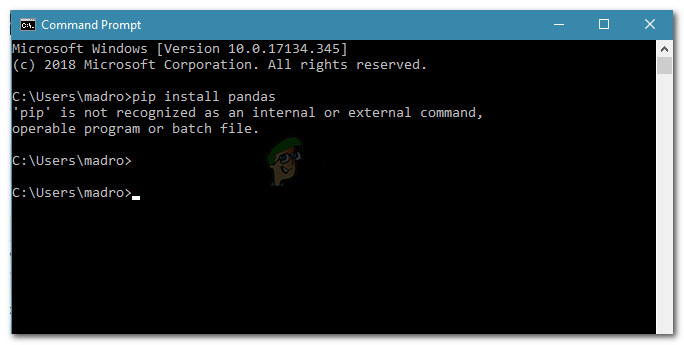
Some users trying to install Python packages using a Command Prompt window report seeing the "pip is not recognized as an internal or external command"
waxen python
slate swan
And therefore the command cannot be found
Yeah that's literally my error lol
slate swan
They explain how to add to environment variables
 bold depot
Hi. How do I edit a message embed through a bot? I see Generally what I have to do, but I don't Understand How it works.
I'm trying to edit a single embed with the current utc time every hour on the hour.
slate swan
Next time installing python you should check the checkbox though
slate swan
bold depot
Hi. How do I edit a message embed through a bot? I see *Generally* what I have t...
When using .send() save it in a variable, then call var.edit() on it
cloud folio
How can i edit yaml file? "status: false" to "status: true"
waxen python
So..?
 hasty iron
https://github.com/an-dyy/Lefi/commit/71f3280a2d8739c1c50eb071ed8072fbc59814e5 guyz merge/commit review

GitHub
List of added/changed models:
- TextChannel
- DMChannel
- VoiceChannel
- CategoryChannel
- Embed
- Enums
- Userflags
- Intents
- Permissions
- Guild
- Member
- User
- Message
- Delete...
 unique mist
Is there a way to get someones user ID from a display name?
        role = discord.utils.get(user.guild.roles, name="Stage1")
        await user.add_roles(role)
I have this and a list of display names, I need to be able to grab the user ID from a display name
hasty iron
slate swan
Maybe follow the rules
what
unique mist
woah
cloud folio
mmmm
 calm vector
!silence
unkempt canyonBOT
✅ silenced current channel for 10 minute(s).
calm vector
<@&267628507062992896> raid
unkempt canyonBOT
✅ unsilenced current channel.
slate swan

waxen python
...
 pliant gulch
hasty iron
https://github.com/an-dyy/Lefi/commit/71f3280a2d8739c1c50eb071ed8072fbc59814e5 g...
pliant gulch
hasty iron
https://github.com/an-dyy/Lefi/commit/71f3280a2d8739c1c50eb071ed8072fbc59814e5 g...
😳
waxen python
It's working now
All I had to do is download Python from the Microsoft Store (I downloaded it from the Python website) then I did pip3 install discord on cmd
bold depot
slate swan
When using `.send()` save it in a variable, then call `var.edit()` on it
So this is what I have atm:
current_month = ["January", "February", "March", "April", "May", "June", "July", "August", "September", "October", "November", "December"]

@tasks.loop(hours = 1)
async def send():
    tm = datetime.datetime.utcnow()

    #t = tm.strftime("%m/%d/%Y %I:%M:%S")

    # Get the Months
    months = int(tm.strftime("%m"))
    display_month = current_month[months-1]

    # Get the Day's Name
    day = tm.strftime("%A")

    # Get the Year
    years = tm.strftime("%Y")

    # Get the Hours and Minutes (12 hour clock)
    hrs_mins = tm.strftime("%I:%M")

    # Get the Hours (12 Hour Clock)
    hrs = tm.strftime("%I")

    # Get the Minutes)
    mins = tm.strftime("%M")

    if int(hrs) > 12:
      hrs = tm + datetime.timedelta(hours = -12)
      hrs_mins = f"{hrs}:{mins} PM"

    # Get the AM/PM
    day_night = tm.strftime("%p")

    #bot.message.embeds[0]
    #bot.message.edit(embed = new_embed)

    # Get the Channel Id
    channel = bot.get_channel(895031238371467287)

    #channel.fetch_message

    #Create the Embed
    em = discord.Embed(title = f"**{day}**", description = f"{hrs_mins} {day_night}"#, color = ctx.author.color
    )
    em.add_field(name = f"**{display_month}**", value = f"{years}")

    # Send The Embed
    await channel.send(embed = em)
send.start()
I feel I may have some redundancies here and there, but idk. I have no clue how to edit the embed once every hour without creating a new embed.
slate swan
Make it send once, then save the message ID and channel ID. Then for the loop get a channel object from the ID you've saved and get a message object with the message ID using that channel object.
 edgy meadow
Hey, i' dont know why this code delete's the message after it has been send
@client.command()
async def refresh_lights(ctx):

    await ctx.message.delete()

    if "ʟɪɢʜᴛ-ᴄᴏɴᴛʀᴏʟʟᴇʀ" == str(ctx.channel):

        for light in learn.light_names:
            if light == "Color2":
                embedVar = discord.Embed(title=f"LAMP: {light}", color=0x000000)
                message = await ctx.send(embed=embedVar)

                await message.add_reaction("🟩")
                await message.add_reaction("🟥")
                await message.add_reaction("🟦")
                await message.add_reaction("🟨")

                await message.add_reaction("✅")
                await message.add_reaction("❌")
What message is being deleted?
edgy meadow
I found it, another bot in the server delete's message with the red cross reaction
So when i tried to add it, it got deleted
slate swan
Oh well x)
lyric moat
how can i make my bot discord mobile online?
slate swan
lyric moat
how can i make my bot discord mobile online?
You cant
bold depot
I do not understand what's wrong. I keep getting this traceback whenever I try to run the bot in my friend's server, but have no issue with it in my own server:
Traceback (most recent call last):
  File "/opt/virtualenvs/python3/lib/python3.8/site-packages/discord/ext/tasks/__init__.py", line 101, in _loop
    await self.coro(*args, **kwargs)
  File "main.py", line 61, in send
    await channel.send(embed = em)
  File "/opt/virtualenvs/python3/lib/python3.8/site-packages/discord/abc.py", line 1065, in send
    data = await state.http.send_message(channel.id, content, tts=tts, embed=embed,
  File "/opt/virtualenvs/python3/lib/python3.8/site-packages/discord/http.py", line 248, in request
    raise Forbidden(r, data)
discord.errors.Forbidden: 403 Forbidden (error code: 50013): Missing Permissions
The bot has fewer permissions in MY server than MY FRIEND'S. Why does it not like my friend's server?
lyric moat
slate swan
You cant
other bots in python does it
 dapper cobalt
bold depot
I do not understand what's wrong. I keep getting this traceback whenever I try t...
dapper cobalt
bold depot
I do not understand what's wrong. I keep getting this traceback whenever I try t...
Either the bot doesn't have embed links permissions or doesn't have send messages permissions.
dapper cobalt
lyric moat
how can i make my bot discord mobile online?
You don't. You shouldn't do it.
It's possible, but not supported from the API directly. And you shouldn't do it.
slate swan
it have an specific server of discord.py?
lyric moat
Alright
bold depot
dapper cobalt
Either the bot doesn't have `embed links` permissions or doesn't have `send mess...
Just fixed it. Bot couldn't view or send messages in the channel
slate swan
oo
lyric moat
python and discord.py is not the same?
hasty iron
no
slate swan
dapper cobalt
discord.gg/dpy
im baned but idk why?ç
dapper cobalt
lyric moat
python and discord.py is not the same?
Python is a language, discord.py is a library.
 slate swan
dapper cobalt
discord.gg/dpy
slate swan
dapper cobalt
discord.gg/dpy
u can tell somethings to the admins of this server for unban me?
hasty iron
slate swan
https://felony.is-a.fail/5b_w7khNl
cluster is a string
dapper cobalt
slate swan
https://felony.is-a.fail/5b_w7khNl
You imported MongoClient, now use it, maybe?
hasty iron
and from the image, it is
dapper cobalt
slate swan
u can tell somethings to the admins of this server for unban me?
No.
slate swan
cuz idk why
slate swan
dapper cobalt
You imported `MongoClient`, now use it, maybe?
i did, that's like a ss before i did it
 dapper cobalt
Imma go make me a sandwich. Goodluck, @hasty iron .
hasty iron
oh wtf man
slate swan
wtf it's blocked lol
hasty iron
slate swan
https://felony.is-a.fail/5b_yEhp2Y
send error with updated code
 slate swan
i was in the wrong file
hasty iron
dude what
slate swan
LOL

5b_zxbXUi.png
no one in #databases is responding
F
I CAN HELP U
pls do
i so sorry, but im in the bedç
hasty iron
slate swan
no one in <#342318764227821568> is responding
then wait
slate swan
chilling
hasty iron
or claim a help channel
slate swan
i am veryyyyyy impatient
slate swan
@slate swan , dm me
placid skiff
Someone can tell me what's the problem here?
from nextcord.ext.commands import *
from dislash import slash_command, Option, OptionType, SlashInteraction


class Test(Cog):
    def __init__(self, bot):
        self.bot = bot

    @slash_command(description="Bot speed test")
    async def ping(self, ctx: SlashInteraction):
        await ctx.send(f"Pong!\nLatenza: {round(self.bot.latency)*1000}ms")

    @slash_command(
        description="Invia un messaggio",
        options=[
            Option("Messaggio", description="Il messaggio da inviare", type=OptionType.STRING, required=True)
        ]
    )
    async def say(self, ctx: SlashInteraction, message: str):
        await ctx.send(message)

    @Cog.listener()
    async def on_ready(self):
        if not self.bot.ready:
            self.bot.cogs_ready.ready_up("test")


def setup(bot):
    bot.add_cog(Test(bot))
 hasty iron
errors?
 quiet coral
Hello can I make a discord bot that announces the user that joined the voice channel with discord.py ?
hasty iron
quiet coral
Hello can I make a discord bot that announces the user that joined the voice cha...
yes, use the on_voice_state_update event
placid skiff
hasty iron
errors?
The cog had an execution error, i don't understan why honestly
hasty iron
ok so where is the error
placid skiff
The ide tells me that "Shadows name 'bot' from outer scope "
placid skiff
This morning this cog works fine, i add a command and now this xD
hasty iron
again, where is the error
placid skiff
Read the code and tell me hahaha i don't find any
placid skiff
Bruh. I try to print the exception
hasty iron
actually, why are you using both dislash and nexcord
nextcord*
just use disnake at that point
placid skiff
To create slash command D_D
Well it is not like that i'm used to dislash yet, plus it seems that it doesn't have a lot of features
placid skiff
hasty iron
just use disnake at that point
Oh well i find the error
The name of the option in dislash must be lowercase
elfin flicker
 dapper cobalt
elfin flicker
dapper cobalt
elfin flicker
Do you know what does NoneType mean?
 trim barn
# ADD TO DIABLO
    @commands.command(name='Add to Diablo', aliases=['add'], hidden=True)
    async def add_to_diablo(self, ctx, u : discord.User, *, reason):
        db_0 = cluster["DIABLO"]
        offender_list = db_0["Offender List"]
        exempt_list = db["ExemptIDs"]

        if report_access.find_one({"userid": int(ctx.author.id)}) is not None:
            is_on_list = offender_list.find_one({"userid": int(u.id)})
            is_exempted = exempt_list.find_one({"userid": int(u.id)})

            if len(u.id) != 18 or is_on_list is not None or is_exempted is not None or bool(u.bot) is True:
                embed_1 = discord.Embed(
                    description="Please check if User ID is correct. "
                                "May already be on the database.",
                    color=discord.Colour.red()
                )
                embed_1.set_author(name='Invalid User ID')
                await ctx.send(embed=embed_1)
            else:
                verified_offender = {"userid": int(u.id), "reason": str(reason)}
                x = offender_list.insert_one(verified_offender)
                print(x)

                embed = discord.Embed(
                    description=f':white_check_mark: Added UserID **({str(u.id)})**',
                    color=discord.Colour.green(),
                    timestamp=datetime.utcnow()
                )
                embed.set_author(name='Added Offender', icon_url=ctx.author.avatar_url)
                embed.add_field(name='User ID', value=str(u.id))
                embed.add_field(name='Reason', value=str(reason))
                await ctx.send(embed=embed)
        else:
            print("no")
It stops working at if len(u.id) != 18 or is_on_list is not None or is_exempted is not None or bool(u.bot) is True:
and doesn't say anything
trim barn
no
hasty iron
error?
trim barn
well idk
dapper cobalt
trim barn
```py
# ADD TO DIABLO
@commands.command(name='Add to Diablo', aliases=['add'...
Better way to check if something is None or not is this way:
var = "This is not None"
if var:
  print("var is not none!")
else:
  print("var is none!")
What does it mean
unkempt canyonBOT
types.NoneType```
The type of [`None`](https://docs.python.org/3/library/constants.html#None "None").

New in version 3.10.Please do not jump into discord.py if you don't have enough knowledge in Python. I recommend you learn Python well first, since discord.py is an intermediate level library.
!resources
unkempt canyonBOT
Resources
The Resources page on our website contains a list of hand-selected learning resources that we regularly recommend to both beginners and experts.
https://pythondiscord.com/resources
dapper cobalt
Do you know what None is?
hasty iron
because result is None
trim barn
dapper cobalt
Better way to check if something is `None` or not is this way:
```py
var = "This...
if len(u.id) != 18 or not is_on_list or not is_exempted or u.bot is True:
?
elfin flicker
dapper cobalt
Do you know what `None` is?
 dapper cobalt
trim barn
```py
if len(u.id) != 18 or not is_on_list or not is_exempted or u.bot is True:
...
dapper cobalt
trim barn
```py
if len(u.id) != 18 or not is_on_list or not is_exempted or u.bot is True:
...
This way you are checking if is_on_list is False/None, and same with is_exempted.
hasty iron
if you dont know what None is (in python) refer to this #discord-bots message
trim barn
If one of the characteristics is wrong it'll send a different message
dapper cobalt
!e
bot = True
if bot:
  print("Bot is true")
@dapper cobalt :white_check_mark: Your eval job has completed with return code 0.
Bot is true
if bot instead of if bot is True.
trim barn
it returns none values
dapper cobalt
!e
bot = None
if not bot:
  print("bot is None")
@dapper cobalt :white_check_mark: Your eval job has completed with return code 0.
bot is None
i am using pymongo
dapper cobalt
Then the data you are getting most likely doesn't exist.
hasty iron
None is basically False but not a bool
trim barn
!e
@commands.command(name='Add to Diablo', aliases=['add'], hidden=True)
    async def add_to_diablo(self, ctx, u : discord.User, *, reason):
        db_0 = cluster["DIABLO"]
        offender_list = db_0["Offender List"]
        exempt_list = db["ExemptIDs"]

        if report_access.find_one({"userid": int(ctx.author.id)}) is not None:
            is_on_list = offender_list.find_one({"userid": int(u.id)})
            is_exempted = exempt_list.find_one({"userid": int(u.id)})

            if len(u.id) != 18 or not is_on_list or not is_exempted or u.bot is True:
                embed_1 = discord.Embed(
                    description="Please check if User ID is correct. "
                                "May already be on the database.",
                    color=discord.Colour.red()
                )
                embed_1.set_author(name='Invalid User ID')
                await ctx.send(embed=embed_1)
            else:
                verified_offender = {"userid": int(u.id), "reason": str(reason)}
                x = offender_list.insert_one(verified_offender)
                print(x)

                embed = discord.Embed(
                    description=f':white_check_mark: Added UserID **({str(u.id)})**',
                    color=discord.Colour.green(),
                    timestamp=datetime.utcnow()
                )
                embed.set_author(name='Added Offender', icon_url=ctx.author.avatar_url)
                embed.add_field(name='User ID', value=str(u.id))
                embed.add_field(name='Reason', value=str(reason))
                await ctx.send(embed=embed)
        else:
            print("no")
oh there we go
wait
hasty iron
what
trim barn
!e
@commands.command(name='Add to Diablo', aliases=['add'], hidden=True)
    async def add_to_diablo(self, ctx, u : discord.User, *, reason):
        db_0 = cluster["DIABLO"]
        offender_list = db_0["Offender List"]
        exempt_list = db["ExemptIDs"]

        if report_access.find_one({"userid": int(ctx.author.id)}) is not None:
            is_on_list = offender_list.find_one({"userid": int(u.id)})
            is_exempted = exempt_list.find_one({"userid": int(u.id)})

            if len(u.id) != 18 or not is_on_list or not is_exempted or u.bot is True:
                embed_1 = discord.Embed(
                    description="Please check if User ID is correct. "
                                "May already be on the database.",
                    color=discord.Colour.red()
                )
                embed_1.set_author(name='Invalid User ID')
                await ctx.send(embed=embed_1)
            else:
                verified_offender = {"userid": int(u.id), "reason": str(reason)}
                x = offender_list.insert_one(verified_offender)
                print(x)

                embed = discord.Embed(
                    description=f':white_check_mark: Added UserID **({str(u.id)})**',
                    color=discord.Colour.green(),
                    timestamp=datetime.utcnow()
                )
                embed.set_author(name='Added Offender', icon_url=ctx.author.avatar_url)
                embed.add_field(name='User ID', value=str(u.id))
                embed.add_field(name='Reason', value=str(reason))
                await ctx.send(embed=embed)
        else:
            print("no")
Please understand that if what you are trying to do is in any way possible this server would be chaos.
trim barn
it worked before I added a typehint
hasty iron
also
dapper cobalt
dapper cobalt
Please understand that if what you are trying to do is in any way possible this ...

trim barn
!e
    # ADD TO DIABLO
    @commands.command(name='Add to Diablo', aliases=['add'], hidden=True)
    async def add_to_diablo(self, ctx, u : discord.User, *, reason):
        db_0 = cluster["DIABLO"]
        offender_list = db_0["Offender List"]
        exempt_list = db["ExemptIDs"]

        if report_access.find_one({"userid": int(ctx.author.id)}) is not None:
            is_on_list = offender_list.find_one({"userid": int(u.id)})
            is_exempted = exempt_list.find_one({"userid": int(u.id)})

            if len(u.id) != 18 or not is_on_list or not is_exempted or u.bot is True:
                embed_1 = discord.Embed(
                    description="Please check if User ID is correct. "
                                "May already be on the database.",
                    color=discord.Colour.red()
                )
                embed_1.set_author(name='Invalid User ID')
                await ctx.send(embed=embed_1)
            else:
                verified_offender = {"userid": int(u.id), "reason": str(reason)}
                x = offender_list.insert_one(verified_offender)
                print(x)

                embed = discord.Embed(
                    description=f':white_check_mark: Added UserID **({str(u.id)})**',
                    color=discord.Colour.green(),
                    timestamp=datetime.utcnow()
                )
                embed.set_author(name='Added Offender', icon_url=ctx.author.avatar_url)
                embed.add_field(name='User ID', value=str(u.id))
                embed.add_field(name='Reason', value=str(reason))
                await ctx.send(embed=embed)
        else:
            print("no")
whatever
hasty iron
how do you actually know it crashes at that specific if statement
dapper cobalt
You cannot code discord.py in this bot.
If you could, you could make the Python bot literally nuke the server.
hasty iron
hasty iron
how do you actually know it crashes at that specific if statement
it could be anywhere
you just guessed?
unkempt canyonBOT
@trim barn :x: Your eval job has completed with return code 1.
001 | Traceback (most recent call last):
002 |   File "<string>", line 1, in <module>
003 | NameError: name 'discord' is not defined
I want to try something with Python bot's eval command, but I'm afraid of getting myself banned.
hasty iron
do it
dapper cobalt
Nah.
hasty iron
what is it
placid skiff
dapper cobalt
I want to try something with Python bot's eval command, but I'm afraid of gettin...
Lol what? Overloading it? 😂
hasty iron
ill do it for you ;)
dapper cobalt
But I'm curious if os.system("shutdown -s") works. 
dapper cobalt
os is built-in.
hasty iron
i mean surely people have tried it before
elfin flicker
dapper cobalt
Please do not jump into discord.py if you don't have enough knowledge in Python....
What I will not use is the requests and BeautifulSoup module, I get None because the page responds with another html structure, I just need someone's help to tell me how to do that data extraction correctly :v
dapper cobalt
I never heard of BeautifulSoup.
hasty iron
dapper cobalt
But I'm curious if `os.system("shutdown -s")` works. <:kekw:861516509460955138>
!e ```py
import os
os.system("shutdown -s")
@hasty iron :warning: Your eval job has completed with return code 0.
[No output]
But it's not async, so I don't see a difference between it and normal requests lib.
!e ```py
import os
os.system("shutdown -s")
@dapper cobalt :warning: Your eval job has completed with return code 0.
[No output]
Ah, ok so it doesn't.
placid skiff
dapper cobalt
I never heard of BeautifulSoup.
It is a package to do HTML wrapping
elfin flicker
dapper cobalt
Ah, ok so it doesn't.
the command just wants to take this number
 trim barn
            print(is_on_list)
            print(is_exempted)
            print(u.bot)

            if len(u.id) != 18 or is_on_list is not None or is_exempted is not None or u.bot is True:
                embed_1 = discord.Embed(
                    description="Please check if User ID is correct. "
                                "May already be on the database.",
                    color=discord.Colour.red()
                )
                embed_1.set_author(name='Invalid User ID')
                await ctx.send(embed=embed_1)
I: d.add 758036917500772382 test
O: None {'_id': ObjectId('60bff7cce735aa789aafd0fd'), 'userid': 758036917500772382, 'description': 'Diablo Test Version'} True
help
the issue is that it isn't filtering thru the if command
quiet coral
hello can someone give me a small example on how to to use the on_voice_state_update(data) event?
trim barn
trim barn
```py
print(is_on_list)
print(is_exempted)
p...
help
slate swan
elfin flicker
What I will not use is the requests and BeautifulSoup module, I get `None` becau...
tbh you are better off using plain regex instead of bs4
elfin flicker
slate swan
tbh you are better off using plain regex instead of bs4
OK thank you so much
slate swan
👍
trim barn
trim barn
```py
print(is_on_list)
print(is_exempted)
p...
pls help
slate swan
i need help, i want to do a command who gives a role for everyone:
my code:
@bot.command()
async def test(ctx):
    user = ctx.message.author
    role = discord.utils.get(user.guild.roles, name="user")
    print("1")
    for member in ctx.guild.members:
        if not member.id == ctx.author.id:
            print("2")
            print("3")
            try:
                print("4")
                await member.add_roles(role)
                print("5")
                print(f"{member.display_name}")
            except:
                pass
                print("no")
The bot only gives the role for 1 person
boreal osprey
!e
@bot.command(aliases = ['fm'])
@commands.is_owner()
async def filemute(ctx, member : discord.Member, *, reason=None):
    guild = ctx.guild
    fmrole = discord.utils.get(guild.roles, name = 'Filemuted')

    if not fmrole:
        fmrole = guild.create_role(name='Filemuted')
        for channel in guild.channels:
            await channel.set_permissions(fmrole, attach_files = False)


    await member.add_roles(fmrole, reason=reason)
    emb=discord.Embed(f':white_check_mark: I have filemuted {member.name}! Reason: {reason}', color = discord.Colour.random())
    await ctx.send(embed=emb)
    emb2=discord.Embed(description = f"You have been filemuted in {guild}!", color = discord.Colour.random())
    emb2.add_field(name='Reason:', value=reason, inline = False)
    emb2.add_field(name="responible mod:", value = ctx.author.name, inline = False)
    await member.send(embed=emb2)
!e
@bot.command()
async def test(ctx):
    user = ctx.message.author
    role = discord.utils.get(user.guild.roles, name="user")
    print("1")
    for member in ctx.guild.members:
        if not member.id == ctx.author.id:
            print("2")
            print("3")
            try:
                print("4")
                await member.add_roles(role)
                print("5")
                print(f"{member.display_name}")
            except:
                pass
                print("no")
@slate swan :x: Your eval job has completed with return code 1.
001 | Traceback (most recent call last):
002 |   File "<string>", line 1, in <module>
003 | NameError: name 'bot' is not defined
 cloud dawn
slate swan
i need help, i want to do a command who gives a role for everyone:
my code:
```p...
cloud dawn
slate swan
i need help, i want to do a command who gives a role for everyone:
my code:
```p...
we won't help spamming the api
 slate swan
cloud dawn
we won't help spamming the api
slate swan
cloud dawn
we won't help spamming the api
I changed the welcome role and i need help for give the welcome role for the members of my server
Pls
I can't do that manually
cluster = MongoClient("")
db = cluster["Feature"]["guild_data"]

class Moderation(commands.Cog):
    def __init__(self, bot):
        self.bot = bot
        self.db = db
    @commands.command()
    @commands.has_permissions(manage_roles=True)
    async def warn(self, ctx, user: discord.Member=None, * , reason=None):
        id = user.id
        if db.count_documents({"member_id:": id}) == 0:
            db.insert_one({"member_id": id,"warn_count": 0})
        if reason is None:
            return await ctx.reply(f'please provide a reason')
        elif user is None:
            return await ctx.reply(f'please provide a member')
        warn_count = db.find_one({"member_id": id})
        count = warn_count["warns"]
        new_count = count + 1
        db.update_one({"member_id": id},{"$set":{"warn_count": new_count}})
        await ctx.send(f"warned {user.mention} for {reason}/\nMembers Warn Count: **{new_count}**")

def setup(bot):
    bot.add_cog(Moderation(bot))
new_count = count + 1
TypeError: unsupported operand type(s) for +: 'dict' and 'int'
help
 vale cairn
never even realised this channel was here
slate swan
slate swan
!e
```py
@bot.command()
async def test(ctx):
user = ctx.message.author
...
Can help me?
Or how i can give a role for 300 members fast?
 thin cedar
@client.command(pass_context=True)
async def help(ctx):
        embed=discord.Embed(colour = discord.Colour.orange())
        embed.add_field(name='$help', value='Shows help of the bot!', inline=False)
        embed.add_field(name='$e', value='Joke command!', inline=False)
        await ctx.send(embed=embed)

@client.command
async def e(ctx):
        embed=discord.Embed(colour = discord.Colour.orange())
        embed.add_field(name='E', value='You know what they say about E!', inline=False)
it wont detect the e command
 outer violet
how do i make it to where theres no command and users can just type whatever they want without the command?
import discord
from discord.ext import commands


class Confess(commands.Cog):
    def __init__(self, bot: discord.ext.commands.Bot):
        self.bot = bot

    @commands.command()
    async def confess(self, ctx: commands.Context, *, message: str):
        channel = self.bot.get_channel(806649868314869760)
        await ctx.message.delete()
        embed = discord.Embed(title="Sucess", description=f"I've received your confession.\nPlease check at {channel.mention}")
        await ctx.send(embed=embed, delete_after=10)
        embed = discord.Embed(title="Confession", description=f"An anonymous person said the following:\n{'`'*3}{message}{'`'*3}")
        await channel.send(embed=embed)


def setup(bot):
    bot.add_cog(Confess(bot))
 hard trail
What is wrong with my ping code?
async def ping(ctx):
await ctx.send(f'**Pong!** Latency: {round(client.latency * 1000)}ms')```Nvm
Just had to make a few twiks
 rain olive
outer violet
how do i make it to where theres no command and users can just type whatever the...
rain olive
outer violet
how do i make it to where theres no command and users can just type whatever the...
use wait_for
rain olive
thin cedar
```py
@client.command(pass_context=True)
async def help(ctx):
embed=disc...
ur decorator has a missing ()
thin cedar
@client.command()?
vale cairn
this might just be me being dumb but how do you get a program / discord bot to see every version of a word
like "hey" and "hEY and "HEY"
outer violet
rain olive
use wait_for
where would i put that ?
 slate phoenix
vale cairn
this might just be me being dumb but how do you get a program / discord bot to s...
slate phoenix
vale cairn
this might just be me being dumb but how do you get a program / discord bot to s...
is it for a command or for message content?
boreal osprey
boreal osprey
i get this error when trying to do this command
Help
vale cairn
slate phoenix
is it for a command or for message content?
message content
slate phoenix
vale cairn
message content
what you would do is message.content.lower() and then compare what ever you want to that example:
@bot.event
async def on_message(message):
  if message.content.lower() == "hello":
    message.channel.send("Hi!")
Hhhh
vale cairn
perfect thank you
slate swan

5c07DaMef.png
 slate swan
provide code, and error
boreal osprey
boreal osprey
i get this error when trying to do this command
Error
boreal osprey
boreal osprey
!e
```py
@bot.command(aliases = ['fm'])
@commands.is_owner()
async def filemute(...
Code
 weary panther
hey, if i want to run an async function with asyncio.run_coroutine_threadsafe(asyncFunction, eventloop) How do i get the current eventloop which the bot runs in?
can i just use asyncio.get_event_loop() ?
oh nevermind i think i can use the bot.loop attribute
hasty iron
make sure you’re trying to run that coro inside a thread too
 lofty heron
bruh internet went out but thanks
kindred epoch
boreal osprey
!e
```py
@bot.command(aliases = ['fm'])
@commands.is_owner()
async def filemute(...
discord.Embed is missing a title or description parameter
weary panther
hasty iron
make sure you’re trying to run that coro inside a thread too
yes i am 🙂
slate swan
slate swan
https://felony.is-a.fail/5c07DaMef
so no solution you guys can think of
boreal osprey
kindred epoch
discord.Embed is missing a title or description parameter
ye i alr fixed it
and now i got a new error
 slate swan
so no solution you guys can think of
slate swan
slate swan
so no solution you guys can think of
??
weary panther
slate swan
??
you are trying to iterate over an int.
boreal osprey
but it is a member
slate swan
weary panther
you are trying to iterate over an int.
idk the term iterate
boreal osprey
 weary panther
iterating means going over each item in like a list or anything that has an iterator
boreal osprey
@kindred epoch it the error says target pararmeter must be a member or role
slate swan
weary panther
iterating means going over each item in like a list or anything that has an iter...
so how could i fix it
kindred epoch
boreal osprey
<@!675414248620294154> it the error says target pararmeter must be a member or r...
?
Read the 3rd line from the last
boreal osprey
it also says guild.create_role was never awaited
weary panther
well you are trying to iterate over an int, like 7. but an integer doesn't contain any items to iterate over it's just 7. so the question is what do you want to do with the integer or is it not supposed to be an integer?
kindred epoch
boreal osprey
it also says guild.create_role was never awaited
Yea so you need to await it
slate swan
weary panther
well you are trying to iterate over an int, like 7. but an integer doesn't conta...
so i need to get the member before han??
i'm trying to get the members in the db
from their ids
 mental walrus
Are you trying to get the current list of members in the guild?
slate swan
mental walrus
Are you trying to get the current list of members in the guild?
no
the people in the database
weary panther
what kind of datatype does your database request return
slate swan
slate swan
https://felony.is-a.fail/5c07DaMef
..
kindred epoch
@slate swan your just iterating over 1 id
kindred epoch
Ye duh
weary panther
no
kindred epoch
You should learn more about iterating over lists
weary panther
it still wouldnt
you should make the output go into a list of id's
or a set
if you do that then it would work
kindred epoch
Ye
mental walrus
Indeed
kindred epoch
First put it in a list
weary panther
create a function in your db getMemberIdList
kindred epoch
What db are you using
slate swan
kindred epoch
What db are you using
mongo
slate swan
weary panther
or the db class
you want to see the entry?*
weary panther
no nevermind, make a function that fetches all the id's of the members from your db and then puts it into a list.
slate swan
i've never used mongo befo
weary panther
the function should return that list
kindred epoch
Idk why ur using find_one
slate swan
also not to good at py
slate swan
kindred epoch
Idk why ur using find_one
i was watching a tutorial
kindred epoch
What do you find that does?
slate swan
wym
kindred epoch
Find 1 thing or multiple things
slate swan
1
kindred epoch
Then why are you iterating over it
slate swan
find_many is how to get multiple right
weary panther
i don't know,
kindred epoch
weary panther
if you want to store member id's for a discord server sqlite is probably good enough
 sick birch
slate swan
i was watching a tutorial
sick birch
slate swan
i was watching a tutorial
tutorials aren't the best, avoid using them
 lone dust
member.avatar_url_as(format=None, static_format='webp', size=1024)
``` This is wrong?i want the user's avatar url
 steel trench
lone dust
```py
member.avatar_url_as(format=None, static_format='webp', size=1024)
``` Thi...
steel trench
lone dust
```py
member.avatar_url_as(format=None, static_format='webp', size=1024)
``` Thi...
What are you trying to do
Oh
I've never used that format before, I commonly use
embed.set_image(url = user.avatar_url)
Depends if you want the embed though
lone dust
actually it was working in discord.py 1.7
embed.set_image(url=ctx.author.avatar_url)
this?
steel trench
lone dust
it will work for animated pfp too?
It should
steel trench
lone dust
well i already tried it and it is showing error
What error?
lone dust
member object has no attribute avatar_url
    @commands.command(aliases=['av', 'pfp'])
    async def avatar(self, ctx, member: discord.User = None):
        """Get user profile picture"""
        embed = discord.Embed(description='Your avatar 😳 ')

        if member == None:
            embed.set_image(url=ctx.author.avatar_url)
            await ctx.send(embed=embed)
        else:
            embed.set_image(url=member.avatar_url)
            await ctx.send(embed=embed
 valid niche
lone dust
member object has no attribute avatar_url
valid niche
lone dust
member object has no attribute avatar_url
Are you on 2.0?
lone dust
yes
valid niche
Then that doesn’t exist anymore
steel trench
Change it to discord.Member
lone dust
i just updated
valid niche
It’s now member.avatar
And that returns an asset
Which has the .url attribute
It’s more in line with how discord’s API actually works
So it’s no more _ but a . In between avatar and url
It’s now separated
slate swan
is it possible to have a command which takes a userid and then tells you what their username is?
slate phoenix
slate swan
is it possible to have a command which takes a userid and then tells you what th...
yes
unkempt canyonBOT
The user’s username.
slate swan
oh ty
 tranquil moss
is there any way to create a click to copy thing or to automatically copy something to your clipboard or just an easy way to copy something
 boreal ravine
control c
dapper cobalt
tranquil moss
is there any way to create a click to copy thing or to automatically copy someth...
ctrl+c to copy, ctrl+v to paste. And also this is irrelevant to discord bots?
odd walrus
anyone know what can i add to my scirpts so that the bot can only be used in my server instead of dms and server
boreal ravine
odd walrus
anyone know what can i add to my scirpts so that the bot can only be used in my ...
@commands.guild_only()
!d discord.ext.commands.guild_only
unkempt canyonBOT
@discord.ext.commands.guild_only()```
A [`check()`](https://discordpy.readthedocs.io/en/master/ext/commands/api.html#discord.ext.commands.check "discord.ext.commands.check") that indicates this command must only be used in a guild context only. Basically, no private messages are allowed when using the command.

This check raises a special exception, [`NoPrivateMessage`](https://discordpy.readthedocs.io/en/master/ext/commands/api.html#discord.ext.commands.NoPrivateMessage "discord.ext.commands.NoPrivateMessage") that is inherited from [`CheckFailure`](https://discordpy.readthedocs.io/en/master/ext/commands/api.html#discord.ext.commands.CheckFailure "discord.ext.commands.CheckFailure").i have a if statement that if the member doesn't have the role, it sends a message, but it seems to not send the message

@bot.command(aliases = ['unfm'])
@commands.has_permissions(manage_roles = True)
async def unfilemute(ctx, member : discord.Member):
    guild = ctx.guild
    fmrole = discord.utils.get(guild.roles, name = 'Filemuted')
    if fmrole in member.roles is None:
        await ctx.send(f"{member.name} is not filemuted!")
    else:
        await member.remove_roles(fmrole)
        emb=discord.Embed(description = f'I have unfilemuted {member.name}!', color = discord.Colour.random())
        await ctx.send(embed=emb)
        await member.send(f"You have been unfilemuted from {guild}!")
like this right

 visual island
boreal osprey
```py
@bot.command(aliases = ['unfm'])
@commands.has_permissions(manage_roles = ...
visual island
boreal osprey
```py
@bot.command(aliases = ['unfm'])
@commands.has_permissions(manage_roles = ...
fmrole in member.roles is None this statement is wrong
boreal osprey
visual island
`fmrole in member.roles is None` this statement is wrong
What is it supposed to be
visual island
fmrole in member.roles this is right fmrole in member.roles or fmrole is None this is also right
boreal osprey
I just need none
visual island
for?
 heavy radish
Heyy, Im trying to send the last line message to the channel the event happened. How do I do so?
 visual island
await it
heavy radish
visual island
await it
Ahh Done it. But it gets sent to the other channel. I want to send it in the channel it just read the message
visual island
message.channel.send()
heavy radish
visual island
message.channel.send()
Ahh, I did that without the await. 😢
 rugged tinsel
hey can anyone help me with using api requests? i'm quite new to discord.py
and python in general
pls help me
slate swan
@client.command()
async def whois(ctx):

    guild = client.get_guild(guildid)

    whoisuser = guild.get_member(671473846263480349)
    await ctx.send(f"{whoisuser}")```
I was making a base 'whois' command for my bot, but it only responds with "None" if you use any userid other than it's own. Why does it do that?!intents
unkempt canyonBOT
Using intents in discord.py
Intents are a feature of Discord that tells the gateway exactly which events to send your bot. By default, discord.py has all intents enabled, except for the Members and Presences intents, which are needed for events such as on_member and to get members' statuses.
To enable one of these intents, you need to first go to the Discord developer portal, then to the bot page of your bot's application. Scroll down to the Privileged Gateway Intents section, then enable the intents that you need.
Next, in your bot you need to set the intents you want to connect with in the bot's constructor using the intents keyword argument, like this:
from discord import Intents
from discord.ext import commands

intents = Intents.default()
intents.members = True

bot = commands.Bot(command_prefix="!", intents=intents)
For more info about using intents, see the discord.py docs on intents, and for general information about them, see the Discord developer documentation on intents.
boreal ravine
odd walrus
like this right
yes
rugged tinsel
rugged tinsel
hey can anyone help me with using api requests? i'm quite new to discord.py
.......
dapper cobalt
rugged tinsel
and python in general
If you're new to Python, please do not jump straight into discord.py. You won't be able to do anything if you don't understand what you are doing. Please learn Python first.
!resources
unkempt canyonBOT
Resources
The Resources page on our website contains a list of hand-selected learning resources that we regularly recommend to both beginners and experts.
https://pythondiscord.com/resources
rugged tinsel
ok
slate swan
dapper cobalt
!intents
thank you
dapper cobalt
No problem.
boreal ravine
o.o
 ocean leaf
i'm making a ban command and i need to check if the user has ban mmebers permission or not. I can do that by using @commands.has_permissions(ban_members = True). But what if i want to send a message if the user dosen't have ban members perms?
steel trench
Something with MissingPermissions I guess
I use if ctx.author.guild_permissions.ban_members: and then else:
Both of them (your concept and mine) will work I think
ocean leaf
steel trench
I use `if ctx.author.guild_permissions.ban_members:` and then `else:`
ok thanks
slate swan
Hey I want to learn how to make both with python, where can I learn?(in free)
slate swan
slate swan
Hey I want to learn how to make both with python, where can I learn?(in free)

A tutorial on how to use discord.py to create your own Discord bot in Python, written to fix the flaws of many other popular tutorials.
dapper cobalt
ocean leaf
i'm making a ban command and i need to check if the user has ban mmebers permiss...
Make an error handler.
If the user is missing permissions set in the has_permissions check it will raise a commands.MissingPermissions error.
You can handle that error this way:
@bot.event
async def on_command_error(ctx, error):
  if isinstance(error, commands.MissingPermissions):
    await ctx.send(f"You are missing `{', '.join(error.missing_perms)}` permission(s) to use this command!")
Or just do if member.guild_permissions.ban_members == False...
Though it's better to make error handlers TBH
 queen dagger
why cant 2 people run the same command at once? or if you can, how?
visual island
queen dagger
why cant 2 people run the same command at once? or if you can, how?
you can
 patent lark
ocean leaf
i'm making a ban command and i need to check if the user has ban mmebers permiss...
patent lark
ocean leaf
i'm making a ban command and i need to check if the user has ban mmebers permiss...
if the command author is missing these permissions, you can catch the error in which it will raise and handle it by sending a message. although, there are many ways you could encounter this.
queen dagger
visual island
you can
how so? it wont work for me.
visual island
queen dagger
how so? it wont work for me.
if you have @commands.max_concurrency() in your command remove it
patent lark
visual island
if you have `@commands.max_concurrency()` in your command remove it
this is a decorator in discord.ext.commands?
i never knew that actually, lol.
visual island
patent lark
this is a decorator in ``discord.ext.commands``?
mhm
!d discord.ext.commands.max_concurrency
unkempt canyonBOT
@discord.ext.commands.max_concurrency(number, per=discord.ext.commands.BucketType.default, *, wait=False)```
A decorator that adds a maximum concurrency to a [`Command`](https://discordpy.readthedocs.io/en/master/ext/commands/api.html#discord.ext.commands.Command "discord.ext.commands.Command") or its subclasses.

This enables you to only allow a certain number of command invocations at the same time, for example if a command takes too long or if only one user can use it at a time. This differs from a cooldown in that there is no set waiting period or token bucket – only a set number of people can run the command.

New in version 1.3.nvm i figured out my issue, it was reading from a text file outside of the command function. which was causing that
patent lark
visual island
mhm
reading the doc, it seems like i could handle it if the command is taking too long to give an output?
or does it mean that if the command is still being executed, i could make this command function unable to be called again until it completes?
visual island
patent lark
reading the doc, it seems like i could handle it if the command is taking too lo...
no built-in decorator for that
but I've created one 
patent lark
oh really, yeah i might create one myself now that i think about it
visual island
def cancel_long_invoke(timeout: int = 1):
    """This decorator will cancel a running function if it runs too long."""
    def decorator(func):
        @functools.wraps(func)
        async def wrapper(*args, **kwargs):
            try:
                if func.__qualname__.startswith("MyHelp"):
                    loop = args[0].context.bot.loop
                else:
                    loop = args[0].bot.loop
                task = loop.create_task(asyncio.wait_for(func(*args, **kwargs), timeout=timeout))
                return await task

            except asyncio.TimeoutError:
                if func.__qualname__.startswith("MyHelp"):
                    args[0].context.bot.dispatch("long_invoke", args[0], timeout)
                else:
                    args[1].bot.dispatch("long_invoke", args[1], timeout)

        return wrapper
    return decorator
 hollow agate
@client.command()
async def ban(ctx, member: discord.Member, *, reason=None):
    time = datetime.now(tz=pytz.timezone('America/Tijuana'))
    formatted = time.strftime("%I:%M %p")
    modlogs = client.get_channel(872909569196707870)
    if member == None:
        await ctx.reply('Please state a member to ban!')
    if reason == "None":
        await ctx.reply('Please state a reason!')
    else:
        await member.send(f'`[{formatted}]` You were banned in **Stardew Valley Expanded** for {reason}.')
        await member.ban(reason=reason)
await modlogs.send(f'`[{formatted}]` {member} ({member.id}) was banned for `{reason}` by {ctx.author} ({ctx.author.id}).')``` How can i check if the member is none?make a default value of member
member: discord.Member = None
hollow agate
Ahh, thank you
patent lark
hollow agate
```py
@client.command()
async def ban(ctx, member: discord.Member, *, reason=Non...
in your case, member is a required parameter and not a kwarg, since it's required, it cannot be None, you could encounter this by setting it to none by default. so in a case in where it isnt given, it would be None.
patent lark
visual island
```py
def cancel_long_invoke(timeout: int = 1):
"""This decorator will cance...
interesting.
queen dagger
visual island
if you have `@commands.max_concurrency()` in your command remove it
i dont have it on, and it still wont work.
slate swan
@client.command()
async def whois(ctx,*,message):

    guild = client.get_guild(guildid)

    print(message)
    whoisuser = guild.get_member(message)
    await ctx.send(f"{whoisuser}")```

my bot just replies 'None' to every message, but i have added the ```print(message)``` part in it, and it shows exactly what i put after my text. images for reference.
https://cdn.discordapp.com/attachments/778723538856312905/895500165908152371/unknown.png
https://cdn.discordapp.com/attachments/778723538856312905/895500126183886878/unknown.png

why does it do that
queen dagger
 patent lark
slate swan
```py
@client.command()
async def whois(ctx,*,message):
guild = client.g...
patent lark
slate swan
```py
@client.command()
async def whois(ctx,*,message):
guild = client.g...
you need discord.Intents.members to be True
!d discord.Intents
unkempt canyonBOT
class discord.Intents(**kwargs)```
Wraps up a Discord gateway intent flag.

Similar to [`Permissions`](https://discordpy.readthedocs.io/en/master/api.html#discord.Permissions "discord.Permissions"), the properties provided are two way. You can set and retrieve individual bits using the properties as if they were regular bools.

To construct an object you can pass keyword arguments denoting the flags to enable or disable.

This is used to disable certain gateway features that are unnecessary to run your bot. To make use of this, it is passed to the `intents` keyword argument of [`Client`](https://discordpy.readthedocs.io/en/master/api.html#discord.Client "discord.Client").

New in version 1.5...!intents
unkempt canyonBOT
Using intents in discord.py
Intents are a feature of Discord that tells the gateway exactly which events to send your bot. By default, discord.py has all intents enabled, except for the Members and Presences intents, which are needed for events such as on_member and to get members' statuses.
To enable one of these intents, you need to first go to the Discord developer portal, then to the bot page of your bot's application. Scroll down to the Privileged Gateway Intents section, then enable the intents that you need.
Next, in your bot you need to set the intents you want to connect with in the bot's constructor using the intents keyword argument, like this:
from discord import Intents
from discord.ext import commands

intents = Intents.default()
intents.members = True

bot = commands.Bot(command_prefix="!", intents=intents)
For more info about using intents, see the discord.py docs on intents, and for general information about them, see the Discord developer documentation on intents.
unkempt canyonBOT
Whether guild member related events are enabled.
This corresponds to the following events...
slate swan
patent lark
you need discord.Intents.members to be True
so i'd have to add "discord." in front of the second one?
 patent lark
no
slate swan
i'm confused
patent lark
do you have intents in your bot constructor ?
ocean leaf
patent lark
if the command author is missing these permissions, you can catch the error in w...
i wanna tell him/her what perms is he/she missing
patent lark
bot = commands.Bot(... intents = intents...)
slate swan
patent lark
do you have intents in your bot constructor ?
like this?
 boreal ravine
slate swan
so i'd have to add "discord." in front of the second one?
boreal ravine
slate swan
so i'd have to add "discord." in front of the second one?
Just do intents = discord.Intents.all() inside your commands.Bot variable
boreal ravine
slate swan
like this?
yes
patent lark
yes but you must also add them with the intents kwarg in commands.Bot()
patent lark
patent lark
``bot = commands.Bot(... intents = intents...)``
you did this?
slate swan
client = commands.Bot(command_prefix=['$'], help_command=None, intents=discord.Intents.all())
am i doing sum wrong?
patent lark
looks fine, other than you naming the bot object "client", lol.
slate swan
lmfao
i followed a tutorial when i first started and they did that, and it kinda just stuck
patent lark
yeah i'm not too sure why the bot still wouldnt be able to see other members in the guild.
slate swan
yeah it's weird
visual island
chunk the guild await guild.chunk()
slate swan
what does that mean
patent lark
!d discord.Guild.chunk
unkempt canyonBOT
await chunk(*, cache=True)```
This function is a [*coroutine*](https://docs.python.org/3/library/asyncio-task.html#coroutine).

Requests all members that belong to this guild. In order to use this, [`Intents.members()`](https://discordpy.readthedocs.io/en/master/api.html#discord.Intents.members "discord.Intents.members") must be enabled.

This is a websocket operation and can be slow.

New in version 1.5.where would i put that at
visual island
before your guild.get_member()
slate swan
oh thanks
    await guild.chunk()
    whoisuser = guild.get_member(message)
    await ctx.send(f"{whoisuser}")```
like this?
 patent lark
message : int
slate swan
OMG
IT WORKED THANK YOU
i've been trying to figure that out for so long lmfaoooo
i always miss little things like that lol
patent lark
haha it's alright
patent lark
im not the best with buttons, i used them like once a while ago, i think this is something basic
@bot.command()
async def buttons(ctx):
    await ctx.send(
        "Button",
        components=[
            Button(label = "CLick me")
        ]
    )
    button_interaction = await bot.wait_for(
        "button_click",
        check = lambda button: button.component.label.startswith("Click")

    )
    await button_interaction.respond(content="Button has been clicked")
someone whos good at this will probably come and correct me if im wrong.
@visual island maybe?
visual island
patent lark
im not the best with buttons, i used them like once a while ago, i think this is...
i never used buttons, but iirc dpy doesnt have like wait_for("button_click") you should use callback
patent lark
i see
visual island
^^
patent lark
ty
patent lark
visual island
^^
@slate swan
unkempt canyonBOT
Hey @ionic path!
It looks like you tried to attach a Python file - please use a code-pasting service such as https://paste.pythondiscord.com
 ionic path
ok?
https://paste.pythondiscord.com/upocavijiv.py
any tips on improving this ?
its a captcha system for discord
visual island
ionic path
https://paste.pythondiscord.com/upocavijiv.py
any tips on improving this ?
!d discord.Client.wait_for use this to remove the while True
unkempt canyonBOT
wait_for(event, *, check=None, timeout=None)```
This function is a [*coroutine*](https://docs.python.org/3/library/asyncio-task.html#coroutine).

Waits for a WebSocket event to be dispatched.

This could be used to wait for a user to reply to a message, or to react to a message, or to edit a message in a self-contained way.

The `timeout` parameter is passed onto [`asyncio.wait_for()`](https://docs.python.org/3/library/asyncio-task.html#asyncio.wait_for "(in Python v3.9)"). By default, it does not timeout. Note that this does propagate the [`asyncio.TimeoutError`](https://docs.python.org/3/library/asyncio-exceptions.html#asyncio.TimeoutError "(in Python v3.9)") for you in case of timeout and is provided for ease of use.

In case the event returns multiple arguments, a [`tuple`](https://docs.python.org/3/library/stdtypes.html#tuple "(in Python v3.9)") containing those arguments is returned instead. Please check the [documentation](https://discordpy.readthedocs.io/en/master/api.html#discord-api-events) for a list of events and their parameters.

This function returns the **first event that meets the requirements**...it has checks and timeout
ionic path
visual island
!d discord.Client.wait_for use this to remove the while True
oh
so it's like.. better than a while loop?
visual island
ofc
waxen granite
datetime.date.today() gets the todays's local date right?
visual island
waxen granite
datetime.date.today() gets the todays's local date right?
yes
 void dew
I need a help in akinator command
 umbral carbon
@client.command
Async def pain(ctx)
Await ctx.take_pain_away
void dew
If I do aki.start_game it shows attribute error and if I do ak.start_game it shows ak not defined
maiden fable
void dew
If I do aki.start_game it shows attribute error and if I do ak.start_game it sho...
Okay?
maiden fable
I mean, literally no one can help u without code haha
unkempt canyonBOT
Hey @void dew!
Uh-oh! It looks like your message got zapped by our spam filter. We currently don't allow .txt attachments, so here are some tips to help you travel safely:
• If you attempted to send a message longer than 2000 characters, try shortening your message to fit within the character limit or use a pasting service (see below)
• If you tried to show someone your code, you can use codeblocks
(run !code-blocks in #bot-commands for more information) or use a pasting service like:
unkempt canyonBOT
Here's how to format Python code on Discord:
```py
print('Hello world!')
```
These are backticks, not quotes. Check this out if you can't find the backtick key.
maiden fable
!paste
unkempt canyonBOT
Pasting large amounts of code
If your code is too long to fit in a codeblock in discord, you can paste your code here:
https://paste.pythondiscord.com/
After pasting your code, save it by clicking the floppy disk icon in the top right, or by typing ctrl + S. After doing that, the URL should change. Copy the URL and post it here so others can see it.
void dew
maiden fable
I mean, literally no one can help u without code haha
This is the code
And in my hastebin I am getting error in line 15 and 17
ionic path
umbral carbon
@client.command
Async def pain(ctx)
Await ctx.take_pain_away
@umbral carbon
@client.command
async def pain(ctx):
  await ctx.author.take_away(ctx.pain)
I meant it as a joke but the seriousness you took it with gave me a smile too😂😂
ionic path
and functions aren't that specific eg.
❌ def take_pain_away()
✅ def take_away(obj)
ionic path
also there is delete()
umbral carbon
Yes no need to take it away when you can just delete
ionic path
it can delete
✅ channels
✅ message
✅ webhooks
❌ Pain