#discord-bots
1 messages · Page 510 of 1

 quasi pawn
what a cheap host you can recommend?
 sacred folio
I cant find a single example of anyone using on_reaction_remove on the internet or Stack overflow. Does anyone have a working example of using wait_for to get the user which removed a reaction?
 stiff nexus
class Dropdown(discord.ui.Select):
def __init__(self):
options = [
discord.SelectOption(label='Red', description='Your favourite colour is red', emoji='🟥'),
discord.SelectOption(label='Green', description='Your favourite colour is green', emoji='🟩'),
discord.SelectOption(label='Blue', description='Your favourite colour is blue', emoji='🟦')
]
super().__init__(placeholder='Choose your favourite colour...', min_values=1, max_values=1, options=options)
async def callback(self, interaction: discord.Interaction):
await interaction.response.send_message(f'Your favourite colour is {self.values[0]}', ephemeral=True)
class DropdownView(discord.ui.View):
def __init__(self, ctx):
super().__init__(timeout=5)
self.ctx = ctx
self.add_item(Dropdown())
async def interaction_check(self, interaction: discord.Interaction) -> bool:
if interaction.user.id != self.ctx.author.id:
await interaction.response.send_message(
embed=discord.Embed(description=f"{utily.error} Sorry, you can't use this! This interaction belongs to {self.ctx.author.mention}.",color=0xffffff), ephemeral=True)
return False
return True
async def on_timeout(self) -> None:
self.children[0].disabled = True
self.children[0].label = 'Closed'
await self.message.edit(view=self)
@commands.command()
async def drop(self, ctx):
await ctx.send('Pick your favourite colour:', view=DropdownView(ctx))
```the timeout disable is not working timber crescent
sacred folio
timber crescent
sacred folio
Yeah, message.author
 sick talon
@client.event
async def on_voice_state_update(member,before,after):
  if member.bot:
    return
  if before.channel and after.channel:
    if after.self_video == True:
      return
    else:
      channel1 = discord.utils.get(member.guild.channels, id = 885099421006725150)
      await channel1.send("Please enable your cam")
      await asyncio.sleep(10)
      await member.move_to(channel=None)
I am trying to achieve this :- If someone doesn't turn on cam in VC then bot should send message if they turn on cam after the bot sends the message then the bot shouldn't disconnect it, if the user doesn't turn on cam then the bot should someone that user
But the issue in my code is that you can only turn on your cam when you enter a VC (by default the cam is off) so even if the user turns on their cam after entering the VC the bot is disconnecting them
How do you fix this?
Ping on reply
 slate swan
wait a abit and if they open their cam the dont move em
or disconnect them
@sick talon
 echo idol
Can You Ping Member By msg.channel.send() ? And How
slate swan
couple ways
get the member then then mention em like this ```py
member = bot.get_member(their id)
await msg.channel.send(member.mention)
or just straight up use their id(sometimes it doesnt ping em) ```py
await msf.channel.send("<@their id>")
yeah I know that
about I tried it didn't work
echo idol
slate swan
get the member then then mention em like this ```py
member = bot.get_member(thei...
<> Has Special Meaning?
echo idol
Ah.. Thx
 plucky goblet
can we add buttons with discord.py yet ?
 slate swan
code?
 rustic onyx
its a bit of a large code
slate swan
plucky goblet
can we add buttons with discord.py yet ?
rapptz alr added it before he archived it
slate swan
rustic onyx
its a bit of a large code
can you send the part of the error?
rustic onyx
slate swan
can you send the part of the error?
yup
    @commands.command(name='play')
    async def _play(self, ctx: commands.Context, *, search: str):

        if not ctx.voice_state.voice:
            await ctx.invoke(self._join)

        async with ctx.typing():
            try:
                source = await YTDLSource.create_source(ctx, search, loop=self.bot.loop)
            except YTDLError as e:
                await ctx.send('An error occurred while processing this request: {}'.format(str(e)))
            else:
                song = Song(source)

                await ctx.voice_state.songs.put(song)
                await ctx.send('Enqueued {}'.format(str(source)))
 waxen granite
@rustic onyx download a ffmpeg.exe and keep it in your folder

 unkempt canyonBOT
Per Python Discord's Rule 5, we are unable to assist with questions related to youtube-dl, pytube, or other YouTube video downloaders as their usage violates YouTube's Terms of Service.
For reference, this usage is covered by the following clauses in YouTube's TOS, as of 2021-03-17:
The following restrictions apply to your use of the Service. You are not allowed to:

1. access, reproduce, download, distribute, transmit, broadcast, display, sell, license, alter, modify or otherwise use any part of the Service or any Content except: (a) as specifically permitted by the Service;  (b) with prior written permission from YouTube and, if applicable, the respective rights holders; or (c) as permitted by applicable law;

3. access the Service using any automated means (such as robots, botnets or scrapers) except: (a) in the case of public search engines, in accordance with YouTube’s robots.txt file; (b) with YouTube’s prior written permission; or (c) as permitted by applicable law;

9. use the Service to view or listen to Content other than for personal, non-commercial use (for example, you may not publicly screen videos or stream music from the Service)
 viral prawn
what does Command raised an exception: UnboundLocalError: local variable 'rctn' referenced before assignment
Exception ignored in: <function _ProactorBasePipeTransport.del at 0x0000027CBE074670>
means?
waxen granite
 jade jolt
!ytdl
jade jolt
!ytdl
ah sed
jade jolt
 rustic onyx
Shhh
jade jolt
no
rustic onyx
Imagine you never saw it
 visual island
but i saw it too 
jade jolt
im gonna see it
rustic onyx
Btw, should FFmPeg give a .zip or a source code or directly a .exe
sick talon
sick talon
```py
@client.event
async def on_voice_state_update(member,before,after):
if m...
.
visual island
rustic onyx
Btw, should FFmPeg give a .zip or a source code or directly a .exe
zip containing ffmpeg.exe
and other files
rustic onyx
Cause there are like 20 .zip hahha
visual island
extract them then add the path to your environmental variables
waxen granite
help!
 waxen granite
 warm flame
guys how can i make this in seperate lines?
warm flame
guys how can i make this in seperate lines?
\n
jade jolt
\n
warm flame
Thank u
jade jolt
np
warm flame
do i put it within the string?
jade jolt
yes
viral prawn
what does Command raised an exception: UnboundLocalError: local variable 'rctn' referenced before assignment
Exception ignored in: <function _ProactorBasePipeTransport.del at 0x0000027CBE074670>
warm flame
jade jolt
yes
like this?
 jade jolt
!e
print("new\nline")
@jade jolt :white_check_mark: Your eval job has completed with return code 0.
001 | new
002 | line
like what i did
warm flame
jade jolt
!e
```py
print("new\nline")
```
thanks
jade jolt
its \ not /
warm flame
ohhh
waxen granite
    @commands.command()
    async def getchannel(self, ctx, category:discord.CategoryChannel):
        guild = self.bot.get_guild(722342386164039793)
        categoryid = discord.utils.get(guild.categories, id = category.id)
        if categoryid in guild:
            for channel in categoryid:
                await ctx.send(", ".join(channel))```
trying to get all the channels in a category with id , this doesnt work
`?getchannel 724060412105981980` throws an error - `ChannelNotFound: Channel "724060412105981980" not found`.guys is thhere a way to make an embed footer's name and value in the same line?
because im sure that inline =True wont do it
unkempt canyonBOT
Hey @void ravine!
It looks like you tried to attach a Python file - please use a code-pasting service such as https://paste.pythondiscord.com
warm flame
warm flame
guys is thhere a way to make an embed footer's name and value in the same line?
i mean fields
 kindred epoch
i have a tasks.loop in a cog and before_loop for it but it sends an error saying "contestloop isnt defined", thats the loops name btw, what do i do?
kindred epoch
warm flame
guys is thhere a way to make an embed footer's name and value in the same line?
footer? footer only has name
warm flame
kindred epoch
footer? footer only has name
fields
kindred epoch
warm flame
fields
then no
warm flame
then how can i add a comma after every 3 digits?
like what if i want it to display 1,000,000 and not 1000000?
 dapper cobalt
warm flame
like what if i want it to display 1,000,000 and not 1000000?
dapper cobalt
warm flame
like what if i want it to display 1,000,000 and not 1000000?
!e
_50k = "{:,}".format(50000)
print(_50k)
@dapper cobalt :white_check_mark: Your eval job has completed with return code 0.
50,000
!e
_500k = "{:,}".format(500000)
print(_500k)
@dapper cobalt :white_check_mark: Your eval job has completed with return code 0.
500,000
so how can i do it for random numbers?
dapper cobalt
You can read this: https://pythonguides.com/python-format-number-with-commas
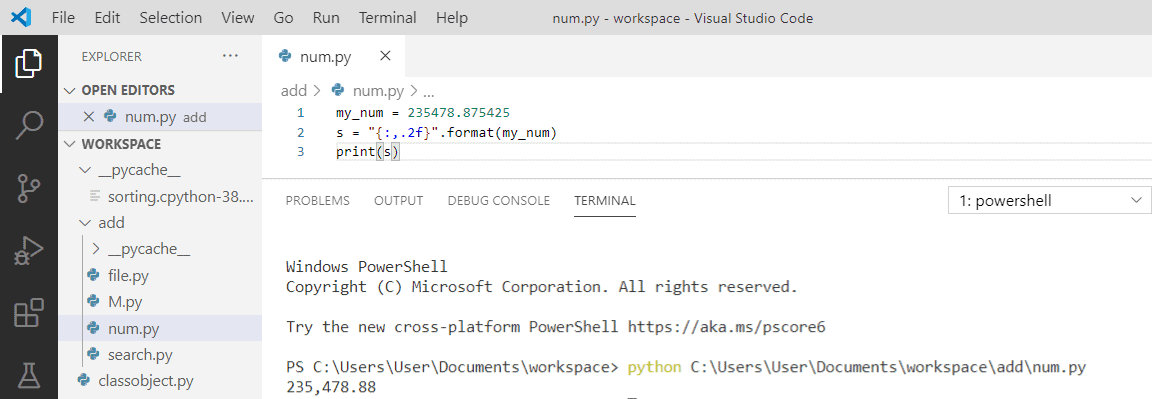
Learn Python format number with commas, how to add a comma between elements in Python. And, Python format number with commas and round to 2 decimal places.
dapper cobalt
warm flame
so how can i do it for random numbers?
Pass the int into the format function.
warm flame
okk
waxen granite
TypeError: 'CategoryChannel' object is not iterable what does this mean?
slate swan
for channel in discord.CategoryChannel-instance
would throw this error
or any code where you use discord.CategoryChannel as a list
waxen granite
figured ty
 tropic briar
How do we check permissions for a command
slate swan
permissions of the user or the bot?
for the user:
!d discord.ext.commands.has_permissions
unkempt canyonBOT
@discord.ext.commands.has_permissions(**perms)```
A [`check()`](https://discordpy.readthedocs.io/en/master/ext/commands/api.html#discord.ext.commands.check "discord.ext.commands.check") that is added that checks if the member has all of the permissions necessary.

Note that this check operates on the current channel permissions, not the guild wide permissions.

The permissions passed in must be exactly like the properties shown under [`discord.Permissions`](https://discordpy.readthedocs.io/en/master/api.html#discord.Permissions "discord.Permissions").

This check raises a special exception, [`MissingPermissions`](https://discordpy.readthedocs.io/en/master/ext/commands/api.html#discord.ext.commands.MissingPermissions "discord.ext.commands.MissingPermissions") that is inherited from [`CheckFailure`](https://discordpy.readthedocs.io/en/master/ext/commands/api.html#discord.ext.commands.CheckFailure "discord.ext.commands.CheckFailure").👍
waxen granite
i want to get msgs from a channel and send to a different channel, how can i do it?
tropic briar
@client.command()
@command.has_permissions(ban_members = True, kick_members = true)
async def kick(ctx, member: discord.Member, *, reason=None):
    print("hmm")
    await member.kick(reason=reason)
    await ctx.send('A member has been Kicked')
How do I check ban and kick permissions here
waxen granite
@commands.has_permissions(ban_members = True, kick_members = true)
tropic briar
But I think I get a error then
tropic briar
tropic briar
```py
@client.command()
@command.has_permissions(ban_members = True, kick_member...
@waxen granite
waxen granite
what error?
tropic briar
 waxen granite
commands*
tropic briar
Ok I will fix it it's easy thanks
 fallow mauve
!d os.chdir
unkempt canyonBOT
os.chdir(path)```
Change the current working directory to *path*.

This function can support [specifying a file descriptor](https://docs.python.org/3.10/library/os.html#path-fd). The descriptor must refer to an opened directory, not an open file.

This function can raise [`OSError`](https://docs.python.org/3.10/library/exceptions.html#OSError "OSError") and subclasses such as [`FileNotFoundError`](https://docs.python.org/3.10/library/exceptions.html#FileNotFoundError "FileNotFoundError"), [`PermissionError`](https://docs.python.org/3.10/library/exceptions.html#PermissionError "PermissionError"), and [`NotADirectoryError`](https://docs.python.org/3.10/library/exceptions.html#NotADirectoryError "NotADirectoryError").

Raises an [auditing event](https://docs.python.org/3.10/library/sys.html#auditing) `os.chdir` with argument `path`.

New in version 3.3: Added support for specifying *path* as a file descriptor on some platforms.

Changed in version 3.6: Accepts a [path-like object](https://docs.python.org/3.10/glossary.html#term-path-like-object).i need help, im watching a tutorial and going through the steps it shows and i ran the code at the end and it says theres a problem with this, the error that pops up says the file is not found:

im attempting to learn how to make an economy bot
slate swan
hey bois, my bot got a system of another prefix in every server(like every admin can change it), and i want to make a dm command. how do i do it?
def get_prefix(bot, message):
    with open('prefixes.json', 'r') as f:
        prefixes = json.load(f)
    return prefixes[str(message.guild.id)]
command_prefix=get_prefix
any1?
fallow mauve
idk, im waiting for help about my thing, i have no idea how to fix urs
 broken dirge
Do you guys know how to make bot send message the moment it turns on?
slate swan
fallow mauve
i need help, im watching a tutorial and going through the steps it shows and i r...
did you import os?
fallow mauve
yes
slate swan
broken dirge
Do you guys know how to make bot send message the moment it turns on?
use on_ready event
broken dirge
slate swan
use `on_ready` event
Ok! Let me try!
fallow mauve
slate swan
did you import os?
full code:
import discord
from discord.ext import commands
import asyncio
import os
import random
import json

os.chdir("C:\\Users\\swast\\Desktop\\Economy Manager")

bot = commands.Bot(command_prefix = '$')

@bot.event
async def on_ready():
  print ("ready")

@bot.command()
async def balance(ctx):
  a = await open_account(ctx.author)

  users = await get_bank_data()

  wallet_amt = users[str(users.id)]["wallet"]
  bank_amt = users[str(users.id)]["bank"]


  em = discord.Embed(title = f"{ctx.author.name}'s balance", color = 0xffa622)
  em.add_field(Name = "Wallet",value = wallet_amt)
  em.add_field(name = "wallet balance", value = wallet_amt)
  em.add_field(name = "wallet balance", value = bank_amt)
  await ctx.send(embed = em)

@bot.command()
async def beg(ctx):
  await open_account(ctx.author)

  user = ctx.author

  users = await get_bank_data()

  earnings = random.randrange(101)

  await ctx.send(f'Someone gave you {earnings} coins!')

  users[str(users.id)]["wallet"] += earnings

  with open("mainbank.json", "w") as f:
    users = json.load(f)


async def open_account(user):

  users = await get_bank_data()

  if str(user.id) in users:
    return False
  else:
    users[str(user.id)]
    users[str(user.id)]["wallet"] = 0
    users[str(user.id)]["bank"] = 0

  with open("mainbank.json", "w") as f:
    users = json.load(f)
    json.dump(users,f)
  return True

async def get_bank_data():
  with open("mainbank.json", "r") as f:
    users = json.load(f)
  return users

bot.run(os.getenv('Token'))
y r u using os.chdir if the mainbank.json is in the same folder as the py file?
fallow mauve
idk what im doing, im trying to follow a tutorial so i can take pieces of the code and figure out how they work
 ember sorrel
im just tired of seeing this same darn code for the economy system
fallow mauve
?
slate swan
fallow mauve
idk what im doing, im trying to follow a tutorial so i can take pieces of the co...
remove the os.chdir line
fallow mauve
replace w what?
slate swan
just remove it
fallow mauve
the whole os.chdir("C:\\Users\\swast\\Desktop\\Economy Manager")?
 tranquil quest
Hey I want to use the commands extension of discord.py but when I look for the event "on_message" the commands no longer work, how can I get it to check if the message is a command before the on_message event?
or pycord ig
fallow mauve
tranquil quest
Hey I want to use the commands extension of discord.py but when I look for the e...
dont use on_message, use bot.command
tranquil quest
well I'm looking for any message except $lfg in a specific channel
fallow mauve
idk how to do that
tranquil quest
same
fallow mauve
slate swan
just remove it
remove the whole os.chdir("C:\\Users\\swast\\Desktop\\Economy Manager")?
slate swan
yes
fallow mauve
ok
ember sorrel
tranquil quest
Hey I want to use the commands extension of discord.py but when I look for the e...
!d discord.ext.commands.Bot.process_commands
unkempt canyonBOT
await process_commands(message)```
This function is a [*coroutine*](https://docs.python.org/3/library/asyncio-task.html#coroutine).

This function processes the commands that have been registered to the bot and other groups. Without this coroutine, none of the commands will be triggered.

By default, this coroutine is called inside the [`on_message()`](https://discordpy.readthedocs.io/en/master/api.html#discord.on_message "discord.on_message") event. If you choose to override the [`on_message()`](https://discordpy.readthedocs.io/en/master/api.html#discord.on_message "discord.on_message") event, then you should invoke this coroutine as well.

This is built using other low level tools, and is equivalent to a call to [`get_context()`](https://discordpy.readthedocs.io/en/master/ext/commands/api.html#discord.ext.commands.Bot.get_context "discord.ext.commands.Bot.get_context") followed by a call to [`invoke()`](https://discordpy.readthedocs.io/en/master/ext/commands/api.html#discord.ext.commands.Bot.invoke "discord.ext.commands.Bot.invoke").

This also checks if the message’s author is a bot and doesn’t call [`get_context()`](https://discordpy.readthedocs.io/en/master/ext/commands/api.html#discord.ext.commands.Bot.get_context "discord.ext.commands.Bot.get_context") or [`invoke()`](https://discordpy.readthedocs.io/en/master/ext/commands/api.html#discord.ext.commands.Bot.invoke "discord.ext.commands.Bot.invoke") if so.what
fallow mauve
slate swan
yes
now what?
slate swan
should work
tranquil quest
so I process_comands in the event of a message?
ember sorrel
fallow mauve
slate swan
should work
Traceback (most recent call last):
  File "main.py", line 69, in <module>
    bot.run(os.getenv('Token'))
  File "/opt/virtualenvs/python3/lib/python3.8/site-packages/discord/client.py", line 723, in run
    return future.result()
  File "/opt/virtualenvs/python3/lib/python3.8/site-packages/discord/client.py", line 702, in runner
    await self.start(*args, **kwargs)
  File "/opt/virtualenvs/python3/lib/python3.8/site-packages/discord/client.py", line 665, in start
    await self.login(*args, bot=bot)
  File "/opt/virtualenvs/python3/lib/python3.8/site-packages/discord/client.py", line 511, in login
    await self.http.static_login(token.strip(), bot=bot)
AttributeError: 'NoneType' object has no attribute 'strip'
my error
tranquil quest
ember sorrel
read: https://discordpy.readthedocs.io/en/stable/faq.html#why-does-on-message-ma...
thanks, love you
ember sorrel
tranquil quest
thanks, love you
np
slate swan
Just put
bot.run('token')
In the last line
I didnt see the full error cause im on my phone
broken dirge
can someone help me with this function
@ client.event async def on_ready(): client.get_channel("xxxxxxxxxxxx) await channel.send("I'm on!")
slate swan
save the channel into a variable
and we can't do anything with the id, you don't have to hide it
also, sending stuff in on_ready is scuffed
broken dirge
slate swan
also, sending stuff in on_ready is scuffed
So what would you recommend to use
dapper cobalt
!d discord.ext.commands.Bot.wait_until_ready
unkempt canyonBOT
await wait_until_ready()```
This function is a [*coroutine*](https://docs.python.org/3/library/asyncio-task.html#coroutine).

Waits until the client’s internal cache is all ready.sry, i had to go for a bit
slate swan
ye that
broken dirge
I want it to send message once it's on
broken dirge
or every time I turn it on?
slate swan
well not multiple times a day, but it's randomly gonna reconnect
broken dirge
slate swan
well not multiple times a day, but it's randomly gonna reconnect
gotcha
fallow mauve
slate swan
Just put
`bot.run('token')`
that didnt help
broken dirge
slate swan
well not multiple times a day, but it's randomly gonna reconnect
@quaint axle.event
async def on_ready():
client.get_channel("893524345576644679")
await wait_until_ready()
and how do I print message>
fallow mauve
fallow mauve
that didnt help
actually i just forgot to make 'Token' a variable
 steep estuary
how to check if a user's role is higher than bot's role ?
broken dirge
and that creates error
slate swan
await channel.send
why did you remove that
await client.wait_until_ready()
channel = client.get_channel("893524345576644679")
await channel.send("hello")```in on_ready
await channel.send("hello")
AttributeError: 'NoneType' object has no attribute 'send'
slate swan
oh shit
it's not supposed to be a string
await client.wait_until_ready()
channel = client.get_channel(893524345576644679)
await channel.send("hello")```that's on me
slate swan

broken dirge
slate swan
<:ducky_wizard:639355996954689536>
Is there a way to send a message once it's going off?
slate swan
I don't know nothing about that, maybe somebody else
dapper cobalt
How would that even be possible?
slate swan
but like based on logic
broken dirge
You would probably need another bot
slate swan
if the bot's offline, it can't send a message until it's online again
broken dirge
Yeah
dapper cobalt
You can make another bot and check when your main bot's status changes to discord.Status.offline.
!d discord.on_member_update
unkempt canyonBOT
discord.on_member_update(before, after)```
Called when a [`Member`](https://discordpy.readthedocs.io/en/master/api.html#discord.Member "discord.Member") updates their profile.

This is called when one or more of the following things change:

• nickname

• roles

• pending...which basically would be "I'm online" instead of "Disconnected"
dapper cobalt
if before.status == "online" and after.status == "offline":
  channel = client.get_channel(..)
  await channel.send("Bot has gone offline!")
has someone here ever successfully made an economy bot using python before?
if so pls DM me i need help bad
slate swan
dapper cobalt
You can make another bot and check when your main bot's status changes to `disco...
there's no other reason for a bot to disconnect, other than internet issues
if it's working fine
then where does the other bot run?

dapper cobalt
fallow mauve
has someone here ever successfully made an economy bot using python before?
I did.
fallow mauve
can u help me?
dapper cobalt
But not sure if it's the type of economy you would expect, I made it differently.
slate swan
this channel is made for that
dapper cobalt
More like dank memer's.
broken dirge
slate swan
which basically would be "I'm online" instead of "Disconnected"
Logically you could do a bot that spots if member is on/off
slate swan
yes
dapper cobalt
That's what I said.
fallow mauve
@dapper cobalt can u DM me?
dapper cobalt
fallow mauve
<@!510736807999307786> can u DM me?
Why?
fallow mauve
bcs i need help w economy bot
broken dirge
fallow mauve
bcs i need help w economy bot
cool
fallow mauve
and no one else has said anything
fallow mauve
broken dirge
cool
why? im failing miserably
broken dirge
What is it's purpose?
broken dirge
What would you like it to do?
fallow mauve
do you know what an economy bot is?
slate swan
fallow mauve
bcs i dont understand it at all
you haven't written it, have u
steep estuary
how to check if a user's role is higher than bot's role?
broken dirge
fallow mauve
do you know what an economy bot is?
No
slate swan
broken dirge
No
gain money, buy things, flex on others
fallow mauve
slate swan
you haven't written it, have u
what do you mean?
broken dirge
now I know 🙂
fallow mauve
slate swan
gain money, buy things, flex on others
bot currency, not real money
slate swan
yes
fallow mauve
broken dirge
now I know 🙂
i see that...
dapper cobalt
fallow mauve
bcs i need help w economy bot
You can ask here.
 unreal silo
fallow mauve
bcs i need help w economy bot
unreal silo
fallow mauve
bcs i need help w economy bot
What is it
fallow mauve
?
slate swan
the problem
unreal silo
bitchass wym ?
slate swan
hey
unreal silo
gtfo im not helping
slate swan
chill
slate swan
fallow mauve
no one helped me
We will help you to progress with your issues, we won't guide you on how to make it.
fallow mauve
but i dont know what issues i have bcs i dont understand it
slate swan
you don't understand what
fallow mauve
how the stupid economy system in python works
slate swan
that's not a thing in python....
jade jolt
if its stupid why do you want it
slate swan
that's a thing you write in python
slate swan
you store all of the data in a database
dapper cobalt
fallow mauve
how the stupid economy system in python works
Do you know how to use a database?
slate swan
then get it once someone uses a command
fallow mauve
json file
slate swan
no
jade jolt
no
slate swan
lol
unreal silo
bro literally go do school
slate swan
Papa Nik chill
fallow mauve
unreal silo
bro literally go do school
bcs im smart i finished all my school work for today, k?
slate swan
!mute 737960337671979008 1d Unacceptable behaviour. Please abide by our #code-of-conduct.
unkempt canyonBOT
:incoming_envelope: :ok_hand: applied mute to @unreal silo until <t:1633192483:f> (23 hours and 59 minutes).
jade jolt
ooo
jade jolt
:p
waxen granite
how do i get the message.content if the message is an embed?
jade jolt
eplain
slate swan
message.embeds
do you want to get the title or the description?
Will return the embed objects
In a list
waxen granite
whatever there is in the embed
slate swan
slate swan
message.embeds
yep, that would work
message.embeds[0]
tropic briar
How can I make custom rule showing commands for different servers
slate swan
waxen granite
whatever there is in the embed
you'd have to use two variables
waxen granite
here is my code
        if message.channel == 808402161305911326:
            embeds = message.embeds
            for embed in embeds:
                embed1 = discord.Embed(description = embed.to_dict(), timestamp = datetime.datetime.utcnow())
await sac.send(embed = embed1)```save message.embeds[0].title or message.embeds[0].description
slate swan
waxen granite
here is my code
```py
if message.channel == 808402161305911326:
...
yeah that's better lol
slate swan
waxen granite
here is my code
```py
if message.channel == 808402161305911326:
...
Then you can simply get the attributes of an embed object
!d discord.Embed
unkempt canyonBOT
class discord.Embed(*, colour=Embed.Empty, color=Embed.Empty, title=Embed.Empty, type='rich', url=Embed.Empty, description=Embed.Empty, timestamp=None)```
Represents a Discord embed.

len(x) Returns the total size of the embed. Useful for checking if it’s within the 6000 character limit.

bool(b) Returns whether the embed has any data set.

New in version 2.0.

Certain properties return an `EmbedProxy`, a type that acts similar to a regular [`dict`](https://docs.python.org/3/library/stdtypes.html#dict "(in Python v3.9)") except using dotted access, e.g. `embed.author.icon_url`. If the attribute is invalid or empty, then a special sentinel value is returned, [`Embed.Empty`](https://discordpy.readthedocs.io/en/master/api.html#discord.Embed.Empty "discord.Embed.Empty").

For ease of use, all parameters that expect a [`str`](https://docs.python.org/3/library/stdtypes.html#str "(in Python v3.9)") are implicitly casted to [`str`](https://docs.python.org/3/library/stdtypes.html#str "(in Python v3.9)") for you.All of them are shown here if you need a specific one
waxen granite
slate swan
Then you can simply get the attributes of an embed object
my code doesnt work
tropic briar
tropic briar
How can I make custom rule showing commands for different servers
Anyone
slate swan
messages barely have two embeds
jade jolt
mine do
 noble fable
Hey! Searching for any good library for discord bot coding! Discord.py and other forks aren’t that useful, since there’s no updates and new features. Ping me, if there’s one
jade jolt
disthon ;)
dapper cobalt
noble fable
Hey! Searching for any good library for discord bot coding! Discord.py and other...
!pypi disnake
unkempt canyonBOT

A Python wrapper for the Discord API
noble fable
jade jolt
disthon ;)
I’ve check it
noble fable
dapper cobalt
!pypi disnake
It’s fork of discord.py, but it’s with slashes… probably I’ll use it
slate swan
jade jolt
disthon ;)
That's not even on pypi
jade jolt
ok?
 wispy spade
noble fable
Hey! Searching for any good library for discord bot coding! Discord.py and other...
wispy spade
noble fable
Hey! Searching for any good library for discord bot coding! Discord.py and other...
Grounds are still a bit shaky on what to go to instead of Discord.py. Some you may want to look at include:
- Nextcord, Pycord, Disnake are probably the more well known forks, which I believe you want to avoid, although the latter contains most of what you want.
- There's also Hikari which is basically it's own thing. Another one I've been following is Krema, which seems decent.
- ||and i'll also take the opportunity to plug my own, Pycordia||
 quick scaffold
Hey is there a way for a bot to publish messages in an announcements channel?
noble fable
wispy spade
Grounds are still a bit shaky on what to go to instead of Discord.py. Some you m...
I’ll check Hikari, it seems to be the thing I’m searching for
waxen granite
is there a way to check what channels my bot can see in a guild?
 lament mesa
!d discord.Guild.channels
unkempt canyonBOT
property channels: List[GuildChannel]```
A list of channels that belongs to this guild.this property returns the channels only what the bot has perm view_channels = true?
lament mesa
yeah iirc
fallow mauve
how do i test if a command is on cooldown?
waxen granite
lament mesa
yeah iirc
well itsends all the channels in a guild
lament mesa
hmm
waxen granite
fallow mauve
how do i test if a command is on cooldown?
commands.cooldown
lament mesa
maybe you can filter the channels and check if the bot has permissions to view it
fallow mauve
waxen granite
commands.cooldown
@Bot.command()
@commands.cooldown(rate=1, per=5)
async def test(ctx=None):
  await ctx.send('test')

  if commands.cooldown():
    await ctx.send('Command is on cooldown, please wait.')
?
waxen granite
if commands.cooldown(): await ctx.send('Command is on cooldown, please wait.') this thing you have to do it in on_command_error
seperate event
slate swan
anyone else having this issue with pip
WARNING: Retrying (Retry(total=4, connect=None, read=None, redirect=None, status=None)) after connection broken by 'ProtocolError('Connection aborted.', PermissionError(13, 'Permission denied'))': /simple/pip/
fallow mauve
waxen granite
` if commands.cooldown():
await ctx.send('Command is on cooldown, please wa...
idk how that works :/
waxen granite
@bot.event async def on_command_error(ctx, error):
 mellow merlin
How hard is it to make a bot to remove a role simultaneously with another?
For example, to make members automatically lose a role when they lose the server booster role?
fallow mauve
waxen granite
`@bot.event
async def on_command_error(ctx, error):`
thaat works but it sends the thing right after i use the command even if it isnt on cooldown
 waxen granite
fallow mauve
thaat works but it sends the thing right after i use the command even if it isnt...
waxen granite
fallow mauve
thaat works but it sends the thing right after i use the command even if it isnt...
remove the line from the command
make a botevent for on_command_error
plucky goblet
how to get the username of who reacted the message
waxen granite
and use isinstance for commands.CommandOnCooldown
fallow mauve
thx
waxen granite
 manic wing
anyone know how to force put a user on commands.cooldown
steep estuary
how to check if a user react ?
fallow mauve
waxen granite
and use isinstance for commands.CommandOnCooldown
how do i make it so it only happens if the command is on cooldown? if i try to use a command that doesnt exist it says its on cooldown
lament mesa
steep estuary
how to check if a user react ?
!d discord.Message.reactions
unkempt canyonBOT
Reactions to a message. Reactions can be either custom emoji or standard unicode emoji.
steep estuary
okkkkk
waxen granite
fallow mauve
how do i make it so it only happens if the command is on cooldown? if i try to u...
what ?
fallow mauve
waxen granite
what ?
 waxen granite
show code
plucky goblet
how to return the username of the person who reacted to the message
waxen granite
plucky goblet
how to return the username of the person who reacted to the message
bot event for on_reaction_add
lament mesa
plucky goblet
how to return the username of the person who reacted to the message
In the event or...?
plucky goblet
lament mesa
In the event or...?
was meant to use this
reaction, user = await bot.wait_for('reaction_add')
but looks like using the event gives me more easier options
waxen granite
        category = guild.categories
        for cat in category:
            await ctx.send(cat.name)
            for channel in cat.channels:
                if self.bot.has_permissions(view_channel = True):```
error `'Bot' object has no attribute 'has_permissions' `it stops the code asynchronously until after the wait_for. If you do print('hi') after reaction, user = await bot.wait_for('reaction_add') it will only print 'hi' after someone has reacted
manic wing
waxen granite
```py
category = guild.categories
for cat in category:
...
do you mean if ctx.me.has_permissions?
waxen granite
maybe
plucky goblet
manic wing
it stops the code asynchronously until after the wait_for. If you do `print('hi'...
and how to return their usernames ?
lament mesa
plucky goblet
was meant to use this
`reaction, user = await bot.wait_for('reaction_add')`
but ...
lament mesa
yeah
plucky goblet
oh
kk
manic wing
unkempt canyonBOT
property me: discord.member.Member```
Similar to [`Client.user`](https://discordpy.readthedocs.io/en/master/api.html#discord.Client.user "discord.Client.user") except an instance of [`Member`](https://discordpy.readthedocs.io/en/master/api.html#discord.Member "discord.Member"). This is essentially used to get the member version of yourself. plucky goblet
lament mesa
user.name
plucky goblet
lament mesa
user.name
also it stops after 1 person reacted, should i put it in a while loop ?
warm flame
like what if i want the member to be optional
and still be called if variable isnt set
manic wing
warm flame
member:discord.Member=None
warm flame
okk
lament mesa
warm flame
type hint the parameter with typing.Opional and give it a default value
manic wing
if not member: member = ctx.author
manic wing
plucky goblet
also it stops after 1 person reacted, should i put it in a while loop ?
can do
depends your python version
lament mesa
plucky goblet
also it stops after 1 person reacted, should i put it in a while loop ?
do you want it to recieve reactions forever?
waxen granite
manic wing
!d discord.Guild.me
'Member' object has no attribute 'has_permissions'
plucky goblet
lament mesa
do you want it to recieve reactions forever?
yes
lament mesa
then put it in a while loop
 upbeat otter
guys, why doesnt this work?
@client.command()
async def customrole(ctx, rolename, hexcode, member: discord.Member=None):
  if member is None:
    member = ctx.message.author
    await ctx.guild.create_role(name=rolename, color=discord.Color(hexcode), permissions=discord.Permissions(permissions=None))
    role = discord.utils.get(ctx.guild.roles, name=rolename)
    await member.add_roles(role)
    await ctx.send("Successful")
reaction, user = await bot.wait_for('reaction_add')
while True:
   #code
    if x:
      break

reaction, user = await bot.wait_for('reaction_add')```or you can use a walrus
 dim cedar
anyone help me?
manic wing
dim cedar
anyone help me?
with?
manic wing
upbeat otter
guys, why doesnt this work?
```py
@client.command()
async def customrole(ctx, ro...
a) errors b) what are you trying to do c) the indenting looks weird
dim cedar
importing a specifiq version of google trans in repl.it
i did pip install googletrans==3.1.0a0
waxen granite
@manic wing'Member' object has no attribute 'has_permissions'
manic wing
dim cedar
importing a specifiq version of google trans in repl.it
googletrans is shit
manic wing
waxen granite
<@!298043305927639041>'Member' object has no attribute 'has_permissions'
do you mean guild_permissions
!d discord.Member.guild_permissions
unkempt canyonBOT
property guild_permissions: discord.permissions.Permissions```
Returns the member’s guild permissions.

This only takes into consideration the guild permissions and not most of the implied permissions or any of the channel permission overwrites. For 100% accurate permission calculation, please use [`abc.GuildChannel.permissions_for()`](https://discordpy.readthedocs.io/en/master/api.html#discord.abc.GuildChannel.permissions_for "discord.abc.GuildChannel.permissions_for").

This does take into consideration guild ownership and the administrator implication.ctx.me.guild_permissions
upbeat otter
manic wing
a) errors b) what are you trying to do c) the indenting looks weird
no error, when i use try and except statements, it says, it expected int type instead of str
waxen granite
manic wing
do you mean `guild_permissions`
i am just trying to get all the channels in aguild which the bot can see
dim cedar
manic wing
googletrans is shit
eh
waxen granite
or have perm view-channels as True
upbeat otter
waxen granite
<@!298043305927639041>'Member' object has no attribute 'has_permissions'
@commands.has_permission(permission here)
thn how can i make a translator?
manic wing
upbeat otter
no error, when i use try and except statements, it says, it expected int type in...
do hexcode: int
upbeat otter
manic wing
do `hexcode: int`
ah okay sure
waxen granite
upbeat otter
```py
@commands.has_permission(permission here)
```
not command
the bot perm
upbeat otter
waxen granite
the bot perm
@commands.bot_has_permissions then
or read the docs otherwise
waxen granite
it is not a command oof
manic wing
upbeat otter
@commands.bot_has_permissions then
🤦♂️
manic wing
waxen granite
i am just trying to get all the channels in aguild which the bot can see
!d discord.TextChannel.permissions_for
unkempt canyonBOT
permissions_for(obj, /)```
Handles permission resolution for the [`Member`](https://discordpy.readthedocs.io/en/master/api.html#discord.Member "discord.Member") or [`Role`](https://discordpy.readthedocs.io/en/master/api.html#discord.Role "discord.Role").

This function takes into consideration the following cases...😂
manic wing
so if ctx.channel.permissions_for(ctx.me, 'read_messages')
dim cedar
can anyone help me!!
manic wing
hexcode is an int with base 16
its called hex
so you would do
!e print(int('ffff', 16))
unkempt canyonBOT
@manic wing :white_check_mark: Your eval job has completed with return code 0.
65535
ah okay
dim cedar
why no one help me?
upbeat otter
@manic wing no error and no role assigning
@client.command()
async def customrole(ctx, rolename, hexcode, member: discord.Member=None):
  if member is None:
    member = ctx.message.author
    try:
      await ctx.guild.create_role(name=rolename, color=discord.Color(int(hexcode)), permissions=discord.Permissions(permissions=None))
      role = discord.utils.get(ctx.guild.roles, name=rolename)
      await member.add_roles(role)
      await ctx.send("Successful")
    except Exception as e:
      print(e)
ask 🥲
plucky goblet
lament mesa
then put it in a while loop
it's not working properly, it stop after one or two, and it makes (it's supposed to make a ticket channel) 3 times
 hasty iron
upbeat otter
<@!298043305927639041> no error and no role assigning
```py
@client.command()
as...
hasty iron
upbeat otter
<@!298043305927639041> no error and no role assigning
```py
@client.command()
as...
typehint hexcode as discord.Color and pass it in directly like color=hexcode
dim cedar
upbeat otter
ask 🥲
want help in importing a specifiq version of google trans in repl.it
i did pip install googletrans==3.1.0a0
but everytime the repl refreshes the version goes back to 2.4.0
upbeat otter
hasty iron
typehint `hexcode` as `discord.Color` and pass it in directly like `color=hexcod...
oh, thankuu
upbeat otter
dim cedar
want help in importing a specifiq version of google trans in repl.it
i did pip i...
i see, that never happened with me tho....
maybe update it using pip?
upbeat otter
so?
dim cedar
but it always does the same after a refresh
lament mesa
plucky goblet
it's not working properly, it stop after one or two, and it makes (it's supposed...
send the code
upbeat otter
dim cedar
but it always does the same after a refresh
same happens with me for a library extension too
dim cedar
upbeat otter
same happens with me for a library extension too
i want a solution
anyone?
upbeat otter
dim cedar
anyone?
sorry, but idk
@hasty iron its not even creating the role
@client.command()
async def customrole(ctx, rolename, hexcode):
    try:
      await ctx.guild.create_role(name=rolename, color=hexcode,
permissions=discord.Permissions(permissions=None))

      await ctx.send("Successful")
    except Exception as e:
      print(e)
you didnt even typehint it
upbeat otter
hasty iron
you didnt even typehint it
oh my bad
fallow mauve
is there a way to check if the user of a specific command has a certain id?
upbeat otter
fallow mauve
is there a way to check if the user of a specific command has a certain id?
yesh
fallow mauve
how?
 final iron
 lofty raptor
Is there any channel to execute codes
lofty raptor
Is there any channel to execute codes
#bot-commands
 sage otter
you can just do ctx.author btw
sage otter
yeah
dim cedar
upbeat otter
<@!601471494857555977> its not even creating the role
```py
@client.command()
as...
well i think there would be await instead of ctx
upbeat otter
dim cedar
well i think there would be await instead of ctx
where?
sage otter
so ctx.author.id ??????
upbeat otter
sage otter
so `ctx.author.id` ??????
yes
dim cedar
upbeat otter
where?
line 5
sage otter
upbeat otter
yes
Yeah I was telling you. Not him
upbeat otter
dim cedar
line 5
huh
upbeat otter
sage otter
Yeah I was telling you. Not him
wha....
sage otter
That you could can do ctx.author instead of ctx.message.author
dim cedar
upbeat otter
huh
yes try that
dim cedar
upbeat otter
which line?
line 5
upbeat otter
in the create role?
dim cedar
await guild.create_role
dim cedar
upbeat otter
in the create role?
hmm
sage otter
dim cedar
await guild.create_role
What ????
upbeat otter
dim cedar
await guild.create_role
do u know what asynchronous functions are, my friend 😂
no offence
dim cedar
upbeat otter
do u know what asynchronous functions are, my friend 😂
in my mute cmd i used that await guild to create a muted role
final iron
dim cedar
await guild.create_role
No offense but if you don't know how to help don't
 reef shell
yep
upbeat otter
dim cedar
in my mute cmd i used that await guild to create a muted role
wha...
jade jolt
yupp
reef shell
you probably made another lib for async programming
upbeat otter
I am seriously confused 🥲 , how can asynchronous function keyword have any relation with discord py
dim cedar
upbeat otter
I am seriously confused 🥲 , how can asynchronous function keyword have any rela...
try await guild
with no dots in between
upbeat otter
dim cedar
try await guild
guild will remain undefined
hasty iron
upbeat otter
I am seriously confused 🥲 , how can asynchronous function keyword have any rela...
discord.py is an async lib
jade jolt
upbeat otter
guild will remain undefined
yup
reef shell
don't help in something you don't know
upbeat otter
hasty iron
discord.py is an async lib
i meant like....the other way 'round
hasty iron
?
dim cedar
upbeat otter
guild will remain undefined
guild = ctx.guild```Ummm..i meant how can await be used to create something
dim cedar
forgot to say
sage otter
dim cedar
```py
guild = ctx.guild```
He doesn’t need to do that
slate swan
using discord.py 🤓
sage otter
Doing ctx.guild literally does the same thing
upbeat otter
dim cedar
```py
guild = ctx.guild```
i am doing the same thing ig
@client.command()
async def customrole(ctx, rolename, hexcode, member: discord.Member=None):
  if member is None:
    member = ctx.message.author
    try:
      await ctx.guild.create_role(name=rolename, color=int(hexcode), permissions=discord.Permissions(permissions=None))
await doesnt create something
it just waits till a coroutine finishes executing
reef shell
await is used to run coroutine
upbeat otter
hasty iron
await doesnt create something
yeah, riad was giving me solution to use await instead of ctx 🥲
hasty iron
you can not do await and still run an async functionn
 whole shoal
What is the new message intent thing
upbeat otter
upbeat otter
i am doing the same thing ig
```py
@client.command()
async def customrole(ctx, r...
anyways if i mention a type hint, it gives an error @hasty iron
hasty iron
!e ```py
async def foo():
return 1
try:
coro = foo()
coro.send(None)
except StopIteration as exc:
print(exc.value)
@hasty iron :white_check_mark: Your eval job has completed with return code 0.
1
it's getting privileged
dim cedar
@bot.command()
@commands.has_permissions(administrator=True)
async def mute(ctx, member: discord.Member, *, reason=None):

  guild = ctx.guild
  mutedrole = discord.utils.get(guild.roles, name = "Muted")
  if not mutedrole:
    mutedrole = await guild.create_role(name = "Muted")
  for channel in guild.channels:
    await channel.set_permissions(mutedrole, speak=False,send_messages=False,read_message_history=True,read_messeges=False)

  await member.add_roles(mutedrole, reason=reason)
  await ctx.send(f"Muted {member.mention} for reason {reason}")
  await member.send(f"You were Muted in the server {guild.name} for {reason}")

@bot.command()
@commands.has_permissions(administrator=True)
async def unmute(ctx, member: discord.Member):
  guild = ctx.guild
  mutedrole = discord.utils.get(guild.roles, name = "Muted")
  await member.remove_roles(mutedrole)
  await ctx.send(f"Unmuted {member.mention}")
await member.send(f"You were Unmuted in the server {guild.name}")```can you send the code and the error with the typehint?
dim cedar
i used this to create a muted role
upbeat otter
hasty iron
can you send the code and the error with the typehint?
SURE, JUST A MINUTE
broken dirge
@ client.command(pass_context = True) async def clear(ctx, number): mgs = [] #Empty list to put all the messages in the log number = int(number) #Converting the amount of messages to delete to an integer async for x in client.logs_from(ctx.message.channel, limit = number): mgs.append(x) await client.delete_messages(mgs)
raise CommandInvokeError(exc) from exc
discord.ext.commands.errors.CommandInvokeError: Command raised an exception: AttributeError: 'Bot' object has no attribute 'logs_from'
Why am I getting this error?
jade jolt
self explanatory
hasty iron
because old code

 hasty iron
code??
upbeat otter
hasty iron
code??
@client.command()
async def customrole(ctx, rolename, hexcode:int, member: discord.Member=None):
  if member is None:
    member = ctx.message.author
    try:
      await ctx.guild.create_role(name=rolename, color=hexcode, permissions=discord.Permissions(permissions=None))
      role = discord.utils.get(ctx.guild.roles, name=rolename)
      await member.add_roles(role)
      await ctx.send("Successful")
    except Exception as e:
      print(e)
oh...
like this?
@client.command()
async def customrole(ctx, rolename, hexcode, member: discord.Member=None):

    try:
      await ctx.guild.create_role(name=rolename, color=discord.Color(hexcode), permissions=discord.Permissions(permissions=None))
imma cry
upbeat otter
replace it with int in hexcode?
hasty iron
again, typehint hexcode as discord.Color
upbeat otter
oh
hasty iron
if you dont know what typehint is, its doing param: type
upbeat otter
hasty iron
if you dont know what typehint is, its doing `param: type`
yesh
@client.command()
async def customrole(ctx, rolename, hexcode: discord.Color, member: discord.Member=None):

    try:
      await ctx.guild.create_role(name=rolename, color=hexcode, permissions=discord.Permissions(permissions=None))
You can’t pass in the hex code like that
upbeat otter
sage otter
You can’t pass in the hex code like that
umm...
sage otter
discord.Color only accepts ints
upbeat otter
oh
sage otter
0xfcb103
hasty iron
sage otter
discord.Color only accepts ints
??
!d discord.ext.commands.ColourConverter
unkempt canyonBOT
class discord.ext.commands.ColourConverter(*args, **kwargs)```
Converts to a [`Colour`](https://discordpy.readthedocs.io/en/master/api.html#discord.Colour "discord.Colour").

Changed in version 1.5: Add an alias named ColorConverter

The following formats are accepted...read what it accepts
upbeat otter
is this okay 🥲 ```py
@client.command()
async def customrole(ctx, rolename, hexcode: discord.Color, member: discord.Member=None):
try:
await ctx.guild.create_role(name=rolename, color=hexcode, permissions=discord.Permissions(permissions=None))
:O
hasty iron
tias
plucky goblet
lament mesa
send the code
@bot.command()
@commands.has_permissions(ban_members=True)
async def st(ctx):
    message = await ctx.channel.send(embed=discord.Embed(description='To enter the tournament click the button below.'))
    await message.add_reaction('👍')
    guild = ctx.guild
    overwrites = {guild.default_role: discord.PermissionOverwrite(read_messages=False), guild.me: discord.PermissionOverwrite(read_messages=True)}
    def check(reaction, user):
        return user != bot.user
    while True:
        reaction, user = await bot.wait_for('reaction_add', check=check)
        if reaction.emoji == '👍':
            await guild.create_text_channel(name=f'ticket - {user.name}', overwrites=overwrites)
            msg = await ctx.channel.send(embed=discord.Embed(
            description=f'A channel has been made for {user.name} to enter the tourney.'))
            await asyncio.sleep(15)
await msg.delete()```what are you tryna do
lament mesa
plucky goblet
```py
@bot.command()
@commands.has_permissions(ban_members=True)
async def st(ct...
hmm
lament mesa
lament mesa
hmm
you should do some changes to the check
upbeat otter
@sage otter so is there no way to use a hexcode?
lament mesa
lament mesa
you should do some changes to the check
because the event will get triggered for reactions in server/dm
reef shell
0x<hex_code>
hasty iron
upbeat otter
<@!284102119408140289> so is there no way to use a hexcode?
typehint as discord.Color
upbeat otter
hasty iron
typehint as discord.Color
i did that
@client.command()
async def customrole(ctx, rolename, hexcode: discord.Color, member: discord.Member=None):

    try:
      await ctx.guild.create_role(name=rolename, color=hexcode, permissions=discord.Permissions(read_messages=None))
embed = discord.Embed(color="#ffff") # ❌
embed = discord.Embed(color=0xffff) # ✅
i want to accept hexcode from the user
hasty iron
upbeat otter
i did that
```py
@client.command()
async def customrole(ctx, rolename, hexcode: ...
and?
did it work?
upbeat otter
hasty iron
did it work?
nope
hasty iron
okay
upbeat otter
role doesnt get created
hasty iron
then how about you send an error if you're getting one
upbeat otter
hasty iron
then how about you send an error if you're getting one
no error too
sage otter
because you're eating it with your except
dapper cobalt
!d discord.ext.commands.ColourConverter
unkempt canyonBOT
class discord.ext.commands.ColourConverter(*args, **kwargs)```
Converts to a [`Colour`](https://discordpy.readthedocs.io/en/master/api.html#discord.Colour "discord.Colour").

Changed in version 1.5: Add an alias named ColorConverter

The following formats are accepted...except Exception as e:
print(e)
reef shell
taking input as a raw string and then doing
int('hex_code', 16) might work
hasty iron
does nobody literally know the ColorConverter
dapper cobalt
unkempt canyon

reef shell
lol
upbeat otter
sage otter
because you're eating it with your except
well...okay ill remove it
sage otter
upbeat otter
well...okay ill remove it
Or just replace it with what I sent
sage otter
sage otter
except Exception as e:
print(e)
.
slate swan
sage otter
Or just replace it with what I sent
don't really matter
slate swan
removing the statement would show us the whole error tho
upbeat otter
sage otter
Or just replace it with what I sent
i have already put that 🥲 i know how to use try and except
slate swan
not just the end
sage otter
Yeah just remove both the try and except then.
plucky goblet
lament mesa
because the event will get triggered for reactions in server/dm
its ok
upbeat otter
@hasty iron ayo, thanx, it worked now
dapper cobalt
conv = commands.ColourConverter()
colour_object = await conv.convert(ctx, '#ffffff')
ctx?
dapper cobalt
As in a command.
@bot.command()
async def send_embed(ctx, color_string, *, title):
  conv = commands.ColourConverter()
  colour_object = await conv.convert(ctx, color_string)
  await ctx.send(embed=discord.Embed(color=colour_object, title=title))
        for cat in category:
            await ctx.send(cat.name)
            text = ""
            for channel in cat.channels:
                if channel.permissions_for(guild.me).view_channel:
                    text += f"{channel.name} | {channel.id}\n"
            await ctx.send(text)```
if the category has 0 channel which bot can see, sends an error- `400 Bad Request (error code: 50006): Cannot send an empty message`how do i pass that category ?
hasty iron
dapper cobalt
```py
@bot.command()
async def send_embed(ctx, color_string, *, title):
conv =...
why not typehint?
dapper cobalt
hasty iron
why not typehint?
Because, breaking news! I suck at them.
 slate swan
did you mean description=content ?
 tulip oracle
whats the attribute to list all working events? i have a dead event :/
slate swan
I want to do a command that when executed just as .tag would change your nickname, but when you type .tag @user it would change that user's name. ```py
async def tag(self, ctx, member: discord.Member):
if member == None:
usr = ctx.author
else:
usr = member
How can i do this ? i get the incomplete command errorjust make member optional
plucky goblet
how to set role permissions on using guild.create_text_channel?
slate swan
first, save the channel into a variable just like you do with a message
second, use discord.TextChannel.set_permissions
plucky goblet
or use overwriters
jade jolt
^^^
jade jolt
yup
 slate swan
warm flame
slate swan
warm flame
this is discord.py
jade jolt
slate swan
you don't want me to toaster tag you
tulip oracle
whats the attribute to list all working events? i have a dead event :/
slate swan
Just because you're doing whatever this is inside of a bot does not make it dpy related. #python-discussion
"i have a toaster in my house, do i ask a carpenter how to fix it?" - Laggy
oof I just did
jade jolt
a lot
 elfin flicker
good afternoon, can someone teach how to put my bot 24/7
slate swan
meh, it would be really hard to write a bot without rewrite dpy
 ember mauve
elfin flicker
good afternoon, can someone teach how to put my bot 24/7
ember mauve
elfin flicker
good afternoon, can someone teach how to put my bot 24/7
ig you have to host your bot on a server
ember mauve
slate swan
meh, it would be really hard to write a bot without rewrite dpy
rewrite is the one with 'ctx' right
plucky goblet
slate swan
it feels like I'm the one getting help
LOL
slate swan
@elfin flicker
elfin flicker
slate swan
<@!638907572195164196>
thank you
ember mauve
rewrite is the newer one right
hasty iron
ember mauve
whats the difference between the rewrite discord.py and the other one
it’s called "rewrite" for a reason
waxen granite
is there a way to get general server permissions only for a role?
slate swan
anytime you check the docs, you see an "API Reference" that shows changes to that thing
almost everything
I used that wrong
anyways, yes
 slate swan
heyo I need help
jade jolt
with
slate swan
I need to have a function where I can run a command and my bot will dm whoever I tagged
with a message that I set
@jade jolt any ideas?
jade jolt
a message in the command or just a message you stored in the bot
slate swan
a message that I stored in the bot, so whenever I run it, it'll send the message set in the code to whoever I tagged @jade jolt
run the command with the prefix that is
jade jolt
@bot.command()
async def dm(ctx, user: discord.Member):
  await user.send(predefined_message)
oh damn really?
jade jolt
yeah
jade jolt
change predefined_message to the message you set in the bot
slate swan
I'm assuming I'll have to put in my command handler stuff
jade jolt
if you need to lol
slate swan
''' @bot.command(name='8ball', help='Get an answer')
async def eightball(ctx, reaction, user):
balltwo = random.choice(ballin)
await ctx.send(balltwo) '''
crap it didn't format
unkempt canyonBOT
Here's how to format Python code on Discord:
```py
print('Hello world!')
```
These are backticks, not quotes. Check this out if you can't find the backtick key.
slate swan
but that's an example of what I use
jade jolt
what do you need to change?
slate swan
no, nothing im just asking if that'll work for the code you gave me
jade jolt
it will
slate swan
alr cool, tysm
jade jolt
np
plucky goblet
what is the command to delete a channel
sage otter
await Channel.delete()
 spring flax
plucky goblet
what is the command to delete a channel
spring flax
plucky goblet
what is the command to delete a channel
!d discord.TextChannel.delete
unkempt canyonBOT
await delete(*, reason=None)```
This function is a [*coroutine*](https://docs.python.org/3/library/asyncio-task.html#coroutine).

Deletes the channel.

You must have [`manage_channels`](https://discordpy.readthedocs.io/en/master/api.html#discord.Permissions.manage_channels "discord.Permissions.manage_channels") permission to use this.use an instance
reef shell
!d discord.abc.GuildChannel.delete
unkempt canyonBOT
await delete(*, reason=None)```
This function is a [*coroutine*](https://docs.python.org/3/library/asyncio-task.html#coroutine).

Deletes the channel.

You must have [`manage_channels`](https://discordpy.readthedocs.io/en/master/api.html#discord.Permissions.manage_channels "discord.Permissions.manage_channels") permission to use this.FreeCodeCamp made a video on dpy, 9 months ago, which was not the rewrite one. TechWithTim made one tutorial on rewrite 2 years ago. That is why i am confused Which one should i use?
which one is the latest
and easier and better
reef shell
||i recommended none||
This section of the tutorial will show you how to create a new bot and add it to your server.
upbeat otter
Guys, is there a way to check, if a role was made using my bot?
slate swan
upbeat otter
Guys, is there a way to check, if a role was made using my bot?
uh using the audit log maybe? that's the only way i can think of; but i don't really know how to do it
upbeat otter
slate swan
uh using the audit log maybe? that's the only way i can think of; but i don't re...
I want to check if the member's top most role is created by the bot, then only delete the role, otherwise send a message
slate swan
upbeat otter
I want to check if the member's top most role is created by the bot, then only d...
What do you mean top most role
upbeat otter
slate swan
What do you mean top most role
the top most role of the user?
slate swan
Oh
 maiden fable
slate swan
What do you mean top most role
maiden fable
slate swan
What do you mean top most role
!d discord.Member.top_role
unkempt canyonBOT
property top_role: Role```
Returns the member’s highest role.

This is useful for figuring where a member stands in the role hierarchy chain.I want to check if it was created by my bot
maiden fable
upbeat otter
I want to check if it was created by my bot
You will have to store it in a db or something
slate swan
I don't know how you'd check if the role is created by the bot without storing it
upbeat otter
maiden fable
You will have to store it in a db or something
ah i see, can i use a json file?
maiden fable
You just need to store True or False, so sure
upbeat otter
maiden fable
You just need to store True or False, so sure
ohh, ok thanx brother
maiden fable
or
Just store those Role IDs which your bot makes @upbeat otter
No need for True and False also
and check if the top most role id is in the JSON
upbeat otter
maiden fable
and check if the top most role id is in the JSON
ohhh, okay thanx
upbeat otter
maiden fable
Just store those Role IDs which your bot makes <@!758162838681681930>
No need ...
how do i get the role id 🥲
maiden fable
(:
maiden fable
upbeat otter
how do i get the role id 🥲
unkempt canyonBOT
The ID for the role.
maiden fable
It is unique
maiden fable
👍
upbeat otter
:)
fallow mauve
ok, so when i use the kick command ive added to my bot, its set up like this: ";kick [user] [reason]"
but when i use it and the reason is more than one word, the message after it that says who was kicked and why, it only shows the first word for the reason, how do i fix this?
maiden fable
Code

 lusty tide
hello
fallow mauve
hi?
lusty tide
I need help
fallow mauve
so do i
maiden fable
fallow mauve
it ends up like this:
Code bruh
fallow mauve
lol
maiden fable
lusty tide
I need help
With?
lusty tide
does anyone of you know how to edit messages with this plugin? https://github.com/SilentJungle399/discord_buttons_plugin

GitHub
Contribute to SilentJungle399/discord_buttons_plugin development by creating an account on GitHub.
I mean like send edited message with buttons
(for scrolling)
fallow mauve
maiden fable
Code bruh
i know that, do you think i got one error and gave up? no, im here bcs i cant figure it out
maiden fable
msg = await ctx.send()
await msg.edit(**kwargs)
.....?
maiden fable
Yeaaa
fallow mauve
i thought you were telling me that the answer to my problem was to code it
maiden fable
Lmao
fallow mauve
@Bot.command(aliases= ['boot'])
@commands.has_permissions(kick_members=True)
async def kick(ctx, member : discord.Member, reason=None):
  await member.kick()
  await ctx.send(f'**{member}** was just kicked from the server for {reason}.')
ok
maiden fable
That is gonna fix it
fallow mauve
what does the asterisk do?
maiden fable
It just consumes everything after member arg
lusty tide
fallow mauve
it ends up like this:
hey, all you gotta do is async def kick(ctx, member : discord.Member, *, reason=None):
maiden fable
Yea
lusty tide
it's simple
lusty tide
if u add that star than it takes argument with more words
lusty tide
fallow mauve
im asking what the asterisk does in the code
what
fallow mauve
?
fallow mauve
asterisk is the name of this symbol: *
lusty tide
ohhh
maiden fable
fallow mauve
asterisk is the name of this symbol: *
As I said, it just consumes all the args you provide after member param
lusty tide
yea it does that the following parameter can take more than one word
lusty tide
like if u don't have it there it will take only hello bur if yes than hello world
fallow mauve
ok
lusty tide
lusty tide
does anyone of you know how to edit messages with this plugin? https://github.co...
also plz help
fallow mauve
never knew that, no wonder my commands are getting messed up lol
lusty tide
ohok lol
maiden fable
Haha it is fine
lusty tide
ye
maiden fable
lusty tide
also plz help
Do u know how to edit a message?
lusty tide
yes
but not with the plugin
bcs this is how u send a message

but idk how to edit it like this
maiden fable
well what is buttons
lusty tide
the plugin
fallow mauve
the plugin lol
lusty tide
pepege
fallow mauve
lusty tide
does anyone of you know how to edit messages with this plugin? https://github.co...
hence this
lusty tide
yup
fallow mauve
but yes, thanks a lot for that help, i was just able to fix my super simple say command that i had no idea how to fix lol
lusty tide
fallow mauve
but yes, thanks a lot for that help, i was just able to fix my super simple say ...
np :D
 jovial ivy
hi i have problem with this https://pastebin.com/irDXfGnV
Pastebin
Pastebin.com is the number one paste tool since 2002. Pastebin is a website where you can store text online for a set period of time.
error
Ignoring exception in on_message_delete Traceback (most recent call last): File "C:\Users\Komputer123\AppData\Local\Programs\Python\Python39\lib\site-packages\discord\client.py", line 343, in _run_event await coro(*args, **kwargs) File "c:\Users\Komputer123\Desktop\Dc\bot\pepebot\cogs\logs.py", line 24, in on_message_delete await channel.send(f"**Wiadomość została usunięta przez** {message.author.mention}") AttributeError: 'NoneType' object has no attribute 'send'
 placid skiff
How i make a command only usable by the bot owner?
jovial ivy
placid skiff
How i make a command only usable by the bot owner?
if ctx.author.id == author id:
placid skiff
With author_id = owner_id right?
jovial ivy
if ctx.author.id == your id:
 zinc reef
placid skiff
How i make a command only usable by the bot owner?
zinc reef
placid skiff
How i make a command only usable by the bot owner?
There is a command decorator called is_owner
placid skiff
jovial ivy
error
`
Ignoring exception in on_message_delete
Traceback (most recent call las...
channel isn t set as a Channel object
 slate phoenix
placid skiff
How i make a command only usable by the bot owner?
slate phoenix
placid skiff
How i make a command only usable by the bot owner?
use the @commands.is_owner() decorator
placid skiff
zinc reef
There is a command decorator called is_owner
That's what i was looking for
slate phoenix
or bot.is_owner depends if you’re using cogs or not
zinc reef
The decorator is the preferred way, as it allows you to handle the raised error when someone tries to call the command but is not the owner
jovial ivy
placid skiff
channel isn t set as a Channel object
channel = self.client.get_channel(log_channel)
placid skiff
slate phoenix
or bot.is_owner depends if you’re using cogs or not
To make that work i need to set the owner id when i create the bot, right?
zinc reef
It will automatically fetch it if it is not set
slate phoenix
^
placid skiff
jovial ivy
channel = self.client.get_channel(log_channel)
This doesn t mean that channel is a channel object lol
jovial ivy
so how do I fix it?
placid skiff
jovial ivy
so how do I fix it?
If you are trying to delete a message automatically then in your on_message event you can get the channel by using the parameter u pass into the on_message
def on_message(message)
       await message.channel.send("hi")
good job bro
slate swan

 sudden basin
Congrats!
slate swan

jovial ivy
placid skiff
If you are trying to delete a message automatically then in your on_message even...
I'm trying to get the channel I want to send a message to
 errant bramble
Does anyone know how to receive input from the user after the command has been ran
placid skiff
jovial ivy
I'm trying to get the channel I want to send a message to
Can you paste the code?
jovial ivy
jovial ivy
hi i have problem with this https://pastebin.com/irDXfGnV
pastebin
errant bramble
so in a sense if I did !type bot will reply "What will you like to type" then the user could type again
slate phoenix
errant bramble
Does anyone know how to receive input from the user after the command has been r...
!d discord.ext.commands.Bot.wait_for
unkempt canyonBOT
wait_for(event, *, check=None, timeout=None)```
This function is a [*coroutine*](https://docs.python.org/3/library/asyncio-task.html#coroutine).

Waits for a WebSocket event to be dispatched.

This could be used to wait for a user to reply to a message, or to react to a message, or to edit a message in a self-contained way.

The `timeout` parameter is passed onto [`asyncio.wait_for()`](https://docs.python.org/3/library/asyncio-task.html#asyncio.wait_for "(in Python v3.9)"). By default, it does not timeout. Note that this does propagate the [`asyncio.TimeoutError`](https://docs.python.org/3/library/asyncio-exceptions.html#asyncio.TimeoutError "(in Python v3.9)") for you in case of timeout and is provided for ease of use.

In case the event returns multiple arguments, a [`tuple`](https://docs.python.org/3/library/stdtypes.html#tuple "(in Python v3.9)") containing those arguments is returned instead. Please check the [documentation](https://discordpy.readthedocs.io/en/master/api.html#discord-api-events) for a list of events and their parameters.

This function returns the **first event that meets the requirements**...You're trying to send a message into a log channel right?
jovial ivy
yes
placid skiff
What is that log_channel? An id? The name?,
placid skiff
Did you convert it or just paste the id?
jovial ivy
{
"token": "token",
"prefix" : ".",

"bot_author": "588377518470332417",

"log_channel": "834427936529711144"
}
my config
placid skiff
You re just passing it as a string, you have to convert that string into an int and then convert it into a channel using Converters
placid skiff
jovial ivy
Is there a tutorial on how to convert on yt?
Try to search it, you can use other converter to, they're all the same
With member converters should be something at 100%
placid skiff
placid skiff
Try to search it, you can use other converter to, they're all the same
As an example, of course... They do different conversion xD
jovial ivy
thanks for your help
jovial ivy
placid skiff
With member converters should be something at 100%
but wait
I want it to take a channel id from the config.json file and then send a message to that channel
and not convert members
placid skiff
Yes yes, you need to convert that channel id from the config file into a TextChannel object, u do that using converters
hasty iron
placid skiff
Yes yes, you need to convert that channel id from the config file into a TextCha...
? just use get_channel
and in their case they’re going to need to cast their channel id to an int
 rigid island
heyy
jade jolt
hi
rigid island
i tried
@bot.command()
async def test(ctx, *, title):
  print("hello")
  extract_lyrics = SongLyrics(Your_API_KEY, GCS_ENGINE_ID)
  em = discord.Embed(title=title,description ="here is your lyrics!",color=0xa3b3ff)
  await ctx.send(embed=em)
and its not working
jade jolt
what error
rigid island
 hasty iron
okay
jade jolt
where is it erroring.?
rigid island
rigid island
i tried
```py
@bot.command()
async def test(ctx, *, title):
print("hello")
...
my command is only on working in the bot
jade jolt
is it printing "hello" in console?
rigid island
nooo
jade jolt
weird
hasty iron
!paste send your full code
unkempt canyonBOT
Pasting large amounts of code
If your code is too long to fit in a codeblock in discord, you can paste your code here:
https://paste.pythondiscord.com/
After pasting your code, save it by clicking the floppy disk icon in the top right, or by typing ctrl + S. After doing that, the URL should change. Copy the URL and post it here so others can see it.
rigid island
jade jolt
is it printing "hello" in console?
yeahhhh
jade jolt
maybe SongFinder is broken
rigid island
jade jolt
maybe SongFinder is broken
?
jade jolt
SongLyrics*
 rigid island
i tried
```py
@bot.command()
async def test(ctx, *, title):
print("hello")
...
rigid island
rigid island
i tried
```py
@bot.command()
async def test(ctx, *, title):
print("hello")
...
async def test(ctx, *, title):
print("hello")
this command doesnt work
 lapis karma
Help me 💔
rigid island
idk y
jade jolt
lapis karma
Help me 💔
show full code, no censoring
hasty iron
what are you using this for
lapis karma
hasty iron
what are you using this for
What ? it’s checker
lapis karma
jade jolt
show full code, no censoring
ok
jade jolt
why is some censored 👀
hasty iron
oh then lets see your code uncensored
lapis karma
hasty iron
oh then lets see your code uncensored
.
jade jolt
what is it checking
rigid island
 hasty iron
and what is it taking
lapis karma
Why, tell me the error please
rigid island
no responseeeeeeeeeeeeee

 bold dawn
Anyone know why I can find a version that satisfies the requirement tensorflow?
lapis karma
jade jolt
what is it checking
Don't worry, I didn't do anything dangerous😂
hasty iron
lapis karma
Don't worry, I didn't do anything dangerous😂
ok then how are we supposed to help, you sent your code and was like "where error"
we dont have clairvoyance
sorry to disappoint you
rigid island
rigid island
here i have no error
in short no response
rigid island
rigid island
no responseeeeeeeeeeeeee
do i write wrong command ??
 pliant gulch
rigid island
here i have no error
in short no response
pliant gulch
rigid island
here i have no error
in short no response
Because you use bot.event and overwrite the default on_message which processes commands
You need to add await bot.process_commands(message) to your on message
At the first indentation level and should be at the very bottom
lapis karma
hasty iron
ok then how are we supposed to help, you sent your code and was like "where erro...
Well, I don't know, so I'll rewrite the codes and check them out
pliant gulch
!d discord.ext.commands.Bot.process_commands
unkempt canyonBOT
await process_commands(message)```
This function is a [*coroutine*](https://docs.python.org/3/library/asyncio-task.html#coroutine).

This function processes the commands that have been registered to the bot and other groups. Without this coroutine, none of the commands will be triggered.

By default, this coroutine is called inside the [`on_message()`](https://discordpy.readthedocs.io/en/master/api.html#discord.on_message "discord.on_message") event. If you choose to override the [`on_message()`](https://discordpy.readthedocs.io/en/master/api.html#discord.on_message "discord.on_message") event, then you should invoke this coroutine as well.

This is built using other low level tools, and is equivalent to a call to [`get_context()`](https://discordpy.readthedocs.io/en/master/ext/commands/api.html#discord.ext.commands.Bot.get_context "discord.ext.commands.Bot.get_context") followed by a call to [`invoke()`](https://discordpy.readthedocs.io/en/master/ext/commands/api.html#discord.ext.commands.Bot.invoke "discord.ext.commands.Bot.invoke").

This also checks if the message’s author is a bot and doesn’t call [`get_context()`](https://discordpy.readthedocs.io/en/master/ext/commands/api.html#discord.ext.commands.Bot.get_context "discord.ext.commands.Bot.get_context") or [`invoke()`](https://discordpy.readthedocs.io/en/master/ext/commands/api.html#discord.ext.commands.Bot.invoke "discord.ext.commands.Bot.invoke") if so.if you dont know, then how are we supposed to?
rigid island
pliant gulch
Because you use `bot.event` and overwrite the default `on_message` which process...

lapis karma
hasty iron
if you dont know, then how are we supposed to?
I'm sure there is nothing wrong with my code
pliant gulch
rigid island
<:pithink:652247559909277706>
? Was there something I said wrong
rigid island
pliant gulch
Because you use `bot.event` and overwrite the default `on_message` which process...
but above code i get from discordpy site
hasty iron
lapis karma
I'm sure there is nothing wrong with my code
ok, tldr we cant tell you the error because you yourself dont know
pliant gulch
Yea, but again read what I said
You overwrite the default on_message so it doesn't process commands anymore
You need to manually add that
or at the very least use bot.listen()
rigid island
pliant gulch
? Was there something I said wrong
i dont understand tbh
i just stated making bot 2 days ago
pliant gulch
!d discord.ext.commands.Bot.listen
unkempt canyonBOT
@listen(name=None)```
A decorator that registers another function as an external event listener. Basically this allows you to listen to multiple events from different places e.g. such as [`on_ready()`](https://discordpy.readthedocs.io/en/master/api.html#discord.on_ready "discord.on_ready")

The functions being listened to must be a [coroutine](https://docs.python.org/3/library/asyncio-task.html#coroutine "(in Python v3.9)").

Example...If I knew what was wrong, I would have solved the problem a long time ago😂😂
rigid island
👍 lemme check
rigid island
pliant gulch
Because you use `bot.event` and overwrite the default `on_message` which process...
ig i'm using bot command not event
event one is working well
or i misunderstand u @hasty iron
srry if i did I'm new to the syntax
hasty iron
wrong ping
rigid island
AH?
 novel apexBOT
This is not a Modmail thread.
rigid island
yess
hasty iron
!paste can you send your whole code
unkempt canyonBOT
Pasting large amounts of code
If your code is too long to fit in a codeblock in discord, you can paste your code here:
https://paste.pythondiscord.com/
After pasting your code, save it by clicking the floppy disk icon in the top right, or by typing ctrl + S. After doing that, the URL should change. Copy the URL and post it here so others can see it.
pliant gulch
blanket
its cause they didn't process commands manually
after overwriting the default on_message
hasty iron
but all their commands work?
pliant gulch
no they said none of them work iirc
hasty iron
except for that single one
rigid island
do i have to send token too 👀
hasty iron
ofc not
hasty iron
uh
rigid island
hasty iron
uh
?
rigid island
hasty iron
you’re running `client` not `bot`
i have both of them in code
hasty iron
you’re running one
rigid island
but i didnt send the client part
rigid island
see this one u will understand
first i make it with client bcos i dont know about bot.command
now i'm doing with bot.command and its not working
hasty iron
i still don’t understand why you are using both
bot will have all the functionalities that client has + commands
rigid island
hasty iron
i still don’t understand why you are using both
bcos before i dont know bot exist
and client one i wrote yesterday
and it in my file
is there any error for using both??
in a single file
hasty iron
you’re not supposed to use both
dapper cobalt
You can't run both at the same time. commands.Bot.run() is a blocking function.
bot.run()
client.run()
Only bot.run() will work while client.run() will not since bot.run() is blocking.
!d discord.ext.commands.Bot.run
unkempt canyonBOT
run(*args, **kwargs)```
A blocking call that abstracts away the event loop initialisation from you.

If you want more control over the event loop then this function should not be used. Use [`start()`](https://discordpy.readthedocs.io/en/master/ext/commands/api.html#discord.ext.commands.Bot.start "discord.ext.commands.Bot.start") coroutine or [`connect()`](https://discordpy.readthedocs.io/en/master/ext/commands/api.html#discord.ext.commands.Bot.connect "discord.ext.commands.Bot.connect") + [`login()`](https://discordpy.readthedocs.io/en/master/ext/commands/api.html#discord.ext.commands.Bot.login "discord.ext.commands.Bot.login").

Roughly Equivalent to...lol my case is opposite client is working
bot is not lol lemme remove the client part and check

i just have this now
everything else in comment
stilllllllll notttttttttttt working 😭
dapper cobalt
rigid island
stilllllllll notttttttttttt working 😭
What is not working?
rigid island
@dapper cobalt for client we use
client.run(os.getenv("TOKEN"))
for bot what we use??
tbh now idk what i'm doing 🙂
dapper cobalt
rigid island
<@!510736807999307786> for client we use
client.run(os.getenv("TOKEN"))
for bot...
client is an instance of commands.Bot and bot is an instance of commands.Bot.
 tawdry pilot
I have a question,
Is there a way to make a bot create a role or atleast just move it down some placements in the rankings
If yes how (please ping me so i get a notification since its 1 am i have school tmrw not normal school as a 5/6 yo to 15/16 yo)
If no have a great day / night wherever you are
rigid island
hasty iron
client is Client and bot is Bot
okay 👀
rigid island
hasty iron
https://paste.pythondiscord.com/rujihuxuci.py
it's the code with client u can see
i dont understand bot syntax tbh
pliant gulch
syntax is all the same
discord.py is not a different language syntax does not change
commands.Bot inherits everything from discord.Client
The only thing you gotta really know is the new decorator, the command decorator i.e @bot.command() and how to form commands
Theres a quickstart on the commands extension on the documentation should be
Just read the hyperlinks from top down
