#discord-bots
1 messages · Page 509 of 1
 rugged tinsel
 viral prawn
Ik embed but how do I make the bot capture role info
like how many people has the role?
and a matplotlib
rugged tinsel
idk
 tough wagon
viral prawn
like how many people has the role?
tough wagon
viral prawn
like how many people has the role?
Role.members
 slate swan
    @commands.Cog.listner()
    async def on_message(self,message):
        if message.author.bot:
            return
        if any(str(bot.get_user(user_id)) for user_id in message.content.split() if user_id.isdigit()):
            uid = await self.coll.find_one({"user_id": str(user_id), "reaction" str(reaction)}) #getting the user ID if in db then getting reaction
            await message.add_reaction(reaction)
Would something like that work?
 ocean leaf
how can i make this type of timestamp in dpy?
 viral prawn
@skqwid#7560 is here too.
ocean leaf
ocean leaf
how can i make this type of timestamp in dpy?
pls tell me
 paper bane
You can by setting the timestamp attribute of embeds to a datetime object
slate swan
 green jacinth
ok thx like can u help me with it
green jacinth
ok thx like can u help me with it
https://dislashpy.readthedocs.io/en/latest here's something which can help
green jacinth
k
ocean leaf
paper bane
You can by setting the `timestamp` attribute of embeds to a datetime object
datatime.datetime.utcnow() ?
paper bane
yes, that'd be a valid datetime object
green jacinth
slate swan
https://dislashpy.readthedocs.io/en/latest here's something which can help
supported in cogs ?
ocean leaf
ocean leaf
how can i make this type of timestamp in dpy?
will datetime.datetime.utcnow() make this kind of timestamp?
ocean leaf
ok
i ama make a new py file and try using dstetime
this is what utcnow returns

not much readable
slate swan
green jacinth
supported in cogs ?
yes sir
paper bane
set it as the timestamp attribute and discord will parse it
embed.timestamp = datetime.datetime.utcnow()
ocean leaf
embed.set_timestamp(datetime.datetime.utcnow()) ?
ocean leaf
paper bane
embed.timestamp = datetime.datetime.utcnow()
ok
slate swan
or you can have py timestamp = in discord.Embed itself
 boreal ravine
aren't u supposed to tell us?
rugged tinsel
just take a photo
ocean leaf
ocean leaf
how can i make this type of timestamp in dpy?
also how can i set the user avatar in the footer? and i don't think there is ctx.author.tag
boreal ravine
the error..?
boreal ravine
ocean leaf
also how can i set the user avatar in the footer? and i don't think there is ctx...
!d discord.Embed.set_footer
 unkempt canyonBOT
set_footer(*, text=Embed.Empty, icon_url=Embed.Empty)```
Sets the footer for the embed content.

This function returns the class instance to allow for fluent-style chaining.copy paste the error here
ocean leaf
boreal ravine
!d discord.Embed.set_footer
thanks
boreal ravine
!paste or this
unkempt canyonBOT
Pasting large amounts of code
If your code is too long to fit in a codeblock in discord, you can paste your code here:
https://paste.pythondiscord.com/
After pasting your code, save it by clicking the floppy disk icon in the top right, or by typing ctrl + S. After doing that, the URL should change. Copy the URL and post it here so others can see it.
boreal ravine
KeyError
If you get a KeyError, it means what you are looking for isn’t in the dict/json. There are many solutions for this:
- Make a try-except to make a default value
- Add the key manually
- If its a discord bot and you are making a custom prefix thingy, simply kick the bot and invite it again (you need the on_guild_join part for this)
KeyError: '890976262452047872'
 novel rampart
what is the error
 boreal ravine
novel rampart
what is the error
boreal ravine
novel rampart
what is the error
Example isn't defined
ocean leaf
unkempt canyon
can i pass the ctx.author.avatar_url in the icon_url
boreal ravine
ocean leaf
can i pass the ctx.author.avatar_url in the icon_url
yes
novel rampart
boreal ravine
Example isn't defined
def setup(bot):
    bot.add_cog(Example(bot))
ok
novel rampart
this is the code
boreal ravine
novel rampart
```py
def setup(bot):
bot.add_cog(Example(bot))
```
did u define it?
novel rampart
what
paper bane
Example has to be a defined class above the setup function
boreal ravine
^ meaning ur cog name
novel rampart
boreal ravine
did u define it?
import discord
from discord.ext import commands


class BotOnReady(commands.Cog):
    def __init__(self, bot):
        self.bot = bot


    @commands.Cog.listener()
    async def on_ready(self):
        print('Bot is online now')


def setup(bot):
    bot.add_cog(Example(bot))
this is the full code i added in cogs
boreal ravine
novel rampart
```py
import discord
from discord.ext import commands
class BotOnReady(command...
use the class name in the Example part
novel rampart
oh ok
boreal ravine
ok
 orchid talon
Which commands shoul I use for auto role when member join
boreal ravine
orchid talon
Which commands shoul I use for auto role when member join
!d discord.on_member_join
unkempt canyonBOT
discord.on_member_join(member)``````py

discord.on_member_remove(member)```
Called when a [`Member`](https://discordpy.readthedocs.io/en/master/api.html#discord.Member "discord.Member") leaves or joins a [`Guild`](https://discordpy.readthedocs.io/en/master/api.html#discord.Guild "discord.Guild").

This requires [`Intents.members`](https://discordpy.readthedocs.io/en/master/api.html#discord.Intents.members "discord.Intents.members") to be enabled.Ty
ocean leaf
ik now i got it 😂 thats why i deleted it
slate swan
yeah lmao
 waxen granite
Can a bot owner use commands with .has_perms() in a guild in which the owner doesnt have required perms?
 slate swan
novel rampart
slate swan
novel rampart
The command named help is already registered
slate swan
np
boreal ravine
novel rampart
did u even read the error tho
 manic wing
you might have to elaborate
slate swan
@waxen granite check if the authors is the bot owner
Or make a function to check it
Or use the decorator
Such as @commands.is_owner() or @bot.is_owner() depending on if you're in a cog or not
manic wing
or put all owner-only commands in a cog, save time and do py async def check(self, ctx): if ctx.author.id not in self.bot.owner_ids: return False return True
 visual island
you can just return ctx.author.id in self.bot.users
manic wing
visual island
you can just `return ctx.author.id in self.bot.users`
true, but for me I nornally have larger checks so it encourages better readability and development
 dapper cobalt
It's readable if who's reading is good at Python.
slate swan
.users returns all the users the bot can see, shouldn't it be .owner_id based on their question 🤔
manic wing
dapper cobalt
It's readable if who's reading is good at Python.
okay, but you also cant extend on that
manic wing
slate swan
`.users` returns all the users the bot can see, shouldn't it be `.owner_id` base...
typo 🐷
slate swan
¯\_(ツ)_/¯
visual island

 atomic topaz
I'm making a discord bot using python, and I wanted to add a command to create a text channel.
And I wanted to check if the channel exists or not but I'm not able to do so
So can anyone help me with this?
visual island
if utils.get(guild.channels, name="Channel-Name") is None:
  guild.create_text_channel(...)
```or smth like thatoh thanks let me try
ah sorry but idk it's still not working
I don't have any error but I created a channel that already exists and the bot created that wasn't supposed to
  existing_channel = discord.utils.get(guild.channels, name=channel_name)
  if existing_channel == None:
i tried this too
still not working
 gloomy coral
waxen granite
slate swan
<@305573693134733313> check if the authors is the bot owner
gloomy coral
waxen granite
slate swan
<@305573693134733313> check if the authors is the bot owner
Would adding a check for if ctx.author.id == owner.id, alter the usage of the cmd by other members who has the right perms?
slate swan
waxen granite
Would adding a check for if ctx.author.id == owner.id, alter the usage of the cm...
Just do the command check @commands.check_any(commands.is_owner(), commands.has_permissions(the discord permission you want=True)
check_any checks for both
waxen granite
Hm
waxen granite
Okay thanks, i will try it
slate swan
is it possible to run a music bot by playing files and the files will be randomized like run by 1 command so any 1 in 2 sound files will be played these are the codes
@bot.command()
async def fastmoans(ctx: commands.Context):
    voice_channel: discord.VoiceChannel = ctx.author.voice.channel
    print(voice_channel.name)
    vc = await voice_channel.connect()
    vc.play(discord.FFmpegPCMAudio("fast moan.mp3"))
    while vc.is_playing():
        time.sleep(.1)
    await vc.disconnect()
7. Keep discussions relevant to the channel topic. Each channel's description tells you the topic.
gloomy coral
!yt
unkempt canyonBOT
Per Python Discord's Rule 5, we are unable to assist with questions related to youtube-dl, pytube, or other YouTube video downloaders as their usage violates YouTube's Terms of Service.
For reference, this usage is covered by the following clauses in YouTube's TOS, as of 2021-03-17:
The following restrictions apply to your use of the Service. You are not allowed to:

1. access, reproduce, download, distribute, transmit, broadcast, display, sell, license, alter, modify or otherwise use any part of the Service or any Content except: (a) as specifically permitted by the Service;  (b) with prior written permission from YouTube and, if applicable, the respective rights holders; or (c) as permitted by applicable law;

3. access the Service using any automated means (such as robots, botnets or scrapers) except: (a) in the case of public search engines, in accordance with YouTube’s robots.txt file; (b) with YouTube’s prior written permission; or (c) as permitted by applicable law;

9. use the Service to view or listen to Content other than for personal, non-commercial use (for example, you may not publicly screen videos or stream music from the Service)
@slate swan
gloomy coral
slate swan
is it possible to run a music bot by playing files and the files will be randomi...
also kinda nsfw not gonna lie
 rain apex
Hey @gloomy coral, can we keep things on topic please?
slate swan
gloomy coral
also kinda nsfw not gonna lie
it is
@slate swan Using FFMPEG breaks the YouTube ToS, and this server doesn't allow us to help with projects that breach any violations or ToS's, so we can't help you with it, sorry
slate swan
slate swan
<@456226577798135808> Using FFMPEG breaks the YouTube ToS, and this server doesn...
i am not using youtube
slate swan
slate swan
<@456226577798135808> Using FFMPEG breaks the YouTube ToS, and this server doesn...
i have sound files which i want to be played by the bot
how do you check whether a member has a specific role or no
i guess it was something like
r!tag member.roles
slate swan
slate swan
how do you check whether a member has a specific role or no
!d discord.Member.roles
unkempt canyonBOT
property roles: List[Role]```
A [`list`](https://docs.python.org/3/library/stdtypes.html#list "(in Python v3.9)") of [`Role`](https://discordpy.readthedocs.io/en/master/api.html#discord.Role "discord.Role") that the member belongs to. Note that the first element of this list is always the default [‘@everyone](mailto:'%40everyone)’ role.

These roles are sorted by their position in the role hierarchy.if there are 2 sound files
and i want any 1 sound file to by played when a single command is used
how do I do that pls help
@bot.command()
async def test(ctx: commands.Context):
    voice_channel: discord.VoiceChannel = ctx.author.voice.channel
    print(voice_channel.name)
    vc = await voice_channel.connect()
    vc.play(discord.FFmpegPCMAudio("song"))
    while vc.is_playing():
        time.sleep(.1)
    await vc.disconnect()
 steep estuary
how to connect pgadmin 4 with heroku?
slate swan
can someone help me out?
 ionic wadi
    @commands.command(brief="SUPPORT TEAM+", description="Will je iemand bannen? Dat kan met dit command!")
    @commands.has_role('Support Team')
    async def ban(self, ctx, member:discord.User=None, reason =None):
        if member == None:
            await ctx.send("Je moet wel iemand opgeven.")
        if member == ctx.author:
            await ctx.send("Je kan jezelf niet bannen.")
        if reason == None:
            reason = "Geen reden opgegeven!"
        await member.ban(reason = reason)
        message = f"Je bent gebanned van {ctx.guild.name} ivm {reason}"
        await member.send(message)
await ctx.channel.send(f"{member} is gebanned van de server!")```I get no output or error, why>
The cog works fine btw
slate swan
what's the issue?
 keen comet
ionic wadi
```py
@commands.command(brief="SUPPORT TEAM+", description="Will je iemand b...
keen comet
ionic wadi
```py
@commands.command(brief="SUPPORT TEAM+", description="Will je iemand b...
What was the error
ionic wadi
I dont get an error thats the problem.
keen comet
Hmm
ionic wadi
But I dont get an output either.
slate swan
hmm
    @commands.command(brief="SUPPORT TEAM+", description="Will je iemand bannen? Dat kan met dit command!")
    @commands.has_role('Support Team')
    async def ban(self, ctx, member:discord.User=None, reason =None):
        if member == None:
            await ctx.send("Je moet wel iemand opgeven.")
        if member == ctx.author:
            await ctx.send("Je kan jezelf niet bannen.")
        if reason == None:
            reason = "Geen reden opgegeven!"
        else:
          await member.ban(reason = reason)
          message = f"Je bent gebanned van {ctx.guild.name} ivm {reason}"
          await member.send(message)
await ctx.channel.send(f"{member} is gebanned van de server!")``` maybe, it's been a while since i worked with dpyGood idea, ill try.
slate swan
btw bread can you help me out with something
@client.event
async def on_member_join(member):
    print("You havd")
    guild1 = client.get_guild(893391320813555713)
    guild2 = client.get_guild(893330054254317698)
    role = guild2.get_role(893391786586828800)
    if role in member.roles:
        print("You have joined")
        return
    else:
        await member.kick()
print("You have not joined")``` i want it to check if the member has role in guild2, but it instead checks in the guild1 and kicks the member instantlymention me if you helped. thanks!
 tropic briar
@client.listen
async def on_message(message, member):
  for i in range(len(Filter)):
    if Filter[i] in message.content:
      for j in range(1):
        await member.ban(reason='filter')
        await message.send('A member has been banned')
        await client.process_commands(message)
``` This is not banning when I say a wordoof, that looks weird and broken
tropic briar
like it should find the words in the array called filter then ban if the message contains the word
tropic briar
slate swan
oof, that looks weird and broken
Do you know How to make it better
dapper cobalt
tropic briar
```py
@client.listen
async def on_message(message, member):
for i in range(len...
Where is Filter defined?
tropic briar
dapper cobalt
Where is `Filter` defined?
it's a list above my code
slate swan
tropic briar
like it should find the words in the array called filter then ban if the message...
you don't need a filter you can just use a variable then store the bad words in it
dapper cobalt
You can use regex.
tropic briar
Filter = ['giant', 'hi', 'hello', 'monke', 'bye', 'balance']
slate swan
slate swan
```py
@client.event
async def on_member_join(member):
print("You havd")
...
can someone help with this anyways?
dapper cobalt
One second.
tropic briar
slate swan
you don't need a filter you can just use a variable then store the bad words in ...
Here is the variable I have created
slate swan
tropic briar
Here is the variable I have created
async def on_message(message, member):
  for words in Filter:
    if words in message.content:
        await member.ban(reason='filter')
        await message.send('A member has been banned')
        await client.process_commands(message)
     else:
return``` maybe try this?let's see
dapper cobalt
!e
import re

bad_words = ["word 1", "word 2"]
message = "word 1 is a bad word"
for word in bad_words:
  found = re.find(word, message)
  if not found:
    continue
  print(f"Detected word '{word}'")
@dapper cobalt :x: Your eval job has completed with return code 1.
001 | Traceback (most recent call last):
002 |   File "<string>", line 6, in <module>
003 | AttributeError: module 're' has no attribute 'find'
!e
import re

bad_words = ["word 1", "word 2"]
message = "word 1 is a bad word"
for word in bad_words:
  found = re.search(word, message)
  if not found:
    continue
  print(f"Detected word '{word}'")
@dapper cobalt :white_check_mark: Your eval job has completed with return code 0.
Detected word 'word 1'
!d re.search
unkempt canyonBOT
re.search(pattern, string, flags=0)```
Scan through *string* looking for the first location where the regular expression *pattern* produces a match, and return a corresponding [match object](https://docs.python.org/3.10/library/re.html#match-objects). Return `None` if no position in the string matches the pattern; note that this is different from finding a zero-length match at some point in the string.You can use this.
slate swan
slate swan
```py
@client.event
async def on_member_join(member):
print("You havd")
...
🙂
slate swan
unkempt canyon
This is the only thing ik how to do with regex 😂
tropic briar
slate swan
```py
async def on_message(message, member):
for words in Filter:
if words...
I get a error in this
slate swan
please someone help, can ya?
slate swan
tropic briar
I get a error in this
try str(Filter)
dapper cobalt
slate swan
```py
@client.event
async def on_member_join(member):
print("You havd")
...
Where did the member join? guild1?
slate swan
yes
slate swan
Yes
dapper cobalt
member.roles will return the member's roles in guild1 and not guild2.
And you are trying to check if they have a role that's not even in the guild they joined.
slate swan
yes i understand
tropic briar
unkempt canyon
this seems hard for me
dapper cobalt
tropic briar
this seems hard for me
It's really easy.
You are telling it to search for a keyword in a string.
slate swan
dapper cobalt
And you are trying to check if they have a role that's not even in the guild the...
I get it, so how can i uhh check if the person has the role in guild2 and not guild1
tropic briar
dapper cobalt
You are telling it to search for a keyword in a string.
hmm
dapper cobalt
slate swan
I get it, so how can i uhh check if the person has the role in guild2 and not gu...
You can get the member in guild2 using guild2.get_member().
!d discord.Guild.get_member
unkempt canyonBOT
get_member(user_id, /)```
Returns a member with the given ID.@client.listen
async def on_message(message, member):
for i in range(len(Filter)):
if Filter[i] in message.content:
for j in range(1):
await member.ban(reason='filter')
await message.send('A member has been banned')
await client.process_commands(message)
``` Can I not make this workcan you give me a short example if possible?
oh nvm
dapper cobalt
tropic briar
```py
@client.listen
async def on_message(message, member):
for i in range(len...
Why are you using range()? You can loop through Filter itself.
Filter is a list which is iterable.
tropic briar
dapper cobalt
Why are you using `range()`? You can loop through `Filter` itself.
I cannot loop when there is not for?
dapper cobalt
for item in array:
  ...
@dapper cobalt can you give me a very short example
dapper cobalt
for i in Filter:
  if i in message.content:
    await member.ban(reason="filter")
member2 = guild2.get_member(member.id)
if role in member2.roles:
  ...
guild2 = client.get_guild(893330054254317698)
    role = guild2.get_role(893391786586828800)
    members = guild2.get_member(member)
    if role in members.roles:
        print("You have joined")
return``` i am trying thisYou are not getting the member correctly.
slate swan
oh
dapper cobalt
You need to use the member's ID.
slate swan
it's working now thanks!
tropic briar
@client.listen
async def on_message(message, member):
  for i in range(len(Filter)):
    for i in Filter:
      if i in message.content:
        await member.ban(reason="filter")
!d discord.Guild.get_member
unkempt canyonBOT
get_member(user_id, /)```
Returns a member with the given ID.No.
tropic briar
you told me this ig
dapper cobalt
@client.listen
async def on_message(message):
  for i in Filter:
    if i in message.content:
      await message.author.ban(reason="filter")
So first we make a function
then check if i is in Filter or not
and i is in filter
 delicate heart
HELP
tropic briar
then we ban
dapper cobalt
for every_word in this_list_of_words
!e
list_of_names = ["seif wessam", "giant", "scoopy"]
for name in list_of_names:
  print(name)
@dapper cobalt :white_check_mark: Your eval job has completed with return code 0.
001 | seif wessam
002 | giant
003 | scoopy
we loop the number of time the size of array
array is 3 * 1 so we loop thrice
dapper cobalt
Loop through the array instead.
tropic briar
ya i see that
 solemn grove
How to get the number of invites of the user?
dapper cobalt
message.content is a string, you are going through each word (i) in your list Filter and you check if this word is in the message.content.
slate swan
one last thing, how can i make it like it should only work if the person joined a specific server
dapper cobalt
slate swan
one last thing, how can i make it like it should only work if the person joined ...
if guild.id != server_id:
  return
i don't get it
dapper cobalt
solemn grove
How to get the number of invites of the user?
Get all the invites of the user then get the len() of it. You can do that with discord.utils.get(guild.invites, inviter=user).
tropic briar
Filter = ['giant', 'hi', 'hello', 'monke', 'bye', 'balance']

@client.listen
async def on_message(message):
  for i in Filter:
    if i in message.content:
      await message.author.ban(reason="filter")
      await message.send("You are banned")
``` I don't see this working when I say hiLearn Python.
dapper cobalt
tropic briar
```py
Filter = ['giant', 'hi', 'hello', 'monke', 'bye', 'balance']
@client.list...
Errors?
slate swan
i am sorry, i haven't used dpy in ages and i've understood what's the issue
dapper cobalt
Are you the server's owner? Or is your role higher than the bot's role?
 cloud dawn
!source
unkempt canyonBOT

Bot's GitHub Repository
Repository
tropic briar
but the should atleast reply the message
dapper cobalt
Then I will ask you a genuine question. Are you able to ban a server's owner even if you had administrator permissions?
tropic briar
dapper cobalt
Then I will ask you a genuine question. Are you able to ban a server's owner eve...
bro
I am not fool the bot is not even saying You are banned
slate swan
how do I make my bot send a thank you message to DM when it gets an upvote from their voting site using webhooks
tropic briar
Filter = ['giant', 'hi', 'hello', 'monke', 'bye', 'balance']

@client.listen
async def on_message(message):
  for i in Filter:
    if i in message.content:
      await message.author.ban(reason="filter")
      await message.send("You are banned")
That's first. Second, when you get banned, the message will be deleted. Which will raise "Unknown Message" error.
tropic briar
The bot should say You are bammed
dapper cobalt
And third, discord.Message has no method called send().
And fourth, the ban operation has raised an error, which will stop the rest of the code after it.
dapper cobalt
What is ctx defined as?
slate swan
slate swan
how do I make my bot send a thank you message to DM when it gets an upvote from ...
help ps
slate swan
dapper cobalt
What is `ctx` defined as?
context
dapper cobalt
Is this a command? Or an event?
slate swan
it mean context basically what is going
unkempt canyonBOT
class discord.ext.commands.Context(*, message, bot, view, args=..., kwargs=..., prefix=None, command=None, invoked_with=None, invoked_parents=..., invoked_subcommand=None, ...)```
Represents the context in which a command is being invoked under.

This class contains a lot of meta data to help you understand more about the invocation context. This class is not created manually and is instead passed around to commands as the first parameter.

This class implements the [`Messageable`](https://discordpy.readthedocs.io/en/master/api.html#discord.abc.Messageable "discord.abc.Messageable") ABC.like
await ctx.send('wut you wanna send')
you can put this line in any event or command
tropic briar
dapper cobalt
What is `ctx` defined as?
this is a on_message event
slate swan
dapper cobalt
Learn Python.
That's not really kind
dapper cobalt
slate swan
you can put this line in any event or command
It doesn't work in events.
slate swan
At least use the resources tag
dapper cobalt
slate swan
That's not really kind
Huh?
dapper cobalt
slate swan
At least use the `resources` tag
My bad then.
dapper cobalt
tropic briar
this is a on_message event
Then you cannot use ctx.
It's either message.reply() or message.channel.send().
!d discord.Message
unkempt canyonBOT
class discord.Message```
Represents a message from Discord.

x == y Checks if two messages are equal.

x != y Checks if two messages are not equal.

hash(x) Returns the message’s hash.Delete this, please. 🙂
dapper cobalt
Make it able to ban the user first. And then message.channel.send().
dapper cobalt
slate swan
y?
It's considered advertising.
slate swan
dapper cobalt
It's considered advertising.
oh
Which is discord.ext.commands.Context
I see thanks
slate swan
dapper cobalt
It's considered advertising.
I don't really see how though.. I may be wrong
tropic briar
ok
dapper cobalt
slate swan
I don't really see how though.. I may be wrong
It had an application's invite URL.
 bitter depot
dapper cobalt
Learn Python.
bitter depot
dapper cobalt
Learn Python.
Let's not be so dismissive of people who are new to Python please. I get that it can be frustrating, but you can be a lot more helpful than just "learn Python". Remember there's no obligation to help anyone either, so there's always the option to let someone else help the newer users.
dapper cobalt
bitter depot
Let's not be so dismissive of people who are new to Python please. I get that it...
Okay. I apologize if it didn't sound very well.
slate swan
dapper cobalt
It had an application's invite URL.
Yeah I saw but it wasn't like "Guys please invite my bot" but nevermind
can anyone help me how do I make my discord bot send a thank you message to their when they get upvote from their upvoting site i am using webhooks for this purpose
These are the codes
import re

@bot.event
async def on_message(message):
    if message.channel.id == 834837773805813780:
        data = message.content.split(" ")
        user = re.sub("\D", "", data[0])

    await bot.process_commands(message)
Hello how to get a server object?
dapper cobalt
slate swan
Hello how to get a server object?
!d discord.Guild
unkempt canyonBOT
class discord.Guild```
Represents a Discord guild.

This is referred to as a “server” in the official Discord UI.

x == y Checks if two guilds are equal.

x != y Checks if two guilds are not equal.

hash(x) Returns the guild’s hash.

str(x) Returns the guild’s name.Using server id
dapper cobalt
!d discord.ext.commands.Bot.get_guild
unkempt canyonBOT
get_guild(id, /)```
Returns a guild with the given ID.Can I get the owner name and member count from that obj?
slate swan
slate swan
Can I get the owner name and member count from that obj?
Yes
!d discord.Guild.owner
unkempt canyonBOT
property owner: Optional[discord.member.Member]```
The member that owns the guild.!d discord.Guild.members
unkempt canyonBOT
property members: List[discord.member.Member]```
A list of members that belong to this guild.any1 help me pls
dapper cobalt
slate swan
Can I get the owner name and member count from that obj?
Yes. You can get more as well.
!d discord.Guild click on the blue title and you will see it on the docs.
unkempt canyonBOT
class discord.Guild```
Represents a Discord guild.

This is referred to as a “server” in the official Discord UI.

x == y Checks if two guilds are equal.

x != y Checks if two guilds are not equal.

hash(x) Returns the guild’s hash.

str(x) Returns the guild’s name.Sorry, could you please explain where in that code have you used any webhook?
slate swan
dapper cobalt
Sorry, could you please explain where in that code have you used any webhook?
i am using integromat and make a scenerio connectin custom webhook and HTTP
and the codes in the Integromat
{ "username" : "test", "content" : "https://imgur.com/a/E38fUIx", "avatar_url" : "https://cdn.discordapp.com/attachments/874658736797515897/892027800700198982/images_5.jpeg"
"<@{{2.id}}> : Thank you for upvoting the bot ! ":D" }
What is the data you get when someone upvotes?
slate swan
i am not getting any data actually
dapper cobalt
Then most likely it fails to send a POST request to your webhook URL.
slate swan
dapper cobalt
Then most likely it fails to send a POST request to your webhook URL.
can you pls tell me how to fix?
i have also connected a discord webhook within HTTP
dapper cobalt
I'm not very familiar with that.
slate swan
the site helpers gave me a doc but he said it wont show how to send DM but use this as a ref
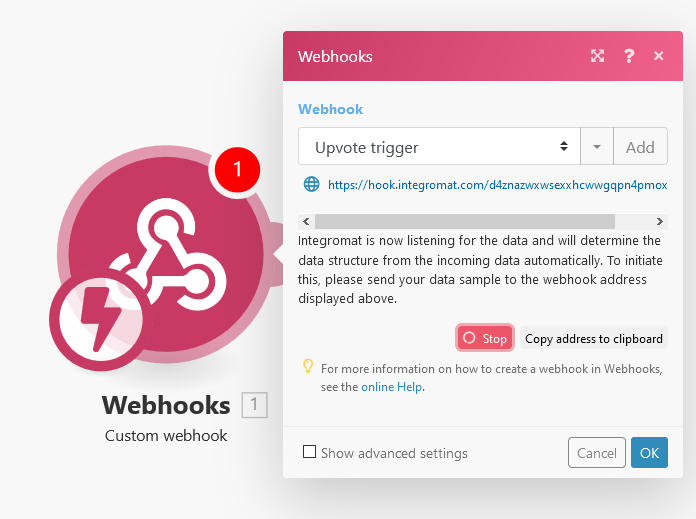
Two simple tutorials for setting up webhooks, both with or without a server
dapper cobalt
Well, first of all, you need to receive some data. Then, if the data includes the voter's ID, sending them a private message would be easy. Just get the user from the bot's cache using their ID, and send them the message.
dapper cobalt
What code?
dapper cobalt
slate swan
can anyone help me how do I make my discord bot send a thank you message to thei...
This?
slate swan
slate swan
i am using integromat and make a scenerio connectin custom webhook and HTTP
an...
this is webhook codes
slate swan
slate swan
can anyone help me how do I make my discord bot send a thank you message to thei...
this python
dapper cobalt
slate swan
this is webhook codes
That's a JSON dict, not a code.
slate swan
dapper cobalt
That's a JSON dict, not a code.
okay so python codes are having problems
do you think is there any way to fix it?
dapper cobalt
How do you receive the POST request?
What?
What does that have to do with Python at all?
slate swan
the site isnt having an API for that which makes it even a bigger problem
1st dpy and now entire python?
oh
dapper cobalt
Discord.py has a default help command.
slate swan
dpy stopped dev it means discord is also stopping dpy?
dpy doesnt supp slash commands
WAIT WHAT?
dapper cobalt
Then just type / and you will see all your bot's slash commands.
slate swan
i heard that the only reason why dpy stopped dev was due to discord was making all languages slashes
dapper cobalt
It's up to you whether you want to make a help command.
But I believe it's useless since it's slash commands.
dapper cobalt
I'd go with disnake. It's pretty good imo. And also it supports all kinds of Discord interactions.
dapper cobalt
slate swan
have anyone heard about discordbotlist?
.com?
slate swan
dapper cobalt
.com?
yes its a discord bot sites
dapper cobalt
Yeah, my bot's listed there.
slate swan
https://github.com/DankMemer/webhook-server
dank memer has also a system which sends a DM when it gets an upvote
GitHub
The express server that we use to handle incoming webhooks from various services. - GitHub - DankMemer/webhook-server: The express server that we use to handle incoming webhooks from various services.
i tried to understand it but everything gone above my brain
 sick talon
on_voice_update isn't working
@client.event
async def on_voice_update(member,before,after):
  if member.bot:
    return
  if not before.channel:
    print(f"{member.name} joined {after.channel.name}")
  if before.channel and not after.channel:
    print(f"{member.name} left {before.channel.name}")
  if before.channel and after.channel:
    if before.channel != after.channel.id:
      print(f"{member.name} swicthed voice channel")
    else:
      print("Something else happened")
the codes are js
delete message or we get mute or ban
no risk
play safe
dapper cobalt
sick talon
on_voice_update isn't working
```py
@client.event
async def on_voice_update(memb...
I don't think there's such an event.
boreal ravine
!d discord.on_voice_state_update
unkempt canyonBOT
discord.on_voice_state_update(member, before, after)```
Called when a [`Member`](https://discordpy.readthedocs.io/en/master/api.html#discord.Member "discord.Member") changes their [`VoiceState`](https://discordpy.readthedocs.io/en/master/api.html#discord.VoiceState "discord.VoiceState").

The following, but not limited to, examples illustrate when this event is called...anyways dank memer is on discordbotlist and sends a DM when it gets an upvote using webhooks this link i gave has the files
boreal ravine
unkempt canyon
you mean this?
dapper cobalt
boreal ravine
!d discord.on_voice_state_update

slate swan
and the way to make a DM when get upvote
can you please check if its possible for python because dank memer is JS
slate swan
i suffer from brain pain,dizzyness when lookin on js codes
slate swan
boreal ravine
use an api or something?
webhooks site helper said he doesnt know about API of the site
dapper cobalt
slate swan
webhooks site helper said he doesnt know about API of the site

Official documentation for the discordbotlist.com API.
slate swan
{
100 lines of codes with bunch of ( , . /
}
dapper cobalt
slate swan
i suffer from brain pain,dizzyness when lookin on js codes
It's not that hard, though. Just different syntax.
slate swan
slate swan
{
100 lines of codes with bunch of ( , . /
}
js codes in a nutshell
boreal ravine
slate swan
i suffer from brain pain,dizzyness when lookin on js codes
code isn't plural by the way
boreal ravine
slate swan
{
100 lines of codes with bunch of ( , . /
}
Same goes for python?
slate swan
nah i guess
dapper cobalt
https://docs.discordbotlist.com/vote-webhooks @slate swan
slate swan
i ned to go
boreal ravine
Those are just python parentheses in javascript.
tropic briar
How can I make my bot send message in On_message function
 maiden fable
tropic briar
How can I make my bot send message in On_message function
maiden fable
tropic briar
How can I make my bot send message in On_message function
message.channel.send()
tropic briar
ok
tropic briar
maiden fable
message.channel.send()
@client.listen
async def on_message(message):
  for i in Filter:
    if i in message.content:
      await message.channel.send('hmm')
      await message.send("You are banned")
``` But the bot doesn't repliesFilter is a list of some words
maiden fable
Ah
tropic briar
yes I send
tropic briar
dapper cobalt
Use `message.content.lower()` instead of `message.content`.
I get a syntax error now
dapper cobalt
Code?
tropic briar
@client.listen
async def on_message(message):
  for i in Filter:
    if i in message.content.lower()
      await message.channel.send('hmm')
      await message.send("You are banned")
I really think that there is no problem
dapper cobalt
There is.
tropic briar
:?
dapper cobalt
And I've spotted it once you sent the code. Just look closer.
tropic briar
:
dapper cobalt
Yes.
tropic briar
lemme try now
maiden fable
Me who smashes my head in a wall when I miss a closing bracket: 
 amber imp
    @commands.command()
    async def blur(self, ctx):
        img = Image.open('C:/bots/studybot/cogs/test.png')
        img2 = img.filter(CONTOUR)
        await ctx.send(img2)
```help plsi want to send a image
tropic briar
and the bot doesn't replies
 tropic briar
@client.listen
async def on_message(message):
  for i in Filter:
    if i in message.content.lower():
      await message.channel.send('hmm')
      await message.send("You are banned")
Try to print the message.content at the start of the function.
tropic briar
lol ok
amber imp
amber imp
`<PIL.Image.Image image mode=RGBA size=720x592 at 0x1BD3562A2B0>
`
anyone help pls
maiden fable
dapper cobalt
No, `System.out.println(message.content);`.
:stare:
dapper cobalt
maiden fable
:stare:
Java.
 sweet plover
aint that java
maiden fable
amber imp
anyone help pls
U gotta save the image
sweet plover
lul bit too late
maiden fable
dapper cobalt
~~Java.~~
Yups
amber imp
maiden fable
U gotta save the image
how ,where
slate swan
sooo
 keen talon
amber imp
`<PIL.Image.Image image mode=RGBA size=720x592 at 0x1BD3562A2B0>
`
keen talon
amber imp
`<PIL.Image.Image image mode=RGBA size=720x592 at 0x1BD3562A2B0>
`
this is not discord.py tho
dapper cobalt
amber imp
how ,where
Where?
- In your code's directory.
How? - By doing some code.
maiden fable
😂
sweet plover
xD
slate swan
I got these codes from dank memer github where it showed how to send user a thank you message is it possible to convert these into python?
return _saveQuery(_fetchUserQuery(id).merge({
    voteReminderWaiting: true,
    pocket: r.row('pocket').default(0).add(50000),
    inventory: {
        [itemOne]: r.row('inventory').default({}).getField('banknote').default(0).add(3),
        [itemTwo]: r.row('inventory').default({}).getField('daily').default(0).add(1)
      },
    upvoted: true,
    ...(isDbl
        ? { lastDblVote: Date.now() }
        : { lastTopggVote: Date.now() }
      )
  })).run();
};
this is the code
dapper cobalt
!d PIL.Image
maiden fable
slate swan
I got these codes from dank memer github where it showed how to send user a than...
Dank Memer is open source?
amber imp
slate swan
I got these codes from dank memer github where it showed how to send user a than...
dank memer is opensource?
tropic briar
@client.listen
async def on_message(message):
  for i in Filter:
    if i in message.content.lower():
      print(message.content)
      await message.channel.send('hmm')
      await message.send("You are banned")
``` This is my code and bot doesn't printsI said at the start of the function.
tropic briar
before the first for?
sweet plover
yea
slate swan
maiden fable
Dank Memer is open source?
idk about that but in dank memer github it showed webhooks in which there was upvote.js and i checked what dank memer DM when we vote for him and found these codes were behind it
dapper cobalt
Yes.
keen talon
dapper cobalt
Yes.
OFC
sweet plover
how can i send a message in on_ready?
already tried
await channel.send('hello')```
and
`await client.get_channel("enter channel id here").send("bot is online")`didnt work
tropic briar
@client.listen
async def on_message(message):
  print(message.content)
  for i in Filter:
    if i in message.content.lower():
      await message.channel.send('hmm')
      await message.send("You are banned")
``` nothing changedDoes it print your message?
dapper cobalt
Replace @client.listen with @client.event.
sweet plover
i dont know, but try @client.event
dapper cobalt
!d discord.ext.commands.Bot.listen
unkempt canyonBOT
@listen(name=None)```
A decorator that registers another function as an external event listener. Basically this allows you to listen to multiple events from different places e.g. such as [`on_ready()`](https://discordpy.readthedocs.io/en/master/api.html#discord.on_ready "discord.on_ready")

The functions being listened to must be a [coroutine](https://docs.python.org/3/library/asyncio-task.html#coroutine "(in Python v3.9)").

Example...then my other commands won't work
dapper cobalt
tropic briar
then my other commands won't work
@client.listen("on_message") should work.
Or just @client.listen().
You just have to call it.
ionic wadi
File "/home/container/bot.py", line 137, in on_message
with open('/json/users.json', 'r') as f:
FileNotFoundError: [Errno 2] No such file or directory: 'users.json'
The file exists, but why this error then?
tropic briar
@client.listen("message")
async def on_message(on_message):
  print(client.message)
  for i in Filter:
    if i in message.content.lower():
      await message.channel.send('hmm')
      await message.send("You are banned")
umm there is
dapper cobalt
tropic briar
```py
@client.listen("message")
async def on_message(on_message):
print(client...
on_message not message.
tropic briar
oh yeh
dapper cobalt
sick talon
umm there is
It's on_voice**_state**_update
!d discord.on_voice_state_update
unkempt canyonBOT
discord.on_voice_state_update(member, before, after)```
Called when a [`Member`](https://discordpy.readthedocs.io/en/master/api.html#discord.Member "discord.Member") changes their [`VoiceState`](https://discordpy.readthedocs.io/en/master/api.html#discord.VoiceState "discord.VoiceState").

The following, but not limited to, examples illustrate when this event is called...ohh shit
dapper cobalt
You were using on_voice_update.
 sick talon
tropic briar
My bot started speaking
sick talon
tropic briar
My bot started speaking
🥳
tropic briar
😄
dapper cobalt
Yes.
tropic briar
Now time to ban myself if I say hi
dapper cobalt
tropic briar
Now time to ban myself if I say hi
You cannot if you're the guild's owner.
dapper cobalt
Ah, okay.
dapper cobalt
tropic briar
So let's ban others if they say hi
Isn't that API abuse? Or are you joking as well?
sweet plover
how can i send a message in on_ready?
already tried
await channel.send('hello')```and
`await client.get_channel("enter channel id here").send("bot is online")`You told me How to ban
await member.ban(reason=reason)
``` Should I just put thisi should remove that reason
boreal ravine
sweet plover
how can i send a message in on_ready?
already tried
```channel = client.get_cha...
did it wrktho
sweet plover
no
else i wouldn't have asked right?
boreal ravine
tropic briar
i should remove that reason
the reason shows up in the audit log do you want that or no?
boreal ravine
sweet plover
no
else i wouldn't have asked right?
whats the error the got raised
that got*
tropic briar
boreal ravine
the reason shows up in the audit log do you want that or no?
I don't want that
boreal ravine
then remvoe it ig
sweet plover
Traceback (most recent call last):
  File "/home/pi/.local/lib/python3.7/site-packages/discord/client.py", line 343, in _run_event
    await coro(*args, **kwargs)
  File "/home/pi/Desktop/Quotes.py", line 19, in on_ready
    await client.get_channel("861677744956768290").send("!calibrating " + text)
AttributeError: 'NoneType' object has no attribute 'send'```try fetching the guild first
tropic briar
@client.listen("on_message")
async def on_message(message, member):
  print(message.content)
  for i in Filter:
    if i in message.content.lower():
      await message.channel.send('hmm')
      await member.ban('filter')
``` Will this work ?wait
change it an an int
not string lol
sweet plover
got told that solution with a string lmao
boreal ravine
sweet plover
got told that solution with a string lmao
who said that
IDs are integers
not strings
sweet plover
boreal ravine
change it an an int
works now, thx
sweet plover
boreal ravine
who said that
idk, was a while ago
boreal ravine
sweet plover
works now, thx
no problem
gloomy coral
pinged
tropic briar
How can I ban someone by using the on_message function
@client.listen("on_message")
async def on_message(message):
  print(message.content)
  for i in Filter:
    if i in message.content.lower():
      await message.channel.send('Time to ban you out')
ok
ya
@client.listen("on_message")
async def on_message(message, member):
  print(message.content)
  for i in Filter:
    if i in message.content.lower():
      await message.channel.send('Time to ban you out')
      await message.guild.ban(member)
oh
@client.listen("on_message")
async def on_message(message, member):
  print(message.content)
  for i in Filter:
    if i in message.content.lower():
      await message.channel.send('Time to ban you out')
      await message.ban(member)
 jade jolt
member not message
jade jolt
on_message doesnt take a member arg
dapper cobalt
!d discord.on_message doesn't take a member parameter.
unkempt canyonBOT
discord.on_message(message)```
Called when a [`Message`](https://discordpy.readthedocs.io/en/master/api.html#discord.Message "discord.Message") is created and sent.

This requires [`Intents.messages`](https://discordpy.readthedocs.io/en/master/api.html#discord.Intents.messages "discord.Intents.messages") to be enabled.

Warning

Your bot’s own messages and private messages are sent through this event. This can lead cases of ‘recursion’ depending on how your bot was programmed. If you want the bot to not reply to itself, consider checking the user IDs. Note that [`Bot`](https://discordpy.readthedocs.io/en/master/ext/commands/api.html#discord.ext.commands.Bot "discord.ext.commands.Bot") does not have this problem.It's message.author.ban() and not member.ban().
jade jolt
he didnt explicitly say that
tropic briar
@client.listen("on_message")
async def on_message(message, member):
  print(message.content)
  for i in Filter:
    if i in message.content.lower():
      await message.channel.send('Time to ban you out')
      await member.author.ban(member)
this isn't working
dapper cobalt
You didn't even read correctly.
tropic briar
oh
tropic briar
@client.listen("on_message")
async def on_message(message, member):
  print(message.content)
  for i in Filter:
    if i in message.content.lower():
      await message.channel.send('Time to ban you out')
      await message.author.ban()
Still
tropic briar
@client.listen("on_message")
async def on_message(message, member):
  print(message.content)
  for i in Filter:
    if i in message.content.lower():
      await message.channel.send('Time to ban you out')
      await message.author.ban(member)
I have member parameter
dapper cobalt
!d discord.on_message can you please click on the blue title?
unkempt canyonBOT
discord.on_message(message)```
Called when a [`Message`](https://discordpy.readthedocs.io/en/master/api.html#discord.Message "discord.Message") is created and sent.

This requires [`Intents.messages`](https://discordpy.readthedocs.io/en/master/api.html#discord.Intents.messages "discord.Intents.messages") to be enabled.

Warning

Your bot’s own messages and private messages are sent through this event. This can lead cases of ‘recursion’ depending on how your bot was programmed. If you want the bot to not reply to itself, consider checking the user IDs. Note that [`Bot`](https://discordpy.readthedocs.io/en/master/ext/commands/api.html#discord.ext.commands.Bot "discord.ext.commands.Bot") does not have this problem.
@client.listen("on_message")
async def discord.on_message(message, member):
  print(message.content)
  for i in Filter:
    if i in message.content.lower():
      await message.channel.send('Time to ban you out')
      await message.author.ban(member)
this?
dapper cobalt
tropic briar
```py
@client.listen("on_message")
async def discord.on_message(message, member...

Do you see any member parameter?
tropic briar
@client.listen("on_message")
async def on_message(message):
  print(message.content)
  for i in Filter:
    if i in message.content.lower():
      await message.channel.send('Time to ban you out')
      await message.author.ban()
Not working
dapper cobalt
Does it print the message's content?
dapper cobalt
Try removing "on_message" from the listen() function.
dapper cobalt
It replies?
tropic briar
@client.listen()
async def on_message(message):
  print(message.content)
  for i in Filter:
    if i in message.content.lower():
      await message.channel.send('Time to ban you out')
      await message.author.ban()
no it doesn't
It don't say 'Time to ban you out'
dapper cobalt
Hey, add this:
@client.event
async def on_command_error(ctx, error):
  raise error
Not very sure if this applies to errors of message events as well, but hopefully it does.
tropic briar
Nothing changed
 dapper cobalt
Make it print i.
tropic briar
dapper cobalt
Make it print `i`.
still nothing changes
@client.listen()
async def on_message(message):
  print(message.content)
  for i in Filter:
    if i in message.content.lower():
      print(i)
      await message.channel.send('Time to ban you out')
      await message.author.ban()
for i in Filter:
  print(i)
Maybe check ur old code and see what u did for roles = self.roles.get(message)? that usually helps for me lol
novel rampart
what is the error

 opaque trail
VoiceClient.play raises an OpusError: invalid argument? works fine on other operating system, using macos
novel rampart
i know that error is name error
but i don't found that
lastmsg={}
    @commands.Cog.listener()
    async def on_message_delete(message:discord.Message):
        lastmsg[message.guild.id]=message
 high flame
Filter not defined
novel rampart
this is code
high flame
tropic briar
```py
@client.listen()
async def on_message(message):
print(message.content)
...
^^
novel rampart
yes
tropic briar
high flame
Filter not defined
it is a list
novel rampart
why
novel rampart
novel rampart
```py
lastmsg={}
@commands.Cog.listener()
async def on_message_delete(me...
this the code
yhea
tropic briar
@client.listen()
async def on_message(message):
  print(message.content)
  for i in Filter:
    print(i)
    if i in message.content:
      print(i)
      await message.channel.send('Time to ban you out')
      await message.author.ban()
``` Why is the if not workingi am converting my code into cogs
boreal ravine
novel rampart
```py
lastmsg={}
@commands.Cog.listener()
async def on_message_delete(me...
maybe indents?
show the cog
novel rampart
ok
novel rampart
boreal ravine
show the cog
class Snipe(commands.Cog):
    def __init__(self, bot):
        self.bot = bot


    lastmsg={}
    @commands.Cog.listener()
    async def on_message_delete(message:discord.Message):
        lastmsg[message.guild.id]=message

    @commands.command()
    async def snipe(self, ctx:commands.Context):
        try:
            author = lastmsg[ctx.message.guild.id].author.mention
            content = lastmsg[ctx.message.guild.id].content
            channel = lastmsg[ctx.message.guild.id].channel.mention
            embed = discord.Embed(title = ":gun:Hitman Snipes a message!!:gun:\n\n",description = f"**Author**\n{author}\n\n**Message**\n`{content}`\n\n**Channel**\n{channel}\n\n")
            embed.set_footer(text=f"Made by {ctx.author.display_name}.", icon_url=ctx.author.avatar_url)
            await ctx.send(embed = embed)
        except KeyError:
            await ctx.send(f"No Messages to delete in {ctx.channel.mention}")
this is the entire code
boreal ravine
put the lastmsg variable on the same line as self.bot
novel rampart
boreal ravine
put the `lastmsg` variable on the same line as `self.bot`
what
dapper cobalt
tropic briar
It prints all the filters
After it print(i in message.content.lower()).
boreal ravine
novel rampart
what
Wdym what
novel rampart
boreal ravine
put the `lastmsg` variable on the same line as `self.bot`
i don't understand
tropic briar
dapper cobalt
After it `print(i in message.content.lower())`.
Bro the if is not working
novel rampart
what you say
boreal ravine
novel rampart
i don't understand
put the variable on the same line as self.bot variable
ionic wadi
class WIP(commands.Cog, name='WIP (SOON)'):
    def __init__(self, bot):
        self.bot = bot

    @commands.command()
    @commands.has_role("Support Team")
    async def announce(self, ctx, msg=None, channel=None):
        await ctx.send("Wat is het bericht?", delete_after=3.0)
        try:
            message = await bot.wait_for("message", check=lambda m: m.author == ctx.author and m.channel == ctx.channel, timeout=45.0)
        except asyncio.TimeoutError:
            await ctx.send("Helaas reageerde je niet binnen 45 seconde! En de prompt is beeindigd.")
        else:
            msg = message.content
            await ctx.send("Welk kanaal will je het in hebben?", delete_after=3.0)
            try:
                message = await bot.wait_for("message", check=lambda m: m.author == ctx.author and m.channel == ctx.channel, timeout=190.0)
            except asyncio.TimeoutError:
                await ctx.send("Helaas reageerde je niet binnen 190 seconde! En de prompt is beeindigd.")
            else:
                channel = message.content
                await ctx.send("Ik ga het bericht verturen.", delete_after=3.0)
                await channel.send(msg)```

The prompt works but It doesnt send the messageand I dont get an error
boreal ravine
novel rampart
```py
class Snipe(commands.Cog):
def __init__(self, bot):
self.bot =...
class Snipe(commands.Cog):
    def __init__(self, bot):
        self.bot = bot
        lastmsg = {}
channel = message.content?
Did you mean channel = message.channel?
tropic briar
hi
False
False
False
False
ionic wadi
good one
No I didnt
I want them to mention the channel in the content
and send it there
tropic briar
tropic briar
hi
False
False
False
False
This is what I see in console
novel rampart
boreal ravine
```py
class Snipe(commands.Cog):
def __init__(self, bot):
self.bot =...
now also the error
tropic briar
@client.listen()
async def on_message(message):
  print(message.content)
  for i in Filter:
    print(i in message.content.lower())
    if i in message.content:
      print('hi')
      await message.channel.send('Time to ban you out')
      await message.author.ban()
``` @dapper cobaltcomes
boreal ravine
novel rampart
now also the error
what error and show ur code
boreal ravine
show code
novel rampart
mm
novel rampart
boreal ravine
show code
class Snipe(commands.Cog):
    def __init__(self, bot):
        self.bot = bot
        lastmsg = {}


    @commands.Cog.listener()
    async def on_message_delete(message:discord.Message):
        lastmsg[message.guild.id]=message

    @commands.command()
    async def snipe(self, ctx:commands.Context):
        try:
            author = lastmsg[ctx.message.guild.id].author.mention
            content = lastmsg[ctx.message.guild.id].content
            channel = lastmsg[ctx.message.guild.id].channel.mention
            embed = discord.Embed(title = ":gun:Hitman Snipes a message!!:gun:\n\n",description = f"**Author**\n{author}\n\n**Message**\n`{content}`\n\n**Channel**\n{channel}\n\n")
            embed.set_footer(text=f"Made by {ctx.author.display_name}.", icon_url=ctx.author.avatar_url)
            await ctx.send(embed = embed)
        except KeyError:
            await ctx.send(f"No Messages to delete in {ctx.channel.mention}")
this is the code
boreal ravine
hmm
slate swan
Also your on_message_delete is missing self
novel rampart
slate swan
lastmsg should be self.lastmsg
i don't understand
novel rampart
slate swan
Also your on_message_delete is missing self
oh ok
boreal ravine
novel rampart
i don't understand
the var name
slate swan
novel rampart
i don't understand
Then learn python, it's basic oop, change lastmsg with self.lastmsg
novel rampart
slate swan
Then learn python, it's basic oop, change `lastmsg` with `self.lastmsg`
ok
i understand
tropic briar
@dapper cobalt bro thanks a lot lot lot because now everything is working and I even banned Dank Memer for saying "need" Thanks a lot
this is the code
@client.listen()
async def on_message(message):
  print(message.content)
  for i in Filter:
    if i in message.content:
      print('hi')
      await message.channel.send('Time to ban you out')
      await message.author.ban()
Are you like 11, not trynna be mean but that's what I always hear 11 y/o kids saying when they trynna be satire 😂
slate swan
tropic briar
this is the code
```py
@client.listen()
async def on_message(message):
print(...
Use regex
tropic briar
slate swan
Are you like 11, not trynna be mean but that's what I always hear 11 y/o kids sa...
I am not
he helped me a lot
boreal ravine
tropic briar
<@!510736807999307786> bro thanks a lot lot lot because now everything is workin...
we're happy to help you lol
slate swan
tropic briar
he helped me a lot
Alr
boreal ravine
if ctx.guild.id == id:
those are for commands and no there isnt a way to hide slash commands yet
solemn grove
How to mention the mentioned user?
amber imp
  @commands.command()
    async def wanted(self, ctx, user: discord.Member = None):
        if user == None:
            user = ctx.author

        wanted = Image.open("C:/bots/studybot/cogs/wanted.PNG")

        asset = user.avatar_url_as(size=128)
        data = BytesIO(await asset.read())
        pfp = Image.open(data)
        pfp = pfp.resize(111, 171)

        wanted.paste(pfp, (105,327))

        wanted.save("profile.PNG")
        await ctx.send(file=discord.File("profile.PNG"))
help please
  File "C:\Users\hp\AppData\Local\Programs\Python\Python39\lib\site-packages\discord\ext\commands\core.py", line 85, in wrapped
    ret = await coro(*args, **kwargs)
  File "C:\bots\studybot\cogs\fun.py", line 121, in wanted
    pfp = pfp.resize(111, 171)
  File "C:\Users\hp\AppData\Local\Programs\Python\Python39\lib\site-packages\PIL\Image.py", line 1899, in resize
    raise ValueError(
ValueError: Unknown resampling filter (171). Use Image.NEAREST (0), Image.LANCZOS (1), Image.BILINEAR (2), Image.BICUBIC (3), Image.BOX (4) or Image.HAMMING (5)

The above exception was the direct cause of the following exception:

Traceback (most recent call last):
  File "C:\Users\hp\AppData\Local\Programs\Python\Python39\lib\site-packages\discord\ext\commands\bot.py", line 939, in invoke
    await ctx.command.invoke(ctx)
  File "C:\Users\hp\AppData\Local\Programs\Python\Python39\lib\site-packages\discord\ext\commands\core.py", line 863, in invoke
    await injected(*ctx.args, **ctx.kwargs)
  File "C:\Users\hp\AppData\Local\Programs\Python\Python39\lib\site-packages\discord\ext\commands\core.py", line 94, in wrapped
    raise CommandInvokeError(exc) from exc
discord.ext.commands.errors.CommandInvokeError: Command raised an exception: ValueError: Unknown resampling filter (171). Use Image.NEAREST (0), Image.LANCZOS (1), Image.BILINEAR (2), Image.BICUBIC (3), Image.BOX (4) or Image.HAMMING (5)
every single time i try run my bot it says it has a invalid token
its right
Do you use env?
i have checked like 50 times
and regenerated50 times
slate swan
slate swan
Do you use env?
nope
i have a host
so i dont need too
do you put it directly in the code
ohok
slate swan
slate swan
do you put it directly in the code
yes
can you send the trackback
i do token = "token here" and client.run(token)

are you sure that you regenerate and copy it ?
amber imp
slate swan
i do token = "token here" and client.run(token)
client.event
write your code

token = "token here"
client.run(token)
improper token?
slate swan
and look at it
slate swan
amber imp
```
client.event
write your code
token = "token here"
client.run(token)
```
thats what i have done
boreal ravine
solemn grove
How to mention the mentioned user?
member.mention ig
slate swan
 boreal ravine
slate swan
thats what i have done
boreal ravine
slate swan
thats what i have done
did u regenerate and copy it?
boreal ravine
o.o
amber imp
amber imp
```
client.event
write your code
token = "token here"
client.run(token)
```
this works fine
slate swan
amber imp
this works fine
i did that
amber imp
i not got any error
slate swan
i think im blacklisted
or something
idk what for
it would not have sent improper token error
slate swan
slate swan
it would not have sent improper token error
i even tried making a new application
in case you were banned from accessing the api
same error
boreal ravine
slate swan
in case you were banned from accessing the api
L
amber imp
slate swan
idk what for
i think u overided @quaint axle.event
boreal ravine
amber imp
i think u overided <@78923588530343936>.event
bruh
slate swan
amber imp
i think u overided <@78923588530343936>.event
wdtm
boreal ravine
no pinging random ppl
amber imp
ok
solemn grove
How to mention the mentioned user?
slate swan
amber imp
i think u overided <@78923588530343936>.event
@client.event
async def on_ready():
    print('Connected to bot: {}'.format(client.user.name))
    print('Bot ID: {}'.format(client.user.id))
    await client.change_presence(activity=discord.Activity(type=discord.ActivityType.playing, name=f">commands"))
``` this is the only client event i haveook
slate swan
solemn grove
How to mention the mentioned user?
!d discord.Member.mention
unkempt canyonBOT
property mention: str```
Returns a string that allows you to mention the member.@commands.command()
async def wanted(self, ctx, user: discord.Member = None):
if user == None:
user = ctx.author
wanted = Image.open("C:/bots/studybot/cogs/wanted.PNG")
asset = user.avatar_url_as(size=128)
data = BytesIO(await asset.read())
pfp = Image.open(data)
pfp = pfp.resize(171, 171)
wanted.paste(pfp, (105, 327))
wanted.save("profile.PNG")
await ctx.send(file=discord.File("profile.PNG"))
can anyone help me
slate swan
amber imp
```py
@commands.command()
async def wanted(self, ctx, user: discord.Member =...
whats the traceback?
boreal ravine
amber imp
```py
@commands.command()
async def wanted(self, ctx, user: discord.Member...
isnt it io.Bytes.IO
slate swan
and i wouldn't save images in cogs
amber imp
slate swan
whats the traceback?
Ignoring exception in command wanted:
Traceback (most recent call last):
  File "C:\Users\hp\AppData\Local\Programs\Python\Python39\lib\site-packages\discord\ext\commands\core.py", line 85, in wrapped
    ret = await coro(*args, **kwargs)
  File "C:\bots\studybot\cogs\fun.py", line 121, in wanted
    pfp = pfp.resize(171, 171)
  File "C:\Users\hp\AppData\Local\Programs\Python\Python39\lib\site-packages\PIL\Image.py", line 1899, in resize
    raise ValueError(
ValueError: Unknown resampling filter (171). Use Image.NEAREST (0), Image.LANCZOS (1), Image.BILINEAR (2), Image.BICUBIC (3), Image.BOX (4) or Image.HAMMING (5)

The above exception was the direct cause of the following exception:

Traceback (most recent call last):
  File "C:\Users\hp\AppData\Local\Programs\Python\Python39\lib\site-packages\discord\ext\commands\bot.py", line 939, in invoke
    await ctx.command.invoke(ctx)
  File "C:\Users\hp\AppData\Local\Programs\Python\Python39\lib\site-packages\discord\ext\commands\core.py", line 863, in invoke
    await injected(*ctx.args, **ctx.kwargs)
  File "C:\Users\hp\AppData\Local\Programs\Python\Python39\lib\site-packages\discord\ext\commands\core.py", line 94, in wrapped
    raise CommandInvokeError(exc) from exc
discord.ext.commands.errors.CommandInvokeError: Command raised an exception: ValueError: Unknown resampling filter (171). Use Image.NEAREST (0), Image.LANCZOS (1), Image.BILINEAR (2), Image.BICUBIC (3), Image.BOX (4) or Image.HAMMING (5)

Process finished with exit code -1```.im just testing bro
boreal ravine
slate swan
and i wouldn't save images in cogs
y
boreal ravine
slate swan
its not a issue
yes but y
slate swan
otherwise its messy
high flame
mhm
boreal ravine
hm
amber imp
amber imp
```
Ignoring exception in command wanted:
Traceback (most recent call last):
F...
anyone listen here
pls
boreal ravine
I mean its a resizing issue
amber imp
yes
visual island
amber imp
```
Ignoring exception in command wanted:
Traceback (most recent call last):
F...
Image.resize takes 1 argument for size, pass it as an iterable, documented here: https://pillow.readthedocs.io/en/stable/reference/Image.html#PIL.Image.Image.resize
amber imp
ok
high flame
visual island
Image.resize takes 1 argument for size, pass it as an iterable, documented here:...
what are you making btw
 amber imp
visual island
Image.resize takes 1 argument for size, pass it as an iterable, documented here:...
amber imp
visual island
Image.resize takes 1 argument for size, pass it as an iterable, documented here:...
raise CommandInvokeError(exc) from exc
discord.ext.commands.errors.CommandInvokeError: Command raised an exception: TypeError: 'int' object is not iterable
high flame
show what you did
amber imp
high flame
show what you did
me?
amber imp
ok
visual island
high flame
what are you making btw
nothing, watching YT, I opened it just in case something happened with my bot
high flame
:rooBulli:
visual island

amber imp
high flame
and full traceback
Ignoring exception in command wanted:
Traceback (most recent call last):
  File "C:\Users\hp\AppData\Local\Programs\Python\Python39\lib\site-packages\discord\ext\commands\core.py", line 85, in wrapped
    ret = await coro(*args, **kwargs)
  File "C:\bots\studybot\cogs\fun.py", line 121, in wanted
    pfp = pfp.resize(171,171)
  File "C:\Users\hp\AppData\Local\Programs\Python\Python39\lib\site-packages\PIL\Image.py", line 1899, in resize
    raise ValueError(
ValueError: Unknown resampling filter (171). Use Image.NEAREST (0), Image.LANCZOS (1), Image.BILINEAR (2), Image.BICUBIC (3), Image.BOX (4) or Image.HAMMING (5)

The above exception was the direct cause of the following exception:

Traceback (most recent call last):
  File "C:\Users\hp\AppData\Local\Programs\Python\Python39\lib\site-packages\discord\ext\commands\bot.py", line 939, in invoke
    await ctx.command.invoke(ctx)
  File "C:\Users\hp\AppData\Local\Programs\Python\Python39\lib\site-packages\discord\ext\commands\core.py", line 863, in invoke
    await injected(*ctx.args, **ctx.kwargs)
  File "C:\Users\hp\AppData\Local\Programs\Python\Python39\lib\site-packages\discord\ext\commands\core.py", line 94, in wrapped
    raise CommandInvokeError(exc) from exc
discord.ext.commands.errors.CommandInvokeError: Command raised an exception: ValueError: Unknown resampling filter (171). Use Image.NEAREST (0), Image.LANCZOS (1), Image.BILINEAR (2), Image.BICUBIC (3), Image.BOX (4) or Image.HAMMING (5)
fk clyde
visual island
visual island
Image.resize takes 1 argument for size, pass it as an iterable, documented here:...
pass it as an iterable
amber imp
waitbro
high flame
resize(<list/tuple or whatever>)??
 visual island

high flame
amber imp
https://media.discordapp.net/attachments/888405136798548040/893440388583555122/p...
watermark
amber imp
high flame
watermark <:pithink:652247559909277706>
im gonna solve
amber imp
visual island
if the pfp is animated, you can't use that code <:potato_popcorn:887575008984072...
ok
ty
high flame
i can't use roo emojis anymore ;-;
visual island

high flame
lmao
 high flame
yeah but i love some roo emojis
 topaz sierra
How can I count a member's message in total?
visual island
topaz sierra
How can I count a member's message in total?
- Use on_message then += 1 everytime
- Fetch history
boreal ravine
Code: ```py
@commands.command(description='Says whatever you want using a webhook.')
async def echo(self, ctx, *, message):
webhook = await ctx.channel.create_webhook(name=ctx.author.name, avatar=ctx.author.avatar)
await ctx.message.delete()
await webhook.send(message)
await asyncio.sleep(0.5)
await webhook.delete()
Error: ```py
Command raised an exception: AttributeError: 'Asset' object has no attribute 'startswith'
full traceback
boreal ravine
it isnt a traceback
visual island
boreal ravine
Code: ```py
@commands.command(description='Says whatever you want using a we...
the error is kinda...
high flame
then what bruh
boreal ravine
thats the full error
topaz sierra
Thanks
visual island
boreal ravine
thats the full error
how
high flame
boreal ravine
thats the full error
that's not possible thought
visual island
you used an eval?
boreal ravine
no?
high flame
boreal ravine
Code: ```py
@commands.command(description='Says whatever you want using a we...
oh maube avatar=ctx.author.avatar
boreal ravine
the console
 high flame
avatar is an Asset
boreal ravine
high flame
oh maube avatar=ctx.author.avatar
hm
high flame
hmmmmmmmmmmmmmmmmmmmmmmmmmmmmmmmm
boreal ravine
Command raised an exception: TypeError: startswith first arg must be str or a tuple of str, not bytes
``` wot!d discord.TextChannel.create_webhook
unkempt canyonBOT
await create_webhook(*, name, avatar=None, reason=None)```
This function is a [*coroutine*](https://docs.python.org/3/library/asyncio-task.html#coroutine).

Creates a webhook for this channel.

Requires [`manage_webhooks`](https://discordpy.readthedocs.io/en/master/api.html#discord.Permissions.manage_webhooks "discord.Permissions.manage_webhooks") permissions.

Changed in version 1.1: Added the `reason` keyword-only parameter.wot
visual island
boreal ravine
```py
Command raised an exception: TypeError: startswith first arg must be str o...
do you have any error handlers?
boreal ravine
visual island
do you have any error handlers?
thats the full error
visual island
raise error dont do print(error)
boreal ravine
hm
high flame
visual island
`raise error` dont do `print(error)`
bruh
high flame
visual island
`avatar (Optional[bytes])` the param should accept bytes
Asset isn't bytes-
visual island
boreal ravine
*thats the full error*
do you see the difference?
 visual island
high flame
Asset isn't bytes-
visual island
high flame
Asset isn't bytes-
.read() it 
high flame
k
unkempt canyonBOT
discord/asset.py line 54
async def read(self) -> bytes:```umm K
boreal ravine
visual island
do you see the difference?
hm```py
Traceback (most recent call last):
File "/opt/virtualenvs/python3/lib/python3.8/site-packages/discord/client.py", line 351, in _run_event
await coro(*args, **kwargs)
File "/home/runner/bot/main.py", line 66, in on_command_error
raise error
File "/opt/virtualenvs/python3/lib/python3.8/site-packages/discord/ext/commands/bot.py", line 994, in invoke
await ctx.command.invoke(ctx)
File "/opt/virtualenvs/python3/lib/python3.8/site-packages/discord/ext/commands/core.py", line 894, in invoke
await injected(*ctx.args, **ctx.kwargs)
File "/opt/virtualenvs/python3/lib/python3.8/site-packages/discord/ext/commands/core.py", line 176, in wrapped
raise CommandInvokeError(exc) from exc
discord.ext.commands.errors.CommandInvokeError: Command raised an exception: TypeError: startswith first arg must be str or a tuple of str, not bytes
show what you did
solemn grove
How to make the bot trigger on every message?
boreal ravine
high flame
show what you did
in the error handler or the command earlier
high flame
solemn grove
How to make the bot trigger on every message?
!d discord.on_message
unkempt canyonBOT
discord.on_message(message)```
Called when a [`Message`](https://discordpy.readthedocs.io/en/master/api.html#discord.Message "discord.Message") is created and sent.

This requires [`Intents.messages`](https://discordpy.readthedocs.io/en/master/api.html#discord.Intents.messages "discord.Intents.messages") to be enabled.

Warning

Your bot’s own messages and private messages are sent through this event. This can lead cases of ‘recursion’ depending on how your bot was programmed. If you want the bot to not reply to itself, consider checking the user IDs. Note that [`Bot`](https://discordpy.readthedocs.io/en/master/ext/commands/api.html#discord.ext.commands.Bot "discord.ext.commands.Bot") does not have this problem. boreal ravine
hey
boreal ravine
 stark bobcat
code?
stark bobcat
boreal ravine
code?
ok
if content == 'yes':
            await ctx.author.send('Ticket created')
            try:
                channel = self.bot.get_channel(self.bot.logs_channel.id)
                await channel.send('ye a guy made a ticket ig')

            except Exception as e:
                print(e)


        if content == 'no':
await ctx.author.send('Cancelled')```this is the which does not work
and the var is defined in another file
stark bobcat
 stark bobcat
boreal ravine
is that in the file
stark bobcat
boreal ravine
is that in the file
no it's different file
stark bobcat
stark bobcat
```py
if content == 'yes':
await ctx.author.send('Ticket created')
...
this is in report.py
stark bobcat
stark bobcat
and this server_setup.py
boreal ravine
hm
 jade jolt
wrong indent level
slate swan
 frozen forum
whait what
frozen forum
whait what
@commands.command and async def should be in same level
frozen forum
slate swan
@commands.command and async def should be in same level
wait like this ?
import discord
from discord.ext import commands
import youtube_dl

class music(commands.Cog):
   def __init__(self, client) :
     self.client = client

     @commands.command()
     async def join(self,ctx) :
          if ctx.author.voice is None:
             await ctx.send("You're not in an voice channel!")
          voice_channel = ctx.author.voice.channel
          if ctx.voice_client is None:
             await voice_channel.connect()
          else:
               await ctx.voice_client.move_to(voice_channel)

    @commands.command() async def disconnect(self,ctx) :
      await ctx.voice_client.disconnect()


     def setup(client):
          client.add_cog(music(client))
no
what u did in join
jade jolt
they're in the __init__ function too
slate swan
frozen forum
What does that mean ?
!indention
unkempt canyonBOT
Indentation
Indentation is leading whitespace (spaces and tabs) at the beginning of a line of code. In the case of Python, they are used to determine the grouping of statements.
Spaces should be preferred over tabs. To be clear, this is in reference to the character itself, not the keys on a keyboard. Your editor/IDE should be configured to insert spaces when the TAB key is pressed. The amount of spaces should be a multiple of 4, except optionally in the case of continuation lines.
Example
def foo():
    bar = 'baz'  # indented one level
    if bar == 'baz':
        print('ham')  # indented two levels
    return bar  # indented one level
The first line is not indented. The next two lines are indented to be inside of the function definition. They will only run when the function is called. The fourth line is indented to be inside the if statement, and will only run if the if statement evaluates to True. The fifth and last line is like the 2nd and 3rd and will always run when the function is called. It effectively closes the if statement above as no more lines can be inside the if statement below that line.
Indentation is used after:
1. Compound statements (eg. if, while, for, try, with, def, class, and their counterparts)
2. Continuation lines
More Info
1. Indentation style guide
2. Tabs or Spaces?
3. Official docs on indentation
slate swan
frozen forum
wait like this ?
```py
import discord
from discord.ext import commands
import yo...
@commands.command()
async def
frozen forum
man I rly am dumb I still cnat get it
slate swan
frozen forum
man I rly am dumb I still cnat get it
u did like
@commands.command()
async def
^ # there shouldnt be a space
 slate swan
maybe try to learn basic python before going into discord.py
frozen forum
slate swan
maybe try to learn basic python before going into discord.py
;-;
slate swan
frozen forum
    async def disconnect(self,ctx) :
await ctx.voice_client.disconnect()```same error
slate swan
frozen forum
same error
then learn basics
frozen forum
slate swan
then learn _basics_
ok
slate swan
u just copy pasted the code from somewhere thats why
this is why you shouldnt copy paste codes

who tf even invented copy pasting?
 polar aspen
Hi anyone knows how to use same command and add arguments on it ?
frozen forum
slate swan
u just copy pasted the code from somewhere thats why
believe me or not I am rn watching an tut to make an discord bot
I have fixed it
phew
 slate swan
i think the setup indent is a bit big
slate swan
polar aspen
Hi anyone knows how to use same command and add arguments on it ?
like grouping commands?
and by a bit i mean a lot
polar aspen
slate swan
like grouping commands?
Exemple: {prefix}(command name) (specific text here)
And i want to use the command name multiple time but add different specific text
high flame
frozen forum
whait what
your indents are wrong
high flame
frozen forum
believe me or not I am rn watching an tut to make an discord bot
please learn python before discord.py and don't go to youtube tutorials
stark bobcat
stark bobcat
anyone ^^
boreal ravine
frozen forum
whait what
!indents
unkempt canyonBOT
Indentation
Indentation is leading whitespace (spaces and tabs) at the beginning of a line of code. In the case of Python, they are used to determine the grouping of statements.
Spaces should be preferred over tabs. To be clear, this is in reference to the character itself, not the keys on a keyboard. Your editor/IDE should be configured to insert spaces when the TAB key is pressed. The amount of spaces should be a multiple of 4, except optionally in the case of continuation lines.
Example
def foo():
    bar = 'baz'  # indented one level
    if bar == 'baz':
        print('ham')  # indented two levels
    return bar  # indented one level
The first line is not indented. The next two lines are indented to be inside of the function definition. They will only run when the function is called. The fourth line is indented to be inside the if statement, and will only run if the if statement evaluates to True. The fifth and last line is like the 2nd and 3rd and will always run when the function is called. It effectively closes the if statement above as no more lines can be inside the if statement below that line.
Indentation is used after:
1. Compound statements (eg. if, while, for, try, with, def, class, and their counterparts)
2. Continuation lines
More Info
1. Indentation style guide
2. Tabs or Spaces?
3. Official docs on indentation
 full valley
Guys what’s the best way to learn coding bots, I’ve seen heaps of tutorials for things like moderation bots and things but nothing that I am aiming to do.
unkempt canyonBOT
In order to work with the library and the Discord API in general, we must first create a Discord Bot account.
Creating a Bot account is a pretty straightforward process.
stark bobcat
stark bobcat
anyone ^^
anyone ^^
boreal ravine
frozen forum
believe me or not I am rn watching an tut to make an discord bot
Bruh
 frozen forum
boreal ravine
Bruh
frozen forum
boreal ravine
Bruh
yes lol
boreal ravine
i watched that video
 valid perch
stark bobcat
anyone ^^
valid perch
stark bobcat
anyone ^^
Define the variable
frozen forum
wait is it done ?
 stark bobcat
valid perch
Define the variable
stark bobcat
valid perch
Define the variable
i did
boreal ravine
its cringy he doesnt even explain what the code does?
boreal ravine
frozen forum
wait is it done ?
!intents
stark bobcat
valid perch
Define the variable
scroll down the chat from there
frozen forum
boreal ravine
!intents
?
stark bobcat
stark bobcat
^^
boreal ravine
frozen forum
wait is it done ?
discord.Intents.all() is capitalized
valid perch
Its defined in an else. So its only going to exist if a very specifc piece of ccode runs
stark bobcat
valid perch
Its defined in an else. So its only going to exist if a very specifc piece of cc...
ye that specific piece of code ran
frozen forum
bro,...
 valid perch
No offense, but the error says otherwise. Can you add some print statements after where you define it?
boreal ravine
frozen forum
bro,...
is the bot in the vc is the bot playing music?
frozen forum
boreal ravine
is the bot in the vc is the bot playing music?
no
frozen forum
boreal ravine
play music first
I used the command with the prefix
and an yt vid link
jade jolt
!ytdl
unkempt canyonBOT
Per Python Discord's Rule 5, we are unable to assist with questions related to youtube-dl, pytube, or other YouTube video downloaders as their usage violates YouTube's Terms of Service.
For reference, this usage is covered by the following clauses in YouTube's TOS, as of 2021-03-17:
The following restrictions apply to your use of the Service. You are not allowed to:

1. access, reproduce, download, distribute, transmit, broadcast, display, sell, license, alter, modify or otherwise use any part of the Service or any Content except: (a) as specifically permitted by the Service;  (b) with prior written permission from YouTube and, if applicable, the respective rights holders; or (c) as permitted by applicable law;

3. access the Service using any automated means (such as robots, botnets or scrapers) except: (a) in the case of public search engines, in accordance with YouTube’s robots.txt file; (b) with YouTube’s prior written permission; or (c) as permitted by applicable law;

9. use the Service to view or listen to Content other than for personal, non-commercial use (for example, you may not publicly screen videos or stream music from the Service)
ok
boreal ravine
no i cna ban u with that but im nice
boreal ravine
frozen forum
see dms
is the bot in the vc? Is the bot playing music?
slate swan
:o now the new guy do be dm advertising
frozen forum
boreal ravine
is the bot in the vc? Is the bot playing music?
No
slate swan
boreal ravine
no i cna ban u with that but im nice
send me screenshot ill report that for you :)
jade jolt
me too
boreal ravine
frozen forum
No
then do it then lol
atomic topaz
is there any way to get the list of all the channels names in a particular server? using discord.py
stark bobcat
@valid perch
 frozen forum
boreal ravine
then do it then lol
frozen forum
boreal ravine
then do it then lol
Bruh my prefix is "+" so i used +play (song link) and erros pop up in my console and bot never joins vc
stark bobcat
 slate swan
atomic topaz
is there any way to get the list of all the channels names in a particular serve...
slate swan
atomic topaz
is there any way to get the list of all the channels names in a particular serve...
!d discord.Guild.channels
unkempt canyonBOT
property channels: List[GuildChannel]```
A list of channels that belongs to this guild.Nice. Don't see any errors in that new log of yours so thats good to know its working 👌
atomic topaz
slate swan
!d discord.Guild.channels
oh so the cmd is discord.Guild.channels right?
boreal ravine
frozen forum
Bruh my prefix is "+" so i used +play (song link) and erros pop up in my console...
bruh
slate swan
no
boreal ravine
do +join first??
frozen forum
boreal ravine
do +join first??
ok
stark bobcat
wai
boreal ravine
ofc it says nonetype has no attr play it isnt even in a vc lol
slate swan
atomic topaz
oh so the cmd is `discord.Guild.channels` right?
No, get the channels attribute of your Guild object
stark bobcat
wai it works
slate swan
atomic topaz
oh so the cmd is `discord.Guild.channels` right?
channelname = ", ".join([channel.name for channel in guild.channels])
oh let me try
slate swan
slate swan
```py
channelname = ", ".join([channel.name for channel in guild.channels])
```
Stop the spoonfeed maybe? You're not helping anyone 
frozen forum
boreal ravine
do +join first??
join command dosent exist
 stark bobcat
Thanks
frozen forum
boreal ravine
show code
dm
boreal ravine
no
slate swan
atomic topaz
oh let me try
it won't work
slate swan
slate swan
Stop the spoonfeed maybe? You're not helping anyone <:blobspoonfeed:352922139562...
sori
boreal ravine
here
slate swan
Copy pasting thie exact code will get you an error
As per usual when people spoonfeed
boreal ravine
@frozen forum here
slate swan
And just help nobody

 atomic topaz
slate swan
it won't work
atomic topaz
slate swan
it won't work
yeah, that didn't work
atomic topaz
slate swan
it won't work
so what do I do now?
slate swan
Use your python knowledge
slate swan
slate swan
No, get the `channels` attribute of your `Guild` object
And do this
slate swan
 warm flame
full code
warm flame
full code
you need to await it
warm flame
slate swan
you need to await it
i did tho
atomic topaz
slate swan
And do this
yeah but how to get that channel attribute?
 full pulsar
warm flame
full code
full pulsar
warm flame
full code
await self.open_account(ctx.author)```ohhhh
atomic topaz
should I do it like this? guild.channels
slate swan
warm flame
i did tho
with self , or Balance.open_account
slate swan
atomic topaz
yeah but how to get that channel attribute?
You use .channels on your Guild object
There's nothing more I can explain
atomic topaz
slate swan
You use `.channels` on your `Guild` object
oh
slate swan
It's pretty much self explaining
atomic topaz
slate swan
It's pretty much self explaining
yeah it is
atomic topaz
slate swan
It's pretty much self explaining
I'm getting a list like this
[<TextChannel id=889528021076283424 name='other-servers-you-should-check-out' position=5 nsfw=False news=False category_id=891448181433466931>, <TextChannel id=891786097858854993 name='giveaway-payout' position=6 nsfw=False news=False category_id=891448181433466931>, <TextChannel id=893273251285970954 name='shop-and-trading' position=7 nsfw=False news=False category_id=891448181433466931>, <TextChannel id=891506761847148544 name='poke-show-off-january' position=8 nsfw=False news=False category_id=891506620494921739>, <TextChannel id=891506852205043722 name='undertale-show-off-febuary' position=9 nsfw=False news=False category_id=891506620494921739>]
is there any way to fetch that name of each channel?
slate swan
Iterate through all the elements in the list and get the .name attribute of each of these
atomic topaz
slate swan
Iterate through all the elements in the list and get the `.name` attribute of ea...
oh thanks, that actually works!
slate swan
:)
 rapid pebble


 agile goblet
pass self
slate swan
Or Remove self from get_bank_data
warm flame
it gives more errors
slate swan
It's not required there
agile goblet
yeah its technically not required
agile goblet
wait no its in a class innit
 hasty iron
its inside a class
agile goblet
im blind
agile goblet
whats line 25
hasty iron
but classmethods usually have cls as their first arg
warm flame
agile goblet
whats line 25
nothing
hasty iron
did you make sure to reload your code
also users will be a coroutine object in your code
and there is no reason to make get_bank_data an async function
and im sure open_account doesn’t have to be async too
warm flame
but i need to fix the issue atm
stark bobcat
how do i check if a command is invoked