#discord-bots
1 messages · Page 398 of 1
 topaz stratus
 viral heart
I do?
topaz stratus
yes, you use requests to make an api request to retrieve the information and then parse it
the issue here is that u need to find a free riddles api
or u can just hard code the riddles into a list? into a file? or whatever
 shrewd apex
https://www.riddle.com/help/api you can use this maybe

Riddle.com - Help Center
viral heart
topaz stratus
or u can just hard code the riddles into a list? into a file? or whatever
I want alot of riddles so it can send 1 daily for along time without a limit like that
shrewd apex
also use aiohttp not requests
viral heart
shrewd apex
https://www.riddle.com/help/api you can use this maybe
This is confusing
topaz stratus
confusing now, you just have to put in the effort
read https://docs.aiohttp.org/en/stable/ (we don't use requests in this case because with a discord bot its async; if u use requests, it'll be blocking meaning you'll be halting other processes)
viral heart
Would this work? Mind you I am using ChatGPT to help me as I don't know much py yet
https://paste.pythondiscord.com/XCTA
Looks like it works
 topaz stratus
surprised it gave u an actual working api
 viral heart
omg 😂
topaz stratus
        "nsfw": false,
        "religious": true,
        "political": false,
        "racist": false,
        "sexist": false,
        "explicit": true
    },
looks like they give these settings that u can change; i guess put false for explicit
viral heart
I just figured true or false would be the same for most other things
I'll test it and have it send a riddle every time the command is sent so i can do it faster
 topaz stratus
alright, but u didn't fix the actual problem; you kinda just walked around it
you still don't know what ur actually doing
viral heart
Yeahh that is true
topaz stratus
topaz stratus
read https://docs.aiohttp.org/en/stable/ (we don't use requests in this case bec...
play around with the aiohttp module and the examples they have
viral heart
Alright, I'll have to do that tomorrow. It's getting pretty late and it's freezing so I want to get under the covers.
topaz stratus
have a good night
viral heart
You too, or have a good day, whichever fits
viral heart
Quick thing, how do I have it were the bot can be in 2 servers and both using the riddle-start command, cuz I have it in one of my buddies and when he did it, it said
The daily riddles are already running in Bot testing > the-riddler!
topaz stratus
that's what u get for copying chatgpt code without understanding it
check riddle_start function
viral heart
topaz stratus
check `riddle_start` function
this part?```python
send_daily_riddle.start()
else:
await interaction.response.send_message(f"The daily riddles are already running in <#{riddle_channel_id}>!")
And I won't be able to understand it for a bit until I learn python, which I'm trying to do while using ChatGPT
 indigo reef
async def join(ctx):
if (ctx.author.voice):
channel = ctx.message.author.voice.channel
voice = await channel.connect()
source = FFmpegAudio('The Weeknd.mp3')
player = voice.play(source)``` when i run i get error anything wrong? nova ravine
python for me was a lot easier than c#, c or cpp
viral heart
Yeah, definitly. I started learning a couple months ago for a bit on my raspberry pi and was able to learn some things very quickly. But for bots its definitly alot more complicated
viral heart
Yeah I can't help you there, the bit of code I did learn wasn't related to bots at all and the small bit I have learned isn't related to that
 fair shuttle
is there a way to fix that like i want the bot to only send the embed not the !report https://paste.pythondiscord.com/FKUA

the code is in the link
just fix that in general loll ive been trying to find for hrs and i cant

 mossy swallow
indigo reef
but when i run it gives error
mossy swallow
indigo reef
but when i run it gives error
Send
indigo reef
mossy swallow
Send
i fixed it but now im trying to make it play different audio
@client.command(pass_context = True)
async def play(ctx, arg):
    voice = ctx.guild.voice_client
    source = FFmpegPCMAudio('The Weeknd.mp3')
    player = voice.play(source)
i have another audio im trying to make there be different audio and want it so that someone can choose a different one
mossy swallow
use choices
mossy swallow
aight
mossy swallow
here
mossy swallow
Do you use only the old prefix or also /cmds
indigo reef
im only using prefix
mossy swallow
aight
indigo reef
ill learn later maybe slash cmds
 fast osprey
indigo reef
```py
@client.command(pass_context = True)
async def play(ctx, arg):
voice =...
fast osprey
indigo reef
```py
@client.command(pass_context = True)
async def play(ctx, arg):
voice =...
Fwiw it's against tos to play music you don't have copyrights to
fast osprey
Which again is against tos if you don't have rights to it
mossy swallow
@client.command(pass_context=True)
async def play(ctx: commands.Context, song: str):
    voice = ctx.guild.voice_client
    if not song:
        return await ctx.send(f"Enter a Song.")
    if song == "The Weeknd.mp3".lower():
        source = FFmpegPCMAudio(songs[0])
        player = voice.play(source)
    elif song == "Cozy.mp3".lower():
        source = FFmpegPCMAudio('Cozy.mp3')
        player = voice.play(song[1])

await ctx.send(f"I´m playing {song}")```yes
indigo reef
thanks so much
indigo reef
mossy swallow
yes
yo
@client.command(pass_context = True)
async def join(ctx):
    if (ctx.author.voice):
        channel = ctx.message.author.voice.channel
        voice = await channel.connect()
        source = FFmpegPCMAudio('The Weeknd.mp3')
        player = voice.play(source)
i also have this code but it doesnt switch to the song im trying to switch it to
mossy swallow
Use Buttons or something
indigo reef
k
mossy swallow
Or do you mean you execute the /play command?
indigo reef
when i choose to play my other song it stays on the weeknd
fast osprey
You can, but it will break tos
and it is against the rules of this server to help people break tos
indigo reef
ight
 stark ingot
indigo reef
so i cant play a song
stark ingot
indigo reef
so i cant play a song
You can play songs that you have the copyright for or that you have purchased or been given the rights to stream.
fast osprey
Unless you're purchasing commercial rights, you've only purchased a limited license for personal use
indigo reef
i said ight im not playing it
File "c:\Users\onyob\OneDrive\Documents\Fortnite\Fortnite.py", line 110, in <module>
@has_permissions(kick_members=True)
^^^^^^^^^^^^^^^
NameError: name 'has_permissions' is not defined
fast osprey
has_permissions isn't something python knows natively
You need to import it or reference it from an imported module
 young dagger
!d discord.ext.commands.has_permissions
 unkempt canyonBOT
@discord.ext.commands.has_permissions(**perms)```
A [`check()`](https://discordpy.readthedocs.io/en/latest/ext/commands/api.html#discord.ext.commands.check) that is added that checks if the member has all of the permissions necessary.

Note that this check operates on the current channel permissions, not the guild wide permissions.

The permissions passed in must be exactly like the properties shown under [`discord.Permissions`](https://discordpy.readthedocs.io/en/latest/api.html#discord.Permissions)...You want to use @discord.ext.commands.has_permissions(**perms)
 mild kiln
guys
theres anyone who knows how to host for free 24/7
becuase I hosted it 24/7 but when visual code is closed then commands stop working
fast osprey
!hosting
unkempt canyonBOT
Discord Bot Hosting
Using free hosting options like repl.it for continuous 24/7 bot hosting is strongly discouraged.
Instead, opt for a virtual private server (VPS) or use your own spare hardware if you'd rather not pay for hosting.
See our Discord Bot Hosting Guide on our website that compares many hosting providers, both free and paid.
You may also use #965291480992321536 to discuss different discord bot hosting options.
fast osprey
tl:dr is no, these things cost money to run and if you think you're getting it for free someone is scamming you
mild kiln
fast osprey
tl:dr is no, these things cost money to run and if you think you're getting it f...
i mean
ig ot it from botghost to run python but it only run it commands
mild kiln
fast osprey
tl:dr is no, these things cost money to run and if you think you're getting it f...
so i cant make it for free 24/7???
fast osprey
Not without getting scammed. Think about it.
This costs money. Who is going to spend their money to run your stuff for you
Thankfully there is a process where you can exchange your time for currency that can be then be used to rent a reliable host
fast osprey
That is largely a matter of opinion and preference, and also varies based on your needs
 frail turtle

fast osprey
I have very good experiences with Hetzner, but there's a bunch of reliable offerings out there
frail turtle
I'll check it out, thanks.
indigo reef
young dagger
You want to use `@discord.ext.commands.has_permissions(**perms)`
np i fixed it already thanks
indigo reef
young dagger
You want to use `@discord.ext.commands.has_permissions(**perms)`
from discord.ext.commands import has_permissions
``` this is what i did to fix it runic dawn
Is it risky hosting discord bot on local network
stark ingot
what do you mean by that?
Your bot only communicates with discord (unless you tell it to communicate with other things)
So if you are worried about a user of your bot getting access to your bots IP or something that is not possible by interacting with your bot
 slate swan
chat, i made this bot that y'all can use in dm or servers. whatever. i made sum commands, fun, informative and yeah...now..i got no ideas for the bot, i mean i made a lot of cmds and i ran out of ideas, i'll put a small list of commands:
-# /instagram, /userinfo, /tiktoks(this one it's made by me for fun, posting tiktoks uploaded on catbox.moe), /roblox
give me some ideas please 😭
 haughty ore
Someone here a good discord bot developer?
slate swan
haughty ore
Someone here a good discord bot developer?
Just ask your question if you have one
If you search for a developer, it's not the place for that - use Fiverr, Upwork or something like that
haughty ore
Alright
topaz stratus
slate swan
chat, i made this bot that y'all can use in dm or servers. whatever. i made sum ...
what are all the commands? 
slate swan
topaz stratus
what are all the commands? <:ducky_concerned:1178032077514477629>
my god, they are like 21, i dont remember them all...
i'll tell you soon
slate swan
topaz stratus
what are all the commands? <:ducky_concerned:1178032077514477629>
-# /streaming - set the status for the bot (only dev)
-# /say - say something trough bot (only dev)
-# /urban - urban dictionary finder
-# /kiss, /hug, /lick, /f**k, /blowj-, /slap, /ana-
-# /tiktoks - choose from a list of tiktoks set by the dev
-# /fakenitro - fake gift nitro parnk
-# /botinfo - info about the bot
-# /website - bot's website
-# /instagram - show an instagram profile
-# /tiktok - show an tiktok profile
-# /roblox - show a roblox profile
-# /avatar - show user avatar
-# /banner - show user banner
-# /membercount - show member count of a server
-# /userinfo -show the last server the user was seen, his id, creation date etc.
slate swan
i wanna learn more
after my learning shit, i wanna make a discord bot 4 people who want to use it
so, it s for fun
topaz stratus
alright, here's one: make a discord game, make a leaderboard
slate swan
leaderboard? by what?
i would like to make a economy system but i got no idea with the databases
i mean im still trying to make a family cog with /marry, /family and /adopt
topaz stratus
slate swan
i would like to make a economy system but i got no idea with the databases
do research into databases then
slate swan
(if you use /marry it will marry with yourself)
slate swan
topaz stratus
do research into databases then
i will
but in the first place, i would like to know python very well
and after that i will start using databases and other things
topaz stratus
slate swan
but in the first place, i would like to know python very well
what aspect of python?
slate swan
i think im gonna go with game development
but i have a low end pc so i cant code any good game
topaz stratus
the pre-req problem is 🥶
slate swan
yes.
topaz stratus
slate swan
but i have a low end pc so i cant code any good game
#pyweek-game-jam on here has some fun games, nothing crazy
slate swan
yeah idk
 glad cradle
slate swan
but i have a low end pc so i cant code any good game
glad cradle
slate swan
but i have a low end pc so i cant code any good game
if your objective is to produce basic games you don't really need a powerful pc, if your objective is to produce epic 3d A games then you have 2 problems: python is not the correct language for that and the pc
slate swan
so i have to learn c++?
glad cradle
I mean, it depends what you want to do... every language can do almost everything but that doesn't mean that they're good at everything
so it depends if it's to get into the game industry for real or if it's just a small thing that you want to make, not really supposed to be published or you don't have high hopes for
slate swan
nah, i wanna learn it and then get a job from it or at least make money
so i want it to be published
topaz stratus
🗿
 soft osprey
Does anyone know how to make a bot that can complete hw for me Sparx Maths, one of my friends has one using gauth math and gpt 4
stark ingot
Using AI and other problem solving tools like you described are often considered cheating. Additionally, not doing the homework will not allow you to learn the topic so you will probably end up failing exams. This also violates
!rule 8
unkempt canyonBOT
8. Do not help with ongoing exams. When helping with homework, help people learn how to do the assignment without doing it for them.
 drifting arrow
When using interactions, such as buttons, how do I make my bot detect the interaction if the bot has to reconnect to discord?
fast osprey
What library are you using?
drifting arrow
discordpy
fast osprey
If you go to the repo, under the examples/views folder there is a persistent.py example which gives you two approaches
drifting arrow
ty
drifting arrow
🤔 https://github.com/Rapptz/discord.py/blob/master/examples/views/persistent.py
I do this, and sorta understand it. I need to dynamic button stuff. But if I understood it correctly, I have to create a new class for each button? I can't just have 1 class with like 5 buttons?

GitHub
An API wrapper for Discord written in Python. Contribute to Rapptz/discord.py development by creating an account on GitHub.
fast osprey
One class represents one pattern of button
If all 5 do the same thing with one value different, you could put the value in the custom id and parse that out in the same class
indigo reef
intents = discord.Intents.default()
intents.members = True

class Greetings(commands.Cog):
    self.client = client

@client.command()
async def hello(ctx):
    await ctx.send("Hello, I am the Fortnite bot!")
ive been searching on how to define self everywhere i cant find a solution ive problem solved the others with importing but cant seem to understand this one
its prob a simple fix anyone help
its fine i fixed it
fair shuttle
does any1 know what is this ive been stuck for hours with that
 slate swan
Nobody knows, you're sending a random picture of logs without code nor what you goal is
fair shuttle
slate swan
Nobody knows, you're sending a random picture of logs without code nor what you ...
its when i try to start my server where my bot is hosted thats literally the only error i have

 finite salmon
fair shuttle
its when i try to start my server where my bot is hosted thats literally the onl...
finite salmon
fair shuttle
its when i try to start my server where my bot is hosted thats literally the onl...
wherever you may be using the aiohttp lib, you forgot to close the connection and comes out as warning
it could even be from one of your libraries you're using
the same thing happend to me once when i tried integrating stripe's lib to my bot and i had to manually pass in an async http client either from aiohttp, httpx or some other. Initially i tried using aiohttp but i ended up getting the same output you got and seemed like stripe doesn't have good support on aiohttp so i just passed in a httpx client to the stripe instance instead
fair shuttle
finite salmon
wherever you may be using the aiohttp lib, you forgot to close the connection an...
yk by anychance where this is?
finite salmon
idk your code
but seems like it has to do with code thats being executed on start up, check every task object that youre running on start up and any related code to that
wait also i just realized you're using dpy v2.3.2
its really outdated
the latest is 2.4.0
viral heart
@topaz stratus Guess what riddle showed up today😂
 fair shuttle
lmao
topaz stratus
viral heart
<@912878864051621948> Guess what riddle showed up today😂
if u go to the website of that free api https://v2.jokeapi.dev: they have a form for customizing the request and provide a query parameter:
blacklistFlags=explicit for the flags
viral heart
topaz stratus
if u go to the website of that free api <https://v2.jokeapi.dev>: they have a fo...
I don't mind what riddles it gives, just thought it was funny that one showed up this early
Although nice to know how to do that
topaz stratus
also these aren't even riddles: they are just bad jokes
viral heart
Yeah, I noticed that. Might have to rename the bot or find a different api
But I mean I did use the joke api so it makes sense that there just jokes
 teal delta
fair shuttle
its when i try to start my server where my bot is hosted thats literally the onl...
teal delta
fair shuttle
its when i try to start my server where my bot is hosted thats literally the onl...
It happens to me too
I get "Unclosed Client Session" warning
 stoic tusk
PS C:\Users\deutchHD\Desktop\github\BasketPlus> python test.py
Traceback (most recent call last):                                              ges\discord\app_commands\models.py", line 44, in
  File "C:\Users\deutchHD\Desktop\github\BasketPlus\test.py", line 1, in <module>
    import discord                                                              ges\discord\member.py", line 33, in <module>
  File "C:\Users\deutchHD\AppData\Local\Programs\Python\Python313\Lib\site-packages\discord\__init__.py", line 23, in <module>                                  ges\discord\abc.py", line 59, in <module>
    from .client import *
  File "C:\Users\deutchHD\AppData\Local\Programs\Python\Python313\Lib\site-packages\discord\voice_client.py", line 35, in <modulges\discord\client.py", line 51, in <module>
    from .sku import SKU, Entitlement
  File "C:\Users\deutchHD\AppData\Local\Programs\Python\Python313\Lib\site-packages\discord\player.py", line 29, in <module>    ges\discord\sku.py", line 31, in <module>
    from .app_commands import MissingApplicationID
  File "C:\Users\deutchHD\AppData\Local\Programs\Python\Python313\Lib\site-packages\discord\app_commands\__init__.py", line 12,
in <module>
    from .commands import *
  File "C:\Users\deutchHD\AppData\Local\Programs\Python\Python313\Lib\site-packages\discord\app_commands\commands.py", line 53,
in <module>
    from .models import Choice
  File "C:\Users\deutchHD\AppData\Local\Programs\Python\Python313\Lib\site-packages\discord\app_commands\models.py", line 44, in <module>
    from ..member import Member
  File "C:\Users\deutchHD\AppData\Local\Programs\Python\Python313\Lib\site-packages\discord\member.py", line 33, in <module>
    import discord.abc
  File "C:\Users\deutchHD\AppData\Local\Programs\Python\Python313\Lib\site-packages\discord\abc.py", line 59, in <module>
    from .voice_client import VoiceClient, VoiceProtocol
  File "C:\Users\deutchHD\AppData\Local\Programs\Python\Python313\Lib\site-packages\discord\voice_client.py", line 35, in <module>
    from .player import AudioPlayer, AudioSource
  File "C:\Users\deutchHD\AppData\Local\Programs\Python\Python313\Lib\site-packages\discord\player.py", line 29, in <module>
    import audioop
ModuleNotFoundError: No module named 'audioop'
interesting.
import discord

class Client(discord.client):
    async def on_ready(self):
        print(f"Logged,{self.user}!")

intents = discord.Intents.all()

client = Client(intents=intents)
client.run('TOKEN_IS_PRESENT')
Anyone hows the fix?
fast osprey
Or downgrade python
slate swan
Ideally you'd downgrade, as 3.13 is not officially supported by discord.py and you may face some other issues later on
 tardy lagoon
any similar bots offering functionalities of the python forum based help system?
young dagger
What is the most efficient way to create a Voice XP System?
glad cradle
track the minutes users were in vc unmuted and use the minutes to calculate the xp
you could do this in a pretty way by using math (not the module)
viral heart
Could anyone help me fix this problem?
Traceback (most recent call last):
  File "C:\Users\kille\AppData\Local\Programs\Python\Python312\Lib\site-packages\discord\app_commands\commands.py", line 858, in _do_call
    return await self._callback(interaction, **params)  # type: ignore
           ^^^^^^^^^^^^^^^^^^^^^^^^^^^^^^^^^^^^^^^^^^^
  File "C:\Users\kille\Downloads\Trader.py", line 162, in trader_prices_command
    price_view = PriceView(categories)
                 ^^^^^^^^^^^^^^^^^^^^^
  File "C:\Users\kille\Downloads\Trader.py", line 114, in __init__
    self.update_buttons()
  File "C:\Users\kille\Downloads\Trader.py", line 119, in update_buttons
    self.next_button.disabled = self.current_page == len(self.pages) - 1
                                                         ^^^^^^^^^^
AttributeError: 'PriceView' object has no attribute 'pages'

The above exception was the direct cause of the following exception:

Traceback (most recent call last):
  File "C:\Users\kille\AppData\Local\Programs\Python\Python312\Lib\site-packages\discord\app_commands\tree.py", line 1310, in _call
    await command._invoke_with_namespace(interaction, namespace)
  File "C:\Users\kille\AppData\Local\Programs\Python\Python312\Lib\site-packages\discord\app_commands\commands.py", line 883, in _invoke_with_namespace
    return await self._do_call(interaction, transformed_values)
           ^^^^^^^^^^^^^^^^^^^^^^^^^^^^^^^^^^^^^^^^^^^^^^^^^^^^
  File "C:\Users\kille\AppData\Local\Programs\Python\Python312\Lib\site-packages\discord\app_commands\commands.py", line 876, in _do_call
    raise CommandInvokeError(self, e) from e
discord.app_commands.errors.CommandInvokeError: Command 'trader-prices' raised an exception: AttributeError: 'PriceView' object has no attribute 'pages'```

https://paste.pythondiscord.com/4HJQYou've never defined the pages attribute in your class, error says it all
viral heart
I may need help figuring out how to do that, for the meantime I got a class so ill have to do that later
slate swan
I mean, you do it in create_pages
But the issue is that you already try to use the pages attribute when initializing the class, which doesn't exist
So in the init you should set the attribute and pass the pages as argument when initializing the class, not later at some random point
viral heart
I'll learn how to do that after my class
 open cobalt
Discord bots while in class?!
viral heart
open cobalt
Discord bots while in class?!
No i wasn't working on them while I was in class
Was alittle late to class because I was working on them for a bit
 frank osprey
um guys ....so figured out cogs but im still lacking ....
how would i go about using variables between cogs ?
fast osprey
Cogs are just objects, you can set attributes on them. bot.get_cog('abc') can get whatever cog you want
 umbral flare
Can anyone send me a @bot.command? Im struggling with my commands and it would be nice to get a example
slate swan
why.

 slate swan
umbral flare
Can anyone send me a @bot.command? Im struggling with my commands and it would b...
slate swan
umbral flare
Can anyone send me a @bot.command? Im struggling with my commands and it would b...
no
 dusty drift
Hello! Can someone help me on why my slash command only allows me one argument (member) even though I have put several more?
shrewd apex
dusty drift
Hello! Can someone help me on why my slash command only allows me one argument (...
u can have only pass singular arguments in slash commands, they dont allow collections or lists of arguments
!d discord.ui.UserSelect you can use a select to pick multiple options at a time
unkempt canyonBOT
class discord.ui.UserSelect(*, custom_id=..., placeholder=None, min_values=1, max_values=1, disabled=False, row=None, default_values=...)```
Represents a UI select menu with a list of predefined options with the current members of the guild.

If this is sent a private message, it will only allow the user to select the client or themselves. Every selected option in a private message will resolve to a [`discord.User`](https://discordpy.readthedocs.io/en/latest/api.html#discord.User).

New in version 2.1.Okay. setup is a coroutine ?
shrewd apex
which setup?
dusty drift
In Cogs
shrewd apex
yeah it is supposed to be async
dusty drift
shrewd apex
yeah it is supposed to be async
Okay. Thankss
dusty drift
shrewd apex
yeah it is supposed to be async
!! 🙂
 dusty drift
drifting arrow
:D https://github.com/Gnomeslayer/gnomeslayers_tickets_2
dusty drift
drifting arrow
:D https://github.com/Gnomeslayer/gnomeslayers_tickets_2
Good!!
viral heart
drifting arrow
:D https://github.com/Gnomeslayer/gnomeslayers_tickets_2
Oh dang, what all does it do?
drifting arrow
It's a ticket bot
:D
Similar to those you might find in gaming servers. Where you click a button, fill in some information. and badabing.badaboom. Tikcet
This one is tailored specifically for my friends discord server so you'd have to remove some things to make it work as a general bot.
viral heart
drifting arrow
Similar to those you might find in gaming servers. Where you click a button, fil...
Ah, yeah I have a ticket bot in my DayZ server, tomorrow after I get done with my classes I'll take a look a your bot. See how it is
Always find it interesting to see other people's creations
drifting arrow
viral heart
Always find it interesting to see other people's creations
Sometimes it's fun to see other peoples solutions to the same problem as well
viral heart
drifting arrow
Sometimes it's fun to see other peoples solutions to the same problem as well
Yeah, with how new I am I haven't really been able to check out anyone's creations but would like to start. Get some ideas for my own or to genuinely use the bot
Not necessarily an idea from a bot but one of the servers I used to be in for a game had a price list and with how cluttered it looked I didn't like it. Once I had made my own server for the game I decided to make a bot that displays a price list so it didn't look as cluttered. Wanna make it look better but as of right know I think it looks decent
 vapid parcel
Just wondering what I can do to fix this goofy bug in discord, if you mention the @ everyone role, it shows as @@everyone . How can I fix that in code to only do @everyone?
finite salmon
vapid parcel
Just wondering what I can do to fix this goofy bug in discord, if you mention th...
show code
cod
vapid parcel
finite salmon
show code
buddy
role.mention

if you do <@roleID> on the @everyone it does it twice
go try it 
oops, I had @ everyone in message 😭
inline=False```
this should possibly fix it, cuz if you type `@everyone` it shows up highlighted as if it was pinged/mentioned. But if it doesn't then I suck crazy
 finite salmon
bro so smarg
glad cradle
vapid parcel
you could also not show it
since well... everyone have it
oh wait that's not a Role info command
nvm then
vapid parcel
yeah lol
 fading gale
What py versión can I use for creating a bot?
slate swan
fading gale
What py versión can I use for creating a bot?
Depends on the library, discord.py supports up to 3.12
stark ingot
vapid parcel
if you do `<@roleID>` on the `@everyone` it does it twice
I think it is because the actual role name of @ everyone contains an @ symbol so when you mention he role it is @+role name so it has 2 @
 sinful lake
how to install python on vs code
fast osprey
vs code is a text editor. You don't install anything on it. It has extensions for highlighting and debugging, but python itself is a separate program/installation on your machine
slate swan
you install python
you set the python interpreter setting in vscode to your installation path
sinful lake
how to install discord module on vs code
 viscid hornet
sinful lake
how to install discord module on vs code
viscid hornet
sinful lake
how to install discord module on vs code
pip install it? like literally any other package?
the fact that you dont know this is kinda worrying
also werent you just told this?
 glass harbor
viscid hornet
the fact that you dont know this is kinda worrying
glass harbor
viscid hornet
the fact that you dont know this is kinda worrying
Bro don't be that guy, he's obv new, help him and don't be a dick about it
viscid hornet
glass harbor
Bro don't be that guy, he's obv new, help him and don't be a dick about it
i'm not being a dick - i'm noting aloud that trying to make a discord bot, something that requires a somewhat extensive knowledge of python to have, shouldn't be a journey embarked upon by someone who isn't have of python's package manager
 sleek cedar
Is there any way of checking a message count for a user faster?
shrewd apex
viscid hornet
i'm not being a dick - i'm noting aloud that trying to make a discord bot, somet...
I mean yeah its a advanced project, but maybe explain it to op? and what should be his approach instead?
shrewd apex
sleek cedar
Is there any way of checking a message count for a user faster?
I dont think so there is any direct method
- using channel history
- using
on_messageevent to maintain your own counter in your database per user
sleek cedar
shrewd apex
I dont think so there is any direct method
- using channel history
- using `on_m...
Thanks. I was thinking of storing the count in a database but wanted to see if there's an easier way. And for channel history - how do you do that? channel.history?
slate swan
!d discord.TextChannel.history
unkempt canyonBOT
async for ... in history(*, limit=100, before=None, after=None, around=None, oldest_first=None)```
Returns an [asynchronous iterator](https://docs.python.org/3/glossary.html#term-asynchronous-iterator) that enables receiving the destination’s message history.

You must have [`read_message_history`](https://discordpy.readthedocs.io/en/latest/api.html#discord.Permissions.read_message_history) to do this.

Examples...thanks
sleek cedar
unkempt canyon
this is still slow so db is def needed
slate swan
well yeah because you're pretty much fetching lots of data from discord (the endpoint is paginated)
and the endpoint has a max of 100 messages per page
so depending on the amount of messages in the channel, it makes lots of http requests to discord
fetching up to 100 messages should be fast as it's a single request
glass harbor
viscid hornet
i'm not being a dick - i'm noting aloud that trying to make a discord bot, somet...
So nobody should learn anything new until they already know stuff'
Let bro learn, he'll learn about the necesities along the way
viscid hornet
glass harbor
So nobody should learn anything new until they already know stuff'
not really - it's that you'll most likely have a very difficult time learning that "anything new" if you don't already know whatever the knowledge builds off of. algebra would be extremely difficult if you didn't know the four operations - while that doesn't stop you from trying, you'll probably not get far 🤷🏽♂️
viscid hornet
shrewd apex
I mean yeah its a advanced project, but maybe explain it to op? and what should ...
OP just asked the exact same question word for word 20 minutes after his original question was answered
also the guy isn't even responding so i'd never get the chance for it
glass harbor
Ok bro, leave it
 tropic solar
!user
unkempt canyonBOT
You are not allowed to use that command here. Please use the #bot-commands channel instead.
frank osprey
viscid hornet
OP just asked the exact same question word for word 20 minutes after his origina...
you playing up again ? try not to damage too many cars now lol
viscid hornet
glass harbor
Ok bro, leave it
??
slate swan
No module named 'audioop'
Not even using audioop
Someone help, please?
My code
import discord
from discord import app_commands
import asyncio

MY_GUILD = discord.Object(id=1325342160442228758)

class MyClient(discord.Client):
    def __init__(self, *, intents: discord.Intents):
        super().__init__(intents=intents)
        self.tree = app_commands.CommandTree(self)

    async def setup_hook(self):
        self.tree.copy_global_to(guild=MY_GUILD)
        await self.tree.sync(guild=MY_GUILD)

intents = discord.Intents.default()
client = MyClient(intents=intents)

@client.event
async def on_ready():
    print(f'Logged in as {client.user} (ID: {client.user.id})')
    print('------')
    stream_activity = discord.Streaming(
        name="test",
        url="https://www.twitch.tv/RoExclusive"
    )
    await client.change_presence(activity=stream_activity)

@client.event
async def on_guild_channel_create(channel):
    if "ticket" in channel.name.lower():
        await asyncio.sleep(5)

        dark_mode_color = discord.Color.from_rgb(31, 33, 38)

        embed1 = discord.Embed(
            title="Welcome to Your Ticket",
            description="Please describe what you need and ping @vxry once done.",
            color=dark_mode_color
        )
        await channel.send(embeds=[embed1])

client.run('')```Downgrade python to 3.12 or lower
 sick birch
slate swan
How do I do that
sick birch
slate swan
How do I do that
What OS are you on
fast osprey
Can just install 3.12 (or lower) parallel and then use that to run your code
slate swan
sick birch
What OS are you on
No idea on how to check that
fast osprey
Operating System, like Windows or Linux or Mac
slate swan
fast osprey
Operating System, like Windows or Linux or Mac
Windows 11
Can you just tell me how to downgrade I dont understand what you're telling me to do
fast osprey
This is also googleable
However you installed python 3.13, use that to install 3.12 instead. Then run your code with the 3.12 installation
slate swan
fast osprey
However you installed python 3.13, use that to install 3.12 instead. Then run yo...
I don't know how to degrade I looked it up and still confuses me
fast osprey
fast osprey
However you installed python 3.13, use that to install 3.12 instead. Then run yo...
^
slate swan
fast osprey
^
i see that, but how would I do it???
fast osprey
Which part
slate swan
fast osprey
Which part
However you installed python 3.13, use that to install 3.12 instead
This part
fast osprey
How did you install 3.13
slate swan
fast osprey
How did you install 3.13
Python website
fast osprey
Then download any 3.12.x version from there
slate swan
fast osprey
Then download any 3.12.x version from there
Any 3.12 version?
fast osprey
<@&831776746206265384>
fast osprey
slate swan
Any 3.12 version?
Yeah any should be fine
 glacial sail
!cban 1264563127106797579 scammer
unkempt canyonBOT
 :ok_hand: applied ban to @solemn swan permanently.
slate swan
fast osprey
Yeah any should be fine
I installed 3.12, but wouldn't it just be overrided by 3.12 and not work at all?
fast osprey
On windows, python versions get installed in separate directories. You have to choose which one when you run your code
slate swan
fast osprey
On windows, python versions get installed in separate directories. You have to c...
How do I choose which one will run the code ?
fast osprey
If this is in an ide like vsc, you should have a dropdown selector for python installations. If you're running from command line, you would either type in the full path to the python exe you wanted or use something like the py launcher
slate swan
fast osprey
If this is in an ide like vsc, you should have a dropdown selector for python in...

Is the only stuff I see, I don't see a dropdown
fast osprey
Bottom right, there's a version number
slate swan
fast osprey
Bottom right, there's a version number
Now I'm getting this:
 fast osprey
It's a new environment. You'll need to install packages on it
slate swan
fast osprey
It's a new environment. You'll need to install packages on it
Did that, still showing.
fast osprey
You either didn't, or the ide is lying to you (they often do)
never trust what vsc shows, always run your code and get an error
slate swan
fast osprey
never trust what vsc shows, always run your code and get an error
Traceback (most recent call last):
File "c:\Users\dynam\OneDrive\Documents\RoExclusive Bot\main.py", line 3, in <module>
import discord
^^^^^^^^^^^^^^
ModuleNotFoundError: No module named 'discord'
I did pip install discord
fast osprey
Yeah but pip, written literally, is ambiguous
that's probably still installing into your 3.13 installation
slate swan
So what should I do then?
fast osprey
Several options
- You can set up a virtual environment instead
- You can use
py -3.12 -m pip install ...if you installed python with thepy launcheroption - You can use
<full path to your 3.12 python .exe> -m pip install ...
slate swan
fast osprey
Several options
* You can set up a virtual environment instead
* You can use `p...
Thank you very much! One last thing, do you know why when I do my suggest slash command my bot doesn't send the message content to the suggestion channel once the user sends it. My bot sends the embed to the channel, but no content.
async def suggest(interaction: discord.Interaction):
        await interaction.response.send_message(
            "Please type your suggestion below:", ephemeral=True
        )

        def check(msg):
            return msg.author == interaction.user and msg.channel == interaction.channel

        try:
            msg = await client.wait_for("message", check=check, timeout=60)
        except asyncio.TimeoutError:
            await interaction.followup.send(
                "You took too long to respond. Please try again.", ephemeral=True
            )
            return

        suggestion_channel = client.get_channel(SUGGESTION_CHANNEL_ID)
        if not suggestion_channel:
            await interaction.followup.send(
                "Suggestion channel not found. Please contact the server administrator.",
                ephemeral=True,
            )
            return

        embed = discord.Embed(
            title="New Suggestion",
            description=msg.content,
            color=discord.Color.blue()
        )
        embed.set_author(name=interaction.user.display_name, icon_url=interaction.user.avatar.url)
        embed.timestamp = discord.utils.utcnow()

        suggestion_message = await suggestion_channel.send(embed=embed)

        await suggestion_message.add_reaction(":white_check_mark:")
        await suggestion_message.add_reaction(":x:")

        await interaction.followup.send(
            "Thank you for your suggestion! It has been sent to the server team.", ephemeral=True
)```Example:
 fast osprey
You aren't asking for message content in your intents. Either way, I suggest you don't use wait_for waiting for the user to send a message, that's pretty bad ux. You can instead use a modal (pop up) where the user can input what they want and it gets sent directly to your bot rather than a message on the channel
https://discordpy.readthedocs.io/en/stable/intents.html if you want to receive message content
https://github.com/Rapptz/discord.py/blob/master/examples/modals/basic.py if you want to use a modal instead
drifting arrow
slate swan
Thank you very much! One last thing, do you know why when I do my suggest slash ...
If I were to make a suggestions bot, I'd have a singular button attached to an embed. The embed is basic "Hey, wanna make a suggestion?"
and the button simple opens a modal, same as what @fast osprey said.
Then the suggestions can either be public or private. It's no matter. It gets sent to a channel of my choosing. I'd make it look fancy with an embed. " @drifting arrow suggested this thing!" kinda deal.
slate swan
I want to make a modal, but it's to confusing to me
drifting arrow
The "wait_for" is fun and all. I've done it before with some bots, however it's so annoying to do and it's just shit in general. Coz you have to basically put all your validation in the single function because you're waiting for a response each time and if the response could be something different you got a bunch of issues lol
drifting arrow
slate swan
I want to make a modal, but it's to confusing to me
Modals are simple once you get use to them
The example of a basic modal provided by solstice is pretty good. It's what I do.
fast osprey
The short of it is:
- make a class that subclasses Modal
- in that class declare whatever TextInput(s) you want the user to see in the popup
- implement the on_submit method to do whatever you'd like with those inputs when the user submits the modal (send to your other channel), plus respond to the submit interaction
- in your initial command, use interaction.response.send_modal(YourModalClass())
sick birch
note that textinputs need to be classvars (i believe) which might make it tricky to populate with data passed into arguments. i recall having some issues with this
 blissful crane
if they're classvars they get added when the modal is initiated, but you can manually add them using Modal.add_item too
 surreal current
Was wondering how to fix this simple issue. After response (defer) and following up to a dropdown select, it still keeps the thing selected even though I don't want that. I am using discord.py though
stark ingot
Edit the message with the view and make sure none of the select options are set to default
slate swan
I Have this simple on/off duty command, that gives and removes roles. Is it possible for the bot to contain in the embed the time that the user has been on duty?

 quick gust
You could store the time in a database
slate swan
Keep track of the time when they last executed the command, in a database, and then do some small math
i need help
anybody can help?
Help with?
quick gust
that's what this channel is for, ask what u need help with and if someone can, they will
slate swan
slate swan
Help with?
help with storing the time in the database and then showing the user the time elapsed
Do you have a database?
no
The find some websites or videos quickly explaining a database, e.g. SQLite
Then you can use the aiosqlite module in python to interact with an SQLite database
!pypi aiosqlite
unkempt canyonBOT

asyncio bridge to the standard sqlite3 module
Released on <t:1708409573:D>.
viscid hornet
slate swan
Then you can use the `aiosqlite` module in python to interact with an SQLite dat...
!pypi asqlite - i find rapptz wrapper to be very easy to use as well
unkempt canyonBOT
A simple and easy to use async wrapper for sqlite3.
Released on <t:1719317735:D>.
young dagger
What would be the most efficient way to create a Voice XP system?
 dry kelp
young dagger
What would be the most efficient way to create a Voice XP system?
dry kelp
young dagger
What would be the most efficient way to create a Voice XP system?
As i see this going, You could track entry vc time + leave vc time, to get the time they've spent in voice, to ensure your system won't fail, in case there's join time, and no leave time, set a time of the application's startup, There's a chance that users will be in voice, so entry time won't exist, when adding leave time ensure there's a field of entry time.
Create a setup that would give certain XP for minutes or hours, that can be configured thru setup
And you'll be adding the XP during leave time, you'll add the xp from there
and also having a task running hourly to ensure xp is proper for every user
This is a small idea, can surely be improved... but to get a base logic....
dry kelp
slate swan
help with storing the time in the database and then showing the user the time el...
You should install psql, this will allow you to create a database on your machine
dry kelp
slate swan
help with storing the time in the database and then showing the user the time el...
And to facilitate the usage of database, you could use an ORM, as example tortoise ORM, they allow you to create a datetime field and auto add time

W3Schools offers free online tutorials, references and exercises in all the major languages of the web. Covering popular subjects like HTML, CSS, JavaScript, Python, SQL, Java, and many, many more.
using auto_add_now=True would add the time automatically
 frail turtle
in order to push changes to commands globally without using GUILD_ID i just run a bot and wait 1 hour?
blissful crane
frail turtle
in order to push changes to commands globally without using GUILD_ID i just run ...
sync globally then restart your discord client by doing ctrl + r
frail turtle
blissful crane
sync globally then restart your discord client by doing ctrl + r
how do I do that exactly
what do I need to add
blissful crane
I have no clue how to use this bot
blissful crane
frail turtle
what do I need to add
it's best to make a command that syncs and then use that
dry kelp
Can bots access guild vanity url with manage_guild?
Only read, ik it cannot be modified
nvm
 viral heart
If I get a NAS for raspberry pi's, could I use it to run multiple bots without it being on my main computer?
Nvm, just looked more into NAS and don't plan on using it
 wanton current
why would you need a NAS?
 tender bobcat
dry kelp
As i see this going, You could track entry vc time + leave vc time, to get the t...
tender bobcat
dry kelp
As i see this going, You could track entry vc time + leave vc time, to get the t...
I would say, also set a timestamp on when you bot last restart
So you can assume that, if your system don't have track on their join time, and assume you store entry time just in memory, you can assume that they enter before the bot start
viral heart
wanton current
why would you need a NAS?
I was thinking of something else, just got the names mixed up
 split chasm
hey! im new to coding and trying to work on a bot, tips?
fast osprey
Biggest tip I can give you is to build solid fundamentals by doing focused projects before tackling something advanced that touches on several concepts simultaneously
frank osprey
yeah take this advice^^^
fair shuttle
https://paste.pythondiscord.com/AGTA any1 know how to fix that the bot dont create a new category for modmail everytime a user dm it cuz rn everytime someone dm the bot its creating a new category
 last cradle
how to get a users about me?
shrewd apex
last cradle
how to get a users about me?
you cannot
last cradle
but ive see a bot do it?
shrewd apex
not legally or without violating discord terms of service
discord dosent provide an official api returning user bio
 crude remnant
shrewd apex
not legally or without violating discord terms of service
crude remnant
shrewd apex
not legally or without violating discord terms of service
i dont think thats illegal
 undone kiln
How does Discord send notifications to a bot about new messages? Is it possible to receive messages using an HTTP server?
 vocal plover
undone kiln
How does Discord send notifications to a bot about new messages? Is it possible ...
vocal plover
undone kiln
How does Discord send notifications to a bot about new messages? Is it possible ...
Through the web socket gateway only, it's not possible to receive them via HTTP, that's only for interactions and a couple of other select events, the volume of messages sent makes it less reasonable to make individual requests for each one
undone kiln
vocal plover
Through the web socket gateway only, it's not possible to receive them via HTTP,...
Okay, then I'll try running the Discord bot and the aiohttp server in the same process
frail turtle

Any manual or documentations on databases and how to implement them?
I've made a command that let people make custom role's by themselves but they can do it multiple times and flood the roles
figured the only way to deal with that is to store info who made what and each time someone tries to make another one it checks the list of user ids
If anyone have any better ideas let me know 
fast osprey
What is a custom role?
frail turtle
basically it's a slash command that let you create a role in a server and choosing a color
bot makes a role and assign it to you
should've worded that better mb
fast osprey
Roles aren't made for that, and in any reasonably large sized server you're going to run into issue
frail turtle
yeah it's not for a large server at all
looking at 300 people at best
and how many of those will figure out how to even use the command, who knows
also that command is locked behind a level that you gain by being active
fast osprey
That is above the number of available roles. People don't need only their own role
frail turtle
after a certain level the command appears and you're able to use it
fast osprey
The way I see this handled is to make a set of discrete roles and let people opt into them rather than making their own
frail turtle
That's not a "custom role" anymore though
fast osprey
Roles aren't made to be custom.
frail turtle
Also I do have that already so
fast osprey
They are permissioning units with limitations, not arbitrary flair
frail turtle
They're already very limited
As a matter of fact, nobody even abused that loophole I just wanted to get it fixed for fun
fast osprey
Just telling you what discord wants you to use roles for and that this is a misuse of them
frail turtle
Ok I understand that but that's besides the point
fast osprey
It's not
 fast osprey
For database setup/design, that's independent of making a discord bot and better served in #databases
You'll want to lay out the schema for any data you want to store and then make an informed decision about which db engine to use
stark ingot
frail turtle
Any manual or documentations on databases and how to implement them?
The first step you need to take is to choose a database. I personally use postgreSQL but for smaller projects and quicker/easier setup I have heard that sqlite works well. You can have a column for the user ID and a column for the role ID (and potentially guild ID as well just in case at some point this bot is on multiple servers). Then you would just need to check if a "row" exists with that user ID. You can probably find some help for how to set it up in #databases I am not experienced enough to confidently guide you.
Also, you can use the API for whatever you want if it falls within discord TOS. And allowing users to create roles 100% falls within discord TOS.
haughty ore
What does OPPWST 11 mean?
stark ingot
in what context?
 flat latch
can somone help me with this?
 slate swan
there is no such file at that location
flat latch
ModuleNotFoundError: No module named 'audioop' how can i fix that?
fast osprey
Downgrade python to 3.12
flat latch
fast osprey
Downgrade python to 3.12
oki
young dagger
@sick birch Sorry for the ping. Here is my solution:
https://paste.pythondiscord.com/V2UQ
- periodically write it to the database
 outer violet
hello, i've asked about this issue before but i'm still encountering the same problems and could use some more insights. i finished my app system, and it worked perfectly in my test server after thoroughly testing on my local environment using vscode. however, when i deployed it to my VPS, it stopped working as expected.
here's the situation:
- using the
*samplecommand, it displays the sample embed with the dropdown and select menu (screenshot) - but when i select an option, it doesn't trigger the modal. instead, it shows the content from the above image
- the video recording is how the system works as expected (in the test server, it triggers the modal with the messages)
i put some debug statements and deployed it to my VPS, but this was the only output:
Select menu triggered with value: ['Event Assistant']
Selected role: Event Assistant
this differs from the expected output screenshot, which should include logs indicating that the modal interaction was triggered and processed.
relevant files:
additionally, sample.py isn't supposed to send modals; it only displays the select menu and embed while app.py handles the modal interaction and the logic. i've also removed all blocking code and tried assigning a different custom id to SampleSelect in sample.py compared to AppRoles in app.py. however, this caused the entire system to stop working.
i still don't understand how the system works on my vscode but not my VPS, so help is greatly appreciated.
 opal vortex
flat latch
oki
opal vortex
flat latch
oki
no need, install my copy of audioop if you want it for 3.13/3.14 (cpython main branch). It works perfectly too if you don’t care about free threaded GIL-free python.
GitHub
A drop in replacement for the removed audioop module that was axed in 3.13. I managed to add it back in using the code from 3.12.4 branch with some changes. - AraHaan/audioop
quick gust
haven't any experience with Hikari but I'd assume its working on your vsc but not on your VPS because of the custom IDs.
Second, if it doesnt work when you change custom IDs is because in SampleSelect you aren't initating the Modal (like you are in AppRoles). You're just printing something @outer violet

 outer violet
quick gust
haven't any experience with Hikari but I'd assume its working on your vsc but no...
outer violet
quick gust
haven't any experience with Hikari but I'd assume its working on your vsc but no...
Oh I see. Okay that makes sense, I’ll give it a try when I’m back home
outer violet
quick gust
haven't any experience with Hikari but I'd assume its working on your vsc but no...
So I have to initiate the modal in SampleSelect as well just like in AppRoles?
quick gust
yep, worth a shot (also change the IDs)
dry kelp
Hello, i am dealing with a really weird issue in my code due to lavalink, if anyone here knows how to use lavalink i wonder what could possibly be wrong in my code.
In this image, it's a quick test setup to test the bot, SADLY the voice DOES NOT work, which is really weird.


Here, i have a really simple connector towards lavalink

This is the application.yml (copied example i doubt this issues)

And this is lavalink server

The server DOES startup properly, and bot connects well to it.


I've also added that intent in order to hope it would work, but sadly IT DOES NOT

The bot successfully retrieve the track, the name, etc, player does not play the track even tho IT IS found.
This is quite tricky, but if anyone knows by bot's voice doesn't play the track, please let me know!
drifting arrow
dry kelp
In this image, it's a quick test setup to test the bot, SADLY the voice DOES NOT...
!paste
unkempt canyonBOT
Pasting large amounts of code
If your code is too long to fit in a codeblock in Discord, you can paste your code here:
https://paste.pythondiscord.com/
After pasting your code, save it by clicking the Paste! button in the bottom left, or by pressing CTRL + S. After doing that, you will be navigated to the new paste's page. Copy the URL and post it here so others can see it.
drifting arrow
So much code
dry kelp
drifting arrow
!paste
Right.
- commands -> https://paste.pythondiscord.com/37AA
- lavalink connector -> https://paste.pythondiscord.com/M4NQ
- main file -> https://paste.pythondiscord.com/WZ5A
- compose.yaml -> https://paste.pythondiscord.com/VHDA
- application.yml -> https://paste.pythondiscord.com/5QQQ
logs are visible in the pictures, there is literally no issue, so if anyone that's familiar with lavalink would know why the player is not playering 😂
finite salmon
opal vortex
https://github.com/AraHaan/audioop
this exists https://pypi.org/project/audioop-lts/
slate swan
finite salmon
this exists https://pypi.org/project/audioop-lts/
Think twice, there's a reason it got deprecated and removed from the stdlib..
finite salmon
slate swan
Think twice, there's a reason it got deprecated and removed from the stdlib..
think thrice, what i mean is there is an already supported library and is actively maintained and probably much better than that
slate swan
actively maintained
Is exactly where you're wrong
Give it a few months and it won't work anymore
These eternal libraries are here to make sure it is maintained and will keep working with future Python versions.
finite salmon
youre missing my point
what i mean is it's better to use the library i mentioned that what mage made
slate swan
PEP 594 proposed removing 19 modules from the standard library, colloquially referred to as ‘dead batteries’ due to their historic, obsolete, or insecure status. All of the following modules were deprecated in Python 3.11, and are now removed:
You're sure you want to use it..?
finite salmon
slate swan
These eternal libraries are here to make sure it is maintained and will keep wor...
and ik that
it is a better temporary fix until dpy updates to a better alternative for audioop
slate swan
Those libraries exactly are made for that purpose, so yes I'd rather use a "random" other library that is kept up to date
finite salmon
im not saying to use the library itself
slate swan
finite salmon
it is a better temporary fix until dpy updates to a better alternative for audio...
No, downgrading to 3.12 is
finite salmon
yeah, but to the ones who dont want to downgrade
slate swan
d.py doesn't officially support 3.13 either, so you may face other issues in the future and not just that
slate swan
finite salmon
this exists https://pypi.org/project/audioop-lts/
im not saying to use the library itself
Kinda
dry kelp
dry kelp
1. commands -> https://paste.pythondiscord.com/37AA
2. lavalink connector -> htt...
@slate swan
any ideas?
fast osprey
dry kelp
1. commands -> https://paste.pythondiscord.com/37AA
2. lavalink connector -> htt...
Playing music is against TOS unless you hold copyrights to that music and aren't violating a streaming service's TOS, which it's pretty clear your code is not doing
frank osprey
has anyone got a example of using variables between cogs trying to work it out but coming up with error ( like i know how to make classes and all that but i donno what im doing wrong )
fast osprey
If you're using discord.py, there's an example of this on the docs page on cogs
frank osprey
pycord but close enough that will do thanks
opal vortex
slate swan
No, downgrading to 3.12 is
not everyone can possibly downgrade to 3.12 though 💀.
plus 3.14 (cpython main) works just fine for me.
wanton current
then you're not using any voice func.
fast osprey
 opal vortex
wanton current
then you're not using any voice func.
opal vortex
wanton current
then you're not using any voice func.
yeah, to avoid TOS problems with the voice stuffs.
opal vortex
fast osprey
it still works fine on 3.13 and 3.14 though.
fast osprey
"it works" is not a sign you should do it, or that you should encourage others to do it
when the library owners are telling you not to do it
opal vortex
they actually are saying it's ok tho.
as next version they will default to installing audioop.
fast osprey
yes, in which case they will update the supported versions
 spice warren
slate swan
> actively maintained
Is exactly where you're wrong
Give it a few months and it...
spice warren
slate swan
> actively maintained
Is exactly where you're wrong
Give it a few months and it...
Hi, this is my library
I plan to maintain this so long as discord.py needs it
I should also add that whilst MagicMage simply took the existing code from the last 3.12.7 tag, mines is also from the same tag but I have also compiled it for use within the modern (3.13 + for now) ABI as well as added support for free-threaded builds.
I also release pre-compiled wheels for numerous architectures so it's very simple to use - even on raspberry pis :)
You'll see that this is already depended on extensively, even the @unkempt canyon bot uses it
I have no intention to pull the rug from anyone that uses this - I will maintain this so long as I am physically capable, and in the event that I am not, I would ask some TRUSTED contributors to take over, I know what it's like losing a critical piece of support, that's not fun for anyone.
EDIT: upon further reading it seems that @slate swan seems to have mistaken the pypi link sent for some sort of shim, not a maintained project. They were supportive of @opal vortex's repo link thinking it was alternatively a maintained project versus the pypi link. Looks like an easy misunderstanding :)
opal vortex
spice warren
I should also add that whilst MagicMage simply took the existing code from the l...
3.12.4*
spice warren
Ah my apologies, it hasn't changed in several minor versions so it doesn't matter too much for that point
opal vortex
ye
spice warren
finite salmon
it is a better temporary fix until dpy updates to a better alternative for audio...
Hi
I made this with discord.py in mind - I spoke with Danny and he was happy to use my version - he onboarded it as soon as I got it working and ready for 3.13+.
Currently there are no plans to make/switch to an alternative. This is a VERY hot codepath in voice related code so alternatives must be faster than Python.
(think Zig, Rust or C, still).
This means that for the foreseeable future, d.py (and the forks of it, surprisingly) won't be switching away.
Hopefully that clears any concerns up <:
opal vortex
spice warren
Hi
I made this with discord.py in mind - I spoke with Danny and he was happy to ...
btw did you by chance consider switching it to the limited API whenever the core devs allow free threading along with it?
Note: would require using the Heap type of creating types method where they are created via a PyType_Spec variable and passed to PyType_FromSpec().
My Discord bot's core uses pyawaitable and uses heap types already so 😂.
spice warren
I don't believe that change is even necessary? Outside of edge use cases like yours lol
opal vortex
(just because I wanted to implement the core of my bot in C like database stuff to eliminate asqlite3)
dry kelp
wanton current
then you're not using any voice func.
i am
viral heart
I need help with this, im trying to run my bot but this keeps happening (Fixed it)
 drifting arrow
Is there a way to set the dropdown menu to always be on the default after a person selects something?

I want it to always reset
drifting arrow
Currently I am just editing the message to update the view
await interaction.message.edit(view=dropdown_menu_view(config=self.config, tokens=self.tokens,options=options)) basically this
viscid hornet
why is this in a channel about discord bots?
viscid hornet

viscid hornet
drifting arrow
I want it to always reset
doesn't it normally do that?
drifting arrow
viscid hornet
doesn't it normally do that?
No
viscid hornet
drifting arrow
No
show me your code. i wanna see this feature
vocal plover
spice warren
Hi
I made this with discord.py in mind - I spoke with Danny and he was happy to ...
Hi, nextcord maintainer here - don't be surprised the forks use it, good software is good software, our goal isn't to be different from discord.py it's to be good in our view (which sometimes means differences), but if there's something good like your library that's the better option we want to use it because that's the sensible engineering decision
Thanks for making the LTS package and maintaining it :)
spice warren
vocal plover
Hi, nextcord maintainer here - don't be surprised the forks use it, good softwar...
Almost missed this - just want to say I didn't add my "surpisingly" as a slight by any means, I just meant I was genuinely surprised!
Thank you for the comment though, it's much appreciated 💜
young dagger
Would it be recommended to asyncio.gather when updating multiple users roles? My correct code:
                            reward_roles = set(roles.values())
                            member_roles = set(member.roles)
                            roles_to_remove = [role for role in member_roles if role != role_to_assign
                                               and role in reward_roles]

                            if roles_to_remove:
                                await member.remove_roles(*roles_to_remove)

                            if role_to_assign and role_to_assign not in member_roles:
                                await member.add_roles(role_to_assign)
Was thinking of
role_tasks = []
if roles_to_remove:
    role_tasks.append(member.remove_roles(*roles_to_remove))
if role_to_assign and role_to_assign not in member_roles:
    role_tasks.append(member.add_roles(role_to_assign))
if role_tasks:
    await asyncio.gather(*role_tasks)
So there is no need for asyncio.gather?
fast osprey
"need" is a strong word. It really depends what behavior you want
If you have multiple coroutines that are independent of each other and you care about when all of them are finished rather than individual ones, yes gather probably does what you need
afaik even if you fire these coros all at the same time, the library's internal semaphore will keep you from shooting yourself in the foot to rate limits
young dagger
It will loop through members who have gained XP, assign them role rewards, and remove previous rewards (users will only retain the highest role reward). What would you recommend for my situation?
Whatever tips would be appreciated 🙂
fast osprey
I mean it depends on what "XP" means, and if you could do it locally when that happens rather than in a big ol loop over everyone
 prime flicker
guys how could i make an automation bot
im new to coding and dont know where to get started
quick gust
That doesn't suggest anything, what do you mean automation?
prime flicker
like auto response and auto sending
prime flicker
quick gust
That doesn't suggest anything, what do you mean automation?
well
fast osprey
auto respond to what?
prime flicker
ppls dms
stark ingot
No reason to receive help in DMs. It is 100% allowed to receive help in the ... well ... help channels
fast osprey
prime flicker
im new to coding and dont know where to get started
In general depending on what you mean by new to coding, I would strongly suggest you don't start with something as complex as this. Chat bots and the like layer several different concepts together, and trying to learn them all at the same time is going to leave you and people trying to help you frustrated. It's up to you how to learn, but I've been at this for a long time and people who do this are far, far less likely to succeed in the long run than if they do smaller, focused, simpler projects first to build up those concepts
vocal plover
stark ingot
No reason to receive help in DMs. It is 100% allowed to receive help in the ... ...
What's this a response to? 
stark ingot
#discord-bots message Unless I misunderstood the abbreviations
slate swan
why am i getting "The application did not respond"
but then it sends?
vocal plover
stark ingot
https://canary.discord.com/channels/267624335836053506/343944376055103488/132806...
ah i see, guessing you read that as "please dms" rather than "people's dms"
which is fair
fast osprey
slate swan
why am i getting "The application did not respond"
but then it sends?
Probably because you're not responding to the interaction itself
young dagger
Does a before_loop indicate that a task is running or not?
self.xp_task.is_running() would return True or False?
 smoky patrol
is there any way to record discord voice channels
 spiral plank
young dagger
`self.xp_task.is_running()` would return True or False?
spiral plank
young dagger
`self.xp_task.is_running()` would return True or False?
self.xp_task.is_running() will return True or False depending on whether the task is running or not
spiral plank
smoky patrol
is there any way to record discord voice channels
in what way are you trying to record?
smoky patrol
spiral plank
in what way are you trying to record?
bot joins talk and records the voice
young dagger
young dagger
Does a `before_loop` indicate that a task is running or not?
@spiral plank I was referring to this question
smoky patrol
some github repos use .start_recording() but function doesnt exist
spiral plank
young dagger
<@1327083294445015112> I was referring to this question
sorry, didnt see that
stark ingot
smoky patrol
some github repos use .start_recording() but function doesnt exist
Can you post the repo?
smoky patrol
stark ingot
Can you post the repo?

GitHub
Pycord is a modern, easy to use, feature-rich, and async ready API wrapper for Discord written in Python - Pycord-Development/pycord
stark ingot
Are you using py-cord or are you using something else like discord.py?
smoky patrol
stark ingot
Are you using py-cord or are you using something else like discord.py?
I am using discord.py
 sinful galleon

stark ingot
Well you cant use pycord functions in discord.py.
Last I checked discord.py does not support audio recording
smoky patrol
stark ingot
Well you cant use pycord functions in discord.py.
Last I checked discord.py does...
which should I use
stark ingot
Well, if you want to use voice recording you will have to use a library that supports it (such as py-cord) or implment it yourself.
 golden portal
for discord.py, you would have to use https://github.com/imayhaveborkedit/discord-ext-voice-recv instead
GitHub
Voice receive extension package for discord.py. Contribute to imayhaveborkedit/discord-ext-voice-recv development by creating an account on GitHub.
fast osprey
Recording voice is incredibly sketchy, especially if you haven't considered all of the data privacy policies and laws you are now opening yourself up to
 tall furnace
hello all. i am attempting to create a discord bot just to mess around with python coding. currently i am on my first step. while my code comes back with no errors.. it is supposed to say:
The bot is ready.
This is supposed to happen in the terminal when executed, however it doesnt. as aforementioned, the response i get in Pycharm is "Process finished with exit code 0" so i dont have any errors. any advice?
slate swan
Without code, can't help much
tall furnace
import discord
from discord.ext import commands
intents = discord.Intents.default()
intents.message_content = True
intents.guilds = True
client = commands.Bot(command_prefix = '!', intents = intents)
@client.event
async def on_ready():
print("The bot is ready.")
print("---------------------")
@client.command()
async def hello(ctx):
await ctx.send('PINECONES')
client.run
at the end is my bot's token, which is why it is blank
slate swan
client.run should not be indented
slate swan
You should also
- Rename your
clientvariable tobot, it's a bot and not a client - Remove
intents.guilds = True, it's already included indiscord.Intents.default()
👍
tall furnace
i am very new-- so when you say rename client variable to bot. what do you mean specifically?
slate swan
Instead of doing
client = commands.Bot(...)
you should do
bot = commands.Bot(...)
ahhh
tall furnace
i did that, and it comes back with
Traceback (most recent call last):
File "C:\Users\User\Desktop\main.py", line 8, in <module>
@client.event
^^^^^^
NameError: name 'client' is not defined
slate swan
Then obviously you gotta edit all the @client.command() to @bot.command() etc.
Same for @client.event and client.run
tall furnace
youre a capital letter G my friend
any good resources for learning python other than here?
slate swan
!resources
unkempt canyonBOT
Resources
The Resources page on our website contains a list of hand-selected learning resources that we regularly recommend to both beginners and experts.
slate swan
Has some neat resources to learn :)
tall furnace
ty ty
 timber dragon
young dagger
Would it be recommended to asyncio.gather when updating multiple users roles? My...
timber dragon
young dagger
Would it be recommended to asyncio.gather when updating multiple users roles? My...
Member.edit has a roles= kwarg that can replace all roles with one call fwiw
new_roles ÷ set(([r for r if not r.is_managed() or r.is_default()]).union(*roles_to_add) - set(roles_to_remove)

await member.edit(roles=new_roles)
÷ is not a valid Python operator?
blissful crane
probably meant = but made a typo
blissful crane
timber dragon
Member.edit has a `roles=` kwarg that can replace all roles with one call fwiw
`...
the for loop is missing an in ... tho
young dagger
blissful crane
the for loop is missing an `in ...` tho
Would this be correct?
                        role_to_assign = next(
                            (role for threshold, role in role_thresholds if updated_total_seconds >= threshold),
                            None
                        )

                        reward_roles = set(roles.values())
                        member_roles = set(member.roles)

                        new_roles = (
                                {r for r in member_roles if
                                 not r.is_managed() or r.is_default()}
                                - {role for role in member_roles if
                                   role in reward_roles and role != role_to_assign}
                                | ({role_to_assign} if role_to_assign else set())
                        )

                        await member.edit(roles=list(new_roles))
I don't know what your goal is so I can't say, but I see multiple logic errors
not r.is_managed() or r.is_default(), should not both
young dagger
blissful crane
I don't know what your goal is so I can't say, but I see multiple logic errors
My goal is to assign the role from role_to_assign and remove any roles from reward_roles that are not in role_to_assign
blissful crane
wait
new_roles = [role for role in member.roles if not (role.is_managed() or role.is_default() or role in reward_roles)] + [role_to_assign]
this solution expects that role_to_assign is a role and not None, I think if it's None you should just return
timber dragon
Whoops
young dagger
blissful crane
`new_roles = [role for role in member.roles if not (role.is_managed() or role.is...
What about
new_roles = [role for role in member.roles if not (role.is_managed() or role.is_default() or role in reward_roles)] + ([role_to_assign] if role_to_assign else [])```You can do that, but are you sure that you want to edit the member's roles if role_to_assign is None?
young dagger
blissful crane
You can do that, but are you sure that you want to edit the member's roles if `r...
My full code
                        role_thresholds = sorted(
                            [
                                (172800, roles["ultimate"]),  # 48 hours
                                (57600, roles["mythic"]),  # 16 hours
                                (28800, roles["legendary"]),  # 8 hours
                                (14400, roles["epic"])  # 4 hours
                            ],
                            key=lambda x: x[0], reverse=True
                        )

                        role_to_assign = next(
                            (role for threshold, role in role_thresholds if updated_total_seconds >= threshold),
                            None
                        )

                        member = guild.get_member(member_id)

                        if member:
                            reward_roles = set(roles.values())
                            member_roles = set(member.roles)

                            new_roles = (
                                    {role for role in member_roles if
                                     not (role.is_managed() or role.is_default() or role in reward_roles)}
                                    | ({role_to_assign} if role_to_assign else set())
                            )

                            if role_to_assign:
                                await member.edit(roles=new_roles)
Is this in an event or task?
blissful crane
there's a chance role_to_assign might already be one of the user's roles?
slate swan
#bot-commands
young dagger
blissful crane
there's a chance `role_to_assign` might already be one of the user's roles?
Not really, role_to_assign checks if updated_total_seconds indicates that there is a new role reward available, assigns the new role to the member and removes the old one
(member will only retain the highest role reward)
blissful crane
young dagger
Not really, `role_to_assign` checks if `updated_total_seconds` indicates that th...
how is updated_total_seconds calculated? Is there no chance that it'd be below the next milestone multiple times
young dagger
blissful crane
how is `updated_total_seconds` calculated? Is there no chance that it'd be below...
Seconds being in voice. That would be possible of course
Maybe I should add
if member and role_to_assign:
    ...
then that would mean role_to_assign can be already in the user's roles
blissful crane
young dagger
Maybe I should add
```py
if member and role_to_assign:
...
```
if role_to_assign in member.roles
young dagger
blissful crane
then that would mean `role_to_assign` can be already in the user's roles
True
young dagger
blissful crane
then that would mean `role_to_assign` can be already in the user's roles
Would that be a problem?
blissful crane
realistically not, but it's still an unnecessary api request
young dagger
blissful crane
realistically not, but it's still an unnecessary api request
Any idea how to solve that?
blissful crane
blissful crane
`if role_to_assign in member.roles`
^
return if the role is one of the member roles or if the role is None
 hushed galleon
young dagger
My full code
```py
role_thresholds = sorted(
...
hushed galleon
young dagger
My full code
```py
role_thresholds = sorted(
...
i don't think you'd want to ignore managed/default roles here: py new_roles = ( {role for role in member_roles if not (role.is_managed() or role.is_default() or role in reward_roles)} | ({role_to_assign} if role_to_assign else set()) ) according to #1293735870528094308 message , the list you're passing should include all roles, even ones that your bot isn't allowed to add/remove
blissful crane
interesting
young dagger
Any idea what it should look like instead?
viscid hornet
young dagger
What about
```py
new_roles = [role for role in member.roles if not (role.is_mana...
young dagger
hushed galleon
i don't think you'd want to ignore managed/default roles here: ```py
new_roles =...
Can someone confirm this?
slate swan
Why not.. try it and see?
young dagger
slate swan
Why not.. try it and see?
Well according to @hushed galleon I should include all roles, even ones that the bot isn't allowed to add/remove
slate swan
And why don't you try it? To see if that's what you want
young dagger
blissful crane
`if role_to_assign in member.roles`
You mean if new_roles != member_roles:?
blissful crane
No, I mean exactly what I sent
young dagger
I just realised shouldn't it be role in reward_roles and role != role_to_assign
young dagger
blissful crane
No, I mean exactly what I sent
Than you didn't read the code clearly
Here is a break down:
                        role_to_assign = next(
                            (role for threshold, role in role_thresholds if updated_total_seconds >= threshold),
                            None
                        )

                        member = guild.get_member(member_id)

                        if member and role_to_assign:

                            reward_roles = set(roles.values())
                            member_roles = set(member.roles)

                            new_roles = (
                                    {role for role in member_roles if
                                     not (role.is_managed() or role.is_default() or role in reward_roles
                                          and role != role_to_assign)} | ({role_to_assign} if role_to_assign else set())
                            )

                            if new_roles != member_roles:
                                await member.edit(roles=new_roles)
Wdym? That if statement checks if the member already has the role that you're trying to give, in which case you should just return?
young dagger
blissful crane
Wdym? That if statement checks if the member already has the role that you're tr...
Well sorry that makes sense. Did you see my logic above? ^
Shouldn't if new_roles != member_roles: avoid an unnecessary api request?
blissful crane
I think new_roles != member_roles will always be True, since the way new_roles is created does disregard some roles
All you need to check for tbh is just if role_to_assign is None or role_to_assign in member.roles:
young dagger
blissful crane
All you need to check for tbh is just `if role_to_assign is None or role_to_assi...
But this wouldn't remove reward_roles that have been added by mistake by a mod or someone else
young dagger
blissful crane
All you need to check for tbh is just `if role_to_assign is None or role_to_assi...
What would you say about
manageable_roles = {role for role in member_roles if not (role.is_managed() or role.is_default())}

new_roles = (
    {role for role in manageable_roles if role not in reward_roles or role == role_to_assign}
    | ({role_to_assign} if role_to_assign else set())
)

# Compare manageable roles with new roles
if new_roles != manageable_roles:
    await member.edit(roles=new_roles)
Because it doesn't need to, it already did
If role_to_assign is None, it means there is no higher role to give anymore so it should not be removed. And if role_to_assign is in member.roles then it means it has already removed the other roles when it added role_to_assign before
young dagger
blissful crane
If `role_to_assign` is None, it means there is no higher role to give anymore so...
But if a moderator gives a member a role that is in reward_roles when role_to_assign is None, it wouldn't be removed
(example given mistakenly by a human)
blissful crane
young dagger
But if a moderator gives a member a role that is in `reward_roles` when `role_to...
this isn't the place to do cleanup after moderators, otherwise, use an event which checks if a mod added/removed a reward role manually and then fix it
young dagger
AttributeError: 'Role' object has no attribute 'is_managed'. Did you mean: 'managed'?
slate swan
!d discord.Role.managed
unkempt canyonBOT
Indicates if the role is managed by the guild through some form of integrations such as Twitch.
Similar names: pycord.discord.Role.managed
unkempt canyonBOT
is_bot_managed()```
[`bool`](https://docs.python.org/3/library/functions.html#bool): Whether the role is associated with a bot.

New in version 1.6.
Similar names: pycord.discord.Role.is_bot_managed
slate swan
slate swan
!d discord.Role.managed
!d discord.Role.is_integration
unkempt canyonBOT
is_integration()```
[`bool`](https://docs.python.org/3/library/functions.html#bool): Whether the role is managed by an integration.

New in version 1.6.
Similar names: pycord.discord.Role.is_integration
young dagger
slate swan
!d discord.Role.managed
Why is it necessary to exclude them when using member.edit for roles?
young dagger
Oh, just figure out that it's not really
tall furnace
Yo yo yo, I'm back again. I have a question for you guys. Is there any lines of code that is a must have with a bot? I understand that you need the import and run blah blah blah and commands in order to interact with the bot. But is there anything else that I should be aware of?
viscid hornet
tall furnace
Yo yo yo, I'm back again. I have a question for you guys. Is there any lines of ...
depends on what you're doing. some tasks need more boilerplate than others
for example, if you want to load extensions before runtime, it's better to subclass and override setup_hook, meaning you'll need to write an entire class to achieve that
 potent spear
We can help you here, let us know more
 ebon axle
Bruh, open a help section, people will help you there
slate swan
Then if it's easy, just create a help thread
Asking people to call you or go in your DMs is weird
ebon axle
Yeah
 pallid plank
stark ingot
viscid hornet
for example, if you want to load extensions before runtime, it's better to subcl...
pallid plank
stark ingot
viscid hornet
for example, if you want to load extensions before runtime, it's better to subcl...
If they are using discord.py
stark ingot
tall furnace
Yo yo yo, I'm back again. I have a question for you guys. Is there any lines of ...
Not really, there are no "lines" that you need to have that dont have any purpose. Every single line in your code changes the behavior of your bot in some way. There is nothing that is required to have. Of course to make your bot functional you have to start it somehow but everything else is optional.
 gilded harness
Yo I followed this tutorial and the code for some reason isn't working but in the tutorial the code is working
import discord

class Client(discord.Client):
    async def on_ready(self):
        print(f'Hello World, {self.user}')


intents = discord.Intents.default()
intents.message_content = True


client = Client(intents=intents)
client.run("token")
I dont see anything wrong
slate swan
Run the code and see the error
gilded harness
There's a bunch of them
return await self._loop.create_connection(*args, **kwargs, sock=sock)
    transport, protocol = await self._create_connection_transport(
^^^^^^^^^^^^^^^^^^^^^^^^^^^^^^^^^^^^^^^^```and a bunch of others
unkempt canyonBOT
Traceback
Please provide the full traceback for your exception in order to help us identify your issue.
While the last line of the error message tells us what kind of error you got,
the full traceback will tell us which line, and other critical information to solve your problem.
Please avoid screenshots so we can copy and paste parts of the message.
A full traceback could look like:
Traceback (most recent call last):
  File "my_file.py", line 5, in <module>
    add_three("6")
  File "my_file.py", line 2, in add_three
    a = num + 3
        ~~~~^~~
TypeError: can only concatenate str (not "int") to str
If the traceback is long, use our pastebin.
gilded harness
Bro this stuff has my token
slate swan
you know you can edit things you copy, right?
gilded harness
Yea but discord is automatically putting it in a txt file that I cant edit
slate swan
 gilded harness
I’ll try that in a bit one sec
Bro it's not letting me send it
  File "/Users/computer/PycharmProjects/Valorant_Checker/.venv/lib/python3.12/site-packages/aiohttp/connector.py", line 1122, in _wrap_create_connection
    return await self._loop.create_connection(*args, **kwargs, sock=sock)
           ^^^^^^^^^^^^^^^^^^^^^^^^^^^^^^^^^^^^^^^^^^^^^^^^^^^^^^^^^^^^^^
  File "/Library/Frameworks/Python.framework/Versions/3.12/lib/python3.12/asyncio/base_events.py", line 1126, in create_connection
    transport, protocol = await self._create_connection_transport(
                          ^^^^^^^^^^^^^^^^^^^^^^^^^^^^^^^^^^^^^^^^
  File "/Library/Frameworks/Python.framework/Versions/3.12/lib/python3.12/asyncio/base_events.py", line 1159, in _create_connection_transport
    await waiter
  File "/Library/Frameworks/Python.framework/Versions/3.12/lib/python3.12/asyncio/sslproto.py", line 575, in _on_handshake_complete
    raise handshake_exc
  File "/Library/Frameworks/Python.framework/Versions/3.12/lib/python3.12/asyncio/sslproto.py", line 557, in _do_handshake
    self._sslobj.do_handshake()
  File "/Library/Frameworks/Python.framework/Versions/3.12/lib/python3.12/ssl.py", line 917, in do_handshake
    self._sslobj.do_handshake()
ssl.SSLCertVerificationError: [SSL: CERTIFICATE_VERIFY_FAILED] certificate verify failed: unable to get local issuer certificate (_ssl.c:1000)```
Traceback (most recent call last):
  File "/Users/computer/PycharmProjects/Valorant_Checker/.venv/discord_bot.py", line 13, in <module>
    client.run("token")
  File "/Users/computer/PycharmProjects/Valorant_Checker/.venv/lib/python3.12/site-packages/discord/client.py", line 869, in run
    asyncio.run(runner())
  File "/Library/Frameworks/Python.framework/Versions/3.12/lib/python3.12/asyncio/runners.py", line 194, in run
    return runner.run(main)
           ^^^^^^^^^^^^^^^^
  File "/Library/Frameworks/Python.framework/Versions/3.12/lib/python3.12/asyncio/runners.py", line 118, in run
    return self._loop.run_until_complete(task)
           ^^^^^^^^^^^^^^^^^^^^^^^^^^^^^^^^^^^
  File "/Library/Frameworks/Python.framework/Versions/3.12/lib/python3.12/asyncio/base_events.py", line 664, in run_until_complete
    return future.result()
           ^^^^^^^^^^^^^^^
    await self.start(token, reconnect=reconnect)
  File "/Users/computer/PycharmProjects/Valorant_Checker/.venv/lib/python3.12/site-packages/discord/client.py", line 786, in start
    await self.login(token)
  File "/Users/computer/PycharmProjects/Valorant_Checker/.venv/lib/python3.12/site-packages/discord/client.py", line 620, in login
    data = await self.http.static_login(token)
           ^^^^^^^^^^^^^^^^^^^^^^^^^^^^^^^^^^^
  File "/Users/computer/PycharmProjects/Valorant_Checker/.venv/lib/python3.12/site-packages/discord/http.py", line 816, in static_login
    data = await self.request(Route('GET', '/users/@me'))
           ^^^^^^^^^^^^^^^^^^^^^^^^^^^^^^^^^^^^^^^^^^^^^^
I think thats all of it
@slate swan
slate swan
yeah the token is invalid
gilded harness
Oh so just make a new one?
slate swan
regen and copy the right one
ah nvm you also have an invalid ssl request
A guide on fixing verification of an SSL certificate.
next time really use the pastebin, it's pain to read
last cradle
how do i recreate this
 unkempt canyonBOT
last cradle
unkempt canyonBOT
last cradle
ty
slate swan
though do note that if this is the user bio:

the bot is violating discord's tos and can get terminated
so i wouldn't do that
last cradle
slate swan
though do note that if this is the user bio:
hakuna matata
is have the bot show as on phone against tos too
slate swan
it's technically allowed, though not officially supported - so your bot may crash one day because of that
haughty ore
How do i restore a db?
last cradle
slate swan
it's technically allowed, though not officially supported - so your bot may cras...
how comes
fast osprey
haughty ore
How do i restore a db?
viscid hornet
slate swan
the bot is violating discord's tos and can get terminated
how?
!d discord.Member
unkempt canyonBOT
class discord.Member```
Represents a Discord member to a [`Guild`](https://discordpy.readthedocs.io/en/latest/api.html#discord.Guild).

This implements a lot of the functionality of [`User`](https://discordpy.readthedocs.io/en/latest/api.html#discord.User)...
Similar names: pycord.discord.Member
viscid hornet
wait if bio (or some form) isn't in discord.py, and dpy has basically wrapped all of the API, how did they even get the about me
blissful crane
Most likely a custom bio
viscid hornet
blissful crane
Most likely a custom bio
wdym
blissful crane
As in, you are able to use a command to set a custom bio in the bot
 honest quest
is this normal for my discord bot to keep reconnecting overtime?
 fast osprey
Yes
slate swan
viscid hornet
wait if `bio` (or some form) isn't in discord.py, and dpy has basically wrapped ...
bios are not exposed to the bot's api, only the user's api, and that's a fact.
automating user accounts is against tos, hence a bot using an automated user account to get the bio is against the tos.
viscid hornet
blissful crane
As in, you are able to use a command to set a custom bio in the bot
yeah that's changing the bot's activity - that's not what i meant
viscid hornet
slate swan
bios are not exposed to the bot's api, only the user's api, and that's a fact.
a...
ohhhh i see. thank you krypton
sick birch
honest quest
is this normal for my discord bot to keep reconnecting overtime?
yeah
it's why it's recommended to not put too much stuff in on_ready
young dagger
sick birch
it's why it's recommended to not put too much stuff in on_ready
Resuming a session won't trigger on_ready
young dagger
honest quest
is this normal for my discord bot to keep reconnecting overtime?
This is normal afaik
sick birch
hm, wasn't aware
young dagger
v0.16.0

You could try it out with
@bot.event
async def on_connect():
    print("Connected!")

@bot.event
async def on_ready():
    print("Reconnected!")

@bot.event
async def on_resume():
    print("Resumed!")

@bot.event
async def on_disconnect():
    print("Disconnected!")
 pliant stream
Hi
I want to host a discord bot, for one server only, it’s gonna be a complex bot and I want 24/7 uptime, what service should I use? Do yall have any recommendations
slate swan
This article lists recommended VPS services and covers the disasdvantages of utilising a free hosting service to run a discord bot.
young dagger
pliant stream
I want to host a discord bot, for one server only, it’s gonna be a complex bot a...
Get a VPS
pliant stream
young dagger
Get a VPS
What is the most reliable one, I can pay
fast osprey
Highly opinionated topic
pliant stream
Free services may not be as reliable and we have complex stuffs
pliant stream
fast osprey
Highly opinionated topic
True, I just want opinions from ppl with experience
young dagger
pliant stream
Free services may not be as reliable and we have complex stuffs
Nothing in this world is free
young dagger
pliant stream
What is the most reliable one, I can pay
Go and do some research on it #965291480992321536
fast osprey
You're not going to get a large enough sample size from here to make an informed decision
I like hetzner, but that's one data point
young dagger
Personally I use Hostinger
vocal plover
In the end pick someone that seems reasonably stable and trustworthy and go with them, if you're asking who to host with then you don't have a big enough setup that moving is going to be problematic if they turn out to suck, you'll find who works best for you over time
sick birch
pliant stream
What is the most reliable one, I can pay
Amazon web services
downsides are expensive and complex
highly reliable, though
wanton current
there are a plethora of service providers that are just as reliable and are cheaper for the individual
tall furnace
slate swan
bios are not exposed to the bot's api, only the user's api, and that's a fact.
a...
Wait, this is interesting. Could you explain it to me like I'm 5? 😅
wanton current
You only get access to a users's Bio if you're using the Discord API from a user account, you can't get it if you're using a bot and trying to access said information.
slate swan
tall furnace
Wait, this is interesting. Could you explain it to me like I'm 5? 😅
User and bots have access to various things on Discord's API, examples:
- Sending messages both users (e.g. you) and bots (e.g. @unkempt canyon) can do it
- Getting a user's bio only users (e.g. you) have access to it
tall furnace
And we are talking about bios as in the bio that you make on your profile to say whatever you want ?
slate swan
yeah
tall furnace
And thats bad for a bot to grab and print ?
fast osprey
It's not possible
slate swan
Bots don't have access to it, so they're violating the ToS by "getting" it
tall furnace
Oh thats wild, I guess i didn't understand it because it sounds simple on the outside without actually knowing what you meant
stark ingot
Discord intentionally does not let bots see bios because of data privacy concerns
slate swan
Bots are automated, users not
stark ingot
A bot could go through an entire server of hundreds of members in a few hours. It would take a user a lot longer.
tall furnace
What "malicious" things could you do with a bio? If it's a privacy concern?
fast osprey
People put potentially sensitive demographic information in their bio that bots could scrape to target them
stark ingot
I think the reasoning is lots of people put out personal information in their bio like their age and where they are from
honest quest
anyone aware of how to code a rotating playing status on discord bots?
fast osprey
Changing status is rate limited and I would suggest you use it convey exactly that, a status, which is not something that changes for your bot on a timer but to communicate meaningful changes
tall furnace
snipe_author = {}
snipe_msg = {}
snipe_reply = {}
snipe_time = {}
@bot.event
async def on_message_delete(message: discord.Message):
if message.channel.type == 'private' or message.author.bot: return
snipe_author[message.channel.id] = message.author
snipe_msg[message.channel.id] = message.content
snipe_time[message.channel.id] = 'vt: {int(datetime.datetime.now().timestamp())}:R>'

if message.reference:
    snipe_reply[message.channel.id] = message.reference.resolved
else:
    try: del snipe_reply[message.channel.id]
    except exception:
        pass
@bot.command()
async def snipe(ctx, channel: typing.Optional[discord.TextChannel]):
channel = channel or ctx.channel
snipe_content = snipe_msg.get(channel.id)
if snipe_msg is None:
    return await ctx.send("No message was deleted.")

snipe_author_mention = snipe_author[channel.id].mention

embed = discord.Embed(
    description=f"Message deleted by {snipe_author_mention}\n**Content:**\n{snipe_content}\nTime:** {snipe_time
    [channel.id]}"
)

if snipe_reply.get[channel.id]:
    embed.add_field(
        name="Replied to",
        value=f'[{snipe_reply.author}]({snipe_reply[channel.id].jump_url})'
    )

await ctx.send(embed=embed)
what is wrong with this code?
slate swan
sniping commands are privacy invasive and often used to mock or harass someone, people delete messages for a reason. won't get much help
fast osprey
Probably good to review the tos/policy you've agreed to if you haven't
slate swan
fast osprey
Changing status is rate limited and I would suggest you use it convey exactly th...
I heard it isn't really rate limited but your bot may get taken action on
There's no rate limit info sent back from what I heard?
Not sure though
ah nevermind they're fixed rate limits (2 per second)
tall furnace
the entire TOS or is there a specific part i can read that relates to bots?
fast osprey
There is a separate developer tos and policy. You've agreed to all of it
tall furnace
ty ty
on a seperate note, why would i sometimes put:
@bot.command(pass_context=True)
and other times:
@bot.command()
whats the difference?
tall furnace
ahh gotcha gotcha
stark ingot
tall furnace
the entire TOS or is there a specific part i can read that relates to bots?
To be fair, I see nothing in the TOS or Policy that restricts you from doing this. Other than this very general term where "third party" is not defined and would mean that many discord bots violate this
You will not share API Data with any third party, except in the following circumstances, subject to compliance with the Terms and applicable laws and regulations: (i) with a Service Provider; (ii) to the extent required under applicable laws or regulations; and (iii) when a user of your Application expressly directs you to share their API Data with the third party (and you will provide us proof thereof upon request).
I think you might even be able to argue that you are sharing API data only with discord
-# Not A lawyer, so not legal advice
 chilly vector
Hi I have a question regarding a Discord Bot:
I want to check the channel topic of a voice channel (if that's how it called).
I mean the small text users can set at the top of a voice channel.
How can I read that?
Is there currently a way in the Python module?
And if not, can I do that via the REST Api?
When I edit this, it does appear in the Audit Log so I think it should be possible...
stark ingot
What "python module" are you using? There are multiple python libraries for discord bots
tall furnace
stark ingot
To be fair, I see nothing in the TOS or Policy that restricts you from doing thi...
Im studying for my undergrad law degree, and to be honest, I wasnt seeing anything that related to the snipe command. However, like i said undergraduate. Although, i assume they could argue that you cant use the bot to harass or otherwise emotionally/mentally harm others as krypton said earlier
stark ingot
TBH your bot is not doing that, the users of your bot are. Which you could outlaw in your own terms
tall furnace
fair enough
fast osprey
There is a section about not bypassing discord privacy features. Message deletion is a privacy feature.
chilly vector
chilly vector
Hi I have a question regarding a Discord Bot:
I want to check the channel topic...
I don't even see this option in the general discord developers page. Do they really not have this implemented yet? :(
It's strange because if it appears in the audit log, they definitly have this event implemented on their side
I'd think
slate swan
chilly vector
I don't even see this option in the general discord developers page. Do they rea...
You mean voice statuses?
chilly vector
yeah
tall furnace
fast osprey
There is a section about not bypassing discord privacy features. Message deletio...
Only thing I could find relating to what you said is this:
You will provide and adhere to a privacy policy for your Application that is compliant with applicable privacy laws and clearly, accurately, and fully describes to users of your Application what data you collect, how you use and share such data with us and third parties, and how users can request deletion of such data
stark ingot
chilly vector
Hi I have a question regarding a Discord Bot:
I want to check the channel topic...
I cant find anything on how to get it but you can listen to the
voice_channel_status_update event (idk if discord.py implemented that)
slate swan
chilly vector
yeah
 chilly vector
slate swan
https://github.com/discord/discord-api-docs/pull/6398
chilly vector
slate swan
https://github.com/discord/discord-api-docs/pull/6398
So it's part of the REST API, just not documented yet?
stark ingot
fast osprey
There is a section about not bypassing discord privacy features. Message deletio...
They dont ever define what "privacy feature" means. Based on the explanation below that sentence it seems like they are explaining a different category of action other then things like message deletion. You could probably argue that this feature is required to have an opt out tho.
chilly vector
slate swan
https://github.com/discord/discord-api-docs/pull/6398
Thank you for the effort
It's just not merged yet. (I needed a while to understand what I was seeing 😂 )
tall furnace
brothers have came across something that i didnt know existed.
what are you guys using to write your bot's code? discord.py or Pycord?
im currently using discord.py
would it be better to switch to Pycord?
stark ingot
I use py-cord. It is better to stick with what you are using unless you dont have very much code. The main difference between the 2 is how application commands are handled. Py-cord implements app commands in a very similar way to how prefix commands are implemented (if you are familiar with that) discord.py uses the whole command.tree thing that I dont know much about
In the end it is personal preference
tall furnace
and i am coming up on the command.tree thing because im wanting to implement an autocomplete feature for the slash commands
i have about 90 lines of code rn in discord.py
 hollow night
are you able to check if a discord message contains a sticker / doesnt contain a sticker using discord.py
wanton current
You can check if this list is empty https://discordpy.readthedocs.io/en/stable/api.html?highlight=stickers#discord.Message.stickers
hollow night
wanton current
You can check if this list is empty https://discordpy.readthedocs.io/en/stable/a...
so i check if StickerItem is empty?
wanton current
you check if the list message.stickers is empty
hollow night
ty
fast osprey
tall furnace
Only thing I could find relating to what you said is this:
You will provide and...
It's not in the TOS, it's in section 3 of the developer policy https://support-dev.discord.com/hc/en-us/articles/8563934450327-Discord-Developer-Policy
slate swan
Oi what’s up losers
Was wondering could someone teach me how to use discord.py im a fast learner fr fr
All the YT vids are outdated smh
shrewd apex
slate swan
Was wondering could someone teach me how to use discord.py im a fast learner fr ...

A hands-on guide to Discord.py

GitHub
An API wrapper for Discord written in Python. Contribute to Rapptz/discord.py development by creating an account on GitHub.
tall furnace
fast osprey
It's not in the TOS, it's in section 3 of the developer policy https://support-d...
this makes much more sense!
 amber tundra
Anyone here know a tut or how to setup a minecraft server that handles the linking process with a discord account and minecraft account with a code, using a discord.py bot?
fast osprey
You will not find (good) tutorials on how to do niche specific things. The good docs will give you building blocks to the individual systems and its up to you to put them together
 thin raft
amber tundra
Anyone here know a tut or how to setup a minecraft server that handles the link...
thin raft
amber tundra
Anyone here know a tut or how to setup a minecraft server that handles the link...
just use discordsrv
tall furnace
import discord
from discord.ext import commands
import spotipy
from spotipy.oauth2 import SpotifyOAuth
Replace with your Spotify Client ID, Client Secret and Redirect URI
SPOTIFY_CLIENT_ID = "YOUR_CLIENT_ID"
SPOTIFY_CLIENT_SECRET = "YOUR_CLIENT_SECRET"
SPOTIFY_REDIRECT_URI = "http://localhost:8888/callback"
Initialize Discord Bot
bot = commands.Bot(command_prefix="!")
Spotify Authentication
sp = SpotifyOAuth(
client_id=SPOTIFY_CLIENT_ID,
client_secret=SPOTIFY_CLIENT_SECRET,
redirect_uri=SPOTIFY_REDIRECT_URI,
scope="user-library-read, user-top-artists, user-read-playback-state",
)
@bot.command(name="play")
async def play_spotify_song(ctx, spotify_uri: str):
"""
Plays a Spotify song in the voice channel.
"""
if not ctx.voice_client:
await ctx.join_voice_channel()
track_info = sp.track(spotify_uri)
track_url = track_info["external_urls"]["spotify"]

# Use a library like 'youtube_dl' to download the audio stream from the Spotify URL
# and play it in the voice channel.
# Example:
# audio_source = await discord.FFmpegOpusAudio.from_probe(track_url)
# ctx.voice_client.play(audio_source)

await ctx.send(f"Playing: {track_info['name']} by {track_info['artists'][0]['name']}")
anything wrong with this code?
fast osprey
yes, that it violates their tos
 fast osprey
sure, but that doesn't change that it violates tos and by extension cannot receive help here
tall furnace
it was sarcasm
young dagger
tall furnace
import discord
from discord.ext import commands
import spotipy
from spotipy.oaut...
!paste
unkempt canyonBOT
Pasting large amounts of code
If your code is too long to fit in a codeblock in Discord, you can paste your code here:
https://paste.pythondiscord.com/
After pasting your code, save it by clicking the Paste! button in the bottom left, or by pressing CTRL + S. After doing that, you will be navigated to the new paste's page. Copy the URL and post it here so others can see it.
amber tundra
thin raft
just use discordsrv
thanks, will take a look into that
fair shuttle
quick question i have the emoji's in my code but they not sending as emoji's https://paste.pythondiscord.com/P42Q
 blissful crane
is the bot in the same server with the emojis?
fair shuttle
blissful crane
is the bot in the same server with the emojis?
yes
tall furnace
is there any way to have my bot play music from spotify?
fast osprey
not without violating tos, no
stark ingot
You could try and make a deal with Spotify but that is probably impossible at your scale.
fast osprey
Some relevant parts of the tos:
Do not create any product or service which includes any non-interactive internet webcasting service. For example, you can’t create an application which plays content from a single source to several simultaneous listeners.
Streaming of music sound recordings through the Spotify Platform shall only be made available to subscribers to the Premium Spotify Service.
tall furnace
gotcha gotcha
slate swan
I try to get active developer badge and I waited for 24 hours so I can't see my server in this case

It shows "No results found"
amber tundra
fair shuttle
yes
Add the emoji to the bot in the dev portal that might work idk
slate swan
Is there any free way to host my discord bot 24/7 im broke lol
fast osprey
!hosting
unkempt canyonBOT
Discord Bot Hosting
Using free hosting options like repl.it for continuous 24/7 bot hosting is strongly discouraged.
Instead, opt for a virtual private server (VPS) or use your own spare hardware if you'd rather not pay for hosting.
See our Discord Bot Hosting Guide on our website that compares many hosting providers, both free and paid.
You may also use #965291480992321536 to discuss different discord bot hosting options.
fast osprey
Short story, no
slate swan
fast osprey
You're paying for electricity, network, and risk
What risk?
wanton current
and its like $80!
slate swan
wanton current
and its like $80!
Its cheap
wanton current
so its too expensive to buy a cheap vps but cheap to buy a raspi?
slate swan
wanton current
so its too expensive to buy a cheap vps but cheap to buy a raspi?
Wait whats the limits of heroku free program
wanton current
heroku stopped with free stuff
slate swan
wanton current
heroku stopped with free stuff
Hmm
fast osprey
Risk being you buy the hardware, if you fry it that's your money gone
Vs if you rent a vps and the hardware gets fried, you don't care and that risk is on them
slate swan
fast osprey
Risk being you buy the hardware, if you fry it that's your money gone
Rasberry pi cooler😎
It wont become fried chicken
fast osprey
"Fry" here being short for any hardware failure
slate swan
fast osprey
"Fry" here being short for any hardware failure
Yes yes a nothing will happen whit a 100 line python bot
slate swan
Why would there be a hardware failure
fast osprey
Because hardware fails...?
slate swan
Never has rasberry failed on me NEVER EVER
Is there any hosting service that supports crypto as payment
fast osprey
Unlikely any that are legitimate
slate swan
fast osprey
Unlikely any that are legitimate
😿
Thats why rasberry pi is better it wont scam you
fast osprey
Your call 
shrewd apex
fast osprey
"Fry" here being short for any hardware failure
it won't really fry randomly if you don't arbitrarily connect something to the gpio or the other connector inputs
fast osprey
Hardware fails for lots of other reasons than electrical overloading, see what I said
stark ingot
slate swan
I try to get active developer badge and I waited for 24 hours so I can't see my ...
It needs to be a community enabled server
stark ingot
fast osprey
Risk being you buy the hardware, if you fry it that's your money gone
So your argument is don't buy electronic devices? Just rent everything you need because "your toaster might fry" "your cell phone might fry" "your refrigerator might fry"
Hardware also has warranties.
stark ingot
You essentially have a "store" of valid keys. You can have a command give "admins" a key to distribute from the store. Than a redeem command that the user inputs the key. If the key is in the store of valid keys remove the key from the store and give the user the reward.
slate swan
@stark ingot but how?
sick birch
slate swan
<@451848182327148554> but how?
Do you have some code you’ve already written up where you have a specific error? Since the above message is how you actually do it
timber dragon
codes = ["JaisidjHaiaisjBb", "oq9wuH99qjsjHhA", ...]

def get_code() -> str:
    return random.choice(codes)

def redeem_code(code: str) -> None:
    try:
        codes.remove(code)
    except ValueError:
        return "Code invalid!
    else:
        return "Code invalid!"

code = get_code() # maybe "JaisidjHaiaisjBb"
print(redeem_code("JaisidjHaiaisjBb"))
# Code redeemed!
print(redeem_code("lol"))
# Code invalid!
print(redeem_code("JaisidjHaiaisjBb"))
# Code invalid!
Basically lol
young dagger
How do you detect channel mentions that doesn't belong to the guild?
shrewd apex
young dagger
How do you detect channel mentions that doesn't belong to the guild?
u could check url for those mentions and match the guild id present in that url
jump_url afaik
sick birch
young dagger
How do you detect channel mentions that doesn't belong to the guild?
regex probably
young dagger
I found
if any(message.guild.get_channel(channel_id) is None for channel_id in message.raw_channel_mentions)
sick birch
oh that’s a thing
sick birch
young dagger
I found
`if any(message.guild.get_channel(channel_id) is None for channel_id in ...
this is essentially the same as just channel_mentions afaik
I don’t believe channel_mentions is restricted to the current guild, just ones that are cached (since it’s how channel mentions work in the client as well)
kind of a guess though ^
young dagger
young dagger
sick birch
this is essentially the same as just channel_mentions afaik
Do you know if there is any other way to detect server invites to other guilds without using regex?
sick birch
young dagger
Do you know if there is any other way to detect server invites to other guilds w...
no
there might be something in auto mod or server settings though not sure
fast osprey
Pretty sure it's just regex on automod yeah
young dagger
sick birch
there might be something in auto mod or server settings though not sure
I don't think the auto mod will check whether the invite link is from the same guild or not. I only want to delete invite links to other guilds
fast osprey
Would need to do that with regex
 flint geyser
hello
https://paste.pythondiscord.com/Q5VQ can someone help me with making the /joincf into a button ?
fast osprey
What have you tried and where are you stuck?
flint geyser
fast osprey
What have you tried and where are you stuck?
im stuck on making the enter coinflip command into a button.
like im a big noob in this type of thing lmao.
fast osprey
What have you tried? Do you know how to make buttons at all?
flint geyser
fast osprey
What have you tried? Do you know how to make buttons at all?
not really.
😭
fast osprey
What library are you using?
 analog swallow
@fast osprey could you help me with something
fast osprey

analog swallow
fast osprey
<:perhaps:773776459625922560>
My code:
from discord.ext import commands

intents = discord.Intents.default()
bot = commands.Bot(command_prefix='!', intents=intents)

@bot.event
async def on_ready():
    print(f'Logged in as {bot.user}')

@bot.command()
async def separate(ctx, input_string: str):
    print(f'Received command: {input_string}')

    parts = input_string.split(':')

    print(f'Split parts: {parts}')

    if len(parts) >= 3:
        second_part = parts[1]
        third_part = parts[2]

        await ctx.send(f"{third_part}:{second_part}")
    else:
await ctx.send("The input string is invalid. It must contain at least 3 parts separated by ':'.")```Im trying to get my bot to seperate a combo into just a 2 part thing
Like if i had example:example123:example@gmail.com:example00
I would want my bot to only get the 2nd part and the 3rd part like the 2nd phrase and the gmail
But I tried doing this and my bot isnt responding+no error in the terminal
fast osprey
and no prints?
analog swallow
fast osprey
and no prints?
correct
sick birch
!intents
unkempt canyonBOT
Using intents in discord.py
Intents are a feature of Discord that tells the gateway exactly which events to send your bot. Various features of discord.py rely on having particular intents enabled, further detailed in its documentation. Since discord.py v2.0.0, it has become mandatory for developers to explicitly define the values of these intents in their code.
There are standard and privileged intents. To use privileged intents like Presences, Server Members, and Message Content, you have to first enable them in the Discord Developer Portal. In there, go to the Bot page of your application, scroll down to the Privileged Gateway Intents section, and enable the privileged intents that you need. Standard intents can be used without any changes in the developer portal.
Afterwards in your code, you need to set the intents you want to connect with in the bot's constructor using the intents keyword argument, like this:
from discord import Intents
from discord.ext import commands

# Enable all standard intents and message content
# (prefix commands generally require message content)
intents = Intents.default()
intents.message_content = True

bot = commands.Bot(command_prefix="!", intents=intents)
For more info about using intents, see discord.py's related guide, and for general information about them, see the Discord developer documentation on intents.
fast osprey
This should raise a warning at minimum in your console
analog swallow
 analog swallow
fast osprey
This should raise a warning at minimum in your console
analog swallow
fast osprey
This should raise a warning at minimum in your console
Works now but is there a way where i can do multiple at a time instead of one
like maybe if i upload a message file
and it separates the ones from the msg file?
fast osprey
It's not clear what your desired input and behavior are
analog swallow
fast osprey
It's not clear what your desired input and behavior are
i just want to seperate combos
fast osprey
I don't know what a combo is

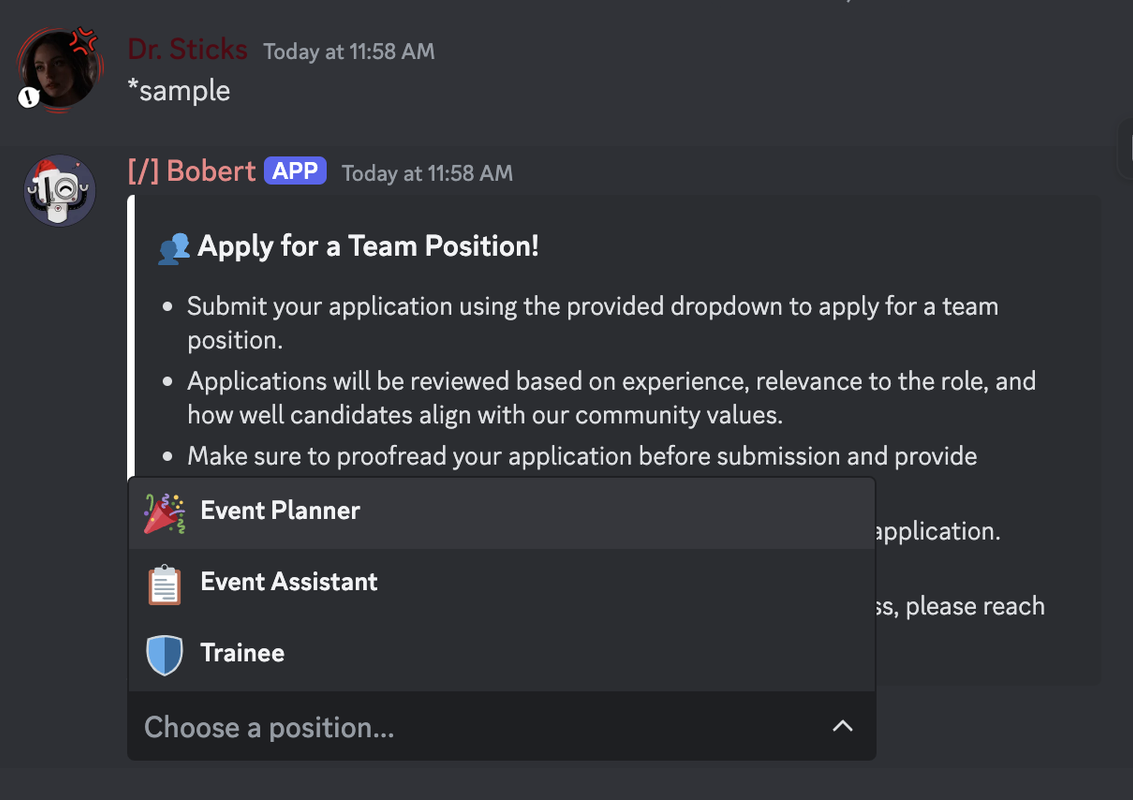
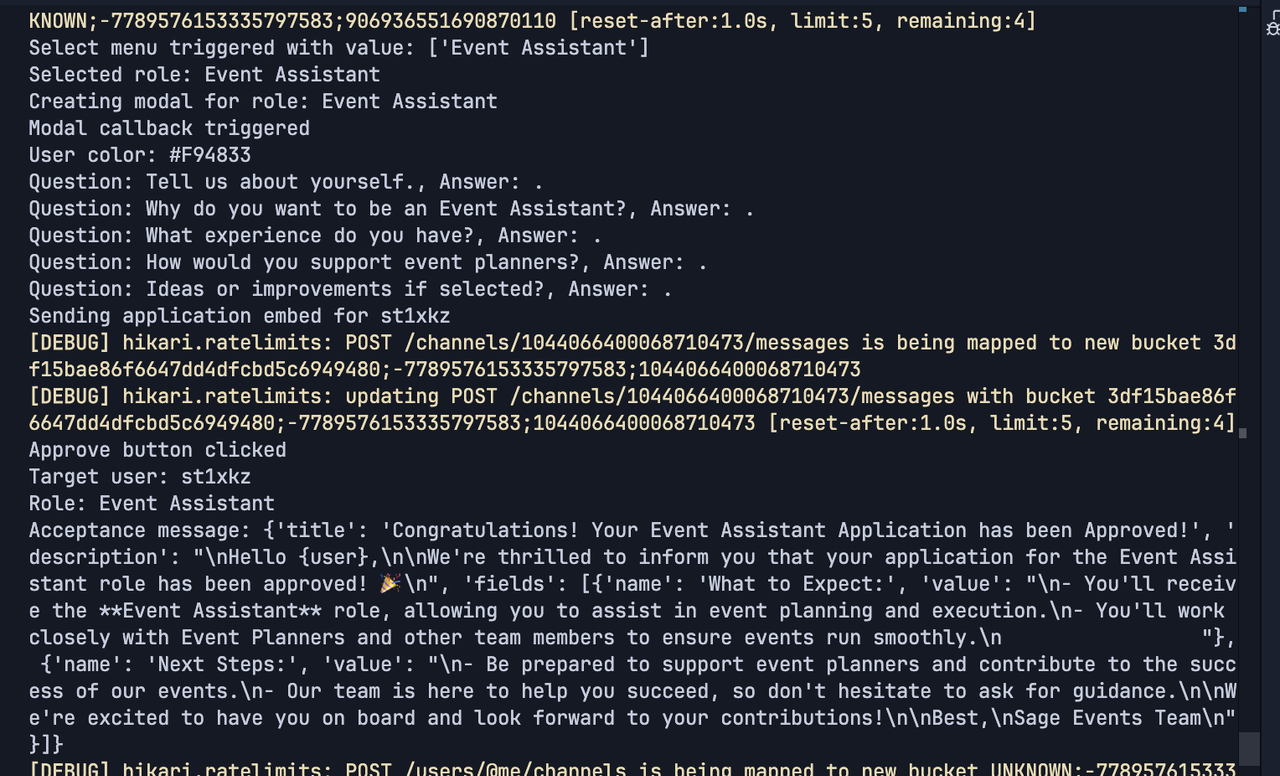 fast osprey
That doesn't really explain what a combo is
fast osprey
I mean that's what split does
sick birch
analog swallow
like maybe if i upload a message file
you want to look for these.. "combos" in the file?
analog swallow
fast osprey
I mean that's what split does
i know but i want to know if there is a way i can do multiple at a time
fast osprey
multiple what?
Do you have an example of the input you want, and the behavior you want?
analog swallow
fast osprey
multiple what?
multile combos
analog swallow
fast osprey
Do you have an example of the input you want, and the behavior you want?
i want to input multiple combos aka example:example123:example@gmail.com into the bot and have it distribute the 2nd word and the email only
fast osprey
What is the input you want users to put in
an example is going to be more helpful because you keep using the word "combo" which doesn't mean anything in this context. Is this like multiple lines of strings in this format? Are they typing these out, putting them in a file, something else?
Also if you don't want the first part of that, why are users putting it in? There may be a way to simplify the input to both make your code cleaner and make this easier for users
hollow night
how would i go about making a slash command that only a specific person can use using discord.py?
blissful crane
Make a normal slash command and slap a custom check on top which returns true if interaction.user.id is ...
hollow night
blissful crane
Make a normal slash command and slap a custom check on top which returns true if...
wdym?
@tree.command(name="admin", description="admin command, guild=discord.Object(id=GuildID))
async def admin(interaction):
  if(interaction.user.id == x):
like that?
blissful crane
hollow night
blissful crane
i am so confused by this
 fleet cloud
who can help me make welcome bot
slate swan
hollow night
i am so confused by this
You can either stay with your "if" check or use decorator that discord.py provides to you
@app_commands.check(foo)
the foo coroutine should return a boolean, if it returns True then the command is executed, otherwise the app_commands.check raises a app_commands.CheckFailure that you can handle in your error handlers
!d discord.app_commands.check
unkempt canyonBOT
@discord.app_commands.check(predicate)```
A decorator that adds a check to an application command.

These checks should be predicates that take in a single parameter taking a [`Interaction`](https://discordpy.readthedocs.io/en/stable/interactions/api.html#discord.Interaction). If the check returns a `False`-like value then during invocation a [`CheckFailure`](https://discordpy.readthedocs.io/en/stable/interactions/api.html#discord.app_commands.CheckFailure) exception is raised and sent to the appropriate error handlers.

These checks can be either a coroutine or not...IMO you shouldn't use a slash command at all. The entire purpose of them is to publish and democratize them, which is the exact opposite of what you want. There's no reason to make a slash command in that case
stark ingot
Another thing you can do is to make a guild command on your test server or a servers you own. Then you can use the integration settings to limit it so that only you can see it.
You should still have a check in your code incase you mess up the permissions though.
 limpid pivot
Looking for some help to make some code a bit more efficient, to prevent my bot from being rate limited
stark ingot
You would have to post your code and what ratlimit you are running into to get help
limpid pivot
stark ingot
You would have to post your code and what ratlimit you are running into to get h...
I've posted the code in #1330227391951409253
@stark ingot
viral heart
I want to add a count down function into my bot for this specific command, could anyone help?
server_info = {
    "name": "A DayZ Walk",
    "password": "...",
    "start_time": "2024-12-13"
}
@bot.tree.command(name="info-dayz", description="Shows DayZ server information.")
async def info_dayz(interaction: discord.Interaction):
    embed = discord.Embed(title="DayZ Server Information", color=discord.Color.green())
    embed.add_field(name="Server Name", value=server_info['name'], inline=False)
    embed.add_field(name="Password", value=server_info['password'], inline=False)
    embed.add_field(name="Start Time", value=server_info['start_time'], inline=False)
    await interaction.response.send_message(embed=embed, ephemeral=True)
seems like you made it. what's the issue?
do you mean this?
<t:1737281969:R>
viral heart
viscid hornet
do you mean this?
> <t:1737281969:R>
Yeah that
viscid hornet
viral heart
Yeah that
3 steps:
- parse the date into a
datetime.datetimeobject with.strptime - wrap it in
<t:[timestamp]:[format]>-Ras the format is for relative time (in 10 minutes, in 8 seconds, 4 hours ago) - send it
viral heart
viscid hornet
3 steps:
1. parse the date into a `datetime.datetime` object with `.strptime`
2...
Yeah ngl that kinda confuses me
viscid hornet
viral heart
Yeah ngl that kinda confuses me
how?
viral heart
I don't know python that well so most of it confuses me
viscid hornet
these are all the formats
