#discord-bots
1 messages · Page 384 of 1
 fair herald
no its for my bot
im trying to make a all in one discord bot
for my server
a
i made it pycord and it say this
C:\Users\luffy\AppData\Local\Programs\Python\Python312\Lib\site-packages\discord\cog.py:796: RuntimeWarning: coroutine 'setup' was never awaited
  setup(self)
RuntimeWarning: Enable tracemalloc to get the object allocation traceback
Loaded cog: test
Logged in as default (1265842230762016798)
------```

but the bot is on
 hushed galleon
async setup is only supported by discord.py 2.0.0 and above, other forks like pycord dont have it
hushed galleon
pip uninstall py-cord, then pip install discord.py
in that exact order since they'll conflict with each other if installed at the same time
fair herald
now ima run python main.py
and see what happens
C:\Users\luffy\Downloads\come\main.py:21: RuntimeWarning: coroutine 'BotBase.load_extension' was never awaited
  bot.load_extension(f'cog.{cog_name}')
RuntimeWarning: Enable tracemalloc to get the object allocation traceback
Loaded cog: test
2024-08-09 01:55:20 INFO     discord.client logging in using static token
2024-08-09 01:55:21 INFO     discord.gateway Shard ID None has connected to Gateway (Session ID: 1536ba4b23cd8fb664b6844d03ea5f1d).
Logged in as default (1265842230762016798)
------
ima try to do the .ping command
C:\Users\luffy\Downloads\come\main.py:21: RuntimeWarning: coroutine 'BotBase.load_extension' was never awaited
  bot.load_extension(f'cog.{cog_name}')
RuntimeWarning: Enable tracemalloc to get the object allocation traceback
Loaded cog: test
2024-08-09 01:55:20 INFO     discord.client logging in using static token
2024-08-09 01:55:21 INFO     discord.gateway Shard ID None has connected to Gateway (Session ID: 1536ba4b23cd8fb664b6844d03ea5f1d).
Logged in as default (1265842230762016798)
------
2024-08-09 01:55:52 ERROR    discord.ext.commands.bot Ignoring exception in command None
discord.ext.commands.errors.CommandNotFound: Command "ping" is not found```your load_extension() call isnt awaited
fair herald
how do i fix that
hushed galleon
you'll need to make an asynchronous setup hook function where you can load your extension
as in: py @bot.event async def setup_hook(): await bot.load_extension("path.to.ext")
fair herald
where do i put that at
im so cooked idk what im doing
alr i think i did it
PS C:\Users\luffy\Downloads\come> python main.py
2024-08-09 02:01:04 INFO     discord.client logging in using static token
2024-08-09 02:01:05 INFO     discord.gateway Shard ID None has connected to Gateway (Session ID: 478e100532ad94c479fb26527375648e).
Logged in as default (1265842230762016798)
------
yeah you put it in the right place
fair herald
the test.py in the cog folder still isnt working
PS C:\Users\luffy\Downloads\come> python main.py
2024-08-09 02:01:04 INFO     discord.client logging in using static token
2024-08-09 02:01:05 INFO     discord.gateway Shard ID None has connected to Gateway (Session ID: 478e100532ad94c479fb26527375648e).
Logged in as default (1265842230762016798)
------
2024-08-09 02:01:53 ERROR    discord.ext.commands.bot Ignoring exception in command None
discord.ext.commands.errors.CommandNotFound: Command "ping" is not found```what do you have in your setup hook now, and what does your cog look like?
 scarlet tiger
fair herald
```py
/cog
  test.py
```
scarlet tiger
fair herald
```py
/cog
test.py
```
How are you adding the cog?
fair herald
scarlet tiger
How are you adding the cog?
 scarlet tiger
fair herald
scarlet tiger
fair herald
Does your cog have a global function like this example?:
async def setup(bot):
    await bot.add_cog(YourCog(bot))
yeah
scarlet tiger
fair herald
yeah
And how are you loading the extension?
fair herald
scarlet tiger
And how are you loading the extension?
async def setup_hook():
    cog_folder = './cog'
    if not os.path.exists(cog_folder):
        print(f"Cog folder '{cog_folder}' does not exist.")
        return

    for filename in os.listdir(cog_folder):
        if filename.endswith('.py') and filename != '__init__.py':
            cog_name = filename[:-3]
            try:
                await bot.load_extension(f'cog.{cog_name}')
                print(f'Loaded cog: {cog_name}')
            except Exception as e:
                print(f'Failed to load cog {cog_name}: {e}')
Does the message that the cog has been loaded appear in the terminal?
It would be great if discord.py had the load_extensions() method that allows to load all cogs directly
fair herald
scarlet tiger
Does the message that the cog has been loaded appear in the terminal?
it say this
PS C:\Users\luffy\Downloads\come> python main.py
2024-08-09 02:23:24 INFO     discord.client logging in using static token
2024-08-09 02:23:25 INFO     discord.gateway Shard ID None has connected to Gateway (Session ID: 0e8ee7096822cff6e873ea0c87618300).
Logged in as default (1265842230762016798)
------
2024-08-09 02:23:44 ERROR    discord.ext.commands.bot Ignoring exception in command None
discord.ext.commands.errors.CommandNotFound: Command "ping" is not found
Hmm, you're probably configuring something wrong, I'm not sure, I'm just going by the examples in the documentation because I don't use discord.py
 finite salmon
fair herald
it say this
```py
PS C:\Users\luffy\Downloads\come> python main.py
2024-08-09 0...
finite salmon
fair herald
it say this
```py
PS C:\Users\luffy\Downloads\come> python main.py
2024-08-09 0...
Can you show your test.py cog
scarlet tiger
fair herald
it say this
```py
PS C:\Users\luffy\Downloads\come> python main.py
2024-08-09 0...
you can follow this example:
fair herald
finite salmon
Can you show your test.py cog
import discord
from discord.ext import commands

class Test(commands.Cog):
    def __init__(self, bot):
        self.bot = bot
        print("Test cog initialized")

    @commands.Cog.listener()
    async def on_ready(self):
        print(f"{self.__class__.__name__} is online!")

    @commands.command()
    async def ping(self, ctx):
        """Sends the bot's latency along with the author's details."""
        latency = round(self.bot.latency * 1000)
        embed = discord.Embed(
            title="Pong!",
            description=f"Latency is {latency}ms",
            color=discord.Color.blue()
        )
        embed.set_footer(text=f"Requested by {ctx.author} | {ctx.author.display_name}", icon_url=ctx.author.avatar_url)
        embed.timestamp = ctx.message.created_at
        await ctx.send(embed=embed)

async def setup(bot):
    await bot.add_cog(Test(bot))
 wraith plank
hello
wraith plank
I need a bit help with something
So i have a error message for prefixs but it won‘t work for slash commands its a error message which says „you dont have the specific role to use this command“
Btw i use disnake
 fast osprey
Slash commands have their own permissioning system that prevents them from even seeing the command if they don't have the needed role
wraith plank
Yes i understand but i want it to say that he dont have permission to use it and not just saying „this application is not responding“
fast osprey
I'm saying if you use the system properly, they can't run the command in the first place
They won't even see it. They can't get an error message if they can't run the command

There’s a brand-new page in Server Settings: Command Permissions! Server admins and moderators can head into the Integrations page to customize which slash commands can be used, in what channels, and by which roles. Read on for more!
 slate swan
trying to do hybrid commands and i was wondering on how to make command parameters "Optional"
fast osprey
You can provide a default value for the parameter, ex = None
slate swan
fast osprey
You can provide a default value for the parameter, ex `= None`
huh?
it doesnt seem to work
@client.hybrid_command(name="stats", description="Echoes a message")
@app_commands.describe(user="Check another persons stats")
async def stats(ctx: commands.Context, user: discord.User = None):
  ## code here
 golden portal
lgtm
slate swan
slate swan
```py
@client.hybrid_command(name="stats", description="Echoes a message")
@app_...
oh lol i forgot to change description
wraith plank

this i what comes when the user haves no perms

it shouldn´t print the bot should sent the message
@fast osprey
slate swan
slate swan
```py
@client.hybrid_command(name="stats", description="Echoes a message")
@app_...
idk how to make it optional
derp :>
fast osprey
You should use the permissioning system I linked you
slate swan
me or?
fast osprey
slate swan
```py
@client.hybrid_command(name="stats", description="Echoes a message")
@app_...
Did you sync after making this change?
slate swan
let me check again
fast osprey
Yeah any changes to the command metadata (like param types) require a sync to be reflected in discord. Plus you may need to refresh your client too
slate swan
fast osprey
Yeah any changes to the command metadata (like param types) require a sync to be...
wdym client
like discord client
or bot client
fast osprey
Yeah the discord client you're looking at and running commands in
Changes to commands aren't reflected in your discord client immediately sometimes
slate swan
fast osprey
Yeah the discord client you're looking at and running commands in
syncing normally takes awhile yea?
slate swan
  File "C:\Users\win10\AppData\Local\Programs\Python\Python310\lib\site-packages\discord\app_commands\commands.py", line 858, in _do_call
    return await self._callback(interaction, **params)  # type: ignore
  File "C:\Users\win10\Pictures\programmingprojects\PY\discordBot\Eternity\main.py", line 710, in stats
    ctx.author.id = user.id
AttributeError: can't set attribute```Lol, tried to make it easy for myself
well to vscode i go
 dry kelp
In this snippet right here, Why the heck is is not editing back? It works for the rest of the above code, as icon, description, name bla bla

 fast osprey
If you don't want someone doing these things, why do they have permission to do it in the first place?
dry kelp
fast osprey
If you don't want someone doing these things, why do they have permission to do ...
?? me ??
dry kelp
fast osprey
If you don't want someone doing these things, why do they have permission to do ...
You're wrong, the purpose of this is another
It's called antinuke, because a lot of people that own /com communities told me to build one
Basically, if the protection is enabled, and there happened a change, act function will run, and we store the data_before and edit at the end
fast osprey
You are looking for something changing and then you change it back.
I'm suggesting you fix these permissions so unwanted changes don't happen in the first place
There are several cases where this approach fails. It is not an effective substitute to protect people
dry kelp
fast osprey
There are several cases where this approach fails. It is not an effective substi...
It can be if used properly, Also the act function contains multiple checks.
 fast osprey
It will have gaps, I guarantee it
dry kelp
 dry kelp
fast osprey
It will have gaps, I guarantee it
dry kelp
fast osprey
It will have gaps, I guarantee it
We fix gaps
fast osprey
If you do not trust your user base to know how to handle permissions, how are you going to trust them to handle permissions properly to keep your bot functional and uncompromosed
dry kelp
Me and my development team said the same
but that's said from a developer perspective
Plenty users using my bot has tested me saying they want a antinuke, even 1 guy got nuked 3 days ago
fast osprey
The solution to people not understanding security isn't to make a bot that handles that for them
It is to hold them accountable for actually learning the systems and being responsible
dry kelp
there are rats infiltrating, being nice a few days, they win trust, but the owner still has a backup plan if they change anything
And the owner on antinuke can make it's own rules
as for punishment, or what protections to be enabled
So if used properly, antinuke can still be a feature to see, But yes, i agree with you, just don't give perms
But as long people keep suggesting this, we have to do this...
fast osprey
If you're interested in knowing the edge cases that people can exploit in these systems I'm happy to detail them. If you've already decided you want to make this and aren't interested in actual safety, I'll politely duck out
dry kelp
I would like to know
fast osprey
Any of these "see change and undo them" approaches are inherently flawed.
a) assuming someone has gotten permissions you don't want them to have, if they have enough they can remove the bot's ability to revert them
b) even then, these operations are heavily rate limited. It is trivial to maliciously lock the bot out of doing this
c) even still they can grant this permission to alts to avoid detection or rate limits themselves
You cannot effectively stop someone from using permissions your own users gave them willingly
dry kelp
But you're not right, if bot has a higher role than the user, and the command can be run just by guild owner, they cannot manage it
fast osprey
See points 2 and 3
dry kelp
as for b, not that even, because we check who the actor was, and stop action
fast osprey
You can't stop actions
dry kelp
How? Act will punish the user, then we replace
so actions stops when the "nuker" is out
fast osprey
See point c
fast osprey

dry kelp
For example if the protection add role is enabled, they will be punished and role removed
fast osprey
Again you can't stop people from doing a thing you gave them permission to do
You are rate limited on that too
dry kelp
I just demostrated you that we can
fast osprey
You can easily get to a spot where your bot is locked out from performing any of these reversions
dry kelp
fast osprey
You are rate limited on that too
Ratelimit can be possible, but not that easy because we punish the malicious user firstly
then append all actions to a list, if it was channels, webhooks or whatsoever
and then we delete everything from the list
fast osprey
I think it's a lot easier than you are assuming given how long people have been doing this
dry kelp
and at the end we delete the list
fast osprey
These systems have existed exactly how you've described for years
And the flaws in them are trivial
dry kelp
I know, i wasn't planning on making this
i had this in 2022
But people still want it, and as a bot owner, i do want my bot to grow even more, and if that's what people want...
How could i say no
And it's a feature that can be turned on/off so not a big deal
fast osprey
People want stupid stuff because they are lazy and don't understand the real problem that they are responsible for their own mistakes and need to learn. You are making this problem worse by misinforming them
dry kelp
There we be a help option, and informing them right, that was in plan already
But i know, I agree with you as i've said, it's just that some people want they're own rules, even for automoderation, even if automod exists
Oh it's the same like
Why having moderation on a bot?
When discord's ui does better
people just use bots instead...
fast osprey
Just because people want something that does not make it good or even ethical to do so
This problem exists precisely because people are misinformed
dry kelp
Yup, but we are not here around with babies, so if they want it, we make it...
dry kelp
fast osprey
This problem exists precisely because people are misinformed
I won't be the one to inform 99% discord's users that automod can be better
neither the 2 of us would be able, it's like us against the world
Nah bro, most people are not childs, they can make they're own actions
fast osprey
Not going to argue the ethics of propagating misinformation, that's on you. There's several reasons why that edit would fail, but I'll leave it to others if they're interested in making this problem worse
dry kelp
fast osprey
Not going to argue the ethics of propagating misinformation, that's on you. Ther...
What are those reasons?
before channel - after channel - replace to before channel
The only ways it can fail is if the before channel got deleted
But that's why you code defensely, if that error happens, you can just do with contextlib and surpress that error duh
 last cobalt
how to check if message_author have role:
 wanton current
role in message.author.roles
last cobalt
in python
slate swan
how to get how many servers the bot has in common with the user / mutual servers
 wanton current
!d discord.User.mutual_guilds
 unkempt canyonBOT
property mutual_guilds```
The guilds that the user shares with the client.

Note

This will only return mutual guilds within the client’s internal cache.

New in version 1\.7\.wat is accent_color referring to
wanton current
 slate swan
:O
slate swan
wanton current
wheres primary then
wanton current
user.color
 vapid parcel
So, whats up with dpy 2.4? Why is it having so many connection issues?
I don't have the exact error right now, but when I get the error again, I will 100% send it, I keep for getting to grab it when I see it.
Maybe its a code error but its something with a timeout error and a shard connect thing. So I think its a dpy/discord error vs a code error?
fast osprey
Very unlikely it's the library itself. 99 times out of 100 it's your code, your network, or discord itself
vapid parcel
fast osprey
Very unlikely it's the library itself. 99 times out of 100 it's your code, your ...
Well, I have been getting a lot of TimeoutErrors, I have never gotten them before. Maybe I need someone to look at my code to see what is causing it?
vapid parcel
Here is the error.. but I think I found the issue, I think my whole host/vps is having network issues...
Soo I am going to just get in contact with them before I even continue here..
slate swan
hm..
ok so im programming a command that can let a user.. use an item
or just "inspect" it
how do i mess with this part
@app_commands.describe(itemIndex="Item Index",itemAmount= "Item amount to use")
async def consume(ctx: commands.Context, itemIndex: int, itemAmount: int = 1):
so that itemIndex and itemAmount become required only if the user will use the item
actually
hmmm. do i even need to do this step?
i guess i should simply just rename it around idk
oh right
slate swan
@client.hybrid_command(name="inspect", description="Inspect or Use a item")
@app_commands.describe(itemIndex="Item Index",itemAmount= "Item amount to use",inspect= "Inspect it or Use it")
async def consume(ctx: commands.Context, itemIndex: int, itemAmount: int = 1, inspect: bool = True):
Traceback (most recent call last):
  File "C:\Users\win10\AppData\Local\Programs\Python\Python310\lib\site-packages\discord\ext\commands\bot.py", line 1366, in invoke
    await ctx.command.invoke(ctx)
  File "C:\Users\win10\AppData\Local\Programs\Python\Python310\lib\site-packages\discord\ext\commands\core.py", line 1029, in invoke
    await injected(*ctx.args, **ctx.kwargs)  # type: ignore
  File "C:\Users\win10\AppData\Local\Programs\Python\Python310\lib\site-packages\discord\ext\commands\core.py", line 244, in wrapped
    raise CommandInvokeError(exc) from exc
discord.ext.commands.errors.CommandInvokeError: Command raised an exception: CommandSyncFailure: Failed to upload commands to Discord (HTTP status 400, error code 50035)
In command 'inspect' defined in function 'consume'
  In parameter 'itemIndex'
    name: Command name is invalid
  In parameter 'itemAmount'
    name: Command name is invalid```

just why?I think it's because Discord doesn't allow capitalization in names, try using snake-case: parameter_name
slate swan
And variables/parameters should be snake case either way, as the python convention wants it
ive been camelCase since day 0
😭
probably the most obvious sign of js trauma
scarlet tiger
slate swan
ive been camelCase since day 0
Python recommends using snake_case when defining variables, functions, or names. But it's not a rule, in your case it's not a Python problem, it's a Discord rule.
slate swan
:p
 mint pecan
guys what's the difference between discord.ext.command and discord.client when creating a bot object?
scarlet tiger
mint pecan
guys what's the difference between `discord.ext.command` and `discord.client` wh...
Client only has events, Bot has support for application commands, and commands.Bot has support for all of the above and prefixed commands.
mint pecan
scarlet tiger
`Client` only has events, `Bot` has support for application commands, and `comma...
so commands.bot is the best right?
scarlet tiger
mint pecan
so commands.bot is the best right?
If you want to have prefixed commands and app commands you can use commands.Bot. If you only want app commands discord.Bot is enough.
mint pecan
scarlet tiger
If you want to have prefixed commands and app commands you can use `commands.Bot...
i also see commands.AutoShardedBot what is that?
scarlet tiger
mint pecan
i also see `commands.AutoShardedBot` what is that?
This is the same thing but is more complex and is designed for bots that manage a large number of guilds. In simple terms, it allows you to "split" the bot into smaller parts to improve performance. But it is not recommended for small bots, so ignore it for now.
slate swan
what can i use to check how many invites a user has in a guild?
slate swan
which event gets dispatched when user joins a vc?
solved
it was on_voice_state_update
 stark ingot
slate swan
what can i use to check how many invites a user has in a guild?
stark ingot
slate swan
what can i use to check how many invites a user has in a guild?
You cant. You have to manually keep track of that. By saving all invite links and there creators to a DB and checking what invite link a user used to join. Also it is against TOS to use this information for any sort of "reward".
stark ingot
slate swan
```py
@client.hybrid_command(name="inspect", description="Inspect or Use a item"...
Just for a better user experience I suggest adding a button that allows the user to consume it after inspecting it. So they do not have to rerun the command. Just a suggestion tho :)
slate swan
alr
slate swan
stark ingot
You cant. You have to manually keep track of that. By saving all invite links an...
???
fast osprey
iirc discord doesn't expose who uses what invite in a reliable or intuitive way at all to bots
hushed galleon
slate swan
ive been camelCase since day 0
you can also use @app_commands.rename() if you want your slash command to show a different naming convention, for example kebab-case: py @commands.hybrid_command() @app_commands.rename(itemIndex="item-index", itemAmount="item-amount") async def consume(ctx, itemIndex: int, itemAmount: int): ... the regex for valid application command/option names is defined here:
https://discord.com/developers/docs/interactions/application-commands#application-command-object-application-command-naming
as for making your parameter optionally required, have you considered separating it into two commands? as in, /inspect <item> and /consume <item> [amount=1]?
i would think that's more intuitive to the user, and you can set a range on amount to prevent them inputting a zero/negative number
https://discordpy.readthedocs.io/en/stable/interactions/api.html#range
 mild token
In a drop down menu is it possible to add icon image?
wanton current
u can add emojis
 severe sonnet
guys
anyone here knows a betterlibrary for math with strings?

i'm having problem with sympy
cus when i try math command with broken number, it don't works
finite salmon
severe sonnet
cus when i try math command with broken number, it don't works

Stack Overflow
stringExp = "2^4"
intVal = int(stringExp) # Expected value: 16
This returns the following error:
Traceback (most recent call last):
File "<stdin>", line 1, in <module>
ValueErr...
Check the top answer
 celest oar
anyone know why even though i selected the application commands thing in the developer portal it dosent show the {/} thing and none of my /commands show up
 wanton current
you need to have a globally synced slash command for that to show up
celest oar
wanton current
you need to have a globally synced slash command for that to show up
how do i do that?
wanton current
 celest oar
ok
slate swan
is there a way to get profile information about a github user without web scrapping?
 celest oar
i got this @wanton current 2024-08-10 20:19:06 WARNING discord.ext.commands.bot Privileged message content intent is missing, commands may not work as expected.
wanton current
!intents
unkempt canyonBOT
Using intents in discord.py
Intents are a feature of Discord that tells the gateway exactly which events to send your bot. Various features of discord.py rely on having particular intents enabled, further detailed in its documentation. Since discord.py v2.0.0, it has become mandatory for developers to explicitly define the values of these intents in their code.
There are standard and privileged intents. To use privileged intents like Presences, Server Members, and Message Content, you have to first enable them in the Discord Developer Portal. In there, go to the Bot page of your application, scroll down to the Privileged Gateway Intents section, and enable the privileged intents that you need. Standard intents can be used without any changes in the developer portal.
Afterwards in your code, you need to set the intents you want to connect with in the bot's constructor using the intents keyword argument, like this:
from discord import Intents
from discord.ext import commands

# Enable all standard intents and message content
# (prefix commands generally require message content)
intents = Intents.default()
intents.message_content = True

bot = commands.Bot(command_prefix="!", intents=intents)
For more info about using intents, see discord.py's related guide, and for general information about them, see the Discord developer documentation on intents.
 twilit thunder
Anyone know how i can get better at Coding discord bots and tools?
 midnight oracle
twilit thunder
Anyone know how i can get better at Coding discord bots and tools?
midnight oracle
twilit thunder
Anyone know how i can get better at Coding discord bots and tools?
Practice
Even small things matter
severe sonnet
finite salmon
https://stackoverflow.com/questions/2371436/evaluating-a-mathematical-expression...
i see, eval is a bad thing from python
midnight oracle
It's even boring the answer but it's true xd
severe sonnet
thought is there a substitute for sympy that don't use eval?
and that is better
i just need something that has similar function as sympify(string)
finite salmon
severe sonnet
thought is there a substitute for sympy that don't use eval?
There's an api you can use to do this actually
There are many complications if you wanna do it locally
Like timeouts and stuff
If you try doing big exponential calculations, your bot will crash (I tried it) you can fix it by wrapping it under a timeout if you know how to do that
severe sonnet
finite salmon
If you try doing big exponential calculations, your bot will crash (I tried it) ...
any big number crash my bot
someone already tried to roll a big dice and it crashed my bot
severe sonnet
finite salmon
There's an api you can use to do this actually
what is the API name?
guess i will need to look through it
finite salmon
finite salmon
There's an api you can use to do this actually
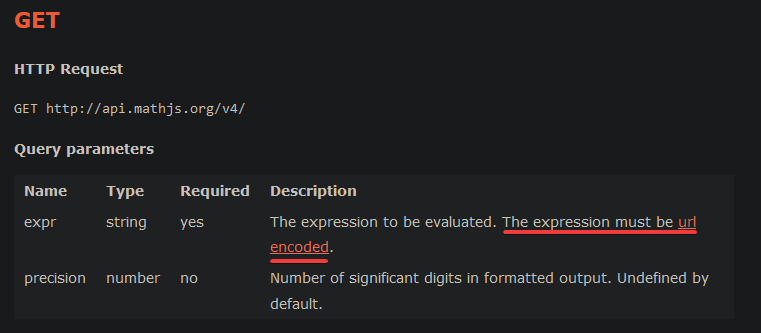
Send a request to this endpoint f"https://api.mathjs.org/v4/?expr={expression}" and the variable expression will hold the expression you want to evaluate in a string
Lemme see if I can find it's docs
I just have it's endpoint saved
It's this
fast osprey
(Usual caveat that if you're sending content/input to a third party you need to make users aware of that)
finite salmon
I don't think it's necessary unless you're sharing any sensitive data
fast osprey
The TOS don't make a distinction about "sensitive"
finite salmon
By sensitive I mean privileged data and in this case you can only send mathematical expression to the api and nothing else so I think it's unnecessary
celest oar
wanton current
!intents
i fixed it
fast osprey
You will not share API Data with any third party, except in the following circumstances, subject to compliance with the Terms and applicable laws and regulations: (i) with a Service Provider; (ii) to the extent required under applicable laws or regulations; and (iii) when a user of your Application expressly directs you to share their API Data with the third party (and you will provide us proof thereof upon request)
There is no distinction of "sensitive" or "privileged". Data coming from discord is api data, and if it is being shared with a third party that falls under controls. At minimum that's informing users of how its being used
fast osprey
Unlikely to be pursued in this case. But there's absolutely no reason to not be transparent with users
severe sonnet
finite salmon
Send a request to this endpoint `f"https://api.mathjs.org/v4/?expr={expression}"...
like this?

what else i need to do besides setting this link string?
wanton current
make an api request
also make sure to url encode it https://i.itswilli.dev/VSurWmuHPw.png
 severe sonnet
finite salmon
There's an api you can use to do this actually
severe sonnet
finite salmon
There's an api you can use to do this actually
how do i create a timeout?
last cobalt
How to use files to register other commands, maybe in commands/moderation.py is moderation commands, in commands/fun.py is fun commands, how to use other files?
fast osprey
Look up extensions in the documentation
slate swan
last cobalt
How to use files to register other commands, maybe in commands/moderation.py is ...

A hands-on guide to Discord.py
fast osprey
Cogs are a way to organize your bot's code into modules. They are a way to keep your code clean and organized, and to prevent your main file from getting too big and messy.
This is somewhat misleading, and personally I would recommend the official documentation on extensions
fast osprey
The section afterwards essentially contradicts this so  . IMO a lot of folks dogmatically suggest having a 1:1 relation between cogs and extensions without really exploring the (important) reasons why you would not want that in every case
slate swan
wanton current
https://docs.github.com/en/rest/users/users?apiVersion=2022-11-28#get-a-user
is there a instagram version of this 🗿
 slate swan
wanton current
but its meta so...
slate swan
wanton current
but its meta so...
OOOOOH THATS THE COMPANY TYYYY
 thin trout
how can i make a button work after the bot reboot?
 sick birch
thin trout
how can i make a button work after the bot reboot?
sick birch
thin trout
how can i make a button work after the bot reboot?
!d discord.ext.commands.Bot.add_view
unkempt canyonBOT
add_view(view, *, message_id=None)```
Registers a [`View`](https://discordpy.readthedocs.io/en/latest/interactions/api.html#discord.ui.View) for persistent listening.
This method should be used for when a view is comprised of components that last longer than the lifecycle of the program.
New in version 2\.0\. vocal laurel
make you have the timeout set to None and have a custom_id for each of the buttons/components
thin trout
vocal laurel
make you have the timeout set to `None` and have a `custom_id` for each of the b...
already set that but it wont work
i have to set a ticket button with a dropdown callback in it
vocal laurel
thin trout
already set that but it wont work
Please send over the code so I can take a look
thin trout
!paste
unkempt canyonBOT
Pasting large amounts of code
If your code is too long to fit in a codeblock in Discord, you can paste your code here:
https://paste.pythondiscord.com/
After pasting your code, save it by clicking the Paste! button in the bottom left, or by pressing CTRL + S. After doing that, you will be navigated to the new paste's page. Copy the URL and post it here so others can see it.
thin trout
vocal laurel
Please send over the code so I can take a look
sorry for the delay, i wasn't looking at discord
i just need something that can recall the view and the button callback on bots reboot
vocal laurel
thin trout
https://paste.pythondiscord.com/BQQA
where is your .add_view
thin trout
it was in the on_ready but i removed it cause it wasn't working
if you can make me an example
vocal laurel
thin trout
it was in the on_ready but i removed it cause it wasn't working
did you subclass commands.bot?
thin trout
i don't even know what you are talking abount
thin trout
nop
vocal laurel
ok and how did you try adding it to the on_ready?
thin trout
saw a tutorial:
on_ready(self)
self.add_view(view)
vocal laurel
thin trout
saw a tutorial:
on_ready(self)
self.add_view(view)
try bot.add_view(view)
since you aren't subclassing commands.Bot, you don't use self
thin trout
vocal laurel
since you aren't subclassing `commands.Bot`, you don't use `self`
    raise TypeError(f'expected an instance of View not {view.__class__.__name__}')
TypeError: expected an instance of View not type```you add ur view
thin trout
i added mine
    def __init__(self) -> None:
        super().__init__(timeout = None)

    @discord.ui.button(label = ":lock: Chiudi il ticket", style = discord.ButtonStyle.red, custom_id = "close")
    async def close(self, interaction, button):
        embed = discord.Embed(title = "Vuoi chiudere questo ticket?", color = discord.Colour.blurple())
await interaction.response.send_message(embed = embed, view = ticketCloseConfirmButton(), ephemeral = True)```show me ur code
how did you add your view
thin trout
@bot.event
async def on_ready():
bot.add_view(ticketCloseButton)
thin trout
still not working
vocal laurel
send code please
thin trout
!paste
unkempt canyonBOT
Pasting large amounts of code
If your code is too long to fit in a codeblock in Discord, you can paste your code here:
https://paste.pythondiscord.com/
After pasting your code, save it by clicking the Paste! button in the bottom left, or by pressing CTRL + S. After doing that, you will be navigated to the new paste's page. Copy the URL and post it here so others can see it.
thin trout
 tribal bison
anyone willing to help me over at https://discord.com/channels/267624335836053506/1272075492509487164
any help is greatly apperciated
 sage shore
Can anyone teach me python for discord bots
vocal laurel
Have you learnt the basics of python?
sage shore
vocal laurel
Have you learnt the basics of python?
I only know how to print lol
vocal laurel
sage shore
I only know how to print lol
You should learn the basics, it will help out a lot otherwise its extremly hard to teach someone how to code a discord bot with python if they have no knowledge of python
 opaque knot
hello, why does it get activated on embeds too?
 sage shore
vocal laurel
You should learn the basics, it will help out a lot otherwise its extremly hard ...
sage shore
vocal laurel
You should learn the basics, it will help out a lot otherwise its extremly hard ...
Can you pls teach me the basics 🫂
vocal laurel
opaque knot
hello, why does it get activated on embeds too?
because the params are before and after, so basically whenever a message is editied, it sends that message, if you want to make sure it isn't replying to an embed, just add an if statement like this
if not message.embeds:
  await message.reply("can't you type properly once??")
oh yeah
thankyou!
vocal laurel
opaque knot
thankyou!
np
 winged cloud
async def on_guild_channel_delete(channel):
    async for entry in channel.guild.audit_logs(action=discord.AuditLogAction.channel_delete, limit=1):
        if isinstance(channel, discord.TextChannel):
                new_channel = await channel.guild.create_text_channel(
                    name=channel.name,
                    category=channel.category,
                    overwrites={**channel.overwrites},
                    position=channel.position,
                    topic=channel.topic,
                    nsfw=channel.nsfw,
                    slowmode_delay=channel.slowmode_delay,
                    reason="Recreating deleted channel",
                )
                print(f"Recreated text channel: {new_channel.name}")

                embed = create_embed("channel_delete_text", entry.user, channel.name, KYC_TC_NUM)
                log_channel = bot.get_channel(1261529749566656643)
                if log_channel is not None:
                    await log_channel.send(embed=embed)

            elif isinstance(channel, discord.VoiceChannel):
                new_channel = await channel.guild.create_voice_channel(
                    name=channel.name,
                    category=channel.category,
                    overwrites=channel.overwrites,
                    position=channel.position,
                    bitrate=channel.bitrate,
                    user_limit=channel.user_limit,
                    reason="Recreating deleted channel",
                )
                print(f"Recreated voice channel: {new_channel.name}")

                embed = create_embed("channel_delete_voice", entry.user, channel.name, KYC_VC_NUM)
                log_channel = bot.get_channel(1261529749566656643)
                if log_channel is not None:
                    await log_channel.send(embed=embed)```

hey guys i have written this code and i have been trying to add a whitelist to this but i couldnti made a whitelist.txt file which i put my and my friend's user id in it
like 1234567890,0987654321
i tried separating reading this file and compare it with the user id but it didnt worked
doesnt matter how much i tried i couldnt get the user id of the person who deleted the channel
any idea how can i get the user id
fast osprey
If you don't want someone deleting a channel, they shouldn't be given the permission to do so in the first place
winged cloud
fast osprey
If you don't want someone deleting a channel, they shouldn't be given the permis...
well thats a little complicated situation i just dont want the bot to block me and my friend thats all
tribal bison
almost done with the skelton of my bot (besides giving it issues/data)
now all i need to finish is in https://discord.com/channels/267624335836053506/1272138383589773383
all help would be greatly appericated as I have no clue how to fix this
fast osprey
winged cloud
well thats a little complicated situation i just dont want the bot to block me a...
Right, but why are you allowing anyone to delete a channel if you've said you don't want them doing it? The right way to prevent this is to not give them permission to do it in the first place, currently you're going to lose all of your messages anyways and it's pretty easy for them to rate limit your bot into not being able to fix things. Also if the bot ever happens to be down or otherwise unresponsive at the moment this happens, you're never going to recreate the channel
The proper way to do this would be to detect if someone gets the permission in the first place when you don't want them having it, though even this falls into the same limitations I described. The only surefire way is just for people to be informed and not give people permissions they don't want them to use
tribal bison
winged cloud
well thats a little complicated situation i just dont want the bot to block me a...
ahh i think i might have the thing for you actually
winged cloud
fast osprey
Right, but why are you allowing anyone to delete a channel if you've said you do...
our server is a public server and we're trying to reach thousands of members so all we wanna do is to guarantee the server's security
tribal bison
AdminUsers = [595553623753097226, 630870828325797929]
# the two ids ontop are you and me obvious reasons get rid of me the second one

@client.command()
async def sync(ctx):
    if ctx.author.id in AdminUsers:
        await ctx.reply("Synced with test server")
@winged cloud
general idea of the segment
id make the number id's into vairables to make it easy to remove a comprmised account
fast osprey
winged cloud
our server is a public server and we're trying to reach thousands of members so ...
Right, and the proper way to do that is to not give people permissions. Why is someone getting permissions you don't want them to have? Your solution as is has plenty of flaws, not the least of which is that you're allowing people to make destructive actions that you can't possibly fix
tribal bison
fast osprey
Right, and the proper way to do that is to not give people permissions. Why is s...
yeah this is a REALLY good point
winged cloud
tribal bison
```py
AdminUsers = [595553623753097226, 630870828325797929]
# the two ids ontop ...
well that wouldnt work i also tried the "ctx.author.id" but it didnt work
tribal bison
just dont give people bot authorzation for that command
tribal bison
winged cloud
well that wouldnt work i also tried the "ctx.author.id" but it didnt work
why doesnt it work?
winged cloud
fast osprey
Right, and the proper way to do that is to not give people permissions. Why is s...
well i will have moderators, right? im living in japan and the members of the server are mostly in sweden i just cant keep my eyes on the server all the time. i cant just control all the moderators and permission one by one so i wanted to make the things easier
fast osprey
You can limit the permissions they have
winged cloud
tribal bison
why doesnt it work?
i just cant add ctx parameter
fast osprey
you can let them moderate without granting them permission to delete channels. It's not an all or nothing thing
You should only give people the minimal set of permissions needed to do their stated job, not more
A good piece of automation would be for checking the permissions and changes to them, not for waiting for someone to abuse the permissions they shouldn't have had in the first place
winged cloud
fast osprey
You can limit the permissions they have
depending on the situation i have to change some permissions of moderator roles temporarily
fast osprey
You temporarily give them permission to delete channels? And you're trusting them to not delete things they shouldn't?
winged cloud
and also i have separated the moderator roles depending on their responsibilities in the server such as chat mod, security mod etc
tribal bison
based off what i am reading this is also not so much as a code issue more so a discord issue
winged cloud
fast osprey
You temporarily give them permission to delete channels? And you're trusting the...
dude i got my own style and thats the way i wanna manage my server
i got stuck in this code for a few days and came here to get some help not to be judged
tribal bison
winged cloud
dude i got my own style and thats the way i wanna manage my server
?
he is not judging (i think) It is more easier to do this in discord than code
fast osprey
You can do this with code, I'm just warning you that people are going to a) abuse this if they're malicious and b) there is a very clean and simple answer that works every time which you are choosing to not do
If you're fine with the fact that this isn't going to actually stop people reliably, then you're more than welcome to go on. The user who performed the action is stored in the AuditLogEntry
winged cloud
thank you
 fast osprey
You need to pass in an Intents object, not a type
 cyan eagle
fast osprey
You need to pass in an Intents object, not a type
cyan eagle
fast osprey
You need to pass in an Intents object, not a type
How to?
fast osprey
What's your code?
cyan eagle
fast osprey
What's your code?
import discord
from discord.ext import commands

intents = discord.Intents.all
bot = commands.Bot(command_prefix="!",  intents=intents)


@bot.event
async def on_ready():
    print('bot is ready.')


@bot.command()
async def ping(ctx):
    await ctx.send('pong!')

bot.run('MTIyNDYwNzUyNQGFXbDF1wYhHQeEAb_vwvaynTiJqNVAvObvR46hEoou7Y')
Token is invalid in this code 👍
 timber dragon
needs some ()
timber dragon
.all() yeah
cyan eagle

'''py
import discord
from discord.ext import commands
intents = discord.Intents.all()
bot = commands.Bot(command_prefix="!", intents=intents)
@bot.event
async def on_ready():
print('bot is ready.')
await bot.tree.sync()
@bot.tree.command()
async def ping(interaction: discord.Interaction):
await Interacton.response.send_message("pong!" , ephemeral=True)
bot.run('MTIyNDDAwNzUyNQwYhHQeEAb_vwvaynTiJqNVAvObvR46hEoou7Y'
'''
fast osprey
That red text is hilariously impossible to read on mobile lol. Can you copy paste it?
Also do not send your token, you need to refresh it
cyan eagle
there is no option to copy
fast osprey
No option to copy...
cyan eagle
fast osprey
No option to copy... <:what:528698986333339663>
yep
vocal laurel
ooh
fast osprey
What even is that
fast osprey
I can't read it at all so . May want to reconsider an environment that you can't get basic text out of
vocal laurel
it says command Ping raised an exception NameError: name Interaction is not defined
vocal laurel
cyan eagle
'''py
import discord
from discord.ext import commands
intents = discord.Intents...
make the I lowercase in the line you are responding with pong
vocal laurel
await interacton.response.send_message("pong!" , ephemeral=True)
 vocal laurel
cyan eagle
vocal laurel
cyan eagle
did you change the line to the one I sent above?
cyan eagle
yes
fast osprey
You're putting discord.interaction somewhere
cyan eagle
send code?
fast osprey
Don't put that text anywhere
vocal laurel
!paste
fast osprey
discord.Interaction is the class. interaction is a local variable
unkempt canyonBOT
Pasting large amounts of code
If your code is too long to fit in a codeblock in Discord, you can paste your code here:
https://paste.pythondiscord.com/
After pasting your code, save it by clicking the Paste! button in the bottom left, or by pressing CTRL + S. After doing that, you will be navigated to the new paste's page. Copy the URL and post it here so others can see it.
cyan eagle
import discord
from discord.ext import commands
intents = discord.Intents.all()
bot = commands.Bot(command_prefix="!", intents=intents)
@bot.event
async def on_ready():
print('bot is ready.')
await bot.tree.sync()
@bot.tree.command()
async def ping(interaction: discord.interaction):
await interacton.response.send_message("pong!" , ephemeral=True)
fast osprey
discord.interaction isn't a thing
cyan eagle
hmm
fast osprey
(Also if you don't remove syncing from your on_ready you will quickly lock yourself out of changes)
vocal laurel
!d discord.Interaction
unkempt canyonBOT
class discord.Interaction```
Represents a Discord interaction.

An interaction happens when a user does an action that needs to be notified. Current examples are slash commands and components.

New in version 2\.0\.thats what you are looking for
cyan eagle
..?
fast osprey
Do you understand the difference between classes and variables?
cyan eagle
i am just following yt tutos
fast osprey
Yeah you shouldn't, they're awful and often flat out lie
Literally zero accountability or quality control
fast osprey
Depends on what you want to learn. If you want to learn python fundamentally, the official python documentation is quite good
fast osprey
And if you want to do that in python, you need to understand python
fast osprey
fast osprey
Do you understand the difference between classes and variables?
If the answer to this is no, I don't think you do
cyan eagle
ik vars
fast osprey
Classes?
fast osprey

Python documentation
Classes provide a means of bundling data and functionality together. Creating a new class creates a new type of object, allowing new instances of that type to be made. Each class instance can have ...
fast osprey
Lots of other good resources out there, just make sure to stick to things that are official and credible
discord.Interaction written exactly refers to a class in the library. You can't change that. However when you make a function and name a parameter interaction, that's whatever you want. You could name that parameter Steve and your code would still work as long as you referred to it as such in that function
 pliant spire
cyan eagle
pliant spire
cyan eagle
?
i am littrly trying to learn basic py here
🫡
tbh i cant even read thast
that*
😭 cant u understand that i am a biggner
idk coding that much
idk
yes
idk py
i am learning
fast osprey
You should not be using time.sleep in any async framework
It's unclear when you want to do this waiting, or really why
Why?
You can put an asyncio.sleep anywhere in your code, but making things take randomly longer doesn't seem like a good idea
!d asyncio.sleep
unkempt canyonBOT
coroutine asyncio.sleep(delay, result=None)```
Block for *delay* seconds.

If *result* is provided, it is returned to the caller when the coroutine completes.

`sleep()` always suspends the current task, allowing other tasks to run.

Setting the delay to 0 provides an optimized path to allow other tasks to run. This can be used by long\-running functions to avoid blocking the event loop for the full duration of the function call.

Example of coroutine displaying the current date every second for 5 seconds:You have to respond to interactions within 3 seconds
You did not
Or you would not be getting that error
You have to respond to an interaction within 3 seconds of that interaction happening. That is dictated by discord and not something you can change
The internet is not instant
You should not wait 3 seconds before you try to respond. Just respond
If you really want to, you can use the defer response as the error suggests to give the user a "bot is thinking" message and then you can artificially wait however long you want after
I saw your code. And I told you the internet isn't instant
I'm perfectly fine
And you suggesting I'm not is pretty condescending
When the user performs an interaction, that goes from discord to your bot over the internet. When your bot responds, this also goes over the internet. These things take time. If you sleep exactly 3 seconds, that time + the 3 seconds will be greater than 3 seconds
scarlet tiger
What is the problem?
wanton current
#discord-bots message
^^^^^^^^^^^^^^^^^
fast osprey
It is 3 seconds timer from when the interaction happens to when discord receives a response. Not 3 seconds inside your bot. The network on either side is nonzero and factored into the limit
scarlet tiger
The error tells you what to do, just use defer()
wanton current
We don't write code for you
scarlet tiger
Read the documentation and look for defer()
mild token
is there a way to add cooldown on button interaction
fast osprey
dpy at least doesn't give this to you out of the box. You'd have to track that inside the view and decide what to do
You could reuse the library's CooldownMapping but it's not documented iirc
mild token
fast osprey
You could reuse the library's CooldownMapping but it's not documented iirc
Can I get a little guidance how to do that
opaque knot
what all is wrong in this?
 fast osprey
What is happening that you don't want to happen?
opaque knot
fast osprey
What is happening that you don't want to happen?
it doesnt send an embed with user's pfp
fast osprey
How are you running this, and what does happen?
opaque knot
fast osprey
How are you running this, and what *does* happen?
not sure what you mean by how am i running it, what does happen is that the bot does not respond
fast osprey
What are you doing physically that makes you think this code would get run?
opaque knot
i send the command? like $avatar
fast osprey
Debugging would go a long way, like seeing if you're getting into this code at all
fast osprey
A simple print statement as the first line of the command for example
mild token
Slash command can accept attachment right?
fast osprey
Yup that's a supported type
mild token
fast osprey
Yup that's a supported type
Ok noice
opaque knot
fast osprey
A simple print statement as the first line of the command for example
didnt even print one

but cog does get loaded and reloaded
wait no i messed up something ig
ok 1 and 2 got printed
fast osprey
This should result in an error in your terminal
opaque knot
fast osprey
This should result in an error in your terminal
no error but this printing method for debuggin is really great, i fixed the code! thanks man
fast osprey
If you're not getting an error then you probably don't have logging enabled, which is something else to look into
 jaunty cape
fast osprey
If you're not getting an error then you probably don't have logging enabled, whi...
jaunty cape
fast osprey
If you're not getting an error then you probably don't have logging enabled, whi...
Or maybe you have an on_error or on_command_error that ignores all but some specific error
I made the same mistake once and got no trace backs
 opaque thistle
yooo could anyone pls dm and/or add me , doing this since I'm making a discord package viewer
wanton current
what does that even mean
opaque thistle
wanton current
what does that even mean
which part?
jaunty cape
All the parts
opaque thistle
well the first requests for u to dm me, the second says I'm making a discord package viewer, package: which contains the files discord sends u If u request
and the viewer implies I am making something that actually lets you view stuff in a human readable format which discord's package isn't at all
opaque knot
fast osprey
If you're not getting an error then you probably don't have logging enabled, whi...
ooo
btw can someone help with this? im trying to import a function from utility.py in root folder while this cog is in cogs folder

using .utility to go one folder back

 exotic hazel
two dots is one folder back
opaque knot
oh thanks
exotic hazel
../
jaunty cape
opaque knot
then how do i go back
Wdym by go back? If you mean the parent directory then it should be ..
opaque knot
jaunty cape
Wdym by go back? If you mean the parent directory then it should be ..
yes sorry
jaunty cape
This is why you should install Linux to know how directories work smh
opaque knot
beyond top level now..
 jaunty cape
opaque knot
beyond top level now..
jaunty cape
opaque knot
beyond top level now..
How are you importing your thing
Can I see the line where you’re importing your thing
Can I see your project directory

 jaunty cape
opaque knot
this?
jaunty cape
opaque knot
this?
Can I see your entire project directory
opaque knot
jaunty cape
You can just import it
lmao that worked, why no dots tho?
jaunty cape
opaque knot
lmao that worked, why no dots tho?
Ig because Python is trying to find where “utility” is from the parent directory
And it found it so it worked
opaque knot
jaunty cape
Ig because Python is trying to find where “utility” is from the parent directory
ohh makes sense
fast osprey
https://docs.python.org/3/reference/import.html#importsystem is a good read
Python documentation
Python code in one module gains access to the code in another module by the process of importing it. The import statement is the most common way of invoking the import machinery, but it is not the ...
opaque knot
fast osprey
https://docs.python.org/3/reference/import.html#importsystem is a good read
oo nice
 gloomy furnace
i just recently started coding like a week ago so i barely understand anything but i told a friend of mine id make a discord bot for us and fear that it would take months for me to be able to make one for what use we want so i used chat-gpt i got pretty far but am stuck can anyone help i dont want to paste the code not sure if it breaks rule 10 but if it doesnt let me know and i will post it also sorry for the wall of text
 hearty basalt
gloomy furnace
i just recently started coding like a week ago so i barely understand anything b...
hearty basalt
gloomy furnace
i just recently started coding like a week ago so i barely understand anything b...
stuck with what?
 dapper cobalt
gloomy furnace
i just recently started coding like a week ago so i barely understand anything b...
dapper cobalt
gloomy furnace
i just recently started coding like a week ago so i barely understand anything b...
If you're "learning" to code you shouldn't use AI tools
gloomy furnace
sorry was a bit vague i have it requesting images from boorus using apis its supposed to be a image bot but the issue is with some of the tags i cant get it to use tags with spaces in them
also keyerror im only using it for this bot im using my free trial in code academy to actually learn right now
dapper cobalt
is the whole code ai-generated?
jaunty cape
gloomy furnace
sorry was a bit vague i have it requesting images from boorus using apis its sup...
Bruh just use quotation marks
dapper cobalt
gloomy furnace
also keyerror im only using it for this bot im using my free trial in code acade...
ig u can share the code if you won't just copy n' paste
dapper cobalt
gloomy furnace
sorry was a bit vague i have it requesting images from boorus using apis its sup...
u can use .split(" ")
gloomy furnace
yea its completly ai generated though
jaunty cape
dapper cobalt
u can use `.split(" ")`
Tags with spaces, it’s one tag
Using .split will make it multiple
dapper cobalt
jaunty cape
Using .split will make it multiple
i think he receives tags as a string and they're separated with spaces, and he wants to split them to return an array
that's what i understood
jaunty cape
The explanation is poor in this case
gloomy furnace
want me to give you the code?
jaunty cape
I’m assuming he’s attempting to use one single tag with a space in it
unkempt canyonBOT
Pasting large amounts of code
If your code is too long to fit in a codeblock in Discord, you can paste your code here:
https://paste.pythondiscord.com/
After pasting your code, save it by clicking the Paste! button in the bottom left, or by pressing CTRL + S. After doing that, you will be navigated to the new paste's page. Copy the URL and post it here so others can see it.
dapper cobalt
delete that
gloomy furnace
i forgot to remove bot key going to change rn
dapper cobalt
u have your token there 💀
also, don't paste your whole code
just where the error is raised
or wtv you're trying to do
jaunty cape
Why do people keep trying to make massive projects that aren’t within their skill level to do without AI smh
dapper cobalt
jaunty cape
Why do people keep trying to make massive projects that aren’t within their skil...
jumping to advanced levels without basics is wrong, but if u have hold of the basics u can try your best and sometimes it hits 
gloomy furnace
k let me try to explain this better the command is "/h gelbooru" then tags then after tags amount of images but if i do a command like this "/h gelbooru facing_viewer" it responds with 0 data no error just not giving any data i think whats happening is it thinks of the _ as a space or something similar
jaunty cape
Is this multiple tags or tags with spaces
dapper cobalt
i believe u mean the *
jaunty cape
I literally have no idea what you’re saying
dapper cobalt
gloomy furnace
k let me try to explain this better the command is "/h gelbooru" then tags then ...
first rookie problem you're doing: you're using message events instead of command handlers
 jaunty cape
Why are you using an on_message instead of an actual command
dapper cobalt
better learn how to use command handlers. Saves ton of time, increase performance, won't make u go through complicated statements, and will be a lot more organized. Will help you with finding where errors are coming from much easier too, as raised errors will let u know which function it's coming from
quick example:
@bot.command()
async def h(ctx, api, tags, limit):
  print(api, tags, limit)
u won't have to do that indexing
gloomy furnace
i think i should just shelf the project for now and go spend some time learning honestly is problably the best thing for me for now
dapper cobalt
or, read the documentations. It has some good examples which u can learn from. And start with something basic, and i mean very basic that u could try starting with a bot that just responds to commands with texts
!docs
unkempt canyonBOT
jaunty cape
gloomy furnace
i think i should just shelf the project for now and go spend some time learning ...
I know what you can do
Solve this problem: - 54 33
No magic numbers or anything
slate swan
meta is confusing and dont wanna do web scrapping to get basic info about a insta user pls help :3
stark ingot
Looks like they have an API
https://developers.facebook.com/docs/instagram-basic-display-api/guides/getting-profiles-and-media

Meta for Developers
slate swan
stark ingot
Looks like they have an API
https://developers.facebook.com/docs/instagram-basic...
brings be to the facebook error page bs
stark ingot
The link does not work for you? Or something else?
slate swan
stark ingot
The link does not work for you? Or something else?

web scrapping is sooo easier but no want
stark ingot
slate swan
web scrapping is sooo easier but no want
It is against TOS, people will not help you with it here, and it can break at any time.
API is much better. Im not sure why the link is not working for you
slate swan
stark ingot
It is against TOS, people will not help you with it here, and it can break at an...
hm will it work for u?
stark ingot
The link works fine for me on Chrome
fast osprey
Try a different browser in incognito
slate swan
i tried safari, chrome, any possible browser on my laptop even
 edgy plinth
anyone know why this wont work?
class createTradeClass(discord.ui.Modal, title="Offer trade"):
   tradeName = ui.TextInput(
        label="Trade name",
        style=discord.TextStyle.short,
        required=True,
        placeholder="Name the trade offer")
   offeringResourceOptions = ui.Select(
        placeholder="Select resource to offer",
        options=[
            discord.SelectOption(label="Manpower",emoji="⚔️",description="offer Manpower in return"),
            discord.SelectOption(label="Gold",emoji="🪙",description="offer Gold in return"),
            discord.SelectOption(label="Iron",emoji="🛠️",description="offer Iron in return"),
            discord.SelectOption(label="Stone",emoji="⛏️",description="offer Stone in return"),
            discord.SelectOption(label="Wood",emoji="🪓",description="offer Wood in return")
            ])
 patent hull
you cant have selects on modals
 keen niche
What are the user-based-application thingies and how do I make em?
jaunty cape
keen niche
What are the user-based-application thingies and how do I make em?
User apps basically lets your bot create commands that can be installed on a user account
keen niche
jaunty cape
User apps basically lets your bot create commands that can be installed on a use...
So, I could create a slash command to use in any server, hypothetically?
keen niche
yk what i mean lol
Ive done some looking and I havnt been able to find any info on how to make them, only making regular ones
jaunty cape
To make a user installable app command you can just use the @app_commands.user_install() decorator
jaunty cape
keen niche
Ive done some looking and I havnt been able to find any info on how to make them...
You’re not looking in the right places
keen niche
Could you link me to one of the right places?
keen niche
tysm
 last narwhal
Can i use a discord webhook anywhere?
jaunty cape
last narwhal
Can i use a discord webhook anywhere?
No idea what you’re talking about
last narwhal
A website called cryptomus is asking for a url_callback where it sends payment confirmation, it says it needs a webhook url, i am using a discord webhook url but it doesnt work.
keen niche
discord webhooks only work with specific functions tmk
last narwhal
payload = {
    "content": "This is a test message from the Cryptomus API webhook.",
}

response = requests.post(discord_webhook_url, json=payload)
this code works
the website says this:
Webhook is a kind of feedback method for payment information.
When invoice status changes, a POST request is sent to the url_callback specified when creating the invoice.
isn't both of em the same thing?
keen niche
found this
Stack Overflow
I am designing an app where I can send notification to my discord channel when something happen with my python code (e.g new user signup on my website). It will be a one way communication as only p...
last narwhal
ill see it
keen niche
jaunty cape
https://about.abstractumbra.dev/discord.py/2024/04/11/user-installable-applicati...
I can't seem to get it to work. It only runs commands on servers the bot is in
I added it to my account on discord dev portal but it just sends a default msg thingy and idk how to change it
jaunty cape
keen niche
I can't seem to get it to work. It only runs commands on servers the bot is in
Sir. Did you sync or install the app to your account in the first place?
jaunty cape
keen niche
I added it to my account on discord dev portal but it just sends a default msg t...
Send a screenshot of how you did that
mild token
Can I make command name like with spaces with application_command.rename decorator? that's for params sorry
jaunty cape
mild token
~~Can I make command name like with spaces with application_command.rename decor...
What
mild token
jaunty cape
What
Want to use space in command name that's it
jaunty cape
mild token
Want to use space in command name that's it
Use a group cog or an app command group
mild token
jaunty cape
Use a group cog or an app command group
Hmm like i have 2 ban command one is ban list and another is ban and i want to give perms of using them through integration to different people if I use group I can do that? As both ban in first word?
jaunty cape
I’m not sure what this means sorry
mild token
I am sorry I didn't get what u didn't understood in above explanation 😅
If u can specify which part u didn't understood I can clear that
jaunty cape
All of it
mild token
Still don't get what u didn't understood I explained it clearly if u read it😅
jaunty cape
Who are you giving perms to? What are you integrating to where? Wdym by ban in first word?
mild token
Different people
jaunty cape
I literally have no idea what you’re trying to do
mild token
And integration is through discord integration
jaunty cape
Can you give me an example
mild token
I just want my commands to have space between its name
One will be
- ban
- ban list
I want to each of them with different roles through discord integration server setting for bots
The problem I have is command name don't accept spaces
jaunty cape
Are you requiring permissions to use the commands?
jaunty cape
Sorry this English is really hard for me to read, and I don’t speak your language
mild token
😅
jaunty cape
Ok if you want a space in your command
You can make a separate Cog
class Ban(app_commands.Group)
And you can define commands as you would normally
Or you can make a variable in your already existing Cog (or main code if you aren’t using cogs) that is equal to app_commands.Group(name=“…”)
mild token
https://discord.com/developers/docs/interactions/application-commands looks like they do allow


Discord Developer Portal
Integrate your service with Discord — whether it's a bot or a game or whatever your wildest imagination can come up with.
I will ask in d.py server how can I use spaces without grouping them
Or if anyone knows here plz ping me
jaunty cape
mild token
I will ask in d.py server how can I use spaces without grouping them
Yeah go do that, I don’t know how to do it
I’ve only used command Groups to do it
mild token
Hmm
jaunty cape
Honestly I wouldn’t even be surprised if you can directly set the name parameter in your decorator to a name with a space @mild token
You can try that if you want to
mild token
jaunty cape
Honestly I wouldn’t even be surprised if you can directly set the name parameter...
Tried it with spaces it errors out , library given error only lowercase character, underscore and numbers are allowed
mild token
jaunty cape
You might have to use a sub command
I will try to seek help in fiddling with internal implementation of lib to figure out something
jaunty cape
No don’t try to do that
mild token
Lol why?
jaunty cape
Unless you understand what all the code does in the library don’t try to change it
mild token
I am asking in d.py server for this very reason only
If they given me some better solution I will definately take that
jaunty cape
You can try to do @ban_command.command(name=“list”)
Assuming your ban function is named ban_command
mild token
OwO ban_function is also a command?
jaunty cape
Uh what
jaunty cape
jaunty cape
You can try to do @ban_command.command(name=“list”)
In this case, list is a sub command of “ban”
So list is actually /ban list
That is also a solution to having a space in your command
mild token
Oh
Looks cool
So this ban_function is the name of the function
The function name of app_command right?
jaunty cape
Yeah it’s the name of the function you used to implement your ban command logic
mild token
This will appear in integration section seperately right?
jaunty cape
What is integration dude
mild token
jaunty cape
What is integration dude
Talking about bot settings from server setting
jaunty cape
Idk what you’re talking about, send a screenshot
mild token
One sec let me switch to pc
@jaunty cape this thing

audit and all are group commands but with cog only parent appears
and this is the integration i am talking about from that time
which u can get from server setting
jaunty cape
mild token
audit and all are group commands but with cog only parent appears
I don’t know if sub commands show up in server settings
mild token
It doesn't audit has 4 sub commands
jaunty cape
I’m gonna tell you to try it and see
jaunty cape
mild token
It doesn't audit has 4 sub commands
Really?
mild token
Yes only parent shows
jaunty cape
Dang
mild token
Audit is parent command it has 4 sub commands
The discord api allows spaces
But library dont,except group commands
That's why I am looking for work around
jaunty cape
mild token
That's why I am looking for work around
This may sound dumb but, you can try your luck by using discord.js instead
Actually can I see your code for audit and the sub commands @mild token
mild token
jaunty cape
Actually can I see your code for audit and the sub commands <@384158530623635456...
https://www.pythondiscord.com/pages/guides/python-guides/app-commands/#an-example-with-a-group-subclass this is what I am doing
Changes and new features in version 2.0 of discord.py
I have the same implementation
jaunty cape
Try using the sub command thing I showed you
mild token
And d.js😅 I have alot of code written in py already
It won't make a difference library parse then exactly the same
Th em*
jaunty cape
Dang.
mild token
Them*
I am blind I missed the last part in the docs where they have mentioned name and message which refers to message and context menu command ,so that's not a limitation of library but discord api itself : ( @jaunty cape
 clear elm
best way to host?
vocal laurel
VPS
clear elm
vocal laurel
VPS
how
vocal laurel
clear elm
how
By paying
clear elm
vocal laurel
By paying
any links u can provide?
vocal laurel
clear elm
any links u can provide?
What region/country you looking for?
clear elm
uh well im in australia, so anything that will work alright
slate swan
No worries
sage shore
Why is my bot replying to every message?
fast osprey
Are you sure it's this code that's doing it? Have you debugged to see if it is?
sage shore
fast osprey
Are you sure it's this code that's doing it? Have you debugged to see if it is?
Yes this is the code because when I remove the emoji reaction part it works properly
fast osprey
But are you debugging? Have you put in print statements? Do you know if those if statements are working as you assume they do?
Removing that one line isn't going to change whether or not that if clause above is being triggered, so something else is happening here
last cobalt
How to make that if I turn off and also turn on the bot, the verification will still work? Currently, after about a minute, the verification stops working. How to fix this?
 fast osprey
If you're using discord.py, in the examples/views folder of the repo there's a persistent.py example
last cobalt
How to make it?
fast osprey
There are examples in that file
 fast osprey

last cobalt
fast osprey
If you're using discord.py, in the examples/views folder of the repo there's a `...
but where i can find it?
bcs idk view = discord.ui.View(timeout=None)
fast osprey
You're looking at it...?
last cobalt
this?
fast osprey
That stops it from timing out
the rest of the file is relevant if you want it to work after a restart
last cobalt
i don't know bro....
fast osprey
About?
last cobalt
fast osprey
About?
how to use it
fast osprey
Which part is confusing
last cobalt
just i don't know what should i do
fast osprey
Well to start, did you read the whole file?
last cobalt
yes but i don't understand it
fast osprey
What in it specifically did you not understand? If you did not understand multiple things, you can list them out or pick one to start with
wanton current
did you sync
celest oar
wanton current
did you sync
uh how do i sync again
it only shows an old command from another code i previously ran on the bot
wanton current
what library are you using
celest oar
wanton current
damn
celest oar
bruh
wanton current
 outer violet
How good is aws for hosting discord bots?
celest oar
nvm @wanton current i just reinvited it and the bot works
wanton current
👍
celest oar
outer violet
How good is aws for hosting discord bots?
idk but i use a host for a discord bot and its only 1$ a month
sparked host
there are some restrictions tho
wanton current
just pay like €4 a month for your own vps and you can do whatever u want on it
any reliable and creditable hosting provider works
outer violet
Yeah but I don’t have money so is how good does aws work for hosting discord bots?
celest oar
outer violet
Yeah but I don’t have money so is how good does aws work for hosting discord bot...
bro 1 dollar a month 💔
u can look on reddit though or just on google about it if nobody is here
wanton current
if u get it for free, aws is good i guess
outer violet
Okay thanks
celest oar
😭 it works


 delicate silo
I have a hybrid command that has multiple dropdowns (one relies on the response of the previous one)
Because it takes a bit for the output to come I use async with ctx.typing(): to let the user know it busy.
I have async with ctx.typing(): a few times in that single command-flow and it works perfectly on the normal command (non-slash, just the prefix) but whenever I use the slash command it fails with ERROR: Unexpected error in search command: This interaction has already been responded to before
But the typing feedback is not really needed when using the slash command, so is there a way I can check what type of command is being used and only show the typing on the non-slash command?
fast osprey
If it's not needed in the slash command, why is it needed in the prefix? By definition that would have to take less than 3 seconds end to end
delicate silo
The slash command shows ... is thinking whenever it's busy
prefix command is just empty
Hmm, it did before I thought, not anymore
fast osprey
Does this process take less than 3 seconds before you respond?
delicate silo
It takes a bunch of data from a database and manipulates it. It takes about 5 to 7 seconds
the query is optimized, but it has a slow connection to the db
fast osprey
Then at minimum the slash invocation has to respond within 3 seconds
You can check context.interaction to see which type of invocation it is, but this leads to pretty ugly and unmanageable code if it substantially forks
delicate silo
example code (I removed some stuff to make it smaller to show here):
async with ctx.typing():
    search_data = await search_db(search_str)
self.logger.info(f"Search completed for '{search_str}', found {len(search_data)} results.")


selector = DropdownSelector1(search_list=search_data)
message = await ctx.send(embed=embed, view=selector)

def check_interaction(interaction: discord.Interaction):
    return interaction.user == ctx.author and interaction.message.id == message.id

try:
    interaction = await self.bot.wait_for("interaction", check=check_interaction, timeout=20)
    selected_value = selector.get_selected_value()

    if selected_value is None:
        await ctx.send("No item was selected.")
        self.logger.warning(f"{ctx.author.name} did not select any item for {search_str}.")
        return
    if "Cancel" in selected_value:
        await message.delete()
        self.logger.info(f"{ctx.author.name} canceled the selection for {search_str}.")
        return

async with ctx.typing():
    individual_data = db_get_id(selected_item["id"])
    self.logger.info(f"Fetched individual data for {selected_item['name']}.")
    list_data = await get_list(individual_data)
    self.logger.info(f"Fetched list for {selected_item['name']}. Found {len(list_data)}.")

selector2 = DropdownSelector2(list_data=list_data)
message = await ctx.send(f"Select for **{selected_item['name']}**!", view=selector2)

def check_interaction(interaction: discord.Interaction):
    return interaction.user == ctx.author and interaction.message.id == message.id

try:
    await self.bot.wait_for("interaction", check=check_interaction, timeout=20)
    selected_value = selector2.get_selected_value()
    self.logger.info(f"Selected value: {selected_value}.")
except asyncio.TimeoutError:
    self.logger.warning(f"{ctx.author.name} exceeded the selection time limit.")
On this code it stops whenever it get to the async with ctx.typing(): just above individual_data = db_get_id(selected_item["id"])
delicate silo
fast osprey
You can check context.interaction to see which type of invocation it is, but thi...
would you happen to have an example?
fast osprey
Of?
The entire point of hybrids (which personally I disagree with but whatever) is to try to get a vaguely consistent experience with minimally divergent code. You shouldn't need to fork
Context.typing issues an interaction response (defer) when it's a slash command invocation
Really you should not need to pop up multiple typing indicators, just do one and then do everything you need to in it
delicate silo
fast osprey
Really you should not need to pop up multiple typing indicators, just do one and...
I tried that but then it only show the typing for the first dropdown, after that it doesn't do it. But when I use multiple then it works
fast osprey
What do you mean by "showing typing for dropdown"? The typing indicator is on the channel
Show typing indicator -> do all the things you need to -> end typing indicator -> command done
delicate silo
Yes I know, but the typing stops midway the command
But nvm, I'll just use ctx.prefix to check if it's from a /
fast osprey
What is stopping it?
fast osprey
You shouldn't be sending a message until you're done with whatever slow process you're doing
delicate silo
after the selection of the first dropdown it stops showing
fast osprey
delicate silo
see my example
fast osprey
What does "selection of first dropdown" mean
delicate silo
async with ctx.typing():
    search_data = await search_db(search_str)
    self.logger.info(f"Search completed for '{search_str}', found {len(search_data)} results.")


    selector = DropdownSelector1(search_list=search_data)
    message = await ctx.send(embed=embed, view=selector)
    # Typing stops and doesn't return
    def check_interaction(interaction: discord.Interaction):
        return interaction.user == ctx.author and interaction.message.id == message.id

    try:
        interaction = await self.bot.wait_for("interaction", check=check_interaction, timeout=20)
        selected_value = selector.get_selected_value()

        if selected_value is None:
            await ctx.send("No item was selected.")
            self.logger.warning(f"{ctx.author.name} did not select any item for {search_str}.")
            return
        if "Cancel" in selected_value:
            await message.delete()
            self.logger.info(f"{ctx.author.name} canceled the selection for {search_str}.")
            return

    individual_data = db_get_id(selected_item["id"])
    self.logger.info(f"Fetched individual data for {selected_item['name']}.")
    list_data = await get_list(individual_data)
    self.logger.info(f"Fetched list for {selected_item['name']}. Found {len(list_data)}.")

    selector2 = DropdownSelector2(list_data=list_data)
    message = await ctx.send(f"Select for **{selected_item['name']}**!", view=selector2)

    def check_interaction(interaction: discord.Interaction):
        return interaction.user == ctx.author and interaction.message.id == message.id

    try:
        await self.bot.wait_for("interaction", check=check_interaction, timeout=20)
        selected_value = selector2.get_selected_value()
        self.logger.info(f"Selected value: {selected_value}.")
    except asyncio.TimeoutError:
        self.logger.warning(f"{ctx.author.name} exceeded the selection time limit.")
You should not ever be using wait_for with interactions
you should be doing whatever you want in the callback of that interaction
delicate silo
I know, but then I get This interaction has already been responded to before everywhere
    async def select_callback(self, interaction: discord.Interaction):
        try:
            self.selected_value = interaction.data["values"]
            await interaction.response.defer()
        except Exception as e:
            print(f"Error during select callback: {e}")
            await interaction.response.send_message("An error occurred while processing your selection.", ephemeral=True)
        finally:
            self.clear_items()  # Clearing items after the response is sent
That won't happen if you locally handle interactions in their specific callback
That isn't how you should be declaring callbacks
you should either a) make a view subclass with @ui.select decorators or b) subclass Select directly. You should not be inlining callbacks and stapling them onto components
delicate silo
it's a copy from my DropdownSelector1 class
fast osprey
That doesn't really address what I said
Those are the two recommended, supported ways of doing selects
delicate silo
Do you have examples? I never find the correct examples online so I just try until it works
fast osprey
The views subfolder of the examples folder in the repo
anything unofficial online is going to tell you random stuff that someone made up
GitHub
An API wrapper for Discord written in Python. Contribute to Rapptz/discord.py development by creating an account on GitHub.
delicate silo
I see, but I still don't see the difference between mine and that example
fast osprey
None of the examples have a method called select_callback which takes in an interaction
They either
a) subclass View and use the @ui.select decorator, which takes in self, interaction, select or
b) subclass Select and implement the callback method
delicate silo
class DropdownSelector1 (discord.ui.View):
    def __init__(self, search_list):
        super().__init__()
        self.search_list = search_list
        self.selected_value = None
        self.create_selects()

    def create_selects(self):
        num_selects = (len(self.search_list) // 25) + 1
        for i in range(num_selects):
            start_index = i * 25
            end_index = (i + 1) * 25
            options = [discord.SelectOption(label=f'{(index + start_index) + 1} - {media["name"]}',  description=f'{data["service"]} - {data["type"]}', value=f'{data["id"]}-{index + start_index}') for index, data in enumerate(self.search_list[start_index:end_index])]
            select = discord.ui.Select(placeholder="Make a selection", min_values=1, max_values=1, options=options)
            select.callback = self.select_callback
            self.add_item(select)

    async def select_callback(self, interaction: discord.Interaction):
        try:
            selected_value = interaction.data["values"][0]
            selected_id, _ = selected_value.rsplit("-", 1)
            self.selected_value = {
                "id": selected_id,
                "name": next(item["name"] for item in self.search_list if item["id"] == selected_id),
            }
            await interaction.response.defer()
        except Exception as e:
            print(f"Error during select callback: {e}")
            await interaction.response.send_message("An error occurred while processing your selection.", ephemeral=True)
        finally:
            self.clear_items()
You're stapling callbacks onto generic Select objects, which is not recommended
That's more semantics, but really this would be better served with a Select subclass that implements callback. Either way, that doesn't address the wait_for('interaction') which is a much more tangible issue
delicate silo
Ok, I'll see if I can change it. It probably will fix the typing issue I hope
fast osprey
Sending a message ends the typing indicator iirc. You should only start sending messages when you're done
If you're sending a message after the user interacts with one view, that should be handled in that view, as it's that view's responsibility. It is not the command's at that point
slate swan
How can I make it so that when I press a button, other buttons appear for me? Using py-cord
Please some example
how to make command groups with hybrid commands
wanton current
same as normal commands
slate swan
wanton current
same as normal commands
@commands.hybrid_command.group? @commands.hybrid_group? 😭
thin trout
how can i create a class like this that callback a dropdown menu?
    def __init__(self) -> None:
        super().__init__(timeout = None)

    @discord.ui.button(label = "Chiudi il ticket", style = discord.ButtonStyle.red, custom_id = "close")
    async def close(self, interaction, button):
        embed = discord.Embed(title = "Vuoi chiudere questo ticket?", color = discord.Colour.blurple())
await interaction.response.send_message(embed = embed, view = ticketCloseConfirmButton(), ephemeral = True)```Not sure what you mean by callback a dropdown menu
You want clicking this button to send a new dropdown?
wanton current
slate swan
@commands.hybrid_command.group? @commands.hybrid_group? 😭
you can search the docs
slate swan
!d discord.ext.commands.hybrid_group
unkempt canyonBOT
@discord.ext.commands.hybrid_group(name=..., *, with_app_command=True, **attrs)```
A decorator that transforms a function into a [`HybridGroup`](https://discordpy.readthedocs.io/en/latest/ext/commands/api.html#discord.ext.commands.HybridGroup).

This is similar to the [`group()`](https://discordpy.readthedocs.io/en/latest/ext/commands/api.html#discord.ext.commands.group) decorator except it creates a hybrid group instead.Ook
thin trout
i have this on the command but after 2 minutes it goes on timeout and stops working.
the button i created in the class will keep work even after the bots reboot.
button = Button(label="✅ Apri un ticket", style=discord.ButtonStyle.blurple)
button.callback = ticketMenuCallBack
view = View(timeout=None)
fast osprey
You should not be stapling callbacks onto generic buttons
thin trout
i don't know how to create the class one with a callback
fast osprey
You should be making a view class like that example
What about that example is unclear?
thin trout
i don't know what i have to put here to get the call back
    def __init__(self) -> None:
        super().__init__(timeout = None)

    @discord.ui.button(label = "Open a ticket", style = discord.ButtonStyle.red, custom_id = "close")
async def close(self, interaction, button):```What do you mean by "get" the callback?
The body of close is what happens when that button is pushed
thin trout
thats another one, i forgot to rename it but how can i use the drop down menu callback in it?
this is the current but it goes timeout after 2 minutes
@commands.has_permissions(administrator=True)
async def ticket(ctx, member: discord.Member = None):
    await ctx.message.delete()

    button = Button(label=":white_check_mark: Apri un ticket", style=discord.ButtonStyle.blurple)
    button.callback = ticketMenuCallBack
    view = View(timeout=None)
    view.add_item(button)
    await ctx.send(view=view, embed=embed)```
i don't know much (almost anything) about pythonAgain, you should not be stapling callbacks to generic buttons
you should make a View class like that example
fast osprey
thin trout
how can i create a class like this that callback a dropdown menu?
```class tick...
You should understand what each line of this is doing, and why
thin trout
fast osprey
you should make a View class like that example
im trying
class ticketMenuView(discord.ui.View):
def init(self) -> None:
super().init(timeout = None)
@discord.ui.Button(label = "Apri un ticket", style = discord.ButtonStyle.blurple, custom_id = "ticket_open")
async def ticket_open(self, interaction, button):
    await interaction.response.ticketMenuCallBack()
ticketMenuCallBack() isn't a method of interaction.response
thin trout
what's the method?
fast osprey
What is the example doing?
thin trout
this one? ticketMenuCallBack
fast osprey
No, how is that example using interaction.response?
thin trout
is this one?
async def ticket_open(self, interaction: discord.Interaction):
    await self.ticketMenuCallBack(interaction)
This is a library object that has a limited set of methods. You can't just call things on it
no
fast osprey
thin trout
how can i create a class like this that callback a dropdown menu?
```class tick...
This one
thin trout
so i have to create the menu in it?
slate swan
How to make user.timeout? Using py-cord
fast osprey
thin trout
so i have to create the menu in it?
I have no idea what you're asking by this
If you are in a button callback, and you want to respond to a click by sending a message, you have to use interaction.response.send_message(...). What you pass inside of that is what goes into the message you send
 young dagger
Is there any way to detect these kinds of messages?

 boreal swan
young dagger
Is there any way to detect these kinds of messages?
boreal swan
young dagger
Is there any way to detect these kinds of messages?
I'm sure there is, some discord mods like Vencord have a feature to completely disable these messages and their built-in plugins are open-source so you can look through it and see how they're able to detect it in the first place. Be aware that this specific plugin you're talking about is written in type-script so you could possibly edit the source of the plugin and write to a file on disk and then have your python script read from that file
fast osprey
!d discord.PublicUserFlags.spammer
unkempt canyonBOT
Returns True if the user is flagged as a spammer by Discord.
New in version 2.0.
young dagger
fast osprey
!d discord.PublicUserFlags.spammer
Thank you
young dagger
fast osprey
!d discord.PublicUserFlags.spammer
Is it a good idea to kick flagged members?
fast osprey
I mean kick whomever you want. I couldn't tell you what criteria discord uses to set that flag
keen niche
Where can I find a complete example of user installed commands, and not just a link to an api reference? smthn like a git bot etc
 flint epoch
hi!
mild token
how i can get the roles of a user in a thread, i mean i want all the user who have certain role and present in particular thread
fast osprey
!d discord.Member.roles
unkempt canyonBOT
property roles```
A [`list`](https://docs.python.org/3/library/stdtypes.html#list) of [`Role`](https://discordpy.readthedocs.io/en/latest/api.html#discord.Role) that the member belongs to. Note that the first element of this list is always the default [‘@everyone](mailto:'%40everyone)’ role.

These roles are sorted by their position in the role hierarchy.Guys is making a self bot any different from making a actual bot?
fast osprey
Yes in that it is against tos from the start
vapid parcel
fast osprey
Very unlikely it's the library itself. 99 times out of 100 it's your code, your ...
Found the issue basically, it was network issues, also sorry for replying so late lol
But we have fixed the issues. Our entire vps was being weird we are supposed to be getting around 300/300 and we were getting 1/0 which is really really really bad, so it was causing the TimeoutError
But thank you for helping!
Just a simple reset and a simple setup which took around 6-7 hours of our time, and everything was running smooth again.
opaque knot
why banner.url not working? (doesnt print 5)
 fast osprey
You should be getting an error
opaque knot
fast osprey
You should be getting an error
...
 fast osprey
User.banner can be none
opaque knot
fast osprey
User.banner can be none
that means someone without banner right, i tried with someone that has but still same
fast osprey
!d discord.Member.banner
unkempt canyonBOT
property banner```
Equivalent to [`User.banner`](https://discordpy.readthedocs.io/en/latest/api.html#discord.User.banner)Read the note on discord.User.banner
opaque knot
ou only available via Client.fetch_user()
fast osprey
yup
jaunty cape
opaque knot
why banner.url not working? (doesnt print 5)
First of all your if statement is wrong
 silent portal
how can I download discord.py 2.5?
wanton current
pip install -U git+https://github.com/rapptz/discord.py
silent portal
 echo wasp
windows mac linux?
echo wasp
windows mac linux?
windwos
and linux so both
one for my local pc and one for my server
echo wasp
silent portal
windwos
well i've scanned their discord and the docs and i haven't seen anything for 2.5
wanton current
wanton current
pip install -U git+https://github.com/rapptz/discord.py
this is 2.5.0a
silent portal
echo wasp
well i've scanned their discord and the docs and i haven't seen anything for 2.5
what is this then
 wanton current
ur on the latest branch of the docs
wanton current
silent portal
early access?
its the version currently in development
mint pecan
i separate all of my commands to a folder (not grouped, just 1 command for each file), does that count as cogs?
slate swan
mint pecan
i separate all of my commands to a folder (not grouped, just 1 command for each ...
seperating the commands is similiar to cogs, but they are not the same.
mint pecan
slate swan
seperating the commands is similiar to cogs, but they are not the same.
is a cog just a group of commands and events?
 glad cradle
silent portal
oh is it like an
glad cradle
silent portal
oh is it like an
if you want the version in the master branch you need to clone the repository locally
you can either use git or pip for this, note that if you use pip you need to have git installed anyway
slate swan
mint pecan
is a cog just a group of commands and events?
Correct, but it is formatted in a class, not separate files
 dire timber
Hi I'm new to Python development for discord bots.
I seem to have run into an issue with getting interactions working for my bot with this issue here when I'm trying to set up buttons under an embed. I have tried looking for tutorials and help on Youtube and other sites but it appears that all the information out there is outdated.

This is my code for the cog that I'm calling a pagination module from
import os
from discord.ext import commands
from discord.ext.commands import BucketType, cog, BadArgument, command, cooldown
from embedconfig import EmbedClass
from pagination import PaginationView

class MemoryList(commands.Cog):
    ...
    @commands.Cog.listener()
    async def on_ready(self):
        print('MemoryList loaded.')

    @commands.command(pass_context=True)
    async def memorylist(self, ctx):

        pagination_view = PaginationView()
        await pagination_view.send(ctx)
        await ctx.respond("This is a button!", view=PaginationView()) # Send a message with our View class that contains the button

async def setup(bot: commands.Bot):
    await bot.add_cog(MemoryList(bot))
and then the actual pagination module
class PaginationView(discord.ui.View):
    ...
    async def send(self, ctx):
        self.message = await ctx.send(view=self)
        await self.update_message(self.data[:self.sep])

    @discord.ui.button(label="Click me!", style=discord.ButtonStyle.primary, emoji="😎") # Create a button with the label "😎 Click me!" with color Blurple
    async def button_callback(self, button, interaction):
        await interaction.followup.send("You clicked the button!") # Send a message when the button is clicked
Is there anything I'm missing from this?
 merry cliff
why does the view send its own message
dire timber
was following a tutorial on YT so I'm clueless about what should/shouldn't be there lol
 slate swan
I have a question in the picture

 livid hare
anyone can fix?
 fast osprey
You have to declare intents when making a client. If you're following an example or tutorial it's very outdated
!intents
unkempt canyonBOT
Using intents in discord.py
Intents are a feature of Discord that tells the gateway exactly which events to send your bot. Various features of discord.py rely on having particular intents enabled, further detailed in its documentation. Since discord.py v2.0.0, it has become mandatory for developers to explicitly define the values of these intents in their code.
There are standard and privileged intents. To use privileged intents like Presences, Server Members, and Message Content, you have to first enable them in the Discord Developer Portal. In there, go to the Bot page of your application, scroll down to the Privileged Gateway Intents section, and enable the privileged intents that you need. Standard intents can be used without any changes in the developer portal.
Afterwards in your code, you need to set the intents you want to connect with in the bot's constructor using the intents keyword argument, like this:
from discord import Intents
from discord.ext import commands

# Enable all standard intents and message content
# (prefix commands generally require message content)
intents = Intents.default()
intents.message_content = True

bot = commands.Bot(command_prefix="!", intents=intents)
For more info about using intents, see discord.py's related guide, and for general information about them, see the Discord developer documentation on intents.
 nova rain
Can i hire a discord coder here?
mild token
is it possible to send modal with followup?
fast osprey
Nope
mild token
fast osprey
Nope
: (
fast osprey
Has to be the primary response
You can defer + followup with a button that then opens the modal
Or just do the slow thing in the modal submit
mild token
can i do like followup and response both in error handler and according to the command it works?
fast osprey
You can check if the interaction was responded to in your handler
mild token
fast osprey
You can check if the interaction was responded to in your handler
how i can check?
unkempt canyonBOT
is_done()```
[`bool`](https://docs.python.org/3/library/functions.html#bool): Indicates whether an interaction response has been done before.

An interaction can only be responded to once.owo cool method
 vapid thicket
I got no errors in terminal and some random person said to add the browser thing to fix it and that didn’t work, can somebody help me without completely spoonfeeding me? https://paste.pythondiscord.com/QQDQ
can u help me?
fast osprey
Not much we can go on without errors
stark ingot
Not sure if this is what is wrong but you should not use requests in your bot as it is blocking. aiohttp is already installed with discord.py so you can use that for a similar experience, just a few modifications to the code.
Is the command just not sending anything?
vapid thicket
stark ingot
Not sure if this is what is wrong but you should not use requests in your bot as...
yes its not sending anything
vapid thicket
fast osprey
Not much we can go on without errors
then wat
fast osprey
You'll need to do some debugging to see what is happening
And/or fix your error handling/logging
You should not be using blanket try/excepts with no exception type, currently you're throwing away any traceback or useful logging
 mellow token
When I created my discord bot I was as minimal as I could be when choosing the perms it requires. Turns out I needed a few more then I thought for the functions it performs and so it gets errors in certain servers that don't have the perms updated. I want it to leave servers so that I can sort of reset the perms for so that there are no issues with that but it doesn't have that perm  is there a way I can do it without having the perm or am I kind of screwed?
fast osprey
It can have perms granted to it without it leaving
mellow token
fast osprey
It can have perms granted to it without it leaving
yeah but I am not in some of those servers and don't know who the owners are, should I just get that with some code?
fast osprey
I mean you can detect it with code yeah. Or just have an error handler when someone asks the bot to do something they haven't given it permission to do
slate swan
is there way to make a bot work in someones dms?
fast osprey
They do by default
 golden robin
what would u guys suggest i do to the embed to make it look more appealing? https://cdn.discordapp.com/attachments/1236064864636633190/1273407986534055958/image.png?ex=66be811a&is=66bd2f9a&hm=fee70b46c2f419fb24e9d91e1d13ad74465d61998b08e99daa65bcf7a468a6bf&
 wanton current
timestamp is pretty useless

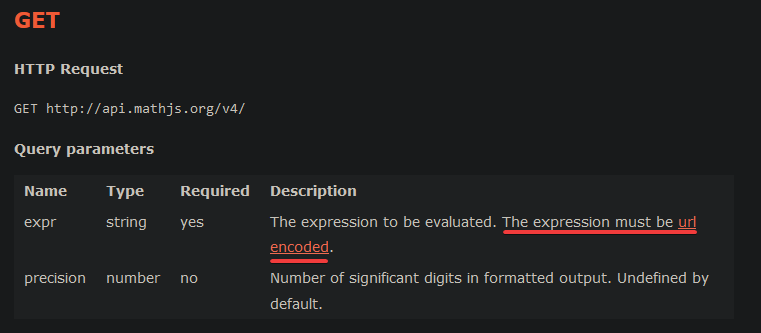

 fast osprey
Like user installed apps?
slate swan
def load_config(file_path):
    with open(file_path, 'r') as file:
        config = json.load(file)
    return config

config_file_path = 'config.json'
config = load_config(config_file_path)``` why can i not load config.json in my python fileWhat makes you think this isn't working?
slate swan
fast osprey
What makes you think this isn't working?
my code is erroring
fast osprey
What's the error?
keen niche
does anyone know of a guide (**not **an api reference) to make user-installed commands?
slate swan
fast osprey
What's the error?
json.decoder.JSONDecodeError: Expecting value: line 1 column 1 (char 0)```Then your file isn't encoded or formatted properly
scarlet tiger
keen niche
does anyone know of a guide (**not **an api reference) to make user-installed co...
It is different for each library
slate swan
slate swan
how to get dis
helllooooooooo
scarlet tiger
slate swan
helllooooooooo
It is with user applications, but it is done differently in each library
scarlet tiger
I don't know how to do those commands in discord.py
fast osprey
!d discord.app_commands.user_install
unkempt canyonBOT
@discord.app_commands.user_install(func=None)```
A decorator that indicates this command should be installed for users.

This is **not** implemented as a [`check()`](https://discordpy.readthedocs.io/en/latest/interactions/api.html#discord.app_commands.check), and is instead verified by Discord server side.

Due to a Discord limitation, this decorator does nothing in subcommands and is ignored.

New in version 2\.4\.

Examples...Here is an example for py-cord
https://github.com/Pycord-Development/pycord/blob/master/examples/app_commands/slash_users.py
Everything else works normally with some things relating to guilds just giving less info than a normal bot.
keen niche
stark ingot
Here is an example for py-cord
<https://github.com/Pycord-Development/pycord/blo...
ty
livid hare
anyone help me vs code says discord is not defined+ i can't pip install discord.py-self
 thin raft
!rule 5