#discord-bots
1 messages · Page 378 of 1
 wheat thunder
 turbid condor
I don't think that's possible not sure but haven't seen such feature in any bots that i used
turbid condor
wheat thunder
In this blog, author say do not sync commands in setup_hook or on_ready,
but. ho...
you can use asyncio.run() but by that he meant use a prefix command to sync your slash commands
wheat thunder
turbid condor
I don't think that's possible not sure but haven't seen such feature in any bots...
ok, I'll try making 2 command with index and without index
turbid condor
wheat thunder
ok, I'll try making 2 command with index and without index
Instead of making it two commands why not make it ask for an id if index is selected?
wheat thunder
turbid condor
you can use asyncio.run() but by that he meant use a prefix command to sync your...
then, I need to use command every time when I run this bot?
wheat thunder
turbid condor
Instead of making it two commands why not make it ask for an id if index is sele...
modal?
turbid condor
wheat thunder
modal?
Sure you can use that
turbid condor
wheat thunder
then, I need to use command every time when I run this bot?
No only need to run it when:
- you add new slash commands
- update the description of any existing command
- change the parameters of any command
wheat thunder
I'm going to use this command while replying to a message that contains an image file.
So, I'll only need to use modal to ask if there are multiple images together
turbid condor
wheat thunder
I'm going to use this command while replying to a message that contains an image...
You can use buttons for that too that would look more user friendly
wheat thunder
Ah, so once registered, the information about the slash command is registered in the guild,
and if you call it the same way, you don't need to modify it even if the logic of the command changes?
turbid condor
wheat thunder
Ah, so once registered, the information about the slash command is registered in...
Yeah as long as parameters are same
The implementation doesn't matter
 stoic tusk
ah alr
 vernal moth
what is the best player to make music discord bot?
 wanton current
wavelink
vernal moth
wanton current
wavelink
im using ffmpeg but its have alot problems
 timber dragon
Use wavelink.
vernal moth
timber dragon
Use wavelink.
i will try to change it ot wavelink tysm
 fast osprey
Unless you're hosting it and it's royalty free, may want to refer to the terms of service
vernal moth
fast osprey
Unless you're hosting it and it's royalty free, may want to refer to the terms o...
im hosting on a rdp
fast osprey
As in where the music is coming from
vernal moth
oh
is there any anthore players than wavelink because idk how to change the player its so hard
 lean juniper
is there an attribute for channel id in message from discord.py? i can only find the channel name in the documentation
 sick birch
message.channel.id
 harsh orbit
can you give me example of how to use channel overwrites in dict?
timber dragon
harsh orbit
can you give me example of how to use channel overwrites in dict?
ovs = {
    some_Member: discord.PermissionsOverwrite(manage_guild=False, send_messages=None, use_external_apps=True)
   sone_Role:  ...,
    ...
}
channel.edit(overwrites=ovs)
True = ✅
None = 
False = ❌
harsh orbit
thank you
 golden portal
lean juniper
are you able to access cogs in other cogs
golden portal
lean juniper
are you able to access cogs in other cogs
just get the instance of the cog
!d discord.ext.commands.Bot.get_cog
 unkempt canyonBOT
get_cog(name, /)```
Gets the cog instance requested.

If the cog is not found, `None` is returned instead.

Changed in version 2.0: `name` parameter is now positional-only.Do you ever create and use your own error classes?
classes CustomException(Exception):
def str(self):
...
def repr(self):
...
I thought I'd make something like this and use repr for logger and str for ctx.send
 scarlet tiger
wheat thunder
Do you ever create and use your own error classes?
classes CustomException(Exce...
scarlet tiger
wheat thunder
Do you ever create and use your own error classes?
classes CustomException(Exce...
use the logging module
wheat thunder
"I wanted the error to include both a message for the logging module and an error message for the user.
How do I post long chords in this discord?
pastebin?
 wheat thunder
I think you use bot.load_extension not using 'await'
 rapid vale
ii tried everything man
wheat thunder
ok
rapid vale
like should i showw code?
wheat thunder
Show it
others can see it and help you
rapid vale
it doesnt lemme paste it'
wheat thunder
too long?
rapid vale
ye
how to use paste bin
so the real problem occured when i tried to seperate the files
like other wise if i leave it in index.py it starts working

its like this
my index.py
 wheat thunder
The only cause I know of is this.
bot.load_extension(extension) is not running as await
I'm not sure of any other causes
scarlet tiger
rapid vale
https://paste.pythondiscord.com/KBTA
Don't use the requests module in a discord bot
wheat thunder
scarlet tiger
Don't use the requests module in a discord bot
Is there a reason? I used a request to save an image from a discord link.
Shouldn't I also use urllib too?
scarlet tiger
wheat thunder
Is there a reason? I used a request to save an image from a discord link.
Shoul...
It is not async, if the request is delayed your bot will be blocked
 twilit grotto
recommend using aiohttp
scarlet tiger
twilit grotto
recommend using aiohttp
yeah
wheat thunder
I hadn't thought of that at all.
I had forgotten about aiohttp for so long.
scarlet tiger
wheat thunder
I hadn't thought of that at all.
I had forgotten about aiohttp for so long.
In a bot that is very small, the blocking is not noticeable. But if your bot has a lot of traffic it will be a problem.
wheat thunder
It's for a private server, but I'd appreciate the advice
rapid vale
scarlet tiger
In a bot that is very small, the blocking is not noticeable. But if your bot has...
ok but how do i fix that error?
rapid vale
scarlet tiger
It is not async, if the request is delayed your bot will be blocked
are you able to fix the code and send me?
rapid vale
scarlet tiger
Don't use the requests module in a discord bot
ok but the error is still there
scarlet tiger
rapid vale
ok but the error is still there
The error you showed has nothing to do with any request. It was just a suggestion
rapid vale
scarlet tiger
The error you showed has nothing to do with any request. It was just a suggestio...
ok so when i run it the command doesnt work then
scarlet tiger
Are you loading the extensions correctly?
wheat thunder
sub commands?
 mild token
i mean one base command and inside that other sub commands
wheat thunder
I tried to do the similar behavior with Choice, but it failed.
mild token
class say(commands.GroupCog):
    def __init__(self, client: commands.Bot):
        self.client = client (client or bot depending on which you use)


    @app_commands.command(name="message")
    async def message()
      .....

    @app_commands.command(name="embed")
    async def embed()
is giving class name lowercase is good practice?
https://www.pythondiscord.com/pages/guides/python-guides/app-commands/#an-example-with-a-group-subclass @wheat thunder i found this
Changes and new features in version 2.0 of discord.py
only issue i see its making the base uwu not getting used
golden portal
mild token
only issue i see its making the base uwu not getting used
because you can't use the group, discord api doesnt support them, also using GroupCog, you should follow PEP 8 for the naming convention, i.e do this instead ```py
class Say(GroupCog, group_name="say"):
...
 upbeat otter
isn't it just name=... or do they both work?
mild token
upbeat otter
isn't it just `name=...` or do they both work?
yeah i did that
golden portal
group_name kwargs affects only your application name not the cog
name kwarg affect both
timber dragon
You don't really to specify the group name separately
The cog's name is lowered etc to fit the requirements and set as group_name
https://github.com/Rapptz/discord.py/blob/master/discord%2Fext%2Fcommands%2Fcog.py#L188
golden portal
i see, it should mention that in the docs
 weak summit
guys, im sorry. did someone know how to host a telegram/discord bot 24/7 for free?
 slate swan
You don't
golden portal
if you have a phone, host em in your phone :3
slate swan
Nah don't do that, it's even worse
 past spire
async def say(ctx):
    message = ctx.messages.content.remove_prefix(bot.command_prefix)
    await ctx.send(f'{message}')```
what am i doing wrong??it is not removing the prefix
slate swan
remove_prefix is not a thing
past spire
what do i do then? 🤔
slate swan
ctx.message.content is of type str and it doesn't have a remove_prefix method on it, can't invent new methods
past spire
ohh
slate swan
Considering your command is say, why not put a parameter and make it !say bla bla bla
past spire
*args?
slate swan
For example yeah
past spire
@bot.command()
async def test(ctx,arg1,arg2):
    res = test(arg1,arg2)
    await ctx.send(res)
``` what am i doing wrong here?
test is in another filei see, it works
wheat thunder
How does everyone implement data storage?
Json? Yaml? or SQLite?
 glad cradle
wheat thunder
How does everyone implement data storage?
Json? Yaml? or SQLite?
glad cradle
wheat thunder
How does everyone implement data storage?
Json? Yaml? or SQLite?
yeah you should use a proper database, like Sqlite, postgresql etc...
but if the data that you are storing is permanent, eg. config file, constants etc.. you can use a json file or whatever thing that you prefer
glad cradle
glad cradle
but if the data that you are storing is permanent, eg. config file, constants et...
i mean data the you are not meant ever to edit during bots lifecycle
wheat thunder
from abc import ABC, abstractmethod


class Model(ABC):
    @classmethod
    @abstractmethod
    def from_dict(cls, dict_: dict) -> "Model": ...

    @abstractmethod
    def to_dict(self) -> dict: ...
I implemented the data to inherit from this Model.
I did this to store it in json, I will look into storing the data in sqlite. Thanks.
wheat thunder
glad cradle
yeah you should use a proper database, like Sqlite, postgresql etc...
If I use db, Do I need to make manager class for database?
 spice seal
Ello is dpy up to date?
wanton current
yes
spice seal
wheat thunder
How does everyone implement data storage?
Json? Yaml? or SQLite?
You can use SQLite3, aiosqlite,MySQL,postgresql(not preferred) but I personally like mongodb and ssqlite 3
spice seal
wanton current
yes
Ohk ty
wanton current
spice seal
You can use SQLite3, aiosqlite,MySQL,postgresql(not preferred) but I personally ...
why is psql not preferred
spice seal
wanton current
why is psql not preferred
It's required to get downloaded on your pc and alot of more stuff err
wanton current
yeah, because it's a server, same as MySQL
wheat thunder
spice seal
You can use SQLite3, aiosqlite,MySQL,postgresql(not preferred) but I personally ...
If I use sqlite3, do I need to use asyncio separately or do I use aiosqlite?
And should I also use sqlalchemy?
spice seal
wheat thunder
If I use sqlite3, do I need to use asyncio separately or do I use aiosqlite?
A...
Asyncio is builtin python module
You don't need to install sqlalchemy
spice seal
wheat thunder
If I use sqlite3, do I need to use asyncio separately or do I use aiosqlite?
A...
Remember aiosqlite and sqlite3 are different libraries though both have same properties and both are RDBMS they are different
@wanton current How much storage does a average SQLite3 database take up?
spice seal
wanton current
yeah, because it's a server, same as MySQL
Yep
I mean for a discord bot
wanton current
spice seal
Remember aiosqlite and sqlite3 are different libraries though both have same pro...
i mean, sqlite is the only database, aiosqlite and sqlite3 are just python interfaces to communicate with the database
spice seal
Maximum how much
spice seal
wanton current
i mean, sqlite is the only database, aiosqlite and sqlite3 are just python inter...
Yeh
wheat thunder
But if I want to manipulate SQLite directly, do I need to use sql?
It's not that I don't know how to use it, but I'm not familiar with
wanton current
spice seal
<@263602820496883712> How much storage does a average SQLite3 database take up?
depends on how much you store but it's really lightweight
past spire
im also working on sqlite 3 right now, just started
spice seal
wheat thunder
But if I want to manipulate SQLite directly, do I need to use sql?
It's not tha...
They are different languages I'm telling you.
SQL is different
past spire
wheat thunder
But if I want to manipulate SQLite directly, do I need to use sql?
It's not tha...
yes, you need to use sql commands and pass it using cursor in and execute the command
spice seal
wanton current
depends on how much you store but it's really lightweight
A dude said it takes like 600mb space
wanton current
it's a database if you have a lot of stuff in it, it will take up a lot of storage
past spire
spice seal
A dude said it takes like 600mb space
are you asking size of the database? or the module?
spice seal
wanton current
it's a *database* if you have a lot of stuff in it, it will take up a lot of sto...
Ik like how much can a economy bot like dank memer take up?
spice seal
past spire
are you asking size of the database? or the module?
Database not module
past spire
database size depends on the data
wheat thunder
I had some experience manipulating sqlite with pydantic and sqlalchemy in fastapi,
so I thought I'd try the same approach.
wanton current
spice seal
Ik like how much can a economy bot like dank memer take up?
i don't know, they probably only store text rows in the database so
past spire
can take 1kb to mbs
wanton current
They have millions of rows so probably not 1kb
past spire
economy bot database? arre you gonna store all transaction information?
wanton current
if we're talking about dank memer
glad cradle
wheat thunder
If I use db, Do I need to make manager class for database?
yes, be sure to use an async db driver to not block your Bot's loop
 finite salmon
postgres 🔛🔝
wanton current
fr
past spire
i have a code that can enter random numbers in the database, can you estimate how many users will be there so i can double them and then send you the size of database?
wanton current
why
finite salmon
why fr
past spire
lmao
spice seal
wanton current
They have millions of rows so probably not 1kb
Let's say 100mb?
spice seal
past spire
i have a code that can enter random numbers in the database, can you estimate ho...
Wdym lol
past spire
you neet to wait cuz im adding 150 million random data in a test.db file to estimate the size lmao
spice seal
past spire
you neet to wait cuz im adding 150 million random data in a test.db file to esti...
Don't! It will crash the internet
past spire
how? it's running locally lol
finite salmon
spice seal
Let's say 100mb?
There are many variables you don't know so itll be hard to average it out
wanton current
also it doesnt matter lol
spice seal
finite salmon
There are many variables you don't know so itll be hard to average it out
Yeh there are 150+ items
wanton current
that's nothing
spice seal
2 balance and bank variables
20 settings
and alot more which my mind can't understand 😭
finite salmon
They probably have wayy over 1 database and I'm very sure they use cloud db so they don't need to worry too much about scaling and they also have a dedicated website which also has their own db
spice seal
finite salmon
They probably have wayy over 1 database and I'm very sure they use cloud db so t...
1db are u dumb? They have more than 200 databases
wanton current
cap
finite salmon
spice seal
1db are u dumb? They have more than 200 databases
I just said that....
And 200 sounds kinda unrealistic tbh
slate swan
200 is unrealistic
past spire
you can add multiple tables in one database 🥲
 opal vortex
ye
past spire
that's overkill lol
opal vortex
I can understand if 1 db so large that it uses over 2/4 GB of RAM alone
and runs into "OOM" issues on Windows because windows limits single objects to 2~4 GB of Memory
then ye split
but 200 dbs no fucking way
slate swan
whoever uses windows for hosting has already problems
past spire
what about android? 👀
opal vortex
slate swan
whoever uses windows for hosting has already problems
bruh people self host on windows
slate swan
past spire
what about android? 👀
Phone hosting is probably one of the funniest joke
slate swan
opal vortex
bruh people self host on windows
yeah but not sane people like dank memer developers (from where the 200 dbs idea came from)
past spire
slate swan
Phone hosting is probably one of the funniest joke
cuz im doing that lmfao
finite salmon
Bro is really desperate
wanton current
opal vortex
I can understand if 1 db so large that it uses over 2/4 GB of RAM alone
why is ur data loaded into ram
opal vortex
wanton current
why is ur data loaded into ram
some people preload their database into memory for faster grabbing of data
wanton current
just use a cache
harsh orbit
class ticket_buttons(ui.View):
    def __init__(self):
        super().__init__(timeout=None)

    @ui.button(label="الدعم الفني", style=discord.ButtonStyle.blurple, custom_id="st")
    async def support_ticket_button(self, interaction : discord.Interaction, button : ui.Button):
        pass

    @ui.button(label="شراء عملات", style=discord.ButtonStyle.green, custom_id="nct")
    async def buy_coins_moal(self, interaction : discord.Interaction, button : ui.Button):
        if blacklisted(interaction.user.id):
            return await interaction.response.send_message("انت محظور من خدمات البوت", ephemeral=True)
        await interaction.response.send_modal(coins_modal())


# This class for chose coins modal
class coins_modal(ui.Modal, title="Chose Coins Amount"):
    amount = ui.TextInput(label="عدد العملات", placeholder="مثال: 5000")
    async def on_submit(self, interaction: Interaction):
        if blacklisted(interaction.user.id):
            return await interaction.response.send_message("انت محظور من خدمات البوت")
        async def create_ticket():
            coins_category_name = "buy coins"
            category = discord.utils.get(interaction.guild.categories, name=coins_category_name)
            if category is None:
                category = await interaction.guild.create_category(name=coins_category_name)
            overwrites = {
                interaction.guild.default_role: discord.PermissionOverwrite(view_channel=False),
                interaction.user: discord.PermissionOverwrite(view_channel=True, send_messages=True)
            }
            await interaction.guild.create_text_channel("ticket", overwrites=overwrites, category=category)
        await interaction.response.send_message("جاري صنع تكت شراء العملات ....")
        await create_ticket()
why when I click the green button an error says discord.errors.NotFound: 404 Not Found (error code: 10062): Unknown interaction
mild token
is there a way to force user to give some parameter upon the selection from autocomplete
suppose command have a,b and c parameter
- a is autocomplete command which has d,e
i want if d is selected then user should give b forcefully and if e is selected then user should give c
is there any way to do it?
turbid condor
harsh orbit
```py
class ticket_buttons(ui.View):
def __init__(self):
super().__i...
Defer the interaction and then send your original response as a follow up
harsh orbit
turbid condor
Defer the interaction and then send your original response as a follow up
explain please
turbid condor
Come to your forum
turbid condor
mild token
is there a way to force user to give some parameter upon the selection from auto...
I don't think that's possible yet haven't seen it any bot or heard anyone achieving it
harsh orbit
turbid condor
Come to your forum
how to send modal after defer?
turbid condor
harsh orbit
how to send modal after defer?
That's the issue you can't do that as far as i know
Either send a follow-up with another button to trigger the modal or check for the blacklisted in your modal call back instead of button
mild token
async def list(self, interaction: discord.Interaction, type: str, search_for: Union[discord.Member, str]) -> None:
    raise TypeError(f'unsupported types given inside {annotation!r}')
TypeError: unsupported types given inside typing.Union[discord.member.Member, str]
why this?
its clearly discord.Member dont know why this is discord.member.Member
wanton current
mild token
```py
async def list(self, interaction: discord.Interaction, type: str, sear...
because you can't have both discord.Member and string
Discord only allows one at a time
discord.member.Member is the location of the class discord/member.py
mild token
wanton current
`discord.member.Member` is the location of the class `discord/member.py`
i wanted to check is the input is str or Member
harsh orbit
@bot.command(aliases=['blacklist'])
async def blacklists(ctx, type=None, user_id=None, reason="No Reason Provided"):
    if ctx.guild.id not in allowed_servers: return
    if ctx.author.id not in owners: return
    msg = await ctx.reply("جاري التحقق")
    if type is None:
        return await msg.edit(content="يرجى تحديد النوع (server, user)")
    elif str(type) != "server" and str(type) != "user":
        return await msg.edit(content="يرجى تحديد النوع (server, user)")
    if user_id is None:
        return await msg.edit(content="يرجى إدراج ايدي المستخدم")
    elif str(user_id).isdigit() is False:
        return await msg.edit(content="يرجى إدراج ايدي المستخدم")
    elif len(str(user_id)) < 12:
        return await msg.edit(content="يرجى إدراح الايدي الخاص بالمستخدم بشكل صحيح")
    user_id = int(user_id)
    blacklist = blacklist_collection.find()
    if user_id in [user['id'] for user in blacklist]: return await msg.edit(content="الايدي المدخل محظور مسبقا من خدمات البوت")
    try:
        blacklist_collection.insert_one({
            "id": user_id,
            "type": str(type),
            "reason": str(reason),
            "by": f"{ctx.author.name}, {ctx.author.id}",
            "date added": datetime.now()
        })
        return await msg.edit(content="تم حظر الأيدي من خدمات البوت بنجاح")
    except Exception as e:
        return await msg.edit(content=e)
I have this command to put someone in a blacklist by his id
How I can make it work with Id or mention?
wanton current
mild token
i wanted to check is the input is str or Member
you can't do what you're currently doing with slash commands
harsh orbit
ex:
!blacklist (id or mention)
wanton current
typehint discord.Member
harsh orbit
wanton current
typehint discord.Member
like this the Id won't work
slate swan
it will
harsh orbit
can you give example pls?
wanton current
 slate swan
Type hinting to discord.Member will make the following checks, in order:
- Lookup by ID.
- Lookup by mention.
- Lookup by username#discriminator (deprecated).
- Lookup by username#0 (deprecated, only gets users that migrated from their discriminator).
- Lookup by user name.
- Lookup by global name.
- Lookup by guild nickname
Just do user_id: discord.Member then it will always be a member object, if found/existing
by checking with the order shown above
harsh orbit
how to check if the member not found
wanton current
BadArgument error is raised
mild token
slate swan
Type hinting to `discord.Member` will make the following checks, in order:
* Lo...
is it possible to type cast in discord.Member ?
slate swan
Why do you need to type cast if you already type hint and use the converter, it will already be a discord.Member object if it's valid, otherwise throw an error
mild token
slate swan
Why do you need to type cast if you already type hint and use the converter, it ...
i am trying to use Union but its not working
Union[discord.Member, str]
slate swan
Well it'll be in the order of the union, so first it'll try A then B - then you can check, no need to type cast
And if str is there for a member username or something like thay, then you don't need a union. Just type hint to discord.Menber and problem solved
mild token
slate swan
And if `str` is there for a member username or something like thay, then you don...
its giving error
mild token
mild token
its clearly discord.Member dont know why this is discord.member.Member
@slate swan check this
i mean the message just above
slate swan
Will need more code (e.g. decorator) and the full error to properly help
mild token
slate swan
Will need more code (e.g. decorator) and the full error to properly help
bro its erroring out in param line
slate swan
No need to mention me if you're not providing what I personally need to help you
Best of luck on getting the help you need 
mild token
slate swan
No need to mention me if you're not providing what I personally need to help you...
alright
 lunar jay
Hey all,
I couldn't a find a topic abt telegram bots so i thought its fine if i drop my q here. right?
 quick gust
No
slate swan
lunar jay
Hey all,
I couldn't a find a topic abt telegram bots so i thought its fine if i...
You can go for #1035199133436354600
This channel is for discord bots exclusively
 limber jolt
'from discord import automod' How do I use this?
limber jolt
slate swan
At least on d.py - maybe some random fork has this
I use discord.py
It says Its correct
slate swan
Yeah then it doesn't exist
slate swan
I am trying to code a bot for my shop, you are suppost to type /swish, /paypal, /ltc or /restart and the bot should answer as normal. But Insted i get ”Application didnt answer”. Could someone help me make the bot work i have tried What i can
scarlet tiger
slate swan
I am trying to code a bot for my shop, you are suppost to type /swish, /paypal, ...
Do you have any errors in the terminal?
slate swan
scarlet tiger
Do you have any errors in the terminal?
Error code 10062, unknown interaction
scarlet tiger
slate swan
Error code 10062, unknown interaction
the complete traceback
scarlet tiger
ok
 willow sluice
slate swan
Can i send you the code in dms
willow sluice
slate swan
Can i send you the code in dms
Have you solved your problem? I can help
 wicked charm
french helpers ?
limber jolt
I need some help!!
I have a flask server and a discord bot
But only the flask server runs
 quasi nexus
i need help it keeps saying then when i try to give it certain permissions and run it
on discord

for the discord i mean
but i don't exactly know which privileged intents i need to enable
 merry cliff
probably server members intent
quasi nexus
merry cliff
probably server members intent
yes, it says something like the members intents thingie how do i fix it?
merry cliff
quasi nexus
yes, it says something like the members intents thingie how do i fix it?
enable it on the dev portal and request it in your code
intents = discord.Intents.default()
intents.members = True```enable which exact permission and where exactly do i put the code
i found where i put the code
but i still need the permission
merry cliff
quasi nexus
enable which exact permission and where exactly do i put the code
intents = discord.Intents.default()
intents.members = True
intents.message_content = True

bot = commands.Bot(intents=intents, command_prefix='!', case_insensitive=True,
activity=discord.Activity(name=STATUS, type=discord.ActivityType.listening))``` just above where bot is definedso the prefix can be changed?
merry cliff
message content for texrt commands and the like
 quasi nexus
Alr so this is good.
 merry cliff
turn that on in dev portal
quasi nexus
merry cliff
alr
merry cliff
quasi nexus
Alr so this is good.
change your status
quasi nexus
merry cliff
change your status
so change it to...
merry cliff
anything
quasi nexus
man im a fricken new user idek
merry cliff
STATUS is a placeholder
quasi nexus
alright so change it to like true or smth?
quasi nexus
so ONLINE would be a STATUS?
merry cliff
no
quasi nexus
merry cliff
Sorry, WHERe in dev portal?
quasi nexus
merry cliff
no
so status is a placeholder so should i put it as Playing ...
or like what shoul i put it as
merry cliff

A hands-on guide to Discord.py
merry cliff
quasi nexus
or like what shoul i put it as
literally any string
merry cliff
quasi nexus
Sorry, WHERe in dev portal?
bot > priveleged gateway intents
quasi nexus
merry cliff
literally any string
can u give me an example of what a string would be in this case
quasi nexus
merry cliff
literally any string
so i could put it as discord?
Also can someone help me
Traceback (most recent call last):
File "/home/runner/Python/main.py", line 14, in <module>
@client.event
AttributeError: module 'discord.client' has no attribute 'event'
**I know im annoying im a new user using AI 💀 **
merry cliff
activity=discord.Activity(name="with your mind") would result in Playing with your mind
quasi nexus
merry cliff
`activity=discord.Activity(name="with your mind")` would result in Playing with ...
alright got it.
anything
merry cliff
quasi nexus
Also can someone help me
Traceback (most recent call last):
File "/home/runn...
pls dont use AI if ur new since u will never learn if AI oes everything for you
merry cliff
quasi nexus
Also can someone help me
Traceback (most recent call last):
File "/home/runn...
!paste your full code
unkempt canyonBOT
Pasting large amounts of code
If your code is too long to fit in a codeblock in Discord, you can paste your code here:
https://paste.pythondiscord.com/
After pasting your code, save it by clicking the Paste! button in the bottom left, or by pressing CTRL + S. After doing that, you will be navigated to the new paste's page. Copy the URL and post it here so others can see it.
quasi nexus
merry cliff
pls dont use AI if ur new since u will never learn if AI oes everything for you
yeah got it
quasi nexus
quasi nexus
https://paste.pythondiscord.com/LHBA
@merry cliff (mb for ping)
merry cliff
quasi nexus
<@650923352097292299> (mb for ping)
remove from discord import client
ant chjange all @client to @bot
quasi nexus
alr
quasi nexus
merry cliff
remove `from discord import client`
Holy this is crazy i get syntax errors every 5 seconds.
Thanks for your help!
quasi nexus
merry cliff
remove `from discord import client`
yo so uh why does it say that my message thingie is disabled even tho its enabled. the message content one.
 merry cliff
quasi nexus
yo so uh why does it say that my message thingie is disabled even tho its enable...
merry cliff
quasi nexus
yo so uh why does it say that my message thingie is disabled even tho its enable...
needs to enabled in the portal as well as the code
quasi nexus
merry cliff
needs to enabled in the portal as well as the code
its enabled in the portal so how do i enable it in the code?
i get i gotta type like Privileged message = true or some shi but like idk
merry cliff
intents.message_content = True shoyld just be that line
merry cliff
quasi nexus
its enabled in the portal so how do i enable it in the code?
did you save after enabling it
quasi nexus
merry cliff
did you save after enabling it
yes
merry cliff
bruh what is ctx.respond
quick gust
where did you copy this code from?
merry cliff
quick gust
where did you copy this code from?
it's AI generated
quasi nexus
merry cliff
bruh what is `ctx.respond`
i changed all of it to make it chill ig?
merry cliff
???????????
quasi nexus
I believe i have the updated code
`import os
import discord
from discord.ext import commands
intents = discord.Intents.default()
intents.members = True
intents.messages = True
bot = commands.Bot(intents=intents, command_prefix='/', case_insensitive=True,
activity=discord.Activity(name="with your mind", type=discord.ActivityType.listening))
@bot.event
async def on_ready():
print(f'We have logged in as {bot.user}')
@bot.command()
async def hello(ctx):
await ctx.send("Hello!")
@bot.command()
async def my_commands(ctx):
await ctx.send("Available commands:\n/hello - Says hello\n/my_commands - Shows this help message")
@bot.command()
async def giverole(ctx, role_name: str):
guild = ctx.guild
role = discord.utils.get(guild.roles, name=role_name)
if role is None:
    await ctx.send(f"Role '{role_name}' not found.")
    return

member = ctx.author
await member.add_roles(role)
await ctx.send(f"Role '{role_name}' added to {member.mention}")
bot.run(os.getenv('MYTOKENTEST'))
`
quick gust
quasi nexus
I believe i have the updated code
`import os
import discord
from discord.ext i...
And is it working?
quick gust
merry cliff
it's AI generated

quasi nexus
quick gust
And is it working?
Yes, but like its not sending the message and it says the insights for messages aint workin
2024-07-08 08:11:21 WARNING discord.ext.commands.bot Privileged message content intent is missing, commands may not work as expected.
merry cliff
double check that it is enabled on the dev portal
quasi nexus
merry cliff
double check that it is enabled on the dev portal
it is i turned it off and back on too saving it after every change
 quasi nexus
merry cliff
did you restart the bot after making these changes?
quasi nexus
merry cliff
did you restart the bot after making these changes?
uh
uhhhhhhhhhhhhhhhhhh
how do i do that
it is for the right bot, how do i restart the bot
quick gust
close the terminal and run the python file again...
quasi nexus
quick gust
close the terminal and run the python file again...
ok
its still saying the SAME thing
quick gust
can u show where ure enabling them in the code?
merry cliff
!paste your full current code
unkempt canyonBOT
Pasting large amounts of code
If your code is too long to fit in a codeblock in Discord, you can paste your code here:
https://paste.pythondiscord.com/
After pasting your code, save it by clicking the Paste! button in the bottom left, or by pressing CTRL + S. After doing that, you will be navigated to the new paste's page. Copy the URL and post it here so others can see it.
quick gust
pretty sure ure doing intent.message instead of intent.message_content
quick gust
quasi nexus
I believe i have the updated code
`import os
import discord
from discord.ext i...
according to this code
quasi nexus
quick gust
pretty sure ure doing intent.message instead of intent.message_content
so change it to that?
quick gust
Yeah, that's literally what @merry cliff told u
merry cliff
quasi nexus
so change it to that?
bruh I literally gave you the correct intent before smh
quasi nexus
merry cliff
bruh I literally gave you the correct intent before smh
bro idek
quasi nexus
merry cliff
bruh I literally gave you the correct intent before smh
mf ur the hero in this story
mild token
how can i check if interaction user is client owner?
golden portal
!d discord.ext.commands.Bot.is_owner
unkempt canyonBOT
await is_owner(user, /)```
This function is a [*coroutine*](https://docs.python.org/3/library/asyncio-task.html#coroutine).

Checks if a [`User`](https://discordpy.readthedocs.io/en/latest/api.html#discord.User) or [`Member`](https://discordpy.readthedocs.io/en/latest/api.html#discord.Member) is the owner of this bot.

If an [`owner_id`](https://discordpy.readthedocs.io/en/latest/ext/commands/api.html#discord.ext.commands.Bot.owner_id) is not set, it is fetched automatically through the use of [`application_info()`](https://discordpy.readthedocs.io/en/latest/ext/commands/api.html#discord.ext.commands.Bot.application_info).

Changed in version 1.3: The function also checks if the application is team-owned if [`owner_ids`](https://discordpy.readthedocs.io/en/latest/ext/commands/api.html#discord.ext.commands.Bot.owner_ids) is not set.

Changed in version 2.0: `user` parameter is now positional-only.

Changed in version 2.4: This function now respects the team member roles if the bot is team-owned. In order to be considered an owner, they must be either an admin or a developer.it should fetch automatically if i didnt mentioned the user : ( i understood it
 dense falcon
How can I hide slash commands from users without certain permissions?
mild token
            interaction.client.add_view(
                StaffApplication(), message_id=MessageIds.STAFF_APPLICATION_MESSAGE_ID)
            interaction.client.add_view(
                ClanApplication(), message_id=MessageIds.CLAN_APPLICATION_MESSAGE_ID)
            await interaction.response.send_message('Done')
why this view not getting added on a msg id?
scarlet tiger
mild token
```py
interaction.client.add_view(
StaffApplication(...
you are not editing the message with the new view
mild token
scarlet tiger
you are not editing the message with the new view
ok
is it possible to know the current channel thread or not
golden portal
dense falcon
How can I hide slash commands from users without certain permissions?
!d discord.app_commands.default_permissions
unkempt canyonBOT
@discord.app_commands.default_permissions(**perms)```
A decorator that sets the default permissions needed to execute this command.

When this decorator is used, by default users must have these permissions to execute the command. However, an administrator can change the permissions needed to execute this command using the official client. Therefore, this only serves as a hint.

Setting an empty permissions field, including via calling this with no arguments, will disallow anyone except server administrators from using the command in a guild.

This is sent to Discord server side, and is not a [`check()`](https://discordpy.readthedocs.io/en/latest/interactions/api.html#discord.app_commands.check). Therefore, error handlers are not called.

Due to a Discord limitation, this decorator does nothing in subcommands and is ignored.alr great thanks
wheat thunder
For questions about examples of using sqlalchemy asynchronously,
perhaps the database chat room would be better than here?
limber jolt
I need some help!!
I have a flask server and a discord bot
But only the flask server runs
 swift acorn
Is it possible with discord.py to get this join method for a member, I couldn't find it in the docs
 slate swan
no
finite salmon
swift acorn
Is it possible with discord.py to get this join method for a member, I couldn't ...
What's that
swift acorn
You can see it in the members tab on Discord, it's the invite link they used to join a server
finite salmon
swift acorn
You can see it in the members tab on Discord, it's the invite link they used to ...
You trying to make some sort of invite tracker?
swift acorn
yea, I'm aware of the other method of checking the # of joins from an invite and updating on_member_join but it's not very reliable also doesn't work with one-use invites
finite salmon
Well yeah
Discord doesn't have any api supporting that yet
So you gotta do it the unreliable way
mild token
Is there a way to define the button alignment?
limber jolt
Can someone help me make a music bot?
wanton current
mild token
Is there a way to define the button alignment?
you can set the row
limber jolt
?
mild token
wanton current
you can set the row
how?
wanton current
row= in the decorator if you're using views
mild token
wanton current
`row=` in the decorator if you're using views
owo got it
i have 100 options is it a way to divide each one of them into different 4 groups automatically?
wanton current
you can only have 25 buttons per message
mild token
wanton current
you can only have 25 buttons per message
i want 25 options in one dropdown
which will be dynamically created on its own
 ripe yoke
Have any of you guys used appium?
mild token
or is it possible to keep all 100 in one?
ripe yoke
I need helpwith something related to appium
wanton current
mild token
or is it possible to keep all 100 in one?
no you need more than 1 dropdown then
mild token
wanton current
no you need more than 1 dropdown then
will it be automatically created?
wanton current
no
mild token
if i pass that many options?
wanton current
no it will error
mild token
ok then i need to divide each one seperatetely : (
wanton current
yes
mild token
it has add_item right?
wanton current
select?
mild token
wanton current
select?
yes
wanton current
add_option
 lucid ember
Hello,
I'm trying to make an xp system that counts each message a user sends in a certain server, and add it to the text file.
The problem is, I can't figure out how to read the data according to the user's ID and check how much XP it has.
wanton current
Would recommend using a database instead of a text file
 sacred vigil
^^
lucid ember
wanton current
Would recommend using a database instead of a text file
Yeah, I thought about that, but I want to try using the text file just for some private testing
fast osprey
Why would you test something you have no plan to deploy? 
slate swan
Can someone knowledgeable ping me?
wanton current
lol
fast osprey
🤨
wanton current
smfh soheab
lean juniper
any link or advice on 24/7 hosting even when my computer is off?
scarlet tiger
lean juniper
any link or advice on 24/7 hosting even when my computer is off?
digital ocean offers a free trial
scarlet tiger
lean juniper
it is a small bot only for 1 server
I think there are no free services, anyway they charge you even if it is minimal
lean juniper
😭
scarlet tiger
you can do some research on google and find a free service
lean juniper
scarlet tiger
you can do some research on google and find a free service
https://infosecwriteups.com/running-discord-bots-24-7-for-free-with-replit-and-uptime-robot-43caebb0cb60 i came across this link
Medium
Hey, it’s Dev Vijay from Team_Valhalla! .Have you ever wanted to keep your Discord bot running all the time without breaking the bank? In…
is it legit?
lean juniper
why?
wanton current
 fast osprey
Think about this critically for a few minutes. Why would someone pay their money to run your bot for you, a service you could make money off of, free of charge forever
lean juniper
i dont plan on making any money off of it, its only for one server. i asked someone else and they said they used a vps to host the bot, is that better
wanton current
yes
lean juniper
how much experience is needed to make one
wanton current
not much, you just need to know basic linux and there are many guides
fast osprey
do X in Linux searches will pretty much always get you what you need

 wanton current
Did you enable it in the code?
 jade kraken
wanton current
Did you enable it in the code?
jade kraken
wanton current
Did you enable it in the code?
how do i do that
lean juniper
bot = commands.Bot(command_prefix="?", intents=discord.Intents.all())
wanton current
!intents
unkempt canyonBOT
Using intents in discord.py
Intents are a feature of Discord that tells the gateway exactly which events to send your bot. Various features of discord.py rely on having particular intents enabled, further detailed in its documentation. Since discord.py v2.0.0, it has become mandatory for developers to explicitly define the values of these intents in their code.
There are standard and privileged intents. To use privileged intents like Presences, Server Members, and Message Content, you have to first enable them in the Discord Developer Portal. In there, go to the Bot page of your application, scroll down to the Privileged Gateway Intents section, and enable the privileged intents that you need. Standard intents can be used without any changes in the developer portal.
Afterwards in your code, you need to set the intents you want to connect with in the bot's constructor using the intents keyword argument, like this:
from discord import Intents
from discord.ext import commands

# Enable all standard intents and message content
# (prefix commands generally require message content)
intents = Intents.default()
intents.message_content = True

bot = commands.Bot(command_prefix="!", intents=intents)
For more info about using intents, see discord.py's related guide, and for general information about them, see the Discord developer documentation on intents.
 nocturne dove
lean juniper
https://infosecwriteups.com/running-discord-bots-24-7-for-free-with-replit-and-u...
nocturne dove
lean juniper
https://infosecwriteups.com/running-discord-bots-24-7-for-free-with-replit-and-u...
@fervent bloom idk if it work but
u can find something on google
 uncut mural
Is there a way to not process an interaction.response in the callback when an item is selected in a discord.ui.Select?
 fervent bloom
nocturne dove
<@665899468092080139> idk if it work but
fervent bloom
nocturne dove
<@665899468092080139> idk if it work but
oooh
uncut mural
using discord.py
finite salmon
uncut mural
Is there a way to not process an interaction.response in the callback when an it...
Why so
 karmic oriole
how do i delete a webhook? im making temp webhooks command here is the code i have...
bothook = None
bothook = await ctx.channel.create_webhook(name=bot.user.name)
ctx.reply(f"Creating temporary webhook with url {bothook}")
bothook = bothook.url
time.sleep(300)
#delete webhook
ctx.reply("Deleting temporary webhook")
I'm trying to create a simple character creation app just to play around with. I send the user a message containing a view with two select items and a button item. If the user selects an option in one of the select items I have to process an interaction response or the selection doesn't occur. I don't want to have to send a message to the user saying the selected the items until after they have selected something from both select items and have pressed the button. I have looked into interaction_check but I'm not sure how to get it to do what I want.
@finite salmon Sorry I don't use discord much so I forget some of the features
finite salmon
uncut mural
I'm trying to create a simple character creation app just to play around with. I...
Well you have to respond to an interaction no matter what, and I don't think interaction_check is what you would be looking for.
The closet you can get to that is to send an ephemeral message to the user so they can dismiss it and not flood the chat
uncut mural
I was afraid of that. I thought about also splitting each selection into its own message then chain the messages but that seems silly.
sick birch
uncut mural
I'm trying to create a simple character creation app just to play around with. I...
!d discord.InteractionResponse.defer
unkempt canyonBOT
await defer(*, ephemeral=False, thinking=False)```
This function is a [*coroutine*](https://docs.python.org/3/library/asyncio-task.html#coroutine).

Defers the interaction response.

This is typically used when the interaction is acknowledged and a secondary action will be done later.

This is only supported with the following interaction types...you can use this to respond to an interaction but not send a message or do anything else
uncut mural
I've been messing with that now. For some reason I thought I read in the documentation that it you had to followup on a deferred interaction but now I realize after looking at the docs again that it's only if you have thinking to true. I was trying to make this way more complicated than necessary. Thanks.
I was able to get it working now. Hooray!
past spire
can anyone guide me with aiosqlite??
slate swan
past spire
can anyone guide me with aiosqlite??
Ask clear questions in #databases
Not just "can someone help me with x"
past spire
what if i wanted help with aiosqlite library whole so i can set it up in discord bot
merry cliff
have you ever used an SQL db before?
merry cliff
it's the exact same as sqlite3 just async
past spire
oh, but i still need to understand how it works, and syntax stuff also
scarlet tiger
past spire
oh, but i still need to understand how it works, and syntax stuff also
It is the same as sqlite3 but uses await in its functions or methods
sqlite3:
with sqlite3.connect("database.db") as conn:
    c = conn.cursor()
    c.execute(...)
aiosqlite:
async with aiosqlite.connect("database.db") as conn:
   async with conn.cursor() as c:
       await c.execute(...)
oh, so, is it faster than sqlite3?
scarlet tiger
past spire
oh, so, is it faster than sqlite3?
It's the same but aiosqlite controls queries and traffic better because it is async and your Discord bot is not blocked
past spire
ohh
with sqlite3, it need to perform action before continuing, but with aiosqlite, it can handle multiple queries at a single time just like the bot does with multiple users 🤔 is that what you mean?
scarlet tiger
past spire
with sqlite3, it need to perform action before continuing, but with aiosqlite, i...
Yes, with sqlite3 it first waits for a query to finish and then continues but aiosqlite can handle other queries
It also prevents other functions from being stopped
past spire
i see, i'll do that for my bot now
mild token
which event is passed when new thread gets open?
finite salmon
mild token
which event is passed when new thread gets open?
lucid ember
fast osprey
Why would you test something you have no plan to deploy? <:what:5286989863333396...
Huh? I do plan to use a database in the future, but currently I just wanna use the text file for local saves, nothing that affects discord server users etc..
fast osprey
Not sure what you mean by "local save" or how this relates to what we were talking about. You should never use flat files to record shifting data generated by your application, ever
You can of course do that and deprioritize it. Just like you can add a random number generator that randomly deletes your database sometimes when you start up, which is effectively what this amounts to. Your decision on priorities of course but this should be priority number one that you then build features on top of, not the other way around
slate swan
Hey guys none of my slash commands are showing i made a support faq thing here: https://discord.com/channels/267624335836053506/1260229311907102760
 boreal sigil
slate swan
Hey guys none of my slash commands are showing i made a support faq thing here: ...
boreal sigil
slate swan
Hey guys none of my slash commands are showing i made a support faq thing here: ...
have you registered them
Guys my bot wont respond to prefix commands, only slash commands. (I use hybrid cmds)
No terminal errors
Code worked yesterday
Not made any changes since
Code will be pasted
 hushed galleon
the last on_message handler you have is overriding your on_message at the top, preventing it from calling process_commands()
boreal sigil
how do I fix it?
hushed galleon
i suggest using listeners instead cause you can have multiple for the same event without conflicting with each other, e.g. ```py
@bot.listen("on_message")
async def on_good_bot(message: discord.Message):
if "Good bot" in message.content:
await message.channel.send(":happycat:")
@bot.listen("on_message")
async def on_bad_bot(message: discord.Message):
if "Bad bot" in message.content:
await message.channel.send(":kittybomb:")```
wanton current
:kittybomb:
hushed galleon
you dont have to refactor it that much, but @bot.event only allows a maximum of 1 handler per event so all your other on_messages should be listeners
hushed galleon
wanton current
:kittybomb:
i love it when discord replaces custom emoji in codeblocks /s
boreal sigil
hushed galleon
i suggest using listeners instead cause you can have multiple for the same event...
alr tysm
boreal sigil
wanton current
:kittybomb:

boreal sigil
hushed galleon
i suggest using listeners instead cause you can have multiple for the same event...
i was using those, but I was told by someone it was bad and messy
 wanton current
they're telling you to use @bot.listen() where bot is your bot instance, but you're using the class discord.ext.commands.Bot
boreal sigil
ohh
limber jolt
Im using VScode for my discord bot using ffmpeg but when I try do play a track I get:
[WinError 5] Access is denied
boreal sigil
wanton current
they're telling you to use `@bot.listen()` where `bot` is your bot instance, but...
so
ive done a bunch of stuff and nothing works still
@hushed galleon
wait
im stupid
I WAS USING THE WRONG PREFIX
wanton current
why are you importing discord like 4 times
boreal sigil
finite salmon
The more, the better
Agreed
finite salmon
Genuinely hurts my eyes looking at that fr
You should try using cogs
And make it slightly more organized for your own sake
mild token
    @discord.ui.button(label='Accept', style=ButtonStyle.green)
    async def confirm(self, interaction: discord.Interaction, button: discord.ui.Button):

        print(list(interaction.message.embeds[0]._fields[0].values())[0])
        self.clear_items()
        embed = Embed()
        embed.description = f"Time has been set in API: {
            list(interaction.message.embeds[0]._fields[0].values())[0]}"
        embed.color = discord.Color.green()
        await interaction.response.edit_message(content=None, embed=embed)

        self.stop()
why this self.clear_items() dont clear buttons?
wanton current
You're not editing the mesage with the new, edited view
mild token
wanton current
You're not editing the mesage with the new, edited view
await interaction.response.edit_message(content=None, embed=embed) isnt this editing it?
oh wait view
wanton current
you need to pass view=self
mild token
    async def on_timeout(self) -> None:

        for item in self.children:
            item.disabled = True
        self.clear_items()

        await self.message.edit(view=self)
just wondering on_timeout says self.message is not valid what should be there?
i am using view button
wanton current
well, do you define a self.message?
mild token
wanton current
well, do you define a `self.message`?
i dont think i did , i was looking at danny example folder from github copied and tried it , dont know now why this dont work
wanton current
eg.
view = View()
view.message = await ctx.send(view=view)
class SyncUpdate(discord.ui.View):

    async def on_timeout(self) -> None:

        for item in self.children:
            item.disabled = True
        self.clear_items()

        await self.message.edit(view=self)

    @discord.ui.button(label='Accept', style=ButtonStyle.green)
    async def confirm(self, interaction: discord.Interaction, button: discord.ui.Button):

        print(list(interaction.message.embeds[0]._fields[0].values())[0])
        self.clear_items()
        embed = Embed()
        embed.description = f"Time has been set in API: {
            list(interaction.message.embeds[0]._fields[0].values())[0]}"
        embed.color = discord.Color.green()
        await interaction.response.edit_message(content=None, embed=embed, view=self)
        self.stop()
this is my sync view i wanted at timeout i just wanted to clear item and then edit the original message
like is there a way to know on which button this timeout is happening?
then i get its object and find the embed
wanton current
The timeout is on the view
mild token
wanton current
The timeout is on the view
how can i get on which embed its happening?
i want to edit the embed on which it is applied
mild token
wanton current
the timeout is on the view, which is on the message
then self.message should work?
wanton current
wanton current
eg.
```py
view = View()
view.message = await ctx.send(view=view)
```
yes, if you define it like this
mild token
hmm let me define it like this then
limber jolt
Winerror5 how do I fix this In VScode
wanton current
please post the full error
mild token
wanton current
yes, if you define it like this
File "D:\AFW bot\afw_bot\ext\utils\useful_embeds.py", line 21, in on_timeout
await self.message.edit(view=self)
^^^^^^^^^^^^^^^^^
AttributeError: 'NoneType' object has no attribute 'edit'
 view = SyncUpdate()
 view.message = await interaction.response.send_message(embed=embed, view=view)
yeah, that doesn't return the message
mild token
wanton current
yeah, that doesn't return the message
then how i should attach to the view?
that i want to edit this message?
wanton current
mild token
wanton current
try that https://discordpy.readthedocs.io/en/stable/interactions/api.html?highli...
so self.message.original_response?
mild token
wanton current
set view.message = original_response
ok
@wanton current u r genius dude
quick gust
He is
boreal sigil
https://paste.pythondiscord.com/LFNA my welcome messages aren’t working
slate swan
for some bots they mute a user by simply removing its send message permission for a set of time, and not by given time out function
by doing so, you might have control over what you want the user to see, for example you might create a channel specific for muted members to get help in, however when coding this, how you gonna remove a permission for someone for a period of time, how u gonna tell the bot that for x seconds, remove permission for this user
fast osprey
IMO these systems are overkill and pretty brittle when people can just dm a mod if they actually have a concern while they're timed out
Otherwise your bot is responsible for tracking and executing when that unwinding needs to happen, and if something goes wrong they just never do
 slim bloom
How can I use 3 tasks for a command of my discord bot?
mild token
How I can mention a command? Is there any notion like we do for # for channel and @ for user?
Asking for slash command
 idle vault
mild token
How I can mention a command? Is there any notion like we do for # for channel an...
idle vault
mild token
How I can mention a command? Is there any notion like we do for # for channel an...
</[SLASH_COMMAND_NAME]:[SLASH_COMMAND_ID]>
</help:1618282772728282882>
mild token
idle vault
```</[SLASH_COMMAND_NAME]:[SLASH_COMMAND_ID]>```
How will I get the id? On phone
idle vault
mild token
How will I get the id? On phone
I don't think there's a way on phone
 slate swan
They're choices
 torn solar
async def register(ctx: discord.Interaction):
    await ctx.response.send_modal(RegisterModal())```

thats my command how do i add themdont say nothing about the interaction being named ctx btw its old code
slate swan
Use Google, there are countless examples
torn solar
idk what its exactly called
slate swan
slate swan
They're choices
...
torn solar
thats it?
unkempt canyonBOT
class discord.app_commands.Choice(*, name, value)```
Represents an application command argument choice.

New in version 2.0.

x == y Checks if two choices are equal.

x != y Checks if two choices are not equal.

hash(x) Returns the choice’s hash.i use bot.tree.command
slate swan
Doesn't change anything, search up for examples
torn solar
slate swan
Doesn't change anything, search up for examples
yeah tried but literally everyone uses app commands i cant find an example for tree commands
sick birch
should be the same thing
slate swan
Yeah just type hint the same and add the decorator, doesn't change anything
torn solar
sick birch
should be the same thing
@app_commands.choices(accounts=[

])
async def register(ctx: discord.Interaction):
await ctx.response.send_modal(RegisterModal())```like that?
sick birch
torn solar
```@bot.tree.command(name="register", description="Register a bank account for y...
yeah but that would be empty
personally I don't like using that method to make choices
sick birch
there are some better ways to make choices:
option 1:
from typing import Literal

@bot.tree.command(...)
async def my_command(interaction: discord.Interaction, choices: Literal["choice1", "choice2", "choice3"]) -> None:
  ...
Option 2:
from enum import Enum, auto

class Choices(Enum):
  choice1 = auto()
  choice2 = auto()
  choice3 = auto()

@bot.tree.command(...)
async def my_command(interaction: discord.Interaction, choices: Choices) -> None:
  ...
what do i need to import for option 1
Literal not found
sick birch
torn solar
Literal not found
 are you on an older version of python
torn solar
sick birch
<:pithink:652247559909277706> are you on an older version of python
lemme checkj
torn solar
sick birch
<:pithink:652247559909277706> are you on an older version of python
whats the command to check version
sick birch
are you on windows
torn solar
ye
sick birch
py -0
torn solar
then why it aint workin lol
quick gust
did u not import it?
quick gust
sick birch
there are some better ways to make choices:
option 1:
```py
from typing import L...
Well u have to import what Robin imported
torn solar
whats the import for Literal
sick birch
from typing import Literal
quick gust
from typing import Literal, it's there in the code
sick birch
uh i think union syntax was introduced in 3.10 so you should also be able to use "choice1" | "choice2" | "choice3"
torn solar
sick birch
uh i think union syntax was introduced in 3.10 so you should also be able to use...
does the syntax matter or no
sick birch
no i believe it's the same
 fast pier
How do i save the state of buttons (py, interactions library)
 dusky pine
sick birch
uh i think union syntax was introduced in 3.10 so you should also be able to use...
dusky pine
sick birch
uh i think union syntax was introduced in 3.10 so you should also be able to use...
isn't x: "Anything" = 7 also equal to x: Anything = 7
timber dragon
sick birch
uh i think union syntax was introduced in 3.10 so you should also be able to use...
Pretty sure that isn't possible?
Isn't the pipe thing only for Unions
 slow pumice
        class FairnessView(discord.ui.View):
            def __init__(self, custom_id, fairness_results):
                self.custom_id = custom_id
                self.fairness_results = fairness_results
                super().__init__(timeout=None)

                @discord.ui.button(label='Provably Fair', custom_id=self.custom_id, style=discord.ButtonStyle.grey, emoji='✔️')
                async def button_callback(self, button, interaction: discord.Interaction):
                    await interaction.respond(fairness_results)

Inside of a command:

await msg.edit(embed=embed, view=FairnessView(random_id, fairness_results=result))
self.bot.add_view(FairnessView(random_id, result))```
why exactly does the view not get edited into the msg

this is in pycord so im not sure if thats supported herewyup i fixed it and:
        class FairnessView(discord.ui.View):
            def __init__(self, custom_id, fairness_results):
                super().__init__(timeout=None)
                self.custom_id = custom_id
                self.fairness_results = fairness_results

                # Define and add the button in the init method
                button = discord.ui.Button(
                    label='Provably Fair',
                    custom_id=self.custom_id,
                    style=discord.ButtonStyle.grey,
                    emoji='✔️'
                )
                button.callback = self.button_callback
                self.add_item(button)

            async def button_callback(self, interaction: discord.Interaction):
                await interaction.response.send_message(str(self.fairness_results), ephemeral=True)

In my command (which is in a cog):
fairness_view = FairnessView(random_id, fairness_results=result)
await ctx.edit(embed=embed, view=fairness_view)
self.bot.add_view(fairness_view)```

The view is in-fact not persistentDid you do everything that is done in this? https://github.com/Rapptz/discord.py/blob/master/examples/views/persistent.py

GitHub
An API wrapper for Discord written in Python. Contribute to Rapptz/discord.py development by creating an account on GitHub.
mild token
is it possible to allow multiple choice in auto complete?
wanton current
you can have 25 at once, but since it's an autocomplete you can have unlimited
mild token
wanton current
you can have 25 at once, but since it's an autocomplete you can have unlimited
i meant i want one parameter to allow 2,3 inputs from auto complete
wanton current
oh
wanton current
i think so
mild token
how can i do that i need to take param as list type?
wanton current
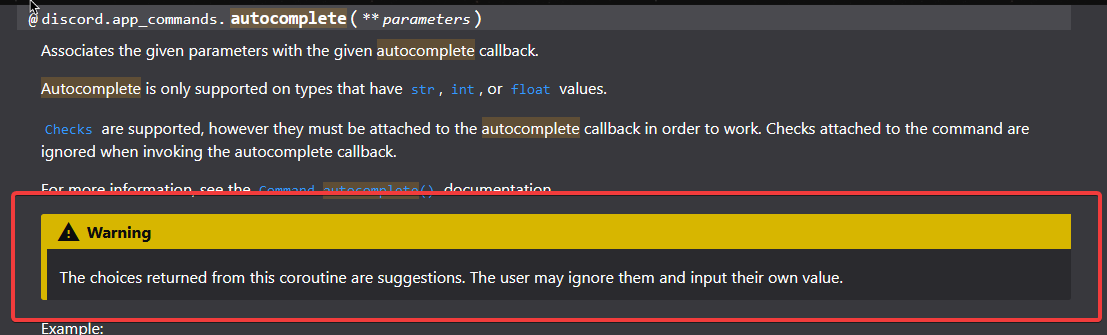
autocomplete only works for str, int, float
wanton current
but you cold probably make it a str depending on what data you have
mild token
mainly i wanted auto complete bcz i dont want user to messup input
wanton current
they can still enter whatever they want with an autocomplete, they are only suggestions https://i.itswilli.dev/fYSUalgqbi.png
 mild token
wanton current
they can still enter whatever they want with an autocomplete, they are only sugg...
mild token
wanton current
they can still enter whatever they want with an autocomplete, they are only sugg...
but mine forces them
like i tried to enter another thing
it didnt allowed them to enter
@wanton current see

it will not allow to send another thing apart from suggested item
wanton current
What if you press enter
mild token
wanton current
What if you press enter
it will not allow me to enter
one sec let me ss this
@wanton current
 wanton current
weird
mild token
see
wanton current
anyway
mild token
i want to enter 2,3 choices from the list
wanton current
then have 2,3 parameters
mild token
wanton current
then have 2,3 parameters
: ( i wanted that from one parameter
wanton current
or make parameters so they are "x, y, z", "a, b, c"
mild token
wanton current
or make parameters so they are "x, y, z", "a, b, c"
i thought from choosing from suggestion
wanton current
or the options
mild token
hmm let me try whether it accept list or not
wanton current
make the suggestions already pair 3 of them
mild token
wanton current
make the suggestions already pair 3 of them
hmm this can be a possibility but it will increase very frequently if leagues keep on getting added
wanton current
i guess
mild token
if i have select menu which is sent with a interaction and doesnt have a persisten view without check other member can use that select menu?
wanton current
what?
mild token
wanton current
what?
i mean if i use command and bot attached select menu on my message can other user interact with that command?
or check is applied by default that only command invoker can use select menu?
mild token
wanton current
you have to create your own `interaction_check`
ok
how can i apply check on this as both called interaction
: (
wanton current
unkempt canyonBOT
examples/views/dynamic_counter.py lines 54 to 55
async def interaction_check(self, interaction: discord.Interaction) -> bool:
return interaction.user.id == self.user_id```tnxxxxx
wanton current
make sure you define self.user_id
mild token
actually i am sending the select menu from within the command its not a very huge check
    @app_commands.command(name="restrict", description='Use to restrict ')
    async def restrict(self, interaction: discord.Interaction) -> None:
        options = [
            discord.SelectOption(label="Option 1", value="option1"),
            discord.SelectOption(label="Option 2", value="option2"),
            discord.SelectOption(label="Option 3", value="option3")
        ]
        a = View()
        await a.interaction_check(interaction.user.id)
        select = discord.ui.Select(
            placeholder="Select an option", options=options, max_values=1)
        await interaction.response.send_message(content=f"{select}", view=a)
is it a good way?
wanton current
does your view have an interaction_check?
by default it's
async def interaction_check(interaction) -> bool:
    return True
class LeagueSelect(ViewErrorHandler):
    def __init__(self, user: discord.User):
        super().__init__()
        self.user = user

        options = [
            discord.SelectOption(label="Option 1", value="option1"),
            discord.SelectOption(label="Option 2", value="option2"),
            discord.SelectOption(label="Option 3", value="option3")
        ]

        # Increase max_values to allow selecting multiple options
        select = discord.ui.Select(
            placeholder="Select options", options=options, max_values=3
        )
        self.add_item(select)

    async def callback(self, interaction: discord.Interaction):
        print(interaction)
        if interaction.user.id == self.user.id:
            selected_options = interaction.data['values']
            await interaction.response.send_message(f"You selected: {', '.join(selected_options)}")
        else:
            await interaction.response.send_message("You cannot interact with this select menu.")
why there is no callback getting triggered?
mild token
wanton current
by default it's
```py
async def interaction_check(interaction) -> bool:
retu...
i coded like above
    @app_commands.command(name="restrict", description='Use to restrict ')
    async def restrict(self, interaction: discord.Interaction) -> None:

        view = LeagueSelect(interaction.user.id)
        await interaction.response.send_message("Please select options:", view=view)
i solved it
 fervent surge
does anyone know why I'm unable to access message.content even after granting the bot the message content intent?
wanton current
did you do it in the code too?
 drowsy thunder
Hello everyone I have a question that.
How can I update a SQLite3 database in a set of time such as a planned event in the db where the person's role gets removed in 3 days
drowsy thunder
slate swan
-# <:pithink:652247559909277706>
Bro answer my question else shut up tbh cuz your acting weird
boreal sigil
https://paste.pythondiscord.com/LFNA my welcome messages aren’t working
 hearty basalt
boreal sigil
https://paste.pythondiscord.com/LFNA my welcome messages aren’t working
hearty basalt
boreal sigil
https://paste.pythondiscord.com/LFNA my welcome messages aren’t working
cause they have a 1 in 1000 chance of working lmao
from your code:
@bot.event
async def on_member_join(member):
    rollnum = random.randint(1, 1000)
    if rollnum == 1000:
      # logic
    else:
      return
 random nacelle
When I try to use python --version in VS it says I dont have python installed. I clrealy do though.
boreal sigil
hearty basalt
cause they have a 1 in 1000 chance of working lmao
i meant it to be that if its a 1/1000 it sends a special embed, but if it isnt it sends the normal one
slate swan
boreal sigil
i meant it to be that if its a 1/1000 it sends a special embed, but if it isnt i...
You return, so it stops the execution of the entire function
boreal sigil
slate swan
You `return`, so it stops the execution of the entire function
so this is correct?
# WELCOME MESSAGE
@bot.event
async def on_member_join(member):
    rollnum = random.randint(1, 1000)
    if rollnum == 1000:
        e = bot.get_channel(1245024320804360234)
        extrawelcome = discord.Embed(title = f"Heya, {member.display_name}, welcome to The Pikachu Crew!", description = f"Welcome to The Pikachu Crew, {member.mention}. I hope you enjoy your time here! Please use the buttons below to navigate to useful channels. WOW! This message seems unusual. {member.mention} has defied the odds and is the lucky one who gets a special reward! Please make a https://discord.com/channels/1237815910887194624/1237874844595654707 to claim this reward!", color=0x00FF59)
        await e.send(embed=extrawelcome, view=SimpleView())
    else:
        e = bot.get_channel(1245024320804360234)
        welcome = discord.Embed(title = f"Heya, {member.display_name}, welcome to The Pikachu Crew!", description = f"Welcome to The Pikachu Crew, {member.mention}. I hope you enjoy your time here! Please use the buttons below to navigate to useful channels.", color=0x00FF59)
        await e.send(embed=welcome, view=SimpleView())

class Menu(discord.ui.View):
    def _init_(self):
        super()._init_()
        self.value = None
class SimpleView(discord.ui.View):
    def __init__(self):
        super().__init__(timeout=30)  # times out after 30 seconds
        rulesbutton = discord.ui.Button(label='Read the Rules', style=discord.ButtonStyle.url, url='https://discord.com/channels/1237815910887194624/1239284848057651391', emoji='⛔')
        self.add_item(rulesbutton)
        rolesbutton = discord.ui.Button(label='Self Roles', style=discord.ButtonStyle.url, url='https://discord.com/channels/1237815910887194624/1237826995941806231', emoji='💻')
        self.add_item(rolesbutton)
        colorbutton = discord.ui.Button(label='Name Colour', style=discord.ButtonStyle.url, url='https://discord.com/channels/1237815910887194624/1237827021137248287', emoji='🌈')
        self.add_item(colorbutton)
        ticketbutton = discord.ui.Button(label='Help and Support', style=discord.ButtonStyle.url, url='https://discord.com/channels/1237815910887194624/1237874844595654707', emoji='🎫')
        self.add_item(ticketbutton)
        infobutton = discord.ui.Button(label='General Info', style=discord.ButtonStyle.url, url='https://discord.com/channels/1237815910887194624/1246832229003558932', emoji='📜')
        self.add_item(infobutton)
Looks better
boreal sigil
Great - Tysm for the easy help
slate swan
get_channel gets from cache though, so if the channel is not cached it may not send the messages
!d discord.ext.commands.Bot.fetch_channel
unkempt canyonBOT
await fetch_channel(channel_id, /)```
This function is a [*coroutine*](https://docs.python.org/3/library/asyncio-task.html#coroutine).

Retrieves a [`abc.GuildChannel`](https://discordpy.readthedocs.io/en/latest/api.html#discord.abc.GuildChannel), [`abc.PrivateChannel`](https://discordpy.readthedocs.io/en/latest/api.html#discord.abc.PrivateChannel), or [`Thread`](https://discordpy.readthedocs.io/en/latest/api.html#discord.Thread) with the specified ID.

Note

This method is an API call. For general usage, consider [`get_channel()`](https://discordpy.readthedocs.io/en/latest/ext/commands/api.html#discord.ext.commands.Bot.get_channel) instead.

New in version 1.2.

Changed in version 2.0: `channel_id` parameter is now positional-only.This will make an API call so you want to first try to get from cache, else make the API call
Something like
e = bot.get_channel(id) or await bot.fetch_channel(id)
So that it first tries to get from the cache and if it returns None (channel not in cache) then it will make the API call. Hence the or in the middle
boreal sigil
slate swan
This will make an API call so you want to first try to get from cache, else make...
Alr ty
boreal sigil
slate swan
This will make an API call so you want to first try to get from cache, else make...

2024-07-10 14:51:53 ERROR discord.client Ignoring exception in on_member_join Traceback (most recent call last): File "C:\Users\a\AppData\Local\Programs\Python\Python312\Lib\site-packages\discord\client.py", line 449, in _run_event await coro(*args, **kwargs) File "c:\Users\a\Desktop\The Pikachu Crew\The Pikachu Crew Bot\main_code\script.py", line 341, in on_member_join e = bot.get_channel(id) or await bot.fetch_channel(id) ^^^^^^^^^^^^^^^^^^^^^^^^^^^ File "C:\Users\a\AppData\Local\Programs\Python\Python312\Lib\site-packages\discord\client.py", line 2598, in fetch_channel data = await self.http.get_channel(channel_id) ^^^^^^^^^^^^^^^^^^^^^^^^^^^^^^^^^^^^^^^ File "C:\Users\a\AppData\Local\Programs\Python\Python312\Lib\site-packages\discord\http.py", line 758, in request raise HTTPException(response, data) discord.errors.HTTPException: 400 Bad Request (error code: 50035): Invalid Form Body In channel_id: Value "<built-in function id>" is not snowflake.
wanton current
yes, because id is a built-in
boreal sigil
how does one fix this weird error
wanton current
by passing an actual id instead of a built-in function
boreal sigil
oooh do i need e = bot.get_channel(put channel id here)
boreal sigil
!PASTE
unkempt canyonBOT
Pasting large amounts of code
If your code is too long to fit in a codeblock in Discord, you can paste your code here:
https://paste.pythondiscord.com/
After pasting your code, save it by clicking the Paste! button in the bottom left, or by pressing CTRL + S. After doing that, you will be navigated to the new paste's page. Copy the URL and post it here so others can see it.
boreal sigil
https://paste.pythondiscord.com/JD4Q
My +lock +unlock cmds arent working, and likely more cmds too 
boreal sigil
unkempt canyon
good bot
mild token
discord.errors.NotFound: 404 Not Found (error code: 10062): Unknown interaction
for this error is there a better way to handle it?
using the same command again solves this
golden portal
you get that error if you're late at responding the interaction (>3 seconds)
 flat pier
boreal sigil
https://paste.pythondiscord.com/JD4Q
My +lock +unlock cmds arent working, and li...
flat pier
boreal sigil
https://paste.pythondiscord.com/JD4Q
My +lock +unlock cmds arent working, and li...
that on message event needs to process commands
boreal sigil
flat pier
that on message event needs to process commands
how can i make it process commands?
flat pier
boreal sigil
thanks
boreal sigil
flat pier
https://discordpy.readthedocs.io/en/stable/faq.html#why-does-on-message-make-my-...
 flat pier
that doesn't look like your message event code in the paste above
flat pier
yeah that's not the message event you have in the beginning of your paste
that's a command
boreal sigil
flat pier
yeah that's not the message event you have in the beginning of your paste
what
flat pier
u need to process commaands here

in the event rather than the commands
remove the else block and process commands there
fast osprey
Or just use listeners instead of an event
boreal sigil
flat pier
u need to process commaands here
im not asking about that code
i was asking about lock/unlock
flat pier
you said none of your commands work?
boreal sigil
nope
i said my lock/unlock and maybe hide/unhide doesnt work
wait
nvm none of my commands work
boreal sigil
flat pier
you said none of your commands work?
correct
flat pier
boreal sigil
correct
then doing what i said above should fix it, but better yet use a listener as solstice said
wanton current
!d discord.ext.commands.Bot.listen
unkempt canyonBOT
@listen(name=None)```
A decorator that registers another function as an external event listener. Basically this allows you to listen to multiple events from different places e.g. such as [`on_ready()`](https://discordpy.readthedocs.io/en/latest/api.html#discord.on_ready)

The functions being listened to must be a [coroutine](https://docs.python.org/3/library/asyncio-task.html#coroutine).

Example...yeah (you saw nothing willi)
boreal sigil
flat pier
then doing what i said above should fix it, but better yet use a listener as sol...
ok
boreal sigil
flat pier
yeah (you saw nothing willi)
so the dm message bit is screwing everything up?
flat pier
yes whenever you use Bot.event you have to process commands afterwards that way your commands get triggered, using a listener will solve this problem
boreal sigil
flat pier
yes whenever you use Bot.event you have to process commands afterwards that way ...
so @bot.event changes to @listen(name=None)

hold up i did that wrong
all works now! ty
flat pier
no problem
 open cobalt
hey
yall approve this? : ```py
def search_keyword(self, keyword):
response = self.youtube.search(q=keyword)
response = self.search_keyword(keyword=keyword)
embed_search = discord.Embed()
for keys, values in response[0].items():
embed_search.add_field(name="", value=f"{keys} : {values}", inline=False)
return embed_search
what if there isn't a response[0]
open cobalt
ok should I try except or if response[0] is None?
wanton current
or check
open cobalt
response is a list[dict]
Guys are your working with the ext or not? currently I started with discord bot docs and I am not using the extension
wanton current
ext.commands?
 neon olive
open cobalt
Guys are your working with the ext or not? currently I started with discord bot ...
neon olive
open cobalt
Guys are your working with the ext or not? currently I started with discord bot ...
If your started just to create discord bots try a little easlyes library's maybe like discord.py
wheat thunder
I think this topic belongs in the database section, but can I ask it here?
I'm trying to use sqlalchemy to read information from the db when I first start, classify it, and then synchronize it to the db when modifications are made.
Is this better than just using sqlalchemy from the start?
Entity only vs Entity(sqlalchemy) - Model(real use)
slate swan
It's a question for #databases, not here, as you said
wheat thunder
I'm sorry, I know, but I asked because no one answered.
fast osprey
You should stick to the right place for your question and be patient
wheat thunder
I'll be careful next time
boreal sigil
hey guys - I want to make my code more organised so I can actually work with it better - I want to split it into multiple files.
Eg. script.py = the imports, bot.run, bot.load_extension("cogs.maincog") etc
rng.py = roll command, coinflip command
mod.py = kick, ban, unban, mute, unmute, warn, unwarn, warns, etc
and likely more, but thats what came to mind.
During this, I'm also tryna use cogs cuz Im also tryna make a better help menu, and I basically want each of the files to have its cog thing. Ive read how to use cogs, and understand em, but mainly want to know how to have a separate cog for each file, and to have multiple files for different commands / bits of code.
Can somebody explain to me how I can split my code into multiple files and it all still work?
wheat thunder
Cog?
open cobalt
yall, I ve started with the docs of discord py should I use use ext commands?
or is it for advanced users?
for the start I think I use just discord. py and its events etc
maybe when I am comfortable using this library I am going to start with ext commands
 vocal plover
personally I'd recommend getting into using ext.commands soon, or you'll build bad habits not using it. ext.commands is the idiomatic way to write bots with commands using dpy/its forks, so learning it is pretty important
open cobalt
hey, thanks for your respond ok then I might look into it
vocal plover
there's an initial learning curve for sure, but it does end up making development way easier
open cobalt
currently working with the on_message event for commands
fast osprey
The commands extension will be much, much cleaner. Though you may also wish to look into implementing slash commands instead (which is a different system and module)
boreal sigil
wheat thunder
Cog?
yeah
fast osprey
Also cogs have nothing to do with external files
fast osprey
and you do not need cogs for that. That is a completely separate concept
fast osprey
You can put code in whichever files you would like, it's the same as any python application using imports. If those other files would make use of getting a reference to your bot, you can make those files as extensions
boreal sigil
fast osprey
You can put code in whichever files you would like, it's the same as any python ...
so I can just stick the code in other files and its fine?
fast osprey
Yeah it works the same as any python application. Dpy isn't special
boreal sigil
great ok thanks
 scarlet badge
when i enter py main.py in terminal in vs code it does nothing can someone give a solution pls
fast osprey
The extension framework exists to make it a bit cleaner to reload files and to give those files a reference to your bot, but it is not a requirement by any stretch
boreal sigil
scarlet badge
when i enter `py main.py` in terminal in vs code it does nothing can someone giv...
try just pressing the run button
scarlet badge
boreal sigil
try just pressing the run button
now this error
 boreal sigil
ah
boreal sigil
bot = commands.Bot(command_prefix='!', intents=intents)``` boreal sigil
scarlet badge
boreal sigil
scarlet badge
you didnt add the prefix
i made a mistake in the code and edited it lmao
scarlet badge
boreal sigil
you didnt add the prefix
oh my bad lol
fast osprey
python doesn't magically know what the variable intents is
boreal sigil
also
add this code before it:
intents = discord.Intents.default()
intents.members = True
intents.message_content = True
still same error
 open cobalt
yeah you need to define the intents
fast osprey
boreal sigil
add this code before it:
```py
intents = discord.Intents.default()
intents.membe...
do not blindly add this code without understanding what you need
open cobalt
intents = discord.Intents
scarlet badge
oh damn ty @boreal sigil
open cobalt
read the docs
scarlet badge
tysm
fast osprey
You don't need that
scarlet badge
its online now
fast osprey

open cobalt
intents are like permission what the bot can do, I have my defineed as all
fast osprey
intents are very, very different from permissions
boreal sigil
💀 not the random hacked user message
boreal sigil
fast osprey
intents are very, very different from permissions
yeah 
vocal plover
intents are instructions to discord telling them what events to send you
open cobalt
ok yeah from the gateway
swift acorn
would anyone happen to know what this thing in this user's Apps section is?
And how one can do it with discord.py for your bot
 boreal sigil
swift acorn
would anyone happen to know what this thing in this user's Apps section is?
And ...
boreal sigil
swift acorn
would anyone happen to know what this thing in this user's Apps section is?
And ...
at first it looks like a custom presence
can be done via the dev dashboard if it is that
swift acorn
ah ok makes sense! I thought it might've been something with the new user installed apps
boreal sigil
yeah no thats completely different
swift acorn
thank you 
boreal sigil
no problem!
open cobalt
yall approve this and what can be changed? : ```py
def get_meta_channel(self, channel_id):
response = self.youtube.get_channel_metadata(channel_id=channel_id)
embed2 = discord.Embed()
if len(response) == 0:
embed2.add_field(name="", value="Nothing found. Check channel id and try again!")
    else:
        for key, value in response.items():
            embed2.add_field(name="", value=f"{key} : {value}")

    return embed2
line no?
wheat thunder
I was wondering if you might have accidentally written the intents below the bot definition code.
Just in case
open cobalt
guys so I have a command but this command is not shown how to use it with the arguments when actually typing it in chat , this needs ext commands I guess?
boreal sigil
fast osprey
Yeah it works the same as any python application. Dpy isn't special
i did that and basically realised i have to import the stuff again in each file (thats fine).
Did that added the code and:

the code is coming from my main file (script.py)


im going to guess I did it wrong
fast osprey
fast osprey
The extension framework exists to make it a bit cleaner to reload files and to g...
^
open cobalt
So for how long this ext command exists ?
boreal sigil
fast osprey
https://discordpy.readthedocs.io/en/stable/ext/commands/extensions.html
sorry if this is stupid but I'm decently confused even after reading the docs - do i need to install smth or add some code?
open cobalt
/youtube arg1 arg2
fast osprey
boreal sigil
sorry if this is stupid but I'm decently confused even after reading the docs - ...
There's an example in the code
open cobalt
I think you need to use that template
boreal sigil
so after each command you add:
async def setup(bot):
    bot.add_command(<command name>)
Not after each command
one setup method per file (extension)
that method does whatever you want when that extension is loaded
boreal sigil
but if you have multiple commands in a file?
fast osprey
You could have the setup method do whatever you want
open cobalt
how does the load cog function even know how to read that command in that file to connect with the bot?
I am also confused
fast osprey
Cogs are classes. They do not read things "in that file", they have attributes inside that class
open cobalt
ok
fast osprey
When the cog is loaded, the library will look for command attributes inside of that cog and add them to the bot
open cobalt
ah ok now I understand these attributes are kind aplaceholder for that
open cobalt
fast osprey
When the cog is loaded, the library will look for command attributes inside of t...
I think that is nicely done, organize code and have kinda an overview of the whole bot project
or what you guys think?
fast osprey
the library gives you multiple organizational tools (cogs and extensions) which serve different purposes, without being prescriptive of how/when you use them
slate swan
Im trying to add a role in all channel where view channel is off, without overriding the current overwrites of channels
how can i do that
open cobalt
fast osprey
the library gives you multiple organizational tools (cogs and extensions) which ...
for how long you have been coding with the discord.py library?
boreal sigil
fast osprey
the library gives you multiple organizational tools (cogs and extensions) which ...
hey sorry im still confused - tried to do this but it still doesnt work
 fast osprey
open cobalt
for how long you have been coding with the discord.py library?
fast osprey
open cobalt
for how long you have been coding with the discord.py library?
2 years or so only 
open cobalt
nice that is a lot
open cobalt
fast osprey
2 years or so only <:shrug:747680403778699304>
I amde a little side project and actually used the websocket library and request library etc to connect to the gateway and actualy received events and send payloads though a rest api
boreal sigil
fast osprey
and note it does not use `@bot.x` anywhere
commands.commands
that my issue isnt it?
boreal sigil
fast osprey
and note it does not use `@bot.x` anywhere
so fixed all of that but the bot cant see the commands?
as in i run the help command and ban/unban dont show up
fast osprey
Did you load the extension?
Also, you should really strongly consider overriding the built-in ban and unban functionality when you're actively reducing the security on them
open cobalt
ok guys I made a bot that send requests to the youtube api and receives data, this data is then replied to the message author
boreal sigil
I run it but it doesnt print its being loaded
 boreal sigil
fast osprey
Did you load the extension?
boreal sigil
fast osprey
Did you load the extension?
yeah im pretty sure
boreal sigil
fast osprey
Also, you should really strongly consider overriding the built-in `ban` and `unb...
when you're actively reducing the security on them can you elaborate?
fast osprey
You wouldn't be loading the extension with the setup
the setup is called when you load the extension
 fast osprey
Where does the bot actually live?
fast osprey
boreal sigil
`when you're actively reducing the security on them` can you elaborate?
The built in ways of banning and unbanning people have several safety features which your code does not. Some of which are going to be prohibitively difficult/impossible for you to make. This is why discord gives this ability to you natively, they want you to use it
boreal sigil
fast osprey
Where does the bot actually live?
In the main script file
Oh wait do I have to put that in there
fast osprey

open cobalt
ok so how to load it then
 pure glacier
I am creating ticket discord bot in python I am done with most of the things but idk my code has some error whosoever opens the ticket it only pings me. The opened ticket channel is not even visible to the guy who opened ticket
https://pastebin.com/cngvbYP6
Pastebin
Pastebin.com is the number one paste tool since 2002. Pastebin is a website where you can store text online for a set period of time.
fast osprey
You should very strongly consider using threads for tickets rather than entire channels, one reason being that the permission story is way simpler
mild token
i want to remove roles from bulk of people at once is there any method which does that?
boreal sigil
mild token
i want to remove roles from bulk of people at once is there any method which doe...
deleting the role?
mild token
boreal sigil
deleting the role?
removing the role from many users
boreal sigil
fast osprey
<:yes:597590985802907658>
added it to the main file and ran it - still no print - still no ban cmd in help
fast osprey
Code?
boreal sigil
fast osprey
Code?
for which file?
fast osprey
The more the better
boreal sigil
!paste
unkempt canyonBOT
Pasting large amounts of code
If your code is too long to fit in a codeblock in Discord, you can paste your code here:
https://paste.pythondiscord.com/
After pasting your code, save it by clicking the Paste! button in the bottom left, or by pressing CTRL + S. After doing that, you will be navigated to the new paste's page. Copy the URL and post it here so others can see it.
boreal sigil
good bot
Im aware that there arent any cogs.
https://paste.pythondiscord.com/3VKQ - script.py (main)
import os
import discord
from discord.ext import commands
from discord import app_commands
import datetime
import re
import random
from random import choice
import time
# BAN CMD
@commands.has_permissions(ban_members=True)
@commands.hybrid_command()
async def ban(ctx, user: discord.User, *, reason="***No reason provided.***"):
""" Bans a user from the guild """
ban = discord.Embed(title=f" | Banned {user.name}!", description=f"Reason: {reason}\nBy: {ctx.author.mention}", color = discord.Color.brand_red())
await ctx.message.delete()
await ctx.channel.send(embed=ban)
bandm = discord.Embed(title=f" | You were Banned!", description=f"Reason: {reason}\nBy: {ctx.author.mention}")
await user.send(embed=bandm)
await ctx.guild.ban(user)
# UNBAN CMD
@commands.hybrid_command()
async def unban(ctx, user: discord.User, *, reason="***No reason provided.***"):
""" Unbans a user from the guild """
unban = discord.Embed(title=f" | Unbanned {user.name}!", description=f"Reason: {reason}\nBy: {ctx.author.mention}", color = discord.Color.brand_green())
hellowhat = discord.Embed(title=f" | {user.name} isn't Banned!", color = discord.Color.teal())
try:
entry = await ctx.guild.fetch_ban(discord.Object(user.id))
except discord.NotFound:
await ctx.channel.send(embed=hellowhat)
await ctx.guild.unban(discord.Object(user.id))
await ctx.channel.send(embed=unban)
await ctx.message.delete()
return
ban.py (ban / unban)
i know im importing stuff that isnt there
it doesnt rlly matter
fast osprey
and where is the setup?
boreal sigil
fast osprey
and where is the setup?
at the bottom of script.py
fast osprey
setup belongs in the extension
and as I said, it should not load_extension inside of the setup itself
boreal sigil
im so confused
fast osprey
An extension is a file external to the bot which has a setup method. That's it.
boreal sigil
i thought? #discord-bots message
i assumed that meant I need to put it in the main script
fast osprey
You need to load the extension somewhere you have the bot itself
A method named setup is meaningless except in an extension
boreal sigil
fast osprey
A method named `setup` is meaningless except in an extension
so what do i put where
fast osprey
The setup method belongs in your extension
and you would load the extension somewhere else, wherever you like, that has a reference to your bot
 drifting arrow
Hey, how do I set the status or activity or whatever? like this. Is it self.bot.activity?
 fast osprey
On login? Or in code dynamically?
 solid turtle
open cobalt
solid turtle
open cobalt
hey
limber jolt
I need some help
open cobalt
tell us
 midnight oracle
limber jolt
I need some help
midnight oracle
limber jolt
I need some help
?
limber jolt
midnight oracle
?
So I have a bot that connects to ffmpeg through my files so I have It connect to a file but when I run It I get [winerror5] access Is denied.
The location of the file Is
C:\ffmpeg\bin
midnight oracle
limber jolt
So I have a bot that connects to ffmpeg through my files so I have It connect to...
You may not be running the program as administrator. I have the ffmpeg.exe in the same dir and it works just fine
limber jolt
midnight oracle
You may not be running the program as administrator. I have the ffmpeg.exe in th...
I ran It all as admin. I looked at the folder perms i have full control over it so It should work.
midnight oracle
limber jolt
I ran It all as admin. I looked at the folder perms i have full control over it ...
Oh, that's weird
limber jolt
midnight oracle
Oh, that's weird
Yh
midnight oracle
you're using os lib to open it?
limber jolt
midnight oracle
you're using os lib to open it?
I use import OS
voice_client.play(discord.FFmpegPCMAudio(track_uri, executable="C:\\ffmpeg\\bin"), after=lambda e: print(f"Finished playing: {e}"))
Thats the line of code with It In
midnight oracle
The code is fine, sorry for being redundant but, are you sure it is running as administrator?
slate swan
limber jolt
I use ```import OS```
might be because of an anti-virus or firewall restriction
you can add the ffmpeg bin directory to your systems PATH variables
limber jolt
midnight oracle
The code is fine, sorry for being redundant but, are you **sure** it is running ...
Its fine, I just ran vs-code again and made sure but i still get the error
limber jolt
slate swan
might be because of an anti-virus or firewall restriction
you can add the ffmpeg...
How would I do that??
slate swan
limber jolt
How would I do that??
you're on windows right?
limber jolt
slate swan
you're on windows right?
Yeah
slate swan
so in your task bar
at the bottom you can search for edit the system's environment variables
limber jolt
slate swan
at the bottom you can search for edit the system's environment variables
Ah
slate swan
then you click on environment variables
slate swan
oh
limber jolt
slate swan
oh
But i added It to System and the other option
Any other fix??
@slate swan
@midnight oracle
slate swan
no i don't have any idea

 grizzled onyx
how close thread in forum?
turbid condor
grizzled onyx
how close thread in forum?
!close i think
wheat thunder
I want a specific action to happen an hour after I enter the command.
I have two ideas for implementation.
- asynchronously sleep and delete
Save the time/action and check the time at regular intervals and perform the action when it's time to do it 2.
I also want to cancel this task scheduling with a specific command. In this case, would implementation number 2 of 1 and 2 be better?
fast osprey
1 is fine and will be a lot lighter. You can also persist this in a db if it needs to sleep between restarts
boreal sigil
fast osprey
The setup method belongs in your extension
tried that but just nothing
fast osprey
How are you trying to load the extension?


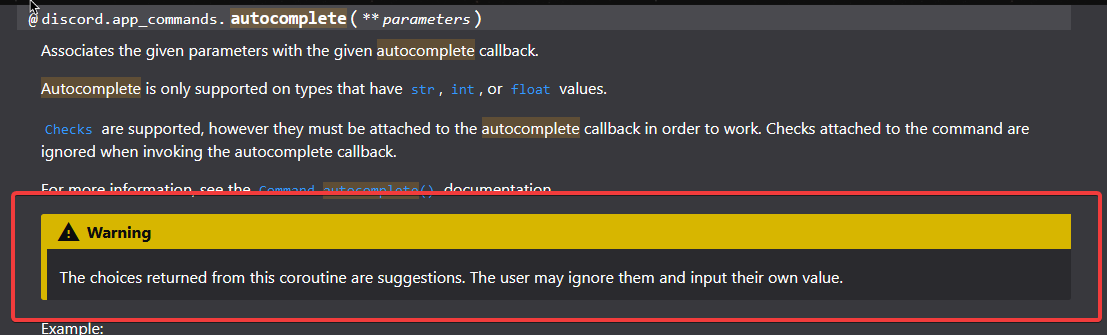 slate swan
Not sure why you run your bot in a setup function with the bot as parameter
See Quickstart and Cogs again
boreal sigil
idk it wanted indents
i dont use cogs btw (not yet im moving on to that after this)
WHY IS NONE OF THIS WORKING 😭
ive read it all and just nothing works
limber jolt
@unkempt canyon
boreal sigil
fast osprey
And why do you have two setups
i have no clue
fast osprey
setup, the function, only belongs in an extension. Not where you declare and run your bot. It gets run when the extension is loaded. It itself doesn't get magically run in order to load the extension. It is a consequence of that extension being loaded