#discord-bots
1 messages · Page 334 of 1
 thin raft
 faint dragon
this good?

 faint dragon
its cursed as all hell but its like 3x faster than discord.py LOL
it basically entirely replaces ext.commands, i studied their repo for days and just cut out all the caching literally every step of the way and cut some corners for performance
thin raft
dude im getting a circular import out of nowhere
thin raft
faint dragon
it basically entirely replaces `ext.commands`, i studied their repo for days and...
but then it isn't faster
it's just another way of doing it
when you try to query a lot of users, dpy will be faster
faint dragon
thin raft
but then it isn't faster
before i made my own alternative to ext.commands it took around 2/3~ seconds to load up the bot usually (mostly from how it loads cogs and commands) and now it takes sub 1s unless the network is being wacky
the mem usage also went down a solid 10mb/15mb or so because i dont cache literally everything every step of the way (they do alot of caching to prevent wacky stuff thats usually caused by your own weird code)
i have it print everything out 1 by 1 as it loads and still sub second startups, the whole list just appears instantly

not a whole lot there icl, i cut out alot of stuff to focus on automod/antinuke related things
faint dragon
thin raft
when you try to query a lot of users, dpy will be faster
doesnt seem to be the case, the bot actually performs great with lots of users becase of my approach on optimization (plus alot of bloat was cut out)
for example: you'd have some if/elif statements or whatnot for the 3 cases, which is the normal thing to do

or it can do a dictionary lookup and instantaneously find the result (and therefore send the message quicker) based on the data from the API
 faint dragon
or it can do a dictionary lookup and instantaneously find the result (and theref...
faint dragon
faint dragon
or it can do a dictionary lookup and instantaneously find the result (and theref...
if the api returns {"op": 1} then it just jumps to awaiting the corresponding value in the dict before it can even return the APIs response to the command itself
which is a ton faster than looking through the data with ifs/elses
less operations the machine has to do to complete the task, the better
which is the whole idea behind why i ditched discord.py's ext.commands
faint dragon
yea for sure, usually looks weird for good reason lol
my main thing is scaling/optimizing stuff so it might look a little whack but its up to spec performance wise
few lazy parts here and there but we ball 
thin raft
my pygame isnt pygaming
faint dragon
pygame made me quit any hopes of game dev i had
faint dragon
not that i had a whole lot to begin with but still  that stuffs something else
thin raft
to make current projects visually attractive
 edgy plinth
is there anyway to limit how many characters they can enter into a parameter of a command?
@client.tree.command(name="victor",description = "Used by mediators to enter who won the battle")
@app_commands.describe(victorious="Enter the side that was victorious")
@app_commands.choices(victorious=[discord.app_commands.Choice(name="Attacker",value=1),discord.app_commands.Choice(name="Defenders",value=2)])
async def victor(interaction:discord.Interaction, victorious: discord.app_commands.Choice[int],score: str):
  adminhandler.logInteraction(victor,interaction.user)
  latency = client.latency
  await interaction.response.send_message(f"Test Sucessful Ping:{latency}ms")
for example i want to limit score to 3 characters
 blazing condor
I don't think you can directly limit the character limit, but i would assume you could check the len of it if it's above the targeted amount.
edgy plinth
blazing condor
I don't think you can directly limit the character limit, but i would assume you...
yea, however it would be nice if it was built in
blazing condor
but i could be wrong. let me see.
edgy plinth
blazing condor
but i could be wrong. let me see.
alr
blazing condor
i was just thinking something like this
if len(message) > # 100 characters
but unsure if that would be the best way or not.
edgy plinth
blazing condor
i was just thinking something like this
```py
if len(message) > # 100 charact...
yea, thats what im ending up doing, dont think there is any other way
 shrewd apex
edgy plinth
is there anyway to limit how many characters they can enter into a parameter of ...
shrewd apex
edgy plinth
is there anyway to limit how many characters they can enter into a parameter of ...

A hands-on guide to Discord.py
blazing condor
didn't know that one tbh 🙂
edgy plinth
shrewd apex
u can https://fallendeity.github.io/discord.py-masterclass/slash-commands/#__tab...
thanks!
 glad cradle
shrewd apex
u can https://fallendeity.github.io/discord.py-masterclass/slash-commands/#__tab...
glad cradle
shrewd apex
u can https://fallendeity.github.io/discord.py-masterclass/slash-commands/#__tab...
how did you create this embed thing for your website
shrewd apex
glad cradle
how did you create this embed thing for your website
that discord creates from metadata
 solemn cradle
glad cradle
how did you create this embed thing for your website
solemn cradle
glad cradle
how did you create this embed thing for your website
you need to add embed data to your website
shrewd apex
yeah those are in the meta tags stored in head of the website
 rugged shadow
waiting for snipy.github.io
glad cradle
😳
 robust fulcrum
guys how can i get all slash command groups in disnake?
 raven steeple
@app.route("/callback", methods=['GET', 'POST'])
def callback():
print(request.form.get("AnsweredBy"))
channel_id = request.args["chid"]
uri = request.form['RecordingUrl']
print(uri)
time.sleep(3)
r = requests.get(url=uri+".wav")
files = {
"document": ("voice.mp3", r.content)
}
data = {
"chat_id": channel_id,
"caption": "Call log.."
}
requests.post("https://discordwebhookhere", data=data, files=files)
return 200


 fading jewel
anyone want to code a discord bot?
 slate swan
robust fulcrum
guys how can i get all slash command groups in disnake?
slate swan
robust fulcrum
guys how can i get all slash command groups in disnake?
!d disnake.ext.commands.Bot.walk_commands
 unkempt canyonBOT
for ... in walk_commands()```
An iterator that recursively walks through all commands and subcommands.

Changed in version 1.4: Duplicates due to aliases are no longer returnedthen you would have to check if its of type Group
Wouldn't that be for text commands, as the description suggests?
slate swan
ah yeah then i guess get_slash_command is the correct method to use
raven steeple
raven steeple
@app.route("/callback", methods=['GET', 'POST'])
def callback():
print(reque...
Help fix
slate swan
Remember to:
Ask your Python question, not if you can ask or if there's an expert who can help.
Show a code sample as text (rather than a screenshot) and the error message, if you've got one.
Explain what you expect to happen and what actually happens.
raven steeple
slate swan
Remember to:
Ask your Python question, not if you can ask or if there's an exper...
https://www.twilio.com/docs/api/errors/32019
https://www.twilio.com/docs/api/errors/15003
Here you are.
Warning 32019: Twiml and Voice URL are both set. Using Voice URL.
Warning 15003: Call Progress: Warning Response to Callback URL
slate swan
Explain what you expect to happen and what actually happens.
robust fulcrum
slate swan
then you would have to check if its of type `Group`
Do it returns slash commands or text commands?
 polar slate
I'm becoming crazy guys
I can't make add_reaction work ...
I always have AttributeError: 'NoneType' object has no attribute 'add_reaction'
 acoustic kernel
How do I import a cog file?
from Cogs_Folder.Donate_Cog import Donate_Cog
bot.add_cog(Donate_Cog)
is this not how you do it?
 final iron
polar slate
I always have AttributeError: 'NoneType' object has no attribute 'add_reaction'
final iron
polar slate
I always have AttributeError: 'NoneType' object has no attribute 'add_reaction'
You need to show some code
final iron
acoustic kernel
is this not how you do it?
Does it work?
acoustic kernel
it doesnt add any new slash commands.
final iron
add_cog is a coro
There’s also a bunch of other reasons why slash commands wouldn’t be appearing
polar slate
final iron
You need to show some code
I found a solution but it's still bugged I'll open a ticket
slate swan
One message removed from a suspended account.
One message removed from a suspended account.
One message removed from a suspended account.
shrewd apex
slate swan
One message removed from a suspended account.

A hands-on guide to Discord.py
slate swan
shrewd apex
https://fallendeity.github.io/discord.py-masterclass/embeds/#embed-with-multiple...
One message removed from a suspended account.
acoustic kernel
class Client(commands.Bot):
    def __init__(self):
        super().__init__(command_prefix=commands.when_mentioned_or('!'), intents=discord.Intents().all())

        self.cogslist = ["Utilities.Donate_Cog"]

    async def setup_hook(self):
      for ext in self.cogslist:
        await self.load_extension(ext)

    async def on_ready(self):
        prfx = (Back.BLACK + Fore.GREEN + time.strftime("%H:%M:%S UTC", time.gmtime()) + Back.RESET + Fore.WHITE + Style.BRIGHT)
        print(prfx + " Logged in as " + Fore.YELLOW + self.user.name)
        print(prfx + " Bot ID " + Fore.YELLOW + str(self.user.id))
        print(prfx + " Discord Version " + Fore.YELLOW + discord.__version__)
        print(prfx + " Python Version " + Fore.YELLOW + str(platform.python_version()))
        synced = await self.tree.sync()
        print(prfx + " Slash CMDs Synced " + Fore.YELLOW + str(len(synced)) + " Commands")


@OVERRIDES.command(name="direct", description="Overwrites a player's stats")
@app_commands.autocomplete(stat=override_autocomplete)
@app_commands.describe(player="Who do you want to override", stat="What do you want to override", override_value="What do you want to set the override to")
Right now my slash commands like OVERRIDES arent getting synced, how can I get them to sync whil using the Client Class without making all my commands seperate cogs yet?
final iron
acoustic kernel
I have a bunch of other commands below I also want to load
And if you print the commands that are being synced they’re not in there?
acoustic kernel
No
 unreal pilot
        self._guild = await self.bot.fetch_guild(DISCORD.GUILD)
        print(self._guild.categories)
        self._main_category = discord.utils.get(self._guild.categories, id=DISCORD.MERCARI_CATEGORY)
        print(self._main_category, 'THE CAT')
any idea why it doesnt return any categories yet self._guild is a valid Guild object?
printing self._guild.categories returns an empty list
spectating with the bot's role reveals this, so it can see all categories
 final iron
acoustic kernel
No
final iron
acoustic kernel
No
Are the parent commands be synced?
Oh, with slash commands they’re probably not
You’ll need to show the cogs code, and also is the cog being loaded?
acoustic kernel
final iron
You’ll need to show the cogs code, and also is the cog being loaded?
Cogs are being loaded. The cogs are in a seperate files, I havent created a class for the rest of the code that is still in my actual bot code. Its those commands that arent syncing
final iron
acoustic kernel
Cogs are being loaded. The cogs are in a seperate files, I havent created a clas...
Can you show your entire file where your Client instance is
There’s a lot of missing context
acoustic kernel
I mean the entire file is massive, hence why I am creating cogs to split it up
class Client(commands.Bot):
    def __init__(self):
        super().__init__(command_prefix=commands.when_mentioned_or('!'), intents=discord.Intents().all())

        self.cogslist = ["Donate_Cog","Signup_Cog", "Delete_Roles_Cog", "Overrides_Cogs"]

    async def setup_hook(self):
      for ext in self.cogslist:
        await self.load_extension(f"Utilities.{ext}")


    async def on_ready(self):
        prfx = (Back.BLACK + Fore.GREEN + time.strftime("%H:%M:%S UTC", time.gmtime()) + Back.RESET + Fore.WHITE + Style.BRIGHT)
        print(prfx + " Logged in as " + Fore.YELLOW + self.user.name)
        print(prfx + " Bot ID " + Fore.YELLOW + str(self.user.id))
        print(prfx + " Discord Version " + Fore.YELLOW + discord.__version__)
        print(prfx + " Python Version " + Fore.YELLOW + str(platform.python_version()))
        synced = await self.tree.sync()
        print(prfx + " Slash CMDs Synced " + Fore.YELLOW + str(len(synced)) + " Commands")


@bot.tree.command(name="delete_roles", description="Deletes all roles on the server")
async def delete_roles(interaction: discord.Interaction):
    if interaction.user.guild_permissions.manage_roles: # Checks if the user has the manage_roles permission
        for role_name in interaction.guild.roles: # Loop through each role and delete it
            print(role_name)
            if role_name.name != "@everyone" and role_name.name != "UN New":
                try:
 ....
Im trying to sync the delete_roles command
and all the others commands
final iron
What is bot?
acoustic kernel
bot = commands.Bot(command_prefix="!", intents= discord.Intents.all())
Are you not using your subclass?
acoustic kernel
no... what is subclass?
final iron
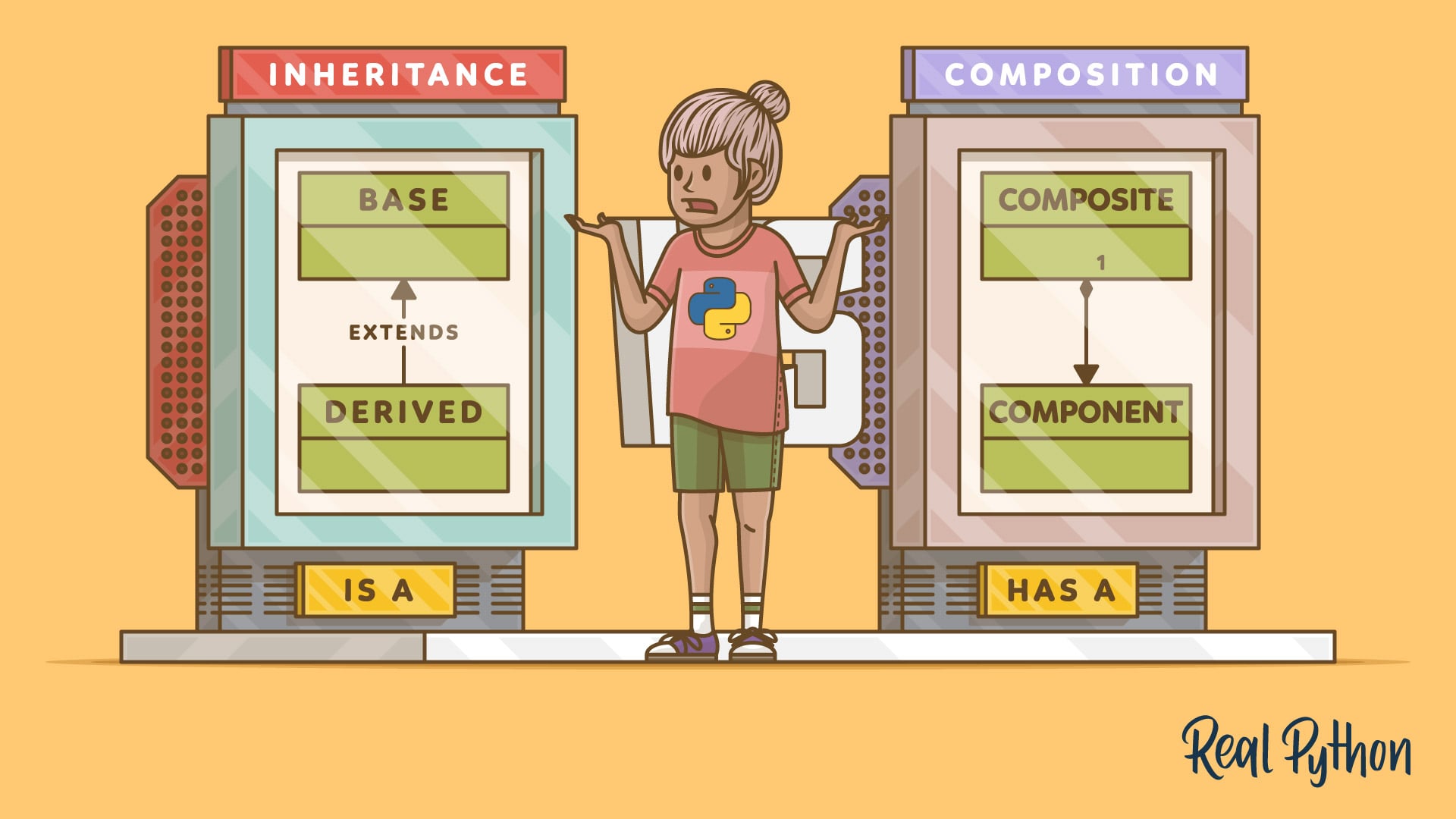
In this step-by-step tutorial, you'll learn about inheritance and composition in Python. You'll improve your object-oriented programming (OOP) skills by understanding how to use inheritance and composition and how to leverage them in their design.
acoustic kernel
Oh great, whats OOP!?!?!
final iron
Object Oriented Programming, one of the most basic discord.py prerequisites

In this tutorial, you'll learn all about object-oriented programming (OOP) in Python. You'll learn the basics of the OOP paradigm and cover concepts like classes and inheritance. You'll also see how to instantiate an object from a class.
Do you notice how in your on_ready you’re printing a bunch of text, yet that doesn’t show up when you run your bot?
acoustic kernel
final iron
Do you notice how in your on_ready you’re printing a bunch of text, yet that doe...
The text shows up when I run the bot
final iron
And this is the exact issue with these small snippets of code
It’s leaves out crucial information
acoustic kernel
The bot = commands.Bot(command_prefix="!", intents= discord.Intents.all())
is before the Client Class
unkempt canyonBOT
Pasting large amounts of code
If your code is too long to fit in a codeblock in Discord, you can paste your code here:
https://paste.pythondiscord.com/
After pasting your code, save it by clicking the Paste! button in the bottom left, or by pressing CTRL + S. After doing that, you will be navigated to the new paste's page. Copy the URL and post it here so others can see it.
final iron
dwag
bot = commands.Bot(command_prefix="!", intents= discord.Intents.all())
client = discord.Client(intents=discord.Intents.all())
guild = discord.Client.get_guild(client,int(SERVER_ID))

bot = Client()
bot.run(TOKEN)
You have 3 client/bot instances
You only need 1
You also have some error suppression going on as that 3rd line would error
acoustic kernel
intresting, alright how do I fix this? Just get rid of client and guild?
final iron
get rid of the first three lines
Move your Client instance to where your commands.Bot instance was defined
acoustic kernel
ah snap
Ok its still works but the rest of the commands still dont sync, 3 commands are syncing and its the 3 that are in the seperate files.
final iron
show the updated code
acoustic kernel
class Client(commands.Bot):
    def __init__(self):
        super().__init__(command_prefix=commands.when_mentioned_or('!'), intents=discord.Intents().all())

        self.cogslist = ["Donate_Cog","Signup_Cog", "Delete_Roles_Cog"]

    async def setup_hook(self):
      for ext in self.cogslist:
        await self.load_extension(f"Utilities.{ext}")


    async def on_ready(self):
        prfx = (Back.BLACK + Fore.GREEN + time.strftime("%H:%M:%S UTC", time.localtime()) + Back.RESET + Fore.WHITE + Style.BRIGHT)
        print(prfx + " Logged in as " + Fore.YELLOW + self.user.name)
        print(prfx + " Bot ID " + Fore.YELLOW + str(self.user.id))
        print(prfx + " Discord Version " + Fore.YELLOW + discord.__version__)
        print(prfx + " Python Version " + Fore.YELLOW + str(platform.python_version()))
        synced = await self.tree.sync()
        print(prfx + " Slash CMDs Synced " + Fore.YELLOW + str(len(synced)) + " Commands")

bot = Client()
TOKEN = REDACTED
YOUR_MAPQUEST_API_KEY = REDACTED
GOOGLE_MAPS_KEY = REDACTED
SERVER_ID = REDACTED
Game_Started = False
Im trash at this game, gotta retire
acoustic kernel
final iron
See a problem with this?
Alright thank you for helping this moron out! Sorry for the troubles!💀
acoustic kernel
probably not but I can try
 slate bolt
acoustic kernel
probably not but I can try
slate bolt
acoustic kernel
probably not but I can try
Okey
look
We should write a medieval war themed play.
acoustic kernel
why you say that?
 acoustic kernel
what does this bot do exactly?
slate bolt
There will be at least 1 player in each continent and there are 3 continents in total. The aim is to destroy the economy and become stronger.
slate bolt
acoustic kernel
what does this bot do exactly?
Game bot
acoustic kernel
ok why, why me?
slate bolt
acoustic kernel
ok why, why me?
İ dont founded another user
acoustic kernel
🤦🏻♂️
Alright have you ever written a bot before?
slate bolt
Yes it took me a few tries
Token grabber, bot for servers and some but I have never made a game bot
acoustic kernel
Yeah, right now I am currently in the middle of building my own game bot right now, so Im to busy to help you sorry.
slate bolt
acoustic kernel
Yeah, right now I am currently in the middle of building my own game bot right n...
What game
acoustic kernel
Its a geopolitical simulator
slate bolt
okey okey
 desert kiln
slate bolt
Token grabber, bot for servers and some but I have never made a game bot
desert kiln
slate bolt
Token grabber, bot for servers and some but I have never made a game bot
<@&831776746206265384> Token grabber ToS breach
i gotta love these fast moderators, honestly.
 inner rivet
 dawn cosmos
Hi guys anyone have exp on using reactivex on python?
unkempt canyonBOT

Python ReactiveStreams library
final iron
Gotta love autocorrect
final iron
dawn cosmos
Hi guys anyone have exp on using `reactivex` on python?
I dont really see anything relevant to discord bots. What does the library do?
 vale wing
final iron
I dont really see anything relevant to discord bots. What does the library do?
vale wing
final iron
I dont really see anything relevant to discord bots. What does the library do?
Explodes (it's reactive)
 finite salmon
radioactive package
robust fulcrum
slate swan
!d disnake.ext.commands.Bot.walk_commands
Cannot access member "walk_commands" for type "Bot"
  Member "walk_commands" is unknown
i think interaction bot doesn't have this
 shrewd fjord
robust fulcrum
i think interaction bot doesn't have this
shrewd fjord
robust fulcrum
i think interaction bot doesn't have this
are you using disnake?
if yes, you need to implement it manually\
robust fulcrum
Ok
shrewd apex
yeah it just needs to be in response to an interaction
ie slash command or button or some other components in dm
shrewd apex
then ur doing something wrong
slate swan
let me show u
shrewd apex
ok
slate swan
    @discord.ui.button(label='⭐', style=discord.ButtonStyle.blurple, custom_id='star-rating-5', disabled=False)
    async def five(self, interaction: discord.Interaction, button: discord.ui.Button):
        ...

        feedback_modal = ReviewModal()
        feedback_modal.user = interaction.user
        await interaction.response.send_modal(feedback_modal)
``` the part before this is workingthats the part were it doesnt work
shrewd apex
did u respond to the interaction before or defer it?
slate swan
no
shrewd apex
!paste paste the whole code
unkempt canyonBOT
Pasting large amounts of code
If your code is too long to fit in a codeblock in Discord, you can paste your code here:
https://paste.pythondiscord.com/
After pasting your code, save it by clicking the Paste! button in the bottom left, or by pressing CTRL + S. After doing that, you will be navigated to the new paste's page. Copy the URL and post it here so others can see it.
shrewd apex
the view
slate swan
its all the same ill give u one button
class Review(discord.ui.View):
    def __init__(self, pack, position, ticket, guild):
        super().__init__(timeout=720)
        self.pack = pack
        self.position = position
        self.ticket = ticket
        self.guild = guild

    @discord.ui.button(label='⭐', style=discord.ButtonStyle.blurple, custom_id='star-rating-1', disabled=False)
    async def one(self, interaction: discord.Interaction, button: discord.ui.Button):
        shiny_button = None

        for child in self.children:
            if type(child) == discord.ui.Button:
                shiny_button = child
                child.disabled = True


        button.disabled = True
        await interaction.message.edit(view=self)


        channel = self.guild.guild.get_channel(1193883452995551232)

        now = datetime.datetime.now()

        d = datetime.datetime(now.year, now.month, now.day, now.hour, now.minute, now.second)
        time_stamp = calendar.timegm(d.timetuple())

        embed=discord.Embed(description=f'{interaction.user.mention}(*{interaction.user.id}*) Ticket review (**<t:{time_stamp}:R>**)\n\n# > (1/5) — ★✰✰✰✰', color=0x3498db)
        m = await channel.send(embed=embed)


        feedback_modal = ReviewModal()
        feedback_modal.user = interaction.user
        await interaction.response.send_modal(feedback_modal)
it sends the m message to the right channel
but for some reason it doesnt send the modal
shrewd apex
u sure its a valid modal
slate swan
 slate swan
shrewd apex
u sure its a valid modal
slate swan
shrewd apex
u sure its a valid modal
# REVIEW MODAL

class ReviewModal(discord.ui.Modal, title="Review for our Support."):
    review = discord.ui.TextInput(
        style=discord.TextStyle.long,
        label="Review our Support assistance effectivity and time at your case.",
        required=True,
        placeholder="You have unlimited time, unless you close the modal :)"
    )
is it valid? (im not sending the callback part)
shrewd apex
override the on_error in the view to handle any unnoticed errors
shrewd apex
slate swan
```py
# REVIEW MODAL
class ReviewModal(discord.ui.Modal, title="Review for our...
the init? modals have timeout too iirc
slate swan
shrewd apex
the init? modals have timeout too iirc
i dont think thats the problem
future: <Task finished name='discord-ui-view-dispatch-94cd3762369d323cc586e70d38ac2869' coro=<View._scheduled_task() done, defined at /home/container/.local/lib/python3.10/site-packages/discord/ui/view.py:414> exception=TypeError('Review.on_error() takes 3 positional arguments but 4 were given')>
Traceback (most recent call last):
  File "/home/container/.local/lib/python3.10/site-packages/discord/ui/view.py", line 425, in _scheduled_task
    await item.callback(interaction)
  File "/home/container/cogs/Donations.py", line 589, in three
    await interaction.response.send_modal(feedback_modal)
  File "/home/container/.local/lib/python3.10/site-packages/discord/interactions.py", line 852, in send_modal
    await adapter.create_interaction_response(
  File "/home/container/.local/lib/python3.10/site-packages/discord/webhook/async_.py", line 221, in request
    raise HTTPException(response, data)
discord.errors.HTTPException: 400 Bad Request (error code: 50035): Invalid Form Body
In data.components.0.components.0.label: Must be 45 or fewer in length.
During handling of the above exception, another exception occurred:
Traceback (most recent call last):
  File "/home/container/.local/lib/python3.10/site-packages/discord/ui/view.py", line 427, in _scheduled_task
    return await self.on_error(interaction, e, item)
TypeError: Review.on_error() takes 3 positional arguments but 4 were given
``` thats what i gotso yeah its because the label is too long
thank you for ur help btw
shrewd apex
np
 fickle aurora
how do I implement background tasks with cogs in my bot? discord.py
fickle aurora
fickle aurora
how do I implement background tasks with cogs in my bot? discord.py
like if it was in one file I did @tasks.loop(minutes=1) and start that task in on_ready, how do I implement that if I have a bot instance in one file and cogs?
 timber lotus
question, could a bot look at the member list and return how many joined on a specific day? like is that possible?
fickle aurora
timber lotus
question, could a bot look at the member list and return how many joined on a sp...
well you could either compare the amount of members at the start of the day and the end of the day, but that difference is how many members joined - how many left, if you wanted to only see the amount of ones that joined, you would need an on_member_join listener and just add them up, and at the end of the day log that number somewhere and reset it
timber lotus
thank you very much!!
i dont need to save this data to a database right? like thats all in discord already
edgy plinth
Is there anyway to add descriptions to each option in a choices?
@client.tree.command(name="build", description=("Build in a region"))
@app_commands.describe(region=(f"Region Selector. between 1 and {len(jsonhandler.getregionjson())}"))
@app_commands.describe(building="Select the building you want to build.")
@app_commands.choices(building=[
  discord.app_commands.Choice(name="Village",value=1,description="Build cost: 100 Gold, 25 Stone, 25 Wood"),
  discord.app_commands.Choice(name="Port",value=2,description="Build cost: 100 Gold, 30 Stone, 15 Wood"),
  discord.app_commands.Choice(name="Fort",value=3,description="Build cost: 175 Gold,40 Stone,10 Wood, 20 Iron ")
])
async def build(interaction: discord.Interaction, building: discord.app_commands.Choice[int], region: int):
  adminhandler.logInteraction(build,interaction.user)

  msg = regionhandler.build(interaction,region,building)
  await interaction.response.send_message(msg)
i attempted it here with description. yet its invalid.
 hushed galleon
edgy plinth
Is there anyway to add descriptions to each option in a choices?
```py
@client...
hushed galleon
edgy plinth
Is there anyway to add descriptions to each option in a choices?
```py
@client...
discord's API doesn't support it so you'll have to suffice with putting it inside the name, which allows up to 100 characters
fickle aurora
timber lotus
i dont need to save this data to a database right? like thats all in discord alr...
if you were doing the first option you would have to store the last number of members in the server to then substract it from the new one; and if you were doing the second - you'd have to store the value of how many members joined somewhere (the one which you add 1 to - so in the on_member_join listener you just do count += 1 or something of that sort)
timber lotus
fickle aurora
if you were doing the first option you would have to store the last number of me...
Oh OK so it's NOT** it like pulling data from discord. Like when you click members. It shows when a member joined and invites. I was curious if it can access that. So I just have to save whatever data I want to recall. Thanks!!
fickle aurora
timber lotus
Oh OK so it's NOT** it like pulling data from discord. Like when you click membe...
I did not quite get your point there. Let me clarify: the on_member_join listener just "listens" to discord and whenever discord says that some member joined a server it is triggered, and inside of it, there is code that you want the bot to execute when the member joins, if I'm not mistaken you are given the member instance in that function, in your case if you do not care about anything else than count you just do something like count += 1. So something like this: ```py
count = 0
@bot.listen()
async def on_member_join(member):
count += 1
at the end of the day:
print(count)
``` With the first method however, you can create a background task, or you could do it each day yourself, the bot has last_member_count stored somewhere and when needed - it subtracts that from current member count, so something like this:
last_member_count = 10  # number of members right now
@tasks.loop(days=1)
async def check_member_count():
    guild = await bot.fetch_guild(guild_id_here)
    print(guild.member_count - last_member_count)
    last_member_count = guild.member_count
yea i had a typo. big thumbs and a bad proof reader haha. i get it, thank you for explaining
 young dagger
I'm still receiving this errors pretty frequently now
https://paste.pythondiscord.com/BTDA
hushed galleon
young dagger
I'm still receiving this errors pretty frequently now
https://paste.pythondiscor...
hmm that does seem abnormal... try enabling debug logging for the gateway, i.e. py log = logging.getLogger("discord.gateway") log.setLevel(logging.DEBUG) perhaps some code could be blocking the heartbeat? though normally discord.py issues a warning if that's the case
young dagger
hushed galleon
hmm that does seem abnormal... try enabling debug logging for the gateway, i.e. ...
That is just spamming the console with a lot no sense
slate swan
One message removed from a suspended account.
One message removed from a suspended account.
hushed galleon
young dagger
That is just spamming the console with a lot no sense
when it happens again, look for "Keeping shard ID None websocket alive with sequence" and see if something's unusual, like it not occuring close to the disconnect
young dagger
Like finding a needle in a haystack 😄
hushed galleon
slate swan
One message removed from a suspended account.
i cant type much right now but you can check out the official examples, docs, and this guide
slate swan
hushed galleon
i cant type much right now but you can check out the [official examples](<https:...
One message removed from a suspended account.
hushed galleon
slate swan
One message removed from a suspended account.
only bot+applications.commands scope, the permissions can be whatever your bot needs to do the stuff you want
https://fallendeity.github.io/discord.py-masterclass/#adding-the-bot-to-a-server
faint dragon
im curious what you lads think of this monstrosity i made for an example (discord.py)
 young dagger
hushed galleon
when it happens again, look for "Keeping shard ID None websocket alive with sequ...
young dagger
hushed galleon
when it happens again, look for "Keeping shard ID None websocket alive with sequ...
It's generating a lot of events. Is there a way to filter the logs to only show details when this specific error occurs?
I'm using
import logging

log = logging.getLogger("discord.gateway")
log.setLevel(logging.DEBUG)```just read through a bit of this... and i had the same exact thing happen randomly within the last hour 
 hushed galleon
young dagger
It's generating a lot of events. Is there a way to filter the logs to only show ...
hushed galleon
young dagger
It's generating a lot of events. Is there a way to filter the logs to only show ...
https://docs.python.org/3/howto/logging.html#useful-handlers
When filtering based on logger level and/or handler level is not enough, instances of Filter can be added to both Logger and Handler instances (through their addFilter() method). Before deciding to process a message further, both loggers and handlers consult all their filters for permission. If any filter returns a false value, the message is not processed further.
should be able to add a filter tologthat checks the message
hushed galleon
faint dragon
just read through a bit of this... and i had the same exact thing happen randoml...
anyone who reads my message is cursed with close code 1000 
faint dragon
faint dragon
just read through a bit of this... and i had the same exact thing happen randoml...
happened after i ran a command and it completed (so blocking code on my end isnt a possibility)
just... happened while idling
hasnt happened since, so this is most likely discord being goofy as per usual, not the bot actually breaking/blocking somewhere
final iron
faint dragon
im curious what you lads think of this monstrosity i made for an example (discor...
Kind of redundant as timeout exists already
faint dragon
final iron
Kind of redundant as timeout exists already
timeout?
oh you mean the actual time out, yeah thats too general
if you want to do that you right click them and do it manually, you dont need a bot for that one, but adding a role with a reason that could allow access to explicit channels? job for a bot command
final iron
You can also just right click and add the role
faint dragon
tru, but you end up lacking the reason (which you dont with timeouts because discord intended it to be used by right clicking, unlike adding a muted role)
the base code is from a time before such things as 'timeouts' existed 
no reason to cut support for role based muting, while also no reason to convert to using timeouts (because they were intended for user use first and foremost)
final iron
What’s the point in letting a user access predefined channels when they’re muted
faint dragon
final iron
What’s the point in letting a user access predefined channels when they’re muted
a dedicated muted channel where the plebs can beg for forgiveness or mingle with the other plebs while waiting to be unmuted, etc etc
main focus was for this part tho which you took no notice of somehow LOL
 final iron
I have legitimately no clue what this is, and there were other issues to focus on
You’re not checking permissions or hierarchy
faint dragon
final iron
You’re not checking permissions or hierarchy
thats all done in the check lol, the bots security and moderation focused  i would be blowing my own legs off if i didnt add all that
final iron
Show the check
 final iron
I saw that. Show the code of it
faint dragon
its like my math teacher asking to show my work with the end result 
final iron
Also, what’s the PredefinedAction?
Is this for the code to tell which action it needs to do, i.e muting, banning etc
faint dragon
this is the version it uses i think

i have another where it relies on discord.py's logic for checks and not my own
final iron
This doesn’t check hierarchy though
faint dragon
final iron
Is this for the code to tell which action it needs to do, i.e muting, banning et...
defining all possible outcomes at the start and jumping directly to the right action based on data
final iron
Depending on your implementation, it might be easier to use an Enum to specify the type of action
faint dragon
final iron
This doesn’t check hierarchy though
yea i could have swore that was in there, but i think that got lost in the rewrite, finding lost of things that got accidentally cut the more i look back on stuff
i know i added that somewhere along the line, somewhere in the bot
faint dragon
final iron
Depending on your implementation, it might be easier to use an Enum to specify t...
not fully following i dont think
final iron
faint dragon
yea i could have swore that was in there, but i think that got lost in the rewri...
Make sure it’s checking somewhere as it’s pretty important
faint dragon
final iron
Show the code
its a bit big but ill yeet a pastebin your way
slate swan
One message removed from a suspended account.
faint dragon
final iron
Show the code
Pastebin
Pastebin.com is the number one paste tool since 2002. Pastebin is a website where you can store text online for a set period of time.
its pretty funky tbh, its the first iteration and i made it after a good 20~ hours of no sleep and a good 5/10 hours of working on something similar for interacting with APIs
final iron
Yeah what i said probably isn’t applicable to your scenario
faint dragon
async def return_1():
    return 1

async def return_2():
    return 2

async def return_3():
    return 3

async def print_if_2():
    print("Found 2")

async def print_if_3():
    print("Found 3")

base = predefiner.PredefinedActions(return_1) # what you pass is where it gets the data from, either a coroutine or string/bool/int/etc

# make the collection, and set its trigger to 1, then give it a coro/string/bool/int/etc to get data from
collection = base.make_predefined_collection(1, return_2)
# add an action under said collection with the trigger of 2, and the action of print_if_2
collection.add_action(2, print_if_2)

# base runs `return_1` and finds 1 -> jumps to collection (because its trigger is 1, and it found 1) -> jumps to the action (because its trigger is 2, and it found 2)
base.run()
tried to dumb it down without straight up pseudo code
the output of that is
Found 2
Found 3
as you would expect
find 1 -> jump to collection with trigger 1 -> find 2 -> jump to action with trigger 2 and run it
i came up with all this after making a weird little connector for my bot to use when accessing APIs

wanted to cut code + time spent just processing ifs and elifs on API based commands (old below)
 polar slate
Someone have a function that auto sync every commands to every guild on startup of the bot ?
I failed to make it I think so idk how to do it
 weary copper
what kind of tests would anyone suggest it's worth making for a discord.py bot?
i'm trying to have at least some tests, ie to simulate users using commands, and i'm trying to use a mix of pytest and dpytest but I'm having no luck
since for my test cases to work, I need to explicitly change a user's id/name etc, which involves somehow creating a discord.Member object (and a discord.Guild object too) from "scratch", which seems close to impossible 😂
i can't seem to find much info about how it might be best to introduce some (automated) tests for a bot like this. so would appreciate some pointers if possible
faint dragon
weary copper
i can't seem to find much info about how it might be best to introduce some (aut...
(probably) one of your best bets would be to entirely write your own tests from the ground up from inside the bot itself
have it use your own Member object (grab it somewhere once the bots running) for tests and a dedicated (real) guild to use in the tests (because actually simulating all this on your own is insanely tedious to do with discord.py)
this is the closest ive gotten to simulating events and its with my own event maneger that handles dispatching and running events

its pretty dumb but it works for reeeeally basic things
 faint dragon
this is the closest ive gotten to simulating events and its with my own event ma...
faint dragon
faint dragon
this is the closest ive gotten to simulating events and its with my own event ma...

all in all its not really worth it, i would just go with getting the bot running, and then using objects grabbed from somewhere in the bot instead of attempting to make the objects from scratch with the expected data
grab your own guild, member, grab a message by ID and use that (can replace the content to make it seem like different messages) to invoke commands however you do that with the message object
faint dragon
faint dragon
grab your own guild, member, grab a message by ID and use that (can replace the ...
a little example of message voodoo with my own bot (not vanilla discord.py, dont expect to be able to do the same stuff)

changes the message author to make it seem like someone else sent the message, and then changes the content, and re-runs the code that invokes commands to begin with
final iron
polar slate
Someone have a function that auto sync every commands to every guild on startup ...
This would get you rate limited instantly
acoustic kernel
is there a way to put tasks into there own file?
final iron
Make an extension
 digital crypt
acoustic kernel
is there a way to put tasks into there own file?
digital crypt
acoustic kernel
is there a way to put tasks into there own file?
Cogs?
fading jewel
pls someone help me
shrewd apex
with?
young dagger
hushed galleon
when it happens again, look for "Keeping shard ID None websocket alive with sequ...
Okay. I found it. Maybe you can tell me what it is?
https://paste.pythondiscord.com/4TBA
blazing condor
that's very odd 
fading jewel
shrewd apex
with?
my bot not respond in servers but respond in dm
shrewd apex
enable message content intent
young dagger
blazing condor
that's very odd <:pithink:652247559909277706>
Can you eloborate?
blazing condor
young dagger
Can you eloborate?
never experienced something like that.
young dagger
Same
blazing condor
with the very few bots I"ve made.
what I'm confused on as that it tries to resume the connection but fails.
no wait it doesn't fail... hmm
weary copper
faint dragon
changes the message author to make it seem like someone else sent the message, a...
hey, thanks for the detailed and helpful response. will try each of the above today. thank you!
fickle aurora
how do I implement background tasks (like the discord.ext.tasks thing) in my bot, I have cogs and stuff, so like its not all in one file? discord.py
slate swan
Doesn't change anything, the same way as the examples in docs
 gray mantle
hey anyone here to solve, i am getting the error
Extension 'ext.antinuke' raised an error: TypeError: object NoneType can't be used in 'await' expression
TypeError: object NoneType can't be used in 'await' expression
in this code
class MyBot(commands.Bot):
    async def setup_hook(self):
        for p in Path("./ext").glob("*.py"):
            await self.load_extension(p.as_posix()[:-3].replace("/", "."))
hey ?
 blissful crane
can you send the full traceback
gray mantle
blissful crane
can you send the full traceback
ok
Exception has occurred: ExtensionFailed
Extension 'ext.antinuke' raised an error: TypeError: object NoneType can't be used in 'await' expression
TypeError: object NoneType can't be used in 'await' expression

The above exception was the direct cause of the following exception:

  File "C:\Users\MSI\Desktop\esociety\Blackwolf\main.py", line 13, in setup_hook
    await self.load_extension(p.as_posix()[:-3].replace("/", "."))
  File "C:\Users\MSI\Desktop\esociety\Blackwolf\main.py", line 45, in <module>
    bot.run("TOKEN")
discord.ext.commands.errors.ExtensionFailed: Extension 'ext.antinuke' raised an error: TypeError: object NoneType can't be used in 'await' expression
@blissful crane
blissful crane
Idt the problem is in his you're loading the cog, I think there is smth wrong in the antinuke cog
gray mantle
blissful crane
Idt the problem is in his you're loading the cog, I think there is smth wrong in...
let me show u antinuke cog
!paste
unkempt canyonBOT
Pasting large amounts of code
If your code is too long to fit in a codeblock in Discord, you can paste your code here:
https://paste.pythondiscord.com/
After pasting your code, save it by clicking the Paste! button in the bottom left, or by pressing CTRL + S. After doing that, you will be navigated to the new paste's page. Copy the URL and post it here so others can see it.
gray mantle
 tall creek
hello
gray mantle
gray mantle
https://paste.pythondiscord.com/4LTQ
@blissful crane
tall creek
  def __init__(self, ctx, current_page):
      super().__init__()

      self.ctx = ctx
      self.current_page = current_page

      self.add_item(discord.ui.Button(label="⬅️", custom_id="prev_button"))
      self.add_item(discord.ui.Button(label="➡️", custom_id="next_button"))
      self.add_item(discord.ui.Button(label="❌", custom_id="close_button"))

  async def interaction_check(self, interaction: discord.Interaction):
return interaction.user == self.ctx.author```hi
tall creek
client.command(name="antinuke", usage="antinuke [subcommand]", description="Shows the Antinuke Commands")
@commands.has_permissions(administrator=True)
async def antinuke(ctx):
pages = [
{
"title": "Antinuke - Page 1",
"description": "<...> Duty | [...] Optional",
"fields": [
{"name": "Antinuke disable", "value": "Disables the security system for the server.", "inline": False},
{"name": "Antinuke enable", "value": "Enables the security system for the server.", "inline": False},
]
},
{
"title": "Antinuke - Page 2",
"description": "<...> Duty | [...] Optional",
"fields": [
{"name": "Additional Field 1", "value": "Description for additional field 1.", "inline": False},
{"name": "Additional Field 2", "value": "Description for additional field 2.", "inline": False},
]
},
]
current_page = 0

def create_embed(page_index):
    page = pages[page_index]
    embed = discord.Embed(title=page["title"], description=page["description"], color=0x1e1f26)
    for field in page["fields"]:
        embed.add_field(name=field["name"], value=field["value"], inline=field["inline"])
    embed.set_footer(text=f"Page {page_index + 1} of {len(pages)} | Made by White_xD", icon_url=ctx.author.avatar.url)
    embed.set_author(name=ctx.author.name, icon_url=ctx.author.avatar.url)
    return embed
`async def update_message():
view = MyView(ctx, current_page)
message = await ctx.send(embed=create_embed(current_page), view=view)
return message, view
message, view = await update_message()

while True:
    try:
        interaction = await client.wait_for("button_click", check=lambda i: i.custom_id in ["prev_button", "next_button", "close_button"] and i.message.id == message.id and i.user.id == ctx.author.id, timeout=60.0)
    except asyncio.TimeoutError:
        break

    await interaction.defer()

    if interaction.custom_id == "prev_button" and current_page > 0:
        current_page -= 1
    elif interaction.custom_id == "next_button" and current_page < len(pages) - 1:
        current_page += 1
    elif interaction.custom_id == "close_button":
        await message.delete()
        break

    await message.edit(embed=create_embed(current_page), view=view)`
fck man dont paste like that @tall creek
tall creek
buttons are not working
gray mantle
!paste
gray mantle
tall creek
how to paste large files
!paste
tall creek
!paste
unkempt canyonBOT
Pasting large amounts of code
If your code is too long to fit in a codeblock in Discord, you can paste your code here:
https://paste.pythondiscord.com/
After pasting your code, save it by clicking the Paste! button in the bottom left, or by pressing CTRL + S. After doing that, you will be navigated to the new paste's page. Copy the URL and post it here so others can see it.
gray mantle
paste in that url and
@blissful crane https://paste.pythondiscord.com/4LTQ
brooooo
pls reviewww it
gray mantle
tall creek
https://paste.pythondiscord.com/WQOA
your issue seems in interaction check
tall creek
gray mantle
your issue seems in interaction check
?
blissful crane
gray mantle
<@724275771278884906> https://paste.pythondiscord.com/4LTQ
def setup(bot):
    bot.add_cog(Antinuke(bot))
setup function must be async since bot.add_cog is async
tall creek
blissful crane
```py
def setup(bot):
bot.add_cog(Antinuke(bot))
```
setup function must be...
plz check my link
gray mantle
blissful crane
```py
def setup(bot):
bot.add_cog(Antinuke(bot))
```
setup function must be...
ohhhh damnnn i forgott that bro thanksss
blissful crane
tall creek
plz check my link
you're adding buttons but you're not giving them any functionality
you must override the function's callback function for it to do anything
this can be done through subclassing or other ways
wait
is that discord.py?
gray mantle
tall creek
plz check my link
async def interaction_check(self, interaction: discord.Interaction):
        return interaction.user == self.ctx.author and super().interaction_check(interaction)
maybe this is your fix bruh
blissful crane
I only know discord.py, sorry
tall creek
blissful crane
I only know discord.py, sorry
its okey bro
gray mantle
tall creek
its okey bro
which module u r using rn
tall creek
gray mantle
which module u r using rn
tall creek
blissful crane
is that discord.py?
yes
gray mantle
tall creek
discord.py
check your interaction_check function
blissful crane
tall creek
yes
discord.py does not have a button_click event that you can wait for
tall creek
blissful crane
discord.py does not have a `button_click` event that you can wait for
solved by chat gpt
blissful crane
._.
only use chatgpt to code stuff that you already know how to code, otherwise it'll just waste your time
https://github.com/Rapptz/discord.py/blob/master/examples/views/confirm.py here is an example of a discord.py button'
GitHub
An API wrapper for Discord written in Python. Contribute to Rapptz/discord.py development by creating an account on GitHub.
 late cypress
how can i generate unique invite link every time
right now i can create invite link but it doesnt change even if you try to generate another invite link it will be same and it doesnt event expire even if you set max_uses = 1
 ivory turret
Hey can anyone solve my confusion?
There are so many forks or discord.py and like some lib written from scracth too that I have read online.
Like pycord, hikari, and many more
So what should I actually consider? like what discord.py or pycord as I tried both and they work? also pycord support some voice recording functionality but still I have seen many peopl esaying pycord is not good
So I'm hella confused pls help me x-x or explain why or why not
gray mantle
blissful crane
only use chatgpt to code stuff that you already know how to code, otherwise it'l...
bro chatgpt makes skills worst than before , i havent used chat gpt for code yet 💀
 manic igloo
Hello. I want to create a bot on discord I know how to make it on discord dev portal . My issue is how to program the codes on replit I don't know what to choose to make a file that programs the bot like there is python with turtle. Python data science . Python cmu . And http . And a lot others
What is the one that makes the bot of discord?
And no chatgpt plz
gray mantle
manic igloo
Hello. I want to create a bot on discord I know how to make it on discord dev po...
use discord.py module and a good ide for programming instead of replit u can use VS code or atom
manic igloo
gray mantle
use discord.py module and a good ide for programming instead of replit u can use...
Thank u bro
gray mantle
manic igloo
Thank u bro
👍
 pale zenith
manic igloo
Thank u bro
pale zenith
manic igloo
Thank u bro
(atom is shit, but vscode is good)
(also atom is a dead project)
gray mantle
pale zenith
(also atom is a dead project)
hm maybe i havent used since 2 yrs ago i'm using vs rn
pale zenith

We are archiving Atom and all projects under the Atom organization for an official sunset on December 15, 2022.
 hallow kernel
how to do like that
description for parameters. suggestions.
btw can parameter be only int, float, bool ?
what i did already (works):
@tree.command(
    name="test",
    description="takes image url and sends that same image back"
)
async def test_command(interaction: discord.interactions.Interaction, message: str):
    reply = discord.Embed(color=65280, title=message)
    await interaction.response.send_message(embed=reply)
example what i want
 ivory turret
hallow kernel
how to do like that
description for parameters. suggestions.
btw can parameter ...
ivory turret
hallow kernel
how to do like that
description for parameters. suggestions.
btw can parameter ...
you define the type of your parameter
young dagger
young dagger
Okay. I found it. Maybe you can tell me what it is?
https://paste.pythondiscord....
@hushed galleon Please check this whenever you can
hallow kernel
ivory turret
you define the type of your parameter
i still don't get how to add description

 sick birch
hallow kernel
sick birch
hallow kernel
Erm.. what's the class for and why is it subclassing string?
hallow kernel
sick birch
Erm.. what's the class for and why is it subclassing string?
idk
im still tryingto find some info about app_commands but i have no luck
so trying any stupid things that can think about
sick birch
Are you trying to add a description to that command?
hallow kernel
parameters of it
ivory turret
hallow kernel
idk
im still tryingto find some info about app_commands but i have no luck
can you explain me aagain what are you trying to do?
ivory turret
hallow kernel
parameters of it
so what is that class?
sick birch
hallow kernel
parameters of it
@app_commands.command(description='Bans a member')
@app_commands.describe(member='the member to ban')
async def ban(interaction: discord.Interaction, member: discord.Member):
    await interaction.response.send_message(f'Banned {member}')
Here's an example where the member parameter has a description
hallow kernel
i want texxt instead of "..."

 final iron
hallow kernel
i want texxt instead of "..."
final iron
hallow kernel
i want texxt instead of "..."
!d discord.app_commands.CommandTree.command
unkempt canyonBOT
@command(*, name=..., description=..., nsfw=False, guild=..., guilds=..., auto_locale_strings=True, extras=...)```
A decorator that creates an application command from a regular function directly under this tree.description kwarg
final iron
sick birch
```
@app_commands.command(description='Bans a member')
@app_commands.describe(me...
If you want to add a description to a specific argument you can use this example shown
hallow kernel
ty
 light lintel
Context: This is my code:
...bunch of code blah blah

@bot.event
async def on_ready():
    print(f'Logged in as {bot.user.name}')
    guild = bot.get_guild(<insert server id>)
    role = get(guild.roles, id=<insert role id>)
    member = None
    for a in guild.members:
        if a.id == member_id:  # member_id is defined outside the function
            member = a
    if member is not None:
        await member.add_roles(role)

...more code blah blah
And i'm getting this error:
[2024-01-10 18:29:26] [INFO    ] discord.client: logging in using static token
[2024-01-10 18:29:27] [INFO    ] discord.gateway: Shard ID None has connected to Gateway (Session ID: <wouldn't you like to know weatherboy>).
Logged in as Validator
[2024-01-10 18:29:29] [ERROR   ] discord.client: Ignoring exception in on_ready
Traceback (most recent call last):
  File "C:\Users\nuh-uh\PycharmProjects\autoValidator\venv\lib\site-packages\discord\client.py", line 441, in _run_event
    await coro(*args, **kwargs)
  File "C:\Users\nuh-uh\PycharmProjects\autoValidator\discordLib.py", line 26, in on_ready
    await member.add_roles(role)
  File "C:\Users\nuh-uh\PycharmProjects\autoValidator\venv\lib\site-packages\discord\member.py", line 1051, in add_roles
    await req(guild_id, user_id, role.id, reason=reason)
  File "C:\Users\nuh-uh\PycharmProjects\autoValidator\venv\lib\site-packages\discord\http.py", line 739, in request
    raise Forbidden(response, data)
discord.errors.Forbidden: 403 Forbidden (error code: 50013): Missing Permissions
I've tried setting different permissions but nothing works. Is it the permissions in the role? How do i fix?
vale wing
light lintel
Context: This is my code:
```py
...bunch of code blah blah
@bot.event
async def...
Make sure these conditions are valid
- Bot has
manage rolespermission - Bot's top role is higher than the role being assigned to member
Also to get a member you can
member = guild.get_member(member_id)
Same goes for role
hushed galleon
young dagger
Okay. I found it. Maybe you can tell me what it is?
https://paste.pythondiscord....
odd, the bot sent a heartbeat and discord acknowledged it just seconds before the connection closed... perhaps that particular gateway region is having issues?
light lintel
vale wing
Make sure these conditions are valid
1. Bot has `manage roles` permission
2. Bot...
I completely forgot about 2, thx
light lintel
vale wing
Also to get a member you can
```py
member = guild.get_member(member_id)
```
oh cool, i could't find this solution.
young dagger
hushed galleon
odd, the bot sent a heartbeat and discord acknowledged it just seconds before th...
Do you have any idea what I can do about it?
vale wing
young dagger
Do you have any idea what I can do about it?
If that really is regional gateway issue, the only way is to change region I guess. Via proxy or using VPS in different location
young dagger
vale wing
If that really is regional gateway issue, the only way is to change region I gue...
I mean, what else could it be?
vale wing
I seen you figuring out this issue throughout the day but I never seen the original post
young dagger
I changed VPS location from Netherlands to France, still same issue
young dagger
vale wing
I seen you figuring out this issue throughout the day but I never seen the origi...
Here are the logs:
https://paste.pythondiscord.com/4TBA
vale wing
Can try the following to identify the issue
- Run for different application
- Run from local machine
- Make simple project with logging enabled and deploy it on VPS
If 2 runs without disconnects, it is discord issue or your environment's
If 3 runs, it is your code issue
If 1 runs it is application issue however possibility of that is rather low
@young dagger hm i found something that might be related
Although not stated anywhere, ws code 257 might refer to SSL certs issues
Not sure what that 257 is tho
Or that's enum value? Idk I never seen internals
SSL certs error typically happens before connection also
young dagger
vale wing
Can try the following to identify the issue
1. Run for different application
2. ...
That's what I did. I ran a simple Discord bot with minimal code and still got the same issue. I then ran the same code locally and from another VPS, and there were no issues.
vale wing
Ok so that's either environment or regional issue
Do you have the ability to containerise the project
Or to configure problematic VPS to use another VPS as proxy
young dagger
vale wing
Do you have the ability to containerise the project
Not really sure how to do that
vale wing
young dagger
Not really sure how to do that
Yk docker?
young dagger
vale wing
Yk docker?
Yes but never used it. I run my Discord bots on PM2
vale wing
Pm2 is for node tho isn't it?
young dagger
Mainly but you can run Python on it as well
vale wing
Anyways if you don't have docker we shouldn't be bothering with installing it
What about proxy?
young dagger
vale wing
What about proxy?
We could, but I doubt it's a regional issue since I switched the VPS location from the Netherlands to France + locally with a VPN from different locations
vale wing
Mm, try reinstalling the certs
$ sudo apt install --reinstall ca-certificates
I hope I remembered the command correctly
young dagger
vale wing
Mm, try reinstalling the certs
```sh
$ sudo apt install --reinstall ca-certifica...
🤞
root@server:~# sudo apt install --reinstall ca-certificates
Reading package lists... Done
Building dependency tree... Done
Reading state information... Done
0 upgraded, 0 newly installed, 1 reinstalled, 0 to remove and 2 not upgraded.
Confirm
young dagger
Will do
 pseudo saffron
can you use hybrid commands and app commands
cause somehow my appcommands dont work
but my hybrid commands work
vale wing
pseudo saffron
can you use hybrid commands and app commands
Mm hybrid commands combine prefix and app/slash commands
Your slash commands most likely don't work because you have not added applications.commands scope when authorising bot
light lintel
Question: How can i run a function with the bot internaly? Like, theres an async function, and i have a GUI, i press a button and the bot preforms this function. The only way how i got the bot to do my thing it by making the thing a part of the @bot.event on_ready() and for every launch of this turns on and off. Inefficient, slow, horrible.
vale wing
Or didn't sync
pseudo saffron
it sync on starup
vale wing
Scope?
pseudo saffron
but what u mean with application.commands
pseudo saffron
vale wing
Your slash commands most likely don't work because you have not added applicatio...
this one
vale wing
light lintel
Question: How can i run a function with the bot internaly? Like, theres an async...
If you have GUI you gonna be building a bit complicated code
I'm not even sure if you should be using discord.py-like lib for GUI apps
pseudo saffron
i dont think its a good idea
vale wing
If you are gonna maintain websocket connection
For simple requests that might be okay
But for simple requests you could just make simple requests
pseudo saffron
vale wing
Your slash commands most likely don't work because you have not added applicatio...
@vale wing i tried this but it just gives an error
vale wing
pseudo saffron
but what u mean with application.commands
When generating oauth link make sure to enable these both
 pseudo saffron
okay
light lintel
vale wing
I'm not even sure if you should be using discord.py-like lib for GUI apps
so, i can't just bot.run(function)? aw man... I wanted to make a validation system that would also do stuff in the discord once user validated...
pseudo saffron
1 sec i will try
vale wing
It might be obsolete now though, just to check this out of possible issue causes in case it doesn't work
vale wing
light lintel
so, i can't just bot.run(function)? aw man... I wanted to make a validation syst...
Integrating GUI and discord.py is not an easy task
What do you use for GUI
And why can't you use like discord buttons
light lintel
vale wing
What do you use for GUI
the worst choise possible. Guess :). From what i've heard, that's enough hints... ||Tkinter||
vale wing
worst choice would be easygui
pseudo saffron
vale wing
When generating oauth link make sure to enable these both
it worked thanks for your help ❤️
vale wing
Np, glad to help
vale wing
light lintel
the worst choise possible. Guess `:)`. From what i've heard, that's enough hints...
Alright let me explain what the issues are
Interaction with discord API has 2 sides - websocket gateway and API requests.
The websocket gateway allows you to receive data from discord on certain events, eg. when user sends a message or channel gets created. Websocket is a type of connection that presumes data being sent both from client and server. And it is maintained in async event loop in discord.py. Tkinter, as it is not async, will block that event loop thereby disabling you to receive event data from discord.
The API request is more of one sided - client requests something from server and server gives a response. Server does not initiate connections on its own. The API requests are used to commit actions or to retrieve data, eg. get last 10 messages in channel, ban a member, add a role to someone and so on. It is easy to implement the API requests in non-async context and without discord.py.
light lintel
so if all i need is to run a function that gives role to a user and sends a message, what do i use and how do i do it?
vale wing
light lintel
so if all i need is to run a function that gives role to a user and sends a mess...
You need requests since you commit actions
Can use requests library for that
Basic message send request will look like
r = requests.post(
    f"https://discord.com/api/v10/channels/{channel_id}/messages",
    json={
        "content": "Hi!"
    },
    headers={
        "Authorization": f"Bot {token}",
        "Content-Type": "application/json"
    }
r.raise_for_status()
Pretty sure this should be done in a thread too, but I am not really familiar with python GUI apps development
light lintel
oh cool...
light lintel
yo thats cool
vale wing
light lintel
oh cool...
If you aren't familiar with API requests this is a good way into, in discord it's not very complicated and documentation is good
light lintel
i mean we were tought AJAX with JS and PHP at school so i got the idea...
vale wing
Nice, you should understand it then
light lintel
vale wing
Nice, you should understand it then
i get the idea, but that's about it...
Can i see an example of this? Let's say... send a message to a channel?
vale wing
vale wing
Basic message send request will look like
```py
r = requests.post(
f"https:/...
This is the example
That does exactly that ☺️
Can explain every line if you want me to
light lintel
ah
So...
r = requests.post(
    f"https://discord.com/api/v10/channels/{channel_id}/messages",
    json={
        "content": member.mention,
        "embed": {
            "title": 'You have been verified!'
            "description": f"- You now have the {role.name} role\n- You've been whitelisted on the server"
            "thumbnail": member.default_avatar
    },
    headers={
        "Authorization": f"Bot {token}",
        "Content-Type": "application/json"
    }
r.raise_for_status()
Would look like this?
 final iron
try it and see
light lintel
wait it wouldnt cuz now i don't have the pfp url and name and mention and etc
That was done with discord.py
final iron
Then you need to get them
light lintel
all that the documentation says is /guilds/{guild.id}/members/{user.id}, what is the rest of the url???
final iron
The base url is https://discord.com/api/v{version number here}
light lintel
ah
thx
Yay!

Now whats wrong
r = requests.post(
    f"https://discord.com/api/v10/guilds/<guildId>/members/{member_id}",
    headers={
        "Authorization": f"Bot {TOKEN}",
        "Content-Type": "application/json"
    })
print(r.text)
that's probably a GET verb
light lintel
yeah chat gpt told me so... Btw anyone know how to get a link to the user avater when "avatar":"ea14e17297ad8e03287ed6954bb3a067"?
 mighty terrace
why do the embed only shows the client id instead of actually mentioning the person

 chilly hare
Did discord change the way to get message.content?
final iron
mighty terrace
why do the embed only shows the client id instead of actually mentioning the per...
You can't mention users in titles
chilly hare
@client.event
async def on_message(message):
print(message.channel) # ACTUALLY PRINTS THE CHANNEL NAME
print(message.content) # prints blank line
``` any ideas?You need the message_content intent
chilly hare
I gave it that intent in my 0auth do I also have to give it to it in python?
final iron
yes
chilly hare
aw thats weird why cant we go back to when everything was open for use
😭
How does one go about adding intents
final iron
!d discord.Intents
unkempt canyonBOT
class discord.Intents(value=0, **kwargs)```
Wraps up a Discord gateway intent flag.

Similar to [`Permissions`](https://discordpy.readthedocs.io/en/latest/api.html#discord.Permissions), the properties provided are two way. You can set and retrieve individual bits using the properties as if they were regular bools.

To construct an object you can pass keyword arguments denoting the flags to enable or disable.

This is used to disable certain gateway features that are unnecessary to run your bot. To make use of this, it is passed to the `intents` keyword argument of [`Client`](https://discordpy.readthedocs.io/en/latest/api.html#discord.Client).

New in version 1.5.!d discord.Intents.message_content
unkempt canyonBOT
Whether message content, attachments, embeds and components will be available in messages which do not meet the following criteria:
• The message was sent by the client
• The message was sent in direct messages
• The message mentions the client
This applies to the following events...
final iron
You can only send messages to accounts which have the setting enabled, share a mutual server or have friended
chilly hare
you also gotta make sure your intents are setup
final iron
Turn what on
chilly hare
Okay heres what your problem is, for the bot to dm the user. they need to have a mutual server or be friends
or be like a verified bot
and once they get kicked it cant dm them
be as succesful as mee6
lol
 small girder
Hi everyone
final iron
Sure, that's not a good solution though
final iron
chilly hare
or be like a verified bot
Verified bots still have to abide by those rules
chilly hare
final iron
Verified bots still have to abide by those rules
pretty sure bots like mee6 still manage to dm people..
final iron
Only if they're in a mutual server
Why do you need your bot to DM them
You don't
Then create your own command and DM them yourself
How are you banning them
So DM them before you ban them
How
No, the bot DMs them
no?
Before banning the user, you just send them a message
desert kiln
I forgot how to give your bot the twitch streaming status
chilly hare
fucking what
 drifting arrow
How do I add emojis to buttons?
 naive briar
drifting arrow
How do I add emojis to buttons?
naive briar
drifting arrow
How do I add emojis to buttons?
!d discord.ui.Button - the emoji argument
unkempt canyonBOT
class discord.ui.Button(*, style=<ButtonStyle.secondary: 2>, label=None, disabled=False, custom_id=None, url=None, emoji=None, row=None)```
Represents a UI button.

New in version 2.0.pretty sure i read that and it still didnt help lol
all good tho. i figured it out
young dagger
vale wing
Confirm
Still get the same error
Anybody know why I'm frequently getting this error?
https://paste.pythondiscord.com/4TBA
mighty terrace
how can i define an optional argument?
 finite salmon
mighty terrace
how can i define an optional argument?
finite salmon
mighty terrace
how can i define an optional argument?
non default parameters should preceed default parameters
slate swan
mighty terrace
how can i define an optional argument?
You set its default value to None or something else
finite salmon
They have done that but it shows error because the default parameter is in between non default parameters
 tribal pivot
Hello! Please help me. I'm working on enabling slash commands for a bot, but I'm having trouble with responding to these messages. The timeout is too short; is there a way to increase it?
@bot.tree.command(name="about_playlist", description='Информация о плейлисте')
@app_commands.describe(playlist_name="Название плейлиста")
async def aboutplaylistslash(interaction: discord.Integration, playlist_name: str):
    playlistname = playlist_name
    with open('PlayList.json', 'r', encoding="utf-8") as f:
        users = json.load(f)
    async def send_playlist_info(users, user):
        if user not in users or users[user] == {}:
            embed = discord.Embed(title="Информация о плейлисте", description="У вас нет сохраненных плейлистов", color=discord.Color.red())
        elif playlistname not in users[user]:
            embed = discord.Embed(title="Информация о плейлисте", description=f"Плейлист с названием `{playlistname}` не существует", color=discord.Color.red())
        else:
            playlist = users[user][playlistname]
            playlist_info = ""
            count = 0
            for i, track_info in playlist.items():
                with YoutubeDL(YDL_OPTIONS) as ydl:
                    info = ydl.extract_info(track_info["url"], download=False)
                count += 1
                track_name = info['title']
                duration = await timeconvert(info["duration"])
                playlist_info += f"{count}. {track_name}\n"
                playlist_info += f"Длительность: {duration}\n\n"
            embed = discord.Embed(title="Информация о плейлисте", description=f"Ваши сохраненные треки в плейлисте `{playlistname}`:\n``{playlist_info}``", color=discord.Color.blue())
        await interaction.response.send_message(embed=embed, ephemeral=True)
    await send_playlist_info(users, str(interaction.user.id))
    with open('PlayList.json', 'w', encoding="utf-8") as f:
  json.dump(users, f, sort_keys=True, indent=4, ensure_ascii=False)
you're using Discord.py right?
 frank totem
This is another project of mine. It's a custom built discord bot framework based on discord py.
GitHub
Rewrite of my previous framework intended to bring new features and more flexiblity. - GitHub - alexanderthegreat96/discord-nadeshot: Rewrite of my previous framework intended to bring new features...
frank totem
blazing condor
you're using Discord.py right?
By the looks of it, he does.
frank totem
tribal pivot
Hello! Please help me. I'm working on enabling slash commands for a bot, but I'm...
I will give you a tip. Slash commands are buggy, cached by your discord client and have plenty of issues.
I avoid them when I want advanced functionality.
blazing condor
interesting, I'm still stumped on those issue's he's having where the bot randomly disconnects. Never had any of those warnings/errors.
frank totem
blazing condor
interesting, I'm still stumped on those issue's he's having where the bot random...
If the bot disconnects it can be caused API timeouts, issues with his overall connectivity, and more.
blazing condor
that's what i was thinking, API seems fine atm.
frank totem
As I said. Slash commands are weird.
blazing condor
wrong issue.
finite salmon
tribal pivot
Hello! Please help me. I'm working on enabling slash commands for a bot, but I'm...
You need to defer the interaction
finite salmon
frank totem
I will give you a tip. Slash commands are buggy, cached by your discord client a...
As of the latest discord.py version, it isn't.
The advantages of slash commands over weigh prefix
The only good thing of prefix over slash is the ease of use
tribal pivot
finite salmon
You need to defer the interaction
I know it's possible to postpone it, but I still need to respond to this message later, and after postponing it, responding again doesn't seem to work.
finite salmon
tribal pivot
I know it's possible to postpone it, but I still need to respond to this message...
You'd need to use interaction.followup.send() after deffering if I'm not wrong
final iron
tribal pivot
I know it's possible to postpone it, but I still need to respond to this message...
You can’t postpone it. You always need to respond within 3 seconds
defer gives you an extra 15 minutes, but it still counts as a response so you’re limited when sending follow-ups
tribal pivot
Alright, thank you very much to everyone who responded!
young dagger
blazing condor
you're using Discord.py right?
Yes
frank totem
finite salmon
As of the latest discord.py version, it isn't.
Hence why I built my system for that. I wanted a way to organize everything, define commands on the fly, have in depth argument parsing, support for middlewares and so on.
 sturdy fractal
just got into my discord bot stuff after 7,8 months and idk whats wrong pls someone hellp
cogs/fun.py
import discord
from discord.ext import commands

import random

class Fun(commands.Cog):
    def __init__(self, client):
        self.client = client

    @commands.command(name="coinflip", description="Flips a coin.", aliases=["cf"])
    async def coinflip(self, ctx):
        outcomes = ["Heads!", "Tails!"]
        result = random.choice(outcomes)
        await ctx.reply(f'The Coin spins.. and its **{result}** :Riya_cf:')

    @commands.command(name="roll", description="Rolls a dice.")
    async def roll(self, ctx, end: int = 100):
        await ctx.send(f"{ctx.author.mention} Rolled: **{random.randint(1, end)}** (1-{end})")

    @commands.command(name="say", description="Repeats a message.", aliases=["repeat", "echo"])
    async def say(self, ctx, *, message):
        await ctx.message.delete()
        await ctx.send(message)

def setup(client):
    client.add_cog(Fun(client))
**main.py**
# main.py
import os
from dotenv import load_dotenv
import discord
from discord.ext import commands

load_dotenv()  # Load variables from .env file

BOT_TOKEN = os.getenv('Token')

# Check if BOT_TOKEN is None
if BOT_TOKEN is None:
    raise ValueError("BOT_TOKEN not found in environment variables. Please check your .env file.")

intents = discord.Intents.default()
intents.messages = True
intents.guilds = True
intents.message_content = True

bot = commands.Bot(command_prefix='!', intents=intents)

# Load cogs
initial_extensions = ['cogs.moderation', 'cogs.general', 'cogs.help', 'cogs.fun']

for extension in initial_extensions:
    bot.load_extension(extension)

# Dictionary to store user drop counts
drop_counts = {}

@bot.event
async def on_ready():
    print(f'We have logged in as {bot.user.name}')

# Run the bot with your token
bot.run(BOT_TOKEN)
ANY1 here?
sturdy fractal
sturdy fractal
cogs/fun.py
```py
import discord
from discord.ext import commands
import random...
!e
unkempt canyonBOT
Missing required argument
code
sturdy fractal
@orchid falcon
finite salmon
sturdy fractal
just got into my discord bot stuff after 7,8 months and idk whats wrong pls some...
Unless you specify what's "going wrong" no one's gonna help you
sturdy fractal
finite salmon
Unless you specify what's "going wrong" no one's gonna help you
i send my code and problem
o wait nvm mb
so the problem is every time i use any cmds it says cmd not found
i even added checks to load cogs
they are getting loaded but the cmds still says not found
desert kiln
sturdy fractal
i even added checks to load cogs
they are getting loaded but the cmds still says...
try your help command
if it dosent appear there, it's your command code
sturdy fractal
desert kiln
try your help command
even in help cmds none of my cmds shows
finite salmon
sturdy fractal
even in help cmds none of my cmds shows
Can you put a on_ready listener in your cog and see if it executes
 ivory storm
import discord
from discord.ext import commands
import json
import os

# Get configuration.json
with open("configuration.json", "r") as config:
    data = json.load(config)
    token = data["token"]
    prefix = data["prefix"]
    owner_id = data["owner_id"]

intents = discord.Intents.default()
intents.message_content = True
bot = commands.Bot(command_prefix="!", intents=intents)
Traceback (most recent call last):
  File "C:\Users\poczt\Desktop\privietbot\main.py", line 13, in <module>
    intents = discord.Intents.default()
              ^^^^^^^^^^^^^^^
AttributeError: module 'discord' has no attribute 'Intents'
can someone help me
with this error
frank totem
sturdy fractal
just got into my discord bot stuff after 7,8 months and idk whats wrong pls some...
Just ask GPT
sturdy fractal
frank totem
Just ask GPT
LMAO bro i m using chatgpt and he cant solve it
sturdy fractal
finite salmon
Can you put a on_ready listener in your cog and see if it executes
it doesnt work
 candid geyser
ivory storm
```js
import discord
from discord.ext import commands
import json
import os
# G...
candid geyser
ivory storm
```js
import discord
from discord.ext import commands
import json
import os
# G...
i didn't get any error for this code
are you sure that you are using the right module?
blazing condor
frank totem
Just ask GPT
not the best advice to give someone but.
ivory storm
candid geyser
i didn't get any error for this code
are you sure that you are using the right m...
i using discord.py
candid geyser
ivory storm
i using discord.py
did u install it as pip install discord.py?
if yes, then it should not error like that
try updating it
sturdy fractal
ivory storm
i using discord.py
intents.messages = True
intents.guilds = True
intents.message_content = True
u need to add all intents ig
candid geyser
did u install the right module?
cuz as far as i know, that class is available only in pycord
did u install any other module instead of pycord?
did u install it as py-cord?
blazing condor
i don't get a error either from that at all
@ivory storm what version of discord.py do you have?
either sounds like a lib version issue or a python version issue, but im thinking discord version cause intents wasn't introduced till 1.5.0 IIRC
candid geyser
sturdy fractal
cogs/fun.py
```py
import discord
from discord.ext import commands
import random...
can u see what are the extensions that are loaded in?
like can u make the bot send a message that contains the value of bot.extensions and see whether the cogs are listed in there?
finite salmon
sturdy fractal
it doesnt work
Something is probably wrong with the way you're loading the cogs
You sure the list has the correct path?
sturdy fractal
finite salmon
Something is probably wrong with the way you're loading the cogs
Mono pyrmo lyney W


initial_extensions = ['cogs.moderation', 'cogs.general', 'cogs.help', 'cogs.fun']

async def load_cogs():
    for extension in initial_extensions:
        try:
            bot.load_extension(f"Sofi_Utility.{extension}")  # Corrected the load_extension path
            print(f"{extension} cog has been loaded.")
        except Exception as e:
            print(f"{extension} cog failed to load.\n{e}")

# Use asyncio.run to run the asynchronous function
asyncio.run(load_cogs())
You don't need to put it in an async function
There isn't any async function being called in it
And what does it print out anyway
sturdy fractal
finite salmon
And what does it print out anyway
Still there was no async before to it
finite salmon
sturdy fractal
```py
Mono pyrmo lyney W
initial_extensions = ['cogs.moderation', 'cogs.gene...
I'm not sure but if it'll work but you probably need to specify.py in your extensions
like cogs.moderation.py
sturdy fractal
finite salmon
I'm not sure but if it'll work but you probably need to specify`.py` in your ext...
hmm? lemme try that too
but my other discord bot dont have .py and it works
finite salmon
Can you show the structure of your directory
 vocal plover
you can't use .py in it, load_extension does so based on python modules, not files
so
bot/
  extensions/
    abc.py
```would be loaded with `bot.extensions.abc`this
fun,general,help.mod comes under cogs
 sturdy fractal
no one there to help me out?
pale zenith
Sure
oh I see what it is
oh wait...
label:Extension and Cog Loading / Unloading is Now Asynchronous
@sturdy fractal if you're using discord.py v2.0+
if you're using a discord.py fork, then I'm afraid I don't know 
 mystic belfry
Hello, I need help with my py-cord on_message event. And when I send a few messages, the cpu load on my server explodes (with around 45 messages it increased by 2%). How can I fix this or is there someone here with whom I could fix this code?
pale zenith
mystic belfry
Hello, I need help with my py-cord on_message event. And when I send a few messa...
does it consistently go up? 2% ain't shit, unless you mean 2% every N messages, until 100%
mystic belfry
No, I mean when the bot restarts it is at 0.6% and it stays there even if I don't do anything, but as soon as you start writing messages it increases and the more messages you write, the higher the CPU utilization increases
sturdy fractal
pale zenith
[`label:Extension and Cog Loading / Unloading is Now Asynchronous`](https://disc...
I was getting some multidict error so i removed v3.12 and installed 3.11.7
pale zenith
sturdy fractal
I was getting some multidict error so i removed v3.12 and installed 3.11.7
Yep. there are no wheels built for some libraries which are required to install discord.py in python 3.12, though one of the moderators of the discord.py discord server has an index with them built. If you wish to install discord.py in python3.12 you can use the following:
pip install -U --force-reinstall discord.py --extra-index-url https://abstractumbra.github.io/pip/
sturdy fractal
pale zenith
Yep. there are no wheels built for some libraries which are required to install ...
I just installed 3.11.7
sturdy fractal
pale zenith
[`label:Extension and Cog Loading / Unloading is Now Asynchronous`](https://disc...
Thx for it
Will update u if I got any error again 🙏
pale zenith
no problem
slate swan
One message removed from a suspended account.
One message removed from a suspended account.
pale zenith
slate swan
One message removed from a suspended account.
elaborate?
in what way is it not working?
slate swan
pale zenith
elaborate?
One message removed from a suspended account.
pale zenith
then you need to sync your CommandTree
plus that looks like a free-floating command defined with app_commands.command, that's used for creating commands objects, mostly when used within cogs
@tree.command() or @bot.tree.command() if you're using commands.Bot - that's what you do to define app commands outside cogs
See the Application command basics section here
Umbra’s Rantings
My site for random things and stuff. Including a custom pip index and walkthroughs, both for discord.py!
specifically the syncing part
that should explain everything you need to know 
slate swan
C:\Users\Administrator\Desktop\Music Bot>py main.py
Traceback (most recent call last):
File "C:\Users\Administrator\Desktop\Naksh Bot V2\main.py", line 2, in <module>
from pyarmor_runtime_000000 import pyarmor
File "C:\Users\Administrator\Desktop\Music Bot\pyarmor_runtime_000000init.py", line 2, in <module>
from .pyarmor_runtime import pyarmor
ImportError: DLL load failed while importing pyarmor_runtime: Das angegebene Modul wurde nicht gefunden.
 silver swift
ha-ha
mystic belfry
pale zenith
does it consistently go up? 2% ain't shit, unless you mean 2% every N messages, ...
No, I mean when the bot restarts it is at 0.6% and it stays there even if I don't do anything, but as soon as you start writing messages it increases and the more messages you write, the higher the CPU utilization increases
final iron
mystic belfry
No, I mean when the bot restarts it is at 0.6% and it stays there even if I don'...
Are you doing any processing in the event?
pale zenith
again, does it keep going up?
final iron
slate swan
C:\Users\Administrator\Desktop\Music Bot>py main.py
Traceback (most recent call ...
Why do you need to obfuscate a Discord bot?
slate swan
One message removed from a suspended account.
pale zenith
slate swan
One message removed from a suspended account.
did you sync? did you load the cog?
slate swan
pale zenith
did you sync? did you load the cog?
One message removed from a suspended account.
edgy plinth
I need a way to run multiple commands at once, guessing with async io. however I have no experience with async io.
If it helps, here is what my commands are structured like
@client.tree.command(name="test",description = "This command is used for testing.")
async def Test(interaction:discord.Interaction):
  adminhandler.logInteraction(Test,interaction.user)
  latency = client.latency
  await interaction.response.send_message(f"Test Sucessful Ping:{latency}ms")
Pasting large amounts of code
If your code is too long to fit in a codeblock in Discord, you can paste your code here:
https://paste.pythondiscord.com/
After pasting your code, save it by clicking the Paste! button in the bottom left, or by pressing CTRL + S. After doing that, you will be navigated to the new paste's page. Copy the URL and post it here so others can see it.
final iron
edgy plinth
I need a way to run multiple commands at once, guessing with async io. however I...
Commands are handled by the library
edgy plinth
final iron
Commands are handled by the library
is there anything i can do?
final iron
There's nothing you should do. Commands are asynchronous. As long as you don't have blocking code in them they can be run concurrently
edgy plinth
final iron
There's nothing you should do. Commands are asynchronous. As long as you don't h...
blocking code being sequence / non async?
acoustic kernel
Anyone having problems connecting to discord server with the bot? Multiple of my bots arent responding to interactions. In multiple servers, in mulitple locations
final iron
edgy plinth
blocking code being sequence / non async?
Yes
final iron
acoustic kernel
Anyone having problems connecting to discord server with the bot? Multiple of my...
Not connecting, but other issues
It seems to be unstable atm
acoustic kernel
Alright thanks for letting me know
final iron
thugging it out rn
acoustic kernel
Is there a way to convert a string to a discord.member data type?
unkempt canyonBOT
Nuh-uh.
No documentation found for the requested symbol.
final iron
acoustic kernel
Is there a way to convert a string to a discord.member data type?
!d discord.ext.commands.MemberConverter.convert
unkempt canyonBOT
await convert(ctx, argument)```
This function is a [*coroutine*](https://docs.python.org/3/library/asyncio-task.html#coroutine).

The method to override to do conversion logic.

If an error is found while converting, it is recommended to raise a [`CommandError`](https://discordpy.readthedocs.io/en/latest/ext/commands/api.html#discord.ext.commands.CommandError) derived exception as it will properly propagate to the error handlers.Thug life
 severe sonnet
i created an infinite loop:
https://pastes.dev/ebVC7YHnaG
https://pastes.dev/Tu0SsYeqVl

A paste containing 72 lines of plaintext.
A paste containing 162 lines of plaintext.
it was suppose to print at final
[['!roll', '1d8+3'], ['!if', ['!roll', '1d20+3'], '>10], ['!else', ['!echo', 'failure']]
from this string
"!roll 1d8+3 !if !roll 1d20+3 >10 !else !echo failure"
it's my attempt to build a compiler for this
 versed brook
hey! i am trying to install the discord.py extention, but when i try to install it in the console, it says that multidict isnt intalled. i tried doing "pip install multidict" and "pip install --upgrade pip" but i am still getting the same issues. anyone know what my issue could be?
but it is absent from setuptools' `packages` configuration.```Which extension are you trying to install?
versed brook
versed brook
final iron
Which extension are you trying to install?
its all chill now. i found a fix https://www.youtube.com/watch?v=jyHtVRgHWbU

Hey guys, today we fix a error that I have seen a lot of people ask me about, this error basically occurs when you try to install discord.py 2.0 without build tools. Today I show you how to get those build tools and fix that error!
Visual Studios / build tools link: https://visualstudio.microsoft.com/downloads/
MY DISCORD: https://discord.gg/U...
final iron
versed brook
its all chill now. i found a fix https://www.youtube.com/watch?v=jyHtVRgHWbU
or you can just install it like so
pip install -U --force-reinstall discord.py --extra-index-url https://abstractumbra.github.io/pip/
versed brook
too late 😅 thanks though
 old vine
i need help with github
so i want to pull request the AR24 code into r-IGCSEBot repo, currently the code is in my repo r-IGCSEBot-AR24. how do i do it?
chilly hare
ImportError: cannot import name 'AppCommandOptionType' from 'discord.enums' (C:\Users\BumiMandias\AppData\Local\Programs\Python\Python310\lib\site-packages\discord\enums.py)```
import discord
from discord import app_commands
from discord.ext import commands```
Ideas?
final iron
chilly hare
```
ImportError: cannot import name 'AppCommandOptionType' from 'discord.enums' ...
Run pip freeze and show the output
 final iron
The entire output
chilly hare
 final iron
Uninstall pycord
chilly hare
done
chilly hare

final iron
pycord touches discord.py while installing
chilly hare
I see
bot = commands.Bot(command_prefix='!', intents = discord.Intents.all())

@bot.event
async def on_ready():
    print("Bot is ready!")
    try:
        synced = await bot.tree.sync()
        print(f"Synced {synced} command(s)")
    except Exception as e:
        print(e)

bot.tree.command(name="hello")
async def hello(interaction: discord.Interaction):
    await interaction.response.send_message("Hello!", ephemeral=True)```
I dont think I'm doing anything wrong here, how come no commands are displayingYou’re missing the decorator
chilly hare
Decorator?
omg
i am your right thank you
gosh im dumb
Okay it says it synced it, however I still cannot use the command

Depends what you mean by better and what you use it for
tbh there are usecases for both
final iron
They both cover the entirety of the API
chilly hare
Maybe its my intents when inviting the bot, what intents would I need for creating commands?
applications.commands, anything else?
final iron
chilly hare
applications.commands, anything else?
That, and the bot scope
slate swan
C:\Users\Administrator\Desktop\Music Bot>py main.py
Traceback (most recent call last):
File "C:\Users\Administrator\Desktop\Naksh Bot V2\main.py", line 2, in <module>
from pyarmor_runtime_000000 import pyarmor
File "C:\Users\Administrator\Desktop\Music Bot\pyarmor_runtime_000000init.py", line 2, in <module>
from .pyarmor_runtime import pyarmor
ImportError: DLL load failed while importing pyarmor_runtime: Das angegebene Modul wurde nicht gefunden.
tall creek
    from wavelink.ext import spotify
ModuleNotFoundError: No module named 'wavelink.ext'
.msg {triggername} {reply}```

Example:

```py
.msg naksh naksh is {name} and {profession}
And
.v {triggername} {values of {} I added}
How to code it
tall creek
slate swan
```py
.msg {triggername} {reply}```
Example:
```py
.msg naksh naksh is {name} ...
class CommandProcessor:
    def __init__(self):
        self.triggers = {}
        self.variables = {}

    def add_trigger(self, trigger, reply_template):
        self.triggers[trigger] = reply_template

    def set_variable(self, variable, values):
        self.variables[variable] = values

    def process_command(self, command):
        parts = command.split()
        action = parts[0]

        if action == ".msg":
            trigger = parts[1]
            reply_template = ' '.join(parts[2:])
            self.add_trigger(trigger, reply_template)
        elif action == ".v":
            variable = parts[1]
            values = ' '.join(parts[2:])
            self.set_variable(variable, values)
        elif action in self.triggers:
            reply_template = self.triggers[action]

            for variable, value in self.variables.items():
                reply_template = reply_template.replace(f"{{{variable}}}", value)

            return reply_template
        else:
            return "Unknown command."

# Example usage:
processor = CommandProcessor()

# Add triggers
processor.process_command(".msg naksh naksh is {name} and {profession}")

# Set variables
processor.process_command(".v name Naksh")
processor.process_command(".v profession developer")

# Process commands
response = processor.process_command("naksh")
print(response)
Convert to bot.command
And it will save in MSG's.json
naive briar
tall creek
```python
class CommandProcessor:
def __init__(self):
self.triggers ...
!rule 10
naive briar
slate swan
And it will save in MSG's.json
Just use ChatGPT at this point, probably not a good idea though
tall creek
naive briar
Just use ChatGPT at this point, probably not a good idea though
i can solve some errors from chatgpt
slate swan
naive briar
Just use ChatGPT at this point, probably not a good idea though
It's not working
tall creek
@naive briar
    from wavelink.ext import spotify
ModuleNotFoundError: No module named 'wavelink.ext'
 light violet
whats this
discord/client.py", line 140, in getattr
raise AttributeError(msg)
blazing condor
light violet
whats this
discord/client.py", line 140, in __getattr__
raise AttributeErro...
could you provide the full traceback.
light violet
hey i am getting this now
routine 'BotBase.add_cog' was never awaited
bot.add_cog(Sprites(bot))
in loading one of my cogs
def setup(bot):
bot.add_cog(Sprites(bot))
@blazing condor
RuntimeWarning: Enable tracemalloc to get the object allocation traceback
/home/runner/testbot/cogs/sprites.py:1765: RuntimeWarning: coroutine 'BotBase.add_cog' was never awaited
  bot.add_cog(Sprites(bot))
RuntimeWarning: Enable tracemalloc to get the object allocation traceback```It's telling you what you need to do, Bot.add_cog is a Coroutine function which you need to await keyword for calling it.
light violet
blazing condor
It's telling you what you need to do, `Bot.add_cog` is a Coroutine function whic...
can we load extension by not using await
blazing condor
it could lead to issues
light violet
blazing condor
it could lead to issues
how cam i import flags from discord ext commands
vale wing
light violet
how cam i import flags from discord ext commands
What flags? What are you trying to do
vale wing
light violet
can we load extension by not using await
In discord.py no
Gotta use setup_hook
light violet
Traceback (most recent call last):
  File "/home/runner/pokecord-3/.pythonlibs/lib/python3.10/site-packages/discord/ext/commands/bot.py", line 947, in _load_from_module_spec
    await setup(self)
  File "/home/runner/pokecord-3/cogs/mongo.py", line 639, in setup
    await bot.add_cog(Mongo(bot))
  File "/home/runner/pokecord-3/cogs/mongo.py", line 410, in __init__
    instance = Instance(self.db)
TypeError: Can't instantiate abstract class Instance with abstract method is_compatible_with

The above exception was the direct cause of the following exception:

Traceback (most recent call last):
  File "/home/runner/pokecord-3/.pythonlibs/lib/python3.10/site-packages/discord/client.py", line 441, in _run_event
    await coro(*args, **kwargs)
  File "/home/runner/pokecord-3/bot.py", line 122, in on_ready
    await self.load_extension(f"cogs.mongo")
  File "/home/runner/pokecord-3/.pythonlibs/lib/python3.10/site-packages/discord/ext/commands/bot.py", line 1013, in load_extension
    await self._load_from_module_spec(spec, name)
  File "/home/runner/pokecord-3/.pythonlibs/lib/python3.10/site-packages/discord/ext/commands/bot.py", line 952, in _load_from_module_spec
    raise errors.ExtensionFailed(key, e) from e
discord.ext.commands.errors.ExtensionFailed: Extension 'cogs.mongo' raised an error: TypeError: Can't instantiate abstract class Instance with abstract method is_compatible_with```why am i geing this
for
def __init__(self, bot: commands.Bot):
        self.bot = bot
        self.db = AsyncIOMotorClient("mongodb+srv://secret", io_loop=bot.loop)[
            bot.config.DATABASE_NAME
        ]
instance = Instance(self.db)```@vale wing
blazing condor
Abstract classes, can't be instantiated directly, meaning you can't create objects of abstract classes.
e.g
!e
from abc import ABC, abstractmethod


class Person(ABC):
    def __init__(self, name) -> None:
        self.name = name

    @abstractmethod
    def introduce_yourself(self):
        pass


adam = Person("Adam") # this would error
@blazing condor :x: Your 3.12 eval job has completed with return code 1.
001 | Traceback (most recent call last):
002 |   File "/home/main.py", line 15, in <module>
003 |     adam = Person("Adam") # this would error
004 |            ^^^^^^^^^^^^^^
005 | TypeError: Can't instantiate abstract class Person without an implementation for abstract method 'introduce_yourself'
how do i fix
vale wing
light violet
why am i geing this
for
```py
def __init__(self, bot: commands.Bot):
s...
First, what even is Instance? Second, why do you need it
naive briar
🫠
light violet
vale wing
First, what even is Instance? Second, why do you need it
its umongo instance
light violet
vale wing
First, what even is Instance? Second, why do you need it
for mongo db
vale wing
The Instance class
You can just use bot.db where you need, there's absolutely no need to declare the instance of db as sort of static field
light violet
vale wing
The `Instance` class
what
vale wing
In your code it is not even a classvar but a variable, don't get purpose of it
light violet
isnt there any way i can use instance
vale wing
Why do you need to use it
If you need db access you just bot.db.whatever_method_that_class_has()
light violet
vale wing
Why do you need to use it
i just want to make an open sourced bot run
dont wanna mess with it much
vale wing
Link me that bot
If it's open sourced and throws errors either you don't have right environment or their project is screwed up
vale wing
Oh it's on replit 😭
If the project is old it might be using deprecated version of discord API and not work at all
vale wing
Ok link it
light violet
vale wing
Ok link it

replit
Run code live in your browser. Write and run code in 50+ languages online with Replit, a powerful IDE, compiler, & interpreter.
light violet
vale wing
Ok link it
is that u?
timber lotus
i keep getting this error --
400 Bad Request (error code: 50035): Invalid Form Body
In embeds.0.image.url: Not a well formed URL
when trying to show an image from a direct link url saved in a database. the database saves the url correctly. the error is triggered by these 2 lines --
giveaway_image_url = set_info['giveaway_image_url']
embed.set_image(url=giveaway_image_url)
ive doubled and trippled check everything. no mispellings or visual mistakes
 novel berry
How do you sort in things in diffrent categories if they are between a specific amount
level = { 1: (< 1000 and > 5000), 2: (< 5000 and > 10000) 3: (< 10000 and > 25000) 4: (< 25000 and > 50000) 5: (< 50000 and > 100000) 6: (< 100000 and > 500000) 7: (< 500000 and > 1000000) }
vale wing
light violet
is that u?
Nope, I realized I need to login to replit and I'm too busy to do that
light violet
vale wing
Nope, I realized I need to login to replit and I'm too busy to do that
lol
somebody hopped into my repl
timber lotus
i figured it out. thanks all
naive briar
novel berry
How do you sort in things in diffrent categories if they are between a specific ...
This is just a general Python question, see #❓|how-to-get-help
young dagger
Anybody know why I'm frequently getting this error?
https://paste.pythondiscord.com/4TBA
 golden portal
from what i understand, code 1000 is just a graceful shutdown from discord, you receive these once every 15min to 2 hours so dpy will reconnect right after
young dagger
golden portal
from what i understand, code 1000 is just a graceful shutdown from discord, you ...
It's literally errors messages and not a "regular reconnect"
mystic belfry
final iron
Are you doing any processing in the event?
yes actions like antilink, antimassping, antiping and a few more
golden portal
young dagger
It's literally errors messages and not a "regular reconnect"
then the only last thing is a network issue or a blocking code, which i dont see any blocking warning, so perhaps net issue
you received a WSMsgType.CLOSED
young dagger
golden portal
you received a WSMsgType.CLOSED
What does that mean?
golden portal
disrupted connection
when you get that flag dpy just reconnects right after so you get the error printed
you should ask in dpy though im not really technical with aiohttp's ws
young dagger
Nothing is blocking, as I'm getting the same error message when running a Discord bot with minimal code just to run the bot
Basically, no functions, just the token to run the bot
vale wing
@young dagger tried containerisation yet?
Also since this issue takes so long to resolve it's worth creating an issue in discord.py repo
Might also want to check similar issues
young dagger
vale wing
<@386307484740222987> tried containerisation yet?
What does that mean?
How do I do that? Can you elaborate?
vale wing
young dagger
How do I do that? Can you elaborate?
Docker
Check my guide https://www.pythondiscord.com/pages/guides/python-guides/docker-hosting-guide/ till github section, can even ignore compose to be quicker
This guide shows how to host a bot with Docker and GitHub Actions on Ubuntu VPS
young dagger
vale wing
Docker
Thank you. How do you mean this would help me resolve the issue? I'm already using PM2, and I've never encountered any issues with it
vale wing
young dagger
Thank you. How do you mean this would help me resolve the issue? I'm already usi...
Judging from what you tried to fix that, switching to different VPS or local machine helped resolve that issue, but switching regions didn't, so I assume it's environmental issue
Containerisation creates isolated environment
That is not dependent on OS
And yeah just in case, could I see code that you run?
young dagger
vale wing
And yeah just in case, could I see code that you run?
import discord
from discord.ext import commands
from discord import Intents
import asyncio
import random
from pymongo import ReturnDocument
import time
import datetime
from discord.ext import tasks
from discord.ui import Button, View
from motor.motor_asyncio import AsyncIOMotorClient
import aiohttp
from aiolimiter import AsyncLimiter
import json
import io
import matplotlib.pyplot as plt
from io import BytesIO
from PIL import Image, ImageDraw, ImageFont
from bs4 import BeautifulSoup
import json
import re

INTENTS = Intents.all()

class MyClient(commands.Bot):
    async def on_ready(self):
        print('Bot is ready!')

activity = discord.Activity(name="League of Legends", type=discord.ActivityType.playing)
client = MyClient(command_prefix=['!', '>'], intents=INTENTS, activity=activity, case_insensitive=True, help_command=None)

@client.command(name='ping')
@commands.guild_only()
@commands.cooldown(1, 5, commands.BucketType.user)
async def ping(ctx):
    start_time = time.perf_counter()
    message = await ctx.channel.send("Pong!")
    end_time = time.perf_counter()
    latency = int((end_time - start_time) * 1000)
    await message.edit(content=f"Pong! `{latency}ms`")

client.run("TOKEN_HERE")
"user bot"? 🤨
unkempt canyonBOT
asyncio rate limiter, a leaky bucket implementation
shrewd apex
hmm

 delicate plank
hi
sturdy fractal
pale zenith
[`label:Extension and Cog Loading / Unloading is Now Asynchronous`](https://disc...
now the problem is
it says cogs are loaded but they arent actually
pale zenith
sturdy fractal
now the problem is
it says cogs are loaded but they arent actually
What does that mean exactly? Could you print(bot.cogs, bot.extensions) and send that?
sturdy fractal
pale zenith
What does that mean exactly? Could you `print(bot.cogs, bot.extensions)` and sen...
Kk
acoustic kernel
    @app_commands.command(name="delete_roles", description="Deletes all roles on the server")
    async def delete_roles(self, interaction: discord.Interaction):
        if interaction.user.guild_permissions.manage_roles: # Checks if the user has the manage_roles permission
            for role_name in interaction.guild.roles: # Loop through each role and delete it
                print(role_name)
                if role_name.name != "@everyone" and role_name.name != "UN TESTING":
                    try:
                        await role_name.delete() #Deletes all the roles
                    except discord.Forbidden: #Sends a response if the bot is unable to delete the role
                        await interaction.channel.send(f"Error: I don't have permission to delete the role {role_name.name}.")
                    except discord.HTTPException as e: #Just incase it trys deleting aroll that doesn't exist.
                        await interaction.channel.send(f"Error: Couldn't delete the role {role_name.name}. {e}")
            await interaction.response.send_message("All roles have been deleted.")
        else:
            await interaction.response.send_message("You don't have the required permissions to manage roles.")
Can someone help me please? Right now this command used to work. But now it constantly says that it doesnt have permission to delete the role. Im not sure why because the bot has administrator.
timber lotus
is there a best practice when it comes to testing?
 tender cradle
I have created a bot account, and now I have started redesigning the bot to migrate from discord.py to nextcord. Is there a way to remove all of the commands that was previously registered?
timber lotus
acoustic kernel
```py
@app_commands.command(name="delete_roles", description="Deletes all ro...
im new but had an issue where the bot wasnt above the role i was trying to assign. id check there first, make sure the bot is above the role in the role list.
let me rephrase, when testing, do i just go about using the bot and see if anything happens or doesnt act as its suppose to, or is there like an order to test things? like test all database functions first, then all commands, then all embeds and views etc.??
 inland plover
hello in my json i only have this :
client_id
project_id
auth_uri
token_uri
auth_provider_x509_cert_url
client_secret
edirect_uris
idk why i dont have the client_email
slate swan
inland plover
hello in my json i only have this :
client_id
project_id
auth_uri
token_uri
aut...
You're gonna have to provide much more context I think
inland plover
slate swan
You're gonna have to provide much more context I think
i am getting this error
slate swan
Paste it as text instead of sending a screenshot please
inland plover
slate swan
Paste it as text instead of sending a screenshot please
lol someone was sending me message with the token
inland plover
slate swan
Paste it as text instead of sending a screenshot please
come dm
slate swan
No
inland plover
slate swan
No
this is the error i am getting
 upbeat mason
anyone know why this doesnt work? (meant to greet on join)
 slate swan
upbeat mason
anyone know why this doesnt work? (meant to greet on join)
slate swan
upbeat mason
anyone know why this doesnt work? (meant to greet on join)
Members privileged intent enabled?
 slate swan
Yep enable members as well and it's good
slate swan
Actually just change to .all()
chilly hare
How does one do things without waiting, using asyncio. ex. I'm trying to do a get to a website every time I do !get but I cannot run !get again till I get a response.. How does one get around that
I recall someone at some point saying somethin about a asyncio task?
sick birch
chilly hare
How does one do things without waiting, using asyncio. ex. I'm trying to do a ge...
what library are you using to make the get requests?
chilly hare
sick birch
what library are you using to make the get requests?
Er sorry its a post request, im using "requests"
sick birch
chilly hare
Er sorry its a post request, im using "requests"
that's probably why
requests blocks the entire event loop for the duration of the request which is bad
chilly hare
Oh I see, what would be a better alternative?
sick birch
chilly hare
Oh I see, what would be a better alternative?
discord.py depends on aiohttp, so you get that for free essentially.
but httpx is also loved by the community
chilly hare
I think I'll give httpx a try then
sick birch
chilly hare
I think I'll give httpx a try then
sure. just make sure to use the async interface it provides - otherwise you'll have the same problem
i bring it up because httpx provides both a synchronous and asynchronous interface
unlike aiohttp
chilly hare
So does having await matter? does it affect anything?
sick birch
chilly hare
So does having await matter? does it affect anything?
it does
the await is what marks something as non-blocking
well, it's a bit more technical than that but it's not important for this
chilly hare
Here the bot generates a image with the prompt girl
then does a postlogembed
How do I make it so it will generate the image in the background but carry on with the code

Would that be used with asyncio?
So technically I want it to start generating the girl but it would take so long it would respond and do it stuff after the embed and print
or is that threading
sick birch
chilly hare
Here the bot generates a image with the prompt girl
then does a postlogembed
Ho...
it depends on if generateImage is an I/O bound or CPU bound task
chilly hare
gosh this is so confusing, no matter what I do it breaks or the code just stops until the image is returned
 cold oyster
!codeblock
unkempt canyonBOT
cold oyster
not for you all sorrry need it
shrewd fjord
chilly hare
Here the bot generates a image with the prompt girl
then does a postlogembed
Ho...
Run the task in bg, use asyncio.create_task
drifting arrow
What's the function for detecting if someone leaves a discord server?
After some googling it's "remove" xD not "leave"
What would you guys recommend for detecting if someone leaves a server (guild)? "on_raw_member_remove" or "on_member_remove"?
On member remove doesnt use the cache 🤔
and raw member remove ignores it and is triggered regardless
sick birch
Depends on your use case
drifting arrow
I just need to detect if someone leaves a guild so I can update my database lol
sick birch
But I think you have it backwards. on member remove only triggers if the member was cached
sick birch
drifting arrow
I just need to detect if someone leaves a guild so I can update my database lol
I assume you just need their ID?
drifting arrow
yes
sick birch
then the raw event should work fine, and more reliably
vale wing
chilly hare
gosh this is so confusing, no matter what I do it breaks or the code just stops ...
Looks like this
t = asyncio.create_task(coro(...))
...
do_other_stuff()
...
use_result(await t)
@vale wing So here is an update. I switched the os template (distro) from Ubuntu to Debian, and after running for almost 24 hours, I haven't seen the error message so far. Still using PM2 and Hostinger is the VPS provider.
 vale wing
young dagger
<@664911300769349666> So here is an update. I switched the os template (distro) ...
vale wing
young dagger
<@664911300769349666> So here is an update. I switched the os template (distro) ...
Told ya, was environment issue
If you switched to docker would be same result but without distro switch on VPS itself
Since debian isn't very different from ubuntu (ubuntu is actually based on debian), can keep things this way for now, but I strongly recommend switching to docker anyway
sturdy fractal
pale zenith
What does that mean exactly? Could you `print(bot.cogs, bot.extensions)` and sen...
its blank {} {}
pale zenith
sturdy fractal
its blank {} {}
Okay, what is your full code for your main file?
sturdy fractal
pale zenith
Okay, what is your full code for your main file?
i fucked up with code too much ig
sturdy fractal
pale zenith
Okay, what is your full code for your main file?
finite salmon
sturdy fractal
https://paste.pythondiscord.com/7VTQ
You're supposed to load the cogs before the bot connects to discord
sturdy fractal
finite salmon
You're supposed to load the cogs before the bot connects to discord
oo so what change i need to make
finite salmon
Actually I'm not sure about it
finite salmon
sturdy fractal
oo so what change i need to make
But you'd probably need to do the extension loading inside the init method ig
and also why do you have this
intents = discord.Intents.default()
intents = intents.all()
if you want all the intents you can just directly use discord.Intents.all()
sturdy fractal
finite salmon
if you want all the intents you can just directly use discord.Intents.all()
o yes
sturdy fractal
finite salmon
But you'd probably need to do the extension loading inside the init method ig
updated code as u said

but still same problem
sturdy fractal
 sturdy fractal
finite salmon
<@1096379840011190272>
sturdy fractal
finite salmon
<@1096379840011190272>
here
finite salmon
sturdy fractal
The problem was right there all along
sturdy fractal
tracemalloc?
finite salmon
you didn't await the load_extension
And it'd need to be in an async function for that
sturdy fractal
i did and still the warning is there and cogs are still not loaded
finite salmon
sturdy fractal
i did and still the warning is there and cogs are still not loaded
How did you await it in a sync function
sturdy fractal
finite salmon
How did you await it in a sync function
not in this code but before
i did lemme do it again
pale zenith
Loading cogs is async @sturdy fractal - the way you were doing it before was fine. setup_hook is the proper place to do that
I'm sorry that you're getting mixed inputs here
finite salmon
Mb then
pale zenith
finite salmon
You're supposed to load the cogs before the bot connects to discord
❌ false. They can be loaded whenever, there are no such restrictions
finite salmon
Wasn't sure about it
pale zenith
It's fine, don't worry
finite salmon
I use pycord usually and it's like that there
sturdy fractal
pale zenith
Loading cogs is async <@1096379840011190272> - the way you were doing it before ...
aah bro my brain is fu*ked up now
even chatgpt is useless asf
np about mix inputs but pls guys help me now my brain cant braining
pale zenith
I figured as much. pycord hasn't kept up with discord.py so your knowledge is out of date :(
sturdy fractal
finite salmon
Mb then
np atleast u tried to help
pale zenith
sturdy fractal
aah bro my brain is fu*ked up now
even chatgpt is useless asf
np about mix inp...
Yeah. Unfortunately chat gpt has a knowledge cutoff of 2021, before all the async updates of discord.py happened
sturdy fractal
finite salmon
I use pycord usually and it's like that there
sorry but no sorry
there staff is ********
finite salmon
Lol
young dagger
Which port(s) does Discord bots usually run on?
sturdy fractal
pale zenith
Yeah. Unfortunately chat gpt has a knowledge cutoff of 2021, before all the asyn...
ye suggest me better ai if uk
and help me pls
pale zenith
sturdy fractal
ye suggest me better ai if uk
and help me pls
What's your most up to date code?
Paste the entire thing without omitting anything. And any errors/logs you get
sturdy fractal
pale zenith
What's your most up to date code?
pale zenith
young dagger
Which port(s) does Discord bots usually run on?
Default web socket ports. Same as https so 443 I presume
pale zenith
sturdy fractal
https://paste.pythondiscord.com/VB7A
this
Ok, since cog loading is async, you need to use the setup_hook as you were doing before
You can simply rename def load_cogs to async def setup_hook and remove the call in the init
After that, you need to await self.load_extension
sturdy fractal
kk
 midnight oracle
why this piece of code is not loading all the cogs inside of folders inside of the cogs folder?
    @bot.event
    async def on_ready():
        logging.info(f'Inicialidado como {bot.user}')
        await bot.change_presence(activity=discord.Game(name="/help"))
        await bot.tree.sync(guild=None)

        for cog_file in settings.COG_DIR.glob("*.py"):
           if cog_file != "__init__.py":
                await bot.load_extension(f"cogs.{cog_file.name[:-3]}")

        await bot.tree.sync()
Your glob only encapsulates the first directory, not sub dirs
from pathlib import Path

for file in Path('cogs').glob('**/*.py'):
    *tree, _ = file.parts
    await bot.load_extension(f"{'.'.join(tree)}.{file.stem}")
 pale zenith
sturdy fractal
pale zenith
sturdy fractal
Your initial extensions is already in the cogs.x format
But you loading f"cogs.{path}"
So it's cogs.cogs.x
midnight oracle
pale zenith
```py
from pathlib import Path
for file in Path('cogs').glob('**/*.py'):
*t...
Haha, you're awesome
pale zenith
sturdy fractal
pale zenith
But you loading f"cogs.{path}"
in place of extension i need to type
midnight oracle

pale zenith
sturdy fractal
in place of extension i need to type
Think about it for a second.
initial_extensions = ["cogs.moderation"]
you load: f"cogs.{cog}"
So what does that become?
pale zenith
Yup
sturdy fractal
worked
pale zenith
Problem solving/bug fixing is a great skill that you should master, and at some point, you won't need to often rely on the help of others because you'll have the knowledge. You'll get there 
It's a process we all go through, so don't let that discourage you
sturdy fractal
thank you bro 
pale zenith
Oh and if you need discord.py-specific help, you'll probably get faster responses from their discord. There should be an invite in this channel's topic
sturdy fractal
pale zenith
Problem solving/bug fixing is a great skill that you should master, and at some ...
bro i used to code on v1
and v2 has many changes + i touch py after 7-8 months so i forgot some stuff
sturdy fractal
pale zenith
Oh and if you need discord.py-specific help, you'll probably get faster response...
thx for the tip i will join that server
pale zenith
sturdy fractal
bro i used to code on v1
and v2 has many changes + i touch py after 7-8 months ...
Yup. You can find all the resources about going from v1 to v2 here:
https://discordpy.readthedocs.io/en/latest/migrating.html#migrating-to-v2-0
sturdy fractal
pale zenith
Yup. You can find all the resources about going from v1 to v2 here:
https://disc...
 thx
thx
m i allowed to type link here?
sturdy fractal
pale zenith
Huh?
I can't find the link
pale zenith
sturdy fractal
Thx
vale wing
pale zenith
Oh and if you need discord.py-specific help, you'll probably get faster response...
Oh nah don't send anyone to there (they will be hardly harassed for not knowing "basic python")