#discord-bots
1 messages · Page 276 of 1
 formal basin
no homo
 vestal yew
bruh askljdksaldjaslkdasdk
formal basin
no homo
 agile latch
no homo
formal basin
agile latch
nah but fr thx for the help
its ok just learn the basics of python
agile latch
I mean I know the very rudimentary stuff, I just don't know anything about the discord library
or any library
formal basin
ok
agile latch
because you helped me I will upvote your bot
formal basin
agile latch
because you helped me I will upvote your bot
oh thanks
vestal yew
zagzag Do you think this logging event I created will do the job?
@Bot.event
async def on_message(message):
author_name = message.author.name
if isinstance(message.channel, nextcord.DMChannel):
log_folder = os.path.join("logs", "DM")
log_file = os.path.join(log_folder, f"{message.author.name}.txt")
else:
    log_folder = os.path.join("logs", message.guild.name)
    log_file = os.path.join(log_folder, "mesaj-log.txt")

if not os.path.exists(log_folder):
    os.makedirs(log_folder)

with open(log_file, "a", encoding="utf-8") as f:
    f.write(f"[{current_time}] {author_name}: {message.content}\n")

await Bot.process_commands(message)
thank you
formal basin
vestal yew
zagzag Do you think this logging event I created will do the job?
@Bot.event
as...
should do
agile latch
so you fixed the 1st one, 2nd one is, I want the recognised word to be isolated and not just part of another word, the key word is "ip" and it works if I say "nipple" for an example
which is not ideal
formal basin
one second
agile latch
👍
formal basin
ok back
agile latch
wb
formal basin
show your code
agile latch
 formal basin
wdym
 unique lichen
btw that file = file doesnt work for paginator lib 😭 i can link up that lib if u wanna have a look
formal basin
is that all the code in the on_message event?

 buoyant quail
unique lichen
btw that file = file doesnt work for paginator lib 😭 i can link up that lib if ...
buoyant quail
unique lichen
btw that file = file doesnt work for paginator lib 😭 i can link up that lib if ...
Even a separate lib.. discord.py has it built-in
I can look later but idk if i will find something
 naive briar
!e
print("cat" in "cat")
print("cat" in "copycat")

print("cat" == "cat")
print("cat" == "copycat")
 unkempt canyonBOT
@naive briar :white_check_mark: Your 3.11 eval job has completed with return code 0.
001 | True
002 | True
003 | True
004 | False
this code here will just do this: when you type "ip" its gonna send this "The server IP is: hello.com"
naive briar
Just use == instead
agile latch
formal basin
this code here will just do this: when you type "ip" its gonna send this "The se...
yes
unique lichen
buoyant quail
Even a separate lib.. discord.py has it built-in
I can look later but idk if i w...
i know discord.py has it built in , this lib uses discord.py too , only makes it easier to make paginators and stuff
like its based on discord.oy2.0
formal basin
agile latch
yes
thats what you want right?
agile latch
formal basin
thats what you want right?
yes
formal basin
ok as @naive briar said just switch the in with ==
naive briar
unique lichen
i know discord.py has it built in , this lib uses discord.py too , only makes it...
If it doesn't support send files, then that's its problem 🤷
agile latch
god yall are really making me feel like a dumbass but, where do I put the == 💀
unique lichen
naive briar
If it doesn't support send files, then that's its problem 🤷
What , how is that a solution to my issue
formal basin
agile latch
god yall are really making me feel like a dumbass but, where do I put the == 💀
replace it with the in....
naive briar
Making your own custom paginator might not be as hard as you'd think
naive briar
unique lichen
What , how is that a solution to my issue
If the lib doesn't support sending files, there's no solution
formal basin
agile latch
god yall are really making me feel like a dumbass but, where do I put the == 💀
if message.content.lower() == "ip":
unique lichen
naive briar
If the lib doesn't support sending files, there's no solution
wait u dont know my orginial issue i guess
i am trying to send local images inside paginator embeds
standard solution is using .send(file=f , embed=) thing
but i cant use that
naive briar
Already know it
agile latch
oh how I adore you @formal basin and you too @naive briar
formal basin
all fixed?
agile latch
all fixed
formal basin
thats good
agile latch
I shall get reading on more python before I try to put my next feature in
but expect me to come back here soon :)
formal basin
yeah I recommend
 slate swan
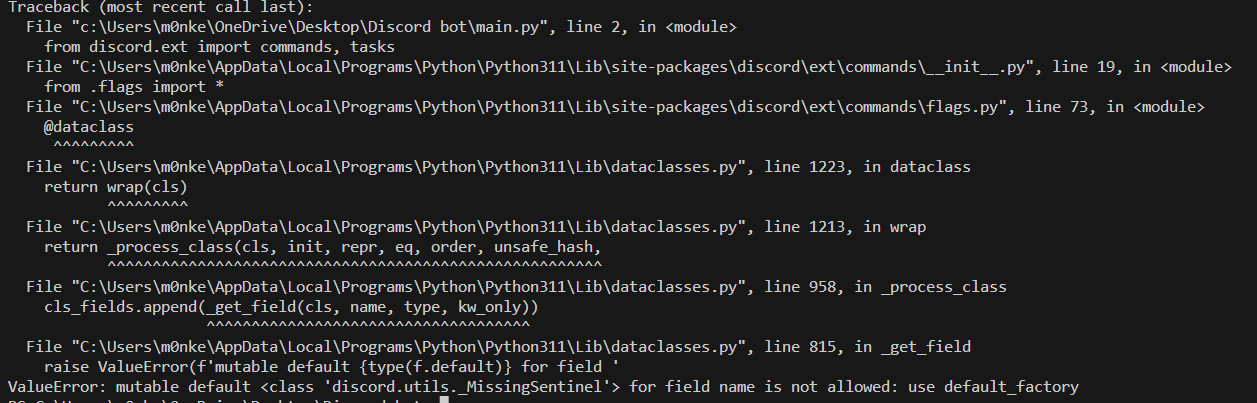
Can someone help me with this?
https://i.imgur.com/uH6bfUQ.png
i dont know if im being ratelimited
 unique lichen
naive briar
Already know it
unique lichen
naive briar
Already know it
i am stating my orginal issue . i want to send images via embeds
naive briar
Yes?
naive briar
slate swan
Can someone help me with this?
https://i.imgur.com/uH6bfUQ.png
i dont know if im...
Send you code, then maybe someone can
unique lichen
Can anybody else tlel how to add local images to embed directly
buoyant quail
unique lichen
i am stating my orginal issue . i want to send images via embeds
It is a different issue.
For that answer from here https://discordpy.readthedocs.io/en/stable/faq.html#how-do-i-use-a-local-image-file-for-an-embed-image is enough
naive briar
slate swan
Can someone help me with this?
https://i.imgur.com/uH6bfUQ.png
i dont know if im...
Well, it looks like internal library issues
What Discord library is this?
slate swan
naive briar
What Discord library is this?
elaborate please
vestal yew
@formal basin help me
naive briar
slate swan
elaborate please
What Discord library are you using? Like discord.py, disnake, py-cord, nextcord, discord, ...
slate swan
naive briar
What Discord library are you using? Like `discord.py, disnake, py-cord, nextcord...
import discord
from discord.ext import commands, tasks
Well, I guess only libraries that uses the discord module name count
vestal yew
from nextcord.ext import commands
class SohbetCevaplama(commands.Cog):
def init(self, Bot):
self.Bot = Bot
@commands.command()
async def selam(self, ctx):
    await ctx.send("Merhaba!")
def setup(Bot):
Bot.add_cog(SohbetCevaplama(Bot))
initial_extensions = ["commands.sohbet_cevaplama.py"]
if name == "main":
for extension in initial_extensions:
try:
Bot.load_extension(extension)
except Exception as e:
print(f"Failed to load extension {extension}: {e}")
error :
Failed to load extension commands.sohbet_cevaplama.py: path attribute not found on 'commands.sohbet_cevaplama' while trying to find 'commands.sohbet_cevaplama.py'
vestal yew
vestal yew
from nextcord.ext import commands
class SohbetCevaplama(commands.Cog):
def ...
@formal basin
naive briar
slate swan
```py
import discord
from discord.ext import commands, tasks
```
No, the library
Those are module names that py-cord also uses
So it's not clear enough
slate swan
naive briar
No, **the library**
Im sorry for being slow, i just dont know what you mean right now sorry
unique lichen
buoyant quail
It is a different issue.
For that answer from here https://discordpy.readthedoc...
yes i understand but like i said ,
i am passing embeds in start( ctx , pages = embeds) how am i supposed to add the file argument here
slate swan
naive briar
No, **the library**
discord
vestal yew
vitness
buoyant quail
unique lichen
yes i understand but like i said ,
i am passing embeds in start( ctx , pages =...
Show that library
buoyant quail
vestal yew
vitness
mhm?
vestal yew
help me :,)
buoyant quail
what
vestal yew
vestal yew
from nextcord.ext import commands
class SohbetCevaplama(commands.Cog):
def ...
.
unique lichen
buoyant quail
Show that library

GitHub
A Python library to easily create embed paginators in discord.py or any fork that uses discord.py 2.0. - GitHub - soosBot-com/Pagination: A Python library to easily create embed paginators in disco...
 frosty beacon
can i add decorator to the commands.Cog.listener("on_message")
from discord.ext import commands
def validation():
    async def predicate(message) -> bool:
        return (
            message.author.id in wishlisted,
            message.guild.id in wishlisted_guilds,
            message.channel.id in wishlisted_channels,
        )
    return commands.check(predicate)

class Test(commands.Cog):
    def __init__(self, bot: commands.Bot) -> None:
        self.bot = bot

    @commands.Cog.lister("on_message")
    @validation
    async def on_message(self, message: Message) -> None:
        # if validation fails this will not be called
        pass
async def setup(bot: commands.Bot):
  await bot.add_cog(Test(bot))
Don't add .py in cog path
naive briar
slate swan
discord
Try pip show discord
 vale wing
Cog.lister when the when
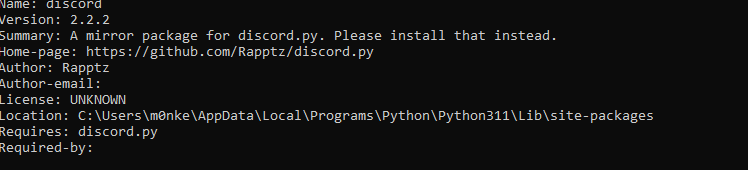 vale wing
frosty beacon
can i add decorator to the `commands.Cog.listener("on_message")`
```py
from disc...
vale wing
frosty beacon
can i add decorator to the `commands.Cog.listener("on_message")`
```py
from disc...
Cog checks are for commands
naive briar
slate swan
https://i.imgur.com/KZiFpwb.png
Well, try uninstalling it and install discord.py instead
frosty beacon
vale wing
Cog checks are for commands
any workaround
slate swan
naive briar
Well, try uninstalling it and install `discord.py` instead
its already downloaded
vale wing
frosty beacon
any workaround
Why do you need it in the first place
naive briar
slate swan
its already downloaded
Did you uninstalled the discord module?
slate swan
naive briar
Did you uninstalled the `discord` module?
yeah'
naive briar
Try to start the bot
vale wing
The "workaround" is putting if condition into listener itself
frosty beacon
vale wing
Why do you need it in the first place
I want to listen to msg send by my friends. in my server
vale wing
Yeah it's simple if condition
frosty beacon
some times they delete it
slate swan
naive briar
Try to start the bot
its the same
frosty beacon
vale wing
Yeah it's simple if condition
I just want to know they back bitch me or not.
buoyant quail
unique lichen
https://github.com/soosBot-com/Pagination
¯_(ツ)_/¯
That library isn't providing any way of giving file in the send
frosty beacon
frosty beacon
can i add decorator to the `commands.Cog.listener("on_message")`
```py
from disc...
edited it.
naive briar
slate swan
its the same
Try pip freeze, you might have multiple Discord libraries
slate swan
oki
unique lichen
buoyant quail
That library isn't providing any way of giving file in the send
Exactly 😭
wish discord would allow sending local files easily
slate swan
naive briar
Try `pip freeze`, you might have multiple Discord libraries
aiohttp==3.7.4.post0
aiosignal==1.3.1
altgraph==0.17.3
async-timeout==3.0.1
attrs==22.2.0
beautifulsoup4==4.11.2
browser-cookie3==0.19.1
bs4==0.0.1
certifi==2022.12.7
chardet==4.0.0
charset-normalizer==3.0.1
colorama==0.4.6
discord-py-interactions==5.6.0
discord-py-slash-command==4.2.1
discord-typings==0.6.0
discord-ui==5.1.6
discord-webhook==1.1.0
discord.py==1.7.3
discordwebhook==1.0.3
emoji==2.4.0
frozenlist==1.3.3
idna==3.4
lz4==4.3.2
multidict==6.0.4
pefile==2023.2.7
Pillow==10.0.0
psutil==5.9.4
py-cord==2.0.0b1
pycryptodomex==3.18.0
pyinstaller==5.13.0
pyinstaller-hooks-contrib==2023.6
pystyle==2.9
pywin32-ctypes==0.2.2
requests==2.28.2
rgbprint==4.0.2
robloxpy==0.2.21
soupsieve==2.4
tomli==2.0.1
typing_extensions==4.6.3
urllib3==1.26.14
yarl==1.8.2
insted of
#@commands.Cog.cog_check(validation)
@validation
(sorry for the flood)
naive briar
Don't worry about it
slate swan
oki
unique lichen
naive briar
It does
i meant as image in embeds
naive briar
That's still easy
slate swan
@naive briar Thanks for your help, im not gonna continue with this because its currently nearly 5am and i need sleep. sorry but i thank you very very much
naive briar
slate swan
```
aiohttp==3.7.4.post0
aiosignal==1.3.1
altgraph==0.17.3
async-timeout==3.0.1
...
Try uninstalling
discord-py-interactions
discord-py-slash-command
discord-typings
discord-ui
discord-webhook
discordwebhook
py-cord
And update discord.py
unique lichen
naive briar
That's still easy
What ? discord is requiring you to add url as args in embed.image
naive briar
Is that hard? I don't think so
slate swan
Ill be back in 4-5 days thanks @naive briar
 livid hedge
hello, I have a simple question. Creating a bot is it a bad practice to extend the discord.py User class? Suppose you are creating a game and you have players inside. Is it a bad practice to extend the user class? class Player(discord.User)
naive briar
slate swan
Ill be back in 4-5 days thanks <@675507024930537473>
No problem 🐈
slate swan
naive briar
No problem 🐈
night night
unique lichen
naive briar
Is that hard? I don't think so
then suggest how am i supposed to do it..
vale wing
@frosty beacon there are two ways
Assume you have a function that checks condition
def check_friends(msg: discord.Message) -> bool:
    return msg.guild.id == your_guild_id
You can do that without decorator:
@Cog.listener()
async def on_message(self, msg: discord.Message):
    if not check_friends(msg):
        return
    ...  # the rest of code
And you can do that with decorator
def check_friends_deco(func: Awaitable):
    async def pred(self: Cog, msg: discord.Message):
        if not check_friends(msg):
            return
        await func(self, msg)  # i'm not even sure if these are correct args bruh
    return pred

@Cog.listener()
@check_friends_deco
async def on_message(self, msg: discord.Message):
    ...  # rest of the code
Decide for yourself which method is better lol
unique lichen
naive briar
Someone sent you a [FAQ](https://discordpy.readthedocs.io/en/stable/faq.html#how...
i said multiple times it isnt useful here because i cant add it to pages 💀
frosty beacon
vale wing
<@888759013171421195> there are two ways
Assume you have a function that checks ...
thanks let me check if this work. i wasted 3 hours on chatgpt
naive briar
unique lichen
i said multiple times it isnt useful here because i cant add it to pages 💀
Because the library you're using doesn't support it, what do you want us to do? 🤷
vale wing
Just fork that library or copy its source into your project lol
Or even better write your own paginator
naive briar
Yeah, it doesn't seem too hard to add the support anyway
unique lichen
naive briar
Because the library you're using doesn't support it, what do you want us to do? ...
i was asking for alternate solution for help .
honestly i appreciate you replying but why are u so passive agressive? you havent been helping but just like repeating its easy etc , kinda different from others here
I mentioned couple of times the standard way to send an image with a single embed wasnt useful over here but u keep saying same
vale wing
Literally ready paginator except it's for disnake https://github.com/BobuxBot/BobuxAdmin/blob/master/utils/pagination.py
GitHub
Moderation bot for Bobux Bot Development server. Contribute to BobuxBot/BobuxAdmin development by creating an account on GitHub.
unique lichen
vale wing
Or even better write your own paginator
i don't know how to.... anyways i am saying how do you add "pages" and files together? sorry if i am explaining it badly but i am saying
if page1 has image1
and page2 has image2 , how to add both images without causing issues as files
naive briar
unique lichen
i was asking for alternate solution for help .
honestly i appreciate you replyin...
You said
Exactly 😭
wish discord would allow sending local files easily
And I just tell that it's easy 🤷
vale wing
unique lichen
i don't know how to.... anyways i am saying how do you add "pages" and files tog...
Assuming pages are embeds this way
await send(embed=current_page, file=current_file)
yes pages are embeds . they are being passed as a collective list and not seperatly with send command
to make clicking next sort of thing
vale wing
vale wing
Literally ready paginator except it's for disnake https://github.com/BobuxBot/Bo...
Have you looked at that?
Perfect solution for your case, you only need to add a field into EmbedPaginatorEntry and alter _get_current_embed function to return file as well to use in update
unique lichen
okay so @vale wing in this page like u said , copy the source
https://github.com/soosBot-com/Pagination/blob/main/src/Paginator.py
if i edit the .send commands and then add file tags there it should work ? 👀
and then just importing the files
GitHub
A Python library to easily create embed paginators in discord.py or any fork that uses discord.py 2.0. - soosBot-com/Pagination
thank you so much for help , that makes sense now
 left dew
in a message content im checking if any of the words from items are in the message. however if i type in small, it should send an error message but it continues. how do i make it check for the full string and not just the single word?
items = ["small-set", "phantom-set"]
found_items = [item for item in items if any(word in message.content.lower() for word in item.split("-"))]
if found_items:```!e 
message_content = "small"
items = ["small-set", "phantom-set"]
found_items = [item for item in items if any(word in message_content.lower() for word in item.split("-"))]

print(found_items)
@naive briar :white_check_mark: Your 3.11 eval job has completed with return code 0.
['small-set']
 spice drum
how can i make a discord chatbot with python?
 turbid condor
spice drum
how can i make a discord chatbot with python?
turbid condor
spice drum
how can i make a discord chatbot with python?
Which model are u using or u gonna train it yourself?
spice drum
what do you mean?
naive briar
Often you'd need to have a model to process inputs and predict the response
turbid condor
Do you have a basic knowledge of ai and machine learning?
spice drum
I wanted to use the package: Chatterbot.
naive briar
!pip chatterbot
unkempt canyonBOT

ChatterBot is a machine learning, conversational dialog engine.
agile latch
hey so I'm running my python bot using pterodactyl
and it seems like whenever I try to hit the "restart" option it just doesn't do that, it says it's doing it but nothing happens, I always have to kill the process
anyone run into something similar before ?
turbid condor
I think that's not a discord issue it's related to the service you using
So i suggest asking them instead
agile latch
worth a shot
I was thinking that maybe its because of the async processes ?
preventing it from restarting unless I kill the program
 wispy pasture
https://srcb.in/8fXzzWJI61
this is a ticket bot and i m trying to use dropdown menus and buttons to make it
the error which i got is:
Traceback (most recent call last):
File "/home/container/main.py", line 67, in <module>
class CreateSelect(View):
File "/home/container/main.py", line 80, in CreateSelect
@CreateSelect.ticket.select # Corrected decorator usage
NameError: name 'CreateSelect' is not defined``` winter hare
how would i make it to where the mention member's balance is shown in the values and not the member who sent the command
code:
@client.command(aliases=['bal'])
async def balance(ctx,member:discord.Member=None):
    await open_account(ctx.author)
    user = ctx.author
    users = await get_bank_data()
    if member is None:
        member = ctx.author

    if member is not None:
        member = member

    wallet = users[str(user.id)]['Wallet']
    bank = users[str(user.id)]['Bank']
    total = wallet + bank


    em = discord.Embed(title=f"{member.name}'s balance", color=discord.Color.random())
    em.add_field(name=':wt: Wallet Balance', value=f' :cn: {wallet}', inline=False)
    em.add_field(name=':bk: Bank Balance', value=f' :cn: {bank}', inline=False)
    em.add_field(name=':co: Total Balance',value=f' :cn: {total}', inline=False)
    await ctx.send(embed=em)
Your member variable is unused
Well, maybe not
But you're getting wallet, bank data from using the user variable, not the member
slate swan
okok, I need help, I want to start making an economy type system, but idk how to start, I've not done anything for it yet
 hasty pike
How do i do reference=original_message() in button interaction reply
 gilded cedar
how does User.global_name,
User.display_name and Member.display_name works? (discord.py version 2.3.0 update is pretty new and couldnt understand how it works)
buoyant quail
gilded cedar
how does `User.global_name`,
`User.display_name` and `Member.display_name` works...
Wdym by that? Exact code? Just look at source
 upbeat gust
hasty pike
How do i do reference=original_message() in button interaction reply
upbeat gust
hasty pike
How do i do reference=original_message() in button interaction reply
button interaction "reply"?
upbeat gust
slate swan
okok, I need help, I want to start making an economy type system, but idk how to...
Main part of it would be a database to store the money of each user, look into sqlite or postgresql
buoyant quail
buoyant quail
Wdym by that? Exact code? Just look at source
unkempt canyonBOT
discord/user.py lines 271 to 281
@property
def display_name(self) -> str:
""":class:`str`: Returns the user's display name.
For regular users this is just their global name or their username,
but if they have a guild specific nickname then that
is returned instead.
"""
if self.global_name:
return self.global_name
return self.name```global_name is just an optional string variable
gilded cedar
hmm
unkempt canyonBOT
property name```
Equivalent to [`User.name`](https://discordpy.readthedocs.io/en/latest/api.html#discord.User.name "discord.User.name")!d discord.Member.global_name
unkempt canyonBOT
property global_name```
Equivalent to [`User.global_name`](https://discordpy.readthedocs.io/en/latest/api.html#discord.User.global_name "discord.User.global_name")!d discord.Member.display_name
unkempt canyonBOT
property display_name```
Returns the user’s display name.

For regular users this is just their global name or their username, but if they have a guild specific nickname then that is returned instead.!d discord.Member.nick
unkempt canyonBOT
The guild specific nickname of the user. Takes precedence over the global name.
agile latch
Hey I'm working on a message purging feature for my bot
But there seems to be a problem, I followed a tutorial to get most of this down, checked and double checked, there's no errors or whatnot but I'm still running into issues
upbeat gust
Have you tried reading the error\
agile latch
I have
upbeat gust
and..?
upbeat gust
it quite clearly says "Missing Permissions"
slate swan
Forbidden: 403 Forbidden (error code: 50013): Missing Permissions
upbeat gust
:/
 vestal harness
Hey all -- I'm diving into discord bot development. One of the things I can't suss out if there's a meaningful difference between app_commands and just doing commands.Bot. What are the major differences between the two?
upbeat gust
vestal harness
Hey all -- I'm diving into discord bot development. One of the things I can't su...
the ext.commands framework is for text commands,
app_commands is for application commands, including slash commands and context menus
vestal harness
upbeat gust
the ext.commands framework is for text commands,
app_commands is for applicatio...
It seems like app_commands are a superset of ext.commands functionality in that case?
upbeat gust
vestal harness
It seems like app_commands are a superset of `ext.commands` functionality in tha...
no its just for a different sort of command
they arent exactly related in any way
 finite geyser
wispy pasture
https://srcb.in/8fXzzWJI61
this is a ticket bot and i m trying to use dropdown m...
finite geyser
wispy pasture
https://srcb.in/8fXzzWJI61
this is a ticket bot and i m trying to use dropdown m...
from discord.ui import Select
!d discord.ui.Select
unkempt canyonBOT
class discord.ui.Select(*, custom_id=..., placeholder=None, min_values=1, max_values=1, options=..., disabled=False, row=None)```
Represents a UI select menu with a list of custom options. This is represented to the user as a dropdown menu.

New in version 2.0..ext.commands also got slash commands
slate swan
finite geyser
.ext.commands also got slash commands
no slash commands are under discord.app_commands
.ext.commands are only for prefixed commands
finite geyser
slate swan
.ext.commands are only for prefixed commands
nope
slate swan
proove me wrong
finite geyser
alr
slate swan
if he means hybrid commands then thats funny
 pale zenith
Stupid bot
slate swan
pale zenith
Stupid bot
no you just dont know how to access the docs
!d discord.ext.commands.Bot.hybrid_command
unkempt canyonBOT
@hybrid_command(name=..., with_app_command=True, *args, **kwargs)```
A shortcut decorator that invokes [`hybrid_command()`](https://discordpy.readthedocs.io/en/latest/ext/commands/api.html#discord.ext.commands.hybrid_command "discord.ext.commands.hybrid_command") and adds it to the internal command list via [`add_command()`](https://discordpy.readthedocs.io/en/latest/ext/commands/api.html#discord.ext.commands.Bot.add_command "discord.ext.commands.Bot.add_command").Does one always need the full qualified name?
finite geyser
import discord
from discord.ext import commands

bot = commands.Bot(command_prefix="$",intents=discord.Intents.all())

@bot.tree.command(name="test")
async def test(int: discord.Interaction):
    await interaction.response.send_message("Test Message Submittes")
bot.run(":)")
hybrid commands are importing app_commands for making slashes
upbeat gust
pale zenith
Does one always need the full qualified name?
and case
slate swan
finite geyser
```py
import discord
from discord.ext import commands
bot = commands.Bot(comman...
yeah you created a Bot instance but you dont use its features
upbeat gust
hi leo
slate swan
if you only use app commands you can just use Client
finite geyser
slate swan
yeah you created a `Bot` instance but you dont use its features
its present under .ext
slate swan
do you even read what im saying?
buoyant quail
finite geyser
```py
import discord
from discord.ext import commands
bot = commands.Bot(comman...
unkempt canyonBOT
discord/ext/commands/bot.py line 176
self.__tree: app_commands.CommandTree[Self] = tree_cls(self) # type: ignore```😔
slate swan
the difference between Client and Bot is that Bot can define prefixed commands
finite geyser
slate swan
do you even read what im saying?
u said its not present there
slate swan
cause its not
finite geyser
but I am saying its present
buoyant quail
It uses app_commands for it
slate swan

finite geyser
yeah but I meant its present in discord.ext.commands too
slate swan
dam bros really not getting it
upbeat gust
finite geyser
yeah but I meant its present in discord.ext.commands too
Where..?
finite geyser
upbeat gust
the ext.commands framework is for text commands,
app_commands is for applicatio...
..
pale zenith
I mean, ext.commands does expand on the app commands framework by allowing app commands to be defined in cogs, but the underlying handler is still the CommandTree
upbeat gust
finite geyser
..
what about it
slate swan



A hands-on guide to Discord.py
finite geyser
huh read it
slate swan
discord.Client can create slash commands only
discord.ext.commands.Bot can create all that Client can + prefixed commands
upbeat gust
finite geyser
huh read it
wdym read it, thats MY message
wispy pasture
how to send various buttons in 1 embed:
    bot.add_view(CreateSelect())
    bot.add_view(CloseButton())
    bot.add_view(TrashButton())
    bot.add_view(one_star())
    bot.add_view(two_star())
    bot.add_view(three_star())
    bot.add_view(four_star())
    bot.add_view(five_star())

#one star
class one_star(View):
    def __init__(self):
        super().__init__(timeout=None)
    @button(label="⭐")
    async def close(self, interaction: discord.Interaction, button: Button):
        await interaction.channel.send("⭐ Review!")

#two star
class two_star(View):
    def __init__(self):
        super().__init__(timeout=None)
    @button(label="⭐")
    async def close(self, interaction: discord.Interaction, button: Button):
        await interaction.channel.send("⭐⭐ Review!")

#three star
class three_star(View):
    def __init__(self):
        super().__init__(timeout=None)
    @button(label="⭐")
    async def close(self, interaction: discord.Interaction, button: Button):
        await interaction.channel.send("⭐⭐⭐ Review!")

#four star
class four_star(View):
    def __init__(self):
        super().__init__(timeout=None)
    @button(label="⭐")
    async def close(self, interaction: discord.Interaction, button: Button):
        await interaction.channel.send("⭐⭐⭐⭐ Review!")

#five
class five_star(View):
    def __init__(self):
        super().__init__(timeout=None)
    @button(label="⭐")
    async def close(self, interaction: discord.Interaction, button: Button):
        await interaction.channel.send("⭐⭐⭐⭐⭐ Review!")

#other code balh balh balh

#commands
@tree.command(name="review", description="review")
async def slash_command(interaction: discord.Interaction):
    await ctx.send(
        embed = discord.Embed(
            desription="Please give us  review"
        ),
        view= one_star(), two_star(), three_star(), four_star(), five_star()
    ) ```

now i want to send those rating buttons in the embed... how can i?yeah that's what I am sayin
slate swan
finite geyser
yeah that's what I am sayin
no thats exactly what you are not saying
you said .ext.commands is responsible for slash commands
pale zenith
wispy pasture
how to send various buttons in 1 embed:
```py
bot.add_view(CreateSelect())
...
You add multiple buttons to one view
finite geyser
slate swan
you said .ext.commands is responsible for slash commands
I never said its responsible I meant u can create it there too
slate swan
wispy pasture
how to send various buttons in 1 embed:
```py
bot.add_view(CreateSelect())
...
create one view with 5 buttons?
pale zenith
Rather than making a bunch of views
wispy pasture
pale zenith
You add multiple buttons to one view
can you send an exmaple if possible?
finite geyser
slate swan
..
huge misunderstanding 💀
wispy pasture
slate swan
create one view with 5 buttons?
how??? any examples?
upbeat gust
wispy pasture
can you send an exmaple if possible?
 upbeat gust
finite geyser
huge misunderstanding 💀
upbeat gust
finite geyser
huge misunderstanding 💀
Huge unable to explain yourself properly
wispy pasture
upbeat gust
tha~ alright
slate swan
wispy pasture
how??? any examples?
GitHub
An API wrapper for Discord written in Python. Contribute to Rapptz/discord.py development by creating an account on GitHub.
in this example there are two buttons defined
pale zenith
wispy pasture
tha~ alright
But don't name them all "closed" you'd just be redefining the same button
wispy pasture
pale zenith
But don't name them all "closed" you'd just be redefining the same button
wdym by "closed"?
finite geyser
upbeat gust
Huge unable to explain yourself properly
I was saying we can create slash cmds in discord.ext.commands too
pale zenith
wispy pasture
wdym by "closed"?
async def closed(...)
You can't have two things named the same you would just overwrite the first one
upbeat gust
finite geyser
I was saying we can create slash cmds in discord.ext.commands too
That doesn't even make sense 💀, discord.ext.commands is just a module
wispy pasture
pale zenith
>async def **closed**(...)
ah alright alright
finite geyser
upbeat gust
That doesn't even make sense 💀, discord.ext.commands is just a module
.....
huh
slate swan
oh thats not an answer
hasty pike
He answered to my question i was just confirming 😭
slate swan
then no such method does not exist
slate swan
!d discord.InteractionResponse
unkempt canyonBOT
class discord.InteractionResponse```
Represents a Discord interaction response.

This type can be accessed through [`Interaction.response`](https://discordpy.readthedocs.io/en/latest/interactions/api.html#discord.Interaction.response "discord.Interaction.response").

New in version 2.0.Hybrid commands? I don't like those at all
upbeat gust
hasty pike
Is there any limit?
no
buoyant quail
!d discord.TextChannel.fetch_message
unkempt canyonBOT
await fetch_message(id, /)```
This function is a [*coroutine*](https://docs.python.org/3/library/asyncio-task.html#coroutine).

Retrieves a single [`Message`](https://discordpy.readthedocs.io/en/latest/api.html#discord.Message "discord.Message") from the destination.Looks like only message id is not enough
Only messageable objects have fetch_message, you need a channel or smth like that too
upbeat gust
!d discord.PartialMessage.edit
unkempt canyonBOT
await edit(*, content=..., embed=..., embeds=..., attachments=..., delete_after=None, allowed_mentions=..., view=...)```
This function is a [*coroutine*](https://docs.python.org/3/library/asyncio-task.html#coroutine).

Edits the message.

The content must be able to be transformed into a string via `str(content)`.

Changed in version 2.0: Edits are no longer in-place, the newly edited message is returned instead.

Changed in version 2.0: This function will now raise [`TypeError`](https://docs.python.org/3/library/exceptions.html#TypeError "(in Python v3.11)") instead of `InvalidArgument`.!d discord.TextChannel.get_partial_message
unkempt canyonBOT
get_partial_message(message_id, /)```
Creates a [`PartialMessage`](https://discordpy.readthedocs.io/en/latest/api.html#discord.PartialMessage "discord.PartialMessage") from the message ID.

This is useful if you want to work with a message and only have its ID without doing an unnecessary API call.

New in version 1.6.

Changed in version 2.0: `message_id` parameter is now positional-only.Use this instead of fetch_message, uses one less api call
upbeat gust
buoyant quail
!d discord.TextChannel.fetch_message
PartialMessage is better
buoyant quail
i see
wispy pasture
well i think i added the sync:
https://srcb.in/EEiKplgARV
Traceback (most recent call last):
  File "/home/container/main.py", line 233, in <module>
    async def slash_command(ctx, interaction: discord.Interaction):
  File "/home/container/.local/lib/python3.10/site-packages/discord/ext/commands/bot.py", line 290, in decorator
    result = hybrid_command(name=name, *args, with_app_command=with_app_command, **kwargs)(func)
  File "/home/container/.local/lib/python3.10/site-packages/discord/ext/commands/hybrid.py", line 893, in decorator
    return HybridCommand(func, name=name, with_app_command=with_app_command, **attrs)  # type: ignore  # ???
  File "/home/container/.local/lib/python3.10/site-packages/discord/ext/commands/hybrid.py", line 509, in __init__
    HybridAppCommand(self) if self.with_app_command else None
  File "/home/container/.local/lib/python3.10/site-packages/discord/ext/commands/hybrid.py", line 306, in __init__
    super().__init__(
  File "/home/container/.local/lib/python3.10/site-packages/discord/app_commands/commands.py", line 666, in __init__
    self._params: Dict[str, CommandParameter] = _extract_parameters_from_callback(callback, callback.__globals__)
  File "/home/container/.local/lib/python3.10/site-packages/discord/app_commands/commands.py", line 374, in _extract_parameters_from_callback
    param = annotation_to_parameter(resolved, parameter)
  File "/home/container/.local/lib/python3.10/site-packages/discord/app_commands/transformers.py", line 834, in annotation_to_parameter
    (inner, default, validate_default) = get_supported_annotation(annotation)
  File "/home/container/.local/lib/python3.10/site-packages/discord/app_commands/transformers.py", line 793, in get_supported_annotation
    raise TypeError(f'unsupported type annotation {annotation!r}')
TypeError: unsupported type annotation <class 'discord.interactions.Interaction'>```
You are making function with 2 parameters
ctx and interaction
wispy pasture
so that cant be done?
buoyant quail
so first will be actually interaction
and second discord.py will try to use as input from user
buoyant quail
wispy pasture
so that cant be done?
nope
turbid condor
Hybrid only uses ctx
wispy pasture
but if i dont add ctx, i get the error "ctx is undefined"
turbid condor
No need for interaction
wispy pasture
turbid condor
No need for interaction
oksy so everything works... except that the review cmd wont come on slash cmds and it only sends 1 buttons
 turbid condor
U synced it?
wispy pasture
yeah it think i did
turbid condor
Can u show the code where u syncing
buoyant quail
wispy pasture
oksy so everything works... except that the review cmd wont come on slash cmds a...
I remember your question and someone's answer don't name button handlers with the same name
You have all of them with the same name on_rating_close
turbid condor
buoyant quail
You have all of them with the same name `on_rating_close`
This too this overwrites the button
Give every button function a different name
wispy pasture
turbid condor
Can u show the code where u syncing
 buoyant quail
on_bot_ready event doesn't exist i believe
turbid condor
Guy got me confused
buoyant quail
 wispy pasture
turbid condor
Give every button function a different name
wispy pasture
turbid condor
Give every button function a different name
so then how do i send all the buttons under 1 embed then?
turbid condor
wispy pasture
so then how do i send all the buttons under 1 embed then?
Just change the function names
As you are sending the whole view i believe
Not just buttons individually
wispy pasture
hmm alright
turbid condor
wispy pasture
And don't sync in on_ready
wispy pasture
turbid condor
Just change the function names
okay so this is the code:
class one_star(View):
    def __init__(self):
        super().__init__(timeout=None)
    @button(label="⭐")
    async def close(self, interaction: discord.Interaction, button: Button):
        await interaction.channel.send("⭐ Review!")

#two star
class two_star(View):
    def __init__(self):
        super().__init__(timeout=None)
    @button(label="⭐")
    async def close(self, interaction: discord.Interaction, button: Button):
        await interaction.channel.send("⭐⭐ Review!")

#three star
class three_star(View):
    def __init__(self):
        super().__init__(timeout=None)
    @button(label="⭐")
    async def close(self, interaction: discord.Interaction, button: Button):
        await interaction.channel.send("⭐⭐⭐ Review!")

#four star
class four_star(View):
    def __init__(self):
        super().__init__(timeout=None)
    @button(label="⭐")
    async def close(self, interaction: discord.Interaction, button: Button):
        await interaction.channel.send("⭐⭐⭐⭐ Review!")

#five
class five_star(View):
    def __init__(self):
        super().__init__(timeout=None)
    @button(label="⭐")
    async def close(self, interaction: discord.Interaction, button: Button):
        await interaction.channel.send("⭐⭐⭐⭐⭐ Review!")```

how do make it send under 1 embed?oh
 cloud dawn
At least the setup_hook but preferably also when a command decorator/ function arg/kwarg has changed else don't resync.
turbid condor
wispy pasture
okay so this is the code:
```py
class one_star(View):
def __init__(self):
...
You want all these to be sent in one embed?
cloud dawn
wispy pasture
okay so this is the code:
```py
class one_star(View):
def __init__(self):
...
This can be done way more efficiently.
turbid condor
Then why make different classes for each
wispy pasture
turbid condor
You want all these to be sent in one embed?
yeah
wispy pasture
turbid condor
Then why make different classes for each
i~
cloud dawn
wispy pasture
okay so this is the code:
```py
class one_star(View):
def __init__(self):
...
class Review(View):
    def __init__(self, rating: int):
        super().__init__(timeout=None)

    @button(label="⭐")
    async def close(self, interaction: discord.Interaction, button: Button):
        await interaction.channel.send(f"{'⭐' * rating} Review!")
He wants 5 buttons
turbid condor
Just make them all under one class like
class star(View):
    def __init__():

    @discord.....
    async def.....

    @discord.....
     async def.....
Do them like this
Then send this view
wispy pasture
turbid condor
Just make them all under one class like
```py
class star(View):
def __init__...
what comes in @discord?
turbid condor
That's the decorator you using
cloud dawn
If it's just the rating that changes you can also just make a list comp of buttons.
wispy pasture
turbid condor
That's the decorator you using
oh
buoyant quail
turbid condor
Just make them all under one class like
```py
class star(View):
def __init__...
but with different names
not as you did it before
turbid condor
In your case it will @buttons
wispy pasture
turbid condor
Just make them all under one class like
```py
class star(View):
def __init__...
thanks dude it worked!!!!!!!!!!
turbid condor
What u thought i was trolling XD
wispy pasture
turbid condor
And don't sync in on_ready
but the slash cmd wont load? how to sync it properly
turbid condor
Just create a command
turbid condor
Can you show it
wispy pasture
 turbid condor
I mean for sync
wispy pasture
i~ i never made a sync cmd?
wispy pasture
uhhh... how? like what to add?
turbid condor
Same way u create any other command
U just need to put the sync line in there
shouldn't be that hard i think
vestal yew
@Bot.slash_command(description="Kişiyi sunucudan banlar")
@commands.has_permissions(ban_members=True)
async def ban(ctx, member: nextcord.Member, *, reason=None):
if member == ctx.author:
await ctx.send("Kendinizi yasaklayamazsınız!")
else:
try:
await member.ban(reason=reason)
if reason:
await ctx.send(f"{member.mention} başarıyla yasaklandı! Sebep: {reason}")
else:
await ctx.send(f"{member.mention} başarıyla yasaklandı!")
except commands.MissingPermissions:
await ctx.send("Yeterli yetkiniz yok.")
except commands.BotMissingPermissions:
await ctx.send("Botun yeterli yetkisi yok.")
except nextcord.HTTPException as e:
await ctx.send(f"Hata oluştu: {e}")
@ban.error
async def ban_error(ctx, error):
if isinstance(error, commands.MissingPermissions):
if ctx.author.id == 924899524860850186:
await ctx.reinvoke()
else:
await ctx.send("Bu komutu kullanma yetkiniz yok.")
elif isinstance(error, commands.MemberNotFound):
await ctx.send("Lütfen bir üye etiketleyin.")
elif isinstance(error, commands.BadArgument):
await ctx.send("Lütfen bir geçerli üye etiketleyin.")
@wispy pasture
@turbid condor
I am running my code, but I am getting an unresponsive application error. Can you help
turbid condor
vestal yew
I am running my code, but I am getting an unresponsive application error. Can yo...
Any error in the terminal?
vestal yew
turbid condor
Any error in the terminal?
no
vestal yew
 turbid condor
Ok try removing that error handler
That might be eating up the error
And then see what it prints
cloud dawn
vestal yew
@Bot.slash_command(description="Kişiyi sunucudan banlar")
@commands.has_permissi...
ctx on a slash command...?
turbid condor
cloud dawn
ctx on a slash command...?
Nextcord
turbid condor
U sure cuz i never worked with nexcord
cloud dawn
Me too hence I checked
turbid condor
So welp we found the issue then i guess
vestal yew
my other commands are working.
turbid condor
vestal yew
my other commands are working.
Are they slash too
vestal yew
 cloud dawn
Yeah you can use whatever but it's just... different.
turbid condor
Welp then remove that error handler then and see
buoyant quail
It might have the same function
For example in disnake send for interaction is implemented as response + followup
turbid condor
I see
cloud dawn
vestal yew
@Bot.slash_command(description="Kişiyi sunucudan banlar")
@commands.has_permissi...
You still need to respond using *.response.send_message
turbid condor
This why i like dpy since there is a clear difference in every argument
vestal yew
Ignoring exception in command <nextcord.application_command.SlashApplicationCommand object at 0x0000026FE8066B10>:
Traceback (most recent call last):
File "C:\Users\Bayram\AppData\Local\Programs\Python\Python311\Lib\site-packages\nextcord\application_command.py", line 895, in invoke_callback_with_hooks
await self(interaction, *args, **kwargs)
File "c:\Users\Bayram\Desktop\Yongsun.py\yongsun.py", line 135, in ban
if member == ctx.author:
^^^^^^^^^^
AttributeError: 'Interaction' object has no attribute 'author'
The above exception was the direct cause of the following exception:
nextcord.errors.ApplicationInvokeError: Command raised an exception: AttributeError: 'Interaction' object has no attribute 'author'
bruuuuhhhhhh
vestal yew
I will solve this issue right away.
buoyant quail
cloud dawn
Very cursed to call it ctx then lel
async def command(message)

turbid condor
Idk why ppl test there code with error handler enabled it's my fifth time today
finite geyser

cloud dawn
Just use a global error handler, all you need.
turbid condor
buoyant quail
```py
async def command(message)
```
<:ducky_beer:999676458064687104>
tbh this makes it look like
@bot.listen('on_message')
async def command(message):
Slash commands don't have them
cloud dawn
turbid condor
Slash commands don't have them
They do.
vestal yew
turbid condor
Idk why ppl test there code with error handler enabled it's my fifth time today
It was working before.
turbid condor
cloud dawn
They do.
Afaik there is nothing as global slash command error handler in dpy
buoyant quail
vestal yew
It was working before.
If you have no errors then it is working ofc
cloud dawn
turbid condor
Afaik there is nothing as global slash command error handler in dpy
on_error on the CommandTree
buoyant quail
turbid condor
Afaik there is nothing as global slash command error handler in dpy
Tree.on_error?
turbid condor
Yeah that's for a tree
finite geyser
which one is better dropdown menu roles or old reaction roles?
buoyant quail
I believe you don't have multiple trees
cloud dawn
buoyant quail
I believe you don't have multiple trees
You can but not many people do.
buoyant quail
finite geyser
which one is better dropdown menu roles or old reaction roles?
What is "better"? Everyone has his own opinion
turbid condor
So I won't call that global
turbid condor
finite geyser
which one is better dropdown menu roles or old reaction roles?
Buttons XD
finite geyser
buoyant quail
What is "better"? Everyone has his own opinion
nah I means like which one is good according to u
finite geyser
turbid condor
Buttons XD
Lol
turbid condor
finite geyser
nah I means like which one is good according to u
Which ever u can work with
buoyant quail
turbid condor
So I won't call that global
what about discord.on_error? looks like it's global for everything
cloud dawn
turbid condor
So I won't call that global
Then use the Client one.
turbid condor
buoyant quail
what about `discord.on_error`? looks like it's global for everything
Nope it's for events and listeners i think
finite geyser
turbid condor
Which ever u can work with
I can work with both but
just asking so that I can decide which one should I add
turbid condor
finite geyser
I can work with both but
Then go with drop down or button
buoyant quail
turbid condor
Nope it's for events and listeners i think
maybe
idk
cloud dawn
turbid condor
So I won't call that global
Call it how you want it's more than enough for 99.9% of users.
turbid condor
cloud dawn
Call it how you want it's more than enough for 99.9% of users.
You can say it that way
But still it's better to know the actual case
Rather than thinking about majority
cloud dawn
A lot of people here don't care about the actual case. They just want their code to work lol
turbid condor
cloud dawn
A lot of people here don't care about the actual case. They just want their code...
Facts
On_error only for event
 unkempt canyonBOT
discord.on_interaction(interaction)```
Called when an interaction happened.

This currently happens due to slash command invocations or components being used.

Warning

This is a low level function that is not generally meant to be used. If you are working with components, consider using the callbacks associated with the [`View`](https://discordpy.readthedocs.io/en/latest/interactions/api.html#discord.ui.View "discord.ui.View") instead as it provides a nicer user experience.

New in version 2.0.So you could make a global error handler.
turbid condor
Can't say when it triggers incase after interaction is completed or same time the interaction happens
If it's after completion then u can't since incase of interaction fail there is no interaction that happened
buoyant quail
Even though prefix and slash commands are called from event, on_error is not called. just checked
@bot.command() - drops error
@bot.tree.command() - drops error
@bot.listen("on_message") - goes in on_error
buoyant quail
sure
 final iron
hasty pike
I can store message id this way right?
final iron
hasty pike
I can store message id this way right?
Sure, but if you want to store it long term you'd need a database
slate swan
can some1 help me with my code?
 clever scaffold
slate swan
can some1 help me with my code?
clever scaffold
slate swan
can some1 help me with my code?
i can
 clever scaffold
slate swan
clever scaffold
slate swan
remove guild_id
slate swan
ok and i cant do / command?
clever scaffold
def test(a = None):
  print(a)

test(b="Hello")
it will return same error
clever scaffold
slate swan
ok and i cant do / command?
can i get your code?
slate swan

 buoyant quail
bot.add_command is a function, not decorator
slate swan
but when i do @bot.slash_command it doesnt say its a attribute
buoyant quail
and usually you don't use it
you want @bot.command() i believe
for slashes you need another thing
if it's a bot then @bot.tree.command() will be enough (+ you need to sync it)
and changing your command to use interaction methods, not context
slate swan

 clever scaffold
slate swan
clever scaffold
slate swan
you want to convert this code to JS?
slate swan
no stick to py
naive briar
You mean no, stick to py
slate swan
slate swan
What library are you using?
buoyant quail
slate swan
As it says, there is no Option in discord
Use what it has
I guess you want SelectOption
but you are typehinting with it... so i am not sure
slate swan
buoyant quail
I guess you want `SelectOption`
yeah thats right 😂
thanks so much for the help btw
slate swan
slate swan
What library are you using?
not sure i dont think i have one haha
wait im getting the same error 💀
naive briar
No one appreciate this kind of reaction
 slate swan
ma fault
slate swan
slate swan
not sure i dont think i have one haha
You must have one to use
oh
most common ones are discord.py nextcord disnake py-cord can you check if you have installed any of those
oh i use py-cord
and discord.py
You cant use two at once
oh so uninstall what one?
From those two i would recommend discord.py
ok
thats the line im getting a error on

yes i agree 
buoyant quail
!resources
unkempt canyonBOT
Resources
The Resources page on our website contains a list of hand-selected learning resources that we regularly recommend to both beginners and experts.
slate swan
alr bet
buoyant quail
the only answer i can give here
 main holly
yo
slate swan
slate swan
Even with class keyword
nah i added that but changed it back to type 💀
main holly
how do i make logs
buoyant quail
1.7.2 :p
 upbeat ice
yeah bookmarks a little dated it seems lol
also if you are interested this project is not bad https://pypi.org/project/python-logging-discord-handler/
 slate swan
alr im advancing now
 upbeat ice
slate swan
alr im advancing now
upbeat ice
slate swan
alr im advancing now
did you check the accepted args for that? https://discordpy.readthedocs.io/en/stable/interactions/api.html?highlight=selectoption#discord.SelectOption
slate swan
upbeat ice
did you check the accepted args for that? https://discordpy.readthedocs.io/en/st...

 slate swan
oh got it so what should i put instead of selectOption?
Choice?
what you expect it to do
unkempt canyonBOT
examples/app_commands/basic.py lines 47 to 54
@client.tree.command()
@app_commands.describe(
    first_value='The first value you want to add something to',
    second_value='The value you want to add to the first value',
)
async def add(interaction: discord.Interaction, first_value: int, second_value: int):
    """Adds two numbers together."""
await interaction.response.send_message(f'{first_value} + {second_value} = {first_value + second_value}')```if that's what you want
slate swan
Yeah and choices are made with decorator too
to like when you do a /ban command it pops up with a user selection
that
Then annotate argument as discord.Member
but not a ban command
buoyant quail
Then annotate it with anything else you want
slate swan
use it as a integer like 1= one file in the popup and 2= another file
Use choices then
buoyant quail
!d discord.app_commands.choices
unkempt canyonBOT
@discord.app_commands.choices(**parameters)```
Instructs the given parameters by their name to use the given choices for their choices.

Example...!d discord.app_commands.choices
 hushed galleon
upbeat ice
also if you are interested this project is not bad https://pypi.org/project/pyth...
hushed galleon
upbeat ice
also if you are interested this project is not bad https://pypi.org/project/pyth...
looks pretty neat, but im a bit concerned about the fact they don't handle webhook posts in a separate thread
upbeat ice
hushed galleon
looks pretty neat, but im a bit concerned about the fact they don't handle webho...
yeah i didn't notice that at first - although the source code for this project is so simple you probably could rewrite the posting part to use AsyncDiscordWebhook https://github.com/lovvskillz/python-discord-webhook#async-support

GitHub
execute discord webhooks. Contribute to lovvskillz/python-discord-webhook development by creating an account on GitHub.
hushed galleon
upbeat ice
yeah i didn't notice that at first - although the source code for this project i...
nah it doesnt have to use async/await, just doing the requests through a QueueHandler/QueueListener should be enough
 stark socket
image i have an account who is onwer of 10 servers is there a way to invite the same bots programaticly for these servers with oauth2? ( i mean bots that are not mine like music bots or m6 for example)
slate swan
this choice thingy ma jig is gonna make my head explode
naive briar
stark socket
image i have an account who is onwer of 10 servers is there a way to invite the ...
No
You need to do it manually
buoyant quail
If you will make a bot that will open a link, choose server and solve discord antibot captcha for you...
naive briar
Overkill
buoyant quail
Very interesting challenge though
stark socket
yea pretty interesting challenge, what is even more interesting is i never done a captcha solver so maybe is time to try ; )
 cold sonnet
y'all gonna have us solve the theory of everything as captcha
if it's so easy to make bots that solve captcha they're gonna make it harder
wispy pasture
Hey... What's the method to edit a bots reply which was sent in an embed with buttons?? interaction.response.edit?
upbeat ice
interaction.response.edit_message is what you are looking for
 hasty coral
I am unfamiliar with the use of slash commands. Please can someone explain why my bot doesn't kick the user?
@bot.tree.command(name="kick", description="Kick a User")
@commands.has_permissions(kick_members=True)
@app_commands.describe(member = "user")
@app_commands.describe(reason = "reason")
async def kick(ctx: discord.Interaction, member: discord.Member, reason: str):
    if member == ctx.user:
        await ctx.response.send_message(f"{ctx.user.mention} you cannot kick yourself!")
    else:
        try:
            await member.kick(reason=reason)
            embed = discord.Embed(title="**User Kicked**", color=discord.Color.red())
            embed.add_field(name="Offender", value=f"{member.Mention}", inline=True)
            embed.add_field(name="Moderator", value=f"{ctx.user}", inline=True)
            embed.add_field(name="Reason", value=f"{reason}")
            await ctx.response.send_message(embed=embed)
        except discord.Forbidden:
            await ctx.response.send_message("I do not have permission to kick members.")


@kick.error
async def kick_error(ctx, error):
    if isinstance(error, commands.MissingPermissions):
        await ctx.response.send_message(f"{ctx.user.mention} You don't have permission to kick members.")
    elif isinstance(error, commands.BadArgument):
        await ctx.response.send_message(f"{ctx.user.mention} Invalid member provided.")
    else:
await ctx.response.send_message(f"{ctx.user.mention} An error occurred while trying to kick the member.")```Well for a start you're using a prefix command decorator on a slash command
Otherwise not really without a traceback or knowing what it's doing instead
buoyant quail
slate swan
Well for a start you're using a prefix command decorator on a slash command
he is not
ahh, you meant the check
@commands.has_permissions(kick_members=True)
this ^ is decorator for prefix commands
not sure what it will do, but using the slash one will be better
and yeah an actual traceback would help
or at least what output you are getting
 warm coral
i made this simple calculator please somone rate it btw im a begginer
clone_input = input("put anything and i will clone it !")

def clone_machine():
    print(clone_input)

clone_machine()

print("now for the calculator!")

first_number = int(input("type a number."))

second_number = int(input( "type a second number."))

print("i will give you the sum of the 2 numbers you typed")

question_ready = input("are you ready?")

if question_ready == "yes":
    print(first_number + second_number)
else:
    print("fuck you")

print("amazing right?")
print("now lets do a multiplication! ")

first_number = int(input("type a number."))

second_number = int(input( "type a second number."))


print("i will give you the multiplication of the 2 numbers you typed")

question_ready = input("are you ready?")

if question_ready == "yes":
    print(first_number * second_number)
else:
    print("fuck you")

print("bye")Cool, but this channel is specifically for discord bots
buoyant quail
That's a wrong channel for that
And also i don't like your answer for exiting the program
warm coral
im sorry
warm coral
buoyant quail
And also i don't like your answer for exiting the program
wdym?
buoyant quail
For "are you ready?" question i mean
buoyant quail

warm coral
how to download the python package on vscode?
im really struggling
everytime i want to code
i go to an online compiler
buoyant quail
pip install package
buoyant quail
for example, yes
buoyant quail
what does it say
 slate swan
!repl
unkempt canyonBOT
Read-Eval-Print Loop (REPL)
A REPL is an interactive language shell environment. It first reads one or more expressions entered by the user, evaluates it, yields the result, and prints it out to the user. It will then loop back to the read step.
To use Python's REPL, execute the interpreter with no arguments. This will drop you into the interactive interpreter shell, print out some relevant information, and then prompt you with the primary prompt >>>. At this point it is waiting for your input.
Firstly you can start typing in some valid Python expressions, pressing <return> to either bring you to the eval step, or prompting you with the secondary prompt ... (or no prompt at all depending on your environment), meaning your expression isn't yet terminated and it's waiting for more input. This is useful for code that requires multiple lines like loops, functions, and classes. If you reach the secondary prompt in a clause that can have an arbitrary amount of expressions, you can terminate it by pressing <return> on a blank line. In other words, for the last expression you write in the clause, <return> must be pressed twice in a row.
Alternatively, you can make use of the builtin help() function. help(thing) to get help on some thing object, or help() to start an interactive help session. This mode is extremely powerful, read the instructions when first entering the session to learn how to use it.
Lastly you can run your code with the -i flag to execute your code normally, but be dropped into the REPL once execution is finished, giving you access to all your global variables/functions in the REPL.
To exit either a help session, or normal REPL prompt, you must send an EOF signal to the prompt. In *nix systems, this is done with ctrl + D, and in windows systems it is ctrl + Z. You can also exit the normal REPL prompt with the dedicated functions exit() or quit().
slate swan
you are in repl mode
warm coral
i write it in terminal @buoyant quail
slate swan
quit it
warm coral
slate swan
quit it
how?
slate swan
warm coral
how?
read last paragraph of the embed
warm coral
ok thanks
 plucky knoll
Hello, why can't I access Cog attrs when using app_commands? Could syncing tree in setup_hook be the reason?
...

class Cog(commands.Cog):
    def __int__(self, bot: commands.Bot):
        self.bot = bot

    @app_commands.command(description="...")
    async def cmd(self, interaction: Interaction):
        self.bot  # AttributeError: 'Cog' object has no attribute 'bot'

...
cause you have typo in the __init__ method
plucky knoll
I
warm coral
still @slate swan
 plucky knoll
blame pycharm for that
upbeat ice
plucky knoll
blame pycharm for that
never blame pycharm
slate swan
warm coral
still <@456226577798135808>
now we are getting somewhere
plucky knoll
slate swan
cause you have typo in the `__init__` method
thank you.
 slate swan
what os?
slate swan
you installed it from ms store?
warm coral
no
slate swan
or python.org
warm coral
from python.org
slate swan
!dashm
unkempt canyonBOT
Install packages with `python -m pip`
When trying to install a package via pip, it's recommended to invoke pip as a module: python -m pip install your_package.
Why would we use python -m pip instead of pip?
Invoking pip as a module ensures you know which pip you're using. This is helpful if you have multiple Python versions. You always know which Python version you're installing packages to.
Note
The exact python command you invoke can vary. It may be python3 or py, ensure it's correct for your system.
slate swan
try this
 warm coral
upbeat ice
was pip selected when you installed python?
warm coral
upbeat ice
was pip selected when you installed python?
i dont remember
slate swan
upbeat ice
since when there are so many optional features
upbeat ice
I thought pip was automatically selected
warm coral
 upbeat ice
but I cant remember
slate swan
warm coral
well now its getting interesting
slate swan
so how did you get to repl mode without python
 jade flare
warm coral
jade flare
warm coral
i had smth like this too, i installed it from the ms store and then it worked
 warm coral
slate swan
so how did you get to repl mode without python
warm coral
slate swan
so how did you get to repl mode without python
repl doesnt enable u to import packages right?
warm coral
slate swan
so how did you get to repl mode without python
idk
slate swan
warm coral
repl doesnt enable u to import packages right?
what command did you run so you got into the repl mode
jade flare
slate swan
more problems
works fine for me
 slate swan
but before i told you
yeah i know i told you how to quit it im asking how did you enter it
scroll up a bit and see
warm coral
slate swan
yeah i know i told you how to quit it im asking how did you enter it
doesnt matter anyways because u told the command to exit from it
slate swan
warm coral
doesnt matter anyways because u told the command to exit from it
it matters a lot
warm coral
i dont remember entering repl mode
slate swan
if i knew how you enter it i would knew how toinstall package
warm coral
with any commands in the terminal
maybe uninstall python and download it again?
and check the pip*
slate swan
anyways if you dont know how you got into repl try reinstalling python and make sure you check pip and Add python to PATH or something like that
warm coral
slate swan
anyways if you dont know how you got into repl try reinstalling python and make ...
we have the same ideas 😄

pip checked
slate swan
👍
slate swan
what you see?
warm coral
 upbeat ice
maybe buy a windows license too 😛
warm coral
done
warm coral
upbeat ice
maybe buy a windows license too 😛
😠 me have no moni
pip install discord right?
discord package is ,, pip install discord
 grim robin
I have different listeners for my bot and all seem to work fine. I did try to add an on_ready one and it doesn't trigger. This is my simple testing code:
@client.listen("on_ready")
async def test_fn():
    print("test")
Am I doing something wrong?
warm coral
@bot.event
async def on_ready():
print ("Booting up your system")
try it
upbeat ice
grim robin
I have different listeners for my bot and all seem to work fine. I did try to ad...
can you show your full code
grim robin
this is my full code
upbeat ice
I don't see your on_ready method
buoyant quail
grim robin
I have different listeners for my bot and all seem to work fine. I did try to ad...
It is working fine.
grim robin
it's a listener
buoyant quail
 grim robin
not an event
I don't get any output...
I do have a normal on_ready event
and that one prints fine
buoyant quail
Check that file is saved
That function is executed (it is reachable)
That client is an actual thing you are using
idk what else
 hollow bolt
try making bots with disnake
grim robin
buoyant quail
Check that file is saved
That function is executed (it is reachable)
That client...
client is usable, 3 other listeners in the same file for "on_member_join", "on_raw_member_remove" and "on_member_ban" all work fine
buoyant quail
It works on my machine.
grim robin
while already having a regular on_ready event?
hollow bolt
where can I show my code to view ~.db files
warm coral
when i run the python3 -m pip install -U discord.py
it makes an eror
hollow bolt
warm coral
when i run the python3 -m pip install -U discord.py
it makes an eror
try disnake
buoyant quail
grim robin
while already having a regular on_ready event?
 grim robin
ok now I'm puzzled
buoyant quail
show full code?
hollow bolt
hollow bolt
try disnake
why the cross
warm coral
hollow bolt
why the cross
wdym bro?
upbeat ice
hollow bolt
why the cross
because installing disnake is 1) not going to fix his problem and 2)not helpful
hollow bolt
I'm talking about using another library if possible
grim robin
@client.listen("on_ready")
async def test_fn():
    print("test")


@client.listen("on_member_join")
async def test_join(user):
    print(2)


@client.listen("on_raw_member_remove")
async def test_leave(payload):
    print(2)


@client.listen("on_member_ban")
async def test_ban(server, user):
    print(3)


@client.event
async def on_ready():
    print("test ready")
i'm not getting any errors
I just don't get the "test" printing output
all else print fine
upbeat ice
 grim robin
my main on_ready is in another file and all the rest listeners are elsewhere. loading that file with load_extension()
upbeat ice
wait so where are these listeners at?
grim robin
the 4 top are in an external file which is loaded with a load_extension()
upbeat ice
so they are in a cog?
grim robin
no
an external file that contains a single app_command
the command works, the listeners work
except the on_ready one
this is my setup for that file:
async def setup(client):
    client.tree.add_command(test_cmd)
it's added to the tree and synced fine
shows up in the server and returns a result upon call
upbeat ice
I think you need to add the listeners in your extension
using the add_listener function
grim robin
in the setup function?
upbeat ice
client.add_listener(test_fn)```you would add this in your extension
those listeners then get registered with the client once the extension is loaded
async def on_ready(): pass
async def my_message(message): pass

bot.add_listener(on_ready)
bot.add_listener(my_message, 'on_message')```thanks for the help. Fixed. Your suggestion helped keeping my code cleaner. Main issue ended up being me loading the extention after the initial on_ready event, so the extra on_ready listener wouldn't trigger. I loaded it on_connect and it now triggers perfectly fine
warm coral
guys
when i run the discord package command pip install discord
it doesnt work
@slate swan bro :c
slate swan
warm coral
when i run the discord package command **pip install discord**
it doesnt work
What you get now?
warm coral
 slate swan
Did you try python -m pip?
warm coral
-m pip istall discord?
slate swan
!dashm
unkempt canyonBOT
Install packages with `python -m pip`
When trying to install a package via pip, it's recommended to invoke pip as a module: python -m pip install your_package.
Why would we use python -m pip instead of pip?
Invoking pip as a module ensures you know which pip you're using. This is helpful if you have multiple Python versions. You always know which Python version you're installing packages to.
Note
The exact python command you invoke can vary. It may be python3 or py, ensure it's correct for your system.


 shrewd apex
warm coral
shrewd apex
warm coral
u didn't install python properly ig its not in path

A hands-on guide to Discord.py
warm coral
it is
shrewd apex
follow this tutorial it goes through basics and good practices on how to make a bot
shrewd apex
warm coral
it is
cmd says otherwise 😞
shrewd apex
go to c > users > ur name on pc > app data > local > programs > python and remove whatever installations you have there and follow the tutorial above and do a fresh install
where did u download from btw?
shrewd apex
aight
warm coral
fr
shrewd apex
go through the tutorial and lmk if u face any issues
shrewd apex
yeah and a few other experienced devs contributed
most yt tutorials are outdated in comparison to version of libraries
cloud dawn
shrewd apex
https://fallendeity.github.io/discord.py-masterclass/
As nice as the tutorial is, not many inexperienced devs will use linux. Blind ignore
warm coral
@shrewd apex
formal basin
hi
warm coral
hi
shrewd apex
cloud dawn
~~As nice as the tutorial is, not many inexperienced devs will use linux.~~ Blin...
well it's good to be inclusive i don't discriminate
shrewd apex
warm coral
<@656838010532265994>
yessir
cloud dawn
shrewd apex
~~well it's good to be inclusive i don't discriminate~~
Actually mac will use brew package manager.
warm coral
now how to add the discord package in vscode @shrewd apex
shrewd apex
i have never held a Mac in my laif
slate swan
 shrewd apex
how do i know ;-;
cloud dawn
shrewd apex
i have never held a Mac in my laif
i cowd on it its very gut
slate swan
slate swan
How to fix overlapping text
warm coral
@shrewd apex
shrewd apex
warm coral
<@656838010532265994>
A hands-on guide to Discord.py
warm coral
bro i did ur tutorial
slate swan
Please help
slate swan
@shrewd apex
warm coral
oh i didnt see it
cloud dawn
warm coral
oh i didnt see it
Bruh me neither dwdw
shrewd apex
slate swan
<@656838010532265994>
with?
slate swan
@shrewd apex can u look my problem i scrapping answer from website but some text is overlapping
shrewd apex
aight from what i see is the text has some specific characters for equations which is being rendered using css/js u might wanna filter those out
shrewd apex
filter out unicode characters or of those sort use regex ig
i cant tell much without seeing code
slate swan
Ok I send u code in dm
slate swan
Ok
cloud dawn
I mean just decode it differently.
Websites are annoying like that sometimes require extra decoding.
shrewd apex
cloud dawn
I mean just decode it differently.
u could just escape those characters thats easier ig
shrewd apex
cloud dawn
Websites are annoying like that sometimes require extra decoding.
ikr we just need plain html the rest all can go 😳
shrewd apex
somehow i just imagined discord without any css 
cloud dawn
TS figured out flex boxes, they stopped there.
hasty pike
@slate swan you there buddy
cloud dawn
hasty pike
My view class is not showing on message
I tried to trace error by
try:
            await ctx.send(embed=embed, view=Buttons(ctx))
          except Exception as e:
            await ctx.send(e)
But didn't catch anything
cloud dawn
Pastebin got a stroke
cloud dawn
hasty pike
My view class is not showing on message
I tried to trace error by
```py
try:
...
!indent
unkempt canyonBOT
Indentation
Indentation is leading whitespace (spaces and tabs) at the beginning of a line of code. In the case of Python, they are used to determine the grouping of statements.
Spaces should be preferred over tabs. To be clear, this is in reference to the character itself, not the keys on a keyboard. Your editor/IDE should be configured to insert spaces when the TAB key is pressed. The amount of spaces should be a multiple of 4, except optionally in the case of continuation lines.
Example
def foo():
    bar = 'baz'  # indented one level
    if bar == 'baz':
        print('ham')  # indented two levels
    return bar  # indented one level
The first line is not indented. The next two lines are indented to be inside of the function definition. They will only run when the function is called. The fourth line is indented to be inside the if statement, and will only run if the if statement evaluates to True. The fifth and last line is like the 2nd and 3rd and will always run when the function is called. It effectively closes the if statement above as no more lines can be inside the if statement below that line.
Indentation is used after:
1. Compound statements (eg. if, while, for, try, with, def, class, and their counterparts)
2. Continuation lines
More Info
1. Indentation style guide
2. Tabs or Spaces?
3. Official docs on indentation
shrewd apex
against tos
cloud dawn
Makes sense lol
buoyant quail
hasty pike
My view class is not showing on message
I tried to trace error by
```py
try:
...
Show the view class
slate swan
shrewd apex
chegg dosent allow scraping
🥲 bro please
shrewd apex
u might wanna look at it lmao
bro leaving aside it's against tos now way i am going through like 1k+ lines of code rn at 2:30am
buoyant quail
!indent
unkempt canyonBOT
Indentation
Indentation is leading whitespace (spaces and tabs) at the beginning of a line of code. In the case of Python, they are used to determine the grouping of statements.
Spaces should be preferred over tabs. To be clear, this is in reference to the character itself, not the keys on a keyboard. Your editor/IDE should be configured to insert spaces when the TAB key is pressed. The amount of spaces should be a multiple of 4, except optionally in the case of continuation lines.
Example
def foo():
    bar = 'baz'  # indented one level
    if bar == 'baz':
        print('ham')  # indented two levels
    return bar  # indented one level
The first line is not indented. The next two lines are indented to be inside of the function definition. They will only run when the function is called. The fourth line is indented to be inside the if statement, and will only run if the if statement evaluates to True. The fifth and last line is like the 2nd and 3rd and will always run when the function is called. It effectively closes the if statement above as no more lines can be inside the if statement below that line.
Indentation is used after:
1. Compound statements (eg. if, while, for, try, with, def, class, and their counterparts)
2. Continuation lines
More Info
1. Indentation style guide
2. Tabs or Spaces?
3. Official docs on indentation
hasty pike

buoyant quail
Panda guessed your issue
Without the code lol
slate swan
shrewd apex
bro leaving aside it's against tos now way i am going through like 1k+ lines of ...
Ok
buoyant quail
You have all buttons in the __init__
cloud dawn
Lmao Asher it's against tos ||easy questions only||
buoyant quail
They should be just in class
shrewd apex
btw ur interactions check never returns true if it intended?
buoyant quail
Sure
cloud dawn
shrewd apex
btw ur interactions check never returns true if it intended?
I think you mean TOS alert lmao
hasty pike
shrewd apex
btw ur interactions check never returns true if it intended?
Wait what
slate swan
return re.sub(r'src=\s*?"//(.*)?"', r'src="https://\1"', html_text)
buoyant quail
hasty pike
Wait what
You have only return False in there
slate swan
slate swan
return re.sub(r'src=\s*?"//(.*)?"', r'src="https://\1"', html_text)
here i usw regex?
hasty pike
buoyant quail
You have only `return False` in there
Do i need true too?
shrewd apex
cloud dawn
I think you mean TOS alert lmao
meant that for denji
cloud dawn
tbf I can't blame anyone making a music bot rn ads inside the activities.. lamee..
buoyant quail
hasty pike
Do i need true too?
Yes. None means that check failed
slate swan
up
buoyant quail
But you aren't using it anyways
So idk
shrewd apex
cloud dawn
tbf I can't blame anyone making a music bot rn ads inside the activities.. lamee...
is wave link against tos?
warm coral
@shrewd apex
shrewd apex
never used it
warm coral
the .env doesnt work
shrewd apex
yes bro tell
cloud dawn
shrewd apex
is wave link against tos?
wavelink yoinks everything from yt lol
shrewd apex
oh gg
hasty pike
buoyant quail
Yes. None means that check failed
So that was the issue and not the indentation
buoyant quail
No
shrewd apex
warm coral
the .env doesnt work
did u install python-dotenv?
buoyant quail
buoyant quail
No
You don't even use it
hasty pike
cloud dawn
wavelink yoinks everything from yt lol
It was dpy error anyway not some wavelink issue
buoyant quail
buoyant quail
You have all buttons in the `__init__`
@hasty pike ^
slate swan
try pip3
unkempt canyonBOT
Read key-value pairs from a .env file and set them as environment variables
shrewd apex
warm coral
the command
whats the error
slate swan
!pypi regex
unkempt canyonBOT
Alternative regular expression module, to replace re.
shrewd apex
and ur os
hasty pike
buoyant quail
<@445686613725544479> ^
So i need to do view.init() in command
warm coral
do i need to do the Venv folder @shrewd apex
buoyant quail
hasty pike
So i need to do view.init() in command
what 
hasty pike

shrewd apex
what?
hasty pike
Wait what
slate swan
return re.sub(r'src=\s*?"//(.*)?"', r'src="https://\1"', html_text)
@foggy pine bro see
shrewd apex
totally not me
buoyant quail
hasty pike
Wait what
You need to make your buttons just class methods. Now you are creating them inside __init__ function and just throwing away
slate swan
shrewd apex
totally not me
u answer all people
hasty pike
Oh right
shrewd apex
slate swan
return re.sub(r'src=\s*?"//(.*)?"', r'src="https://\1"', html_text)
<@5978331020...
what about it
warm coral
@shrewd apex
 hasty pike
Buttons are inside inside init
slate swan
warm coral
<@656838010532265994>
yes
hasty pike
My bad
shrewd apex
warm coral
<@656838010532265994>
whats the error when u ran pip install
did the library install?
warm coral
@shrewd apex
 warm coral
shrewd apex
did the library install?
warm coral
shrewd apex
did the library install?
yes
slate swan
@buoyant quail return re.sub(r'src=\s*?"//(.*)?"', r'src="https://\1"', html_text)
shrewd apex
are u running that in repl
buoyant quail
slate swan
<@656919778572632094> return re.sub(r'src=\s*?"//(.*)?"', r'src="https://\1"', ...
what>?
warm coral
not in terminal?
slate swan
buoyant quail
what>?
what i do change here
shrewd apex
all commands in tutorial need to be run in cmd
buoyant quail
slate swan
what i do change here
I have no idea what you are doing
And what you want to do
cloud dawn
poetry run python -m pip install python-dotenv ||joke||
shrewd apex
cloud dawn
`poetry run python -m pip install python-dotenv` ||joke||
we'll docker it
dockerize*
warm coral
ok done
slate swan
buoyant quail
And what you want to do
remove extra space like /n showing when scrapping answer and some equation get overlap
buoyant quail
Is /n a space?
cloud dawn
shrewd apex
we'll docker it
Working on a good environment and Hikari rn
slate swan
slate swan
remove extra space like /n showing when scrapping answer and some equation get o...
 warm coral
@shrewd apex the library downloaded in the terminal normally
cloud dawn
buoyant quail
Is /n a space? <:pithink:652247559909277706>
Newline on windows.
slate swan
Lol
buoyant quail
cloud dawn
Newline on windows.
Not with /
slate swan
\x
buoyant quail
And not a space
shrewd apex
warm coral
<@656838010532265994> the library downloaded in the terminal normally
\n is new line no?
warm coral
shrewd apex
\n is new line no?
what?
shrewd apex
warm coral
<@656838010532265994> the library downloaded in the terminal normally
yeah carry on with tutorial then
slate swan
shrewd apex
\n is new line no?
Yes new line
buoyant quail
slate swan
\x
.replace(r"\x", "")
shrewd apex
warm coral
what?
replied to wrong guy
slate swan
buoyant quail
`.replace(r"\x", "")`
Ok
buoyant quail
!e
something = r"abc\x asdasdas\x\x hello"
print(something)
print(something.replace(r"\x", ""))
@buoyant quail :white_check_mark: Your 3.11 eval job has completed with return code 0.
001 | abc\x asdasdas\x\x hello
002 | abc asdasdas hello
btw hopefully u ran the venv activate command before installing
slate swan
buoyant quail
!e
```py
something = r"abc\x asdasdas\x\x hello"
print(something)
print(somethin...
return re.sub(r'src=\s?"//(.)?"', r'src="https://0.0.0.1/"', html_text) insert in these line
warm coral
@shrewd apex not working for me
 shrewd apex
dont wanna court the global env
buoyant quail
slate swan
return re.sub(r'src=\s?"//(.)?"', r'src="https://0.0.0.1/"', html_text) insert i...
Do it by yourself
cloud dawn
shrewd apex
btw hopefully u ran the venv activate command before installing
Poetry wouldn't have that issue.
shrewd apex
clutter
slate swan
buoyant quail
Do it by yourself
Asking bro
shrewd apex
cloud dawn
Poetry wouldn't have that issue.
cuz u either prefix with poetry to run all the commands so it knows the path or u run poetry shell
slate swan
buoyant quail
`.replace(r"\x", "")`
I also know these but not know where I write
cloud dawn
shrewd apex
cuz u either prefix with poetry to run all the commands so it knows the path or ...
Shell
shrewd apex
fyi i did put in a snippet about poetry in the 
warm coral
warm coral
<@656838010532265994> not working for me
yo @shrewd apex
buoyant quail
slate swan
I also know these but not know where I write
Why you don't know what and where are you doing?
shrewd apex
warm coral
<@656838010532265994> not working for me
whats not working be detailed smh
cloud dawn
shrewd apex
cuz u either prefix with poetry to run all the commands so it knows the path or ...
I just made poetry the entrypoint.
shrewd apex
noice
cloud dawn
shrewd apex
whats not working be detailed smh
Be nice now..
warm coral
shrewd apex
whats not working be detailed smh
the command python main.py
shrewd apex
what error do u get
slate swan
I change these code from php to python
warm coral
the same as .env one
slate swan
But not know python well
warm coral
warm coral
<@656838010532265994>
.
buoyant quail
slate swan
But not know python well
Very sad
hasty pike
How do i update button emoji?
warm coral
i posted it before @shrewd apex
hasty pike
On interaction
slate swan
buoyant quail
Very sad
U also not know?
shrewd apex
run those commands in cmd
cloud dawn
shrewd apex
bro speaking like i am sitting next to him
Lmfaoo
cloud dawn
People helping rn are killing me 🤣
buoyant quail
slate swan
U also not know?
I know where to put it. I don't think that it's the actual issue
shrewd apex
terminal power shell or whatever
warm coral
@shrewd apex
 slate swan
Use vscode
warm coral
slate swan
Use vscode
iam using vscode
slate swan
😬
warm coral
buoyant quail
use pycharm
😢
cloud dawn
warm coral
<@656838010532265994>
I mean unless your file is in the root of your user folder this will never wokr.
How does Pyhton know where your main is lol
slate swan
@shrewd apex bro look my problem u looking intelligent
shrewd apex
warm coral
<@656838010532265994>
look at ur cmd what file path is it showing c > users > ur folder name
where is ur python file
warm coral
in a file
cloud dawn
on my pc
shrewd apex
open the terminal or move to that folder in the terminal