#discord-bots
1 messages · Page 218 of 1
 wicked atlas
 scarlet aurora
yes discord.py==2.2.2
nothing else was changed
discord.ext.commands.errors.CommandNotFound: Command "help" is not found``` smoky sinew
what's your code though
scarlet aurora
for every command idk why
smoky sinew
is it possible that the code is different
smoky sinew
sure
scarlet aurora
import os
import discord
from discord.ext import commands

intents = discord.Intents.all()

class Bot(commands.Bot):
    def __init__(self):
        super().__init__(
            command_prefix=">",
            intents=intents
        )

    async def setup_hook(self):
        for filename in os.listdir("./cogs"):
            if filename.endswith('.py'):
                await self.load_extension(f'cogs.{filename[:-3]}')
                print(f"Loaded {filename}")
            if filename.startswith("__"):
                pass
        await bot.tree.sync()

bot = Bot()

bot.remove_command('help')

@bot.event
async def on_ready():
    await bot.change_presence(activity = discord.Streaming(name = ">help", url = "https://www.twitch.tv/tmgwolv"))
    print("TMG - Bot is online")

bot.run("token")
requirements.txt discord.py==2.2.2 colorama==0.4.4 requests==2.25.1 pytz==2021.1 youtube_dl==2021.12.17 regex==2022.3.15 CurrencyConverter==0.16.13
smoky sinew
you're doing remove_command("help")?
scarlet aurora
yes so I can make my on >help command
smoky sinew
why are you using requests too
smoky sinew
scarlet aurora
yes so I can make my on >help command
show your help cog
do you know if it's being loaded on the host?
scarlet aurora
prolly not if it can't pick up any of the commands
class Utils(commands.Cog):

    def __init__(self, bot):
        self.bot = bot

    @commands.command()
    async def help(self, ctx):
        embed = discord.Embed(
            colour=0x2F3136
        )
        embed.add_field(name="Main", value=">help (shows this command)\n>crypto\n>music help\n>changelog", inline=False)
        embed.add_field(name="Fun", value=">fun help\n>quote\n>cmds", inline=False)
        embed.add_field(name="Admin", value=">admin help\n>media help", inline=False)
        embed.set_thumbnail(url="https://cdn.discordapp.com/attachments/949733110050857051/964831939989209138/tmgmidvitelogonowords.png")
        await ctx.send(embed=embed)

    @app_commands.command(name="help", description="Shows commands")
    async def s_help(self, interaction: discord.Interaction):
        embed = discord.Embed(
            colour=0x2F3136
        )
        embed.add_field(name="Main", value=">help (shows this command)\n>crypto\n>music help\n>changelog", inline=False)
        embed.add_field(name="Fun", value=">fun help\n>quote\n>cmds", inline=False)
        embed.add_field(name="Admin", value=">admin help\n>media help", inline=False)
        embed.set_thumbnail(url="https://cdn.discordapp.com/attachments/949733110050857051/964831939989209138/tmgmidvitelogonowords.png")
        await interaction.response.send_message(embed=embed)
utils.py ^^
smoky sinew
you duplicate your code for each command?
what does the file structure look like on the host
scarlet aurora
what is there an easier way?
smoky sinew
scarlet aurora
what is there an easier way?
just use hybrid commands
scarlet aurora
how does one use hybrid commands?
scarlet aurora
smoky sinew
what does the file structure look like on the host
u just throw the folder in
same as how u have it on your pc
worked for my last version which was 1.7.3
now it's 2.2.2 it just doesn't wanna work
none of it works

 slate swan
how do you get the slow mode data from voice channels?
AttributeError: 'VoiceChannel' object has no attribute 'slowmode_delay'
slate swan
slate swan
how do you get the slow mode data from voice channels?
`AttributeError: 'VoiceCh...
your discord.py is outdated
!d discord.VoiceChannel.slowmode_delay exists 🤷♂️
 unkempt canyonBOT
The number of seconds a member must wait between sending messages in this channel. A value of 0 denotes that it is disabled. Bots and users with manage_channels or manage_messages bypass slowmode.
New in version 2.2.
slate swan
slate swan
your discord.py is outdated
oh its in 2.2 ty
f you know discord.py, kindly please help me with my issue: How do I force the user to chose from a list when providing input in discord.py?
slate swan
slate swan
f you know discord.py, kindly please help me with my issue: How do I force the ...
are you using slash commands?
smoky sinew
slate swan
f you know discord.py, kindly please help me with my issue: How do I force the ...
what do you mean by "force"
slate swan
slate swan
are you using slash commands?
uhh hybrid I think
slate swan
smoky sinew
what do you mean by "force"
check the thread
smoky sinew
what thread
slate swan
@smoky sinew any reason why discord does this:
'Command' object has no attribute 'param'
@commands.command(
name = 'help',
description = "Gets help information from lain.",
usage = "yaml\nSyntax: ,help (command) <subcommand>\nExample: ,help settings ban",
information = "None",
param = "command",
aliases = ["h"])``` shrewd fjord
slate swan
<@998070081709932654> any reason why discord does this:
'Command' object has no ...
shrewd fjord
slate swan
<@998070081709932654> any reason why discord does this:
'Command' object has no ...
check the docs once 🗿
There is no uses of param on the command deco
 stone gate
how do i do optional variables like this?
 smoky sinew
stone gate
how do i do optional variables like this?
smoky sinew
stone gate
how do i do optional variables like this?
just set a default value using the equals sign
smoky sinew
slate swan
<@998070081709932654> any reason why discord does this:
'Command' object has no ...
what is param
you can't just make arguments up
slate swan
i know let me do something else then
stone gate
smoky sinew
just set a default value using the equals sign
how would like look?
    produccion = none
    async def producir(self, interaction, fabrica: str, produccion: str):```

like this?produccion: typing.Optional[str] = None is technically correct though
 dense jackal
when I send py -3 -m pip install -U easy-pil it keeps telling me
  error: Microsoft Visual C++ 14.0 or greater is required. Get it with "Microsoft C++ Build Tools": <https://visualstudio.microsoft.com/visual-cpp-build-tools/>
  [end of output]
note: This error originates from a subprocess, and is likely not a problem with pip.
ERROR: Failed building wheel for aiohttp
Failed to build aiohttp
ERROR: Could not build wheels for aiohttp, which is required to install pyproject.toml-based projects
 sick birch
dense jackal
when I send py -3 -m pip install -U easy-pil it keeps telling me
error: ...
sick birch
dense jackal
when I send py -3 -m pip install -U easy-pil it keeps telling me
error: ...
You need microsoft visual C++ 14.0 or greater
dense jackal
sick birch
You need microsoft visual C++ 14.0 or greater
did it and now I get this
error: command 'C:\Program Files (x86)\Microsoft Visual Studio\2022\BuildTools\VC\Tools\MSVC\14.35.32215\bin\HostX86\x64\cl.exe' failed with exit code 2
[end of output]
note: This error originates from a subprocess, and is likely not a problem with pip.
ERROR: Failed building wheel for aiohttp
Failed to build aiohttp
ERROR: Could not build wheels for aiohttp, which is required to install pyproject.toml-based projects
shrewd fjord
!d discord.Member.send
unkempt canyonBOT
await send(content=None, *, tts=False, embed=None, embeds=None, file=None, files=None, stickers=None, delete_after=None, nonce=None, allowed_mentions=None, reference=None, ...)```
This function is a [*coroutine*](https://docs.python.org/3/library/asyncio-task.html#coroutine).

Sends a message to the destination with the content given.

The content must be a type that can convert to a string through `str(content)`. If the content is set to `None` (the default), then the `embed` parameter must be provided.

To upload a single file, the `file` parameter should be used with a single [`File`](https://discordpy.readthedocs.io/en/latest/api.html#discord.File "discord.File") object. To upload multiple files, the `files` parameter should be used with a [`list`](https://docs.python.org/3/library/stdtypes.html#list "(in Python v3.11)") of [`File`](https://discordpy.readthedocs.io/en/latest/api.html#discord.File "discord.File") objects. **Specifying both parameters will lead to an exception**.

To upload a single embed, the `embed` parameter should be used with a single [`Embed`](https://discordpy.readthedocs.io/en/latest/api.html#discord.Embed "discord.Embed") object. To upload multiple embeds, the `embeds` parameter should be used with a [`list`](https://docs.python.org/3/library/stdtypes.html#list "(in Python v3.11)") of [`Embed`](https://discordpy.readthedocs.io/en/latest/api.html#discord.Embed "discord.Embed") objects. **Specifying both parameters will lead to an exception**.if u r asking your embed is correct or not, yes its ok
 copper gulch
 naive briar
!ytdl
unkempt canyonBOT
Our youtube-dl, or equivalents, policy
Per Python Discord's Rule 5, we are unable to assist with questions related to youtube-dl, pytube, or other YouTube video downloaders, as their usage violates YouTube's Terms of Service.
For reference, this usage is covered by the following clauses in YouTube's TOS, as of 2021-03-17:
The following restrictions apply to your use of the Service. You are not allowed to:

1. access, reproduce, download, distribute, transmit, broadcast, display, sell, license, alter, modify or otherwise use any part of the Service or any Content except: (a) as specifically permitted by the Service;  (b) with prior written permission from YouTube and, if applicable, the respective rights holders; or (c) as permitted by applicable law;

3. access the Service using any automated means (such as robots, botnets or scrapers) except: (a) in the case of public search engines, in accordance with YouTube’s robots.txt file; (b) with YouTube’s prior written permission; or (c) as permitted by applicable law;

9. use the Service to view or listen to Content other than for personal, non-commercial use (for example, you may not publicly screen videos or stream music from the Service)
!pynacl
 glad cradle
!pypi pynacl
unkempt canyonBOT

Python binding to the Networking and Cryptography (NaCl) library
 karmic nimbus
how do i find user without mentioning? similar to ?whois command on Dyno bot
 maiden fable
karmic nimbus
how do i find user without mentioning? similar to `?whois` command on Dyno bot
maiden fable
karmic nimbus
how do i find user without mentioning? similar to `?whois` command on Dyno bot
wym find a user without mentioning?
use their ID?
karmic nimbus
maiden fable
use their ID?
no, using their display name ?whois tyrion
maiden fable
karmic nimbus
no, using their display name `?whois tyrion`
typehint the user parameter with discord.Member
Restart IDE
Make sure the correct Python version is selected
Python version
How many python versions do u have
Make sure u r installing and using the correct Python version
Then u r using the wrong Python version
slate swan
How can i get an user's status like dnd, online etc via the discord api
 vocal snow
whats the issue?
vocal snow
slate swan
How can i get an user's status like dnd, online etc via the discord api
which user's?
a specific one or\
which IDE is this?
which python version is selected in bottom bar?
and what does py -V give you?
slate swan
vocal snow
which user's?
Like by id
vocal snow
and python -V?
vocal snow
slate swan
Like by id
you can use bot.get_user/fetch_user
!d discord.Client.fetch_user
unkempt canyonBOT
await fetch_user(user_id, /)```
This function is a [*coroutine*](https://docs.python.org/3/library/asyncio-task.html#coroutine).

Retrieves a [`User`](https://discordpy.readthedocs.io/en/latest/api.html#discord.User "discord.User") based on their ID. You do not have to share any guilds with the user to get this information, however many operations do require that you do.

Note

This method is an API call. If you have [`discord.Intents.members`](https://discordpy.readthedocs.io/en/latest/api.html#discord.Intents.members "discord.Intents.members") and member cache enabled, consider [`get_user()`](https://discordpy.readthedocs.io/en/latest/api.html#discord.Client.get_user "discord.Client.get_user") instead.

Changed in version 2.0: `user_id` parameter is now positional-only.and then use user.activity/status
slate swan
vocal snow
you can use bot.get_user/fetch_user
Emphasis on api as in like the web api
vocal snow
make sure your presence intents are enabled
vocal snow
slate swan
Emphasis on **api** as in like the web api
discord.py is an api wrapper
slate swan
Yeah, im using the raw api
vocal snow
then just check the api docs for the endpoint
well, switch the vsc interpreter to 3.11.2
or fix your pythonpath
bottom bar
click the version and it'll show a menu
well which one is 3.11
you can also manually enter the interpreter path
!dashmpip
unkempt canyonBOT
Install packages with `python -m pip`
When trying to install a package via pip, it's recommended to invoke pip as a module: python -m pip install your_package.
Why would we use python -m pip instead of pip?
Invoking pip as a module ensures you know which pip you're using. This is helpful if you have multiple Python versions. You always know which Python version you're installing packages to.
Note
The exact python command you invoke can vary. It may be python3 or py, ensure it's correct for your system.
vocal snow
you forgot to call .all()
 young dagger
Is this correct?
@client.command(name = 'setup')
@commands.guild_only()
@commands.cooldown(1, 5.0, commands.BucketType.user)
async def setup(ctx, *, summoner_name: str=None):
    ... code here ...

@setup.error
async def setup_error(ctx, error):
    if isinstance(error, commands.CommandOnCooldown):
await ctx.send(str(error))```What happens when you run it?
young dagger
sick birch
What happens when you run it?
No clue yet 😄
sick birch
Give it a try
 raw dock
bot = commands.Bot(command_prefix='.',intents="default") not run why?
slate swan
raw dock
bot = commands.Bot(command_prefix='.',intents="default") not run why?
define intents as intents = intents.discordIntents.default() before it and instead of default use intents
raw dock
?
import discord
from discord.ext import commands
bot = commands.Bot(command_prefix='.',intents="default")
@bot.command()
async def testy(ctx):
await ctx.send('test1 :)')
bot.run
hmm
intents = intents.discordIntents.default() (all)?
raw dock
sorry i m new on programing 3 years ago be good now is nev update etc
sick birch
raw dock
import discord
from discord.ext import commands
bot = commands.Bot(command_pref...
You need to pass in a discord.Intents object to commands.Bot:
intents = discord.Intents.default()
intents.message_content = True # allows your bot to respond to commands

bot = commands.bot(..., intents=intents)
but you can as well use intents = discord.Intents.all()
 raw dock
because I would like to learn because I wanted to have a moderation boda when it was good and now I have problems with intents
slate swan
import discord
import requests
from bs4 import BeautifulSoup
client = discord.Client()
@client.event
async def on_ready():
print('Logged in as {0.user}'.format(client))
@client.event
async def on_message(message):
if message.content.startswith('!networth'):
username = message.content.split(' ')[1]
url = f'https://sky.shiiyu.moe/stats/{username}'
    try:
        response = requests.get(url)
        soup = BeautifulSoup(response.text, 'html.parser')

        networth = soup.find('div', {'data-text': 'NET WORTH'}).find('span').text
        await message.channel.send(f"{username}'s net worth is {networth}.")
    except:
        await message.channel.send(f"Unable to retrieve {username}'s net worth.")
client.run('token')
any chacnce anyone can tell me why this wont work
cause it should in theory
sick birch
Pardon?
 vale wing
No way reaction permissions in discord bots
 slate swan
yeah i'm new
slate swan
slate swan
yeah i'm new
outside of
@client.event
use @client.command
like this
@client.command()
async def doSomething(thing: str):
  await ctx.reply(embed = discord.Embed(title = thing))
Ill write it for you
slate swan
slate swan
```py
@client.command()
async def doSomething(thing: str):
await ctx.reply(emb...
lemme test 🙏
@client.command
async def ping(ctx):
  ping = round(client.latency @ 1000)
  embed = discord.Embed(title = "Client to Bot Ping", description = ping, color = int(colors[red]))
  await ctx.reply(embed = embed)
try this
huh
og
😹
oh
slate swan
slate swan
😹
is there something wrong
oh and you need this
colors = {
  "default": 0,
  "teal": 0x1abc9c,
  "dark_teal": 0x11806a,
  "green": 0x2ecc71,
  "dark_green": 0x1f8b4c,
  "blue": 0x3498db,
  "dark_blue": 0x206694,
  "purple": 0x9b59b6,
  "dark_purple": 0x71368a,
  "magenta": 0xe91e63,
  "dark_magenta": 0xad1457,
  "gold": 0xf1c40f,
  "dark_gold": 0xc27c0e,
  "orange": 0xe67e22,
  "dark_orange": 0xa84300,
  "red": 0xe74c3c,
  "dark_red": 0x992d22,
  "lighter_grey": 0x95a5a6,
  "dark_grey": 0x607d8b,
  "light_grey": 0x979c9f,
  "darker_grey": 0x546e7a,
  "blurple": 0x7289da,
  "greyple": 0x99aab5
}
thats just a dictionary I made
it makes it easier
colors[(the color that you want)]
so, if you wanted red: colors["red"]
slate swan
slate swan
it makes it easier
sure
lemme save this thanks
oh
I mean I was talking to @slate swan
but yeah you can use it to
slate swan
slate swan
I mean I was talking to <@456226577798135808>
yeah ik
i just took the chance 😹
do you want me to teach you to use slash commands?
it works for me
whats the error
make sure you use the dictionary @slate swan
colors = {
  "default": 0,
  "teal": 0x1abc9c,
  "dark_teal": 0x11806a,
  "green": 0x2ecc71,
  "dark_green": 0x1f8b4c,
  "blue": 0x3498db,
  "dark_blue": 0x206694,
  "purple": 0x9b59b6,
  "dark_purple": 0x71368a,
  "magenta": 0xe91e63,
  "dark_magenta": 0xad1457,
  "gold": 0xf1c40f,
  "dark_gold": 0xc27c0e,
  "orange": 0xe67e22,
  "dark_orange": 0xa84300,
  "red": 0xe74c3c,
  "dark_red": 0x992d22,
  "lighter_grey": 0x95a5a6,
  "dark_grey": 0x607d8b,
  "light_grey": 0x979c9f,
  "darker_grey": 0x546e7a,
  "blurple": 0x7289da,
  "greyple": 0x99aab5
}
put it above the function
@slate swan it's not working


uhh
strange
slate swan
slate swan
<@456226577798135808> it's not working
first off
you are using @
instead of *, prob my bad
use the dictionary
above
slate swan
slate swan
instead of *, prob my bad
it's not
 slate swan
it's not
slate swan
slate swan
it's not
I mean it would haev caused the error, but use
intents = discord.Intents.all()
bot = commands.Bot(command_prefix="vh!!", intents=intents)
bot.remove_command("help")
use bot instead of client, imo its better
so its
@bot.command
async def ping(ctx):
  ping = round(client.latency * 1000)
  embed = discord.Embed(title = "Client to Bot Ping", description = ping, color = int(colors[red]))
  await ctx.reply(embed = embed)
paste this at before you pasted the function:
colors = {
  "default": 0,
  "teal": 0x1abc9c,
  "dark_teal": 0x11806a,
  "green": 0x2ecc71,
  "dark_green": 0x1f8b4c,
  "blue": 0x3498db,
  "dark_blue": 0x206694,
  "purple": 0x9b59b6,
  "dark_purple": 0x71368a,
  "magenta": 0xe91e63,
  "dark_magenta": 0xad1457,
  "gold": 0xf1c40f,
  "dark_gold": 0xc27c0e,
  "orange": 0xe67e22,
  "dark_orange": 0xa84300,
  "red": 0xe74c3c,
  "dark_red": 0x992d22,
  "lighter_grey": 0x95a5a6,
  "dark_grey": 0x607d8b,
  "light_grey": 0x979c9f,
  "darker_grey": 0x546e7a,
  "blurple": 0x7289da,
  "greyple": 0x99aab5
}
@slate swan hmm ?

bot = discord.Client()
@slate swan
and use @bot.command instead of @client.command
...
above the function

ohhhh
remove client = discord.Client
or it should be bot = discord,Bot

 patent wagon
hi. im making a bot that plays a game with you

it prints this first one
but it cant detect when lenCround becomes 1
how do i fix it
did i make a mistake in async code?
if someone know how do i make it work please ping
 gusty flax
patent wagon
if someone know how do i make it work please ping
gusty flax
patent wagon
if someone know how do i make it work please ping
How to make what work
patent wagon
gusty flax
How to make what work

this
it never prints "1"
it cant detect when len(Cround) becomes 1
gusty flax
patent wagon
then... len(Cround) is never 1, while its checking.
patent wagon
gusty flax
then... len(Cround) is never 1, while its checking.
i will set it to one right before the loop and check
huh
... it does work
bruh this is wierd
i dont know why it wont detect Cround
i set it to global variable
for some reason it is not appending anything to Cround
 smoky sinew
slate swan
it's not
smoky sinew
slate swan
it's not
paranthesis
patent wagon
why does Cround variable remains empty after this function
smoky sinew
slate swan
bot = discord.Client()
no... bot is for ext.commands.Bot and client is for discord.Client please stop
patent wagon
it should append one element into it
it completely fails to either append anyting to Cround it doesnt delete the element from pHand variable and it doesnt change the player
 hasty bison
i use this to check channel but it doesnt work
 fading marlin
channel.id returns an integer, not a string
smoky sinew
patent wagon
where are you defining onMove
there's always a better choice than using globals
 lone ivy
Are there any pros/cons to using one over (discord.py and nextcord)?
smoky sinew
it's personal preference really
you might find more help with discord.py unless you go to the nextcord server
but there are a lot of other libraries like pycord, disnake, hikari, etc
lone ivy
I appreciate the info 🙂 thank you
patent wagon
smoky sinew
where are you defining onMove
i need onMove in like every function
i defined it in the beginning and just used global everywhere
 jade needle
const Discord = require('discord.js');
const client = new Discord.Client();
const weeklyRequirements = {
"[L3] Admiral": {"recruited": 4, "events": 4}, // ADMIRAL Member must have recruited at least 10 members and attended at least 5 events per week
"[L2] Vice Admiral": {"recruited": 20, "events": 10}, // Member must have recruited at least 20 members and attended at least 10 events per week
"[L1] Rear Admiral": {"recruited": 30, "events": 15} // Member must have recruited at least 30 members and attended at least 15 events per week
};
client.on('message', message => {
if (message.content === '!leaderboard') {
const members = message.guild.members.cache.sort((a, b) => a.displayName.localeCompare(b.displayName));
    const leaderboard = [];

    members.forEach(member => {
        const roles = member.roles.cache.map(role => role.name);

        if (roles.includes("[L3] Admiral") || roles.includes("[L2] Vice Admiral") || roles.includes("[L1] Rear Admiral")) {
            const roleRequirements = weeklyRequirements[roles.filter(role => Object.keys(weeklyRequirements).includes(role))[0]];

            const meetsRequirements = member.recruited_members >= roleRequirements.recruited && member.events_attended >= roleRequirements.events;

            leaderboard.push([member.displayName, meetsRequirements]);
        }
    });

    leaderboard.sort((a, b) => a[0].localeCompare(b[0]));

    let messageContent = '```LEADERBOARD:\n';
    leaderboard.forEach((entry, index) => {
        messageContent += `${index + 1}. ${entry[0]}: ${entry[1]}\n`;
    });
    messageContent += '```';
    message.channel.send(messageContent);
}
});
.
could someeone please help me on why that is not working?
 smoky sinew
jade needle
smoky sinew
jade needle
do you realize what server you are in
 gaunt pagoda
Hey folks! I'm not sure if it's done before but I just made a discord bot using bing chat on top of @acheong08's EdgeGPT. Used bing chat because it's one of easiest ways to interact with GPT-4 imo together with active web browsing. The bot is able to handle /ask and /imagine commands. Happy to have your feedbacks or issues if you encounter with any
https://github.com/ediziks/BingGPT-Discord-Bot


GitHub
BingGPT Discord Bot using @acheong08's reverse engineered API of Microsoft's Bing Chat - GitHub - ediziks/BingGPT-Discord-Bot: BingGPT Discord Bot using @acheong08's revers...
jade needle
smoky sinew
do you realize what server you are in
“Discord bots help”
fading marlin
server, not channel
jade needle
Python?
fading marlin
yes
jade needle
And?
fading marlin
what you provided is js code
smoky sinew
jade needle
Python?
you aren't using python
 vital glacier
Any reason this all of a sudden broke?
I'm talking ab the
VoiceMaster Interface is constrainted to ...

It works properly in the value part of the fields, but not the description of the embed
slate swan
from discord.ext import commands

client = commands.Bot(command_prefix='!', intents=discord.Intents.all())

@client.event
async def on_ready():
    # print a message when the bot is ready
    print(f'{client.user.name} has connected to Discord!')

@client.event
async def on_guild_join(guild):
    # send a message to the default channel when the bot joins a server
    default_channel = guild.text_channels[0]
    await default_channel.send('Have a good day!')

# run the bot with your Discord bot token
client.run('YOUR_BOT_TOKEN')
can someone help me with this because it dose not work
smoky sinew
vital glacier
Any reason this all of a sudden broke?
I'm talking ab the
> VoiceMaster Interfac...
what is your code
looks like your markdown is not being escaped
smoky sinew
slate swan
can someone help me with this because it dose not work
"does not work" does not help us figure out your problem
vital glacier
uh sec
unkempt canyonBOT
@vital glacier Per Rule 6, your invite link has been removed. If you believe this was a mistake, please let staff know!
Our server rules can be found here: https://pythondiscord.com/pages/rules
smoky sinew
hmm
maybe it has something to do with the string being on a new line but that shouldn't affect it
 ionic garden
msg = await i.response.send_message(embed=embed, view=view)
```why does this return none shut surge
Hi, does anyone know about an issue with the ctx.voice_client.play command? It throws the error CommandInvokeError: Command raised an exception: ClientException: Not connected to voice even though the bot is actually in a voice channel. I have already tried reconnecting it, but it's not working.
smoky sinew
ionic garden
```py
msg = await i.response.send_message(embed=embed, view=view)
```why...
InteractionResponse.send_message does not return anything
!d discord.Interaction.original_response
unkempt canyonBOT
await original_response()```
This function is a [*coroutine*](https://docs.python.org/3/library/asyncio-task.html#coroutine).

Fetches the original interaction response message associated with the interaction.

If the interaction response was a newly created message (i.e. through [`InteractionResponse.send_message()`](https://discordpy.readthedocs.io/en/latest/interactions/api.html#discord.InteractionResponse.send_message "discord.InteractionResponse.send_message") or [`InteractionResponse.defer()`](https://discordpy.readthedocs.io/en/latest/interactions/api.html#discord.InteractionResponse.defer "discord.InteractionResponse.defer"), where `thinking` is `True`) then this returns the message that was sent using that response. Otherwise, this returns the message that triggered the interaction (i.e. through a component).

Repeated calls to this will return a cached value.i want to reply w/ a msg that i ediit later down the line
smoky sinew
unkempt canyon
see this
ionic garden
so i call i.og_response()?
smoky sinew
ionic garden
so i call `i.og_response()`?
what is og_response
it's a coroutine it needs to be awaited
ionic garden
smoky sinew
what is og_response
og = original
but i fricked around and found out
that is what you call apparently
dense jackal
idk why but my welcome message is sent on 2 different messages. Here's my script - https://paste.pythondiscord.com/ematewaxot
 smoky sinew
because you have two channel.send lines
dense jackal
How can I make both into one?
smoky sinew
by putting the file argument into the first one
dense jackal
Cause I have a file + text
await channel.send(f"Hello{member.mention}! Welcome To **{member.guild.name} For more informations, go to #rules**")(file=file) like that?
Looks like that’s not it @smoky sinew
smoky sinew
dense jackal
await `channel.send(f"Hello{member.mention}! Welcome To **{member.guild.name} Fo...
no
a function can have multiple arguments like this function(a, b, c)
dense jackal
Oh
smoky sinew
in your example you are calling the return value of channel.send which is a message
and you cannot call a message
dense jackal
Didnt know ty
smoky sinew
!e ```py
class MyClass:
def call(self):
print("the class has been called")
def my_function():
print("the function has been called")
calling the class
my_class = MyClass()
my_class()
calling the function
my_function()
@smoky sinew :white_check_mark: Your 3.11 eval job has completed with return code 0.
001 | the class has been called
002 | the function has been called
 smoky sinew
@dense jackal
slate swan
Hm ok
dense jackal
smoky sinew
<@764874469474697236>
Ty
slate swan
Ty
smoky sinew
!e ```py
class Message:
pass
message = Message()()
this is likely the error you were getting before@smoky sinew :x: Your 3.11 eval job has completed with return code 1.
001 | Traceback (most recent call last):
002 |   File "/home/main.py", line 4, in <module>
003 |     message = Message()()
004 |               ^^^^^^^^^^^
005 | TypeError: 'Message' object is not callable
@smoky sinew my welcome message stopped sending but no error codes appear
smoky sinew
what is your code
smoky sinew
your file path is the image bytes? 
dense jackal
It was working earlier, I didnt even touch a thing idk why its acting weird now
dense jackal
smoky sinew
your file path is the image bytes? <:pithink:652247559909277706>
Its an easy_pil bg
Nvm figured out the problem @smoky sinew , sucrose cant see that channel idk why
Bot cant see any channels anymore
smoky sinew
sucrose?
dense jackal
smoky sinew
sucrose?
My bot name
vital glacier
        if command.extras:
            perms=command.extras.get('perms')
            if "_" in perms:
                perms=perms.replace("_", " ")
            if commands.parameters:
                e.add_field(name='Parameters', value=', '.join(command.params), inline=True)
            e.add_field(name="Permissions", value=perms, inline=True)
#This works properly, its the bottom part thats broken
        else:
            if command.parameters:
                e.add_field(name='Parameters', value=', '.join(command.params), inline=True)
            e.add_field(name='Permissions', value='Send Messages', inline=True)
Error:
Traceback (most recent call last):
  File "/usr/local/lib/python3.8/dist-packages/discord/ext/commands/core.py", line 229, in wrapped
    ret = await coro(*args, **kwargs)
  File "/usr/local/lib/python3.8/dist-packages/discord/ext/commands/help.py", line 982, in command_callback
    return await self.send_command_help(cmd)
  File "/home/void/cogs/Information.py", line 121, in send_command_help
    if command.parameters:
AttributeError: 'Command' object has no attribute 'parameters'

The above exception was the direct cause of the following exception:

Traceback (most recent call last):
  File "/usr/local/lib/python3.8/dist-packages/jishaku/features/invocation.py", line 168, in jsk_debug
    await alt_ctx.command.invoke(alt_ctx)
  File "/usr/local/lib/python3.8/dist-packages/discord/ext/commands/core.py", line 1023, in invoke
    await injected(*ctx.args, **ctx.kwargs)  # type: ignore
  File "/usr/local/lib/python3.8/dist-packages/discord/ext/commands/core.py", line 238, in wrapped
    raise CommandInvokeError(exc) from exc
discord.ext.commands.errors.CommandInvokeError: Command raised an exception: AttributeError: 'Command' object has no attribute 'parameters'
Anyone got an idea on why it's doing this? Even tho it has parameters.
naive briar
vital glacier
Anyone got an idea on why it's doing this? Even tho it has parameters.
Where did you get that information
There's no parameters property
vital glacier
How do you mean?
You know that parameters are like user: discord.Member, reason='none'
Right?
smoky sinew
vital glacier
You know that parameters are like `user: discord.Member, reason='none'`
that is derived from the function signature
vital glacier
How do you mean
smoky sinew
there is no such thing as Command.params
naive briar
!d discord.ext.commands.Command.clean_params
unkempt canyonBOT
property clean_params```
Dict[[`str`](https://docs.python.org/3/library/stdtypes.html#str "(in Python v3.11)"), [`Parameter`](https://discordpy.readthedocs.io/en/latest/ext/commands/api.html#discord.ext.commands.Parameter "discord.ext.commands.Parameter")]: Retrieves the parameter dictionary without the context or self parameters.

Useful for inspecting signature.so i gotta do clean params then?
smoky sinew
vital glacier
How do you mean
unkempt canyonBOT
discord/ext/commands/core.py line 117
def get_signature_parameters(```I'm saying that there's no parameters in discord.ext.commands.Command
naive briar
And those are called arguments
vital glacier
i prob mistyped it LOL
smoky sinew
vital glacier
i prob mistyped it LOL
no there's literally no field named parameters
vital glacier
Well, explain to me how it works if i add the extras to my command
with commands.parameters
vital glacier

idk where i found that, ive had it for so long in my code LOL
Like genuinely months up to a year most def
vital glacier
vital glacier
This is with the 'extras' in my code, so if command.extra:
and that works as it should, its the part where if I don't have the extras in my command code, it doesnt work
smoky sinew
!d discord.ext.commands.Command.extras
unkempt canyonBOT
A dict of user provided extras to attach to the Command.
Note
This object may be copied by the library.
smoky sinew
it's just a dictionary, nothing beyond that
vital glacier
ok so, this is what i have for my kick cmd right
    @commands.command(
        name='kick',
        usage=
        'Syntax: (user) <reason>\n'
        'Example: void#0480 calm down',
        aliases=['boot'],
        extras={'perms': 'Kick Members'})
    @commands.has_permissions(kick_members=True)
    async def kick(self, ctx, user: discord.Member, *, reason: str = 'No reason provided'):
but if i dont have the 'extras' part in there, it should put Permissions: Send Messages
which it doesn't
vital glacier
vital glacier
```py
@commands.command(
name='kick',
usage=
'Syntax...
And this is the thing from the embed screenshot i sent, from the command help: kick
which works as it should
naive briar
What
vital glacier
!d discord.ext.commands.Command.brief
unkempt canyonBOT
The short help text for the command.
unkempt canyonBOT
class discord.ext.commands.Command(*args, **kwargs)```
A class that implements the protocol for a bot text command.

These are not created manually, instead they are created via the decorator or functional interface.huh
vital glacier
smoky sinew
huh
see how im confused
smoky sinew
yeah
vital glacier
that's what i mean
for some reason commands.parameters does work, but it doesnt want to work if there is no command.extra
cus then it says it doesnt have params to the command, which it does tho
naive briar
Do you know the difference between app_commands.Command and ext.commands.Command
vital glacier
i dont use app commands
vital glacier
vital glacier
u see this?
unkempt canyonBOT
property parameters```
Returns a list of parameters for this command.

This does not include the `self` or `interaction` parameters.The parameters only exists for app_commands.Command
Where did you get the information that the parameters property exists for ext.commands.Command
vital glacier
I tried it one time and it works like i wanted, so i always used it
Since it gives me what i need
dense jackal
if member.content == "!test": await channel.send(f"Hello{member.mention}! Welcome To **{member.guild.name} For more informations, go to #rules**", file=file) else: return
It doesn't send my message idk why
When I do channel.content it still doesn’t work
vital glacier
naive briar
The `parameters` only exists for `app_commands.Command`
well i use commands.command() or commands.group(). i don't have one single slash command in my bot
dense jackal
smoky sinew
what content can a member have
Channel.content mb
smoky sinew
dense jackal
Channel.content mb
that doesn't exist either
dense jackal
Then how am I supposed to do my test command
smoky sinew
by using the commands extension
dense jackal
Its ctx right?
smoky sinew
i thought i saw you use it in your modmail bot
@bot.command()
async def test(ctx: commands.Context) -> None:
    await ctx.send("hi")
When I paste my welcome message instead of ("hi") everything isn’t defined tho
smoky sinew
yes
dense jackal
Then how
smoky sinew
that's because you are in a different scope
dense jackal
Yes ik
smoky sinew
dense jackal
Then how
define it outside the function
dense jackal
I dont get it
smoky sinew
!scope
unkempt canyonBOT
Scoping rules
A scope defines the visibility of a name within a block, where a block is a piece of python code executed as a unit. For simplicity, this would be a module, a function body, and a class definition. A name refers to text bound to an object.
For more information about names, see /tag names
A module is the source code file itself, and encompasses all blocks defined within it. Therefore if a variable is defined at the module level (top-level code block), it is a global variable and can be accessed anywhere in the module as long as the block in which it's referenced is executed after it was defined.
Alternatively if a variable is defined within a function block for example, it is a local variable. It is not accessible at the module level, as that would be outside its scope. This is the purpose of the return statement, as it hands an object back to the scope of its caller. Conversely if a function was defined inside the previously mentioned block, it would have access to that variable, because it is within the first function's scope.
>>> def outer():
...     foo = 'bar'     # local variable to outer
...     def inner():
...         print(foo)  # has access to foo from scope of outer
...     return inner    # brings inner to scope of caller
...
>>> inner = outer()  # get inner function
>>> inner()  # prints variable foo without issue
bar
Official Documentation
1. Program structure, name binding and resolution
2. global statement
3. nonlocal statement
dense jackal
Im a little bit lost @smoky sinew
Does that mean I have to give access from my member to my ctx block outside of blocks?
smoky sinew
no just put the welcome message outside the function where you defined it
dense jackal
The await channel.send (f"hello… line?
smoky sinew
i don't know what your welcome message is since you said you can't use it
dense jackal
smoky sinew
```py
@bot.command()
async def test(ctx: commands.Context) -> None:
await ct...
Where do I put my command in this?
 meager chasm
dense jackal
Where do I put my command in this?
meager chasm
dense jackal
Where do I put my command in this?
the callback name is taken as the command name if that's what you mean
slate swan
async def vanitysnipe(ctx, code):
    while True:
        response = requests.get(f"https://discord.com/api/v9/invites/%7Bcode%7D%22)
        if response.status_code == 404:
            await ctx.guild.edit(vanity_code=code)
            await ctx.send(f"Vanity invite '{code}' has been set!")
            break
        else:
await asyncio.sleep(10)``` would this be able to work?(basically checks for the availability of a certain vanity every 10 seconds & if its available then change it to this vanity name
glad cradle
requests.get is a blocking function you shouldn't use it
and you should use a @tasks.loop instead of a command if you need to periodically check it
slate swan
ok wait
slate swan
glad cradle
and you should use a `@tasks.loop` instead of a command if you need to periodica...
@tasks.loop(minutes=1)
async def vanity_snipe():
async with aiohttp.ClientSession() as session:
async with session.get("https://discord.com/api/v9/invites/<code>") as response:
if response.status == 404:
await ctx.guild.edit(vanity_code=code)
await ctx.send(f"Vanity invite '{code}' has been set!")
vanity_snipe.stop()``` is this ok? forest hatch
did u guys can help me with this?

Stack Overflow
i make a discord bot that can join and left voice channel. this is the code
@client.command()
async def join(ctx):
if ctx.author.voice is None:
await ctx.send("you are not in a voice
glad cradle
slate swan
```
@tasks.loop(minutes=1)
async def vanity_snipe():
async with aiohttp.Clie...
yeah but code isn't defined, what are trying to do?
slate swan
i forgot
glad cradle
and in a tasks.loop you don't have a ctx object
tasks.loop let you be able to run a task in background periodically
slate swan
ok i replaced ut with the bot object
@tasks.loop(minutes=1)
async def vanity_snipe():
code = "fbi"
async with aiohttp.ClientSession() as session:
async with session.get("https://discord.com/api/v9/invites/<code>") as response:
if response.status == 404:
guild = discord.utils.get(bot.guilds, id=<guild_id>)
await guild.edit(vanity_code=code)
channel = bot.get_channel(<channel_id>)
await channel.send(f"Vanity invite '{code}' has been set!")
vanity_snipe.stop()
hey guys i am getting a issue in tht my bot is not responnding to the hi message need help
slate swan
forest hatch
https://stackoverflow.com/questions/75833360/my-discord-bot-is-cannot-leave-voic...
it’s possible the issue you’re experiencing is related to the discord. py library
In versions prior to 1.7.0, there was a known bug that could cause voice connections to become stuck when disconnecting from a voice channel
Yo @forest hatch try to add more debugging code to find out whats wrong
@client.command()
async def leave(ctx):
if ctx.voice_client is None:
await ctx.send("I'm not in a voice channel.")
return
elif ctx.author.voice is None:
await ctx.send("You are not in a voice channel.")
return
elif ctx.voice_client.channel.guild != ctx.author.voice.channel.guild:
await ctx.send("I'm not in a voice channel in this server.")
return
else:
print(f"Leaving {ctx.voice_client.channel.name}")
await ctx.voice_client.disconnect()
await ctx.send("Left the voice channel.")
@slate swancan i get help??
send your script
glad cradle
slate swan
@tasks.loop(minutes=1)
async def vanity_snipe():
code = "fbi"
async with...
are you trying to detect if the vanity invite changed? like an event?
slate swan
am i supposed to send my token as well??
slate swan
glad cradle
are you trying to detect if the vanity invite changed? like an event?
no its a vanity sniper
slate swan
slate swan
am i supposed to send my token as well??
no you are not
import discord
from discord.ext import commands
client = commands.Bot('commands_prefi = '!')
@client.event
async def on_ready():
print ("The bot is ready for use!")
print ("---------------------------")
@client.command()
async def hello (ctx):
await ctx.send ("welcome..... chl ja bhai")
client.run ("")
.
slate swan
slate swan
import discord
from discord.ext import commands
client = commands.Bot('commands...
did you make sure the bot has those specific intents enabled
message content intent
slate swan
slate swan
did you make sure the bot has those specific intents enabled
heh i am new in this so can u wht u mean plss
do this
import discord
intents = discord.Intents.all()
bot = discord.Bot(command_prefix="!", intents=intents)
slate swan
slate swan
message content intent
i guess i gave adminstrator
forest hatch
slate swan
Yo <@571533525908717589> try to add more debugging code to find out whats wrong
i try that, but there no error showing up
slate swan
slate swan
@client.command()
async def leave(ctx):
if ctx.voice_client is None:
...
use this code instead and tell me whats wrong
slate swan
slate swan
i guess i gave adminstrator
theres this page in the application settings
forest hatch
forest hatch
i try that, but there no error showing up
in the log the code it seem to be work properly, but in discord the bot doesn't realy left the voice channel
 slate swan
theres this page in the application settings
slate swan
slate swan
theres this page in the application settings
heh??
oh ya i remeber
Scroll down to the “Privileged Gateway Intents” section and enable the ones you want.
this page
slate swan
slate swan
Scroll down to the “Privileged Gateway Intents” section and enable the ones you ...
k
dont k me
sry
sorry
did it work
am checking
how to take ss on pc lol??
slate swan
oki

 thin raft
!code
unkempt canyonBOT
slate swan
.
thin raft
!traceback
unkempt canyonBOT
Traceback
Please provide the full traceback for your exception in order to help us identify your issue.
While the last line of the error message tells us what kind of error you got,
the full traceback will tell us which line, and other critical information to solve your problem.
Please avoid screenshots so we can copy and paste parts of the message.
A full traceback could look like:
Traceback (most recent call last):
  File "my_file.py", line 5, in <module>
    add_three("6")
  File "my_file.py", line 2, in add_three
    a = num + 3
        ~~~~^~~
TypeError: can only concatenate str (not "int") to str
If the traceback is long, use our pastebin.
slate swan
bruh
slate swan
oh
slate swan
thin raft
why do you have client and bot?
lmao idk
thin raft
discord.Bot is not a thing
slate swan
bruh
thin raft
!d discord.ext.commands.Bot
unkempt canyonBOT
class discord.ext.commands.Bot(command_prefix, *, help_command=<default-help-command>, tree_cls=<class 'discord.app_commands.tree.CommandTree'>, description=None, intents, **options)```
Represents a Discord bot.

This class is a subclass of [`discord.Client`](https://discordpy.readthedocs.io/en/latest/api.html#discord.Client "discord.Client") and as a result anything that you can do with a [`discord.Client`](https://discordpy.readthedocs.io/en/latest/api.html#discord.Client "discord.Client") you can do with this bot.

This class also subclasses [`GroupMixin`](https://discordpy.readthedocs.io/en/latest/ext/commands/api.html#discord.ext.commands.GroupMixin "discord.ext.commands.GroupMixin") to provide the functionality to manage commands.

Unlike [`discord.Client`](https://discordpy.readthedocs.io/en/latest/api.html#discord.Client "discord.Client"), this class does not require manually setting a [`CommandTree`](https://discordpy.readthedocs.io/en/latest/interactions/api.html#discord.app_commands.CommandTree "discord.app_commands.CommandTree") and is automatically set upon instantiating the class.

async with x Asynchronously initialises the bot and automatically cleans up.

New in version 2.0.Do you know python?
slate swan
but on utube tut showed it
thin raft
slate swan
but on utube tut showed it
send url
thin raft
slate swan
kind f
you should learn python first and then hop to discordpy tbh
slate swan
thin raft
send url
i have to find it ig
slate swan
thin raft
you should learn python first and then hop to discordpy tbh
bruh
i know other coding lang like c#
thin raft
you can't jump without knowing how to stand up
slate swan
thin raft
you can't jump without knowing how to stand up
sed
slate swan
thin raft
you can't jump without knowing how to stand up
umm ya u r right but i guess i will try atleast
slate swan
thin raft
you can't jump without knowing how to stand up
but can u first tell me wht u meant by bot not a thing
pls
thin raft
the issue is
I will tell you what bot is, then you will ask me smt about bot, then something about bot about bot
thin raft
have you checked the official docs?
slate swan
please
slate swan
tell
thin raft
check this
slate swan
i actually want to learn
slate swan
thin raft
https://discordpy.readthedocs.io/en/latest/quickstart.html
huh??
thin raft
slate swan
i actually want to learn
you want to be spoon fed
slate swan
lol
slate swan
thin raft
you want to be spoon fed
and how can i get food by myself??
naive briar
🥄
slate swan
thin raft
https://discordpy.readthedocs.io/en/latest/quickstart.html
bruh its too complicated
thin raft
Learn python first then
slate swan
did u actually learn from here
 slate swan
thin raft
Not apparently man
slate swan
thin raft
Not apparently man
heh??
thin raft
And btw you leaked your token
slate swan
thin raft
And btw you leaked your token
heh??
oh lol
but i dont think some gonna type so much
someone*
 blissful badge
Does anyone have any good python sticky bot code examples by any chance?
Or maybe can point me in the right direction as to where to get started with that kind of functionality
slate swan
bruh wdym
blissful badge
The functionality to sticky a message in a chat and keep it at the bottom
https://www.stickybot.info/ like stickybot

StickyBot
StickyBot is a verified discord bot that allows persistent messages in text channels.
blissful badge
@thin raft will take any pointers!
thin raft
?
blissful badge
You familiar at all with python code that enables your bot to pin a message at the bottom of chat and keep it pinned?
thin raft
I won't spoon feed code
slate swan
broo guess it wrked
 blissful badge
Of course not, was seeing if you knew of any resources
slate swan
blissful badge
You familiar at all with python code that enables your bot to pin a message at t...
go chat gpt i guess
hee will spoon feed code
blissful badge
But if you are just gunna assume im looking for you to spoon feed me code then I will just look for help elsewhere, sorry for tagging you.
slate swan
blissful badge
But if you are just gunna assume im looking for you to spoon feed me code then I...
me??
thin raft
And tell what's wrong with the code
naive briar
Holy
 slate swan
broo guess it wrked
slate swan
slate swan
broo guess it wrked
@thin raftyaaaa
naive briar
That bot sure is trustworthy
blissful badge
For context I have found some and have been working with it, but struggling with figuring out how to keep it at the bottom.
I've got
@bot.command(sticky)
async def pin_message(ctx):
  await ctx.message.pin()

@tasks.loop(seconds=1)
async def pin_message():
    message = ('message id ')
    await message.pin(message id)
but I am getting a bit confused on the args. Will, with this format, will it just pull whatever is after "sticky" and use it as the message?
Or do I need to use something like ctx.fetch_message? Is that only for a message outside of what the user pinged it with?
slate swan
blissful badge
For context I have found some and have been working with it, but struggling with...
umm can i know ur age
lol
blissful badge
Why, lol
naive briar
blissful badge
For context I have found some and have been working with it, but struggling with...
What's this
slate swan
u have nitro so i asked
slate swan
oh
 quick gust
so the latest message?
slate swan
Hello
naive briar
Hi 🐈
blissful badge
quick gust
so the latest message?
It would be whatever message the user sent with it, or thats what I want.
So for example ?stick test message
and it would keep "test message" at the bottom of the chat
quick gust
idk if that's possible without repeatedly sending it and deleting the previous message every time someone sends something
slate swan
You store your message somewhere then periodically re-send the contents of the message (probably either with task loop or on_message) whilst deleting the previous sticky message
blissful badge
Yeah that would be the goal
So I guess thats where I would get stumped, at how/where to store the message contents
quick gust
you can use a database
slate swan
Just storing it inside a script variable would be quick and easy, but you can also use some sort of database to keep your data safe between restarts
quick gust
I guess?
blissful badge
That is definitely where my python knowledge starts to waver, so imma have to do some research. If anyone has any good resources for setting up a database that I can try and learn from that would be awesome, if not imma dive in and start looking around.
Appreciate the answers!
quick gust
For such a small task you could use json for the time being, until you learn how to use a database
slate swan
My recommendation is to familiarise yourself with SQL and install aiosqlite or a similar library, which makes database operations pretty simple
umm can anyone tell me how to learn python lol
#databases is also a good place to ask questions regarding SQL as well
slate swan
slate swan
umm can anyone tell me how to learn python lol
!resources
unkempt canyonBOT
Resources
The Resources page on our website contains a list of hand-selected learning resources that we regularly recommend to both beginners and experts.
slate swan
DM?
 uneven hearth
can someone help me please? i'm using discord:Member for certain commands, and when i'm kicking/banning someone, it keep showing me the list of members in the server, even if the user is not even there anymore.
thin raft
uneven hearth
can someone help me please? i'm using `discord:Member` for certain commands, and...
!code
unkempt canyonBOT
uneven hearth
?
 hushed galleon
what keeps showing the kicked/banned member? the Guild.members attribute? the autocomplete on a slash command? sharing your code makes it easier to figure out what's happening
 willow hawk
How does the dank memer bot include commands in the about me? When you click on them, it executes the command in the current channel.
 hushed galleon
willow hawk
How does the dank memer bot include commands in the about me? When you click on ...
hushed galleon
willow hawk
How does the dank memer bot include commands in the about me? When you click on ...
i believe that's a regular slash command mention formatted with </name:id> where the id is whatever its registered as on discord
 willow hawk
How do you find the id?
hushed galleon
not sure of an easy way to do so while in-app but you can fetch it through their api
willow hawk
Thanks!
hushed galleon
hushed galleon
not sure of an easy way to do so while in-app but you can fetch it through their...
@willow hawk with discord.py for example:
https://discordpy.readthedocs.io/en/stable/interactions/api.html#discord.app_commands.CommandTree.fetch_commands

i thought there was a Command.fetch() method before, but apparently not
 tough lance
hushed galleon
not sure of an easy way to do so while in-app but you can fetch it through their...
tough lance
hushed galleon
not sure of an easy way to do so while in-app but you can fetch it through their...
You can type in the /command, click on the option that appears above (do not press enter yet) and right click on the small bar showing the selected command.
@willow hawk for you ^
hushed galleon
oh right, i heard that before but forgot how to do it and was right clicking the literal text
ionic garden
how do i insert a button between two other buttons?
there's a generic thing i wanna use in multiple classes
but i don't want it to just be tacked at the end
tough lance
Remove last button, add the middle button. Re add the last button.
ionic garden
jesus that's scuffed
ionic garden
tough lance
Remove last button, add the middle button. Re add the last button.
        exit_button = self.children[-1]
        self.remove_item(exit_button)
        self.add_item(Backpack(row=1))
        self.add_item(exit_button)
```and it doesn't even workafter running this the backpack button is still at the back
tough lance
ionic garden
```py
exit_button = self.children[-1]
self.remove_item(exit_butt...
I recreated this, and it works.
 smoky sinew
@blissful badge i don't know if this will work, but try this
sticky_messages = {}

@bot.command()
async def sticky(ctx, message: discord.Message) -> None:
    if message.author != bot.user:
        await ctx.send("Sender must be bot")
        return

    sticky_messages[message.channel.id] = message.id
    await ctx.send("Stickied the message")

@bot.event
async def on_message(message: discord.Message) -> None:
    if message.channel.id in sticky_messages:
        sticky_message = await bot.fetch_message(sticky_messages[message.channel.id])
        await sticky_message.delete()
        await message.channel.send(sticky_message.content)
Hey! I will give this a shot. Thank you!
Had a teeny bit of luck but this definitely does some things differently so maybe this will work better.
smoky sinew
this will only work temporarily, you will probably want sqlite
i will make a better version hold on
fading marlin
you need a channel to use fetch_message 🤔
smoky sinew
yeah
fading marlin
you can also just get a partial message
hushed galleon
well re-sending the message requires knowing the original content so fetching is probably necessary (unless you don't mind caching the content)
fading marlin
oh I didn't see the message.content
smoky sinew
hushed galleon
well re-sending the message requires knowing the original content so fetching is...
you will still need to delete the message either way
but PartialMessage works for that
ionic garden
tough lance
I recreated this, and it works.
i put that in __init__
tough lance
ionic garden
i put that in `__init__`
Call super().__init__() first
ionic garden
i did
result:

nvm i had to do some weird stuff w/ the ordering first
exit_button = self.children[1]
self.remove_item(exit_button)
self.add_item(Backpack(row=1))
self.add_item(exit_button)
self.add_item(DecisionSelect(choices))
```god, this is cursed potent spear
ionic garden
```py
exit_button = self.children[1]
self.remove_item(exit_butto...
potent spear
ionic garden
```py
exit_button = self.children[1]
self.remove_item(exit_butto...
for loop ftw
slate swan
async def on_message(message):
    if not message.content.startswith(client.command_prefix):
        # Check if the message contains an IP address
        import re
        ip_pattern = re.compile(r"\b\d{1,3}\.\d{1,3}\.\d{1,3}\.\d{1,3}\b")
        if ip_pattern.search(message.content):
            # Timeout the user and delete the message, unless the user is a server owner
            if message.author != message.guild.owner:
                await message.channel.send(f"{message.author.mention}, please do not post IP addresses in the chat.")
                await message.delete()
                await message.author.timeout(reason="Posting IP address", timeout=60)  # Timeout duration in seconds
                return

await client.process_commands(message)```i want to make this timeout the discord user for 60 secs if they post a ip
potent spear
slate swan
```@client.event
async def on_message(message):
if not message.content.start...
so, what's your actual question?
also, I highly suggest you to use "guard clauses" in programming, it prevents indentation like yours
(where you're 3 indentations deep already and it becomes unclear what if statement is where)
slate swan
i want it to use the discord /timeout then the user thats posting ips it would time them out for 60 secs
 potent spear
and what's currently going wrong in your implementation?
slate swan
its not timing the user out
potent spear
does it ever send this message
await message.channel.send(f"{message.author.mention}, please do not post IP addresses in the chat.")
slate swan
yeah
potent spear
does it delete the message?
slate swan
yeah
slate swan
potent spear
does it delete the message?
it delete the ip
slate swan
slate swan
i want it to use the discord /timeout then the user thats posting ips it would t...
.
potent spear
so this line
await message.author.timeout(reason="Posting IP address", timeout=60)
never gets executed? that's your actual issue?
slate swan
it never get executed
potent spear
are you sure? can you print something underneath that line and check if it does get printed?
slate swan
i want it to timeout the person who posting a ip for 60 secs
 potent spear
you already said that...
slate swan
ok
slate swan
potent spear
are you sure? can you print something underneath that line and check if it does ...
okay
potent spear
no private DMs, I'm not a private tutor, just keep everything in this discord server and someone else can also help...
slate swan
ok
potent spear
maybe you should time the author out first and then delete the msg, not sure
slate swan
i cant timeout my self out im a owner
can someone help me please ?


you named varriable bot and used client instead
!d discord.ext.commands.Bot.latency
unkempt canyonBOT
property latency```
Measures latency between a HEARTBEAT and a HEARTBEAT\_ACK in seconds.

This could be referred to as the Discord WebSocket protocol latency.there's no timeout argument
it's positional-only and it requires a timedelta or datetime
await member.timeout(
    datetime.timedelta(seconds=60),
    reason="Posting IP address"
)
ok
 ionic garden
potent spear
for loop ftw
ionic garden
potent spear
for loop ftw
wdym by that?
smoky sinew
slate swan
is this code correct ?
what's wrong with it
potent spear
ionic garden
wdym by that?
3 additems can be replaced with a for loop
smoky sinew
commands.author is not a thing
slate swan
smoky sinew
commands.author is not a thing
?
slate swan
smoky sinew
what's wrong with it
when i execute the cmd :
 smoky sinew
you probably meant ```py
print(f'".ping" command used by {ctx.author}')
but you should do this as a global check insteadbut it's still extremely scuffed to make devs do it like that
potent spear
Can’t disagree with that
slate swan
smoky sinew
you probably meant ```py
print(f'".ping" command used by {ctx.author}')
```
but ...
exactly
potent spear
It’s not bad
slate swan
@smoky sinew what "f" means ?
smoky sinew
!f-strings
unkempt canyonBOT
Format-strings
Creating a Python string with your variables using the + operator can be difficult to write and read. F-strings (format-strings) make it easy to insert values into a string. If you put an f in front of the first quote, you can then put Python expressions between curly braces in the string.
>>> snake = "pythons"
>>> number = 21
>>> f"There are {number * 2} {snake} on the plane."
"There are 42 pythons on the plane."
Note that even when you include an expression that isn't a string, like number * 2, Python will convert it to a string for you.
smoky sinew
there is also b"" r"" and other types of strings
 slate swan
is this code correct ?
slate swan
slate swan
is this code correct ?
try
hushed galleon
ionic garden
but it's still extremely scuffed to make devs do it like that
guess there isnt enough demand to have a one-liner interface for moving components around, but you can still encompass the work into some method to clean up your code
smoky sinew
the person who invoked the command
slate swan
slate swan
try
mudkip helped me, thanks to you too 🫂
ionic garden
hushed galleon
guess there isnt enough demand to have a one-liner interface for moving componen...
yeah that makes sense
smoky sinew
of what
ionic garden
i mean idk what an example would be in this scenario
it just gives the discord user that invoked the command- simple as that
smoky sinew
doing what with it
ionic garden
ionic garden
it just gives the discord user that invoked the command- simple as that
.
smoky sinew
that doesn't make sense
you can just print it, would that count as an example
it returns a union of Member or User
 ionic garden
this is beautiful
 cinder tulip
how can i make something like this??
i tried making something already but i got no idea on how to proceed (ignore that "group" i put there i was trying something lmao)
@client.tree.command(name="h", description="desc")
@app_commands.describe(general="general")
@app_commands.describe(admin="admin")
@app_commands.describe(dev="dev")
async def h(interaction: discord.Interaction, general: group)
 hushed galleon
cinder tulip
how can i make something like this??
i tried making something already but i got ...
hushed galleon
cinder tulip
how can i make something like this??
i tried making something already but i got ...
do the choices have to be dynamically generated? if so, you'd want to add an autocomplete for that command option
decorator-style: https://discordpy.readthedocs.io/en/stable/interactions/api.html#discord.app_commands.Command.autocomplete
transformer-style: https://discordpy.readthedocs.io/en/stable/interactions/api.html#transformer
if not, hardcoding choices using the @app_commands.choices() decorator or one of its alternatives would be sufficient
https://discordpy.readthedocs.io/en/stable/interactions/api.html#discord.app_commands.choices
slate swan
could you help me please ?

my token is valid :/
and my script too
@slate swan @smoky sinew my heroes
uneven hearth
hushed galleon
what keeps showing the kicked/banned member? the Guild.members attribute? the au...
async def exile(interaction: discord.Interaction, target: discord.Member, duration: str, reason: str):
try restarting your discord by pressing ctrl/command + R
that's probably just your client cache
 graceful ermine
import akinator as ak


class buttons(nextcord.ui.View):
    def __init__(self):
        super().__init__()
        self.ak = ak
        self.bot = bot


    @nextcord.ui.button(label="yes?", style=nextcord.ButtonStyle.success)
    async def yes(self, button: nextcord.Button, interaction: nextcord.Interaction):


        aki = ak.Akinator()
        while aki.progression <= 80:
            await msg.edit(content=q)
            msg = await bot.wait_for("message")
            try:
                q = aki.answer(msg.content.lower())
            except ak.InvalidAnswerError as e:
                await interaction.send(e)
                continue
        aki.win()
        await interaction.send(f"It's {aki.first_guess['name']} ({aki.first_guess['description']})! Was I correct?(y/n)\n{aki.first_guess['absolute_picture_path']}\n\t")


@bot.slash_command(name="guess", description="test")
async def akinator(interaction: nextcord.Interaction):
    msg2 = await interaction.send("Akinator is here to guess!")
    msg2
    view = buttons()

    try:
        aki = ak.Akinator()
        q = aki.start_game()
        msg = await msg2.edit(content=q, view=view)
        msg = await bot.wait_for("message")
        if msg.content.lower() == "b":
            try:
                q=aki.back()
            except ak.CantGoBackAnyFurther:
                await interaction.send(e)

        aki.win()
        await interaction.send(f"It's {aki.first_guess['name']} ({aki.first_guess['description']})! Was I correct?(y/n)\n{aki.first_guess['absolute_picture_path']}\n\t")
        correct = await bot.wait_for("message")
        if correct.content.lower() == "y":
            await interaction.send("Yay\n")
        else:
            await interaction.send("Oof\n")
    except Exception as e:
        await interaction.send(e)```
How could I make it where after pressing a button it edits the message to the next question?!paste
unkempt canyonBOT
Pasting large amounts of code
If your code is too long to fit in a codeblock in Discord, you can paste your code here:
https://paste.pythondiscord.com/
After pasting your code, save it by clicking the floppy disk icon in the top right, or by typing ctrl + S. After doing that, the URL should change. Copy the URL and post it here so others can see it.
 exotic maple
can someone help? please
i loop through a list of role ids (could be empty btw)
i get this error?
heres my code also:
this is also whats in the addroles list


I am also 100% that the role exists in the server
smoky sinew
what is server
wait
are you doing guild.get_role([role_id])?
that would explain why
exotic maple
smoky sinew
that would explain why
whats the problem
smoky sinew
exotic maple
whats the problem
because you can't pass a list to get_role
exotic maple
smoky sinew
because you can't pass a list to get_role
this better?
 smoky sinew
what is roleid
exotic maple
the variable above#
smoky sinew
tell me what roleid is
exotic maple
im looping through the list addroles
each time it checks if it is not equal to None
if so then i want it to reply with the role and mention it
smoky sinew
yes but what is the value of roleid
exotic maple
the discord roles id that i want to mention
smoky sinew
lol
exotic maple
what
smoky sinew
just print it
exotic maple
i select the ID from the database depending on something
i dont know the actual id until the code runs
smoky sinew
then print the id when the code runs
 smoky sinew
just add print(roleid)
 smoky sinew
then it should be fine
exotic maple
smoky sinew
then it should be fine
but it doesnt appear
 smoky sinew
@exotic maple do you still need help?
 sick sleet
🙏its been staring me in the face this whole time.
slate swan
idk what to choose
ive done disnake and hikari
dpy is almost gibberish to me
pycord seems like its bad and nextcord--whatever nextcord is
smoky sinew
sick sleet
🙏its been staring me in the face this whole time.
did you just reply to a message from july
smoky sinew
slate swan
idk what to choose
ive done disnake and hikari
dpy is almost gibberish to me
py...
i would choose either discord.py or hikari
if you want you can just spin a wheel or something
sick sleet
I did, was stuck on this until I thought to search this chats history
smoky sinew
that's what i usually do when im stuck on something software development related
slate swan
smoky sinew
i would choose either discord.py or hikari
hikari is cool and all but like
aaaaaaaaaaaaaaaa
smoky sinew
hikari does not have much documentation online apart from the official site
smoky sinew
#bot-commands
dense jackal
I would like to code something like that, does someone have a documentation or any ideas how?

When you type in, message deletes and is replaced by the embed with an autothread
 drifting arrow
Anybody worked with mongodb before?
smoky sinew
dense jackal
When you type in, message deletes and is replaced by the embed with an autothrea...
make a predefined embed variable, and update the description with str.format when a message is sent in that channel
smoky sinew
drifting arrow
Anybody worked with mongodb before?
i have
dense jackal
smoky sinew
make a predefined embed variable, and update the description with str.format whe...
With ctx.content right?
smoky sinew
dense jackal
With ctx.content right?
what is ctx, on_message takes in a Message object
dense jackal
smoky sinew
what is ctx, on_message takes in a Message object
Oh right, I used ctx on my modmail so idk
drifting arrow
smoky sinew
i have
Would you happen to know how I'd set my index type to be string?
playerids = db["playerids"]
playerids.create_index("steamid", unique=True)
Currently it sets the index type to Int64
smoky sinew
dense jackal
Oh right, I used ctx on my modmail so idk
that's only a variable name, and it's not technically correct since it's not Context
smoky sinew
drifting arrow
Would you happen to know how I'd set my index type to be string?
```python
play...
can you not just str() it?
dense jackal
smoky sinew
that's only a variable name, and it's not technically correct since it's not Con...

drifting arrow
smoky sinew
can you not just str() it?
upon data insertion? I could... ;-; but was hoping instead of changing many lines I change 1 and badabingbadaboom.
smoky sinew
i switched to sql 😭
drifting arrow
Trying to move from aiosqlite to a better database
since apparently aiosqlite doesnt handle high traffic well
smoky sinew
drifting arrow
Trying to move from aiosqlite to a better database
you could just use postgres and keep your existing queries
there are many different types of sql databases
smoky sinew
huh?
drifting arrow
idk it wouldnt work on my friends system and since he's in a different country I didnt wanna bother troubleshooting it lol
So he told me he already has a mongodb so I had to change to mongodb ;-;
it's great coz it means I get to change my code for a 3rd time 😄
anyway. ty anyway @smoky sinew
i'll just go change all my inserts to be str()
vale wing
drifting arrow
Friends system said no
Because they don't have postgres installed 💀
Dockerize the app and you won't get "dOesnT woRK on mY SYSteM" replies
vale wing
smoky sinew
you could just use postgres and keep your existing queries
Not all queries tho, if they have INSERT OR REPLACE and whatever with INSERT OR, that construction doesn't exist in postgres. And they'd need to change datatypes for tables, at least for ids it is BIGINT in postgres
unkempt canyonBOT
Hey @slate swan!
It looks like you tried to attach a Python file - please use a code-pasting service such as https://paste.pythondiscord.com
slate swan
unkempt canyon
Hey <@456226577798135808>!
hi
i fr ttributeError: 'ClientUser' object has no attribute 'token' tried to fix it so many times
vale wing
slate swan
i fr ttributeError: 'ClientUser' object has no attribute 'token' tried to fix it...
It basically doesn't have such attribute
And for what reason are you even making calls to discord API manually
!d discord.Guild.invites
unkempt canyonBOT
await invites()```
This function is a [*coroutine*](https://docs.python.org/3/library/asyncio-task.html#coroutine).

Returns a list of all active instant invites from the guild.

You must have [`manage_guild`](https://discordpy.readthedocs.io/en/latest/api.html#discord.Permissions.manage_guild "discord.Permissions.manage_guild") to get this information.What the hell does that code even do tho
slate swan
vale wing
It basically doesn't have such attribute
how can I fix it?
vale wing
To start with, you don't even need to do manual requests to discord API
vale wing
Lib's got coverage
slate swan
i just need to fix this attribute issue
vale wing
Bring token out to variable and use it
vale wing
slate swan
I know what Im doing fr
Reinventing the wheel
slate swan
LOL
slate swan
vale wing
Reinventing the wheel
ok so I have a response

but its not changing the vanity. ill just add some checks to help debug the issue
smoky sinew
slate swan
i fr ttributeError: 'ClientUser' object has no attribute 'token' tried to fix it...
isn’t it just bot.ws.token
slate swan
smoky sinew
isn’t it just bot.ws.token
https://she.flew.lol/oRoTW.png Ok i fixed it by myself

flew said hi! a total of 434.72 MB uploaded in total
smoky sinew
slate swan
https://she.flew.lol/oRoTW.png Ok i fixed it by myself
ok???
slate swan
slate swan
https://she.flew.lol/oRoTW.png Ok i fixed it by myself
plz fix this for me #1089091055057641532
vale wing
slate swan
ok so I have a response
Just telling, you can use bot.fetch_invite and Guild.edit instead of making those requests 😃
 unkempt mauve
Code: https://paste.pythondiscord.com/izipujojaz
Issue: discord.app_commands.errors.CommandInvokeError: Command 'chapter' raised an exception: UnboundLocalError: cannot access local variable 'chap_name' where it is not associated with a value
slate swan
        if chap_name_information:
            chap_name = chap_name_information["name"]
            chap_name_arabic = chap_name_information["arabicname"]
            chap_name_english = chap_name_information["englishname"]
            revelation_place = chap_name_information["revelation"]
            number_of_verses = len(chap_name_information["verses"])
``` what if `chap_name_information` will be False

then `chap_name` wont be defined and when you try to use this varriable later on it will throw this errorthen what to do. the thing is when I added "chapter_autocompletion", this issue started but when I remove "chapter_autocompletion", it is all fine
is there issue with the index?
slate swan
add else and do something with chap_name when chap_name_information is false
if chap_name_information:
    ...
else:
    ...
the issue is the index for sure
unkempt mauve
slate swan
```py
if chap_name_information:
...
else:
...
```
I fixed it by adding int() to the variable
drifting arrow
has mongodb got an upsert statement?
unkempt mauve
drifting arrow
has mongodb got an upsert statement?
shrewd fjord
slate swan
https://she.flew.lol/oRoTW.png Ok i fixed it by myself
isnt it against tos tho?
"vanity snipe" 💀
slate swan
slate swan
https://she.flew.lol/oRoTW.png Ok i fixed it by myself
send src so i can resell it
slate swan
pls what's wrong with this line ?
async def ping(ctx, code : discord.Option(str or float, "First operation term", required = True), discord.Option(int or float, "Second operation term", required=True)) :

send traceback not pylance error
run code and see if you get one
glad cradle
slate swan
pls what's wrong with this line ?
```py
async def ping(ctx, code : discord.Opti...
int or float isn't doing what you're expecting
unkempt canyonBOT

**PEP 604 - Allow writing union types as ``X | Y``**
Status
Accepted
Python-Version
3.10
Created
28-Aug-2019
Type
Standards Track
 glad cradle
slate swan
!pep 604
glad cradle
slate swan
!pep 604
btw I don't even know if discord.Option can take union types
slate swan
glad cradle
btw I don't even know if discord.Option can take union types
it can
!discord.Option lets see
it works with my other bot
forgot doc
is there even something like discord.Option
glad cradle
what library are you using @slate swan
glad cradle
slate swan
is there even something like discord.Option
no ahaha
slate swan
glad cradle
what library are you using <@456226577798135808>

async def ping(ctx, code : discord.Option(float, "First operation term", required = True), discord.Option(float, "Second operation term", required=True)) :
i corrected
glad cradle
slate swan
This does not answer the question
slate swan
glad cradle
This does not answer the question
wym ?
slate swan
slate swan
```py
async def ping(ctx, code : discord.Option(float, "First operation term", r...
the problem is that you did not give name for second discord.Option parameter
first is code
glad cradle
pycord is imported like d.py too but they diverge, so again, what library are you using?
slate swan
slate swan
the problem is that you did not give name for second discord.Option parameter
oh ok
ohhhh wait
glad cradle
glad cradle
pycord is imported like d.py too but they diverge, so again, what library are yo...
and iirc nextcord aliased as d.py too
slate swan
you can but
you can do import nextcord
and most peoples do import nextcord
and me as well
slate swan
slate swan
first is `code`
it worked thx
glad cradle
slate swan
I'm not asking if it can be done, I'm just proving that this doesn't answer my question
slate swan
to @glad cradle too 🫂
slate swan
glad cradle
I'm not asking if it can be done, I'm just proving that this doesn't answer my q...
yeah i know it does not
import discord means nothing
glad cradle
lemme check pycord since he's hiding it
glad cradle
slate swan
but most likely its going to be d.py
pycord: hemlo
 glad cradle
ahahha yeah


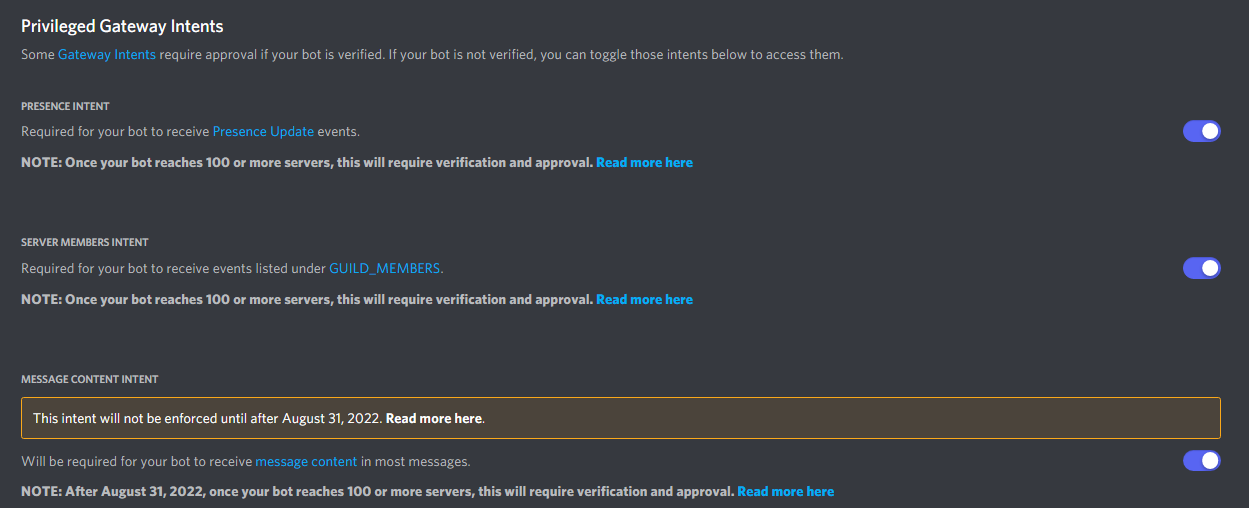
 glad cradle
they're options with a default value so they're Optional
 shrewd apex
slate swan
Optional meaning they are not required meaning required=False
shrewd apex
slate swan
Optional meaning they are not required meaning required=False
no
they need a default argument
in the function signature
slate swan
and like this one (required) ?
 shrewd apex
async def foo(inter: Interaction, arg: str = "") -> None:
arg is optional here
cuz it has a default value
glad cradle
but maybe the required False works too, lemme check pycord shit docs
glad cradle
Pycord
Command Permission Decorators: Commands: Shortcut Decorators: Objects: Attributes full_parent_name, qualified_id, qualified_name. Methods@ after_invoke,@ before_invoke,@ error, def get_cooldown_ret...
glad cradle
slate swan
my guess
seems like we're good at guessing
slate swan

shrewd apex

slate swan
and like this one (required) ?

this one is Channel type or something like that
could you give me code line or something like that to make my own options (required) ?
no i mean instead of saying its float type you say its channel type and it should display channel picker
but no idea what name Channel class have in pycord
glad cradle
let's see
slate swan
slate swan
no i mean instead of saying its float type you say its channel type and it shoul...
i don't want to pick channels, i want to make my own options :/
glad cradle
my ass is saying he need to pass abc.GuildChannel as type
slate swan
i don't want to pick channels, i want to make my own options :/
slate swan
slate swan
i don't want to pick channels, i want to make my own options :/
but in your example there are channels 
slate swan
slate swan
but in your example there are channels <:huh:971558028405006407>
yeah
i just meant that i need required options buddy :D
not many people here know pycord well if you want to receive help faster you should look into their support server: discord.gg/pycord
glad cradle
should be something like that
async def foo(ctx, channel: discord.Option(abc.GuildChannel, "desc", required=True), ...):
    ...
ok tnks
glad cradle
slate swan
not many people here know pycord well if you want to receive help faster you sho...
why there are so many people using pycord 😭
slate swan
glad cradle
why there are so many people using pycord 😭
who
i dont see any
can i get help to bot isnt sending the list

@slate swan
sry for ping
error?
umm when i am sending message on the server its not sending message
error in console i mean
none
console and terminal are same thing right??
yes
ya none error
it is running
add a simple print statement inside this if and see if it prints
ya that works
but this dosent
need server link??
no why
Are you using discord ui buttons
i thout it would help
slate swan
slate swan
Are you using discord ui buttons
wht is it now??
The interaction buttons decorator
Or the view.
n
i am sending message
Oh. You only have member intents.
huh?
slate swan
slate swan
You need message intents
oh soka
message content or message lol@slate swan
@slate swanthanku sir it worked
slate swan
Hello
    @voice.command()
    async def lock(self, ctx):
        id = ctx.author.id
        self.c6.execute("SELECT channelID FROM voiceChannel WHERE userID = ?", (id,))
        voice = self.c6.fetchone()
        if voice is None:
            await ctx.channel.send(f"{ctx.author.mention} You don't own a channel.")
        else:
            channelID = voice[0]
            channel = self.bot.get_channel(channelID)
            if channel is None:
                await ctx.channel.send(f"{ctx.author.mention} You are not connected to any voice channel.")
            else:
                role = ctx.guild.default_role
                await channel.set_permissions(role, connect=False)
                await ctx.channel.send(f"{ctx.author.mention} Voice chat locked! 🔒")
        self.conn6.commit()
i want to make this into a button
someone help me pls
 dull terrace
await c.execute(
    """CREATE TABLE IF NOT EXISTS scheduled(
        guild INTEGER,
        channel INTEGER,
        post_type TEXT,
        time INTEGER,
        index INTEGER DEFAULT 0
    )"""
)```

sql is mad at me, am i blind... where is the errorsays near index 
slate swan
dull terrace
```py
await c.execute(
"""CREATE TABLE IF NOT EXISTS scheduled(
guil...
await c.execute(
    """CREATE TABLE IF NOT EXISTS scheduled(
        guild INTEGER,
        channel INTEGER,
        post_type TEXT,
        time INTEGER,
        index INTEGER DEFAULT 0
    )"""
)
seems correct
dull terrace
is index able to be used in sql or
dull terrace
yeah i googled, it's reserved
slate swan
slate swan
```python
@voice.command()
async def lock(self, ctx):
id = ctx.a...
what do you mean by make this into a button
I want to make that into a button
when pressed it will do exactly that lock button
check if the user is the vc owner if so it will lock the channel from @everyone - default role
simple as that.
https://github.com/Rapptz/discord.py/blob/master/examples/views/confirm.py
here is how to do simple button in discord.py
I know how to do simple buttons, i'm having issue with making a button to do what i want.
i dont see any button in code you provided
I know as i told you, i want to convert the script into a button
So when pressed it will do what the script does.
I am using @voice.commands
and what voice varriable is?
what?
how you defined voice
;voice <command>
smoky sinew
what
slate swan
slate swan
;voice <command>
What are you trying to do?
blissful badge
@bot.event
async def on_message(message: discord.Message) -> None:
    print('Turlington has been mentioned.')
    if bot.mentioned_in(message):
            await message.channel.send(f"Hello! I am Turlington, say `?command` for more info on what I can do! If you are having any issues with my functions please tag ian `@blissful badge`.")
Hey everyone, tryna figure out why this isn't responding in chat.
Any ideas?
smoky sinew
blissful badge
```py
@bot.event
async def on_message(message: discord.Message) -> None:
pri...
where is this event?
blissful badge
smoky sinew
where is this event?
Same as it is in the GH you have! Actually it's the first command after all the identifying stuff. Just stepped out for coffee will give line # in a sec.
blissful badge
@smoky sinew replaced the command at line #85 in the GitHub
smoky sinew
blissful badge
<@998070081709932654> replaced the command at line #85 in the GitHub
can you post it here
the code looks different from what you showed
blissful badge
smoky sinew
can you post it here
The entire GH?
Yeah the code there is outdated, I am trying to replace it with the above but its not working
Let me update the GH
@smoky sinew ok its been updated with the new code