#discord-bots
1 messages · Page 173 of 1
 buoyant quail
Where reference is stored in interaction? (in context it is context.message.reference)
 crimson mauve
buoyant quail
Where reference is stored in interaction? (in context it is `context.message.ref...
crimson mauve
buoyant quail
Where reference is stored in interaction? (in context it is `context.message.ref...
interaction?
 shrewd apex
buoyant quail
for slash commands
shrewd apex
buoyant quail
for slash commands
or just fetch the message and use reference from there
buoyant quail
shrewd apex
https://discordpy.readthedocs.io/en/stable/interactions/api.html?highlight=refer...
uhh, isn't for message commands?
shrewd apex
buoyant quail
uhh, isn't for message commands?
nope
uses an Interaction message object
Represents the original interaction response message.
buoyant quail
ok, thanks
shrewd apex
This allows you to edit or delete the message associated with the interaction response. To retrieve this object see Interaction.original_response().
shrewd apex
hmm simple ones or challenging ones
 slate swan
both
crimson mauve
slate swan
do you have game ideas?
Loads, how good are you at making bots?
shrewd apex
is it for practice or do u plan to make it for a public bot
shrewd apex
need to know based on rate limit
slate swan
i dont really care about how hard
shrewd apex
u could make a platformer haven't seen that before
crimson mauve
slate swan
i dont really care about how hard
An engine to run a Westmarch D&D server.
shrewd apex

slate swan
crimson mauve
An engine to run a Westmarch D&D server.
i dont understand this
crimson mauve
slate swan
i dont understand this
¯_(ツ)_/¯
shrewd apex
making games is fun made a decent one recently its in my pfp made the website too but idk if it suits your taste 
slate swan
checking
crimson mauve
shrewd apex
making games is fun made a decent one recently its in my pfp made the website to...
Reminds me of what I'm making.
shrewd apex
 ic
ic
slate swan
shrewd apex
making games is fun made a decent one recently its in my pfp made the website to...
cool
is that open src
shrewd apex
not yet
rewriting it for open source
prolly in few months gonna add a bunch of new features too
slate swan
what image manipulation lib did u use
shrewd apex
pillow 
shrewd apex
closed source rn only with a few friends sorry
slate swan
then add me to the friends 
shrewd apex
u can join the server if you want to rn...
slate swan
sure
shrewd apex
 i just met u today lol
 young dagger
How do I change the "Reason:" field label and the reason value to appear on the same line?
young dagger
shrewd apex
in name add "\u200b" then in vakue f string it
Still not showing it on the same line
embed.add_field(name=f"**Reason:\u200b**", value=f"{reason}", inline=True)``` shrewd apex
embed.add_field(name=f"\u200b", value=f"**Reason:** {reason}", inline=True)
 vocal snow
you can also do it all in the description if you want

man this syntax highlgihting is so bad
young dagger
vocal snow
you can also do it all in the description if you want
I still want some space between "title" and "reason"
shrewd apex
use on mobile that way u wont have expectations in first place
vocal snow
young dagger
I still want some space between "title" and "reason"
ah then use a field or add more newlines
shrewd apex
no expectations == no dissapointment
vocal snow
true
young dagger
shrewd apex
```py
embed.add_field(name=f"\u200b", value=f"**Reason:** {reason}", inline=...
This one adds to much space in my opinion
shrewd apex
young dagger
This one adds to much space in my opinion
then do it in the name leave the value empty
young dagger
shrewd apex
then do it in the name leave the value empty
You mean like this?
embed.add_field(name=f"**Reason:** {reason}", value=f"", inline=True)```
 upbeat otter
young dagger
I used this
upbeat otter
young dagger
I used this
what's the issue you're facing?
upbeat otter
nice
 fading pecan
My bot not working
upbeat otter
fading pecan
My bot not working
Ok.


 supple ridge
can i update my bot config.json without restarting the script?
upbeat otter
shrewd apex
<:PeepoEnters_OwO:853747441781440573>
average nitro flex. gift me too
shrewd apex
read the json using json.load
supple ridge
huuh
 naive briar
!d json.load
 unkempt canyonBOT
json.load(fp, *, cls=None, object_hook=None, parse_float=None, parse_int=None, parse_constant=None, object_pairs_hook=None, **kw)```
Deserialize *fp* (a `.read()`-supporting [text file](https://docs.python.org/3/glossary.html#term-text-file) or [binary file](https://docs.python.org/3/glossary.html#term-binary-file) containing a JSON document) to a Python object using this [conversion table](https://docs.python.org/3/library/json.html#json-to-py-table).

*object\_hook* is an optional function that will be called with the result of any object literal decoded (a [`dict`](https://docs.python.org/3/library/stdtypes.html#dict "dict")). The return value of *object\_hook* will be used instead of the [`dict`](https://docs.python.org/3/library/stdtypes.html#dict "dict"). This feature can be used to implement custom decoders (e.g. [JSON-RPC](https://www.jsonrpc.org) class hinting).

*object\_pairs\_hook* is an optional function that will be called with the result of any object literal decoded with an ordered list of pairs. The return value of *object\_pairs\_hook* will be used instead of the [`dict`](https://docs.python.org/3/library/stdtypes.html#dict "dict"). This feature can be used to implement custom decoders. If *object\_hook* is also defined, the *object\_pairs\_hook* takes priority.no i meant is there a way i can just make a command to do so rather than calling it everytime
crimson mauve
supple ridge
no i meant is there a way i can just make a command to do so rather than calling...
I'll tell you the same thing I tell all the others, making a discord bot is not the best first project.
supple ridge
figured it
supple ridge
crimson mauve
I'll tell you the same thing I tell all the others, making a discord bot is not ...
its not my first project its just im making such a vast project the first time 
i wanna do user customization and preferences
crimson mauve
supple ridge
i wanna do user customization and preferences
then you write a function that does what you need and call it as you need it.
supple ridge
crimson mauve
then you write a function that does what you need and call it as you need it.
did it, ty
one more doubt is there a way i can run multiple bots from same script?
upbeat otter
crimson mauve
Oh, trying to make a bunch of NPCs or something
NPC? 💀
crimson mauve
upbeat otter
NPC? 💀
Non Player Character.
upbeat otter
crimson mauve
Non Player Character.
yes how do you make NPCs in discord bots lmaoooooo
crimson mauve
upbeat otter
yes how do you make NPCs in discord bots lmaoooooo
Are you asking how or just trying to make jokes?
upbeat otter
crimson mauve
Are you asking how or just trying to make jokes?
both
crimson mauve
Good luck figuring it out then.
supple ridge
crimson mauve
Oh, trying to make a bunch of NPCs or something
i fr am
crimson mauve
supple ridge
i fr am
Nice, I'm working on more or less the same thing.
supple ridge
crimson mauve
Nice, I'm working on more or less the same thing.
😭😭so shall i use loops?
crimson mauve
supple ridge
😭😭so shall i use loops?
ouch, that new to python huh?
supple ridge
crimson mauve
ouch, that new to python huh?
yes
crimson mauve
Now this is not want you want to hear, but you might be better off making a few small things to learn with rather than jumping in the deep end right off the bat before you know how to swim.
unkempt canyonBOT
Resources
The Resources page on our website contains a list of hand-selected learning resources that we regularly recommend to both beginners and experts.
upbeat otter
crimson mauve
Good luck figuring it out then.
thanks
supple ridge
okok
crimson mauve
supple ridge
okok
Know how to play Blackjack?
supple ridge
crimson mauve
Know how to play Blackjack?
a bit, why?
crimson mauve
supple ridge
a bit, why?
If you want an idea to practice with, try writing a program that deals cards from a deck.
Not even the entire game of Blackjack, just the card dealer.
supple ridge
ah okay
 spring summit
my bot literally started ignoring my commands for sum reason, anybody knows why? (intents are on)
crimson mauve
spring summit
my bot literally started ignoring my commands for sum reason, anybody knows why?...
Did you just start using on_message?
spring summit
crimson mauve
Did you just start using `on_message`?
yes
crimson mauve
spring summit
yes
spring summit
crimson mauve
https://discordpy.readthedocs.io/en/latest/faq.html?highlight=on_message#why-doe...
i love you so much
crimson mauve
spring summit
i love you so much
Any time
shrewd apex
supple ridge
😭😭so shall i use loops?
!d asyncio.create_task
unkempt canyonBOT
asyncio.create_task(coro, *, name=None, context=None)```
Wrap the *coro* [coroutine](https://docs.python.org/3/library/asyncio-task.html#coroutine) into a [`Task`](https://docs.python.org/3/library/asyncio-task.html#asyncio.Task "asyncio.Task") and schedule its execution. Return the Task object.
If *name* is not `None`, it is set as the name of the task using [`Task.set_name()`](https://docs.python.org/3/library/asyncio-task.html#asyncio.Task.set_name "asyncio.Task.set_name").
An optional keyword-only *context* argument allows specifying a custom [`contextvars.Context`](https://docs.python.org/3/library/contextvars.html#contextvars.Context "contextvars.Context") for the *coro* to run in. The current context copy is created when no *context* is provided.
The task is executed in the loop returned by [`get_running_loop()`](https://docs.python.org/3/library/asyncio-eventloop.html#asyncio.get_running_loop "asyncio.get_running_loop"), [`RuntimeError`](https://docs.python.org/3/library/exceptions.html#RuntimeError "RuntimeError") is raised if there is no running loop in current thread.
Note
[`asyncio.TaskGroup.create_task()`](https://docs.python.org/3/library/asyncio-task.html#asyncio.TaskGroup.create_task "asyncio.TaskGroup.create_task") is a newer alternative that allows for convenient waiting for a group of related tasks. sudden cliff
Hi
shrewd apex
 hello
hello
slate swan
So the question I'm stuck on, how would this get the names/id's without me defining them in the top like i did before? i'm assuming the approach you're taking is calling the data using for loops right?
crimson mauve
You can populate dictionaries on the fly as long as you have defined them as dictionaries first.
a_dict={}
a_dict["User_One"]={"Name":"J. R. Bob Dobbs"}
print (a_dict)
So in this example there is a top level entry called User_One and the name : name pair is a child of it.
 subtle jolt
getting this amazing error when trying to send the message, is this because its taking too long to respond?
TraceBack:
  File "C:\Users\Lenovo User\AppData\Local\Programs\Python\Python311\Lib\site-packages\discord\app_commands\commands.py", line 862, in _do_call
    return await self._callback(interaction, **params)  # type: ignore
           ^^^^^^^^^^^^^^^^^^^^^^^^^^^^^^^^^^^^^^^^^^^
  File "c:\Users\Lenovo User\Desktop\LifeAsPy\Hypixel Api\BetterCocoa\main.py", line 40, in session
    await interaction.response.send_message(f'Session of `{username}`', file=discord.File(f"./database/{username}.png"))
  File "C:\Users\Lenovo User\AppData\Local\Programs\Python\Python311\Lib\site-packages\discord\interactions.py", line 769, in send_message
    await adapter.create_interaction_response(
  File "C:\Users\Lenovo User\AppData\Local\Programs\Python\Python311\Lib\site-packages\discord\webhook\async_.py", line 218, in request
    raise NotFound(response, data)
discord.errors.NotFound: 404 Not Found (error code: 10062): Unknown interaction

The above exception was the direct cause of the following exception:

TraceBack:
  File "C:\Users\Lenovo User\AppData\Local\Programs\Python\Python311\Lib\site-packages\discord\app_commands\tree.py", line 1242, in _call
    await command._invoke_with_namespace(interaction, namespace)
  File "C:\Users\Lenovo User\AppData\Local\Programs\Python\Python311\Lib\site-packages\discord\app_commands\commands.py", line 887, in _invoke_with_namespace
    return await self._do_call(interaction, transformed_values)
           ^^^^^^^^^^^^^^^^^^^^^^^^^^^^^^^^^^^^^^^^^^^^^^^^^^^^
  File "C:\Users\Lenovo User\AppData\Local\Programs\Python\Python311\Lib\site-packages\discord\app_commands\commands.py", line 880, in _do_call
    raise CommandInvokeError(self, e) from e
discord.app_commands.errors.CommandInvokeError: Command 'session' raised an exception: NotFound: 404 Not Found (error code: 10062): Unknown interaction```ohhh so how do i get members?
AttributeError: 'dict' object has no attribute 'members'
self.TheData = members?
or
TheData.members = {}
?
naive briar
slate swan
ohhh so how do i get members?
`AttributeError: 'dict' object has no attribute 'm...
["member"]
crimson mauve
So using the list you would get from Guild.members you could fun a for loop and pull them out one by one.
for each in Guild.members:
    a_dict[each.id]={"name":each.name}
the website can't be found.
slate swan
so i just put a for loop in the command at the top? i don't need to define the string i'm trying to obtain like I did?
crimson mauve
slate swan
so i just put a for loop in the command at the top? i don't need to define the s...
Nope, if you run that for loop (after a little integration) it will populate a dict with the ID and usernames of everyone on the server.
All depends on how you want it to work.
naive briar
subtle jolt
getting this amazing error when trying to send the message, is this because its ...
Yes
crimson mauve
First project?
Just a heads up, this is like trying to run before you can crawl.
Do it, I wonder who 381870129706958858 is. let us know.
 vale wing
What the actual hell
crimson mauve
I know, I'm just wondering if it's the same as a 555phoone number.
 paper sluice
bot = Client() 😔
vale wing
Are you making own wrapper or smth
crimson mauve
vale wing
What the actual hell
Calm down, everyone starts somewhere.
 sick birch
vale wing
Are you making own wrapper or smth
sick birch
vale wing
Are you making own wrapper or smth
They're doing the mobile status hack
paper sluice
sick birch
They're doing the mobile status hack
what is it?
vale wing
What the what
sick birch
FYI that is against discords terms of service
You are accessing the API in a way that is not supported
Or documented, for that matter
 golden portal
its the one where it shows mobile status on bots by sending an identify payload as mobile to discord
paper sluice
ah ic
crimson mauve
nothing important, I remember something after I hit enter.
vale wing
It's open source isn't it
slate swan
crimson mauve
Nope, if you run that for loop (after a little integration) it will populate a d...
TypeError: 'Member' object does not support item assignment...?
crimson mauve
slate swan
TypeError: 'Member' object does not support item assignment...?
let's see the code.
vale wing
GitHub
A feature rich discord Modmail bot. Contribute to kyb3r/modmail development by creating an account on GitHub.
slate swan
        for member in self.TheData.members:
member[member.id]={"name":member.name} ```member[member.id] here member is an instance of discord.Member not dict
crimson mauve
You need to define member as a dict
paper sluice
so you can't do that
crimson mauve
the_dict={}
        for member in self.TheData.members:
            the_dict[member.id]={"name":member.name}
ohhhh
crimson mauve
slate swan
ohhhh
How's that working for ya?
slate swan
crimson mauve
How's that working for ya?
would these go in the init or in the @commands decorator?
crimson mauve
__init__ runs on startup(or just when that file/class is loaded)
@commands will run each time you call the command.
slate swan
so if it's a dictionary, it should grab the data when the command is ran incase things change. got it
crimson mauve
That and ctx will make it easy to get the guild/server
 ionic moss
What is wrong with this piece of code?? ```py
inactive_channels = list(channel for channel in inactive_server.text_channels for inactive_server in bot.guilds)
`NameError: name 'inactive_server' is not defined`What is inactive_server supposed to be?
ionic moss
an iterator, for inactive_server in bot.guilds
inactive_server is (supposed to be) the discord.Guild object
slate swan
crimson mauve
That and `ctx` will make it easy to get the guild/server
ctx doesn't mean i have to add the guild ID i'm trying to obtain the info from, it auto grabs it. right?
crimson mauve
ionic moss
inactive_server is (supposed to be) the `discord.Guild` object
It's also not defined so the computer has no idea what it is.
ionic moss
it should be able to be read in the listcomp iterator
(it does for inactive_server in bot.guilds)
crimson mauve
slate swan
ctx doesn't mean i have to add the guild ID i'm trying to obtain the info from, ...
yes, ctx is short for context. it gives you the context the command was used under.
crimson mauve
ionic moss
it should be able to be read in the listcomp iterator
But it's not, post the full code and I'll take a look.
ionic moss
crimson mauve
But it's not, post the full code and I'll take a look.
Sure, hold on
def inactive():
  q = list(w for w in inactive_server.text_channels for inactive_server in bot.guilds)
  w = list(w.last_message for w in q)

  e = w.map(lambda q: q.edited_at or q.created_at)
  r = sorted(e)

  return r, min(e), max(e)

inactive()
(without qeval at the start)
sure wait
Alright hold on
check DMs
crimson mauve
ionic moss
Sure, hold on
So inactive_server is a thing built into discord.py?
ionic moss
No, it should be a list of discord.TextChannel for each discord.Guild of bot.guilds defined as inactive_server
so let's say it should be something like ```py
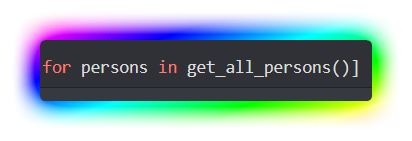
def get_all_persons() -> dict[tuple[Person]]:
...
class Person:
name = ...
...
my_list = [person.name for person in persons.keys() for persons in get_all_persons()]
here it would say that persons is not defined
ionic moss
ionic moss
so let's say it should be something like ```py
def get_all_persons() -> dict[tup...
As seen in here https://i.imgur.com/G1A9Kpb.png
 crimson mauve
Ya, because it's not being defined anywhere in this code.
ionic moss
I thought it should? https://i.imgur.com/mqd03JO.png
 crimson mauve
What documentation are you reading from? can you link it?
spring summit
role = discord.utils.get(message.guild.roles, name="Premium")
await message.author.add_roles(role)``` 'int' object is not iterable ionic garden
is it possible to have multiple on_message listeners running @ the same time?
crimson mauve
ionic garden
is it possible to have multiple `on_message` listeners running @ the same time?
One in each cog.
ionic moss
crimson mauve
What documentation are you reading from? can you link it?
I'm not reading docs, I'm just trying to iterate through all my guilds and iterate through all the channels (a listcomp).
https://www.w3schools.com/python/python_lists_comprehension.asp

W3Schools offers free online tutorials, references and exercises in all the major languages of the web. Covering popular subjects like HTML, CSS, JavaScript, Python, SQL, Java, and many, many more.
ionic garden
wb if there's
@bot.event
async def on_message(message: discord.Message) -> None:
    if message.author == bot.user or message.author.bot:
        return
    await bot.process_commands(message)
```this thing in the main fileok, you have lost me. You are making a discord.py bot, right?
ionic moss
Correct.
crimson mauve
How much of the code did you write yourself and how much did you copy and paste?
ionic moss
I wrote it to iterate through all the channels of each guild the bot is in.
Nothing was copied nor was pasted.
unkempt canyonBOT
Hey @slate swan!
You either uploaded a .txt file or entered a message that was too long. Please use our paste bin instead.
crimson mauve
ok, then where are you defining inactive_server at?
unkempt canyonBOT
Hey @slate swan!
You either uploaded a .txt file or entered a message that was too long. Please use our paste bin instead.
ionic moss
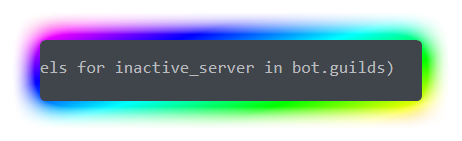
Here: https://i.imgur.com/kZDUx30.png ```py
def inactive():
q = list(w for w in inactive_server.text_channels for inactive_server in bot.guilds)
w = list(w.last_message for w in q)
e = w.map(lambda q: q.edited_at or q.created_at)
r = sorted(e)
return r, min(e), max(e)
inactive()
 unkempt canyonBOT
Hey @slate swan!
You either uploaded a .txt file or entered a message that was too long. Please use our paste bin instead.
Hey @slate swan!
You either uploaded a .txt file or entered a message that was too long. Please use our paste bin instead.
crimson mauve
ionic moss
Here: https://i.imgur.com/kZDUx30.png ```py
def inactive():
q = list(w for w i...
you are calling it before you are defining it.
read the bot, use paste bin.
ionic moss
crimson mauve
you are calling it before you are defining it.
Aight
ionic moss
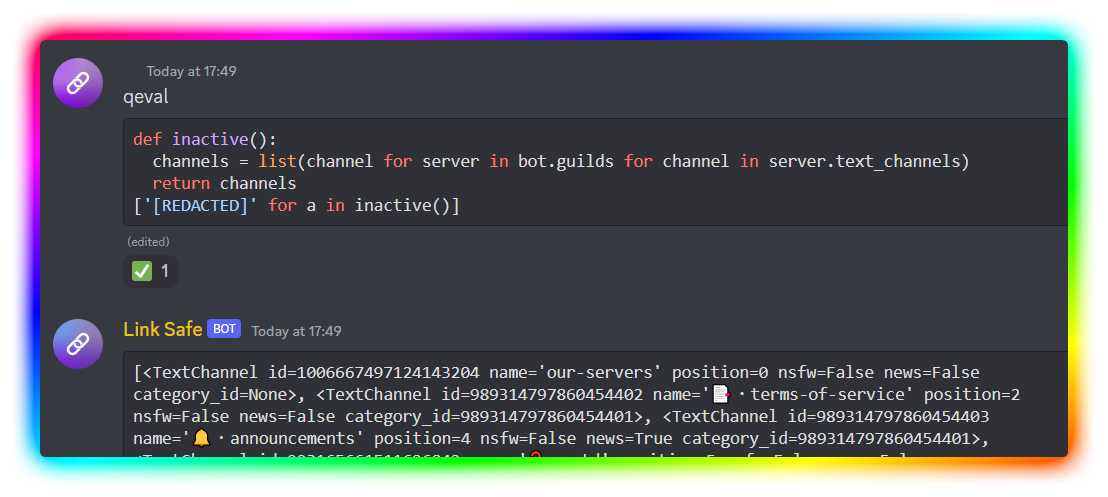
@crimson mauve Alright, should it be written this way? ```py
def inactive() -> list:
channels = list(channel for server in bot.guilds for channel in server.text_channels)
...
...
it should be defined in this way now
crimson mauve
Not going to lie having const owners = ["1020440076024557628"]; is a red flag, makes me think you are putting in backdoors.
crimson mauve
ionic moss
<@897189695853838436> Alright, should it be written this way? ```py
def inactive...
Run it and you tell me.
ionic moss
Alright.
crimson mauve
write it out the long way if you need to.
 crimson mauve
👍
slate swan
how'd u get a colorful border for screen scraping? o.o
crimson mauve
slate swan
how'd u get a colorful border for screen scraping? o.o
it's an effect they put it though on image editing software like Gimp before they post it.
slate swan
crimson mauve
it's an effect they put it though on image editing software like Gimp before the...
ohhhhh ty. also, TypeError: sequence item 0: expected str instance, int found
mem_dict={}
for member in self.TheData.members:
mem_dict[member.id]={"name":member.name} ```
so what do i list it as? I tried `Embed.add_field(name="Member Names", value='\n'.join(mem_list))` crimson mauve
slate swan
ohhhhh ty. also, `TypeError: sequence item 0: expected str instance, int found`
...
crimson mauve
slate swan
ohhhhh ty. also, `TypeError: sequence item 0: expected str instance, int found`
...
Want to just take this to DM?
slate swan
sure! idc
spring summit
is it possible to give out roles with a command in a specific server?
slate swan
Yes
sick birch
spring summit
how would i do that
!d discord.Member.add_roles
unkempt canyonBOT
await add_roles(*roles, reason=None, atomic=True)```
This function is a [*coroutine*](https://docs.python.org/3/library/asyncio-task.html#coroutine).
Gives the member a number of [`Role`](https://discordpy.readthedocs.io/en/latest/api.html#discord.Role "discord.Role")s.
You must have [`manage_roles`](https://discordpy.readthedocs.io/en/latest/api.html#discord.Permissions.manage_roles "discord.Permissions.manage_roles") to use this, and the added [`Role`](https://discordpy.readthedocs.io/en/latest/api.html#discord.Role "discord.Role")s must appear lower in the list of roles than the highest role of the member. oblique fern
How can I make a command message "dismiss" right away before it"times out" when there is not supposed to be a message sent back so no interaction.response.send_message to make it go away
am I explaining that right
sick birch
oblique fern
How can I make a command message "dismiss" right away before it"times out" when ...
You want to respond to an interaction without sending a message?
Just so it doesn't time out?
oblique fern
yea, don't want a message to appear but I want the pop up to not time out, just disappear after the command is used.
the reason is because the command should be accepted in channel or via DM, but always DM the results to the user who used it
sick birch
!d discord.InteractionResponse.defer
unkempt canyonBOT
await defer(*, ephemeral=False, thinking=False)```
This function is a [*coroutine*](https://docs.python.org/3/library/asyncio-task.html#coroutine).

Defers the interaction response.

This is typically used when the interaction is acknowledged and a secondary action will be done later.

This is only supported with the following interaction types...ah, cool!
spring summit
sick birch
!d discord.Member.add_roles
how do i specify the guild
sick birch
spring summit
how do i specify the guild
A Member is already tied to a guild
Do you want to be able to give roles to users in other servers?
spring summit
because i got a redeem command that gives ya a role when you redeem a key in dms, thats why i cant do juist guild
sick birch
spring summit
because i got a redeem command that gives ya a role when you redeem a key in dms...
Ah. You can use
guild = bot.get_guild(123)
To get the guild via it's ID
spring summit
sick birch
Ah. You can use
```py
guild = bot.get_guild(123)
```
To get the guild via it's ...
okok, lemme try
spring summit
sick birch
Ah. You can use
```py
guild = bot.get_guild(123)
```
To get the guild via it's ...
'int' object is not iterable
sick birch
spring summit
'int' object is not iterable
Can you show me your code?
And the full traceback, since this error is somewhere else
slate swan
I think you can also type hint a command parameter with discord.Guild and it'll attempt to convert an input into a Guild object. So inputting an ID or name would work. But your bot has to be able to 'see' the guild.
sick birch
@bot.command()
async def redeem(ctx: commands.Context, guild: discord.Guild, code: str) -> None:
  ...
im using client.even
on_message/ the bot dms
sick birch
You aren't using the commands extension?
I would recommend that you do
Discord.py will handle the hard work of parsing for you
spring summit
@client.event
async def on_message(message):
    guild = client.get_guild(1060335114703339520)
    channellol = client.get_channel(1061293482188210217)
    channellol1 = client.get_channel(1061293482188210217)
    with open('key_codes_premium', 'r') as key_codes_premium:
        unredeemed = key_codes_premium.read()
    if (message.content == f'{unredeemed}'):
        dmchannel = await message.author.create_dm()
        embed = discord.Embed(title=f"{key_emoji} PREMIUM KEY (1 MONTH)",
                              description=f'``KEY REDEEMED SUCCESSFULLY.``', color=0x2F3136)

        await dmchannel.send(embed=embed)
        chars = string.ascii_letters + string.digits
        keysb = ('MH' + '-' + 'PREMIUM' + '-' + ''.join(random.choice(chars) for i in range(6)) + '-' + ''.join(
            random.choice(chars) for i in range(6)) + '-' + ''.join(
            random.choice(chars) for i in range(6)) + '-' + ''.join(random.choice(chars) for i in range(6)))
        with open('key_codes_premium', 'w') as premiumware:
            premiumware.write(keysb)
        with open('premium', 'w') as f:
            f.write(f"{str(message.author.id)}\n")
            f.close()
        await asyncio.sleep(2.5)
        embed2 = discord.Embed(title=f"{key_emoji}A PREMIUM KEY WAS REDEEMED!",
                               description=f'``REDEEMED BY {str(message.author)}.``',
                               color=0x2F3136)
        await channellol.send(embed=embed2)
        role = discord.utils.get(message.guild.roles, name="Premium")
        await message.author.add_roles(role)
await client.process_commands(message)```AttributeError: 'NoneType' object has no attribute 'roles'
 cold sonnet
you wanna do guild.roles not message.guild.roles
message.guild is None when the message is received in a dm
cuz it's not in a server
so you're basically doing None.roles
await message.author.add_roles(role) you won't be able to do that either
spring summit
so what should i replace it with
cold sonnet
get a member object from the guild you have with the message's author's id
member = guild.get_member(message.author.id) if you have your intents
basically binds the user to the guild if he's in the guild
the whole time I'm assuming you're sending the bot a message via dm
spring summit
cold sonnet
the whole time I'm assuming you're sending the bot a message via dm
yeah
spring summit
cold sonnet
``member = guild.get_member(message.author.id)`` if you have your intents
wait why would i add that
cold sonnet
because if you dm the bot, message.author is a user
the user is not connected to the guild
if someone's not in a guild, you can't add roles to that person
you can only add roles to member
cold sonnet
the difference between a User and a Member is that a User is just a profile
a Member is a profile in a server
spring summit
member = guild.get_member(message.author.id)
        role = discord.utils.get(guild.roles, name="Premium")
await member.add_roles(role)```does that worka User could be in many servers with the bot, the bot wouldn't know which server you're talking about
 cedar estuary
how can you do a bot that if you send a message to x channel it will delete the message and send the message that was deleted to channel y in the same server? with on_message yes but what after it?
cold sonnet
so you attach the User to a server
cold sonnet
spring summit
```py
member = guild.get_member(message.author.id)
role = discord.utils....
that seems ok
spring summit
AttributeError: 'NoneType' object has no attribute 'id'
cold sonnet
you're lucky I'm a compiler
the bot didn't find a role in that server that's named Premium
Ashley's writing a book
Ashley stopped writing the book
slate swan
🐊
cold sonnet
she's at it again
cedar estuary
cedar estuary
how can you do a bot that if you send a message to x channel it will delete the ...
?
slate swan
cedar estuary
how can you do a bot that if you send a message to x channel it will delete the ...
You can compare message.channel to channel X and do something if they're equivalent
 faint echo
What are some of the reasons as to why I could be getting Unknown interaction for my View?
- The bot is online.
- The bot has the correct permissions.
- The command was working as of yesterday.
- I did not modify the code
The error happens exactly on this line of code:
await interaction.response.edit_message(view=self)
@discord.ui.button(label="Confirm", style=discord.ButtonStyle.green, emoji=":white_check_mark:", custom_id="utility_confirm")
    async def callback(self, interaction: discord.Interaction, button):
        try:
            ## Lots of stuff happening here but no modification to interaction
        except Exception as err:
            btn.label = "Err!"
            await interaction.response.edit_message(content="blabla", view=self)
        else:
            await interaction.response.edit_message(view=self)  # Error happening here.. Unknown interaction
Ignore the button parameter there.
 fading marlin
you're not responding fast enough. What are you doing inside your try block?
faint echo
I'm setting data inside MongoDB, and then creating a voice channel based on that data.
Overall, the timeout is set to 120 seconds, shouldn't it be waiting for an input ?
fading marlin
that's probably taking more than 3 seconds, consider deferring the interaction first and then sending a followup
upbeat otter
cedar estuary
how can you do a bot that if you send a message to x channel it will delete the ...
from discord.ext import tasks

@tasks.loop(hours = 69)
async def find_channels() -> None:
  try:
    bot.x_channel = bot.get_channel(x_channel_id) or await bot.fetch_channel(channel_id)
  except ...
 # same with bot.y_channel


@bot.listen("on_message")
async def on_message(message: discord.Message) -> None:
  if message.channel == bot.x_channel:
    await message.delete()
    await bot.y_channel.send(...)
"use it as an example"
fading marlin
upbeat otter
```py
from discord.ext import tasks
@tasks.loop(hours = 69)
async def find_chan...
why're you using tasks here?
cedar estuary
upbeat otter
```py
from discord.ext import tasks
@tasks.loop(hours = 69)
async def find_chan...
yes okey, thank you
upbeat otter
fading marlin
why're you using tasks here?
To not get the channels again and again 💀
fading marlin
you're taking too long to respond to the application's command interaction
upbeat otter
You don't seem to be in a class (judging from the indentation), apparently you're still using self
you're still using self
wot
if you want to use self then pass the bot instance to the function while calling it
upbeat otter
upbeat otter
if you want to use self then pass the bot instance to the function while calling...
.
await set_emoji_quiz(self, 234567654321, 1256787654321, 1678987654321)
assuming you're within a cog
the ids smh
whatever you pass into them
bro
guild_id
message_id
channel_id
whatever_and_whatnot
 winged coral
It's your code? You should know what args you need
upbeat otter
^
cedar estuary
AttributeError: 'Bot' object has no attribute 'x'
what does this error mean
or how do i fix it
slate swan
It means exactly what it says. What are you trying to do?
cedar estuary
upbeat otter
```py
from discord.ext import tasks
@tasks.loop(hours = 69)
async def find_chan...
trying to do this
faint echo
fading marlin
that's probably taking more than 3 seconds, consider deferring the interaction f...
Thanks, this solved my problem.
upbeat otter
"learn to use classes and objects"
 primal token
Just learn OOP overall
upbeat otter
ok okimii
cedar estuary
why does my client.event block my commands?
i have on_message and then its the only thing that works but not the commands anymore?
unkempt canyonBOT
@listen(name=None)```
A decorator that registers another function as an external event listener. Basically this allows you to listen to multiple events from different places e.g. such as [`on_ready()`](https://discordpy.readthedocs.io/en/latest/api.html#discord.on_ready "discord.on_ready")
The functions being listened to must be a [coroutine](https://docs.python.org/3/library/asyncio-task.html#coroutine "(in Python v3.11)").
Example... quick gust
!d discord.ext.commands.Bot.process_commands
unkempt canyonBOT
await process_commands(message, /)```
This function is a [*coroutine*](https://docs.python.org/3/library/asyncio-task.html#coroutine).

This function processes the commands that have been registered to the bot and other groups. Without this coroutine, none of the commands will be triggered.

By default, this coroutine is called inside the [`on_message()`](https://discordpy.readthedocs.io/en/latest/api.html#discord.on_message "discord.on_message") event. If you choose to override the [`on_message()`](https://discordpy.readthedocs.io/en/latest/api.html#discord.on_message "discord.on_message") event, then you should invoke this coroutine as well.

This is built using other low level tools, and is equivalent to a call to [`get_context()`](https://discordpy.readthedocs.io/en/latest/ext/commands/api.html#discord.ext.commands.Bot.get_context "discord.ext.commands.Bot.get_context") followed by a call to [`invoke()`](https://discordpy.readthedocs.io/en/latest/ext/commands/api.html#discord.ext.commands.Bot.invoke "discord.ext.commands.Bot.invoke").

This also checks if the message’s author is a bot and doesn’t call [`get_context()`](https://discordpy.readthedocs.io/en/latest/ext/commands/api.html#discord.ext.commands.Bot.get_context "discord.ext.commands.Bot.get_context") or [`invoke()`](https://discordpy.readthedocs.io/en/latest/ext/commands/api.html#discord.ext.commands.Bot.invoke "discord.ext.commands.Bot.invoke") if so.

Changed in version 2.0: `message` parameter is now positional-only.umm maybe a dumb question but what does bot and client have in difference, or is client.listen just the same thing?
don't kinda get it
fading marlin
they're just variable names
fading marlin
you should probably name it bot when it's a commands.Bot instance, and client when it's a discord.Client instance
slate swan
how did you play an audio file in vc?
@client.command()
async def say(ctx, *, text=""):
    if text == "":
        await ctx.send("You must provide some text for me to say out loud!")
        return

    voice_client = get(ctx.bot.voice_clients, guild=ctx.guild)
    if voice_client is None:
        await ctx.send("I'm not in a voice channel...")
        return

    if ctx.author.voice:
        tts_engine.save_to_file(text, 'src/assets/voice.mp3')

        tts_engine.runAndWait()

        os.system("rm src/assets/voice.mp3")
    else:
await ctx.send("please join a voice channel then bring me in there!")```thats what ive got, i just have to figure out how to make the file play qwq
im on linux, if that matters
quick gust
cedar estuary
umm maybe a dumb question but what does bot and client have in difference, or is...
depends on ur variable
fading marlin
!d discord.VoiceClient.play
unkempt canyonBOT
play(source, *, after=None)```
Plays an [`AudioSource`](https://discordpy.readthedocs.io/en/latest/api.html#discord.AudioSource "discord.AudioSource").

The finalizer, `after` is called after the source has been exhausted or an error occurred.

If an error happens while the audio player is running, the exception is caught and the audio player is then stopped. If no after callback is passed, any caught exception will be logged using the library logger.

Changed in version 2.0: Instead of writing to `sys.stderr`, the library’s logger is used.and then take a look at the various audio sources
cedar estuary
how much latency in a bot is "bad"?


 pliant gulch
cedar estuary
how much latency in a bot is "bad"?
pliant gulch
cedar estuary
how much latency in a bot is "bad"?
The amount varies so, the general rule is, if you can notice when it's delayed consistently you'll probably want to fix that
Otherwise if you cannot notice it, keep it as is
pliant gulch
Average sudo enjoyers: 😔
Average doas enjoyers: 😏
slate swan
what
 pliant gulch
You need to construct first
Otherwise you'd need to pass an instance
So VoiceClient()
slate swan
ah
pliant gulch
Actually ignore that part
You usually don't wanna create a VoiceClient manually
You get a VoiceClient object by using .connect on a VoiceChannel
!d discord.VoiceChannel.connect
unkempt canyonBOT
await connect(*, timeout=60.0, reconnect=True, cls=<class 'discord.voice_client.VoiceClient'>, self_deaf=False, self_mute=False)```
This function is a [*coroutine*](https://docs.python.org/3/library/asyncio-task.html#coroutine).

Connects to voice and creates a [`VoiceClient`](https://discordpy.readthedocs.io/en/latest/api.html#discord.VoiceClient "discord.VoiceClient") to establish your connection to the voice server.

This requires [`voice_states`](https://discordpy.readthedocs.io/en/latest/api.html#discord.Intents.voice_states "discord.Intents.voice_states").You can get this from like, member.channel
slate swan
my join command is somewhere else 

 slate swan
 voice_client = get(ctx.bot.voice_clients, guild=ctx.guild)
    if voice_client is None:
        await ctx.send("I'm not in a voice channel...")
return```Well, since your join command is separated I guess you could do a dictionary
Let's say you start off with an empty dictionary called voice_channels like this {}
When your join command is called, make a new key-value pair like {user_id: await channel.connect()}
Then in you're other command where you play the file, get the VoiceClient via voice_channels[user_id]
slate swan
God damn
I'll just morph the 2 commands
I just dont know how to check if the bot is alr in vc
so It doesn't try to connect twice
slate swan
jeez
crimson mauve
slate swan
jeez
If your bot is already in that channel it will toss up a ClientException – You are already connected to a voice channel. error. You can wrap it in a try/except and just pass it.
slate swan
ah true
crimson mauve
Damn, I want to work on other peoples stuff more than my own today.
sick birch
crimson mauve
Damn, I want to work on other peoples stuff more than my own today.
!contribute :)
unkempt canyonBOT
Contribute to Python Discord's Open Source Projects
Looking to contribute to Open Source Projects for the first time? Want to add a feature or fix a bug on the bots on this server? We have on-going projects that people can contribute to, even if you've never contributed to open source before!
Projects to Contribute to
• Sir Lancebot - our fun, beginner-friendly bot
• Python - our utility & moderation bot
• Site - resources, guides, and more
Where to start
- Read our contribution guide
- Chat with us in #dev-contrib if you're ready to jump in or have any questions
- Open an issue or ask to be assigned to an issue to work on
 glad cradle
unkempt canyon
glad cradle
unkempt canyon
all the interesting issues are already taken 😭
ionic garden
do people still use prefix commands these days
i want discord to do some input validation for me
 mental panther
hello, i have a slight issue?
cogs seem to be loading but no commands are showing from the cogs themselves on the help command
crimson mauve
sick birch
!contribute :)
Alright, I'll try to remember my github then.
cedar estuary
how do you get date and time when message in discord is sended , in own timezone
because message.created_at doesn't give my own timeozones time
 lofty cedar
My client.event s are working but my client.command() s are not, any ideas?
 merry cliff
is client discord.ext.commands.Bot()?
lofty cedar
merry cliff
is client `discord.ext.commands.Bot()`?
what do you mean?
merry cliff
did you do something like py bot = commands.Bot(command_prefix='>', case_insensitive=True, intents=intents)
lofty cedar
I have
client = commands.Bot(command_prefix = 'ED: ')
you need the message intent, which is not a default intent
lofty cedar
I don't know what that means but I have another discord bot that has exactly the same code and it works
merry cliff
to add it, go to the dev page and turnon the message intent on your dashboard, then use this:py intents = discord.Intents.default() intents.message_content = True bot = commands.Bot(command_prefix='PREFIX', case_insensitive=True, intents=intents)
lofty cedar
Just doing it now
merry cliff
ok
lofty cedar
AttributeError: 'Intents' object has no attribute 'message_content'
merry cliff
what version of discord.py are you using?
lofty cedar
not sure
merry cliff
is it the latest one?
lofty cedar
I installed it a while ago so maybe not
merry cliff
when did you install it?
lofty cedar
Easily a year ago likely more, not 100% sure
merry cliff
ok, can you run pip freeze in your terminal and send the version of discord.py
lofty cedar
1.7.3
merry cliff
there's the problem.
lofty cedar
How do I update it?
merry cliff
the latest is 2.0.1
lofty cedar
also why does it work with my other code if it's outdated there too?
merry cliff
update using pip install --upgrade discord.py
slate swan
 merry cliff
is your other code hosted on a different device?
slate swan
Unknown interaction error !
lofty cedar
merry cliff
is your other code hosted on a different device?
nope, same pc and stuff
merry cliff
virtual env?
lofty cedar
It's all run off my pc written in idle
merry cliff
hmm i have no idea then
lofty cedar
Just being dodgy ig haha
slate swan
slate swan
can someone help 🙂
merry cliff
well I;m just letting you n=know that if you do update, there are a few breaking changes and a new way to start the bot, so head over to the docs to see them all
merry cliff
slate swan
are you trying tomake a button?
lofty cedar
merry cliff
well I;m just letting you n=know that if you do update, there are a few breaking...
oh wow, a lot of errors
merry cliff
yeah
slate swan
merry cliff
are you trying tomake a button?
it's made , but the callback doesn't work ! on click , it shows unknown interaction's error
merry cliff
can i see how you defined your callback?

 merry cliff
ok so the buttons show up but when they are clicked they throw an error
slate swan
merry cliff
ok so the buttons show up but when they are clicked they throw an error
exactly
i defer them all
but same error
slate swan
merry cliff
ok so the buttons show up but when they are clicked they throw an error
is there any way to fix this ?
merry cliff
it looks like one of the buttonstyles are throwing an error too
gimm a few mins to test
slate swan
 slate swan
merry cliff
gimm a few mins to test
slate swan
merry cliff
gimm a few mins to test
okay
merry cliff
ok try adding a thinking=True inside the defer() funca
merry cliff
that way you use the followup in your code instead of trying to send a response
slate swan
merry cliff
that way you use the followup in your code instead of trying to send a response
you are a legend ! this worked 🙂
merry cliff
np
slate swan
i just added the thinking you said about , and edited the time.sleep by asyncio.sleep
merry cliff
nice
slate swan
is it possible to send a message that is visible to a specific members ?
slate swan
slate swan
is it possible to send a message that is visible to a specific members ?
i don't mean ephemeral
or using ephemeral without response
mods = ['1047266960519467057']

def check_Mod(ctx):
    if ctx.author.id in mods:
        IsMod = True
    else:
        IsMod = False
    return IsMod


@bot.command()
async def bought(ctx,id=None,item=None):
    IsMod = check_Mod(ctx)
    if IsMod == False:
        return await ctx.send("Your not a mod.", delete_after=10)
    if id == None:
        return await ctx.send(".bought <id> <item>", delete_after=10)
    if item == None:
        return await ctx.send(".bought <id> <item>", delete_after=10)
    query.execute("""INSERT INTO LOGS (USER_ID, ITEM) VALUES (?, ?)""",(id, item,))
    return await ctx.send("Sent to logs.")
keeps returning that im not a mod , any thoughts
naive briar
slate swan
```py
mods = ['1047266960519467057']
def check_Mod(ctx):
if ctx.author.id i...
The mods list is string of IDs, the ctx.author.id return an int
unkempt canyonBOT
The user’s unique ID.
 civic fractal
why not check their roles rather than hardcoding a list of users?
def check_mod(ctx):
return any(role.name == "Moderator" for role in ctx.author.roles)```its more of a my server only bot then everyone use bot
slate swan
UnboundLocalError: local variable 'uptime' referenced before assignment

I dont get it... can you guys help ?
 somber imp
slate swan
UnboundLocalError: local variable 'uptime' referenced before assignment
somber imp
slate swan
UnboundLocalError: local variable 'uptime' referenced before assignment
Do you have a function named uptime ?
Because you are calling that in the 4th uncommented line
But that is also being stored on a variable named uptime
somber imp
somber imp
But that is also being stored on a variable named `uptime`
That's a conflict of name
slate swan
import discord
from discord.ext import tasks
import datetime
client = discord.Client(intents=discord.Intents.default())
Replace YOUR_TOKEN_HERE with your Discord bot token
TOKEN = 'xxxx'
Replace YOUR_CHANNEL_ID with the ID of the channel you want to send the message to
CHANNEL_ID = 'xxxxx'
@tasks.loop(minutes=5)
async def send_uptime_message():
# Get the current time
current_time = datetime.datetime.utcnow()
# Check if the computer has been turned on within the last 5 minutes
# You may need to adjust this time depending on the performance of your computer
uptime = datetime.datetime.fromtimestamp(uptime()).strftime('%Y-%m-%d %H:%M:%S')
if current_time - datetime.timedelta(minutes=5) < uptime:
    # If the computer has been turned on within the last 5 minutes, send a message to the Discord channel
    channel = client.get_channel(CHANNEL_ID)
    await channel.send('Your computer has been turned on!')
@client.event
async def on_ready():
send_uptime_message.start()
client.run(TOKEN)
 severe mural
problem nothing help, error message code giveaway commands is python code.
severe mural
severe mural
problem nothing help, error message code giveaway commands is python code.
Please check here code: https://pastebin.com/kwJrnigq
Pastebin
Pastebin.com is the number one paste tool since 2002. Pastebin is a website where you can store text online for a set period of time.
no solution commands message error giveaway and also image problem.
somber imp
slate swan
import discord
from discord.ext import tasks
import datetime
client = discord.C...
uptime = datetime.datetime.fromtimestamp(uptime())...
1st of all
A variable can't reference itself if it hasn't been assigned a value previously
2ndly you can't call a variable
slate swan
somber imp
```py
uptime = datetime.datetime.fromtimestamp(uptime())...
```
I see yeah, thanks!
 real badger
What are some top commands for discord bots?
slate swan
I keep getting this error with my help command: Traceback (most recent call last): File "/root/bot/akro.py", line 14, in <module> async def help(ctx, *args): File "/usr/local/lib/python3.10/dist-packages/discord/ext/commands/core.py", line 1513, in decorator self.add_command(result) File "/usr/local/lib/python3.10/dist-packages/discord/ext/commands/bot.py", line 245, in add_command super().add_command(command) File "/usr/local/lib/python3.10/dist-packages/discord/ext/commands/core.py", line 1348, in add_command raise CommandRegistrationError(command.name) discord.ext.commands.errors.CommandRegistrationError: The command help is already an existing command or alias. but i do not have a other help command in my code any reasons why this could happen?
somber imp
slate swan
I see yeah, thanks!
No worries 🙃
real badger
slate swan
I keep getting this error with my help command: ```Traceback (most recent call l...
Discord.py bots have a help command by default. You can define your bot with help_command = None
somber imp
slate swan
I keep getting this error with my help command: ```Traceback (most recent call l...
Remove the default help command
slate swan
real badger
Discord.py bots have a help command by default. You can define your bot with `he...
thank you.
slate swan
somber imp
Remove the default help command
thank you.
somber imp
Tbh if you want a help command, don't remove the default one. Rather subclass it
But that's the choice of one own
slate swan
Whenever i put the help_command = None i get the same error
naive briar
Put it in the bot instance constructor
real badger
slate swan
Whenever i put the ```help_command = None``` i get the same error
it has to be when you define the bot
bot = commands.Bot(command_prefix = get_prefix, help_command =None, intents=intents)
i use client = commands.Bot
it would be the same just with client at the start right?
real badger
client = commands.Bot(help_command = None)
thank you
naive briar
slate swan
it would be the same just with client at the start right?
They're an instance of the same class, so there's no difference, it's just the var name
real badger
How do I make a member get a dm when they join a server?
slate swan
real badger
How do I make a member get a dm when they join a server?
on_member_join
naive briar
!d discord.on_member_join
unkempt canyonBOT
discord.on_member_join(member)```
Called when a [`Member`](https://discordpy.readthedocs.io/en/latest/api.html#discord.Member "discord.Member") joins a [`Guild`](https://discordpy.readthedocs.io/en/latest/api.html#discord.Guild "discord.Guild").

This requires [`Intents.members`](https://discordpy.readthedocs.io/en/latest/api.html#discord.Intents.members "discord.Intents.members") to be enabled.@bot event
on member join(user):
user.send("message")```how do I use it and how do I dm a user
civic fractal
kinda like that
slate swan
async def on_member_join(member):
    # Send the DM to the member
await member.send("```or @bot.event
i think i've only ever used client
slate swan
Thanks jonah, this has also helped me with my code as well
real badger
It works well, but how do I put the user's name without the discriminator?
slate swan
slate swan
Thanks jonah, this has also helped me with my code as well
No problem.
real badger
What are some useful commands to add to my bot?
slate swan
ban, unmute, mute, warn, help, unban, kick, ticket system, xp system
naive briar
Discord already have most of those built in
slate swan
Its makes it more convenient for me when i have it in my bot
instead of having to go to there profile and doing it manually
 viral stump
How can i reach my guild's member name in server? (server username)
list = ""
for victim_user_id, percentage in targeted_victims:
idlist = await bot.fetch_user(victim_user_id)
guildlist = await bot.fetch_guild(victim_user_id)
chance = (percentage * 100)
list += (f"Server username: \"{guildlist.name}\", username: \"{idlist.name}\" ve %{chance:.0f} chance got.\n")
await message.channel.send(f"msg")``` robust fulcrum
Guys how can i make a !d commands like @unkempt canyon in my discord.py bot
I actually the saw the command code but was not able to understand so can anyone help me?
 desert heart
robust fulcrum
Guys how can i make a !d commands like <@409107086526644234> in my discord.py bo...
desert heart
robust fulcrum
Guys how can i make a !d commands like <@409107086526644234> in my discord.py bo...
The basic idea is that documentation has an "inventory" file that can be downloaded and parsed to get information on all documented symbols. That can be used to found where to webscrape the doc text. The @unkempt canyon command is complex because it has optimizations to cache results.
 rare echo
slate swan
instead of having to go to there profile and doing it manually
rare echo
slate swan
instead of having to go to there profile and doing it manually
they are literally built in commands
u don’t have to do it manually, it’s a slash cmd by default
robust fulcrum
desert heart
The basic idea is that documentation has an "inventory" file that can be downloa...
How can I get the inventory file
slate swan
real badger
What are some useful commands to add to my bot?
UNO game command
naive briar
Really useful
desert heart
robust fulcrum
How can I get the inventory file
The url varies. For example, for the Python docs it is https://docs.python.org/3/objects.inv
viral stump
desert heart
The url varies. For example, for the Python docs it is https://docs.python.org/3...
may i get help too please?
desert heart
What's your question?
viral stump
desert heart
What's your question?
desert heart
You need to get the guild first, and then get the member object in that guild
guild = bot.get_guild(guild_id)
member = guild.get_member(victim_user_id)
nickname = member.name
if member.nick is not None:
nickname = member.nick```Ah, you can simplify that logic by just using member.display_name
viral stump
why dont we use fetch instead of get?
quick gust
fetch makes a request to the API, get gets it from the bot's cache

 desert heart
get_member needs to be called on an instance of a Guild. This is why my example uses get_guild() first. Furthermore, get_member is not a coroutine function and does not need to be awaited. Notice how my example does not use await.
viral stump
desert heart
`get_member` needs to be called on an instance of a `Guild`. This is why my exam...
then it should work?
                guildlist = bot.get_guild(last_message.guild)
                idlist = discord.Guild.get_member(victim_user_id)
chance = (percentage * 100)```You're still not calling get_member on an instance of a Guild. You'll get the same error you showed earlier.
If you can already get a Guild instance from last_message.guild, then you do not need to use get_guild
viral stump
desert heart
You're still not calling `get_member` on an instance of a `Guild`. You'll get th...
i dont get this one
desert heart
discord.Guild is a type. You need an instance of this type because get_member() is an instance method rather than a static or class method. One way to get an instance of it is to use get_guild() - it returns an instance of discord.Guild.
viral stump
desert heart
`discord.Guild` is a type. You need an instance of this type because `get_member...
i did it but i got same error. i did this one
guild1 = bot.get_guild(last_message.guild.id)
desert heart
It looks like last_message.guild already returns an instance of a Guild, so you don't need get_guild - it's redundant in this case.
member = last_message.guild.get_member(victim_user_id)
if member is not None:
  name = member.display_name
else:
  # member doesn't exist in the guild - handle this case somehow...
thaaank you
but if i dont got a last mesaage guild, how would it be?
viral stump
desert heart
You need to get the guild first, and then get the member object in that guild
``...
oh this one, got it
 pulsar ibex
How can I make a discord bot?
 cunning pasture
pulsar ibex
How can I make a discord bot?
cunning pasture
pulsar ibex
How can I make a discord bot?
Read the documentation or watch a tutorial. https://discordpy.readthedocs.io/en/stable/index.html
slate swan
ok... anyone got some suggestions for pagimations?
here's the code
https://paste.pythondiscord.com/deniripife
here's the error
https://paste.pythondiscord.com/toxoyujima
thoughts? suggestions?
vocal snow
--> self.TheData = {}
--> self.TheData.members
dictionaries don't have a .members attribute which is what the error tells you
slate swan
i forgot to redefine the ctx.guild x.x
ok... now AttributeError: 'DataGrab' object has no attribute 'create_embed'
vocal snow
I can't see a create_embed method in the code you sent
shrewd apex
slate swan
ok... anyone got some suggestions for pagimations?
`here's the code`
https://pa...
do u want my paginator?
its simple and can be overwritten however u want it
slate swan
vocal snow
I can't see a create_embed method in the code you sent
line45, i removed it.
slate swan
shrewd apex
do u want my paginator?
that's up to you 🙃
i've been working on this for a bit and was trying to make a universal one that uses discord ui buttons.
shrewd apex
slate swan
that's up to you 🙃
i've been working on this for a bit and was trying to make ...
https://paste.pythondiscord.com/vufaluyowa it includes the subclassed base view i use for all my views
its in disnake tho u have to make it discord in those places
also u can remove the on_error thats for my exception handler
slate swan
shrewd apex
also u can remove the on_error thats for my exception handler
whats the difference between disnake and discord.ui.buttons?
shrewd apex
just replace disnake with discord and u will be fine
slate swan
shrewd apex
just replace disnake with discord and u will be fine
gotcha. also
 shrewd apex
yeah lol that was in mine
if u have a custom exception handler then u can use it with ur own custom exception
otherwise remove it
slate swan
gotcha.
 tough fern
i got no error, but when i run the command it shows me app not respond error, code: https://paste.pythondiscord.com/azizemewed
 slate swan
shrewd apex
otherwise remove it
slate swan
shrewd apex
otherwise remove it
gotcha! tyvm!
one last question, so where do i define my dict?
the ClassicPaginator __init__ ?
vocal snow
tough fern
i got no error, but when i run the command it shows me app not respond error, co...
which library is this
tough fern
vocal snow
which library is this
official discord.py
tough fern
tough fern
i got no error, but when i run the command it shows me app not respond error, co...
nb: i alr try @bot.tree.error but still not work
shrewd apex
slate swan
one last question, so where do i define my dict?
what for tho?
upbeat otter
shrewd apex
https://paste.pythondiscord.com/vufaluyowa it includes the subclassed base view ...
average spoon feeder
shrewd apex
nah above average
shrewd apex
tough fern
i got no error, but when i run the command it shows me app not respond error, co...
did u use bot.start() to start the bot?
tough fern
shrewd apex
did u use bot.start() to start the bot?
bot.run..?
shrewd apex
are u sure ur error handler is not eating up the error?
@huntMob.error
async def huntMobError(ctx, error: app_commands.AppCommandError):
    if isinstance(error, app_commands.CommandOnCooldown):
        em = discord.Embed(title=f"Don't Genocide!", description=f"The mobs need time to detect your existence, check again in {error.retry_after:.2f}s.",
                           color=ctx.author.color)
        await ctx.send(embed=em)
u dont have an else
tough fern
i see, thanks
tough fern
shrewd apex
```
@huntMob.error
async def huntMobError(ctx, error: app_commands.AppCommandEr...
... yeah, it print error Hybrid command raised an error: You are on cooldown. Try again in 58.08s but why it doesn't send the cooldown message?
updated:
@huntMob.error
async def huntMobError(ctx, error: app_commands.AppCommandError):
    if isinstance(error, app_commands.CommandOnCooldown):
        em = discord.Embed(title=f"Don't Genocide!", description=f"The mobs need time to detect your existence, check again in {error.retry_after:.2f}s.",
                           color=ctx.author.color)
        await ctx.send(embed=em)
    else:
print(error)```what is the type of the error? is it not app_commands.CommandOnCooldown
slate swan
hybrid commands raise a commands.commandoncooldown
shrewd apex
also not sure app commands have ctx in error
 maiden fable
They have interaction
shrewd apex
its most probably an interaction
slate swan
Hybrid command raised an error: You are on cooldown. Try again in 58.08s
hybrids have context...
maiden fable
I was talking about app commands, not hybrid
I never used hybrid so can't comment on that
slate swan
🤔
shrewd apex
shrewd apex
also not sure app commands have ctx in error
meant in general context
maiden fable
Oh hm
tough fern
slate swan
hybrid commands raise a commands.commandoncooldown
updated:
@huntMob.error
async def huntMobError(ctx, error):
    if isinstance(error, commands.CommandOnCooldown):
        em = discord.Embed(title=f"Don't Genocide!", description=f"The mobs need time to detect your existence, check again in {error.retry_after:.2f}s.",
                           color=ctx.author.color)
        await ctx.send(embed=em)
    else:
print(error)``` still can'tno error in terminal?
tough fern
slate swan
> Hybrid command raised an error: You are on cooldown. Try again in 58.08s
hybri...
i'm not understand, care to elaborate?
tough fern
slate swan
no error in terminal?
Hybrid command raised an error: You are on cooldown. Try again in 56.94s -> from print(error)
slate swan
tough fern
i'm not understand, care to elaborate?
that was for asher 🤷♂️
tough fern
slate swan
that was for asher 🤷♂️
oh ok
slate swan
tough fern
Hybrid command raised an error: You are on cooldown. Try again in 56.94s -> from...
are you using the commands.cooldown decorator or app_commands.cooldown decorator
tough fern
slate swan
are you using the commands.cooldown decorator or app_commands.cooldown decorator
the app_commands.cooldown decorator, how to use the commands.cooldown one? (i use it for slash command)
tough fern
what thing that replace the "key" arg
 naive briar
Exact same, but commands is for commands.Context and app_commands is for discord.Interaction
slate swan
!d discord.ext.commands.BucketType.user
unkempt canyonBOT
The user bucket operates on a per-user basis.
slate swan
you need a bucket there
given that you just use the author id as key, this should be fine
tough fern
slate swan
you need a bucket there
tysm
tough fern
naive briar
Exact same, but `commands` is for `commands.Context` and `app_commands` is for `...
tysm too
tough fern
shrewd apex
nah above average
and tysm
slate swan
shrewd apex
what for tho?
for member in ctx.guild.members:
            self.DataPost[f"Member: {member.name} Member.ID {member.id}\n"] = None
            print(f"Data from DataPost: {self.DataPost.keys()}\n")

        for role in ctx.guild.roles:
            self.DataPost[f"Role: {role.name} Role.ID {role.id}\n"] = None
            print(f"Data from DataPost: {self.DataPost.keys()}\n")

        for category in ctx.guild.categories:
            self.DataPost[f"Category: {category.name} Category.ID {category.id}\n"] = None
            print(f"Data from DataPost: {self.DataPost.keys()}\n")

        for channel in ctx.guild.channels:
            self.DataPost[f"Channel: {channel.name} Channel.ID {channel.id}\n"] = None
            print(f"Data from DataPost: {self.DataPost.keys()}\n")
you should be defining it inside the __init__ or as a classvar if it's to be binded with the class
which init 
wdym which, each class has only one init
 lament mesa
slate swan
which init <:LUL:529275420164620309>
lament mesa
slate swan
which init <:LUL:529275420164620309>

Python documentation
Classes provide a means of bundling data and functionality together. Creating a new class creates a new type of object, allowing new instances of that type to be made. Each class instance can have ...
slate swan
their are two __init__'s in the code if you looked at the code he sent before you answered, you would of known that.
 short silo
how do we reference channels in embeds, meaning actually click on em to be redirected.
Current code
info=""
        text_channels=[channel for channel in guild.text_channels if ('view_channel',True) in channel.permissions_for(guild.get_role(1061579212349263933))]
        text_channel_description=[text_channel.topic for text_channel in text_channels]
        for i in range (0,len(text_channels)):
            info=info+f"#{text_channels[i]} -> {text_channel_description[i]}\n\n"
        embed = Embed(title="Server Guide",colour=discord.Color.purple(),description=info)
<#channel_id>
short silo
somber imp
`<#channel_id>`
thank you
merry cliff
Can you send a message into a text channel from the on_ready event?
 steep wedge
merry cliff
Can you send a message into a text channel from the on_ready event?
steep wedge
merry cliff
Can you send a message into a text channel from the on_ready event?
Yeah
await [channel here].send('message here')
slate swan
You shouldn't really be doing anything inside of on_ready
steep wedge
slate swan
You shouldn't really be doing anything inside of `on_ready`
Sending a message doesn't really affect much, it's not really needed but you can do it regardless
merry cliff
yeah thanks
upbeat otter
steep wedge
Sending a message doesn't really affect much, it's not really needed but you can...
it could disconnect your bot and since on_ready is triggered multiple times [discord.py], it could duplicate the messages
steep wedge
upbeat otter
it could disconnect your bot and since on_ready is triggered multiple times [dis...
true, i only use it for when i'm locally running the bot to test
upbeat otter
ok
merry cliff
then where should I want to put a background task?
that runs while the bot does
wait can you literally just call a task outside of an event/command


 slate swan
good afternoon. please tell me. I study the documentation and often meet such functions. what to do to call them?
 merry cliff
events?
 loud junco
hi ash
upbeat otter
slate swan
good afternoon. please tell me. I study the documentation and often meet such fu...
you don't call them, when the are inside a Client subclass, functions meeting certain names will be automatically used as event functions, and here on_message_edit is also an event
upbeat otter
loud junco
hi ash
hello
upbeat otter
loud junco
error says it as much
progress.items is not a package
merry cliff
class TwitchStuff(commands.Cog):
    def __init__(self):
        self.live_notifs_loop.start()``` raises```py
discord.ext.commands.errors.ExtensionFailed: Extension 'cogs.twitch' raised an error: TypeError: TwitchStuff.__init__() takes 1 positional argument but 2 were given``` im so confuseddef __init(self, bot): self.bot = bot
merry cliff
thanks it worked
loud junco
upbeat otter
error says it as much
progress.items is not a package
ik
but how do i even import it correctly
i thought thats how u import stuff
from file name import something
 pulsar kettle
Running this command:
@bot.tree.command(name='ttsjoin', description='Connects bot to vc for tts')
async def ttsjoin(interaction: discord.Interaction, *, channel: discord.VoiceChannel=None):

    if not channel:
        try:
            channel = interaction.author.voice.channel
        except AttributeError:
            await interaction.response.send_message('No channel to join. Please either specify a valid channel or join one.')

    vc = interaction.voice_client

    if vc:
        if vc.channel.id == channel.id:
            return
        try:
            await vc.move_to(channel)
        except asyncio.TimeoutError:
            raise interaction.response.send_message(f'Moving to channel: <{channel}> timed out.')
    else:
        try:
            await channel.connect()
        except asyncio.TimeoutError:
            raise interaction.response.send_message(f'Connecting to channel: <{channel}> timed out.')

    await interaction.response.send_message(f'Connected to: **{channel}**', delete_after=20)```
raises
```discord.app_commands.errors.CommandInvokeError: Command 'ttsjoin' raised an exception: AttributeError: 'Interaction' object has no attribute 'voice_bot'```

Can anyone help please?it has to be ctx.voice_bot usually
pulsar kettle
So vc = ctx.voice_bot?
pulsar kettle
merry cliff
just try channel.join()
I'm smoothbrain, which line do I putthat in
merry cliff
wait u already have channel.connect so u dont need it
just delete the voce_client bits from ur code it should automatically switch vcs
pulsar kettle
merry cliff
just delete the voce_client bits from ur code it should automatically switch vcs
discord.app_commands.errors.CommandInvokeError: Command 'ttsjoin' raised an exception: AttributeError: 'Interaction' object has no attribute 'move_to'
I assume move_to is incorrect
pulsar kettle
All good
slate swan
!d discord.Member.move_to
merry cliff
bye
unkempt canyonBOT
await move_to(channel, *, reason=None)```
This function is a [*coroutine*](https://docs.python.org/3/library/asyncio-task.html#coroutine).

Moves a member to a new voice channel (they must be connected first).

You must have [`move_members`](https://discordpy.readthedocs.io/en/latest/api.html#discord.Permissions.move_members "discord.Permissions.move_members") to do this.

This raises the same exceptions as [`edit()`](https://discordpy.readthedocs.io/en/latest/api.html#discord.Member.edit "discord.Member.edit").

Changed in version 1.1: Can now pass `None` to kick a member from voice.its a method of member object
merry cliff
no they want to bot to move to the user's vc
slate swan
merry cliff
no they want to bot to move to the user's vc
a bot in a server is a member as well.
merry cliff
i guess yeah but to use that you would need perms
slate swan
merry cliff
i guess yeah but to use that you would need perms
permissions to move yourself?
merry cliff
which would be unnecessary if you just connect to vc
pulsar kettle
slate swan
!d discord.Member.move_to
What if the bot is not currently in a vc? Does it still work? And if so how do I implment the code?
slate swan
you cannot connect again if you're already in a vc
merry cliff
slate swan
permissions to move yourself?
ye i'm guessing since it can move other users it is like admins dragging ppl into a new vc
slate swan
pulsar kettle
What if the bot is not currently in a vc? Does it still work? And if so how do I...
then you'll have to use connect
slate swan
merry cliff
ye i'm guessing since it can move other users it is like admins dragging ppl int...
if you use it on your user its like clicking on a.voice channel
merry cliff
oh ok it should be fine then
slate swan
!d discord.VoiceClient this should generally be used to control voice protocols in dpy tho
unkempt canyonBOT
class discord.VoiceClient```
Represents a Discord voice connection.

You do not create these, you typically get them from e.g. [`VoiceChannel.connect()`](https://discordpy.readthedocs.io/en/latest/api.html#discord.VoiceChannel.connect "discord.VoiceChannel.connect").

Warning

In order to use PCM based AudioSources, you must have the opus library installed on your system and loaded through [`opus.load_opus()`](https://discordpy.readthedocs.io/en/latest/api.html#discord.opus.load_opus "discord.opus.load_opus"). Otherwise, your AudioSources must be opus encoded (e.g. using [`FFmpegOpusAudio`](https://discordpy.readthedocs.io/en/latest/api.html#discord.FFmpegOpusAudio "discord.FFmpegOpusAudio")) or the library will not be able to transmit audio.!intents
unkempt canyonBOT
Using intents in discord.py
Intents are a feature of Discord that tells the gateway exactly which events to send your bot. Various features of discord.py rely on having particular intents enabled, further detailed in its documentation. Since discord.py v2.0.0, it has become mandatory for developers to explicitly define the values of these intents in their code.
There are standard and privileged intents. To use privileged intents like Presences, Server Members, and Message Content, you have to first enable them in the Discord Developer Portal. In there, go to the Bot page of your application, scroll down to the Privileged Gateway Intents section, and enable the privileged intents that you need. Standard intents can be used without any changes in the developer portal.
Afterwards in your code, you need to set the intents you want to connect with in the bot's constructor using the intents keyword argument, like this:
from discord import Intents
from discord.ext import commands

# Enable all standard intents and message content
# (prefix commands generally require message content)
intents = Intents.default()
intents.message_content = True

bot = commands.Bot(command_prefix="!", intents=intents)
For more info about using intents, see discord.py's related guide, and for general information about them, see the Discord developer documentation on intents.
slate swan
you need to provide intents
vale wing
What about reading
crimson mauve
Is there any downfall to using Intents.all() everywhere?
vale wing
crimson mauve
Is there any downfall to using `Intents.all()` everywhere?
Listening for intents your bot does not require increases load
When you provide only required intents, gateway already filters the unneeded ones out, in other case you filter them and spend computing power and network bandwidth
 crimson mauve
vale wing
When you provide only required intents, gateway already filters the unneeded one...
crimson mauve
vale wing
When you provide only required intents, gateway already filters the unneeded one...
So I'll be fine as long as I'm not running it on a 5602.
vale wing
Probably except pyvenv.cfg too
crimson mauve
Cool, was just wondering if the API would hate me.
vale wing
crimson mauve
So I'll be fine as long as I'm not running it on a 5602.
I mean imagine a situation when your bot is on 3 servers, each has 100k members and every second 1k members changes their status (that's unrealistic but potentially may happen). You would receive 1k events, that would affect bandwidth certainly, and depending on how lib processes events, it would take computing powers as well
vale wing
 solid orbit
i am new to coding btw
solid orbit
i am new to coding btw
If you are new to coding I don't recommend starting from a discord bot due to complexity of that application
vale wing
solid orbit
to where?
To project root folder
solid orbit
and how?
vale wing
venv is like autogenerated folder you shouldn't be touching
vale wing
solid orbit
and how?
Just select them and drag onto root folder?
crimson mauve
solid orbit
i am new to coding btw
I have to agree with Exenifix here, Discord.py is not the best place to start.
crimson mauve
It is, but so is swimming if you know how to swim.
Something small, something like a little script that deals out a deck of cards.
vale wing
solid orbit
with what should i start then?
- basic python (variables, loops, math, etc)
- data structures (list, dict)
- functions
- OOP basics
Minimum
solid orbit
vale wing
- basic python (variables, loops, math, etc)
- data structures (list, dict)
- fu...
i know some basics like loops, list, dictionary, if, else, variables. that kind of stuff
vale wing
Need funcs and OOP
crimson mauve
And after that, classes.
vale wing
crimson mauve
And after that, classes.
Classes is OOP term
vale wing
solid orbit
classes i know a little
Then you're not that new to coding
crimson mauve
vale wing
Classes is OOP term
ok


 vale wing
could've used dataclass
solid orbit
vale wing
Then you're not that new to coding
i started 1 week ago
shrewd apex

solid orbit
vale wing
That's pretty quick learning
i do almost nothing else the whole day Xd
shrewd apex
vale wing
- basic python (variables, loops, math, etc)
- data structures (list, dict)
- fu...
async programming where?
also typehints if slash commands
vale wing
shrewd apex
async programming where?
It's possible to learn from discord bots
pulsar kettle
Hiya, I was just wondering if there's a way I can code a /commandslist slash command and have it list the name and description for every command in the .py file.
So for example, for the ban command it would grab the name and description from the async def line and put it into a text message and repeat that for every command:
@bot.tree.command(name='ban', description='Bans a member from the server')
@has_permissions(ban_members=True)
async def ban(interaction: discord.Interaction, member: discord.Member, reason: str=None):
    guild = interaction.guild
    await member.send(f"You have been banned from: ***{guild.name}*** | {reason}")
    await member.ban(reason=reason)
    embed = discord.Embed(title=(f'***{member} has been banned*** | {reason}'), color=0xf6ff00)
    await interaction.response.send_message(embed=embed)```
Is this possible? And if so how can I implement it into my code? (I am a beginner to coding so I may not understand some things sorry)Like I did 🤓
naive briar
Being quick doesn't mean you learned enough about it to be somewhat useful
shrewd apex
solid orbit
i do almost nothing else the whole day Xd
still pretty fast 
robust fulcrum
desert heart
The url varies. For example, for the Python docs it is https://docs.python.org/3...
Not how can I get symbols documentation from that file?
shrewd apex
vale wing
Like I did 🤓
aye event loop knowledge and basic stuff is still needed
vale wing
@solid orbit you can develop bots ig, this will help you to improve current knowledge and gain new
solid orbit
vale wing
<@776924394978934784> you can develop bots ig, this will help you to improve cur...
okay
vale wing
shrewd apex
aye event loop knowledge and basic stuff is still needed
I still don't certainly know what event loop is
shrewd apex
hmm fair enough 
vale wing
It's just a thing that has to be in every async app and has some methods for async stuff
naive briar
pulsar kettle
Hiya, I was just wondering if there's a way I can code a /commandslist slash com...
!d discord.ext.commands.Bot.walk_commands
unkempt canyonBOT
for ... in walk_commands()```
An iterator that recursively walks through all commands and subcommands.

Changed in version 1.4: Duplicates due to aliases are no longer returnedIdk how it works
vale wing
shrewd apex
also typehints if slash commands
Yeah typehints are must-know
naive briar
It's a property
crimson mauve
What are you trying to do with it?
naive briar
Don't call it
crimson mauve
message.author.id will give you their user ID
naive briar
Check?
crimson mauve
Your "ID" is a string
pulsar kettle
Experimenting with different help commands and came across this one which only gets the bot to send the message: help
How can I edit the code and get it to work for every command + show the description? (i.e. It goes through every command, grabs the name and description and puts them into a single message)
Help code:
@bot.tree.command(name="help", description="Returns all commands available")
async def help(interaction: discord.Interaction):
    helptext = "(tildetildetilde)"
    for command in bot.commands:
        helptext+=f"{command}\n"
    helptext+="(tildetildetilde)"
    await interaction.response.send_message(helptext)```
Sample code (other command):
```python
@bot.tree.command(name='nick', description='Changes the nickname of a member')
@has_permissions(manage_nicknames=True)
async def nick(interaction: discord.Interaction, member: discord.Member, nick: str=None):
    if nick == None:
        await member.edit(nick=nick)
        embed = discord.Embed(title=(f"Reset {member}'s nickname"), color=0xf6ff00)
        await interaction.response.send_message(embed=embed)
    else:
        await member.edit(nick=nick)
        embed = discord.Embed(title=(f"Changed {member}'s nickname to {nick}"), color=0xf6ff00)
await interaction.response.send_message(embed=embed)```(btw the (tildetildetilde) is so Discord markdown doesn't break, normally there's 3 consecutive tildes there)
 hushed galleon
pulsar kettle
Experimenting with different help commands and came across this one which only g...
hushed galleon
pulsar kettle
Experimenting with different help commands and came across this one which only g...
a slash command for displaying the commands your bot has is a weird thing to write when the user can already see all of your slash commands listed with their descriptions
but regardless you're likely only seeing help because you're iterating through prefix commands rather than the commands registered on your command tree
!d discord.app_commands.CommandTree.get_commands
unkempt canyonBOT
get_commands(*, guild=None, type=None)```
Gets all application commands from the tree.Actually yeah true, but what if I want to make the command so I can organise the commands into categories (moderation, fun, roles) rather than have default discord organise by alphabetical order
hushed galleon
if you think a guide is worth it then thats fine ig
young dagger
How do I insert the current date and time in Sweden instead?
import datetime

# Get the current UTC time
timestamp = datetime.datetime.utcnow()

# Insert the document into the collection
warnings_collection.insert_one({"user_id": member.id, "reason": actual_reason, "moderator_id": ctx.author.id, "timestamp": timestamp})```https://stackoverflow.com/questions/68664644/how-can-i-convert-from-utc-time-to-local-time-in-python

Stack Overflow
So, I want to convert UTC date time 2021-08-05 10:03:24.585Z to Indian date time how to convert it?
What I tried is
from datetime import datetime
from pytz import timezone
st = "2021-08-05 1...
cedar estuary
can you check that how many reactions a message has? like when a message has 2 x reaction it sends a message
because i can't do with client.wait_for("reaction_add") because the bot puts automatically 2 different type of reactions so it would trigger the event instant
slate swan
Hello I have this error someone can help me?

 naive briar
!d discord.User.avatar
unkempt canyonBOT
property avatar```
Returns an [`Asset`](https://discordpy.readthedocs.io/en/latest/api.html#discord.Asset "discord.Asset") for the avatar the user has.

If the user does not have a traditional avatar, `None` is returned. If you want the avatar that a user has displayed, consider [`display_avatar`](https://discordpy.readthedocs.io/en/latest/api.html#discord.User.display_avatar "discord.User.display_avatar"). naive briar
!d discord.Asset.url
unkempt canyonBOT
property url```
Returns the underlying URL of the asset..
pulsar kettle
Working on the first part of an afk command, however I think I accidentally made it so you can add [AFK] to anybody's name when provided the option. How can I edit it so a user can only change THEIR OWN afk status?
@bot.tree.command(name='afk', description='Sets an AFK status to display when you are mentioned by another member')
async def afk(interaction: discord.Interaction, member: discord.Member, reason: str=None):
    if member.nick == None:
        await member.edit(nick=(f'[AFK] {member.name}'))
        embed = discord.Embed(title=(f"Changed your status to AFK | {reason}"), color=0xf6ff00)
        await interaction.response.send_message(embed=embed)
    else:
        await member.edit(nick=(f'[AFK] {member.nick}'))
        embed = discord.Embed(title=(f"Changed your status to AFK | {reason}"), color=0xf6ff00)
await interaction.response.send_message(embed=embed)```someone can help me how to fix that?
hushed galleon
slate swan
someone can help me how to fix that?
catgal pointed you towards the .avatar attribute, which itself has a .url attribute
cedar estuary
cedar estuary
can you check that how many reactions a message has? like when a message has 2 x...
???
crimson mauve
cedar estuary
???
!d Discord.message.reactions
unkempt canyonBOT
Noooooo!!
No documentation found for the requested symbol.
hushed galleon
pulsar kettle
Working on the first part of an afk command, however I think I accidentally made...
you've made member a parameter of your command so if you only want it to affect the command user, remove the parameter and reference the caller instead with interaction.user
crimson mauve
It will give you a list of the reactions in a message, subtract 2 because the bot adds some already.
hushed galleon
cedar estuary
because i can't do with client.wait_for("reaction_add") because the bot puts aut...
seems like you should be using the check= parameter by writing a check function to ignore any reactions added by itself
pulsar kettle
Working on handling errors with my bot, specifically the MissingPermissions one, however I cannot get the code to work. What can I do to fix it?
bot.tree.command(name='kick', description='Kicks a member from the server')
@has_permissions(kick_members=True)
async def kick(interaction: discord.Interaction, member: discord.Member, reason: str=None):
    guild = interaction.guild
    await member.send(f"You have been kicked from: ***{guild.name}*** | {reason}")
    await member.kick(reason=reason)
    embed = discord.Embed(title=(f'***{member} has been kicked*** | {reason}'), color=0xf6ff00)
    await interaction.response.send_message(embed=embed)

@bot.listen()
async def on_command_error(ctx, error):
    if isinstance(error, commands.MissingPermissions):
        await ctx.send(":redTick: You don't have permission to kick members.")
    else:
raise error```Ideally I want the @bot.listen() to work for every command, not just the kick one I sampled
crimson mauve
pulsar kettle
Working on handling errors with my bot, specifically the ``MissingPermissions`` ...
You still need to define it as a command
pulsar kettle
crimson mauve
You still need to define it as a command
How would I go about doing that? (I'm pretty much brand new to coding discord.py since I started around a week ago)
crimson mauve
@has_permissions(kick_members=True)
@commands.command()
async def kick(interaction: discord.Interaction, member: discord.Member, reason: str=None):
Oh wait, you are using tree.
quick gust
isnt there a on_application_command_error for slash commands or something?
naive briar
quick gust
isnt there a `on_application_command_error` for slash commands or something?
No
crimson mauve
pulsar kettle
Working on handling errors with my bot, specifically the ``MissingPermissions`` ...
Is this your main file or a cog?
naive briar
!d discord.app_commands.CommandTree.error
unkempt canyonBOT
@error(coro)```
A decorator that registers a coroutine as a local error handler.

This must match the signature of the [`on_error()`](https://discordpy.readthedocs.io/en/latest/interactions/api.html#discord.app_commands.CommandTree.on_error "discord.app_commands.CommandTree.on_error") callback.

The error passed will be derived from [`AppCommandError`](https://discordpy.readthedocs.io/en/latest/interactions/api.html#discord.app_commands.AppCommandError "discord.app_commands.AppCommandError").owh
pulsar kettle
crimson mauve
Is this your main file or a cog?
Main, I don't haev any cogs
 dense merlin
discord.app_commands.errors.CommandInvokeError: Command 'get_blook_info' raised an exception: AttributeError: 'str' object has no attribute 'to_dict'
Halp
(example json):
"Aid_Blook": {"Desc": "A cool guy", "Img": "aid.png", "Rarity": "Uncommon"},
pythton:
async def get_blook_info(interaction:discord.Interaction,choice: Choice[int]):
  await interaction.response.defer()
  with open('blook.json') as f:
    blooks = json.load(f)
  blooks[choice.name]
  em = discord.Embed(title=choice.name, description=f'{blooks[choice.name]["Desc"]}\n\nRarity: {blooks[choice.name]["Rarity"]}')
  img = blooks[choice.name]['Img']
  await interaction.followup.send(embed=em, file=img)
why
 timid spade
can a bot make a user join a vc on an interaction
sounds dumb but someone said it is possible
crimson mauve
timid spade
can a bot make a user join a vc on an interaction
!d discord.Member.move_to
unkempt canyonBOT
await move_to(channel, *, reason=None)```
This function is a [*coroutine*](https://docs.python.org/3/library/asyncio-task.html#coroutine).

Moves a member to a new voice channel (they must be connected first).

You must have [`move_members`](https://discordpy.readthedocs.io/en/latest/api.html#discord.Permissions.move_members "discord.Permissions.move_members") to do this.

This raises the same exceptions as [`edit()`](https://discordpy.readthedocs.io/en/latest/api.html#discord.Member.edit "discord.Member.edit").

Changed in version 1.1: Can now pass `None` to kick a member from voice.i have a bot which sends a message to another channel when user sends the message, and when the message sended from the bot gets x amount of reactions it should dm the user who sent the message. But how do i get it inside the another event/function?
timid spade
crimson mauve
!d discord.Member.move_to
yep it is to move user from one to another but it can make a user join a vc right?
Like if user is not in vc but the interaction will join him in a vc
crimson mauve
timid spade
yep it is to move user from one to another but it can make a user join a vc righ...
I do not know of a way to do that.
crimson mauve
cedar estuary
i have a bot which sends a message to another channel when user sends the messag...
Your_Function(Info_To_Pass_To_That_Function)
cedar estuary
crimson mauve
`Your_Function(Info_To_Pass_To_That_Function)`
yea i know this but what do i put in the function where the message.author is
crimson mauve
cedar estuary
yea i know this but what do i put in the function where the message.author is
What?
cedar estuary
wait a sec
@client.listen()
async def on_message(message):
     sender = message.author
    #and code

@client.listen()
async def on_reaction_add(reaction, message):
## and here i want to use the sender variable```i don't get it how it works, to pass the functions
crimson mauve
ohhh, one sec
@client.listen()
async def on_message(message):
     sender = message.author
    #and code

@client.listen()
async def on_reaction_add(reaction, message):
     sender = message.author
on_reaction_add has the same exact message object as on_message
!d discord.Message
unkempt canyonBOT
class discord.Message```
Represents a message from Discord.

x == y Checks if two messages are equal.

x != y Checks if two messages are not equal.

hash(x) Returns the message’s hash.yea sorry forgot to say that in the on_message i have the bot send the message to another channel and delete it, and then the message.author changes to the bot and when you react to the message that the bot sended i need the original message sender to message to dm with the bot
so it's not the same message.author
upbeat otter
cedar estuary
yea sorry forgot to say that in the on_message i have the bot send the message t...
You'll have to use a database
and store the message author id and stuff when you delete the message and send it to another channel
crimson mauve
Lol, looking at it again, on_reaction_add does not have message, that's supposed to be user.
And To get the Message being reacted, access it via Reaction.message.
From there you get message.author
cedar estuary
crimson mauve
And `To get the Message being reacted, access it via Reaction.message.`
yea ookey imma try, thank you
crimson mauve
cedar estuary
yea ookey imma try, thank you
good luck
Sorry, you lost me there. It's doing what?
It's the what the bot can see avatars part I'm getting lost on.
Oh, you want to pick one random user from that list and display they pic?
Let's start with just showing one random user and work up from there.
That's why I'm here
random.choice(list) is going to be your friend here.
Ah, that's because it's not a list, it returns a bunch of members objects, just not in a list.
what you want is guild.members
It's not going to be from ever single server the bot is a part of, only the server the command is being run in.
depends entirely on how you write your code.
ionic garden
how do i change an embed description after creating it
crimson mauve
ionic garden
how do i change an embed description after creating it
message.edit(embed=NewEmbed)
ionic garden
no like
i've a discord.Embed(title='x')
and i want to change the description later
cedar estuary
crimson mauve
And `To get the Message being reacted, access it via Reaction.message.`
yea i don't really get this cuz the message that the bot sends is in embed, can you give some sort of example of how to use that what you said.
crimson mauve
ionic garden
and i want to change the description later
has the message already been sent?
ionic garden
no
solid orbit
does somebody know what i have to do with this error message?:
unkempt canyonBOT
Hey @solid orbit!
You either uploaded a .txt file or entered a message that was too long. Please use our paste bin instead.
crimson mauve
TheEmbed=discord.Embed(title='x')
TheEmbed.title="Something new"
``` I think that will work.and same for .description, i presume?
crimson mauve
ionic garden
and same for `.description`, i presume?
I want to say yes, but I did put this down without testing it myself first.
crimson mauve
cedar estuary
yea i don't really get this cuz the message that the bot sends is in embed, can ...
sure, one sec
 light violet
Hey i have a conceptual question in myh mind. Like discord limits are 50 req per second btw suppose if a nuker is using ddos tool +threads to make 1m request a second then can it cuz more than 50 valid reqs??
crimson mauve
light violet
Hey i have a conceptual question in myh mind. Like discord limits are 50 req per...
No
light violet
Whats the login behind it
crimson mauve
Well, kinda.
crimson mauve
light violet
Whats the login behind it
A DDOS is like if 1000 people came up to you and started trying to talk all at once.
crimson mauve
light violet
<@897189695853838436> its not 1k its 1m
I'll let you finish the analogy then.
light violet
.
crimson mauve
cedar estuary
yea i don't really get this cuz the message that the bot sends is in embed, can ...
@client.listen()
async def on_message(message):
     sender = message.author
    #and code

@client.listen()
async def on_reaction_add(reaction, message):
    The_Message = reaction.message
    The_author_of_the_message = The_Message.author
So you are trying to make an anti-nuke bot that can handle 1,000,000+ attacks a second?
slate swan
wtf?
light violet
@crimson mauve thinking of
Btw unfortunately cant handle 50 bans only it is stopping the nuker at 75 now
Discor increased the limit i think so
crimson mauve
Anti-nukers are on the same level as antivirus software. If you are at that point you have already mess up.
slate swan
yea
light violet
crimson mauve
Anti-nukers are on the same level as antivirus software. If you are at that poin...
Btw i made it completely clean
slate swan
also you cant stop it if the bot just hits prune members lmao
crimson mauve
Before or after it shots its shot?
slate swan
u can ban the bot sure but it wont stop the member pruning
slate swan
light violet
<:pithink:652247559909277706> <:pithink:652247559909277706> just when he banned ...
yeah just use on_ban event then get author of ban
light violet
Btw currently my plan is to make the fastest antiban
light violet
slate swan
yeah just use on_ban event then get author of ban
Its stopping the nuker at 50
Cux the nuker is using taskpool io to make 110 reqs per seconds
crimson mauve
light violet
Btw i made it completely clean
I didn't ask and if you feel the need to tell me without promt I'm going to say that's sus.
crimson mauve
It's good to make body armor, it's better to train people not to be in the way of the bullet.
crimson mauve
Could your bot stop my bot?
light violet
crimson mauve
It's good to make body armor, it's better to train people not to be in the way o...
Btw untill you face a bullet with your self made body armour you can never know the strength of your armour
slate swan
that discord refuses to patch themselves lol
crimson mauve
light violet
Btw untill you face a bullet with your self made body armour you can never know ...
That's a good idea, wearing it during initial testing is not.
light violet
crimson mauve
Could your bot stop my bot?
Lmao anti community spam i haven't setup yeat in myh new bot
slate swan
because it doesn't show in audit logs who is doing it.
light violet
I wil by tommorow
crimson mauve
light violet
Lmao anti community spam i haven't setup yeat in myh new bot
It's a 20 line server nuker that keeps all the people.
Could you stop it?
light violet
Bruh i also want to learn it how do u bypass the audit log i tried every method
@crimson mauve howw i k that u r making requestss to the api
Btw i tried it to evrything got logged
crimson mauve
So it will log the damage done?
light violet
Yes it was
Now lemme clarify ur confusion
It only works in new servers
Btw in older servers everything gets logged
I tried it on my older server
If u need to test it there then come dm
I will be providing u invite of that server
young dagger
What is wrong with this code?
@client.command()
async def warn(ctx, member: discord.Member, *, reason: str):
# Get the URL of the warned user's avatar
avatar_url = member.avatar_url
embed.set_author(name=f"Warn • {member.name}#{member.discriminator}", icon_url=avatar_url)
# Send the embed to the channel
await channel.send(embed=embed)``` torn sail
young dagger
What is wrong with this code?
```python
@client.command()
async def warn(ctx, m...
torn sail
young dagger
What is wrong with this code?
```python
@client.command()
async def warn(ctx, m...
are you on discord.py v2?
torn sail
young dagger
Version: 2.1.0
then member.avatar_url is now member.avatar.url
young dagger
torn sail
then `member.avatar_url` is now `member.avatar.url`
Still doesn't work
   # Get the URL of the warned user's avatar
    avatar_url = member.avatar.url

embed.set_author(name=f"Warn • {member.name}#{member.discriminator}", icon_url=avatar_url)```discord.ext.commands.errors.CommandInvokeError: Command raised an exception: AttributeError: 'NoneType' object has no attribute 'url'
fading marlin
!d discord.Member.display_avatar consider using this instead of avatar
unkempt canyonBOT
property display_avatar```
Returns the member’s display avatar.

For regular members this is just their avatar, but if they have a guild specific avatar then that is returned instead.

New in version 2.0.if the user doesn't have an avatar set then that will happen, you can use what Lee said
young dagger
Still doesn't work:
    # Get the URL of the warned user's avatar
    avatar_url = member.display_avatar_url

    embed.set_author(name=f"Warn • {member.name}#{member.discriminator}", icon_url=avatar_url)

    # Send the embed to the channel
await channel.send(embed=embed)```Neither does avatar_url = discord.Member.display_avatar
 cloud dawn
young dagger
Still doesn't work:
```python
# Get the URL of the warned user's avatar
...
cloud dawn
young dagger
Still doesn't work:
```python
# Get the URL of the warned user's avatar
...
Because display_avatar still returns a Discord.Asset
cloud dawn
unkempt canyon
If you click on the blue link in the replied message you can see.
Meaning; member.display_avatar_url has to be member.display_avatar.url
Since you are accessing the properties of the class discord.Asset
young dagger
Thank you
crimson mauve
young dagger
Still doesn't work:
```python
# Get the URL of the warned user's avatar
...
Where are you getting member from?
cloud dawn
young dagger
Still doesn't work:
```python
# Get the URL of the warned user's avatar
...
Also quick tip, since member is a discord.Member object the __str__ cast function will return the username and the discriminator. Meaning ```py
# Get the URL of the warned user's avatar
avatar_url = member.display_avatar_url
embed.set_author(name=f"Warn • {member.name}#{member.discriminator}", icon_url=avatar_url)```
I the same as:
embed.set_author(name=f"Warn • {member}", icon_url=member.display_avatar.url)
wait, I scrolled up higher.
young dagger
crimson mauve
Where are you getting `member` from?
# Warn command
@client.command()
async def warn(ctx, member: discord.Member, *, reason: str):```And you are passing the full mention like @young dagger when you run the command?
crimson mauve
Huh, when did that change?
young dagger
crimson mauve
And you are passing the full mention like <@386307484740222987> when you run th...
I should able to use it with userID as well
torn sail
crimson mauve
Huh, when did that change?
always that way
cloud dawn
crimson mauve
Huh, when did that change?
Since... forever. It's a MemberConverter since you call it with the typehint.
crimson mauve
¯_(ツ)_/¯
cloud dawn
crimson mauve
Huh, when did that change?
!d discord.ext.commands.MemberConverter
unkempt canyonBOT
class discord.ext.commands.MemberConverter(*args, **kwargs)```
Converts to a [`Member`](https://discordpy.readthedocs.io/en/latest/api.html#discord.Member "discord.Member").

All lookups are via the local guild. If in a DM context, then the lookup is done by the global cache.

The lookup strategy is as follows (in order)...Lucas videos tell you can typehinting with discord.Member only accepts mentions but MemberConverter accepts ids and stuff
crimson mauve
I could just never get it to work with anything but mentions.
torn sail
torn sail
Lucas videos tell you can typehinting with discord.Member only accepts mentions ...
I was confused for a long time
cloud dawn
torn sail
Lucas videos tell you can typehinting with discord.Member only accepts mentions ...
Well I don't know Lucas videos, but it seems to me that there wasn't a lot of research in his videos.
torn sail
cloud dawn
Well I don't know Lucas videos, but it seems to me that there wasn't a lot of re...
yeah his videos are full of bad practices
cloud dawn
torn sail
yeah his videos are full of bad practices
Yet to see a YT video that does it 90%, heck 60% correctly.
torn sail
naming Bot as client, "json database", iterating over every banned member in unban command
cloud dawn
Yep..
 abstract owl
have a code that works on user input from the bot
there's a command in it that basically sets the value as true or false
now, when i do
@client.command()
async def config_xyz(ctx, arg1):
with open('json.json', 'w') as f:
config = json.load(f)

config['xyz'] = bool(arg1)
outfile = open("json.json", "w")
json.dump(config, outfile)
await ctx.send('done')
this code somehow only changes the value for true that is if the xyz is set to false it changes that to true however doesnt do it for false. Any suggestions?
sick birch
abstract owl
have a code that works on user input from the bot
there's a command in it that ...
Is the indentation actually like this in the code or did Discord just mess it up?
abstract owl
sick birch
Is the indentation actually like this in the code or did Discord just mess it up...
dc messed it up
sick birch
Good old Discord
Can you fix up the indents real fast?
abstract owl
i would but im on phone rn 😶🌫️
slate swan
i never get tilde keys to work on phone ;.;
sick birch
@client.command()
async def config_xyz(ctx, arg1):
  with open('json.json', 'w') as f:
    config = json.load(f)

  config['xyz'] = bool(arg1)
  outfile = open("json.json", "w")
  json.dump(config, outfile)
  await ctx.send('done')
Does this look right?
sick birch
slate swan
i never get tilde keys to work on phone ;.;
Press and hold the quote key on iOS
sick birch
!e
print(bool("True"))
print(bool("False"))
@sick birch :white_check_mark: Your 3.11 eval job has completed with return code 0.
001 | True
002 | True
omg what
sick birch
Reason being bool(str) checks if the str is truthy/falsy
It's only false when it's an empty string
So it doesn't do what you expect it to do
!e print(bool(""))
unkempt canyonBOT
@sick birch :white_check_mark: Your 3.11 eval job has completed with return code 0.
False
i-wow
sick birch
Fortunately it's got a simple fix
abstract owl
what is it
sick birch
@client.command()
async def config_xyz(ctx, arg1: bool):
  ...
Discord.py will appropriately convert it to a boolean for you
abstract owl
ohh, so i wont have to deal with that empty string bs?
sick birch
No. "True" becomes True and "False" becomes False
slate swan
sick birch
Press and hold the quote key on iOS
🤯
sick birch
Also things like "On", "Off", "0" and "1"