#discord-bots
1 messages · Page 164 of 1
 white citrus
 somber imp
white citrus
<@454219912773107723>
somber imp
white citrus
<@454219912773107723>
I have no idea lol. Ask in nextcord server
somber imp
Fr
The best library is the one you use. And arguing about it doesn't make any library better or worse
 vague zephyr
@alpine cove go cook
 alpine cove
lmao
alpine cove
vague zephyr
<@784735765514158090> go cook
ut childish
 slate swan
somber imp
The best library is the one you use. And arguing about it doesn't make any libra...
slate swan
somber imp
The best library is the one you use. And arguing about it doesn't make any libra...
yeah, if it works, it works 😂
alpine cove
*ur
vague zephyr
alpine cove
ut childish
if only you were better
alpine cove
slate swan
if you don't like amy libraries just make ur own wrapper and cry about it 🗿
true
slate swan
alpine cove
true
me in a nutshell
i made a first working bot with my lib tho, kinda minimal but works
 upbeat otter
slate swan
~~me in a nutshell~~
upbeat otter
slate swan
~~me in a nutshell~~
just don't make discord bots 💀
slate swan
upbeat otter
just don't make discord bots 💀
just don't exist, easier
upbeat otter
slate swan
just don't exist, easier
why do you
slate swan
i didn't consent for it
upbeat otter
your existence is totally not legit
slate swan
I'm just a block of pseudo-matter
white citrus
                                    error = nextcord.Embed(title=f"This Guild has already a Administrator Role.", description="Please delete the old one if you want to set a new one.", colour=config.red)
                                    error.set_thumbnail(url=config.cancel_error_url)

                                    view_e = settings_document_admin_buttons_test(inter)
                                    await inter.response.send_message(file=config.cancel_error_png, embed=error, view=view_e, ephemeral=True)
                                    view_e.message = await inter.original_message()```

I do thisAnd if i interact with the view
This happens
      embed=nextcord.Embed(description=f"{config.DiscordTic} The role has been successfully removed!", colour=config.green)

        button = self.children[0]
        button.disabled = True
        button.style = nextcord.ButtonStyle.grey

await interaction.response.edit_message(embed=embed, view=self)```How can set the file to none?
@somber imp
slate swan
you want to remove the file that was sent?
white citrus
Yes
slate swan
attachments=[] in the method you use to edit the msg
somber imp
white citrus
<@454219912773107723>
dont ping people for help 🙏
white citrus
somber imp
dont ping people for help 🙏
Kk sry
 white citrus
slate swan
attachments=[] in the method you use to edit the msg
white citrus
slate swan
attachments=[] in the method you use to edit the msg
Where? In the embed or in the edit?
somber imp
edit
white citrus
So await interaction.response.edit_message(file="attachments=[]", embed=embed, view=self)?
 vocal snow
white citrus
So ```await interaction.response.edit_message(file="attachments=[]", embed=embed...
vocal snow
white citrus
So ```await interaction.response.edit_message(file="attachments=[]", embed=embed...
!d discord.InteractionResponse.edit_message
 unkempt canyonBOT
await edit_message(*, content=..., embed=..., embeds=..., attachments=..., view=..., allowed_mentions=...)```
This function is a [*coroutine*](https://docs.python.org/3/library/asyncio-task.html#coroutine).

Responds to this interaction by editing the original message of a component or modal interaction.Thanks
vocal snow
which message?
slate swan
🤔
slate swan
interaction.response.send_message
slate swan
atleast in discord.py
forks like Disnake and pycord implement interaction.send/interaction.respond
somber imp
No that's ctx.respond i confused with
slate swan
i see
 shell wing
!eval
unkempt canyonBOT
Missing required argument
code
slate swan
the bot won't run your bot for you
white citrus
Traceback (most recent call last):
  File "C:\Users\domin\AppData\Local\Programs\Python\Python310\lib\site-packages\nextcord\ui\view.py", line 370, in _scheduled_task
    await item.callback(interaction)
  File "c:\Discord\Maja Projekt\MajaSystem_Test\modules\setup_new_v2_00\button.py", line 25, in del_admin_role
    await interaction.response.edit_message(attachments=[], embed=embed, view=self, file=c.check_mark_png)
  File "C:\Users\domin\AppData\Local\Programs\Python\Python310\lib\site-packages\nextcord\interactions.py", line 1037, in edit_message
    await adapter.create_interaction_response(
  File "C:\Users\domin\AppData\Local\Programs\Python\Python310\lib\site-packages\nextcord\webhook\async_.py", line 135, in request
    async with session.request(
  File "C:\Users\domin\AppData\Local\Programs\Python\Python310\lib\site-packages\aiohttp\client.py", line 1138, in __aenter__
    self._resp = await self._coro
  File "C:\Users\domin\AppData\Local\Programs\Python\Python310\lib\site-packages\aiohttp\client.py", line 507, in _request
    req = self._request_class(
  File "C:\Users\domin\AppData\Local\Programs\Python\Python310\lib\site-packages\aiohttp\client_reqrep.py", line 313, in __init__
    self.update_body_from_data(data)
File "C:\Users\domin\AppData\Local\Programs\Python\Python310\lib\site-packages\aiohttp\client_reqrep.py", line 507, in update_body_from_data``` File "C:\Users\domin\AppData\Local\Programs\Python\Python310\lib\site-packages\aiohttp\formdata.py", line 170, in __call__
return self._gen_form_data()
File "C:\Users\domin\AppData\Local\Programs\Python\Python310\lib\site-packages\aiohttp\formdata.py", line 163, in _gen_form_data
self._writer.append_payload(part)
File "C:\Users\domin\AppData\Local\Programs\Python\Python310\lib\site-packages\aiohttp\multipart.py", line 831, in append_payload
size = payload.size
File "C:\Users\domin\AppData\Local\Programs\Python\Python310\lib\site-packages\aiohttp\payload.py", line 379, in size
return os.fstat(self._value.fileno()).st_size - self._value.tell()
ValueError: I/O operation on closed file``` naive briar
The file that was used to create discord.File object is closed
white citrus
Why?
naive briar
Why don't you ask your code
white citrus
xD
white citrus
naive briar
The file that was used to create `discord.File` object is closed
and how can i deal with this?
naive briar
Don't close the file while you still need it
Common sense
!e
import io

file = io.BytesIO()
file.close()

file.write(b"meow")
@naive briar :x: Your 3.11 eval job has completed with return code 1.
001 | Traceback (most recent call last):
002 |   File "<string>", line 6, in <module>
003 | ValueError: I/O operation on closed file.
but I don't close the file
slate swan
why?

ERROR: Could not find a version that satisfies the requirement discord-components (from versions: none)
ERROR: No matching distribution found for discord-components
naive briar
Just use discord.py's UI module
 lethal elbow
slate swan
why?
lethal elbow
slate swan
why?
discord-components💀
naive briar
!d discord.ui.View
unkempt canyonBOT
class discord.ui.View(*, timeout=180.0)```
Represents a UI view.
This object must be inherited to create a UI within Discord.
New in version 2.0. maiden fable
Also I don't really think they maintain discord-components (or any other discord ui lib) anymore
slate swan
lethal elbow
discord-components💀
yes -:
naive briar
Good 🐁
naive briar
white citrus
but I don't close the file
Show c.check_mark_png code
alpine cove
?
 oblique fern
I've never had reason to make a discord bot, but on request of a friend I am going to spin something up in discord.py.
I'm using the first example copied directly from https://discordpy.readthedocs.io/en/stable/quickstart.html
Pylint throws a warning because message_content is not on the intents class. Should I assume pylint should be ignored, or there is something wrong with the code. it works fine...
This line: intents.message_content = True
naive briar
Is the version discord.py you installed more than 2.0?
That intent was added in discord.py 2
!d discord.Intents.message_content
unkempt canyonBOT
Whether message content, attachments, embeds and components will be available in messages which do not meet the following criteria:
• The message was sent by the client
• The message was sent in direct messages
• The message mentions the client
This applies to the following events...
maiden fable
Just change it to
view = View()
view.add_item(VerifyModal())
await ctx.send(..., view=view)
blacklist = []

@bot.command()
async def blacklist(ctx, site):
    blacklist.append(site)
``` maybe this will work idkYou'll probably be better off storing that sort of stuff in a database rather than a Python variable.
vague zephyr
just an example
i usually use json lol
why make a complete new table or database for blacklist
do you know json?
 mighty pilot
[user async for user in msg.reactions[0].users() if role1 in user.roles]
how do i make this skip someone who's 'User' object has no attribute 'roles'
slate swan
User objects do not have a roles attribute, Member objects do
mighty pilot
then why does this work on one giveaway but not another?
i assume its pulling the member objects unless the person has left the server
vague zephyr
can you use it to store your blacklists?
if u need i can help u
why would you get copyrighted lol
you're just putting an image of the memes
you're not stealing it or reposting it
vague zephyr
mighty pilot
i assume its pulling the member objects unless the person has left the server
i'm pretty sure member objects become user objects when they leave the context server
mighty pilot
yea and their reactions stay on the post correct? im just trying to ignore the user objects
vague zephyr
mighty pilot
yea and their reactions stay on the post correct? im just trying to ignore the u...
reactions will be cleared automatically when they leave
mighty pilot
then i got something fucky going on 
mighty pilot
i got an error on one giveaway but not another. only difference is the people who entered
naive briar
mighty pilot
```[user async for user in msg.reactions[0].users() if role1 in user.roles]```
...
!e
import random


class A:
    pass

class B:
    roles = ["meow"]


users = [A() for _ in range(10)]
users.extend(B() for _ in range(10))

random.shuffle(users)


print([user for user in (inner for inner in users if isinstance(inner, B)) if "meow" in user.roles])
@naive briar :white_check_mark: Your 3.11 eval job has completed with return code 0.
[<__main__.B object at 0x7f95e2cea9d0>, <__main__.B object at 0x7f95e2cea7d0>, <__main__.B object at 0x7f95e2cea890>, <__main__.B object at 0x7f95e2cea8d0>, <__main__.B object at 0x7f95e2cea990>, <__main__.B object at 0x7f95e2cea850>, <__main__.B object at 0x7f95e2cea810>, <__main__.B object at 0x7f95e2ceaa10>, <__main__.B object at 0x7f95e2cea910>, <__main__.B object at 0x7f95e2cea950>]
Probably a terrible method
slate swan
mighty pilot
i assume its pulling the member objects unless the person has left the server
That's probably what's happening then, I'm not able to check the docs right now but you can probably check the type of each object and go from there
vague zephyr
!e
x = ["a", "m", "o", "g", "u", "s"]

print([letter for letter in x])
@vague zephyr :white_check_mark: Your 3.11 eval job has completed with return code 0.
['a', 'm', 'o', 'g', 'u', 's']
the reroll command is copy paste of the second half of the giveaway command, used that to replicate the error

 naive briar
Probably a terrible method
naive briar
naive briar
Probably a terrible method
Yeah, for loop and append is a bit faster 🐁
naive briar
mighty pilot
the reroll command is copy paste of the second half of the giveaway command, use...
I hate how many list comprehension there are in the first image
mighty pilot
naive briar
I hate how many list comprehension there are in the first image
thats how im getting additional entries for active members and server boosters
vague zephyr
mighty pilot
the reroll command is copy paste of the second half of the giveaway command, use...
oh my lord this guy codes in the python IDLE
mighty pilot
for little fixes, yes
vague zephyr
naive briar
I hate how many list comprehension there are in the first image
i never used list comprehension in my life
they scare me
mighty pilot
could i do something like user async for user in newmsg.reactions[0].users() if any(role.id in roleids for role in user.roles) and user == discord.Member]
naive briar
OHHHHH
naive briar
mighty pilot
could i do something like ```user async for user in newmsg.reactions[0].users() ...
Just switch the position
[user async for user in newmsg.reactions[0].users() if isinstance(user, Member) and any(role.id in roleids for role in user.roles)]
But I wouldn't use this for every list comprehension
mighty pilot
well its only erroring on the one for now so im gonna try it there
naive briar
It'll loops 4 times and taking more time in your case
mighty pilot
not too worried about time, this is a single server bot im not planning to make public
 loud flicker
Hello guys, so I have a question. Is there a way, in this situation, where I can send myself (with userID) a PM? (The last line)
class MyView4(discord.ui.View):
    @discord.ui.select(
        placeholder = "Do you agree to watch for violations?",
        min_values = 1,
        max_values = 1,
        options = [
            discord.SelectOption(
                label="Yes"
            ),
            discord.SelectOption(
                label="No"
            )
        ]
    )
    async def select_callback(self, select, interaction):
        pas = shouldPass
        user = self.get_user(int(397747000709349377))
        if (not select.values[0] == "Yes"):
            pas = True
        await self.message.delete()
        if (pas == True):
            await interaction.channel.send("Unfortunately, you failed the test. You will not be able to apply for a moderator again.")
        else:
            await interaction.channel.send("Congratulations! You passed the test! Welcome to the Bermuda team!")
            await user.send("test") ##Here I want to send PM to myself, but there's an error "'MyView4' object has no attribute 'get_user'"
Views aren't bot instance
You need to get the user object from interaction.guild or something
 heady verge
@client.event
async def on_member_join(member):
    channel = bot.get_channel(1045668909904306257)
    await channel.send(f"{member}")```
doesnt send any msgWhy are you registering the event using client but getting the channel using bot
heady verge
ahh
didnt realise
changed client to bot, yet it doesn't send.
do i need to sync events too?
naive briar
You run using the bot I imagine
heady verge
client.run
naive briar
Where are people getting the idea of creating both client and bot instance
heady verge
even tried with replacing bot with client
heady verge
naive briar
Where are people getting the idea of creating both client and bot instance
youtube xd
so do i use client or bot
 quick gust
use bot
heady verge
tried, yet doesnt send
naive briar
And don't follow YouTube tutorials 🐁
heady verge
ok lol
quick gust
especially outdated ones
naive briar
Or at least don't just copy paste
heady verge
okay...
alpine cove
heady verge
```bot = commands.Bot(command_prefix="s!", intents=intents, application_id='1056...
use slash commands
heady verge
ye i use slash cmds
class aclient(discord.Client):
    def __init__(self):
        super().__init__(intents=discord.Intents.default())
        self.synced = False

    async def on_ready(self):
        await self.wait_until_ready()
        if not self.synced:
            await tree.sync(guild = discord.Object(id=1045668908536954911))
            self.synced = True
        print(f"We have logged in as {self.user}.")

intents = discord.Intents.default()
client = aclient()
tree = app_commands.CommandTree(client)
bot = commands.Bot(command_prefix="s!", intents=intents, application_id='1056541924556816494')
slash = app_commands```ye... 
heady verge
uh but doesnt the whole code break
wait u mean in event?
@bot.event
async def on_member_join(member):
    channel = bot.get_channel(1045668909904306257)
await channel.send(f"{member}")``` i tried with this, no msg``` this too doesnt work novel dove
What is here wrong?

 novel dove
Thx
heady verge
idk about keep_alive lol
novel dove
So it can work 24/7
 severe mural
@cooldown(1, 10, BucketType.user)
async def suggestion(interaction, message: str):
    global is_cancelleds
    global cancelled_ids
    global cancelled_channels
    imgembed = discord.Embed(
        title="💡 SUGGESTIONS | SUPERKENOS 💡", description=f"{message}", colour=0xAC00FF)
    imgembed.set_footer(
        text=f"BY: {interaction.user} - ID: {interaction.user.id}", icon_url=interaction.user.avatar)


    # check if channel configured.

    cur.execute("SELECT * FROM skdatabase WHERE sgserverID = %s",
                (interaction.guild.id,))
    exist_channels = cur.fetchone()

    if exist_channels == None:
        await interaction.response.send_message("A first suggestions channel must be configured **/update-manager-channel** ⚠",ephemeral=True)
        return

    suggest_channel = await client.fetch_channel(str(exist_channels[1]))

    try:
        def check(m):
            return m.channel == interaction.channel and m.author == interaction.user

        im = await interaction.response.send_message('Do you want upload image?, or say **"N"** to skip')
        #print("waiting for user respond...")
        msg = await client.wait_for('message', check=check)

        await im.delete()
        imgembed.set_image(url="attachment://sksuggest.png")
        message = None

        if msg.content == "N" or msg.content == "n":
          #  print("No option")
            message = await suggest_channel.send(embed=imgembed)
            #await asyncio.sleep(10)
            await msg.delete(delay=10)
        elif msg.attachments[0].url:
        #    print("Yes Option")
            result = requests.get(msg.attachments[0].url)
            message = await suggest_channel.send(embed=imgembed, file=discord.File(io.BytesIO(result.content), filename="sksuggest.png"))

        cancelled_ids = message.id
        cancelled_channels = message.channel.id
    except:
        message = await suggest_channel.send(embed=imgembed)
    #await message.delete(delay=30)
    await message.add_reaction("✅")
    await message.add_reaction("❌")

    is_cancelleds = False

    message2 = await interaction.edit_original_response(content=f"{interaction.user.mention}, your suggestion has been successfully submitted! Check <#{exist_channels[1]}>")
    #message2=await interaction.original_response()
    if is_cancelleds == True:
        return
    await message2.delete(delay=25)```

Do not solution problem image upload image empty


 sick birch
 solid orbit
python3 -m pip install -U "discord.py[voice]"
Note the quotes
IIRC [] have special meaning on bash/zsh
heady verge
uh can you help me?
heady verge
heady verge
```py
@bot.event
async def on_member_join(member):
channel = bot.get_channel...
.
solid orbit
sick birch
```
python3 -m pip install -U "discord.py[voice]"
```
this does also not work:
 sick birch
What's the problem?
solid orbit
i am following a course btw
solid orbit
sick birch
What's the problem?
that is does not work
solid orbit
 solid orbit
sick birch
What does the terminal say?
solid orbit
sick birch
What does the terminal say?
 sick birch
solid orbit
sick birch
solid orbit
!intents
unkempt canyonBOT
Using intents in discord.py
Intents are a feature of Discord that tells the gateway exactly which events to send your bot. Various features of discord.py rely on having particular intents enabled, further detailed in its documentation. Since discord.py v2.0.0, it has become mandatory for developers to explicitly define the values of these intents in their code.
There are standard and privileged intents. To use privileged intents like Presences, Server Members, and Message Content, you have to first enable them in the Discord Developer Portal. In there, go to the Bot page of your application, scroll down to the Privileged Gateway Intents section, and enable the privileged intents that you need. Standard intents can be used without any changes in the developer portal.
Afterwards in your code, you need to set the intents you want to connect with in the bot's constructor using the intents keyword argument, like this:
from discord import Intents
from discord.ext import commands

# Enable all standard intents and message content
# (prefix commands generally require message content)
intents = Intents.default()
intents.message_content = True

bot = commands.Bot(command_prefix="!", intents=intents)
For more info about using intents, see discord.py's related guide, and for general information about them, see the Discord developer documentation on intents.
solid orbit
sick birch
!intents
i still don't get it
sick birch
solid orbit
i still don't get it
Did your read the embed?
 untold narwhal
same
solid orbit
sick birch
Did your read the embed?
so everything is new for me
sick birch
solid orbit
i am just starting btw
Ah ok. I would recommend you start off learning Python first otherwise you'll just confuse yourself
!resources has a curated selection of great resources to learn Python from
unkempt canyonBOT
Resources
The Resources page on our website contains a list of hand-selected learning resources that we regularly recommend to both beginners and experts.
heady verge
heady verge
wait u mean in event?
robin, can you help me with this
solid orbit
sick birch
Ah ok. I would recommend you start off learning Python first otherwise you'll ju...
i am following a course
sick birch
Don't
solid orbit
oh
sick birch
You can already tell it doesn't work :P
Most of these "courses" are outdated and are bad even before they were outdated
solid orbit
hahah
untold narwhal
sick birch
Most of these "courses" are outdated and are bad even before they were outdated
yeh
I just need the updated script for getting the bot online
from there im good
sick birch
heady verge
robin, can you help me with this
Can you link me to your original question?
heady verge
i want the bot to send msg to a channel when some1 joins, but i tried multiple times and it doesnt send a msg
@bot.event
async def on_member_update(member: discord.Member, guild=discord.Object(id=1045668908536954911)):
    channel = bot.get_channel(1045668909904306257)
await channel.send(f"{member}")```The correct event is on_member_join if you want it to be fired when someone joins your guild
heady verge
ah wait, i used on_member_join too, it still didnt work
@bot.event
async def on_member_join(member: discord.Member, guild=discord.Object(id=1045668908536954911)):
channel = bot.get_channel(1045668909904306257)
await channel.send(f"{member}")``` dreamy mango
heady verge
```py
@bot.event
async def on_member_join(member: discord.Member, guild=discord....
dreamy mango
heady verge
```py
@bot.event
async def on_member_join(member: discord.Member, guild=discord....
whats the error?
heady verge
no error
2022-12-26 23:47:11 INFO     discord.gateway Shard ID None has connected to Gateway (Session ID: 79042918b0a8b62f2ee6d8a0e8172ab5).
We have logged in as ! Dark#0813.``` thats itcheck please fix code no solution " attachments"
empty image and text
sick birch
heady verge
```2022-12-26 23:47:10 INFO discord.client logging in using static token
202...
Did you have an alt account join the server?
heady verge
yeah
sick birch
Can I see your error handlers?
sick birch
Should be a function called like on_command_error or on_error or similar
heady verge
oh didnt set it up
 heady verge
ye i enabled those
solid orbit
solid orbit
but what do i have to do here?
solid orbit
solid orbit
.
solid orbit
i don't know what it means
vocal snow
read the tag...
solid orbit
i am new to this all
vocal snow
!intents
unkempt canyonBOT
Using intents in discord.py
Intents are a feature of Discord that tells the gateway exactly which events to send your bot. Various features of discord.py rely on having particular intents enabled, further detailed in its documentation. Since discord.py v2.0.0, it has become mandatory for developers to explicitly define the values of these intents in their code.
There are standard and privileged intents. To use privileged intents like Presences, Server Members, and Message Content, you have to first enable them in the Discord Developer Portal. In there, go to the Bot page of your application, scroll down to the Privileged Gateway Intents section, and enable the privileged intents that you need. Standard intents can be used without any changes in the developer portal.
Afterwards in your code, you need to set the intents you want to connect with in the bot's constructor using the intents keyword argument, like this:
from discord import Intents
from discord.ext import commands

# Enable all standard intents and message content
# (prefix commands generally require message content)
intents = Intents.default()
intents.message_content = True

bot = commands.Bot(command_prefix="!", intents=intents)
For more info about using intents, see discord.py's related guide, and for general information about them, see the Discord developer documentation on intents.
solid orbit
yes but i still don't get it
dreamy mango
solid orbit
i don't know what it means
default_intents = discord.Intents.default()
default_intents.members = True
client = discord.Client(intents=default_intents)
u should put this in ur code
solid orbit
solid orbit
what do i have to change in this code?
dreamy mango
terminal?
solid orbit
this right?
 heady verge
nono, the console where u get error
solid orbit
solid orbit
it says the same as this
vocal snow
this is why you're not supposed to blindly copy-paste code lol
dreamy mango
import discord

default_intents = discord.Intents.default()
default_intents.members = True
client = discord.Client(intents=default_intents)

client.run('your token')
remove line 3
dreamy mango
vocal snow
this is why you're not supposed to blindly copy-paste code lol
exactly
vague zephyr
solid orbit
this right?
you should use enviroment variables for ur token instead of putting it inside your code
solid orbit
wdym?
vague zephyr
so when you show your code to someone you don't have to hide it
solid orbit
oh
solid orbit
dreamy mango
```
import discord
default_intents = discord.Intents.default()
default_intents....
but it still does not work btw
dreamy mango
.env
vague zephyr
solid orbit
but it still does not work btw
send the error message
 dreamy mango
solid orbit
but it still does not work btw
dreamy mango
solid orbit
but it still does not work btw
it should
solid orbit
this is a part of it
vague zephyr
solid orbit
reinstall ur discord library
solid orbit
how?
vague zephyr
uninstall it then install it?
solid orbit
yes but how Xd
dreamy mango
solid orbit
yes but how Xd
pip uninstall discord
pip install discord==2.0.0
using pip
dreamy mango
not that hard
solid orbit
dreamy mango
```
pip uninstall discord
pip install discord==2.0.0
```
where do i typ that lol?
vague zephyr
@solid orbit is python your first language?
solid orbit
yes
vague zephyr
solid orbit
where do i typ that lol?
put the first command in cmd
solid orbit
just started 10min ago
vague zephyr
then the second aftr the first one finishes
dreamy mango
vague zephyr
he still doesn't know what awaits him lol
bro fr 😢
vague zephyr
solid orbit
just started 10min ago
you should learn python before trying to make bots
you're not going anywhere if u rush
dreamy mango
vague zephyr
you should learn python before trying to make bots
true
solid orbit
i am just following a course
solid orbit
but this course is broke i think
dreamy mango
follow a python course then
solid orbit
yes but i don't know where to start
dreamy mango
anything but not books 😂
dreamy mango
now we reading the book in the cmd terminal lol
vague zephyr
but now it's like pink minecraft sheep rare
dreamy mango
vague zephyr
but now it's like pink minecraft sheep rare
0.0
vague zephyr
dreamy mango
true
Error: "true" is not defined. Do you mean: True ?
solid orbit
i thought i just follow the course and learn it while i am coding
vague zephyr
my humor is garbage ik
vague zephyr
solid orbit
i thought i just follow the course and learn it while i am coding
you're never going to learn like that
solid orbit
oh
dreamy mango
vague zephyr
Error: "true" is not defined. Do you mean: True ?
i meant ur right
solid orbit
which course do you recommend
vague zephyr
it's like learning geometry without even knowing algebra
solid orbit
because i really don't know where to start
dreamy mango
codecamp
vague zephyr
solid orbit
which course do you recommend
freecodecamp is a good course
vocal snow
!resources
unkempt canyonBOT
Resources
The Resources page on our website contains a list of hand-selected learning resources that we regularly recommend to both beginners and experts.
vague zephyr
it's on youtube
vocal snow
https://www.coursera.org/learn/python this is also a good course (also available at https://www.py4e.com)
vague zephyr
text courses are kinda boring and people tend to just skip half of it
dreamy mango
vague zephyr
text courses are kinda boring and people tend to just skip half of it
full courses are boring too
like one that are 8 hours
lol
vague zephyr
if you have determination you can do it
i only started programming in september
and i already know c++ js html css python lua and a little bit of java
dreamy mango
vague zephyr
and i already know c++ js html css python lua and a little bit of java
come dms
slate swan
hey
I need help
I'm trying to make a reminder command and I want it where when the bot reminds you, it reminds you in your dm's

@commands.command(context=True)
    async def remindme(self, ctx, time, task, *, member:nextcord.Member):
            def convert(time):
                pos = ['s', 'm', 'h', 'd']

                time_dict = {"s": 1, "m": 60, "h": 3600, "d": 3600*24}

                unit = time[-1]

                if unit not in pos:
                    return -1
                try:
                    val = int(time[:-1])
                except:
                    return -2

                return val * time_dict[unit]

            converted_time = convert(time)


            if converted_time == -1:
                await ctx.send("you didn't typed the command correctly")
                return

            if converted_time == -2:
                await ctx.send("the time must be a integer")
                return

            await ctx.send(f"Started reminder for **{task}** and  will last **{time}**.")

            await asyncio.sleep(converted_time)
await member.send(f"{ctx.author.mention} your reminder for {task} is due")```Plz help
vague zephyr
slate swan
```py
@commands.command(context=True)
async def remindme(self, ctx, time, ta...
the indentation is wrong
at async def
slate swan
vague zephyr
the indentation is wrong
oh it was like that
@vague zephyr

idk why but discord indents it for some reason
vague zephyr
where's ur problem?
slate swan
slate swan
.
I'm trying to make it where the bot dm's you for your reminder but it's not working
 vague zephyr
do:
await ctx.author.send("whatever")
slate swan
OK
vague zephyr
why put member as an argument anyway
slate swan
Ok srry for caps
slate swan
vague zephyr
why put member as an argument anyway
idk I used it before and it worked
but this time it's not working
slate swan
vague zephyr
remove the member arg
Thx it works but I have like 3 more problems
 @commands.command()
    @commands.has_permissions(ban_members=True)
    async def unban(self, ctx, member: nextcord.Member):
        if (not ctx.author.guild_permissions.ban_members):
            await ctx.send("System faliure, you do not have the system to do this code red :red:")
            return

        channel = self.bot.get_channel(955595933737975831)

        embed = nextcord.Embed(title=f"Unban Log", description= f"\n {ctx.author.mention} has unbanned {member.mention} ", colour=nextcord.Color.blue())

        banned_users = await ctx.guild.bans()
        member_name, member_discriminator = member.split('#')

        for ban_entry in banned_users:
            user = ban_entry.member

        if (user.name, user.discriminator) == (member_name, member_discriminator):
            await ctx.guild.unban(user=user)
            await ctx.send("I have Unbanned that user off of my list!")
await channel.semd(embed=embed)```it's not working for some reason
it does not give me any error's
vague zephyr
user is not defined
slate swan
vague zephyr
user is not defined
it is
vague zephyr
where
slate swan
 vague zephyr
oh yeah sorry
slate swan
you're good
 restive osprey
where I can find good examples of commands?
can't understand discord.py docs
slate swan
restive osprey
where I can find good examples of commands?
can't understand discord.py docs
by watching tutorials
on youtube
vague zephyr
restive osprey
where I can find good examples of commands?
can't understand discord.py docs
the github repo has some examples
vocal snow
restive osprey
where I can find good examples of commands?
can't understand discord.py docs
what about the docs do you not understand?
You might need to learn classes first
restive osprey
I just needed to see some good examples to understand
vague zephyr
@restive osprey https://github.com/Rapptz/discord.py/tree/master/examples
GitHub
An API wrapper for Discord written in Python. Contribute to Rapptz/discord.py development by creating an account on GitHub.

 slate swan
vocal snow
because they aren't a member
slate swan
vocal snow
because they aren't a member
yeah but this is an unban command
vague zephyr
slate swan
Hmm every time I try to unban people it says this
after ur user = whatever do
`user = self.bot.fetchuser(user.id)
vocal snow
slate swan
yeah but this is an unban command
right, so typehint to nextcord.User instead
 slate swan
no the user name and the last four digits
vocal snow
don't do that, it's much more reliable to unban with the user id


 unkempt canyonBOT
await unban(user, *, reason=None)```
This function is a [*coroutine*](https://docs.python.org/3/library/asyncio-task.html#coroutine).

Unbans a user from the guild.

The user must meet the [`abc.Snowflake`](https://nextcord.readthedocs.io/en/latest/api.html#nextcord.abc.Snowflake "nextcord.abc.Snowflake") abc.

You must have the [`ban_members`](https://nextcord.readthedocs.io/en/latest/api.html#nextcord.Permissions.ban_members "nextcord.Permissions.ban_members") permission to do this.you can directly pass the user to this and avoid searching the banentries
https://github.com/Rapptz/RoboDanny/blob/rewrite/cogs/mod.py#L1529-L1556 it's pretty easily done with discord.py
 vocal snow
you just delete it
 deep mirage
Ew nextcord
slate swan
and this?
 severe mural
```@client.tree.command(name="suggest", description='Submit a Suggestion')
@cool...
severe mural
severe mural
```@client.tree.command(name="suggest", description='Submit a Suggestion')
@cool...
@white citrus check fix solution no upload image problem empty.
vocal snow
slate swan
and this?
you get the user from the command parameters... you pass it to ctx.guild.unban... thats it
slate swan
new error

 vocal snow
you dont need that line
slate swan
vocal snow
you dont need that line
which line?
vague zephyr
they're not user objects
vague zephyr
slate swan
new error
can you send ur code as text?
vocal snow
this converts it to a User
 vocal snow
or pass the id. correct
vague zephyr
yeah that's why i told him to use fetch_user
slate swan
it works
vocal snow
the UserConverter already handles that
vague zephyr
he doesn't have user converter
 slate swan
new command error
@commands.command()
    async def Warn(self, ctx, member: nextcord.Member, reason=None):
        if member.id in [ctx.author.id, self.bot.user.id]:
            return await ctx.send("You cannot warn your self")
        current_warn_count = len(
            await self.bot.warns.find_many_by_custom(
                {
                    "user_id": member.id,
                    "guild_id": member.guild.id

                }

            )
        ) +1

        warn_filter ={"user_id": member.id, "guild_id": member.guild.id, "number": current_warn_count}
        warn_data ={"reason": reason, "timestamp": ctx.message.created_at, "warned by": ctx.author.id}

        await self.bot.upsert_custom(warn_filter, warn_data)

        embed = nextcord.Embed(
            title="You are being warned:",
            description=f"__**reason**__?\n{reason}",
            colour=nextcord.Color.red(),
            timestamp=ctx.message.created_At
        )
        embed.set_author(name=ctx.guild.name, icon_url=ctx.guild.icon_url)
        embed.set_footer(text=f"Warn: {current_warn_count}")

        try:
            await member.send(embed=embed)
            await ctx.send("Warn that user in dm's")
        except nextcord.HTTPException:
            await ctx.send(member.mention, embed=embed)
```` vague zephyr
nvm

 vocal snow
there isn't a find_many_by_custom either
and it looks like this was written with a mongodb instance in mind... do you have one set up?
slate swan
vocal snow
and it looks like this was written with a mongodb instance in mind... do you hav...
No, I would just find another tutorial but one more question, and I kind of need help coding it
I need help coding a *set_permission command
what the command does is that after its run like this e.p *set_permission (role) (permission) (command) it changes the commands permission to a certain role could you help me set it up?
dreamy mango
hi
 simple kettle
I have a bot that creates a channel with a certain overwrite. I want to later then add a user to that overwrite. How would I do that in discord.py 2.0
vague zephyr
simple kettle
I have a bot that creates a channel with a certain overwrite. I want to later th...
wdym?
simple kettle
nevermind that got it to work
just had to edit the channel and add in a new overwrite
 buoyant quail
!slice
unkempt canyonBOT
Sequence slicing
Slicing is a way of accessing a part of a sequence by specifying a start, stop, and step. As with normal indexing, negative numbers can be used to count backwards.
Examples
>>> letters = ['a', 'b', 'c', 'd', 'e', 'f', 'g']
>>> letters[2:]  # from element 2 to the end
['c', 'd', 'e', 'f', 'g']
>>> letters[:4]  # up to element 4
['a', 'b', 'c', 'd']
>>> letters[3:5]  # elements 3 and 4 -- the right bound is not included
['d', 'e']
>>> letters[2:-1:2]  # Every other element between 2 and the last
['c', 'e']
>>> letters[::-1]  # The whole list in reverse
['g', 'f', 'e', 'd', 'c', 'b', 'a']
>>> words = "Hello world!"
>>> words[2:7]  # Strings are also sequences
"llo w"
what
do i start off when i start
import discord
from discord.ext import commands

client = commands.Bot(command_prefix = "command_prefix", intents=discord.Intents.all())
because this dont work any more
``
from discord.ext import commands
client = commands.Bot(command_prefix = "command_prefix", intents=discord.Intents.all())
you need to run the bot too, not just define it
vague zephyr
slate swan
```import discord
from discord.ext import commands
client = commands.Bot(comman...
add client.run("your token")
slate swan
no i mean
vague zephyr
and change command_prefix to an actual prefix
slate swan
like
vague zephyr
like what?
slate swan
import discord
from discord.ext import commands
client = commands.Bot(command_prefix = "command_prefix", intents=discord.Intents.all())
@client.event
async def on_ready():
print("We have logged in as {0.user}".format(client))
@client.event
async def on_message(msg):
if msg.author == client.user:
return
if msg.content.startswith("hello"):
await msg.channel.send("hello")
client.run("TOKEN")
in token we use token in discord dev portal
thats my code
and it dose not work
vague zephyr
you need to change your token
slate swan
NO
vague zephyr
change the TOKEN to your actual token
slate swan
omg im not sending out my real token to
vague zephyr
are you stupid
slate swan
bot to you
sick birch
vague zephyr
are you stupid
Please don't speak like that to other server members
vague zephyr
change the on message event to a listener
slate swan
never mind
sick birch
vague zephyr
you have 2 events
That's not a problem
sick birch
slate swan
import discord
from discord.ext import commands
client = commands.Bot(command_p...
Are all your privileged intents enabled in your developer dashboard?
sick birch
Only if they're the same event
slate swan
idk
vague zephyr
sick birch
Only if they're the same event
no even if they're different
sick birch
Internally events are overriden built in methods using setattr
That's fine for different functions
 vague zephyr

 sick birch
vague zephyr
no even if they're different
sick birch
vague zephyr
no even if they're different
Nah. I've helped out plenty of people with multiple events, myself included
In fact, our bots use more than one event as well
novel dove
novel dove
https://gyazo.com/af268f04a95bd2ab9379d08a4313e438
what is problem here?
sick birch
novel dove
what is problem here?
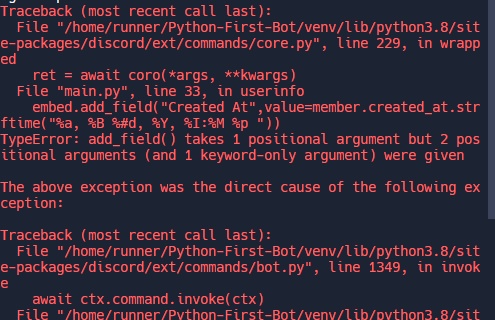
Can you copy paste the traceback as text? The image clips things off
novel dove
@client.command(aliases=['uinfo', 'whois'])
async def userinfo(ctx, member:discord.Member=None):
if member == None:
member = ctx.message.author
roles = [role for role in member.roles]
embed = discord.Embed(title="User Info", description=f"Here's the user info of the user {member.mention}", color=discord.Color.green(), timestamp = ctx.message.created_at)
embed.set_thumbnail(url=member.avatar)
embed.add_field(name="ID",value = member.id)
embed.add_field(name="Name",value = f"{member.name}#{member.discriminator}")
embed.add_field(name="Nickname", value=member.display_name)
embed.add_field(name="Status", value = member.status)
embed.add_field("Created At",value=member.created_at.strftime("%a, %B %#d, %Y, %I:%M %p "))
embed.addfield(name="Joined At", value = member.joined_at.strftime("%a, %B %#d, %Y, %I:%M %p "))
embed.add_field(name=f"Roles ({len(roles)})" , value = "".join([role.mention for role in roles]))
embed.add_field(name="Top Role", value = member.top_role.mention)
embed.add_field(name="Bot?",value = member.bot)
await ctx.send(embed=embed)
novel dove
novel dove
https://gyazo.com/15ee5d4d1bd316a871aadc17e6bc42e2
here is error
sick birch
Looks like you didn't use name= for the "created at" embed
novel dove
oh i see
@client.command(aliases=['uinfo', 'whois'])
async def userinfo(ctx, member:discord.Member=None):
if member == None:
member = ctx.message.author
roles = [role for role in member.roles]
embed = discord.Embed(title="User Info", description=f"Here's the user info of the user {member.mention}", color=discord.Color.green(), timestamp = ctx.message.created_at)
embed.set_thumbnail(url=member.avatar)
embed.add_field(name="ID",value = member.id)
embed.add_field(name="Name",value = f"{member.name}#{member.discriminator}")
embed.add_field(name="Nickname", value=member.display_name)
embed.add_field(name="Status", value = member.status)
embed.add_field(name="Created At",value=member.created_at.strftime("%a, %B %#d, %Y, %I:%M %p "))
embed.addfield(name="Joined At", value = member.joined_at.strftime("%a, %B %#d, %Y, %I:%M %p "))
embed.add_field(name=f"Roles ({len(roles)})" , value = "".join([role.mention for role in roles]))
embed.add_field(name="Top Role", value = member.top_role.mention)
embed.add_field(name="Bot?",value = member.bot)
await ctx.send(embed=embed)
sick birch
Give it a shot
novel dove

stil a error
`Traceback (most recent call last):
File "/home/runner/Python-First-Bot/venv/lib/python3.8/site-packages/discord/ext/commands/core.py", line 229, in wrapped
ret = await coro(*args, **kwargs)
File "main.py", line 34, in userinfo
embed.addfield(name="Joined At", value = member.joined_at.strftime("%a, %B %#d, %Y, %I:%M %p "))
AttributeError: 'Embed' object has no attribute 'addfield'
The above exception was the direct cause of the following exception:
Traceback (most recent call last):
File "/home/runner/Python-First-Bot/venv/lib/python3.8/site-packages/discord/ext/commands/bot.py", line 1349, in invoke
await ctx.command.invoke(ctx)
File "/home/runner/Python-First-Bot/venv/lib/python3.8/site-packages/discord/ext/commands/core.py", line 1023, in invoke
await injected(*ctx.args, **ctx.kwargs) # type: ignore
File "/home/runner/Python-First-Bot/venv/lib/python3.8/site-packages/discord/ext/commands/core.py", line 238, in wrapped
raise CommandInvokeError(exc) from exc
discord.ext.commands.errors.CommandInvokeError: Command raised an exception: AttributeError: 'Embed' object has no attribute 'addfield' `
Full error
 somber sky
How would I make a command where, if the guild ID you invite the bot to is not in a list then leave the server
@client.event
async def on_guild_join():
 if guild.id not in f.whitelistedservers:
   await guild.leave()```

thats what i have its probably not even close. `f.whitelistedservers` is a file, and its imported at the top `import whitelistedservers as f`add_field, not addfield
sick birch
somber sky
How would I make a command where, if the guild ID you invite the bot to is not i...
Actually you're really close. You just need the guild parameter inside on_guild_join(...)
You just need to parse your file and it should work
For instance:
with open("/path/to/whitelisted/file.txt", "r") as f:
  ids: list[int] = [*map(int, f.readlines())]
thx i havent seen
somber sky
sick birch
For instance:
```py
with open("/path/to/whitelisted/file.txt", "r") as f:
ids:...
would I keep if guild not in f.whitelistedservers:? or do i take that out
somber sky
it wasnt a txt file it was a .py file
sick birch
somber sky
it wasnt a txt file it was a .py file
Ah, never mind what I just said before then
Just import the variable as usual
somber sky
sick birch
Ah, never mind what I just said before then
i got it to leave, but even if the guild ID is in the list it leaves.
@client.event
async def on_guild_join(guild):
 if guild.id not in f.whitelistedservers:
await guild.leave()```Can you show us whitelistedservers?
somber sky
ah nvm
i put the id's in ""
i forgot
i had it as whitelistedservers = ["1052699299718365256"]
lol
sick birch
Guessed as much
somber sky
sick birch
Guessed as much
how much I make the bot DM the owner that the server isnt whitelisted
sick birch
somber sky
how much I make the bot DM the owner that the server isnt whitelisted
!d discord.Guild.owner
unkempt canyonBOT
property owner```
The member that owns the guild.Make sure you send the DM before the bot leaves
 drifting anvil
hey guys, how can i add embed functionality to my discord bot? im slightly confused because there seems to be many videos with different methods. this is what i have so far:
import discord
import responses
import discord_token


async def send_message(message, user_message, is_private):
    try:
        response = responses.get_response(user_message)
        if is_private:
            await message.author.send(response)
        else:
            await message.channel.send(response)

    except Exception as e:
        print(e)


def run_discord_bot():
    TOKEN = discord_token.TOKEN
    intents = discord.Intents.default()
    intents.message_content = True
    client = discord.Client(intents=intents)

    @client.event
    async def on_ready():
        print(f"{client.user} is now running!")

    @client.event
    async def on_message(message):
        if message.author == client.user:
            return

        username = str(message.author)
        user_message = str(message.content)
        channel = str(message.channel)

        print(f"{username} said: '{user_message}' in {channel}")

        await send_message(message, user_message, is_private = False)

    client.run(TOKEN)
!d discord.Embed
unkempt canyonBOT
class discord.Embed(*, colour=None, color=None, title=None, type='rich', url=None, description=None, timestamp=None)```
Represents a Discord embed.

len(x) Returns the total size of the embed. Useful for checking if it’s within the 6000 character limit.

bool(b) Returns whether the embed has any data set.

New in version 2.0.

x == y Checks if two embeds are equal.

New in version 2.0...!d discord.abc.Messageable.send
unkempt canyonBOT
await send(content=None, *, tts=False, embed=None, embeds=None, file=None, files=None, stickers=None, delete_after=None, nonce=None, allowed_mentions=None, reference=None, ...)```
This function is a [*coroutine*](https://docs.python.org/3/library/asyncio-task.html#coroutine).

Sends a message to the destination with the content given.

The content must be a type that can convert to a string through `str(content)`. If the content is set to `None` (the default), then the `embed` parameter must be provided.

To upload a single file, the `file` parameter should be used with a single [`File`](https://discordpy.readthedocs.io/en/latest/api.html#discord.File "discord.File") object. To upload multiple files, the `files` parameter should be used with a [`list`](https://docs.python.org/3/library/stdtypes.html#list "(in Python v3.11)") of [`File`](https://discordpy.readthedocs.io/en/latest/api.html#discord.File "discord.File") objects. **Specifying both parameters will lead to an exception**.

To upload a single embed, the `embed` parameter should be used with a single [`Embed`](https://discordpy.readthedocs.io/en/latest/api.html#discord.Embed "discord.Embed") object. To upload multiple embeds, the `embeds` parameter should be used with a [`list`](https://docs.python.org/3/library/stdtypes.html#list "(in Python v3.11)") of [`Embed`](https://discordpy.readthedocs.io/en/latest/api.html#discord.Embed "discord.Embed") objects. **Specifying both parameters will lead to an exception**.the embed/embeds kwarg take the Embed/list[Embed] class
somber sky
sick birch
!d discord.Guild.owner
is there a way i can make a command that adds the guild id to the list instead of me needing to put it
sick birch
somber sky
is there a way i can make a command that adds the guild id to the list instead o...
Sure. Just create a command that .appends to the list you already have
whitelisted_guilds: list[int] = []
@bot.command()
async def whitelist_guild(ctx: commands.Context, guild_id: int) -> None:
  whitelisted_guilds.append(guild_id)
one last thing, i forgot about it but like for the on_guild_join the whole point was so if ur not registered u cant use the bot, but the thing is if the bot went offline and someone invited the bot, it wont leave the server because its not online. How would i make it where when it gets online it does it aswell where it leaves if guild id isnt in list
slate swan
Hey I need help creating a set_permission command for bot discord bot
sick birch
somber sky
one last thing, i forgot about it but like for the `on_guild_join` the whole poi...
That's slightly harder
You'll have to loop over all your guilds in on_ready and check if they're in the whitelist. If not, leave them
novel dove
Hey,how can i setup bot status like watching number of servers?
slate swan
!d discord.Client.change_presence
unkempt canyonBOT
await change_presence(*, activity=None, status=None)```
This function is a [*coroutine*](https://docs.python.org/3/library/asyncio-task.html#coroutine).

Changes the client’s presence.

Example

```py
game = discord.Game("with the API")
await client.change_presence(status=discord.Status.idle, activity=game)
``` Changed in version 2.0: Removed the `afk` keyword-only parameter...!d discord.ActivityType.watching
unkempt canyonBOT
A “Watching” activity type.
slate swan
for the number of servers it would be len(Client.guilds)
you have an outdated version of dpy installed,
pip install -U discord.py to update
drifting anvil
unkempt canyon
@slate swan this doesnt work for me
slate swan
*you're using it wrong, show code
you don't need to await load_extension in disnske, remove the await and you're all good
you don't await bot.add_cog either
yep
is the file inside the "cogs" directory?
did you call the load() method?
weird, make sure the file is saved.... and is that all you have in the cog?
oh wait your setup is async too, make it a normal function
drifting anvil
slate swan
*you're using it wrong, show code
i just pasted the code thats there
slate swan
you just need to initiate a class with proper arguments and then pass it to your send method
somber sky
sick birch
You'll have to loop over all your guilds in `on_ready` and check if they're in t...
yea idk how to do that lol
sick birch
somber sky
yea idk how to do that lol
should be simple
for guild in bot.guilds:
  is_whitelisted = # check if guild is whitelisted:
  if not is_whitelisted:
    await guild.leave()
might want a wait_until_ready() lock before accessing the guilds property
somber sky
sick birch
should be simple
```py
for guild in bot.guilds:
is_whitelisted = # check if gu...
do I take out the =?
 thin trout
i got problems with cogs, can some one helpme?
main.py
import discord
import os
from discord.ext import commands

bot = commands.Bot(command_prefix='!', help_command=None, intents=discord.Intents.all())

@bot.command()
async def load(ctx, extension):
    bot.load_extension(f'cogs.{extension}')

@bot.command()
async def unload(ctx, extension):
    bot.unload_extension(f'cogs.{extension}')

@bot.command()
async def reload(ctx, extension):
    bot.reload_extension(f'cogs.{extension}')

for filename in os.listdir('./cogs'):
    if filename.endswith('.py'):
        bot.load_extension(f'cogs.{filename[:-3]}')

bot.run('token')```
example.py
```cs
import discord
from discord.ext import commands

class Example(commands.Cog):
    def __init__(self, bot):
        self.bot = bot

    @commands.Cog.listener()
    async def on_ready(self):
        print('Bot is ready.')

    @commands.command()
    async def ping(self, ctx):
        await ctx.send('Pong')

def setup(bot):
bot.add_cog(Example(bot))``` for guild in client.guilds:
is_whitelistedservers
if not is_whitelistedservers:
await guild.leave()```
i got that ik its wrong but im not good at this type of stuffis_whitelisted just needs to be a bool
Representing if the guild is whitelisted or not
E.g
is_whitelisted = guild.id in whitelisted_ids
outdated code apparently, cogs are now async
setup needs to be async
load_extension and add_cog needs to be awaited
thin trout
slate swan
outdated code apparently, cogs are now async
`setup` needs to be async
`load_ex...
i don't understand as well, i just started using py
can u make an example please?
slate swan
thin trout
i got problems with cogs, can some one helpme?
main.py
```cs
import discord
impo...
import discord
import os
from discord.ext import commands

bot = commands.Bot(command_prefix='!', help_command=None, intents=discord.Intents.all())

@bot.command()
async def load(ctx, extension):
    bot.load_extension(f'cogs.{extension}')

@bot.command()
async def unload(ctx, extension):
    bot.unload_extension(f'cogs.{extension}')

@bot.command()
async def reload(ctx, extension):
    bot.reload_extension(f'cogs.{extension}')

for filename in os.listdir('./cogs'):
    if filename.endswith('.py'):
        bot.load_extension(f'cogs.{filename[:-3]}')

bot.run('token')
```You seem to have used the wrong language in the code blockwhat language i have to use?
slate swan
thin trout
can u make an example please?
somber sky
sick birch
`is_whitelisted` just needs to be a bool
ohh i got it
     for guild in client.guilds:
          is_whitelisted = guild.id in f.whitelistedservers
          if not is_whitelisted:
await guild.leave()```is it against the TOS to check ur knowledge and see if u can make a selfbot?
oblique fern
Hello
 fading marlin
slate swan
is it against the TOS to check ur knowledge and see if u can make a selfbot?
fading marlin
slate swan
is it against the TOS to check ur knowledge and see if u can make a selfbot?
it's against TOS to make selfbots
regardless of the reason you're making one
oblique fern
got it
fading marlin
you have to instantiate the class
oblique fern
the issue was not passing bot to class init
white citrus
Traceback (most recent call last):
  File "C:\Users\domin\AppData\Local\Programs\Python\Python310\lib\site-packages\nextcord\client.py", line 489, in _run_event
    await coro(*args, **kwargs)
  File "c:\Discord\Maja Projekt\MajaSystem_Test\bot.py", line 155, in on_application_command_error
    raise error
  File "C:\Users\domin\AppData\Local\Programs\Python\Python310\lib\site-packages\nextcord\application_command.py", line 870, in invoke_callback_with_hooks
    can_run = await self.can_run(interaction)
  File "C:\Users\domin\AppData\Local\Programs\Python\Python310\lib\site-packages\nextcord\application_command.py", line 846, in can_run
    raise ApplicationCheckFailure(
nextcord.errors.ApplicationCheckFailure: The check functions for application command SlashApplicationCommand testt <function DBTest.testt at 0x000002826F87EB00> failed.```How can I make it so that the error does not appear
def user_has_administrator_role():
    async def extended_check(inter: nc.Interaction):

        async with aiosqlite.connect("maja.db") as db:
            async with db.cursor() as cursor:

                await cursor.execute('SELECT guild_id FROM setup WHERE guild_id = ?', (inter.guild.id,))
                guild_check = await cursor.fetchone()
                if guild_check is None:
                    await inter.response.send_message(embed=error_output, ephemeral=True, file=cancel_error_png)

                else:
                    await cursor.execute('SELECT admin_role FROM setup WHERE guild_id = ?', (inter.guild.id,))
                    admin_data = await cursor.fetchone()
                    if admin_data is None:
                        await inter.response.send_message(embed=error_output, file=cancel_error_png, ephemeral=True)

                    else:
                        if inter.user.get_role(admin_data[0]):
                            return True
                        else:
                            await inter.response.send_message(embed=error_perms, file=cancel_error_png_a, ephemeral=True)
        pass
    return application_checks.check(extended_check)```

 green star
class moderation(commands.Cog):
    def __init__(self, client: commands.Bot):
        self.client = client

@app_commands.command(name='kickkk')
async def kick(self, interaction: discord.Interaction):
    await self, interaction.response.send_message(content='Hello!')

async def setup(client:commands.Bot) -> None:
    await client.add_cog(moderation(client))```
keep getting that
fading marlin
your indentation isn't right
thin trout
someone know why the bot is still showing online when i already shut it down?
and i also got this error
status = _overlapped.GetQueuedCompletionStatus(self._iocp, ms)
KeyboardInterrupt```Just wait and it'll goes offline after the program is stopped
naive briar
That error is when you force stopped the program using Ctrl+C
Or something that interrupted the program that your IDE did to stop it
thin trout
and how can i stop it without using Ctrl C
slate swan
its normal for the bot to stay online for a few minutes after you turn the program off
oblique fern
Hi, I'm trying to wrap my head around this
I want to send a message to a channel with my bot
every time someone reacts, I want to add them to a list
every time someone removes a reaction i want to remove the from the list
i want this checking to stop after 60 seconds
with the final list of reacters
do I need a loop for this
and how can I use wait_for in my loop
for both adding and removing reaction
 north summit
        fetched_roles = ctx.guild.roles
        for given in fetched_roles:
                    found_role = discord.utils.find(lambda r: r.name == f'{given}', ctx.message.guild.roles)
                    if found_role in member.roles():
Error: py if found_role in member.roles(): TypeError: 'list' object is not callable
naive briar
oblique fern
do I need a loop for this
!d discord.on_raw_reaction_add
unkempt canyonBOT
discord.on_raw_reaction_add(payload)```
Called when a message has a reaction added. Unlike [`on_reaction_add()`](https://discordpy.readthedocs.io/en/latest/api.html#discord.on_reaction_add "discord.on_reaction_add"), this is called regardless of the state of the internal message cache.

This requires [`Intents.reactions`](https://discordpy.readthedocs.io/en/latest/api.html#discord.Intents.reactions "discord.Intents.reactions") to be enabled.wait so
how else would i check if a user has a role
naive briar
Just check it?
thin trout
u know if there is a way to use slash commands with embed messages?
naive briar
What? Like send an embed using slash command?
thin trout
yes, and like u get pinged
thin trout
naive briar
What? Like send an embed using slash command?
this one is already working
oblique fern
@naive briar i don't get how to use this
with my loop and reaction remove
to complete my goal
How do I get user name from reactor
oblique fern
anyone know why RawReactionActionEvents when the type is REMOVE, have no MEMBER?
sick birch
API limitation
oblique fern
 shrewd apex
oblique fern
How do I get user name from reactor
shrewd apex
oblique fern
How do I get user name from reactor
get the message reaction and list of reactions from this list get the user
oblique fern
figured it out, but thanks.
 tropic estuary
can someone help
[Errno 2] No such file or directory: 'localdb/Mainbank.json'
@commands.command(aliases=['bg'])
  @commands.cooldown(1, 30, commands.BucketType.user)
  async def beg(self,ctx):
    await open_account(ctx.author)

    user = ctx.author

    users = await get_bank_data()


    earnings = random.randrange(987)
    choose  = random.choice(names)
    em = nextcord.Embed(title=choose,description=f"Gave you {earnings}",color=nextcord.Color.red())
    await ctx.send(embed=em)

    users[str(user.id)]["wallet"] += earnings

    with open("localdb/Mainbank.json","w") as f:
        json.dump(users,f)

 glad cradle
you're using replit, try to use the absolute path
 fickle hamlet
This is a lost cause because after some set time the file will be restored since repl.it uses an ephemeral file system
glad cradle
also don't use a json file as database 😭
tropic estuary
glad cradle
you're using replit, try to use the absolute path
okk
quick gust
anyone got any examples of using fuzzywuzzy with their discord bot?
somber imp
glad cradle
also don't use a json file as database 😭
yeah use mongodb
slate swan
how do i install get-pip.py
somber imp
slate swan
how do i install get-pip.py
what is that?
quick gust
not the right channel for that
slate swan
k
quick gust
but u can take a look at this https://www.geeksforgeeks.org/how-to-install-pip-on-windows/
thin trout
someone know why the bot can just create the temporary channels and can't delete it when those are empty?
import discord
from discord import app_commands
from discord.ext import commands
#################################################################################################################
class Temporary(commands.Cog):
def __init__(self, bot: commands.bot):
self.bot = bot
@commands.Cog.listener()
async def on_ready(self):
print('Temporary cog has been enabled.')
#################################################################################################################
@commands.Cog.listener()
async def on_voice_state_update(self, member: discord.Member, before: discord.VoiceState, after: discord.VoiceState):
possible_channel_name = f"{member.name}'s channel"
if after.channel.name == ":lock:・Enter to create":
temp_channel = await after.channel.clone(name= possible_channel_name)
await member.move_to(temp_channel)
if before.channel.name == possible_channel_name:
if len(before.channel.members) == 0:
await before.channel.delete()
#################################################################################################################
async def setup(bot):
await bot.add_cog(Temporary(bot))``` vale wing
quick gust
but u can take a look at this https://www.geeksforgeeks.org/how-to-install-pip-o...
vale wing
quick gust
but u can take a look at this https://www.geeksforgeeks.org/how-to-install-pip-o...
There's much easier way: reinstall python and put "Add Python to PATH" checkmark on
vale wing
tropic estuary
[Errno 2] No such file or directory: 'localdb/Mainbank.json'
```py
@commands.com...
Filenames are case-sensitive
vale wing
slate swan
https://bootstrap.pypa.io/pip/2.7/get-pip.py
2.7 what da hell
naive briar
lol
vale wing
Me when the discord bots
 flat pier
vale wing
There's much easier way: reinstall python and put "Add Python to PATH" checkmark...
flat pier
vale wing
There's much easier way: reinstall python and put "Add Python to PATH" checkmark...
isn't adding python to path not ideal on windows
as you should use the py launcher instead
vale wing
flat pier
isn't adding python to path not ideal on windows
It adds Scripts folder which contains exes for pip poetry and other executables
 drifting arrow
How do I set my discord embed color to white?
I tried straight #FFFFFF and tried converting it to a base 16 number.
NVM figured it out
Convert HEX to DECIMAL tables: find the decimal and binary representation of a hexadecimal number, calculate ...
naive briar

slate swan
to learn how to use cogs can i see a YouTube video from 2020 or it won't work because cogs are different now?
slate swan
Do you know why I can't import discord and discord.ext in my cog file ?

import discord
from discord.ext import discord

class CogCreation(commands.Cog):
    def __init__(self, bot):
        self.bot = bot

    @commands.command()
    async def crea(ctx, tag):
        if tag.startswith("#"):
            await ctx.send("remove the # and retry")
There's no module discord in discord.ext
Where did you get this
slate swan
yes it's from discord.ext import discord
naive briar
And commands isn't defined
slate swan
what are the main import i have to do ?
naive briar
There's only commands and tasks module in discord.ext
slate swan
i do from discord.ext import discord since 4months
ahhh it's from discord.ext imports commands
naive briar
Then keep getting the error if you don't wanna fix it 🤷
slate swan
🙃
thank you


import discord
from discord.ext import discord

class CogCreation(commands.Cog):
    def __init__(self, bot):
        self.bot = bot

    @commands.command()
    async def crea(ctx, tag):
        if tag.startswith("#"):
            await ctx.send("remove the # and retry")
This is my cog file
can someone help me please
slate swan
slate swan
can someone help me please
Someone literally did
and you’re still asking the same thing
I changed lol
i did what catgal said
fuck
Have you read the code you just sent?
i forgot changed also in my cog file
ah no
lol i did it the error doesn't come bevause of that
import discord
from discord.ext import commands

class CogCreation(commands.Cog):
    def __init__(self, client):
        self.client = client

    @commands.command()
    async def crea(ctx, tag):
        if tag.startswith("#"):
            await ctx.send("remove the # and retry")
can you tell me where is my AttributeError?
somber imp
slate swan
```py
import discord
from discord.ext import commands
class CogCreation(command...
How can we tell? Your traceback tells you where the error is
vocal snow
slate swan
can you tell me where is my AttributeError?

why are you doing crea.CogCreation?
slate swan
créa is my cog's file and CogCreation my class
vocal snow
and have you defined a command called crea above it?
vocal snow
ok, so thats why you're getting the attribute error
vocal snow
not in the cog
slate swan
where ?
vocal snow
vocal snow
im saying above this line
slate swan
ah euh wait
vocal snow
how have you defined crea variable
slate swan
 vocal snow

so the second one will override first one
you can change the import to ```py
from crea import CogCreation
i just changed my file's name into creation
the bot is on but when I write the command it wirte command "crea" doesn't exist
thin trout
someone know why the console is not showing errors no more?
before i start using cogs, the console displays like 2 blue string before connecting to the bot and all the commands errors but now is empty
 candid remnant
Hey I have a select menu in a loop, and I want to wait for the user to select a value, any ideas?
novel dove
@client.tree.command(name="serverinfo",description="Sends the information on the server")
async def serverinfo(interaction: discord.Interaction):
embed.set_thumbnail(url=interaction.guild.icon)
embed.add_field(name="Members", value= interaction.guild.member_count)
embed.add_field(name="Channels", value = f"{len(interaction.guild.text_channels)} text | {len(interaction.guild.voice_channels)} voice")
embed.add_field("Owner", value = interaction.guild.owner.mention)
embed.add_field(name="Description", value = interaction.guild.description)
embed.add_field(name="Created at", value = interaction.guild.created_at.strftime("%a, %B %#d, %Y, %I:%M %p "))
await interaction.response.send_message(embed=embed)
`Traceback (most recent call last):
File "/home/runner/Python-First-Bot/venv/lib/python3.8/site-packages/discord/app_commands/commands.py", line 862, in _do_call
return await self._callback(interaction, **params) # type: ignore
File "main.py", line 51, in serverinfo
embed.set_thumbnail(url=interaction.guild.icon)
NameError: name 'embed' is not defined
The above exception was the direct cause of the following exception:
Traceback (most recent call last):
File "/home/runner/Python-First-Bot/venv/lib/python3.8/site-packages/discord/app_commands/tree.py", line 1242, in _call
await command._invoke_with_namespace(interaction, namespace)
File "/home/runner/Python-First-Bot/venv/lib/python3.8/site-packages/discord/app_commands/commands.py", line 887, in _invoke_with_namespace
return await self._do_call(interaction, transformed_values)
File "/home/runner/Python-First-Bot/venv/lib/python3.8/site-packages/discord/app_commands/commands.py", line 880, in _do_call
raise CommandInvokeError(self, e) from e
discord.app_commands.errors.CommandInvokeError: Command 'serverinfo' raised an exception: NameError: name 'embed' is not defined
`
novel dove
novel dove
`Traceback (most recent call last):
File "/home/runner/Python-First-Bot/venv/l...
error
novel dove
novel dove
@client.tree.command(name="serverinfo",description="Sends the information on the...
What is wrong here?
oh i see nmv
naive briar
thin trout
someone know why the console is not showing errors no more?
before i start using...
bot.start doesn't have a logging setup, bot.run does
You have to setup logging yourself or load the extensions in setup_hook
thin trout
naive briar
You have to setup logging yourself or load the extensions in `setup_hook`
this is my start
async def main():
await load()
await bot.start(os.getenv("TOKEN"))
asyncio.run(main())
unkempt canyonBOT
class discord.Embed(*, colour=None, color=None, title=None, type='rich', url=None, description=None, timestamp=None)```
Represents a Discord embed.

len(x) Returns the total size of the embed. Useful for checking if it’s within the 6000 character limit.

bool(b) Returns whether the embed has any data set.

New in version 2.0.

x == y Checks if two embeds are equal.

New in version 2.0... bright wedge
you never define the embed
bright wedge
you never define the embed
i saw
slate swan
can someone show me an example of slash commands
vocal snow
with which library
thin trout
i created a custom logger and i got this error in console:
RuntimeError: asyncio.run() cannot be called from a running event loop
sys:1: RuntimeWarning: coroutine 'Client.run.<locals>.runner' was never awaited
unkempt canyonBOT
Pasting large amounts of code
If your code is too long to fit in a codeblock in Discord, you can paste your code here:
https://paste.pythondiscord.com/
After pasting your code, save it by clicking the floppy disk icon in the top right, or by typing ctrl + S. After doing that, the URL should change. Copy the URL and post it here so others can see it.
thin trout
async def main():
await load()
await bot.run(os.getenv("TOKEN"))
asyncio.run(main())
the logger?
vocal snow
use bot.start, not .run
thin trout
i can't
vocal snow
why not?
vocal snow
that makes no sense at all
slate swan
vocal snow
with which library
thin trout
idk, i just started using py
vocal snow
await load()
is that being used to load the extensions?
thin trout
async def load():
for file in os.listdir('./cogs'):
if file.endswith('.py'):
await bot.load_extension(f'cogs.{file[:-3]}')
vocal snow
ok, so your cogs are being loaded first anyways
so whats the issue with using .start there
you know that .run just calls .start inside it anyways right
vocal snow
slate swan
discord.py

GitHub
An API wrapper for Discord written in Python. Contribute to Rapptz/discord.py development by creating an account on GitHub.
thin trout
bot.start(os.getenv("TOKEN"))
RuntimeWarning: Enable tracemalloc to get the object allocation traceback
vocal snow
await it
thin trout
an example?
thin trout
await bot.start(os.getenv("TOKEN"))
^^^^^^^^^^^^^^^^^^^^^^^^^^^^^^^^^^^
SyntaxError: 'await' outside function
vocal snow
is it inside the main function?
thin trout
async def main():
await load()
await bot.run(os.getenv("TOKEN"))
 upbeat gust
thin trout
async def main():
await load()
await bot.run(os.getenv("TOKEN"))
upbeat gust
thin trout
async def main():
await load()
await bot.run(os.getenv("TOKEN"))
just use bot.run, it's not a coroutine
upbeat gust
just use bot.run by itself
thats the simplest and best way, especially since it automatically enables logging
vocal snow
they also want to call load()
upbeat gust
do all your async setup stuff in setup_hook
upbeat gust
that works, make sure you use discord.utils.setup_logging() though
slate swan
import discord

client = discord.Client()

@client.event
async def on_message(message):
    if message.mention_everyone or client.user in message.mentions:
        await message.channel.send("Please do not mention the bot or use the @everyone mention. Thank you.")

client.run(" hehe ")
dude i think this code has no error but why it still doesnt work?
mention on reply ;)
naive briar
!intents
unkempt canyonBOT
Using intents in discord.py
Intents are a feature of Discord that tells the gateway exactly which events to send your bot. Various features of discord.py rely on having particular intents enabled, further detailed in its documentation. Since discord.py v2.0.0, it has become mandatory for developers to explicitly define the values of these intents in their code.
There are standard and privileged intents. To use privileged intents like Presences, Server Members, and Message Content, you have to first enable them in the Discord Developer Portal. In there, go to the Bot page of your application, scroll down to the Privileged Gateway Intents section, and enable the privileged intents that you need. Standard intents can be used without any changes in the developer portal.
Afterwards in your code, you need to set the intents you want to connect with in the bot's constructor using the intents keyword argument, like this:
from discord import Intents
from discord.ext import commands

# Enable all standard intents and message content
# (prefix commands generally require message content)
intents = Intents.default()
intents.message_content = True

bot = commands.Bot(command_prefix="!", intents=intents)
For more info about using intents, see discord.py's related guide, and for general information about them, see the Discord developer documentation on intents.
naive briar
Show the error next time you got one
 calm jacinth
slate swan
because ur problem can be the same problem for someone else
calm jacinth
slate swan
because ur problem can be the same problem for someone else
:o oke
calm jacinth
slate swan
because ur problem can be the same problem for someone else
There is a discord server with a fake nitro scam
where a user generates 900k nitro and if its valid then it sends it to discord webhook and many got scammed like this
So I want to expose them but the code is encoded and I don't know how to decode it. So i need help in decoding it.
shrewd apex
calm jacinth
There is a discord server with a fake **nitro scam**
where a user generates 900k...
thats lack of awareness u dont need to get the code for that to expose them just report them
also there is no way to check if a code is valid without availing it so basically the whole thing is a scam
calm jacinth
shrewd apex
thats lack of awareness u dont need to get the code for that to expose them just...
Oo
ok than. ty
green star

class moderation(commands.Cog):
  def __init__(self, client: commands.Bot):
    self.client = client

  @app_commands.command(name="kickkk", description="Testing Slash")
  async def kickkk(interaction: discord.Interaction, user:discord.Member=None, reason=None):
    guild = interaction.guild
    mbed = discord.Embed(
        title=f'Success {user.mention} has been kciked for {reason}',
        description=f'{user.mention} has Successfully been kicked'
    )
    if interaction.author.guild_permissions.kick_members:
      await interaction.response.send_message(embed=mbed)
      await guild.kick(user=user)
await interaction.response.send_message(content='Hello!')```i get that error when trying to run this and idk how to fix it
naive briar
Every argument in slash command callback needs a type annotation
(type hint)
That's how discord.py can tell what you want to Discord
Also you can't respond to the interaction twice using .response
!d discord.Interaction.response
unkempt canyonBOT
Returns an object responsible for handling responding to the interaction.
A response can only be done once. If secondary messages need to be sent, consider using followup instead.

 fervent bison
? what u talking about
token key is just a string
not the token it self
any way i have fix it by this line client.run(os.getenv(token_key, token_key))
and the token_key hold the value of my token
discord.py is not working
change it to nextcord
 hushed galleon
fervent bison
and the token_key hold the value of my token
hushed galleon
fervent bison
and the token_key hold the value of my token
if you're hardcoding the token into your script, you might as well just write client.run(token)
fervent bison
hushed galleon
if you're hardcoding the token into your script, you might as well just write `c...
lol that true
slate swan
fervent bison
token key is just a string
are you aware how environmental variables works? and what does os.getenv do?
fervent bison
when ever u see discord in your script change it to nextcord and everything will be fine
hushed galleon
i dont think anything's changed, the only thing you have to worry about is whether the message is cached
fervent bison
slate swan
are you aware how environmental variables works? and what does os.getenv do?
why are u ?
slate swan
2nd most confusing statement of the day💀
hushed galleon
and i guess having the appropriate intents too
are you listening for a reaction on a message you just sent? or specifically a message that was sent before you had started the bot
fervent bison

i had the same problem and i fix it yesterday
as i said discord lib is not working anymore change to nextcord
where ever u use discord change it to nextcord for example import discord change it to import nextcord and next on ...
hushed galleon
can you show the rest of the command? https://paste.pythondiscord.com/
and do you happen to have any error handlers like on_command_error?
fervent bison
@slate swan the same thing for u just change from discord to nextcord
hushed galleon
fervent bison
as i said discord lib is not working anymore change to nextcord
discord.py went back into development like 9 months ago and v2's already came out
well i can tell you that an error should have occurred, because your wait_for is supposed to return a tuple of (reaction, user) but you assigned it to a single variable and tried doing reaction.emoji
fervent bison
go ahead and fix there code then yesterday i had the same problem i read they change from discord to nextcord i change only names from discord to nextcord then everything start working fine
hushed galleon
if you do have an error handler, you have to make sure its printing the error
if you didnt override the global on_command_error, the default only prints exceptions if there isnt a command/cog-specific error handler
it just means that the python interpreter that vscode has selected doesnt have discord.py installed, usually you'd run some form of pip install discord.py in the terminal
a simple way to display the error is to just re-raise it
e.g. py @bot.event async def on_command_error(ctx, error): if isinstance(error, commands.CommandOnCooldown): ... # send a message or whatever else: raise error
unkempt canyonBOT
Per Python Discord's Rule 5, we are unable to assist with questions related to youtube-dl, pytube, or other YouTube video downloaders, as their usage violates YouTube's Terms of Service.
For reference, this usage is covered by the following clauses in YouTube's TOS, as of 2021-03-17:
The following restrictions apply to your use of the Service. You are not allowed to:

1. access, reproduce, download, distribute, transmit, broadcast, display, sell, license, alter, modify or otherwise use any part of the Service or any Content except: (a) as specifically permitted by the Service;  (b) with prior written permission from YouTube and, if applicable, the respective rights holders; or (c) as permitted by applicable law;

3. access the Service using any automated means (such as robots, botnets or scrapers) except: (a) in the case of public search engines, in accordance with YouTube’s robots.txt file; (b) with YouTube’s prior written permission; or (c) as permitted by applicable law;

9. use the Service to view or listen to Content other than for personal, non-commercial use (for example, you may not publicly screen videos or stream music from the Service)
 gleaming island
 wanton pebble
is there a way to enable slash commands in all servers rather than just one specific?
 cloud dawn
Don't specify a guild.
wanton pebble
i-
cloud dawn
Hmmm?
wanton pebble
cloud dawn
Don't specify a guild.
that was stupid of me ;-; ty lol
cloud dawn
Keep in mind it can take up to an hour to sync.
wanton pebble
cloud dawn
Keep in mind it can take up to an hour to sync.
yah, thank you for your help
vague zephyr
hey is it possible to make slash commands only appear to the owner of the bot?
 torn sail
vague zephyr
hey is it possible to make slash commands only appear to the owner of the bot?
torn sail
vague zephyr
hey is it possible to make slash commands only appear to the owner of the bot?
Not possibly unfortunately
hushed galleon
it is technically possible, but only with manual configuration - an admin has to whitelist you
you could also add a default permission for admins only iirc, which might be sufficient for your needs
fervent bison
any idea why ?

bot commands are working fine but they just don't show up when i type /
 frosty umbra
fervent bison
any idea why ?
frosty umbra
fervent bison
any idea why ?
you need to sync your commands
 wispy knot
how do i get the first 2 parts from a discord token
frosty umbra
wispy knot
how do i get the first 2 parts from a discord token
Like a bot token?
wispy knot
no
like the first part is id->base 64
how do i get the second
i know i can't get the third
but i can't remember how to get the second
nvm found how
vague zephyr
wispy knot
nvm found how
how lol
wispy knot
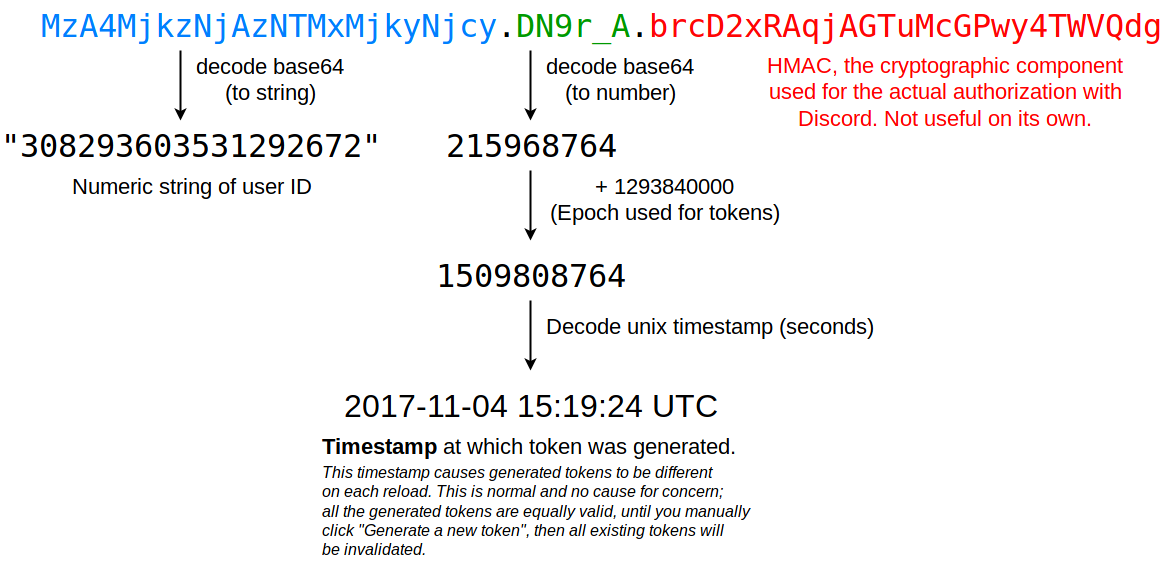 vague zephyr
ohh
 haughty belfry
guys, anybody have idea about this sitation #1057354033519661188
slate swan
        guild.default_role: discord.PermissionOverwrite(read_messages=False),
        guild.me: discord.PermissionOverwrite(read_messages=True)
    }```
Which i need to add to work bcs if payload member reac t on message it didnt add permission to payload user reactI need help after I run *globalban it sends alot of message


the send is inside the loop
also, this command can be abused very easily.
 dense merlin
i have a music bot and i wanna make it so that it deletes the music files ater 15 minutes of the command being run
how do
 fair shuttle
my codes seems good but when i try to run them in the server thats not working and theres no error
 slate swan
you have an extra self
and if you're getting no errors it means you dont have logging enabled/faulty error handler
fair shuttle
i got this error
 fair shuttle
slate swan
you have an extra self
fair shuttle
slate swan
you have an extra self
on this line?
 slate swan
dense merlin
i have a music bot and i wanna make it so that it deletes the music files ater 1...
slate swan
dense merlin
i have a music bot and i wanna make it so that it deletes the music files ater 1...
on all command lines
is that a cog?
 dense merlin
slate swan
on all command lines
dense merlin
slate swan
on all command lines
?
dense merlin
slate swan
nvm that reply was for the person above
💀i thought so
slate swan
you can use os.remove
dense merlin
slate swan
you can use `os.remove`
well yes
slate swan
after asyncio.sleeping for 15 minutes
dense merlin
slate swan
after `asyncio.sleep`ing for 15 minutes
yeah thats what i put
just didnt know if better way
slate swan
i'd create a seperate thread to handle file delete operations
dense merlin
ok
fair shuttle
the bot dont recognize the command is there anything wrong
 slate swan
indentations
fair shuttle
i dont go error
fair shuttle
fair shuttle
i dont go error
got*
 timid spade
something like this?
 green star

why do i keep getting this?
  @app_commands.command(name='unban', description='will unban the member from the server')
  async def unban(self, interaction: discord.Interaction, user:discord.Member=None):
    guild = interaction.guild
    mbed= discord.Embed(
      title='Success!',
      description=f'<@{id}> has been successfully unbanned!',
      color=0x992d22
    )
    if interaction.author.guild_permissions.ban_members:
      await interaction.response.send_message(embed=mbed)
await guild.unban(user=user)```try providing member ID
green star
u mean in the code?
timid spade
and not name and tag
green star
or when using the command in discord?
timid spade
in the command
timid spade
the user id
green star
yes
slate swan
I made a program using buttons but when I click the button it says interaction failed but I get no error in my terminal. Anyone know what the issue could be?
green star
show code
slate swan
https://paste.pythondiscord.com/anulowacev note: the / at the end of line 8 and 85 have been removed
timid spade
green star
yes
can you send me the Id here?
timid spade
green star
```py
@app_commands.command(name='unban', description='will unban the member f...
the code looks fine
the problem must be in the command
timid spade
i mean generally IDs work
But you can try
green star
timid spade
i mean generally IDs work
But you can try
The application did not respond it says when i try to run the cmd btw
but thats probably bc its trying to unban someone thru their name
novel dove
Any ideas how can i host bot 24/7 for free?
green star
novel dove
Any ideas how can i host bot 24/7 for free?
a free bot hoster
green star
ill try thatr
timid spade
in discord.py its interaction.user and ctx.author
slate swan
novel dove
Any ideas how can i host bot 24/7 for free?
Self-hosting is probably the only free way to do it. Free VPS services will always have some sort of catch.
 novel dove
Is this site ok?
 timid spade
green star
timid spade
green star
ok so
try taking user id as int and convert it to member later?
green star
timid spade
ok so
try taking user id as int and convert it to member later?
me donnt know how to do that lol
timid spade
green star
me donnt know how to do that lol
this is where stack overflow comes in
green star
ok?
timid spade
wait
green star
k
slate swan
timid spade
how can i check if interaction is a select type
!d discord.InteractionType
unkempt canyonBOT
class discord.InteractionType```
Specifies the type of [`Interaction`](https://discordpy.readthedocs.io/en/latest/interactions/api.html#discord.Interaction "discord.Interaction").

New in version 2.0.you can check if it was an component
timid spade
slate swan
you can check if it was an component
also what i am doing wrong here?
 timid spade
slate swan
you can check if it was an component
timid spade
slate swan
you can check if it was an component
component is select?
 winged coral
!d discord.Interaction.user
unkempt canyonBOT
The user or member that sent the interaction.
winged coral
You don't need to fetch anything if you have a valid Interaction
timid spade
i am getting user Id from command
winged coral
Ah right apologies
Looks okay to me then
Not sure the kwarg is user_id though
!d discord.Guild.get_member
unkempt canyonBOT
get_member(user_id, /)```
Returns a member with the given ID.

Changed in version 2.0: `user_id` parameter is now positional-only. slate swan
timid spade
component is select?
slate swan
timid spade
component is select?
component is buttons, select and modals included
timid spade
slate swan
component is buttons, select and modals included
ohk tysm
also you sure it is interaction.values? its not working for me
slate swan
you'll check if the component was a select using interaction.data["type"]==3
slate swan
timid spade
ohk tysm
also you sure it is interaction.values? its not working for me
interaction.values is a list, you need the 0th index of it for the first selection
timid spade
slate swan
you'll check if the component was a select using `interaction.data["type"]==3`
will this work?
 slate swan
yes


 slate swan
interaction.values
timid spade
its same
 timid spade
slate swan
print this
timid spade
slate swan
print this
 slate swan
yeah so thats the list, index the 0th value
timid spade
timid spade
oh well
is it interaction.data.values?
timid spade
but i am not getting any list with interaction.values
slate swan
slate swan
interaction.data["values"]
use this....
timid spade
oh ohh
okay yes got it
it worked
thanks king
@slate swan is there any way i can get all the lable names of the menu in which the selection is made
Like a list including options user selected and options it didnt select
slate swan
!d discord.Interaction.message
unkempt canyonBOT
The message that sent this interaction.
slate swan
!d discord.Message.components
unkempt canyonBOT
A list of components in the message. If Intents.message_content is not enabled this will always be an empty list unless the bot is mentioned or the message is a direct message.
New in version 2.0.
slate swan
this has all the components in the msg
timid spade
slate swan
this has all the components in the msg
compo_list = discord.Interaction.message.components like this?
or maybe like this?

 vocal snow
timid spade
or maybe like this?
vocal snow
timid spade
or maybe like this?
You don't use the actual class, you use an instance of it
Which you usually get from the app command or ui component callback
thin trout
how can i fix this error?
sys:1: RuntimeWarning: coroutine 'Client.run.<locals>.runner' was never awaited```
thi is the start
```async def load():
    for file in os.listdir('./cogs'):
        if file.endswith('.py'):
            await bot.load_extension(f'cogs.{file[:-3]}')

async def main():
    await load()
    await bot.run(os.getenv("TOKEN"))

asyncio.run(main())```when you're using an async def main() function, you need to start the bot with bot.start() instead of bot.run()
https://discordpy.readthedocs.io/en/stable/migrating.html#asyncio-event-loop-changes ```py
async def main():
# do other async things
await my_async_function()
# start the client
async with client:
    await client.start(TOKEN)
asyncio.run(main())```
thin trout
hushed galleon
when you're using an async def main() function, you need to start the bot with b...
thanks it works, you know how can i create a logger? cuz i not seeing errors in console no more
hushed galleon
!d discord.utils.setup_logging
unkempt canyonBOT
discord.utils.setup_logging(*, handler=..., formatter=..., level=..., root=True)```
A helper function to setup logging.

This is superficially similar to [`logging.basicConfig()`](https://docs.python.org/3/library/logging.html#logging.basicConfig "(in Python v3.11)") but uses different defaults and a colour formatter if the stream can display colour.

This is used by the [`Client`](https://discordpy.readthedocs.io/en/latest/api.html#discord.Client "discord.Client") to set up logging if `log_handler` is not `None`.

New in version 2.0.this is the function that bot.run() normally calls beforehand
thin trout
ok
slate swan
Hello how to reset option in discord.py select options
thin trout
how can i ping a role in a embed message?
 pliant gulch
If an embed is sent bc. a command you can use .reply to get a ping
For both non-interaction and interaction commands
slate swan
role.mention returns a string for mentioning the role
it will be formatted like <@&roleid>
but you can only mention stuff in an embed field value or description I think
thin trout
slate swan
but you can only mention stuff in an embed field value or description I think
thanks
fading marlin
Nope, you need the members intent which is a privileged one
hushed galleon
i believe discord gives you that information even without the members intent as part of the member_count key in their guild create payloads
https://discord.com/developers/docs/topics/gateway-events#guild-create-guild-create-extra-fields