#discord-bots
1 messages · Page 146 of 1
 slate swan
 glad cradle
in the end every user is a Bot
glad cradle
slate swan
offtopic ( as usual ) but someone tried ruff yet?
idk what it is so no
 fading marlin
what's that
slate swan
glad cradle
idk what it is so no
python linter written in rust
glad cradle
 primal token
Making requests with a brainchip<:pithink:652247559909277706>
primal token
Making requests with a brainchip<:pithink:652247559909277706>
Elon musk approve
slate swan
super fast as per the devs and users
glad cradle
ah
slate swan
https://github.com/charliermarsh/ruff
supports flake8 etc as well

GitHub
An extremely fast Python linter, written in Rust. Contribute to charliermarsh/ruff development by creating an account on GitHub.
primal token
"My linter is faster than yours"
fading marlin
I haven't started learning rust yet
slate swan
you don;t need to know rust for that :p, its just written in rust
glad cradle
flake8 75s lmfao
primal token
slate swan
https://github.com/charliermarsh/ruff
supports flake8 etc as well
Ah yes, lets use speed as an important point in the repo
Average rust dev
slate swan
i mean its actually fast, scanned all files ( including my venv) within a second
fading marlin
slate swan
you don;t need to know rust for that :p, its just written in rust
yeah, but still
slate swan
2 actually, but you get the point
primal token
slate swan
i mean its actually fast, scanned all files ( including my venv) within a second
Mines faster, my code is already formatted
😳
fading marlin
with # type: ignore's
glad cradle
slate swan
i mean its actually fast, scanned all files ( including my venv) within a second
How many files do you have?
primal token
shhhh
glad cradle
maybe I can test it on 200+ disnake files + all my venv files
primal token
🤨
slate swan
fading marlin
with `# type: ignore`'s <:pithink:652247559909277706>
https://imgur.com/xXgqNEj.png can;t be me
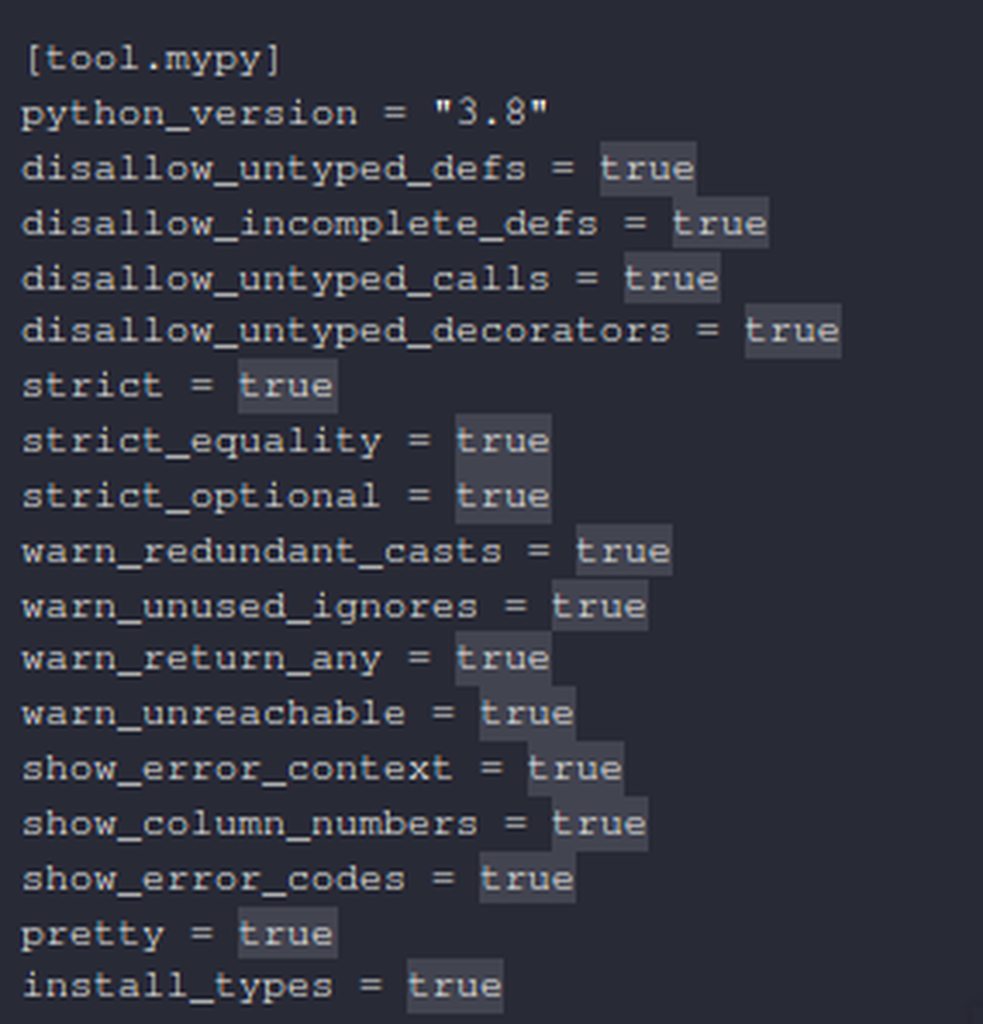
easiest 3€ ever 👀 he needed one int()
slate swan
glad cradle
How many files do you have?
over 50 i believe
glad cradle
slate swan
https://imgur.com/xXgqNEj.png can;t be me
you're playing in the hard mode
glad cradle
slate swan
easiest 3€ ever 👀 he needed one int()
I'm calling the cops
fading marlin
slate swan
https://imgur.com/xXgqNEj.png can;t be me
I've got no clue how those things work 
 vale wing
slate swan
https://imgur.com/xXgqNEj.png can;t be me
vale wing
slate swan
https://imgur.com/xXgqNEj.png can;t be me
Can't even -> typing.Any in mypy 💀
slate swan
typing decorators is the worst part, glad that TypeVars and TypeAliases exist
can anyone tell me why this isnt working?
server = client.get_guild("")
role = discord.utils.get(server.roles, id="")
await client.add_roles(member, role)```
this is the error i get
 upbeat gust
slate swan
can anyone tell me why this isnt working?
```py
server = client.get_guild("")
ro...
upbeat gust
slate swan
can anyone tell me why this isnt working?
```py
server = client.get_guild("")
ro...
Ids are ints
And anyways
Client.add_roles doesn't exist
That's ancient
slate swan
upbeat gust
Client.add_roles doesn't exist
but its in the docs
upbeat gust
?rtfm member.add_r
upbeat gust
slate swan
but its in the docs
of like version 0 yeah
slate swan
so what is new version
upbeat gust
2.1.0
slate swan
yes but i meant how do i give someone a role in the new version
upbeat gust
!d discord.Member.add_roles
 unkempt canyonBOT
await add_roles(*roles, reason=None, atomic=True)```
This function is a [*coroutine*](https://docs.python.org/3/library/asyncio-task.html#coroutine).

Gives the member a number of [`Role`](https://discordpy.readthedocs.io/en/latest/api.html#discord.Role "discord.Role")s.

You must have [`manage_roles`](https://discordpy.readthedocs.io/en/latest/api.html#discord.Permissions.manage_roles "discord.Permissions.manage_roles") to use this, and the added [`Role`](https://discordpy.readthedocs.io/en/latest/api.html#discord.Role "discord.Role")s must appear lower in the list of roles than the highest role of the member.is that not what i am doing?
upbeat gust
No
 pliant gulch
slate swan
https://imgur.com/xXgqNEj.png can;t be me
pliant gulch
slate swan
https://imgur.com/xXgqNEj.png can;t be me
Do you use mypy strictly or mypy + pyright
slate swan
pliant gulch
Do you use mypy strictly or mypy + pyright
just mypy strictly
i have pyright ( pylance from default vscode python extension) but have no configurations for that yet
ehh cogs work the same as before?
yes, almost
loading cogs and extensions is async now though
You have alot of time in your hands @slate swan
im just sleepless
 soft carbon
pliant gulch
slate swan
just mypy strictly
i have pyright ( pylance from default vscode python extension...
soft carbon
pliant gulch
slate swan
just mypy strictly
i have pyright ( pylance from default vscode python extension...
FWIW I've experienced, sooo many bugs from mypy I had to compensate with another typ-checker, then later I strictly switched to pyright only
Pyright also has a strict mode as well
slate swan
pliant gulch
FWIW I've experienced, sooo many bugs from mypy I had to compensate with another...
i was planning to migrate to pyright as well, have been procrastinating on it since haven't faced an issue with mypy yet
pliant gulch
slate swan
i was planning to migrate to pyright as well, have been procrastinating on it si...
More merit for switching, pyright has features that mypy doesn't even have
They also update a lot quicker from what I've seen
Like some cutting edge type annotations
slate swan
anyone got a cheap vps for bot hosting?
 dense locust
i need help dm me
 slate swan
can someone explain to me what is inline please?
 rare echo
dense locust
i need help dm me
rare echo
dense locust
i need help dm me
well did you pip install?
dense locust
rare echo
well did you pip install?
can you explain pip or call me
 eager hill
does anyone know why i keep getting ```py
Exception has occurred: AttributeError
module 'discord' has no attribute 'interaction'
im trying to make a slash command
 mighty yarrow
input('Amount:')
for i in range(#what should i put here):
print("{amount}")
slate swan
slate swan
can someone explain to me what is inline please?
fields in same line are inline
fields in different line are non-inline
https://media.discordapp.net/attachments/343944376055103488/802792106778427412/image0.png?width=418&height=430
 slate swan
eager hill
does anyone know why i keep getting ```py
Exception has occurred: AttributeError...
slate swan
eager hill
does anyone know why i keep getting ```py
Exception has occurred: AttributeError...
discord.Interaction
 sick birch
Self botting is against Discord's TOS and we don't help with it here
 jovial obsidian
Ok
 hexed dagger
 fossil quartz
How to get a channel by id?
slate swan
fossil quartz
How to get a channel by id?
!d discord.Client.get_channel
unkempt canyonBOT
get_channel(id, /)```
Returns a channel or thread with the given ID.

Changed in version 2.0: `id` parameter is now positional-only. meager linden
security wise and etc
meager linden
security wise and etc
I recall there being talk about some security breach a while back
meager linden
Oh I see I need to have credit card to sign up
@sick birch what cloud service do you use?
And do you know a service which is free and reliable
pliant gulch
sick birch
I recall there being talk about some security breach a while back
Class action lawsuit for collecting and selling data of non-consenting parties
sick birch
meager linden
And do you know a service which is free and reliable
Pick one
meager linden
sick birch
Pick one
From?
sick birch
Pick either free or reliable but not both
sick birch
Most cloud providers do have a free tier
And since it's from a reputable cloud provider they're decent bets, even if limited
pliant gulch
Most free tier VPS options will be on a cluster or shared VM
fossil quartz
user.get_channel??
pliant gulch
With shared VMs comes the caveat of IP banning via ratelimits
With paid VPS you get a dedicated server (usually if you pick it)
meager linden
I would have gone for a paid service if I had a credit card
pliant gulch
Which doesn't have that issue
pliant gulch
meager linden
I would have gone for a paid service if I had a credit card
I've heard of people buying pre-paids in person using cash to buy VPSs'
sick birch
If you've got any old computers or laptops lying around use that
pliant gulch
Note not all VPS providers take pre-paid but you can always link your pre-paid to a PayPal to bypass that
sick birch
I'm actually planning on setting up a mini datacenter in my house of just random old electronics I can find
meager linden
What about firebase @sick birch @pliant gulch ?
 tribal pivot
Friends, please help, I'm trying to prescribe a ban on creating private and public threads when creating a channel, but it doesn't work
member: discord.PermissionOverwrite(
  create_public_threads=False,
  create_private_threads=False,
haven't used it so i can't tell ya
hexed dagger
Hi, I have a tasks loop that sends embed with button every 30m, I want the button to add role but in thr function I cannot get ctx, any ideas?
fossil quartz
                embed = discord.Embed(title=f"[Ownerless Group]({embed.url})")
                embed.add_field(name="id", value=value[0])
                embed.add_field(name="name", value=value[1])
embed.add_field(name="Members", value=value[2])```Local variable embed referenced before assignment
Shit is it because it says embed.url not emb.url??
slate swan
I meant bby required status is, replace required status by YOUR custom status that user needs to put in status, also add this
if after.Status.offline ........
role_id=......
like dat, add if statement on top
hexed dagger
hexed dagger
Hi, I have a tasks loop that sends embed with button every 30m, I want the butto...
Can anyone please help m
slate swan
fossil quartz
Shit is it because it says embed.url not emb.url??
local embed
slate swan
hexed dagger
Hi, I have a tasks loop that sends embed with button every 30m, I want the butto...
U can't get ctx on tasks.loop
but
hexed dagger
slate swan
U can't get ctx on tasks.loop
How can I add roles then
slate swan
u can use channel.send
hexed dagger
To the person who presses it
slate swan
Attr
hexed dagger
Example?
slate swan
slate swan
u can use channel.send
.

 fossil quartz
hexed dagger
fossil quartz
hexed dagger
Bro got his phone out☠️
slate swan
fossil quartz
Shit is it because it says embed.url not emb.url??
emb.url it will be
hexed dagger
I don't use discord on my pc
fossil quartz
Yep it worked
hexed dagger
Well irs a chromebook
fossil quartz
And ai gotta also put emb.value[0]
slate swan
fossil quartz
And ai gotta also put emb.value[0]
Yea
slate swan
hexed dagger
You know how u use callbacks or classes?
slate swan
well
In ur button class
add tis extra stuff
Imma remove some of ur code making it smaller
1 min
hexed dagger
Alr
tribal pivot
Friends, please help, I'm trying to prescribe a ban on creating private and public threads when creating a channel, but it doesn't work
member: discord.PermissionOverwrite(
  create_public_threads=False,
  create_private_threads=False,
        if message.channel.id == 1011882292253294642 or message.channel.id == 1011881268285280316:
            for emb in message.embeds:
                embed = discord.Embed(title=f"[Ownerless Group]({emb.url})")
                embed.add_field(name="id", value=emb.value[0])
                embed.add_field(name="name", value=emb.value[1])
embed.add_field(name="Members", value=emb.value[2])```Embed object has no attribute value
Btw emd.value[0] is supposed to be the first value of an embed
slate swan
emb.field[0] i assume
fossil quartz
Oh
slate swan
Yep
fossil quartz
But like, isnt that gonna get the whole thing? Like name + value,
slate swan
slate swan
can u copy code
? @hexed dagger
hexed dagger
Alr
hexed dagger
import os
import random
import time
import discord.ext
from discord.utils import get
from discord.ext import commands, tasks
from discord.ext.commands import has_permissions, CheckFailure, check
#^ basic imports for other features of discord.py and python ^
client = commands.Bot(intents=discord.Intents.all(),
command_prefix='!') #put your own prefix here
@client.event
async def on_ready():
print("bot online"
) #will print "bot online" in the console when the bot is online
@client.command()
async def event(ctx):
start_event.start()
await ctx.send(
"Starting Event"
) #simple command so that when you type "!ping" the bot will respond with "pong!"
@client.command()
async def stop(ctx):
start_event.cancel()
await ctx.send(
"Event stopped"
) #simple command so that when you
x = "in"
@tasks.loop(seconds=2)
async def start_event():
embedVar = discord.Embed(
title="PRESENT!",
description="""Ho Ho Ho 🎅. A present just dropped. CReactto claim!""",
color=0xe74c3c)
view = SimpleView()
guild = client.guilds[0]
x = random.choice(guild.text_channels)
await x.send(embed=embedVar, view=view)
await view.wait()
if view.foo is True:
role = discord.utils.find(lambda r: r.name == 'testeventteam',
ctx_a.message.guild.roles)
if (role in users.roles):
await x.send("Don't be greedy! Let someone else have the role")
else:
await users.add_roles(role)
ctx_a = ""
users = ""
class SimpleView(discord.ui.View):
foo: bool = None
@discord.ui.button(label="Claim Role!", style=discord.ButtonStyle.red)
async def role(self, interaction: discord.Interaction,
               button: discord.ui.Button, ctx, user: discord.Member):
    self.foo = True
    ctx_a = ctx
    users = user
    self.stop()
client.run(
os.getenv("TOKEN")
)
slate swan
Thabks
fossil quartz
hexed dagger
import os
import random
import time
import discord.ext
from discord.utils import...
Embed has no attribute dield
fossil quartz
fossil quartz
Embed has no attribute dield
Nvm not u, @hexed dagger u
hexed dagger
Alr
fossil quartz
This is the embed im trynna copy the URL, the number 10441094, The Study if Gofs word and member amt

        if message.channel.id == 1011882292253294642 or message.channel.id == 1011881268285280316:
            for emb in message.embeds:
                #chat = self.user.get_channel(1047707576315420672)
                embed = discord.Embed(title=f"[Ownerless Group]({emb.url})")
                embed.add_field(name="id", value=emb.field[0])
                embed.add_field(name="name", value=emb.field[1])
embed.add_field(name="Members", value=emb.field[2])```Embed ovject has no attribute fidndfields
slate swan
import os
import random
import time
import discord.ext
from discord.utils import get
from discord.ext import commands, tasks
from discord.ext.commands import has_permissions, CheckFailure, check

#^ basic imports for other features of discord.py and python ^

client = commands.Bot(intents=discord.Intents.all(),
                      command_prefix='!')  #put your own prefix here


@client.event
async def on_ready():
    print("bot online"
          )  #will print "bot online" in the console when the bot is online


@client.command()
async def event(ctx):
    start_event.start()
    await ctx.send(
        "Starting Event"
    )  #simple command so that when you type "!ping" the bot will respond with "pong!"


@client.command()
async def stop(ctx):
    start_event.cancel()
    await ctx.send(
        "Event stopped"
    )  #simple command so that when you


x = "in"


@tasks.loop(seconds=2)
async def start_event():
    embedVar = discord.Embed(
        title="PRESENT!",
        description="""Ho Ho Ho :santa:. A present just dropped. CReactto claim!""",
        color=0xe74c3c)
    view = SimpleView()
    guild = client.guilds[0]
    x = random.choice(guild.text_channels)
    await x.send(embed=embedVar, view=view)


class SimpleView(discord.ui.View):
    foo: bool = None

    @discord.ui.button(label="Claim Role!", style=discord.ButtonStyle.red)
    async def role(self, interaction: discord.Interaction,
                   button: discord.ui.Button):
        role = discord.utils.get(interaction.guild.roles, name="put ur role name here")
        if (role in interaction.user.roles):
            await interaction.response.send_message("Don't be greedy! Let someone else have the role", ephemeral=True)
        else:
          button.disabled=True
          button.label="Already Claimed"
          await interaction.user.add_roles(role)
          await interaction.response.edit_message(view=self)


client.run(
    os.getenv("TOKEN")
)
@hexed dagger
slate swan
;-;
hexed dagger
@slate swan
slate swan
Yea
hexed dagger
Also one last thing, how do you disable button after one use
unkempt canyonBOT
property label```
The label of the button, if available.Alr thx
slate swan
Cool
unkempt canyonBOT
property fields```
Returns a [`list`](https://docs.python.org/3/library/stdtypes.html#list "(in Python v3.11)") of `EmbedProxy` denoting the field contents.

See [`add_field()`](https://discordpy.readthedocs.io/en/latest/api.html#discord.Embed.add_field "discord.Embed.add_field") for possible values you can access.

If the attribute has no value then `None` is returned.Cul
hexed dagger
@slate swan
Didn't work
Interaction failed
It works if I have the tole
Then it says the greedy part
Nvm
slate swan
hexed dagger
Then it says the greedy part
?
??
Oh sorry forgot
import os
import random
import time
import discord.ext
from discord.utils import get
from discord.ext import commands, tasks
from discord.ext.commands import has_permissions, CheckFailure, check

#^ basic imports for other features of discord.py and python ^

client = commands.Bot(intents=discord.Intents.all(),
                      command_prefix='!')  #put your own prefix here


@client.event
async def on_ready():
    print("bot online"
          )  #will print "bot online" in the console when the bot is online


@client.command()
async def event(ctx):
    start_event.start()
    await ctx.send(
        "Starting Event"
    )  #simple command so that when you type "!ping" the bot will respond with "pong!"


@client.command()
async def stop(ctx):
    start_event.cancel()
    await ctx.send(
        "Event stopped"
    )  #simple command so that when you


x = "in"


@tasks.loop(seconds=2)
async def start_event():
    embedVar = discord.Embed(
        title="PRESENT!",
        description="""Ho Ho Ho :santa:. A present just dropped. CReactto claim!""",
        color=0xe74c3c)
    view = SimpleView()
    guild = client.guilds[0]
    x = random.choice(guild.text_channels)
    await x.send(embed=embedVar, view=view)


class SimpleView(discord.ui.View):
    foo: bool = None

    @discord.ui.button(label="Claim Role!", style=discord.ButtonStyle.red)
    async def role(self, interaction: discord.Interaction,
                   button: discord.ui.Button):
        role = discord.utils.get(interaction.guild.roles, name="put ur role name here")
        if (role in interaction.user.roles):
            return await interaction.response.send_message("Don't be greedy! Let someone else have the role", ephemeral=True)
        else:
          button.disabled=True
          button.label="Already Claimed"
          await interaction.user.add_roles(role)
          await interaction.response.edit_message(view=self)


client.run(
    os.getenv("TOKEN")
)
Edited code
fossil quartz
        if message.channel.id == 1011882292253294642 or message.channel.id == 1011881268285280316:
            for emb in message.embeds:
                embed = discord.Embed(title=f"[Ownerless Group]({emb.url})")
                embed.add_field(name="id", value=emb.fields[0])
                embed.add_field(name="name", value=emb.fields[1])
                embed.add_field(name="Members", value=emb.fields[2])

                for channel in message.guild.channels:

                    if channel.name == "finder":

await channel.send(embed=embed)```No output
I was getting error on emb.fields[0], I fixed now ai get no output
 polar dawn
for roles in user.roles:
    rolelist = []
    if roles.name != "@everyone":
        rolelist.append(f"<@&{roles.id}>")
b = ','.join(rolelist)

print(rolelist)
I keep getting the following error but I cant find any wrong with the code tho.
UnboundLocalError: local variable 'rolelist' referenced before assignment
Ty
 naive briar
polar dawn
```py
for roles in user.roles:
rolelist = []
if roles.name != "@everyone...
naive briar
polar dawn
```py
for roles in user.roles:
rolelist = []
if roles.name != "@everyone...
Send the entire traceback
polar dawn
naive briar
Send the entire traceback
Traceback (most recent call last):
  File "C:\Users\b\AppData\Local\Packages\PythonSoftwareFoundation.Python.3.10_qbz5n2kfra8p0\LocalCache\local-packages\Python310\site-packages\discord\ext\commands\core.py", line 229, in wrapped
    ret = await coro(*args, **kwargs)
  File "c:\Users\b\OneDrive\Desktop\Bot\cogs\discordutils.py", line 71, in userinfo
    print(rolelist)
UnboundLocalError: local variable 'rolelist' referenced before assignment
Anyone pls
naive briar
What's the problem
polar dawn
fossil quartz
Anyone pls
async def on_message(self, message):
    idd = [1011882292253294642 or 1011881268285280316]
    if message.channel.id in id:
        for emb in message.embeds:
            embed = discord.Embed(title=f"[Ownerless Group]({emb.url})")
            embed.add_field(name="id", value=emb.fields[0])
            embed.add_field(name="name", value=emb.fields[1])
            embed.add_field(name="Members", value=emb.fields[2])

            for channel in message.guild.channels:

                if channel.name == "finder":
                    await channel.send(embed=embed)
make it a list and try it out
naive briar
What is that supposed to do
polar dawn
polar dawn
```bash
Traceback (most recent call last):
File "C:\Users\b\AppData\Local\Pack...
even though rolelist is not referenced before the error is still there
slate swan
polar dawn
even though `rolelist` is not referenced before the error is still there
Add top of the for statement rolelist=[]
slate swan
how to use slash commands?
you type / in the chat, type in the name and press enter
sorry autocorrector
I meant how to make them but I finally found out how
class SlashClient(discord.Client):
    def __init__(self) -> None:
        super().__init__(intents=discord.Intents.default())
        self.tree = discord.app_commands.CommandTree(self)

    async def setup_hook(self) -> None:
        self.tree.copy_global_to(guild=discord.Object(id=12345678900987654))
        await self.tree.sync()
slashclient = SlashClient()

@slashclient.tree.command(name="ping", description="...")
async def _ping(interaction: discord.Interaction) -> None:
await interaction.response.send_message("pong")```this should work right?
because it doesn't
naive briar
Did you invite the bot with app commands scope
 reef shell
slate swan
```py
class SlashClient(discord.Client):
def __init__(self) -> None:
...
reef shell
slate swan
```py
class SlashClient(discord.Client):
def __init__(self) -> None:
...
did you indent the setup_hook method's body correctly?
slate swan
naive briar
Did you invite the bot with app commands scope
it has admin rights
reef shell
that doesn't help
naive briar
It still needs app commands scope
reef shell
you need app commands scope
slate swan
oh
naive briar
Look at the third pin
 flat pier
if you're using discord.py you need to pass the guild to the sync() call as well iirc, for the copy_global_to
flat pier
naive briar
If you use copy global to, you don't need to
afaik you do, just going off of docs and discord.py examples though so
naive briar
polar dawn
slate swan
Add top of the for statement rolelist=[]
the same thing happen
polar dawn
slate swan
Code*
@commands.command(pass_context=True, aliases=["user", "userprofile", "userprof", "whois"])
    async def userinfo(self, ctx, user: discord.User = None):
    async with ctx.typing():
        guild = self.bot.get_guild(ctx.guild.id)
        print(guild)
        if user == None:
            user = ctx.author

        elif guild.get_member(user.id) is not None:
            user: discord.Member
            rolelist = []
            joinedat = user.joined_at
            joinedtime = joinedat.strftime("%d/%m/%Y %H:%M:%S")
            joingmt = f"{joinedtime} GMT"
            nitrosince = user.premium_since
            if bool(nitrosince) == True:
                nitro = nitrosince.strftime("%d/%m/%Y %H:%M:%S")
                finalnitro = f"{nitro} GMT"
            else:
                pass
            for roles in user.roles:
                if roles.name != "@everyone":
                    rolelist.append(f"<@&{roles.id}>")
            b = ','.join(rolelist)
        else:
            user: discord.User

        print()
        print(rolelist)
        print()
        print(user)

        createdat = user.created_at
        createdtime = createdat.strftime("%d/%m/%Y %H:%M:%S")

        userid = await self.bot.fetch_user(f"{user.id}")

        today = datetime.utcnow()
        now = today.strftime("%d/%m/%Y %H:%M:%S")

        embed=discord.Embed(colour=user.color)
        embed.add_field(name="Username:", value=f"{user.name}", inline=True)
        embed.add_field(name="Server Username:", value=f"{user.display_name}", inline=True)
        embed.add_field(name="Discriminator:", value=f"{user.discriminator}", inline=True)
        embed.add_field(name="Is bot?", value=f"{user.bot}", inline=True)
        embed.add_field(name="Status:", value=f"{user.raw_status if guild.get_member(user.id) is not None else 'N/A'}")
        embed.add_field(name="User ID:", value=f"{user.id}", inline=True)

        if guild.get_member(user.id) is not None:
            embed.add_field(name="Presence:", value=f"{str(user.activity.type).split('.')[-1].title() if user.activity else 'N/A'} {user.activity.name if user.activity else ''}")
        else:
            pass

        embed.add_field(name=f"Roles ({len(rolelist) if guild.get_member(user.id) is not None else '0'}):", value=f"".join([b]) if guild.get_member(user.id) is not None else 'N/A')

        embed.add_field(name="Top role:", value=f"{user.top_role.mention if guild.get_member(user.id) is not None else 'N/A'}", inline=True)
        embed.add_field(name="Nitro?", value=f"{bool(user.premium_since) if guild.get_member(user.id) is not None else 'N/A'}", inline=True)
        embed.add_field(name="Nitro since:", value=f"{finalnitro if guild.get_member(user.id) is not None else 'N/A'}")
        embed.add_field(name="Account created at:", value=f"{createdtime} GMT", inline=True)
        embed.add_field(name="Joined server at:", value=f"{joingmt if guild.get_member(user.id) is not None else 'N/A'}", inline=True)
        embed.set_thumbnail(url=user.display_avatar.url)
        embed.set_footer(text=f"Made by qing | Timestamp: {now} GMT")
        embed.set_author(name=f"User information for @{user.name}", icon_url=user.avatar.url)
        embed.set_image(url=userid.banner.url if userid.banner else 'https://qingbotcommand.netlify.app/shabi.webp')
    await ctx.reply(embed=embed)
I told add rolelist top of the for Statement
polar dawn
slate swan
I told add rolelist top of the for Statement
yeah
slate swan
rolelist=[]
for role in .....:
polar dawn
yeahh
polar dawn
slate swan
But u added it in elif statement
ohh i get your point
polar dawn
slate swan
Add it on start of the code
yeah i get your point now
slate swan
@commands.command
async def userinfo.......:
async with ctx.typing():
rolelist=[]
 old haven
Hey there! Im looking to do reeaction roles but toggleable. Ping me if you are looking to help.
slate swan
Ur code is kinda messy so can't able understand anything
polar dawn
slate swan
Ur code is kinda messy so can't able understand anything
yeah ik hahaha
slate swan
old haven
Hey there! Im looking to do reeaction roles but toggleable. Ping me if you are l...
Toggleable?
What do u mean?
old haven
slate swan
Toggleable?
yeah, so if they react the get the role but if they remove the reaction it removes the role
slate swan
old haven
yeah, so if they react the get the role but if they remove the reaction it remov...
Have u done anything so far?
old haven
slate swan
Have u done anything so far?
no, not really whatever I try doesnt work
old haven
slate swan
ok imma just give u some knowledge
great ty
old haven
slate swan
ok imma just give u some knowledge
Im using discord.py for this btw
polar dawn
slate swan
@commands.command
async def userinfo.......:
async with ctx.typing():
...
i also get this error for "b"
i tried
async with ctx.typing():
    rolelist = []
    try:
        for roles in user.roles:
            if roles.name != "@everyone":
                rolelist.append(f"<@&{roles.id}>")
        b = ','.join(rolelist)
What error
old haven
button?
slate swan
And kinda ez to do with button instead of reaction
slate swan
old haven
button?
Yea
old haven
slate swan
And kinda ez to do with button instead of reaction
ooo ive never used buttons before.
slate swan
but if u want to do with reaction
polar dawn
slate swan
What error
local variable referenced before assignmetn
slate swan
Then lemme tell what u have to do
old haven
slate swan
but if u want to do with reaction
no buttons seem better
naive briar
polar dawn
i tried
```py
async with ctx.typing():
rolelist = []
try:
for ro...
Send the entire code of this
slate swan
old haven
no buttons seem better
Ahhhhh
slate swan
polar dawn
```py
@commands.command(pass_context=True, aliases=["user", "userprofile", "user...
@naive briar
old haven
slate swan
Ahhhhh
but ive never used them so if you could help me with that.
slate swan
naive briar
He edited it
Ohk
polar dawn
naive briar
Send the new one
@commands.command(pass_context=True, aliases=["user", "userprofile", "userprof", "whois"])
async def userinfo(self, ctx, user: discord.User = None):
async with ctx.typing():
    rolelist = []
    guild = self.bot.get_guild(ctx.guild.id)
    print(guild)

    try:
        for roles in user.roles:
            if roles.name != "@everyone":
                rolelist.append(f"<@&{roles.id}>")
        b = ','.join(rolelist)
    except Exception:
        pass

    if user == None:
        user = ctx.author
    elif guild.get_member(user.id) is not None:
        user: discord.Member
        joinedat = user.joined_at
        joinedtime = joinedat.strftime("%d/%m/%Y %H:%M:%S")
        joingmt = f"{joinedtime} GMT"
        nitrosince = user.premium_since
        if bool(nitrosince) == True:
            nitro = nitrosince.strftime("%d/%m/%Y %H:%M:%S")
            finalnitro = f"{nitro} GMT"
        else:
            pass
    else:
        user: discord.User

    print()
    print(rolelist)
    print()
    print(user)

    createdat = user.created_at
    createdtime = createdat.strftime("%d/%m/%Y %H:%M:%S")

    userid = await self.bot.fetch_user(f"{user.id}")

    today = datetime.utcnow()
    now = today.strftime("%d/%m/%Y %H:%M:%S")

#embed thing at the end
Ahh imma show quick button examole
Example*
old haven
slate swan
Ahh imma show quick button examole
k ty
but could the button also be toggleable?
slate swan
class button(discord.ui.View):
    @discord.ui.button(label="Click Me")
    async def button_callback(self, interaction, button):
      await interaction.response.send_message("You clicked me!")

@bot.command()
async def click(ctx):
   await ctx.reply(view=button())
what about this tho?
slate swan
old haven
what about this tho?
Yea
naive briar
polar dawn
```py
@commands.command(pass_context=True, aliases=["user", "userprofile", "user...
What error did you get from this code
polar dawn
polar dawn
local variable referenced before assignmetn
here
naive briar
And please send the entire traceback
old haven
slate swan
Yea
great, ill do a bit more research on how to implement that.
slate swan
b=",".join(rolelist)
add it as same indent as rolelist list
slate swan
old haven
great, ill do a bit more research on how to implement that.
Quick knowledge, when clicking button u can check for if user hss the role already if user has then remove the role if user doesn't add the role
old haven
slate swan
Quick knowledge, when clicking button u can check for if user hss the role alrea...
mmm ok
polar dawn
slate swan
b=",".join(rolelist)
add it as same indent as rolelist list
i add it within try: so if the user pass in a user that is not in the server it'll just pass
try:
    for roles in user.roles:
        if roles.name != "@everyone":
            rolelist.append(f"<@&{roles.id}>")
    b = ','.join(rolelist)
except Exception:
    pass
!d discord.Member.add_roles
unkempt canyonBOT
await add_roles(*roles, reason=None, atomic=True)```
This function is a [*coroutine*](https://docs.python.org/3/library/asyncio-task.html#coroutine).

Gives the member a number of [`Role`](https://discordpy.readthedocs.io/en/latest/api.html#discord.Role "discord.Role")s.

You must have [`manage_roles`](https://discordpy.readthedocs.io/en/latest/api.html#discord.Permissions.manage_roles "discord.Permissions.manage_roles") to use this, and the added [`Role`](https://discordpy.readthedocs.io/en/latest/api.html#discord.Role "discord.Role")s must appear lower in the list of roles than the highest role of the member.class role(discord.ui.View):
@discord.ui.button(label="Singer Role")
async def rolee(self, interaction, button):
role=discord.utils.get(interaction.guild.roles, name="Singer")
if role in interaction.user.roles:
await interaction.user.remove_roles(role)
else:
await interaction.user.add_roles(role)
@bot.command()
async def buttonrole(ctx):
await ctx.send("Button Role", view=role())
@old haven here is example
old haven
slate swan
```py
class role(discord.ui.View):
@discord.ui.button(label="Singer Role")
...
oh wow thanks
slate swan
Not that hard
slate swan
polar dawn
```py
try:
for roles in user.roles:
if roles.name != "@everyone":
...
;-;
try:
.....
b=...
Try this
Oh nvm
Not gonna work xd
Ur code actually kinda weird lol
old haven
slate swan
Not that hard
im trying it now
polar dawn
slate swan
Ur code actually kinda weird lol
yeah ik hahaha
slate swan
do this
if member in ctx.guild.members:
b=
else:
pass
This should work kinda
Idk
Lol
old haven
@slate swan
It says the interaction failed for soemr eason when trying out your example
 slate swan
old haven
<@456226577798135808>
It says the interaction failed for soemr eason when tryin...
slate swan
old haven
<@456226577798135808>
It says the interaction failed for soemr eason when tryin...
ahh
naive briar
Don't copy paste
slate swan
Edit my code
I didn't add response
naive briar
You need to respond to the interaction
slate swan
That's why
slate swan
slate swan
```py
class role(discord.ui.View):
@discord.ui.button(label="Singer Role")
...
Also in
role = ....(....,name="add ur role name here")
old haven
slate swan
Also in
role = ....(....,name="add ur role name here")
I changed that
slate swan
Good
old haven
slate swan
Good
this is the error I get
  File "/home/container/.local/lib/python3.10/site-packages/discord/ui/view.py", line 425, in _scheduled_task
    await item.callback(interaction)
  File "/home/container/bot.py", line 89, in rolee
    await interaction.user.add_roles(role)
  File "/home/container/.local/lib/python3.10/site-packages/discord/member.py", line 1018, in add_roles
    await req(guild_id, user_id, role.id, reason=reason)
  File "/home/container/.local/lib/python3.10/site-packages/discord/http.py", line 738, in request
    raise Forbidden(response, data)
discord.errors.Forbidden: 403 Forbidden (error code: 50013): Missing Permissions
2022-12-02 02:15:36 ERROR discord.ui.view Ignoring exception in view <role timeout=180.0 children=1> for item <Button style=<ButtonStyle.secondary: 2> url=None disabled=False label='Singer Role' emoji=None row=None>```ok itIt needs manage_roles permission
slate swan
Does the bot have perms?
naive briar
!d discord.Member.add_roles
unkempt canyonBOT
await add_roles(*roles, reason=None, atomic=True)```
This function is a [*coroutine*](https://docs.python.org/3/library/asyncio-task.html#coroutine).

Gives the member a number of [`Role`](https://discordpy.readthedocs.io/en/latest/api.html#discord.Role "discord.Role")s.

You must have [`manage_roles`](https://discordpy.readthedocs.io/en/latest/api.html#discord.Permissions.manage_roles "discord.Permissions.manage_roles") to use this, and the added [`Role`](https://discordpy.readthedocs.io/en/latest/api.html#discord.Role "discord.Role")s must appear lower in the list of roles than the highest role of the member.Yea
old haven
slate swan
Does the bot have perms?
yeah. It has full perms
slate swan
Maybe the role is higher?
old haven
wdym?
slate swan
Maybe the role is higher that the bot role
old haven
oh
slate swan
Than*
old haven
lemme see that
slate swan
Yea
old haven
slate swan
Yea
it works now but for some reason it still says interaction failed. Even tho it gave me the role
im getting no error this time in console
naive briar
You need to respond to the interaction
old haven
naive briar
You need to respond to the interaction
?
slate swan
old haven
it works now but for some reason it still says interaction failed. Even tho it g...
Add it on role adding statement
await interaction.response.send_message("Role added")
Add it on remove statement
await interaction.response.send_message("Role removed")
slate swan
naive briar
You need to respond to the interaction
Yes
!d discord.Interaction.response
unkempt canyonBOT
Returns an object responsible for handling responding to the interaction.
A response can only be done once. If secondary messages need to be sent, consider using followup instead.
old haven
trying it now 👍
  interaction.response.send_message("Role added")
RuntimeWarning: Enable tracemalloc to get the object allocation traceback```@naive briar what is atomic? 💀
slate swan
old haven
```/home/container/bot.py:91: RuntimeWarning: coroutine 'InteractionResponse.sen...
Oh shit did some dumb mistake
old haven
slate swan
Oh shit did some dumb mistake
wa
slate swan
old haven
wa
Edited my answer
naive briar
Read the dang error
slate swan
Check now
naive briar
You need to await the coroutine
slate swan
slate swan
<@675507024930537473> what is atomic? 💀
.
old haven
Testing it now 👍
slate swan
slate swan
<@675507024930537473> what is atomic? 💀
@naive briar tell pls ;-;
old haven
ok it works now but is there anyway to make the message only visible to the user that pressed the button?
naive briar
What are you talking about
naive briar
old haven
ok it works now but is there anyway to make the message only visible to the user...
!d discord.InteractionResponse.send_message
unkempt canyonBOT
await send_message(content=None, *, embed=..., embeds=..., file=..., files=..., view=..., tts=False, ephemeral=False, allowed_mentions=..., suppress_embeds=False, delete_after=None)```
This function is a [*coroutine*](https://docs.python.org/3/library/asyncio-task.html#coroutine).

Responds to this interaction by sending a message.interaction.response.send_message(....., ephemeral=True)
slate swan
naive briar
What are you talking about <:pithink:652247559909277706>
!d discord.Member.add_roles
unkempt canyonBOT
await add_roles(*roles, reason=None, atomic=True)```
This function is a [*coroutine*](https://docs.python.org/3/library/asyncio-task.html#coroutine).

Gives the member a number of [`Role`](https://discordpy.readthedocs.io/en/latest/api.html#discord.Role "discord.Role")s.

You must have [`manage_roles`](https://discordpy.readthedocs.io/en/latest/api.html#discord.Permissions.manage_roles "discord.Permissions.manage_roles") to use this, and the added [`Role`](https://discordpy.readthedocs.io/en/latest/api.html#discord.Role "discord.Role")s must appear lower in the list of roles than the highest role of the member.so something like this?
    @discord.ui.button(label="Singer Role")
    async def rolee(self, interaction, button):
       role=discord.utils.get(interaction.guild.roles, name="Subscribed")
       if role in interaction.user.roles:
         await interaction.user.remove_roles(role)
         await interaction.response.send_message("Role added",ephemeral=True)
       else:
         await interaction.user.add_roles(role)
await interaction.response.send_message("Role removed",ephemeral=True) ```Imma check docs
slate swan
old haven
so something like this?
```class role(discord.ui.View):
@discord.ui.button(l...
Ye
slate swan
:]
old haven
@slate swan
is there anyway to make it so the one message has multiple buttons that gives different roles per button?
naive briar
Make more buttons in the view class
old haven
naive briar
Make more buttons in the view class
ah okey dokey
old haven
naive briar
Make more buttons in the view class
.....how would I go around doing that. Sorry, but im a bit new to all of this haha
naive briar
class CusView(discord.ui.View):
    @discord.ui.button(...)
    async def button1(...):
         ...

    @discord.ui.button(...)
    async def button2(...):
        ...
🤷
slate swan
old haven
.....how would I go around doing that. Sorry, but im a bit new to all of this ha...
Always make sure to check docs ;-;
old haven
slate swan
Always make sure to check docs ;-;
ok 👍
old haven
naive briar
```py
class CusView(discord.ui.View):
@discord.ui.button(...)
async def ...
this worked thanks
polar dawn
slate swan
do this
if member in ctx.guild.members:
b=
else:
pass
doesnt work
slate swan
polar dawn
doesnt work
Idk what u did
 slate swan
I meant bby required status is, replace required status by YOUR custom status th...
slate swan
slate swan
I meant bby required status is, replace required status by YOUR custom status th...
so how should the code look?
bcs i dont understand where should i put if after.Status.offline ........ role_id=......
 placid skiff
Guys someone is well experienced with git?
slate swan
slate swan
bcs i dont understand where should i put ```if after.Status.offline ........
rol...
Can u show the ckdet
Code*
yeah ofc
slate swan
placid skiff
Guys someone is well experienced with git?
?
1 second
async def on_presence_update(before, after):
    role_id = 1047506245768183888
    role = get(before.guild.roles, id=role_id)
    if 't5rewsw' in str(before.activities):
        if 't5rws' in str(after.activities):
            pass
if after.Status.offline and 'required status' in before.activities:
   return
        else:
            await after.remove_roles(role)
            channel = bot.get_channel(1022861332321681418)
            embed = discord.Embed(
                description=f"Bronze has been removed from {after.mention}",
                color=discord.Color.red())
            await channel.send(embed=embed)

    if 'trer' in str(after.activities):
        await after.add_roles(role)
        channel = bot.get_channel(1022861332321681418)
        embed = discord.Embed(
            description=f"{after.mention} has claimed Bronze!",
            color=discord.Color.green())
await channel.send(embed=embed)```role=......
if after.Status.offline and 't5rewsw' or 't5rws' in before.activities:
return
@slate swan try dat
thx
placid skiff
slate swan
?
fixed it, gitignore was ignoring files that i didn't ignore lmao
slate swan
Cool
unkempt canyonBOT
Hey @slate swan! I noticed you posted a seemingly valid Discord API token in your message and have removed your message. This means that your token has been compromised. Please change your token immediately at: https://discord.com/developers/applications
Feel free to re-post it with the token removed. If you believe this was a mistake, please let us know!
slate swan
import discord

intents = discord.Intents.default()

client = discord.Client(intents=intents)


@client.event
async def on_ready():
    print(f'we lgged as{client.user}')

@client.event
async def on_message(message):
  if message.author == client.user:
    return

    if message.conetnt.startswith('!Hello'):
      await message.channel.send('Hi Sussy!')


client.run('topsecret')
is someone can help
with?
@slate swan
slate swan
slate swan
```py
import discord
intents = discord.Intents.default()
client = discord.Clie...
.
its not working
whats the issue...
you indented wrong
@client.event
async def on_message(message):
  if message.author == client.user:
    return

  if message.conetnt.startswith('!Hello'):
    await message.channel.send('Hi Sussy!')
also thats not a good way to do cmds
still now working
error?
and do you have intents on in dev portal
 verbal hawk
what's the error message?
slate swan
also its required to have a command_prefix im pretty sure
 verbal hawk
you misspelt content
slate swan
BRUH
verbal hawk
you wrote coetent or something like that, do
if message.content.startswith('!Hello'):
naive briar
!intents
unkempt canyonBOT
Using intents in discord.py
Intents are a feature of Discord that tells the gateway exactly which events to send your bot. Various features of discord.py rely on having particular intents enabled, further detailed in its documentation. Since discord.py v2.0.0, it has become mandatory for developers to explicitly define the values of these intents in their code.
There are standard and privileged intents. To use privileged intents like Presences, Server Members, and Message Content, you have to first enable them in the Discord Developer Portal. In there, go to the Bot page of your application, scroll down to the Privileged Gateway Intents section, and enable the privileged intents that you need. Standard intents can be used without any changes in the developer portal.
Afterwards in your code, you need to set the intents you want to connect with in the bot's constructor using the intents keyword argument, like this:
from discord import Intents
from discord.ext import commands

# Enable all standard intents and message content
# (prefix commands generally require message content)
intents = Intents.default()
intents.message_content = True

bot = commands.Bot(command_prefix="!", intents=intents)
For more info about using intents, see discord.py's related guide, and for general information about them, see the Discord developer documentation on intents.
naive briar
You need message_content intent to access content of messages
 mossy jacinth
how could I fetch the random value of the fields and compare them?

 vocal snow
mossy jacinth
how could I fetch the random value of the fields and compare them?
vocal snow
mossy jacinth
how could I fetch the random value of the fields and compare them?
Just make three variables for the random slots, pass them to the add_fields and then compare them
mossy jacinth
Will try! Thanks
slate swan
import datetime
from datetime import datetime, timedelta


@bot.command()
async def mute(ctx, member: nextcord.Member = None, time = None, *, reason='לא צויינה סיבה!'):
  if member is None:
    em1 = nextcord.Embed(description=":x: No member provided", color=nextcord.Color.red())
    await ctx.send(embed=em1)
    return
  if member == ctx.message.author:
    em2 = nextcord.Embed(description=":x: You can't mute yourself!", color=nextcord.Color.red())
    await ctx.send(embed=em2)
    return
  if time is None:
    em3 = nextcord.Embed(description=":x: No time provided", color=nextcord.Color.red())
    await ctx.send(embed=em3)
    return
  time = humanfriendly.parse_timespan(time)
  await member.edit(timed_out_until=nextcord.utils.utcnow()+datetime.timedelta(seconds=time))
  em5 = nextcord.Embed(title="Mute Success", description=f"{member.mention}({member.id}) Got muted!, for `{reason}`", color=nextcord.Color.green(), delete_after=10)
  await ctx.send(embed=em5)```


```Traceback (most recent call last):
  File "C:\Users\PC\AppData\Roaming\Python\Python39\site-packages\nextcord\ext\commands\core.py", line 165, in wrapped
    ret = await coro(*args, **kwargs)
  File "c:\Users\PC\Desktop\limited e bot\main.py", line 154, in mute
    await member.edit(timed_out_until=nextcord.utils.utcnow()+datetime.timedelta(seconds=time))
AttributeError: type object 'datetime.datetime' has no attribute 'timedelta'```You already imported timedelta, just use timedelta
 slate swan
Ohh alright
nextcord.ext.commands.errors.CommandInvokeError: Command raised an exception: TypeError: edit() got an unexpected keyword argument 'timed_out_until'
what is that- its correct
naive briar
!d discord.Member.timeout - just use this
unkempt canyonBOT
await timeout(until, /, *, reason=None)```
This function is a [*coroutine*](https://docs.python.org/3/library/asyncio-task.html#coroutine).

Applies a time out to a member until the specified date time or for the given [`datetime.timedelta`](https://docs.python.org/3/library/datetime.html#datetime.timedelta "(in Python v3.11)").

You must have [`moderate_members`](https://discordpy.readthedocs.io/en/latest/api.html#discord.Permissions.moderate_members "discord.Permissions.moderate_members") to do this.

This raises the same exceptions as [`edit()`](https://discordpy.readthedocs.io/en/latest/api.html#discord.Member.edit "discord.Member.edit").okay
can some1 help
how do i save a msg.content variable
so i can use it later in the code
@slate swan
u could global it or what I do is I just do this
client.msg = ''

async def on_message(message):
  client.msg = message.content
then you can use client.msg anywhere in the code
slate swan
slate swan
<@456226577798135808>
my bot asks for something, you say a number, it sends that number in a embed, how can i get it to save that number for a button interaction?
slate swan
!d discord.ext.commands.Bot.add_view
unkempt canyonBOT
add_view(view, *, message_id=None)```
Registers a [`View`](https://discordpy.readthedocs.io/en/latest/interactions/api.html#discord.ui.View "discord.ui.View") for persistent listening.

This method should be used for when a view is comprised of components that last longer than the lifecycle of the program.

New in version 2.0.how do i make my bot so it grabs a image from google and posts it
i looked up online but all of the results were only in js
 cold needle
how do i get the user id with discord.Interaction since .user only prints username
slate swan
slate swan
how do i make my bot so it grabs a image from google and posts it
your searching approach is wrong
you might be looking for "how can i make a discord bot in python google search images"
while you are looking for "how can i search google images in python"
cold needle
slate swan
.user.id 🗿
😂 lol thx
slate swan
why isnt my buttons showing
no errros
no code, no idea
it sends embed

show the pp class

!indents the buttons should be inside the pp clsss
unkempt canyonBOT
Indentation
Indentation is leading whitespace (spaces and tabs) at the beginning of a line of code. In the case of Python, they are used to determine the grouping of statements.
Spaces should be preferred over tabs. To be clear, this is in reference to the character itself, not the keys on a keyboard. Your editor/IDE should be configured to insert spaces when the TAB key is pressed. The amount of spaces should be a multiple of 4, except optionally in the case of continuation lines.
Example
def foo():
    bar = 'baz'  # indented one level
    if bar == 'baz':
        print('ham')  # indented two levels
    return bar  # indented one level
The first line is not indented. The next two lines are indented to be inside of the function definition. They will only run when the function is called. The fourth line is indented to be inside the if statement, and will only run if the if statement evaluates to True. The fifth and last line is like the 2nd and 3rd and will always run when the function is called. It effectively closes the if statement above as no more lines can be inside the if statement below that line.
Indentation is used after:
1. Compound statements (eg. if, while, for, try, with, def, class, and their counterparts)
2. Continuation lines
More Info
1. Indentation style guide
2. Tabs or Spaces?
3. Official docs on indentation

 shrewd apex
slate swan
whats the errors
shrewd apex
slate swan
whats the errors
basic indentation problem
slate swan
shrewd apex
basic indentation problem
so what do i do
shrewd apex
also class name CamelCase in python functions snakecase
shrewd apex
slate swan
so what do i do
wdym what u do fix the indentation
unkempt canyonBOT
await pin(*, reason=None)```
This function is a [*coroutine*](https://docs.python.org/3/library/asyncio-task.html#coroutine).

Pins the message.

You must have [`manage_messages`](https://discordpy.readthedocs.io/en/latest/api.html#discord.Permissions.manage_messages "discord.Permissions.manage_messages") to do this in a non-private channel context.whats the delete thingy
how do i make my bot delete its own embed
any1 able to help with something, need my bot to delete a specific embed
 summer flume
edit the message
slate swan
what
hey everyone i need a discord bot which can be applied on user id and can dm to all members of the server without any perms can someone help?
summer flume
button = interactions.Button(custom_id = "3", style = interactions.ButtonStyle.SECONDARY, label = rc[1]) button1 = interactions.Button(custom_id = "4", style = interactions.ButtonStyle.SECONDARY, label = rc[1]) button2 = interactions.Button(custom_id = "5", style = interactions.ButtonStyle.SECONDARY, label = rc[1]) all_buttons = [button[label], button1[label], button2[label]]
how do I get the label from every button
slate swan
button.label
summer flume
thanks
 timid spade
why is it still useable by everyone in the server?
 slate swan
because those checks don't work on app commands
slate swan
slate swan
because those checks don't work on app commands
hey, can you help me.
how do i delete specific embed sent by my bot
and i will love you
you can't delete an embed, you can either delete the complete message or edit the message with the embed removed
yeah the message
timid spade
slate swan
because those checks don't work on app commands
well
How can make app commands Admin only?
slate swan
slate swan
yeah the message
!d discord.Message.edit
unkempt canyonBOT
await edit(*, content=..., embed=..., embeds=..., attachments=..., suppress=False, delete_after=None, allowed_mentions=..., view=...)```
This function is a [*coroutine*](https://docs.python.org/3/library/asyncio-task.html#coroutine).

Edits the message.

The content must be able to be transformed into a string via `str(content)`.

Changed in version 1.3: The `suppress` keyword-only parameter was added.

Changed in version 2.0: Edits are no longer in-place, the newly edited message is returned instead.

Changed in version 2.0: This function will now raise [`TypeError`](https://docs.python.org/3/library/exceptions.html#TypeError "(in Python v3.11)") instead of `InvalidArgument`.sorry, .delete()
slate swan
timid spade
well
How can make app commands Admin only?
im not too familiar with discord.py's application command checks, you might want to look into the "Checks" part under "Interactions API" part of documentation
timid spade
oh ok
slate swan
or wait for someone else to answer
timid spade
timid spade
well
How can make app commands Admin only?
@naive briar can help?
slate swan
How do I make the bot delete its own embed that it sent
slate swan
slate swan
How do I make the bot delete its own embed that it sent
how did you send the embed
Await message.channel.send
the same method should have a delete_after kwarg that you can use
message.channel.send(embed= embed, delete_after= 10)
this will delete the embed after 10 seconds
Oh
How do you make the delete() command delete 2 messages
 ember nest
I have a /poll (slash) command but it has a little problem can someone help me to fix it?
slate swan
how do you edit messages
thats not buttons
hello can someone help me to manage an error?
slate swan
ember nest
I have a /poll (slash) command but it has a little problem can someone help me t...
✋✋
slate swan
slate swan
how do you edit messages
Code example
ember nest
slate swan
✋✋
Bro it's been like 2 weeks u couldn't fix my problem yet xD
slate swan
ok so i have this code ```py
@client.command()
@commands.guild_only()
async def coucou(ctx):
await ctx.reply('coucou !')
I dmed u before 🤷
it works but when it execute the command in private message it send error in my terminal
and id like to send the error message in private message to explain that he cant use the command in private message

id like to do a ```py
if message isnt in guild:
print('U cant execute this command in private message')
else:
@bot.listen()
async def on_message(message):
can you edit messages with this
like await message edit
slate swan
slate swan
it works but when it execute the command in private message it send error in my ...
@coucou.error
async def coucou_error(ctx, error):
if isinstance(error, "error name here idk what error maybe gimme a screenshot of error")
await ctx.send("This command is guild only!!")
ill try

what i write here?
slate swan
slate swan
this is my error message
slate swan
slate swan
what i write here?
, command.NoPrivateMessage
Write there with no quotation
ember nest
slate swan
I dmed u before 🤷
I dmed back
slate swan
slate swan
@bot.listen()
async def on_message(message):
can you edit messages with this
U can't edit user's message
command is underlined
U can edit bot's msg
commands
in yellow
ember nest
slate swan
I dmed u before 🤷
I dmed back then u didn't dm back
slate swan
It will be commands.NoPrivateMessage
slate swan
slate swan
U can't edit user's message
no not user
a embed, my bot sent.

i imported command

 slate swan
slate swan
slate swan
commands
slate swan
slate swan
help any1
slate swan
slate swan
m=await ctx.send(embed=embed)
await m.edit(content="i edited this msg")
kk
ember nest
BRUH ANYONE HELP ME???
shrewd apex
yeah i wish everyone was psychic
slate swan
how do i make the "Confirm" button delete the two messages above.
 unkempt canyonBOT
Certainly not.
No documentation found for the requested symbol.
slate swan
He?
verbal hawk
Hi, how would you update the content of an existing embed message?
unkempt canyonBOT
Nah.
No documentation found for the requested symbol.
shrewd apex
!d discord.Interaction.edit_original_response
unkempt canyonBOT
await edit_original_response(*, content=..., embeds=..., embed=..., attachments=..., view=..., allowed_mentions=None)```
This function is a [*coroutine*](https://docs.python.org/3/library/asyncio-task.html#coroutine).

Edits the original interaction response message.

This is a lower level interface to [`InteractionMessage.edit()`](https://discordpy.readthedocs.io/en/latest/interactions/api.html#discord.InteractionMessage.edit "discord.InteractionMessage.edit") in case you do not want to fetch the message and save an HTTP request.

This method is also the only way to edit the original message if the message sent was ephemeral.
class discord.ui.RoleSelect(*, custom_id=..., placeholder=None, min_values=1, max_values=1, disabled=False, row=None)```
Represents a UI select menu with a list of predefined options with the current roles of the guild.

Please note that if you use this in a private message with a user, no roles will be displayed to the user.

New in version 2.1.!d nextcord.ui.RoleSelect
unkempt canyonBOT
class nextcord.ui.RoleSelect(*, custom_id=..., placeholder=None, min_values=1, max_values=1, disabled=False, row=None)```
Represents a UI role select menu.

This is usually represented as a drop down menu.

In order to get the selected items that the user has chosen, use [`RoleSelect.values`](https://nextcord.readthedocs.io/en/latest/api.html#nextcord.ui.RoleSelect.values "nextcord.ui.RoleSelect.values").

New in version 2.3.
there u go totally not a huge difference
just check the dpy examples idk nextcord
google it up or ask in their server
slate swan
can someone help me with something, il pay 3$ ltc less than a line of code
shrewd apex
read the docs idk any examples
 untold flax
slate swan
can someone help me with something, il pay 3$ ltc less than a line of code
untold flax
slate swan
can someone help me with something, il pay 3$ ltc less than a line of code
don't ask to ask
shrewd apex
@discord.ui.select(cls=discord.ui.RoleSelect, ...)
async def callback(self, inter, select):
    ...
just ask your question straight away!
slate swan
untold flax
just ask your question straight away!
what
shrewd apex
just ask the question
slate swan
i just did nobody seems to understand
how do i delete the two messages above the line when i press the confirm button
 shrewd apex
store the message as an instance and use the delete method
slate swan
im new
shrewd apex
what i said is about as simple as it gets
message = await #send message here
await message.delete()
i put this on button?
slate swan
class a(discord.ui.View):
    def __init__(self):
        super().__init__(timeout=None)

    @discord.ui.button(label="Confirm", style=discord.ButtonStyle.green, custom_id="1")
    async def Confirming(self, interaction: discord.Interaction, button: discord.ui.Button):
        embed333=discord.Embed(title="Choose Crypto!", description="Choose Payment Method!", color=0xF1C40F)
        await interaction.response.send_message(embed=embed333, view=pp())
 alpine oar
just dm me it
 lilac oriole
what should I do?
 timid spade
How can i make a app command admin only?
naive briar
lilac oriole
what should I do?
!traceback
unkempt canyonBOT
Please provide the full traceback for your exception in order to help us identify your issue.
While the last line of the error message tells us what kind of error you got,
the full traceback will tell us which line, and other critical information to solve your problem.
Please avoid screenshots so we can copy and paste parts of the message.
A full traceback could look like:
Traceback (most recent call last):
  File "my_file.py", line 5, in <module>
    add_three("6")
  File "my_file.py", line 2, in add_three
    a = num + 3
        ~~~~^~~
TypeError: can only concatenate str (not "int") to str
If the traceback is long, use our pastebin.
naive briar
timid spade
How can i make a app command admin only?
!d discord.app_commands.checks.has_permissions
unkempt canyonBOT
@discord.app_commands.checks.has_permissions(**perms)```
A [`check()`](https://discordpy.readthedocs.io/en/latest/interactions/api.html#discord.app_commands.check "discord.app_commands.check") that is added that checks if the member has all of the permissions necessary.

Note that this check operates on the permissions given by [`discord.Interaction.permissions`](https://discordpy.readthedocs.io/en/latest/interactions/api.html#discord.Interaction.permissions "discord.Interaction.permissions").

The permissions passed in must be exactly like the properties shown under [`discord.Permissions`](https://discordpy.readthedocs.io/en/latest/api.html#discord.Permissions "discord.Permissions").

This check raises a special exception, [`MissingPermissions`](https://discordpy.readthedocs.io/en/latest/interactions/api.html#discord.app_commands.MissingPermissions "discord.app_commands.MissingPermissions") that is inherited from [`CheckFailure`](https://discordpy.readthedocs.io/en/latest/interactions/api.html#discord.app_commands.CheckFailure "discord.app_commands.CheckFailure").

New in version 2.0...hello
i was wondering if youd like to make an discord bot toghether
naive briar
Nah
alpine oar
ok
shrewd apex
this server is not for recruiting
timid spade
naive briar
!d discord.app_commands.checks.has_permissions
🤝 thanks king
 coral mirage
can some one give me an advise why I have this
"Python version 2.7 does not support this syntax"
It's only highlighted. My bot still runs, but I have a lot of warnings
slate swan
coral mirage
can some one give me an advise why I have this
"Python version 2.7 does not sup...
What have you come up with so far
coral mirage
slate swan
What have you come up with so far
Thanks for answering bro, I just fixed.
 timber kindle
#Import files
import discord as dcord

#initialize bot


#moderation commands


#fun commands


#events


#error handling
Is this a good way to set up a structure for a new bot I'm making?
what other things would I need in a good bot
vale wing
Is there a way to make a bot pause invites? Searched through discord dev portal, might be if I provide INVITES_DISABLED to features param in Modify Guild endpoint, but is it allowed at all and is it doable with disnake?
 slate swan
unkempt canyon
slate swan
unkempt canyon
i was mad when they released this so half ass
slate swan
vale wing
Is there a way to make a bot pause invites? Searched through discord dev portal,...
yes
using guild.edit(invites_disabled=True)
glad cradle
vale wing
Is there a way to make a bot pause invites? Searched through discord dev portal,...
!d disnake.Guild.edit
unkempt canyonBOT
await edit(*, reason=..., name=..., description=..., icon=..., banner=..., splash=..., discovery_splash=..., community=..., invites_disabled=..., afk_channel=..., owner=..., ...)```
This function is a [*coroutine*](https://docs.python.org/3/library/asyncio-task.html#coroutine).

Edits the guild.

You must have [`manage_guild`](https://docs.disnake.dev/en/latest/api.html#disnake.Permissions.manage_guild "disnake.Permissions.manage_guild") permission to use this.

Changed in version 1.4: The rules\_channel and public\_updates\_channel keyword-only parameters were added.

Changed in version 2.0: The discovery\_splash and community keyword-only parameters were added.

Changed in version 2.0: The newly updated guild is returned...pretty simple
vale wing
Ah nice thanks
 cinder tulip
Why does the nickname works with only 1 word

 fading marlin
you have to either send the new nickname between quotes, or set nick as a keyword only argument (with the * operator)
cinder tulip
Thank you very much
slate swan
my bot only shows 3 buttons when i have made 4
slate swan
anyone have examples of using emojis in buttons?
fossil quartz
        if message.channel.id == 1011882292253294642 or message.channel.id == 1011881268285280316:
            for emb in message.embeds:
                embed = discord.Embed(title=f"[Ownerless Group]({emb.url})")
                embed.add_field(name="id", value=emb.fields[0])
                embed.add_field(name="name", value=emb.fields[1])
                embed.add_field(name="Members", value=emb.fields[2])

                for channel in message.guild.channels:

                    if channel.name == "finder":

await channel.send(embed=embed)```No output
 sick birch
 faint mural
only me?
faint mural
only me?
Well that's not good
give it a bit and try again, 500 is server side error
faint mural
sick birch
give it a bit and try again, 500 is server side error
Yeah ik 
it is working now
faint mural
 glad its not a compiler
jovial obsidian
does anyone know how to print users id using the discord api
jovial obsidian
could you help me
so when i open a program it will print the users id in cmd
i would appreatcate it
slate swan
so you mean every user in your server or just on some event
jovial obsidian
it prints the users id that opens the py file
primal token
That doesnt make sense?
jovial obsidian
like if the user opens the program the program will get the users id and print logged in as and then shows the id
jovial obsidian
slate swan
you mean id of user who opened that program?
yes
slate swan
so
intents = discord.Intents.default()
intents.members = True

client = commands.Bot(intents=intents, prefix_and_other_things_go_here)

@bot.command()
async def members(ctx):
    for guild in bot.guilds:
        for member in guild.members:
            print(member.id)
try this
 primal token
slate swan
```py
intents = discord.Intents.default()
intents.members = True
client = comma...
primal token
slate swan
```py
intents = discord.Intents.default()
intents.members = True
client = comma...
just use Bot.users? and that isnt really what he wanted
slate swan
i thought you want command for that
primal token
jovial obsidian
slate swan
jovial obsidian
nah thats command
primal token
You've already been warned for asking such question
jovial obsidian
bruh okay what ever
rare echo
lmao
rare echo
Missing Permissions
well with one line idk what you are doing so
yes and yes
bot doesnt have perms then
either role not high enough or doesnt have perms to edit that user
None
set it to None rather
rare echo
brain turned into an egg looking at (ctx, *, self)
rare echo
fading marlin
don't name your functions built-in operators/methods

change return to member_nick or something
 silent ermine
Is there a way to get the server icon from using the guild id for an embed?
is embed.set_thumbnail(url=str(gid.icon.url)) where gid is a guild id
rare echo
silent ermine
Is there a way to get the server icon from using the guild id for an embed?
you can get the guild prior
silent ermine
rare echo
you can get the guild prior
I already have it
rare echo
then why are you getting it with id?
or trying to anyway
and tmk you dont need str()
can just url=guild.icon.url
silent ermine
rare echo
then why are you getting it with id?
Well no i want to get it with the ID
rare echo
can you give me more context then
silent ermine
ok so
I have a list with some server ids, I want to get them using the ids
the server image
yk lets start over
I wrote py embed.set_thumbnail(url=str(gid.icon.url)) AttributeError: 'int' object has no attribute 'icon' but thats the error
rare echo
assuming you are in cog, you can just get the guild obj from the id with
guild = self.bot.get_guild(guild_id)
which will let you
guild.icon.url
if not cog just remove self
silent ermine
Ok
silent ermine
rare echo
if not cog just remove self
i never had it?
rare echo
nah im saying for what i sent
silent ermine
i figuired out the problem i think
yk screw it it doesnt matter any more
ty for the help
rare echo
haha, if you want to send the code i can help you implement but yeah no worries
silent ermine
rare echo
haha, if you want to send the code i can help you implement but yeah no worries
yea ty but imma just not use it
silent ermine
rare echo
haha, if you want to send the code i can help you implement but yeah no worries
I have one more question, every time I call a function, I want it to send a message in a particular channel, how do I do that?
(the function is called around 2 or 3 times a second every 30 seconds)
rare echo
silent ermine
I have one more question, every time I call a function, I want it to send a mess...
just send the message in the function, and if you need to you can add a channelid arg if its not the same channel everytime
silent ermine
wait what the hell am i saying
rare echo
silent ermine
rare echo
ok so ihave another question
and of course i found the answer
anyways i think thats all of my questions for you ty
hexed dagger
Hey
I am getting an issue in my keeep alive file
The webview
Says repl closed connection
rare echo
repl is a very very bad host
you are better hosting locally or throwing even just a couple dollars at a cheap host
slate swan
@mt.tree.command(name='invites', description='Gets your invites')
async def invites(interaction: discord.Interaction):
  invite = list(filter(lambda inv: inv.inviter.id == interaction.user.id, (await interaction.guild.invites())))
  code = invite.code
  await interaction.response.send_message(code, ephemeral=True)
2022-12-03 02:01:45 ERROR    discord.app_commands.tree Ignoring exception in command 'invites'
Traceback (most recent call last):
  File "/home/runner/miner-bot/venv/lib/python3.8/site-packages/discord/app_commands/commands.py", line 862, in _do_call
    return await self._callback(interaction, **params)  # type: ignore
  File "main.py", line 554, in invites
    code = invite.code
AttributeError: 'list' object has no attribute 'code'

The above exception was the direct cause of the following exception:

Traceback (most recent call last):
  File "/home/runner/miner-bot/venv/lib/python3.8/site-packages/discord/app_commands/tree.py", line 1242, in _call
    await command._invoke_with_namespace(interaction, namespace)
  File "/home/runner/miner-bot/venv/lib/python3.8/site-packages/discord/app_commands/commands.py", line 887, in _invoke_with_namespace
    return await self._do_call(interaction, transformed_values)
  File "/home/runner/miner-bot/venv/lib/python3.8/site-packages/discord/app_commands/commands.py", line 880, in _do_call
    raise CommandInvokeError(self, e) from e
discord.app_commands.errors.CommandInvokeError: Command 'invites' raised an exception: AttributeError: 'list' object has no attribute 'code'

 chrome bison
well ideally you need to find what exactly is causing the issue
so it's probably something in keep_alive.py
the traceback should show you which line
hexed dagger
chrome bison
the traceback should show you which line
Lemme get it
It's glitching on me
@chrome bison
slate swan
how do i delete msg1
msg1 = await ctx.send("loading...")
msg2 = await ctx.send("done")
okay so flask is causing the error, try upgrading it
hexed dagger
 chrome bison
can you check your pyproject.toml
hexed dagger
chrome bison
can you check your pyproject.toml
Thx it worked
chrome bison
yeah it's some dependency mismatch between that markupsafe and your flask version
shrewd apex
wrong channel to ask kek unless there are some discord devs lurking here
 abstract kindle
It would be so nice though
hexed dagger
chrome bison
yeah it's some dependency mismatch between that markupsafe and your flask versio...
alr
slate swan
slate swan
how do i delete msg1
```py
msg1 = await ctx.send("loading...")
msg2 = await ctx....
!d discord.Message.delete
unkempt canyonBOT
await delete(*, delay=None)```
This function is a [*coroutine*](https://docs.python.org/3/library/asyncio-task.html#coroutine).
Deletes the message.
Your own messages could be deleted without any proper permissions. However to delete other people’s messages, you must have [`manage_messages`](https://discordpy.readthedocs.io/en/latest/api.html#discord.Permissions.manage_messages "discord.Permissions.manage_messages").
Changed in version 1.1: Added the new `delay` keyword-only parameter. lone dust
hello, I am trying to set up cogs for my discord bot but I always getting error. does anyone have the example how to add cogs in your bot?
 maiden fable
shrewd apex
wrong channel to ask kek unless there are some discord devs lurking here
maiden fable
shrewd apex
wrong channel to ask kek unless there are some discord devs lurking here
Imagine
sick birch
shrewd apex
wrong channel to ask kek unless there are some discord devs lurking here
henlo yes am discord dev
||this is legally a joke please no ban for staff impersonation||
we have heard our user's feature requests and will be introducing another nitro tier and redesigning our icons
slate swan
and a new annoying font
slate swan
slate swan
and a new annoying font
💀
vale wing
abstract kindle
Custom button colors when
Me on my way to create the most ugly color combination for buttons
vale wing
sick birch
we have heard our user's feature requests and will be introducing another nitro ...
1$ nitro, you get only nitro badge
abstract kindle
sick birch
we have heard our user's feature requests and will be introducing another nitro ...
YESS!!! been waiting for this!! I do not want anything more than this!!!!
 severe mural
ya solution sorry done
and other last final problem error no cant "mention role"?
AttributeError: 'Member' object has no attribute 'role'

But confuse and think no is "member only "role"?
uhmm help lol.
maiden fable
severe mural
But confuse and think no is "member only "role"?
!d discord.Member.roles not role
unkempt canyonBOT
property roles```
A [`list`](https://docs.python.org/3/library/stdtypes.html#list "(in Python v3.11)") of [`Role`](https://discordpy.readthedocs.io/en/latest/api.html#discord.Role "discord.Role") that the member belongs to. Note that the first element of this list is always the default [‘@everyone](mailto:'%40everyone)’ role.

These roles are sorted by their position in the role hierarchy.roles returns a list of discord.Role objects
severe mural
maiden fable
roles returns a list of discord.Role objects
yeah no idea much how is..
think winner.discord.Member.roles

 fierce light
u gotta find the specific role
severe mural
fierce light
u gotta find the specific role
yeah
but no idea much but there have discord.rol other already.
okay no problem moment idea solution
thx :/
naive briar
What does that mean 🐈
 waxen granite
async def loadcogs():
    async with bot:
        await bot.load_extension('cogs.bot')
        await bot.start(TOKEN)

asyncio.run(loadcogs())```
gives error ```py
discord.ext.commands.errors.ExtensionFailed: Extension 'cogs.bot' raised an error: TypeError: object NoneType can't be used in
'await' expression```
am i loading the cog files incorrectly?cogs is the folder name my bot.py is in
naive briar
What does your setup function look like
slate swan
I did py -3 -m pip install -U discord .py, then i imported discord, but I get an error saying
‘ModuleNotFoundError: No module named ‘discord’
severe mural
naive briar
What does that mean 🐈
yeah there look #discord-bots message
but there example role @slate swan [lol mention]
naive briar
slate swan
I did py -3 -m pip install -U discord .py, then i imported discord, but I get an...
!pip discord.py 🐈
unkempt canyonBOT

A Python wrapper for the Discord API
naive briar
Is it just me or the text font changed a bit
timid spade
How can i upgrade my bot to newest version of pip?
timid spade
naive briar
Is it just me or the text font changed a bit
they have changed it
naive briar
timid spade
How can i upgrade my bot to newest version of pip?
What do you mean?
timid spade
naive briar
What do you mean?
I am trying to host my discord bot but its giving me a warning

nvm i fixed it
i was being dumb
naive briar
🐈
timid spade
lmao sorry
 gentle gyro
I'm trying to add slash commands to my bot but it doesn't work for some reason.
Here's the code:
@client.tree.command(name="hello") async def hello(interaction: discord.Interaction): await interaction.response.send_message(f"Fuck you {interaction.user.mention} :)", ephemeral=True)
naive briar
What doesn't work
gentle gyro
The slash commands don't show up
I've tried re-inviting the bot after adding applications.commands in the scope section
gentle gyro
naive briar
What doesn't work
All other commands work fine...even other bots' slash commands work fine...only the slash commands for my bot don't
Any idea where could I be going wrong?
upbeat gust
gentle gyro
I'm trying to add slash commands to my bot but it doesn't work for some reason. ...
did you sync?
gentle gyro
upbeat gust
did you sync?
What does sync mean?
upbeat gust
gentle gyro
What does sync mean?
App commands work differently from message commands, they're handled mostly on Discord's end. Discord just tells your bot when someone successfully triggers a command.
In order to do this, you need to register your commands on the command tree then tell discord they exist by syncing with tree.sync.
Commands can be registered on the tree either as a global command or as a guild-specific command, and must be synced to the same scope they are associated with in the tree.
When you sync, you are telling Discord about the commands you currently have for a particular scope.
timid spade
How can i make a parameter optional?
slate swan
how do i make a bot responed to a webhook
upbeat gust
gentle gyro
What does sync mean?
you need to use client.tree.sync() somewhere in your code, I reccomend making a text command to do this
upbeat gust
timid spade
How can i make a parameter optional?
set a default value
upbeat gust
slate swan
how do i make a bot responed to a webhook
more context please
gentle gyro
upbeat gust
you need to use `client.tree.sync()` somewhere in your code, I reccomend making ...
Wait I'll try this out
slate swan
upbeat gust
more context please
im trying to make my bot respond to a webhook with a command
if command :com is used it works for a user but not a webhook
im trying to make it work for a webhook too
upbeat gust
slate swan
im trying to make my bot respond to a webhook with a command
but why?
slate swan
for a command im working on upon a user using somethign of myn
unkempt canyonBOT
xy-problem
The XY problem can be summarised as asking about your attempted solution, rather than your actual problem.
Often programmers will get distracted with a potential solution they've come up with, and will try asking for help getting it to work. However, it's possible this solution either wouldn't work as they expect, or there's a much better solution instead.
For more information and examples, see http://xyproblem.info/
slate swan
the bot does :synapse nothing happens but then when i do :synapse it actually prints count + 1
upbeat gust
I know
please explain why you need to do this
why is there a webhook sending a command
slate swan
to count how many injections i get
timid spade
upbeat gust
set a default value
is slash commands
can you tell me how?
slate swan
the webhook is sent via a lua script
slate swan
the lua script fires a webhook into discord
upbeat gust
slate swan
the webhook is sent via a lua script
what so youre using webhooks and discord to transfer data?
upbeat gust
timid spade
is slash commands
can you tell me how?
GeeksforGeeks
A Computer Science portal for geeks. It contains well written, well thought and well explained computer science and programming articles, quizzes and practice/competitive programming/company interview Questions.
slate swan
but it only goes up upon a user using the command
upbeat gust
unkempt canyon
..
upbeat gust
slate swan
but it only goes up upon a user using the command
I know
slate swan
this was my attempt
upbeat gust
Bro
upbeat gust
unkempt canyon
.
This sounds like a really bad implementation of whatever feature
please explain what you actually want to do
slate swan
im trying to make a webhook send a ctx command to my channel then my bot detect said command and add a count to injections
slate swan
for data purposes
to tell how many people actually inject my script because people downloading it on someones website means nothing
i want to see actualy injection count
how many users have actually used the script
upbeat gust
lol what
what happens when someone reads the script, finds the webhook url, and spams it?
Idk a better way to do this, but webhooks sound like a really bad idea
timid spade
upbeat gust
https://www.geeksforgeeks.org/default-arguments-in-python/
i tried but getting this error

 upbeat gust
timid spade
i tried but getting this error
upbeat gust
timid spade
i tried but getting this error
it says exactly what the problem is
youre missing a type annotation
name: type = default_value
timid spade
upbeat gust
`name: type = default_value`
like this?
 slate swan
can you potentially help me or no dude
slate swan
upbeat gust
.
alrighty thanks anyways
timid spade
upbeat gust
I wouldnt use an empty string though, `None` instead
yep make sense why

Thanks man


 slate swan
whats that
i typed in a number
does anyone knows how do i mention it?

like .mention returns an error
upbeat gust
slate swan
i typed in a number
well the message it got was "Ueu"
add a check to the wait_for
upbeat gust
slate swan
like .mention returns an error
what error
slate swan
upbeat gust
well the message it got was "Ueu"
add a check to the wait_for
oh right
slate swan
upbeat gust
what error
wait wtf
it works now
maybe did it wrong . thankss
Any one need some help? Xd
@slvl.command(aliases=['sr'])
@commands.has_permissions(administrator=True)
async def setrole(ctx, level:int, *, role: nextcord.Role):
    async with bot.db.cursor() as cursor:
        await cursor.execute("SELECT levelsys FROM levelSettings WHERE guild = ?", (ctx.guild.id,))
        levelsys = await cursor.fetchone()
        if levelsys:
            if not levelsys[0] == 1:
                return
        await cursor.execute("SELECT role FROM levelSettings WHERE role = ? AND guild = ?", (role.id, ctx.guild.id,))
        roleTF = await cursor.fetchone()
        await cursor.execute("SELECT role FROM levelSettings WHERE levelsys = ? AND guild = ?", (levelsys, ctx.guild.id,))
        leveleTF = await cursor.fetchone()
        if roleTF or leveleTF:
            return await ctx.send("A role for that value is already exists! :x: ")
        await cursor.execute("INSERT INTO levelSettings VALUES (?, ?, ?, ?)", (True, role.id, level, ctx.guild.id,))
        await bot.db.commit()
    await ctx.send("Updated that level role!")```
File "C:\Users\PC\AppData\Roaming\Python\Python39\site-packages\nextcord\ext\commands\bot.py", line 1382, in invoke
await ctx.command.invoke(ctx)
File "C:\Users\PC\AppData\Roaming\Python\Python39\site-packages\nextcord\ext\commands\core.py", line 1524, in invoke
await ctx.invoked_subcommand.invoke(ctx)
File "C:\Users\PC\AppData\Roaming\Python\Python39\site-packages\nextcord\ext\commands\core.py", line 948, in invoke
await injected(*ctx.args, **ctx.kwargs)
File "C:\Users\PC\AppData\Roaming\Python\Python39\site-packages\nextcord\ext\commands\core.py", line 174, in wrapped
raise CommandInvokeError(exc) from exc
nextcord.ext.commands.errors.CommandInvokeError: Command raised an exception: InterfaceError: Error binding parameter 0 - probably unsupported type.```
slate swan
slate swan
Any one need some help? Xd
yes
slate swan
slate swan
```py
@slvl.command(aliases=['sr'])
@commands.has_permissions(administrator=True...
slvl is group command?
Can u show the grp command
yes
Code
slate swan
slate swan
Can u show the grp command
@bot.group(invoke_without_command=True)
async def slvl(ctx):
return```return change that to pass
okay
And maybe u can't add aliases in sub commands
oh
ill try without it
Ye
slate swan
slate swan
return change that to pass
If this work no need to change alias
If doesn't work then remove
same error
did pass and removed the aliases
Cool
Lemme check on my code
Hoping ur code doesn't has any problem
slate swan
slate swan
Hoping ur code doesn't has any problem
maybe cuz i already have one reward?
slate swan
slate swan
maybe cuz i already have one reward?
U have another name of same function?
waxen granite
async def loadcogs():
    async with bot:
        await bot.load_extension('cogs.bot')
        await bot.start(TOKEN)

asyncio.run(loadcogs())```
gives error ```py
discord.ext.commands.errors.ExtensionFailed: Extension 'cogs.bot' raised an error: TypeError: object NoneType can't be used in
'await' expression```
am i loading the cog files incorrectly?Show the cog file
slate swan
slate swan
U have another name of same function?
No
naive briar
WHAT does your setup function look like
slate swan
Ig idk anything about cogs xd
naive briar
You asked about this already
slate swan
@bot.command()
async def levelr(ctx):
    async with bot.db.cursor() as cursor:
        await cursor.execute("SELECT levelsys FROM levelSettings WHERE guild = ?", (ctx.guild.id,))
        levelsys = await cursor.fetchone()
        if levelsys:
            if not levelsys[0] == 1:
                return
        await cursor.execute("SELECT * FROM levelSettings WHERE guild = ? ", (ctx.guild.id,))
        roleLevels = await cursor.fetchall()
        if not roleLevels:
            return await ctx.send("No role levels has been setup!")
        em = nextcord.Embed(title="Role Levels", description="Role levels for the server", color=nextcord.Color.blue())
        for role in roleLevels:
            em.add_field(name=f"Role Level", value=f"Level: {role[2]}\nRole: {ctx.guild.get_role(role[1]).mention}", inline=False)
await ctx.send(embed=em)```Then what were u telling
waxen granite
naive briar
WHAT does your setup function look like
Wdym
naive briar
The setup function inside your cog file
slate swan
slate swan
```py
@bot.command()
async def levelr(ctx):
async with bot.db.cursor() as cu...
so i have level 1 and role like some role and now trying to add another opne so when they level to level {level} like 3 it will give them another eolr
role
O.o
That shouldn't be the problem
slate swan
slate swan
```py
@slvl.command(aliases=['sr'])
@commands.has_permissions(administrator=True...
!traveback
waxen granite
naive briar
The setup function inside your cog file
Let me see
slate swan
slate swan
```py
@slvl.command(aliases=['sr'])
@commands.has_permissions(administrator=True...
!traceback
unkempt canyonBOT
Please provide the full traceback for your exception in order to help us identify your issue.
While the last line of the error message tells us what kind of error you got,
the full traceback will tell us which line, and other critical information to solve your problem.
Please avoid screenshots so we can copy and paste parts of the message.
A full traceback could look like:
Traceback (most recent call last):
  File "my_file.py", line 5, in <module>
    add_three("6")
  File "my_file.py", line 2, in add_three
    a = num + 3
        ~~~~^~~
TypeError: can only concatenate str (not "int") to str
If the traceback is long, use our pastebin.
slate swan
slate swan
```py
@slvl.command(aliases=['sr'])
@commands.has_permissions(administrator=True...
@naive briar u familiar with this error?
Do one thing @slate swan remove inside of the code of subcommand
And tryna do
await ctx.send("test passed")
So we will know if it's code problem or with the subfommamd
okay
naive briar
slate swan
```py
@slvl.command(aliases=['sr'])
@commands.has_permissions(administrator=True...
How did you create the table
slate swan
naive briar
How did you create the table
await cursor.execute("CREATE TABLE IF NOT EXISTS levelSettings (levelsys BOOL, role INTEGER, levelreq INTEGER, guild INTEGER)")
slate swan
slate swan
And tryna do
await ctx.send("test passed")
doesnt send it in the slvl command
naive briar
SQLite3 doesn't support boolean values by default
slate swan
naive briar
SQLite3 doesn't support boolean values by default
its aisoqlite
slate swan
slate swan
doesnt send it in the slvl command
Show the new code u have written
 brazen raft
SQLite doesn't support BOOL
slate swan
can you make the button save the authors id in a vaiable
slate swan
slate swan
Show the new code u have written
@slvl.command()
@commands.has_permissions(administrator=True)
async def setrole(ctx, level:int, *, role: nextcord.Role):
    async with bot.db.cursor() as cursor:
        await cursor.execute("SELECT levelsys FROM levelSettings WHERE guild = ?", (ctx.guild.id,))
        levelsys = await cursor.fetchone()
        if levelsys:
            if not levelsys[0] == 1:
                return
        await cursor.execute("SELECT role FROM levelSettings WHERE role = ? AND guild = ?", (role.id, ctx.guild.id,))
        roleTF = await cursor.fetchone()
        await cursor.execute("SELECT role FROM levelSettings WHERE levelsys = ? AND guild = ?", (levelsys, ctx.guild.id,))
        leveleTF = await cursor.fetchone()
        if roleTF or leveleTF:
            return await ctx.send("A role for that value is already exists! :x: ")
        await cursor.execute("INSERT INTO levelSettings VALUES (?, ?, ?, ?)", (True, role.id, level, ctx.guild.id,))
        await bot.db.commit()
        await ctx.send("test passed")
await ctx.send("Updated that level role!")```Wait
slate swan
slate swan
can you make the button save the authors id in a vaiable
U csn save in a list
brazen raft
brazen raft
SQLite doesn't support BOOL
What library you use to interface an SQLite database doesn't matter
You have to use INTEGER
Or INT or whatever
slate swan
slate swan
```py
@slvl.command()
@commands.has_permissions(administrator=True)
async def se...
i meant
@slvl.commamd(....)
async def setrole(.....):
await ctx.send("test passed")
naive briar
Yeah
slate swan
I meant thay
naive briar
It doesn't support boolean
slate swan
Cool u guys know database?
slate swan
slate swan
i meant
@slvl.commamd(....)
async def setrole(.....):
await ctx.send("test p...
oh okay
slate swan
brazen raft
You have to use INTEGER
hope it works
slate swan
slate swan
U csn save in a list
its hard?
slate swan
slate swan
its hard?
Nah
id = []
#ur command or anything here
id.append(ctx.author.id)
Linda like that
 slate swan
slate swan
slate swan
It's problem on ur code then
i have a on_message command
Show me the code
ill send the whole levelsystem code
!paste
unkempt canyonBOT
Pasting large amounts of code
If your code is too long to fit in a codeblock in Discord, you can paste your code here:
https://paste.pythondiscord.com/
After pasting your code, save it by clicking the floppy disk icon in the top right, or by typing ctrl + S. After doing that, the URL should change. Copy the URL and post it here so others can see it.
slate swan
brazen raft
What is the problem to begin with
slate swan
nextcord.ext.commands.errors.CommandInvokeError: Command raised an exception: InterfaceError: Error binding parameter 0 - probably unsupported type.
@slate swan
 naive briar
I just said SQLite3 doesn't support bool datatype
brazen raft
slate swan
nextcord.ext.commands.errors.CommandInvokeError: Command raised an exception: In...
When do you get that exception
slate swan
slate swan
<@456226577798135808>
need this agree button to save the users author id or wtv
Im getting this error
slate swan
brazen raft
When do you get that exception
when tried to add another reward , already have one

2022-12-03 11:23:46 INFO discord.client logging in using static token
Traceback (most recent call last):
File "C:\Users\intel\Desktop\rijalbot\main.py", line 14, in <module>
bot.run(TOKEN)
File "C:\Users\intel\Desktop\rijalbot\venv\lib\site-packages\discord\client.py", line 828, in run
asyncio.run(runner())
File "C:\Program Files\WindowsApps\PythonSoftwareFoundation.Python.3.10_3.10.2288.0_x64__qbz5n2kfra8p0\lib\asyncio\runners.py", line 44, in run
return loop.run_until_complete(main)
File "C:\Program Files\WindowsApps\PythonSoftwareFoundation.Python.3.10_3.10.2288.0_x64__qbz5n2kfra8p0\lib\asyncio\base_events.py", line 649, in run_until_complete
return future.result()
File "C:\Users\intel\Desktop\rijalbot\venv\lib\site-packages\discord\client.py", line 817, in runner
await self.start(token, reconnect=reconnect)
File "C:\Users\intel\Desktop\rijalbot\venv\lib\site-packages\discord\client.py", line 746, in start
await self.connect(reconnect=reconnect)
File "C:\Users\intel\Desktop\rijalbot\venv\lib\site-packages\discord\client.py", line 672, in connect
raise PrivilegedIntentsRequired(exc.shard_id) from None
discord.errors.PrivilegedIntentsRequired: Shard ID None is requesting privileged intents that have not been explicitly enabled in the developer portal. It is recommended to go to https://discord.com/developers/applications/ and explicitly enable the privileged intents within your application's page. If this is not possible, then consider disabling the privileged intents instead.
Discord Developer Portal
Integrate your service with Discord — whether it's a bot or a game or whatever your wildest imagination can come up with.
slate swan
naive briar
I just said SQLite3 doesn't support bool datatype
ru sure? it works all the time
naive briar
slate swan
2022-12-03 11:23:46 INFO discord.client logging in using static token
Traceb...
!intents
unkempt canyonBOT
Using intents in discord.py
Intents are a feature of Discord that tells the gateway exactly which events to send your bot. Various features of discord.py rely on having particular intents enabled, further detailed in its documentation. Since discord.py v2.0.0, it has become mandatory for developers to explicitly define the values of these intents in their code.
There are standard and privileged intents. To use privileged intents like Presences, Server Members, and Message Content, you have to first enable them in the Discord Developer Portal. In there, go to the Bot page of your application, scroll down to the Privileged Gateway Intents section, and enable the privileged intents that you need. Standard intents can be used without any changes in the developer portal.
Afterwards in your code, you need to set the intents you want to connect with in the bot's constructor using the intents keyword argument, like this:
from discord import Intents
from discord.ext import commands

# Enable all standard intents and message content
# (prefix commands generally require message content)
intents = Intents.default()
intents.message_content = True

bot = commands.Bot(command_prefix="!", intents=intents)
For more info about using intents, see discord.py's related guide, and for general information about them, see the Discord developer documentation on intents.
slate swan
slate swan
<@456226577798135808>
top of the code add
member=[]
class ......(...):
@discord.ui.button(...)
async def ....(...):
member.append(interaction.user.id)
fossil quartz
    async def on_ready(self):
        print('Logged on as', self.user)

    async def on_message(self, message):
        if message.channel.id == 1011882292253294642 or message.channel.id == 1011881268285280316:
            for emb in message.embeds:
                chat = self.user.get_channel(1047707576315420672)
                embed = discord.Embed(title=f"[Ownerless Group]({emb.url})")
                embed.add_field(name="id", value=emb.fields[0])
                embed.add_field(name="name", value=emb.fields[1])
                embed.add_field(name="Members", value=emb.fields[2])
                print("1")
                await chat.send(embed=embed)
print("4")```‘ClientUser’ has no attribute ‘get channel’ahh cool
fossil quartz
Wait what
slate swan
Use discord.utils
fossil quartz
Ok
slate swan
slate swan
top of the code add
member=[]
class ......(...):
@discord.ui.button(...)
...
member.append isnt working
slate swan
slate swan
member.append isnt working
What's the prob