#discord-bots
1 messages · Page 124 of 1
 winged linden
 marble pilot
Yeh
 cerulean folio
alrght thanks for these clarification, I'll mess around with my code and try to figure it out x.x
marble pilot
!or
 unkempt canyonBOT
When checking if something is equal to one thing or another, you might think that this is possible:
# Incorrect...
if favorite_fruit == 'grapefruit' or 'lemon':
    print("That's a weird favorite fruit to have.")
While this makes sense in English, it may not behave the way you would expect. In Python, you should have complete instructions on both sides of the logical operator.
So, if you want to check if something is equal to one thing or another, there are two common ways:
# Like this...
if favorite_fruit == 'grapefruit' or favorite_fruit == 'lemon':
    print("That's a weird favorite fruit to have.")

# ...or like this.
if favorite_fruit in ('grapefruit', 'lemon'):
    print("That's a weird favorite fruit to have.")
 hushed galleon
and if you dont need too much customization over the GameButtons, you can pass your view a list of strings and then instantiate the buttons during init
just minor refactoring
cerulean folio
hushed galleon
and if you dont need too much customization over the GameButtons, you can pass y...
I'm so lost I don't understand what you're saying. I'll come back to it later when I understand a bit more 
Ok in the discord.py documentation it says I have to pass children to this class which represents a list of item, which could be buttons. So when I try to build it it raises errors I don't understand. Can you explain me what I missunderstood in the docs?

 loud junco
from discord.ext import commands
import discord
from replit import db

class create(commands.Cog):
  def __init__(self, bot):
    self.bot = bot

  @commands.command()
  @commands.cooldown(1, 1, commands.BucketType.user)
  async def create(self, ctx):
    if db[f'{ctx.channel.id}matchcreated'] == True:
      await ctx.send('Game has already been created')
    else:
      await ctx.send('debuuug')
      db[f'{ctx.channel.id}matchcreated'] = True
      db[f'{ctx.channel.id}matchplayers'] = 1
      db[f'{ctx.channel.id}matchhost'] = ctx.author.id
      db[f'{ctx.channel.id}player1'] = ctx.author.id
      db[f'{ctx.channel.id}player1money'] = 1500
      await ctx.send(f'Successfully created a room by {ctx.author}')

    await ctx.send('finished running')

async def setup(bot):
  await bot.add_cog(create(bot))
```no error no output 🥹children is a read-only property as their intended interface is calling .add_item() for each component you're adding to the view
see how dpy's tic tac toe example does it
https://github.com/Rapptz/discord.py/blob/master/examples/views/tic_tac_toe.py#L79-L84
unkempt canyonBOT
examples/views/tic_tac_toe.py lines 79 to 84
# Our board is made up of 3 by 3 TicTacToeButtons
# The TicTacToeButton maintains the callbacks and helps steer
# the actual game.
for x in range(3):
    for y in range(3):
self.add_item(TicTacToeButton(x, y))```how did you load the extension?
loud junco
hushed galleon
how did you load the extension?
async def main():
  async with bot:
    [await bot.load_extension(f"commando.{file[:-3]}") for file in os.listdir("commando/") if file.endswith(".py")]
    await bot.start(os.getenv('TOKEN'))

asyncio.run(main())
```this thing works dwit works with my other command
cerulean folio
hushed galleon
see how dpy's tic tac toe example does it
<https://github.com/Rapptz/discord.py/...
I read it but I don't understand how it works lol
I'm at full brain potential and I don't get how it works since I'm not used to OOP so idk I hope I'm not disturbing with all my confusion sorry haha
hushed galleon
assuming this is pycord, apparently you used ctx.respond() more than once so it returned a WebhookMessage instead of the Interaction you were expecting, and the correct method for editing a webhook message is .edit()
hushed galleon
loud junco
it works with my other command
well besides the use of the replit db which is blocking, your cog looks fine
have you tried adding print statements inside setup() and create() to see if they run? or perhaps reloading the replit page and running your bot again
winged linden
Hi guys so Im trying to find the total number of database records with a certain UUID How would I go about doing this. I am using discordpy
UUID is one of my column names by the way
loud junco
hushed galleon
well besides the use of the replit db which is blocking, your cog looks fine
hav...
things keep getting worse and worse
i can reload other command but i cant reload this one
@commands.command()
  async def reload(self, ctx, arg):
    try:
      if ctx.author.id == 757508305256972338:
        await self.bot.reload_extension(f'commando.{arg}')
        await ctx.send(f'**{arg}** is reloaded')

    except commands.ExtensionNotLoaded:
      await ctx.send(f'**{arg}** is not loaded')
    except commands.ExtensionNotFound:
      await ctx.send(f'**{arg}** is not found')
    except Exception:
      raise Exception
this should return any kind of error right?
hushed galleon
the last two lines would replace any other error with a generic, non-descriptive Exception, but you would at least see something
have you tried running the bot on your computer?
 mighty pilot
winged linden
Hi guys so Im trying to find the total number of database records with a certain...
mighty pilot
winged linden
Hi guys so Im trying to find the total number of database records with a certain...
Fetch all with that column then use len()
 patent wagon
TypeError: on_ready() missing 1 required positional argument: 'ctx'
how do i fix that
mighty pilot
on_ready(ctx)
patent wagon
mighty pilot
on_ready(ctx)
doest work
mighty pilot
Send the code
 mighty yarrow
@mighty pilot
mighty pilot
Hey thats me
cerulean folio
ohhh I got it to work I'm so happy !
class GameButton(discord.ui.Button):
    def __init__(self, label):
        super().__init__(label=label, style=game_button_style, custom_id=label)

    async def callback(self, interaction):
        assert self.view is not None
        view = self.view
        if view.ctx == interaction.user:
            view.clear_items()
            await interaction.response.edit_message(content=f'Game selected:{self.label}', view=view)
            view.stop()


class GameView(discord.ui.View):
    def __init__(self, ctx, children):
        super().__init__(timeout=30)
        self.ctx = ctx
        for label in children:
            self.add_item(GameButton(label))


async def select_game(ctx):
    buttons = ['Genshin', 'Roblox']
    view = GameView(ctx, buttons)
    select_game_message = await ctx.send('What **game** is it?', view=view)
I still didn't fully understand what I done but it'll come by practice i guess ! :D
ty @slate swan and @hushed galleon and @sick birch, showing you much love here 
mighty pilot
Chill with the pings lol
winged linden
mighty pilot
Fetch all with that column then use `len()`
ill test that out in a bit
mighty yarrow
i dont want to make it works on my server
 honest shoal
Please help me with this error console Traceback (most recent call last): File "/app/.heroku/python/lib/python3.10/site-packages/disnake/ext/commands/interaction_bot_base.py", line 1353, in process_application_commands await app_command.invoke(interaction) File "/app/.heroku/python/lib/python3.10/site-packages/disnake/ext/commands/slash_core.py", line 739, in invoke raise CommandInvokeError(exc) from exc disnake.ext.commands.errors.CommandInvokeError: Command raised an exception: TimeoutError: timed out
mighty pilot
I don't recall seeing anything about removing commands from a server but you may be able to add it to every server that != the one
 slate swan
what are the docs for waiting for user input
 grand willow
slate swan
what are the docs for waiting for user input
grand willow
slate swan
what are the docs for waiting for user input
!d discord.Client.wait_for
unkempt canyonBOT
wait_for(event, /, *, check=None, timeout=None)```
This function is a [*coroutine*](https://docs.python.org/3/library/asyncio-task.html#coroutine).

Waits for a WebSocket event to be dispatched.

This could be used to wait for a user to reply to a message, or to react to a message, or to edit a message in a self-contained way.

The `timeout` parameter is passed onto [`asyncio.wait_for()`](https://docs.python.org/3/library/asyncio-task.html#asyncio.wait_for "(in Python v3.11)"). By default, it does not timeout. Note that this does propagate the [`asyncio.TimeoutError`](https://docs.python.org/3/library/asyncio-exceptions.html#asyncio.TimeoutError "(in Python v3.11)") for you in case of timeout and is provided for ease of use.

In case the event returns multiple arguments, a [`tuple`](https://docs.python.org/3/library/stdtypes.html#tuple "(in Python v3.11)") containing those arguments is returned instead. Please check the [documentation](https://discordpy.readthedocs.io/en/latest/api.html#discord-api-events) for a list of events and their parameters.

This function returns the **first event that meets the requirements**...now its an interaction object...
wtf pycord
well regardless, if it says 'Interaction' object, you need to use edit_original_response(), and if it says 'WebhookMessage', you need to use edit()
patent wagon
mighty pilot
Send the code
async def some_function(ctx):
await ctx.send("lol hi")
@client.event
async def on_ready():
print('bot is ready')
@tasks.loop(seconds=10.0)
async def loop():
#how do i make "some_function" preform here??
print("test")
loop.start()``` mental hollow
mighty yarrow
i dont want to make it works on my server
mental hollow
mighty yarrow
i dont want to make it works on my server
if not ctx.guild.id == your_guild_id:
    # your code goes here
your task is in your on_ready event..
patent wagon
mental hollow
your task is in your on_ready event..
where should it be
cos i want the loop
mental hollow
what are you even trying to do?
 cedar girder
import discord
from discord import app_commands

intents = discord.Intents.default()
client = discord.Client(intents=intents)
tree = app_commands.CommandTree(client)

@tree.command(name = "post", description = "Use this command to create a post in this server", guild=discord.Object(id=numbers))
async def first_command(interaction):
    await interaction.response.send_message("The prompt will continue in dms")

@client.event
async def on_ready():
    await tree.sync(guild=discord.Object(id=numbers))
    print("Sonic!")


client.run("tokenOFC")
So I'm using this for slash commands would I have to change client to bot if I want the bot to message the person after they perform the / command
slate swan
no
cedar girder
ah I see okay ty
patent wagon
mental hollow
what are you even trying to do?
make a loop that repeats every 10 minutes and does someting
it works if i put the loop in on_ready event but then i cant preform that function (that i called "some_function" in example
mental hollow
patent wagon
make a loop that repeats every 10 minutes and does someting
define "does something”
slate swan

 shrewd apex
slate swan
shrewd apex
slate swan
!pypi time-str
unkempt canyonBOT

A package to convert user input into datetime.timedelta objects
 shrewd apex
then use the commands.Converter
shrewd apex
!d nextcord.ext.commands.Converter
unkempt canyonBOT
class nextcord.ext.commands.Converter(*args, **kwargs)```
The base class of custom converters that require the [`Context`](https://nextcord.readthedocs.io/en/latest/ext/commands/api.html#nextcord.ext.commands.Context "nextcord.ext.commands.Context") to be passed to be useful.

This allows you to implement converters that function similar to the special cased `discord` classes.

Classes that derive from this should override the [`convert()`](https://nextcord.readthedocs.io/en/latest/ext/commands/api.html#nextcord.ext.commands.Converter.convert "nextcord.ext.commands.Converter.convert") method to do its conversion logic. This method must be a [coroutine](https://docs.python.org/3/library/asyncio-task.html#coroutine "(in Python v3.11)").wrong chat i think
slate swan
💀 how did i come to this server wtf
slate swan
shrewd apex
wrong chat i think
yeah exactly i was typing in pokelore for the last time
HAHAHAH
ctrl+k moment
 shrewd apex
go to terminal type pip show discord.py
Interaction has no attr edit its not a message obejct
 delicate pilot
shrewd apex
go to terminal type pip show discord.py
delicate pilot
shrewd apex
go to terminal type pip show discord.py
 mighty yarrow
delicate pilot
mighty yarrow
delicate pilot
download python
delicate pilot
mighty yarrow
download python
 mighty yarrow
delicate pilot
mighty yarrow
delicate pilot
right click on this pc
delicate pilot
mighty yarrow
right click on this pc
and what
mighty yarrow
properties
mighty yarrow
advanced system setting
delicate pilot
 mighty yarrow
environment v
delicate pilot
mighty yarrow
environment v
and
 glad cradle
delicate pilot
and
glad cradle
delicate pilot
and
search for the PATH var
mighty yarrow
ty
delicate pilot
glad cradle
search for the PATH var
 glad cradle
search for the PATH var
glad cradle
glad cradle
search for the PATH var
and add the python exe directory
glad cradle
delicate pilot
no it's all uppercase
delicate pilot
glad cradle
no it's all uppercase
 delicate pilot
k
delicate pilot
mighty yarrow
open file location
Where I can locate python
mighty yarrow
right click on python
delicate pilot
 delicate pilot
 delicate pilot
mighty yarrow
if done click ok
delicate pilot
mighty yarrow
if done click ok
👍
delicate pilot
mighty yarrow
if done click ok

 sick birch
delicate pilot
sick birch
delicate pilot
!minusmpip
unkempt canyonBOT
Install packages with `python -m pip`
When trying to install a package via pip, it's recommended to invoke pip as a module: python -m pip install your_package.
Why would we use python -m pip instead of pip?
Invoking pip as a module ensures you know which pip you're using. This is helpful if you have multiple Python versions. You always know which Python version you're installing packages to.
Note
The exact python command you invoke can vary. It may be python3 or py, ensure it's correct for your system.
delicate pilot
mighty yarrow
did u click ok
yes
mighty yarrow
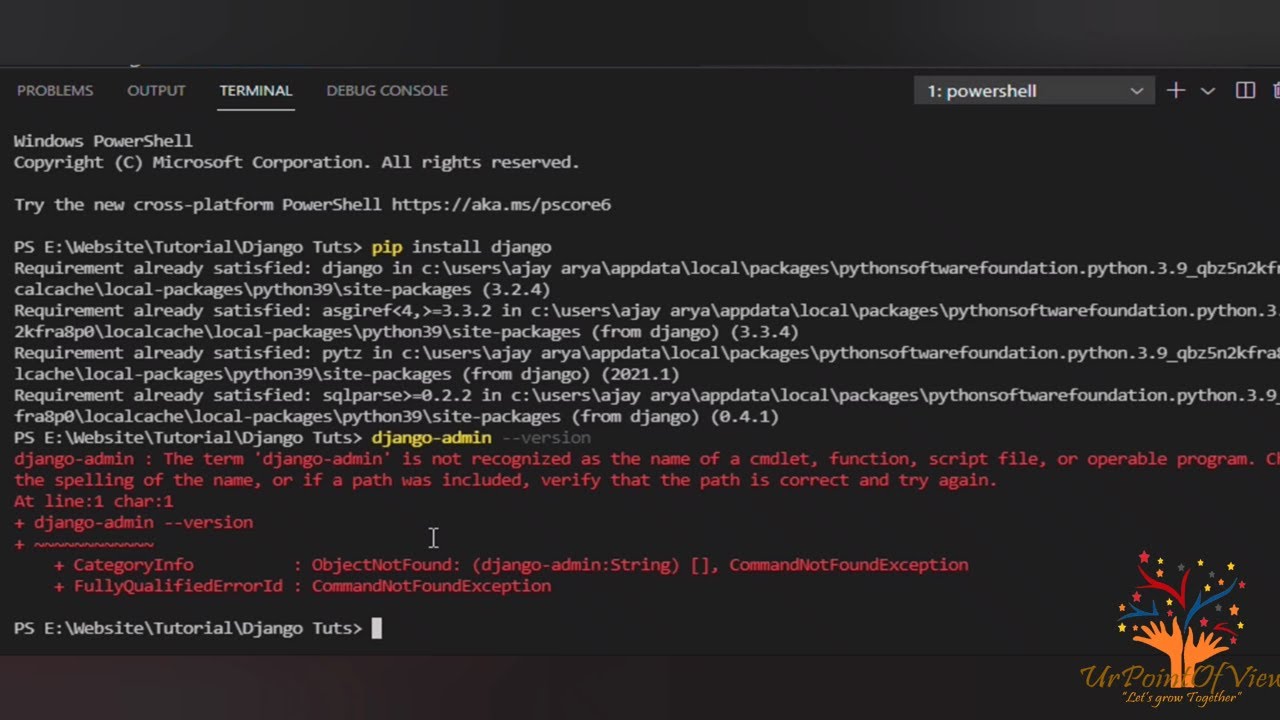
here in this video, we are solving the problem "Pip is not recognized as the name of a cmdlet, function, script file, or operable program. verify the path is correct and try again."
My official website is https://urpointofview.com/
------------- Support me by (it's Free) ------------------
LIKE | COMMENT | SHARE | SUBSCRIBE
---- UrPointOfV...
 idle laurel
im trying to get the author/user id of a message when someone uses a slash command my current code which worked a few months back is print(str(interaction.message.author.id)) but is not returning anything. not even an error
glad cradle
idle laurel
im trying to get the author/user id of a message when someone uses a slash comma...
what library are you using?
idle laurel
nextcord
glad cradle
idle laurel
im trying to get the author/user id of a message when someone uses a slash comma...
slash command doesn't have a message object
when someone invoke a slash command there's no message that is being sent
idle laurel
glad cradle
slash command doesn't have a message object
is it just interaction.user.id then?
idk how i had it working before ive not changed any code just relaunch the bot for the first time in a while weird

 glad cradle
idle laurel
is it just `interaction.user.id` then?
idk how i had it working before ive not ...
glad cradle
idle laurel
is it just `interaction.user.id` then?
idk how i had it working before ive not ...
yes
mighty yarrow
delicate pilot
worked
delicate pilot
 glad cradle
idle laurel
is it just `interaction.user.id` then?
idk how i had it working before ive not ...
glad cradle
idle laurel
is it just `interaction.user.id` then?
idk how i had it working before ive not ...
it depends on the interaction obect, there are different interactions in discord
idle laurel
glad cradle
yes
perfect thank you
glad cradle
delicate pilot
you're using python 3.11
for python 3.11 some wheels doesn't exist yet
so you need to install the dev tools
 lofty lance
hey i am getting some issue in mongo db
using it as database for discord bots
can anyone help with that here
delicate pilot
glad cradle
so you need to install the dev tools
 mighty yarrow
delicate pilot
mighty yarrow
delicate pilot
lol
delicate pilot
mighty yarrow
lol
what
delicate pilot
 glad cradle
delicate pilot
glad cradle
delicate pilot
desktop development with C++ iirc
mighty yarrow
bruh pip is python
delicate pilot
glad cradle
desktop development with C++ iirc
 delicate pilot
I want to program discord bot not game
slate swan
nextcord.errors.ApplicationInvokeError: Command raised an exception: ValueError: <nextcord.ext.commands.bot.Bot object at 0x000001900C285EB0> is not in list
glad cradle
mighty yarrow
you're about to coding a game
no he need development tools to use pip (of python 3.11) to install discord.py
slate swan
File "c:\Users\PC\Desktop\Noas Bot\cogs\giveaway.py", line 79, in end
users.pop(users.index(interaction.client))
ValueError: <nextcord.ext.commands.bot.Bot object at 0x000001900C285EB0> is not in list
The above exception was the direct cause of the following exceptio
 wary shadow
At a high level, yes that is a viable pattern. Ideally, however, the only thing the user has is access to a bot dashboard, not the bot itself. The bot exists elsewhere and only runs when a valid license exists.
If I have the bot, I can run the bot with or without a license check if I'm determined enough.
sick birch
you will have to host a licensing server anyway
might as well just host the bot yourself
winged linden
I'd host the bot yourself doing that
wary shadow
You asked if it would work. My answer, at a high architectural level, is that it would. My feedback is that I would remove the bot from the end-user and give them an interface only but that's an implementation detail and for you to design. :)
 silk robin
hi, im sending a get request to my friends api and im getting the information i want from her json on the endpoint, but the problem im having is i want to send all of the data as a embed at once when its done instead of sending it one by one , how would i do that?async def namemc3(ctx): r = requests.get("https://api.evie.ga/minecraft/all-3c") for namesData in list(r.json()['names']): embedVar = discord.Embed(title="All upcoming 3L/C dropping:", description=f"{namesData['username']} - {namesData['searches']}", color=0x00ff00) await ctx.send(embed=embedVar)
wary shadow
silk robin
hi, im sending a get request to my friends api and im getting the information i ...
Use the loop to assemble the content of the embed and only create/send the embed itself after the loop has run.
silk robin
wary shadow
Use the loop to assemble the content of the embed and only create/send the embed...
how exactly? sorry im pretty new to all of this
wary shadow
silk robin
hi, im sending a get request to my friends api and im getting the information i ...
for namesData in list(r.json()['names']):
        embedVar = discord.Embed(title="All upcoming 3L/C dropping:", description=f"{namesData['username']} - {namesData['searches']}", color=0x00ff00)
You're using a for-loop here to parse the response. As-is you are sending the embed each time. You could build list of the descriptions here in the loop then send the embed once, using the list.
disc_list = []
for namesData in ...:
  disc_list.apped(f"{namesData['username']} - {namesData['searches']}")
# Send embed here, not in the loop
its only getting the very last one, not the entire list

    r = requests.get("https://api.evie.ga/minecraft/all-3c")
    disc_list = []
    for namesData in list(r.json()['names']):
        disc_list.append(f"{namesData['username']} - {namesData['searches']}")
    embedVar = discord.Embed(title="All upcoming 3L/C dropping:", description=f"{namesData['username']} - {namesData['searches']}", color=0x00ff00)
await ctx.send(embed=embedVar)```You didn't use the list you built.
lofty lance
hey can anyone pls check #help-mango
its a discord bot related issue and noone is replyig
pymongo
silk robin
wary shadow
You didn't use the list you built.
were getting closer to what im looking for 😹

but how would i make it do like 4jo - 158 8hp - 503
so on
wary shadow
silk robin
were getting closer to what im looking for 😹
You are! What you're looking for is the .join() method for strings. It takes a sequence as input and joins each entry with the string you give it.
example
my_list = [1, 2, 3]
print("\n".join(my_list))
output:
1
2
3
but the list will always be different so how would i go about doing that
 nova mauve
@buttons.click
async def test(ctx):
    print("clicked")
    await ctx.channel.send("You have clicked the button")
await buttons.send(content = None, embed = None, channel = messageChannelId, components = [ActionRow([Button(style = ButtonType().Primary, label = "Click", custom_id = "test")])])
@slate swan
slate swan
nova mauve
```py
@buttons.click
async def test(ctx):
print("clicked")
await ctx.cha...
yes i see
wary shadow
silk robin
but the list will always be different so how would i go about doing that
The code doesn't care what's in the list. It just joins each separate entry. https://automatetheboringstuff.com/2e/chapter6/ About halfway into the chapter is what you're learning.
slate swan
lemme read
 tough lance
How many components can a modal have?
slate swan
nova mauve
```py
@buttons.click
async def test(ctx):
print("clicked")
await ctx.cha...
what does it say
error
nova mauve
slate swan
what does it say
theres no errors
it just says interaction failed on discord
like when u click the btn
cerulean folio
interaction = await view.wait()
print(view.value)
this is supposed to print the view value when view.stop() has been used in a children right?
My buttons are showing up but they aren't working correctly
cerulean folio
cerulean folio
```python
interaction = await view.wait()
print(view.value)
```
this is supposed...
nvm i wrote if view.ctx == interaction.user: instead of if view.ctx.author == interaction.user: 
slate swan
nova mauve
it just says interaction failed on discord
not sure bud. U can ask someone else
cerulean folio
Ok I tackled buttons now ! thank you everyone for being so supportive i love you
silk robin
wary shadow
The code doesn't care what's in the list. It just joins each separate entry. <ht...
can you help me send it all in one list like abc = 100 def = 200 ghi - 300
right now its sending weird, let me show
 wary shadow
Show your code please, I cannot read screenshots.
 wary shadow
silk robin
https://paste.pythondiscord.com/afosimazug
wary shadow
silk robin
https://paste.pythondiscord.com/afosimazug
Ah, you want all the results wrapped in a code block? Yeah, .join() will code block each result.
silk robin
wary shadow
Ah, you want all the results wrapped in a code block? Yeah, `.join()` will code...
yeah thats what im trying to do
wary shadow
So, instead, use some string manipulation!
description = "``" + "\n".join(disc_list) + "``"
f-string would probably work too.
Oh bother you discord, how do I escape back-ticks in a code block?
Anyway, build the string. Start with the triple ticks for the code block. Add the joined collection of the list. Finally end with the closing ticks.
silk robin
wary shadow
So, instead, use some string manipulation!
```py
description = "``" + "\n".joi...
ty so much
 wary shadow
silk robin
ty so much
wary shadow
silk robin
ty so much
I'll take that as LGTM 
 gray furnace
hello how can i add like a admin panel to my discord bot like what would be the coding?
cerulean folio
    async def on_timeout(self):
        self.clear_items()
        self.message = f'Report cancelled due to timeout.'
        self.value = False
        self.stop()
This doesn't work at all can someone help me with it? :o
it's inside a view btw
slate swan
you need to edit the message and update the view I think
cerulean folio
Lemme try
sick birch
gray furnace
hello how can i add like a admin panel to my discord bot like what would be the ...
A web dashboard?
Probably would involve authentication, a database, perhaps an API server, and of course a frontend framework of choice
I've done a few of those using Next.js
 spring summit
i made a redeem command with 3 key options, every time you redeem the key, the key changes. But for some reason every time you redeem the key, every key changes
can somebody help me out?
@client.command(pass_context=True)
async def redeem(ctx, code='xxx-xxxx-xxx'):
    with open('key_codes_bronze', 'r') as key_codes_bronze:
        keyb = key_codes_bronze.readline()
     if code == keyb:
        await ctx.author.add_roles(discord.utils.get(ctx.guild.roles, name='Bronze'))
        chars = string.ascii_letters + string.digits
        key = ('PX' + '-' + 'BRONZE' + '-' + ''.join(random.choice(chars) for i in range(6))  + '-' +''.join(random.choice(chars) for i in range(6)) + '-' + ''.join(random.choice(chars) for i in range(6)) + '-' + ''.join(random.choice(chars) for i in range(6)))
        with open('key_codes_bronze', 'w') as key_codes:
            key_codes.write(key)
    with open('key_codes_silver', 'r') as key_codes_silver:
        keys = key_codes_silver.readline()
     if code == keys:
            await ctx.author.add_roles(discord.utils.get(ctx.guild.roles, name='Silver'))
            chars = string.ascii_letters + string.digits
            key = ('PX' + '-' + 'SILVER' + '-' + ''.join(random.choice(chars) for i in range(6)) + '-' + ''.join(random.choice(chars) for i in range(6)) + '-' + ''.join(random.choice(chars) for i in range(6)) + '-' + ''.join(random.choice(chars) for i in range(6)))
    with open('key_codes_silver', 'w') as key_codes_silver:
            key_codes_silver.write(key)
    with open('key_codes_gold', 'r') as key_codes_gold:
        keyg = key_codes_gold.readline()
      if code == keyg:
            await ctx.author.add_roles(discord.utils.get(ctx.guild.roles, name='Gold'))
            chars = string.ascii_letters + string.digits
            key = ('PX' + '-' + 'GOLD' + '-' + ''.join(random.choice(chars) for i in range(6)) + '-' + ''.join(random.choice(chars) for i in range(6)) + '-' + ''.join(random.choice(chars) for i in range(6)) + '-' + ''.join(random.choice(chars) for i in range(6)))
    with open('key_codes_gold', 'w') as key_codes_gold:
        key_codes_gold.write(key)

from discord.ext import commands
from discord.ext import tasks


class Boosters(commands.Cog):
    def __init__(self, bot):
        self.bot = bot
        #self.guild = self.bot.get_guild(1038873856242360431)

    @commands.command()
    async def komenda(self, ctx):
        await ctx.send("XD")
            #await self.guild.create_role(name=lp)

def setup(bot):
    bot.add_cog(Boosters(bot))
im saying like a web panel but like a tool
slate swan
slate swan
pls help
File "c:\Users\PC\Desktop\Noas Bot\cogs\giveaway.py", line 91, in end
await channel.send(embed = end_announcement, view=giveaway())
TypeError: init() missing 1 required positional argument: 'bot'
The above exception was the direct cause of the following exception:
nextcord.errors.ApplicationInvokeError: Command raised an exception: TypeError: init() missing 1 required positional argument: 'bot' what
slate swan
slate swan
U need to do import discord but what about command create
wow I just blundered hard with my bot
sick birch
gray furnace
im saying like a web panel but like a tool
I'm not sure what you mean by "a tool"
slate swan
slate swan
wow I just blundered hard with my bot
it has a currency system where people can gift money and for the longest time I had it so people could gift a negative amount and steal others' money 💀
slate swan
slate swan
File "c:\Users\PC\Desktop\Noas Bot\cogs\giveaway.py", line 91, in end
await ...
help
cerulean folio
async def select_game(ctx):
    games = ['Genshin', 'Roblox']
    view = GameView(ctx, games)
    message = await ctx.send('What **game** is it?', view=view)
    interaction = await view.wait()
    if interaction or not view.value:
        await message.edit('Report cancelled due to timeout.', view=None)
        print('False')
    else:
        print(str(view.value))
in theory this is supposed to edit message and remove the view when it times out but it doesn't... I don't get how to do this since it didn't work with on_timeout() either :o
honest shoal
Traceback (most recent call last):
File "cogs/main.py", line 46, in <module>
bot.load_extension(extension)
File "/opt/venv/lib/python3.8/site-packages/disnake/ext/commands/common_bot_base.py", line 469, in load_extension
spec = importlib.util.find_spec(name)
File "/nix/store/idahnf1p9ljp4j568idrwb5zbbcmdhm1-python3-3.8.14/lib/python3.8/importlib/util.py", line 94, in find_spec
parent = __import__(parent_name, fromlist=['__path__'])
ModuleNotFoundError: No module named 'cogs'
File "/opt/venv/lib/python3.8/site-packages/disnake/ext/commands/common_bot_base.py", line 469, in load_extension
spec = importlib.util.find_spec(name)
File "/nix/store/idahnf1p9ljp4j568idrwb5zbbcmdhm1-python3-3.8.14/lib/python3.8/importlib/util.py", line 94, in find_spec
parent = __import__(parent_name, fromlist=['__path__'])
ModuleNotFoundError: No module named 'cogs'
Traceback (most recent call last):
File "cogs/main.py", line 46, in <module>
bot.load_extension(extension)
File "/opt/venv/lib/python3.8/site-packages/disnake/ext/commands/common_bot_base.py", line 469, in load_extension
spec = importlib.util.find_spec(name)
File "/nix/store/idahnf1p9ljp4j568idrwb5zbbcmdhm1-python3-3.8.14/lib/python3.8/importlib/util.py", line 94, in find_spec
parent = __import__(parent_name, fromlist=['__path__'])
ModuleNotFoundError: No module named 'cogs'```what error is this
slate swan
RuntimeWarning: coroutine 'BotBase.load_extension' was never awaited
self.load_extension(extension)

CODE:::
for extension in INITIAL_EXTENSIONS:
            try:
                self.load_extension(extension)
                print("ADD")
            except Exception as e:
                print('Failed to load extension {}\n{}: {}'.format(extension, type(e).__name__, e))
 naive briar
!d discord.ext.commands.Bot.load_extension - Read the error. The load_extension method is a coroutine, you need to await it
unkempt canyonBOT
await load_extension(name, *, package=None)```
This function is a [*coroutine*](https://docs.python.org/3/library/asyncio-task.html#coroutine).

Loads an extension.

An extension is a python module that contains commands, cogs, or listeners.

An extension must have a global function, `setup` defined as the entry point on what to do when the extension is loaded. This entry point must have a single argument, the `bot`.

Changed in version 2.0: This method is now a [coroutine](https://docs.python.org/3/glossary.html#term-coroutine "(in Python v3.11)").RuntimeWarning: coroutine 'BotBase.add_cog' was never awaited
bot.add_cog(Boosters(bot))
RuntimeWarning: Enable tracemalloc to get the object allocation traceback
Failed to load extension cogs.createrole
ExtensionFailed: Extension 'cogs.createrole' raised an error: TypeError: object NoneType can't be used in 'await' expression
import discord
from discord.ext import commands
from discord.ext import tasks
class Boosters(commands.Cog):
def __init__(self, bot):
self.bot = bot
@commands.command()
async def create(self, ctx):
await ctx.send("XD")
def setup(bot):
bot.add_cog(Boosters(bot))
await add_cog(cog, /, *, override=False, guild=..., guilds=...)```
This function is a [*coroutine*](https://docs.python.org/3/library/asyncio-task.html#coroutine).

Adds a “cog” to the bot.

A cog is a class that has its own event listeners and commands.

If the cog is a [`app_commands.Group`](https://discordpy.readthedocs.io/en/latest/interactions/api.html#discord.app_commands.Group "discord.app_commands.Group") then it is added to the bot’s [`CommandTree`](https://discordpy.readthedocs.io/en/latest/interactions/api.html#discord.app_commands.CommandTree "discord.app_commands.CommandTree") as well.

Note

Exceptions raised inside a [`Cog`](https://discordpy.readthedocs.io/en/latest/ext/commands/api.html#discord.ext.commands.Cog "discord.ext.commands.Cog")’s [`cog_load()`](https://discordpy.readthedocs.io/en/latest/ext/commands/api.html#discord.ext.commands.Cog.cog_load "discord.ext.commands.Cog.cog_load") method will be propagated to the caller...ty ❤️
@commands.Cog.listener()
async def on_message_delete(message):
channel = bot.get_channel(1035829526766293043)
bot isnt working on cogs what do i do instead
client is not working
naive briar
slate swan
@commands.Cog.listener()
async def on_message_delete(message):
chann...
What is isn't working

 candid escarp
slate swan
candid escarp
slate swan
try self.client
cerulean folio
class ReasonInput(discord.ui.TextInput):
    def __init__(self):
        super().__init__(placeholder='Enter the reason of this report...', label='Reason')

    async def callback(self, interaction):
        assert self.view is not None
        view = self.view
        if view.ctx.author == interaction.user:
            view.clear_items()
            await interaction.response.edit_message(content=f'Reason for this report:\n{self.value}', view=view)
            view.value = str(self)
            view.stop()
is there a problem with this guys? :o
sick birch
cerulean folio
```python
class ReasonInput(discord.ui.TextInput):
def __init__(self):
...
I don't know, is there?
Run it and see ™️
cerulean folio
It's not working for some reason, there's no errors at all
sick birch
i'm guessing that if statement is not being called
slate swan
candid escarp
try self.client
okay
candid escarp
try to print view.ctx.author and interaction.user
cerulean folio
sick birch
i'm guessing that if statement is not being called
class ReasonInput(discord.ui.TextInput):
    def __init__(self):
        super().__init__(placeholder='Enter the reason of this report...', label='Reason')

    async def callback(self, interaction):
        assert self.view is not None
        view = self.view
        if view.ctx.author == interaction.user:
            view.clear_items()
            await interaction.response.edit_message(content=f'Reason for this report:\n{self.value}', view=view)
            view.value = str(self)
            view.stop()

class ReasonView(discord.ui.View):
    def __init__(self, ctx):
        super().__init__(timeout=15)
        self.message = None
        self.ctx = ctx
        self.add_item(ReasonInput())

    async def on_timeout(self):
        assert self.message is not None
        self.clear_items()
        await self.message.edit(content='Report cancelled due to timeout.', view=self)
        self.value = False
        self.stop()

async def select_reason(ctx):
    view = ReasonView(ctx)
    view.message = await ctx.send('What is the reason for this report?', view=view)
    interaction = await view.wait()
    if interaction or not view.value:
        print('False')
    else:
        print(str(view.value))
So as you can see I declared self.ctx = ctx in the view and I passed it so... I don't think it's coming from that? :o
cerulean folio
view.message = await ctx.send('What is the reason for this report?', view=view)
this line is not sending a message
isn't it the same?
cerulean folio
cerulean folio
`view.message = await ctx.send('What is the reason for this report?', view=view)...
it's in the select_reason() function tho
slate swan
  File "C:\Users\PC\AppData\Roaming\Python\Python39\site-packages\nextcord\client.py", line 502, in _run_event
    await coro(*args, **kwargs)
  File "c:\Users\PC\Desktop\Noas Bot\cogs\logs.py", line 19, in on_message_delete
    embed = nextcord.Embed(title=f"{message.author}s Message Was Deleted", description=f"**Deleted Message:** \n `{message.content}`\n Author: {message.author.mention} \n Loacation: {message.channel.mention}", timestamp=datetime.now() , color=0x690002)
AttributeError: module 'datetime' has no attribute 'now'```
but i did
`from datetime import datetime, timedelta
import datetime`So Im currently creating a discord bot and I have made it so that after running a command, a players Username, UUID, and amount donated is logged into a database. I now want to retreive all database records for a certain UUID via discord py. Can anyone help me to do this
cerulean folio
winged linden
So Im currently creating a discord bot and I have made it so that after running ...
What database and what python lib for that database requests are you using?
winged linden
cerulean folio
What database and what python lib for that database requests are you using?
IM using SQlite and aiosqlite
cerulean folio
the sql request should look like f'SELECT * FROM players WHERE id = {player}'
you store this request in a variable and you fetch it. You can find how to run and how to fetch result in aiosqlite docs 😊
winged linden
Yeah forgot to say currently I have
await db.execute("SELECT * From Database1 Where UUID = ?", value)
help
winged linden
but how do I catch the result of that
cerulean folio
result = await db.execute("SELECT * From Database1 Where UUID = ?", value)
winged linden
ah I see that makes sense
cerulean folio
print the type of result so you know how to hanle it to show the results in python datasets ^^
slate swan
  File "C:\Users\PC\AppData\Roaming\Python\Python39\site-packages\nextcord\client.py", line 502, in _run_event
    await coro(*args, **kwargs)
  File "c:\Users\PC\Desktop\Noas Bot\cogs\logs.py", line 19, in on_message_delete
    embed = nextcord.Embed(title=f"{message.author}s Message Was Deleted", description=f"**Deleted Message:** \n `{message.content}`\n Author: {message.author.mention} \n Loacation: {message.channel.mention}", timestamp=datetime.now() , color=0x690002)
AttributeError: module 'datetime' has no attribute 'now'```
but i did
`from datetime import datetime, timedelta
import datetime`I want to find the total number of database records for a certain UUID . Ill also want to add all of the amount donated together and store it to a variable
winged linden
cerulean folio
print the type of `result` so you know how to hanle it to show the results in py...

Some form of issue has come up
slate swan
slate swan
```Traceback (most recent call last):
File "C:\Users\PC\AppData\Roaming\Python...
??
winged linden
slate swan
```Traceback (most recent call last):
File "C:\Users\PC\AppData\Roaming\Python...
why did you put import datetime after from datetime
cerulean folio
winged linden
I want to find the total number of database records for a certain UUID . Ill als...
player = 1235
req = await db.execute(f'SELECT amount_donated FROM players where id = {player}')
req = await req.fetchall()
print(sum(req))
print(len(req))
try this ^^
winged linden
Should it not be ```py
import datetime
from datetime import datime
so I need to set the variable equal to await req.fetchall() ?
cerulean folio
player is the id you're searching in the database
winged linden
UUIDt = player['uuid']

    async with aiosqlite.connect(r"C:\Users\Fiery\OneDrive\Desktop\AtomProjects\HyperionFund\Databases\Database.db") as db:
        value = UUIDt
        result = await db.execute("SELECT * From Database1 Where UUID = ?", value)
        print (result)
I was told I should put a placeholder and then put ,value
as its safer with sqlite
cerulean folio
try print(await result.fetch_all())
winged linden
cerulean folio
```python
player = 1235
req = await db.execute(f'SELECT amount_donated FROM play...
but the two variables are named the same thing?
cerulean folio
winged linden
I was told I should put a placeholder and then put ,value
there's multiple ways to do it
cerulean folio
winged linden
but the two variables are named the same thing?
which two variable?
winged linden
req =
req =
your changing req to the result of req.fetchall()
does that work I feel like it might show up errors
cerulean folio
Yeah the first req stores the execution, and the second will take the fetchall of itself ^^
winged linden
im going to name the second variable something different just incase
cerulean folio
winged linden
does that work I feel like it might show up errors
a = 2
a = a + 2
does that show errors? :o
cerulean folio
winged linden
im going to name the second variable something different just incase
you don't need to, but you can if you think it's less confusing and better readability ^^
winged linden
I guess not but like yeah i feel like it would be less confusing lol
its not like it matters really i guess
cerulean folio
It does, a lot :)
Also note that for questions related to databases you'll find better support in #databases ^^
winged linden
im getting that same error
I thought it would be better to ask here since its more python based
 mighty pilot
You can specify a row for each button
winged linden
cerulean folio
Also note that for questions related to databases you'll find better support in ...
I managed to solve it and get the total amount of donations with a certain UUID working 😄
Now I need to get that list of all records with a certain UUID and look at the amount donated column, grab all values in the amount donated column with a certain UUID and then add them together.
candid escarp
cerulean folio
isn't it the same?
yeah but .id is faster
winged linden
Ok so I have gotten a list of all the records with a certain uuid but how do I get the values in a specific column and add them all together? Using aiosqlite
slate swan
I've got all channels in a category. How do i send a message in all of them?
    category_channel = bot.get_channel(1038905211302973501)
    channels = category_channel.channels
    print(channels)
it doesnt just print the id's, it prints everything about the channel:
[<TextChannel id=1030665981808365579 name='asoh' position=0 nsfw=False category_id=1038905211302973501 news=False>, <TextChannel id=1038905265950576640 name='asdiaosj' position=1 nsfw=False category_id=1038905211302973501 news=False>]
I Just want the ids
 upbeat gust
slate swan
it doesnt just print the id's, it prints everything about the channel:
```
[<Tex...
upbeat gust
slate swan
it doesnt just print the id's, it prints everything about the channel:
```
[<Tex...
Those are TextChannel objects, you're seeing their repr
 winged coral
^ you can just loop over them and .send to all of them
slate swan
winged coral
^ you can just loop over them and .send to all of them
Like with a for loop?
winged coral
Yes
winged coral
cerulean folio
how do I check my version of discord.py?
pip show discord.py
slate swan
How do i just get the ids?
cerulean folio
winged coral
pip show discord.py
tyyyy
winged coral
slate swan
How do i just get the ids?
Why do you need them?
winged coral
cerulean folio
tyyyy <a:LoveGive:916332446218338315>
:)
cerulean folio
class ReasonInput(discord.ui.TextInput):
    def __init__(self):
        super().__init__(placeholder='Enter the reason of this report...', label='Reason')

    async def callback(self, interaction):
        assert self.view is not None
        view = self.view
        if view.ctx.author.id == interaction.user.id:
            view.clear_items()
            await interaction.response.edit_message(content=f'Reason for this report:\n{str(self)}', view=view)
            view.value = str(self)
            view.stop()

class ReasonView(discord.ui.View):
    def __init__(self, ctx):
        super().__init__(timeout=15)
        self.message = None
        self.ctx = ctx
        self.add_item(ReasonInput())

    async def on_timeout(self):
        assert self.message is not None
        self.clear_items()
        await self.message.edit(content='Report cancelled due to timeout.', view=self)
        self.value = False
        self.stop()

async def select_reason(ctx):
    view = ReasonView(ctx)
    view.message = await ctx.send('What is the reason for this report?', view=view)
    interaction = await view.wait()
    if interaction or not view.value:
        print('False')
    else:
        print(str(view.value))
Guys I'm really lost with this. select_reason() stops right after view = ReasonView(ctx) and I don't know why please help me
slate swan
winged coral
Why do you need them?
I'm trying to lock all channels in a category and send a message saying locked
winged coral
So what is the ID for, you already have all of the channel objects?
You don't need to use the ID to fetch them, you have the objects
winged coral
:)
patent wagon
how tf do i remove this 😭

i made bot private and then re added it to server
and the button is still there
"Cannot have install fields on a private application"
winged linden
Guys how would I go around creating a button using discordpy
cerulean folio
this discord.ui.TextInput is driving me crazy. the view is created, the text input is created, and then its added, but it just doesn't appear...
winged linden
cerulean folio
this `discord.ui.TextInput` is driving me crazy. the view is created, the text i...
Do you know how I would create a button?
sick birch
cerulean folio
this `discord.ui.TextInput` is driving me crazy. the view is created, the text i...
Are you actually sending the modal to an interaction response?
Simply creating the view is not enough
https://github.com/Rapptz/discord.py/blob/master/examples/modals/basic.py
see this example that i've made
cerulean folio
sick birch
Are you actually sending the modal to an interaction response?
you mean TextInput has to be inside a Modal? 😭
I thought it was unrelated and just looks like a Select but text input instead 😭
spring summit
does somebody mind helpin me out rq lol
cerulean folio
winged linden
Do you know how I would create a button?
I do indeed ^^
winged linden
Could you inform me on how to do so lol
sick birch
cerulean folio
I thought it was unrelated and just looks like a `Select` but text input instead...
unfortunately no
it needs to be in a ui.Modal subclass
sick birch
spring summit
does somebody mind helpin me out rq lol
Difficult to do so when we have no idea what the issue is
cerulean folio
So that's why it wouldn't work ! Thank you robin
spring summit
sick birch
Difficult to do so when we have no idea what the issue is
oh, the code didnt go through bcs of the slowmode thing my fault master.
sick birch
winged linden
is there a document i can read on buttons?
of course, bunch of handy examples here https://github.com/Rapptz/discord.py/tree/master/examples/views
I'm not following, what do you mean?
cerulean folio
winged linden
Could you inform me on how to do so lol
Mmmmh... Since I just figured it out and it's involving some OOP, I prefer not explaining you because I might confuse you. But I could show you a working code :)
class GameButton(discord.ui.Button):
    def __init__(self, label):
        super().__init__(label=label, style=game_button_style, custom_id=label)

    async def callback(self, interaction):
        assert self.view is not None
        view = self.view
        if view.ctx.author.id == interaction.user.id:
            view.clear_items()
            await interaction.response.edit_message(content=f'Game selected:{self.label}', view=view)
            view.value = self.label
            view.stop()

class GameView(discord.ui.View):
# Subclassing the discord.ui.View class for the same reason
# than the Button class :)
    def __init__(self, ctx, games):
        super().__init__(timeout=30)
        self.message = None
        self.value = None
        self.ctx = ctx
        self.games = games
        for game in games:
            self.add_item(GameButton(game))

async def select_game(ctx):
# This function will send a message and wait for
# button clics :)
    games = [
        'Genshin',
        'Roblox'
        ]
    view = GameView(ctx, games)
    view.message = await ctx.send('What **game** is it?', view=view)
    interaction = await view.wait()
    if interaction or not view.value:
        print('False')
    else:
        print(str(view.value))
There's a working example :)
winged linden
I dont really get it.
cerulean folio
I don't really know how to explain it tbh, I just figured it out and I might confuse you.
 winged linden
sick birch
Have you looked at the examples?
winged linden
sick birch
Have you looked at the examples?
Yeah I have but I just got confused
cerulean folio
sick birch
oh god
See this is what i'm focusing in right now. Current online version of my bot's code is 10 times more confusing
winged linden
Might be easier if I explain the use for my buttons.
cerulean folio
winged linden
Might be easier if I explain the use for my buttons.
Do you know object oriented programming?
winged linden
not really
 ionic garden
https://paste.python.discord.com/iqahalidoh
this error happens when i call ctx.channel.purge, anyone know what the cause is?
cerulean folio
Ah okay...
sick birch
winged linden
Might be easier if I explain the use for my buttons.
Sure
winged linden
I want to add buttons to an embedded message and when clicked it would create a new channel and add the user to the channel.
nice get hacked i now have free gold subscription
kidding
sick birch
Ah, you're using a JSON file?
cerulean folio
winged linden
not really
Okay so here's the thing: Red pill or blue pill dude.
I can rather send you a working example easy to go and you're done.
Or (what i advise you), open a guide or documentation about python object oriented programming and learn it. That way you'll know what you're doing and you'll get better
Up to you friend :)
winged linden
I learn better from deciphering a working example usually.
spring summit
winged linden
nice get hacked i now have free gold subscription
thats my id, idk whatchu wanna do with it lil bro
mighty pilot
sick birch
Ah, you're using a JSON file?
I think they're trying to write to the code file rather than any sort of persistent storage
sick birch
You want to add a user ID to that list?
winged linden
😭 i thought it was a serial code
sick birch
You'd use bronze.append(user_id) for instance
cerulean folio
winged linden
I learn better from deciphering a working example usually.
Moment please :)
sick birch
winged linden
I learn better from deciphering a working example usually.
Do the examples on the github not help?
I'd love to clarify if they don't
Considering I wrote some of them :P
winged linden
sick birch
Do the examples on the github not help?
I felt like there was a lot of information and it wasn't too clear on where the button was being made and stuff
sick birch
Which file are you looking at?
sick birch
Let me pull it up
Alright so the class Counter(discord.ui.View) is the most important part
It contains the "view", which is basically a container that holds all your buttons, select menus, and any other interactive component
The part where the button is actually being created is @discord.ui.button(...)
The function underneath it (async def count(self, ...)) is the "callback". This is the function that will be called when a user presses the button
cerulean folio
winged linden
Probably because I dont know object oriented programming
import discord
import asyncio
from discord.ui import View

async def select_game(ctx):
  class GameView(View):
      def __init__(self):
          super().__init__(timeout=None)
          self.value = None

      @discord.ui.button(label='Click me !', style=discord.ButtonStyle.blurple)
      async def genshin_callback(self, interaction, button):
        if interaction.user == ctx.author:
          self.clear_items()
          await interaction.response.edit_message(content='I got clicked !', view = self)
          self.value = 'clicked'
          self.stop()

  view = GameView()
  message = ctx.send('Hello there !', view=view)
  if message:
    return False
  else:
    return str(view.value)
There
sick birch
And towards the end, the view is being constructed and sent alongside a message: await ctx.send("Press!", view=Counter())
Yeah it's not persistent
It just adds it to the list in memory
If you want persistent storage, you're looking for a database
mighty pilot
Yea because you're not storing it in persistent storage like a database or seperate file
spring summit
sick birch
Yeah it's not persistent
is there a way to make it persistent
mighty pilot
Then never shut your bot off 
sick birch
I share the sentiment but with a good guide, it should be much easier
mighty pilot
The file your code is run from, all it sees is what's written there when you start running it. Anything added during the course of it running is temporary. Basically stored in RAM
sick birch
Theoretically it's possible but a major PITA
Much easier to just use a database or even a seperate JSON file
Though we don't recomend JSON-as-a-DB
mighty pilot
I've heard json corrupts easily when used as a db
sick birch
Yes it's not meant for frequent reads and writes
You basically open up the python file, and get to work with nasty string manipulation
wary shadow
Read/writes don't scale well with json. Works great for controlled use though.
sick birch
Find the line containing the list, figure out how to get into the [], append your id into there, slap everything back together, and pray to god nothing breaks
I really don't recommend it
Even a JSON file is better
You probably will with the current approach as well
ionic garden
https://paste.python.discord.com/iqahalidoh
this error happens when i call await ctx.channel.purge, anyone know what the cause is?
mighty pilot
sick birch
Plus re-writes are good!

sick birch
Aye. Good luck.. you're going to need it :P
Same was as you'd do it with a button, add_view
Yeah you need custom IDs for all your components
mighty pilot
You need timeout=None in the init right?
mighty pilot
sick birch
<https://github.com/Rapptz/discord.py/blob/master/examples/views/persistent.py>
Line 17 in this shows the timeout=None
Discord.ui.select(custom_id=)
I think
 jagged adder
what database/interface is generally recommended for bots/beginners in dbs? its looking like sql is the way to go, but it appears there is more than one type
mighty pilot
Most things that say sql are the same syntax. I think a lot of people use sqlite3
jagged adder
also, ive run through tutorials on using sql (commands and such), but they werent python specific; without watching through a number of half hour vids, is there a simple way to explain connecting a db to my project?
mighty pilot
Commands and such won't be any different it'll be the same thing just written in your script. As far as making a connection...
I guess making the connection is different depending on which one you use

PYnative
Develop Python applications with SQLite database. Using sqlite3 module to access the SQLite database, perform SQLite data insertion, data retrieval, data update and data deletion, transaction management.
Here's sqlite3 but it looks a lot different than my mariadb connection
jagged adder
do u have a recommended interface for editing/viewing the db?
mighty pilot
You might have better luck asking in #databases
mighty pilot
All I'm familiar with is mariadb (mysql) and mysql workbench
 woeful tartan
Heya guys
sick birch
woeful tartan
Heya guys

woeful tartan
I was wondering if discord.py still supports chat commands
One of my discord servers recently got raided and I was trying to adapt stackoverflow code from before to my bot
It uses a command prefix and I was wondering if that was the reason why it wasn't running
sick birch
woeful tartan
It uses a command prefix and I was wondering if that was the reason why it wasn'...
It does. However you need to do 2 things for prefix commands to work:
- Enable
message_contentintents in your code*
intents = discord.Intents.default()
intents.message_content = True
bot = commands.Bot(..., intents=intents)
- Enable it in your developer dashboard, using this link: https://discord.com/developers/applications
- You must be on discord.py version 2.0 or above
woeful tartan
The goal of the bot is to sweep out users with a certain role and at some point also read the time frame they joined so it could kick people out more accurately
woeful tartan
sick birch
It does. However you need to do 2 things for prefix commands to work:
1. Enable ...
Yep
Am I allowed to share my code here or just ask questions?
Give me a second, let me censor my tokens
sick birch
Feel free to share your code and any relevant errors
woeful tartan
from discord.ext import commands
from discord.ext.commands import has_permissions
import configparser
import os

intents = discord.Intents.default()
intents.members = True
intents.message_content = True
bot = commands.Bot(command_prefix = ".", intents=intents)

import logging

@bot.command()

async def hello(ctx):
   await ctx.reply('Hello!', mention_author=False)

@bot.event
async def on_message(ctx):
    logging.info(ctx.content)
    if ctx.content == "kickMyRole":
        await kickMembers(ctx, ctx.author.roles[1]) # Not @everyone

@has_permissions(administrator=True)
async def kickMembers(ctx, role: discord.Role, reason: str=None):
    logging.info(role)
    await ctx.reply('Kicking members')
    for member in ctx.guild.members:
        await ctx.reply(f'Looping through member  {member}')
        if role in member.roles: # does member have the specified role?
            await ctx.reply('Found a member, kicking!')
            await ctx.guild.kick(member,reason=reason)

if os.path.basename(___file___) == 'test.py':
    config = configparser.ConfigParser()
    config.read('config.ini')
    api_token = config['DEFAULT']['admin_api_token']
    # print(api_token)
bot.run(api_token)```Idea is that .kickMyRole @role would kick the offending role
sick birch
woeful tartan
```import discord
from discord.ext import commands
from discord.ext.commands imp...
Change
@bot.event
async def on_message(ctx):
    logging.info(ctx.content)
    if ctx.content == "kickMyRole":
        await kickMembers(ctx, ctx.author.roles[1]) # Not @everyone
to
@bot.listen()
async def on_message(ctx):
    logging.info(ctx.content)
    if ctx.content == "kickMyRole":
        await kickMembers(ctx, ctx.author.roles[1]) # Not @everyone
I've already set up the intents correctly I think
sick birch
Notice the difference? @bot.event to @bot.listen()
Your kickMembers function is also not decorated as a command:
@has_permissions(administrator=True)
@bot.command()
async def kickMembers(...):
  ...
ig robin will kill me but i'm trying to figure it out lol
class ReasonModal(discord.ui.Modal, title='Reason of the report'):
    def __init__(self, ctx):
        self.ctx = ctx
    reason = discord.ui.TextInput(placeholder='Enter the reason of this report...', label='Reason', style=discord.TextStyle.paragraph)

    async def on_submit(self, interaction):
        if self.ctx.author.id == interaction.user.id:
            self.stop()

async def select_reason(ctx):
    modal = ReasonModal(ctx)
    await ctx.send('What is the reason for this report?', view=modal)
    result = await modal.wait()
    print(result)
is it normal i'm struggling that much? :o
sick birch
cerulean folio
ig robin will kill me but i'm trying to figure it out lol
```python
class Reason...
You need to bind reason to self:
self.reason = discord.ui.TextInput(...)
Appreciate it! If you've got any further issues I'd be happy to help
woeful tartan
sick birch
Appreciate it! If you've got any further issues I'd be happy to help
Haha, will definitely be popping in a bit
I've ran the code and hopefully it'll be kicking bots now
But will let you know if something weird happens
cerulean folio
sick birch
You need to bind `reason` to self:
```py
self.reason = discord.ui.TextInput(...)...
I never know when and when not to do this XD
It still doesn't work, am I invoking the modal correctly?
sick birch
cerulean folio
I never know when and when not to do this XD
It still doesn't work, am I invokin...
Try just moving it out:
class ReasonModal(discord.ui.Modal, title='Reason of the report'):
  reason = discord.ui.TextInput(...)
  def __init__(...):
    ...
Also you need an interaction to be able to send a modal, can't use view=modal
!d discord.InteractionResponse.send_modal
unkempt canyonBOT
await send_modal(modal, /)```
This function is a [*coroutine*](https://docs.python.org/3/library/asyncio-task.html#coroutine).

Responds to this interaction by sending a modal.oh you mean a button for example?
sick birch
Yes, or a slash command
cerulean folio
mmmmh I see...
sick birch
my pleasure
ionic garden
https://paste.pythondiscord.com/iqahalidoh
this error happens when i call await ctx.channel.purge, anyone know what the cause is?
hushed galleon
ionic garden
https://paste.pythondiscord.com/iqahalidoh
this error happens when i call await ...
there's an extra period in the middle of your link, but otherwise 404: Unknown Interaction usually means your command took too long to respond to the interaction
there's a 3 second limit to respond to an interaction, so if you're doing something that might be slow (purge can be slow), you should use ctx.defer() / ctx.typing() at the start
silk robin
hello, how come im getting "discord.ext.commands.errors.CommandInvokeError: Command raised an exception: NameError: name 'random' is not defined" @bot.command() async def question(ctx, message): answers = ["yes", "no", "maybe"] embedVar = discord.Embed(title="Magic 8ball :crystal_ball:", color=0x00ff00) embedVar.add_field(name="Question:", value=f"{message}", inline=True) embedVar.add_field(name="Answer:", value=random.choice(answers), inline=True) embedVar.set_footer(text="Developed by Tony12") await ctx.send(embed=embedVar)
mighty pilot
Did you import random?
ionic garden
hushed galleon
there's a 3 second limit to respond to an interaction, so if you're doing someth...
yeah but i'm purging only ~2 messages? is it that slow?
hushed galleon
that depends on how many messages are requested in total and whether they're young enough to be bulk deleted
though, if you plainly wrote ctx.channel.purge(limit=2) and it took a while then i would be concerned
purge() is essentially channel.history() + channel.delete_messages() and/or message.delete()
ionic garden
    @commands.command("purge")
    @commands.has_permissions(manage_messages=True)
    async def purge(self, ctx: commands.Context, msg_num: int):
        if not ctx.author.guild_permissions.manage_messages:
            await ctx.send("You don't have permission to delete messages!")
            return
        await ctx.channel.purge(limit=msg_num + 1)
        await ctx.send(f"Attempted to purge {msg_num} message(s)")
this is the entire command
hushed galleon
i thought you were using a hybrid command?
hushed galleon
its related
404 Unknown Interaction would only occur for the slash version of the command
hushed galleon
if you still want it to be a hybrid command, try adding await ctx.defer() at the start
ionic garden
kk
well it's not even showing up in the menu now
nvm
so it's working but like
the last ctx.send isn't executing
jagged adder
hushed galleon
if you still want it to be a hybrid command, try adding `await ctx.defer()` at t...
how would i go about adding ids to the sql db upon inviting my bot to a server?
hushed galleon
ionic garden
the last ctx.send isn't executing
do you have an on_command_error handler? perhaps your bot is missing manage message permissions but you're not able to see the error
jagged adder
this side of things i really am lacking the knowledge rn soz
hushed galleon
jagged adder
how would i go about adding ids to the sql db upon inviting my bot to a server?
with discord.py? they have various events that you can add handlers for, including on_guild_join
!d discord.on_guild_join
unkempt canyonBOT
discord.on_guild_join(guild)```
Called when a [`Guild`](https://discordpy.readthedocs.io/en/latest/api.html#discord.Guild "discord.Guild") is either created by the [`Client`](https://discordpy.readthedocs.io/en/latest/api.html#discord.Client "discord.Client") or when the [`Client`](https://discordpy.readthedocs.io/en/latest/api.html#discord.Client "discord.Client") joins a guild.

This requires [`Intents.guilds`](https://discordpy.readthedocs.io/en/latest/api.html#discord.Intents.guilds "discord.Intents.guilds") to be enabled.wait, u can actually create an entire server with a bot?
hushed galleon
until the bot is in 10 servers total iirc
jagged adder
dang
ionic garden
hushed galleon
do you have an on_command_error handler? perhaps your bot is missing manage mess...
no it's deleting the messages
hushed galleon
oh, right
jagged adder
is it required to have the db queries in triple quotes?
hushed galleon
a bit of a #databases question but no, you dont have to define your strings with triple quotes
jagged adder
why are all the site tutorials doing so ? just to clarify what they are talking about maybe
hushed galleon
its usually nicer to write
jagged adder
also keeps it all together if u want to split up the lines i spose
 lethal bloom
let's say I have a project and preferably it always starts main.py but if I run a command I want it to run a test.py
how do I do that?
cerulean folio
def filter_users(ctx, msg) -> bool:
    mentions = [
        x.group()
        for x in re.finditer(
            r"{0}".format("<@[0-9]+>"), msg.content, re.S | re.I | re.M
        )
    ]
    test_digits = msg.content.split(" ").difference(mentions)

    def matches():
        yield msg.content.lower() == "cancel"
        yield ''.join(test_digits).isdigit() or not test_digits

    return is_from_here(ctx, msg) and not msg.reference and any(matches())


async def await_subject(ctx) -> str:
    response = await ctx.bot.wait_for(
        "message", check=lambda message: filter_user(ctx, message)
    )
    response.content
Here I'm trying to capture only a message that contains digits or mentions or both.
Is this a good approach? :)
hushed galleon
id write a single regex to check for both digits and mentions
ionic garden
how do i edit the msg/embed from a view?
hushed galleon
either through an interaction object, or by assigning the original message to your view so you can edit it later
cerulean folio
hushed galleon
id write a single regex to check for both digits and mentions
i didn't know it's possible, regex is such a rabbit whole
but wouldn't it be slower?
hushed galleon
if anything itd be faster, letting your regular expression scan through the string once rather than combining list comp and split together (btw difference() isnt a method on lists)
ionic garden
hushed galleon
either through an interaction object, or by assigning the original message to yo...
interaction object
?
hushed galleon
when someone clicks one of the buttons/select menus on your view, you get an Interaction where you can edit the message using interaction.response.edit_message()
ionic garden
and how would i pass in a message?
ionic garden
hushed galleon
when someone clicks one of the buttons/select menus on your view, you get an Int...
icic
cerulean folio
hushed galleon
if anything itd be faster, letting your regular expression scan through the stri...
<@[0-9]+>|[0-9]+ this is what I'm looking for. thank you for this precious advise !
hushed galleon
hushed galleon
either through an interaction object, or by assigning the original message to yo...
@ionic garden here would be an example of both options: ```py
class MyView(discord.ui.View):
@discord.ui.button(...)
async def on_click(self, interaction, button):
# this:
await interaction.response.edit_message(...)
# or after you already responded with edit_message/defer:
await interaction.edit_original_message(...)
# or with the message object included in the interaction:
await interaction.message.edit(...)
# or storing the message beforehand, necessary if
# you can't get an interaction:
async def on_timeout(self):
    await self.message.edit(...)
@bot.command()
async def my_command(ctx):
view = MyView()
view.message = await ctx.send('hello world!', view=view)```
 hushed galleon
View.message isnt something built into the class, which is why im assigning that attribute after doing ctx.send()
cerulean folio
hushed galleon
if anything itd be faster, letting your regular expression scan through the stri...
<@[0-9]{15,20}>|[0-9]{15,20} this could be more accurate to avoid "I have 23 dollars rn" kinds of messages :D
def get_digits(msg: str) -> list:
    return [x.group() for x in re.finditer(r'{0}'.format('<@!?[0-9]{15,20}>|[0-9]{15,20}'), msg, re.S | re.I |  re.M)]

def filter_users(ctx, msg):
# Returns True if the message content only digits and mentions, and not a reference
    mentions = get_digits(msg.content)
    def matches():
        yield msg.content.lower() == 'cancel'
        yield mentions
    return is_from_here(ctx, msg) and not msg.reference and any(matches())
this filter is nice now? :D
 wary crystal
Also mentions can start with <@!...>
cerulean folio
wary crystal
Also mentions can start with `<@!...>`
how come? I never seen such ones :o
wary crystal
It's been deprecated for a while but they can still appear like that afaik
cerulean folio
mmmh... ok it worked it pinged me when i wrote with !
thank you 😊
I added a separate function for that specific regex. I feel i'll need it more than in one case lol
cerulean folio
ok so [0-9]{15,20} doesn't work since when there are two ids without separation (no character and no space between), it captures a random thing. Any ideas how I can tackle that? I don't even know if there's a fix length for user ids
 jolly panther
could I get some help in #help-chocolate please?
 pliant gulch
cerulean folio
ok so `[0-9]{15,20}` doesn't work since when there are two ids without separatio...
pliant gulch
cerulean folio
ok so `[0-9]{15,20}` doesn't work since when there are two ids without separatio...
There is no fixed length for the snowflake in discord. And actually it was recently increased to 19 chars making the max 20 digits now
A snowflake is just uint64
It might not change but discord will eventually over the years increase the snowflake length again as the amount of users increase
cerulean folio
pliant gulch
There is no fixed length for the snowflake in discord. And actually it was recen...
so in a case I have user1 = 697506726919929996 and user2 = 954225987388850246, I have no way to get those ids from the string 697506726919929996954225987388850246 ?
pliant gulch
cerulean folio
so in a case I have `user1 = 697506726919929996` and `user2 = 954225987388850246...
697506726919929996954225987388850246 goes past 64 bits
I don't know if it matches with your pattern or not but it doesn't fit 64 bits
pliant gulch
pliant gulch
`697506726919929996954225987388850246` goes past 64 bits
Should be 120 bits to be exact
slate swan
wary crystal
Also mentions can start with `<@!...>`
isn't deprecated, it's mainly used if a user has a nickname in that server afaik
wary crystal
slate swan
isn't deprecated, it's mainly used if a user has a nickname in that server afaik
is
 cerulean folio
pliant gulch
I don't know if it matches with your pattern or not but it doesn't fit 64 bits
cerulean folio
pliant gulch
I don't know if it matches with your pattern or not but it doesn't fit 64 bits
yeah that's what I said, I need a way to get valid ids from any kind of discord.Message.content, like a super parser
slate swan
wary crystal
is
yea thats why i said afaik, i stand corrected
pliant gulch
I think it would be best to use a converter
You can also always check if it's valid by doing some operations like fetching the user
slate swan
^
wary crystal
slate swan
yea thats why i said afaik, i stand corrected
Okay, I think you might've misplaced your coma then
ionic garden
is there any way to edit what's already been added to an embed
or do i have to make a new one entirely
cerulean folio
pliant gulch
I think it would be best to use a converter
but how would fetch_user() work for 697506726919929996954225987388850246?
shrewd apex
only possible from trial and error coz recently discord added an extra digit in id so no way to predict
hushed galleon
tbf discord specifically documents it as uint64 like andy said, and even dpy's IDConverter uses {15,20}
its good enough to cut down on excess fetch_user calls for now
oh i misunderstood the context, yeah what asher said
perhaps you could walk through substring combinations from largest to smallest and only attempt fetch_user() when the snowflake_time() of all substrings are earlier than the current date?
hushed galleon
hushed galleon
perhaps you could walk through substring combinations from largest to smallest a...
sure enough you could do that: ~~https://paste.pythondiscord.com/zucicupaho~~
(here's a newer script for better stats: https://paste.pythondiscord.com/wifavovewa) py Content: '153551102443257856656838010532265994508106724075634709441672776345190421781651227956084737' (18, 18, 18, 18, 20, 20) 153551102443257856 656838010532265994 508106724075634709 441672776345190421 781651227956084737 2016/02/28 17:17:15 2019/12/18 12:39:45 2018/11/03 02:34:43 2018/05/03 18:49:55 2020/11/26 22:42:55 Iterated through 46656 combinations Found 6510 possible solutions Correct combination found after 18649 attempts / 0 other solutions (first!)
slate swan
anyone help
how can I test if a certain channel has a name in it?
so .close #ticket-dcuser
will delete that channel
and then if I do .close #general it wont bc it doesnt have ticket in the name
hushed galleon
if you have the TextChannel object, you can get the .name attribute from it and then check 'ticket' in channel.name
slate swan
hmm I see
 spice scroll
can I use discord.py on replit without installing it?
hushed galleon
installing discord.py?
spice scroll
hushed galleon
installing discord.py?
I can only get it installed on one of my computers,
slate swan
Traceback (most recent call last):
  File "/home/runner/zio-bot/venv/lib/python3.8/site-packages/discord/client.py", line 409, in _run_event
    await coro(*args, **kwargs)
  File "main.py", line 224, in on_reaction_add
    c = await reaction.guild.create.text_channel(name=f"Ticket-{user}")
AttributeError: 'Reaction' object has no attribute 'guild'
    if reaction.emoji == "🎟️":
      c = await reaction.guild.create.text_channel(name=f"Ticket-{user}")
      await c.send(f"{user.mention} Please wait while suuport gets to you.")
then sure, replit's runner will be the one installing discord.py on their machine
ionic garden
is there any way to edit what's already been added to an embed
or do i have to make a new one entirely
hushed galleon
slate swan
```py
Traceback (most recent call last):
File "/home/runner/zio-bot/venv/lib/p...
the reaction has a .message attribute, and a message object has a .guild attribute, so you'd use reaction.message.guild.create_text_channel(...) (you also have an incorrect period after create)
sick birch
ionic garden
is there any way to edit what's already been added to an embed
or do i have to m...
Sure
You can get the embed from a message using .embeds, edit to how you want, then re-send it or edit the original message
 finite salmon
ionic garden
is there any way to edit what's already been added to an embed
or do i have to m...
finite salmon
ionic garden
is there any way to edit what's already been added to an embed
or do i have to m...
editable = await ctx.send(embed=embed)
await editable.edit(embed=newembed)
ionic garden
sick birch
You can get the embed from a message using `.embeds`, edit to how you want, then...
no like
finite salmon
finite salmon
editable = await ctx.send(embed=embed)
await editable.edit(embed=newembed)
You can edit embeds like this
ionic garden
i want to modify an embed's initial fieilds
right now i can only add fields (to my knowledge)
finite salmon
No you'll have to make a new one then
sick birch
ionic garden
right now i can only add fields (to my knowledge)
embed = discord.Embed(
  title="This will be changed"
  description="Some description"
)

embed.title = "Changed"
Like this?
hushed galleon
ionic garden
right now i can only add fields (to my knowledge)
!d discord.Embed.set_field is probably what you're interested in
unkempt canyonBOT
I'm sorry Dave, I'm afraid I can't do that.
No documentation found for the requested symbol.
unkempt canyonBOT
set_field_at(index, *, name, value, inline=True)```
Modifies a field to the embed object.

The index must point to a valid pre-existing field. Can only be up to 25 fields.

This function returns the class instance to allow for fluent-style chaining.nice
slate swan
is there anyway to add a cooldown to a reaction?
@hushed galleon
or do i have to use button
hushed galleon
you'd have to handle the cooldown in your code somehow
ionic garden
how do i respond to an interaction w/o doing anything
hushed galleon
personally id use the undocumented commands.CooldownMapping
hushed galleon
ionic garden
how do i respond to an interaction w/o doing anything
use the interaction response's defer() method
slate swan
idk how to do that
ionic garden
[2022-11-06 20:18:42] [ERROR   ] discord.ui.view: Ignoring exception in view <Blackjack timeout=180.0 children=2> for item <Button style=<ButtonStyle.success: 3> url=None disabled=False label='hit' emoji=None row=None>
Traceback (most recent call last):
  File "C:\Users\kevin\AppData\Local\Programs\Python\Python310\lib\site-packages\discord\ui\view.py", line 425, in _scheduled_task
    await item.callback(interaction)
  File "C:\Users\kevin\GitHub\SaulGoodmanReal\src\views\blackjack.py", line 60, in hit
    await interaction.edit_original_response(embed=embed)
  File "C:\Users\kevin\AppData\Local\Programs\Python\Python310\lib\site-packages\discord\interactions.py", line 461, in edit_original_response
    data = await adapter.edit_original_interaction_response(
  File "C:\Users\kevin\AppData\Local\Programs\Python\Python310\lib\site-packages\discord\webhook\async_.py", line 219, in request
    raise NotFound(response, data)
discord.errors.NotFound: 404 Not Found (error code: 10015): Unknown Webhook
    @discord.ui.button(label="hit", style=discord.ButtonStyle.green)
    async def hit(self, interaction: discord.Interaction, button: discord.ui.Button):
        self.player.append(self.deck.draw())

        embed = interaction.message.embeds[0]
        embed.set_field_at(1, name="Player", value="test")
        await interaction.edit_original_response(embed=embed)
```what's going on?you cant use edit_original_response without making an initial response with interaction.response.defer()/edit_message()/send_message()
ionic garden
bruh.
shrewd apex
/ send_modal()
ionic garden
discord.errors.InteractionResponded: This interaction has already been responded to before
```great
how do i edit a message twice w/o this error?defer and use edit_original_response
ionic garden
i called defer, and editted the og response
now i call this
        await interaction.response.edit_message(embed=embed)
```and it gives the errorif i have a bunch of bot.listen's in my code, how can i stop them from picking up on every word and slowing my code down? i found that when my friend was spamming in chat, the bot became almost unresponsive; often 10+ second delays on replies
hushed galleon
slate swan
how
i dont really know how to give an easy explanation for it, either you write your own system for handling cooldowns or you hack together something from the built-in cooldown classes
the CooldownMapping's source code is here https://github.com/Rapptz/discord.py/blob/master/discord/ext/commands/cooldowns.py
if you do this id suggest using BucketType.member, making a mock object with .guild/.author attributes according to the reaction, and passing that to update_rate_limit() to check if the reacting user is on cooldown
slate swan
class support(Button):
  def __init__(self, label):
    super().__init__(label=label, style=discord.ButtonStyle.red)
    async def callback(self, interaction):
      c = interaction.guild.create_text_channel(f"ticket-{interaction.user}")
      await c.send(f"{interaction.user.mention} Please wait for staff.")
      await interaction.response.send_message("Opened Ticket")
this just says interaction fails
hushed galleon
jagged adder
if i have a bunch of bot.listen's in my code, how can i stop them from picking u...
there's nothing wrong with having a lot of listeners, but it sounds like the code inside them is blocking your event loop which is what you should fix
@slate swan your callback() method is over-indented, putting it inside your __init__
jagged adder
hushed galleon
there's nothing wrong with having a lot of listeners, but it sounds like the cod...
most of them are like this;
@bot.listen('on_message')
async def invite(ctx):
    if '&invite' in ctx.content:
?
shrewd apex
doubtful that only such a small snippet is causing slowdown
hushed galleon
slate swan
?
see how your callback method is inside __init__?
 shrewd apex
also if u have a bunch of statements code inside them matter as well i would recommend a match case chain
jagged adder
well i have a number of them; and the code within some is rather long; however i thought once if x == y returned false itd skip it
jagged adder
shrewd apex
also if u have a bunch of statements code inside them matter as well i would rec...
wdym
slate swan
hushed galleon
see how your callback method is *inside* `__init__`?
yea?....
hushed galleon
... it needs to be outside
slate swan
trying
hushed galleon
hushed galleon
... it needs to be outside
as in: py class MyButton(Button): def __init__(self): ... async def callback(self, interaction): ...
slate swan
now theres an error
hushed galleon
you forgot to await create_text_channel too
jagged adder
shrewd apex
```py
match <expr>:
   case _:
       ...
# new in 3.10
```
havent seen that one before; also i dont think im running 3.10
yeah im on 3.9
slate swan

 hushed galleon
shrewd apex
faster than if else chains
hushed galleon
shrewd apex
faster than if else chains
i thought they were equivalent to if-chains for simple expressions like those
just did !timeit measurements:
#bot-commands message
shrewd apex
hushed galleon
i thought they were equivalent to if-chains for simple expressions like those
j...
well they do have better performance according to docs tho i never timed it
slate swan
slate swan
@hushed galleon
hushed galleon
slate swan
what did you define Button as? btw you still need to await create_text_channel
slate swan
hushed galleon
what did you define Button as? btw you still need to await create_text_channel
wym define
interaction.guild.create_text_channel
hushed galleon
where did you import Button from
slate swan
i did from discord import *
hushed galleon
oh
slate swan
should it be button
hushed galleon
you're likely importing the incorrect Button class then
hushed galleon
there's discord.Button which is some dataclass you never have to bother with, and there's discord.ui.Button which is the actual class you're supposed to inherit from
hushed galleon
discord_components im pretty sure is dead/obsolete and replaced with interactions.py
just do import discord and inherit the class using support(discord.ui.Button)
 sick pelican
Hey guy
Does anyone know how to fix this exactly

like its real ugly and not in order
slate swan
now view is not defined
@hushed galleon
Traceback (most recent call last):
  File "/home/runner/zio-bot/venv/lib/python3.8/site-packages/discord/ext/commands/core.py", line 190, in wrapped
    ret = await coro(*args, **kwargs)
  File "main.py", line 26, in tset
    view = View()
NameError: name 'View' is not defined

The above exception was the direct cause of the following exception:

Traceback (most recent call last):
  File "/home/runner/zio-bot/venv/lib/python3.8/site-packages/discord/ext/commands/bot.py", line 1347, in invoke
    await ctx.command.invoke(ctx)
  File "/home/runner/zio-bot/venv/lib/python3.8/site-packages/discord/ext/commands/core.py", line 986, in invoke
    await injected(*ctx.args, **ctx.kwargs)  # type: ignore
  File "/home/runner/zio-bot/venv/lib/python3.8/site-packages/discord/ext/commands/core.py", line 199, in wrapped
    raise CommandInvokeError(exc) from exc
discord.ext.commands.errors.CommandInvokeError: Command raised an exception: NameError: name 'View' is not defined
sorry but i have to sleep now, someone else might come to help
sick pelican
hushed galleon
sorry but i have to sleep now, someone else might come to help
I cry
jagged adder
how do i get a list of all server categories? im trying to compare ids to see if they match ones i have in a list, as i want to delete any that are not
slate swan
can u put another class inside of cogs ?
like i need the cogs class and my button class
how do i do that
shrewd apex
sick pelican
Does anyone know how to fix this exactly
either add an empty embed field last or use inline=False
sick pelican
shrewd apex
either add an empty embed field last or use inline=False
i ammmmm
shrewd apex
show code
slate swan
slate swan
can u put another class inside of cogs ?
??
sick pelican
shrewd apex
show code
your right it fixed it, but i was doing it the wrong way
do you know if there is a way to link mysql to a bot
shrewd apex
jagged adder
how do i get a list of all server categories? im trying to compare ids to see if...
discord.Guild.categories
slate swan
?
shrewd apex
slate swan
can u put another class inside of cogs ?
defeats the purpose of classes put the class in another py file and import in ir cog file
sick pelican
AttributeError: module 'discord' has no attribute 'Bot'
@shrewd apex any idea?
try:
    import json, os, platform, discord
except Exception:
    if platform.system() == "Windows":
        os.system("cls")
    else:
        os.system("clear")
    print("Pycord not found - Installing...\n")
    os.system("pip install py-cord==2.0.0b4")
    os._exit(0)

client = discord.Bot()

if os.path.exists("accounts"):
    pass
else:
    os.mkdir("accounts")

if platform.system() == "Windows":
    os.system("cls")
else:
    os.system("clear")

try:
    json.loads(open("config.json", "r").read())
except Exception:
    print("[ERROR] Config File missing")
    input()
try:
    json.loads(open("config.json", "r").read())["token"]
except Exception:
    print("[ERROR] Discord Token not set")
    input()
try:
    json.loads(open("config.json", "r").read())["guild_id"]
except Exception:
    print("[ERROR] Guild ID not set")
    input()
pycord?
sick pelican
thats a thing
sick pelican
@shrewd apex yuh no difference :c
loud junco
await ctx.send('roger that')

if db[f'{ctx.channel.id}matchhost'] == str(ctx.author.id):
  db[f'{ctx.channel.id}matchstarted'] = True
else:
  await ctx.send('you are not the host')

await ctx.send('command ended')
only roger that is printed
wondering if the if statement is wrong
 vale wing
sick pelican
```py
try:
import json, os, platform, discord
except Exception:
if platf...
vale wing
sick pelican
```py
try:
import json, os, platform, discord
except Exception:
if platf...
What the heck is this
sick pelican
It’s fixed
vale wing
I mean the code is aids
 hallow marten
can a discord bot call u on discord voip using nextcord
vale wing
sick pelican
<@656838010532265994> any idea?
Would be much better if you did like this
try:
    with open("config.json") as f:
        data = json.load(f)
except FileNotFoundError:
    logging.error("Config file was not found")
    sys.exit(1)

if "token" not in data:
    logging.error("Token is not set, please input new one:")
    data["token"] = input()
Better to have "well looking, structured and working code" as target not just "working code"
loud junco
async def create(self, ctx):
    id = ctx.channel.id
    await ctx.send('roger that')

    if db[f'{id}matchcreated'] == None:
      db[f'{id}matchcreated'] = True
      db[f'{id}matchplayers'] = 1
      db[f'{id}matchhost'] = ctx.author.id
      db[f'{id}player1'] = ctx.author.id
      db[f'{id}player1money'] = 1500
      await ctx.send(f'Successfully created a room by {ctx.author}')
    else:
      await ctx.send('Game has already been created')

    await ctx.send('command ended')
but in order to compare it i need to let this thing run
but in order to let this run i need to compare it
🥹
vale wing
Oh freak another json db user
loud junco
vale wing
Oh freak another json db user
come on it works
vale wing
When you get like 1000 users you will face serious performance issues cause of blocking I/O operations
slate swan
 elfin plume
anyone know any good hosting because heroku isnt free anymore
elfin plume
anyone know any good hosting because heroku isnt free anymore
u can try railway. its the new heroku
loud junco
vale wing
When you get like 1000 users you will face serious performance issues cause of b...
u know how to fix it?
slate swan
dont u json as a db lol
loud junco
slate swan
dont u json as a db lol
alr u have any tutorial about linking online db to discord bot?
vale wing
Local db better
slate swan
loud junco
alr u have any tutorial about linking online db to discord bot?
aiosqlite
loud junco
slate swan
aiosqlite
do u mind sending a tutorial link?
vale wing
First learn the basic sqlite on another project for god's sake then get familiar with aiosqlite
upbeat gust
slate swan
dont use sqlite
Sqlite is the database itself, yes use sqlite
But use an async library instead
vale wing
Yes that's why
vale wing
🧐
upbeat gust
slate swan
How do u use json to get how much time users if voice
How is json related to this
slate swan
Or data base?
vale wing
slate swan
How do u use json to get how much time users if voice
2 ways: first is scan all users in all VCs every minute with @tasks.loop (accurate but performance affecting); second is listen for voice update event and record time of joining and leaving vc, then add the delta to db
upbeat gust
you realistically shouldn't even need a db, you could keep this in memory
upbeat gust
vale wing
2 ways: first is scan all users in all VCs every minute with `@tasks.loop` (accu...
How is the 1st more accurate? It's less accurate
naive briar
!d discord.Member.voice 
unkempt canyonBOT
property voice```
Returns the member’s current voice state.Is there any tutorial for that?
upbeat gust
!d discord.on_voice_state_update
unkempt canyonBOT
discord.on_voice_state_update(member, before, after)```
Called when a [`Member`](https://discordpy.readthedocs.io/en/latest/api.html#discord.Member "discord.Member") changes their [`VoiceState`](https://discordpy.readthedocs.io/en/latest/api.html#discord.VoiceState "discord.VoiceState").

The following, but not limited to, examples illustrate when this event is called...this event is called
slate swan
Oh thanks
naive briar
Oh yeah, forgor that exists
vale wing
upbeat gust
How is the 1st more accurate? It's _less_ accurate
If the bot is runned after the member joins VC bot will never receive join event and will not append time
upbeat gust
But the time will be wrong anyway
vale wing
Yes second method is better
slate swan
Maybe try doing that after a member chooses something then its restarting the select menu
naive briar
That's your code problem
slate swan
how fast are u changing the icons?
there is a rate limit on editting channel names
pretty sure yeah
yea
Yeah
class ButtonOnCooldown(commands.CommandError):
  def __init__(self, retry_after: float):
    self.retry_after = retry_after

# you can also use a lambda if it's simple enough
# this function works similarly to the `key` in functions `sorted` and `list.sort`
def key(interaction: discord.Interaction):
  return interaction.user

class View(discord.ui.View):
  def __init__(self, *, timeout: float = 180.0):
    super().__init__(timeout=timeout)
    self.value = 0
    # create a CooldownMapping with a rate of 1 token per 3 seconds using our key function
    self.cd = commands.CooldownMapping.from_cooldown(1.0, 3.0, key)

  async def interaction_check(self, interaction: discord.Interaction):
    retry_after = self.cd.update_rate_limit(interaction)
    if retry_after:
      # rate limited
      # we could raise `commands.CommandOnCooldown` instead, but we only need the `retry_after` value
      raise ButtonOnCooldown(retry_after)

    # not rate limited
    return True

  async def on_error(self, interaction: discord.Interaction, error: Exception, item: discord.ui.Item):
    if isinstance(error, ButtonOnCooldown):
      seconds = int(error.retry_after)
      unit = 'second' if seconds == 1 else 'seconds'
      await interaction.response.send_message(f"You're on cooldown for {seconds} {unit}!", ephemeral=True)
    else:
      # call the original on_error, which prints the traceback to stderr
      await super().on_error(interaction, error, item)

  @discord.ui.button(label='Count', style=discord.ButtonStyle.green)
  async def count(self, interaction: discord.Interaction, button: discord.ui.Button):
    self.value += 1
    await interaction.response.send_message(self.value, ephemeral=True)

# send the view
await ctx.send('Start counting!', view=View())
from dpy discord
!d discord.ext.commands.cooldown
unkempt canyonBOT
@discord.ext.commands.cooldown(rate, per, type=discord.ext.commands.BucketType.default)```
A decorator that adds a cooldown to a [`Command`](https://discordpy.readthedocs.io/en/latest/ext/commands/api.html#discord.ext.commands.Command "discord.ext.commands.Command")

A cooldown allows a command to only be used a specific amount of times in a specific time frame. These cooldowns can be based either on a per-guild, per-channel, per-user, per-role or global basis. Denoted by the third argument of `type` which must be of enum type [`BucketType`](https://discordpy.readthedocs.io/en/latest/ext/commands/api.html#discord.ext.commands.BucketType "discord.ext.commands.BucketType").

If a cooldown is triggered, then [`CommandOnCooldown`](https://discordpy.readthedocs.io/en/latest/ext/commands/api.html#discord.ext.commands.CommandOnCooldown "discord.ext.commands.CommandOnCooldown") is triggered in [`on_command_error()`](https://discordpy.readthedocs.io/en/latest/ext/commands/api.html#discord.discord.ext.commands.on_command_error "discord.discord.ext.commands.on_command_error") and the local error handler.

A command can only have a single cooldown.cant he is using a select menu
That's a cooldown.
Ah
upbeat gust
whats the @discord.button deco supposed to do? it doesnt have a function under it
upbeat gust
slate swan
Discord.py is taking app_commands
they're not using discord.py
slate swan
upbeat gust
they're not using discord.py
what
upbeat gust
what
naive briar
Be more specific
 barren plinth
return f'<t:{int(dt.timestamp())}:{style}>'
AttributeError: 'str' object has no attribute 'timestamp'
how to fix it?
code
   @commands.command()
    async def test(self, ctx, dt):

        await ctx.send(str(format_dt(dt, style="R")))
!d discord.ui.Button - Use this and add it to the view, not the deco
unkempt canyonBOT
class discord.ui.Button(*, style=<ButtonStyle.secondary: 2>, label=None, disabled=False, custom_id=None, url=None, emoji=None, row=None)```
Represents a UI button.

New in version 2.0.
GitHub
Pycord, a maintained fork of discord.py, is a python wrapper for the Discord API - pycord/link.py at master · Pycord-Development/pycord
upbeat gust
barren plinth
```py
return f'<t:{int(dt.timestamp())}:{style}>'
AttributeError: 'str' object h...
it tells you exactly what the issue is
dt is a string
format_dt takes a datetime.datetime object
barren plinth
so
naive briar
Then set the row
slate swan
^
max row is 5 is it not?
prob because they aren't the same view
yea u need to use add_item
so the existing view u already have
use that to add the link button
i sent u an example also
naive briar
They don't seem to care 🤷
slate swan
GitHub
Pycord, a maintained fork of discord.py, is a python wrapper for the Discord API - pycord/link.py at master · Pycord-Development/pycord
vale wing
For loop + tuples matrix exists
 merry cliff
discord.py is also a maintained fork of discord.py
vale wing
I mean instead of doing million of add_field you can
things = (("Title", "Description"), ("Title2", "Description2"))
for title, description in things:
embed.add_field(name=title, value=description)```not sure how that would work would choosing specific channel attr tho
upbeat gust
merry cliff
discord.py is also a maintained fork of discord.py
..???
slate swan
they meant pycord
vale wing
slate swan
not sure how that would work would choosing specific channel attr tho
Put them to 2nd value of every tuple, see no problem
things = (("Channel Name", channel.name), ("Channel ID", str(channel.id)))```
You can do it like this as well if you only access attributes of channel
```py
things = (("Channel Name", "name"), ("Channel ID", "id"))
for title, attr in things:
embed.add_field(name=title, attr=str(getattr(channel, attr)))```that's literally same amount of work tho lol
he would have to list all the channel attr he wants.
u just made it look neat i guess
vale wing
There's only one add_field
slate swan
yeah but he still has to list all the attr
vale wing
With his method there are as many add_field as there would be items in tuple
slate swan
show code
probably didn't define the row
ur using python. where does the beginning start?
definitely not 1
vale wing
vale wing
With his method there are as many `add_field` as there would be items in tuple
And we should follow DRY principle which prohibits this stuff
slate swan
what
wait why u adding the button in the callback of another button?
look at the example i sent you
dude you add it to the same view lmao
bruh
at this point u just want someone to write it for u. idk how u made it this far. all u do is add the button to the view. and set the row
already did lmfao
pycord is a fork of dpy
shrewd apex
just create a custom expiring cache and set it in interaction_check
its not about which library its just python
slate swan
class ButtonOnCooldown(commands.CommandError):
  def __init__(self, retry_after: float):
    self.retry_after = retry_after

# you can also use a lambda if it's simple enough
# this function works similarly to the `key` in functions `sorted` and `list.sort`
def key(interaction: discord.Interaction):
  return interaction.user

class View(discord.ui.View):
  def __init__(self, *, timeout: float = 180.0):
    super().__init__(timeout=timeout)
    self.value = 0
    # create a CooldownMapping with a rate of 1 token per 3 seconds using our key function
    self.cd = commands.CooldownMapping.from_cooldown(1.0, 3.0, key)

  async def interaction_check(self, interaction: discord.Interaction):
    retry_after = self.cd.update_rate_limit(interaction)
    if retry_after:
      # rate limited
      # we could raise `commands.CommandOnCooldown` instead, but we only need the `retry_after` value
      raise ButtonOnCooldown(retry_after)

    # not rate limited
    return True

  async def on_error(self, interaction: discord.Interaction, error: Exception, item: discord.ui.Item):
    if isinstance(error, ButtonOnCooldown):
      seconds = int(error.retry_after)
      unit = 'second' if seconds == 1 else 'seconds'
      await interaction.response.send_message(f"You're on cooldown for {seconds} {unit}!", ephemeral=True)
    else:
      # call the original on_error, which prints the traceback to stderr
      await super().on_error(interaction, error, item)

  @discord.ui.button(label='Count', style=discord.ButtonStyle.green)
  async def count(self, interaction: discord.Interaction, button: discord.ui.Button):
    self.value += 1
    await interaction.response.send_message(self.value, ephemeral=True)

# send the view
await ctx.send('Start counting!', view=View())
!d time.monotonic u can use this and subclass collections.Userdict and make a cache
unkempt canyonBOT
time.monotonic() → float```
Return the value (in fractional seconds) of a monotonic clock, i.e. a clock that cannot go backwards. The clock is not affected by system clock updates. The reference point of the returned value is undefined, so that only the difference between the results of two calls is valid.

Use [`monotonic_ns()`](https://docs.python.org/3/library/time.html#time.monotonic_ns "time.monotonic_ns") to avoid the precision loss caused by the [`float`](https://docs.python.org/3/library/functions.html#float "float") type.

New in version 3.3.

Changed in version 3.5: The function is now always available and always system-wide.

Changed in version 3.10: On macOS, the function is now system-wide.So i know how to do cooldown with seconds but how do i change it to minutes and then to seconds
Like “You can use that command in 3 minute(s)!”
 placid skiff
View.timeout is a float and it represents seconds. if you want it to last 3 minutes then the value you should put is 180
slate swan
placid skiff
View.timeout is a float and it represents seconds. if you want it to last 3 minu...
But like
Okay
Ill try thanks!
placid skiff
If you want to display a message that shows how time left there is like "2 minutes and 10 seconds" then you'll have to use timedelta:
!e
import datetime

time = datetime.timedelta(seconds=160)
minutes, seconds = str(time).split(':')[1], str(time).split(':')[2]
print(minutes, seconds)
@placid skiff :white_check_mark: Your 3.11 eval job has completed with return code 0.
02 40
!e ```py
from datetime import datetime, timedelta
t = datetime.now()+ timedelta(seconds=160)
print(f"<t:<{int(t.timestamp())}:R>")
@slate swan :white_check_mark: Your 3.11 eval job has completed with return code 0.
<t:<1667817722:R>
 sick panther
naive briar
sick panther
naive briar
What's the problem
slate swan
do u have an error handler?
u have an error handler right there lol
u gotta be copy pasting
smh
no he literally has an error handler underneath that lmao
@deposit.error
loud junco
it is a general one?
except Exception as e:
```does this make e = Exception?
btwcan someone recommend me a online database for discord bot
https://tutorial.vcokltfre.dev/tips/storage/
found this but still dont have a very clear idea
A tutorial to help you make better Discord bots.
loud junco
what would u use
slate swan
File "c:\Users\PC\Desktop\Noas Bot\main.py", line 520, in help_callback
select.placeholder = f"Reason: {select.values[0]}"
AttributeError: 'Interaction' object has no attribute 'values'
uhhh none of them tbh
loud junco
lol
naive briar
Interaction always go before items
slate swan
slate swan
File "c:\Users\PC\Desktop\Noas Bot\main.py", line 520, in help_callback
sele...
show ur code.
    async def help_callback(self, interaction: nextcord.Interaction, select):
        select.placeholder = f"Reason: {select.values[0]}"
reason=select.values[0]```no u don't pass select into the callback
oh
so do i remove it?

GitHub
A Python wrapper for the Discord API forked from discord.py - nextcord/dropdown.py at master · nextcord/nextcord
that is still a error handler lol
so ur not going to get any an actual errors if the command fails
unless you handle them properly in the @depost.error
u just said its for cooldown?
loud junco
import asyncio
import asyncpg

async def run():
    conn = await asyncpg.connect(user='user', password='password',
                                 database='database', host='127.0.0.1')
    values = await conn.fetch(
        'SELECT * FROM mytable WHERE id = $1',
        10,
    )
    await conn.close()

loop = asyncio.get_event_loop()
loop.run_until_complete(run())
```can someone explain what is connConnection
slate swan
 loud junco
naive briar
Connection
loud junco
naive briar
Connection
like why do we keep it as a var
slate swan
slate swan
did u even look at the example i sent u?
slate swan
slate swan
did u even look at the example i sent u?
yeah but i dont think i can do that w roles
huh? look at the callback lol
in the example. it shows you how to properly get the selected values
yea that is stopping the error from actually being produced into the console. all ur doing is "raise error"
File "C:\Users\PC\AppData\Roaming\Python\Python39\site-packages\nextcord\ui\view.py", line 390, in _scheduled_task
await item.callback(interaction)
TypeError: help_callback() takes 2 positional arguments but 3 were given
show cmd
!paste
unkempt canyonBOT
Pasting large amounts of code
If your code is too long to fit in a codeblock in Discord, you can paste your code here:
https://paste.pythondiscord.com/
After pasting your code, save it by clicking the floppy disk icon in the top right, or by typing ctrl + S. After doing that, the URL should change. Copy the URL and post it here so others can see it.
slate swan
naive briar
slate swan
File "C:\Users\PC\AppData\Roaming\Python\Python39\site-packages\nextcord\ui\view...
What
slate swan
i don't think that's how u use select menus?
with nextcord
GitHub
A Python wrapper for the Discord API forked from discord.py - nextcord/dropdown.py at master · nextcord/nextcord
idk never used but from the example yours looks outta whack
im kind of new to nextcord ty
especially with how u define the options.
yeaaa just try to use the example as a boilerplate and go from there
youve got the idea just a little out of whack
you also don't need to pass user into the view itself
unkempt canyonBOT
nextcord/ui/select.py lines 291 to 301
def select(
    *,
    placeholder: Optional[str] = None,
    custom_id: str = MISSING,
    min_values: int = 1,
    max_values: int = 1,
    options: List[SelectOption] = MISSING,
    disabled: bool = False,
    row: Optional[int] = None,
) -> Callable[[ItemCallbackType[Select[V], ClientT]], ItemCallbackType[Select[V], ClientT]]:
"""A decorator that attaches a select menu to a component.```How to make the bot send embed messages?
naive briar
They have their deco for it
slate swan
what is the dec even for?
if all they do is use views
wouldn't u use the deco if ur passing multiple different components?
naive briar
I don't know what you're talking about
slate swan
why have a decorator is what im asking their example doesn't even show usage of it
or any examples
naive briar
🤷
loud junco
why is my code only outputting error when i restart it
when i reload it using this it wont output any error
https://paste.pythondiscord.com/ojagemenet (commando/reload.py)
naive briar
What's the error?
loud junco
there is no error
 snow breach
is the python formatter in this discord a bot or something else? and can I add it to my own discord?
loud junco
naive briar
What's the error?
wondering what is wrong with my error handler
loud junco
snow breach
is the python formatter in this discord a bot or something else? and can I add i...
this?
 naive briar
I don't see anything wrong with it
snow breach
ye
snow breach
ohh.. i's default in all discord servers?
loud junco
ye
snow breach
huh.. didn't know. thanks
naive briar
!code
unkempt canyonBOT
Here's how to format Python code on Discord:
```py
print('Hello world!')
```
These are backticks, not quotes. Check this out if you can't find the backtick key.
slate swan
it is sending the message w the select menu but its not adding the role when tapping
slate swan
slate swan
it is sending the message w the select menu but its not adding the role when tap...
show code
loud junco
loud junco
https://paste.pythondiscord.com/ixekitisuz (main.py)
help pls UWU
 naive briar
loud junco
help pls UWU
naive briar
loud junco
help pls UWU
What is wrong?
loud junco
naive briar
What is wrong?
the error handler is not working
it is not outputing all errors although i stated
else:
  raise error
Define your not working
slate swan
nextcord.errors.ApplicationInvokeError: Command raised an exception: NotFound: 404 Not Found (error code: 10062): Unknown interaction
now its doing that
loud junco
naive briar
Define your `not working`
the error isnt in console although i have an error
slate swan
idk whats the interaction then
slate swan
loud junco
when i reload it using this it wont output any error
i mean u have 3 except statements and the last one doesn't even output anything to console.. i stand corrected on the duplicated ones. i see the diffference
loud junco
raise error doesnt output anything?
naive briar
slate swan
nextcord.errors.ApplicationInvokeError: Command raised an exception: NotFound: 4...
You took too long to respond
slate swan
i don't think u should be trying to catch errors if u dont know what ur doing
loud junco
im not trying to catch error
naive briar
!d discord.InteractionResponse.defer - defer it if you need to take over 3 seconds to respond
unkempt canyonBOT
await defer(*, ephemeral=False, thinking=False)```
This function is a [*coroutine*](https://docs.python.org/3/library/asyncio-task.html#coroutine).

Defers the interaction response.

This is typically used when the interaction is acknowledged and a secondary action will be done later.

This is only supported with the following interaction types...im trying to let every single possible error show out

 loud junco
slate swan
https://tenor.com/view/ffs-baby-really-oh-god-just-stop-gif-20490509
loud junco
slate swan
https://tenor.com/view/ffs-baby-really-oh-god-just-stop-gif-20490509
i copied this error handler from my first bot u see
slate swan
or even better use logging
loud junco
slate swan
```py
except Exception as e:
    print(e)
```
but its if else statement
hello sarth
im back to square 1
slate swan
instead of doing except except except
add that one or do a proper handler
@slate swan ok so i did asyncio sleep but still i dont get the roles
!paste
unkempt canyonBOT
Pasting large amounts of code
If your code is too long to fit in a codeblock in Discord, you can paste your code here:
https://paste.pythondiscord.com/
After pasting your code, save it by clicking the floppy disk icon in the top right, or by typing ctrl + S. After doing that, the URL should change. Copy the URL and post it here so others can see it.
loud junco
slate swan
instead of doing except except except
@bot.event
async def on_command_error(ctx, error):
  if isinstance(error, commands.CommandOnCooldown):
    await ctx.send('Command is still on cooldown')
  elif isinstance(error, commands.CommandNotFound):
    await ctx.send(f'**{ctx.author.name}**, this command doesnt exist, check your spellling maybe??')
  elif isinstance(error, commands.MissingRequiredArgument):
    await ctx.send('an argument is missing')
  else:
    raise error
im talking about this one
loud junco
i pasted 2 link
slate swan
yea and neither one of those was that lmao u was talking ab some reload, load commands.
loud junco
@commands.command()
  async def reload(self, ctx, arg):
    try:
      if ctx.author.id == 757508305256972338:
        await self.bot.reload_extension(f'commando.{arg}')
        await ctx.send(f'**{arg}** is reloaded')

    except commands.ExtensionNotLoaded:
      await ctx.send(f'**{arg}** is not loaded')
    except commands.ExtensionNotFound:
      await ctx.send(f'**{arg}** is not found')
    except Exception:
      raise Exception
```this is the other one