#discord-bots
1 messages · Page 123 of 1
 cerulean folio
 slate swan
i personally use 120 chars limit
 shrewd apex
129
 alpine cove
slate swan
i personally use 120 chars limit
alpine cove
slate swan
i personally use 120 chars limit
I do whatever pycharm tells me to do ool
*lol
 alpine cove
shrewd apex
129
alpine cove
shrewd apex
129
oh yea thats pycharms limit
shrewd apex
alpine cove
oh yea thats pycharms limit
yep
slate swan
 i hate pycharm for reasons
alpine cove
slate swan
<:loooli:737627925922447461> i hate pycharm for reasons
and I hate u :((((((
slate swan
helpp
cerulean folio
sarth what's the appropriate channel to ask about pep-8 here? yesterday someone told me it's inappropriate to ask here :/
alpine cove
alpine cove
and I hate u :((((((
jk but why tho?
slate swan
oof
slate swan
cerulean folio
sarth what's the appropriate channel to ask about pep-8 here? yesterday someone ...
cerulean folio
tyyyy
slate swan
alpine cove
and I hate u :((((((
dont care
slate swan
slate swan
helpp
issue? errors/logs anything?
slate swan
slate swan
issue? errors/logs anything?
like no errors but i said there
alpine cove
slate swan
dont care
understandable I wouldnt care either
slate swan
https://paste.pythondiscord.com/fekihoxata
thats my giveaway code and when i do the end command its sending a winner but in the create command it does nothing it doesnt edit the message to py endEmbed=nextcord.Embed(title=f"🎉 **{prize}** 🎉",description=f"> **Ends:** <t:{utc_time}:R>\n" f"> **Hosted By:** {interaction.user.mention}\n" f"> **Winner:** {winner.mention}")
bc its just sending a winner but does nothing w the real giveaway
pycharm just makes my life harder
alpine cove
slate swan
<:loooli:737627925922447461> pycharm just makes my life harder
well its making mine easier
slate swan
its vsc
alpine cove
slate swan
its vsc
vs is weird af
slate swan
visual studio code
slate swan
slate swan
https://paste.pythondiscord.com/fekihoxata
thats my giveaway code and when i d...
add print statements to see till what part of your code it gets executed
slate swan
alpine cove
well its making mine easier
turn on yo linter to strict mode
slate swan
slate swan
add print statements to see till what part of your code it gets executed
i did that and it doesnt connect each other
alpine cove
slate swan
turn on yo linter to strict mode
true
 mighty yarrow
who is coder need help
 mighty pilot
Nobody
mighty pilot
mighty yarrow
who is coder need help
Ask your question
mighty yarrow
mighty pilot
Ask your question
whats the code for add user id permission to use bot command?
mighty pilot
Please elaborate
mighty yarrow
like @commands.is_owner()
mighty pilot
Which library are you using? And are you using a slash command?
If it's discord.py I can help, idk about the other libraries
slate swan
mighty yarrow
like @commands.is_owner()
mighty yarrow
mighty pilot
If it's discord.py I can help, idk about the other libraries
check dm
mighty pilot
I don't do dms just ask here. I'm no python master so if I can't help someone else can and you don't have to repeat your questions
mighty yarrow
def check_if_it_is_me(ctx):
return ctx.message.author.id == 85309593344815104
@bot.command()
@commands.check(check_if_it_is_me)
async def only_for_me(ctx):
await ctx.send('I know you!')
@mighty pilot
mighty pilot
Do you want it to only work for you or only work for a server permission level
mighty yarrow
work with anyone
slate swan
mighty yarrow
def check_if_it_is_me(ctx):
return ctx.message.author.id == 8530959334481510...
!code
 unkempt canyonBOT
Here's how to format Python code on Discord:
```py
print('Hello world!')
```
These are backticks, not quotes. Check this out if you can't find the backtick key.
mighty pilot
mighty yarrow
work with anyone
If you want it to work with anyone then why are you asking about how to restrict it to just you
mighty pilot
slate swan
https://discordpy.readthedocs.io/en/latest/ext/commands/api.html?highlight=check...
If you wanted a permission level restriction or role restriction etc you could use a check like sarth said here
If you want it to only work for you I'd just do an if ctx.author.id == 45676432567876788
I guess the check_if_it_is_me is a thing too but idk why you'd prefer to make more lines unless you want an error raised if it's not you
slate swan
it was in the docs lol
mighty pilot
Yea I read that. It's interesting that it exists but I am a simple man and prefer a short if line lol
slate swan
same
 viscid galleon
!venv
unkempt canyonBOT
Virtual Environments
Virtual environments are isolated Python environments, which make it easier to keep your system clean and manage dependencies. By default, when activated, only libraries and scripts installed in the virtual environment are accessible, preventing cross-project dependency conflicts, and allowing easy isolation of requirements.
To create a new virtual environment, you can use the standard library venv module: python3 -m venv .venv (replace python3 with python or py on Windows)
Then, to activate the new virtual environment:
Windows (PowerShell): .venv\Scripts\Activate.ps1
or (Command Prompt): .venv\Scripts\activate.bat
MacOS / Linux (Bash): source .venv/bin/activate
Packages can then be installed to the virtual environment using pip, as normal.
For more information, take a read of the documentation. If you run code through your editor, check its documentation on how to make it use your virtual environment. For example, see the VSCode or PyCharm docs.
Tools such as poetry and pipenv can manage the creation of virtual environments as well as project dependencies, making packaging and installing your project easier.
Note: When using Windows PowerShell, you may need to change the execution policy first. This is only required once:
Set-ExecutionPolicy -ExecutionPolicy RemoteSigned -Scope CurrentUser
mighty yarrow
mighty pilot
If you want it to work with anyone then why are you asking about how to restrict...
not everyone bruh
mighty pilot
mighty yarrow
work with anyone
.
mighty pilot
There's like 7 answers if you just read up the channel lol
mighty yarrow
mighty pilot
There's like 7 answers if you just read up the channel lol
i have to rewrite code everytime when i want to add more user id lol
mighty pilot
Why not restrict it to a role then just add that role to people
 grand willow
mighty yarrow
def check_if_it_is_me(ctx):
return ctx.message.author.id == 8530959334481510...
grand willow
mighty yarrow
def check_if_it_is_me(ctx):
return ctx.message.author.id == 8530959334481510...
def check_if_me(id):
    if id == 85309593344815104:
        return True
    else:
        return False

@bot.command()
async def only_for_me(ctx):
  if check_if_me(ctx.author.id) == True:
    await ctx.send("I know you!")
Maybe something like this
alpine cove
grand willow
```py
def check_if_me(id):
if id == 85309593344815104:
return True
...
dont override inbuilts
use _id or user_id instead
cerulean folio
I'm running with a problem here.
async def filter_user(ctx,bot, m):
    return(m.author == ctx.author
           # Author of message is command runner
           and m.channel.id == ctx.message.channel.id
           # Message is on the same channel than context
           and not m.reference
           # Mention is not a reply reference
           and len(m.content.split(' ')) == 1
           # Message contains one element
           and ((m.content.isdigit() and await search_id(bot, m.content))
                # Message contains a User ID without a mention
                or (len(m.mentions) == 1
                    and not m.content.replace(
                            f'<@{m.mentions[0].id}>', ''))))
                # Message contains a mention without any other content

async def select_subject(ctx, bot):
    while True:
        response = await bot.wait_for(
            "message",
                check=lambda message: head(
                    await filter_user(ctx, bot, message) for _ in "_"
            ),
        )
        print(response.content)
So this is supposed to print response.content if user sends a message that matches filter_user() conditions. The conditions are: user either have to write a message with nothing more than a mention, or nothing more than a valid user id.
It worked well with m.content.isdigit() but I wanted to enhance it to perfection by turning it to async so it can filter just valid IDs or mentions instead of digits and mentions.
But this new thingie doesn't filter anything anymore :o
And I don't get where my problem comes from :o
EDIT: Here's what search_id() does btw:
async def search_id(bot, arg):
  try:
    return await bot.fetch_user(arg)
  except:
    return False
ever heard of ctx.bot lol
cerulean folio
alpine cove
ever heard of ctx.bot lol
where do you see ctx.bot? XD
 winged coral
cerulean folio
where do you see ctx.bot? XD
winged coral
cerulean folio
where do you see ctx.bot? XD
You don't need to pass the bot object, the context object holds it
cerulean folio
ohhhh okay i didn't know it
winged coral
!d discord.ext.commands.Context.bot
unkempt canyonBOT
The bot that contains the command being executed.
cerulean folio
Thank you for this info I really appreciate and it will enhance my work. Although my question isn't answered 😊
Can you please help me on it? :D
alpine cove
async def greet(ctx, member: discord.Member = None):
  # Im not sure whether it'll raise if an invalid is is provided
  if member:
    return await ctx.send(f"Greetings {ctx.author.mention}")
  ctx.send(f"Greetings {member.mention}")
bruh
slate swan
cerulean folio
Thank you for this info I really appreciate and it will enhance my work. Althoug...
whats the issue lol?
cerulean folio
alpine cove
```py
async def greet(ctx, member: discord.Member = None):
# Im not sure wheth...
Oh I think you missunderstood my question i probably didn't explain it well
cerulean folio
slate swan
whats the issue lol?
basically I have a condition that always return True for a reason I don't understand :o
I wrote it above
cerulean folio
Issue is when I turned my check function asynchronous and added a bot.fetch_user() to the conditions
alpine cove
why the function... what is it used for?
cerulean folio
It's used to control the integrity of the answers
I'm making a questionnaire, so when you run the command a questionnaire starts, and the bot will answer multiple question one by one and take the answers that matches certain conditions
 vocal bloom
is there a function to convert a path string ("cogs/moderation/ban.py", "cogs\moderation\ban.py") to a importable string (to use in bot.load_extension)("cogs.moderation.ban")
ping me if answering please
cerulean folio
si when the bot asks for "Who do you want to greet" I want rather a valid ID or a mention, but I don't want "cat684834384343" or "hi @cerulean folio " to work
Actually, I'll try to refine my question:
can the check kwarg of bot.wait_for('message', check=my_checking_function) be an async function or it makes the code not working properly. If it's the case, can you explain me why?
alpine cove
async def is_member(ctx: commands.Context, string: str) -> Optional[discord.User]:
if not ctx.guild:
return
s = string.strip("<@>")
if not (m := ctx.guild.get_member(s)):
return
return m
that should do the job
async def is_user(bot: commands.Bot, string: str) -> Optional[discord.User]:
s = string.strip("<@>")
if not (m := (await bot.fetch_user(s))):
return
return m
actually no wait it wont
cerulean folio
cerulean folio
Actually, I'll try to refine my question:
can the `check` kwarg of `bot.wait_for...
^ This is my question, forget about the one above it's not well explained I apologise 
alpine cove
async def is_member(ctx: commands.Context, string: str) -> Optional[discord.User]:
  if not ctx.guild:
    return
  s = string.strip("<@>")
  if not s.isnumeric():
    return
  if not (m := ctx.guild.get_member(int(s))):
    return
  return m
I think that does
cerulean folio
alpine cove
```py
async def is_member(ctx: commands.Context, string: str) -> Optional[discor...
This checks if it's a guild member, not if a string is a valid id.
async def search_id(bot, arg):
  try:
    return await bot.fetch_user(arg)
  except:
    return False
this does and it works well
alpine cove
async def is_user(bot: commands.Bot, string: str) -> Optional[discord.User]:
  s = string.strip("<@>")
  if not s.isnumeric():
    return
  try:
    return await bot.fetch_user(int(s))
  except: # idk the exception
    return
oh gotcha
cerulean folio
alpine cove
```py
async def is_user(bot: commands.Bot, string: str) -> Optional[discord.User...
exceptions on this are discord.NotFound and discord.HTTPException
 naive briar
cerulean folio
Actually, I'll try to refine my question:
can the `check` kwarg of `bot.wait_for...
naive briar
cerulean folio
Actually, I'll try to refine my question:
can the `check` kwarg of `bot.wait_for...
check should be a normal function, not a async function
At least that's what I've been told
alpine cove
cerulean folio
exceptions on this are `discord.NotFound` and `discord.HTTPException`
thx
cerulean folio
naive briar
`check` should be a normal function, not a async function
AH so that's why it isn't working !
tyyyyy all for helping me and sorry for confusing explainations of my problems haha
vocal bloom
vocal bloom
is there a function to convert a path string ("cogs/moderation/ban.py", "cogs\mo...
.
cerulean folio
vocal bloom
is there a function to convert a path string ("cogs/moderation/ban.py", "cogs\mo...
where do you want to import it to?
vocal bloom
bassically i have this but it only works on unix
await self.load_extension(os.path.splitext(entry.path)[0].replace("/", "."))```Why don't you use from cogs.moderation.ban import *?
vocal bloom
cause its in a loop
async def load_extensions_from_folder(self, folder, recursive=False):
        with os.scandir(folder) as it:
            for entry in it:
                if entry.is_dir():
                    if recursive and entry.name != '__pycache__':
                        await self.load_extensions_from_folder(entry.path, recursive=True)
                elif entry.is_file():
                    if entry.name.endswith(".py"):
await self.load_extension(os.path.splitext(entry.path)[0].replace("/", "."))```Oh then your problem interests me as well, I didn't know we can import modules this way
vocal bloom
cerulean folio
Why don't you use `from cogs.moderation.ban import *`?
you didnt know about bot.load_extension?
naive briar
Apparently
cerulean folio
vocal bloom
you didnt know about bot.load_extension?
No I just use python import
cerulean folio
I can't use something if I don't need it / don't know it exists, I don't see what's funny in that ^^
cerulean folio
vocal bloom
i bet your imports are 20 lines
no it's few lines. I just use those __init__.py files and everything is working
vocal bloom
oh yeah forgot
grand willow
alpine cove
use _id or user_id instead
Oh right
mighty yarrow
how to ignore server id using discord.py?
unkempt canyonBOT
@discord.ext.commands.check(predicate)```
A decorator that adds a check to the [`Command`](https://discordpy.readthedocs.io/en/latest/ext/commands/api.html#discord.ext.commands.Command "discord.ext.commands.Command") or its subclasses. These checks could be accessed via [`Command.checks`](https://discordpy.readthedocs.io/en/latest/ext/commands/api.html#discord.ext.commands.Command.checks "discord.ext.commands.Command.checks").
These checks should be predicates that take in a single parameter taking a [`Context`](https://discordpy.readthedocs.io/en/latest/ext/commands/api.html#discord.ext.commands.Context "discord.ext.commands.Context"). If the check returns a `False`-like value then during invocation a [`CheckFailure`](https://discordpy.readthedocs.io/en/latest/ext/commands/api.html#discord.ext.commands.CheckFailure "discord.ext.commands.CheckFailure") exception is raised and sent to the [`on_command_error()`](https://discordpy.readthedocs.io/en/latest/ext/commands/api.html#discord.discord.ext.commands.on_command_error "discord.discord.ext.commands.on_command_error") event.
If an exception should be thrown in the predicate then it should be a subclass of [`CommandError`](https://discordpy.readthedocs.io/en/latest/ext/commands/api.html#discord.ext.commands.CommandError "discord.ext.commands.CommandError"). Any exception not subclassed from it will be propagated while those subclassed will be sent to [`on_command_error()`](https://discordpy.readthedocs.io/en/latest/ext/commands/api.html#discord.discord.ext.commands.on_command_error "discord.discord.ext.commands.on_command_error"). lofty lance
hey can any one tell me
how can i get the image the persone sends with the command
And store it in mongo db
naive briar
Text or slash command
 maiden fable
naive briar
Text or slash command
maiden fable
naive briar
Text or slash command
Totally personal preference, but many users (many whom I know) like slash commands because of a cleaner way of invocation
Doesn't matter much for a Private bot tho
maiden fable
lofty lance
hey can any one tell me
how can i get the image the persone sends with the comma...
You cannot store images in JSON??? (MongoDB)
lofty lance
maiden fable
You cannot store images in JSON??? (MongoDB)
so where can i do it
maiden fable
You should store it on the file system (HDD/SSD)
lofty lance
maiden fable
You should store it on the file system (HDD/SSD)
better i ask for link of image
maiden fable
Yea, u should instead save the image link, but the link would be invalidated if the person deletes the image
naive briar
The image can be deleted
lofty lance
thats there issue
in case image cant be loaded i will show the error
maiden fable
If u r sending the image in an Embed, it won't show the image
lofty lance
maiden fable
If u r sending the image in an Embed, it won't show the image
but embed has the option to show image
what u mean the deleted img u mean
maiden fable
lofty lance
what u mean the deleted img u mean
I mean, if u delete the image it won't show up in the embed
lofty lance
maiden fable
I mean, if u delete the image it won't show up in the embed
ofc that wont
-_-
without the correct link how can it
maiden fable
Just telling
There have been many instances of people saying the image not loading and after ages they check the image link and be like: Image has been deleted, sorry for bothering
lofty lance
oke oke
i made a welcome bot

how does it look as user interface
pls egnore the embed
naive briar
What do you mean?
 zealous jay
what
 sick birch
Please stop spamming the command
unkempt canyonBOT

A Python wrapper for the Discord API
slate swan
lofty lance
is it what a bace welcome bot should be
i'd personally use a command group called welcome with channel and message as subcommands instead
using slash commands would be even better because they provide autocompletes for channels
lofty lance
slate swan
using slash commands would be even better because they provide autocompletes for...
okee
i will work on it
slate swan
good luck w/ that
 languid surge
I have no idea how to ask the question so... I am going to describe the problem
I have been teaching myself python by writing a discord bot
everything was working fine.
then suddenly, my bot starts hanging when atttempting to connect, and I never get the "on_ready" response
slate swan
error in the console?
languid surge
`import discord
import vars
import responses
block_words = ["uwu", "Rama", "omnitype"]
diceResult = []
diceResultMsg = "Your Results is"
intents = discord.Intents.all()
TOKEN = vars.DISCORD_TOKEN
client = discord.Client(intents=intents)`
'@client.event
async def on_ready():
print(f'{client.user} is now running')'
no error either
 slate swan
is that all the code you got?
slate swan
nope, there are many stuff that can get triggered before on_ready like on_message or on_connect etc
languid surge
here is the dump of the main bot code...
`import discord
import vars
import responses
block_words = ["uwu", "Rama", "omnitype"]
diceResult = []
diceResultMsg = "Your Results is"
############# To Do ###############
1. complete Roll diceRequest any 4d6 etc
2. roll percentage diceRequest
3. roll with advantage or disadvantage
4. check percentage vs skill
5. store skill numbers
6. parse character sheet for skill numbers
7. check skill using skill name
intents = discord.Intents.all()
TOKEN = vars.DISCORD_TOKEN
client = discord.Client(intents=intents)
@client.event
async def on_ready():
print(f'{client.user} is now running')
@client.event
async def on_message(msg):
if msg.author != client.user:
    for text in block_words:
        print(f'Checking for {text}')
        testtext = str.lower(text)
        print(testtext)
        if testtext in msg.content.lower():
            print(f'{text} found')
            await msg.channel.send(f"{msg.author.display_name} said {text}. That's a bad word.")

    ######## check if message is a command ########

    if msg.content.lower().startswith("!"):

        #remove command operator and store key data
        cmdTxt = str(msg.content)
        cmdUser= msg.author.display_name
        cmdTxt = cmdTxt[1:]

        print(f'{cmdTxt} command Sent By {msg.author.display_name}')

        ##############################
        ######## Roll Command ########
        ##############################

        if cmdTxt.startswith("roll") or cmdTxt.startswith("r"):
            print(f"cmdTxt")
            await responses.rollCommand(msg,cmdTxt,cmdUser)
        elif cmdTxt.startswith("skill") or cmdTxt.startswith("s"):
            await responses.rollCoC(msg,cmdTxt,cmdUser)
        elif cmdTxt.startswith("song"):
            print(f"{cmdTxt}")
            await responses.songOfPeople(msg)
        elif cmdTxt.startswith("helpme"):
            print(f"{cmdTxt}")
            await responses.helpMe(msg)
        else:
            print(f"I dont know what the heck they are talking about")
client.run(TOKEN)`
languid surge
just after the variable is defined
slate swan
hm you sure that you are in the correct directory? is the code saved?
 slate swan
languid surge
slate swan
languid surge
wait you are running the bot wrong way, you run it using python bot.py lol
not ./bot.py
pip install discord.py doesnt work
slate swan
slate swan
pip install discord.py doesnt work
what's your python version
slate swan
slate swan
what's your python version
my friends
if its 3.11 you need to install visual c++ tools or just use python 3.10 ( or anything above 3.8)
oh ill check w him
languid surge
whats the commant to check version?
 languid surge
3.9.1
slate swan
languid surge
whats the commant to check version?
python -V
languid surge
TY
slate swan
slate swan
<@456226577798135808>
i see and what's the error you get when trying to install discord.py?

don't see an error?
slate swan
slate swan
so its installed
 languid surge
python ./bot.py is getting me errors now
naive briar
Then what is it
languid surge
'2022-11-05 10:35:09 INFO discord.client logging in using static token
Traceback (most recent call last):
File "D:\Python Coding\Clackula\env\lib\site-packages\discord\http.py", line 801, in static_login
data = await self.request(Route('GET', '/users/@me'))
File "D:\Python Coding\Clackula\env\lib\site-packages\discord\http.py", line 744, in request
raise HTTPException(response, data)
discord.errors.HTTPException: 401 Unauthorized (error code: 0): 401: Unauthorized
The above exception was the direct cause of the following exception:
Traceback (most recent call last):
File "D:\Python Coding\Clackula\bot.py", line 69, in <module>
client.run(TOKEN)
File "D:\Python Coding\Clackula\env\lib\site-packages\discord\client.py", line 828, in run
asyncio.run(runner())
File "C:\Python39\lib\asyncio\runners.py", line 44, in run
return loop.run_until_complete(main)
File "C:\Python39\lib\asyncio\base_events.py", line 642, in run_until_complete
return future.result()
File "D:\Python Coding\Clackula\env\lib\site-packages\discord\client.py", line 817, in runner
await self.start(token, reconnect=reconnect)
File "D:\Python Coding\Clackula\env\lib\site-packages\discord\client.py", line 745, in start
await self.login(token)
File "D:\Python Coding\Clackula\env\lib\site-packages\discord\client.py", line 580, in login
data = await self.http.static_login(token)
File "D:\Python Coding\Clackula\env\lib\site-packages\discord\http.py", line 805, in static_login
raise LoginFailure('Improper token has been passed.') from exc
discord.errors.LoginFailure: Improper token has been passed.
Exception ignored in: <function _ProactorBasePipeTransport.del at 0x0000021EB937E550>
Traceback (most recent call last):
File "C:\Python39\lib\asyncio\proactor_events.py", line 116, in del
self.close()
File "C:\Python39\lib\asyncio\proactor_events.py", line 108, in close
self._loop.call_soon(self._call_connection_lost, None)
File "C:\Python39\lib\asyncio\base_events.py", line 746, in call_soon
self._check_closed()
File "C:\Python39\lib\asyncio\base_events.py", line 510, in _check_closed
raise RuntimeError('Event loop is closed')
RuntimeError: Event loop is closed'
 mental hollow
anyone know why this is returning "This application did not respond." with no error -> https://paste.pythondiscord.com/xahareqexo
slate swan
languid surge
'2022-11-05 10:35:09 INFO discord.client logging in using static token
Trace...
the token was wrong
naive briar
You didn't respond to the interaction
languid surge
i dont understand why it was working then stopped.... the token was fine... ok I will reset the token and swap it out
slate swan
 discord.ApplicationContext
mental hollow
pycord 
slate swan
ikik
slate swan
slate swan
ctrl+shift+p, `>reload window`
still shows
slate swan
slate swan
still shows
do you see something like this below?


you're using 3.11 lol, click on it and choose 3.10
this happens when you download multiple python versions on same device
languid surge
slate swan
you're using 3.11 lol, click on it and choose 3.10
I dont know how I screwed that up, but I really appreciate your help. Somehow i buggered my token.
slate swan
languid surge
I dont know how I screwed that up, but I really appreciate your help. Somehow i ...
ah so it does work now?
languid surge
it connected with almost everything commented out.... now to uncomment
yes it works

thank you
will the time.sleep() function pause the whole bot or just the function if in an async function?
languid surge
You are awesome
 delicate pilot
how I can fix this
 shrewd apex
u install discord.py
delicate pilot
shrewd apex
u install discord.py
I don’t know what is this ERROR
 slate swan
with discord.py buttons how do i make it so that when you click the button once you cant click it again
 honest shoal
!d discord.ui.button
unkempt canyonBOT
@discord.ui.button(*, label=None, custom_id=None, disabled=False, style=<ButtonStyle.secondary: 2>, emoji=None, row=None)```
A decorator that attaches a button to a component.

The function being decorated should have three parameters, `self` representing the [`discord.ui.View`](https://discordpy.readthedocs.io/en/latest/interactions/api.html#discord.ui.View "discord.ui.View"), the [`discord.Interaction`](https://discordpy.readthedocs.io/en/latest/interactions/api.html#discord.Interaction "discord.Interaction") you receive and the [`discord.ui.Button`](https://discordpy.readthedocs.io/en/latest/interactions/api.html#discord.ui.Button "discord.ui.Button") being pressed.

Note

Buttons with a URL cannot be created with this function. Consider creating a [`Button`](https://discordpy.readthedocs.io/en/latest/interactions/api.html#discord.ui.Button "discord.ui.Button") manually instead. This is because buttons with a URL do not have a callback associated with them since Discord does not do any processing with it.disable the button and edit the view
 steel kite
How do i download discord py
steel kite
it says syntax error
delicate pilot
steel kite
How do i download discord py
@shrewd apex
steel kite
 delicate pilot
steel kite
delicate pilot
steel kite
 steel kite
delicate pilot
steel kite
delicate pilot
it keeps saying syntax error
delicate pilot
 shrewd apex
delicate pilot
shrewd apex
delicate pilot
get the tools from the given link
shrewd apex
steel kite
get python and set python in ur system vars set the path
steel kite
shrewd apex
get python and set python in ur system vars set the path
im new to python so idk what ur rlly talking about
shrewd apex
then learn pytho before attempting a discord bot
steel kite
i already know most of it
shrewd apex
wow
mighty pilot

steel kite
i js dk what u mean by set the path
slate swan
i want my bot send a embed via my command and each embed has randomised numbers ik how to make a embed js not the randomised numbers
anyone know how to do this?
naive briar
!d random.randint
unkempt canyonBOT
random.randint(a, b)```
Return a random integer *N* such that `a <= N <= b`. Alias for `randrange(a, b+1)`.tysm
sick birch
steel kite
Type exit() first, then install discord.py
steel kite
sick birch
Type `exit()` first, then install discord.py
thx
unkempt canyonBOT
Per Python Discord's Rule 5, we are unable to assist with questions related to youtube-dl, pytube, or other YouTube video downloaders, as their usage violates YouTube's Terms of Service.
For reference, this usage is covered by the following clauses in YouTube's TOS, as of 2021-03-17:
The following restrictions apply to your use of the Service. You are not allowed to:

1. access, reproduce, download, distribute, transmit, broadcast, display, sell, license, alter, modify or otherwise use any part of the Service or any Content except: (a) as specifically permitted by the Service;  (b) with prior written permission from YouTube and, if applicable, the respective rights holders; or (c) as permitted by applicable law;

3. access the Service using any automated means (such as robots, botnets or scrapers) except: (a) in the case of public search engines, in accordance with YouTube’s robots.txt file; (b) with YouTube’s prior written permission; or (c) as permitted by applicable law;

9. use the Service to view or listen to Content other than for personal, non-commercial use (for example, you may not publicly screen videos or stream music from the Service)
pip install discord.py
msg.author will give you the Member/User that created the message
wait is that a command?
so what does it have to do with a moderator?
 radiant path
Help me


import discord
from discord.ext import commands

print('Коги запущены')

class User(commands.Cog):
    def __init__(self, bot):
        self.bot = bot

@commands.command()
async def хелп(self, ctx):
await ctx.send("работает")

def setup(bot):
    bot.add_cog(User(bot))
hello
so i wanna do that it will let a command be on two channels and idk how to
if ctx.channel.id != 1008759406177026068 or 1005776398507581490:
 feral timber
slate swan
if ctx.channel.id != 1008759406177026068 or 1005776398507581490:
feral timber
slate swan
if ctx.channel.id != 1008759406177026068 or 1005776398507581490:
if ctx.channel.id not in (1008759406177026068, 1005776398507581490):
!or-gotcha
unkempt canyonBOT
When checking if something is equal to one thing or another, you might think that this is possible:
# Incorrect...
if favorite_fruit == 'grapefruit' or 'lemon':
    print("That's a weird favorite fruit to have.")
While this makes sense in English, it may not behave the way you would expect. In Python, you should have complete instructions on both sides of the logical operator.
So, if you want to check if something is equal to one thing or another, there are two common ways:
# Like this...
if favorite_fruit == 'grapefruit' or favorite_fruit == 'lemon':
    print("That's a weird favorite fruit to have.")

# ...or like this.
if favorite_fruit in ('grapefruit', 'lemon'):
    print("That's a weird favorite fruit to have.")
tysm!
slate swan
ik this is dumb and hard to explain but like how would i make it so if i did !frost dragon it would tell me the price of it
i don't want to make a separate command for everything on the list
slate swan
grand willow
```py
@bot.command()
async def frost(ctx, item):
```
i don't want to make a separate command for everything
grand willow
slate swan
ik this is dumb and hard to explain but like how would i make it so if i did !fr...
like u mentioned here
mighty pilot
hes saying main command being frost, then make subcommands dragon, witch, troll etc
youll end up needing to make a command or sub command for anything you want to be user input
grand willow
grand willow
```py
@bot.command()
async def frost(ctx, item):
```
U can do this then search for the item in the list if not then say Invalid item or whatever
 waxen cradle
slate swan
waxen cradle
slate swan
is there a way to run both discord both and WebSocketApp?
slate swan
slate swan
is there a way to run both discord both and WebSocketApp?
ofcourse just make sure to use an async websocket like aiohttps ( discord.py uses that too )
slate swan
slate swan
ofcourse just make sure to use an async websocket like aiohttps ( discord.py use...
what about websocket-client?
slate swan
slate swan
what about websocket-client?
is that a python library?
slate swan
slate swan
is that a python library?
yes
does it have async support?
no fix, self botting is against tos
 twin flower
k well fixed it myself
 sour inlet
so I can't find any documentation that says it does this but does discord limit attached images to 670*670?
I'm trying to send a 3072 * 3072 image in an embed and it keeps downscaling it
 eager bay
hello everyone! is anyone knowledgeable about making a "custom command" command
slate swan
sour inlet
so I can't find any documentation that says it does this but does discord limit ...
i don't think the img dimensions are the issue but the size of the attachment itself
sour inlet
slate swan
i don't think the img dimensions are the issue but the size of the attachment it...
yeah that's what I thought
slate swan
i did read somewhere tho that they are typically downscaled to around the size u mentioned
sour inlet
rip
 south coyote
Traceback (most recent call last):
  File "/home/deusopus/.local/lib/python3.10/site-packages/discord/app_commands/tree.py", line 1240, in _call
    await command._invoke_with_namespace(interaction, namespace)
  File "/home/deusopus/.local/lib/python3.10/site-packages/discord/app_commands/commands.py", line 876, in _invoke_with_namespace
    return await self._do_call(interaction, transformed_values)
  File "/home/deusopus/.local/lib/python3.10/site-packages/discord/app_commands/commands.py", line 865, in _do_call
    raise CommandInvokeError(self, e) from e
discord.app_commands.errors.CommandInvokeError: Command 'web-links' raised an exception: TypeError: Embed.add_field() got an unexpected keyword argument 'url'
what is your expected output?
Embed.add_field(url=x) isnt a thing
slate swan
south coyote
you can only add urls in titles?
titles and authors
or using markdown in description and field values
slate swan
if you want it to be added in a field value this would be the method ```py
<Embed object>.add_field(name="name", value="text to appear other stuff")
thanks
slate swan
btw you can do something along the lines of this: '[Text](url)' if you want to get a hyperlink inside of your embed description :-)
so for me I have:
f'[Invite Me]({invite}) | [Support Server]({support})'
(invite and support are just strings)
and it looks like this in the embed:

 pliant gulch
Forgot where it goes but Embed(url=...) is there too, but that's probably in the title which was what sarth was referencing
slate swan
yessir it appears as hyperlink on the title
south coyote
so i put inline= True if i want them as a list?
slate swan
inline=True adds the field in the same row
south coyote
i don't understand how i can make a button to give a role but i can't use that as a template to post an embed
where did everybody go?
i think its redundant to post an embed with a button anyway. i should forget about that
i should try to figure out how to put a button on an embed instead
mighty pilot
You can't put one on an embed but you can put them under - in the same post as the embed
If you know how to give a role, just put that code in the button code block
Discord.member.add_role
 abstract kindle
Anyone know why I'm not getting any tracebacks when interactions fail
mighty pilot
Are you talking about it just saying error when you use an interaction
abstract kindle
No
Like in my terminal, I'm getting no traceback
It says this interaction failed, but then I have to figure out why with no traceback
mighty pilot
I'm talking about the when interactions failed are you talking about seeing that in discord
mighty pilot
You need to set a response for the interaction with interaction.response
mighty pilot
What does your interaction do
abstract kindle
Its with every time any interaction ever fails
No matter what I'm doing, I never get a traceback in my terminal
mighty pilot
What does your interaction do
abstract kindle
Never mind
mighty pilot
You need to send a response to the interaction otherwise it'll tell you it failed in discord. But if you have it set to do something like add a role (for example) it'll still do that
abstract kindle
Yeah, I know
I'm telling you. It says "this interaction did not respond" because of a code error. Whether its an undefined variable or a type error, I never get a traceback
 azure granite
can you guys help me with some basic python
abstract kindle
I am sending a response, but it's never reaching that line because of an error before it. But I'm not getting a traceback to find that error in the code before the response
mighty pilot
abstract kindle
I'm telling you. It says "this interaction did not respond" because of a code er...
Let's see the code
You could use print() to see what you're getting to trigger
abstract kindle
I know
That's what I've been doing. But it's really annoying to put print statements all over to narrow it down the line thats causing it when I could just get a traceback. So I'm asking why it's not giving me a traceback. Does anyone else have that problem?
mighty pilot
It's probably an error inside something you're assigning that it doesn't actually see as an error. You could enable the debug mode
mental hollow
How can I use enumerate() so that I can replace … in my field name with the warning number -> so it looks like this: Warning #1:.
cursor = db.INFRACTIONS.find({"suspect": member.id})
        warns_embed = discord.Embed(colour = 0x2f3136)
        warns_embed.title = f"Here are {member.name}'s warnings:"
        async for doc in cursor:
            mod = self.bot.get_user(doc["mod_id"])
            warns_embed.add_field(name = f"Warning #...:", value = f"**Punishment ID:** {doc['_id']}\n**Moderator:** {mod}\n**Reason:** {doc['reason']}")
        await ctx.respond(embed = warns_embed)
#❓|how-to-get-help might be better for off-topic help
mighty pilot
mental hollow
How can I use `enumerate()` so that I can replace `…` in my field name with the ...
mighty pilot
Sounds like you have the wrong role ID assigned to that button
 nocturne totem
does anyone know how to fix this im trying to install easy pil
 slate swan
    embed=discord.Embed(color=0xe68600)
    ^
IndentationError: expected an indented block after function definition on line 6 ```help please
slate swan
nocturne totem
does anyone know how to fix this im trying to install easy pil
your py version?
slate swan
slate swan
```File "c:\Users\Administrator\Documents\dd\main.py", line 7
embed=discord....
!indent
unkempt canyonBOT
Indentation
Indentation is leading whitespace (spaces and tabs) at the beginning of a line of code. In the case of Python, they are used to determine the grouping of statements.
Spaces should be preferred over tabs. To be clear, this is in reference to the character itself, not the keys on a keyboard. Your editor/IDE should be configured to insert spaces when the TAB key is pressed. The amount of spaces should be a multiple of 4, except optionally in the case of continuation lines.
Example
def foo():
    bar = 'baz'  # indented one level
    if bar == 'baz':
        print('ham')  # indented two levels
    return bar  # indented one level
The first line is not indented. The next two lines are indented to be inside of the function definition. They will only run when the function is called. The fourth line is indented to be inside the if statement, and will only run if the if statement evaluates to True. The fifth and last line is like the 2nd and 3rd and will always run when the function is called. It effectively closes the if statement above as no more lines can be inside the if statement below that line.
Indentation is used after:
1. Compound statements (eg. if, while, for, try, with, def, class, and their counterparts)
2. Continuation lines
More Info
1. Indentation style guide
2. Tabs or Spaces?
3. Official docs on indentation
 teal glade
How do I make a slash command parameter not required?
Like here I want the reason parameter to be entirely optional
@bot.tree.command(name="kick", description="Kick a member")
@app_commands.checks.has_permissions(kick_members=True)
async def kick(interaction: Interaction, member: discord.Member, reason: str):
3.11
 vocal snow
teal glade
Like here I want the `reason` parameter to be entirely optional
```Python
@bot.t...
vocal snow
teal glade
Like here I want the `reason` parameter to be entirely optional
```Python
@bot.t...
typehint to Optional[str] or give a default value
teal glade
eh?
 teal glade
vocal snow
typehint to Optional[str] or give a default value
teal glade
vocal snow
typehint to Optional[str] or give a default value
Changing type hints doesn't work
unkempt canyonBOT
typing.Optional```
Optional type.

`Optional[X]` is equivalent to `X | None` (or `Union[X, None]`).

Note that this is not the same concept as an optional argument, which is one that has a default. An optional argument with a default does not require the `Optional` qualifier on its type annotation just because it is optional. For example:

```py
def foo(arg: int = 0) -> None:
    ...
``` On the other hand, if an explicit value of `None` is allowed, the use of `Optional` is appropriate, whether the argument is optional or not. For example...anyone know how to fix?

 hushed galleon
nocturne totem
anyone know how to fix?
hushed galleon
nocturne totem
anyone know how to fix?
some of aiohttp's dependencies (specifically multidict, yarl, and frozenlist) dont have prebuilt wheels for python 3.11, which means you need to either:
- download the build tools as linked somewhere above your error message - on windows its the VS build tools, specifically "Desktop development for C++" which will be 6GB - or;
- downgrade to python 3.10, which has the prebuilt wheels
 ionic garden
is there a list of all the types of interactions? i know there's buttons, but is there anything else?
hushed galleon
the exact types are documented in the discord API
https://discord.com/developers/docs/interactions/receiving-and-responding#interaction-object-interaction-type
that includes application commands (slash and context menu), autocompletes, and modals
ionic garden
don't see anything relating to buttons in there?
hushed galleon
buttons fall under the MESSAGE_COMPONENT type
if you mean you wanted a list of different components you can add on messages, there's only buttons and select menus
ionic garden
what's a select menu look like?
hushed galleon
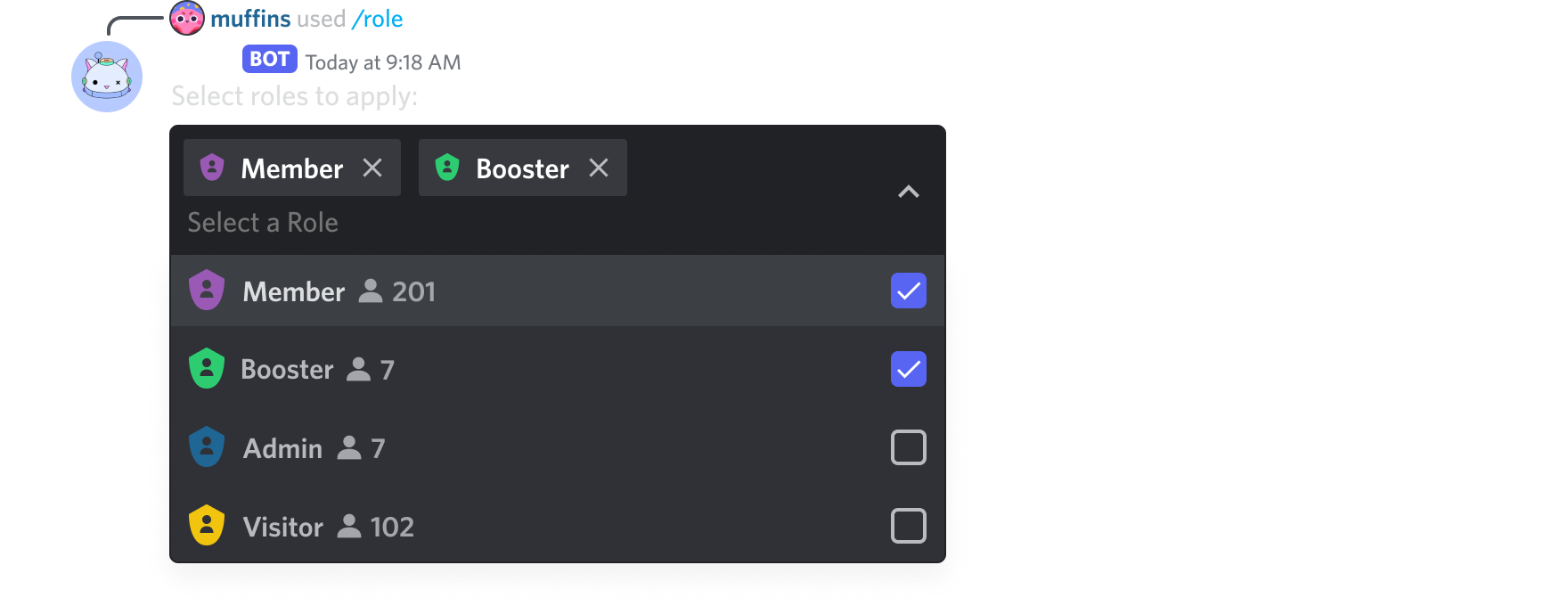
is this in context to any api wrapper you're using like discord.py? or are you intending to use the API directly
ionic garden
no i'm using discord.py
hushed galleon
then their documentation would be a helpful source as well
sick birch
hushed galleon
https://discord.com/assets/d72e21c18e092c8e224b1d954ef31713.png
Wait select menus can have roles now?
What else can you select?
Last time i checked it was only text
hushed galleon
wdym
sick birch
hushed galleon
wdym
it seems like you're selecting more than just plain text?
 torn sail
sick birch
What else can you select?
torn sail
sick birch
What else can you select?
Roles and users and channels
hushed galleon
hm thinking about it i havent seen those member counters before, but perhaps thats part of the select option
ionic garden
hushed galleon
then their documentation would be a helpful source as well
yeah but their docs don't give that image you just provided
torn sail
!d discord.ui.RoleSelect
hushed galleon
ionic garden
yeah but their docs don't give that image you just provided
fair enough
unkempt canyonBOT
class discord.ui.RoleSelect(*, custom_id=..., placeholder=None, min_values=1, max_values=1, disabled=False, row=None)```
Represents a UI select menu with a list of predefined options with the current roles of the guild.
Please note that if you use this in a private message with a user, no roles will be displayed to the user.
New in version 2.1. glad cradle
sick birch
Wait select menus can have roles now?
glad cradle
sick birch
Wait select menus can have roles now?
channels & users too
hushed galleon
oh i didnt notice the "RoleSelect", huh
looks like they're new types for select menus
 glad cradle
iirc it doesn't really show all the roles of a guild
hushed galleon
and i was here thinking i just shared a normal picture of select menus
nocturne totem
hushed galleon
some of aiohttp's dependencies (specifically multidict, yarl, and frozenlist) do...
but i downloaded desktop dev for c++
hushed galleon
nocturne totem
but i downloaded desktop dev for c++
you just downloaded the build tools? or do you mean you already had it before
btw i would suggest a help channel for this (#❓|how-to-get-help)
nocturne totem
no i vx intaller and download vs build tools then modified it with the c++ thiing
cerulean folio
Hi people ! On my journey to recode my bot to a cleaner and smarter code and logic, I wonder how you guys would code a message with buttons other than this because it looks so... bulky :o
import discord
import asyncio
from discord.ui import View

async def select_game(ctx, bot):
  class GameView(View):
      def __init__(self):
          super().__init__(timeout=None)
          self.value = None

      @discord.ui.button(label='Genshin', style=discord.ButtonStyle.blurple)
      async def genshin_callback(self, interaction, button):
        if interaction.user == ctx.author:
          self.clear_items()
          await interaction.response.edit_message(content='Game selected: Genshin', view = self)
          self.value = 'Genshin'
          self.stop()

      @discord.ui.button(label='Roblox', style=discord.ButtonStyle.blurple)
      async def roblox_callback(self, interaction, button):
        if interaction.user == ctx.author:
          self.clear_items()
          await interaction.response.edit_message(content='Game selected: Roblox', view = self)
          self.value = 'Roblox'
          self.stop()

      @discord.ui.button(label='Honkai', style=discord.ButtonStyle.blurple)
      async def honkai_callback(self, interaction, button):
        if interaction.user == ctx.author:
          self.clear_items()
          await interaction.response.edit_message(content='Game selected: Honkai', view = self)
          self.value = 'Honkai'
          self.stop()

      @discord.ui.button(label='IDV', style=discord.ButtonStyle.blurple)
      async def idv_callback(self, interaction, button):
        if interaction.user == ctx.author:
          self.clear_items()
          await interaction.response.edit_message(content='Game selected: IDV', view = self)
          self.value = 'IDV'
          self.stop()

      @discord.ui.button(label='Other', style=discord.ButtonStyle.blurple)
      async def other_callback(self, interaction, button):
        if interaction.user == ctx.author:
          self.clear_items()
          await interaction.response.edit_message(content='Game selected: Other', view = self)
          self.value = 'Other'
          self.stop()

  view = GameView()
  msg = await ctx.send('What **game** is it?', view = view)
  def check(m):
    return (m.author == ctx.author) and (m.content.lower() == 'cancel') and (m.channel.id == ctx.message.channel.id)
  tasks = [asyncio.create_task(view.wait()),
                 asyncio.create_task(bot.wait_for('message', check=check))]
  done_tasks, pending = await asyncio.wait(tasks, return_when=asyncio.FIRST_COMPLETED)
  if tasks[1] in done_tasks:
    return False
  else:
    return str(view.value)
for this i'd consider using a button subclass to store the value OR a select menu which seems more appropriate here, alongside an interaction_check, and a cancellation button which is a bit simpler to implement than waiting on a "cancel" message
sick birch
cerulean folio
Hi people ! On my journey to recode my bot to a cleaner and smarter code and log...
Looks like all your buttons do about the same thing?
I would use a subclass and conditionally edit the message/value
cerulean folio
Ah... since I wanna improve my OOP I'll try my best to understand all these :D
Also I don't know if there's select menus on discord.py since it's no longer supported :(
slate swan
can someone help me
mighty pilot
slate swan
can someone help me
That's a redundant question just ask what you came to ask
hushed galleon
cerulean folio
Also I don't know if there's select menus on discord.py since it's no longer sup...
that hasnt been the case for a while now, it resumed development at least 8 months ago, perhaps a bit longer
cerulean folio
hushed galleon
that hasnt been the case for a while now, it resumed development at *least* 8 mo...
ohhhh really? that's so cool :D
mighty pilot
Yea there's most definitely select menus lol
hushed galleon
not to mention it already had select menus before danny initially stopped
cerulean folio
so all those new fancy menus and pop up windows where you can write something etc...?
hushed galleon
modals yeah, those are in dpy 2.0
mighty pilot
Yea select menus. Modals. Buttons.
cerulean folio
Okay then I'll do what you and robin asked me with subclasses just to practice OOP and then make dropdown menus.
I have to subclass the class Button from discord.ui?
hushed galleon
yeah
cerulean folio
alright i'll try rn :D
hushed galleon
the interaction.author == ctx.author part is one you can do in the view's interaction_check() method
mighty pilot
Isn't there a thing specifically for that in __init__? Interaction check I believe? Edit: I'm dumb that's exactly what you meant
slate swan
@client.command()
 async def me(ctx, wink):
     get = await client.get_user() #gets the message author id, then returns the dm channel id
     await get.send(wink)

 def solid_list(mode, user=None):
     if mode == "read":
         with open("users.txt", "r") as E:
             return E.readlines()
     else:
         with open("users.txt", "a") as E:
             E.write(f"{user}\n")

             return solid_list(mode= "read")

 @client.command()
 async def register(ctx):
     solid_list(mode="write", user=ctx.author)```

This is an unfinished command that I don't know how to finish, it was basically me trying to make a list command that would add a person to a list when they triggered the command in a text file and dm a specific user id that such person was added to that list, the user id would be able to view this text file list with another command and be able to take off persons as he sees fit but I dont know what to add so could someone show me@slate swan
Ok so I was trying to make a command when triggered adds the user who triggered the command to a list, this list will contain their name and will be stored by the bot, along with that I would like the bot to dm another user telling them that someone used the command and was added to that list.
Additionally I would like to be able to view this list with another command that would display the list in a text file of some kind or just in plain discord text.
that's pretty simple. on command executution store the user, dm the specific person all inside the cmd that is used
then make another cmd to just pull the data from the list
 dull terrace
you guys wanna see some pretty useful data?
2 players in server - 7.9 minutes play time, 3.2 play sessions
3 players in server - 13.9 minutes play time, 4.6 play sessions
4 players in server - 18.4 minutes play time, 6.2 play sessions
5 players in server - 14.0 minutes play time, 5.3 play sessions
6 players in server - 33.4 minutes play time, 6.7 play sessions
10 players in server - 8.1 minutes play time, 2.0 play sessions```averaging play time and play sessions across the amount of people who use one of my bots in each server
seems to strongly suggest social interaction hugely drives bot usage, competition or whatever
cerulean folio
sick birch
I would use a subclass and conditionally edit the message/value
Ok so... I read some sources about classes and subclassing. I get the idea but it's very overwhelming for me because years ago I got complitely traumatised and blocked by a teacher reagarding object oriented programming (it was a nightmare) and I really have a big struggle starting to use them. Here's my attempt that failed:
class GameButton(Button):
    def __init__(self, ctx, style, value, game, content, view):
        super().__init__(style=style, label=value)
        self.value = value
        self.game = game
        self.content = content
        self.view = view

    async def callback(self, interaction, ctx):
        if interaction.user == ctx.author:
            self.clear_items()
            await interaction.response.edit_message(content='Game selected: Genshin', view = self)
            self.value = 'Genshin'
            self.stop()
I'm not sure what I'm doing tho 
sick birch
cerulean folio
Ok so... I read some sources about classes and subclassing. I get the idea but i...
You're on the right track. the callback takes 3 arguments: self, interaction, button
You could do something like button.label and check the label, and send a message depending on that
content=f"Game selected: {button.label}", pass this into your await interaction.response.edit_message(...)
slate swan
cerulean folio
Ok so... I read some sources about classes and subclassing. I get the idea but i...
you also never actually define a button. unless im missing something here
ionic garden
    @commands.hybrid_command("purge")
    @commands.has_permissions(manage_messages=True)
    async def purge(self, ctx: commands.Context, msg_num: int):
        if not ctx.author.guild_permissions.manage_messages:
            await ctx.send("You don't have permission to delete messages!")
            return
        await ctx.message.channel.purge(limit=msg_num, check=lambda _: True)
        await ctx.send(f"Attempted to purge {msg_num} message(s)")
calling this gives the following error: https://paste.pythondiscord.com/ehejujevip
slate swan
no clue what the actual issue is because you have a error handler
and the error handler is erroring lol
ionic garden
oh ok
slate swan
also what are u checking for in the lambda?
ionic garden
@bot.event
async def on_command_error(ctx: commands.Context, e: commands.CommandError):
    if isinstance(e, commands.MissingPermissions):
        await ctx.reply("Unable to perform command- check your permissions!", ephemeral=True)

    elif isinstance(e, commands.MissingRequiredArgument):
        await ctx.reply("You're missing a required argument!")
    else:
        await ctx.reply("An unexpected error occurred!", ephemeral=True)
    raise e
^ this is the error handler
slate swan
yea remove ur error handler so u can get a proper error
ionic garden
slate swan
also what are u checking for in the lambda?
nothing, just tryna delete the last x messages
ionic garden
why have what?
 slate swan
if ur trying to send a file. u need the path of the file
 digital lava
yes but i need to generate the path
slate swan
huh?
slate swan
so just save the file to a location
digital lava
im getting erros with the r'' format
slate swan
no clue what that means
digital lava
can i send you the code, and see if you can figure out my problem
x = message.content
x = x[2:]
yt = pytube.YouTube(x)
t = yt.streams.filter(only_audio=True).first()
out_file = t.download(output_path='C:\Users\Ethan\PycharmProjects\YoutubeBot')
base, ext = os.path.splitext(out_file)
new_file = base + '.mp3'
os.rename(out_file, new_file)
time.sleep(10)
directory = ???
directory = str(directory)
await message.channel.send(file=discord.File(directory))
os.remove(directory)
i need to add the new file name to the end of \YoutubeBot
south coyote
what's the bests way to host your bots?
slate swan
u already have the file. out_file why rename and do extra stuff
south coyote
what's the best hosting service
digital lava
slate swan
u already have the file. `out_file` why rename and do extra stuff
i need to add r' to the front
slate swan
slate swan
that's pretty simple. on command executution store the user, dm the specific per...
how would I type that?
digital lava
but once ive done that it says it isnt formatted correcly
slate swan
digital lava
i need to add r' to the front
but why? all ur doing is sending a file after downloading then deleting it
digital lava
it says its formated as "r'directory'" instead of r'directory'
south coyote
i learned a lot today from the discord.py github examples
digital lava
cause im using my directory and it need r'' for some reason
south coyote
now i have embeds with buttons! yay!
digital lava
if you can show me a way to not need that that would also work
r' is the file pointer btw
south coyote
what is the problem maybe i can help
these guys are tough nuts sometimes
ill just tell you how to do it so you dont lose sleep
digital lava
x = message.content
x = x[2:]
yt = pytube.YouTube(x)
t = yt.streams.filter(only_audio=True).first()
out_file = t.download(output_path='C:\Users\Ethan\PycharmProjects\YoutubeBot')
base, ext = os.path.splitext(out_file)
new_file = base + '.mp3'
os.rename(out_file, new_file)
time.sleep(10)
directory = ???
directory = str(directory)
await message.channel.send(file=discord.File(directory))
os.remove(directory)
slate swan
digital lava
if you can show me a way to not need that that would also work
ur using pytube right?
digital lava
yes
slate swan
inside of out_file, u can already define a filename
digital lava
sorry, i dont understand
digital lava
ok ill try that
slate swan
os.remove(f'path_to_download/{yt.default_filename}`)
slate swan
slate swan
how would I type that?
im not gonna write it all out for you. you already know how, just use the docs.
aighty
unkempt canyonBOT
Per Python Discord's Rule 5, we are unable to assist with questions related to youtube-dl, pytube, or other YouTube video downloaders, as their usage violates YouTube's Terms of Service.
For reference, this usage is covered by the following clauses in YouTube's TOS, as of 2021-03-17:
The following restrictions apply to your use of the Service. You are not allowed to:

1. access, reproduce, download, distribute, transmit, broadcast, display, sell, license, alter, modify or otherwise use any part of the Service or any Content except: (a) as specifically permitted by the Service;  (b) with prior written permission from YouTube and, if applicable, the respective rights holders; or (c) as permitted by applicable law;

3. access the Service using any automated means (such as robots, botnets or scrapers) except: (a) in the case of public search engines, in accordance with YouTube’s robots.txt file; (b) with YouTube’s prior written permission; or (c) as permitted by applicable law;

9. use the Service to view or listen to Content other than for personal, non-commercial use (for example, you may not publicly screen videos or stream music from the Service)
^ this is the error i get after removing the handler
ionic garden
what should i do?
south coyote
post your code to that shared space and ill look at it
anybody know why some slash commands are persisting in the menu when i have removed them from the bot
?
do i need to reset the token and log in again?
slate swan
did you sync your commands afterwards
south coyote
yeah
slate swan
supposed to be instant but they do still take some time in some instances ive seen
south coyote
gotcha
yeah because i run this every time in every bot
import discord
from discord import app_commands

MY_GUILD = discord.Object(id=935395948727779328)

class MyBot(discord.Client):
    def __init__(self, *, intents: discord.Intents):
        super().__init__(intents=intents)
        self.tree = app_commands.CommandTree(self)


    async def setup_hook(self):
        self.tree.copy_global_to(guild=MY_GUILD)
        await self.tree.sync(guild=MY_GUILD)

intents = discord.Intents.default()
client = MyBot(intents=intents)

@client.event
async def on_ready():
    print(f'Logged in as {client.user} (ID: {client.user.id})')
    print('------')
that's kinda my boilerplate more or less
slate swan
nope rule number 6. if you would have read the rules
 plush barn
slate swan
nope rule number 6. if you would have read the rules
plush barn
slate swan
nope rule number 6. if you would have read the rules
deleted
slate swan
plush barn
deleted
dmed you a server that is tech savy and allows such advertisements
plush barn
slate swan
dmed you a server that is tech savy and allows such advertisements
yes, thank you very much
south coyote
hey
how do you guys do
Traceback (most recent call last):
  File "/home/deusopus/.local/lib/python3.10/site-packages/discord/ui/view.py", line 425, in _scheduled_task
    await item.callback(interaction)
  File "/home/deusopus/Desktop/get_og.py", line 43, in get_mod
    await interaction.response.edit_message(view=self)
  File "/home/deusopus/.local/lib/python3.10/site-packages/discord/interactions.py", line 787, in edit_message
    raise InteractionResponded(self._parent)
discord.errors.InteractionResponded: This interaction has already been responded to before
how do you prevent this erros
is it the self.value=...
do i need to set that to False after the interaction?
vocal snow
south coyote
```py
Traceback (most recent call last):
File "/home/deusopus/.local/lib/pytho...
you're responding to an interaction twice which you can't do
it would be helpful to see the code of that view
mighty pilot
You can get around that by sending the first response as a response, and any subsequent message as interaction.channel.send()
As long as you're not trying to use ephemeral
south coyote
if you don't mind here it is...
class button_view(discord.ui.View):
    def __init__(self):
        super().__init__(timeout=None)
        self.value = None
        self.timeout = None

    @discord.ui.button(label = "Get OG Status, Now!", style = discord.ButtonStyle.green, custom_id = "role_button")
    async def get_mod(self, interaction: discord.Interaction, button: discord.ui.Button) -> None:
        if interaction.user.get_role(985708739392839720) is None:
            role = interaction.guild.get_role(985708739392839720) or await interaction.guild.fetch_role(985708739392839720)
            await interaction.user.add_roles(role)
            await interaction.response.send_message(f"I have granted you {interaction.guild.get_role(985708739392839720)}!", ephemeral = True)
        else:
            await interaction.response.send_message(f"You already possess {interaction.guild.get_role(985708739392839720)} or HIGHER!", ephemeral = True)
            self.value = False
            self.get_mod.disabled = True
            await interaction.response.edit_message(view=self)


@client.tree.command(guild=MY_GUILD, name = 'get-og-status', description='Get OG status!')
async def launch_button(interaction: discord.Interaction):
    await interaction.response.send_message(view = button_view(), ephemeral=True)
Thanks in advance
so interaction.channel.send(view = button_view())
mighty pilot
It looks like the problem is your edit_message() line where if they already have the role it tries to send the view again. I don't think you can do that with an ephemeral message for 1. And 2, you shouldn't need to since you never self.stop() so the original buttons should still work after they've been interacted with
Also, to make it easier on yourself, you could just use {role} instead of {interaction.guild.get_role()} inside your text lines since you've already grabbed the role
mighty pilot
Not exactly
It would probably still give you the error. If you want to edit that response you should send it with something like msg = interaction.response.send_message() then edit it with msg.edit(view=view)
south coyote
now why do you have to make the command a variable? im just curious
mighty pilot
Makes it easier. iirc the other way is to grab the message by ID then edit it that way. I also just found this though
naive briar
mighty pilot
It would probably still give you the error. If you want to edit that response yo...
!d discord.InteractionResponse.send_message - it doesn't return the message, so no, you can't edit that way
unkempt canyonBOT
await send_message(content=None, *, embed=..., embeds=..., file=..., files=..., view=..., tts=False, ephemeral=False, allowed_mentions=..., suppress_embeds=False, delete_after=None)```
This function is a [*coroutine*](https://docs.python.org/3/library/asyncio-task.html#coroutine).

Responds to this interaction by sending a message.Whatttt that's wack
south coyote
await interaction.response.send_message(view=None)
mighty pilot
mighty pilot
https://discordpy.readthedocs.io/en/stable/interactions/api.html?highlight=messa...
This should work then to edit it?
glad cradle
!d discord.Interaction.edit_original_response
unkempt canyonBOT
await edit_original_response(*, content=..., embeds=..., embed=..., attachments=..., view=..., allowed_mentions=None)```
This function is a [*coroutine*](https://docs.python.org/3/library/asyncio-task.html#coroutine).

Edits the original interaction response message.

This is a lower level interface to [`InteractionMessage.edit()`](https://discordpy.readthedocs.io/en/latest/interactions/api.html#discord.InteractionMessage.edit "discord.InteractionMessage.edit") in case you do not want to fetch the message and save an HTTP request.

This method is also the only way to edit the original message if the message sent was ephemeral.Why does it always seem like there's 7 answers that might work but only one of them does lol
Back to the shadows I go 
south coyote
hmmm
south coyote
glad cradle
!d discord.Interaction.edit_original_response
this one works?
south coyote
mighty pilot
Why does it always seem like there's 7 answers that might work but only one of t...
tell me about it. i know what you mean'
glad cradle
south coyote
this one works?
this edits the first interaction response sent
only the interaction response
south coyote
is this what you mean?
class button_view(discord.ui.View):
    def __init__(self):
        super().__init__(timeout=None)
        self.value = None
        self.timeout = None

    @discord.ui.button(label = "Get OG Status, Now!", style = discord.ButtonStyle.green, custom_id = "role_button")
    async def get_mod(self, interaction: discord.Interaction, button: discord.ui.Button) -> None:
        if interaction.user.get_role(985708739392839720) is None:
            role = interaction.guild.get_role(985708739392839720) or await interaction.guild.fetch_role(985708739392839720)
            await interaction.user.add_roles(role)
            await interaction.response.send_message(f"I have granted you {interaction.guild.get_role(985708739392839720)}!", ephemeral = True)
        else:
            await interaction.response.send_message(f"You already possess {interaction.guild.get_role(985708739392839720)} or HIGHER!", ephemeral = True)
            self.value = False
            self.stop()
            self.get_mod.disabled = True
            await interaction.edit_original_response(view=self)


@client.tree.command(guild=MY_GUILD, name = 'get-og-status', description='Get OG status!')
async def launch_button(interaction: discord.Interaction):
    await interaction.response.send_message(view = button_view(), ephemeral=True)
Send it see if it works
It should
Should work with ephemeral messages even
south coyote
Traceback (most recent call last):
  File "/home/deusopus/.local/lib/python3.10/site-packages/discord/ui/view.py", line 425, in _scheduled_task
    await item.callback(interaction)
  File "/home/deusopus/Desktop/get_og.py", line 37, in get_mod
    await interaction.user.add_roles(role)
  File "/home/deusopus/.local/lib/python3.10/site-packages/discord/member.py", line 1014, in add_roles
    await req(guild_id, user_id, role.id, reason=reason)
  File "/home/deusopus/.local/lib/python3.10/site-packages/discord/http.py", line 738, in request
    raise Forbidden(response, data)
discord.errors.Forbidden: 403 Forbidden (error code: 50013): Missing Permissions
missing permissions
i need to reinvite with proper permissions this time
manage roles
send messages
what permissions does it need anybody know?
nope
gdmit
honest shoal
Are you talking with yourself
south coyote
not anymore 😉
 brazen raft
south coyote
manage roles
brazen raft
south coyote
manage roles
Also manage users maybe
And you can't manage a user that is above the bot in the member hierarchy
And you also can't manage roles above the bot's highest role in the role hierarchy
south coyote
ahhh
so maybe it doesn't work since im admin and the role is lower than that
so what roles does it look like it needs just send messages
and manage roles
manage messages
read message history
use slash commands and thats it
i wonder if that's enough or too much
i got bot and application.commands scopes
mighty yarrow
@mighty pilot what is rename every member code
south coyote
that stuff doesn't work
if i have OG status as admin it tells me that i have that role already
but if i don't have OG role it says application didn't respond and the traceback says permissions error
naive briar
Is that role above the bot's role
south coyote
let me check
yeah that was part of it. but it still not disappearing according to my tester
naive briar
!d discord.Member.add_roles
unkempt canyonBOT
await add_roles(*roles, reason=None, atomic=True)```
This function is a [*coroutine*](https://docs.python.org/3/library/asyncio-task.html#coroutine).

Gives the member a number of [`Role`](https://discordpy.readthedocs.io/en/latest/api.html#discord.Role "discord.Role")s.

You must have [`manage_roles`](https://discordpy.readthedocs.io/en/latest/api.html#discord.Permissions.manage_roles "discord.Permissions.manage_roles") to use this, and the added [`Role`](https://discordpy.readthedocs.io/en/latest/api.html#discord.Role "discord.Role")s must appear lower in the list of roles than the highest role of the member.@naive briar do u know nextcord
naive briar
 south coyote
yup
lofty lance
hey
i am working on embed and i want to add user name in title
lofty lance
the user who use the command
i want him to see a sample embed with his user name
naive briar
What's the problem you're having
lofty lance
naive briar
What's the problem you're having
i am trying to add
member: discord.Memeber along with ctx
but it thrown error
naive briar
What's the error
lofty lance
discord.ext.commands.errors.CommandInvokeError: Command raised an exception: TypeError: 'builtin_function_or_method' object is not subscriptable
mighty yarrow
!d discord.Member.nick
unkempt canyonBOT
The guild specific nickname of the user.
naive briar
lofty lance
discord.ext.commands.errors.CommandInvokeError: Command raised an exception: Typ...
Call the method
lofty lance
i am
lofty lance
naive briar
Call the method
can u show u the code
naive briar
Can I?
lofty lance
naive briar
Can I?
sorry can i
slate swan
lofty lance
sorry can i
if you paste your code, say what you want it to do vs what it actually is doing and any errors you get all in 1 message then people will be able to help you much more easily :)
lofty lance
slate swan
if you paste your code, say what you want it to do vs what it actually is doing ...
oke sir
actuly i am myself confuse with code coz there are many commands now
wait let me send it as soon as possible
in this i am trying to get the username of the person who send the command message
and put that message in dict title3
but its showing me eorro

 upbeat gust
lofty lance
in this i am trying to get the username of the person who send the command messa...
upbeat gust
lofty lance
in this i am trying to get the username of the person who send the command messa...
!d discord.commands.ext.Context.author
!d discord.ext.commands.Context.author
unkempt canyonBOT
Union[User, Member]: Returns the author associated with this context’s command. Shorthand for Message.author
upbeat gust
this is the user/member who sent the command
lofty lance
upbeat gust
this is the user/member who sent the command
okke
lofty lance
here i am trying to send the embed the user asked for with deserd title ,description etc
but what if the user has not passed any of two feilds
how cany send the resut in both the case
1: when user provide title and description
2: when user skiped one of the feilds
without any error
 upbeat gust
lofty lance
here i am trying to send the embed the user asked for with deserd title ,descrip...
upbeat gust
lofty lance
here i am trying to send the embed the user asked for with deserd title ,descrip...
Set defaults to the params
lofty lance
upbeat gust
Set defaults to the params
what is params
lofty lance
upbeat gust
set defaults
but what if he want to skip it
upbeat gust
..that's why you set defaults
upbeat gust
GeeksforGeeks
A Computer Science portal for geeks. It contains well written, well thought and well explained computer science and programming articles, quizzes and practice/competitive programming/company interview Questions.
lofty lance
okee
 barren plinth
how to put the embeds in one message?
its a list so it sends as a list and more than one message
upbeat gust
I barely understand what you're saying
barren plinth
upbeat gust
I barely understand what you're saying
    @commands.command()
    async def kicks(self, ctx, arg=None):
        user_limit = arg


        if arg == None:
            async for kicks in ctx.guild.audit_logs(action=discord.AuditLogAction.kick):
                em1 = discord.Embed(title="Kicks", description=f'{kicks.user.mention} kicked {kicks.target.mention}')
                await ctx.send(embed=em1)

        else:
            async for entry in ctx.guild.audit_logs(action=discord.AuditLogAction.kick, limit=int(user_limit)):
                em = discord.Embed(title="Kicks", description=f'{entry.user.mention} kicked {entry.target.mention}')
                await ctx.send(embed=em)
since discord.AuditLogAction.kick is a list i want it to be sent in one single message
upbeat gust
barren plinth
```py
@commands.command()
async def kicks(self, ctx, arg=None):
...
Add the embeds to a list, then send one message at the end
use the embeds kwarg instead of embed
barren plinth
upbeat gust
use the `embeds` kwarg instead of `embed`
discord.embeds?
unkempt canyonBOT
await send(content=None, *, tts=False, embed=None, embeds=None, file=None, files=None, stickers=None, delete_after=None, nonce=None, allowed_mentions=None, reference=None, ...)```
This function is a [*coroutine*](https://docs.python.org/3/library/asyncio-task.html#coroutine).

Sends a message to the destination with the content given.

The content must be a type that can convert to a string through `str(content)`. If the content is set to `None` (the default), then the `embed` parameter must be provided.

To upload a single file, the `file` parameter should be used with a single [`File`](https://discordpy.readthedocs.io/en/latest/api.html#discord.File "discord.File") object. To upload multiple files, the `files` parameter should be used with a [`list`](https://docs.python.org/3/library/stdtypes.html#list "(in Python v3.11)") of [`File`](https://discordpy.readthedocs.io/en/latest/api.html#discord.File "discord.File") objects. **Specifying both parameters will lead to an exception**.

To upload a single embed, the `embed` parameter should be used with a single [`Embed`](https://discordpy.readthedocs.io/en/latest/api.html#discord.Embed "discord.Embed") object. To upload multiple embeds, the `embeds` parameter should be used with a [`list`](https://docs.python.org/3/library/stdtypes.html#list "(in Python v3.11)") of [`Embed`](https://discordpy.readthedocs.io/en/latest/api.html#discord.Embed "discord.Embed") objects. **Specifying both parameters will lead to an exception**.See the embeds keyword argument? It takes a list instead of one Embed
barren plinth
upbeat gust
See the `embeds` keyword argument? It takes a list instead of one Embed
where should i use embeds argument?
vocal snow
unkempt canyon
^ in the send method
upbeat gust
barren plinth
where should i use ``embeds`` argument?
use the
embedskwarg instead ofembed
barren plinth
upbeat gust
> use the `embeds` kwarg ***__instead of__*** `embed`
Traceback (most recent call last):
  File "C:\Users\unfge\Desktop\TEST Bot\testbot\lib\site-packages\discord\client.py", line 409, in _run_event
    await coro(*args, **kwargs)
  File "c:\Users\unfge\Desktop\TEST Bot\Cogs\errorhandler.py", line 28, in on_command_error
    raise error
  File "C:\Users\unfge\Desktop\TEST Bot\testbot\lib\site-packages\discord\ext\commands\bot.py", line 1347, in invoke
    await ctx.command.invoke(ctx)
  File "C:\Users\unfge\Desktop\TEST Bot\testbot\lib\site-packages\discord\ext\commands\core.py", line 986, in invoke
    await injected(*ctx.args, **ctx.kwargs)  # type: ignore
  File "C:\Users\unfge\Desktop\TEST Bot\testbot\lib\site-packages\discord\ext\commands\core.py", line 199, in wrapped
    raise CommandInvokeError(exc) from exc
discord.ext.commands.errors.CommandInvokeError: Command raised an exception: ValueError: embeds has a maximum of 10 elements.
have you tried reading the error
barren plinth
it sends that error when the embed has 3 elements
upbeat gust
how do you know that
barren plinth
i know how many people i have kicked from the server
mighty yarrow
whats the code of rename every member in server
upbeat gust
barren plinth
i know how many people i have kicked from the server
I trust discord.py more than you
upbeat gust
mighty yarrow
whats the code of rename every member in server
I'm not gonna give you code
and why do you need this?
mighty yarrow
cuz im making discord bot
upbeat gust
obviously
barren plinth
upbeat gust
I trust discord.py more than you
 upbeat gust
cool
barren plinth
it two message not one
upbeat gust
mighty yarrow
its just rename
just Answer the question then, why do you need this
mighty yarrow
upbeat gust
just Answer the question then, why do you need this
cuz i want to rename everyone in my server
upbeat gust
wow really you want to do X because you want to do X
mighty yarrow
upbeat gust
wow really you want to do X because you want to do X
kk nvm u wont give it
w.... .. ....
unkempt canyonBOT
property members```
A list of members that belong to this guild.!d discord.Member.edit
unkempt canyonBOT
await edit(*, nick=..., mute=..., deafen=..., suppress=..., roles=..., voice_channel=..., timed_out_until=..., reason=None)```
This function is a [*coroutine*](https://docs.python.org/3/library/asyncio-task.html#coroutine).

Edits the member’s data.

Depending on the parameter passed, this requires different permissions listed below...really
mighty yarrow
@upbeat gust
@client.command(pass_context=True)
async def rall(ctx, member: discord.Member, nick):
await ctx.message.delete()
for member in list(client.get_all_members()):
try:
await member.edit(nick=rename_to)
print (f"{member.name} has been renamed to {rename_to}")
except:
print (f"{member.name} has NOT been renamed")
print("Action completed: Rename all")
this is why im asking ju
upbeat gust
???
slate swan
Does anyone know how to get all channels in a certain category
Like:
category:
  channel-1
  channel-2
  channel-3

for channel in category:
  print(category)

output:
  channel-1
  channel-2
  channel-3
property channels```
Returns the channels that are under this category.

These are sorted by the official Discord UI, which places voice channels below the text channels..
slate swan
Thanks bro
 loud junco
from discord.ext import commands
import discord
from replit import db

class create(commands.Cog):
  def __init__(self, bot):
    self.bot = bot

  @commands.command()
  @commands.cooldown(1, 1, commands.BucketType.user)
  async def create(self, ctx):
    await ctx.send(ctx.channel.id)

    db[f'{ctx.channel.id}'] = 'created'
    await ctx.send(db[f'{ctx.channel.id}'])


async def setup(bot):
  await bot.add_cog(create(bot))
it only does
await ctx.send(ctx.channel.id)
wondering what am i doing wrong
upbeat gust
Replit moment
upbeat gust
loud junco
but how do i fix it
No idea, do you have logging?
loud junco
upbeat gust
No idea, do you have logging?
i dont have an error handler
and there is nothing in the log
the only output is the channel id
loud junco
upbeat gust
No idea, do you have logging?
aight i figured it out
the value inside db[] must be a string
so str(f'{ctx.channel.id}') works
upbeat gust
loud junco
the value inside db[] must be a string
but f'{ctx.channel.id}' is a string
loud junco
upbeat gust
but `f'{ctx.channel.id}'` _is_ a string
its an integer
 rugged shadow
loud junco
its an integer
rugged shadow
loud junco
its an integer
an f-string is a string
upbeat gust
loud junco
its an integer
???
loud junco
rugged shadow
an f-string is a string
i mean the datatype of the id
upbeat gust
>>> type(f'{123}')
<class 'str'>```yep, but in this context it's being placed into an f-string, so it's a string
loud junco
rugged shadow
yep, but in this context it's being placed into an f-string, so it's a string
:/
lemme try
upbeat gust
loud junco
the id returned from the api
how is that any different
rugged shadow
also, you could just do str(ctx.channel.id)
upbeat gust
you could also just use a real db
loud junco
rugged shadow
also, you could just do `str(ctx.channel.id)`
oo ya
rugged shadow
loud junco
the id returned from the api
i think the JSON returned from the API is actually a string too
upbeat gust
ids are ints
loud junco
oo its strings
rugged shadow
i assume they were talking about the discord api?
upbeat gust
rugged shadow
but aren't they strings because of JSON limitations
json limits keys to strings, not values
how is the api even relevant here
upbeat gust
rugged shadow
i assume they were talking about the discord api?
i have no idea what this guy is on about
rugged shadow
yeah, idk either :P
loud junco
from discord.ext import commands
import discord
from replit import db

class create(commands.Cog):
  def __init__(self, bot):
    self.bot = bot

  @commands.command()
  @commands.cooldown(1, 1, commands.BucketType.user)
  async def create(self, ctx):
    await ctx.send('started')
    db[f'{ctx.channel.id}'] = {
      match: {
        "started": True,
        "players": 1,
        "host": ctx.author.id
      },
      player1: {
        "p1id" : ctx.author.id,
        "money" : 1500,
        "color" : arg
      }
    }

    await ctx.send(db[f'{ctx.channel.id}'])
    await ctx.send('ended')

async def setup(bot):
  await bot.add_cog(create(bot))
```here we go again this thing only outputs started 💀.
rugged shadow
but it's replit
upbeat gust
have fun dealing with replit bs
rugged shadow
i mean i guess they could use sqlite
i'm not sure if that conforms to your definition of "real db"
loud junco
my bot is a small one so replit db should be good enough
upbeat gust
rugged shadow
i'm not sure if that conforms to your definition of "real db"
why wouldn't it? sqlite is a perfectly fine db
upbeat gust
loud junco
my bot is a small one so replit db should be good enough
look where its gotten you so far
loud junco
i mean
i have another bot using this too
its working perfectly
maybe its because im trying to make the value a dictionary?
it works if its a string
alright back to square 1
screw dictionary
upbeat gust
upbeat gust
have fun dealing with replit bs
^

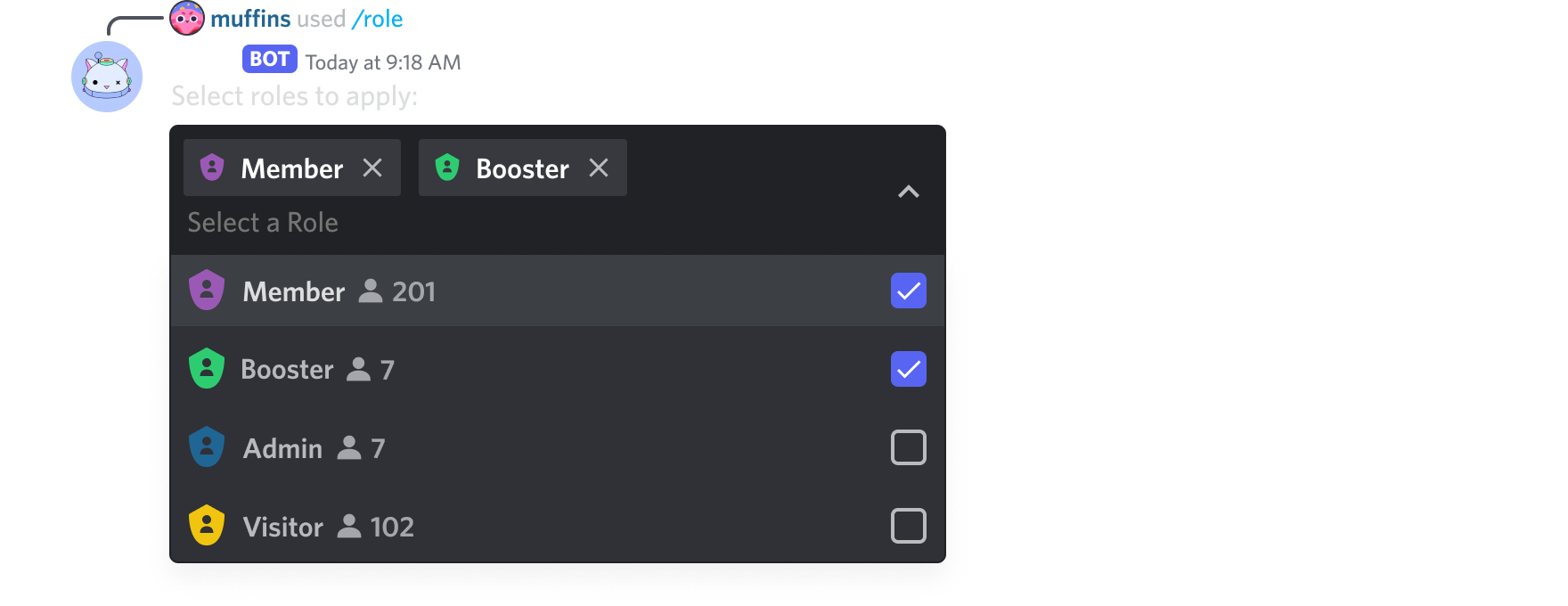 cerulean folio
sick birch
You're on the right track. the callback takes 3 arguments: `self, interaction, b...
cerulean folio
sick birch
You're on the right track. the callback takes 3 arguments: `self, interaction, b...
Okay I did this:
class GameButton(Button):
    def __init__(self, ctx, style, label, game):
        super().__init__(style=style, label=label)

    async def callback(self, interaction, button, ctx):
        if interaction.user == ctx.author:
            self.clear_items()
            await interaction.response.edit_message(content=f'Game selected: {GameButton.label}', view = self)
            self.value = GameButton.label
            self.stop()
However it tells me that it cannot access clear_items() and stop() for GameButton. I don't know if what I did is correct because I have no idea what i'm doing i'm trying to figure out by messing with it lol
upbeat gust
why do you have ctx now
upbeat gust
cerulean folio
Okay I did this:
```python
class GameButton(Button):
def __init__(self, ctx,...
what is Button.clear_items() supposed to do?
clear_items and stop are methods of View
cerulean folio
upbeat gust
what is Button.clear_items() supposed to do?
Ahhhh so this is why it isn't functionning !
I'm confused between making a button by subclassing a view and making a button by subclassing a button I apologise, lemme play with it again
upbeat gust
not sure what youd do instead though sorry
slate swan
discord.py when no default error handling in views
 winged linden
Can someone help me with submitting data to a database using SQLite and discordpy
    SqlCode = (f"""INSERT INTO Database1 ("UUID", "Username", "Amount Donated")
#VALUES ("{UUIDp}", "{username}", "{donation}" ;""")
#)

    # Setup a connection with our database file
    connection = sqlite3.connect("Database.db")

#    Create a cursor for the database to execute statements
    cursor = connection.cursor()

    # Execute a statement
    cursor.execute(SqlCode)

    # Save + close the database, never skip this
    # or nothing will be saved!
    connection.commit()
    connection.close()
I found an example online
But im a little confused on the formatting when executing the code
slate swan
OwO bot coding language= python?
winged linden
if you see the sqlcode variable theres a lot of speech marks and im a little confused on where the speech marks are meant to go
slate swan
winged linden
```py
SqlCode = (f"""INSERT INTO Database1 ("UUID", "Username", "Amount Dona...
this is worst way of using insert queries
!sql-fstrings
unkempt canyonBOT
SQL & f-strings
Don't use f-strings (f"") or other forms of "string interpolation" (%, +, .format) to inject data into a SQL query. It is an endless source of bugs and syntax errors. Additionally, in user-facing applications, it presents a major security risk via SQL injection.
Your database library should support "query parameters". A query parameter is a placeholder that you put in the SQL query. When the query is executed, you provide data to the database library, and the library inserts the data into the query for you, safely.
For example, the sqlite3 package supports using ? as a placeholder:
query = "SELECT * FROM stocks WHERE symbol = ?;"
params = ("RHAT",)
db.execute(query, params)
Note: Different database libraries support different placeholder styles, e.g. %s and $1. Consult your library's documentation for details.
See Also
• Extended Example with SQLite (search for "Instead, use the DB-API's parameter substitution")
• PEP-249 - A specification of how database libraries in Python should work
unkempt canyonBOT
Did you mean ...
» mutable-default-args
» defaultdict
slate swan
Means ?
slate swan
slate swan
OwO bot coding language= python?
just ask in their support server, most probably not
!else
unkempt canyonBOT
for-else
In Python it's possible to attach an else clause to a for loop. The code under the else block will be run when the iterable is exhausted (there are no more items to iterate over). Code within the else block will not run if the loop is broken out using break.
Here's an example of its usage:
numbers = [1, 3, 5, 7, 9, 11]

for number in numbers:
    if number % 2 == 0:
        print(f"Found an even number: {number}")
        break
    print(f"{number} is odd.")
else:
    print("All numbers are odd. How odd.")
Try running this example but with an even number in the list, see how the output changes as you do so.
slate swan
unkempt canyon
Python so confusing language
I think this easy but so hard
slate swan
winged linden
could you explain in more detail please
you use ? instead of the argument values
and then pass in a tuple in the execute statement with the query which will replace the values
winged linden
slate swan
Python so confusing language
I think this easy but so hard
My SQL code looks more like this though
INSERT INTO "Database1" ("UUID", "Username", "Amount Donated")
VALUES ("exampleuuid", "exampleusername", "500k" )
So the top half would be my query
slate swan
Oh sorry this discord support channel
winged linden
slate swan
you use `?` instead of the argument values
and then pass in a tuple in the execu...
Still confused on how this matches up to my code
Where would the place holder go
slate swan
winged linden
Still confused on how this matches up to my code
what db are you using
winged linden
SQlite
slate swan
values = ("arg1 value", "arg 2 value")
cursor.execute(
  """insert into table_name
  ( argument1, argument2 )
  values ( ?, ? )""", values
)
I think I get it a little
values (UUID, Username, Amount Donated)
cursor.execute(
  """insert into Database1
  (UUID, Username, Amount Donated)
  values ( ?, ?, ?)""", values
)
Is that how it would work in my instance
winged linden
Yeah I realised that
slate swan
also "Amount donated" won't be a valid column name when you will create the table
might use amount_donated
winged linden
Previously I just did "Amount Donated" to specify it

I should probably just change it to amount tbh
Unnecessarily making it more complicated by adding a space
winged linden
slate swan
the number of ? will be same as the number of arguments
I connect to the database using the same method though right?
slate swan
winged linden
I connect to the database using the same method though right?
well no, you shouldn't be using sqlite3 for a discord bot
i mean the module
!pip aiosqlite use this instead
unkempt canyonBOT
asyncio bridge to the standard sqlite3 module
winged linden
Oh
slate swan
everything remains same you'll just have to await some stuff
slate swan
open the link it has examples
winged linden
do I have to install it via pip or can I just import aiosqlite
slate swan
pip install it
cerulean folio
slate swan
discord.py when no default error handling in views
eh ><
i know right
I'm trying to climb the learning curve of object oriented programming, feels like climbing himalaya ngl
slate swan
users.pop(users.index(bot.user))
i am using cogs, what do i change instead of bot?
slate swan
cerulean folio
i know right
you can override the on_error method of view class to raise errors
!d discord.ui.View.on_error
unkempt canyonBOT
await on_error(interaction, error, item, /)```
This function is a [*coroutine*](https://docs.python.org/3/library/asyncio-task.html#coroutine).

A callback that is called when an item’s callback or [`interaction_check()`](https://discordpy.readthedocs.io/en/latest/interactions/api.html#discord.ui.View.interaction_check "discord.ui.View.interaction_check") fails with an error.

The default implementation logs to the library logger.raise the error or do anything you want to
slate swan
slate swan
users.pop(users.index(bot.user))
i am using cogs, what do i change instead of ...
??
cerulean folio
slate swan
you can override the on_error method of view class to raise errors
lemme understand how to subclass a button and use callbacks correctly first lol
slate swan
slate swan
users.pop(users.index(bot.user))
i am using cogs, what do i change instead of ...
if its a command you can just do ctx.bot
cerulean folio
i'm so lost in this, I'll do error handling and type hinting when I finish basic skeleton of the program
slate swan
slate swan
if its a command you can just do ctx.bot
its a slash command
slate swan
cerulean folio
i'm so lost in this, I'll do error handling and type hinting when I finish basic...
good luck with that!!
cerulean folio
slate swan
good luck with that!!
tyyy sarth you so sweet and helpfull :D
slate swan
yw :)
@commands.slash_command(name="create")
AttributeError: module 'nextcord.ext.commands' has no attribute 'slash_command'
cerulean folio
Ok so let me break it down:
A button has a label, a style, a custom id, and a value. I can pass ctx to it for extra context manipulation. Is that correct?
class GameButton(Button):
    def __init__(self, label, ctx):
        super().__init__(label=label, style=game_button_style)
        self.custom_id = label
        self.ctx = ctx

    async def callback(self, interaction, button):
        if interaction.user == self.ctx.author:
            await interaction.response.edit_message(content=f'Game selected: {GameButton.label}', view = self)
            self.value = button.label
Although this callback function is working when I copy pasted some working code in my current online version of the bot and it's working fine. but idk how to do this with the button subclass it's driving me crazy lol
slate swan
cerulean folio
Ok so let me break it down:
A button has a label, a style, a custom id, and a va...
well this is a Button subclass  this code works right?
cerulean folio
slate swan
well this is a Button subclass <:ASscary:581268401599807499> this code works rig...
Actually... it doesn't
Lemme show you my old code that works
cerulean folio
async def select_game(ctx, bot):
  class GameView(View):
      def __init__(self):
          super().__init__(timeout=None)
          self.value = None

      @discord.ui.button(label='Genshin', style=discord.ButtonStyle.blurple)
      async def genshin_callback(self, interaction, button):
        if interaction.user == ctx.author:
          self.clear_items()
          await interaction.response.edit_message(content='Game selected: Genshin', view = self)
          self.value = 'Genshin'
          self.stop()

      @discord.ui.button(label='Roblox', style=discord.ButtonStyle.blurple)
      async def roblox_callback(self, interaction, button):
        if interaction.user == ctx.author:
          self.clear_items()
          await interaction.response.edit_message(content='Game selected: Roblox', view = self)
          self.value = 'Roblox'
          self.stop()

  view = GameView()
  msg = await ctx.send('What **game** is it?', view = vie
and the callback doesn't take an button argument when you're subclassing
cerulean folio
This thing works but I have no idea what it is I just copy pasted it. Now that I'm recoding my bot to make it clean code I'm diving into these complex OOP
 patent wagon
how do i make my bot mention another user when i preform a comand
cerulean folio
slate swan
and the callback doesn't take an button argument when you're subclassing
Oh I see, so I'm instanciating the wrong class you mean? :o
slate swan
cerulean folio
Oh I see, so I'm instanciating the wrong class you mean? :o
yes, the class should be discord.ui.Button, not discord.Button and the callback should be like this ```py
async def callback(self, inter): ...
Traceback (most recent call last):
  File "C:\Users\PC\AppData\Roaming\Python\Python39\site-packages\nextcord\ext\commands\bot.py", line 766, in _load_from_module_spec
    spec.loader.exec_module(lib)  # type: ignore
  File "<frozen importlib._bootstrap_external>", line 850, in exec_module
  File "<frozen importlib._bootstrap>", line 228, in _call_with_frames_removed
  File "c:\Users\PC\Desktop\Noas Bot\cogs\giveaway.py", line 31, in <module>
    @commands.slash_command(name="create")
AttributeError: module 'nextcord.ext.commands' has no attribute 'slash_command'

The above exception was the direct cause of the following exception:

Traceback (most recent call last):
  File "c:\Users\PC\Desktop\Noas Bot\main.py", line 64, in <module>
    bot.load_extension(f"cogs.{fn[:-3]}")
  File "C:\Users\PC\AppData\Roaming\Python\Python39\site-packages\nextcord\ext\commands\bot.py", line 888, in load_extension
    self._load_from_module_spec(spec, name, extras=extras)
  File "C:\Users\PC\AppData\Roaming\Python\Python39\site-packages\nextcord\ext\commands\bot.py", line 769, in _load_from_module_spec
    raise errors.ExtensionFailed(key, e) from e
nextcord.ext.commands.errors.ExtensionFailed: Extension 'cogs.giveaway' raised an error: AttributeError: module 'nextcord.ext.commands' has no attribute 'slash_command'```!d discord.ui.Button.callback
unkempt canyonBOT
await callback(interaction)```
This function is a [*coroutine*](https://docs.python.org/3/library/asyncio-task.html#coroutine).

The callback associated with this UI item.

This can be overridden by subclasses.@slate swan aswell as installing via pip do i also need to import aiosqlite
slate swan
don't copy paste code, it's better this way
ive copy pasted parts of my own code and still made stupid errors while doing it lol
patent wagon
how do i make my bot mention another user when i preform a comand
slate swan
slate swan
```
Traceback (most recent call last):
File "C:\Users\PC\AppData\Roaming\Pytho...
help
slate swan
patent wagon
how do i make my bot mention another user when i preform a comand
.send("<@id of another user>")
patent wagon
slate swan
.send("<@id of another user>")
tysmmm
slate swan
commands.slash_command doesn't exist, decorators don't originate out of thin air @slate swan
 eager portal
hello, how can I make a discord py Slash Command to clear messages such as /purge 50 I'm using discord.Interactions
cerulean folio
slate swan
yes, the class should be `discord.ui.Button`, not `discord.Button` and the callb...
from discord.ui import View, Button
It's this button that's taken as a class in Class GameButton(Button), Button and ui.Button are the same thing ig, maybe you're talking about button with lowercase b which is a method? :o
ohhh wait you're right !
 slate swan
cerulean folio
```python
from discord.ui import View, Button
```
It's this button that's taken ...
slate swan
cerulean folio
```python
from discord.ui import View, Button
```
It's this button that's taken ...
Button and ui.Button are related but different:p
your issue was the callback ig
cerulean folio
maybe I was taking the wrong Button class :o
slate swan
eager portal
hello, how can I make a discord py Slash Command to clear messages such as /purg...
!d discord.TextChannel.purge
unkempt canyonBOT
await purge(*, limit=100, check=..., before=None, after=None, around=None, oldest_first=None, bulk=True, reason=None)```
This function is a [*coroutine*](https://docs.python.org/3/library/asyncio-task.html#coroutine).

Purges a list of messages that meet the criteria given by the predicate `check`. If a `check` is not provided then all messages are deleted without discrimination.

You must have [`manage_messages`](https://discordpy.readthedocs.io/en/latest/api.html#discord.Permissions.manage_messages "discord.Permissions.manage_messages") to delete messages even if they are your own. Having [`read_message_history`](https://discordpy.readthedocs.io/en/latest/api.html#discord.Permissions.read_message_history "discord.Permissions.read_message_history") is also needed to retrieve message history.

Changed in version 2.0: The `reason` keyword-only parameter was added.

Examples

Deleting bot’s messages...interaction.channel.purge
eager portal
thank you
slate swan
!code
unkempt canyonBOT
Here's how to format Python code on Discord:
```py
print('Hello world!')
```
These are backticks, not quotes. Check this out if you can't find the backtick key.
slate swan
!paste
unkempt canyonBOT
Pasting large amounts of code
If your code is too long to fit in a codeblock in Discord, you can paste your code here:
https://paste.pythondiscord.com/
After pasting your code, save it by clicking the floppy disk icon in the top right, or by typing ctrl + S. After doing that, the URL should change. Copy the URL and post it here so others can see it.
eager portal
unkempt canyon
is the limit how many messages it will delete? or how many it will stop at? How can i make it remove x number of messages
slate swan
eager portal
is the limit how many messages it will delete? or how many it will stop at? How ...
you can't delete messages older than 4weeks
cerulean folio
slate swan
Button and ui.Button are related but different:p
your issue was the callback ig
yeah you're right, although I just checked and it took the correct button class. I changed it anyways to GameButton(discord.ui.Button) for more code clarity
slate swan
there was some limit like that
slate swan
cerulean folio
yeah you're right, although I just checked and it took the correct button class....
yeah great now test that code
slate swan
yeah, easily
won't suggest using any limit higher than that tho
it can ratelimit your application
if used too many times together
cerulean folio
slate swan
yes, the class should be `discord.ui.Button`, not `discord.Button` and the callb...
Thing is that I want that button to trigger the removal of all buttons attached to its message and edit the message and return a value when clicked. Can all this be in the button callback?
slate swan
cerulean folio
Thing is that I want that button to trigger the removal of all buttons attached ...
well self is already your button no
eager portal
slate swan
yeah, easily
how do I go about doing that though?
await i.channel.purge(bulk=True,check=False,limit=100)
```` like this?I keep getting an error telling me the table does not exist despite me manually making the table on SQlite
 slate swan
eager portal
how do I go about doing that though?
```py
await i.channel.purge(bulk=True,chec...
slate swan
eager portal
how do I go about doing that though?
```py
await i.channel.purge(bulk=True,chec...
yeah that should work
eager portal
but how many would It delete?
slate swan
winged linden
I keep getting an error telling me the table does not exist despite me manually ...
did you connect to the right database
winged linden
slate swan
did you connect to the right database
yep
slate swan
eager portal
but how many would It delete?
100
eager portal
ohh so the limit is what it deletes?
winged linden
slate swan
did you connect to the right database
is it fine that the database file is in a seperate file to the discord py file
 slate swan
winged linden
is it fine that the database file is in a seperate file to the discord py file
slate swan
winged linden
is it fine that the database file is in a seperate file to the discord py file
you just need to use the correct path, it can be anywhere
slate swan
eager portal
ohh so the limit is what it deletes?
yessir
eager portal

 cerulean folio
slate swan
well `self` is already your button no
cerulean folio
slate swan
well `self` is already your button no
then what's that callback function for? just returning a value I assume? that value gets captured by the view and with the view I can edit the message and remove buttons? am I getting it correctly?
winged linden
I used
async with aiosqlite.connect("Database.db") as db:
its for doing something when that hutton is clicked
*button
slate swan
winged linden
I used
```py
async with aiosqlite.connect("Database.db") as db:
```
this will create a database file named Database.db in the same directory as the bot and use it
cerulean folio
what's the range of things I can do inside that callback I'm confused, could you give me an example of what i can and cannot do please sarth? 
winged linden
slate swan
this will create a database file named Database.db in the same directory as the ...
Oh... How do I get it to use an already created database
slate swan
cerulean folio
what's the range of things I can do inside that callback I'm confused, could you...
you have an interaction object there, so you can basically do anything that you can do with an interaction
cerulean folio
Oh alright I'll check docs ty sarth :D
slate swan
winged linden
Oh... How do I get it to use an already created database
provide the path of your database file instead of Database.db
slate swan
cerulean folio
Oh alright I'll check docs ty sarth :D
no worries, its mostly responding the interactions or editing stuff
winged linden
Like C:\User\ etc
winged linden
slate swan
no worries, its mostly responding the interactions or editing stuff
Do I add \Database.db at the end aswell
slate swan
no
winged linden
Oh
slate swan
just the path pointing to that db
winged linden
Right now the path points to the folder the file is in
So I assumed I should add \database.db
slate swan
it should be rhe database file's name
winged linden
slate swan
it should be rhe database file's name
?

async with aiosqlite.connect("C:\Users\Fiery\OneDrive\Desktop\AtomProjects\HyperionFund Discord Bot\Databases\Database.db") as db:
how do i make it so that every 10 minutes the bot auto preforms one of its commands
slate swan
probably just use some sort of loop and await asyncio.sleep()
dunno if there's a better way or not
winged linden
Oh I think I found the issue
naive briar
!d discord.ext.tasks.loop
unkempt canyonBOT
@discord.ext.tasks.loop(*, seconds=..., minutes=..., hours=..., time=..., count=None, reconnect=True)```
A decorator that schedules a task in the background for you with optional reconnect logic. The decorator returns a [`Loop`](https://discordpy.readthedocs.io/en/latest/ext/tasks/index.html#discord.ext.tasks.Loop "discord.ext.tasks.Loop").wow didn't know this existed
winged linden
winged linden
?
anyone know anything about this?
vocal snow
winged linden
```py
async with aiosqlite.connect("C:\Users\Fiery\OneDrive\Desktop\AtomProjects...
Escape the backslashes (\\) or use a raw string
eager portal
How can I use cogs with slash commands like this?
 winged linden
ILL TRY raw string
patent wagon
slate swan
probably just use some sort of loop and `await asyncio.sleep()`
can u give some sort of expample
vocal snow
patent wagon
can u give some sort of expample
!d discord.ext.tasks.loop
unkempt canyonBOT
@discord.ext.tasks.loop(*, seconds=..., minutes=..., hours=..., time=..., count=None, reconnect=True)```
A decorator that schedules a task in the background for you with optional reconnect logic. The decorator returns a [`Loop`](https://discordpy.readthedocs.io/en/latest/ext/tasks/index.html#discord.ext.tasks.Loop "discord.ext.tasks.Loop").Check pins
patent wagon
vocal snow
!d discord.ext.tasks.loop
yo nice
shrewd apex
patent wagon
can u give some sort of expample
from discord.ext import tasks

@tasks.loop(minutes=10)
async def loop() -> None:
  print("I print every 10 min")

# use on_ready in commands.Cog.listener or bot.event to start the task
class GameButton(discord.ui.Button):
    def __init__(self, label, ctx):
        super().__init__(label=label, style=game_button_style)
        self.custom_id = label
        self.ctx = ctx

    async def callback(self, interaction):
        if interaction.user == self.ctx.author:
            await interaction.response.edit_message(content=f'Game selected: {self.label}', view=None)
            return self.label


class GameView(discord.ui.View):
    def __init__(self, ctx, children):
        super().__init__(timeout=30)
        self.ctx = ctx
        for x in self.children:
            self.add_item(x)


async def select_game(ctx):
    genshin_button = GameButton('Genshin', ctx)
    roblox_button = GameButton('Roblox', ctx)
    view = GameView(ctx, [genshin_button, roblox_button])
    select_game_message = await ctx.send('What **game** is it?', view = view)
this still doesn't work and I don't know why, although I feel i'm getting closer :D
slate swan
patent wagon
can u give some sort of expample
no use tasks.loop, the way i said is bad and I forgot tasks.loop is a thing
unkempt canyonBOT
@discord.ui.button(*, label=None, custom_id=None, disabled=False, style=<ButtonStyle.secondary: 2>, emoji=None, row=None)```
A decorator that attaches a button to a component.

The function being decorated should have three parameters, `self` representing the [`discord.ui.View`](https://discordpy.readthedocs.io/en/latest/interactions/api.html#discord.ui.View "discord.ui.View"), the [`discord.Interaction`](https://discordpy.readthedocs.io/en/latest/interactions/api.html#discord.Interaction "discord.Interaction") you receive and the [`discord.ui.Button`](https://discordpy.readthedocs.io/en/latest/interactions/api.html#discord.ui.Button "discord.ui.Button") being pressed.

Note

Buttons with a URL cannot be created with this function. Consider creating a [`Button`](https://discordpy.readthedocs.io/en/latest/interactions/api.html#discord.ui.Button "discord.ui.Button") manually instead. This is because buttons with a URL do not have a callback associated with them since Discord does not do any processing with it.use this
cerulean folio
shrewd apex
use this
I'm using this already, although it makes code very long and redundant. I have been recommended to subclass the discord.ui.Button class so my code is clearer and less repetitive and shorter ^^
shrewd apex
...
naive briar
cerulean folio
I'm using this already, although it makes code very long and redundant. I have b...
That makes it even more messy if you ask me
But you do you
cerulean folio
wait a minute I think I understand what you mean 
shrewd apex
cerulean folio
I'm using this already, although it makes code very long and redundant. I have b...
https://github.com/Rapptz/discord.py/tree/master/examples/views this is what dpy recommends
GitHub
An API wrapper for Discord written in Python. Contribute to Rapptz/discord.py development by creating an account on GitHub.
cerulean folio
shrewd apex
https://github.com/Rapptz/discord.py/tree/master/examples/views this is what dpy...
I'm not understanding anything of OOP it's so hard lol
winged linden
I am currently trying to fetch data from an api however I need my code to not run if it returns they use an invalid username. If an invalid username is used to api will return one of two things, either {"error":"Player does not exist"} or {"error":"Invalid username or UUID!"}
async with aiohttp.ClientSession() as session:
        async with session.get(f'https://api.slothpixel.me/api/players/{username}') as resp:
            player = await resp.json()
            print(player)
            if player == "{"error":"Invalid username or UUID!"}" or player == "{"error":"Player does not exist"}":
                await interaction.response.send_message("Incorrect username entered please try again")
Im confused because what it returns contains speech marks therefore it messes up when i try to declare it
 marble pilot
winged linden
I am currently trying to fetch data from an api however I need my code to not ru...
marble pilot
winged linden
I am currently trying to fetch data from an api however I need my code to not ru...
.json() returns a dict. Why are u checking a string
patent wagon
shrewd apex
```py
from discord.ext import tasks
@tasks.loop(minutes=10)
async def loop() ->...
what is .Cog?
winged linden
a dict?
hushed galleon
cerulean folio
```python
class GameButton(discord.ui.Button):
def __init__(self, label, ctx...
the callback itself cant return any value, but the button has a .view property which will allow you to assign the value of the view like you once did before
marble pilot
Dictionary.
winged linden
oh
marble pilot
Just check for the dict itself :p
winged linden
No clue how lol
hushed galleon
hushed galleon
the callback itself cant return any value, but the button has a `.view` property...
@cerulean folio for example: ```py
class MyButton(discord.ui.View):
def init(self, name):
super().init(label=name)
async def callback(self, interaction):
    # do your response, and then:
    self.view.value = self.label```
i would also still suggest adding an interaction_check() to your GameView to make sure its the same author, removing the need for ctx in your button
marble pilot
winged linden
No clue how lol
Uh if player == {...}
winged linden
marble pilot
Just check for the dict itself :p
I need to check for a specific value rather than if its a dict or not
AHH
cerulean folio
hushed galleon
<@508106724075634709> for example: ```py
class MyButton(discord.ui.View):
de...
A message contains a view, the view is the class that contains the buttons to be pressed am I wrong?
I don't get how you make a view be a button, i'm confused i apologise
hushed galleon
the button itself has a reference to the view its added to
marble pilot
winged linden
I need to check for a specific value rather than if its a dict or not
Uhm
marble pilot
marble pilot
Uh `if player == {...}`
^