#discord-bots
1 messages · Page 2 of 1
 slate swan
Not even discord api allows you to spam bans and all for some event.
 cold tide
My bad
 swift pumice
hi guys
slate swan
Maybe their intentions are just to make one of the bot they see in channels like sounddrout and all, but yeah even they break tos and shouldn't be allowed
swift pumice
rate my pfp
slate swan
slate swan
Maybe their intentions are just to make one of the bot they see in channels like...
spam pinging the every role? yeah seems like lies to me.
slate swan
swift pumice
rate my pfp
slate swan
the funny thing is he got the everyone role in the worst way possible
slate swan
slate swan
spam pinging the every role? yeah seems like lies to me.
Lmao I know I've seen a few videos where they create a new server and plays games like "last to remain in server wins" and mass ban people.. Maybe they're not lying but it's definitely not allowed
slate swan
slate swan
the funny thing is he got the everyone role in the worst way possible
I was about to say about default_role until I realised what's their actual intention lol
no
just use the guilds id

the everyone role has the same id as the guild
guild.default_role ? even easier
Did they really try edit there code lololol.... Just tag mods to ban them next time xD
the funny thing is he forgot to remove the while True part🥴
anyways lets move our topics.
swift pumice
a command just to ping everyone?
slate swan
.topic
 lament depotBOT
**What feature would you like to see added to the library? What feature in the library do you think is redundant?**
Suggest more topics here!
swift pumice
wouldnt it be faster if they would just ping by them self everyone
slate swan
Im still debating whether to move my discord bot into a database tbf... Just recently upgraded it to 2.0 and broke everything 😐 wasn't fun fixing it...
⭐just use disnake⭐
slate swan
lament depot
Database integration somewhat like django
swift pumice
nextcord🗿
slate swan
haha nar, no need 🙂 discord.py is fine 🙂
slate swan
slate swan
Database integration somewhat like django
like a database client?
Like a complete orm I'd say
But that's too overkill for most discord bots
swift pumice
.topic
lament depotBOT
**What's one feature you wish more developers had in their bots?**
Suggest more topics here!
slate swan
that would be a pain
swift pumice
lament depot
a prefix changer
slate swan
lament depot
A help command which don't ask you to go on their website 💀
slate swan
lament depot
buttons for better ratelimits and slash commands only so prefix clashing/collisions dont happen
better handling as well lmao
slate swan
^ Such a pain to use arrow keys to navigate b/w commands (especially when you don't have them)
swift pumice
.topic
swift pumice
capybara command
slate swan
W
swift pumice
like that sends a random img of a capybara
slate swan
A button based calculator which (almost) works
swift pumice
.topic
lament depotBOT
**Do you think there's a way in which Discord could handle bots better?**
Suggest more topics here!
swift pumice
no
 left vector
will this work?
 terse coyote
how to do time like that?
 cold tide
Anyone know how i send a message in every channel to grab users attention??
Would but helpful for my server
terse coyote
!d discord.Guild.fetch_channels
 unkempt canyonBOT
await fetch_channels()```
This function is a [*coroutine*](https://docs.python.org/3/library/asyncio-task.html#coroutine).

Retrieves all [`abc.GuildChannel`](https://discordpy.readthedocs.io/en/latest/api.html#discord.abc.GuildChannel "discord.abc.GuildChannel") that the guild has.

Note

This method is an API call. For general usage, consider [`channels`](https://discordpy.readthedocs.io/en/latest/api.html#discord.Guild.channels "discord.Guild.channels") instead.

New in version 1.2.Than the await function??
terse coyote
yes
terse coyote
cold tide
And that will send a message in all channels??
no
cold tide
So how would i do that??
terse coyote
that get all channels in guild
cold tide
Can you send a example here??
terse coyote
hm
slate swan
cold tide
Anyone know how i send a message in every channel to grab users attention??
Uhh isn't that just spamming?
Wait, why would you want to send a message to every channel?
How do we know your not going to put some malicious intent behind this message?
cold tide
To grab my users attention and make sure my bots moderation works...
thats all just why.
slate swan
slate swan
How do we know your not going to put some malicious intent behind this message?
Well even if they prove it's still malicious and abuse of the api
slate swan
cold tide
To grab my users attention and make sure my bots moderation works...
I can't understand how mentioning everyone, spamming in every channel, mass ban is "moderation" related
maybe he should be banned
too sus with all these questions
 hardy yoke
does anyone know how I can get all of my users credit card details it's for my mod bot
slate swan
terse coyote
!d discord.Guild.fetch_channels
helping a user with a nuke bot?
slate swan
hardy yoke
does anyone know how I can get all of my users credit card details it's for my m...
credit card details 😳
left vector
async def on_message(msg):
    if any(word in msg.content for word in code):
        await ctx.send('Correct!', delete_after=15)
        member = msg.author
        role = get(member.guild.roles, name="NPC")
        await member.add_roles(role)
        await ctx.send('Gave Role', delete_after=15)
        await ctx.send('Removing Role In 5min', delete_after=60)
        await asyncio.sleep(3)
        await ctx.send('Removing Role In 1min', delete_after=15)
        await asyncio.sleep(3)
        await member.remove_roles(role)
ctx isnt defined
please help me its 3 am
terse coyote
slate swan
helping a user with a nuke bot?
idk why does he need it
hardy yoke
left vector
```@bot.listen()
async def on_message(msg):
if any(word in msg.content for w...
on_message(msg) < no ctx
left vector
hardy yoke
on_message(msg) < no ctx
then how do i send message
slate swan
left vector
```@bot.listen()
async def on_message(msg):
if any(word in msg.content for w...
Because ctx isnt. events don't have context passed, instead they have their own parameters
<@&831776746206265384> @cold tide keeps asking for help with an obvious nuke bot, the whole conversation is againsts tos and should end already.
slate swan
terse coyote
idk why does he need it
he wants to iterate through all the channels and ping everyone its clear.
left vector
slate swan
Because ctx isnt. events don't have context passed, instead they have their own ...
how do i send message without ctx
hardy yoke
left vector
then how do i send message
msg.channel.send
left vector
hardy yoke
`msg.channel.send`
await msg.channel.send('Removing Role In 1min', delete_after=15)
like that?
slate swan
slate swan
<@&831776746206265384> <@988844917163954266> keeps asking for help with an obvio...
agree'd needs the good old banhammer
terse coyote
slate swan
he wants to iterate through all the channels and ping everyone its clear.
at first I didn’t fully understand why he did this ... sorry
left vector
kick boot
hardy yoke
left vector
```await msg.channel.send('Removing Role In 1min', delete_after=15)```
like that...
tryy n see
slate swan
.topic
left vector
hardy yoke
tryy n see
i cantttttt
slate swan
slate swan
<@&831776746206265384> <@988844917163954266> keeps asking for help with an obvio...
I was kinda trying to defend them before with that event bot but now it seems too sussy to be just that 💀
slate swan
left vector
how do i send message without ctx
on_message has discord.Message as it's parameter
use that to send the message
terse coyote
how to do time like that?
 slate swan
!d discord.Message
unkempt canyonBOT
class discord.Message```
Represents a message from Discord.

x == y Checks if two messages are equal.

x != y Checks if two messages are not equal.

hash(x) Returns the message’s hash.Wdym by "like that"? Please elaborate
left vector
AHHHHHHHHHHHH I CANTTT ITS REACTING TO ITS SELF AND ITS GIVING ITS ROLLE TO Its sELf

Kill meeeeeeeeeeeeeeeeeeeepuidvkjns;a 😢
i cant do this i want to sleep
cold tide
🚫
 vocal magnet
slate swan
<@&831776746206265384> <@988844917163954266> keeps asking for help with an obvio...
vocal magnet
slate swan
<@&831776746206265384> <@988844917163954266> keeps asking for help with an obvio...
Thanks, we've taken note, it seems they have already left of their own accord
slate swan
I got there user id if needed?
slate swan
vocal magnet
Thanks, we've taken note, it seems they have already left of their own accord
Thank you.
terse coyote
slate swan
Wdym by "like that"? Please elaborate
so that the bot is selected time as it shows the discord when assigned to create a message
vocal magnet
slate swan
I got there user id if needed?
I can also right click myself
slate swan
and logs are a thing lol
slate swan
terse coyote
so that the bot is selected time as it shows the discord when assigned to create...
You mean the popup on hover thing?
terse coyote
slate swan
You mean the popup on hover thing?
yes
slate swan
vocal magnet
I can also right click myself
Imagine just trying to be helpful.
slate swan
terse coyote
yes
That's a discord's ui implementation. I don't think you can do that?
cold tide
await ctx.guild.create_text_channel(name="General") throwing indent errors even thought its indented
slate swan
cold tide
``await ctx.guild.create_text_channel(name="General")`` throwing indent errors e...
This requires us to see some part of code above and below the line and possibly the error too
cold tide
Okay
@bot.command() @commands.has_role("mod") async def backup_command(ctx): await ctx.guild.create_text_channel(name="general")
Throwing errors but idk why
left vector
@bot.listen()
async def on_message(msg):
    if msg.author.id == 929946521133264938:
        return
    elif any(word in msg.content for word in code):
        await msg.channel.send('Correct!', delete_after=15)
        member = msg.author
        role = get(member.guild.roles, name="NPC")
        await member.add_roles(role)
        await msg.channel.send('Gave Role', delete_after=15)
        await msg.channel.send('Removing Role In 5min', delete_after=60)
        await msg.channel.send('Removing Role In 1min', delete_after=15)
        await member.remove_roles(role)
i.. so so close please just teach me
how do i make the bot add the role to the user and not the bot
FRICK IT im making it a fixed user
slate swan
cold tide
``@bot.command()
@commands.has_role("mod")
async def backup_command(ctx):
await...
Your indentation might be off from somewhere else too.. Prefer sending more lines if possible
left vector
very more ez but i still dont know how to do that
slate swan
!paste
unkempt canyonBOT
Pasting large amounts of code
If your code is too long to fit in a codeblock in Discord, you can paste your code here:
https://paste.pythondiscord.com/
After pasting your code, save it by clicking the floppy disk icon in the top right, or by typing ctrl + S. After doing that, the URL should change. Copy the URL and post it here so others can see it.
terse coyote
left vector
```py
@bot.listen()
async def on_message(msg):
if msg.author.id == 929946521...
if member.bot:
```?what..
cold tide
@slate swan it was the bot.run(token) that was out of ident ty tho
slate swan
Np
terse coyote
left vector
what..
maybe I didn't fully understand your question
slate swan
left vector
please
how do i make bot add role to a user throughh id
you cant
slate swan
left vector
```py
@bot.listen()
async def on_message(msg):
if msg.author.id == 929946521...
Is this 929946521133264938 your bot id?
left vector
slate swan
Is this `929946521133264938` your bot id?
yes
terse coyote
slate swan
That's a discord's ui implementation. I don't think you can do that?
like that too?
 slate swan
you cant
slate swan
slate swan
you cant
You add the role to a member not a user lmao
slate swan
terse coyote
like that too?
That's a different thing but yeah you can do that
left vector
slate swan
you cant
WDYM I CANTTT
slate swan
slate swan
You add the role to a member not a user lmao
^
slate swan
slate swan
That's a different thing but yeah you can do that
Not really different thing I just thought you meant to display time like how discord's ui displays it on the side of the username lol
you would fetch the member
!d discord.Guild.fetch_member
unkempt canyonBOT
await fetch_member(member_id, /)```
This function is a [*coroutine*](https://docs.python.org/3/library/asyncio-task.html#coroutine).

Retrieves a [`Member`](https://discordpy.readthedocs.io/en/latest/api.html#discord.Member "discord.Member") from a guild ID, and a member ID.

Note

This method is an API call. If you have [`Intents.members`](https://discordpy.readthedocs.io/en/latest/api.html#discord.Intents.members "discord.Intents.members") and member cache enabled, consider [`get_member()`](https://discordpy.readthedocs.io/en/latest/api.html#discord.Guild.get_member "discord.Guild.get_member") instead.

Changed in version 2.0: `member_id` parameter is now positional-only.member = message.912726263427383296
var = discord.utils.get(message.guild.roles, name = "role name")
member.add_role(var)
boom this would work first time right????????
slate swan
Hi, what's the best free way to host your bot? (Not self hosting.)
@terse coyote https://gist.github.com/LeviSnoot/d9147767abeef2f770e9ddcd91eb85aa here you go check this gist out
Fields
 odd mango
i am trying to paginate send_cog_help, i got the buttons and all in place but i am getting troubled to create pages. here's what i do
    async def send_cog_help(self, cog):
        if len(subcommands := cog.get_commands()) == 0:
            return await self.send_empty_cog_help(cog)
        filtered = await self.filter_commands(subcommands, sort=True)
        formatter = await HelpPageSource(
            filtered, self, f"{cog.qualified_name}", cog_check=True
        ).format_page(self, filtered, 1, 1)
        await Support().paginate([formatter], self.context)```how can i create pages
formatter is supposed to be a list of embeds here
i get all 27 commands in 1 page
expecting 6 per pageNo any free way is best. Though there are partial-free ways like github education and azure/gcp trials. More about hosting in #965291480992321536
Yeah
odd mango
odd mango
i am trying to paginate send_cog_help, i got the buttons and all in place but i ...
^^
 glad cradle
I think it's an embed_field but the second field doesn't have a title, maybe it's an invisible title with special char
slate swan
Add another field in the same line with title being an invisible character
glad cradle
... ==
> ...
odd mango
i am trying to paginate send_cog_help, i got the buttons and all in place but i am getting troubled to create pages. here's what i do
    async def send_cog_help(self, cog):
        if len(subcommands := cog.get_commands()) == 0:
            return await self.send_empty_cog_help(cog)
        filtered = await self.filter_commands(subcommands, sort=True)
        formatter = await HelpPageSource(
            filtered, self, f"{cog.qualified_name}", cog_check=True
        ).format_page(self, filtered, 1, 1)
        await Support().paginate([formatter], self.context)```how can i create pages
formatter is supposed to be a list of embeds here
i get all 27 commands in 1 embed
expecting 6 per embed and list of respective embeds
slate swan
If I'm not wrong, the <foo>? here denotes that the field can optionally be present in the payload and ?<foo> denotes that the value can also be None.. right? (Source: https://discord.com/developers/docs/resources/channel#channel-object-channel-structure)

 pliant gulch
slate swan
If I'm not wrong, the `<foo>?` here denotes that the field can optionally be pre...
pliant gulch
slate swan
If I'm not wrong, the `<foo>?` here denotes that the field can optionally be pre...
The few times name will be null with the API is in cases of Group DMs
That why it is stated as nullable
 warm tulip
Pls someone helppp I need 2.0 dpy on replit??? 🫂🫂🫂
How I can download dpy 2.0 on replit website
slate swan
Ohkay... But in dpy types, they clearly type name variable for DMChannel too. So is that a bug or something else?
https://github.com/Rapptz/discord.py/blob/master/discord/types/channel.py#L47-L49
https://github.com/Rapptz/discord.py/blob/master/discord/types/channel.py#L129
unkempt canyonBOT
discord/types/channel.py lines 47 to 49
class _BaseChannel(TypedDict):
    id: Snowflake
    name: str```
`discord/types/channel.py` line 129
```py
class DMChannel(_BaseChannel):```Yes it isn't typehinted correctly to the API
But, that's not to say they SHOULD typehint it correctly here
warm tulip
How I can download dpy 2.0 on replit website?
pliant gulch
Because it is out of scope for discord.py to even facilitate bots making group dms (which they can through Oauth2)
warm tulip
 How I can download dpy 2.0 on replit website?
pliant gulch
pliant gulch
But, that's not to say they SHOULD typehint it correctly here
Typehinting it as NotRequired here would just yield annoying type errors when realistically not even possible to consider using the wrapper
slate swan
Yeah that's right.. I think it should be fixed though just for the sake of consistency..
warm tulip
How I can download dpy 2.0 on replit website?
slate swan
Please don't spam.. If anyone will know they'll just answer
 :/
pliant gulch
slate swan
Yeah that's right.. I think it should be fixed though just for the sake of consi...
:/
pliant gulch
slate swan
Yeah that's right.. I think it should be fixed though just for the sake of consi...
Yes, but then for an example ```py
def on_message(message: discord.Message) -> None:
if message.channel.name.lower() == "foo": # Type error here even though realistically, never happens with DISCORD.PY
    print("bar")
Consistency is nice but there is really no need for it to be fixed and it would just make typing in discord.py even worse
And discord.py already has enough type issues like, literally almost everything being generic
So when your using strict type checking with subclassing it gets suppper annoying with Unknown type
slate swan
Yeah it's never going to happen anyways after all
I'm very new to type-hinting so I'm not gonna comment more on it lol
glad cradle
warm tulip
How I can download dpy 2.0 on replit website?
run in the shell the following command
pip install git+https://github.com/Rapptz/discord.py
btw you can read this in README.rst of Discord.py at the installation section https://github.com/Rapptz/discord.py/blob/master/README.rst#L49-L53
unkempt canyonBOT
README.rst lines 49 to 53
To install the development version, do the following:
.. code:: sh
$ git clone https://github.com/Rapptz/discord.py``` novel prairie
@bot.command()
async def zrl_link(ctx):
embed=discord.Embed
file = discord. File("", filename="zrl_community_made_by_zahos.png")
embed.set_image(url="""https://cdn.discordapp.com/attachments/962040981589463183/1000331877695107143/zrl_community_made_by_zahos.png""")(title=">>> ZRL Server Invite Link ",description="",
color=000000)
await ctx.message.reply(file=file, embed=embed)
File "main.py", line 56
await ctx.message.reply(file=file, embed=embed)
^
IndentationError: unexpected indent
how can i fix this?
 white aurora
novel prairie
how can i fix this?
white aurora
novel prairie
how can i fix this?
IndentationError: unexpected indent
it is saying you don't need the indentation there
novel prairie
So what do i change?
 humble fog
i wanna make a discord bot that can either read my minecraft server cmd logging or one that connects to the rcon of the server
terse coyote
is it possible to get the time of a song a user is muting in Spotify?
humble fog
terse coyote
is it possible to get the time of a song a user is muting in Spotify?
do u mean muting or pausing?
terse coyote
humble fog
do u mean muting or pausing?
no, the time at which I listen to the song
slate swan
how can i use the git clone command?
terse coyote
humble fog
its on github
can u give me pls?
hardy yoke
novel prairie
So what do i change?
your code is hard to read like this, put it in a codeblock
place py or python in the first line and surround the text on either side with three backticks/backquotes (```) (see https://i.imgur.com/NmHjGsq.png).
The text is then coloured appropriately, making it easier to distinguish between different elements of your code.
print("Hello world!")```

The code you pasted is indented weirdly across the board, nothing is inside the function?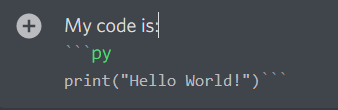 hardy yoke
slate swan
how can i use the git clone command?
hardy yoke
slate swan
how can i use the git clone command?
more of a git question than a #discord-bots one
slate swan
how do i install git so i can clone a link?
terse coyote
humble fog
its on github
can u give me link pls?
novel prairie
hardy yoke
your code is hard to read like this, put it in a codeblock
place `py` or `pytho...
Ok
hardy yoke
slate swan
how do i install git so i can clone a link?
again, this isn't a question suited to #discord-bots
novel prairie
@bot.command()
async def zrl_link(ctx):
 embed=discord.Embed
file = discord. File("", filename="zrl_community_made_by_zahos.png")

embed.set_image(url="""https://cdn.discordapp.com/attachments/962040981589463183/1000331877695107143/zrl_community_made_by_zahos.png""")(title=">>> ZRL Server Invite Link ",description="",
color=000000)
await ctx.message.reply(file=file, embed=embed)```remove the whitespace after py
but yes, none of that code is indented inside the function
these need to be inside the function, currently they are not which is why python is tripping up at await ctx which is indented
 novel prairie
Idk how to indent this im mew to dev
hardy yoke
I'd strongly suggest reading up a bit more on python before going forward, indentation is super basic and important. You're going to trip up a lot if you're struggling with that

Indentation in Python is used to create a group of statements. Indentation in Python refers to the whitespaces at the start of the line.
terse coyote
module 'discord' has no attribute 'ui'
 slate swan
how can I assign a role by id
terse coyote
slate swan
how can I assign a role by id
role = discord.utils.get(ctx.guild.roles, id = your_role_id)
await member.add_roles(role)
this?
 sick birch
terse coyote
module 'discord' has no attribute 'ui'
sick birch
terse coyote
module 'discord' has no attribute 'ui'
You're probably on v1.7.3. Update to v2.0.0^
sick birch
terse coyote
```py
role = discord.utils.get(ctx.guild.roles, id = your_role_id)
await member....
Use guild.get_role(id) instead. It's O(1), while utils.get() is exponential. Also it's harder to follow along
terse coyote
sick birch
You're probably on v1.7.3. Update to v2.0.0^
oh yeah
2.0.0 very difficult for me
slate swan
Hi, i made dank memer bot
hardy yoke
slate swan
Hi, i made dank memer bot
do you need help
 dull terrace
How do you make something that already exists 
slate swan
How can I send a base64 encoded image to channel?
 gloomy plinth
does anyone know why images render outside embeds from time to time?

for example
i used set_image for this btw
 mighty anchor
Hey so I have no idea how to make discord bot send webhooks with certain values to a certain channel.
Basically I want a command called +shout <arg>
and the discord bot use that command and send a webhook to a certain channel and the content of the webhook will be arg
i also want to change the values of the webhook like webhook username and pfp url.
if u can guide or help me achieve this i would really appreciate it but i have no idea where to start any help is appreciated thanks in advance
the output would look like this
https://cdn.discordapp.com/attachments/979896670554828840/1000542852348137502/unknown.png
how the webhook name and profile picture is the same as the ctx.author own

 sage root
i'm new to python, pls help
what does this error mean:
if any(str(message.content).lower) == "slay"():
TypeError: 'builtin_function_or_method' object is not iterable
slate swan
sage root
what does this error mean:
if any(str(message.content).lower) == "slay"():
T...
call str.lower
!d str.lower
unkempt canyonBOT
str.lower()```
Return a copy of the string with all the cased characters [4](https://docs.python.org/3/library/stdtypes.html#id15) converted to lowercase.

The lowercasing algorithm used is described in section 3.13 of the Unicode Standard."slay"(): the brackets are used to indicate a function
slate swan
👁️ 👁️
sage root
I figured it out
slate swan
calling a string object🥴
sage root
SHHH I WAS DESPERATE 😭
white aurora
lol 
dull terrace
What... I didn't even know you could call a string object, what does it do?
Oh it was a mistake, that makes more sense
mighty anchor
Hey so I have no idea how to make discord bot send webhooks with certain values to a certain channel.
Basically I want a command called +shout <arg>
and the discord bot use that command and send a webhook to a certain channel and the content of the webhook will be arg
i also want to change the values of the webhook like webhook username and pfp url.
if u can guide or help me achieve this i would really appreciate it but i have no idea where to start any help is appreciated thanks in advance
the output would look like this
https://cdn.discordapp.com/attachments/979896670554828840/1000542852348137502/unknown.png
how the webhook name and profile picture is the same as the ctx.author own
 dusky pine
sage root
what does this error mean:
if any(str(message.content).lower) == "slay"():
T...
dusky pine
sage root
what does this error mean:
if any(str(message.content).lower) == "slay"():
T...
slay 💅
sage root
someone help me:
if msg.startswith("/masspingallowed"):
value = msg.split("/masspingallowed ",1)[1]
if value.lower() == "true":
  db["masspingallowed"] = True
  await message.channel.send("Mass ping is now allowed for the bot.")

else:
  db["masspingallowed"] = False
  await message.channel.send("Mass ping is now disabled for the bot.")
i made a mass ping command but i want to be able to turn it on and off. it returns this error when i tr it:
File "main.py", line 141, in on_message
user = msg.split("/massping ",1)[1]
IndexError: list index out of range
Please help
i figured it out
i had a command called
/massping
and my cmd to allow it was
/masspingallowed
and when i renamed it to /spampingallwoed
*allwoed
*allowed
it worked
slate swan
print ("whats your pn?")
 hazy oxide
try to comment all your command
 robust fulcrum
hazy oxide
try to comment all your command
robust fulcrum
hazy oxide
try to comment all your command
I dont even have made any slash command but it's showing
 rare jewel
is there a way to make it return the full traceback of the error instead of just sending a little part of it?
@bot.event
async def on_command_error(ctx, error):
await ctx.send(f"An error occured: {str(error)}")``` brazen raft
You could use traceback.format_exception
from traceback import format_exception

@bot.event
async def on_command_error(ctx, error):
    await ctx.send("An error occurred:\n" + "".join(format_exception(error.__class__, error, error.__traceback__)))
error.__class__ is like type(error)
rare jewel
ohh okay ty
rare jewel
brazen raft
You could use `traceback.format_exception`
```py
from traceback import format_ex...
would this be right if i want to put it in an embed?
from traceback import format_exception

embed = discord.Embed(
    description=f"\`\`\`py\n{"".join(format_exception(exc.__class__, exc, exc.__traceback__))}\`\`\`",
    )
await ctx.send(embed=embed)
No because you have "" in the {} but it's also the quotes of the f-string
rare jewel
brazen raft
No because you have `""` in the `{}` but it's also the quotes of the f-string
so it would be ‘’ then right?
brazen raft
Use another type of quotes than "", yes
slate swan
help
im getting an error while running my bot, it was a html code, i checked it and it says that i am banned from accessing discord.com

 slate swan
slate swan
slate swan
you've been banned by discord api 'cause you crossed ratelimits
run kill 1 in the shell and it'll reset the ip
slate swan
slate swan
you've been banned by discord api 'cause you crossed ratelimits
run `kill 1` in ...
oh
rare jewel
slate swan
oh
a major con in using replit :p
hardy yoke
just ask
slate swan
politer to ask to ask but ask without asking cz yes
 paper sluice
slate swan
brazen raft
No because you have `""` in the `{}` but it's also the quotes of the f-string
!e
a = 'Ryuga\'s uwuness kills us all'
print(a)```@slate swan :white_check_mark: Your 3.11 eval job has completed with return code 0.
Ryuga's uwuness kills us all
til 3.11 is out
slate swan
beta version
brazen raft
slate swan
!e
```py
a = 'Ryuga\'s uwuness kills us all'
print(a)```
You can't use escape sequences inside a format in an f-string
slate swan
it'll release sometime in october else december
slate swan
brazen raft
You can't use escape sequences inside a format in an f-string
well yes
robust fulcrum
https://media.discordapp.net/attachments/343944376055103488/1000319743158403103/Screenshot_2022-07-23-14-01-51-16.jpg
Guys why this error is coming
I dont even ahve a slash command but it's showing a slash command
Pls help me
 slate swan
@slate swan how do i add a reaction to a bot's msg?
i mean, the bot should add reaction to its own embed msg and then will do some stuff
robust fulcrum
Store message sent message in varibale
For ex
mes1 = await ctx.send("hello")
await mes1.add_reaction("❤️")
 shrewd apex
slate swan
<@456226577798135808> how do i add a reaction to a bot's msg?
shrewd apex
slate swan
<@456226577798135808> how do i add a reaction to a bot's msg?
msg = await ctx.send('msg')
await msg.add_reaction('✅')
thanks
shrewd apex
is the command showing up in ur server? did u sync?
robust fulcrum
shrewd apex
is the command showing up in ur server? did u sync?
I not even added any slash command
But it showing
robust fulcrum
Use bot.wait_for
slate swan
will it loop if i add normal if statement
robust fulcrum
I can give example
slate swan
robust fulcrum
Use bot.wait_for
oh
slate swan
robust fulcrum
I can give example
yes please!
robust fulcrum
You want that it waits for user to add reaction?
slate swan
robust fulcrum
You want that it waits for user to add reaction?
first of all it adds its own reaction then waits for user to add reaction
robust fulcrum
slate swan
first of all it adds its own reaction then waits for user to add reaction
Ye
slate swan
robust fulcrum
Ye
this is what im trying to do
 robust fulcrum
react = bot.wait_for("raw_reaction_add", check=lambda p: p.message_id == message.id, timeout =20)
if react.emoji.name == "put any emoji here":
    #do stuff here
Understood?
slate swan
robust fulcrum
Understood?
yes
robust fulcrum
robust fulcrum
https://media.discordapp.net/attachments/343944376055103488/1000319743158403103/...
At this
slate swan
timeout = 20 means the bot wont respond if 20 seconds are passed right?
robust fulcrum
Ye
slate swan
robust fulcrum
At this
i really dont know whats wrong
robust fulcrum
Ok
robust fulcrum
robust fulcrum
https://media.discordapp.net/attachments/343944376055103488/1000319743158403103/...
Anyone here help me pls i asking from 2 days
white aurora
a bot timing out a user?
slate swan
you can timeout a member not a user
swift pumice
slate swan
you can timeout a member not a user
yes, i meant a member im sorry
unkempt canyonBOT
await timeout(until, /, *, reason=None)```
This function is a [*coroutine*](https://docs.python.org/3/library/asyncio-task.html#coroutine).

Applies a time out to a member until the specified date time or for the given [`datetime.timedelta`](https://docs.python.org/3/library/datetime.html#datetime.timedelta "(in Python v3.10)").

You must have the [`moderate_members`](https://discordpy.readthedocs.io/en/latest/api.html#discord.Permissions.moderate_members "discord.Permissions.moderate_members") permission to use this.

This raises the same exceptions as [`edit()`](https://discordpy.readthedocs.io/en/latest/api.html#discord.Member.edit "discord.Member.edit").all goodie 👍
swift pumice
thanks
slate swan
👍
white aurora
okimi, how long have you been programming for?
 eternal fox
hi yall can yall gib me ideas on what to add to my bot?
slate swan
white aurora
okimi, how long have you been programming for?
about a year and 4 months👀
eternal fox
slate swan
about a year and 4 months👀
sheesh
white aurora
oh wow very impressive 👀
slate swan
im nothing like other regulars😅
slate swan
eternal fox
hi yall can yall gib me ideas on what to add to my bot?
a wallpaper finder with a horizontal and vertical wallpapers(images in an embed) and buttons to change wallpaper
slate swan
robust fulcrum
```py
react = bot.wait_for("raw_reaction_add", check=lambda p: p.message_id == m...
 eternal fox
slate swan
a wallpaper finder with a horizontal and vertical wallpapers(images in an embed)...
eternal fox
slate swan
a wallpaper finder with a horizontal and vertical wallpapers(images in an embed)...
Sheesh okii i'll try that later,thanks!
slate swan
someone has done it but im not sure who, iirc it was scoopy
 white aurora
eternal fox
hi yall can yall gib me ideas on what to add to my bot?
white aurora
eternal fox
hi yall can yall gib me ideas on what to add to my bot?
graph trends of server activity
slate swan
slate swan
react is a coroutine
slate swan
slate swan
react is a coroutine
can u speak normal
slate swan
slate swan
oh dont use this
:<
wot to use
ive seen the code from a yt tutorial and its bad
slate swan
slate swan
ive seen the code from a yt tutorial and its bad
tell me what to use instead
slate swan
slate swan
can u speak normal
shall i explain how a coroutine is made?
slate swan
slate swan
shall i explain how a coroutine is made?
yes
slate swan
slate swan
tell me what to use instead
code one yourself!
white aurora
lol
swift pumice
slate swan
yes
bæn
slate swan
slate swan
code one yourself!
-_
swift pumice
slate swan
-_
you wont learn anything if you just copy and paste
slate swan
slate swan
yes
async def a():
    ...
here a is a function instance as its just being declared. when you call it
a # function obj
a() # coroutine obj
await a() # scheduling a coroutine and returning the caller when done
!d coroutine
unkempt canyonBOT
slate swan
slate swan
```py
async def a():
...
```
here `a` is a function instance as its just bei...
oh
https://www.youtube.com/watch?v=Xbl7XjFYsN4&list=PLhNSoGM2ik6SIkVGXWBwerucXjgP1rHmB Is a good source for learning asyncio related stuff!
This series of videos introduces AsyncIO to Python programmers who haven't used it yet. The first episode is a high-level view on the async ecosystem. We cover:
- why you'd want to use asynchronous code at all;
- how latency drives the user experience;
- what the difference between concurrency and parallelism is;
- some of the problems you can...
swift pumice
when is the time to learn databases
slate swan
learn them when you need them and when you feel ready
swift pumice
thanks
robust fulcrum
robust fulcrum
https://media.discordapp.net/attachments/343944376055103488/1000319743158403103/...
Can someone innocent help me
slate swan
swift pumice
thanks
i actually need to learn how to use mongo but you can use mongo or sql
and i ment sql as an sql based db lmao
white aurora
sql is fun to learn
slate swan
it is, its quite easy to learn and handy non the less
slate swan
robust fulcrum
Can someone innocent help me
can you show your code?
white aurora
runestone academy is one of my favourite websites
slate swan
https://sqlbolt.com is pretty good for learning sql ngl
SQLBolt provides a set of interactive lessons and exercises to help you learn SQL
robust fulcrum
slate swan
can you show your code?
Which part of code?
slate swan
robust fulcrum
Which part of code?
are you using slash commands and probably your command structure
white aurora
discord.app_command.tree
 white aurora
discord.app_command.tree
white aurora
white aurora
discord.app_command.tree
if you're copying and pasting code then this is where your error is
probably made the tree of slash commands
slate swan
white aurora
if you're copying and pasting code then this is where your error is
well more like where its being raised
robust fulcrum
slate swan
is that your bot?
Ye
white aurora
right haha
robust fulcrum
I never made a slash comamnd but still showing the command
slate swan
did you made one before?
slate swan
it kinda looks like a collision of states but im probably wrong, can you show your code?
BRO
have you tried disconnecting your bot from the gateway?
hLEP
white aurora
👀
slate swan
didnt derrick help you?
how do i know if a member has added reaction to an embed
sent by bot
swift pumice
opinion on making your own bot open source? like that everyone can see ur bots code

slate swan
swift pumice
opinion on making your own bot open source? like that everyone can see ur bots c...
I like open source as you can let the community contribute to the beloved bot and read how it works and get inspiration and to know deeper about it
white aurora
potential employers :D
swift pumice
oh okay
robust fulcrum
slate swan
have you tried disconnecting your bot from the gateway?
How?
slate swan
and making your bot open source lets users implement commands that the community might want!
slate swan
robust fulcrum
How?
just closing the interpreter, it should zombify the connection
robust fulcrum
slate swan
just closing the interpreter, it should zombify the connection<:pithink:65224755...
I daily restart my bot ;-;
slate swan
robust fulcrum
I daily restart my bot ;-;
if youre not messing with app commands then blame the API but to have a slash command to appear seems like youre registering/syncing your slash commands
this works?

no ;-;;;;;;;;
you need to register the event lol
slate swan
slate swan
you need to register the event lol
;-;
why is it soo complicated
i just want the bot to send another meme when someone adds a reaction
swift pumice
😔
slate swan
Discord.py is an advanced lib that uses OOP and async python, its not hard you just need to be experienced in python, you can always continue but it will be more easy for you if you learn OOP and async programming
¯\_(ツ)_/¯
swift pumice
.topic
left vector
i cant do this
i need to make a random number every time i run this function
and that random number needs to be used by another out side function
i want to make it run a function in side another function
but i cant do that cuz idk
slate swan
you can always use that random number and return it on each call
left vector
wdym return it on each call?
slate swan
when calling the function just return thst random number, do whatever with that number in the function and return that same number
 lyric apex

slate swan
it avoids the usage of the global keyword
swift pumice
💀
slate swan
!e
def a():
    return __import__("random").randint(1, 10)
print(a())
print(a())
@slate swan :white_check_mark: Your 3.11 eval job has completed with return code 0.
001 | 1
002 | 7
return statement?????????
slate swan
left vector
return statement?????????
yes, just do whatever youre going to do with that random number and then return it to use it outside of it
!global
unkempt canyonBOT
When adding functions or classes to a program, it can be tempting to reference inaccessible variables by declaring them as global. Doing this can result in code that is harder to read, debug and test. Instead of using globals, pass variables or objects as parameters and receive return values.
Instead of writing
def update_score():
    global score, roll
    score = score + roll
update_score()
do this instead
def update_score(score, roll):
    return score + roll
score = update_score(score, roll)
For in-depth explanations on why global variables are bad news in a variety of situations, see this Stack Overflow answer.
left vector
ohh
wait.. what
@bot.command()
async def email(ctx):
    await ctx.message.delete()
    await ctx.send("Sending Email...", delete_after=15)
    """"Random Number"""
    range_start = 10**(4-1)
    range_end = (10**4)-1
    numb = randint(range_start, range_end)
    body = 'Your Code: ' + str(numb)
    code = str(numb)
    await asyncio.sleep(2)
    await ctx.send("Email Sent", delete_after=15)
score = whAT the fuck i dont undertAndT This
i just need it to carry on code and numb
slate swan
why would you need the random number outside of the local scope and why are you using string concentation?
YO NEED Help
left vector
slate swan
why would you need the random number outside of the local scope and why are you ...
i have NO IDEA what thoes words mean sorry but all i need is that
create a random number each time i run the command
after i run that command another function will need the same number
async def email(ctx):
    await ctx.message.delete()
    await ctx.send("Sending Email...", delete_after=15)
    """"Random Number"""
    global numb, code
    range_start = 10**(4-1)
    range_end = (10**4)-1
    numb = randint(range_start, range_end)
    body = 'Your Code: ' + str(numb)
    code = str(numb)
    """email function"""
    em = EmailMessage()
    em['From'] = email_sender
    em['To'] = email_receiver
    em['Subject'] = 'Code'
    em.set_content(body)
    context = ssl.create_default_context()
    with smtplib.SMTP_SSL('smtp.gmail.com', 465, context=context) as smtp:
        smtp.login(email_sender, email_password)
        smtp.sendmail(email_sender, email_receiver, em.as_string())
    """email function"""
    await asyncio.sleep(2)
    await ctx.send("Email Sent", delete_after=15)```
sadly this didnt workkeeps saying that code isnt defined
robust fulcrum
slate swan
if youre not messing with app commands then blame the API but to have a slash co...
Anyway how can I remove the command?
slate swan
this command takes memes from a subreddit and sends it, it also makes sures that the meme is not a video.
(if its a video then it doesnt load in an embed)
but it is posting same memes after some times, how do i refresh it or get new ones?
 left vector
async def email(ctx):
    await ctx.message.delete()
    range_start = 10**(4 - 1)
    range_end = (10**4) - 1
    numb = randint(range_start, range_end)
    code = str(numb)
    return code
@bot.listen(code)
async def on_message(msg):
    await msg.channel.send('code', delete_after=15)```
does anybody know how to fix thisyou haven't explained what neds fixing
left vector
im trying to call code in another function
but i cant
and im trying to recreate this:
    test = 11
    return test

def thing2(test):
    if test == 11:
        print(hi)

value = thing()
thing2(value)
you've passed code to the event decorator bot.listen
left vector
where.. should i pass it
left vector
wait im going to try to send it all here
@bot.command()
async def email(ctx):
    await ctx.message.delete()
    """Random Number"""
    range_start = 10**(4 - 1)
    range_end = (10**4) - 1
    numb = randint(range_start, range_end)
    code = str(numb)
    """email function"""
    return code

@bot.listen()
async def on_message(msg, code):
    if msg.author.id == 929946521133264938:
        return
    elif any(word in msg.content for word in code):
        await msg.channel.send('Correct!', delete_after=15)
        member = msg.author
        role = get(member.guild.roles, name="NPC")
        await member.add_roles(role)
        await msg.channel.send('Gave Role', delete_after=15)
        await msg.channel.send('Removing Role In 5min', delete_after=60)
        await asyncio.sleep(240)
        await msg.channel.send('Removing Role In 1min', delete_after=15)
        await asyncio.sleep(60)
        await member.remove_roles(role)
await msg.channel.send('Removed Role Please Redo +email To Add Role Again.',delete_after=15)```im making a random number in the first function
and the random number needs to update when i run the first function
and well basicaly i need to find a way to get the variable code out of the first function
slate swan
left vector
```py
@bot.command()
async def email(ctx):
await ctx.message.delete()
""...
!botvar
unkempt canyonBOT
Python allows you to set custom attributes to most objects, like your bot! By storing things as attributes of the bot object, you can access them anywhere you access your bot. In the discord.py library, these custom attributes are commonly known as "bot variables" and can be a lifesaver if your bot is divided into many different files. An example on how to use custom attributes on your bot is shown below:
bot = commands.Bot(command_prefix="!")
# Set an attribute on our bot
bot.test = "I am accessible everywhere!"

@bot.command()
async def get(ctx: commands.Context):
    """A command to get the current value of `test`."""
    # Send what the test attribute is currently set to
    await ctx.send(ctx.bot.test)

@bot.command()
async def setval(ctx: commands.Context, *, new_text: str):
    """A command to set a new value of `test`."""
    # Here we change the attribute to what was specified in new_text
    bot.test = new_text
This all applies to cogs as well! You can set attributes to self as you wish.
Be sure not to overwrite attributes discord.py uses, like cogs or users. Name your attributes carefully!
hardy yoke
left vector
```py
@bot.command()
async def email(ctx):
await ctx.message.delete()
""...
using command functions to return values is unusual. It won't work the way you want it to if you try to access code somewhere else
left vector
unkempt canyon
im not shure if this helps
left vector
hardy yoke
using command functions to return values is unusual. It won't work the way you w...
welp time for option 2
is there any way for me to run a function inside another function like this for example:
def number():
    range_start = 10**(4 - 1)
    range_end = (10**4) - 1
    numb = randint(range_start, range_end)
    code = str(numb)

@bot.command()
async def email(ctx):
    await ctx.message.delete()
    number()
@bot.listen()
async def on_message(msg):
    await msg.channel.send(code, delete_after=15)
it's not returning anything but yes
also if you want a variable that can be used across functions, and be able to change its value, the bot variable example is a good idea.
left vector
hardy yoke
it's not returning anything but yes
also if you want a variable that can be use...
wait so is there no way to do this?
i could just replace listen with wait for and put it all in one function
but i have no idea how to do that and it would take 3 hours to do that
hardy yoke
you aren't returning any value in this function
and even if it did, you aren't actually doing anything with it
but you could store the value of code in a bot variable and be able to use it in on_message
 left vector
unkempt canyon
left vector
unkempt canyon
like this thing?
hardy yoke
Yes
left vector
alright very nice
now.. how tf do i do that

man i have no idea how this works
aww hell naw
what is this
 vocal snow
Are you referring to the typehint, the keyword-only parameter notation or the docstring
left vector
async def email(ctx, *, number: str):
    await ctx.message.delete()
    range_start = 10**(4 - 1)
    range_end = (10**4) - 1
    numb = randint(range_start, range_end)
    code = str(numb)
    code = number
@bot.listen()
async def on_message(msg):
    if msg.author.id == 929946521133264938:
        return
    elif any(word in msg.content for word in number):
await msg.channel.send('Correct!', delete_after=15)```will that work?
to make it a bot variable
left vector
vocal snow
Are you referring to the typehint, the keyword-only parameter notation or the do...
im.. not shure..
hardy yoke
no
You're looking at the wrong part
do you want a user to use a bot command called email and enter a string?
to be honest, this seems like a case of 'slow down and learn more python before progressing'
 hybrid garnet
Hi I don’t really know if this is the place to ask but, I have been trying to make my discord bot attain a status on the music it’s currently playing in the voice channel like the example below, how would I get this to happen?
 hardy yoke
left vector
I KNOW PYTHON
hardy yoke
left vector
I KNOW PYTHON
a bot variable = class variable
if you're familiar with classes it makes sense
vocal snow
hybrid garnet
Hi I don’t really know if this is the place to ask but, I have been trying to ma...
!d discord.Client.change_presence
unkempt canyonBOT
await change_presence(*, activity=None, status=None)```
This function is a [*coroutine*](https://docs.python.org/3/library/asyncio-task.html#coroutine).

Changes the client’s presence.

Example

```py
game = discord.Game("with the API")
await client.change_presence(status=discord.Status.idle, activity=game)
``` Changed in version 2.0: Removed the `afk` keyword-only parameter...it's ok not being an ass it's just
every step of the way you're going to hit a hurdle
left vector
 hardy yoke
getting up to speed on classes will definitely help
left vector
ohhh its abike
vocal snow
Corey Schafer has a good OOP tutorial on youtube
hardy yoke
is print('An error has occurred!') being called?
well that's why then
request isn't being defined because it's hitting an error
subre.ddit < is it this perhaps
idk you're eating the error that's causing it
except Exception as e:
  print(e)```

do this instead of that other print statementbut my brief reading of that code
makes me think it's because you wrote subre.ddit
instead of subreddit
ctrl+f
here

you didn't know what was causing it because your Except is making the actual error disappear
hardy yoke
you're just accessing reddit's json, not using praw
it would appear that close isn't defined
is it in your code anywhere
are you copying this
I see
look for a def code somewhere in the place you're copying
it's hard to say without seeing the full thing but in general copy/pasting code will lead to issues unless you fully understand every part of it
unkempt canyonBOT
Hey @slate swan!
You either uploaded a .txt file or entered a message that was too long. Please use our paste bin instead.
hardy yoke
there is no close function there
I'm assuming that code is missing something, I'm guessing Close() is meant to have some buttons in it or something
you could make that yourself, look up how to make buttons in your library
 left vector
words = ['@everyone', '@here', 'test', 'Test']
@client.event
async def on_message(message):
    if any(word in msg.content for word in words):
        await message.delete()```
does anybody know why this does not delete all messages that has the words in words
(please ping me)how can i add hybrid commands to jishaku cog
 vagrant brook
left vector
```
words = ['@everyone', '@here', 'test', 'Test']
@client.event
async def on_me...
vagrant brook
left vector
```
words = ['@everyone', '@here', 'test', 'Test']
@client.event
async def on_me...
message, not msg
left vector
vagrant brook
message, not msg
ohhh
words = ['@everyone', '@here', 'test', 'Test']
@client.event
async def on_message(message):
    if any(word in message.content for word in words):
        await message.delete()
welp i tried fixing it but it still does not delete the message if it has the word in words
odd mango
odd mango
how can i add hybrid commands to jishaku cog
still need help
usually it is just a decorator py @commands.hybrid_command(name="xyz")which you replace forpy @commands.command(name="xyz")

but here there's no commands.command
left vector
vagrant brook
well check if you have message intents on
this wont.. break any of my code when i turn this on wil it?
odd mango
nah just turn all the three on lol
left vector
alright i fixed it all i had to do was use
@bot.listen()
instead of
@client.event
unkempt canyonBOT
Hey @slate swan!
You either uploaded a .txt file or entered a message that was too long. Please use our paste bin instead.
slate swan
@slate swan can you share the meme code
want to see button thing
The next meme button
you've made a group of slash commands usinf the random name and that is overwriting the random package import name
😩
inport random using a different name or chnge your slash group name
import random as rdm could be a fix and you do rdm.choice
 dusk quest
**async def on_member_join **and ** on_member_join ** not returning anything with **await channel.send(embed=embed) **thoughts? They should be sending messages to my text channels but they are not? Not running into any error either . . .
vocal snow
dusk quest
**async def on_member_join **and ** on_member_join ** not returning anything wit...
member intents enabled?
 elder dawn
Trying to play with cogs:
import os,random,discord,discord.utils,asyncio,datetime,time,asyncio
from discord.ext import commands
from discord.utils import get

class roomba(commands.Cog):
        def __init__(self, bot):
            self.bot = bot
            bot = commands.Bot(command_prefix='.')
            channel = ctx.message.author.voice.channel

        @commands.guild_only()
        @commands.command(pass_context = True)
        @commands.has_role('Herra')
        async def clear(self, ctx, amount=None):
            if amount is None:
                await ctx.channel.purge(limit=50)
            elif amount == "all":
                await ctx.channel.purge()
            else:
                await ctx.channel.purge(limit=int(amount))

def setup(bot):
    bot.add_cog(roomba(bot))
In the name of holy simplicity: Why this does not work?
discord.ext.commands.errors.ExtensionFailed: Extension 'cogs.roomba' raised an error: NameError: name 'ctx' is not defined
elder dawn
Yes but when it is: discord.ext.commands.errors.ExtensionFailed: Extension 'cogs.roomba' raised an error: TypeError: __init__() missing 1 required positional argument: 'ctx'
vocal snow
then you need to pass ctx when you instantiate the class
which doesnt really make sense
elder dawn
🤪
vocal snow
im not sure why you want to define channel in the init anyways...
slate swan
defining bot again too, next level shit
dusk quest
vocal snow
member intents enabled?
probably not, this was very helpful
elder dawn
It is part of longer script, I think I had it for reason. now splitting it to cogs and it causes freakign headache...
slate swan
My discord bot got some weird long JavaScript / HTML error even tho i made it in python, what's the problem? (My bot isn't starting)
vocal snow
elder dawn
It is part of longer script, I think I had it for reason. now splitting it to co...
have you used classes before?
If not, that's the reason for the headache
slate swan
slate swan
My discord bot got some weird long JavaScript / HTML error even tho i made it in...
rate limit blockage by discord
elder dawn
vocal snow
have you used classes before?
nope
slate swan
slate swan
rate limit blockage by discord
In how long will it be over?
do kill 1 in the shell cause replit
vocal snow
elder dawn
nope
https://www.youtube.com/playlist?list=PL-osiE80TeTsqhIuOqKhwlXsIBIdSeYtc
if you're interested
elder dawn
import os,random,discord,discord.utils,asyncio,datetime,time,asyncio
from discord.ext import commands
from discord.utils import get
from discord import FFmpegPCMAudio

class clips(commands.Cog):
        def __init__(self, bot):
            self.bot = bot
            bot = commands.Bot(command_prefix='.')

        @commands.guild_only()

        #Trynda
        @commands.command()
        async def trynda(self, ctx):
            user = ctx.message.author
            voice = get(self.bot.voice_clients, guild=ctx.guild)
            channel = ctx.message.author.voice.channel
            if voice and voice.is_connected:
                await voice.move_to(channel)
            else:
                vc = await channel.connect()
                time.sleep(.5)
                path = "/home/pi/judge_dredd/cogs/mp3/imemunaa.mp3"
                vc.play(discord.FFmpegOpusAudio(path), after=lambda e: print('done', e))
                while vc.is_playing():
                    pass
                await vc.disconnect()
def setup(bot):
    bot.add_cog(clips(bot))
``` for some reason this works just finebut TL;DR: the _init_ is called when the class is created, which you're doing in setup (roomba(bot))
slate swan
vocal snow
<https://www.youtube.com/playlist?list=PL-osiE80TeTsqhIuOqKhwlXsIBIdSeYtc>
if yo...
corey 
vocal snow
elder dawn
```Py
import os,random,discord,discord.utils,asyncio,datetime,time,asyncio
from ...
because ctx is defined as a callback parameter
and the library passes ctx to it when the command is invoked
slate swan
slate swan
do `kill 1` in the shell cause replit
Oh thanks
dusk quest
vocal snow
member intents enabled?
not sure how to work intents or even what they are
 dusk quest
vocal snow
https://discordpy.readthedocs.io/en/stable/intents.html
dusk quest
vocal snow
https://discordpy.readthedocs.io/en/stable/intents.html
intents are now enabled, still nothing | for some reason its not acknowledging new members
vocal snow
dusk quest
intents are now enabled, still nothing | for some reason its not acknowledging n...
you've enabled the intents in the code and the developer portal?
dusk quest
vocal snow
you've enabled the intents in the code and the developer portal?
yes on the developer portal and
**intents = discord.Intents.default() **
intents.members = True
vocal snow
dusk quest
yes on the developer portal and
**intents = discord.Intents.default() **
**inte...
can you share your full code?
!paste
unkempt canyonBOT
Pasting large amounts of code
If your code is too long to fit in a codeblock in Discord, you can paste your code here:
https://paste.pythondiscord.com/
After pasting your code, save it by clicking the floppy disk icon in the top right, or by typing ctrl + S. After doing that, the URL should change. Copy the URL and post it here so others can see it.
 jagged estuary
dusk quest
yes on the developer portal and
**intents = discord.Intents.default() **
**inte...
jagged estuary
dusk quest
yes on the developer portal and
**intents = discord.Intents.default() **
**inte...
try discord.intents.All()
slate swan
doesnt make a difference
that would just enable presence and message_content intent if 2.0
and resource wasting
since that would enable unnecessary events to be received
dusk quest
vocal snow
can you share your full code?
Have a look https://paste.pythondiscord.com/veyaqamebe Kinda a mess!
vocal snow
dusk quest
Have a look https://paste.pythondiscord.com/veyaqamebe Kinda a mess!
what is line 132 supposed to do 🤔
you should remove that
 timber widget
Hello
timber widget
vocal snow
you should remove that
Bro. How can I make a bot like disomegle
vocal snow
I don't know what disomegle is sorry
slate swan
how do i make it so that when i click one button in that class, it disables ALL the buttons in that class?
terse coyote
can i get a time on which the song plays in Spotify?
slate swan
timber widget
Bro. How can I make a bot like disomegle
omegle on discord?
jagged estuary
slate swan
how do i make it so that when i click one button in that class, it disables ALL ...
Like in the view
slate swan
jagged estuary
Like in the view
yes
robust fulcrum
Is it possible to make a discord bot dashboard in django?
slate swan
yes
terse coyote
slate swan
how do i make it so that when i click one button in that class, it disables ALL ...
what lib are you using?
can i get a time on which the song plays in Spotify?
slate swan
terse coyote
what lib are you using?
pycord
timber widget
Can you tell me how to make a bot like disomegle?
timber widget
vocal snow
I don't know what disomegle is sorry
How to make a bot like when you react to a embed with button then bot opens a new channel
Like two buttons
One is two-on-two chat and second is group chat
So whenever user press those buttons a random channel will get open and how to set a limit so not more than 2 users enter in channel when
terse coyote
slate swan
pycord
You can accomplish this by setting button.disabled to True in your button's callback. Then, you also would need to edit your original message to reflect this change.
slate swan
Ayo, can someone tell me how I can put embeds in their own file so that I only have to load them into my main file?
dusk quest
new problems await channel.send(embed=embed)
AttributeError: 'NoneType' object has no attribute 'send'
😅
slate swan
slate swan
pycord
https://github.com/DisnakeDev/disnake/blob/master/examples/views/disable_view.py not a pycord example, but the method will be Exactly same since both of them are dpy forks
dusk quest
this was working just a moment ago lol
slate swan
channel is None
slate swan
slate swan
Ayo, can someone tell me how I can put embeds in their own file so that I only h...
you can create embed objects in other files and import them into your main one
like i import it to a var and await them?
you don't need to await embeds, do you?
slate swan
slate swan
<https://github.com/DisnakeDev/disnake/blob/master/examples/views/disable_view.p...
i tried it and got the error discord.errors.InteractionResponded: This interaction has already been responded to before
slate swan
slate swan
i tried it and got the error `discord.errors.InteractionResponded: This interact...
can i see the code, it means that you already responded to the interaction once
dusk quest
slate swan
`channel` is None
turns out i was indeed passing it the wrong datatype, wants my yummyintegers
slate swan
dusk quest
turns out i was indeed passing it the wrong datatype, wants my yummyintegers
ah so I'll assume it's fixed now?
dusk quest
slate swan
ah so I'll assume it's fixed now?
so far
slate swan
slate swan
you don't need to await embeds, do you?
I meant await ctx.send(embed=em1)
Import = form embeds import example
Var = em1 = exmaple.get_em1()"
nope
dusk quest
still not recognizing when someone joins the server tho 😦
slate swan
slate swan
can i see the code, it means that you already responded to the interaction once
   super().__init__(timeout=None)
  @discord.ui.button(row=0, label='Seller', style=discord.ButtonStyle.blurple, custom_id="trade_seller", disabled=False)
  async def buyer_callback2(self, button, interaction):
    await interaction.response.send_message(content=f"You have been successfully labelled as the **Seller**!", ephemeral=True)

    db = mysql.connector.connect(
      host="",
      user="",
      passwd="",
      database="")
    mycursor = db.cursor()

    mycursor.execute(f"UPDATE Auto set SellerID = '{interaction.user.id}' WHERE channelID = '{interaction.channel.id}'")
    db.commit()

    embed=discord.Embed(title="Who are you dealing with?",description="Please reply with your traders **Developer ID**",color=0x17A589)
    await interaction.channel.send(embed=embed)

    for child in self.children:
      if isinstance(child, discord.ui.Button):
          child.disabled = True
        # make sure to update the message with the new buttons
    await interaction.response.edit_message(view=self)

        # Prevents on_timeout from being triggered after the buttons are disabled
self.stop()```my_embed.py
import discord
my_embed = discord.Embed(...)
``` ```py
# main.py
from my_file import my_embed
# inside command
await ctx.send(embed=my_embed)
i like embeds
slate swan
slate swan
```py
super().__init__(timeout=None)
@discord.ui.button(row=0, label='Selle...
and what does the command look like?
dusk quest
they are pretty
slate swan
slate swan
and what does the command look like?
command?
slate swan
dusk quest
i like embeds
Yeah, always use them xD
slate swan
slate swan
```py
my_embed.py
import discord
my_embed = discord.Embed(...)
``` ```py
# mai...
ahh
dusk quest
dusk quest
**async def on_member_join **and ** on_member_join ** not returning anything wit...
@slate swan take a look at my problems too? 🥺
slate swan
dusk quest
i like embeds
And we still cant send them😔
File "main.py", line 47
@client.command()
^
IndentationError: unexpected unindent
!indents
unkempt canyonBOT
Indentation
Indentation is leading whitespace (spaces and tabs) at the beginning of a line of code. In the case of Python, they are used to determine the grouping of statements.
Spaces should be preferred over tabs. To be clear, this is in reference to the character itself, not the keys on a keyboard. Your editor/IDE should be configured to insert spaces when the TAB key is pressed. The amount of spaces should be a multiple of 4, except optionally in the case of continuation lines.
Example
def foo():
    bar = 'baz'  # indented one level
    if bar == 'baz':
        print('ham')  # indented two levels
    return bar  # indented one level
The first line is not indented. The next two lines are indented to be inside of the function definition. They will only run when the function is called. The fourth line is indented to be inside the if statement, and will only run if the if statement evaluates to True. The fifth and last line is like the 2nd and 3rd and will always run when the function is called. It effectively closes the if statement above as no more lines can be inside the if statement below that line.
Indentation is used after:
1. Compound statements (eg. if, while, for, try, with, def, class, and their counterparts)
2. Continuation lines
More Info
1. Indentation style guide
2. Tabs or Spaces?
3. Official docs on indentation
eternal fox
dusk quest
<@456226577798135808> take a look at my problems too? 🥺
Can u show full code of the on_member_join part
i can try to help :(
i mean :)
dusk quest
dusk quest
Have a look https://paste.pythondiscord.com/veyaqamebe Kinda a mess!
@eternal fox check this out!
slate swan
slate swan
```py
super().__init__(timeout=None)
@discord.ui.button(row=0, label='Selle...
anyone know why i get the error discord.errors.InteractionResponded: This interaction has already been responded to before
dusk quest
i have fixed some other issues with it since first post but still does not do anything with on_member_join
slate swan
dusk quest
**async def on_member_join **and ** on_member_join ** not returning anything wit...
get_channel can return None lol
slate swan
dusk quest
<@456226577798135808> take a look at my problems too? 🥺
get_channel probably returning None, im not sarth but okay
all get_* methods check cache and can return None
eternal fox
try to use fetch_channel instead
eternal fox
yees
paper sluice
slate swan
all `get_*` methods check cache and can return None
it would've been so much better if it just raised an error explaining that
slate swan
it would be so much better if they read docs🗿
slate swan
slate swan
!indents
the @client.command() thing is getting included in the class above, how do i fix it
paper sluice
slate swan
it would be so much better if they read docs🗿
imagine reading docs
slate swan
all get methods scream the return type😭
most libs do that
class View(discord.ui.View):
    @discord.ui.button(label="Next Meme", style=discord.ButtonStyle.primary, emoji="⏭")


@client.command()
async def meme(ctx):
  async with ctx.typing():
    subreddit = reddit.subreddit("indiandankmemes")
    all_subs = []
    hot = subreddit.hot()
    for submission in hot:
        all_subs.append(submission)
        random_sub = random.choice(all_subs)
        url = random_sub.url
        name = random_sub.title
        author = random_sub.author
        upvotes = random_sub.score
        if random_sub.is_reddit_media_domain and not random_sub.is_video:
            em = discord.Embed(title = name)
            em.set_image(url = url)
            em.set_footer(text= f'''from r/indiandankmemes by {author} | {upvotes} upvotes''')
    await ctx.send(embed= em , view=View())
slate swan
slate swan
```py
class View(discord.ui.View):
@discord.ui.button(label="Next Meme", st...
make a callback for the button
slate swan
slate swan
make a callback for the button
wHat
slate swan
paper sluice
it would've been so much better if it just raised an error explaining that
override them 
async def button_callback(self, button, interaction):
await interaction.response.send_message("You clicked the button!")
dusk quest
had someone join my server with the fetch_channel instead, still nothing
if the function was running at all i should atleast get the print statement, instead nothing
im thinking that its not even recognizing the event int the first place
slate swan
!intents enable these
unkempt canyonBOT
Using intents in discord.py
Intents are a feature of Discord that tells the gateway exactly which events to send your bot. By default discord.py has all intents enabled except for Members, Message Content, and Presences. These are needed for features such as on_member events, to get access to message content, and to get members' statuses.
To enable one of these intents, you need to first go to the Discord developer portal, then to the bot page of your bot's application. Scroll down to the Privileged Gateway Intents section, then enable the intents that you need.
Next, in your bot you need to set the intents you want to connect with in the bot's constructor using the intents keyword argument, like this:
from discord import Intents
from discord.ext import commands

intents = Intents.default()
intents.members = True

bot = commands.Bot(command_prefix="!", intents=intents)
For more info about using intents, see the discord.py docs on intents, and for general information about them, see the Discord developer documentation on intents.
dusk quest
slate swan
!intents enable these
they are
slate swan
he has intents lol
dusk quest
i do intentd
slate swan
👁️ 👁️
where is discord.ui
;-;
wdym where is it?
if its not found you would need 2.0 lol
Traceback (most recent call last):
File "main.py", line 4, in <module>
from discord.ui import Buttons
ModuleNotFoundError: No module named 'discord.ui'
dusk quest
slate swan
```py
class View(discord.ui.View):
@discord.ui.button(label="Next Meme", st...
how do i have cool code boxes like this
slate swan
!code
unkempt canyonBOT
Here's how to format Python code on Discord:
```py
print('Hello world!')
```
These are backticks, not quotes. Check this out if you can't find the backtick key.
slate swan
slate swan
if its not found you would need 2.0 lol
how do i
slate swan
!e
print('e')
class Buttons(discord.ui.View):
    def __init__(self, *, timeout=180):
        super().__init__(timeout=timeout)
    @discord.ui.button(label="Start",style=discord.ButtonStyle.gray)
    async def gray_button(self,button:discord.ui.Button,interaction:discord.Interaction):
        print(interaction.user)

@bot.command()
async def help(ctx):
    embed = discord.Embed(title=f"Auto Middleman", description="Auto MM is a bot which can automate tasks like a normal middleman. You pay the normal fee, and we'll do it for you.", color=0x2f3136)
    embed.add_field(name="How does it work?", value="Like mentioned before, you pay the fee, we only accept BTC payments but please private message Admins for other payment methods. The buyer will then send the amount of what you're selling to a throwaway address generated by us. Then you'd send whatever you're selling to the buyer the details and once the buyer confirms he got it, the money will be sent to a address u specify. Once u confirm u have received the noney, the deal is predicted as completed and the ticket will self destruct.")
    embed.add_field(name="How much is the fee?", value="Nothing more than `0.00013 BTC`")
    embed.add_field(name="How do I start a deal?", value="Simply click the button below and the instructions will be in the ticket you create.")
    await ctx.send(embed=embed)
``` im expecting for it to send the embed but instead it does nothing. nothing prints out in the console when i run btw
@client.event
async def on_member_join(member):
  print(f"{member} joined the server!")
  channel = client.get_channel(int(os.environ['WELCOMEMAT']))
  await channel.send(f"{member} has arrived on the coast!")
  #logging new members
  logs = client.fetch_channel(int(os.environ['LOGS']))
  embed = discord.Embed(title=f"{member} has joined the server!")
  await logs.send(embed=embed)
this should do something
slate swan
slate swan
how do i
python -m pip git+https://github.com/Rapptz/discord.py
and yes you would need git
nvm i will use pycord

wait
slate swan
slate swan
```py
class Buttons(discord.ui.View):
def __init__(self, *, timeout=180):
...
help please!!
paper sluice
you named the slash command group random
which overwrites the name of the builtin lib random
slate swan
class Buttons(discord.ui.View):
    def __init__(self, *, timeout=180):
        super().__init__(timeout=timeout)
    @discord.ui.button(label="Start",style=discord.ButtonStyle.gray)
    async def gray_button(self,button:discord.ui.Button,interaction:discord.Interaction):
        print(interaction.user)

@bot.command()
async def help(ctx):
    embed = discord.Embed(title=f"Auto Middleman", description="Auto MM is a bot which can automate tasks like a normal middleman. You pay the normal fee, and we'll do it for you.", color=0x2f3136)
    embed.add_field(name="How does it work?", value="Like mentioned before, you pay the fee, we only accept BTC payments but please private message Admins for other payment methods. The buyer will then send the amount of what you're selling to a throwaway address generated by us. Then you'd send whatever you're selling to the buyer the details and once the buyer confirms he got it, the money will be sent to a address u specify. Once u confirm u have received the noney, the deal is predicted as completed and the ticket will self destruct.")
    embed.add_field(name="How much is the fee?", value="Nothing more than `0.00013 BTC`")
    embed.add_field(name="How do I start a deal?", value="Simply click the button below and the instructions will be in the ticket you create.")
    await ctx.send(embed=embed)
``` im expecting for it to send the embed but instead it does nothing. nothing prints out in the console when i run btwyou didnt do anything with Buttons
you need to make an instance and send it
like
view = YourViewClass()
await ctx.send(..., view=view)
Ah
slate swan
paper sluice
like
```py
view = YourViewClass()
await ctx.send(..., view=view)
```
still no work
import discord
from discord.ext import commands

intents = discord.Intents.default()
bot = commands.Bot(command_prefix='!', description='Auto MM made by xences and floppa', intents=intents)

class Buttons(discord.ui.View):
    def __init__(self, *, timeout=180):
        super().__init__(timeout=timeout)
    @discord.ui.button(label="Start",style=discord.ButtonStyle.gray)
    async def gray_button(self,button:discord.ui.Button,interaction:discord.Interaction):
        print(interaction.user)

@bot.event
async def on_ready():
    print('Ready!')

async def help(ctx):
    buttons = Buttons()
    embed = discord.Embed(title=f"Auto Middleman", description="Auto MM is a bot which can automate tasks like a normal middleman. You pay the normal fee, and we'll do it for you.", color=0x2f3136)
    embed.add_field(name="How does it work?", value="Like mentioned before, you pay the fee, we only accept BTC payments but please private message Admins for other payment methods. The buyer will then send the amount of what you're selling to a throwaway address generated by us. Then you'd send whatever you're selling to the buyer the details and once the buyer confirms he got it, the money will be sent to a address u specify. Once u confirm u have received the noney, the deal is predicted as completed and the ticket will self destruct.")
    embed.add_field(name="How much is the fee?", value="Nothing more than `0.00013 BTC`")
    embed.add_field(name="How do I start a deal?", value="Simply click the button below and the instructions will be in the ticket you create.")
    await ctx.send(embed=embed, view=buttons)

bot.run('')
@paper sluice
paper sluice
you didnt decorate help with bot.command()
 lament mesa
slate swan
```py
import discord
from discord.ext import commands
intents = discord.Intents...
lament mesa
slate swan
```py
import discord
from discord.ext import commands
intents = discord.Intents...
you should be subclassing HelpCommand for a help command
thats the recommended method
slate swan
is it required
lament mesa
nope
but as far as i know using normal @bot.command() is discouraged for a help command
slate swan
how do i subclass it
slate swan
paper sluice
you didnt decorate `help` with `bot.command()`
still doesnt work
import discord
from discord.ext import commands

intents = discord.Intents.default()
bot = commands.Bot(command_prefix='!', description='Auto MM made by xences and floppa', intents=intents)

class Buttons(discord.ui.View):
    def __init__(self, *, timeout=180):
        super().__init__(timeout=timeout)
    @discord.ui.button(label="Start",style=discord.ButtonStyle.gray)
    async def gray_button(self,button:discord.ui.Button,interaction:discord.Interaction):
        print(interaction.user)

@bot.event
async def on_ready():
    print('Ready!')

@bot.command()
async def baron(ctx):
    buttons = Buttons()
    embed = discord.Embed(title=f"Auto Middleman", description="Auto MM is a bot which can automate tasks like a normal middleman. You pay the normal fee, and we'll do it for you.", color=0x2f3136)
    embed.add_field(name="How does it work?", value="Like mentioned before, you pay the fee, we only accept BTC payments but please private message Admins for other payment methods. The buyer will then send the amount of what you're selling to a throwaway address generated by us. Then you'd send whatever you're selling to the buyer the details and once the buyer confirms he got it, the money will be sent to a address u specify. Once u confirm u have received the noney, the deal is predicted as completed and the ticket will self destruct.")
    embed.add_field(name="How much is the fee?", value="Nothing more than `0.00013 BTC`")
    embed.add_field(name="How do I start a deal?", value="Simply click the button below and the instructions will be in the ticket you create.")
    await ctx.send(embed=embed, view=buttons)

bot.run('xx')
wdym doesn't work?
slate swan
still doesnt send the embed wehen i run the command
lament mesa
slate swan
how do i subclass it
take a look at this message
#discord-bots message
dusk quest
dusk quest
```py
@client.event
async def on_member_join(member):
print(f"{member} joined...
this should work right?
slate swan
lament mesa
take a look at this message
https://discord.com/channels/267624335836053506/3439...
so if i ran !help it would still work?
paper sluice
slate swan
still doesnt send the embed wehen i run the command
what did you type for running the command?
slate swan
paper sluice
what did you type for running the command?
!baron
paper sluice
enable message_content intent
slate swan
intents = discord.Intents.default()
bot = commands.Bot(command_prefix='!', description='Auto MM made by xences and floppa', intents=intents)
```?its on in the discord developer portal
paper sluice
intents.message_content = True
add this
slate swan
works now @paper sluice thank u!
    print(interaction.user)
AttributeError: 'Button' object has no attribute 'user'
interaction here is you button object so just change the arguments names around
change the interaction argument to button and the button argument to interaction
 thin kelp
I want to make a bot that will send a message when a twitch stream started and when the stream went offline
What would be the better way to do it than scraping the twitch stream page every couple minutes and checking that way
 cloud dawn
timber widget
cloud dawn
timber widget
Atleast tell me what it is called when you do a click on button and it opens a channel where two users can only enter once they press the button if more users press it then it makes a new channel for other users but limit is 2 only
slate swan
timber widget
Atleast tell me what it is called when you do a click on button and it opens a c...
duo private rooms
that's not a disord.py error
timber widget
slate swan
duo private rooms
No.. I mean how to make it
slate swan
timber widget
No.. I mean how to make it
create persistent buttons, then check for channels with your logic if the channel created already has 2 users, create a new one
timber widget
slate swan
that's not a disord.py error
Can you please. Tell me. And guide a little. Just a little. I will send you the server where the bot is just guide me a little on how to make it. I didn't me give me the code. I mean guide me a little so I can get a good idea. Plss
😔
timber widget
slate swan
create persistent buttons, then check for channels with your logic if the channe...
check jmm
slate swan
mhm im off for now, someone might help you by then else I will but later
shrewd apex
convert to rgb before applying filter
dusk quest
!intents
unkempt canyonBOT
Using intents in discord.py
Intents are a feature of Discord that tells the gateway exactly which events to send your bot. By default discord.py has all intents enabled except for Members, Message Content, and Presences. These are needed for features such as on_member events, to get access to message content, and to get members' statuses.
To enable one of these intents, you need to first go to the Discord developer portal, then to the bot page of your bot's application. Scroll down to the Privileged Gateway Intents section, then enable the intents that you need.
Next, in your bot you need to set the intents you want to connect with in the bot's constructor using the intents keyword argument, like this:
from discord import Intents
from discord.ext import commands

intents = Intents.default()
intents.members = True

bot = commands.Bot(command_prefix="!", intents=intents)
For more info about using intents, see the discord.py docs on intents, and for general information about them, see the Discord developer documentation on intents.
dusk quest
bot = commands.Bot(command_prefix="!", intents=intents)
this passes intents to the bot? only on commands? what about @client.event ?
 wicked atlas
intents are just for the bot to be able to recieve events/data on the gateway
client.event can create handlers for these events. the commands module requires message data in order to parse commands.
In this case, I asume you mean bot.event
dusk quest
wicked atlas
intents are just for the bot to be able to recieve events/data on the gateway
ok ok this. i think my bot is not getting the event
@client.event
async def on_member_join(member):
  print(f"{member} has joined the server!")
this event does not happen when a member joins my server
wicked atlas
dusk quest
ok ok this. i think my bot is not getting the event
```py
@client.event
async d...
What is client defined as?
Because above you use bot
Or did you just copy that from the embed?
dusk quest
wicked atlas
What is `client` defined as?
i am using this
client = commands.Bot(command_prefix=prefix, case_insensitive=True, intents=intents)
im going to test this again
slate swan
client = Bot, yes
 maiden fable
Isn't that the best naming convention?
dusk quest
wicked atlas
What is `client` defined as?
File "main.py", line 23, in on_member_join
await channel.send(f"{member} has arrived on the coast!")
TypeError: can't send non-None value to a just-started coroutine
this is something
maiden fable
what the
dusk quest
did not happen before
maiden fable
I never saw that error lol
 rain olive
maiden fable
Isn't that the best naming convention?
rain olive
maiden fable
Isn't that the best naming convention?
no
wicked atlas
dusk quest
File "main.py", line 23, in on_member_join
await channel.send(f"{member} has...
Send your whole code where this error happens
dusk quest
@client.event
async def on_member_join(member):
  print(f"{member} joined the server!")
  channel = client.get_channel(int(os.environ['WELCOMEMAT']))
  await channel.send(f"{member} has arrived on the coast!")
  #logging new members
  logs = client.fetch_channel(int(os.environ['LOGS']))
  embed = discord.Embed(title=f"{member} has joined the server!")
  await logs.send(embed=embed)
fetch_channel needs to be awaited, but that's not where the error is somehow
jagged estuary
dusk quest
```py
@client.event
async def on_member_join(member):
print(f"{member} joined ...
logs = await client.fetch**^^^
or logs = client.get
dusk quest
jagged estuary
logs = await client.fetch**^^^
omg thank you IT WORKS
using client.get
maiden fable
rain olive
no
It was sarcasm but okay
 maiden fable
Nice, everyone buying Nitro nowadays cz of the offer
 maiden fable
Nice, global emojis
slate swan
INSERT INTO `nitro_subscription` (user_id, is_active) VALUES (1234567890, true);
```😔Lmao indeed
slate swan
maiden fable
Nice, global emojis
thanks😳
@slate swan, I've json files with languages, in there are {}, how do I format them, when I want to get the string?
maiden fable
what do u mean by format?
maiden fable
str.format(**json_dict)?
maiden fable
Not when u gotta unpack dicts
slate swan
maiden fable
Not when u gotta unpack dicts

slate swan
slate swan
f strings are better<:pithink:652247559909277706>
keyword is "Hey {}!"

desc = language.get(guildID=ctx.guild.id, keyword="text")

description=desc.format(ctx.author.mention)
Otherwise it's to much code
keyword is just a note
eh
okay, found it
not batters
cold tide
async def tiktok(ctx):
  if ctx.channel==1000764912580169778:
    embed=discord.Embed()
    embed=discord.Embed(title=f"{ctx.author} successfully generated tiktok info ✅",description="Check your inbox !",color=0xffff00)
    await ctx.reply(embed=embed)                   ```
Can someone help tell me the issue???!code please format your code properly and explain what is wrong
unkempt canyonBOT
Here's how to format Python code on Discord:
```py
print('Hello world!')
```
These are backticks, not quotes. Check this out if you can't find the backtick key.
cold tide
paper sluice
!code please format your code properly and explain what is wrong
I cannot format corectly due to my device.
And ive come here to seek help finding the issue.
@paper sluice
paper sluice
what is wrong , why do you think there is an issue with your code?
vocal snow
cold tide
I cannot format corectly due to my device.
device shouldn't matter... backticks are available on mobile keyboards
vocal snow
so nothing is wrong then
cold tide
The command doesnt run.
Thats the issue i just cant find whats stopping it.
@vocal snow
paper sluice
cold tide
Thats the issue i just cant find whats stopping it.
look for errors in your terminal
cold tide
No errors show
vocal snow
you should compare ctx.channel.id instead of ctx.channel



 cold tide
It worked ty!
paper sluice
they added extra digit to ids now?
paper sluice
👍
cold tide
is that bc my variable holds nothing??
embed2=discord.Embed() embed2=discord.Embed(title="🤖 Reaper Gen",description="Non-Premium Gen !",color=0xffff00)
    embed.add_field(name="Instagram Generated Info:",value=random.choice(ig),inline=True)
    await ctx.author.send(emb2=embed)
bot.run(token)
can anyone help?? When running cmd it doesnt dm you.
@paper sluice
slate swan
ImportError: cannot import name 'InvalidArgument' from 'discord' (/home/container/.local/lib/python3.10/site-packages/discord/__init__.py)
Which embed do you want to send
slate swan
cold tide
```py
embed2=discord.Embed() embed2=discord.Embed(title="🤖 Reaper Gen",descript...
because
hazy oxide
slate swan
```py
ImportError: cannot import name 'InvalidArgument' from 'discord' (/home/co...
It's BadArgument I think
slate swan
hazy oxide
It's BadArgument I think
wdym?
hazy oxide
He got 2 embed2 var
slate swan
oh right
hazy oxide
slate swan
wdym?
Try from discord import BadArgument
slate swan
just reove the embed2 = discord.Embed() @cold tide
slate swan
hazy oxide
Try `from discord import BadArgument`
kk
slate swan
hazy oxide
Try `from discord import BadArgument`
ImportError: cannot import name 'BadArgument' from 'discord' (/home/container/.local/lib/python3.10/site-packages/discord/init.py)
i have both discord.py and discord.py-slash-command for button components
 torn sail
slate swan
ImportError: cannot import name 'BadArgument' from 'discord' (/home/container/.l...
torn sail
slate swan
ImportError: cannot import name 'BadArgument' from 'discord' (/home/container/.l...
Discord-py-slash-command won’t work with discord.py v2 anymore
cold tide
Still no dm
slate swan
torn sail
Discord-py-slash-command won’t work with discord.py v2 anymore
ah ok, what do i use then?
i need to get the author of a button interaction
torn sail
slate swan
ah ok, what do i use then?
Discord.py has built in app commands
hazy oxide
discord.ui
 keen silo
i migrated from discord.py 1.7.3 to discord.py 2.0a
the problem is in terminal it shows "Bot is online" but when i try to run commands it shows :
2022-07-24 20:49:05 ERROR    discord.ext.commands.bot Ignoring exception in command None
discord.ext.commands.errors.CommandNotFound: Command "ping" is not found
any solution ? (note: i alr enabled message content intent)
slate swan
torn sail
Discord.py has built in app commands
so do i just remove the import?
slate swan
keen silo
i migrated from discord.py 1.7.3 to discord.py 2.0a
the problem is in terminal i...
did u declare it in your code?
keen silo
yes
torn sail
slate swan
so do i just remove the import?
Yeah don’t use discord_slash
keen silo
intents = discord.Intents.default()
intents.message_content = True
torn sail
!d discord.app_commands.CommandTree
unkempt canyonBOT
class discord.app_commands.CommandTree(client, *, fallback_to_global=True)```
Represents a container that holds application command information. async def on_component(ctx: ComponentContext):
NameError: name 'ComponentContext' is not defined
@bot.event
async def on_component(ctx: ComponentContext):
    await ctx.defer(
        ignore=True
    )  # ignore, i.e. don't do anything *with the button* when it's pressed.

    ticket_created_embed = discord.Embed(
        title="Ticket Processed",
        description=f"""Hey {ctx.author.name}! Thanks for opening a ticket with us today. Let's continue""",
    )

    overwrites = {
        guild.default_role: discord.PermissionOverwrite(view_channel=False),
        ctx.author: discord.PermissionOverwrite(view_channel=True),
        guild.me: discord.PermissionOverwrite(view_channel=True),
    }

    ticket = await deals_cog_2.create_text_channel(
        f"{ctx.author.name}-{ctx.author.discriminator}", overwrites=overwrites
    )

    await ticket.send(
        ctx.author.mention, embed=ticket_created_embed
    )  # ping the user who pressed the button, and send the embed
have you imported it or defined it somewhere? It's not part of dpy afaik
timber widget
Hello bro. I made embed bot and send embed. Can you tell me now how can I edit that embed?
slate swan
vocal snow
have you imported it or defined it somewhere? It's not part of dpy afaik
afaik?
vocal snow
as far as I know
timber widget
timber widget
Hello bro. I made embed bot and send embed. Can you tell me now how can I edit t...
.
Hello..?
vocal snow
timber widget
Hello bro. I made embed bot and send embed. Can you tell me now how can I edit t...
!d discord.Message.edit
unkempt canyonBOT
await edit(*, content=..., embed=..., embeds=..., attachments=..., suppress=False, delete_after=None, allowed_mentions=..., view=...)```
This function is a [*coroutine*](https://docs.python.org/3/library/asyncio-task.html#coroutine).

Edits the message.

The content must be able to be transformed into a string via `str(content)`.

Changed in version 1.3: The `suppress` keyword-only parameter was added.

Changed in version 2.0: Edits are no longer in-place, the newly edited message is returned instead.

Changed in version 2.0: This function will now raise [`TypeError`](https://docs.python.org/3/library/exceptions.html#TypeError "(in Python v3.10)") instead of `InvalidArgument`.pass the new embed to it ^
timber widget
vocal snow
!d discord.Message.edit
I mean I already send the embed from bot. So I still can edit that?
By putting await edit under it?
@vocal snow
vocal snow
not sure what you mean
message = await ctx.send(embed=embed)
embed.description = "edited description"
await message.edit(embed=embed)
``` is an exampleBro I mean. I made an embed bot and send the embed already so now I want to edit it and want different once. So I can do it right ?
Without deleting that embed
vocal snow
yes
timber widget
Ok
timber widget
vocal snow
yes
Also bro I made a embed page so it changes when you press the button. Will it still work if bot is offline?
paper sluice
no, it will not
 brazen skiff
discord.ext.commands.errors.ExtensionFailed: Extension 'cogs.musicc' raised an error: CommandRegistrationError: The command leave is already an existing command or alias.
Bruh
brazen skiff
I cant add a new cog to my bot
slate swan
Is there a way i could make my bot report to discord like something againstTOS ?
paper sluice
brazen skiff
I cant add a new cog to my bot
you have a command named leave and in the cog musicc, you made a command named leave, probably rename it
cold tide
@bot.command()
async def toss(ctx):
  embed2=discord.Embed()
  embed2=discord.Embed(title="Heads or tails ?",description="Flipping coin...",color=0xffff00)
  time.sleep(1.3)
  embed2.add_field(name="It Landed on:",value=random.choice(flip),inline=True)
  await ctx.send(embed2=embed)
bot.run(token)
i need help cmd isnt sending...
 sleek palm
is there a way so the reaction roles would still work after restarting the bot? cause it stops working after i restarted the bot
slate swan
Is there a way i could make my bot report to discord like something againstTOS
paper sluice
cold tide
```py
@bot.command()
async def toss(ctx):
embed2=discord.Embed()
embed2=disc...
the keyword argument is called embed not embed2
cold tide
Ahhh
brazen skiff
oh nvm
cold tide
So what should it be??
paper sluice
cold tide
So what should it be??
embed=embed2
brazen skiff
paper sluice
you have a command named `leave` and in the cog musicc, you made a command named...
I can't have a command names leave?
paper sluice
brazen skiff
I can't have a command names leave?
you can't have two commands with the same name
vocal snow
brazen skiff
I can't have a command names leave?
you already have a command called leave, you're trying to add another one
slate swan
vocal snow
have you imported it or defined it somewhere? It's not part of dpy afaik
do you know how i can grab the author from button interaction
paper sluice
!d discord.Interaction.user
unkempt canyonBOT
The user or member that sent the interaction.
vocal snow
sleek palm
is there a way so the reaction roles would still work after restarting the bot? ...
consider using Buttons, you'll be able to make persistent views
slate swan
paper sluice
!d discord.Interaction.user
how can i use that for my code? sry im bad when it comes to docs
paper sluice
slate swan
how can i use that for my code? sry im bad when it comes to docs
in the callback, you just do interaction.user
brazen skiff
vocal snow
you already have a command called `leave`, you're trying to add another one
ah yes just found it
brazen skiff
paper sluice
you can't have two commands with the same name
Thanks for the help
sleek palm
vocal snow
consider using Buttons, you'll be able to make persistent views
I've never used buttons before so how can i make those?
paper sluice
sleek palm
I've never used buttons before so how can i make those?
just make the timeout on the view None
vocal snow
sleek palm
I've never used buttons before so how can i make those?
GitHub
An API wrapper for Discord written in Python. Contribute to Rapptz/discord.py development by creating an account on GitHub.
paper sluice
oh nvm, i think i misunderstood the question
slate swan
paper sluice
in the callback, you just do `interaction.user`
is there a event or something?
Is there a way i could make my bot report to discord like something againstTOS?
For exam ple i say
?report
The bot responds with "message link:"
And when i type the message link
The bot responds with "What reason (then like the reasons you report for"
And then sends the report to discord
paper sluice
slate swan
is there a event or something?
how are you making your buttons? can you send the code?
vocal snow
slate swan
is there a event or something?
the button callback...
vocal snow
slate swan
Is there a way i could make my bot report to discord like something againstTOS?
...
not really
paper sluice
slate swan
Is there a way i could make my bot report to discord like something againstTOS?
...
Discord doesn't allow automated reports
slate swan
paper sluice
how are you making your buttons? can you send the code?
class Buttons(discord.ui.View):
    def __init__(self, *, timeout=180):
        super().__init__(timeout=timeout)
    @discord.ui.button(label="Start",style=discord.ButtonStyle.gray)
    async def gray_button(self,button:discord.ui.Button,interaction:discord.Interaction):
        print(interaction.author)
ya, just replace interaction.author with interaction.user
slate swan
alr
slate swan
vocal snow
not really
So you cant like get your bot to r eport stuff by emailing the support team
slate swan
slate swan
```py
class Buttons(discord.ui.View):
def __init__(self, *, timeout=180):
...
also, interaction comes before button, so the order is self, interaction, button
alr ty
    ticket = await deals_cog_2.create_text_channel(
AttributeError: 'NoneType' object has no attribute 'create_text_channel
deals_cog_2 is None
slate swan
slate swan
deals_cog_2 is None
deals_cog_2 = discord.utils.get(guild.categories, name=deals_cog)
Can someone tell me how this works?! How does bump reminder See it, that I was bumping... I thought you can't read interactions that go to another bot

guys can anyone help me
vocal snow
slate swan
Can someone tell me how this works?! How does bump reminder See it, that I was b...
it probably just uses on_message and checks if the author is that bot
and maybe if it's sending an embed and some regex
 sly hamlet
When making a play command I keep on getting nonetype. Object has no attribute play
    @app_commands.command(name='play',
                       description="Test Play")
    async def play(self, interaction: discord.Interaction):
            server = interaction.guild
            voice_channel = server.voice_client

            if not voice_channel: # if client isn't connected to any VCs
                user_vc = interaction.user.voice # get user's voice state
                if not user_vc: # if user isn't connected to any VCs
                    await interaction.response.send_message("You are not connected to a voice channel")
                    return
                destination = user_vc.channel
                await destination.connect()
                audio_source = discord.FFmpegPCMAudio('song.oog')
                voice_channel.play(audio_source)
await interaction.response.send_message("Playing")```So i made a self bot (just for educational purposes) and what it does. when i ,test it will send a specific message to a specific channel , how can i make it send that message to multiple channels until i input something like NO
slate swan
vocal snow
it probably just uses on_message and checks if the author is that bot
And what about the @?
slate swan
slate swan
So i made a self bot (just for educational purposes) and what it does. when i ,t...
!rule 5
unkempt canyonBOT
5. Do not provide or request help on projects that may break laws, breach terms of services, or are malicious or inappropriate.
torn sail
is on_invite_delete triggered when an invite is deleted only or does it also trigger when an invite expires?
vocal snow
slate swan
So i made a self bot (just for educational purposes) and what it does. when i ,t...
it's still against discord's ToS even if you are doing it for "educational" purposes
slate swan
bc id like to do a lvl system about using bots...
slate swan
vocal snow
it's still against discord's ToS even if you are doing it for "educational" purp...
alrighty lets predent its a real bot, how do i make it send that message to the channels i input
vocal snow
slate swan
And what about the @?
thats true... maybe disboard has an api?
vocal snow
unkempt canyon
^
slate swan
just for a bot 
vocal snow
id recommend stopping before a mod comes along and notices
slate swan
slate swan
deals_cog_2 is None
deals_cog_2 = discord.utils.get(guild.categories, name=deals_cog)
!d discord.Message.interaction
unkempt canyonBOT
The interaction that this message is a response to.
New in version 2.0.
slate swan
and use .user on it
vocal snow
await ctx.defer()
``` at the start, then `await ctx.followup.send` instead of ctx.respondim guessing it takes more than 3 sec to generate your imag
also uh, you should handle the pillow stuff in a seperate thread probably
humble fog
does anyone know how to use Rcon from a minecraft server to interact with a os discord bot?
slate swan
?rfdm wait_for()
sick birch
Python does have a few libraries for that, worked with a few
But this isn’t the right channel for that
humble fog
robin u talking to me?
humble fog
sick birch
But this isn’t the right channel for that
hello? ^^^
sick birch
humble fog
robin u talking to me?
Yeah
humble fog
which channel is it i wanna ask?
sick birch
It’s sort of niche so you’ll wanna open up a help channel
humble fog
i did yesterday but noone said anything
at this point imma just give up
ive been working on this for wayyy too long
17 hours a day for 3 days
got nowhere
sick birch
@humble fog a quick search for “python Minecraft rcon” shows up many results