#user-interfaces
1 messages · Page 76 of 1
 winged orchid
 heavy oxide
im really sorry to waste your time, but if its okay, can you edit the code? i am completely new to this
winged orchid
could screeenshot your current results whne u run it
heavy oxide
winged orchid
self initiate
should i call self.initUI in the add tab function?
 worthy ridge
@heavy oxide dude use the Qt designer to do the UI design adn use the stack widet or the tab widget to add tabs
heavy oxide
worthy ridge
<@!756409337819430973> dude use the Qt designer to do the UI design adn use the ...
i am using mac so no qt designer
worthy ridge
@heavy oxide its inbuilt in Pyside package
IDK about mac but Qt is platform independent
heavy oxide
huh
worthy ridge
yeah
heavy oxide
oh
worthy ridge
yeah
heavy oxide
worthy ridge
<@!756409337819430973> dude use the Qt designer to do the UI design adn use the ...
but can you show how to do it without qt designer
worthy ridge
i use it that way on windows too
nah no good that way i never othered with the UI declaraion
heavy oxide
oh okayy
worthy ridge
 proven basinBOT
apollo/gui/ui_mainwindow_apollo.py line 40
self.SubW_TABWG_MainTab = QTabWidget(self.MW_HSP_subwindows)```look how its defined in my ui u can get some hel p
heavy oxide
oh okayyy thanks
 strange tide
@lime monolith so If I edit my code and replace it with this, will it work?
 distant swift
Anyone help me please
worthy ridge
frame = QFrame()
        frame.setFrameShape(QFrame.StyledPanel)
        frame.setGeometry(5,250,100,100)
        frame.setStyleSheet("QWidget {background-color: black;"
                            "border-width: 1;"
                            "border-radius:3;"
                            "border-style: solid;"
                            "border-color: #008EA4 }"
)```did u try this
worthy ridge
send a pic of the ui
distant swift
You blocked me
distant swift
the frame must be just below the clock.
 worthy ridge
bro u have a black background
frame = QFrame()
        frame.setFrameShape(QFrame.StyledPanel)
        frame.setGeometry(5,250,100,100)
        frame.setStyleSheet("QWidget {background-color: black; border: 4px solid blue}")
here try this
worthy ridge
buddy UI
distant swift
see
 worthy ridge
ru usin designer
distant swift
I don't know how to do that, actually don't I know how use designer
proven basinBOT
Hey @distant swift!
Uh-oh! It looks like your message got zapped by our spam filter. We currently don't allow .txt attachments, so here are some tips to help you travel safely:
• If you attempted to send a message longer than 2000 characters, try shortening your message to fit within the character limit or use a pasting service (see below)
• If you tried to show someone your code, you can use codeblocks
(run !code-blocks in #bot-commands for more information) or use a pasting service like:
distant swift
I can't the whole code
worthy ridge
use pastebin ]
distant swift
What is this pastebin
Can we fix this using 'setFrameStyle' or 'setFrameShadow'
@worthy ridge what to do
click this link
you will get my code
 lime monolith
distant swift
<@!692064723885359136> what to do
lime monolith
distant swift
<@!692064723885359136> what to do
Where do you want it to show, if you add self as the QFrames's parent it shows up.
frame = QFrame(self)```Thanks @lime monolith bro 😍
strange tide
strange tide
<@!840361877632450610> so If I edit my code and replace it with this, will it wo...
@lime monolith pls answer my question bro
Anyone, pls help me out
I'm having this error: NameError: name 'self' is not defined
class MainThread(QThread):
    def __init__():
       super(MainThread,self).__init__()
Please, anyone?
 haughty sundial
strange tide
I'm having this error: NameError: name 'self' is not defined
```
class MainThrea...
haughty sundial
strange tide
I'm having this error: NameError: name 'self' is not defined
```
class MainThrea...
Your init method should have a self argument in the definition
lime monolith
strange tide
I'm having this error: NameError: name 'self' is not defined
```
class MainThrea...
i already told you back there
#user-interfaces message
strange tide
lime monolith
i already told you back there
https://discord.com/channels/267624335836053506/33...
It didn;t work
 lime monolith
because as i already told you have a while True at the class property level and then try to use self
strange tide
lime monolith
because as i already told you have a while True at the class property level and ...
So what should I do bro
Can we have a call and resolve this once and for all?
lime monolith
strange tide
class MainThread(QThread):
    def __init__(self):
       super(MainThread,self).__init__()

    def myCommand(self):
        "listens for commands"

    while True: # you cant do this it belongs inside a method
        print("Listening")
self.command = self.myCommand()```Nope
proven basinBOT
Hey @strange tide!
It looks like you tried to attach a Python file - please use a code-pasting service such as https://paste.pythondiscord.com
Hey @strange tide!
Uh-oh! It looks like your message got zapped by our spam filter. We currently don't allow .txt attachments, so here are some tips to help you travel safely:
• If you attempted to send a message longer than 2000 characters, try shortening your message to fit within the character limit or use a pasting service (see below)
• If you tried to show someone your code, you can use codeblocks
(run !code-blocks in #bot-commands for more information) or use a pasting service like:
lime monolith
strange tide
Nope
what do you mean nope read the comment # you cant do this it belongs inside a method
proven basinBOT
Hey @strange tide!
It looks like you tried to attach a Python file - please use a code-pasting service such as https://paste.pythondiscord.com
strange tide
Oh, so I didn;t quite understand how exactly to resolve thos
How can I solve this error once and for all
Plsssss
Bro?
lime monolith
I cant tell you how to resolve it once and for all as i don't know what you intend your while True loop to do.
The following won't error but it may not do what you want it to do
class MainThread(QThread):
    def __init__(self):
        super(MainThread, self).__init__()

    def myCommand(self):
        "listens for commands"

    def your_method_goes_here(self):
        while True:
            print("Listening")
self.command = self.myCommand()```That while true loop is so that it keeps listening until the keyword is detected
WOAHHHHHH
Bro
That error seems to be resolved
But now, It doesn't run
The process just finishes wigh exit code 0
lime monolith
strange tide
The process just finishes wigh exit code 0
I told you how to fix the error, as i stated The following won't error but it may not do what you want it to do only you can make the code do what it is you want it to do.
 lime monolith
strange tide
lime monolith
strange tide
you have a ; that should no be there.
lime monolith
@strange tide This is for specific UI issue's not my code don't work.
 lime monolith
strange tide
Huh?
lime monolith
strange tide
Huh?
This channel is for help with specific user interface problems, it's not for you to just say my code don't work how can i fix it.
strange tide
pls, last question @lime monolith
strange tide
lime monolith
This channel is for help with specific user interface problems, it's not for you...
Ik, last question
lime monolith
strange tide
Ik, last question
Whats the question ?
strange tide
strange tide
What should my aruguements be here after "self="
This one
lime monolith
strange tide
This one
That's not a question, that a picture of a basic error that has nothing to do with GUI
strange tide
🥺
lime monolith
strange tide
🥺
How much do you know how to code in python, it looks like you could do with learning some basic python before undertaking a big task.
strange tide
Bro, ik that, just help me out in this last one
pls?
😫
pls
Last time
Its very urgent that I get this done
 graceful void
this is an homework ?
strange tide
kind of
lime monolith
strange tide
Its very urgent that I get this done
You need to learn to code or you will bounce from one problem to another and get no where fast.
graceful void
we're not allowed to do your homework
graceful void
only to help you. It seems you don't know how to use pyqt, so I guess you can watch some tutorial
strange tide
I did
But nowhere this is mentioned
I've searched hundres of stack overflows
But none solve mine
strange tide
A simple chatbot
That has wakeword detection, and GUI
The chatbot works
But when trying to add my GUI to ig
*it
graceful void
yes, but what is your problem ?
strange tide
All these problems
graceful void
I think you need to understand correctly what you're doing
strange tide
I was facing the NameError, but @lime monolith helped me solve it
Now
I don' t understand what I should place in this while true

@graceful void @lime monolith ??
I have tried all these combinations
assistant(command)
assistant(self.command)
assistant(self.myCommand())
assistant(myCommand(self))
assistant(myCommand())
strange tide
strange tide
I have tried all these combinations
assistant(command)
assistant(self.command)
a...
None of them work
bro?
lime monolith
strange tide
I have tried all these combinations
assistant(command)
assistant(self.command)
a...
You cant force programming to work by trying random things, you need to take a step back and learn some basics
strange tide
just help me this one time bro, I promise I will learn it, but for now, I need this done at any cost
The chatbot, I made it myself bro
But this PyQt5
Plssssss
Just this one last thing
Guys?
I'm literally begging you guys
PLSSSSSSSS
🥺
graceful void
hm no.
if you wanted to do it by yourself, I may have helped you
but you're just begging for someone doing your work
worthy ridge
@strange tide ur full code
 lost dragon
# PyQt6
self.combo_list = QTableWidget(len(combos), 2)
            for combo in combos:
                self.combo_list.setItem(combos.index(combo)+1, 1, QTableWidgetItem(combo.code))
                self.combo_list.setItem(combos.index(combo) + 1, 2, QTableWidgetItem(combo.name))
For some reason, the table, self.combo_list remains empty... any clue why this could be?
 versed vessel
So imagine i want to delete all elements from the main screen to create the settings menu, instead of trying to delete the possible defined widgets I should only create a frame and put all widgets there and whenever i gotta remove all widgets i only have to remove the widget right?
lost dragon
versed vessel
So imagine i want to delete all elements from the main screen to create the sett...
yup
[PyQt6]
When I create the window and its child widgets, the window dynamically resizes itself.. before interacting with the window, if QWidget.size gets called it returns PyQt6.QtCore.QSize(640, 480). Now, if i click a button on the window that will print the window's size (via QWidget.size again) it now returns PyQt6.QtCore.QSize(278, 361) which is the expected output.. any clue why I encounter this behavior? (yes, QWidget.size is called after the widgets are initalized) Any clue how I could fix this issue?
pingme
 mellow raven
Hey guys, How can I make a widget's background transparent in a QGraphicsScene?
I put a widget in a QGraphicsScene. I did it by creating a QGraphicsItem, put it on the scene, then attached the widget to the QGraphicsItem. This works great, any widget(QPushButton, QLable, everything) that I attach to it gets a white background. Any ideas?
This is how it looks

The blue rectangle is a custom widget where I implemented the paintEvent() method to draw a rounded rect, but this happens with any widget.
Got it. The solution is: self.setAttribute(Qt.WA_NoSystemBackground)

 digital rose
versed vessel
So imagine i want to delete all elements from the main screen to create the sett...
digital rose
versed vessel
So imagine i want to delete all elements from the main screen to create the sett...
Yes. Just put them all in a frame and you only need to destroy the frame to remove all widgets in that frame.
worthy ridge
@lost dragon ur better off getting the rect of the widget instead og the size of the widget because size is the size of the widget and rect is the rendered area
 plush stream
I made a window replica of windows 10's settings in PySide2 today. Still have a lot of things to improve but i think it's getting there.
 mellow raven
@plush stream How do you make that transparency effect?
plush stream
@mellow raven https://github.com/negated-py/qtacrylic

GitHub
apply windows 10's acrylic material theme to your PyQt/PySide application - negated-py/qtacrylic
mellow raven
Nice. Thanks!
lost dragon
worthy ridge
<@!353197249381007371> ur better off getting the rect of the widget instead og ...
Ah ok thanks
lost dragon
worthy ridge
<@!353197249381007371> ur better off getting the rect of the widget instead og ...
Could u point me to any relevant documentation?
 steady dew
Hey guys
How do I display an image in PySimpleGUI without using a raw string so that, when converted to an executable, other people can view the image?
I don't mind if it's a raw string I just want the image to show up when others view it.
lime monolith
steady dew
How do I display an image in PySimpleGUI without using a raw string so that, whe...
If you are using WxPython in PySimpleGUI in the wx\tools folder is img2py.py
img2py.py -- Convert an image to PNG format and embed it in a Python module with appropriate code so it can be loaded into a program at runtime. The benefit is that since it is Python source code it can be delivered as a .pyc or 'compiled' into the program using freeze, py2exe, etc. Usage:
img2py.py [options] image_file python_file
Otherwise see the following use of base64
https://stackoverflow.com/questions/3715493/encoding-an-image-file-with-base64

Stack Overflow
I want to encode an image into a string using the base64 module. I've ran into a problem though. How do I specify the image I want to be encoded? I tried using the directory to the image, but that ...
steady dew
Alright thank you so much
 north ore
Bruh kivy default widgets looks exactly like android 4
 hybrid spindle
Came across an issue that indexing by the row in a tablewidget only corresponds to the QlineEdit column (z column) and if I click on the remove or plot buttons it doesnt update the row.
e.g. if I enter in a second entry, but press remove on the first row...its index is 1 instead of 0.
So I tried to set an objectName by giving the buttons an index of str(i) as the buttons are generated in the loop. However, this just winds up overwriting, so the first button would then have an object name of '4' instead of '0'.
Any thoughts on resolving the overwriting or just indexing the row by where it is clicked within the TableWidget?

 high berry
north ore
high berry
north ore
😂
 gilded sorrel
plush stream
<@250814267496857600> https://github.com/negated-py/qtacrylic
gilded sorrel
plush stream
<@250814267496857600> https://github.com/negated-py/qtacrylic
wow this looks great, I already spent days to find something that can make UI looks more natively on multiple platforms…
 modern marsh
north ore
Bruh kivy default widgets looks exactly like android 4
modern marsh
north ore
Bruh kivy default widgets looks exactly like android 4
does it support material design?
and neumorphic design?
 winged thunder
Why are only 16 letters being printed in a scroll area in pyqt5?
code: https://paste.pythondiscord.com/opajiqelah.rb
steady dew
In PySimpleGUI, how do I turn the type 'bytes' into the type 'Optional[str]'
plush stream
@steady dew are you trying to convert bytes to str?
steady dew
I want to use sg.Image to display the encoded b' ' form of an image
Here's the layout part of the code
import PySimpleGUI as sg
import random
import base64

headscoin = b'the 6 thousand character encoded form of the image goes here'

sg.theme('SystemDefault1')

layout = [
    [sg.T('Coin Flip Gambling', font=('Berlin Sans FB', 30), text_color='#ff0000')],
    [sg.T('Developed by Biggie Cheese#6969', font=('Berlin Sans FB', 10), text_color='blue')],
    [sg.T(' ')],
    [sg.T('Balance: $         ', key='bal')],
    [sg.T(' ')],
    [sg.T('Bet:')],
    [sg.I(key='inp')],
    [sg.T('Please enter an integer', key='error', visible=False)],
    [sg.B('Bet on heads', key='bth'), sg.B('Bet on tails', key='btt')],
    [sg.Text('The coin landed on heads!', key='heads', visible=False),
     sg.Text('The coin landed on tails!', key='tails', visible=False)],
    [sg.Image(headscoin, visible=False,
              key='heads1'),
     sg.Image(r'C:\Users\User\Downloads\780px-2006_smallQuarter_Proofheads.png', visible=False, key='tails1')],
    [sg.T('You won :D', key='win', visible=False), sg.T('You lost :(', key='loss', visible=False)]
]

I'm trying to replicate what I saw on the PySimpleGUI cookbook
Please excuse me if this is a very dumb question or if I'm using terms incorrectly, I'm relatively new to Python and PySimpleGUI
 misty canopy
steady dew
I want to use sg.Image to display the encoded b' ' form of an image
Here's the l...
misty canopy
steady dew
I want to use sg.Image to display the encoded b' ' form of an image
Here's the l...
https://pysimplegui.readthedocs.io/en/latest/call reference/#image-element
Looks like first argument is filename (for loading from disk automatically), and if you're passing the data directly, you need the data argument
north ore
modern marsh
does it support material design?
Yes it does kivymd
modern marsh
ok
proven basinBOT
Hey @digital rose!
It looks like you tried to attach file type(s) that we do not allow (.ui). We currently allow the following file types: .gif, .jpg, .jpeg, .mov, .mp4, .mpg, .png, .mp3, .wav, .ogg, .webm, .webp, .flac, .m4a.
Feel free to ask in #community-meta if you think this is a mistake.
winged thunder
How do I add labels into scroll area in PyQt5?
digital rose
can anyone check out what i asked in help-pretzel? its a very quick question any help would be much appreciated
proven basinBOT
Hey @ivory ember!
It looks like you tried to attach a Python file - please use a code-pasting service such as https://paste.pythondiscord.com
 ivory ember
winged thunder
How do I add labels into scroll area in PyQt5?
ivory ember
winged thunder
How do I add labels into scroll area in PyQt5?
import sys

from PyQt5 import QtCore as qtc
from PyQt5 import QtGui as qtg
from PyQt5 import QtWidgets as qtw

#https://www.learnpyqt.com/tutorials/qscrollarea/


class MainWindow(qtw.QMainWindow):
    def __init__(self):
        super().__init__()

        self.main_scroll_widget = qtw.QScrollArea()
        self.container_widget = qtw.QWidget()
        self.main_layout = qtw.QHBoxLayout()#determines which way the scrollarea is oriented

        for _ in range(25):
            self.obj = Create_Step()
            self.main_layout.addWidget(self.obj)

        self.container_widget.setLayout(self.main_layout)

        self.main_scroll_widget.setVerticalScrollBarPolicy(qtc.Qt.ScrollBarAlwaysOn)
        self.main_scroll_widget.setHorizontalScrollBarPolicy(qtc.Qt.ScrollBarAlwaysOff)
        self.main_scroll_widget.setWidgetResizable(True)
        self.main_scroll_widget.setWidget(self.container_widget)

        self.setCentralWidget(self.main_scroll_widget)

        self.show()


class Create_Step(qtw.QWidget):
    def __init__(self):
        super().__init__()

        self.main_layout = qtw.QVBoxLayout()
        self.groupbox_layout = qtw.QVBoxLayout()
        self.setLayout(self.main_layout)

        self.groupbox = qtw.QGroupBox()
        self.test_label = qtw.QLabel("Label")
        self.test_button = qtw.QPushButton("Button")

        self.test_label.setAlignment(qtc.Qt.AlignCenter)

        self.groupbox.setLayout(self.groupbox_layout)
        self.groupbox_layout.addWidget(self.test_label)
        self.groupbox_layout.addWidget(self.test_button)

        self.main_layout.addWidget(self.groupbox)

        self.show()


if __name__ == "__main__":
    app = qtw.QApplication(sys.argv)
    mw = MainWindow()
    sys.exit(app.exec())
 green stump
Can someone help me with pyqt5 widgets not showing up in #help-pear
ivory ember
basically you need a container widget and the scroll area will allow you to go over all the widgets in the layout assigned to that QScrollArea
winged thunder
ivory ember
basically you need a container widget and the scroll area will allow you to go o...
Oh okay, thanks
ivory ember
you're welcome
winged thunder
@ivory ember I had a couple of questions regarding PyQt5.
Example Code:
class MainWindow(QMainWindow):
    def __init__(self):
        super().__init__()

        self.centralwidget = QWidget()
        self.setCentralWidget(self.centralwidget)

        self.label1 = QLabel(self.centralwidget)
        self.label1.setText('IDK')


def main():
    app = QApplication([])
    window = MainWindow()
    window.show()
    app.exec()


if __name__ == "__main__":
    main()```
Q1. Should I use sys.argv and sys.exit() instead?
Q2. Should I make another function to define the label's properties?
Q3. Is it necessary to make a centralwidget as I am not using Dock Widgets, Toolbars, MenuBars, StatusBars?Q4. Is it necessary to set a base layout for the main window, if so how?
ivory ember
winged thunder
<@!717562726553092106> I had a couple of questions regarding PyQt5.
Example Code...
Q1.) Preferably as it allows system args
Q2.) That's completely your preference. If you want to refactor it, go ahead. I usually leave it it all in the setupUI(self) func.
Q3.) You are correct, subclassing from QMainWindow is not required, that's just how I had it for my example.
Q4.) What base layout? You need one to add all the labels in your case set to a container widget. Then set the QScrollArea's widget to that.
Does all that make sense?
winged thunder
ivory ember
Q1.) Preferably as it allows system args
Q2.) That's completely your preference....
Yep makes sense
Thanks a lot dude
❤️
Also is there a website that has some good docs about PyQt5?
ivory ember
winged thunder
Thanks a lot dude
np
ivory ember
winged thunder
Also is there a website that has some good docs about PyQt5?
i learned from the "Mastering GUI Programming with Python" book by Alan D Moore
Packt ofc
winged thunder
ivory ember
i learned from the "Mastering GUI Programming with Python" book by Alan D Moore
Oh okay
Thanks again 😅
ivory ember
np amigo
digital rose
Hi
 rocky sierra
hii
hybrid spindle
def specplot(self):
        ax=self.spectrum.gca()
        xlim=ax.get_xlim()
        ylim=ax.get_ylim()
        self.ax.lines[0] = ax.step(self.wave,self.smoothed_spectrum,'-',lw=1,label='smooth',color=clr['teal'])[0]
        self.spectrum.canvas.draw()
Updating a GUI mpl canvas and it stopped working after the first update.
Ended up that replacing the self.ax.lines[0] = ax.step line ended up appending a duplicate to the end of the ax.lines list. Not a huge concern, I got around by just deleting the last line....but wondering if anyone knew why it adds a duplicate object to the list?
steady dew
I'm using PySimpleGUI, how do I fix this?
When I update the 2 buttons to be invisible then update them to be visible as shown below, the second button goes under the first one for some reason.
    if int(z) < int(-50):
        window['bth'].update(visible=False)
        window['btt'].update(visible=False)
        window['over'].update(visible=True)
        window['over1'].update(visible=True)
    if event == 'over1':
        allshowing(False)
        window['over'].update(visible=False)
        window['over1'].update(visible=False)
        window['bth'].update(visible=True)
        window['btt'].update(visible=True)
        z = int(z) - int(z) + int(100) #there are no issues with this line and anything under it, just thought I'd send them as well for context
        window['bal'].update(str(int(z)))
Key dictionary:
'bth': "Bet on heads" button
'btt': "Bet on tails" button
'over': "Game over" text
'over1': "Restart" button
'bal': The amount of money displayed right after "Balance: $"
Here's the frame layout in which the buttons are:
frame_layout = [
    [sg.T('Balance: $'), sg.T('100', key='bal', size=(100, 0))],
    [sg.T(' ')],
    [sg.T('$'), sg.I(key='inp', size=(4, 0))],
    [sg.T('Please enter an integer', key='error', visible=False)],
    [sg.B('Bet on heads', key='bth'), sg.B('Bet on tails', key='btt')],  #<---- Buttons in question
    [sg.T('Game over', key='over', visible=False)], [sg.B('Restart', key='over1', visible=False)]
]
Take a look at this https://github.com/PySimpleGUI/PySimpleGUI/issues/1154
GitHub
Hi, I'm trying to make so that when the user clicks on a button, it updates it to visible=False, but also updates two other buttons to visible=True. The issue I'm having is that, wh...
steady dew
THANK YOU SO SO MUCH
 edgy kestrel
Whats the recommended way to write text on the screen above other programs, done it with borderless pygame windows so far but that doesnt seem like the norm
 rigid forge
I am currently having a program showing information via a tkinter pop-up window, that destroys itself after a certain amount of time
class AutoCloseMessageBox(Tk):
    def __init__(self, title, text, duration):
        super().__init__()
        self.window_title = title
        self.text = text
        self.duration = duration
        self.width = 400
        self.height = 200
        self.after(1, lambda: self.focus_force())
        self.title(self.window_title)
        self.geometry(f"{self.width}x{self.height}+{int(self.winfo_screenwidth() / 2 - self.width / 2)}+{int(self.winfo_screenheight() / 2 - self.height / 2)}")

    def activate(self):
        self.label = Label(text)
        self.label.pack(expand=YES)
        self.after(int(self.duration*1000), lambda: self.destroy())
        self.mainloop()
Those pop-ups are usually launched from multiple threads, and I found out that Tkinter does not support mainlooping outside of the main thread, resulting in the error shown on the picture.
What other GUI framework would be best suited for what I am trying to do here ?
Thanks for any advice !
 lime monolith
rigid forge
I am currently having a program showing information via a tkinter pop-up window,...
rigid forge
lime monolith
rigid forge
I am currently having a program showing information via a tkinter pop-up window,...
rigid forge
I will make sure to try this, thanks !
hybrid spindle
main_layout = QHBoxLayout()
self.canvas = FigureCanvasQTAgg(self.spectrum)
toolbar = NavigationToolbar(self.canvas, self)

self.abs_plot = manage_identified_absorbers(self)
self.abs_plot.table = QTableWidget()

self.active_zabs = QLineEdit(self)
self.active_zabs.setText(str(self.zabs))
self.active_zabs.setStyleSheet('background-color : green')
self.zabs_label = QLabel("Active Redshift",self)
self.ion_label = QLabel("Action Transition",self)
self.active_ion = QLineEdit(self)


plot_layout.addWidget(toolbar)
plot_layout.addWidget(self.canvas)

active_elem_layout = QtWidgets.QVBoxLayout()
active_elem_layout.addWidget(self.zabs_label)
active_elem_layout.addWidget(self.active_zabs)
active_elem_layout.addWidget(self.ion_label)
active_elem_layout.addWidget(self.active_ion)

main_layout.addLayout(manage_layout,30)
main_layout.addLayout(plot_layout,80)
main_layout.addLayout(active_elem_layout,20)
Been struggling with layouts for a while now. Thought gridlayout was solution but man does it act funky. Is there any way in the QVboxlayout to condense the widgets so they arent so spread out on the right side? And how would I extend the canvas to the bottom of the page?
 modern marsh
hybrid spindle
```py
main_layout = QHBoxLayout()
self.canvas = FigureCanvasQTAgg(self.spectrum)...
modern marsh
hybrid spindle
```py
main_layout = QHBoxLayout()
self.canvas = FigureCanvasQTAgg(self.spectrum)...
You can add a QSpacerItem to condense widgets
 coarse mirage
So I've managed to code where upon the press of a button a label will be filled in with text that scrolls letter by letter in Tkinter:
https://paste.pythondiscord.com/exosuxajuh.py
Upon trying to do a similar code in PyQt5 it doesn't work:
https://paste.pythondiscord.com/doxuxoxuga.rb
I get the following error:
  File "c:\Users\nomar\Dropbox\Code\test2.py", line 69, in <module>
    window = Window()
  File "c:\Users\nomar\Dropbox\Code\test2.py", line 51, in __init__
    self.button.clicked.connect(Window.text_scroll(text_2))
TypeError: text_scroll() missing 1 required positional argument: 'self'```

Anyone know what's going on? Any help would be appreciated!well, it looks like instead of calling text_scroll on your window, which is an instance of Window, you're trying to call it on the Window class itself
coarse mirage
misty canopy
well, it looks like instead of calling `text_scroll` on your `window`, which is ...
I see. I assume the problem is here then: self.button.clicked.connect(Window.text_scroll(text_2))
What should I change?
misty canopy
What window did you intend to call this method on?
coarse mirage
I intend to change the label so label_1
But text_scroll is part of the class Window
If I call it as just text_scroll it won't recognize it
misty canopy
what instance of Window do you want to call this method on?
did you mean self.text_scroll, perhaps?
coarse mirage
misty canopy
what instance of `Window` do you want to call this method on?
changed it to self.button.clicked.connect(self.text_scroll(text_2))
Got:
  File "c:\Users\nomar\Dropbox\Code\test2.py", line 69, in <module>
    window = Window()
  File "c:\Users\nomar\Dropbox\Code\test2.py", line 51, in __init__
    self.button.clicked.connect(self.text_scroll(text_2))
  File "c:\Users\nomar\Dropbox\Code\test2.py", line 58, in text_scroll
    for letter in text:
TypeError: 'Window' object is not iterable```what's the code of text_scroll?
coarse mirage
misty canopy
what's the code of `text_scroll`?
        for letter in text:
            self.label_1.setText(text + letter)
            self.label_1.update()
time.sleep(.07)```Thanks. But I get this traceback:
  File "c:\Users\nomar\Dropbox\Code\test2.py", line 69, in <module>
    window = Window()
  File "c:\Users\nomar\Dropbox\Code\test2.py", line 51, in __init__
    self.button.clicked.connect(self.text_scroll("text_2"))
TypeError: argument 1 has unexpected type 'NoneType'```ah nvm nvm
coarse mirage
The window UI stuff was just copied and pasted as a placeholder since I already know how to make a PyQt5 window.
I just wanted to transfer this code from Tkinter to PyQt5
coarse mirage
        for letter in text:
            self.label_1.setText(text + letter)
            self.label_1.update()
            time.sleep(.07)
ohhhh
man i have forgotten PyQt5
use lambda
lambda: self.text_scroll("text_2")
self.button.clicked.connect(lambda: self.text_scroll("text_2"))
coarse mirage
modern marsh
`self.button.clicked.connect(lambda: self.text_scroll("text_2"))`
Okay, that worked but it doesn't gradually update letter by letter, it just shows it all at once.
modern marsh
i don't think you should be using time.sleep
there is a QTimer for PyQt5
for this specific usecase
your problem might be with the time.sleep() idk
coarse mirage
modern marsh
there is a QTimer for PyQt5
While I'm used to using QTimer, I'm not sure where to put it in this case.
I tried here: def text_scroll(self, text): for letter in text: QTimer.singleShot(700,self.label_1.setText(text + letter)) self.label_1.update()
Got this as a traceback: Traceback (most recent call last): File "c:\Users\nomar\Dropbox\Code\test2.py", line 53, in <lambda> self.button.clicked.connect(lambda: self.text_scroll(text_2)) File "c:\Users\nomar\Dropbox\Code\test2.py", line 61, in text_scroll QTimer.singleShot(700,self.label_1.setText(text + letter)) TypeError: arguments did not match any overloaded call: singleShot(int, PYQT_SLOT): argument 2 has unexpected type 'NoneType' singleShot(int, Qt.TimerType, PYQT_SLOT): argument 2 has unexpected type 'NoneType'
modern marsh
im sorry, i have never used QTimer myself
coarse mirage
So it sees text_2 as a "NoneType" again
coarse mirage
modern marsh
i don't really know
Thanks for helping.
I got a lot farther than without you. 🙂
worthy ridge
@hybrid spindle use the stretch attriute of the widgets sizepolicy
 deft hatch
why is the tkinter not working?
modern marsh
you have imported as
from tkinter import *
and then using the lib as tkinter.Button or something
just import tkinter
import tkinter
and append tkinter to Tk at the top
ivory ember
coarse mirage
So it sees `text_2` as a "NoneType" again
try rewriting it using lambda, so QTimer.singleShot(700, lambda: self.label_1.setText(text + letter))
proven basinBOT
5. Do not provide or request help on projects that may break laws, breach terms of services, or are malicious or inappropriate.
deft hatch
 swift halo
Hey <@!703158933132541992>, we're not going to help you with a "WhatsApp Spammer...
swift halo
Hey <@!703158933132541992>, we're not going to help you with a "WhatsApp Spammer...
Well it's to spam my friend for coming online in valorant cuz he takes time to come, I don't see how is that called breaking law?
XDDDD
ivory ember
it could be used for malicious purposes tho and the rules dont allow that
when u joined this server you agreed to those rules, so just let it be
 storm tiger
hey all.. how do i build a gui with python for sql database
i am new to this.. so any links or tutorials would be very helpful
ivory ember
storm tiger
hey all.. how do i build a gui with python for sql database
do you want a modern UI, use PyQt5. I'd be willing to help you learn if you want.
storm tiger
ivory ember
do you want a modern UI, use PyQt5. I'd be willing to help you learn if you want...
any kind of.. i need some instructions on how to proceed.
storm tiger
sure thank you
ivory ember
pythonspot
lime monolith
Does your Python program need a Graphical User Interface (GUI)? With this learning path you'll develop your Python GUI programming skills from scratch.
proven basinBOT
Hey @ivory ember!
It looks like you tried to attach file type(s) that we do not allow (.pdf). We currently allow the following file types: .gif, .jpg, .jpeg, .mov, .mp4, .mpg, .png, .mp3, .wav, .ogg, .webm, .webp, .flac, .m4a.
Feel free to ask in #community-meta if you think this is a mistake.
storm tiger
thanks guys :)).
ivory ember
@lime monolith his link prob the best
storm tiger
can you inbox me that pdf file
ivory ember
just pop in the chat here if u have any questions
ivory ember
storm tiger
can you inbox me that pdf file
sure
storm tiger
ivory ember
just pop in the chat here if u have any questions
sure. thank you very much
ivory ember
np
mellow raven
Hey guys, I'm trying to make a QTreeWidget background transparent. I tried setAttribute(Qt.WA_TranslucentBackground) and 'setAttribute(Qt.WA_NoSystemBackground)` but it doesn't make any difference. Any ideas?
ivory ember
try with qss
QTreeWidget {
  background: transparent;
}
i recommend setting an objectname with <widget>.setObjectName()
then changing qss to
QTreeWidget#<widget> {
  background: transparent;
}
Let me try
Awesome!
Thanks @ivory ember
Just curious, Is there a way to do it in the paintEvent()?
I'm also looking into hiding the top level item. The method I found hides the children of that item as well. I tried setRowHidden()
ivory ember
mellow raven
Just curious, Is there a way to do it in the paintEvent()?
definitely a way, but it'd probably be too complicated for a QTreeWidget. Also don't use paintEvent() a lot 🙂
ivory ember
just the coding, cause the tree might split into subareas and all that
really just dunno
mellow raven
Oh ok ok
coarse mirage
ivory ember
try rewriting it using lambda, so `QTimer.singleShot(700, lambda: self.label_1.s...
Changed to this: def text_scroll(self, text): for letter in text: QTimer.singleShot(700, lambda: self.label_1.setText(text + letter)) self.label_1.update()
And just delays showing the text and then displays it all at once.
ivory ember
yea, now that I think about it
duno y QTimer was recommended
you'll probably need to move it to a whole seperate thread with QThread
 dim chasm
Im trying to send an image to a tkinter window every itteration in a for loop, it sends the first one fine but then it sends no image at all
https://paste.pythondiscord.com/aduqimebuh.apache
*its actually updating im fine, however its not sending that new image to the window
to be expressly clear, i think ive narrowed down the issue to one of the lines 52-57
digital rose
How to merge a pygame window in tkinter frame ?
I don't know if this user interface or game development but maybe ui better
worthy ridge
@mellow raven only mainwindow can bw transparent
 winged fossil
`def download_update():
meta, file = dbx.files_download(test.zip')
print(meta)
with open('temp.zip', "wb") as file_download:
for chunk in file.iter_content(chunk_size=4 * 1024 * 1024):
file_download.write(chunk)
def place_update():
file_name = "temp.zip"
with ZipFile(file_name, 'r') as zip:
zip.extractall()
os.remove('temp.zip')
def run_update():
download_update()
time.sleep(1)
place_update()
----------------Wx function that triggers on button click----
def getupdate(self,e):
self.update_btn.Disable()
self.update_btn.SetLabel("Updating")
threading.Thread(target=run_update).start()
wx.Exit()`
guys idk why ui freezing
eventhough i am running the function in a separate thread
😫
 torn lodge
I'm trying qt to create my first ui using qt quick... but even after installing pyside2... it still don't see it... why ?
modern marsh
you need QtCreator to make QtQuick apps
digital rose
I'm currently working on a tkinter project using classes. In the picture you can see the root window which has a greenish color. Then there is this white main frame containing a header and box frame. The box frame has 3 little frames inside of it. I created the small frames with a class method and placed them into the box frame which looks fine but for some reason I'm not able to place anything into it. On top of the window there are 2 sub-labels stacked on top of each other but they are suppose to go into one of each small frame. I wasn't sure where the problem is so I just placed the Salt & Pepper label into the box frame instead of the small frame and it worked fine. The bullet points on that look like they are in the small frame are actually located in the box frame as well but I would like all the labels and their contents to be placed in each small frame. I just can't seem to find the issue.. Any help is appreciated!

class Information(Page):
def __init__(self):
Page.__init__(self)
label = tk.Label(
self,
text="Important Things to Note",
font=("Arial", 24, "bold"),
bg=MAIN_FRAME_COLOR,
)
label.pack(pady=30)
# Generates the border around the text body
border_frame = tk.LabelFrame(self, bg="yellow")
border_frame.place(relx=0.05, rely=0.2,
relwidth=0.9, relheight=0.7)
# Creating frame for each information column/section
left_frame = self.sections(border_frame, 0.03)
middle_frame = self.sections(border_frame, 0.35)
right_frame = self.sections(border_frame, 0.67)
# Creating labels for each section/column
# Salt & Pepper label is placed in border_frame
# others in small frame
left_header = self.headers(border_frame, "Salt & Pepper Substitute")
middle_header = self.headers(
middle_frame, "Decrease phosphorous\nlevels in food"
)
right_header = self.headers(right_frame,
"Additional Insights")
# left content is placed in border_frame(box frame) # others are placed in small frame
left_content = self.frame_contents(border_frame, salt_content)
middle_content = self.frame_contents(middle_frame, phosphorous_content)
right_content = self.frame_contents(right_frame, additional_content)
# Small Frames!
def sections(self, frame, relx):
section_frame = tk.Frame(frame, bg=MAIN_FRAME_COLOR)
section_frame.place(relx=relx, rely=0.08,
relwidth=0.3, relheight=0.85)
# Sub-labels that are suppose to be in small frames
def headers(self, frame, text):
header = tk.Label(
frame, text=text, font=("Arial", 16, "bold"),
bg=MAIN_FRAME_COLOR
)
header.place(relx=0.5, rely=0.02)``` stoic tree
Anyone know how to delete / remove a displayed element in pygame?
i would like to remove those elements that i programmed using PYGAME from the display.
I've googled alot and went into alot of forums, surprisingly I didnt find anything that could help me


 austere dove
PyQt5 Question...
So my application has a feature where users should be able to add rows to a QScrollArea via a button. Now, the problem is that I don't know how to do this with PyQt5. I made a custom widget class.
Now I know widgets need to be stored to memory, which is why they are usually assigned a class variable. My question is can I store these in a list since users need to add more and more rows, meaning I cannot hard code them.
gilded sorrel
yes, you have to manage all your buttons in your code if you need to change them dynamiclly
or you can do it in a more generic way, like def handle_row_btn(row: int):, so you only need to save id in button's UserRole data, rather than saving every button.
digital rose
Should I learn tkinter or PyQT5? I need something that's useful and easy
 ionic moat
PyQt5
it depends what you're really going for
if you don't care about how the gui looks and dont need any special widgets and stuff, then go for tkinter
but if you dont want your gui looking like it was made 20 years ago, and you need special widgets that tkinter doens't have, use PyQt5
digital rose
I mean, isn't tkinter basically useless now
I don't want to waste time learning obsolete stuff
but sigh, I'll have to install a QT based DE like plasma to properly test QT apps
gilded sorrel
there are some theme project exists for tkinter
make GUI looks modern also need some effort with Qt
north ore
Does yellow go well with a dark theme?
gilded sorrel
darker yellow maybe better

 north ore
Lol
gilded sorrel
bad news for PySide2
 north ore
damn
why using framework like pyqt is sometimes bnot goof for dev
qt company literally has control of your app
the devs are not somewhat free
plush stream
gilded sorrel
bad news for PySide2
Is it really that bad though? I mean we have a pretty good reason to deprecate PySide2 once PySide6 is properly finished and has all the features that PySide2 has.
gilded sorrel
plush stream
Is it really that bad though? I mean we have a pretty good reason to deprecate P...
properly finished is still a long way to go
plush stream
Fair
north ore
plush stream
Is it really that bad though? I mean we have a pretty good reason to deprecate P...
Are u a core dev?
plush stream
But i hope it's not going to be that long cuz the devs leaves PySide2 behind to work on PySide6
plush stream
north ore
Are u a core dev?
Nay
north ore
Everyone should just code from scrstch no framework 😐😐
plush stream
That would be very hard if not impossible to do in python
 lofty pond
dim chasm
Im trying to send an image to a tkinter window every itteration in a for loop, i...
lofty pond
dim chasm
Im trying to send an image to a tkinter window every itteration in a for loop, i...
You still having problems with this?
dim chasm
yeah, but my gf rewrote the entire code and its basically just written like shit
so its not really a fixable issue i just need to rewrite it
lofty pond
The issue with the previous was caching, because the im variable gets rewritten every loop, tkinter can't find the image and thus it doesn't show
dim chasm
my entire problem was that the entire code worked
until i put in
arr = np.array(A)
arr = np.pad(arr, 5)
A = arr.tolist()```to try and pad it with zeros
then it just halted on the first image
*and that was outside of a loop
lofty pond
Ah, I don't know how to use numpy arrays so I don't know how to work with it
dim chasm
yeah and its really weird too, like somehow adding those 3 lines in outside of a loop cause the entire thing to halt after the first image
lofty pond
Try duplicating the code a few times without using the loop, see if that does any difference
 proud burrow

versed vessel
Should I make an adaptable UI to 1920x1080 and 1366x768 resolutions or I should go with another library?
modern marsh
@versed vessel what library are you currently using
coarse mirage
so this code doesn't work as it doesn't repeat anything.
        global words
        time = 0
        count = 0
        words = QTimer.singleShot(time,lambda: Window.text_scroll(self))
        while count < 15:
            words
            time +=200
count +=1```I was wondering if I could do something like `x = words * 3' to repeat the entry of words three times?
 trim ibex
!e py print('hello ' * 3)
proven basinBOT
@trim ibex :white_check_mark: Your eval job has completed with return code 0.
hello hello hello
or do you mean you wanna run that function 3 times?
coarse mirage
trim ibex
or do you mean you wanna run that function 3 times?
I want words which is words = QTimer.singleShot(time,lambda: Window.text_scroll(self)) to happen three times in the function.
coarse mirage
A loop doesnt' work
coarse mirage
trim ibex
```py
words()
words()
words()
```
but does.
However that takes up too much space and is messy
I was wondering if I could do something like w5 = words() * 5
trim ibex
for _ in range(3):
words()``` File "c:\Users\nomar\Dropbox\Code\test2.py", line 72, in button_press
words()
TypeError: 'NoneType' object is not callable```show the updated code please
coarse mirage
trim ibex
show the updated code please
        time = 200
        count = 0
        words = QTimer.singleShot(time,lambda: Window.text_scroll(self))
        for i in range(3):
            words()


    def text_scroll(self):
        self._index += 1
        self.label_1.setText(self._text[:self._index])
        if self._index > len(self._text):
self.timer.stop()```oh it's because the return value of the singleshot must be None
coarse mirage
OMFG
I DID IT!
I FIGURED IT OUT!
AAAAAAAAAAAAAAAHHHHHHHHHHHHHHHHHHHHH!
        time = 200
        for i in range(3):
            QTimer.singleShot(time,lambda: Window.text_scroll(self)); time +=200


    def text_scroll(self):
        self._index += 1
self.label_1.setText(self._text[:self._index])```It works~
I've been trying this for a week and I've done it!
mellow raven
Hey guys, I have a QListWidget and I want it to increase its length based its content. Basically to grow as more rows are added. Is it the size policy that I have to tweak?
I tried setSizeAdjustPolicy(QListWidget.AdjustToContents) but this actually make it smaller.
trim ibex
how are the rows added?
mellow raven
They will be added with a button but right ow I'm adding them in the constructor.
        item_amount = 12
        for item in range(item_amount):
            list_Item = QListWidgetItem()
            self.addItem(list_Item)
            self.buttons.append(NodeShape())
            list_Item.setSizeHint(QSize(200,50))
            self.setItemWidget(list_Item, self.buttons[item])
It requires asyncio it seems and that's a bit over my level.
I did "clean it up" though: ``` def button_press(self):
global wait
global wait_add
wait = 115
wait_add = 115
Window.text_display(self)
def text_display(self):
    global wait
    global wait_add
    word_count = len(self._text)
    for letters in range(word_count):
        QTimer.singleShot(wait,lambda: Window.text_scroll(self)); wait+=wait_add


def text_scroll(self):
    self._index += 1
    self.label_1.setText(self._text[:self._index])  ```
For some reason wait+=wait leads to crazy delays but wait+=wait_add works as intended.
trim ibex
that first one would be wait = wait + wait
coarse mirage
trim ibex
that first one would be ```wait = wait + wait```
Nope. Tried it. Still delay.
trim ibex
no i'm saying that's why it'd be a big delay
you're doubling it every time that's done
coarse mirage
Oh.
Okay that makes sense.
Also for some reason global wait_add isn't blue highlighted like global wait is here: def button_press(self): global wait global wait_add wait = 115 wait_add = 115 Window.text_display(self)
It remains uncolored.
But it still works.
trim ibex
you should avoid using globals; pass those in to your methods as needed
you could also just define them in a higher scope
!e ```py
foo = 42
def bar():
print(foo)
bar()```
proven basinBOT
@trim ibex :white_check_mark: Your eval job has completed with return code 0.
42
i'd call wait_add interval or delay too
coarse mirage
trim ibex
i'd call `wait_add` `interval` or `delay` too
???
trim ibex
just a better name for it imo
so is this thing typing out characters in text like in an rpg game or something?
coarse mirage
trim ibex
so is this thing typing out characters in text like in an rpg game or something?
Similar to that. It's a dice game. This is what I have so far: https://i.imgur.com/S2D3bJq.mp4
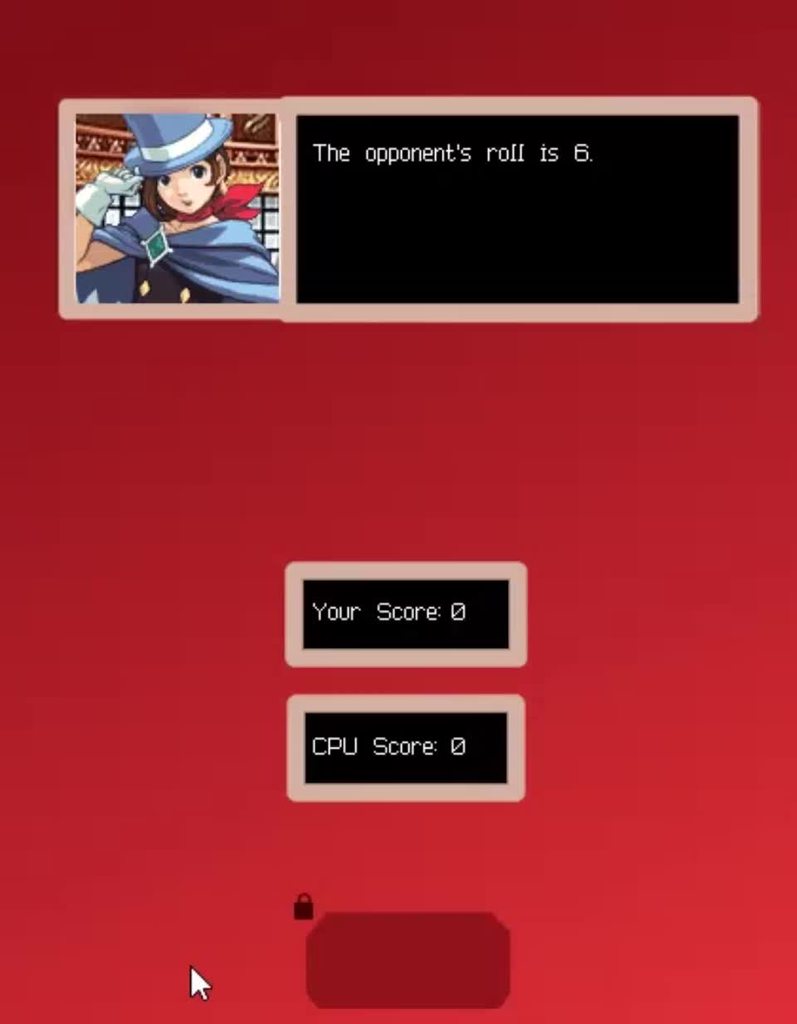
The text only updates word by word and by the jankiest way possible.
        QTimer.singleShot(500, lambda: self.text.setText(f"The opponent's roll "))
        QTimer.singleShot(750, lambda: self.text.setText(f"The opponent's roll is"))
QTimer.singleShot(1000, lambda: self.text.setText(f"The opponent's roll is {roll_cpu}."))```So yeah not the best way to do it. This way is not only correct but as usual, much better as well.
trim ibex
you could use split() and use the maxsplit arg to get words programmatically
coarse mirage
trim ibex
you could use split() and use the maxsplit arg to get words programmatically
Sounds complicated.
trim ibex
!e py txt = "The opponent's roll is" for i in range(1,5): print(' '.join((txt+' ').split(' ',i)[:-1]))
proven basinBOT
@trim ibex :white_check_mark: Your eval job has completed with return code 0.
001 | The
002 | The opponent's
003 | The opponent's roll
004 | The opponent's roll is
forgot my :
what it's doing is using split with increasing max numbers of splits, and the end of the list it makes is just removed, then the list is re-joined into a string
coarse mirage
It works, but there needs to be a slight delay in between each update.
trim ibex
maybe there's an easier way to do it too
yeah but i mean what you have can be generalized into a function that displays increasingly large sections of text
and the delay could also use an equation
you could also just split the text into a list beforehand and print a particular number of words, increasing the number of them printed
steady dew
can you remove the outline of a frame in pysimplegui?
 tardy fjord
any guides on downloading QT for use with python ?
 idle nest
Hii, I am designing UI for our app, I am confused which design look better.. Can you guys please vote slight_smile which one you prefer


With which ui I should go ahead?
idle nest
thanks for feed back
versed vessel
modern marsh
<@347151407406907406> what library are you currently using
Tkinter
But I don't know if I gotta switch to Kivy so it is easier
versed vessel
modern marsh
hmm idk if you can make that design in tkinter
I'm using place, which probably isnt the best option so my idea was to store in a file every size and position of every widget and access them depending on the resolution, but then i realized it was a VERY bad idea
This is the UI i'm trying to make
 mellow raven
Hi guys, I have a QListWidget from QT that I want to automatically adjust its length based on the content. So, as more items are added, the longer it gets. I'm populating this list like this:
        item_amount = 12
        for item in range(item_amount):
            list_Item = QListWidgetItem()
            self.addItem(list_Item)
            self.buttons.append(NodeShape())
            list_Item.setSizeHint(QSize(200,50))
            self.setItemWidget(list_Item, self.buttons[item])
I tried setSizeAdjustPolicy(QListWidget.AdjustToContents) but this actually make it smaller.
Any ideas would be appreciated.
 real haven
Hi Guys, I Was Looking For creating a ToggleSideBar for my tkinter application. It does involve me dynamically re arranging the content of my window. Any help or suggestions is welcomed.
This is the kind of sidebar I am trying to achieve

This is what I currently have

 digital rose
very cool
 pseudo axle
from kivymd.app import MDApp
from kivy.lang.builder import Builder
from kivy.uix.screenmanager import Screen,ScreenManager
from s_n import screen_helper
from kivymd.uix.button import MDRectangleFlatButton,MDFloatingActionButton,MDFlatButton
from kivy.uix.boxlayout import BoxLayout
from kivy.core.window import Window
from kivymd.uix.list import OneLineListItem,TwoLineAvatarListItem,ImageLeftWidget
Window.size=(300,500)
class ContentNavigationDrawer(BoxLayout):
pass
class MenuScreen(Screen):
pass
class ProfileScreen(Screen):
pass
class ListScreen(Screen):
def on_start(self):
for i in range(20):
hi=ImageLeftWidget(source=r"C:\Users\i\Music\i.png")
items =TwoLineAvatarListItem(text='Recipe '+str(i),secondary_text='breakfast')
items.add_widget(hi)
self.root.ids.container.add_widget(str(items))
sm=ScreenManager()
sm.add_widget(MenuScreen(name='menu'))
sm.add_widget(ProfileScreen(name='profile'))
sm.add_widget(ProfileScreen(name='list'))
class DemoApp(MDApp):
def build(self):

    self.theme_cls.primary_palette='Cyan'
    screen=Builder.load_string(screen_helper)


    return screen
DemoApp().run()
north ore
!code
proven basinBOT
Here's how to format Python code on Discord:
```py
print('Hello world!')
```
These are backticks, not quotes. Check this out if you can't find the backtick key.
north ore
from kivymd.app import MDApp
from kivy.lang.builder import Builder
from kivy.uix.screenmanager import Screen,ScreenManager
from s_n import screen_helper
from kivymd.uix.button import MDRectangleFlatButton,MDFloatingActionButton,MDFlatButton

from kivy.uix.boxlayout import BoxLayout
from kivy.core.window import Window
from kivymd.uix.list import  OneLineListItem,TwoLineAvatarListItem,ImageLeftWidget


Window.size=(300,500)
class ContentNavigationDrawer(BoxLayout):
    pass
class MenuScreen(Screen):
    pass
class ProfileScreen(Screen):
    pass
class ListScreen(Screen):
    def on_start(self):
        for i in range(20):
            hi=ImageLeftWidget(source=r"C:\Users\i\Music\i.png")
            items =TwoLineAvatarListItem(text='Recipe '+str(i),secondary_text='breakfast')
            items.add_widget(hi)
            self.root.ids.container.add_widget(str(items))


sm=ScreenManager()
sm.add_widget(MenuScreen(name='menu'))
sm.add_widget(ProfileScreen(name='profile'))
sm.add_widget(ProfileScreen(name='list'))
class DemoApp(MDApp):

    def build(self):

        self.theme_cls.primary_palette='Cyan'
        screen=Builder.load_string(screen_helper)


        return screen


DemoApp().run()
no kv style?
proven basinBOT
Hey @pseudo axle!
Uh-oh! It looks like your message got zapped by our spam filter. We currently don't allow .txt attachments, so here are some tips to help you travel safely:
• If you attempted to send a message longer than 2000 characters, try shortening your message to fit within the character limit or use a pasting service (see below)
• If you tried to show someone your code, you can use codeblocks
(run !code-blocks in #bot-commands for more information) or use a pasting service like:
north ore
paste the kv string as well
pseudo axle
the screen helper is too long to send here
north ore
also your doing build it with python playlist yeah?
pseudo axle
yeah
north ore
kivymd tut? kivymd has changed since then alot so that might be a factor
pseudo axle
i saw the changes
north ore
fine send the kv string into dms
pseudo axle
ok
north ore
ill say right off the bat, remove the contentnavigationdrawer widget, unless your creating a custom one
 unique forge
I do recommend using the docs 100% @pseudo axle
they are really good and full of useful examples
steady dew
Why does the following code return the following error:
import PySimpleGUI as sg

layout = [
    [sg.T('Test text', key='Testkey')],
    [sg.B('go')]
]

window = sg.Window('Test', layout)

while True:
    event, values = window.read()
    if event == sg.WIN_CLOSED:
        break
    if event == 'go':
        print(str(values['Testkey']))
window.close()
Traceback (most recent call last):
  File "C:\Users\User\PycharmProjects\pythonProject\test.py", line 15, in <module>
    print(str(values['Testkey']))
KeyError: 'Testkey'
and how do I fix it
 stoic jackal
tkinter help in #help-peanut please
stoic jackal
its in the help channel
i put everything there @digital rose
im having trouble getting the text from an entry
real haven
#user-interfaces message
Someone please look into my problem
tkinter help in #help-pancakes please
digital rose
ok
mellow raven
Hi, I'm using QT on Python and trying to put a QWidget on top of another, overlapping. I don't want it to affect the layout of the other elements in the window. Is there a type of layout that would allow this?
 uneven kite
Hi, how is everyone? I Have made an app using Qt5 that loops through a list of URLs and downloads them. The problem is that when I loop through the list, and pass it to the QThread class, it hangs until it gets to the last URL before it starts downloading. What is the best way to wait for a current thread to finish before continuing the for loop?
 white dust
I wanna ask about how to move the mouse courser in pyautogui depending on a certain colour
Can I have answers
coarse mirage
I found out that when I try to change the text for my scrolling text function again, it no longer works.
Snippet: ```
def button_press(self):
    Window.wait = 25
    Window.wait_interval = 25
    self.text = (f"Change {Window.wait}.")
    Window.text_display(self)
    QTimer.singleShot(3000, self.text == (f"Changed Again."))
    QTimer.singleShot(3000, Window.text_display(self))

def text_display(self):

    word_count = len(self.text)
    for letters in range(word_count):
        QTimer.singleShot(Window.wait,lambda: Window.text_scroll(self)); Window.wait+=Window.wait_interval


def text_scroll(self):
    self._index += 1
    self.label_1.setText(self.text[:self._index])  ```
Error: Traceback (most recent call last): File "c:\Users\nomar\Dropbox\Code\test2.py", line 75, in button_press QTimer.singleShot(3000, self.text == (f"Changed Again.")) TypeError: arguments did not match any overloaded call: singleShot(int, PYQT_SLOT): argument 2 has unexpected type 'bool' singleShot(int, Qt.TimerType, PYQT_SLOT): not enough arguments
Entire code: https://paste.pythondiscord.com/ecarosonip.rb
coarse mirage
Solved. Had to set the next text change as a function: ``` def change(self):
self.text = (f"Changed Again.")
Window.text_display(self)
def button_press(self):
    Window.wait = 25
    Window.wait_interval = 25
    self.text = (f"Change {Window.wait}."); Window.text_display(self)
    QTimer.singleShot(3000, lambda: Window.wait == 25)
    QTimer.singleShot(3000, lambda: Window.change(self)) ```
 oblique bridge
hi guys
I have a question
QMenuBar.addMenu(menu) appends a QMenu object (menu) to a menu bar object. It returns the action associated with this menu.
what does ☝️ mean
coarse mirage
Is there a way to have QTimer update an existing variable? Something like this: QTimer.singleShot(3500, lambda: Window.new_text = "update")
swift halo
coarse mirage
Is there a way to have `QTimer` update an existing variable? Something like this...
You can't use a lambda there, just do ```py
def callback():
Window.new_text = "update"
hello, does anyone know how to install QtDesigner so that it properly opens ?
 sage bane
If the user checks the checkbox, how do I hide the left entry fields? This is Tkinter.
 lime monolith
sage bane
If the user checks the checkbox, how do I hide the left entry fields? This is Tk...
lime monolith
sage bane
If the user checks the checkbox, how do I hide the left entry fields? This is Tk...
You can use pack_forget or grid_forget respectively, repack or grid them to show them again, I think it would look better if you changed the entry's state to disabled instead.
green stump
Can someone help me with PyQt5 in #help-cupcake
sage bane
lime monolith
You can use pack_forget or grid_forget respectively, repack or grid them to show...
Hell yeah, thx
hybrid spindle
So have a gui where the primary widget is a canvas. How would I keep the focus on the canvas when I interact with the other widgets, so that I dont have to reclick on a canvas to access the keypress events associated with it? Tried setFocus and focusWidget whenever I have any other interactions but I still have to reclick on the canvas to access the keyboard events
lime monolith
hybrid spindle
So have a gui where the primary widget is a canvas. How would I keep the focus o...
Maybe binding the key press to the parent frame of the canvas would work better.
steady dew
is it possible to use some version of opencv to put an mp4 in a pysimplegui layout?
steady dew
or a gif
ivory ember
It is possible to add widgets to a subclassed QPushButton in PyQt5? So I'm basically trying to have a whole bunch of widgets be clickable and have QPushButton properties.
 feral abyss
guys what is the easiest gui library to start with and do simple stuff?(nothing with special effects and smth)
just simple forms
lime monolith
feral abyss
guys what is the easiest gui library to start with and do simple stuff?(nothing ...
Does your Python program need a Graphical User Interface (GUI)? With this learning path you'll develop your Python GUI programming skills from scratch.
 fading basin
Hey I am creating a frequency table calculator. I want to adjust the proprotion of the cloumns with the avalible space but when I am running I get this output:

What I want

here is the code: py #formating table header=tableWidget.horizontalHeader() header.setSectionResizeMode(0, QtWidgets.QHeaderView.Stretch) header.setSectionResizeMode(1, QtWidgets.QHeaderView.ResizeToContents)
 fiery badge
someone know why this radio button dont show up?
i'm using Pyqt5
self.lang_radio = QRadioButton("Remember this choice")
self.lang_radio.setText('Remember this choice')
self.lang_radio.move(100, 60)
 tawdry mulch
hybrid spindle
So have a gui where the primary widget is a canvas. How would I keep the focus o...
tawdry mulch
hybrid spindle
So have a gui where the primary widget is a canvas. How would I keep the focus o...
Why dont you bind it to the root directly
tawdry mulch
real haven
Hi Guys, I Was Looking For creating a ToggleSideBar for my tkinter application. ...
and....
fading basin
Hey @fiery badge did you put this at the end py layout.addWidget(self.lang_radio, 100,60)
This might work
north ore
how do i resolve this though
File "main.py", line 113, in validate_email
     self.ids.signup_email.bind(
   File "kivy/_event.pyx", line 429, in kivy._event.EventDispatcher.bind
 KeyError: 'persistent'
How to move a table widget using pyqt5 ?
fading basin
north ore
```py
File "main.py", line 113, in validate_email
self.ids.signup_email.bin...
Can you tell the problem in detail
and what are you to trying to resolve
Hey @north ore try calling py get('persistent') that should work
 drowsy hollow
How do I get my app ui to look good?
I've looked at the python gui frameworks but all of them look pretty dated
tawdry mulch
drowsy hollow
How do I get my app ui to look good?
depends on your skill TBH
You could make a tkinter gui look modern
also pyqt supports style sheets so it can be also made modern quite easily
drowsy hollow
Im still a relative beginner to python
I've done data processing before
but its my first time taking on app development
man its confusing
drowsy hollow
tawdry mulch
You could make a tkinter gui look modern
How?
tawdry mulch
Its not easy, but its possible
drowsy hollow
I guess for now im looking for a gui framework that can look good and not overly complex
tawdry mulch
Not complex? Then PyQT might do it
drowsy hollow
Alright I'll give it a shot, thanks
drowsy hollow
tawdry mulch
Not complex? Then PyQT might do it
Is there a place to check which pyqt6 commands do what? I'm looking at the documentation and it I'm lost
tawdry mulch
I'm not sure about now, but before PyQT6 seemed to be messed up a bit, why don't you take PyQT5 and start
drowsy hollow
Sure
tawdry mulch
drowsy hollow
Is there a place to check which pyqt6 commands do what? I'm looking at the docum...
 crude nacelle
#library
    from tkinter import *
    #library

    #functions
    def sum():
        num1 = e1.get()
        num2 = e2.get()
        int(num1)
        int(num2)
        somma = num1+num2
        int(somma)
        #convert = str(somma)
        label = Label(window, text=somma).grid(row=2, column=0)
    #functions

    #windows
    window = Tk()
    window.geometry("400x400")
    window.title("calcolatore mark_1")
    #windows

    #creating
    e1 = Entry(window)
    e2 = Entry(window)
    btn_sum = Button(window, text="+", command=sum)
    btn_diff = Button(window, text="-")
    btn_mult = Button(window, text="x")
    btn_div = Button(window, text=":")
    #creating


    #positions
    e1.grid(row=0, column=0)
    e2.grid(row=1, column=0)
    btn_sum.grid(row=0, column=1)
    btn_diff.grid(row=0, column=2)
    btn_mult.grid(row=0, column=3)
    btn_div.grid(row=0, column=4)
    #positions

    window.mainloop()
how can i print the sum of num1 and num2, because the sum function print num1 num2 as string
i want print the sum as entire
tawdry mulch
crude nacelle
```
#library
from tkinter import *
#library
#functions
def sum...
Just label = Label(window, text=int(e1.get())+int(e2.get())).grid(row=2, column=0)
tawdry mulch
You can remove stuff like num1, num2 bla bla, its pointless @crude nacelle
crude nacelle
yes, yes
tawdry mulch
crude nacelle
yes, yes
But to talk about a better code, create the Label outside and use config() on it to update the text
lime monolith
crude nacelle
```
#library
from tkinter import *
#library
#functions
def sum...
When you are doing
int(num1)```
it does not alter num1 you need to store the result
```py
num1 = int(num1)```ah ok thk
crude nacelle
tawdry mulch
But to talk about a better code, create the `Label` outside and use `config()` o...
ok thk
 foggy burrow
class PlaylistItem(QFrame):
    layout = QVBoxLayout()
    def __init__(self, name, filename):
        super(PlaylistItem, self).__init__()
        self.name = name
        self.file = filename
        self.widgetUi()

    def widgetUi(self):
        self.setLayout(self.layout)
        self.setStyleSheet("QFrame{background-color: grey; border-radius: 10}")
        layout = self.layout
        nlab = QLabel(self.name)
        layout.addWidget(nlab)
        buttons = QHBoxLayout()
        layout.addLayout(buttons)
        playbut = QPushButton("Play")
        rembut = QPushButton("Remove")
        buttons.addWidget(playbut)
        buttons.addWidget(rembut)
i have this qframe object
if i add it to a vbox inside a scrollarea

i get this
i want them to be separate
(pyqt5)
drowsy hollow
tawdry mulch
I'm not sure about now, but before PyQT6 seemed to be messed up a bit, why don't...
Sorry to bother but is it fine if i switch to pyside?
tawdry mulch
drowsy hollow
Sorry to bother but is it fine if i switch to pyside?
Its almost the same thing itself
foggy burrow
pyqt is better
there were some stuff where things just didnt work in pyside
as soon as i changed the imports to pyqt, they started working
fading basin
Ok I want to move a table widget, but it doesn't move also I am using pyqt5 here is the code: ```py
#formating table
header=tableWidget.horizontalHeader()
header.setSectionResizeMode(0, QtWidgets.QHeaderView.Stretch)
header.setSectionResizeMode(1, QtWidgets.QHeaderView.Stretch)
tableWidget.move(400,575)
#initialzing table
tableWidget.doubleClicked.connect(getSelectedItemData)
layout.addWidget(tableWidget)
qwidget.setLayout(layout)
qwidget.show()```
lime monolith
fading basin
Ok I want to move a table widget, but it doesn't move also I am using pyqt5 here...
tableWidget is added to a layout
layout.addWidget(tableWidget)```
that is controlling where it is positioned.Oh Ok thanks
 gaunt willow
Why does everybody here use pyqt5 and not tkinter?
tawdry mulch
I use tkinter.
tawdry mulch
haha
tawdry mulch
Nope
tawdry mulch
For modern gui, no. But its fairly simple to use, just bare python logic
 sturdy skiff
Regarding PySide6, how would i get the return result of a QThread?
# function in main window that calls thread
def threading_test(self):
    worker = Worker(parent=self)
    result = worker.start()

    print(result)
class Worker(QtCore.QThread):
    async def task(self, x):
        n = random.randint(1, 5)
        print(f'Task {x} sleeping for {n} second(s)')
        await asyncio.sleep(n)
        print(f'Task {x} finished')
        return x + 100

    async def test(self):
        tasks = [self.task(i) for i in range(10)]
        return await asyncio.gather(*tasks)

    def run(self):
        return asyncio.run(self.test())

seems to return None before running the thread
ivory ember
sturdy skiff
Regarding PySide6, how would i get the return result of a QThread?
I'd use a custom pyqtSignal() which would emit once you're done processing/sleeping.
fading basin
Ok, I am creating a frequency table calculator. I want to move a tablewidget which is added inside a layout. now I have set the layout inside qwidget and the showed it. When I try to move the qwidget to move the layout it move the whole application frame. Here is the code: https://paste.pythondiscord.com/xagedowenu.py
digital rose
from tkinter import Label, filedialog,Tk,Entry,Button
import tkinter as tk
from PIL import ImageTk, Image

screen = Tk()
screen.geometry("900x600")

def UploadImage():
    screen.fileSelected = filedialog.askopenfilenames(initialdir="/",title="Select",filetypes=(("png files",".png"),("All Files", "*.*")))
    print(screen.fileSelected)
    files, Empty = screen.fileSelected
    FillUpFormFresh = Image.open(files).resize((1920,1080), Image.ANTIALIAS)
    FillUpFormFinished = ImageTk.PhotoImage(FillUpFormFresh)

    FillUpForm = Label(screen, image=FillUpFormFinished).place(x=-1,y=-5)
    #ImageGallery = Entry(screen).place(x=0,y=0,width=100,height=30)
    #SavedImages = []
    #SavedImages.append(ImageGallery.get())
    print(files)


Button = Button(screen, text="upload image", command=UploadImage).pack()

screen.mainloop()
```Why does this give an errorr???
```py
('C:/Users/RCERM-SharkGamer168/OneDrive/Pictures/152769689_4396243637070524_6258922770820761108_n.png',)
Exception in Tkinter callback
Traceback (most recent call last):
  File "C:\Users\RCERM-SharkGamer168\AppData\Local\Programs\Python\Python39\lib\tkinter\__init__.py", line 1892, in __call__
    return self.func(*args)
  File "c:\Users\RCERM-SharkGamer168\OneDrive\Documents\Python Stuff\Misc\Test.py", line 11, in UploadImage
    files, Empty = screen.fileSelected
ValueError: not enough values to unpack (expected 2, got 1)
My device is Windows 10 btw
fading basin
wait I will see what I can do
lime monolith
digital rose
```py
from tkinter import Label, filedialog,Tk,Entry,Button
import tkinter as tk...
filedialog.askopenfilenames returns a tuple that can vary in size depending on how many files are selected
on the line files, Empty = screen.fileSelected it will only be able to unpack if 2 files are selected.
fading basin
Ok, I am creating a frequency table calculator. I want to move a tablewidget which is added inside a layout. now I have set the layout inside qwidget and the showed it. When I try to move the qwidget to move the layout it moves the whole application frame. Here is the code: https://paste.pythondiscord.com/xagedowenu.py
Can somebody help me
unique forge

Hi Guys,
Trailer from the PyOneDark GUI which is now available for download with early access for all Patreon supporters, with a new theme and some source code updates.
Remembering that this project will be available to everyone on GitHub from August 1st, 2021!
/// DOWNLOAD ///
🔗 https://www.patreon.com/WandersonIsMyName
WHY EARLY ACCESS?
Bec...
this guy makes awesome GUI's with Qt for Python
ivory ember
unique forge
this guy makes awesome GUI's with Qt for Python
only for his paterons from what I gather
tawdry mulch
ivory ember
only for his paterons from what I gather
Yea this one, but there are more interesting ones
unique forge
ivory ember
only for his paterons from what I gather
yes, for now
but his github already has a few
 mighty rock
I'm making a tkinter (python 3.9 Windows 10) app and I want it to be like an overlay on top of Minecraft's fullscreen window mode. How can I achieve that? self.wm_attributes("-topmost", True) doesn't seem to be working on Minecraft.
lofty pond
mighty rock
I'm making a tkinter (python 3.9 Windows 10) app and I want it to be like an ove...
Its probably cause it is fullscreened, if you are thinking like the other overlays, like statsify, I think they draw on the the minecraft window
mighty rock
How do they work?
lofty pond
Drawing directly to the window is what I am thinking, but I don't know for certain
digital rose
mighty rock
I'm making a tkinter (python 3.9 Windows 10) app and I want it to be like an ove...
one thing you can try is to forcibly tell a toplevel to stay on top of any window, and not let it lose focus if you try to minimize it. you can try this approach.
from tkinter import Tk, Toplevel

root = Tk()
top = Toplevel(root)
top.geometry('400x400+30+30') # just to set size and coordinates of the toplevel

top.focus_set() # add focus to the toplevel window
top.grab_set()

top.title('Overlay')
top.wm_attributes('-topmost', 1)
top.resizable(0, 0)

# make the root window disappear, so you can only see the popup toplevel.
root.wm_attributes('-alpha', 0.0)

root.mainloop()
one thing is, that the root window is only hidden, it can be removed by killing the compiler task in the task manager.
and, if you want to make the native window borders disappear, you can do this:
top.overrideredirect(1)
 inland carbon
hello
im very new to tkinter and im wondering how i would go about creating a button that would change the text of an existing label
digital rose
inland carbon
im very new to tkinter and im wondering how i would go about creating a button t...
You could use config() to change text of a label. Look at this example:
import tkinter as tk
from random import randint

def change_text():
    global label
    new_text=randint(0,255)
    label.config(text=new_text)

root=tk.Tk()

button=tk.Button(root, text='Change!', command=change_text)
button.pack()

label=tk.Label(root, text='0')
label.pack()

root.mainloop()
 opal mulch
digital rose
one thing you can try is to forcibly tell a toplevel to stay on top of any windo...
opal mulch
digital rose
one thing you can try is to forcibly tell a toplevel to stay on top of any windo...
But if you set the focus to that window, would you still be able to play Minecraft or do something else?
digital rose
opal mulch
But if you set the focus to that window, would you still be able to play Minecra...
let's say for instance, you run this program, and the toplevel pops up. if you're on windows, you could alt-tab to minecraft, and simply continue. the toplevel here just keeps itself on the top, unless you close it. and, when you get directed to minecraft, the toplevel would lose focus, and you can operate on minecraft.
but, this doesnt restrict you to using hotkeys like alt-tab. you can always switch to any application.
opal mulch
but can i still see the overlay?
digital rose
Can you show a screenshot?

 digital rose
Try alt-tabbing back to the tkinter top-level.
opal mulch
it just minimizes minecraft
can a different library work?
like, would pyqt5 work if i try to do this?
digital rose
Tkinter does have an extension for this.
opal mulch
oh
digital rose
But I'm not sure how Minecraft handles it's fullscreen mode. Maybe it doesn't allow anything to overlay. Some downloadable overlays for Minecraft might be rendering on the native window using Java. Again, I'm not completely sure.
opal mulch
there is this overlay that uses tkinter too and it allows fullscreen mode
opal mulch
digital rose
Tkinter does have an extension for this.
what is the extension
digital rose
overlay. yes that is the name. you can get it by the following command:
pip install overlay
it uses tkinter.
import tkinter as tk
from overlay import Window

root = Window()
Window.launch()
https://pypi.org/project/overlay/
@opal mulch
 opal mulch
ok thanks ill check!
digital rose
it pretty much uses the same concept as in my previous code.
opal mulch
well it doesnt seem to work with minecraft thank you anyways for trying to help
digital rose
opal mulch
well it doesnt seem to work with minecraft thank you anyways for trying to help
Then Minecraft must be forcing focus when it's fullscreened. Maybe try writing a plugin in Java then, that could write to the native Minecraft window.
tawdry mulch
Some games take full focus wen full screen, any type of other focus will make it minized
Not sure, but if minecraft has a fullscreen borderless mode, it might work
digital rose
from pickle import PickleBuffer
from tkinter import Label, filedialog,Tk,Entry,Button
from PIL import ImageTk, Image
screen = Tk()
screen.geometry("900x600")
Pictures = []
Index = 0
def UploadImage():
global FillUpFormFinished
fileSelected = filedialog.askopenfilenames(initialdir="/",title="Select",filetypes=(("png files",".png"),("All Files", "*.*")))
Pictures.append(fileSelected)
for Item in Pictures:
lambda Selected=Item: ImageDuplication(Selected)
def ImageDuplication(Image):
global FillUpFormFinished
FillUpFormFresh = Image.open(Image).resize((230,240), Image.ANTIALIAS)
FillUpFormFinished = ImageTk.PhotoImage(FillUpFormFresh)
FillUpForm = Label(screen, image=FillUpFormFinished).pack()
Button = Button(screen, text="upload image", command=UploadImage).pack()
screen.mainloop()
``` can somebody run this and see if theres an image that pops up? sharp scarab
Can someone help me with a random picker thing using tkinter? I am just trying to put some stuff together right now.
import random
import tkinter as tk

root = tk.Tk()
w = tk.Tk()
root.title("Random Picker")
w.title("Random Picker Result")
root.geometry("600x400")
w.geometry("600x400")

stuff = ["Hi", "Bye", "Goodbye", "Hello", "Greetings"]
test = ["1", "2", "3"]

def callback(input):

    if input == "Test" or "test":
        tk.Label(w, text = random.choice(test))
        return True

    elif input == "Stuff" or "stuff":
        tk.Label(w, text = random.choice(stuff))
        return True

    else:
        tk.Label(w, text = "I don't seem to have that set in my list.")
        return False

def button1():
    inp = e.get(1.0, "end-1c")
    tk.Label(w, text = inp)

button = tk.Button(root, text = "Pick from set", command = callback)
e = tk.Entry(root)
e.place(x = 235, y = 50)
reg = root.register(callback)

e.config(validate ="key",
         validatecommand =(reg, '% P'))

button.pack()
root.mainloop()
 nocturne breach
Anyone have any good resources for creating good UI designs? I'm confident with my backend coding but when it comes to front-end I'm absolutely hopeless - I know tkinter but need some practice going from boring grey-scale to modern, clean etc.
Or are there some better packages/frameworks for frontend design other than Tkinter?
ivory ember
nocturne breach
Or are there some better packages/frameworks for frontend design other than Tkin...
Look into PyQt5, more complicated, but well worth it.
tawdry mulch
digital rose
```py
from pickle import PickleBuffer
from tkinter import Label, filedialog,Tk,E...
What do you get
tawdry mulch
nocturne breach
Anyone have any good resources for creating good UI designs? I'm confident with ...
PyQT, Kivy
You can also check out https://github.com/nihaalnz/mtk I try to make it look cool, but ya...
 lime monolith
nocturne breach
Anyone have any good resources for creating good UI designs? I'm confident with ...
lime monolith
nocturne breach
Anyone have any good resources for creating good UI designs? I'm confident with ...
I see this, might be worth a look
https://www.reddit.com/r/Python/comments/o07cdw/look_at_this_beauty_created_in_pure_python_using/

reddit
113 votes and 29 comments so far on Reddit
tawdry mulch
sharp scarab
Can someone help me with a random picker thing using tkinter? I am just trying ...
What is your intention with this code
sharp scarab
tawdry mulch
What is your intention with this code
I said it in the first part.
tawdry mulch
global is used there right
tawdry mulch
digital rose
```py
from pickle import PickleBuffer
from tkinter import Label, filedialog,Tk,E...
It is actually quite simple, you are not calling the function
lime monolith
tawdry mulch
`global` is used there right
Get rid of Global and refactor using classes
tawdry mulch
Why so? It does not solve the issue anyway
sharp scarab
sharp scarab
Can someone help me with a random picker thing using tkinter? I am just trying ...
@tawdry mulch my code is to make a random picker where you can choose from some preset lists.
tawdry mulch
sharp scarab
<@221022114793127947> my code is to make a random picker where you can choose fr...
Okay just a min, ill take a look once I am done with the first code
sharp scarab
Okay.
tawdry mulch
I would do something like:
tawdry mulch
digital rose
```py
from pickle import PickleBuffer
from tkinter import Label, filedialog,Tk,E...
from pickle import PickleBuffer
from tkinter import Label, filedialog,Tk,Entry,Button
from PIL import ImageTk, Image

screen = Tk()
screen.geometry("900x600")
Pictures = []
Index = 0

def UploadImage():
    fileSelected = filedialog.askopenfilenames(initialdir="/",title="Select",filetypes=(("png files",".png"),("All Files", "*.*")))

    for Item in fileSelected:
        ImageDuplication(Item)

def ImageDuplication(image):
    FillUpFormFresh = Image.open(image).resize((230,240), Image.ANTIALIAS)
    FillUpFormFinished = ImageTk.PhotoImage(FillUpFormFresh)
    Label(screen, image=FillUpFormFinished).pack()
    Pictures.append(FillUpFormFinished)

Button = Button(screen, text="upload image", command=UploadImage).pack()

screen.mainloop()
-
The thing is you do not have to append the file path to a new list
-
Instead loop through the
fileSelectedtuple itself. -
Then you need to store the
ImageTkinside a list, as usingglobaljust overwrites the existing image and does hold reference to the last image only -
Take a look at PEP8 to know how to conventionally name variables and functions in python
tawdry mulch
sharp scarab
<@221022114793127947> my code is to make a random picker where you can choose fr...
Can you explain a bit more
Okay after a bit of code reading, you are trying to pick an item from list based on user input
sharp scarab
Yeah.
tawdry mulch
So my question is, do you have to call the function each time something is entered onto the entry widget? Or wait for the button press
sharp scarab
Not sure, my code is just other code bashed together to make something that kind of works. I'm not on pc rn but it either just printed the first if statement or an error like: expected argument input.
tawdry mulch
Anyway ill re write the code so that it works the way the code was meant to be working when written
sharp scarab
Okay.
tawdry mulch
sharp scarab
Can someone help me with a random picker thing using tkinter? I am just trying ...
Based on the given code, here is something that I think is what you want:
import random
import tkinter as tk

root = tk.Tk()
w = tk.Tk()
root.title("Random Picker")
w.title("Random Picker Result")
root.geometry("600x400")
w.geometry("600x400")

stuff = ["Hi", "Bye", "Goodbye", "Hello", "Greetings"]
test = ["1", "2", "3"]

var = tk.StringVar(root)

def callback(*args): # A function to call every time something is entered into entry
    if var.get() in ("Test", "test"):
        w1.config(text = random.choice(test))

    elif var.get() in ("Stuff", "stuff"):
        w1.config(text = random.choice(stuff))

    else:
        w1.config(text = "I don't seem to have that set in my list.")


button = tk.Button(root, text = "Pick from set", command=callback)
e = tk.Entry(root, textvariable=var) # Assigning the textvariable
e.pack()

w1 = tk.Label(w) # Creating an initial label and later updating it inside the function
w1.pack()

var.trace('w',callback) # To trigger the func everytime var is written/changed

button.pack()
root.mainloop()
This points that the button is useless, unless ofc you have some hidden motive behind it
 delicate pier
Hello guys, I dont want to be rude and make use of you people but I really need help. Its end of a year and we have to make chessboard ( 8x8 ) in tkinter, but I dont know nothing about python ( cause of online classes :/ ). If someone could really help i would be very thankful. Size of the box is 50.
 tawdry mulch
delicate pier
Hello guys, I dont want to be rude and make use of you people but I really need ...
tawdry mulch
delicate pier
Hello guys, I dont want to be rude and make use of you people but I really need ...
50 what? pixel or ...?
delicate pier
Yeah it should be pixels
tawdry mulch
That's a weird requirement to give? Is it a school? have you been taught documentation?
tawdry mulch
delicate pier
Hello guys, I dont want to be rude and make use of you people but I really need ...
I did write an answer https://stackoverflow.com/a/67432906/13382000 which is pretty similar, and you should be able to(hopefully) modify it to make it work with your case
Stack Overflow
I'm trying to create a program that will draw 16 different squares, in four different colors. So for example, the code for a red piece looks like this:
redSquare = Label(window,bg="red",w...
delicate pier
Yes its for school, I tried to learn it last week but i always end up confused with it.
delicate pier
tawdry mulch
I did write an answer https://stackoverflow.com/a/67432906/13382000 which is pre...
Thank you
lime monolith
digital rose
```py
from pickle import PickleBuffer
from tkinter import Label, filedialog,Tk,E...
import tkinter as tk
from tkinter import filedialog
from PIL import ImageTk, Image


class App(tk.Tk):
    def __init__(self, *args, **kwargs):
        super().__init__(*args, **kwargs)
        self.geometry("900x600")
        tk.Button(self, text="upload image", command=self.on_btn).pack()
        self.image_labels = {}

    def on_btn(self):
        filenames = filedialog.askopenfilenames(
            initialdir="/", title="Select", filetypes=(("png files", ".png"), ("All Files", "*.*")))
        for filename in filenames:
            self.display_image(filename)

    def display_image(self, filename):
        image_label = ImageLabel(self, image=filename)
        image_label.pack()
        self.image_labels[filename] = image_label


class ImageLabel(tk.Label):
    def __init__(self, *args, **kwargs):
        image = Image.open(kwargs['image']).resize((230, 240), Image.ANTIALIAS)
        self.photo_image = ImageTk.PhotoImage(image)
        kwargs['image'] = self.photo_image
        super().__init__(*args, **kwargs)


if __name__ == '__main__':
    app = App()
app.mainloop()```Why go through the trouble of making a class for images with label?
Because it makes the code shorter? Meh, but I'll give it to ya
tawdry mulch
delicate pier
Hello guys, I dont want to be rude and make use of you people but I really need ...
Well if you couldnt figure it out, here is a much simpler/better code:
from tkinter import *

root = Tk()
img  = PhotoImage(width=1,height=1) # To force the label to use pixels for measuring width/height
side = 50

for i in range(8): # Loop a total of 64 times
    for j in range(8):
        if i%2 == 0: # Check for even rows
            if j%2 == 0: # Check even columns
                Label(root,image=img,height=side,width=side,bg='black').grid(row=i,column=j)
            else:
                Label(root,image=img,height=side,width=side,bg='white').grid(row=i,column=j)
        else: # Do the opposite of the if statement
            if j%2 == 0:
                Label(root,image=img,height=side,width=side,bg='white').grid(row=i,column=j)
            else:
                Label(root,image=img,height=side,width=side,bg='black').grid(row=i,column=j)

root.mainloop()
Thank you so much, you probably saved my grades. 😄
delicate pier
I just need one more help, my teacher texted me : Create a program that draws a target composed of circles colored alternately black and white
color. Load the radius of the largest circle, each additional circle has a radius of 10 smaller. Rendering
ends when the radius is less than 15.
 tawdry mulch
delicate pier
> I just need one more help, my teacher texted me : Create a program that draws ...
tawdry mulch
delicate pier
> I just need one more help, my teacher texted me : Create a program that draws ...
HINT: Look into canvas
proven basinBOT
Hey @delicate pier!
It looks like you tried to attach a Python file - please use a code-pasting service such as https://paste.pythondiscord.com
delicate pier
import random
canvas = tkinter.Canvas()
canvas.pack()

a = 5
b = 1
c = 1
while c == 1:
    if(b % 2 == 1):
        canvas.create_oval(50+(b*a), 50+(b*a), 150-(b*a), 150-(b*a), fill='black')
    else:
        canvas.create_oval(50+(b*a), 50+(b*a), 150-(b*a), 150-(b*a), fill='white')
    b = b + 1
    polomer = (150-(b*a)) -(50+(b*a))
    polomer = polomer / 2
    print(polomer)
    if(polomer < 15):
        c = 0
my classmate did this I just need to replace something but have the same result. I dont understand python much so I ask you guys..
tawdry mulch
delicate pier
```import tkinter
import random
canvas = tkinter.Canvas()
canvas.pack()
a = 5
b...
Do not have to complicate it SO MUCH
 hexed spear
how would i put a icon for my .PY file?
tawdry mulch
hexed spear
how would i put a icon for my .PY file?
Ummm you might want to make it to an exe and then put an icon to it?
hexed spear
tawdry mulch
Ummm you might want to make it to an exe and then put an icon to it?
how would i convert it? sorry im kinda new
tawdry mulch
hexed spear
how would i convert it? sorry im kinda new
Let google be your friend, plenty of examples there
hexed spear
aight
tawdry mulch
delicate pier
> I just need one more help, my teacher texted me : Create a program that draws ...
Just a hacky way around:
from tkinter import *

root = Tk()

canvas = Canvas(root)
canvas.pack()

def create_circle(cnv, x, y , r):
    cnv.create_oval(x-r,y-r,x+r,y+r,width=10)

for i in range(5):
    create_circle(canvas,100,100,i*20,)

root.mainloop()
Tysm again 🙂
tawdry mulch
remember it is just a hacky way around it is not perfect and is just looking alternate in appearence
tawdry mulch
delicate pier
> I just need one more help, my teacher texted me : Create a program that draws ...
Ah, here is example that is replicates the image:
from tkinter import *

root = Tk()

canvas = Canvas(root)
canvas.pack()

def create_circle(cnv, x, y , r, fill):
    cnv.create_oval(x-r,y-r,x+r,y+r,width=10,fill=fill,outline=fill)

for i in range(8,0,-1):
    if i%2 == 0:
        create_circle(canvas,200,150,i*20,'black')
    elif i == 1:
        create_circle(canvas,200,150,i*20,'black')
    else:
        create_circle(canvas,200,150,i*20,'white')
root.mainloop()
 cobalt owl
How do i get both string and argument printed ? Oo self.label.append("Class rank:", last_names[1])
tawdry mulch
cobalt owl
How do i get both string and argument printed ? Oo self.label.append("Cla...
Where is this used?
tawdry mulch
What is argument? @cobalt owl
cobalt owl
index 1 in a list called last_names
tawdry mulch
cobalt owl
index 1 in a list called last_names
I do not understand, what is that you want to show? Show an example of what you have vs what you expected to get
cobalt owl
@tawdry mulch

the code i works fine in python terminal but not when appending into the gui
i can get list into it fine, but not get any kind of text infront of the numbers
tawdry mulch
Ha okay hope someone gets back to you
ivory ember
cobalt owl
i can get list into it fine, but not get any kind of text infront of the numbers
can I see your code?
 royal aurora
Hey, I have 2 images, one is above the other and it's a circle. It's supossed to draw the circle (image) according to the timer. I have an image here to explain it better. Where can I get some help?
digital rose
Any good libs
tawdry mulch
royal aurora
Hey, I have 2 images, one is above the other and it's a circle. It's supossed to...
which library are you using
tawdry mulch
digital rose
Any good libs
tkinter, pyQT, Kivy
 cunning sapphire
Hello. I am trying text editor in python and curses. Here is the link to my code. https://paste.pythondiscord.com/natikagila.py. I want to display all the contents of the file. It gets displayed only to the window size. Also I am unable to move the cursor right and left. Could you help me as to where I might have gone wrong. Thank you.
digital rose
tawdry mulch
What do you get
It works but nothing shows up
digital rose
tawdry mulch
```py
from pickle import PickleBuffer
from tkinter import Label, filedialog,Tk,E...
I see that you appended the Finished image in the list and not the directory
tawdry mulch
directory?
digital rose
the "FillUpFormFinished = ImageTk.PhotoImage(FillUpFormFresh)"
tawdry mulch
It works right
digital rose
tawdry mulch
It works right
Yep it actually worked
but with better output
So in other words, Thank you very much 
cobalt owl
@ivory ember sure, here it is: https://paste.pythondiscord.com/icosisifiw.rb i need a workaround for line #39 så it works like 37 and 38 combined ^^
ivory ember
cobalt owl
<@!717562726553092106> sure, here it is: https://paste.pythondiscord.com/icosisi...
did u try an f string?
tawdry mulch
cobalt owl
<@!717562726553092106> sure, here it is: https://paste.pythondiscord.com/icosisi...
I think you need something like self.label.append(f"Class rank: {stats[1]}") or self.label.append("Class rank: "+stats[1]) like suggested by @ivory ember
versed vessel
Hey there I'm trying to detect the user resolution with tkinter but it does not detect it correctly, my resolution is 1920x1080 but it detects 1280x720.
# Set high DPI
        ctypes.windll.shcore.SetProcessDpiAwareness(2)

        # TODO: Build for 1920x1080, 1366x768 and 800x500 (for now)
        # Get current resolution

        #Get the current screen width and height
        self.screen_resolution = f"{self.app.winfo_screenwidth()}x{self.app.winfo_screenheight()}"

        print('[App-Log] Detected resolution: ' + str(self.screen_resolution))
        self.app.geometry(self.screen_resolution)
        self.app.resizable(False, False)
Output
[App-Log] Detected resolution: 1280x720
Tried removing ctypes.windll.shcore.SetProcessDpiAwareness(2) ?
steady dew
how do i get the value of the specific parameter of an element in pysimplegui?
tawdry mulch
steady dew
how do i get the value of the specific parameter of an element in pysimplegui?
Seems pretty basic? Have you tried googling?
steady dew
i have but i didnt understand the only result
it talks abt metadata and stuff
but i couldnt understand it
tawdry mulch
I'm sorry, I dont use pysimplegui.
steady dew
alr thx anyways
versed vessel
tawdry mulch
Tried removing `ctypes.windll.shcore.SetProcessDpiAwareness(2)` ?
Alright
Still nothing
I don't know what happened, it used to detect my actual resolution lol
sharp scarab
tawdry mulch
Based on the given code, here is something that I think is what you want:
```py
...
Thanks, just tried it and it works.
tawdry mulch
versed vessel
Still nothing
Try going to settings and making sure your resolution is 1920x1080
tawdry mulch
I dont think that matters
tawdry mulch
Mine is on a higher zoom too, but I get proper results
versed vessel
I just switched it to 100% and now it detects 1920x1080
Let me restart my laptop
Nothing
tawdry mulch
Is zoom 100?
versed vessel
No
It looks weird, and Windows itself recommends it on 150%
I'll hard code it so it opens on 1920x1080 instead of the detected resolution, for now.
tawdry mulch
dual monitors?
versed vessel
Nah
Just a laptop, last time I plugged my 720p Tv im not using it right now, the HDMI port is free
tawdry mulch
Hmmmmm maybe the driver is kicking in?
tawdry mulch
versed vessel
Just a laptop, last time I plugged my 720p Tv im not using it right now, the HDM...
Try this:
from tkinter import *

root = Tk()
root.state('zoomed')
root.update()
w,h = root.winfo_width(), root.winfo_height()
print(w,h)
K
It opens it maximized but the output still is 1280x720
Output

class Application():
    def __init__(self, app):
        #Define variables
        self.app = app
        self.space_presses = 0
        self.timer_running = False
        self.connected = False
        self.app_version = '0.3.0-beta'

        # Window setup
        # TODO: Set state as fullscreen when releasing the project. Comment this so UI creation is easier.
        # Initialize windows as fullscreen
        #self.app.attributes('-fullscreen', True)


        # Set high DPI
        ctypes.windll.shcore.SetProcessDpiAwareness(2)

        # TODO: Build for 1920x1080, 1280x720, 1366x768 and 800x500 (for now)
        # Get current resolution

        #Get the current screen width and height
        self.screen_resolution = f"{self.app.winfo_screenwidth()}x{self.app.winfo_screenheight()}"


        # ! My screen resolution is detected as 1280x720, hardcode temporalily just do develop.
        print('[App-Log] Detected resolution: ' + str(self.screen_resolution))
        self.app.state('zoomed')
        self.app.update()
        self.app.geometry('1920x1080')
        self.app.resizable(False, False)
That's the code
tawdry mulch
That actually means the resolution is 1280x720
versed vessel
tawdry mulch
That actually means the resolution is 1280x720
Lol
But it is 1920x1080
tawdry mulch
I doubt
versed vessel
And it used to print it
tawdry mulch
You might have changed some settings
You said the window is full screen, so it should now print the size of the window which will be the size of screen too
versed vessel
But when i open the app in 1920x1080 it opens it on the whole screen so the screen is 1920x1080
tawdry mulch
versed vessel
But when i open the app in 1920x1080 it opens it on the whole screen so the scre...
Are the close and minimize buttons still on top right corner?
versed vessel
Yeah
tawdry mulch
Hmmmm
Try this:
import ctypes
import tkinter as tk

class Application():
    def __init__(self, app):
        #Define variables
        self.app = app
        self.space_presses = 0
        self.timer_running = False
        self.connected = False
        self.app_version = '0.3.0-beta'

        # Window setup
        # TODO: Set state as fullscreen when releasing the project. Comment this so UI creation is easier.
        # Initialize windows as fullscreen
        #self.app.attributes('-fullscreen', True)


        # Set high DPI
        # ctypes.windll.shcore.SetProcessDpiAwareness(2)

        # TODO: Build for 1920x1080, 1280x720, 1366x768 and 800x500 (for now)
        # Get current resolution

        #Get the current screen width and height
        self.screen_resolution = f"{self.app.winfo_screenwidth()}x{self.app.winfo_screenheight()}"


        # ! My screen resolution is detected as 1280x720, hardcode temporalily just do develop.
        print('[App-Log] Detected resolution: ' + str(self.screen_resolution))
        self.app.state('zoomed')
        self.app.update()
        # self.app.geometry('1920x1080')
        w,h = self.app.winfo_width(),self.app.winfo_height()
        print(w,h)
        self.app.resizable(False, False)


root = tk.Tk()

Application(root)

root.mainloop()
Alright
 versed vessel
I'll try to run this on another computer, just to check if the same problem happens
 sterile dove
Would anyone know why my button in tkinter is running its command as soon as I create the Gui?
versed vessel
Can you show us code?
sterile dove
Sure
versed vessel
versed vessel
Don't know what you did but thank you!
So this is why it was showing 1280x720: https://1902software.com/blog/screen-resolution/

1902 Software Development Corporation
A screen resolution guide for webmasters and site owners to better understand how your website or webshop may look like in different screen sizes and resolutions.
tawdry mulch
sterile dove
Would anyone know why my button in tkinter is running its command as soon as I c...
Because you are probably using () after the function name
tawdry mulch
versed vessel
So this is why it was showing 1280x720: https://1902software.com/blog/screen-res...
lol nice
sterile dove
tawdry mulch
Because you are probably using `()` after the function name
Yep, that's probably it. Is there a way to pass args to a command within a button without running the command?
tawdry mulch
sterile dove
Yep, that's probably it. Is there a way to pass args to a command within a butto...
lambda: func(*args)
versed vessel
use lambda: function(params)
sterile dove
That works! Thanks so much.
versed vessel
tawdry mulch
lol nice
What do you think its better? Should i detect the screen resolution automatically and if any errors happen, the user can change it on the settings or should you ask every time before running the app which resolution you want?
Sorry for the ping too
tawdry mulch
versed vessel
What do you think its better? Should i detect the screen resolution automaticall...
I personally don't work with resolutions, its just not worth it using tkinter but if you want, then ask the user to pick the resolution or you can also ask them the zoom(scale) given and then divide by that scale, like in the website
versed vessel
Asking for the resolution imo is more user friendly
That's why I wanted to learn Kivy but I couldn't understand it
Like there can't be empty space on the window
sterile dove
One more question, I can't tell if ScrolledText from tkinter accepts textvariable as an arg, and if it doesn't, how do I store text from it?
tawdry mulch
versed vessel
Like there can't be empty space on the window
Hmmmm maybe
tawdry mulch
sterile dove
One more question, I can't tell if ScrolledText from tkinter accepts textvariabl...
It does not
if ScrolledText is stored in text, then text.get('1.0','end')
sterile dove
I don't quite understand.
tawdry mulch
sterile dove
I don't quite understand.
My bad, check it again
sterile dove
        modules_label.pack(fill="x", expand=True)
        modules_box = ScrolledText(self, textvariable=modules, width=40, height=101)
        modules_box.pack(ipady=20, fill="x", expand=True)

        separator_label = ttk.Label(self, text="Separator:")
        separator_label.pack(fill="x", expand=True)
        separator_box = ttk.Entry(self, textvariable=separator)
separator_box.pack()```Use modules_box.get('1.0','end') or 'end-1c' depending upon your needs
sterile dove
Ah, I get it now.
tawdry mulch
Read the documentation, everything you need is there 🙂
sterile dove
Could you link me where I would find specifically ScrolledText documentation? I can't really find it and don't want to ask more questions here when I could just read.
tawdry mulch
tawdry mulch
sterile dove
Could you link me where I would find specifically ScrolledText documentation? I ...
You can use a normal Text documentations, its the same thing, just that it has a scrollbar
sterile dove
Ah, thanks.
versed vessel
How can i make so my app window initalizes in the center of the screen?
tawdry mulch
versed vessel
How can i make so my app window initalizes in the center of the screen?
There are plenty of tutorials already, ALOT tbh
cobalt owl
@tawdry mulch @ivory ember awsome, f'string wouldnt work but +stats did 🙂 thanks guys
sterile dove
Another tkinter question: My horizontal scrollbar works, but is too big, and I suspect it's from how I packed it. Any ideas?

        modules_label.pack(fill="x", expand=True)
        modules_box = ScrolledText(self, width=10, height=10, wrap=tk.NONE)
        modules_box.pack(ipady=20, fill="x", expand=True)
        modules_scrollbar = ttk.Scrollbar(self, orient='horizontal', command=modules_box.xview)
modules_scrollbar.pack(fill="x", expand=True)```You just put in fill = 'x' which makes it fill the window horizontally. if you pack it without this command, it should give you a shrunken scrollbar. It would still work, though.
sterile dove
digital rose
You just put in `fill = 'x'` which makes it fill the window horizontally. if you...
What's the difference between fill='x' and pack = 'x'?
digital rose
sterile dove
What's the difference between fill='x' and pack = 'x'?
oops, a typo. I meant fill='x'. It does not have a pack option.
 spring turtle
anyone know how to reduce the distance between 2 tkinter Labels
i want to reduce the distance between these as its supposed to be one sentence
 tawdry mulch
spring turtle
i want to reduce the distance between these as its supposed to be one sentence
tawdry mulch
spring turtle
i want to reduce the distance between these as its supposed to be one sentence
Can you show the code?
spring turtle
ok
wait a sec
import tkinter as tk
from tkinter import ttk
import game_mechanics

def update_all():
    global repteria
    repteria+=1
    rep_str = str(repteria)
    repValue_text.config(text = rep_str)
    root.after(50, update_all)

root = tk.Tk()
root.title("The Game")
root.configure(background = 'black')
root.geometry(('600x600'))
tabControl = ttk.Notebook(root)

tab1 = tk.Frame(tabControl, background = 'black')
tab2 = tk.Frame(tabControl, background = 'black')
help_tab = tk.Frame(tabControl, background = 'black')

tabControl.add(tab1, text ='Repteria')
tabControl.add(tab2, text ='Infinity')
tabControl.add(help_tab, text ='Help')
tabControl.pack(expand = 1, fill ="both")

repteria = 1
rep_str = 'Repteria:'+str(repteria)

tk.Label(tab1, text = 'You have', bg='black', fg='white', font=(None, 15)).grid(column = 0, row = 0,padx = 30,pady = 30)
repValue_text = tk.Label(tab1, bg='black', fg='#ff2f2f', font=(None, 25))
repValue_text.grid(column = 1, row = 0,padx = 30,pady = 30)
tk.Label(tab1, text = 'Repteria', bg='black', fg='white', font=(None, 15)).grid(column = 2, row = 0,padx = 30,pady = 30)

help_text = tk.Label(help_tab, text = game_mechanics.help_text, bg='black',fg='white', justify='left').grid(column = 0, row = 0, padx = 30, pady = 30)

root.after(50, update_all)
root.mainloop()
game_mechanics.help_text is just some text that explains the game(which i havent really made yet)
tawdry mulch
spring turtle
```py
import tkinter as tk
from tkinter import ttk
import game_mechanics
def up...
Get rid of the padx
cobalt owl
@quiet timber try 'Tech with tim' on YouTube he has a playlist for it
 quiet timber
ok 
 ebon storm
is this in dp or sp ? (adobe xd)

 gleaming arch
Of all the different gui libraries, is there one which is more powerful or flexible than all others?
ivory ember
gleaming arch
Of all the different gui libraries, is there one which is more powerful or flexi...
PyQt5 ofc. It is worth mentioning that while the UI aspect is great, the Qt framework is not just meant for UI. You can do tons of things. Qt even has it's own sockets implementation.
gleaming arch
is it still the most powerful option if I only care about guis?
ivory ember
yeah
it has animations, styling with QPalette and QSS stylesheets (based off CSS), and so many attributes and methods for each kind of widget. That being said, there are tons of widgets to choose from and if you can't find one you can subclass the abstract version and/or use the painter to draw your own.
gleaming arch
alright sounds good
but from what I've seen, all of that is included in kivy as well
so what exactly makes you say qt is clearly the best?
digital rose
ebon storm
is this in dp or sp ? (adobe xd)
maybe dp
ebon storm
digital rose
maybe dp
can you help me setting up ui in android studio
digital rose
ebon storm
can you help me setting up ui in android studio
sorry am not good at this
ebon storm
ohh okay
digital rose

ivory ember
gleaming arch
so what exactly makes you say qt is clearly the best?
I can't say I'm that good at Kivy, but from what I've seen, Qt has better documentation and it just seems simpler. Everyone's opinion is different though, so do some research, pick one, and stick with it.
digital rose
ivory ember
I can't say I'm that good at Kivy, but from what I've seen, Qt has better docume...
oh nice
I used wx
does wx good ?
ivory ember
That's your own opinion chief
ebon storm
@digital rose how can i make that box behind password text

white box
in android studio
digital rose
ebon storm
<@456226577798135808> how can i make that box behind password text
sorry I bad at Android Studio
digital rose
ivory ember
That's your own opinion chief
 fading basin
Hey I am encountering a import error how do I solve this ? here is the error: py ImportError: cannot import name 'Qt' from 'PyQt5.QtGui'
 lucid fjord
I am looking to make a instagram-like social media app with python (so probably going with kivy), where can I learn how to do that?
ivory ember
fading basin
Hey I am encountering a import error how do I solve this ? here is the error: ``...
the Qt base class is imported from QtCore NOT QtGui
opal mulch
Can someone explain or send a tutorial about how to use swap buffer using opengl and python?
tawdry mulch
lucid fjord
I am looking to make a instagram-like social media app with python (so probably ...
IDK how to reply to this, search youtube? google
quiet timber
umm
ivory ember
lucid fjord
I am looking to make a instagram-like social media app with python (so probably ...
tbh you do not "learn how to do that". You must combine multiple frameworks on the backend and frontend while also creating graphics, server storage, etc. In order to do that, and it is possible, you would need to learn quite a bit. You stated you would go with Kivy, so I suggest learning that first.
quiet timber
i started learning pyqt5, is it good?
ivory ember
quiet timber
i started learning pyqt5, is it good?
It's your own opinion my man, imo PyQt5 is the best.
quiet timber
ivory ember
It's your own opinion my man, imo PyQt5 is the best.
i mean is it recommended?
ivory ember
I'd recommend it
quiet timber
i just chose that cuz saw it in the channel topic 
quiet timber
ivory ember
I'd recommend it
ohk
ivory ember
Has some of the strongest UI customization. QSS (similar to CSS), QPalette for colors/gradients, animation, custom widgets you can draw with QPainter or subclass from an abstract base class. This is just UI. The Qt framework can also be used for the backend.
quiet timber
ok~
quiet timber
 plain elbow
self.setFixedSize(640, 480)
plain elbow
self.setFixedSize(640, 480)
self is a QMainWindow instance right?
plain elbow
Yes
 trail stirrup
What are the best and easiest frameworks where I can make good looking apps with Python like material ui in JavaScript? I have used Tkinter but it looks kinda outdated imo.


 sudden coral
Second one
 slate maple
sudden coral
Second one
slate maple
sudden coral
Second one
thanks
slate maple
slate maple
to be sure you mean this right?
edgy kestrel
Consider adding a maximum width to it, i dont think it needs to be that wide
slate maple
edgy kestrel
Consider adding a maximum width to it, i dont think it needs to be that wide
ok thanks
edgy kestrel
Looking good
slate maple
i used bootstrap for everything. the buttons panel at bottom has fixed-bottom class and the content behind it get covered how do i make it scrollable?
 feral abyss
Hello guys i got a problem with tkinter, if i blick on a button the function will just trigger if my mainwindow loop is closed. How can i call a function in tkinter meanwhile my mainloop is still running?
tawdry mulch
feral abyss
Hello guys i got a problem with tkinter, if i blick on a button the function wil...
code please
feral abyss
@tawdry mulch ```py
from tkinter import *
def click():
print("Clicked")
entries = []
date_entry = DateEntry.get()
target_date = TargetDateEntry.get()
contract_number = ContractDateEntry.get()
Erzeuge das Fenster
window = Tk()
window.title("RPA Gui")
Date
Label(window,text="Datum",font="none 12 bold").grid(row=0,column=0,sticky=W)
DateEntry = Entry(window,width=20,bg="white")
DateEntry.grid(row=1,column=0,sticky=W)
Target Date
Label(window,text="Target Date",font="none 12 bold").grid(row=2,column=0,sticky=W)
TargetDateEntry = Entry(window,width=20,bg="white")
TargetDateEntry.grid(row=3,column=0,sticky=W)
Contract number
Label(window,text="Kontraktnummer",font="none 12 bold").grid(row=4,column=0,sticky=W)
ContractDateEntry = Entry(window,width=20,bg="white")
ContractDateEntry.grid(row=5,column=0,sticky=W)
Submit Button
Button(window,text="Submit",width=16,command=click).grid(row=6,column=0,sticky=W)
if name == 'main':
window.mainloop()```
it is running on a windowserver and the function only gets called after i close the window
tawdry mulch
feral abyss
it is running on a windowserver and the function only gets called after i close ...
It works fine for me
feral abyss
yeah on my pc aswell but now on the windows server..
i have no idea why
well, it was a gitbash issue
tawdry mulch
and...
 cursive sentinel
im using qt designer studio
and i wanna learn how to make a image clickable or make button with custom image
tawdry mulch
cursive sentinel
and i wanna learn how to make a image clickable or make button with custom image
This is User interface channel related to python only
cursive sentinel
im using pyside6 in it
tawdry mulch
But qt design studio does not use python
Anyway if someone knows this, they can help you
digital rose
What is the best UI libery for python
ivory ember
digital rose
What is the best UI libery for python
PyQt5
digital rose
Why is it best? What is its benefits?
ivory ember
Has some of the strongest UI customization. QSS (similar to CSS), QPalette for colors/gradients, animation, custom widgets you can draw with QPainter or subclass from an abstract base class. This is just UI. The Qt framework can also be used for the backend.
Quite a bit of it is preference, so I suggest you look around and pick a framework. I also think PyQt5 is the best as you can do so much with it and the community and tutorials are alright
digital rose
Thanks😃
ivory ember
np
 ivory abyss
Hello
Using Tkinter I made Window (A) then using almost the same code I made Window (B) in another .py file
I want to make a Main window without Window A and B variables clash
lime monolith
ivory abyss
I want to make a Main window without Window A and B variables clash
I'm not entirely sure what you are after without seeing your code, maybe the following example will help
import tkinter as tk


class MainWindow(tk.Tk):
    def __init__(self, *args, **kwargs):
        super().__init__(*args, **kwargs)
        self.windowa = None
        self.windowb = None
        btn1 = tk.Button(self, text="WindowA", command=self.on_btn1)
        btn1.pack(padx=5, pady=5)
        btn2 = tk.Button(self, text="WindowB", command=self.on_btn2)
        btn2.pack(padx=5, pady=5)

    def on_btn1(self):
        self.windowa = self.open_window(
            self.windowa, 'WindowA', self.on_windowa_close)

    def on_btn2(self):
        self.windowb = self.open_window(
            self.windowb, 'WindowB', self.on_windowb_close)

    def open_window(self, window_variable, name, close_handler):
        if window_variable:
            window_variable.tkraise()
        else:
            window_variable = TopLevelWindow(self)
            window_variable.label.config(text=name)
            window_variable.protocol('WM_DELETE_WINDOW', close_handler)
        return window_variable

    def on_windowa_close(self):
        self.windowa.destroy()
        self.windowa = None

    def on_windowb_close(self):
        self.windowb.destroy()
        self.windowb = None


class TopLevelWindow(tk.Toplevel):
    def __init__(self, *args, **kwargs):
        super().__init__(*args, **kwargs)
        self.label = tk.Label(self)
        self.label.pack(padx=5, pady=5)


if __name__ == '__main__':
    main_window = MainWindow()
main_window.mainloop()```@lime monolith Thank you !
 gaunt plume
Need a recommendation here. Which one is better? Kivy or PyQT5?
In terms of performance and functionality
tawdry mulch
gaunt plume
Need a recommendation here. Which one is better? Kivy or PyQT5?
PyQT5, also depends on how you use it
 shut pine
how come this guy doesnt need to declare the global variable (defined in the function) in the global scope

but my code gives this error
 cobalt owl
I want to read a log file, new lines appear at the bottom and those are the ones i want to append into a pyqt5 textbox, whats the right way to go? guessing Qthread is just for background tasks
tawdry mulch
Hi
What is the problem?
Then? What do you need help with
Are you asking us to write code for you?
Every thing you need is actually in the documentation of Text
tawdry mulch
tawdry mulch
Every thing you need is actually in the documentation of `Text`
Anyway here is the key to what you need @hollow reef
sturdy skiff
With PySide6/assuming PyQt/Pyside in general, it seems like this is a common issue on Mac OS:
qt.qpa.fonts: Populating font family aliases took 416 ms. Replace uses of missing font family "M" with one that exists to avoid this cost.
Caused by even using fonts that are common
font = QtGui.QFont('Monospace', 11)
I temporary have font.setStyleHint(QtGui.Font.Monospace) for a monospace font but wondering if theres a solution to the 'missing font'
 rain jetty
I need help with PyQt5
Im trying to make an action on a tool bar make the window turn full screen
and when pressed, would change so it made the window normal again
It does this but,
After pressing the action a couple times, it makes the window go to full screen and back to normal
multiple times after one click
my code:
    def exitFullScreen(self):
        self.showNormal()
        self.fullScreen.setIcon(QIcon(QPixmap(full_screen_icon)))
        self.fullScreen.triggered.connect(self.enterFullScreen)
        self.fullScreen.setShortcut("Ctrl+F")
        self.home.setDisabled(False)

    def enterFullScreen(self):
        self.showFullScreen()
        self.fullScreen.setIcon(QIcon(QPixmap(exit_full_screen_icon)))
        self.fullScreen.triggered.connect(self.exitFullScreen)
        self.fullScreen.setShortcut('Esc')
        self.home.setDisabled(True)
lmk if you need more code
Im using PyQt 5.15.2
 lucid sky
Hello!
tawdry mulch
lucid sky
Hello!
hi
 frosty fiber
https://github.com/InZane84/WADdle-Plot-CLI/blob/master/waddle_plot_main.py how would I implement a 'progress bar' that updates while the map is plotting to the Canvas? Using tkinter...
do I need a seperate thread for the progress bar ?
https://hastebin.com/canewoduyi.lua plot function
I'm totally new to the concept of 'threads'. Is it even possible while inside the mainloop? how would this be done?
the plot function is 'blocking' so, idk...
tawdry mulch
Well without looking at the code, you could create a thread and keep the non tkinter functions inside it and then check if the thread is alive, if yes keep showing the progressbar @frosty fiber
 orchid stump
my code:
from tkinter import *

def raise_frame(frame):
    #button.config(state=DISABLED)
    frame.tkraise()
#and how can i make a function so when I press a button it will be disabled until I press another one
root = Tk()
root.geometry("500x600")

f0 = Frame(root).grid(row=0,column=0)
f1 = Frame(root,width=500,height=200)
f2 = Frame(root,width=500,height=200)
f3 = Frame(root,width=500,height=200)
#after giving the frames dimentions the 2 of the 3 buttons i placed wont show up

for frame in (f1, f2, f3):
    frame.grid(row=1,column=0, sticky='news')

button_A=Button(f0, text='מחזור א', command=lambda:raise_frame(f1)).grid(row=0,column=2)

button_B=Button(f0, text='מחזור ב', command=lambda:raise_frame(f2)).grid(row=0,column=1)

button_C=Button(f0, text='מחזור ג', command=lambda:raise_frame(f3)).grid(row=0,column=0)

raise_frame(f1)
root.mainloop()
1.after giving the frames dimensions the 2 of the 3 buttons i placed wont show up
2.and how can i make a function so when I press a button it will be disabled until I press another one
3. how can I push the buttons to the top right side of the screen?(instead of top left)
tawdry mulch
frosty fiber
the plot function is 'blocking' so, idk...
Something like this can be helpfull:
from tkinter import *
from tkinter import ttk
import time, threading

root = Tk()

def wait():
    time.sleep(8) # Some job, any job

def update():
    if not thread.is_alive():
        prog.stop()

    root.after(500,update)

prog = ttk.Progressbar(root,mode='indeterminate')
prog.pack()

thread = threading.Thread(target=wait)
thread.start()
prog.start()
update()

root.mainloop()
To begin with, your frame, f0 is None, so the widgets are placed in root and not inside the frame
tawdry mulch
Yea it should be:
f0 = Frame(root)
f0.grid(row=0,column=0)
does it matter? sorry i am a beginner
tawdry mulch
Yea, that is the reason your f0 is None.
In python, when you say x = a().b() the value of x will be whatever is returned by b(), now look here f0 = Frame(root).grid(row=0,column=0) the value of f0 will be whatever is returned by grid(...) and grid()/pack()/place() always returns None, so f0 is None.
orchid stump
thanks!, now all the buttons are displayed
i saw it in a tutorial, i was surprised aswell
tawdry mulch
orchid stump
i saw it in a tutorial, i was surprised aswell
Ah, its a common beginner mistake(even I spent hours when I was starting), I recommend you not to blindly follow tutorials and always keep asking questions 😄
orchid stump
thanks😀
and how can i make a function so when I press a button it will be disabled until I press another one
I understood i should use config but I am struggling on passing 2 arguments and enabling the button after i press another of the 3
tawdry mulch
Ah yea, its not that easy
tawdry mulch
orchid stump
I understood i should use config but I am struggling on passing 2 arguments and ...
let me see if I can craft an example