#user-interfaces
1 messages · Page 70 of 1

 winged thunder
let me put the updated semi-working code
the ui.py is in a python package named a
winged thunder
yes using pyinstaller
 digital rose
so you don't need function.py
winged thunder
well that kills the whole purpose of having a project structure
winged thunder
well what I am trying to achieve here is have an app with some sort of organisation to it
digital rose
no no
let that function
as its
and then just directly
multi and devid
self.out_box.setText(str(function.B.multiply_by_2(int(self.inp_box.test()))) + " " + str(function.B.divide_by_2(int(self.inp_box.test()))))

try that
it's worked?
hello @winged thunder ?
winged thunder
nope doesn't work
winged thunder
AttributeError: type object 'MainWindow' has no attribute 'inp_box'
sorry my bad
winged thunder
there is no def named inp_box
digital rose
try this
self.out_box.setText(str(function.B.multiply_by_2(int(self.inp_box.test())))                  + " " + str(function.B.divide_by_2(int(self.inp_box.test()))))
```ok
digital rose
👍🏼 .
winged thunder
ValueError: invalid literal for int() with base 10: ''```cause its calling it before me putting text in the inp_box
digital rose
so did you call it before hit enter?
I don't know the callbacks in pyqt5
worked?
hello ? @winged thunder
winged thunder
no brother you don't understand the problem
the app itself is taking the input
as ''
cause self.inp_box.text() is being called
digital rose
oh
so do this
if hitenter:
    self.out_box.setText(str(function.B.multiply_by_2(int(self.inp_box.test())))                  + " " + str(function.B.divide_by_2(int(self.inp_box.test()))))
umm don't worry I'll try to work something out
digital rose
👍🏼 .

 ivory ember
cool
 arctic frigate
does anyone know if it is possible to implement tkinter and pygame into the same window?
 hallow sinew
I am trying to make a tkinter/ google trans english to spanish language converter, how would I make it so if I fill out an entry widget with lets say hello, and if you press a button it prints out hola
if you want to see my code lmk
 warped mango
Hey my friends I have a question : )
How to deploy a PyQt5 script to android?
I work a lot with python and I recently got an idea of sending pictures with my Android phone to my raspberry pi so I can use it for an other application! To make this easy I wanted to use PyQt5 because I have some experience with it and I didn't want to learn Kivy, I tried it but I was not happy with it or didn't find good explanations (and I was a little bit lazy). I saw some things with Pyqtdeploy but I could not figure it out! I hope someone can help me : )
digital rose
 proud walrus
i made it with tkinter
proud walrus
i made it with tkinter
it's pretty cool
digital rose
arctic frigate
does anyone know if it is possible to implement tkinter and pygame into the same...
no u cant
sorry
proud walrus
thanks! idk why people say tknter is ugly... it can be but with some tweaks its nice
digital rose
yes I work with tkinter 1 year
proud walrus
idk how to have custom borders tho lol
digital rose
yes there are some things bad in tkinter like the background of a widget and so on
digital rose
proud walrus
if i can get the mouse to drag a window im good to go
ahhhh
you mean
window border
proud walrus
yh
digital rose
you can make your own one
proud walrus
i wish i knew how
if i knew, i could wait a bit with learning pyqt. im lazy with it...
digital rose
this is explain: https://stackoverflow.com/questions/11892521/tkinter-custom-window

Stack Overflow
I want to make a window in Tk that has a custom titlebar and frame. I have seen many questions on this website dealing with this, but what I'm looking for is to actually render the frame using a ca...
digital rose
proud walrus
if i knew, i could wait a bit with learning pyqt. im lazy with it...
yes
proud walrus
everyone is just talking about the drag and drop thingy
digital rose
I make a lot of project with custom window border
digital rose
proud walrus
everyone is just talking about the drag and drop thingy
you can make drag and drop in tkinter
digital rose
yes
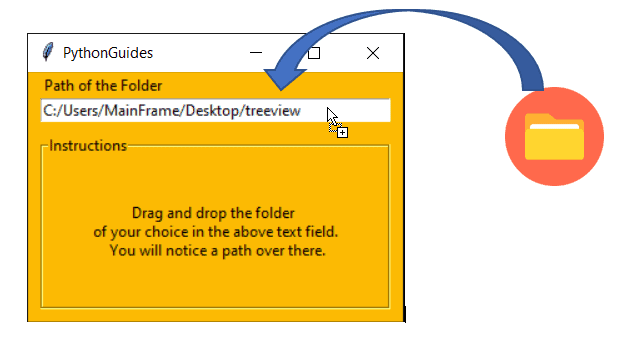
This Python tutorial explains, Python Tkinter drag and drop and how to drag and drop widgets on the screen using Python Tkinter. Python Tkinter Drag and Drop Listbox.
proud walrus
ooooooooooooooooooooh. no i meant the pyqt designer
digital rose
I'm pretty bad at pyqt sorry
proud walrus
idc about pyqt right now. ill learn it when i need it
digital rose
👍🏼
proud walrus
i started, and then got bored
digital rose
yes I'm bored from python so I learn C++
proud walrus
no, im not bored with python. im just getting bored learning things right now. two months on lockdown does weird stuff
i learned python basics in 3 days before, and now it takes me a week to learn oop
proud walrus
btw, can you show me one of your tkinter projects? i wanna see what other people do.
digital rose
because virus
digital rose
lol
yes I found one
this app I named to do list

and this Image Editor

and a lot of projects but i'm not publish it
this is tow apps and another text editor I publish it
and I'm was working on game engine but there was a lot of memory leaks and errors and a lot of things so I let it it is was build of tkinter and pygame
proud walrus
digital rose
this app I named to do list
woooooooooow
there is no way thats tkinter tho
 molten latch
wtf how
digital rose
proud walrus
there is no way thats tkinter tho
yes
digital rose
molten latch
wtf how
i dont know copy past
digital rose
proud walrus
woooooooooow
thx
 granite fiber
!charinfo ⎝⎠╱╲⧸⧹
 proven basinBOT
Character Info
\u239d : LEFT PARENTHESIS LOWER HOOK - ⎝
\u23a0 : RIGHT PARENTHESIS LOWER HOOK - ⎠
\u2571 : BOX DRAWINGS LIGHT DIAGONAL UPPER RIGHT TO LOWER LEFT - ╱
\u2572 : BOX DRAWINGS LIGHT DIAGONAL UPPER LEFT TO LOWER RIGHT - ╲
\u29f8 : BIG SOLIDUS - ⧸
\u29f9 : BIG REVERSE SOLIDUS - ⧹
Full Raw Text
\u239d\u23a0\u2571\u2572\u29f8\u29f9
proud walrus
@digital rose hey, i have a question about the custom window borders... am i doing it tight?
from tkinter import *

root = Tk()

root.geometry("500x500")
root.overrideredirect(True)

def go(event):
    pos_x = root.winfo_pointerx() - 500 / 2
    pos_y = root.winfo_pointery() - 30 / 2
    root.geometry(f"+{int(pos_x)}+{int(pos_y)}")
    print(int(pos_x), int(pos_y))

frame = Frame(bg="black", height=30)
frame.pack(side="top", fill="x")

frame.bind("<B1-Motion>", go)

mainloop()
it has a little prob. you will see when you run it
 thin gorge
Is it possible to get an path to a folder like when selecting it when you want to install something?
proud walrus
you mean a little file browser?
thin gorge
proud walrus
you mean a little file browser?
i guess yes
proud walrus
what you use?
digital rose
proud walrus
it has a little prob. you will see when you run it
oh i see
i will fix it sec
thin gorge
windows and pyqt5
proud walrus
oof, sorry idk pyqt.
proud walrus
digital rose
oh i see
do you know whats causing it?
digital rose
proud walrus
do you know whats causing it?
this make the window center follow mouse so I want from global to local I will fix it sec
proud walrus
oooooooooooooooh for it to count pixels from the start of the frame?
digital rose
try this
import tkinter as tk

class App(tk.Tk):
    def __init__(self):
        tk.Tk.__init__(self)
        self.geometry("400x500")
        self.overrideredirect(True)

        self.grip = tk.Frame(self,bg="#242424",height=40)
        self.grip.pack(side="top", fill="x")

        self.grip.bind("<ButtonPress-1>", self.start_move)
        self.grip.bind("<ButtonRelease-1>", self.stop_move)
        self.grip.bind("<B1-Motion>", self.do_move)

    def start_move(self, event):
        self.x = event.x
        self.y = event.y

    def stop_move(self, event):
        self.x = None
        self.y = None

    def do_move(self, event):
        deltax = event.x - self.x
        deltay = event.y - self.y
        x = self.winfo_x() + deltax
        y = self.winfo_y() + deltay
        self.geometry(f"+{x}+{y}")

app=App()
app.mainloop()
it's fixed
@proud walrus
digital rose
proud walrus
i mean, dont find a fix for me i can live with it. thanks
no i fix it for you
proud walrus
thanks imma try it.
proud walrus
it works but the window disappears. imma have a look into it. thank you a lot
 willow heart
Is there a channel on here where I can post a gig? I'd like someone to help me build the UI for a personal app I am making.
ivory ember
willow heart
Is there a channel on here where I can post a gig? I'd like someone to help me b...
how complex we talkin
willow heart
Pretty simple.
ivory ember
dm me
 exotic scaffold
Hey there, How can I make some modern looking designs with Python?
ivory ember
I would suggest PyQt5 with animations and stylesheets
ivory ember
exotic scaffold
Already a bit used it
I doubt "a bit" constitutes as getting the most out of it
Qt is powerful
 formal thorn
Hi there i just start using python, may i know what GUI is suitable to do mathematics analysis like table input and graph output for analysis?
digital rose
exotic scaffold
Hey there, How can I make some modern looking designs with Python?

Open source Python framework for rapid development of applications
that make use of innovative user interfaces, such as multi-touch apps.
Looks modern, MIT licensed (i think), support for most devices and OS’s including mobile
digital rose
proud walrus
it works but the window disappears. imma have a look into it. thank you a lot
your welcome
 ivory dawn
digital rose
https://kivy.org/#home
ivory dawn
digital rose
https://kivy.org/#home
And you can use KivyMD that follows the material design from Android, it's very good, for that you need to use kivy too
 mighty frigate
People seems to use PyQt a little less those days
 modern marsh
and use what then?
mighty frigate
lots of people in here look for help with tkinter
digital rose
how do i install the tk package in replit
 cold jungle
mighty frigate
lots of people in here look for help with tkinter
cold jungle
mighty frigate
lots of people in here look for help with tkinter
yeah, it's more easy and good to starting with interfaces
mighty frigate
yeah I guess
digital rose
It is a lot more flexible.
cold jungle
yup
mighty frigate
I'm at that point where I wonder that's the point of building UI for python
cold jungle
I use PyQt5 with Qt Designer it's easier to make the GUI image.
cold jungle
mighty frigate
I'm at that point where I wonder that's the point of building UI for python
haha
mighty frigate
because of how python distribution works
cold jungle

mighty frigate
@cold jungle are you shipping your apps to people sometimes ?
cold jungle
hm?
cold jungle
mighty frigate
sry my eng is bad sometimes
mines worse
proud walrus
should i make a chat app with a gui?
ivory ember
proud walrus
should i make a chat app with a gui?
trying to make one rn
proud walrus
how is it going?
 proud walrus
me nether
imma have a go. lets see how mine turns out.
imma have a look at yours if its ok
proud walrus
im not a networking person.... idk how do you make the encryption.
proud walrus
ivory ember
but it's not efficent
hmmm
maybe send the buffer size first and then assign it to another waiting socket?
proud walrus
btw, how does the encryption works? how the two clients know the key? or it doesnt work like that...
ivory ember
it does
we use rsa to make public and private keys, store them server-side in a json (not the most secure, but we're still developing), and send the aes key with the clients respective rsa private keys encrypted with their corresponding public keys
something like that
didn't work on that part
proud walrus
how does server knows the client key doe?
ivory ember
we send the client's public key when someone "creates an account"
users/clients are identified via a rng friendcode generated on the server
proud walrus
ooh, so it works with an account? like username-password thingy?
proud walrus
correct me if im wrong, every "account" has his own randomly generated key that is stored along-side the account info?
proud walrus
aaaaaaaaah.
ivory ember
which is used to encrypt the aes key for a "messaging session"
proud walrus
and from that it generates another random key for extra security
oooh. now its clear
ivory ember
nah, rsa and aes are seperate protocols
proud walrus
i see
ivory ember
rsa is more secure, but takes longer
proud walrus
so thats the public key
proud walrus
rsa
ivory ember
public and private
proud walrus
i see
ivory ember
its in the wiki chief, on github
proud walrus
ok.
ivory ember
 proud walrus
cool
proud walrus
too bad you cant send a dm do strangers. why wouldnt it generate a key anyway and just have a notification thingy.
ivory ember
wym by "notification thingy"
ivory ember
yea, we're not there yet 😂
proud walrus
just have a notification sound playing if the app is minimized.
ivory ember
we're still doing the main chat tho
proud walrus
whats friend code tho? like discord tag?
like acua_11#1717
i have a nice tag lol #1717
ivory ember
for now, more like identifying users
ivory ember
proud walrus
i have a nice tag lol #1717
lol
proud walrus
i see.
ivory ember
you seem to have taken an interest, you should join
if u just know ui, that's good too
proud walrus
im not sure if im THAT advanced. although i will have a look. if i find something cool to add or something to change ill tell you
in discord tho i dont have a github :/
digital rose
im using dearpygui and im wondering if theres a way to add subtitles
im making a homepage with a ABOUT article
w
digital rose
exotic scaffold
Hey there, How can I make some modern looking designs with Python?
Forgot to mention this, but I also like https://github.com/hoffstadt/DearPyGui. It's also what I use nowadays, it's clean and easy to set up. At first you may not be intrigued because you think it looks too pixelated by the examples, but you can add a font and that changes it. It's still a little bit immature though, but very easy to get started with.
MIT licensed too, and speedy
Works with all platforms i think, except mobile and web
 forest hearth
guys what is your choice for a gui? ive used tkinter and its awful
digital rose
forest hearth
guys what is your choice for a gui? ive used tkinter and its awful
The above I linked
forest hearth
thanks, ill check that out
proud walrus
i cant disable overrideredirect for some reason...
im using linux mint and python 3.9.
here is the code:
from tkinter import *

root = Tk()
root.overrideredirect(True)

def newborder():
    print("thing")
    root.overrideredirect(False)
    root.geometry("599x599")


button = Button(text="hello", command=newborder).pack()

mainloop()
i have no idea why its not working...
molten latch
proud walrus
i cant disable `overrideredirect` for some reason...
im using linux mint and pyt...
wuth 599x599???
proud walrus
i just smashed my head on the keyboard and thats what i got
molten latch
also for your problem maybe this will help: https://stackoverflow.com/questions/42141414/tkinter-topmost-and-overridedirect
Stack Overflow
I want to write a program with a window set to always at the top and without the border. So I write the following program, which doesn't work as intended (macOS Sierra, 10.12.3):
import tkinter as...
proud walrus
no, i cant bring the window borders back
removing them is fine but bringing them back is the prob
@molten latch
molten latch
yeah i dont think you can do that at runtime sorry
proud walrus
oof.
molten latch
has to be done when the window is initialised i believe
proud walrus
can you please run the code and tell me what you got?
 normal whale
!e
from tkinter import *

root = Tk()
root.overrideredirect(True)

def newborder():
    print("thing")
    root.overrideredirect(False)
    root.geometry("599x599")


button = Button(text="hello", command=newborder).pack()

mainloop() ```@normal whale :x: Your eval job has completed with return code 1.
001 | Traceback (most recent call last):
002 |   File "<string>", line 1, in <module>
003 |   File "/usr/local/lib/python3.9/tkinter/__init__.py", line 37, in <module>
004 |     import _tkinter # If this fails your Python may not be configured for Tk
005 | ImportError: libtk8.6.so: cannot open shared object file: No such file or directory
 oak merlin
Hello, I am trying to convert values from a SQL database to named options in a dropdown menu(currently using tkinter combobox)
my SQL database is like that :
[fruitID, fruitType]
fruit id = 1, fruit type = 2
And for example fruit type 2 = an apple
In a dictionary I'm storing id:name
ranks_list_values = {
0:"banana",
1:"pear",
2:"apple",
}
I want banna, pear, apple etc to all be displayed as dropdown options, AND the current database value to be the currently selected option.
I got the prior part to work but I'm struggling on this :
-If fruit type id is 2, I want apple to be pre selected. I can't seem to be able to make combobox.current() to work properly with a dictionary/double option list. I'm only able to get it to work with index currently but that's not what I want, I want it to be based on the dictionary value, like if values aren't just 0,1,2 but 0, 3, 7, 9..
-I also want the currently selected option to be stored/converted based on dictionary value so I can update my database with the newly selected option
tell me if that's the wrong channel, but it's mostly related to the tkinter combobox. thank you 🙂

image to visualise better
 digital rose
@proud walrus try adding root.update() in newborder()
digital rose
Plus, if you want the border to be disabled,
root.overrideredirect(False)
Also, @proud walrus you can try this to disable borders:
root.wm_attributes('-type','splash')
Now to turn it back again:
root.wm_attributes('-type','normal')
 rigid bronze
Hi
 rugged marsh
u cant show my image in python
i've got a problem
can anyone help me
imma show my code right now

this is my code,
# Flag
usFlag = Image.open("/Users/nic/Desktop/us_flag.png")
usFlag = usFlag.resize((40, 40), Image.ANTIALIAS)
my_img = ImageTk.PhotoImage(usFlag)
my_img = Label(image = my_img)
my_img.grid(row=0, column=0)

# currency1 option
OPTIONS = [
"USD",
"EUR",
"JPY",
"GBP",
"AUD",
"CAD",
"CHF",
"CNY",
"HKD",
"NZD"
] #etc
this is us_flag.png
 rigid bronze
I am making encyclopedia app of dogs (actually really stuff project) and I couldn't put image on button can any help me?
        self.img = Image.open("src/png/dog.png")
        img = ImageTk.PhotoImage(self.img)
        dogButton = Button(self.master, image=img, relief=FLAT, command=self.master.quit())
        dogButton.pack(side=LEFT, padx=2, pady=2)
this is my code part for image
rigid bronze
This is the result

There is in the window white part should be my photo
LEFT side
rigid bronze
rugged marsh
<@!780129617285480448> we have the same problem bro
have you got any idea
rugged marsh
no, sry. i was having the same problem too
rigid bronze
rugged marsh
no, sry. i was having the same problem too
you can try with PIL library may work
mine didn't worked
rugged marsh
yes, i imported stuff already:
from tkinter import *
from PIL import ImageTk,Image
@rigid bronze any idea
rigid bronze
thx
digital rose
@rugged marsh use PhotoImage() from tkinter.
from tkinter import *

window = Tk()

us_flag = PhotoImage(file = "/path/to/file")

# to now resize the image:
us_flag.subsample(6, 6)

# -> subsample(6, 6) scales down the image by a factor of 6 for width and height respectively. it is not important to give both as equal.

# now to draw the image:
img_label = Label(window, image = us_flag)
img.label.place(x = something, y = something)

window.mainloop()
@rugged marsh
and @rigid bronze
rugged marsh
Tysm, @digital rose !
 turbid rover
Can i get some help in changing screens with navigation bar in kivy, kivymd?
digital rose
rugged marsh
Tysm, <@456226577798135808> !
use a tkinter.Label() object to render images onto the window. @rugged marsh
 digital rose
subsample()
rugged marsh
lower?
 digital rose
then increase it further
like (200, 200)
the native size of the image must have been higher, in pixel values.
 digital rose
uh oh
rugged marsh
?
digital rose
wait a sec
rugged marsh
sure!


 rugged marsh
but i need few more flags
rugged marsh
hm
lemme see

look
i changed the .png into .gif, and it kinda turned (i guess) it into gif image
 digital rose
yes.
rugged marsh
i guess i fooled my os?
digital rose
now just specify .gif in the image name.
rugged marsh
just did
digital rose
in the code.
rugged marsh
nuh-uh, didnt work
digital rose
got it.
did you try using the scaled down image i told you?

@rugged marsh
add window.update() after the image drawing code, it might help, as for me the code renders a perfect image onto the window.
here is what i got:

and even further scaled down:

@rugged marsh
here is my code:
from tkinter import *
root=Tk()
img = PhotoImage(file="path/to/file")
widget = Label(root, image = img)
widget.pack()
root.mainloop()
try running this one @rugged marsh
digital rose
use pack()
grid() is cumbersome to handle.
You can even use .place() if you want to.
and yes, widget is the label on which the image is being drawn
you need to share the full code.
@rugged marsh
rugged marsh
My whole code is using grid... may be too late to be changed...
proud walrus
digital rose
Also, <@468786407024885770> you can try this to disable borders:
```py
root.wm_a...
that one works, thanks! any way to get it in taskbar tho?
proud walrus
the window when opened
digital rose
so you want to see the window in the taskbar?
 digital rose
it will show in the task bar with the tkinter window's title.
when you run the program
proud walrus
for some reason it doesnt
digital rose
what editor are you using?
proud walrus
vs code
digital rose
can you click an ss with the window running?
proud walrus
ss?
digital rose
screen shot.
proud walrus
ok

ill give you the code just in case im doing something wrong
from tkinter import *

root = Tk()
root.attributes("-type", "splash")
root.title("title")

mainloop()
 proud walrus
thats weird...
digital rose
try running it in IDLE.
digital rose
overrideredirect(True) overrides the window manager, and hides the window.
@proud walrus .
digital rose
to make it visible,in the taskbar, you can create a TopLevel() object and hide the main window,
proud walrus
hm
if tkinter has a .bind to see if the window is raised and minimized from the taskbar, ill use it
digital rose
for example:
from tkinter import *

root=Tk()

root.overrideredirect(True)
root.wm_attributes('-alpha',0.0) # optional.

new = Toplevel(root)

root.mainloop()
this makes the root window invisible, and creates a toplevel window, that is visible, and shows in the taskbar.
@proud walrus
proud walrus
i see. you forgot to hide it. ill do it and see what happens
digital rose
sure.
but hiding it doesnt make use of disabling borders of the window.
so you can remove this line:
root.wm_attributes('-alpha',0.0) # optional.
this is only to hide the window.
digital rose
screen shot?
proud walrus
it just opens two windows
digital rose
digital rose
here is my code:
```py
from tkinter import *
root=Tk()
img = PhotoImage(file="pa...
did you have a problem with images in tkinter ?
no.
Use Pillow
digital rose
digital rose
no.
oh ok
I was helping him out.
ok 👍🏼
what his problem
you can read up.
ok
proud walrus
i cant hide window border with it showing up in the task bar @digital rose
digital rose
what do you mean?
proud walrus
and being able to minimize it
digital rose
hiding window border makes in a window without any borders literally
I dont understand
but you can still exit the window
digital rose
proud walrus
and being able to minimize it
did you mean minimize button
proud walrus
digital rose
but you can still exit the window
you didnt get me the whole time?
digital rose
i did.
proud walrus
oh.
proud walrus
digital rose
did you mean minimize button
when doing overrideredirect(True) it hides window borders but removes it from the taskbar
digital rose
i told you the fix already.
digital rose
create the toplevel, and hide it, using
toplevel_window.wm_attributes('-alpha',0.0)```did u use linux ?
digital rose
digital rose
create the toplevel, and hide it, using
```py
toplevel_window.wm_attributes('-a...
^^ @proud walrus
digital rose
digital rose
this IDE problem
no. overrideredirect(True) overrides the window manager, and doesnt show in taskbar.
digital rose
digital rose
this IDE problem
try to convert your .py to .exe
it wont work.
it is not about the extension.
hmm
so
he is cant to overrideredirect the root ?
@proud walrus heres the final code, i did the work for you.
from tkinter import *

root=Tk()

root.overrideredirect(True)

new = Toplevel(root)
new.wm_attributes('-alpha',0.0)

root.mainloop()
so he can make it still in the taskbar
sec
@digital rose there is no way to make a window instance show in taskbar if it overrides the window manager in an operating system.
digital rose
digital rose
<@!468786407024885770> heres the final code, i did the work for you.
```py
from ...
@proud walrus here.
proud walrus
alright. i got on to something
digital rose
i made the final code.
proud walrus
its still not working tho... i just found out that linux needs root.wait_variable()
digital rose
what for?
proud walrus
to be able to do wm_attributes
from tkinter import *

root = Tk()
root.title("hello")
root.geometry("300x300")
root.wait_variable(root)
root.wm_attributes("-alpha", 0.0)

mainloop()
does this work?
I'm not sure about how tkinter behaves with Linux and OSX so sorry about that.
@proud walrus
proud walrus
digital rose
I'm not sure about how tkinter behaves with Linux and OSX so sorry about that.
i got it working!
digital rose
nice!
proud walrus
you will laugh why it didnt work
digital rose
why?
proud walrus
i forgot it at root.wait_variable(root) but it needed root.wait_visibility(root)
vscode autocompleted and i didnt see
digital rose
digital rose
<@!468786407024885770> heres the final code, i did the work for you.
```py
from ...
there is problem
proud walrus
ik
digital rose
you could've told us earlier
proud walrus
from tkinter import *

root = Tk()
root.wait_visibility(root)
root.wm_attributes("-alpha", 0.0)
root.title("hello")
root.geometry("300x300")


root.mainloop()
it wouldve been much more helpful
proud walrus
here's the working code
digital rose
nice.
proud walrus
digital rose
you could've told us earlier
i just saw it
digital rose
not u
proud walrus
who?
digital rose
@digital rose
proud walrus
oh
digital rose
proud walrus
here's the working code
Linux has quite a less number of wm_attributes options compared to windows.
when you close it from taskbar will not because you will close the toplevel not the root to fix it just make if statment that is toplevel closed or not and you will good to go
proud walrus
yes. too bad linux is good
digital rose
proud walrus
yes. too bad linux is good
:p
proud walrus
digital rose
when you close it from taskbar will not because you will close the toplevel not ...
oh crep i didnt thought of that
digital rose
👍🏼
proud walrus
tkinter.Toplevel.winfo_exists(my_toplevel_name) nvm
digital rose
this only helps in getting to know it the parent window exists or not.
how will you still use the window, the one without the borders?
proud walrus
wait, i think i have something in mind.
from tkinter import *

root = Tk()
root.overrideredirect(True)
new = Toplevel()
new.title("its workey")

def callback():
    root.destroy()

new.protocol("WM_DELETE_WINDOW", callback)

new.wait_visibility()
new.attributes("-alpha", 0.0)

root.mainloop()
@digital rose @digital rose you might find that useful as well
proud walrus
i didnt know it
can you link me somewhere that shows all its options?
@digital rose
digital rose
proud walrus
```py
from tkinter import *
root = Tk()
root.overrideredirect(True)
new = Tople...
did you mean wm_protocol?
@proud walrus
proud walrus
wm_protocol? nope, its working for me.
digital rose
nvm its for windows.
proud walrus
anyway to see if ts minimized tho?
proud walrus
like to check if the Toplevel is closed from the taskbar, just to see if its minimized from there
digital rose
to see if a window is minimised:
print(window.winfo_viewable())
prints 1 is it is not minimised, and 0 if it is.
@proud walrus
proud walrus
ill have to check at all times then.
digital rose
its quite easy to do so.
proud walrus
ik
digital rose
def callback():
    print("closed")

toplevel.protocol("WM_DELETE_WINDOW", callback)
this is if its being closed
digital rose
so what u want exactly ?
proud walrus
to see if its being minimized
digital rose
see this example:
from tkinter import *

window = Tk()

def check_minimised():
    if window.winfo_viewable() == 1: print("not minimised")
    elif window.winfo_viewable() == 0: print("minimised")

    window.after(500, check_minimised)

window.after(500, check_minimised)

window.mainloop()
@proud walrus
this checks if it is minimised, after every 500 miliseconds.
digital rose
nah, its a method, to run something after a time interval.
it doesnt run in the background.
proud walrus
i see
digital rose
and since you cant run a while loop as a window uses a loop, you can use a recursive function, to keep calling after().
proud walrus
from tkinter import *

window = Tk()

def check_minimised():
    if window.winfo_viewable() == 1: print("not minimised")
    elif window.winfo_viewable() == 0: print("minimised")

    window.after(500, check_minimised)

window.after(500, check_minimised)

window.mainloop()
this code not workey
im starting to see that ill need to switch for something more powerful then tkinter if i wanna do heavy styling
digital rose
what are the errors?
proud walrus
no its just not seeing the window being minimized
digital rose
its probably a linux - windows problem again.
proud walrus
probably
digital rose
because i get 1s and 0s both.
proud walrus
proud walrus
im starting to see that ill need to switch for something more powerful then tkin...
@digital rose am i right?
proud walrus
im trying to have custom title bar (which Sshilab showed me how to do it) but still have it in the task bar
digital rose
custom title bar?
proud walrus
yh
proud walrus
no, the exit and minimize buttons
digital rose
yes, you can
proud walrus
ik
digital rose
create buttons for those individually.
proud walrus
but still have it in the taskbar
digital rose
you can hide the borders.
digital rose
i already told you how to make it appear in the task bar.
digital rose
so?
def is_toplevel():
     width, height, x, y = root.winfo_width(), root.winfo_height(), \
                           root.winfo_rootx(), root.winfo_rooty()

      if (width, height, x, y) != (1, 1, 0, 0):
          is_toplevel = root.winfo_containing(x + (width // 2),
                                                y + (height // 2)
                                                ) is not None

          print('is_toplevel: {}'.format(is_toplevel))

       root.after(2000, is_toplevel)
@digital rose whats that?
digital rose
how to check if minimzed or not
this for background working
to check the state minimzed or maximized
this seems taken from stack overflow.
do tell him the link for that.
Tk.state()
this is the link
window.state() returns true always.
whether the window is minimised or not.
doesnt matter.
Stack Overflow
How can I open Tkinter windows (such as entry, text...) and make them appear on the screen when they are opened rather than start minimized ?
I don't really know how to start... I have some window...
digital rose
digital rose
window.state() returns true always.
it's return normal
if normal
and minimzed if that
yes
normal
always
and maximized
just normal ?
even if the window is minimised/maximised it returns normal.
really ? i dont know about that
@proud walrus here: a little custom exit button.
from tkinter import *

root=Tk()

root.overrideredirect(True)
root.geometry("+%d+%d" % (300, 300))

root.geometry("400x400")

new = Toplevel(root)
new.wm_attributes("-alpha",0.0)

close_button = Button(root, text = "X", bd=5, command=lambda:root.destroy())
close_button.place(x=100,y=100)

def is_min():
    print(new.winfo_viewable())
    new.after(500, is_min)

new.after(500, is_min)

root.mainloop()
you can go a lot further.
the function is not global
it is something else.
not about minimise.
put it upper the button to work 👍🏼
digital rose
digital rose
not about minimise.
ok
digital rose
digital rose
<@!468786407024885770> here: a little custom exit button.
```py
from tkinter imp...
@proud walrus
digital rose
i do nothing 👍🏼
 urban flower
Anyone familiar with eel and python I want to create a GUI
 snow vigil
Hi, I'm looking to develop an app that runs an EXE inside my gui application but I can't seem to find a good way of going about it. I have linked a simple picture to better illustrate what I mean: https://i.imgur.com/NvN7WCB.png
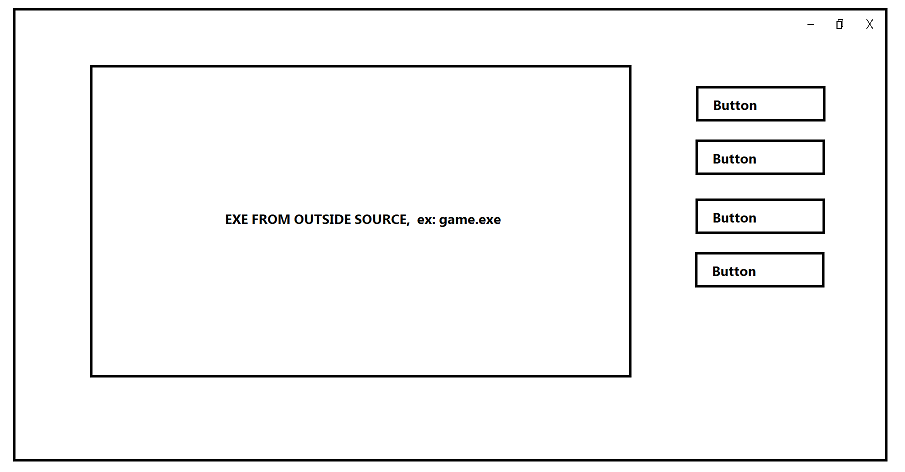
anyone know how to approach this? :)
digital rose
What you're trying to do here, is embed an application window inside of an interface? Pretty much that is what an emulator does. @snow vigil
I advice you to switch to C++ for something like emulator
snow vigil
its not an emulator
 tribal path
you'd be looking at OS level ctypes stuff. or look for a module that handles the ctypes for you
!pypi pygetwindow
proven basinBOT

A simple, cross-platform module for obtaining GUI information on application's windows.
 languid arrow
Hello. I'm DA/DS.
Nice to meet you
digital rose
Hi
digital rose
languid arrow
Hello. I'm DA/DS.
Nice to meet you
did u have problem
languid arrow
I'm currently doing data analysis, and I also want to work as a data scientist.
snow vigil
tribal path
you'd be looking at OS level ctypes stuff. or look for a module that handles the...
yes I tested this earlier and it does get the hWnd but I don't know how to extract only the number value from the resulting variable upon executing gw.getWindowsWithTitle('title)
converting it to string does not work, as it only yields the dimensions of the process it run on
tribal path
if you print the type of the variable you may get further to what you're after from it
snow vigil
in any case, if its not simple to do what I want, I could also create the ui AROUND the application somehow
snow vigil
tribal path
if you print the type of the variable you may get further to what you're after f...
yes I tried that too but it was a variable with very little documentation
tribal path
may need to delve into ctypes and MS c++ docs
snow vigil
I'm not that skilled at programming just yet, else I wouldn't be here asking for advice but I suppose I could give it a try
tribal path
https://stackoverflow.com/questions/37501191/how-to-get-windows-window-names-with-ctypes-in-python
may be worth a look. Ive not used ctypes much myself, but with some examples and the msdn docs you should see how the ctypes.dll relates to the c++ (which is what you'd likely need to refer to for documentation)
Stack Overflow
I try to get Windows window title names and pids through handles with long objects. My code works but there is something wrong with it. I get only 4 window titles when I should get 10 or more. Can ...
digital rose
languid arrow
I'm currently doing data analysis, and I also want to work as a data scientist.
oh good work
👍🏼
 haughty kayak
digital rose
haughty kayak
digital rose
Hi guys , how should you position the scrollbar so that it doesn't overlap with the text?
in Tkinter
proven basinBOT
The curses module provides an interface to the curses library, the de-facto standard for portable advanced terminal handling.
While curses is most widely used in the Unix environment, versions are available for Windows, DOS, and possibly other systems as well. This extension module is designed to match the API of ncurses, an open-source curses library hosted on Linux and the BSD variants of Unix.
Note
Whenever the documentation mentions a character it can be specified as an integer, a one-character Unicode string or a one-byte byte string.
Whenever the documentation mentions a character string it can be specified as a Unicode string or a byte string.
 modest tree
digital rose
Hi guys , how should you position the scrollbar so that it doesn't overlap with ...
modest tree
digital rose
Hi guys , how should you position the scrollbar so that it doesn't overlap with ...
Just use some visual GUI creator for that, something along https://visualtk.com/, no point in torturing oneself 🙂
 silk echo
anyone knows how could I list all available compressed audio formats (mp3 etc) that the underlying OS can play?
I have a application where I use PyQt5 QMediaPlayer to play audio which user selects trough QFileDialog but I would like to filter files by supported types ONLY.
Currently I am just guessing which are supported based on detected OS:
Windows DirectShow https://docs.microsoft.com/en-us/windows/win32/directshow/supported-formats-in-directshow?redirectedfrom=MSDN
Linux gstreamer https://gstreamer.freedesktop.org/features/
MacOS QuickTime https://support.apple.com/en-us/HT201290
however many more than those could be supported.
Some reference links:
https://doc.qt.io/qt-5/audiooverview.html
https://doc.qt.io/qt-5/qmediaplayer.html
ping if reply 
ivory ember
silk echo
anyone knows how could I list all available compressed audio formats (mp3 etc) t...
would this work?
from PyQt5 import QtCore as qtc
from PyQt5 import QtMultimedia as qtmm

app = qtc.QCoreApplication([])
r = qtmm.QAudioRecorder()

print('Inputs: ', r.audioInputs())
print('Codecs: ', r.supportedAudioCodecs())
print('Sample Rates: ', r.supportedAudioSampleRates())
print('Containers: ', r.supportedContainers())
with an output (at least on my Windows 10)
Inputs:  ['Microphone (Realtek High Definition Audio)', 'Microphone (Realtek High Definition Audio)']
Codecs:  ['audio/pcm']
Sample Rates:  ([8000, 11025, 16000, 22050, 32000, 44100, 48000, 88200, 96000, 192000], False)
Containers:  ['audio/x-wav', 'audio/x-raw']
hello, any idea of how I can make the Tkinter combobox .current be based of a value in a dictionary rather than an index ?
Like if my value is 3 I don't want it to select index 3, but a value based on 3:"" in my dict
 jagged hill
There are 04 checkboxes. When a user checks one checkbox I want the other checkboxes to uncheck (if the user might have checked multiple ones) so that the checkbox the user checked will only remain checked. I tried to do this manually but it's not giving me what I have mentioned above. Any suggestions?
https://pastebin.com/aTfJ1Ve3 [this is what I've attempted so far]
Pastebin
Pastebin.com is the number one paste tool since 2002. Pastebin is a website where you can store text online for a set period of time.
rugged marsh
Can I make a label appear when my mouse hover to an option box in Tkinter?
modern marsh
woah there is a QMediaPlayer??!!
digital rose
rugged marsh
Can I make a label appear when my mouse hover to an option box in `Tkinter`?
yes, you can @rugged marsh
creating the appear() function:
def appear(event):
    event.widget.place( .. coordinates .. )
binding the label to appear on mouse hover:
myLabel.bind("<Enter>", appear)
When creating the label just dont use .pack() , .place() or .grid() so that the label doesnt get rendered.
myLabel = Label(windowname, text="hello world!", font="Consolas")
# the rest of the code.
tysm @digital rose
rugged marsh
i want the flag to change whenever i click an option in optionbox. i have all of the flags saved as .gif form. this is tkinter.
 rugged marsh
can anyone help me pls?
 grizzled charm
How I can remove a trace with the trace_remove method.
Everytime if I try to remove it, I get an error "_tkinter.TclError: can't delete Tcl command"
Line:
self.stringExample.trace_remove("write", "self.printChange")
pls answer per dm/pm
ivory ember
jagged hill
There are 04 checkboxes. When a user checks one checkbox I want the other checkb...
radiobuttons?
modern marsh
Yeah just use radio buttons
ivory ember
#TODO: fix subscription issue here
self.get_mouse_pos_widget = GetMousePosition(title="Set Position")
data = self.get_mouse_pos_widget.pos_signal[int, int].connect(self.onPositionSubmitted)
self.get_mouse_pos_widget.show()
@qtc.pyqtSlot(int, int)
    def onPositionSubmitted(self, x, y):
        return x, y
I have the following code above. The subclassed qwidget class automatically returns a value when the window closes, after three seconds. It then returns the x and y coordinates of the mouse cursor through a custom pyqt5 signal. How can I capture this data and set it as a return?
I have tried the above and variations of it, including setting a "global" variable pertaining to the main class.
Currently the error is
line 419, in create_tab_get_subcommand
command_to_add += f"-{data[0]}-{data[1]}"
TypeError: 'Connection' object is not subscriptable
anyone?
 silk frost
does anyone have any good docs, modules or anything really for making good looking command line interfaces? whenever i make mine atm. it just turns out looking bad, any suggestions would help.
digital rose
ivory ember
anyone?
sorry I'm not good at PyQt5
digital rose
silk frost
does anyone have any good docs, modules or anything really for making good looki...
use PyQt5:
pip install pyqt5
 fathom girder
I've tried searching but all I keep finding tutorials on hiding te title baar etc. How do I get a new window in TKinter to not show up in the taskbar. If I want to make an About window, it doesn't need to show up as a separate program in the taskbar.
fathom girder
I tried that, but that hides the titlebar, and I'd like that to remain, so the window can be closed without an extra button
fathom girder
Ah, I see thanks. I 'd hoped that would be so connected but I can work around it. Is there a standard way to make a custom title bar or did you mean I should just make something that works for me?
digital rose
oh this is example:
from tkinter import *

root = Tk()

root.geometry("500x500")
root.overrideredirect(True)

def go(event):
    pos_x = root.winfo_pointerx() - 500 / 2
    pos_y = root.winfo_pointery() - 30 / 2
    root.geometry(f"+{int(pos_x)}+{int(pos_y)}")
    print(int(pos_x), int(pos_y))

frame = Frame(bg="black", height=30)
frame.pack(side="top", fill="x")
# Exit Button
exit_btn = Button(frame, text = "X", command=quit)
exit_btn.place(x=480, y=1)

frame.bind("<B1-Motion>", go)

mainloop()
custom border and title
fathom girder
Ah thanks, I think I can work with that 🙂
ivory ember
digital rose
sorry I'm not good at PyQt5
ended up having multiple pyqt5slot decorators on like three functions
its not SOLID code, but it'll do
 icy crow
would it be possible to make something as visually appealing as this in python?
 modern marsh
icy crow
would it be possible to make something as visually appealing as this in python?
modern marsh
icy crow
would it be possible to make something as visually appealing as this in python?
Yes and better than that actually
icy crow
modern marsh
Yes and better than that actually
Ooo, nice, can you maybe please point me in the right direction as to what modules I should use?
modern marsh
icy crow
Ooo, nice, can you maybe please point me in the right direction as to what modul...
I use PyQt5
There is pywebview if you want browser based UI
icy crow
ah, thanks!
digital rose
rugged marsh
i want the flag to change whenever i click an option in optionbox. i have all o...
if you're rendering the image on tkinter.Label()
def onSelectingSomething():
    flag_label.config(image = "new_Flag_image.gif")
@rugged marsh
urban flower
how to i move the text variables to the right ?
def update(ind):
frame = frames[(ind)%100]
ind += 1
label.configure(image=frame)
window.after(100, update, ind)
label2 = Label(window, textvariable = var1, bg = '#FAB60C',)
label2.config(font=("Courier", 20),)
var1.set('User Said:')
label2.pack()
label1 = Label(window, textvariable = var, bg = '#ADD8E6')
label1.config(font=("Courier", 20))
var.set('Welcome')
label1.pack()
frames = [PhotoImage(file='D:/Downloads/hema/ttp.PNG')]
window.title('hema')
label = Label(window, width = 500, height = 500)
label.pack()
window.after(0, update, 0)
btn0 = Button(text = 'WISH ME',width = 20, command = wishme, bg = '#5C85FB')
btn0.config(font=("Courier", 12))
btn0.pack()
btn1 = Button(text = 'PLAY',width = 20,command = play, bg = '#5C85FB')
btn1.config(font=("Courier", 12))
btn1.pack()
btn2 = Button(text = 'EXIT',width = 20, command = window.destroy, bg = '#5C85FB')
btn2.config(font=("Courier", 12))
btn2.pack()
window.mainloop()
and i know i have to remove the picture
ill just give it a plain bg
digital rose
what do you mean? move text variables to the right ?
do you wish to move text accross the screen?
urban flower
not text variables these label named welcome and user said
its currently in the top center
digital rose
so you want to place it to the right hand side of the window?
 digital rose
userLabel.place(.. .. .. )
give in the x coordinates of the right edge of the window.
urban flower
okay
proven basinBOT
Here's how to format Python code on Discord:
```py
print('Hello world!')
```
These are backticks, not quotes. Check this out if you can't find the backtick key.
urban flower
oh thanks @digital rose
 cursive salmon
can anyone help me?
 thorny prism
hey can any one help me with QprogressBar
 tidal sluice
hey can someone help me with how i get started with building softwares like billing software or invoice maker. I made them with tkinter but i want them in attractive modern gui . i how do i acheive this.thanks in advance.
ivory ember
tidal sluice
hey can someone help me with how i get started with building softwares like bill...
pyqt5 should work
ivory ember
thorny prism
hey can any one help me with QprogressBar
can you be more specific please?
tidal sluice
I made billing software for shop using tkinter. but i want to make attractive UI. tkinter is so traditional.
digital rose
ivory ember
pyqt5 should work
Can you be a bit more specific?
ivory ember
?
digital rose
Just supporting one library because you use it is not what he asked for
ivory ember
pyqt5 is a modern and imo, an attractive UI
tidal sluice
do UI/UX work with python in any way?
ivory ember
@tidal sluice you can use stylesheets, animations, etc. to make a good UI with it
tidal sluice
but it needs licence to sell. right?
Is there any open source..or any other language?
ivory ember
from what I understand, if the app's code base is open, you can sell commercially. If you want to get around this, you can use pyside2, which is very very similar but without the legal restrictions
I heard that Kivy is good, but have never used it
tidal sluice
okay Ill look into it. Thanks for you time
 vale igloo
what is this error in tk? ```
Exception in Tkinter callback
Traceback (most recent call last):
File "C:\Users\Mikkel\AppData\Local\Programs\Python\Python39\lib\tkinter_init_.py", line 1892, in call
return self.func(*args)
File "C:\Users\Mikkel\Desktop\animator.py", line 23, in play_frame
display.pack(root)
File "C:\Users\Mikkel\AppData\Local\Programs\Python\Python39\lib\tkinter_init_.py", line 2398, in pack_configure
+ self.options(cnf, kw))
File "C:\Users\Mikkel\AppData\Local\Programs\Python\Python39\lib\tkinter_init.py", line 1473, in _options
cnf = cnfmerge(cnf)
File "C:\Users\Mikkel\AppData\Local\Programs\Python\Python39\lib\tkinter_init.py", line 109, in _cnfmerge
for c in _flatten(cnfs):
TypeError: object of type 'type' has no len()
 ivory hemlock
tidal sluice
I made billing software for shop using tkinter. but i want to make attractive ...
ivory hemlock
tidal sluice
I made billing software for shop using tkinter. but i want to make attractive ...
Grab Javascript front end library like React/Vue/Angular and go to town
ivory hemlock
No
When the tooling isn't right for the job, we point to right tooling
and most people these days want web based systems and Javascript SPA is most responsive web front end
even then, while you can distribute Python apps, the tooling around it isn't best, pyexe/pyinstaller trip up alot of anti viruses
ivory hemlock
it's all hacks so you don't have to code in Javascript, that's not the way to do things
tidal sluice
ivory hemlock
Grab Javascript front end library like React/Vue/Angular and go to town
uhh can i make non web based softwares with them?
I searched for them but all i saw was they are for web based only.. and i dont want my certain apps to be.
ivory hemlock
tidal sluice
I searched for them but all i saw was they are for web based only.. and i dont w...
Most businesses would disagree but if you want to write GUI apps, C# or Java would work
Or you could write electron app
Which does use Javascript
urban flower
help @ivory hemlock @tidal sluice
ivory hemlock
No
tidal sluice
No i have customers that want simple gui apps but attractive ..thats why im looking for
tidal sluice
i also serched for pyside.. is also good. no?
 dry glacier
hey i was wondering if anyone would like to help me create a cli ui. I'm very new to python and reading about it doesnt help since i end up with more questions than answers
if my question is stupid please tell me
digital rose
dry glacier
if my question is stupid please tell me
can you help me please? I think I got a virus from that crasher gif
dry glacier
huh?
ivory hemlock
Wrong channel/server for that
Most CLI GUI apps become more difficult to maintain then just learning CLI tool
 unique forge
icy crow
would it be possible to make something as visually appealing as this in python?
unique forge
icy crow
would it be possible to make something as visually appealing as this in python?
of course
you could make even better!
you could use PyQt5 or Kivy
modern marsh
tidal sluice
i also serched for pyside.. is also good. no?
yes, better than using tkinter
unique forge
tidal sluice
i also serched for pyside.. is also good. no?
pyside and PyQt5 are the same thing
with different licensing
modern marsh

how do i bring the bottom widgets closer to each other
        self.bottom_bar_frame_layout.addWidget(self.play_pause_button, alignment=qtc.Qt.AlignHCenter)
self.bottom_bar_frame_layout.addSpacing(5)
self.bottom_bar_frame_layout.addWidget(self.next_button, alignment=qtc.Qt.AlignHCenter)
i want the play button to be in the center of the frame with the next button to the right of it by 5
@ivory ember ping :D
 formal goblet
hey,
i am trying to use qt creator using current qt quick application template
whenever i run i following error:
01:00:04: Starting /usr/bin/python -u /home/gamerrio/untitled1/main.py...
Traceback (most recent call last):
  File "/home/gamerrio/untitled1/main.py", line 5, in <module>
    from PySide2.QtGui import QGuiApplication
ImportError: libshiboken2.abi3.so.5.15: cannot open shared object file: No such file or directory
01:00:04: /usr/bin/python exited with code 1```your approach seems alright. Maybe try adding both to a single widget or groupbox and putting that in the middle?
 scenic pagoda
I was making a spritesheet with a simple walking animation. Is there an easy way for me to split this into images by a grid (the image is 1536x1536, with a bunch of individual 128x128 frames)?
and also display a random frame in a Qlabel in pyqt5
scenic pagoda
I've found a solution.
 glossy kernel
anyone good with pygame ?? im trying to make GUI for 8-puzzle A* , dfs, bfs solver but im stuck with some pygame things (first time using it ) some help will be appreciated 🙂
 robust willow
im making a discord.py bot manager in tkinter
and
at the end of my code it runs the bot and the tkinter at the same time
it dosent
it just runs 1
since they are both loops
they dont run at the same time
any suggestions
ivory ember
threads?
glossy kernel
multithreading maybe?
robust willow
i tried
unless im using it wrong
client = MyClient()

p1 = threading.Thread(root.mainloop())
p2 = threading.Thread(client.run(TokenF.read()))

# MainDiscordData

if __name__ == '__main__':

    Process1 = Process(target=p1)
    Process1.start()

    Process2 = Process(target=p2)
    Process2.start()
only one runs
proven basinBOT
Here's how to format Python code on Discord:
```py
print('Hello world!')
```
These are backticks, not quotes. Check this out if you can't find the backtick key.
ivory ember
np np
robust willow
i was just abt to do that
ivory ember
lol
ivory ember
 robust willow
oh
glossy kernel

Just experimenting if I could run multiple event loops in multiple threads as we obviously can’t do multiple event loops in the same thread as each future can bind to only one loop and loop r…
robust willow
i thouhgt oyu were talking about something in python
modern marsh
ivory ember
your approach seems alright. Maybe try adding both to a single widget or groupbo...
Oh alright, thanks :)
ivory ember
modern marsh
Oh alright, thanks :)
np
 sterile cipher
Hello Guys! I have a little problem on how to proceed.
I have a QTableWidget, when i double click on a cell I can modify things, but I really don't know how to get this action in the code in order to save the line or something. Do i need to "connect" somewhere ? Here is the relevant part of my code. Thank you very much for your time

class Ui_MainWindow(object):
    def setupUi(self, MainWindow):

        ...

        self.tableWidget = QtWidgets.QTableWidget(self.centralwidget)
        self.tableWidget.setGeometry(QtCore.QRect(145, 51, 711, 501))
        self.tableWidget.setObjectName("tableWidget")
        self.tableWidget.setColumnCount(3)
        self.tableWidget.setRowCount(0)
        item = QtWidgets.QTableWidgetItem()
        self.tableWidget.setHorizontalHeaderItem(0, item)
        item = QtWidgets.QTableWidgetItem()
        self.tableWidget.setHorizontalHeaderItem(1, item)
        item = QtWidgets.QTableWidgetItem()
        self.tableWidget.setHorizontalHeaderItem(2, item)
        self.tableWidget.setColumnWidth(0,self.tableWidget.width()/3)
        self.tableWidget.setColumnWidth(1,self.tableWidget.width()/3)
        self.tableWidget.setColumnWidth(2,self.tableWidget.width()/3)

        ...


    def retranslateUi(self, MainWindow):
        _translate = QtCore.QCoreApplication.translate
        MainWindow.setWindowTitle(_translate("MainWindow", "MainWindow"))
        item = self.tableWidget.horizontalHeaderItem(0)
        item.setText(_translate("MainWindow", "Ticker"))
        item = self.tableWidget.horizontalHeaderItem(1)
        item.setText(_translate("MainWindow", "Bottom"))
        item = self.tableWidget.horizontalHeaderItem(2)
        item.setText(_translate("MainWindow", "Top"))

    def updateTable(self):
        self.tableWidget.setRowCount(len(watchlist))
        row = 0
        for coin in watchlist:
            self.tableWidget.setItem(row, 0, QtWidgets.QTableWidgetItem(coin.ticker))
            self.tableWidget.setItem(row, 1, QtWidgets.QTableWidgetItem(str(coin.bottom)))
            self.tableWidget.setItem(row, 2, QtWidgets.QTableWidgetItem(str(coin.top)))
            row=row+1
self.table_widget = qtw.QTableWidget()
self.table_widget.doubleClicked.connect(<method goes here>)
ok so this goes on the tablewidget and not the tablewidgetitem ?
digital rose
Hello guys ! Quick question, I've almost finished my python script (which I'm quite proud of :D) and I'm considering making a GUI for it. How easy is tkinter? It's 3 in the morning here so I'm just planning for what I'm going to do tomorrow
 wraith aspen
Grats.
I found tkinter to be very adequate but a bit fickle and restrictive. I'd compare it to HTML3+CSS, people can do some pretty amazing stuff with it but sometimes you're just saying "why?". GUIs aren't really my thing tho.
modern marsh
digital rose
Hello guys ! Quick question, I've almost finished my python script (which I'm qu...
Tkinter is easy and nice for simple GUI's
digital rose
I'm a simple guy looking for a simple GUI so that's great
modern marsh
Yes
sterile cipher
ivory ember
do some research my man, this is just a basic QTableWidget signal/slot
solved, i just noticed that when u .connect something it sometimes shares parameters in the called fct like row, column!
modern marsh
If you wanna go further, consider PyQt5
 viscid sluice
Hello guys ! Quick question, iam make sign in form to make some kind a offline acout for my study,my question is how you save answerd form from (.Entry) when i submit it,after that ican take the data from submited answer to make account ,(every thing what i do is offline only thing) please help me senpai
 wooden imp
so is using lambdas to pass parameters with signals an ugly hack or the way to do it?
butto.clicked.connect(lambda: fooBarPrinter(some_var))
Well, it's a it's part of python functionality and meant to be used
Makes stuff shorter
However, if you want a lot of functions to be connected to a single button, using lambdas can make it look messy
In that case, use a function that calls other functions
There might be a better way to do it idk
wooden imp
nah I just need to pass some vars to the functions that then generate a dialog
how can I add multiple widgets in a sensible manner?
i.e. I have a list of strings and want to display said list as a dialog of QLineEdits so the user can edit and save said list
wooden imp
(without using a List Widget)
wooden imp
managed to figure it out myself
digital rose
TypeError: object.__init__() takes exactly one argument (the instance to initialize)

If someone can help
Code to pop it is the following:
def new_window(self, master, _class):
        _class(self.master)

    def createFollowBotWindow(self):
        top = tk.Toplevel(self.master)
        top.title("Follow bot")
        self.new_window(self.master, FollowBotWindow.FollowBotWindow)
Hi what is your problem ? @digital rose
this error ?TypeError: object.__init__() takes exactly one argument (the instance to initialize)
(tkinter)
this mean your object takes just one argument
dont put more than 1 argument
Yes I can read english
but this does not help me
what is new window ?
function
?
you read the code ?
yes
def new_window(self, master, _class):
        _class(self.master)

def createFollowBotWindow(self):
    top = tk.Toplevel(self.master)
    top.title("Follow bot")
    self.new_window(self.master, FollowBotWindow.FollowBotWindow)
Basically this ?
digital rose
digital rose
this error ?`TypeError: object.__init__() takes exactly one argument (the instan...
can u tell me which line
ivory ember
viscid sluice
Hello guys ! Quick question, iam make sign in form to make some kind a offline a...
pyqt5?
digital rose
The error is thrown when creating FollowbotWindow class
class FollowBotWindow:
    def __init__(self, master=None):
        super().__init__(master)
        self.master = master
        self.pack()
        self.create_widgets()
with
def new_window(self, master, _class):
        _class(self.master)
Hold on I think I got it
there is no need to use master
yes
if you have self
instead
this is not working anyways
import tkinter as tk
import webbrowser

class FollowBotWindow:
    def __init__(self, master=None):
        self.master = master
        self.create_widgets()

    def create_widgets(self):
        about_text = tk.StringVar()
        about_text.set("By LittleUnixc0rn")
        about = tk.Label(self, textvariable=about_text, font="Verdana 10 underline")
        about.pack()
        about.bind("<Button-1>", lambda e: webbrowser.open_new(""))
AttributeError: 'FollowBotWindow' object has no attribute 'tk'
digital rose
digital rose
```py
import tkinter as tk
import webbrowser
class FollowBotWindow:
def __i...
try this:
.. .. ..
class FollowBotWindow:
    def __init__(self, master):
    # DO NOT: edit code in this class
    # .. .. .. .. .. .
    # the rest of the code.
    def create_widgets(self):
      about_text = tk.StringVar(self.master)
      # .. .. ..
      # now next edit:
      about = tk.Label(self.master .. .. .. )
      # leave rest unedited

if __name__ == "__main__":
    root = tk.Tk()
    FollowBotWindow(root)
    root.mainloop()
@digital rose
digital rose
digital rose
try this:
```py
.. .. ..
class FollowBotWindow:
def __init__(self, master):...
The class is called by another class so a new root wouls be useless ?
what do you mean?
@digital rose
MainWindow calls FollowBotWindow when a button is clicked
can you post the rest of the code?
ivory ember
In PyQt5, I have an issue that I'm trying to change the font from the original to a new one during runtime. Should I make a method that sets the fonts for all the widgets? Seems like too much for this, so is there a native method that can do this automatically?
digital rose
digital rose
The class is called by another class so a new root wouls be useless ?
@digital rose i do not see MainWindow() in your code, so.
new_window is called by MainWindow class
modern marsh
ivory ember
In PyQt5, I have an issue that I'm trying to change the font from the original t...
how about all widgets taking the font from a global constant in like a json or toml file?
that way its very simple to change fonts
ivory ember
i have it set with a QFont
stored with QSettings
but if they change the font during runtime, i save it to settings and need to apply it so they don't have to reboot to see the new font
digital rose
@digital rose ☝️
modern marsh
ivory ember
but if they change the font during runtime, i save it to settings and need to ap...
damn i did not know about QSettings
will implement in my app and see
digital rose
digital rose
<@456226577798135808> ☝️
Please link the code that contains a reference to it.
cold jungle
hello guys, does anyone here knows how to make an embed visualizer inside a GUI? I was planning to make a 'discord webhook visualizer' with pyqt5
ivory ember
def setupSettings(self):
        self.settings = qtc.QSettings(qtc.QDir.homePath().split("/")[2], "IAA_application")
        self.settings.setValue("first_boot", False)#just for testing

        if self.settings.value("first_boot", True, type=bool):#is first boot
            print("first boot")
            self.settings.setValue("first_boot", False)
            self.settings.setValue("main_font", qtg.QFont("Arial", 8, qtg.QFont.Normal, False))
            self.settings.setValue("dialog_font", qtg.QFont("Arial", 8, qtg.QFont.Normal, False))
            self.settings.setValue("references_font", qtg.QFont("Arial", 8, qtg.QFont.Normal, False))
            self.settings.setValue("show_warning_dialogs", True)
            self.settings.setValue("show_info_popup", True)
            self.settings.setValue("dark_theme_enabled", True)
            self.settings.setValue("ui_lang", 'eng')
        else:#is not first boot
            print("not first boot")
the line self.settings.value("first_boot", True, type=bool) follows the format, <setting name>, <default value if not found, useful for determining if it's the first boot>, <type of data, can be any python or QVariant>
settings the fonts from that QSetting obj
        #Styling
        #   Fonts
        self.small_faded_font = qtg.QFont("Arial", 8, qtg.QFont.Light, False)
        self.dialog_font = self.settings.value("dialog_font", type=qtg.QFont)
        self.main_small_font = self.settings.value("main_font", type=qtg.QFont)
        self.main_big_font = qtg.QFont(self.main_small_font.family(), 10, qtg.QFont.Bold, False)
is that what you want?
unique forge
ivory ember
```py
def setupSettings(self):
self.settings = qtc.QSettings(qtc.QDir.ho...
thats cool, I didnt know Qt had built in settings
modern marsh
same
ivory ember
you guys know anything for my issue...
digital rose
digital rose
*Please* link the code that contains a reference to it.
I run into another issue, FollowBot frame is not shown when called:
MainWindow
class MainWindow(tk.Frame):
    def __init__(self, master=None):
        super().__init__(master)
        self.master = master
        self.pack()
        self.create_widgets()

    def new_window(self, master, _class):
        _class(master)

    def createFollowBotWindow(self):
        top = tk.Toplevel(self.master)
        top.title("Follow bot")
        self.new_window(self.master, FollowBotWindow.FollowBotWindow)
FollowBotWindow
class FollowBotWindow(tk.Frame):
    def __init__(self, master=None):
        super().__init__(master)
        self.master = master
        self.create_widgets()

    def create_widgets(self):
        about_text = tk.StringVar()
        about_text.set("By LittleUnixc0rn")
        about = tk.Label(self, textvariable=about_text, font="Verdana 10 underline")
        about.pack()
        about.bind("<Button-1>", lambda e: webbrowser.open_new(""))
The code is executed but the window is not created
ivory ember
 cunning holly
I need help
cunning holly
I need help
ask your question
 upbeat sphinx
cunning holly
Hello
upbeat sphinx
cunning holly
Hello
yes
ivory ember
@cunning holly what is your issue?
cunning holly
OKay. @ivory ember , I made a widget that has shortcuts. How could I create a function that tuns a path file into a button. basically
ivory ember
what UI framework?
cunning holly
Im using tkinter
ivory ember
Not my strong suit, but I can try to help you
ivory ember
you're being hela vague
"create a function that tuns a path file into a button"
"add an app"
cunning holly
Let me reexplain
cunning holly
SO, I want the user to be able to configure a button for a shortcut.
For example: I want to add a calculator shortcut to the widget. I want it to be easy for the user to do so.
ivory ember
so you want to have an interface to add buttons for shortcuts for external apps?
ivory ember
ig
cunning holly

Thats what I have so far. In the future, I want the user to be able to create a short cut if they want to add an external app.
@ivory ember
cunning holly
okay great, I will check this out
with this, would I be able to create a button
a shortcut
modern marsh
@cunning holly use subprocess.Popen I guess
there is os.startfile too but if that has problems in some cases
cunning holly
okay. How could I get it to turn into a button
modern marsh
You already have buttons wdym
cunning holly
FOr example. I want the user to be able to add a shortcut for an external add.
modern marsh
Wait so
cunning holly
I would I create a textbox.
It would say tyoe in program you want to add and it will create the button based off of their input
modern marsh
Oh
cunning holly
It would be a user config setting
modern marsh
Well then, call a function to make buttons whenever the textbox is updated
cunning holly
okay and what do I do about the path file. cause the buttons wouldnt work unless their was a path file
cunning holly
Let me show you
modern marsh
I GTG now, sorry

 upbeat sphinx
@cunning holly sorry for late response.
 covert rose
how would you make a button that when you press it changes the condition in a variable to True for example```py
if button_pressed == True:
print("hello world")
anyone got resource or cheat sheet
for making gui structure of classes
because it seems confusing when you just see them input some different attributes into a class that I have no idea of.
digital rose
covert rose
how would you make a button that when you press it changes the condition in a v...
you need to specify the GUI you wish to do this with.
@covert rose for tkinter you could do this:
def button_pressed():
    print("hello world!")
now where you have created the button, for instance:
myButton = Button(window, text = "click me", command = button_pressed)
myButton.pack(side=TOP)
 keen egret
can you create anything that isn't sucky with tkinter ?
digital rose
you can.
keen egret
it looks bad though
digital rose
define what you mean by "sucky"
keen egret
sucky in looks
also positioning with tkinter is sucky but i only care about looks
i want to create modern app
digital rose
use kivy bro modern stuff
keen egret
wtf is kivy
digital rose
new gen GUI
there are a lot of ways to make tkinter look "modern"
for example:
themed widgets in tkinter. look up tkinter.ttk.
@keen egret
you can create android app too with kivy ||i hate GUIs||
 tacit sky
how do i increase the size of that calendar?
 digital rose
@proud walrus
digital rose
proud walrus
how do i have custom textures?
texture_image = PhotoImage(file = "/path/to/image.gif")
to add this image to a label:
label.config(image = texture_image)
@digital rose will it stretch it?
cold jungle
covert rose
how would you make a button that when you press it changes the condition in a v...
Which module you mean?
# PyQt5 :
self.nameofbutton.clicked.connect(self.function)
# Tkinter :
# add a command inside you defined your button.
mybutton = ........ , command=myfunction
That's all I remember
digital rose
proud walrus
<@456226577798135808> will it stretch it?
what do you mean stretch it?
if you wish to change dimensions of an image, you can use the .subsample(int)
image_you_want = PhotoImage(file = "/path/to/image.gif")
# to resize the image
image_you_want.subsample(32)
# scales down image by a factor of 32.