#user-interfaces
1 messages · Page 64 of 1
 gentle swallow
yeah i fixed it alredy tnx
 ivory ember
o alr
gentle swallow
i had the public ip in the server code
ivory ember
nice
gentle swallow
do you know how i could make this a androd app
 modern marsh
use kivy
 rotund vault
cd ..
 unique forge
kivy
 primal cypress
so I'm about to uninstall PyCharm for a lightweight option.. does anyone have a recommendation? Open source, has a lua plugin... um, that's all I really want (not vim/emacs please)
I think I'll just go with spyder+zerobrane, looks nicemaybe emacs is fine, it has a lot of buttons to learn doesn't it
 glossy temple
ides?
primal cypress
I don't think a full ide suits me, just looking for as much code completion and highlighting as I can get, those are helpful
what is this "kite" thing for Spyder? "3 Pro completions per day," are they mad?
Kite had quietly injected promotional content and data-tracking functionality into open-source apps the company previously had no affiliation with.
this is why I ask for help lol
glossy temple
well vs codium is an open source version of vs code and that has a lot of extensions that could provide some features you want
primal cypress
thank ya, I didn't know about codium, I've heard good things about vscode too, I'll give it a try
IntelliJ is probably all that's' really causing PyCharm to lag, though.. and that's the thing I like, the completions, hahah.. maybe I should just be more patient with the program
 mint swallow
Yo, I'm needing help setting up tkinter, can anyone help
 quasi garnet
How do you use two models with a single data source in PyQt? Should I create an intermediary class that would call the update functions on both models?
 keen path
mint swallow
Yo, I'm needing help setting up tkinter, can anyone help
keen path
mint swallow
Yo, I'm needing help setting up tkinter, can anyone help
what exactly
ping me btw
 glass dagger
mint swallow
Yo, I'm needing help setting up tkinter, can anyone help
glass dagger
mint swallow
Yo, I'm needing help setting up tkinter, can anyone help
I can help if you want
 dull frigate
Does anyone know how to clear a frame?
frame = Frame()

somewidgets = Label/Entry/Button(frame,....).pack()
How do I clean the frame instead of destroying it?
 scarlet moth
 proven quarry
Why not just use npyscreen :)
proven quarry
Why not just use npyscreen :)
ehh, i wanted to get into making a gui, so i thought, why not use qt.,..
scarlet moth
proven quarry
TUI > GUI imo
+1
 meager matrix
hey was hoping for some help in pyqt5.... trying to read profiles.json, and from this file reading account names, and proxies, then assign the proxy to an account, in a round robin fashion (proxies) for each thread, there may be more accounts than there is proxies

 lilac goblet
 sick carbon
In Excel, you could use formulas (validation, vlookup, etc.) and VBA to reduce the amount of work. There are also Python libraries that edit Excel files programmatically, but I'd suggest to use the built-in Excel tools first. There are lots of online tutorials on Excel.
 mystic ice
Hey, What GUI library / Language you most recommend, I already made one app in kvlang and I am researching for purposes of my future projects
unique forge
mystic ice
Hey, What GUI library / Language you most recommend, I already made one app in k...
PyQt5 is good
JavaScript and electron.js work well
For android, flutter
modern marsh
flutter for windows too
 sinful orbit
Hello, can anyone point to some websites I can use to learn making GUI?
modern marsh
which GUI module do you want to use?
sinful orbit
I still have no idea but I would like to know how to get started, my professor taught us the basics last sem and said I'll be attached to a company doing GUI for them. No further info atm
scarlet moth
How do you create multiple windows in Qt? I have 2 ui files. One to show before login, one after. I want to switch from showing ui file 1 to ui file 2
meager matrix
@scarlet moth https://stackoverflow.com/questions/55163100/need-switching-between-2-mainwindows-in-pyqt5

Stack Overflow
I have created 2 separate MainWindow(in 2 different programs). Now I need to switch between these 2 windows. Example: When a button in MainWindow1 is clicked , MainWindow2 should be opened and
can someone help me with passing variables between classes?
https://gist.github.com/nubonics/076a44c193a7b8a85319b6b078fbb22a
I would like to pass proxy_rotation from the HomePage to TaskThread
meager matrix
wdym it did not work?
that code works fine for me
your windows need to inherit the main window
scarlet moth
uh
i am using .ui files
            ui_file = QFile("views/go.ui")
            ui_file.open(QFile.ReadOnly)

            lder = QUiLoader()
            dlg = lder.load(ui_file)
            dlg.show()
            win.hide()
ngl, so am i
meager matrix
haha 🙂
scarlet moth
this is my stdout btw
QVTKWidgetPlugin instantiated

QVTKWidgetPlugin::name

Qt WebEngine seems to be initialized from a plugin. Please set Qt::AA_ShareOpenGLContexts using QCoreApplication::setAttribute before constructing QGuiApplication.
QVTKWidgetPlugin::name

QVTKWidgetPlugin destructed
 velvet grotto
Hello i used a script to scrape instagram comments from a post but it's only scraping 25 and the post has 600
Help please ?
modern marsh
this is a user interface channel
 pliant dagger
How do I make a Scrollbar for my canvas?
I tried searching on google but with no luck
Can somebody help me out?
from tkinter import *
root = Tk()
root.geometry("800x600")
Scr = Scrollbar(root)
Scr.pack(side = RIGHT,fill =Y)
cnvs = Canvas(root,width = 800,height = 560,yscrollcommand = Scr.set)
cnvs.place(x=0,y=40)
for i in range(100):
    x = Label(cnvs,text=f"This is label {i}")
    x.pack()
Scr.config(command = cnvs.yview)
root.mainloop()
This is the code
The scrollbar just remains inactive
 digital rose
@pliant dagger press alt f4
pliant dagger
Try not to fool me
that will just close the window
I'm not a dumb
@digital rose
And to your reminder, this is a coding server
 leaden kelp
i need help with kivy. my python version is 3.8.7 and my kivy is 2.0.0.
when i try to run a basic label display code i get the error message " Unable to find any valuable Window provider" and "[CRITICAL] [App ] Unable to get a Window, abort."
 nova burrow
Hi everyone, I'm fairly new to Tkinter (I know it isn't the best GUI format) but I'm stuck. I'm sending the code block with my problem in the next message
 def add_guildperson():
    global addguild_screen
    addguild_screen = Tk()
    addguild_screen.geometry("450x300")
    addguild_screen.title("Add a Member")

    global memName
    global memPNum
    global memName_entry
    global memPNum_entry

    memName = StringVar()
    memPNum = StringVar()

    Label(addguild_screen, text="Please enter details below", bg="blue").pack()
    Label(addguild_screen, text="").pack()
    memNameLabel = Label(addguild_screen, text="Member Name * ")
    memNameLabel.pack()
    memName_entry = Entry(addguild_screen, textvariable=memName)
    memName_entry.pack()
    memPnumLabel = Label(addguild_screen, text="Member phone number * ")
    memPnumLabel.pack()
    memPNum_entry = Entry(addguild_screen, textvariable=memPNum)
    memPNum_entry.pack()
    Label(addguild_screen, text="").pack()
    Button(addguild_screen, text="Add Person", width=10, height=1, bg="blue", command = addtolog).pack()


def addtolog():

    Name = memName.get()
    Num = memPNum.get()

    fileName = usr + "guild"
    file = open(str(fileName), "a")
    entry = Name + "--" + Num

    file.write(str(entry))
    file.close()
    memName_entry.delete(0, END)
    memPNum_entry.delete(0, END)
    Label(addguild_screen, text="Member has been added", fg="green", font=("calibri", 11)).pack()
When I try and write Name and Num to the usr + guild file, it only shows the "--"
I've tried print statements to get their values but they print as
Python 3.8.9
 mighty rock
i'm assuming it's tkinter...
you can't read directly from Entrys like that, you need to pass an StringVar to the Entry and use .get() on the StringVar
 pale ledge
hey everyone, any experts on pyqt5 here
pale ledge
nice...
so i have the following problem:
So I'm building a GUI in pyqt.
I have a class Ui_MainWindow(object): where my textBrowser is in
I also have a stream class where a videocapture get's streamed and some object detection
I want that everytime an object gets detected that the label get's appended in the textBrowser
But everytime I call textBrowser in my second class the programm crashes.
pale ledge
class Ui_MainWindow(object):
def setupUi(self, MainWindow):
...
self.textBrowser = QtWidgets.QTextBrowser(self.centralwidget)
self.textBrowser.setMinimumSize(QtCore.QSize(860, 640))
self.textBrowser.setObjectName("textBrowser")
self.gridLayout.addWidget(self.textBrowser, 0, 1, 1, 1, QtCore.Qt.AlignHCenter|QtCore.Qt.AlignVCenter)
...
class Stream(QThread):
...
for i in objects:
textBrowser.append(i)
the short version
unique forge
im not too sure
leaden kelp
i need help with kivy. my python version is 3.8.7 and my kivy is 2.0.0.
when i try to run a basic label display code i get the error message " Unable to find any valuable Window provider" and "[CRITICAL] [App ] Unable to get a Window, abort."
i suspect the kivy-deps.sdl2 extension because of the following error message
"sdl2 - ImportError: DLL load failed while importing _window_sdl2: The specified module could not be found.
i have no idea how to fix the issue though
some help would be appreciated! 🙏
unique forge
@leaden kelp try upgrading python
leaden kelp
to 3.9?
leaden kelp
i reinstalled every package to no avail
ill try upgrading python and I'll get back to you shortly
can i ping you when i have the results?
i get an error message saying
ModuleNotFoundError: No module named 'kivy'
had to change the directory so it updates in cmd from 3.8 to 3.9.1, sorry
alright, it worked, thank you very much !!
 warped gull
Can anyone recommend any docs to learn GUI?
digital rose
anyone know of any good realtime python charting libraries?
 ruby dagger
Extremely new to tkinter
import tkinter as tk

root= tk.Tk()

canvas1 = tk.Canvas(root, width = 1280, height = 720)
canvas1.pack()

def hello ():
    label1 = tk.Label(root, text= 'test', fg='red', font=('arial', 14, 'bold'))
    canvas1.create_window(10000, 10000, window=label1)

button1 = tk.Button(text='Click Me',command=hello, bg='blue',fg='white')
canvas1.create_window(600, 350, window=button1)

root.mainloop()
button doesnt do anything though
also, which one changes button size?
Fixed button, just working on size now
 deep hornet
modern marsh
deep hornet
modern marsh
for basic purposes , yes
 coral lodge
hey, I've got a PyQt problem, I've been at this for hours (I'm still a beginner) but I don't know what's wrong with the syntax
^ here's the full function
it's not even the sqlite that's the problem (so far), it's just the QMessageBox
mighty rock
maybe you forgot a ) or something
on the line beforehand
it's time you start to use f-strings bro
 vague kraken
Oh yeah f string that mess up hey.
mighty rock
or just str.format()
pale ledge
hey guys... how can I send a signal to my textBrowser from another class?
pale ledge
i'm int pyqt5
unique forge
you could create an instance of it
 agile socket
digital rose
agile socket
digital rose
i made a bmi calculator 👍
that looks good!
but shouldnt you ask for the input?
like this is just a display right now
digital rose
digital rose
like this is just a display right now
the right side it the the code working
is that what you meant
no no lol
you should ask for the height and weight
it is fed in the program right now
ohh
ok il try
so use inputs
just do int(input()) instead of height and weight values
yes ok
thank you
make sure to print that asks to input them tho
youre welcome :)
 fringe plover
anyone use .NET with ironpython or python for UIs?
 charred robin
coral lodge
charred robin
coral lodge
its kind of odd that the syntax highlighting on "result = ..." doesn't highlight the first string with the color green.
 meager spoke
What is the best resource to learn PySide?
 strange hornet
meager spoke
What is the best resource to learn PySide?
strange hornet
meager spoke
What is the best resource to learn PySide?
check this dude https://www.pdfdrive.com/search?q=PySide+GUI+Application+Development&pagecount=&pubyear=&searchin=&em=&more=true

PDF Drive is your search engine for PDF files. As of today we have 77,138,262 eBooks for you to download for free. No annoying ads, no download limits, enjoy it and don't forget to bookmark and share the love!
 vital coral
digital rose
i made a bmi calculator 👍
vital coral
digital rose
i made a bmi calculator 👍
you can print the name and the other statment in the same line in 2 ways
I prefer this one
print(f'{name} is not over weight')
or
print(name + ' is not over weight')
yeah, it was then I found out that I had forgot to put a ) in the previous line
 errant basin
I've been wodering.
How do i get the length of QtWidgets.QListWidget from PyQt5 module?
errant basin
Woah. That looks amazing
meager spoke
glass dagger
which framework did you use? by the way it look amazing
glass dagger
meager spoke
which framework did you use? by the way it look amazing
PySide
Thanks :)
https://twitter.com/QuilpaOfficial this is the twitter page if you want more info lol

Providing a Decentralised Open-Source Communication Platform for the Public and Devs. We don't collect your data.
Beta: ~mid-2021
realkevinapetrei@gmail.com
Tweets
3
Followers
2
 Twitter
meager spoke
glass dagger
PySide
Twitter
meager spoke
glass dagger
PySide
from where did you learn PySide?
digital rose
Im having an issue with PyQT, I've made a ui file and im trying to convert that to a python file, when I type the command pyuic5, it doesn't recognize it
glass dagger
meager spoke
from where did you learn PySide?
By my self
meager spoke
glass dagger
By my self
can you suggest any resources to learn?
glass dagger
Sure
glass dagger
meager spoke
can you suggest any resources to learn?
I used some youtube like Wanderson but most of the time was strifing through docs
 fervent lark
should i use pyqt5 or tkinter which one is easy which one is easy to learn
 eager beacon
Do you know how to write object oriented python?
glass dagger
Everything is better in OOP 🙂
 oak wing
digital rose
that looks good!
oak wing
digital rose
that looks good!
Dude's overweight and you focus on the code, this is such a great coder reaction 😄
digital rose
oak wing
Dude's overweight and you focus on the code, this is such a great coder reaction...
Lmaoo
unique forge
digital rose
Im having an issue with PyQT, I've made a ui file and im trying to convert that ...
specify paths
 lapis kettle
Hey! We are conducting a research study for our project on Design of Interactive Systems. It will take at most 2 minutes to complete. https://docs.google.com/forms/d/e/1FAIpQLSedesYBJyx_v_VCY95sFc05rFKb940ffNaGtO1Vp8Wr_V6Sgw/viewform?usp=sf_link Thanks for your response.

Google Docs
This form has been made by students of IIITD (Batch 2023), for their course Design of Interactive Systems.
Participation is voluntary. Any personal information taken is solely for research purposes and will be handled responsibly. Confidentiality will be maintained.
unique forge
not the right channel
 drifting yoke
@unique forge
unique forge
I gtg but will come back later
drifting yoke
ok np
unique forge
ping me for help
drifting yoke
i do have Qt Designer as separate thing
drifting yoke
ok
ruby dagger
tkinter
        breaktext.place(x=600, y=200)
        time.sleep(5)
        window.destroy()
        exit()
``` Window destroys just fine, but I want the label to display for a little while before it dies. It places if the window.destroy() command is not there, but not if it isany ideas?
take that back - breaktext only works if nothing else is there
For some reason it seems to sleep before placing the label
Figured it out - time.sleep() in tkinter sleeps the button
ivory ember
errant basin
I've been wodering.
How do i get the length of QtWidgets.QListWidget from PyQt5 ...

GeeksforGeeks
A Computer Science portal for geeks. It contains well written, well thought and well explained computer science and programming articles, quizzes and practice/competitive programming/company interview Questions.
 full marlin
Hi, I made a simple guitar-tuner program with a nice looking user-interface with Tkinter: https://github.com/TomSchimansky/GuitarTuner

GitHub
Guitar tuner program made with Python, Tkinter and PyAudio. - TomSchimansky/GuitarTuner
eager beacon
Thats one of the best looking Tkinter apps I've seen.
unique forge
wow
amazing
i'd use that for my violin
I've seen good apps with PyQt but never with tkinter
gg @full marlin
full marlin
thanks, its not easy to make a modern looking ui with tkinter, but I created a rounded custom button with a canvas and hover effect. And I also used some custom buttons with images.
unique forge
cool
 twin mantle
full marlin
Hi, I made a simple guitar-tuner program with a nice looking user-interface with...
twin mantle
full marlin
Hi, I made a simple guitar-tuner program with a nice looking user-interface with...
That is amazing
 zinc tiger
hello! im not sure if this is the section to post it, but, i am trying to use tkinter to make a extra GUI for my final project for extra pizzazz (dont worry the project is done the gui is extra to add to my github, i am in cybersecurity.), basically i am trying to create a dictionary with two lists i made with askopenfile() but theyre in two different functions since theyre being used with 2 different buttons and the lists have to be separate. does anybody have an idea on how i should go about this?
this is what i am doing at the moment but no success
strange hornet
Hi guys i was wandering if there is any good books about Pyqt5? Im really running out of recourses
eager beacon
There is a PyQt4 book by Mark Summerfield, it's the best book on working with Qt in Python available.
If you have the basics of PyQt5 down, you can easily translate the few differences that you come across. The biggest differences are importing widgets from QtWidgets instead of QtGui and Signals/Slot syntax.
@strange hornet
eager beacon
There are 2 fairly new PyQt5 books:
https://www.learnpyqt.com/pyqt5-book/ - This one is fairly basic but has some good information if you're new to PyQt
https://build-system.fman.io/pyqt5-book#! - I haven't seen this one, but the author has a popular paid app with a PyQt GUI and he has also created a great tool for turning PyQt apps into .dmg/exe files https://github.com/mherrmann/fbs
The best resource of all is the Qt C++ documentation:https://doc.qt.io/qt.html.
Even if you don't know C++ most of the docs are super easy to translate into Python. As far as translating goes, its mostly replacing :: and -> with .. But if you want to be able to translate the answers you'll find when searching on StackOverflow, you can follow the tutorial here: https://doc.qt.io/qtforpython/tutorials/portingguide/index.html
strange hornet
Wow thanks!! i know the basics But i struggle with classes names i just want a basic walkthrough and i think i will benefit alot from these books
again thank u 👋👋
modern marsh
someone pin that
leaden kelp
trying to make an auto-clicker for piano tiles, but when running the code i get the error message "OSError: windll.user32.ReleaseDC failed : return 0"
from pyautogui import *
import pyautogui
import time
import keyboard
import random
import win32api, win32con

#Tile 1 pos: X: 384 Y: 682
#Tile 2 pos: X: 477 Y: 682
#Tile 3 pos: X: 554 Y: 682
#Tile 4 pos: X: 646 Y: 682

def click(x, y):
    win32api.SetCursorPos((x, y))
    win32api.mouse_event(win32con.MOUSEEVENTF_LEFTDOWN, 0, 0)
    time.sleep(0.01)
    win32api.mouse_event(win32con.MOUSEEVENTF_LEFTUP, 0, 0)

while keyboard.is_pressed('q') == False:

    if pyautogui.pixel(384, 682)[0] == 0:
        click(384, 682)
    if pyautogui.pixel(477, 682)[0] == 0:
        click(477, 682)
    if pyautogui.pixel(554, 682)[0] == 0:
        click(554, 682)
    if pyautogui.pixel(646, 682)[0] == 0:
        click(646, 682)
@obsidian kestrel I can help you, just not over a call
unique forge
yes
 proven basinBOT
Hey @obsidian kestrel!
Uh-oh! It looks like your message got zapped by our spam filter. We currently don't allow .txt attachments, so here are some tips to help you travel safely:
• If you attempted to send a message longer than 2000 characters, try shortening your message to fit within the character limit or use a pasting service (see below)
• If you tried to show someone your code, you can use codeblocks
(run !code-blocks in #bot-commands for more information) or use a pasting service like:
unique forge
send with that link
proven basinBOT
Hey @obsidian kestrel!
It looks like you tried to attach file type(s) that we do not allow (.htm). We currently allow the following file types: .3gp, .3g2, .avi, .bmp, .gif, .h264, .jpg, .jpeg, .mkv, .mov, .mp4, .mpeg, .mpg, .png, .tiff, .wmv, .psd, .ai, .aep, .xcf, .mp3, .wav, .ogg, .webm, .webp, .flac, .afdesign, .m4a, .csv.
Feel free to ask in #community-meta if you think this is a mistake.
Hey @obsidian kestrel!
It looks like you tried to attach file type(s) that we do not allow (.mhtml). We currently allow the following file types: .3gp, .3g2, .avi, .bmp, .gif, .h264, .jpg, .jpeg, .mkv, .mov, .mp4, .mpeg, .mpg, .png, .tiff, .wmv, .psd, .ai, .aep, .xcf, .mp3, .wav, .ogg, .webm, .webp, .flac, .afdesign, .m4a, .csv.
Feel free to ask in #community-meta if you think this is a mistake.
 obsidian kestrel
it does not work heh
proven basinBOT
Hey @obsidian kestrel!
It looks like you tried to attach file type(s) that we do not allow (.htm). We currently allow the following file types: .3gp, .3g2, .avi, .bmp, .gif, .h264, .jpg, .jpeg, .mkv, .mov, .mp4, .mpeg, .mpg, .png, .tiff, .wmv, .psd, .ai, .aep, .xcf, .mp3, .wav, .ogg, .webm, .webp, .flac, .afdesign, .m4a, .csv.
Feel free to ask in #community-meta if you think this is a mistake.
obsidian kestrel
how am i suppose to send it as a file when the link does not make the file into any accepted filetypes for this discord
unique forge
copy all your code
and paste it into the link
also, only python server doesnt accept these files for safety reasons
obsidian kestrel
mhtml is not supported
unique forge
you commented the line
where you import it
#from SoundAndImageMod import kamprop_extract, image_crop
uncomment it
obsidian kestrel
Ok but it says No module named 'SoundAndImageMod'
unique forge
pip install it
pip install soundandimagemod
actually no
its a file
do you have any file called soundandimagemod?
@obsidian kestrel
obsidian kestrel
I will check got the code from another person thats why I am struggeling
no I dont have the file
where can I get it?
unique forge
the other person may have it
obsidian kestrel
he did, he will send it later. Thank you for the help
 stiff berry
Help is needed, because I am a bit confused. i'm using tkinter window.geometry("600x600"). And after creating a button with a width of 100 px and run it.
I get a button with more than half of the window width ! how could be 50px more than 300px 😅
mighty rock
not sure but maybe the width here is how many characters are supposed to be able to fit into the widget
so it's not 100 pixels but rather 100 characters
obsidian kestrel
can someone help me with a wieard problem
unique forge
@obsidian kestrel sure
leaden kelp
if anyone here is familiar with kivyMD, when im changing screens from the navigation drawer, it doesnt close the drawer itself
can anyone help me?
 noble hatch
hi, how do I make tkinter update a label Super quick? I am trying to make an upload progress label that would update every 5 milliseconds
when I use the sleep() method or after() method it actually slows down the uploading process and I don't want that
oh, I forgot to explain the problem
the label only updates after the upload process is over, it doesn't update while the upload process is giving callback
oh, apparently, the problem is that tkinter freezes while executing the upload function, hmm
 deep marten
Hey guys I have a trouble in my app in kivy... as soon as i start my app i get this warning in an infinite loop:
[CRITICAL] [Clock ] Warning, too much iteration done before the next frame. Check your code, or increase the Clock.max_iteration attribute.
I'm using screen_manager.
digital rose
Hi
digital rose
deep marten
Hey guys I have a trouble in my app in kivy... as soon as i start my app i get t...
Sorry I don't know in kivy. just tkinter sorry again
 humble parrot
Hi! Can anyone help me?
Problem:
-
My problem is when I click the back or forward, the next image doesn't show.
-
The variable "slide_number" value doesn't increment or decrement.
Expected result:
If I click the back button, previous picture should show and for forward, next picture show.
What actually the result:
If I click either from back and forward, nothing change.
digital rose
Hi @humble parrot
humble parrot
@digital rose halooooo
digital rose
You can't do that because you want to call a function .configure for the my_label and set the paths one by one.
digital rose
humble parrot
<@456226577798135808> halooooo
Hi are you arabic
??
halo is arabic word
@humble parrot
unique forge
@digital rose halo is not arabic is it?
they were just saying hello
in a different way
digital rose
ah
unique forge
do you mean hal
digital rose
but I'm arabic and know this is arabic word
unique forge
thats an arabic word
digital rose
halo = هلو
digital rose
ah nice
unique forge
but not speak it
digital rose
digital rose
You can't do that because you want to call a function `.configure` for the `my_l...
like:
def GG():
    my_label.configure(image="Your Path")
not do this :
def GG():
    my_label['image']= "Your Path" # incorrect
ah sorry (RIP English)
humble parrot
Hi. I am not arab, sorry for the misunderstanding.
humble parrot
digital rose
You can't do that because you want to call a function `.configure` for the `my_l...
umm....from the def function, I use it to increment and decrement the variable " slide_number" value so from the image_list[here] would go to the next or previous image. but sadly the value remains as zero. What should I do?
humble parrot
am gooooood now
thank you for response
this is what I did but if you guys have suggestion to make it better. Please tell me, thank youu.
leaden kelp
from kivy.lang import Builder
from kivy.uix.boxlayout import BoxLayout
from kivy.core.window import Window
from kivy.uix.button import *
from kivy.uix.switch import Switch
from kivy.uix.screenmanager import Screen, Screen
from kivymd.theming import ThemeManager
from kivymd.uix.picker import MDThemePicker
from kivymd.app import MDApp

Window.size = (300, 500)

KV = """

"""

class ContentNavigationDrawer(BoxLayout):
    pass


class MainApp(MDApp):
    theme_cls = ThemeManager()
    def build(self):
        return Builder.load_string(KV)

    def show_themepicker(self):
        picker = MDThemePicker()
        picker.open()

MainApp().run()
when i try to run this, i get an error saying
ValueError: KivyMD: App object must be inherited from kivymd.app.MDApp
isnt the app object already inherited from MDApp in
class MainApp(MDApp):
?
 ruby pawn
Hey, I'm working in PySide2 and I'm getting this error: RuntimeError: Internal C++ object (RenamerSmart) already deleted
I'm switching between back and forth between 2 widgets as the central widget. So after a central widget has been replaced and then I try setting the same class object of the widget to be the central widget again. It gives the error saying the C++ object is already deleted (PySide2 object). Does this mean, that python automatically cleans up when I override the central widget and I should just generate a new class instance every time?
digital rose
So my gui was working fine so i closed the test then watched utube came back and tried to run it again to refresh what i wanted to do to it (if u know what i mean) and now the gui doesnt load and neither does any error messages
unique forge
hmm
obsidian kestrel
Hey! can someone help med with a module in python I cant get it to work
digital rose
So i have this code with tkinter, https://paste.pythondiscord.com/lacujaqate.py
If you see the bottom i have specified some files of cat image.
Now i am trying make the cat images walk across the screen but for some reason nothing is being displayed
 sick girder
Hey all, can anyone recommend the best and easy to learn package for GUI's please?
unique forge
sick girder
Hey all, can anyone recommend the best and easy to learn package for GUI's pleas...
pyqt5
with qt designer
sick girder
unique forge
pyqt5
Thanks, I'll have a look at this
modern marsh
unique forge
with qt designer
better to learn it manually, but then designer also helps to understand concepts faster and in a more interactive manner
modern marsh
i agree to disagree 🙃
proven basinBOT
Hey @worn acorn!
It looks like you tried to attach a Python file - please use a code-pasting service such as https://paste.pythondiscord.com
Hey @worn acorn!
It looks like you tried to attach file type(s) that we do not allow (). We currently allow the following file types: .3gp, .3g2, .avi, .bmp, .gif, .h264, .jpg, .jpeg, .mkv, .mov, .mp4, .mpeg, .mpg, .png, .tiff, .wmv, .psd, .ai, .aep, .xcf, .mp3, .wav, .ogg, .webm, .webp, .flac, .afdesign, .m4a, .csv.
Feel free to ask in #community-meta if you think this is a mistake.
Hey @worn acorn!
It looks like you tried to attach a Python file - please use a code-pasting service such as https://paste.pythondiscord.com
 trim swan
this is seeming increasingly like a lost cause, but does anyone know of a way to improve matplotlib 3d plot interaction performance?
the plots get increasingly long rotation/zoom delays as more subplots are added to a figure
(at about 40 3d subplots it takes around one full second for the rotation to finish)
digital rose
obsidian kestrel
Hey! can someone help med with a module in python I cant get it to work
u sorted this?
 eager vigil
I'm making a tiny script which adds visual capslock indicator the windows taskbar. How would I bind to a keyboard event in pywin32?
 dusty scarab
I'm currently reviewing videos on Youtube at Codemy.com and I've seen several videos where keybinding is possible. Maybe look through there a bit?
Sounds like all you need to do is some sort of Label.config() when toggling capslock
eager vigil
There's no gui for my script. I'm just integrating into the windows gui
dusty scarab
My thoughts are: If you can get the logic ironed out, implementing this for a taskbar icon can come later when that becomes possible.
dusty scarab
trim swan
this is seeming increasingly like a lost cause, but does anyone know of a way to...
Have you considered trying other graphing libs (example Plotly)?
trim swan
i looked into a few different libraries
i'm quite fond of matplotlib's subplot support
since i'm trying to view quite a few different 3d graphs at the same time
digital rose
/chat help
dusty scarab
Welcome. So what's the Tkinter issue you are having?
digital rose
dusty scarab
Ok, Tkinter needs to start with a root window.
digital rose
root = Tk()
topframe = Frame(root)
topframe.pack()
bottomframe = Frame(root)
bottomframe.pack(side=BOTTOM)
button1 = Button(topFrame, text="Button 1", fg="red")
button2 = Button(topFrame, text="Button 2", fg="blue")
button3 = Button(topFrame, text="Button 3", fg="green")
button4 = Button(bottomFrame, text="Button 4", fg="purple")
button1.pack()
button2.pack()
button3.pack()
button4.pack()
root.mainloop()
This is what I have it is very simple but I am trying to learn
dusty scarab
So from what I'm seeing, Python is Case sensitive and you aren't using proper case. topframe != topFrame
dusty scarab
That was an easy one. My problem stems from trying to use variables both in and out of functions.
If you can solve that, I can move onto other things.
https://github.com/ayourk/HostsManager/blob/main/hostsman.py
digital rose
Thank you
What would I need to do to add the run screen on the bottom to the application?
dusty scarab
Part of this involves UI element placement. What form of placement are you using, pack(), grid() or place()?
Ok, looks like you are using pack()
digital rose
pack
dusty scarab
I'll give you a little homework.
https://www.youtube.com/c/Codemycom/videos
That youtube channel has TONS on how to use Tkinter in various different ways as well as layout tips. My project is essentially a text editor. I have a Status bar at the bottom that stays fixed to the bottom and grows side to side. The main editor window above the status bar gets resized in all directions but always stays above the status bar. The only way I was able to accomplish this was to add the main editor window AFTER the status bar.
digital rose
Thank you. Would you mind if I DM you for future questions?
dusty scarab
Lets stick to this for now.
digital rose
Got it
dusty scarab
Tag me in here if you need more help.
digital rose
Will do
 wary patio
I've only used repl.it for programming up until now, i currently use spyder because my friend told me to but i've never really looked into editors are there any good suggestions?
digital rose
@dusty scarab How do I make a start button to run my code?
dusty scarab
I'm going to point to that homework youtube channel....
dusty scarab
the command= part is a function call so command=myFunc)
digital rose
How do I make the command equal the whole function?
dusty scarab
Start here: https://www.youtube.com/watch?v=yuuDJ3-EdNQ
digital rose
Thanks again!
dusty scarab
I'll warn you in advance. Most of what I've learned about TKinter is from https://www.youtube.com/c/Codemycom/videos
 surreal whale
Fair enough
I'm all self-taught online tbh, so still worth a shot
I'm having issues with closing a Tkinter application. Traditionally, I've used the root.quit() / root.destroy() method for terminating the Tkinter app.
I realize that the root.quit() method stops the mainloop but doesn't necessarily destroy any of the objects associated with root and destroy() completes the root.quit() tasks and subsequently destroys all objects.
dusty scarab
The Tkinter app I'm developing uses only root.quit() in the menus
surreal whale
However, I'm using this package called Tksheet and it seems that after I try to stop the mainloop using the .quit() command or .destroy() command the refresh method for the tksheet object is still looping (independent of the mainloop?) and it throws a bunch of reference errors.
yeah I mean historically I've never had any issues simply using root.quit()
dusty scarab
Maybe you need to consider using .hide() instead?
surreal whale
But this damn tksheet module refresh method seemingly fights the root.quit() mainloop canceling.
dusty scarab
Also, are you using threads by chance?
surreal whale
My interface isn't threaded, no
Unfortunately this project is tied to Tkinter for the foreseeable future.
I tried to switch over to wxPython but I didn't have time to rebuild the entire interface.
dusty scarab
I'm in need of a gui for my app. I've been told to look into Qt, but I'm also pretty invested into tkinter myself right now. Lots of good videos about it on the channel I specified. This is about where I am currently at with it:
https://github.com/ayourk/HostsManager/blob/main/hostsman.py
I think I'm having some variable scoping issues.

GitHub
GUI application to manage merging various different sources of HOSTS files - ayourk/HostsManager
I'm relatively new to how to lay out the project, so any tips I can get are welcome.
Is there code on a github you could share about your project?
surreal whale
nope, it's commercial
dusty scarab
ok. Just checking.
I'm kind of wondering maybe there is some wierd .config() you could do to the spreadsheet module that would help with this.
surreal whale
Yeah I was reading through it
I just need to find out where the damn update loop is
Or find a way to disable it
dusty scarab
Is there some sort of .stop() command like with threads?
surreal whale
Not that I can find unfortunately
dusty scarab
Are sheet calculations set to automatic vs manual?
surreal whale
When I get some free time this week, I'll take a look at your github
I'm only self-taught though, so my tkinter skills aren't Bryan Oakley level or anything like that.
dusty scarab
Ping me here when you have the time.
Python is kicking my butt. I've done a fair amount of programming in other languages.
In my experience with spreadsheet software, there are a number of different things that could cause looping of some sort. Does the sheet support scripting? Auto calc could cause some sort of waiting event, etc. Maybe there is some sort of event loop that needs to be shut down manually? I don't know enough python to know if there is a way to shut down all events.
surreal whale
Yeah, I mean I think you're thinking pretty similar to how I'm thinking right now

GitHub
Python 3.6+ tkinter table widget for displaying tabular data - ragardner/tksheet
Here is the package.
dusty scarab
That helps
 dusty token
Hey Guys, i need some help doing the GUI part for my current project. I am doing a backtracking visualisation for solving a sudoku using TKINTER. I have implemented the most part of if but cannot get the code to work on the visualisation part. I am linking the code part below and it would be helpful if you have a look
surreal whale
It doesn't seem like that old of a project, but I'm really digging it. IT's so much better than creating grids of entries and managing the cells pretty manually
dusty scarab
dusty token
Hey Guys, i need some help doing the GUI part for my current project. I am doing...
Sounds like you need to use a grid layout. Have you looked at the Youtube videos in the channel I posted earlier? I think you may end up having to use canvas a lot or nested labels/frames.
surreal whale
And honestly, the only reason I'm trying to do this is because I can't seem to handle the tkinter.TclError by wrapping the root.quit() commands in a try / except catch
dusty scarab
Are you using PyCharm by chance for debugging?
surreal whale
Yeah I am
dusty scarab
Have you been monitoring the call stack?
surreal whale
Yep.
dusty token
dusty scarab
Sounds like you need to use a grid layout. Have you looked at the Youtube video...
I have done all the grid part using canvas and it is working as expected. The part i am struggling with is the program has to put one number each on to the canvas at a time. I have linked the code and i need help in the view_solution functionn
dusty scarab
I know your app may not be threaded, but is there a way to see active threads/processes in PyCharm?
surreal whale
That's a good question actually
I've always monitored threads programmatically instead of using any type of built-in element in Pycharm
dusty scarab
Maybe something with the python process properties or something like that. Kind of like how in DOS there is something called a non maskable interrupt, etc and where some of the overrides happen, etc.
dusty scarab
Commercial app, should be able to get you funding.
surreal whale
Well when I said "commercial" I more meant internal / proprietary
not a public product
dusty scarab
Still, means the same thing to me.
surreal whale
Yeah I need to stop being cheap and get professional at some point
God knows that thread feature would've probably paid off tenfold by now
dusty scarab
Unfortunately I don't have a well paying job for this, so I'm just using VS Code for now.
surreal whale
Well, Pycharm community has been great for me
dusty scarab
...until you run into a use case for the Pro version that is.
surreal whale
Yeah, been two years and haven't needed / wanted it until now haha
dusty scarab
dusty token
I have done all the grid part using canvas and it is working as expected. The pa...
So I downloaded the code and tried to run it.
I encountered errors:
  File "Projects/sudoku.py", line 299, in <module>
    Sudoku(root)
  File "Projects/sudoku.py", line 25, in __init__
    self.home()
  File "Projects/sudoku.py", line 39, in home
    self.game = SudokuGame('filled')
  File "Projects/sudoku.py", line 227, in __init__
    self.start_puzzle = SudokuBoard('1.sudoku').board
  File "Projects/sudoku.py", line 202, in __init__
    self.board = self.__create_board(file)
  File "Projects/sudoku.py", line 205, in __create_board
    with open(file) as board_file:
FileNotFoundError: [Errno 2] No such file or directory: '1.sudoku'```yeah one moment i will link it
proven basinBOT
Hey @dusty token!
It looks like you tried to attach file type(s) that we do not allow (.sudoku). We currently allow the following file types: .3gp, .3g2, .avi, .bmp, .gif, .h264, .jpg, .jpeg, .mkv, .mov, .mp4, .mpeg, .mpg, .png, .tiff, .wmv, .psd, .ai, .aep, .xcf, .mp3, .wav, .ogg, .webm, .webp, .flac, .afdesign, .m4a, .csv.
Feel free to ask in #community-meta if you think this is a mistake.
dusty token
@dusty scarab please create a 1.sudoku file and put this into the file
780400120
600075009
000601078
007040260
001050930
904060005
070300012
120007400
049206007
dusty scarab
In the future, you may want to consider creating a FileOpen menu: https://www.youtube.com/watch?v=w5Nd4O76tDw
dusty token
dusty scarab
In the future, you may want to consider creating a FileOpen menu: https://www.yo...
Yeah thanks
dusty scarab
So is the issue that you can't seem to limit the proper values in each 9-grid?
dusty token
No, i click play puzzle and then view solution, the canvas should show the number in the canvas grid
but it is not doing it. Instead it updates the solution at the end of the execution
instead i want to see each and every updated number in the grid
GeeksforGeeks
A Computer Science portal for geeks. It contains well written, well thought and well explained computer science and programming articles, quizzes and practice/competitive programming/company interview Questions.
this link has a short video of what i am trying to achieve
dusty scarab
I did notice that my output console went crazy once I clicked that button.
dusty token
yeah remove the print statements there, i used them to try and debug the code
dusty scarab
So is the "View Solution" supposed to do something similar to what the "Solution" button does?
dusty token
view solution button should show something similar to the video in the link i sent
dusty scarab
This reminds me of the Knights Tour problem.
dusty token
any suggestions on how to implement these steps?
dusty scarab
Looking.
dusty token
okay 🙂
dusty scarab
First of all, you gotta walk me through the data structure/layout a bit. Do keep the handles of each 9x9 canvas cell so you can call each one individually?
dusty token
No i use a 2d array to put the data in
and i use some geometrical measurements to call the create number on the canvas page
dusty scarab
I would keep a grid array of each cell canvas handle so you can .config() it after it is created.
This would allow you to call an individual cell and do something like cell[x][y].config(text=f"{number}" background="green") or something similar.
dusty token
yeah i understand that. I thought managing one canvas over 81 canvas objects is better so i did the project with one canvas
dusty scarab
You can have nested objects. That large canvas can your root for these solution canvases
dusty token
then i called the number = self.canvas.create_text(x,y, text=i, fill="sea green") on the canvas to output the number on to the canvas
at this point i want to try and fix the single canvas. rather than rewriting my code entirely
Thanks for your suggestion though. I will keep that in mind for the future
dusty scarab
Also, I suggest making that "View Solution" button threaded since it will process for a long time.
dusty token
i am using a time.sleep() to visualise what is going on in the program. If we remove that, it is pretty fast. if necessary, i will implement the threading functionality there
surreal whale
@dusty scarab finally got it. Forced a refresh on the tksheet.Sheet widget right before I destroyed the entire root of the Tkinter app with root.destroy() and then no odd traceback.
I probably should msg the guy maintaining it or something.
When I get some time over the next couple days I'll take a longer peek at what you posted. Just looking at the portion so far I had a slew of ideas that will help organize everything sensibly.
dusty scarab
Thanks. I've committed my latest iteration to github, even if it isn't the greatest. At least it is up to date.
dusty scarab
dusty token
i am using a time.sleep() to visualise what is going on in the program. If we re...
This might be of some use to you: https://www.youtube.com/watch?v=HrK9Kmz3_9A
dusty token
dusty scarab
This might be of some use to you: https://www.youtube.com/watch?v=HrK9Kmz3_9A
thanks
 orchid ridge
Can I pls know a good website to learn python GUI???
digital rose
does anyone k how to get ur code to press esc
dusty scarab
orchid ridge
Can I pls know a good website to learn python GUI???
https://www.youtube.com/c/Codemycom/videos is the best I've found so far.

YouTube
Learn to code with our quick and easy to follow videos! Python, Django, Tkinter, Kivy, Node, Ruby on Rails, Ruby, HTML and CSS, Javascript, SQL, Ubuntu and More!
Check out my website Codemy.com for more videos!
dusty scarab
surreal whale
<@!135474346029219841> finally got it. Forced a refresh on the tksheet.Sheet wid...
I know you already found a solution to your issue, but I wanted to bring to your attention an alternative to your spreadsheet lib:
https://www.youtube.com/watch?v=l6-HG0FJPsQ
surreal whale
Thanks for the thought. I saw that. However, the big benefit to tksheet is that you can subvert Excel all-together. I generally use embedded-style sheets to display tabular data with a cleaner organization than simple text that's spaced out. Then, I can always export with pandas / xlsxwriter or other options like that.
The embedded sheets also allow the users to input / modify values without opening another program or anything like that, so manual intervention + convenience there.
dusty scarab
As a side note: I did eventually fix my issue too. I did a complete rewrite and reorganizing of the code. I finally got debugging to work in VSCode via Jupyter and found the issue.
surreal whale
Oh nice. Yeah some of the initial thoughts I had looking at it is that I would've separated your GUI elements completely from other areas such as your SQLite db work
I think that would've helped off the bat in maintaining / modifying / unit testing / figuring out your issue / improving in the future
dusty scarab
That SQLite DB stuff was just a placeholder for ideas on how to work with the plain text columns I was going to introduce.
surreal whale
Yeah that's fair.
dusty scarab
Just committed my most current revision after watching a few more videos. If you have any recommendations of code layout other than what I've already done. I'm listening.
surreal whale
Another comment is using pack + grid as layout managers can certainly cause issues if they're in the same frames
dusty scarab
Right now, it is a really capable text editor as is.
surreal whale
I would stick to pack or grid if possible
If it works now, of course, that's entirely up to you. But, if you intend on expanding down the line, you may find that things start to break in unpredictable ways when the layout managers wage war.
dusty scarab
I will be adding the underlying processing so that the /etc/hosts files can be merged without dupes and special comments added to the end of each line.
For the most part, I use pack. The status bar is a grid just because that is what seems to make sense in order to organize the elements along 1 line.
I'd love for there to be a way I could make the last column span the remaining parts of the gridded status bar.
Nested elements can be great if used properly.
surreal whale
Can't you change that through columnconfigure ?
Changing the weight applied to the columns in your frame?
dusty scarab
If there is a columnconfigure then I'm not aware of it and probably need to dig through the 3.8.5 docs.
surreal whale
Yeah, it's never very smooth for me, but it can accomplish your goals with some trial and error I believe. You execute it on the frame. The syntax is usually tk.Grid.columnconfigure(insert_frame_here, col_num, weight=weight_num)
dusty scarab
The good thing about your tksheet issue is that the project is on Github and filing a proper issue for it won't be difficult. Also allows you to browse through the issues to see if anyone else encountered this issue.
surreal whale
Yeah, I was about to file the issue, but I wanted to figure out what loop was associated with the constant refresh.
Which requires more reading
dusty scarab
Being able to present a solution is more valuable than presenting a problem.
surreal whale
Yep
dusty scarab
This next message is something I would recommend the Mods pin to this chat room, so disregard if this isn't relevant to you.
The best resource for TKinter I have found so far is https://www.youtube.com/c/Codemycom/videos
digital rose
@dusty scarab Is it possible to add the task manager thing in the bottom to my tkinker application?
dusty scarab
Not sure what you mean about Task Manager.
digital rose
The thing at the bottom of Pycharm where you put in the inputs.
dusty scarab
Sorry, I don't use PyCharm. I use VSCode.
digital rose
What is the thing on the bottom called that gives you errors and stuff
dusty scarab
For me, that is the output/debug console.
 soft crypt
Hey, i'm wondering if anyone knows anything about custom choropleth maps i.e not based on real world geography, i know dash/plotly offers choropleths for real world but am looking to define my own custom maps somehow
https://plotly.com/python/choropleth-maps/ this is a choropleth map for anyone who's wondering
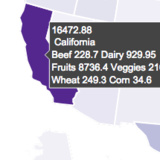
How to make choropleth maps in Python with Plotly.
basically a chart that you can hover over and get stats for different area
if dashboarding doesn't come under ui lmk
dusty scarab
I suspect this is handled by some sort of SVG path technique (ala InkScape). Still this would require further investigation.
 primal pawn
Hello
digital rose
dusty scarab
For me, that is the output/debug console.
How would i add the output/debug to my tkinter application
dusty scarab
That's a tough one. More than likely a Label or Entry field. There really is no clean answer to this.
digital rose
I just want to be able to put in my inputs on my application
dusty scarab
Text and related inputs would be either be Text or Entry fields.
digital rose
how would I create those
dusty scarab
This should give you some ideas:
https://www.youtube.com/watch?v=JB7ZwypM9hk
digital rose
Thanks. Is it possible you can give me a direct answer or the code needed?
dusty scarab
I like Codemy.com's videos because they do give you the code as well as how to use that code.
digital rose
Okay
digital rose
ok so i dont know jack about tkinter
i want to remove a tkinter functionallity from a program but i dont what what means what
here is my "gui" code ( i got this from github, im tryna make it terminal based only)
proven basinBOT
Hey @digital rose!
It looks like you tried to attach a Python file - please use a code-pasting service such as https://paste.pythondiscord.com
digital rose
geez ill post the codde
proven basinBOT
Hey @digital rose!
Uh-oh! It looks like your message got zapped by our spam filter. We currently don't allow .txt attachments, so here are some tips to help you travel safely:
• If you attempted to send a message longer than 2000 characters, try shortening your message to fit within the character limit or use a pasting service (see below)
• If you tried to show someone your code, you can use codeblocks
(run !code-blocks in #bot-commands for more information) or use a pasting service like:
digital rose
...
proven basinBOT
Hey @digital rose!
Uh-oh! It looks like your message got zapped by our spam filter. We currently don't allow .txt attachments, so here are some tips to help you travel safely:
• If you attempted to send a message longer than 2000 characters, try shortening your message to fit within the character limit or use a pasting service (see below)
• If you tried to show someone your code, you can use codeblocks
(run !code-blocks in #bot-commands for more information) or use a pasting service like:
dusty scarab
Most Tkinter apps have a root window defined via root = Tk() and related imports on tkinter.
dusty scarab
When you remove 1 item, you start getting a domino effect of errors telling what other code depends on it. You can use this to your advantage.
digital rose
how?!!?
dusty scarab
If you remove the imports, you will find what lines depend on those tkinter imports. Thus telling more likely what code needs to be removed when it is ran via the errors.
digital rose
mk, ill try that then
dusty scarab
Make a backup first!
dusty scarab
Yes, that inserts text at a specified position with in the Chatlog widget.
digital rose
2021-02-10 20:04:49.789861: W tensorflow/stream_executor/platform/default/dso_loader.cc:60] Could not load dynamic library 'cudart64_110.dll'; dlerror: cudart64_110.dll not found
2021-02-10 20:04:49.794261: I tensorflow/stream_executor/cuda/cudart_stub.cc:29] Ignore above cudart dlerror if you do not have a GPU set up on your machine.
2021-02-10 20:04:54.463777: I tensorflow/compiler/jit/xla_cpu_device.cc:41] Not creating XLA devices, tf_xla_enable_xla_devices not set
2021-02-10 20:04:54.468760: W tensorflow/stream_executor/platform/default/dso_loader.cc:60] Could not load dynamic library 'nvcuda.dll'; dlerror: nvcuda.dll not found
2021-02-10 20:04:54.472067: W tensorflow/stream_executor/cuda/cuda_driver.cc:326] failed call to cuInit: UNKNOWN ERROR (303)
2021-02-10 20:04:54.482718: I tensorflow/stream_executor/cuda/cuda_diagnostics.cc:169] retrieving CUDA diagnostic information for host: dellinspiron3593
2021-02-10 20:04:54.487618: I tensorflow/stream_executor/cuda/cuda_diagnostics.cc:176] hostname: dellinspiron3593
2021-02-10 20:04:54.490138: I tensorflow/core/platform/cpu_feature_guard.cc:142] This TensorFlow binary is optimized with oneAPI Deep Neural Network Library (oneDNN) to use the following CPU instructions in performance-critical operations:  AVX2
To enable them in other operations, rebuild TensorFlow with the appropriate compiler flags.
2021-02-10 20:04:54.496967: I tensorflow/compiler/jit/xla_gpu_device.cc:99] Not creating XLA devices, tf_xla_enable_xla_devices not set
big error
why is it asking for a host?!?!?
dusty scarab
cuda stuff makes me believe something related to an nVidia video card.
proven basinBOT
Hey @digital rose!
Uh-oh! It looks like your message got zapped by our spam filter. We currently don't allow .txt attachments, so here are some tips to help you travel safely:
• If you attempted to send a message longer than 2000 characters, try shortening your message to fit within the character limit or use a pasting service (see below)
• If you tried to show someone your code, you can use codeblocks
(run !code-blocks in #bot-commands for more information) or use a pasting service like:
digital rose
...
dusty scarab
Use the pastebin link
digital rose
ok ill just create a pastebin
Pastebin
Pastebin.com is the number one paste tool since 2002. Pastebin is a website where you can store text online for a set period of time.
can u access it?
dusty scarab
Around line 67-68 is where the tkinter stuff appears to start.
digital rose
dusty scarab
Around line 67-68 is where the tkinter stuff appears to start.
hmmm
i tried that and i ended up with error
dusty scarab
Line 72 is an EntryBox which is a type of input field.
digital rose
im giessing i need that
dusty scarab
You may have to rewrite that in a different form.
digital rose
dusty scarab
You may have to rewrite that in a different form.
o
dusty scarab
Looks like 'base' is the root window and ChatLog is a Text widget, similar to an EntryBox but generally more like a HTML textarea.
Scrollbar is so that you can scroll around the ChatLog
digital rose
so what does END do
dusty scarab
END is the end of the input contained either in an EntryBox or Text widget.
The entire contents of Text() is represented as 1.0 to END
digital rose
dusty scarab
END is the end of the input contained either in an EntryBox or Text widget.
ig ill remove that then. Oh shoot i also have to remove everything before that bc i have to type inputes right?
digital rose
dusty scarab
The entire contents of Text() is represented as 1.0 to END
I rlly shouldve learned tkinter
dusty scarab
It isn't too late: https://www.youtube.com/c/Codemycom/videos
dusty scarab
I learned it in a couple of days. Got a good app going too: https://github.com/ayourk/HostsManager/blob/main/hostsman.py
I don't work on Discord Chatbots.
digital rose
hmm, ok ill use that. THX!
dusty scarab
Essentially, I've made an overblown complete Text Editor in tkinter. I'm only missing a few components to make it complete. I still want to make the cursor coordinates in the Text widget update in the Status bar and I want to be able to tell when the Text widget's text changes.
digital rose
digital rose
ok so i dont know jack about tkinter
who call Tkinter. I'm here
 stark raft
Can anyone suggest a quick course on PySimpleGUI? (course or article, youtube video, ...)
I'm pretty new to python and i have some simple programs which i'd like to implement with a GUI
digital rose
@stark raft There ain't any good Pysimplegui tutorial so, I prefer you to use the documentation, but if it's hard then learn Tkinter because make your life easier especially when you're new to it python.
 loud radish
You can use Tkinter with https://repl.it too!

repl.it
Repl.it is a simple yet powerful online IDE, Editor, Compiler, Interpreter, and REPL. Code, compile, run, and host in 50+ programming languages: Clojure, Haskell, Kotlin, QBasic, Forth, LOLCODE, BrainF, Emoticon, Bloop, Unlambda, JavaScript, CoffeeScript, Scheme, APL, Lua, Python 2.7, Ruby, Roy, Python, Node.js, Deno (beta), Go, C++, C, C#, F#, ...
digital rose

 feral mesa
Is there a collaborative browswer that i can invite someone without logins and do realtime editing. Would be cool for me and my classmates to easily share ideas instead of having to paste codeblocks in discord
stark raft
digital rose
<@!693045881884114964> There ain't any good Pysimplegui tutorial so, I prefer yo...
Thanks🙏🏼🙏🏼🙏🏼
stark raft
unique forge
learn pyqt5 <@!693045881884114964>
I’ll try lol, thank you!
 unique forge
have you not used tkinter before
its so frustrating
you have to code for so long
and it never turns out good
digital rose
yes but not very much as Pyqt does
look at this this made in half hour
@unique forge
digital rose
what I mean the beginner
I'm do this in 2 minutes
but the beginner half hour of search and google and like that
digital rose
yeah you mean the circle buttons ummmmm yeah tkinter can't do circle buttons
but it can make very nice layout with squares
unique forge
circle buttons took me 20 seconds
unique forge
ok
digital rose
Ttk is the cool one
It can make a very complat(you complete this word it is hard) with os
 tender roost
Did u guys make that with python and style everything with python? or was that made with the software that comes with it?
@unique forge @digital rose
digital rose
that makes just in python codes
digital rose
hmmmm I'm code
digital rose
yes
 vagrant shard
hello i made a gui for my code and i added a login gui and a register one and pasted the code 2 times below them. They work just fine the thing is that i have a checkbox that when it is ticked the value from 0 should change to 1 but it always stays 0. I believe i have tried everything and im not sure what to do next here are some screenshots
btw i copy and pasted a section of the code that takes you to the main gui and the values change just fine
do you have any idea what whould be the the cause?
digital rose
This strange but to fix it just call .get() function @vagrant shard
check_box.get()
Hi guys. What job or path for studying GUI programming will I take if I focus on it?
like for example - web development is for web developer. How about GUI?
eager beacon
You need to know C++ for general GUI work as there aren't many companies out there using Python for desktop GUI software.
Another option would be to learn tools like Maya, Nuke, Houdini, etc and go work in a production studio as a Pipeline TD creating plugin tools with PySide2/PyQt for the artists.
Even at the studios, they prefer that you're able to write/understand C++ since that is what a lot of their internal tools use that you may have to interface with in your GUI.
 mortal steeple
digital rose
What is the format for variables with tkinter and python
mortal steeple
digital rose
What is the format for variables with tkinter and python
StringVar()
IntVar()
BoolVar()
dusty scarab
Not sure which variables you are referring to.
I'm using Tkinter on Linux. I want to make some custom dialogs. I'm having a tough time making some dialogs that don't have a minimize and maximize button but still show the close button. Is there an easy way to do this? Currently, I'm using Toplevel(). Is there a different widget I should be looking at instead? I don't mind if the window is resizeable, I just don't want it to be able to min/max (iconize/take up whole screen)
digital rose
mortal steeple
StringVar()
IntVar()
BoolVar()
so i need to use all 3
 fast fog
So I'm trying to iterate through all selected items of a table and pull the value of column 0 into a list. Can anyone suggest how to add to this current code to facilitate this?
        for i in range(0, len(call.submitpayroll_table.selectionModel().selectedRows())):
            print(call.submitpayroll_table.item(i, 0).text())
I'm using pyqt5 and the designer (so call. is anything on the gui). Thanks and any help is appreciated.
humble parrot
@eager beacon thank you for explaining!! Going to learn those that being mention. 
mighty rock
Eel or CEFPython3?
 rare quiver
I heard that I shouldn't use Tkinter as a gui, as no one uses in professionally and should instead learn other interfact libraries
is this true?
digital rose
rare quiver
is this true?
I have heard that too. Tkinter just seems more simple.
rare quiver
ah thanks
modern marsh
@digital rose ^
rare quiver
is there a consensus on what interface is the best, for context, I plan on displaying probability curves in the gui
I would ideally like to learn and get good in 1 library
digital rose
@eager beacon @modern marsh
eager beacon
PyQt5
sorry, If you're making a bot for ebay we can't help with that.
I should have said PySide2 or PyQt5, in that order.
digital rose
Why cant you help :(
rare quiver
thanks
eager beacon
Though no matter which you pick the code will come out 99% as the other would have if you had used it. The reason I would use PySide2 over PyQt5 is that PySide2 is maintained by the Qt company
modern marsh
digital rose
Why cant you help :(
probably against ebay TOS
eager beacon
It most certainly is against the TOS
eager beacon
But it is, so we can't
digital rose
Can you help me with text boxes and inputs as a whole?
eager beacon
No, I don't use Tk
digital rose
RIP
 hollow escarp
digital rose
hollow escarp
digital rose
i never even thought of giving so much effort in functions 🙏
can i download the code?
that would be very helpful
hollow escarp
yeah sure
digital rose
thanks!
hollow escarp
i have written the use of each function
digital rose
i saw that
hollow escarp
digital rose
thanks!
you are being honest right ?
digital rose
amazing
digital rose
hollow escarp
you are being honest right ?
yes
hollow escarp
digital rose
<@!560091527481917452>
it makes like many spaces at a time
hollow escarp
digital rose
it will save my life im sure
omg are u sure
hollow escarp
i still have some improvements to make tho.
did u notice that
you can't enter
Y
digital rose
ah
digital rose
you can do if response.lower() == n and...
hollow escarp
digital rose
i dont see any space
\t ?
hollow escarp
digital rose
you can do `if response.lower() == n and...`
as i said i am a beginner
hollow escarp
i have studied data handling and iterating and list manipulation only
strange hornet
 latent compass
Tkinter how can i change window icon ?
latent compass
Tkinter how can i change window icon ?
GeeksforGeeks
A Computer Science portal for geeks. It contains well written, well thought and well explained computer science and programming articles, quizzes and practice/competitive programming/company interview Questions.
latent compass
alr
strange hornet
rare quiver
I heard that I shouldn't use Tkinter as a gui, as no one uses in professionally ...
yea u shouldnt use tkinter instead learn pyqt5
humble parrot
Hi I'm new in GUI programming and know some few basic concept of tkinter. Should I stop and go to pyqt?
or PySimpleGUI?
strange hornet
yes u should ,all people on reddit advice me to use pyqt5 as it is the standard gui library for python. its much nicer than tkinter. it is harder to learn but worth the time
humble parrot
I see. BTW I am using sublime text as my IDE for learning. Am I able it to use in learning pyqt5?
or should I use some other else?
strange hornet
in line 16 why self is passed to QstatueBar ?
strange hornet
humble parrot
I see. BTW I am using sublime text as my IDE for learning. Am I able it to use i...
yes u can Tim on youtube used it in his tutorials but for me i prefer pycharm just bcz of autocomplete
humble parrot
Ooooh, got it! thanks for the response bro.
 opal girder
latent compass
Tkinter how can i change window icon ?
opal girder
latent compass
Tkinter how can i change window icon ?
root.iconbitmap('icon location')
the img extension has to be .ico
latent compass
oh fixed already xd 😄
opal girder
xd
 subtle slate
humble parrot
subtle slate
humble parrot
Why need to pass line argument when you create an app?
"The QApplication object also deals with common command line arguments, so you also need to pass in sys.argv as an argument when you create app"
app = QApplication(sys.argv)
How would i know if the application doesn't need to accept line arguments?
" If your application is not going to accept command line arguments, then you can use an empty list"
app = QApplication([])
site: https://realpython.com/python-pyqt-gui-calculator/#system-wide-installation-with-pip
- newbie
strange hornet
humble parrot
Why need to pass line argument when you create an app?
"The QApplication object...
so u can use ur app from the cmd or the shell . u can pass empty array if u dont want to
humble parrot
ooh...what does it mean by "can use use app from the cmd"?
digital rose
How do I run inputs with tkinter and text boxes?
humble parrot
i think by using .entry() and .get()
humble parrot
Yea but me newbie so not sure if I can help 
vital coral
I made a UI in the terminal
is there a way to lock the width and height of the window?
strange hornet
humble parrot
ooh...what does it mean by "can use use app from the cmd"?
u can run it from the command prompt or windows shell
 soft osprey
Hi guys I am trying to understand tkinter ui and how the positioning works.
frame1 = tk.Frame(master=window, width=100, bg="red")
frame1.pack(fill=tk.Y)
I expect the frame to be centered and occupy the whole height of the window but that does not happen.
For some reason the height is very small.
Why is that happening?
Thank you,
Nic
if i change side=tk.LEFT, then it outputs as wanted
ruby pawn
PySide2 question: Anyway to switch central widget without python deleting the old central widget?
eager beacon
save a reference to it somewhere like a list?
It sounds like you might be able to use a StackedWidget, have you considered that? @ruby pawn
ruby pawn
I am actually trying out the stacked widget atm
My only issue with using stacked widget is I'd like the window to have size policy based on the current widget
Which is what I'm trying to figure out atm
But the only examples of this I have found is in C++ and I suck at translating C++ to Python (PySide2)
eager beacon
So you want the windows to have the ability to change sizes when the central widget changes?
or only the size policy?
ruby pawn
When I used the central widget, the minimum height and width would correspond to the widget displayed in the window.
When using stacked widgets, the minimum height and width corresponds to the tallest and widest widget in the stack.
I'd like stacked widgets to function like switching central widgets.
(My problem is switching central widgets back and forth has a habit of crashing Autodesk Maya)
eager beacon
you could just call main_window.resize(w,h) when you switch the index
ruby pawn
I could give it a shot
Well, seems like it pretty much ignores main_window.resize(w, h)
But to clarify, it doesn't need to resize when I switch. I just don't want a lot of empty space vertically when Using the smaller widget
These are the two widgets I'm switching between
And I just want to be able to resize my window down to hide this
eager beacon
if you have a minimum size set you wont be able to resize any smaller than that size until you change it
ruby pawn
It is a little time since I've been working with Pyside last. Do QWidgets have a minimum and maximum height and width?
So it isn't size policy I'd have to deal with?
eager beacon
they do, but if you haven't changed them it shouldn't have any effect
ruby pawn
But I should be able to force the minimum height of the stacked widget, with the minimum height of the widget inside the stacked widget. If I'm understanding correctly
eager beacon
a size policy of maximum or fixed is probably what you're looking for, though if you use the fixed policy you need to update that when you change widgets I believe
I think the issue is the stacked widget has a policy of preferred and it keeps that extra space at the bottom because the original widget still exists
so you may need to call resize on the stacked instead of main
ruby pawn
Okay, I'll give it a shot
I connected this up to the stacked widget switching widget signal
But no luck
eager beacon
the minimum height has probably been set to the height of stacked widget
use some random numbers to see if it works
eager beacon
what happens if you comment the policy line above out?
its helpful to set a background color that stands out against the grey so you can see if its being resized and the main window is not
ruby pawn
The window size doesn't change. It doesn't affect the smaller widget, but the larger widget gets smushed.
eager beacon
so the stacked widget changes size but the mainwindow stays
eager beacon
odd, that function is called when you switch to either widget?
eager beacon
I can test when I get back, but you could try setMaximumSize(QSize(w,h))
if that works, you can try using the current widget.sizeHint().width()/height() for the w,h
ruby pawn
Okay I'll give that a shot in a moment
While I do have, do you have any idea why launching the code a second time will crash Maya?
eager beacon
alright - I'll check back when I get home.
ruby pawn
Ah alright
eager beacon
No, I really don't. I've really only messed with creating shelf stuff in Maya
ruby pawn
Alright thanks
ruby pawn
Well, crash issue seems to be solved. Apparently it was using the same spacer multiple times, making a mess with the communication between Python and C++
eager beacon
What are you using a spacer for?
ruby pawn
Anyway, creating 4 separate spacers with same dimensions solved the issue
Which also means, it solved my issue switching the central widget. Which means I don't have an issue with stacked widgets.
eager beacon
Oh, well thats good to hear.
ruby pawn
Yep, but thanks for the help again Chris
eager beacon
any time
dusty scarab
In tkinter, is there a way for a command= function to figure out the widget that called it (not using class based python)?
drifting yoke
hi
from PyQt5 import QtCore, QtGui, QtWidgets


class Ui_MainWindow(object):
    def setupUi(self, MainWindow):
        MainWindow.setObjectName("MainWindow")
        MainWindow.setFixedSize(412, 500)
        MainWindow.setStyleSheet("background-color: rgb(47, 47, 47);")
        self.centralwidget = QtWidgets.QWidget(MainWindow)
        self.centralwidget.setObjectName("centralwidget")
        self.stackedWidget = QtWidgets.QStackedWidget(self.centralwidget)
        self.stackedWidget.setGeometry(QtCore.QRect(-10, 0, 431, 500))
        self.stackedWidget.setObjectName("stackedWidget")
        self.stackedWidget.setCurrentIndex(1)   <---------THIS NOT WORKING
        self.page = QtWidgets.QWidget()
        self.page.setObjectName("page")
        self.title = QtWidgets.QLabel(self.page)
        self.title.setGeometry(QtCore.QRect(80, 60, 261, 61))
        font = QtGui.QFont()
        font.setFamily("Agency FB")
        font.setPointSize(25)
        font.setBold(True)
        font.setWeight(75)
        self.title.setFont(font)
        self.title.setStyleSheet("QLabel{\n"
"    border-radius: 30px;\n"
"    background-color: qlineargradient(spread:pad, x1:0, y1:0, x2:1, y2:1, stop:0 rgba(14, 0, 255, 255), stop:1 rgba(111, 0, 255, 255));\n"
"     color: white;\n"
"}")
I don't think you will need any more script
but there is no error
so why?
 amber roost
dusty scarab
In tkinter, is there a way for a command= function to figure out the widget that...
amber roost
dusty scarab
In tkinter, is there a way for a command= function to figure out the widget that...
I don't really know what you mean by not using class based python, but functions bound using bind will have a single event parameter passed in which has a .widget attribute, which identifies the source widget.
If you mean command= as in the callback for buttons, you would need to create a lambda like
def callback(w):
    print(f"I was called from widget {w}")

bt = tk.Button(master, text="Click me!")
bt.configure(command=lambda: callback(bt._w))
bt.pack()
(Where _w is the autogenerated path name of the button that can identify it)
 leaden tiger
hello!
i have a question regarding gui, grid and tkinter:
my surface uses only buttons in a grid ... if i use grid_forget() method ... the grid is going to collapse/minimize.
is it possible to disable this auto function?
 normal jetty
which is better from the two: Kivy or Tkinter?
modern marsh
normal jetty
which is better from the two: Kivy or Tkinter?
Kivy
normal jetty
when i install my kivy app on my iPhone it crashes and give this error in the output ModuleNotFoundError: No module named 'playsound'
modern marsh
normal jetty
when i install my kivy app on my iPhone it crashes and give this error in the ou...
pip install playsound then
ok, wait idk how kivy apps are made
as in the apk or ios extension files
so, perhaps check if the module is available in the apk file
normal jetty
There’s no apks for iPhone
normal jetty
It should be there because when I run the app on my computer it runs fine
One second let me check
 quaint wyvern
hey im using tkinter and im trying to call an attribute from another class yet it returns nothing, however when i call it from another class it works can someone explain this to me?
vital coral
CLI
vital coral
when you made 'Hello, World!' and you ran the program you saw a window that is not pleasing to the eye and displays text only, right? if answer == 'Yes': so to fix that you will make your program easy to use and pleasing to the eye with a window that displays the text and images in a nice way that any average human can intract with so this the user interface in theory if we kept only the necessary code that runs Google Chrome and deleted the other codes that are related to the ui chrome will run in the command prompt and will be only text
 tribal path
@mighty plaza could use say: https://build-system.fman.io/qt-designer-download if that's the intention.

Install Qt Designer on Windows or Mac. Only 40MB!
 mighty plaza
sure
digital rose
I need the best of the best to partner with. Must be pretty good at making terminal GUI Changes hmu for partnership
 spark furnace
can someone help with pyqt5
unique forge
@spark furnace sure, ask
spark furnace
unique forge
<@!688503516947284038> sure, ask
I aksed in #help-donut and got the help there, thanks anyways!
sinful orbit
Hello, I just started using tkinter but was only able to execute a simple calculator for testing. Is there a way to make this look fancier, is it graphics programming or something? I want to make it look nice
digital rose
@sinful orbit you could add a wallpaper to the window
sinful orbit
Wonderful, thank you
dusty scarab
surreal whale
<@!135474346029219841> finally got it. Forced a refresh on the tksheet.Sheet wid...
Reference: https://tkdocs.com/shipman/universal.html
Not sure if this related to your issue, but w.update_idletasks() should be called if messing with geometries.
 past locust
@sinful orbit if you want to make the UI look prettier, might wanna try themed widgets by tkinter. Check this out: https://www.pythontutorial.net/tkinter/tkinter-ttk/
In this tutorial, you'll learn about the themed widgets by using the Tkinter.ttk module.
pliant dagger
 rotund solar
Hey guys, made my first tkinter gui using a good looking theme
rotund solar
Hey guys, made my first tkinter gui using a good looking theme
The interface looks really good!
quaint wyvern
is it worth coding tk in oop?
digital rose
@quaint wyvern I mean, it would make the code look cooler.
surreal whale
dusty scarab
Reference: https://tkdocs.com/shipman/universal.html
Not sure if this related to...
Hey thanks for the tip. I had tried that and it still didn't work surprisingly enough. It had something weird to do with the independent threads of the ttk widgets or something along those lines.
dusty scarab
Ah, so something like thread.join() being needed somewhere.
 copper tangle
Hi, I have a question
dusty scarab
Sounds like other issues are happening 😏
 shrewd cradle
np, it just catches the filter if you send lots of images at once
copper tangle
ok I will send part by part
proven basinBOT
Pasting large amounts of code
If your code is too long to fit in a codeblock in discord, you can paste your code here:
https://paste.pydis.com/
After pasting your code, save it by clicking the floppy disk icon in the top right, or by typing ctrl + S. After doing that, the URL should change. Copy the URL and post it here so others can see it.
copper tangle
ok thanks
here I defined 2 entries with tkinter.
and here I also wrote a function to add these entries to the listbox and database.
I tested it with print to check if it was written, but neither get() nor get() you return the values PY_VAR0 and PY_VAR1.
dusty scarab
using a command= may be of use to copy that data to where you need it to go.
dusty scarab
Yeah, using a callback entry with something like a button or something like [SEND]
copper tangle
wait a minute I will send my codes in here
dusty scarab
!paste
proven basinBOT
Pasting large amounts of code
If your code is too long to fit in a codeblock in discord, you can paste your code here:
https://paste.pydis.com/
After pasting your code, save it by clicking the floppy disk icon in the top right, or by typing ctrl + S. After doing that, the URL should change. Copy the URL and post it here so others can see it.
copper tangle
in line 41 to 47 I have a problem
When I enter data in these entries in my application, it returns the values PY_VAR0 and PY_VAR1, as I noted above.
That's what the listbox looks like.
dusty scarab
Currently at work so it may take me a bit.
copper tangle
I looked my database and I think I have not any problem.
copper tangle
dusty scarab
Currently at work so it may take me a bit.
Ok, np thank for your helping
Anyone else help me?
dusty scarab
FYI: I use VSCode and Jupyter to debug my apps. It may help you in the future.

This video discusses the best python features in VSCode. VSCode is one of the most popular code editors and comes with a ton of support for the python programming language. The VSCode python extension supports, debugging, linting, code completions and many other awesome features for python developers and data scientists.
📚 Python Extension: htt...
copper tangle
dusty scarab
FYI: I use VSCode and Jupyter to debug my apps. It may help you in the future.
I use VSCode too thanks for your advice.
 hazy cosmos
tkinter guide someone?
dusty scarab
Sure. I'll get you one: https://www.youtube.com/c/Codemycom/videos
I was able to develop this from the info in his videos:
https://github.com/ayourk/HostsManager/blob/main/hostsman.py
hazy cosmos
thanks
from tkinter import *
def main_screen():
 screen = Tk()
 screen.geometry("300x250")
 screen.title('Notes 1.0')
 Label(text = 'Notes 1.0', bg = 'gray', font = ('calibri', 13)).pack()
 Label(text = '').pack()
 Button(text = 'Login').pack()
 Label(text = '').pack()
 Button(text = 'Register')()
 screen.mainloop()

main_screen()
why am i getting error
modern marsh
What error
hazy cosmos
modern marsh
You can't call the object
hazy cosmos
but why
modern marsh
You may want to use a geometry manager on it
modern marsh
hazy cosmos
but why
Why would you want to call it in the first place
hazy cosmos
to be honest im copying some guy code in order to learn what every line of code does
and i copied exactly and his does like this:
hazy cosmos
yeah i do
i have another question
like when finishing code for something idk can i make it exe or apk ?
so it can run normally like app
modern marsh
exe yes
dusty scarab
PyInstaller
modern marsh
I have used pyinstaller but I don't think that's recommended for gui's
hazy cosmos
thank you guys
modern marsh
Ye np
dusty scarab
I used pyinstaller with good success: https://www.youtube.com/watch?v=UZX5kH72Yx4

Convert a .py to .exe in windows. Converting python files to executable's is fairly simple and we do this using pyinstaller. This method will work for one file or for multiple files that require dependencies such as images or other modules.
Python Location: C:\Users[user]\AppData\Local\Programs\Python
[user] should be replaced with your curre...
modern marsh
Yes it is easy to use etc
dusty scarab
Gotta know the switches to use too.
modern marsh
I, personally don't like techwithtim vids especially the pyqt one :D
dusty scarab
I don't use Qt so I don't worry about that. There are plenty of python channels out there. Jack of Some has a good vid to avoid some common python mistakes
modern marsh
Consider learning qt, it's great
dusty scarab
If Qt has an easy way to manipulate it's Text() type edit buffer, I'm in.
 solemn rock
Hey! Can some one help with smth ?
I am working a proyect and trying to use multiple windows with Tkinter
But when I create a new window, it runs automatically the function on the command = funct of the button
Does some one knows why does this happen ?
  mergeWindow = Toplevel(root)
  mergeWindow.geometry("350x350")
  mergeWindow.resizable(False, False)
  mergeWindow.config(bd = 30, relief = FLAT, background = "#CACECF")
  mergeWindow.title('Combinar archivos')

  definicion = Frame(mergeWindow)
  definicion.pack(padx = 0, pady = 0)
  Label(definicion, text = "Combinar dos archivos PDF\nen un archivo resultante",
        bg="#CACECF", font = ("Helvetica", 12)).pack()

  Label(mergeWindow, text = "", bg = "#CACECF").pack()

  archivo1 = Label(mergeWindow, text = "Archivo 1: ",  bg="#CACECF", font = ("Helvetica", 12))
  archivo1.pack()

  fileEntry1 = Entry(mergeWindow, font = ("Helvetica", 16), width = 20)
  fileEntry1.pack()

  #btn1 = Button(mergeWindow, text = "Seleccionar", command = lambda: mergeWindow.destroy())
  btn1 = Button(mergeWindow, text = "Seleccionar", relief = RAISED, bg = "#000000",
       fg = "#FAFAFA", font = ("Helvetica", 9), activebackground = "#11B0D8", command = openFiles(1))
  btn1.pack()


def openFiles(flag):
  if flag == 1:
    file1 = askopenfilename(defaultextension = ".pdf", filetypes = [("Archivos PDF", ".pdf")])
    if file1 == "":
      file1 = None
    else:
      fileEntry1.delete(0, END)
      fileEntry1.config(fg = "#000000")
      fileEntry1.insert(0, file1)
  elif flag == 2:
file2 = askopenfilename(defaultextension = ".pdf", filetypes = [("Archivos PDF", ".pdf")]) ```You have two "else" for the same "if" statement. (line 53 and 55)
You can't use multiple "else", you can add "elif" only multiple times
if ...
elif ...
elif ...
...
else...
digital rose
hazy cosmos
Probably you want to add more indentation to your code from line 51 to line 54
        file1 = open(username1, 'r')
        verify = file1.read().splitlines()
        if password1 in verify:
            print('Login sucess !')
        else:
            print('Password has not been recognised !')
    else:
print('User not found !')```Yeah, you call a function, this is not the right way...
digital rose
solemn rock
Hey! Can some one help with smth ?
I am working a proyect and trying to use mul...
You should assign (without call) a method for the command parameter
Option1: Probably you can use lambda:
btn1 = Button(mergeWindow, text = "Seleccionar", relief = RAISED, bg = "#000000", fg = "#FAFAFA", font = ("Helvetica", 9), activebackground = "#11B0D8", command = lambda: openFiles(1))
Option2: create an "event handler"
openFiles(1)```and assign to the command parameter:
btn1 = Button(mergeWindow, text = "Seleccionar", relief = RAISED, bg = "#000000", fg = "#FAFAFA", font = ("Helvetica", 9), activebackground = "#11B0D8", command = btn1_click)
 coarse zodiac
solemn rock
coarse zodiac
solemn rock
Thanks a lot @digital rose
I appreciate it! 😁
 cedar wagon
Hello! I have made an deep learning OCR model in Pycharm. Is it possible to create UI for it in Pycharm? Or I need to change IDE?
please @ me back so I can see it thank you!
 dusk oriole
im trying to make my code so when i click play it loads a python window
from tkinter import *

root = Tk()

e = Entry(root, width=50)
e.pack()


def myClick():
    myLabel = Label(root, text=e.get())
    myLabel.pack()

userButton = Button(root, text="Enter a username.", command=myClick)
userButton.pack()

myLabel = Label(root, text ="Welcome to Craft World!")
myLabel.pack()

myButton = Button(root, text="Play!", pady=50)
myButton.pack()

root.mainloop()```ello?
@thick void helper help
?
 thick void
please don't ping random staff members
dusk oriole
ok
thick void
:)
dusk oriole
me not delete it gost ping
from tkinter import *

root = Tk()

e = Entry(root, width=50)
e.pack()


def myClick():
    myLabel = Label(root, text=e.get())
    myLabel.pack()

userButton = Button(root, text="Enter a username.", command=myClick)
userButton.pack()

myLabel = Label(root, text ="Welcome to Craft World!")
myLabel.pack()

myButton = Button(root, text="Play!", pady=50)
myButton.pack()

root.mainloop()```